#blueprint
402296 messages · Page 551 of 403
 dense mica
 maiden wadi
@dense mica Which attach? Actor to Actor?
 rough wing
Is there a way I can set default pawn value to self in my function?
 wanton bobcat
Hi guys,
I have a problem with calling an event with a widget.
I do have the following situation:
First, with entering the M key I open a widget menu.
Works just fine. No problem here.
Second, in the widget blueprint everything is connected correctly and beside one function, it works. The problem here is, I want to play an animation in another blueprint. So I created a dispatcher. Also works fine.
Third, in the Blueprint with the skeletal mesh and the animation, I have binded the dispatcher to a custom event, but the click on the widget button does not count as an interaction and nothing happens. It works, when I create a widget and add it to the viewport a second time ... but this isn't what I wanted :/
I think it has something to do with the current state of the game move and this thrid blueprint doesn't know that the widget is added to the viewport, but how do I fix this? Thanks for your help :)
dense mica
@maiden wadi yep, attach to actor
I know what it does but wondered the background part
maiden wadi
@dense mica So, in short, it looks like all that it really does (after a long list of conditional checks) is takes one actor's root component and attaches it to another actor's root component. So if you attach Actor2 to Actor1, then when Actor1 moves, it moves it's own root component. But since Actor2's root component is now attached to Actor1's root component, Actor2's root component gets it's movement updated whenever Actor1 moves.
dense mica
So it basically just updates transform each tick
maiden wadi
I haven't looked into movement update, but the way I understand it, when one component is moved, it also checks if any components are attached to it and moves them as well in some way or another.
dense mica
Understood, Thanks 🙂
 blazing wasp
I'm trying to use a Timeline + Spline for a movement ability in my game... it works, sort of, but the character gets stuck at the end of the spline and rubber bands back to the spot for a few seconds after the timeline finishes... Anyone have any immediate ideas about what could be happening?
 trim matrix
i have a third person character and i can move my camera up down left right but how do i set up that my character doesnt fly up when i move camera up? (Basically make my camera move up down not moving my character with it)
oh btw im using blueprints
maiden wadi
@tridvajedan Usually people just do something simple like rotate a spring arm component with a camera component attached to the spring arm. The spring arm keeps the camera from going through most walls and doesn't affect the character at all.
 primal smelt
Just curious, if I started a project with starter content enabled but never used any of the meshes or audio etc - when it came to finishing the project and packaging it as a distributable, would Unreal include in that package all the assets that come with the starter content but went unused?
wanton bobcat
@primal smelt - no. as far as i know, unreal colletcs just referenced assets.
when these assets are not in the final level, they dont need to be included.
primal smelt
@primal smelt - no. as far as i know, unreal colletcs just referenced assets.
when these assets are not in the final level, they dont need to be included.
@wanton bobcat Good to know, thanks!
trim matrix
@maiden wadi can i hop in a call with you so i can screenshare my problem? btw my mic is dead so 🤷
 mental tendon
hello everyone
just wondering if you know how to find a BP by its id.
It keeps giving me erros on build.
I caught it with the debugger.
Please see the attached error message txt.
Please see my post here:
https://gamedev.stackexchange.com/questions/186531/how-to-find-a-culprit-bp-from-vs-debugger-information-causing-build-error-messag

Game Development Stack Exchange
I am trying to build out my project, but I keep running into these... :(
Can't figure out how to find the guilty BP node...
UPDATE:
Managed to catch the error in VS debugger, because the error was ...
 ocean cradle
hello, can someone help me with something which is pretty simple?
trim matrix
@ocean cradle what do you need
trim matrix
like the right pin thing?
ocean cradle
yeah
ocean cradle
its a reference thing idk
maiden wadi
@ocean cradle It's an equals node. Most data types have them. Just drag off of the pin and type ==
ocean cradle
@maiden wadi Ah! Thank you so much!
 gritty elm
using rama victory plugin to play .wav file from disk, but it return null
is this correct path
@maiden wadi please help
mental tendon
did you try using reference instead of a path?
right click your asset
and choose copy ref and paste that
gritty elm
@mental tendon this is function that load sound from disk, so i don't need to import .wav file
gritty elm
i'm creating .wav file from other sournce and i want to play at runtime
mental tendon
this is the way you do it with the load object from path
not sure if the node is intended to work with non imported stuf
but i might be wrong
load object only works on usassets
maybe convert to ogg
trim matrix
Guys i need help
In the lower right corner should be my animations ( i have animations already) , but im not seeing them... help?
 manic knot
Anything special I need to do to attach my character to a vehicle besides AttachActortoComponent or something? I take possession but my character stays where I entered lol
maiden wadi
@gritty elm Sorry, I don't have any experience with Rama's plugin, or importing stuff at runtime. Everything I use is imported into my project.
trim matrix
@maiden wadi how about my question?
maiden wadi
I'd assume that your skeleton doesn't have any related animation files, or your animblueprint isn't using the correct skeleton.
maiden wadi
Create new assets for that skeleton or use the right skeleton when you make your animbp. I think you can also retarget animbps for skeletons too without having to create a new animbp, not sure on that though.
#animation might have better advice on that.
trim matrix
oh yeah @maiden wadi
i got another problem
the one from last time
like i want to make my camera move up and down when i move my mouse up and down,but not my character. how?
maiden wadi
Aren't you using the third person template?
maiden wadi
Is that the kind of camera behavior you're after though? The one that's in that template?
trim matrix
yeah @maiden wadi
 earnest tangle
@mental tendon K2Node_TunnelBoundary and LoopBody seem like potential hints as to what's causing this
No idea what a TunnelBoundary node is though 🤔
Could be in a loop since LoopBody sounds like the pin in for each loops and such
You might be able to get more info if you launch the editor from Visual Studio in DebugGame Editor mode, you might be able to look at the full stack at time of crash to inspect more values
mental tendon
@earnest tangle will try thanks
manic knot
How to fix AttachToActor/Component not actually attaching character? I rePossess fine but my character mesh stays behind until I exit
earnest tangle
you may have to try and disable character movement component or physics or something on it
there's a bunch of weird shit that happens with this otherwise iirc
manic knot
Im doing this, like this?
heres all the ways Ive tried attaching lol
Im trying to attach the actual character so that each character and passenger can receive damage and shoot from windows etc
earnest tangle
Try deactivating the character movement component or something like that
I don't think disabling movement would do it, that would most likely just lock it in place
 sonic crescent
Hi! is that same? (different symmbol on tool title bar...)
manic knot
@manic knot Make it like this that it works
@trim matrix thats what im already trying at the top. Ive tried componenttocomponent also. Feels like im missing something
earnest tangle
it's the character movement component which does all sorts of weird stuff
try deactivating it completely, or you could even try entirely removing it just to test
worst case scenario, hide the pawn, spawn a skeletal mesh inside the car so it looks like it's in the car now
sometimes you have to cheat a little bit lol
manic knot
I dont think I want to hide the pawn, I want to attach it to a component so I can track damage to the player etc. as this is MP
Or is it better to spawn a new Driver specific character in the seat? Im particularly trying to make sure the player char can take variable damage (based on headshot or body etc), different from damage to the vehicle
 fickle remnant
Hey guys I have been trying to do vision stablization the way star citizen does. From what I could gather, they smooth the camera movement making the camera movement less jerky.
However, I am unable to understand how they keep the gun aligned to the camera while this happens especially with cases like ADS, the gun will not be aligned to the center of the screen.
manic knot
@fickle remnant seems like youd have to keep the camera Lerp or FInterp synced with the ADS
maiden wadi
Ugh. Star Citizen was so annoying with that. They're all "Yeah, we total did awesome stuff with anim capturing to make it look and feel real for the player and third person viewers but it felt nauseating so we did all this awesome stuff with IK to smooth out the movement." Basically they made bad animations and spent unnecessary extra processing power to fix it for an entire skeleton with expensive IK.
fickle remnant
but then ended up using a lot less animations right?
maiden wadi
Nah, like I said, they left them in and just used overly expensive IK to smooth them out. It's one thing to do it for a single hand to place it at the correct spot on a gun, it's entirely stupid to do it for a full skeleton just to stabilize a nauseating camera.
fickle remnant
wait foot ik would exist hand ik was there but what did they use ik on head for?
 north vector
https://media.discordapp.net/attachments/221798862938046464/768964207038955535/unknown.png?width=910&height=473 im trying to do this photo and i dont know how to go from object to float

 tight schooner
@north vector You might have to elaborate a little. What the Cast does is it checks if an actor is of a certain class. So it's basically checking if the hit actor is of class X, and if it succeeds, then it provides a reference you can use to get variables etc.
north vector
its not checking for class
its checking for the tag name ffs
i just want a object to float
google want tell
tight schooner
🤔
north vector
this image is from someone else that helped me
i havent gotten toi the float part
its casting to a blueprint not a class
its to find a tag
tight schooner
huh.
earnest tangle
you can't really "go from object to float"
north vector
to then allow a click
earnest tangle
in the picture you're showing it looks like there's a float variable inside the object which is being accessed
earnest tangle
to access a variable inside a BP then you'd just do "get variablename" when you drag from the pin
north vector
thank u
earnest tangle
but you need to create that variable inside the BP first in order for that to do anything at all
north vector
no i need multiple objects
its a clicker game
which means it will have a bunch of variable
tight schooner
🤔
north vector
its 3d and lick a cookie clicker
like-
my blueprint is instantly invalid on creaating what the fudgw nuggets
is my game done for?
 true prism
Is this a child blueprint?
 chilly lodge
Anyone know how to record in engine I mean in game like a cam rec for instance
north vector
One or more blueprints has an unresolved compiler error, are you sure you want to Play in Editor?
Cylinder_Blueprint
FirstPersonCharacter
i dont undestand
im getting compilar erros
they wont let me do anything noiw
@true prism no i grabbed a cylinder and then created a blueprint
 digital stream
Hey guys slightly new unreal user here, Im using vertex painting on certain meshes to make sure i can make it look more randomized. Since its a tile able kit for my internship. But i am trying to paint on these meshes while they are in a blueprint and even though this function was supposed to be added in 4.2 it does not work for me. I think the problem is that even though you can paint on a blueprint with vertex paint texture you cant paint on it if it has other meshes with other materials in the same blueprint. is there someone who can give me an answer on this ?. I dont know if this is the right channel but its a blueprint related issue so i guess so
north vector
(and this where i take a break till i get help cuz its fustrating me
trim matrix
Good time of day. I am putting the input mode UI Only but I need to make that widget will be opened and close by the same button. Problem is when I put UI Only , I can't us the button
sonic crescent
Hi! Is it same tool? What's the difference?
earnest tangle
The top one looks like it might be a custom macro instead of the builtin Do Once
I'm not sure why you'd have one like that though
 proud hull
@north vector No time to really help at the moment as I am getting ready for work, but just wanted to quickly clarify something for those new to unreal engine. Blueprints ARE classes, which is why every blueprint you open has buttons called "Class Settings" and "Class Defaults". So when someone says "class" they are referring to your blueprint, while "object" refers to an object that is constructed from a class (blueprint). Blueprints are simply the visual representation of C++ classes that allow for those without programming knowledge to create logic using nodes. Lots of new lingo to learn, but the sooner you learn it the easier it will be to understand the help being provided.
north vector
@proud hull oh ok yeah but I'm saying im not selecting a class when creating this blueprint
proud hull
@north vector I can actually quickly help since it seems easy enough. From that screenshot you provided, if you want to use tags, you can check to see if the actor has the tag instead of casting to a child class.
This would be a more preferred method if you want to generalize all things interactable. So world objects can have a tag such as "clickable" and then you just check the actor for that tag before calling its interaction function. This is the same thing as checking for a common component or interface.
Using an interface would be better since you can then just check for interface and then call the interface function.
One of the last screenshots I provided should show an example of how to do that with interfaces.
north vector
@proud hull sadly I can't generalize it
Then it would have conflicts
Everytime u would click a different object it would do the same thing
proud hull
How? The generalization is for the line trace to be able to work with all objects that can be clicked
Nah, that isn't how an interface works.
proud hull
An interface provides a common function (in name only) to all classes that implement it. The logic for that function can be different for all classes that use it.
north vector
When u not busy ping me ok
proud hull
I use the same interface for talking with NPCs and opening doors/chests.
Just an example.
Should be a short workday today and hopefully will be back in about 5 to 6 hours. Good luck in the meantime.
north vector
Ok
 sinful finch
Hello you all, I have an error that is driving me crazy, I searched everywhere and there is no solution, not sure if it's only happening in 4.25 version but really need help please. I have a blueprint with a lamp and a point light that I need to be static or stationary, I trigger it on or off from the level blueprint, I have duplicated this blueprint several times in my scene and got several of this errors.
PointLight_GEN_VARIABLE_PointLight_CAT_8285 'PointLight_GEN_VARIABLE_PointLight_CAT_8285' has same light GUID as 'PointLight_GEN_VARIABLE_PointLight_CAT_8209' (Duplicate and replace the orig with the new one)
maiden wadi
@trim matrix I solve that myself by gating off the character's movement inputs when the widget is opened and opening them back up when it's closed, and using SetInputModeGameAndUI
sinful finch
Hello you all, I have an error that is driving me crazy, I searched everywhere and there is no solution, not sure if it's only happening in 4.25 version but really need help please. I have a blueprint with a lamp and a point light that I need to be static or stationary, I trigger it on or off from the level blueprint, I have duplicated this blueprint several times in my scene and got several of this errors.
PointLight_GEN_VARIABLE_PointLight_CAT_8285 'PointLight_GEN_VARIABLE_PointLight_CAT_8285' has same light GUID as 'PointLight_GEN_VARIABLE_PointLight_CAT_8209' (Duplicate and replace the orig with the new one)
@sinful finch The error happens with movable lights too.
trim matrix
@maiden wadi It doesn't work. Because When we are using game and UI, during the opened whidget character will move . I need to have the bind to the key during the UI input only
maiden wadi
@trim matrix Which is why I explicitly stated that I gate off the character's movement when I do that and open it back up when the widget is closed.
If you want to handle this with the UI alone, you'll need to be absolutely certain that widget has focus and override the OnKeyDown or OnKeyUp functions, check for that key and then set input back to game before closing the widget. But it can quickly become a hassle.
sinful finch
@sinful finch The error happens with movable lights too.
@sinful finch already figured out, turn parent and childs movable in case somebody get this error.
 open crypt
How would I extract the number from this string? /Game/Maps/CurrentScenarios/Scenario2
ah, it's SplitString, just have to make sure I keep the name/folder consistent
 gusty shuttle
Question I have a 2D character. If I press left or right, it moves and stops fine. If I press left then up, it glides/slides a bit. Any ideas why only on a right up, or left up or down it does this sliding thing?
 coarse marten
Is there anything like get hit result under cursor but like.. for a widget or an image?
I'm trying to make a virtual cursor that the play has in-game that they can move around, if they hit the shoot button, it hits whatever is underneath it
I know Rama has a plug-in for a virtual cursor but I don't know if it's exactly what I need if I wanted to make it work with more than one player
So I'm a bit confused how to approach this 
manic knot
@coarse marten Like this? https://docs.unrealengine.com/en-US/BlueprintAPI/Viewport/ProjectWorldLocationtoWidgetPosi-/index.html
Project World Location to Widget Position
Ive tried everything to attach the character, every attach to actor/component method, and disabling collision, physics, etc. How do MP shooters handle this? I want the ability for the player to shoot and be shot from inside the vehicle. Seems like it should be easy to attach it right?
coarse marten
Just looked at it, not what im looking for in particular but this is a cool action i didn't know about
trim matrix
On a function how do you have more than one exit exec?
So you could for example check a lot of math on two vectors to see if it's true or false and pass it through different exec outputs
manic knot
why not just a bool output? Im not sure you can.
 pearl rose
Somehow animation blueprint doesn't work in child class but work in the parent class, someone ever face this problem?
trim matrix
It would be nice to keep the branch nodes inside the function instead of having them outside (For the sake of organization)
proud hull
@trim matrix maybe a macro instead? https://docs.unrealengine.com/en-US/Engine/Blueprints/UserGuide/Macros/index.html
Collapsed networks of nodes that can be executed, or called, from another graph.
trim matrix
Ah yes this is exactly what I'm looking for, Didnt know macros could do execs :p Thanks!
proud hull
@pearl rose what exactly is going on with your animBP?
pearl rose
A single animation, just testing for now
And it's an engine issue 🙂
So the problem:
If skeletal mesh in parent is empty->
child class will ignore skeletal mesh no matter how you set the mesh in question
So the problem come from the skeletal mesh not being constructed in the child if not set in the parent
 distant epoch

reddit
0 votes and 4 comments so far on Reddit
I kinda need help
The reddit post explains what I'm talking about
But gist is I made keys and a game instance that's set to carry over the keys from one level to another
Unfortunately keys reset
 outer lance
https://imgur.com/a/m0tDqWP ...GetParentActor GetClass GetDisplayName is blank, I have a feeling this should've worked but it doesn't seem to.
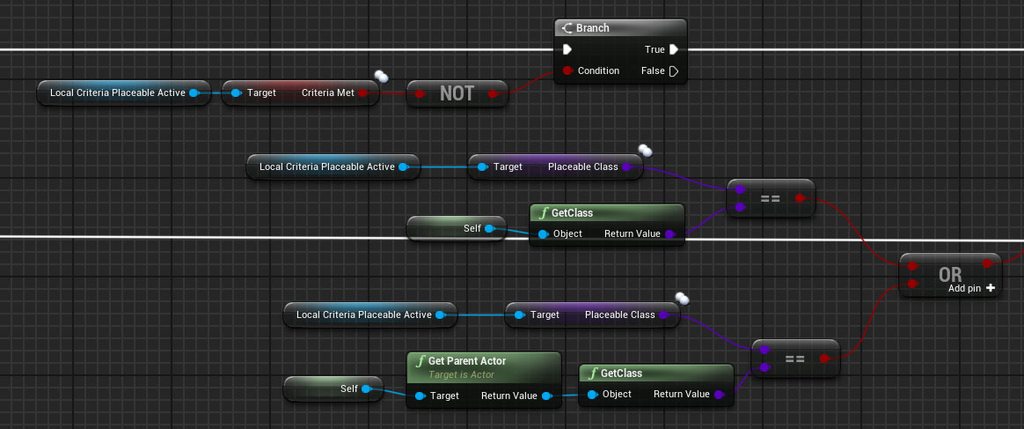
I wished there was a "GetParentClass" like in the settings you set what class you inherit from.. I haven't used "create child actor" but set it there.
I read there is a "getsuperclass" in c++ but yeah something like that..
 grim mica
hey all, im having issues getting voice chat up and running in my game. Have followed this tutorial: https://couchlearn.com/the-easy-way-to-add-voice-chat-into-your-multiplayer-unreal-engine-4-game/ to get myself a basic implementation up and running but im running into some issues. I can see in logs and through net stat that I have voice data being sent and received between my local clients however I am not actually getting any audio output from the game.
Only potential leads I have are with some Advanced Session nodes that I have tried following some reccomendations I found on that website such as 'Start Networked Voice', however all the nodes end up returning a variant of "Start Networked Voice couldn't get the voice interface".
I am also seeing some other potential issues with StartLocalVoiceProcessing() where I am getting the error: Device is currently owned by another user.
If anyone has any idea of what direction to point me in i'd be really grateful, google has shown me nothing the past few days
also pls @ me if you reply otherwise I may miss it since I am in a lot of servers lol
 orchid zinc
If I build an array from pure funcs, are they executed in index order? idx 0..X?
outer lance
Fixed it with help, used ClassIsChildOf instead.
sonic crescent
@earnest tangle thx
 haughty ember
@orchid zinc They are treated as simple pins not as array index, so it's like asking if the first pin in a node is executed before the 2nd.
Anyway I think it is, but it's not guaranteed.
Hence: if it's important, don't rely on it.
orchid zinc
gotcha, thanks
 whole hollow
Can anyone guide me to why this actor isn't killing itself after a 2 second delay?
Context - random item gets dropped and this actor gets spawned, after x amount of time this should disappear from the game completely - But its not :)
 surreal peak
You spawn the health actora nd then you destroy it after 2 sec?
Also be aware that you are pulling off from the return value
That's not a safe thing to do if you have a delay between it
Save it to a variable
haughty ember
@trim matrix Limit rotation to single axis?
trim matrix
@trim matrix Limit rotation to single axis?
@haughty ember How?
haughty ember
How do you rotate the wheels?
trim matrix
How do you rotate the wheels?
@haughty ember VehicleComponent
haughty ember
Not familiar with it I'm afraid. Try to look for either properties on the component, the object, or arguments on the functions you're calling
@trim matrix This seems relevant though https://answers.unrealengine.com/questions/116449/wheeled-vehicle-wheels-freely-rotating-on-wrong-ax.html
 trail kestrel
for the projectile movement component, what is the unit of measurement for speed, is it centimeter per second?
 ruby ore
anyone have an idea why this wouldn't be populating a combo box with fullscreen resolutions?
its being called by a sequence that is being called by a construct event
haughty ember
 ruby ore
this better?
haughty ember
Nope. This is how I see the text:
Either way I'm not sure how useful that picture will be. Are you reaching the for each?
ruby ore
yeah
haughty ember
The "AddOption" is also called?
ruby ore
yes after splitting the array into a string
haughty ember
I believe you mean appending, but k.
It looks fine then, make sure you're not clearing it at some point then
 worldly gyro
why i don't see all parent node on my child?
and how too see variable on my child for edit it?
maiden wadi
@ruby ore That is a very strange function. First note is that... every single loop cycle you're setting a variable to itself? Also Every single loop cycle you're getting game user settings and using that to set the selected option of a combobox which will be the same value every time you get it since you're not modifying GameUserSettings each loop cycle, but you're getting and setting your combobox selection with it each loop cycle.
So.. The variable setting definitely needs to go, it's pointless. That last part with GetGameUserSettings->SetSelectedOption one needs to happen once, so it can go after the loop. The only thing that needs to be in that loop is where it's populating the combobox.
As for why it's not happening, put print nodes. Make sure they're running both before and during the loop. Print out that the loop started, and print out some values in the middle of the loop to see where your data is.
@trail kestrel More or less. Assuming you haven't altered any settings to do with the Unit scale only Unit should be one cm and velocity is usually calculated as units per second.
rough wing
@trim matrix rule #1 its not a bug its a feature
 quiet valley
Hellooo
back for more help haha!
Weird snapping with angular objects
So, maybe anyone figure this out.. I made a simple builder system, playing with mesh bounds and so, I'm having a little problem when trying to snap angular meshes
I want to snap on edges, for the borders and the box works well..
@everyone ideas? (:
 north herald
It looks like it is snapped, but with the same offset as before you rotated it
so probably your calculation for the snapping isn't taking the rotation into account
quiet valley
sounds logic.. I just need to figure out how to take it into account haha
north herald
Did you code the snapping system?
quiet valley
by code you mean the blueprint? yeah
north herald
Don't you have an idea of where it could pose problem then?
quiet valley
I do, in the final node of snapping I'm adding the rotation offset, so I probably need to fix the snapping based on rotation
north herald
You would want to start looking at the functions/events you're using to determine the snapping position, and probably had a bunch of visual debug to help understand how it works and what doesn't
quiet valley
gonna try something
ruby ore
@maiden wadi so i removed tht set variable. forgot why i even had it in there. think it was a remnant of a different approach i tried to do to get the current setting the game loads with to show up as the selected mode in my set fullscreen mode combo box. then copied over to start working on a resolution box after i had it working. that said I have determined though the get supported fullscreen resolutions node is fireing it isn't actuall pull any int point structure values. also its at this point i need to point out that I am running the editor on linux so I suspect that there is some oddball circumstance that is preventing that node from asessing those values
so i guess i will just have to make a manual list of desired resolution values even if they may not be supoorted by the individuals hardware and then put a timer to kick them out if they don't confirm (much like in the OS)
quiet valley
@ruby ore the get supported fullscreen resolutions indeed returns point structure array
@ruby ore what are you trying to approach?
ruby ore
i am just trying to create a simple combobox drop down of system supported common fullscreen resolutions for desktop hardware
ruby ore
that node isn't returning any values. on complete it will pump out 0, 0 but no other values from the system
ruby ore
i bet its specific to my setup if i am to guess
i just have my doubts that this is broke on all compiled versions of the linux editor
quiet valley
well both screens went there, but the combo worked just fine
wanna show me your building code?
ruby ore
you will have to excuse my ignorance but what exactly do you mean by building code?
quiet valley
your blueprint where you are "constructing" the combo values
yeah, I notices, building code isn't exactly accurate
notice*
neither my english HAHA
ruby ore
i mean what was in that one pic was about all i had as I was under the impression that node would supply those values. here is a pic of the construction of that combo box and my other window mode combo box
quiet valley
I made the exact same thing.. just wondering, your bool value, is it returning true?
I mean, the one in "Return Value" of Get Supported Fullscreen Resolutions
ruby ore
yeah. i tried making it a seperate set value just to make sure before and got the same results
quiet valley
you are running that on windows?
ruby ore
no on linux
quiet valley
and did you installed your graphics driver or just running the native x window?
ruby ore
i believe its the latest open source drivers for amd cards
let me double check its up to date
quiet valley
it seems related to cross-platform code
ruby ore
hmmm that is what i was afraid of
distant epoch
problem solved
ruby ore
so i will probably have to do what i mentioned earlier and just make a list of my own values to populate the combobox and pass them to the set resolution in game settings
quiet valley
i'm going to try digging a bit in UE code for the first time, so see if i'm able to find out why is that happening
ruby ore
i appreciate it
my coding skills are not great as I tend to usually focus on digital sculpting and modeling
quiet valley
are you solo indie?
ruby ore
i am a hobbyist right now
quiet valley
yeah, me too.. in my case, I suck at modeling and such things..
quiet valley
@ruby ore just wondering
which RHI are you using? the Default one?
check in the project settings the Linux platform
if you are able to change between vulkan and other API
rough wing
I want to debug my stuff such as vector arrays in runtime, how can I get the 3D widget to show even in game?
 unborn maple
trying to set this up so it can find a list of flippers as i am making a pinball game. doing it this way onl is finding the one left flipper and not the right one. after pressing the button for it.
or should i just make a left array and add the right flipper to that instead of making it own array function prertty new too this.
quiet valley
@ruby ore by chance do you have vulkan packages installed?
@ruby ore https://linuxconfig.org/install-and-test-vulkan-on-linux try out
Install Vulkan support and test it on your Linux distribution
 craggy shadow
Ok so i have fish i want to bite, then eat, for food, what is the best way to set this up, i already have them swimming as AI
quiet valley
@craggy shadow I would use some salt and pepper xD
@craggy shadow just go by pieces, what are you exactly looking for? an animation? a mechanic?
craggy shadow
the mechanic
i have bite animations, i have them swimming, but killing then eating is confusing me
i even have the UI with the add food set up
quiet valley
well, you will need killing animations first, once you killed it, add it to your inventory and destroy the actor
so you can consume it from there later with the biting animation
just do a careful step by step of what you want it to happen
unborn maple
anyone decent with object array need help above. ran a stack trace and says accessed none trying to read property callfunc_array_get_item
tight schooner
@unborn maple I glanced at your screenshot. "Get actor of class" only returns the first result, unlike Get all actors of class.
You got your one result. Then you're making an array of 1-length. Then you're feeding that array of 1 into a ForEachLoop which is a bizarre thing to do
So you're definitely misunderstanding something about how it works. My guess is you want to use "get all actors"
"Accessed none" means there's no data. So some variable or some array element isn't being set.
and your BP is trying to get that data somewhere, but there's nothing there
 daring cradle
I've got an annoying projectile issue lol. If I fire a projectile and I fire off a second one, the same amount of velocity is added to the already-shot projectile..which is just wrong lol
And it's because I fire off the "Activate Effect" logic every time I fire off the projectile. But...i thought it would be independent.. as in the previous projectile spawned wouldn't be affected by any other
It's because i'm spawning the entire Ability class, which I guess affects all actor versions of the projectile. But I kind of need the class variable for everything to work.. is there an option I'm missing that makes the projectile independent / unable to receive code after it is fired off?
It's hard to show but the velocity is applied yet again to the already fired off projectile. The life span is also reset
Please ping or dm me if you have a solution! This is gonna take some trial and error, I can already tell lol
 round basin
Hello, in the editor I can play a video on a widget, but when I export the game the video doesn't play.
It look like the "Jeu1_Video" is used but don't play as if I didn't use "open source".
worldly gyro
earnest tangle
there should be an option to show inherited variables if you click the eye icon
trim matrix
hello everyone, I need some help solving a situation
I'm creating a helicopter arcadeish movement, but I cant seem to fix a small issue
so I in order to rotate the cube to face the location of the mouse, Im using get hit result under cursor
and thats ok, until I go outside the ground area...
so imagine I have an enemy flying in the sky, if I point the mouse to the enemy - that bp wont work because is not touching the ground anymore
any ideas?
trim matrix
@trim matrix rule #1 its not a bug its a feature
@rough wing How can I fix it
Not familiar with it I'm afraid. Try to look for either properties on the component, the object, or arguments on the functions you're calling
@haughty ember Thanks you so much 🙂
primal smelt
Hopefully this is a simple one but I'm struggling to find an answer online. I'm trying to build a vector array in the construction script, I've created a vector array with just one index which has X, Y and Z all at 0. I want to use a For Loop to add an index which looks at the previous index and adds 60 only to the X axis. So index 1 would be X=0, 2 would be X=60 and 3 would be X=120. How do I do that please?
earnest tangle
multiply index by 60
primal smelt
Ok cool that works, how would I do it where I can't multiply by the index? So if I wanted to add 60 to arbitrary numbers?
 atomic salmon
@primal smelt you use a variable as running total, starting from 0 and adding 60 to it at each loop
0, 0+60=60, 60+60=120, 120+60=180, etc.
tight schooner
@trim matrix There's a node called Line Plane Intersection. You might be able to use that in the event that there isn't a hit
I've never used it myself so you'll have to look it up
primal smelt
0, 0+60=60, 60+60=120, 120+60=180, etc.
@atomic salmon great, thanks
trim matrix
@tight schooner Thank you, I will take a look.. I have tried many other options but not that one.. 🙂
primal smelt
Anybody got any idea why when I copy a component (cube) from one actor to another the shape doesn't match, despite the scale being exactly the same on the details panel?
tight schooner
@primal smelt It could be inheriting the relative scaling from the component or actor that it's attached to. If you go to the Transform section of the component's details panel, you can set scaling to absolute instead of relative.
primal smelt
@primal smelt It could be inheriting the relative scaling from the component or actor that it's attached to. If you go to the Transform section of the component's details panel, you can set scaling to absolute instead of relative.
@tight schooner Ok great, I'll give that a try thanks
 sudden spear
Heyo!
I'm trying to add a lean system to my camera component but it seems like that "Use Pawn Control Rotation" in camera options is blocking any input when I try to manipulate the camera location/rotation. I could of course dynamically turn it off when I want to manipulate the position etc. but that would prevent the player to look up/down when leaning. Any idea on this ?
haughty ember
@sudden spear Use a spring arm component as a parent to the camera
sudden spear
@haughty ember wow thanks 😀
proud hull
@daring cradle where is your activate effect event being called?
Is it ability class that is the ball in the video? Also what code is being run in the parent class for the activate effect event?
 night fog
How to calculate UVs for a procedural mesh?
whole hollow
heres the full thing, it repeats like this for 4 more times because i have 5 things the enemy can drop
and point is
this destroy actor node doesnt even get called
this is the health pickup for now, any help would be appreciated :)
maiden wadi
@whole hollow Your logic is a little messed. You've already destroyed your actor and you're trying to hook a timer into it to be called after two seconds to.. destroy this actor that is already destroyed.
whole hollow
ive only called destroy actor once tho..
the moment the string is equal to the "health" it would spawn the healthpickup actor on the ground, which should then disappear after 30 seconds
maiden wadi
Are you calling Event Destroyed manually somehow? Because normally it's called as it's stated in the description. "Called when the Actor has been Explicitly destroyed".
And if you've already called destroy on it, and that is calling Event Destroyed, then you can't put a two second timer in it to destroy itself, because that timer will never finish, since it can't call a function on an already destroyed actor.
whole hollow
right...
then how would i call this entire thing on the actor's death?
i get what you're saying
maiden wadi
If you need that two second delay, instead of calling Destroy on it to start this, put this somewhere on a custom event and call that. And your current logic should be fine since you're calling destroy on it after two seconds anyhow.
whole hollow
so instead of using "Event Destroyed" I create a new event for example called "Enemies Death" and call that for example in my game character

me still not get it
trim matrix
How can I change material vector3 parameter in blueprint
 amber rune
ok so this a wierd complicated issue but im making a game with a similar gravity system to something like mario galexy by that i mean the player falls toward a point which i got down but i need held getting the rotation for the firstperson camera but i dont know hoe to get the correct rotation
 supple dome
@amber rune you can use cross product to find a 90 degree vector of two vectors
you have down but you need another vector to tell what is the right
probably the players right vector
amber rune
thanks
trim matrix
How can I change material vector3 parameter in blueprint
@trim matrix I used material collection parameter
Its working well
worldly gyro
is it hard to instantiate gameobject like a bullet when i shoot?
earnest tangle
no
 quasi sonnet
Hello all, I'm new to this discord and ue4... i've just started a games design course at uni and i want to focus mainly on blueprints. Can anyone recommend me the best guides / videos / docs that were useful to them and what's the best way to get started really? Sorry if this is the wrong place to put this, any help would be appreciated thanks!
tight schooner
@quasi sonnet can't vouch for it personally but there's http://learn.unrealengine.com
quasi sonnet
cheers seanny, I will give that a look at!
quiet valley
@quasi sonnet the best way to learn blueprints I think is thinking of simple mechanics and google along the implementation, youtube has a lot of tutorial videos
A> @quasi sonnet can't vouch for it personally but there's http://learn.unrealengine.com
@tight schooner theres a blueprint tutorial thats nice for introduction
quasi sonnet
thanks for the advise ngenen, I've had a look at some vids on youtube and some of the vids seem very overwhelming haha! I'm probably looking at the wrong ones... But they'll definitely be a great beginner guide on youtube, just need to look harder! 😆
 upbeat smelt
can someone explain when should I use GetCursorDelta node VS GetMouseDelta node?
 worn citrus
Anyone have a second to help me with a quick question?
worldly gyro
no
@earnest tangle hwo to do
maiden wadi
@worn citrus Usually just ask.
worn citrus
Trying to return all of these values from my function to set my player hud correctly, but can't figure out a way to combine all of the outputs to plug it into my Set command.
 feral ice
is there a way of knowing if the player is going upwards or downwards?
 wicked niche
https://80.lv/articles/building-procedural-art-tools-in-unreal-engine-4/
could use a bit of advice on what I'm looking at in this tutorial .. this node type I've never seen, I'm guessing it's a custom Struct? "Spline Geo Displacement Map" i'm not sure how to to build?
EDIT nevermind! it's a custom struct 🙂

Arran Langmead shared his article on procedural mesh generation in Unreal explaining how to create basic geometry and generate a foliage tool with blueprints.
trim matrix
Hi, how can I decrease a value slowly
I have a point light and I want to decrease intensity to zero in 2 second
wicked niche
Hi, how can I decrease a value slowly
I have a point light and I want to decrease intensity to zero in 2 second
@trim matrix I think a lerp or a timeline node?
trim matrix
@trim matrix I think a lerp or a timeline node?
@wicked niche Can you send any example?
wicked niche
@wicked niche Can you send any example?
@trim matrix don't have one on hand, the documentation on those two nodes will get you started.. let me check a youtube channel ..
trim matrix
I am looking right now
wicked niche
@wicked niche Can you send any example?
@trim matrix https://www.youtube.com/watch?v=vLy047C8nKo&ab_channel=MathewWadstein
What are Lerp Nodes in Unreal Engine 4?
Source Files: https://github.com/MWadstein/wtf-hdi-files
 carmine sequoia
not sure if this is blueprint section or multiplayer section of this discord but anyway
anyone able to help me?
server can run TurnOnLight and gets message server recieved and updates clients, when client runs it gets response sending req to server but server doesnt get the response of server recieved and nothing is updated, i dont understand why any help will be great
https://gyazo.com/b34a707018d798a1e14d081cb466e5e3
 maiden wadi
@worn citrus So.. In short, you can't do that without passing it out as a parent class, like UserWidget and then casting to the correct one on the other side. However, I'd reconsider your approach. I'm willing to bet that all 12 of those widgets are pretty much the same with some small differences. Instead of creating 12 different widget classes for something that is so similar, you should be creating a single class that can slightly change itself based on some input when it's created.
worn citrus
@maiden wadi I'm just realizing that I can probably have children of my original hud. The huds are going to be completely unique per character, so my brain went here.
But i see what your saying.
maiden wadi
What are these widgets for? Like character portraits, health, etc?
worn citrus
No, they are literally the full hud of the character during play.
Health, and skills and mana
Changes depending on which character is chosen.
worldly gyro
how to instantiate a projectile from my turret who fire.
maiden wadi
@worn citrus Ah. So if I were doing this myself, what I would do is create a single widget class. This class is the one that your blueprint code spawns and uses for calling functions on like changing it, removing it, updating, etc. It'd have generalized functions to interact with. Inside of this main widget class, everything would be smaller widget classes. First example might be a skill hotbar. If you have a bunch of different classes with different skills, you can get a list of those skills somehow when the widget is created and set them up. This way the hotbar widget itself handles it's own setup dynamically based on what class is currently being played. You can use stuff like GetPlayerCharacter0 to get the local character to see what skills are on cooldown if you keep them in the pawn class. But this widget should be self contained to work based on which class is currently in play. Then you add this hotbar widget to your main widget that you're spawning in blueprint. This will allow you to set it up however you want, and also for you to do things like drag/drop to move the hotbar around if you want to allow that and other things. Some smaller things like portraits and such, you might just do in the main widget. Doing this will keep your classes very clean and make it a LOT less work in the end because you'd only have to create a few classes and update them once if you decide to change them instead of having to go back through twelve different widgets to update them all for small changes. It'll keep your classes' UI consistent and clean and less prone to a random bug for one class but not the others. You can show or hide certain UI parts for certain classes, and keep it all in the single class which can be set up with the Enum you already have that you're switching on above.
@carmine sequoia Have you sorted that light switch out yet.
@carmine sequoia Anyhow, your issue is likely that you don't understand the RPC ownership. In short, clients can ONLY ever RPC to server to affect the game. However, they cannot do this in classes that the client doesn't own. By default the client only ever owns their player controller and their controlled pawn. If you want them to own other objects to be able to call RPCs on, their Owner variable needs to be set on the server. Note that only one client can be Owner at a time on a single actor, which means if you had a light switch and one player was an owner, only that player and the server could affect it and a second client would not be able to use it. This is a safeguard to keep other clients from affecting another client's stuff. If you spawn a weapon to shoot, you don't want client2 to be able to serverrpc from client1's weapon. To get around this, you need to use a class that your client owns to RPC to the server THEN tell your light to do something. If you have multiple things that you interact with you might need to use an interface and do some other stuff, but for this point, you could press E, ServerRPC. This works on the server to so no need for the switchhasauthority. Now you're on the server. So get your MasterLightSwitch actor, and call your current lightServer function that multicasts to change the light.
@feral ice If you mean if their character is travelling up or down in the world regardless of jump or if they're running up a hill etc, you could test their velocity. GetVelocity, break the vector and use the Z value. If this amount is positive, they're moving up, negative down, zero they're staying at the same height.
maiden wadi
@upbeat smelt Got curious and went looking for those functions. I assume for the other you meant GetInputMouseDelta? If so, they're slightly different uses. One is meant more for specific UI events, the GetCursorDelta. You can use it to detect which way your mouse was moving in some ui events. The other, GetInputMouseDelta is literally just your mouse delta from the last time a frame was drawn on screen. You could possibly use GetInputMouseDelta for pretty much most things that GetCursorDelta is used for, but I'm sure it's there for a reason of some amount. As far as GetInputMouseDelta, it's a helper function that is also the same as this screen.
worn citrus
@maiden wadi Thank you very much for your in depth response. This is exactly what I ended up doing!
@maiden wadi Thank you for the sage advice! I can't believe I had so much blueprint for what could easily be assigned a function.
Live and learn.
 ancient bobcat
Hello, can someone explain, why changing variables in a structure by ref is not actually changing variables? Is this an engine bug? This is strange. I'm using 4.24.3
 clear walrus
Pretty sure For Each Loop provides a copy of the element
worldly gyro
hello i make a tower defense game how can i spawn a projectile when my turret fire for hit the ennemy?
upbeat smelt
@maiden wadi hey thanks for taking the time to look up. really appreciate it.
 civic spruce
Hi, I have a question about "save game object"
while saving my quests everything looks fine (quest is an actor and I'm saving a copy of my array of actors)
when loading I have "None" saved instead the previous array
maiden wadi
@civic spruce You cannot save object pointers. You need to save the data contained in them and reconstruct them on load from that data.
proud hull
@ancient bobcat you can duplicate that macro and rename it to ForEachLoopByRef and then change the "get" node from copy to ref.
maiden wadi
@civic spruce The blue variable is a pointer. It's a small memory address that points to actual location of an object in memory. You use these so that you don't actually copy the actor every time you make one of these pointers. You're saving these memory addresses, which will not point to a valid memory location on load since everything has been moved in memory. The only time this might work is if you saved, and then loaded that data without closing the game or changing levels.
civic spruce
@maiden wadi Exactly as you said.. I wilk keep trying with your tips. Thank you!
 quick lark
How can I set the power of a vehiclemovementcomponent's brake such that it could quickly stop an extremely heavy vehicle?
atomic salmon
@quick lark increase MaxBrakeTorque within the wheel blueprint
This also implies the tire has enough longitudinal friction to turn that torque into a braking force
quick lark
thank you @atomic salmon! I tried that but I couldnt get it to stop quickly
Set it to 100000
vehicle mass 1000
brake rise rate 10000
atomic salmon
@quick lark your tires are probably skidding
You need to increase the longitudinal stiffness
I need to check the actual name of that parameter, on my phone right now
quick lark
Thanks @atomic salmon :)
These have been the values
atomic salmon
@quick lark the higher the long stiffness the more force the tire can generate per unit of slip
Did that solve it?
quick lark
the above value did not solve it
 rugged flicker
Hi, I am new to BP, so I currently have two actors one is a phone and another one is a charger, what I want to do is start a new level when they are collide with each other, but I have no I clue where to start it and how to write it inBP... can anyone help me with it?
maiden wadi
@rugged flicker Assuming single player here. You can likely just put it in one actor or the other. Use EventHit, or EventActorBeginOverlap, and test if the other actor was the correct other actor, if so, open level.
rugged flicker
what if the actor have multiple collision boxes? will that be affecting
?
Do I need to cast to a certain collision box to make it works?
atomic salmon
@quick lark strange. You are already using very high values for a 1 ton vehicle.
It should stop super quickly.
maiden wadi
@rugged flicker I think the Actor version generally uses the root component, I might be mistaken on that. You can also use a specific collision component if you want to for the event.
rugged flicker
I am not sure is that too much to ask, but are you willing to help me take a look at my BP, I can screen share with you...
quick lark
Yeah, not sure @atomic salmon. Thanks for the help though 🙂
maiden wadi
Just use Alt+Shift+S for screenshots.
whole hollow
For some reason when SlowMoStamina goes down to 0, the time dilation doesnt get set back to 1.0 and the SlowMoOn bool doesnt go to "False"
The progress bar works, but when the stamina goes down to 0, it should automatically stop the slowmo, set back the time dilation to 1.0, and regenerate 1.0 value to the stamina
heres the HUD thingy/progress bar
the bar above red bar is the slow mo bar, and when it reaches 0 it doesnt turn off automatically?
daring cradle
@proud hull Hey sorry for not responding. I had an hour long discussion with a guy about the issue and due to the inheritance structuring, the "set velocity" event was being called every time I spawned a new projectile, for each projectile present. Basically code doubling as the beginplay would call back to the parent bp and basically do the same things all over again. Very annoying and I didn't catch that at all b/c i was following a tutorial lol. Soo im just abandoning it for now as it'll take way too much time to restructure everything. Thanks for offering to help though!
 nimble bloom
So I have a fun question- doing a counter for objects dying. (int for attacker and defender)
The initial numbers that get set are correct
But it seems like the int subtraction is inconsistent, when using breaks it looks like it triggers every time, and the cast isn't failing
But for some reason it's not always subtracting
(the attacker and defender bool is also correctly being set)
A culprit seems to be if two ships are being destroyed shortly after the other, but this seems to be the first time I've had this sort of odd casting behavior and it's on something pretty simple.
 marble tusk
reroute nodes
whole hollow
the problem is sort of fixed, but i cant disable the slow mo when its already active
so i have to wait until the slow mo reaches all the way down to 0 for it to actually stop
because im not using flip flop
marble tusk
If I ever need a loop like that, I use reroute nodes so I can keep it in a straight line
 marble tusk
Yeah, I always do it like this for example. Personal preference though
marble tusk
editor preferences
marble tusk
editor preferences
marble tusk
if you search "arrow" it should be like the only result
whole hollow
yup got it ty
nimble bloom
If I put a print string it triggers the correct number of times, but for some reason decrement or the int count doesn't line up
civic spruce
@maiden wadi hey , I already have this working fine now. Thank you so much! You rock!
quiet valley
@nimble bloom are you decrementing after using your value maybe?
in C++ its differents using --v than v--, don't know exactly how it works in blueprints
nimble bloom
It decrements after each ship is destroyed, so yes potentially could?
Ship is destroyed- decrements- does "end" (count is 0 for one side) check
quiet valley
im sorry the problems isn't quite clear, couln't follow up your issue.. what is it exactly happening?
tell me a little about the mechanic you made
nimble bloom
It's a counter in player pawn that is an int for the attacker and defender site
The counter goes down when something is destroyed
"Check for tactical end" checks if either the attacker or defender int gets below 1, and triggers the end screen
The issue is that the counter decrements seem to not be correct. The "DEAD" print string for instance happens 5 times (5 ships total) but the decrement is 4
So it's triggering 5 times, should decrement the int 5 times to make it 0, but it's instead at 1
Not sure which one is failing, as all of the print strings are showing so it is triggering
quiet valley
well, first, you should move this to the level blueprint
the player is not the correct place to manage scoring
scoring varies from level to level and the player could be the same
beside that, are you printing the scoring on each "dead"
?
nimble bloom
Each time check for tactical end is triggered I'm printing
quiet valley
you said the "DEAD" is printed 5 times
add a output for the scoring each time you print "DEAD"
also debug your blueprint, I'm pretty sure you are missing something, the blueprint code you are showing is pretty straightforward..
quiet valley
and what are you seeing now?
nimble bloom
The issue is the first dead enemy is giving a count of 5, which is the total
So it's not doing an initial decrement is what it looks like
nimble bloom
Array length from game instance and the total values are all correct
Since I'm printing those at start and they line up with the actual object count
quiet valley
what is that condition that adds 1 to Defender Count ?
nimble bloom
If planetary defenses are present
But the initial totals are correct and I've been testing with that off
quiet valley
add a print after that one, because you have a Sequence
nimble bloom
But with it on the count is correct
quiet valley
.<
nimble bloom
Disconnecting that and seeing if the issue persists
quiet valley
k
nimble bloom
It's a bit odd as earlier when testing the counts were fine and the defense conditions should be fine too
 warm parcel
Quick question. I made a rig for a mechanical arm in Blender, setup with IK. Mechanical joints work well with Blender's IK system because you can set up angle limits for each bone (for example, Arm1 can rotate between -90 and 90 degrees on the X axis and 0 degrees on the Y and Z axes). I'm trying to replicate this setup in UE4, but FABRIK has no angle constraint options and CCDIK has only a single rotation limit per joint (so you can't only allow rotation on the X axis as in the previous example). Does anyone know if it's possible to setup an IK system in UE4 with per-axis angle constraints?
nimble bloom
So it's those stinking defenses, I think I know how to fix it from here 🙂 Dear god this was driving me bonkers
quiet valley
@nimble bloom sometimes we make changes and without noticing those changes can affect other code, the constant refactoring bloats it
glad it works now!
@warm parcel no idea, never done anything similar..
even now, I just try out making mechanics, never an actual game
trying out*
i'm.. god, sometimes my english is awful
anyone looking for team up?
 plain flare
Hey i have problems with my gizmo . So far away my model, at the same time, looking wrong side
Is there any way to set gizmo to middle of my model ?
dense mica
it must've something about export/import settings either objects location on blender
plain flare
Can't i set on UE4 ?
dense mica
have you used any plugin to export to unreal?
dense mica
you can, dont know exactly how but inside the mesh you can set the pivot to the middle of chararacter later on move the mesh to inside the capsule in actor
plain flare
So firstly, what should i do ?
dense mica
i would ensure the export/import settings set correctly and if its .fbx be sure the objects location (pivot) set to 0,0,0 in blender
if everything looks correct i would look for how to set pivot points location in unreal (i dont know how but i know it exists, maybe someone else here can help about it)
plain flare
Ok thank you, im gonna try to set position in blender, and import to ue4 again !
plain flare
Yeah actually i solved with re-importing with setting the correct positions
But
still have distance to my model
 spring marten
ok! now that i'm in the right channel, big blueprint question if anyone is willing to help
so, i understand the basics of the whole save game object, and kinda the idea behind loading.. what i'm trying to figure out is: i start out as a ball character in my game. i then navigate towards a trigger event that possesses the evolved character (Robot) when i save the game after possessing said character, quit the game or die, then load from the main menu, how can i get it to load the game as the character that was possessed (Robot) at the time of save? visual help would be nice, as i've looked all over the internet and have had people explain it to me in different ways, i just can't seem to wrap my head around it at all
Please? Any help would be greatly appreciated
 umbral shard
@spring marten that's easy you just write down what you were last possesd as, this case a robot
basically what you'd do is something like this: have a variable (maybe an enum which has your possession types), then on begin play in level bp or gamemode, do a switch on that enum and spawn that actor in and make the player possess it
Hey guys, what would I need to do to make a player freeze in the air?
 pastel rivet
Two cameras.
Both have different pivots.
I want to rotate the green camera from the red cameras pivots.
How do i do this?
spring marten
"evolve" (possess robot) pause game, save, and quit
start game, main menu, load: how can i save the variable of the possessed character so that when i loadsd, it loads as that character, and not as the ball, as if you're starting a new game
umbral shard
so you're telling me you don't know how to load/save a game?
darling, you don't need to save the entire character only what the character is
spring marten
ok, but HOW
umbral shard
ENUM
somewhere that keeps track of what the player is
this probably going to live either in the level BP or game mode but someone can correct me on that
I've never worked in the game mode but that might be a good place to put it
if you don't know how to save/load just google it I'm sure the wonderful Mathew Wadstein made some tutorials on it.
spring marten
i'll let you know if i figure it out
i got the whole save/load thing down, its just not loading as the possessed charatcer at all
thats the issue i'm having
but i'll let ya know sweetcheeks
umbral shard
👍
but yeah, I'd use an enum to keep track of what I am if I were doing it
then have a switch on that enum
to possess correct pawn
 winter kettle

 pastel rivet
Doesnt seem like a possible way unless you reparent by adding a scene node as parent and use this to rotate with
 shrewd jasper
If anyone's familiar with sonic unleashed or the new crash 4, they both have an effect where they collect a ring or a wumpa fruit and it travels to a corner on their HUD. Now this would be fine and everything but during gameplay, my FOV changes so the area I send the collected object to looks way off in the new FOV. I've been trying to work with deproject screen to world so that the object always travels to the corner of the screen no matter what FOV I'm at but no dice. Any help would be greatly appreciated
pastel rivet
So my question really is if its possible to add an scene node and use it as an rotational pivot for another component without parenting it
pastel rivet
Thought this would do it, is there something im missing?
 worthy belfry
hey guys is there someway to cast to an actor that is inside a box collision? The box doesn't overlap with things that are inside the collision,only things that well...overlap it haha
making a side scrolling action game and when my player character fights multiply actors,the box collision tends to damage the actor that most recently overlap the box collision instead of the actor that is inside the box collision
multiple*
 shadow saddle
what is the ideal way of dealing with login/register in ue4
do it locally in ue4
save all data in ue4
or connect with php database
maiden wadi
@worthy belfry If you're looking to damage all actors in a box area, I'd just get the actors in that box area at the time of the function run and use that array to call damage on each one of them.
worthy belfry
@maiden wadi how can you do that?I tried get overlapping actors and for looping them to the apply damage node but it doesn't work :/
maiden wadi
@worthy belfry There are a lot of nuances with these functions. That should work fine depending on how you have it set up.
maiden wadi
@worthy belfry Do you have a single component that you're using for the overlaps or do you want it to work for any part of the damaging actor?
worthy belfry
Its for any part of the damaging actor
the player has a box component that collides with the enemy capsule component
maiden wadi
maiden wadi
That's odd that it didn't work. Your collision settings are set up fine? The other actors are able to trigger overlap events and such?
worthy belfry
ye normally they are fine but when I do that it doesnt damage the enemies
maiden wadi
Single or multiplayer?
worthy belfry
oh nvm seems like my collisions are not set up properly
i tried it again and its damaging myself
maiden wadi
Should be able to solve that with a simple actor == check.
worthy belfry
when i plug the "other actors" pin in the event overlap and plug it into the apply damage it works
but for some reason plugging it into overlapping actors doesn't work
maiden wadi
That's odd. Can I see how you're calling it?
maiden wadi
You're setting an array of actors and then stopping your execution.
worthy belfry
this is the one that damages one actor but not all
stopping my execution?
i'm sorry i'm not following haha
maiden wadi
Where is the white line coming from that is setting your Actors array from the GetOverlappingActors?
worthy belfry
its setting the actor from eventoverlap
maiden wadi
What calls your damage event?
maiden wadi
What is your end goal with the function? Do you want to queue up multiple mouse clicks, or only allow the user to call that aoe damage ability once every 0.2 seconds, or?
worthy belfry
queue up multiply clicks
pastel rivet
Ill ask again incase anyone here knows since i asked so late
How could i offsett an roation axis where the green camera rotates from the red cameras pivot
atomic salmon
@pastel rivet is that for VR?
Because the setup looks very similar to what you need for room scale rotation in VR.
I have published a YouTube tutorial on the subject. It explains how this is done and you can apply it to your specific case.

Learn how to make a snap turn function for your VR projects which supports Room Scale movements. Even if your player moves in real life the rotation will always happen around the current HMD location.
Jump to 8:00 to skip the theory and go straight to the implementation
#vr ...
Landing page for all the documentation relating to Fonts.
atomic salmon
@trim matrix there isn't much to it. You just import a font to Unreal (ttf or otf) like you do with any other asset, then select it to be used with your widget.
worthy belfry
I finally figured it out ,it was so simple .Just putting this out there for whoever who needs it,when "getting overlapping actors",plug in the actor's Component Object Reference(in this case a box collision) instead of plugging from "other actor" in the On component begin Overlap Box. I tried so many over complicated solutions😆
maiden wadi
@swift pewter Because you need to read up on how RPCs and Replication works. Your game seems to run fine though right? You just get these errors. I assume from the logic that it still seems to execute alright though.
Either way, to try to explain why you get those. Those blue variables are called pointers. They're small memory addresses of where the object is actually stored in memory. You use these so that you can store them in other classes without making huge copies of the actual object. So you use these to reference that object. These are machine specific though. So when you tell your server to multicast, you're telling it to use a blank memory address on clients. The reason for this is because you haven't passed it through the RPC. It probably works fine on the server, but on clients, they still don't know what object is supposed to be affected, so it returns that AccessedNone error.
primal smelt
Ok so I started a new project to optimise things and one thing i've tried doing differently is having a set of actors inheret a blueprint interface from a parent actor instead of having it specified as an implemented interface per actor. Problem is, on the "my blueprint" tab (where you have lists of variables, macros, interfaces, functions etc), I cannot see the BPI function I have created whereas in my old project where it was specified as an implemented bpi instead of an inhereted one, does. Anybody know how I can get this BPI function to appear?
Actually I suppose if its inhereted everything I need to do (even if sending a reference to self) should be done in the parent anyway
earnest tangle
I think those might show up in the override part of the function list
at least assuming the parent implements them
 short coral
Hey guys i'm not sure if this is the right place to ask this question but here goes , i want to make the grass in my landscape to be able to be burnt or to catch fire, the problem is the grass itself is a layer inside the material of the landscape and not a piece of foliage , is there a way to do this without having to use foliage ?
primal smelt
Hey guys i'm not sure if this is the right place to ask this question but here goes , i want to make the grass in my landscape to be able to be burnt or to catch fire, the problem is the grass itself is a layer inside the material of the landscape and not a piece of foliage , is there a way to do this without having to use foliage ?
@short coral I think this is the second time this week I have linked this but for a completely different use case (although I reckon you might be able to do something with is): https://www.youtube.com/watch?v=gB-DXxSoXOQ

Recreación del efecto de viaje temporal que crean los cronolitos en The Legend of Zelda: Skyward Sword.
Esto solo es una prueba que quería hacer. Por ahora no voy a compartir el proyecto ni hacer un tutorial porque es la primera vez que trabajo con materiales en UE4 y ha acab...
@short coral The radius doesn't have to be around the player either, doesn't even have to be a circle shape. But I could see this being used for a burned ground effect. The description of that video will link you to here for how to do it: https://www.youtube.com/watch?v=GXbE0IqbA7w

Announce Post: https://forums.unrealengine.com/showthread.php?84886
Alan Willard discusses different depth and location-based effects, like hiding objects that the player is behind relative to the camera.
 limber niche
Is it bad to update blackboard keys every frame? I'm using a timeline and the AI only listens to the data when the timeline is finished.
short coral
@primal smelt thank you, i'm checking it now.
@limber niche it's a lot better if you update the keys only when you need to for performance sake, try to make it more event driven if possible.
limber niche
@short coral Yea makes sense I guess. Was trying to have a continuous race target on spline instead of working with static checkpoints
I'll try something else, thanks!
 noble basin
ive set an object to once my player character collides with it, all of gravity in my level is inverted, and my camera switches and everything, but when my player hits the ceiling, which technically would be the floor now, he continues his falling animation and behaves as if he was following, how can i set it to where it recognizes the ceiling as a the new ground?
short coral
How could i add local rotation smoothly
@trim matrix Try using a timeline
ive set an object to once my player character collides with it, all of gravity in my level is inverted, and my camera switches and everything, but when my player hits the ceiling, which technically would be the floor now, he continues his falling animation and behaves as if he was following, how can i set it to where it recognizes the ceiling as a the new ground?
@noble basin I could be wrong but , the level itself isn't flipped so by technical terms he's still flying , so i guess you'd have to look into how gravity works and if you can invert that maybe or turn it off and then re enable it if you flip the floor and ceiling again
Good luck guys
trim matrix
@short coral i have never used timelines
short coral
@trim matrix i think this'll help you then

What is a Timeline in Unreal Engine 4.
Source Files: https://github.com/MWadstein/wtf-hdi-files
primal smelt
ive set an object to once my player character collides with it, all of gravity in my level is inverted, and my camera switches and everything, but when my player hits the ceiling, which technically would be the floor now, he continues his falling animation and behaves as if he was following, how can i set it to where it recognizes the ceiling as a the new ground?
@noble basin Perhaps try setting a new up vector?
maiden wadi
@noble basin Your problem is that you need a custom character movement component if you want to do things that way. The default CMC detects the ground based on a downward line trace from the capsule and the capsule isn't rotated. I don't know if you can easily fix this with a small modification of the default CMC but that is where you need to look. Otherwise for this kind of effect, you're going to need to rewrite a character and CMC class for your own use.
@noble basin Hmm. Actually. I'm curious. With how you have it set up right now. Can you move around on the ceiling? Because if your character is oriented correctly and you can walk around, then all you should need to do is change how you detect 'falling' in your AnimBP.
noble basin
i can move around on the ceiling, and jump even, but i still slightly slide once i stop moving, and i still am in the falling animation
maiden wadi
Yeah, I don't think your CMC is detecting that you're 'walking'. You've turned the whole character, capsule and all upside down, right?
noble basin
yessir
maiden wadi
If you do this, does this spawn an arrow that points from near the character's feet to above his head?
By above, I mean the arrow should be pointing towards the old floor.
noble basin
yeah it points towards the old floor when i do that
maiden wadi
Sec, trying to look through the CMC to see how it detects the floor when jumping/falling
noble basin
thats what ive been trying to figure out haha
maiden wadi
@noble basin Found it I believe. So in the CMC, it has a function that is called IsWalkable(), this takes in a sweeping hit result and uses it to detect if the hit location was a valid floor. Unfortunately, they don't seem to allow for much change here because there is one return on it that ruins being able to 'walk' on the ceiling. See that very bottom return false; ? That condition applies to any surface that is facing not up enough.
noble basin
trying to find this line in mine, cant seem to, so im guessing there isnt a way to modify it to accept what i need then
maiden wadi
Look in "Engine\Source\Runtime\Engine\Private\Components\CharacterMovementComponent.cpp"
Line 5953.
I don't know how to change engine base classes. But in theory, if you did change that, it would allow your character 'land' on a ceiling. If you find out how to change base classes, I'd probably do something like convert ImpactNormal into a rotator and ask if 0,0,1 or 0,0,-1 as a rotator nearly equals the ImpactNormal Rotator. Then you could walk on ceilings and floors within reason, but not walls.
Unless you want to walk on walls, then just ditch the line all together.
I'm fairly certain there is possibly more to change, but that's at least a start for the landing. Might also fix the walking, might not.
 jolly jay
Someone know how i cant activate my character? I open an predisgned level from a pack of marketplace, but when i opened, i cant get the control of my charcter and i have like a free motion inside the map. Idk if i explain good, as you can see in the photo is a first peron put i have like a free moving
trim matrix
Hi! Someone knows if it's posible to make a button inside a widget, that share a image in Facebook? I can get the screenshot but I'm going cracy trying to share in FB... Some help, guides, tutorials or ideas will be welcomed...
noble basin
imma try and mess around with it, still fairly new to unreal so heres hoping, thank you for all the help tho @maiden wadi i really appreciate it 🙂
 icy pilot
How was the node called to do
First-> do this
Then-> do this
?
 tawny tinsel
anyone knows how to have sprites llike this?
i need meta ball sprites
how can i have 2 blured sprites turn into one?
i need a material like this for sprites
got this so far
primal smelt
Ok so dumb question time. I've played about with box triggers before and got them working just fine but as far as I know you kinda have to reference them in the level bp (that is how it seems at least). I'm creating a box trigger from an actor as it seems like a better way of making it reusable with less code. I canne get my desired actor to trigger it unfortunately. I must admit I haven't tried changing the parameters just yet, I thought I'd quickly ask: a simple box collision should be able to trigger it right? As in, the ActorBeginOverlap pin should be able to use a box collision? Or do I need something else?
icy pilot
Found it, it was called Sequence
tawny tinsel
if youre trying to refrence bp in level bp i recomend the node get actor of class
get all actors of class if you want children aswell
but i dont recomend running any code in level bp
its really dirty and messy and hard to work with
very few exeptions for it
primal smelt
if youre trying to refrence bp in level bp i recomend the node get actor of class
@tawny tinsel Are you answering my question? No I am avoiding using level bp, which is why I am trying to make my own box trigger using actor bp
tawny tinsel
youre trying to have a simple collision box did you tell the box what it should collide with to work?
good that is proper practice
you usally need to cast the actor to what it should colide with
primal smelt
youre trying to have a simple collision box did you tell the box what it should collide with to work?
@tawny tinsel Yeah I have an object collision type set for the actor I want the overlap event to read and in the trigger bp I have that object type set to "overlap"
tawny tinsel
cfan i see the code?
primal smelt
sure, one sec
cfan i see the code?
@tawny tinsel As you can see I'm not using casting but am using BPI interface which I am also using for a projectile collision which works perfectly
tawny tinsel
oh bpi huh
i never went that far
that stuff is mostly for super complex things
like inique array systems like characters in league or smth
primal smelt
Seems to be a good replacement for casting as far as I can tell, I'm still a hatchling so I can't say for certain of course!
tawny tinsel
is your refrence set right?
primal smelt
I think so, this is how I have it set up for the projectile. The BPI will return which actor that inherits that interface and I should be able to feed a boolean back to it. I'll try something more general and see if anything happens, at the moment putting a breakpoint on the event overlap pin does not trip at all
tawny tinsel
for fighing i guess it is better than casting
tho this is very complex i never learned this so far so i cannot help
primal smelt
No worries, thanks for trying anyway! Do you know, if I just had, say, a print string coming off the pin and nothing else. Should the overlap node fire off if ANYTHING touches it? Because I just tried that and nothing happened
icy pilot
Can anyone tell me if this is expensive ?
The thing is, this is pretty much the only thing my actor does other than a OnOverlapEvent, but i might have thousands of those actors spawned
primal smelt
Can anyone tell me if this is expensive ?
@icy pilot I don't think so but to tidy it up a bit you could get rid of the delay and just put a "Play from start" node on the "finished" pin of the timeline
primal smelt
@icy pilot y the delay node?
@tawny tinsel I think its there solely because you can't put a pin directly in a node from the same node!
limber niche
You can
tawny tinsel
???
limber niche
Is it a simple rotation? Otherwise look for the rotation component
primal smelt
You can
@limber niche
primal smelt
Ohhh it works with reroutes, the more you know!
icy pilot
Thanks, that will remove the delay for now
But is this the best i can do ?
Since i basically want to rotate my mesh by 360 on an inf loop
limber niche
 weary jackal
You should do finterptTo on event tick
icy pilot
I'm really worried about the performance since as i said they might be thousands of thos actors
limber niche
Add this component to the actor
icy pilot
Uhm, so the FInterp way or the component ? 😅
limber niche
Try both and compare the performance!
icy pilot
I don't know how to mesure performance in UE.
Even in pure C++ it's kinda annoying to test :s
weary jackal
@icy pilot you know occlusion?
icy pilot
No
tight schooner
@icy pilot If you have thousands of actors all rotating... I mean you can just try spawning them and use a Stat command to check your frametime vs not having thousands of them spawned & rotating. That's your performance differential at a glance.
If those actors are mainly cosmetic, you can also considering doing them as a GPU mesh particle effect, or rotating the meshes in the material entirely (vertex shading via World Position Offset)
so that the animation is happening inside the GPU only
icy pilot
Those are basically just gold coins which are pickable if you enter the collision box
tawny tinsel
@limber niche y no event tick?
if you want the event to repeat you dont need timeline to loop itself to infinity
its not the best method
if you want smth to rotate around forever just do event tick offset rotation -1z or smth
tho it does work on frames but if you want it to work on seconds or miliseconds you can just use the delta time i think or event tick with a delay then loop the node
limber niche
I never said to not use tick. That component probably uses the tick internally
 manic maple
Any tips on more accurate projectiles for first person content? [not hitscan] The default ue4 projectile seems to change direction when my character is moving, and seems difficult to hit with.
icy pilot
I guess the most efficient way would be to do that inside of my C++ tick method.
But then is the question which way, cuz i can imagine that the component way would give some unneeded overhead to simplify the work flow
icy pilot
if you want smth to rotate around forever just do event tick offset rotation -1z or smth
@tawny tinsel Wouldn't that break at somepoint when the Z float variable will overflow/underflow ?
tight schooner
If the rotation is purely cosmetic, and it totally sounds like it is (rotating coins), then the cheapest way is to rotate it inside the material graph so that the CPU doesn't have to deal with rotating the mesh.
There's a material graph node called RotateAboutAxis. I've never used it myself but I think it would work
icy pilot
Phew, that's probably a step outside of my knowledge.
Like i don't even know how to start when i wanna doing it that way 😰
tawny tinsel
@icy pilot yes the z value from camera that would give me the dept
tight schooner
@icy pilot Out of curiosity I slapped a material node graph together. My teapot spins right round
tawny tinsel
thats complex
tight schooner
nah... all those nodes are readymade ones inside Unreal
tawny tinsel
why not just make it rotate 360 with the timeline and repeat after its done
tight schooner
cuz Yinsei said he might have thousands of actors doing that, and in that situation, doing it inside of the shader is more optimal
than having "thousands" of ticking blueprints rotating a mesh
thousands of timelines, etc.
icy pilot
Would this work when i've got 2 different materials like here ?`
tight schooner
If those are material instances, you'd have to add the functionality to the master material. One way to approach that is to duplicate the mater material, add the spinny stuff to the duplicated master material, and then change the parent in those material instances.
Then those material instances shouldn't lose any of their settings. They'll stay the same but gain the spinny functionality
icy pilot
Material are sadly the area where i've almost got no experience :/
tight schooner
yeah. It's okay to do it in BP
and if the need arises, figure out how to do it in a shader later
"make it work first and optimize later" or however the saying goes
icy pilot
"make it work first and optimize later"
That's the problem atm :D
I've made it work already with a different way, now i'm at the optimize the shit out of this stage xD
 vernal scroll
Is possible to disable collision between two objects via blueprint? I've been searching and I havent found anything
 mild flare
Hey guys! Is there a way to populate Structure with data via Utility Blueprints? e.g. add images to Textures2D Array from specific folder?
quiet valley
@mild flare you need a data table for that, structure is just that..
Certainly you should be able to make a data table on the fly
quiet valley
@vernal scroll assing them a custom collision channel and setup those to ignore each other
You can create custom collision channels from project settings, be aware, there is a limit
amber rune
ive tried loads of things online but i cant find anything that works well how can i make a spherical planetary gravity system most of the ones ive seen online only work well on small pheres or flat out dont work how can i get aspherical gravity system for a very large sphere in first person
quiet valley
@plain sigil where are you coding that BP? Why did you used controller instead of character?
 last jetty
Noob question: Can someone explain why my event isn't being called here? String "Goodbye" is printed, but "Hello" isn't.
quiet valley
@plain sigil did you debugged it? Is it creating the object and using it?
quiet valley
@last jetty messaging can fail silently and continue execution, thats why you get the goodbye
Still is weird
@plain sigil let me reach the computer, im on my phone now
 plain sigil
kk
last jetty
I saw something about events using inputs. Is that required for them to function?
 sick crown
Im having an issue using a save game to save (update 1 key at a time) a key value pair
maiden wadi
@plain sigil Just curious, are you making a split screen game where multiple people play on the same screen?
icy pilot
@tight schooner So i'm currently trying your way, but the rotation is kinda not the kind i want
The small circle is the coin and the line is the rotating
tight schooner
Yeah I suspect the origin needs to be the object origin and not 0,0,0
@icy pilot I think there's a node that provides the object's location and you can plug that into pivot
and it might work...?
My guess is it's just rotating around the world origin
icy pilot
Yeah,
Did the job
Thanks :)
Hope the "benchmark" later will be good
From the first quick look it's insanely better
100 coins == 37 fps(Add offset inside of tick)
100 coins == 120 fps(Material only)
And i guess now i'm also able to turn the tick method off for each coin which should also increase the performance
amber rune
i dont know how to do it in ui but if it helps i did something similar with a media texture on a unlit material and just align the camera with the texture
i mean a flat plane with that camra pointing at it
and to avoid interference form lighting use a unlit shading model
also how can i turn along a axis shown in green (im doing it around any point on a sphere so using just yaw/pitch/roll wont work)
 opaque terrace
Hey i have Problem with this. Its from character pawn -> Action is from keyboard, but pawn dosent move to speciafied distance (200) It is rather less with each move. Why is that?
maiden wadi
@opaque terrace If you're trying to make a tile game, you're going to have a lot better time simply doing the tiled vector math and using something like vinterpto constant for movement instead of relying on the default movement stuff that's meant for more open movement style.
maiden wadi
It's a math function, you need to call it oven, like tick. It does the math to get a distance between two points based on a speed and the time between frames drawn to the screen.
How big is your tile size?
Ah, 200, missed that last screen.
opaque terrace
yes, its 200, but its only for testing, its dosent matter much
VInterp to constant ,right?
 upper cairn
So uh I wanna learn how to make games with Blueprints first then C++ later, but I dont even know where to begin.
true prism
Start with something simple.
opaque terrace
try this course -> https://www.udemy.com/course/unreal-engine-blueprints-the-ultimate-developer-course/

Udemy
Create three complete video games including a mobile game without a single line of code!
true prism
There is enough tutorials on YouTube to get you started 🙂
 stiff gulch
@upper cairn if you want free courses for unreal blueuprint or cpp let me know there's a discord server posting lots of them
for free
maiden wadi
@opaque terrace Something like this is what I meant. More or less keeps the actor moving to the exact center of your grid. Can be made a lot more complex.
upper cairn
damn it cost money
thanks for the resouce, but I am uneployed highschool student
I need things that are free.
stiff gulch
opaque terrace
Thanks @maiden wadi I will check this
true prism
I'm using timeline with Lerp(Vector) to move around my tile game 🙂
but this is interesting too
 supple jungle
I'm making a vehicle, it's all working, except for the wheels, they don't visually turn or steer. What did I do wrong?
 true valve
How can I use GetPlayerCameraManager for multiplayer purpose since this one has an index?>
supple jungle
Update : I'm dumb I forgot to make a anim bluprint
opaque terrace
@maiden wadi Its moving pawn very good, but Anim_BP dosent work. Character dosent use animation of walk/run
maiden wadi
@opaque terrace I'm not sure how you're updating your anim blueprint. Are you using GetVelocity?
maiden wadi
Hmm. Try removing the Teleport checkbox from the SetLocation See if that updates the velocity?
 elder kiln
hello, when working with blueprints my mouse gets frozen, so i have to wait few seconds to right click again, what might be the issue?
 real tree
I'm wondering something. For VR stuff in Blueprints, how would I go about adding a widget to only the spectator window and not the VR view itself?
 flat raft
@elder kiln when you hit compile?
elder kiln
@flat raft no just while having blueprints open
 warped wagon
Do you know how to turn off the look direction for up and down? It's a great set of blueprints but for my use case which is a top down I don't really need the character to look up or down with the mouse.
oh, nice. I'm VERY green in UE4. Only about 4 days in. That is exactly what I was looking for though. thanks a ton for your help.
 lone nimbus
So, if you have a ball rolling, how do you get the camera to:
- Auto rotate to stay behind the ball when it changes direction?
- Add in either mouse or gamepad input (not how to add them in, keep reading) so if the player rotates the camera themselves and are now looking at the front of the ball, the controls react appropriately...ie forward becomes backwards, left become right, but solely based on camera rotation position?
Please tag with response. Thank you!
 obtuse sand
So im making a character select that only changes your color......is there a blueprint i can do to change a mesh material or do i need to just make a mesh for each color and use the blueprint to swap through meshes?
tight schooner
https://docs.unrealengine.com/en-US/BlueprintAPI/Rendering/Material/CreateDynamicMaterialInstance/index.html @obtuse sand
Create Dynamic Material Instance
If it's really only a color change, you can create a dynamic material in a BP, and "Set parameter" nodes to change stuff in that material instance
What are Dynamic Material Instances in Unreal Engine 4?
Source Files: https://github.com/MWadstein/wtf-hdi-files
obtuse sand
YES! perfect!
warped wagon
@trim matrix Yea, I already implemented a spring arm system instead of their camera system since I didn't need anything super complex. But I'll take a look to make sure I didn't over complicate it. Thanks!
 hardy merlin
I've got a bit of a wonky question. I am building a state machine in C++/blueprint for controlling character logic and behavior. How can I have a UObject detect inputs or commands from a particular actor, like Jump and Fire, in blueprint? In C++ I can already bind to their input component.
 elfin ore
Hello Buddies, Diving deep into the Unreal Blueprints here, I want to know how to toggle the "Affect world" property of a skylight through blueprint. My aim is to make it look like a power shutdown effect so I'm switching all the light components off but i don't know how to access the property of the skylight
 vivid saffron
Hi guys, in case windows has a different time, "UTcNow" is going to give me the wrong time? or where it takes the time? If not I can cheat time, by changing the time on windows, so UTcNow" takes a different time
Is there a way to take the time, not from a source you can easily edit like windows clock?
elfin ore
@vivid saffron If i remember correctly, The same topic came up within our group and a fellow developer gave us a simple idea of storing the logged in time or the start time as a variable and then check if the time ever comes up again (incase cheated)...This is just a fragment of what i remember...but u can build something from this validation.
vivid saffron
@elfin ore Please..... because Steam piracy is atonishing.... like 20 piracy links per day.... but I dont´t want to make a Timebomb that triggers to real buyers, just because their windws time is different, if I use UTcnow and set 2020> and a client windows is like 2040 LOL... It will trigger
please share BP pics if possible and thank you very much
 crimson saddle
hey blueprint people im wondering if anyone knows how the Download Image node works? I need to download and import a model for my game, but I have no idea how that node is working or what the best practice for this might be.
to clarify I already have a way to download a file and import a model, I just have no idea how I should be handling it
since Download Image has no file location on it I have no clue how it is supposedly handling those files
vivid saffron
@elfin ore But, how to disable the timebomb or reset it, doing what you said, because now it deppends of each client initial time?
Or does it aout resets after loading and cheking Steam is ON?
somehow
elfin ore
@vivid saffron I thought its for an offline game....Well that'd be difficult...But cool idea though
vivid saffron
Cool, please help, piracy is way to much...
please share it inbox in case I losoe track of the chat
Thanks
 tropic wolf
Hello, I was wondering why adding rotation to a component in my blueprint when you look up? I have the camera parented to this arrow and just want the cam to rotate along the arrows pivot
Thanks in advance 🙂
this is my hierarchy
currently it just doesn't recognize the input
vivid saffron
@elfin ore I think we could use like an Steam achievement, if has been triggered before, it turns off the time bomb.... but very rsiky, how to test it? LOL
risky*
maybe an introduction achievement
and if 1 achievement fails it tests another one
please share a BP pic
elfin ore
@vivid saffron I haven't worked on steam achievements before, If the achievement only happens when u open the game from steam...then thats the best and funny way
Preliminary things would be checking steam when it logs in and only log in when steam verification is completed.
vivid saffron
the problem wich achievemnets is that they can trigger offline then when online they connect with Steam
elfin ore
Only when they are online it should go into your game.
Otherwise...You cant do anything for Piracy
Battling piracy is very difficult man
vivid saffron
nop I have confirmed this with Steam, it means if you get the achievement, it somehow gets stored on your packaged game, in case you loose connection, when Steam is back on, it triggers it
but.... you need to be online when running the game at least for a second
If not you could try offline, wich really... nobody does for that long
the Time bomb could start is the achievement fails, then count down, once the achivement is checked that it was succesfull, then it resets the time bomb
If the achievement*
but as I said.... very risky to try
I will have to be tested live
maybe the "date" timebomb is better and safe
Battling piracy is very difficult man
@elfin ore yes.... and time consuming, that's why I wanted to lower the curve
elfin ore
nop I have confirmed this with Steam, it means if you get the achievement, it somehow gets stored on your packaged game, in case you loose connection, when Steam is back on, it triggers it
@vivid saffron So you can tell the user to be online during the first time launch of the game and verify it on steam...Make that verification step a strict requirement
vivid saffron
not sure how, I´m not that advanced
the easy way.... at least in the forums is the timebomb, because people say that hackers can actually fake that communication with Steam
and they even say that it is easy, not that they make it communicate, but fake it
even Steam Tam has told me som sort of that
Team*
but I was thinking about achievements because they can be hecked inside Steamworks
aldo they could fail several days.... ate least 1 day in 30 you might be online to disable the timebomb
checked*
so you can set the timebomb to 30 days
People from Steam Team has also confirmed that DRM.... desn´t really work, wich is their anti-piracy tool, and for that reason i never used it
doesn't*
 vast lion
When deleting a BP actor in a scene, it's attached actors don't delete with it
Any way to change this behavior?
warped wagon
Hey, guys. I'm trying to add physics animation to my project with blueprints, but I'm getting some weird errors with ALS v4 that are slowing my game down and after I add the physics, following the documentation, my player stops moving and there are no physics from what I can see which might be a results of the 37k+ errors my game is spitting out every 30 or so seconds... 😫
If anyone has any ideas on how to fix this it would be much appreciated.
maiden wadi
@warped wagon Presumably you're trying to read a variable named Movement Curve, but it isn't populated. So you have a basket full of apples, with no apples.
warped wagon
Clicking on the error takes me to an 'update dynamic settings' under my character BP for ALS, but I'm not sure what it needs me to tell it.
maiden wadi
The blue pin on the left, the Struct. It has a pointer in it named MovementCurve. Where is that struct getting populated to begin with? Because MovementCurve in that struct is empty.
warped wagon
Here's the whole thing.
I'm starting to feel it would have been easier to just implement this kind of thing over a movement system I build myself, but My animations and blending wouldn't be nearly as clean. but this is what it opens to.
 violet leaf
i would like to implement a hitstun effect how would i do that
do i manipulate the global animation rate make it zero for a couple of frame and then return it to the original value
plain flare
Hey this text on Widget blueprint is haven't space
I mean, i want to continue on new line
And im pressing to space or enter but text is not going to continue from new line ?
How can i get text to new line?
dense mica
@plain flare Check your DM.
weary jackal
@plain flare shift+enter
Is there a way to make a Map<dynamic,dynamic> in Blueprint
 untold fossil
Hello!
What would be the easiest way to create a mugshot / snapshot in-game (both editor and packaged build) to then use that as a texture 2D to use it on a button? And also save it to a file (or the path to it) to later when the user restarts the game use the same mugshots to show on buttons?
 bronze hinge
Not important, just purely a thought and curiosity. But is there anyway to return an 'initialized' node, back to the semi-transparent with comment 'uninitialized' state? Screenshot for comparison
 errant cradle
how to trigger overlap event when player spawns inside overlapping area ?
 last walrus
how to trigger overlap event when player spawns inside overlapping area ?
you ca try this
proud hull
@errant cradle get overlapping actors node. Begin/End overlap only trigger when something passes through the collision component.
Or get overlapping components node.
proud hull
The get overlapping actors node?