#blueprint
402296 messages · Page 550 of 403
 proud hull
 worldly gyro
but my tower range is equal to my sphere collider no ?
oh i don't need sphere collider?
proud hull
You won't need that anymore with the other code.
worldly gyro
yeah
proud hull
This will be much more efficient as all colliders have to check for collision every tick.
Now you only check 10 times per second.
worldly gyro
they are some node i don't understand yet
but firecolldown can be <= 0 like -100 or -99999999999
proud hull
Huh?
worldly gyro
if never valid
colldown is never reset
but i think we don't care
why array pawn?
proud hull
Because your zombie actors should be the pawn type.
worldly gyro
ok
proud hull
More logic to remove current target when not found.
 proud hull
You probably don't want to directly adjust TowerCooldown. I'd make a new variable called CurrentCooldown which gets reset back to the value in TowerCooldown.
 blissful meadow
Use source control and save often @worldly gyro By 2 cents
proud hull
Not much was done, so easily recreated. All is in screenshots here.
worldly gyro
yeah what mean 2 cents?
proud hull
He gave his 2 cents, his opinion, hehe.
blissful meadow
^^
But yeah you should be using source control. Even for BP projects 🙂
So you do not lose work
and have to remake it
proud hull
Even for solo projects or group projects. Source control is great and github is free to use.
proud hull
You saved the array instead of an object in the array.
Use my latest screenshot for the logic up to the isValid node. #blueprint message
worldly gyro
how you change for object?
proud hull
Do the "Get" node first so you can "promote to variable" the result of it.
proud hull
yep
proud hull
From is valid, you can run your test health event.
Cast current target to zombie parent and then run its remove health event to test.
You should be able to put zombies already in range too. Maybe add a destroy on death to make sure the tower switches targets.
proud hull
I forgot this too. To set it null if nothing is found in range.
Yeah, but like I said before, you want that to be Current Cooldown (make a duplicate of Tower Cooldown).
If you directly manipulate Tower Cooldown alone, you won't know what it's original value was.
So Tower Cooldown will remain the same at all times and Current Cooldown will be the timer.
proud hull
Yeah, you don't want that hard-coded to 2 seconds.
What if you have a new tower that shoots faster than others.
Or slower, but more powerful, etc.
proud hull
Tower Cooldown - 1.0 should be Current Cooldown - 0.1
proud hull
That should be pretty solid now.
proud hull
This should be Current Cooldown.
Your zombie parent class, add an input to your remove health event, make it a float called damage.
proud hull
Since you are using integers for your health, you should make sure your tower damage is also an integer to skip any conversions. Although I do recommend making them all floats in case you plan to add anything like buffs/debuffs that may add % to the damage.
proud hull
@trim matrix What kind of blueprint are you trying to reference and from where?
proud hull
@trim matrix Oh, I think I get what you are asking. You need to get a target point from the level inside another blueprint. You said not the level one, so I was confused for a sec.
proud hull
@worldly gyro where is that hello print string? Need to do some testing to see where it fails.
In Remove Health, add a print string with different text or just print the damage.
proud hull
Did you set your defaults?
worldly gyro
default?
proud hull
Tower Range is probably set to 0
The default values of your variables.
You need to set all those to the values you want.
worldly gyro
proud hull
Try making that tower range much higher than 10
Your zombie itself is probably 180cm tall if it is as tall as the default mannequin.
proud hull
@trim matrix Something like this can get you started. Unless you setup a better way to get the reference directly.
 winter garnet
Yo! Do you have any ideas on how to listen to button clicks inside Components?
proud hull
Not recommended to use these nodes often though.
winter garnet
I definitely can check IsInputKeyDown at EventTick, but it doesn't look right.
proud hull
What kind of component? Actor or Widget?
winter garnet
Actor
proud hull
Keyboard event, gamepad event, etc.
winter garnet
Keyboard event...
proud hull
No, I mean, that is what you use, hehe.
winter garnet
🤔
proud hull
proud hull
Ah, directly to the component, I see. If it isn't showing in context, then it doesn't allow that.
Why is it needed directly in the component?
winter garnet
Well... I feel way too noisy to handle all the different actions inside the PlayerController.
But your question makes me think that my solution might be quite bad designed.
Here's some of the context: I'm creating a Deployment "system". Think of RTS games where you place buildings in the scenery.
So I created a component called Deployable that flags that a given actor can be deployed.
worldly gyro
yeah reutnr value always false
proud hull
@worldly gyro may need to mess with the settings of the SphereOverlapActors node. One moment, gonna run a test on my end.
@worldly gyro Having no issues on my end. The code works fine.
worldly gyro
zombie collsion settings ?
proud hull
@worldly gyro possibly
@winter garnet So are the key presses basically the hotkeys for the building?
winter garnet
@winter garnet So are the key presses basically the hotkeys for the building?
@proud hull Well, it's to deploy them.
You choose a Building. With your mouse, choose a place to deploy it. Click the place, and it's deployed.
proud hull
Sounds like its all done with the mouse, hehe.
Damn, actor components can't even listen for action mappings. I had a workaround for widgets to get action mappings to work with them that used a "listen for action mapping" node.
worldly gyro
hum should have an issue on my code
winter garnet
Sounds like its all done with the mouse, hehe.
@proud hull Hahah, well not really. The selection can be done through hotkeys.1for the turret,2for something else, and so on.
tbh quite complicated thing to design; or to think about its design.
worldly gyro
do we have same code ?
winter garnet
do we have same code ?
@worldly gyro One advise - try to organize your nodes better. When I have spaghettis like that, I can't think straight -- imagine others trying to help you.
What are you trying to achieve, @worldly gyro ?
proud hull
@worldly gyro go to zombie parent class and instead of showing the details of the mesh, click class defaults and show what collision settings you have there.
Tower defense game
Apparently the SphereOverlapActors node is not getting any results.
worldly gyro
proud hull
Hmm, honestly that did nothing. I set mine to false and it still worked, haha.
But it is a difference I noticed between our actors
winter garnet
I'm creating a Tower Defense as well, and your code seems overkill.
worldly gyro
😢
winter garnet
This is why I'm asking what specifically @worldly gyro is trying to achieve.
winter garnet
OK. That's simple.
proud hull
It just looks for actors of a specific class inside a sphere 10 times every second and determines whether it can shoot or not based on current target and cooldown.
winter garnet
Add a CollisionBox to your Turret. Increase its extent. Then, select your collision box and click here:
Here you are avoiding an Event Tick.
proud hull
We went away from collision box since this method is more efficient and there are problems with begin overlap being used.
winter garnet
What problems?
proud hull
Actually.... All collision uses event tick.
By default it is checked every tick
So timed event is more efficient.
worldly gyro
maybe my model need collision?
winter garnet
Although that's true, I think doubling Event Tick isn't quite efficient, is it? 🤔
proud hull
We aren't using event tick at all, hehe
winter garnet
proud hull
Begin play is starting a timed event that runs on a loop
winter garnet
Oh gotcha
proud hull
Event tick would be called 60 times per second at 60 FPS
winter garnet
So the interval is 0.10 right?
proud hull
Yep
proud hull
Anyways the problem with overlap and end overlap is it is not called if the actor is already inside the radius
So imagine multiple zombies in range already, the tower kills one and needs to change targets
worldly gyro
collision must be pawn
proud hull
No overlap event will trigger since it is already inside the collision sphere and not passing through it.
winter garnet
This "in range already"; you meant, if the zombies are in a given place after the Tower gets spawned
proud hull
Now, you could store the actors in an array then
 open crypt
How do I get a reference to an actor in a blutility? the actor exists in the level and I can't figure out a way to reference it from my blutility script
proud hull
Nah, the tower exists and multiple zombies rush it. Only one zombie is chosen as the target, but multiple are attacking the tower.
Your scenario of spawning the tower also applies.
open crypt
I can spawn the actors I want but I also want to access an array on this other actor and insert the references to my newly spanwed actors
worldly gyro
winter garnet
And once this zombie dies, it doesn't pick another target?
winter garnet
I can spawn the actors I want but I also want to access an array on this other actor and insert the references to my newly spanwed actors
@open crypt blutility script....
proud hull
Like I said, default mannequin is 180cm, so you have a range less than the height of an average human.
worldly gyro
100cm?
proud hull
yes, try 1000
winter garnet
Try 1000
proud hull
yes
proud hull
Them some weak turrets, hehe
proud hull
Ah, there ya go
open crypt
@winter garnet yes?
proud hull
My mesh is actually set to no collision, but my capsule component is set to pawn
winter garnet
@open crypt Oh, I'm sorry. I got confused with Blueprint Function Library somehow lol.
proud hull
Same difference though
winter garnet
Never played with Blutility.
open crypt
Never have I but you really should....super handy actually
not sure what to put for "world context object" inside of blutility script
worldly gyro
1000 radius is that
proud hull
Blutility, is that for making your own custom functions for the editor? Like those asset auto-renaming scripts?
proud hull
Ah nice
worldly gyro
so my tower script is done ?
proud hull
@worldly gyro yep, pretty much. I'm sure you will think of more to add to it, but the basics are done.
Now you need to turn to projectiles. I recommend finding a decent tutorial or using the ue4 documents, they go step by step on making a simple projectile.

 proud hull
Decals can help show the range of the tower.
open crypt
damnit so close -
proud hull
I'm not too experienced with the art side of unreal engine though
An overview of the Decals example level
The basic one will fit your needs.
worldly gyro
proud hull
Ah, there ya go
worldly gyro
dunno yet
proud hull
Wow, decals are actually really simple, at least the basic ones. Knew nothing about them and now feel pretty confident on how to use them.
worldly gyro
the video?
proud hull
I'm just reading the documents.
I hate videos. No searching for keywords. Finding specific info in a video is a hassle.
The internet is straying away from written content, but it is best for quick research.
worldly gyro
i don't have decal
i want to
i want it around my tower
ok i have a decal but how to do for be equal to my sphere radius and fill it
 trim matrix
Do variables in the player pawn transfer to other levels?
If you're in one level and then transition to a new one using the Open Level node.
 tight schooner
You have to store stuff that persists between levels in GameInstance
 royal pagoda
Guys, i wanted to ask how i can create an Event which starts if a Certain Variable changes
 maiden wadi
@trim matrix You can store most stuff that isn't a pointer(blue reference variable) in the GameInstance to go between levels. However, it may also be worth considering savegames. Often times you'll want to just savegame your data and have the new level and spawned classes load it's data from the savegame.
trim matrix
Alright I will check out save games and Game Instances :) Thanks Seanny and Authaer!
 rough wing
@royal pagoda How does the variable change?
you can add a blueprint interface to the actor and call a message
every time the variable is changed
 lucid granite
is there a way to get a UMG to display a 3d asset. I know there is but what is the best way of doing this?
Currently, the only way I know how is to use a 2d scene capture and then use that to display in the UI
The problem with that approach is that I have to have the object outside the sky-sphere and I run-into multi-player spawn issues when that happens.
Any ideas?
royal pagoda
@rough wing by a button
 sly helm
Can anyone tell me why this is not printing? I can break link to the array element and put in a manual string in the print and it still doesn't print. I can, however, skip the for each loop and data table columns and it prints no issue.
 flat raft
@sly helm Warhog, or Warthog? is the spelling correct?
sly helm
Yeah it’s Warhog, and ok ty I’ll try that.
flat raft
So, design wise... I'd like to add a ring of power to my character. There are a few rings. Health increase, Mana Regenerates, higher jump...
What's the best way of implementing a character's ability based on what ring or combination of rings are on?
Array of Rings, and loop through to see if the character can jump higher? Doesn't seem efficient to check every time the player wants to jump.
 earnest tangle
It seems reasonable to me
It's not like you're going to have a thousand rings
(or at least I would assume you won't)
You could also have a "modifier value" like, float JumpBoostAmount, or float HealthIncreaseAmount
and every time a ring is added or removed, you'd reset these values to 0, loop through the rings, and adjust the values as necessary
flat raft
Ahh.. so event based
That does make sense to set it and forget it until an event tells it to change
earnest tangle
Yeah
I don't think looping a few rings on jump would be a huge issue tbh, but for example with health increase or something you'd probably want to display it on screen so it might be easier to do something like the amount variables
flat raft
well..rings are a small part. Just guessing.. I'll have about 100 ish pieces of things that modify the character
have you played Neir Automata ?
In Neir you play as a battle android, and you have a few hundred mod combinations that allow the character to do things
It looks super complicated, but very very cool
earnest tangle
haven't played it but I've watched some streams
didn't know about the mod system tho

 left carbon
Guys, I've created a small BP style guide, that we use in our projects. Check this out, maybe you have some extra stuff that should be added there.
This is just a recommendation for teams and a helper for tech leads.
Also note, that I'm not a native English speaker, so it would be awesome, if you can point at any mistakes I've made.
https://github.com/Flakky/ue-blueprints-styleguide

GitHub
Unreal Engine Blueprints (visual programming tool) style guide - Flakky/ue-blueprints-styleguide
 worn nebula
Does anyone know how to send the last bit of this code to the level blueprint, so I can use references from the level?
flat raft
I don't think you can send things to the level bp.
You can get things from the level bp
left carbon
@flat raft You can, as far as I remember. By using interfaces and GetStreamingLevel. But it is a bad thing to do anyway
@worn nebula I would recomment move your level logic to blueprints, so you can easily send information there and reuse it over different levels.
worn nebula
Ah okay, I'm stumped then. I'm trying to make a polaroid camera, and every time the line trace hits "testbp" I wanted to be able to make stuff happen, but not sure how to without the level bp
flat raft
Yea...events and interface, but the Devs left out a commutation path to the level bp. Probably for a good reason. So , try to avoid it. lol
A good place for a camera is on the character or controller
tight schooner
@left carbon I spotted some typos so you should run your style guide through a spell checker
worn nebula
Right okay haha, do you know a good way of doing what I'm trying to achieve? the bp the line trace is in is a actor the player can wield, but obviously everything i'll want to do will be in the level bp
it is on the character, it's just grabbing the camera so it can get the line trace location
Do you reckon it's possible to do a check to see if the player is holding the cameroid, and when it's fired it'll do the line trace on the level bp?
tight schooner
@left carbon ... I also know of Allar's UE4 style guide, though it has more to say about naming conventions than BP layout
https://github.com/Allar/ue4-style-guide

GitHub
An attempt to make Unreal Engine 4 projects more consistent - Allar/ue4-style-guide
flat raft
You character can't reference the level bp, but the level bp can reference your character
left carbon
@tight schooner Thank you!
worn nebula
Maybe it'll be better to get a check to see if the player is firing and do the line trace in the level bp, i'll see if I can do that
left carbon
@flat raft What do you mean it is not set?
It is a parameter, it sets when you call this function
left carbon
Yes, there is a way to get parameter as a "Get" node.
I guess I should add this to the guide, as many devs do not know about this functionality
flat raft
It's new to me!
left carbon
Yeah, I've discovered this accidently 😄
flat raft
also, it needs a L_
left carbon
Well, L_ is for local variables.
worldly gyro
https://images-ext-1.discordapp.net/external/mYXLRzSDsAr1fPOCwUX_VSn0yUDzPNPw2tMY-p75DBc/https/images-ext-1.discordapp.net/external/-tTKTW4msuchy9p6Q2Fm42R2bZbXzycmysRAZKdYRfE/https/i.imgur.com/diPLeNW.png
https://imgur.com/FyoAKl1
https://imgur.com/sgzbW2R
https://imgur.com/VxTZnpU
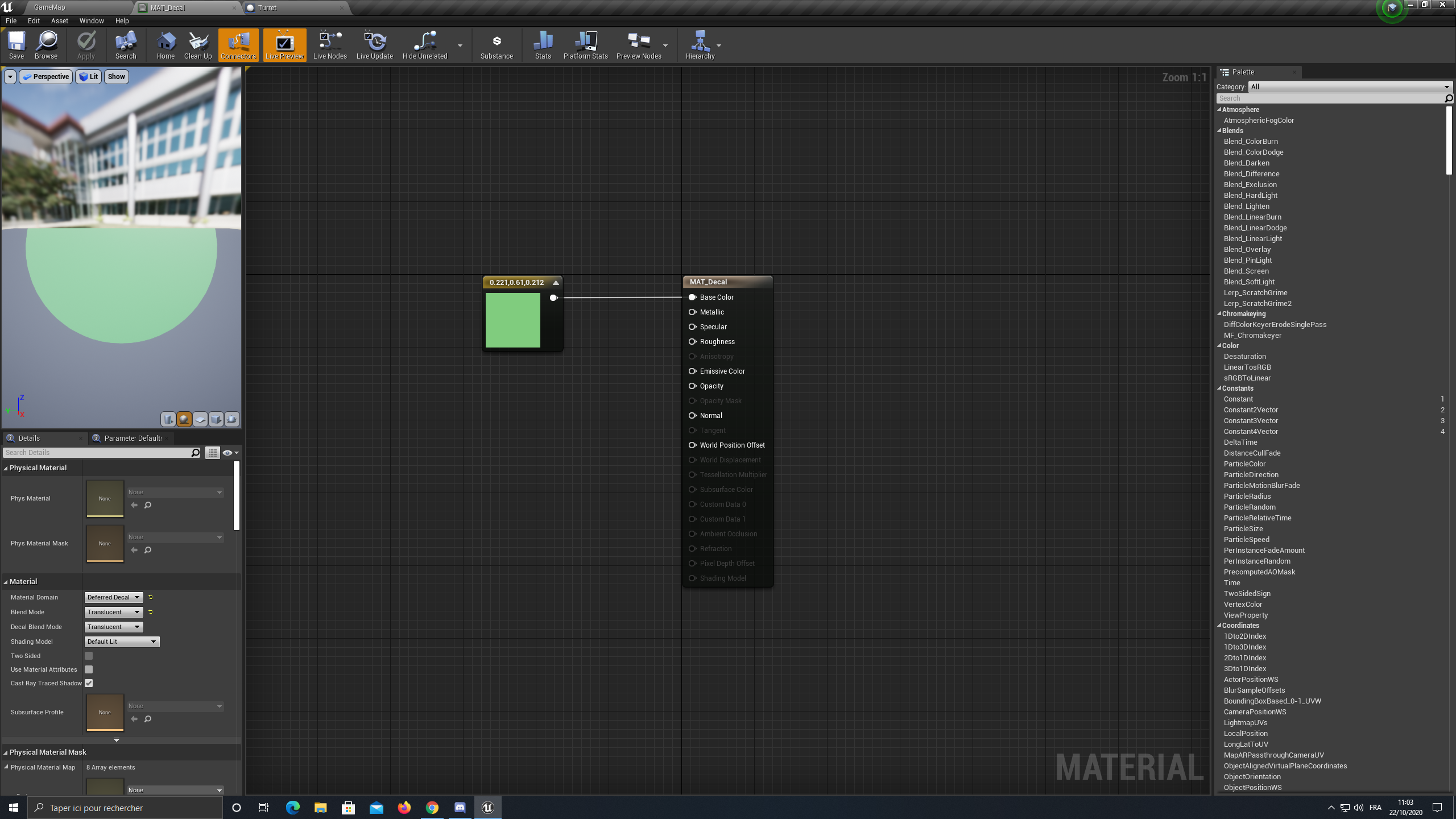
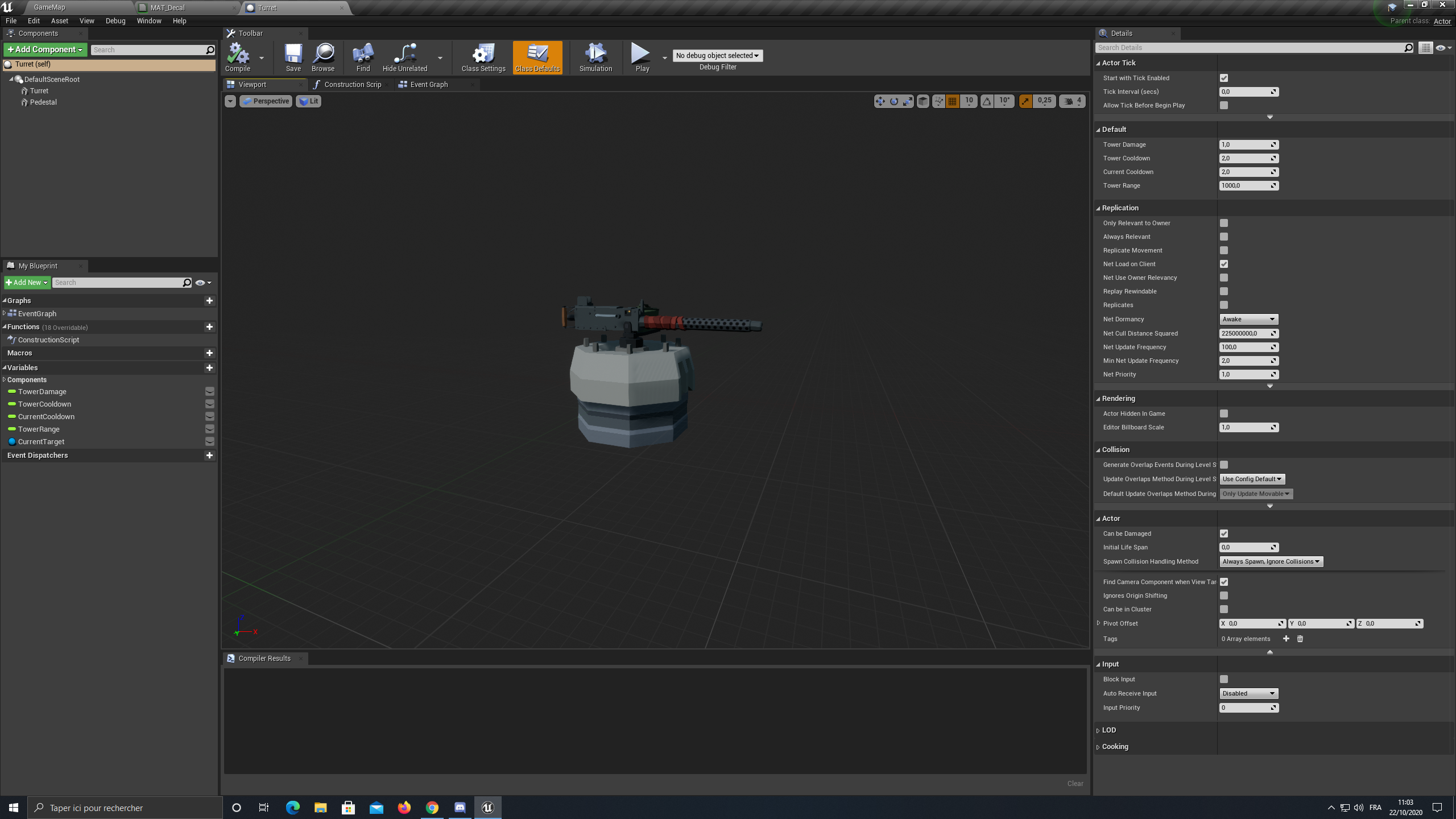
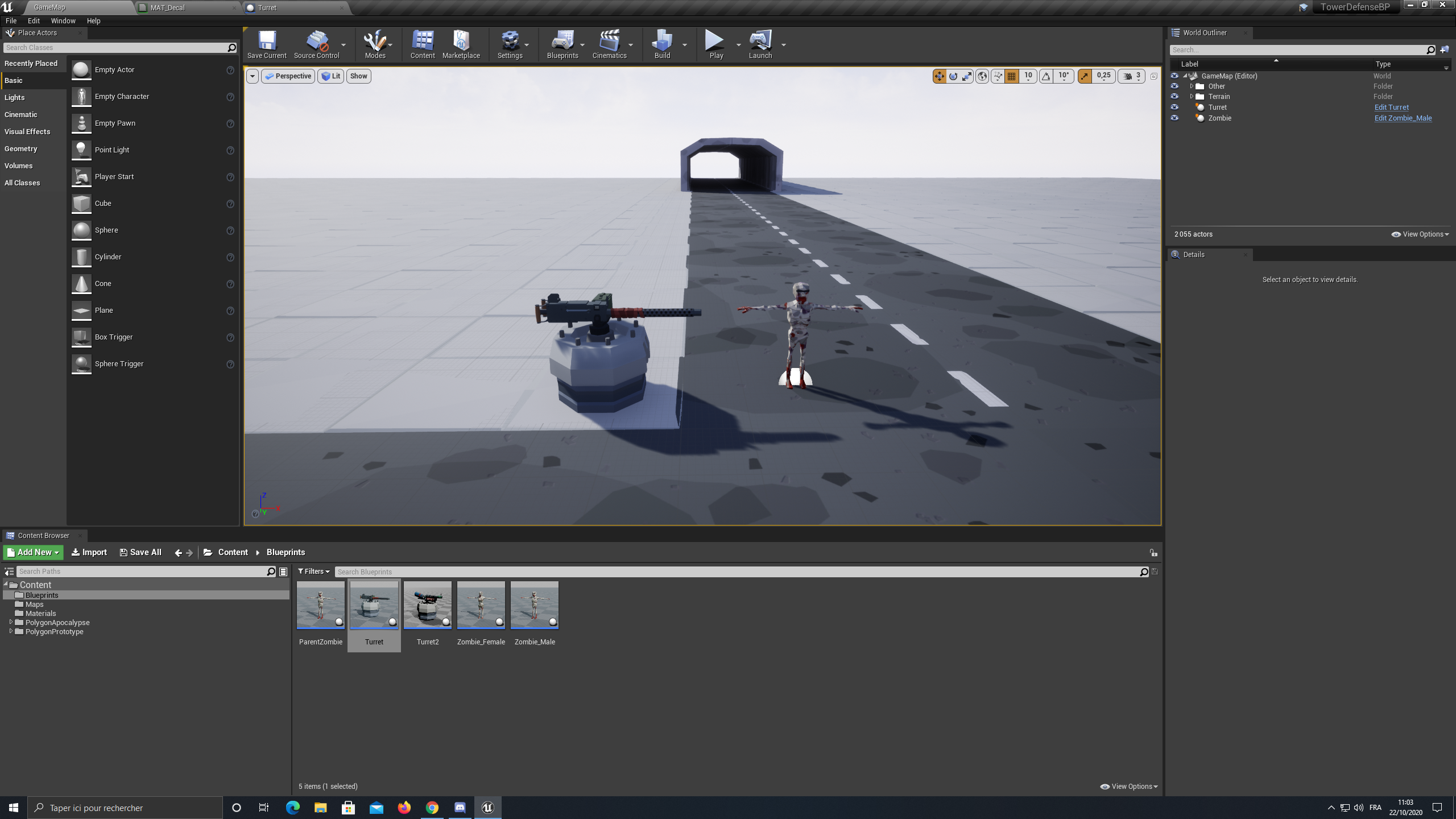
Hello i want to add a circle around my tower for show the tower range of my turret, i don't know how to do can someone help me plz ?
 left carbon
You can name parameters with P_ prefix, but, I guess, this would be annoyng
flat raft
Your Vector Param should be local, no?
left carbon
Well, it is not a variable. It is a input parameter value
Created automatically as I showed above
 queen sluice
hello everyone. i just joined this discord, and i apologize, i don't mean to interrupt. but is this a good place to ask for help with questions regarding ue4 programming?
flat raft
Well..since I've never used it that way. I need to now investigate 😂 you have opened my eyes flakky
left carbon
@queen sluice This is the place. But if your question is about C++, you better ask it in #cpp
queen sluice
it's blueprints. thank you!
flat raft
@worldly gyro add a half sphere around your tower with ur material , or use a decal.
tight schooner
I think the input getter feature for BP functions is a recent thing
queen sluice
does anyone know a good way to add trig like this in? I'm using a Math Expression to add in (1*(sin((x-0))))+0. I'm trying to make a gun sway using this parabola in the same vein as old-school FPS shooters like Doom or Blood, yet trying to add it to a transform vector is kind of stumping me.
tight schooner
You can make a vector within a math expression if you want to do it "in the box"
Have a time input to drive the curve and multiply everything by a scalar input to control the amount
By time I mean the node, Get Time Seconds
queen sluice
word. okay thank you! sorry, I'm new to UE. didn't know you could set vectors within the expression
tight schooner
I suppose the vertical and lateral sway at different rates... Like lateral goes half the speed?
queen sluice
yes, they'd be a different rates
tight schooner
You can multiply the time input to change speed
flat raft
also, consider using bone animation rather than a math function. It's much cheaper.
worldly gyro
@worldly gyro add a half sphere around your tower with ur material , or use a decal.
@flat raft i don't understand
did you see my screen i already started by doing the decal
i said i don't know how to do
flat raft
Do what?
queen sluice
@flat raft I considered it. I have an animation, just not the best at making them in C4D..or in general, for that matter 😅
if it's cheaper it may be worth it. i'll try out the blueprint method. it'll be nice to learn that as well.
flat raft
yea, like all things...it depends. Build it, play test, if it sucks, build it better 😂
worldly gyro
Do what?
@flat raft what i want
queen sluice
thank you guys very much. i apologize again for asking probably mundane shit.
flat raft
There are a few decal tuts on YouTube
Any question is a good question.
Someone else can come along and search the thread and find ur question
tight schooner
@queen sluice NP. And fwiw I thought it was an interesting puzzle. I never broke down the Doom-style gun sway thing in my head. And yeah, thinking about it, it's just some sine wave math
worldly gyro
i don't find for what i want
flat raft
U have a design for what you want?
queen sluice
@flat raft true thank you. and yeah @tight schooner i've been playing them and when i started i added a head bob which..i hate in general and didn't look right. realized that the camera itself never moves, just the weapons
tight schooner
... with one lateral sinewave and the vertical being an absolute-value sinewave. Or at least that's how it looks in my head.
("abs" is a node that might simplify some of the math)
worldly gyro
U have a design for what you want?
@flat raft me? my screen ?
worn nebula
@flat raft thank you for your help, i figured it out, been pulling my hair out trying to figure this out
queen sluice
oh yeah, i'm using abs. because to make the the sinewave not go above the "x-axis" on graphs, it had to be absolute and then negative to keep the peaks of the sinewaves out of it. i also thought maybe i could just do two transforms of the weapons axis just going from two specific values, lets say x from -10 to 10 at one speed and y from -5 to 5...if that makes any sense...
and just repeating that movement to kind of..emulate a sinewave
tight schooner
yeah, there are a lot of ways to approach the problem so it's fun to think about. A curve asset or a BP timeline are other approaches. Could even do most of it inside of a material graph, with BP feeding it a sway-intensity input...
flat raft
I was going to suggest a bp timeline also lol
queen sluice
I'm using actual models. I know i said i'm emulating Doom and Heretic and stuff, yet I'm using more of Quake as a reference for graphical style, yet Doom and others as a gameplay influence. I couldn't used a material graph for that, right?
earnest tangle
if you use actual models one fairly easy way to do it is to have an extra scene component which you offset based on your wave function
tight schooner
No, but... yeah... lol. You could do it as a vertex shader, feeding a World Position Offset
and if you were trying to be extremely optimal (which is probably unnecessary for the player's gun model) you would try to do as much animation as possible within materials and (mesh) particle effects
queen sluice
damn there's so many ways to do this 😂 this is super interesting
earnest tangle
use a skeletal mesh and move the bone in a skeletal animation
(don't do that it's a terrible idea)
queen sluice
lol
worldly gyro
worldly gyro
when my mouse over the tower
@queen sluice
so maybe a function that show / hide for i can call it.
queen sluice
ok
well i got something working but my method is going to be something different than yours. i don't have your turrent and i'm using a floating object
@worldly gyro
worldly gyro
ok i will test for see if that work
queen sluice
It's also probably expensive. I'm still new to a lot of this
queen sluice
You're not gonna want to use "Event BeginPlay" because then it's going to run every single frame. you'll have to change it to showing when your mouse is over it or not
other than that, I used LineTracing to determine where the ground is beneath it, then applying it to that specific component and point of impact.
obviously, in the "spawn decal attached" mess with your Decal Size as you see fit. others here will know much more than me if my method was terrible practice, but that's what i got working.
worldly gyro
do you have a render on the scene
queen sluice
Again, don't use the "Event BeginPlay -> Delay." That was just for me to test.
I mean, i guess. it's using my models and other things
before the delay activated
after it activated
worldly gyro
but this isn 't a circle?
queen sluice
well make your decal a circle
i just used a square as a simple example. it's just a texture
 queen sluice
right
do you not want to just draw a circle in your photo editing software to use as a texture?
queen sluice
on your towers static mesh
theres an option under rendering that's called "receives decals" just untick that box
royal pagoda
Hey there, i made somehow a mistake with IK and is anyone willing to help before i even post all the screenshots with the content
queen sluice
i wish i could help @royal pagoda but i'm really new. Especially when it comes to IK Chains and animations. i'm sorry
queen sluice
@worldly gyro either just draw a circle in photoshop or GIMP or whatever you use, and in your decal, import that texture instead of just using a color
if you'd prefer to not do that and just use math than it's gonna be a bit more expensive and involve some math
and yeah it's 6AM here, i need sleep
also @worldly gyro i edited the blueprint to enable mouse over. this is how you activate it with CursorOver events
worldly gyro
ok ty i will try to use it
queen sluice
and if you'd prefer to not make a circle in GIMP or whatever
i'm doing the math for you to do it in your decal's blueprint
worldly gyro
i want it xd
queen sluice
honestly
you don't even need math
in your decal blueprint
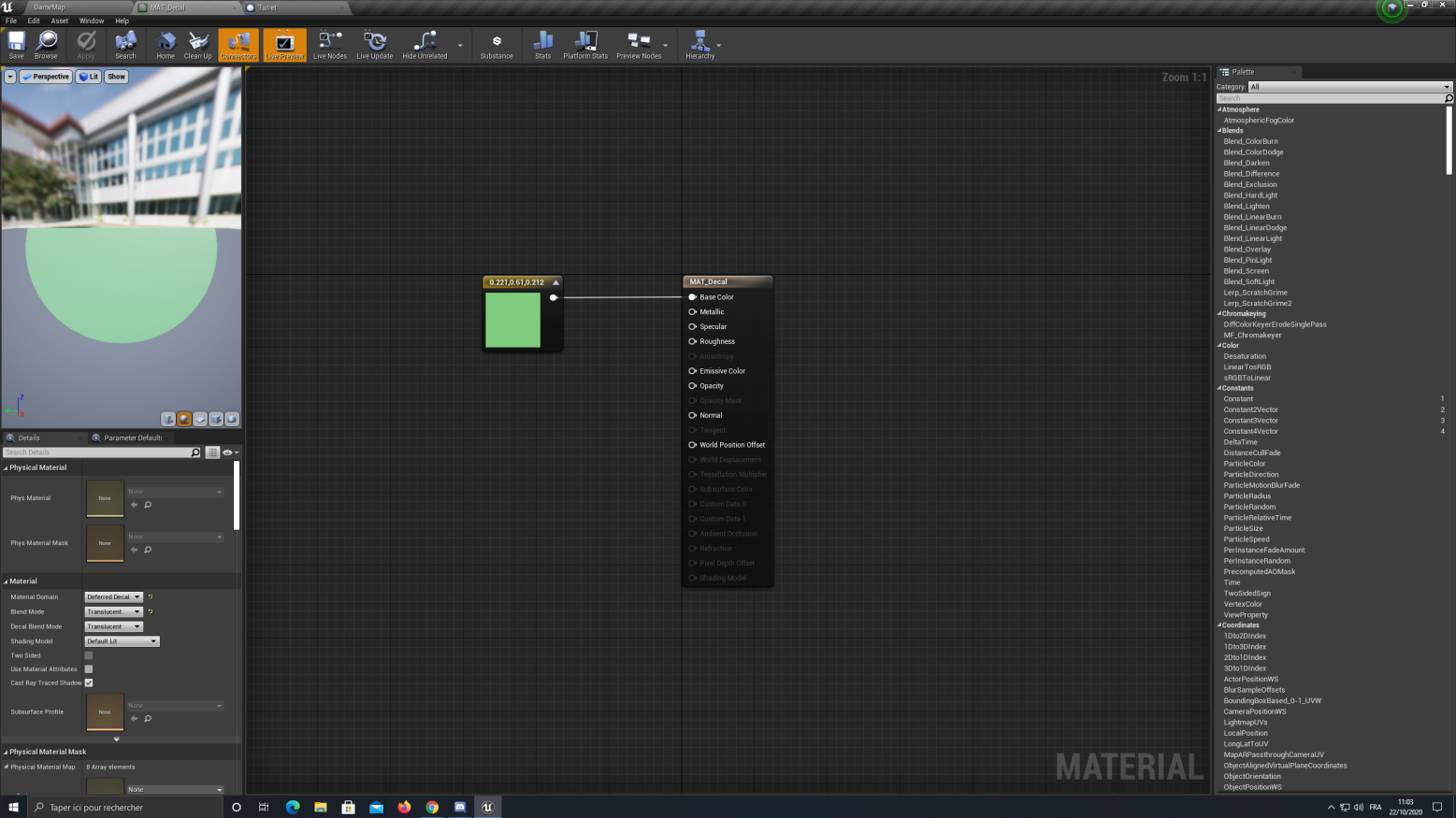
plug in "RadialGradientExponential" into your Opacity
i need sleep good luck with the rest. you're gonna have to make it so it disappears whenever your mouse isn't over the turret anymore
 fair swift
Is there a way to set a unicast delegate from blueprints?
royal pagoda
Is now someone here who could help me with IK
worldly gyro
can't see variable value in real time?
how to do smooth rotation ? because atm my turret will rotate direct to my target but i want the gun rotate slowly until find target
 boreal ether
@worldly gyro RInterpTo
worldly gyro

What is the RInterp (Rotation) Node in Unreal Engine 4 .
Source Files: https://github.com/MWadstein/wtf-hdi-files
@boreal ether
 jade gull
do instanced static meshes automatically have collisions now?
worldly gyro
i don't understand diffrence between RInterpTo vs RInterpToConstant
boreal ether
standard will slow down the closer it gets to target rotation, constant is a constant speed
worldly gyro
so contatnt for exemple will move at speed 2 every time
standar can move at speed 5 or 10 depend if he near or far
@boreal ether
boreal ether
Yeah basically
jade gull
so since its slightly on topic, whats the difference between Rinterp and RLerp?
boreal ether
standard usually looks better because it's smoother, a constant interpolation looks unnatural. But depends on what you're after
lerp uses an alpha between 0-1 to interpolate between value A and B
 supple dome
lerp you dont need to specifically move every frame, you can for example use lerp to make something 75% the distance between two points
boreal ether
You can use rlerp to interp too though, just plug delta time into the alpha, multiplied by a speed variable
jade gull
oh so interp is per tick?
boreal ether
Can be useful if you need shortest angle
jade gull
i've only really used lerps with timelines so far lol
anyone got any decent documentation that would inform me about quad cells/trees and how to use/make them in unreal?
havent had much luck googling, its for a procedural tile based map and its to split it up into rooms,
royal pagoda
Can someone help me with IK?
worldly gyro
So on rinterp the target is the target I want to lock at
Like the humanoid for my turret
maiden wadi
@worldly gyro The target for the Rinterp would be the look at rotation from your turret to it's target.
worldly gyro
so my ennemy?
maiden wadi
The look at rotation from your turret, to your enemy, yes. Not your enemy's rotation.
maiden wadi
Close, replace the Target with the Look At Rotation rotator.
maiden wadi
Also, use GetDeltaSeconds for the DeltaTime float.
worldly gyro
GetDeltaSeconds node not found
maiden wadi
trim matrix
How do I edit the text render of an actor in blueprint?
worldly gyro
rotation it still instante and not smooth
maiden wadi
Because your delta seconds is way too high.
worldly gyro
how many
maiden wadi
Depends on the framerate. And my bad. Node was called GetWorldDeltaSeconds
maiden wadi
Looks right.
maiden wadi
@trim matrix You should be able to get the TextRender component in the actor and change it's text with SetText
@worldly gyro Like we stated before, that function needs to be called on tick. Once per frame drawn to the screen.
trim matrix
@maiden wadi I"m able to get the text render, but when I call SetText, it doesn't want to take that text object
Oh
There's two Set Texts
Makes sense. Thank you!
 fathom slate
hello people, im working on a project that is basicaly a cinema you can walk around and watchi films in with freinds.... i wa wondering if it is possbile to have an in game ui that changes the url of the media player so i can change whats playing on the screen without having to stop the game, change the url, repackage and then get my friends to downloaded over and over again everytime
 dreamy kindle
With the current setup we have (separating upper body with lower body using the layered blend per bone nodes), we've ran into an issue where the weapon bone is always at 0 0 0 because it's connected to the root of the character skeleton and we can't seem to find a way to use a layered blend per bone node to separate the weapon bone from the lower body and keep it connected with the upper half of the body.
Furthermore, when I do try to use a layered blend per bone node on the weapon bone, the turn in place code controls the lower half of the body so the bone is always facing the direction of where the legs are facing, hence the weapon bone being connected to the lower half of the character (the root).
We know a solution would be to have the weapon bone be connected to the wrist or something, but we really wanted to keep it root?
maiden wadi
@worldly gyro Right now, you're close to AI design which is complex. You have to put your functionality in logical order.
First of all, you need a target. So..
Is CurrentTarget in range? If no, find new target.
If CurrentTarget is out of range and there are no targettable objects in range, set CurrentTarget to empty or null.```
You call this function often, possibly 10-20 times a second and this updates your target for other functions to use. Now we focus on tower rotation This will likely be on Tick for easy use. There are more programmatically optimal ways to do this but for learning tick is perfectly fine in this case.
```Is CurrentTarget valid?
If no, do nothing
if yes, rotate turret smoothly to face target```
Last but not least is your firing code. We handled tower targetting and rotation, now you need a timer that calls firing functionality. You might be able to tie this into the Targetting code too if you want but for learning it could be easier to separate it for now. So...
```First we need to make a countdown timer that tells us if the turret can fire. This is simple, just have a float value that gets lowered each timer call and ONLY set this back to the tower's cooldown time after it's fired a shot.
Then check if CurrentTarget is valid.
If CurrentTarget is notvalid, do nothing. There are no valid targets in range according to the targeting function.
If CurrentTarget is valid, then ask if it's in range.
If CurrentTarget is valid and not in range, do nothing.
If CurrentTarget is valid and in range, check if the turret's rotation is nearly equal to the look at rotation between the turret and the target.
If turret rotation is not nearly equal to the look at rotation, do nothing.
If Turret Rotation is equal, we now know that the target is Valid, Inrange, and turret is facing the correct target so Fire!
Set your firing cooldown timer back to full, spawn a projectile or linetrace, whatever you want. ```hello people, im working on a project that is basicaly a cinema you can walk around and watchi films in with freinds.... i wa wondering if it is possbile to have an in game ui that changes the url of the media player so i can change whats playing on the screen without having to stop the game, change the url, repackage and then get my friends to downloaded over and over again everytime
can anyone help?
maiden wadi
Yes, I know, I made it. That was when we discussing a simple firing function. You have a lot of extra behavior to add though if you want the other features like a smoothly turning turret.
worldly gyro
it is because i don't check if the turret rotation is on the ennemy
it is what i missing ?
only that no ?
because other logic are ok?
proud hull
@worldly gyro you could move the look at logic to event tick all by itself. Or even create a simple behavior tree for all this (would suck to recreate all the logic somewhere else though).
Might also be the rinterp speed you can change to your liking.
worldly gyro
a tree ?
proud hull
If you move look at to event tick, at least check if current target is valid before running the look at function.
Behavior Tree, for AI.
proud hull
Drag current target variable to the graph and then check if it is valid before running the look at.
proud hull
Connect current target to actor pin of look at
worldly gyro
i need to do something for check if it is null
proud hull
isValid is checking if it is null.
worldly gyro
proud hull
The reset rotation of the tower can stay in the other event.
worldly gyro
here?
proud hull
I'd recommend making the TowerRotation variable so each tower can have their own default rotation to revert back to when they have no target.
No need for a new function, you can use your look at function to reset it.
 north vector
So I'm in the need to make a cylinder object clickable I have the event and a if gate fro the button of a mouse click
proud hull
We aren't using the function itself, just the logic inside it. You can put it in a new function if you want.
fathom slate
hello people, im working on a project that is basicaly a cinema you can walk around and watchi films in with freinds.... i wa wondering if it is possbile to have an in game ui that changes the url of the media player so i can change whats playing on the screen without having to stop the game, change the url, repackage and then get my friends to downloaded over and over again everytime
can anyone help me
proud hull
@north vector showing what you currently have in a screenshot is much more beneficial.
north vector
Version is 4.21.2 for my project
proud hull
@worldly gyro use the construction script to set the size of the decal according to the tower range variable.
proud hull
How are you adding the range circle? Looks like the paper sprite in your hierarchy?
Ah I see
worldly gyro
proud hull
In that screenshot you are setting the scale to 1 if the range is 1000
worldly gyro
how can i do
proud hull
I would think using a decal is the best route since you can easily set its size in exact units.
worldly gyro
yeah but i didn't understand decal
proud hull
@north vector One thing I do notice is you don't need that cast node on your HUD unless you created your own custom HUD that is a child of the default HUD.
But that won't cause problems, just that annoying note.
north vector
It I don't have that it gives a warning
Cuz it wants an object
And it's very picky on that
proud hull
The cast node itself wants an object, but you can technically delete that cast node and hook the Get HUD output directly to your Draw Text node.
north vector
Oh ok
proud hull
The note on that cast node is telling you that it is already HUD and doesn't need to be cast to HUD, hehe.
north vector
Ok so it's still not drawing text on the screen
proud hull
Add a few print strings in there for troubleshooting.
Add one after false on the branch, just to make sure it gets passed it (it should).
Also add one after true so you can make sure mouse clicks are working on the actor.
Do you have click events enabled in your player controller?
north vector
It's not showing up still
proud hull
You using a custom player controller or default?
proud hull
proud hull
You are honestly better off making your own player controller as a child of the default player controller and then make a game mode as well (child of default game mode) so you can set the new player controller as the default controller. That way you can set its defaults without using nodes.
Here are the settings you can change for your project in the player controller.
That is default
I just made a new blueprint and clicked player controller to use as the parent.
proud hull
Whenever I start a new project, one of the first things done is to make C++ classes of game mode, character, player controller, save game. Then I make blueprints of the new C++ classes I just made.
proud hull
No problem, just giving any advice I can think of.
These are steps that a lot of tutorials don't even bother mentioning.
proud hull
You can skip the C++ part if you won't ever use C++, but I do it so that I don't have to reparent later if C++ is needed in the future.
north vector
Ok all the settings are already set to what u showed
proud hull
When you add a new blueprint class, you get this popup. If you don't see what you need, you can click this drop-down to search for the class:
I didn't have click events enabled in that screenshot, did you check that box?
proud hull
If you needed to make a new HUD, you can do it there. To change default player controller, you need to make a new game mode too.
north vector
I made a new game mode but haven't changed any settings
proud hull
Ah, in there you can set the default player controller to the new one that has click events enabled.
north vector
Ok done
Now how do I keep the mouse in the middle of the screen so u can click on stuff
I noticed when exiting the play window the mouse would be on the side not in the middle
proud hull
I'm confused as to what kind of controls you need. Do you want to move the cursor freely on the screen and click stuff? Or maybe you want no cursor, but want to be able to interact with objects under a crosshair or something similar?
north vector
The second one yes
proud hull
So you really don't even want to do click events, you would simply want to run a line trace from the center of your camera going straight forward to test if it hits something interactable.
north vector
Well no the object isn't interactable
I want it to specifically be clicking on the object
proud hull
And what will the click do?
north vector
Increase a number that is in game currency
I'm making a glorified clicker game for this section
U know like cookie clicker
But not cookies
And 3d
Wh is why it's in a lvl not a widget
proud hull
By interactable, I basically mean clickable. The line trace simulates the click and then allows you to check if you are clicking on something that should "do something" like add to in game currency.
You use this method to interact with any 3D object.
north vector
Oh... Ok
proud hull
Like a light switch or door or chest, etc.
They can all do different things, the line trace just finds the object and triggers it.
north vector
Ok how do I do that
proud hull
A bit harder to just explain, let me see if I can find a tutorial for you.
proud hull
I can try to explain it then, hehe. Or maybe make a bit of code to show.
north vector
Ok thank u
This will help a lot in getting a startup on it xD
(must take awhile xD means big code
proud hull
Not really a lot of code, just took a bit to remember a forward vector node existed, haha.
So left click will run a line trace 500cm from the center of the camera straight forward. You can adjust the 500 to any length that suits your needs.
Out Hit Hit Actor should return the cylinder if it is hit.
north vector
Ok let me see if I can replicate it
proud hull
Usually you would add an interface to the cylinder and then call that interface if it exists.
Or the object would contain a specific component that allows for interaction.
north vector
Ok so I don't have a camera in my player start
But I do though
Which is weird
Cuz when I go into play mode it has me in a sphere
proud hull
Player start should spawn your default pawn as the player.
north vector
Which is just a ball
proud hull
That is fine, that ball blueprint should have a camera in it.
north vector
I don't have a ball blueprint....
rough wing
@royal pagoda so call the event where you press the button
north vector
I'm sorry I literally made a project and haven't made much in the way of character development
So whatever is the default ped for a totally blank project thats what it is
proud hull
No problem, you should then make a character the same way as the player controller. New blueprint, choose character as parent.
royal pagoda
@rough wing ?
proud hull
This character will come with the basics, including a camera.
Then you set default pawn to the new character, in your game mode.
north vector
I have peds I can use I downloaded medieval from the the store
A skins u can use it u want
I haven't gotten to the character part
So do I place down an empty character
proud hull
empty character is fine, as long as you made a new one that used character as the parent.
north vector
I'm confused
proud hull
You just need a blueprint you can edit and add the code.
Default character is only editable with C++, so you create a blueprint that uses it as the parent.
north vector
How do I do that
proud hull
Same way you made the controller.
north vector
Oh ok
proud hull
New blueprint class, select character this time.
Then in your custom game mode, make sure to change default pawn to the new character.
proud hull
Then player start knows to use this character instead.
north vector
So which one was i supposed to make
proud hull
north vector
Ok I made it and it doesn't have a camera
proud hull
Ah, I guess it doesn't come with it by default, so used to just having one since it is included in my C++ character.
north vector
So I have to make a camera that follows the ped?
proud hull
What kind of player do you want? Third person or first person?
north vector
Would that be easier then c++
First person
It's a clicker game not a shooter game
Shooter games are all about the multi camera
Wait couldn't I add a component
And that be the camera
proud hull
You can, but first person view is a bit different. You may actually want to start with a pawn.
proud hull
The hierarchy is a bit different.
proud hull
It is probably easiest to just import the first person shooter content and then you can always change the mesh to fit your needs.
north vector
Oh thank u
proud hull
This will give a good starting point, even though it is setup for a shooter, you can modify all that to your needs.
north vector
Ok how do I make the starting player have the first person shooter
Oh I got it I think
Click and draged it into the content instance of start player
proud hull
That works, but you can also change default pawn to firstpersoncharacter.
proud hull
Player controller will need to match the one they use for the first person project.
proud hull
You can try setting the game mode of your current level to the first person game mode.
north vector
Oh ok
proud hull
Or open one of the first person maps and it should work since it should already use that game mode.
north vector
It left a gun in the middle of the game
I don't want to reset up the map I've been working on
I got rid of the gun xD by dragging the excess outside of the map
north vector
Now I have to butcher the file
 weary jackal
OnMouseEnter
@worldly gyro it's in the widget blueprint. When your mouse enter to the current widget you're working on. It will trigger
weary jackal
On your mouse cursor or on your tower. Cuz for tower you can simply add a widget component to your tower and set space = screen
The thing you're asking should be onHover rather than on Mouse enter
worldly gyro
On your mouse cursor or on your tower. Cuz for tower you can simply add a widget component to your tower and set space = screen
@weary jackal on my tower
show decal
when no mouse on the tower remove it
 kindred river
I am using the third person character template and my character despawns after going lower than a certain height...
he despawns and I leave the camera as soon as he falls close to the landscape or touches it... How can I fix this?
 late cave
@worldly gyro from anywhere?
 summer harness
Create a custom mode derived from GameModeBase
late cave
is there a way to have a table row variable public, but restrict the tables it accepts to only ones built from a specific struct?
When I click Data Table, I get a list of ALL of them... I think...
worldly gyro
my decal never show idk what my mouse don't do the event ?
summer harness
Im displaying text from a file in a bp, but it shows the html, any solution to this?
worldly gyro
maiden wadi
@worldly gyro Mouse Over Events needs to be enabled in the PlayerController
maiden wadi
This may work without needing to create a player controller child class to set it. Haven't tried it this way.
You'll want to set that somewhere once.
maiden wadi
Depends on whether you're using DecalActor or a DecalComponent, if it's an actor, just get a reference to it and call destroy, or set it's lifetime when you spawn it and it should self destroy. If it's a component, there are other options for that, but more or less the same thing.
summer harness
Dont add and remove, add it as a component and show and hide it
worldly gyro
here is my code for now
this ?
how i can do other way?
btw look like my decal block when you want to walk on
how to fixe?
north vector
@proud hull thank u I will be back on later to finish getting help
 rigid thistle
Hey guys, is there a simple way to have a Exec to Integer Node? What I mean is that you would have multiple exec inputs and the output is 1 exec with an int that is set to which input index was fired.
maiden wadi
Sure, just make a macro that has multiple inputs for exec and inside of the macro, set a local int based on which execution is ran and lead them all to the output pin with an int pin for output as well.
jade gull
do Gates not tell you which exec was used?
jade gull
oo that node looks cool "Set integer (by ref)", is that so you can set any variable of matching type instead of a dedicated one for the var?
maiden wadi
@jade gull It's a template function, so it should work with any variable type. It does the same thing, but allows you to do things like this, where the macro local integer doesn't have it's own set node.
jade gull
nice, yea i usually just use the regular set node, but that limits it to only modify one variable unless i branch, that might help me a little, thanks 😛
 open linden
hey coders,
can you help me out?
i'm trying to do this:
https://i.imgur.com/SihyVh5.jpg
but in all 3 axes.
its a sound random position spawner.
i'm using random floats in rage and rotators & applying that to the forward vector.
currently it looks like this:
https://streamable.com/e8uz37
im able to control the "front/back" bias and the direction changes from bias = 1 = all front and bias=-1=all back and inbetween, i love it.
however this already does some left/right things, which i dont want and also rotating this vector again is super complicated and does not get the results i want. :-/
is anyone up for this task to help me out for some coffee money or maybe a DM session?
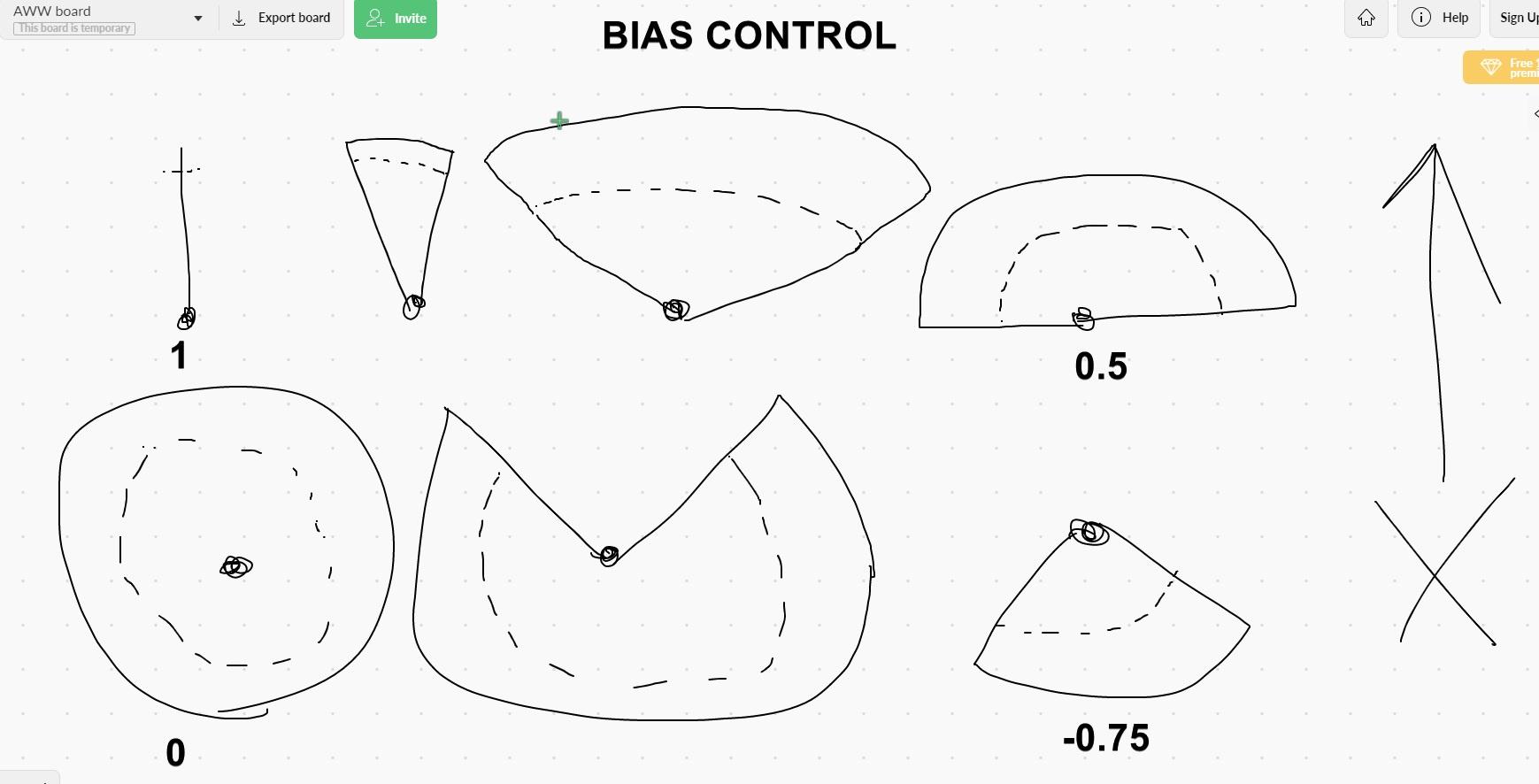

im wondering how i can "filter" the vectors based on their direction or combine rotators in a way that "they dont show up where theyre not supposed to show up"
 fallen glade
Thank you everybody for the continuous help you provide over here, finished my stairs 🙂
open linden
hah! looking cute man hahaha 😄
i got this this now but i'd still like a "part of a circle" kind of behaviour like shown above... but separation of the control over right/left, front/back, up/down seems to complicated to me using rotators. DAMN!
https://streamable.com/6ri54e
😕
i feel like at some point of my "bias control" i need to subtract vectors somehow to "clear" a side . but dont know how to program that. daym.
tight schooner
@open linden you can use a normalize vector node, which shortens the input vector to a total length of 1, and then you can multiply that vector by whatever amount to be the radius
open linden
@tight schooner im already doing that.
tight schooner
if you want it to be... Radius-y
open linden
im struggling with all the specific directions that vector needs to face.
like in my hand drawn picture, imagine it for all 3 axes. and if i say "front bias = -0.5, right bias = -0.5" it should be a quarter of a sphere, facing LEFT and BACK but spanning from top to bottom. and if i pull the BIAS controls futther towards negative 1 that sphere piece should shrink more
if that makes sense
this breaks my brains. >.<
tight schooner
Yeah I'm somewhat lost in thought, lol. It's like you're trying to do a dot product in reverse
open linden
are you up for some coffee money and a DM session? 😄
tight schooner
Nah I have to go in a few mins and I'm not at a computer
But I have a little bit of time to sit and think about it lol
Is your end goal having 1 parameter, and you have a sphere (of possibilities) that narrows into a hemisphere and then into a cone?
open linden
@tight schooner yes something like that.
in my hand drawn picture, imagine this for all 3 axes. the area between max radius and dotted line is where the sound should spawn. i got that figured out with a single vector. but making this into a controllable sphere breaks my brain.
tight schooner
I wonder if you could start with a random rotator, and then somehow scale that rotator. (Maybe there's just a multiply rotator node, but if not I suppose you can individually scale all 3 float elements.)
I'm not very good at thinking with rotators so I'm not totally sure what the result of that would be.
I was hoping it'd be a sphere (1) into hemisphere (0.5) and into cone (0.25)
There may also be a Lerp Rotator
You can lerp the random rotator with your actor forward
Another approach may be with a random vector, doing similar stuff
Lerp vector with Get Actor Forward Vector
with a parameter driving the Bias on the Lerp
(you might have to re-normalize the output vector)
 frosty goblet
Is it possible to do a controller based quiz buzzer with blueprints? I just want to be able to use the wireless xbox controllers that I already have to buzz in and lock out the other players until something it reset or they are timed out... Just asking before I get started pounding my head against it.
tight schooner
For controller input mappings, go to Project Settings and then Input
If that's the part you're unsure about
frosty goblet
I am a super beginner, and was just trying to see if it was possible before I put too much time in it to find out that I was wasting my time
the input mapping, and the selection stuff
tight schooner
Yeah that's all doable
frosty goblet
awesome... I am going to dig in and see what I can come up with
Thank you for your help
open linden
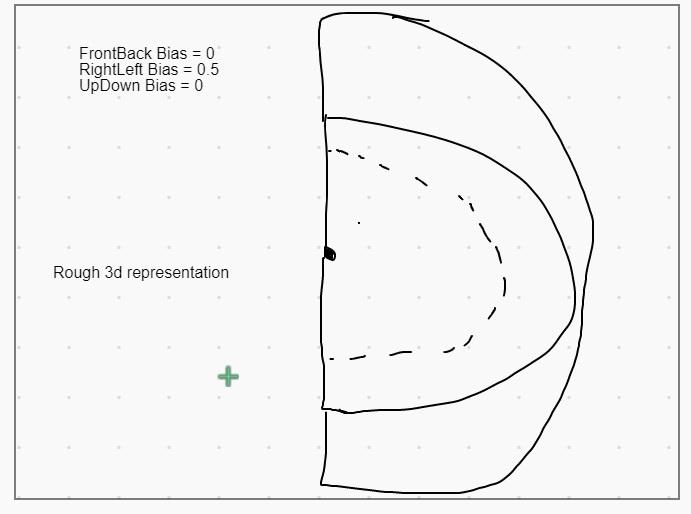
@tight schooner hold on. im thinking maybe i got this too complicated... at the end of the day its either a cone or a sphere. and i can rotate that fkn thing all i want, there is a "random rotator within eliptical cone" thing in BP and ive experimented with that. other than the random vectors being more represented in the middle of the cone there was not much of an issue with that... and i think i just gotta get rid of the "bias" idea and just set up the cone and then rotate it as needed.
ima try that , again. thanks for the input. hmmmm
https://i.imgur.com/WpEfw4q.jpg
this would be the same as a halfAngle=90° cone rotated to the right.
 open linden
dude yes absolutely.
but ill be drinking after i finish this crap. 😄
it'd be very nice to be able to spawn binaural sounds just behind and above the player , for example for "weird animals following the player through the forest above him"
always behind, but never seen.
worn nebula
Anyone know the best way to spawn random actors in a volume at random locations safely (i.e not in other meshes)?
 cyan surge
How to cast widget component, to widget class to apply charge widget variables?
maiden wadi
@cyan surge GetUserWidgetObject, Cast that to correct Widget class.
cyan surge
Thanks
queen sluice
just out of curiosity, last night i tried to help @worldly gyro cast a decal underneath his turret when the cursor is over it. I used LineCasting to determine where the point of contact and everything. Is that a good method of doing so?
i'm not in desperate need of knowing myself, but was just interested if there's a much cheaper method of doing so.
 smoky jewel
why key input not working? I don't know what else I need to do to make key working.
but that working
Auto receive input changed - no result
open linden
damn. cant believe i wasted 3 days on working on a "wrong idea" while just a simple rotating cone was enough from the beginning... god damn. 😄
the only thing is now - how do i get the cone to STAY UP when I set it's rotation to be up... hmm...
 worldly gyro
@queen sluice i did something.
how to do for instead create an actor every time do something better?
rough wing
The what
 sudden spear
hey there!
anyone an idea how I could visualize this ? e.g. Debug Draw like line trace?
worldly gyro
The what
@rough wing ?
 keen goblet
@sudden spear First thought is you could make a spline mesh, having its start and endpoints be the start and end of the trace, and place a static mesh or anything visible at the hit loc if it was blocking. Probably a better way.
sudden spear
@keen goblet nice idea! thanks! I just took a vector start from a line trace I already have so that I know where FindFloor would be positioned. ^^ Thanks again 😉
maiden wadi
@sudden spear Are you just trying to draw a line on screen to visualize the vectors?
sudden spear
yes 🙂
maiden wadi
Production, or testing?
sudden spear
testing ... see if I can implement this node for production ^^
maiden wadi
DrawDebugLine or DrawDebugArrow.
sudden spear
oh wow thats nice!!
maiden wadi
If it's a single point, DrawDebugPoint
sudden spear
Guess I'm gonna use that a lot now 🙂
queen sluice
@worldly gyro
'how to do for instead create an actor every time do something better?'
i don't know what you're asking.
sudden spear
Cool thanks a lot !
worldly gyro
@queen sluice on my code i do a new actor each time i display the decal
queen sluice
you're trying to create a new actor every time you put the cursor over your turret?
worldly gyro
yes did you see my code
queen sluice
right yeah
so is it not working or?
@worldly gyro that's how i'm getting my decal to go away after the mouse leaves. is that what you needed?
 fallow notch
Hey guys! How can I get a Reference to a file from a Data Table and add that reference to a Set node? I would like to have an array of Skeletal Meshes, through which I could switch to refering my their name in the array. I have a Data table with file names in each row. I would like to get those names, add a path to it and refer to actual files and make them "Set Static Mesh". But as I can see, I cannot add "literal" path to a Set Static Mesh or Set Skeletal Mesh node. Is there any way of doing this?
open linden
hey fellas,
does anyone here have a CLUE WTF is going here? the "cone" is supposed to stay above the player, but i'm doubting my logic right now. 🤦♂️
https://streamable.com/3zw9rm
rotation, whoof. 😭

 native wigeon
anyone know anything about this "export to disk" node? documentation is awful and 90% of related forum posts are left unanswered
EDIT: seems to be a bug that the delegate doesnt work if you click "split struct"
 crimson saddle
anyone know of any nodes like the "Download Image" node for models? I need something like a Download Model node.
native wigeon
if it exists, it might be something more specific, like FBX, or could even be more vague like just "asset" haha
north vector
i dont know what im getting an error for
i dont see anything wrong with this blue print
im trying to give my cylinder an actor tag so it gets hit by the cross hair
crimson saddle
make sure you didnt forget about a function or macro somewhere
i know ive done that before
trim matrix
@north vector What are you trying to accomplish if I may ask
It seems like you're modifying a temporary variable
crimson saddle
@native wigeon ye I've been looking around to find something, but most of what I find loads from disk and the Download Image node is so specific and almost exactly what I need, just for a model
north vector
@crimson saddle do u have any idea?
trim matrix
Oh wait I tagged the wrong guy
native wigeon
@crimson saddle Sadly i don't know anything else about it, but hope you can find out! 🙂
trim matrix
I'm drunk
crimson saddle
i assume you want to be able to spawn your blueprint at any time, that's why you're adding tags in beginplay?
you can actually add tags under your actor in the side menu, so by default it starts with the tags
north vector
no im trying to give the object in the game an actor tag so my camera picks it up in the center of the screen within 500 so that way when the mouse butun is down it clicks the object to then increase a number in virtual currencie
trim matrix
You could store a gameplay tag container variable inside your class
crimson saddle
how are you doing your trace? I'm surprised that doesnt pick up whatever you need already
yes that too
give em one of these
 odd ember
anyone here experienced with widget profiling? I got an issue where I have a custom widget nested in a list that's taking about 3-5 seconds to load per entry
trim matrix
Because now it's modifying a temporary variable (Make Array). You can use your variable as Tag Container target of Add Gameplay Tag
native wigeon
@north vector Are you checking "Tags" or "Gameplay tags"? aren't they different?
crimson saddle
thats probably what the error is for
 native wigeon
I think "add gameplay tag" node is for the editor?
it basically does this: https://docs.unrealengine.com/en-US/Gameplay/Tags/index.html
Gameplay Tags can be used to identify, categorize, match, and filter objects.
crimson saddle
you sure your trace is working correctly?




 north vector
@crimson saddle thats what i was given
trim matrix
You could also use the already existing Tags variable as Ryan suggested
native wigeon
Feel like you arent listening to anything i say Dela, but gave you the correct set up above 🙂
crimson saddle
Use the pink tags variable
north vector
um and their name is
native wigeon
"Tags"
crimson saddle
its intended use is for checking tags just like you want to do
north vector
oh
crimson saddle
Gameplay Tags is for the editor, its for like terrain and stuff if im not mistaken
north vector
im being flooded by multiple people my brain is going brrrrrr
trim matrix
Instead of "Add Gameplay Tag", just casually add an array entry you want (when using Tags).
crimson saddle
gameplay tags are set in your project settings
north vector
i dont have a pink varibale only called tag
crimson saddle
i suppose all actors have them, maybe inherited or something? I'm not really sure
native wigeon
north vector
i dont have tags
native wigeon
crimson saddle
all actors have tags
crimson saddle
it is inherited from the most basic classes
trim matrix
It's inherited from actor
north vector
im making a variable
native wigeon
you dont need to make a variable
trim matrix
There is no need for that
north vector
oh'
native wigeon
its made for you..
north vector
oh
native wigeon
i think you should do some basic blueprint tutorials first before trying anything like this. It's quite simple stuff but you should know the basics
crimson saddle
i can understand how they might be confused by the tags vs gameplay tags
north vector
i was mid help from someone else doing this
i had to go eat and mow the lawn
wait no no no i cant have it only have one thing it clicks on
its a glorified clicker game
so its going to have many items to be clicking on'
hang on parents need help
crimson saddle
you should decide on a tag for all items you want
like make a new actor class called "Clickable Actor" or make an actor component of the same
when you trace you can either check tags or just check for "ClickableActor" actor component
north vector
that still doesnt help because i need it to specificaly change a number for every click on the main object like its the cookie and when u have enough you click on a diffrent object and it upgrades your clicker to give more curencie for the clicks
which would mean i would need difrent tags
crimson saddle
You should be storing that number in either your character or your game mode
When you create a specific actor for clickable actors you can give them their own click quantities or even give them their own currencies
It's just more variables you can pull from
I recommend making a "Clicked" event in either your character or gamemode
It can take in currency type and amount, which you can determine from the "ClickableActor" variables
north vector
@crimson saddle i have my click event
thats what im doing
thats what u guys have made me do now
native wigeon
that was before you mentioned needing multiple values
you should make a 1 blueprint that ALL clickable objects inherit from
in that main blueprint, you can have a variable called "coins" or value etc whatever you wanna call it
@north vector
that should be easy enough for you 🙂
then whenever you make a blueprint, make it a child of the main one, so it inherits the variables you set up in it
im off to be now, good luck
north vector
Hmmm
I'm going to have to wait then .... Cuz I still don't get the bp on child when creating a blueprint of a block in the game doesn't make a child
 worn forum
Weird question here. I can't seem to get the EndPlay event to be called in my level blueprint
 hidden hearth
How can I, given some fixed number of elements of the same type and an integer n, select the nth element?
Kind of like accessing an array, except instead of an array input pin the block has some number of input pins for each element
Should I use the Make Array block
keen goblet
@hidden hearth You can use the Select node for that
hidden hearth
Ah, thank you!
 lyric gate
anyone have some experience with ALS plugin?
https://gyazo.com/e7397a3478c6402134c1f50b65356e4d
trying to get the static mesh to have a trace but it wont show up
 pulsar moss
Any clues why Get Asset by Class is always failing? My asset class is named PDA_CharacterPreset
I have it set up in my project settings
I have also tried PDA_CharacterPreset_C
Ah nevermind! I needed to call it from the asset registry, not self
 pine trellis
is this the correct way to do the actor has tags for overlap
it keeps failing does anyone know if I need to do something else, I put the predator tag on every single component on my character and still fails
maiden wadi
@pine trellis You don't need to put the tag on the components in the actor, you need to put the tag on the actor.
pine trellis
@maiden wadi I put tags on everything I could here on this blueprint
even tried the component has tag node and it still fails
maiden wadi
And it prints Hello when that character overlaps this blueprint?
pine trellis
yes
maiden wadi
Odd. Do you have any sort of attached actors to this character? Could it possibly be printing hello because of those and not this character?
pine trellis
I mean it has a tag on everything
 dire socket
can someone help I'm trying to make a openable chest
pine trellis
I just need it so only certain characters can pick up a weapon do you know of a work around?
dire socket
when i search for the event it doesnt show up this my first time using blueprints if someone could help thank you
maiden wadi
@pine trellis I was trying to ask if any attached actors could have triggered that hello. Do you have any sort of weapon actors that are attached, or anything like that? Can you print off the overlapping actor's name and double check that it is your ReplicatedPredator class?
maiden wadi
Just drag the Other Actor pin from the overlap to the print.
pine trellis
it comes up as the name of the blueprint replicatedpredator
do I need to change the name of he file to predator?
because I named all the tag predatoe
predator
maiden wadi
No, I just wanted to make sure it was that actor. Let me test really quick. Not used to using tags that much.
pine trellis
I think it just gets the display name
maiden wadi
It does, as I said, I wanted to make sure you were overlapping the correct actor. I just tested the same thing myself and it's working fine so you have something odd going on.
Prints true.
pine trellis
where did you put the tags in here?
maiden wadi
Same place you did.
 worthy pendant
Would anyone happen to know how to use the "Get Instances Overlapping Box" node?
I'm trying to use it in conjunction with the Remove Instance node to remove ISM instances that overlap with a box component
My only problem is that it seems to not get *all the instances overlapping, just getting some of them at random
BlueprintUE
 wintry storm
is there a way to do gaussian blur on 4.25?
worthy pendant
So, after a bit of digging, it seems as though it's due to how UE4 handles arrays, and how it handles removing items from arrays
Essentially, when an item in the middle of the array is removed, it moves every index above it down to fill the gap. Meaning that instances that should be removed arent getting removed, and instances that arent meant to be removed are getting removed. Still not sure how to fix this one. Could only find one reference to this issue on the forums, and I couldn't get their solution working.
maiden wadi
@worthy pendant So, in short, you need to remove the largest index first and smallest index last. So that when your array resizes, the future removes aren't moved from their indexes.
If you aren't sure if the indexes are in order, you need to make a sort function to sort them in order of greatest to least. Should be easy with integers. Then you can run a normal loop with them. Alternatively, sort them from least to greatest, and use a reverse loop.
worthy pendant
@maiden wadi Do you think creating an array of the instance's indexes, getting the Max of the array, removing that instance, and removing that instance's index from the array would be sufficient?
https://blueprintue.com/blueprint/krtcq6l9/
I tried that out, and it seemed to get me closer, but not quite there
I'll try the sorting function next
maiden wadi
@worthy pendant Hmm. Probably. Should pretty much be the same. Just depends on how you want to handle it logically. In the end it's still sorting. One way just returns a full array to work with, the other way sorts on the fly by removing the largest index after using it.