#blueprint
402296 messages · Page 549 of 403
 primal moss
LogBlueprintUserMessages: [WeaponPickupBlueprint_2] Server: BURST
LogBlueprintUserMessages: [WeaponPickupBlueprint_2] Server: BURST
LogTemp: Warning: Overlap Event
LogTemp: Warning: Overlap Event
LogBlueprintUserMessages: [WeaponPickupBlueprint_C_0] Client 1: SINGLE
LogBlueprintUserMessages: [WeaponPickupBlueprint_C_0] Client 2: BURST
LogBlueprintUserMessages: [WeaponPickupBlueprint_C_0] Client 3: BURST
LogTemp: Warning: Overlap Event
One of them is a single instead of a brust
I'm also going to reconnect the destroyactor and see if it works even in spite of that
Eh. Either way, picking it up works now. I just have to fix the firing functionality which seems unrelated?
 haughty ember
sounds true
primal moss
Alright. Thank you for all of your help, my man! Even if the solution was really simple, I learned a lot about proper troubleshooting.
I appreciate it.
haughty ember
yw
 indigo osprey
@haughty ember sorry for the late response had a work meeting :S Thank you very much. With recursive custom event calling the delay works like charm (y)
 fervent trellis
Anyone know why a World space widget wouldn't update even though the variable it showing the updates and when it is set to screen it updates?
 grand thistle
Does this set a reference to the original, or create a new array with the same values? i.e. if I remove items off of the PlayersWaitingForTurn array, will it also remove items from the Players array?
 true prism
New Array, same values. And for second question. No
grand thistle
awesome, ty 🙂
 smoky ice
Hey guys bit of a weird one, do you know why in a level with multiple cameras, a player's 3rd person camera would be in the correct location BUT when you get the forward vector it's based starting from 0,0,0 in the level?
 primal smelt
Hey guys bit of a weird one, do you know why in a level with multiple cameras, a player's 3rd person camera would be in the correct location BUT when you get the forward vector it's based starting from 0,0,0 in the level?
@smoky ice I've not used forward vectors myself yet but if you're setting a location you may need to specify it being a relative location than just location. Attach a screenshot of your code, might be easier to see whats what
 grave relic
Anyone that knows splines? I have this problem where i have a static mesh(bottom) but when i add it to the spline it gets compressed to the spline beacuse the default spline lenght is so short, and i dont know how to change it
primal smelt
Anyone that knows splines? I have this problem where i have a static mesh(bottom) but when i add it to the spline it gets compressed to the spline beacuse the default spline lenght is so short, and i dont know how to change it
@grave relic I might be able to help, is the spline generated in the construction script?
primal smelt
It is 🙂 @primal smelt
@grave relic Post a screenshot of your construction script, I'm quite new myself but have spent a lot of time messing with splines. Will be easier if I can see your code though 🙂
Ah way ahead of me lol
smoky ice
@primal smelt
primal smelt
@grave relic Hmm yeah this is doing some things I haven't come across yet. What is your intention with how to use this?
smoky ice
It's not looking straight ahead, and I'm not sure why, seems to only happen in levels with a bunch of cameras, test level is fine
aaaaaaaaaaand nevermind
primal smelt
@smoky ice That set look at transform location, what happens if you change it to a SetRelativeLocation?
smoky ice
I'm dumb
grave relic
@primal smelt Oh nothing fancy just tryed makeing a simple spline mesh for pipes and a conveiorbelt
smoky ice
@primal smelt I was multiplying the result and not multiplying the forward vector
You mentioning relative location triggered something in my brain, thanks!
primal smelt
@grave relic before the For Loop, try building the spline with an array as you can see here
This may not get you to the end result of depending what you're going for but it should allow you to see if the mesh is getting constructed properly. For each index set enough distance between each point as you think you'll need and hopefully it will build it correctly. I can't remember how but there is a way to make those splines editable in the editor window, by default splines generated in construction script don't allow for that
@grave relic The array should look something like this. Essentially here I have created something that looks like a graph so along the X axis there is an equal distance between each spline point
@grave relic although doing it the way you have might work if you are setting the spline points outside the construction script. So if you have a spline component on the actor and have an instance of that actor in your level you should be able to select the first spline point and duplicate it (right mouse select) and move it etc
grave relic
I see will check it out
 exotic cradle
Is this not the proper way to spawn an actor in the middle of a collision box upon interacting with another object? I’m trying to have a block spawn for which I can than place other blocks on similar to a few different block based games from SW, Brickrigs, FTD, etc.
Just trying to get the spawn portion down than have a camera transition and a UI change to edit the vehicle
 winter garnet
Hello people! I need an actor to always look at a given target. I wonder, what are the technical differences of doing so by Event Tick vs. Set Timer By Event?
I know that Event Tick runs on GPU, but unsure whether Set Timer By Event runs on CPU.
Also, which one would you use, and why?
exotic cradle
Like eyes or everything?
winter garnet
A specific bone, @exotic cradle.
 earnest tangle
Event Tick doesn't run on GPU
 maiden wadi
Both of them run on the CPU.
winter garnet
A few considerations for this specific task:
- I am not querying anything (GetAllActorsOfClass, for instance.)
- I am not casting anything
It's simply a SetRotation of a Bone.
I also can run this operation in C++ if needed.
Wait, what? Really? All these years I believed in a lie? 😢
earnest tangle
If you need something to happen smoothly you probably want tick
exotic cradle
Well if you need it constant than Event Tick. If you need it for a set amount of time than set timer by event
earnest tangle
As in, if you want your actor facing a target, you can tick it and it'll face it very smoothly
If you run it on a timer, it would snap its facing each time your timer runs
exotic cradle
^
earnest tangle
You can of course run a timer quickly to reduce it, but at that point you probably might as well run it on tick
winter garnet
I think that depends, right? B/c I can set my timer to 0.01
Yeah that's what I was thinking of.
I mean, there's some sort of fear on doing things on Event Tick that perhaps I grew paranoid.
maiden wadi
In this regard, tick is actually safer than timers. If you run your timers more often than your framerate, you'll end up calling your function twice in the same frame which is a waste.
earnest tangle
Don't be afraid of using tick for things that look like they need it :) But it's good to be aware of alternatives when you don't necessarily need it
winter garnet
Oh well, got it. And running this operation in C++ is even safer, right?
exotic cradle
BP and C++ are essentially the same tbh
winter garnet
Don't be afraid of using tick for things that look like they need it 🙂 But it's good to be aware of alternatives when you don't necessarily need it
@earnest tangle That's a good advice. I mean, it's good being afraid of Event Tick because it leads us on being less lazy and thinking more about appropriate solutions. But for this specific situation, I see no other alternative.
BP and C++ are essentially the same tbh
@exotic cradle But well, BP runs on a VM. This by itself makes it slower.
maiden wadi
Maybe logically. Performance wise, you can run over a dozen C++ actor ticks for the cost of one blueprint actor tick.
winter garnet
I read it for Event Tick on being ten times faster on C++.
But well, I dunno.
Turns out, things get dirty when I have I dunno, 20 actors doing the same thing at the same time, right?
Should I bother migrating it to C++ under this circumstance?
exotic cradle
Executing each node in a Bp is slower than executing a line of code in C++ but once execution is inside node it is just as fast.
winter garnet
I mean I know 20 is nothing, but that could scale.
Executing each node in a Bp is slower than executing a line of code in C++ but once execution is inside node it is just as fast.
@exotic cradle Now that's new to me.
Good to know, @exotic cradle. Thanks!
exotic cradle
Always upsides and downsides to each
I’m still trying to get this vehicleBP to spawn inside a collision volume lol
So I can build a ships hull from blocks
maiden wadi
The function call itself in blueprint makes it slower than C++, regardless of what the function is doing. If you only have a few things in scene doing something, it doesn't matter. Move to a few hundred, You're going to have a lot of problems with blueprint performance.
winter garnet
Share the results, @exotic cradle.
exotic cradle
That’s if I even get the first block to spawn
winter garnet
The function call itself in blueprint makes it slower than C++, regardless of what the function is doing. If you only have a few things in scene doing something, it doesn't matter. Move to a few hundred, You're going to have a lot of problems with blueprint performance.
@maiden wadi Since it's a simple operation for now, I'll give it time. But I'd love to make an experiment, now. Lol.
exotic cradle
I’m guessing this is incorrect as it shows that the actor count for the level goes up but the object isn’t visible in the level itself
maiden wadi
Regardless. blueprint is generally faster to use, and for most tasks gameplay related, you aren't going to hit that performance barrier unless you're trying to build an unoptimized city builder with hundreds of citizens or something. For most things, blueprint performance is perfectly fine.
winter garnet
I’m guessing this is incorrect as it shows that the actor count for the level goes up but the object isn’t visible in the level itself
@exotic cradle Wait, VehicleObject isn't spawning, right?
Or is it?
exotic cradle
Nope. Shows the amount of actors in the level goes up but I cannot visually see the cube when I interact with the workbench. So the cube isn’t visible for some reason but I checked visibility settings and it’s public and not owner specific
maiden wadi
In regards to the timer/tick thing though, use timers when you can, unless it happens near or more than the framerate. Say your game is running at 10fps. Tick would execute ten times a second. If you have a timer running 30 times a second, that function would run three times each tick, and thirty times each second.
winter garnet
Nope. Shows the amount of actors in the level goes up but I cannot visually see the cube when I interact with the workbench. So the cube isn’t visible for some reason but I checked visibility settings and it’s public and not owner specific
@exotic cradle When things like this occur, I always tweak this property here. It might be a dumb advice, but oh I wish I always had this workaround in my sleeve.
In regards to the timer/tick thing though, use timers when you can, unless it happens near or more than the framerate. Say your game is running at 10fps. Tick would execute ten times a second. If you have a timer running 30 times a second, that function would run three times each tick, and thirty times each second.
@maiden wadi Got it.
exotic cradle
Oh that pic was from awhile ago but spawn is set to regardless of collision
winter garnet
Have you tried to increase the scale? I mean, I'm throwing possibilities at the table.
But wait....
exotic cradle
Yeah I went from a .25m block to a 1m block and still nothing
winter garnet
It isn't being spawned at all, right? A Hello world at BeginPlay doesn't print?
exotic cradle
It’s only spawned when you interact with the workbench
maiden wadi
Whatever you're spawning will likely be spawned close to the map center. Box extents are usually local values, so your spawn transform is basing it off of the world's zero instead of the box's location and extents.
exotic cradle
I’ve tried print for all parts of the code to include the collision box extents and all printed fine
winter garnet
Whatever you're spawning will likely be spawned close to the map center. Box extents are usually local values, so your spawn transform is basing it off of the world's zero instead of the box's location and extents.
@maiden wadi Now that's a good advice.
maiden wadi
Try adding the box world location to the vector you're making after the division.
winter garnet
Also, you can Eject from your Play, select the spawned item at the outliner and press F to go to it.
IF it got Spawned, then you can reach it.
exotic cradle
Well the level actors numbers goes up so it’s spawned somewhere but ima try and do that and place a box location in addition to the box extents before making the transform so hopefully that works
winter garnet
So wait, what's happening is that you don't know where it's being spawned rather than it's not being spawned. Is this correct?
Do some pretty dumb test. Hit Play in your editor (Not Play in Editor Window). Click Eject. Select the spawned item and press F.
primal smelt
Is it just me or is the content browser extraordinarily buggy? I decided I needed to get organised and moved a bunch of folders around - careful to select MOVE and not COPY. Well it seemingly moves everything but also leaves duplicate empty folders. Yet when I go to delete said folders it pops up with the usual warnings you get when you want to delete blueprints and what not. What the actual F?
exotic cradle
Well I figured with how I had the box extents setup it was going to be spawning inside the collision box with how I had it setup but ig it’s being spawned near center of map but than I’d be able to see it because the stairs on my platform are 1m from x = 0 and y = 0
winter garnet
Is it just me or is the content browser extraordinarily buggy? I decided I needed to get organised and moved a bunch of folders around - careful to select MOVE and not COPY. Well it seemingly moves everything but also leaves duplicate empty folders. Yet when I go to delete said folders it pops up with the usual warnings you get when you want to delete blueprints and what not. What the actual F?
@primal smelt Welcome to the club.
Pretty much, what's going on here is that Unreal doesn't manage well all the references for your files.
So when you move a file from X to Y, but another file (call it Z) references the file that was at X, sometimes it doesn't update the referenced file location correctly at Z, so it keeps the old folder alive.
Well I figured with how I had the box extents setup it was going to be spawning inside the collision box with how I had it setup but ig it’s being spawned near center of map but than I’d be able to see it because the stairs on my platform are 1m from x = 0 and y = 0
@exotic cradle Hmm, I'd say you could try what I mentioned.
primal smelt
@primal smelt Welcome to the club.
Pretty much, what's going on here is that Unreal doesn't manage well all the references for your files.
@winter garnet Good to know! I made a backup anyway so no big deal if it did delete all my stuff, but just seemed like such a basic thing for Unreal to get wrong considering all he other complex shenanigans under the hood
maiden wadi
@exotic cradle Try this for your spawn transform. That should spawn your vehicle inside of that box.
exotic cradle
@winter garnet Yeah I’m about to
primal smelt
@winter garnet Yeah it just straight up won't delete some of those empty folders, jfc...
exotic cradle
That’s when you go into the folder on your pc and remove the files yourself
winter garnet
@winter garnet Good to know! I made a backup anyway so no big deal if it did delete all my stuff, but just seemed like such a basic thing for Unreal to get wrong considering all he other complex shenanigans under the hood
@primal smelt I know right? But well, managing these references consistently isn't easy task, although I agree with you that UE deals with way more complicated stuff than this, lol.
Try to re-open your editor and delete that folder again. Probably it'd work.
maiden wadi
You can also just use FixUpRedirectors on the directory. Do that a time or two and restart the editor. You'll eventually be able to delete the foldier.
primal smelt
Oh wow, it actually did lose a whole bunch of stuff when moving folders. What a workflow killer right there. So basically get everything perfect up front or eat sh!t?
primal smelt
Oh wow, I wonder if Unity has this problem
winter garnet
It doesn't, fwiw.
primal smelt
Well lesson learned I guess. I otherwise really like unreal but damn, this is pretty dumb
winter garnet
I bought a plugin last year, https://www.unrealengine.com/marketplace/en-US/product/clean-project.
It handles those things for us, because you're completely right - organizing folders is painful.
primal smelt
cool, might consider that. Fortunately this is a project I am most messing around and figuring stuff out with but when I intend to build a proper prototype something like this would be handy. Shouldn't really be necessary but oh well!
winter garnet
Agreed. 👍
maiden wadi
To be fair, FixUpRedirectors works just fine. Just use it sometimes when you move stuff around and you'll be fine.
winter garnet
Also, this thread might contain useful information (in regards of what @maiden wadi said): https://forums.unrealengine.com/development-discussion/modding/ark-survival-evolved/62283-what-does-this-mean-fixed-up-redirectors-in-folder
Unreal Engine Forums
If you are working on mods for ARK, this is the forum for you! Dino riders welcome!
primal smelt
To be fair, FixUpRedirectors works just fine. Just use it sometimes when you move stuff around and you'll be fine.
@maiden wadi Perhaps its because I moved a bunch of stuff, closed it, reopened and then tried FixUpRedirectors why it didn't work. I assume I should move everything, use the fix and then delete any duplicate folders?
maiden wadi
Not sure. I have that issue sometimes with marketplace content. Deleting the folder deletes everything in it but leaves the folder and it won't delete on subsequent attempts. Going back to the main project folder and using Fix Up Redirectors on everything and then restarting the editor lets me delete the folder.
Those redirectors are important in a lot of cases. UE4 does that so that you can easily move things around or change values in abstract locations and anything using it gets updated. Annoying in some cases, but the usefulness more than makes up for it.
true prism
I had a duplicated folder in my project when I moved it once. I don't remember now but I'm pretty sure that restarting the editor will fix it. If not, you can also go to your project contant folder and remove it manualy. I think @maiden wadi mentioned that earlier.
 trim matrix
I am trying to create a project with starter content in it but the projects always gets stuck at 39 when loading.
Can anybody send me the T_Water_N file?
primal smelt
Cool thanks for the insight everyone, I think I'll try and get the structure right upfront as best as I can when dealing with a new project just to minimise the risk of having to faff around with any of this stuff later!
exotic cradle
@exotic cradle Try this for your spawn transform. That should spawn your vehicle inside of that box.
@maiden wadi Finally got that plugged in and still same results.
true prism
@trim matrix Your shaders are compiling, just wait. It can take a while the first time.
@primal smelt That's how I do it. 😄
maiden wadi
@exotic cradle Is your box's collision disabled? Box might be colliding with the car and moving it. It's still spawning the car though? You can see it pop up in the editor's world outliner?
trim matrix
@true prism No I started a project yesterday but it is still stuck on 39%
exotic cradle
Its shows the level actors number going up but I still not spawning inside collision box and yes collision is off. "always spawn, ignore collisions"
true prism
open your task manager and see if you can see ShaderCompilerWorker on the list, there should be a few
trim matrix
But if I create a project without it, it gets created by like 10 min max
true prism
If it's stuck on x% then it's defo compiling shaders.
trim matrix
nvm its working now lol
maiden wadi
@exotic cradle Play in Viewport. Do whatever is supposed to spawn the car. Press F8, go to the world outliner and search for your vehicle class name. There should be one there, click on it and press F. The viewport should zoom to it. If so, is it spawning anywhere near the box?
true prism
patience is a requirement with Unreal 😄
trim matrix
@true prism Ye but it is one heck of a engine
 blazing wasp
is there a way to delete the default game mode generated with a new project?
winter garnet
is there a way to delete the default game mode generated with a new project?
@blazing wasp No. You create a new one extending fromGameModeorGameModeBaseand replace the default one. (Which is one of both, can't remember from the top of my head)
exotic cradle
@exotic cradle Play in Viewport. Do whatever is supposed to spawn the car. Press F8, go to the world outliner and search for your vehicle class name. There should be one there, click on it and press F. The viewport should zoom to it. If so, is it spawning anywhere near the box?
@maiden wadi Yeah it shows the marker inside the collision box but no cube is present
maiden wadi
@exotic cradle Not sure then. If it zoomed to the correct place at the center of the box, it's likely spawning in the correct place. Missing components are a different issue.
@blazing wasp Why do you need to delete the default one?
exotic cradle
@exotic cradle Not sure then. If it zoomed to the correct place at the center of the box, it's likely spawning in the correct place. Missing components are a different issue.
@maiden wadi Yeah the x,y,z, arrow was within the collision box but the cube wasnt visible it seemshttps://gyazo.com/bbcdfe65ae4bc76290f51a8dd7938812
 blazing wasp
i don't need to, i just wanted to rename and delete some of the default assets that i'm not using and i get warnings from the (unused) default game mode when i do so
 dusky marsh
For some reason my map looks like this then all of a sudden this happens (check next picture)
boom
haughty ember
@blazing wasp You'll get warnings only if (1) it's still being used, possibly by redirects, which you'll also see the usages of it, or (2) it's still in memory, in which case you can still remove it. It might clear the undo history iirc, so be aware of that.
maiden wadi
@dusky marsh What did you do? Just open the overview map and waited, or?
blazing wasp
well the default game mode uses the ThirdPersonCharacter template, which i renamed and modified... that complaint is related to a redirect i take it?
dusky marsh
I have downloaded a isometric map from marketplace an opened them
asoon as i move i get the holy spirit
maiden wadi
You should be able to just change the pawn to the correct one you want to use in that game mode.
dusky marsh
I mean look at the damn camera
maiden wadi
@dusky marsh I have that pack, which example map is it?
 tight schooner
I'm not saying it's auto exposure but it's auto exposure
dusky marsh
all of them apart from overview map
map 1,2,3,4,5 all start fine but then asoon as i move viewport they shine white
tight schooner
I mean it's gotta be exposure settings if even your camera widget is like that...
dusky marsh
il see
maiden wadi
Not sure what you did to get it like that. Definitely isn't a project default. All of the maps show up fine for me.
dusky marsh
😆 i break stuff in the weirdest ways an then google doesnt help me
true prism
@dusky marsh don't we all 😄
tight schooner
I think the editor viewport has some exposure settings somewhere
dusky marsh
thats what it is
blazing wasp
@maiden wadi
dusky marsh
an exposure settings didnt work lol
haughty ember
well the default game mode uses the ThirdPersonCharacter template, which i renamed and modified... that complaint is related to a redirect i take it?
@blazing wasp not sure what you mean. You'll have to show the exact error/warning for me to answer that
maiden wadi
@blazing wasp You should be able to create a BP child from that gamemode which should allow you to edit those.
blazing wasp
@haughty ember
haughty ember
It looks like a warning due to a code. Look at the constructor of your ArenaGamePrototypeGameMode.cpp
dusky marsh
Fixed it, the skylight intensity was set to 1..0 on the sky light and for some reason caused everything to achieve inner peace
blazing wasp
yeah ok, i'll change the constructor and rebuild
maiden wadi
@dusky marsh You still have an issue somewhere. Mine is 1 in all of those maps and it looks just fine.
dusky marsh
@maiden wadi can't you just let me be ignorant please
@maiden wadi I could have happily moved on not knowing I had another problem
@maiden wadi Deleted the project now
maiden wadi
I didn't think about that. Did you by chance update that project from 4.24 to 4.25?
exotic cradle
Oh dang. I’m still in 4.23
maiden wadi
@dusky marsh Was just curious. 4.25 changed exposure settings some. Some projects moving from 4.24 to 4.25 had crazy exposure issues.
dusky marsh
@maiden wadi that was probably it then tbh
exotic cradle
@maiden wadi Have you played FTD, Stormworks, or Crossout?
maiden wadi
Vaguely heard of the other two and I've played Stormworks for a few minutes.
exotic cradle
That’s the kinda building system I am trying to create atm.
trim matrix
Hey guys. I have a Follower mesh following my character by using event tick and setting location near my player. How would I add a delay to the follower for example the moment i start moving it wont immediately start to move but I want it to interpolate smoothly. My follower movement is kinda like glued to the player now.
exotic cradle
It looks like stormworks opens an empty level to allow the player to build their vehicle tho doesn’t it?
Or basically turns the entire environment invisible
maiden wadi
Mm. Maybe. Supposedly they made their own game engine for it so who knows how they implemented it. In Unreal you wouldn't really need to do that. If you wanted to do it in a lit room, you could just create the room way under or above the skysphere where the player would normally never see it. Make a possessable pawn that your controller can possess when you open up that 'editor'. Or if you really wanted, you could just create a whole new level for it. The downside of the second level is the load time back into your open world. A lot of games in Unreal just make small hidden rooms under the map for stuff like character selection or modifying stuff like that.
In fact, you can see an Epic made one yourself if you have the Elemental Demo. One of their little scenes there is done just under the map in a cube room.
exotic cradle
Ahhh
So upon interact with the workbench have possession of a pawn and that pawn have access to everything needed for building. Ight we about to see how this plays out and maybe along the way Ill be able to fix the spawn issues
maiden wadi
@exotic cradle Hmm. Just had a passing thought. I wonder about creating a "level" that is your editor. Then you could stream it in under or over your world where ever and use it in any other level, if you have more than one. But also it could be loadable from your main screen with different settings if people just want to mess around with designs. Might make for a more robust system in the end.
Then you'd just need to change stuff pertaining to that 'editor' level. And it'd change across all of your levels and the main screen designer.
exotic cradle
Well rn. Ive stopped working on it at all until I figure out why it wont spawn the initial block nor let me posses the pawn I created specifically for the editor
true prism
@trim matrix You could add collision box and strach it out a bit. Then use overlap begin/end events to control a boolean that you will chceck at your tick. If you overlap the player character (you need to cast here) set that boolean to false (can't move) and then on overlap end reset the boolean to true, you can add a small delay before reseting the boolean so it won't start following you right away.
Maybe other guys can propose something better.
trim matrix
hmm i kinda made one like that its bit jittery that way
I was actually thinking of just making a component out of my follower and using physics constraints...
thanks for the suggestion though!
maiden wadi
@trim matrix I'd probably just create a few defining variables for the tick function. float FollowDistance, float StopDistance, boolean bShouldMove. First check if should move. If yes, do movement logic(For smoothness you might want to consider Vinterp). Then do a distance check after the move. If bShouldMove is true and Distance is <= StopDistance, set bShouldMove to false. If at the begining of the function that bShouldMove is false instead of true, do the same distance check, and if distance >= FollowDistance set bShouldMove to true and either call move logic or let the next tick handle it.
exotic cradle
Yeah not even this works for spawning the cube.
One second internet is total pos rn. Will send pics soon.
 primal smelt
I'm inconsistently getting a "is pending kill" error, if the player spams an input they will likely get it but it doesn't have any tangible effect on gameplay. Is this safe to leave in or will these errors show up at runtime for a completed project?
(as in not a dev build but a final packaged build)
trim matrix
@maiden wadi Thanks. Will try 🙂
maiden wadi
@primal smelt You could always put in an IsValid where ever it's being ran. Something has had Destroy called on it somehow. May or may not hinder performance a bit but possibly won't be a real issue unless it's happening a few thousands times a frame.
Not that the same thing might crash in C++, but blueprint being a virtual machine just sort of stalls on some of those and handles it without crashing. Bit of a performance hitch, but not a game ender.
primal smelt
@primal smelt You could always put in an IsValid where ever it's being ran. Something has had Destroy called on it somehow. May or may not hinder performance a bit but possibly won't be a real issue unless it's happening a few thousands times a frame.
@maiden wadi Ok great, its definitely being called that often. I probably shouldn't get in that habit of ignoring errors though :p
*definitely NOT being called that often lol
true prism
Probably a rouge destroy node somewhere. Probably just need to swap the node around somewhere 😛
I had this problem in my game few days ago, turns out I didn't put destroy node as the last thing to execute. 😦
but is confess to abusing Is Valid node
exotic cradle
Ooof
Yeah 18hours of still not getting a cube to spawn Im honestly about to give in lol
primal smelt
Looking online I've seen people say "in the process of being killed" - what does that mean? Surely when the node is executed its done instantly? My destroy actor node is definitely at the end of a list of nodes. Could it be that if I have a timeline and the destroy actor node comes off the "finished" pin, could calling an event earlier in the blueprint while this timeline is running but not yet complete cause the pending kill error do you think?
true prism
If it makes you feel any better I've spent two full night and a better part of a day sorting something that "should be easy"
exotic cradle
Yeah...this is pointless. Havent gotten 1 step further than I was 18hours ago.
I just dont get why it wont place the damn cube. Every tutorial ive watched for similar results hasnt done a damn thing. Its baffling to think when I had only 5 months experience I was able to spawn a cube but now with 2yrs since I first started with ue4 and it doesnt work. Like bruh xD. ive tried just using the world coordinates of the workbench and than displacing the transform of the cube using that. Ive tried random placing within a bounding box just to see if it spawns. Ive tried taking the center coordinate of the collision box and having it spawn there. No luck. But if I attach print string to every output I get a reading from every output of the functions.
true prism
Let me scroll up and read thought it again
 proud hull
@primal smelt This error usually shows itself when multiple blueprints need to reference the same object and either that object itself called for destroy or the other blueprints called for destroy.
 true yew
The actor still exists in memory for 0 up to about 60 seconds after you call Destroy on it. During this time it is "marked for kill" for garbage collection, whenever the garbage truck finally rolls around to it.
IsValid checks and returns false if the actor is in this purgatory state
proud hull
@exotic cradle can you show what is calling "Spawn Initial Block"?
primal smelt
@proud hull Hmm, I do actually have a call destroy node in the projectile but also another for a different situation from the player character. Perhaps if I remove the one from the player and call a separate event in the projectile that might prevent the error?
maiden wadi
@trim matrix Try this out. This is a pretty simple implementation and easily editable. First is the FollowActor blueprint. Second is a character spawning it.
primal smelt
@true yew interesting, surely if you had a rapid firing projectile it'd be unavoidable getting that is pending kill error then?
 zealous surge
Does anyone happen to know of a guide for dismemberment using a skeletal mesh made out of each part? Meaning each body part is a skeletal mesh of it's own? Like this? My BP skills are failing me here, as are the google skills lol
true yew
you would just properly use IsValid. Any actor that might be manually destroyed during gameplay should be "protected" by IsValid checks before accessing
proud hull
@primal smelt validation check will stop the error. Whenever there is a chance for something to be NULL, you want to check if it is valid first. This goes for default NULL references that need to be set after begin play/construct and for anything that gets destroyed during runtime.
primal smelt
@zealous surge I don't have any experience in this but I would have thought for dismemberment you'd need to swap out separate models on the fly depending on which limb was damaged?
zealous surge
Since it's made of parts, I was thinking I should be able to use break constraint, detach from component, then simulate physics
primal smelt
Ok cool I'll try putting in an isvalid and see how that goes
zealous surge
but that will certainly be a big plan B lol
proud hull
@zealous surge you can detach actor components during runtime.
zealous surge
@proud hull does it matter what order I do it in? I have it working for the chest (Mesh), which is the root of the other parts
other parts just stay together and keep animating
my BP looks like it's dismembering itself lol
maiden wadi
You can probably get away with just detaching the component and set simulate physics on it, I think.
exotic cradle
https://gyazo.com/39a8f7c3a2190fdc7b44e121900b1701 https://gyazo.com/6ff788518b4c46b232312abeb8ffcd00 https://gyazo.com/29bc10b7705860fb79d4e8ebf44362f8 I click interact on the workbench 3 times and I get 3 different positions for the block that is supposed to be spawning at the centerof the inside the collision box. It always seems to spawn at the bottom of the box and the actual mesh never seems to spawn.


 proud hull
@zealous surge when you detach the main Mesh, all the children of it will also detach with it. So yeah, as @maiden wadi said, you'd want to detach the individual parts.
trim matrix
@maiden wadi Thanks, Though I did it much more simply with a Get Distance To node.
did not have to put any variables or bool, just compare it with >float 😄
maiden wadi
Fair. Same thing in the end. Used to vector math so the Distance(Vector) gets used a lot.
maiden wadi
I just did that because you said you wanted it not to be so rigid with the following. This way gives it a 'deadzone'.
primal smelt
@true yew @proud hull yeah that isvalid check worked a treat, thanks for pointing that out 🙂
zealous surge
Think I'm just going to start with the head. Trying to do every body part at once is taking too long to make changes and ram my way through this lmao
proud hull
@zealous surge once you get it solved for one part, all the other parts should use the same logic, so make it a function that allows you to input the name of the body part or something that can identify the body part.
zealous surge
while I have your ears lmao - If I do this, will it actually run the node on each target, or is this stupid
proud hull
That will run it for each component. I do the same thing with many other nodes that allow multiple inputs.
maiden wadi
Honestly. I'd personally just do it all in the same function. Make a damage type that has the hit component reference. On AnyDamage, get that damage type, cast to your custom damage type, get the hit component from the trace or overlap and deteach that component and set the physics simulation.
You'll save yourself a lot of headache and work.
Not to mention you can affect health and choose not to detach the component or whatever all in the same space and make it easily modifiable.
proud hull
@zealous surge if you are removing the default mesh, this should probably be done after the children of that mesh are removed. Otherwise, the children components are removed with the mesh and still attached to that mesh. Not 100% sure on this since I rarely use detach component, but my logic tells me the children should go first.
 weary jackal
Is this skeleton dismemberment?
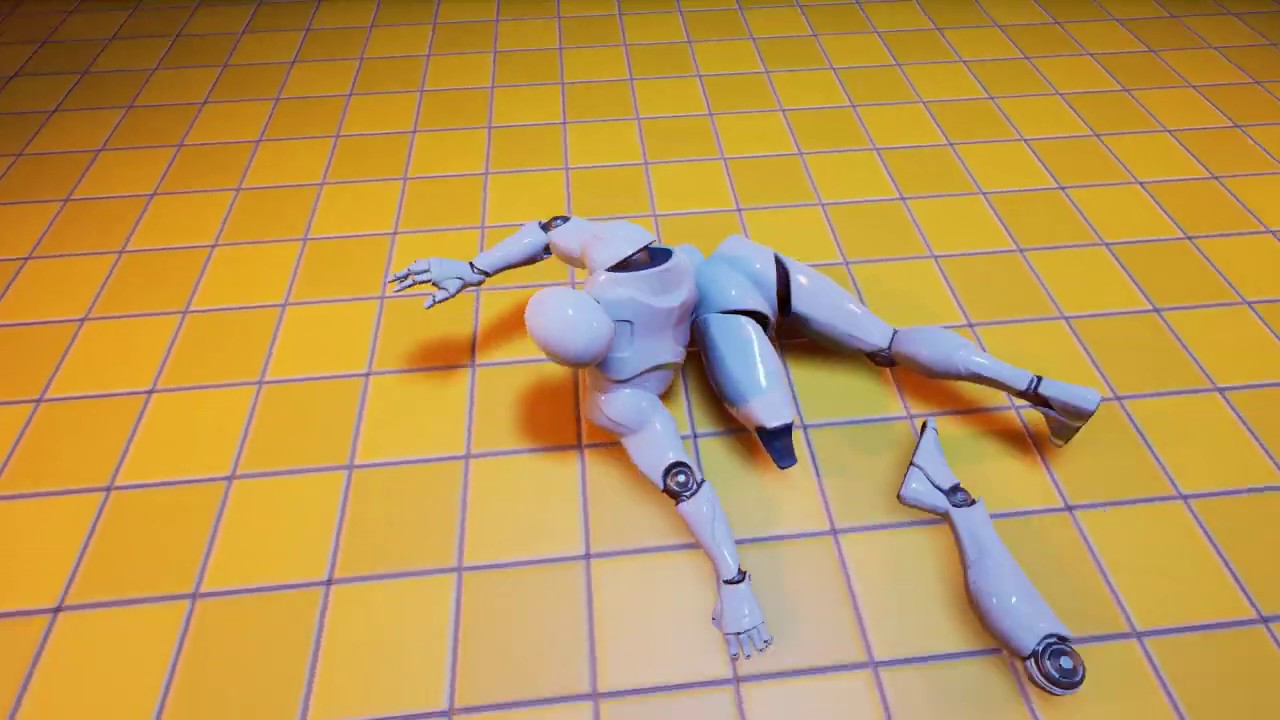
今更編集ミスで思いっきり背伸びしてる音声が乗ってますが許してね・・・
Twitter : https://twitter.com/UnrealYoshida
Support my channel : http://amzn.asia/5aqRevU
Well I was surfing around some weeks ago and found this
zealous surge
Think you're right @proud hull , one of the arms are remaining connected to the chest lol
ooh
whoah... is that guy doing it with a single skeletal mesh?
weary jackal
Yea. It's in Japanese so a lil tedious. Also he's replicating the ue4 marketplace' gore system
zealous surge
iiiiiinteresting
proud hull
Definitely possible with a single mesh too. You can use mesh slicing and possibly other techniques too. Marketplace asset for reference: https://www.unrealengine.com/marketplace/en-US/product/slice-skeletal-mesh-now

Unreal Engine
Slice skeletal mesh during animation with 100% Blueprint!
weary jackal
I was in discussion a month ago and I'd found that project. It was incomplete but that guy went so far
 steep hollow
This is driving me crazy, it works with the template cubes, but when i insert new cubes, its not working for them
the engine find the location, but the charactor will not move to them 😦
weary jackal
Unreal Engine Forums
This is the place to show, share, and link to your stuff!
primal smelt
Eurgh, can't believe I'm mind blanking this. What is the name of the node that lets you check two booleans to see if either are true? I thought it was just "or" :p
weary jackal
Indeed it's 'or'
proud hull
Drag from one boolean and type in "or". The context will narrow down the search results.
primal smelt
Drag from one boolean and type in "or". The context will narrow down the search results.
@proud hull Perfect, typing "or" didn't bring it up right away (or I'm going blind)
And yeah without context sensitive ticked :p
true prism
Drag out from the red output pin and it will appear 🙂
primal smelt
Aye, I got it, cheers!
exotic cradle
Alrightly. This is my last hurrah for this. This is current what I have. Its gone through many interations to try and get it working but none have succeeded thus far. The point of this is for me to click on the box on the left side and have it spawn a cube that is .25m in the center of the collision box. So far I know it should work as print string gives me a message, and a few other people have tested it and it has worked for them. The world outliner says that an actor was placed but upon hitting F8 and selecting the actor and hitting F. There is no mesh present just the move along x,y,z, arrow prompt. Any help on getting this system working would be appreciated and I do appreciate all the people who have tried to give a solution thus far.

Gonna try and get a clearer picture of the interaction script


 proud hull
@exotic cradle Your vehicle workshop interaction event is supposed to spawn another vehicle workshop at the exact same location?
exotic cradle
Its just the mesh as its a larger mesh than the base cube I made so I figured it would be easier to spot
Idk anymore. Ive been at it for 18hours with only 1 4 hour break today
proud hull
What I mean is that it looks like you are spawning the same object you are interacting with and therefore they are simply overlapping the same mesh in the same location.
If that print string is running on interaction, then your interact code should be fine. That spawn actor node looks to be the problem.
Split the spawn transform so you can set a new location for the new spawned actor. Try adding 100 to the z coordinate and it should spawn directly above your current vehicle workshop cube.
exotic cradle
Yeahhhh'
😦
https://gyazo.com/4dd90305c40576cac9d7c26121ee7a30 That is wear it "spawned"
 proud hull
Your code is telling it to spawn a vehicle workbench, so how come it spawned a vehicle actor?
exotic cradle
Nah I changed the name to prevent confusion from last time
So itll be Vehicle_Workbench the entity spawning the object(Vehicle_Actor). Transform = z +200 so it should spawn above it. Just trying to get it to spawn at all and not use a collision box.
proud hull
So it looks something like this?
exotic cradle
Yes
weary jackal
Rather just add a scene component above your cube, and spawn actor at that location
exotic cradle
It doesnt show up regardless lol
Ive tried just moving the coords away from the workbench, using a collision mesh and calculating the center of the collision box for spawn, tried spawning it on character, tried spawning it using the coordinates of a hidden cube that I specifically placed in the center of the collision box in hopes it would do. Tried using a line trace to hit the floor and place the cube as well. Nothing. Idk what I did wrong or where but Im at a loss.it doesnt spawn yet I still get print string outputs and worldoutliner actors so its going through the spawnactor node atleast.Also the meshes are set as "always spawn, ignore collisions". “Hidden in game” isn’t checked in the rendering tab either. Ive restarted my pc, restart Unreal, checks for system updates. Have got through a list of different things just to weed out what could be wrong and still stumped. I was on this 12 hours before and took a 4hour break and back on for 6 more hours and still same results so maybe I should just dump the idea?
 mortal wharf
https://gyazo.com/8e466126aa5eded85e04bb8789c638f0 So it plays perfectly the first time i press it but the second time i press it, it should play it in reverse but it doesn't? why is that?
 proud hull
@exotic cradle not sure why it isn't working. I am having no problems spawning an actor based on another actors location.
exotic cradle
Yeah idk either
Can I see settings associated with the block and spawning? Maybe I have something checked that shouldn’t be
proud hull
Using the scale of the original was messing up some stuff, so I just left that default (even though the scale of the actor is default, but the scale of the mesh is not).
exotic cradle
Hmm. I haven’t changed any scaling on anything
Whatever scale it was when it was imported from blender it has stayed such
proud hull
I'm using this for testing. The cube is a default cube with only x and z scale set to 0.5
mortal wharf
https://gyazo.com/8e466126aa5eded85e04bb8789c638f0 So it plays perfectly the first time i press it but the second time i press it, it should play it in reverse but it doesn't? why is that?
proud hull
Bah, got the transform of the root component instead of the mesh and now it scales correctly. Damn mesh was forcing the scale to apply twice since it now applied it to the actor.
exotic cradle
Hmm
proud hull
@mortal wharf so what is happening for the 2nd press? Does it play nothing?
You could try setting play rate to -1.0 instead of using the play reverse node.
@exotic cradle I missed your other question. I am using my interact button, which happens to be 'E'.
exotic cradle
So our interactions are the same as well as our bps. @proud hull
proud hull
@exotic cradle yeah, pretty much identical. I am using an interface for interactions. A collision component to test for current interactable. Then pressing interact key will trigger the interaction interface's on interact event for the current interactable (if it is valid).
exotic cradle
Yeh idk. I give up for now.
Wayy too long on something that only requires a 15minute tutorial at most.
true prism
@trim matrix I don't know 😦
mortal wharf
@proud hull Yes it does completely nothing on the 2nd press it is supposed to play in reverse but it doesn't it works in different levels as it is playing a level sequence and it is basically a copied level of where it actually works but level sequences stop working on a duplicated level. And i know how to set the play rate but i want to set the play rate when i press it the second time is it a node?
proud hull
@mortal wharf your logic looks correct. Set play rate should be a node you can call in blueprints. Play reverse node should work, but I don't have much experience with any of the sequences I just know that there are multiple ways to play something in reverse so thought I'd give that suggestion.
trim matrix
@proud hull How can I change the color of the sky?
proud hull
@trim matrix not too sure about that one, I haven't even started to design the world of my project yet, hehe. Someone in #level-design might have more knowledge.
@trim matrix quick search got me to this: https://answers.unrealengine.com/storage/temp/234961-editsky.png

Setting "Colors Determined By Sun Position" to false is the key.
proud hull
Uncheck this.
trim matrix
ah k thanks
 sleek dust
guys how can i make when i press click in the game , mouse don't get hided and locked? game is ui only
true prism
get player controller and set show mouse cursor
 flat raft
4.25 crashes ALOT!
flat raft
Dev Lyfe
maiden wadi
What are you guys doing in 4.25? O.o I keep hearing people say that, and I have never crashed once that wasn't my own fault.
true prism
I didn't have a single crash in earlier versions
but 4.25... constantly
you r-click on the graph
boom crash
at random
haughty ember
I got the first crash in 4.25 ever like half an hour ago. Was messing a lot with references and force-deleting stuff though, so not completely surprised.
But I agree, it's crash-free.
true prism
I don't have the best PC to start with maybe it's just struggling with newer version
maiden wadi
Hard to say without comparing design styles. To be fair I might avoid a lot of crashes by not having a lot of windows open and constantly restarting due to C++ compiles.
haughty ember
I have a LOT of things open. I believe I have a strong pc with 32gb ram, so that probably helps
maiden wadi
I also generally don't use plugins that aren't very well vetted. Only few I know of that I use often are Advanced Sessions, Voxel Plugin, LandMass, and Niagara.
Speaking of versions. Really want 4.26 out. Looking very forward to both the water stuff, and the new physics system.
trim matrix
How do you get all actors of a specific blueprint in an array? 🤔
maiden wadi
GetAllActorsOfClass
trim matrix
That works for arrays? I thought that was just to get all actors of class in a level 🤔
I need to get all actors of a certain type in a pre-made array of various objects
maiden wadi
Ah, from an array, misundertanding on my part. Just create a function that returns a filtered list.
trim matrix
Oh I didnt even think about that lol, Thanks :p
flat raft
brain fart... what am I forgetting here. I'm trying to add an actor to the array inside my struct. What am I forgetting ????
sleek dust
does someone know why my player blueprint get destroyed after some seconds?
maiden wadi
@trim matrix Should be as easy as this if I understood right.
@flat raft Not sure, but Find looks like it returns a copy, and you're trying to setbyref that copy.
Don't think that should affect the Add though since it returns that copy on the other side that you're using.
It does seem like you'd be creating a copy from that though. Since you're finding it from the Map, and then more or less creating a new copy, altering it and adding that to the Map.
trim matrix
Ah thanks, Looks right :)
flat raft
@maiden wadi Thanks for the reply. I think I need to save the array to a temp variable. Add my item to that temp, then set it back to the struct.
I think the Add Unique is adding it, then just throwing the array away.
maiden wadi
After the AddUnique, does the array print a length greater than zero, or a length greater than it was before the add? Also how are you debugging the data? Like I pointed out, your map is going to more or less end up with a bunch of similar near copies of entries if you keep running this bit of code. So if you have one entry in the map, and you run that find, it'll find your one, create a copy of that struct for the Find node, you modify that copy and then add it to the WorkshopUIData Map. Even if you use AddUnique, it would create a second map entry since the one you got from Find and the one you're adding are no longer the same after you altered the array of pointers in the struct.
Love maps, hate them in blueprint. Not enough tools to use them with.
 worldly gyro
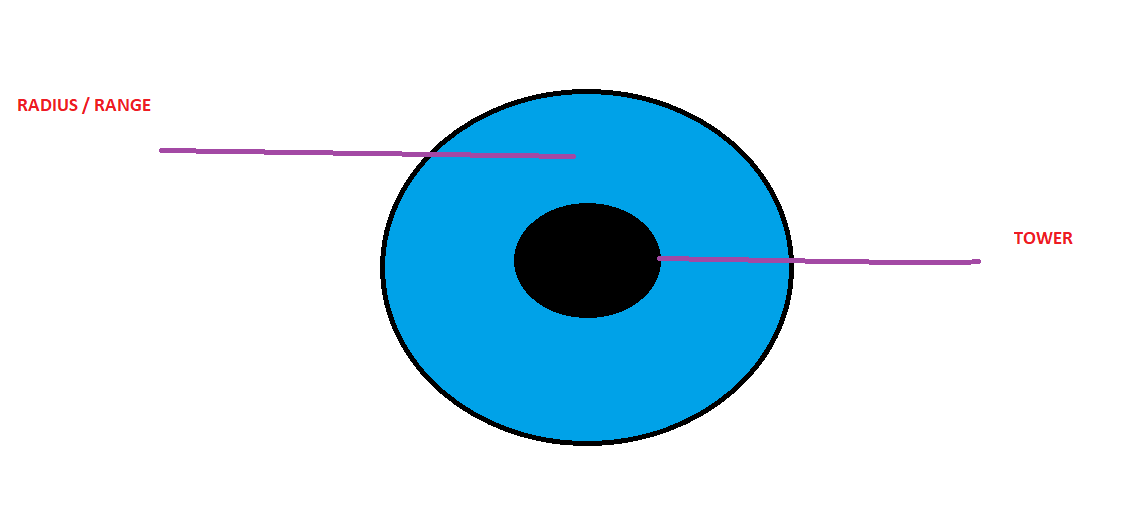
Hi, I'm looking to have a colored circle around my tower. This circle represents the radius of my tower where my tower can attack enemies. How can i have this circle?
ping me if you speak.
 winter garnet
@worldly gyro Pretty simple, add a collision box.
worldly gyro
and how we color it ? i should already have the collision box for damage the player when they enter on the box
 rough wing
Decals
worldly gyro
what is that?
rough wing
It's like stickers in unreal
winter garnet
Oh, okay, gotcha.
It's not only the collision you want.
Yeah, decals. Or textures, per say.
https://www.youtube.com/watch?v=2lYeGVQqcr8 something like this
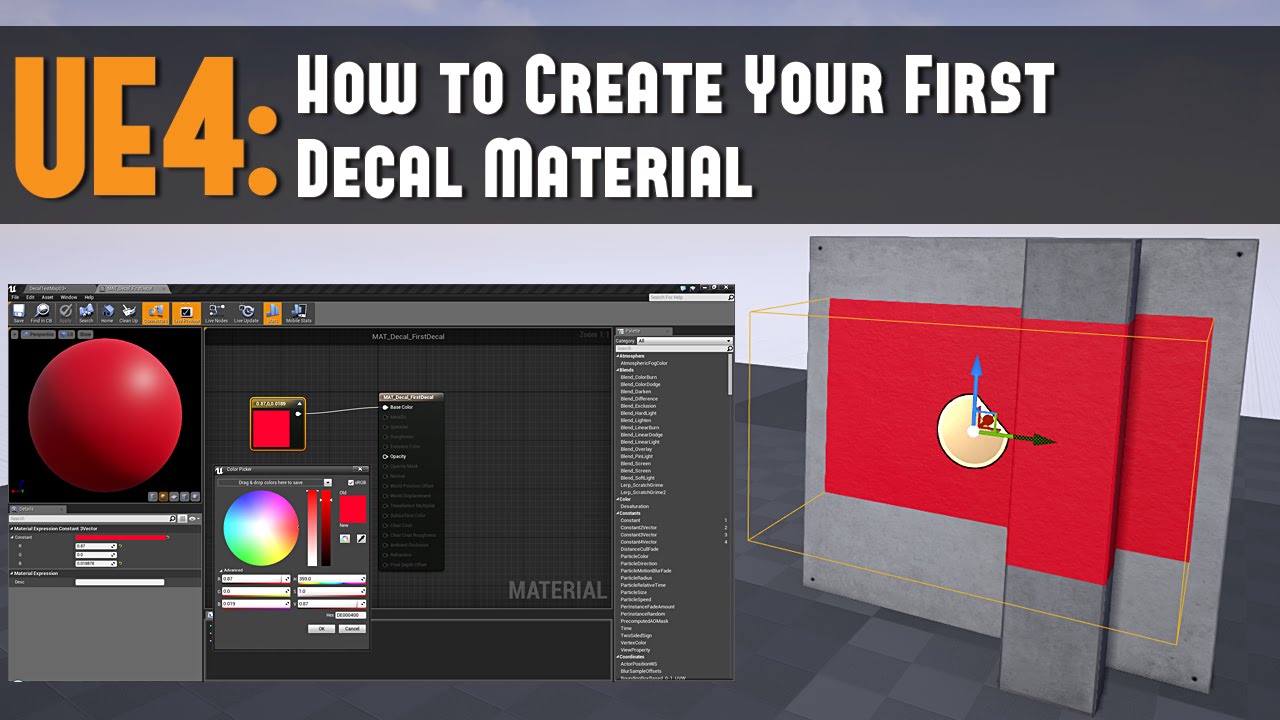
Full Blog Post with Notes and Images to Follow: http://www.worldofleveldesign.com/categories/ue4/ue4-decals01-your-first-decal.php
Decals are materials that can be projected onto existing geometry (Static Meshes, BSP brushes or Skeletal Meshes) that are already placed inside ...
Still simple nonetheless
worldly gyro
It's like stickers in unreal
@rough wing i m new.
and where i put this material ?
on the box collision ?
i just want this circle around my tower for show the range
and when my mouse over the tower
winter garnet
@worldly gyro give the video I sent you a try. I mean, whatever we answer here, it's just repeating what it explains.
It's 6 minutes only. Probably quicker than trial and error.
worldly gyro
ok i will try
rough wing
Inside the blueprint of the tower you can place the decal on the bottom of the tower and increase it's extent to fit your texture
 scarlet rain
does anyone know what happened with the haptics feedback effect in miscellaneous?
mortal wharf
@proud hull so it goes up and down so that is good but it doesn't do it multiple times?
proud hull
@mortal wharf what does your logic look like now? Can you show a screenshot?
mortal wharf
https://gyazo.com/1622fb154f8b0a0198477603204462aa it is supposed to repeat if i hit the button multiple times

@proud hull
proud hull
Also make sure to set play rate to 1.0 when true.
You can also do an "is playing" check to see if it is already playing, then if not, run play.
@mortal wharf From your branch:
True > Set Play Rate to 1.0 > Check if playing (false) > Play > Set boolean (also connect true from is playing check)
False > Set Play Rate to -1.0 > Check if playing (false) > Play > Set boolean (also connect true from is playing check)
Added the is playing check just in case constantly calling play when it is already playing might cause problems.
mortal wharf

Like this?
Or do i also add a check to the false too? @proud hull

@proud hull
proud hull
More like this and then also add the is playing check to the false side. You can technically put this before your is open check, but it may start to play in the wrong direction for a split second (probably unnoticeable though).
is playing is also a variable that already exists for the sequence.
So drag from sequence player to get is playing
mortal wharf
Shouldn't the set be there tho? so it sets it to true when it starts playing so when i press it again it checks the value of the boolean?
proud hull
Calling play will automatically set this value to true
You don't need to make your own "is playing" boolean variable.
It exists as part of the sequence
The same way you set play rate, you can drag from the sequence and get is playing
mortal wharf
 proud hull
The false side will need its own play node. Your current logic will cause it to call open even when trying to close (if closing triggered the play node).
mortal wharf
Ok so everything works fine apart from one thing? the third time i press the button there is like a 3 second delay before it does anything?
@proud hull
proud hull
Not sure what would be causing that.
 iron spruce
I need a person for a UE project
mortal wharf
It's like the first time i press it, it plays perfectly but all the other times i press it, it has a 3 - 5 second delay https://gyazo.com/4a1f370f4c48fcdbef357683a4c3e295
 mortal wharf
So i have an issue when i press a button the first time it plays a level sequence at the given play rate but if i press it anymore it will work but it always has a 3 - 5 second delay before actually doing anything please help i want to get this version of my game out by tomorrow. https://gyazo.com/153822fc7d8e25a5272866e218eba2ca

Sorry if i don't respond right away, i will respond when i wake up cause it is night time with me right now.
 foggy hearth
anyone know how to setup a new gamestate correctly? I created a new game state (blank) and just using it sets the VR starting pose incorrectly
 wintry hemlock
Question, is procedural mesh generation possible in blueprints? Like, (this is a far fetched example) no mans sky. Where everything is different, even moveable and animated objects are procedurally generated. Is this possible in blueprints? Just a genuine question.
wintry hemlock
Sick 🙂
flat raft
It's obviously not easy
I'm building a hybrid procedural system. The user builds a machine, and then I do a "make look cool" system
wintry hemlock
Oh alright. How long have you been working on it?
flat raft
like a few months
It's like 2% done 😂
But, it really depends on what you're trying to do.
wintry hemlock
Lol, I see. I just wanted to know in case I ever wanted to do something like that.
wintry hemlock
Really? I thought it would be the other way around lol.
flat raft
There is a Sims 4 making of on youtube. It's a great watch
wintry hemlock
Oh alright. Ill check it out for sure.
flat raft
yup..Sims is related as you can click random, and the game makes a character for you.
There might be a No Man's Sky GDC Making of talk.
wintry hemlock
Maybe. Idk, no mans sky is one of my favorite games of all time and I've been wanting to make a game like it for a while.
 teal burrow
If you intend on deep diving for those, I recommend creating a voxel system first that generates optimized chunks
 manic knot
Is there timing issues with streaming levels and spawn points? I cant seem to make Find Player Start find any of the Player Starts I have in an Always Loaded streamed level. Ive tried putting them in the persistent level as well but it cant seem to find them before spawning in!
 pine trellis
does anyone know if the jump z velocity is the correct way to make the character jump higher? I tried but its not working
@untold void I think its here
 untold void
@pine trellis no thtats the project name, I want to change the name of the actual packaged game
pine trellis
oh you need to be careful I know you need some kind of other thing t o change the name of the project or else you risk causing corruption, think its ccalled UE4ProjectRenamer
 sand shore
You'd like to avoid appearing as ShooterGame.exe?
maiden wadi
@flat raft What I was trying to point out was the Find node's return. It's a copy.
The only decent way to 'alter' map structs like that in blueprint is basically to get a copy of the struct, save a local function copy of it, delete that key/map from the TMap, modify the copy, then readd it back to the TMap.
flat raft
Gotcha
Didn't even notice it being a Copy lol.. Thanks!
Also, I use Set Member, rather than the break/make
 lyric mist
Hi there! Sorry, a complete beginner question here.... I try to create my first blueprint from the editor (clicking Blueprint/Add Script) and when the dialog shows, the green Create button is missing.... it looks like this
 modern cove
Is there a quick n easy way to get a clear sharp picture of an entire blueprint? Or do I have to take screens of each section?
trim matrix
Do any of you guys know how I could get the variables of an attacker? without directly casting to them.
pine trellis
how come my character stays in the air until I let go of the jump key?
isnt it only suppose to stay in the air for a little while?
I tried changing the jump time and max hold time to different numbers but it still stays in the air until I let go of the jump butto
 dense mica
pine trellis
dense mica
pine trellis
@trim matrix in event begin play get a refrence to your AI
maiden wadi
@trim matrix Only way to get variables from a class is to cast or use an interface. That or pass them from the class when that class calls a function on the class you need the variables in.
rough wing
@pine trellis try lowering the velocity or setting the hold time 0
pine trellis
yeah but I want the character to hold in the air for a little bit
ill try again tomorrow night everyone
 manic maple
Anybody know if it's possible to loop through items in a struct as though it were an array?
maiden wadi
@manic maple Not really. You're generally not supposed to use structs in that manner. What are you trying to do?
tight schooner
if they're all the same data type you could feed each struct element into a Make Array node, and feed that to a ForEachLoop
but yeah, that already seems pretty hacky
flat raft
There's no point.. a struct is not an array
Just make a function that sets all the values in ur struct
as the flow goes from node to node, it sets/gets whatever member is in there
If you want to do that over and over, make a recursive function.
It would so great if the AddUnique returned the array also, and not just the index
I found a bug in the MAP type variables today. I was sooo pissed
I found that one has to hit compile after creating a key/value pair else that pair will be forever corrupt.
I can't just hit the plus button 5 times and then set each pair.
maiden wadi
What do you mean by corrupt? That's odd behavior. You shouldn't be able to add more than one at a time anyhow because it checks if the default key value to make sure that it doesn't already exist, so that you don't end up with multiple Keys of the same value.
earnest tangle
Yeah that definitely shouldn't even work
flat raft
Yes.. but it's a bug, so I can
flat raft
I'm not at my computer, else I'd make a vid, but I have a Enum/Struct pair
I guess the enum's default is something that's not empty
maiden wadi
@flat raft Is your Enum C++ defined or blueprint?
flat raft
bp
maiden wadi
Same with the Struct?
flat raft
Yup
earnest tangle
if I try to do enum/struct map it always errors out if I try to add more than one new item because of the default value check
if it let you do that it definitely sounds like it glitched out :D
flat raft
Ya
maiden wadi
BP enum and struct seems to work fine in maps.
earnest tangle
yeah they should
flat raft
Cus I was checking the key against a datatable. and it would never match. so, I printed out the keys, and I got something like ENUM_93739somecode_MAX
earnest tangle
I've seen that happen with enums sometimes if I change the enum options and it doesn't update somewhere
flat raft
as the key, even though visually in the enum, in the map it said "Trigger"
Yea... frustrating 😂
Cus then to fix it, you have to clear out all the keys .
And remake 1, hit compile, save, make the next, repeat
maiden wadi
You shouldn't have to compile and save. Just hit the +, change the new Key to something other than the default, and hit the + again.
flat raft
Naaa, that doesn't work
Not for me at least. 😂
I have to hit compile
if I make 3, then compile, it erases #2 and #3
maiden wadi
You got bugs man. I suggest a Firebat with widened burners.
flat raft
😂
Good thing I only have 1 MAP.
it's a heavy MAp though, so maybe that's where things are breaking
but, I fixed it, fingers crossed it never has issues again.
I'm on 4.25.. I was going to check out 4.26, but people have been saying it's all sorts of broken
But anyway... my fish gun, guys...it's almost done!
Loved this concept, decided to build it
tight schooner
If you can reproduce that bug in an empty project, you can submit a bug report https://epicsupport.force.com/unrealengine/s/
I've submitted a handful of bugs and Epic tends to fix them half the time
(though peruse UE Issues first to see if it's not already in the system https://issues.unrealengine.com/)
flat raft
Will do
 vapid hatch
what console command do i need to see exactly what blueprint needs the most time to process?
tight schooner
I don't think there is one
and I'm not even sure how to see individual BP execution in the Unreal Insights profiler. It used to be possible in the old Session Frontend profiler IIRC...
vapid hatch
hmmm
guess im just gonna wait until the performance actually gets bad and then just start guessing
 surreal peak
You'd probably just use the Session Profiler as per usual
earnest tangle
Tbh it's usually easier to wait until you have performance issues :D
Otherwise you might just end up trying to optimize something that doesn't even matter
Of course there's nothing wrong with taking educated guesses to prevent issues in the future but probably have to judge it on a case by case basis where it makes sense to put the effort
 little trench
Have any solution for this problem?
https://www.youtube.com/watch?v=Ggcbgp2A9O4

4.9.2 Realese
Create BP project Vehicle
in Sedan blueprint SpringArm set EnableCameraLag = true
Package game (Widows 64)
Lanch listen server
Lanch client (in some machine)
On client vehicle is lagging when speed is high ( 100 km/h )
 tiny meteor
I have an array of objects with a display name, is there some way to sort them so their indicies match their display name
 worn nebula
Hey guys, i'm having some issues with line tracing and casting to level blueprint. I have a blueprint set up then sends out a line trace, and I want it so when it hits a certain actor, I can then print "hello" in the level blueprint. This is what I have set up, my blueprint actor:
and my level blueprint:
I got more info here if anyone needs it: https://forums.unrealengine.com/development-discussion/blueprint-visual-scripting/1824048-how-to-detect-when-a-line-trace-from-a-bp-hits-a-trigger-in-the-level-blueprint
Unreal Engine Forums
Hi,
I have a polaroid camera, and it's set up in it's blueprint to flash twice, and call a line trace from the players camera. I'm wondering how, say I had an overlap trigger set up in my level, I get a reference to it in the level blueprint, and set it up so when the line tr...
 shrewd condor
Guys, is there a way to get the size of a mesh in cm ?
tiny meteor
1uu = 1cm, you can get actor extents
get actor bounds node

What is the Get Actor Bounds Node in Unreal Engine 4
Source Files: https://github.com/MWadstein/UnrealEngineProjects/tree/WTF-Examples
Note: You will need to be logged into your Epic approved GitHub account to access these examples files. https://github.com/EpicGames/Signup
worldly gyro
Circle collision is sphere collision ?
 graceful forum
Well.. I was trying to create my custom GameMode. My GameMode and GameState objects are working fine but my HUD is not being created, my prints on begin play is not working. What can be the problem?
true prism
@tiny meteor Few weeks back I've made a little project that generates random scores/names and then sorts them out from highest to lowest and matches the names to scores. I could send you the project over if you like.
maiden wadi
@graceful forum If you don't have any C++ in your project, then just having the correct game Mode and correct HUD class selected on the game mode should spawn that HUD for that client and it should call it's beginplay just fine.
 ancient torrent
Hello! anyone know how to set "spawn actor from class" from the Datatable ID? 😁
maiden wadi
@ancient torrent What do you mean by DataTable ID? Do you have a Datatable of structs, and each struct has an ID and a Class and you want to get the class associated with the ID and spawn it?
ancient torrent
Yeah but i want the assoiated id or row number to spawn an actor
basicly when i press buy on that item i want it to spawn infront of the character
maiden wadi
Hmm. How you do it is a matter of preference. I personally dump all of my Datatable values into a TArray in GameState for classes to get data quickly and easily without having to look in the DataTable often since it's a bit slow in Blueprint. But in short, I think you're looking for something like...
ancient torrent
Thank you very much
maiden wadi
Basically, get the DataTable Names array, iterate over it and get the struct for each one, compare your ID, if it matches, get the correlating class in the same struct, check that the class is valid and spawn how you like.
ancient torrent
gonna try it 👌
 gusty shuttle
I have a error when switching cameras, any tips :Blueprint Runtime Error: "Accessed None trying to read property CallFunc_GetPlayerController_ReturnValue_1". Blueprint: BP_CameraFollow Function: Execute Ubergraph BP Camera Follow Graph: EventGraph Node: Set View Target with Blend
maiden wadi
Where is this being ran?
 sick creek
just click on it in error tab, it will show you
sick creek
add "isValid" after Get Player Controller
gusty shuttle
I just don't understand the ReturnValue_1 part
maiden wadi
Where are you calling the event from and when? Because it's not finding a Player Controller.
gusty shuttle
Gotcha, I'll try that, though the PC should be valid
Sure, ill check @maiden wadi
So I have a BP_FriendZone actor, if the player enters the actor volume, we can land. I'll make a quick vid showing how it works. Basically we go from 2D to 2.5D
And I am just switching from one camera to another camera actor
sick creek
gusty shuttle
@maiden wadi
maiden wadi
So it works, but it's throwing errors?
sick creek
you should definitely add isValid node there, to prevent invalid inputs
gusty shuttle
Cool, ill do that on the PC
maiden wadi
If you're calling it on overlap, check that it's the player pawn overlapping before calling the function in the first place.
gusty shuttle
Already do 😛
I added a few IsValid checks, ill dink around and see if it still comes up
What puzzles me is that there should only be one player controller set to 0, so it shouldn't be looking for 1
sick creek
is that singleplayer or server client?
gusty shuttle
Accessed None trying to read property CallFunc_GetPlayerController_ReturnValue_1" I never ran into that error before, seems like if I spam going in and out of the volume then sometimes I get the error
sick creek
that ReturnValue_1 is rly weird in there...
gusty shuttle
Hummmm, well it's a single player game, but maybe when I made the new Player Controller class I have something checked off?
That's in the Player Controller
sick creek
idk, i think thats ok, but not sure
gusty shuttle
Well I haven't got the bug again since the valid checks, so I guess it's a order thing
sick creek
i just wonder "who else" is running the code, if it is singleplayer only... but it was probably running more than once (because it both works, and throws error)
 alpine halo
Already do 😛
@gusty shuttle are you checking collisions on static mesh?
gusty shuttle
@alpine halo I'll send screen shot of my collisions on the mesh
sick creek
oh probably the other side is running the code LOL, the other overlapped actor, which has no player controller
gusty shuttle
sick creek
i think u should add isValid check at the begining to prevent it to run anything, if its not player, if u get me
alpine halo
You've to set the controller in your player bp
sick creek
but his controller works
gusty shuttle
The heiarchy is Player runs into BP_FriendlyZone_0, then in there it tells BP_CameraFollow to spawn BP_CameraFollowFriend (another camera actor to switch view to) Then we attach that camerafollowfriend actor to the BP_CameraFollow
I haven't SET any player controller in my Player BP, maybe I need to?!
sick creek
i think the code (after colision) was also running for the other overlapped element, not only for player, thats why it works + it throwed also error, and thats why isValid fixed it for you...
sick creek
for that reason, u should add check if is valid controller at the very beggining of the code, to ensure no part of code is running on the other element (as you don't want it to run there)
gusty shuttle
Maybe that could be it?
sick creek
maybe you could even add a PrintString to see how many times it is running, and by "who"
jsut to ensure
gusty shuttle
Aye, That I will do
I'll run a print on beginplay of this BP_CameraFollow actor, see how many times the PlayerController pulls up
sick creek
ye, i bet it runs 2 times
gusty shuttle
It only runs once, just added two print sting nodes because I'm a idiot sometimes haha
sick creek
hm but u r printing the controller
it may run more than one time, but the other time without controller
i am not sure if you feed "null" to print string if it throws error (or it just prints nothing visible)
try to print just word test or something
... and add it to the very beggining of that function
gusty shuttle
Thanks @sick creek @maiden wadi @alpine halo for your help. I will continue to work on this after breakfast!
 tawdry pawn
sup guys
i want to advice with you
i want to play videos from my game to my smarttv
any idea how i can start doing that?
 thorny cedar
i have some capsule triggers i want to teleport to them, when teleport my OnbeginOverlap wont trigger :/
thorny cedar
i guess the behaviour is weird, when sth is allready colliding?
 round basin
Hello, I have an animation that lasts 1 second that doesn't seem to depend on the framerate but I use delays in the code that depend on the fps apparently, is there a way to have delays that don't depend on the framerate?
I just need to have an event when the animation is finished
Looks like this works
 hybrid blade
I renamed some stuff in C++ is there a way for me to mass replace the bp nodes?
sleek dust
do you know how can i make a list with "items" and have stats stored there? like an iron sword and have stored there stats like damage,durability etc to access them when i want?
manic knot
Any idea why the first player cannot spawn properly? It seems to find the spawn point but instead spawns without pawn at 0,0,0. 2nd player spawns in fine. Im using persistent levels
do you know how can i make a list with "items" and have stats stored there? like an iron sword and have stored there stats like damage,durability etc to access them when i want?
@sleek dust you need Data Tables
 old aspen
I have a dynamic prop Im trying to setup with multpile collision box volumes on it, I want to use one as a player trigger and one as a nav blocker for NPCs.....but when I set it up using like a nav modifier it always uses the larger player trigger volume.....is there a better way to set this up?
 fringe prairie
Does anyone know how can i get the rotation from my mouse position via a widget?
manic knot
I have a dynamic prop Im trying to setup with multpile collision box volumes on it, I want to use one as a player trigger and one as a nav blocker for NPCs.....but when I set it up using like a nav modifier it always uses the larger player trigger volume.....is there a better way to set this up?
@old aspen use different classes for the volumes?
old aspen
@manic knot Yeah, I think we were more confused because we tried checking off DynamicObstacle on the smaller volume and werent getting anything at first, but mustve missed something cuz we jsut got it working
thanks though!
haughty ember
@fringe prairie There's no such thing. At any point in time there is only mouse position.
You can get the mouse delta, but that's only because the engine automatically saves the previous position.
If you want the rotation of the mouse delta vector though, you can calculate it using the dot product atan2 node.
 stable fjord
fringe prairie
stable fjord
fringe prairie
drag the variable, set it , and write make vector @stable fjord
 steep wind
eeeyyyy anyone here used to working with blackboards alongside blueprints?
mortal wharf
Would this work? https://gyazo.com/782267718a1a56954d82bdfae92e8660 so basically a boolean gets set to true when it enters an animation and then a branch checks if the boolean is true if it is it will go into another branch to check if a button has been pressed and if it has is should play an animation


 odd ember
Does anyone know how can i get the rotation from my mouse position via a widget?
@fringe prairie atan2 node
 cinder jackal
is there a node to work out the rotation needed to get to point b from point a, when I have both point a and point b position
cinder jackal
ty I'll have a look
steep wind
no probs
maiden wadi
@steep wind What do you need with blackboards and blueprints?
steep wind
im trying to create an attack for the enemy shown in the video I shared in the wip channel but I cannot get it to work i managed to get the blackboard behavoir tree to call the attack thats in the speaker enemy's blueprint but for some reason it refuses to actually play the anim montage
maiden wadi
Hard to say without seeing how you're playing the montage. I'd just double check that it works on that skeleton. That you have it set up to play montages in your animbp, make sure the montage value is valid, and make sure that the execution line to your play montage is running correctly.
@fringe prairie You still having difficulty with that mouse angle thing?
steep wind
I need to set it in the animbp?
maiden wadi
If I recall correctly, there's something about setting it up so that your montage blends with your normal animation. I remember doing it once but I don't have much memory or insight beyond that. There's an official doc on it somewhere.
@steep wind Here, read through this. It's not the exact one I was reading through, but it's the same thing and might get you on the right path.https://docs.unrealengine.com/en-US/Engine/Animation/AnimMontage/UserGuide/index.html
steep wind
thank you
oh gods I dont remember it being like that...
im trying to use the play montage node, both the animbp and the anim montage use the same skeletalmesh and the mesh is connected to the node in the actor's bp
 sudden spear
hey guys!
I've some trouble with my climb system. So far it works well with 2 line traces (one which traces from player forward and one which traces a little in front of the player upside down). The problem is when I stand in a doorway or also tunnel and face the wall both traces have a blocking hit and I'm albe to climb (through the wall) which of course shouldn't be. Has anyone expierience with that? Thanks in advance!
maiden wadi
Only thought that comes to mind is maybe to trace straight up to see if there's anything above the player before starting the climb. I wouldn't bother checking after that but it'd at least stop the initial climb start when in non ideal situations.
sudden spear
I'll try that! Thanks Authaer
fringe prairie
@maiden wadi yep, im still struggling
@prime karma i don't really understand how can i get the angle i need
maiden wadi
@fringe prairie Do you want it from the center of the viewport, or from a particular widget?
fringe prairie
from the center of the screen to the mouse, that vector angle @maiden wadi
 shadow saddle
i have one problem
when i cast other bp and assign new element to the array var from the other bp , nothing is added into the var


but if i do it locally like this , the element will be added


any help
steep wind
@maiden wadi apologies but the link helped in no way...
I dont even know where im screwing up and its driving me nuts, BOTH of the print strings around the montage node appear during gameplay but the anim wont play...
sudden spear
@maiden wadi sadly it doesn't work. Problem is when I face the doorway diagonal the trace above me has no blocking hit which would prevend the climb to be activated. I'm going to try to fix it but thanks anyway 😉
 keen seal
Why doesn't the simplest AI move to work?
I've tried everything.
Enemy character is just a simple actor
I have a navmesh
he just sits there
maiden wadi
@fringe prairie Took me a minute to figure out the mouse stuff with the dpi scaling but I have something you might be able to use.
Probably an easier way. But this worked well for me. Might even rewrite it in C++ for my own use.
Yaw ends up as 0 straight to the right of the center of the screen and 180 or -180 to the left. Straight up from the center is -90, straight down is 90. etc etc.
 chilly lodge
I have a camera with i would like to carry around, ie set up a mobile security camera. but when i parent it in BP To mesh of the cam the cam just stays put and im only carrying the mesh of the camera
 polar skiff
hey !
I'm wondering : If you have to generate a grid to (with 2 int), and each element from the grid has to hold some values (int and string). How would you do so ? with an array (and using a 1 dimension array as it was a 2 dimension array) or with an object holding a struct ?
teal burrow
One way is to make a one-dimensional array and then do divide and modulo to make it into a grid
maiden wadi
You do pretty much the same thing with the UniformGridBox in UMG.
polar skiff
ok then I use this array as an index and I should be able to handle those data elsewhere
polar skiff
mmh interesting for the UniformGridBox. thank to both of you !
proud hull
@steep wind did you add the default slot to your animBP so the montage can play?
polar skiff
I spawned a map for an mmo. this map has villages, each one controlled by different players. Some element of the grid is just a free land tho
regarding villages I have to hold data like ressources it has, number of troops, etc..
name of the player holding it (here I need a string)
proud hull
@steep wind it will look a bit like this, but yours is called default slot.
teal burrow
For optimization, I think you can use a player ID instead
It'll make it easier on your account database too
polar skiff
how is this database handled ? We have our own server running the backend code in typesscript and use VaRest to make HTTP call between the fornt end and the backend. Is player ID something we can use in this case ?
maiden wadi
@polar skiff I don't want to be 'that guy' but.. When you say MMO... What exactly do you mean?
teal burrow
Use an ID to find a player instead of a name is my point
polar skiff
something that looks like clash of clan, guns of glory, etc... many players have a village on a map and fight each other. there's no real time combat in my game so it's more like Guns of Glory than Clash of Clan
@teal burrow hanks I'll check that
maiden wadi
Ah, okay. Much more feasible than a WoW clone. I cringe a little every time someone throws the MMO line around and they start talking about solo deving a 100 person battle royale or something.
polar skiff
I often see that
no I know my limits and my other friends limit. I'm not alone on this project
teal burrow
I die inside a little when people decide to develop games that require a constant playerbase
Though that belongs more in #industry-chat
worldly gyro
hello i do a tower defense game, i have a tower i want to see on my range if a ennemi are here for be able to shoot it.
polar skiff
well yeah as combats are not in real time this kind of game doesn't require much people to be connected at the same time and ping isn't an issue
worldly gyro
So i do a oncomponent begin overlap
worldly gyro
sensors?
maiden wadi
@worldly gyro Do you already know the range, or are you trying to create it?
polar skiff
I think you can look at something like this
https://docs.unrealengine.com/en-US/API/Runtime/AIModule/Perception/UPawnSensingComponent/index.html
SensingComponent encapsulates sensory (ie sight and hearing) settings and functionality for an Actor, allowing the actor to see/hear Pawns in the world.
maiden wadi
If you know the range and are just trying to display it on something like mouse over that's easy.
If you're trying to get a target in range, that's still easy, but slightly more difficult.
polar skiff
ok that's fine
worldly gyro
so now i need to know if a ennemi is on my range
my ennemi are zombie so i will have many zombie type
So i need to find a target of type ennemy
on my range
polar skiff
OnComponentBeginOverlap ?
maiden wadi
I'd personally just write a simple finder function and ditch the sphere. OnOverlap requires upkeep, upkeep breaks and has bugs often.
worldly gyro
OnComponentBeginOverlap ?
@polar skiff yes?
what is finder function and ditch the sphere ?
polar skiff
nice to learn more techniques :p
worldly gyro
?
- Do i have a target of type ennmy on my range
- Do Damage
- Wait 2 sec (delay between 2 shoots)
- Do step 1
but how to know if i have a target of type ennemy on my range
proud hull
@worldly gyro using your current range detection with a sphere collider. Drag from the other actor pin in on overlap and try casting to your enemy class.
 strong solar
Could someone explain how for example 10,000 blueprints in-scene with all visible elements set to not visible (nothing renders), tick disabled and nothing being run whatsoever inside still kill FPS by a good chunk? Is it normal?
proud hull
If cast is successful, then it was an enemy that just entered range. If false, then some other actor entered.
@strong solar lighting problem? So is it a completely empty scene?
worldly gyro
@proud hull my current range detection is my sphere collider.
strong solar
Yeah, its basically a blueprint with everything in it turned off - while optimising it I noticed this
worldly gyro
what you mean by Drag from the other actor pin in on overlap and try casting to your enemy class.
proud hull
There is an output pin called "other actor" in that event in your screenshot.
Click and drag from it, then type in "cast" find your enemy class and use that node.
worldly gyro
yes but i need to check if it zombie1 or zombie 2
so i need to make multiple drag
this one
proud hull
Don't your zombies share a parent class? Like BP_EnemyBase or something?
proud hull
Then do they share a common component?
worldly gyro
for now i have nothing
i just create my first one
but i will add more
they will have different stats.
proud hull
When making enemies, it is highly recommended they share a common parent class other than Actor.
proud hull
Without a parent class, every time you add a new zombie you will find yourself copying code from another zombie. Not recommended since making edits then require editing each individual zombie.
worldly gyro
how to make this parent.
proud hull
Inheritance through parent/child hierarchy is a basic concept in programming.
Same way you made the zombies. You can use one of your current zombies. Rename it, then create child of it, reparent other zombies to the new class.
strong solar
@worldly gyro you can look for intro to blueprint/programming tutorials on youtube, thats how I learned
maiden wadi
@worldly gyro I'm off to bed soon, so I can't get too crazy with the elaborating, but more or less what I mean is this. It just checks semi often if the tower can fire. If it can, it'll find a target in range and shoot it and reset the timer.
You can add a lot of extra functionality to this easy, like remembering the target for the next shot etc, but that's more detailed than I have time for.
But this way you don't have to keep an array of targets in range based on overlaps.
worldly gyro
you did this ? @maiden wadi
this panel right ? And i choose my parent @proud hull
true prism

What is a Child and Parent in Unreal Engine 4 Blueprints?
Source Files: https://github.com/MWadstein/wtf-hdi-files
true prism
If you r-click on them, you will see "create child" it's on the top of the list
Correct
worldly gyro
r click on who ?
oh th e blueprint ok
that do the same think if i do it manually ?
by this panel ?
strong solar
I just got it down to showing that a skeletal mesh in my BP will have an FPS impact even when its invisible. is this normal, if so why?
I figured turning it invisible would lower its impact to very very near 0, but apparently not
worldly gyro
@true prism yes i did it i see i asked if that do the same thing
because on the panel if i chose my parent it should take the parent status ?
My child will have his own 3D models and custom functions.
true prism
I don't think you can do it that way
true prism
If you cast to parent class, it will work for all children of that parent class too
worldly gyro
yes
that why i have a parent
for check if zombie 1 or zombie 2 is on my range
so this is true ? (with the white link)
true prism
Yes
worldly gyro
well i have no target and the print never happen
so it isn't true
cast failed mean the cast to this target have issue ?
true prism
Connect cast with overlap
true prism
Cast failed means it's not the class you're casting too
Think of it as check if this actor of this type
worldly gyro
it will show target find
but even i move it i have nothing
or collision setting have issue ?
true prism
You radius looks a bit small, it's probably not reaching the zombie
 lusty terrace
Super noob question: I come from a programming background, I am trying to learn Blueprints. How do I watch a "member variable" (without adding a print)?
worldly gyro
You radius looks a bit small, it's probably not reaching the zombie
@true prism but i don't even have the no target find
true prism
If it doesn't reach the zombie, nothing will happen. Untick box (Hidden in game) in your Collision Sphere and see how far does it reach
worldly gyro
i did check genrate overlap event
and now that work
but the thing is the zombie is already on the sphere
so no event
true prism
Yes but they won't be spawning inside the volume. I imagine they will be running from the hangar over to somewhere else, triggering the overlap event on the way 🙂
true prism
It doesn't register the event if you place him inside the overlap volume. "OnEvent Begin Overlap" 🙂
worldly gyro
yeah
need an other thing, dunno what
but i don't care for my case
so this is true
but i should make the heal remove from a function on my zombie parent class ?
proud hull
@worldly gyro More than likely your towers will be using projectiles of some sort to attack, so you can have your projectile actor take care of triggering a damage event.
If you want to be able to find enemies that are already within your tower's range, then check out @maiden wadi's screenshot from this earlier post: #blueprint message
proud hull
Similar to event tick. He is using an event with a timer.
worldly gyro
event tick is a event you can do custom event
proud hull
More efficient than event tick, but less precise. However, no one will ever notice 0.1 second delay.
worldly gyro
for don't be on the same event loop
ah?
what event tick do more?
frame is faster that the second ?
proud hull
Event tick is literally called every frame. For most applications, this is unnecessary.
Yeah, frame is faster than seconds. FPS = frames per second. Most games aim for at least 60 FPS.
So if you get 60 FPS, a timed event that repeats every 0.1 seconds is basically called every 6th frame.
worldly gyro

@worldly gyro More than likely your towers will be using projectiles of some sort to attack, so you can have your projectile actor take care of triggering a damage event.
@proud hull you mean that i will instantiate a projectile prefabs and this projectile will have his own code for check if he enter collision with the ennemy ?
So he will remove the health instead of the tower
proud hull
Yep, exactly.
worldly gyro
yeah
proud hull
You could have the tower take care of it too. So many ways to accomplish the same task.
worldly gyro
yeah but the projectile will have to call tower again for say hey i hit the target xd
proud hull
Yep, which is why its usually best to let the object that initiates the collision to make the call to the event that starts the damage process.
worldly gyro
yes
and because i have parent i don't need to do the same function multiple times for all childs
proud hull
If you also plan for multiple tower types, you will want to make your current tower blueprint a parent class as well. All towers will contain things like health, damage, attack rate, range, etc.
worldly gyro
here is something working
If you also plan for multiple tower types, you will want to make your current tower blueprint a parent class as well. All towers will contain things like health, damage, attack rate, range, etc.
@proud hull yes store all varialbes on a same palces
proud hull
That will damage the zombie only when it initially comes into range of the tower. For that overlap event, you only need to set the Parent Zombie output as the tower's current target, so save that reference as a variable.
worldly gyro
But my parents should have empty 3d models on my viewport or my childreens will take it
proud hull
Doesn't matter, just remember to change it to correct mesh for the children.
worldly gyro
yes true.
proud hull
You can leave it empty or a cube/sphere or a default zombie/tower.
worldly gyro
That will damage the zombie only when it initially comes into range of the tower. For that overlap event, you only need to set the Parent Zombie output as the tower's current target, so save that reference as a variable.
@proud hull i didn't understand, yes that will hit the zombie only one time because no overlap event anymore but i will link the output to the start.
proud hull
Generally you want a parent class for everything you make, so that all common code is one class and can be easily changed if needed.
worldly gyro
yes true
proud hull
I'd really suggest using @maiden wadi's code. The only issue I see with it is that it has the chance of switching targets between shots. So instead, you want it to save the current target so the tower focuses on that target until it dies or is out of range.
worldly gyro
ah yeah
he can change zombie target
and he shouldn't change target before killed the inital target in range
but maybe this code can work ?
proud hull
Instead of making a boolean variable. Right-click the output pin in the cast node, where it says "As Parent Zombie" and select "promote to variable".
worldly gyro
proud hull
Yep, that will save the reference to the zombie that just entered range.
You can call that "Current Target" or something.
On end overlap, check to see if the "Other Actor" is equal to current target. If it is, then set current target to null.
Now is where you need the other code, instead of using solely begin overlap. When your current target dies or leaves range and other zombies are already in range, your tower will not trigger the begin overlap and set the next target.
worldly gyro
a lot of option xd
so this variable type is boolean ?
oh no zombie parent
how to set to null
proud hull
You are currently setting it to null. Having nothing in the input will set it null.
Don't cast current target though, use Other Actor from the event.
Updated a bit to work for your needs. Only missing logic to remove the current target if it dies or goes out of range.
worldly gyro
btw do you know why my current code crash because of inifinte loop?
proud hull
Your branch and remove health create a loop.
worldly gyro
but he will go out when target in range = false
proud hull
Once it enters the branch, it never leaves it since it is always true. Never has a chance to set to false.
proud hull
Can't execute end overlap if it is stuck in that loop though
proud hull
You don't really even need that boolean. Simply setting current target let's the tower know a zombie is in range.
worldly gyro
yeah that replace the bool
proud hull
I highly recommend switching to the code in the screenshot. Begin Overlap event will not work well for your needs.
worldly gyro
yeah i will try it is a lot of code
proud hull
Contains basically everything you need for the tower logic.
Just need to do a "Contains" check with the Out Actors array to see if it still contains current target.
proud hull
They can, but not if the actor itself is already stuck executing other code.
proud hull
End overlap also won't trigger if the zombie dies, only if it moves through the collider again and gets out of range.
worldly gyro
yeah that why i check health <= 0 in an other game
proud hull
Which is why I recommend the other code. It doesn't rely on passing through the collider.
worldly gyro
i did this on an other game
and it is pretty similar to my current case
and i don't have infinite loop
maybe delay pause the event so he can check end overlap
proud hull
Since you are checking the health as well it won't be an infinite loop.
proud hull
Yeah, it is more logic within the loop that will allow it to leave the loop at some point.
worldly gyro
yeah but how he know health can be < 0 ?
it is like the in range
he can't know if it will happen
proud hull
The engine doesn't know it will leave the loop, just that the possibility exists. Your current code had no possibility to exit since that boolean variable in the single branch check never had a chance to change during that current execution.
proud hull
Copy that code from the screenshot and I can also help you get it to change targets when the current target dies or goes out of range.
proud hull
What you mean? ints and floats are variables.
worldly gyro
like print
i can set my own value on the print
i don't need to link the string to a var
proud hull
You can connect almost anything to that string input for print string. The engine will automatically convert it to string for printing.
worldly gyro
yeah i know what i mean i don't have a node int or float that i can link to something
proud hull
You make the int or float variable, then drag it to the graph to access it.