#blueprint
402296 messages · Page 535 of 403
 worthy frost
 flat raft
That would be great for pipelining
 earnest tangle
They would probably implement text based BP's in YML or something :X
 acoustic crane
Hi, I'm new to Unreal engine and ive exported a blender model with IDLE and RUN animations into it, and all I have to do now is make the animations occur when moving the model, but the tutorials ive been watching to try and do this aren't really working, any suggestions on how to do it?
worthy frost
Honestly they did say that somewhere
 sand shore
That's one of those nice to haves
I don't see it happening unless for some reason FN needs it
 tawdry pawn
hey guys i need help
i try to repeat 2 video once video 2 of them is finished to play
i want them to be repeated from the first to the second again
 cosmic lagoon
how would you animate between holding an object vs not holding an object?
i guess I need to create a separate locomotion node....was thinking maybe there was a smarter way
ah Layered Blend Per Bone might be it
cosmic lagoon
damn still doesn't work
 dapper kiln
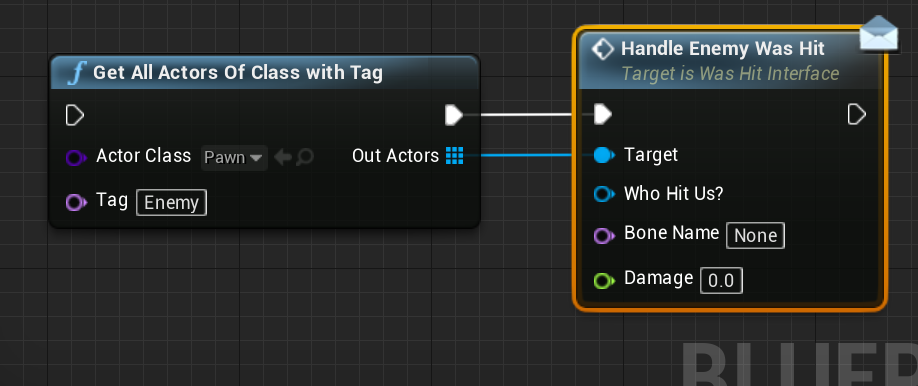
What is the safest way to kill lots of enemy actors all at once? For example. Once I trigger an event, I want all 40+ enemies to die. Should I add every enemy actor that spawns into an array when they first spawn, then remove them if they die normally. Then when I go to trigger my event, I would take that array of all my enemies and do a for each loop and kill each one.
Or should I use the get all actors of class and kill them that way. I never use "get all actors of class" because it seems dangerous especially with lots of enemies.
Ideas?
 trim matrix
how is the validated get called for inputs of a function?
so they dont need to connect like this
@dapper kiln event dispatcher or interface
dapper kiln
Yea that's what I'd use to let them know to die. I was just unsure what was the safest approach to actually get all of the enemies, whether it be an array or by using "get all actors of class with tag" because I've heard it could be dangerous on performance.
trim matrix
well if you let them know then just call it then
Id probably try using an array and just plugging it into the interface call so it does the for loop automatically, and the interface tells them to die/destroy
 tight schooner
@dapper kiln get all actors isnt going to cause a hitch or anything. It's actually not a slow node
dapper kiln
So I could add a tag to all my AI called "Enemy" and then use "get all actors of class with tag" and then kill them off
trim matrix
then kill them on the interface call
tight schooner
Yeah. I suppose it comes down to what makes the most sense / what method do you prefer
dapper kiln
Basically I just want to wipe out all enemies on my level so I can start fresh in the next area.
no stragglers lol

something like this?
trim matrix
u could do it like that
dapper kiln
I'm not saying I'd use this exact interface but you get the point
trim matrix
there are simpler ways
dapper kiln
I was just worried about the get all actors node that's all
trim matrix
that would probably be fine though
tight schooner
As far as performance goes, killing 40 actors may have an effect on Garbage Collection (depending on how sophisticated and component-burdened they are) but that's independent of how you go about destroying them. (An object pooling system would mitigate GC impact but that's another layer of complication...)
earnest tangle
Majority of things that people say are slow are not slow enough to be a problem
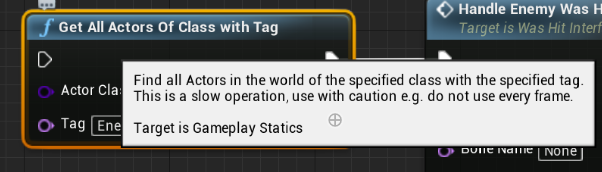
There's a node that has a warning that says "EXTREMELY SLOW", like it literally tells you this if you hover over it
I'm using it in one of my projects and it doesn't cause any noticeable impact at all :)
 tight schooner
Get All Actors is weirdly performant for how often Epic says not to use it
If you for-loop and save a Get All Actors array 10,000 times on tick you'll notice it (I've done this out of curiosity once) but short of that ..
dapper kiln
I feel like the more specific the actor class, the faster it will run. So Pawn is pretty generic, but say a parent class of Enemy would be more specific
earnest tangle
Yeah most of the slow warnings are just there so you know it could cause problems
Just so you are aware of the possibility and know to take care when using it :)
dapper kiln
Yea. I get what you guys are saying. Thanks. I was just curios. I like staged boss fights where you fight lots of enemies on stage 1 but then once you kill the boss he gets bigger or something and you fight him in a different area, It would be nice to kill all the small enemies so you can start stage 2 with new enemies
earnest tangle
yeah get all actors by some rule and destroy would probably be a good way to do that
dapper kiln
Awesome! Thank you guys. 🙂 Now somebody help @trim matrix lol He had a question about a node lol. 🙂
trim matrix
I found it out
dapper kiln
oh hahahaha
tight schooner
I remember some Epic training thing where the death of a boss triggers the deaths of the minions being their example use case for an Event Dispatcher
earnest tangle
yeah, depending on how your game works it could also be done with that
dapper kiln
So the minions would be bound to the dispatch and once it gets sent out when the boss dies the minions would receive it and die correct?
earnest tangle
yeah something like that
tight schooner
Yeah. In that case, the boss wouldn't be aware of the minions... Instead the minions are aware of the boss and are listening for the death event
dapper kiln
That makes sense. Then you don't have to have a saved reference for every enemy that you need to kill
earnest tangle
yeah event dispatchers can be quite handy for variety of things
I have a system in my game which has phonecalls... there's a dispatcher for when phonecalls come in, but the phonecall object itself also has a dispatcher for when the call ends, etc. - it's a quite elaborate setup but it makes it very flexible
 vernal ibex
just trying to make ammo drop randomly (sometimes spawns other times doesn't spawn at all) and i cant for the life of me understand arrays and random integers
earnest tangle
@vernal ibex what's the problem with this other than the exec pins aren't connected in sequence? :P
earnest tangle
nodes that have exec pins run in sequence
so the node that assigns the variable and the node that spawns the actor are completely separate
I don't know what you've connected them into since it's not visible in the pic
vernal ibex
thats what i thought first time but they still spawn everytime
they're connected to a event any damage
 weary jackal

In this series of videos we will be going over how to create a Horde-like game mode similar to games such as Call of Duty Zombies.
Support me on Patreon and get access to videos early, join our developer community on Discord, get exclusive behind the scenes videos on my proje...
earnest tangle
so you want to randomly choose from the list of drop spawn points and then spawn the Goammo there?
or what exactly is the goal here?
vernal ibex
when the enemy takes damage and dies there will be an item spawn but only spawn on rare chance
like.. random chance
earnest tangle
Right
You could use a branch node instead then
connect it to random boolean with weight
you can then adjust the weight value to adjust how likely it is to spawn
cosmic lagoon
hey guys my camera which is attached to the head is clipping with my hand (holding ball really close to the face). what can I do here?
is it possible to adjust the camera fov?
will that prevent clipping
in the Actor viewport, is it possible to load a specific pose or animation?
weary jackal
Where you are getting the 0 based array
The index will be random from 0 to the length of the array - 1
cosmic lagoon
what do you mean a random node?
weary jackal
No i was saying to @vernal ibex
cosmic lagoon
ah
cosmic lagoon
lol I just made it so the arms never ever cross across the camera....problem solved
 gilded pebble
Hey, is it possible to get the indexes fo the vertices that make up the face from the face index you get from the linetrace hitresult
earnest tangle
hard to say, maybe if it's a procedural mesh? I don't know if BP's have access to mesh data other than for procedural meshes, it might be something you can do in C++
(but I suspect it could still be quite nontrivial)
 wind agate
Hey, is there way to check if some button is held down that is binded to certain action. So can i check if my jump button is down?
something like this but for action mappings
weary jackal
Hey, is there way to check if some button is held down that is binded to certain action. So can i check if my jump button is down?
@wind agate https://youtu.be/QHfQ1_FmA8A

In this tutorial we will learn how to make a key is pressed or being held functionality and you can do interactions accordingly.
 west jasper
Hey! Can anyone advise on how i get data from an Enum into a blueprint please? I can seem to find the right variable type
weary jackal
You want to switch on enums?
west jasper
hey not sure what you mean.
I'll explain what i want to do
I want to get a list of names from the Enum into a blueprint drop down list so the user can select what interaction type it is (Eg in the Enum list it shows Oak Tree, Maple Tree, Redwood Tree)
weary jackal
You can make enum type variables
west jasper
its ok I found it, it was right in front of me all this time! thanks for your help though 🙂
 long smelt
Anyone know any way of getting all widgets on the player's viewport?
 maiden wadi
@long smelt Usually by storing them correctly someplace.
@weary jackal Wait, dude is that video just about asking if a button was tapped or held once it's released?....
earnest tangle
That's a handy macro
maiden wadi
Oh, I thought it was on release at first. Was about to say, that was unnecessarily complicated for that small of a feature.
 pine trellis
im trying to pak my game but unreal says it cant find the parent class of my c++ plugin, someone online said change the plugin from developer to runtime but I dont know how does anyone know how to change the plugin from developer to runtime to see if it works ?
never mind my plugin is already in runtime...
 deep elbow
bruh, any reason the Capture Thumbnail options is gone for some blueprints, i googled but the answers dont seem to line up with my experience
god almighty, can;t have a visible static mesh as a root, I replaced it with a Scene node but it didn't work, I set the mesh to hidden and it works, ok, that's all a bit awful, because setting the mesh to visible removes the thumbnail
 restive dagger
so here's the deal
I have my main menu widget set and everything is fine
but when I start the game, the character actually plays
oh nvm
yeah
when I start the game the character spawn
even tho I have no player start in there
what should I do?
 azure harness
did you check the gamemode? think when the default pawn class is set, a character will spawn also, but in the 0,0,0 position
restive dagger
yes
but when I set the default pawn class to none
the character doesnt play when I press play button
so what should I do
azure harness
do you want to spawn a character?
restive dagger
I want when I press play the character spawn
not when the game start
also not on all levels
I have main menu level
I dont want the character to spawn there
earnest tangle
you can override it in your world settings for each level
restive dagger
How is that?
earnest tangle
look in the world settings tab
restive dagger
yeh I Did that
the same thing happens
I press play > the game start I die and I close the game > I see my character moving behind the widget in the main menu map
azure harness
are you having two levels? menu and game? and when you press play in the menu level you open the game level with default pawn class in game mode?
and in menu level you have another gamemode or override it with the default pawn class to none
azure harness
hmm, how are you loading the level? open level or load streaming level?
restive dagger
open level
azure harness
🤔
restive dagger
I tried doing it from a gamemode
but it crashed the frames to 1 frame per second
idk why
so I deleted everything and went to levels
azure harness
strange
 cloud trellis
I am trying to setup a reload animation with this gun I have. I play the animation but I’m trying to attach the mag to the hand when I do it but don’t know how to. Help? The gun is imported as a Skelton and it has different bones
 rigid tartan
This is sort of a mixed question but is there a way for me to convert blueprints to C++ to continue working on them from code? (Like, something in the engine itself that does it for me. I know I could just get the functionality and code it myself but that takes away the purpose of creating it through blueprints in the first place)
Basically, I want to create a start menu (using Slate) but a lot of the menu will be loaded dynamically and have custom functions that I want to work on with C++. However, after making the menu through C++ without blueprints, I have decided it would be more efficient for me to make the menu UI itself through blueprints and then add the custom functionality through C++.
I found one article in the UE documentation but it was really vague
 hollow cape
@cloud trellis you're going to want to use anim notify's probably to attach to hand at a certain point, then attach back to gun. Or the other way around.
@rigid tartan might be a better question for #cpp , nothing I've seen before will do that though
@restive dagger can you show a screenshot of the code in the game mode for opening a level? Having a pawn spawn in on an event instead of begin play is simple enough
cloud trellis
@hollow cape have a vid example?
Cause it plays the animation when I want it to
It’s just getting the bone of the mag in the gun
To the hand
hollow cape
well let's back up
if the mag is part of the gun, thats going to be a lot harder. You generally want the magazine to be a separate mesh
cloud trellis
Well I have it as a separate mesh also
But it’s in the gun skeleton also
And the mag is a different skeleton also
hollow cape
Personally I would set the scale of the magazine bone to 0 (to hide it), and use a separate static mesh of the magazine
this can be attached in BP via a socket on the gun skel mesh
cloud trellis
Well I can’t change the skeleton bones at all
hollow cape
yes you can. You can do it in an anim bp
cloud trellis
Well I couldn’t destroy it in the actual skeleton but i can try in the animation
hollow cape
in an anim bp, you can use a transform (modify) bone node in the anim graph to set the scale to 0
this is a hacky way to hide a bone
well...hide the geometry associated with a bone
hollow cape
it would have to be an animbp for the gun
since you need to modify the bone of the gun
there are also tons of vids out there related to this exact thing, some googling will probably get you a vid that would help
 drifting mulch
Where should map generation logic and general handling usually go? I started out by putting it in the level blueprint (just some noise tilemap generation and storing refs to the chunks) but feel it may not be the best place in case I want to call functions on it or retrieve tile data.
Would GameMode be more suitable? Any ideas?
I'll probably always use a single level for the main game world, using a different seed for generation and saving the user modified data separately. That's why I thought the level BP is good but now I need to reference it from the player controller and it feels nasty
tight schooner
in lieu of someone providing a more definitive answer, I'll say that GameMode and GameState exists as built-in manager classes, though I'm not familiar with the functional differences between the two. (GameInstance also exists; it's special because it persists across level loads so it's useful for storing persistent stats.) For each of those, there are readymade functions, GetGameXYZ that make it easy to communicate with.
Yet another option is to put your level generation script into a standalone manager BP that's spawned by GameMode. In my own project, I put too much functionality into GameWhatever and I know I'm going to have to segregate some of it down the road.
The only definitive thing I can say is you shouldn't put fundamental gameplay systems into the Level BP
earnest tangle
GameMode seems fine for that sorta stuff imo
Honestly it doesn't make a huge difference where you put it in most cases, these objects exist for developer convenience afterall
drifting mulch
Got it, thanks. That helps. I assume GameMode always exists in relation to the player controller so I just grabbed a ref of it to use when needed and moved all the logic there

 gritty elm
tight schooner
gritty elm
tight schooner
yup
 ocean mango
pop quiz, what does this print, and in what order?
 rough wing
Delay node test first second third?
ocean mango
[0s] Delay Node Test
[2s] Third```I expected it to show up in the debug tab....but nope
 quasi frost
Thanks for everyone's help, deck builder is ugly but works
tight schooner
lol that pop quiz
yeah when the print string at the end of the event is finally called two seconds later, it just gets the last known input string
which by that point is "Third"
I try to avoid making things like that
with parallel latent nodes that are hard to untangle
trim matrix
Can someone help me? I will spawn in an AI and destroy the previous AI and it will spawn it one unit forward
Can someone help please? I set it to get actor location and it still spawns a unit forward
tight schooner
What's the rest of that node? It's cut off in the picture there.
tight schooner
what happens if you check No Collision Fail?
trim matrix
ill see
tight schooner
I never dealt with AI before but spawn-actor nodes have some options for preventing things from telefragging colliding and I wonder if something similar is happening there
trim matrix
that wouldnt work
tight schooner
cuz it might throw errors about doing stuff on an actor that's "marked for destruction"
ideally DestroyActor should be the very last node the actor executes in the graph
ocean mango
I'm actually kind of blown away by that delay node behavior. The mental model is that they're continuations and they'll be queued up to complete
But I guess it's internally just reusing the same timer handle which is a fun surprise
earnest tangle
That's certainly a very interesting test case
fwiw, most of those event related things like delays and timers will only run one in parallel per actor
eg. you can't call "set timer by event" twice to start two timers
or to be specific rather, you can't call the same timer twice to do that
you can of course have multiple timers if they are from separate nodes
 glacial sentinel
if I make a blueprint actor (B) with some variables to change a material. and then throw that actor into a new blueprint actor (A)
how can i access the variables from B from A?
tight schooner
Ultimately it comes down to there only being one event; putting a delay on it doesn't let you spawn multiple instances of that event. So the event is firing a few times and updating the "Message" data input, but the execution gets blocked at the Delay node until two seconds later. Then the Print String finally fires and gets the most recent "Message" data.
ocean mango
yeah, I think I'll need to add my own custom delay and timer nodes that avoid this issue
keep a collection of handles etc.
earnest tangle
if I needed to do something in parallel with multiples I just made separate actors or widgets or whatever for them
in my cases so far that made sense contextually as well
and not just as a workaround :)
ocean mango
I've got my game mode spawning actors after a delay
tight schooner
@glacial sentinel do you mean in like a child class, or a Child Actor Component?
glacial sentinel
I think it's a child actor class
ocean mango
you can invoke the "SpawnAnActorInABit" event
earnest tangle
this is how my delay-based spawning works :P
ocean mango
It does seem like the actor I'd spawn to deal with this is really just a place to put a timer handle
I'll try experimenting and see what makes sense
tight schooner
@glacial sentinel If you're working on a child class, then you need enable "show inherited variables" to see and modify the parent stuff on the child. You can also override parent functions/events in the Functions section. Admittedly I'm not completely sure what you're asking, so I hope this is it.
glacial sentinel
Thanks seanny, I think it's a starting point at least for more googling
tight schooner
Just in case you're asking about Child Actor Components, which is literal actor-inside-actor BPs, you have to cast to it in this roundabout way... Your component --> child actor --> cast to your actor class
But for the former (child classes) you should learn about how inheritance works in BP https://youtu.be/tCO0FdibECc (obligatory Mathew W. video)
 sour ridge
is there a way to add more inputs for the Event AnyDamage?
https://docs.unrealengine.com/Images/Engine/Blueprints/UserGuide/Events/AnyDamage.webp
 glacial sentinel
Just in case you're asking about Child Actor Components, which is literal actor-inside-actor BPs, you have to cast to it in this roundabout way... Your component --> child actor --> cast to your actor class
@tight schooner yup, I'm doing actor inside actor, where the child actor has some BP that lets me change color on a material
west jasper
Hey! Is there away I can display the Names in an Enum as a list please?
so it displays
Tree
Stone
Cat
Dog
type thing
ok scrap that managed to do it with a "ForEachEnum" now I'd like to be able to create a button on the hud for each enum value listen
 atomic salmon

Unreal Engine
Developing a UI that dynamically updates based on data can save development time by reducing the number of times a UI must be manually iterated upon. Developer Support Engineer Cody Albert explains how to do just that.
west jasper
awesome thanks !@atomic salmon Ill check it out 🙂 really appreciate it!
 keen goblet
@sour ridge Don't think so
 maiden burrow
what is the basic method of making a player hang from a rope. no idea where to start
cloud trellis
Hey so anyone think they could help me with something. I have this relaod animation for a gun, and it plays. I also have the gun imported as a skeleton with the mag as a bone. how do i connect the mag to the hand to get rid of it and add a new one
 desert storm
@maiden burrow The way I would do that would be to have a hanging animation, and attach the hand-bones to the rope.
@cloud trellis Best way I could think to do this would be to use the "AttachActortoComponent" node. You can specify a socket for that (the bone), and attach it to the hand during your reload animation.
cloud trellis
yeah but heres the thing
the mag is in the skeleton
but its a bone
and i cant remove it
and there is a mag but it isnt a skeleton
its a static i think
yeah its a static
but i cant remove it
from the skeleton @desert storm
desert storm
Hm. I'm actually not sure about that one.
 tired heart
hey guys I wanted to know if there is a way to a 2D player shrink with a press of a button
 frozen dune
Does anyone knows how to break from a sequence node ?
I would like to stop the sequence actions if a condition hits false
 rugged thorn
Hello everybody,
I’m quite new to UE4 BP programming so bear with me if I’m asking a stupid question. I took some time to look around the internet but didn’t find an answer so far.
Issue:
I’m receiving some rotation value from an external software to UE4 in an Axis-angle representation: https://en.wikipedia.org/wiki/Axis–angle_representation
I would like to know how I can convert those values within a Blueprint to a rotator that can be used to influence an actor or mesh (Yaw, Pitch, Roll).
I’ve discovered this node: Rotator from Axis angle but I’m not sure on how to split my vector to get an axis and an angle separately: https://docs.unrealengine.com/en-US/BlueprintAPI/Math/Vector/RotatorfromAxisandAngle/index.html
Any help will be appreciated,
Thank you for your time



Rotator from Axis and Angle
tight schooner
@frozen dune I can only think of convoluted ideas, like putting a gate node in front of each line of execution and closing them en masse, or setting a boolean variable and putting a bunch of branch nodes etc..
Organizationally maybe don't use a sequence in that case. Maybe split up your execution by using events or w/e
tight schooner
oic
frozen dune
but after realizing that, I noticed it would give me an unwanted behavior
One question about menus, if I do a regular menu with 3 buttons, does UE4 automatically makes it work with controllers ?
tight schooner
I had to look into it the other day. It works automagically in a way that's hard to customize. Look into UMG "keyboard focus"
If you set on widget "construction" a button to be focused, then you can do stuff with keyboard arrows and gamepads
Unfortunately anything like a virtual thumbstick cursor needs a plugin to work
because you have to fake the mouse clicks lol
frozen dune
yeah, what I'm thinking is that I would like for the player to be able to use mouse/keyboard/controller in the menus
since I'm prototyping a RPG, the menus are the gameplay itself
 warm pivot
With blueprints is it "separated" in a sense between the visual/animation side of it and then the actual mechanics? Are there any tutorials focusing on all of these aspects? Hard to find a comprehensive full blueprint tutorial.
tight schooner
@warm pivot you can do procedural animation driven by BP script that sets object transforms, material & particle effect parameters, and etc.
warm pivot
oh really? interesting to note
tight schooner
Curve assets and Timeline components can drive things with predefined curves, and/or you can drive stuff with math directly
And then there's #legacy-physics which I'm not very familiar with
If I recall correctly, "Kine" is a solo indie game made entirely with BP script, with all the animation driven by BP as well
warm pivot
really wish I could use cascadeur a physics based animation program to directly link it to BP scripts
I know you can import it into UE4 but to my knowledge only via pre-determined animations and nothing more
trim matrix
What node do you use to stop the velocity of an object completely?
frozen dune
I'm almost certain that the pawn class has a velocity parameter so that would be a way
now, if it's any object at all, I think it would depend how you're even setting that velocity
 late shuttle
I keep using Event_Tick to set Delta_Time (Float) in multiple BluePrints, then using events to control functionality in my actors. Is there a better way to keep track of Delta_Time Universally without an expensive Cast node, or am I doing this the most efficient way?
late shuttle
All I can find is "Get World Delta Seconds" - which I'm assuming is it. Thanks @twilit heath 🙂
 vestal plinth
has anyone done any winged flight stuff before? I'm trying to get it to evaluate pitch before roll. is this how you'd do it?
I feel like I should be doing this in quaternions in C++
sand shore
You could do it with quats in BP
vestal plinth
aren't they C++ only?
sand shore
They're actually a BP type
And you can pick up a wrapper lib so you can operate on them
vestal plinth
neat
sand shore
if you prefer to handle XYZW yourself, that comes with the engine
vestal plinth
I'd prefer not to but I can't figure out how to do this
with the method above if the pitch is below zero the yaw rotation reverses
I don't understand why. it's not gimbal lock at that stage
I'm basically trying to get it so when you roll 45 degrees and pull up, it's relative to the flying thing
rather than up in world space
the input device has a gyro. we have the pitch and roll absolute values but we don't want the heading obviously, so I'm trying this
damn that shouldn't be the Z pin
I also think I have those last two nodes backwards
I think if you're making a rotator, for this it wants to be YZX, but for adding local transforms it wants to be ZXY. but that's not working.
rough wing
my function doesnt work if the game is in client mode
any help?
i can get custom events to replicate but functions dont seem to start
Solved-i was calling it inside the custom event
trim matrix
Hey guys looking at making a spawn system manager, is it better practice to use a "zone" to track spawning or can it be level wide, hope that makes sense?
trim matrix
rpg/duegoncrawlers are my intended design target, having a consistent number of AI alive. I'm leaning towards a zone style system , so I can control the type of AI that spawns in a given region but was worried about scalability and if they are separate "zones" how would they know how many the other "zones" had created?
weary jackal
In this series of videos we will be going over how to create a Horde-like game mode similar to games such as Call of Duty Zombies.
Support me on Patreon and get access to videos early, join our developer community on Discord, get exclusive behind the scenes videos on my proje...
Check this out. I think it's what you are lookin
 spring hare
Anyone know the formula to remove the used ammo instead of the whole clip when the player reloads?
earnest tangle
You'd have to keep track of how much ammo is in the magazine
After that it's just total ammo - ammo in mag
wait no that not even it lol
total ammo - (mag capacity - ammo in mag)
there you go :P
 tranquil gorge
hey im trying to make a custom camera in my level blueprint for my 3rd person game. probably a very small resolvable issue but would anyone be able to take a look at my blueprint and tell me what i did wrong here.
uploading screen shot in a sec
i want the camera behind the character and to rotate the same degree as the character. but the cam always seems to end up ahead of the character
 wise raven
Whats a nativized BP? is it blueprint code that gets converted to CPP code?
tranquil gorge
i know that i had a friend drop and drag what looked like some c++ code from a text file into a blueprint and it became a blueprint seamlessly. @wise raven
dont know if that gets you any closer to having your question answered tho sorry.
spring hare
@earnest tangle Thank you
tight schooner
@wise raven https://docs.unrealengine.com/en-US/Engine/Blueprints/TechnicalGuide/NativizingBlueprints/index.html

Technical guide for programmers exposing gameplay elements to Blueprints.
In a nutshell, yeah, it's a UE4 feature that converts BP to C++
wise raven
@tight schooner is it good to nativize all blueprints?
tight schooner
Nativization has bugs so it really depends on your project.
It has to be, like, worth it
lol
tight schooner
If your gamethread specifically is killing your performance, then nativization can have a huge impact
wise raven
I mean its good to nativize stuff like actors that purely work on tick
like a raycast vehicle
tight schooner
If you have a certain actor that's executing a ton of nodes every frame, or otherwise you have some extremely data-heavy operation, then nativization could help
But you should profile first to see if that blueprint is really adversely affecting performance
before you go down the nativization rabbit hole
wise raven
I mean how can i check one specific bp profiling?
it shows the entire worlds tick rate and other actors
tight schooner
I think Unreal Insights can do it when configured. I'm not a master at it though. Profiling is kind of a deep subject
I forget if "stat game" in the console gives you that level of granularity
You can also try doing stuff like enabling & disabling an actor and seeing what impact if has on perf in real time
tranquil gorge
@tight schooner hey bud while youre here do you think you see anything inherently wrong with my blueprint code. my questions was just above nash32's initial comment and it would be awesome if i could get a little feedback.
tight schooner
@tranquil gorge Get your player pawn's forward vector (Get Forward Vector) and multiply that by however many units away you want it to be, and add that to the pawn's location
Also... IDK about level blueprints, but for normal blueprints you can go to the class settings and set the tick rate to something custom if you don't want it to tick every frame
you might actually have to subtract the multiplied forward vector from the pawn's location instead of add it... Figure out which one works
tranquil gorge
ok thankyou very much i will try this solution. 🙂
tight schooner
np
If you want to remove pitch/roll from the equation, I think Get Forward Vector can also be done on a rotator
tranquil gorge
ah ok ty again
@tight schooner do you know if ue4 auto assigns a camera to the player pawn character without it showing up in components. it seems like even though i have a camera component outside of my pawn blueprint it doesn't want to default to it.
 sour aspen
hello is easy ads free version no longer exists? How do you create mobile ads ?
 jade arrow
Hey, guys! I've just a very brief question. I need to change the widget texture and I think I found a good solution on unreal forums. But I can't figure out where to find this node, as there's no description in the topic (as if it is obvious for everyone, except myself). So, what is it?
earnest tangle
That looks like a widget style structure that has just been broken out
So you'd drag from your widget, then look for "get widget style", then you can right click the pin and choose "split struct pin"
maiden wadi
@jade arrow By texture, do you mean an Image widget?
jade arrow
Yep
maiden wadi
Just set the Brush. There's a few options for it. Most likely via Texture.
earnest tangle
set brush from texture is what I've used so yeah that oughta work
jade arrow
@earnest tangle, I think I got it
jade arrow
Oh, thanks, guys! It just was not obvious at first, especially when you don't even know where to look at
 frigid thicket
do you use play montage like this to get notify spesific name?
im wondering if i have many notify with different names, the node will be too long
 sudden surge
Kinda wish the Instanced specifier was a thing in BP. Would make some modular systems a little easier to work with
 uneven thunder
What's the best way to clamp a float to some value but have a spring effect, like you clamp it to 50 but it can exceed 50 with exponential falloff so it never goes far above 50?
maiden wadi
Depends on your specific use case I guess. You could always use a select. If above 50 use fifty plus equation on remaining amount to keep it in the range you want. If below or == to 50 use that value.
frigid thicket
do you use play montage like this to get notify spesific name?
@frigid thicket nvm, didnt know switch on names is a thing
 austere knoll
Hi everyone - does anyone have an example of uploading a file via blueprints to an external server? I"m using node as my API and I can deploy formidable or mutler for file uploads, and I can execute JSON requests fine throughout my UE4 project, but the issue is that these "file handler" modules for node require multipart forms, and I'm not sure how I would do that with VaRest or any existing Blueprint tools. Does anyone have any example of file upload to external server via Blueprints? If I could see one example of a file upload in any way from UE4 I could figure out the rest.
Thank you much in advance for any help.
 echo scaffold
Quick Q, Is there some additional rendering cost to using Canvas Render Targets in a material?
I am using a Canvas Render Target to combine 3 textures at runtime so I can save on texture slots in the material, but I don't want to have it defeat the purpose if they are more expensive
 glacial eagle
Drawing into a render target isn't cheap
echo scaffold
Not drawing to one, that will only happen once
To combine the textures
If it just exists once drawn to, is it still more expensive than a standard texture>
glacial eagle
The real issue is that render targets won't have mip-maps
So you'll be locked to the maximum texture size all the time, so there's a good chance it'll be a waste of VRAM
It's probably not worth it tbh
That and the render target will always be loaded, even if nothing is using it
sudden surge
You're better off blending them in material. Render targets are hella expensive
earnest tangle
🤔
I'm prerendering some userwidgets into rendertarget2d's which are then used in materials
I wonder if there's a better way to do that if they're so expensive?
I should note that in my usecase it's one and done, the rendertarget is never updated
echo scaffold
@sudden surge Could you elaborate on what part of them is expensive?
sudden surge
if you're doing it via a retainerbox then the best thing to do is ensure it doesnt need to be redrawn. I'm not saying don't ever use them. i'm saying for their use case it's not worth it.
I'll answer your question with another Question. Why use a render target for blending textures in the first place?
what benefit does it give you that say a layererd blend does not?
echo scaffold
In my case, I have a character creator with a makeup mask for lips, eyes, cheek, misc using RGBA channels of a texture2d
But I want the player to be able to select lips makeup type, eye makeup type ect individually
The only way I can think to do this would be to use 4 black / white masks so they're all separate texture2ds
But I feel like it's way too much resources for a single makeup system where the body material itself is also using quite a lot of textures
sudden surge
if you set your texture settings correctly that's not a massive issue. there is a texturegroup for masks which is stored as a single channel.
generally if you need to change them individually you'd use seperate assets. it's kinda unavoidable as youd need 4 assets anyway to build your rendertarget
echo scaffold
Yeah I'd have separate assets to build the RT but wouldn't it make the material itself less renderheavy? One texture2d vs 4 which are all adding together
 ashen sparrow
Is it possible to set Resolution Scale via BP? I'm on a low-end computer and want to set a default value when the game launches..
 merry yew
Hello, does somebody here know about Teleports?
I have four teleports here. Two on top and two at the bottom. A bit hard to see maybe.
The actors are supposed to teleport from top to bottom and from bottom to top and it works mostly.
But sometimes the Teleport node just returns false and I don't know how to fix it.
Any ideas? Thank you.
earnest tangle
It's impossible to say without knowing how you've implemented it
merry yew
It teleports the actor just far enought that it doesn't interfere with the teleport on the other end.
The branch just determines whether to teleport up or down based on if location Z is positive or negative.
earnest tangle
hmm
it's still pretty hard to say, there's nothing in that that would look wrong
maybe you should add some print nodes in there to see what's going on and then try to reproduce the problem and maybe it can give a better idea of what's going on
merry yew
Yea, I did
Everything is working as expected.
Except Teleport returns false when it doesn't work.
earnest tangle
oh, that could be because of a collision I think
if it doesn't fit where it's being teleported and the position can't be adjusted so it fits, then it returns false afaik
if there's enough space, maybe try using draw debug sphere or something to draw a marker where it's attempting to teleport
that should show you if it's going somewhere where it isn't supposed to
merry yew
Alright, that's a good idea. Thanks zomg.
 wild moth
Hello hello 🙂 I just wanted to know if it was possible to save volumes of SoundClasses in the GameUserSettings?
Or should I use my own savefile?
 strong light
yo anyone here got any good tutorials for an inventory? has to be from 2019 to 2020
merry yew
Why does it has to be from 2019 to 2020?
strong light
cause every tutorial i have tryed havent worked and they where from 2017
 devout geyser
Hey guys, quick question what is the difference between "For loop" and "While Loop"?

In this new series I go through a method of creating an inventory system, similar to a survival game. In this first part I introduce the system and go through the process of setting up some key assets that we will need going forward.
There are unlimited ways to create a tutor...
2018 good for you?
 frozen hemlock
@devout geyser For loop runs as many times as you specify
While loops continue while whatever you want is still true
for example while player is alive
devout geyser
So while works in case of a condition? and for just number of loops?
devout geyser
Thanks! have a great day 🙂
frozen hemlock
🙂
west jasper
Hey! Need a bit of advice please 🙂 I'm creating a teleporting system and have got it all working with a HUD where you can select a teleporter it then triggers a script to run and find all the teleporters spawned and if it finds one it then teleports the player.
Currently its searching for all the teleporters and there locations. I was wondering if i would be better storing the teleporter locations in a GameInstance rather than a triggered blueprint. I'm not sure if i should be using the GameInstance for this though? Would I better putting it in a database so when a teleporter is dropped in a level it gets the location of it then stores it in a database?
or am i over thinking it
or could i use a construct script inside the Teleporter blueprint that writes the location into the database ready for when the game loads?
earnest tangle
You could probably just have an array of teleporters in your gamemode or something
if they are placed into level, you can just get all actors of class and save them into the array on beginplay
if they are spawned dynamically, you can have each teleporter register itself by calling a function on the gamemode (which then puts it into the array)
although if you need to get all currently available teleports to choose from, you could just try using get all actors of class, most likely it will perform adequately
west jasper
@earnest tangle thanks for the reply! Currently when a Teleporter name is clicked it goes to a blueprint which gets all actors of class and loops through until it finds the matching ID Number of the teleporter the moves the player but I'm not sure if this is very efficient
or if i should not worry about it for now if it works it works and look at effieciency later?
earnest tangle
it sounds fine to me if you're not seeing the game lag when doing that :)
west jasper
@earnest tangle ok i shall keep going then for now 🙂 Thanks foir your help!
maiden wadi
@frozen hemlock On a side note, running a while loop while the player is alive is probably not the best idea, since loops execute on the cpu thread until they're finished. If you were doing something while the player is alive, it's probably better to consider tick, which would only run once per frame instead of thousands of times per frame.
merry yew
I'm wondering if there's a way to do asynchronous timed events inside a blueprint. So, e.g. you click mouse twice and each one fires a timer and after each timer reaches zero, you get a thing executed on each occurance.
I'm doing a local multiplayer arena and I want to have invulnerability after a player hits another one, but if another player hits you immediately, they can still damage you. So, independend invulnerabilities for each player.
I imagine that there needs to be some sort of array somewhere dictating that this player is now invulnerable to this player's attacks.
maiden wadi
@merry yew Might be easiest to make either a map or an array of structs. One variable being a pointer to the enemy controller or pawn, the other to a float. Then on tick count down that float, if it's 0 then remove it from the map/arrayofstructs. On damage taken, see if there's already an entry for that pawn/controller, if yes, do nothing. if no call your damage function and then add that pawn/controller to the array/map with your float set at your desired invulnerability time.
merry yew
That's a good idea @maiden wadi , thanks!
 lapis knot
any idea why the emitter doesnt work?
west jasper
Hey again, how i can I do this please. in my Hud i have a button and when its clicked i would like to send a Blueprint interface message. The trouble is I can't seem to figure out that target for the interface. Usually I have used interfaces with line traces
 manic gyro
Hi guys, i have a question about function in UE4. I've made a main manu with save and load buttons. When i press the button the function names SaveGame and LoadGame doesn't work. Functions are in main Player blueprint.
In Player bp - works
In widget doesn't work
Maybe you know why?
 gentle urchin
I'd guess you got an accessed none error @manic gyro?
manic gyro
I don't have any errors
tight schooner
I struggle to think of something that isn't game engine modification. Things that are data/simulation heavy... It's not like you should "never" do it but BP isn't a natural fit for those use cases @spring birch
gentle urchin
Is the player reference valid ?
tight schooner
@spring birch Kine is a solo dev game that Epic has shown in a livestream. I haven't played it myself but it seemed competent.
manic gyro
I think so @gentle urchin
gentle urchin
How is it set / updated?
 queen wyvern
Hi um can someone help me?
The crouch on my game is bugging
When i press ctrl it did the crouch but only for 1 sec and then it when back to idle
weary jackal
Make a animation statmachine
tight schooner
Epic's intended use of BP is as a design layer that calls C++ functions, or is used as child classes for C++ parent classes. So use of BP isn't exclusive, though using BP or C++ exclusively can be done. But the normal way to use both, at least for teams. @spring birch
weary jackal
And make a bool is crouched
trim matrix
I love blueprints so much. They have so much power.
queen wyvern
Bool? Boolean?
weary jackal
Yea
queen wyvern
Ooo okay imma check that
weary jackal
From that boolean it can toggle the crouch pose
tight schooner
@lapis knot you're spawning an attached emitter but is it actually attached to anything?
Maybe just spawn it at a world location and see if that works
weary jackal
@manic gyro is your widget is 'IsFocusable'?
gentle urchin
Yeah that could aslo be a thing. Make sure the event fires in the first place
manic gyro
@gentle urchin Idk, i've made a variable from my Player_Bp, and called functions from this variable if you are asking about this. Player_Bp is my main Bp. When I called functions in Player Bp it works, but when i try called function in widget it not even start
@weary jackal i didn't hear about this
gentle urchin
The variable has to be updated with a valid reference aswell. By default its an empty variable.
lapis knot
@lapis knot you're spawning an attached emitter but is it actually attached to anything?
@tight schooner
Its attached to the laser no?
weary jackal
@weary jackal i didn't hear about this
@manic gyro if you don't have the widget 'IsFocusable' then you can't do the interaction from the widget
rough wing
Accessed none?
weary jackal
It's in the widget's designer window, under the palette you can see the hierarchy. Click on the root of the widget. You can see 'IsFocusable' in details panel
Also make sure the input mode to ui
And vice-versa toggling
manic gyro
I found the opctin isfocusable but i don't see the vice versa toggling
manic gyro
Yes it is
weary jackal
Also when you open your ui you should make the input mode to ui only
And when you remove from the parent, you should set input mode to game
manic gyro
I have this. Main menu is working, i can go to onother options etc. but only two buttons to save and load game doesn't work.
gentle urchin
Add a print at the button pressed to make sure the event fires in the first place
weary jackal
Try the calling of savegame function before removing widget from parent
gentle urchin
Ohhh lol i didnt even check for that
manic gyro
I've made both of this things
gentle urchin
But i would think the rest still would execute
manic gyro
Still doesn't work.
gentle urchin
So you added a print, and there's nothing printing when you press the button ?
gentle urchin
Drag out from player variable, get displayname, and plug that into the print
Does it still print ?
devout geyser
Hey guys, quick question, when i use the foliage tool i can't see my brush, any suggestion on how to fix it?
 tiny ember
Hello, I'm trying to move camera while the simulation is paused, but doesn't work. Anyone can help me please, thanks a lot
devout geyser
you need to play, to move the camera not to simulate @tiny ember
 sick sapphire
So i have a camera attached to a TPS side view character (spring arm + cam)
any way to make to so that the camera does not follow the up/down postition of character?
earnest tangle
You could probably use a separate camera actor or something which follows only on the axes you want
otherwise you'd have to keep moving the position of the spring arm component relative to where the character is
sick sapphire
maybe i can adjust the spring arm offset
alright thx
alright using event tick + socket offset worked nicely
maiden wadi
@sacred current Can you show the variable returning function?
 deft snow
Is blueprint the context I should work in to fetch color data from an imported Alembic?
I want to route that information to the color input of a material.
 modern hawk
Hey guys I want to know is there a way to compare two wildcard like which one is bigger ?
earnest tangle
you probably can't with wildcards, because a wildcard could be any type, including types that cannot be compared for size
modern hawk
I wanted to do this so I could compare these variables float , integer and transform but I don't want to make function for each one
 pulsar arrow
Hi, is there any particular advantage of using event dispatcher? I've been using UE4 for almost 5 years and I have never used it.
 thorny relic
You can bind and unbind to events at runtime, for one
It's basically the same as a listener pattern
earnest tangle
I use them quite extensively to trigger things when stuff happens
thorny relic
"Observer" design pattern
earnest tangle
For example when my characters complete an animation they trigger a dispatcher etc.
sour aspen
what is the alternative to timeline to use in other blueprints ? I want to create a bouncing effect on my camera and I want to create a graph like i can create with timeline but it isn't available in normal blueprints other than materials
tight schooner
@sour aspen make a curve asset?
thorny relic
Helps you decouple your code, as once you expose an event, other classes can bind to that event without you needing to change the class with the event dispatcher, or for it to know the listening classes exist
sour aspen
@tight schooner a curve asset never heard of them I'll search it thanks
thorny relic
@sour aspen why isn't the timeline available?
sour aspen
@thorny relic its onyl available in material blueprints
thorny relic
Note that you can only use timelines in the event graph, not inside functions
sour aspen
hmm that sucks I was trying to use it in fucn
thorny relic
Timeline is available in all blueprint types, just not inside functions - I use them a lot, they're awesome
earnest tangle
ohh that's what it was about, yeah it doesn't work in funcs :)
tight schooner
@sour aspen obligatory Mathew W. video https://youtu.be/HrHFpAxnBZQ
thorny relic
You can add a custom event instead of using a function
earnest tangle
@thorny relic they don't actually work in UObject based BP's and some other limitations
sour aspen
@tight schooner thanks
tight schooner
you can make a function that samples a curve, but you can't make a function that continuously fires over time like a Timeline does
sour aspen
@thorny relic but isn't it make my project more complicated? I am coming from Java background so I dont like using custom events feels like adding all the methods to in the main class :S
@tight schooner Hmm I see, after I get the grasp of the curves I can decide what to do
earnest tangle
it's best not to think about it too much lol
custom events are very handy in some cases
since you can use nodes like delays and timelines in them :)
thorny relic
basically functions are in a different scope that doesn't have access to the time simulation
earnest tangle
fwiw if you want to run a timeline from a function, you can call a custom event from your function, which then in turn triggers the timeline
but at that point you might as well just have the function be a custom event instead imo
thorny relic
Yes... also, an event is basically a function that doesn't return anything, anyway
earnest tangle
yeah, that's probably the best way to think about it :)
thorny relic
In fact, overriding a no-return function from a parent class will turn it into an event handler
sour aspen
I don't get the scopes of these things. Is it private or public maybe protected? Feels weird
thorny relic
(Which always felt slightly odd to me...)
earnest tangle
@sour aspen custom events are public always
it's a bit meh but you get used to it :P
thorny relic
Blueprint doesn't really do that scope stuff very well
earnest tangle
it does with functions :)
sour aspen
I want to move to c++ but since this is my first project I wanted to go with the easy way
earnest tangle
my advice would be to not worry about "proper software engineering practices" too much :)
sour aspen
I am also not very familiar with c++ so I am trying to improve with little steps
earnest tangle
just do it the unreal way and things will be much more straightforward
sour aspen
😄 Okay I'll keep that in mind
thorny relic
Can't you still call them from other blueprints? I thought you could even if you marked the function private, but I might be misremembering
earnest tangle
nah, protected and private for functions works as you'd expect, as in same as in C++
thorny relic
Aha, maybe I was thinking of something else then
Also @sour aspen , it's quite viable to use blueprints for most things and a little bit of C++ for when you need it, in custom nodes you can call from BP
so that's probably your best way to learn
sour aspen
@thorny relic I am afraid of adding c++ to my bp project because i think it messes up the project folders whenever I tried to ad only a c++ class it confused me and i had to roll back
earnest tangle
it should work fine tbh
at least all my stuff was BP first and then I added C++ into it and it works :)
 peak otter
A question:
I have a c++ base class that sets values for some UProperties (they're UAttributeSets), I have a blueprint created from that class, that now has correct values in it, but a blueprint that as parented to that blueprint, contains None in the properties that are supposed to be filled with some value. What's going on and how to fix it?
gentle urchin
I often experience issues with compiling the c++ project in the first place, randomly getting errors after a restart. Like not finding included files etc all of a sudden 😛
probably me doing it wrong but...
earnest tangle
@peak otter Wait so you have CppBase, and BpChild, and in BpChild the values that are set as defaults in CppBase are the wrong values?
peak otter
Cpp Base (in ctor: MyAttributeSet = NewDefaultSubobject<UMyAttributeSet>) ->BpBase (MyAttributeSet points to newly created object) -> BpChild(MyAttributeSet is None)
earnest tangle
Ah
Never ran into that, I wonder if it's something to do with NewDefautlSubobject 🤔
peak otter
its almost like None value is serialized somehow and not willing to be overwritten
Funnily enough when I create BpChild2 now it contains correct values too
so something is wrong with that one particular blueprint
earnest tangle
Have you tried if you can reset the value of the variable back to the default in BpChild? Ie. with the little "reset to default" arrow that you get on vars that have changes from their defaults
 sudden spear
hey guys!
I'm looking for a way to constrain movement of my player pawn. I found "Constraint to plane"-Options in the character movement component but I'm not getting it atm^^
...goal is to be able to just move along the Z axis to climb ladders for example
 sick galleon
@sudden spear its kindof dirty but when I enter a ladder I would write down that ladder direction (not just Z up vector so you could have slanted ladders) and as long as the player is on the ladder, I would project his position onto that vector
look at "Find closest point on line"
sudden spear
@sick galleon thank you! I'll try that :)
...but I'd like also to know how I could achieve this with a "constraint logic" if anybody knows 🙂
sick galleon
There are the physical body axis constraints, with "Set Constraint Mode" but I guess thats what you already used, and it doesnt seem to offer per axis constraint
sudden spear
I used the "Set Plane Constraint Axis Setting" now which you can see on the pic. It kinda works but I'm still able to strafe on the ladder.
...btw I was thinking of the ladder movement in Half Life 1. There's just still the problem that I have to figure out when I'm at the top of the ladder and want to go "forward" towards the top
 sleek dust
how can i change an created widget size? i tried with set desired size in viewport but whole widget get screw up
flat raft
is it better to fetch data for a bp from the datatable when needed, or from the bp itself? (given the bp fetched that data and set it internally from the datatable OnBeginPlay)
maiden wadi
Depends on the datatable. If it's just a single entry occasionally, you probably won't notice much. If you're regularly pulling hundreds of entries, definitely do it once and put the data in an array to use. BP findrow is a bit slow.
flat raft
Ahh.. i guess that makes sense. FindRow would need to loop over the items in the datatable.
and if I have many items, then it is going to take up cpu power
@maiden wadi Thanks!
sour aspen
Well i don't know why but when i start my game it seems like i have two camera?
It causes me to get the wrong camera actor to work with in runtime
Also creating unnecessary cameraActor :S
flat raft
did you drag one into the world, and then spawn one ?
sour aspen
Well i have one but I dont remember spawning any camera in blueprint
sick galleon
@sudden spear iirc in half-life, ladder logic was "while the player is in the volume, if he's going forward and collides with something : he goes up if he's aiming above the horizon, otherwise he goes down. Strafing was allowed so you could get out of the ladder volume on the sides. Ofc, gravity not affecting the player at that point.
unrelated question :
How can I get a material from a string in BP ?
I have something like "/Game/Materials/Craftable.Craftable" that I got from "Get Path Name"
How can I get a material variable from that path name ?
 ruby furnace
Hello!
I have a spline and building grid that is being generated inside this spline. Generation is a recursive function in actor that checks four sides around this actor; function stops executing when the space inside the spline is full.
I want to have a visual display of the grid in the editor including its' changes that happen whenever the spline is changes; right now I can see it only in game. I tried moving main logic from EventGraph to ConstructionScript but the engine can't process the recursion and it causes Error: Infinite Loop. I tried increasing max loop iteration count in project settings but it didn't help at all. If someone has worked with a task like that before or knows how to put the recursion into ConstructionSctript it would be great if you shared you knowledge.
Thanks in adance!
sudden spear
@sick galleon that is interesting! :)
I did it now like this in my player charachter BP: ("OnLadder" bool is true when I enter the box collision of the ladder; when I hit jump "OnLadder" bool is false and I'm able to walk again without constraints) ...though I still have trouble because I'm not able to go up the Z axis immediately when I enter the box collision but I'm going to figure that out 🙂
tight schooner
@sick galleon maybe a soft object reference? I never played with it so I'm only vaguely aware of the system
I do notice there's a "Make soft object path" node that takes a string
so maybe there's some way to resolve that into a "hard" object reference
Epic has a livestream about that... https://youtu.be/K0ENnLV19Cw?t=1575
(which I haven't watched yet)
lol
well, I suppose you'd have to use the Completed exec pin, but otherwise. No idea if that'll work.
 sinful zealot
Anyone familiar with tutorials/guides on player movement in ue4? I keep finding "AI" movement which I do not need for a first person dungeon crawler, just need to find a way to get the player to match the height of the floor mesh. (the z axis, x-y axes should be straightofrward)
 hoary gazelle
Hey everyone, im trying to make my character spin in air when pressing a button.
Its supposed to just rotate its body slowly 360 degrees and stop after like 1 second.
But it keeps going too fast and spinning more than once.
It also doesnt spin 360 completely, the character ends up crooked at the end of the spin and just looks weird.
I need help trying to do this with Timeline because thats what im using.
tight schooner
@hoary gazelle There are two, somewhat unrelated problems. One of them is a timeline curve is adding rather than setting an offset which will produce crazy results and there are two ways to fix that. Either use a "set" node instead of an "add", or keep using the AddRelativeRotation node but don't use a curve at all, and instead feed it with GetWorldDeltaSeconds * 360 (or w/e)
So that's one problem. The second problem I can't give specific advice for, but the crux of the issue is "gimbal lock"
which is what happens with 3D (i.e. vector 3) rotators when you flip a thing upside down
The solution may be to use quaternions which can be enabled in the editor plugins, I think... but I never used them personally so yeah, I can't give specific advice for that.
You can at least test the solution to the first problem by using "yaw" because that won't suffer from gimbal lock
hoary gazelle
So, SetRelativeRotation seems to be the best option here, however it also sets the rotation of all the offsets.
So as its twirling, it rotates the players X and Z as well because now everytime i move right, the player faces towards the camera.
I should also mention this is a side scroller, if that makes any difference.
tight schooner
I'll just say that every frame, your timeline is calling AddRelativeRotation, and each frame, the curve is feeding it a larger number
so early on, it's adding rotations of 1, 2, etc.
but by the end, it's adding rotations closer to 360 per frame
so it's hard to meaningfully use AddRelativeRotation on a "ticked" event like a timeline without factoring in WorldDeltaSeconds (which is 1 ÷ frame rate)
and the curve, if you even want to use a curve, is more like the rotation speed
flat raft
Unreal Engine Forums
Build powerful visual scripts without code.
This post mentions a BP Profiler.
Anyone know where I can find it?
Or any tuts on using it.
An overview on the Profiler Tool used to monitor game performance.
 void cobalt
can someone help me?
i have a top down game with shooting and enemies
and when my enemies die they ragdoll, and dissapear in 3 seconds
which is what i want, however
when they ragdoll, their bodies still have physics
in a way that they block the path of other enemies
so i was wondering if its possible to make it so that on death the collision changes so it DOESNT fall through the floor, but the players CAN walk throught it?
sick galleon
@tight schooner this soft object reference looks promising, ill try that, thanks
 twilit heath
@void cobalt turn off collisions and gravity
void cobalt
that makes the bodies fall throught the floor
wait
yea no that doesnt work
oh
i did it
ended up setting collision preset to ragdoll
and that did it perfectly
tired heart
how do i change the size of a 2D character using blueprint
 frail swift
how do I get blueprint session result?, I know find session exists though how do you get your session after you host it for ref, thanks
 barren relic
Hey guys! Does anyone know of any tutorials for commanding ai as a player character? This would be similar to games such as ghost recon wildlands where you can order the ai to hold position or attack a target.
 hardy swallow
@true plaza I'm pretty sure you need to use "try get pawn" or something like that
@barren relic Nothing specific comes to mind, but you should be able to add you ai to an array or map and then call function and pass arguments that way
 true plaza
@hardy swallow still failing. maybe Im casting to the wrong thing? but thats where my bool is
hardy swallow
@true plaza Something I use a lot is GetDisplayName->PrintString. If you call that on GetPlayerPawn or TryGetPawn, it'll at least tell you what it's trying to pass, if anything.
And it's TryGetPawnOwner, not TryGetPawn, sorry
@queen wyvern Unless you're trying to set up some super specific Jump action, why not just use what comes in the character default?
quasi frost
I do not understand what is happening here. For some reason this variable is not setting. I've never encountered this issue before. What would make a variable either not set or unset?
queen wyvern
but it wont jump eventually lol
hardy swallow
What do you mean "very rough" Like, the animation
queen wyvern
yaa
hardy swallow
That's not really something you can magic away through blueprints. That's more of the animators job. You can change things like transition speed and stuff like that, but that's also going to be in the character's animation blueprint
queen wyvern
hm so ill just reset back the settings then?
hardy swallow
I would, then go to the animation BP and (give me a sec)
And look at the transition rules. You can also go to the animations being called and play around with Rate Scale, Interpolation; settings in there. I'm sure there's a better way to do all this, but messing around is how I've learned most of what I know
@quasi frost First off, I'm not sure what's going on. Second, damn that's a lot of if-else statement. I know it's not going to solve your issue, but check out the Select node; it'll make that much cleaner
 devout kelp
hey all, i'm having a bit of issue with a save file im trying to make and I think i'm missing something. My end goal is to be able to generate a struct made out of a random mesh and material, and add that struct to an array that is saved and can be loaded later. right now, it's overwriting the first value every time. any advice? lol
quasi frost
@hardy swallow For some reason the first circled variable is not setting the second. The first prints correct and the second prints none
hardy swallow
@quasi frost Check the order of execution. An easy way to do this is be throwing Print String which print out numbers in the order you think they should fire in. A better way to this is with breakpoints, but if you don't know them, print strings work fine
quasi frost
@hardy swallow Hmm how would this execute out of order? And if it was how would I even fix that?
hardy swallow
Where is StoredCard being set?
quasi frost
hardy swallow
Also, it looks like you're using that variable for each slot, so change the slot to slot 2, or any other than 1, and see if the same thing happens
quasi frost
It's odd this should be super simple. I an grabbing the card name of the selected card, and setting the card in the deck to the same name. It's odd that this is giving me so much issue lol
hardy swallow
Can you highlight everything in that comment, paste and save it in a text file, and DM it to me?
devout kelp
hey all, i'm having a bit of issue with a save file im trying to make and I think i'm missing something. My end goal is to be able to generate a struct made out of a random mesh and material, and add that struct to an array that is saved and can be loaded later. right now, it's overwriting the first value every time. any advice? lol
this is the main bit of blueprint that i think might be causing the issue. also, the 'saved stars' array doesn't have any default values if that matters
hardy swallow
@devout kelp You're pulling SavedStars from SaveStarsInstance, which might be pulling a copy and adding it to that copy instead of pulling a reference, which would directly change the variable. What you might have to do is pull that array, promote it to a local variable, then add it to that local variable, then call SetSavedStars from your SaveStarsInstance, then after all that save the game.
devout kelp
oh, that might do it. thank you! i'll give it a shot
true plaza
dang, both GetDisplayName functions dont seem to be working for me @hardy swallow
not seeing anything print or in the msg log
hardy swallow
Here's something that might blow your mind: do you have that animation blueprint open (in view) when you try to play your game? If so, for whatever reason, it probably won't work. I've ran into that a lot.
devout kelp
is this what you meant? currently, its still overwriting the 0 index instead of adding
hardy swallow
Try AddUnique instead of Add
I also assume you're loading the game, promoting that to a variable (Starsave Instance), changing it, then saving that again, right?
devout kelp
oh my god. i wasnt loading the game  thats probably the issue then
 ionic gull
How do you copy an actor in blueprint? Basically I want to make it so when you pick up a gun it will copy all of the gun class into a gun class variable the player has, so I can delete the gun on the ground.
devout kelp
thank you @hardy swallow that totally solved it. i just. completely forgot to load the game in this blueprint and didn't notice lmao
hardy swallow
@ionic gull What I'd do is not have the gun on the ground be the same as the gun your player gets. Instead, have that as just a plain actor with a "OnBeginOverlap" or something, and have the gun class you want to spawn as a variable in there, and when your player overlaps, it passes that variable to the player then deletes itself
@devout kelp It happens. I run into a lot of "why isn't this working" then realize I'm never calling the function in the first place
ionic gull
@hardy swallow hmm that could work, the only problem is that I will likely have to transfer a decent amount of variables from one to the other, such as if one gun only has 20 bullets left in its reserves, or if a gun has the sniper scope attachment, etc etc
austere knoll
Has anyone ever uploaded files (such as an image) to a remote API using Blue prints (via VaRest or another means)?
hardy swallow
@ionic gull So, the gun on the ground can have different properties than it's base class? In that case, have the class variable like I said, but also make a struct containing all that info and have that as a variable as well. In your gun's base class, have that same struct as "instance editable" and "expose on spawn" then pass both the class var and the struct from the gun on the ground to your character, so now they have both the class and it's many variables. If you're going to have the same base class (let's say Handgun) but with different struct variables (lets say Red Dot Sight and Laser Sight), then you should look into making a map of structs. Also, a struct can contain a different struct as one of its variables.
true plaza
@hardy swallow got Get Display Name working and see now that it is casting to the wrong pawn (also not sure why it throws a Fail though)
ionic gull
@hardy swallow Awesome that is exactly what I was looking for, thank you!
hardy swallow
Np
@true plaza So, the cast fails since it's casting to the wrong pawn... which makes sense, it should do that. idk man...
true plaza
just to make sure it's clear, I need a bool from MotionControllerPawn, so I cast to that from animationBP and use TryGetPawnOwner
hardy swallow
I mean, MotionControllerPawn is using the anim BP, like, it's assigned right? I don't see why that would fail if that's the case.
true plaza
its not
an AI pawn is using the anim BP
thats the one showing up
do I need to cast to something different then?
spring hare
Is this for vr? @true plaza
true plaza
yes
spring hare
And its for the player controllers?
true plaza
not exactly sure what you mean
spring hare
Like the controllers for the hands
spring hare
Maybe try getting player controller as the object?
hardy swallow
@true plaza Wait... yeah, if MotionControllerPawn isn't using the anim BP, then of course you won't be able to use TryGetPawnOwner, because it's, well, going to return the pawn owner. Is MotionControllerPawn controlled by the player controller?
If that's the case, do GetPlayerController(0)->GetControlledPawn->CastToMotionControllerPawn
true plaza
that works :o
spring hare
Yay!
hardy swallow
nice
 pale blade
For things like stats (health, mana, strength, dex, luck, etc), is it recommended to use struct to hold them then add it to your Character, or is it better to use ActorComponent then add it to your character?
hardy swallow
It depends if those are things which are going to be used in other places. So, if your enemies are going to have health, mana, strength, etc. then yeah, you'd want to go with an actor component. The other benefit to using the component is that you can use that as a container for various functions which you can call from the owning actor, that way you don't have to rewrite those functions in every character which uses those stats. @pale blade
pale blade
Hm, so like if I want non-Actor items to reuse the Stats, then I'd want a struct?
hardy swallow
Well, Actor is the base class of anything you place in the world, so do you mean non-character?
Like a book
hardy swallow
Like I said, since Actor is the base class of any placeable object, you can still use an actor component and just not call certain things. Granted, if you have a bunch of those, then you're just using up data and memory.
In my game, all my playable characters have a Health actor component which deals with taking/healing damage, but the exploding barrel has the same component, I just never call the Heal Damage function from the barrel
pale blade
Hm, I see
hardy swallow
The only thing is, if you have a Stats component which has a bunch of data and a bunch of functions which handle that data, then you wouldn't want to use that on everything that can take damage (which is just a small part of the Stats component) and the reason is because that means every fish, dog, box, whatever would have that data, which can take up a lot of memory when you have a lot of those in the scene
pale blade
Got it
 vast lion
Is there no easy way to subtract rotators?
tight schooner
Is there an invert or negate rotator? You can invert one rotator and then Combine Rotators
 short pawn
hey guys. I had a project that the skysphere was working properly in game , but for somereason when i play the game in standalone or a new window the skysphere isn't working and the colours are a bit off.
short pawn
does anyone know whats going on"?
 narrow wyvern
Hello friends!
I'm working on a project that utilizes a magnet to push around large metal cubes
When you left click, the cubes come towards you, when you right click they're pushed away
To make this work, I need to check if the player is within a certain proximity of the cube, and then check if a mouse button is held down
There's a couple things that confuse me though
So I believe that I would want to use "On Component Begin Overlap", right?
so, as a bit of an example
tight schooner
If it's mouse driven, you may as well start with the mouse click. You do some sort of click-to-line-trace thing to determine what object was clicked on. You then get that object's world location (or use the trace hit location) and use a Distance node with the player pawn. Then you can determine how far away the clicked object is.
narrow wyvern
I have this?
The goal isn't so much that the player has to aim at it, but just as a general proximity
tight schooner
I'm not sure if your game is camera/reticle based or cursor based. If it's the former, you can do a line trace out of the camera rotation. Actually a simpler way than doing the distance check is just limit the length of the line trace to begin with 
narrow wyvern
reticle based, but without a reticle
lol
It's a non-directional magnet
Electromagnet, rather
narrow wyvern
yup
tight schooner
I suppose you can do a sphere overlap actors node (I may not have the exact node name... just going from memory here)
and get the list of overlapping actors, figure out some way to filter them by interactivity, and affect those
narrow wyvern
Put that on the cube?
tight schooner
I assume the player is holding the magnet, so you'd want the functionality on the player pawn
in that case.
narrow wyvern
yup
tight schooner
Upon mouse click, get a list of actors from sphere-overlaps-actors and... do something to them, lol. (I'm not a UE4 physics expert.)
narrow wyvern
I'm playing around right now, trying to figure out what you mean D:
tight schooner
SphereOverlapActors
Connect that node to Left Mouse Button Pressed
That's an easy way to do an overlap check without making a collision component
Set the sphere position to the pawn (GetActorLocation node)
Set the radius to whatever you want the magnet range to be
Object Types... Drag that pin out and type "Make", and you can specify stuff that way.
narrow wyvern
I'm doing it right now as I read, I apologize for my inexperience
tight schooner
Actor Class... Whatever type of object you want it to find
(knowledge of class inheritance and the hierarchy helps there)
Actors to Ignore... Drag that pin out, type Make, and feed the Make Array node a "self" node.
So that it doesn't find the player pawn
Drag "Out Actors" and connect it to a ForEachLoop
narrow wyvern
like so?
tight schooner
Cuz the out actors is an "array" (list) of actors it found
So for each of those actors in the list you want to do something
narrow wyvern
I don'ot understand what the Object Types is
tight schooner
Those might be collision channels.... I kinda forget. I'm going by memory
But if the options are like WorldStatic and WorldDynamic then it's collision channels
tight schooner
Probably. I would guess your boxes are that
narrow wyvern
They're StaticMeshActors currently but idk if they shouldn't be
tight schooner
I don't know about those offhand. If they have a physics section in the details panel
You might see if they're WorldDynamic or something
narrow wyvern
By the way, thank you so much
tight schooner
And if that's the case, you should set your SphereOverlapActors to that
narrow wyvern
You have no idea how much this means to me
tight schooner
Np :)
narrow wyvern
Hm, doesn't say anywhere
tight schooner
You'll have to figure out the magnetic effect on your own though (unless someone else chimes in)... I haven't done much interactive physics
Anyway let's just go with dynamic
On the ForEachLoop, attach a print string node to the Loop execution pin
And on that ForEachLoop, drag out the uh, output data pin (I forget what it calls it), and search for ToString
And then attach the output of that to the PrintString string input
And if all goes well, when you click the mouse in your game, it'll print a list of overlapped actors to your screen
narrow wyvern
tight schooner
Yeah... Do the rest of it too
narrow wyvern
Right now :)P
tight schooner
Loop Body into Print String. Array Element into ToString and then into the PrintString node
(and don't forget to connect SphereOverlapActors to ForEachLoop)
tight schooner
You forgot to connect the execution from SphereOverlapActors to ForEachLoop
But otherwise yeah
Then try walking up to the boxes and clicking the mouse and hopefully it finds them and prints their object names to the screen
narrow wyvern
didn't work :(
tight schooner
Dang. Well, you can try expanding the object Types to just include everything possible lol
Idk what the boxes are without seeing their collision settings
tight schooner
In collision section, click that sneaky down arrow at the bottom of it
It should reveal the collision channel / object type
narrow wyvern
It just says that it's relevant for level bounds
tight schooner
Oh, is there a mesh component in it?
Or a collision component? You have to check that
tight schooner
It could be the thing with the house icon
tight schooner
Sometimes meshes have collision objects/settings in them
narrow wyvern
Would it function better if it were a sphere?
It should be unmovable by anything other than the magnet
tight schooner
If it's fundamentally not collide-able then SphereOverlapActors won't find it, because it uses the physics system to find stuff. The box has to be responsive to overlap checks at the least
If it's a BP, then the collide-able part can be in a collision component or a static mesh.
If it's not a BP, and it's just a straight up static mesh, then you need to open the mesh, and set up some collision on it
Or else it won't respond to overlap checks much less physical forces
My knowledge of physics is slim so thats about as far as I can help you
pale blade
Can I not manually add Character Movement Component myself?
I understand the Actor - Pawn - Character structure and I want to make a Custom Pawn (special functionality) but eventually inherit Custom Pawn to Custom Character
Of course I can't use the default Character anymore, since I'm using Custom Pawn
narrow wyvern
I'm struggling right now with some stuff, but I'm going to go to sleep Seanny. It's 3:30am :D
Goodnight
 short coral
Hello , i'm running into a weird issue that i hope i can get some help with , i have a function that sets the mouse cursor world position, this works fine in PIE but when i package or play in standalone it doesn't i'm scratching my head over what's breaking it but i can't seem to understand what the problem is
vast lion
Selecting a "LookAt" node in an anim BP freezes the editor indefinitely and causes memory spikes. Can't even delete the node to fix the issue to keep it from freezing the whole engine.
Was just wondering if anyone else has experienced this?
atomic salmon
@narrow wyvern Feel free to ask on the #legacy-physics channel if you need help with magnetic forces and the like. That's where most of the physics/math discussions take place.
atomic salmon
@vast lion not supposed to do that. Maybe you have a kind of looping condition going on? Where one bone looks at another and viceversa?
vast lion
Hmm, I looked for loops
All I have to do is highlight the LookAt node and then the whole editor freezes
Thanks for the suggestion though!
worthy frost
what ue version?
vast lion
4.25.3
worthy frost
interesting, not happening to me
vast lion
Yeah, doesn't happen in a new blank project for me either
 neat stream
Hey Guys, Any ideas why previously my save file was in the Game Folder and now it's in App DAta?
does Async Save and Save not storing at the same place?
twilit heath
if you didn't change something
its probably because you packaged the game and saved from there
vast lion
@worthy frost hot reload is enabled, but I'm not using a hot reloaded binary
Will try disabling it entirely
trim matrix
guys why when i attach to a socket then it changes its location?
vast lion
Now the entire editor won't open. Get's stuck at 95% until the system is out of memory...
twilit heath
time to revert that BP from source control
 daring wagon
Can anyone give me any indication why this wouldnt work? Im trying to set an image to a texture for an inventory slot. The Item being passed in is valid but when I GetItemThumbnail the Texture is not valid
trim matrix
What if you don't use SC
twilit heath
SetBrushFromTexture works only after widget is already on screen for some reason
@daring wagon
twilit heath
anything after construct is fine
you can expose on spawn and do it on construct, for one
not sure how you managed to give it a stroke with blueprints alone, that usually requires c++
daring wagon
Possibly because im using C++ as well
twilit heath
oh nice
basically
cache the thumbnail
and run another setbrush from construct
should do the trick
queen wyvern
hi can someone help me?
the idle animation is diffrent lol
i put the the standing idle but it comes out aiming idle
west jasper
Hey! I have a spline mesh blueprint i've created and need advice please. How would i get it to randomise the set mesh for each spline point please?
 haughty ember
I created a variable in an actor of type Object->ClassReference, but I can't assign it the "value" of DataAsset class. Why is that?
earnest tangle
data assets are considered to be instances (I think)
have you tried using that instead of class ref?
haughty ember
What do you mean? they have a type. UDataAsset. I need that.
earnest tangle
Are you trying to assign a specific data asset to the variable as the default or what exactly?
haughty ember
no. It's an editor event that gets an asset and maps the asset based on the type of it.
earnest tangle
Ah right, so you want to assign the class and not the instance?
If so it seems like it should work if it's Object->Class Ref 🤔 UDataAsset does inherit from UObject
haughty ember
yup :\ I'm guessing it's the MinimalApi on it actually 😦
earnest tangle
Could you use DataAsset->Class Ref instead as the type?
earnest tangle
that's a good question :P
primary data asset might work?
at least if your data assets are created in blueprints, they would have to be based on primary data asset
you can only create "plain" data assets in C++ afaik
haughty ember
I can't assign primary data asset neither though :\
earnest tangle
it seems to work for me 🤔
haughty ember
that's not what I meant; you're declaring a variable from that type.
I need to assign that type to a generic variable (e.g. of object type of Class)
earnest tangle
I assume there's some reason why you can't make the variable of that type?
Sounds like this is something that might be possible to do with C++ and the type system limits in BP are getting in the way :)
haughty ember
I assume there's some reason why you can't make the variable of that type?
@earnest tangle Like I said, It's an editor event and I'm dealing with assets. I'm getting an Object, and I need to map it from the type of it.
Creating a variable from type DataAsset will do nothing
earnest tangle
Yeah sounds like C++ might be the way to go.. you can do all kinds of shenanigans there with types lol
 exotic rain
Hi,
I want to create a different camera for the FPS weapons and elements which show the gun and hands with a fixed FOV so that my animations dont look bad when I change the FOV of the main camera. See this video from 3:36 to know more - https://www.youtube.com/watch?v=dclA9iwZB_s&t=193s
I also want the weapon not to go throught walls when we are close to them. This is implemented in almost every FPS game and it works very well.
How can I achieve in UE4? Thanks

Watch 100s of Blender tutorials - start your FREE trial on http://www.cgcookie.com
Before we dive into all the technical stuff about how to set up the project and get animating, I want to take a few minutes and share some of the interesting tips and tricks that I found while ...
 urban zodiac

Unreal Engine
Material node that implements separate Weapon FOV for FPP/FPS games.
earnest tangle
I wonder how does that do the Z depth thing
I've been wondering about that but it's not worth 35 usd for me at the moment lol
urban zodiac
uses world position offset to squeeze the mesh
earnest tangle
squeezes? as in makes it flat but adjusts for perspective so it still looks as if it wasn't?
urban zodiac
I only glimpsed at the material functions for a moment but yeah, something along those lines
earnest tangle
interesting, might have to try that at some point :) thanks
exotic rain
Found this https://www.youtube.com/watch?v=jpm2RRgCbW4

How to use a custom HLSL script to have complete control over your First-Person field of view. Inspired by Bhaid's excellent Panini Projection script derived from Unreal Tournament. Topics covered: Material graphs, material functions, material parameter collections.
LINKS:
Bh...
earnest tangle
Panini projection.. what a name
 brisk lake
for when you really want a smushed crispy sandwich?
pine trellis
does anyone know what this node is
i need a refresher on how to get to its settings to change one if its variables
 simple berry
heya, im working on making my game co op multiplayer and im trying to get an animation to play for all players on a specific actor, in this case, when one player opens the chest i want the server to open it for everyone, but im having trouble making it work that way, anybody got any ideas? im trying to do blueprint only
 thorny cedar
can i simply check, if some object is in my view?
maiden wadi
@simple berry I'd recommend a good read on RPCs and Replication and how to use both of them to accomplish things in multiplayer. If you haven't read it yet then read this twice. http://cedric-neukirchen.net/Downloads/Compendium/UE4_Network_Compendium_by_Cedric_eXi_Neukirchen.pdf
thorny cedar
for example in the finder of a camera?
weary jackal
i need a refresher on how to get to its settings to change one if its variables
@pine trellis it's blueprint interface. Open the interface you made. You will find all the functions you've made inside
 ancient topaz
Good afternoon, please help.
After hitting my character, he can turn on his side. I can not understand why this can happen.
Not always, but only when I turn the mouse.
the camera remains in place, but the position of the character's body changes.
I dont have any idea
why
spring hare
@ancient topaz What is ment to happen?
ancient topaz
the body of the character turned sideways.
spring hare
And its not?
ancient topaz
it should stand upright.
spring hare
So wait explain what is ment to happen?
 main zodiac
anybody else experiencing startup crashes when using structs?
ancient topaz
should stand like this
But after receiving a blow, its angle changes and it stands crooked. Maybe lying on its side at all.
spring hare
Maybe check when its ment to go back to the standing state?
maiden wadi
@ancient topaz We can't help unless we know what you're doing when the character is hit. Just going to get a lot of wild guesses.
ancient topaz
@maiden wadi Just playing hit animation
It is working normal before i make 2 thing
AIM
and Change Camera wiew with Arrow
void cobalt
hey, i have an issue with my top down shooter game, can anyone help me?
basically i have the shooting system done, however bcuz the camera is a little bit tilted and not directly above the character, shooting at certain angles is very innacurate
would it be possible to make the character look in the general direction of the crosshair rather than directly where the crosshair is pointing?
the red line is where the linetrace is shooting, and the green dot is where my crosshair is
if i shoot straight forward it works perfectly
but if its at a 45* angle its really off
earnest tangle
is the crosshair the mouse cursor or something else?
void cobalt
yeah its the mouse cursor
earnest tangle
I think if you do a linetrace from the camera to the cursor's world position that might do it in such a way that you can get the actual point in such a way that the character would point to it more accurately
void cobalt
from the camera?