#blueprint
402296 messages · Page 536 of 403
 void cobalt
 earnest tangle
you would use this linetrace to get the point towards which the character should be facing
void cobalt
ooo so make another line trace?
earnest tangle
yeah
void cobalt
ah right that makes sense
earnest tangle
I'm not a 100% sure if that'll fix it but worth a try
void cobalt
@earnest tangle
so i made another line trace come out of the camera to the location of my pointer
and i set the crosshair worldspace location to where that camera linetrace hits
which should in theory do the trick, but it didnt :/
earnest tangle
I think the problem might just be that it's rotating correctly, but the linetrace for the character comes from the head instead of the feet
void cobalt
the red rectangle in the screenshot is where the camera linetrace shoots
that might also be the issue
earnest tangle
the offset between the rect and the line looks to be roughly the height of the char
you could try linetracing up to the height of the character's head instead of the ground level
void cobalt
but if the linetrace shoots from the feet, the visible bullet tracer will also come out of the feet wouldnt it?
i will try changing it so it shoots from the feet instead
earnest tangle
you could potentially calculate the aim point like this
pretend the dotted line I drew in that is the line from the camera
you can treat it as a triangle like that
void cobalt
how would that work
earnest tangle
well, you know the height difference between the character's head and the hit location on the ground level
and you know the angle between the linetrace hit point and the line from the camera
you could use that to calculate the length of "top" part of the triangle
and then you can use pythagoras theorem to calculate the length from the hit point to where the actual aim point should be along the linetraced line
you can then offset the hit point with that and you should get the correct aim point
there might be some vector math way to calculate the same but I don't know it lol
earnest tangle
lol same but you learn when you do gamedev for a while :P
 mortal wharf
Is it possible to do a save game and load game system in a level blueprint? Since i want it to save everytime i go to the menu.
 wind atlas
I thought there was some sort of node/feature already available in UE for that sort of aiming?
earnest tangle
Not sure about that node thing 🤔
wind atlas
sorry maybe ignore what I said haha, I'm a n00b, I just had some vague memory, probably something else
the trig method sounds great.
earnest tangle
Yeah I haven't really done this type of aiming so not sure either :)
But hopefully the method I outlined would work
 sour aspen
Why i can't set my variables referring to my pawn in the construction script of game mode? What is the best way to create refferance for my actors in level
This gets empty result
 tight schooner
Have you hand-placed placed your "SW pawn circle" actor into the game level?
sour aspen
yes
tight schooner
I'm not too familiar with getting references on construction, cuz construction can run before stuff is spawned by the game mode etc. so it can be tricky
If you're spawning it with that Spawn Starting Circles function, maybe that function can provide references as a data output
sour aspen
I think beginplay is the best option
tight schooner
rather than having to do a Get All Actors
Yeah, I tend to acquire references on BeginPlay cuz it's more likely to work
tight schooner
@mortal wharf maybe you can call the save/load functions from the level BP but I wouldn't put the system there... Putting fundamental systems into level BP is bad practice
 keen goblet
@sour aspen There's always the GetPlayerPawn function if you need it
sour aspen
@keen goblet oh that's usefull i don't need that pawn referance anymore
 rough wing
I'm tryign to get my character to hold on to walls
I attach my character to the wall
But I want gravity and velocity to still apply to the character
So im using a physics constraint
However although my character gets attached, he falls down because i guess the constraint is too loose?
How can i get the constraint to limit my characters location?
 shy lava
im trying to make a procedural planet sphere and trying to figure out how to loop verticies
so i dont have to manually type them
 stone canopy
yo! how can i change the content browser view to see a folders tree? thx in advance
 quartz pawn
how do I check if something got touched and what touched it
 trim matrix
Touched like collision or touch input?
trim matrix
oh nice
quartz pawn
;p
quartz pawn
yes
hit is for like a non actor
how would i check if the actor it hits
like check its name
trim matrix
pretty sure its for line traces and things. event hit
oh so one simple way is just to cast to the actor
quartz pawn
could i use get object name?
trim matrix
prob not
quartz pawn
so like cast to Main_Character
quartz pawn
so it aint workin
trim matrix
oh event actor begin overlap isnt what you would want
you would want to create a collison volume componet
trim matrix
Then click on that componet and get on componet begin overlap
quartz pawn
i have a capsule collision, that works?
trim matrix
yea
quartz pawn
trim matrix
plug in other actor still,
quartz pawn
instead of overlapped
trim matrix
you also might wanna put your print sting after the cast
yes instead of overlapped componet
quartz pawn
i have another in the monster event
trim matrix
oh ok
quartz pawn
still wont print
trim matrix
hm Is this ss from your monster BP?
quartz pawn
yup
trim matrix
You could maybe check your collision settings on your capsule componet
quartz pawn
i did
trim matrix
then i couldent tell you what it is D:
quartz pawn
trim matrix
if overlap wont even print
oh
idk the pawn preset
show me the expanded version of pawn collison preset
I would assume it still would work tho
trim matrix
ahh
I mean if you click the little arrow next to the collision preset dropdown
on the left
you can expand it
quartz pawn
trim matrix
ah yea i couldent tell you without being in unreal looking at it myself then
I cant rn tho
not sure how these things behave of the top of my head
trim matrix
well i guess that is what you needed then nice
 gritty elm
why server can't see client event?, but client can see any client
i already running two custom event, 1 on server, and other on multicast
quartz pawn
so i have a variable in my monster that I want to reference in an animation blueprint. how do i go about doing that?
 keen seal
Hey, I'm trying to get a wave spawning blueprint going, any ideas why I get this error?
BlueprintUE
earnest tangle
That means your spawn ai from class node failed
 ruby oriole
im really overwhelmed right now. How would you program a stun mechanic or any loss of control into blueprints ?
earnest tangle
for AI or for player character?
quartz pawn
so i have a variable in my monster that I want to reference in an animation blueprint. how do i go about doing that?
@quartz pawn
earnest tangle
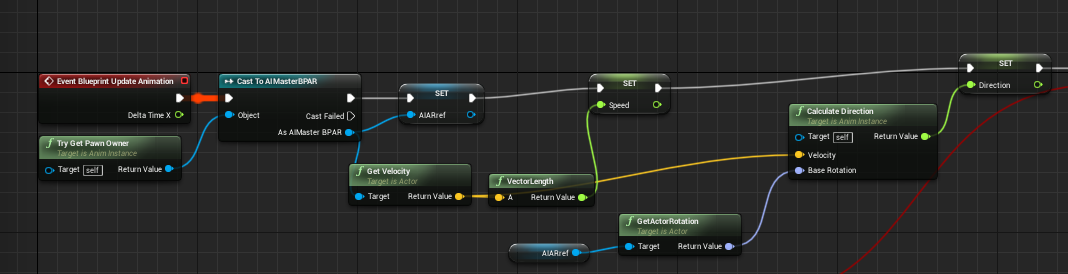
use "try get pawn owner", this will give you the pawn that the anim bp is used in, then you can cast it to your monster bp class
keen seal
That means your spawn ai from class node failed
@earnest tangle Well the enemies spawn in the world as usual
earnest tangle
@quartz pawn you probably should do that in the animation update event and save the result to a variable, and use the variable in the transition
@keen seal actually it's possible the issue is caused by your random value from arrey implementation... if you use random integer, you need to do array length - 1
in that case the spawn would only sometimes fail
Either way, the error definitely means that the spawn ai node failed. "accessed None" means the value you were trying to use is None (nullptr), and that would only happen if the spawn ai node failed
keen seal
Hmm
gritty elm
does local player mean only server player?
 maiden wadi
@gritty elm Local player means local player. You can have many if you're doing a split screen, but usually this refers to the player on the local machine. This cannot be on a dedicated server, however there is also a local player on a listenserver setup.
quartz pawn
my animation wont work with my ai and i dont know why
gritty elm
the player hud variable return null if i try to play two players in multiplayer mode @maiden wadi
i mean for server player, it initialize, and for client, it return null, why?
maiden wadi
@gritty elm Dunno. Depends on where you're calling that event.
gritty elm
i call on begin play on character
maiden wadi
Then it should run once per character per machine. So with two players, it should run four times, twice on each machine, depending on how you're calling it. Are you RPCing, do you have it behind a SwitchHasAuthority, or?
 frail swift
Need help, Im creating a 3d card and want to apply a 2d texture I have to It Is there a way I can do that, like a but it doesn’t always face the camera
maiden wadi
@gritty elm The event. Is it called after an RPC or behind a SwitchHasAuthority?
gritty elm
what mean by rpc
maiden wadi
Remote Procedure Call.
quartz pawn
my animation wont work with my ai and i dont know why
maiden wadi
Or Event ran on another machine.
gritty elm
what mean remote procedure call exact, any example for better understand
maiden wadi
Server, or Multicast events are RPCs.
I'd strongly recommend reading up on RPCs and Variable Replication if you're going to be doing anything multiplayer.
@quartz pawn AnimBlueprint?
quartz pawn
yes
maiden wadi
Going to need to see how you have the animation states set up and how you're polling for the data needed to make it run.
quartz pawn
its linked with the character
maiden wadi
I don't know what you mean by that. Do you have an EventBlueprintUpdateAnimation event?
 glacial sentinel
$5 to whoever can help me understand how to control child actors variables nested in another blueprint, and have it work in editor and in play mode, so far i only have it working in play mode. it does not work in editor
 still bramble
 pine trellis
This is the blueprint of my parent weapon, I can cloak it with this code, but if a weapon has more elements then it wont cloak all of them, how can I cloak all the weapon materials ?
quartz pawn
my animation wont work with my ai and i dont know why
@quartz pawn
 karmic zealot
@pine trellis GetMaterials + ForEach
pine trellis
does this look right ? @karmic zealot
karmic zealot
@pine trellis why don't you tell me?
Test it
@glacial sentinel that looks right, I don't understand what "Play Mode" is, I mean, I assume that's PIE, but you say it's working in editor but not play mode, so I'm a little confused. Or actually, you recant that it works in editor. So that's confusing as well
So, does it "Play mode" mean PIE?
But what's "editor" then?
glacial sentinel
like not in play mode
karmic zealot
@quartz pawn
@quartz pawn you quoting yourself doesn't really help.. also, I guess a quote of a quote takes out the OG quote. But "this doesn't work" without further explanation, screenshots, what you've tried (basically bare minimum context) isn't going to make anyone help you
like not in play mode
@glacial sentinel this doesn't help me
Just use the correct term in the editor
You mean ?
You got me for another 5 mins
glacial sentinel
@karmic zealot like it it's like this
just not in play mode
karmic zealot
Then back to work for me
Brah
That's Simulate
I just literally asked you to be specific
glacial sentinel
karmic zealot
glacial sentinel
but in this mode when it's simulating it works
karmic zealot
Look at the icons
Okay, so we got terms now
So in "Simulate" it works, but "PIE" it doesn't?
glacial sentinel
what's the mode called if you do nothing? pie?
karmic zealot
Well, no
You switched it
So now it's Simulate
Look at the icon
Just do the arrow drop down
and do whatever you want
Doesn't matter
you have 3 mins
glacial sentinel
the child blueprint, if I change it's values while it's not in simulate, they work
when i change those values, when the child blueprint is nested, they only work when I'm simulating
karmic zealot
How are you changing those values during runtime?
glacial sentinel
karmic zealot
K
glacial sentinel
for the blueprint being nested, in simulate mode or not, I can see changes
karmic zealot
So, since there's only 1 min left
glacial sentinel
but when it's actually in another blueprint, it onbly works in simulate mode
karmic zealot
Simulate's reason is so you can do that and test values
PIE is basically like how it will be like when you package the game
With PIE, you need to actually do logic to change things in realtime
glacial sentinel
I'm not working on a game though, I do cinematics for offline renders
karmic zealot
Good luck, I just answered your question, now you need to figure out what you really want to do.
glacial sentinel
okay, thanks for the tip
 supple dome
@glacial sentinel you cant change child actor properties in editor
because its only saved as a template, which is used when spawning in pie
at least i havent got luck with that
child actors are really really hacky, id suggest avoiding if you have another option
glacial sentinel
is there other ways to nest a bunch of objects together like a unity prefab?
I thought people make procedural building things with blueprints, I always thought maybe some were built with nested blueprints
supple dome
yep but its mostly using components
actors within actors or components within components are possible but theres less support for it
glacial sentinel
hmm I see, well if i find a solution I'll post it here
supple dome
if you wish to have unity like behavior by grouping actors theres a free plugin on the marketplace
 ashen sparrow
So I was gifted a copy of Low Poly FPS... it’s really nice! The models and animations are awesome... But... the blueprints. You can clearly tell that this guy is a Unity user. So.. I deleted all of them today and I am going to build them from scratch.
This package costs about $160.. should I send him my BPs when I’m done and tell him to release a update, or is that considered bad manners? 😅
 twilit heath
i have no problem calling bad code bad code 😄
ashen sparrow
I thinking of adding network support also... just for the hell of it..
twilit heath
with blueprints? yikes
 proven mason
Hey I'm trying to incorporate dodge movements using analog buttons/stick
ashen sparrow
with blueprints? yikes
@twilit heath Yeah.. just to make shooting, receiving and give damage tho... nothing fancy.
proven mason
I managed to do a quick dash but I am unable to do a quick step.
so my idea is when I quickly tilt the stick to a scale of 1 or -1 the character does a quick startup.
after tilting towards the max. if I hold the accleration would blend into a sprint (I tend to call that a dash).
so say if I hold at a scale of 1 or -1 for 0.1 seconds the character's accleration would blend into sprint.
If I release the stick back to scale 0 and the hold time is less than 0.1 seconds then my character does a quick step.
So far I seem to have the Accelerate into Sprint done properly when I tap my stick quickly towards the scale of 1.
but so far when I release the stick or analog button it doesn't print out the word "step"
if you look at the yellow arrows when I slightly lift an analog button from being pressed the yellow arrows show briefly then dissappear.
I haven't fully released the analog button/stick back to scale of 0 as of yet.
and even if I did it doesn't even touch the "Clear" node.
So if anyone could point out something that would be nice.
 icy cliff
I can't move W/A/S/D?
proven mason
Go to the Minimal_Default tab
then go to edit -> project settings -> Input
Inside Axis Mappings make sure you have W and S keys for MoveForward and A and D keys for MoveRight
icy cliff
Okie dokie thanks
proven mason
Now onto my problem
rough wing
Hello, I'm having a problem
I'm adding in new static meshes via blueprint to my actor
And im attaching physics thrusters to them
but the thruster isnt working
print is working
proven mason
also if you guys are curious what's inside the Analog Direction Macro Function I've created it's this
 vestal plinth
my game instance is set in project settings, but on my menu map it can't cast to the right type. this is really confusing.
when I do that, it's failing in the menu map, but not the game map
can game instance class be set anywhere else?
this is on android by the way. it works during PIE
 edgy glen
Sorry for a little off topic, but how do you get your node connectors to look like that? it's so much nicer!
 tired heart
how to not loop a flipbook animation
 late shuttle
"smooth out" = ?
 shut hinge
how do you play an anim of another mesh when stepping into on overlap trigger? I couldn't get the animation to override the one that's playing (looping) in animation bp.
I simply want to walk into an on overlap event trigger with the person sleeping and then play the animation for the person to get up once I step into the trigger.
vestal plinth
is this a good way to pre-load a level? something is hitching my new map really bad even after doing this, for a good 100 frames
 orchid thicket
@late shuttle like have it run a little faster like is it possible I can make the physics run like gmod quick and smooth
Because I am trying to work with someone on a game where physics would be a big thing
And I wanna make it so the physics run so well that I will practically play with it everyday
I got to sleep so respond if u do and tag me
I'll view it tmr
shut hinge
what is the correct way to wire this counter up? As its not adding the score up properly.
shut hinge
It totals the score up but it sometimes subtracts from the score also from the total a few digits which is weird..
tight schooner
does "Big Gems" ever go negative?
orchid thicket
Nvm I'm dumb
shut hinge
Hmmm, Does Random Integer need a clamp to stop it going below 0? I thought is supposed to add it.
tight schooner
I mean, you could clamp (or "max" node) Big Gems to 0 minimum
and then Random Integer in Range won't produce negatives
but just looking at your screenshot, that's all that comes to mind as an explanation for why Gems can get subtracted from
is if "Big Gems" is providing a negative number
shut hinge
the gem collection thing is being run off an Event Dispatcher. i would like to know how to get it to work for all my pawns and not just only for my commanding pawn.
tight schooner
Is it doing some Get Player Pawn type thing? For a collectible powerup, you want to establish some communication between the pick-up-er and the pick-up-ee (lol)
shut hinge
At the moment the Gem Collection Code is in the Commander's BP. (The Parent BP) of all the pawns. But the Commander's parent is Third Person Char.
tight schooner
so are the pawns you want to have this functionality all children of the "Commander" BP?
shut hinge
yes they are all children of the commander's bp
tight schooner
I mean if the parent has a function that allows it to pick up a gem or w/e, then the children have that function too. The gem can cast to the parent class, even for its children, and call functions on the parent class
and the children will handle it
and thus the parent class acts as an "interface" to all the child classes
shut hinge
The other issue I had, I got the pawns posessing and resuming back the control after possesson, but the commander dosen't resume back control unless I manually posesss him again but the children are working. But This stops them from using the dialog system, so only the commander can use it, if the children try to use it, I get a none access error off the Ai Controller.
tight schooner
sorry, I don't have experience with those systems (possession & AI) 😦
looking at your screenshot though, something else came to mind
you have a data wire coming off of the "+" node, reaching to something beyond the Set Gems node
if it's (e.g.) going to a print node, it'll print an incorrect value
because it re-evaluates all those nodes and produces a new number with the current "Gems" value, after it's been set
shut hinge
that's wire's is calling the event dispatcher for the gems..
tight schooner
so the whole algorithm happens again. It produces a new random number and applies that to the new Gems value...
"pure functions" are deceptive like that
every executable node you connect a "random" to gets a totally different random number
it's a classic Blueprint gotcha
shut hinge
I don't know how to use the main parent BP as an interface for the children, II may to put the same gem code in the commander in one of the children to see if it works for the child.
I do know the parent can override the children and stop the children from updating their values.
causes alot of problems.
tight schooner
For example... If you have a function in Commander called "CollectGems", and then CommanderChild walks over to a Gem, the Gem can like... get the overlapped actor, cast to Commander class (not CommanderChild), call CollectGems, and the child will just do it
In the CommanderChild BP, you can override the function so it does something different
but otherwise it'll just do what the parent does
shut hinge
i thought so to but when i possess one of the children, the gems collect but the counter don't update. But when I return back to my commander, the Counter Updates.
tight schooner
yeah... I can only speak in general terms. I can't really debug it by description
Advanced users will set up parent classes with lots of common functions, even if those functions don't do anything. And then the children override those functions and actually do stuff. That's what using the parent as an "interface" to the children means.
Everything casts to the parent and not the children
shut hinge
I had quite a few little issues going on, the third issue, I had trouble with for nearly two years is the Levelling XP System the progress bars only work for just one party member at a time so when you switch the pawns the XP Counter and Progress bar only updates on the screen for just the pawn that you control, and dosen't show up for the other pawns until you take control of them. So you can't have all party status showing on the screen all at once like in Group Party Mode.., I don't know how you get this to work to display all the stats for all your party members. So you can have a group party selection screen like Final Fantasy.>. I will show you the result of what happens in game when it works for just one party member, i'll get a screen shot to show the issue.
tight schooner
I guess you need some manager BP to collect all those stats in a common place so that the UI can easily acquire them
shut hinge
So as you possess Skynar, his XP bar and stats all light up show up, but all the other party members stats are not even showing.
tight schooner
yeah, I'm guessing the UI is spawned by your possessed pawn and only knows how to get those local stats
shut hinge
so as you possess each one, you get the same result, only the pawn you control is active, the other pawns are inactive. So this is quiet a conundrum that is beyond my current knolwedge. That's why I been stuck on it for over two years.
Yes, and I don't know how you get around that. The Widgets need to update for all pawns, not just the controlling pawn.
tight schooner
that's a lot of time to be stuck on a problem. I can't specifically debug it by description, but like I said, you'd need some manager BP that the widget can easily talk to and acquire the complete stats. Unreal Engine provides some generic manager classes that you can use, like GameState or (if you need it to persist across level loads) GameInstance
and Epic imagined one could house that type of data there
and then the widget can use the readymade nodes, GetGameState (or GetGameInstance)
cast to your subclass, and then get the data from it
shut hinge
I was stuck on that problem for two years because Laley didn't release a video to show us how to set it up his xp system for Group Party Modes. So his system works for single player Screens.
So as long as you have one player's stats on the screen it will work, but ifyou have three or more players on the screen, or have a game that involves group combat like Final Fantasy, you run into these limitations with his system.
tight schooner
Yeah. I can only suggest things in the abstract
IDK about Laley's system or your game in detail
shut hinge
understandable. My game has 10 party pawns in it. Its a rpg sci fi Single Player Party Group System with dialog.
tight schooner
Collecting those stats into GameState or w/e and having your widget read the data from it to update the UI would be a normal way to approach it
shut hinge
I don
The Player XP stats are stored it in the Levelling Component that you attach to the player..
there's about 8 variables for the XP system.
Sorry six Variables, they are for my player Nella:
Nella Current Level,
Nella Level Cap,
Nella Current XP,
Nella Current Map XP,
Nella Current Percentage, and
Nella Buffer XP.
so each party member has these stats stored in a levelling component.
But I think they wil probably only work for one map instead of across all maps.
tight schooner
I suppose another way to approach it, if you have all these actors in the world and have the stats stored inside of a LevelingComponent on each, is your widget needs to...
- Get a list of references to all the members of the party
- Have a function in the parent class of all those characters that can acquire those stats from their own LevelingComponents and return it as a data output
- The widget needs to cast to the parent class and run this function on each party member
- Apply the newly acquired data to the UI
yeah, if you load a new map, it'll probably erase everything
shut hinge
unless you pass them from the levelling component also into the gamestate and update the variables. Because its already stored in the levelling component of each party member..
tight schooner
so you need a way to store all the party stats into a persistent thing. Like a savegame file, or a GameInstance subclass (because GameInstance can persist across level loads)
shut hinge
i will be uploading a video soon on you tube with blackhell, which is the latest map that I been working on.
the inventory system works with the pawns when I unpossess from the commander. so they can use the inventory. So I have to try to get the dialog system to also work with them.
twilit heath
@tight schooner @shut hinge its far more efficient to push a LevelingComponent reference directly into the widget as its created
saves you couple of levels of indirection, and its easier to update the widget later
tight schooner
true
shut hinge
what are you going on about? using the levelling component?
twilit heath
whatever creates the UI that show the XP... etc.
shut hinge
yes the xpbar and level uses the levelling component to pass the values to the widget.
twilit heath
grabs the relevant leveling component and pushes it into the widget (expose on spawn)
passing values to the widget directly is suicide
shut hinge
the problem is when you possess another pawn the widgets don't update for them, only updates for the pawn you posess.
twilit heath
UI on average gets 10 or so iterations before it can be called complete, and if you have to alter your game code to alter the UI, you will regret it
see: Separation of Concerns
shut hinge
Layley didn't show us how to set it up for other pawns, I only know how to set it up for single pawns for their individual stats.
so i only know as much about it as he is willing to show us. Otherwise I don't know anything more. That's why i couldn't get the system completed properly.
twilit heath
you do need to understand what you're doing instead of doing a jigsaw puzzle of code collected from tutorials and other places
shut hinge
for the XP to work for all the pawns. I have no other choice. The world is running out of time, so I have to put together what I can...
twilit heath
as your game progresses, your needs become more and more specialized to the game, and you're less and less likely to find a code that will work
shut hinge
everything is going wrong now all around the planet. That's why I been rushing to put my game together.
twilit heath
for that widget you screened above to work
you need
A - a function that returns all the PartyPawns
B - a separate widget for each row (one for each PartyPawn)
C - your parent widget (one holding all the rows in vertical box) does ForEach PartyPawn ->GetLevelingComponent -> CreateWidget<PartyPawnRow> (which has a LevelingComponent variable exposed on spawn)
shut hinge
Yes I have a separate widget for each party pawn. But shouldn't I put those widgets inside of a scroll box, at the moment they are just put straight on the canvas.
twilit heath
you still need a vertical box or something similar
scrollbox is there only to provide scrolling options when the vertical box doesn't fit
now you have 10 PartyPawnRow widgets, and each widget has a reference to the leveling component
in your LevelingComponent you setup event dispatchers that get called whenever XP/anything else relevant changes changes
your PartyRow widgets initialize from the LevelingComponent data, bind to its event dispatchers and handle them by updating themselves
and thats it
shut hinge
the Levelling component is for each separate member. i couldn't put all the party stats in just the one component because it would cause them to use all the same values.
shut hinge
so I have 10 party members with 10 levelling components for each one with their individual stats in them.
twilit heath
and you have Party widget that has a vertical box and inside the vertical box it adds 10 PartyRowWidgets, each holding a reference to one of the Pawn's LevelingComponents
so each row widget has access to different stats (one for each pawn)
and can display them properly
shut hinge
ok, when i put the levelling components on all the pawns, the xp bars on the others all shut off until I possess the pawn and then it turns on.
twilit heath
that i wouldn't know anything about, your UI is wired wrong
shut hinge
for that pawn I possess. the others won't turn on unti I switch over to them.
twilit heath
that would probably be because possessed pawn updates the widget directly
nothing in your game should ever update the widgets directly
shut hinge
right, but I'm also using player character
twilit heath
widgets should hold a reference to the object they are displaying
and update themselves
shut hinge
so for each party member I did reference their levelling component.
shut hinge
i had to sign into the new machine so I can access the ui xp bar code.
here's how I had wired up the commander's Widget level counter
His Current XP Stat UI Wiring
His Max XP UI Wiring
His Buffer Bar XP Ui
The Construct UI Code:
Display UI on screen
 vast lion
Any way to take certain meshes or actors in a level and turn them into one actor?
rough wing
Attach them
 gilded cove
Is there a reason that if you take a Static Mesh object, apply all textures etc, and Migrate it to a project VERSUS Taking that exact Static Mesh and creating a Blueprint from it then Migrating the BLUEPRINT -> The Normal Static Mesh migration does NOT include the textures, whereas the Blueprint Migration DOES?
 cosmic lagoon
guys im stumped on this one, in a 2 player multiplayer environment I assume player index 1 to refer to the client, yet Get Player camera Manager with the input index 1 returns nothing. What is happening is the client is also using player 0 (server) camera manager leading to weird behavior.
 boreal ether
@cosmic lagoon I think Player camera manager isn't replicated so it only exists on local clients. So you need to use index 0, but run it on the client
maiden wadi
@cosmic lagoon It's not weird behavior. A lot of things only exist on each machine an are not replicated. Stuff like the camera manager and HUD are a couple of those things. Stuff like landscape usually, or the static mesh rock you dropped into the level before playing. These all only exist on each machine and have no interconnectivity between client and server unless you replicate them(which usually you should not). The only reason you should have two camera managers on a machine is if it's split screen. Therefore on each machine you should be using GetPlayerCameraManager0. On clients asking for CameraManager 1 will always return null because there's only one player controller on the clients. GetPlayerCameraManager does exactly what the bottom two nodes here do.
 tiny meteor
how can I make a dropdown list of selectable variables in a blueprints default section?
do I need to make my own enum or what?
I have an array of materials and want to show them as a dropdown list in the bp
vast lion
How would I calculate camera distance to fit an object perfectly on the screen
earnest tangle
Unreal Engine Forums
Is there a way to get the bounds / frustum coordinates of a UE4 scenecap2d at a given focal distance?
I'm not seeing a way of getting either 6 vectors for the
the example there is using C++, but maybe you can reimplement it in BP's
vast lion
So you'd use something like GetDistanceByFrustumWidth() where the FrustumWidth is the FOV?
earnest tangle
Something I did in my game was using scaling of the object
you can get actor bounds, then frustum size at a certain distance, then you can scale the actor so it fits within those dimensions
mortal wharf
https://gyazo.com/ae2c2c6615ab0ac8f2058e7e695bfff9 Does this look like a good save and load system? The only thing is that when i try to compile i get this warning: https://gyazo.com/dd6e1571e0e7a3a8f5c54d67ce416d7c

 mortal wharf
Yeah but i don't know how i would fix it.
earnest tangle
Yeah, so your warning basically means that the cast to node will always fail... which kind of means that the system is never going to work
mortal wharf
This is in the level blueprint and i cast to the game instance cause it is there my isnight1complete var is.
earnest tangle
You would have to create a separate object type to store it
basically it needs to work like this: You have MySaveGameObject (or whatever you want to call it), and you add a variable into that object for IsNight1Complete
then, when you save your game, you need to copy that value from the game instance into the save game object, and save it
similarly when you load, you copy the value from the loaded save game object into your game instance
 shrewd condor
guys, is there any way to access the insides of assets through utility widget?
earnest tangle
it kinda depends what you're trying to access
you can access most data, even if it isn't exposed in the editor, but you may have to create some custom structs that match how the data is represented internally
shrewd condor
but how would I go about that ? I use async load asset or load asset, but I cant cast it to the object type I need
they also commonly just return none...
I mean, I can get the object reference, but I can't do much with it
cast just fails...
earnest tangle
What kind of asset is it and what are you trying to cast it to?
shrewd condor
well, the asset itself is blueprint class and I am trying to cast it to blueprint class (that is the same asset)
so I need to load the asset, iterate over its components, get all the required data and make some changes in referenced data tables.
earnest tangle
Are you casting it to MyBp or MyBp Class?
shrewd condor
MyBp
earnest tangle
Try casting to the class
the "plain" MyBp is an instance, assets aren't instances
shrewd condor
ok, so I need to async load class in order to do that
ok
ok, so that is working
how do I iterate over its components though ?
earnest tangle
That is a very good question :)
shrewd condor
yes indeed
earnest tangle
Try seeing if there's a get components on the class? Not sure if there would be tbh, but might as well check
shrewd condor
nope, but could I theoretically instantiate it as an object without starting the game ?
shrewd condor
right, I wonder how I would actually instantiate an object without the game running
earnest tangle
try using spawn actor from class :)
earnest tangle
hmm, I wonder if you could use construct object to do it then?
shrewd condor
the question is which object should be outer for it
shrewd condor
so now the issue is that Construct objects of class does not accept my class, it says that it Cannot construct objects of type 'yada yada' in Construct objects from class
earnest tangle
maybe try asking on #editor-scripting , they might know better about this sorta stuff
I was generating some spritesheets in an utility but yeah that didn't really involve spawning actors 🤔
shrewd condor
okay, thank you very much !
 bright frigate
Hey guys I haven't started even trying to do this yet but just thought I ask here first. Can I change the whole player orientation for a given part of a scene? So like when you fall into that area gravity is opposit and everything is opposite....so like if you were to dig through the earth from usa to china/Asia in a video game.
earnest tangle
you can, there's a handy plugin in the marketplace called directional gravity or something like that which has some things that can help
bright frigate
@earnest tangle thanks man! its a free plugin 😄
earnest tangle
yeah, you can do it without that too, but the default character and some other things don't really like it much if you flip them upside down so it requires some custom stuff to handle inputs
 fervent trellis
I am currently doing a isometric game that has a grid building. I want to have the fences dynamically rotate so they properly attach to each other. I've been stuck on this one for two days so far and anytime I try to look up online about this I only ever produce results about in editor snapping, or vertex snapping and grid snapping. I was attempting to create a solution where my fence actor had 4 collision boxes that reached out in x+/- y+/- so that if in the grid there was another fence it could see it. I have been having a lot of difficulty actualizing the fences rotating. Anyone have suggestions, or know of good material to reference?
 icy saddle
I know I can constrain my character's movement to a plane by using Set Plane Constraint Normal .
Is there a way to constrain my character's movement to just a single direction?
For example, only allow it to move in the direction of the vector (1,1,0)
earnest tangle
You would have to add your own logic for it
trim matrix
Guys should gun be an actor or an actor component?
rough wing
How do i get rid of this thing?
 weary jackal
Guys should gun be an actor or an actor component?
@trim matrix actor for a base gun class
You can make different child actors from that as different types of guns
trim matrix
Yea ik oops concepts very well and ue4 is not the same as unity. Attaching it to a socket under player mesh is not helping
Ig an actor component with a static/skeleton mesh is the way but idk why Ue4 wont let me set the type of static mesh in the editor
 gusty mango
Anyone know why this isn't working? Just trying to toggle a boolean when the character is within a box collision and every time the player enters it triggers both the begin and end
 lone tide
Use a breakpoint or print to see if it gets triggered
If it doesn't get triggered
Check collision channels
gusty mango
the begin and end overlap are being triggered at the same time
gusty mango
and my box collision is set to only overlap pawn so I can't figure it out
 proud fog
this is kinda blueprint but how do you smoothly go from one to the other without it going straight to it?
weary jackal
Ig an actor component with a static/skeleton mesh is the way but idk why Ue4 wont let me set the type of static mesh in the editor
@trim matrix no make an actor of gun with having a static /skeletal mesh of gun, a structure of a guns basic requirement like range, current ammo, maxAmmo, clipsize etx. Make a single fire function in your parent gun class actor. You can override that fire to automatic fire for assault rifles. So that it calls the fire event with timer. I've did this with my project and it's working absolutely great
gusty mango
nope, its just a box collision, doesn't do anything yet other than hopefully toggle a boolean but it has no graph itself
weary jackal
this is kinda blueprint but how do you smoothly go from one to the other without it going straight to it?
@proud fog there's timeline to go smoothly. Also there's a node finterpto
proud fog
any video tutorials that are good at it?
lone tide
nope, its just a box collision, doesn't do anything yet other than hopefully toggle a boolean but it has no graph itself
@gusty mango
Are you using the 4.26 preview?
trim matrix
@weary jackal may i dm you?
gusty mango
@lone tide no, I'm on 4.25.3
It's so weird I can't figure out why its triggering begin and end. When the player exits the volume it only triggers the exit but on begin overlap it keeps triggering both
weary jackal
Sure
lone tide
Can you send another print screen with the code you're using to test it?
orchid thicket
how can I up the physics in ue4 without creating a new project
like i found out there are plugins that make physics alot better
but how i do that
with blueprints if its possible
gusty mango
@lone tide sure, what exactly do you need to see? All I have is this blueprint and the character
lone tide
I just wanna see how you're testing to know when it enters and leaves
It just seems weird so far
I've never experienced any problem with begin and end overlap before
gusty mango
me either, but I'm really new to unreal but its not making sense why it would trigger both enter and exit at the same time. I double checked my first person character to make sure nothing else was set to generate overlap events even
lone tide
you tried just putting down a print statement
inside the begin and end
and printing out the other actor?
gusty mango
Not yet, I can though. Just add a print node you mean?
lone tide
Yeah
gusty mango
Yeah its firing off like 20 times between enter/exit
but only when the player enters the overlap
on exit it just shows it once like it should
lone tide
gusty mango
I just replaced the set boolean node with two different print string nodes. is there one for printing actors?
gusty mango
ahh ok, let me set that up real quick
ok this is even stranger
its literally printing FirstPersonCharacter like 20 times
lone tide
Does it have any numbers after it?
gusty mango
no
lone tide
huh
gusty mango
thats what happens when the player enters, but on exit it just displays once (like it should)
gusty mango
I'm not spawning anything though
orchid thicket
or it mightve malfunctioned and just repeated the message
lone tide
FirstPersonCharacter should be unique
a second one should be FirstPersonCharacter2
I'm pretty sure
gusty mango
I'm going to make a new default project and set this up again and see if its still happening. I really hope I didn't mess something up with my first person character blueprint because I don't even know what would be causing it to do that
lone tide
It could be caused by multiple components on the character maybe
But you said that you disabled generate overlap events on all the components on the first person character right?
gusty mango
@lone tide yeah thats the first thing I checked, every component in my first person character I disabled the generate overlap events for
because I had run into a similar issue before with a collision box but that had fixed it
lone tide
Put in the append
So you can see if it's entering and exiting
and also append
other comp
and
overlapped component
So you get all the details from what's going on
gusty mango
thanks I'll try that, yeah I set up a new project with the same blueprint and its not happening so it looks like something in my first person character is messing with it so I'll have to dig around, but Ill see if that append helps me locate what
I'm not sure I understand this append node, what should I be hooking into B?
gusty mango
@lone tide so I think I got it working now, and its the stupidest thing
lone tide
and put a space in there to separate them
@lone tide so I think I got it working now, and its the stupidest thing
@gusty mango
hahah It always is
gusty mango
I had the collision box set on a stair brush, and for some reason when walking up the steps it was triggering a bunch
because I changed NOTHING and moved the box onto the floor just to make it quicker to test and immediately no issues
lone tide
Fair enough
gusty mango
so now I'm wondering what the linear stair brush does that is causing that? does it actually move the player up the steps causing it to trigger the overlap again and again? so strange!
lone tide
It's possible that when the engine does multiple traces to detect stairs
it moves the character in and out of the overlap
But
That's just a guess
gusty mango
yeah it does something wacky, thats for sure
I just replaced the stairs with a ramp for the time being and yeah it works perfectly
just how I had it originally haha
honestly I'm just glad to know it wasn't something I did, but also frustrating that a stupid stair brush caused such a crazy issue
but hey thanks @lone tide for sticking with me and helping me troubleshoot!
lone tide
No worries at all man
trim matrix
hey guys
I have a tricky situation
would love to take some thoughts
so I have a Spawner actor which has a box
I randomly rain down sphere traces down
if it doesnt hit anything but the landscape to spawn
it spawns to the origin
and if it spawns I re call it with a little bit of delay thats controlled with spawn rate
however
if the trace hits another spawned resource
or any building etc.
it instantly gets recalled
that way I can fill the area with resources with given gaps
however after the area gets full
it gets into an infinite loop
any idea how can I prevent it, maybe by knowing the density ?
I can calculate the available positions and divide the area to a grid
it would help with that since I would know if spots are full
twilit heath
if you have no good position
trim matrix
but that makes it look unnatural
twilit heath
well
twilit heath
uh, that way....
trim matrix
how can I know for certain
that however I random it
it is already full
and since the resources are spawned randomly
if it has the ability to take 100 in
it wont since it would be scattered randomly
twilit heath
you don't have to full random it, you can have a predefined grid you trace down with
twilit heath
you put good traces in array
trim matrix
since they would line up
 dense mica
wouldnt nav mesh be helpful?
twilit heath
you said you were thrown sphere traces @trim matrix
if the radius of the sphere is greater then the size of the resource
you can randomize location by the difference
after tracing from the grid
trim matrix
hmm
twilit heath
hell, you can randomize by the sphere radius really
trim matrix
what if
instead of tracing one at a time
I trace lets say
50 or 10 ish
and 5 tries
if it doesnt find any
I can break
its kind of brute force
but it lowers the chances of not finding
and it would save me from creating a grid
twilit heath
creating a grid is easy
i mean it can be irregular, or just iamginary math
a vector array with MakeEditWidget ticked
trim matrix
but grid is not gonna be really helpful
because
I might have multiple different resource spawners
in the same area
lets say tree and rocks
twilit heath
so
trim matrix
they have different managers
twilit heath
you first make a pool of available spots
then you spawn N resources
as long as N is clamped to number of points
trim matrix
hm
so what you saying is
I first find the available spots
even if its empty
without spawning
create this and keep going from there
twilit heath
pretty much, easier to control
and barring any occupied hits
you throw only 1 trace per spawned item that way
trim matrix
but to find the available spots
how do i go about that
how would I know it found all of them
it goes to the same question
twilit heath
thats where the grid comes into play
if its a box you are using
you get its center and extents
you arbitrarily decide a distance interval
you generate points inside a double for loop
toss them into an array
trim matrix
hmm
so
instead of randoming
I spawn one
and try to find the next spot according to that one
twilit heath
if your array is 40 points
and you need to spawn 5
you pick 5 points from array at random, trace, remove the point
trim matrix
okay I think I got it
twilit heath
you can apply some position noise as well there
so they don't align
and yeah, instead of random point in box, you use random point on generated grid, and apply some noise to it
effect is the same, but its far easier on the CPU
hint: you can use EQS query for that @trim matrix
it will save you a whole lot of trouble, this algorithm is mighty ugly to make in BP
trim matrix
alright will give it a go
 fossil thistle
Looking to create an item that when thrown at an enemy, freezes that enemy for a set amount of time. Kind of lost on how to start, can anyone help?
maiden wadi
I would probably start with creating an object you can throw at an enemy.
Then when it hits, disable their movement and do your freezing effects. Just as you described.
fossil thistle
Im currently looking at it from the viewpoint that im putting the code in the item BP. So that when that item registers its hit the enemy character it freezes the character. Would you say that is the correct implementation or would you work from if the enemy character is hit by the item?
dense mica
Create an actor -> add projectile movement -> spawn it -> add "event hit" to actor and when it hits disable movement & freeze animation if you can because freezing animation is kinda hard work you can find tutorials on yt about this
adding the hit event to actor is better dont add it to character
also you can use "apply damage" event instead of casting to character
and from "AnyDamage" on character add your functions
 mental pike
Hi im new to the engine and i just started learning lighting but for some reason one side is brighter to the other . am i doing smth wrong?
maiden wadi
@fossil thistle The question is inherently complex. If it's just one projectile with one effect, just put it in the projectile to affect a certain type of class when it hits. If you're looking to create a lot of effects, you need a more robust system to create new projectile types and a system to handle how your classes take damage and apply effects. If you're making a large list of things, I'd say make a component or something that handles these effects and their timers and stuff and create damage types to apply when using ApplyDamage. Then each projectile just needs to create a damage type, set some variables and pass it into the hit target. For example, say you want scaling effects and different durations. One frostbolt hits and SLOWS the target. Make a variable named something like FreezeSmount, another named FreezeDuration. If you want to freeze a target entirely, set Freeze amount to 1.0, if you just want to slow them down, set it to like 0.3 for 30%. Duration is likely time in seconds that the effect lasts. Now you have a system that can create projectiles with varying degrees or freezing power. When it hits, you pass this damage type in via ApplyDamage, use those variables you set in it to apply your freezing effects and set their timers etc. On the other hand if you just want three projectiles that freeze things in your entire game, just make them and forget the extra complexity.
trim matrix
Hello. I've made an inventory system and for the last 5 days i've been trying to do Drag And Drop. I got most things to work but at Random times if the item is > 1 then it sometimes dissapears when i try to move it.
For reference this is a video showing my problem: https://imgur.com/a/AoAxxPx
I have 3 things going on right now for drag and drop:
-
Left Click drag: Moves item to different slot.
-
Middle Click drag: Splits the items to a different slot.
-
Right Click drag: Takes only one item and puts it in a different slot.
(In the video i was only using Left Click but the problem can occur with the rest too.)
I'm am doing that in 3 Overidable Functions:
-
OnPreviewMouseButtonDown: https://blueprintue.com/blueprint/kcnvt7ss/
-
OnDragDetected: https://blueprintue.com/blueprint/5krj6n51/
(Paste Bin creates a giant node in the end so here is a screenshot of that: https://imgur.com/a/5gRpqZ6) -
OnDrop: https://blueprintue.com/blueprint/at_72jr0/
(The MoveItemToSlot function contains this: https://blueprintue.com/blueprint/h_pbk5u4/)
I've been struggling with this for days now so if anyone can help i would really appreciate that. I suppose that its something wrong with the branches but i don't know.
Thanks in advance!
 shut hinge
I have a ref problem popping up which I don't know how to resolve. When I stay in my commander's pawn the dialog system all works.
BUT... Soon as I switch over to another pawn (pawn possession), the Dwig UI Widget
Ref Variable then stops working.
The Pawns are children of the commander.
orchid thicket
Yes i looked at tutorials and it didnt work so stfu
but
how can i create function for the mouse to click and drag blocks in play mode
no on mobile
maiden wadi
@orchid thicket Telling people to stfu before you even ask your question and get a response is probably not the greatest way to garner a helpful response. On a side note, this tutorial seems to do what you're after. https://www.youtube.com/watch?v=XVND_jo-kNo

In this free step by step Unreal Engine 4 tutorial video (UE4 how to) you will learn how to grab and drag objects using the mouse cursor across the screen.
You can check my other grab tutorial for physics objects : https://youtu.be/irk5NAuFPMc
All my UE4 tutorials: https://ww...
shut hinge
How do we access the widget when switching pawns?
twilit heath
accessing widget should never depend on which pawn is active
shut hinge
I tried to access it from the pawn I possessed, but it hasn't worked.
twilit heath
they don't belong to pawns, they belong to PlayerController/HUD
shut hinge
i was told I had to reset the Dwig variable once I possess the pawn.
twilit heath
HUD is the only gameplay class that should have any widget references
and control which widgets are shown where and when
shut hinge
that would be HudUi the main hud
twilit heath
that would be HUD derived class
shut hinge
well i put each party widget now in a size box. but the canvas panel is still there.
UI at the moment only works for commander but soon as I possess another pawn the UI ref turns invalid and gives errors.... So where exactly do I set the ref for Dwig so all the other pawns can be able to access Dwig?
 slate hound
how do you combine 2 input directions so they don't add into each other making the character move twice as fast?
 atomic salmon
@slate hound you clamp their sum to -1.0 <-> 1.0
slate hound
just add them and clamp? seems too easy, but Ill try it lol
I have 2 functions for climbing up/down and strafing left/right on a wall, when you press W and D or A and S you move twice as fast
maybe its just my world direction being funky
 ember crescent
i want to rotate my pawn when i press q and e but i cant get it to work someone know why? (my move forward is working.)( i have it connected..)
orchid thicket
and u did exactly that
thats the video where the guy started at some point where i dont have anything
so that video actually didnt work out
another one did but the guy also had something that he dont tell u how to setup
fervent trellis
@ember crescent I think turning right would be your Z axis assuming you are standing on the floor and want to turn right
ember crescent
@fervent trellis tested that ty tho (your right)
tight schooner
@ember crescent you're multiplying the existing rotator with the axis so that's kind of nuts. Then you're adding the result to the existing rotation with the node so I bet the whole thing spazzes out
Instead, take your axis value, multiply it by Get World Delta Seconds
And plug the result into Make Rotator Pitch & Add Relative Rotation
The rotation might be pretty slow though (1 degree per second lol) so you'll have to scale that up
Axis × WorldDeltaSeconds × 360 (or w/e)
Into pitch, then into AddRelativeRotation
slate hound
@atomic salmon I figured why it's happening... I'm multiplying my input values to slow wall climbing down slower than the walk speed so the "Scale Value" into the Add Movement Input nodes is less than 1 so it allows them to be added together
I need to figure out a different way to slow the character or a different way to move the character on the wall
ember crescent
@tight schooner aa ok ty! it works now 🙂 (should i change this too then or what is the difference?
tight schooner
@ember crescent that's okay, but the movement speed will change based on the framerate of the game. If you want to compensate for variable performance, then you have to factor in WorldDeltaSeconds, which represents the frame time.
For example, if you do axis × WorldDeltaSeconds × 100, it'll move as fast as 100 units every second no matter what the frame rate is.
InputAxis events are what you call "ticked events", which means they fire once every frame
so if there are more frames per second, the event fires more often. On ticked events, you sometimes have to use WorldDeltaSeconds in your math somewhere to compensate for that.
ember crescent
@tight schooner aa ok now i understand thank you 🙂
 west jasper
hey! I have a question 🙂 When you have a random dialogue system for NPCs (just general to add atmosphere) how do you go about trigger something like the withcer 3's first town. When you enter it/get near it all the npcs talk to either the player oother NPCs. Is this triggered just by a trigger box around town? or a trigger around each NPC and as the player walks over the NPCS trigger when nearby it triggers there dialogue?
or other npcs*
 flat raft
Is there a node for Get Smallest Integer? (given more than 2 values.. ex, 4, 8, 2)
I know about MIN, but it takes only 2.
dense mica
maybe with for loop
shut hinge
The pawn UI access issue has now been fixed but I have a problem with the XP levelling Component system.
And this is the problem
Conflicting levelling Component of the parent is overriding the child component. Causing the following issue. When I level up the commander to level 10. Then switch pawns, (take possession) his level UI drops down to 1. Then as I level up the child pawn, to 5 then switch back again into the commander pawn, the child pawn's value dissapears off the screen and the commander's value reads 10.
dense mica
add them to array then for each loop get the index, set it as current integer, then check for if < than current index
flat raft
I'm trying to avoid loop. well I already have a loop, but to check it, I would need another loop.
dense mica
what do you mean for "check it"?
flat raft
I'm prototyping a basic crafting system
So I have an item, arrow, to craft. Requires 2 wood, 5 iron, 3 wood.
I have 4 wood, 8 iron, 6 wood.
So, I need to get the MIN of those to craft the arrow
dense mica
yeah looping is a very bad idea in this case
flat raft
The system is working, but I have 2 loops. I would like to have only 1
flat raft
Yea, I used the Min.
shut hinge
any solutions to resolving the xp component conflict? i been stuck on this a very long time.
flat raft
But it only takes 2 inputs
flat raft
Oh gezzzz
flat raft
LoL I didn't even see the +
dense mica
i mean lets assume you have 4 inputs, but only wanna calculate 3 of them
this is not going to work
flat raft
Oh true
dense mica
4th one will be considered as 0
so looping is your only way in this case as far as i know
flat raft
Seems like
dense mica
i would create a select/switch node
first calculate how many elements you need to calculate then use "select" and use pre-made MIN function lol
its totally not dynamic and a good way but works
maybe even less performance-eater than loops
flat raft
I'll check it out. Thanks!
 random ginkgo
level streaming question - is it possible to somehow pass data to a level being streamed in, like parameter values, or get data from a level that was just streamed in, like a specific actor in the level in that level? I have a simple level with a sphere and I want to stream instances of this level in and customize these spheres, change materials and set some properties on the actor class. The last sentence of this page in the documents suggests it should be possible: "In addition to Load Stream Level and Unload Stream Level, the Get Streaming Level function enables even more dynamic streaming behavior. Since it gives you access to the actual level streaming object, you can modify and query its state. Using this function in combination with Create Instance, you can also create and stream in copies of a specific sublevel. By applying transforms and sending parameters to these copies, you can create procedural worlds." I can get the level and use create instance and transform it, how do I send parameters?
https://docs.unrealengine.com/en-US/Engine/LevelStreaming/Overview/index.html
Streaming Levels can be loaded with Level Streaming Volumes or programmatically with Blueprints or C++.
flat raft
Thoughts on how to design a weapon builder ? I have a bunch of weapon parts, each has it's own functionality, and I want to be able to have one affect the other. So say I have a build when I add 2 triggers, and 1 projectile, 1 ammo type. I want both triggers to shoot the ammo out of the projectile. Similarly, if I have 1 trigger, 1 projectile, and 3 ammo.. what kinda structure would he best so that I can choose a ammo to shoot out of the projectile.
All dynamic btw. I could pickup any type of ammo.
dense mica
Well thats kinda advanced topic making everyting dynamic and using pick-ups
flat raft
Yea.. it's a bit confusing. I'm basically making a Kerbal Space Program style builder but for weapons.
I'm finding it difficult to find a starting spot for that logic
dense mica
never played it but you should break down every action to functions and check conditions everytime before triggering them
 dense mica
looking nice btw
i am just confused about "linking triggers to different muzzles" part
you can easily make every part different actor and use a blueprint interface to shoot bullets from muzzle
but linking them to muzzles is a different question 😄
well after all using a null "actor" variable as "LinkedMuzzle" would work
flat raft
I need to put a spinner box, where the user can choose groups
so say they add 4 projectiles to the build, they can assign which tigger fires which projectile
And which ammo for which projectile
dense mica
so ammo is just a magazine, right?
dense mica
each trigger should have a variable which is gonna contain the muzzle actors later
i would start the behaviours from triggers
since no trigger means no firing
flat raft
ahh, so the trigger as the base
then assign projectile to trigger
And ammo to projectile
dense mica
first you should check for "==" i guess to detect type of ammos
you can do this with tags or enums (default value)
i guess an AK47 magazine wont hold a CD? 😄
dense mica
well sure then skip this part 😄
flat raft
I think that's a good place to start... start with trigger, and setup associations
Thanks!
dense mica
you should spawn bullets from muzzle i guess
since you need spawn transform it would be diffucult to access it from trigger
then on BeginPlay event, initiliaze the bullet (from bullet actor not muzzle)
flat raft
Yea.... oh man... I'm def going to make a mini copper launcher
It's just silly enough to be fun
 rough blade
What is the best way to have bullets apply force to the objects they hit?
quartz pawn
so I got an animation blueprint but it plays the walking animation while he isn't walking (ai im doing). how do I make it where when he isn't walking, he plays the idle animation
 spring hare
Does anyone know why when i shoot the client can see the server shoot but the server cant see the client shoot
 frozen copper
Why does this cast fail?
 quasi frost
I want to run run an event on turns that are a multiple of 2. Is there this node but for things besides frames?
quartz pawn
so I got an animation blueprint but it plays the walking animation while he isn't walking (ai im doing). how do I make it where when he isn't walking, he plays the idle animation
random ginkgo
@quasi frost if you have a turn counter, divide that by 2 and check the remainder (modulus operation) and do a branch on that
weary jackal
so I got an animation blueprint but it plays the walking animation while he isn't walking (ai im doing). how do I make it where when he isn't walking, he plays the idle animation
@quartz pawn you have to change anim stats between run/idle. In your animBP>Anim graph
shut hinge
i got a problem with the UI binding when I possess another player. The UI only updates itself as long as I remain with the posessed player. But the values update correctly in print string but the Ui is not correctly passing them. Instead when I leave the player to possess another it resets their level to 0. THen when I take control of the player their level then updates.
random ginkgo
@quasi frost if remainder is 0, it's an even turn
quartz pawn
@quartz pawn you have to change anim stats between run/idle. In your animBP>Anim graph
@weary jackal I have transitions but I don't know how to alter a variable based on a characters movement
quasi frost
@random ginkgo Can you explain the flow of that? So current turn/2, and then something with the %?
random ginkgo
You want a branch node, and the condition will be CurrentTurn Mod 2 == 0
If that's true, it's an even turn
weary jackal
What is the best way to have bullets apply force to the objects they hit?
@rough blade you can go with this approach. Add a projectile movement for your bullet and a capsule collider same as bullet. When capsule collider begin overlap with actor, add force. And the force velocity will be your projectile velocity * power
quasi frost
LIke this?
random ginkgo
Yes, that should work
weary jackal
If it's multiple of 2 than try with first changing float to int
Round function
@quartz pawn in your AnimBP, go to anim graph. You can see the default stat is idle. If not then make default to idle. And when player speed is >10 then change to run. And when if backs to 0 then change to idle
quartz pawn
How do I get the player? speed
weary jackal
Cast it in your AnimBP, event graph
frozen copper
weary jackal
From try to get player pawn. Cast that to your player character, whichever you're using
quartz pawn
then get velocity?
quartz pawn
with what node
weary jackal
I've made a float for current speed in my playerBP. And set it from 0 to max. And it interpolate between them. When I press forward button.
quartz pawn
but im confused on what i do

 idle galleon
hey!
can anyone explain what is the different between class reference and object reference and soft class reference and soft object reference ?
tight schooner
@idle galleon someone can correct me on this but I think a class reference refers to the class in the abstract (I have little experience with them), while an object reference refers to an actual spawned thing in your game world — it's a reference to a single, specific thing rather than a type of thing.
I don't have much experience with soft references either but it's a reference to an asset or class that doesn't necessitate loading that asset into memory, so it's mainly used to manage memory usage and asset streaming and stuff.
You can refer to assets in the abstract with soft references, and there are nodes that "resolve" them into hard references, which cause them to be loaded into memory
Epic had a recent stream on soft references https://youtu.be/K0ENnLV19Cw
twilit heath
they are both a pointer to the asset
difference is, the soft one doesn't load if automatically
which can make a significant difference considering that any loaded asset will automatically load any asset it hard references
and they will load theirs...etc
there was a 2 part video by Sjoerd on Blueprints that went in-depth on this subject
idle galleon
there was a 2 part video by Sjoerd on Blueprints that went in-depth on this subject
@twilit heath can you send a link.
shut hinge
Done print string, values in xp levelling system are updating correctly but not the widgets.
twilit heath
In this presentation from Unreal Fest Europe 2019, Epic's Sjoerd de Jong offers an in-depth look into Blueprints. Best practices, dos and dont's, and recommendations on how to utilize Blueprints to its full potential.
During this advanced class we will go into how to use Blu...
In part 2 of Blueprints in-depth, Epic Games' Senior Engine Evangelist Sjoerd de Jong goes over crucial, but rarely covered topics, with a goal to level up a range of viewers - from those with a working knowledge of Blueprints to users that are fully and professionally profici...
i think it was the 2nd one
idle galleon
thanks a lot.
 lost solstice
Can someone give me some ideas on how i could do dynamically filled water containers... My main use is a large container that is filling with water by holes in the side but if the holes are plugged then no water will through. Would it be better using material / niagra and gradually increasing the water volume until said hole is blocked or by doing a different system by spawning water objects and doing it that way?
atomic salmon
@lost solstice how accurate and realistic should your simulation be?
lost solstice
id like to atleast seem like the player has proper control over it but i dont want it to be too performance heavy as this is a quest idea
atomic salmon
The range of possible solutions goes from using a fluid simulation system (very difficult) to using procedural meshes to just doing it with materials/shaders (easy)
Ok then I would take the procedural mesh approach. These are meshes (geometries) which you can manipulate at runtime.
 tender sierra
How do you set a delay before this happens?
lost solstice
i was thinking i could create gravity effected particles that fly out of the hole and just add a counter to increase the amount of volume and allow the particles to hit the players hands aswell
then just increase the size of the water mesh / particles as the volume increases?
just drag from the arrow of the left and type delay and then connect that to the rest @tender sierra
atomic salmon
@tender sierra with a Delay node?
@lost solstice that sounds like a plan to me
you can manipulate the water level as the water flows in
If the container has non transparent walls, you can even pull it off with a plane, representing the water surface, sliding up inside the container
lost solstice
would i be able to get a volume variable by the number of particles spawned through niagra or would it just be better to do a int variable in a bluprint
atomic salmon
you will need to calculate how much you need to raise the plane representing the water level based on the inflow rate
it's a straightfoward calculation
you just need to know the area of the section of the container
atomic salmon
you are welcome
tender sierra
is there a way to blend into a certain node value? So that a value wouldnt jump from 0 to 30 immediately, but within 0,2 seconds doing so
atomic salmon
@tender sierra that is called interpolation. There are interpolation functions for most types, including single floats (FInterp), vectors (VInterp) and rotators (RInterp)
tight schooner
@tender sierra "set lifespan" is actually a built in solution for putting destroy on a delay
I think it's part of the actor class
 lapis wasp
i am new to ue4 and i dont know how i can make my cube reflect light. What am i doing wrong?
atomic salmon
@tight schooner true, even though that's more for actors you know will have a predetermined life time after they are spawned (such as projectiles). Works anyway.
sour aspen
What happens if i have two timeline manipulating the same objects location at the same time? Will it be move as the total of them?
earnest tangle
it's probably going to move it twice
so depending on what order the timelines happen to be running it's either gonna be in timeline A's location or timeline B's
tight schooner
@sour aspen it depends if you're doing a Set Location or an Add Offset
sour aspen
So bounce is permenants its always moving but when player get some points i wanted a popping animation
tight schooner
I suppose they'll both add up cuz you're getting and adding to the current location
sour aspen
but when those the played together it moves from its place
but both timeline has an negative part so i was expecting it to fix it
it goes up and comes down again to the exact same point when i play the bounce alone
for example while it's at z=10 and pop is triggered so it will try to move it z+3 WHILE also other bounce is active so it might be causing it to move z-2 or z+2 what happens in that situation?
It looks and feels alright but when its played out enaugh time it goes down in total
tight schooner
Unreal Engine is a game engine and not a scientific simulation running on a supercomputer so you can't expect total precision out of it
Little variations in the framerate will cause it to do slightly different things
One of your timelines seems very short
sour aspen
Yes the pop one is just a popping animation so the object moves closer to camera
just for 0.1 second
tight schooner
Yeah, so that curve isn't "sampled" very much
Like if your game is running at 50 fps, the curve only gets sampled 5 times
tight schooner
It's one of the dangers of moving things around by adding offsets... Things will inevitably drift
sour aspen
What is the best practice for these kind of things?
Is there anything else I should be using?
tight schooner
I don't really know cuz it's situational. Like pawns will use physics/raycasting to return to the ground after a jump.
another approach is to keep the root component on the ground, but affect an attached component that everything else visual is attached to, and animate that by directly setting relative Z with a timeline curve (rather than getting and adding).
I'm not super knowledgeable about animation so idk the "best" approach
sour aspen
I think you're right. This should be non depending on the framerate
I wonder how timelines works with low/high framerates
I think there was a function to move an object from x to b with givin amount of time. That should be my way to go
tight schooner
I don't think the curves get "anti aliased". It's just when there's a frame, it looks up the current value of the curve based on the game time and executes the nodes
So if your framerate is twice as fast, the curve gets sampled and the nodes get executed twice as much
 simple lantern
Hola, what's a good way to get a periodic rotation? As in turn a little, stop, turn a little stop

The Geneva drive or Maltese cross is a gear mechanism that translates a continuous rotation movement into intermittent rotary motion.
The rotating drive wheel is usually equipped with a pin that reaches into a slot located in the other wheel (driven wheel) that advances it by...
like the red guy above
earnest tangle
One way would be to use a curve to control rotation speed
simple lantern
That is definitely a solution, but i'm trying to code it to go in bursts, so a single event call would spin it like 15 degrees then stop. And the next call would just add 15 degrees on top of that
earnest tangle
A timeline would probably work for that then
simple lantern
Yeah just figured it out. Thanks
 pure heron
I'm having trouble setting up a grenade... I added a ProjectileMovementComponent, but it still just spawns and falls to the ground, even with velocity set to 3000. The only thing adding this component did, is the grenade despawns before it has a chance to explode.
earnest tangle
Try using apply impulse
since it sounds like you want it to be a physics based thing
 river wigeon
can someone explain me why i get like 5 random floats in range instead of only 1?
earnest tangle
Huh?
You're setting a timer to call that function every 2 seconds
You should be getting a lot of them :P
trim matrix
@river wigeon The pure Random Float in Range node gets called twice
You're printing a different value than what's going in SetRotation. It's evaluated twice
river wigeon
oh damn, when i print the rotation in the function it gives me like 10 rotations every 2secs... is it because i use "get delta time" at Rinterpto?
trim matrix
@river wigeon When is the sequence node being called?
river wigeon
begin play
so i thought if i used tick, it would be me way more rotations, but event play does this too, im just not experienced enough for this one i ahve to admit
thought begin play only gives 1
earnest tangle
BeginPlay is only called once per instance of the BP
If you have multiple actors based on this BP, that might be why you're getting multiple logs
trim matrix
Yes. What I would do is make your event a function.
So your one float variable doesn't pollute the global scope
Functions can have local variables
river wigeon
yeah, but isnt the set timer by function name the problem?
trim matrix
Falling back on what zomg said, how many instances of dangerplant are alive in the world?
yeah, but isnt the set timer by function name the problem?
@river wigeon
It looks fine to me
river wigeon
so, i changed the rotation variable with a local one, i got 12 plants, only the local one moved, but still got multiple rota inputs :/
and really thank you for trying to help a stranger you dont know in the net 🙂
btw same thing happens, when i have only 1 plant i get like 10 rotations
trim matrix
It's because the timer is calling your event every 2 seconds. That's what you want right?
river wigeon
so, what i try to acheive, is that the plant randomly make yaw rotations, every 2 seconds, but only 1 at a time as example, the plant is looking north, now after 2 seconds, the plant is looking south, i used random float to the a random direction, because it does not matter where exactly it looks in idle state
but somehow i get like 10 random directions every 2 seconds, and that destroys the rotation completly and looks like an epileptic seizure
trim matrix
If you remove the exec call to Set timer by Function name, does it still happen?
river wigeon
exec call?... should i do that? i have only begin play>sequence>set timer