#blueprint
402296 messages · Page 537 of 403
 trim matrix
trim matrix
trim matrix
What happens if you set the time to 10.0?
Instead of 2.0
Side note: Make sure your only set the timer once.
 spring hare
Help Please!?
 dense mica
i guess not destroyed, it should say "pending kill" if destroyed
spring hare
???
 river wigeon
okay, i got it working now... at least somehow a bit. the rotation is set to 200, and it move a slightly bit, if i change it to higher it moves mm and lower the same, i cant seem to get it to rotate like 90°
dense mica
where do you get Gun Base BP
spring hare
The actor called Gun_Base_BP
dense mica
but you are casting gun base bp from gun base bp?
spring hare
Im casting to Gun base bp from the player character
dense mica
Gun Base Bp variable that connected to Get Owner is NULL, then cast fails and gun base ref returns null
trim matrix
Heyo, quick Q. When I start a level with Open Level, it loads and displays correctly, even my controller works, but BeginPlay is never called. What am I missing? Screenshot might be useless.
dense mica
@trim matrix is gamemode correct on the opened map?
spring hare
What should be my wild card?
dense mica
so i dont see your whole blueprint so you should fill the Gun Base BP first i guess @spring hare but i dont understand why do you use get owner?
trying to get attached/using weapon?
trim matrix
@dense mica
I am opening my map from a main menu map. The default game mode in my project settings is set to that which the "gameplay" maps should run. The menu map has an override in world settings. Does the gamemode not switch to default when a map opens (unless overriden in the map)?
Actually, just checked. The right gamemode is in the world outliner.
dense mica
a new map would override it
trim matrix
Yes, that's all good it seems.
river wigeon
@trim matrix and @earnest tangle thank you for helping, i will figure it out sometime!
spring hare
What i currently have is the gun base bp has a spotlight attached to it, im trying to get that the spotlight will turn it off when the player clicks the flashlight button and back on when its pressed again. @dense mica
dense mica
i might be wrong but getting owner is not a good idea, owner means the controller/player/client of that actor
spring hare
Ohhh
dense mica
last time i used it i was trying to implement multiplayer
@trim matrix i didnt understand, did it solved? 😄
@spring hare you should initialize/trigger those functions in gun actor
spring hare
Okay!
trim matrix
@lilac acorn the problem persists. The gamemode is always the correct one. I'm uploading a YT video to demo right now.

Here's the issue: The Development map loads. But Begin Play is never called. It works alright if launched from the Editor's content browser. BP to the right: https://cdn.discordapp.com/attachments/221798862938046464/759408226025603092/unknown.png
 spring hare
Im still having problems with the flashlight
dense mica
are you sure its about beginplay?
can you use breakpoints to clarify that?
Press F9 on your beginplay node
then start the game and load the map again
loading maps sometimes cause errors that can be easily fixed, but without beginplay, other functions are not gonna work too
even tick is called after beginplay
trim matrix
Yes. BeginPlay breakpoint is not triggered.
It's triggered when I start the map from Editor. Not when I start it with OpenLevel.
spring hare
I'm pretty sure begin play is just when a game first opens not when it switches level
trim matrix
@dense mica I have misspoke.
dense mica
only gamestate and gameinstance persist between levels
trim matrix
It looks like the breakpoint will never trigger when it's saved in a level BP and the level is opened from another one.
So that's normal. In fact, I think BeginPlay triggers now that I've tested with a debug string.
And yet it looks like the game is still in this frozen state. 🤔
spring hare
I was going to say try doing the task with a key press instead of the begin play
dense mica
i searched the web and %90 of the people who had same error solved by changed overriden gamemode
sadly i dont know further..
trim matrix
I mean level blueprint also can implement beginplay.
In any case, it looks like BeginPlay works.
 spring hare
So it all works now?
trim matrix
In this video you can also see in the World Outliner that the game mode is GM_RamIt.
In both cases.
@dense mica thanks for your help anyways!
dense mica
send the "world settings"
in both worlds
it is SquadGameMode
but others can be overriden
trim matrix
OK ok ok
dense mica
in level A hud can be different and in level B i can use another hud
trim matrix
you may be onto something
dense mica
but gamemode can stay still
trim matrix
Even though the default gamemode is created in the world, it looks like when my map is launched from the main menu, the main menu gamemode override persists in the world. I mean, it doesn't persist, because the World is destroyed and recreated, but the engine carries over the override (?) and still spawns the right gamemode (?).
This makes no sense. 😄
dense mica
there is an option
",Absolute"
on open level
untick it
i dont know if it works but lets try
dense mica
lol yeah, i just read it
trim matrix
I mean this is wild.
trim matrix
The right gamemode is created but the override persists.
Unfortunately giving options in OpenLevel doesn't help.
I've now pretty much confirmed that the gamemode is correct. I've tried launching the development map with different overriden gamemodes, and the one that is overriden to spawns in the world outliner. Moreover, I just realized now 🤦♂️ that I had some of my pawn's functionality in the "frozen" game. And, of course, my pawn is set in my correct gamemode.
It's really just that the game never begins.
When I rotate camera in the first video - that's defined in the pawn that the right gamemode spawns.
The reason WorldSettings continue to show the old GameMode override is because the panel simply isn't updated during the transition. :/
Thanks for your help though.
I've simply hard-coded the map name, and now it starts as intended. Not frozen.
A-HA!!
Starting /Game/Maps/Development.Development results in a frozen game, even though BeginPlay is called.
Starting /Game/Maps/Development works fine!
Is this a bug in the engine? Because the map loads in both cases.
dense mica
well 😄 glad it worked
I only see MapName.MapName on the .ini files
never used on the blueprints
so it might not the bug
engine could be designed this way
trim matrix
I come from a C++ background and referencing assets with soft pointers is the usual there.
But the path we get from a soft pointer to an asset results in this behaviour.
I think I'll report it and see what the devs think.
Thanks for your help again. It led me to a point of sufficient frustration where I started trying out random things. 😄
But seriously thanks.
dense mica
no problem, glad it worked
 latent arch
hey guys, i wonder if someone knows of a way of roughly guessing this. I have two objects with an obstacle in between them. I want to measure the length of the shortest "route" between them 🙂
 vapid hatch
for some reason some of my blueprints stop working partially and sometimes completely after an engine restart, but after a restart they work again without a problem until the next restart, does somebody have an idea what the problem could be?
 weary jackal
hey guys, i wonder if someone knows of a way of roughly guessing this. I have two objects with an obstacle in between them. I want to measure the length of the shortest "route" between them 🙂
@latent arch I've never done it but learnt in Discreate Math. It's called Dijkstra's Algorithm
the A* path finding
latent arch
hmm ok ill take a look
 quartz pawn
don't know where to ask this but I have a 7 gigabyte asset and it gets built with the game and is 7 gb. I don't use all of the assets so how do I fix that?
 short coral
Hey guys , i'm running into a weird issue , i have a character that isn't being blocked by a blocking volume , the only thing i can think of is that i changed its character movement node to flying but that's just it , is there anything else that can be causing this issue? I want it to be flying and blocked at the same time
 austere knoll
Has anyone every uploaded a file (multipart form) in UE4?
quartz pawn
ok
spring hare
Try setting the mesh collision to block all dynamic
short coral
Yeah i just did that , it doesnt work unfortunately
I even tried setting it to block all but still the same
 astral cedar
is their a way to save my players progress to the OS app data folder like on windows %appdata% and Linux home/users
using the save to slot
 latent beacon
Good day! Can anybody give advice about text localization? I have a string table containing 3 words with keys 1-2-3. In localization dashboard it was gathered, compiled and looks ready to use. Then during begin play event i assign the names from there as on screenshot. But nothing happens. The name variable is simply empty, though it it registered with key somehow. What is the most bizarre thing about this - it worked a few times. The first time i fired script above - it assigned the words. But on the second launch only one actor got the variable filled - others very empty. Third launch and further - it's always empty.
Edit. It works a few times after restarting editor and then simply stops.
 neon aspen
Does a while loop run in between frames like foreach does, or is it spread across multiple frames?
 wild parrot
would expect it to run between
things like update/tick more framelike
-- get a verifier tho
neon aspen
if i needed to do a big calculation more asynchronously than foreach allows (iterating through many many nodes) with blueprints, what's the best practice for doing so?
 surreal peak
In BP... Not sure. Something custome
 oblique frigate
 sour aspen
@weary jackal I don't think dijkstra will help here because it's designed to work on graphs not on physics based scenarios. What you want to calculate @latent arch is physics engine's job. I don't know any easy way.
@quartz pawn UE packs everything even if you don't use them. Remove everything you do not use.
 sour aspen
@weary jackal I think its Russian 😄
weary jackal
oof my 2 subscriptions. one from japanese and another from russia
 paper galleon
Hey guys, I have a blueprints character that is parented to a custom C++ character class. However, for some reason, I can seem to get the OnActorHit event node. I checked my collision settings and I changed nothing. Also, I didn't touch anything related to ActorHit in my C++ class. Please, who can tell what I'm missing?
 wide nimbus
@paper galleon I just checked on my pawn, and I can't call the event the same way you can call component hit / overlap, but you can bind to ActorHit on begin play
depending on what the use case is though, I'd probably just use component hit
 hoary gazelle
Hey, I wanna figure out how to make 3 bullets spawn in 3 different direction and move in those specified directions at the same time.
Like one projectiles fires behind the player and the other fires from the front and one fires above the player.
 mental pike
why does the branch send me to my blueprints every singe time
 stiff totem
How do I change a variable in an instance of an actor from a widget?
paper galleon
@paper galleon I just checked on my pawn, and I can't call the event the same way you can call component hit / overlap, but you can bind to ActorHit on begin play
@wide nimbus
Thanks. So I can use the capsule component hit event.
 blazing bluff
Hello guys i want to create this script and i can't create this node...i don't know how its called
 tight schooner
@blazing bluff according to that graph, "Is Dead" is a boolean variable in the "BP Muffin" actor class. Your highlighted node is taking a "BP Muffin" object reference and getting the boolean from it.
It's not built in to UE per se.
It's just a variable getter
blazing bluff
thank you
wide nimbus
Hey dudes! if I set "play sound" as an anim notify, it plays at a static volume no matter where the attach point is. Anyone know how to fix? I tried asking in the audio channel already
 maiden wadi
@wide nimbus Which PlaySound are you using?
 fervent spear
because the play sound as notification plays sound2d so it doesnt use spatialization
ignorest reverb and such
and in multiplaeyr it will be heard for everyone, on all range.
the play sound notification is jsut agood example.. you can make your own notification called "play sound 3d" and you can make it to do just that 🙂
 mossy gale
Good afternoon to everyone
wondering if there is anyone can help me figure out why i can't get my actor to move along a extreme long spline? I have experience using spline and all worked but this long spline
wide nimbus
@maiden wadi @fervent spear
I'm talking about the animNotify event (can be called from within an animation)
Figured it out thanks to a smart dude in the #audio channel. I wasn't using attenuation! Figured that'd be on by default, but it wasn't 🙂
 tender sierra
that is called interpolation. There are interpolation functions for most types, including single floats (FInterp), vectors (VInterp) and rotators (RInterp)
@atomic salmon
"set lifespan" is actually a built in solution for putting destroy on a delay
@tight schooner
This is how I solved it. I used timeline with different graphs for different alterations.
Not sure if interpolation and lifespan are similar things or completely different.
fervent spear
What rotation are you interpolating? Character rotation? Why nit use movement component rotation to do that for you?
tight schooner
Interpolation and Set Lifespan are completely different things
tender sierra
not sure if you can see
but thats the animation I am altering
this one's value
I think I will stick to this one.
in time, I will get in touch with the other definitions that were presented to me 🙂
but thanks anyway 👍🏻
 whole mango
Hello, I have created a system of purchase of weapon when I buy my weapon it spawn not in my socket hand but has my feet
and I can't figure out how to fix it
fervent spear
You attach to socket? Socket exists on skeleton?
Is attach type „snap to target” or keep relative? You need to snap
 gritty elm
need help
whole mango
@fervent spear attach type is Snap to target and the socket is in the Skeletal
@fervent spear i have send you my script in private message
fervent spear
Is parent proper?
 ripe drift
Hi All,
I've got a function "on server" which updates textbox on server and all clients, this works fine, but once the server has selected the text... and a new client joins, the text doesn't update.
-- Using the "Screenshot" attached, I can set the text to update on all playercontrollers but at this point, I do not need the server to update, only the clients.. how would i go about this ?
##amazing - when you write out a problem question, you work out yourself what you done sometimes 😉 all good fixed - added branch and set no action if server :)... thanks for your ears anyway
 devout dove
Hi everyone, I've created a main menu level and set it in the project settings -> maps and modes but it doesn't load
wide nimbus
Anyone have issues with mouse clicks randomly not working in 4.25? Occasionally after I run my game, I won't be able to left click or right click drag. But I can right click to open context menus. I usually have to restart my editor to fix.
@devout dove you set the Game Default map but it doesn't load when you run the game?
Are you running packaged?
 icy cliff
So im having this issue where when i shoot with a sniper at a test AI i have made there is no impact effect and i also have strings for damage numbers to come up when i shoot at the test AI but they don't come up either but works for the other guns i have @me if you reply to me so i know thank
(Video of the problem)
https://youtu.be/b_Ed6kmKZ8w (Unlisted)
 dense mica
what is this for actually? i saw some tutorials using this for weapon actors but whats the difference between spawning and attaching or child actor?
fervent spear
Dont use child actors. They break in multiplayer, they break on destroy. They have problems with instance parameters. Even epic guides discourage using them
devout dove
New problem I bought a airplane from the Epic store and it's a Skeletal Mesh and my issue is no, I can not set this Skeletal Mesh as a default pawn in my GameMode. I have 3 game modes, gm_menu, gm_town, gm_plane so i can press a button that says fly and it should change the gamemode and I can't set the skeletal mesh as default pawn
 dusk wing
Hey! Would anyone happen to know why an Anim Notify event would only trigger for 1 child class of a "character" parent class, and not the other children?
fervent spear
Because they dont share skeletal mesh?
 tiny ember
Hello, I'm trying to move camera while the game is paused, but doesn't work. Anyone can help me please, thanks a lot
icy cliff
So im having this issue where when i shoot with a sniper at a test AI i have made there is no impact effect and i also have strings for damage numbers to come up when i shoot at the test AI but they don't come up either but works for the other guns i have @me if you reply to me so i know thank
(Video of the problem)
https://youtu.be/b_Ed6kmKZ8w (Unlisted)
devout dove
I want to make my plane drive on the ground like go forward left right but the turning doesn't work at all. I can move forward and backwards but when turning, it turns but still moves the same direction aka i cant drive in circles it goes in straight line sideways
icy cliff
So im having this issue where when i shoot with a sniper at a test AI i have made there is no impact effect and i also have strings for damage numbers to come up when i shoot at the test AI but they don't come up either but works for the other guns i have @me if you reply to me so i know thank
(Video of the problem)
https://youtu.be/b_Ed6kmKZ8w (Unlisted)
weary jackal
Hello, I'm trying to move camera while the game is paused, but doesn't work. Anyone can help me please, thanks a lot
@tiny ember https://i.gyazo.com/88a9512600ede1a56dd916af1ee2f666.gif

This?
weary jackal
eh @flat raft it's not actually paused. the global time dilation is 0
 hard kettle
@weary jackal have you noticed any side effects with setting time dilation to 0?
weary jackal
yea there's bug like it listens to all inputs
so when i press jump it won't jump when dilation is 0 but when i set back to normal it will gonna trigger jump
 flat raft
You could set input to UI only
weary jackal
yea that would work. rather than doing this . pause the game instead and do a render target with rotation.
hard kettle
@weary jackal tbh I dont think that's a bug
flat raft
If you're doing something like deadeye fromRed Dead Redemption, or the slow mo thing that cloud does in final fantasy 7, the the pause option with renders target maybe not work
In devil may cry, you can slow time, press some combo keys, and then it goes back to realtime and executes those.
So, depends on ur gameplay
 primal moss
Hey folks, I'd like to ask about how to change my gun's functionality. I want to create two new modes, a shotgun and a burst fire mode, where the amount of bullets being fired change corresponding. I am unsure of how to make the shotgun however, as just looping the fire function doesn't seem adequete for firing all of the bullets at the same time

small snippet of the whole thing
weary jackal
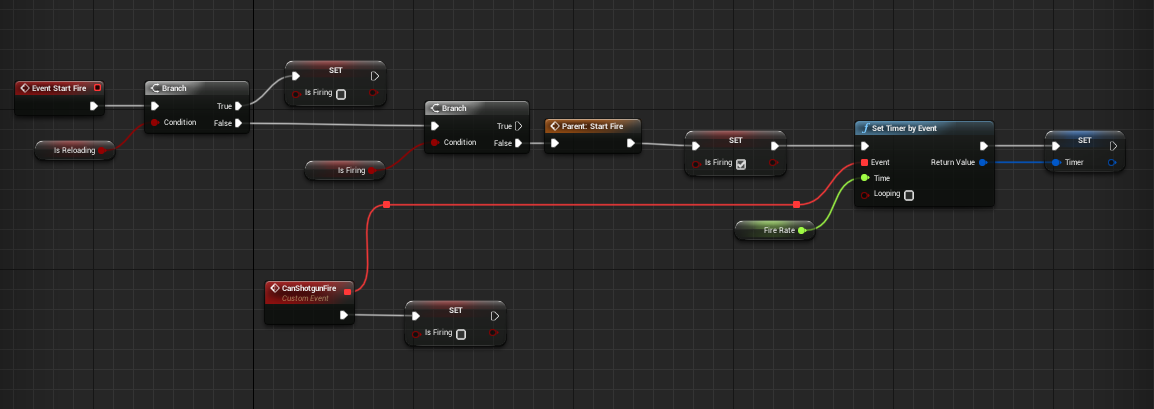
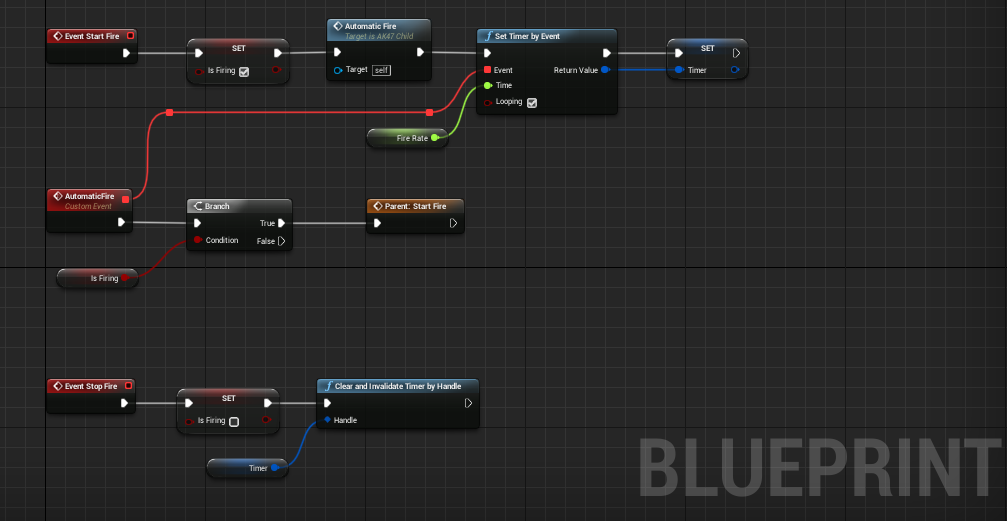
so i've a StartFire event which fires single bullet in my parent Gun class
i've made a child actor of assault rifel and overrided that event for burst as well as shotgun
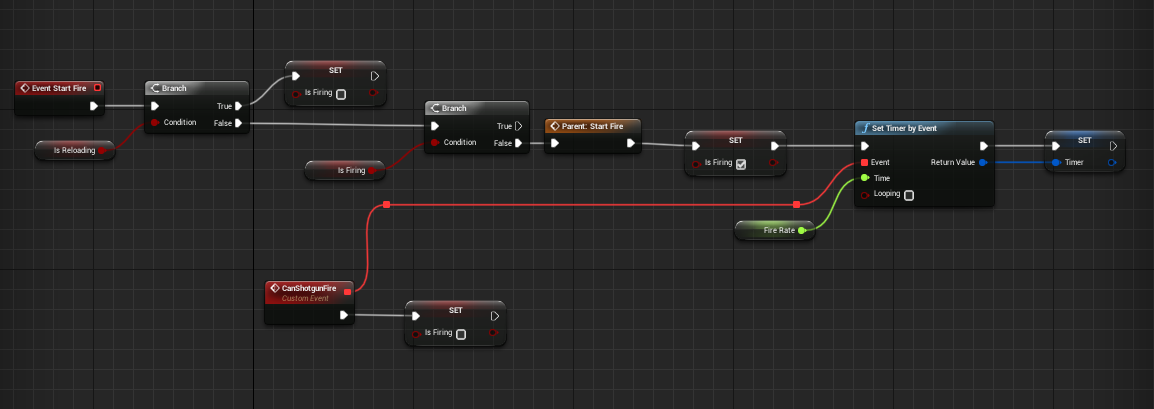
for shotgun
https://i.gyazo.com/3893e8baaa6dcae1e92acbd1bda9a804.png For Assault rifel
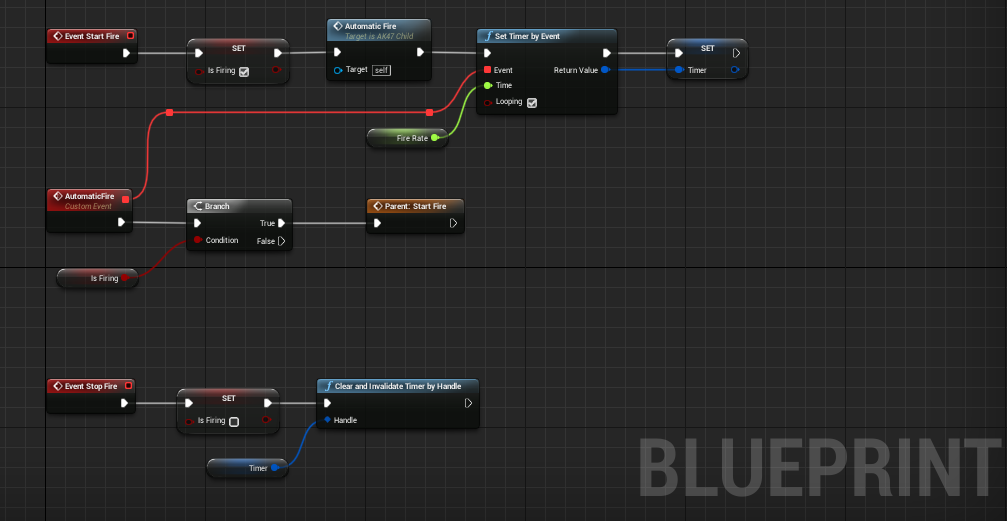 primal moss
Huh, thanks! I'll take a look
Mm, my question is how to get the multiple bullets to fire all at the same time. Since burst fire is basically just using singleshot three times in a row (while changing some aspects of the cantfire variable), it's kinda different to how to shotgun fires once but fires multiple pellets
What I could do is instead have the shotgun have its special fire function loop bullets multiple times instead of just once
weary jackal
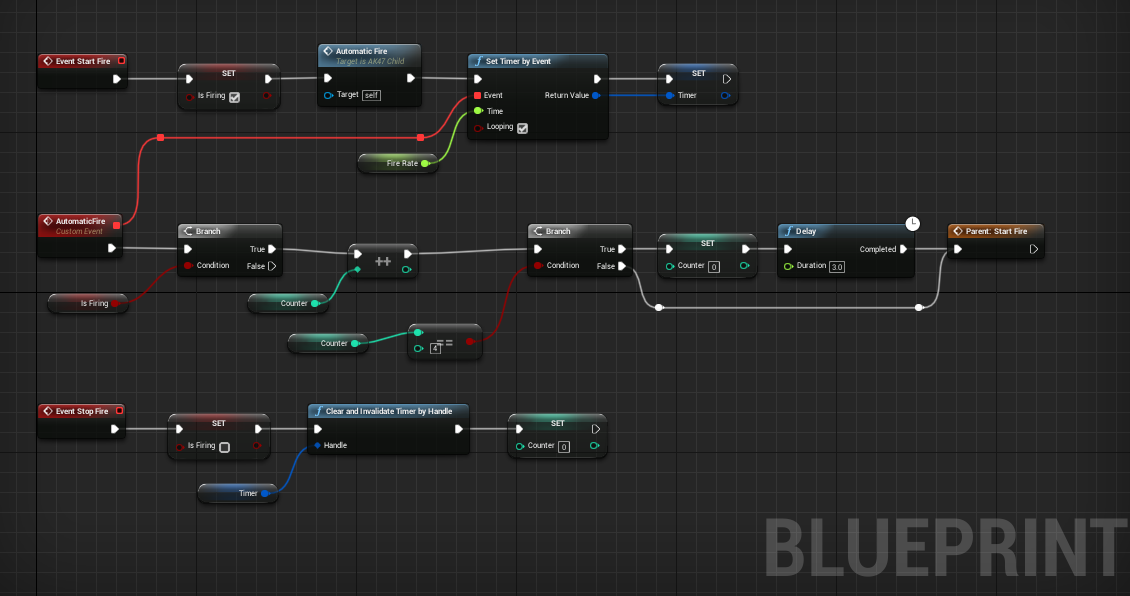
automatic fire with loop counter. and when the counter is at certain number add a delay
primal moss
Hmm, gotcha. I'll give it a try for both weapon types
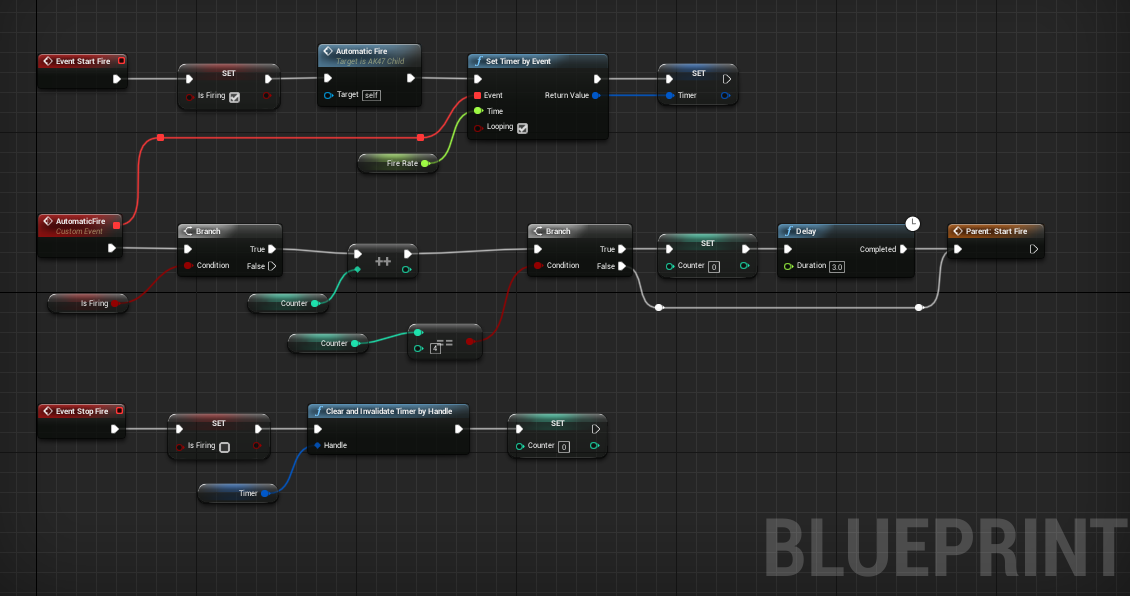
 primal moss
Thanks, this is really useful!
 true valve
Why Execute when Paused won't work? I have a key binding.
 stray folio
okay hi gus
hard kettle
hello
stray folio
i got one for you guys tonight
i have a exiting car code here
however everytime it works, it spawns my guy either gone, or in the ground
not sure which
anyone?
too late?! XD
i mean it is 12:40
tight schooner
@proven mason Trying to interpret that much blueprint will take me too long so I'll just throw my 2 cents in based on your description of what you want to do.
Your stick input system script needs to keep track of which state it's in, which can be done with a custom enumerator variable with states like Normal and Dash and etc. And then you basically make a function or macro or otherwise graph that polls the axis inputs and situationally sets the enumerator.
You can run this graph on Tick. The beginning of the graph can be a Switch On Enumerator. For example if the enumerator state is set to "Normal" (i.e. not dashing), it will then try to determine if the vector length of the X & Y axes together fall below some threshold like 0.1, or whatever. If that's true, it'll set the enumerator state to "Zero". (These are just names I'm coming up with).
Here's an example graph that checks the length of the XY axes...
If your enumerator is set to the "Zero" state, the script can then check, starting on the next frame (tick), if the stick input length exceeds some threshold (like 0.1). When it sees that, it can set the enumerator to "PreDash", and it can use a Set Timer by Function Name node (or a Set Timer by Event if you prefer) on a new function/event called ResetStickState (e.g.), and this function/event, 0.1 seconds later or whatever amount of time feels appropriate, will reset the enumerator back to "Normal".
Meanwhile, your stick input script is now branching to the PreDash part of your script. If the stick length exceeds 0.9 (or whatever feels appropriate), then it will cancel the timer by using the Clear Timer by Function Name node, and then setting your enumerator state to "Dash". Basically, the player is racing to beat the timer.
I'm only guessing this is what you're trying to do -- determine the "velocity" of the stick movement from zero to max, and if it's done quickly enough it'll trigger the dash. Maybe I'm misinterpreting but that's how I read it.
And then the rest is kind of straightforward. If the character is dashing but the stick returns somewhere close to zero, then do the quickstep... If not, keep dashing. Maybe you need some state called DashCommitted where it stops checking for a quickstep -- you set another function timer that sets that state similar to how you checked for the dash in the first place.
Once you get this enumerator stuff working, your character movement & animation script can just read the enumerator variable and know what to do, and your state machine can fire events whenever the state changes if desired.
boolean & enumerator variables and function timers are useful for input processing in that way
sour aspen
What happens when i made changes while UE4 is exporting project ? Does it include that changes? It takes too much time to export for Android and I feel like wasting time ...💤
 💤
sour aspen
💤
sour aspen
So the starting state is the important one. I can continue working on other staff without worrying that it might brake my export
tight schooner
i have this vague recollection that the engine stops you from saving changes to assets while the packager is working
I don't know if it still does that
sour aspen
I really don't understand why it's slow. It doesn't even use all of my resources.
I wish it just consumes all the computing power to export faster. Maybe there is a bottle neck added on the engine code
tight schooner
idk either, but there's only a handful of stages that use all of your CPU cores
like nativizing a ton of blueprint to C++, or compiling shaders... that kind of stuff
sour aspen
Yes I thought maybe because It was on hdd but i moved it to my ssd and yet still there isn't any significant change
Disk read/write - ram and cpu what do you even need more :S Interesting
flat raft
As far as design, Do you guys think the inventory, and crafting system should be in the same system? I can't really think of any cons for making crafting apart of the inventory system.
@stray folio add a socket for where you would like ur player to spawn, and spawn it there.
 hearty dust
Seems like the inventory system and the crafting system at least will both look at the same item classes?
weary jackal
yea
flat raft
yes. Well, the crafting will only be looking at the inventory data
crafting is just inventory manipulation
hearty dust
By inventory data you basically mean an array of items owned by the character, right?
flat raft
ya
weary jackal
yea
hearty dust
I actually made an inventory system with item combination. I had an item combiner class. An item combiner takes in an array of source items, and returns one or multiple result items.
flat raft
You agree, wrench? Crafting and Inventory same? same meaning...crafting is a feature of the inventory.
Ahh.. yea..freeman. I guess that's crafting
weary jackal

In this series we'll learn how to make an inventory system with interactions. It is replica of Resident Evil games Inventory. Also there's 4 major interactions Examine, Combine, Use Item, Discard Item.
The core idea for the inventory array was adapted from Ryan Laley. So che...
i've made this
if you're talking this one then i've the code
there's a 2nd type where a crafting ui is opened and if you have enough resources then you can craft that item
hearty dust
Looks cool from the overview @weary jackal. But I bet if you just take some screen capture of the item's 3D model, for the item's icons, they'll look nicer in the demo.
flat raft
similar... I'm making something..prototyping I should say, a system that pretty complex. For me at least. lol
I'm basically building a construction system.

my "crafting" is not the traditional crafting... but a attach component type.
hearty dust
Oh dam that looks cool!
weary jackal
so what i did was created a map with key=itemClass value=itemClass and added that in item that can be used as a resource
flat raft
think of Kerbal Space Program where you can build a rocket. I'm making a tool and weapon crafting crafter 😂
hearty dust
That kind of constructing looks pretty different from what I had. Mine was similar to Resident Evil herb mixing.
flat raft
I've added you as a friend on YT wrench. Follow I mean 😂 I like ur stuff
weary jackal
thanks:)
flat raft
I think I will put crafting as a feature of the inventory.
if you guys a free... I need another design type advice 😂
So I'm looking at this. This is a flame thrower from Last of Us.
and my system should be able to build this, which it already can, minus the behavior.
I've had a char yesterday with someone from here, but I'd like to know ur thoughts.
on how to approach setting up behavior
 flat raft
I've boiled it down to 4 main parts. ATrigger, Power Source, Emitter, ammo
 haughty ember
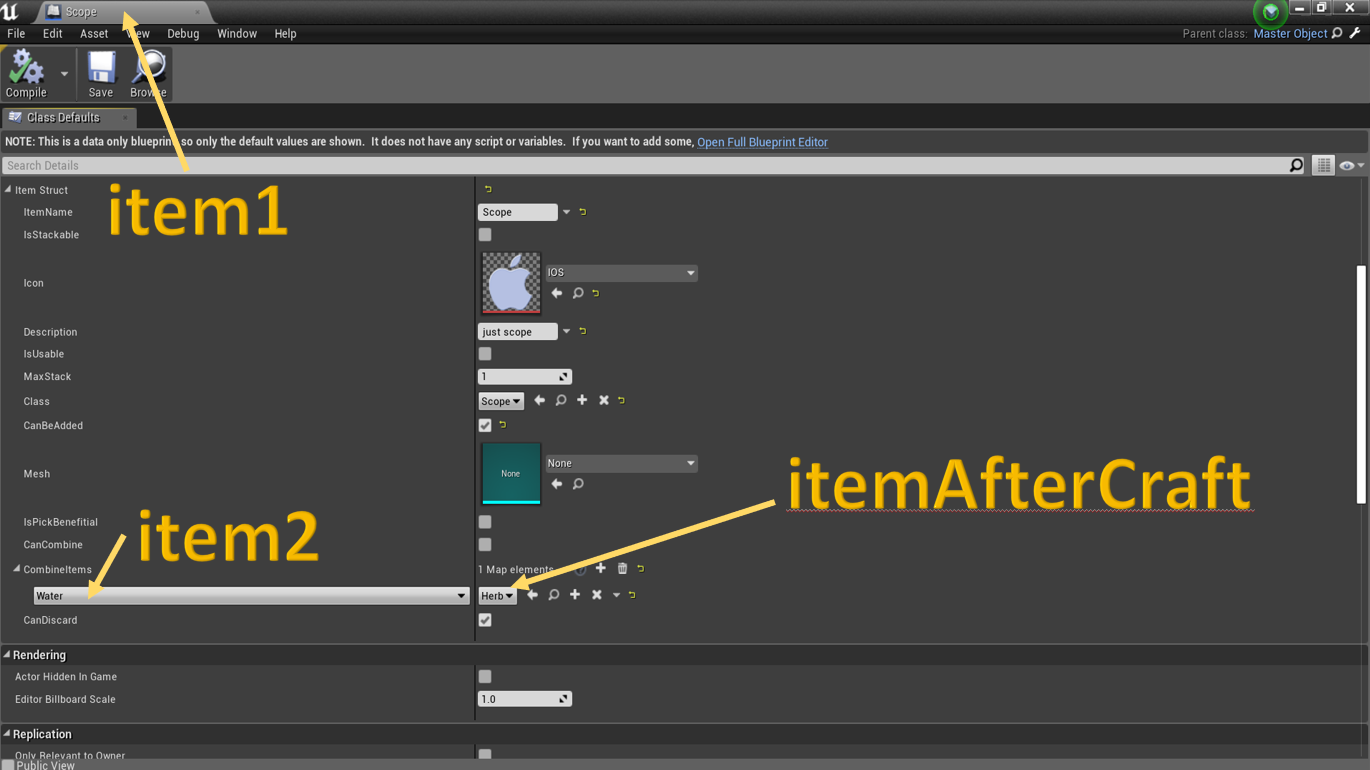
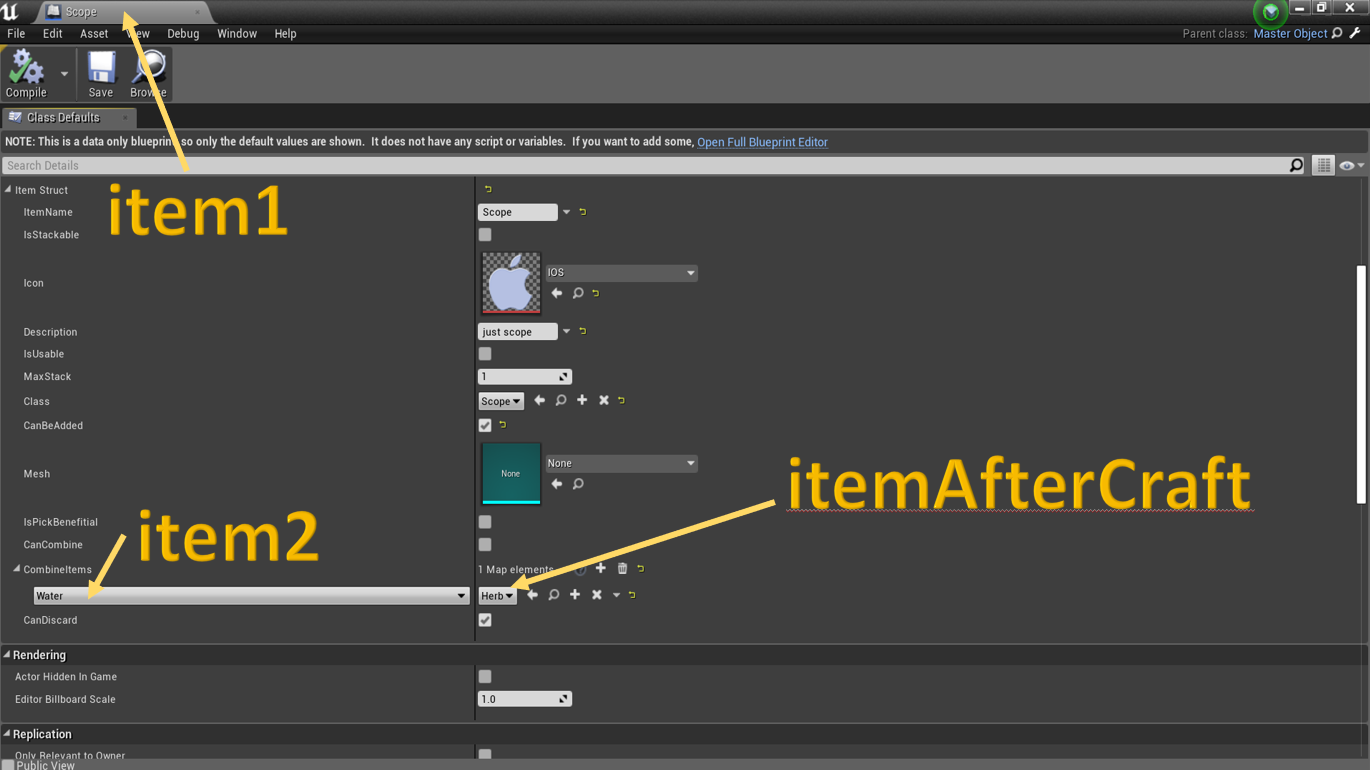
@weary jackal I'd do it the opposite way btw; only define on result items how are they made, rather than put the possible combinations on each item.
That is, in itemAfterCraft you'll have item1 and item2.
That way you'll only need to define it once, on the result item, rather than on each item that can make it
flat raft
What's the best way to configure or setup bp to able to set combinations of these things for different weapons
weary jackal
@haughty ember yea i've did that in where i made crafting as new actor component
the thing i was doing here was inventory interactions crafting. so when item combine mode is on and player click on the slot which can't be crafted then it will go back to normal inventory mode
@flat raft after creating the flame thrower from parts can player break it again into parts?
weary jackal
so how you tell the engine that we have created is a flame thrower and now it should work
flat raft
For All weapons, the trigger will activate emitter. The power determines how long the weapon will last (durability), the Ammo is what will come out of the emitter.
if the Ammo is bowling balls, then it will fire bowling balls
same system, just changing the ammo type.
if the ammo is gas, then it fires fire. Flamethrower
weary jackal
A weapon interface, with all the basic needs of a weapon
the weapon actor attached to player
so player can access all weapon events
flat raft
the player can only fire ... so the shoot function.
weary jackal
you can change projectile mesh though
flat raft
I need to know how to tell the trigger, what emitter to use, what ammo is chosen.
weary jackal
okay tell me if i understood wrong
so after creating a flame thrower it will work like an actor
right
flat raft
I see. That does make sense.
weary jackal
so when call fire event. i spawn a projectile
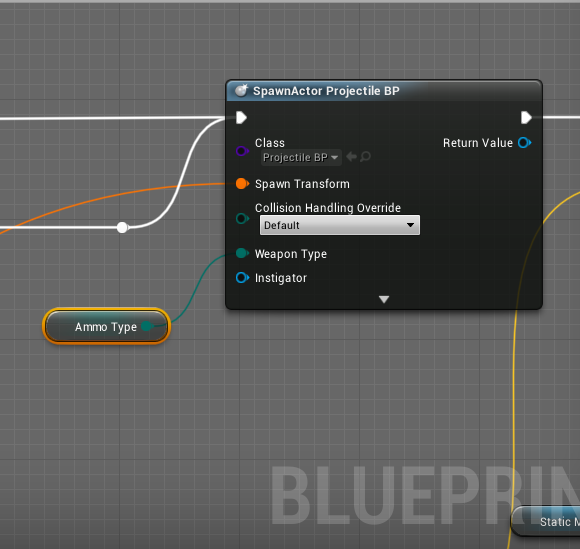
the projectile has an enum weponType instance editible and exposed
flat raft
Ok, so that same system, needs to also build this if the player wants
So the record would be apart of the ammo enum
 flat raft
So for something like this.. where the trigger makes the blades spin
there is no projectile
I'd like to be able to use the same system, and build a meele weapon.
for this Trigger still exists, Power, and Ammo exists, but the player doesn't add a emitter to the build.
Ammo would be the rotating blade.
weary jackal
Try adding 'None' as a value in enum
flat raft
for VR, a weapon can have 2 triggers also.
weary jackal
For melee weapons it would be none
And check if it's not = none. Then spawn projectile
flat raft
I see.. so basically in the trigger bp, I should have a enum for ammo, and emitter
weary jackal
Yea and based on ammo enum the emitter change
flat raft
makes sense
though I do see a flaw in my design lol
If it's a melee .. the trigger needs to activate the ammo. (Make it spin)
so the trigger talks to both, emitter and ammo.
which it makes sense as you said to use a interface.
only specific ammo types can implement the interface
to do their specific actions
weary jackal
Try out this. Make a function in your parentWeaponBP. Let's say function name is 'Effect'. The function will be empty in first place. And call that function when you call fire
For your melee child weapon that rotates that disk thing
Override the 'effect' function to make it rotate
flat raft
oh yes.. I see. I think I will do that implementation
ok! Thank you very much!
super helpful
I'm going to try it Monday. 😀
I'm watching your Magnet vid. I might make a magnet gun with the builder 😂
 brittle fiber
CyberRace, any gudance towards vocabulary id or info link on: spawning actors while playing game/edit level while playing level > for BP that contains couple of texts.. i wonder if the question makes sence
 sleek dust
someone know why when i try to resize a box collision at event tick it gets spawned and then disappear and when i make the same thing at begin play it work?
tight schooner
Impossible to say without seeing the graph
Event Tick fires every frame you know
If your math adds or subtracts from the current size, doing it on tick would probably resize it into oblivion
sleek dust
@tight schooner this is what i am using to resize
tight schooner
You're taking the relative location of the box and adding to its X, so doing that on tick may cause the box to fly away on the X axis over time
That my guess as to what's going on
 deep elbow
has anyone noticed an issue with spring arm stuttering. i have a blueprint that gets attached to a character, as i move the character around the target of the spring arm seems to stutter quite badly
seems to be related to high "lag speed"
haughty ember
@swift pewter something is either missing or incorrect. Is that branch because Lifespan Time can be set to 0? But either way, it's probably not the place to check it
maiden wadi
@swift pewter Lifespan just sets the actor to call Destroy on itself after the said amount of time in seconds. You're literally setting it to a value and then asking if that value is 0.0, then play effects. You should probably move the visual and sound effects to an event like EndPlay. Endplay is called on an actor shortly before it's told to fully destruct.
 proven mason
I'm only guessing this is what you're trying to do -- determine the "velocity" of the stick movement from zero to max, and if it's done quickly enough it'll trigger the dash. Maybe I'm misinterpreting but that's how I read it.
@tight schooner Yes I was trying to determine the velocity of the stick movement from zero to max but that is more of a signal to do either 2 things.
1st thing- If I quickly move the stick to max and hold it at max for more than 0.1 seconds then the character would do a dash (meaning he accelerates really fast at startoff and blends into sprint).
2nd thing- If I just quickly tilt the stick to max and choose not to hold at max, he does a quick step with a cooldown timer (Originally I was thinking If I quickly move the stick to max and then quickly release it, he does a quick step, but that sounds too convoluted to the player).
That was why I was using the IsTapped? boolean as a signal to indicate if the quick tilt was successful.
deep elbow
offbeat Q: is it possible to script in blueprint adding an event to level blueprint - eg press a Call-in-editor even button and have it add an event to the level blueprint
 forest oyster
hey guys, having an issue trying to change pitch on a looping sound while it is playing. It seems like I can only set the initial pitch but cant change it once it starts. Here are two simplified versions of what I have tried, one with an audio component and one with Playsound2D. The pitch is intended to be changed by the timeline which animates from 0 to 1 over a 5 second period.
deep elbow
version 1, plug the SetPitchMult into the Update exec pin of timeline
you can;t go "backwards" liek that in blueprints
only white exec pins actually trigger anything, other pins like the float (green) dont actually trigger anything on their own
forest oyster
ahh okay so the timeline does not output an animated float unless something is connected to the update?
deep elbow
yeah exactly, it will output the updated float but you need to actually trigger it with the Update exec pin
yes yu can change pitch while it;s playing
forest oyster
ahhh okay i understand. thanks guys, appreciate it! 🙂
mental pike
how do i get the player pawn location?
deep elbow
get player pawn - drag out from blue pin, get actor location
mental pike
tysm
gritty elm
need help
devout dove
I'm considering using the player controller but not sure if it makes sense. So I have two levels, town and flying map. There is a button in the town widget that says FLY, when clicked a new level loads and a plane pawn, the plane has totally different movement than the human character in town you also can NOT change planes on the fly like in GTA5, you will always fly that plane untill you teleport to the town. But you will also spawn with that plane if you crash. So I have set input in the Project Settings and i'm using Input Event Axies, now, should I just move the Mesh and add the input evends in the plane BP or should I use the Player Controller for that?
My human character BP uses a movement component but my plane doesn't use any movement component's I just move the sceene root using the addLocalOffset.
I was trying something that's why it's not connected.
 earnest tangle
It seems if your pawn movement types are different it would make sense to handle those in the pawn
If they have shared controls, like "show menu" or something, you could handle that in the player controller
latent arch
i wonder if someone could help me set something up tat returns the azimuth position of an actor relative to the players forward vector? 🙂
maiden wadi
@latent arch Depends on how you need it? Do you just need a local rotator yaw value, or a directional vector facing the other actor from the player's local space, or?
latent arch
just needs to be a position relative to the player 🙂
just want to know if something is to my side or behind me
possible above or bellow
possibly*
well relative to the players view i should say
so will use the camera
maiden wadi
Are you looking to see if something is not within the player's view?
latent arch
what i really want is an azimuth angle to the camer view so i can then send the value to something to alter audio as if its behind you and muffled etc
ahh it seems i can use the middleware to do it! 🙂
maiden wadi
That one is fairly easy. Get your camera location, get the actor making the noise's location, (I usually make a new vector here where X and Y equal the other actor's location and the Z equals the camera's location) so as to make them on equal ground) get the look at rotation from the camera to the actor and inverse transform that rotator from the camera's transform and you'll have a local space rotator. If the value is not within -90 to 90, it's behind you.
latent arch
ahh fantastic thanks a lot dude! 🙂
maiden wadi
@latent arch Slightly messy visual example. Used to doing that in C++
latent arch
ahh man thanks so much! 🙂
gritty elm
need help
i have two variables in save game object, when i set first variable and save game, then second variable value changed to 0, why second variable value changing to 0, as i already set second variable value to 1
 random ginkgo
Is there any way in blueprint to hook up events for when a level is loaded using level streaming CreateInstance? I'm trying to do procedural content generation and I have a level setup to do it, but I want some way to connect parameters to that level either through a Data Asset or having the level itself lookup its values on load, but I can't seem to find any way to get the actor spawning the level instances from the persistent level to be able to interact with levels after it has called Create Instance. I notice you pass an instance name parameter to Create Instance, I am making these unique but from within the levels, the GetCurrentLevelName node is returning the name of the persistent level in the level instances.
maiden wadi
@gritty elm You need to load your save game into an object, then change the second variable and resave it. You can't just overwrite it.
devout dove
Can I use Physics BP for collision? I have a skeletal mesh and i have no idea how to add collision to it
 lean furnace
Hi all, i am trying to get Ai MoveTo set up to this true branch but i am unable to plug self into pawn. I am getting this error
I was trying to base it on this but i am having no luck
earnest tangle
Your blueprint is not a pawn if that doesn't work
lean furnace
how do i make it a pawn?
earnest tangle
its parent class would have to be Pawn, or something that inherits from Pawn like Character
depending on what it is now, you could try using File->Reparent Blueprint, but you'll want to be careful with that
lean furnace
is that what your talking about?
that working now but my skeletal mesh components have a could not be found error
stray folio
can someone help me
on my exit vehicle event, it usually puts my guy in a different location (in the ground, bugged, basically delete)
[tiny bit on the other side]
any help would be awesome
lean furnace
Cheers for the help @earnest tangle Got it working
stray folio
Blueprint Runtime Error: "Accessed None trying to read property CallFunc_GetController_ReturnValue". Blueprint: Sedan Function: Execute Ubergraph Sedan Graph: EventGraph Node: Possess
got that error
anyone know why
 worthy frost
your controller is nullptr
stray folio
nullptr?
stray folio
okay it fixed the runtime error
but the location is still wrong
i bet its in this
annnnnd
this
thats my landscape location
worthy frost
get the world location of the mesh
not the relative
then its right vector
or just get the actors right vector of the vehicle
 fiery tendon
I'm using ActorComponent(HealthComponent) on two different blueprints. When I change health variable on one of those, it also changes on the other one. Is that supposed to happen? I want them to have different health points.
worthy frost
- by 200, add that to your spawn loc
 spare shell
Can anybody suggest where to start learning blueprints guys i am a beginner in ue4
stray folio
@spare shell yes
stray folio

Unreal Engine
Unreal Engine offers over 40 hours of free video tutorials so you can learn the skills to succeed in game development, architecture, film, automotive, and other exciting industries.
than after i recommand youtube
lots of people there
spare shell
Wow😃
stray folio
teaching good things
spare shell
Can you teach me ue4
weary jackal
stray folio
@spare shell i can help
stray folio
l3
wai til you get to codes like this
i have to do math and get my guy to not shoot into the ground
weary jackal
wai til you get to codes like this
@stray folio is it spawn code when you leave car pawn?
stray folio
yes
have a idea to help me?
im kinda stuck
(realized you just read the comment)
-w-
devout dove
How can i make my plane fly up verticaly?
I'm confused how to do it.
The landing should work on the B key and I have set a input for it.
SO my idea here was to get the current plane position on the Z axis and add 150 to it, so i have now the target where I want the plane to be. For example if the plane is at Z axis 500 and i added 150 the target height is 650 z axis. SO i thought I can use Finterp To from the current (500) axis to the target value (650), but it doesnt work... it goes 10float up and stops, i dont even see it moving.
stray folio
did it teleport?
devout dove
I found the problem, at the bottom right the >= wrong way around 😂
devout dove
I have a different question, so im making basic functions like, takeoff, landing, boost etc
Is it a good idea to do it like this
Or is there a better way to do it? I change the isTakeOff value to true when the B key is pressed, if the current flyup value reaches the target value (finterp) then the isTakeoff is set to false
The thing here that im questioning is that the tick event checks the BRANCH on each frame :x
maiden wadi
Do you need that function to play every frame? If not, don't put it on tick. There's always a way to make something event driven if it doesn't need to be done nearly every frame.
devout dove
@maiden wadi It needs to fly up and the value needs to be added on each frame, but not the "event" itself, the event aka the flying up should only be triggered when the key is pressed.
This is the takeoff function
 marble compass
anyone know best way to set a variable to null?
devout dove
Here is the take of button event
stray folio
why would the axis set the var to take off
only thing i dont understand
@marble compass just set it and make sure its not set. Or if you dont want to use a var, just remove it from graph
@devout dove maybe you could help me with mine
;n;
devout dove
it puts your dude into the ground? Should check if the Collision box isn't to low on the ground
My plane used to spawn inside the ground because my collision was 0.01 to deep -_-
stray folio
well its a exit code. The car is fine, but when the person exits, it seems to look at the ground and fall for a sec, but never leaves the ground. I havent truly confirmed if the player is teleporting, falling, or being deleted
is there a easier way to spawn it by the car?
weary jackal
@stray folio try like this. Add a scene component in your car. Call it as exit point. When the player exit from the car make the player transform to that exit point
stray folio
how would you call the scene component?
weary jackal
Drag that into event graph
 obsidian pelican
can somebody tell me how to create a second object on BeginPlay? If i place the forst object it should create a second one with an location offset and and rotation, so that they are like in the picture every effort until now was a fail.....
im getting every time other results
weary jackal
Use construction script instead
tight schooner
@deep elbow re: springarm stuttering... If the bare input motion has stutter then the stutter will come out the other end post-springarm. If you're moving something on tick, did you customize the tick rate? Are you moving something on a looping timer and not defaut tick? I'm just thinking of things that would produce a stuttery input.
obsidian pelican
@weary jackal i cannot spawn an actor option is not given
weary jackal
@obsidian pelican add a scene component in the middle of 1st triangle's one side
And the 2nd triangle will spawn at that scene location
obsidian pelican
weary jackal
Middle of the side. Not middle of the triangle
obsidian pelican
like this?
weary jackal
Yea
sleek dust
guys, how can i cast to an actor blueprint? idk what to put at the object ref... that actor blueprint only have an static mesh on it
weary jackal
@flat raft you and @obsidian pelican are doing some kind of same thing. Attaching that pipe and here attaching a triangle
like this?
@obsidian pelican now the second triangle will spawn as same direction to 1st one. So just add rotation of 30 in z
flat raft
Yup. though if you just have triangles, consider placing the pivot in the corner. For a equilateral triangle, you can easily spawn and place as the angles and side will be the same.
obsidian pelican
still an offset there...
flat raft
Where is your pivot set?
stray folio
Okay so i finally figured out that Vars can be Refs
(wow. That sounded like a novice)
weary jackal
@obsidian pelican get the world location of the scene component
stray folio
looks good?
obsidian pelican
looks better now but it doesnt take the scen somehow (scene is at corner of the 1st tri
weary jackal
Get world location
obsidian pelican
then i have the same issue as above the 2nd has an offset in height...
weary jackal
Get relative location instead
obsidian pelican
with relative 😄 i hate this stuff 😄
flat raft
What you can do to make it more visual when getting the numbers is to: in your BP, duplicate your mesh, parent the duplicate to the original, position the duplicate where you would like it, then copy those transform numbers. Then delete the duplicate.
weary jackal
Where's your pivot for 1st triangle?
flat raft
When you spawn, Do what you had before, then plus the numbers you got
You can also add a sphere component to where your pivot is so you can debug it easier.
weary jackal
Nope your pivot should be in the middle of the side of the triangle
obsidian pelican
@weary jackal i tryed both version yours and Thorbies 🙂
Thorbies last point has worked
duplicting the original and taking those location numbers and adding them as a vector 🙂
flat raft
Coolz, since you pretty much are hard coding the transform, then doing it visually is best.
stray folio
just curious
what is the difference between
float and interger
i know a interger is a number
is it where a float can be a variable while a integer is a number?
weary jackal
Float have floating points like 1.2, 8.30, 3.0
stray folio
i see
flat raft
Int is a whole number, and floats can be fractions
obsidian pelican
the integer is limited to 2,147,483,647
weary jackal
Integers are 2, - 5, 0
obsidian pelican
where floats arent
flat raft
Floats take up a lot more memory
tight schooner
Floats also have precision limits. It's just less ambiguous to count stuff with integers.
stray folio
it can be a large decimal right?
flat raft
Say you want a random number between 1 and 10.
stray folio
oh and you get a number with a float that's like 2.6
weary jackal
first pivot
@obsidian pelican in here, the root will be scene. And the static mesh triangle will be child. And the scene would placed at triangle's middle of side. When you spawn another triangle make relative location to scene and add 180 z. It will work
tight schooner
The fact that integers can't do decimals makes them more convenient for certain tasks. If you could only use floats, you'd have to round and truncate a lot more and worry about floating point precision
stray folio
so floats is for advance math mostly
while interger is used for simple and visual math
.-. or for whatever the code calls for
 sterile star
Hey guys, quick question, I accidentally deleted all spline points in the BP, how can I add a new start point? ^^
tight schooner
In a Spline component? Select spline point 0, then alt-click-drag IIRC
tight schooner
Maybe there's a way to add a spline point in the component details panel if you somehow wound up with none
@stray folio I would summarize it as integers are for counting things, and floats are for measuring things
 autumn vector
I just updated from 4.24 to 4.25 and VaRest is all kinds of broken. Did they change its usage? Most the functions are working as before but som eof the constructs are missing.
autumn vector
haven't heard of this before? that's what I'm wondering too
stray folio
i dont know about VaRest
when i first joined Unreal, I was already coding a little C++
but than i learned it isnt all about coding with script XDD
autumn vector
C++ in Unreal is a little weird if you're used to the more low level stuff 🙂
stray folio
Yeah. I agree
but it taught me about variables, and fuctions
and everything like that
the ifs and buts
autumn vector
Oh damn was C++ your first language?
stray folio
Really?
autumn vector
haha no
autumn vector
D&D tool, never used it tho
Ok yeah I reinstalled VaRest from another source and it's all kinds of weird
 brazen elm
How do i preload assets or maps, before opening that level? I have a short 2-4 second glitch when loading a small level that i want to be instantaneous. Does anyone know what to do?
autumn vector
It's a HTTP/REST api plugin
Which seems to have changed in a huge way from 4.24 to 4.25
And I really don't wanna fix all these blueprints!
brazen elm
i dont want a loading screen, i want to load the data in the background asynchronously
stray folio
Make the loading screen a menu
where you are selecting prehaps a loadout
or
tips
weary jackal
i dont want a loading screen, i want to load the data in the background asynchronously
@brazen elm are you streaming your level or opening a new one.?
brazen elm
i tried streaming but it kinda failed, so trying to open a new one
autumn vector
I don't think you can do much in that case
With a new level you have all new controllers etc
brazen elm
the main reason for loading times are due to textures, meshes, etc right? There must be a way to group them up and load them up in the background, in the main menu for example
and then make them visible when you open the actual level
?
stray folio
problem is that somewhere the game has to load
which means say its a open world
you cant haave the whole world open
it would lag
autumn vector
There's probably another work around but without details on exactly what you're doing we don't know what to recommend
stray folio
Streaming a level is creating as the player moves about the world yes?
Im still a slight novice
weary jackal
Streaming a level is creating as the player moves about the world yes?
@stray folio nah
autumn vector
No, not really Kasher
brazen elm
ill try explain a tad more what im trying to do. I have this menu, i click play. A planet appears in the background and approaches. As it approaches, it gets darker because its behind the sun. As it fades to darkness, i am trying to get my new level to open. The level is very small
autumn vector
A streamed level is essentially a sublevel, one that's inside of your current level (some actors belong to one level, others to another)
stray folio
oh yes
autumn vector
And you can control their loading and unloading in many ways
stray folio
i know that one but i never done it
doesnt it also make it load hard once
even when you do that
like in halo
when you hit a certain door
it will lag
autumn vector
The only "hard" load is the persistent level that they're all within
weary jackal
The streaming level will also load with persistent level. Just hidden. When player is inside the stream volume the actors and the entities will visible
brazen elm
based on my objective on my message above, what do you recommend?
ill try explain a tad more what im trying to do. I have this menu, i click play. A planet appears in the background and approaches. As it approaches, it gets darker because its behind the sun. As it fades to darkness, i am trying to get my new level to open. The level is very small
@brazen elm this
autumn vector
It's really easy to use. Open the "levels" tab in the editor and you can add more. Double click one to make it b old and any new actors will go on that.
Set it to blueprint loading, and you can load/unload them on the fly
brazen elm
Set it to blueprint loading, and you can load/unload them on the fly
@autumn vector level stream?
stray folio
isnt the xbox and ps5 set to have over a million objects at once
autumn vector
Does this planet change? Or is it always the same one?
autumn vector
Honestly off top of my head I'd probably sequence that and cap it to a video, and use that video as an asynchronous load screen which fades away after playing
weary jackal
@brazen elm i might think of world composition
brazen elm
Honestly off top of my head I'd probably sequence that and cap it to a video, and use that video as an asynchronous load screen which fades away after playing
@autumn vector interesting, although the planet is random
@brazen elm i might think of world composition
@weary jackal what is this?
weary jackal

This video was voted for by my Patrons and youtube Members. If you want to cast your vote in the next poll, sign up to be a Patron at Patreon.com/ryanlaley
In this video we go through the world composition tool and why you would use it, and how.
Support me on Patreon and get...
In an open world. The game will load a certain part
autumn vector
World composition is for HUUUGE levels
brazen elm
after they've clicked the menu choice, the UI fades. Then the planet approaches over about 10 seconds. This should be enough time to (in the background) preload the level, then display the level when landed
but which mechanic is best for that
autumn vector
is each planet a different level?
brazen elm
yh
level streaming doesnt seem right because its used to segment your huge world and then load them in. Like the background of skyrim. Im trying to completely change level but make it look connected
autumn vector
You could make a persistent level container and have each other level added as a sublevel in there. Then only load the one you want.
No you're thinking world composition
brazen elm
oh
autumn vector
comp is the whole large world grid thing
level streaming I could have 30 models on top of each other from different levels
Is this multiplayer?
brazen elm
single player
autumn vector
Ok then it's cake
brazen elm
great, which nodes will i have to use? I've tried the load stream level blueprint node before
but i dont want it to be 'visible' after loading, i want it to show only after a trigger
autumn vector
levels having "load" and visibility
so you can load it, make it invisible, then make it visible when ready
autumn vector
We don't know until you ask 😛
trim matrix
brazen elm
so you can load it, make it invisible, then make it visible when ready
@autumn vector how? where is that, in the levels window?
autumn vector
@brazen elm You can toggle them in the levels window, sure, but you an do it with a blueprint call too
trim matrix
like...rn it just keeps on cycling...i want whenever i press E it to become nigh/day
i tried to find something from answerhub and youtube but i couldnt find anything
weary jackal
Make an event dispatcher inside your PlayerBP. Bind it to the day/night changing functionality in bpSkySphere
brazen elm
@brazen elm You can toggle them in the levels window, sure, but you an do it with a blueprint call too
@autumn vector whats the blueprint node called to toggle visibility?
trim matrix
hmm ok wait
obsidian pelican
@weary jackal thx for the hint 🙂
weary jackal
When press E call that event dispatcher
autumn vector
@brazen elm https://docs.unrealengine.com/en-US/Engine/LevelStreaming/HowTo/StreamWithBlueprints/index.html
How to stream levels with a custom streaming Actor created with Blueprints
LoadStreamLevel
and UnloadStreamLevel
brazen elm
that doesnt work for me @autumn vector because when you load stream level, you decide whether to make visible on load completion or not. Can i make it NOT visible. Then make it visible later?
trim matrix
@weary jackal hey um...im sorry is it ok if i come to DM?😅 honestly i have no idea what im doing rn
weary jackal
Sure
autumn vector
@brazen elm Sure
@brazen elm GetStreamingLevel -> Set Should be Visible or something like that
brazen elm
ahhh LEGEND, thank you
hero ^
and then to unload the previous one, is it as simple as Unload stream level, and the name is 'persistent level'?
autumn vector
btw if you use "GetStreamingLevel" you'll find lots of event binds in there too, for when loaded/unloaded, visibility change, etc
no no you can never change the persistent level
it's... persistent 😛
but you could put your level stuff in its own
persistent level doesn't ened a single actor.. it can just be like a wrapper or container of the others
brazen elm
ah ok thanks
autumn vector
you can just make a new level.. called "Master" or whatever.. then in the levels window you can add existing maps as sublevels
brazen elm
so if i have a menu level with particle effects and stuff. Should i make a blank MASTER LEVEL, then make this menu map a sublevel aswell, just so i can unload the menu map when planet map loads?
autumn vector
yep, if you're very set on the transition being seamless
your problem is going to be gamemode/controller/etc will be the same across all, because really it's the persistent level driving it
 charred roost
I am new to unreal (have made games in godot before) and have this question:
If i create a blueprint actor I can add components via the viewport tab, but if i want to use a c++ script do I have to use code to add components, meshes etc to my actor?
brazen elm
thanks
autumn vector
@charred roost Not sure I understand.. but you could use C++ inside the component or actor, but piece it together in blueprint
In a lot of ways, blueprint IS C++.. each node is a C++ function somewhere
charred roost
If I have a blueprint class I can edit its components in this tab:
autumn vector
yep
autumn vector
nope you could make a C++ class and still add it in the blueprint
or you could add it at C++ level
either way
charred roost
How would I add it to the blueprint?
"you could make a C++ class and still add it in the blueprint"
autumn vector
the same way you add others.. every component in that list from UE4 is just a C++ class somewhere
tight schooner
@charred roost https://www.youtube.com/watch?v=nVm-DYdAsts
I found that to be a useful overview of how C++ BP integration works in practice
 autumn vector
@mortal wharf Too low res for me to read
 mortal wharf
click the link and zoom in. @autumn vector
autumn vector
https://blueprintue.com/ This is the sexiest thing ever
BlueprintUE
BlueprintUE.com is a tool for sharing, rendering and rating blueprints for Unreal Engine 4. UE4 is a game engine which use visual scripting called blueprint.
copy your nodes, paste them in there, and share link
charred roost
@tight schooner Thank you. I will watch it. Maybe I understand it better than the documentation
autumn vector
@mortal wharf That's close but you probably want to check to see if the slot exists first, before just making a new one.
mortal wharf
Yeah i forgot that part and what do i need to change in this load system https://gyazo.com/a1b0526032a499ac863cdba6de3bd130
 autumn vector
@mortal wharf Also if you have question marks on the end of your bool, people might literally kill you when you join a larger team 😛
mortal wharf
why is that?
flat raft
so floats is for advance math mostly
@stray folio Not so. Say you are shooting at a target. Int may not be precise enough. If your target position is at 2.35, and you use ints, then you'll never hit the target. You'll shoot at position 2 and 3 if it's int.
autumn vector
Question mark works fine in BP, but it's not really something you can do in most coding languages so it's non-standard and frowned upon by C++ guys
mortal wharf
Yeah i forgot that part and what do i need to change in this load system https://gyazo.com/a1b0526032a499ac863cdba6de3bd130
And what about this?
@autumn vector
tight schooner
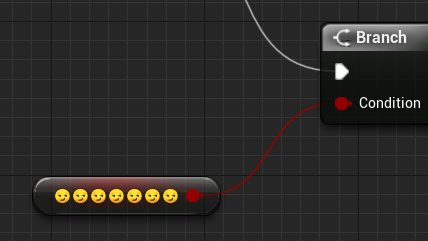
instead of question marks try emojis https://twitter.com/UE4Memes/status/1251910727717122049



friendly reminder that unreal 4 has full emoji support
Likes
184
 Twitter
autumn vector
Twitter
autumn vector
@mortal wharf Well.. what's the point in loading it? I mean you load the bool from file but then set it immediately so no matter what it'll be true
If it does NOT exist, make it and save it. If it does exist, read the bool out of it and store it somewhere or do something with it
mortal wharf
the save system is in the night 1 level bp and the load system is in the mainmenu level bp.
autumn vector
<@&213101288538374145> Help! Ban seanny immediately!!
surreal peak
Is it really worth pinging us Mods on a Sunday evening (+- timezone) for a little joke?
autumn vector
I thought so
 neat pond
How could i transfer this code to TopDownController
https://blueprintue.com/blueprint/-xjo-z5l/
BlueprintUE
surreal peak
Here I don't see the big problem. It's a one-off joke about ??? vs the smileys that UE4 supports. So don't worry too much.
autumn vector
Uh, yeah, I wasn't really worried. 😛
surreal peak
@neat pond Most of that should be the same. Please try first, because this is too early to help you with.
The only difference is, based on "TopDown" vs "FirstPerson" that you have a different camera angle.
So we would need some more info as to why you struggle with this.
mortal wharf
@mortal wharf Well.. what's the point in loading it? I mean you load the bool from file but then set it immediately so no matter what it'll be true
Instead of it just being set to true what should it be? @autumn vector
neat pond
@surreal peak How could my mouse interac as this code in top down controller
surreal peak
- Make an Input Event in your Project Settings for your Left Mouse Button Click.
- Execute the Trace logic when the Mouse Click Event calls (best in your Character or PlayerController).
autumn vector
@mortal wharf I guess that's depending on what you're trying to achieve, but I assume if you're putting a bool in your save game file that when you load, you want the value that was in the save.
 ruby basin
how can i make an actor not collide with a single player?
ignore collisions while moving doesnt seem to work.
And I want it to collide with other players in the game, so i dont think collision filtering would work there?
devout dove
When I rotate my characters root the camera has always that weird offset, how can I make that the spring arm is connected to the root mesh?
the camera should show the top of the plane
 analog perch
is the spring arm set to inherit pitch?
devout dove
yes
analog perch
and is attached to the mesh? are you using lag?
devout dove
yes to the mesh
analog perch
idk, if its not the lag you might have to get the actor rot and set in manually
 normal rampart
Small question, but which is better practice for rotators/rotations: using 270 degrees or -90 degrees? Or is it just preference?
normal rampart
Okie dokie, thank you 😄
devout dove
I mean you can also use -90 but then it might be a signed int instead of unsigned
But overall use what you want man 😄 doesn't really matter, if you get to a point where it matters... you will be already driving a Bugatti or something
normal rampart
hahah ok cool cool 🚗
devout dove
hehehe i have a stupid question, I just found out that I need to use my skeletal mesh (plane) the physics simulation so it has a collision, the problem now is that my plane falls like a rock HAHAHAHAHAHAAH
surreal peak
That's why you usually use a primitive collision, like a box, and not the skeletalmesh actor.
mortal wharf
Yeah i just want it to save and load if the value of the boolean is true or false. @autumn vector
obsidian pelican
@weary jackal are you there ?
obsidian pelican
can somebody tell me how it is possible that this is called but i cannot se the actor spawning?
tight schooner
There are a lot of ways for that to be possible. I'm kind of confused why you're providing a spawn transform and also a location & rotation vector. It makes me think there's something weird going on in that actor class.
but anyway you can try print nodes and breakpoints to do some basic blueprint debugging.
There's a node called DrawDebugSphere that might help to visually show the desired location of the "aaa" event
obsidian pelican
i have this actor which shall build me other actors when its build itself but because i cannot spawn actors of other types in the constructor i have the custom event
stray folio
man
everyones having trouble with spawning
i have a car spawn code unfixed
so i went to easy harvestin XD
tight schooner
@obsidian pelican Just narrow down the problem:
- Is "aaa" being called?
- Is the "new param" transform it's being supplied with correct? (DrawDebugSphere node can help)
- Is the actor being spawned? Where does it exist in the world? (Putting a Print node that prints the actor's world location on BeginPlay can help)
stray folio
I did all that and i can only think that the location is off
but its not
;n;
what is a vector
tight schooner
it's a location in 3D space as described by three floating point values
tight schooner
sometimes it's used to specify an exact location
and sometimes it's used as a "normal"; a vector with a length of 1 that points in a direction
obsidian pelican
So basic intention is :
a triangle based building system. First i place a triangle foundation and if placed it should highlight the snapping options of that triangle the construction script above is the triangle ones. and it calles the event aaa to build the Holo class actors.
the location i 0/0/0
😮
tight schooner
@stray folio so yeah, your screenshot has both a positional vector (GetWorldLocation) and a "normal" (GetForwardVector)
obsidian pelican
@stray folio
tight schooner
like I said, it's a vector with a length of 1 that points in a direction
tight schooner
lol, yeah. Andrei's screenshot there shows you how to use a normal
you can multiply a normal, like actor forward, and then add it to the world location
and you get a point in space that's X units in front of the actor
wherever the actor happens to be facing
tight schooner
you can just adapt the graph you posted earlier to make it look more like Andrei's graph
stray folio
im almost done
i am at a fork
i can go with just the base i got
or the line form actor
right?
ill just use base
thanks guys
 latent basin
hey guys, im trying to use a post process material on a procedural mesh (which is the base of this lego piece), but for some reason when I try to get a scene texture of the world normal of the procedural mesh, it doesnt work. for some reason it only outputs one value..?
obsidian pelican
Blueprint Runtime Error: "Accessed None trying to read property NewVar_0". Blueprint: NewTriangle Function: Execute Ubergraph New Triangle Graph: EventGraph Node: Print String
latent basin
at some point you set the variable NewVar_0 to none, you try to access it at function NewTriangle.
obsidian pelican
yeah
you just need to make a need array for the object types
@latent basin thats the point ^^ i spawn the actor and i use the variable in the next step so how can it be none after 1 sec ?:D
latent basin
aah
if everyone knew the answer to that we would be in the future
try debugging a bit, see what happens to the variable and when it changes.
obsidian pelican
i'm about to throw the whole building system away and start from scratch^^
latent basin
i mean, if you think you should
 neon perch
I'd say find the issue and fix it before you start over. Debugging is a pretty essential skill to hone.
stray folio
yes it is
my longest code stack i ever did was
150 errors
;n;
thing was it was a broken open source
but darn it i got it working
obsidian pelican
well the thing is it's not that much for now but the overlapping actors odes are not working as they should and now this damn problem ^^
creating them as a child object works perfectly
but they cannot detect the overlappings at all
stray folio
they cant get overlap?
obsidian pelican
a few days ago i had another way but i was detecting randomly obejcts
obsidian pelican
i use the mesh as collision detector not using boxes or spheres
obsidian pelican
well there is a point when you start needing custom collisions 😉 only boxes and spheres wont make it al happen
 proven harbor
Hello, from Paris France, I use the dymanicflight asset that I bought on the epic store, I plugged it with the anims on the floor of my personal and I added sounds that adapt to different floors... all this works fine.
I also wanted to add sounds when the character flies by creating animnotify on some anim... but I switch from thirdperson_AnimBP when I walk to a dynamicflight_animBP when I fly... and there I have a pb to manage the sound.
I have a soundcomponent variable created in dynamicflight_animBP that I try to get back in thidperson_AnimBP with animnotify.... In the dynamicflight_animBP castto I don't know what to plug in the object node... thanks for your help...
proven harbor
stray folio
it work lol?
proven harbor
@stray folio I try
stray folio
looks good
dense mica
casting to animbp is not a good idea i guess
proven harbor
@stray folio It doesn't work...
dense mica
animbp already ticks
so if you use "try to get pawn"
from animbp
and get conditions to create sound
it'll work
to put simply: cast from animbp
not from player
stray folio
sorry
proven harbor
@dense mica How I can catch the sound flyng variable ?
dense mica
isnt it already in the animbp?
proven harbor
@dense mica the variable is in the anim blue print I try to cast
I have two anim BP
dense mica
i understand now, you wanna cast from animbp to another animbp right?
proven harbor
@dense mica yes
proven harbor
yes
dense mica
when you switch to thirdpersonanimbp
set a boolean in the character
"isFlying"? for example
then cast to your player in flyinganimbp
get "isFlying?"
if false, Stop the sound
since animbp will tick every frame, it will stop
proven harbor
how I Cast this variable ? I will have the same pb ?
dense mica
no dont cast it
cast to player, get the boolean, if it is false just get the variable from that blueprint
dont cast it inside the same bp
proven harbor
yes but I still don't know how to stop the sound I need to have the variable from the flyinganimbp to know which sound I have to stop ....
dense mica
dude, arent you casting the player from flyinganimbp?
proven harbor
no I switch from one blue print to an other...
dense mica
if you stop it before switching (which why we use animbp, because it ticks every frame) it will stop when you set the boolean false then it will switch
set the conditions in bp, then switch it, animbp will cast it automatically then stop the sound
proven harbor
OK I try, But It is not what I want, have a look !
If I stop the sound when I switch i is strange because when he fall he is still flying... but he will be in the other animbp...
I read back your advice and I Try... Thanks a lot @dense mica
hard kettle
@proven harbor That flight looked so smooth!
 orchid thicket
oh god
that flight kinda freaked me out ngl
it was unexpected it was that quick XD
question is it possible I can edit the way physics are played
because it doesnt seem like I can
id have to just be used to the physics they provide for my game
 late shuttle
Anyone point me in the right direction to make a UI element that points to where the Boss is when he's off screen? (2.5D game)
orchid thicket
i think u would have to find a way to use camera
to follow the boss
like in rocket league when ur perspective follows the ball
late shuttle
No, camera is locked to player. I just want an arrow to indicate Boss direction when the player travels farther away.
orchid thicket
then u would need to have a png of the arrow
and have to do something with it being an ai
to follow a certain actor
idk how to work with blueprints fully yet so
stray folio
question
orchid thicket
im sorry i can only provide this info