
#blueprint
402296 messages · Page 534 of 403
 gusty mango
 sour aspen
@tight schooner thanks a lot I've divided to make it slower. This is great
@tight schooner last question is it possible to make this in a way that i can make it on/off from the blueprint?
I was considering to create same material again, one with pulsating and one static and changing material on the object
 tight schooner
I guess you have to scale the output of the sinewave with a Scalar Parameter.
Like if you multiply it by 0 then you've killed the breathing effect
You could also do multiple materials too if you don't want to do dynamically instanced materials. Let a BP apply a different material to the mesh or w/e
Sinewave nodes are pretty weird IIRC... Their output might be -1 to +1...?
Just watch out for that
 daring quail
@tight schooner So for open world games I would require more than BPs
Got it.
I know how to code tho I wqas thinking of learning blueprints.
was*
sour aspen
@tight schooner I see, thank you
tight schooner
@daring quail I haven't made anything like that before so idk. I guess it depends how heavy the simulation will be.
If you're gonna learn UE4 you should also pick up BP at a basic level
tight schooner
Cuz Epic wants you to use it as the design layer. It's possible to do an all-C++ project I've heard but it's not the normal way
daring quail
I heard most big games use BP + C++
tight schooner
Yeah. Epic did an enlightening overview of Borderlands 3 and they talk a lot about how they use BP & C++
Behind the mayhem of Borderlands 3: Join Gearbox Software live at Epic HQ and take a deep dive into the tech behind the third entry in the explosive series.
Lead Technical Artist, Ryan Smith, will cover Gearbox's custom Time of Day editor, as well as several of the Blueprints...
gusty mango
Ah! I finally figured out what was causing my blueprint issue. The torch the character was holding was for some reason also set to generate overlap events 🤦♂️ So every time I entered the box collision it triggered as overlap but then did it again as the actual player capsule triggered it
 ruby oriole
is there an autosort feature? this looks like a total mess!
 earnest tangle
there's a straighten function I think but I doubt it'll make it much better since it won't know how to arrange the lines so they don't overlap inconveniently
ruby oriole
hrm ... guess i will sort it by hand and be more careful in the future
tight schooner
@ruby oriole this paid plugin exists https://www.youtube.com/watch?v=CaPnqe5mIh4
but otherwise yeah, it helps to have a personal layout style
so you don't spaghetti it up by default
ruby oriole
good to know, thanks
tight schooner

GitHub
An attempt to make Unreal Engine 4 projects more consistent - Allar/ue4-style-guide
though I'm not one of those straight-white-line people personally, it helps to just have a style at all, whatever it is
and to use reroute nodes
ruby oriole
yeah just started that
 thin apex
how do i add a notify in a montage??
all the tutorials online are for older versions of unreal
 dense atlas
Hi guys! I was wondering if anyone could quickly help me or give me some pointers. I'm trying to use Gameplay tags so that my AI can filter out actors when doing perception checks, but I can't get any of it to work! No matter where I try to add the Gameplay tags, any query evaluates to null/false. This screenshot is me breaking it down to the smallest test possible I could think of and yet it fails (just throws out the new gameplay tag entry). Do I have something wrong with my UE4 installation or project configuration perhaps?
 viscid shore
Hi ! I'm new in blueprint and I would like to learn deeply BP to be able to create thing without tutorial. Did someone have a playlist or just a video (or forum) that could help me ?
 fossil shoal
im learning by googling what i need to do, and if need be similar things to it and combining it to get the results i need :<
viscid shore
Yes I do that too but I still have this feeling that I'm not learning but just copying
 gritty elm
need help
 delicate imp
I'm having troubles making it so when I push a button, it will enable FullScreenMode. None of these are working. Any suggestions?
 oblique bear
can some one please help me with getting ugc example working on my project
everything works but it cant find the mods
i made 3 mods but none show up
(server: == list of mods names)
delicate imp
I fixed my issue, I just had to put in fullscreen for the top execute and fullscreen 1 for the bottom execute
gritty elm
does root motion works with replication multiplayer?
ruby oriole
from what i understand, the function "CooldownOver" will be called once the timer is finished ... but cant i set up the values that CooldownOver should get called with ?
or is this just not possible ?
okay nvm, this was a dumb idea anyways. Found a better solution 🙂
 sinful isle
Hi, I made this for a Circular Array of meshes
I want to do the same but for Skeletal Meshes with animation, any idea how?
oblique bear
so what is your question?
 tender sierra
This is how it looks like when I create a child blueprint class.
If I press "Open Full Blueprint Editor", the look will change.
Can I revert back to this view?
tight schooner
@ruby oriole yeah timers don't work with events/functions that have parameters unfortunately
 maiden wadi
@ruby oriole No. You're referencing a function by name. It has no idea how to get the parameters of the function. If you want to do that, best you could do is make it call a function that calls a function and make that first function set the second function's arguments.
tight schooner
something I've done in those cases was set variables that the function/event uses and then set the timer, heh
@tender sierra Close the blueprint editor and open it again... that is, if you didn't make changes to it. IDK how to revert back to a "data only blueprint" offhand
ruby oriole
that does sound horrible Auth
but yeah i found a better solution, i just let the object that i would need the reference to handle the timer end by itself
maiden wadi
Is what it is. What that function actually does, is literally finds a function on the pointed to object by it's name, passes that to a TimeManager that resides in the UWorld along with the other parameters like whether it should loop and how often to call it, and the TimeManager is what calls your event after the time is up.
ruby oriole
hmm i see, thats good insight, thanks
oblique bear
https://discordapp.com/channels/187217643009212416/221798862938046464/756931001837420617 can anyone help me with this?
(if you don't trust the link just scroll up and if you click this link it will auto scroll to my message)
sinful isle
@oblique bear Sorry, my question is what can I use instead of a HierarchicalInstancedStaticMesh to make the BP work on Skeletal Meshes w/Animation (I'm really newbie so I don't know what I'm doing 😅 ) rn the final node works only with static meshes
 elfin hazel
@sinful isle what kind of animation are you looking for? I mean, if you have a circle of meshes, do you just want them to rotate, individually? Or rotate like a carousel? Or have them move like a train, or the game snake? Or do you want them to make up the "bones" of a character, like say.. minecraft?
sinful isle
@elfin hazel I want the Instanced meshes to be a Skeletal Mesh with an animation on it instead of a Static mesh (as I have now), the BP it's only to make the circular array
so I want the character in the middle (which is a skeletal mesh with an animation on it) to be placed instead of the cubes I have from my BP
dis is the last part of my BP
I can't find a way to instead of the HIStaticMesh use a Skeletal mesh
the Add Instance won't work on it
elfin hazel
No, UE can't instance skeletal meshes. You'd have to use "Add skeletal mesh component" instead, and with the node selected, set the details properties.
But then there's some tricks you can do for the different skeletal meshes to all use the same animation data so it is better for performance. Lets see if I can find some links.
sinful isle
yay, that works, thanks! I need to make the animation work on all of them now hehe
ah it's inside the details
elfin hazel
On the Add Skel.. component node, you need to set the animbp or whatever you have there.
gritty elm
when i use index like this in multiplayer, it doesn't replicate on server
but when i disconnect index var, and set value manually, it works fine in multiplayer, how to fix this issue
elfin hazel
well, if you have a static value, it's just hard coded for all the clients so that doesn't really provide any information. It sounds like the clients hasn't updated the enum value.
gritty elm
so how to update value on client side, this value is passing from custom event, and this code is inside in component that own by characetre
@elfin hazel
i mean it works, but my animation lags
when i set hardcode value then my animation works smooth
what is issue?
animation is correctly playing, but it lagging when passing index like above imagwe
elfin hazel
Now I'm confused. So it does replicate correctly, but it lags?
gritty elm
yes, the index is correct but animation lags when i pass index from custom event
when i set value hardcoded it works smooth
elfin hazel
well, I don't know why that would happen just from that screenshot.
 mortal wharf
So i am basically making it a mechanic that there is a timer that will start at 40 and then drain but the timer should go up again if i stand in a box trigger. The timer is also displayed as a plane formed like a circle. It drains perfectly the only thing that doesn't work is that the timer should go up again. The Mat For The Plane/Circle: https://gyazo.com/b6a5661c2b2bc12774574b54acfe95d8 The Level BP: https://gyazo.com/af3df1ab5ce6fcfcc53fdc5fde8b44b6 For more context please look at the bottom of this post: https://answers.unrealengine.com/questions/983875/view.html

 ruby oriole
sigh ... unreal :/ Why cant i access "GetTimerRemainingTimebyHandle" in a non actor blueprint ?
gritty elm
@elfin hazel can i send you screeshot?
@elfin hazel this works:
@elfin hazel this doesn't works
did you understand now?
elfin hazel
yes, but I don't know why it would cause a 'lag' in one case and not the other.
gritty elm
why this happen
elfin hazel
@mortal wharf Your bp logic says that when an actor begins overlap, add +3 to the time. That only happens once and every time a new overlap happens. If you want it to increase over time as you're standing in the trigger, you need to account for that.
mortal wharf
How would i do that? @elfin hazel
elfin hazel
@mortal wharf hmm the easiest way that is compatible with your current logic, is probably to have the FInterp's Target pin be a variable - call it 'TargetModifier'. Default value 0, but when the overlap happens, set it to 40. But then you need to set it to 0 again when overlap ends.
 gritty elm
@elfin hazel ?
elfin hazel
Should work, unless I'm having a brainfart.
@gritty elm I don't know why it happens.
mortal wharf
@elfin hazel Thank You So Much!!!
gritty elm
does event dispatcher works with replication?
 tawny bison
so im using action rpg inventory on ue4 4.25.3. The hotbar umg widget is the start of my crash. When game launches I get this error. On the construction script for the hotbar it sets up the array for the hotbar slots. If I disconnect this the game runs on Android and all other inventory works perfectly. Thanks for any help!
tender sierra
Question about InputAction.
If I create an Action Mapping under Project Settings > Input, in this case called "HelloThere" ...
... it allows me to do this.
How do I create an InputAction node without having defined a name yet under Settings > Input?
elfin hazel
well there's the input actions which you assign a name and what input should trigger them. Then there's the direct input nodes, like "input Q" for example. And apart from axis input, i'm not aware of any other input types.
tender sierra
@elfin hazel I want to create HelloThere before definingt it under Settings > Input.
This is the question 🙂
elfin hazel
I don't think you can. It doesn't really exist before its added to the list of inputs.
tender sierra
okay
but interesting thing is if I delete the Setting > Input, the node is still there. Of course it is going to be an error, but still, the node is there 😄
 stray folio
why not a print string for hello there
elfin hazel
Yeah, but that's true for deleting functions too. and sometimes variables.
tender sierra
What I need to do is to save and reuse a blueprint, even if there is nothin defined under Settings
@stray folio no, print is not relevant, it referrs to the Action mapping
tawny bison
well you could make a comment box add this node 😛
stray folio
@tender sierra i understand that
elfin hazel
From another project I take it? Yeah, it's a bit of a pain to migrate assets between projects if it has custom input actions.
tender sierra
exactly
well you could make a comment box add this node 😛
@tawny bison can you elaborate?
tawny bison
in your code where you know the node will break just add a comment on how to fix it
tender sierra
yes, this is my idea 😄
but I was initially wondering of I could create the node without there being a mapping defined
Apparently not. Its OKay, not a problem really. I just wanted to be sure 🙂
elfin hazel
@stray folio As for your question, the error says that "BP combat character... is not compatible with BP RPGInventory Character... " so your combat character does not inherit from, is not a child of, RPGInventory character.
tender sierra
Thanks all for your input on this matter 👍🏻
elfin hazel
I see what you did there
stray folio
Alright but heres the thing
its in a widget where this code is. So I want to hit the BP combat character only.
._.;
i mean its suppose to work
(im following a tut
tender sierra
I asked a question under Editor Scripting, yet not sure if it was the right place.
Didnt get an answer, so I am going to ask a rephrased question here instead
Can blueprint affect things in editor?
if a blueprint can let meloop through different CineCameraActors with eg hotkey 1 and 2 in runtime, can I do something similar but in Editor?
elfin hazel
@tender sierra yes, you can affect things in the editor with Editor Utility objects. Objects, actors, widgets. But when it comes to input you need cpp knowledge. But editor utility widgets can provide buttons to press.
tender sierra
is that blueprint?
elfin hazel
Yes
tender sierra
Thanks will google some and see what it is 🙂
is that the same things as Widget or is widget a portion of this?
Or is it the same thing?
elfin hazel
@stray folio well it comes down to that you're trying to access a target of type rpginventory character, and "get player reference" provides a combat character type.
Does your combat character have a "ability tree component"?
elfin hazel
Then you should just be able to pull it from that instead. Drag from the Player pin on "Get player reference" and get the ability component.
elfin hazel
@tender sierra the editor utility objects have extended functionality, other than that it's pretty much the same.
elfin hazel
@stray folio It's a good idea to always work in context. I rarely find myself turning it off. Then you always know if you're accessing something sensibly.
If the "get player reference" provides a "combat character", and then if the "combat character" has a ability component, then you should just be able to drag off it and get the ability component
elfin hazel
hmm oh, it was the other way around. The Get Player Reference is a RPGInv Character. I guess it's part of a plugin you have?
stray folio
its two system
the combat and the inventory system

Additional Documentation - (changes made in Update 1.4)
https://bit.ly/2YhFwIG
Note: Before starting watch my previous video about in...
i would love to get it working
this one little bug ;n;
elfin hazel
Well, so you have a widget. And you want to get a combat character. So how do you do that? I mean, is there only one instance of this that should be associated with the ability bar, and the player is controlling it? If so ,you could Get Player Character(0), cast it to combat character.
There's other methods too but lets start with that.
elfin hazel
No, you should be getting a warning when you compile.
tender sierra
Anyone knows the node name for the Current Camera Location
If I'd like to create a reference to it in the blueprint editor
elfin hazel
Get Level viewport camera info, assuming you want the camera in the editor viewport.
gritty elm
should i event tick with multicasr event? with server event?
tender sierra
Get Level viewport camera info, assuming you want the camera in the editor viewport.
@elfin hazel nothing? Is it spelled out exactly so?
elfin hazel
It's only accessible in editor utility objects.
elfin hazel
I guess I misunderstand what you're trying to access. what camera do you want a reference to?
tender sierra
the camera you simply spawn into
elfin hazel
ah, so not in editor then. There's a Get Player Camera Manager.
tender sierra
no this time I was just looking into regular bp
I wanted to check out if this one can be created in other than level blueprint
i have learned that eg a Camera actor cannot be referred to in other bluprints than the level blueprint
since it is something that exists only in this particular level...
get player camera manager however seems to work in other blueprints
 fathom frost
Hey guys, does anyone know if there any differences in setting your PktLag in the DefaultEngine.ini instead of a level blueprint?
elfin hazel
@tender sierra You mean, if you drag a Camera into the viewport, and so it creates a camera actor? Then yes, that camera actor is in that specific level. But it's really just an actor with a camera component, just like the character templates has.
And so you wouldn't really be able to drag it into any other blueprint.
is that what you're trying to do?
elfin hazel
That's strange naming convention then. If it is a Pawn, try Get Player Pawn(0).
tender sierra
@elfin hazel
yes but a CineCameraActor can be dragged into the LevelBlueprint though
Anyway, no big deal at this moment. Just wanted to investigate about the camera, which you told me about as "Get Player Camera Manager". And that one could be added in any bp
elfin hazel
@tender sierra Okay, so you want to reference a camera actor in another blueprint? In that blueprint, create a variable of type Camera Actor and check the Instance Editable checkbox. Then select your instance in the level, and you'll see that variable in the details panel, and set it to a camera actor in the level.
yes, but Get Player camera is the camera currently in use by the player.. well actually I don't think it's the actual camera, just the manager. You may not be able to access the properties of the camera that you want through it.
tender sierra
I got help creating this, I cant claim credit (nor knowledge 😉 ) of it
This one exists in the Level Blueprint
It could not be done using any other blueprint
basically, this is a system where you can toggle between CineCameras in the scene in runtime.
eg hotkey 1, 2, 3, 4 to switch between them, or a hotkey to loop up or down the list and once you reach the end you end up in the current player location. In this particular case, a player blueprint, but I am looking into having this blueprint made more universal, eg you create a list of what cameras exists
so, I think the referencing itself is a problem
you cannot referr to a camera that exists in the level from a blueprint except level bp
so I was thinking in terms of arrays, macros and such
the blueprint would not mention any camera, but instead once needed, one would tell it what camera to work on
elfin hazel
Yeah, but it's a lot of repetition and could be done with just one function. Not to be rude, just with the proper setup it could be much easier. You could actually also access the camera actors by exposing variables for them. So that you could reuse that blueprint logic for other levels without having to copy paste all that.
tender sierra
maybe use this macro that lives outside the level bp, to link to the cameras
or another way
right now, I am looking into whether it is possible or not
elfin hazel
well, it is. Expose a camera actor variable as Instance Editable. Make it an array, and you can add all the camera actors to it.
tender sierra
Yeah, but it's a lot of repetition and could be done with just one function. Not to be rude, just with the proper setup it could be much easier. You could actually also access the camera actors by exposing variables for them. So that you could reuse that blueprint logic for other levels without having to copy paste all that.
@elfin hazel not rude at all, I am looking into options and smarter way to solve it
so I think you're leading me to the right direction 😄
elfin hazel
I'll toss something together.
 still bramble
hey uh sorry if im interrupting but a quick question regarding basic settings when ur free
mortal wharf
So i have three questions 1. This is probably impossible to do but i have recently released a first version of my game on a site called gamejolt my game is divided up in 6 different nights in the first version there is only the 1st night and i am currently developing my second version and second night and to unlock the second night you gotta complete the first night first is it possible for the game to check if you have completed the first night in the first version? 2. So i made a graphic settings widget and i got one of my friends who doesn't have bad or good pc kinda in the middle lowering the setting completely didn't change his frames? 3. So this one i found really weird after 360 seconds in the level a night should complete and it worked perfectly with me but when i got not the friend i just talked about but someone else it didn't work with him?
 sonic crescent
Hi. Anyway to transfert back modifications from the inherited component (Splines) to the Parent? I edited by mistake the inherited when in fact i need this modification on the Parent...
 pale blade
Is it possible to call events/code concurrently?
For example, CustomEvent1 --> Retriggerable Delay, 5 seconds --> Print String
Calling CustomEvent1 every 4 seconds will never trigger print string
I want multiple calls of CustomEvent1 to kind of run on its own thread
elfin hazel
In such a case I would probably create UObjects every time you start the timer. Each object would start its own timer, and dispatches when it is done.
 lavish wadi
maybe there are plugins out somewhere that add nodes for this, but even it is quite hard because yout will need to synchronize correctly with the game thread in order to prevent race conditions or other things that you encounter in multithreading (as modifiying any UObject without propers locks/other sync primitive is unsafe)
maiden wadi
Why is that impossible in default blueprint? It's entirely possible. Just create an event that checks if a timer is active, if yes, clear and invalidate it and recreate it. Make that timer call a second event that prints the string after five seconds. If called within five seconds, it'll just restart the timer.
lavish wadi
No just saying it is impossible to do concurrently code in their own threads in bp, but ofcourse it is possible to do what he wants with other ways
elfin hazel
@tender sierra Are you there?
pale blade
Yes, I'm hoping for other possible ways
Cause my character takes damage and then I create a damage text widget, I want it to destroy itself after 5 seconds
But my character can take 10 of these damage (10 damage text widget) in like a second for example, and I found that multiple calls to set the timer to destroy the widget will reset the timer
maiden wadi
So you want there to only be one widget or multiple?
pale blade
Multiple
For example:
Character1 takes damage, one damage text widget (textwidget1) is created and shown (set to destroy in 5 seconds from created)
1 second passes
Character1 takes damage, one damage text widget (textwidget2) is created and shown (set to destroy in 5 seconds from created)
1 second passes
Character1 takes damage, one damage text widget (textwidget3) is created and shown (set to destroy in 5 seconds from created)
1 second passes
// At this stage, you have:
textwidget1 that will be destroyed in 2 seconds
textwidget2 that will be destroyed in 3 seconds
textwidget3 that will be destroyed in 4 seconds
So the timers are running concurrently and independent of one another
That would be like a thread
elfin hazel
If each widget instance starts its own timer, that's the result you get. Are you currently handling that timer from whatever is creating the widgets?
pale blade
Here is screenshot of what I have:
Which I noticed that the most recent floating damage text widget just overwrites the "delay"
The screenshot is in the CustomCharacter blueprint
maiden wadi
Oh, these are WidgetComponents?
pale blade
So the character is the one making the widget component and user widget floating damage text.
Yes
(user widget goes into the widget component)
elfin hazel
hmm, what about creating a class that inherits from the widgetcomponent, and all it does is, on begin play - start timer - destroy itself?
pale blade
Hmmm... it's kind of weird but, I tried calling DestroyComponent in the FloatingDamageText UserWidget class
I think DestroyComponent can only be called in CustomCharacter, where it's created
Regardless, you can't really make threads (or concurrent code/events) using blueprints? I'm a little surprised since isn't that really useful?
elfin hazel
heh, don't try what I suggested btw. Crashed the editor.
tight schooner
@pale blade I have a projectile system where each projectile is its own actor. I have a projectile manager BP that spawns or deinitializes/reinitializes them on demand. I think this type of system is called a "pooling" system, and i'm thinking your CRPG-style textual damage things aren't that different. I've never used widget components before, but if you can contain them into individual actors, maybe that's a more approachable way to handle a bunch of damage values on screen doing their own things
Rather than having one mega blueprint running individual timers on a dozen components
(A simpler setup would forego the pooling manager, and actors would just spawn textual damage actors on demand, but I made a pooling system to reduce the impact on "garbage collection" that comes from spawning & destroying)
elfin hazel
That's the absolute simplest method I could come up with.
Having the component itself have the timer would be slightly simpler, but crashes in 4.24. Maybe been fixed in 425, no idea.
But yes, instead of just destroying a pooling system could be implemented. Method for tracking the time is the same though - each instance does it.
pale blade
@tight schooner I will read up about "pooling system"
@elfin hazel I will try it out, but what is this "Bind Event To Timer Done"?
elfin hazel
oh, okay. so that's a dispatcher, also known as a delegate. You can in blueprint bind to dispatchers to get informed about when they get executed.
And that's the logic that happens in the widget itself. all there is.
So the reason for passing the widget component to the widget, is so you know which component needs to be destroyed, or pooled.
pale blade
Hm, and your top screenshot is in CustomCharacter, and your bottom screenshot is in the user widget, right?
elfin hazel
yep
pale blade
Okay, let me try it out
elfin hazel
Now I realized I was still using the "My widget component" class, just ignore that and use the regular Widget component class that you use now.
pale blade
@elfin hazel I tried it out and it worked
Character got damaged, created widgetcomponent1, (5 second timer start)
2 seconds later
Character got damage again, created widgetcomponent2, (5 second timer start)
3 seconds later
widgetcomponent1 got destroyed
2 seconds later
widgetcomponent2 got destroyed
12345
  12345
Although, what did you mean about this?
Now I realized I was still using the "My widget component" class, just ignore that and use the regular Widget component class that you use now.
I'll read up on event dispatcher and pooling system
Thanks guys.
elfin hazel
It was just a class, inheriting from Widget Component I was testing.
 trim matrix
can someone help me
I have bp triggger box that will fire when my char overlaps it. Ok i put print string it works. But when I take print string and get actors of tag node it wont even fire to there...?
i have a for each loop after the tag node
? is this a bug
in debug mode on the bp the exec will stop on first thing after the overlap node..?
 scenic oasis
I don't know much about Skeletal Mesh type things. My question is, would I turn a static mesh of any vehicle with a turret (Tank/APC etc) to a skeletal Mesh, make the turret a node of it that can rotate and save that as an animation?
 jovial bobcat
Umm can someone give tell me how would I go about changing a character skin texture in a multiplayer game with a click of a button on widget
This dosnt work
 keen solstice
So... hello guys! I am new to UE4 and I am trying to make a simple touch interface, I was able to make jump and crouch buttons but I can't find a way to make a interact button...
I already have a INTERACT action set and working for LMB, how can I set this interface button to cast the left mouse button command?
Thanks a lot!
tight schooner
@jovial bobcat You forgot to specify what the name of the parameter is on the Set Texture Parameter Value node.
The material itself also needs a texture parameter node in the material graph
jovial bobcat
Oh i realised that
My question was how would I like go about making a system like that
cause when i change a sking for one character
it changes everyone
tight schooner
Can't help you with multiplayer stuff, sorry
 frozen dune
Does anyone knows how can I setup this spreadsheet so that the RowName is the same as the CharacterName ?
This one I did directly from UE4 rather than a spreadsheet
just figured you can rename the RowNames ._.
earnest tangle
I never figured that out how to do that either, except by manually importing from a CSV file
 obsidian folio
This local variable gets an error inside of a function. I get the fun "Variable is not in scope" issue going on. When I tried looking for answers through forums, it was talked about using a local variable and some people got it fixed that way.
Has anyone else been able to resolve this issue?
 flat raft
@frozen dune double click on the row name and change it?
earnest tangle
oh wait that works...
I wonder why I never tried that, I guess because there's an actual editor for the values below :P
flat raft
It's not designed well. lol
frozen dune
I'm also more used doing directly from spreadsheets so just now I found out you can edit them
tight schooner
@obsidian folio I don't have a total grasp of this error either. Did you copy-paste that variable getter from another graph? Are you using another actor's variable in like a function library or something? I think what "not in scope" means is wherever that graph in your screenshot is, the variable does not exist... Neither as a variable in the blueprint class, nor a function's "local variable".
earnest tangle
^ this is indeed correct
I was just about to also ask regarding copypasting them :)
obsidian folio
@tight schooner I did drag it from the list of local variables, but I will actually re-do that now just to make sure. Maybe I copied one of them that was in the graph
It's all from this file though as I tried rebuilding it in a new file and manually did everything again
earnest tangle
Ah if you redid the same graph in a new blueprint, the variable references are most likely wrong even if you have variables with the same name in the new BP
so you might need to redo them where it nags about it
flat raft
Why not go from the get data table to to array
obsidian folio
If I use a get will it grab all the names just like a for each loop?
flat raft
Not get, but set
flat raft
Can I see ur bp ?
flat raft
Is ur datatable returning a list?
obsidian folio
Yes. I watch the value and it is set just fine when I look at the variable.
flat raft
What's the shuffle for?
obsidian folio
This blueprint is for making an item spawner. Just added the shuffle to jumble up the list of ID's in the array so it makes whatever it chooses to be random.
flat raft
You already have a random int set
For now, bypass the shuffle
You should be getting a different iD
obsidian folio
still out of scope
flat raft
Can I see the error
When you said you deleted and recreated the array, did you name it the same?
obsidian folio
If I watch the variable where it sets the array, it says out of scope. If I hover above the out names from the get all rows from data table, it says out of scope.
flat raft
Try... from Out Row Names, pull off and choose promote to variable
obsidian folio
ok
flat raft
Name it something else also
earnest tangle
If it says Out of scope when you're debugging or using watches, that's just UE being weird
sometimes it doesn't show the values correctly in those scenarios
if the variable reference is incorrect, you won't be able to build the blueprint - it will just completely error out
so in this case the variable most likely exists and you're just seeing some weird behavior with the debugging tools
flat raft
True... watch the Loot Spawn ID
obsidian folio
So the new array says that it is empty, but if I hover over the get all data table row names, it still says out of scope
flat raft
Print the loot spawn ID
Ignore the Debugger for now, just print the LootID var after it's set
obsidian folio
Alright. I'll need to recreate the loot spawn id apparently too
the new item id array is setting correctly now.
Actually, I do not need to create the new loot spawn id
It's printing just fine
flat raft
And you get a random one?
obsidian folio
Picks like same one a number of times in a row but will eventually change
flat raft
throw in ur shuffle
flat raft
You can build in some logic to say once a item is set, don't set it for a number of spawns
obsidian folio
Ooh I like that idea. That is a good one!
flat raft
Coolz 😀
obsidian folio
Thanks again 😄
flat raft
How do I make it so only one player gets to see a widget
@jovial bobcat Widget Component?
 halcyon hill
I'm having an issue I can't figure out. Making a single player blueprint game. I have a variable in my GameState called modIndex. It defaults to 0. In a Widget, I call Get Gamestate, and then from that, choose to set modIndex to 1. In debugging that all appears to work. But I then load the next map and check that modIndex var and it's still 0. I thought GameState was preserved across a map change? Is it that, or is there a problem with setting GameState vars from a UI Widget??
trim matrix
Gamestate wont persist no, use the game instance to store data you need across different levels @halcyon hill
halcyon hill
@trim matrix aha! I was confusing gamestate and game instance. Thanks.
 full wind
anyone has an idea how to get the project world to screen thing to work in pie
cause it kind of gives me crazy results
or do i just give up and do it in standalone
 gentle urchin
What are you trying to achieve , @full wind ?
It gives me expected result in pie atleast...
 sly estuary
Hi guys, Im trying to create scene depth post processing material which I want an actor to be visible through wall. The material works fine for Desktop DirectX SM5. However, for Android GLES 3.1 its shows error saying that "SceneDepth Lookup are only available when blendable location is BeforeTranslucency or BeforeTonemapping". Anyone have idea of what is this error?😩
 haughty ember
@sly estuary I haven't actually tried it - but did you look at the warning about the offline shader compiler as well?
Quick google result though:
maiden wadi
@gilded pebble What do you mean by vertical location?
full wind
@gentle urchin at one point it gave me -50k on the x
i'm getting a character location and do the projection
and it was also giving me incorrect values
maybe i need to disable the player viewport relative
full wind
nope that didn't help
 west jasper
Hey everyone! Need some advice please :) how would I go about stopping a sound. I have setup a spawn sound at location and that all works OK but can't get it to stop. I have found loads of videos online saying about the stop node under the audio component heading but it doesn't work. It won't let me plug anything into it so I'm stumped
full wind
++++.33333333333333333333333333333333333333333333333333333333333333333333333333333333333333333333
+------------0.
 lunar coyote
Anyone able to understand how 8887 can be less than 1000?
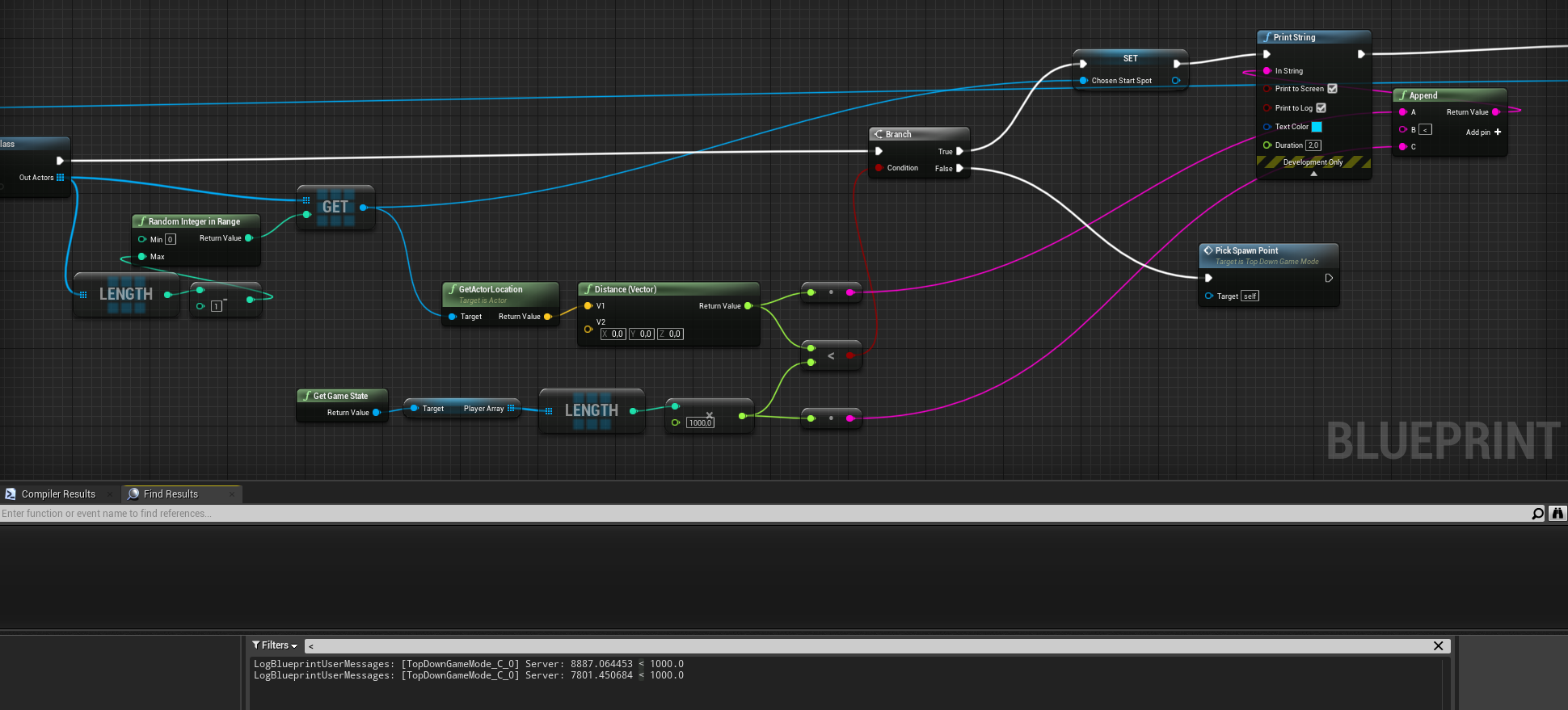
Sorry for the spaghetti 😛
But yeah, it shouldn't go to true and print that string unless the number is less than 1000
west jasper
Its ok i've figured it out didn't realise there was 2 stop audio components one for general audio and one for synth components
earnest tangle
@lunar coyote I suspect your problem is with the random integer node
lunar coyote
Basically, it picks a random spawn point, checks if it's close to 0,0,0 depending on number of players, and if not, randomly picks another one until it finds one that is closer than playercount*1000 units
zomg, ah you might be right. It picks a new random number for each exec node?
earnest tangle
it depends on how many times it gets evaluated
if you look at how your nodes are set up, it has potential to be evaluated several times
nodes which don't have an exec pin will get evaluated once for each connection
so for example, the Distance (Vector) is evaluated twice, which causes its connections also to evaluate for each evaluation
this causes the GET and Random Integer to evaluate again
lunar coyote
Ah gotcha. Makes sense, I was just staring myself blind at the wrong parts 🙂
earnest tangle
yeah I've had so many problems with random in these types of situations as well :D
best to save randoms into variables usually to avoid these problems :)
lunar coyote
@earnest tangle yep, works now! Thanks!
 gilded pebble
@maiden wadi I mean vertrex location, 3d vectors of the mesh
gilded pebble
I have the face Index from a linetrace, and would like to know if it's possibve to get the vertices that make up that face
lunar coyote
I wish I could record this bug, because it's so strange I can hardly explain it. But I'll try.
Multiplayer top-down game. Characters can lob grenades. They have a damage radius of 500, and I can see it goes off in the right place etc with draw debug sphere. If I throw one, say east 1500 units, it explodes, no damage to anyone. But! If I follow it a bit after I throw, I take almost full damage as if I was in the middle of the falloff.
Another character could even be in between the thrower and the explosion and take no damage, because the 500 radius is pretty small
it's like the thrower is projected further along their movement towards the place where it explodes when they run that way
 cyan hornet
I need to get a component from a pawn
the one that I circled
I need this
They are inside the pawn and I don't know how to access them
lunar coyote
draw from other actor > cast to it's class > get the component you need
haughty ember
@cyan hornet If it's generic enough (and single) you can use the Get Component by Class node. If not, cast the actor to the type you want and use the get <component> (variable) node
@lunar coyote Sounds like a multiplayer issue. you might have more luck in #multiplayer
haughty ember
@cyan hornet It is, but you can just do a cast without checking the type.
If the component is not the same type, the cast will fail.
Assuming you need the casted component, that is.
cyan hornet
I just need to make sure only the hand of a player can activate it
This will work with multiplayer right
On Component Begin Overlap (small_nade_button) Signature Error: The function/event 'BndEvt__small_nade_button_K2Node_ComponentBoundEvent_1_ComponentBeginOverlapSignature__DelegateSignature' does not match the necessary signature - has the delegate or function/event changed?
hold on I got this
lunar coyote
@haughty ember I don't think it is. That part looks ok. I'm starting to suspect that the one who spawns/fires the grenade becomes its owner, and so his hitbox so to speak is extended into the place where the grenade explodes.
cyan hornet
I tried to compile
lunar coyote
For now, I'm just gonna ignore damage to the instigator. Should work for all scenarios except bounces
haughty ember
@lunar coyote Did you try turning on Collision in the editor so you can see the collision boxes ?
lunar coyote
I'll try that
haughty ember
Actually re-reading what you wrote, I think you are expecting it to get hit, just not to be full-damage. Since you're doing the calculation your self, you should be able to find it easily by debugging; no?
lunar coyote
No I'm not able to run fast enough to get into the radius of the explosion even
full damage radius is 100 and falloffs to 500 units, and the grenade is launched far away
haughty ember
But you do get damage. Put a breakpoint in there and see why.
You can post the code you're using to actually calculate the damage/distance
lunar coyote
Ah okay I think I found the culprit. It is the collision box
I have a view cone collision box extending out in front of the character. Looking away from the explosion causes no damage
Should be an easy fix now that I know what it is. Thanks!
Though that component already ignores the visibility channel, which is what ApplyRadialDamage uses :S
haughty ember
When are you calling ApplyRadialDamage ?
lunar coyote
From the grenade BP, after a delay of 2s.
haughty ember
Also, try to disable the collision on that component completely. That way you can sure the problem is really with it
lunar coyote
Yep. it is that. Hmm.
lunar coyote
@haughty ember yes it still gets hit
haughty ember
Try to ignore all object responses as well?
lunar coyote
They're all ignored 🙂
Maybe I need to set Multi Body Overlap on the parent/root pawn?
haughty ember
From looking at the code it seems it will pretty much find everything that is dynamic. Which is all objectes except ECC_WorldStatic (static object type).
haughty ember
I'd say either do your own method, or use the Damage Prevention Channel.
lunar coyote
Setting Object Type to WorldStatic on the viewcone seems to have solved it
not sure what followup side effects that has though
haughty ember
if it works for now it's ok, but I've found some things in UE4 simply relies on objects being static/not, which kind of sucks.
Personally I wouldn't just change that, but if it works for you that's great
lunar coyote
It'll have to do. ^^
Just wish such things were better explained so one doesn't have to scratch their head for hours 😛
haughty ember
yeah agreed :\
 primal smelt
Hi everyone. I'm having a bit of difficulty with the player controller rotation on a pawn. On the left you can see a top down view of the pawn. It moves and looks around on its own along a spline but the player can possess the head and look around. On the right you can see in the blueprints I have a simple add controller pitch & yaw with some clamps in the grey comment box.
On the left screen I have highlighted the problem. If the pawn is facing a Z rotation of 0 it works as intended but when it rotates the desired range limit of how far the player can look left and right is not updated. Essentially, the green lines represent the desired range but the red lines show what the range is at all times.
The pawn you control is actually just the head and if the player is not moving the mouse it will just follow the predetermined rotation of a world component. Basically, pawn head follows rotation of actor head unless the player is moving the mouse. I want the player's view to always default to whichever direction the actor head is facing but I want the clamp to update as the green lines show.
Sorry I'm not very good at explaining things. Does that make sense? Does anybody have any suggestions please?
 proven mason
Let's say I've created an array but only accepts to a max lengtth of 2 how would I do that?
So I have a key array that when a certain key is pushed it fills in element 0 as that key and when I push another key element 1 gets filled with that key pushed.
But I when I push a 3rd key it rejects the key
earnest tangle
I don't think there's a way to limit arrays to max 2 items
You could create a custom function in your BP to handle adding items that would keep track of length
proven mason
I was thinking of using Gate node but damn is it complicated
earnest tangle
It would be quite trivial with a custom function :)
mortal wharf
How could i make a save and load system that only saves the level and widget?
 ivory prism
Hi, I'm having the issue where I'm trying to move the Player to the AI with " Move Component To" and I'm giving the location and rotation but the issue I'm having is that the player is kinda dashing/being pulled to the AI location instead of walking, what am I missing here ?
primal smelt
Noob question: My bmosue just spazzed out and my blueprint view has fucked off somewhere and I can't find my nodes. Any easy way to centre my blueprint again?
For anybody as mentally challenged as I am: Select any god damn in in our variable list or what have you, then View > Zoom to selected (or Home button). JFC...
stray folio
is anyone familiar with RPG inventory and D. Combat system?
 sudden ferry
Hi, everybody. Who among the Russian speakers can help me figure out a problem? I would be very grateful
mortal wharf
Is there anyway i can access a variable from one level bp to use in another level bp?
tight schooner
Not really. I mean you'd have to write it into GameInstance or a save file because those are the things that persist across level loads
GameInstance tutorial https://youtu.be/5w594D3qtLs
maiden wadi
@primal smelt Not sure if there's a hotkey, but you could try overriding an event. It should place it near your other nodes and center on it. Can delete it after.
tight schooner
@west jasper yyyyyyyeah I believe they are. You can easily experiment by putting a bunch of blueprints with static meshes in a scene and typing Stats RHI on the console and checking draw calls, iirc...
if that's what you mean by instanced
primal smelt
@primal smelt Not sure if there's a hotkey, but you could try overriding an event. It should place it near your other nodes and center on it. Can delete it after.
@maiden wadi Seems to be an inherent issue with Add Controller Yaw input itself, it will always base its rotation on 0,0,0 world coords and won't adjust relative to the actor. Still researching to find a way around it but I think I'll have to use something else entirely. I'm too stupid at maths to figure out a way to get the min/max variables for clamping yaw and setting them relative to current actor's rotation or forward vector
maiden wadi
Oh. I thought you meant in editor, my bad.
 fallen glade
anyone know how to connect 2 navmeshes ?
elfin hazel
Read up on Navlink, navlinkproxy, smartlink.
fallen glade
yeah, it seems like they don't really work with blueprints ...... super lame
 wet relic
I'm very new to Unreal and I'm having a hard time communicating and referencing between Blueprints. I want to create a sandwich game for myself. Player walks up to BP_Bread -> Press F -> Bread spawns at BP_FoodTarget. But I don't understand how to get BP_FoodTarget's reference. Should I focus on Blueprint interfaces or casting?
elfin hazel
As far as I know, those are the blueprint tools you do have access to.
haughty ember
@wet relic There are multiple ways to do it. How many FoodTargets will you have? how many breads? how do you want to find them?
One way of doing that is have a variable on BP_Bread, and set it manually in the editor.
Another is to find all actors in game of type <BP_FoodTarget>.
wet relic
Hi @haughty ember Thanks! I'll give that a try. Right now, only one FoodTarget. Food spawns and falls on the plate. The player wins if the order is bread, cheese, bread. I haven't even started on that logic yet, I've just been stuck getting it to work visually.
haughty ember
np. This might give more details with the communications btw: https://docs.unrealengine.com/en-US/Engine/Blueprints/UserGuide/BlueprintCommsUsage/index.html
wet relic
Thanks so much! I appreciate it!
 fleet cedar
Can anyone help me understand how I can have a ball that follows your cursor but also has physics that will interact with the ground?
west jasper
@tight schooner Thanks alot i'll check that out!
Do you know if Spline based Blueprints are similar or have any negative impacts?
elfin hazel
@fleet cedar How accurately should it follow the cursor? should it be where the cursor IS, always, except when something is blocking it? Or should it more be chasing the cursor?
Well, the tools you have when it comes to physics objects are Force - add force over time, or add impulse. Physics handle, allowing you to pick up physics objects.
primal smelt
I just screwed up a thing ive been working an hour on. Great
@spring birch Today I solved something I'd been working on for weeks. Had a my eureka moment and was feeling pretty great about the world. "Now, before I move on to the next thing let's try and solve this wee little problem." BAM, straight into another brick wall. Not so wee, after all.
fleet cedar
Well, the tools you have when it comes to physics objects are Force - add force over time, or add impulse. Physics handle, allowing you to pick up physics objects.
@elfin hazel Thanks Robin. This is helpful. So maybe add an impulse in the direction of the cursor? I want it to follow very lightly, like a weak magnet just barely affecting a metal ball
elfin hazel
Impulse is meant to "launch" things, using a big value, once. Adding force is meant for over-time, a small value on tick.
fleet cedar
I see!
elfin hazel
There's also a physics thruster component, but I think it's just a convenient way to adding force.
And a radial force, that you can probably use to follow the cursor that attrackts, or repells things from/to the cursor.
Search for physics or force anywhere you can and maybe you'll find some stuff. And you'll see what kind of things ue offers.
fleet cedar
Thanks so much!! I didn’t even know where to start so this is very helpful. I kept getting results about holding physics objects.
tight schooner
@west jasper if you're talking about spline mesh components, I don't know offhand if they can be instanced. All I know is the fact that they're warped prevents them from using Signed Distance Field effects, so I suspect they have similar restrictions to skinned meshes... But yeah you'll have to test it or ask #graphics
sonic crescent
Hello! Please Help me to understand this! I want to keep a 1 spline randomely. But i get evertime the same... why that?
elfin hazel
Because the make array is a pure node, so it will execute every time you call it. In this case, it makes an array based on your input. If you want to shuffle an array, make it a variable.
sonic crescent
hmm okay i will try that
 toxic cairn
How do I make race car umg gauge for the car?
Does anyone have a tutorial in blueprint
sonic crescent
@elfin hazel It's not working like that. What i'm doing wrong?
toxic cairn
Car speedometer UMG for blueprint
elfin hazel
That should work, but just in case, instead use a Get variable, instead of pulling off the Set output.
Based on the logic I'm seeing, it should be destroying the components at index 1,2,3 and then give you a warning for index 4.
Verify that the logic works without the shuffle first.
sonic crescent
@elfin hazel Hmm.. not working. Got everytime the same Spline.
elfin hazel
The shuffle should be shuffling the array. verify that it does that by printing each member instead or before destroying it.
haughty ember
@sonic crescent Are you sure the variables are pointing to different instances? Also print the indices to verify
 tender magnet
In BP debugging can you modify a watched value?
maiden wadi
Set it.
sonic crescent
I will print in a few minutes. And yes Spline are different. They are not variables but Components in the BP
@elfin hazel @haughty ember Working thank you
sour aspen
How can i make this color to stay at the green more than white? for example i want green to appear 2 seconds but white 1 sec.
I need it to wait on B value more than A value
tight schooner
@sour aspen add or subtract from the sinewave output and then use a Clamp node (0 to 1) before plugging into Lerp
In the future ask #visual-fx or #graphics for material node graph issues
The material graph isn't blueprint
sour aspen
Oh i see thank you i am searching what you've just said
stray folio
hi anyone have a clue for my error
trying to set my combat type but
it wants to set it a E num but i want it to just set
 quasi frost
Hey guys I was wondering if I could get an opinion. What would be the best way to take a datatable and spawn an object for each of the rows inside of a widget? Basically I have a data table for cards in my card game, and in this library window in my deck builder I want to spawn a card in the scroll box for each card that exists in the datatable. Should these cards be blueprints or widgets that spawn? And what would you do to spawn them? Some kind of for each loop off of the datatable?
 twilit heath
make a widget for displaying each row
have it take the DT row struct exposed on spawn
get all datatable row names -> foreach get data table row (with the name) -> break into your DT row struct type -> cretea widget providing it the struct -> add to panel @quasi frost
 shut sparrow
hallo guys i'm quite new with UE4, today i was trying making a water material and i was trying to pan 2 sprites to fake the water movement, but is not working, my idea was trying to using panner to move them in opposite directions but for some reason they don't move
tight schooner
@shut sparrow have you tried changing the speed? Idk. Material node graph questions are better asked at #graphics or #visual-fx
sonic crescent
Hmm, what was the way to get the static mesh just below? a Sphere or a LIne Trace? Any faster way?
tight schooner
If by fast you mean performant, single traces are fast
I wouldn't fret over using them
sonic crescent
thx!
quasi frost
@twilit heath Thanks for your reply. So I am bit confused on this step. How do I pull each array element and make a widget with it? So I need to take each array element, get all the data from it (Attk health etc) add it to the card widget in the library and then make a widget for each of those. Just a little lost on how to think of it.
Adding the atk and health is easy enough, I can just set the variable, but what I am confused about is how to go from array element to making the widget for each. Making one widget is easy, but doing it for all I just am lost on how to think about.
sour aspen
when i divide sin by two is this sin(x)/2 or sin(x/2) ?
twilit heath
@quasi frost inside foreach loop, you get a specific row with the name of the element
then you CreateWidget
that has your data struct exposed on spawn
and just connect the pin
no card widget exist before foreach loop
 lunar flower
Hey boys, trying to get this turret to look at the sphere in front of my face. Problem is it only works with world position in the "LookAt" node.
so when the plane moves around the turret moves in world rotation as well..
Any clue as to how I can set this up correctly to only use the relative position of the turret and sphere?
proven mason
I'm in the process of creating a dodge mechanic where the character can quickly step left, right, forward and backward as well as forward left, forward right, backward left and backward right.
tight schooner
@lunar flower I'm not totally clear on your setup so I'll describe it generically. Let's say I have a Pawn and a Target. To get the Target's relative position to the Pawn...
Target location vector - Pawn location vector.
To get it relative to the pawn's rotation as well, then I need to feed the result into an UnrotateVector node
with the pawn's rotation as the other input
and the result of that is the Target's location in Pawn-relative space
proven mason
so I've created a custom event node for Dodge where it takes an input of analog stick
The problem when I connect the Release Execution node to anything (even Print String) it ignores the yellow moving path.
this picture is before I connect the Release execution to anything
tight schooner
How is one supposed to activate the dodge? Is it like an Unreal Tournament-style double-press but with an analog stick?
(yeah my frame of reference is literally from '99 lol)
proven mason
no when you tap an analog stick to near a scale of 1 and release it does a step
I also want the character to step quickly diagonally
which I find the most tricky part when coding in Blueprints
I have the Key variable set up as an array so when the second button is pushed within a timeframe the second input gets stored to the second element of the array
Anyways I'm not a big fan of double tap. It consumes more time.
tight schooner
yeah, the Souls-esque dodge button is more standard these days. I'm trying to wrap my head around your graph. You say it's analog-controlled but it's an InputAction? (as opposed to an input axis)
proven mason
I'll try Input Axis event
let's see if that works.
I thought it doesn't make any difference
tight schooner
an input axis event fires continuously, like an Event Tick. (It also makes "Get [whatever] Axis" nodes available)
I think it's also possible to map analog axes to InputActions
so you don't have to "digitize" the analog inputs yourself per se
proven mason
Isn't InputAction moreso the same as WasInputJustPressed node?
Just out of curiousity
If I push a button or tilt a stick that is analog if the scale is greater than 0 it would be true
tight schooner
I'm not sure what the thresholds are for mapping analog axes to Input Action Mappings...
proven mason
unless I say if WasInputJustPressed node and GetAnalogKeyState nearly equal to 1 then within 1 frame the user has to quickly tilt the stick or push the analog button to reach a scale close to 1
quasi frost
Hey guys, working on my library for my cards. I have them spawning in the library but they are stacked onto the same grid. How do I like ++ the grid/row position in the for each loop when spawning every card to the library?
twilit heath
you should probably use uniform grid, its easier to manage
notice that add child to grid has integer inputs for row/column
you'll need to run a counter with your foreach loop, so make integer Counter variable, with default value zero (for good measure set the variable to zero just before foreach loop)
put Counter % GridWidth into Row and Counter / GridWidth into Column on AddChild
and after you add a child, increment the Counter variable by 1
@quasi frost
tight schooner
@proven mason sorry, I guess I don't really know the answer to your question. I'll just say generically that there are Action Mappings and Axis Mappings (in Project Settings). One produces an event node that just fires on pressed or released, and the other produces a node that fires continuously. If your issue is you can't get an InputAction Released event to fire even though the Pressed event fires... I mean, it should work if you mapped a button to it.
twilit heath
you can also pull break node from GetDataTableRow
tight schooner
If you mapped an axis to the InputAction, then IDK. I never experimented with that
twilit heath
then not use it, as your wildcard struct pin will get a type that way
and just connect that to widgets exposed struct pin, leaving the break node unused, less wires to connect
(GridWidth shold probably be a variable, but doesn't have to be as its an integer literal)
just pick an arbitrary number
quasi frost
@twilit heath Not quite sure I understand what you mean with the width thing. It is no longer stacking but it is doing this weird cascading thing.
quasi frost
Counter % Width for row and Counter / Width for Column I don't understand this sorry x.x Can you explain what you mean here? Am I attaching a variable to the transform or something?
twilit heath
Counter % Width is remainder of division of Counter variable with Width variable
 summer zephyr
twilit heath
summer zephyr
twilit heath
and Counter / Width is result of that division
summer zephyr
because in my work i dont have that option and idk how to enable that
twilit heath
its in edtior preferences somewhere
pale blade
How do you guys name your Blueprint Components?
I see according to this style guide: https://github.com/Allar/ue4-style-guide
It would be something like this: BP_InventoryComponent
Of course I want to follow the usual convention, but I feel something like BPC_Inventory makes it much more cleaner
What do you guys think? Is there a reason they recommend the Component suffix?
GitHub
An attempt to make Unreal Engine 4 projects more consistent - Allar/ue4-style-guide
tight schooner
fwiw I use BPC but my team consists of just me
 terse goblet
After playing an animation in character through level sequence, skelMesh -> AnimInstance -> play animation in slot does'nt working
But play montage char node is working.
Also tried to put the key of animation mode to switch back to "use ABP" instead of "custom mode"
even while in "use ABP" doesn't working 😦
quasi frost
How do I get more columns? Seem to only be able to get 1 going for some reason.
twilit heath
re-read what i wrote above, and do exactly that
one counter, not two
counter%width for column counter/width for row
as in same counter
so if your width is 4
8th card gets 7/4 = 1 for row and 7%4 = 3 for column (being zero indexed, making first card on counter 0)
@quasi frost
you also don't need setrow and setcolumn, you can just plug it to the addchild node pins
you get one column because you're doing 0%4 for column and you're not incrementing that second counter, which you don't need in the first place
flat raft
@quasi frost lookup a inventory tutorial on YT. One where the items are arranged in a grid. Use that setup/math, to arrange your cards.
 snow halo
Hey peeps, is it possible in blueprints to create a for loop that loops on a timer? so x seconds/milliseconds per loop body?
tight schooner
Yeah you have to whip it up yourself with Set Timer by Function Name — with "looping" checked
And your function needs some way to keep track of its "index", whether that's an array you remove elements from, or an integer variable
When it's done, then it can Clear Timer by Function Name
 rough wing
Hello, How can I get my regular physics objects to float in my water volume?
 lusty elk
hello guys, quick question! In blueprints i have this array with 20 items inside it, i want "something" travel along this items over and over again and print a string when it pass each one of this 20 items.
i know my explanation of what i want might not be the best one, but if anyone can give me a hand and share ideas on how to approach this i will really appreciate it!
flat raft
hello guys, quick question! In blueprints i have this array with 20 items inside it, i want "something" travel along this items over and over again and print a string when it pass each one of this 20 items.
i know my explanation of what i want might not be the best one, but if anyone can give me a hand and share ideas on how to approach this i will really appreciate it!
@lusty elk what do you mean travel along?
lusty elk
imagine this array contains numbers from 1 to 20
i want "something" to travel along all this numbers and print a string so it will print
1, 2,3 ,4 ,5 ,6 ,7 ,8... etc
flat raft
Well, try a loop, print the values, and see what prints first.
then there are ways of sorting the array
 open sluice
A for loop already iterates sequentially by default, just change First Index to 1, and use the Index variable on the right hand side to get the current iteration number
Maybe change last Index to 20 as well :P
flat raft
I assume the numbers are not in order
lusty elk
i can put them in order if that hepls the blueprint
flat raft
Or maybe just pseudo code lol
what is the end goal ?
if you just wants numbers, you can print the index of the array
earnest tangle
If you want to iterate an array with 20 items and print the index it sounds like a for loop fits the bill
But you need to have first index 0 and last index 19
because arrays are zero based
if you don't need to know the index number, then a for each loop is the easiest way to do it
thin apex
im doing this to use a trigger volume....am i doing it wrong bcoz ita not working...if so what else can i try?? i have no clue
open sluice
When I spawn my pawn/playercontroller in, the UMG widget links the pawn properly and I can see the pawn's health, but other times I guess it's slow to load the pawn into the map and the bind to the health function uses a null pawn reference (resulting in a ton of errors/second and an unresponsive HUD). Should I be delaying between spawning actor/ possessing / setting pawn for player controller/actor? Or am I missing some replication setting/reliable?
earnest tangle
You could probably just check for is valid?
flat raft
@thin apex check your tag, make sure something is coming out of it, make sure something is overlapping
thin apex
@flat raft yeh nothing is coming out...i did try printing after the for each loop
and the tag is correct
flat raft
Can I see where you put ur tag?
open sluice
I've done an IsValid check to remove the errors, but ultimately, the HUD never becomes responsive again -- not sure how to properly set/link the correct pawn from the widget. I should add this is only an issue on client-side... the listen server works fine 10/10 times
flat raft
@thin apex can I see your trigger volume bp ?
 haughty egret
How can I create a component based on a class reference and then attach it to an actor?
thin apex
@flat raft im just using the one u put in from the place actors tab
it doesnt have an add bp option
earnest tangle
@haughty egret the only way to do that in BP's is by comparing what class it is and then using a spawn component node. BP's can't spawn components fully dynamicly for some reason, it's possible in C++ afaik
 whole rose
NewObject<>
open sluice
I added some of the same code I did in my custom Setup event to the OnPossess and I think it's fine now. There's still a weird issue with the pawn showing the Widget for a few ticks before it disappearing (after the pawn spawning in) despite the widget's default being set to hidden
flat raft
@haughty egret what do you mean Component based on class reference?
haughty egret
Create it based on a variable that is a class type
I'll just create a c++ function for it though
Sounds like it's not doable
flat raft
@thin apex peachy, sorry, don't know. You can try to make a bp with a box Collision . Try it that way.
open sluice
@lusty elk your for loop isn't in the exec path so it won't do anything
Link the F to the beginning of the for loop
thin apex
@flat raft it worked with a box trigger since that has a bp option available..thanks for the help
flat raft
@haughty egret you can use AddComponent node in bp.
lusty elk
how should i connect the array to the rest of the nodes?
open sluice
I just accidentally closed UE4 gimme a second I'll draw it out
lusty elk
thanks 🙂
flat raft
Pressed into your For Loop, then LoopBody to ur print @lusty elk
open sluice
^ And you can also pass Array1 -1 ---> Last Index... asssuming Array1 is that array 1-20 you were talking about
lusty elk
yes array1 is the one i was talking about
is not letting me connect the array node to the last or first index node
flat raft
Pull off your Array1 , and choose ForLoop
lusty elk
theres no forLoop just for each loop
open sluice
open sluice
With a foreach loop instead:
flat raft
yes, but print Array Element not index
open sluice
A for-each might make more sense here, especially if later you decide you want to make Array1 an array of say Level Name's/ TEXT
Then yeah, you'd want to print Array Element (which currently is integer type, but could change to be TEXT/etc...)
oblique bear
does anyone know how i can make a dummy blueprints for another project
i need that becuse i want to add mod support
and as you may know i don't want to leak source cod of my project
 sullen radish
Hello everyone, is it possible to parse a string into an array of integer ?
for example .. the return string = "12, 15, 19" i want to parse this single string into an int array [12, 15, 19]
i used the parse into array node but can't output to array of int
gentle urchin
Just go via Foreachloop
Parse into array -> For each loop -> IntArray(Add)
Array element (string) to int
Think there's a string node for checking "is numerical" aswell
@sullen radish
sullen radish
@gentle urchin Thanks a lot, but will test the returned result if it works.
gentle urchin
Be sure to clear the array first (if needed to), and i'd also consider validating the data before converting it
sullen radish
actually in my case it's 100% int string so for sure it's an int data type.
and the array is empty at begin play
i think the problem is with the VaREST return type, not the UE4 logic at all, it's a totally different topic 😕
open sluice
I'm not really sure why my pawn isn't getting destroyed on a round reset. My c++ code for bullet spawn/destroy works, but in blueprint DestroyActor is failing/I'm failing to use it properly? My custom event for round reset spawns another pawn, but the previously controlled pawn stays around. I'm running the command as server through the game mode too so not sure what the issue is. The actor tag also increments, so my pawn named JetBP gets created as JetBP_C_0 and then JetBP_C_1 and so on with each successive reset.
Any ideas what to check? The procedure I have is objective completed/trigger detected in level --> Reliable Replicated To Server Reset (in Gamestate) --> Reliable Replicated to Server RespawnPlayers (GameMode) which iterates list of player controllers.
gentle urchin
Guess it's just a habit of mine never to trust data in a string without validation.
Beginplay could be to early for it to recieve any data? Guess it depends on the rest of your setup , but the function itself should work as expected. Could test it by manually inserting a test string to confirm it
open sluice
I'm using OnPostLogin to add the new players as they drop into the server -- actually not using BeginPlay that I can see , but I guess I should probably verify the list of allplayercontrollers is getting populated properly (I just sorta assumed it is since with 2 players I'm able to control each player with keyboard/gamepad and get a UMG widget set up)
Managed to de-spaghetify the core of the logic a bit
Also tried putting a DestroyActor in the Unpossessed for the pawn
gentle urchin
Sorry , my answer was to Nobel ^^ Guess i should get into the habit of tagging posts to clarify
open sluice
Whoops lmao
gentle urchin
Seems like ur destroying the playercontroller tho ?
Think you're missing a "get player pawn" or something in there
gentle urchin
^^ Probably not the worst idea 😛
sullen radish
Guess it's just a habit of mine never to trust data in a string without validation.
Beginplay could be to early for it to recieve any data? Guess it depends on the rest of your setup , but the function itself should work as expected. Could test it by manually inserting a test string to confirm it
@gentle urchin Thanks so much for your help, finally i've managed to get it to work, the problem was in the VaRest logic as i expected.
Thanks you so much for the help 🙂
gentle urchin
No worries 🙂
 untold torrent
Hello. I'm using Custom Primitive Data in index 0 and 1 to control UV offset in the material of StaticMeshes. Index 0 controls U offset and index 1 controls V offset.
When I set this on StaticMeshes in the editor it works fine, both in the editor view and when I press Play.
However, when I set this in a Blueprint to the Construction Script it doesn't work when I press Play but it does show up correctly in the editor view. (I want it in a Blueprint to get the UV User Interface to pop up at the top on the actor rather than having to browse down to Rendering of each StaticMesh and adding Custom Primitive Data manually for each StaticMesh)
If I add the Custom Primitive Data to Begin Play it works though. But this should just work in the Construction Script.
I saw a Reddit post from someone that had the same issue and that person claimed that it had worked before but did not work in UE 4.25.
 short coral
Hey guys , is there a tutorial out there that can help me make a proper tree chopping system? Like the player would walk up , play an animation that hits the tree then the tree falls down or whatever. I have found a some here and there but it looks like they're just attacking it instead of making it feel like a small interaction event if that makes any sense?
earnest tangle
That system would probably work fairly similar to what you're describing in the tutorials
so you could probably just build it based on one of those and then tweak it so it feels more the way you want
short coral
I tried to but even then , the animation of the axe swinging has it going through the mesh and that's what i'm trying to fix kind of
earnest tangle
maybe you can just adjust the animation so the swing ends earlier so it wouldn't go through it?
short coral
Yeah i did that too but , the problem is say the player is really close to the tree right? So if he tries to farm the tree he'll still go through it kind of, so i'd probably have to displace the player in case he's x distance too close or x distance too far to make it feel natural right?
earnest tangle
yeah something like that could work
 dreamy orchid
hey i made a pushing blueprint, but the object i used it on makes my player shake and throws my player into the air when i touch it? anyone know how to fix it
this is my first project in UE so ive never used this before
trim matrix
Haya folks quick question,I'm using interfaces to communicate from one object to another but for some reason when I try to find the event for the interface call it does not show up, it only comes up as a function instead of a event.
earnest tangle
if your interface call returns a value they get implemented as functions instead of events
 deep elbow
in the details panel there is a new interface menu to select from, not there?
trim matrix
Ahh I see zomg, thank you! And thank you for the additional answer rick, but yes I've already added it
dreamy orchid
does no one know how to stop the throwing/teleporting issue?
earnest tangle
it's kinda hard to say what would cause it without knowing how your pushing logic works
it sounds like your character might be clipping slightly into the object, which causes it to actually push you, thus throwing you
dreamy orchid
thats what someone else also said and they suggested to alter the capsule size, i did and it still throws me
earnest tangle
you could try making your player character heavier or the other object lighter
dreamy orchid
cause i basically have this and repeat that for the X and Z axis, and then repeat again for it to collide with other dominoes as well
earnest tangle
that could have some other side effects though but could be worth a try
dreamy orchid
i changed the massInKg, is that what youd mean?
since making it lighter would also make it fall over a lot faster, which is fine but it goes a bit crazy when i do that
 visual lion
Hi guys, small question, if I want to move a points 500 Units in front of my actor would this setup work? https://gyazo.com/cf7ce1796db19222a012a75f94baa624

basically I want to set the move to point 500 units in front of the actor. but I can't seem to make it work
today I can't seem to work in vectors
 grave nebula
Anyone has trying to make animation sharing with AI? also can we use Skeletal Control inside Animation Sharing Transition Child BP?
 stray rain
I have a problem with local multiplayer, I can damage other actors but I want them to NOT be able to damage themselfs. what would I have to change?
ok got it to work. When I spawned the projectile I plugged in "self" as owner
and then I got the owner in the projectile when applying damage.
Then in the character when taking damage I compared the "damage causer" to self and only pass damage if its not equal
 queen hollow
Hi all,
I've been making very good use of CoreRedirects this morning, as I rename a plugin and most classes in it...
I've got to the point where it's managing to redirect all of the C++ classes/structs/enums/etc, but it isn't redirecting the non-C++ stuff
I have this in my DefaultEngine.ini
+PackageRedirects=(OldName="/OldPluginName",NewName="/NewPluginName")
+PackageRedirects=(OldName="/Script/OldPluginName",NewName="/Script/NewPluginName")
But when I launch the editor, I get a load of Failed to load /OldPluginName/Some/Path/To/Something, when this path exists fine in /NewPluginName/
Any idea how I can be redirecting those through DefaultEngine.ini?
whole rose
is the plugin at engine, or project level?
queen hollow
project level
 dark laurel
Hey has anyone seen this before?
It works in my spectator class but not my 3rd person character.
primal smelt
@dark laurel Can't say I have. I assume you've tried breaking the connectors and re-connecting them? Assuming you've copied and pasted from another bp
dark laurel
Yes breaking them and attempting to recreate the connection has not worked as nothing will appear. However if I copy and paste the BP back in it will work. This only occurs when loading the project up and attempting to package the project.
queen hollow
@whole rose Any ideas on the redirects? I'm about to start fixing up the issues manually, which is going to be a bundle of fun...
whole rose
are you trying to rename the whole plugin?
you may need ,MatchSubstring=True
+PackageRedirects=(OldName="/OldPluginName",NewName="/NewPluginName",MatchSubstring=True)
+PackageRedirects=(OldName="/Script/OldPluginName",NewName="/Script/NewPluginName",MatchSubstring=True)```Will try that - thanks 🙂
The second line works fine without that
it's the first line (for .uassets) that isn't working for me
trying the substring arg now though
@whole rose that sorted it, I think - thanks 🙂
whole rose
cool 😄
 dense mica
primal smelt
dense mica
primal smelt
Could somebody please tell me why this doesn't work and what I should be doing instead? I'm trying to build an array in construction script which will determine the direction an actor is looking at at points in time. The first for loop adds 1 to each Z vector coordinate, this works fine and 30 array elements with the correct coordiantes are reported in the details panel. However when I plug in the second for loop - with the intention of adding indexes from 31 to 60 with a different set of coordinates - it now reports there are 929 array elements and it doesn't add them to the end.
ohhhh of course, thank you!
primal smelt
@trim matrix Thank you, that does seem to work just fine when I am only changing the coordinates for one of the axis but it seems to add an additional unit to all axis than intended if I hook the index directly up to all individual structs
@trim matrix I definitely don't need the int-int though, I thought I had to do that to get the previous index but forgot to actually test that! I guess it would actually get the one prior to the previous index
mortal wharf
So yesterday i began working on a system to another widget if the boolean is true and another one if the boolean is false it worked yesterday but i probably messed it up when i was working on it today because the branch always does false the boolean is made in the first person character but not used in it the boolean gets set to true when the night is over. First Person Character Boolean Var: https://gyazo.com/8c5a2c52be2304f966882da03e7b98c6 And this is the boolean being set to true when the night is over: https://gyazo.com/708b598eab5d97c836d4fbef2012c5bf And this is the var actually being used in the widget: https://gyazo.com/1ac8ca9b5dbb2ab7e2f6520fffb7fce2


 sharp fox
Somebody Help me?
I don't know how to make no repeating texture and landscape layers in one.
trim matrix
Are you changing levels between nights? @mortal wharf
mortal wharf
Yes
trim matrix
Ah yea no variables on the charecter will survive a level change
You have to save data you want to keep between levels on the Game Instance
 brisk lake
or the player controller
trim matrix
You know I think that has been changed. I don’t think player controller survives level changes anymore
It was tripping me up recently
brisk lake
well if that's the case then my current project is doomed as designed.
trim matrix
What version btw is it on?
trim matrix
I think what they did is they isolated that functionality to keep data between levels to the game instance so that the game mode can be easier changed between levels
brisk lake
Well, blueprint is easier to get started with in unreal engine..
trim matrix
Since the game Instance isn’t apart of the gamemode
 weary jackal
@sharp fox you should try in #level-design channel
trim matrix
Does anybody actually know what happened to player controller surviving a level change? I feel like when I was new, I heard to keep data I need saved between levels in a player controller from a lot of people. Im pretty sure I’ve done that on past projects as well? Now I just use game instance anyways but does anyone know if that actually got changed or not?
I remember being confused awhile ago cause it seemed none of the game mode was surviving a level change. I’m pretty sure though that in the past some of it used to.
 stiff totem
Is it possible to move actors in game like we do in the editor?
weary jackal
Yea
You can use timeline, spline, for character an ai controller
Also there're moveTo nodes
 violet inlet
hello guys , do you know why my projectile is only spawning at the end of the linetrace and not following it ? ^^'
earnest tangle
because you're setting the spawn transform to the impact point of the trace
violet inlet
yeah am kinda dumb thx x)
gusty mango
real quick noob question, but what blueprint node would I use to check if my boolean variable is true or false?
earnest tangle
branch?
gusty mango
ok haha, I was thinking that might be the case. thanks haha just digging into blueprints
 desert storm
So I'm trying to get a coin pickup to fly into the player when they come close to it. Best way to do that would be with vectors, right?
weary jackal
So I'm trying to get a coin pickup to fly into the player when they come close to it. Best way to do that would be with vectors, right?
@desert storm https://youtu.be/PBfppEWmfjM
In this tutorial we will learn how to make objects attract towards your player. Also we gonna make a magnet system so you can make the player collect objects at certain radius.
Thank you so much for watching
Like and Subscribe
mortal wharf
So i made a graphic settings widget / options widget and you can turn the graphics down a lot but when my friend tested it, it didn't affect his frames at all? Is it just that my friend has a too bad pc for my game or?
 hollow cape
Pretty broad question, what are the specs of his PC relative to yours?
desert storm
@weary jackal Thanks, I'll look into that
mortal wharf
I don't know completely but his pc specs are graphics card: He either has a nvidia 670 or he didn't have one at all and then he has like 8 ram and then either an intel 5 or 7 low end versions of them. And i have Nvidia 2070 and 32 Gb of ram and then amd ryzen 3600. @hollow cape
So yeah he doesn't have a great pc.
He wasn't online right now so i couldn't ask him.
but i am pretty sure those are his exact specs
hollow cape
That's a pretty huge difference spec wise. Hard to say, but if you are sure you're able to apply settings on your side (as in, you are actually applying/saving the settings properly, and have verified that the new settings have been applied), then yes it may be below minimum specs for your game.
mortal wharf
I still think it is kinda weird because if you turn all the graphics down completely it ends up looking like a nintendo 64 game.
He is able to run minecraft and fortnite just fine.
hollow cape
Have you verified that he sees a visible downgrade of graphics on his end? I ask this stuff because many times people don't do the scalability settings stuff properly, and never actually apply settings
mortal wharf
Please take a look at this: https://gyazo.com/60f73fd858354a81698f6a9bd0698c01
And no i haven't asked him if he sees a visible downgrade.
In the link i sent you, you can easily see a visible downgrade. @hollow cape
hollow cape
and I assume this is in a packaged version of your project
mortal wharf
no...
because i am currently working on this as my second version i have already packaged and released my first version.
 ember niche
hey guys, i have an error doing a tutorial series, can some one help me with that in voice chat?
weary jackal
?
ember niche
?
weary jackal
Apologies @ember niche first i thought you had errors setting up the proper mic controls, that's why you askin people on voice
 balmy ledge
Hi, I have a function on my third person character that returns closest target in a hitbox As target data. If it doesn't have a valid target, it does the Return Node with the output variable unassigned. It's a punch.
If I punch with no target, everything works fine. If I punch a target once, everything works fine. However, I can move away from my last target and punch and the target is still getting hit even though it's not in the hitbox. I have confirmed the function is returning with the variable not assigned, so I'm confused why the function appears to be returning data.
one sec will provide screenshots
The bottom is the function, the top is the even handler that calls it
What happens is after I hit a target and move away, I see the should be a miss, but then it fires the going to for loop. So even though the function should not be returning anything, or something empty, Target Data Has Actor is returning as true.
weary jackal
Try for with break
mortal wharf
How could i change the text of a widget text with a widget button?
balmy ledge
Still the same result. This keys off a custom event btw
hollow cape
@mortal wharf on button click, change the text of the widget text
you may have to check the "is variable" or whatever it's called on the widget text in the designer, at the top right
balmy ledge
There's the full scope of the part that isn't working, Target Data Has Actor should return false and it's returning true
hollow cape
@balmy ledge have you printed out or watched the output of the "get overlapping actors" array to see what's there
 cosmic lagoon
hey guys how would you create a script to grab an object? create line trace on each joints in the hand until it collides with the object? or is there an easier approach?
balmy ledge
@hollow cape I haven't but as it's getting to the "should be a miss" it should be returning nothing? Are output variables on functions instantiated each time they run for blueprints or do I need to figure out a way to clear that output variable?
hollow cape
are you directly using the output of the function, or setting a global var?
which function are you showing in the 2nd to last screenshot you posted
maiden wadi
Loops.
Blueprints are amazing for a lot of things. They simplify work and make stuff very quick to test, but once you start working with a lot of data, loops just die. They're fine for a few hundred things here or there in blueprint, but once you start hitting the two million loop necessity... yeah, I wouldn''t even try that in blueprint.
gentle urchin
If you try such high numbers you gotta split it over several frames atleast, which may or may not make the loop useless
More often that not its caused by the user and not the loop itself 😅
 hushed fox
Im new here, and am having trouble making a projectile actor that spawns in my character blueprint, move in the direction the character is facing. it only goes forward in direction
I can post my code that I have in blueprints if someone is able to help
ember niche
Thanks everyone and especially keyon for responding and helping, appreciate very much
trim matrix
Heyo! I have this overridable function OnPreviewMouseButtonDown that has 2 Detect Drag If Pressed. Each one does different things (One splits the stack in my inventory and the other one moves the item into another slot). I put a sequence but only the first one works (Middle Mouse Button). I want both of these to work depending on what i click. Any help?
balmy ledge
@hollow cape sorry I had a meeting. I'm directly using the output of the function. The function I screenshot is the one that should be returning the empty value.
hushed fox
earlier i posted i was having trouble making the projectile follow the direction my camera is in, I was able to figure it out thanks to unreal engine answers page, i needed to use get control rotation instead of get world location
balmy ledge
I cleaned up the BPs a little bit, I'll post new screenshots that are hopefully easier to read
top is the function, bottom is where the function is called
Somehow I'm getting a case where "should be a miss" and "going to for loop" are both happening. So Target Data Has Actor is returning true even when the Return Node with Hit Actor not being filled is happening
HitActor is the output. So only thing I can think of is HitActor is sticking around as a variable across calls to the function? The function by the way is on ThirdPersonCharacter, Handle Punch is in the ThirdPersonCharacter event graph.
ok well, I fixed the problem. somehow that HitActor is sticking around across function calls. If I do a Make GameplayAbilityTargetDataHandle and plug that into the HitActor Return Node, then it works as expected.
 plucky bane
hello just want to ask how bad get all actor of class is, like its a sin to use this node? if i have 100 actors in the game and look 30 of them, would that be bad in performance? I'm running it in UI.
flat raft
@plucky bane If you can use an alternative, avoid GetAllActors
 keen goblet
My rule has always been to never use it at runtime, only during transitions where the player won't notice (like opening a level)
flat raft
It's not a sin, just if you can avoid it, try.
you can possibly use event dispatcher maybe as an alternative.
flat raft
If you don't get a huge performance hit, then it's fine.
I've heard Epic has optimized it alitte since it's very a handy node.
@plucky bane use command : stat unit and stat unitgraph in a freshly booted engine, with a pop up viewer. Then run your AllActors. If you see a big spike, then maybe don't use it.
plucky bane
I see, i dont want to be sorry at the end ill just try my best to avoid using it. thank you very much
 slow harness
does anyone know why I can't move the CapsuleComponent Up?
as you can see there's no gizmo to move the capsule up
plucky bane
i think you need to attack it to a root?
 vestal plinth
I've moved my foliage to another level because I don't want to load it on mobile platforms. however it's still loading in by default. what's causing that?
is this how it should be set up?
proven mason
Hey guys I'm still stuck on making diagonal steps in blueprints
Whenever I connect the "Release" execution to another node it ignores the path of the yellow flowing arrow no matter how hard I push two directional buttons together.
I'm using analog input btw
tender magnet
Is there a preformant way to check positions of players on a server to get their distances so you can show an effect if they are close, and not show if they are far away?
gritty elm
@tender magnet create custom event, make it replicate to server, then use get distance to function to calculate distance
tender magnet
That's the most performant way? Checking a lot of players with a distance function?
I don't need the up axis either.
gritty elm
@tender magnet yes, you can loop through for each loop to get distance, then you can add them to array or map etc
tender magnet
That doesn't sound that performant, also I should mention that all I need is the x and z of the position, and this is happening on each player hit.
Isn't a distance function a heavy operation?
gritty elm
ok so in that case you get actor location - target location . VectorLengthXY() function?
tender magnet
Any other hacks?
gritty elm
(PlayerLocation - OtherPlayerLocation).VectorLengthXY()
tender magnet
This will be happening all the time, that seems too heavy.
gritty elm
tender magnet
Would this be faster in C++?
Because I'm going to write it as a script.
It's all about performance.
gritty elm
ok use c++ if you need performance
tender magnet
I'm thinking I'll get the x and z and do a distance with those two vectors. Is there any other hacks you can think of?
This will be happening a lot.
gritty elm
for (const auto& Ref :PlayersLocationArray )
{
FVector EachLocation = Ref - TargetLocation;
float distance = (EachLocation - TargetLocation).Size();
}```use FVector::size() to get distance : https://docs.unrealengine.com/en-US/API/Runtime/Core/Math/FVector/Size/index.html
Get the length (magnitude) of this vector.
like you did vector lengthxy in blueprints above screenshot
tender magnet
Oh dam, thank you so much! I appreciate that!
 latent arch
hey all i wonder if you can help? How can i "don once" "for each" on a ticked event? 😄
so im finding all projectiles as they fly around using a timer event
once the projectiles are found i want to "do once" for each individual one
 sand shore
I'd keep a list of actors (Array) and check if the projectile is in in (Contains).
That'd help with the per-object do-once... but what's with this casting scheme? Why do you have multiple unrelated types of projectiles?
@latent arch
latent arch
because i want to use each reference to set audio for each different projectile type found
its a long winded way i know but this is for a game "MOD" so i dont want to override any original blueprints if i can help it
thanks for the help 🙂
sand shore
It just does it in a super roundabout way... but if you're happy with that then it should still do what you like.
latent arch
yeah its not very efficient, im just trying to proove a concept a tthe moment ehehe
sand shore
Also you're way more restricted in a mod situation so I get that
latent arch
so what was your sugestion exactly for doing things once per actor? remember that the input event is ticked on a timer
sand shore
if ProcessedProjectiles does not Contain Projectile:
Projectile -> Do Thing
ProcessedProjectiles Add Projectile
if you'll pardon the pseudo
latent arch
ooh ok sounds good, would you mind showing me what that looks like? (if you have time!) 🙂
sand shore
I don't have the editor up
latent arch
ahh ok no worries
sand shore
It's pretty easy and if you get confused I should have time for a clarification
latent arch
ok ill give it a go 🙂
so when you say if does not contain projectile is that just an "is valid" ?
sand shore
no
latent arch
😄
sand shore
you enter the second loop when the first is completed
in that loop you check if it's already been done.
latent arch
ahh
sand shore
I suppose. A lot of assumptions. I don't know anything about the game you're modding, or even your graph outside of what you've shown.
latent arch
so the branch needs to go before the for each?
sand shore
Why would the entire loop be based on whether a single projectile had already been processed?
latent arch
because i dont want to be setting audio / manipulating multiple times a second 😄
i need the imput to be ticked but the output to pulse as each is found
i hope that makes sense
sand shore
Well I'm confused by how you accomplish that with the nodes you just showed?
latent arch
haha well im not entirely shure either to be honest this is just the reult of a lot of trial and error so far 😄
sand shore
What that does is: Hey find every single projectile. If I haven't seen it, loop over every projectile and do stuff.
So you loop over each projectile twice (maybe) and do stuff.
latent arch
i see
sand shore
Instead of manipulating audio O(2N) you manipulate it O(n^2)
So what you should do is your inner loop as the first thing does the contains.
latent arch
so if i make a "unique" aray first, using an is valid to "remove" dead ones. then after that have another for each and continue?
latent arch
ok well if its too much trouble i can wait
sand shore
Okay fine. It'll be quicker to show you
latent arch
its ok dont worry about it
sand shore
Actually it won't be because I forgot I don't have UE4 installed on this machine.
 rough blade
Does anyone know why my projectiles dont always register a hit? 2 out of 5 (ish) seem to ignore the enemy and pass right thru
sand shore
@latent arch Can you read C++? If so I can just give you a more defined example in that
@rough blade There's tons of reasons this might be happening. Do you know if you might be doing anything ... interesting with your projectiles/enemy?
latent arch
its ok dont worry if its too much trouble
rough blade
@sand shore the only fancy thing my projectiles do is check the actor for a tag. If the actor tags contains my projectiles tag, then no damage. If not, damage.
sand shore
Yeah there's loads that could be going on then still.
Do you have anything else that works based on collision in the game?
rough blade
The actors that are doing the shooting have viscones that overlap to do normal vision stuff.
Other than that I can't think of anything (early development)
frozen dune
I would like a help with a specific implementation of a User Widget
I have a Widget that is the combat UI and, for this implementation, I would like for each character to hold it's own status widget. What I'm wondering is how can I make the character add it's own widget to the combat UI
Does anyone have any idea what I should search for in order to try that ?
sand shore
@rough blade If you haven't, give this a read through https://docs.unrealengine.com/en-US/Engine/Physics/Collision/index.html
All about collision, collision responses, and collision presets.
rough blade
Thank you!
 cloud trellis
hey so how can i remove bones off of a skeleton. I have this gun imported as a skeleton and need to remove something. it is a bone, and i cant delete it nor move it. please help, thanks
 spiral verge
is there a tool (like winmerge) to diff blueprints on svn?
other than the UE itself ofc
sand shore
@spiral verge no
spiral verge
❤️ mcloving it
sand shore
you could probably make one if you were really pressed @spiral verge
You would have to maintain it as you upgrade your engine, and it'd have to be a minimal diff tool (as skeleton as can be) to be worth it
you'll need advanced engine knowledge and to be comfortable in c++
Strike the right balance and the entire community would be clamoring for it
spiral verge
or *Epic could make it easier/cleaner to use Source Control with the engine. right now it's a pita that everytime you hit save it performs checks with the source control server. There is only 2 things that the source control on UE is good for: Diff blueprints and history, the rest could easily be left for regular tortoiseSvn
tried to see if there were any options that handle that but no, no way to remove that check
sand shore
I mean.
Diff BP already supports at least 3 source control solutions
It just isn't provided as a standalone tool.
Epic isn't responsible for how tortoiseSVN (or, for that matter, any VCS company) specifically supports UE4
spiral verge
not trying to blame epic here don't misunderstand me, im just saying that this little extra step that takes about 10 secs and freezes the whole engine is odd...considering we are just saving
sand shore
blueprintue.com can "render" graphs without starting the engine...
spiral verge
if source control didn't add this extra layer on saving files, it would work fine
sand shore
It's not impossible
 worthy frost
