#blueprint
402296 messages · Page 533 of 403
 visual lion
basically what I thought and should have been is that I was setting the timer, when the world was getting loaded
so the timer was actually deleted since the world was getting disposed and it was starting to load a new one
all the read arrows are the tanks
 fallen glade
Is there a way to use the navigation mesh in a shader? I'd like to show my players where they are allowed to go to, I've posted already in graphics but maybe it's something I have to do through blueprint? the closest thing I can find online is this dude https://youtu.be/YYH2qjzpZGo?t=493 but I have no idea on how to do what he's doing with blueprints

Description: An introduction to my VR Content Examples, an attempt to show developers examples of common VR functionality in one project.
UE4 Forum Thread : https://forums.unrealengine.com/showthread.php?96447-Tutorial-Mitch-s-VR-Lab-an-introduction-to-VR-in-UE4&p=449389#post...
visual lion
@tight schooner and @trim matrix thank you for all the help
 trim matrix
@visual lion we didnt do a whole lot but we tried haha
 native terrace
so i have this strange behavior with a blueprint that randomly stops working, if i just add a print node at the end of execution flow, than it starts working again
anyone would know what can cause this?
 maiden wadi
Not without seeing it.
native terrace
hang on
your eyes might bleed
if i notice it doesnt work, i just compile it even without touching any nodes and it works again 
trim matrix
Ok I'm still learning Unreal Engine. Anyone know how to destroy terrain in-game?
Like a voxel game or like Astroneer
 drifting mulch
@trim matrix That's a really complex thing to do. Like really, really complex. I don't know how experienced a developer you are but here's some resources (via Sebastian Lague)
http://paulbourke.net/geometry/polygonise/
https://developer.nvidia.com/gpugems/gpugems3/part-i-geometry/chapter-1-generating-complex-procedural-terrains-using-gpu
https://people.eecs.berkeley.edu/~jrs/meshpapers/LorensenCline.pdf
I doubt Unreal has built in support for this.
 worthy frost
there is the Voxel Plugin that has this

Unreal Engine
State-of-the-art Voxel Plugin with powerful editor & runtime tools
drifting mulch
And it's free? Awesome
maiden wadi
It works incredibly well and is very easy to learn too. Phy did an amazing job on that.
 pine trellis
is this the correct way to get a reference to a gun actor in a blueprint?
I keep getting this error
they are all the same gunbase from class
 hearty moss
'Accessed None' is telling you that it didn't find any gun actors
this can be for many reasons. when is your gun spawned in? youre trying to set a reference to it on construction of your character, which is one of the first things that happen when you begin play
so it may be trying to find the gun before it spawns in
also i'd recommend spawning the actor in your character and attaching it to a socket from there if youre trying to do a gun pickup system
that way you can set the reference when you spawn the gun
@pine trellis
trim matrix
Yay thanks for the support, really appreciate it
pine trellis
is the construction script suppose to the be place where I call the reference using get actor of class? because if I promote it to a variable its just called gun base.
or since I am spawning, should I spawn it and use the spawn from event begin play as the refernence?\
hearty moss
the construction script is used for anything that you need to setup when the blueprint is created, which won't happen often if you're new
when is your gun being spawned?
i would recommend adding it as a component in your character
then you can reference the gun directly in the blueprints
pine trellis
i spawned it like this, no more errors but I cant grip the gun in VR anymore. im getting the gun reference from the spawn actor but its not gripping
I removed the construction script
hearty moss
i can't help you with VR stuff im afraid
i have no idea how VR interacts with this kind of pickup system. my bad i didn't realise you were working with VR
you should post this issue in #virtual-reality too
and you might wanna fix those errors. seems like they might be important haha
pine trellis
well its weird this works the same as the construction script but if I dont place a gunbase on the map it wont spawn
I get the error again if the gunbase is NOT placed on the map
 gusty shuttle
My scene component (which houses the arrow component) seems to angle up every time I activate the aiming system. Any tips to get that arrow horizontal to start with?
On grab, it shoots to this position
gusty shuttle
On start, it's horizontal, but once I grab a enemy (to throw it) my scene component goes on a wack angle, any tips would be great
 crude valley
is Advanced Locomotion System V4 worth using? or better off making my own from scratch'
pine trellis
does anyone know why I cant get this gun to attach to my character?
the gun just floats in the air and doesnt move
 earnest tangle
I don't see an attach actor node in there
you have to call one of the attach nodes otherwise it won't have any attachment to anything
the transform is just for position, rotation and scale
pine trellis
hold on I think I just discovered a bug im serious im going to try to replicate it
ok so basically this code right here works, only if I place a GUNBASE on my map, my character can spawn with with its gun attached and it works with my VR hands
 hardy sentinel
Is it possible to make a text literal by default not localized instead of creating a localized id? Also in blueprint enum descriptions are by default text localized ... why? Can I disable it?
earnest tangle
@pine trellis you can replace the "get actor of class" with "spawn actor" and it should work without having one in the level then
pine trellis
im having a spawn actor bug
like this it works and I can grip my gun in VR
if I do it like this the GUNBASE spawns in the air and I cant crab it anymore, it just floats in the air and I cant do anything to di
is there anyway to change all these to another variable? I want to create a variable from the spawned actor right now its calling the variable for the actor from class
like a quick way with multiple changes at once?
maiden wadi
@gusty shuttle You still having issues with that scenecomponent?
earnest tangle
@pine trellis so basically you want to use the actor which exists in the world as a "base" and spawn a new one based on that?
 ruby oriole
in the player controller, is there an event that gets fired when a new pawn gets possesed ? i do need to get the camera component of the current pawn to move it but i dont want to check the controlled players camera each frame
maiden wadi
There should be an event for it in both the controller and pawn classes. OnPossessed or something.
ruby oriole
oh, you are right
thank you!
when i first looked i had the sensitive search on once again
 primal smelt
Hi everyone. Does anybody know how I could get a reference to the number of indexes in an array? I just want to be able to press a button to print a string which gives the total number of indexes at that time.
ruby oriole
isnt there a getlength or getcount for an array oldboy?
ruby oriole
okay i ran into a tricky problem. In my Controller, i can get the Camera Class, but how do i get the spring arm the camera is attatched to ? There has to be an easy solution i am unable to find with google
primal smelt
@ruby oriole @hearty moss perfect, thank you! I'm just having a look at some code I saw somebody put together for a time rewind mechanic. Within a second there are a hundred indexes! It doesn't seem to clear indexes so this can't be good for performance, right?
ruby oriole
i think so, if you have hundreds of indexes it will become a problem in the long run ... but if you only need 5 seconds, maybe you need to build a custom solution and clear indexes older than 5 seconds somehow
i am way to new in UE4 to be a helpful advice here, sorry mate
primal smelt
@ruby oriole That's what I'm thinking, not really intending to implement this into my project but thought I'd see if I can play around with it and make it viable.
ruby oriole
i have implemented it in another engine already so it is possible without a huge overhead. But for UE4 you need to write some things yurself to make it run smoothly
primal smelt
@hearty moss It's transforms and rotations of an actor, it runs off every tick
hearty moss
@ruby oriole im assuming youre talking about player controller
camera boom here is the spring arm
ruby oriole
the most simple way would be to have a queue where you add new items each frame and remove items at the other end of it once your queue is longer like 5 times your current frame rate. Thats not a perfect soltuion but it should work
primal smelt
Thanks for the suggestion!
ruby oriole
@ruby oriole im assuming youre talking about player controller
@hearty moss
Thanks, i was looking how to get the parent of the camera actor, but it simply is "Get Attach Parent" which is strangly named but exactly what i was looking for
hearty moss
wait is there any particular reason you're doing it that way? @ruby oriole
ruby oriole
Whenever my controller changes the controlling character, i need the Spring Arm which the camera is attatched to.
this is the code i came up with
so my controller can controle the camera and not let the pawn handle the camera itself
hearty moss
ahh yeah that usage makes sense
ruby oriole
but the code there doesnt work
somehow my CameraSpringArm gets set to none ... i guess the cast fails.
I just need the TargetOffset of the spring arm in the camera section.
 white crypt
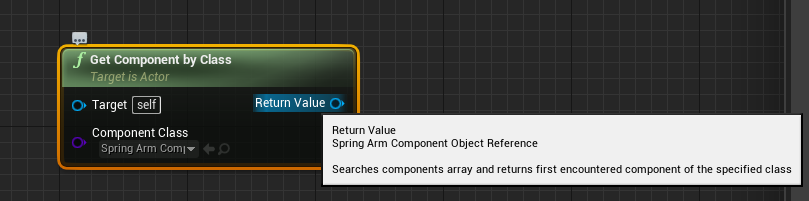
you need this i assume
the class you are getting is not the same that you are casting to
you can always add a print string and plug in return value to see what you are actually getting to return
ruby oriole
yeah ... but with that i would get all the spring arms or jsut any spring arm, right ?
my pawn has multiple of them, 2 currently ... so i am not sure which one i would get ?
white crypt
hmm i think it will just return the first one
cant you store your component ref before you posses?
ruby oriole
hrmm
 earnest tangle
If you know which one you want you can also cast to your class and just get it by name
ruby oriole
yeah but that still doesnt help me. Getting all spring arms isnt the problem. I need to find the one spring arm the camera is attatched to
earnest tangle
it might be easiest to just save it into a variable when you attach the camera to it
ruby oriole
i am sure there is an easy solution in UE4 ... but i cannot find it. I was certain that if i get the camera component somehow i could get the spring arm its attatched to but that doesnt seem to work
white crypt
yeah I also suggested storing the ref beforehand
earnest tangle
there might be a get parent component or something on the camera component
white crypt
or instead of checking class in my example you could add a tag and check for that
ruby oriole
yeha that will probably be my solution in the end, but i am not a big fan of it
earnest tangle
but saving the component to a variable would definitely be a pretty easy way to do it
white crypt
yup checking the parent attached to it should work too
i also dont understand why you dont want to store that ref before posses
ruby oriole
Because the controller i write should be useable for all type of game objects and different scripts on it. If each possesable object had to store stuff i would consider it unclean
maybe its just my twisted view on software engineering
white crypt
you are storing it on posses anyways
you wont win anything with that
so instead of storing your ref on posses, do that on begin play or construct
and it will use less nodes than what you are trying to accomplish
ruby oriole
i am currently working in the controller not in the pawn
white crypt
so on posses you could get controlled pawn, cast to your pawn and get the ref that way
well there are plenty of different approaches as always
so up to you which one you want to use
ruby oriole
i try to prevent storing it in the pawn, that was my whole idea
but it seems like its a lot easier to just store it in the pawn
hearty moss
are you using multiple pawns
white crypt
probably, you dont need to overcomplicate stuff
hearty moss
why not use what i showed in my screenshot?
ruby oriole
because i tried to prevent exactly your solution. But it seems like i am thinking WAY to complicated so i will put a variable into the pawn and read it from the controller
 hearty moss
what
white crypt
but do it on posses if you want to store it in your PC
same principal as moustache said just a different event
ruby oriole
the event "EventOnPossess" only gets called on the server and not on the client btw
so its not a solution i can work with 😦
hearty moss
oh you're doing multiplayer?
ruby oriole
yup
hearty moss
i know how that is
you can't get away with just not casting tho
you will have to sometimes
ruby oriole
i am a bit shocked that the event only gets called on the server
white crypt
and you would pass your spring ref through that event
to your controller
i dont think it even needs to be owning client, no idea why i said that 😄
but im no expert in networking, just brainstorming
ruby oriole
yeah i think i will go and tinker with it for a moment. Thanks for the input you two 🙂
i am sure i will figure out a solution!
hearty moss
you will 100% have to cast
ruby oriole
i know casting isnt the problem ...
hearty moss
then im confused
ruby oriole
the code i posted earlyer works btw, its just null because the event only gets triggerd on server side
this is the code i came up with
@ruby oriole
this one
oh ... it doesnt link the image again
hearty moss
what are you trying to avoid?
ruby oriole
I try to avoid to store a ref to a specific thing in the pawn
hearty moss
but through my screenshot you aren't storing anything on the pawn, just getting a reference to a component
ruby oriole
okay, i got it to work now
oh ... please dont tell me "camera boom" is a variable that already handels what i am looking for ... ?
i often get confused with stuff thats already there in the engine and custom build by others
hearty moss
camera boom is the name they put on the default spring arm
i said that after posting the screenshot haha
ruby oriole
this is the code i came up with. "CameraSpringArm" the ref just needs to get replicated towards the owner
with this code, the camera spring arm can be named anything it wants and it should work on every object that has a camera and a spring arm
white crypt
isnt that the same as before, but you just set the variable to be replicated?
hearty moss
why don't you use a custom event instead
and call it from the pawn after getting possession
white crypt
ask yourself if server really needs to know about your spring arm
ruby oriole
yeah its the same as before ... i was quite happy with the solution, it just didnt work because of the replication problem ... i didnt knew (when i first posted it) that the event only gets called on server
the server shouldnt know to be honest ...
the server shouldnt know to be honest ...
hearty moss
you need a custom event to handle this
hearty moss
custom events are your best friend
ruby oriole
this should be all for the custom event, right ?
Im still a bit uncertain about these things ...
white crypt
why not just pass the spring arm?
then your event inside controller would look like this https://prnt.sc/uj3h52
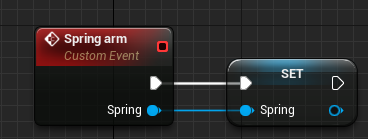 ruby oriole
hrm ... yeah
right now the stuff dopesnt work anyways
this sends a null as possessedpawn
and i dont know why
white crypt
no, not here
in the place where you have "posses"
inside there you get player controller, cast to player controller and then call event on posses client
ruby oriole
But wouldnt this lead to doubling code at every point where i posses a pawn ?
white crypt
depends on how you have your pawn set up
it would be best if they all originated from the same parent class
as childs
ruby oriole
yeah i agree
white crypt
if you dont want to go that route then you would need to use an interface i assume
ruby oriole
can you tell me why you wouldnt use the possess event that gets called anyways ?
white crypt
because you said it gets called on the server
and server doesnt really need to know any of that
ruby oriole
well its a UE4 Event that gets called ... i think it gets called regardless if i use it or not ?
i dont know how the engine works there exactly
white crypt
im not exactly sure how unreal works in that manner, but if theres no event onpossed then it wont be called. it might be looking for it but since theres no logic attached to it, it shouldnt matter much
maybe someone who works with cpp could answer you
ruby oriole
its probably not a bad thing to inform the client that the server decided to possess something new
white crypt
server doesnt posses
it does have a copy of all the controllers though
anyways i dont want to get over my head by talking about this. im not the right person for this 😄
ruby oriole
haha no problem
But so far ... my scripts for the camera control works. My initial problem i came here for is fixed ^^
 desert storm
Say I have two actor blueprints, BP-A and BP-B.
Is there a way to specify a specific component for overlap from BP-A in BP-B?
 meager spade
If I understand you correctly you could create a component instance of the type you would like during runtime and add it to BP-A if it overlaps BP-B
Or do you want to do something in a component when BP-A overlaps BP-B?
 pastel rivet
This is probably not the right channel, but im struggeling hard to get focus on a html5 build. I cant hit widget buttons, but i can rotate the camera around (like orbit around an object)
@desert storm
Collision volumes, on overlap event
make sure collision settings are correct in both blueprints
desert storm
I know, but there's a problem:
Basically I've got two collision volumes in the player's BP: one for the body, one for attacks. I currently have it set up in the player's BP that when they attack and the attack-volume overlaps with a specific object (currently just a test object), that object gets destroyed. But that's not really scale-able, I can't hook multiple objects up to that one chain, so I was hoping to move it into the BP of each individual object - but I can't figure out how to specify only the attack volume, so when I try that, if any part of the player is touching it counts as overlap.
pastel rivet
or if BP-A or BP-B has already collisions that can overlap
@desert storm
Maybe use a tag check on the volumes?
desert storm
A tag check?
pastel rivet
@desert storm
Yeah you can check if actor has a tag when overlapping. Since your issue is specify only attack volumes, i would go with a tag on the volumes and then check the tags on overlap
desert storm
Alright, I'll see if I can figure that out.
Figured it out. That helps. I take that back. Doesn't seem to work the way I want it to.
Thanks anyway.
 fossil shoal
how to reference a skeletal mesh in a blueprint?
earnest tangle
isn't it just a variable of type skeletal mesh
as in, same way as any other thing you'd reference
fossil shoal
im trying to make a modular character but my stupid brain decided to not google modular character
nvm
pine trellis
can someone clear things up for me? I have an issue, if I spawn a weapon in using get actors of class, and also spawn an actor using spawn actor, my gun logic wont work anymore on the spawned weapon, but the weapon placed on the map it still works
is this because I am calling the reference from all class, and not the reference from spawn actor???
I dont get it because they are the same class
 untold anchor
can blueprints not set focal distance?
nevermind, found it, screenshot for anyone else who searches the discord for the answer
Set Focal Distance of Camera = Set Post Process Settings > Make Post Process Settings > Check Focal Distance to allow access to modifying it via blueprint via the make Post Process Settings node
desert storm
My apologies for the weird visual, but it was the only way I could explain this without it getting messy. I've tried a few different ways to get this working, but all of them had their own problems. I feel like there's some really simple and obvious solution I'm not aware of, and could use some help figuring out what that is.
 wary widget
I'm trying to bind to USelection::SelectionChangedEvent in blueprints, but I can't since that event isn't dynamic. What's the process here for exposing this? To get around this, I binded to that event in C++, and then have it broadcast to another dynamic multicast delegate that is exposed to blueprint, but this seems cumbersome.
 elfin hazel
@pine trellis Why are you first using Get Actor to get a gun reference, then spawn a gun class?
The Get Actor of Class node searches for an instance of the specified type, and returns the first it finds. And you can never be certain -which- instance it will return. For what reason are you using this method at all?
untold anchor
nvm again, apparently what i was doing doesn't work, found an old tutorial that's apparently a bit too outdated to function anymore. in 4.25+ how do you set focal distance in blueprints?
for a regular camera, not a cinecamera
apparently you can't anymore? only with cinecamera can you change focal distance with blueprints? what the...
white crypt
@untold anchor works fine for me https://prnt.sc/uj5z8j

oh i was on 4.24, let me test on 4.25
works on that version too
 true plaza
I'm trying cast to BP_PickupCube from my Animation BP (to access a boolean). but I can't find the right wildcard object.
BP_PickupCube looks like a StaticMeshComponent. Should I cast to StaticMeshsomething?
or maybe I should just ask, how do I get from here to here?
 keen goblet
@desert storm I'd use an interface or the built-in damage system.
In either case, it's kind of a reversal of your current thinking. Currently, the Cube is asking "is this thing touching me something I care about?", which involves asking a lot of questions. An easier approach is to have your player say "I am attacking you" to anything it touches while attacking and set up actors that say "if I am attacked, I do this".
You could do that with damage, having the player call ApplyDamage and having your Cube implement OnTakeAnyDamage.
desert storm
@keen goblet Thanks for the tip, I'll look into that.
have your player say "I am attacking you" to anything it touches while attacking and set up actors that say "if I am attacked, I do this".
Can I do this with a specific component? Otherwise it sounds like I'd run into the same problem, with the back or side of a player also triggering it. Kinda defeats the purpose of a directional attack.
 vague lake
I want my character to always face with camera ,how do I make it so?
white crypt
probably with find look at rotation
keen goblet
@desert storm You certainly can! In your AttackCollision.OnBeginOverlap, do
if bAttacking: ApplyDamage(OverlappedActor)
Or something like that. Point is that you have full control over when your player actor decides to say "I am attacking you!" to another actor
edit: Also, interfaces are a generic way to make a system where something says "I am doing a thing to you" and you can set some actors to say "when that thing is done to me, I do this". Very powerful tool to add to your coding arsenal!
vague lake
I turn on yaw ans turn off orientation rotation but it doesn't work
white crypt
vague lake
Thanks bro
white crypt
oh you dont need to rotate all axis
vague lake
I was having problem like when equip and aim my player rotates
white crypt
this will look towards your camera
so you will always see the front of your character
oh you said always face with camera
not to camera, mb let me send another example
white crypt
is it for 3rd person game?
vague lake
Yes
white crypt
i think you only need to set yaw to true/false but let me test
 vague lake
Alright I will test it tomorrow gotta sleep now
untold anchor
@white crypt try updating that during runtime if you wouldn't mind. with maybe a lerp and timeline or something else. My float was changing from maths (printed string to verify), was setting that float as a variable (also checked this), then using that variable as the input for the focal distance on that make post process and then to the set post process settings. I verified that the execution was going through the set post process settings properly, however, the camera's focal distance would not actually change (tested this with large values to make it obvious that it was working or not) I had also had the values figured out before hand to ensure the particular objects i needed in focus were in focus, but for w/e reason, it doesn't seem to work. I checked with a friend of mine and he said it was deprecated in 4.24 and now you have to use cinecameras to do it, and that it caused him a huge heart ache in his game when it upgraded to 4.24 as it was working before hand.
white crypt
its done using default 3rd person template on 4.25
i can package and send it to you if you want, but its pretty easy to make smth like that
untold anchor
yea, that's what i had thought, my set up was basically the exact same as yours just now
the only difference was i was setting the lerp into a variable and then using that variable as the float input for the make post process setting but
that shouldn't matter at all
so
white crypt
what kind of lerp values you were using?
untold anchor
no clue what went wrong in my set up
untold anchor
oh the alpha was just 0-1 from the timeline
untold anchor
same X_X
white crypt
want me to still send it so you could look into that yourself?
untold anchor
honestly, not much to send, i see your set up, nothing weird or odd there
i must have fucked up somewhere, and that's on 4.25.3?
white crypt
it will be easier if you compare those two examples, maybe you missed one small detail somewhere
yup
untold anchor
can you post a screenshot of your details on the make post process and your set post process?
that's the only two bits of info not shown in your video
white crypt
set default values cant be changed
untold anchor
and i'm like 99.99% certain the default follow cam on 3rd person template is just a regular camera too, not a cinecam
 frail marlin
Anyone will to help with some simple vector math?
Im 95% to the solution, there is just one minor fault in the math and i cannot figure it out.
untold anchor
set default values can't be changed?

 untold anchor
yea, just making sure i wasn't crazy on that one
so yea, just check the focal distance on the make
which i did
and nothing can be changed on the set
hmmm
i'll give it another try in a bit, interesting
thanks alot
white crypt
np, i will dm you the project anyways since i uploaded. up to you if you want to use it or not 😄
 true valve
Can you set collision presets to static mesh via blueprint?
desert storm
@keen goblet I take it that it's not this simple?
 haughty ember
Can you set collision presets to static mesh via blueprint?
@true valve yup. https://docs.unrealengine.com/en-US/BlueprintAPI/Collision/SetCollisionProfileName/index.html
keen goblet
@desert storm Granted that I'm not quite an expert, lemme try:
Maybe BaseDamage should be not zero, in case 0 damage doesn't count as "doing damage", making AnyDamage not fire. But assuming the first pic is in your player BP (and you're making IsAttacking true at the right time) and the second pic is your Cube, I think that should work. I've set up something that simple before.
For good measure, I'd also pass the player as DamageInstigator and your player's controller as DamageCauser, since that's what ApplyDamage wants to get as input
Might as well also do some good ole' fashioned debugging, using prints or otherwise, to make sure ApplyDamage is actually called when you think it should be
desert storm
@keen goblet Looks like that did the trick, thanks so much for the help! That was the first real barrier I've run into since I've gotten back into Unreal, I was so worried I'd have to rethink everything.
Anyway, I'll look into interfaces when I get the chance, thanks for the suggestion.
 tiny ember
Hello. I'm trying to move with the button while holding it down, however, it only moves once. I want to do the same as if I were moving with the keyboard. Thanks
 proven mason
and here' the graph results
tiny ember
desert storm
@tiny ember Could you try using an input action, rather than On Pressed? Input action has the ability to drag out for "on pressed" and "on release".
You can start movement on pressed and stop movement on release.
 robust cliff
Anyone know how to load main menu map without a character and then when click start button open level with character?
worthy frost
remove the pawn from the gamemode?
you normally have a MainMenuGameMode
which has no pawn
trim matrix
Yea you would make a new level, and change the gamemode settings in that level to get rid of the charecter. Could even just use the level BP to create a widget when the level starts. This widget would have some button that would run the Open Level node to load another level.
The loaded levels gamemode settings would let it have a charecter in it
worthy frost
exactly how ours is done
robust cliff
where are these settings for each individual game mode
trim matrix
world settings mhm
robust cliff
Ok
worthy frost
if you don't see the tab, you need to show it
in the Window drop down at top of UE4 Editor
robust cliff
Thanks but now i have another issue. I was setting up my View target with blend so i can pan from one location to another. Is there a way to pick locations in which to blend from?
@worthy frost
now it just starts from a 0,0,0 map position
it blends to right location just not correct starting location
Should i just create an empty pawn and drag it into the world?
robust cliff
I know but by default when i set the blend time to 10 secs. It pans to the camera but from the world position because i have the pawn set to none
default pawn class i mean
So it starts from 0,0,0
worthy frost
you set it to a camera
in the level
just a normal camera?
like your initial view target
before you do the blend
but i have no clue what you are trying to do 
robust cliff
here i will show you
i have it working but would rather use a camera
one sec
there you go @worthy frost
@worthy frost NVM i got it
 supple dome
@pale blade yea that warning is for c++ users
 carmine thorn
 rough wing
How can i get a spline point closest to a specific world location?
earnest tangle
there is a node find location closest to something
something like that, that should do it
trim matrix
I'm working on an ability that teleports and attacks the enemy... But the camera get's so crazy towards the end because of how fast the movement is, can anyone help me come up with a solution to this problem?
 covert arrow
@carmine thorn how do you get all overlapping actors and apply damage to all overlapping actors?
trim matrix
@covert arrow for each
covert arrow
@trim matrix for all the actors that are overlapping box collision for example apply damage to all the actors that are overlapping that box collision
trim matrix
yeah
connect a for each node to wherever the collision event is taking place
and then after the for each node apply damage damage should come next
@covert arrow does that make sense?
 rough wing
What does this return?
The distance from origin to the input key?
along the line that is
I think ive got the concept wrong. The input key seems to be a float value after all
trim matrix
it returns the distance from the two
 haughty egret
@worthy frost Is there any way to know the world area that is visible by the camera?
 weary jackal
Learn how to optimize your games by setting up and using the available culling methods available in UE4! In this introductory stream, Tim Hobson will go over the high-level use of these culling methods with some practical demonstration of how visibility and occlusion culling w...
haughty egret
That's essentially what I want sure but that just talks about the different methods. Is there a way I can find a Frustrum without having to implement all the calculations myself?
true valve
Is there anyway to unpause the game using a key?
weary jackal
@true valve set pause game to false
you can find event bool if to work when game is paused or not

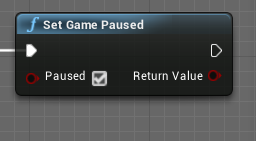
use this one to pause/unpause
maiden wadi
@haughty egret What is your actual use case for needing to know the world area visible? Detecting if an actor is within camera view is pretty easy.
haughty egret
Yea that's essentially what I want to know
But I've had issues with the project world to screen someone getting objects not on it
maiden wadi
@haughty egret What is the usecase though? Do you need any actor at a point on the screen, do you need a list of actors that are on screen at a certain distance, or?
haughty egret
I would like all actors I can see on the screen basically, ending with terrain I guess
It's supposed to be a first pass cut down so then I can find which actors are within a selection box
maiden wadi
How often is it ran?
true valve
@weary jackal thanks
fallen glade
i'm trying to build a grid, does anyone know how to properly feed my vectors into a mesh selection ?
trim matrix
Sounds a little advanced
That little 3 by 3 thing is so scary
Especially when the colors start switching up
 frigid thicket
can you make Image Widget to not showing anything when it has no image? i want to replace it when its in game, but when it has no image it shows white box and i dont want that
fallen glade
you can set it's visibility to invisible @frigid thicket
frigid thicket
@fallen glade will it become visible again once i put image?
fallen glade
no but you can make it like this: get image > is valid ? > select > true=visible false=hidden
and then plug that in a set visibility node
 tight schooner
@rough wing you can round the output of that node to get the nearest spline point... I think the float output is like a fractional "key", so you can round, truncate, modulo, or do whatever desired math on it.
 stiff totem
How do I change the variable values in an instance of an actor
tight schooner
@stiff totem make the variable public (instance editable). Either check the box in the variable settings or click on the eyeball lol
stiff totem
How do I change them then? I can only seem to change the default value
tight schooner
@stiff totem place a blueprint in your level
And in the details panel you can change the value
That's what it means to make a variable instance-editable
You change it in the level editor and not the blueprint editor
The variable gets "exposed" to the level editor
frigid thicket
how to add more color to lerp? or should i use something else to transition more than 2 colors?
 gray kite
Are there any nodes where I could figure our if a float is a multiple of 10 for example?
I want every number that is a multiple of 10 to fire an event
so 10 fires, 20 fires, 30 fires etc
 still bramble
er sorry to interrupt but im having a super simple problem thats causing me to go insane
all i want is to click on a box and it to run this dialog bp that i replicated from a youtube tutorial
but i cant for the life of me click or have any input to actually run it
i know it works since i did a print string debugging for the script itself
but man it just wont take any key or click
trim matrix
are click events enabled on your player controller?
theres a flag in the settings of a player controller that determines if click events can even happen
Its off by default
trim matrix
oh?
still bramble
this is just for a static camera
but the player controller is right there
wait...
still bramble
one moment ill look for it
trim matrix
it should be in the class defults
frigid thicket
@trim matrix thank you
still bramble
ok so i finally activated in game clicks etc still no response?
trim matrix
What kind of object are you trying to click?
still bramble
just a cube
 flat raft
Does the Construction Script get called in game ?
still bramble
yes
trim matrix
does your cube block visability collision?
still bramble
its a static situation
so i was wondering if collisions was an issue
should be ok with a simple mouse over?
trim matrix
check its collisions yea
still bramble
but in the puzzle bp example for unreal there is no massive collission like that?
other than slightly in the z axis
flat raft
Are you sure, Sally? I have a breakpoint in the construction script and it doesn't Break.
trim matrix
Construction script only gets called in game when an object is spawned
Im pretty sure
still bramble
hm....
still bramble
yeah ur right it does get called once per object
however i was able to get it to work like this at one point but it was broken in another way so i had to remove it
so i know its possible to have a key interaction?
not click though
at the time
still bramble
oh kek
but so ur saying that if the object is in the scene already
and dosent have collissions that you can actively collide then it cant be interacted?
trim matrix
oh wait
still bramble
er click on even?
trim matrix
nonononononon
still bramble
ohoh
trim matrix
I was saying if an object is in the scene construction script wont get called for it
That was for the other qeustion
still bramble
oh! sorry sorry
trim matrix
For you sally
flat raft
lol sorry
trim matrix
You enabled click events right?
so?
Couple things i can think of off the top of my head
still bramble
yes no change
trim matrix
Is that player controller actualy the one being used?
Make sure of that
first and foremost xD
still bramble
yes because it works with ui...unless thats different
trim matrix
ok well if it is the one being used alright
still bramble
yes
trim matrix
and so your trying to click a box collison or static mesh cube in confused>?
still bramble
parallelling with the puzzle bp example project i belive its the box collison
trim matrix
ah then ok!
open the BP that has the box collision inside
goto viewport
click on the box colision
and in the details
this is what you are going to want to be changing
Click on the dropdown and set it to custom
And make sure Visability collison is set to Block
by default the Trace Channel responsible for detecting Mouse Events is visability
And a mouse event is only detected when that Trace Channels collision is set to block.
If its set overlap or ignore, the mouse event will either overlap or ignore the object. Either which wont fire the mouse event.
still bramble
I CAN HIGHLIGHT NOW THANK U, clicking im still working on but thank u for the light at the end of the tunnel
also is it an issue that interaction dosent exist
trim matrix
oh nono thats a custom channel i made
still bramble
ok thats what i thought
trim matrix
It shouldent exist for you dw
still bramble
for some reason clicking is still a problem but at least the highlight works flawlessly
T>T thank u so much
tight schooner
@trim matrix functions can't be latent; they have to provide immediate execution and/or output
trim matrix
oh well np
gl getting the clicking to fix
The only thing i can think of @still bramble, Is that if you had only set the mouse over events flag to true in you player controller. Theres another flag called enable click events you have to set for click events to work.
 wind atlas
Hi everyone, I've set up an exposed parameter on a blueprint which is controlling dynamic material instance parameter (which is then sent into a material function), editing it while in play mode doesn't seem to do anything, however if I eject from the camera, editing the parameter works correctly, is there something simple I could have missed? something to do with play mode?
haughty ember
however if I eject from the camera, editing the parameter works correctly
Edit how?
on a blueprint which is controlling dynamic material instance parameter
Are you using the constructor to do that perhaps?
If so, in the editor the constructor will run when you change most (if not all) properties.
However in game mode, the constructorwill only run oncewon't run at all if the object is already created in the editor.
pine trellis
i am calling a reference to gunbase in my blueprint and for some reason I can only use the gun to fire from the first gunbase I place on the map, all the other ones dont work.
is there another way I should call the gunbase so I can use all of them and not just the first one I place on the map?
haughty ember
@pine trellis Use Get All Actors of Class and foreach ?
pine trellis
get all actors and for each loop? ok let me try
haughty ember
@pine trellis I'm really not sure why you have a reference there though or when you are shooting it. It might not be relevant
 cobalt slate
hey everyone! quick inheritance question. I have a parent blueprint that moves around inside of the blueprint. I created a child of that parent and although i can see the mesh, it doesn't update when the parent updates. I know for things like character classes, this is the way it should be. But for a simple actor BP, i need the child to update every time the parent updates. Is there an option for that?
haughty ember
are you overriding the Tick event? did you also remember to call the base Tick event then?
pine trellis
well because when I press the fire button it calls a reference to fire gun-stop firing when its not pressed from the gunbase
haughty ember
@pine trellis Too small I can't actually read it. but if you're using a reference to choose which gun to fire from, and you're only setting the gun at the beginning of the game - what do you expect? ..
pine trellis
whats a good way to fix it?
haughty ember
whats a good way to fix it?
@pine trellis Fix what? it's doing exactly what you told it to. What do you want to happen exactly?
@true plaza the 2nd one is the animation blueprint. In it you can call Get Pawn Owner, cast it to your blueprint, and use it.
pine trellis
well I need to spawn different weapons on the map, but right now I can only fire 1 weapon the first one I put on the map, so maybe I though I was calling reference wrong but they are all still the gun bases @haughty ember
haughty ember
you're missing more detail - you're forgetting I have no idea what your game is like.
I barely even knows what spawning multiple weapons means. They could be multiple firearms in inventory, multiple firearms located around the world..
How are you even switching them? If you don't know what you want, you'll need to describe more for others to understand you.
wind atlas
@haughty ember I mean editing an exposed blueprint paramater, I'm not sure what you mean about using "the constructor", whats that?
haughty ember
@wind atlas ConstructionScript. How are you updating the dynamic material instance parameter then? and when?
pine trellis
@haughty ember its just putting the gun on the map, like from the browser, if I put more then 1 gun in, from the browser onto the map, I cant fire the other guns
wind atlas
@haughty ember ah I see! yes the dynamic material instances ae created in the construction script
haughty ember
@wind atlas Created is fine. Updates is an issue
haughty ember
@pine trellis "like from the browser" what?!
And like I said - you need more. How do you switch? what does firing even mean? ...
wind atlas
so I can call the "set parameter value node in the actual blueprint, not in the construction script
haughty ember
the best way would be to create a function. Call that function in both the construction script and the Tick event.
That way it will be updated when you change it in the editor and in the game.
wind atlas
@haughty ember thanks a lot!
haughty ember
np, hf 🙂
pine trellis
this is how I fire my gunbase
this is the reference to my gun base
why is only 1 gun working, the first one on the map and not the others? is there another node I need?
true plaza
@haughty ember having a multi-day saga trying to reference the BP_PickupCube. when I just tried TryGetPawnOwner, I can't set the target to BP_PickupCube
haughty ember
when I just tried TryGetPawnOwner, I can't set the target to BP_PickupCube
What does that mean?
true plaza
@true plaza the 2nd one is the animation blueprint. In it you can call Get Pawn Owner, cast it to your blueprint, and use it.
@haughty ember so I'm in the AnimBP Event Graph. I need to reference BP_PickupCube to get the variable right?
true plaza
oh, I use that on my BP_PickupCube?
haughty ember
not "on". cast the result to BP_PickupCube, then use it
true plaza
yes, I'm really confused how to cast to BP_PickupCube
haughty ember
Examples of different Casting Nodes and usage cases.
 atomic salmon
@true plaza is your pawn actually a BP_PickupCube?
 simple crow
Hey I need some help with my system of adding doors to rooms in my dungeon crawler Ill post the images in a sec, but the only thing ive found from testing is they all say they have a neighbor on every single side when they don't. But then also its not adding a door to everyside
true plaza
@atomic salmon the cube/staticmesh that holds the boolean uses BP_PickupCube
atomic salmon
@true plaza Try Get Pawn Owner, as the name says, returns a Pawn
Unless BP_PickupCube is derived from Pawn, you cannot cast it like that
You probably intend to get a reference to BP_PickupCube through the Pawn, but then you need to get it from a reference variable within the Pawn
true plaza
is it possible to cast to a StaticMeshComponent?
atomic salmon
@true plaza Casting only works among classes that are one derived from the other
Is your BP_PickupCube something your Pawn has picked up?
true plaza
yes
atomic salmon
Ok. When your Pawn picks that up, do you attach it to your Pawn?
atomic salmon
ok, and then you do an AttachToComponent I guess
true plaza
yes, and also DetachFromActor
atomic salmon
You want to create within your Pawn a new variable which is a reference to a BP_PickupCube object
When you attach the BP_PickupCube to your Pawn, you set that variable to be a reference to the BP_PickupCube you just picked up
Let's call that variable AttachedCube
Now, you do a Try Get Pawn Owner from the AnimBP, cast it to your pawn class and then you can access AttachedCube
With it you can do what you need on the attached cube
This may sound complicated but it is actually easy once you understand it
true plaza
OK, I'm using the VR template, and I just found the Attached Actor variable in the MotionControllerPawn, so I suppose I can reference that in my AnimBp
atomic salmon
That is correct
Just make sure you check that is valid
Before attempting to do anything with it
 dusk flame
Hi! Is there some way to view all level blueprints?
A bit weird question.. but I'm having issues where in-editor scalability settings are resetting, and I found on the forums to check for Level Blueprints that are setting the values.
Its an unfamiliar project though, so I dont know where to start.
true plaza
thank you, I shall dive back in @atomic salmon
@haughty ember I also appreciate your input
dusk flame
You have a level blueprint set up to change the quality of your project
Trying to susse out where this might be happening in the project I'm working on.
atomic salmon
@dusk flame assuming this is the case and they are not set in any ini file, I would search in Blueprints for Execute Console Command
dusk flame
Hmm. Is this the sort of thing that would be set per-map or per-level?
Or is there some global kind of thing? I guess the global thing IS the .ini files.
atomic salmon
@dusk flame look into the starting level first
But you can do a search through all the project blueprints
atomic salmon
@dusk flame Or do CTRL+F and search through all blueprints at once
dusk flame
Hmm. Is there some hierarchy, where LevelBlueprints for parent levels can effect child levels?
atomic salmon
sub-levels?
dusk flame
Hmm. Well its most likely not a problem in the bluepints, since it seems consistant across all maps.
Not just some specific levels.
atomic salmon
yes, the persistent level is influencing them if this is what you mean
dusk flame
Is the Game Default Map the persistant level?
atomic salmon
Search also for this Set Overall Scalability Level
The concept of Persistent Level applies only if you have sub-levels and use level streaming
dusk flame
ok! I will need to do some poking to see what the architecture of the levels is in this project.
I did notice that Execute Console Command was used a lot, but only at low-level blueprints.
Nothing top level that would apply everywhere (that I can tell)
Its weird that it doesn't apply to everything. For example the Post Processing is stuck at low, but I can set anti-aliasing to anything I want.
atomic salmon
If it affects all the levels it must be somewhere up high in the hierarchy. Search also for the node called Set Overall Scalability Level or just for "Scalability"
dusk flame
Scalability doesn't show up -even when searching across all blueprints at once.
atomic salmon
I may actually be in an ini file
dusk flame
Do you reccomend using a plain-text editor to poke at the ini, or are the menus good?
dusk flame
DefaultGraphicsPerformance=Scalable
This looks... right?
I opened the entire config section in VSCode for easy global searching.
Not 100% sure what I'm looking for, but scalability doesn't show up 🤔
Ah!
sg.PostProcessQuality=0
So this would set postProcess to 0, I understand that.
Do you know the relationship between the .ini files and the actual scalability window in-editor?
I want to enable in-editor changing, without screwing up the actual project settings.
atomic salmon
Yep that disables post processing
You can play as much as you like with the editor scalability settings
It is not going to affect the final build
For that you can let the engine decide the best settings or force them through ini file
Scalability options, properties, and console variables.
Or you can force them in code of course
dusk flame
ok! So when I changed the .ini file, I got it to switch from PostProcessing being locked at the lowest, to being locked at the highest... progress!!
But its still fundamentally "locked". I can't use the in-editor GUI to temporarily change it, since it gets forced back as soon as I close the menu.
dusk flame
@atomic salmon its sticky to whatever is set in the .ini files.
atomic salmon
@gritty elm literally all actors or just actors of a given class?
@dusk flame you should be able to override those in the editor though
Strange
dusk flame
 gritty elm
@atomic salmon like get all actors of class
dusk flame
A bit hard to understand in gif form, but you can see it jumps back and won't let me set it.
atomic salmon
because sg.PostProcessQuality actually affects a number of settings
check in the doc I linked above
gritty elm
@atomic salmon any solution?
atomic salmon
@gritty elm yes, what you mentioned. Literally do a Get All Actors of Class and loop through them to check the variable in each. Don't do this On Tick though, it is quite expensive.
gritty elm
how to check if bool var in all actors is true
for each loop return true and false at same time, this is what is not want
?
atomic salmon
@gritty elm so you want to check that the same variable is true in all actors?
Just start with a running bool variable set to TRUE
Then do a AND with the value of the variable from each actor
if at the end it is still TRUE it means all actors had it set to true
gritty elm
can you please give example of bluprint
atomic salmon
not right now, editor is busy
Start with a Get All Actors of Class
then a For Each Loop
Create a new boolean variable called GlobalAnd and set it to True by default
In the Loop exit of the For Each Loop, get the boolean variable out of your actor. Let's call it ActorAnd. With it do GlobalAnd = GlobalAnd AND ActorAnd.
Try and post the screenshot here, I will correct it for you if needed
@simple crow sorry man skipped your question
Do you still need help?
atomic salmon
hahaha
simple crow
I had a refernce to the wrong cube
atomic salmon
too many hours spent dragging lines between nodes
simple crow
yep 😉
atomic salmon
glad you fixed it
simple crow
now im just modelling stuff
gritty elm
@atomic salmon
atomic salmon
What is the name of your bool variable within all actors?
@gritty elm
Is it New Var 0?
Did you create the GlobalAnd variable to keep the running total?
gritty elm
yes both vars are different
atomic salmon
ok that makes it very difficult for me to tell you what you should do with what
because they are named the same
anyway, out of the Loop Body you do Global New Var 0 = Global New Var 0 AND New Var 0
Then out of Completed you check if Global New Var 0 is true or false
gritty elm
it always false
atomic salmon
did you set Global New Var 0 to True as starting value?
ruby oriole
there is no way to ask an array if it has "item of type" or ?
okay nvm, i guess i will solve it with a dictionary since the types are unique anyways
 timid forge
Is there a good way with perforce to merge blueprint files?
 wintry maple
Hi all,
A few questions in this one.
So I have been working on a set of custom inputs for the Virtual Camera Player Controller to control things like the Current Focus Distance using a Gamepad instead of the Touch Interface.
I spent a long time trying to get the X Axis Input for the Left thumbstick to work with no success but did manage to get Left Thumbstick Up and Down to work to increase and decrease the Current Focus Distance.
Issue is as I am using Up and Down instead of the X Axis I don't have the built in Dead Zone, Sensitivity and Exponent.
At the moment the input scales the value up and down but I need to add variation in the input for more detailed control and dampening to the value when the axis input is released.
This is what I currently have so what would I need to add to get the desired effect?
Also any idea why the Input X Axis wouldn't work?
Currently using an Xbox 360 controller.
tight schooner
@wintry maple I'm no expert at input mappings but... is it possible to split one joy axis into two? I'm not sure what's going on there.
The way I use stick mappings is one axis (e.g. up/down) goes from -1 to +1, with 0 being center
If you're not sure about your setup, you should try using a Print node to get the live outputs of those axes. I suspect there's something strange going on.
Deadzones can be configured in the project settings --> Input --> Bindings section --> click the thingy at the bottom of the section to reveal advanced parameters
If you want smoothened response, you can try using one of the FInterpTo nodes -- put it in between your math and Set Current Focus Distance
wintry maple
So to test the controller axis input just chuck the input into a Print Text node to see if it is getting a value?
tight schooner
yeah. Remember to uncheck "print to log" though.
wintry maple
Ok cheers. That should help determine if its working or not.
tight schooner
@timid forge I think BPs can't be merged or diff-ed, though I never looked into it deeply. You can ask #source-control though.
wintry maple
With a "FInterp To" Current would be the raw input value from the controller, Target would be the Max desired value? And Delta Time and Interp Speed control how you get to that number?
tight schooner
I think current would be GetCurrentFocusDistance (the unmodified value), Target would be the result of your math
for Delta Time, use the node World Delta Seconds
and interp speed is how fast you want the smoothing to be
wintry maple
Amazing! :) thanks for the help @tight schooner
Oh one last thing. Would I be correct that this would add a smooth transition to the release of the controller?
How would I then vary the value depending how far the axis is push in a direction?
I imagine it would have to do with an Exponent value?
tight schooner
I'm not clear on what you have in mind
interpolating the old value with the "new" one makes the control a little laggy, which is useful if you don't want the response to look too "raw"
If you have a 0-1 value, you can use a Power node to do interesting nonlinear things, though again I'm not sure what you have in mind
but it is an easy way to apply some sort of curve
FInterpToConstant is an alternative that'll change the value in a more regular way, like an old autofocus lens that has a slow focus motor -- the number changes at a constant speed toward the "target"
wintry maple
Sorry, so at the moment the value will increase based on the Scale of the input Value. Say if I were to move the stick half up it would increase the value at the scale of 1.0 but if the stick was moved full up it would increase by say 10.0
tight schooner
so you want math that'll take an input from 0-1
and produce an output that goes from 0-10, with 0.5 (input) mapping to 1.0 (output)
dot dot dot question mark
lol
wintry maple
Haahha
tight schooner
I think you'd need a Power node with a number above 1 as the exponent to give the 0-1 input some downward curve, then you multiply the result by 10
wintry maple
The issue I have with how if works at the moment is it will increase as a constant value regardless of how much the joystick is moved. To be able to get more detailed focus I need to be able to vary the focus speed based on how much input I give it.
tight schooner
so you don't want a direct stick value = focus value mapping
but instead you want to change the focus value up or down with the stick?
wintry maple
Yep
So with my current set up I take the current focus distance and increase or decrease the value depending on if the joystick goes up or down.
tight schooner
right click on the graph, add a "Math Expression" node, and then paste the following in:
Clamp((OldFocusValue + (Axis * Frametime * ChangePerSecond)), MinimumFocus, MaximumFocus)
wintry maple
I will soon as I get home hahah
tight schooner
for Old Focus Value, plug in the current focus value. Axis is axis. For Frametime, use World Delta Seconds. ChangePerSecond is how fast you want the number to change. Minimum and maximum focus are whatever limits you want to set.
Sorry for doing it that way, but it's just a way to communicate a messy node graph through discord, lol
I'm a heavy abuser of math expression nodes
Once you've made it, you can double click on the Math Expression node to see the graph inside, or right click & expand it to math nodes.
wintry maple
Amazing! Thanks so much mate :) I'll let you know how I go.
 exotic jetty
Does anyone have a good system of stamina regen?
I want there to be a delay after stamina was last used and start regening after stamina wasnt used for a set time, this means it would have to reset the delay if the character jumped, etc
im kinda new
rough wing
Just out of my head rn you can make the stamina go below 0 and continue regenerating without delay
The more you move the more time its gonna take to go above 0,
Of course you'll have to put a limit for that or the player can move and move and never get back above 0
exotic jetty
its a combat game and stamina shouldnt regen constantly
i think thats what you mean?
rough wing
Yea
exotic jetty
i want to force the player to pause fighting to regen
tight schooner
Another approach to doing delays is with a boolean variable, call it StaminaRegen or something. Then make a function called StartRegen. And then whenever you want to stop regen, set the variable to false, and then use the node Set Timer by Function Name
exotic jetty
head just went boom
tight schooner
and then whatever system you have for regenerating stamina, it can check if that variable is true
exotic jetty
ill try to decode this elaborate message
tight schooner
all the StartRegen function does is set it back to true
any time a function timer is set, it resets the time. So if you do a bunch of stamina-using actions in a row
if your timer is long enough, the StaminaRegen variable will stay false throughout the combo
exotic jetty
i will see if that works out
rough wing
Do you not already have a timer set?
exotic jetty
eh not really
I thought it would be a good idea to use 2 floats and use a lerp alpha so thats how it calculated the cooldown
like i said, im new
it was a terrible experience to make
jesus
tight schooner
Timers can also be used for repeating events if you tick the loop box, so you can also use it to do the stamina regen function/event, like something that runs 10 times a second or w/e
The only drawback of timers is they only work on functions/events that don't have any data inputs
exotic jetty
Do you have an idea how i can limit the player from using more stamina than he has? so it wont go into the negatives
tight schooner
In your math that sets the new stamina value, you can use a Max node with one of the inputs set to "0" -- the node will always select the larger value
or if you want to clamp in both directions, use a Clamp Float node
exotic jetty
so this will restrict jumping if there is insufficient stamina?
tight schooner
oic, I thought you meant preventing the stamina number from going negative
exotic jetty
both would be good
tight schooner
You'd have to do a check before executing the action, like...
stamina I want to use < stamina I actually have
(use a "<" node or w/e)
 tender magnet
I have a event point damage that is being triggered but when I debug the component it's not receiving any of the data from the apply point damage any ideas?
tight schooner
@exotic jetty and feed the result into a Branch node, and branch the logic off of that
exotic jetty
ok thanks, i will try over the next few hours to do this
im gonna spend more time on this than i thought
tight schooner
the gamedev story
earnest tangle
@tender magnet is your base damage value higher than 0?
 frozen copper
I have a lot of cast to my maincharacter, is there a way to get a reference to it like maybe through an interface without so many cast?
tight schooner
if it implements a BP Interface, yeah, you can GetPlayerPawn and send interface messages to it
or if it has a custom parent class, you can cast to the parent class and use that as an interface
earnest tangle
@frozen copper save it to a variable of the casted type
frozen copper
@earnest tangle Could you possible show it, guess im more visual
earnest tangle
Begin Play -> Cast To MyThing -> Set variable
tight schooner
The simplest way to cut down casting. Interfaces are if you want to decrease dependencies (or otherwise deal with things in a "generic" way)
tight schooner
you can right click on the data output of a node and "save to new variable"
 daring cradle
I have a super basic question
I want a character to jump 10 times, and each time the console prints “your character has jumped X amount of times”, X being Times Jumped. I tried using a For loop but the loop executed all 10 times before the character could jump again. So...the logic makes sense but it doesn’t work for the jump function. Is there a way for the character to complete the jump, THEN have it loop again? Sorry for interrupting
 zenith iris
Does anyone knows an way to fix this? It started out of nowhere and I can't seem to find a way to fix (textures of wall and light)
earnest tangle
@daring cradle you would have to use some method of detecting when the jump has finished before executing the next jump
there might be a is grounded or something on a character movement component, don't remember off the top of my head
zenith iris
@tight schooner thank you, sorry
frozen copper
Ok i do create a variable in each BP that needs access to the MainCharacter. I was just wondering if there was a better way.
daring cradle
@earnest tangle Thanks! I’m gonna experiment with where to put that conditional
tight schooner
@frozen copper There are different ways, but casting isn't that bad if you keep the web of dependencies in mind. (See: https://youtu.be/hcxetY8g_fs?t=1897)
If you have one player pawn and a bunch of things referencing it then that's not a big problem I think...
frozen copper
Ok thanks
daring cradle
@earnest tangle Still unsure where to put that conditional for it to work.. i just feel like I'm missing something very basic here
earnest tangle
you would probably have to check it on tick
because keep in mind that the jump will push you into the air, and then you need to repeatedly check whether it has landed yet
earnest tangle
you probably wouldn't use the loop in that case
basically you'd do something like on tick -> if not jumping -> jump
else -> check if landed
so you'd need to keep track of whether you're currently jumping or not, and whether you should jump again or not
tight schooner
you could potentially do it in one function/event if you use a timer -- have it set a timer on itself at the end of every check and at the triggering of each new jump
earnest tangle
it wouldn't be much different from doing it on tick tbh
tight schooner
and in the event of it having jumped 10 times, it doesn't set a timer on itself and thus the whole thing is concluded
you can control the frequency of checking but otherwise yeah, it's just a slight optimization and/or an organizational thing
daring cradle
Idk why but timers always confused me, but yeah I think I'll try that since tick is a little more expensive. Thanks for both of your help, new to coding logic things :s
The tick solution worked though!
earnest tangle
nice :)
tick isn't really more expensive than timers, it's mostly just a question of how often it executes as seanny said
daring cradle
Before I ask how the timer works, im gonna experiment a bit and see if i cant rig it myself
tight schooner
MyFunctionOrEvent --> [does some stuff] --> Set Timer By Function Name: MyFunctionOrEvent (looping unchecked)
is the gist of it
pine trellis
I am trying to re write some code but noticed the original code has more options for its spawn action
how do I get my new spawn actor on the bottom have all the inputs like the top:?
earnest tangle
choose a class to spawn
also some of those will be set from variables
Projectile Damage looks like it's a variable in the selected actor type
you can make your variables visible in the spawn by ticking "expose on spawn" on the variable settings
Oh, and I think if you right click on the spawn transform, you can expose the position, rotation and scale as separate pins
exotic jetty
do you know a way to make a countdown that can be interrupted at any point and then restarted from the beginning immediately?
earnest tangle
you could use a timer
if you use set timer by event, you get a timer handle which you can use to abort the timer
earnest tangle
if you google for ue4 timers you'll probably find a bunch of guides with more details :)
daring cradle
So this works except it does not stop the event once it reaches 10 jumps / 10 "Jump Times"
Guy keeps jumping forever
earnest tangle
it's because you have the looping on the timer set to true
white crypt
also use a handle as zomg mentioned in previous post
when 10 jumps = invalidate and clear handle
daring cradle
I thought the looping would be set to false once the Jump Times int surpassed 10
But that's a better way to do it, thanks Tsauken!
earnest tangle
you only create the timer once
white crypt
you only need to call it once when executing the event
daring cradle
So the "when 10 jumps = invalidate and clear handle", that would be on a tick?
white crypt
 daring cradle
Got it!! Man you guys are so smart
 thanks again, also that ++ is a nice little node
 cloud trellis
I have this M4A1 that i imported. i import as a skeletal mesh, and it is one whole piece. so im wondering if theres a way i can make it into 2 parts, so i can detach the magazine, on say a reload animation. thanks
dm please
 pale blade
Is it possible to expose on spawn a variable when you add it as a component in the editor instead of Create Widget programmatically?
For example, using Create Widget to programmatically add a user widget (TestVariable1 is exposed on spawn, therefore I can pass in the value when user widget is created):
Compared to manually adding it in the editor (I do not know where to pass in TestVariable1):
 sinful isle
Sup guys, I made this blueprint to make a circular array of static meshes
it works p well, but now I need to make it work on a Skeletal Mesh with Animation, any idea how to do it?
frozen copper
Right now i have 3 weapons that can be spawned on my actor, i am needing to change my animations up based on which one is spawned. I have made a enum of the weapons but I'm having trouble implementing a way to work it all out.
trim matrix
@frozen copper a way to work it all out?
Well you would use the Anim BP to switch between the different animations.
frozen copper
Yeah my choice of words... needs work. This is what I'm trying to do but it feels like it could be done better than this.
trim matrix
oh
frozen copper
trim matrix
well i dont see why the weapon anim int is needed, Enums work inside the anim bp to
You can switch on enum as well, just like your switching on int.
frozen copper
I need a better understanding of enums and switch on (insert whatever)
trim matrix
oh
Well im sure you understand the basic of what an Enum is
Sorta a list of different values.
When you do a switch on Enum
It just takes the inputed enum and splits the functionality based on the enums value
hearty moss
'switch on' is like an extended branch, so you won't need any of those branches at all
trim matrix
yep
hearty moss
you want to get your 'E_Weapons' enum and plug it into the 'selection' on your switch on
then when you switch weapons, you need to set the value of that enum to the weapon you switched to
trim matrix
you can plug enum varibles into a switch on enum.
hearty moss
but yea for this usage you don't need that int
the enum in this case works as your index
think of enums as lists
frozen copper
Thanks for the help, I'm crashing for the night. I'll try to sort this in my head tomorrow.
flat raft
Recommendations on how to setup weapons crafting.. from pieces of household item?
I'm thinking there's going to be 3 main attachments...like a grip&trigger, power source, and a emitter.
Various types of these build different weapons.
earnest tangle
lol that looks great
flat raft
I have the construction system done, now just planning the logic
I should probably move this to design chat though. 😅
hearty moss
yo im just looking for a bit of direction and i have no idea what the best way to achieve this would be so im putting it here. i want to have a circle of vision around the player that hides any other pawns that arent in the circle. i want it to act as like shadows, so as the pawns enter the radius of the circle, they start to appear:
the red circle in the middle is the player, and the other red circles show how i want the shadows to affect other pawns. i need the shadow to be dark but not black, so the player can still see the level but not the players unless the players start to enter the light
its also worth mentioning that this is a 3D third person game
pls tag me if you have any ideas! thanks :)
 spark jetty
Hi, is there any easy way to move components between actors at runtime please?
flat raft
What kinda components ?
When you say move... you mean like you pass a sword from one character to the next ?
spark jetty
@flat raft skeletal mesh component, I want to transfer them between actors, I didn't find anything in blueprints now I'm trying something in C++
a do not want to have that component as another actor
 tender sierra
hello
I'd like to drag a CineCameraActor from the world into an actor-blueprint.
I know I can do that in the LevelBlueprint, ie drag camera into there.
But what about other blueprints, eg actor blueprints?
maiden wadi
@tender sierra Classes(Blueprints) are meant to be self contained. This means that they should generally work no matter the level they're put in. If you use a reference from a specific level inside of a class, that class wouldn't be able to be used in any other level properly. In short, no it's not possible. If you want to do that, you need to create a variable of that type in your class, make that variable instance editable, drop an instance of that class in your level and populate that variable directly on that instance from the details panel.
tender sierra
thanks @maiden wadi
What about the current location? When you fly around etc. This exists in all level
Can I referr to that in a blueprint that is not level blueprint?
maiden wadi
@tender sierra Current location of the class that you're working in?
 thin apex
how do i add a notify in a montage??
all the tutorials online are for older versions of unreal
stiff totem
How do I make a custom event get called every frame? Like the event tick node
earnest tangle
you could call it from tick?
tender sierra
*So you wont need to scroll up ;)
*I wrote:
thanks @maiden wadi
What about the current location? When you fly around etc. This exists in all level
Can I referr to that in a blueprint that is not level blueprint?you: Current location of the class that you're working in?
Sorry, I wasn't clear here. I meant whatever I spawned into, either player or current camera location
I realize that the case with the player ought to be the same, it is also a reference from a specific level..
But what about the Current Camera Location?
Can it be accessed from an actor, or is that also something that can only be worked on in the Level Blueprint?
maiden wadi
This depends. Usually you put a camera component on pawns that you plan on possessing and on possession your camera manager will get the first enabled camera component it can find to set that as the view. If you have that component on that class, you can get the component pointer and get that component's world location.
tender sierra
The concept I am thinking of is you fly around (or walk around with a character)
Then you can cycle through certain static cameras placed in the scene
So far, I have the mechanism
it looks like this
But the code/blueprint are inside the Level Blueprint
Which in itself isnt a problem.
What I am curious about is if one can create a Macro (right term?) that is stored outside the Level Blueprint. A solution of some sort where I can drag it into the Level Blueprint and all I would need to do in the Level BP is adding the cameras and wire them onto the Macro
Does it make any sense?
If doable, I would need to know what I have to take into consideration. What to put inside the Level BP, what can be put outside
For the sake of testing and understanding, I created an Actor BP in the Content Browser
I was able to drag-drop it into the Level BP
Now, the actor I droppde was empty, but knowing it is doable, something tells me I can create stuf in an actor like this and reuse it in level after level
all I need to do is adding incredients. Eg Cameras. Or characters. And wire them to that actor that does the magic.
thin apex
how do i add a notify in a montage??
all the tutorials online are for older versions of unreal
 fleet heron
I need to make the physics mesh fly out from a certain place in the wall when I press the button. I am looking for the second day. what blueprints should be used for this, and how to do it in general?
trim matrix
how can i get a reference to the BP that created the actor from which i need to get the reference?
i mean
i have a BP that spawn an actor and from that actor i need a reference to the BP that spawned the actor
i can't use cast since it's spawned by multiple BP
earnest tangle
you could create a variable and assign the creator into the variable after it has been spawned
trim matrix
yeah and how can i do that?
i mean
what's the blueprint that tell me which BP spawned the actor?
earnest tangle
there isn't one, that's why you'd need to assign it yourself
basically you create a variable in your BP that you are spawning, let's call it "Creator" or whatever
you can enable "Expose on Spawn" on the variable, which makes it appear as a pin in the spawn node
then you assign "Self" into the pin and there you go :)
trim matrix
ty
 terse goblet
Editor= GI-PC-Char-GM-GS-PS-HUD-Level-Actor
Packaged= GI-GM-GS-PS-Char-PC-HUD-Level-Actor
tight schooner
@tender sierra it's doable but putting fundamental game systems inside of a level blueprint is a general no-no, because it's tied to the level and may cause structural problems down the line. It really has to be specific to that level, or else it should live in its own blueprint asset.
To answer your question, yeah, macro libraries and function libraries can be made.
tender sierra
thanks @tight schooner
just like you're saying, I rather not put all of it inside the Level BP
The example shown here creates a system where you use a shortcut to change what camera you are looking through
Developing this bp further, one could add a loop
Amongst the cameras/views, one could add the player, ie player > cam1 > cam2 ... > player
And/or the Current Camera Location
So I understand that camreas can only exist in Level BP, at the same time; I want a solution that I can store in the project and reuse, migrate etc
So I guess Macro- and Functions-libraries is what I need to look into, based on your suggestion.
Just a question though: what about the Current Camera Location. Is that something you can referr to in a Blueprint Actor or again only in Level Blueprint?
tight schooner
If you have a standalone camera manager actor (for example) then it needs some way to know which cameras to control. And there are a bunch of ways to do that. BeginPlay --> Get All Actors of Class (or Get All Actors with Tag) is a go-to. Or you can make a public variable where you select actors placed in the level (I don't have direct experience with this approach, but I think it's something that can be done). For finding the player, there are nodes like Get Player Pawn and Get Player Controller.
But yeah, doing stuff outside of the level blueprint necessitates some extra script to make the actors aware of each other.
But it's the "better" way because it's not dependent on a specific level
primal smelt
Hi everyone. I'm trying to build a vector array in a construction script to use with a spline. I am not trying to build a spline from an array, I know how to do that. What I am trying to do is start with an array variable with 0 array elements (or just 1 if I have to) and at construction have it build an index. I would like it to check the Z value at the current index and add 10 to it each time.
So:
Index 0: Z=0
Index 1: Z = 10
Index 2: Z = 20
etc
I'd like it to do this until it builds an index of 79, at which point it will stop and then do the spline generation (which I already know how to do).
Could anybody please suggest a good method of doing this?
earnest tangle
a for loop?
tender sierra
thank you again @tight schooner :)
I think this clears up for me the way how to do things.
This public variable, is it like an array or a list of things I can add? I have seen stuff like this (screenshot)
is this what you are suggesting?
I can accept that I drag/drop the cameras into the Level BP and drag-drop this Camera Manager Actor I create outside the Level BP.
Then inside the Level BP I could connect the cameras to the Camera Manager BP that supports an array
Does this sound like a correct approach?
primal smelt
@earnest tangle so I know how to use a for loop to add data to each index but I don't know how I would use one to build the number of indexes itself
@earnest tangle basically my goal is to not have to spam click add array elements 80 times
earnest tangle
hehe
you can use the Add node for the array inside your for loop
that'll just add new things into it on each iteration
elfin hazel
Don't forget to clear the array before the loop, or each time the construction runs, it will just grow the array.
earnest tangle
yeah that's a good point, construction scripts have annoying gotchas like that lol
primal smelt
Ok so this is what I have so far, where am I going wrong please? I know this isn't a for loop but I was equally dumbfounded when trying that
earnest tangle
that while loop is kind of wack :D
primal smelt
Brilliant, thanks ever so much. I initially tried a For Each Loop as that came specifically under the Array section but was getting stumped at how to define what the last index would be.
Is there a way to view the updated array in the editor or do I jus have to do a print string for that information?
 gentle urchin
set the array to instance editable
and you'll see it when the actor is selected
in its property widget
primal smelt
Got it, perfect! Thank you 🙂
 sour aspen
Hello what is the best way to create a breathing effect on a material I am using timeline but i cant loop it whatever i tried it only runs once
 gusty mango
Hey everyone, total noob here learning blueprints and immediately ran into an issue I haven't been able to figure out. I have set up a simple box collision where on begin/end overlap it is supposed to toggle the visibility of an object. It seems like its working but the object it toggles visibility of flickers at random depending on where the player is in the box collision area. At the corners its solid but if I completely enter the collision area it is not being displayed. I have it set up exactly how the official unreal engine tutorial has it set up so I'm at a loss here. Here's a short video showing it
https://www.youtube.com/watch?v=zp9rsEJSEIE

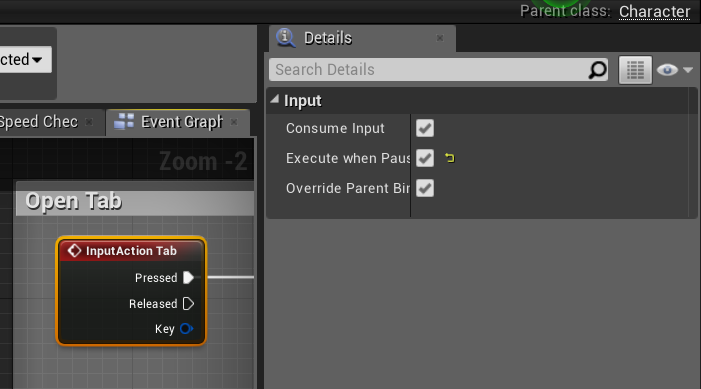
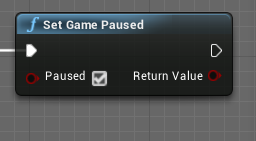
 daring quail
I have a question its a very Basic one. So the question is
Is it possible to create an entire game with just blueprints??
Now I have researched a lot on this and they say its possible but its very tedious and the performance is bad.
But they are all old answers and I know blueprints have evolved a lot too
And what is Nativization?
I hope this is the right place for this question
gusty mango
I'm sure it depends entirely on the game and what is involved. I've seen some super impressive things built entirely using blueprints. I'm working on a puzzle game that I plan to use exclusively blueprints for which is definitely possible, but if you're thinking of doing something a lot more complex and involving multiplayer and a lot of variables being kept track of then you'd probably start running into issues. But hey I'm a noob so don't take my word as gospel
earnest tangle
afaik Epic built Robo Recall entirely in BP's
tight schooner
@daring quail yeah, you can build a game with just BP. The issues you might run into are... If you have data-heavy situations then BPs may not be sufficiently performant but it's very situational — build it first and then profile performance, and make decisions from there. Let's say you have some situation where a BP needs to iterate over a giant array on every single frame then yeah you might see it kick up the game thread a few millieconds.
Epic's vision for BP is you use it as a design and prototyping layer. When you make your BP thing, if it seems ripe for optimization, you then hand it off to that top dollar engineering team you totally have to rewrite it as performant C++, with its design-relevant functions exposed as BP nodes.
Short of that, UE4 does have automatic nativization but it can be kind of touchy and buggy, and you'll have to do a lot of experimentation to discover the boundaries of it. It does speed up BP by like a factor of 10 though. If you have a data-heavy / node-heavy BP you can try selectively nativizing it — that can be a reasonable approach.
earnest tangle
it's fairly easy to do move BP stuff to C++ anyway if you know how to code
tight schooner
Other issues might be technology integration and multiplayer. BP only has a subset of the functionality that C++ has; there are things you can only do there.
I haven't learned C++ yet. I only maintain a cute little function library to expose some esoteric stuff to BP, like running the construction script on an actor on demand (which is handy for editor-only functions & Editor Utility Widgets)
earnest tangle
yeah you can get pretty far with just a few utils like that :)
in my project most of my C++ stuff is basically just utils like that, and some data wrangling stuff which would be entirely doable in BP's but it was just a bit easier to do in C++
tight schooner
So yeah, if you're making Tetris Effect or Samurai Shodown then BP is ok. ("Kine" is a BP-only indie that Epic showed off.) If you're making Kerbal Space Program or Cities Skylines then you'll probably need more than BP.
@sour aspen The best way is to do it all inside the material itself so that Blueprint doesn't have to drive it on tick. You would, for example, make a material graph that's like
Time —> Sine —> multiply by some color or w/e
If you super want to do it with a BP timeline then I guess you can plug Finished into Play From Start, lol
sour aspen
No accually i've been searching a way to do it in material editor but i was convinced that it's not possible so i tried that solution but this makes sense ! thank you
But how can i make this time thing slower?
tight schooner
Multiply the Time output before feeding it into the Sine node, I think