#blueprint
402296 messages · Page 532 of 403
 worthy frost
 twilit heath
but you can hardly do worse then go and implement a pathfinding algorithm in blueprints
worthy frost
without that overlap node
 vernal ibex
how so
 earnest tangle
doing stuff the straightforward way seems fairly sensible to me
I've probably done a bunch of things in my game which could technically be done in a more optimal fashion
 earnest tangle
but the common wisdom when it comes to optimization is that you shouldn't try to do it up front because you'll often spend time optimizing stuff that doesn't matter
worthy frost
yeah that's quite easy
 vernal flax
csss, i was proud of myself.
(didnt know before that GetDistanceTo exists)
(i was doing 'vector math' a while ago to do so xP)

 maiden wadi
I always made two of those. The main one was getting the closest actor to a vector, the other was just a wrapper for that one that that use an actor input instead of a vector input that got the actor input's location and use the vector function.
worthy frost
we actually have static functions that do all this
so we just have one node in BP that returns the closest
maiden wadi
Hmm. That's true. Never considered just using the same one and asking if the actor pointer was valid, if not use the vector param.
Actually started teaching myself C++ by converting those into C++ blueprint libraries. Fun times.
 main lake
@tight schooner I was asking if you are french ^^ @vernal flax No it's definitly french "lieu" means "place" but I didn't know that it was used in english too
vernal ibex
also why does ai not move after opening a level thru blueprints?
 trim matrix
hey guys, first post in this channel. I have the big confuse
Here is my situation :
- Using a float variable, instance editable and exposed on spawn, to determine the length of a beam vfx using material params
- This variable is never set in the script, only set manually when creating an instance or a child class
- Used to work fine but we switched to 4.25 recently and i dont know if that triggered the fuckup but the following happens :
- Now when the script runs, that length parameter changes value to a value of (currently set value of this instance / default value of the child class it belongs to) so for example, if my child class has a default of 20 and this instance says 30, it changes to 1.5
- Some parts of my script now act taking this new value into account. But not all of it. I have tried debugging why but am just perplexed. Again there is no "set" node on this variable anywhere
 fallen glade
Does anyone know how to round properly ? I'm trying to get a number like 5.2 or 6.7 but sometimes rounding doesn't work ?
earnest tangle
Use ToText
Rounding is not really useful for displaying floating point numbers because floats have some amount of inaccuracy and it can easily cause those kinds of results as you're seeing
with ToText you can specify how many digits are displayed etc.
 fading mortar
Hey guys, anyone any good resources for how to actually use the spectator Pawn, I can't quite see how to use it properly and why at all. Why not a regular pawn that gets its values through the network while possessing the camera of that controller
fallen glade
Thanks @earnest tangle !
@earnest tangle yeah but when I convert back from float I still get really weird numbers : /
earnest tangle
what do you mean?
fallen glade
1 is perfect, 2 is weird 😦
fallen glade
how can I do calculations on it though ?
earnest tangle
oh, if you're doing calculations, then just use normal rounding methods
you only should use this if you're going to display the value
earnest tangle
basically you just use this to format the number so it gets displayed the way you want, not for anything else
you mean you need it to be precisely 3.4 for calculations?
fallen glade
I guess I don't really, it just feels weird to have broken number lol, thank you !
earnest tangle
yeah I wouldn't worry about it :)
floating point numbers just behave in this way
it's just something that comes up when you need to display them
fallen glade
I'll try to remember that !
 thin apex
Is there a way I can input a "pressed" from an action mapping as a condition for the if node???
main lake
@thin apex why doing that ?
thin apex
I want to override the setting of a float ...if I simply drag from the pressed then it doesn't override coz the other keeps overriding this one @main lake
Basically what I'm doing is that when I press W my character speed gets set to 300 and he jogs but I want to override that to 137 so he walks....but W is also pressed so it stays at 300
earnest tangle
You could set a bool variable from your other key
and check for that in your handling for choosing the speed
thin apex
Ahhhh yes.. u so smart @earnest tangle thank you
main lake
Personnaly I use the AnimBP and Blendspace to handle the player speed and assign the jog or the walk animation depending on his speed
 dusk flame
Can I search in all of blueprint for something?
I have a BlueprintCallable thing which I need to find references for
thin apex
@main lake I'm using blendspa es too.....that's why I need the speed .....for the vertical one
dusk flame
I know I can do search inside individual blueprints. Anything to check globally?
earnest tangle
@dusk flame Window->Find in Blueprints
main lake
@dusk flame In Window > Find in Blueprints
main lake
@earnest tangle I need your help
Something is wrong in my code ? (It's in the GameMode BP)
and called like so in my PlayerController
(GameMode Picture)
earnest tangle
I have no idea tbh :D
main lake
😦
 tough cipher
@main lake what are you trying to do
main lake
@tough cipher Just trying to understand "Networking", so I' m just trying to get the number of players connected to the game and printstring it to the clients
@tough cipher Do you know how to do it ?
 heady hawk
So I'm encountering a strange issue where if I use 'spawn actor of class' and then 'attach to component' to stick a gun on my player character it works fine when done from a umg blueprint. But if I use identical code to do this from my actor blueprint, the spawned actor fails to weld properly. Any ideas why this would be?
tough cipher
@main lake sorry networking is extremely confusing for me sorry
main lake
@heady hawk show your code
worthy frost
spaghetti ftw!
heady hawk
Yes, I need to un spaghetti at some point
worthy frost
😄
 spare shell
Can anybody please teach me or tell me blueprints in ue4 as i am new to it
heady hawk
@spare shell Watch lots of tutorial vids
heady hawk
Specifically: Think of a thing you want to do, and then search youtube for a tutorial on it
 white crypt

Announce Post: https://forums.unrealengine.com/showthread.php?101051
This Training Stream takes a look at Blueprint Communication. We find that Unreal Developers of all levels can sometimes struggle through the concepts behind moving data between objects. So in this video we'...
and check the pinned messages, you might find some useful stuff there
spare shell
Yeah i did but there was nothing for creating game modes like tdm, domination and how we can create awesome shooting mechanics done
white crypt
tutorials will only teach you how to make bare bone systems, to make them "awesome" its totally up to you
tough cipher
@spare shell try virtushub on youtube,just pick a series and follow it you can learn most of the basics through his videos and its easy for beginners
heady hawk
@spare shell You're jumping the gun
spare shell
Yes @tough cipher I have seen his videos
heady hawk
You need to think of more basic goals
tough cipher
@spare shell he probably means learn the layout of the editor and how to interact with and between blueprints first
spare shell
Any tutorials pls?
trim matrix
this is the one everyone loves to link here @spare shell
https://www.youtube.com/watch?v=QJpfLkEsoek
Get the full UE4 course:
https://bit.ly/36lJS3S
Unreal C++ Beginner Tutorial:
https://youtu.be/1dl91ORwmy8
In this video you are going to learn how to build a very simple game using Unreal Engine and Blueprint.
The goal of this lesson is to get you aquainted with the absolu...
tough cipher
@worthy schooner Virtushub,dean ashford,ryan layely, and the video Tsauken recommended then wait a while and you should start getting adjusted to blueprints
heady hawk
Here's one I just found by the same guy: https://www.youtube.com/watch?v=bQtbhWKsQKA

Get full course:
https://bit.ly/36lJS3S
Please Subscribe: http://youtube.com/c/devslopes?sub_confirmation=1
Project Assets Download:
https://bit.ly/2IgYiq6
In this video you will learn how to make a first person shooter. Though the video is short, you will learn the core ...
tough cipher
np
maiden wadi
@main lake Are you still having trouble?
main lake
@maiden wadi yes
worthy frost
@swift pewter don't ask the same question in multiple channels #old-rules
trim matrix
@swift pewter Cant you just use a custom event to start the attack instead?
You would disconnect the input action that starts the attack, Replace it with a custom event. Typing Add Custom Event will let you create your own. Then simply call that custom event within your Behavior Tree Task.
Maybe you don't nessicary understand custom events though?
maiden wadi
@main lake You're still trying to multicast in the game mode.
worthy frost
i thought we explained that earlier
anyway good luck helping them, clearly not willing to learn or listen
main lake
@maiden wadi go pm
 grave relic
@tight schooner @vernal flax Thx sorry to @ u so late but im at work, will check it tomarrow appriciate it
 quick lark
Hi folks, I have a rather smooth-brained question. How can I group these variables together to organize this list?
main lake
@quick lark select one of your variable, and in the right details panel there's something called category, If you change the "Default" to something else it will create a group with the new name, then you can add other variables in it
main lake
yes ?
 cyan hornet
how would I do this :(
main lake
Why do you want to do that, as the AddMovementInput is waiting for a World direction
quick lark
thanks so much @main lake 🙂
main lake
🙂
 simple crow
I need some help with getting mouse position in 2d world space. I can get 3d but not 2d
main lake
@simple crow maybe this node
cyan hornet
Why do you want to do that, as the AddMovementInput is waiting for a World direction
@main lake so what node for local movement
 haughty ember
@cyan hornet Transform the movement you want from local to world, and pass it to the AddMovementInput
main lake
I don't know, but I don't understand why do you want that
cyan hornet
Because joystick movement on the rift
main lake
on the what ?
 rough blade
Is it expensive to have multiple components (scenes, static and skeletal meshes, ect...) attached to your actors?
haughty ember
@rough blade More expensive than not having them, I guess
rough blade
lol true
simple crow
@main lake That is viewport I need world space and I’ve already tried it
thin apex
my mesh is divided into 3 parts.....so how do i use mesh for animation montage as it only asks for one???
heady hawk
Are they all using the same skeleton?
This may be relevant:
https://docs.unrealengine.com/en-US/Engine/Animation/WorkingwithModularCharacters/index.html
Describes the different methods you can use to create modular characters comprised of multiple Skeletal Meshes.
 vestal plinth
what's the right way to move in actor in order for its collision to actually work?
dusk flame
Anybody have any smartly ways of stopping whitespace only text inputs?
Using OnTextChanged atm to stop input after 40 chars.
trim matrix
Im tyring to right click on a splinemesh to open a umg menu, what should the object of the cast be?
white crypt
if your hit results are returning correct references then you should use hit component instead of actor
rough blade
potentially a stupid question - for macro, every time they are run is it a new instance being run or does it reset. For example - every 5 seconds a macro is run that has a 10 second delay. If this ran during runtime will i have multiple versions of the same macro running or 1 that is reset every time it is fired?
vestal plinth
@simple crow nah using the floating pawn movement component, so adding movement input. it's not colliding with anything.
it has a collision sphere in it, everything is set to Block All, not sure what else it needs
simple crow
wait so what are you doing to move the character? @vestal plinth
vestal plinth
adding movement input
simple crow
and its walking threw walls?
simple crow
can I see the collision settings you have on the character
vestal plinth
it's a pawn, does that make a difference?
simple crow
no
vestal plinth
vestal plinth
it's set to block all
simple crow
also just check generate overlap events and simulation generates hit events for the sake of it
also I think its an issue with your wall then
vestal plinth
nah
I suspect it's something else that I'll need to work on before I can confirm it
trim matrix
@white crypt i did the hit component but still nothing, and also, im using right mouse button for my character menu to open as well. But when I connect a new right mouse button for this the original one for my character wont open
white crypt
add a print string after right mouse and connect on hit component to it
to see what is being hit
it might be that your widget is blocking your view
 snow halo
Hey all, any idea why this on tick continues to fire the print string?
tryin to get this function to happen just once on tick. The second sequence pin is for everything else i want to continue firing
trim matrix
@white crypt its printing both of them regardless if I click on char or spline
simple crow
can anyone help me getting the world position of the mouse 2d?
trim matrix
it still prints the char menu, but now instead of spline menu it prints the name of the ground plane mesh
white crypt
so it doesnt hit your spline component
trim matrix
apparently
white crypt
you should look into why, some collision might be overlapping
trim matrix
and my char menu isnt opening either
collision for the splinemesh component has been turned off
white crypt
so your cast to spline mesh will always fail
because it will never be hit
also you should atleast temporally remove "set position in viewport", you might be setting by using some fishy coordinates
you will need to learn how to debug, in order to figure out where your code breaks
trim matrix
this is the exact script im using for getting the menu to open on char when its not connected to spline part
white crypt
when you press play, you can open your "main" bp and change the instance preview here
then when you click right mouse you will see how your code is executed
or you can use more print strings to determine where your code breaks or use breakpoints
you need to debug this yourself to figure out whats exactly wrong with it. or send your whole right mouse code again and we will take a look
trim matrix
this is the script for menu popup for the CHARACTER, which I am trying to reuse for the splinemesh component
it works perfectly as you can see in the picture above
white crypt
oh you changed the cast to
it only makes sense, because you are using "hit actor"
but when you are casting to spline mesh component its not an actor
so it will always fail, you would want to use "hit component" instead, i told you that before
do you want to use both character and spline? thats your main issue?
trim matrix
Yeah, when I set up the second script the first one stops working
Even with the change to hit component on the second one
white crypt
but you said you disabled spline collision, so it will never be hit
thats why probably it didnt work
trim matrix
I turned off splinemesh collision yeah
Is spline collision and splinemesh collision separate?
white crypt
isnt that the same thing?
trim matrix
Idk I'm asking you lol
Well regardless, we're only dealing with the mesh for clicking purposes
What should I set the splinemesh collision to?
white crypt
since you are using camera channel, so that needs to be set as block inside spline collision
trim matrix
Ok lemme try that out
 upbeat shore
would anyone know how to correct a timeline combined with a lerp (for a smooth movement) so it is consistent between PIE and playing as standalone? I can elaborate if that did not make sense
trim matrix
@white crypt sweet that did it
 tight venture
How can I get the size of a mesh's bounding box from the level/scene? All I can see is the scale=1.0 or whatever that I've set it to... can't I get the size of its bounding box, like just as basic information about the mesh, without actually needing to use a blueprint and create a bounding box?
In world units
trim matrix
ah oh?
tight venture
I can get the size of the bounding box in a blueprint
just fine
what I'm asking is, can't I get that information just in the main window, after selecting the actor/mesh? I don't actually need a bounding box or do anything in BP
Like, right click on it, I would think there would be a "Get Info..." option or something
tight venture
It just seems silly that just to get that info I'd have to do some stuff in BP that I'd just erase right after I saw its size
um lemme show you
It's just a blank project where I deleted everything from the level except a light source and the floor it comes with. I scaled the floor by 4.0, but even if I didn't, the question remains the same: how big is it?
in world units
trim matrix
oh i see
Yea i do not know of a way to measure things like that.
I dont think there is one
tight venture
You'd think the engine would have already calculated that information to even render it in the first place... why not just show it to us somewhere?
Why is the only info I can see just the scale factor?
trim matrix
I couldent tell you
tight venture
if there isn't a way to simply see that info without doing a bunch of crap in a blueprint, I'm gonna file a feature request, dammit
that should be like version 1.0 stuff
trim matrix
Well if you use the built in geometry objects, and change the values using the brush settings. You will see how big it is in Uunits
I would assume there is no way to measure a Static Mesh like that because static meshes can be in all sorts of strange and wierd shapes
tight venture
yeah that's just the SM_Template_Map_Floor mesh
trim matrix
anybody know how to use cel shader and outline by Lunar Garde ?
Every static mesh will be treated the same
If all you need is basic shapes, just use the geometry objects. That should help give you an idea of how big in UUnits they are
tight venture
The info I'm talking about shouldn't be dependent on any aspect of the mesh... just: how big is the bounding box? i.e. how small of a box can you shove it into. No matter the rotation or anything. Independent of that
trim matrix
Aight then go tell that to the unreal devs
tight venture
Ah ha!!
lol
found it
Just gotta hover over the mesh asset in the content browser
 jade gull
remember thats at 1, 1, 1 scale
tight venture
yeah
jade gull
i was about to suggest that you can see that in the static mesh asset
tight venture
day late and a dollar short, Kei
jade gull
but tooltip works better xD
tight venture
😉
jade gull
lol
 pine trellis
I am firing a projectile from a gun but I am getting this error
it has to do with this node ***
Blueprint Runtime Error: "Accessed None trying to read property CallFunc_GetInstigator_ReturnValue". Blueprint: Replicated_Projectile Function: Execute Ubergraph Replicated Projectile Graph: EventGraph Node: Apply Point Damage
worthy frost
well your instigator is null
vestal plinth
I got rid of the floating pawn movement component, it wouldn't give the behaviour I wanted. I looked at the flying vehicle template and I've copied it almost exactly. I have a skeletal mesh instead, so I've made the root component a collision sphere.
I still cannot get collisions with anything, or hit events.
oh, had to turn on sweep.
fuck yeah
pine trellis
@worthy frost what do you mean? how can I fix it?\
vestal plinth
is it possible to generate a hit event on overlap?
trim matrix
I'm trying to left click (hold) move/drag an actor around on just the XY plane. What am I missing here?
vestal plinth
this is how I'm moving forward, as there wasn't a movement component that would do what I needed. However now when my actor hits the ground it just stops instead of moving along it. what can I do to fix that?
 hearty moss
there is something you can do for that but its super jank
vestal plinth
I'm game
hearty moss
wait hold on lemme understand what youre doing
could you explain the issue a little more?
im confused on which direction youre moving yourcharacter
what im guessing youre talking about is you want the character to like "glide" across when walking against a wall or the floor or whatever
 normal marsh
Would anyone be able to help me with a movement issue? I'm wanting to be able to switch between regular 3rd person controls and the set up that comes from the marble template. It works fine until you roll a certain speed/for a certain time (still not sure) and then switching out of the physics mode pops the player character a seemingly random distance, sometimes straight through the floor geometry. (For context, when it switches to the marble set up, I change the radius to match the half-height of the capsule component, and set simulate physics to true.)
 wintry storm
Hi, how do i change the texture of a staticmeshactor via a blueprint?
wintry storm
Throne, this might be dumb, but I dont seem to have those nodes when i right click? Essentially what I'm trying to do is randomly set a texture for some chairs after I get them from a tag.
normal marsh
I'mma copy that top row and build off it, gimme a minute 👍
trim matrix
Anyone know how to add cel-shading to a texture?
vernal flax
@wintry storm which nodes you dont have?
Some nodes are only availble when you are dragging from reference to the object.
also, check if ContextSensitive is not set on.
wintry storm
Oh I see. Makes sense I'm using a random component in the level for the automation.
wait actually it was the context sensitive
vernal flax
@trim matrix cel-shading is a shader, so you need to setup whole material to treat texture with some math.
wintry storm
thanks lol
normal marsh
@wintry storm
vernal flax
Frequent thing ;p
trim matrix
@vernal flax I'm using cel shader lite, I have no problem with watching tutorials to learn it, but I can't seem to find the right path to go down, can you link me any videos or is it simple enough to just tell me what to do?
wintry storm
Thanks @normal marsh very helpful
normal marsh
The only thing that's not included in that pic is the material I made for it. It's just called "Basic Color" with one Vector Param called "Color" (That's what the random floats making a color plug into)
wintry storm
Ok I'm just trying to randomly select between a certain set of like 4 textures that are already in the archvis demo. i can probably figure that out though
 viscid blaze
Anyone happen to know how to get Custom Events (set to Call-In-Editor) to show up in a different category than Default? Like, in the same way you can define a Category for Instance Editable Variables?
normal marsh
@wintry storm
trim matrix
@vernal flax there's a plugin that does it automatically?
normal marsh
You can get rid of the "create dyn material" part and just have it set the material from the Select 🙂
wintry storm
@normal marsh thanks again lol
@normal marsh Tested it and it works. Ur a lifesaver thanks man
 flat raft
Is there alternate parenting method other than AttachToActor or ChildActorCompoment??
vernal flax
At runtime?
wintry storm
So I'm trying to do random lighting as well with similar setup as before. But the lighting is flickering i assume from the random vals i set. Is there a better way to do this?
vernal flax
Sorry Thor, i'm not sure so i'll not give a misleading answer. But i'm sure google has it.
vernal flax
you can also check what was a previous intensity and add just a bit to that instead of randomising full range.
wintry storm
@flat raft thanks ill look into timelines
@vernal flax actually i'm just using a switch to select between pre-determined ones
trim matrix
I'm trying to left click and drag move an actor around on the xy plane, what am I missing here?
 vocal elm
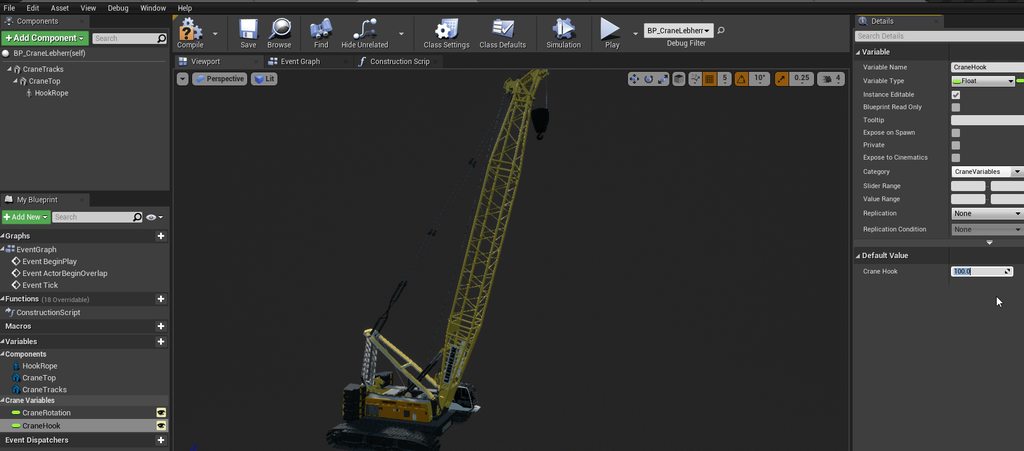
Any idea what I'm doing wrong? I have this simple cast, and it works in the blueprint editor, but when dragged into the world it cays cast failed and cant change the value to adjust the height of the hook
 wintry storm
Is it possible to write out to a text file using blueprints?
vernal flax
Sure, use SSZ code plugin
It's like 1 node.
And 1 node per loading this
@vocal elm you are not owning that BP. Use Get Actor Of Class if its the only one and use it as a reference.
(ofc there are few ways to do it, buts it's the easiest one)
Casting is easy if you get 2 things:
- You need to provide valid reference to that object (or it's child) somehow. It can be passed at beginplay to the player or something like that, tons of ways to do it.
- Think about "Cast to" as "treat as object".
(OFFTOP: guys, please, correct me always if im wrong with anything, that is the main reason why i'm answering here ;P)
maiden wadi
@vocal elm What you have there should work fine. Keep in mind that you need to select a specific animinstance while you have a PIE running for it to show the correct path. The default one will always show the instance that's running in the editor and it's owner never exists so the cast will always look like it fails. How are you changing the cranehook variable in game?
vocal elm
I'm not changing it in game, my issue is that it works in the blueprint editor, but not in the unreal editor when I'm in my level, I don't ever simulate my game because it's just for rendering scenes, and I have some boxmask materials that don't show up when I "render to movie" or simulate, so for the time being I'm just screen capturing
when I drag a print screen off of cast failed it only prints the failed string in the level, not bp editor
 lean thistle
Hey, I'm trying to create a movement effect (mobile) where swiping around causes the camera to rotate around a fixed central point, but have no idea how to go about this. Any advice would be great
 burnt tundra
I want to preface this, as I am still new with unreal and blueprints. I've been trying to assign my health to a healthbar, where my PlayerController is using an ActorComponent to hold the health. Is there tutorials or docs that can help me out. I keep getting null refs when when trying to grab the Health Component from the local player.
maiden wadi
@lean thistle Camera looking at the same point and rotating around it in a circle, or camera staying in place and rotating?
 mortal cradle
After changing a folder name I'm getting a ton of this errors in animation bp, is there a one click solution which will find all references for me or do I have to literally do everything manually? https://gyazo.com/94f3598b31d8136d7f88a00cf62f7c7b
 maiden wadi
@burnt tundra There's probably quite a few on that. But in short it should be as easy as creating an empty component variable in your widget that is the type of your component that holds the health. GetPlayerController, GetHealthComponent, set empty variable as that GetHealthComponent. Then use that reference on tick or whatever in the widget to update the healthbar.
burnt tundra
@maiden wadi Then I suck at googling, haha. Thats what i thought, and bind the value to the health bar. But when I try to get the component, its always null(none)
maiden wadi
When is this widget being added to the screen?
burnt tundra
oh, begin play
maiden wadi
That's possibly why. Level blueprint beginplay most likely plays before any controllers exist.
 tender magnet
Does this mean that the only way this will fire is if it's running on a server?
maiden wadi
@burnt tundra Yeah, just checked, controllers seem to exist at that time. Is the healthcomponent actually added to the player controller in it's blueprint? In the top left in the components tab? If so, you should be able to get it's reference directly off of that cast without using GetComponentOfClass.
burnt tundra
hmm, it is. in the top left. ill just look at it again tomorrow
i'm doing it worng somewhere
 marsh seal
@tender magnet it does mean that it only runs on the server... im not sure if firing from a client will trigger it.. or if you need to already be on a server chain
tender magnet
Thanks
maiden wadi
It shouldn't run from a client at all. That icon is because the function is marked with BlueprintAuthorityOnly. So "This function will only execute from Blueprint code if running on a machine with network authority (a server, dedicated server, or single-player game)."
 spring hare
Does anyone know a way to make the player stand back up if they aren't under something stopping them from standing up?
hearty moss
@normal marsh dunno if anyone has given an answer to your issue yet, but try going to Project settings -> Engine -> Physics -> Max Contact Offset. set it to 0.2
spring hare
Nevermind all good i got it working myself
normal marsh
@hearty moss ayy I forgot to say I fixed it, it turns out even if you switch simulate physics on, the character movement component will buffer input (Not sure if intended or if it's just the split frame of switching) and over time that buffer gets larger until it sends a huge move input that can clip the character through things. I have it set to switch the movement mode from walking to none when simulate turns on, and the reverse for turning off
hearty moss
np
 latent arch
hey guys, anyone got some ideas why a component sphere overlap isn't picking up the scene components that I've specified?
 burnt citrus
I asked same question in #ue4-general , and I ask it here again
I want to make actor variable because I want to change bullet types of guns
I have already made child actors of the master actor, so they are completely compatible
but if I promote it variables, pins which is in bullet actors will be no longer exists
How to fix it? (sry my bad Eng
All I want is I want pins (Distance To Hit, Spawn Location, Hit Normal and Bullet Impact) to exists whenever I change value of Bullet actor
 knotty ore
So what is the variable "Bullet Actor" currently set as?
Also, sometimes you just need to right click -> refresh node to fix up these issues sometimes. Also make sure your Bullet Actor blueprint is also compiled
 fresh pike
@burnt citrus O that's cool
burnt citrus
sorry for late reply
It set as Bullet Master Actor as default
and already compiled
if refresh node, pins will disappear
knotty ore
hmm, in that case, sounds like those variables aren't set to be exposed on spawn in the BulletMaster_Actor BP
knotty ore
so if you unplug the BulletActor variable and set BulletMaster_Actor as the class, you get the pins?
burnt citrus
you want to say that?
knotty ore
yeah... man, that is weird... I've never seen that before :/ sorry, i can't help you there
burnt citrus
okay thx
 scarlet pumice
Is it possible to setup a collection of BP actors which can be added to the world as a single entity?
For example a static mesh with some dynamic actors spawned at specific points and attached to the static mesh root?
i looked into Construction script but it seems that can only spawn components not Actors.
knotty ore
Sure, just create an Actor BP, setup your static mesh in there, then spawn actors from within the blueprint where you want them. Use SpawnActorsFromClass. Don't do it in the construction script, do it in the event graph
scarlet pumice
like in BeginPlay ?
knotty ore
sure, if you want it to happen on begin play, otherwise, how do you want it to be triggered? player input? another event? etc. up to you 🙂
scarlet pumice
Ideally I'd like to preview them in the Editor
which is why I was looking at construction script
knotty ore
you can set functions to be triggerable in editor, its in the properties of the function
so create a function, then set as "run in editor" or something along those lines when you click on the function, then you'll get a button on the actor BP when in editor to click on
scarlet pumice
ok thanks
 velvet token
Hey guys, does anyone know if there's a way to modify Actor defaults with an Editor Utility widget BP? I'm trying to set custom primitive data defaults for the selected static mesh actors but can't find a way to modify any of those values
 lime fulcrum
Hi!
Has anyone ever made a save/load game with blueprints? I can't find a real tutorial on how to save the whole level. Including removed actors and all their variables.
All I find is how to save single variables on player like location etc... What about the deleted actors in the meanwhile.
Is there any tutorial I've missed on how to ACTUALLY quicksave/quickload the game like a snapshot without having to add every single actor and every single variable. I think this isn't the right way to do it....
maiden wadi
@lime fulcrum You'd need to choose what you want in your snapshot. If you're looking for an easy way, there are plugins that'll do it for you. If you want to make it yourself, you need to know what data you need to save and also set it back up on map load. Usually you do this with things like managers... For example if you have AI, you'd have a manager class that spawns them based on some factors, maybe give them IDs inside of that manager. So.. you spawn them in a new map. Player runs through and kills off AI 3 and 7 out of 9 AI. Then they save. You'd save all AI Transforms, their stats, etc. Then on game load, that manager would get the savegame object and get the values it needs to spawn all nine actors, place them where they need to be, kill off the two that were killed last game so that their bodies are where they need to be. Then allow the player to play. once all managers report that loading is complete and ready.
 rugged perch
Hi guys, anybody knows what node do you put at the end of the blueprint code? I remember i saw something in a video about a node that you put at the end of the code to tell the engine to stop executing it or something similar 🤔
maiden wadi
@rugged perch That only works in Functions, you can "Return".
rugged perch
@rugged perch That only works in Functions, you can "Return".
@maiden wadi ok, thank you
@rugged perch That only works in Functions, you can "Return".
@maiden wadi Ah i remembered, its the "finish execute" node, and sadly it doesn't do what i thought it did
lime fulcrum
@lime fulcrum You'd need to choose what you want in your snapshot. If you're looking for an easy way, there are plugins that'll do it for you. If you want to make it yourself, you need to know what data you need to save and also set it back up on map load. Usually you do this with things like managers... For example if you have AI, you'd have a manager class that spawns them based on some factors, maybe give them IDs inside of that manager. So.. you spawn them in a new map. Player runs through and kills off AI 3 and 7 out of 9 AI. Then they save. You'd save all AI Transforms, their stats, etc. Then on game load, that manager would get the savegame object and get the values it needs to spawn all nine actors, place them where they need to be, kill off the two that were killed last game so that their bodies are where they need to be. Then allow the player to play. once all managers report that loading is complete and ready.
@maiden wadi So you're saying I should reference by a custom ID in the cass instead of the usual UE reference since they change when I respawn them cause they are new actors with new reference id
normal marsh
Has anyone had luck with procedural animation purely from blueprints? I found examples and a (non-UE) walkthrough but I'm really scratching my head at how to translate it. Mostly because I don't understand exactly how the Two Bone IK Function node works (the not AnimGraph one)
 wise panther
i wanna delete this from the child blueprint, it just wont let me, what should i do??
disconnected this but, that didnt do anything
 spark bridge
Construction Script is something that triggers everytime you update the said blueprint, it got nothing to do with your problem in this case.
Inherited components can't be deleted. Only way is that Parent will not have that component.
If other Children blueprints need that component, you need to add that manually.
wise panther
yeah, understood, i just deleted the whole BP and duplicated it this time instead of creating a child
main lake
I still need help with nerworking pleaaaaase ,anyone good at it please tag me
maiden wadi
@rugged perch Ah, that is for behavior tree functions to tell the behavior tree that the function is finished executing and whether it was successful or not.
rugged perch
@rugged perch Ah, that is for behavior tree functions to tell the behavior tree that the function is finished executing and whether it was successful or not.
@maiden wadi thank you
main lake
@maiden wadi Do you want to help me as you wanted yesterday plz ?
maiden wadi
Are you still trying to do the same thing?
main lake
yes
maiden wadi
What were you trying to do? Something from the player controller to the game mode and a multicast.
main lake
the opposite, get the num of player in the gamemode and muticast it to the players
twilit heath
multicast it from the GameMode ?
maiden wadi
Like I said before, you need to do your multicast somewhere else. GameMode only exists on the server, it has no client side actor that it can RPC to for the multicast.
Gamestate might be a better place for something like that.
twilit heath
especially since it has a PlayerArray by default
which has all the PlayerStates, and those are 1/player
so there is no need to involve networking to start with
main lake
so if it's not in the game mode where should I do it tho ?
maiden wadi
Well, like Zlo said, you already have all of that information on each client. Gamestate is replicated by default as well as all PlayerStates. So get your client's local gamestate, get the number of playerstates, and that's your number of players.
twilit heath
or more specifically get PlayerArray number of elements from the GameState
main lake
so I have to create a gamestate and a playerstate first ?
maiden wadi
They're created by default. Every GameMode spawns them.
I mean, you can make your own out of child classes to do other stuff of course, but for this one thing, you don't even need to create the child classes.
main lake
I don't understand, if I don't create a GameState (because apparently it's created by default) how can I add to it the code to show how many players connected
twilit heath
you don't have to
maiden wadi
twilit heath
GetGameState()->PlayerArray.Num()
maiden wadi
Do this in your player controller.
main lake
Is it normal that it appears for everyone ?
I mean isn't the controller suppose to send the info only to the player who asked for it ?
maiden wadi
It should tell you what client/server that it printed on. You should see that print on all windows yes, but it should only print something like "client1: 3 players exist"
main lake
true
maiden wadi
If it's ran on the server it'll say "Server: 3 players exist"
If all clients print it, you'll be spammed with a list of those prints, one for each machine.
But only one line should show up on each window with how I printed that above.
main lake
That's a really strange thing, I'm so confused on how networking is working
maiden wadi
I think what might be confusing you is the fact that your windows are all actually the same application when you're testing in editor. Thus when you tell the game to print something from one window, it'll print it on all of them because it's an editor function that's just meant to show in all current viewports.
That's why you have to pay attention to the Server: or Client1/Client2: part on the print.
main lake
Yeah that but no only that : Also that there's the GameMode that's only on the server (so how do you interact with the clients if they are asking for some functions or something like that) and also in the playercontroller you can use client and server events that's so weird to me
maiden wadi
Okay, so, typically there are two special cases for networking with actors. GameMode and Controller.
GameMode ONLY exists on the server. This is a safe place on the server that no client has any access to see anything going on, clients cannot directly RPC to it, etc. So to get to it from a client, you need to RPC from an actor that exists on both the client and the server from the client to the server, then make the server version call something in GameMode.
Controllers are another interesting one, because all controllers exist on the server, meaning that if you have three players, three controllers exist on the server. However only ONE controller ever exists at a time on any remote client.
main lake
so to access the Gamemode Each client should call first their own palyer controller, then their player controller call the GameMode ?
maiden wadi
Any other normally replicated actor exists in both places. So if you have three players and each of them has a character pawn. There's actually nine characters in total, three on each machine.
RPC from the client's controller to the server controller, and then have the server controller do what you need in game mode, yes.
main lake
why in the image above there's no "Server Controller" ?
maiden wadi
When I say server controller I mean the server version of the player controller.
main lake
Ok Let's comeback to what I'm trying to achieve, I'm trying to redo the game Among Us, If I want to do all the rules of the game (like selecting 2 impostors, check tasks if finished,...), where should I put the code ?
maiden wadi
Probably GameMode and set it up in the controllers. You don't want that anywhere that a client can potentially see it that isn't an imposter. So don't put it in GameState or PlayerState, or the PlayerCharacter, all clients have access to all of those and even if you code it carefully it's hackable. If you decide it in GameMode, and then use your PlayerControllers to show the clients that are imposters that they're imposters then there's no way for any other client to know that they are.
Then you'd need to do some checking when you interact with things. RPC what you want to interact with to the server, and let GameMode decide whether the interactee is a saboteur or not and affect that actor on the server accordingly which will then replicate back to all clients.
main lake
wow that sounds hard
Let me try
First I want to get all the palyers present in the game then select 2 of them, I'm gonna try to do it in the GameMode
maiden wadi
I'd probably start with some checks. If there's not three players at least, may as well end the game. If only three, select one imposter, if more than three select two. Run your selection function to choose one or two imposters. Call a function from the gamestate to the server version of each controller and tell them what they are whether they're imposters or not and set a replicated variable there. Then you can call game start and your clients can use that replicated variable to show whether they're imposters or not.
main lake
the number of impostors has to be chosen by the host (depending on how many players are in the game)
rugged perch
Can someone please help me fix this? This code is inside the CheeseBP. The problem is that when a Mouse (Soarec cu Branza) picks it up all of the mice on the level act as if they had the cheese. I have a door mat with the OpenLevel node when overlapped by CheeseBp and it opens the next level even if a mouse that does not have the cheese touches it. Im assuming my code is telling the game that all the mice have the cheese even if just 1 one of them does.
rugged perch
your blackboard is not instantiated per mouse there
@twilit heath omg, you mean i have to make 1 for each mouse ?
twilit heath
no, there is a checkbox somewhere on it
to create instances per controller instead only a single one
Tasks and Services have the same option
rugged perch
no, there is a checkbox somewhere on it
@twilit heath can you please help me find it ? im looking but i don't see anything on or in my blackboard
twilit heath
my editor is closed and id on't know where it is off the top of my head
rugged perch
my editor is closed and id on't know where it is off the top of my head
@twilit heath ok, np, thx for telling me about it, im gonna search on google 😆
twilit heath
its def on blackboard itself
and it might be inverse of that - checkbox to make the BB static/shared instead of one to make it instanced
rugged perch
Nevermind , i set up the losing trigger bad and everything was activating it, including me :))) i fixed it, thx guys again
rugged perch
How can i set this up so when the number of AI in the level are equal to 0 to load the level ? What i have here is not working, im pretty sure it's wrong.
twilit heath
make an AIManager
either Actor, one one the level, or ActorComponent on the say GameState
or GameMode
have all AI register to that AIManager when they BeginPlay
and Unregister when thy EndPlay
keep an array of them in the AIManager, and use (Un)Register functions so when AI is (un)registered you can just plug in whatever additional logic you need
including checking if there are no AI left
jade gull
is there a way to pass variables through interface? i seem to be able to create inputs and outputs but not join them up so dont see the use of them here if i cant link them
twilit heath
no default implementation on blueprintable interfaces are possible atm
jade gull
so would a function library be a better call for what im attempting?
twilit heath
when you implement the interface on a class, then you can override that function and work with it normally
jade gull
not sure what you mean
twilit heath
i mean open a BP, class settings, add that interface, and then under functions on the left you'll have Interfaces and you can select and implement the functions defined on your Blueprint Interface
and i have no clue whatsoever what you're attempting to do so i can't tell
jade gull
well it was just a deal damage/interact interface
jade gull
how come?
twilit heath
In the field of software engineering, the interface-segregation principle (ISP) states that no client should be forced to depend on methods it does not use. ISP splits interfaces that are very large into smaller and more specific ones so that clients will only have to know abo...
jade gull
thank you
 mental robin
I'm not familiar with Niagara. How do I get these particles to spawn positioned vertically from the start? Currently they just spawn and quickly rotate to a vertical position.
fresh pike
@mental robin Oo that's cool
 tight schooner
@mental robin maybe a sprite orientation parameter? (Look in the emitter's rendering section.) Otherwise ask #niagara
If all else fails you can hide that funky behavior with an alpha fade-in lol
mental robin
woops thought I was in niagara
white crypt
check the pinned messages @tough cipher
tough cipher
thank you
 novel jungle
does anyone know of a way to get the possessed actor from a player controller
white crypt
get controlled pawn?
 native terrace
is there a way to know which widget the user is pointing at using WidgetInteraction component?
Right now i have an actor with a widget attached to it, showing some stuff when i get close to it, but i can't find a way to know if the widget is "aimed at" by the user?
novel jungle
ty tsauken
trim matrix
Alright gang I need your help. How do I make Mr Piggys Head turn with his body, rather then just snapping to my location?
https://gyazo.com/f3a4945f380481068fc5f87a13dc1110
If anyone could tell me what handles this I can look up tutorials for it, thanks
Would really appreciate the help
tender magnet
I have a weird question because mainly I don't fully understand how events are fired. I have a C++ class that I hook up to a Actor that takes in an array of BPs, on init it adds the bps as components to the actor. What I'm trying to do is fire off an event ON one of those attached component bps from a main event I already have on the actor. Does this work or do I have to reference specifically the event directly?
wintry storm
Is there an Event or something that triggers when the stop button is pressed?
tender magnet
Me?
 desert storm
@wintry storm Have you tried an InputAction event? You'll have to set up the action in the Project Settings to define the stop button.
Anyway, I've got a problem of my own I could use some help with: I had a coin set up with a RotatingMovement component so it spun in place. I just added physics to the coin (so that it can fall to the ground and bounce, think studs in the Lego games), but that broke the RotatingMovement. How do I get that working again?
white crypt
@wintry storm do you mean when you stop playing the game?
if so, there should be an event inside game instance "shutdown"
 viscid blaze
What's everyone's thoughts on SkookumScript? I only discovered it today (only been dabbling in blueprints (along with a LOT of other things) for a few weeks now) and was considering looking into it some more.
wintry storm
@white crypt , thanks i believe this was what I was looking for. Although might be dumb but i don't see this in my blueprint. Do have to do something else to access this node?
white crypt
you need to create your own game instance and set it inside project settings
you should also note that game instance is persistence through out levels and there can only be 1. it also exists the moment you start the game and when you close it
@wintry storm https://prnt.sc/uihxbs

and set it here https://prnt.sc/uihxoz

@desert storm just tested that and you need to make your mesh to be the root of your actor
just drag that mesh on top of your scene component
white crypt
awesome
desert storm
Thanks, didn't even know I could do that
tender magnet
Does this: https://docs.unrealengine.com/en-US/BlueprintAPI/Game/Damage/ApplyPointDamage/index.html fire off this: https://docs.unrealengine.com/en-US/BlueprintAPI/AddEvent/Game/Damage/EventPointDamage/index.html
Apply Point Damage
Event PointDamage
?
 fossil crystal
halp! how can i remove this capsule. i cannot seem to select it and its preventing me frmo walking
desert storm
You should still be able to select it, you'll just have to try to click on one of the lines.
Otherwise, you could try and find it in your Content Browser.
fossil crystal
i made a prefab in another project, this was in it. and migrated to my current project
what would that piece be called by defautlt? it was a player camera
found it.. thank you
 clever cedar
One of my components(not a root component) cannot be moved or rotated in the properties. It's only showing scale. I can move it with the move gizmo in the blueprint viewport though. Why?
viscid blaze
@clever cedar You're not doing anything like aligning that component in your Construction Script are you?
clever cedar
I set it to the origin in the actor c++ constructor
tender magnet
How can I view the values that are returned from this? Damage Event properties?
trim matrix
you can't use print to print the values to the screen? @tender magnet
tender magnet
Can I not inspect them? 😢
trim matrix
you can store them with foreach and an array
tender magnet
Like is there literally no way to actually inspect the values like in Visual studio?
I have to put them into a collection first?
trim matrix
Yeah I'm not sure how you would do that in blueprints, might have to ask in the cpp section
are you trying to inspect the values in the game?
tender magnet
I'd like to be able to hover over and see what the Damage Event node is returning.
trim matrix
in the game?
trim matrix
Oh yeah I'm not sure if that's a thing or not sorry
can I ask what you need to do that for?
tender magnet
Need to see what my outputs are to debug
novel jungle
does anyone know why and event dispatcher suddenly does not work with two inputs instead of one?
the compile error says "Wrong Event Dispatcher. Refresh node Bind Event to Switch Character Dispatcher"
and when I refresh it does nothing. Bug?
ok nvm turns out you can't send a pin names "Self"
lol
tender magnet
How can I fire off this event on an actor? https://docs.unrealengine.com/en-US/BlueprintAPI/AddEvent/Game/Damage/EventPointDamage/index.html
Event PointDamage
trim matrix
@tender magnet https://gyazo.com/44aa675be17b4a5a00b2da084d752107

Is there any node to convert rotation to world location
So if you have a center point and you offset another point from the center point and you rotate the center point the location of the offset point will have changed
is there any node for this?
@tender magnet You can figure out what your outputs are by printing them to screen when you start the game...
@trim matrix I don't understand
I found it myself.
Okay is there any node for getting all the variables in a blueprint in the form of an array?
Is there any node for example taking a value between -1 and 1 as input and making the output either between 0 and 1?
so if the input was 0 the output would be 0.5
tender magnet
Thanks so much, I have that apply point damage it's just not working 😦
trim matrix
@tender magnet Is the Event Point Damage Node inside of the damaged actor?
tender magnet
It's attached as a component on a different class.
The apply point damage is attached as a component, and the Event point damage is attached to the BP of the actor.
trim matrix
Attach a print node to the end of the event point damage node and then attack the character
if you set it up correctly, then it should print out the damage on the top left
 tender magnet
It's not firing the Event .
I have a Break point on the event and it's not getting called.
trim matrix
Then that would mean your target actor is incorrect
tender magnet
That's what I was thinking, that's why I wanted to debug the target actor, when I was asking "How do I inspect the components of the point damage node"
trim matrix
so
trim matrix
okay so do the same thing I said above
just attach a print node
and attach damage taker to the print node
so that way it tells you who the damage taker is
tender magnet
How can I convert the actor to a output?
trim matrix
one second
tender magnet
Honestly, thank you so much!
trim matrix
if you're trying to connect it to a print string node
you should first get the print string node
tender magnet
got it, get display name
trim matrix
there ya go
tender magnet
Oh one sec,
I found a bp debugger, with the wathers.
watchers
Anyone know why i can't see the value?
It says execution not paused?
tender magnet
Lol, no I hate debugging that way 😄
tender magnet
I just like how you have more information with the stack with actually inspecting the objects that way.
Okay so I figured it out, I need to watch the actual return node, is there a reason why I can't accces the individual nodes?
Also, @trim matrix it is hitting the actor that I want it to.
novel jungle
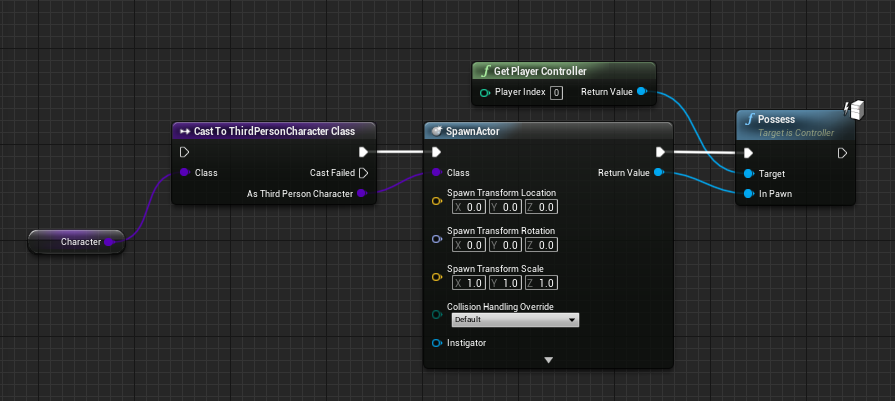
Does anyone know how to get the return to connect to in pawn? The return changed to an actor reference because the class is a variable, and I can't figure out how to possess whatever it spawns.
desert storm
Here's what mine looks like, @novel jungle
novel jungle
yeah but the actor reference is not compatible with the in pawn pin
because the spawning class is a variable
desert storm
Oh, I see
novel jungle
I cant find a workaround for it
white crypt
you need to cast to the class
and the output should go into the spawn actor
then it will update it correctly
novel jungle
that didnt work
white crypt
show your code
and tell me what type of class you are using, is it an actor or a pawn
novel jungle
its an actor
novel jungle
it worked earlier
white crypt
can you open that class blueprint on show the full screen of it?
i need to see what it says on top right
novel jungle
ok so if I select a specific class then I can possess it but its just when the pin is connected
the parent class u need?
white crypt
yup
novel jungle
TP Third Person Character
novel jungle
yes sorry
white crypt
so before spawning you need to drag and get that class
from that class you drag and type "cast to thirdperson character"
and use the return value inside the spawn actor, where class needs to be specified
novel jungle
what class do i get first?
white crypt
the one you are plugging in into the spawn actor node
 drifting mulch
Can anyone recommend some actual good resources (paid or free) for code design and architecture in ue4 with blueprints?
I'm an app / web / backend dev and all the frameworks I work with usually have a standard, straightforward way of using them. With Unreal I've watched countless videos and went through a couple of courses, and it seems people just jam a bunch of logic into God objects (or bps) and make a total mess of things. I haven't seen any proper separation of concerns, and don't really know what the available options are.
Would appreciate any help. Cheers
novel jungle
yeah not many people at all fully understand ue4's structure, and that results in them making a mess of code, and they don't care as long as it works. Those kinds of tutorials/vids are good sources for learning ue4's functionalities and general processes. If you want to fully understand ue4 tho and make clean code, try to find youtube channels that are knowledgeable (you'll know one when u see one), or look for a course on udemy with good reviews and statistics.
white crypt
reviews still might be a bit misleading, everyone likes virtus but we all know what hes doing...
drifting mulch
Could you recommend any channels?
I took a very highly rated course on Udemy and honestly it was worse than some 6 year old YouTube playlists I've seen.. A good intro but very shallow and full of bad habits :/
white crypt
if you want to learn specific things instead of looking at "full systems" then this guy should be your to go choice https://www.youtube.com/channel/UCOVfF7PfLbRdVEm0hONTrNQ

YouTube
This channel is dedicated to exploring Unreal Engine 4 and the Blueprint programming language that it uses. You can think of it as a companion to the API doc...
hes pretty active in this discord as well
novel jungle
love him
drifting mulch
Thanks, that seems very useful
white crypt
everyone does 😄
drifting mulch
The only place I've seen usage of structs and enums so far was a playlist by UnrealGaimeDev, didn't even know they existed in bps. That's so fundamental
white crypt
you can also just look at official unreal streams, they usually talk about better practices but still we dont have any guidelines to follow
drifting mulch
I'll check some out then. I've seen one about the nav mesh, was interesting
white crypt
if you are just starting then most people will tell you to watch this https://www.youtube.com/watch?v=EM_HYqQdToE
Announce Post: https://forums.unrealengine.com/showthread.php?101051
This Training Stream takes a look at Blueprint Communication. We find that Unreal Developers of all levels can sometimes struggle through the concepts behind moving data between objects. So in this video we'...
drifting mulch
I guess what I'm really looking for is best practices for bigger concepts, but yeah looks like those are trade secrets 😅
white crypt
i think i've posted that several times today already :D, you can find some useful info under pinned messages as well
drifting mulch
Oh cool, thanks
I assume that video covers things like actor component bps?
That was a really big thing the courses didn't cover
white crypt
honestly i dont remember, i've seen that video couple of times when i started working with unreal
but it covers most of the fundamentals
drifting mulch
Sweet
white crypt
its 2 hours long so its a good watch 🙂
drifting mulch
I have all the time in the world thanks to covid 😄
tight schooner
https://www.youtube.com/watch?v=qr4ZjieAQKY
I found that one useful as a primer to BP components
white crypt
What is the Actor Component and how do we use it in Unreal Engine 4
Source Files: https://github.com/MWadstein/UnrealEngineProjects/tree/WTF-Examples
Note: You will need to be logged into your Epic approved GitHub account to access these examples files. https://github.com/Epi...
from the same guy i've linked before
drifting mulch
Thanks, I'll save all the vids to watch
tight schooner
Learning how to structure BPs is "deepest lore" so to speak; I once tried to look this information up and couldn't find much that covered it in a comprehensive way. Real programmers (not me) say a lot of conventional Object Oriented Programming concepts apply; making sure functionality lives in its proper place. Knowing how inheritance works and the ways to take advantage of it. Knowing all the methods of BP communication (casting, BP Interfaces, dispatchers, using parent classes as interfaces to child classes) and when to use them. Having a general understanding of the manager-like classes that UE has built-in (GameMode, GameInstance, GameState, etc). Knowing the flow from PlayerController to Pawns...
Epic provides their own learning resources here... I can't comment on them personally http://learn.unrealengine.com
drifting mulch
I assumed the official resources would be "what is a variable" for artists using Unreal. Maybe I'm wrong, I'll check it out too
And yeah, coming from an OOP background bps are really easy to use, looks like it's just a matter of getting to know all those things you mentioned.
Good to have a path to follow, thanks a ton 🙂
 fathom frost
I'm getting a divide by zero detected in the sparrow anim bp, does anyone know the best way to correct this?
novel jungle
you could try adding .0001 to it or something
tight schooner
Or use a "Max" node with . 0001 on it. The node will always select the greater of the two inputs
fathom frost
the max node works like a charm, thank you both!
novel jungle
anyone know why an event dispatcher wouldn't work? I have 2 characters with the same setup for it and only one works
 fierce birch
anyone know how to delete keys in timelines?
 reef mist
desert storm
reef mist
desert storm
Mind clearing something up for me? if I have several instances of a CharacterBP placed in a level, and the CharacterBP has a variable, does setting it for one of them set it for all of them?
white crypt
if you set that variable inside their blueprint then yes
novel jungle
Anyone know why this isnt replicating correctly?
Can clients not use event dispatchers?
no thats not it I cannot get the client to replicate anything
flat raft
I've been game dev-ing for a long time now, not unreal engine, but/and still not sure what to use the GameMode for. All I use it for is setting the Pawn and Controller.
The docs say, "game rules," but what is that ?
earnest tangle
I just use it for generic game related stuff that don't have their own place
tender magnet
I can't get my Apply point damage to fire off the Event point damage, what are some of the reasons I'm having an issue? The Damaged actor is correct, but still can't fire the event.
novel jungle
its for things like score and kill triggers
earnest tangle
Mostly initializing systems that need initialization, waiting for stuff to finish and then triggering game start
novel jungle
what he said
earnest tangle
I also run some general purpose game logic in it that hasn't yet found a better place for itself :D
flat raft
Score... kill triggers?
novel jungle
yeah
so like
when you hit x score triggers end game
same thing with kills
like general server logic that affects the whole game
only really matters for multiplayer online games
flat raft
I don't think I've come across anything that needs to get initialized that requires a gamemode
earnest tangle
technically none that I initialize really require a game mode but it's just a convenient place for some of the logic
I have a couple of managers that are necessary for the game to function, so I want to make sure they've been set up so it checks for that
some initialization logic takes a moment because stuff gets spawned in, so it handles that at the start of game
it also deals with synchronizing stuff when loading saved games
tender magnet
Anyone? I really need some help here.
earnest tangle
none of that logic really has to be in the game mode, but it was just a convenient place to put it :)
flat raft
So, just things that would be weird in the Pawn or controller
novel jungle
@tender magnet could you be more specific
flat raft
thanks guys... I was just wondering cus I see it everyday, and it just sits in the back of my mind
😂
tender magnet
I have a Apply point damage that should be firing a point damage on the target actor:
That Damaged Actor is never firing that Event PointDamage after hit.
I'm new to how events are handled in Unreal so if I'm missing something please feel free to ask me.
When debugging I know that the Damage Taker is the correct actor, so I know it's being referenced.
novel jungle
tbh I wouldnt know I never use the damage nodes lol
earnest tangle
Do you have damage enabled on the actor?
tender magnet
How can I do that?
BTW this gets fired:
This gets called:
With the Apply point damage I need to be able to call the Event PointDamage does this look correct?
earnest tangle
Uhh
tender magnet
earnest tangle
Is the actor where On Damage Taken exists the same as Damage Taker?
tender magnet
It's calling.
The Damage Taker is the actor that I hit.
So yes technically it is.
Should I call self?
earnest tangle
I'm not a 100% sure but you might not be able to damage yourself 🤔
tender magnet
I'm hitting an enemy.
When I hit, it goes to Apply point damage but that doesn't call the event on the actor.
Also, the Apply point damage is on a component ON the actor.
Does that make a difference?
earnest tangle
Okay so let me try to see if I understand this logic
you attack an enemy, which calls Event On Damage Taken, which is an event on the enemy class?
tender magnet
Event On Damage Taken is called when I hit the enemy, this exists as a component ON the enemy.
earnest tangle
Okay right
tender magnet
Then it exicutes to Apply point damage
That should be firing the Event PointDamage on the actual Enemy BP, right?
earnest tangle
Oh
I think the problem might be your Base Damage is 0
I think it has to be higher than 0 for it to do anything
earnest tangle
heh :D
tender magnet
Like thank you so much... But fuck this shit!
I've been pulling my fucking hair out on this shit.
earnest tangle
yeah I went and looked at the C++ code in UE that handles the damage
novel jungle
@earnest tangle could you help me with my replication issue
earnest tangle
I'm not really very familiar with the online stuff unfortunately
you could try asking on #multiplayer if you haven't yet
novel jungle
ok ty
flat raft
So, would you think things like Mission Objectives, Trophies..umm.. Player Stats, like How many health packs used, how many saves, how many deaths, maybe.. things unlocked, is best placed in the game mode?
earnest tangle
you could, but also for stuff like stats or such you do have GameState and PlayerState
trim matrix
Folks, I need assistance. Each time a new player joins the server during mid-game it will shake the camera than render all input save for aiming un-interactable. I can not move, nor shoot.
This is no problem when joining pre-match however.
 tired arrow
Hey so I'm using set view target with blend for a cutscene of mine, then resetting the target when finished with the cutscene. The issue is this positions the camera at half my character's height instead of where it originally was. Please @ me if you know why, thank you in advance!
tired arrow
Fixed just needed to set the new view target as the player instead of leaving the new view target empty. Wish there was more documentation but oh well 🙂
 craggy shadow
Anyone have experience with setting up swimming? I am building a game based in land and water, and trying to figure out the best way to go from land animation to water animations, ive been told you can do it by physical material but not sure what will work best
 frail marlin
Has anyone ever lost input on a character movement component while attempting to nativize blueprints?
Everything else works on my character, however the forward axis is no longer working.
 vast lion
Why wont BP let me create a loop from if statements?
earnest tangle
Loop from if statements? What do you mean?
earnest tangle
Can you show what it looks like?
vast lion
earnest tangle
I'm guessing it's some kind of safety feature 🤔
marsh seal
try setting the bool as a variable first
earnest tangle
Considering that graph should re-evaluate every time the branch executes that looks like it would eventually exit
marsh seal
like a local variable
marsh seal
it looks like everything you're doing is pure so it should technically already work
but ya blueprints has a lot of safety nets when things look fishy to it
or that might not be it at all lol just guesses
earnest tangle
not sure if this is intentional
this is likely to give different rotators for both of those lines
because it gets re-evaluated for each connecting line, and it starts from a random value
vast lion
Hmm
I converted everything to a while loop
Which made more sense
No more loop compile errors
But when I run it won't let me run the game
Because it says there is an infinite loop
 ancient torrent
Hello everyone, anyone know how to set up articulated steering properly? the wheels dont follow the articulation... 😄
or the vis wheels does but not the "actual" wheels
 sly estuary
Guys, Anyone have encountered this before? When I Run my game in New Editor Window(PIE) mode everything works fine. However, when i run it with Mobile Preview ES3.1(PIE), It seems like something is blocking my camera. I also tried to launch to my android phone its also have something blocking the camera as same as the Mobile Preview ES3.1. I have no idea whats happening😩
 opaque blade
@sly estuary shaders compiling
Look upper left of mobile pie
 chilly jetty
I'm trying to set the visibility of this UI widget whenever i enter a collision box
a separate function works so i know it reads whenever the player character enters the box
but its not setting the visibility
spring hare
@chilly jetty Is it been added to the viewport?
drifting mulch
@craggy shadow If you're using a mesh for the water body you could check for overlap with the base of your character and the body of water to trigger "swimming mode". In that mode you'd probably need to play with the movement component to make it look like swimming (gravity, speed etc) and apply the right animations. Just an idea, never did it myself.
spring hare
Is it it's own widget? or is it apart of the main hud?
chilly jetty
its part of a main hud
drifting mulch
From the second picture it looks like it's outside of the viewport
chilly jetty
its a small widget that's been added to a main widget
drifting mulch
if you set it to visible by default does it work?
chilly jetty
its visible when I set it to visible
my problem right now is setting its visibility to visible when it enters a trigger box
 visual lion
Hi guys, good morning
Wanted to ask if someone might help me with a Actor Class BP that is not triggering it's timer for some reason

the timer event is not firing even though when the system enters into the StartAddingArmyToWorld event is setting the timer correctly and it's Handle
does anybody have any idea? do you need to see something else?
 boreal ether
@visual lion might be this problem? Warning: Script Msg: SetTimer passed a negative or zero time. The associated timer may fail to fire! If using InitialStartDelayVariance, be sure it is smaller than (Time + InitialStartDelay).
visual lion
might be,m let me test
sorry, it still won't work https://gyazo.com/bece9cc8b2f3bdb28d3c598b9646556e


here is a screenshot of the method getting called to setup the timer, but the timer won't fire at all
boreal ether
Weird. Have you checked the output log for any errors or warnings?
visual lion
there is nothing on the log indicating an error with this BP, I have five of them on the scene
but none of them are firing or giving errors
and the thing is that the timers I have done in C++ are all working has expected
 weary jackal
my problem right now is setting its visibility to visible when it enters a trigger box
@chilly jetty you have to set the render opacity to 0 to make invisible and 1 to make it visible
chilly jetty
@weary jackal thanks but I found the problem and fixed it
lmao I forgot to cast it to the gameplay mode which is where the UI is created
drifting mulch
Is there an option to "fix" a project? I force killed my ue4 process yesterday while working on a project and now it's just crashing whenever I do something in the editor like change a variable's value.
Getting Unhandled Exception: EXCEPTION_ACCESS_VIOLATION writing address 0xblablabla
Eh I guess it's not blueprint related. Sorry
 glacial eagle
Sounds like something got corrupted
If you launch through visual studio you might be able to figure out what asset got corrupted and either delete it, or restore an old version from source control.
trim matrix
@visual lion bro that is quite the setup you got there
visual lion
@trim matrix how so? I think it's actually quite simple method,
trim matrix
@visual lion I mean the implementation, I'm not knocking it, though. I think everyone codes blueprints in a way that is easiest for them to understand. but you made 3 events that you kind of could have put in 1 simple function. I just never seen someone create an event that calls an event to call an event o_O
tight schooner
@visual lion based on your screenshot there's no reason why it shouldn't work. I'm trying to think of edge cases... Is the game paused? Are you using the handle elsewhere or using a Clear Timer by Function Name somewhere outside that graph? Is the StartAddingArmyToWorld event being called repeatedly over time, which would cause the timer to re-sent and not fire?Have you tried printing (Print String/Text) the timer handle's time remaining on tick so you can debug whether the timer actually hits 0?
 vapid hatch
is there a variable type that can save static meshes and skeletal meshes? (please ping me with answers)
visual lion
jajajaja yeah, I just use that to keep it clean should have added al to a function and thats it
weary jackal
is there a variable type that can save static meshes and skeletal meshes? (please ping me with answers)
@vapid hatch variable type of static mesh /skeletal mesh
visual lion
there, https://gyazo.com/56b1732f2d7f02533e5c238484b95ab0 much cleaner
 trim matrix
@visual lion Have you ever considered using timer by function?
visual lion
not yet, but they are basically the same, let me try it
has long has it executes I'm ok with it
tight schooner
It does work for events too, but I'd focus on debugging your script before styling it...
visual lion
this is how it should be set right:
https://gyazo.com/6fc945cb742db410b840af4516c60488
 trim matrix
@visual lion I feel you, the code is clean enough already, I was just wondering if you used it. I think it's good practice to try and use as least nodes possible and get into the habit for some day when you are working in a group
yeah and then just move Start summoning Army -> into Check Army Count
visual lion
ok
trim matrix
after that you shouldn't even need to drag those two functions onto the board at all
visual lion


thats cool
but it still isn't working
trim matrix
wait what's the problem? I was focused on being a neat freak this whole time
it's not returning anything?
visual lion
nope, this is where the army should start spawning: https://gyazo.com/d77e63cfd963cdd5a8ec53961f615700

and this is the actor https://gyazo.com/302993a50619829e0fe3abac032480f6

maybe I'm missing something?
and the setup
I really have no idea why it wont work
trim matrix
Where is start adding Army to world being called?
visual lion
in a UMG after I call a New game button
after the level is loaded
and the UMG destoryed after
 trim matrix
So start adding army to world is being fired?
visual lion
yes
trim matrix
is there an army being spawned at all?
visual lion
no, the timer is not getting called
 visual lion
the function isn't getting fired, but the event is
trim matrix
CheckArmyCount isn't firing?
trim matrix
was it working before I butted in
visual lion
no, thats what I'm trying to solve
trim matrix
can you just do a favor and go into the checkarmycount function
and put print string as the first node
and see if it prints hello
visual lion
sure
trim matrix
because if StartAddingArmyToWorld fires, there's no reason CheckArmyCount wouldn't fire
visual lion


has you can see the red string is not getting fired
tight schooner
Is the game paused?
visual lion
nope
trim matrix
Can you assign the function to a temporary keyboard button
and see if it prints anything when you press the button
keyboard num0 or something
visual lion
yeah no problem
chilly jetty
how to I get a keypress and turn it into text?
tight schooner
You can get time remaining from a timer handle. Print that on tick to see the countdown happening. That's the only other debugging approach that comes to mind @visual lion
chilly jetty
like say I have reload set to r/ left face button on a controller
I wanna have some text change to fit the control scheme
visual lion
@trim matrix the blueprint is not reading my keypress, and the tick Idea from @tight schooner won't work since it's saying the TH is invalid
tight schooner
Disable tick by default, and after you set the timer handle variable, use the node Set Actor Tick Enable
if you want to avoid accessed-none errors
visual lion
but I'm not sure about the controller isue, since I already have a C++ Controller and that is still working
tight schooner
...Or maybe use a "validated get"
(right click on any Get node and convert to validated get)
My intuition says your timer is never reaching 0
tight schooner
Cuz I super don't know how the timer just fails to call an event/function

 trim matrix
I am really interested in knowing why a simple function isn't working
are you using a regular function or are you using a pure? I don't know if that makes a difference
visual lion
it's a regular function, I don't even know how to make a pure
tight schooner
A pure function wouldn't have exec pins on it
You wouldn't be able to call it from a timer. "Pure" is in the function settings
visual lion
like I said, I don't mind sharing my screen with you guys if you want a more live idea of what the heck is happening
visual lion
no, I can't possess this actor
tight schooner
Put it on BeginPlay I guess
trim matrix
^
tight schooner
For debug purposes
trim matrix
it's important to know if that function alone will call or not
if it does work alone then you can back track to the next possible thing
visual lion
no, I'm going to posses it just need to hot reload the Game mode to take out the default pawn
trim matrix
huh?
visual lion
I mean after possesing the actor and hitting H, the function works
visual lion


this where all spawned using th H button
so the problem is with the timer for some strange reason
visual lion
ok, I'm going to take out the possess and add it directlly to the event without the timer to see if it works
trim matrix
Or set up your own timer to call the function
visual lion
still no idea why the timer isn't working by event or function
so that is still the main issue
 simple sky
If a blue print event is calling functions, and one of those function fails (accessing None of something) - what happens? does the next function in the event get called? or does the event stop there?
tight schooner
It continues
The event will continue to the next node and the next node... Can't think of a situation where execution would abort (short of making logic that explicitly does that, like a validation check)
simple sky
That's fine, I was expecting that but always good to have others confirm 😄
maiden wadi
@simple sky It's also worth noting that while isvalid checks are semi slow, they're %1100 faster than letting a blueprint try to execute on an invalid pointer.
tight schooner
Yeah if something's throwing errors, fix it immediately, or else you'll see problems down the line (esp. with packaging)
maiden wadi
Huh. just had a random curiosity about Validated gets.
Man, that isvalid node is slow compared to validated gets.
almost a 17% difference between those in speed.
tight schooner
The latter node is a macro IIRC
With IsValid (boolean) into a branch
But yeah that's interesting
maiden wadi
Actually that's funny..
I guess it is the macro overhead. Made a local macro for the same thing and it's the same speed as the default isvalid one. But just asking isvalid on a branch is as fast as the validated get.
tight schooner
That's wild, I thought there wasn't supposed to be macro overhead
It's described by everyone (epic?) as equivalent to copypasting nodes around
as far as the compiler is concerned
maiden wadi
Here is another fun one. Collapsed graphs share that same overhead with macros almost.
tight schooner
That was def. my next question
visual lion
how do you do the get validated
visual lion
so if I do a Get Game State and right click it it should appear?
maiden wadi
Validated Get only works on local variables.
visual lion
ohhh ok, thanks
tight schooner
@visual lion you can do a validated get on your timer handle variable, for example
visual lion
and by the way, I think I have found the solution to my problem
tight schooner
What was it?
visual lion
let me finish a test before saying it, don't want to jinx it