#blueprint
402296 messages · Page 531 of 403
 static charm
 earnest tangle
If you just want your existing navmesh to update dynamically you don't need to do anything
You just turn dynamic navmesh building on and it just works
earnest tangle
well at least that's how it worked when I turned it on for my game for testing purposes :D
 whole rose
also, this overlap fix is a non-fix
static charm
what does that mean lol?
whole rose
literally all the guy did was move the code out of one place, put it into it's own function, but it's still called from where it was!
i dunno if you know c++ or not, but: https://github.com/EpicGames/UnrealEngine/commit/154ecca8137a2695f9d5a5db8764ac32cb684d7f
he literally just moved the block of code into it's own function
it's 1:1 identical as before
the function is still called from the same place
unless there is another commit later that calls UpdateIniitialOverlaps somewhere else
 glacial sentinel
does anyone know how to toggle an object in the scene's visibility with an editor utility widget?
whole rose
and there isn't.
okay there is one more piece to it, where he just updates the comments; and it totally is using the streaming settings for non-streaming; as I said.
which defeats the purpose of the optimization, really.
so just set the streaming method to "always"
static charm
yeah but what streaming method
whole rose
or set this to true bGenerateOverlapEventsDuringLevelStreaming
static charm
the entire level?
static charm
oh damn i never look at actor settings anymore for collision
saved my ass
thank you
i owe you
whole rose
if you put the check mark, it's basically the same as "always"
it's weird thiugh
in primitivecomponent, it checks for that one specifically
in the actor it checks for both
static charm
omg it doesn't work either lmao
whole rose
even with the boolean set to true, and always instead of configdefault?
btw it's calling updateoverlaps AFTER BeginPlay as well.
so t hat's why you need the delay
in BP of 0.0
so it waits until the next frame
static charm
yeah i put it on tick so i can move stuff manually in while play, and verify when the overlap works.
okay i used standard components
and it works
using a custom component doesn't work (runtime mesh component plugin)
oh well thanks a bunch for checking it out, at least we know how to get initial overlaps in ue4 now.
lmao
whole rose
it's possible that plugin isn't setting something
if it's older
i haven't used that thing in like 3 years, but i don't do blueprint, so i dunno.
static charm
yeah it's a super old version that was patched together, he has a newer version but its very buggy and i tried fixing it but there's still too many bugs
whole rose
i was using it in 4.18 to render kinect spatial data lol.
static charm
nice, this is for "infinite" procedural destruction
earnest tangle
have you tried making your nav volume big enough that it encompasses the entire thing?
if it rotates and then the nav rebuilds, that should just make it appear on the new floor I think
as long as the new floor is within the nav volume
 cosmic lagoon
when I try to scale it up it won't change size
earnest tangle
you've set runtime generation to dynamic in the project settings for navigation mesh?
cosmic lagoon
yes
earnest tangle
yeah
 true valve
Let's say I have a sphere collision and in that sphere collision if I place an object, the event overlap of that sphere collision should detect that object when I start the game, right>
earnest tangle
It seems like that should work, at least that's how it's set up on mine and it works... I'm not rotating the entire floor like that though but I don't know if that would really affect it 🤔
cosmic lagoon
set to dynamic
static charm
where's the other guy who said to just jitter the objects until it registers an overlap. lmao this works.
@true valve yes
but only if you also set the actor settings to what Omega was talking about earlier with me
enable that and set the Always update. otherwise Initial Overlaps do not work
you can also do what i posted with the delay lmao
@marsh seal thanks bud i did that work around you suggested
 frozen copper
Spawning weapons, what’s the beat way to go about this? I’ve seen a tutorial where they spawned all of them at begin play then just set them to visible when “equipped”.
 marsh seal
@static charm is it not working because its too much at once?
could create some sort of cue in the gamemode or in a global actor that has them all do their thing one at a time
i do that a lot when i need something done but its a lot happening at once
static charm
it just doesn't register overlaps for some of them.
very weird
but im using a custom component
marsh seal
does it stop working at a certain amount of actors trying to do it on begin play all at once?
static charm
no i tested it for 3 pieces
marsh seal
gotchya
ya it was just a shot in the dark.. im not super familiar with how to handle collisions that need to happen on begin play
static charm
it definitely works for regular components
whole rose
ah
do you ahve the thing
to generate events for all components enabled?
if it's a multi-component thing, you need to enable that.
if you want events for each one.
static charm
ill check
whole rose
static charm
i'll try it but i was using get all overlapping components, which isn't an event
whole rose
yeah but physics won't even update them
it has to actually do the overlaps
so the array can be populated
static charm
ill try
 wintry storm
What can I do between these steps so that the HighResShot will be from a specific camera's viewpoint?
static charm
specific player
wintry storm
the "take automation screenshot at camera" node doesn't work so this is a work around
@static charm was that meant for me?
wintry storm
I'm super new so can you explain please
i'm using the archvis demo so it already has cinecamera's set up, is there a way i can use those?
static charm
maybe just set the view to the camera
i mean set the current players view to that camera
wintry storm
someone did something similar to what ur saying online with "Set View Target With Blend" node. stupid question but that doesn't seem to exist in my event graph?
static charm
first get a node called Get Player Controller
then pull from the out pin of that
and search for the Set View
you'll also need a reference to that cine camera
wintry storm
Thanks! I had to pull out the pin then right click
static charm
yeah Omega, the overlap tricks just don't work with the runtime mesh component. no worries, i put a logic workaround for now. i did take a brief look at the c++ component vs regular static meshes and didn't see anything obvious but the runtime mesh is very different from how the static meshes work.
whole rose
it could be how the collision is dynamically generated (or not)
cuz i remember that component having realtime collision generation
but, if it's not happening until later, it won't trigger, and it's very possible that the generation is forcing to skip the events at generation.
because of performance.
static charm
yeah the newer plugin was a frame later for collision registration
the old one im using is "better" but like you said before its probably missing some settings/data.
or its also not fully registered yet
well no, its definitely just some setting/data thing. because i can get overlaps instantly if an object is moved.
wintry storm
Well I've made progress. However, weirdly only 2 screenshots are saved each time. Even though when I print out, it has 9 "hello" since there's 9 default cameras. Any thoughts?
whole rose
you probably need a 0.0 delay
after calling the screenshot, so it runs one frame later
since it's a console command
wintry storm
Thanks will try
whole rose
and not a direct function call
static charm
do delays work in BP for loops?
because i dont remember delays ever working inside a For Loop
wintry storm
well it did get more screenshots, not all 9. and some are repeated.
static charm
probably need to do it even slower
you could probably use a Timeline
and a Get from the camera array
or use a Set Timer
wintry storm
hmm 0.2 seems to get the most captures (5). any more and it gets worse. I guess I'll try timelines? this seems really dumb just to get screenshots
static charm
a lot of things are dumb
lol
like that train for half life 2 that kept getting posted on reddit and elsewhere
wintry storm
yeah the most annoying is that the node supposed to do this job straight up doesn't work
lol
static charm
of course you're probably using it wrong but the documentation is probably either not helpful or just wrong
welcome to ue4
wintry storm
i'm serious lol its straight up broken: https://answers.unrealengine.com/questions/725935/why-doesnt-my-screenshot-save.html
earnest tangle
it's likely the screenshot command is not instant
similarly I think if you use set view target with blend, it happens over time and not necessarily instantly either
marsh seal
@static charm Im not sure if htey work or not.. but if they do work.. you'd still wanna make sure any variables you're using are member variables.. because the ones that are cached in the graph are gone by the next frame
earnest tangle
so doing things that don't necessarily happen instantly in a for each loop is likely to cause problems
static charm
conkrete, lmao im dumb, i was trying to overlap similar parts but everything was set to block. puting them to overlap works.
wintry storm
zomg, do u have any suggestions? I tried the delay of 0.2 seconds after set view target, but still it misses some
static charm
so i'll have to set them to overlap by default and then change them to blocking afterwords or some screwy workaround.
because they also need to simulate physics against each other.
whole rose
do delays work in BP for loops?
@static charm they do, as long as you're not inside a fucntion, and in the main event graph.
earnest tangle
@wintry storm you could try iterating the array manually with delays
instead of using a for loop
whole rose
it creates really shitty nativized code though. blueprint lets you do some of the most horrible things.
earnest tangle
because the loops don't work correctly with delays
static charm
yes im a horrible person which is why i like blueprints. although ive been forced to learn some c++ having to fix plugins in the past.
but yeah just use a Get node from the array
and a " ++ " node to interate through it
do u have show navigation on?
click the Show button near the top of the viewport next to Lit
and then enable navigation
wintry storm
am i doing this right? do i just need a longer delay?
static charm
i wouldnt use a loop
wintry storm
shit
static charm
storm
something like that
dragonball, put the volume down closer to the ground
put it in the ground a little bit
it only generates nav on meshes inside the volume
cosmic lagoon
@static charm yeah no dice. I tried it overlapping the ground as well....im googling
static charm
i believe it also only works with meshs with certain collision settings
so put a regular cube in the level and then put the nav on the cube and see if it works
also delete the nav volume and put a fresh one
thats all i got
Alright so for my overlap issues, I have to Jitter/offset all relevant objects in my level, check if they overlapped anything, set a bool if they did, then change the collison back to blocking so they simulate physics when needed. And then also remove the bool at some point based on some new logic i haven't fiqured out yet.
if only i could overlap and block at the same time lmao
wait i got it, when it's time to simulate physics i set it to blocking.
when not simulating i set it to overlap
wintry storm
@static charm THANKS! Its finally working
static charm
nice job
i should probably entirely re-do the logic i have for my stuff but
man thats a lot work i dont want to do
wintry storm
lol yeah i'm done for the day haha. this was annoying
static charm
lol
well im just to going to think out loud here for a minute.
so basically i need to re-write my logic for physically simulating stuff, but efficiently. Lets I have a wall of bricks, and if i remove the bottom bricks, the tops brick should fall.
but by default simulating physics is turned off. and i just run some logic to check if there's anything below the bricks.
currently i use a line trace and a box overlap to check for objects below. if nothings there, then the bricks gets simulated
but lets say the bricks are "attached" by the side or overlapping some other structure like a steel beam or a floor. These bricks shouldn't fall if nothing is below them, they should stay in place because they are stuck to something else.
true valve
If I set Default Pawn Class via blueprint to a game mode, why do I have to restart player? Is there any other way?
 flat raft
currently i use a line trace and a box overlap to check for objects below. if nothings there, then the bricks gets simulated
@static charm thought about Wake and Sleep Physics?
Does that apply to your situation ?
static charm
thats basically what i'm doing but manually.
turning sim on and off
i'm using sleep settings to put them to sleep faster
but the whole level would need to have simulate on and fiqured thats too much for the game thread.
flat raft
Is physics active while sleeping?
static charm
i think while sleeping physx just goes into a lower cost of performance mode
but not entirely cost free.
flat raft
K... I have no idea 😂
static charm
i remember not having much luck with it for skeletal meshes.
but i didn't try with the current stuff
which is mostly just regular meshes.
anyways thanks for pointing it out. i could try again and see if the physics itself can solve some of the issues i have.
static charm
mostly, i'll just have to build better structures, otherwise turning on physics makes them freak out sometimes, when there's small overlaps.
wtf
this might actually be a huge help with the sleep/wake of physics
thanks again
cosmic lagoon
lol I fixed it....it was "can ever affect navigation" was turned off!!!!!!!! I hate it when I go on these wild goose chases and realize its small stuff like this :S
 brave hatch
does anyone who sits down and reads through the entire manual for blueprints have any actual idea what they're doing when they try to put something together, or is it intended to be more of a point of reference rather than a text book
like, does it create any form of cohesion. will I be able to just think "I need to make this, so I know exactly what nodes I need and to go where"
cosmic lagoon
@brave hatch I watched all of Wadstein's youtube videos
but I realized only by doing it connected
I think its better to use it as reference
flat raft
@brave hatch you need to watch a basics of programming series... maybe Python, or C++. Then it will all click in BP.
cosmic lagoon
I had a "bad size" icon earlier....I got rid of the intersection and now this happens.
okay whew fixed
it seems like my nav mesh was intersecting with the character
 maiden wadi
@brave hatch Blueprint nodes are just functions. They get called in a specific order and they're laid out to be more visually easier to read for people who haven't had a lot of experience of coding. So yes, you can just think "I need to make this, I need this, this this and this, connect them all together, done." It's no different than any other programming language in regards to execution. Simple logic patterns. An event plays, it follows the white wire to the next function, it calls any functions it needs to to get the data it needs to process, and then the next white wire repeats.
cosmic lagoon
I used to code but I prefer Blueprints right now, just to learn and fiddle with different parameters is a lot easier. Eventually I will have to learn the C++ way but I feel like I can think more clearly since I'm more visual by default.
brave hatch
learning c++ takes well over a year doesn't it
static charm
honestly learning c++ , on it's own, is probably quicker than learning ue4 blueprints, since blueprints for ue4 include a wide variety of ue4 specific functions and game engine related systems.
but hitting the ground running is much faster with blueprints
because u can just do stuff without knowing everything else.
and by copying tutorials.
maiden wadi
Depends on your perspective. I haven't been using it for a year and I can do anything in C++ that I can do in blueprints at this point. Haven't been using C++ for more than four months I think.
I strongly advise learning blueprints first in Unreal though. Epic has a way they like things done and if you're new to the engine, it'll be much easier to learn that through Blueprint and translate it to coding once you learn that as well.
brave hatch
well one or the other, you're both saying the opposite
is there a course I can learn like youtube or something
maiden wadi
Learning general C++ might be quicker to learn but you'd still need to learn UE4's style of C++. It's not so different from Blueprint in the end. Learn where functions are, and which libraries have what you need etc. Blueprint makes a lot of that a little easier to find. There are also general rules to follow so that UE4's garbage collection operates properly, etc.
maiden wadi
As far as tutorials or a course, the internet is your playground. There's thousands. Most of them are terrible and will teach you bad habits. But at least you'll start to understand stuff. Spend some time in a few Unreal discords. Follow tutorials, ask questions. You'll pick it up pretty quick.
flat raft
My point wasn't to learn Unreal C++, just Programming in general. Just the basics. You can learn Python in a day-ish. The main concepts. Variables, Functions, Conditions, Loops, Classes, Inheritance. It will prime you for blueprints. Blueprints, as an introduction to programming, in my opinion, is going to be a little confusing.
Blueprints have a lot of little things happening at the same time, and focus may be difficult.
just to do a few variables, you gotta do BeginPlay or Tick, Print, what's the conversion node that pops up, Is this a character bp..controller, level, what is even a bp. Do you need to drag a character into the world, bla bla bla.. all just to learn simple concepts. It's very overwhelming. Where as in c++ or Python, it's just a text editor and a line or two of code to see what you're doing.
But, again... really depends on how you learn.
 final cliff
so I'm trying to make a mobile game and the core mechanic is a ball that moves where u aim and bounces off objects to get to a goal. Now I have this blueprint logic that makes it so the ball moves where I click but, when i enable "simulate Physics the ball just stops moving, or if i set the add impulse to the primitive component it just flies around like a spinning coin. can i get some help possibly? (i can upload examples if u wanna see a visual of what I'm am talking about or stream it)
 grave relic
Anyone that can help me, i have make this blueprint that makes a text visible by enabeling visibility and then with the help of timeline changeing a paramater that is conected to the material opacity to make it "fade in" and out. The problem is that this value is global, so if one text fades in as another fades out it will just instantly disapear.
marsh seal
not too familiiar with using world text objects
you could put a widget component on an actor and use a widget..and then have access to animatinos
animations*
grave relic
Yeah I know, but doing it this way since i want the text to tell a story and look like a part of the world, so it has to appear in the world
I just need to make this parameter be uniqe to every actor, cause it changes for the material on everyone, and dont want to have to do a uniqe material for every actor
marsh seal
widget components do appear in the world
maiden wadi
@grave relic Usually you handle this by giving each actor their own MaterialInstance. Then you set your parameters on that.
 little cosmos
@little cosmos just found out it is possible to change the speed of a child class of ArchVisCharacter. The Arch Vis Controls cannot be set in blueprints and would need to be exposed with C++, so a child class must be created to change the walk speed if using blueprints only.
@proud hull How?
maiden wadi
Click on the Character Movement Component and change the speed.
little cosmos
If I open the BP I can change it, but in the Details tab it shows 165 and locks there
It overrides to 165
grave relic
@maiden wadi okey so i just have to rightclick the material and create a new material instance for every actor or?
maiden wadi
Seems to work fine for me. Created a child of ArchVisCharacter. Click on CharacterMovement(Inherited), change WalkingSpeed under ArchVisControls, hit enter, default class value changed.
 crystal mural
Hold on @grave relic I get this right by using a set render node. Let me get the exact details.
 severe iris
How do delay nodes work for synchronization? Is it pushed onto a stack that is executed AFTER event tick?
maiden wadi
@grave relic Do you already have a MaterialInstance class of your material?
grave relic
I do not
severe iris
I have some variable that holds the last position of an object, and updates it at the end of the event tick. But anything put behind a delay seem to have that value already updated (delta would be 0)
crystal mural
Ah here you go.
little cosmos
@maiden wadi In reality tho It does not change the walking speed..
crystal mural
@grave relic This works for me per instance of the blueprint spawned. It changes the colour based on the enemy health. You could drive your alpha with a timeline.
No need for extra materials or anything like that.
grave relic
Ah i see what you mean the ting is when i change the alpha on the text nothing changes in the world
Alpha at max
alpha at 0
crystal mural
How odd! Let me try my side.
grave relic
Yeah i know its super wierd tryed a similar aprotch like you did, but had to go in and make a parameter that changes the opacity on the text material insteed because of it
maiden wadi
@little cosmos Are you using a character that's dropped into the map, or is it spawning from a player start?
crystal mural
That's interesting! I get the same result. Sorry then I dunno. You might actually have to make a material for your text. I know Epic did a stream about materials for their text in 2017.
grave relic
Yeah thinking about what if when i make the text visible i make a material instance of the main material and then attach that instance to the active text?
Or is that what you were talking about? @maiden wadi
maiden wadi
Pretty much.
little cosmos
@little cosmos Are you using a character that's dropped into the map, or is it spawning from a player start?
@maiden wadi I only have a player start in the map
maiden wadi
Where is it showing you that it's reverting back to 165? In the blueprint child class's details panel of the CharacterMovementComponent?
little cosmos
It's actually not reverting back anymore. But the speed doesn't affect the actual speed
It is still slow af
does it move any faster when you change your speed?
grave relic
So if i do this every textrender should have its very own material intance if im thinking right?
maiden wadi
Moves fine.
@little cosmos This is all I did. That one movement input. And the CharacterMovementComponent change on the right for WalkingSpeed.
Granted, you may want to bump up the acceleration. It'll still move fast, but you'd have to hold it for a bit with low acceleration.
little cosmos
I'll take a look. thanks
No need for that movement input tho cuz the ArchvizChar has it already it seems
I didn't set up any BP code
 spring hare
Anyone know how to get the mesh to come closer to the player instead of going into the ground?
little cosmos
problem fixed ty
forgot to change it in the default pawn class to the new archvizChar
grave relic
Anyone know if i can get a reference to this visability parameter in my actor BP?
Without useing a collection
maiden wadi
@grave relic You should be able to set that with your DynamicMaterialInstance. SetScalarParameterValue.
grave relic
I belive i manage to do it like this
Then every actor has a unique material and it changes the scalar parameter on only the actors material right @maiden wadi
maiden wadi
@grave relic Pretty much. For safety I'd probably promote the DynamicMaterialInstance to a variable and use that to set the scalar parameter value.
Also, I'm not entirely certain, but you might not need the SetMaterial node either. I think it sets the material when it creates it.
 teal spade
Hi y'all, is there a way to handle input modes in a fashionable way? I've incorporated a skill tab, where I change from game mode only, to UI, and so forth. I feel it's bound to happen at some point that all these individual calls will end up messing with each other (especially as I'm adding more), and cause conflicts. Was thinking of migrating these calls/nodes into a separate BP, to have a better overview of them (rather than scattering them all over the place). Thoughts? Is there a standard way of doing this?
spring hare
If it's a skill tree i recommend keeping it on the actor that uses it
You could use functions to keep it more clean
@teal spade
maiden wadi
@teal spade Do you mean that you're changing from game controls to UI so you can click around on the UI and such?
teal spade
@spring hare currently it is. but, because I implemented a mouse gesture feature, I need to switch to UI mode temporarily (when UI is closed), in order to draw some lines on screen (representing mouse tracking).
@maiden wadi yes and no. I mean should it just be non-stop UI and Game mode only?
ah, forgot to mention that there's a problem with that, because nonstop UI & Gamemode will mess up character movement (UI will accept input, even though the player is clicking UI
maiden wadi
To clarify, your line drawing is like drawing runes on the screen to cast abilities, or?
teal spade
yep, something like this: https://youtu.be/Iaq2tWp9A4A

In between footage for the next Devlog.
you can also draw your runes, when the tab is hidden (that is where I briefly enable the UI, for the duration of drawing)
spring hare
Is your movement clicking?
teal spade
@spring hare yes, it's mouse based entirely, with optional keyboard functions
maiden wadi
It's honestly hard to say. I'd almost consider an actor owned by the player controller. Then you can tell it to enable input when you start drawing, and use your keyboard commands there along with whatever else you need. Then when it's 'disabled', disable input to it. No extra necessary input stuff required to be routed through the character or controller and you have a convenient actor class to keep all of that logic in.
teal spade
@maiden wadi yeah, sounds reasonable; although haven't done such a thing (modifying owners)
 quasi frost
How can I call animations of the children by the parent? For example I have a master class and tons of children of it. Each child has different models, different animations etc. In the master class I want to set "play attack animation" after damage is done. How can I call an animation in the master to the children even if the children are all different animbp skeletons etc. ?
maiden wadi
@teal spade Owner is just setting an actor's Owner variable. I use it for convenience in singleplayer stuff. It's mostly important for networking and RPCs. In short, just make whatever actor you want to own your skill thing spawn that actor and set it's owner on the spawn function.
For example, if I did this in my player controller. It'd spawn my BP_BuildingManager class at 0,0,0 world space, which doesn't matter since it has no physical aspects. And then set self(ThePlayerController) as the owner.
teal spade
then kill it right after the action has performed, I presume?
maiden wadi
Nah. No need. Just leave it there. A better example might be my building construction placer. Which I can't fully show since it's in C++, but in short, I spawn it on my player controller's beginplay. Then when I want to use it, I call GetPlayerControler, GetConstructionPlacer, StartConstructionPlacement. The construction placement enables input in the actor and pushes that input to the top of the stack, which means that if I tell my ConstructionPlacer to bind Keyboard Q as an input, it'll play for the construction placer when it's enabled, and then for whatever other actor Keyboard Q is enabled on when ConstructionPlacer's input is disabled.
teal spade
hm, but would this be only good for one type of event? like your sample, listening for one type of input. the drawing feature for example nests in two separate widgets (on paint call for both UI, from player character), one where the tab is opened and one where it isn't (the tab is just "faked" over the view, by moving the character to the side, and switching between input types, based on mouse position; not the most elegant solution I know 🙂 )
because I'm guessing I'd have to create unique actors for each operation
maiden wadi
Nah, you can use the same actor for multiple operations. It just depends on how you set your actor up.
teal spade
like with branches and conditions/calls
teal spade
just a moment, let me grab a screenshot
maiden wadi
@vernal ibex NavMehBoundsVolume with navigation build, spawning the AI with SpawnAIFromClass and not SpawnActorFromClass, your AI has movement components on them, and what movement functions are you using?
 vernal ibex
ai works in the editor when im on the main level but going from main menu to the main world thats when it has problems. I have my nav mesh working fine, and im using the main character move components just with pawn sensing and ai move to
maiden wadi
Odd. Are they dropped into the world or spawned somewhere from another actor?
vernal ibex
they're just sitting in the world on event begin nothing special dropping them in
i can upload video example if you want
maiden wadi
What is your movement logic? How does it start/work?
teal spade
@maiden wadi plus there's (currently) one more call/change inside the draw logic (not included in this image)
the scale condition (nested nodes on the right) determine when to switch between UI modes (when the tab is open); it's just a basic proximity check
maiden wadi
@vernal ibex I'd start with some prints before that cast in the pawn sense. See if it's printing anything when you do it the way that it fails to move. Put one after the cast too, to make sure that the cast is succeeding.
@teal spade So, if I'm understanding correctly. You're walking up to an object, and that brings up the rune screen for you to do your thing with?
teal spade
@maiden wadi nah, just simply hitting T on your keyboard, like you'd do in an rpg
these runes are just a fancy way of saying: you can draw your own shapes, and cater your ways of drawing your spells, however you see fit
thus there's no defined way to cast a particular spell, it's up to your imagination (and number of runes)
and the reason why there's nothing more (just those three skill variations), as I've just started implementing this UI
severe iris
Anyway I can use those nodes in my blueprint without recreating them in C++ myself? https://i.imgur.com/POsqKHW.png
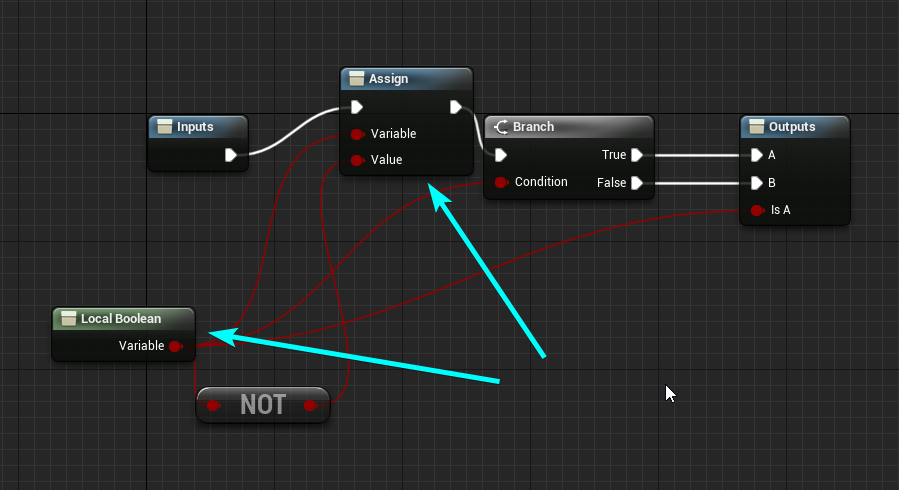
I'd really like to be able to use local variables for some of my macros
(this is the standard flip-flop macro by the way)
 tight schooner
In a macro graph, can't you just add them? I don't understand what you're asking
They appear to be available if you use the search box within a macro graph
severe iris
@tight schooner Oh god, I swear I looked 😄
nothing came up, suppose I was in a function maybe 🤔
severe iris
Almost a shame they're limited to macros though
tight schooner
yeah seems like normal graphs and collapsed graphs don't get them... though I can picture how pseudo-local variables would be weird in some situations involving collapsed graphs.
 fleet cosmos
how can i get all the textures that are in the project? is there any node for that?
get all actors of class does not work cuz texture2d is not inherited from actor apparently
earnest tangle
There might be a way to get all assets of type or something
There's a bunch of asset-related functionality but some of it might be editor-only
fleet cosmos
what's the node name?
I want to export all my textures that are available in the project, just need to iterate through all of them
i'm using ExportTexture2D node
all i need is an array that contains all textures in the project
 mellow trench
Hi all. Is there a way to know if the level is finished loading when using OpenLevel instead of Streaming Levels?
earnest tangle
afaik you can do it in C++ if you set up a delegate for FCoreUObjectDelegates::PostLoadMap
I don't think there's a blueprint method for it
tight schooner
BeginPlay? 
 gusty shuttle
Question: When using destructible, if i smash 10 walls, the 11th does not have any debris, any tips on how to keep getting debris?
 brazen elm
i have a niagara system that spawns particles based off an audio sources current amplitude. 2 Linked Inputs are created in the niagara system to expose them to blueprints where i can set/get them. This all works fine, when i play in editor or even simulate it as a standalone game. The problem is, when its packaged, it doesnt work? Any ideas why?
 main lake
@gusty shuttle If you used a loop in your script to assign physics (debris) to your walls, I think you forgot that arrays start at 0 and not 1 maybe ?
 vague lake
how do i put a crosshair in my RPG project?
 paper marsh
Hi all. Anyone knows how to use "Editor Apply Spline" node to deform the landscape through blueprint spline?
 ripe yacht
 tender magnet
Anyone know why I can't debug my BP?
 thin apex
i did this....when i do this the Ai character doesnt work....i added sight perception to it and when he is on the ground he sees me but not when he is up high
 trim matrix
Could have todo with the visibility Collison of your tower. Check to see if the static meshes making up the top of your tower block visibility. @thin apex
thin apex
@trim matrix when i do the perception debug with the ' key i dont even see the circles so i dont think thats the prob
trim matrix
maybe not then
thin apex
i thought maybe the AI BP wasnt there but thats also ther
trim matrix
Hm I haven't used AI and AI perception in ages so I wouldn't be the one to know any further
thin apex
@trim matrix ok...thanks anyways ^^
wait adding it that way doesnt spawn its controller @trim matrix so it doesnt have a controller....would u know why that might be??
trim matrix
ah then check the setting that determines if your charecter is possesed by an AI
In the class defaults of any pawn/charecter
Make sure its set to placed OR spawned in the world.
@thin apex
thin apex
yeh still no controller
trim matrix
oof
The answer isnt clear to me then
I could suggest trying instead to spawn the enemy at the top of the tower on begin play or something instead of using the Child Actor component.
Is there a node to return a true value if the value was changed x amount in a certain amount of time?
I see no reason why that couldn't work. As I haven't ever used the child actor componet myself I wouldent be able to know if it handles things differenty.
Oops sorry for interrupting
dw
thin apex
i dont know how to do that.....i tried spawning the actor and changing its location to the top of the tower but the location doesnt change
trim matrix
oh what?
its called Spawn Actor from Class
You can find this node in any blueprint that derives from an actor class
(Basicly any actor, pawn, charecter, or anything like that will have access to this node)
@thin apex
@trim matrix you want to a node that will wait X amount of time, then return true of false if a value has changed by X amount within that time?
One that keeps track of the rate of change of a value (So if within one second the value goes from 0 to 100 then it will return a true, but it it goes from 0 to 50 or smth then it will return false) Preferably without it being an executable node 🤔
Nothing like that exists naturally within unreal as far as i know, but that sounds like a completely reasonable function to create.
thin apex
@trim matrix thank you so much TwT....ur a savior for idiots like me
trim matrix
xD np
I hope it works for you
You might have to think some more though if your gonna be spawning in actors during runtime now. A lot of times if you haven't expressly programed something to work when its spawned in during the game, it wont work just like it does if it is already placed in the world in the unreal editor. @thin apex
Even though it doesn't seem like it was directly the issue this time. That auto posses AI setting is just one tiny example of that.
Most of the time it would have todo with the way the blueprint is programed though if its not working right Spawned vs Placed.
So just be aware of that
 gritty elm
@tender magnet make sure your actor in world, search for your actor in world outliner when you play game, make sure it is exist in world and not destroyed
trim matrix
How would you go about detecting the rate of change using a function?
for im assuming a float value or something?
Yeah a float value for the to detect a change from the output of this setup
It gets the speed that my object is moving in x and y space (Not z)
ah i see
thin apex
@trim matrix ok thnx
trim matrix
well just thinking about it for a second I would think you would need to know the:
-Initial Time
-Initial Value
-Current Time
-Current Value
You want this function to work without any execution to?
if thats the case its just a matter of comparing those values within a function.
Oh I'm also thinking about the bigger picture on how I'm assuming your gonna use this. Is this function needed because you want to figure out if the characters velocity raises by X amount in X amount of time? And more importantly does the game always need to be checking this in the background?
@trim matrix
So currently I'm using a marble to roll around in this game, and I want to determine if the velocity goes from a high number to a low number very quickly. So the idea is that I can play a hit noise at different volumes depending on how fast the player was going before their velocity was reduced dramatically. I could do this with an exec function (and might have to) that is looping at .25 second intervals or something if thats the easiest... 🤔
ah its what i was thinking then you are checking this constaly not just a one off check
well then yes you could do it with a .25 second interval function. It would need to take in the Time and Value from the last time it ran, and check it against the current time its running.
Not sure what's the best solution, but it would definitely work.
Sounds good I'll try it out :p
gl
 proud cipher
Am I doing anything wrong here?
Nothing is getting printed to the screen
or even the output log
I'm trying to get two floats from a C++ UActorComponent named PlayerAnimationScript (they are marked with UPROPERTY(BlueprintReadOnly)) and trying to print them constantly.
That screen is from my character's event graph
even this doesn't print anything. I think my event graph just isn't working at all?
 worthy frost
is PrimaryCOmponent tick enabled?
{
    //We need tick for the SpawnSettings
PrimaryComponentTick.bCanEverTick = true;```if that is false or missing
it will never tick, ever
oh thats an actor..
you said component
most likely using the wrong class
ie you are not using that bp class at all
worthy frost
are you sure?
how do you know?
i mean how do you know its using that BP
not just the C++ class..
the actor i am on about
worthy frost
this is not about the mesh or camera
this is about, is it actually using that BP?
BP's don't just "stop workign"
worthy frost
did you try a breakpoint?
proud cipher
A breakpoint in blueprints?
worthy frost
yes
proud cipher
ok it seems breakpoints work
worthy frost
maybe you disable on screen messages
bring up console and type EnableAllScreenMessages
proud cipher
That doesn't work.
It seems the breakpoint only triggers on BeginPlay.
For some reason, the Blueprint's Tick function won't run.
oh
I think I may have identified the culprit
So, when I started making my C++ class, I thought the Super::Tick(DeltaTime) was some unimportant placeholder, so I deleted it
Putting it back in the function solved it
earnest tangle
if you override a function calling the super of it is usually a good idea :)
 desert storm
Is "Destroy Actor" followed by "Spawn Actor" not a good way to respawn the player? I'm getting a 'pending to kill' error when I attempt to respawn the player's weapon after the player.
 mortal wharf
How would i do the following: When i start the game a timer of 20 seconds should begin if it drains to 0 do a custom event. But i want there to be a box trigger which kinda fills up the timer again for example if the timer is on 14 and you stand on the box trigger for 3 seconds the timer should give 17 seconds. 20 is the most i want it to go to. Also i want a widget to automatically update kinda like a pizza if you take one and one slice out like this: https://gyazo.com/a0f770017a19ff4959b29aff08401949
 desert storm
This page might be useful to you. @mortal wharf https://docs.unrealengine.com/en-US/Gameplay/HowTo/UseTimers/Blueprints/index.html
A How To Guide for using timers in Blueprints.
 jade gull
can anyone tell me a good way to easily clamp control rotation Pitch, since im changing it with "Add Controller Pitch Input" and only have the axis value i dont get a chance to clamp there.
mortal wharf
@desert storm I have already checked out that site i am afraid.
desert storm
Didn't work? Using the info from the page you should be able to create a timer. Then maybe you could use a box trigger and hook it up to an integer + integer float+float value, which you then hook up to the timer. Add a widget with several frames that updates at certain intervals, and as far as I know that would work.
 ionic gull
What is the easiest way to disable collision on an object? Once an enemy dies and falls to the ground I want them to no longer collide with the player
Nvm, figured it out, just set the collision to none
desert storm
@mortal wharf If you can't figure out a better way to do it, I have a really inefficient and troublesome way that seems to work. Like I said though, really inefficient, so I don't recommend it.
^ Definitely better
 white crypt
If you are using tick then it will have a different outcome on different hardware. For example if your game is running at 60fps, it means that your code will run 60 times in 1 second.
So depending on the frame rate, you will get different outcome.
You can still use tick without it being frame dependent, but then it would be better to use a timer
that is true, but in my opinion tick should be only used when theres no other option
you can reverse it without any issues, one example would be using boolean with a select node, one value would be negative, the other positive
timer is just a loop that repeats your logic, you can change the variables at runtime which timer is running
as I said one example would be using a boolean with select node
you can say that pretty much about anything, even calling an event can be done on tick with branches and do once
maybe @maiden wadi is willing to do a small test with thousands of actors and compare those two methods 😄
a bit curious myself whats the difference performance wise (nvm dont test it since its pretty obvious and sorry for the ping)
white crypt
yup i agree that there wont be any noticeable difference for a simple system like that, but still people should practice using better approaches
 terse goblet
I do write k2nodes know about properties
I may want
just surprised that I cant pass any variable into it
worthy frost
that is not what a property reference is
@white crypt without tick, no game would ever run
terse goblet
refletion
worthy frost
nothing would be smooth.
it would just be a mess. also for the record 1000 actors ticking a BP node is going to be quite expensive (not super expensive) but expensive, even if you are not doing anything just having the Tick node will make the engine call Tick on that BP, which means a call to the VM and will be expensive.
we had a actor in the level 1200 of them, with just the tick node, no logic on that tick node, was costing .6ms of game time!
terse goblet
ofc
worthy frost
all that was VM overhead
white crypt
I mean when I started using unreal, almost everything was done using tick. but with time i learned that things can work as good and even better in some cases without tick. Depends on how smooth you want everything to be
Of course if you make your timer loop every 0.01 then it beats the purpose of using it
terse goblet
where I can get any info about property references?
worthy frost
something just have to be done on tick even a timeline is tick!
so people who say, use a timeline its cheaper, that is still tick 😄
terse goblet
y, needa to have tick enabled
worthy frost
even setting up timers, every tick it has to check if that timer should run or not
white crypt
people dont even know that binding a variable inside a widget also uses tick
even for something simple as setting players name
worthy frost
so without tick, nothing would work 😄
widget bindings are the worst!
(not WidgetBinding in C++) but the widget binding in the UMG editor
terse goblet
@white crypt they can use retainer box
worthy frost
its actually cheaper to have a tick node in the widget blueprint
terse goblet
or invalidation box
white crypt
or a simple event that is called only when needed
worthy frost
there is a option in the editor settings
terse goblet
agree
worthy frost
to not compile a WBP that uses bindings 😄
terse goblet
ez
 terse goblet
again,sorry for repeating. I just reeeeeally want to understand it
why 00000000 wiki ????? :<
its like field? or what
worthy frost
that takes in like a UBoolProperty, UFloatProperty
never actually seen that used in BP
nore do i think you actually can..
 vestal plinth
is there a way to copy sockets from one static mesh to another in the editor?
terse goblet
so this is not usable out of the box, I have to create c++ nodes? okay, thank's
worthy frost
right click socket, copy, right click where and click paste?
you could try a Blutility
if you want to automate it
vestal plinth
a blutility might be the way
you definitely can't copy sockets by right clicking them
worthy frost
really?
terse goblet
yea
vestal plinth
I was hoping there was a way to just clone them from mesh to mesh
vestal plinth
skeletal mesh is superior
yeah
it's probably quicker to duplicate the mesh and reimport the other mesh over top of it
 near crag
How do I get the player sprite to always face the camera so it isn't warped by perspective? Every attempt at altering the rotation makes the sprite invisible.
 vernal flax
@near crag
something similar to this
i have it for TextRender as NameShield, and it always facing Pawn, but it's easy to adapt i think.
white crypt
I think you could even get rid of the cast node and use player camera manager instead, havent tried that but i think that would work. that wont change your logic just a cleaner approach @vernal flax
unless you need to use cast failed exec in your logic
whole rose
see my reply to that
lol
though, since blutility was ruined/replaced by the terrible editor widgets i dunno how to get the references with umg
near crag
@vernal flax I'm not sure how I'm supposed to be applying those blueprints to my player blueprint
 mystic coral
hey guys, any one knows why this doesn't work:
there's no "Saved" folder in the game or engine folder that contains the config files
this is on a shipping build btw
white crypt
do you see any changes when pressing any of the inputs?
because you need to apply settings at the end
mystic coral
did not know I should apply settings, thanks
white crypt
theres also "save settings"
mystic coral
nice, did not know that as well lol
 charred berry
"The fall is really not going to look very good," epidemiologist Dr. Celine Gounder said. , followed this all looks fine, no compile errors, yet pawn(bot) doesn't come after me, double checked but not seeing mistake, any known issues maybe in 4.25.3 as TUT was in earlier version or anything else ?
oh brother
I copied dain url
redoing
Get the full UE4 course:
https://bit.ly/36lJS3S
Unreal C++ Beginner Tutorial:
https://youtu.be/1dl91ORwmy8
In this video you are going to learn how to build a very simple game using Unreal Engine and Blueprint.
The goal of this lesson is to get you aquainted with the absolu...
that
white crypt
have you placed nav mesh volume inside your level?
white crypt
yeah its the same as in the tutorial, probably you missed some parts
white crypt
can be a number of different things, maybe it gets stuck in the collision
charred berry
lol I haven't gotten that far 😦
i WAS SO looking fwd to bot coming after me hahaha
on play it does't come after me
ic
white crypt
print strings as well
charred berry
i was't kidding when I said I was 'green' at a fair amount of things not a cracker jack coder
where do I attach it
fascinating
ty
 simple dragon
this is the best way to disable bp if object is not visible to camera or leave bp running (i doing this to save processing power or the node is not more processing power hungry then my bp)
charred berry
ok if I did this right, on play now bp comes up, and has simulating everywhere pointing to set t imer node
simple dragon
someone have ide how to check this the difference between disable and enable bp how much it changes
generating plane with perin noise to create wave
vestal plinth
that's probably not the best way to do it
for waves in general it's better to do them in the shader. you can do noise there or a gerstner wave function
gerstner is really light so it's ideal for replicating on the CPU if you have to do that
as for noise, pre-baked noise texture combinations are much faster too. the UE shader noise functions offer this
then it doesn't matter if it's onscreen or not
simple dragon
and how i sync betwin shader and bp verts array to get buoyancy system ?
vestal plinth
you run the same calculation on both
that's why you choose a performant method
Hailey Williams created a super detailed tutorial for UE4 users, showing how you can create water surfaces with 'Gerstner Waves'.
that's a good example
I've not been able to find it again but there's a really good visualization of the gerstner function that shows how it works
it was a grid of circles sweeping and the circle sweep position is offset, so you can see how the wave actually functions. rather than just up and down it gives you back and forth as well
that's not it, but that's what gerstner looks like
you can see that the vertices bunch near the peaks of the waves
each vertex effectively moves laterally in a circle as well as up and down
simple dragon
but this is not more expensive way to get the same effect u need run calkulacion 2 times on gpu and cpu
and cpu and gpu must be perfectly sync to create good result
charred berry
ugh, so I set breakpoints on varoius nodes, on play, no errors, but game ends and bp opens up showing 'simulating' and arrow point to a node
if no errors does that mean by bp is fine
..my
vague lake
Photo from AJ
How can I use"equipweapon" variable with my cast to character variable which is "agent_bp"
vestal plinth
@simple dragon that's how it's done though.
does anyone know how to use Foliage Type Actors? doesn't seem to be a lot of documentation on it
 stray folio
Hello
 upbeat shore
hey all, I have (hopefully) a quick question on the crouch feature for character movement. I'm adding in a crouch for my character but the half-height for the collision capsule is not changing as it should be. I have a very simple function that takes the input and plugs it into the Crouch/Un Crouch nodes, which from what I understand should automatically change the capsule half-height, but it isn't. Any ideas?
alright nevermind that. Didn't realize I had to check a box for "Can Crouch". Figured something like that would be on by default.
vernal flax
Yea, it should be on by default. Its easier to debug if we have something working and want it to not work than otherwise.
trim matrix
anyone know how to communicate between AnimBP and CharacterBP without using the cast node?
I feel like it's kind of the noob way to do it
earnest tangle
same way as anything else, either cast or interfaces
you can of course create a variable to hold a more specific type of object so you don't need to cast more than once
trim matrix
You mean like anim layer interface? @earnest tangle
 tiny meteor
get player character
earnest tangle
blueprint interface
tiny meteor
you can use beginplay-> get player character -> save it as a variable, or just use get player character if it changes
earnest tangle
this is assuming you're animating the player, if not then that won't work :)
tiny meteor
yeah
trim matrix
yeah I want to animate a pig npc
tiny meteor
otherwise cast it to the class it's a child of, and set it as a variable
trim matrix
@tiny meteor that's the way I normally do it, I'm trying to expand my knowledge
earnest tangle
you can use "try get pawn owner" in the anim bp and save it to a variable
if you do that in begin play and cast it so it's the class you need, then you won't need to cast it every time you use it
trim matrix
right but then you would have to get every variable and save it aswell
earnest tangle
well not really, you can just access it from the variable
 earnest tangle
yeah
you can do that in begin play instead of update animation, then save the casted character into a variable
then you can read that variable in update animation and you don't need to cast it :)
trim matrix
how do I define the character?
earnest tangle
what do you mean?
trim matrix
this is in PigAnimBP, And I want to be able to pull variables from PigCharacterBP
I casted to character
but how does it know which character I'm referring to?
I don't understand this node
 frail marlin
I have an actor that I am going to be spawning in my character by input pretty often, what is the best way to reference it initially and then spawn/attach when needed?
 pale blade
Just to confirm, we cannot overload a function in blueprints, right?
For example, FooFunction(string) and FooFunction(int)
earnest tangle
I don't think so at least I've never seen a way to do it, and I vaguely recall getting an error about UFUNCTIONs not being overloadable either
trim matrix
I'm trying to get the character to move along a spline at a constant rate, but as the spline gets longer the character moves faster and faster
and timeline
earnest tangle
If you want it to keep a constant speed across splines of different sizes, you would need to use some other method than the timeline to move
trim matrix
someone suggested to "scale the traversal by the total distance of the spline" and use get location at time (spline)
earnest tangle
Your timeline always goes at the same speed from start to end
trim matrix
ok
earnest tangle
You could alternatively try to make the timeline longer which would make it move slower
but if you change your spline, then you would have to modify the timeline to adjust for the length difference
trim matrix
so how can I coordinate the spline length and timeline length dynamically so whatever the spline travel distance is, the character always has good smooth constant motion across
earnest tangle
Not sure, it would probably be easier to just move the character on tick at a constant speed instead for that
Eg. MovementSpeed * DeltaTime
trim matrix
even if i use even tick, how is the character actually moving across the splines then
earnest tangle
you'd do something like create a variable called CurrentLocation
you'd increase it on tick by MoveSpeed * DeltaTime
and then use Get Location at Distance Along Spline with CurrentLocation as the parameter
otherwise it would be similar as your current solution with the timeline
trim matrix
I dont understand, can you show a blueprint example
besides im not trying to auto move the character on tick, I need more control than that
 ember dawn
So I wanted to move a bunch of stuff around to reorganize in my Content Browser but I'm not sure how best to go about it? It seems like I can't just cut/paste to move which things are in which folders like when reorganizing files on the PC. I just ended up deleting stuff and reuploading it. I assume there's a better way?
charred berry
https://www.youtube.com/watch?time_continue=824&v=QJpfLkEsoek&feature=emb_logo , followed this, pawn and aicontroller bp's , no compiler errors, yet pawn wont follow me on play, on world comp tiled terrain, idea ? :(, nav mesh is green, no errors on play.
Get the full UE4 course:
https://bit.ly/36lJS3S
Unreal C++ Beginner Tutorial:
https://youtu.be/1dl91ORwmy8
In this video you are going to learn how to build a very simple game using Unreal Engine and Blueprint.
The goal of this lesson is to get you aquainted with the absolu...
 dense mica
 charred vale
hey, i heard there is a plugin to extract all static meshes out of the blueprint actor and place them on the level. do u know what it is?
charred vale
ok found it

Unreal Engine
Instanced Static Mesh Editing Made Easy! Instance Tool is an editor mode plugin for Unreal Engine, it allows you to quickly select/edit/convert Instanced Static Meshes in editor viewports.
tight schooner
@trim matrix The key lies in the node you have there, SetPlayRate. IIRC, 1.0 is normal playback speed. 0.5 would be half speed, and 2 would be double speed.
And because you want to scale the playback rate based on the length of the spline -- make it so that it takes more time to traverse a longer spline -- you'll need this node as well, which'll tell you the total length of the spline.
That node will probably spit out a large number, like 500 or 1000 or something. It's the actual length of the spline measured in Unreal Units (or centimeters if you prefer)
If you plug that straight into the SetPlayRate node, it'll do the opposite if what you want -- larger lengths will make the timeline go faster.
So instead you have to do some math -- make the spline length the divisor, like 1 ÷ spline length
Your timeline is 1 second long, so X ÷ spline length would produce a playback rate where each second, the timeline traverses X units.
You're essentially looking to make something like this
 high ocean
is there any way to clear memory reference/garbage collect in the editor? - I just want to clear memory refs sometimes.
tight schooner
maybe... reopen the level?
high ocean
yea, didn't help. Usually saving level helps for some assets - thanks anyway 🙂
tight schooner
Here's another stab in the dark
make an editor-only function (or editor utility widget) that runs garbage collection
CollectGarbage is a blueprint node
severe iris
What does this do? I can think of a couple things it could do, but can't find any documentation online https://i.imgur.com/eMN5k7U.png
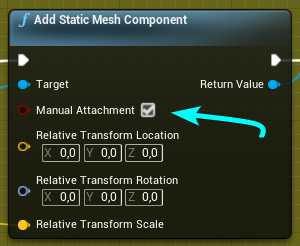
 tough leaf
If I use this "Set as Pivot Offset", can I get this reference from blueprints. Actor Location seems to get the original position without this offset applied.
I'm creating an editor blueprint, not a gameplay blueprint.
Thanks
 rugged perch
I have a problem with this, i have multiple "ais_char" on the level, how do i make the code target specifically the AI that triggers the code? Setup like this works but gives errors because it affects the entire class. I want to remove colission after AI si dead but it removes from all the AI in the level. Thank you
vernal flax
@rugged perch are you seeing Attack Success once?
rugged perch
@rugged perch are you seeing Attack Success once?
@vernal flax no, i tested now and i have 3 AI on scene and when i hit 1 it sais "Attack Success" 2 times
vernal flax
Promote that Other Actor reference to variable and use it later instead of using it from the source all time. It should not matter but it could.
rugged perch
Promote that Other Actor reference to variable and use it later instead of using it from the source all time. It should not matter but it could.
@vernal flax ok im going to try it now, 😄 thank you
vernal flax
Its not solution i think but test it.
vernal flax
Or even before cast
And print that before cast, check what it is and if corresponds to ai you hit
rugged perch
And print that before cast, check what it is and if corresponds to ai you hit
@vernal flax oooh... i see 😄 ok will try, thx
 paper vessel
can someone help me in #ue4-general
vernal flax
You will ask for that on every channel?
 hazy root
My character is completely unable to jump out of water when he's swimming on the surface of a phyics volume/water volume. At first I thought it was the jump counter just not being reset to zero without the Event OnLanded, but setting the counter to zero when he's swimming didn't make a difference. Haven't been able to find anything on this.
Even tried hooking up the InputAction to only the Jump function, no difference.
(settings on the water volume are all default, character movement's bouancy is 1.3)
vernal flax
Jumping by CharacterMovement or custom event?
hazy root
Jumping on inputaction via character movement, like doing a normal jump, but while swimming
vernal flax
By resetting counter you mean IsJumping boolean?
hazy root
It's a jump counter int that determines when to allow and do a double jump. A branch checks the int. It's reset to zero on landed, in the case of water there is no OnLanded event, but even scrapping all of that and using the InputAction event at it's bare simplest has no effect.
That works on land as expected, but not in a water volume.
vernal flax
Can you show that branch and onlanded event?
Jump is probably by default unable to jump when you are in air.
So double jumping should have logic to mąkę it possible.
hazy root
Tested the characters "max jump count" property at 50 and they are able to jump in the air 49 times, but nothing once swimming. That's with just the default jump function, no custom jump counter in the BP.
*jump while in the air 49 times
It's as if swimming disables the jump function.
vernal flax
Maybe, is swimming also done by CharacterMovement?
hazy root
It is
vernal flax
Soooo you could disable isswimming before you jump, right?
hazy root
Only can get it, it doesn't have a way to force set it. I am just noticing a "Jump out of water pitch" value under character movement swimming and thinking that's a likely suspect.
 drifting mulch
Not sure if this is the right channel
I'm trying to set some points (components?) on an actor to mark specific spots I can later use in blueprints. Similar to how you can put empty GOs on GOs in unity and reference them in code. What's the right way to go about this?
Specifically I'm trying to put 8 "nodes" on the corners of a cube and intending to later use blueprints to snap them together. Thanks
vernal flax
Whats the target of set scalar...?
You have invalid something in that Create dynamic material instance. Or scalar parameter.
Element index 0 maybe?
You can use IsValid to check for that.
grave relic
The target is the return value from dynamitc material instance
drifting mulch
It looks like it's not plugged directly into set scalar
grave relic
Its plugged in directly
And need the elemental index 1 cause its the default text material, and the indext 1 is text, index 0 is symbols
hazy root
@drifting mulch You can potentially use invisible sphere components as target points. Cast to the bp and get the location of those components.
vernal flax
@drifting mulch im not sure but you can have Target Component in there. You can also use any null (arrow Component for example) and then get Component Relative Location i think.
@grave relic test isvalid and print if its not.
drifting mulch
I thought about using arrows or invisible meshes but now I see there's an option to use a child actor. Gonna try creating SnapPoint actors with a custom blueprint, maybe move some logic into them too. Thanks guys!
vernal flax
That kind of error say that reference is invalid, you can drop invalid requests or provide valid reference.
vernal flax
No, isvalid on reference, blue one.
drifting mulch
the return value @grave relic
vernal flax
Or even TextRender, if its spawned in a loop Or just a few nodes back.
grave relic
Sorry pretty new to Blueprints, dont get where the is valid should go, cause from the return value transfroms it from object referense to bool and that cant go in target? Or do i have to branch inbettween that checks if it is valid continue with scrip otherwise do nothing?
grave relic
Okey so i go and create the dynamic material then i check if its valid, then if it is i continiue if not valid do nothing?
vernal flax
In many cases, yes. But if its something that you know should be valid, then you got to figure out why its not.
It might be that object was not yet spawned and availble in memory, then you add some delay.
vernal flax
Well, only thing that looks weird is 3 timelines within timelines.
Its all 1 straight execution flow?
Then you are destroying actor you set timeline on at the end before it updated.
But im not sure, i’d have to debug it. Set breakpoints and check whats going on there.
tight schooner
there's a lot of weird stuff going on there.
Plugging a DestroyActor into a timeline update is a definite mistake...
basically kills itself on the first frame of its own timeline... I'd plug DestroyActor into the "Completed" exec pin instead.
And also the plugging of a Timeline update into a delay into another Timeline Play... It may not cause problems necessarily but it's super weird. If you want parallel things happening, I'd use a Sequence node.
You can have a timeline on one line of the sequence, with the delay on the other e.g.
and that way they don't affect each other
for example...
@grave relic
Arranging it that way would make it easier to figure out what's going on execution-wise. In that example, Timeline_one would start playing, and then after two seconds, Timeline_two would play in parallel regardless of whether Timeline_one is finished.
Basically the sequence would start Timeline_one and the Delay node at the same time and then the two execution lines do their own things independently.
So if you want parallel "latent" things happening, using a sequence node (or adding new custom events) is a way to do that.
Also the way you make an array out of the material instance (at index 0) and check if index 1 is valid... I'm pretty sure you can get rid of that. It would always return false anyway, because the material is at index 0 and not 1.
There's a node called "IsValid" if you want to check a single item. You don't need to use the Is Valid Index version of it.
rugged perch
Can i import/call variables from one Blueprint to another? Fox example from my AI Bp to my PlayerBP ? Thx
neither, but if the variables are marked as public you can work with them from another blueprint
@trim matrix ok thank you
tight schooner
@fallen glade Not offhand, but if you open the "Palette" window in the Blueprint editor, scroll down to the Spline section, and open that
you'll get a list of all nodes related to spline components
and there are a lot
I don't see anything related to instantly resizing splines. You can try scaling the component itself, or looping through all the points and scaling their location vectors at worst...
 fallen glade
cheers @tight schooner I was just looking for an easy way to clip it but I can find other ways, thank you !
tight schooner
maybe get spline point at your desired length (Distance Along Spline), delete all the points exceeding that distance, and add a new point at that location
fallen glade
That sounds like a great Idea! better than mine anyway lol, thanks !
 mellow folio
Anybody have experience with Nativization ----> Hating Maps. Maps don't seem to work in nativized blueprints? Any information more specific out there?
rugged perch
Question, why is this not putting the picked object in the bone socket and just snaps it in the middle of the character body ? 🤔
mellow folio
shouldn't you be t rying to do an attachtocomponent node instead if you're trying to attach to a bone?
rugged perch
shouldn't you be t rying to do an attachtocomponent node instead if you're trying to attach to a bone?
@mellow folio oooooooooooooh ... thank youuuuuuu 😄
mellow folio
get a reference to the mesh and attach to that, might get you closer
I hate messing with attach nodes, always confusing, I usually make sure the object is in the exact spot I want before using the attach
rugged perch
I hate messing with attach nodes, always confusing, I usually make sure the object is in the exact spot I want before using the attach
@mellow folio god it works, thank you so much, now my cheese is huge because i was a lazy retard and didnt fix the proportions when i imported it in Unreal lel
nevermind ..fixed it by clicking Scale : keep World
main lake
Is anyone good at using GameMode Blueprint please ? I'm trying to get all the players connected to a game and then printstring how many of theme are in the game, but it doesn't want me to print it
vernal flax
GetNumPlayers needs to be used as server.
main lake
I did that
vernal flax
So you make event that run on server, there you use GetNumPlayers and then multicast or back to owner.
main lake
for now I have this
vernal flax
GetNumPlayers
 frigid thicket
ask, do i have to make 2 actors for a gloves? cus gloves is equipped on both hands. if possible i want to just 1 actor
vernal flax
Yes, you use 1 actor for 1 glove and scale it to -1 on X or Y and use it as left one.
frigid thicket
cant just 1 actor? cus my gloves have properties inside it
vernal flax
@main lake and you'd need to print that back on the client that called this event, so you make another event with Replicated To Owning Client or Multicast.
With parameter that you provide from that server event.
main lake
wait I have this on server, but how do you multicast it to client ?
vernal flax
@frigid thicket in VR it's usually done like that, but gloves are components of a Pawn.
main lake
vernal flax
@main lake just told you, add another event, instead of Executes On Server use one of other two options.
frigid thicket
@vernal flax hmm.. okay thank you
main lake
in the gamemode ?
vernal flax
just after that Get Num Player you call that another event.
rugged perch
I get this error at the end of test play. I have 3AI that try to pick some cheese and after any AI_char picks it up, i catch him and kill him, after 3 seconds he gets DestroyActor, and i think the cheese keeps trying to attach to AI that is no longer in the game. I figured i can fix it by saving the AI as a variable but its not working. Any clues ? Thx
main lake
@vernal flax like so ?
main lake
I doesn't print for me
vernal flax
you can do easy check if they are still there or marked for destroy or something, by using IsValid node.
rugged perch
yes
@vernal flax hmmm ... so how can i make the game distinguish from the ones dead and the living ones ? they are all from the same class
vernal flax
@main lake show me how you fire that GetCountPlayers event.
main lake
oh I have to call it somewhere else ?
vernal flax
yes ;p
main lake
can I do it in the gamemode too ?
vernal flax
Every event needs to be called somehow. Some are fired by default, like tick or beginplay etc.
main lake
I tried to call it in the begin play it prints me "0" even if I have 3 clients
vernal flax
in your Pawn/PlayerController use Get GameMode->Cast To GameMode -> Event
I dont think you have 3 clients connected at beginplay, i think you would see 0 1 22 333.
mortal wharf
What are these types called? https://gyazo.com/2b96b015a300cc5327ef32866d6019ef

 weary jackal
Is this material function? @mortal wharf
@vernal flax like so (in the PC event graph )
@main lake you have to connect the object pin to your object whichever you casted
main lake
yeah but wich object do I have to cast
that's the question
because I just want to call my function (server side) that's in my GM blueprint
weary jackal
What is GM. Cuz you have to tell the blueprint what you are casting. The object is a memory pointer referencing to your cast type. If the pointer cast is true then you get the default EXEC otherwise it will get 'Cast failed'
main lake
GM is my GameMode Blueprint
weary jackal
Get game mode
white crypt
if he wants clients and server to communicate, shouldnt he use game state?
since game mode only exists on the server
weary jackal
But whatever server do the client replicate. And he only want to get the player count and I think that's the server side event
main lake
the thing is it prints "0" even if I try with 3 clients
main lake
well what's the difference between GM and Game State ?
white crypt
game state exists on both clients and server
were as GM only exists on the server
but if you made a server event, that should work with GM too
havent touched MP in a while so a bit rusty
weary jackal
And this in my Player Controller
@main lake try a delay between begin play and count players. See if it's work or not
white crypt
i dont think it will unless his client is a server as well (if hes doing listen server)
weary jackal
I think the players are spawning after the counting part
Not sure
But still give it a try
main lake
stil ldoesn't work even with delay
it keeps showing me 0
So if I want to code all the logic of my game, where should I code it tho ?
white crypt
can you show your get num players function?
main lake
white crypt
double click on "get num players" and shows whats inside
also wheres your "post login" event
white crypt

when player joins the game mode will trigger "onpostlogin" event
and then you add an increment to your integer
which will count how many players have joined
read this if you havent
and you should keep track on how many players joined inside game state, if you read that compendium it should explain everything
mortal wharf
https://gyazo.com/c9f25c494afd66af0798032295be2bcc Does anyone know how this guy got this Threshold Param?
 weary jackal
Scaler parameter @mortal wharf
worthy frost
@main lake why not just get the length of PlayerArray in the GameState?
this will be the player count..
main lake
@worthy frost That's what I went for in the beginning then switched to GetNumPlayers functions (because I didn't know that there were a function like that) but the print string doesn't show up when it's in the gamemode BP
maiden wadi
@main lake Are you talking about the print you made a screenshot of up above?
The GetNumberOfPlayers thing?
main lake
yeah
maiden wadi
If that is in your GameMode, it won't work. RPCs need to be made from an actor on one machine that exists on another.
maiden wadi
Gamemode only exists on server, it has nothing to RPC to on clients.
worthy frost
its there by default..
main lake
I tried even using my Player Controller, same problem
worthy frost
notice GameState not GameMode
main lake
So I have to create a gamestate instead of GameMode ?
worthy frost
as @maiden wadi said, you can NOT use Client/Server/Multicast RPC's in game mode
@main lake PlayerArray is replicated
maiden wadi
You should probably have both if you're making something multiplayer. Along with PlayerStates.
worthy frost
in your Player controller, get just GameState->PlayerArray->Length.
3 nodes, no rpc's or custom logic needed..
vernal flax
Yea, they might be right.
I didnt think that RPC in GameMode have nowhere to go back.
main lake
Well how do you know, when to code gameplay part in GameMode or Gamestate tho ?
vernal flax
I used GetNumPlayers in GameMode but it's GameMode doing event after that (closing server if it's last player)
worthy frost
GameMode == Rules, GameState == State of game, (Total kills of all players, total deaths, team scores, etc)
GameMode is the flow of the game, server controlled.
maiden wadi
GameMode is for stuff only server needs to ever see. GameState is game level related stuff all clients also need to see. Player State is general player related stuff that everyone needs to see. PlayerController is for input and player related stuff that only that one player needs to see.
main lake
I'm trying to redo the game "Among Us" in UE4, so the selection of the 2 impostors must be done in the GM or the GameState ?
trim matrix
Hi, Are there any differences about apk size between blueprint(nativize) project and c++ project? or any other game size, if i export my project 
worthy frost
GameMode should select them
then the GameMode does a ClientRPC to the imposter to mark them as imposter or it sets there PlayerState bool to notify they are imposter.
maiden wadi
I'd probably only ever set the imposter part in GameMode and PlayerController. You wouldn't want either the PlayerState or GameState knowing who's an imposter.
worthy frost
why wouldn't you ?
white crypt
instead of explaining why hes not reading Cedric's compendium?
maiden wadi
Because then other people can see who's an imposter.
main lake
@white crypt I'm trying to read it but I have problems at understanding written explaination
worthy frost
i mean i agree, i would only mark them as imposter in there controller till the end of the game.
vernal ibex
Alr so i have a dog petting option (cuz why not) but the problem is if you press P after the anim montage is over instead of doing the same animation the entire character shoots over to the center of the world (0,0,0) Im pretty sure its because the character cant do the animation twice in the box collision unless he leaves the overlap component and comes back, but i'm not sure how to fix this tho
worthy frost
yeah thats pretty shobby
you don't really want to be doing that
your player should be detecting stuff
and i would do it on tick, you are doing BeginOverlap that fires once
that logic is messy and you are correct, the second press would be all kinds of wrong
and you are casting and not even checking if the cast is valid
vernal ibex
yeah im not to happy with the logic either i found it on a tutorial
main lake
Don't use Tick function 😮
 twilit heath
gets popcorn
main lake
The tick function is the devil it self 👀
vernal ibex
lol
worthy frost
i am not even going to start 🙂
white crypt
but we got our popcorn ready
vernal ibex
^
main lake
That's what I learnt
worthy frost
if i didn't have a headache, i would love too
twilit heath
there are things that belong in Tick and things that do not
note that entire engine also runs on a Tick
tight schooner


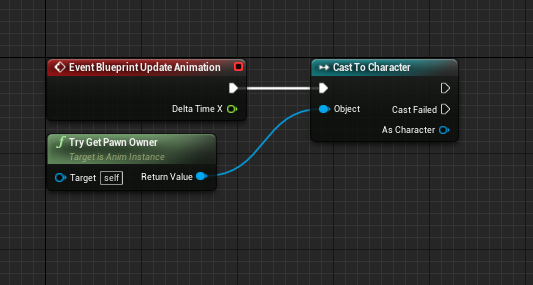
 vernal ibex
also where would i splice in a tick
main lake
yeah but what I'm understanding, is to be sure that there's no other way to do it before using the tick function, because it costs performance
twilit heath
only when you execute logic that doesn't belong in it
its just a lazy way or telling new peoples not to connect GetAllActorsOfClass on a Tick, really
vernal ibex
ooof
tight schooner
it's hard to avoid the don't-use-tick dogma cuz it comes from Epic Games themselves, lol
twilit heath
what you should had taken from that is that you should ask yourself the question "does this belong in a Tick, or does it just seem convenient at the time to put it there?" before you plug something in on Tick
vernal ibex
i mean it works fine without a tick
twilit heath
not "how can i bend this logic not to use Tick at all costs?"
vernal ibex
just needs a little tweak
white crypt
but shouldnt you in most cases use a tick that is not frame dependent?
twilit heath
i am talking in general
vernal ibex
ah
worthy frost
@vernal ibex if that tutorial showed you that code, please stop following it
twilit heath
one of my largest functions is on Tick - and it throws 4 line and 2 sphere traces, calls stuff like GetClosestPointOnColliision... etc
but it has to be on TIck, as its there to interpret user input
and it has to do all that stuff so the game feels responsive and intuitive
it belongs there
worthy frost
luckily its in c++ to save on a bit performance 😄
vernal flax
Also, just Timeline and Timers are easier and prettier then ticks !
twilit heath
Timeline is a Ticking ActorComponent
tight schooner
Tick is ultimately an event that fires every frame, like a Timeline does
vernal flax
Yea, but it's easier and prettier to use Timeline instead of Ticking, just that ;p
It has more options, can be easily controlled with pretty ease in/ease out functions etc.
tight schooner
The don't-tick dogma comes from Epic dealing with studios who wound up with levels involving hundreds of ticking actors
contacting epic and asking why their game runs so slowly
using tick on your one player-pawn isn't a big deal IMO
maiden wadi
I find timelines ugly, personally.
vernal ibex
i just want to pet my dog 😢
main lake
I just want to understand networking 😢
tight schooner
I just want to overthink Blueprint performance in lieu of actually learning C++
(I'll get around to it someday...)
vernal flax
yea, had to check it too ;p
tight schooner
its used in English... https://en.wiktionary.org/wiki/in_lieu
vernal flax
its British I think, means "in place of" or something like that.
twilit heath
blueprints are fine-ish for most stuff
maiden wadi
American English uses it a lot as well.