#blueprint
402296 messages · Page 524 of 403
 blazing ridge
 obsidian juniper
oh, i didnt notice any problem there
do you use movement component on the pawn?
 restive dagger
I'm having a probleem
blazing ridge
@obsidian juniper yea, character movement, flying
restive dagger
so when the islava variable is true, then I will die, my problem is even when the islava is false ill die
blazing ridge
@restive dagger where do you set your lava variable?
restive dagger
I set it on event tick
 fickle blaze
did you initialize it as true?
fickle blaze
how is it set to false?
restive dagger
https://gyazo.com/d58dcc3850a8bffcc388f3d959fb2cd2 I made unhealthy loop 
 fickle blaze
0_0
blazing ridge
dont use delay in tick
restive dagger
then it will crash, materials will change every frame
blazing ridge
@obsidian juniper you can also pm me if youre having interest in helping me with the issue 😄
@restive dagger the whole functionality there shouldnt be in tick id guess
obsidian juniper
actually i don't really know, havned implemented flying characters
blazing ridge
cant you do it with some overlap?
obsidian juniper
on walking characters i have no issue even at extrem speeds
fickle blaze
@restive dagger try plugging the delta seconds into a * node x4 then plugging that into the delay
restive dagger
what is a *node x4
blazing ridge
multriply
fickle blaze
multiply by float x float
then the second var would be 4
plug the output into your delay
maybe that will fix
right now it's going on frames instead of the actual world seconds or real time
so depending on how high frame rate is will be how fast your thing is changing
fickle blaze
delta seconds are not the same as normal seconds
restive dagger
that is not my problem, my problem is when I hit the collision it kills me
even when the lava is false
how is delta seconds related
.-.
fickle blaze
1 sec
obsidian juniper
what it seems you want to do is alternate between 2 materials every 2 seconds, so something becomes lava every 4 seconds for 2 seconds?
i would solve this with a timer on 2.0 seconds and looping
and just switch materials
fickle blaze
give me a second and ill try to make an example
restive dagger
change materials every 2 seconds and get materials when overlapped so if the material is lava im dead
but It seems I can't get materials in ue4
fickle blaze
ohhh
 maiden wadi
You can, but I really would not ever rely on a graphic for gameplay aspects. Cosmetics should always be an afterthought when making gameplay design decisions.
fickle blaze
@restive dagger just use tags
 brittle fiber
CyberRace, if I want to influence 49 meshes from lvl bp is it better to convert meshes into 49 Blueprints? there would be blueprints that have to attach to those 49 meshes
restive dagger
umm I never used tags before
fickle blaze
okay so you need to add 2 tags
is lava
and is not lava
they will be item 0 and 1 in the index
go to the actor you want to be lava and add the tags to it
1 sec
maiden wadi
@restive dagger Is this for single player?
restive dagger
yes
fickle blaze
you can always just unplug the nodes and put a comment on it
with C
that says 'old code'
or something
that way if you need it at some point it's there
restive dagger
in the get overlapping actors
fickle blaze
in whatever you feel like saving
it makes like a box that can drag everything inside it
restive dagger
yea I might use that for checkpoints
fickle blaze
it's good for remembering what things do as well
restive dagger
@maiden wadi this code
is only for one static mesh
reeee
im having a stroke rn
 trim matrix
@restive dagger here are 7 methods to check for lava on overlap of the player capsule. I can imagine you would prefer checking the material on index 0 of Other Comp.
restive dagger
I don't understand anything
my idea is a looping pattern of 2 materials changing each 2 seconds
I replicated authaer code but its not working
maiden wadi
@restive dagger Actually it was for an actor, to which you could put as many overlapping volumes where ever you wanted.
restive dagger
maiden wadi
Is the character overlapping the actor?
 tame pecan
I would suggest to make an interface.
@restive dagger
And you don't need those functions.
tame pecan
Yes?
restive dagger
when I start your code nothing happens @maiden wadi
tame pecan
You can still have a looping mechanic with interfaces.
restive dagger
not like this
tame pecan
Why not?
restive dagger
when I start the code, after 2 seconds the lava appears, then nothing happens
and I still die when theres no lava
tame pecan
show me your code
maiden wadi
The screenshots I gave you work fine. The death event is called in the character every time it changes to lava, or from lava, or any time the character overlaps the actor while it is lava.
trim matrix
@restive dagger you should probably check some collision tutorials
maiden wadi
Reverse your bool sets. You're backwards.
Right now, if it's true, you're setting it to true.
If false, sets it to false. Therefore if it starts false, it'll never be true. If starting true, it'll never be false.
restive dagger
Yea I did
nothing changed
wait
it somehow works
but not fully working
so my current problem is when the game starts I have to wait 2 seconds so all that code applies to the actor, second problem is when it changes the materials and im already overlapping nothing happens
btw, I deleted my first code, rn I have no idea what I'm doing because I literally replicated what Authaer said and somehow its working
 minor karma
hi, quick question, does anyone know how to disable the characters "stickyness" to stuff they're standing on?
like, if i have a platform that moves way to fast, and stop abruptly, they sorta just stick to it. when in reality i sorta want them to fly off
blazing ridge
why does my mobile game crash as soon as there is an empty child actor component in one of my BP's?
also, if its not empty
and just out of pure curiosity, what on earth is this for and when will it ever not be greyed out?
restive dagger
@blazing ridge
 alpine halo
It's sockets
tame pecan
@blazing ridge Parent socket is just to attach it to a thing.
restive dagger
this is because you are not attaching it to the skeletal mesh
alpine halo
Where your child components can attach
tame pecan
Also, don't use child actor components as they're not supported anymore and are considered unstable @blazing ridge
blazing ridge
okay, so the socket thing only works when attached to something that can have sockets, i understand correctly?
alpine halo
If you attach child components in socket then they'll have socket's transform in real time
blazing ridge
@tame pecan oh okay, first time hearing that. then how would i implkement child BP's into actors instead?
alpine halo
Like attach gun to back of the player
blazing ridge
level design, I have a system that generates modules of my level. for more variance i am, with some logic, picking certain presets for the module (which i created as seperate BP's of one class)
so basically i have BP_Level which generates my BP_Modules and every BP_Module has a child actor that refers to one specific Module Preset
tame pecan
Does these have any rendering in them? Like SMs?
blazing ridge
in this way i can manually design the modules and still procedurally generate my level
yea
restive dagger
Okay so guys I made some changes but my problem is, sometimes the code works and sometimes it does not. https://gyazo.com/dee154f2b2dc891fc419d844a804c11c

 tame pecan
I would have to see the code to understand what you wanna accomplish @blazing ridge
blazing ridge
@tame pecan ill give you a quick mindmap, one sec
restive dagger
Im dying to know what is wrong with the damn code
tame pecan
What is not working exactly
restive dagger
when it becomes lava it kills me, when it becomes ice it also kills me
blazing ridge
i can also send you screenshots of the graph
tame pecan
Why don't you just use regular actors and spawn your logic?
restive dagger
the problem is here https://gyazo.com/8497761a9a154a957d1bdf617136a6c0


I guess...
 blazing ridge
good question
tame pecan
what is do lava damage check
restive dagger
https://gyazo.com/f8caf189c6ed6c332f3d38806a44097e it checks if lava is true then makes me die
 tame pecan
Why do you have ice and lava in same blueprint?
restive dagger
I wanted to make a prototype of this mechanic
tame pecan
Can't you just separate them?
restive dagger
Then how they will work together
tame pecan
Why do you want them to work together?
restive dagger
one min lemme show you
blazing ridge
@tame pecan many thanks for your advise! its working now, not gonna use cchild actors anymore
tame pecan
@blazing ridge No worries. Yes, they're unstable
restive dagger


Enjoying creating some different on / off patterns for these firey little floor plates 🔥
#madewithunity #unity3d #gamedev #indiedev #indiegame #gaming https://t.co/d5m93XUCM8
Likes
150
 Twitter
That's what I'm trying to do since 3 hours >.<
tame pecan
You just need it to check every 2 seconds if a player is in it to achieve this. If a player is in it on execute, kill the player.
Have a timer that fires every 2 seconds.
restive dagger
I think I will delete every thing and start from scratch
fickle blaze
anyone know how to make a projectile ignore it's owner's collision so it will never impact the actor that spawns it?
tame pecan
@fickle blaze Yes.
OnOverlap check if OtherActor != GetOwner. Note, you need to set owner when spawning the projectile.
Like this @fickle blaze
fickle blaze
how do I set the owner?
fickle blaze
thanks
tame pecan
No worries.
fickle blaze
the owner does not seem to be working as intended
alpine halo
use tick
fickle blaze
ohhhh
 devout shore
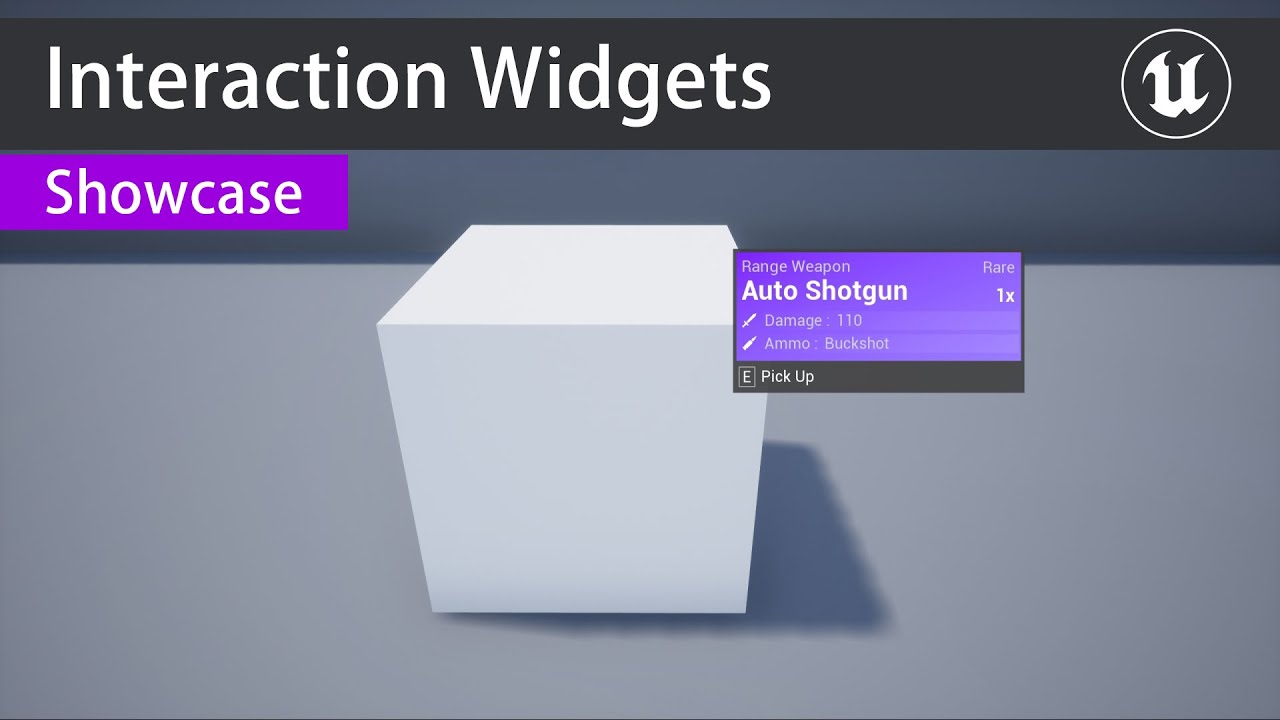
Hi, I want to implement a tooltip system so when you look at an item that is interactable and press a button it will pop up a tooltip/hint box in world like this
anyone know a tutorial I can follow to do this?
someone has a paid version https://www.youtube.com/watch?v=HgDM__gPo2k but I was looking for free if possible
 trim matrix
Cear Timer by Function Name clears the timer which was returned by method Set Timer by Function name?
 gusty shuttle
Anyone know what this icon means? Happens after I smash a destructable
devout shore
exploding primitives, teapot, and torus
perhapse its something to do with expected gibs that would be produced?
gusty shuttle
Could be, happens if I smashy smashy really quick
 gusty willow
how to use the Facebook online subsystem?
alpine halo
Hi, I want to implement a tooltip system so when you look at an item that is interactable and press a button it will pop up a tooltip/hint box in world like this
@devout shore attach widget component to your item, when you overlap with it set widget visibility to true and when you end overlap then set widget visibility to false.
 thin apex
i have this behaviour tree and the selectNextWaypoint and move to work ok but it stops after going into SelectRandAnim (select random animation)
the SelectRandAnim is a BP derived form BTTank blueprint Base and thats me trying to put animation on a UE4_AspCharacter BP which has a custom AI Component
alpine halo
its movable
@gray dune you have to add rotation like +10 not like 10
Could be, happens if I smashy smashy really quick
@gusty shuttle is it apex destruction?
 fierce birch
can anyone help me with setting up a player controller?
i made a game mode for the character and added the player controller to it but nothings working
 flat raft
what do you mean nothing is working
Put a Print in the BeginPlay for the Character and Controller.
 gray dune
@alpine halo tried bigger numbers too, no difference
alpine halo
Make sure to refresh material after doing that
 pulsar arrow
Hi people, I want to randomly choose between the items in the list. However, each must have a weight. Do you have any practical ideas on how I can do this?
Let me put it this way
20% chance of coming red
40% chance of coming blue
40% chance of coming yellow
This way, I will weight each element and one of them will be randomly selected based on that weight.
obsidian juniper
@gray dune rotate y instad of x and dont rotate on tick as that may rotate it faster than you can see ^^
 terse raft
@pulsar arrow
A pretty easy way to brute force that is to populate an array with X amount of Red ,Blue, and Yellow, then randomly choose an integer off the length of the array
pulsar arrow
Great idea
terse raft
So for example you have 10 array slots, 2 goes to red, 4 to blue, and 4 to yellow
obsidian juniper
Hi people, I want to randomly choose between the items in the list. However, each must have a weight. Do you have any practical ideas on how I can do this?
Let me put it this way
20% chance of coming red
40% chance of coming blue
40% chance of coming yellow
This way, I will weight each element and one of them will be randomly selected based on that weight.
@pulsar arrow yes, you can implement a weighted random algorithm, it's actually quite simple, you can google it
pulsar arrow
I'll go for this, I can create a simple function for this and use it on many cases. Thank you.
alpine halo
Hi people, I want to randomly choose between the items in the list. However, each must have a weight. Do you have any practical ideas on how I can do this?
Let me put it this way
20% chance of coming red
40% chance of coming blue
40% chance of coming yellow
This way, I will weight each element and one of them will be randomly selected based on that weight.
@pulsar arrow random bool with weight?
terse raft
Thorium's method also works, mine is more of a brute thing. I would recommend his over mind due to scalability
obsidian juniper
the brute thing is actually more efficient if you pick many times from the same table
alpine halo
obsidian juniper
if you have a new table (different weights) each time, the algo is more efficient
terse raft
^
pulsar arrow
Yeah, I have animals and I want them to randomly act, so each one has different weights in their behaviours, so I should look for algorithm, hope I can find. Thanks :D
terse raft
Yea I would for sure say look into his Algorithm
alpine halo
Yea
gusty shuttle
@alpine halo Yes, apex destruction is enabled in the plugins my man
alpine halo
But there is also a comment that makes sense
@pulsar arrow i think you can cheat here if you want. Though there's less chance of picking the last obj in array. You can do is make array of the animals which are returning true in 'random bool by weight' and than select again from them. Do this recursively until you get one
obsidian juniper
yeah, that doesnt look right
the real algo subtracts the weight on each iteration
one moment

Stack Overflow
I'm trying to implement a weighted random numbers. I'm currently just banging my head against the wall and cannot figure this out.
In my project (Hold'em hand-ranges, subjective all-in equity anal...
you need to translate it to blueprint, but it's fairly simple
and that does look like it has the same problem but it doesnt, you can make a test function to check if the weights come out correctly
just pick a few hundred times and collect the results then print out how often each element was picked and see if it lines up with your expectations
pulsar arrow
Just trying to understand how can I implement it in blueprints. 😀
I have found something in similar thread
https://www.reddit.com/r/unrealengine/comments/336km9/weighting_random_numbers_in_blueprint/
This is the code: https://blueprintue.com/blueprint/9Pc0rj8g/
reddit
2 votes and 5 comments so far on Reddit
BlueprintUE
 meager spade
@pulsar arrow Most scalable way I can think of is have a map where each color is assigned a number of 20, 40, 40 and then generate a random number between 1-100 and subtract the weight from the random number, if it's >= 0 you chose that color, else you continue to subtract
 jovial elm
Is there a way to spawn target points dynamically with user input? Like the player sets a waypoint at an arbitrary location and the character then moves to that waypoint.
 dapper kiln
I'm having a brain fart. How do you calculate the location between two vectors? I need the halfway vector between the two locations.
 sick galleon
(v1 + v2) * 0.5
 surreal peak
@pulsar arrow Pro-Tip: Function Inputs are already Local Variables.
sick galleon
When you double click on a bp function, you open that bp function, but Is there a shortcut to "go back" to where you were ?
pulsar arrow
Thanks for the tip! I'm usually changing input names too often so it causes problems, for that reason I don't prefer using inputs as a local variable. Hope they will fix it one day. 😀
dapper kiln
@sick galleon 🤦♂️ Thanks 🙂 for some reason I kept wanting to subtract them. It's been one of those days
maiden wadi
@dapper kiln Subtracting will get you a lengthened facing vector from the second to the first.
 green eagle
How can you make a weapon attack tell what part of the player it hit? It seems the capsule is in the way and if you change the capsule collisions it makes the player fall through the world. Help pleaseeee. Wanna make a sneak/pickpocket mechanic and a body hit detection for segmented armor.
maiden wadi
@green eagle You have quite a few options. The simplest would possibly be to change your character's mesh type from Pawn to something else. Maybe make a separate channel if it's a rather involved system. That way your weapon can ignore pawn which would ignore the capsule, but detect/hit the player's mesh.
obsidian juniper
you make the capsule not block physics objects and the mesh block physics objects
then you trace for physics object
that should work
or even set up a special trace channel for it
 heady terrace
I have a question about feet planting. I tried Two Bone IK Nodes (like in the Content Examples demo), but I encountered a lot of bugs. I think a Leg IK Node will work better. I just do not know where to place ik_foot_l or ik_foot_r, or how to calculate the correct alpha value. Can anyone provide some help?
Edit: should I be asking this in the animation channel? It's weird because it's half animation, half blueprints.
trim matrix
@pulsar arrow if you would do something like this, it would be it I suppose:
also what you can do is promote an array with a number of times the var which is its chance and then choose a random index from the array
like a raffle
actually the method you posted is better
well wouldnt it be that if you have a small value first in the array with that method that its theoretical chance to be picked is lower than if you had it last in the array?
obsidian juniper
well wouldnt it be that if you have a small value first in the array with that method that its theoretical chance to be picked is lower than if you had it last in the array?
@trim matrix No it actually does not. It does not test any element individually, it looks like it but the total weight and subtracting from it every iteration creates a relationship. It's a little bit counter intuitive. When i implemented it in C++, i tried it with a test function. Ran it a couple thousand times and collected the number of picks for each element. And yeah it was correct.
It also doesnt matters how they are ordered inside the array.
trim matrix
actually trying that rn in python lol
that's the amount of times the lowest got picked when the array was [0.2, 0.4, 0.4], something's odd
first was 100k iterations, other 3 were 1m
yeah i did a mistake
well it's about 20% no matter if first or last index
obsidian juniper
yeah, i needed to test it as well to believe it, especially because i am bad at math ^^
but i use this function a lot in my project
trim matrix
ah ofc i got it now
 grave relic
Anyone that can help me, im trying to get an AI to follow the player while it is in range, but hold the acceptable distance at the same time. So when the player moves towards the AI it will back of to hold the distance.
 twilit heath
move to actor, and enable continuous goal tracking
grave relic
Sorry but how do i do that? @twilit heath 😊
twilit heath
use MoveTOActor node instead of AIMoveTO
 prime drum
Is it possible to use constraints without using physics in a blueprint class?
grave relic
This is the only MoveToActor i could find, in 4.25
@twilit heath Im working in character class but cant find it
 obsidian folio
In my blueprint, I have a vending machine that has box collisions overtop of the buttons. I am trying to get my character to detect those buttons with using the visibility channel. I can detect the vending machine just fine and am using a interface to start the script inside of the vending machine blueprint.
What I can't get to work is having it trace that the visibility channel has actually detected the box collisions.
I have the collision set up on the box collisions exactly how I have for my items in the world. But when I go to debug it, it says that "None" is detected. Here is what I have.
It's just set up this way until I can confirm that it is detecting the box collisions.
twilit heath
@grave relic function requires an AIController reference
grave relic
@twilit heath Really sry to bother you so much with question, kinda new to this, but dont know how to enable continous goal tracking tryed both move to actor and move to location
twilit heath
they removed the checkbox in recent versions it seems, its enabled by default
but with that, if your AI stops near your player and your player moves again
AI will continue following
without needing another moveto input
grave relic
Yeah manage to get it to do that, but want it to maintain the distance between it and the player, you have any ide how i can do that? 🤔 @twilit heath
trim matrix
ok sorry
flat raft
What's up with this ? My Custom Static Mesh Component doesn't have any OverlapEvents. When I add it to a actor, then I see the Events. How do I get Events as a component ?
 worthy frost
@flat raft those are delegates you see in the actor
in your component you just right click the event graph and type in
flat raft
type what?
gusty willow
@flat raft what this do is that whenever there a overlap this event is going to run as many times as you call it.
cool
 dense mica
Why doesnt SceneCapture2D show my actor?
 ripe rose
can I have a parent BP call a function or event that is handled differently by each child BP?
i want them all to add an impulse on event hit, but the way the impulse is calculated is different for each child
it'd be nice if in the exec chain of the parent, it can say "calculate impulse" and then the child bp does the calculation and returns the value for the parent BP to use for the rest of the chain
trim matrix
@ripe rose you can override the function
 vast lion
why are my breakpoints doing this?
No matter what for loop I put it in I get that
In fact, none of my BP for loops seem to be running...
Wtf
Yeah not a single BP for loop works........................
WHY
How tf
 coarse marten
Asking because im not really sure if i can do this but trying to create a hitbox system in blueprints, is it possible to setup a component tha
Is it possible to create a sphere capsule that already has a pre-built thing that it does on like, hit for example?
vast lion
Ok, so I renamed my project but now every single BP has 'none' for a parent??? Why?
 sleek river
It probably got messed up. You'll have to reparent the actors. @vast lion
Or revert your changes.
 cosmic lagoon
I have a player inside a box, when the box rotates, the player clips out of the box....any ideas why?
rotating the box with playerstart inside it. when it turns like 100 something degrees, the player clips out of the wall
flat raft
@cosmic lagoon what would you like to happen?
coarse marten
Oh i meant like @sleek river i want to set up something similar to the standard capsules, but dont want to have to set up the same event every single time, its just an event that's already sorted like a parented function
trying to make a hitbox type thing where if a bullet hits a certain capsule it will do a fixed amount of damage depending on a enum it has. So I could adapt it to things that are not purely humanoid. Sorry i should of explained more 
flat raft
@coarse marten subclass the capsule, set it up to do whatever you want, then add it wherever you want. I did that here..https://youtu.be/bBkuf6YY-w0

If that's what you're asking for
In the vid, I subclass the static mesh component, added features I wanted, then applied it.
coarse marten
AHHHH
I understand now.
Thank you very much dude. @flat raft
Ah wait, it seems like you cant do it directly with the spherecomponent 🤔
flat raft
A sphere component is just a static mesh with a sphere mesh , ya?
coarse marten
oh sorry uh.. i need a Sphere Collision Component
flat raft
hmmm...
cosmic lagoon
@flat raft I'd like the players to remain inside the box when it rotates. right now they seem to clip through when the box rotates
flat raft
Type Sphere.. you'll get TriggerSphere.. @coarse marten
coarse marten
i saw that but they dont seem to appear when i try and select it as a component in the enemy actor
flat raft
Maybe it's set to hidden or something.
You could just use a StaticMesh like I did, and set it to hidden
same effect.
@cosmic lagoon you want them locked in place, or to slam into the wall when it rotates ?
 round plume
I want to replicate input.. change of url and launch url in webrowser widget, but do you guys have any idea?
 zealous moth
anyone has any experience with the PerInstanceRandom node in materials? I'd like to clamp it to specific values but i have no clue how
flat raft
@cosmic lagoon https://youtu.be/pwRDWEkhQPk

Using 'Add Child Actor Component' to attach and detach.
Try, Attach Actor to Component
Actor is your Character, Component would be your floor...or anything that's moving with the room.
@zealous moth is there a RandRange node in there? or Random Int in Range.. something like that ?
or just Random
zealous moth
nope
flat raft
and the error is....
brittle fiber
good day
 quasi frost
Hey @flat raft , thanks again for the help yesterday. So I am having a slight issue with the movement event. It is currently only affecting the last summoned card. So if I summon a goblin, and then another card only the last played card moves on turn end. My guess is I somehow need to either move ALL children or trap the movement command in a loop or something? Just wondering if you had any thoughts on the matter before I started hammering out on it.
quasi frost
So when I end the turn ALL cards that have been summoned to the field should move, however only the last summoned card moves.
flat raft
I don't understand what all cards summoned to the field is
what are the cards?
what do they represent ?
quasi frost
These guys.
flat raft
They are the cards?
quasi frost
Yes I guess we can just call them the summoned characters to make it easier
flat raft
Ok, then when you end your turn, what should they do ?
quasi frost
They should all be moving, but currently only the last summoned character moves. The others for some reason do not fire the movement command
quasi frost
I don't know if you remember but you helped me put that code together last night lol.
quasi frost
Correct
flat raft
so you have 3 characters on the field. Are they stored in a array?
quasi frost
No, I thought about that but then I also thought that because they are all children of the same parent shouldn't there be a way to just tell all children to run this movement command?
flat raft
You need a reference to them.
quasi frost
Something like this can't be used?
flat raft
either a array, or interface call, or event dispatch
Ok, step 1... are you getting all the children? does it print 3 for length ?
Also... I don't think that's the correct node, but we can check later.
quasi frost
Nope doesn't work at all. Okay so on summon I need to add this character to an array? So on beingplay in the MasterCard_Character Create summoned array and then add self to array?
flat raft
I would say on the controller, make a Summoned Array
When you spawn a character, add it to that array.
Then on End Turn, loop through that array, and call the movement function
quasi frost
Hmm how should I connect this? Do I put an add node on the left connector and then connect a reference directly to the add node?
flat raft
not like that
 grim lantern
I'm getting attempted to access index 0 from array CallFunc_Map_keys_keys of length 0 and it only shows the function, but how do I know which node it was?
flat raft
In your character zarz, getplayercontroller, cast to your playercontroller, get summoned array
@grim lantern sorry, never saw that error before. Try googling ?
grim lantern
didn't find anything usefull, i mean i knew which node it could be, but the description wasn't usefull
 whole rose
it means you're trying to access an array in the function, that has nothing in it.
so, look in the function for a Get node.
 earnest tangle
@grim lantern that sounds like you're using a Map and trying to read its keys but there's nothing in the map
grim lantern
That I know, but I wish it will tell which Node it is, I mean i figured it out, but I had many array's to go an check
flat raft
It's not in the output error list?
whole rose
blueprint is a PITA to debug. lol
flat raft
PITA?
whole rose
pain in the ass
flat raft
ahhh lol
grim lantern
I thought Pita is for eating, but yeah it only would give the CallFunc_Map_Keys_Keys as being the caller.
quasi frost
@flat raft By in character do you mean the card character or my actual player character? I assume you mean card character?
cosmic lagoon
@flat raft slam in to the wall yes.
thank you very much for that video i will take a look. now whenever I start the game the player instantly falls through....something is going on.
quasi frost
@flat raft Is this what you had in mind?
quasi frost
@flat raft So what is the best way to call this array on movement? I have it set up and it is working according to the print string. Just not sure how to say like move all of these in this array
flat raft
For Each
cosmic lagoon
@flat raft I've checked collision it is set to block. when the box rotates my character starts to slide and seems to land for a bit until it clips right through it....hmmm maybe i will try adding box collision
flat raft
when you hit End Turn, For Each Loop, loop through your cards, and call the movement function on them @quasi frost
quasi frost
I feel like I am probably missing a step between array element and calling movement right?
cosmic lagoon
any idea why those other sides turned blue? when i run the game the walls are completely gone lol....
flat raft
Maybe your walls are falling through the ground?
Your walls are not simulating physics, ya?
Oh they are..
cosmic lagoon
oh good god
flat raft
Turn that off
flat raft
Maybe they collided with the floor and got saved?
So...well.. what are you doing?
you have a blueprint. Looks like it has child actors
and some boxes
cosmic lagoon
im trying to create a box arena with a player inside it . the box rotates
flat raft
ok, so how come you added child actors ?
cosmic lagoon
so they all rotate?
cosmic lagoon
i think i dragged and dropped them and it got turned to actors!
flat raft
The walls are all static mesh, ya?
cosmic lagoon
yes
flat raft
Ok, so try this... make a new actor bp, call it BP_Arena_02
add 6 static mesh components
for each component add ur mesh
quasi frost
@flat raft The end turn function is on the end turn button widget. It fires off events from both the player character and to the cardcharacter. So I could do this either in the widget, in my player character, or in my card character.
cosmic lagoon
okay so basically i need to redo this....
flat raft
@cosmic lagoon it will be cleaner, and more manageable. and easier to keep track of the collisions
cosmic lagoon
I made the mistake of dragging all the meshes into the BP_Arena....and the walls all turned into separate actors
flat raft
@quasi frost from widget. Basically the thing that's calling, should be the thing that's firing. So, I wouldn't use ur Character, cus it has nothing to do with the card moving. The cards can't call themselves, so all you have left is the Widget, which is perfect. Well.. not perfect... but that's what you have setup. The better way is to have functions on your controller. End Turn function should be on your controller, and the Wiget calls that. @quasi frost
@cosmic lagoon ahh I see.
It's easier to drag, but then you have to fight with the collisions of each child actor.
and there might be self collisions also.
better to make it yourself by creating the static mesh components, and placing the mesh manually.
cosmic lagoon
@flat raft thank you I think the walls are functioning normally now. however I notice that the rotation seems to jerk back into original position. is this because of my blueprint logic or timeline?
heres the timeline I am using to rotate on y axis
perhaps I need to adjust this timeline...I will give that a go that might explain why it jerks
oh I see.....it goes to 90 degrees only not hte full way around....I can see earlier that this jerking movement caused my players to clip through...
lol okay fixed it....setting it to 360 obviously works now
cosmic lagoon
amazing...I fixed it now 😄
quasi frost
@flat raft So here I should do what exactly? Sorry just a bit confused. Do I attach the array element to the movement event?
flat raft
Array Element to Target of Movement
cosmic lagoon
thanks Thorbie!
flat raft
Oh gezzz.. it's like the movie, The Cube
grim lantern
How can i see asset's that are still being referened but has been deleted?
cosmic lagoon
im gonna have to see that movie now for inspiration 😄
grim lantern
Can i clear references of deleted assets?
flat raft
sure.. why keep them ?
you mean deleted from content browser?
if you have assets referenced, and you delete them from the content browser, then the bp will complain when you compile. @grim lantern
grim lantern
But how can i figure out which blueprint the complain is coming from (this happens btw on startup)
quasi frost
@flat raft This print string is never printed. So for some reason this loop body is failing
flat raft
In the output window, it will tell you where the complain is coming from
earnest tangle
@quasi frost the loop body can't really "fail", if it never prints then your array is empty
flat raft
Check the length of the array
did you hookup the Onbeginplay on the card to add themselves to the array
@quasi frost
quasi frost
This is printing the correct length
But this isnt
So it is adding to the array inside of the mastercard character but it doesn't seem to be getting the correct amount in the widget
quasi frost
This is the one in the widget
 gritty elm
i have .mp4 videos cut-scenes, what is the best way to show these videos cutscenes inside ue4?
flat raft
@quasi frost ur get player controller cast doesn't fail, ya? On construction
and it's the construction of the End Turn button?
quasi frost
It does not fail on construction. I am using a reference on the on clicked event, so it should be already constructed by that point right?
quasi frost
yes I spawned before I tested
I think I know what is happening
no nvm that wasnt it
flat raft
You gotta follow the array and see why it's not reaching the widget
Actually.. try this..
Make a function in the player controller , call it check array or something
And just have a print in there that prints hello
then call that function from the End Turn button, see if it prints
grave relic
Anyone that can help me? Trying to get the AI to keep the Acceptence distance as the player walks towards it, but cant manage to figure it out i think im on the right track with actorendoverlap and seting the acceptence radius.
quasi frost
@flat raft Sorry I take it back, this is not adding to the array.
flat raft
Looks correct
quasi frost
it is printing 0 for length no matter how many I summon
flat raft
And you are spawning MasterCard_Character ?
quasi frost
I am spawning its children.
quasi frost
So in each child actor on begin play I add this part?
quasi frost
Should I remove this from the parent or keep it there as well?
flat raft
Remove the Add only
quasi frost
So this on parent
flat raft
In the child, onbeginplay, GetSummonedArray, Add self
quasi frost
Is there a special way to grab that from the parent? Like do I cast to it or?
flat raft
Naaa, no cast... just get
Make sure it is expose on spawn and editiable
When you spawn 3, the array length should print 3
quasi frost
Do I cast this to the player controller?
quasi frost
Okay it is set like this in each child
quasi frost
Hmm still printing 0
quasi frost
yes
flat raft
Can I see the controller bp ?
quasi frost
 rancid wolf
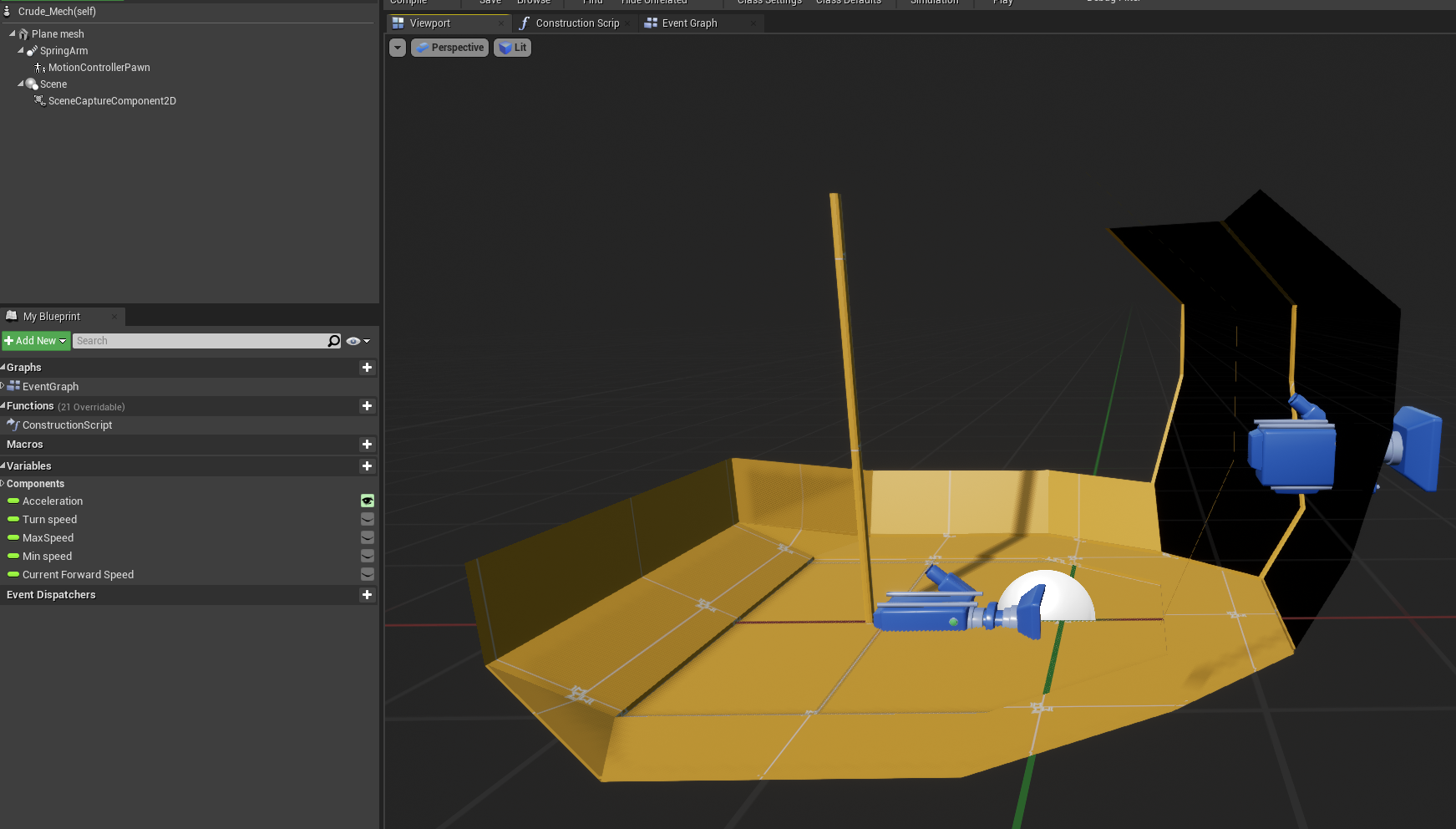
I need some help as I've become a bit stumped by a problem I'm having.
I'm making a small VR project and have my motion controller pawn (ie headset and hands) inside a small cockpit that moves around the level,
I've successfully made the cockpit move forward and strafe using AddActorLocalOffset, when the cockpit moves the pawn stays inside the cockpit relative to its position. however, as soon as I try to rotate the cockpit with the addActorLocalRotation the cockpit rotates but the player/motion controller pawn stays where it is instead of moving and rotating relative to its position inside the cockpit..
I want the players playspace to be inside the cockpit and allow them to freely walk around irl while the cockpit moves.
im not sure why this is or how i can fix it wondering if anyone has any ideas ?
 flat raft
@quasi frost hmmm... weird..
So your card child sets itself in the array on spawn.
But the controller still says 0
devout shore
@alpine halo , still new to unreal, is there an example I could follow ?
flat raft
you have 2 different arrays
One is SummonedCreatureArray, other is SummonedCreatureArrayRef?
quasi frost
Summoned creature array ref is the variable in the mastercard character and in the controller it is called summoned creatures array.
flat raft
Let's try just a direct set your the controller from the child
in ur child, beginplay get player controller, cast, get the array in the controller , add self
delete it from the master
quasi frost
delete which thing? the entire reference?
quasi frost
This
flat raft
Yup
There seems to be a disconnect somewhere. The child isn't getting through to the player controller with the parent.
We can just bypass the parent and go straight to the controller from the child.
lemme see the child bp when you done.
This has to work 😂
quasi frost
Yep! that works. Thanks again Thor lol
flat raft
lol
For whatever reason, the child wasn't getting to the controller through the parent
quasi frost
btw love that little guy from stargate :p "SUPREME commander"
quasi frost
yep they are all moving together on turn end
quasi frost
night, thanks again
flat raft
@rancid wolf try #virtual-reality might get a better response.
rancid wolf
okay, i just posted here because its more of a blueprint issue shrugs
alpine halo
@devout shore come in pm
green eagle
@maiden wadi @obsidian juniper thank you so much if you have time could you explain more o nthe "special trace channel" methodology? In the past I had found myself hitting walls with making custom collision identifiers. but maybe you have some direction on that, thanks again!
maiden wadi
@green eagle These are all pretty good reads. The first two are kind of similar, but useful. The last one is about creating a custom channel.
https://www.unrealengine.com/en-US/blog/collision-filtering
https://docs.unrealengine.com/en-US/Engine/Physics/Collision/Overview/index.html
https://docs.unrealengine.com/en-US/Engine/Physics/Collision/HowTo/AddCustomCollisionType/index.html
Unreal Engine
Choosing what collides is obviously very important, but it can be tricky, and it’s a problem that we have spent quite a while discussing while developing UE4. The system we have can seem a little complex at first, but it is very powerful and consistent, so I wanted to give a l...
An overview of how Collision and Collision Responses operate in Unreal Engine 4.
How To add a custom physics object channel to Unreal Engine 4.
 elfin inlet
Is this the best way to do this?
I feel like this would cause some spaghettification later on
green eagle
@maiden wadi thank you so much!
 elfin hazel
@elfin inlet There's a Set members in Struct node, which only modifies the selected members.
elfin inlet
@elfin inlet There's a Set members in Struct node, which only modifies the selected members.
@elfin hazel found it. Thanks!
 high ocean
Is there any way to properly test savegame without actually cooking the game? So far, it saves/loads perfectly but when I exit session, savegame object vars get emptied, even when I play in stand-alone.
Is the save system broken somewhere or is this normal and I need to cook the game to actually test it?
to be more precise, it does find the savegame and slot, but it's empty
 tight schooner
that doesn't happen for me, even via preview-in-editor (PIE)
the savegames work completely as expected in my case
You can search for a ".sav" file in your project folder. Saving a savegame generates one of those.
high ocean
@tight schooner I'll try that...it's weird tho - isn't it?! o.O
This is the code - maybe I'm missing something? I can't find anything wrong with it:
It's in GI
elfin inlet
Is there any way to properly test savegame without actually cooking the game? So far, it saves/loads perfectly but when I exit session, savegame object vars get emptied, even when I play in stand-alone.
Is the save system broken somewhere or is this normal and I need to cook the game to actually test it?
@high ocean i was just testing the same thing.
high ocean
@elfin inlet 😄
high ocean
It can't. GI is "God" it doesn't get destroyed during the session. And the system works. The only problem is that it doesn't save across play sessions - which is kinda' the point
high ocean
well it's the same code xD (except that you don't need to cast anything, the selected class is already "cast" for you.
elfin inlet
your saved slotname is connected to a variable
if its not "SAVETEST" the load code will not work
high ocean
ofc it's SAVETEST 😛 and the code itself works. The problem is between sessions. It may have something to do with some reparenting I did, i'll check it out 🙂
high ocean
yea, found it i'm a fkin idiot! 🤦♂️ This is how my vars look, so I messed up 😛 This is the set vars function, and I'm getting the vars from GI and setting them ...on GI 😆
Now, I have to remake it 🥳
I hate it when I mess up like this, retard-style
earnest tangle
that looks scary
I would recommend some Sequence and Reroute nodes if that's your actual BP graph :P
high ocean
ok, fixed it
@earnest tangle it's fairly simple actually, only lots of arrays - I kep track of the whole game all the time, so I can implemment an auto-save & quick-load/quick-save functions.
 cyan hornet
https://docs.unrealengine.com/en-US/Platforms/VR/DevelopVR/UsingTouchControllers/index.html So anybody know how to make the right arm pickup objects too
Showing you how to pick up and drop objects using Motion Controllers.
Since If you duplicate you get multiple custom events and etc
high ocean
so the GI holds this at all times, the game is heavily instanced so i need it anyway. So the save "system" for me was to just pass all GI info into the save container, total no-brainer, simple AF.
otherwise i would have organized it
cyan hornet
https://docs.unrealengine.com/en-US/Platforms/VR/DevelopVR/UsingTouchControllers/index.html So anybody know how to make the right arm pickup objects too
@cyan hornet bump
Showing you how to pick up and drop objects using Motion Controllers.
high ocean
@earnest tangle i know what u mean 😂 - realized OCD with it's imaginary "rules" was eating up too much of my time so I only kept a few of those, dropped the rest 🙂
ofc, after wasting a whole afternoon one day making my code "pretty"
earnest tangle
yeah I don't know what it is with BP's it really bothers me if they don't line up
I don't get that with anything else lol
high ocean
yea ik
i'd get that plugin tbh, but I don't trust plugins 😐 saw far too many problems with them when packing games so I never use any which aren't official UE & absolutely necessary
tight schooner
@cyan hornet Can't help you with your problem but have you tried #virtual-reality ?
cyan hornet
k
tight schooner
@high ocean IDK for sure but I assume stuff that just affects the functionality of the editor doesn't get packaged
high ocean
@tight schooner Ya, thanks, fixed it, i was stupid and bc of my design, I couldn't tell 😛 just passed in the wrong vars.
maiden wadi
@swift pewter To put a UTexture2D on a UImage, you need to use SetBrushFromTexture I believe.
maiden wadi
@tight schooner They'll do the same thing. In code they're practically the same. One is just calling the constructor manually, and the other is calling a function that creates a Vector4 and returns it.
 bitter mason
Hi there!
I am currently implementing a system where two players can carry an object of variable size and form together. However, I have difficulties getting the rotation right. What I currently try to do is subtract one player location from the other to get the vector between them, then do a GetRotationFromXVector on it and then somehow apply changes that happen on that rotation to the rotation of the carried object. But no matter how I try to do it, it never behaves correctly on all three axis. If I just apply the Rotation I got from the Vector between the two players the carried object behaves exactly like I want it to, with the exception, that the initial rotation of the object is of course complely lost. (so it basically does a rapid rotation when it's picked up. There just has to be a way to apply the changes from the player vector to the object, I just can't find it. Can someone give me a hint?
this gave me the least irritating results, but its not quite right
maiden wadi
@bitter mason Are you talking about something like having a player character on each side of a log, and having that log remain in place between them with the correct rotation between the two of them?
bitter mason
@maiden wadi yes, but the players are not restricted in their position when picking it up. the location of the object ist already calculated correctl
correctly
tight schooner
have you tried FindLookAtRotation?
to create the rotation between the two players. Not sure if that's where the issue lies but it does work on "all three" axes
 opaque blade
@bitter mason so both could stand on -X but still carry it ?
Assuming X is the shortest path?
bitter mason
@thin tulipny i am pretty sure the vector between the two players is already calculated correctly, since when i apply its rotation directly to the object it rotates correctly on all three axis with the exception that its initial rotationn is lost
@opaque blade well they can not stand in exactly the same position if thats whjat you mean
opaque blade
@bitter mason yeah but on the same side ?
bitter mason
yeah
maiden wadi
I'd honestly probably approach this with something more like physics constraints and attachment than writing out all of the potential bugs from mathing it.
opaque blade
I mean how is ir going to rotate then ?
bitter mason
I'd honestly probably approach this with something more like physics constraints and attachment than writing out all of the potential bugs from mathing it.
@maiden wadi but that's also creating lots of problems with networking 😄
opaque blade
Yeah would probably lead to thr best results just adding ad-hoc physic handles
bitter mason
or is it not?
maiden wadi
Nah. You can do some simple networking checks on clients. Let the clients 'simulate' it themselves for most of the heavy load, but replicate Location, Linear velocity, rotation and circular velocity at regular intervals and your clients should all end up relatively accurate.
If you're thoroughly concerned about bandwidth, you can always compress each of those values down to bytes. But that's more of a polish later if it works well.
bitter mason
the thing is it's currently not far off from behaving correctly
i am afraid of i being moved by physics makes me lose control
^^
(i am not restricting the player movement, since it would be a pain in the ass for testing alone)
maiden wadi
Well, if you're not concerned with confining player movement, or the fact that it's likely going to go through walls and such while moving. It looks like you just need to rotate it correctly.
In short, you could probably base it off of the first player that grabs it instead of both. Set it's location between the two of them, but only rotate it to face one player.
bitter mason
@maiden wadi do you happen to have a link to something someone has done where to players apply physics constraints to an object at the same time? i tried it and it was super glitchy
maiden wadi
I don't. But I could mess around with it for a bit.
bitter mason
Well, if you're not concerned with confining player movement, or the fact that it's likely going to go through walls and such while moving. It looks like you just need to rotate it correctly.
@maiden wadi I dont really see, why my approach does not allow for confining player movement or checking for collison
but i am kind of a noob to unreal
In short, you could probably base it off of the first player that grabs it instead of both. Set it's location between the two of them, but only rotate it to face one player.
@maiden wadi sounds doable
although i am not sure if it would solve my problem 🤔
maiden wadi
It doesn't really 'confine' you away from solving those problems, but you're going to need to do a lot of extra work for them. Starting with locking the player movement based on the object and checking it's movement every tick to see if it's running into something and ... It's a lot of extra work.
bitter mason
as far as i have tried it the physics constraint didnt confine player movement either. but maybe i have been using it wrong
do you know how i can confine player movement by a physics constraint? because if thats possible that would be awesome
i was thinking i would have to do it manually anyway
 thorn heron
you can limit player movement along a plane axis but idk about physics contraints
 dense sinew
when I stream my level into another level, all of its Static Meshes objects come with the component empty, has anyone been through this? is there any fix to it?
 short coral
Hey does someone know if i can make a player take damage from particles? The particles spawn during an animation.
whole rose
Use the particle collision callback
short coral
But i don't have a reference to the particle when it spawns , its being emitted through a timed particle effect
elfin inlet
yea, found it i'm a fkin idiot! 🤦♂️ This is how my vars look, so I messed up 😛 This is the set vars function, and I'm getting the vars from GI and setting them ...on GI 😆
Now, I have to remake it 🥳
@high ocean can you use structs?
this is a full blown spaget
high ocean
@elfin inlet Nope, I can't use structs since structs can't be safely modified once they're referenced anywhere in code, else the code may break, so yea. I would use structs if they wouldn't get bugged af
but i fixed it, was like 5 mins, it's fine, was just saying that i got confused in the spagetti
elfin inlet
@elfin inlet Nope, I can't use structs since structs can't be safely modified once they're referenced anywhere in code, else the code may break, so yea. I would use structs if they wouldn't get bugged af
@high ocean didn't know about this. Like adding vars to structs?
high ocean
You can test it: Make a struct, do stuff with it in 2-3 bps, go back to the struct (cos you forgot something, or you need more data into it - right?!) add the data you want extra (and if you wanna go hardcore and bug the shit out of it 100%, rearrange vars), compile, and if the engine doesn't crash, you may be fine, but not really.
Step 2: Try to access the vars in the struct and see how they don't return errors but they don't get read either, so you need to go through all bps that ref them and do a bunch of shenanigans like: remove the ref and recreate it, rename it, refresh all nodes using it etc; until it starts working again.
Now i have ~ 300 bps atm, so yea, that won't happen 🙂
high ocean
well, it depends, but structs r fucked. If you know what you are going to do and make them, take it easy, then you are fine. But if you extend your work for tens of bps and then decide you need to send another bool or whatever through the struct, you get that weird behavior.
A way around it - if you don't change the struct dynamically, is use a getter function inside a function library. That way, every time you change a struct, you only need to remake that particular function.
In my case that's impossible, I'm changing data in the structs all the time.
whole rose
@short coral you get the emitter, and bind to the delegate.
short coral
Thanks i'm trying to do that
maiden wadi
@swift pewter What kind of variable is it?
 fading parcel
hi, i have a question about sound at location, when i destroy my actor the sound is not destroyed with the actor, is there a workaround for this, thx
high ocean
@fading parcel if the sound is a component of the actor, it will get destroyed
fading parcel
@high ocean no its not it is spawn sound at location, maby i need to switch that to a component
high ocean
@fading parcel Well, ofc it isn't destroyed, the script can't know you want someone else (the sound) to be destroyed when you destroy some other actor. You either add it to actor as component, or send a message to the sound actor when the other actor gets destroyed
fading parcel
ok i think best add a audio comp, thx
high ocean
yea, i think that too 🙂 gl!
fading parcel
@high ocean much better now. time to debug the rest and pack my first game (ballgame)
 fallen glade
Does anyone know how to optimize a series of equally distanced points of a spline ?
I think i'll have to struggle with this for a while longer, I'm so confused haha, thanks @trim matrix
 serene thunder
Any idea why a cloth jacket on my character is still flying around after I apply AddActorWorldRotation to this actor with Teleport param checked?
 open stump
hey umm i am having some trouble with unreal i dont really know how to type it i just have to show can someone PM me so i can have some help
trim matrix
How can I make an object go up and down indefinitely(like an infinite loop)?
open stump
i was following a tutorial and i accidently hit the wrong thing and there was 2 tabs on both sides and i cant get them back
thank you 🙂
fickle blaze
this is such a mess
can anyone tell me what the heck is going on
I added so many checks and nothing fixes the error
so
how do fix?
okay how would I check if it's empty before access?
so length < 0?
thanks it worked
I really appreciate the help!
 idle brook
 small rose
Maybe you need more traces?
trim matrix
Hi together, looking for advise how to manage a chunk loading system. Currently I have a TMap with UStructs containing information to all chunks ever created in the world and a TMap with UStructs containing information to active loaded chunks. I’m looking for a better option, so I can reference the Chunks (UStructs) in the world TMap from the Active chunk, so when I like to change something in one chunk, the change is automatically saved in the world chunk. Would id be better to use a UObject as chunk and store a pointer to it in the active chunk ?
gritty elm
how to line trace from center of cross hair?
trying to raycast from cross hair center, but it still offset to wrong direction hit
code is very simple, i expect it to work, but it doesn't work
ok fixed now
green eagle
I broke something....
Help 😦
I tried restarting and doing some stuff and it still comes up...
not sure if it matters but that pops up at the 90% mark on loading.. and I recently restructured my data libraries but I did that all within the file directory utility built into UE4
Any one ever have that/this happen to a map?
then I get this message when I set the map back to the start up map.. which has me more confused.. cause its something someone else was working on...
maiden wadi
Someone had the same problem here. Not sure if it'll help. https://answers.unrealengine.com/questions/558059/failed-to-load-map-umap-appears-to-be-an-asset-fil.html
trim matrix
umm, depending on what a chunk is, can you not use level streaming or world composition?
@trim matrix The chunks basically contain information about procedural generated meshes. So the loading and unloading is done by a simple self made system. I think the build in solutions are not usable for that purpose.
 tranquil gorge
i want the elapsed time since button pressed so i can set my double tap only to be valid when its within that time period. any advice?
maiden wadi
@tranquil gorge I like macros for that personally. I made a double tap macro a while back. Just a sec.
maiden wadi
This was the macro itself. It ends up looking like this.
So the double tap only ever gets ran on the right side if you press it within the error tolerance time.
tranquil gorge
ok then just one sec to see if it all cheaks out
green eagle
@maiden wadi thanks again in hindsight I realized how lazy my googling was on that one.. You are a saint!
tranquil gorge
@maiden wadi ok so i coulnt find a way to get in the Set Float (by ref) you made can you explain that part briefly
nvm i actually was a lil bad with my googling too and was able to find the set value by ref node.
thankyou for all of your help 🙂 🙂 🙂
flat raft
what about it ? It is my base class @trim matrix
ya
yea, they are auto generated using Add Component.
I dont know how to name the component added
It's made through code.. F2 won't work
see the top image
to ?
I couldn't find a "name" node
or a rename
np
no one seems to know 😂
 rocky ice
Good day. I'm not savvy yet with bleuprint so bear with me. 🙏
How can I tell a Branch node if the game is fullscreen or not? I'm trying to see if I can GET the window actual status but I can't seem to find a node that gets that particular state I need. Is there a console command that can output the state of the screen when called or something else so that I can feed my Branch with a condition?
 keen goblet
@flat raft Perhaps make a var for each comp you want to add and set the appropriate one to the return value of AddComponent
flat raft
@keen goblet I don't understand.. So make a var after the Add Snappoint Component ?
keen goblet
@flat raft I mean if you want 6 SnappointComponents in your BP, give it 6 vars named Snappoint1 through Snappoint6. Then where you call AddSnappointComponent, use the return value to set the appropriate Snappoint variable
flat raft
the number of snappoints are variable from 1 to 20
ish
im trying to automate the process https://youtu.be/gEIG3VrA-E0
 keen goblet
Ah, ok. Hmm. Not sure, then.
 lunar flower
Hey guys!
Best way to convert distance to a rotation? eg. 1000 unreal units = 30 degrees rotation?
2000 unreal units = 60 degrees and so on
rocky ice
Aaah, that's clever 😃 though I needed to disable the context sensitive because that node didn't appear on a first search. Thanks man @trim matrix 👍
lunar flower
That easy, huh? Thanks 😅
 untold girder
SO. UMM.
Is it a bad idea to use a spring arm for a skeletal mesh that I want to rotate smoothly? Should I just program it?
Because the spring arm works really well.. And I feel like I'm committing some kind of cardinal sin
 magic garden
Did anyone watch Prototyping Sailing Mechanics, Part 2 | Inside Unreal?
The only part of this I really wanted to see was the basic enemy ship control and it was skipped over.. has anyone got any tutorials or blueprints on making a AI turn smoothly instead of snapping to the next way point? Every AI tutorial uses BP GetRandomReachablePointinRadius for roaming and the sudden change in direction looks bad. but I can't figure out how to get a smooth motion like he has.. I've seen questions from 2014 asking the same thing but can't find any answers.
 wet notch
Hey there everyone, having a bit of issue here where I'm receiving a Blueprint Runtime Error: "Accessed None trying to read property CastedCharacter". Blueprint: ThirdPerson_AnimBP Function: Execute Ubergraph Third Person Anim BP Graph: EventGraph Node: Move Rifle error after compiling. I've tried adding IsValid nodes, tried adding a delay, and I've scoured many online threads, but since I'm still very new to all of this, I don't really understand why I'm getting these errors. Anyone able to help me out with this?
 chrome orchid
how would i transport all players in a session to another map
 violet wagon
@wet notch when are you setting the "casted character" variable? The variable has to be set before you can use it, and if it hasn't been set before you try and use it then you will get that error.
wet notch
@violet wagon I'm pretty sure it's set in the CastToCharacter function (using the third person template).
 glacial sentinel
anyone know if it's possible to hide sub-blueprints from the outliner? just to make it look a little less cluttered?
alpine halo
@violet wagon I'm pretty sure it's set in the CastToCharacter function (using the third person template).
@wet notch you must have to set the 'casted character' in your AnimBP on 'event blueprint update animation' node
wet notch
Huh, I'll try that out
alpine halo
anyone know if it's possible to hide sub-blueprints from the outliner? just to make it look a little less cluttered?
@glacial sentinel if you want to hide from the world outliner then there's a little arrow left side of the parent blueprint
glacial sentinel
ah the collapse i knew, but I was thinking there was maybe a toggle inside the parent blueprint
thanks though
 wind kernel
How to view a public Variable in a Gamemode on the editor sidebar ?
alpine halo
@wind kernel you mean on the details panel?
wind kernel
yea.
like how you would select an object during gameplay and u could see its variables listed.
alpine halo
make the variable instance editible. click on the actor on your ue4 editor
wind kernel
Its not an actor . its a GameMode blueprint
cosmic lagoon
hi guys, how do I pause a timeline?
wind kernel
Connect the Whatever is going to Pause the time line to [Stop] socket in the Timeline
and inside the timeline . check the box for 'Use Last Keyframe'
tight schooner
I think you can execute the "stop" input pin and then "play" (not from start) will resume. I don't have UE4 open rn but it might be possible to control it with the component reference to the timeline. Like put the timeline's component reference on the event graph and see what functions you can call on it.
quasi frost
Hmm why would this only work once? The first time it calls it works, but after that it never seems to work again.
tight schooner
figure out which part of it doesn't work 😉
is the branch executing the False exec pin? Is Get All Actors Of Class index 0 returning a different actor? Has the "Attack" variable changed?
Are the casts failing?
Are you getting errors in the output log / message window?
If you put a breakpoint on the Branch node or somewhere, you can step through the execution of the blueprint and mouseover the data pins to see what's going on.
alpine halo
The get all actors with index 0 differs everytime it execute
It won't give the exact actor you want. It gives the first actor in the array and maybe that actor isn't the one you wanted
 marble tusk
Unless there's only one actor of that class the whole time
First thing I'd do is print the current index before the branch just to double check that it's what you want it to be when you want the branch to be true
quasi frost
There is only one actor of that class
quasi frost
I heard interesting things about it lol
flat raft
It's very Disney
Unlike Blueprints! Am i right? 😂
Gotta tie it in. Don't wanna go off topic lol
quasi frost
I posted something a few things up. Idk why it isn't working more than once. Really weird.
flat raft
Watch your OR
quasi frost
hmm?
flat raft
Maybe it's false
quasi frost
It shouldn't be. Once they get to the end they can't go any further up the index
flat raft
How many times you calling Movement? what should happen?
quasi frost
Once I hit the end turn button it fires the movement event once and it branches to either moving, or if they are at the end dealing damage
quasi frost
once he is at the end he deals damage to the enemy commander
flat raft
He's not doing that?
quasi frost
He does it the first time, after that he wont do damage anymore for some reason
flat raft
don't understand
quasi frost
same
quasi frost
then nothing, the turn is over.
quasi frost
It runs 1 time, but when I hit end turn again it doesn't deal damage anymore
flat raft
ok, so you hit EndTurn, he moves forward, deals damage. Then you hit End Turn again, he moves and doesn't do damage.
quasi frost
well he doesn't move anymore because the branch sees he is at the end and throws it to the damage branch
quasi frost
Well I checked that his attack is set, and it was. The hp seems to be set correctly. It's possible that this is a similar issue that we saw yesterday, maybe it has something to do with the children not working correctly?
flat raft
Well... it runs once.. so we know it works
you have a branch in your Movement, watch it as you play.
quasi frost
It is running the damage path, it prints the string at the end that says it is
flat raft
basically, you follow the flow, node by node, watching it. If it gives you what you expect , then move on. Keep following until you get something you didn't expect.
So, the second time, your player is at the end, you hit End Turn, the branch fires true? And prints?
quasi frost
correct
flat raft
So you expect the branch to be True, if it's true when you expect it to be, move onto the next node
So, print gets called, we know that works.
Next you have a GetAllChildren
Watch the OutActors
is the list of actors it gets what you expect?
quasi frost
Ok so I think I figured it out. The damage is going through, but the hp is getting reset. Just gotta figure out where that is happening
 jade zinc
Hi, how to round a value like 0.1 up to 1 (as integer) ?
quasi frost
You could clamp the min to 1 I guess
flat raft
Just ceil
 velvet viper
Yo, I know this is a super basic question but I can't seem to set it up smoothly in game - Essentially I want to recreate the SMPS4 stunts where the player holds down an input (i.e right) and the player rotates based on that axis input, and then on release (i.e bool for stunt = false) the player interps back to their original rotation
alpine halo
Yo, I know this is a super basic question but I can't seem to set it up smoothly in game - Essentially I want to recreate the SMPS4 stunts where the player holds down an input (i.e right) and the player rotates based on that axis input, and then on release (i.e bool for stunt = false) the player interps back to their original rotation
@velvet viper make a float value. make a custom event which multiply that float by let's say 1.5 and clamp this to your max value you desire. on release axis multiply that float to let's say 0.5 until you get your rotation. so clamp your original rotation. this is how it will go smoothly cuz the axis gonna call event every frame. and every frame the value will be multiply.
velvet viper
@alpine halo Thanks a bunch man! Can you go thru this in engine? Struggling to understand how that will rotate the character based on input
alpine halo
i've done that for smooth sprinting
wei
i'll send you
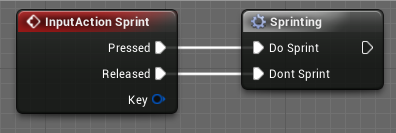
in here i've created a macro

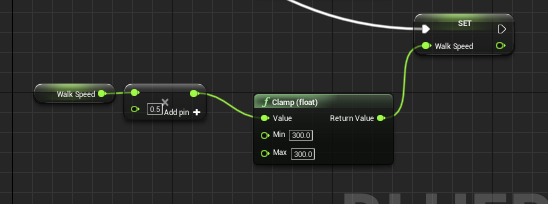
and these are my two nodes which connected to that macro
however in your case of axis input
check with branch like if axis value is not equal to 0 then increase rotation
and if its equal to 0 then decrease rotation
so by that you can simply do is finterpto(float)
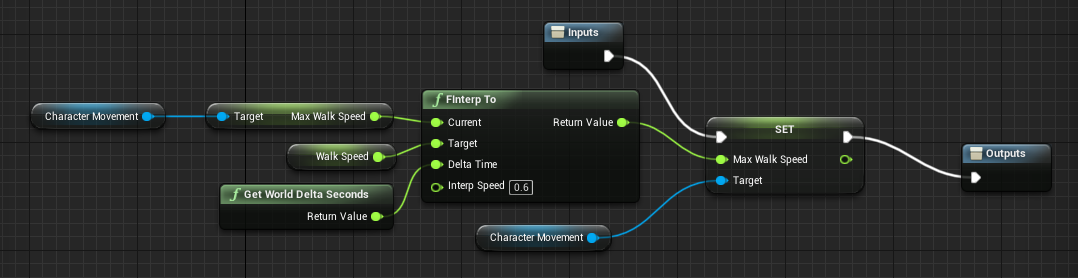
instead of walking
you've to set it for the character rotation
@velvet viper you can try something like this. let's say player's rotation will increase upto 90 degrees https://i.gyazo.com/b5c3a8d3c736d55276205b81c8cbbdef.png
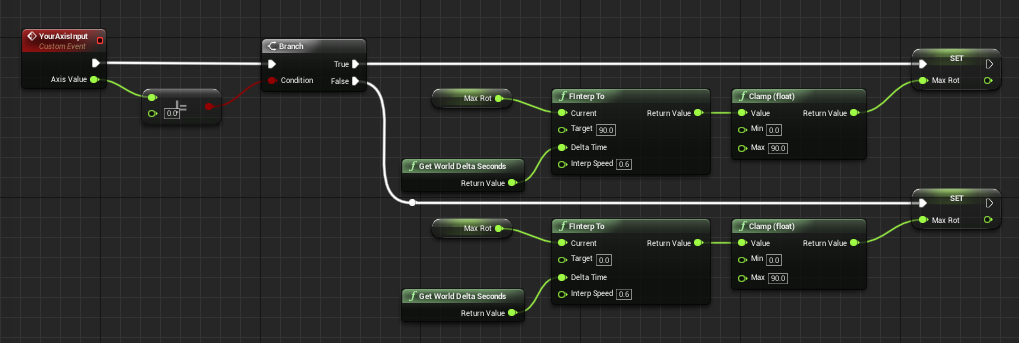
 echo parrot
fellas anybody here has experience with writing HLSL to custom node?
for some reason I can't write functions of any kind, which i assume it's because UE4 writes the custom expression like
MaterialFloat4 CustomExpression0( parameters)
{
your code
return 0;
}
So you are already inside a function, is there a way to write outside of the expression and then call the custom script?
 slate ledge
is there a glitch with the 3rd person template ? if i move the player start and player from where it is to my landscape which is underneath the platfor, it doesnt spawn me in, just gives me a weird stationary camera 😐
tight schooner
@echo parrot IDK how you would up at Blueprint, but you should ask #graphics (or #visual-fx or #niagara depending on what your application is) about your HLSL question lol
echo parrot
yeap okay
 empty current
Hello, I have a small question -
I am making an fpp driving level,
and I try to limit the view of the player in the car.
I made that code that is working, but only when the car is not turning.
When I turn the car, the view is still limited, but the limitation (clamped mouse axis) does not follow the rotation of the car/character inside the car. When I Untick Use pawn control rotation on my arm spring, the view stays where it has to stay, but I cant look in the car then...
I guess I have to clamp the spring arm but it doesnt seems to work, it only respond to location; (first time i use a spring arm)
tight schooner
@empty current If you have a component hierarchy that's like Car --> Springarm --> Camera
with rotation set to "relative" on each (see "transform" rollout in details panel of component)
then if you want to rotate the camera with the springarm lag, you have to rotate the springarm
I think that's how it works
you can clamp the rotation values going into the springarm as long as it's inheriting the car's rotation from the component it's attached to
and Unreal Engine will add the rotations along the hierarchy downward... Car to springarm to camera
sorry I can't help in detail. I'm doing something similar in my current project, but it's driven by thumbstick axes and I'm doing it in the pawn directly rather than in the controller BP
Just make sure you're setting relative rotations rather than world rotations
 cold raptor
Hello, i am trying to do a "paint" effect on objects. Materials have spheremask and via blueprint I set the sphere mask position and I adjust the radius over time to give the "growing paint" effect.
Here is how it looks
https://streamable.com/n3otve
I figure the problem is that when multiple objects are hit the timeline doesn't properly play? Is there another way to gradually change parameter over time?

as you can see 1 rock is painted half way, 2 have just a small dot and 2 are painted completely.
in blueprint i'm going through for loop for each hit and check if it hits the rocks, create a new instance and set the parameters
tight schooner
I've never done anything like what you're doing so I can't tell you how to make it work 😞 but in lieu of someone chiming in with the solution, I will say that the root of the problem is you can't really "loop" a timeline so that it multiplies itself to work on simultaneous things. The timeline is a single device on the graph, and as it's working on one target, what's probably happening is the target data pin changes while it's working.
cold raptor
Would lerp work?
tight schooner
I suppose I haven't wrapped my head around what your script does
what does "Radius" actually do inside the material?
cold raptor
it scales the spheremask on the material
cuz spheremask takes world position + another position as origin
and radius is how big the sphere is
and if you scale it you can get a fading effect
tight schooner
so if you're painting over multiple rocks, are they meant to receive the same Radius value in any given frame?
cold raptor
yes
tight schooner
I wonder if you could do it with a Material Parameter Collection... https://docs.unrealengine.com/en-US/Engine/Rendering/Materials/ParameterCollections/index.html
it lets materials read a global value set by BP
cold raptor
yeah but it has to start from 0 on each rock at the time it detects collision
if i do MPC it just has a set value that's gonna be the same for every material instance
tight schooner
oh ok, so each rock does have its own radius
another approach is to read the value of the radius off the rock. You can actually get parameters from dynamic material instances
cold raptor
ye ye in blueprint i create a new dynamic instance for each rock it hits
tight schooner
and then the BP script can read the current radius from whatever rock, increment it upward (with FInterpToConstant or w/e)
and set the new radius for that rock
I suppose you'd do it on tick (or on a looping timer, in which case you could increment it with a flat value instead of using a fancy World Delta Seconds solution)
cold raptor
ye on tick
empty current
thank you @tight schooner
tight schooner
np
cold raptor
@tight schooner what do you mean if i increment it with a flat value
so instead of delta seconds i can use just some float and i plug that into delta time?
empty current
just, i cant see the relative setting in detail panel of compoenent
i m not sure i get what you mean
tight schooner
@cold raptor Let's say you want to increment the value of something each second. Get the current value, add something to it, set the value. If you're doing it on tick, the framerate will affect how fast it goes, so you have to multiply the increment by World Delta Seconds. If you're doing it on a regular looping timer (Set Timer By Event / Function Name) then framerate doesn't matter and you can use a flat number (old value + 1 = new value)
empty current
i dont kn ow how to rotate the sprong amr; currently it set in the detail panel in camera settings as ''use pawn control rotaion' and inherit pitch yaw...
tight schooner
@empty current In the component detail rollout, go to Transform section and click on "Rotation". There will be a dropdown that says relative / world
Relative is default
tight schooner
yeah so if you set it to World, it won't follow the rotation of the car (or parent) at all
I don't know how to use controller BPs with pawns so I probably can't help much beyond that. In my game I just do a SetRelativeRotation on the springarm component.
And in that case, it's trivial to clamp or otherwise process the relative rotation values going into it
empty current
im trying, but i am so lost in ortations man
rotations
....
thank you for your time tho
and your help
empty current
no problem
 somber galleon
Can someone help me in general please
tight schooner
@somber galleon "Access none" means it doesn't exist. Like it didn't find an actor of class, or w/e.
g2g :3
empty current
if your script is working but you have this error you the node ''is valid''
if its not woriking
you have to be sure you are calling the actor colrrectly
 spring flax
Anim Blueprint related question: How can I get my Look At function to blend with an animation
empty current
@tight schooner I found my solution !
gritty elm
how to add spline points at runtime in ue4?
using spline component, i want to generate road using spline with one click
 ashen panther
how can I make the 3rd person camera smoother and stabilize? Whenever my character takes a step it jumps up immediately
 round basin
Hello, on my widgets when I click next to a button my cursor disappears, but I'd like it to be permanently displayed (to unlock it I have to do shift+F1)
Thanks !
cold raptor
@tight schooner Solved it! https://streamable.com/jgm7ga The FInterp worked. Figured I always have to have tick passing through it so i just made the rock into a BP and moved the logic there and just call a custom event that passes all the required parameters.

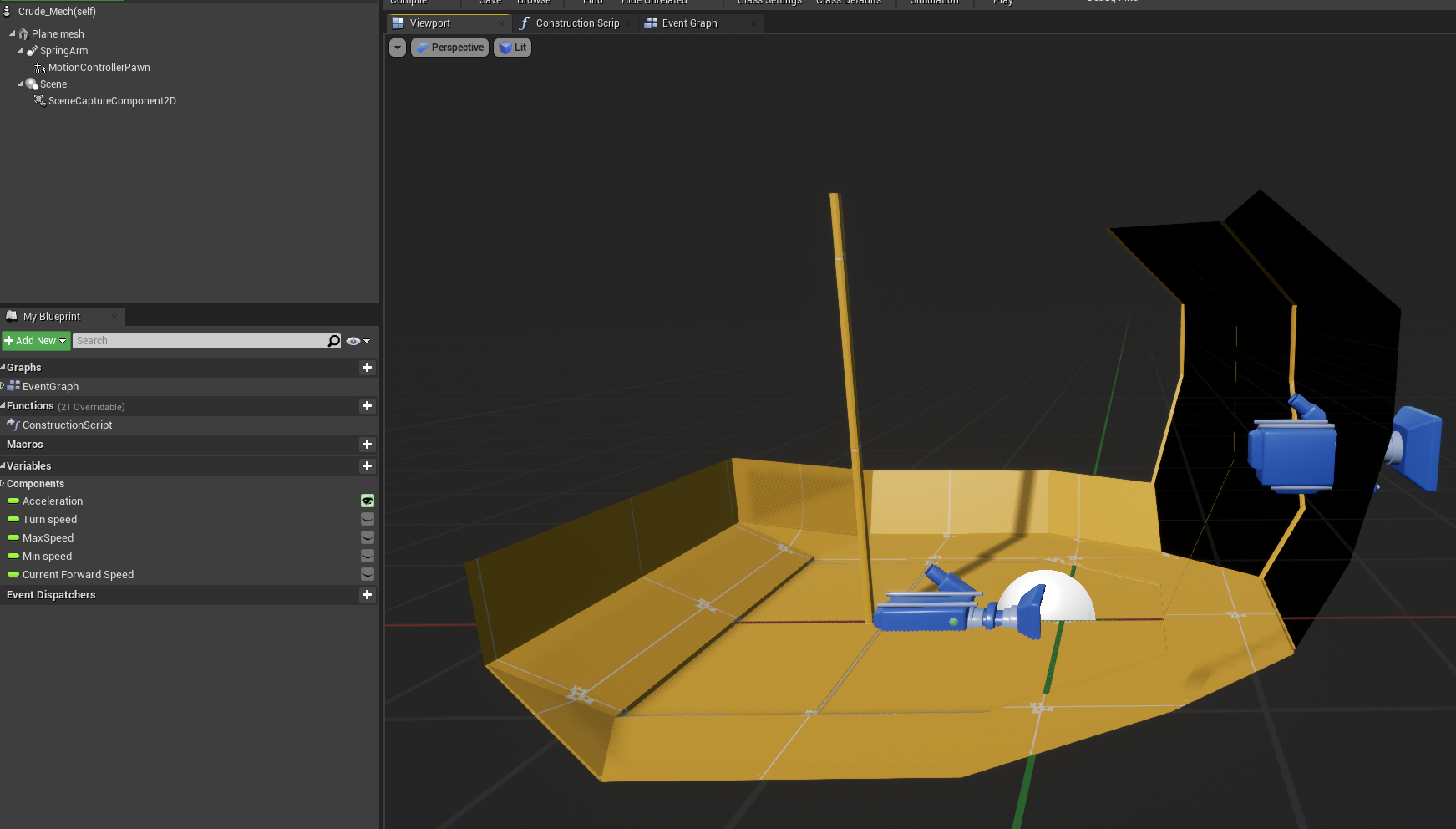
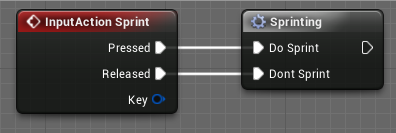

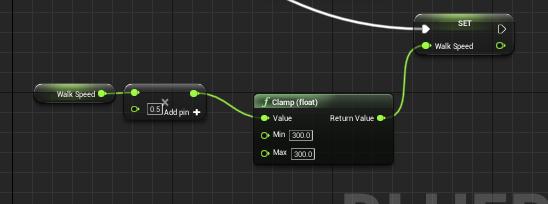
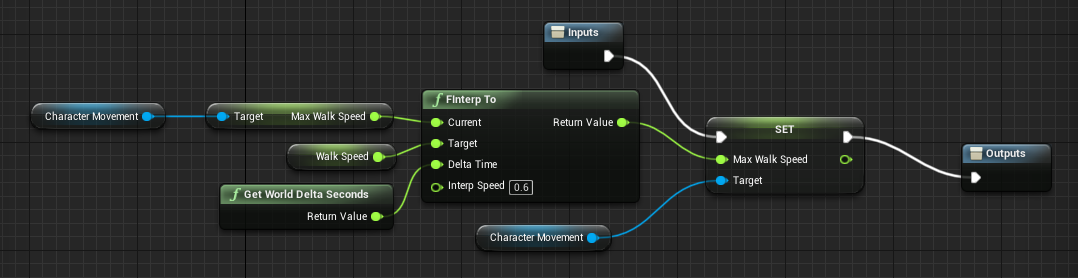
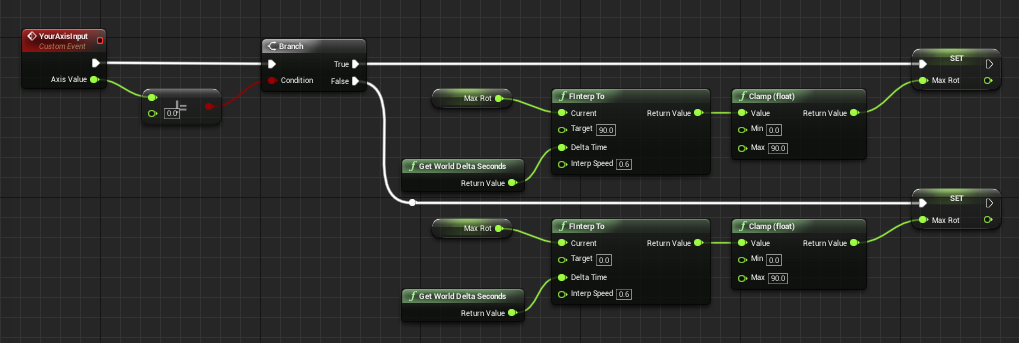 velvet viper
Alrighty, I've got my stunt rotation set up but I keep getting this really jarring snap back to my normal rotation on the end of event, anyone know how I can stop this/interp it out?
thin apex
actually im trying to see if the enemy is in a specific radius to me...i got my location as vector and enemy location as vector...idk how to get a differece or what
flat raft
@thin apex vector - vector
I used to use a large sphere collision around my player to detect if the enemy is in range.
 waxen trench
What controls whether things in a PlayerCameraManager render? I can't get this ball to render.
The sphere and parent component are set to be visible
But neither show up
flat raft
I haven't played with the player camera manager, but I assume the visibility of the parent component, affects the child.
Since your sphere is a child of the camera, and the camera is not visible, then the sphere is not visible.
keen goblet
@gritty elm There's a few functions you can use depending on what you need, like AddPoint and AddSplinePoint. Take a look under "Spline" in the action menu to see all the available functions
 cold dust
Hello guys, i'm a beginner or UE4 (2 month i work on), anyone can help me in private for add a "turn in place" for my character ? (i watch too much tutorial on yt but i use a special asset template of marketplace so i have some difficulties to add this animation on blueprint ...) Really thx in advance
flat raft
@paper quail are you having a animation issue, or talking to coins issue?
 visual lagoon
Why is this called more than three times?
alpine halo
@visual lagoon it should print like 0 1 2
visual lagoon
@alpine halo it prints like:
0 1 2 0 1 2 0 1 2 0 1 2
I agree with you, it should do what you say, but it prints out more, if i print out the object name ,it also prints more than 3 times...
alpine halo
is it actor or something that you places like 4 of it
visual lagoon
I placed that blueprint once in my world. It is an Actor
 severe kettle
Does unreal have a function that given an int, if that int is X (specified by the user) it can be "transformed" into Y (also specified by the user) and if it's not it does nothing to it?
 feral kiln
Hey guys, I have a situation in my level where I have a huge map and my camera is a top down camera and I can move it without moving my character, so I'm using level streaming and the problem that I have is when my camera moves out of my level streaming volume the part of the map where my character is in it disappears and my character fall down from that part of the map, how can I add my character to work as the camera ?
alpine halo
Hello, on my widgets when I click next to a button my cursor disappears, but I'd like it to be permanently displayed (to unlock it I have to do shift+F1)
Thanks !
@round basin it losses focus
you should try like get player controller and from that tick the show mouse curser
alpine halo
Does unreal have a function that given an int, if that int is X (specified by the user) it can be "transformed" into Y (also specified by the user) and if it's not it does nothing to it?
@severe kettle you mean unreal choose a random int and if its ==X then make X to Y and if not then do nothing?
visual lagoon
@severe kettle you can create your own function for that.
if(int.equals(X)) {
//Do Stuff here
} else {
//Not the same.
}
maiden wadi
Really depends on what he means by 'transform'.
gritty elm
i have big landscape, and i want to spawn a spline road according to the size of landscape
i mean the road that fits into landscape according to size of landscape dynamically
severe kettle
for a bit of context (maybe there's a better option to the one I want to do), I'm trying to make an inventory of 5 visible items (there can be more items) and have them rotate like a roulette (basically the monster hunter freedom unite's quest inventory).
I'm stuck at the part of rotating the items, the item with array index 0 would be the one in the middle, index 1 and 2 to the right, index arraylength-1 and arraylength-2 to the left.
I thought about adding +1 or -1 to rotate them, so if I rotate items once clockwise the middle one would now be the item with array index 1, but doing so will end up calling items with an index higher than the array length so I have to take any int higher than array length and turn it back to 0
If there's an easier method to make this rotating inventory please let me know, I'm running out of hope xD
visual lagoon
@severe kettle i dont completely get what you mean, but from your:
I thought about adding +1 or -1 to rotate them, so if I rotate items once clockwise the middle one would now be the item with array index 1, but doing so will end up calling items with an index higher than the array length so I have to take any int higher than array length and turn it back to 0
You can set every arrayindex +1, and the last one set to 0
kinda like:
for(int i = 0; i < array.length; i++) {
if(i!=array.length) {
array[0] +=1;
} else {
array[array.length] = 0;
}
but of course, you may have to store the values etc..
Im trying again^^
Why does this:
print out this:
I expect it to print out: 0 1 2. Not more. Why does it print it out several times? Im using a blueprint actor ONCE in my entire level/game