#blueprint
402296 messages · Page 525 of 403
 alpine halo
 flat raft
@flat raft I currently have it so in the coin blueprint, when variable "Is Maginatize" is true, it makes the coins magnetize to the player. It works when the variable is true or false by default. If true they warp, if false they dont. My problem is I cant get it so when the player picks up the magnet power up in game, it causes the "Is Maginatize" variable to switch to true and thus makes the coins magnetize to the player
@paper quail Try interface, or Event Dispatcher, or GetAllObjectOfClass. You need to talk to the coins somehow and tell them to activate.
 visual lagoon
My basic idea is to move the childs a bit, so i dont have to go through every item on its own in the editor (a lot more than in the screenshot will come).
So instead of editing them one by one, i wanted to get the child actors, check if they either have "left" or "right" and then move them a bit accordingly to their name of course.
however..if CS is being called multiple time WITHOUT moving the actor itself..thats weird for me
alpine halo
@flat raft how about making a collider and the coins which begin overlap will get attracted. ah just subway surfers thing
flat raft
@alpine halo he didn't say anything about the range. I assume all coins. 😂
alpine halo
ah that sounds like a cheat code
flat raft
But sure.. collider also.
alpine halo
@visual lagoon try do once
flat raft
@visual lagoon don't trust the construction script with Prints. A lot of things have to happen to get ur object on screen. To see the true value.. place your object in the world, wait for the prints to disappear, then move the object
you should then get 1 print.
visual lagoon
@alpine halo i tried "do once" in several places, didnt work
@flat raft thats the funny thing. i moved "LeftKracauer" (a sphere) away by 30cm on the x-axis and i could clearly see that it moved away waaaay too fast. I controlled it by not using the construction script and moving it in the blueprint itself.
But i could do everything in the "eveng begin" probably.
Gonna test that or otherwise do everything by hand
flat raft
K
 grave relic
Could anyone tell me how i get access to these values to set them in construction scrip?
flat raft
Anyone know how I can name these added components via construction script?
 astral granite
Guys, can you help me?
 brittle fiber
Cyber > around 500>more coming, copies of 1 SM... manually placed > 360/7/7 > thinking about trap mechanism.. what can i do to add it, lvl BP can hold it? ATM they are placed as SM actors within level.. Some of them will be placed near each other, and area will hold BP with Trigger and Audio volume, BP with board and text actors mb BP with some other thing
whats best sollution
there are 7 areas 360/7
and 7 layers > circles on pic
anything i can do to add logic withour redoing in BP
or I have to create BP with SM actor and else and replace it
biggest circle is scale 1 > scale .52> smallest circle, need to keep them like that > allows me to scale and transform animate them, preserving division of 360/7
 tardy hollow
I'm trying to pick up an object from a shelf and have it stick to my hand when I move around, but without colliding anywhere
I use a PhysicsHandle to grab it but then when I move around it pushes me with great force
Any idea how to solve that?
I move the grabbed object with a grab location which is a static mesh under my Mesh
 molten sapphire
how do you reference the player within the gamemode?
tardy hollow
I have a player start and my game mode have my player character class set as the default pawn class
Hmm I've just found a fix after 2h of messing with it
I deactivated the collision channel to pawns, so it now does not pushes my character anymore, in case anyone else was having the same issue!
 violet wagon
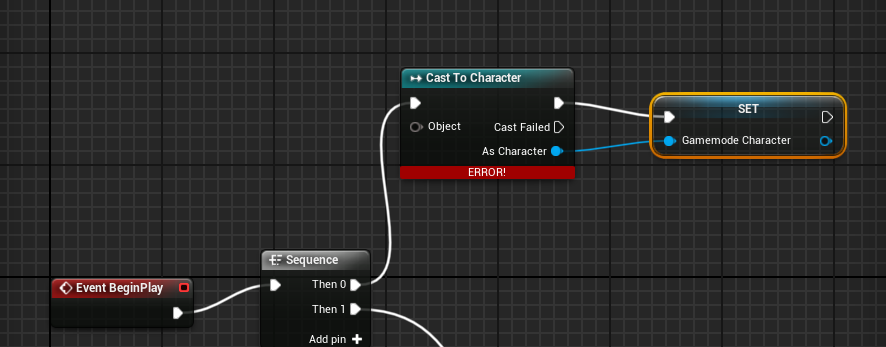
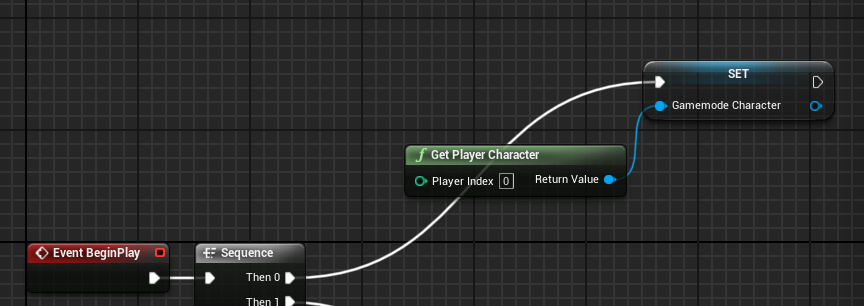
@molten sapphire off of the beginplay of the gamemode, cast to your character and promote it to a variable. Then use that variable to reference your player.
molten sapphire
is there any way to make multiple beginplay's?
tardy hollow
oh sorry @molten sapphire I though your previous question was for me
To reference the player within the gamemode, change that:
molten sapphire
no sorry, i started ue4 a couple days ago lol
tardy hollow
In World Settings
And to make multiple beginplay in blueprint, I guess you can point your beginplay to a sequence node and have multiple exec there
Like that:
molten sapphire
ahhh thanks
tardy hollow
Welcome!
molten sapphire
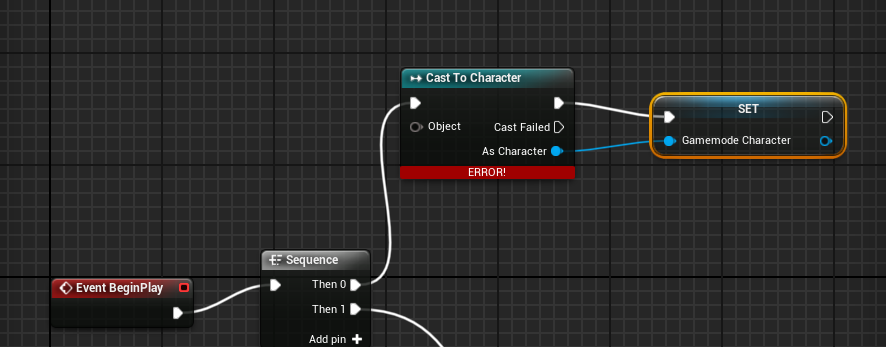 molten sapphire
https://i.gyazo.com/a5a4b1cd232e9b7923caf13b956e9878.png https://i.gyazo.com/a0927303349ee60fee9d0a5a58b3597d.png
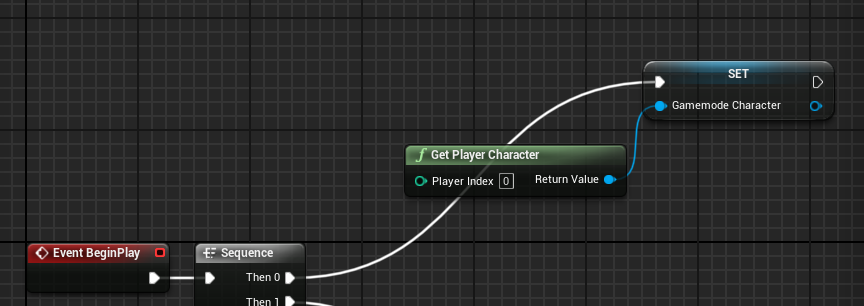
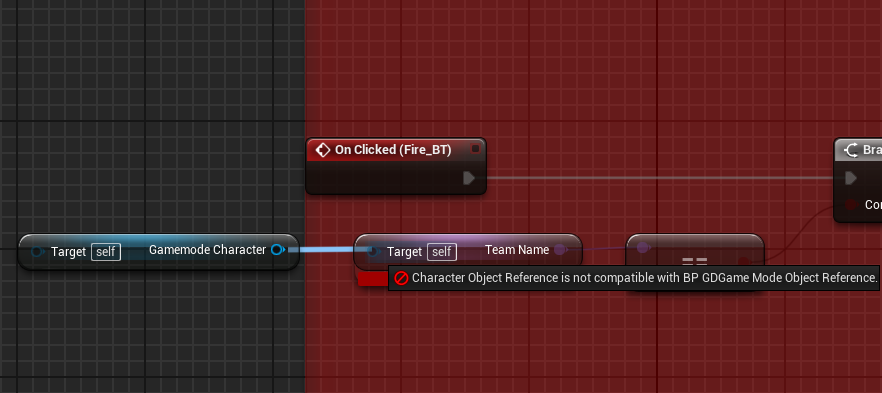
 vernal ibex
does anyone know how to send a project to a different computer? I try to send it to my main desktop from my laptop but for some reason the unreal project file.ext is missing when it gets to my desktop
tardy hollow
what files / folders did you send?
molten sapphire
@astral granite got any ideas on why it wont work?
 vernal crag
Sorry if this is the wrong place, wasn't sure where to put it. Wondering if anyone can tell me what the camera movement is used here please? Struggling to find the right term to google/research/learn.
Basically the camera seems to always slightly lead the character so that more of the world is visibile. Unless it's at the world bounds where it locks down and the character moves freely until away from the bounds. Start this video at 9:05 and watch for around a minute to see what I mean.
https://www.youtube.com/watch?v=FjK5j4kWctw&t=587s&ab_channel=ZackScottGames

The Legend of Zelda Link's Awakening Gameplay Walkthrough Part 1! Tail Cave Gameplay!
NEXT ► http://zack.watch/LinksAwakeningPart2 PLAYLIST ► http://zack.watch/LinksAwakeningList
SUBSCRIBE ► http://sub.zackscott.games ► Thanks for every Like! 👍 Ring the Bell! 🔔 ⤴
Thanks for w...
vernal ibex
@tardy hollow everything that was in the project folder
brittle fiber
biggest circle is scale 1 > scale .52> smallest circle, need to keep them like that > allows me to scale and transform animate them, preserving division of 360/7
@brittle fiber
Cyber > around 500>more coming, copies of 1 SM... manually placed > 360/7/7 > thinking about trap mechanism.. what can i do to add it, lvl BP can hold it? ATM they are placed as SM actors within level.. Some of them will be placed near each other, and area will hold BP with Trigger and Audio volume, BP with board and text actors mb BP with some other thing
whats best sollution
there are 7 areas 360/7
and 7 layers > circles on pic
anything i can do to add logic withour redoing in BP
or I have to create BP with SM actor and else and replace it
biggest circle is scale 1 > scale .52> smallest circle, need to keep them like that > allows me to scale and transform animate them, preserving division of 360/7
 gritty elm
how to change spline point position by index at runtime?
 trim matrix
How do you keep the mouse from getting captured in game?
 agile loom
getting captured?
trim matrix
Yeah, where the mouse disappears and you cant move it around the screen
trim matrix
change input mode
trim matrix
Hello @deep ferry?
 deep ferry
hi
trim matrix
@trim matrix is that changed via nodes or is there a way to do that as a predefined setting?
 fair magnet
so I have a quite complicated question...
I've created a structure with some variables in there...is there a way for me to add these variables dynamically to an array ?
I mean... let's say I have a health and an ammo variable so I add them both manually to that array... but then I create another varaible for... I don't know stamina... can I somehow add this new variable without having to manually do it every time ?
trim matrix
Btw if I change input mode in project settings to not capture mouse the mouse still gets captured
 tight schooner
@fair magnet I'm not sure what you're asking. When you say structure do you mean a custom Struct ? Or are you talking about an array of float values?
fair magnet
A costum Struct
tight schooner
There's a node with a name like "set member of struct"
fair magnet
that's not quite what I need here
I wanna do smth like a "procedual" stat system
where I just have to hit the + in the struct
add a new variable
and everything else is done by blueprints
like an array
tight schooner
Oic. Yeah I don't think you can define structs at runtime. Sadly I have no expertise in this area so hopefully someone else can chime in...
fair magnet
It doesn't needs to be in runtime
I just don't want to repeat the same logic all over again for a single variable
you can kinda think about it like the for each loop
 spring magnet
@trim matrix if you get a reference to your player controller "Get Player Controller" you can pull from that and set "Show Mouse Cursor", you can also pull from it and set input to a few different options (Game Only, UI Only, Game And UI), try playing with those and you may achieve what you're looking for
vernal ibex
bit of a complicated question about VR but how would i make a single reload setup. basically once the player fires the weapon it will be out of ammo, but i want to be able to pick up ammo from the ground and put it into the gun (can be janky) and fire again
i would assume you would have to use some sort of Collison triggers for the 2 objects and set it up with a hud to display the ammo count
trim matrix
Ah thank you Tyler!
fair magnet
could someone explain me what "Set" is.... ? I'm talking about the {Set}
 errant crown
When you mean that, you mean the node that is used to set a value to a variable? Or is there an actual empty Set node?
errant crown
OH.

In mathematics, a set is a well-defined collection of distinct objects, considered as an object in its own right. The arrangement of the objects in the set does not matter. A set may be denoted by placing its objects between a pair of curly braces. For example, the numbers 2, ...
This is what it is.
I couldn't tell you precisely how their behavior differs from an array, but it's a fundamental math concept
 marble tusk
What is the Variable: Set in Unreal Engine 4
Source Files: https://github.com/MWadstein/wtf-hdi-files
vernal ibex
I cant figure out how to do this, Im following this tut and my gun is still firing even when its not being held, I attempted to setup some booleans but that seems like it probably wont work lol https://www.youtube.com/watch?v=4bb7gSNamZg

Do you need to make Gun for your VR game in unreal engine?
This Unreal VR tutorial is just what you are looking for.
*
unreal engine VR gun tutorial
Unreal VR gun
*
Welcome in this really simple Unreal VR tutorial.
The first thing is to get yourself a 3d model of gun.
Make sur...
errant crown
If I may allow myself a question, I'm getting awfully frustrated by the "AddImpulse" function. I'm trying to simply throw an object (which has a static mesh for a root), and it works most of the time, but when said object is in some specific rotations, the direction of the throw is completely scuffed. So far, I've determined that the mesh's geometry and origin affect this.
Is there a simpler, more suited option to simply send an object flying in a direction, regardless of mass, geometry, object origin, etc.?
I considered adding and removing a projectile movement component, but I'm not sure it's a clever idea 
vernal ibex
is that a duck?
errant crown
It's a cute lil' rubber ducky, yeah
errant crown
I've noticed, I wish I could help you too, but I don't have a clue 
vernal ibex
how long have u been using unreal?
errant crown
Eh, a few months, but I've mainly been doing C++ in it. I'm just trying to do some prototyping in blueprints.
This is my very first attempt at yeeting an object and it's not going good 
vernal ibex
oh I see
errant crown
well, actually, it almost works. Some specific geometries and rotations screw up the launch direction, but otherwise, it works as intended
Which is odd because the impulse direction is ALWAYS correct. It's literally jsut the way that impulse direction is computed on the object that is messed up.
vernal ibex
have u tried any other methods of yeeting the object?
seems like theres always some sort of work around in unreal
errant crown
I've tried Add Force, Set Linear Physics Velocity (I think that's the name?), and Add Impulse At Location
In Unity, I could just slap a force on the thing and it goes YEET, always as intended, but Unreal just has to make it complicated and take all the geometry into consideration. There HAS to be a parameter or config I'm missing somewhere.
vernal ibex
is it simulated?
errant crown
Someone mentioned that meshes have a checkbox to use simple physics instead, I have yet to try that out. Yeah, physics are simulated iirc
vernal ibex
I mean i know collisions can mess with it too but that's a real head scratcher
and thought I had difficult blueprints xD
errant crown
Oh, I debugged through the entire collision stuff already, and it's not a problem
vernal ibex
im just trying to figure out where to put my boolean :<
 pure heron
A struct perhaps. But when it comes to setting individual variables, this is the way to go.
Are there any good tutorials on how to set up day&night cycle with SkyAtmosphere?
alpine halo

Project Files : https://www.patreon.com/CodeLikeMe/posts?tag=source code
Support my work on Patreon : https://www.patreon.com/CodeLikeMe
In this episode, I will explain how to setup a simple time of day system by extending the default sky_sphere blueprint which comes with t...
 wind kernel
I have a coin Object with a variable called 'Point' . If I duplicate this coin in the viewport a bunch of times and change the 'Point' Variable for a few of the coins in the viewport and change its value in the editor . will it work after I ship the game ?
 zealous moth
is there a switch variant of the If node in materials?
apart from nesting ifs, is there a better way to do it?
flat raft
Wow... you guys really like using GetAllActorsOfClass 😂
It's really not a good node to use when you have other more efficient methods
A direct reference is the best way, then collision reference, then interfaces, then event dispatchers, ...lastly get all actors.
GetActors will go through every single actor in your world and check if its type is the selected class.
anyway... how's everyone ? 😅 it's really super hot in Los Angeles right now.
@wind kernel should work.
Test it. You can do a package build.
@errant crown you can do non physics throw. You'd have to calculate the path and adjust the speed, but it's possible.
errant crown
Definitely taking notes, this will surely happen again in the future.
flat raft
I think CodeLikeMe has a tut on that on YT
errant crown
For now, I've noticed that if their forwards vector is the same as the camera's on launch, the throw is accurate enough to be enjoyable for a casual player  so I'll be using that for now
Not a satisfying solution, but I'll come back to it once I'm done rushing for a playable prototype
But thanks for the reference to CodeLikeMe! I didn't know, I'll look into it!
 vernal ibex
I was able to get it figured out in another discord server @flat raft
flat raft
Nice
vernal ibex
Just had my Boolean and branch in the wrong place
flat raft
Happens 😂
vernal ibex
Lol it sure does
tight schooner
@zealous moth ask #graphics for material graph questions. Idk the answer and I'll admit I've done a lot of if-stacking myself...
@fair magnet if you're just resetting default values, there's actually a node called Get Class Defaults or something like that. Not sure if there's a way around having a bunch of Set-variable nodes though short of making a struct or doing something roundabout with loops & arrays.
 surreal peak
@flat raft GetAllActorsOfClass is not going through every single actor
It's a good habit to generally avoid it but it isn't as bad as you picture it
It actually uses a hashed map to look them up
flat raft
K
There is a Epic vid, I think the one on Soft References, that says otherwise.
But, yea... avoid it. Well...use it as a last resort.
tight schooner
Out of curiosity I "benchmarked" GetAllActors some months back. It didn't kill performance calling it hundreds of times per frame, lol. Actually get all actors with tag was (still fast but) slower than of class.
Anyway I tend to use it once then save the reference(s) to a variable.
alpine halo
You can't use time.h header in functions
 chilly jetty
I see
tight schooner
@chilly jetty I think Set Timer by Function Name can work. But yeah, functions fundamentally must complete execution when it's called. Can't put anything "latent" there.
 charred vale
how do i pull out defaults of this child actor? i need to change Door Tint value inside this blueprint
alpine halo
Right click on event graph, set door tint
It will override your parent variable, don't need to connect that in target
charred vale
nope
it only appear if contex sensetive is off
and if i compile it says target needs connection
it's construction scrip btw
charred vale
i don't. u can see i am adding this child actor later
alpine halo
What if you do after casting
charred vale
tight schooner
Getting to a class from a Child Actor Component is roundabout cuz you have to get the "Child Actor" and then cast to its actual class
That screenshot goes from Child Actor Component Object Reference --> Actor Object Reference --> [cast to your class]
charred vale
oh ok the code is compiling
but not working in the scene
i am changing color but door is still white
trim matrix
you sure that's the right object? maybe print / debug watch the name to be sure?
charred vale
yeah i'm sure
trim matrix
i would do a "print" to be sure though
you can get the display name of the Child Actor return node
 primal moss
Urgh, I'm having some trouble. In my blueprints, there's the AIPerception for Sight and Hearing. How do I get my CPP script to differentiate the two? Right now they're being detected as the 'same' sense, which triggers incorrect behaviours
(to elaborate, my current setup has some BP stuff and some cpp stuff, and the CPP chat is really dead right now)
the blueprint holds the enemy character that's detectin' the player firing a gun, but it also detects sight. Problem is that right now if it hears something, it interprets it as seeing something so it starts firing
I've tried comparing the name of the detected sense but for the strangest reason, the name of the stimulus seems to randomise. It was "OUND" originally, then it turned into some gibberish chinese letters
trim matrix
lol
i was going to say did you explicitly override or call the stuff in https://docs.unrealengine.com/en-US/API/Runtime/AIModule/Perception/UAISenseConfig_Sight/index.html and the other one?
there's a parent heirarchy and the one that should be called for detection is the bottommost child node
there should be detector functions in each that clicks when it detects
you get an execution there
primal moss
Hmm, I'm trying something. I could try comparing Stimulus.type, though I need to figure out what the correct syntax for that type is
so something like
if (Stimulus.type == AI_Hearing){```would that work?
trim matrix
it's of type FAIStimulus?
FAIStimulus Stimulus.type == AI_Hearing?
@primal moss
FAIStimulus::FAIStimulus(const UAISense& Sense, float StimulusStrength, const FVector& InStimulusLocation, const FVector& InReceiverLocation, FResult Result, FName InStimulusTag)
    : Age(0.f)
    , ExpirationAge(FAIStimulus::NeverHappenedAge)
    , Strength(Result == SensingSucceeded ? StimulusStrength : -1.f)
    , StimulusLocation(InStimulusLocation)
    , ReceiverLocation(InReceiverLocation)
    , Tag(InStimulusTag)
    , bWantsToNotifyOnlyOnValueChange(Sense.WantsUpdateOnlyOnPerceptionValueChange())
    , bSuccessfullySensed(Result == SensingSucceeded)
    , bExpired(false)
{
    Type = Sense.GetSenseID();
}```i think its .Tag from that var
that has the actual reference to what the stim is
primal moss
Thanks, I'm trying some stuff rn
trim matrix
cool
don't forget to browse the unreal github with code snippets if you have partial fragments
that's how i find FAIStimulus definition without opening visual studio
you already know that i am assuming
primal moss
There's an unreal github?
trim matrix
they have a repo, you can auto search the engine engine codebase with keywords and phrases
if you type it in under "search this repo" on top left
primal moss
I was always frustrated by how the unreal website has basically zero worthwhile code snippets unlike the Unity docs. The stuff I'm learning is CPP heavy but the Unreal docs are very biased towards bps
so I'll take a look, thanks
charred vale
no, searching
trim matrix
it seems you are adding a child actor component, and getting a "child actor" OF the child actor component
you might be going one extra step there
the return value itself should be the actual component that was added.
if it does not work, you can also try to "spawn" an actor, and when you spawn stuff it usualy is easy to set sub params
you usually only add child components fairly infrequently. spawning actors is more common if there are many
 feral ice
How to find if an actor is in front or behind another actor?
trim matrix
in camera context?
feral ice
asking me @trim matrix ?
trim matrix
yup
trim matrix
i think it's relative to the camera though because if the camera yaws around the player it would be opposite
feral ice
ah yeah ik
trim matrix
you would have to find the forward vector of the camera, and
feral ice
but in this case i dont think thats neccessary
trim matrix
you would need to calculate the distance to the object in 3d space, and check if it's positive or negative using vectors
feral ice
trim matrix
you can also do something like if ( get distance to object (AI) < get distance to object (PLAYER) ) { WE ARE CLOSER } else { WE ARE FARTHER AWAY }
make sense?
so if the distance to the ai from camera is less than distance to object from player, we know, yes the ai is very close to camera
closer than player, he is far away
get distance to is probably easiest. i'd do that.
your requirements are a simple bool, so that should work
charred vale
@trim matrix tried the spawn thing. same result: the door is appear but still white
trim matrix
cross in the door blueprint
charred vale
trim matrix
can you add a variable of type linear color structure
expose it on spawn
in the door blueprint
this way, when you call spawn, you can pipe in a linear color structure with your color there.
and not have to set it manually afterwards.
@charred vale
trim matrix
@charred vale
you didn't set it properly then
i just tested it
it works
if you expose it on spawn
you have instance editable on with the yellow eye
ALSO CHECK expose on spawn
it doesnt show up as the open eye.
make sense?
trim matrix
@charred vale welcome :>
trim matrix
@feral ice no that's incorrect sorry
it must be relative to camera or it wont work.
trim matrix
yes
trim matrix
@feral ice try
get world location of both, distance vector, compare distance vector using < , finalize with branch.
 round basin
you should try like get player controller and from that tick the show mouse curser
@alpine halo Thank you, it works !
feral ice
im watching a youtube tutorial. It is what im looking, ai hit direction @trim matrix
In this video we will see how to do hit direction and launch forces.
By the end of this tutorial series, you will be able to download the project. Thanks for watching :)
round basin
hello, I would like the resolution of my game to be 1080 by 2312, but when I export my game the resolution is in 16:9 and it's zoomed on the top of my widgets, can you help me?
my widget
what it look like
trim matrix
@round basin maybe you have the values twisted?
feral ice
ok i solved it @trim matrix
round basin
How do I fix it ? @trim matrix
trim matrix
@feral ice what did you end up doing?
 storm dove
how do i convert string to integer for random stream?
 maiden wadi
@storm dove You can just drag it and it'll autocast from string to int.
maiden wadi
Dunno. Print your integer and see what it prints. My assumption would be that it just prints the numbers.
maiden wadi
@storm dove Seems to zero out anything that is not purely numerical.
So. There is a function that gets the character value of a string's character. But you'd need to iterate over the string, get the value and add it to an integer. Might be best done with a function.
storm dove
whats the function to get the character value?
maiden wadi
GetCharacterAsNumber.
It takes a string and an index for that string and outputs what I'm presuming is the alt code for the character.
storm dove
wow thanks
 digital cape
Hello 🙂 what is the best way to pre-load assets,textures and fx so you dont get that lag spike when it spawns?
 last stump
how many times does the 'Event Tick' get called in a second?
alpine halo
It called every frame
 left carbon
Guys, I have some blueprints setup on my scene. They have parameters and links with other actors.
Is it possible to convert them into a single blueprint/prefab/whatever, so I could just drag&drop them into different levels?
tight schooner
@last stump As Teddypanics suggests, it varies on framerate. If you use "Get world delta seconds", you can get the frametime of the current frame so that you can scale on-tick math.
It's actually posssible to change the tick rate to something other than every-frame though... it might be in the "class defaults" panel.
 short coral
Hey guys if i wanted to create a push back effect like the player is being blown away by some wind , would use Launch character?
It looks kind of clunky tho , is there a smoother way of doing it?
 empty current
Hi anyone here has already replicated Two bones Ik ? I have difficulties; just for 1 small thing
 alpine copper
Hi guys quick question I'm on a BP that consist mainly of static meshes, I want to box select a part of the bp from one of the views but it doesn't work https://gyazo.com/87e47e4b3eb060da0c36ff317ebff35a

is there an alternative method of selecting ?
 candid whale
heyyyaa!!
quick question... is there a blueprint class that each client has only one of, and is not replicated?
Like a GameMode but then for client
 heavy trout
What’s the easiest way to take a vector location and find a second location based on an angle of rotation and distance?
candid whale
rotate the vector, then scale it?
fair magnet
Is there a way for me to procedually generate various Variables ? Like... I kinda wanna create a Health Varaible for example and then it generates a C_Health and another %_Health Variable it uses for calculation purposes
tardy hollow
I have a task that look for a target in the map and move to it with AI Move To in Blueprint
How can I make it abort and find a new target when the path fails (an object gets in the way, etc)?
right now it's aborting every second because it runs that again every second, I want it to run again only when the path fails
 rancid anvil
can someone tell me if I'm barking up the wrong tree here? I have a blueprint project where when I change from set inputmode UI only to setinputmodegameonly my mouse doesn't lock to the screen like it does when I started the project. I followed this tutorial https://superyateam.com/2019/10/01/problem-with-set-input-mode-game-only-node/ (for a cpp project) and have since changed the engine so that the default setting agrees with the editor at the start of the project (capture permanently including initial mouse down). still no luck.

Set Game Input Mode Game Only node doesn't work as you expected. Learn how it is different from the default mode and how to workaround this problem.
specifically what I'm trying to do is have a pawn be spawned and repossessed after the player sees a death widget with a respawn button and clicks it
after it's clicked the widget gets removed from parent but the mouse stays on screen (it's an FPS project) despite the setinputmodegameonly node being reached
 coarse marten
Need a little help setting up something
Is there any way to pause a delay? Or set up something of the some sort?
I'm trying to make a rail shooter mostly in blueprints and i have an array of elements that are functioning like scripts which are ran when the level starts. (they do basic stuff when a certain amount of time passes) but i don't know the best way to approach doing something like this because I need these scripts to pause when the track stops and when the track starts i want them to resume again.
rancid anvil
@coarse marten maybe a timeline node?
looks like if you hooked it up to finished on the right
trim matrix
Hey can anyone help me to make my character through blueprint and assign the work I want
I am on a way to make android game pls help if anyone can
coarse marten
That could.. actually work really well. @rancid anvil
you set me on the right path now for this! Thanks
I dont really use timeline's alot. Is there any catches to them?
rancid anvil
I'm highly new myself. so far I've only used them to animate while closely following tutorials
I suppose if you needed to to be more than a do-once deal you'd need to figure how to have "finished" on the left somehow touch "set new time" on the right
or just set new time before every new use of it
 worn moss
Hi everyone
I want to make a tank game do you think that blue prints are a good choice
Because I want to release my game on steam it will be my first game
tight schooner
@worn moss blueprints are practically necessary in using Unreal Engine so yeah, unless you're a C++ wizard you should start with BP.
molten sapphire
https://i.gyazo.com/a5a4b1cd232e9b7923caf13b956e9878.png https://i.gyazo.com/cd194889573def6b2a4e494ea0dbe18b.png im trying to make a variable of the character so that I can reference it in a button function within a widgit.

 kindred shuttle
I tink it is a good idea when you develop game first
tight schooner
@coarse marten you should learn about timers. It's like a delay you can control as it's running. You can stop it, reset it, loop it, read and alter the countdown, etc.
The nodes you want to look at are Set Timer By Event, and Set Timer By Function Name.
Timelines are good to learn too, but they're more for things you want to animate with a curve.
worn moss
@worn moss blueprints are practically necessary in using Unreal Engine so yeah, unless you're a C++ wizard you should start with BP.
@tight schooner thanks for helping 😊
 mossy dawn
Hello! I hope this is the right place to ask this:
I want to make 5 classes for my game (like RPG classes) and I want each of them to have their own spells, but they would use the Mouse button 1 to use the selected skill. How would I come about making the skills? I have the classes in an enum that is inside a struct.
(I'm a complete beginner)
molten sapphire
GASDocumentation #gameplay-ability-system https://github.com/tranek/GASDocumentation , change the shooting gun ability, make a team system, make it multiplayer (idk if GAS is already multiplayer or not)

GitHub
My understanding of Unreal Engine 4's GameplayAbilitySystem plugin with a simple multiplayer sample project. - tranek/GASDocumentation
anyone got any idea why this wont work? https://discordapp.com/channels/187217643009212416/221798862938046464/752189526537011281
coarse marten
I was thinking about using those @tight schooner but they're not the same events that im calling so im not sure how i would set up
I have an enum of different things it will do when the event gets fired, like displaying a subtitle, or stopping the track
Like the main thing im wanting to do is
Array of possible actions that could happen with a "time" of when they happen
"focus on target at 2 seconds in, play subtitle 2.1 seconds in stop track at 2.5 seconds" etc
empty current
Has anyone already replicate two bones ik?
 wide nimbus
Just found out you can use emojis in compact node titles. Remember, with great power comes great responsibility 😂
 frail marlin
Is there a way to soft reference a particle system before spawning it? I am getting a performance hit only on the first spawning of a particle system.
digital cape
Is there a way to soft reference a particle system before spawning it? I am getting a performance hit only on the first spawning of a particle system.
@frail marlin I would also like to know.. currently i made an actor with all the fx's and textures that hit hard when they first spawn that gets destroyed soon after begin play, but it does not feel like the right way at all 🙃
frail marlin
Testing right now- on begin play i spawn them with manual pooling and no autoactivate, attach them to location/component. Instead of spawning and destroying im activating/deactivating.
ill let you know in a moment if it helped
still a drop
seems to be when the render call is made thats when its getting called to draw initially and its causing a lag spike just the first time
tardy hollow
I have an AI that has an AI perception
It detects characters by sight
I want to add a second stimuli of touch so it pushes the character when it's in contact
I don't see how to get the type of stimuli in BP (Sight vs Hearing)
Anyone know how to specify the stimuli type?
tardy hollow
Also, how could I get the character from the AI Controller that owns it?
Awesome thank you!
 thin apex
how do i set collision of a child actor component??
 dense mica
Navigation works
Movement Components works
Casting to PlayerBP works
Timer works...
Why my AI doenst move? I just re-opened the project
they just stand still
 gentle urchin
Anyone had any issues when using BoxOverlapActors? I'm using a Debug Box to confirm its size and location, yet the overlap doesnt always return the correct amount of overlapping actors ...
As this example...
 late kraken
Hello! I'm a doing a mechanic where I can grab and then throw a spear. I can grab and drop the spear, however I can't manage to do a nice throw. The problem is when I throw, I unattach the spear, reactive the physics simulation and set a velocity. The problem is since the character is still colliding with the weapon, it only works when I throw it while I'm moving backward. Did someone already do something like this before?
As this example...
@gentle urchin I can come from many things I guess. What do you mean by it doesn't always return the correct amount of overlapping actors? It returns more? Less?
gentle urchin
Less
Doing some more testing,
going Left to right in the selction randomly misses some of them,
while dragging right to left always returns the correct amount
superweird .. Checking the calc returns the same values in both directions , regarding box center and extents
A video showing it..
late kraken
That's weird yeah. Looks like you are creating the box collision the same way in the two cases? There is not something link to the fact that it creates an incorrect geometry in one case?
gentle urchin
They share the math , so unless there's odd stuff going on behind the scenes, i'd expect the same result for both of them
late kraken
Can you show us this?
gentle urchin
the only direction that actually consistently work is upper right to lower left. Any other combination is a tad random
late kraken
https://puu.sh/GpUz4/288c981a00.mp4
This is what I have for the question I asked on top
the only direction that actually consistently work is upper right to lower left. Any other combination is a tad random
@gentle urchin I would like to see how you create the box collision
gentle urchin
 stuck swan
I have SunSky in my level, some objects casting shadows and solar cells. How con i determine if solar cells are shaded by these objects? I can use line trace but how can i calculate ENd Point as position of the sun?
late kraken
@gentle urchin I think I got what is happening.
First your debug box isn't equal to the box you are doing after because they are not created the same way.
For the draw debug it's asking you the center of X and center of Y while on the second one it's asking for the box X and box Y.
So I think it's not the center but rather the initial position of the X axis and same for the y I guess?
I don't know if you understand me ahah
gentle urchin
Even if that were the case, wouldnt every direction of the drag then give the same offset ?
seeing the debug string up in the left corner, the values are pretty much equal in both directions
late kraken
Try to start a selection on the top left and drag by continuing on the top left and see what happens
gentle urchin
Not sure if i understood that 😅 From top left, and further up top left?
Or are you refering to the upper left section of the viewport ?
late kraken
First one!
gentle urchin
late kraken
It shouldn't have get anything right?
gentle urchin
It should, yeah
You're probably right in your assumption tbh
I just dont get how it adds up with the math
ill try to adjust, and see what happens ^^
late kraken
Like the debug box is probably create like the blue box and the other one like the black one
gentle urchin
Giving it a shot, ty for the help so far ^^
late kraken
Giving it a shot, ty for the help so far ^^
@gentle urchin No problem 🙂
thin apex
but it spawns it from the middle...why??
gentle urchin
Turns out my math is wrong. Watching closer, i can see the extent inverting on certain drags ,
noob mistake 😅
late kraken
yeah that's what I wanted to say by "incorrect geometry"
late kraken
It will probably looks weird if I do that doesn't it?
thin apex
@late kraken thank you...u were right XDD.....it spawned the objects root at the arrow and the root was at the middle
gentle urchin
depends on the camera
late kraken
I will throw and do a video in a few minutes
@late kraken thank you...u were right XDD.....it spawned the objects root at the arrow and the root was at the middle
@thin apex Ahah no prob
gentle urchin
Disabling the collision/physics for the initial launch with a lerp on a curve could also be a possibility
so you dont activate any physics before it's actually lerped away from the player
late kraken
I see. However I would probably want it to interact with others physics object
Or I can lerp it then when it hit something enable physics?
gentle urchin
Even at initial launch ?
im just thinking about the throw itself, while the char is still holding the wrench
lerping it to the edge of the collision for the pawn, then activating physics and giving it velocity for it's actual 'flight' 😛
late kraken
Oh I see
I will try with a tp just to see right now
It works perfectly with the TP and you can not see it is displaced at all ahah
thank you!
gentle urchin
^^ quid pro quo achieved lol
late kraken
ahahah
 crimson swan
@dense mica not 100% sure as to what you're trying to do with that timer but wouldn't you be calling move to actor event after the timer?
crimson swan
you can specify delay in ticks though
i think it was called offset
but regardless
dense mica
i heard that too, but its not related with my navigation problem i guess
because it was working for 2 months since i made that setup
crimson swan
the issue i see with yours is you're never actually calling your event
unless i don't get how the timer works but the event looks like an input not an output
dense mica
you just plug the event to the timer and call the timer
not the event itself
timer calls event
crimson swan
hmmm okok, well if that's how it's supposed to work i have no idea then
try a print
like on the event just get a debug print see if it even triggers
dense mica
i did, it is triggering
i guess it is more related to physics, because i edited a option on the project settings, then applied by mistake
then reverted it back but it didnt solved
Also other "AI Move to" nodes doesnt working too
dense mica
yes
crimson swan
very odd
 worthy frost
SimpleMove is pretty shobby
dense mica
ok, trying now
SimpleMove is pretty shobby
i had to use it, since its a mobile horde game
worthy frost
also the best place to start moving a pawn is Possessed node
why
doesn't matter if its mobile or not
dense mica
isnt it the most optimized move node?
worthy frost
no..
worthy frost
eww don't call that on tick
dense mica
of course I wont, just for testing
crimson swan
just to confirm you do have a navmesh up right?
dense mica
yes
worthy frost
show the navmesh
dense mica
dense mica
worthy frost
so no path could be found
whilst game is running
bring up console, and type show navigation
crimson swan
kinda curious but what does acceptance radius of -1 imply?
worthy frost
has to be right on top
crimson swan
i see
worthy frost
tho i normally supply something like 50-100
crimson swan
yeah same, otherwise they just crowd your character
dense mica
nothing comes up when I write show Navigation
gentle urchin
I've heard people solving issues with nav by removing and re-adding the nav volume
crimson swan
very weird, i just tested it on mine and it worked. Maybe try what squize sait and re-add your nav mesh?
crimson swan
do you need to build the map for navmesh to work btw? was never sure of that
worthy frost
nah
dense mica
I builded a few times
crimson swan
kk
worthy frost
did you touch the navmesh project settings?
dense mica
I remember I look there too just before this bug happened but didnt touched anything
these are my settings
worthy frost
those are just debug settings
dense mica
also I have this as Navigation System, which one do we need?
worthy frost
you have no supported agents..
there is your problem
just add one
(can leave it all default)
and then rebuild the navmesh (move the bounds or w/e)
and then play
dense mica
nothing changed
worthy frost
did you play?
dense mica
yes
worthy frost
try restarting editor
this is what you should see
whilst game is running
with show Navigation
worthy frost
well something is breaking your navmesh
and stopping it from being there
bring up the gameplay debugger
and select an ai in the level
whilst game is running
and screenshot it please
dense mica
okay, i am doing it wait
worthy frost
its the ' key
whilst game is running

should get info like this
pressing 0 will show the navmesh categoryh
dense mica
I am sorry just gonna make you wait 1 minute, couldnt find gameplay debugger
Here you go
dense mica
i set this to dynamic
its working now
it was set to dynamic modifiers before
but it was working before when it was "dynamic modifiers only" .. what changed?
I heard setting it to dynamic has a impact on performance, thats why I changed it before
dense mica
4.25
worthy frost
strange
i use Dynamic
never used Modifiers only
we don't see any performance impacts
worthy frost
the move to task version
as you can restart movement if the move finishes
by simple pins
issue is
dense mica
this one, right?
worthy frost
that is an extra tick
dense mica
yeah its ticking
worthy frost
well this should all be in your AI COntroller
so you can use the other MoveToActorLocation one
 dense mica
Understand, thanks for everything
dense mica
Okay
dense mica
i barely get 50 fps on medium-end mobile devices with this setup 😅
stuck swan
Is it good practice to store references to global actors (like sun for directed light, etc.) in game mode blueprint? Or Where should i store them?
 lunar flower
Evening guys!
I'm trying to create a Vertical Speed Indicator for my flight game but I'm stuck on this one.
A VSI measures how the rate of climb and descent in feet per minute.
I need to move the needle up and down based on how fast the plane is climbing or descending.
Any ideas on how to set this up?
Here is an image of the instrument:
Obviously I first need to convert the Unreal Units to feet. thats already done by dividing the distance of a linetrace by 30,48
crimson swan
one way of doing it would be a simple delta in your actor Z position
at least i think that's one way of doing it? Like for instance you get actor position (this is time 0), then you wait 0.5 seconds get actor position again (this is time 0.5)
worn moss
What is the best course to learn blue prints on udemy
crimson swan
@lunar flower
worn moss
I am a beginner right now
crimson swan
@lunar flower and in case you don't get what i mean let's assume you were going at 100 units at time 0 and 150 units at time 0.5 then your rate of change is (150-100)/(0.5-0) = 100 units/s
lunar flower
@crimson swan The easy solution was just using the Z velocity! 😅
crimson swan
that works too lol
i mean velocity is really rate of change of position
so yeah xD
lunar flower
Yup I was thinking way too complicated for that xD
vernal ibex
can i ai not follow pawns?
crimson swan
euuh a for loop?
if i'm understanding correctly
do you actually mean matrix or array? I might be braindead
trim matrix
An array not matrix mb
There are two in this particular one... so would I just get a copy of index 0 and 1?
Using a color structure array btw
Alright I'll just try copying a get copy node :)
Is that the curly brackets symbol? (I'll do research on it if it is)
crimson swan
Quick question: how do you actually trigger on notify end?
starthit and endhit are skeleton notifies so they don't work with playmontage
the "playmontagenotify" pops teh start notify but never the end
hmm okok
will do gimme a sec
hmmm i guess that could work
kinda a weird workaround
vernal ibex
Do i have to make a behavior tree? not sure why this node setup isnt working, im working in VR
crimson swan
pretty sure only characters can use aimoveto
trim matrix
Ohh wait structures are pre-made variables got it. I'll try that, thanks!
Can you use an index to get certain structure outputs?
vernal ibex
@crimson swan works in 3rd person but for some reason doest care for vr
 fair berry
@trim matrix you can use redirector if i'm not wrong
crimson swan
not 100% sure prequel, haven't tried anything in vr yet
fair berry
OK yeah probably I only used redirector to rename in c++
Yeah at least we have ctrl + click on pin to move them
No don't remove thé BP first ah ah
If you first add in cpp then change everything in BP you should not have any issue
And finally remove the struct in bp
But yes that's tedious anyway
In my project I have to replace our string tables assets by the macro to import them from csv in c++
That's seem to be à nightmare too :(
Cause we have like 1000 words referenced everywhere in Ui and BP 😬
If anyone has à tips, i would love to know please 😅
flat raft
What ya making?
vernal ibex
how do i send a project to work on a different computer?
trim matrix
Is there a node to set a linear color structure variable to be flattened so none of the values are higher than 1? (So if it was 3, 1, 2, then you could have it be 1, .3333, .666)
But how would you determine the highest value 🤔 (That is what Im having an issue with)
A bunch of If Statements? (branches) to see which one's highest? (Seems like a complicated solution to the problem)
crimson swan
is there a way to loop an event onto itself?
trim matrix
Actually nevermind I think I found a solution
maiden wadi
@crimson swan Like... Make an event call itself, or?..
crimson swan
i have movement set to on left click
but it's a networked game
if i put it on tick i'm spamming my server so i wanted to add a like 0.2 delay
this works, but spams the living hell out of the server.
maiden wadi
That's all normal movement components do. The AddMovementInput in the CharacterMovementComponent does what you're doing. It shouldn't normally be an issue.
crimson swan
Ok, i was thinking the same thing but just realizing i'm basically sending 120 packets per second just for movement multiplied by god knows how many players..
but technically holding WASD in any fps game does the same right?
maiden wadi
Usually. I'm sure you could optimize it in small ways. For example, if you're doing like a typical character and running around. You don't even need a vector input, you can use a float. World Yaw direction. If you want to optimize that even further, turn that yaw directional float into a byte.
crimson swan
if i could easily record a video onto discord i would show you
but basically think something like diablo
so my "player" is actually just an npc on the server
i had it on left mouse button pressed but if i want to move smoothly it feels bad, so i would need some autofire (hence the question about loops)
or a tick with a delay
oh nvm i'm dumb there's a litteral delay function
derp
maiden wadi
If you need a delayed tick, I'd recommend a single fire event that calls a looping Timer.
crimson swan
it's not called on tick though. I tried the looping timer but it didn't seem to want to work
it's essentially called on tick but not on the actual tick event if that makes any sense
maiden wadi
That delay that you just posted is.
crimson swan
oh ok, so any ideas how to implement the looping timer?
maiden wadi
Input Axis are always on tick. They're called every frame drawn to the screen just like tick is.
maiden wadi
crimson swan
ah yeah that seems a bit better than my janky mess
i was trying that
@maiden wadi Worked like a charm, thanks a bunch
 noble sequoia
does anyone know how i can set up the eventgraph in my animationBP for crouching?
i have the transitions set up but not sure how to make it enter the crouch state machine
 oblique flare
i'm trying to work with arrays where a button on the ui:
- selects a random index for an array
- sets a variable to the value of that index from the array
- removes that item from the array
- repeats until all items in the array have been chosen (only once) and then just prints "done" when there are no more items
are there some quirks to using remove index that im not aware of? this seems like my code should work, but values keep getting chosen twice somehow even though i'm removing them from the array after the variable is assigned.
tight schooner
@oblique flare removing an index (e.g. 1) will resize the array, causing all successive indices to shift over (e.g. 2 becomes 1). So if you're looping through an array to remove elements, you should use the reverse loop. I think UE4 has for-each-reverse as a standard macro.
Well, you say you're choosing them randomly so idk
oblique flare
thanks for the reply. for your initial comment on resizing the array, in what way would that cause issues here? im selecting a random int from 0 to (array length minus 1), so shouldnt it not matter that the indices are shifting?
tight schooner
Yeah, it shouldn't matter. By description, your script should work.
oblique flare
alright, i suppose it's time to do some more troubleshooting then. I thought there was an issue with remove index but i guess not. thanks for your time
tight schooner
Maybe the problem lies elsewhere — how the array is filled or w/e
@oblique flare oh you know what ... If you're using Random Int in Range to choose an index
Every time that function is called by a node (i.e. it's connected) it will generate a new random int
 mortal cradle
I want to make a very short line in front of the character that would follow the keyboard input and the way character moves in game ie character moves right then line appears to the right of it, this is how I did it: https://gyazo.com/71eca038fbdadead269ca699499303b9 And it almost works but the line in front of the character is basically infinite, is there a chance that I can make that line short using this method?
 oblique flare
@seanny i'm only calling it once so i dont think that should cause any issues either
tight schooner
So you don't have it connected to a get and a remove?
Normally you have to save the output of the random int to a variable to reuse the value
oblique flare
no, i set a random index variable and use that
tight schooner
Ok
Yeah then dunno.
@mortal cradle I may not be fully understanding what you're trying to do, but... Have you tried just adding your input vector (or forward vector) to the mesh world location? Like...
Vector that represents the direction you want your line to point —> multiply it by a float/int representing how long you want the line to be —> then add your mesh or pawn location vector —> plug it into the linetrace endpoint
 cosmic lagoon
hi guys how do I figure out the angle between the character and the steepness of the ground?
should I use a line trace that extrudes
or could i figure out the orientation of the player character relative to the steepness of the ground?
tight schooner
@cosmic lagoon trace down at the floor and somewhere in the hit results is the surface normal
cosmic lagoon
oooh I see
tight schooner
(which is a vector representing the direction the floor is facing)
cosmic lagoon
and from the line trace downwards I can also figure out how far away it is from the ground as well
excellent! thank you for the answer I will give that a go
mortal cradle
@tight schooner What I'm trying to do is a character moving slower while going upwards ie. on stairs, up the mountain etc and I thought of a method that if a short line in front of character movement touches a static mesh then it indicates moving up so character moves slower. That's what you mean? https://gyazo.com/e0b9765f28bc6f5fcb137fc6d337d9ee?token=5a5cf95978996a9ae8e6f295ac6ab0ea
 tight schooner
Yyyyeah, but because your use case for it is determining if a pawn is going up a slope, you should take a look at the question I just answered for Dragonbally
Although for stairs it may not work depending on how the collision mesh is made ...
I'm not really an expert at the subject
(maybe you can do multiple line traces and derive an average slope based on the height differential...)
mortal cradle
hmm I see, thank you will try your suggestions
tight schooner
I'm sure if you dig around YT/Google you'll find something about determining the slope of a walking surface
 tough cipher
does anyone know how to cast to a component without casting to the actor that has it ?
tight schooner
@tough cipher the reference to the component has to be acquired somehow, so one way to do that is to use a BP Interface, and make a BP Interface function that outputs a component reference or w/e. But that's just one of many approaches, and whether it's the best approach is very situational.
The general thing you'll want to look into sometime is "blueprint communication".
tough cipher
@tight schooner thanks
 blazing ember
so I have this thing where i throw an object based on the cameras direction, it works when the blueprint editor is open but when i close the blueprint editor it doesnt work for some reason lol
 undone helm
@thorny marsh did you ever figure it out 😄
 thorny marsh
Nope, was only curious so never followed up on it.
undone helm
I expected to be able to pass on other variables to it, to use in a situation for example where you have a construction script spawner, but you want to give instance variables to whatever you spawn
thorny marsh
It maybe experimental and might end up with more functionality in 4.26
undone helm
yeah, that's my guess as well, unless somehow it interacts only with C++ and will give you delegate options for stuff exposed there (but that is a stretch) So I am hoping we get more
thorny marsh
I didnt want to make use of it, only that i saw it and wasnt sure what it was about.
Figured someone else might have so asked. But never followed it up.
So
🤷♂️
undone helm
yeah, np, I saw it a while back but only now found a use of what I thought it would do haha
 native plover
Anyone know a way to keep and continue player speed after an event? For example before event player speed is 200, after event i want speed to be 200 right away and not start from 0.
tough cipher
create a save function and save the player speed after it changes then load the player speed that was saved when the game begins
native plover
create a save function and save the player speed after it changes then load the player speed that was saved when the game begins
@tough cipher How do you set current speed or velocity?
tough cipher
of the character?
you grab the character movement component and search for set max walk speed and set velocity
 dusty snow
should respawning / spawning pawns for players be done in the game mode or game state for multiplayer
spring magnet
@dusty snow i'd use the gamemode to determine where people spawn (since that kind of logic would change depending on the mode you're playing) and leave gamestate to just track information
native plover
you grab the character movement component and search for set max walk speed and set velocity
@tough cipher i did that but it always goes from 0 to whatever
tough cipher
Get the values from the character movement and save them then load them when the game starts
native plover
...
molten sapphire
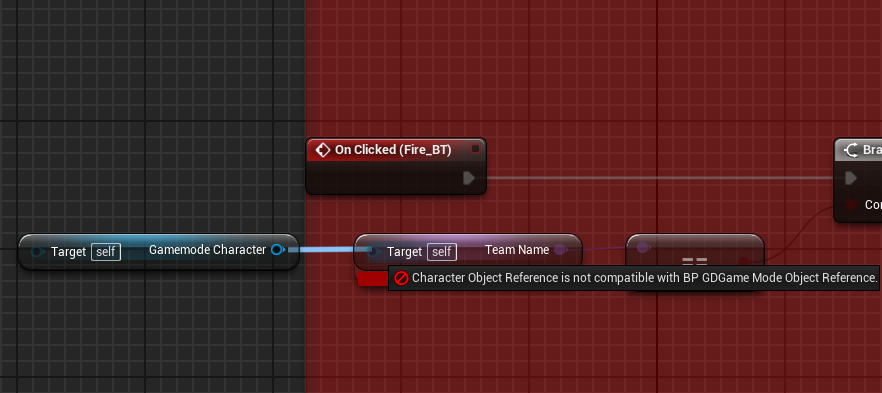
https://i.gyazo.com/a5a4b1cd232e9b7923caf13b956e9878.png https://i.gyazo.com/cd194889573def6b2a4e494ea0dbe18b.png im trying to make a variable of the character so that I can reference it in a button function within a widget and keep getting an error.
cosmic lagoon
hey guys I am trying to figure out the distance between the player and the ground, as well as the angle of the sloped ground to the player. I am firing a linetrace downwards however to my surprise, no hit is registered! any ideas what I am doing wrong?
oh nvm it was tied to camera should've been player character!
crimson swan
Quick question, when you delete an actor is there some cleanup to do or do all the ui widgets and whatnot get deleted along with it?
tight schooner
I remember hearing some discussion in this discord about how to "destroy" widgets and I think it came down to needing to run garbage collection if you want to truly clear those widgets from memory. My knowledge isn't great enough to comment on that.
cosmic lagoon
@tight schooner any idea why the line trace does not return a hit even though the trace debug line shows it hitting the ground?
BlueprintUE
gentle urchin
does the ground have collision ? and the correct channel setup ?
cosmic lagoon
hmmmm
gentle urchin
You could also try turning on complex collision
cosmic lagoon
tried complex collision still returns false
tight schooner
Yeah I would suspect collision channel
gentle urchin
does the ground have collision then? 😛
cosmic lagoon
i think so?
gentle urchin
you gotta check the mesh itself
cosmic lagoon
im not sure what option I am looking for here
isn't there collision already because the player is standing on it?
gentle urchin
Thats usually an indicator yes
tight schooner
I looked at my current project and I use the node LineTraceForObjects
and you feed it an enum array of collision channels (WorldStatic, etc.)
cosmic lagoon
i wonder why linetracebychannel fails here
tight schooner
e.g.
cosmic lagoon
fails to return a hit to be exact....
gentle urchin
when you put on debug, you can see it clearly hitting the right place? so the simple vector imputs are correct for start and end ? 😛
just to be sure here 😂
cosmic lagoon
cosmic lagoon
return value was false....
gentle urchin
when falling?
cosmic lagoon
so when i put a breakpoint on linetracebychannel and i checked return value, it was false. when i removed the breakpoint and i hover my mouse over it it returns true!
ah that explains it....might have been still falling
 velvet viper
yo can someone help me out with this? I've set up the player's rotation and tried to rinterp back but it is always jarring as hell, or it doesn't rotate to the right direection
cosmic lagoon
how can it show it hitting but linetracebychannel is still false
yup...its still returning false wtf
velvet viper
what's the point in finding the distance to the ground when the player is standing on it? are you running this linetrace off when the player jumps?
cosmic lagoon
I am using it to figure out the distance from the ground and slope angle to the ground
velvet viper
yeah but isn't the distance always going to be constant? only time it will change is when the player jumps
cosmic lagoon
wtf using LineTraceForObjects work
wtf??? why am I setting return value as variable
maybe i messed up wit hthe debug here
im gonna retry linetracebychannel .... pretty sure i forgot to step forward
gentle urchin
i agree with gibb0, unless the char is able to jump during shooting, you can just use a static value for distance
velvet viper
would seem pre redundant in my opinion to fire that constantly on tick
when the player is at a constant distance
see what i mean^
cosmic lagoon
yes the player not only jumps but the ground may slope at any given time
cosmic lagoon
yup....linebytracechannel works....I just did not step forward LMAO
velvet viper
it should work regardless of stepping forward?
there's obviously a flaw in your linetrace setup
look at this;
https://docs.unrealengine.com/en-US/Engine/Physics/Tracing/HowTo/SingleLineTraceByChannel/index.html
This how to covers using a Single Line Trace by Channel Blueprint node to return a the first Actor it hits that responds on the Visibility channel, and prints its name.
 quasi frost
Is there some kind of way to just delete all actors of class?
crimson swan
for each loop
quasi frost
Like this?
 marble tusk
@quasi frost The array element output of the for each loop is a built in get
chilly jetty
my line trace isnt showing results for a skeleton mesh
it works for static meshes
alpine halo
make collision preset block the visibility channel for your character mesh
and make capsule collision ignore channel
chilly jetty
ignore visibility channel?
alpine halo
ignore for capsule component, block for character mesh
 wet yew
does anyone know why my editor keeps recompiling shader everytime i ran it? i tried to fillDDC but it keeps happening
 stray rain
Trying to get my head around replication for multiplayer. So I have a character and projectiles that hit those characters. Do these projectiles need to replicate?
the projectiles come from other players
for now its just localmultiplayer, one screen
marble tusk
Here's a good video series that explains replication really well https://youtu.be/16BvKb-OPOg

🎮 Unreal Engine Replication Series - Part 1: What is Replication?
👋 Welcome to the Replication Series! This beginner tutorial series dives deep into how Unreal Engine handles Replication. Understand more than just the "how" and explore the "why" behind important concepts tha...
stray rain
thx, gonna check it out
maiden wadi
@stray rain In short, there's two different things that are the basis for Multiplayer. One is an RPC the other is Replication. RPC is just an event called from a replicated actor on one machine that tries to run that event on another machine. Ex: ServerRPC played on a client will check if the client's actor is replicated, if so it'll send that event to the server and the server's version of that actor will play that event. Replication is SERVER ONLY. You spawn something on the server that is replicated, all clients spawn a replicated version of the actor/component. If you set a variable to replicate, the server will periodically check that variable based on an interval you can set. If that variable isn't the same as what it was last time it checked, it'll send that new value to clients and the client version of that value will be set. Setting a replicated variable on a client will just change it on that client until the server replicates a new value and overwrites it.
@swift pewter Print off what the otherActor/component was that set it off after the branch. Something else is setting off your overlap that isn't that component's owner.
vernal ibex
trying to replicate this node setup but i cant seem to find that array variable anywhere
^my setup
or at least attempt
fair magnet
@quasi frost Try this... you're overcomplicating things
This creates a Named Slider for each entry in my map... now I wanna control the value of each key with each slider indepent.. someone knows what to do ?
trim matrix
Is there a function to cause fracture on a destructible mesh?
I want to break the break from script not from the physics engine
Break the mesh*
Looks like it called apply damage
heey guys 🙂 i am trying to make a custom function i made run from another blueprint (by interacting with it) but the custom function isnt being actually activate (did a print string), i am thinking it might be the object wildcard considering i am kind of a newbie still ;p you guys got any idea? https://gyazo.com/51e49cdb6c59c653842b168bdaf9e3e1

anyone? 🙂
 fallen glade
Does anyone know why a spline calculated this way is giving me wrong results?
points vome from here:
marble tusk
I'm guessing your points aren't spaced out evenly, so there's probably large tangents between the closer together points resulting in the undesired behavior
tight schooner
@trim matrix debug each part of it. Does the authority switch fail? Does the cast fail? Etc
fallen glade
yes, that is the case
trim matrix
just after the cast @tight schooner 🙂
fallen glade
@marble tusk
marble tusk
So you'd have to make the tangents smaller for the segments that are smaller
trim matrix
thats why i am feeling it might be the object wildcard
well i mean not just also everything after that of course
the authority still succeeds
but i am such a noob that i wouldnt know what other wildcard to use then get owner
i tried get player character and controller aswell but then i get a warning
fallen glade
Tangents still confuse the hell out of me, I'll keep trying, thanks @marble tusk
marble tusk
Tangents represent a direction centered around 0, so to make them smaller you can just multiply by a number less than 1
trim matrix
i really wanna know what object wildcard to use 😦
keep in mind they are both actor bps
marble tusk
What you plug into the object wildcard is a reference to the object you want to check is a "Goal_System"
trim matrix
okay now i am even more confused 😛 cuz my goal system is just a actor bp and i am trying to do a function from it from another actor bp i made with a button
so what could possibly be that reference 🤔
or object i should say..
marble tusk
Overview of when to use different methods of Blueprint Communications.
trim matrix
oo i like that thanks! i just have to figure out what object wildcard to use for actor bps i guess at this point
got it to work 😄




you definitely helped me 😄 thanks
 indigo edge
Can someone send me link to unity to ue4 scene exporter?
Pls
 rancid pilot
Looking to make a ui bar like the wow one...
some general direction is all I need
ty!
gritty elm
need help
this is progress bar, and i want to reduce progress bar of ui from right to left
 manic flame
I would like a Blueprint to be able to modify the following value circled in the first picture under BP details under rendering features, but I'm not sure what BP nodes to use.
I was thinking these rendering features may be similar to "blendables", but I'm not really sure. I wasn't able to reference the material I am currently using.
Whenever I try to select asset under "Blendable Object" it doesn't actually register as being selected and I'm thinking this would not access the "BlueVignette" material referenced in the first image. I suspect in the second image where the arrow is pointing I am not using the correct node, but I'm pretty stumped on how to approach modifying that value in the first image.
trim matrix
Guys who should hold the reference in an a observer pattern sender or the receiver?
fallen glade
God hates splines. I've got it working in the end but my spline gives me horrible performance issues. As you can see here :
just filling the screen with it :/
It's just a lot of points tracing to the ground
any tips to make it better ?
 indigo osprey
Hey, I am currently trying to write a blueprint doing to following:
I created an empty project with starter content and created a character blueprint and assigned the mannequin static mesh to it. Is there a way to let the character react to KEyboard inputs WITHOUT it beeing controlled by the player ?
So to be more specific. I want to navigate arround the character with a free flying camera and when I press 1 on the keyboard I want this specific character to do something.
When I bind to 1 -> Pressed event in my Level Blueprint to print lets say "Hello" it works. If I do the same thing within the character blueprint, nothing happens
Found this, will try it out now https://www.youtube.com/watch?v=_NCtcHXJPjg&list=PLZlv_N0_O1gaG5BW72It4chjhypxIO9ZB&index=8

With the Class Blueprint light toggling, we now enhance the example by adding input-based control.
A link to the wiki for further notes is available here -
https://wiki.unrealengine.com/Blueprints_Tutorial:_Using_Inputs_to_Control_a_Class_Blueprint
Ok cant get it working :S
crimson swan
@indigo osprey I'm doing something similar in my game. The way i made it is is i have a "player controller" that controls an empty character (basically just a camera) and then i have an ai player character
i create that ai player character in the beginplay event and store it. then i just call whatever i need from my playercontroller and essentially controlling an AI as my main character
Probably more complicated than what you need but that's what I'm using and i'm pretty sure it would work
indigo osprey
Working with AI seems to be a little bit to much for me at this point but thanks for your input 🙂
alpine halo
this is progress bar, and i want to reduce progress bar of ui from right to left
@gritty elm you want to make progress bar so that it fills left to right and empty right to left?
or make progress bar to fill right to left
frail marlin
What is the general consensus on using Delay vs Timeline? Is timeline more consistent and performant?
 static charm
they aren't really comparable. delay would probably be more efficient depending on what you're doing. Basically use whichever you end up with less nodes.
 sour orchid
Hey blueprint veteran, is it normal that my GroupArray that I assign to the struct's variable is not being changed when i add element with a custom method?
If I don't specify that part it works just fine but doesn't reset the array inside the struct
I'm trying to expose for the first time stuff from C++ but I'm too newbie with BP
static charm
can you show the part where you'd adding the element. The Make struct node there just makes a copy of the inputs.
so Group Array itself won't reflect changes in the new struct.
but the actors/objects already in the group array, should reflect any changes you make.
sour orchid
Its just that, I believe i made some mistakes while exposing things to BP?
since it works without assigning the array
static charm
i think i missed the issue, you wanted the array to be cleared at some point?
or is that two issues
either way Group Array is a separate container from the struct. The new struct only copied the array.
sour orchid
Ok it actually have 2 issues:
- Is the struct cleared automatically once the event is finished or the values remain there?
- If i assign an array and not leave it empty my method doesnt affect the array and so the struct values
either way Group Array is a separate container from the struct. The new struct only copied the array.
@static charm Should have worked then I believe mh
static charm
the struct will hold the values until you remove the values or destroy that actor/object/blueprint
sour orchid
oh ok so its like the blueprint create the struct and his lifespan is the entire actor lifespan
I have to clean it then
static charm
also just to be clear, each time that code is executed it Makes the struct again with that Group Array.
like everytime you Add Character to Order Group, it calls that Make Struct and Group Array.
just wanted to point that out in case that is effecting you.
sour orchid
also just to be clear, each time that code is executed it Makes the struct again with that Group Array.
@static charm Oh, so that's actually weird, when my event mouse finish the struct is not resetted (since the initial array is empty)
when i come back i have the same elements my loop added
sour orchid
Mh yep so its just when I assign a variable to the struct member the problem
Its weird i believe is the c++ code?
either way Group Array is a separate container from the struct. The new struct only copied the array.
@static charm Up, its maybe because of that
I will try make a print after i Break the structure wait
static charm
i mean if you just need to reset the struct each time, you can make the struct a variable
and Set it each time
sour orchid
The only problem i have now is that if i set an array when i make the struct the struct is not getting changed
like, if i call a method that needs my struct and add an element
seems that my struct is not getting a new element
just when i assign an array when i make the struct
static charm
are you adding the element in c++?
so you are adding an item to the array, inside the struct.
sour orchid
so you are adding an item to the array, inside the struct.
@static charm yes I'm
I give a reference to the struct and add the element to the array inside
static charm
i would use the Set variable
the way you have it currently, some of the struct is cached
but i'm unsure if it's working correctly
Set variable would guarantee the variable is correct.
although if you think it's c++
then it possibly is
sour orchid
I will try
static charm
you can also just avoid c++ and try it right in the blueprint using blueprint only nodes
 marsh forge
I'm completely new to ue4, and I was following a guide to set up smooth locomotion on the VR motion controller pawn, but ue4 doesn't seem to recognize any input from my controller
not sure if this is a blueprint problem or a project settings problem
¯_(ツ)_/¯
help appreciated either way
 marsh seal
maybe the input? is like.. not the right one?
in your project settings
in inputs
try to find more stuff that might be the same thing
cause maybe its binding to OCCULUS left thumbstick or somethign and you're using vive or other way around
idk
i dont have too much experience in VR
just a shot in the dark
marsh forge
I'll send a screenshot of the bindings in just a sec
rn it's using default bindings but they looked correct to me
is there a better way to debug it than just trying to use print nodes?
marsh forge
I'm completely new to ue4, and I was following a guide to set up smooth locomotion on the VR motion controller pawn, but ue4 doesn't seem to recognize any input from my controller
I don't think it's a bindings problem, but I'm not 100% sure
this is the blueprint
when I plug inputaxis motioncontrollerthumbleft_Y or X into a print node to try to see if it's receiving any input, nothing gets printed
not sure if I'm just using the wrong node or if something else is causing the issue
this is all with default bindings btw