#blueprint
402296 messages · Page 523 of 403
 maiden wadi
 storm dove
 cerulean ibex
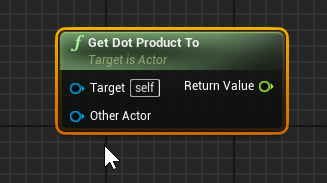
drag wire off vector and type dot
 stone zephyr
hi,
I made a structure in my blueprint project and when testing in the editor the game runs fine however when I try with a dedicated server I get these errors and warnings...
Could anyone help?
 trim matrix
@maiden wadi About my question earlier i redid it into my playerBP like this: https://blueprintue.com/blueprint/78pi6z97/ but the widgets still refusing to work
BlueprintUE
 dusk whale
Does anyone know anyway to get a reference to a level from a different level blueprint?
 violet wagon
My camera rotates like its locked to a pivot point and I need help with stopping or reducing this effect.
dusk whale
Looks like it could be attached to a springarm and it's not centered @violet wagon
violet wagon
that was it! thank you @dusk whale
dusk whale
np
 hexed oasis
is spawning different player controller for each player is a thing?...
how does one handle player input and stats with vastly different characters in a multiplayer game?
maiden wadi
@hexed oasis Simple. You don't handle it in the player controller. Handle it in the characters that are different. Your controller should have nearly nothing to do with your character/pawn. Do programming in it that pertains to non pawn actions.
hexed oasis
what about storing health value?
say one has more than the other
or one take damage differently
this data need to exist in the controller since the player can switch pawns
i mean there are workarounds but it doesn't seems like "good practice"
 tight schooner
If every pawn has their own health value and damage model, then shouldn't that stuff... stay in the pawn?
hexed oasis
welp it can be, thing is each pawn can possess another pawn tho keep him original health
basically what I'm trying to understand is what the hell player controller used for...
unreal devs claim that it suppose to handle player input but its a mess with different characters
also unreal devs use it for hud stuff which I completely don't understand since there is literally hud class made for that...
I guess that I'm trying too hard to fit into "unreal good practice" that doesn't really exist
 harsh night
A few examples here: https://docs.unrealengine.com/en-US/Gameplay/Framework/Controller/PlayerController/index.html
The PlayerController implements functionality for taking the input data from the player and translating that into actions, such as movement, using items, firing weapons, etc.
The last example with score is a good one
hexed oasis
welp it kinda bad example cuz the score suppose to be in the game state\player state...
harsh night
That being said, I agree it doesn't feel necessary. I might be wrong and there might be some cases where a player controller is absolutely required.
hexed oasis
I tried really hard and I cant think on even 1 example where player controller is actually necessary
there is always better way or place to put ur login
maybe storing which team the player is in, but again that should be in the game state.. tho it's the only example where it's actually makes sense to use the player controller
I mean ofc that you need one but you dont need to change it at all
trim matrix
I get this error everytime i try to respawn my character.
and it leads here
Any help on this?
 snow halo
Hey All for a pure function with nothing but pure functions inside, it will work even though the input exec pin is not connected to anything right?
I mean like this. If this is pure, I would still get the rotator value from the function if i call the funcion?
tight schooner
@trim matrix Your error means the "player" input pin isn't receiving any data. That's what "accessed none" means. It's receiving a null reference.
@snow halo I never tried not connecting the exec pins so... does it work? lol
snow halo
my bp is broken rn so can't test quickly lol
will try and mock something up i guess
i know macros remove the exec pin if u want, but dunno why functions don't have this
tight schooner
Macros are just a different way to duplicate BP nodes so they don't have any particular rules
harsh night
@trim matrix Are you calling this after destroying the pawn? And is the "player" of On Player Killed a Pawn reference?
snow halo
I mean i think it works
well u gotta connect in exec to out exec in the function
exec i mean
tight schooner
Functions are like self-contained bits of script. In their own box, they have their own execution, their own local variables, and in the end they produce a data output (in the case of a pure function esp.), and when the function is complete, the box is destroyed. Maybe real programmers will take issue with how I phrased all that, but that's my squishy designer understanding of it.
trim matrix
@harsh night give me a moment
tight schooner
I have a question about SpringArm components. Is there a way to retrieve the transform (location/rotation/scale) on the other end of the arm? Using a GetWorldTransform on the springarm component retrieves the base location, but not the arm's-end location post-spring. How do I get that?
I thought of attaching a generic "scene component" to the end of the arm for pure get-transform purposes, but that seems kind of roundabout.
trim matrix
i dont destroy the pawn. If the health is 0 or lower the player becomes a ragdoll and then in the death screen the button is supposed to do the things in my screenshot.
harsh night
Where are you getting the "player" reference?
trim matrix
I have set this up in my PlayerBP.
Then death screen apears and i press the button and i get the error
 crisp willow
Heyo! So I'm trying to activate a camera with Set View Target with Blend. The target is the PlayerController with index 1. This doesn't work, and I'm guessing it's because PlayerController with Index 0 "owns" the viewport? Correct me if I'm wrong. Any way of activating a camera on PlayerController with index 1?
Not split screen btw
harsh night
Ok, but what exactly are you plugging into the On Player Killed's "Player" reference?
Not inside the function, but what's plugged into it on the other side - where is that reference coming from?
harsh night
I created a game mode BP and I cannot find this function, did you create it yourself?
trim matrix
yes
harsh night
Ok, where is it plugged in on the event graph?
trim matrix
Its plugged on the respawn button in the death screen
harsh night
Ok, one this is that the "Get Controller" node requires a Pawn reference. IF your Player BP Reference is not of the Pawn class, that's where your problem might be.
But looking at your problem, it seems more likely the Player BP Reference is not being set properly as it's reading none
harsh night
That looks like it according to the text you posted above.
trim matrix
Aight great thanks 😄
 high ocean
I have a weird problem. I have a section of code which runs on two type of actors: NPCs and Enemies (NPCs can "contain" enemies). Everything works as expected in editor, even when game is launched stand-alone. In cooked build, the Enemies are fine, the NPCs are not. Any idea on where I should start looking? Thre's no error, no crash, nothing. Instead of opening the battle map, it starts loading it and when it's done, displays the victory screen with 0 enemies fought.
I searched for meaningful differences in the code between them and I can't identify anything, and I'm totally lost. I suspect...nothing. And cooking the build for everything I try to change in blueprints is infeasable.
The only thing I can think of is initialization, which is different in packaged builds than it is in editor
 worthy frost
@snow halo why not link them two nodes with a exec line?

like that is what you should do
 sand shore
No the compiler should autolink
Needs to be a total mind reader, on top of ruining the easiest way to disconnect internal logic while preserving data pins
high ocean
nvm fixed it, it was init order messing up event dispatcher
snow halo
@worthy frost thanks yes, i think you mean just connect the out exec of Hips Tracker Add node to the in of Return Node I had a pure function brain fart for a second (because i've been using so many macros recently) and thought maybe i could ditch those exec pins altogether (hide them), but like you said, i believe you're meant to jus connect the two nodes
 sour raft
is there any form of global variable in ue4? I find in a lot of projects I have a bunch of blueprints all doing "Get game state -> cast to blahblahgamestate", eg. huds/players/general actors etc... is this the way people would generally do it?
 steep wind
anyone here working with VR?
steep wind
nevermind figured out my issue
 dreamy sluice
Hello 🙂 I'd like to call a function with a different parameter based on the result of a switch, like so :
I'd like to use a Select Node to choose the right float parameter, but it needs an index and Switch gives me execution pins. I wonder how could I do it better ?
I mean it works but maybe there is a cleaner approach 🤔
violet wagon
have you tried using select on "Handicap". Drag from handicap and type switch. @dreamy sluice
dreamy sluice
yeah, I just figured it out myself after asking 😅 thank you !
violet wagon
i said switch. i meant select
dreamy sluice
I mean I just changed the type of the Index in Select node. It now looks like this
yup 🙂 thanks !
violet wagon
nice. much cleaner
 vestal plinth
has anyone done an S3 policy string using LE JSON?
I'm having trouble creating an unlabelled array for the starts-with element
{ "expiration": "2015-12-30T12:00:00.000Z",
"conditions": [
{"bucket": "sigv4examplebucket"},
["starts-with", "$key", "user/user1/"],
{"acl": "public-read"},``` faint pasture
What would be the approach to making something that can spit out a struct and save it as content?
 quasi frost
I am trying to call a custom event in another bp. However, it is saying accessed none when hitting the button. Anyone know why this reference isn't working like this?
 proven mason
Let's say in say in a fighting game like Smash Bros where you use an analog stick to control analog movement of you character.
I want to incorporate a step movement; something you commonly see in other fighting games not just Smash Bros.
Would I code something like this to execute a step move?
 alpine halo
I am trying to call a custom event in another bp. However, it is saying accessed none when hitting the button. Anyone know why this reference isn't working like this?
@quasi frost seems like your MasterCardRef is none. Cast it and then promote it in event construct
tight schooner
@faint pasture other than a savegame?
quasi frost
@alpine halo I couldn't figure out how to cast to it so I did something like this. Still not working. I also tried putting that all actors of class with promoted variable in the widget and it still returned nothing.
faint pasture
@tight schooner Yeah. Basically I have these structs representing pattern data for a map gen. I'd like to be able to build them in a BP or something and write to some sort of content storage
alpine halo
@alpine halo I couldn't figure out how to cast to it so I did something like this. Still not working. I also tried putting that all actors of class with promoted variable in the widget and it still returned nothing.
@quasi frost if there're bunch on actors of same class you can do is make an enum in the actor. And after getting all actors of class run a for loop with break and check it with the enum. It it's true then break the loop and set MasterCardChef to that object
PS: if you have a lot of actors in your editor 'get all actors' would be very expensive for performance. Cuz it iterates all the actors. So use it wisely
quasi frost
@alpine halo Thanks, I think I figured the issue out. Because this is a card game I spawn them at other times besides the on play time. So I added an updated function that sets the reference index again. This seems to be working. Will have to test it more. Thanks again!
faint pasture
I found this, is this pretty much my best bet for editing data tables from a bp?
I really wish there was a way to just add a row.
I guess this is a map editor shrug
 twilit heath
@faint pasture careful, functions that can alter a datatable asset tend to be editor module
which means you can't ship them
there are functions in JSON module that let you convert a struct to a json string and back though
and probably work in blueprints
vestal plinth
hey guys, I'm trying to sign an S3 PUT rest query. I'm hashing the signature like this:
I'm getting a 403, is this where my problem probably is? is it the UTF8 conversion?
ok yeah the hash is totally wrong
how do we sign stuff in UE?
faint pasture
@twilit heath Lol this JSON-as-bitmap approach is actually working pretty well so I don't think I need to do it in editor.
alpine halo
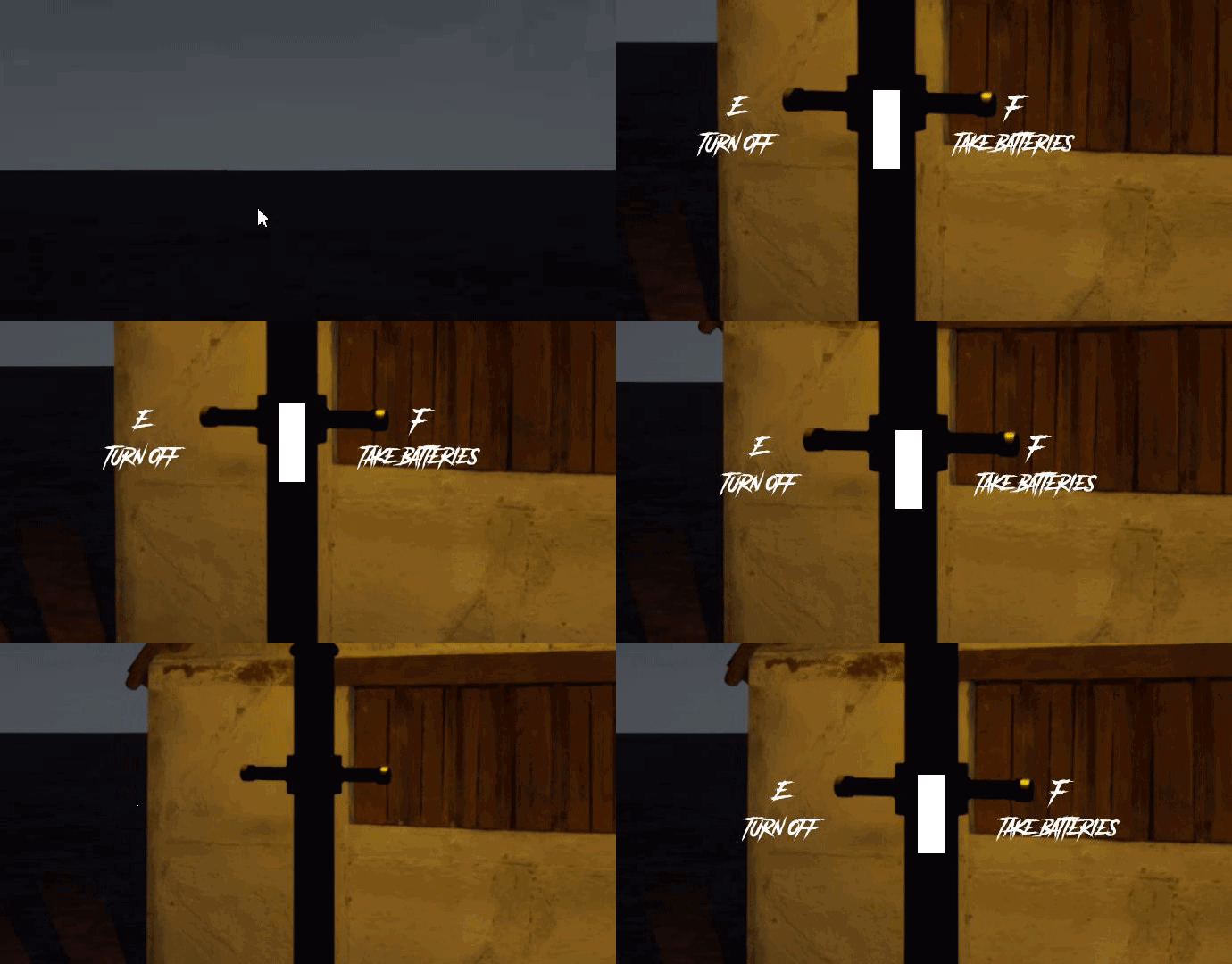
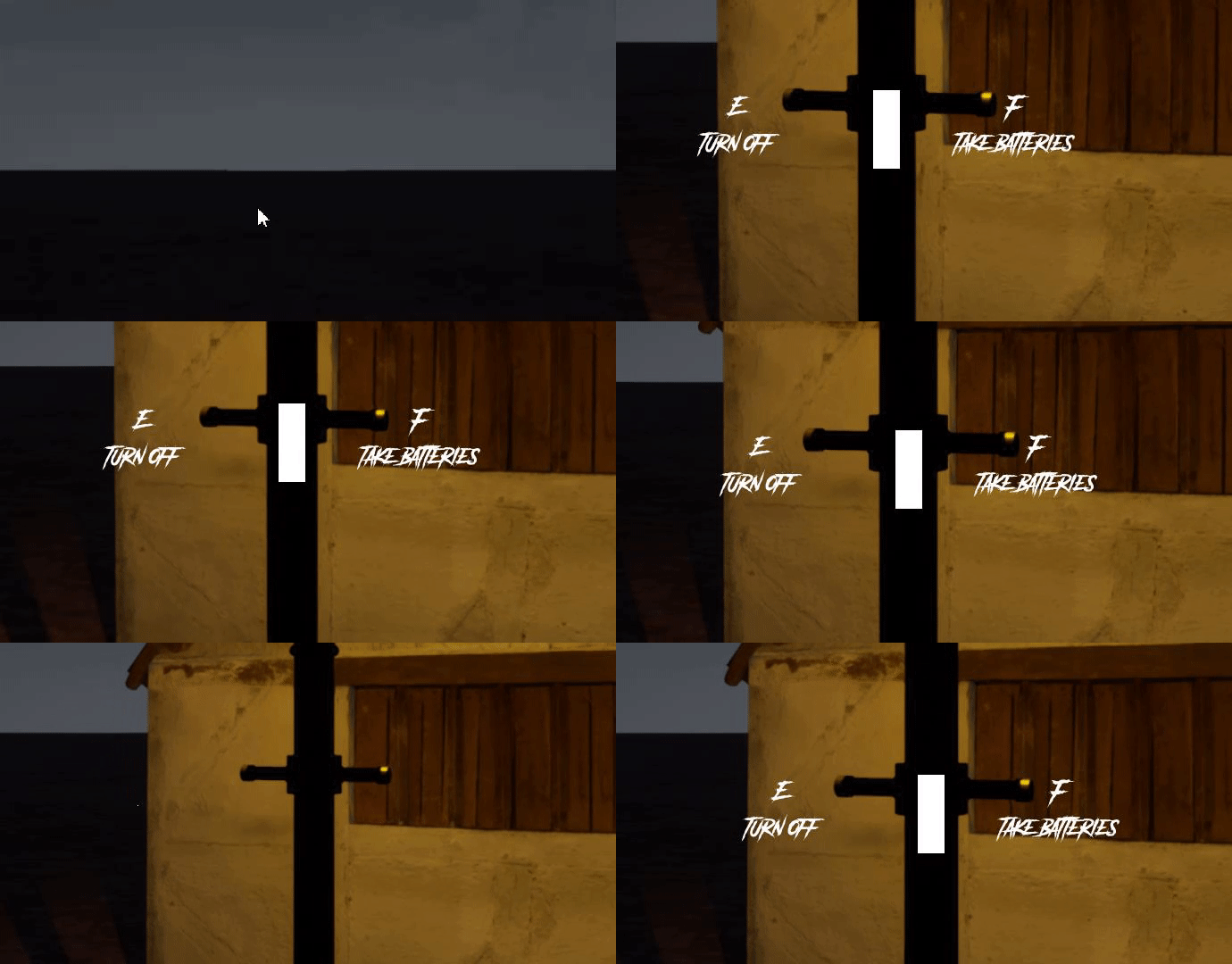
okay so this is my widget with widget space=screen. so it changes draw size relative to player's screen. i want rather it fixed to the actor it attached to
alpine halo
@thorny marsh the draw size is 500x100 and it remains same in player screen. i want to fix it in actor as player moves, like currently it's moving (you can see that)
 thorny marsh
You may need to adjust it dynamically yourself.
 pastel rivet
Im having an issue where im using the mouse to rotate around an object.
Currently use mouse as touch is activated, due to previous project.
It doesnt allow me to rotate around the object, it only wiggles in a max rotation of 5-10 degrees and slowly sets back.
Anyone know why this is happening?
This is only happends if the mouse is shown, not hidden.
I've found out that the mouse position is locked on capture
which causes the issue
 earnest tangle
maybe you can store it in gamestate
you'd have a struct which represents a squad, containing an array of character structs which contain the individual info on the characters
you can then have an array of squad structs in the gamestate
I'm not sure if I understand the problem :)
It's pretty centralized if it's all in the gamestate
it's a way, it's hard to say if it's the best because it all kind of depends :)
you could certainly spawn a "squad actor" if you wanted, but it would work in a fairly similar way still
you could do that as an actor per squad, sure
you could also put it in the game mode, where it could perform the logic for the selected squad
or you could have a "squad manager" actor which would function in a similar way
there's usually more than one way to do something... in my experience, "the best" way is usually whatever makes sense and is easy to do
chances are as you keep working on your project you might have to change it later to work in a bit different way, so if you keep it as simple and easy as possible, it'll be easier to modify down the line :)
 ember dawn
I'm trying to use Bounding Box to define the area in which things can spawn, and I've seen some guides that use a setup like this, but I can't recreate it. I can't get a conversion from the object to the vector. Anybody know how it's done?
maiden wadi
@ember dawn What do you mean by from the object to the vector?
ember dawn
@maiden wadi Im trying to use the Static Mesh of an Object and convert that into vector info to make the Box Extent of a Bounding Box, as shown in the images. But when I try to connect those nodes, it doesn't work, it won't create the conversion node (as shown outlined in red.)
maiden wadi
@ember dawn Ah. I'm fairly certain that the BoxExtent is from a BoxComponent. You can 'sort' of get the same thing from GetComponentBounds. That should work on a static mesh.
 quiet kettle
Is there a way to make a component inherit from a c++ interface?
 thorny cedar
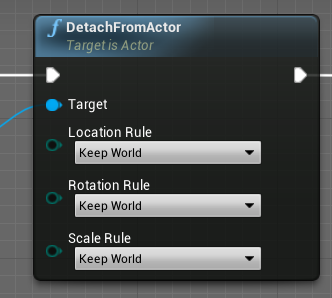
im i correct, that this is the way to disattach an actor from it's parent? just adding no parent actor?
alpine halo
for detaching the actor there's a node 'detach actor'

this node should be executed in the BP where your actor is attached
 restive dagger
any one can tell me how to do the pin
on the blueprint wires?
so I can arrange my code?
thorny cedar
double click on the path
restive dagger
thanks!
thorny cedar
or drag out and scroll to buttom of the finder
proven mason
I'm trying to get the quickly press/tilt an analog button or stick towards a scale of close to 1 and hold it for more than 130 milliseconds. When it's more than 130 ms and still holding at that scale, it should print out a word.
I've been scratching my head on this one so this is what I've got so far
Tolerance I set to 0.05 and as for Hold Time it's based on this formula.
in the first pic quickly push and hold the 'W' analog key for more than 130 milliseconds and by then I expect it to print "Accelerate" but it won't. So that's where I got stuck.
 chilly jetty
could someone help me out here
https://www.youtube.com/watch?v=h_Cr_azdsDE&list=PLQN3U_-lMANPmV9KZGwSp9RYWZDN5r74o&index=1 I followed this tutorial

Hey guys, in today's video I'm going to be showing you how to implement vaulting and climbing into your game. (Parkour). This is part 1 of a 2 part series.
Part 2: https://youtu.be/ox3osZiTOts
Parkour Animations: https://drive.google.com/drive/folders/1wnLAnQCy6SiwjIkyh5vijV...
and I really followed it to a T
I'm really unsure where's the issue here
I've tried multiple size and shapes of walls yet not of them are working
i cant vault any of it
thorny cedar
I made a VR Spectator cam that can be moved freely or snaps to the view of the VR player. Is there any feature that would work well, while watching someone play?
i though of cycling between different premade positions
so for example a group wants to play and the other viwers are not excluded.
 river cosmos
Hey everyone, has anyone tried to transform a bone position into a material? This is what I'm trying right now but it doesn't seem to take the actual location of the bone/hit.
The location is the hit position
and the material that takes the position is set up like this
 fickle blaze
so I have a problem with my lock on system
whenever an actor leaves the zone and gets removed from the array and that array becomes empty the arrow targeting thing will point to the center of the map and I get this weird error
can anyone tell me what I'm doing wrong
the black object name and branch was a solution I tried but it does not seem to be working
idk what I'm doing wrong
alpine halo
Instead of get object name, convert object to validate
Your get object name ia checking if the object's name is ' ' or not
But your object variable is none
 hollow tusk
do event dispatcher bindings prevent garbage collection if all other references to the owner of the event dispatcher are gone?
 devout shore
Hi, is there a more up to date method of doing object glows on interactable items than the method shown here https://www.youtube.com/watch?v=j8gjvKyaQuU ?

Email: tesladev2323@gmail.com
A quick and easy way to get a basic outline for an object, ready for interaction.
as it is quite old now
alpine halo

Use custom render depth to draw outlines.
Pawel's excellent article: http://www.michalorzelek.com/blog/tutorial-creating-outline-effect-around-objects/
Sample project to migrate materials from: http://www.michalorzelek.com/blog/?smd_process_download=1&download_id=297
Twitt...
devout shore
that first one looks good thanks
alpine halo
The first one is paid

This is my simple outline actor tool that allows you add a post-process outline/x-ray to actors in your game, with one simple function.
Check out the features of this tool. It is available now for Gold Tier Patrons on Patreon.com/RyanLaley and Unreal Marketplace (Coming Soon)...
devout shore
ah ok I will take a look at the 2nd one then thanks
alpine halo
The Ryan laley one is created by him and will be published in UE marketplace soon
Google Docs
 wicked shell
Scope Question: I am trying to reach a variable (yes it is set to IsVariable) (it is a progress bar) in my HUD through a different blueprint class. I tried to pull it through Casting to HUD but I dont know what kind of Event I should bind this Cast to first to make it work.
What I am trying to achieve is when player loses or get Hitpoint its progressbar should timely deplete or increase instead of instant action. Any ideas
devout shore
thanks, is this the 2nd one?
 deep elbow
possible to create an array in simulate and save that array to some local file?
wicked shell
So let's say if I add 25 percent of life but I should do it within a loop of 25 and add float .01 everytime with a short delay time?
thorny cedar
i have a widget 3d widget in my level and wanna know if my widget interactions hits this widget or not
i dont wanna use event tick for it. How can i do that?
alpine halo
So let's say if I add 25 percent of life but I should do it within a loop of 25 and add float .01 everytime with a short delay time?
@wicked shell you mean the health should gradually increase? From let's say 1 to 25
wicked shell
yes . now bar just increases instantly. which looks lame.
alpine halo
No use event tick
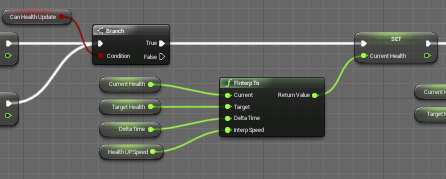
And there's a node
finterpt to
you need 2 variables 1.currentHealth 2.targetHealth
so the 'finterpto' will interpolate your bar
wicked shell
ok I m giving it a try please cross the fingers xD
alpine halo

here deltaTime is tick
i have a widget 3d widget in my level and wanna know if my widget interactions hits this widget or not
@thorny cedar what do you mean
thorny cedar
i want to show the debug line, when my interactions hits the widget
alpine halo
An example of how to create in-game 3D widget interactions.
wicked shell
I give up I am doing something wrong obviously
thorny cedar
@alpine halo why does it hit
is it because of the cylinder shape mode?
wicked shell
does it make sense? It works but doesn't move timely still. progress bar moves instantly
alpine halo
@wicked shell you shouldn't do cast every single tick , it will very expensive to perform every tick
you can do is on begin play cast once and promote it
then use that variable
also you're destroying that actor
so it works only once when you overlap
wicked shell
yes it is a health pickup item
alpine halo
your interp speed is too much
wicked shell
may be I should put this logic somewhere else
alpine halo
then you should do this tick in your player BP
also the target should be a static value otherwise it will run infinitely
wicked shell
I see in overlap it doesnt but in tick it would right?
I should probably get a course on blueprints as I cant get over this otherwise . Thank you @alpine halo
alpine halo
@thorny cedar idk, it shouldn't if it out of bounds
 jolly jay
Someone know how can I put a render target texture in a blueprint widget?
alpine halo
just add it to image
 vernal ibex
so im trying to make a sniper scope in vr and im using a scene component that projects the image onto a cylinder, the problem is when i launch the game in vr the sniper scope only can see emitters that spawn and nothing else :<
wicked shell
@alpine halo Thank you so much for sharing insights. Especially that clump thing really really fixed lots of my problems.
alpine halo
Someone know how can I put a render target texture in a blueprint widget?
@jolly jay get your render target. make material from it. make a widget , add image. select brush = the material you've just created
trim matrix
I have this death screen function that adds the death screen widget into viewport.
I have a button on that death screen that respawns the player but the death screen widget is refusing to go away
alpine halo
try remove from parent
trim matrix
Tried that already still nothing..
alpine halo
is your widget isfocusable?
trim matrix
uhhh where can i see that? Sorry im new to this.
vernal ibex
is there a better way to make a sniper scope in unreal?
alpine halo
timeline with field of view
vernal ibex
i mean yeah lol
im not sure how id set that up with my current pick up grab configuration
ooof vr is a head scratcher
faint pasture
@vernal ibex to do a scope in VR, you probably don't want to do it like a standard game with the field of view changing. Unless you want your players to puke
I would look into doing it with a render target
Or some other way to actually zoom the view within the actual scope
Something like this.
https://youtu.be/-lf5-rGMv-Q

 bitter ingot
is it possible to prevent camera blocking with other pawns?
faint pasture
@bitter ingot I take it you're talking about the springarm components collider? Just change the collision on the pawns to not block whatever collision channel the springarm component is using
bitter ingot
So if I use the probe channel pawns in the spring arm comp and I set my collision in the pawn mesh to ignore pawn it won't block it right?
@faint pasture
 coarse obsidian
HI there, How can I get an actor bounds without the particle system contained by this actor ? I tried to put the particle system inside a Child Actor but ... the bounds returned still include the Particle System.
faint pasture
@coarse obsidian An actor bounds will naturally be the bounds which fits all of its components bounds within it. You need to either spawn the particle system as a separate actor without it being a child of your original actor or just get the bounds of some component inside of the actor
coarse obsidian
@faint pasture Thanks, using ChildActor is working. Getting the bounds of a specific component force me to do some casting so I hoped to avoid this.
 round basin
Hi, how can I lock my fps limit on my whole project (not just on a widget...)
Also I imagine that nobody will want to but, as I can't use android studio with UE4, I made a whole game, for nothing... so I thought that someone might want to export my project for android (.apk), there are no plugins, UE 4.25, file size 476mb Thank you !
 haughty axle
guys have a question, i have array from class, i get the item from it, but now need to get variable out of that item.
maiden wadi
@haughty axle What is the question? You've just stated a list of things you need to do and it seems rather straightforward?
haughty axle
@maiden wadi ok i have item master and few childs of it, then i put then in array, they have (name variable) i need to get that name variable out. if that makes more understandible 🙂
do i need to cast to it to get that info?
maiden wadi
Possibly. I'm not sure what your pointer type is. If I understand right. You have one major class, and a few other classes inheriting from it. And you are using a pointer to the major class, but need something from the child class? If yes, then yes you will need to cast to the child class.
haughty axle
yes this stuff, can i just cast to Master just, because childs have it as inheritated var.
maiden wadi
Casting to any of them should work. But in this case, you're probably trying to cast to the master class then.
haughty axle
i did this shit once, and now cant figure out, and old project is just freaking mess 😄
maiden wadi
Yeah. Learning will do that to you. Make a masterpiece, only to look at it a few months later and just sigh.
 keen goblet
@round basin Go to Project Settings -> General Settings -> Framerate
 ruby basin
faint pasture
ruby basin
faint pasture
@ruby basin It's probably only running on the server.
@ruby basin You need to trigger adding the UI by either setting a rep notified variable or calling a client side event on all the controllers
round basin
@round basin Go to Project Settings -> General Settings -> Framerate
@keen goblet Thanks !
 ripe rose
can I add variables to game user settings, or do i have to use a new save game file to store any custom settings i have?
 lucid cargo
I am having a hard time understanding PhysicsConstraints, what I am trying to achieve is the following
an object either in the world or as a child of the player with Physics enabled so that it is affected by the environment can be close to the player. I am basically using a cart like this: https://image.shutterstock.com/z/stock-vector-child-s-toy-cart-cartoon-395568814.jpg and I want for the player to be able to drag it after him.

I've been trying after work to come up with a way of doing this but so far I got to PhysicsConstraints and I am not even sure if its the right thing.
 fading locust
Does anyone know how to convert from skeletal mesh to something I can plug in as an Actor object? I imported a bat from Blender and am using the skeletal mesh to attach to my player, but get owner gets the player, so trying to "put away" the bat by disabling its tick and collision etc actually just freezes the player.
keen goblet
@lucid cargo Not that I'm an expert in PhysicsConstraints, but I think you'd definitely be able to use them for that
I found this vid useful in learning how to use PhysicsConstraints, since the variables in the component didn't seem so self-explanatory to me: https://www.youtube.com/watch?v=bMEp9tAcisU
In this free step by step Unreal Engine 4 tutorial video (UE4 how to) you will learn how to implement several mechanical joints using physics constraints.
All my UE4 tutorials: https://www.youtube.com/watch?v=BT0jFArPtGM&list=PLEp7216xGGILh3i2BZe2E0ZEuiIGa-VQT&index=1
Types ...
fading locust
I know the code is pretty janky already lol, but it actually works as intended except for freezing the player and such, i just need to be able to freeze and hide the skeletal mesh
lucid cargo
@lucid cargo Not that I'm an expert in PhysicsConstraints, but I think you'd definitely be able to use them for that
I found this vid useful in learning how to use PhysicsConstraints, since the variables in the component didn't seem so self-explanatory to me: https://www.youtube.com/watch?v=bMEp9tAcisU
@keen goblet I'll give that a go, thanks 😄
 pine trellis
is my unreal broken? I made a testing pawn but unreal cant find it when I try to reparent another blueprint!
how can I fix a broken unreal engine?
fading locust
@pine trellis I see that your upper right window wont compile
perhaps it wont detect regular changes until the bp can properly compile?
pine trellis
yeah because it needs a new parent
keen goblet
@fading locust I think you're using the wrong functions for the job. Use SetCollisionEnabled (targeting BatMesh) instead of SetActorCollisionEnabled, and so on
fading locust
I'll give that a try @keen goblet
 simple dragon
hi someone can explain me how to calculate triangles in procedural mesh with welded vertices
[Red] Array index
[Black] pos
 sick galleon
I have to admit welding vertices is a thing I tend to skip for that reason :p
but you can determine your index by doing x + y * maximum x
fading locust
@keen goblet awesome, works perfectly now! Still learning about what is and isn't available in bp, im more used to programming lol
sick galleon
for instance : point on 1,1 is : (1 + 5 * 1) = 6 @simple dragon
so if you're going 3d its xPos + (maxX * yPos) + ((maxX * maxY) * zPos)
simple dragon
what i have now
sick galleon
@simple dragon is there any reason you're using new local var instead of Quad count directly ?
simple dragon
QuadCount is max Y,X
sick galleon
@simple dragon im quite confused at what you're doing with that "completed" of the 2nd loop that affects values that dont seem to be used
keen goblet
@fading locust Glad to help! I recommend taking a dive in the action menu to learn what kinds of functions there are. Whenever I have a math problem I don't know how to solve, I always dig through the math functions to see what tools I have, for example
sick galleon
@simple dragon your script aside, here's what I think you should do :
loop on X coordinate > loop on Y coordinate > you get the X & Y coordinates pairs for each cells
from here you know you're supposed to draw 2 triangles in that cell
your 2 triangles need 4 vertices : TopLeft, TopRight, BottomLeft, BottomRight
vertices have their own coordinates on your grid, on your illustration for the "0 0" face you have the following vertices coodinates (x,y) :
0 0 / 1 0 / 0 1 / 1 1
so you have too convert those coordinates into indexes (using the thing I gave you above), you get :
0 / 1 / 5 / 6
so you have your 4 corners
then you add your triangles with the appropriates indexes :
Triangle [0 1 5]
Triangle [0 6 5]
(im not sure if you must do them clockwise or counter clockwise in unreal)
faint pasture
@simple dragon also, once you get it working, move any actual math to C++, if it's not very fast. I got a 100-time speed up in my project just by moving a function the checks if points are clockwise or counterclockwise to C++.
I also was calling that function like a thousand times per frame, so your mileage may vary
sick galleon
(or you can kill the princess, save the gold and take the orc, as you prefer)
(but please help the yatta)
 covert crane
is there a way in a blueprint to observe a built-in variable for changes outside of the graph? example, I have a var in my level object called "playerclass" which can be changed from the menu system somewhere. is there a way to have the level object observe the value like a delegate?
sick galleon
like an event ?
covert crane
yeah, that would work
sick galleon
Im not sure, but if possible I would use my menu to call a function on the level BP instead of changing the value itself
so the menu just tells the level BP to do the change, and so the level BP knows it happened
covert crane
here's the thing, I'd like to expose the variable to the properties page which means tht the var COULD be manipulated accidentally and bypass the "set" restriction
the only way to redirect the set/get methods is via CPP
as far as I can tell
😦
sick galleon
if we're talking BP only, then you should make the variable private to avoid mistakes, and use a function to change it
covert crane
right, but by making it private then it can't be set easily from the properties pane
sick galleon
otherwise, theres the ugly way of regularly check the value (maybe not every tick but something like that)
Id say do a function, and forget about the "direct change mistakes". If the mistake happens you'll probably notice quickly enough
if you want get & set, I think you're gonna have to go C++
covert crane
yeah, I got a feeling that was the case
sick galleon
not that im not an expert on anything so I may be wrong
there are also event dispatchers but I feel like thats basically the same as calling a level BP function
(but I probably dont really understand Events Dispatchers)
sick galleon
Anywyas, if someone could help me with my point-in-collision problem, it would be much appreciated
 prime drum
Hi everybody. Sanity check...When I hit simulate...The geo pops to pos/trans/rotate it had when it was first placed in the blueprint viewport...does the same thing when I hit play...🧐
Oooops...It was getting location information from some event tick nodes 😊
tight schooner
@sick galleon It's a "complex" mesh right? The problem with complex collision is it behaves like a thin walled shell instead of a solid shape. In my current project, I'm also facing a similar (though edge case) problem where the player pawn pops inside complex geometry and get trapped there.
One untested idea I have in my head was to do a line trace from the pawn to any direction and if it hits a surface where the surface normal is facing away from the raycast vector (a dot product node can do this check) then there's a good chance the pawn is inside of a complex collision mesh. But once again, I haven't put this idea to the test yet.
faint pasture
@sick galleon is that what you're trying to do, check if point is inside mesh?
sick galleon
@tight schooner I had an idea of checking every face of the mesh (its a rather simple mesh, and convex) and see check if the point is in front of its normal, but I didnt find how to find the faces & their normals
@faint pasture yup
faint pasture
@sick galleon I'm doing something like that in 2D. I'm using the edge crossing algorithm. From a far distance, draw a line segment from the far point to the target point, and count how many of the polygon line segments you cross
I think it can be generalized to 3D, shoot array from a far location guaranteed not to be inside the volume, and count how many of the faces you cross to the target point
 mortal wharf
Hey you remember me? From like 2 days ago? I had a problem where a widget would display in all widgets when i only wanted it to do it in one? Do you remember?
@elfin hazel
I found out that the widget was connected to the player.
 elfin hazel
@sick galleon @faint pasture http://alienryderflex.com/polygon/ seems like an interesting starting point.
faint pasture
@sick galleon I got to ask, why are you redoing all this by yourself. certainly the built-in collision detection is a million times faster than whatever you can write
mortal wharf
But if i were to change the location of the create widget nodes into the level blueprint that would make the widget not update like it does in my player bp. @elfin hazel
sick galleon
@faint pasture theres no actual collision, its a random point in space, not an actor. I was under the assumption that ray trace would cost too much but I think Im wrong
(there can be a lot of points to check every frame)
@elfin hazel thanks. I think I know of that method, but my situation is in 3D and that makes it a little more complex (altough I assume the logic is basically the same)
tight schooner
I think a multi line trace node can return a list (array) of hits and you can count the hits that way.
Line trace isn't expensive. Or at least not more expensive than any physics engine interaction afaik
sick galleon
ill give line trace a try then
faint pasture
@sick galleon What is the end result you're trying to do?
sick galleon
scultping voxel with a tool shape
elfin hazel
@mortal wharf I think I remember. Sure, I can see how just moving the widget creation to the level bp wouldn't 'just work'. You would have to change some things.
But perhaps the easiest thing, is to have the "create widget" logic in a function in your character, and have that levels level BP call that function on begin play.
mortal wharf
Thanks i will try! @elfin hazel
faint pasture
@sick galleon are they actual voxels like a 3D grid or arbitrary points in a mesh?
 dense isle
How can I prevent Audio concurrency constraints from killing my background music? I tried setting Virtualization Mode to Play when Silent but it didn't work
mortal wharf
What should the blue target of the call function be? @elfin hazel
sick galleon
@faint pasture Voxels in a 3D grid
faint pasture
@sick galleon shouldn't carving then be a kernel operation¿
Like operating on the voxels themselves, not on their mesh representation
sick galleon
Hmm ... "Get Closest Point On Collision" seems to do the trick
elfin hazel
@mortal wharf The character. For it to work in the level bp, you need the character to be placed in the level, and drag the instance into the level bp grid. if it's not already placed in the level, then you need to work around that.
Heck, maybe just GetCurrentLevelName and query that would be the easiest solution.
sick galleon
@faint pasture not sure what you're suggesting. My tool is a static mesh shape, and its acting on a voxel volume
mortal wharf
The Player Character Node Or An Actual Reference To The Player?
faint pasture
@sick galleon How big are the voxels in relation to the tool? Like are you carving away 1000,100 or 10 at a time?
elfin hazel
I doubt the Get Player Character returns a valid result on the level BP's begin play. but you can try. But I would recommend a direct reference to the instance.
sick galleon
@faint pasture at max less than a thousand
usually more in the dozens scale
but I think Ive got my solution with the aforementioned collision distance thingie
faint pasture
It depends but you might have better luck just voxelizing the tool and destroying overlapping voxels
sick galleon
doesnt seem to cause performance trouble
faint pasture
If it works it works.
sick galleon
hmm voxelizing the tool is probably a good idea, and would work better with the general plan
 halcyon nova
"Script Msg: Attempted to access index 2 from array 'Positions' of length 10"
why would this be a warning?
it's within the range length of the array..?
simple dragon
so close @sick galleon 😄
sick galleon
@echo flower you're trying to do double face ?
I think your mesh mistakes the very last point with the first one, or just doesnt find it
simple dragon
no singe face
sick galleon
when i was fiddling with that kind of thing, I added a "max triangles" variable to stop adding triangles after X
so that I could debug
then a key to increment that limit and redraw the whole thing
so I could draw triangle by triangle to figure out when things went bad (and with that guess why)
mortal wharf
@elfin hazel So i have dragged my player character into my level and made a new gamemode and chosen the new player character as my default pawn class and i have chosen my gamemode as the primary gamemode it still isn't playing as that character it just generates a new character every time i start my game and if i stop my game the character disappears again so i can't choose that as my reference?
simple dragon
emmm is looping to next line nothing else i think
elfin hazel
@mortal wharf Select the character instance in the level, in the details panel search for "auto possess", and select controller 0, and "placed in world".
 dusk flame
Can anybody help me understand the difference between placing a component onto a static meshed placed in the World Outliner Vs. creating a new blueprint containing the static mesh and the component?
I feel I don't get the normal options if I add directly into the world outline 🤔
mortal wharf
https://gyazo.com/535993e307df380b6945b58b389d09bf So here you see my function in my character class and then here is the code in my level bp on beginplay https://gyazo.com/63eb9faf3553fb725ac50ffa9af7f73b it still isn't updating? @elfin hazel



Here is the power managing blueprint itself https://gyazo.com/9ce0538f48f2a82b59d14f8efa3560c9
To clear up the widget displays in the right levels now so that's fixed it just isn't updating. @elfin hazel
elfin hazel
After creating the widget, set the "power display widget" reference with the created widget. I think that should be it.
haughty axle
guys have a question, i rebuilding my stuff and have issue, want to make then press Q to hide widget, but it gives me None error, but then i run through IsValid check it dont give any errors (but doesnt work. dont get it wth is going on.
sick galleon
@simple dragon you're doing voxels or heightmaps ?
mortal wharf
Thank You So Much!!! @elfin hazel
 flat raft
Is it necessary to have a return at the end of a function ?
pine trellis
how can I disable a camera in a blueprint from a child actor ?
I have a VR camera I need to use for the child and not the inherited one
flat raft
What's the disable command?
pine trellis
yeah how can I turn it off
elfin hazel
@haughty axle Your Char Ref isn't valid. So without the valid check, you're trying to access a null pointer, that's why you get the warning. With the is valid, the Not Valid pin executes, which does nothing. So it just silently fails.
simple dragon
@sick galleon water buoyancy system
elfin hazel
@flat raft It is not necessary. But can be handy to have an empty return node, if you want to exit the functions execution early without returning a result.
flat raft
Thanks Robin
haughty axle
@elfin hazel thx man this is what i thought but cant figure out whats wrong...
sick galleon
@simple dragon Ouch. Good luck :)
flat raft
@haughty axle use the debugger , and use Watch Variable
It's very helpful for things like this
elfin hazel
@haughty axle Verify that the cast isn't failing when setting the character. That's the only thing I can think of.
 somber galleon
Can someone help me with saving and loading please
flat raft
do you have a saving and loading issue?
flat raft
why is my dp only of my alien forehead 🤔
haughty axle
@elfin hazel yeagh i am trying to figure out that, cuz casting is not working for sure 😄 😄 😄 😄
elfin hazel
So either the player pawn is not a "third person character" class, or that player controller is not possessing anything by the time the widget is created.
flat raft
Are you calling Q from the controller?
somber galleon
I keep getting a blueprint error
flat raft
That means that property is empty
elfin hazel
@haughty axle Right, as Thor-bie reminded me, if you create the widget on the controllers begin play event, it has not yet possessed a pawn. Try doing it during the "on possessed" event.
flat raft
@somber galleon start by checking if your Save Game was created.
sick galleon
Im using Get Closest Point On Collision, but it seems this function uses the Simple collision of my mesh, instead of the Complex one
Is there a way to force the use of the complex collision of a static mesh ?
flat raft
Use the Debugger and Watch Variable tools to track down what's failing
somber galleon
How do I do that?
flat raft
YT how to debug in Unreal
It makes tracking things down really easy
Also... your issue looks like it's from the Load. After you Load, you need to set your var, then get the fireball @somber galleon
 cosmic lagoon
hey guys how can I merge separate meshes in a blueprint actor and then make a reference to the new merged mesh inside?
somber galleon
@flat raft It seems the save actor variable is causing the issue
flat raft
Kk
somber galleon
What do you suggest I do?
flat raft
so when you save, you get the error ?
somber galleon
yes
sick galleon
there we go !
flat raft
After doing what?
somber galleon
nothing
flat raft
if you don't save or Load.. do u still get the error ?
flat raft
Then something else is broken, no the save Load.
flat raft
In the output window, what does it say?
somber galleon
It is when I Load
elfin hazel
you are pulling off the wrong reference though.
flat raft
ok, then try, from your Load, return value, set ability
elfin hazel
You'r loading event gets the save ref.
flat raft
@sick galleon what ya making?
elfin hazel
cast it
sick galleon
@flat raft a crafting station
somber galleon
robin are you talking to me?
elfin hazel
Yes, Toad.
somber galleon
sorry
flat raft
@sick galleon wood working?
sick galleon
@flat raft and other things (planning on metal smithing too)
somber galleon
@elfin hazel I keep getting an error if I plug anything in with the fire ball variable from the save actor
simple dragon
@sick galleon u know how to prevent looping or have some idea
sick galleon
@simple dragon what you're showing me is not looping (if there is only one row of triangles supposed to be here at last) but just the last triangle missing
flat raft
Toad, did you follow a tutorial?
somber galleon
no
elfin hazel
@somber galleon But is it really the save object you want to access?
Presumably, during the game you save. Then you exit the session. Then when you start again, you want to load, right? Correct me if I'm wrong.
If I am assuming correct, then the save object ref has not been created yet when you start a new session.
You want to access the Load Game From Slot ref, cast it, get the variable.
somber galleon
I've watched one before
flat raft
Maybe YouTube one as a refresher.
Just the setup for saving and loading, and how to pack variables
simple dragon
this is look from down and this is look from up
sick galleon
oh
I think you're doing one row too many
if you have 10 rows, you should only build faces for 9 of them
simple dragon
sick galleon
as row 0 makes faces between itself and row 1
row 1 makes faces between itself and row 2 ...
so row 10 doesnt have a row 11 to connect
try quad count -1 ?
simple dragon
o this have sense
flat raft
Was all robin... I forgot about casting 😂 I didn't think you were ending play and starting again.
sick galleon
well if you get the idea then its fine :p
flat raft
@simple dragon that looks cool... what ya making?
simple dragon
water buoyancy system
simple dragon
Nope is not working 😄
cosmic lagoon
hi guys I am trying to rotate the entire arena blueprint (it comprises of many meshes) by getting the root component and applying rotation to it....what am I doing wrong here?
flat raft
@simple dragon what isn't working?
 timid forge
Does anyone know how to change the material of a mesh at runtime? SetMaterial doens't seem to be working for me
flat raft
@cosmic lagoon you want to rotate the actor, or a component?
cosmic lagoon
the entire actor
it is a box and the player is inside it, i want to rotate it 90 degrees. I've set all the meshes to movable and now the player is falling beneath the floor!
cosmic lagoon
i dont know what happened but the collissions seems to be gone now after I set all the meshes to "movable" and back to "static"
flat raft
Game Dev Lyfe
 unborn turret
i am currently using a predict profile path function to predict the path of my grenade by using an arc
how can i make the grenade follow that path?
worthy frost
dont predict on tick
you predict the path, and use projectile movement with the supplied velocity
and let that move the projectile.
proper tick abuse right there
unborn turret
but i have to predict on tick lol
worthy frost
i use Target Actor for that
 green eagle
Strugglings to get a player character's info to register to a line trace. Looking at the documentation what does target actually mean in this instance? and is primitive referring to the surface hit? like faces?
worthy frost
a special actor using splines
well, only primitive components can react to collisions
Actors and Scene component's don't
you just want LineTrace
not LineTraceComponent
worthy frost
what you trying to achieve?
green eagle
I want it to register if I am hitting that hoe from the front or the back
green eagle
Not Familiar with DotProduct
so i take it it gets the forward vector of both objs on hit?
reading up on it now sorry and thank you so much
worthy frost
Subtract the target location from the hoe location, then normalize it, then get the forward vector of the hoe and dotproduct that from the normalized value, and 1 will be in front, -1 will be the back
green eagle
Got any resources with more information on that? lol I officially feel tiny on programming skill once again..
@worthy frost or if you have some visual examples to play with
 sterile path
hmm does anyone have any guidance on basically changing abilities/perks of a character on the fly. currently trying to think of something for a singleplayer thing im doing but currently at a stump on how to do it properly. cause basically what i want to shoot for is: player can collect this ability>it gets added to inventory> and said player can change them on the fly how they want it
(feel free to @ me if you have any thoughts on how to approach it, cheers!)
flat raft
Your player should have the functionality for all the abilities, and picking up one allows the use of that ability
Kinda like a door not opening until you have the key. The door has the functionality to open already. The key is just the enabler.
@sterile path
Unless I misunderstood your question. 😅
sterile path
hmm, i think that could work maybe. just do a check if they actually have it in their actual equipped inventory i guess
?
flat raft
Yup
sterile path
sounds nice actually; thanks!
 tight venture
Does anyone else have a problem with the size of the font in their comment nodes?
I'll set it to 12, save it, looks great
Close the BP. Sometime later, reopen it, and the text is huge again, like back to the default (I think 18)
But it still says 12 if I click on it.
So, in order to get it to display correctly again, I have to click on it, then change the size to something else, then back to 12 and it looks like it should again
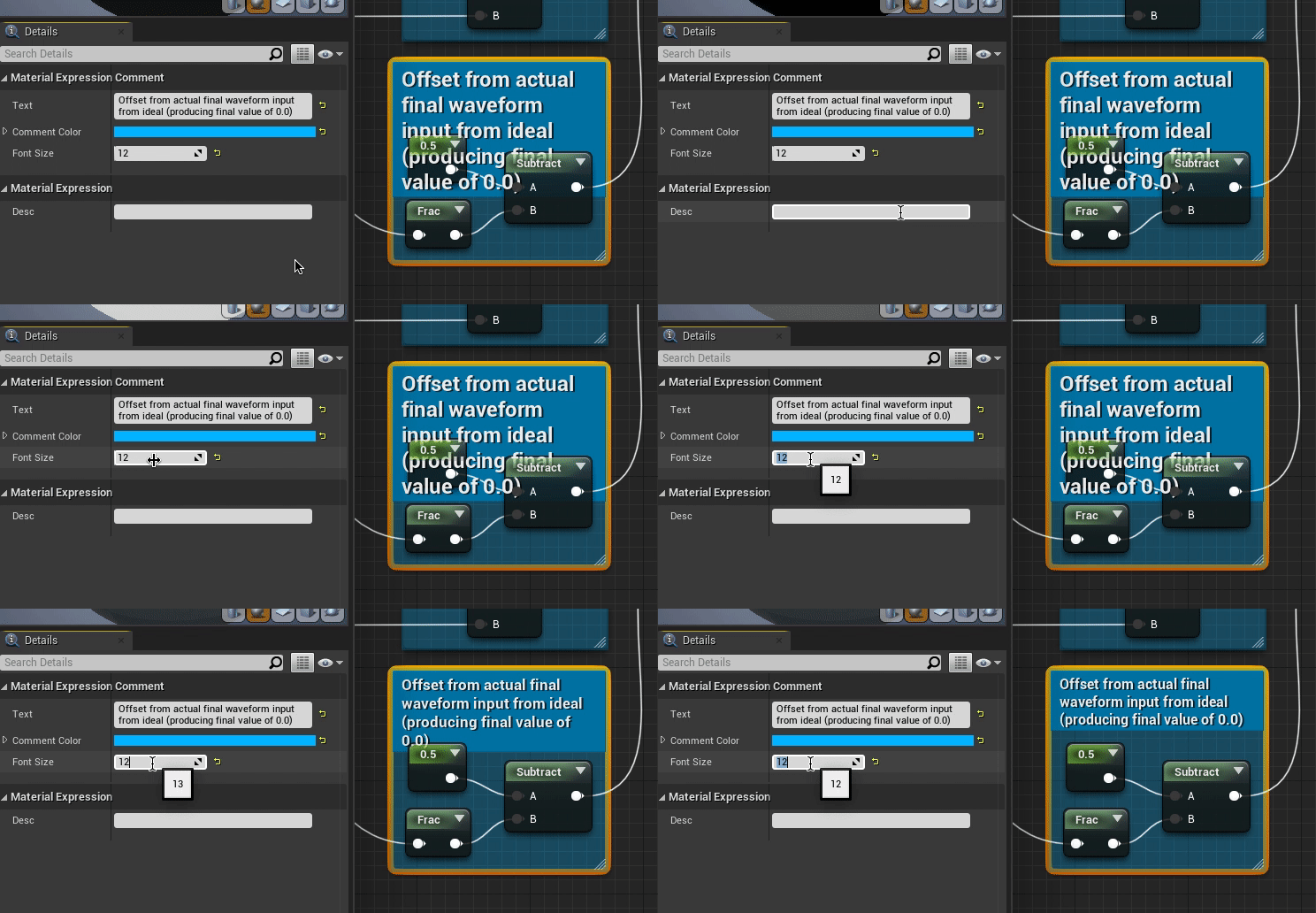

Anyone else have that problem?
tight schooner
Not in BP but I might've observed that in the material graph
quasi frost
So I am trying to move from my current grid to the grid in front of me which is current grid +3. It is getting the correct current grid but the addition is incorrect. Why is it adding more than 3? It goes from let's say 5 to 13 after the +3 node. Any ideas what is getting lost here?
timid forge
What's the proper way to add SplineMeshComponents at runtime. Is it AddSplineMeshComponent?
worthy frost
ye
 elfin inlet
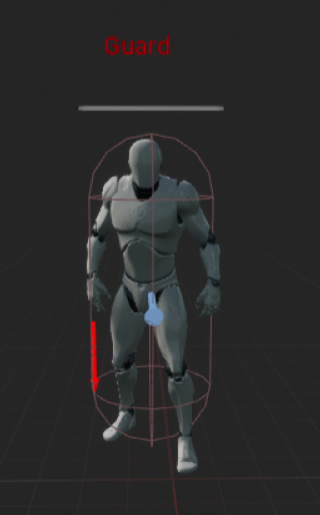
I'm trying to make an agnostic floating health bar. Is it possible to get the parent of "Widget Component" inside the widget bp or i need to set it from the pawn?
I'm trying to make an agnostic floating health bar. Is it possible to get the parent of "Widget Component" inside the widget bp or i need to set it from the pawn?
@elfin inlet i guess i'll set the reference from the pawn and the rest of the logic will stay in the widget
 haughty egret
Can anyone tell me how I can find a mouse position relative to a widget's local space when I call a function on that widget?
alpine halo
@haughty egret so when you interact in specific region of your widget the function should call?
haughty egret
@alpine halo As in, I press a key and my player controller detects it. I then want to check if I'm over that widget and where over that widget I am when it was pressed.
flat raft
@quasi frost add a Watch to the index from the Get.
Make sure you are getting what you expect .
Widget
Anything in there fits your description ?
haughty egret
I've already looked into this a lot on google. This wasn't my first stop. I tried using a bunch of the geometry and space conversions but couldn't make any of it work properly.
alpine halo
there're OnMouseEnter() and OnMouseLeave() events. but it checks for the entire widget. if your function calling widget is child of your current widget then and then it would work
haughty egret
Can't I just check what the local coordinates would be? And if they're outside max bounds I ignore it anyway.
flat raft
Represents the position, size, and absolute position of a Widget in Slate.
haughty egret
Yea I was trying to use geometry but none of the geometries seemed right
flat raft
LET US GO ABROAD
this post covers introduction to widget coordinate system what is FGeometry is how to get transform of widget the meaning of each part of transform tips for manipulating widget transform environmen
haughty egret
I had a getTickGeometry node but when I converted from absolute to local space it gave me coordinates outside the widget as positive when they should have been negative implying the geometry wasn't right
flat raft
You have a widget on screen, when your mouse goes over, and you hit a key, you want to return the widget, and the mouse location in that widget's space?
haughty egret
Yea
flat raft
so, you know how to get the widget under the mouse, yea?
haughty egret
No I don't
flat raft
start there
haughty egret
And I don't see how that's separate to just finding a local space
It would be an invalid local space
flat raft
You have to get the widget under the mouse. You have to get the mouse location in the viewport. You have to get the widget location in viewport, then do the math.
ember dawn
I'm trying to recreate the blueprint shown on top here, but I can't seem to get it to work, as you can see on the bottom. Anybody know what I'm missing?
haughty egret
Oh sorry I should clarify, I don't need to return the widget
I just need to call a function on the widget and know the local coordinates.
Oh really? You have to write a within box check yourself to find if you've over the widget. Amazing there isn't a node for that.
flat raft
Ohh.. you want to know wheee the widget is on screen space?
haughty egret
No no you were closer the first time
flat raft
Or mouse in that widget space?
flat raft
Oh ok lol... sorry got confused
haughty egret
It's for a map widget so I want to convert from the "map" to world
but to do that I need to know the widget position to do the conversion. I can't figure out how to get it. The geometries which seemed like they should return the right values didn't.
I was trying something like this
quasi frost
For the life of me I do not get why this is returning 15 every time. The current index is correct. I have it printing and it says the correct index. So it prints 8, why in the world is the current index + 3 equal to 15?
twilit heath
it doesn't print CurrentIndex + 3
it prints Index of TargetedGroundTile at CurrentIndex + 3
quasi frost
Right, maybe I am misunderstanding but isn't that correct? I am grabbing the tile's index after the calculation and printing it
twilit heath
GetAllActors of class isn't something i'd rely on to return Actors in same order every time
quasi frost
Oh really? How would I go about doing that then?
twilit heath
have the TileActors register with an Object that acts as manager in BeginPlay
or preset the references in editor, if they are all preplaced on the level
put them in array, sorted by their indices
and access them via manager
flat raft
@haughty egret https://m.youtube.com/watch?v=tI_W-im2ec8

This is Part 3 of my tutorial series where I show you how to configure my Minimap in UE4. For more information, visit the thread in the Unreal Engine 4 forums: https://forums.unrealengine.com/showthread.php?65500-UMG-Minimap-Almost-Plug-and-Play
This is what you're making ya?
haughty egret
Uh
Conceptually yea
But I have no idea where this Minimap functions thing comes from
And doing it on click is super easy
The click event gives you the input and the geometry
The hard part is trying to do it when an arbitrary keypress happens on the player controller.
 night river
Hope I'm not distracting but Im having trouble with this tutorial since at the 3:20 mark rotating the light actor doesn't change the material color like it should https://www.youtube.com/watch?v=9YQEAvvzh0k
A guide to creating a custom light vector for cel shading characters using Unreal Engine 4.
This demonstration uses UE 4.10
(sorry for the poor audio quality)
flat raft
I don't understand the keypress thing
So you click on ur map, you get the pos, you get the world space... then what does the key press do ? @haughty egret
haughty egret
No clicking
haughty egret
Just no matter where my mouse is if I press a key I want to know if it's over the widget and if so where is it in widget space @flat raft
night river
Will do 👍 @tight schooner
flat raft
Ok gotcha... sorry 😂
quasi frost
@twilit heath Could you explain that a little further? The grid is preswpawned and I am already getting the correct index for the current grid that the actor is on in the prefab, it seems where it is going wrong is when I take that current index and try to add it to the array and get the new index. Could you go into a bit more detail on what you were saying about how to grab it? In this grid forward 1 tile is always +3
elfin inlet
https://i.gyazo.com/7fe9f608d4f221eb382437f337ec2124.png
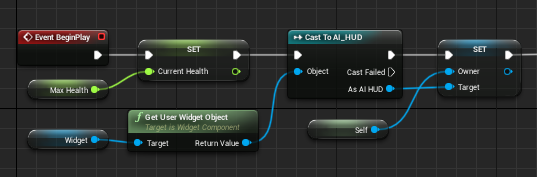
@alpine halo yes, but i will use it on both player controlled characters and AI pawns. I just wanted to make a shared widget
 alpine halo
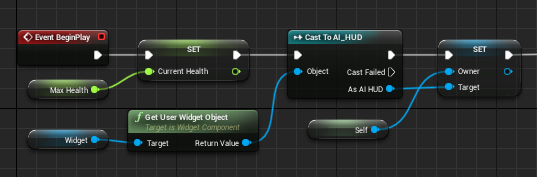
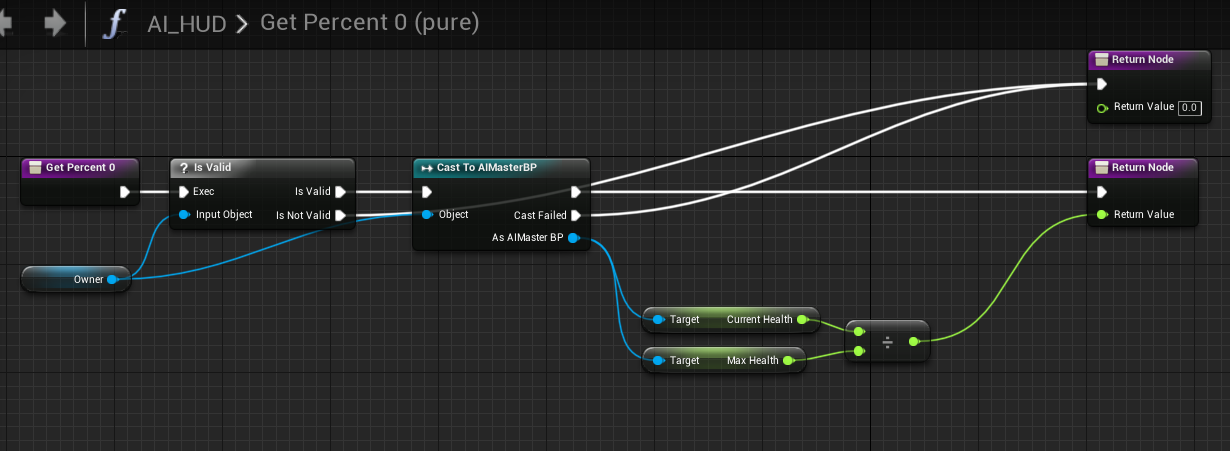
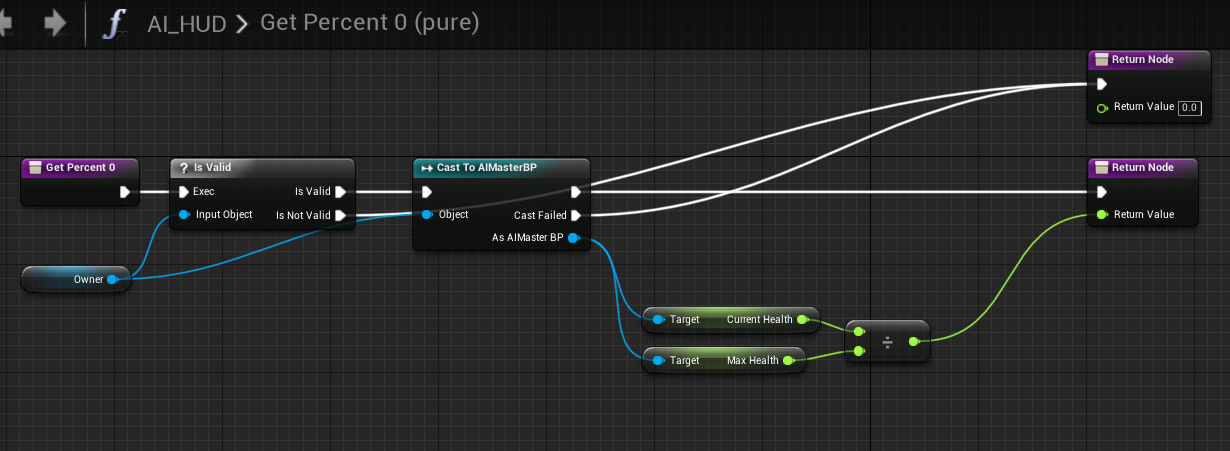
rather than doin casting
make a float or current health in UI, make instance editable and exposed on spawn. so you can share the widget doen't matter what actor is parent
flat raft
@haughty egret looks like its Widget Position - Mouse Position
 unique finch
Wow such wow
haughty egret
@flat raft Sorry I don't see how that helps. You're saying do the calculations for where the widget is on screen and find where the mouse is relative to that manually?
flat raft
Get the widget position on screen, then the mouse position , subtract
Basically set the widget , mathwise, to 0,0, then calculate the mouse
Yea, I don't see a built in function for that
quasi frost
Does anyone know the correct way to do this? I just cannot quite comprehend it. I know what I want to do in my head but it just isn't working in the BP. From what people have said doing actors of all classes is wrong here, but then how do I go about finding the specific actor of the master ground grid class with the index variable equal to the one I am setting +3. There is a master grid and several parents. Each parent is assigned a grid variable of 1-21. +3 is forward. So I want to get the current index variable (which is working) and then add +3 to it to get the new location (not working).
flat raft
The new location is 3 grids forward?
@quasi frost
how are the grid locations stored? And where are they stored?
quasi frost
As variables on each child grid actor. The current grid is set and stored in the character actor when it is spawned.
flat raft


so, say you character is in tile 1...
and then you want it to go to another specific tile?
quasi frost
Stored here since you asked.
Correct I want to just add 3 to it to move to the tile infront of it
flat raft
So from 1 to 4
quasi frost
right
quasi frost
If I am on tile 5 for example and I run the addition it moves me to tile 15 which isnt even the same row
quasi frost
Yes
flat raft
Ok
quasi frost
This path is not doing math correctly
flat raft
First thing to look at is the array
you are using get all actors... and you assume it's in some order
quasi frost
Yeah that is what I was saying, I don't know what to use in its place though
quasi frost
What do you want to see in it?
Theres a lot of stuff in it so I can't get it all in 1 ss
flat raft
Components
quasi frost
flat raft
Just a box?
quasi frost
Yeah the grid is just a box collider ontop of a sprite
Then I spawn a bunch of them
This is working. This returns the correct index to me. So the index going from the grid TO the character is correct at least.
flat raft
Spawn via construction script?
quasi frost
No it exists from the world space.
The battlefield bp is just an empty container that I use to store all the BP in order. I suppose I could try to leverage this somehow.
flat raft
So you just drag each tile into the world ?
quasi frost
No I drag the battlefield bp in
flat raft
Oh.. child actors .. ok cool
quasi frost
Yeah they are all children of master ground
flat raft
Ok, sorry.. just getting the lay of the land 😅
Ok, how are you telling the character to get the next tile to move to?
via a position stored in the tile?
Well.. that's not important at the moment... let's get the correct index showing first
quasi frost
So I hit the end turn button and the fires the movement event inside of the MasterCard_Character. That is this event which I showed earlier, it takes the current index which is stored(set) inside of the MasterGroundGrid when the actor child of MasterCard_Character is called. It then takes that index and attempts to find the location of the box of the grid child that is the current index +3
At the very least current index works 100%
chilly jetty
I made a pause menu
but when i try to press P again to close it it doesn't close but goes back into the regular game with the UI still up
quasi frost
@flat raft Like this?
flat raft
Yes, but because you have started at 0, you'll have an extra step when you have to add 1
@chilly jetty instead of the Do.. try a flipflop
 weary jackal
nah
chilly jetty
@flat raft no the UI is still stuck
flat raft
@quasi frost now your Character needs your array
weary jackal
and also have to make your UI isfocusable
quasi frost
@flat raft so I replace his one with the battlefield and the call the array?
flat raft
In your character, make a Variable of type battle ground, and select it
With the eye dropper
Make it spawn and editable
quasi frost
Actor or class?
flat raft
Compile
quasi frost
Okay
flat raft
Select your character in the viewport
You should see the battleground ref in the details panel, select the eye dropper
quasi frost
@flat raft Odd it's not showing up, unless I am just blind lol
flat raft
Your character in the viewport
 prime wyvern
hey umm
I'm a bit of a nub when it comes to any sort of game engine at all
and I have this problem...
I can't create this.
quasi frost
What am I looking for here?
weary jackal
@quasi frost in your game editor
prime wyvern
As in I'm not sure what its listed as, but I'm unable to create an event tick.
flat raft
https://cdn.discordapp.com/attachments/221798862938046464/750954832415686666/unknown.png the mannequin

 prime wyvern
quasi frost
prime wyvern
quasi frost
Master card character is spawned. It's not in the world by default.
flat raft
hmmm.. ok
quasi frost
This is just the side scrolling character
flat raft
He is spawned on tile 1?
flat raft
Ok, then on spawn, he needs to get the array
I assume the box on the tile you click on gets fired ?
quasi frost
Like this? Sorry I am bad at casting lol.
flat raft
That's begin play for the character ?
quasi frost
yes
quasi frost
ok
flat raft
and then just to check, we are going to print the length of the array.
quasi frost
By the way before we move on, I want to correct one thing, I don't know if this matters. The on click event on the grid tile to spawn the actor is on actor click not on box colldier click. idk if that matters.
flat raft
Should be on your controller
Well... correction..
I'd put it on the controller
lol
But for now .. let's just do the array
quasi frost
This cast is failing
quasi frost
With the character's capsule component?
flat raft
You know what... let's do it a better way
quasi frost
sorry lol
flat raft
we don't wanna depend on the colliosin
So, on your controller, create a battleground ref
quasi frost
Idk if this matters but this is how it spawns.
quasi frost
So on the player controller or the AI controller? Because this char uses the ai controller
flat raft
Player controller
quasi frost
ok
flat raft
got it?
Then on your battle ground beginplay, getPlayercontroller, cast to your player controller, SET the battlegroundref
quasi frost
What am I setting it to? Sorry if I missed something obvious.
flat raft
Self node
quasi frost
Okay done
flat raft
Great
Now open your playercontroller new
bp
And we are just going to test to make sure your array comes through
 obsidian folio
I have added some box collisions to an actor blueprint, so when my character walks up to it, I want the character to be able to interact with each box collision - essentially pressing a button on a machine. I've tried using begin cursor overlap in the actor blueprint but I just can't seem to wrap my head around making this actually work.
quasi frost
@obsidian folio I had this issue before. Make sure mouse events are turned on in your controller
flat raft
In ur controller, zarz, add a input key.. anything... E .. get your battleground ref and get the array, print
Length print
quasi frost
- Exactly correct
weary jackal
I have added some box collisions to an actor blueprint, so when my character walks up to it, I want the character to be able to interact with each box collision - essentially pressing a button on a machine. I've tried using begin cursor overlap in the actor blueprint but I just can't seem to wrap my head around making this actually work.
@obsidian folio make an interact interface and add that interface to your interacteble object. when you press 'E' if it's overlapping with your actor then it should send Interact(message).
flat raft
Getplayercontroller, cast to your playercontroller new, get battle ground ref , promote to Variable
obsidian folio
I turned on the mouse events but still not sure if it's working. @quasi frost
flat raft
Now your character should have a reference to your battle ground
quasi frost
ok
obsidian folio
@weary jackal It is a vending machine I'm trying to set up, and I put box collisions in front of each button so I can have different settings for each button. Would that work for it too?
weary jackal
yea
obsidian folio
Using the visibility trace channel to detect which button I'm looking at is how I thought I would do it, but just haven't gotten it to work
flat raft
Ok, in your movenment event, zarz, where you had the get all actors of class
obsidian folio
I just don't know how to detect specifically the buttons on the vending machine. I have a cast to the vending machine blueprint which it is detecting
quasi frost
quasi frost
ok
flat raft
Plug the Get you have into that array
You don't need the clamp
So, current index , the plus 3, into get
quasi frost
ok
flat raft
why is it purple ?
quasi frost
quasi frost
object reference I assume you mean?
weary jackal
I just don't know how to detect specifically the buttons on the vending machine. I have a cast to the vending machine blueprint which it is detecting
@obsidian folio https://docs.unrealengine.com/en-US/Engine/UMG/HowTo/InWorldWidgetInteraction/index.html
An example of how to create in-game 3D widget interactions.
quasi frost
Does this look right?
flat raft
Yup
obsidian folio
Perfect I will read this over. Thank you!
quasi frost
quasi frost
oh yeah hmm it doesn't let me set manually anymore
flat raft
Expose on spawn
quasi frost
ok
flat raft
now it let's you add the items?
flat raft
I guess it wants to be purple
Or, actually...
Drag your grid array into the graph , get
pull off the left pin, choose make array
Then pull each one from your components list to the make array
quasi frost
"Drag your grid array into the graph" What do you mean exactly?
flat raft
When you drag what does it say... when you try to connect
quasi frost
flat raft
Oh, change the GridArray type to Actor not Masterground
weary jackal
but if these objects are created from parent then the type should same
quasi frost
same thing but now just says actor reference
quasi frost
What do you mean? It is the child of Master_GroundGrid if that is what you are asking. It is a child actor.
flat raft
Is there a child actor type ? ... in the array type choice
quasi frost
there is a child actor type
quasi frost
Working. Give me a min to set this up
flat raft
k
quasi frost
Okay I have it set up on begin play in battlefield. After the set reference for bettlefield should still be fine right?
quasi frost
Yeah I can't call the box from the get I noticed
flat raft
hmm
oh.. there is a node
ok.. we good
got confused for a sec
lol
ok, where you up to?
we almost there, I swear
😂
quasi frost
I'm where we were before lol. Sitting here.
 limpid saffron
Hello Dear All
I have 'editor utility widget' for to do list daily goals, every day saving and loading that list, script working very well but I'm feeling my script would be more clear! Do you have any better idea?
flat raft
@quasi frost ok, we need to check the array just to make sure the data is coming through
tight schooner
@limpid saffron like styling/layout? You could do the Load event with a ForEachLoop. Each of the SetText target could be selected with a "Select" node driven by the loop index. Or you could similarly pack the targets into an array.
limpid saffron
@tight schooner trying now
quasi frost
quick question. Is it the raw grid in here or the entire get?
 zenith scarab
@limpid saffron,
You can use subwidgets, when you create the widget check if there is a svaed game if there isn't create blank subwidgets and add them to a scroll box, but when there is one load it and for each element of the saved tasks array you add a subwidget with that text, when saving you do a for each loop and add each array element to the array of the saved game after clearing it.
quasi frost
@flat raft Sorry, so if I do this it just prints every array 1-21. What I was asking is where I should move the +3 to.
flat raft
we are just checking at the moment to see if the data comes through
limpid saffron
@zenith scarab thanx man cool idea
flat raft
you can delete the loop and print as soon as you know the data is correct
it should print all the index , in order, ya ?
zenith scarab
That way you Can add a button that says create new task when you don't have enough and just create a blank subwidget at the very bottom @limpid saffron
quasi frost
limpid saffron
@zenith scarab infinite task list 🙂
flat raft
looks okay?
quasi frost
yep
flat raft
ok.. now this https://media.discordapp.net/attachments/221798862938046464/750971203581378621/unknown.png

 zenith scarab
Or add an enum or index and then set up some code for filtering it after priority when creating it, for example by saving those things to a map and not to an array
Also a custom struct can be helpful there
@limpid saffron
flat raft
do this setup, and from the Get, GetChildActor, cast to your tile , into your set
limpid saffron
@zenith scarab thank you
zenith scarab
👍
flat raft
now, zarz, when you are on tile 5, +3, you should get 9
it should be 1 off, beause the array is zero base
quasi frost
should I go through the indexes and change them to 0-20 instead of 1-21 to match up better?
flat raft
you can just add a minus node
after the + 3
or you can redo the index
which ever you want
quasi frost
Worked! Thanks a million. ONE tiny thing, why is the character changing his rotation and looking up though lol?
maiden wadi
It's a cow. It got distracted.
flat raft
when he spawns.. is he facing the right way?
quasi frost
quasi frost
What am I looking for?
quasi frost
the ai controller is empty, just the default
zenith scarab
Do you have a movement component in your ai?
Check if there is sth like orient rotation to movement checked
quasi frost
Np thor you have helped me a ton
@zenith scarab the ai controller is the default one, so there shouldn't be anything in it at all.
zenith scarab
I meant your character
quasi frost
the only thing in it is the movement event I posted above and a hover over actor tooltip which I don't think should do anything to its movement
zenith scarab
But does your character have a movement component?
flat raft
zenith scarab
Exactly that
quasi frost
zenith scarab
That should fix your problem
quasi frost
night thanks for the help again
thorny cedar
when i open a level, can i check, if the elvel exists?
restive dagger
um hi
I'm making 2 objects exchange materials every 2 seconds. my problem is when my code is finished it doesnt restart the process
 brittle fiber
Cyber Race > got 49 meshes within level as ground > they will have variouse BP on them > 49 meshed will be manipulated > maybe some blueprints have to be attached to 49 meshes, and all together will be moved > relocated like mechanism > IS IT BETTER TO LEAVE THEM MESHED or make BluePrint With 1 static Mesh > 49 BP with Mesh in them?
Human Evolution depends on me learning the answer of it
 obsidian juniper
@restive dagger your not doing it every 2 seconds you do it once and one timer after 2 seconds, you need to use a timer and set it to looping for that
restive dagger
@obsidian juniper yeah but my problem
in the timeline u can only change colors not materials :C
obsidian juniper
not a timeline, a timer
restive dagger
how to change materials then?
obsidian juniper
a timer can call a function periodically

In this Unreal engine 4 (UE4) tutorial I show how to use a timer. I implement a function to decrement an integer periodically by using a timer in a blueprint.
00:20 : Create actor blueprint
01:10 : Add decrement function in blueprint
02:15 : Set Timer that calls decrement fun...
restive dagger
ohhh thank you!
fickle blaze
sad question but how do I reverse this so I go down the current index instead of up
restive dagger
@obsidian juniper it didnt help me at all loll
I figured it out!
@fickle blaze try reversing stuff, like reverse the true and false outputs
 blazing ridge
is there some way to prevent/work against stuttering,lagging, jiggling on a moving palyer pawn at higher speds?
obsidian juniper
you mean in general or in multiplayer?
maiden wadi
@fickle blaze You'd need to do a few things. I don't even think you really need a branch for this.
fickle blaze
@maiden wadi I'm at a loss tbh
maiden wadi
Try something like this.
fickle blaze
I tried reversing everything and it didnt work
ohhh I'll try that
I didn't know about that node
select int
thanks
maiden wadi
It basically takes the current index. Lowers it by one. If it's below zero, it'll select the array's last index instead. Otherwise, it'll just use the index minus one.