#blueprint
402296 messages · Page 522 of 403
 shadow crescent
 quasi frost
So drag and drop is pretty simple in UI, however I am looking to drag and drop from UI to an actor in the scene. What is the best way for an actor to receive a drag and drop event from UI? In my example I am trying to drag and drop a 2d card from a widget to the 3d world.
 brittle fiber
@dense flare yes
 supple dome
probably as soon as you drag outside the widget, spawn the character and start raycasting from mouse to position it correctly
 high ocean
How in the world can this return accessed none sometimes?!
the set actor rotation node inside the function sometimes returns none for the "PlayerNPC" var...how?!
 naive edge
Hey guys, is there a way to go to a map and start serving ? (once the game is running?) like something in "Execute Console Command" or maybe "open level" with a param? (like play as listen server)
 worthy frost
naive edge
worthy frost
naive edge
thanks will try
 mental robin
I have a weather balloon that a player can spawn ...but it doesn't run the event tick when it spawns..it just spawns and nothing happens. Im not sure how to make it work
it works just fine by itself. I set a branch where you press a button to 'launch it' and it sets the bool to true and goes down the line on the event tick
but nothing
 trim matrix
mayybe its just says false xd
 haughty egret
Can anyone explain why blueprint diff would stop working?
It's just started saying no revisions found the whole time even though I know there are previous commits.
mental robin
ohhhhhhhhhhhhhhhhhhhhhhhhhhhhh I fgound out why
trim matrix
why
quasi frost
So I am trying to find the nearest ground grid actor to the mouse cursor. I feel like I have all the parts but I am not sure how to put them together. Anyone have an idea?
mental robin
okay now this is weird...I have a timeline that branches off of the event tick..and somehow even though im not using the event tick (I have a bool set to false).. ...it plays the timeline.
How on eart
earth
trim matrix
Hey guys, how can I get the pitch to reset back to original camera position when W is released? So that the character doesn't stay in the new pitch position once W has been released
why are you adding bool as a value
it will give you 0 or 1
 simple dragon
anyone knows how to return the height of a 'wave' from material at specific point
 rigid cape
Does anyone know of any places to learn more advanced gameplay techniques?
 neon aspen
TMap replication is not supported in blueprints in version 4.20
Is there a good workaround for replicating TMaps with blueprints? My TMaps are [Int Vector, Int]
 sick galleon
How can I check if my script that is marked "nativize" is actually nativized ?
 rose hazel
How should I set up RInterp To for an object to rotate 60 degrees in .2 seconds?
It should also be plugged into SetRelativeRotation, right?
This will be for the hammer on a double-action revolver
 tight schooner
@sick galleon package the game and check if the auto generated C++ code shows up somewhere in the Intermediate folder. The output log during packaging will also vaguely hint at stuff being nativized, though it doesn't give you an exact list of BPs. Sorry that I don't have a straightforward answer to your question.
@simple dragon getting information from the GPU to the CPU is in general a no-no. There are nodes that can sample a screen pixel or read a color value from a texture map but the documentation suggests they are kinda slow.
 faint pasture
@rose hazel RInterp To Constant
simple dragon
i only need vertex array from world position offset value to calculate Buoyancy and update the table Every 4-8 frames
faint pasture
@simple dragon Ya good luck, it's hard. There's a lot to do WRT write locking etc
But if you do figure out a way to get arbitrary render target pixel data to the CPU, give me a holler.
For something like buoyancy where you need very little data and slowly, you can just read the color from the render target with built in node
simple dragon
i still trying to get texture out of shader 😄
faint pasture
write shader to render target, pixel lookup on render target
simple dragon
ok
faint pasture
@simple dragon
rose hazel
@faint pasture what should I set each value to? The hammer either teleports or moves like 1 degree
sick galleon
@tight schooner first time Ive heard about packaging :D trying that right now
I assume that means you cant see the result from the PIE ?
faint pasture
@rose hazel Is the movement always the same? Like are you basically making a poor mans animation?
rose hazel
Yep
I just need the hammer to cock back 60 degrees, then spring forward
Everything is using StaticMeshes
faint pasture
Store the starting relative rotation to a variable or hardcode it, then do all your lerping to a delta
rose hazel
audible dial-up
faint pasture
so it'd be on update like
HammerRotation = InitialRotation + RotDelta
 wind kernel
What's the Opposite of [Add to viewport] ? for a widget component
rose hazel
I’m still confused. I have no idea what that yellow node is, or if there’s anything I have to do outside of the blueprint to get the effect
tight schooner
@sick galleon no, nativization only applies to packaged projects
rose hazel
While I’ve had UE4 for a while, I’ve barely had a chance to use it and there’s a lot I won’t immediately get
@faint pasture
sick galleon
@tight schooner thanks. I had errors on this first try but im too tired, ill try again tomorrow.
tight schooner
@sick galleon yeah nativization is buggy and difficult
naive edge
I'm trying to start serving but none of these is working. I've also tried with options as "listen" without the "?".
Also i'm trying to run this on Android.
but it's not working and i've checked the ports and it's not even opening a port. (i've tested by starting another server soft on the phone and it does works)
rose hazel
I feel like I’m missing something
I removed the Delay because it just put the function in a loop, then connected Finished to the rest of the firing function
I created a float track with (0,0), (.15,60), (.2,0)
The hammer doesn’t move at all
a bit of this is irrelevant
Ignore the spawn and add nodes
...
I’m a headass
I needed to connect Finished to the rest of the function and SetRelativeRotation to Update
trim matrix
is there a keybind to tidy up links between functions, the spagheti is upsetting me 😦
or any other tips to keep tidy?
faint pasture
@rose hazel wtf is that
rose hazel
Chaos
faint pasture
@rose hazel Why are you doing nothing on update?
rose hazel
Anyway, I figured it out. I somehow managed to screw up the ammo counter in the process
For future reference - the answer to anything involving me and blueprints is chaos and headassery
 maiden wadi
@trim matrix Generally I'd say that if you have that much of an issue with it, start breaking stuff down into smaller functions or macros, or collapsing graphs.
trim matrix
What do i use in my Anim_BP to get a variable from my CharacterBP
 flat raft
@trim matrix yes there is... you can align nodes and such if you select 2 nodes and hit Q.. there are more options .. select nodes, right click under the Align menu I think
 alpine halo
@trim matrix cast it
trim matrix
How can I add right or left X axis rotation using mouse movement left and right
flat raft
@trim matrix in addition to cast, try GetOwner, or GetParent, even GetCharacter, maybe GetComtrolledCharacter
trim matrix
@flat raft I have TryGetPawnOwner, I am unaware of what will get me a specific bool
 flat raft
Yup.. cast.
wind kernel
How many times does EvenBeginPlay fire ?
alpine halo
every time game starts once and if you are spawning an actor then as soon as it spawned
wind kernel
So if there are variables that are added after a while the game has been started . 'Event PlayBegin
wont do anything ?
alpine halo
variables added? means updated?
wind kernel
wind kernel
thanks
alpine halo
for that make a custom event and fire it after 5 sec
wind kernel
ok
trim matrix
for some reason my anim_bp is trying to save in a completely different file path
alpine halo
How can I add right or left X axis rotation using mouse movement left and right
@trim matrix set controller rotation yaw to true
trim matrix
what do i use to switch between state machines based on a bool

 trim matrix
@alpine halo I mean is there a way to switch between the state machines to final pose without blends
@alpine halo it already is
i think you misunderstood a lil
alpine halo
i did blend with alpha
trim matrix
trim matrix
just a little project lol
yeah
haha
tryna get it to turn with mouse movement kinda like a jet
flat raft
You mean bank
trim matrix
yeah
flat raft
Well.. it's a 3rd person view... your mouse is used for rotating the camera, no?
trim matrix
yeah it is, left and right mouse moves the camera left and right
but i want it to bank (roll) with a max of 45 degrees, only when W is being help
flat raft
Isn't W forward?
trim matrix
so if im moving my mouse right, itll roll right to a max of 45 and stop but keep turning because of the mouse
flat raft
😂
flat raft
maybe not... explain again
trim matrix
do you know how to connect the rolling to the mouse movement?
ill show you after I apply what i mean
flat raft
ohh.. just checking.. I see
Ok..well to roll your dragon with the mouse, you have to set the actor rotation on tick, with ..... mouse axis I think
mouse X axis
I'm on my iPad in bed... so.. I don't remember what the mouse value is..
trim matrix
ok
trim matrix
Can somebody check the #linux channel?
How would I get my character's movement direction based on the pawn's yaw?
I'm thinking of something like getting the velocity relative to the direction the character is facing
flat raft
@trim matrix also... add to current rotation , rather than set
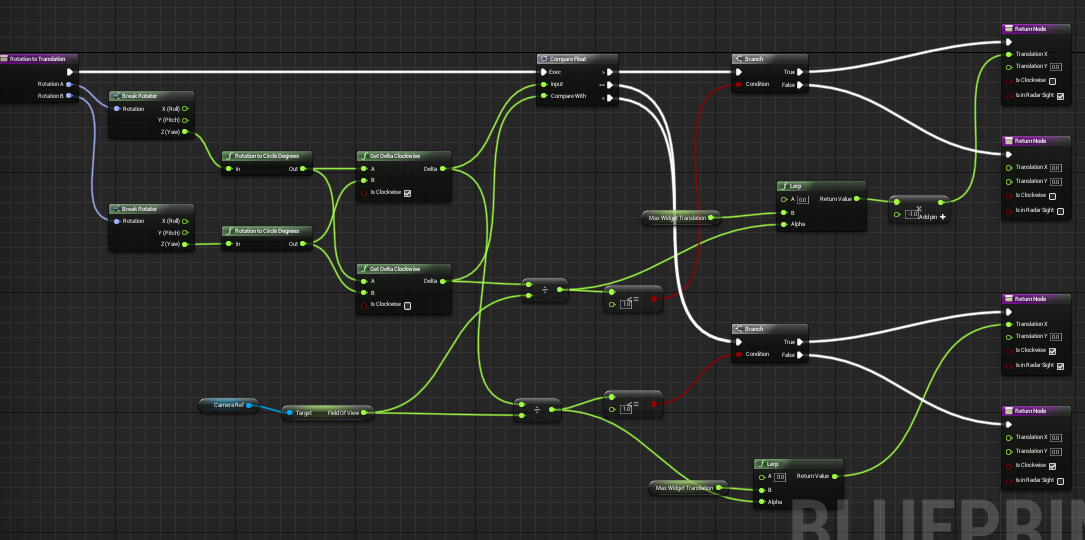
 flat raft
Oh hey, dude... https://youtu.be/pwtKcDA-RTI
This is my solution for scripting nice feeling Jet like movement in Unreal Engine 4.
alpine halo
rotation B = mouse
flat raft
Boom! Flight tutorial
alpine halo
@flat raft this is spoonfeeding
flat raft
I really wanna see the dragon roll 😂
flat raft
I'm out.. night all!
alpine halo
night
faint pasture
@trim matrix You mean movement direction relative to pawn yaw?
trim matrix
yes
faint pasture
as rotator or vector?
trim matrix
rotator
faint pasture
It's just delta of pawn forward to rot and normalize(velocity) to rot
or prolly just control rotation if pawn uses that
trim matrix
@faint pasture would it make sense to just do this right in the anim bp?
faint pasture
@trim matrix That's where I'd do it, ya
faint pasture
What exactly are you trying to do, get forward/backward and left/right components of velocity relative to yaw?
Then just do dot(Velocity, forward) and dot(Velocity, right)
trim matrix
forward and right velocity into the same dot?
faint pasture
ok, start over, exactly what number are you trying to get?
trim matrix
I would preferrably somehow get a float that goes from -180 to 180 degrees for the blendspace I am working with
I am trying to get the rotation of the direction my character is moving relative to the yaw of the controller
 coarse obsidian
Hi there, I'm using a Widget Component that is redrawn every time the Controller moves. If I move quickly I get this ghosting effect, does anyone knows how to get rid of this ? The widget is drawn on Screen Space.
maiden wadi
@trim matrix Are you looking for a local, or world space yaw?
trim matrix
@maiden wadi the yaw of my CONTROLLER should be in world space
the rotation I wish to use is the difference between the X+Y direction my character is travelling, and the YAW of the direction my controller is facing
faint pasture
@trim matrix You are still saying you want the difference between a vector and an angle, but anyways, the result should be RotatorFromXVector(Velocity).Yaw - ControlRotation.Yaw
trim matrix
https://tutorial.math.lamar.edu/Classes/CalcII/DotProduct_Files/image001.png
character is looking a, while character is moving b, I am looking for theta

the z axis does not matter for this
faint pasture
RotatorFromXVector(Velocity).Yaw - ControlRotation.Yaw
trim matrix
@faint pasture MakeRotFromXY?
maiden wadi
No. You make a rotation from XVector out of the velocity. This gives you a local space rotator of the direction the object is moving. That's your A.
I personally zero out the Z on velocity when I do this and then normalize it. Effectively turn it into a 2d pointing vector that has no up or down bearing.
alpine halo
faint pasture
trim matrix
@faint pasture Why is it making a rotation from only X?
faint pasture
it is treating the vector as the x axis
trim matrix
@faint pasture which x axis
faint pasture
x axis of the frame of reference corrosponding to the rotation
 terse garnet
Hi,
I'm trying to set the child directional light to the parent one
trim matrix
@faint pasture so it's basing the rotation on what the forward vector is in this instance
faint pasture
ya
trim matrix
@faint pasture I got confused because I forgot x was forawrd in ue, thank you
 velvet viper
Alright, so I've been prototyping an Arkham-style gliding system for about 20 minutes now, and I'm pre happy, but I'm struggling to get the player's rotation being pushed downwards like in the games
Like here (ignore the jump at the end)
I've tried applying a downwards force at a certain angle, rinterping the player's rotation downwards
but nothing seems to really work, the downwards force doesn't do anything to the player's rotation so he is pushed down but still rotated out
maiden wadi
@velvet viper You should check out the... I can't remember what it's called now. In the learning tab. Mountains or something. It has a fairly nice little glider example.
velvet viper
@maiden wadi Oh awesome, can you link it? Can't seem to find it in the tab
maiden wadi
@velvet viper It's about two thirds or so the way down. It's under Legacy Samples. Landscape Mountains. Should be right next to the Elemental Demo.
brittle fiber
hey
maiden wadi
Can't find a direct link to it. Just in the Learn tab of the Launcher.
brittle fiber
how can we drop BP component-SM top?
maiden wadi
@brittle fiber Not sure what you're asking?
brittle fiber
@maiden wadi within blueprint,
that circle is area where a few obstacless should threaten player
not sure how to search it, like a box to drop on the head
maiden wadi
You want to attach a static mesh to a player character's head?
brittle fiber
not, rather to randomly spawn Static Mesh, within an area, defined by Blueprint
maiden wadi
You want to spawn something that drops from the sky within the area to fall and hit the player?
 autumn heath
Any idea why a widget created with Create widget and added to viewport with Add to viewport doesn't show up?
The reference returned by create widget is valid
And I have tested if the widget's visibility is visible
trim matrix
@alpine halo That sort of worked, but didn;t give negative rotations, thank you
@maiden wadi Thank you
@faint pasture I had to multiply the float by -1.0, but it is working now, thank oyu
 eternal kiln
Good morning! Im sitting here trying to make a self guiding rocket that follows the players location and rotates accordingly. The movement works but is slowed down the closer it gets because of how i do it now, does anyone have any idea of a smart way to solve that specific thing?
tl:dr
Move actor towards another actor in a straight line at a constant speed.
autumn heath
@eternal kiln get the normalised vector of the direction from the rocket to the player, multiply it by any magnitude you want and set it as the velocity of the rocket
alpine halo
is the rocket is pawn ?
eternal kiln
@autumn heath thanks for your help! I dont understand how to implement your answer though
@alpine halo No its an actor right now
autumn heath
Ok here is some pseudo code:
RocketVelocity = (PlayerLocation - RocketLocation).GetNormalized() * Magnitude
ohhh right ofc. But where should i use the RocketVelocity as an argument?
eternal kiln
Explain it like im 5, i might be having a brainfart or if im just looking at this the wrong way but i dont get where to set the velocity
autumn heath
OnTick
after you do the rotation stuff
Also, since this is a projectile
you might consider giving it a projectile movement component
eternal kiln
Oh didnt even know that existed, will check it out. Thanks for the patience
 amber isle
Hello guys, I have made a logic for slicing the procedural mesh using sword. The logic here is simple, there is boxtracebychannel when it overlaps the mesh we get BONE name from mesh & the mesh is Sliced from that BONE giving us the lower & upper part from the cut position.
Now the problem I am facing is of box trace whenever the Sword is swinged with higher speed the box trace just doesn't get created.
Does anybody know how can I use BoxTraceByChannel correctly in this case or some other way around?
 wicked shell
Hi all. I am new to UE and trying to learn from documentation and from other online content. I have a question about a blueprint which holds my spawn system. I am trying to change the speed of spawn as it is a projectile. Where could I change this? In the Event graph of the bp or in the construction script? And how? I know it is quite trivial for you but am really puzzled with this 🙂
alpine halo
there's velocity in projectile movement component
wicked shell
Ok I get the projectile movement and I should bind it to a variable I would create right?
Wohooo I did it. Thank you so much 🙂 my 5IQ point worthy brain could figure to tie it to event begin play ^^
 warm dock
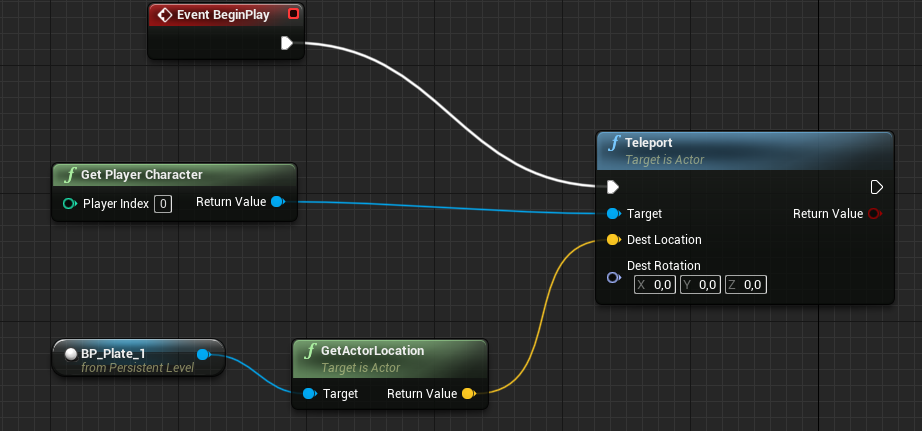
https://i.gyazo.com/96a089a2c302d01b53d775c7ead635cc.png can anyone tell me what I'm missing why the location is not being fetched from the scene object reference through this node? this logic is in the level blueprint.
 alpine halo
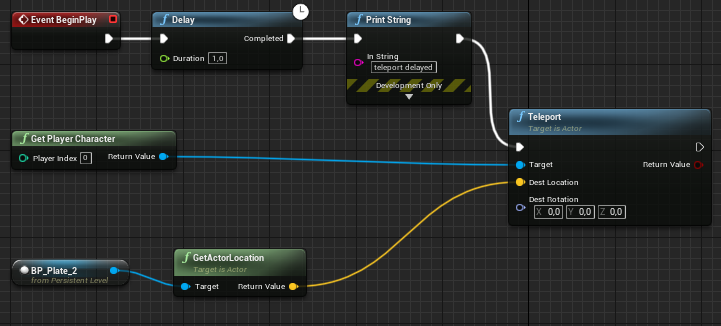
make a delay of some thing like 1 sec and try
warm dock
oh, from the event?
alpine halo
yea
warm dock
ah, gotcha, will try
alpine halo
there's also a player start
warm dock
ah that fires off later?
alpine halo
i mean you want this right that when your level loads your player should spawn at desired location
warm dock
yeah I get what you say, I'm just learning blueprint it's nothing really functional
warm dock
just passing object references atm and trying to write clean code, thanks for the tip
warm dock
cheers
so my problem with this code seems to be that I'm not getting the location from this object reference in the scene
it's like its properties are private and the teleport node default to something
https://i.gyazo.com/3faa75381a1b1775f27bf53e05de408d.png in this case it does not teleport at all, if I remove the yellow line it does teleport to 0,0,0
 alpine halo
https://i.gyazo.com/de22d6287063977e82dea91c230e3a34.png
you don't wanna use this?
 warm dock
absolutely but I'm just debugging this node
I don't understand why it fails and I have had other object reference fail like this
 whole rose
you might consider giving it a projectile movement component
and projectilemovement even has "homing" ability.
 deep elbow
is there a way to create a perfect -1 to 1 curve in curve editor, cant seem to edit both tangents at once 😦
high ocean
Can beginoverlap event somehow interrupt a running execution? This is my case:
sometimes, the PlayerLookatAtNPC function retrns none for PlayerNPC. Which cannot occur, unless, the beginoverlap event gets inbetween the validated get and the function itself. No delays in the middle or anything else. This is weird.
 wicked lance
Does anybody know how to open the compiler results panel? It went missing and it's not in the window drop-down menu
high ocean
@wicked lance
 fleet nimbus
Hi ! I've got a strange problem... I have a projectile component that keeps teleport on the Z axis to +1 391 compared to where it was spawn from... any idea why?
maiden wadi
@fleet nimbus None at all. Debugging is figuratively impossible without seeing what you're trying to do.
wicked lance
@high ocean none of them is the compiler results panel: https://docs.unrealengine.com/en-US/Engine/Blueprints/Editor/UIComponents/CompilerResults/index.html
Interface for the Compiler Results panel of the Blueprint Editor.
high ocean
oh, sry, u right...lemme see 😛
fleet nimbus
Uh, sure, sorry, but I don't know how to give more details without sending my code...
maiden wadi
@wicked lance You linked your own needed resource.
wicked lance
Yes, but as I said, and as shown in your screenshot, it's clearly not there
ah, wait, of the blueprint editor
maiden wadi
 zinc flicker
Does someone know how to fix that error when i open the project?
I had soulCity Project installed to play around but removed it afterwards, what does that error exactly mean?
high ocean
@maiden wadi Hey! 😅 can u pls take a look at my question earlier, I know ur very good, maybe you have an explanation?.
maiden wadi
@fleet nimbus Only guesses without seeing what you're doing are that something is initially colliding with it and it's spawning the closest place that it can.
wicked lance
@maiden wadi hmm, it looks different for me
is there, like, an advanced mode or something?
I'll see if I can find it out through google
maiden wadi
That dropdown changes based on the window you have open currently. The one I screenshotted is from a default actor blueprint.
fleet nimbus
Okay find out this website, so here's the bullet blueprint that's been teleported : https://blueprintue.com/blueprint/ohp92e_o/
BlueprintUE
wicked lance
ah, thanks. that is pretty confusing, lol
high ocean
@wicked lance I agree, had no idea before
wicked lance
it makes sense to have it openable from each window that has a "compile" button with warnings that tell me to look in the compiler output panel
fleet nimbus
I also tried to remove the collisions, but it doesn't do, even if I re-teleport it every update (I know, it's bad, but it was for testing purposes), it still change to the bad Z axis
maiden wadi
@high ocean In theory what you're doing should be perfectly fine. It's very odd if that node ever runs with an invalid pointer to the NPC thing. What are you doing in the node before it? Are you ever changing that get's value anywhere else before where it throws the error?
wicked lance
ah, but different problem now, it's not open on the asset I need to see the compiler output for, lool
... I had to go to the designer tab
high ocean
@maiden wadi This is the "whole thing", the only thing I could think of is the var getting reset because another NPC began overlap. But it shouldn't matter, exec shouldn't be interrupted - or I had it wrong this whole time. There are no delays in any of those functions or anything that would allow execution interruption. Otherwise, it's just that.
I "fixed it" by throwing another isvalid node inside the culprit function, but i'd still like to understand wtf...So, now it works but the additional is valid in the function should be redundant
@maiden wadi btw, thanks for taking a look 🙂
 restive dagger
https://www.youtube.com/watch?v=jgK7vj6lZN0 hey, I want to make an object follow me, just like this but idk how
 high ocean
@restive dagger search on google "ue4 chase player" or "ue4 ai follow player" and adapt the logic to your needs.
 mossy stone
Hi, new to unreal, been on Unity for years. I have one question.. Can we do something like this in unreal "I want to keep all my .uasset files in one folder and I want to pull them in game whenever required. The uassets may get added or removed anytime externally. I just want to see the list of assets there and spawn whichever I want." This can be done in unity with the help of PersistentDataPath but couldn't find in unreal
high ocean
@mossy stone Afaik, you can't, since removing referenced .uasset files will break references which means the engine will return a "failed to load [...]". Otherwise, if you know those assets aren't referenced, you can just remove and add them at will. Same goes for clusters of assets which only reference each-other. (Say, you have a mesh with materials setup and a blueprint that holds them. If you move all these .uasset files clustered, w/o changing folder structure between each-other, you can add/remove them at will).
 gaunt monolith
put an isvalid somewhere
trim matrix
isvalid ?
gaunt monolith
yea the other actor isnt allways valid in ur case so u should put an isvalid there
mossy stone
@high ocean Thanks. What you are saying does make sense to me. But can you point me to some ref docs or videos where I can learn how to spawn objects from external directory into game? I'm having hard time figuring out what to search for on internet. Nothing is on Unreal Docs that allows me to get a uasset from given location.
high ocean
@mossy stone You can't spawn them. That won't work. All .uassets detected and indexed by the engine must be in the Project's Contents folder afaik.
deep elbow
shoudl explain what you want to do and why, there may just not be somethign similar at runtime
high ocean
@deep elbow and on soft refs I can't find a single damn reference/tut/information which I could understand. It's like a ghost topic it seems. I have no idea how they work, and maybe i'd like to, but nope, nothing out there 😐 - you got any refs/docs/articles about those? I'd much appreciate it. 🙂
trim matrix
@high ocean https://m.youtube.com/watch?v=K0ENnLV19Cw
26:07

This week Christian Allen will provide an overview of Hard & Soft Object references in Blueprints, why the differences are important to know about, and how you can utilize Soft Object references in your project to help with memory management.
Watch Inside Unreal live at twitc...
high ocean
@trim matrix Thanks god! The title says it all. Hopefully it's one of those talks which are actually worth something 🙂
mossy stone
Okay the thing is, I have lets say a huge pool of fbx in form of uassets which I want to create on my clients machine. And the form of game that I'm creating is, Me, as a developer will keep on creating new levels which will use the assets in same dir. So the purpose is to share assets between existing and new levels. So client wont need to download huge data with every build
trim matrix
It is. 26:07 is great
maiden wadi
In short, what you guys are calling references are actually pointers. They're small addresses that point to a memory location of an object. This allows you to get information and call functions on this object. SoftObjects are more like the directory location and path that the object is at, so that you can load a version of it if you need one, but don't actually have to keep a full object loaded.
 proven mason
How do I get blueprints to print something when holding and still holding a button after 10 seconds
I was trying to do a while loop and assign the real-time seconds to local variable but I'm getting infinite loop errors.
dunno if this matters but the buttons are analog
so scale maybe a factor being that it has be nearly equal to 1
maiden wadi
@proven mason A while loop will run indefinitely on a processor until it's finished. That's hundreds of thousands of times a second. Typically any sort of 'over time' effects are done by framerate. An action is done once per time that a frame is drawn to the screen and you use the time between frames to count how long it's been since the last frame.
You're looking for tick, or a timer.
proven mason
so I guess in the event graph I have to call a tick key event?
maiden wadi
Dunno. If you just want something to print once after ten seconds, a SetTimerByEvent would probably be easier.
proven mason
or SetTimerByFunction
maiden wadi
Either. They're pretty much the same thing.
maiden wadi
The function to set the timer has a looping boolean. Just leave it false and it'll only call once.
high ocean
@trim matrix Thanks for the link, it's very good this one! 🙂
maiden wadi
Just be sure to create a timer key and use that to stop your timer if you don't want it to call the event before the timer is up. You can also use the key to make sure you don't call the timer again before it's ran it's course.
 tough cipher
does anyone know whether there is an automatic plugin installer for ue4 (3rd party)
 stiff hatch
is there a good way to program a "Rock paper scissors" win condition without nesting?
maiden wadi
@stiff hatch You mean like comparing if a chosen value should win out of the three vs the other value?
maiden wadi
@stiff hatch Hard to say. Considering it.. I mean you could use a sequence of selects. But that's not much different. Switch might simplify it a little. In the end I'd probably just make two if statements. Simplify it by asking if player selection == the other selection. If so, draw. Else, if OtherSelection == PlayerSelection+1 then player loses, else player wins. As long as your rock paper scissors are in that order and represented by numbers like 0, 1, and 2, that logic will work. Just make it so that the PlayerSelection+1 turns to 0 if it's greater than two.
@stiff hatch This, in a sense. Can be converted to byte, or enum if necessary as well.
stiff hatch
@maiden wadi Thank you for helping. I didnt use exactly what you had but It did help point me in the right direction.
my project is multiplayer and the Gamemode gets each of the players selections Via an Enum and I just have 3 branches. First one checks for a tie like yours and then the other two are for player 1 win conditions and the second one is for player 2 conditions.
Here is what I have setup (its fairly large so sorry for the poor res)
 elfin hazel
I don't know if this will help, just a bit of brain storming. What if you had a key-value pair of type State- State. A State is one of the rocks, paper or scissor.
Then the key lookup is what each of the players chose, and the value is the State that the key trumps or is defeated by depending on your needs.
That should then be pretty scale able with more States. And you could have the Value in the kvp be an array of states that the key trumps, or is defeated by.
 mortal wharf
How do i remove / make a widget invisible both work for me in the level blueprint where the widget isn't even created in?
Because you can't specify which widget to remove on a remove from parent right?
elfin hazel
The Remove From Parent is a widget function, so you call it on the widget that you want to be removed.
mortal wharf
Please explain more?
elfin hazel
Actors have a Destroy() function, so you call that on the instance Actor you want destroyed.
It's like that, but for widgets. Except it's not destroyed, just removes it from the parent.
alpine halo
In remove from parent there's target, the target should the widget you want to remove
mortal wharf
i have tried that, and that didn't work @alpine halo
alpine halo
Can you send a screenshot
mortal wharf
sure just wait a few seconds
trim matrix
@mortal wharf after you create a widget you have a return value if you want to remove the widget you just plug this return to the remove from parent
mortal wharf
yeah but i don't create the widget in the same blueprint as i want to remove it @trim matrix
alpine halo
Then promote it to variable
trim matrix
ye
alpine halo
Cast it in the blueprint you want to remove the widget

 trim matrix
if its in your character then in different bp you can easily cast to it and get the reference
mortal wharf
This is in the level bp
alpine halo
Just promote that widget into variable after creating
Then cast to the blueprint you are creating the widget and pull out that variable
And attach that into remove from parent
mortal wharf
So i basically have a power system with a widget to show the level of power which all works but it only works in one level which is correct but it is still visible in all levels.
that's why i am trying to do this:
alpine halo
Then you should create that widget into level bp
 gloomy linden
You need to cast to the bp using a instanced reference, easiest way is to use get all widgets from class or something to get the widget reference
elfin hazel
Instead of having all other levels trying to remove the undesired widget, it would be better to have the level bp create the widget, since it is unique to the level.
gloomy linden
Widgets are always in a level regardless
Like any actor
@mortal wharf tho it would be easier if you make a function in the bp that creates the widget, to remove the widget. Then from other blueprints you cast to that creating bp and call the function to remove the widget, that way you keep the removing widget part at 1 place
mortal wharf
https://gyazo.com/18618586f485971a3b65b802463e0885 Is this what you meant? @gloomy linden By the function?

 unkempt mulch
I'm not sure if this is the right channel, I have a JSON spline data formatted thusly:
    "controlPoints":
    [{"controlPointSpline":
      [{"x": 2.4918339252471924,"y": 0},
       {"x": 1.2459168434143066,"y": 2.1579916477203369},
       {"x": -1.2459170818328857,"y": 2.1579914093017578},
       {"x": -2.4918339252471924,"y": -2.178430378307894e-07},
       {"x": -1.2459167242050171,"y": -2.1579916477203369},
       {"x": 1.245917797088623,"y": -2.1579909324645996}],
      "point": {"x": 287.01492309570312,"y": 100.07234954833984,"z": 405.66363525390625},
      "up": {"x": 0.49748080968856812,"y": 0.8660818338394165,"z": 0.049125999212265015},
      "vAxis": {"x": 0.23029391467571259,"y": 0.958656907081604,"z": -0.16715794801712036}}],

#lots of controlPoints in sequence.

}```
"point" is in world space, and everything else is local to "point"

"point" is a control point of the spline, and the XY values above it are the locations of points which make up an irregular circle in a 2D plane relative to the control point to ultimately create a spline mesh.

Can I use this data to generate a spline and an associated spline mesh using blueprints? I've Alan Noon's blutility hack to import spline data before, is there a way to build off that concept to create a whole mesh?Morning All!
high ocean
@unkempt mulch You can use the data to drive your spline mesh with data table nodes, not sure how you would go about it, It CAN be done, but "creating a mesh" - I don't think that's possible
Hey Thor 🙂
unkempt mulch
Driving the spline mesh creation seems like what I am after
high ocean
@unkempt mulch This is what I was going on about:
Your data table should be generated based on a struct containing the data you need. (Idk anything about the blutility hack stuff), in bps, this would be a straightforward approach.
Then you populate the table with the vars you need, basically spline point locations (V3), and indexes from first to last. Then set the location of the indexes on the locations in the data table. So, each table row should contain all required information like: spline point index, location etc. Checkout a spline tutorial to see the basics and how to setup your table. Run a Forloop or something and generate the spline points based on the data from the table.
You might also need an arrive tangent and some other vars for each spline point and such
flat raft
   SplineCurves=(Position=(Points=((ArriveTangent=(X=88.506073,Y=0.000000,Z=68.313049),LeaveTangent=(X=88.506073,Y=0.000000,Z=68.313049),InterpMode=CIM_CurveUser),(InVal=1.000000,OutVal=(X=100.000000,Y=0.000000,Z=30.000000),ArriveTangent=(X=108.620445,Y=0.000000,Z=1.265213),LeaveTangent=(X=108.620445,Y=0.000000,Z=1.265213),InterpMode=CIM_CurveUser))),ReparamTable=(Points=((),(InVal=11.017736,OutVal=0.100000),(InVal=21.772734,OutVal=0.200000),(InVal=32.351711,OutVal=0.300000),(InVal=42.830669,OutVal=0.400000),(InVal=53.273678,OutVal=0.500000),(InVal=63.732430,OutVal=0.600000),(InVal=74.246399,OutVal=0.700000),(InVal=84.843597,OutVal=0.800000),(InVal=95.541641,OutVal=0.900000),(InVal=106.348961,OutVal=1.000000))))
   RelativeLocation=(X=50.000000,Y=0.000000,Z=40.000000)
End Object
your spline could be in this format...
then you can just paste... if you are building it externally
unkempt mulch
Thank you very much for your advice, I've spent the weekend learning to write splines from CSV tables from splines build outside of Unreal, and wanted to take it a step further and write an irregular mesh around it.
flat raft
Esle you need to read ina file some how, then loop over the data, and use the add point
this will generate your spline. mayeb add it in the construction script
It is on my list of things to do for my game. I would like to make the curve in 3ds max, export it, and have unreal generate that curve based on a file.
unkempt mulch
This is the fruit of my weekend labor
The splines were made in Maya as curves. I used a python script to export them as a CSV
flat raft
if the animation is contstant.. of the sphere.. then maybe bake it ?
gaunt monolith
thats corona realtime? 😛
unkempt mulch
The ultimate goal is to replace the sphere as a niagara effect, and have interactivity to show how damage to different parts of the brain produce different visual impiarments
gaunt monolith
ahh they looked like lungs too me, good im not a brain surgeon
unkempt mulch
click here to cut the optic chiasm! see what happens
flat raft
well.. the question is, should the design be dynamic?
or can you get away with a baked particle system.
unkempt mulch
I'm thinking of having pre-defined lesion spots. and baking a fully functional and a damaged particle animation
flat raft
Not that you can't make it dynamic.. it will be more controllable if it's baked
also, you can do the particle in maya and bring it in.
unkempt mulch
oh really, that will be useful for a blood flow project I want to do
flat raft
i believe unreal has a particle cache loader
also, the brains in #visual-fx might be able to help more
unkempt mulch
Will do, thank you again for your help!
flat raft
@unkempt mulch https://youtu.be/SKe7jYAkdSs

In today's tutorial I show you how to take your X-Particles simulation mesh out of Cinema 4d using the Alembic exporter then brining it into Unreal Engine 4.
WINBUSH DEALS FOR YOU with my Affiliate links!
------------------------...
this is for cinema4d, but should be the same for Maya.
result is at 6:10
unkempt mulch
that video is excellent
trim matrix
Hey I need some help. I set my door blueprint where I can raycast it, but my player is raycasting everything BUT the door
Can someone help please?

This is my blueprint
Please ping me if you answer. Thanks 🙂
I fixed it
 violet wagon
@trim matrix The image is very blurry to tell what the node settings are but if your BPs are all setup properly, then your doors collision settings probably dont block "Visibility", which is the collision channel that your line trace is using. You can fix this in your doors collision settings.
trim matrix
I fixed it
gaunt monolith
@trim matrix that better be for testin, shouldnt open doors on tick 😛
also if u put a branch after linetrace and put hit result in condition its better
trim matrix
I know
gaunt monolith
ok carry on 🙂
trim matrix
Oh wait
so i didnt understand that, idk why i said i know, but did you mean put a keyboard event, i.e E key, before linetrace?
gaunt monolith
no u use a key to start it
trim matrix
That's what i meant
gaunt monolith
and after linetrace put a branch and put hit result in there
 spark robin
Is this feature available within the blueprint viewport editor? https://docs.unrealengine.com/en-US/Engine/UI/LevelEditor/Viewports/PIP/index.html
(Please ping on reply ❤️ )
A viewport feature that creates a picture-in-picture for accurate camera placement.
gaunt monolith
so it doesnt break result on no hit
like if the ray doesnt hit dont do any logic after that
its cheaper
maiden wadi
@swift pewter Try putting a small time in your SetTimer. Even 0.05 or something.
@swift pewter Print time then. Make sure the function is even being called in the first place. If it is make sure it's making it past your first two branches when it should.
trim matrix
@swift pewter cause you are using set timer by function but the heal is a event
maiden wadi
@trim matrix Function == Event.
trim matrix
well idk if that would be the case there wouldnt be set timer by event also
maiden wadi
You're free to try it. But it does work fine. The only difference is that one of them directly connects to an event via a delegate. The other calls a function by it's name, and in normal programming means, an Event is nothing more than a function with no return value.
 sleek river
@maiden wadi aren't functions slightly different from events?
trim matrix
How can I handle opening doors that are in different directions? I'm using timelines and both doors don't rotate the same since they're in different directions
The door on the right opens fine but not the left door
 zealous loom
Why are overlap events from character and pawns being triggered only when the character (or pawns) are moving? after they idle there's no overlap happening, happarently
maiden wadi
@sleek river Only in the regard that an Event is literally a function that does not return anything. For example in C++ an event that has an input of an integer is written
void EventName(int32 VariableName);
The same thing but a function that takes in an integer and also returns an integer is is just
int32 FunctionName(int32 VariableName);
Note that the only difference in that is at the beginning where it specifies what it returns. In the event's case, it returns nothing at the end of it's execution line, it just does stuff until it runs out of things to do no matter where it's if statements take it. A function on the other hand can choose to return at any time by returning a value and stopping any possible rest of the execution.
mental robin
Uh. Im trying to spawn where this vehicle is..annnnnnnnnnd its spawning me in the middle of nowhere. I've overwritten the gamemode..its set to possession 0..there's no other player starts...
 tender magnet
Hey guys, I know that this node is an expression of some sort, but what is the base component?
Just need to know that so I can apply that class.
 umbral zealot
Part 2 of my parkour tutorial series. This time I go over wall climb, ledge grab, and mantle.

Part 2 of my UE4 parkour series.
Source code: https://github.com/DavieTi/ParkourProject/tree/WallClimbMantleTutorial
Live now: https://www.twitch.tv/DavieTi
Check out my main channel: https://www.youtube.com/channel/UChvKv1CiVjDkaxLqztIFRkQ?
Parkour Series: https://www.youtub...
 rough eagle
hello, on some tutorial i see i need to compile, but i dont have this button, on unreal 4.25
were can i find it ?
 gritty elm
@rough eagle did you created blueprint project or c++ project? if you created blueprint project you can't see until you add empty c++ class to your project
rough eagle
@gritty elm i think it is a blueprint project. i have just added a simple UBlueprintFunctionLibrary, and i want to see it on tmy brlueprint. (to i it i did File +/ new c++ class)
gritty elm
just add empty c++ actor or class, you will able to see compile button
rough eagle
how do i add it ? @gritty elm
if i add / new C++ class, it is opening visual studio but not adding the compile button
gritty elm
@rough eagle close project, right click on .uproject, and click on generate project files, and then open proejct again
you can also compile your project from visual studio, by click on build solution
rough eagle
i dont have the button, but i can build on visual studio
still, i dont see my node on the list, so perhaps it did somethig else bad :(
gritty elm
close project, compile with visual studio, then re-open project, you will see update changes
rough eagle
yep, i probably did something badly on my CPP, i'll try to fix that first. thx g33kkk360
 snow halo
If you run something like this on tick, does it replace the elements at the index shown or does the array size grow?
gritty elm
@snow halo it replace at index at each frame, so your array size never grow. you can print length of that array to check
tight schooner
Whatever used to be stored in that variable is fully replaced each frame, I think.
snow halo
Interesting ok. I'm actually replacing that with cpp so gonna head to that channel
thnx for the tip
 dusk whale
How can I make a function apply to every item in an array? When I try it just applies to one
tight schooner
@dusk whale your function needs an array input and a ForEachLoop that loops through every item in the provided array and does a thing.
If it's not your own custom function, then just use a ForEachLoop in your event graph
dusk whale
Awesome, thank you!
 astral granite
Hello guys, how are you? How can I make the post process applied in low and medium qualities?
 vernal crag
Hey guys,
I've spent all day trying to find the solution to this to no avail. I've got a couple of plugins that allow you to input midi files to UE4, but I was wondering if anyone knows if it's possible/how to get UE4 to show/visualise the notation. The end result I want is something a like this from synthesia.
Any help would be massively appreciated
trim matrix
How can I stop my AI from getting stuck on obstacles? I'm not gonna post my blueprint because it's too blurry but basically it's a event tick, it checks if its moving, and if the player is seen, if both of those are false, it picks a random spot on the navmesh, then goes there, but my problem is that it gets stuck on static meshes
flat raft
@vernal crag My initial answer is No.
But... to explain that No.. I'm going to say Sure you can, but... you are going to have a very bad time doing it.
You will need someway to sample the audio, and convert it into variables that you can visualize on tick.
sick galleon
midi files arent exactly audio files if im not mistaken
more like notes informations
flat raft
start with the #audio
the challenge would be keeping it in sync
Like, how would you read Changing beats per second?
vernal crag
@flat raft If I've understood you correctly, I've seen people have done what you've said, but it's not quite what I'm after. So games like guitar hero don't "read/sample" audio. They have set charts they've hand made. That's what I want to do, but I was hoping to get the midi visualised (like you see it in a DAW) and then make the charts off of that, if that makes more sense?
I'll try audio though bro, thanks, missed that on a quick flick through of the channels, my bad.
flat raft
ohhh... so not automated
vernal crag
nope
flat raft
Gotcha
vernal crag
manual, but with time saving ways if that makes sense
flat raft
So... consider this then...
flat raft
a recorder that you can play backwards
vernal crag
this is what a midi file looks like in a DAW. I can upload that same file to synthesia and get the result you saw earlier (but with the notation you see above). I'm trying to do something similiar in UE4
a recorder that I play backwards? Interesting. What would be the best thing to google for me to learn more about that?
flat raft
Are just making a visualizer, or does it have to be interactive?
vernal crag
it'll be interactive. It's for my own type of rhythm game
sick galleon
@vernal crag have you considered using that as a basis ?
https://www.unrealengine.com/marketplace/en-US/product/procedural-midi

Unreal Engine
A plugin that allows MIDI to be used and played using procedural audio or through a MIDI device in Unreal Engine.
vernal crag
yeah I've got that plugin mate, but while it can play midi's. I haven't seen/figured out how to show the notation/charting like either of the pictures I linked @sick galleon
flat raft
I'm trying to think of how you'd do the timing
Cus there are 2 parts.. one is the API for you to make the game, the other is the ability to play it.
sick galleon
@vernal crag have you checked their discord ? Its probably not very active but some plugin developers still stay attentive to questions
vernal crag
yeah it's a bit of a difficult one, just trying to do one step at a time @flat raft
yep on their discord but haven't asked there yet because of the lack of activity. Will give it a try though @sick galleon
thanks for your input/time guys, appreciate it!
sick galleon
good luck with your project :)
vernal crag
thank you my friend
flat raft

YouTube
These people seem to do similar stuff, and there is a official unreal tut on midi. @vernal crag
So, check those out, maybe they will give you clues.
Basically, if you can fire off a function on beat.. then you're golden.
 quick lark
Does anyone know why this dot product is returning a value in the 10,000s?
vernal crag
thanks for the links mate. I had skimmed through that talk earlier, but didn't see anything that visually looked like what I was trying to do. But I'll give it a proper watch on double speed and have a listen for what you just said about firing off a function. Thanks mate @flat raft
vernal crag
huh? what's that? @sick galleon
sick galleon
my thing works :D (its just saving and writing a set of voxel shared among multiple chunks)
vernal crag
congratulations mate!
 wanton rivet
hi, i'm kinda new to this server but i wanna learn unreal engine 4 blueprints, wanna make a animal kingdom multiplayer survival game called Pangea 😄 a game where you play as any animal around the worlds, pick any map where your favorite animal lives in or pick a map where all animals can co-exist 😄 i would like to be teach about blueprints, anyone wanna help me? i am 17 years old who loves animals and would love to make a animal game
 cursive sage
 low venture
Is a delay node of 0.0 a delay for one frame (tick)?
cursive sage
no
low venture
The internet says yes ^^
cursive sage
is there an error ? or something like this or you there no error but it's just not working?
sick galleon
does anything happen ?
 snow vortex
how can i make the for loop work it does nothing
cursive sage
ye , it work but the client cannot stop firing
sick galleon
wait what ? now im confused
cursive sage
like when he release the button
sick galleon
did you change your screenshot ?
cursive sage
@snow vortex are you trying to add 25 to the Z axis?
sick galleon
wtf ... ?! How did I answer to a screenshot that was posted after my answer, and answered to the wrong person ? :D
 thin rapids
wtf ... ?! How did I answer to a screenshot that was posted after my answer, and answered to the wrong person ? :D
@sick galleon you tagged the wrong person im pretty sure
snow vortex
this works but for loop doesnt
sick galleon
@thin rapids yeah, and Highwaywarrior must have deleted his first post
im easily confused xD
snow vortex
@sick galleon oh you were answering to me?
snow vortex
its ok. yeah im doing it on purpose im new to blueprints and watching some tutorials atm
sick galleon
@snow vortex is your Test Vector a local variable ?
oh wait it cant be since you use delays
which means you're in the eventgraph
as seen by the event node
snow vortex
@cursive sage im doing these on a level blueprint so this wont work
sick galleon
@cursive sage Im unsure what happens, the script looks fine to me, maybe some shenanigans happens because of the wait that cause your test vector to be not the value you expect
snow vortex
@cursive sage i will try it, but actually im just trying to understand why for loop doesnt work in my blueprints
cursive sage
ye but your creating a infinite loop
sick galleon
my guess is "for loop" doesnt like the delay, that would make sense
cursive sage
ye that why
sick galleon
use your last exemple and use a counting variable and an exit condition
low venture
@snow vortex This is an endless loop.
sick galleon
we know ;)
snow vortex
i know im just trying to say that loop works but for loop doesnt
cursive sage
https://media.discordapp.net/attachments/221798862938046464/750151814258753666/unknown.png do you know why my timer doesn't stop for the client
 snow vortex
@sick galleon yeah the problem is probably the delays
sick galleon
@cursive sage I dont think I can help you with the problem, but id suggest posting a better screenshot because with that tiny view its hard to figure out much
cursive sage
nevermind i find the error
that was because i've set the event to run on the server instead of the client 🤦♂️
 harsh night
@snow vortex iirc, loops must complete within the same frame
For events that you want to happen over a duration what you want is to use a timeline
snow vortex
this doesnt work too
tight schooner
If you want a loop with delay but proper, use Set Timer by Event
Loops+delays are janky at best
trim matrix
hey guys, how do you set an array element in an array?
harsh night
Yeah Timers are good too. What the loop above will do, if it works, is perform all of those AddActorLocalOfset in the same frame. So if it works, it'll look like it worked instantly.
 lean thistle
@trim matrix set array elem
snow vortex
there arent any delays in this blueprint thing(what is it called) but the for loop still doesnt work
trim matrix
@lean thistle yes but I can't access an array in an array
I can change the Top Array element (Quest) but if I try to access the array inside of that main array, it doesn't seems to recognize it. Simply feeding the index doesn't seems to work for the array inside an array
@snow vortex I used for loop. Wdym it doesn't work
snow vortex
it doesnt do anything
trim matrix
snow vortex
in this
snow vortex
print string worked yeah
snow vortex
i know it just doesnt work with the thing i made
trim matrix
I used for loop for other stuff too man, I can assure you it work
yea it's your actor you might want to look into it.
Im not sure what u are trying to do
tell me what you are trying to achieve there, maybe i can help
snow vortex
V key board etc
@trim matrix wdym
trim matrix
harsh night
Hmm, nope worked from inside the level blueprint too
trim matrix
should work from anywhere it's called
harsh night
What type of object is LightSetup3 ?
trim matrix
those node should work for both static mesh and skeletal i reckon
harsh night
Is the actor you are trying to move set to "movable" ?
snow vortex
yes it moves but only 1 time loop doesnt do anything
trim matrix
what do u mean by one time loop
Yeah
it will be instant
based on your PC cycle or lets just say fps
if u are expecting to see a smooth transition by using for loop, you will not see it
use timeline
snow vortex
i meant the object moves but only once, loop doesnt do anything
harsh night
Yep
trim matrix
because it's too fast...
harsh night
Check the location of the moved object
trim matrix
maybe 0.00001 sec?
harsh night
You will see the Offset node acted a bunch of times
snow vortex
if it moved i would see it but no it doesnt move
trim matrix
U can't see it because it moves too fast
Just do a print string
Try to add more value on the Z
see if it travels further
harsh night
What were you expecting to see? Your object move smoothly, as in you being able to see the movement occur?
harsh night
If that's the effect you want to see - a visible movement the player can perceive - you will never be able to do this with a loop like this. You are wasting your time.
harsh night
Loops ignore delays, they must complete within a single frame.
trim matrix
also delay 0,0 just means the next frame cycle
it almost doesn't do anything
Use timeline man, your best solution
harsh night
I recommend you start with this if you do not know how to use timelines:

What is a Timeline in Unreal Engine 4.
Source Files: https://github.com/MWadstein/wtf-hdi-files
They are a very powerful tool for all kinds of simple effects and movements
trim matrix
and not frame dependent
meaning people with potato comp or super computer should see the same end result
snow vortex
i will use timeline sometime but im watching a beginner tutorial series atm
harsh night
That's good, I suggest you continue the beginner tutorial and get back to this stuff later 👍
Most good beginner tutorial series will eventually cover timelines anyway
 tardy hollow
I'm trying to port a project from UE 4.18 to 4.25, I get this error:
LogSkinnedMeshComp: Warning: GetBoneMatrix : BoneIndex(48) out of range of SpaceBases for /Game/Maps/Exercice3/UEDPIE_0_Exercice3.Exercice3:PersistentLevel.AI_Exercice3_Target_3.CharacterMesh0 (SkeletalMesh /Game/TopDown/Character/Mesh/SK_Mannequin.SK_Mannequin)
LogSkinnedMeshComp: Warning: GetBoneTransform : BoneIndex(48) out of range of SpaceBases for /Game/Maps/Exercice3/UEDPIE_0_Exercice3.Exercice3:PersistentLevel.AI_Exercice3_Target_3.CharacterMesh0 (SkeletalMesh /Game/TopDown/Character/Mesh/SK_Mannequin.SK_Mannequin)
LogSlate: Updating window title bar state: overlay mode, drag disabled, window buttons hidden, title bar hidden
multiple time when I run the simulation on 4.25, and the animation of my character running is completely gone, anyone knows what might cause this?
brittle fiber
Greetings, progress of our race depends on me,learning answer to following question: Blueprint>Variable>Slider Range - Slider Value tried couple of way, thoght I could define within 0 and (7) the distance between 0 and (50000) is it how it works? where to put what value, please example?
flat raft
@brittle fiber huh?
brittle fiber
@flat raft There is a value 14077, distance of my Spring Arm, Float Ctrls it, can I use those settings to set 14077 as value 7 on slider ctrl within
got 7 parts to be set, had to be repeated a lot
0-0
set slide to be between 7 numbers
or clamping between 0 and 1? xD
flat raft
You want to clamp within a range?
brittle fiber
more like set slider between 1 and 7, where 0 - 1 and 7 is 14077
circles are same diameter, each piece, but Unreal Units I still didnt understand what is that cm mm, nm or meters
blender conversion
flat raft
Map Range Clamped
brittle fiber
i see,
 onyx heath
I'm not sure if this is the place to ask, but I'd like some help with a question. I want to set a Variable to be the result of a math equation. How do I do this? It involves "square root", and I need it to apply before placing Blueprints using the editor
brittle fiber
construction script, output convert to visible variable?
Mankind Values your Aid @flat raft, thanks
@flat raft A-min/B-max?
onyx heath
Is there a guide I can follow?
flat raft
You made the variable ?
 haughty axle
Guys question, is this a good practice to do like this (its a simple sprint function to set walk speed) for networking or there is more better way?
onyx heath
I can't find any guides on how to do what I'm asking, but I'm sure it's really simple, I just don't know how to do it
flat raft
Right click the graph... type SET and then your variable name
onyx heath
Ok, now what?
deep elbow
I think you need to look at some basics for working with blueprints and using variables?
flat raft
Plug ur sqrt into that

For the full tutorial playlist:
https://www.youtube.com/playlist?list=PLZlv_N0_O1ga2b_ZaJoaR5dLHOFw4-MMl
This video overviews the concepts of variables in Blueprints and how you can create and use them.
A link to the wiki for further notes is available here -
https://wiki.un...
deep elbow
nice
onyx heath
Ok, watched the video, and it didn't cover what I'm asking
flat raft
It's a whole series 😂
deep elbow
you should post an image of what you are doing as well, your description is a bit vague if that video series doesn't help
onyx heath
If I had an image of what I'm trying to do, I wouldn't need to ask how to do it
deep elbow
ok then
onyx heath
I'll try to explain what I'm trying to do
deep elbow
do you have blueprint graph open? do you have something set up?
onyx heath
Set VariableB = VariableA * Sqrt(3) * 2
deep elbow
sec
onyx heath
since the square root of 3 (for example) can't be expressed as a copy/past-able number, I am trying to get UE4 to do the math itself to make the result as accurate as possible
and when I manually edit VariableA, it affects VariableB, so that is important
deep elbow
flat raft
Nice... u got it
deep elbow
ignore the power
so you have those expressions available to you in the blueprint graph, right click in empty graph space and search for what you want. i searched sqrt for square root, * for multiply, the two variables can be created in two ways, you can right click and input or output pin of most blueprint nodes and select "create variable", or you can create them beforehand using techniques in the video series posted by @flat raft
flat raft
Ohhh .. lol
deep elbow
if you look at the SQRT node closely I have just entered "3"
flat raft
That's was you rick.. I thought he finally had it
onyx heath
so the part I'm unsure about now
flat raft
Construction Script
onyx heath
is how to make sure that this takes priority over any "get B" calls
ohhh, i can just use the Set to also act as a Get?
onyx heath
oh, it comes up with an error if i try to
deep elbow
the output of that bool is true
onyx heath
quick question: how to I unconnect a node? i forgot the shortcut
deep elbow
alt + left mouse
onyx heath
ok so i have mine set up like yours, but I need the Boolean to connect to a green Float socket
deep elbow
oh don;t get confused, i'm not giving you and answer there, just showing that those two are the same value, doesnt matter how you get the output of the variable
just take the output pin from the Set B and plug it wherever, or Get the B var again elsewhere, and also I'd strongly recommend going through the video series linked above, it'll cover a lot of useful stuff even if it may be slightly out of date
flat raft
Buddy, watch the series I posted... you'll love it!
onyx heath
if I plug the Set B variable in, it gives an error, so I'm not sure what to do
but thank you so much for the help, rick
really appreciate it
flat raft
Anyone wanna chat about modular design ?
It been using custom components a lot.
Any cons?
trim matrix
@flat raft i use those for groupings of data, one of the only time it's a con is if it becomes unweildy by having too many components in the same class
flat raft
for example, I have a inventory component.
And all things inventory are contained with in it.
It's attached to my player controller
trim matrix
e.g. my AbilitySystemComponent handles all my stuff for UGameplayAbility class
flat raft
Yes
trim matrix
but if i had multiple components for handling say cooldown, damage, and cost etc. then it would be too much
flat raft
right..l just 1 that contains like-systems
at work, everything is modular like that
this does mean however, that there will be more casts
character needs to cast to get the inventory, UI needs to cast.. bla bla
trim matrix
ah yeah casting
another thing
but then again if you had stuff in the wrong class vs compared to a local component
could be less steps
flat raft
True
trim matrix
honestly they are pretty necessary for entire modules. i have to use them for my stuff or i would have bloatcode in my pawns
the alternative is just having massive chunks of collapsed code, functions etc. or making new blueprints for stuff as opposed to just attaching them to their respective pawns
kind of like how material instances are so great
flat raft
Yea..too dirty
trim matrix
i mean if it's there, might as well use it
flat raft
Massive chunks of code..too dirty I mean
flat raft
Lol
trim matrix
imagine though if you had no ui at all. that would be terrible right
just raw cpp
it's then you begin to appreciate how great actor components are and in general blueprints are
i am of the persuasion that the next iteration of c++ will be visual
thereby allowing more programmers to contribute to the global codebase
flat raft
I have worked with code only... I think the oblivion engine.. Darksiders 1
trim matrix
i did that for my unity games. not fun. it's nice to get it working though
sense of accomplishment after a taller mountain climbed than that of using native scripting languages
honestly it was fun lol. i guess it was just a bit more tedium is all. i had to look up the API a lot :X
flat raft
I never go straight cpp... always bp first
trim matrix
same
trim matrix
i really do believe the next C++ version will be visual. worry not
it will become as one
after messing with the UGameplayAbility class for long enough i've come to get a bit used to it
flat raft
I still don't get it
trim matrix
that ambience lee guy know's his stuff
flat raft
Not that I looked much into it
trim matrix
don't get the UGameplayAbility stuff?
trim matrix
after working with it for a bit, it's basically just a way to have abilities that have - cost, cooldown, effects (damage, or VFX on spells cast)
the calls and implementation is streamlined and done by epic
and you just have to implement some c++ code to get access to it in your blueprints.
ambience's tutorial walks through it
really well
guy's a smart cookie 🍪
flat raft
Ahh, so it's basically premise templates
trim matrix
yes
flat raft
Like the movement component
trim matrix
and what do i love the most about game dev? template extension :>
it's what i did for all my games
i just didn't really know ambience's tutorial existed
or i would have done it sooner
flat raft
Who is ambience ? Link pls
trim matrix
the c++ is over my head to get into it without ambience's help
k holdon
Introduction to Unreal Engine 4 Ability System - UE4 How to create 5 comprehensive game play abilities Created by Ambience Lee
i don't paste links in here, due to policies
but that is the google term
the guy realy is on point
really well done stuff
trim matrix
someone in unreal slackers was pointing it out to me a few weeks ago and told me it was good
that was the only reason i started my fifth game 🙂
you should. i recommend
at least check out the sample video to see if it's for you
@flat raft crud wait a minute it's $60 LOL
i didn't realize they raised the price
wait until it's on sale again. give it a few weeks
flat raft
My company should have all this in their archive
trim matrix
@flat raft cutting it close in terms of value at $20 but i'd say it's like barely worth it if you actually use it for a game
i would wait until its on sale even from $20 to $10-15
$10 it's a steal
flat raft
Gotcha
trim matrix
@flat raft do you ever have plans to do an ARPG?
like actual intention and idyllic want to do so?
that or mmo
flat raft
I never plan to.. but it's good to learn
trim matrix
if you have a game design in mind i would say go for the 20
otherwise my advice is to make it pleasant to just have it wait for 10-15
these deals really do make a difference for me too
flat raft
Well.. it's free for me 😂
flat raft
lol.. bookmarked!
 pale blade
Do blueprints "compile"?
I'm thinking of upgrading computer if getting a better CPU will greatly increase UE development somehow (it's fine now for me)
However, from what I read, getting a better processor decreases compile times and computing shaders
But to me, it just works instantly when I press "Play", no compiling. And computing shaders just happens once before for me.
So how big of a deal would it be if I upgrade CPU?
flat raft
Bp compiles almost instantly
C++ can take awhile
Shaders can take awhile
Light building takes awhile
trim matrix
can also look at stat game or stat gpu to see if your system has heavy load from your blueprint calls, if your taskmgr CPU util is high during blueprint compiles it would be a sign that it's a good idea.
i follow the law of update bartering. where i always update my hardware to bleeding edge and sell the last best piece of hardware away on ebay. then you are not taking a total loss from upgrades.
flat raft
Good plan!
trim matrix
barring the event of ebay returns or something awful (so glad this never happened to me) it works good
flat raft
I do that with games...
But then I regret it
Cus now I wanna see how The Order setup their control, and I sold the game
😂
trim matrix
ah
flat raft
I like to walk around the games looking at the buildings and stuff... textures
I get killed a lot while admiring the build
😂
trim matrix
happened to me when i admired fortnite water 💧
flat raft
LoL
trim matrix
brb
pale blade
How often does it build shaders/lighting for you guys? I've only seen it once when you first load the project in
trim matrix
i have to build my shaders when i build a new engine version / migrate project usually.
maiden wadi
Lightning should only generally build when you tell it to. Shaders shouldn't build unless you modify a shader you're using or load a new asset into your level.
pale blade
Gotcha, so it's not really worth it to upgrade CPU since I'm currently doing alright
trim matrix
i upgraded my cpu in 2012 to a $1000 cpu and the performance benefit has been tremendous. but if you have a budget plan then anything is viable really
check windows taskmgr cpu util and stat commands, as well as maybe benchmarking etc if you really want to test your system: benchmarking (cpu, hdd, gpu,network): cinebench, crystaldiskmark, hdtune, fio, 3dmark, valley-benchmark, heaven-benchmark, iperf3 system monitors: hwinfo, crystaldiskinfo, hwmonitor, realtemp, cpu-z, gpu-z, futuremark-systeminfo, openhardwaremonitor, process explorer, process hacker stress testing: occt, prime95, furmark, heavyload
a bit advanced but that's my benchmark setup
maiden wadi
I think I've spent more than $250 on a cpu once in my life. Regretted it too for various reasons not related to the cost.
trim matrix
if you check the cpu benchmarks on passmark's site and cpu user benchmark and confirm the cost to benefit is high, go for it in my opinion.
if you truly do gamedev a lot then it's worth it
i am fortunate enough to never have regretted any purchase, but then again i always do extreme amounts of research on the stuff
i do regret t shirt purchases sometiems though.. :X 👕
side note: if you are considering AMDs stuff the hype is real. ryzen is pretty good
another thing about me is i use my computer for inspiration, so let's say i'm playing a game that has high reqs
i need a good system to be able to injest ideas, and a ok system to output ideas
kind of like eating my own dog food in a way
then if i see a gameplay ability in a game i like, i can attempt to re-create it in my own games.
or at least get inspired by it
maiden wadi
Can confirm on the AMD point. Been using a Ryzen5 2600x for a couple of years now. For a cheap processor it's fantastic.
trim matrix
nice
my own research on the issue
i currently have a intel i7 5960x i bought in 2012. but when i get the chance i WILL go ryzen
which is another point - if you have a good system that works, as you say, as i do too, i haven't upgraded since 2012.. so
i mean weigh your options i guess? intuition is probably sensible here
pale blade
Yeah, I have a i5-4590S and it's been just fine
But I was thinking whether I should upgrade now or later, cause Ryzen 4000 series seem to be coming out in the upcoming months
The thing is though that it uses Zen3 which uses like DDR4 RAM and AM4 socket
I heard that AM5 sockets are going to be out in later half of 2022 and will use Zen4 with DDR5 RAM or something
So meaning, it'd suck if I upgraded now and couldn't reuse RAM and/or had a dead socket motherboard
trim matrix
do you have your parts laid out in pcpartpicker?
probably best to just lay them out in there and plan for all eventualities. i'm waiting until 2021-2022 for similar reasons ( ddr 5 ram , nvme storage cap sizes, etc.)
pale blade
Me?
I've been using my PC for a long time
Don't have my current build on pcpartpicker
quasi frost
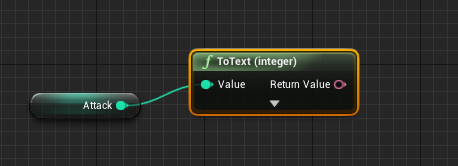
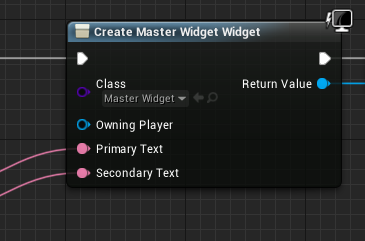
So I have a tooltip widget that works when hovering over an actor. I need to set the text in a place besides the widget itself because of the way I am spawning the actors procedurally. This means I want to set the text in the master actor. However, I have no idea how to convert the variables into text objects. I have been googling and found nothing on this subject. Anyone have an idea?
alpine halo
you mean 'Get display name'
maiden wadi
@quasi frost The Attack variable is what you want to be Text?
quasi frost
@maiden wadi Yes, it seems to want a text object though which I cant seem to find a conversion for. Basically I am making a binding but from an actor instead of in the widget
alpine halo
you can make a variable in widget and make it instance editable and exposed on spawn so when you create widget it will additionally ask for the variable you want to bind from actor
 wicked shell
I started learning UE 2 weeks ago and this chat still doesn't make sense to me. 🙂 I hope to understand you all in 6 months . Been studying everyday for 12 hours..
quasi frost
@alpine halo That worked thanks a million!
alpine halo
@wicked shell That's how superhero learns to fly. keep goin
quasi frost
@alpine halo Like seriously I had been messing with this for an hour+. This was such an easy solution I can't believe I didn't think of it.
alpine halo
@quasi frost eh it's all start like this
quasi frost
I was casting to like 3 different places and making data tables.. oh man it was a mess lol
Tooltip now updating correctly no matter the hovered actor. 🙂
maiden wadi
@split marlin OnTouch, OnTouchMoved, OnTouchEnded. Same events exist for mouse as well.
maiden wadi
@split marlin Userwidgets, yes.
 fleet cedar
Can I make particle systems play a certain animation as they die?
e.g. have the particle system exist infinitely until the player clicks them, then play a death animation
 versed crest
@fleet cedar ParticleSystemComponents have a OnSystemFinished delegate
if you spawn them manually, they will exist forever, you can manage their lifetime by yourself
fleet cedar
thank you!
 clever lark
Does anoyone knows if When opening a new level, old widgets automatically destroyed? or I have to remove from parent before opening new level?
 thin apex
I Md
i made this behaviour tree
it goes into the ChooseNextWaypoint task but it doesnt go into the MoveTo after that
my choosenextwaypoint is ok i think so idk whats wrong
maiden wadi
@thin apex Are you finishing the execute with a success? The next node in a sequence will only play if the one before it finishes properly. If it finishes and says if failed, it'll skip the rest of that sequence.
maiden wadi
Yeah. You're telling it to finish executing as a failure.
thin apex
ohhhh ok ok...thank you...i thought that it said success meant that its true unless i change it
maiden wadi
Looks kind of like an animation. On button press, set new selected value, start animation to move the widget to place new selected value in the center of the screen, lock the control until the animation finishes. Could probably do some simple math to determine how many children are in the box and tell it where to start/stop the animation based on that.
 round basin
Hi, how can I lock my fps limit on my whole project (not just on a widget...)
 primal smelt
Hi everyone. I've just been playing around on timelines and just noticed that my event track ceases to work if I either play it out to the end or rewind to the start WHEN there is something connected to the "finished" output. So if I play the timeline, it will fire off the event at the keyframe but if I were to rewind to the start and play again nothing will happen once the event keyframe is activated. Is this normal? Any way to get around this?
 vernal ibex
So ive been trying to do a line trace in vr but it seems to only work when its in the VRpawn (aka the camera) I cant seem to attach it anywhere else and it also doesn't show up on my gun blueprint either. Any help or insight would be much a appreciated
sick galleon
@vernal ibex Theres probably better ways to do this, but I wouldnt wait for a clean solution and would go with a cube I stretch and place accordingly to the test to act as a line :p
vernal ibex
@sick galleon I mean I've tried using all sort of components and meshes but for some reason making a trigger line trace setup in my gun blueprint just doesn't want to work, im not sure if it because it has no connection to the actual vr it self or what :/
all i have rn for a shooting method is a trigger press and for it to spawn a projectile and its so jank xD
sick galleon
just attach a very long thin cube to your gun :3
you can switch it hidden or not when you want to test stuff
oh wait lol
I thought you mean a visual debug line
- scratch that missed the 90
So the problem is with the physical trace (doesnt hit anything) or the visual debug display of it (green/red line display) ?
vernal ibex
im not getting anything actully
i only get feed back from the line trace when it works in the VR pawn
which is similar to i guess like a player capsule
but just vr
sick galleon
add a Print on your "Out Hit > Hit Actor" to double check
Are you tracing from the player / player gun to an external object (players point/shoot at something), or from an external object to the player (player getting shot at) ?
vernal ibex
I'm trying to line trace from an object that is being held but the player motion controller and hits supposed to shoot and hit object in the world
sick galleon
According to your script, your "Arrow" turns an additional 90° every time the trigger is pressed, is that on purpose ?
also, since its "world rotation", and I suppose your arrow is attached to the hand directly or indirectly, it will probably not give you expected results
vernal ibex
yeah because at one point i had a line trace working from my hand (motion controller) but it was turned 90s when i tried offsetting it it disappeared
sick galleon
yeah but you're turning your arrow everytime here, its cumulative. And also not on the right context I think.
vernal ibex
probably not xD
sick galleon
Suggestion : change your arrow model / actor so that its actually pointing toward its +X direction, it will save you a lot of trouble
vernal ibex
but regardless i think it was hitting the weapon so it wouldn't have worked properly anyway
hmm
alr
sick galleon
you could add your actor / arrow to the list of "actors to ignore" in the Trace
or fix that using collision presets
sick galleon
the boolean is only for the "self"
I dont know what actor your script is in, but that actor would be ignored is this is checked
the list actor is to add additional actors
astral granite
Hello guys, how are you? How can I make the post process applied in low and medium qualities?
 midnight ravine
If you're talking about the engine scalability settings I think that you need to leave the Post Processing option on epic or high for certain effects to be rendered.
vernal ibex
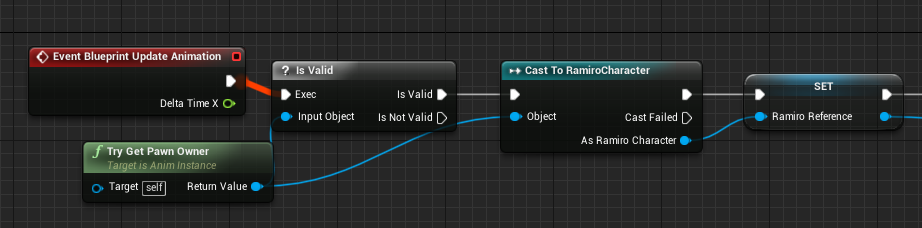
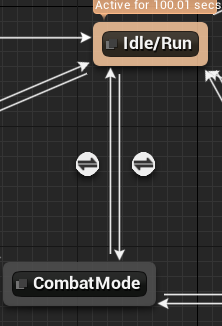
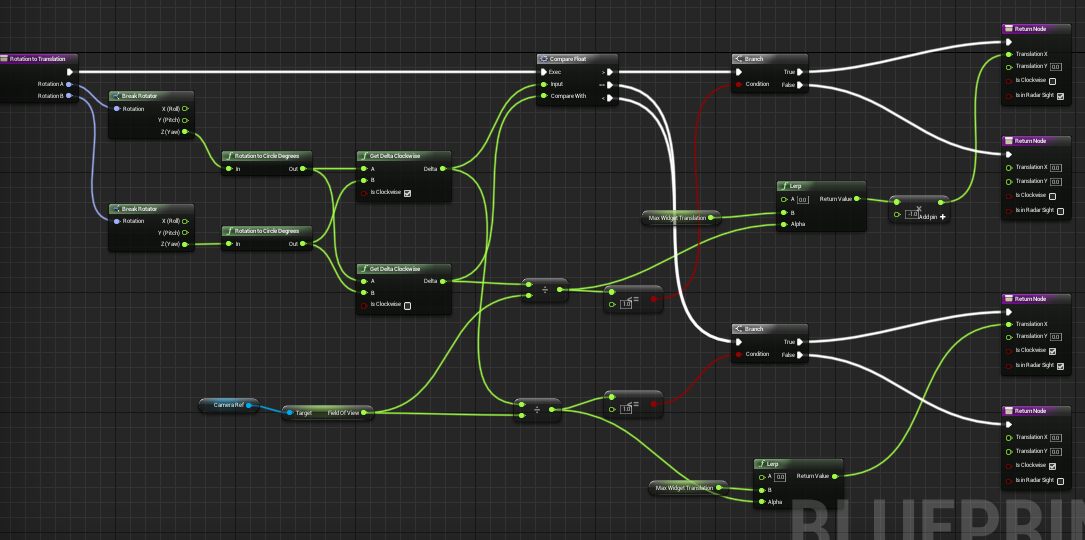
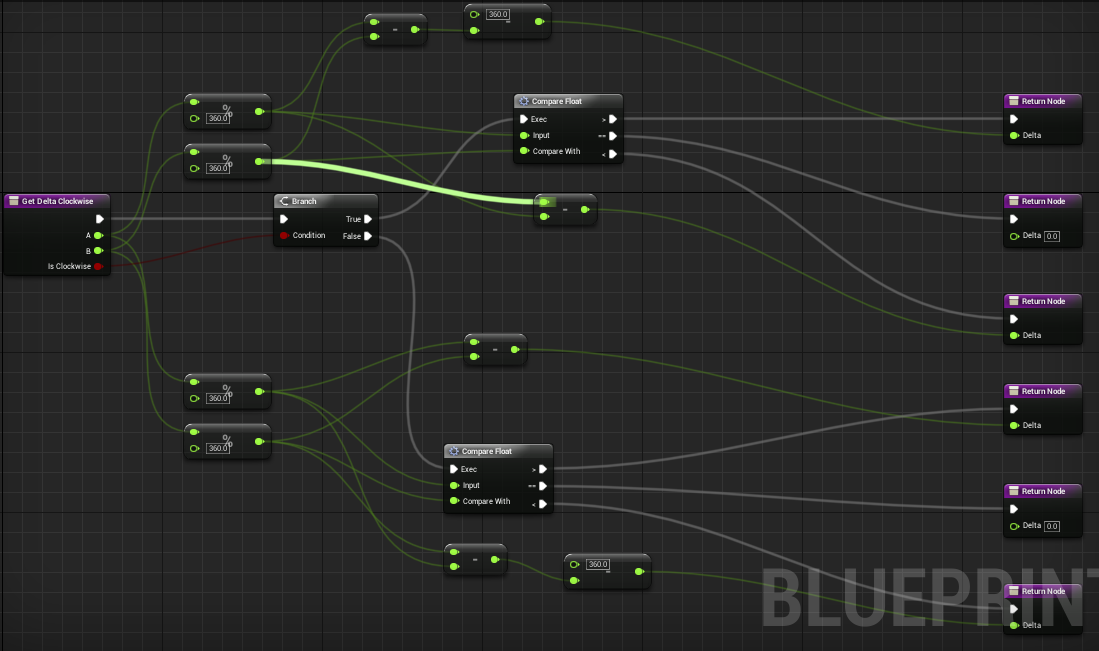
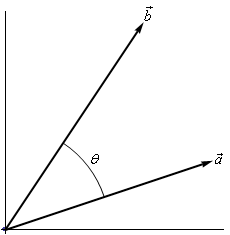
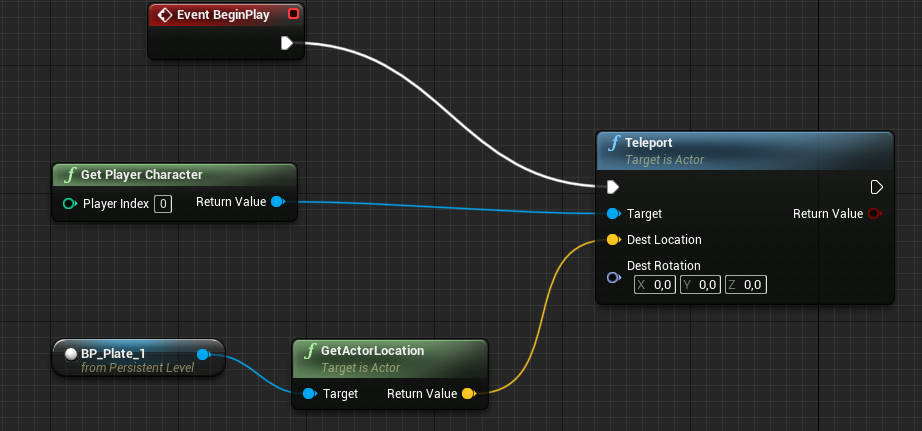

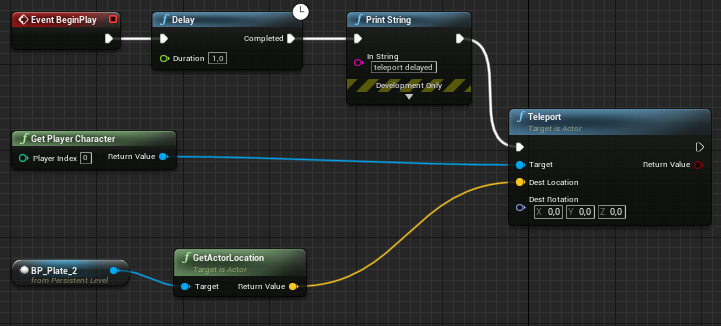

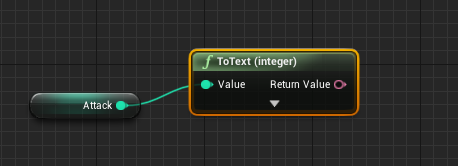
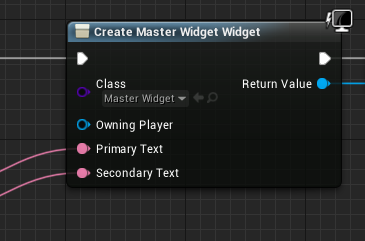
okay @sick galleon
so
in this video i think i got it working but is the line trace hitting something immediatly?
 dense mica
NavMesh is working, movement components are working why my zombies doesnt move?

I was changed a value in the project settings that related to physX (reverted back when I had this issue) after this happened
Zombies should fall from above when spawned
trim matrix
somehow only the reload montages are working and I can't understand why...I've tried to use montage play, play montage and play anim montage but the shooting ones are ignored. Seen all tutorials.
alpine halo
Make sure shooting montage state is upperbody
trim matrix
I have 4 montages, 2 reloading and 2 shooting , all of them hip and ironsights
and their state is upperbody
reload montages are working lol I can't get it
midnight ravine
nevermind, got the rotation problem fixed
trim matrix
solved it the is aiming branch ruined everything
 hollow tusk
is there no way to extend C++ interfaces in BP? 🤔
dense mica
I wanted to re-send this video because these screenshots made my question invisible :D
https://jmp.sh/1AzQmg8
 twilit heath
destroy it from an event after delay, call event from function
hollow tusk
is there something that prevents you from just calling destroy there?
alpine halo
but you can set lifetime of an emitter
dense mica
or just set lifetime in particle editor
twilit heath
there is something preventing you using a delay node inside a function
same deal for event bindings, timelines.... etc
hollow tusk
he said without using a delay
dense mica
but "in a function without using delay"
then Zlo told him to call event in function 😄
twilit heath
i took that to mean after a delay without using delay node
vernal ibex
hmm
twilit heath
questions in blueprints are often free to interpretation 🙂
trim matrix
I've made this: https://blueprintue.com/blueprint/n8kky-5r/
into my level blueprint to kill my character if health is equal or lower than 0. It works fine but after my character respawns the health bar isnt visually working. Any help on this?
BlueprintUE
maiden wadi
@trim matrix You really should not be handling this in the level blueprint. Make a character and make it handle it's own damage taking. That way when it respawns, it all just respawns and works. Then you don't have to keep up with where you've set random variables in other locations.
trim matrix
Hmm so do this in the PlayerBP?
maiden wadi
It will give you less headache in the long run. Object oriented programming. Try to make objects handle their own behavior for as much as it's possible. That way things are reusable. In this case, if you moved that character to another level, you'd have to redo half of it's programming just to make it work there when it should be able to just be dropped in and work.
trim matrix
Hmm aight i will look into it. Thank you!
Anyone know how to set up the paragon character with their abilitis? im not that good with animations
 pine trellis
is there any way to remove the like the inherited meshes and other stuff from a child?