#blueprint
402296 messages · Page 521 of 403
 hallow nebula
The child on the left, -30, the one on the right, +30.
This minimizes chance of overlapping children nodes.
But how.
That is my question.
 maiden wadi
This is all widget? Screen space based and 2d?
hallow nebula
Yessir.
You see, at first, I used Set Position.
Unfortunately, this is the Position relative to itself. Everything reported a 0,0 at runtime, accurately so.
So I switched to Set Anchor, which all use the Player Screen canvas anchors.
And while this allowed for nodes to understand their placement relative to each other, it made one thing difficult.
No node could, at a glance, understand how many sibling nodes it had.
It would have to go down the line for every node, get the parent node for it, and count them up.
No good.
I tried relative anchorage. That is, each node is nested in a Canvas that houses the components of the parent node.
And then the placement is just changing the Alignment.
But then you can't get the location of the nodes relative to each other anymore, again.
Very.
Very.
Confusing.
maiden wadi
How are you spawning each set of children? Is this dynamic? If so I assume you are getting the information from somewhere to tell which buttons to show. That'd tell you how many children are in each node.
hallow nebula
Yes, exactly.
There's an array of Node Structures.
It has information like the Node Size, what Text to show, etc.
And a String that says "Parent."
At runtime, when the Node-system thing is constructed, it'll go down the line For Each in this array of Structures.
If there's no Parent listed, it knows it must be the origin (called Verdict in this code).
Simply adds it to the main screen, sets it to be a little off-center at .5, .7 anchors, and aligns it to .5, .5.
I have a map of these node instances for later reference, where the key is simply the node Text.
If, in the instance that there IS a parent specified, it'll instead add the Node widget to that parent's Canvas.
Everything else stays the same.
Following?
...
I'll figure it out, I suppose.
 thin apex
why does the details tab sometimes come as empty and wt can i do about it???
 trim matrix
i want to switch my character camera so its using the camera in the middle
hallow nebula
Left click the camera you want to use.
Click Blueprints, on the top, and select "Open Level Blueprint."
Right click. "Create Reference to Camera" should be at the very top of the menu.
On Begin Play > Possess this pawn through Get Player Controller.
trim matrix
im confused on the last step
hallow nebula
If you don't already, create the built-in Event "On Begin Play."
Then create the node "Get Player Controller."
Drag off the Controller reference and type in "Possess." It's a node only available to the controller.
When it asks for the pawn to possess, use your reference to the Camera.
Then connect this Possess node to your Begin Play.
Now, when you play the level, your controller will be using the Camera.
A bit like this. I use it to create a reference, rather than possess.
But it's the same concept.
Is that working alright for you, @trim matrix ?
trim matrix
umm
 ember dawn
If you have a really long section where you have to keep referencing the same variable a lot, is it better to Get that variable ONCE and have everything trace back to it? Or can you choose to Get it multiple times, thus allowing you to make the blueprint look a bit cleaner. Does it impact performance at all if you take the second option?
maiden wadi
@ember dawn It will only impact performance if you're getting it from another actor. Local in scope variable gets won't affect performance at all in game, only in editor, and you'd need hundreds of them all on screen at the same time to do that.
maiden wadi
C++ created component?
@thin apex If it's a C++ inherited component, then you need to change your UPROPERTY specifiers.
thin apex
i have it at edit defaults only
maiden wadi
Since I'm not worried about other people on my project, I usually classify most of mine as UPROPERTY(EditAnywhere, BlueprintReadWrite)
thin apex
still dont get anything
maiden wadi
You have a Uproperty specified in the header like that as a pointer to the type, and you're creating the object in the class constructor and setting it there?
maiden wadi
@thin apex Dunno then. Unless you're hotreloading. Close UE4, compile in VS and reopen. If it doesn't work then, I'd ask in CPP.
 opaque blade
@thin apex remove the nullptr in the header
Just define dont declare
Especially ptrs / components
thin apex
it doesnt do anything
opaque blade
@thin apex even on a fresh bp ?
thin apex
idk ive given up
opaque blade
@thin apex plus iam pretty sure it needs to be VisibleAnywhere
EditAnywhere leads to inline Details window ( selecting a class and crashing if not matching the parent )
maiden wadi
Are you closing UE4 and compiling with it closed?
opaque blade
Same only diff i see now is direct use of fname as id in your CSD call
Rather than TEXT()
maiden wadi
Only other wonder I can imagine is maybe it wasn't declared under public:? I don't know if that makes a difference.
Lets try.
Doesn't seem to make a difference whether it's public, private or protected.
thin apex
I'm cursed... That's what's up
maiden wadi
Nah. You just have something missing somewhere.
My vote is that there's something else going on in your actor somewhere. I just did the exact same specification you have and I can see the SphereComponent's details in editor.
thin apex
I even tried it all over again from scratch and it still didn't work
And now there's a component attached to the parent body and it won't go away nor can I click it or anything
maiden wadi
What's this actor inherit from? AActor?
thin apex
The parent?
maiden wadi
Yeah.
thin apex
Yes it's inherited from AActor
i try deleting this or renaming or anything and it crashes
why...idk
the SpawnPoint
trim matrix
Why?!
 unique finch
How do i make it
so that
My AI
won't be able
to
touch my bP actor's Box collision
or make it so
that it won't do anything
if he hits the box collision
 whole viper
I'm trying to edit an engine material, I cant seem to reach it form the content browser
how do I edit:
Engine/EngineMaterials/HighResolutionScreenshotMaskFunction
https://error454.com/2020/02/02/ue4-high-res-screenshot-custom-depth-mask-clipping/ This article indicated it can be done
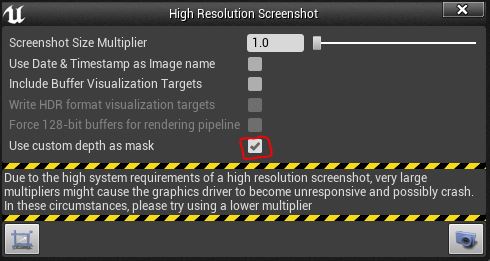
I’ve been doing some composite work in UE4, the final step of which is to use the High Resolution Screenshot tool to capture an image using the custom depth as a mask. What this is supposed t…
 brazen hatch
hi, is there a way to drive interpolation with a custom easing curve in blueprints?
brazen hatch
@fair magnet sweet, thanks!
i am using input to drive a thruster, and want to interpolate to have more thrust at the beginning and then for it to taper off
would it work with this curve?
brazen hatch
cool
trim matrix
how do i fix this? usually theres a thing by transform to change the type of object it is
trim matrix
trim matrix
ty
 fair magnet
So for me it seems that my levelling system may have a bug I cannot find... the first few levels are working just fine but as soon as the player hits level 5 my Current Exp value get's set to -300 which shouldn't be the case
that's my code o:
and it even gets worse with higher levels
 ripe rose
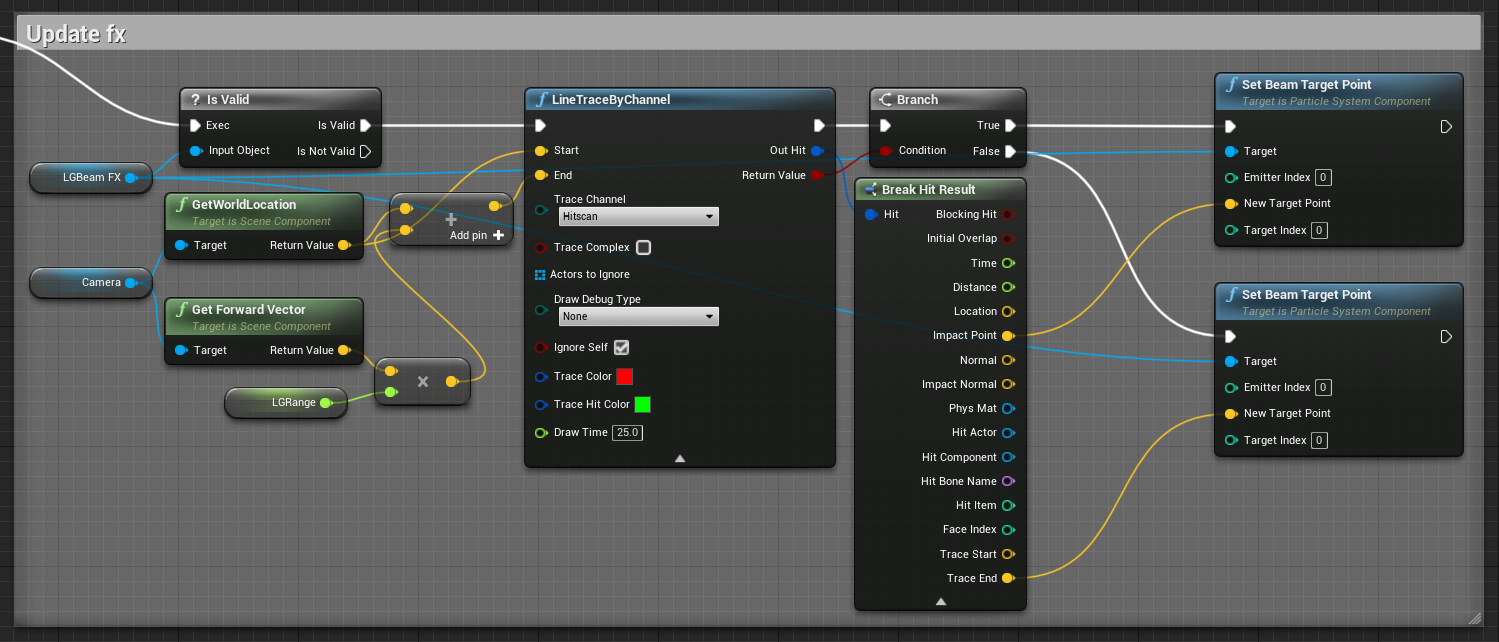
is it ok to do this on tick
or is there a more efficient way
this is just updating where a beam particle should point based on where the player is aiming
fair magnet
Well do you need it be updated per frame ?
ripe rose
presumably
fair magnet
maybe you can set a timer and set it to like... 0.1
ripe rose
i don't think that's appropriate in this case
it needs to point where the player is aiming every frame
i just don't know that manually telling it to do a line trace is the most efficient way
ripe rose
an alternative, for example, would be to have a component in front of the player that the beam is targeted on, but that obviously has issues
from what i know, what i did is the best way to do it, but i don't know that much so just asking in case
 faint pasture
@fair magnet Why are you doing that big convoluted mess?
fair magnet
wym ?
faint pasture
I take it you're intending for xp to be accumulated until it goes over the threshold to level up, then get spent to level, correct?
fair magnet
yes sir
faint pasture
And is xp per level static or change by level?
faint pasture
So I take it you modify the XP needed per level when you call stat level
fair magnet
so at level 1 you'll need 100 exp at level 2 200exp at lvl 3 400 and so on
yes
I need to have a "counter" in order to place things in the world that already have a level so they don't run around with level 1 base stats
faint pasture
I just do it like this
Currentxp = Currentxp + Xpgain
If Currentxp >= Xptolevel
Currentxp = Currentxp - Xptolevel
Level up
That should be everything that changes CurrentXP
fair magnet
but what if the player gets too many exp
like is at 90 from 100 and get's 20
okay so now it happens to be at level 7 @faint pasture every exp gained after level 7 increase the value to be negative .-.
faint pasture
@fair magnet they will end up with 10.
Currentxp = currentxp - Xptolevel
110-100 = 10
faint pasture
@trim matrix You are launching the character in a global direction, not a local direction.
trim matrix
how do i make it local?
faint pasture
@trim matrix for calculating your launch velocity, start with the characters forward vector and multiply it and add to it from there.
@trim matrix it'll probably be something like forwardvector x MoveForward + RightVector x MoveRight + some z component all times some float
fair magnet
@faint pasture Okay Is working now o: it seems that false branch path has created some issues here... don't know what exactly but... whatever
faint pasture
@fair magnet false branch path should do nothing
faint pasture
@fair magnet just get rid of stored XP, why do you even have that
fair magnet
Because
Of multiple level ups
so player can skip levels
otherwise it will get stuck over the exp limit
faint pasture
It wouldn't get stuck, they would just level up the next time they gained any XP
fair magnet
yea but still would be bug
faint pasture
In that case, just get rid of the stored XP variable and on level up, call gain XP with an XP gain of zero
faint pasture
Not if you do it the way that I said
faint pasture
Get the right factor the same way you got the forward vector, from the capsule. It might be the same direction but there's no way to really know for sure
Vector
Your additional Z should be on the order of one, and then you should be multiplying at all by a couple thousand
As you have a setup right now, your direction is going to be 250 times in the Z more than the X and Y
Additional Z should be about one, and the some float should be about two or three thousand
 hardy sphinx
I want to make random character in the start of the game. Why it doesnt work?
faint pasture
The possessed node is not hooked up to the output of the spawn actor
You are saying hey controller, possess nothing.
hardy sphinx
And what should i do?
 zinc flicker
I currently try to learn more about AI and AI Attacks. Most tutorials i findare 99% a Zombie that follows you and autohits you. But i am more intressted in AI with multiple attacks on range Basis and Meele Basis for a BOSS Monster.
Can you recommend me a good Tutorial or some Keywords i shold google / youtube. Since most stuff is either super old or just talks about zombies.
 alpine halo
closer shot
@trim matrix well try like this. get velocity from character movement and add a vector value on z axis like 1000 and make it launch velocity
also if it continues fly then there's a 'set movement mode' in character movement and a bool 'can fly'
 patent kettle
Hey guys! Anyone tried setting up a PlayerCameraManager for a first-person game before? I'm interested in moving all of my camera functionality out of the player blueprint and this seems like a good idea!
That said, It seems like I'd have to move the first-person meshes to manually match the camera's rotation, right? This seems a bit counter-intuitive, so I'm not entirely sure what the move would be here
 prime flare
I look at this and can't help but think it's way simpler than I think it will be.
alpine halo
Why?
@trim matrix is it colliding with the ramp?
 chrome orchid
Hey how could i use mixamo animations on my ue4 skeleton
 violet wagon
@swift pewter theres not enough shown. where is the timer being run, and what is the heal function/event?
violet wagon
okay im gonna assume that the timer is off of tick. If it is then i dont see any problems.
Or you can just set the timer right after you set "Can Heal?" to true
 gritty elm
what mean by this node, and what mean by W?
 dreamy kindle
Hey guys im new to BP, do you know how I can toggle on and off an static mesh actor in level BP depending on where the player is in or out of volume?
If inside volume, static mesh or meshes turn off, if leave volume they reappear
Any idea thanks!?
gritty elm
@dreamy kindle, you need to cast to your character, and then set actor hidden true or false, or whatever
gritty elm
yes
dreamy kindle
appreciate that
 tough cipher
i'm trying to make an array of the items spawning in the game and getting a specific item in the array to change it's rotation but its rotating both items
trim matrix
@tough cipher making an array with the same object twice is probably not the right thing
yeah wanted to say the same thing
just remove one pin
tough cipher
it gave me an error
gritty elm
@tough cipher create empty array, "Add" to it like this
do not set array, but "Add" to it, then get any index like that
tough cipher
thank you it works now
but when i try to select the 2nd item in the array it gives me an error
gritty elm
0 means 1st item, 1 means 2nd item, so when you add once it add to 0 index, when you again spawn, it add element to 1st index
if you only spawn at once, then you try to get 1st index, it gives you error because 1st index is empty, you need to spawn again to fill next index and so on
tough cipher
it's spawning multiple actors cause i'm running a for loop with a set amount of actors i want to spawn
gritty elm
what error you've got, access none trying etc?
tough cipher
yes
gritty elm
check your get index variable, make sure you are getting right index
tough cipher
ok
dreamy kindle
@gritty elm what if my character gamemode is spectator or a gamemode where you can fly around, just for testing?
gritty elm
try this, Is valid index function before getting any index, it gives you proper check @tough cipher
@dreamy kindle yes you can do that, there are many ways, first go to project settings->maps&modes->and then set default game mode to "GameMode" and then in world settings, set game mode to none
dreamy kindle
so how does that change the castto 3rd person character in your bp graph?
gritty elm
@tough cipher it means the element(actor) that you are getting from that index doesn't exist, either your index is wrong of item that index is null, because you didn't added to that index
@true mantle
so how does that change the castto 3rd person character in your bp graph?
@dreamy kindle can you explain what you are trying to want, i give you solution to run game as spectator pawn as you mentioned
@tough cipher print your index, check it's value that you are getting index from
if you run for loop with last index 3, then you can get from index 3, if you get index 4 it gives you error, because you've added 3 items to array
tough cipher
@gritty elm i ran it and it showed the index 1 but still doesnt work
 flat raft
@gritty elm https://youtu.be/Wm27Y6hxbRs

Just as the graph of a linear equation in two variables is a line in the Cartesian plane, the graph of a linear equation in three variables is a plane in Cartesian space.
I think W is D ?
this video visualizes it
 sick galleon
I have a BP script that generate data (a map variable)
I would like to save this data map as an asset/object that I could reference in a blueprint.
How can I do that ?
I was thinking of an object with a map parameter and changing its default value, but Im not sure how to get the data into the object
and there is probably a more approriate way to do things
dreamy kindle
hey @gritty elm here is what im trying to do, shown in editor. The idea is that once the spectator player passes inside the box trigger, the ceiling meshes dissapear, and reappear when he leaves since game is RTS/FPS for better visibility, like so..
 sick galleon
(looks nice)
trim matrix
maybe make that the spectator camera can overlap and on overlap with the roof it dissapears or something
How correctly use cull distance for bp actors?
sick galleon
@dreamy kindle I never used it myself, but apparently theres a "Render in main pass" parameter on actors that you could play with
my understanding is that it would still show the shadows
dreamy kindle
interesting, ya it would be ideal to keep shadows from hidden objects
dreamy kindle
ok ill give that a try thanks!
sick galleon
yw
Simplification of my previous question :
How can you save an array/map content as an asset ?
Example : I generate some data in an array through a lenghty process. Now I have the data, I want to save it as a reusable piece of data, so that I could use this previously saved data In a blueprint.
flat raft
Hmmm... Blueprint function library ?
faint pasture
@sick galleon I need to do the same thing. Blutilities or Editor Blueprints might be handy. Havn't looked into it much yet tho.
trim matrix
@alpine halo it keeps going backward even though its facing other direction
Why is flying backwards
sick galleon
moonflying
trim matrix
what
sick galleon
its like moonwalking, but in the air
sick galleon
oh
your script says "when I press the space bar, jump and push forward" if im not mistaken
but thats it
theres no continual push or whatever, thats just like throwing a ball
trim matrix
yeah it only gives push when spacebar is pumped
so i want the pump to always be in the direction of the character front no matter where I turn
hah moonflying
gonna remember that one
 proven mason
Is there a node that checks if the analog input has been held down.
sick galleon
because you're doing (forward vector : 1,0,0 + float 900,900,900) so you get a 901,900,900 push
proven mason
like I tilt my analog stick to a scale of ~1.0 and I'm holding it there.
sick galleon
@proven mason I think you have to set your own stuff there. Like when the value is above X set a boolean to true ("pushed"), while that bool is true count some "held" time, and when enough time has passed, set another boolean ("held") to true. Whenever "pushed" becomes false again, reset "held" time
@trim matrix does it work now ?
trim matrix
@sick galleon im trying to try that but idk what I did its not possessing the character now that I placed it in the map
gimme a sec
dammit why isnt it possessing the char, everything was set up
trim matrix
well it was just spawning it in before, but I decided to place the character blueprint actor in the level and now it wont possess when I play, just lets me fly the default perspective camera around
game mode is set to that char, and possess placed in world is set
sick galleon
@trim matrix auto possess player is on ?
trim matrix
where is that again?
trim matrix
yeah its disabled
sick galleon
it shouldnt
sick galleon
I guess something else is taking control
sick galleon
well then force take control in a begin play of something i guess
trim matrix
@proven mason cant you just use is input key down ?
trim matrix
so you just want to check if the analog sticks are down ? if yes then you can use is input key down i think so cause its there
sick galleon
If anyone has a suggestion, im still searching for a way to save an array/map content into a reusable asset
proven mason
alright @trim matrix will check out
trim matrix
@sick galleon actor component ?
sick galleon
@trim matrix the ideal would be like default values of an actor class.
For instance you can create a blueprint, give it a string variable, and set a default value to it, simple engouh.
Now if I have an array variable, and want to store 15613 entries (generated during PIE) as the default content for that array, how would I do that ?
proven mason
@trim matrix this?
trim matrix
@proven mason yes
trim matrix
if its on the controller that your player is using then keep it as self
trim matrix
no clue
proven mason
it's a keyboard that acts as both an analog and digital keyboard
by analog it emulates the Xbox 360 controller
trim matrix
oh yeah i see now
proven mason
so I can assign the left thumb stick to WASD on the Wooting One keyboard
the ultimate goal for my blueprint script is to incorporate step
like if I tap (to 1) and release my analog stick (back to 0) within a specific time frame the character does a step as in fighting games
but there's something more
trim matrix
@proven mason https://github.com/WootingKb/wooting-analog-unreal-plugin there is plugin for it

GitHub
Contribute to WootingKb/wooting-analog-unreal-plugin development by creating an account on GitHub.
proven mason
didn't even know thanx will check it out and perhaps download the plugin
 hoary orchid
Is there a way to use Keyboard input in UI only mode?
trim matrix
@sick galleon ok I got it to work by pressing F8 for now, so which vector should I multiply by a float? the char forward vector?
sick galleon
on your last push node in your previous screenshot
you do a vector + float, instead of vector * float
 earnest tangle
Huh, I didn't think anyone was actually using analog keyboards
I'd heard about them a while back but nothing for a long time :P
sick galleon
didnt event know that was a thing
trim matrix
@sick galleon oh yeah i understand now what you trying to do but putting it to a datatable wouldnt be easier ?
@sick galleon Dude.....I fuckin love you!!!
sick galleon
@trim matrix probably but I have no idea what datatables are and how to use them, any solution is welcome :)
@trim matrix you know what they say ... "when you love someone, send them all your money".
trim matrix
😆
sick galleon
damn, didnt work :(
sick galleon
well id rather get money from actually managing to do my game anyways :D
trim matrix
that would be awesome
sick galleon
@trim matrix but wont it be lost when the PIE/runtime ends ?
trim matrix
no it wont
 elfin hazel
You can't write to a data table at runtime though. and writing to it during pie can be a hassle, and you'd probably have to reimport the data table after pie.
@sick galleon A trick I've found is using PrimaryDataAsset. So you'd make a BP Class of type Primary Data Asset. Then you make a new Data asset by going into, i think it's Misc - Data asset? and select your My Primary Data Asset.
So now you can make a variable of type My Primary Data Asset, and select the child instance. and you can access the instance in any bp, and write data to it both during pie and editing.
Just make sure you have the child instance class closed while modifying the My Primary Data Asset class, editor tends to crash if the child is open for me.
sick galleon
hmm
not sure I understand the logic that but ill try it as far as I can as see what happens
data tables sounded good, but if they're not really usable in PIE that misses the target
 strange urchin
have we any node which called after player disconnected from server ? without ui ...
for example player's internet have issue
earnest tangle
Not sure but maybe check in GameMode? It has some logic relating to spawning players at least
sick galleon
@strange urchin Ive come across something Called GameState too that seems more related to player themselves
@elfin hazel ok I think i got the whole thing setup, but the last, most important part still eludes me : "you can access the instance in any bp, and write data to it ..."
how do I do this mysterious last part ?
elfin hazel
You create a variable of the primary data asset you created - a reference type. And the child will be selectable as a reference.
sick galleon
ok heres what I did :
- created a "Primary data asset"
- created a "Data asset" based on that
- added "Primary data asset" variable in a BP
- assigned the default value to that variable to be my Data asset
- made a function that modify that Data asset variables
all good just missing the last step : - how to save/update my modifiedAsset Data ?
elfin hazel
Like any other reference type, set the value of the variables that the Primary data asset has.
sick galleon
Im confused.
I mean I know I changed the data asset *instance values, but that doesnt update the original data asset afaik ?
elfin hazel
The child class should have the data.
sick galleon
Well, in any case, the crash you predicted did happen so I must be on the right path :D
elfin hazel
Yeah, avoid having them both open at the same time
sick galleon
is it normal that when I try to open the Data Asset (not the Primary) I just get an empty window ?
elfin hazel
It should have the variables of the primary one.
elfin hazel
hmmm what version are you on?
elfin hazel
yeah, that's what I'm using too. Just verified myself;
Try adding an int var to your primary, don't instance expose it. compile, save, close primary and open the child.
trim matrix
@sick galleon Ok so how can I smoothly transition animation from gliding to a different animation with mouse turn, so that if I turn 180 degrees while im gliding forward, and end up gliding backward on residual velocity it will transition between the two animations. So basically, Gliding for forward, and stalling for backward floating with leftover velocity from initial pump. Does that make sense? lol
sick galleon
@trim matrix tbh I never touched animations so I have no idea :|
trim matrix
fair enough
elfin hazel
@sick galleon I really don't know why that's happening. But you do have an asset with blue background and one with red, as I have in my picture?
sick galleon
when I over the dsqdsq one tough it doesnt give any parent information
could be related
trim matrix
kinda like that
elfin hazel
I'm seeing the same info as you so I don't think that's it.
elfin hazel
I am on 4.25.0 still so maaaybe some weird bug has been introduced?
sick galleon
huh
I knew it had something to do with my dumbness
Window > Details
thats why the window was so empty
-_-
elfin hazel
oh really
sick galleon
for some reason it defaults to not showing details
 quasi frost
Why can I not use a character reference to refer to a function in the character from a hud button? I have a very simple button in my main hud, when you click it it is supposed to disable movement. All I am doing is using a character reference in the hud and using my EnterCombatMode function which only sets a in combat bool. In the future there will be more there, but I am confused as to why I am getting an accessed none error when hitting the button.
sick galleon
(im waiting for Unreal to stop crashing so I can test the changes)
trim matrix
@elfin hazel i watched mathew wadstein vid about it and he said that you need to make the parent in c++ to make it work but there is a way to do it only in blueprint
elfin hazel
yeah, that was the video about Data asset. Primary Data Asset, is another video he has.
trim matrix

As a followup to an earlier video we show how to use the C++ Data Asset class using Blueprints only using the Primary Data Asset class type.
Original Data Asset Video: https://youtu.be/gLWXZ3FXhO8
yeah
sick galleon
oh
elfin hazel
Data Asset is not exposed to BP, and would need a BP exposed child class. Primary Data asset is BP exposed - as it is selectable as a parent class.
sick galleon
well
I suppose it might have worked
as Unreal crashes everytime I try to open my data asset after i supposedly modified it
i mean I have a map with 98304 entries so maybe its not something he expects to find there
the thing is the .uasset file for my part is still 2ko so im pretty sure the data isnt inside
elfin hazel
I've never tried to save a Map, or a reference like your material. So I don't know how well the editor handles that. I can try a quick test. What kind of data does your Map have?
sick galleon
its a voxel map, with int vectors as key and a struct as value
elfin hazel
What does the struct hold?
sick galleon
(note : when I restart Unreal I can open my asset just fine, but its on default values)
so the struct holds a boolean and a color
elfin hazel
I think you're only modifying it in memory, you got to save after pie.
sick galleon
now that I think of it I dont really care about the color
hence my previous question on "how do I save it ?"
elfin hazel
I mean, the editor save button. so it writes it to disc.
elfin hazel
sick galleon
any way I can tip you for your help ?
elfin hazel
So, I'm not having any issues saving a Map that you described. expect I have fewer members.
sick galleon
wow so it looks like it should work hmm
ill add my stuff back step by step and see where it dies
elfin hazel
yeah, do that. Just did a 10k loop, and that did work, though the editor froze for a while when checking the data asset.
man, I never expected that doing a 100k loop would be so fast. Don't even notice it. But then checking the data asset is ooof. frozen for a minute now.
Maybe it's just that. Check the data assets map programmatically instead.
sick galleon
yeah im trying that
I guess I can work with just being carefull not opening the data assets
trim matrix
hey how can I ramp up the velocity slowing rather than a sudden burst?
sick galleon
@elfin hazel holy f*** ! the saved asset is 10Mb :|
I think ill just save an array of bools without the colors that I dont really need, and figure out the vector int position from the array index
elfin hazel
hah. yeah. Not sure what an efficient way to do voxels is, never really tried it. Time for bed here anyways.
quasi frost
Does anyone know how to get a random row name? I figure you could use a random int in range but I am not sure the conversion path from int to row name
trim matrix
@sick galleon ok so after I have pumped spacebar and launched in a direction, how can I get the velocity direction to follow the mouse aim when the character is just gliding on residual velocity?
essentially making the dragon bank right and left with the mouse turn using the leftover pumped glide velocity
Unreal Engine Forums
I created a data table, the row names are all unique integers (A1 is empty). I have selected the appropriate data table name but the 'Row Name' node only lets
sick galleon
@trim matrix not entirely sure how characters actors behave, but you should have access to the character velocity
id say turn the velocity vector a little bit toward the forward vector every tick
trim matrix
@trim matrix i dont think you can change the direction after launching
sick galleon
(using Rotate Vector Around Axis)
trim matrix
wait so what would the return value of rotate vector around axis be connected to?
@sick galleon can you elaborate a little more please?
this is what I got so far
 fickle blaze
Can I set a (Name) var to be Null
?
I need to filter out objects with no tags and ignore them
but I cant make a null value to feed into the !=
has any tag gameplay does not work since it's blue and the names are pink
:p
sick galleon
@trim matrix the rotation axis is always 0,0,1 (unless you want to allow roll)
the angle deg is the rate you want to turn
trim matrix
yeah a little roll would be nice
sick galleon
so the only thing you want is the direction you want to turn to (and wether you want to turn or not because you're already aligned)
trim matrix
how would i do that exactly?
sick galleon
you do a 2D cross product of normalized velocity and normalized forward
depending on the sign of the float, you turn right or left
trim matrix
dude you gotta give me a visual please
sick galleon
lemme think because thats not necessarily the best way to go
trim matrix
to help you visualize
see the forward momentum doesnt turn and bank with the char which looks wrong
requiring spacebar presses to re-orient forward again with new velocity
sick galleon
so
the corss thing gives you a float in -1,1 range
you use that to know if you want to rotate +deg or -deg
the dot thing gives you another -1,1 range, but this one means "are my vectors aligned" : -1 mean total opposition, 1 means perfectly aligned
so if you are at 1, you are already perfectly aligned so you dont need to turn (* though this part need refining)
trim matrix
@fickle blaze you can just say "None" add a branch and if that object has a name = None then will just go to the false pin and every name that is not None will go to the true
@sick galleon woah ok, so whered you get those yellow nodes named velocity and forward?
sick galleon
i made them for the exemple
those are nodes you already use
GetVelocity and GetForward
now this script will have a problem because it will stop adjusting the direction ONLY if both vector are perfectly aligned, which wont happen
so right now your dragon would sort of vibrate when it gets aligned because its not exactly aligned, so it turns a little bit right, and now it turned too much, so it turns a little big left, and so on
ill give you an updated script
trim matrix
ok
wait so whats the turnrate in that supposed to be?
the rate at which you want your dragon to turn
sick galleon
^
@hot mulch in this new version of the script you see i added stuff at the bottom
now instead of checking if the vectors are perfectly aligned, i check if they are almost aligned (> 0.95)
(fixed a mistake)
trim matrix
oh cool
sick galleon
so if they are almost aligned, I take my velocity length (which in this case represent my speed) and multiply my forward vector (a forward vector is always a normalized vector, so a length of 1) and multiply it by my speed
then i replace my old velocity with that new one
trim matrix
wait how do you get that set velocity because i just did get get velocity in the beginning
sick galleon
simply said, I take my forward vector, make it the same length as my velocity vector, and replace the old velocity with that
trim matrix
sick galleon
you probably have acces to a set velocity on your player character
trim matrix
sick galleon
(not sure, I dont use characters)
trim matrix
does anyone know how I can replace the event tick with a timeline?
I cant seem to figure out how to get it so when the timeline resets that it continues where it was last at
sick galleon
@elfin hazel well, saving and loading of my voxel asset data now fully works for me, thanks to your help !
trim matrix
@sick galleon I did this, but its not working
prolly because the nodes are not the same
i cant find that specific one on the char
sick galleon
ok one little thing that is wrong is on your compare float where you compare to 0
you should be comparing to 0.95
apart from that I see no mistake, so it all comes down to figuring out the right way to change a character velocity
sick galleon
can you get the "movement" component of your character ang get its velocity ?
trim matrix
its prolly the set physics linear velocity
you the mean start one on the left or the end ones on the right?
sick galleon
its to read or write the velocity
so you replace your velocity nodes with this node
trim matrix
which velocity nodes
sick galleon
all
the most important is to remove the capsule physic velocity change, and replace that by a character > movement component > set velocity
sick galleon
Good. Do you understand how the script works ?
trim matrix
kinda, not 100% but im getting a rough idea
see now the thing is, the when im moving forward in flight (holding W, pumping spacebar for launch), the char plunges downward a bit rather than in an upward parabolic sort of arch
Thanks btw really appreciate this
sick galleon
hmm
well its a basic alignement thing i gave you, it will overwrite your vertical velocity when your forward & velocity align
so its far from perfect
trim matrix
sick galleon
yeah
its because your drake velocity is aligned with the direction you're looking at
sick galleon
one thing you could do is at the beginning of the script, get the Z component of your velocity in a local variable
and at the end of the script, you add that Z to your velocity
so you retain your vertical speed
also the alignment check will be a bit different
flat raft
Cool dragon
sick galleon
at the right you see I only keep the X and Y of whatever ive rotated, and for Z I use the Z I saved first
 chrome thicket
Hello all, I just started using UE4 and I managed to create a sliding movement function for the player. It works, but I'd like to add some friction to it, cause of right now, it is very sudden, almost like a boost instead of a slide. How could I do this?
flat raft
LoL I didn't do anything
sick galleon
@trim matrix then marry me and make me food ! I have making myself food :(
flat raft
Make noodles
sick galleon
thats what im eating right now :D
trim matrix
dammit now im hungry
@chrome thicket just lower the velocity i guess
all this unreal works up an apetite
sick galleon
@trim matrix in a few weeks when you've become an Unreal expert, remember to come back here and answer questions from time to time :D
chrome thicket
@trim matrix but that reduces the area covered by the slide
sick galleon
anyways enjoy your first flight ! im off for the day, see ya all <3
trim matrix
take it easy!
flat raft
See ya!
@chrome thicket try just setting the character's location * a Timeline node
Then you can control everything you want in the slide
chrome thicket
How would I do that? I'm new to BPs 🙂
flat raft
Add a event tick node, add a timeline node , add a Gate node
chrome thicket
Alright, I'm going to test that
Would that make it possible to set the slide to a slower speed but cover the same area?
flat raft
Basically you slide as long as the key is pressed and the timeline allows
You have a slide animation, ya?
There is a tutorial by CodeLikeMe on YT
chrome orchid
im having trouble with my pistol animations, after the player completes the duration of the animation once, it will teleport the player back before playing the other one
chrome thicket
You have a slide animation, ya?
@flat raft Actually no haha, since it is FPS I didn't bother with it, but I'm going to give it a shot with anim
flat raft
FPV is much easier. You don't need the anim.
flat raft
huh?
chrome thicket
@chrome thicket try just setting the character's location * a Timeline node
@flat raft This
flat raft
ya.. try just the timeline first. If it sucks then the other way
chrome thicket
Okay, opening up the BP now
Oh, I have no idea how to connect these, mind helping a new guy out?
flat raft
Also... take a look at AddForce node, and SlideAlongSurface
Try Add Force instead of Launch
Let's see what that does.
@chrome thicket
chrome thicket
Alright
flat raft
Unplug ur tick also, when you try AddForce
chrome thicket
Got this, but it does nothing
trim matrix
cause before you had self and now you have character movement
to target
and nothing will happen if you will add force to your movement, you need to add it to your character so self here
chrome thicket
I tried using self here, but it gives an error
Even without Self as a target connecting, it gives an error
flat raft
Is there a SetPhysicsLinearVelocity node?
trim matrix
maybe try to do it on your capsule component
or maybe it is on the character movement idk
chrome thicket
Yeah, for both mesh and capsule @flat raft
chrome thicket
flat raft
hmmm...
chrome thicket
I enabled it, but now I can't move
flat raft
Ok.... naaaa... don't enable that just for sliding ...
chrome thicket
Yeah right
flat raft
Let's do the timeline way
chrome thicket
Alright
flat raft
Lemme see ur bp again
chrome thicket
flat raft
You also need a add location node
Add location... add relative location... something like that
chrome thicket
last Update Location?
flat raft
Nope
chrome thicket
I assume these are all the important ones I got for now
flat raft
ok.. skip that... make a get location and set location
chrome thicket
Done
chrome thicket
Done
flat raft
Make a curve in the timeline that goes from 1 to 0
after 3 secs
So for 3 seconds, it will be 1, for the last sec it will be 0
Lemme see ur curve when you done
chrome thicket
Something like this? I'm learning as I'm going
chrome thicket
chrome thicket
Done
chrome thicket
flat raft
1 min... my PC rebooted 😅
chrome thicket
No problem 🙂
 mental robin
I'm making an array of numbers (temperature) at runtime and I need to access the SECOND last recorded index..but I don't know how to do this..All I see is last index ..and I can't manually say what index because its constantly adding new ones
nm got it
flat raft
@chrome thicket hold on ... catching up in my unreal
chrome thicket
No problem, I'm grateful for the help
 mild ore
just change walk speed when entering slide, and set back to normal when exit
trim matrix
@mental robin well if you want the second last index just from the array get last index and do - 1
trim matrix
i just did that second ago and worked
mild ore
length-1 = lastindex
mental robin
oof
trim matrix
that makes no sense
why would you get length when you already check for the last index
trim matrix
just get the index from last index and minus it but 1
trim matrix
but if you use last index you dont need to get the lenght since it already takes the last index so lets say your last index is 23 you want the second last so you get the last index - 1 and you get the 22 which is the second last
mild ore
indeed
mental robin
weird..I tried that but didn't get it..I am just hooking things up wrong
trim matrix
you can just show screenshoot
mild ore
problem with last index-1 is that last index could be 0 because that's the only index, therefore his trying to access -1 but that's illegal
trim matrix
yes but since he has array with temperatures its obviously not empty i think so
mild ore
i'd go with a max(0,lastindex-1), that ensure 0 or higher index when fetching array
flat raft
@chrome thicket
trim matrix
oh right its add movement and not add force
mild ore
@flat raft this will do some funky stuff when walking backwards but pressing shift
flat raft
its only when running
trim matrix
probably wont cause the other guy has a branch that you need speed >= 500
trim matrix
how to use cull distance for actors?
chrome thicket
flat raft
Shift Release to Stop on Timeline
chrome thicket
flat raft
give it a try
chrome thicket
Strange, I made the track Slide Multiplier, but it says new Track 0 on the timeline
flat raft
chrome thicket
Oh, fixed it
flat raft
F2 on the track.. ok
chrome thicket
Its fixed but doesnt work
mental robin
okay so I am confused
chrome thicket
How do I do that? @flat raft
mental robin
How do I get the value stored at that index..
alpine halo
There's a find node
trim matrix
@mental robin you could show the screenshoot
flat raft
alpine halo
Pardon, there's a get node
mental robin
Solved it, thanks for help XD
trim matrix
@mental robin but if you do it that way it wont be automated
mental robin
??
trim matrix
yeah cause you have a whole array of temperatures and you just took the second last
ok nvm idk how your thing works
mental robin
trim matrix
tf is happening it looks so advanced xd
mental robin
balloon goes up and plots
yellow is height in meters, blue is altitude pressure and green is environmental lapse rate..red and temperature change
red is*
mental robin
Im batman
trim matrix
what are you even creating
trim matrix
tf nice xd
chrome thicket
Yeah, I'm with him in private
flat raft
@mental robin did you see, koola's storm ?
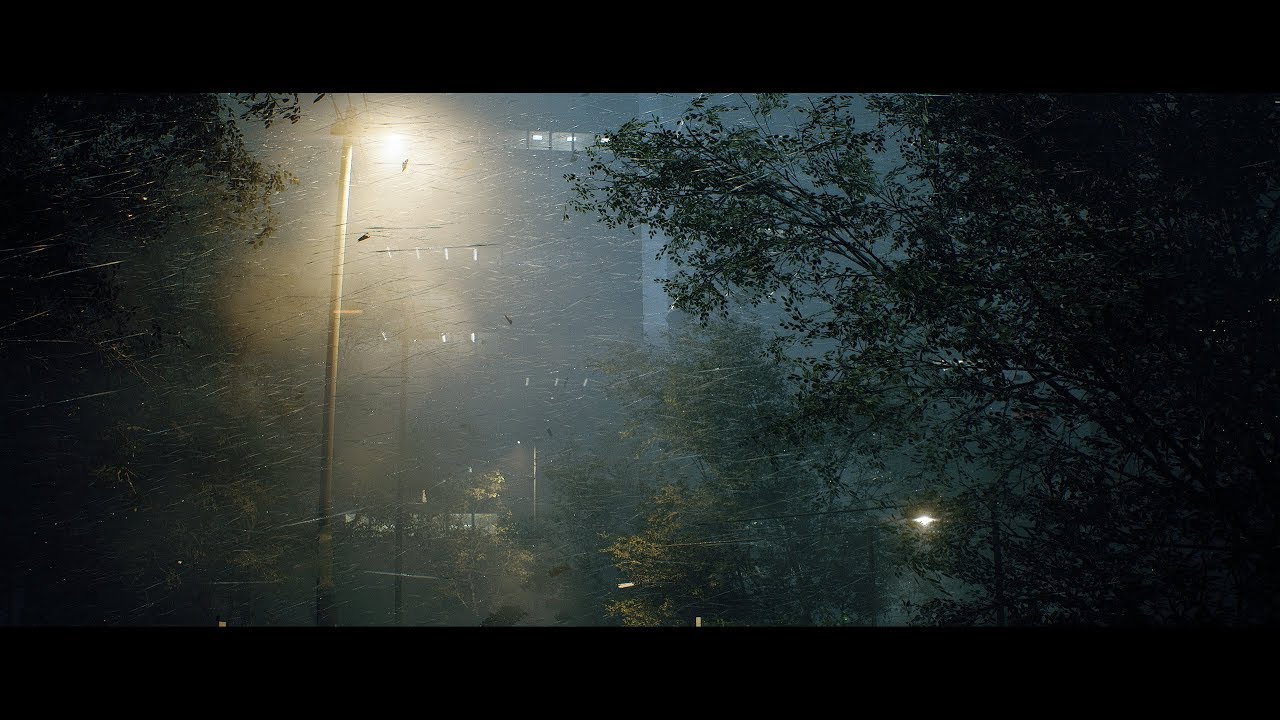
Unreal Engine 4.23 - Speedtree - Substance Designer
(Sorry, no audio)
UE4 Plugins :
- VICODynamics by VICO Game Studio LLC
- Custom Lens Flare VFX by Artyom Cheremisin
All his stuff looks great
 lusty elk
can anyone give me a hand pls, im making this movement blueprint, im trying to smooth the movement but is not working, any one knows why, am i connecting the nodes wrong?
alpine halo
disable yaw
 grim lantern
Can i get all variables in a blueprint? I'm trying to dynamically set a input to a node, i don't want to repeat my self x times
lusty elk
@alpine halo can u explain pls!
alpine halo
in your movement component
there's something like this

and in your character there's something like this
 lusty elk
it kinda worked, its not rotating as i want
alpine halo
how do you want to rotate
lusty elk
the player now cn move left and right, im adding a 20 points rotation to each individual side, the code works until here, now im adding the interp so the rotation is more smooth, when adding those nodes it stops working
grim lantern
Anyone Ideas how can i access a variable by using it's string name? Rather then drag/dropping the variable and using get
alpine halo
but there's rotation rate for that
Anyone Ideas how can i access a variable by using it's string name? Rather then drag/dropping the variable and using
get
@grim lantern make literal name
lusty elk
@alpine halo what do u mean?
ember dawn
Anybody know how I can create a delay in a For Each Loop? I want each loop to happen 1 second apart, but adding a Delay node at the end of the Loop Body doesn't seem to work
lusty elk
@alpine halo i dont get i t
alpine halo
on z there's by default 360
it means it rotates 360 a frame
decrease it for smoother rotation
grim lantern
@alpine halo I think I was a little unclear. I have a node Set Text and it's input is an Object (not a string), and I have like 20 off them (it's a WBP). I was hoping to get all variables of my blueprint, check for a token, and then get that object by name and pass it into my Set Text Node
Like getting a reference to self and then getting all attributes.
alpine halo
make array
earnest tangle
@ember dawn you can have a delay node that loops back onto itself. You'd just need to manually iterate the array
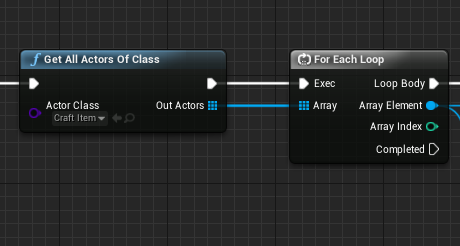
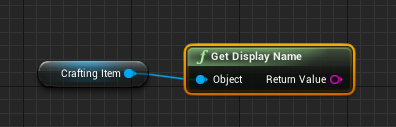 ember dawn
@earnest tangle How complicated is it to manually iterate an array?
earnest tangle
you would need to store the current index into a variable
then it's something like.. check if current index is bigger than array length, if not, get item at current index. Do something with item, then increment current index
and repeat :)
ember dawn
Oh I can just "Expand" a normal For Each Loop and it'll break it up into its constituent parts FOR me... cool
Then I can just add in the Delay to that
earnest tangle
you shouldn't add it in there
it's not recommended to modify the standard macros
you can copy the nodes and make your custom macro though :)
 quartz fossil
Does anyone know how to restart machine states so they start from the beginning?
ember dawn
Is there a resource you could link me for how to make my own macros?
earnest tangle
Blueprints that declare and define macros for reuse in other Blueprints.
there's some videos on the topic as well if you google for "ue4 blueprint macro library"
ember dawn
Do they save as large collections of nodes, or does making your own macro mean you can condense all the features into a single node like the standard ones?
flat raft
@grim lantern what you want is a MAP
A MAP let's you access its data via a string keyword
grim lantern
But here is the thing, I have multiple variables that go together like img_characterA, sound_characterA. So, I would rather like to construct the variable by name and access them. I'm coming from a Python Background and as every object is like static, it is a very common workflow to get all a method/attribute by it's name
flat raft
ya.... so a Map of string Struct
grim lantern
will be still ton's of manual input, but I guess that's my only choice
flat raft
well... you make one Struct... and 1 map.
and you fill it with whatever data u have in ur Struct
grim lantern
there is a make map how is it with struct? Didn't see make struct
flat raft
Unreal does have python... maybe you can automate your task using python
grim lantern
Comes with some limitations, it is in Editor only
flat raft
Ya
grim lantern
I'm using the Python API a lot as we are doing movies not games
flat raft
In your content browser, right click, blueprints I think.. Struct
grim lantern
Oh yeah, was just searching, thanks!
flat raft
I love Maps
 warm scarab
I can't get a soft object pointer to load, and I'm not sure why. It was working at one point a while back, now it's not. My soft object pointer points to a DataAsset. My BeginPlay function tries to load the object asynchronously as shown in the attached. BeginPlay is getting called, but the AsyncLoadAsset node never completes. Any idea why?
 woeful zinc
I just recently bought Frank climaxes slash pack was wondering if anyone knows how to retarget the slash effects to the ue4 mannequin
 sly estuary
Hi guys, Im trying to follow this video to make the circular sector decal on floor https://www.youtube.com/watch?v=cTd2m5kBZQo but i cant seem to make it by copying the blueprint provided in the video which create a radial mask to mask the circle to become a cone shape circular sector

attack indicating mark on a ground which can be found in some games.
I'm sure there will be tons of efficient way to do this, and more details can be achieved, but I wanted to share what I've figured out.
This is the circular sector decal shown in the video which works perfectly
the video uses this blueprint to create a radial mask to create the circular sector
I suspect that i did not put the correct value of bias and scale in the constant bias scale node
but the video owner did not show the value of the constant bias node
unique finch
can somebody help me/
sly estuary
anyone have idea of what value to put for bias and scale in the constant bias scale node?😭
unique finch
how do you check which thing hit an box collision in a bp actor?
sly estuary
any help is appreciated
sly estuary
u can try get overlapping actor with the box collision reference
unique finch
but
i want my AI to open doors
and for that
how do you get it and check the name?
sly estuary
u could put Tag in the character which AI control
unique finch
like im still confused
sly estuary
sly estuary
then u put a box collision infront of ur door and in the on overlap event of box collision which will return u an actor that overlap the box collision
then u check whether the actor has tag "AIPlayer"
unique finch
how do i get that actor?
sly estuary
if its AI Player u will open the door
unique finch
from which one?
sly estuary
other actor
sly estuary
has Tag node
 brittle fiber
Good day, Ive got a blueprint, with heavy construction script... For event graph, I want to activate sphere within BP to play animation sequence within BP. Action is move planes upward by one. On another activation. Move set of planes by one. There are many BPs alike within level. The text actors belong to static mesh. and I want to move them together. The text actors are different in each BP. How can I set the code for activating and moving the planes?
 covert forge
I'm setting up an animation blueprint. What's the best way to test that a "slot" blend node plays correctly on the character?
Ie. it "plays animation from code" through a montage. The integration with code makes it hard to just setup and test a new slot within the blueprint only.
 dense flare
Hey! Any way to access "stat" in a blueprint? I'm looking for the simplest way to create an in-game fps counter
 open elbow
hey guys does anyone have any idea how to get in app purchases working on android?
sick galleon
@dense flare wouldnt doing 1 / Delta Time of an event tick give you the fps ?
@brittle fiber not sure I understand your needs. You want your character to use a sphere as a button, and it moves a group of planes altogether, and when you press it again, it moves only one plane ?
 indigo bough
Is there a more efficient way of producing a "time since X" text string?
I feel like I remember seeing a node that handled this better, but maybe not
maiden wadi
@dense flare You should get the current DeltaTime and divide one by that.
alpine halo
But if you're doing with float that ticks with time. At one point float will reach the limit. You should use modulo to limit it in hours and use an integer as days counter
dense flare
@sick galleon @maiden wadi thanks!
sick galleon
@indigo bough there is Get Game Time in seconds that could help
unless you mean "real world time" since an event
indigo bough
Yeah, I'm needing real world time
That's okay, I'll just add it to my functions library and call it where needed 🙂
 teal jasper
hello, i have an actor that is placed on a level that is being streamed. i can toggle the visibility of that level on and off. if i do that multiple times i've noticed that the begin play is called multiple times. is that intended behavior?
maiden wadi
@teal jasper Most likely, yes. Actors are often destroyed when unnecessary and recreated when necessary.
teal jasper
but they aren't really destroyed
because they maintain their instance values when i make them visible again
i had a counter that adds 1 on each tick
and toggling visibility doesn't restart the variable
it preserves the last count
so the instance is still alive
trim matrix
actors are destroyed/recreated on the fly? that sounds odd
alpine halo
he means in persistent level when you stream another sub level, when it's not visible the actors will destroy and when you make it visible it will spawn
you can double check by toggling visibility in levels tab and see the counts in outliner
teal jasper
but if he destroys the actor when hiding the sub level he's in, how does he maintain its last values when spawning again from making the sub level visible again? serialization?
alpine halo
by converting the object in byte so that it can refer to memory
teal jasper
what do you mean @alpine halo ?
i can check the instance value to check if it's a different instance that was restored
the instance is the same
 stiff hatch
Can someone help point me in the right direction for creating a crafting system similar to minecraft's grid system? I have my inventory system as an array of the item master class if that helps
alpine halo
mean that while steaming hidden objects doesn't appear in world outliner and will be destroyed (hidden say) though it will be referenced in the memory so when you visible it , compiler tells to actually create and posses the value from blocks cus they were the same
teal jasper
i always made my code to assume that begin play only executes once per actor, so i guess i have to review all of it
 brittle spindle
hello, can someone help?
alpine halo
because when you're not in the region it will just like placed objects. which are doing nothing
brittle spindle
i have a problem with setting a variable from another blueprint this is what i got so far :
alpine halo
pin object
i have a problem with setting a variable from another blueprint this is what i got so far :
@brittle spindle pin object ref
alpine halo
your chest
brittle spindle
get chest mesh?
alpine halo
naah
alpine halo
the chest which placed in editor and you want to interact
brittle spindle
what is it called i cant find the right one, the blueprint in my editor is called ChestBP
alpine halo
-_-
faint pasture
@brittle spindle WHat bp is all this logic running on?
alpine halo
its widget
brittle spindle
widget
and the chest is a normal blueprint not widget
@faint pasture but i dont know how to set the object
alpine halo
is it something like when you go in the collision box of the chest and interact the widget should pop up?
brittle spindle
alpine halo
is it something like when you go in the collision box of the chest and interact the widget should pop up?
?
brittle spindle
it already does
but i want it if you press e it sets the hasKey to True
or checked
alpine halo
no
brittle spindle
no?
alpine halo
then use override in widged
brittle spindle
how
 brittle spindle
when i walk in the collision it creates the widget = works
i use listen for input, and when i press e it should check "hasKey" to true/checked = doesnt work *
*how can i fix it
alpine halo
dm me
faint pasture
@brittle spindle You need to get a reference to the chest actor somehow
how you do that is up to you
teal jasper
@alpine halo the problem is that i create dynamic instances and functions to multicast delegates with AddDynamic on the begin play, so it's doing those things multiple times, which leads to a lot of memory allocation and duplicate bindings to delegates
because i thought it would only run once
now i need to clear delegate bindings and check if the dynamic materials have already a valid value, etc
 twin pollen
Hi guys! There's an issue that I cannot find a solution for it online. How do you restrain mouse cursor to fullscreen game mode when having dual monitors setup?
alpine halo
@teal jasper but you can just create a custom event and do the stuff you were doing previously on begin play
faint pasture
Should I trace more or less?
This was before optimization to not trace to walls that I can see both corners of. This is line tracing to every wall corner on the map.
mild ore
if its for navigaton wouldnt navmesh work better?
trim matrix
you dont need that many
faint pasture
It's for FOV and I've already optimized it to not shoot at shadowed corners
Even without the optimization it still takes under 1ms for like 400 corners so its not biggie
I'll eventually move it all to C++ abstraction instead of tracing in world space but I doubt it'd be faster, line trace is fast as F*** boi
That's just for everyone worrying about perf tracing on tick, you can do several hundred on tick before you need to worry about it if your collision channels are set up right
sick galleon
heyo. I have a weird problem with mouse input.
I have a bool swtiched to ture when I clic mid mouse button, and false when i realease. Works on the first try, but after that the "pressed" action is not called anymore, altough the "released is".
However, if i hold the left mouse button while pressing the middle mouse button, the "pressed" works again for middle mouse button.
Does that behavior ring any bell ? Im puzzled ...
what could be "eating" a clic event ? Ive searched all my BP the only reading of inputs are all in the main script (which is the only managing all the input booleans for the other scripts)
trim matrix
maybe just a bug
sick galleon
ok I fiddled with mouse capture properties and im good now
 left carbon
Guys, I'm trying to generate spline mesh by a spline, but get weird twists, when mesh goes straight vertically.. Is it possible to fix it?
maiden wadi
Doesn't look like a twist so much as two meshes being draw too far apart.
 elfin inlet
hello fellows, No matter what i do, i cannot get attack objective to set. its NULL. What am i doing wrong?
i'm suspecting the GET node
oh my god, i forgot to connect object to is valid.
i need to get some rest...
trim matrix
what node we use for If Else statement?
mental robin
How would I go about drawing an arrow to show the velocity from my actor..
elfin inlet
what node we use for If Else statement?
@trim matrix the node branch is an if statement, the "true" output is the body, and the "false" output is "else"
trim matrix
and what is Flip Flop?
elfin inlet
when flip flop receives exec, it executes A
and if it receives an exec again, it executes B
trim matrix
ok, thanks
elfin inlet
then goes to A again
maiden wadi
@mental robin There's some debug functions for that. DrawDebugArrow or something of the like.
mental robin
Ive been trying that but it always draws a gigantic arrow all the way to narnia
Ive defined the start as the location of the actor and the end point I was tryingto get its velocity value..but that didnt change anything so I tried adding numbers in manually to see what would happen but the arrow is always to narnia and back again
I dont get it
okay so I think whats happening is because the velocity is ..idk say something like 10..15...200 ...its just placing the arrow end point that far from world origin
how tf
...got it
just added the world location to its velocity
trim matrix
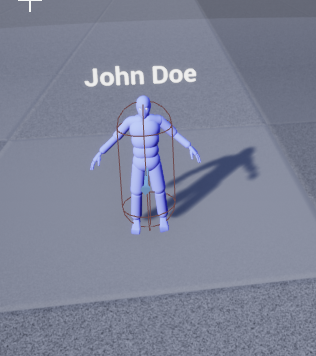
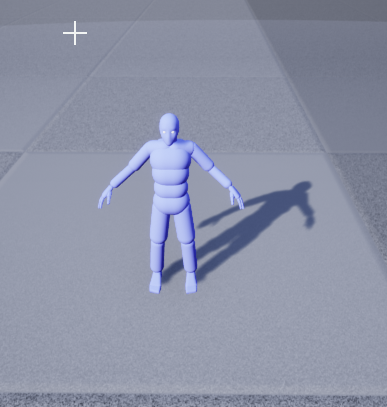
Anyone know why a Widget Component shows above an actor in the editor, but not in play mode?
mental robin
sort priority?
trim matrix
I've messed with that -- no different results.
https://i.imgur.com/0yWZ6q5.png <- In Editor
https://i.imgur.com/DSXcKvH.png <- In Play Mode





maybe visibility unchecked
it's all checked to be visible
not hidden in game, etc.
or maybe you have his name binded to the text and your npc doesnt have a name so doesnt show anything
i haven't set that functionality up yet. Should just say John Doe :x
 inner blade
Hey everybody, new to the discord. Is this a acceptable place to ask for help on blueprint related issues?
trim matrix
maybe its just a bug and will show after you restart unreal
I've tried that too 
or maybe get the widget component and print string on begin play with it
Hey everybody, new to the discord. Is this a acceptable place to ask for help on blueprint related issues?
@inner blade yes
I fixed it
gdi
I had a script for the actor, forgot to call the Super::BeginPlay()
so it never initialized the components

 worthy frost
@inner blade #old-rules you asked in the correct channel then also posted here aswell.
inner blade
Ah that's my bad, I'll delete this then. Thanks for the heads up.