#blueprint
402296 messages · Page 513 of 403
 full fog
144 single stones. I just reuse the textures for duplicates
and the only ones that exist "once" but are being compatible with each other are these:
 high ocean
Ok, so basically, you would have an array of locations (1 unique location for every stone). Now. For each stone of type "Simples", get 4 locations from the array and occupy them. For each "Dragon", take 4; For each "Winds" get 4; and for each Flowers & Seasons get 1.
full fog
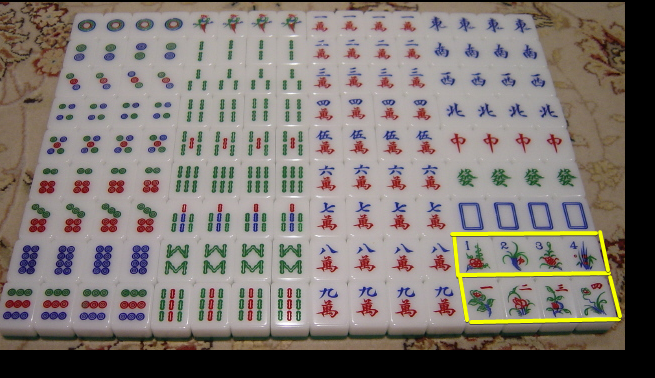
basically the bottom ones there have the same logic as the others
just different textures
Where the Bamboo Stone with the number 2 is being there four times, the Season stone set is literally the same, just having four different textures.
And same goes for the flower stuff
Yep
high ocean
Did you read what I said about the layout logic? Does it look correct?
high ocean
but that's the problem...They're not "unique", and they don't need to be spawned once.
 zenith iris
Does anyone know if I can get a reference to a "soft self" in a macro blueprint? For example, I want to get "Play Animation" for widget using a macro (I'm using the same in several widgets), the idea is for the Widget always receive "Self" as a value
full fog
In the real world, they are - I thought its best to treat them that way.
high ocean
@zenith iris doesn't it have self by default in the function?
full fog
That was my initial thought because I had in mind to give each stone slight different textures. But sticked with one per instance later on
zenith iris
@high ocean it has when it's at the Widget itself, but I'm creating a macro (since I'm using this on several widgets)
full fog
Ah and yes, 7 different types
here is a better representation
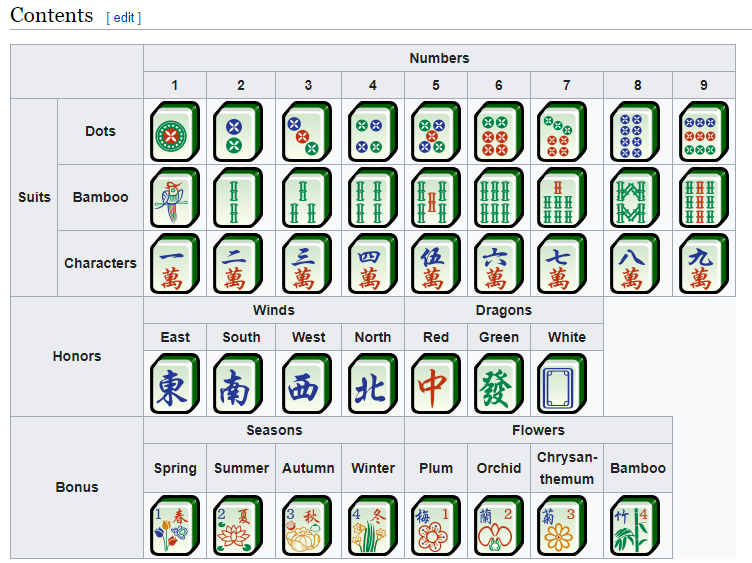
I will try your setup
high ocean
@zenith iris yea, not sure...unless you have the pin exposed and plugin self every time 😐 like in the SS otherwise
@full fog well, the thing is, you should try the logic I wrote down later, which implies allocating the correct number of locations for each type. Like 4 random locations for the Suits etc...
zenith iris
Yeah, will probably do that way. It's better than have to edit dozens of playback speed when I want to tweak these xD
high ocean
@zenith iris for some reason, i just realized I never shared a widget animation across widgets 😆
but...wait. Is that possible? 😮
full fog
Ok, will try
high ocean
...how, without ref to the object it needs to animate?!
zenith iris
@high ocean I'm not sharing the animation itself, just the play function. Working on improving the menu and using different animations, but for consistency I'm trying to use the same playback speed for all animations. So, when I want to change the speed between fadein, slidein, transtions, etc, I just change this macro (instead of changing it on every menu
high ocean
@zenith iris oooohhhhh....that 😛 oke 😅
zenith iris
Each widget has its own animation, they have the same duration, so I just need to tweak playback speed
Doing that to simplify the number of items I need to edit when changing something
high ocean
Yea, sry @full fog but it's quite an adventure (at least at my level, an engineer would already have been done with the code), so it's the best thing I could think of and may require tweaking/adjusting 😐
zenith iris
Using that for animations, delays, etc
full fog
For real Duke, you helped me more than I could ever ask for
And yeah I will use all of this new knowledge and will try to build up on it!
high ocean
@zenith iris I usually just go for smaller widgets like independent buttons and stuff for that, otherwise it's lots of work - i know 😐
 halcyon grove
zenith iris
halcyon grove
zenith iris
@high ocean Yeah, I'm trying to do as much as "global" objects as I can, for example buttons: I have two buttons right now that are shared across all menus (button menu and button submenu), so when I need to change any animation, font, style, etc, I just change these two and it changes it all hehe
Now I'm trying to do the same for animations and delays
So instead of doing the work inside the widget, I'm trying to do as much as I can outside of it
high ocean
still, interfaces for the same button doing various crap is often a mindf*ck for me at least xD
zenith iris
I'll probably share this menu I'm working on github when I finish it - I'm doing it using no asset, just plain vanilla so it can be used anywhere
But yeah, I've been having headaches since I started with interfaces xD
high ocean
@zenith iris Honestly, I think UI is among the most challenging aspects of a game to get right, it's so important and so laborious...
zenith iris
Yeah, and the fact that you can't share things between them the easy way, adds more challenge to it imo
high ocean
+widget inheritance is a bish too
zenith iris
Is that a thing? Can I create child from widgets?
high ocean
yes, but prolly you don't want to 😂
little flexibility in what you can do
but it has its uses sometimes...Lol now I gave you homework 😅
zenith iris
Ohhh, that's interesting thing hahaha
How can I do it? I only saw this option when creating a blueprint widget
high ocean
xD
zenith iris
I think I'll try that for submenu buttons, since they are 90% similar to normal buttons
You just opened the pandora box for me 😂
hahahah
high ocean
@zenith iris Pandora ain't got shit on UE m8 😄
 drowsy ferry
so im messing around with a mesh in the viewport. anyone know a way to change parent socket without transforming the mesh?
high ocean
@drowsy ferry you mean origin? what do you mean by "parent socket"?
drowsy ferry
i guess i mean ive got a mesh for a weapon and ive added it a characters viewport. after adjusting the mesh until it was in its proper place, i remembered i wanted to attach it to a socket on the characters skeletal mesh, but when i do this the mesh is moved
high ocean
@drowsy ferry You have two solutions: either change the transform of the socket, or the transform of the weapon
@drowsy ferry you can change the socket's transform in the SKM (where you created it)
 faint pasture
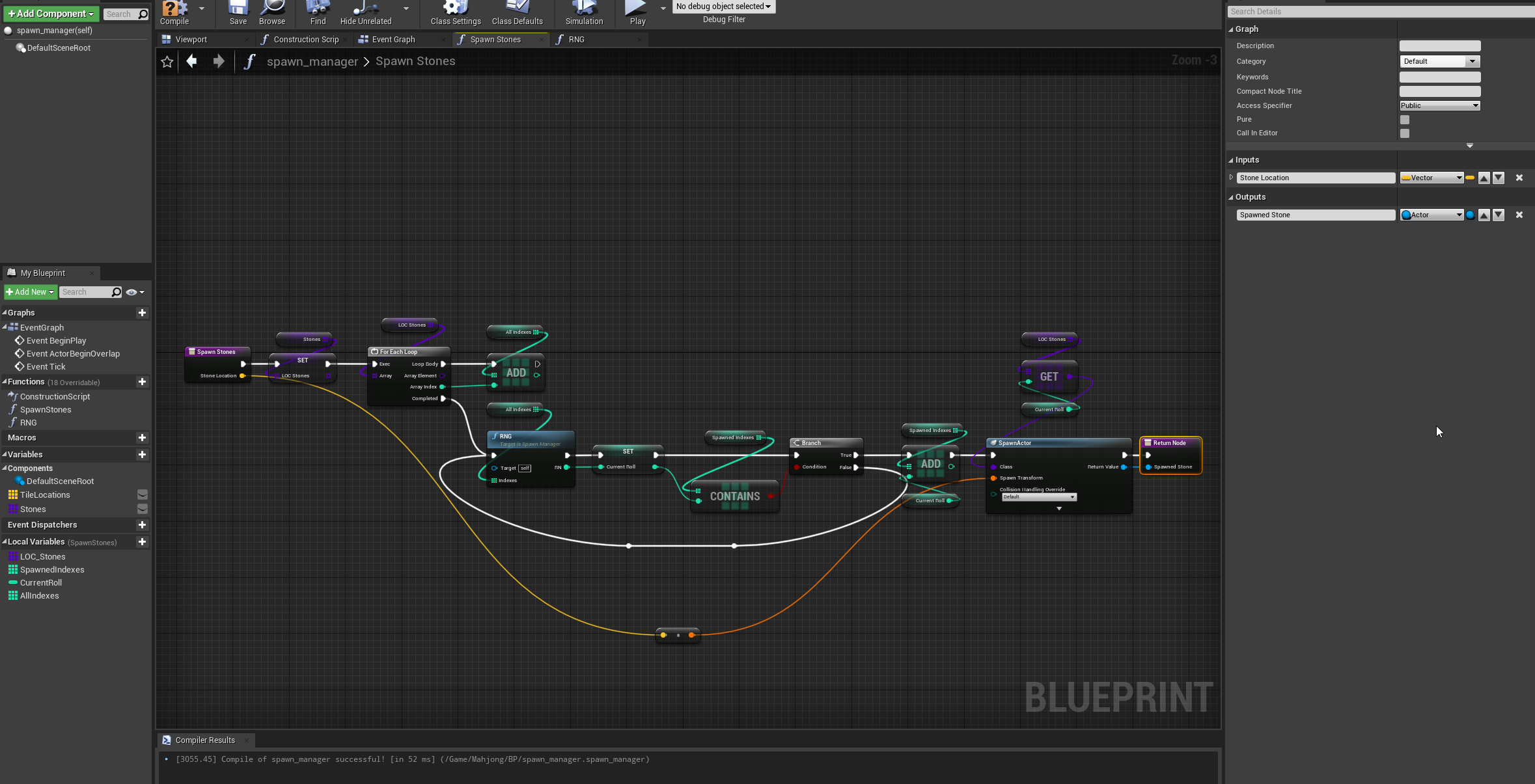
Is this the approach to preallocate the array size? I don't wanna be resizing thousands of times at generation lol
high ocean
@faint pasture I think so, yea, that looks good. Making A*?
 high ocean
lol, dw, I'm making a proper one now, you got me with your silly game 😛
lemme make most of it and i'll come back to u
high ocean
it's bad anyway, won't do what you want, I made a new project, making it now xD
dw, it's somewhat fun lol
faint pasture
@high ocean Making an edge first tile map generator
full fog
For sure, I owe you a megagrant at some point
high ocean
@faint pasture ouch! 🤦♂️ GL!
drowsy ferry
@high ocean i see, the help is much appreciated
 scenic scroll
i'm trying to use a blueprint to make "pseudo-water" physics, however this does absolutely nothing when a phsyical cube falls through it, any idea whats wrong?
high ocean
@scenic scroll is this just for dialectics/practice/testing the system or you are planning on implementing this in a real game scenario?
@full fog Can you maybe provide me with a list of locations for any of the layouts so I can start testing?
@full fog basically, i need a list of ...many locations (where each stone should stay)
scenic scroll
@high ocean its for a mod of a game, i dont have access to the source code so im having to use a lot of unorthodox coding to do things that shouldnt be that complicated
full fog
@high ocean That may take while but I can build a layout and then write down the stones locations into a datatable
Or is there a way to select all placed assets and export their pos?
As text/csv/json
high ocean
@scenic scroll using "get all actors of class" on tick will kill any game, let's start with that, so the whole implementation attempt is a failure right there. That's why I was asking 😐
@full fog i know xD it will take even more for me to fill in the array...idk how to approach this honestly xD
scenic scroll
oh wow, didnt know that :c
i'd use a trigger volume but i cant because the object supposed to trigger it (the player vehicles) are set to not set off overlap events, and i cant change their code. Any alternatives?
full fog
No worries, I place the stuff and give you a csv
high ocean
@scenic scroll you need to figure out logic, but imagine that you cant run through an array of literally "all actors" in the level, then extract the actor you want, every single frame. Since that's what "get all actors of class" node does
@full fog ok, i'm just not sure how will i copy the data into a blueprint array of vectors 😛
full fog
ah i see
scenic scroll
yeah that doesnt sound very performance friendly... but its the best idea i could come up with, im not familiar with UE and i dont know what else i could do, thats why im asking for suggestions
full fog
well at least we have the positions once
 wanton lichen
Does anyone know why "Control Rig Hierarchy" is not appearing when I search it?
high ocean
@scenic scroll Well, what you are trying to do depends on lots of stuff actually...You want to deform the water when something - anything really, hits it right?
Since the water surface has collision, you can use it's collision box to trigger events on hit. The trigger box will detect hits from any objects which have compatible collision setups (e.g. respond to the same collision channels). Then, you can cast to the particular actor and get it's velocity or whatever else you need
scenic scroll
no no i dont want to deform the water, i want the vehicles to float :0
high ocean
@wanton lichen try #animation but that cannel is very slow/kinda dead imo, so yea...
scenic scroll
altho i might just keep an eye on that advice to make it look pretty after
wanton lichen
ok
high ocean
@scenic scroll yea, it depends on context...If the water plane has collision which the vehicle actor can step upon, then you are set...it should "float", or rather, glide over the surface
full fog
@high ocean alongside the transform writing, i found this - might that be of any use?
Unreal Engine Forums
Hi. I'm literally just starting with Python in UE and without the usual wealth of searchable answers it's easy to hit a brick wall right away.
I'm trying to
quote: I actually managed to do this by dragging all the meshes into a random BP and using a node to list all components, grab the static mesh name and store them in an array - then, during simulate, I could copy the array in the editor and paste it when I was out of simulate.
 high ocean
it's basically the same actor, i inject data into it, the data contains the mat instance
full fog
so, this is how the 144 stones look like
now I am going to get the positions somehow and write them down somewhere
high ocean
no, wait...just a sec...
full fog
Aye
high ocean
can you send me that?! i mean that!
full fog
sure
high ocean
are those just static meshes?
full fog
Actually it would be ok to have a level as layout, having all of these stones placed - not shuffle the stones itself, but the material instances
Or the index number from the subUV
high ocean
well, the way i thought of the system now is each mesh has it's own material instance, which means costs will be very low since only 1 material is actually rendered, all tiles have just difference instances
 shut hinge
got access now to ship pawn when pressing C, but its stuck in external camera view, can't change it to internal view. Do I need to reparent the pawn's blueprint to CH_Human (main parent BP) of my players?
full fog
this is what the current material instance can do
And yes, I can create 144 instances out of that and give each stone a unique one
 ocean bluff
Hello, I'm new to unreal engine and I'm doing Greg Wondra's beginners tutorials on skillshare. I am extremily confused about this error and i don't know how to fix it
full fog
I am not that big into these things @ocean bluff but "NONE" in many cases I think refers that its missing something
 elfin hazel
Go to your designer view, one of the text blocks has an invalid binding, i believe the error is.
ocean bluff
high ocean
@full fog ok...let's get those locations 🙂
shut hinge
when I switch from the Player character to the space ship pawn. I get a Get Player Character None Access Error. How do I fix it?
full fog
@high ocean Including the mat instances?
I just zip the project after
Or locations to csv ^^
high ocean
@full fog you either send me the project with the pieces somehow, or I walk you through on how to get the array populated and jus send me a .uasset blueprint xD
elfin hazel
@ocean bluff The binding that says None, click it and select a new one, or remove it.
ocean bluff
alright I'll try
ocean bluff
@elfin hazel thank you! i did it lol
high ocean
@faint pasture I use maps all the time...they're unconfortable sometimes but meh...yea 🙂 glad it worked!
faint pasture
@high ocean Before I get too deep in the weeds with this, would you use a HUGE array or a few maps to represent a level with multiple layers like paths, roads, walls, etc?
Right now I'm using a map with coordinates as input
high ocean
@faint pasture it just depends on when the code is running imo, I did an A* which needed to run/tick (for a road tool) and huge arrays of structs got really bad really fast
@faint pasture but if the code runs once (say, when level loads) you shouldn't really care...
faint pasture
It'd be only at generation, pathfinding is by the mesh later. Just using tiles for generation, movement is all regular shooter stuff
high ocean
@faint pasture then just go for clarity imo. Whatever keeps the code cleaner/easier to wrap your head around since it's probably quite complex
shut hinge
getting this error coming up when switching from Player Character to Space Ship Pawn.
The Character Player Error is showing up on this Function found in the Enemy Droid Patrol Object Trace BP.
scenic scroll
@high ocean but if it had a hard collission wouldnt it be just like ground? plus this is a lego game we're talking about if it had a hard collission the vehicles would break
high ocean
@scenic scroll then you must add a custom collision channel for water and make it behave as you would need. Depends upon the context too much for a quick, short answer, but you can try this
scenic scroll
any tutorials? or anywhere i can go to learn? because i have no clue how to even start
scenic scroll
whats a blueprint piece that will allow me to slow down a physics object?
 wet siren
@scenic scroll https://docs.unrealengine.com/en-US/BlueprintAPI/Physics/SetPhysicsLinearVelocity/index.html
or
https://docs.unrealengine.com/en-US/BlueprintAPI/Pawn/Components/CharacterMovement/AddForce/index.html
Set Physics Linear Velocity
Add Force
scenic scroll
thancc
shut hinge
should I parent the spaceship pawn to my player character pawn as the parent in order to stop the null access error?
scenic scroll
is there a way to give a tag to all actors through a blueprint?
 tight schooner
@scenic scroll With a editor only function or an editor widget yeah.
 wind kernel
Is there a way to limit / cap The values of a 'Add Actor World Offset ' node ? like make it stay between 0 - 100 .
I'm using the mouse to control the actor.
scenic scroll
@tight schooner would that work in-game?
tight schooner
@scenic scroll oh, I thought you wanted an editor function because it sounds like one. If you want to do it in game, then Get All Actors and feed the array into a For Each Loop
and use whatever node adds a tag
@wind kernel Clamp Vector Size, though this works on the vector length so the limit will be spherical. If you want a box you might have to Clamp Float on each axis of the vector.
wind kernel
Is there a way to limit / cap The values of a 'Add Actor World Offset ' node ? like make it stay between 0 - 100 .
I'm using the mouse to control the actor.
@wind kernel
scenic scroll
thing is idk what node adds a tag xD
very new here, thats why i asked
i looked around the nodes but didnt see anything except gameplay tag
which is weird
tight schooner
I don't have UE open so I forget offhand, but I know it can be done
@scenic scroll Here's something I found online https://puu.sh/kPLep/a2eb03426d.jpg
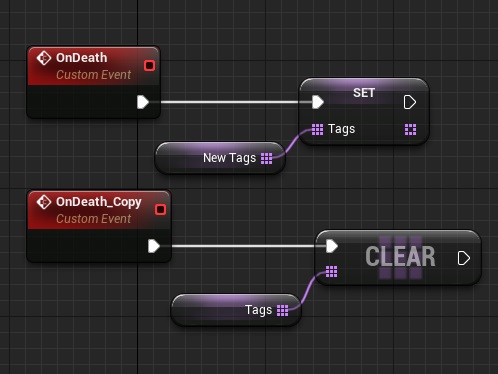
I suppose tags are an array variable that actors have rather than something you manipulate with a dedicated function
So maybe "get tags" node into an "add (array)" node
Or something
@wind kernel do you want the actor to stay within some set bounds? You might have to move the actor with a "set actor location" node instead of an offset node
You get the current actor location, add the axis value to it, and use the result to set the new location.
You can use a Clamp node to, well, clamp the value before setting it
 alpine halo
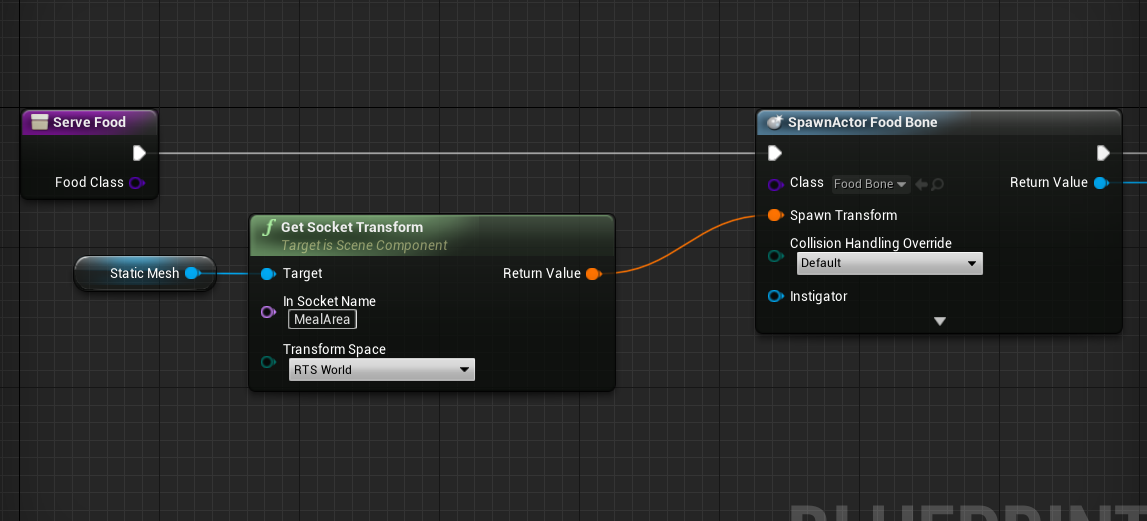
Is there a way I can select random child actor of same class

currently I'm setting default class as "Food bone"
 young holly
What is the difference between a Hit event and BeginOverlap event?
alpine halo
I wanna set random class of food in input and attach input to the class
wet siren
@alpine halo get children of class (array). get length of the array. random int with min 0 max len-1. get child of that index
@young holly overlap is a physics event. hit is a trace event.
young holly
so what is better way to check which collider on a character, a bullet hit?
overlap?
@wet siren
wet siren
hitscan use hit. projectiles use overlap
young holly
what is hitscan?
wet siren
if your bullets hit instantly
wet siren
if you click and shoot and the enemy is hit instantly it's hitscan
if there is a bullet that takes time to fly through the air then it's a projectile
young holly
my bullet has a projectile component, so I should use overlap i think
wet siren
if you have a bullet then yes you will use projectile/overlap
young holly
but the begin overlap node in BP doesn't give you the components overlapping
I need the component to know if the box collision attached to the player is on head or body
so I can give more damage on head
oh, I am looking at OnActorBeginOverlap instead of OnComponentBeginOverlap. my bad
 jovial bobcat
@young holly Just use on component hit or on actor hit for the bullet and you can drag off a hit result to get the bone name of the hit locaiton and if it is the head make it do more damage
 sour raft
can i convert an actor to an actor component? done a bunch of logic with quite a lot of variables, would be a pain to copypaste/recreate all the variables
sour raft
there doesnt seem to be an actor component parent in the list
sour raft
yeah i thought it would just be a class like anything else it could be parented to
young holly
@young holly Just use on component hit or on actor hit for the bullet and you can drag off a hit result to get the bone name of the hit locaiton and if it is the head make it do more damage
@jovial bobcat How do I ignore the capsule component for hit though? wouldn't it hit the capsule component as it is between the bone and bullet?
jovial bobcat
umm
I had that problem
and umm
wait i will look on my blueprint
i think i just changed the capsule collistion
sour raft
@young holly thats all just the collision settings, set the capsule to ignore visibility (or whatever youre using for your trace)
young holly
ok, got it
jovial bobcat
actually
i have no idea
it just worked for me
??
even though my collsion is to block world dymanmic
and i didnt set a ignore function in the bullet
nvm
i was looking at the wrong bp
so yeah
just do that
and this is the script
young holly
should ticking Simulation generates hit events off be enough?
young holly
what is that option for?
jovial bobcat
because you are just hitting the capsule and it wont give you a bone
which option?
young holly
the first option under collision
sour raft
if it 'blocks' the trace it will still block it without generating a hit event
sour raft
hes asking about the 'generate hit events' tickbox
jovial bobcat
bullet
sour raft
on the capsule
jovial bobcat
not hitscan
sour raft
as in if he turns off that, will it no longer block the bullet
which, it wont, i dont think
sour raft
its just a matter of getting the right collision channels set up, or the right traces
jovial bobcat
physics simulation
like if your target is simulating physics and you want it to generate hti event
i dunno
sour raft
set the projectile to a projectile, get the capsule to ignore projectiles
or if its a trace set the capsule to ignore visibility traces but the mesh blocks visibility traces
sour raft
as the collision type, yeah?
young holly
is the OnComponentHit a trace or projectile?
sour raft
sour raft
thats on a static mesh
perhaps collisions cant?
im not sure, its always been there i think
im on 4.25 though
jovial bobcat
wahhh
@young holly no
its not a trace
a trace is a separate thing
nvm
read the question wrong
its on the projectile
young holly
ya, trace is the on done with LineTracingby channel
young holly
btw, my box collision on the bullet doesn't show projectile option either
sour raft
if you want more control, you can do multilinetrace, and have things set to 'overlap' then it keeps going through and reports all things it hits, then u can manually parse it
weird, im sure its always been there
jovial bobcat
its never been there for me
sour raft
ermm
young holly
if the bullet hits the capsule on the default settings, will it not hit the bone below the capsule?
jovial bobcat
yeah
sour raft
i just made a new BP, added a projecitle movement, and a capsule collision, the capsule collision can be set to projectile
sour raft
blueprint class, actor
jovial bobcat
and then added a projectile movement
jovial bobcat
sour raft
maybe a project setting, but in this project i 100% havent intentionally enabled it
but perhaps its something else i use
like CPU access or some weird setting?
i doubt it though
its always just been there for me
jovial bobcat
bruh ur hacking
sour raft
ue7 up in here
jovial bobcat
lol xd
sour raft
i changed nothing from defaults either, just made a new actor etc
jovial bobcat
same
sour raft
if it existed for @young holly and not you, i'd think you'd broke a config file somewhere or something
but not there for both of you??
why have i got a magic feature
jovial bobcat
@young holly btw is it working?
sour raft
trying to think what i could have enabled/changed that would impact that
sour raft
nope
not intentionally
perhaps some project i imported at one stage added it or something?
jovial bobcat
maybe?
jovial bobcat
lol
Learn how to set up collision and lifetime for your First Person Shooter projectiles.
oh yeah
i think thats how you got yours
its exactly what you have
im actually gonna do that
jovial bobcat
@young holly you should do that my method kinda sucks
sour raft
but perhaps something i used from the marketplace added in it once upon a time
sour raft
yeah i just made a completely blank project and its not there
jovial bobcat
i have that enabled
sour raft
i always start (mostly at least) with FPS blueprint
but this blank project is purely blank
perhaps they use it because the FPS starter has a projectile
jovial bobcat
oh i started with TPP
jovial bobcat
let me check a FPT
young holly
ok, so I create a custom object type, add it to the bullet box collision and make Capsule ignore it?
jovial bobcat
yeah
young holly
ok, thanks, let me try if that works
jovial bobcat
yeah
its there
lol
should have started with FPT
cause my game was FP anyways
@sour raft
sour raft
yeah i guess thats why i always just assumed it was there
ive always used fps as the starting point, even if im making something else
sour raft
what is it youre trying to cast ?
you just need to get a reference to it via the normal ways, if its a UI element theres a 'Is Variable' tickbox you need to tick to access it, if its something from the player then you need a player ref (GetOwningPlayer or something might be useful)
ideally dont want to cast on a 'get visibility' though because it will do it every time the hud is drawn (every frame), would be better to cast it on construct of the UI and use the reference in get visibility
faint pasture
@jovial bobcat Cast is a verb. Cast X to Y means "Is X a Y? And if so, treat it as a Y."
Your example is going "Is Nothing a Dash Component?"
jovial bobcat
yeah umm i dont know how to get that nothing to be the dash component
like how you cast to player is
get player character
but i fixed it
sour raft
where is the dash component
jovial bobcat
i just cast to player
sour raft
you just 'find' it however you can
faint pasture
cast WHAT to player?
jovial bobcat
and then get dash component off the player
faint pasture
you didn't cast, you did a get, they are different.
sour raft
yeah thats right, just make sure you do it on construct of the UI
jovial bobcat
sour raft
so you're not casting all the time
do the first half in the UI construct, and promote dashcomponent to a variable, name it OwnerDashComponentRef
then in the visibility thing use OwnerDashComponentRef directly
sour raft
as i understand it, casting is doing some kind of 'work' that its best to avoid if you can, dont do it every frame
in the graph editor theres something equivelant to begin play event
jovial bobcat
sour raft
but theres certainly an initialize or whatever
 onyx prairie
so, i can printstring the username - that works. but if i fetch it this way, it doesnt change the text render under thirdperson blueprint. what have i done wrong? just testing a basic nameplate. other parts of the blueprint are already working. just dont know the workflow for textrender, so would anybody be able to explain what nodes i should be using instead?
 jaunty reef
Am I crazy or is the description for round incorrect?
oh nevermind the round is .6 and over
Wait no that doesn't make sense. round(0.5) gives you 1, round(-0.5) gives to 0
It should be consistent tipping point regardless of what side of the numberline you're on. Am I wrong?
 flat raft
Rounding up
alpine halo
Round function rounding figures
If you want to get nuberline then do floor() or fceil()
jaunty reef
The description says -1.6 will round to -2.0 and 1.6 will round to 2.0
I'm using functions because I'm too lazy to paste blueprints into slack.
It's different than other math rounds that i'm familiar with
alpine halo
If after floating point the last digit is >=5 then add it to second last. If it's <5 then remove it. Do this till you get rid of all floating point. That's what round function do.
If there's 1.7247 then
1.725
1.73
1.7
2
flat raft
Description is correct
jaunty reef
Damn. That's different then even stdlib round. It's kind of unconventional.
I suppose it's faster?
flat raft
-1.6 gets rounded down
jaunty reef
but -1.5 gets rounded up.
flat raft
ya? Seems normal to me
jaunty reef
for example. http://www.cplusplus.com/reference/cmath/round/
 crisp minnow
hello coming from unity all objects had to be pooled for good performance. i see in tutorials for unreal no one is doing that instead they create destroy. is it fine perf wise?
young holly
how do I allow line trace to hit the bones, but not the capsule component. my capsule component is set to Ignore Trace Channel, but when I fire a trace, it goes completely through the character to the wall behind?
alpine halo
Purplemath
Explains how to round to a given number of "significant digits".
young holly
I want to check if my bullet is hitting wall directly or there is a character in between, so I spawn a bullet hole decal or a blood decal on the wall
jaunty reef
Significant digits isn't really how floating point works
at least on the cpu
most modern CPUs round is one instruction
jaunty reef
I haven't looked into the C++ round yet.
I suppose it would be FMath::RoundFromZero
I guess that is what I'll look at next
young holly
why is my box collider around my bullet not generating OnComponentHit event?
jaunty reef
Collision there are a bunch of things you'll want to check. Like if both colliders are listening to the correct object types.
jaunty reef
You only want to query for it?
young holly
the box collision doesn't fire the event at all
jaunty reef
What happens when you set it to Collision and Query?
young holly
still no change
this is my skeletal mesh presets
I am trying to get hit even on this
both are Blocking each other, so hit even should fire right?
young holly
sorry that was wrong image
jaunty reef
I think they both need CollisionEnabled to include collision
The documenation implies that Hit events only generate whenever Physics results in a hit.
young holly
this is the correct
jaunty reef
Yeah. I'm not 100% sure
jovial bobcat
@young holly
Umm i had that problem
before took me ages to fix it
but all you have to do is make the box collision the root
and also
change your object type to projectile
btw you were talkiung about line trace and now your talking about bullet collsion
so r u doing hitscan or projectile
jovial bobcat
Is there anyways for the projectile for to ignore the player
that spawned it
yeah i guess
but
 tight venture
N, NE, E, etc. are references to UI buttons. How can I determine which button was clicked? (part of what needs to be done on click is that, no matter which button was clicked, all those references need to have their onclick's unbound, then the references unset, then reset to some other button, then rebound again to the same event)
jovial bobcat
the problem is what happens when it comes to multuplayer
cause then how the the player shoot eachother
 hybrid hound
my "Simple Move To Location" node has all of a sudden stopped working from the top down template?
 maiden wadi
@tight venture Usually you pass a parameter through the binding. So that when that button is clicked and it calls SetNewOrigin, it calls SetNewOrigin with an int or enum or something that you can use to determine the button. Then set that in your individual buttons.
UserWidget for the button
Where you use the button and bind the click to an event.
 simple lantern
you need a get player controller
elfin hazel
The sphere collision needs to block visibility channel. The controller also needs to have click events enabled - Enable Click Events.
elfin hazel
If there's a triggerbox that overlaps visibility, then the click can't get to the sphere.
 hexed coral
yeah i also moved it away from any overlapping collisions and tried putting it into a new map as well
I also made a new bp with another sphere but nothing comes up either.
elfin hazel
Then I don't know.
simple lantern
gonna butt in with my own Q
I have a mechanic where I can spawn actors in my world, and when i'm choosing where to place them there is a green highlighted object at my cursor. when it's green, I can spawn the actor. if the highlighted object is overlapping a previously spawned actor, then it turns red and I can't place it. I've written it so that as actors get spawned, they are added to an actor array. This actor array is checked for collision, and that determines whether the highlighted object is green or red.
hexed coral
is there any way to debug/shoot the trace from the mouse click?
simple lantern
problem is it only registers the most recently spawned actor. I think what's happening is during the collision check, it's checking every actor in the array (only one of which is most likely being overlapped at any one time). So it's returning both true and false for the collision check. that doesn't explain why the most recent spawned actor always properly returns the collision though
elfin hazel
@simple lantern The only relevant result is from the last looped index. That is what determines the branch result. And that index is the last spawned actor.
simple lantern
the 'for each loop' doesn't cycle through every index?
elfin hazel
it does, but with that logic, the final decision is made by the last index - is it overlapped or not.
The logic should be - If there's an overlap during any of the looped items, then it can not be placed and any further iteration is unnecessary. may as well abort the loop.
simple lantern
The logic should be - If there's an overlap during any of the looped items, then it can not be placed and any further iteration is unnecessary. may as well abort the loop.
@elfin hazel that's definitely what i'm aiming for
elfin hazel
So a solution would be, have a "can place" boolean, set it to true before the loop. If the is overlapping actor returns true, set Can Place to false and abort the loop.
simple lantern
so would the solution be setting a variable that cuts off the loop
yeah that's what I was thinking, cool
elfin hazel
Then when the loop is complete, query if Can Place is true or false.
simple lantern
thanks for the help
elfin hazel
I'll just mention something, and that is I don't know what the performance implication of the Is overlapping Actor() call is, on an ever expanding array.
Perhaps you could add another collision channel that your placed objects overlaps and that the highlighted object is.
So when the highlighted object ends overlap, it GetOverlappingActors(Actor), if length is 0 =green and can be placed. Else red and can not be placed. And since the highlighted object only overlaps with your placed actors, those are the only objects that matters.
Just a thought.
simple lantern
hmm I love what you wrote but my beginners brain is having a hard time understanding all of it, what do you mean exactly by adding another collision channel?
are you referring to this?
elfin hazel
Yeah, so that can be quite overwhelming when starting out.
young holly
btw you were talkiung about line trace and now your talking about bullet collsion
@jovial bobcat I am using trace to get the direction for firing bullet. the trace now hits the mesh, but bullet doesn't
simple lantern
I have a bit of a grasp on it. Is it cheaper to GetOverlappingActors(Actor) using an additional collision channel then IsOverlappingActor with an array like I have it?
young holly
don't know, I have made the bullet to Projectile type, ignored projectile in capsule
and ignored capsule in bullet
yet, OnComponentHit doesn't fire
elfin hazel
@simple lantern I think so, but if you only have lower tens of actors in your array, you can probably just stick with your method.
maiden wadi
@young holly Wait. I'm confused. You told them to ignore each other?
maiden wadi
Ah. What about the mesh settings?
young holly
mesh is a pawn type, so I have set bullet (Projectile type) to block pawn and viceversa
could the bullet having constant speed be problem? I am not adding force or impulse on it when I fire, I have attached projectile component with the initial velocity instead
elfin hazel
If you go into Edit - project Settings - collision, you can set Object Channels and Trace Channels and presets.
Example in the image for the highlighted object.
But then you may also need one for your placed actors, and I'm guessing you would want them to block instead. Their collision channel requires a bit more thought.
@simple lantern
maiden wadi
@young holly Show me your bullet. Specifically the Components tab in the top left.
simple lantern
@elfin hazel had no idea you cold create custom object channels like that, since the array will be kept small i probably won't need that for now but it will definitely come in handy later on
young holly
@maiden wadi
tight venture
ah ok thx @maiden wadi
maiden wadi
@young holly Replace the SceneComponent with your BoxCollision.
In short, if you're using a movement component, always make the root object of your actor that's using the movement component your collision component.
This is mostly true for any sort of Actor, be it a bullet with ProjectileMovement, or a Pawn/Character using the Pawn or Character Movement Components.
 trim matrix
How can you get an actor to move along a spline that is not present in the level but is being created by clicking
 elder elm
How can I get an actor to rotate with another actor? I'm trying to make vehicles but the rotation doesn't change. Every solution I've tried so far ended up spinning my actors around or not doing anything at all.
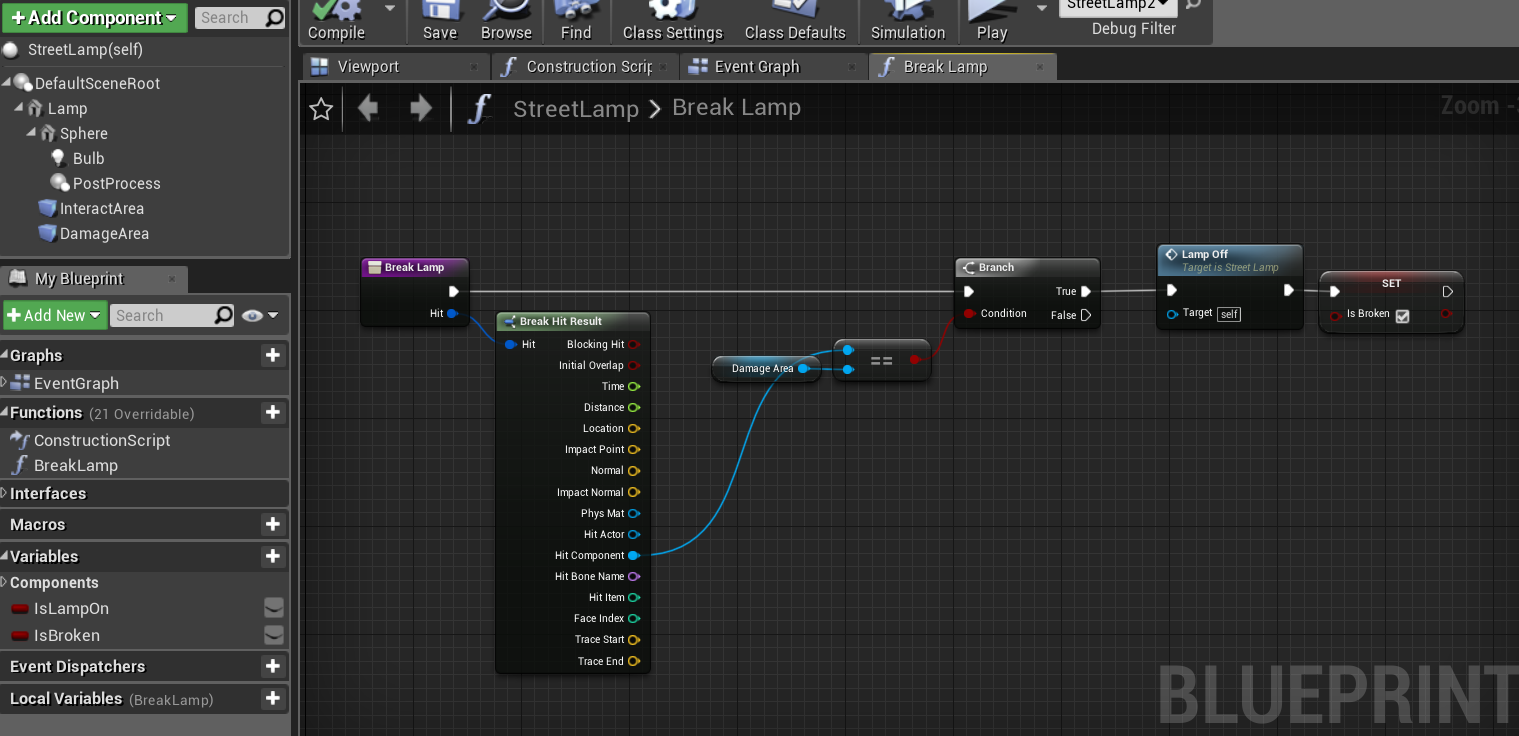 young holly
@maiden wadi I deleted the Scene and made BoxCollision as root, but still the hit event isnt firing
I am not seeing anything being print at all
while it should print hello on hitting surface
maiden wadi
@young holly Show me the collision channels for both that component, and whatever you're testing it against.
young holly
Google Drive
now it is working in between, but it suddenly stops working
@maiden wadi
and the bullets appear to be bouncing back when the hit occurs
maiden wadi
Not sure on the bouncing, but the times it doesn't work, looks more like the bullets are being spawned in a different direction.
young holly
but the bullet spawning code is in my main character BP, didn't change it at all
also, I thing the bullets appearing to spawn at difference location is part of the bouncing problem
@maiden wadi now I restarted UE and it isn't working at all
the begin overlap isn't triggering either. I set the channel to overlap, but nothing
 oblique gyro
anyone know how i can move my tank when physics and gravity are enabled? i can use A and D for turning but W and S dont work
 marble tusk
@snow vortex right click the pin and there's an option to split it
 snow vortex
tysm
marble tusk
you can also do the same to recombine them if needed
 unique finch
hey guys
is it a bad idea to put code in level blueprint
somebody told me not to use it
i put my inputs and what not there
tight schooner
It's bad cuz you can't take that BP to other levels, so the level BP is meant to be for things that are completely unique to that level
If you're 200% sure your game will only ever have 1 level then I guess you can get away with it but it's considered bad practice
maiden wadi
Generally speaking. Inputs designed to control a character should go in Character. Inputs to interact with specific objects should go in them. Inputs that involve the player but not specific objects or the character, like maybe opening up a map belong in the player controller.
unique finch
so
is there anyway for my to move my code
it has functions there
and it has many other things over there
aalso
i need a first person controller
im going to have recode that for another level
maiden wadi
Happens. All part of the learning curve.
 onyx swan
I'm trying to create a general dialog confirmation box, and struggling to set/pass a callback for the confirm button
I saw somewhere callbacks/delegates as params isnt blueprint supported, is that true?
unique finch
guys guys guys
@thin rapids there's a problem, im referencing my camera in the level and it cant do that in the player controller bp
guys pplease help
@thin rapids
@tight schooner help man
HELPP
wind kernel
Can anyone explain what the Normalize (vector node does) . ? in short
 sick galleon
it sets the vector length to 1
for instance x4 y4 z0 becomes x0.7 y0.7 z0
basically gives you a direction that you can then multiply by a distance
or use in some vector function that require normalize stuff
*fixed my idiocy
@wind kernel got it ?
wind kernel
thanks ❤️
 fallen glade
Behold! Character order that can pull, push, add and remove characters dynamically. Thank you for the help in the past few months!
 hazy igloo
@fallen glade A piece of a strategy game? I remember Fallen Enchantress (www.elementalcom.com -> first game with DevJournal? ) with this kind of mechanic.
unique finch
can anyone help me with making a fnaf fan game?
 latent arch
Hey all i got a pretty crazy math idea (well crazy for me!) ill use paint to help me! - I have a ray that is ticking its start and end points for its duration. What id like to do is spawn a "component" at the distance that the player is located along the beam and keep it located there each tick until the beam stops. Anyone got any ideas? Hope the paint helps! 😄
want to use this for wafting a laser sound around the screen 🙂
im thinking if i get the distance between the player and the beam start point i can then add that distance to the beam startpoint along the beam?
sick galleon
@latent arch im not sure I understand. Do you just want the beam to lock on the player ?
latent arch
no sorry, im not very good at explaining myself 😄
what i want to do is spawn and attatch a sound emitter to the beam at the location and keep it there
 burnt berry
@latent arch will the component spawn in front of the player, or like in a circle?
sick galleon
you want the beam to start firing at the player, and register "the player is going that way" and follow that supposed player path, even if the player changes direction ?
latent arch
i want it to spawn on the beam if possible
hmm i might have to go back to paint hehe
burnt berry
sick galleon
@latent arch im not sure if it helps, but you can use the block "Closest point on line" where you can get your beam line, and your player position, and that gives you a point on the beam where the player is closest
latent arch
yes you got it! 🙂
burnt berry
which one of these is it? also, does the player face up?
latent arch
@burnt berry
latent arch
black but stay at redslength along black
burnt berry
how do you know the black line, is it the direction the player is facing?
or is it the line that is diagonal to the line from laser to player?
black but stay at redslength along black
@latent arch I don't understand what that means 😄
latent arch
hope this helps
ill explain
so the three lines are the laser beam at different point is time
the player is moving around
i want the sound emitter to stay attatched to the beam but move along it with the player
that make more sense? 😄
latent arch
basically its so that as a beam moves towards a player or a player moves towards a beam there will always be a sound emitter there waiting to be heard
sick galleon
its not about the beam movement at all right ?
you just want the closest point on that line ?
latent arch
well it is sortof
cause i want the emitter to be "glued to the beam" but only at the point the player is along it? from the source
that make sense? XD
sick galleon
yeah then its as I said, closest point on line
latent arch
yeah
sick galleon
latent arch
im hoping that this will mean that the sound will waft around the screen if a laser is flying around you
does that makes sense?
oh wow thats cool
so if i put beam start and end points into that and the palater location, that should do it?
burnt berry
@sick galleon why does the find closest point on line has a Point input 😄
latent arch
point is players location
burnt berry
ooh to the given point, okay
latent arch
oh wow yeah that is really cool! 🙂
thanks lot
its almost like spawning a sound along a spline but i wanted to be a bit more specific this time 🙂
thanks a lot for the help i will try that node! 🙂
sick galleon
yw
burnt berry
Anyone wanna help me out at #gameplay-ai ? 😄
latent arch
trying it out like this 🙂
hmm doesnt t
seem quite right yet
perhaps im not getting the line direction riht
sick galleon
end location is not a direction
sick galleon
end - start = direction
latent arch
ahhh ok
sick galleon
fixed
latent arch
sick galleon
👍
latent arch
i will send a vedeo of the results with the sound effect later on 😄
 viscid barn
Hey all, I created a pickup that changes the size of the player (ball). My intent is to increase the size each time the pickup is entered, though this only works for the first pickup. The second pickup makes the player (ball) shrink. Then all following pickups do no affect the size. Any suggestions?
sick galleon
@viscid barn what is "new size" ?
viscid barn
Its the vector positions of 1, 1 ,1 promoted to a variable
sick galleon
is "total size" a local variable ?
viscid barn
it is
sick galleon
it shouldnt
viscid barn
gotcha
sick galleon
local variables start with their default value when the function is called
-> not saved
viscid barn
Understood. Its public now, So I should call total size again in another location to set a "new total size"?
sick galleon
nah you can access the public/class-global variable from a function
viscid barn
Gotcha. I guess I'm stuck trying to figure out how to make sure this function is called each time the pickup is entered.
As of right now, I can grow once, then second pickup shrinks by .1, then all follow on pickups do nothing.
I'm thinking maybe an ExitPickup function that sets the new size? Not sure
 neat stream
Hello guys, I'm working with a nice river Spline. I do river path with landscape tool then I put the river spline on top.
My problem is the following, I would love to prevent my character to go into the water.
I tried to detect the water spline but not luck cant get it.
I did succeed in detecting it with a custom physical material on the river bed which is not optimal.
What would you do?
sick galleon
@neat stream is the river doesnt move around, i would manually add invisible walls. If you really need to move it around a lot AND you need the collision to be here during test, you could maybe spawn vertical sphere/capsule collisions along the spline ?
(not boxes as the edges would be a problem)
neat stream
@sick galleon yes that what I was maybe going to do.. I don't like when I can't get it smart
(invisible fences) sounds dumb
sick galleon
@neat stream well you could also make a procedural mesh, but that seems a little overkill
for something that - i suppose - will be static in the end
tight schooner
Spline meshes with complex collision can also work as collision objects. I do that for spline roads in my game.
I have invisible collision spline meshes
neat stream
@tight schooner don't know why I can't get it to work ..
 gritty elm
how to find postion of car? if my car is next to other car?
tight schooner
@gritty elm if you have a spline that runs along the race course, there should be a BP node called "get nearest time/distance along spline" or something like that. And you can determine which car has progressed further along the race. Just an idea off the top of my head.
tight venture
@maiden wadi Concerning what you said:
https://discordapp.com/channels/187217643009212416/221798862938046464/744123182268547172
I am having a little trouble. Are you saying that I need to make a custom widget for buttons that need to do this? Kind of like "extending or subclassing class Button"?
Cuz I could do everything that you showed in your example except when it comes to this part, it won't let me connect the Button to the Target pin of the BindEventToButtonClicked node
cuz it seems to want a reference to the class of widget I'm making, instead of a Button reference
ButtonClicked is just an EventDelegate set up in my widget with a single Button (pass-by-ref) input. The fact that I have the EventDelegate set up in my widget is why I think it wants a ref of that class type, and why I was asking if I need to set this EventDelegate up on a custom button instead.
And then I have these set up for each of those buttons:
Just FYI, if I try to connect the Button to the Target pin it says: "Button Object Reference is not compatible with WBP Expanding Grid Object Reference" WBP_ExpandingGrid is the name of the widget I'm making.
maiden wadi
@tight venture What you have there should work fine. But it wouldn't be any different than calling the event directly from OnClicked. The bindings in this case are usually used from other classes of Userwidgets to communicate since Widgets don't really handle inheritance very well.
tight venture
Oh, so Target doesn't need anything hooked up to it?
maiden wadi
Not if it's in the same blueprint. Target is the instance of the widget you want to call that on.
In this case, you're Binding an event to an EventDispatcher in target instance, and Calling an EventDispatcher in Target Instance. Since both are in the same instance, you can just use Self.
tight venture
But it wouldn't be any different than calling the event directly from OnClicked.
Yeah, that was what I was trying to do at first, but I didn't seem to be able to get a reference to the button that was clicked
gritty elm
how to get current spline point index
tight venture
anyway, thx again @maiden wadi
maiden wadi
@tight venture But yeah. What the other example was is usually for special instances like inventories and such, people will create a sepearate UserWidget that is just a button, but also has a few variables like an Index. Then they'll bind that button's click to call a dispatch in the Userwidget where the Grid exists and pass along that index integer. They'll set that index when adding those buttons to the grid. That way each button doesn't have to carry the code or references but just the one widget with the grid, or even higher.
tight venture
that might be cleaner
If I made a custom widget button, would I want to wrap it in any kind of panel or just the raw button?
 last radish
Hello, excuse my bad English, does anyone know any tutorial on flying ai that dodges objects (behavior tree) or to add to a behavior tree? (Blueprint) Thank you.
maiden wadi
I usually wrap it in a panel, but then I usually just use Images instead of buttons. Images seem to handle the click functionality of drag and drop stuff better. Had a few glitchy feelings with actual buttons.
maiden wadi
Canvas usually. I don't remember why I did it at first. There was something about it not being able to be resized for some reason when put in another widget? Don't remember, just became habit.
tight venture
okay, awesome. thanks again dude
maiden wadi
@gritty elm If that's about the Race placement thing. You'll want to get all Spline points, put them in a Vector Array, compare the array for the closest point you need, and use that index for the PointIndex in that node you just showed.
sick galleon
Ive got a collision box that refuses to show in-editor and I dont know why.
- Its part of a blueprint
- the rest of the blueprint works as expected
- the box is set to show in game, has a line width, no 0 values in scale or extents
- the box has a preset that does block visibility and camera (i assume its required to be visible ?)
what did I miss ?
- if I had other objects in my blueprints (as a cube mesh) it doesnt appear either in editor (but is listed as a component in the details of the actor)
 stoic narwhal
Just want to double check: does the "insert" array node squeeze the new element in and then push the other elements up an index?
sick galleon
ok - apparently my box collision changes its size to be the same size as the box mesh for some reason
@stoic narwhal yes
tight venture
I would have assumed it appended the new value at the end. But I may be wrong
sick galleon
that would be "add"
tight venture
ah
stoic narwhal
Cheers
I figured there was SetArrayElement, was making sure this wasnt doing the same process 😛
tight venture
oh yeah, duh. There's an index input
sick galleon
Anyone knows why the goddam "Local Variable" tab keeps getting minimized ?
 royal rain
hey havent touched unreal in a long time but got a better understand on coding and design, wanted to do a prototype, i want to see what i can do by myself and then see here
maiden wadi
@sick galleon It's just shy.
sick galleon
nah im pretty sure it has malicious intent
 whole rose
if (user == yatta) {hide me}
gritty elm
how to sort this array, for example i want to sort these elements from minimum to max
 pure blade
sick galleon
pure blade
sick galleon
@gritty elm look for "low entry" plugin for UE, it has array sort functions
viscid barn
@sick galleon did you ever spot a solution for my prior pickup issue? Haven't been able to solve it yet, unfortunately
sick galleon
@viscid barn didnt you just need to trigger it when entering a box ?
viscid barn
Nah that wasn't the issue
The problem that remains is that the first pickup works as intended, though the second pickup entered will shrink the player by .1, followed by all additional pickups not functioning at all
sick galleon
the script you showed is the pickup BP or the player BP ?
viscid barn
Pickup BP
 ripe drift
Hi All, after executing a simple LevelSequence on custom event fired from EventBeginPlay - at the end of the sequence how do I get back to the player controller camera? as it stays at the end of its sequence?
Any help appreciated!
sick galleon
@viscid barn then the "size" variable you're changing is probably a variable belonging to that bp, not to the player
so each pickup increments its own size variable* from 1 to 1.1 or whatever
and that value isnt shared between pickups
viscid barn
Understood
sick galleon
you need to put the variable in the player blueprint (or some other objects made to store info) and access it from there
viscid barn
Would a cast act as the same principle?
viscid barn
gotcha. Thank you
sick galleon
for instance if you have only one player, you can do a "Get Actor Of Class" (no plural) to find it
and access its properties
(I prefer to get that information in a begin play and store it in a local variable as im not sure how much "Get Actor Of Class" costs performance-wise)
elder elm
Anyone know how to rotate an actor based on another actor's rotation?
Trying to make a vehicle but the rotation either doesn't change when it rotates
Or
This happens :
https://gyazo.com/99b8d3c5085bfd9f37372085f448d185


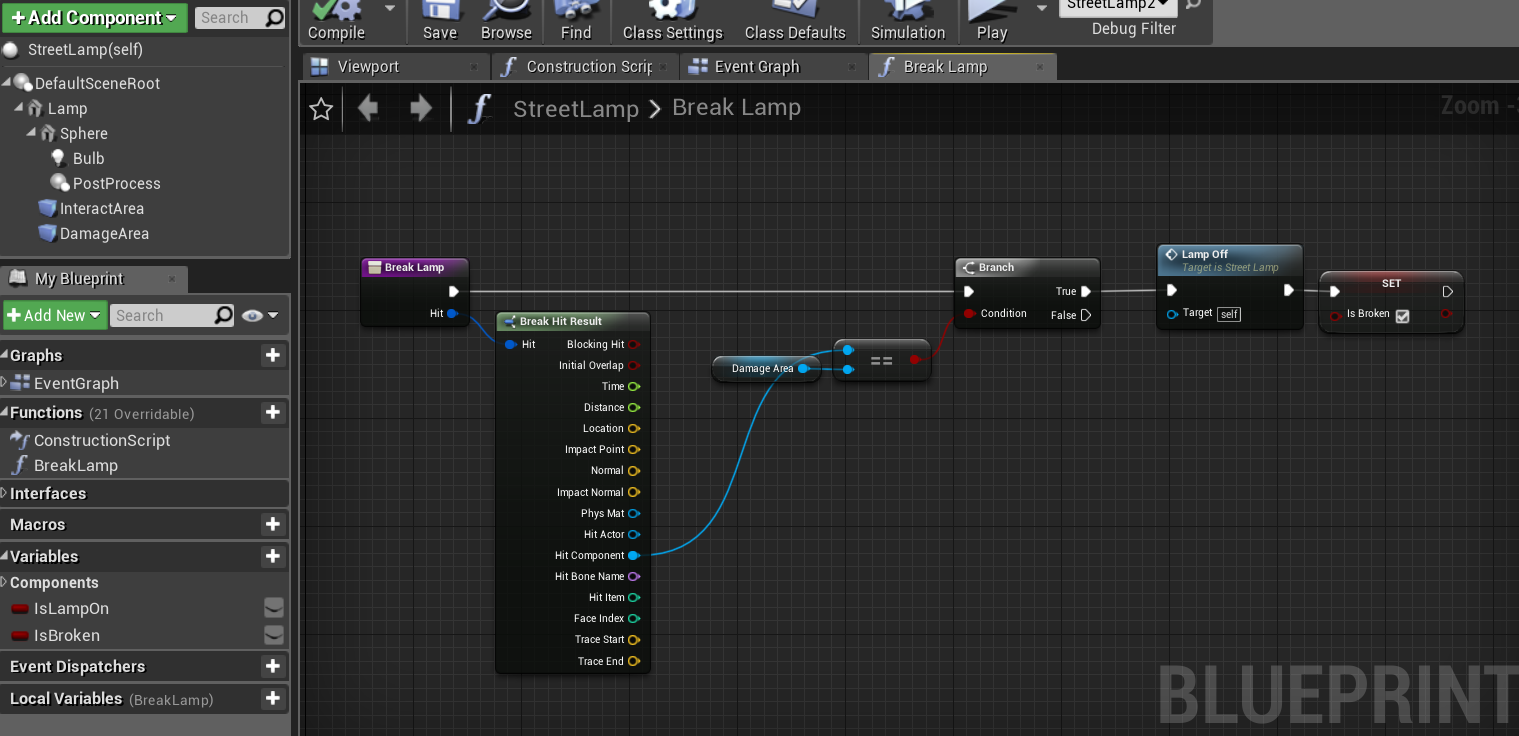 viscid barn
Thank you Yatta. I'll keep dabbling with it. I appreciate it
 muted whale
hey yall, um, im makin a 2d sidescroller called Time Whiz, and for some reason my custom sprites for spikes, land, etc, don't work. sure, they drag and drop right in, but when I go to step on them, i pass right through! Anything yall can tell me bout this will be appreciated.
sick galleon
so basically : either at begin play or event hit on your pickup :
Event -> get player class of object -> cast to player possible here -> cast successful -> get size -> ...
the simpler would be to have a function on the player : "UpSize"
Event -> get player class of object -> cast to player possible here -> UpSize
viscid barn
for sure. Thank you again
sick galleon
@elder elm is your actor a child of the vehicle ?
elder elm
No
However I can get all overlapping actors
Which is why it rotates like there's a mad party
sick galleon
I think you should set it as a child, so its position / movement is relative to it
not 100% sure tough as UE child actors dont work 100% the same as Unity's ones
elder elm
Might break it in the first place seeing the controlled character is already a child (bp class)
ALS needs everything set up in its own way to work properly
Movement is relative already due to it being a moving platform
However rotation has been giving me trouble
sick galleon
if you remove your custom rotation code, what happens ? Can the character move normally ? he just doesnt rotate when the host does ?
 humble belfry
Hello
 quasi frost
So I am trying to reduce the amount of an item by 1 when I use it. Can someone explain why this function doesn't work? The item is used but it uses all of that item instead of 1.
elder elm
@sick galleon when I remove the rotation code rotation is normal but isn't kept relative.
If I face 0° and the vehicle turns I will continue to face 0°
sick galleon

We begin our look at splines and their many uses. This episode we take a look at how we can use them to create moving platforms and elevators.
Support me on my Patreon and see episodes 2 weeks early: https://www.patreon.com/ryanlaley
this dude did it (check the link timing)
not sure how but I suppose theres a built in option that allows that
elder elm
Checking
I found why
Instead of setting world rotation he sets relative rotation
Which in turn does the same for all actors on it/overlapping it
Thanks for the help.
sick galleon
yw
 mortal wharf
How would i subtract a numeric value every x seconds? With an event timer?
sick galleon
I have a sound problem
whatever I do theres a sound emitter that starts blaring noise every twenty minutes or so
the problem is I cant reach it as apparently Im not the owner of it
sometimes it stops and I think the bug is gone, but it always comes back
I think its because theres a window that I cant close
its the neighbors baby room window :|
elfin hazel
Submit a bug report to your local council.
sick galleon
Nah I know the admins there they cant tell a bug from a feature
I think I can only wait for an update where they fix that sound bug ... but that could take years :|
muted whale
hey yall, um, im makin a 2d sidescroller called Time Whiz, and for some reason my custom sprites for spikes, land, etc, don't work. sure, they drag and drop right in, but when I go to step on them, i pass right through! Anything yall can tell me bout this will be appreciated.
elder elm
@sick galleon is it a pc process window? If so you can force it offline with taskmgr
And uninstall from cmd by deleting the dir it's in
sick galleon
Are you suggesting I should destroy a whole house ?
elder elm
Yes. If you need a demolitions expert just give me a call
Tbf you made it sound like a ue4 problem
You called it a sound emitter lmao
 cosmic moat
if im looking to make a racetrack that is super easy to put into a level and change turns based on how it feels, how should I go about that? I'd like to have some kind of curve that I could move around into the shape of the track, and then generate a mesh on top of that, but should I use spline components, or what? Any ideas or starting points are appreciated.
whole rose
spline meshes.
sick galleon
Spline meshes are cool and seem to be commonly used, I think you should easily find good tutorials on that
cosmic moat
gotcha, thanks!
the docs say that spline meshes can only deform along two points. Is this outdated?
elder elm
Splines are cool. They also have weird things happen when you move them in a certain way
@cosmic moat guess it means in between 2 spline points
cosmic moat
"These deform a single Static Mesh along a two point spline. You cannot add more Spline Points to a Blueprint Spline Mesh Component, but the two points are completely controllable through Blueprints." Maybe I could stack them in a row? I'll let you all know how it turns out.
elder elm
That is outdated
cosmic moat
Ok
cosmic moat
yeah ill do some testing
 dull heath
Stuck!
Using ue4 4.25.1, steam engine 1.1
(Error Message)
TravelFailure: PendingNetGameCreateFailure, Reason for Failure: ‘Error creating network driver.’. Shutting down PIE.
Copied and pasted your supplied code into defaultengine.
Help!!
(When i use PIE offline, it works, only on the server am I getting issues)
 umbral zealot
I am trying to get custom movement modes set up with the character movement component but I am having a bit of trouble setting up UpdateCustomMovement. I understand I have to make the movement happen from scratch now, so I tried using functions like AddImpulse. The character doesn't move unless I set the actor location directly, but that's not what I want. I found a function called CalcVelocity but I am not really sure how to use it properly and I couldn't find any documentation on it. Does anyone have any experience setting up custom movement modes within blueprint?
elder elm
GetActorForwardVector*(insert x vel, insert y vel, insert z vel)
Plug that into SetVelocity
(@umbral zealot)
umbral zealot
That makes sense... now where does Calc Velocity come into play?
I want the movement to feel smooth like how walking would with friction and braking deceleration. Should I call it directly after my SetVelocity call every frame?
 chrome quiver
This gets the closest resource and moves the player to it, right now the problem I'm having is that it moves the player to a specific point of the closest resource (like the north side of it for instance) instead of the closest part of the resource from the player. Is there an easy fix for this?
umbral zealot
It might be moving the player to the origin of the actor instead of the closest part of the actor.
chrome quiver
That's what I'm assuming, a bit strange that it goes to one side though when the orgin is in the center
cosmic moat
@elder elm I see what you mean about splines moving in weird ways... supposed to be a road lol
whole rose
your mesh is the problem
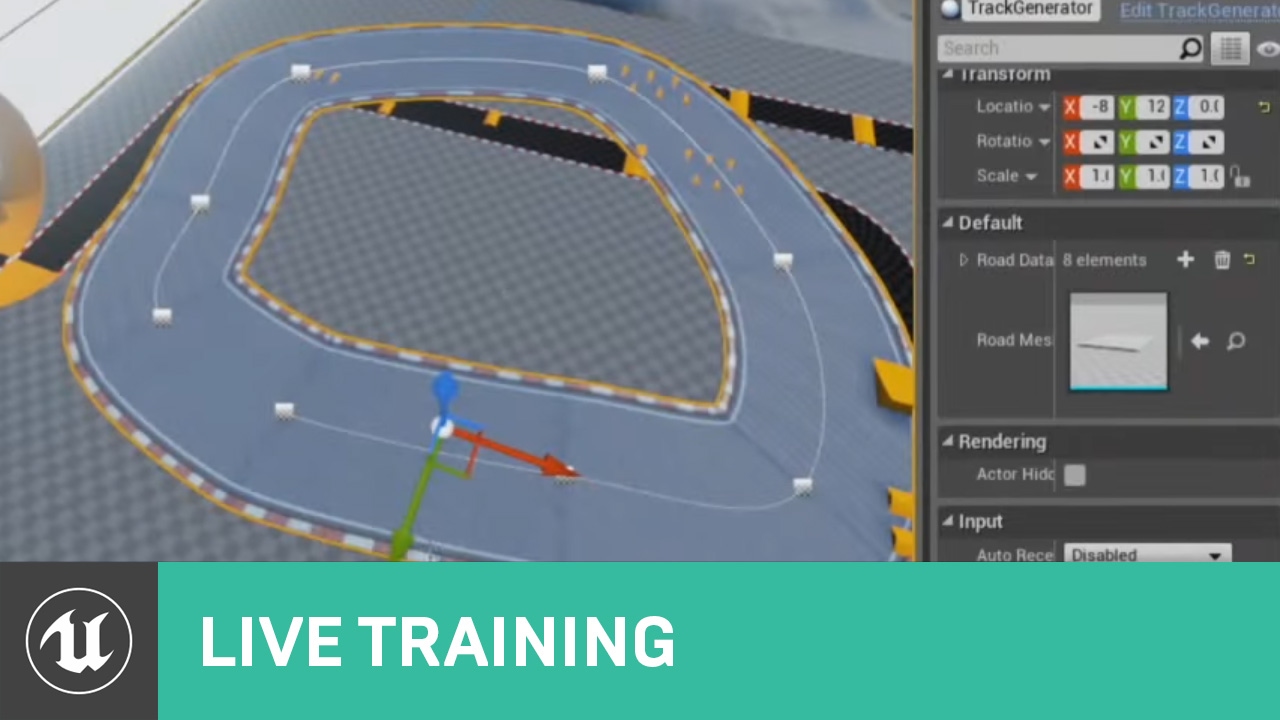
In this Livestream Tutorial we'll show how to use both Spline and Spline Mesh Components to construct an easy-to-use racetrack generator tool in UE4. Viewers will learn about custom structs, functions with local variables, using for loops, and much more!
[00:00:45] - Google D...
cosmic moat
ill check it out, thanks @whole rose
umbral zealot
@elder elm The character still doesn't move. Is there some setup steps that I'm missing? This is all that I am calling on the custom movement tick.
As soon as I change my movement mode to a custom one, the character stops immediately. I suspect that I am using the CalcVelocity function wrong (I tried using it after setting the velocity in the image).
cosmic moat
@whole rose Fixed. Origin point had to be at the beginning and not the middle. Thanks!
 rustic stump
What are some good tutorials regarding ur4 blueprints that dont just show you what there doing but also explain why, Like why there using a intenger rather then a integer 64 for example, So when Im left on my own I might have a chance to problem solve myself, Hopefully this makes sense! Please @me if you have any suggestions : )
cosmic moat
@umbral zealot I think that he mean to use SetPhysicsLinearVelocity instead. Setting velocity as a variable does nothing except store the info for later.
sick galleon
@rustic stump its hard to extensively explain everything as thats basically lots of knowledge and experience. Well at least for the ints, int 64 are for VERY large numbers (and takes more memory), and rarely useful for common systems
not sure if base int is 16 or 32, but int 64 goes from -9,223,372,036,854,775,808 to +9,223,372,036,854,775,807
and you rarely need 9,223,372,036,854,775,807 of something
cosmic moat
@rustic stump I agree with @sick galleon . Lots of it comes down to core computer science principles that you cant get around. Blueprints seem like a nice way to get into game dev without coding, and while they work well, you still need to know some computer science concepts. As for starting points, this series is a good place to start https://www.youtube.com/watch?v=EFXMW_UEDco.

This video gives us an overview of the Introduction to Blueprints video series as well as jumps into a high-level overview of the concepts behind Unreal Engine 4’s Blueprint Visual Scripting system.
by ue4 themselves
rustic stump
Awesome, Thank you yall!
cosmic moat
@rustic stump Ue4 also uses very platform specific stuff, even in their c++ scripting, so I would recommend learning some basic fundamentals in a non-ue4 environment if you have absolutely no experience. Just my take though.
sick galleon
yeah, basically UE4 has its own way of doing things that can be a little confusing at start, even with experience. When it comes to simplicity / easiness to understand, Unity is better
(but I got mad at unity when it comes to render pipelines and multiplayer)
umbral zealot
@cosmic moat I tried making it simpler and just added the call to the event tick. SetPhysicsLinearVelocity doesn't move the character with Walking movement mode or a custom movement mode. Setting velocity directly moves the character in Walking movement mode but not my custom movement mode.
cosmic moat
@sick galleon lol Unet is a joke
@umbral zealot Sorry I came in kinda in the middle of your discussion. What exactly are you trying to accomplish with your custom movement? Like what made you need to not use the default. Because certain things would be better suited for physics, while others not.
umbral zealot
I'm working on a parkour movement component and I wanted to use custom movement modes for things like wall running, slide, etc. I could just use my own enum within the component but I just don't like the idea of having the movement component do it's own thing and stay on the falling state or whatever.
It seemed easy enough to set up but there doesn't seem to be a lot of documentation on the movement portion and none of the traditional functions I use like AddForce or Impulse work.
 zealous moth
does anyone have a quick construction script I could use to generate static meshes in a 6x6x6 grid?
cosmic moat
@umbral zealot I havent worked with custom movement before but say what I would try. I would probably just use a custom state for wall running and disable gravity and directional input so that you stay on the wall, and then reactivate them when the player presses space? Also keep in mind the mass of your character, because sometimes the physics node need to have HUGE force values to compensate for the mass. I'm working on a vehicle system right now, and my acceleration force is about 100,000 for a car thats only 100kg.
umbral zealot
I suppose the trouble I am having is getting anything to work when using custom movement modes. I have all of the parkour stuff working already when using the normal movement modes it's just that when I switch to custom modes (to make the code cleaner) nothing works.
Thanks for your help anyways, I just wish there was more documentation on this.
cosmic moat
No problem. Just debug as much as you can with print statements, make sure that you're still getting input, and try and pinpoint exactly where the issue lies. It's probably not anything with your code, but just something that UE4 expects that we're missing.
 quaint palm
Hi there!
I'm working on this personal project where I want to reproduce some basic Jet-Flight mechanics.
I managed to make things work following tutorials out there, but there is one thing I'm having trouble with!
I want to create this Nitro/Boost effect (momentaneous acceleration increase) for about 2 seconds, and then it goes back to the regular acceleration of the plane engine.
umbral zealot
Look into using Timelines
umbral zealot
You can create a Timeline that lasts 2 seconds and sets your speed until it finishes.
@quaint palm
 molten cargo
blueprint is bae
quaint palm
Hmmm I've used in the past. Indeed, it might help me
But
Mind giving me a quick help? I've set this so, when I activate "Nitro", the speed is set using "Nitro Thrust". But, even If I don't set Nitro, the system insists on using "Nitro Thrust" instead of "Max Thrust"
This is how I'm setting Nitro
umbral zealot
Your branches are wrong, this is false on frame one
quaint palm
I thought this would work D:
umbral zealot
True rather
quaint palm
Hmm
cosmic moat
@quaint palm wow thats a lot of bool logic, Just set in on press release? Not sure why it is on an axis
umbral zealot
So you are immediately setting nitro to true
Yeah I would definitely simplify that. Do you need it on an axis?
Axis is for analogue input
Like triggers or sticks
cosmic moat
@quaint palm check your input in Project Settings > Input. I'd recommend an action mapping for any key presses
this will give you a press/release execution node on your input axis
quaint palm
Hmm I'm not sure if I do need it, to be honest. Maybe when I set it to sticks/analogues, but right now I'm not playing with this.
Reason behind it is because every tutorial about Jet Mechanics used Axis even for stuff like this haha
cosmic moat
I can definitly see axis for turning, or even thrust input for forward and backward. But assuming that your boost is on shift or something like that, an action mapping will be much easier
quaint palm
About the Bool Logic you pointed, Davie...
The Input Nitro isn't being played when I hit Play. How come the system is setting Nitro immediately?
This is confusing D:
cosmic moat
Ue4 calls the nitro axis function every frame. Another reason to use an action mapping
umbral zealot
Your bool logic is wrong there, it is immediately true, so it sets nitro to true.
whole rose
the not is in the wrong place
umbral zealot
First thing I would do is make it an action key
whole rose
if NOT nearly zero AND nitro is pressed, THEN do nitro
but it would still be better to not use an axis
axis is pointless for this
quaint palm
I'll change Axis in a moment then
whole rose
if you just use an action binding
whole rose
using the axis tehre you really need two nots
better would be an ACTION binding, and one simple branch
on pressed -> branch (if not nitro) -> do
umbral zealot
No problem!
quaint palm
though I'm sure I'll stop by many times more hahaha
quaint palm
How would you guys go about making some sort of gauge/meter for the Nitro? Right now I can spam it if I maintain Space Bar held down (this calls the Nitro Axis event).
Thought of having a Float and decrease it over time while the player holds down Space Bar...and have it to be increased when Space bar is released.
Is there any "best practice" for this?
trim matrix
Anyone else think that interfaces seem almost pointless? For me it's like event dispatchers and casting have unique things about them that justify their use. Interfaces though....... When I think of a use for an interface I realize that casting, inheritance, or event dispatchers handle things just fine. Lol
faint pasture
For a tile based map generator, would you guys suggest making Features/Rooms as Actors that place TileActors, or features as just raw data used to place the TileActors?
@trim matrix Interfaces are great and I use them everywhere. Interact for example.
faint pasture
Anyone around here done a tile based map? Got a few questions for you if so.
scenic scroll
So I have this script that makes it so when one player goes to a certain trigger it creates a space box around them, making it look like they went to space
but i have the problem that everyone else sees it too, even when on the ground
how could i make it so only players in space see the spacebox?
quaint palm
I'm a beginner, but maybe you could try to make the box material be seen only by the person that is inside..?
I don't even know if this is possible xD
quaint palm
There is something in the materials where you can check/uncheck and it disables the visibility of that material if it's seen from "inside". Maybe the opposite is also possible
Maybe you can invert the normals and uncheck 2 sided visibility so only who is inside will be able to see it
quaint palm
Oh, the planet is inside the sphere?
scenic scroll
yep
this all appears when you get to the apper half of the sphere
the cube is the trigger box that makes it appear
tight schooner
If that's a multiplayer game, don't you have explicit control over what functions are called and what data is passed to each client?
It's been a long time since I've messed with client-server #multiplayer stuff but...
Another way to approach it is to set "only owner see" and assign the space box's owner to a pawn https://docs.unrealengine.com/en-US/BlueprintAPI/Rendering/SetOnlyOwnerSee/index.html @scenic scroll
Set Only Owner See
scenic scroll
yeah i found out about "set only owner see" by myself like 5 minutes ago but thanks a ton :D
it might not work tho im just about to test it
trim matrix
Let's say I want to pick a set random number of members of a grid, but I want those selections to have a min / max distance between each other, and a random number is outside that range, it will generate a new number and try again. I also imagine this will need some guards against potential infinite loops?
faint pasture
Is there any danger to using float vectors as keys in a coordinate->tiledata hashmap? I have been using the int vector but it's a royal PITA to have to write all my own vector ops with it.
I suppose I could round every time I use it as a key if I'm paranoid
trim matrix
oh yea lol break would be useful. I think I see how I can do this on the break TY!
Still, I'm a bit new and unsure how to test a distance for each loop generation?
lemma play with this hmm. Will be back in a bit with an outline
scenic scroll
@tight schooner any idea of how i could get the playerIDs of the players touching the trigger so i can make them the target of the set owner?
 hallow helm
@scenic scroll what are you trying to do
scenic scroll
basically i have a skysphere that only appears when you fly high up in a game
but the game's multiplayer so when a player flies high up players on the ground also see the skysphere appear
hallow helm
and you want the player ids of the player that are high up in the trigger?
quaint palm
Is there a way to call an Axis input without actually sending this input?
Like...forcing it to go to a value
hallow helm
@quaint palm Not that I know of... Are you trying to set the player to a specific angle?
quaint palm
No, I'm doing a silly thing and I bet there is a simpler way to do that haha
trim matrix
Ok yea I'm pretty clueless on how to set this up.
hallow helm
what are you trying to do Siegr
trim matrix
Basically I have a matrix of all my grid members and want to pick 5 random squares, then make sure what I picked is not too close or far away, and then rerun the random select until I get that
scenic scroll
@hallow helm that or any other way to make it so only players that touch the skybox triggers see the skybox
this is what i have rn
trim matrix
But I'm really not clear on how to use the branch to test for distance
scenic scroll
rn the skybox doesnt appear at all
jovial bobcat
@young holly R u sure you set the box collison as root
 primal moss


Heyo! I'm trying to get the component from the characterblueprint class and get the anim instance, but I believe I'm doing it incorrectly
(the animation doesn't play when i fire, though the SFX is working)
Could someone give me a pointer (ha ha) on where I'm doing it wrong? I feel like it's to do with how I';m getting the arms mesh though
quaint palm
I'm just trying to set a way so my Plane thrusts in a certain speed if Shift is held (normal accel) and, if I hold down Space Bar, I want it to go faster (some kind of boost). I achieved that, but I noticed that, if I hold down Space Bar and only Space Bar (not shift + space bar) it thrusts in a slower rate than if I hold down Shift AND Space Bar.
hallow helm
@scenic scroll Im not sure man... Sorry!
hallow helm
@primal moss you hsould all that from the mesh
quaint palm
Ok, I think I realize it now hahahaha
jovial bobcat
Umm I have a Question on weather i should be doing multiplayer on blueprint, cause all the tuorials i have found so far is for blueprint but many people on forums say that you should be using C++ to do multiplayers, is there anything thats really bad about doing multiplayer on BP
faint pasture
@quaint palm What do you want to happen if you hold only Spacebar?
@jovial bobcat If you're asking that question, start with BP.
primal moss
The tutorial that I'm following wants me to "Get the arms component from the playercharacterblueprint cast and then get the anim instance of the arms", in order to hook it up to the montage play node. I'm not quite sure how to get the arms component correctly, since right now it's being split weirdly like that