#blueprint
402296 messages · Page 512 of 403
 unique finch
 fallen wedge
oh?
unique finch
right here where it flip flops, it does the w function which looks to the front
it does this on the a key and the d key
fallen wedge
right
unique finch
so what should i do?
fallen wedge
ok so if W function works when we're looking one way, but it doesnt the other way
as in when we do A it works, or D it doesnt work ect.
unique finch
idk
fallen wedge
then the problem is most likely with the direction that isnt working
unique finch
im consfused man
unique finch
plsss
i need to
ok here
When i press a once
it does the a functon
which it cant do
because font is not true
then when i press it again
it does w
fallen wedge
i see
unique finch
which has no condition
w does not have any condition
so it will run anyays
i need a fix pls
unique finch
yeah with no condition with no branch
fallen wedge
ok
its somehting really simple im thinking
somewhere, the front boolean variable isnt assigned properly
allowing the function to execute
you've done the branch before the flip flop which is good
but it must mean that atleast one function isnt assignind the Front variable properly
fallen wedge
could try structures or enumerations
unique finch
how would i do that?
unique finch
uh o
fallen wedge
i dont really know if i can offer some more help
maybe someone else will be of more use
fallen wedge
im sure its possible
its just, the only thing i can advise is literally going through every relevant part of your code, double checking values
if that fails: use the debug tool, set breakpoints: get the values of variables at different parts in time
fallen wedge
😄 maybe try #ue4-general as well
or just wait until someone smarter than me comes along
but maybe the best advice is take a break?
it might just come to you randomly


 pure blade
my project just rolled back 200 + hours PLEASE HELP I BEG YOU
unique finch
wdym
 trim matrix
ty for help
unique finch
did you save current/ compile and save everything correctly?
unique finch
omg
pure blade
aaaaaaaaaaaaaaaaaaaaaaaaaaaaaaaaaaaaaa
trim matrix
@pure blade how did it "roll back"?
unique finch
yeah
trim matrix
@pure blade dont you have backups?
unique finch
@trim matrix can you help me with my code?
pure blade
git dosn't work or I would
trim matrix
@unique finch what's the problem?
unique finch
the problem is
ok so
when i press A
it looks to the left camera
"Set view target with blend"
and when i press D it does it to the right
but the thing is
you have to look to the front to look anywhere else
so like
if i press D
i cant press a to look to left
i have to press D again to look to the front
and the i can look to the left
its better if i just show you
Lvl blueprint thing
the thing is
W doesn't have a condition so
when i press d
and i press a twice
it looks to the front
and i don't want that
@trim matrix pls help
trim matrix
you could bind to key release to reset it
unique finch
but i don't want that
i want it so that it baically flip flops
just read the code
trim matrix
@unique finch are left and right the only states?
unique finch
uh yeah
actually there is one more but yes
i need it so that basically when i press d i shouldn't be able to press like a twice to look to the front. i want it so that you can only press d to look to the front
trim matrix
you said D should look at the right camera
unique finch
yes
trim matrix
you need some sort of state variable and branches
unique finch
but you can press a twice
yeah im trying that
because when you press a twice it does the "W" function
which looks to the front
trim matrix
Boolean, enum, string, int32, whichever suits you best (use an enum)
unique finch
which has no condition
trim matrix
then branch it if you pressed A once already for example
unique finch
i did that
but when "W" is executed it
does not have a branch
or any condition
but if i put a condition it won't fix it
see
if you press D it sets "Front" boolean to false
and so when W is executed it should execute w if front is false
trim matrix
you should rather use an enum
fallen wedge
wheheyy
trim matrix
it's easier to use than a bunch of booleans
trim matrix
well make an enum call it something like "Camera Look State" or whatever, give it the 3 members "Left, Front, Right", make a member on your bp, default it to whatever state is the initial one, then do a switch or branch with the enum on button press
a branch would be f.e. MyEnum == Left
unique finch
also how do you make an enum?
trim matrix
right click in asset browser, I think it is under blueprint
unique finch
enumeration?
unique finch
but how do you get the enum on the bp?
unique finch
hm so i have to reference it?
trim matrix
you need a public member of the datatype which is your enum on said lvl bp
well it doesnt have to be public
like those booleans you have there
unique finch
also @trim matrix why were you warning me of 256 things?
trim matrix
so you dont go ahead and try to make an enum with more entries than that
or run out of entries not knowing this
trim matrix
I see you have a movement system enum variable
you have to plug it in the switch to use it
and also set it to change it
now you can use it as a branch with more options than 2
unique finch
im still confused as fuck
@trim matrix i understand i have to change it, but the thing is i can do that in my functions right?
trim matrix
yep
unique finch
@trim matrix also i need to make it so that when i press A for an example
i have to press it again to look to the front
how the fuck do i do that?
trim matrix
so when you press A you want to look left when looking front and to look front when looking left?
or do you want it to simply go in steps from right to left?
so right, A, front, A, left
in any case you could easily do a switch on the state or a branch
though if you wanna sort of rotate in increments you might maybe want another approach, like incrementing the byte which is the enum or something like that
increasing it by 1
trim matrix
you should first use the switch
unique finch
wtf why?
trim matrix
the you wanna decide in which direction to rotate
because based on your current direction you want to change to another direction or not?
trim matrix
so if left then front and if front then left
unique finch
Ok let ME FUCKING EXPLAIN
WHEN YOU PRESS A, YOU LOOK TO THE LEFT. BUT I WANT IT SO THAT WHEN YOU PRESS A AGAIN IT LOOKS TO THE FRONT. WHEN YOU PRESS A YOU CANT LOOK TO RIGHT OR BACK BECAUSE YOU NEED TO LOOK THE FRONT FIRST
@trim matrix where should i put my switch on enum thingy?
trim matrix
in the A function
unique finch
uh ok
trim matrix
well
trim matrix
so you rather want that the transition finishes before it's possible to rotate again?
unique finch
dude i don't think you understand
like at all
it doesn't rotate the cameras
camera
it does "Set view target with blend"
trim matrix
ah yeah forgot that
unique finch
dude
i want it so that
when i press A
it does a flip flop
it does the a function
and then it does the W function
but i want it so that i can't press d or something like that it looks to the front
@trim matrix im doing something wrong
@trim matrix i put "switch on enum" on the A function and the D function
and it broke it even more
trim matrix
I'll write you a pm
unique finch
dm?
trim matrix
yes
unique finch
justhx
unique finch
wow he fixed my thng thanks mannn
 void oak
I have a weird issue where my already placed blueprints do not update collision but when i place a new one in my map it has collision. Ive checked the collision setting of the existing and they are the same compared to the new one placed. anyone have a fix for this?
 mild valve
Hello guys, maybe someone can give me a hint, I'm trying to setup a custom vehicle for a few days now, watching through tonn of tutorials and seeking answers on answersunreal, but can't get any info. My vehicle just won't move, wheels is moving, but vehicle is not, and wheels are just getting through the ground. As far as I understand mesh physics setup is correct, animation blueprint is the default one created exactly like in the vehicle example, blueprint for pawn is like in the vehicle example, with wheels setup etc. I just don't understand where I could be wrong
 obsidian pelican
 opal pendant
probably
@mild valve what type of object is the vehicle? and how are you spawning/placing it in the world?
mild valve
@opal pendant type of object? Kinda don't get it, you mean blueprint class? Placed in world manually with possesion of player
opal pendant
is it an actor, character, pawn, etc.
 sick galleon
did you change the collisions responses / objects / channels in the project settings ?
 foggy copper
hello there
how can i made dlc support to my game like this
i know how make pak files
but how make umg
and level get from dlc
?
 sage dune
I need to access game mode in UMG. I'm trying Get Game Mode in a "Run on Server" function in UMG, but it fails on clients only. Any idea why ?
 shrewd pivot
Is there a way to reparent a widget on runtime?
There is one through "AddChild" in blueprint but that calls the constructor of child, which resets it
 blazing obsidian
@sage dune because gamemode doesnt exist on clients
@shrewd pivot yep, remove it from parent and get a ref of the thing you want to add it to, its "add to panel" or something
sage dune
@blazing obsidian I understand that, that's why I'm fetching it in a function marked "Run on Server". That should work I'm pretty sure, I have done it before
blazing obsidian
are you doing the run on server in the umg bp?
sage dune
But probably never from UMG blueprint. Does that affect anything ?
blazing obsidian
that doesnt have a server instance so how can it run on server
sage dune
Ah, umg doesn't exist on server
blazing obsidian
yeah 😄
blazing obsidian
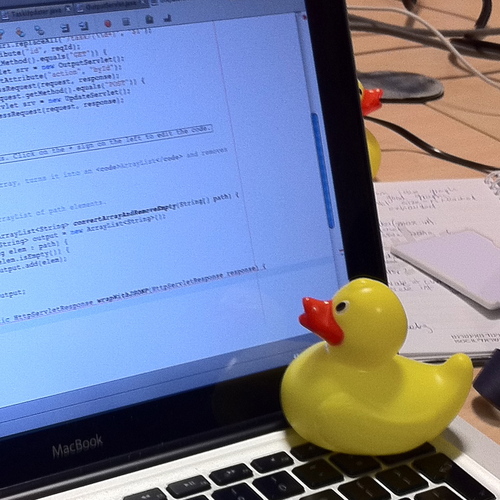
In software engineering, rubber duck debugging is a method of debugging code. The name is a reference to a story in the book The Pragmatic Programmer in which a programmer would carry around a rubber duck and debug their code by forcing themselves to explain it, line-by-line, ...
😂
no worries bud
 drowsy mauve
heya, is there a way to do a branch without an exec chain?
looks like a select node is what I need?
 heady terrace
Switch works. A switch is basically examining a variable, and creating a bunch of executable paths depending on what the value is
drowsy mauve
any reason not to use the select?
because this seems to do what I want
heady terrace
this isn't a branch, you're just setting a value based on a boolean.
drowsy mauve
I guess I worded it wrong.
heady terrace
This looks like a problem with your intended solution, not your actual problem. 🙂
Why don't we look at what the original problem was, first? Then we'll move towards a solution.
(Is this from Crocopede's wall hanging tutorials?)
 gritty elm
what mean by rotate vector?
drowsy mauve
the original implementation was from https://www.youtube.com/watch?v=1DBnU_8CNbE

This if hopefully the last time I talk about the wallslide and walljump. I have so many other mechanics and stuff I would love to talk about xD.
I said something a bit wrong at 2:57, just ignore that sentence with deleting the branch (I don't want to edit and reupload it xD)....
heady terrace
@gritty elm that's a rotator. Basically, an object that rotates a vector by Euler Angles.
drowsy mauve
I've got a character doing a wall slide like megamen. When wallsliding, I rotate the character mesh 180, but not the capsule, so that the forward vector is still hitting the wall. For the character shooting, I'm spawning the bullet based on the forward vector of the character. so when I'm wall sliding, I actually want to use the opposite of the forward vector
heady terrace
@gritty elm you give it input A, and then B will rotate it m-degrees on the X axis, n-degrees on the Y-axis, and o-degrees on the Z-axis
@drowsy mauve Aha. What you had in that first image is fine.
If I were writing it in code, I'd use something similar.
drowsy mauve
cool, good to know.
gritty elm
what mean by m,n,o, does it mean pitch yaw, or x,y,z location
drowsy mauve
I feel like i'm hacking things together most of the time, but it works so 🤷♂️
heady terrace
what mean by m,n,o, does it mean pitch yaw, or x,y,z location
@gritty elm sorry, I do mean pitch, yaw, and roll.
@drowsy mauve it's going to feel like you're hacking things together for a long while until you have an idea how everything should work cohesively.
That's perfectly okay.
But just be careful of that capsule collider. If you don't keep it aligned with your character, you may encounter unintended behavior.
 gray dune


can anyone pin point why the custom event binded to the dispatcher is firing off twice?
the mesh is also being moved 1200 up to z while it should only move up 600 units. Not sure for some reason the other bp is firing off twice
heady terrace
@gray dune It's possible somehow you bound two instances of the event onto the test dispatcher.
Sorry, I'm going to keep looking at it. Have you tried running this in Debug mode?
gray dune
debug mode? ^^ sorry im new. So I dont understand why its moving 1200 units as well instead like in bp (600)
somehow its triggering twice
but i cant pin point why that is
gritty elm
@gray dune print string, where you are calling dispatcher, if it print hello two times, try to use do-once node
gray dune
i double checked wether i have duplicate bps
heady terrace
Debug mode is a setting that will allow you to track how the blueprint is running as you trigger events.
gray dune
do once didnt work unfortunately
gritty elm
try to print string on event begin play, disconnect get actor of class for now
and post result here of print string
 gritty elm
gray dune
gritty elm
gray dune
putting do once here did the trick but i dont really get why its being triggered twice in first place
thanks @gritty elm posted above that do once worked but do you happen to know why its being executed twice when i overlap ?
gritty elm
check your collision setup, i posted alternative do-once optimal solution
shrewd pivot
@blazing obsidian hey, I am removing from parent, and then getting reference of widget where i want to add (its of type PanelWidget) and using its method "AddChild". This is rebuilding the child that i dont want.
gray dune
ill redo the set up
gray dune
okay so i added break point and in other component it says "collision cylinder"?
anyone know whats happening
heady terrace
Collision cylinder is likely a child of one of the objects in your map.
Or you possibly have another, second collision object in your ThirdPersonCharacter.
Check your 3rdPerChar BP, and in the Components section check if there is a collision cylinder.
gray dune
okay, i think i filtered the culprit
for some reason
when set actor location is fired as well
the overlap happens again?
why is that?
heady terrace
I'm not sure. (I haven't been working in Unreal that long tbh)
 dapper kiln
Does anyone know how third person games like Fortnite calculate their bullet line trace? I personally use two traces, one from the camera and then the second from the weapon's muzzle towards whatever what hit by the first trace. Problem is you can sometimes shoot sideways. There has to be another way to shoot towards where your camera is looking. I'm open for ideas. This question keeps me up at night hahahaha https://i.gyazo.com/6d11297027d5df711b37620efe6f372c.png

 proven mason
@maiden wadi previously you've demonstrated that you used a macro function to illustrate how to get the timings of an analog stick from neutral to full tilted.
If I were to get the timings of the reverse; from full tilt back to neutral would you recommend creating another macro function or add more logic to that macro function?
 scenic scroll
i need help. I have this blueprint but i keep getting this crash when i press f to make the planet and skybox fade out
 boreal pilot
 covert arrow
im dumb does anyone know how to check if a actor is colliding with a box
 full fjord
I'm trying to make a level in which a wave shows up periodically and the player has to hide from the wave or risk getting knocked back and possibly dying. I have the wave modeled as a 3D asset (for now). How would I go about doing this?
Essentially, I want the wave (the object) to:
- Go from Position 1 to Position 2
- Despawn at Position 2
- Wait like 10 seconds
- Respawn at Position 1
- Repeat
proven mason
In blueprints how do specify a time frame?
so say at the 20 second mark, do something
 late shuttle
If it's after an event, you can just use a delay [20 seconds] node.
proven mason
it's more for analog movement
late shuttle
If it's in gametime, you need to keep track of time elapsed since game start.
proven mason
so basically if I tilt my analog stick at max tilt I assign Get Realtime seconds to a local variable.
actually I think I may have an idea
I can compare Get Realtime in seconds to a variable
so like get realtime in seconds == some variable
as a boolean statement
 plush compass
is there any good tutorials on creating your own blueprint nodes to parent classes. Like say I want all childs of actor class to have an interact function that I can call instead of having to cast to a certain custom actor class.
idk if I should ask this in the c++ channel or here
 worthy frost
use an interface
 astral tendon
Is there a way to completely recompile a blueprint? I'm having strange issues where getting from one array is accessing values from another array.
 shut hinge
yep issues crop up every now and again with blueprints. I migrated my ship pawn from my other project and find the Input Action Toggle Camera View event in the ship's BP is not responding to switch the player into the Ship Camera View. The ship pawn is in the map but the input action event aint responding that I put in from project settings. Does anyone know how I can get my ship pawn to activate, the event has stopped working.
trim matrix
Hey guys here is a fps leaning like rainbow six https://youtu.be/9AbVmUtxw6k

A simple way to make leaning in UE4!
 drifting heart
hello guys
I just created a nice BP for my trigger
I would like all of my triggers to use it
How do I apply my BP on them? It prompts me to create a new one lol
shut hinge
After migrating out the ship pawn to a new project, Action mapping for toggle camera view has stopped working, print string is not responding.... Does anyone know how to get the action mapping event working again after migration?
 faint pasture
Would you guys recommend an int vector to tile hashmap or an array for representing a tilemap with layers?
 pale ocean
I'm trying to do a chase system for my bots. I'v followed a tutorial where the guy do an entire system with patrol, chase and other things. There is not so much explanations. I think the "chasing part" is here but I'm not sure at all. It's not clear...
If I understand good, on a AI Perception, the bot checks if he see the player and if he see him, it... Mh, I don't know exactly... It get the position of the player ? With the node "Get Player Character" ? What does this node return exactly ? Then finally, it changes a value of the blackboard into "Enemy key"... Anyone could enlight me a bit please ?
 flat raft
@full fjord Spawn, Lerp, Destroy Actor, Delay, Repeat
late shuttle
@late gorge there are lots of hits on a simple Google search showing you exactly how to accomplish that: https://www.google.com/search?q=ue4+loading+screen+while+changing+levels&oq=ue4+loading+screen+while+changing+levels&aqs=chrome..69i57.8905j0j7&sourceid=chrome&ie=UTF-8
 late gorge
except that you know... actually trying it
on a level that takes a while to load
causes a black screen
and absolutely nothing else
i tried to have a widget (main menu)
and have it play an animation
but calling the open level node simply causes black screen
and load stream is the only other thing i could find
and that's sublevels
pale ocean
... These are also this part, just after, where we can see the chase function itself (or let's say "the last part" of it), on the left branch : https://cdn.discordapp.com/attachments/225448446956404738/743648564860682300/unknown.png
 flat raft
@drifting heart in your bp, make a array of type trigger, make it editable and spawn, then use the EyeDropper tool to select the triggered u placed.
 waxen trench
How do I see what exactly in the blueprint is referencing the things I want to delete?
I know that TPMP_Character is referencing something but I don't know what in that class is holding the reference
flat raft
@late gorge try load level and on level loaded event
late gorge
the loading takes like 20 seconds... i just need a goddamn widget to be shown over it
not a black screen
how hard can that be
im trying to do it via game instance rn
flat raft
OnLevelLoaded ... Event
When your level is done loading , call that to take down ur widget
waxen trench
Like I can see that the reference is there, but is there an easy to find what the reference is?
late gorge
@flat raft dude, i have the idea how to CLOSE the widget... what im NOT getting is how to SHOW IT WHILE IT'S LOADING.
whatever tutorial i've seen on the matter straight up doesn't work
flat raft
When you call your load level, call the widget
waxen trench
@flat raft Isn't that the tool I posted a picture of?
Is there a way for it to get more granular?
flat raft
I'm not at my computer, but if u right click a asset, is there a find reference?
late gorge
@flat raft
waxen trench
When I right click an asset I can start up the reference viewer yeah
late gorge
i do that. it shows a black screen. the loading screen widget does not show up
so idfk how else to describe this, but either the level is too big and it's making the engine go BRRR
or there's something else going wrong
the level BP calls HideLoadingScreen
when it's done loading
the level we're talking about here takes a solid 20-30 seconds to load on a NVME SSD
32 gigs of ram
and a 12 core threadripper
flat raft
Well, start by checking ur widget
Bypass everything .. on click, show widget
Does ur widget show?
@waxen trench sorry i was looking at the reference inside the bluprint
late gorge
waxen trench
no prob
flat raft
so
late gorge
what's simpler than this damned thing
waxen trench
I want to see the name of the property in the TPMP_Character pointing at the ALS_AnimMan
So I can delete that sucker XD
late gorge
all i get is the main menu freeze frame/sometimes black screen, then the fade in animation (that's in the level bp im trying to load in the BeginPlay event)
waxen trench
I don't want to force delete because I want to take care of any hanging reference, but the delete dialogue doesn't give me a substitution option
It's just goofy lol
late gorge
you're using JigSawInventory? @waxen trench
waxen trench
Yeah, trying to integrate it with the CPP version of the advance locomotion system
waxen trench
theres a CPP version that is more performant
and i'm emotionally attached to C++ code
late gorge
how much more performant? happen to know?
anyway, you probably want to be subclassing not the anim man
but the base character
or w/e that class above it is called
anim man gives you debug colors, that's about it iirc
not something you're likely to need unless you're going way hardcore into ALS
flat raft
@waxen trench i see... i don't think it will give you the property it's plugged into. It just tells you where it is.
@late gorge so your widget does show on screen when you call it ?
late gorge
no
i get either a completely black screen (that happened BEFORE i tried any loading screen shinenigans too) or i get the main menu freezeframe
until the map loads
flat raft
hold on .. lemme try
@late gorge check your game mode, and player controller to make sure they are set correctly
late gorge
... what... that M binding
doesn't call OpenLevel
that's what's causing the issue here
if i dont connect the open level, the widget appears just fine
flat raft
oh ok... hold on.. lemme add a open level
my map is empty so it loads fast
@late gorge
late gorge
so that's the same setup
except mine freezes everything

i guess the sheer size of the map makes the engine go BRRR, don't see any other differences
unique finch
@trim matrix
flat raft
does your level load with out the wiget.. like 20s right ?
unique finch
Somebody get his attention he helped me and then blocked lmaooo
unique finch
He was like you're welcome and then told me to fuck off. He didn't actually say that
unique finch
 alpine halo
... These are also this part, just after, where we can see the chase function itself (or let's say "the last part" of it), on the left branch : https://cdn.discordapp.com/attachments/225448446956404738/743648564860682300/unknown.png
@pale ocean Root selector left tree is chase and right tree is patrol right?
In this left priority is patrol and secondary (right priority) is chase
 tight cobalt
@maiden wadi @remote meteor @spring magnet @shut hinge @proud hull @spark bridge @inner ginkgo @latent arch Hi guys, just wanted to thank you all (I hope i didn't forget someone) for helping me fix the issues on my project for the past 6 months. I just got message that the project got the first place award on "Bangkok international digital content festival 2020" for the best student game project. Here is the fast rundown of the level https://www.youtube.com/watch?v=LE8ry2e51QY
Thank you all.

Bangkok International Digital Content Award 2020
(BIDC AWARD) ของสมาคม BASA
Best Student’s Game Project Award:
Mystic Forest โดย Dejan Davidovic
Prince of Songkla University International College
😇
 maiden wadi
Well done, man. That looks nice.
 latent arch
@tight cobalt Thats awesome! 😄
 remote meteor
naisee
trim matrix
Hello human beings
I have a floating box following my character. I want it to avoid colliding with meshes. What would be a simple and wise approach?
just make a box collision thing around it?
tight cobalt
@trim matrix Whats the purpose of the floating box?
trim matrix
companion
i have physics enabled now and it goes thru walls still.. maybe do some raytracing ?
and lerp it towards origin point when it hits
or even more simple approach?
tight cobalt
You can set custom collision presets. Basically you can define what it collides with and what it doesn't collide with.
tight cobalt
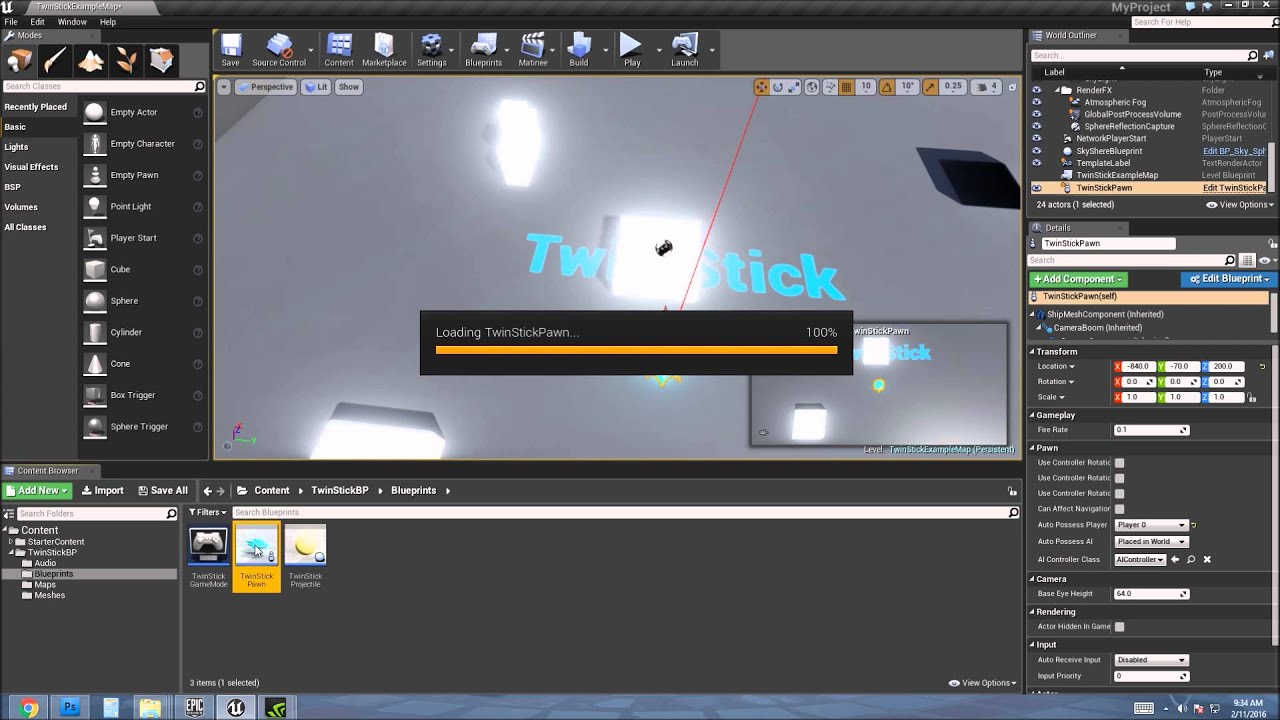
Showing how to work with Collision Channels
trim matrix
:::::::::::::::::::::::::::::::::::::D
maybe i wrote bad or maybe u dont understand
I want it to prevent hitting anything
like it approaches wall and certain distance it will slow down and get back to its origin or away from wall
i have no problems setting up collision or anything like that
sort of a 3d suspension system if it makes sense
i was thinking raycast or box overlap or many box overlap logics
tight cobalt
I am not experienced with that. But I would do event hit and then depending on the hit location you can check the hit by normal map, then deflect it back with timeline and lerp.
maiden wadi
You can do line traces from the object as it's moving. Probably towards it's velocity at a distance based on the length of it's velocity plus like twenty percent. If something is there, make it slow down how ever you like.
 wise gulch
is there any reason why epics did not make the reference loop macro getter?
i checked the custom macro works fine with this
so why copy in loop by default?
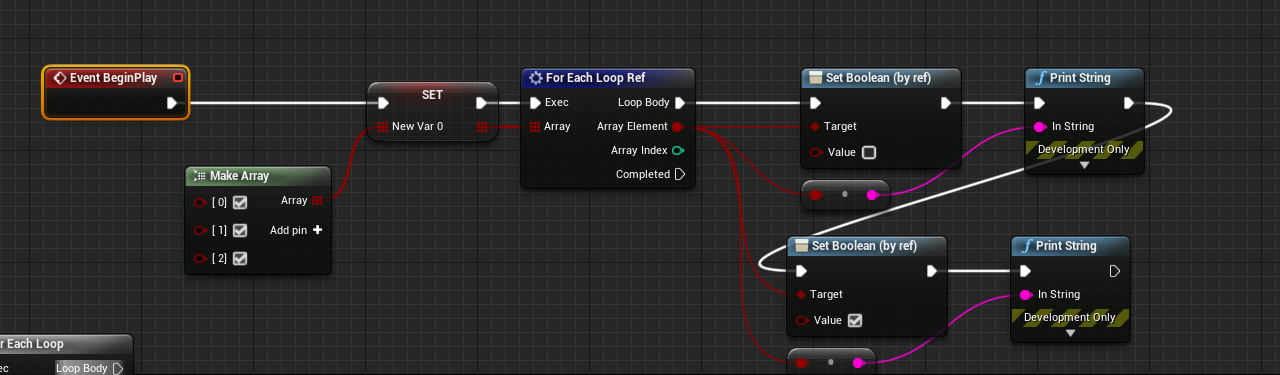
https://i.imgur.com/MxowtKW.png
LogBlueprintUserMessages: [BP_Go_To_NewMap_2] false
LogBlueprintUserMessages: [BP_Go_To_NewMap_2] true
LogBlueprintUserMessages: [BP_Go_To_NewMap_2] false
LogBlueprintUserMessages: [BP_Go_To_NewMap_2] true
LogBlueprintUserMessages: [BP_Go_To_NewMap_2] false
LogBlueprintUserMessages: [BP_Go_To_NewMap_2] true
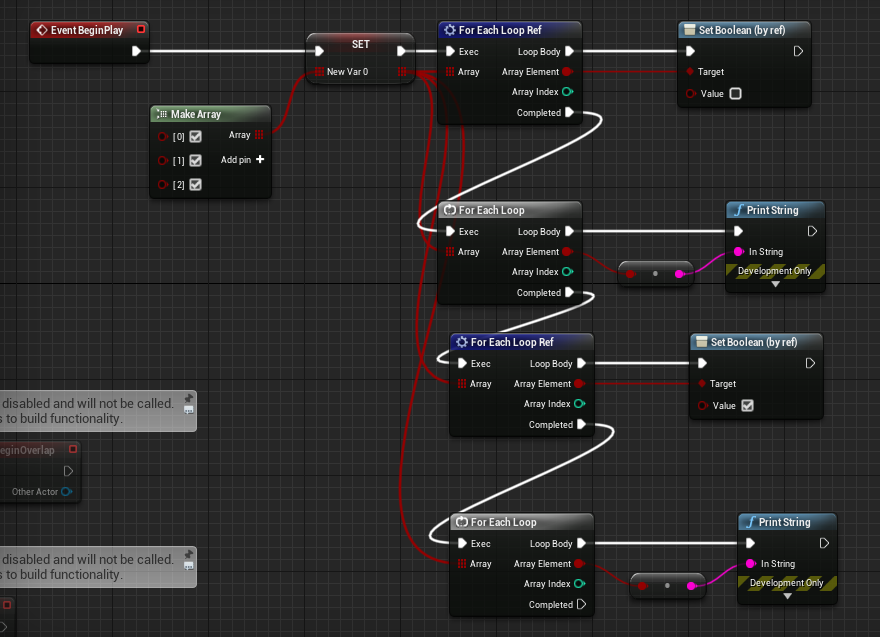
https://i.imgur.com/phsY531.png
LogBlueprintUserMessages: [BP_Go_To_NewMap_2] false
LogBlueprintUserMessages: [BP_Go_To_NewMap_2] false
LogBlueprintUserMessages: [BP_Go_To_NewMap_2] false
LogBlueprintUserMessages: [BP_Go_To_NewMap_2] true
LogBlueprintUserMessages: [BP_Go_To_NewMap_2] true
LogBlueprintUserMessages: [BP_Go_To_NewMap_2] true
 alpine halo
I have a floating box following my character. I want it to avoid colliding with meshes. What would be a simple and wise approach?
@trim matrix, if it's following player character the maybe you could attach it like a component and add spring arm to it. Make a bigger box collider around so it can detect collision from certain distance.
trim matrix
thats a good idea!
trim matrix
Hey guys, quick question, I'm using a timeline to open a door and I've got it to open smoothly however the door rotates a full 360 degrees, how do I limit it to X degrees?
 raw temple
Hi friends - I made a tool (https://github.com/UnrealisticDev/Renom) that renames UE4 projects automagically (BP and C++). Enjoy. (Second and last repost I swear - please don't smite me)
 tight schooner
@trim matrix Edit the curve inside the timeline to produce the values you want, for example a curve that goes from 0 to 90.
 lilac lance
@trim matrix you dont have to add rotation, you have to set rotation
tight schooner
That too, lol
shut hinge
Does anyone know why when I migrate out a Blueprint Pawn Actor into another project that the Input Action Event in the migrated pawn actor stops working? It was migrated out to another project of the same engine version. The only way that I can get access to the pawn actor to control it is to go into the detail panels of the pawn and click self and change AUTO POSSESS Player to 0 then I can access into the pawn. But this is no good, as it has to be accesssed with the Input Action key event DURING the game. The Pawn instance is in the game world but for some reason the input action key in the project settings is not responding to the input action key event in the Pawn's bp since the pawn was migrated over into the new project.. Print string is also not responding with that migrated pawn. Nothing coming from the input action key.... The code is all dead with the input action key event but the code only starts working only when I force the pawn into auto player possess 0 mode manually through the details panel.. The code should be responding also with the Input action key event when you press it. But its not even responding..
lilac lance
You use play and reverse, no matter if the dor is fully open or not, if you call reverse it will start closeing from where it was left
@trim matrix you need to use the set relative rotation node, the lerp rotator node and the timeline
And in the timeline create a float track of whathever time you want the door to take to open or close, and set the value of the first key to 0, second key to 1
That is your alpha value you will use in the lerp to set the corresponding rotation
Remember to set the lenght of the timeline to be the same as the second key
trim matrix
Alright ill try it out thank you
 sly estuary
Hi guys, I am trying to make effect to preview the area that the skill will hit like the image above.
I plan treat the area preview as an actor that it contain a green color plane mesh which represent the area.
When the player uses the skill, I will create the area preview actor and attach it on the player character foot socket so that the area preview will stick to the player character.
However, the problem comes when the floor is not flat. What if the player character stand on a floor that have mountain slope surface. The plane mesh inside area preview actor is flat so it won't be able to stick to the mountain slope surface of the floor.
Does anyone have suggestions on how to do this? I am still new to game development😫
unique finch
guys when i do the command "stat fps" the fps and milliseconds pop up. What is the milliseconds for??
 tame rock
Delays in BeginPlay, for or against?
unique finch
Oh
ok so it has to do with preformance as well
oh alright
im getting it at red for some reason @tame rock
 pine palm
I've been trying to make that my player follows my mouse (For a top down game) but I can't figure out what I'm doing wrong here...
unique finch
i don't know, im still a beginner sorry ):
pine palm
that's alright.. same here lol
unique finch
did you get it from a tut?
pine palm
no someone helped me yesterday
unique finch
hm..
pine palm
but it didn't work.....
the answer is probs right in front of me i'm just to dumb to see it lol
unique finch
i seriously know on how to use shit like string and other types of things including enums
i don't know much
OOP is not really for me y'know
OOP means object orientated programming btw
maiden wadi
@pine palm Give me a minute to throw something together for you.
unique finch
even advanced programmers take time lol
 fierce houndBOT
💥 You must have the Manage Server permission, or a role called "Giveaways", to use this command!
unique finch
yeet
maiden wadi
@pine palm Assuming that your mouse trace hits something, that should rotate the controlled pawn towards the mouse.
It's worth noting that you might want a few extra checks to make sure that it's hiting something, that the hit vector isn't near 0,0,0, stuff like that to avoid buggy feeling. But that should do what you want.
pine palm
Thanks I'll give that a try
I probs should have mentioned that it is a muiplayer game (witch probs changes up some stuff, or i've just done something wrong lol)
unique finch
uh
pine palm
it's a mess
unique finch
when my game releases does anyone wana bug test my game???/
pine palm
sure
unique finch
ill give you developer version of the game so that you can use commands to for an example check preformance
pine palm
@maiden wadi It only seems to-do something when my mouse is close but that's about it...
@unique finch I have a late 2015 imac so my preformance is pretty bad ngl
unique finch
@pine palm my game has graphics settings just lower them down
pine palm
alright
maiden wadi
If you game is multiplayer, you either need to use AddControllerYawInput towards the rotation you're after, since that is automatically RPCed. Or make your own RPC and call that on the server.
@pine palm
Doing that in the client version of the controller shouldn't do anything except for on the server character.
maiden wadi
I chose to write a client side function that chose whether to input AddControllerYawInput based on the desired rotation.
pine palm
can't we just replecate a function that will take care of the rotation?
maiden wadi
Sure, just more work on your part.
pine palm
hmmm
But how would we make this work then?
Val = float not a rotation...
I wouldn't have a clue how to make that work.
maiden wadi
Had to AFK a bit. I don't have that project up, but let me see if I can remember the math.
unique finch
he
is right
it has to be a float since its getting multiplied
can you change it in properties?
hm.
maiden wadi
@pine palm
unique finch
i cant do much as im a beginner
pine palm
Thank you, I'll look into it.
maiden wadi
@split marlin Line trace in the direction the decal is facing and use the decal location vector distance to the hit location to get your range. Use that float to decide how to input your parameter.
unique finch
@maiden wadi are enums good to use? i mean im pretty sure they're better than something like a branch
maiden wadi
Depends on your use case. Branches are perfectly fine. So is Switching on or Selecting from an Enum.
unique finch
@maiden wadi branches can be confusing at times though.
it can get very complicated very fast
 brazen frigate
If you create two begin play nodes in the same bp, does it create a race condition?
maiden wadi
@split marlin That I don't know. Graphics really aren't my forte for another couple months.
@unique finch Branches aren't confusing. Just simple logic flow. If this is true, do this. If it's not true, do that.
pine palm
@maiden wadi I've followed the code you sent me (other then changing one thing "The trace channel") But nothing seems to be happening. I probs missed one step...
Wait I missed the not
Sorry
maiden wadi
Yeah. It's asking if the mouse cursor's look at rotation from the actor is NOT within the small radius. I added that to avoid the actor overcorrecting itself and jittering a bit.
pine palm
Yeah
maiden wadi
@brazen frigate Can you create two begin play events?
pine palm
It still doesn't work however @maiden wadi
And it doesn't seem i've stuffed up anything by the looks of it...
I've even ticked it to be enabled
maiden wadi
Make some prints. Start with the float coming from the clamp. See if it's printing -1 to 1.
It all does look fine.
brazen frigate
Idk off the top of my head, I'll test it Authaer.
maiden wadi
I don't think that override events can be implemented twice. I know that Input Events can, and as far as I know they work fine with multiples. Would need further testing to be sure of no issues.
pine palm
@maiden wadi I wouldn't have a clue how to fix this
Most of the values don't make sence
maiden wadi
@pine palm Wudafuq? That's from the clamp node?
maiden wadi
Different how?
maiden wadi
Where is that print located? Just before or just after the AddControllerYawInput?
maiden wadi
In your pawn. Is UseControllerDesiredLocation, or OrientRotationToMovement set to true? If yes, try it with them at false.
Correction, In the Pawn's CharacterMovementComponent.
pine palm
maiden wadi
Try turning that off.
pine palm
Nothing
maiden wadi
Sec. Let me open up a different project to test really quick. That's not making sense.
pine palm
Alright
trim matrix
@lilac lance @tight schooner got it working thank you both
maiden wadi
@pine palm Well that's odd. I don't know why, but moving this same code to the character instead of the controller works...
pine palm
dam really?
maiden wadi
@pine palm New Character. No changed movement or other settings. Just put this on the Character tick instead of the Controller.
proven mason
I'm frequently getting crashes in UE4 I'm mainly just working on blueprints; most of the time it happens when I drag a connection out from a node; sometimes the crash happens when I do nothing.
This is the error msg I'm getting
maiden wadi
@pine palm On a side note. If for any reason you're making a game that requires movement like that, which doesn't have a place for the mouse to hit. (Space ships?) Something like that. Or you have weird interactions and trace issues with the CursorHitResults. The top one's Intersection can be used the same as the bottom one's Location.
maiden wadi
It basically draws an invisible plane at the character's feet and uses a flat surface to hit the mouse on instead of the cursor hit results.
@proven mason Laptop?
pine palm
https://gyazo.com/d8f019454aeec12f25fd7edb2fe13672
@maiden wadi When ever I try and strafe left and right it's so bugged

like I only pressed A and D
proven mason
@maiden wadi no it's a desktop
pine palm
not S and W
proven mason
AMD Ryzen processor
pine palm
https://gyazo.com/c187cc1361fafdbe8a7f91ea8c95e650
Like it's so odd
 maiden wadi
@proven mason Not always, but usually that error is because your graphics driver is ded for a moment. Happens a lot with laptop users because their laptop changes graphics devices when their power cord is unplugged. Also happens to any machine including desktops if they have a driver error. Results from bad drivers, back overclock, back power supply, etc.
pine palm
@maiden wadi This is me only holding W
https://gyazo.com/fcc73244afa4124f49361ac02f86d432

It's supposted to walk in the direction it's looking at..
maiden wadi
How are your directional controls set up?
pine palm
I haven't changed the controls what so ever from the defult third person bp @maiden wadi
I've done that. They use like there mouse to move. I still want to use WASD
The movement was fine a cupple days ago
thats true
maiden wadi
You want it to walk towards the Cursor on W press, and strafe around it on A and D?
pine palm
I'll try and find a old clip of the old movement
give me a sec
yeah
but you would still use the mouse to look around and stuff for guns
maiden wadi
Wait. Do you want world orientation movement, or towards cursor movement?
pine palm
What ever this was...
Yeah, but the player will still look at where the mouse is but it won't try and go to it
maiden wadi
If you're not rotating the camera, just use world vector normals for the input.
pine palm
What do you mean by that
maiden wadi
Do you rotate the camera?
pine palm
no, but I do move it on the Z axis
I don't get how it stopped working even though I didn't touch the movement
proven mason
@maiden wadi if I were to get the time it takes from a full tilt analog back to neutral position would you recommend making another macro function?
maiden wadi
Actually a safer way would be...
proven mason
so I have a macro function already that calculates the time it takes from neutral to full tilt thanx to your aid.
would it be better to add another macro function if I were to go the reverse?
pine palm
https://gyazo.com/4d76b3fe3c2c5af4a904459051e02fb1
I don't even know anymore lol @maiden wadi

thats me just holding W and S
Alright
maiden wadi
@pine palm Try this.
@proven mason Possibly. You might be able to expand on the macro if you want to write in the reverse method or create one that goes backwards. Either way works.
proven mason
I'm thinking of comparing real time seconds to see if it's greater than the captured real time seconds stored in a global variable
as a starter
 fleet cedar
Hey guys I want to create a sort of paintable foliage in UE4... I am thinking about hand placing blueprints so that the plant growth is directed and not randomized
I am trying to think of how I could animate the plant growth in an interesting way, possibly an obj sequence or the like
or perhaps this would be a good use of particles? Can you do a mesh flipbook with particles?
maiden wadi
Niagara would probably handle that pretty well.
 oblique gyro
Anyone know how to limit the yaw on a tank barrel? This is what im currently using but it doesnt limit it.
fleet cedar
Thanks Authaer
Guess I gotta learn that :X
@oblique gyro I am sort of a noob but if you're just adding the relative rotation then it's not limiting it, because it's going to keep adding
maiden wadi
@oblique gyro That's because you're clamping the input, but you're not ever stopping the addition of that input. In short, either check before you add the rotation that the current input won't go over the desired rotation, or use something like SetRotation with a clamp.
oblique gyro
i see thank u both
proven mason
@maiden wadi I came up with a macro function that calculates the time it takes for an analog stick to go from full tilt back to neutral.
The problem; however, is when I partially tilt the analog stick and reset it back to neutral position it calculates that as well.
Here is my formula, what would you say I must fix in order to get only the timing from full tilt back to neutral?
I call on two macro functions one which is based on the formula you provide for me from Neutral to Full Tilt and the other in reverse.
 gusty shuttle
For level streaming, to check if the level is loaded, I forget how, but what's the node to check if it's loaded or the proper technique?
I think this is the correct way right?
shut hinge
does anyone know how to get a migrated pawn to work with the input action event?
The pawn works with the action event within in its own project, but soon as I migrate that pawn out to another copy of the same project which has the same event in it, the input of the action event stops working. (the event no longer receives input from that pawn)
shut hinge
I'll try that,
nope no response, not even print string gives anything off the event that's in the pawn so the input is being blocked.
The only way I can access the pawn is to manually force player possssion to 0 in the pawn's detail settings tab under self , but this puts me in the pawn at start of the game. But the pawn is supposed to only be accessed during the game, not at the start of it, that's why I need the action event to fire it off only when the player presses C.
So it looks like migrating that pawn out of its own project into another project with the exact same settings has caused the input chain to break.
 elfin hazel
a pawn will fire its inputs if its possessed. An actor will fire its inputs if it has input enabled - Enable Input node.
 high ocean
Quick performance question: How much overhead does the blueprint actor itself add?
Context: I have various tools I made which handle level construction, virtually design-time procedural mesh placements and presets.
At the moment, I have 752 said actors in the level - probably mesh count would be around 1000-1500. Some are ISMs, some are SMs.
Would it be much cheaper to invest time and place those by hand just to avoid having all those actors in the level?
unique finch
wassup
elfin hazel
While I don't know the details, what do you mean by "place those by hand, avoid having actors in the level"? Are you referring to ISMs?
shut hinge
if its procedural is that being done with a construction script?
shut hinge
it acts like a switch I guess
 sudden surge
An enum is essentially a byte. You're just giving each value of a byte a fancy name.
 shut hinge
making my game in batch code is easier than making it in blueprints.
 thin rapids
does it improve preformance?
@unique finch i doubt it would make much of a difference from branches in performance
thin rapids
depends on what you're using it on
 quick lark
How in the hoo-hah do I get the transform/relative location of a skeletal mesh?
unique finch
im using it on my movement system
thin rapids
you cant just completely replace branches for enums
shut hinge
argh
unique finch
and i can make it better
shut hinge
i need a lot of enums in my game
thin rapids
for example, you cant make boolean checks on enums
thin rapids
theres actually a bunch of stuff that branches can do that enums cant
so it really just depends on what you're using it for
unique finch
yes
im making a simple movement system
i really like enums though
they are really good
shut hinge
i have to figure out how to store all info for all my worlds
How many entries can we have in a make array?
sudden surge
I don't think you'll hit the max for an array, but you can assume its somewhere around integer max
shut hinge
the blueprint graph may be limited
shut hinge
yes for the image selector for assigning all the dialog pics to the speakers. They have to be put into an array.
sudden surge
wouldnt it be more efficient to use a map for that? something like FName|Texture2D?
then you can search the map easier without having ti iterate everything
shut hinge
I don't know how to do that, I only have the image selector. I have to hook the pins up all manually to the struct
sudden surge
do you have a screenshot?
i don't have ue4 on my craptop atm and i'm visiting family
shut hinge
of the game i'm trying to make ? or the code to the struct
sudden surge
of the bit you're having an issue with
so you've got an array of images that you're searching through to find the one you need for something?
shut hinge
well the truth is i'm having quite a few issues going on with it, not just one issue. But I managed to acess the ship pawn now. but now I get a non access error after switching pawns from the player to the ship, now the Find Player Patrol code of the Droid can't access the player after switching... Arrrgh, I'll try to sort this later.
Yes the images are lined up with the numbers in the dialog data table.
sudden surge
i assume you've got a load of other data for these characters right? like name and other stuff? if so and it's all static data, then a data asset might be a better choice

As a followup to an earlier video we show how to use the C++ Data Asset class using Blueprints only using the Primary Data Asset class type.
Original Data Asset Video: https://youtu.be/gLWXZ3FXhO8
shut hinge
yes i have. I have a dialog struct for each planet map instead of putting the dialog into just all one struct, i decided to separate it by systems. As I have ten party members in my game.
sudden surge
right, but what i'm saying is for the speaker information, you could use data assets for each speaker. this means that you can just get the required data asset based on the character instead of making and iterating through a huge loop.
shut hinge
I also need to know how to change camera angels during the dialog when speakers are talking from the data table.. So far I have got 2d Pictures and Text cycling dialog and movies now playing in widgets, but not camera angles yet.
sudden surge
i'm not gonna write it for you, but if you are in a bp project, the player controller has a "Set view target with blend" function that will do just this
shut hinge
Ok, well the one thing that I could not get working was Layley's Leveling Component to to get it to display all the individual party group levelling stats with it like group party selection screen. It works for displaying single party levelling stats, but not for party group screens.
maiden wadi
Are you still relying on the player controller's controlled pawn for the binding?
shut hinge
well when you do switch the pawns, they turn their widget bindings off and only the pawn you controlling is activated., just as I found out when switching to the Space Ship pawn from my player pawn, it now causes a ref problem with the Seek Player Function in the Enemy Flying Droid's blueprint.
So the flying shooting enemy droid all works fine as long if I remain inside of the CH_Human Pawn, But switch pawns then the code can't access the ch_human pawn to find the player.
maiden wadi
You have to learn to control your pointers better.
shut hinge
well i was using get player character, that only works as long as you stay in the pawn you control.
 full fog
Hello fellow Blueprint fans! I have a question because I am running against walls for a couple of days and even Google and UE4 forums does not really give me some rest.
I want to create a very simple Mahjong Solitair game (don't laugh, its for my mother that turned 70) and within I'm struggling on a couple of things and I am not sure that this would be a good direction.
I have made two datatables as a test.
-
One datatable with 144 xyz positions that to define the layout of how the stones need to be placed.
-
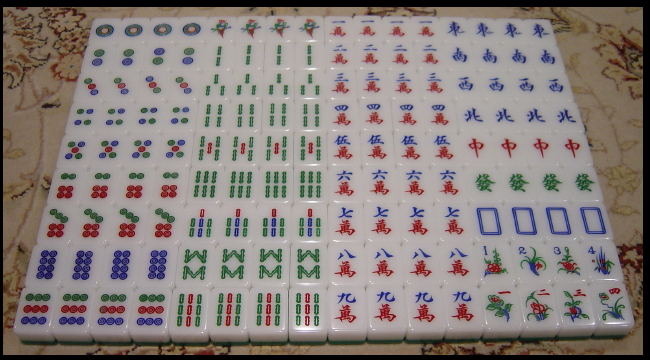
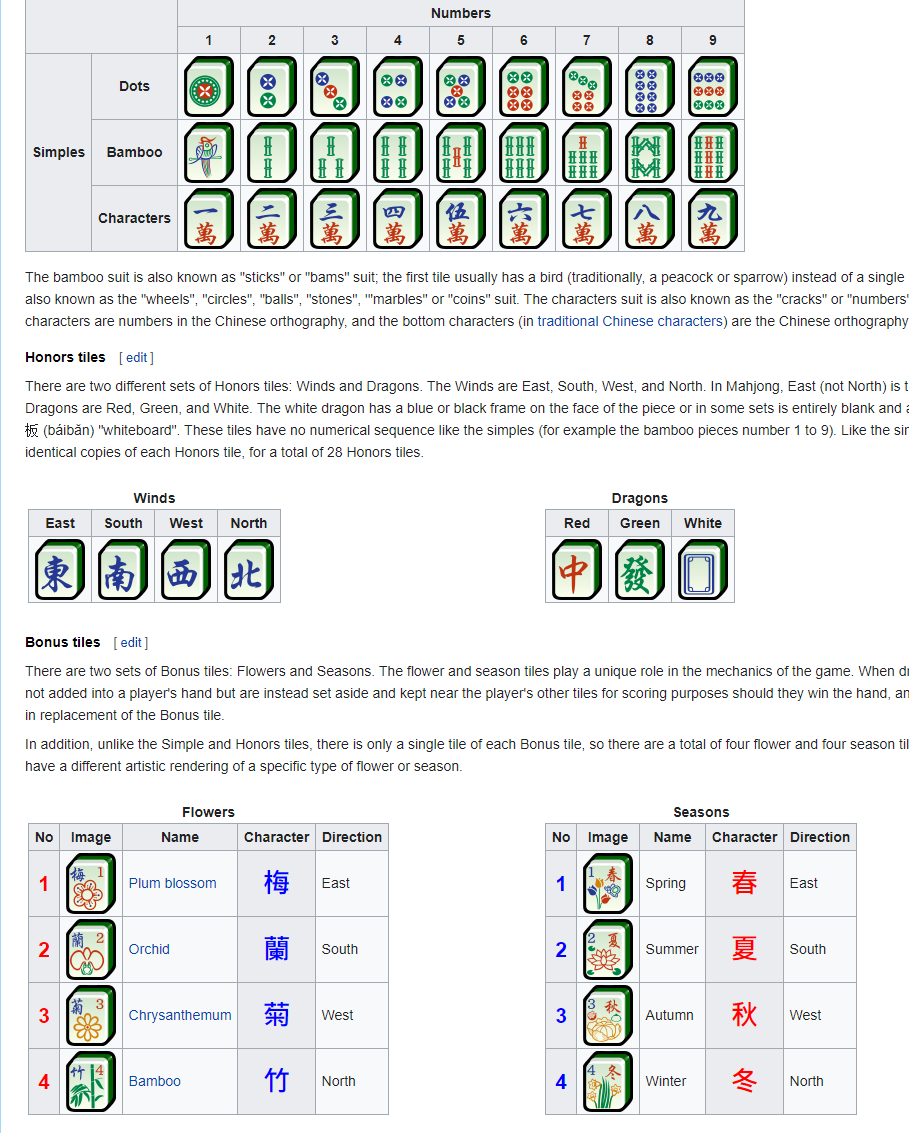
Another datatable that contains information for each of the 144 stones (42 Stones in total but three types of stones does exist four times like Bamboo II have to be placed 4 times)
This datatable holds information about name of stones, which material and mesh they should use and the parameter number for a flipbook frame.
Material: It holds 42 stone textures on one 2K map, splitted in 7 by 7 with a flipbook.
Questions:
-
How do I tell the stones from the second datatable to spawn into the world or inside of a blueprint by using the transform data from the first data table?
-
I was thinking about another approach by setting up the layout with existing stone instances and 144 different material instances if the data table stuff does not work. Is there any way to shuffle all of these existing stones while keeping their layout positions even if its later in the game and certain stones already got solved (vanished from the game by clicking pairs, which is the base gameplay of this game)
-- I figured that there is a Memory Game project for earlier UE4 versions which it no longer available for download. I think it could help me on that task since the game mechanics are similar. Does anyone know if this project is available anywhere?
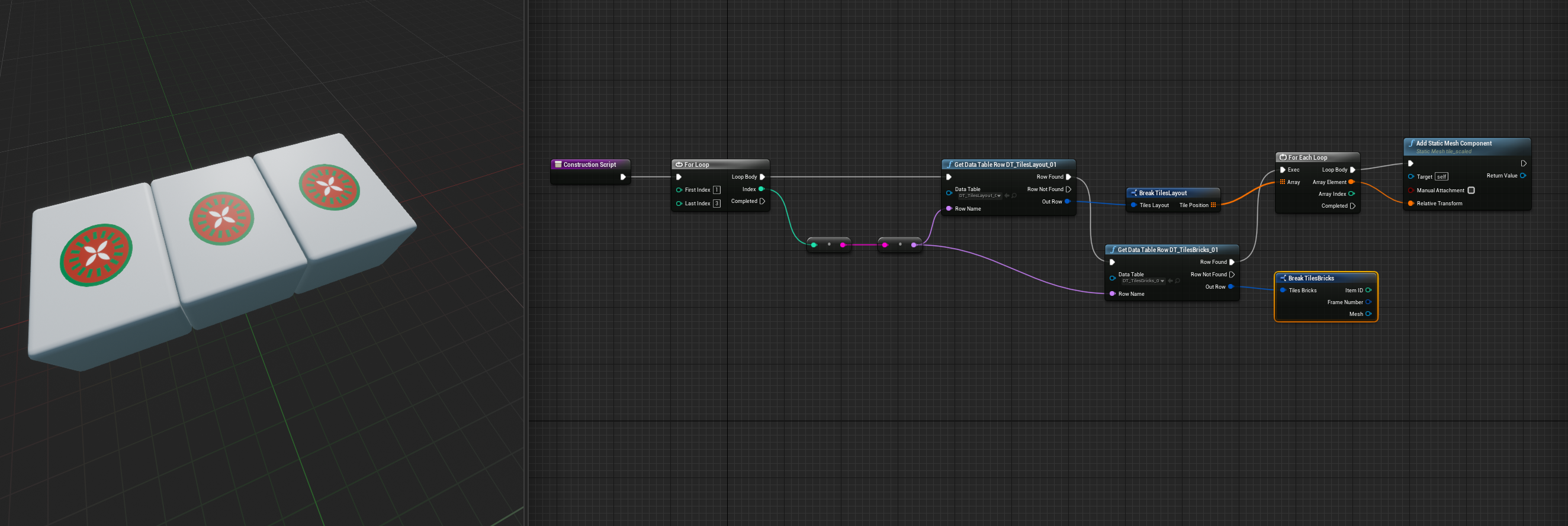
Update: I figured that spawing works in construction script, but not inside the event graph. The construction script also does not add any meshes or actors to the scene that i could select
high ocean
sorry, had to go a little 😐 (regarding my previous question about actor overhead) @elfin hazel I mainly mean just static meshes placed with a blueprint actor (The blueprint has construction script, switches and enums for easier placement in the level. I could do that by hand, place every SM by hand. Is the overhead from the actor existing in the world worth the time to place them by hand performancewise? @shut hinge Well, it's still procedural even if it's in the construction script in my view, but yea, maybe there's another word for it 😛
full fog
This is how far I got but I believe thats not how it works. Old 3D Artist playing the Trial and Error Blueprint game. I watched a lot of WTF videos from Mathew about data tables and some others about core functionality but there is no information out in the wild how to use it for spawning actors -,-
ups, sorry @high ocean
elfin hazel
@high ocean Even if you place say a Cube from the "place actors" in the world, that's still an actor. Everything placed in the scene needs to have an actor.
high ocean
@elfin hazel I'm aware of that, but since that sm actor (the one you mentioned) doesn't contain code, my understanding is that it just acts as a pointer to the asset for the world. But if it contains code (in the construction script in my case) does it still only act as a pointer to those assets or causes overhead in memory, and ofc, significant enough to be worth it to place all those by hand
elfin hazel
Ah, I see. I doubt it is a problem, But can't really provide any statistics.
high ocean
@elfin hazel 😛 thanks anyway! 🙂
@full fog
@full fog is it something like this you want/need?
full fog
Update: I figured that spawing works in construction script, but not inside the event graph. The construction script also does not add any meshes or actors to the scene that i could select
well actually.. i am not entire sure
high ocean
@full fog don't use spawn in the construction script 😛
full fog
I really try to learn what are the differences and what are the best methods
I see... I will test your BP right now..
high ocean
I'm not sure what you don't know - sry 😐
on one hand you seem to understand things well enough so idk where the problem is
full fog
Well, lets say I know a lot of things for Material BP's but when its comes to regular BP's, it can get cheesy if I don't know about a couple of nodes or the way to connect these
 high ocean
Construction script: Runs script at design time (while engine updates properties). Event Graph: Runs code once the game has been initialized
high ocean
Don't do it in the construction, just do it in beingplay or better yet, some custom event which gets called once the game was initialized
spawning in construction script - afaik - should be impossible without a little "hacking"
but the engine prevents it so it won't crash. Construction Script updates every time the engine updates properties on the actor, once it's placed in the world. For instance, throw in a while loop with no release in the construction script of any actor, drop the actor into the world, and you've crashed the engine
 high ocean
wait a sec...
full fog
Sure, all weekend free
high ocean
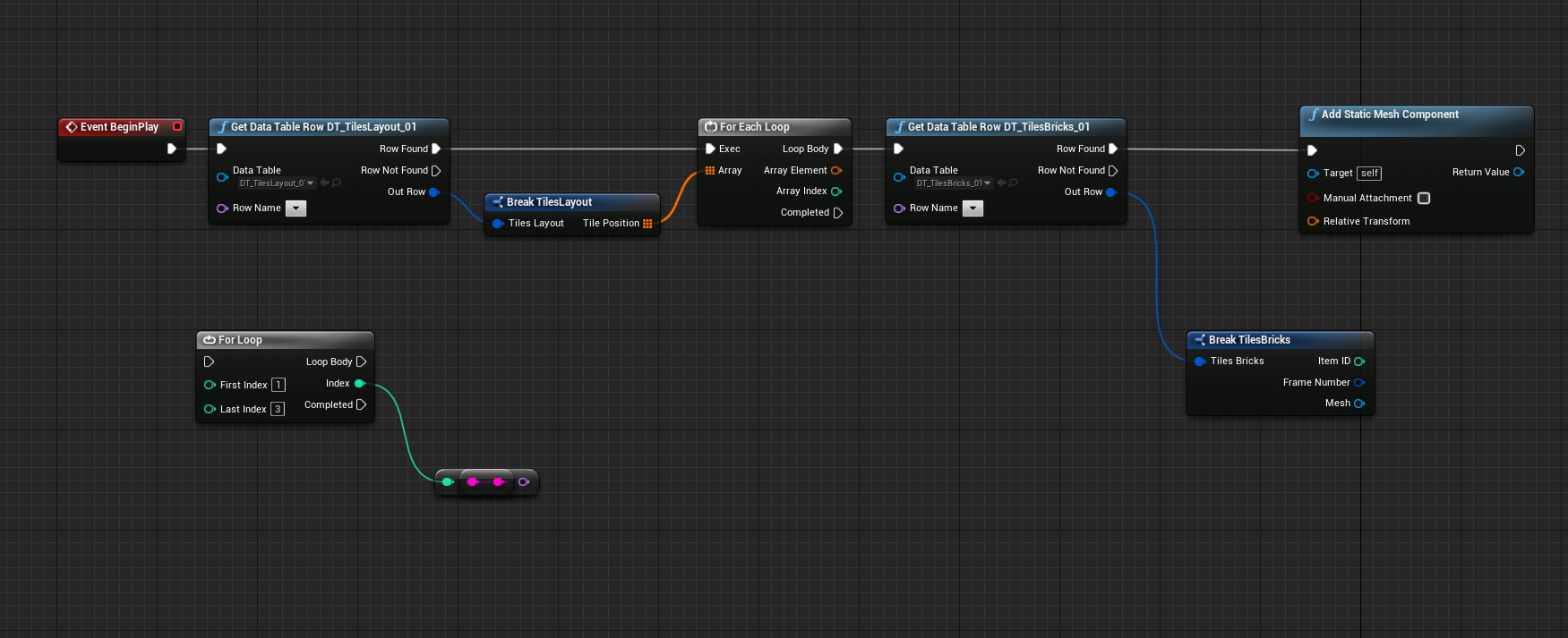
you have an array of transforms inside the first entry of the data table or?! and you didnt' pick a data table row in the drop down
full fog
correct. the first datatable just holds informations of positions
for 144 stones
the reason for that is simple that there are a couple of different "layouts" i would love to use later on
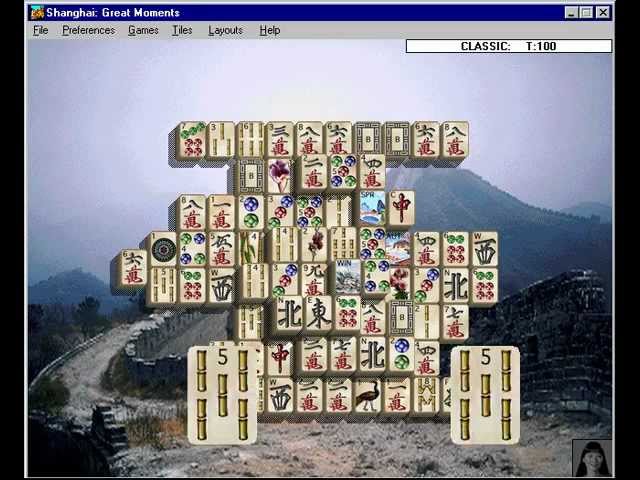
Windows 95 game copyright Activision
Intro features actress Rosalind Chao.
high ocean
the code translates to this: get data table row name (NONE): get the array of locations in the (NONE) entry - the rest is irrelevant so far 😛
high ocean
can you show me the struct you used for the DT pls?
full fog
sure
so this is the struct for the layout
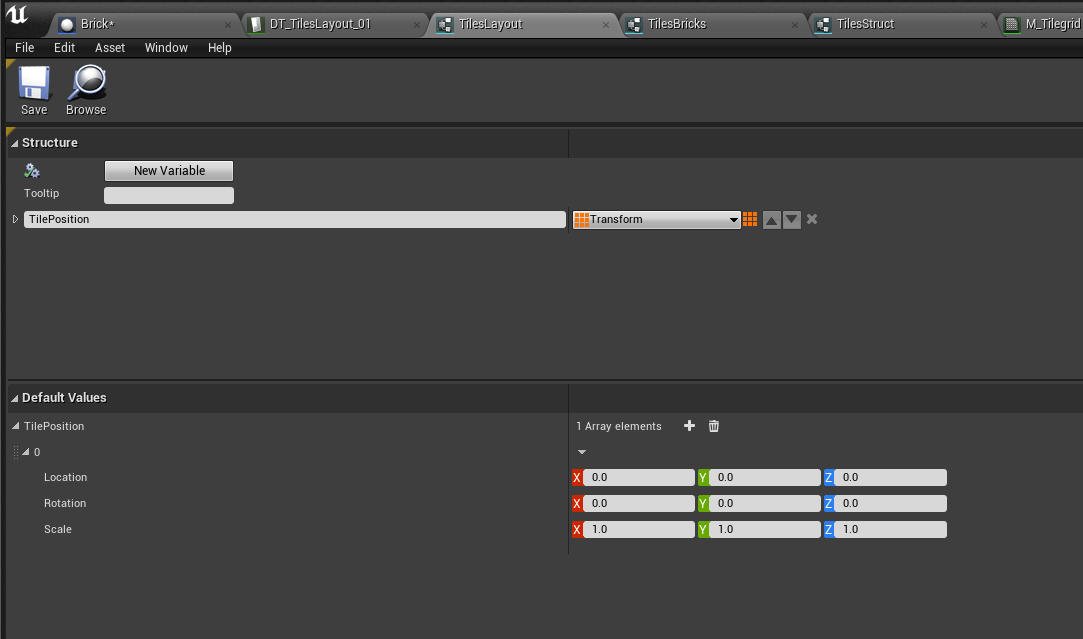
and datatable looks like this
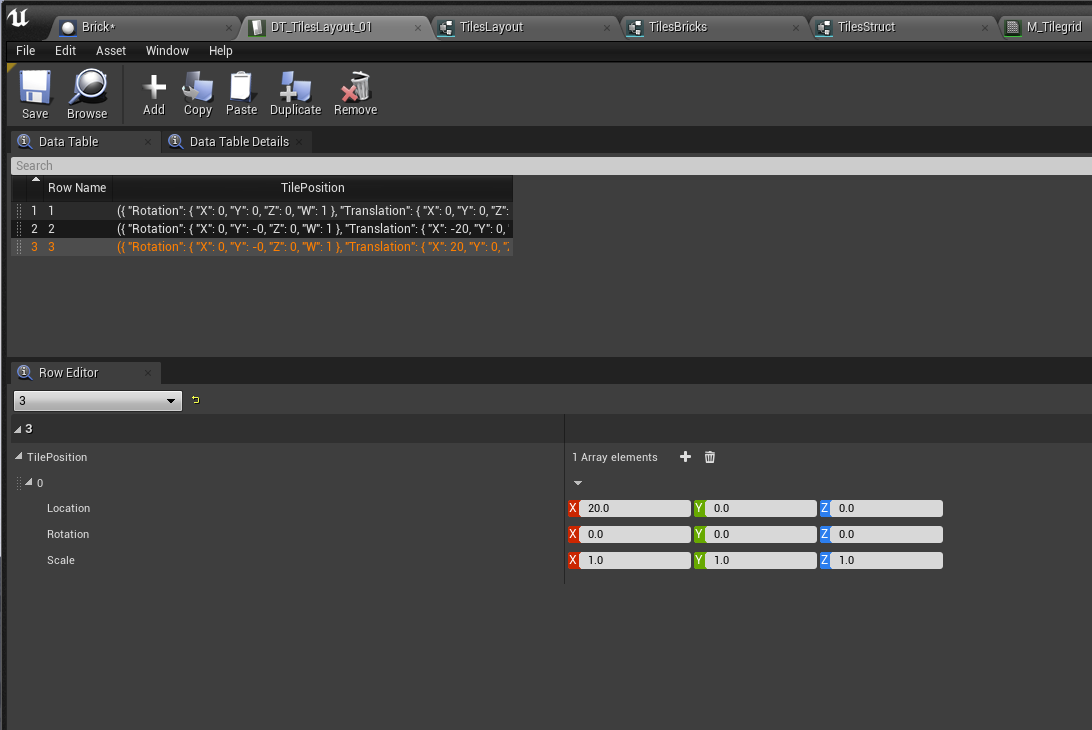
Just 3 entrys as an example before I go with the full layout
The struct for the bricks is a little bit different though:
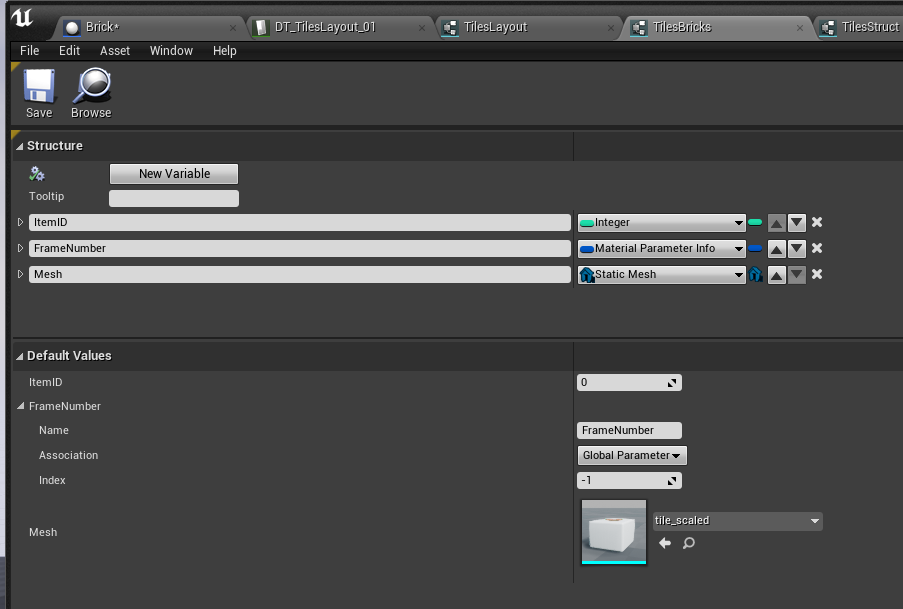
literally just information about
- the brick / brick name for telling the system later on that all bamboo_II are compatible for clicking to get a pair when two of them are selected
- parameter info for the flipbook frame to define the actual brick texture

i first used a flipbook but changed it to subuv
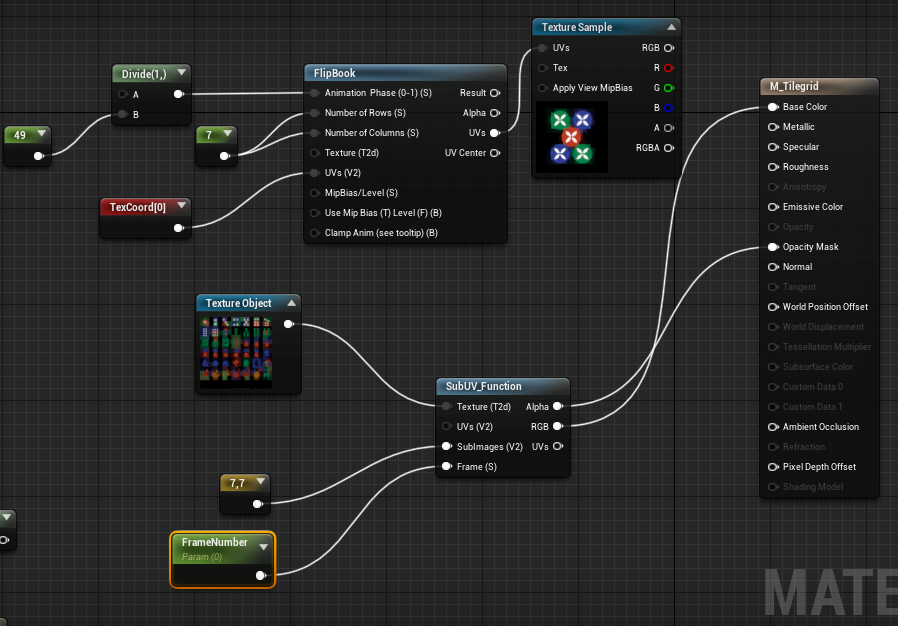
 cosmic moat
anybody here know a lot about UE4's BP networking system? im having trouble with some physics stuff
high ocean
@full fog Ok. Step by step: so, look again at the pic with the bit of code i sent.
full fog
Alright
high ocean
So, get all entries in the data table, and for each, get the same data table, so basically, you search entry by entry by feeding the data table it's row name.
high ocean
😛
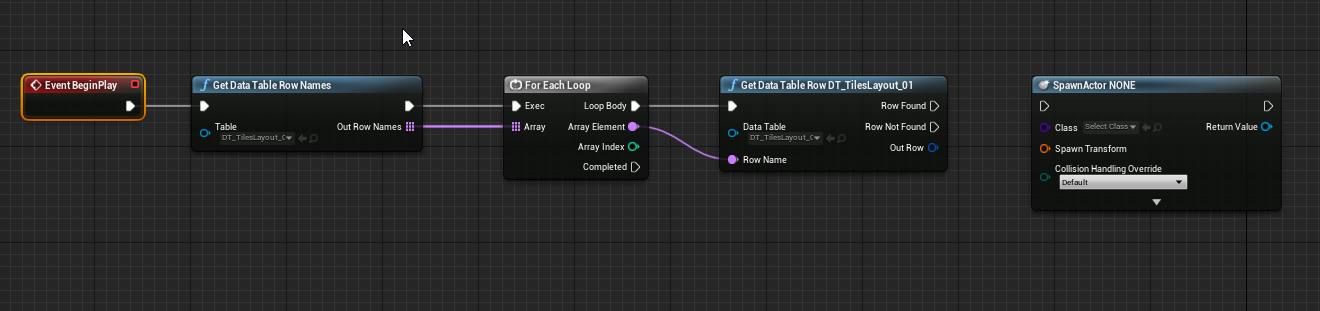 high ocean
yep
now, every entry, has an array of locations which are the possible locations for that particular piece right? or?
full fog
Well yeah, each row contains one position for one stone
high ocean
then you messed up your logic there 😛
high ocean
you don't need an array of transforms for each entry. Rather, each entry in the data table has one (single, not array) transform
and rows are: row1 : stone 1, row 2 stone 2 etc
full fog
yes
high ocean
each entry contains ONE transform, not an array of transforms 🙂
full fog
ok, I probably messed up the wording then (not native english!)
But yes, exactly - one row should contain one stone position.. if there is no better way to deal with it
except writing C++ stuff but..a cow could better code than me
high ocean
then you should probably only use one struct for all properties. I thought you will change the pieces' position each match, and you need to have an array of possible locations for each stone
full fog
The game itself has 144 stones. The layout like in the video could change, thats why I wanted to avoid and split the data from the layout from the stones
and yes with each new game, the 144 stones get placed on one these layouts
randomly
and there should be a "shuffle" button in case later on the player gets stuck
to shuffle the remaining stones
full fog
this can happen if one stone to finish the game is under another. Normally that would be game-over, but the old game is providing that cheat mechanic
ah ok
this is the struct for the stones I bet
high ocean
well, i'm not totally sure i fully understand your design decisions but...i would still use only one data table and pick random location for each stone based on the locations that particular stone can have on the table.
full fog
thats fine, as long as i can create different layouts later on
and then the player can pick one at start
Basically, they look like these
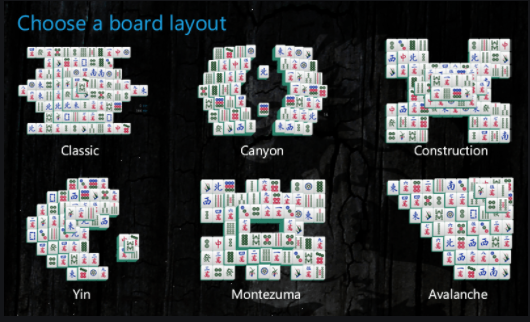
But each has 144 stones, randomly placed
high ocean
somethinglike this?
heh..i'd do some overlaid grids honestly. and then spawn random stones on them (but at least you have fixed indexes for each grid layer and you can just create your stone bps however you like, and spawn them on the pre-laid grids. You can probably do this in many ways
full fog
Yeah the layouts somehow follow some Mahjong rules I bet - I literally just try to create a little clone that actually provides very basic functionality and..runs on Win10 because the original is from 1995 and does not run on it anymore properly
high ocean
It's...not that easy you know 😛
full fog
Like any BP hehe. To be honest, I did not expect that a simple looking task like that can be that difficult to solve
And I really wonder how does the other 20284 mahjong clones exist then
high ocean
well, it's not really simple, lots of FPS don't come near that logic requirement heh
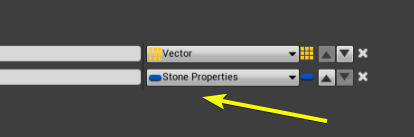 full fog
ah oh
high ocean
it's open in the ss, so you can see it's "insides"
full fog
ah!
high ocean
or, you can actually do it the other way around.
...hm, and it may be even better.
ok...
 astral granite
Guys, is there any way to activate the roughness, metallic and speculate on a translucent material?
full fog
@astral granite maybe by using masked?
full fog
Idk atm
high ocean
@full fog ok, look. For testing furposes first, Make a blueprint, make an array of vectors (those will be the locations). Make a tile BP
 high ocean
get an array of TileBP classes inside the blueprint containing the array of vectors (let's call that bp something like spawn_manager)
full fog
ok slow for slow old artist! Lets see
Oh my
Its like: Now we learn french!
But I will get to it!
BP Actor made, called spawn_manager
high ocean
i'll SS, just a sec
heh, it's more complicated since you need two, but I'm getting there 😛
full fog
I am so sorry. I actually work with UE4 for years and bigger game production but all that Array/Data terminology is relative new to me. I build character controllers and other things like open doors but never had to touch this particular field. I watched a lot of tutorials recently for that but have a gap of knowledge when and how to use these.
If it helps..
It could be one
But then I need to make a copy later on for building up another layout
which may or may not get tricky then. Just guessing at this point
Because in best case, I can exchange the texture-set later on with others as well
high ocean
it's fine...just a bit of challenge 😛
full fog
For sure, once this is done.. this goes straight to marketplace for free or I try to get it onto the UE4 learning tab
I think, personally.. its a very good challenge to understand these type of gameplay mechanics and might be used for other games like cards or memory, etc
And I did not found any tutorial or project that deals with this kind of situation unlike hundreds of FPS templates, as you said..more difficult
high ocean
oke...
not the best implemmentation, but it could work, as long as you have your locations array set up right
so...
This is the spawn_manager bp
full fog
I had an idea that I could build up a layout inside of a BP first with actual mesh actors but then I probably either need 144 different material instances for each stone - and then I need to shuffle all of the existing ones
full fog
or writing out their positions into a data table but I have read that DT are read-only
full fog
ouhf ok!
high ocean
What this does is: For each location inside your array, it spawns a random Stone which is setup in the Class array at the designated location
This means that you know the location of each tile placeholder in 3d space for that particular layout
full fog
What is the variable type for LOC_Stones
full fog
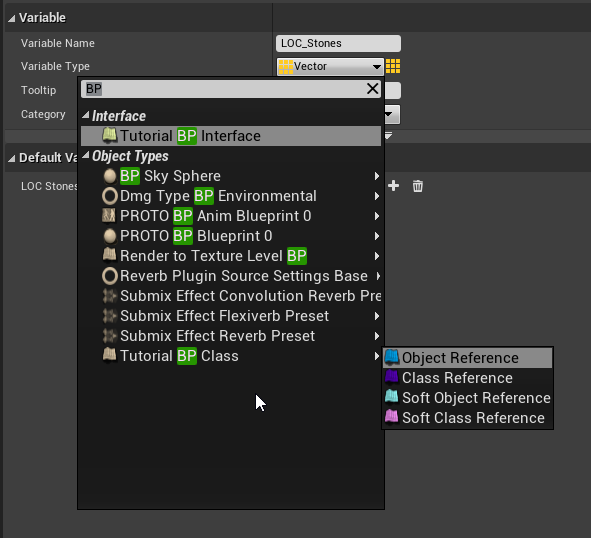
 wet siren
it's a class reference?
high ocean
class reference
now, i messed up, since spawning randomly won't really do...Need to account for duplicates somehow whoops 😛
so...
full fog
duplicates?
high ocean
since you only need two of each...maybe spawning in pairs
this might give you 10 of one and none of several hehe 😅
full fog
oh yeah but i thought its best to say each Dot 1 stone for example exists four times
so like Dot1a, Dot1b, Dot1c, Dot1d
wet siren
i don't understand why are they all a different class  maybe just me
high ocean
@wet siren it's just an example I put together xD it's not "real"
wet siren
curious as to why you made them all a different class as opposed to same class with different properties if they just have different symbols
oo
oke
high ocean
it's orientative
wet siren
got it
high ocean
the thing is, as long as you know all the locations in a layout, it's easy to figure out filtering logic for spawning randomly yet with some degree of rule
full fog
Once thing to have in mind for later is that all stones need some information to know which stones are compatible
high ocean
the core logic would be: this is the array of locations, choose one stone to drop in each.
high ocean
The spawn function will return refs to the bps. You will use those. Or just direct bp communication/interfaces
full fog
not based on the same UV space because there are other stones like summer, winter, autumn, spring that just exists once!
so actually this is a basic set
 high ocean
I still fail to understand why you overcomplicated the material logic...
full fog
just the "simples" are there four times
high ocean
ok...this is getting waaaay out of hand 😂
high ocean
yea, sry, we can't just make a whole game just like that. It's fairly complex and if you want to organize it fully from the start, you might get surprised, but I often find myself planning poorly and having to add stuff later, so going for a more flexible system is a good idea imo. each stone needs to be its own bp, with it's own code for ease of communication later. Ofc, derrived from a base stone class, but still
full fog
In my initial thoughts, I wanted to build it up as clean as possible but from an art-side of things.
high ocean
There are at least 3-4 layers of game mechanics in there, which will later be important
full fog
Yeah the core mechanic is that you can click on one stone and on second. If these are of the same type like Dot1, they get deleted.
This probably is a mouse-raycast thing with selecting one actor, storing the type and when clicking on another, doing a check if its the same type, if not, deselect the first, keep the second selected and then the whole logic repeats
high ocean
I know, but it's still a 2-days work imo 😛
full fog
So actually I would not have a problem to make 144 stone copies or one stone with 144 material instances
high ocean
I'd go with that
full fog
but thought it might be way more convenient to say: hey i have a list of positions and a list of all stones
put all stones on these positions
But that seems really difficult
full fog
And saves material instances
high ocean
the problem comes when you want to get the data out (on-click)
full fog
mhm i see
high ocean
since you will spawn actors for that anyway
and those actors need to communicate and check each-other's properties (type)
so click Stone1 store info>Click stone 2>compare info with stone 1
full fog
So, would it help if each stone is its own BPActor with its own Material Instance upfront?
high ocean
wether the data itself sits in the table and gets injected into the actor, or sits in the actor is irrelevant
full fog
any maybe there, each stone could get some variable stored for name, type, etc
high ocean
but one thing is certain: the actor which interacts with cursor (trace/whatever) must contain the required data itself
full fog
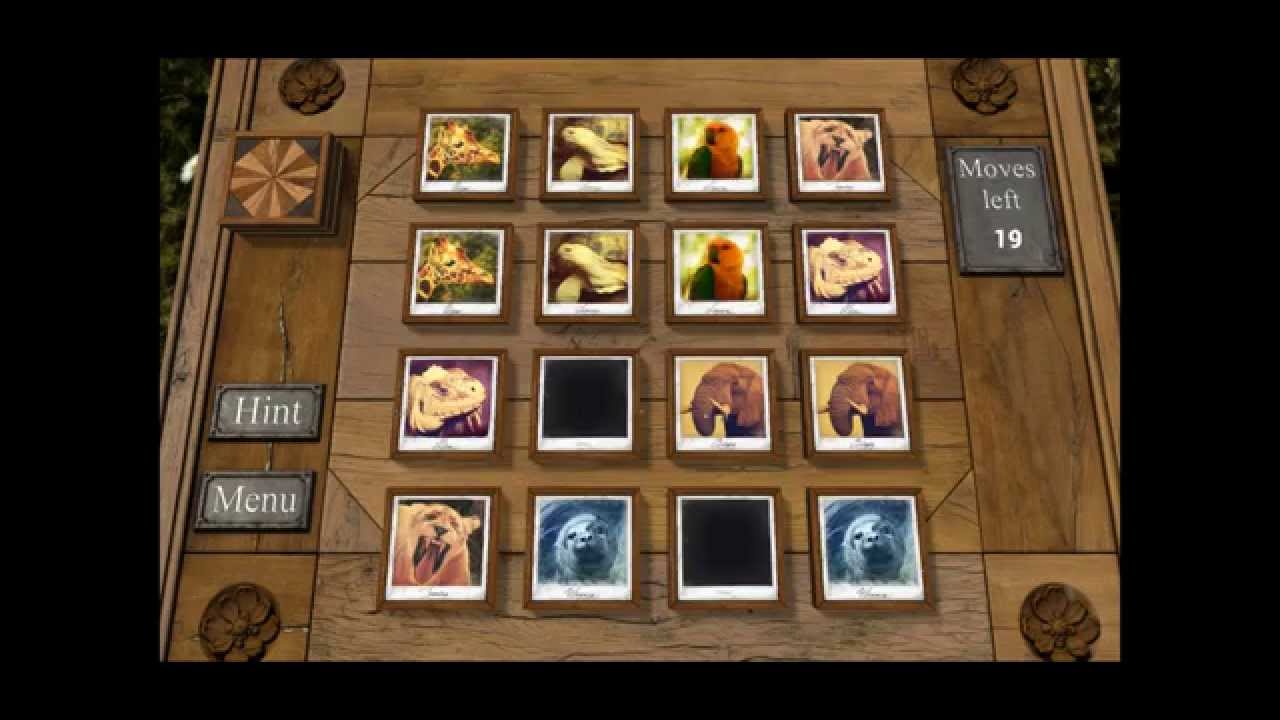
Just a little video about the Memory Game Sample from epic games.
full fog
mhm ok.
high ocean
that's just a grid with indexes
you have layers of grids in various layouts
otherwise, each cell is it's own actor
that memory game is probably 2 hours work at most without art ofc
let's say 3 hrs with debugging
full fog
Didn't know, thats an interesting insight.
On the Art side..that would probably a day of work, excluding the FX
high ocean
but...mahjong is different in ...many ways
types, layers, and honestly, i'm not sure I understand ALL of the rules. Like: do they always spawn all combinations to finish the game?
full fog
Well in real life, you have these 144 stones. 42 single pictures but the Dots (numbers), Bamboo and Characters are being there 4 times
But all in all, its just 144 unique stones
And these have their layout.. the rest is like open memory
high ocean
aha! so the stones are unique!
full fog
yep
high ocean
oooohhhh oke
full fog
but you just have to keep in mind that
high ocean
well, the function i've sent should work all the way lol
I mean the whole logic really
full fog
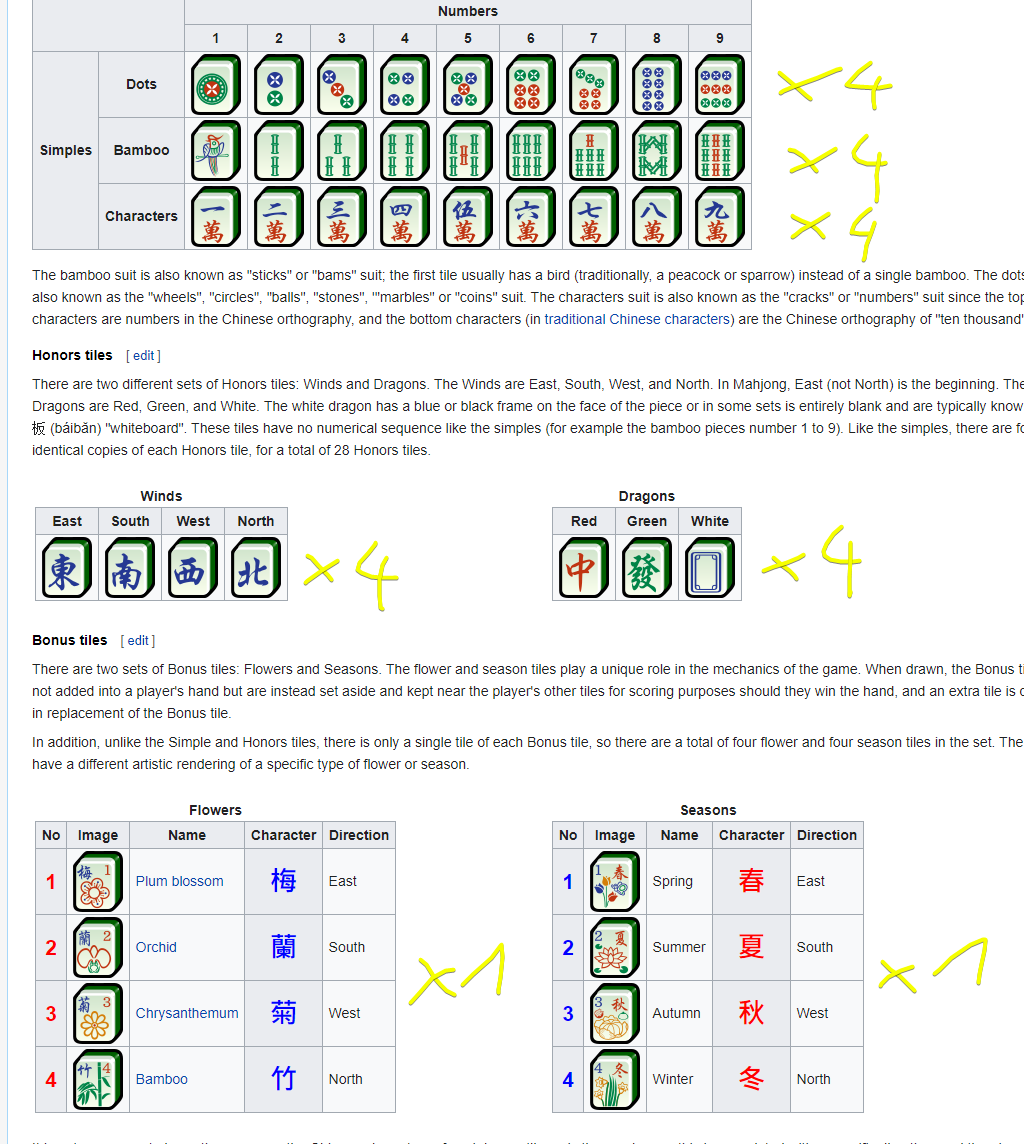 high ocean
If you make a BP_Stone class and derrive all other stones from it
oh, but they're not unique
full fog
i had a better picture wait