#blueprint
402296 messages · Page 511 of 403
 hexed coral
 young holly
Some of them are not hitting due to some reason
@hexed coral
Also in some cases the hit normal seems to be wrong
hexed coral
@vale path use an is valid node. it might fix the issue you're having
 vale path
where should i add it
hexed coral
@young holly Not sure why that is happening its very strange. Try creating a new trace channel and shoot a trace in that channel.
@vale path at the beginning and get the reference of the bp with that function.
hexed coral
your bp needs to verify that the overlapped actor/component is the same object. otherwise it will try to call that function in any overlapped actor like a wall which is what is causing those errors because those overlapped actors doesnt have those specified functions.
young holly
what do you mean by new trace channel?
hexed coral
its kinda like a filter for your trace: https://docs.unrealengine.com/en-US/Engine/Physics/Collision/HowTo/AddCustomCollisionType/index.html
How To add a custom physics object channel to Unreal Engine 4.
create new trace channel not object channel since you are using linetracebychannel
also ignore the presets section that can make things a bit confusing.
 spring flax
Hey guys,
I have a level blueprint event that needs firing from a level sequencer event key.
I have an event key that fires an event "Start Hide and Seek" that has the Blueprint interface as an input parameter.
I have my level blueprint with the "BPI_Events" interface with the "Start Hide and Seek" Event.
However when the key is fired in the sequencer it gives me this error and doesnt reach the level blueprint.
Blueprint Runtime Error: "Accessed None trying to read property K2Node_CustomEvent_BPI". Blueprint: SequenceDirector Function: Execute Ubergraph Sequence Director Graph: Sequencer Events Node: Start Hide and Seek
Any ideas?
Thanks!
 trim matrix
@maiden wadi yes i was able to figure out the timer handle rn im having this issue tough
 whole rose
what does the whole error say?
trim matrix
trim matrix
 maiden wadi
You need to plug something into the Transform pin on the other side.
maiden wadi
Yep
trim matrix
right
 acoustic lava
Hello everyone
 quasi relic
Hey everyone, I am having issues with 'AI Move' always failing. The AI uses a location from its Blackboard (I have confirmed the location is valid) but it still fails
Does anyone have any suggestions? I have rebuilt the navmesh
trim matrix
@maiden wadi i got everything copied and it complies but how do i set the custom event to begin upon me pressing my right mouse button etc.
bc i dont know how to excute it
from the input
 dense bloom
Hey guys i want to be able to touch and pickup objects and move with touch but i simply can't get it to work. Does anyone have any idea how i can do this?
 tall pine
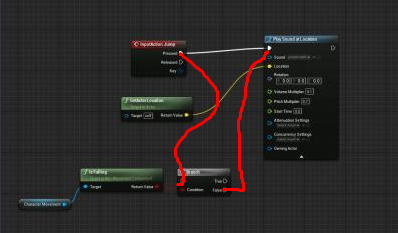
how do you disable the jump button while in air
 white crypt
 tall pine
got it thx
maiden wadi
@trim matrix Once it's all set up correctly, you should just need to call the Reverse and Forward functions from the component's pointer. Add the component to the actor you want to reverse, get that component's pointer when you want to reverse it and call reverse.
 manic fox
Hey guys - How do you reference a editor utility blueprint (non widget) from another another Editor Utility BP? I feel like I'm being an idiot! I've tried load asset and declaring the path but that doesn't work for my use case (Asset registry isn't fully loaded yet)
Is there another way?
 fleet cedar
Can somebody help me fix my camera? I made it using a boom and turning on the lag setting, but I don't like how it has "roll" rotation. Can I restrict this?
trim matrix
Idk, did you set an input for the rotation bc then u should be able to split struct the rotation spin and turn it off
Just remove the input
 small rose
So I have a bool Switch on my switch and when it gets toggled I have it set to true. How could I carry the variable over to my door so that when switch is true, that the door opens?
I tried all night last night but couldn't get it to carry over
 kindred walrus
hi all anyone know how to get the actor move direction, I want to get the move direction of weapon swing
small rose
What do you mean?
trim matrix
@maiden wadi so like this?
 alpine halo
How to rotate this character
@worn moss have ya attached the character mesh to first person character bp? you can just rotate the mesh in characterBP. but personally it's a bad way to do that
 worn moss
How to make the character hold this rifle I am running around and the rifle is running with me too
alpine halo
make a socket in your skeletal mesh, attach the gun to the socket, seems like the attachments ain't accurate. modify the socket transform
maiden wadi
@trim matrix If those events tell the actor to tell the component in it to play the component's reverse and forward events, yes.
trim matrix
On windows 10 you can use the snipping tool
To take a screenshot
If you are using windows that is
worn moss
I know but I am using my phone
Because I don't have discord on my computer
I done that but the rifle still on the ground
What do I do?
?
alpine halo
First there're two same naming functions 'attach component to component' only the target differs.
Second, in your case this happening because you haven't correctly set the transform of the socket 'grip point'
You can manually do that in skeletal mesh's skeleton. Where you added the socket. Add a preview mesh and reconfigure
 quick lark
Does blueprint accept delegates or function callbacks? I have a throttle (child actor of vehicle) and I want it to use multiple instances of it for different purposes
 pastel valley
Guys how do you make a widget that displays your teammate mame usually at at the bottom left corner of the screen
 proven mason
@maiden wadi regarding this https://discordapp.com/channels/187217643009212416/221798862938046464/739542599299366913 is it possible to get the time using the Set Timer by Function Name as well as Set Timer by Handle node as well?
Recall I was asking about the time ellapsed from neutral to 1 when tilting a thumb stick.
 faint pasture
@pastel valley Make a widget that can display text, and then feed it the player name from the player state
 still trellis
@quick lark you can use event dispatchers for this, but it's fairly annoying to pass events around in blueprints to bind them to dispatchers (you can't select a delegate as a function parameter, you have to create a node that takes a delegate, like Bind to Dispatcher, and then drag it back on to a function's inputs, for example). if you're using interfaces you can not pass delegates through them at all without going into c++.
if you have references to the thing you want callbacks from, you can just manually bind to dispatchers though.
 wanton coyote
Hey all, any one run into this with making a veh... you assign the tires the bones and it puts them all on the root?
trim matrix
 maiden wadi
@proven mason To get the time from a SetTimer node, you need to save the handle as a variable and use that handle variable to GetElapsed or GetRemainingTimeStuff.
quick lark
thanks @still trellis, that helps quite a bit
small rose
how could I make it so an animation can not play and reverse at the same time?
proven mason
@maiden wadi how exactly do I create a Handle variable?
Like I see some variable types but I don't see any Handle option
 dreamy ice
Timer handles?
worn moss
First there're two same naming functions 'attach component to component' only the target differs.
Second, in your case this happening because you haven't correctly set the transform of the socket 'grip point'
@alpine halo I am watching a course and I am copying everything he do he is using unreal 4.21 and I am using 4.24 and I don't know what the problem is
dreamy ice
If it’s possible to make a variable out of it right click the return value off the first node and promote to variable.
 late blaze
How can I add function graphs to my character blueprint, similar to what is shown here?
 teal tangle
There is a plus riiight there to the top right
late blaze
Yeah I am thinking about the category displayed as "Interfaces"
trim matrix
@maiden wadi i didn't even set it up as a actor componet
im such a idiot
i did it directly in the blueprint
proven mason
okay so I want my character to get burned as he/she steps into the fire.
As the person enters the trigger zone and gets burned I want to get the time he/she leaves the trigger zone.
So I've implemented this
However, it didn't give the result that I've wanted.
the moment he/she left the fire trigger zone, I get a value of -1.0 instead of the time spent in the fire pit.
so what is it that I'm missing?
 twilit heath
just GetWorldTimeSeconds, or might be similar name for BP
save it into a variable when you enter
and when you exit, GetWorldTimeSeconds - TimePlayerEnteredFire is number of seconds you spent in it
timer for this is just overcomplicating things, if you're only interested in total time
timer would be used if you wanted to damage the players every second they are in the fire
starting it on enter, then clear and invalidate on exit
proven mason
@twilit heath so basically when you start the game there's a timer that automatically starts?
and all I do is assign timings to variables
twilit heath
the engine always knows how much time passed since the level was opened
 old lance
Need some ideas.. thoughts on a nested visibility layers at runtime.. tags? using outliner folders? outliner heirarchy? it's a pity you can't get outliner folders in the level blueprint..
pastel valley
Hello guys
I want to randomise players to various groups(2). Any time I randomise and check the status of the players, it turns out to be 5 on one team and 3 on the other
And vice versa
So like is there a way to make a max count on each groups?
*max amount
 split ginkgo
Is there a way I could get a characters max velocity?
 tight schooner
@pastel valley generically speaking you could have a For Loop that gets the length of an array representing the available pool of items to choose from, and via Random Integer in Range, picks one, removing it from the available pool array and putting it in its own "picks" pool
until the two pools are evened up or w/e
(I suppose it could be done with a Loop With Break, with a check for whether the pools are even as the break condition)
I'm no expert but just an idea that came to mind
 atomic solstice
Can someone help me understand this node?
Shouldn't WorldSpace be drawn like my version on the bottom right?
It works fine. I'm just confused why there's no gradient like a normal UV map should look.
tight schooner
@atomic solstice Next time ask #graphics or #visual-fx for material node graph questions (Blueprint is game logic scripting), but since we're both here... It's basically coloring the surface based on whether that particular pixel lies in positive or negative X, and in positive or negative Y. The middle of the box is 0,0 so that's where the color zones intersect. What you might be thinking of in your illustration is the surface normal -- i.e. is the surface facing X or Y. Instead, the shader is showing you where it's located in X & Y
yeah, I would've expected it to be more gradient-y too...
atomic solstice
my mistake, new here. Ya not sure either
tight schooner
oh, I guess cuz you have it plugged into base color and not emissive
Diffuse tops out at 1.0 AFAIK, which is why it appears like a solid color
if your display cube was 2cm (2 "unreal units") in length, it'd probably look more gradient-like cuz the World Position node would output values in the -1 to +1 range
 chrome orchid
this is a simple question, i have one camera for a local multiplayer game and when i kill the player 1 character, the camera resets rotation
 coarse coral
this is a simple question, i have one camera for a local multiplayer game and when i kill the player 1 character, the camera resets rotation
@chrome orchid What node are you using to "kill" your player?
Because I think, I believe though I might be wrong, that if you use Destroy Actor, the camera behaves like that and snaps somewhere. It would be better off disabling the player's input until respawn, if that's what you want to go for or something.
pastel valley
@tight schooner thanks man, I'll try it
coarse coral
Quick question about arrays:
I have an array of names in my GameInstance which I'm using for destroyed actors to remain destroyed upon restarting/loading the level. I have set it to run a loop at BeginPlay that deletes each actor if their name is in said array. And this works fine.
However, I want to save the actors so they remain destroyed between play sessions(quitting and entering the game again). How can I properly save this array to my SaveGame? Do I require the ForEach Loop?
tight schooner
Yeah you'd have to save the array to your savegame https://www.youtube.com/watch?v=_4usRrTiqak
and ofc retrieve the array from the save file upon loading the previous session
coarse coral
No yeah I know that, I just want to know the proper way to do it. I can't simply connect the array from GameInstance to Set (array name) in SaveGame, because it doesn't work.
tight schooner
Why doesn't it work? Have you made a SaveGame child class that has an array variable in it?
trim matrix
@maiden wadi i am still having trouble calling it
i made its own component script but it does nothing
coarse coral
Why doesn't it work? Have you made a SaveGame child class that has an array variable in it?
@tight schooner I'll bring a picture in a second
tight schooner
I'm just saying you gotta make your own SaveGame class with your desired variables in it before you can actually put data in a SaveGame object
coarse coral
From my SaveGame class I am taking the array and setting it to the array on GameReference when the game saves. Then upon load I am taking back what was supposed to be saved and set the GameInstance array to it.
But for some reason I think I'm doing it wrong or something.
tight schooner
I'm no expert, but I'll say that in my project, I have a variable of my custom SaveGame class...
...I read/write data from/to that variable directly...
...and I can save/load it whenever.
I think that's a basic implementation of SaveGame
coarse coral
I understand what you are talking about. I know how to set up the custom SaveGame class. I was just wondering if I needed anything special to save an array because it wasn't working.
But for the looks of it
I just have to plug it in. I'll keep messing around with it and see if I can solve it. Thank you for your reply.
tight schooner
I haven't had issues with saving/loading arrays. FWIW here's the part where I load a save if it helps. (This is in another BP so the variable name isn't the same.)
trim matrix
am i missing somthing
i am trying to get the custom event to run when i press a button
but i dont know how to do that
coarse coral
...I read/write data from/to that variable directly...
@tight schooner Quick question, what are you using here to connect all those outputs?
i am trying to get the custom event to run when i press a button
@trim matrix Try using Print String to see if the event is actually running. Other than that, make sure you set up the input correctly?
trim matrix
i did that and it isn't
so the issue is the input is not calling it
as all the code in the custom events should work
tight schooner
@coarse coral It's just a simple macro to cut down on the spaghetti. There's nothing special about it:
coarse coral
@trim matrix Well sometimes it should work but an error in logic is what causes the failure.
Did you try another key/button?
@coarse coral It's just a simple macro to cut down on the spaghetti. There's nothing special about it:
@tight schooner And thank you, I might have to use that to get a bit more organized.
tight schooner
TBH I think my macro made the spaghetti worse cuz now I got data wires going everywhere :3
coarse coral
Yeah but I mean like... I can just connect all variables to the same place
Instead of having a barrage of sets and gets
 rich lava
hey guys, im using the UE4 third person template and i have my character being able to cast magic spells, but how do i get the character to turn where the crosshair is when i shoot
 flat raft
@rich lava constantly turn ?
rich lava
no only when u fire
flat raft
Try set actor rotation
get control rotation, and set it to ur character
on the Yaw only I believe
 stark heart
hey all, been looking around a bit. how would I setup a trigger that checks if all players (MP) are in the trigger volume, and once all are in, the trigger fires? I keep poking around the net but am coming up short. search results keep taking me to similar problems but SP focused. any help appreciated
 zealous moth
does anyone have a program or online resource where you can draw stuff and it will estimate a function to match it?
I am trying to make a shader vertex based around a sine function for flapping wings
rich lava
Could someone help me in the support chat
im setting a variable in another blueprint of a character and but then when i print out the character from the other blueprint nothing appears
stark heart
think i got it sorted
if somebody could check this to give me a sanity check that be sweet
 dapper kiln
@stark heart You could create a counter variable of type INT, then on Overlap you can drag off of the "Other actor" pin and cast to your character blueprint. If true then add 1 to the counter variable and then check if it's the same as the player array length. Then on EndOverlap you would do the same only subtract one.
stark heart
Yeah i thought about that, surprisingly the above seems to be working pretty well
Tested with 3 players and even had ai mingle in to see if they would trigger. Worked pretty good.
dapper kiln
Yea the above will work, it's just running that check every time anything overlaps it so anytime an enemy or any other actor overlaps it will do that check. It's probably fine but if you have a very large collision sphere where tons of things could be constantly overlapping then that might cause some performance problems but I doubt you'd do that.
You could keep what you have there but just drag off of the "otherActor" pin and cast to whatever your character blueprint is called, that way it will only execute the check logic if the person is a player character
dapper kiln
No problemo 🙂
So I'm trying to figure out how most third person shooters games do their line traces. I personally do two. The first one (green in my picture below) is from the camera. The second one (red in my picture below) is directed towards the hit location of the first. It works fine until you start shooting things that are really close to you. Then you wind up with sideways shooting bullets lol. I'm not sure of any other way to do it though. 😦 Ideas? https://i.gyazo.com/6d11297027d5df711b37620efe6f372c.png
 trim matrix
Hey guys, im trying to create a waypoint system similar to something like this. I have some stuff going already, using emitters for the waypoints, but i am having a hard time getting the connection lines down. I am using splines with spline mesh but its coming out all wonky and repetitive. Any help would be appreciated, but definitely screen share call session would be superb! Thank you 🙂
This is my attempt so far using spline meshes and an emitter as the waypoint, you can see how the spline mesh starts again from character instead from the next waypoint and is wonky at the character position as well
character blueprint, with event begin play
connection spline blueprint
waypoint creation with double click
Cont.
alpine halo
@worn moss this is my function of attaching its attach component to component : "TARGET IS ACTOR", I've already corrected the transform accordingly
in socket i've attached the preview mesh to see it's correct or not, if it isn't you can reconfig
just click on socket and edit the transform
so in another tutorial project I have this as my SetTimer node
@proven mason is that automatic fire? like when mouse left btn pressed it fires constantly?
rich lava
is anyone able to help in the support voice chat?
rich lava
its to do with character references just much easier to explain over call
 rapid lava
Hey everyone!!! I was wondering if anyone had any tricks for rotating a Vector by a rotation. Basically I want to take any Vector, and rotate it around a point (in my case 0,0,0) by using a Rotation.
 thorn ermine
You can use, Rotator.RotateVector I believe. https://docs.unrealengine.com/en-US/API/Runtime/Core/Math/FRotator/RotateVector/index.html
rapid lava
@thorn ermine wow thanks so much. This is a great lead. (I cant believe I havent come across this in my hours of keyword research lol) I love UE4 LOL
proven mason
@proven mason is that automatic fire? like when mouse left btn pressed it fires constantly?
@alpine halo no, it's when my character steps into the 🔥
 warm scarab
Having a problem with a save game system: When I call the node "LoadGameFromSlot, with a slot name that I know to be valid and a user index of 0, it loads it just fine but gives me the following warning 15 TIMES!: "LogUObjectGlobals: Warning: Failed to find object 'Object None.None'" Any idea what might cause that?
warm scarab
I think I figured out my problem: In my inventory, I have an an array of structs that can hold things in the inventory. I was saving the array. The problem is that if a particular element in the array is a slot (struct) that has no item in it, the item is "none," and it the save game/load game feature doesn't seem to like that.
Apparently the save game functions don't like null pointers.
maiden wadi
The savegame objects don't really handle pointers very well in any case.
 rich falcon
Hi guys im having this really weird nativization error during build
Packaging (iOS):     C:\Users\SCARLET\Documents\GitHub\DividedMoon\Intermediate\Plugins\NativizedAssets\IOS\Game\Source\NativizedAssets\Private\BP_Planet__pf2234902421.cpp:880:63: error: too many arguments to function call, expected 0, have 1
Packaging (iOS):                                             b0l__K2Node_Event_LevelMnager__pf->bpf__LockedSaturn__pf(bpv__MantaFlock__pf);
Packaging (iOS):                                             ~~~~~~~~~~~~~~~~~~~~~~~~~~~~~~~~~~~~~~~~~~~~~~~~~~~~~~~~ ^~~~~~~~~~~~~~~~~~~
Packaging (iOS):     C:\Users\SCARLET\Documents\GitHub\DividedMoon\Intermediate\Plugins\NativizedAssets\IOS\Game\Source\NativizedAssets\Public\BP_LevelManager__pf754448570.h:1169:2: note: 'bpf__LockedSaturn__pf' declared here
Packaging (iOS):             virtual void bpf__LockedSaturn__pf();
Packaging (iOS):             ^
Packaging (iOS):     1 error generated.```

I'm able to play the game in editor so I guess its not a logic error.
Any idea on what can I do?Why changing a function's name destroys my project, what's going onnn
maiden wadi
Looks like you have a function being called somewhere that isn't expected to have inputs, but it's being called with an input.
Given the amount of issues and drawbacks with Nativization, I pretty much chose to spend about the same amount of time learning C++ than learning Nativization's quirks.
rich falcon
yeah that sounds reasonable, though this functions appears only once w/o inputs and called once w/o inputs...
Given the amount of issues and drawbacks with Nativization, I pretty much chose to spend about the same amount of time learning C++ than learning Nativization's quirks.
@maiden wadi that sounds like the right thing to do, would you start converting a year old bp project to c++ mid developing tho?
I wish I could start over tbh
maiden wadi
Depends. You don't need to convert the whole project. You can convert single classes at a time where it might be most impactful.
rich falcon
that sounds like a good idea, but I think it would be best to do once the whole project is done
maiden wadi
Have an Actor with a lot of sprawling functions or events? Make a new C++ class from Actor. Have your BP inherit from your new C++ class that's empty. Rewrite one thing at a time and replace the functions in the event graph to be sure it's all still working as intended until you're finally calling those functions from the C++ actor.
rich falcon
will do
probably in about 2-3 months tho
so far i think my error had to do with mismatched file references on the remote mac we are building on
thanks @maiden wadi ♥
tall pine
how do i get an AI mannequin to go ragdoll upon colliding with a shot projectile?
 lost pecan
Is the controller not a valid owner in terms of mesh component's bOnlyOwnerSee ?
 surreal peak
@lost pecan i think it's viewtarget based
 green echo
Hi all, I've got a character mesh that extends beyond the bounds of a suitable collision capsule (creature with tail out one end, and neck+ head out the other).
I cannot simply expand the capsule to encapsulate the whole mesh as this will extremely limit the spaces the character can fit through.
However, Currently due to the capsule setup, the character mesh clips through walls and such.
Does any one have any ideas for how to resolve this? Ideally I'd want some sort of collision response between the character and the environment so that it's head does not go through walls. Also willing to look at IK solutions although due to our animation set this could be problematic as I'd probably need to extract the animation "Desired position" data to use as the IK target (which I'd need a pointer to as well!)
lost pecan
Ahh yeah, looks like youre right. Thanks!
trim matrix
hello guys I want to make when I hover over object to have outline, so I created this :
but it doesn't work
any ideas or tutorials?
twilit heath
the approach is post process material and render custom depth + stencils
so you can start googling there
maiden wadi
May also be worth noting that you're required to have MouseOver events enabled in your player controller.
twilit heath
and that particular algorithm would eventually highlight the whole level
maiden wadi
Hate the level blueprint. So much.
maiden wadi
Not nearly as many as colleges and Youtube seems to think it does.
twilit heath
we have custom c++ base for it
it has references to all "singleton" actors and few other things set on it
and we override PreSave to do some additional linking and processing, then save the extra data on an ActorInstance in level, rather then doing it in runtime
like convert bunch of marker actor boxes into just struct data
warm scarab
@maiden wadi , my inventory system is based on an array of data assets; since savegame objects don't handle pointers well, do you have any suggestions for how to save an array of data asset pointers?
warm scarab
Excellent. Thanks.
trim matrix
I googled so many stuff and i found this with the render depth and I could make when I hover to cover the mesh with red like outline but it make the whole mesh red
which is not that I want @twilit heath
twilit heath
for outlines, render depth is the way to go
alpine halo
Something like this?
how do i get an AI mannequin to go ragdoll upon colliding with a shot projectile?
@tall pine
 hexed root
any idea about changing the environment progressively with slider? I know it sounds weird
 subtle nova
I have a (hopefully) simple question. I have a character which flies around, and I want to reset his orientation to be vertical when landing. Currently his rotation is preserved, so he's standing at an angle when he lands. Any pointers on how to reset rotations properly so he's standing upright?
alpine halo
any idea about changing the environment progressively with slider? I know it sounds weird
@hexed root like this?
proven mason
K I think this is a very simple question
let's say I have 3 nodes
they are connected in an executable branch
I want to get rid of the node in the middle without having to take away the branch
so the left node is connected to the right node still and the middle node dissappears
what combination of keys do I push?
alpine halo
? is it macro?
 cinder dirge
@proven mason Shift+Delete
alpine halo
alt + left click (on starting point of middle node)
proven mason
@alpine halo that's to break the connection from the starting point or end point of the node
alpine halo
yea
proven mason
that's not what I'm asking
@cinder dirge I tried to hold shift then press Delete but it deletes the node along with the branch.
alpine halo
@proven mason tell me if I understood it right. There are 3 white nodes connected to 1 EXEC node of branch. and you want to disappear the middle one
cinder dirge
@proven mason Is this what you want to do? https://gyazo.com/3473cd630f294ea785ea9ab22aa8ef37

That's Shift+Delete for me, using the default key bindings
Left shift and right shift both do the same thing
Not sure what else to suggest
chrome orchid
i need some help with local multiplayer, i have it so if the player wins the round by surviving and killing other players, he gets a point. But when another player gets a point, it just adds to the first players points. How could i fix this
cinder dirge
@proven mason Check this shortcut in your Editor Options
spring flax
A lot of my Event Begin Play nodes arent firing. Is this a known bug? They were working yesterday
fleet cedar
Has anyone dealt with animated obj sequences or similar in UE4? I'd like to use a replacement mesh technique
 winged holly
HirResult.PhysMaterial is null for landscape always. material instance , the landscape actor and even layer have physic material but I still get null.
 void oak
I have an issue where i have many Ai moving to a single location. when the mass of ai build up on one spot the outer ai on the edge of the mass continually run into the inner most ai. Is there a fix for this? I realisticaly just want the ai to get as close to the location as they can then stop moving.
@chrome orchid make a variable containing each players points individually? "Player1 points" "Player2points"
chrome orchid
ok
 harsh night
Maybe a very short eqs trace of all actors of class around them and if they encounter more than X while being within Y distance of the location they decide that’s good enough and stop moving
 gusty shuttle
For VR, I am making a simple waypoint. However the widget in the actor, seems to attach it's self to my VR player camera, any tips as to why it's not stationary at the actor location?
I'm using Screen instead of World for widget space
proven mason
@proven mason Is this what you want to do? https://gyazo.com/3473cd630f294ea785ea9ab22aa8ef37
@cinder dirge Exactly
@alpine halo what Jette posted
okay now it worked
NEwayz thanx
alpine halo
Ah I see
 weak cosmos
Hey, I am saving my last equiped weapon to my save game but it always return nul when i try to load
Any ideas?
 sick galleon
@weak cosmos i would print every step to check where it becomes null. I didnt work with saves so I dont know much about it. Are your other saved variables working ?
weak cosmos
Most of them working, at least not returning null
It just doesnt setting my variable to savegame
Its never a filled variable I mean, its always null
sick galleon
is there not a thing to check to say "that variable should be saved" ?
like in your saved instance class
sick galleon
oh
maybe its the other way arround
once again I dont use save systems yet so I dont know but
could it be you're using your own saving system
and that conflict with UE system
so you're loading your data *with your own save system, and then Unreal overwrites it with its saved data ?
then i guess that would mean your variables outside your savegame class should not have the "savegame" flag
weak cosmos
I have a null variable at the beginning, named EquippedWep
and same for stored in savegame class, named SGEquippedWep
Beginplay ->> DoesSavegameExist? >> No >> EquipWeapon (function) >> set EquippedWep to SGEquippedWep >> Save Game to Slot
Beginplay ->> DoesSavegameExist? >> Yes >> Load Game from Slot >> get SGEquippedWep >> set EquippedWep
Thats my workflow
sick galleon
where is the fail exactly ?
weak cosmos
Setting EquippedWep to SGEquippedWep I guess
Because it returns null, nothing equips my character
Running with nothing
My Character BPs "EquippedWep" variable is this, setting it like that
Loading part
sick galleon
just print the value just after reading the savegame slot. If thats null here the save failed, or it worked but got overwritten. Otherwise its a problem with the spawn
really I would just add a print at every step to make sure of whats happening
sick galleon
sorry I only have limited experience with UE, but I guess its better than nothing ;)
anyways, my turn :
I have an Actor array, that contains two objects at index 0 and 1. I do GET on that array, at index 0. I get no actor. Any idea why ?
sick galleon
both screenshots are from paused runtime on the same frame
weak cosmos
Are you casting to add elements to array?
Or do you add them in editor?
Not by setting, or using "add" node
Or "add unique"
sick galleon
in this code, an add happens at the very end if the conditions are met, but they arent here because I do a distance check between two points but since it cant read the points it gives me a 0 distance, so no add.
BlueprintUE
ok I think the debug information is wrong, prints give me another answer
ill search this way
weak cosmos
Its hard to understand that way but you can @ me if you find something else about this problem, most of these problems occur due to failed casts, invalid operators or runtime changes
So it shoulnd be a complex bug to solve
sick galleon
I figured it out. The point I was adding on the first pass was added at the wrong index, messing stuff up. Fixed :)
not exactly what I expected, but at least it does something ...
gusty shuttle
Instead of using Tick, I'm using a timer, what is a good Time to put in that's not as demanding as a tick but still gives somewhat smooth results? This is for a VR game
flat raft
Why did you decide Timer over Tick ? @gusty shuttle
gusty shuttle
I ended up just using a timer instead @flat raft . I just set the time to .01
I decided timer over tick, because according to a reddit poster, a 5 year UE4 game dev was saying blueprint ticks are expensive vs C++ ticks. And since I'm using bp's, I might as well use a timer. I get good results by going at that .01 time anyways.
sick galleon
Im having trouble guessing how a built in tick would be more expensive
flat raft
I see... as far as I know... you're basically set ur timer to tick
sick galleon
if you're having trouble with ticks, maybe you're calling your heavy code more than you should ?
gusty shuttle
Well I'm using it for a waypoint system and to change the scale of a widget component based on distance.
trim matrix
60fps is 0.016667
0.01 is like emulating 100fps
sick galleon
the scale of the waypoint should be fine with the tick rate, the pathing system is surely more heavy. Why do you need to call it so often ?
gusty shuttle
@trim matrix What's the best time to put it at then for VR?
flat raft
if it works like how you want, then great. I'm just saying a timer on loop, is just a tick.
sick galleon
(sorry for being the guy not giving you a direct answer but some "why are you doing this ?", but sometimes its helpful)
gusty shuttle
@flat raft I'm not disagreeing haah that's for sure
flat raft
...maybe even heavier ..
gusty shuttle
I guess I just wanted to know what a good timer Time would be so it's not running as fast as a tick
flat raft
but yea, if it works for ur gameplay, then great!
sick galleon
for VR I would aim for 90 / 100 fps, not that many VR headset can manage it right now, but FPS is very important in VR and I think future headset are aiming for higher fps
trim matrix
@gusty shuttle What is it that you are doing on tick anyway?
gusty shuttle
I can make a quick vid and you you guys what's up. Gimme less than 1 min
trim matrix
I'm just curious
sick galleon
(altough draws are not necessarily linked to tick rate so its not a necessity to up the tickrate)
gusty shuttle
@flat raft @sick galleon @trim matrix
sick galleon
Rift is 90hz, but strangely Rift S is 80hz
gusty shuttle
The red bullseye is a waypoint marker, just trying to make sure I can scale it based on distance. I'd prefer if it was smooth
sick galleon
but yeah I guess most headset are already high fps
gusty shuttle
I'm deving on the Quest right now, but I'll be seeing it for the PC vr market
Yeah the quest is 72fps I think
Rift S is 90
Or hz rather
sick galleon
@gusty shuttle shouldnt your target symbol be a 2D thing in the UI / stuck to the camera instead of an actor in the 3D world ? it would get rid of the scaling question
gusty shuttle
Yes, it should, but since it's VR I can't use Widget Space = Screen
So I have to use World space
And World Space means it stays at scale unless I change it
I wish I could use Screen space, but it was sticking to my VR camera and being wonky
trim matrix
If you need something that needs to be checked each frame, use tick. I don't understand what it is that you are doing implementation wise
hexed coral
is there any way to rotate a spring arm with 'use pawn rotation' checked? it doesnt seem to rotate along when i rotate it in the viewport
sick galleon
for the pathing part, you should NOT be calling pathing all the time, even once every second is already quite nice, or even better just call it once when needed / when appropriate events happen
@gusty shuttle oh right, VR, sorry. Forgot about that :p
 supple dome
if it ever becomes a performance issue, you could use a material for scaling
chrome orchid
hey how would i display the amount of kills a player got above their heads. the picture is my system of detecting whop killed the player and how many kills he has, how would i use this to display it above his head
supple dome
but use tick, if it scales skipping frames it will look horrible
gusty shuttle
Aye, I don't have tick on anything else in my code base, so I figured I could spare a Tick for this haha
sick galleon
I doubt scaling an object would cost much. Tough admitedly you dont need to do it 100 times a second as you're supposedly not moving at crazy speeds. So maybe 10 times a second would already be plenty.
gusty shuttle
Well that's a lie, tick is being used for the motion controllers haha
Yeah, I agree @sick galleon I just don't know what the magic number would be haha.
sick galleon
alternatively you could have a sequence gate or something similar to trigger that code only once every X tick so you dont need a separate timer
gusty shuttle
You mean like this 😛
sick galleon
theres no magic number for this specific case I think, and letting it at 90 fps is probably fine. Any performance problem you have here would be probably related to pathing all the time
gusty shuttle
It only constructs when the quest spawns in so that's all good
sick galleon
wait
gusty shuttle
Anyways, I appreciate your answers @sick galleon @supple dome @trim matrix @flat raft . Thanks for taking the time to help
sick galleon
are you creating a timer at every two ticks ?
gusty shuttle
All's I know, is I just don't wanna spam a tick if I don't have to haha
sick galleon
im confused by your event construct :D Can it happen twice ? is it a custom event ?
gusty shuttle
The timer only gets called ONLY if the widget gets constructed
First I need references because Widgets lose them once they close
trim matrix
Oh no what it that
gusty shuttle
?
sick galleon
im confused
trim matrix
Event construct is intended for cosmetic purposes. It might be called multiple times. never drive any actual gameplay on a widget's event construct
trim matrix
I suggest a more reliable place for your initialization. What about a begin play on your actor?
character, anything.
gusty shuttle
OnInitilized?
trim matrix
Better
gusty shuttle
I just read the description of Event Construct haha
Okay well I will definatly be using that when I need something to be called on initialization from here on out
So yeah, some say, timer, some say tick
sick galleon
if you want lighter Tick : either make a timer on an actor begin play, or have some sort of "once out of X time" on the tick
(i was gonna give you a screenshot here but my video driver commited seppuku)
gusty shuttle
bahha^
trim matrix
There are a lot of things to point out. That's okay, you are on your way of learning and understanding more.
Use beginplay for setting your variables.
Just use tick for now (shhh don't tell anyone I told you this)
(Make sure Allow Tick before Begin Play is false)
gusty shuttle
Aye, I am calling the widget from a master quest actor that spawns in the world. The widget is technically a component
sick galleon
gusty shuttle
So I don't get the options to dink around with allowing tick or not
That might be handy @sick galleon I feel like that would make for a badass macro
sick galleon
note there are probably even cleaner way to do that but im not exactly an expert on UE :|
trim matrix
No prob
gusty shuttle
Quick one for scale size, does this look alright? My issue is that the closer I get the smaller it gets, but it stays to a decent size the farther I am
How can I set the scale to a uniform size like I would if I was was using Screen space for the Widget
trim matrix
I can recall an engine feature that renders widgets in the world, while keeping it one specific size all the time on your screen
gusty shuttle
Yeah, I tried that my man, dosn't work for VR because I have two screens
trim matrix
Two dedicated players, or just two different camera angles?
gusty shuttle
Space = Screen it would if on a reg pc, can't in VR
I guess VR is two camera angles
One for left and one for right eye
sick galleon
I think you're doing a linear scaling (basically scale = x * distance) but perspective doesnt exactly work like that
not sure what the appropriate thing would be tough
trim matrix
If it works and drives the point home, why not.
sick galleon
I agree, but apparently @gusty shuttle doesnt like it :p
gusty shuttle
I'll show a vid again haha
sick galleon
tbh, I wouldnt spend time making it work exactly right as its a small detail and at that point in the dev you'd better focus on building the actual game :p
gusty shuttle
I mean, while I'm here I might as well make it as good as I can. I agree, spending all day on it is not best, but might as well while the hood is open
And also, building this is a part of the game, so that statement is a bit wack? haha
sick galleon
I think my previous statement about linear scale might be wrong, its probably actually fine
but you dont need the "abs"
I think your problem comes from normalize range that might not do what you think it does
what are you trying to do with this one ?
@gusty shuttle
gusty shuttle
Well, to be honest I just followed a tutorial on it, I tried without the normalize and it was HUGE. I tried without the ABS and I didn't see much change, so you're probably right about the ABS
sick galleon
the length of a vector is always positive (or 0), so you dont need the ABS
you should just multiply the length by a value you like and make your vector out of that
Length > * float > vector > as scale
gusty shuttle
Ill try that
sick galleon
try with a *0.1 to start and adjust from here
gusty shuttle
Like so?
sick galleon
yeah
instead of make vector here, you could take "Vector One" and multiply it by your float, but that doesnt change anything at that point I think, except it looks a little better in visual script
sick galleon
aaaah
ok
lol
well the problem wasnt here
I think you're not taking your actual eye position as a reference
but your player position, like at his feet
so when you're close to the target, your feet are at 1m from it
but your eyes are at about 2m from it
gusty shuttle
Indeed
sick galleon
😎
hexed coral
How do i make the spring arm follow the rotation of the actor? It seems to stay in one angle and not follow the actor's rotation.
 patent ermine
I have two of the same static mesh actors in the scene. One of them is rotated. Using this blueprint i'm trying to get the dimentions of the two actors. The one that is rotate is reporting different size, however, the static mesh hasn't change and should be the same size as the first. Any ideas as to what I am doing wrong?
sick galleon
bounds are always grid aligned
time for more paint skillz
@patent ermine
blue box is the object bounds
patent ermine
Gotcha, is it possible to get the size of the mesh, regardless of its rotation? Perhaps bounds are not the right thing to use.
sick galleon
(one of the main use for bounds is for very cheap estimation to see if any 2 objects have any chance to be colliding before getting into the serious intersection math checks)
it is possible, and there might be an easy way to do it, but not knowing it I would go through each vertex in the mesh and get the longest distances or smthing
can you just input the values* by hand ?
patent ermine
As the example above, these are cabinet doors which get swapped out realtime by different styles. I determine the size of the cabinet and then load the same sized cabinet but a different style. This is all dynamic in realtime, as a scene could have 10-20 different cabinet sizes. I need to be able to determine its size, and replace it with another of the same size. If that makes any sense.
sick galleon
I would just sort them by hand into different size categories, as meshes of the "same size" may have minor differences not making them exactly the same size and that could be a problem.
However if you have like hundreds of variation because you're working on some sort of furniture virtual showcase, that could be a problem
then again even so, the potentially inaccurate mesh size is still a problem
if you're 100% sure your meshes are made axis aligned (the actual mesh is aligned on the grid) you could go with the bounds of the object
get the ingame bound of that objects with no rotation (axis aligned) and store it in a map
patent ermine
I happened to find this post, where the last poster seemed to have figured it out. My knowledge is lacking so i can't really make heads/tails out of that either 🙂
Unreal Engine Forums
Build powerful visual scripts without code.
sick galleon
so you could call the map with the mesh identifier and get the actual bounds
are you familiar with maps ?
patent ermine
As in a key/value pair? Yes i have used it before.
dense bloom
Hey guys i wanted to move a ball using gyro for android anybody know how to do it? Couldnt find anything online that works
trim matrix
Map the action mapping to applying ball velocity
 obsidian pelican
can somebody explain me why this is getting oerlapping components in the array while its build in the air??
i have a building system with holograms when i build the foundation it should check if one of the holograms is overlapping something and then destroy itself
proven mason
@maiden wadi about this
the one in red circle
am I assigning the the Get Real Time Seconds to the local variable?
I would assume so
 boreal pilot
is there a way to make a node do a 50/50% of something, like play a sound on an event?
like two different sounds
 slender idol
Hey guys, any reason why Camera lag won't work (attached to a spring arm ofc) when modifying the target arm length?
tight schooner
@boreal pilot random bool into a select node or a branch node?
boreal pilot
like this?
sick galleon
@boreal pilot Id suggest a little more adaptable approach : put all your sounds in an array, get a random integer in the range of the array length, and get the sound at that array index
it will make it much simpler to add sound variations
 hexed saffron
How to play the timeline reverse into negative minus value?
boreal pilot
ok ty
sick galleon
@boreal pilot
boreal pilot
cool
hexed saffron
Should that not play reverse to -2 automaticly, is there something I miss?
 ripe rose
i'm trying to figure out how to make side to side mouse movements cause non-privileged yaw rotations, meaning NOT using the global Y axis. so if you look up, your Y axis rotates and then your yaw will move around that rotated Y axis
for example, if you looked straight up and then moved your mouse to the left, rather than spinning, you would end up looking at the horizon but sideways
anyone know how to do this?
to be more clear
when you pitch, i want that y axis to rotate around the x axis
sick galleon
@hexed saffron I didnt play with that kind of thing but shouldnt that be plugged to "reverse from end" ? or do you want to reverse from the current position ?
@ripe rose cant you just rotate your actor in relative space ?
hexed saffron
@sick galleon I tried that too. But anyway the timeline plays reverse and stops at time 0 and not -2.
sick galleon
@hexed saffron sry I dont know enough about timelines to know if you can go to negative values. In the meantime can you not offset your timeline so that everything starts at 0, and for the first play you start at whatever keyframe is good for you ?
ripe rose
@sick galleon doesn't seem to change the Y axis for rotations
i might be doing it wrong
but when i add rotation yaw it always uses global y axis
hexed saffron
@sick galleon maybe with 2 timelines, okay thank you I´ll continue experimenting, lol.
sick galleon
@ripe rose are you using "add actor local rotation" ?
ripe rose
i tried local, relative, and global
sick galleon
@ripe rose this one ?
sick galleon
screenshot of your script ?
ripe rose
sick galleon
(you just taught me you could break input node)
ripe rose
don't even know how to describe it
the position of the camera is going in a circle around the x axis
without turning
sick galleon
my theory is your camera could be affected by a built-in camera control script (if you started from an example project) and so its rotation is controlled by something else
so your host object does rotate, moving the camera along, but the camera keeps pointing in a direction controlled by another system
sick galleon
I guess replacing it by a "clean" camera actor would work
sick galleon
good
ripe rose
the yaw thing is still not really working tho
sick galleon
what happens ?
ripe rose
pitch and roll work but yaw like
if i face straight up and then try to turn
it basically works
but
if i look forward yaw does basically nothing
also once i rotate on yaw pitch stops working
sick galleon
screenshot again please :)
ripe rose
sick galleon
you're 100% positive your camera isnt affected by some other script or builtin features ? did you try replacing it by a fresh camera ?
sick galleon
i suppose its not a VR project and you dont have an HMD ?
sick galleon
Head Mounted Display (VR headset)
"Use pawn control rotation" is unchecked ? I suppose thats the thing you unchecked earlier
anyways "Lock to HMD" should be unchecked as well
ripe rose
yeah i unchecked that before, it is unchecked by default
sick galleon
not that it should have an effect as its non VR
ripe rose
yeah i tried unchecking that didn't help
oh i got it working
weird thought i tried this before
sick galleon
its weird you have to specify the camera if your script is on a parent object of the camera or on the camera itself
well, as long as it works ...
sick galleon
I didnt do much in the end but yw
ripe rose
nah the local rotation stuff was the right direction
just had to figure out the secret code that unlocks what i actually wanted
proven mason
Does anyone know what pass by ref means?
so in this case look at the red circle
Is it assigning the Real Time Seconds to a local variable?
 brazen burrow
Hello! Im current making a character creator and cant seem to be able to figure out how to let players change markings with a button. I want to switch out a texture image in the material. not the whole material. This is my current nodes, but it doesnt work. I made sure the parameter was spelled right and everything..
sick galleon
@proven mason I suppose you dont just change the value of the target float, but you link it ? basically meaning the new float is the same variable as the one you got the float from
not sure though
@brazen burrow ko I didnt play with that yet, but I assume you have to make a special material with an exposed texture node
so you can access this node from a bp
apparently you need a Dynamic Material for that
brazen burrow
I have one
sick galleon
im curious so im trying myself
 worthy frost
@brazen burrow does that actually assign it to the mesh?
sick galleon
ok
proven mason
@proven mason I suppose you dont just change the value of the target float, but you link it ? basically meaning the new float is the same variable as the one you got the float from
@sick galleon so ya that's assigning whatever amount of seconds to a local variable.
sick galleon
got it to work
@brazen burrow heres how :
- create dyna mat
- create regular mat
- use regular mat as a parent in the dyna mat
- then this script :
"MaTexture" is the name of the Texture 2D node you use for the color on your base material
worthy frost
that is what i thought you had to do, cause you never actually assigned the material
in c++ land, i just do this DynamicMaterial = GetMesh()->CreateDynamicMaterialInstance(0); if (DynamicMaterial) { DynamicMaterial->SetScalarParameterValue(TEXT("base opacity"), 1); }
🤷
sick galleon
I wanted to give a try to C++ but the fact you have to have to reopen your project basically every time didnt really encourage me. Also I dont know C++ :D ... only C# on Unity
Plus intellisense didnt want to work properly which didnt help when you need to learn the whole vocabulary for a new engine
 pine trellis
is this the new way to do things in 4.25?
I upgraded my project and had errors this is the closest thing I could find....
I know they change nodes and stuff
it works now...
 blissful grail
Silly question honestly. When getting a reference like this, is there a cost to it at all? I imagine no and even if so, it'd be so small it's not even worth planning around. Just curious more than anything.
 round fog
Hello all has anyone had much experience with destructible meshes ? I've made one but it seems to light when I touch it, it flys off the screen
faint pasture
@blissful grail ..... How else would you get a reference? That's an internal value, by definition you already "have" it, you're not getting anything.
blissful grail
No no no - I know all that. I'm just asking if the node it self is has a cost at all. Again, it's literally just curiosity and not going to change how I do stuff at all.
I'm not asking for alternatives or anything like that.
I'm just wondering in the sense of BP. I understand typical text code.
Literally just a question that popped in my mind. Nothing more nothing less.
 celest oar
my engine crashes when i try to create a widget in a custom event call
any ideas?
basicly i have a callback in c++ that i exposed to BP and when it gets called i want to add a cell to another widget to make chat apear
but it always crashes when i try to create a widget in that callback
 thorny marsh
Has anyone seen the Blueprint Property Reference type?
When did that get introduced?
 hoary orchid
I am adding overlapping actors to an array, but how to remove em once they are no longer in tracing sphere?
 chrome quiver
I have time set to 10 and am getting an infinite loop error and can't tell why
twilit heath
while loop executes synchonously
use a looping timer instead
(by executes sync i mean that while loop continues looping until it exits, exiting on a delay is not an option)
 weary jackal
If I do level streaming, does my quest level will active when it's hidden under the persistence level?
maiden wadi
@proven mason To try to explain, there's two ways to pass something into a function. One is by reference, the other is by value. When you send something by reference you send it, it as in the actual variable. This means that it can be changed and used directly inside of that function. The other is by value. Unlike by reference, by value safely creates a new version of the variable, a copy, that if altered will not alter the original variable that was passed in. So in the case of that node, the top one is passed in by reference, you can see it with the little diamond pin instead of the usual circle. The bottom one is by value, so it's a copy. Internally, the function is just saying Target = Value; Which is a very long and winded way of saying that any variable passed in as the target gets set by the value.
It's early, lost my filter. Too many words.
 pure blade
@twilit heath I am working him what exactly is a looping timer
maiden wadi
@pure blade
trim matrix
Please help, preferably screen share audio
still trellis
any way to make event dispatchers private so other objects can't call them freely?
i realize making them not bindable publicly is counterintuitive but i have functions set up to do that, i would just like to prevent other classes from actually executing the dispatcher
maiden wadi
I don't believe so. But you could make a class check before binding/calling.
still trellis
interestingly the "Private" checkbox actually works... but the "Instance Editable" one doesn't lol
ok well i can work with just private, hopefully won't need to mess with any inherited classes here
 stark trout
how do i blend the values of 2 struct parameters? same struct ofc, just different values
maiden wadi
@stark trout Unless it's a basetype, you would need to break the struct and blend your variables and then recreate it. Probably best in a function that can take two of your structs in and output one that's been changed.
ripe rose
what's the difference between local and relative?
stark trout
@maiden wadi well, rip. thanks
maiden wadi
Local is usually referring to adding to your world location. Usually AddToLocalVector is GetWorldVector>AddToWorldVector>SetWorldVector. Just a shortcut. Relative is relative to the actor's root location.
trim matrix
ho guys, how do i set just one element in an array
 tired saddle
ho guys, how do i set just one element in an array
@trim matrix Set Array Elem
https://docs.unrealengine.com/en-US/BlueprintAPI/Utilities/Array/SetArrayElem/index.html
Set Array Elem
trim matrix
Yeah Ive been using that been this time, I only want to change one of the variable insside the array
would set array sets all other elements that I don't need as well?
for example i just want to change an int, but keep the string as what it originally is
 jaunty hatch
hi everyone, i have a small questions now sure if anyone can help me with
so i have this material base color made of 3 layer of texture samples, i'd like to be able to add a customized color to it, or maybe even a normal map to customize each layer, how should i approach this?
i think customize color should be easier, but i cant seem to find the right node for it. if i multiply a color, then all layers will change the color, i want to just have individual color for each layer
 spiral gull
Hey guys,
I am new to unreal (I only have experience with godot and some general programing not for games) and got really stuck with a problem.
I want to make random levels. Nothing fancy - just a small grid with square rooms (each room is a blueprint) that resembles the dungeons from the old 2d zelda games.
When I did this in godot I used an array that contains arrays (Rooms[x][y]) but I can't seem to find how to do that in blueprint. I have seen that you can't have an array containing another array. I found some solutions but couldn't really understand how to implement them. For example the array containing a struct of an array.
Can somebody help me with that part?
trim matrix
you can have an array within an array
also there are tutorial out there for like endless runner etc (procedural generated content)
faint pasture
@ripe rose local is in the reference frame of the child, relative is in the reference frame of the parent
trim matrix
@spiral gull
faint pasture
If your head was child of your body,and looked down while walking forward, your head would be moving in relative X but local Z
trim matrix
@jaunty hatch customizing color is easy, just multiply the texture with the color. You already got one there. Make sure to convert it to parametre, then when u make material instances u can change the color as you wish and view the changes real time
spiral gull
@trim matrix I didn't know that you can have 2d arrays. Do you know a link for any of the tutorials you mentioned ?
jaunty hatch
yeah problem solved. thanks ! @trim matrix
trim matrix
@spiral gull I don't know any tutorial, but I have an array of struct sitting in my project atm which contain another array
faint pasture
@trim matrix You'll have best results using a 1d array with 2nd dimension as an offset. So for a 10x10, instead of getting element 2,5 you'd just get element 2*width + 5 or 25
spiral gull
So I should just make a struct with an array.
spiral gull
@faint pasture that also sounds like a good solution... actually I don't know why I never thought of that ..
trim matrix
u know how to make struct in UE4?
spiral gull
yeah, I do. Just make a struct and add an array inside the struct. Then I make an array of this struct in my bp ?
trim matrix

Technical Writer Ian Shadden takes us through a project designed as a foundation for square tile, turn-based strategy games in Blueprints. We'll randomly generate a map, "dig" rooms and corridors between, and populate it with teams. It won't be a complete game, though should s...
for procedural generation room
faint pasture
@spiral gull That's pretty much how any multi-dimensional array does it under the hood. You can extend it to any dimension
spiral gull
I am just not that smart 😄
but I think I can handle it. Just never thought about it 😄
ripe rose
@faint pasture thanks
trim matrix
anyone has ideia why the struct asset is so bugged in blueprints that sometimes causes crash and corruption of the blueprint function/events?
haven't encounter something like that
maybe you are trying to access out of bound index?
i have huge issues with them since ever, i have reported like 8 bugs and they fixed overtime, but i keep having issues like that...
sometimes i have simple structures and if i modify some element = some blueprints get corruption
if i use soft pointers/classes references from other actors at them = some of them doesn't load at editor in right sequence, corrupting the strutcture with a default asset type instead the one I selected
Please help 🙂
@still trellis in script you can
 cedar glen
Hi there. My actor has a StaticMesh and CollisionBox and they both are far away from the actor's pivot point.
Is it possible to set an actor component (StaticMesh or CollisionBox) into a Homing Target Component (Projectile Movement) instead of an actor itself? Or another way to do it right.
proven mason
@proven mason To try to explain, there's two ways to pass something into a function. One is by reference, the other is by value. When you send something by reference you send it, it as in the actual variable. This means that it can be changed and used directly inside of that function. The other is by value. Unlike by reference, by value safely creates a new version of the variable, a copy, that if altered will not alter the original variable that was passed in. So in the case of that node, the top one is passed in by reference, you can see it with the little diamond pin instead of the usual circle. The bottom one is by value, so it's a copy. Internally, the function is just saying Target = Value; Which is a very long and winded way of saying that any variable passed in as the target gets set by the value.
@maiden wadi So just to be clear in that sample picture I'm altering the Get Real Time Seconds to whatever value the local variable is set which I found out to be 0. So in other words Get RealTimeSeconds (Target) = 0 (Value)
maiden wadi
No. You're getting RealTimeSeconds as a value and using that value to set the local float.
LocalFloat = GetRealTimeSeconds();
It's the same if you have a normal non macro variable. You can set those by ref too. But to give a more BP view on it... You can do...
This...
Is exactly the same as..
The difference being that there isn't a Float variable taking up space in your panel.
proven mason
ok cuz in the prev pic you had it reversed
or maybe it's just my eyes that are deceiving me
maiden wadi
I might have, I don't know. I threw that together pretty quick! If I did that's my bad.
proven mason
so about that second diagram
if I drag the connector out of local float to subtract another random float variable
so say the other is random float variable is 4
It would be whatever the value of the last captured real time seconds subtracted by 4
maiden wadi
Yes/no. Yes for that moment in time.
proven mason
ya sorry I didn't word it properly
I meant the real time seconds that was captured and assigned to that local variable
trim matrix
hello guys I try to make outline functions when I hover with the mouse cursor and the functions are created in bp actor, I want to call them in level bp-how to do it?
maiden wadi
@proven mason Pretty much. Just for extra clarity though, only the RealTime at that moment will be in the local variable, so... This is probably a better way of showing than a block of words.
@trim matrix Why do you want to call them in the level bp?
trim matrix
cus I do this in the level bp
I need here after this to call the functions create outline and delete outline
I want to make it when I hover mesh with mouse cursor to make outline
when I remove it to remove the outline
that's it 😄
maiden wadi
Oh boy.
trim matrix
😄
maiden wadi
This really shouldn't be done in the level blueprint. You should create an actor class, and do your onmouse over stuff there. Then you can either spawn that class and change the mesh, or create child classes with different static meshes. Then all you have to do is drop them in the level and it just works.
maiden wadi
Do you have EnableMouseOverEvents set to true in your player controller?
maiden wadi
You haven't told those functions to play on mouse over though.
trim matrix
??
maiden wadi
Sec, I need a different project to show really quick.
trim matrix
I have this in level bp
the upper with clicked works
I did experiment with print string on cursor over and work
green echo
Hi all - got a soft reference to a CineCamera actor and once resolved it's "Get Actor Transform" returns world origin (despite it 100% not being at world origin)
Is this a known issue?
maiden wadi
@trim matrix Go into the actor with your Create and DeleteOutline functions. In there. You can either use the function override, here...
Or right click in the graph and search for Event Cursor.
Implement those two in the actor itself and use those to play your functions.
maiden wadi
Dynamite will work in the level blueprint.
And I meant the two events at the top of that search.
In the actor, not the level.
trim matrix
okay
so to do the function in the actor or in the level?
have this in the actor bp will it work?
@maiden wadi
worn moss
What is wronge I done everything like the course but this happened
maiden wadi
@trim matrix That should work, yes.
trim matrix
but it doesn't work 😄
worn moss
I know but I have a problem with the pc discord
trim matrix
bad then
fix it
I put print string node and it printed it
but it doesn't create the outline, hmmm 😦
maiden wadi
At least the events are firing.
trim matrix
yeah but the outline doesn't work 😦 which is the most important part-lol
maiden wadi
Put some prints. Make sure that bool is actually printing false at the branch.
Put prints at the end. If the execution makes it there, something is wrong with the nodes in between.
On a side note, your bool won't ever actually get set back to false if for some reason that component returns invalid.
@trim matrix Also, you're telling it to use World Transform, for a pin that's setting it by relative. You might not even see your new component being created on the screen.
worn moss
maiden wadi
The outline mesh
maiden wadi
No.
trim matrix
when I click play as you can see it spawns
maiden wadi
trim matrix
what about this?
trim matrix
a okay will try now
and you think that here is the problem of this missing the nodes?
worn moss
Is that right
maiden wadi
Missing the nodes?
trim matrix
I mean that I didn't do StaticMesh->GetWorldTransform->SetRelativeTransform cus I did StaticMesh->GetWorldTransform
maiden wadi
I mean that you should get the relative transform instead of world.
worn moss
maiden wadi
trim matrix
aa okay
maiden wadi
@worn moss Your berry variable is not only misspelled, but invalid.
worn moss
Ohh okay thanks
maiden wadi
And you're going to need to understand it if you want to understand why using World Transform in a node that's asking for Relative, usually doesn't work.
trim matrix
okay so I need to connect the get world transform to the transform in the other node ?
maiden wadi
You already did, that's why I said to use the other one.
maiden wadi
Sure.
maiden wadi
You don't need the set. Just plug the relative into the AddStaticMeshComponent
maiden wadi
Delete that.
maiden wadi
That's odd.
maiden wadi
At least it's relative to the chair now.
maiden wadi
What happens if you don't put in a transform at all?
maiden wadi
Just disconnect the orange line from the AddStaticMeshComponent and GetRelative and compile and test that.
Break that, yeah.
maiden wadi
It shouldn't make a difference. But just to be thorough, try this.
With WorldTransform instead of Relative.
trim matrix
I did
 spare vessel
Wanting to get this to check that if the variable changes it will hit true and carry out the function can't seem to figure out how to do it
maiden wadi
Wait, show me what you have now?
trim matrix
maiden wadi
What if you set scale to like 1.5?
That outlined chair has to be there.
@spare vessel Is that in the game mode?
Er, GameInstance, Not GameMode.
spare vessel
@maiden wadi sorry don't really know its in its own function
maiden wadi
Where is the function?
trim matrix
the scale of the mesh or in the bp actor? @maiden wadi
maiden wadi
Scale of the created mesh. Wondering if it's just hiding under the other chair somehow.
trim matrix
LMAO
spare vessel
@maiden wadi Inside its own blueprint
trim matrix
so what to do from here cus it doesn't work still?
proven mason
@maiden wadi is there a way of converting seconds to milliseconds as oppose to multiplying by 1000?
if I were to get the timings to display in milliseconds what node do I open up?
I looked up get millisecond and get milliseconds but both need a handle I think?
which I don't know what to put
maiden wadi
@proven mason What is the context? The only thing I know of that deals with milliseconds directly are the date and timespan variable types but I don't think those are what you're looking for.
 pallid inlet
What's the best way to get an actor reference in PlayerController blueprint?
I'm watching a video where the guy uses GetAllActorsOfClass method and then stores the reference in a variable
is there a better way?
proven mason
which can act as both an analog and digital keyboard
so when I push 'W' for example and gradually go all the way down I get values like 0.08333
but that's when I set my keyboard to analog mode
if I tap 'W' 0.0 shows up
maiden wadi
@pallid inlet GetOverlappingActors, SphereOverlapActors, SingleTrace, MultiTrace, Click, CursorOverlap. Might be a couple others I'm missing. Really depends on the actor and why you need it.
pallid inlet
Thanks
proven mason
Like I dunno cuz it's my keyboard but I gotta test with an actual controller
with a left analog stick
maiden wadi
If it's just converting milliseconds to seconds, there really isn't any other way besides multiplying it.
@pine palm I don't have time to get into it since I'm out the door in a few minutes, but in short. You need to get your mouse location in the game world. GetHitResultUnderCursorByChannel can help with that. Use it's hit location to get the look at rotation from the character and rotate the character's Z(Yaw) to equal the look at rotation to where the mouse is.
 pine palm
@maiden wadi I don't see a hit location...
This is what I've done so far (sorry If I did it wrong I'm rubbish at blueprints)
pallid inlet
This is a simple script to make a rod/plunger go back and forth
but if I remove the sequence from the StopPlunger event, and directly connect it, the plunger behaves differently even though it goes back and forth the same way as before
can someone please help me understand why is that
I'll send a video to show how differently they act
with Sequence
without Sequence
they look exactly the same but somehow, when I don't put the sequence, it pushes the ball too far
trim matrix
Please Help!
alpine halo
so what to do from here cus it doesn't work still?
@trim matrix
you want something like this?
I want a corse to teach me blue print from A to Z
@worn moss YouTube?
trim matrix
yeah @alpine halo
the objects when I hover the mouse cursor over them to have outline
alpine halo
alpine halo
There're ready made functions bottom of this blog
a sample project is there
and the functions are nothing but a 9 sided matrix. 3x3
(top,middle,bottom) x (left, center,right)
After adding material to post processing volume, call this blueprint interface. Edit it with mouse over events
For any object add the blueprint interface and check with node. 'Does implement interface'
trim matrix
Hello. What would be the best way to implement motion blur when exceeding a speed?. I have mine setup this way:
mb
but its really buggy. sometimes it wont go back on to motionblur even everything seems to be ok.
it just gets stuck on the first 3 branches
even though the pawn is really on fast speed.
worn moss
@worn moss YouTube?
@alpine halo no I want corses from udemy or Linda or etc
Courses
 fallen wedge
if you want a full, in-depth tutorial on everything to do with blueprints, a lot of that information will be irrelevant to you, because you probably wanna focus on one thing, right?
I would just, do something: think of something... don't know how to do it? search up that specific idea, then keep going ect... this should help you get a really in-depth understanding of everything that is RELEVANT to you.
Of course, if you still wanna go with where you're going, then thats fine too. There's benefits to both sides, your choice.
@worn moss
worn moss
Okay I will try to take more Courses To gather a lot of information.
trim matrix
I used the same logic for my level blueprint but ditched the consolecommand away and used make postprocess settings. Now i dont get any motionblur at all.. tried the 3 different overrides also
mb2


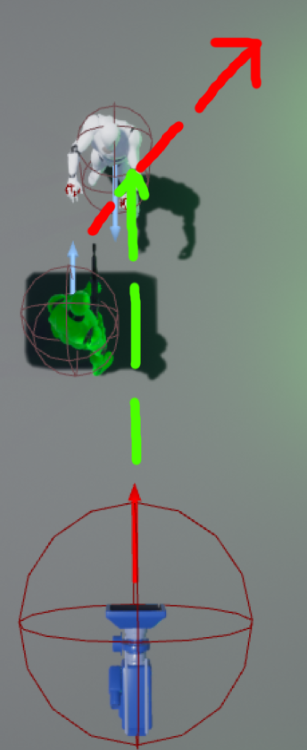 trim matrix
none of those mention setting up motionblur, or post process.
 unique finch
im going to share my code def need help
fallen wedge
@trim matrix , so the forwards velocity of the player exceeds x, then what?
Do you want a smooth transition to high motion blur, or do you want to blur the sides of the screen?
After we get back to below x, reverse the transition back to normal motion blur?
unique finch
@fallen wedge is too many branches going to decrease optimization
fallen wedge
uh well im gonna give you an annoying answer...
depends
trim matrix
@fallen wedge Any speed exceeds x. then i want motionblur.amount 1
fallen wedge
if your checking values every tick, make sure theyre necessary @unique finch
trim matrix
and when its below x. I want motionblur.amount 0
i dont want any smooth transition for now. I can handle it my self when needed.
unique finch
@fallen wedge im not checking them every tick though
fallen wedge
right, so what are we checking and when? @unique finch
unique finch
@fallen wedge boolean value
fallen wedge
perfect @trim matrix where are you stuck?
@unique finch i mean, can i get a rough kinda context
what exactly is happening
unique finch
imma share my code so you'll see
fallen wedge
okay
unique finch
so uh it looks complicated but looking at it it does a flip flop and then does two functions
A function looks like this
The "A"
fallen wedge
right
unique finch
"D" function looks like this
basically what it does is it turns off an off a variable
off and on
so when you press A it checks if the "Front" value is set to true and then sets it to false
same thing with d
the thing is
you can press d
and then press a twice and it looks to the front
it blends the cameras btw
fallen wedge
ok
unique finch
i want to fix that
fallen wedge
it switches the camera view depending on the key press?
unique finch
yes
fallen wedge
d -> a once works perfectly?