@hexed coral line tracing is just evaluating the things in its linear path and comparing any hit with a specific filter you've chosen. Like 'line trace for chairs'. To solve your issue, you would have to set different collision channels (filters) for each sphere. If the closer blocking sphere was in channel A and the back is in channel B, then line trace for B. And the result will ignore the front one. Is that what you meant?
#blueprint
402296 messages · Page 510 of 403
 brazen elm
 worthy frost

 tough cipher
omg thank you so much @worthy frost
 trim matrix
Let's say I have an array of objects stored that are each a square in a grid. I want to select one, but also store its neighbors. I've given each square an index ID and I can create a set of IDs that represent its neighbors, but how do I gather a selection from those IDs?
brazen elm
Loop through them with a foreach. Each time, checking if it's the ID you want.
Put that one in a new array, then find the neighbours by incrementing or decrementing from your original square. Place all the ones you want in that second array
trim matrix
oof that's complicated.
I tried but nothing's happening.
Looong
It does register I clicked it
And it prints the hex I clicked. But it fails to do jack didly else
 elfin hazel
If you want to work with a grid, I can recommend using a Map (key value pair), where the key is an int vector and is the coordinate of the tile, and the value can just be a tile reference.
To get neighbours you'd just add Tile + (1,0), (-1,0),(0,1) etc. Could be a Set for ease.
Got to sleep now though so can't elaborate much more.
 chrome orchid
how would i fix my character walking because i have one camera for multiplayer and when i press w the character walks forward but it feels weird because of the camera angle
 flat raft
@trim matrix sphere trace around the one you select. Use isOverlapping to get the neighbors. It's fast, it's easy, no math. 👍
trim matrix
Yaaa that's what I've been doing but unfortunately I found that it becomes problematic if I want to create a Civ map. You need to get the indexes so that at the endge of the map it will grab the one on the other side in a seamless way.
Unless you have a way of bypassing that?
This map index idea seems like a good one but unfortunately it appears to be failing to find anything but the first index.
trim matrix
As a starting grid, it's just 10x20 hexagons like so:
I can get it to trigger a selection geometry, but if I try to tell it to get the next index, it just goes to zero 😦
My map:
And then how that map id is used to grab the objects:
flat raft
So, when you select a tile, you want to just select the next one?
So if tile id 5 is selected, you just want to select tile id 6?
trim matrix
Yea pretty much
flat raft
or do you want the 6 around it?
trim matrix
That eventually yes but for testing and learning even getting the neighbor is good enough
 marble tusk
You're resetting the map every time, not adding to it
trim matrix
ooof good point
lemme check
Changed to this, no luck.
This should add each hex and id to the map every loop to make a hex, no?
marble tusk
I'd think so
flat raft
I can't picture what effect you're trying to do
trim matrix
No luck, if I click a hex, instead of adding it to the hex ID + the next hex, it does the hex ID I click and then Hex 0 😦
Basically I want to click a hex, create the effect, then add the same effect to its neighbors to simulate a region of affect.
Storing those neighbors in an array is also useful for stuff like movement of a unit when I eventually go into civ-like units.
Ideally I'd just have a mathmatical formula to gather all hexes around what I've selected, and be able to modify the hex and its neighbors.
I would totally use overlapping if it wasn't a map that had to select hexes on the other side of the board along the right / left edge of the map.
Cause the board would be like an unrolled globe essentially.
marble tusk
In that case you could probably have some sort of fake tiles on the edges that redirect you to the real tiles on the other side
trim matrix
That....could work. But wouldn't indexes just be easier?
marble tusk
¯\_(ツ)_/¯
trim matrix
If the map had them working, then I could just type in the math and bam.
:((((
But I will keep that in mind if I give up on indexes lol
I'm used to Grasshopper/Rhino3d Index system which was incredibly more easier than this lol
marble tusk
Just spitballing here. Instead of indexes you could store the grid location in a vector 2d for each tile. Maybe you could do something with that.
flat raft
How are you constructing the tiles?.. with the construction script?
trim matrix
Nope. As an event in my game mode:
If I click on a hex, it correctly prints out that hex's index number. But for some reason if I try to take that list of indexes and hexes and create a map, it fails
 trim matrix
The lower right is Index 0. Index 1 is the next to the left. I selected some other one though so I would not be trying to select 1.
The upper one is the one I selected.
It added the effect. But then instead of adding the effect to i+1, it added it to i=0
flat raft
It would be I + column count
trim matrix
Yea. Though I just maybe am not understanding how maps work to reference that.
flat raft
what are you saving in the map?
trim matrix
You mean the level blueprint?
flat raft
no the MAP var
trim matrix
oof no you mean the hex right?
Hex map gets the index and actor
At the end of the hex loop:
flat raft
index and actor of the ones around it?
trim matrix
Nope. Just every loop it creates a hex, gives it an ID, and then adds both to the map variable.
marble tusk
About the vector 2d, I was meaning you could save that to the map instead of the index. It would be like an index for both column and row basically
trim matrix
Hex ID there is stored as a variable within each hex.
So its casting to the hex, setting its value.
flat raft
I see
trim matrix
So when I click on the hex, it triggers this within the hex BP.
So I know the Hex ID is correctly being written because when I click on it, it prints the ID correctly.
Click on 0, prints 0, click on 5, prints 5, etc etc.
That part is fine
So now I want to take the Hex ID and use it as a map index, where each ID is able to fetch its specific BP_hex it is being stored in
That way, if I click say, Hex #5, my player controller will be able to store the 6 hexes around it by simply doing i, i+1, i-1, etc
Buuut can't quite figure that part out
trim matrix
Sure, first I grab the hit actor and do a filter to check if I'm clicking on a hex, after that, comes this part where I grab the hex reference and, as a test, I grab the i+1 and i-1.
Then I grab the location of both and spawn the actor that is the selection effect:
Here it's just for i and i-1
But the result is that i-1 is just read as i=0
no matter what hex is chosen
trim matrix
Good idea
It prints out the correct hexes
i and i-1
But it can't seem to get i-1's location
If I print out object name i-1 is none, meaning it's not making the map correctly then
flat raft
there isn't anything in the map, or the key was not found.
So make sure your map is getting set
Can I see the bp where you are setting the map?
trim matrix
Sure thing. The actor spawn here is the end of the loop that's making every hex for the grid.
So after setting the hex ID that's stored in every Hex, I then take that ID number and add it to the map with the spawned hex for every loop
If I understand loops correctly, this should take the unique ID and hex made every loop and match them for the map.
I also have an array of created hexes as a first attempt at doing this but Maps seemed easier
marble tusk
Honestly, you probably don't need the map since the Hex Obj array already has it. Just use that array and get the object from that instead of the map
trim matrix
I cant figure out how to call an actor in an array by an integer.
I'm new to Unreal's arrays sorry
Is there a way?
flat raft
you can store a obj, in each index of an array
trim matrix
I guess I'd create a sequence with 6 of these then?
flat raft
Array aside though... ur map setting looks okay
marble tusk
Yeah, not sure what's up with that. I've not used maps much, but from my experience with arrays it should work
flat raft
Check to make sure... right after your add... do a find
Also...make sure the spawn is returning a valid object
trim matrix
Unfortunately it's still creating the second actor at 0
flat raft
Print objectname from the spawn
marble tusk
Is your GMref set properly?
trim matrix
Yep. Set to my Game mode reference
Object name is none
It's simply not finding the i-1 value even though it is printing the correct i
flat raft
Ok..so ur spawn is broken
trim matrix
looks like 😦
But then why is it the right index it I click on one?
If I click a hex, it is setting the right number
flat raft
If ur spawn returns none, then it didn't spawn anything
trim matrix
I mean the Hex is there tho
First click = print correct hex. Second click = can't find
flat raft
It does spawn all the hexes, ya?
trim matrix
Yep
trim matrix
Just changed it to print the object name instead of hex ID. Deff working.
flat raft
Can I see ur print ?
flat raft
I mean where it spawns
flat raft
Add a print after the spawn
trim matrix
Print object name?
flat raft
Ya
marble tusk
Are there any errors in the output log?
trim matrix
Not that I can see other than my lighting haha
trim matrix
Wait nope the names = the loops its good
Yea the count matches
And I add them to the hex array
this mega confusing lol
flat raft
so... from here.. we try another approach...
On For Loop completed
add a For Each Loop
and hook up ur array to that.
then For Each > Add to map
this should fill ur map up correctly with the correct index
flat raft
Nope..not that
trim matrix
flat raft
After the spawn.. add the items to the array ... like u had before
trim matrix
Like so?
trim matrix
aye
flat raft
Yup
trim matrix
sorry about that
trim matrix
flat raft
perfect
trim matrix
TY for walking me through this lol
flat raft
No prob lol
ok... now we shouldn't assume it was all added... we need to check to make sure
from ur Hex map.. create a Get Keys Node
trim matrix
aye
flat raft
Yup
From the completed of the loop there... add another for each
This is just for checking... you can delete this later
Hook up the keys to the loop
trim matrix
Doing good?
flat raft
Yup
Add a print to the loop body
U are print array element
this should print out all the indexes
flat raft
how many should there be?
marble tusk
You're not using the loop you just made there
trim matrix
230
flat raft
Oh yes... nice catch
trim matrix
Yea looks like it's skipping a loop as 209 is the penultiamate
flat raft
Now u should get all the indexes of ur Hex
trim matrix
printing to 230
flat raft
cool.. now we know ur map is good
let's just check to make sure the objects are there also...
It should be.. but let's make sure
marble tusk
Where are you setting the gamemode reference?
trim matrix
oh snap you might be onto something @marble tusk Its a direct reference, never set
Should I use a cast to?
trim matrix
BEAUTIFUL
Thanks folks!
Next is using this to start making some selection noise to generate a map for the game :))))
TIL: always make sure your references are set to update the work they do at the start
(don't mind the different print outs, one is set to name, the other ID)
Night!
I'm so happy now
marble tusk
For selecting all the tiles around you'd probably need to use a modulo somewhere with the either the GridY or GridX
trim matrix
yep!!
marble tusk
Or setup the map to have a vector 2d for the tile coordinates
trim matrix
I've basically been reading this guy's notes and trying to recreate them.
Unreal Engine Forums
Build powerful visual scripts without code.
One step at a time 🙂
Learning a lot fam
TY
marble tusk
I was curious so I tested it myself. Using a vector 2D for coords instead of an index
Still need to setup the modulos so it loops around when along edges
 still trellis
any way to get around the "No value will be returned by reference." warning that comes up when passing a struct by reference through an interface?
i can probably pass by value but that seems annoying to be making new structs everywhere
marble tusk
Okay, I figured out the modulo thing so it loops around properly. Had to subtract one from the grids since it starts at index 0
@trim matrix There ^
trim matrix
wowowow this is great stuff!
gotta sleep now but I'm gonna explore this avenue too!
Thanks for taking the time to document it for anyone else too!
marble tusk
I'm not even using the Hex Array, just the Map, but I added it anyway just to copy what you were doing
 bleak vector
it looks like a keyboard 🤔
the game's theme is you clean the keyboard of the junk that gets betwen the keys, right? 🤔
marble tusk
I thought so too when making it. Didn't want to make a hex shape for a quick test 
Also, to add to that, you could customize the area you get around the tile by changing the array of offsets to just the surrounding tiles you want to get
I'd also probably save that array as a variable
 humble scarab
How do I get the bottom "Event Toggle Run"?
 rapid lava
@humble scarab the Event Toggle Run? Like how to get it to trigger in blueprint? Or are you following a tutorial and you want to figure out how to get it?
humble scarab
I'm currently following a tutorial

Project Files : https://www.patreon.com/CodeLikeMe/posts?tag=source code
Support my work on Patreon : https://www.patreon.com/CodeLikeMe
Today, I am going to add 3 stages of horse movement , walking, Trotting and galloping. I will implement events to control these 3 stages a...
At 4:40
rapid lava
It looks like that is from something custom going on with something called "BPI Character"- it could be something from an earlier tutorial or something.
If its just a boolean flip (which it might be) you can create a custom event by right clicking in blueprint and searching for "add custom event" then you can name it Toggle Run... but I do not know if theres other things this tutoirals toggle run does behind the scenes using C++ or anything.
(if you're trying to keep track of a "is running" boolean, basically use the toggle event to swap it true and false depending on the input given to the event)
humble scarab
Like this?? I will have to dig into this guy's older tutorials it seems
I don't know why watching back didn't come to mind haha
rapid lava
(actually on further investigation "BPI Character" might be an instance of the character... but unfortunately I don't have enough information on the exacts to offer any more information on what to do. D: maybe someone else knows about this system?)
But yes thats how to create a custom event, which you may or may not need depending on if you go back to earlier tutorials. Also if you left click and look at the details you can add inputs to the events! (like how the example has a boolean called "Enable")
humble scarab
Thank you so much! I will defiantly look deeper into his older tutorials, it seems I may have found the correct one
marble tusk
BPI stands for BluePrint Interface
That icon in the top right of the event is saying it's part of a blueprint interface
marble tusk

What is a Blueprint Interface in Unreal Engine 4 Blueprints?
Source Files: https://github.com/MWadstein/wtf-hdi-files
humble scarab
Thank you!
bleak vector
bum bum bum bum bum bum tamatoes?
 fallow orchid
Hi! Launching URL in VR cause to lost game focus. is it possible to fix it?
 untold anchor
Any idea what's preventing my spawned actor's event tick from working?
 maiden wadi
@untold anchor What are you expecting it to do?
untold anchor
i'm expecting it to tick lol
maiden wadi
It is, it's setting a bunch of variables.
untold anchor
it's not though :/
what it should look like
or example of what it should look like
difference is, the 2nd screenshot is an actor in the scene
1st screenshot is a spawned actor
so my guess is, it's something special about spawned actors
maiden wadi
The editor might not be looking at the correct instance. Try a print string on the end of your tick. If you get a bunch of prints on screen, it's working.
untold anchor
that would make sense
maiden wadi
Does it print anything? If not, you may have a setting changed somewhere. But tick works at default for any actors spawned or placed in editor.
untold anchor
yea, it prints , but now i'm even more confused as to why i was even thinking that to begin ith lol
with*
so, what i have is a weather blueprint, when it's raining, it spawns a single lightning bolt actor that has a niagara particle system in it
i set up variables, hooked those up in niagara, all good
then i set those variables up in the blue print and made sure they connected with the niagara system, all good
then i made sure those variables were editable via the weather blueprint, all good
somehow though, the variables are being changed (i montiored them while playing)
but yet, they aren't changing the systems parameters
but if i change those same variables in the weather blueprint, they effect the niagara system correctly
but during play, they aren't updating the niagara system or something
cuz they are changing, and w/e i put in them before i start playing, they take those, but if those variables change during play, niagara isn't updating to those new ones
hmmm
weatherBP
lightning BP
niagara variables
ignore that i don't have something connected on the lightning BP lolol
the variables are being pushed from the weather BP, to the lightning bp, and are updating the lightning bp's variables
maiden wadi
@untold anchor Well, right now you're telling the Niagara system to set a bunch of variables from this blueprint's local variables, then you're just changing this blueprint's local variables on tick and never reupdating the Niagara emitter's variables.
untold anchor
and at begin play, they seem to accept those variables from weather bp > lightning bp > niagara
but not during play
oh
maiden wadi
Because you're not telling them to change during play. You're changing this blueprint's local variables, not the emitter's.
untold anchor
how do i do that?
maiden wadi
Pretty much the same way you did with Beginplay.
untold anchor
oh, so do that each tick instead?
i thought set niagara variable just defined it, basically linked them up
and it'd be continously looking at those variables for those emitter variables
i see i see
so that should do it then, you think?
omfg i love you, yes
this has been driving me crazy for 4 hours
i've scowered every damn website i could find on the topic XD
my hero
humble scarab
How would I go about adding change-able markings customizer on an animal model? I wasn't able to find a tutorial about this online
I want to be able to layer the markings too if possible
maiden wadi
@humble scarab You mean like selecting or randomizing different colored spots on an animal?
bleak vector
very neat spaghetti wrangling @untold anchor 🙂
humble scarab
Yes, like adding a marking, I will get a quick example
maiden wadi
There's a "TextureObjectParameter" for materials. You could set that in the material instance for the animal's mesh's applied material. Use it in the material to 'overlay' on the rest of the material.
I only understand the vagueness of materials, not so much the intricacies yet. There may very well be a better way to do it, but that'd be my first thought. You could either do it with a simple black and white masking texture, or even just add one texture to another for more textured designs.
humble scarab
Thank you! I will defiantly look into that!
untold anchor
@bleak vector lol thanks i try to keep my spaghetti under control XD
 cinder steppe
hi guys i need a little help with gameplay logic. Correct me if this is the wrong place to ask
A beginner to unreal and gamedev in general, I'm attempting to make trigger events "optimized". For example, a trigger box that can handle many types of trigger, be it interacting with a chest box, or perhaps chatting up an NPC, among many other stuff. Also, a way to add "new possible trigger types" at ease.
I'm considering using switch states to handle the trigger types which got me thinking, how should one handle individual functions for individual outcomes in the possible future where a games becomes somewhat.....massive?
I can have a general trigger to tell players NPCs are NPCs but what is a good way to handle the many possible things an NPC can do, like give quests, open shops, etcetra?
If this cant be handled by blueprints alone and requires coding, I'm fine as well
Thanks for taking the time to help out
maiden wadi
@cinder steppe I think that what you might be looking for is an interface. Very easily done in blueprint.
 untold fossil
Is there a way to render a camera view to a new texture with a transparant background? (Need this for icon generation)
basically got a simple actor set up which has a blutility button and a reference variable for a camera actor. I select the proper camera I want to use for the icon snap shot, click the button and it should create a new texture at a certain resolution of a mesh and not render the background and leave it transparant (as if you would render with custom depth, high res screenshot)
Is that possible?
 jovial bobcat
Is there a way for a bullet/projectile to ignore the player when it spawned cause my bullet keeps on hitting myself and i dont want to turn off it collison for a split second when it spawnes, There must be a better way to do this right?
 glacial eagle
You can add each actor to the "Move Ignore Actors" list of the other.
But you'd need to do it before fully spawning, not sure if you have that control in BP.
cinder steppe
@maiden wadi saw a little of how interfaces can create "generic" type functions? but still a little complicated for me. Could you give an example?
 graceful forum
Hey all, I'm trying to use a transparent image with drop shadow around a circle to use as a circular progress bar as a material. I'm able to make the percentage but the alpha of the image is horrible and showin like the image below. I'm using texture sample and setting the texture from there. Is it possible to show the image as the original?
This is the original texture
untold fossil
Is there a way to render to texture with none inverted alpha? By default the only option to render final color is with alpha inverted. How can I render it with alpha NOT inverted?
maiden wadi
@cinder steppe Interfaces are less 'generic' function and more 'empty' function. Normally you would need a pointer to an instance of a class to call a function on that object right? That pointer would also need to be the correct class type. In this case, say you have two class types. One is inherited from Actor, another is inherited from Character. The Actor inherited class is an interactable that you can pick up. The Character inherited class is your NPC base class. What you do is create an interface. Inside of that interface is an empty function with specified inputs or returns, or maybe even none, just a simple empty event call. You implement this Interface in both of these classes, the pickupable and the NPC. If you're following the inheritance, the closest class to these two is Actor. Since one is Actor>Interactable, the other is Actor>Pawn>Character>NPC. You don't have a function or event in Actor that you can hook into. Since creating a common class is a huge hassle or in some projects impossible, you use this interface you just made and treat it's functions like it's from an inherited class.
Wall of text.. But here are some pictures to go along.
I have this interface, it has a couple of other functions but this one is one I use to interact with things simply. It has no returns and no inputs and you'll note that you can't put script/code in these functions/events.
My player character does a line trace, hits an actor. If it's valid, it tries to call this interface function on it. If it doesn't have this interface, nothing happens, doesn't matter. If it does...
This gather class will add items to my character's inventory. Child classes of this gather class set it's BaseGatherItems array.
This ContainerBase class, tells the hud to open a widget so that I can swap inventory items with this container.
Both use the same function with the same call with no casting or needing to know class first, but they are completely different classes with only Actor as a common parent class.
trim matrix
Hm, are there any actor-specific functions?
maiden wadi
What do you mean by actor-specific?
trim matrix
for example the parent actor class can have functions, but the child actor classes can have their own implementation and overrides for the functions or events
I have a very little knowledge in programming, but I suppose it works like that
maiden wadi
There are quite a few default functions that you can implement in actor inherited classes. If you need your own, then you can create them yourself as well.
trim matrix
yeah, that was helpful much, thank you
humble scarab
I can't for the life of me find a way to make his feet line to the terrain properly

Event Graph:
Anim Graph:
trim matrix
try placing it well in the editor, as far as I see the movement is good, but the position of the mesh is a bit screwed up
I mean the feet, it's gotta be the position of the mesh
humble scarab
In here? Please forgive me, I'm still quite new to all of this
humble scarab
Ayyyee. moving him forward did the trick! Thank you ❤️
trim matrix
no problem
untold anchor
any tips on how to make a direction light always aim toward the players direction?
(it's for the purposes of faking lightning lighting up brightly and casting shadows when it flashes)
 fallen wedge
maybe in level blueprint get rotation of character, then apply that to directional light? (still in level blueprint)
untold anchor
i wish it were that simple
the lightning's location is random, i'll be tying the direction light to the location of the lightning
then i need to rotate the light's direction towards the location of the player
if that makes sense
fallen wedge
👀
the second thing u said there, you'll be typing the directional light to the location of the lightning
could you expand on that?
fallen wedge
ah lol
untold anchor
oh i'm sure it is, but wracking my brain trying to think of how i'd do that
i wish direction lights had a "target" option
 supple dome
Normalize(PlayerPos - LightningPos) gives direction from lightning to player
fallen wedge
im not sure how that works
doesnt that just give the length between them or something?
untold anchor
so take the player position subract the lightning position
supple dome
no, the direction @fallen wedge
supple dome
if you need the rotator you can MakeFromX
untold anchor
hmm, i might need xy
but yea
fuck yea
that's awesome, you rock, gonna try it now
@supple dome this look about right?
"start position" is the starting location of the lightning bolt
and i want pitch and yaw to be taken into account for the direction of the light aiming
supple dome
yeah im just not sure it will work with MakeFromXY if you dont feed the Y, cuz it cross product one by another inside
untold anchor
yea, i forgot to feed the Y XD
supple dome
also assuming camera manager has an actual location? i never tried to use it
the manager is not the camera itself right
untold anchor
yea it does
oddly enough
i used it to keep rain over my player lol
since really, i want to keep the camera under the rain
so, as for the XY
i don't just feed the normalize into both inputs, right?
trim matrix
https://www.youtube.com/watch?v=i9Rb6jtMDGw&feature=youtu.be i encountered a bug with my reverse time code i had followed a tutorial and it doesn't seem to happen in the video

taking a screenshot of
untold anchor
i should probably break the normalize and then put the floats connceting to the correct broken pins i think?
untold anchor
there, i think that should work (maybe) lol
090 i'm assuming you're building an array somewhere and that's what you're calling from?
i see you calling from an array, but i don't see anywhere where you're building said array
if i remember how that type of concept works, you're storing positional and rotational values in an array over time
and then dumping the oldest values after so long
or a certain amount of values stored rather
and then you're just changing position and rotational data forward linearly or backwards linearly through that array?
 low marsh
hi i really hope someone can help me with this as i'm a massive noob at this. i'm setting up objects that can ne pushed and pulled the pushing works but i can't seem to get the pulling to work. i want my character to pull the box whilst still facing forward but he just keeps rotating, any advice on this would be great thank you
there is a gif of what it's doing
set velocity
input
blueprint on my pushable object
untold anchor
typically this area and
this area are to blame for that
first one is on the character(self)
and the 2nd one is on character movement
not saying my screenshots are what you want, i'd check and uncheck the boxes to see if you get he behavior you're looking for
just screenshots of the area to look at
maiden wadi
I'd almost say get the look at rotation from the character to the pushable, and interp the character's rotation towards it, and set the movement component not to affect rotation by doing what Mippi said, disable Rotation Yaw, and don't Orient rotation to movement.
Then when done pulling, reset your movement component values.
low marsh
ah thank you i'll give that a go now
untold anchor
and those variables i posted are blueprint editable
so you can even temporarily change them while you're pulling or pushing
trim matrix
Realised what the issue was after following the tutorial again instead of trying to guess what he would do next and seeing if it was right
I'm an idiot
@untold anchor yeah this video works my storying the objects vector location.
It'll then reset to last stored or move back aka forward
maiden wadi
@trim matrix I made a similar thing a while ago. It was just an actor component that could be attached to pretty much anything. Stored their locations and rotations a few times a second into an array. Then a function could extrapolate where that object was and which way it was facing a few second before hand and could also 'play movements in reverse'. Neat little thing.
trim matrix
Yeah the main mechanic of the game I'm making is reversing time but gotta think about how to design puzzles around it
Snice catch is the players blind due to the theme of the project being limitations for shcool.
trim matrix
Nvm I think the issue is the code in the tutorial
I re did it following what he did and it still didn't work giving me the same issue
its getting stuck with the index
somehow
meaning it becomes a one time action which does not like repeating again
nor going up or down
maiden wadi
Looks like you never stopped it at the end of it's movement so that it could go back to simulating physics.
trim matrix
hm
so that's the issue?
is there a node
which would turn simulating physics back on
bc i guess when its = 0 again it freaks out somewhere etc
maiden wadi
How are you moving it backwards? I assume some sort of looping over a vector array?
trim matrix
BlueprintUE
BlueprintUE
Essentially its moving backwards based on the last value etc.
His video is more of those tutorials that are
Monkey see monkey doo he doesnt really explain what its use is for just this is what you need to use
I dont really have a good understanding of how it works tbh 😅
input action rewind is just a custom input i made
thats mapped to the mouse left click button
maiden wadi
A lot of tutorials are really shitty like that. Specially youtube ones. Less teaching, more people showing off.
trim matrix
yeah
could you tell me how you're reversing time system you made works then? it might be more useful than this one
maiden wadi
Okay. I think that I understand this. Pretty memory intensive, and I could be mistaken but I wonder if this would hold up under fps fluctuations.
trim matrix
fps fluctuations?
oh
like when a computer is too fast
for the game so it does it faster or slower
maiden wadi
In short, when it's not rewinding, every single frame that is drawn to the screen will save a transform which is the location/rotation/scale of an actor. Then when you tell it to rewind, it'll use every frame to reverse it. Thus, if you record them at 90FPS, but only reverse them at 30fps, it'll take three times longer to reverse than it recorded.
trim matrix
ah
so i need to add a Time.Delta time to it somewhere like how you would in unity
is there a node for that?
maiden wadi
Possibly. Let me try something.
trim matrix
ok
 jolly sentinel
Is this the right channel to request a tutorial?
trim matrix
If you got a issue with code that's pretty much what this channel is for
trim matrix
@maiden wadi am i setting delta time correctly because i am still getting the issue https://www.youtube.com/watch?v=Z_up8p1mayM&feature=youtu.be

 barren relic
@barren relic in the video series you recommended me, in the third vid the guy does some math with blocks but i can't seem to find the right math block for the top one.
@minor sand hey mate! I haven’t had time to go through the full series yet but I can try to recommend some other tutorials if need be.
trim matrix
I found a similar tutorial
So gonna try that one as the comments seem to recommend it
barren relic
Sounds good bro!
 minor sand
Sounds good bro!
@barren relic send one if you can. i have learned just a small bit from the one u recommended becuase he skips over some stuff sometimes
maiden wadi
@trim matrix Well. I think I managed something pretty good based on my old one, but adding in the physics velocities.
 heady dagger
Can someone help me and tell me why the "mushrooms" in this case aren't showing in the level itself but work "fine" in the BP preview?
Even when Playing I see no spawns in the actual level...
trim matrix
@maiden wadi could I see it apprently stuff changed between version
So it dowsnt work the tutorial I looked at anymore
https://youtu.be/6RSPimgMW7c
I'm using 4.23.1

First of all, sorry for my awful mic quality! The hardest part of this whole recording was finding a microphone I could use with my computer (in the end I had to settle with the one on my Vive...)
In this tutorial I will show you how to create an object that records its loca...
And what hes put there functions looks different and acts differently
Sorry for bothering you about this still
maiden wadi
@trim matrix It's all good. Bear in mind I haven't done any extra testing on this. Was just about to set it up to make sure it runs multiple times without issue. But here is the majority.
trim matrix
I'll try to use it when I'm back at my computer
So this is all in the same blueprint right?
maiden wadi
Correct. It's an ActorComponent. And I do have a bug. Repeats old recalls, need to find that really quick.
chrome orchid
how would i make a game mode where you have to the the last one alive to win
 orchid zinc
Any way to access content from custom plugin paks using bp?
maiden wadi
Oh. Whoops. I wrote the remove from Array part wrong... Only removing half of the indexes.
maiden wadi
@trim matrix Okay. I cleaned that up quite a bit. Reposting new images in a moment.
I think I'm going to actually do this in a C++ actor component too. Have another project this would be very fun on.
 sick galleon
Im a bit confused about blueprints and prefabs. My understanding is that blueprints are basically classes, so if i create an object in the scene, and add that blueprint on it, its basically an instance of that class.
What I dont get is how to spawn an instance of a class. Lets say I made a "car" class, and made various instances of that class with various parameters (car with a civilian car mesh with high speed value, car with a van mesh with a low speed value ...). Then I cant turn those into blueprints themselves, because they're already using the "car" blueprint, and besides the only way that I know of to spawn something is "spawn by class" which means it will just spawn an empty instance of that class.
I guess Im misunderstanding how to properly use blueprints ?
trim matrix
i have this setup in my gamemode when my player is killed by my KillZ volume but then i spawn a new player but thing is it kills all my references so i cant keep track of my lives and hp
any suggestions?
@maiden wadi thanks and as a tip for the future there is this site i find useful for when posting blueprint code https://blueprintue.com/
BlueprintUE
BlueprintUE.com is a tool for sharing, rendering and rating blueprints for Unreal Engine 4. UE4 is a game engine which use visual scripting called blueprint.
its like pastebin
but just for blueprints
maiden wadi
@sick galleon You have most of that correct. A blueprint is just a new class that can inherit from a CPP class or another blueprint class. In your case about cars, you can handle it one of two ways. Either create a shell class and populate it's needed variables to work correctly. Or make a base parent class and create child classes from it and change their default values.
@trim matrix You can ask if your character reference is valid, if not, get player character. If player character is valid then set your character reference from it. If it's not valid don't do anything.
sick galleon
@maiden wadi so the only "ready to spawn" thing you can store as an asset is a class ?
Like, If I made a shoot'em up, and wanted to have preset enemies groups with X small ships and Y big ones, each having their own settings, I cant just take the whole group and turn it into some sort of prefab ?
maiden wadi
@sick galleon Hmm. I remember reading something about prefabs somewhere.. Might have been a marketplace thing though? I know you can group simple stuff like static meshes. But for actual actors in a prefab group I'm unsure.
sick galleon
@maiden wadi Ive just found something somewhat hidden in a menu that allows you to mamke a blueprint from a selection of multiple objects, I guess thats what Im looking for
I have to admit the object/blueprint policy of Unreal is not really intuitive for me, coming from Unity.
Also I dont know C++ so im kinda stuck with blueprints :|
Thanks for your help
maiden wadi
@sick galleon I don't know anything about Unity. But I can say this, try to keep an open mind. Unity and Unreal were designed with very different ideals in mind. Unreal makes a lot of sense once you've spent some time with it. And as for C++, if you come from Unity and used C#, you could be writing C++ for Unreal in just a few months. Even so, I'd strongly recommend learning with blueprints since they give a very structured way to learn the Unreal design method without other preconceptions. Not to mention they're very easy to use and aren't often prone to typos or missed ;
 brazen burrow
Hi guys. I was wonderimg if someone in DMs could go about showing me how to make it where people can change markings/textures using a button. I'm makimg a character creator like so:
sick galleon
@maiden wadi Nah, Im more confortable thinking that Unreal is really badly designed and it has nothing to do with my own habits and/or incompetence and general uselesnness.
Jokes aside I suppose not having prefab is a deliberate choice so that everything is a class and works with the same logic. If the grouped object to blueprint thing I found fit my needs, I think ill be fine.
maiden wadi
@sick galleon Ah. I found it. This is what I remembered. It seemed rather interesting at the time I found it. Never fully got around to trying it though. Also not sure from the description if it includes being able to use Actors. https://www.unrealengine.com/marketplace/en-US/product/prefabricator

Prefab support for Unreal Engine 4
trim matrix
Authaer was using the wrong widget reference lel
make a respawn interface function
for the widget to set reference even thoughthat was unnessisary.
 zealous moth
is Spline mesh component the same as HISM or ISM? As in, do I add it once and then grow it or is each spline mesh component an individual component?
 static charm
individual comp
 whole raptor
Welp I coded up a long ass weapons system using data tables to spawn the actor and tried to pass it random values. It seems that when you call the Spawn Actor from a Class Variable all of your exposed variables don't get exposed anymore (Which makes sense, since it doesn't know which class you're casting to) How would I go about settings those variables on the actor once it's spawned in? Can I use the return value (I'm guess it's an object) to update it's variables?
The return value of SpawnActor that is
zealous moth
@whole raptor
whole raptor
I know where it's exposed at
the exposed values disappear when you spawn actor from a variable since it doesnt know which variable you're using
zealous moth
oh my bad, i cant read for crud
whole raptor
zealous moth
I had this issue, I used a parent-child relationship to resolve it
i created a new parent for them with the values and the children would have access to them
whole raptor
I ran into an issue there. Maybe you can help out with that too
Wait I might be able to work this out
zealous moth
^_^
maiden wadi
I generally create a custom event and create inputs for the variables I need to change in a class like that. Spawn the actor, cast to it's common class with that event in it and call it. Treat the event like your beginplay.
zealous moth
Or, you can do an inverse declaration
On spawn, the spawned class fetches the player character and sets itself
whole raptor
Hmmm
Still pretty new to UE4 but I understand what you're saying, trying to work it out conceptually
If I create an event, where would that event reside?
zealous moth
general common classes to refer to are:
- player controller
- player character
- game mode
- game instance
maiden wadi
The event would need to be in a class that all of those classes you're trying to spawn have in common as a parent.
whole raptor
Structure is LootManagerBP -> WeaponGeneratorBP(Spawn's the item based on a variable, passes values to spawned item)
So I have a firingweaponsbase, and this projectile weapon (that I'm spawning) is a child of it, so put the event in the parent
how will it know which child actor to put the values into?
since there could be several
whole raptor
yeah they also show up on the variables on the left
 white crypt
they will inherit all the logic from the parent and will use their own values
whole raptor
im saying from my weapongeneratorBP, how do I identify the correct child BP to set values to?
child BP of FiringWeaponBase (which is ProjectileWeapon)
Spawn Actor has a return object, so I'm assuming that's the object that spawned. If I use an event, they it would update all children, right? (Which is not what I want)
white crypt
you want to set specific values on spawn?
white crypt
you have to expose those variables inside weapon bp class
then you will get more inputs in the spawn actor node
whole raptor
they're exposed
maiden wadi
You can't set exposed variables when you use the pin like that.
whole raptor
yep
maiden wadi
WeaponBP variable. All of those are children of the FiringWeaponBase?
maiden wadi
Put an Event there. After spawning it, use the blue pointer to cast to the FiringWeaponBase, and call that event. Use that to input the other variables.
whole raptor
perfect, thank you 🙂 I wasn't understanding how to reference the object to pass the variables
maiden wadi
It's not exactly like expose on spawn though. If you're using a construction script, it won't work. You'll need to do any setup that relies on those variables after that event call.
whole raptor
nothing relies on it
maiden wadi
Then it should be fine to just input them through the event and set them on the other side.
whole raptor
nothing will be called until the weapon fires
white crypt
oh i thought you wanted to do smth like this, https://prnt.sc/txckae
 maiden wadi
Right click on the Class and promote it to variable. It'll break the exposed variables.
white crypt
might need to refresh the blueprint for exposed variables to appear
if im thinking about the same thing..
whole raptor
lol it doesnt work that way
if the class is set in a variable, it doesn't know which class it's going to choose, which means it doesnt know which variables to expose
white crypt
you can cast to that class
whole raptor
that's why they dont show up when you use a clas variable
white crypt
then the spawn actor node will know
whole raptor
can you cast to a class with a variable?
all the cast-to's I've seen have been hard set
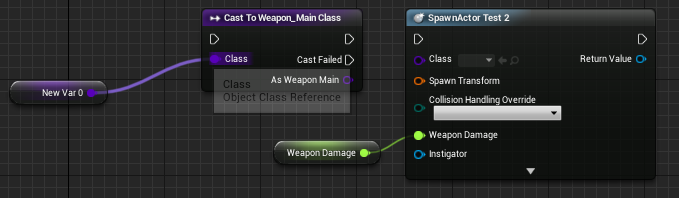 maiden wadi
Oh. That does work. Well shit. Taken to school.
I always wondered why the fuck anyone would ever cast a class. Now I know.
whole raptor
you cast to the parent then?
white crypt
yup
i didnt want to argue with Authaer at first and make a fool of myself since he knows alot 😄
but here we are, take that 😄
whole raptor
o?
change the variables before spawn, that way when it spawns it will have the inherited values?
white crypt
if you are setting the values like in my example then you dont need to set any values inside the child
because the "weapon damage" will overwrite them
whole raptor
And if I generate a new weapon using this, it wont override the previous ones?
 boreal pilot
i made a dash mechanic for my game and i want it to trigger particles, how can i do this?
i havent made the particles yet either
but if i had
how would i?
white crypt
https://prnt.sc/txcqt8 you could add them as a component

and toggle visibility
between dashes
i think thats a performance friendlier approach, you could also spawn an emitter on each dash
boreal pilot
is it spawn emitter at location?
white crypt
depends on how you want that particle to act
if it stays at the place after it dashed then yes
if you want it to follow the character then spawn emitter attached
and select a socket/bone to which it will be attached
boreal pilot
my game is 2d, so how would i attach it to a component
white crypt
you could add a component as a reference point
it could either be an arrow or a scene component
white crypt
yes but then it will probably use your actors root location
which might be at your feet, you could make some small adjustments if you want for it to be higher, like get sprite - get world location - break vector - add to the Z axis and make vector again
white crypt
@boreal pilot https://prnt.sc/txcubg
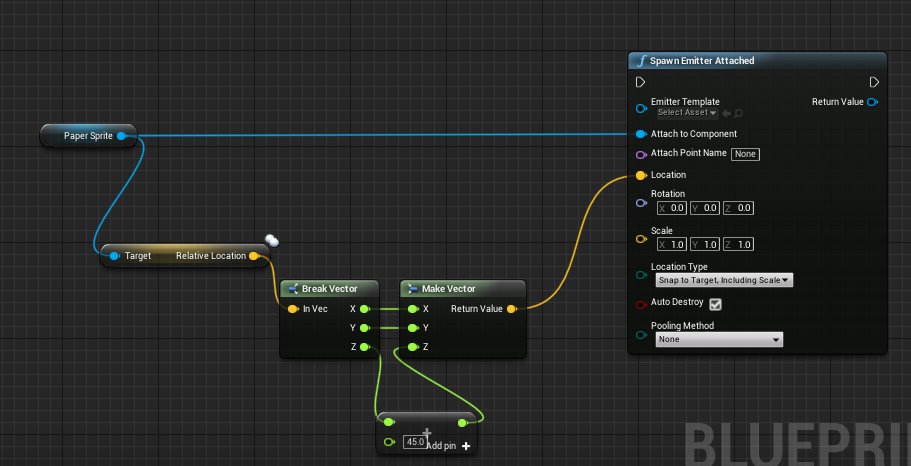
something like this
ofc you might want to set your desired location if needed
boreal pilot
whats the addition
float + vector?
nvm
i dumb
ty
i have no idea how to make particles so this gotta be fun
white crypt
try looking at niagara because the old particle system is/will be deprecated
boreal pilot
how do i use that?
white crypt
just google ue4 niagara tutorial, cant help you more with that because i've never used it
boreal pilot
okay
white crypt
im not even sure if spawn emitter is used with niagara... but you should find some info on the net
 hexed coral
what variable type do i use for user interface materials? I used material instance and that didn't seem to accept it.
 subtle nova
I'm trying to figure out why my cast is failing to the pawn owner. :/ From all I can tell, the character BP's mesh is using the correct Anim BP, but the AnimBP is failing to cast to it.
@hexed coral try setting the Material Domain to User Interface.
hexed coral
the material domain is already user interface. I wanted to find out what variable type do i use for Blueprints.
When i set the variable type to material instance, it doesnt seem to accept it.
boreal pilot
i cant make a particle for the life of me
hexed coral
@boreal pilot What particle are you trying to create? Also, ask #visual-fx or #niagara channels they can help out.
boreal pilot
ah
i am creating a dash particle
so when my player dashes it does it
i have the blueprints done
just need the particle
hexed coral
try looking for sword trails instead as that might give you the dash effect you need but ask on those channels i metioned earlier because there are multiple ways to create a dash effect and it heavily depends on what you're after.
There's also this forum: https://realtimevfx.com/
 whole raptor
Oh boy I might have messed up bad. I made an actor component blueprint that spawns an actor off a custom event. Is there any way to get a return object on an event? Or another way to get a return object from calling that blueprint?
Or did I choose the wrong blueprint to make this into?
hexed coral
use functions or fire another custom event??
whole raptor
if I used a function then I would have to put it into my player blueprint, and other blueprints would have the same problems getting that info though, right?
how would you use another custom event? Just pass that into a variable into the blueprint i need the data on?
whole raptor
Right, but not in other BP, so for example my lootcontroller blueprint wouldn't be able to access a function and get a return value from say my playerBP
Or if they can, then I can just put it all in a function in my WeaponGenerationBP
hexed coral
i think it can so long as you can reference the instance of that bp.
you have to reference the instance of that BP for custom events as well.
whole raptor
oO yeah that does work
ill just put it in a function on the weapongenerationBP and get the object that way then
TY!
hexed coral
yeah functions and custom events work in the same way the only difference is that function has a return node. 😆
 modern cove
Just to make sure: I used to have an Event Tick until I moved it to a function that trips when needed. I didn't delete the Tick; just snipped the white wire connecting it to the big graph of nodes. That keeps it from eating any CPU power, yes?
hexed coral
is the function still connected to the event tick?
As long as the function doesnt have any connection to event tick then it should be fine. you're saving performance.
boreal pilot
i have punching setup and have sounds i want to be played, is there a way to make it so it has a 50/50 chance to play one of 2 sounds?
modern cove
no.
I left the graph there in case I wanted to run some experiments using the stat game tracker. But I snipped the white wire
sorry needed a minute to get the picture
trim matrix
anybody know a way to move forward without setting axis mapping? As in press a button to move forward?
whole raptor
You dont want to press a button to move forward?
Do you need to have your speed set, or can you warp?
You can use teleport and move per tick, I think that's pretty dirty though
trim matrix
@whole raptor I have a movement system already, this is needed for AI reasons. I need my AI to be moving forward in order to vault
whole raptor
How are you handling AI??
trim matrix
the problem is once the AI reaches the wall it stops moving forward
I am using the behavior tree
whole raptor
So you need it to vault over the wall? Are you asking how to get it to vault over the wall?
trim matrix
No, there's already a vaulting system in place. In order to vault you need to be moving forward
The reason is because the vault system utilizes the "Get Player Movement Input" node
whole raptor
addactoroffset
trim matrix
This will cause the AI to constantly move forward?
whole raptor
with a timeline, over a set time
trim matrix
I'll give that a try, thanks
whole raptor
i think that's what you need, not sure though, never done that before :/
trim matrix
No sadly AddActorOffset Doesn't effect the "Get Player Movement Input" Node. But thanks for the help
even if the character is moving the XYZ will still have a vector value of 0
hexed coral
@modern cove yeah its fine. you're saving performance.
@trim matrix I think movement should work without axis mapping. you just reattach the execution pins for movement functions to the button you want. try it out with the third person template
 spare wyvern
So my AI's starting animation is too high. I can open the animation and adjust the local location Y which should fix it, but it doesn't want to save the changes. Is there a trick making it save the change?
 reef mist
Hi guys, I am testing out some stuff, and I want to know if there is a way to tell if a physics object has stopped moving. Like say you have a box and it falls on the ground, the moment it stops bouncing around
 viscid ember
How are you comparing Blueprint Files? I have a project with some blueprints and someone made a copy of that project and edited the blueprints. I know we can diff using the source control in UE4, but is there any other way?
zealous moth
I'd like to learn how to build walls and such using materials and shaders. Anyone have a starting point or resource?
viscid ember
You mean that you want to make a material for a wall @zealous moth ?
zealous moth
more like I want to learn to grow a vine or have a wall being built animated by shaders
similar to thishttps://www.youtube.com/watch?v=HY5SjX3f-JA

Wishlist Lucen on Steam: https://store.steampowered.com/app/1264620/Lucen/
Around 6:40 I skipped a step - the scatter node on the left that the normals are transferring to is 1500 points scattered onto the polyreduced vines geo.
I had an idea for a setup the other night and...
this is done in all shaders
viscid ember
thats pretty cool stuff
do it 100% on UE4 I think you would need to make a shader that can paint over something and then have the logic of how it will grow in a blueprint file
this way you can divide your logic into shaders and bp and should not suffer trying to make everything in the same spot
zealous moth
well, i am thinking more in terms of drawcalls and performance
shoving most of the visuals into this saves a crap ton of CPU
@static charm any tips? 😛
viscid ember
Btw, what I'm trying to do is to import all blueprints into the same project and then trying to compare there
static charm
ill answer the last few questions.
@reef mist there is a node Is Any body Wwake, but i found it not working well. so I just manually check velocity>length of component and see if it's greater than some low number like 1 or something.
Rogerio, comparing blueprints, not that aware of except manually by eye.
viscid ember
Thank you @static charm it's what I'm thinking as well
reef mist
@reef mist there is a node Is Any body Wwake, but i found it not working well. so I just manually check velocity>length of component and see if it's greater than some low number like 1 or something.
@static charm Ill definetly try that, though I kind of managed to get the is awake working
static charm
@zealous moth content examples in learn tab used to have Vertex animation, basically animation via shader. but you needed 3ds max at the time into order to bake animation data into a texture. i think someone made tools for blender. but I honestly don't know if there really is any performance benefit. I remember my PC not even doing well with the samples.
yeah my use case was very specific
zealous moth
huh, interesting, well i do have maya
static charm
yeah i think tools for that existed. but you'll have to research ue4 vertex animation baking
reef mist
@zealous moth you can also try learning Houdini for that purpose. I have a talk somewhere about storing animation
give me a moment
zealous moth
didn't houdini die of a burst spleen?
 dense badger
In 4.25 I'm seeing a new variable type called property reference... anyone know what this is?
reef mist
@zealous moth check this talk, you might find a few clues of where to look for info

Valentine gives a comprehensive look at the adoption of Houdini by Tech Art while working on Sea of Thieves.
"Although we only began to learn and apply Houdini mid-way through production, it proved an invaluable tool in the Tech Art toolbelt. This talk explores the deepening ...
reef mist
its all good stuff ^^
I didnt share a play,list though, weird
you might want to delete some stuff from that playlis
@zealous moth okey I saw what you meant. missclick I guess
zealous moth
all good 😉
trim matrix
@maiden wadi hello im trying to put in your code into my ue4 project and as i've noticed you are using a node called is TimerActive and you use a function called revrse time are you setting that up in another part of the blueprint?
 atomic solstice
new to blueprints. How are rotator and transform variables different from vectors?
Aren't they all just a set of 3 float variables?
 brazen dagger
is there a way to get overlapping actors of a box collider without using events? Like I want to check for overlapping at the press of a key for example
nvm got it!
 undone rune
@atomic solstice For the rotator yes it is just 3 floats in one, same as a location or any other vector 3 (it is limited to 360 degrees for each value i think), the transform however contains 3 vectors (location, rotation, and scale) all of which are made up of 3 floats
I'd also suggest looking up Mathew Wastein on youtube, he does a great "WTF is?" series that should cover any questions you have when it comes to what nodes do and what data types are
https://www.youtube.com/watch?v=xlMRtnSgXkA&list=PLSlkDq2rO1t6qLf-lAiu8BszWL-7ePvco

WTF Is and HTF Do I is an ongoing series that aims at giving a simple explanation and example for Unreal Engine 4.
Source Files: https://github.com/MWadstein/wtf-hdi-files
 pine trellis
dose anyone know how to fix this error?
 velvet forum
hey guys
how can i edit data table during gameplay?
trim matrix
no you cant
velvet forum
ty
flat raft
@atomic solstice vector is 3 float value structure. Rotator container for rotation information. All rotation values are stored in degrees. Transform stores vectors for translate rotate scale.
 dapper kiln
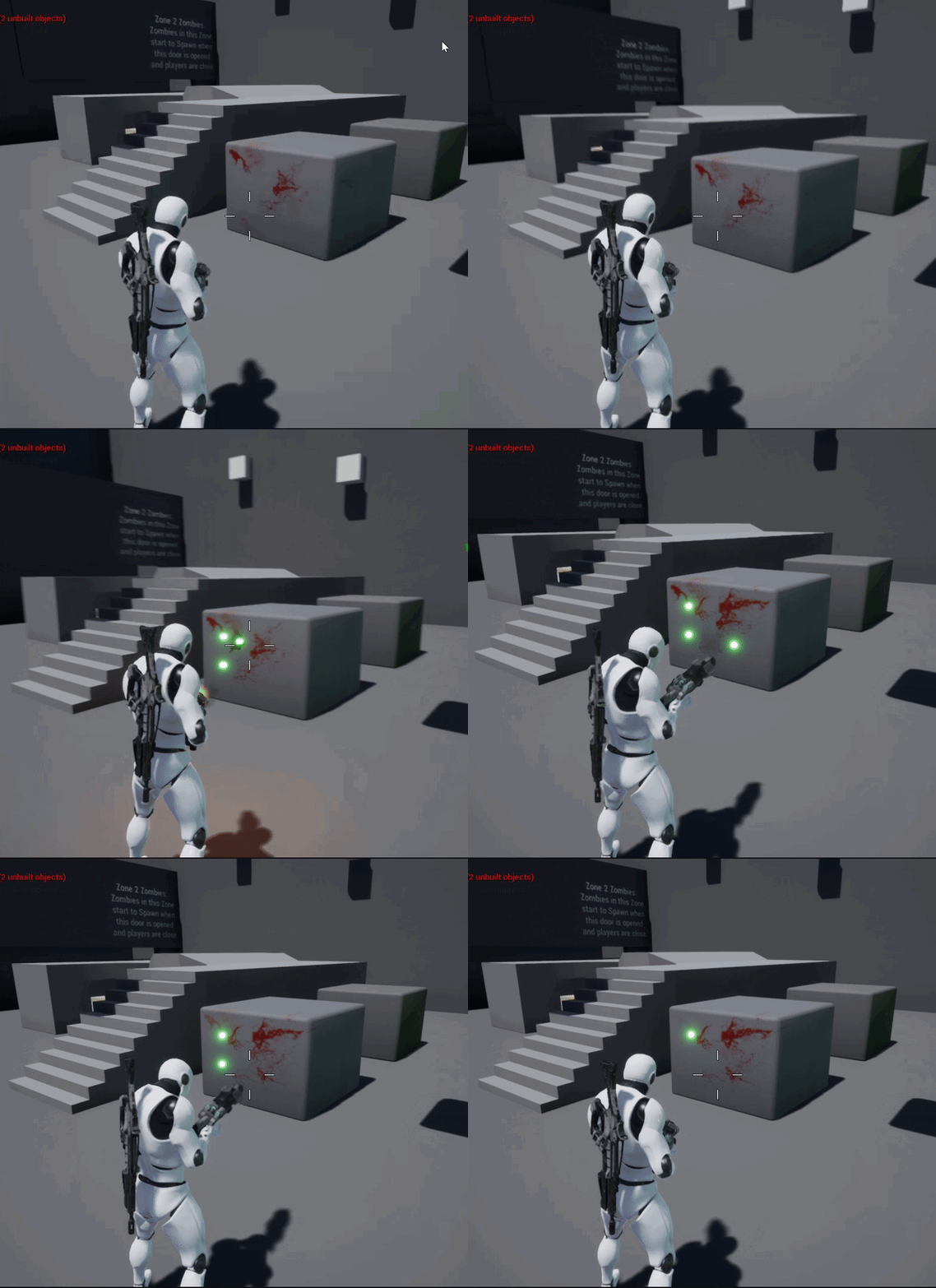
I have a question. I'm shooting projectile bullets out of my weapon, I'm trying to add blood splatter decals to the ground when the blood particle effects collide with the ground. So I used the "Bind Event to On Particle Collide". My problem is that the the particle effect is being spawned when my projectile is getting destroyed so the blood decal never gets a change to get bound to the particle effect. Basically the projectile gets destroyed to fast. Also note my projectile plays all of these effects on an event bound to OnDestroy. Ideas on how to make it work?
dense badger
Stop and deactivate the projectile on impact instead of destroying it. Then Bind an event to the particle system completing and destroy it then.
dapper kiln
Ok so that lets the blood splatter decal appear but the bullet is still there lol. It deletes eventually. Should I just delete the mesh component when it hits? Seems kinda "hacky" lol
 hardy mango
thats an awefully big bullet - i would ask you if the bullet even needs to show - the given rate that bullets travel anwyays and typically theyre a linetrace anyways ..... again its a cosmetic request if you need to show the bullet..... your call @dapper kiln
dapper kiln
I personally don't use projectiles and only use line trace weapons, but I have people who insist on using projectiles so I wanted to get them working. I hear you loud and clear though lol.
hardy mango
"I have people who insist on using projectiles" - tellt hem people to give a sufficient reason why they use them.... then explain to them that its a retarded feature for any normal bullet..... due to the sheer velocity that a normal bullet travels anwaysy in real life.
I would tell them to keep their projectile systems for thijngs that need a projectile - like Missiles, Rocket Launchers, Cannon Balls & Grenades
dapper kiln
I've tried hahahaha IDK some people like to destroy their game and network bandwidth with full auto miniguns that shoot projectiles. Who am I to judge hahaha.
hardy mango
you sound like a smarter person than these others to judge .... thats who you are 🙂 You obviously recognize the detriment such a bloated system would have on overhead - and especially if you go into replication/network.
 dapper kiln
Hahahahaha It's been a while Gallon!! You surviving this pandemic?
static charm
no
dapper kiln
oh, It's because your PePe doesn't have a mask like me. 😉
static charm
back to work, carry on soldiers
maiden wadi
@trim matrix Dunno if you found that yet, but that's a function that's pulled from a TimerHandle, which is the blue variable you get from the SetTimerByEvent.
trim matrix
hey can someone please help me in creating a dynamic niagara beam like lines between two waypoint?
flat raft
https://docs.unrealengine.com/en-US/Engine/Blueprints/UserGuide/Arrays/ArrayNodes/index.html @split marlin
Nodes designed to aid in working with Blueprint arrays.
maiden wadi
@split marlin That's confusing. Since you didn't want the other element's indexes to change, yet in the second example, index 2 and 3 became 1 and 2.
If you want to remove something at an index, but keep everything at the same index, you'd need to use a placeholder value.
For example, 0,1,2,3. "Remove" index 2 by setting it to -1. So 0,1,-1.3
Arrays of pointers are bit easier, since they can just be nullptr or empty but still take up an array slot. But for value arrays, removing an index will shift everything up to fill the gap.
@trim matrix It's been a bit since I messed with Niagara, but what are you having trouble with?
trim matrix
@maiden wadi just trying to create a basic waypoint system, so for starters just trying to create a connection line between two separate emitter points in an array
and I was hoping to use the dynamic beam somehow to create that line idk
you know like classic waypoint systems in starcraft or warcraft
or red alert 2
maiden wadi
There's a lot of different ways to do things like that. Spline meshes. Just spawning decals along the points, or even particle systems.
If you're going with the particle systems, it sounds like you have your beam emitter. So you would need to pass in some vector variables as parameters for the particle system.
trim matrix
wait so lemme ask you this, which approach would allow the user to hover their mouse over the connection line, left click and drag out another point, basically making the connection line have mouse interaction capability
can a niagara beam even interact with mouse like that?
maiden wadi
Hmm. Honestly not sure on that one? Maybe if it has collision and spawns a mesh. Spline mesh might be able to do that. Thinking about clickdragging though, you'd probably be doing some checking anyhow. I wonder if it'd be easier to just check if you have a waypoint showing. If yes, on click, get click location. Find the closest point on your array of vectors, if clicked point is less than certain distance from closest waypoint vector, start moving it on tick or timer by calling an event or function that sets the emitter/spline mesh vector to the new point where the mouse is.
velvet forum
Hello guys
how can i add bind to category?
 young holly
I created a function in a Blueprint Interface. Then I implemented that interface in a Blueprint. But the function in showing in the Interface section in the left hand panel instead of Functions section and it is non editable. Is this supposed to happen? I was following a tutorial and in their case it showed in the Functions
maiden wadi
@young holly Your implemented functions/events should show up in this panel here in the left. You can double click it to open it up. You can get to the same place by clicking the Function Override button.
young holly
yes, I am getting that. but in the tutorial I was following, it appeared in the functions section
is that an older version thing?
maiden wadi
Possibly. They've been reworked a time or two.
young holly
the tutorial is from April 2020. so, this must be new thing
maiden wadi
Hmm. Maybe. I don't ever remember them being in different places. What tutorial is it?
young holly

In this video I add recoil to the player when firing, based on the gun being used.
My patreon: https://www.patreon.com/UE4Prometheus
Discord Server: https://discord.g...
this one
maiden wadi
@young holly What timeframe were you talking about? That is all pretty standard and the same as it is today.
On a side note. I'm really not a fan of how this person uses classes and interfaces... Using the character to tell the gun through an interface to drop a shell casing? ALL of that should be in a parent class to the weapons and ran off of inheritance with differing values. The only thing the character should do, is call one event in a parent class of the weapons to tell the weapon that the character wants it to fire. The weapon's parent classes should handle all of the muzzle flash, bullet casing drop, calling montages to show recoil on the character. That's an excessive and terrible use of interfaces. Interfaces are meant to give different functionality to different actors that can't have a common parent. All weapons fire, they can all have a common parent.
cinder steppe
@maiden wadi Thanks so much for ytd! I've been meaning to get back regarding the interface stuff you explained but I was bogged up with things in rl. At least I understand the basic gist of it now. Really appreciate it so much!
 devout shore
Does anyone have a good tutorial on how I can make a generic door blueprint that I can add to multiple different door models?
All the examples I can find is a single blueprint per door and I do not want to make 90 odd blueprints, one for each individual door model.
 spring flax
is it impossible to trigger a level blueprint event from the level sequencer?
Looks like I need a third party plugin
maiden wadi
@devout shore Are your doors SkeletalMeshes or StaticMeshes?
 hallow yoke
Excuse me, is possible to read material slots from a selected StaticMesh object from the content library? For example i can read material slots from StaticMesh components using BP but not from plain StaticMesh
maiden wadi
@hallow yoke Not exactly sure what you're asking for? You want to see what material slots a static mesh in the content library has?
hallow yoke
Indeed! What im trying to do is read the slot name, and based on that name, search a texture, and then create and assign a new material to that slot.
of course this is executed from a utility widget bp, checking the actual selected objects
hexed coral
what variable type is used for UI materials? I tried using Material instance but it doesnt seem to accept it.
maiden wadi
@hallow yoke Haven't touched editor scripting til now, but I think I get the jist of it. There doesn't seem to be a way to get the material slot's name though.
@hexed coral Have you changed the material domain?
hexed coral
yeah the material domain is set to user interface. the umg accepts it but the blueprint variable doesnt.
im using structure but i dont know what variable type it should be.
maiden wadi
MaterialInterface if it's a material. Texture2D if you're just using textures that aren't Materials yet.
 indigo edge
can someone help me with my script? I dont know how to solve error
hexed coral
oh wait actually nevermind. I had to create a material instance which is wierd because it should normally accept master materials. Thanks for the help @maiden wadi
maiden wadi
@indigo edge Need to know the error and possibly what you were trying to accomplish before we can help.
indigo edge
that error
hexed coral
there is a mistake in that blueprint
hexed coral
you need to go to players state and check if the player name variable exists
maiden wadi
Looks like your player state's PlayerName variable doesn't exist.
maiden wadi
First off, I'd strongly recommend staying in the Singleplayer lane for a bit if you're new. But to answer your actual question, either compile the playerstate blueprint to make it refresh if the PlayerName variable exists. If it doesn't exist, recreate it.
indigo edge
how do I recreate that?
maiden wadi
Go to the PlayerState blueprint and add it with the same name.
hexed coral
right click on the error variable in player state bp then click promote to variable
hexed coral
@indigo edge are you in the player state blueprint?
indigo edge
when I double click that player state block it opens script or whaterver it is
hexed coral
hmmm must be a c++ class not a blueprint.
hallow yoke
@maiden wadi Oh! that is so sad, well, i will try to figure another path
hexed coral
do you have a screenshot of it?
maiden wadi
Oh. I remember this now. A few properties in the Playerstate got set to non blueprintable.
untold fossil
Anyone know the console command to take high resolution screenshot with custom depth mask enabled?
Like when you play in editor
maiden wadi
There looks like a BlueprintPureFunction can get the player name.
@indigo edge Replace the PlayerName direct get with that green function on the right.
hexed coral
oh right its part of player controller. never touched player state myself. 😆
maiden wadi
It's not really necessary without multiplayer. Semi useless in singleplayer. But in Multiplayer it's a good way to share player stats that don't get killed off when their character does since only one playercontroller exists per client machine. So the GameMode can hold all of the player's PlayerStates.
maiden wadi
Drag off of your blue PlayerState block. Type GetPlayerName
indigo edge
hexed coral
remove the old player state with error and reconnect it all.
hexed coral
now connect it to 'to text'
hexed coral
delete the error one and then press compile and save
indigo edge
ok that one is good now the second one
young holly
I am trying to add bullet holes on bullets hitting the wall, but the decals are not spawned some times
https://drive.google.com/file/d/1FdDWjp5G53uP5gALxO_ZfwltJn6loTsN/view?usp=sharing
Google Drive
maiden wadi
Same thing.
young holly
can someone help with mine? :)
hexed coral
@young holly it seems that the decal doesnt appear when its near your character. is there some kind of collision box around your character or anything?
 whole rose
try adding debug lines that actually draw the whole tyrace
hexed coral
does it work fine when you shoot further away?
whole rose
it's probably hitting your character.
white crypt
get user object
maiden wadi
@hexed coral GetUserWidgetObject > CastToUMGClass
 jolly jay
Hi, i create an scenecapture 2D then i create the texture and the material of this camera, but I would like to put these texture/material in a widget, but doesn't apear. Anyone know how to do it?
white crypt
You need to start the game in order to see the capture
hexed coral
like this?
 merry yew
Hey, I tried setting a playerstart on the level but can't get the player blueprient to spawn in that location. I have the game mode setup with the default pawn. PIE doesn't even spawn the sprite on the level. Anything else I should look for?
Thanks for replies in advance.
hexed coral
nothing comes up for me.


 hexed coral
nope nothing there:
white crypt
which engine version are you using?
hexed coral
4.25.3
white crypt
let me open it, maybe they changed something
maiden wadi
It's still there.
white crypt
yup it is, no clue why he doesnt see it
maiden wadi
@hexed coral What blueprint parent class is this in?
Shouldn't matter, but just curious.
white crypt
check dm
and tell me if it works
i've sent him the node code and it works now. thats just some magic
still curious why it didnt show up
maiden wadi
May want to consider verifying engine files and such.
white crypt
he said it started appearing after pasting the code from discord
could be that a simple restart would have fixed that
 vale path
Hello Guys i have a problem in my Script and i cant find the reason why i get this message can some one look into the script ? It should show the Item Name where its get from a Actor Class and put it into the UI on the Sphere of the Item.
hexed coral
yeah ill get it verified not sure why it didnt appear
vale path
maiden wadi
@vale path You tried calling a function on something that wasn't valid
vale path
yea but i set it in my oppinion
i dont know where i made a mistake
why it doesnt give at compile a error ?
maiden wadi
Because the code can still run. A pointer to an object is an empty shell that can contain a memory address to a specific type of object. You tried using that pointer to call a function and it was empty.
It's like telling a baking pan to bake bread with no dough. You know what shape it's supposed to be and what it's supposed to do, but without dough it's not that useful.
Also. The blueprint you just linked isn't where the error is. It says it's in your HeroCharBP inside of a function called HandlePickName
vale path
yea
maiden wadi
That screenshot just shows you calling it. The error is inside of that function.
maiden wadi
Your controller ref for that pawn isn't valid.
young holly
@young holly it seems that the decal doesnt appear when its near your character. is there some kind of collision box around your character or anything?
@hexed coral Look at timestamp 0.54
the hole doesn't appear for the farther one as well
also, I have no colliders on my character except default capsule
maiden wadi