#blueprint
402296 messages · Page 509 of 403
 opal pendant
 earnest prism
It totally does
Omg, I've been trying to wrap my head around that for a few hours now
Thank you so much!
 shut hinge
ok where do I store the player controller ref, storing it in the widget says its invalid.
 worthy frost
widgets should have it?
opal pendant
how are you setting it @shut hinge
shut hinge
its being set from the construct event in the widget and it don't like it .
shut hinge
i put is valid, but it passes to is not valid branch with print string so its not getting through to the code.
opal pendant
which means it's probably null
shut hinge
i don't understand I already put the set node into the construct event node, it should work.
opal pendant
could you grab a screenshot of that code?
shut hinge
hold on
opal pendant
k
shut hinge
the widget binding been fixed now for skynar's widget, but still got the get player character issue now going on with the tick in his event graph of the widget.
i now removed that cast from tick out and connected up now to the level component.
opal pendant
IIRC putting a delay of like .2 seconds in front of the set My Player Controller Ref node should fix it. the way you should really be doing this is by storing the player controller ref inside the player controller BP and then after you create the widget, call a function that sets the Widget's player controller ref equal to the one in the player controller BP.
so essentially you have a ref in the player controller BP that is passed through a set function which is called right after the widget is created
shut hinge
ok i put the delay in the construct where the player control ref is set
opal pendant
alright, but you should seriously consider trying to do what I explained. the delay is just a crude fix
if it even worked
shut hinge
i never done that stuff before setting controller ref to be equal to the one in the player controller so i won't know it.... That's why I did what I knew how to do with get player character.
opal pendant
did the delay thing fix it?
shut hinge
print string is still saying the player controller ref I have in my widget is still not valid
opal pendant
then you'll have to do the other thing I explained
shut hinge
it won't work from the widget that's all I know
opal pendant
alright @shut hinge I did the code in a BP I made, this hopefully will help
this first image is inside the Player Controller BP
widget BP /
so in the Player Controller BP you'll have a Player Controller Ref variable, and inside the Widget you'll have another Player Controller Ref variable
you'll need to make a custom event inside the Widget BP so you can set the Player Controller Ref from inside the Player Controller BP
shut hinge
i see that custom event there. For I have all my party member widgets attached to keys 1-9 to switch them into using the registration array..
and you're creating the widget from a custom event in the controller, while I'm set it up with the keypresses with possess pawn and create the widgets after possessing the pawn. Hmm maybe widgets should've been created first before possessing the pawn. I'm not sure how it works so I possessed the pawn first before creating the widgets.
opal pendant
you want the widget to be created after the pawn is possessed
shut hinge
yeah I did it after. I possessed the pawn first.
shut hinge
ok
opal pendant
just make sure the widget is being created from the PlayerController BP, not the pawn
well actually
shut hinge
all of the party member stats widgets are being created from the player controller
opal pendant
ok cool
 harsh night
Sorry not familiar with Widgets so probably a stupid question. The Getter for My Player Control Ref is connected to the Setter for what looks like the same My Player Control ref variable in the Event Construct? How does that work?
shut hinge
The array picks them out they are assigned to their slots. Then they are possessed according to the slot. .
harsh night
Yes#p
harsh night
It’s calling itself
opal pendant
either way, he still needs to do the system I told him about
way better than doing GetOwner
harsh night
Alright good to know there is not some fundamental differences with UMG event graph vars and refs 😅
shut hinge
so is this a blank widget that this is being passed into?
opal pendant
it should be passing it to whichever widget you choose right after it's created
opal pendant
yes, at least every widget that needs to access the player controller
shut hinge
so we have to keep creating custom events to put this in every widget ?
opal pendant
uh yes but only for the widgets that need access to the player controller
shut hinge
ok
so that means in every widget that uses it i have to set the controller ref variable in them
so i guess we just copy the custom event and its ref into the other widgets.
opal pendant
well you can't just copy paste, but you can recreate it in the other widgets
shut hinge
ok
opal pendant
so in a new widget you'd just add a new Player Controller Ref to the variables list, and then add new event
shut hinge
ok... The leveling up still not working yet for the others. Party members still stuck at level 1 while progress bars fill up and reset. only the command levels up and changes his value.. Now I got to separate the party members variables into their own separate components. That might get it working, dunno.
opal pendant
sounds about right
shut hinge
now i'm replacing the bindings with that player ref now its in the widget
its pretty clever using a dummy widget to pass the ref into
 simple lantern
Damn @shut hinge getting help for the same thing for 8 hrs straight you need to send slackers a fruit basket or something after this
opal pendant
has it actually been 8 hours??
shut hinge
how about i send you the star experience lol
simple lantern
way
opal pendant
xD I just checked the message history
simple lantern
he's gone through like 5 ppl who have cycled in and out lol
opal pendant
it started this morning 16 hours ago
simple lantern
you need that old timey clock out punch card thing
opal pendant
lol seriously though
simple lantern
chaCHUNK
shut hinge
you guys are wordly
opal pendant
oh thank you
simple lantern
not nearly as wordy as someone who's been posting for 8 hours straight my dude
shut hinge
sorry typo error, I mean worldly.
simple lantern
oh lol sorry
opal pendant
xD
simple lantern
how do I strikethrough lol
simple lantern
boom
shut hinge
C++ isn't that supposed to be one of the hardest languages? I guess blueprints are tame compared to that.
opal pendant
I don't think it's supposed to be
it's quite similar to Java which I've coded in before
simple lantern
any visual based code is chump change compared to traditional code
shut hinge
its similar to batch code but more advanced, my game started from batch code before it ended up in blueprints.
simple lantern
(at least that's what all the traditional coders will have you believe)
shut hinge
ok
opal pendant
Bps are slightly less powerful, but you can do just about everything C++ can with them
multiplayer gets hairy on a large scale though
(in my experience)
shut hinge
multiplayer is harder I think
simple lantern
yeah i think BP comes out on top for smaller scale projects, at least for me, but can get out of hand pretty quick
shut hinge
lol
opal pendant
I've just been loving C++ because you can write 30+ nodes of blueprint logic in one or two lines of C++
shut hinge
now for the levelling component to put each the party member values in , should I make duplicates or children
simple lantern
I've just been loving C++ because you can write 30+ nodes of blueprint logic in one or two lines of C++
@opal pendant What's a good example of that? out of curiosity
opal pendant
well I've got this custom line trace shooting script that uses quite a few BP nodes, and I just started writing it in C++ in my new project, and so far it's one line but once I add the rest of it it'll probably get to about 3
the part that makes it long in BPs is the amount of checks that I need to do
and reference calls
simple lantern
that's pretty interesting
shut hinge
parent duplicates or paremt and child (which one is it for levelling component?)
simple lantern
I should take a crack at that at some point
opal pendant
it's a lot of fun
if you go to learn.unrealengine.com there's a course called Converting Blueprints to C++ that's a great inlet to C++
also Idk Tozan, you're the one who's making the game, you should know what goes where
simple lantern
the biggest issue for me is how ridiculous it feels to read through arithmetic and logic like a book, rather than a circuit board, like BP
"what is this referencing?" scroll scroll scroll scroll
opal pendant
yeah it took me a while to get used to when I was learning Java
shut hinge
Well, If I choose to make children of it, I may run into trouble with the parent.
opal pendant
alrighty I'm heading off for the night, good luck with your coding Tozan
simple lantern
@shut hinge Sorry I can't help your issue but it might be helpful for you to supplement the questions with google searches to see what else you can find
@opal pendant peace out
shut hinge
ok thanks for your help. I'm just not sure when it comese to party systems if you're supposed to make children of their components systems or not. Ok
no have to make duplicate, not children ok.
 trim matrix
i got an interptoMOVEment component on this platform i disable the tick on component with a line trace so it stops moving but when my player is on top of it and then he tries to jump it will throw him off in the direction i was trying to move before it got pauced(tick disabled)
if i get a jump a big jump onto it it will actually lowerdown and next time i jump will blast me far off into space
 modern cove
I want to set up a function that updates values based on HasAnyUserFocused Descendents, and I want it to run each time an Arrow Key or Direction on the D-pad is pressed, but I want it to take place after the normal action of moving to the next item on the menu in the chosen direction.
Anyone know I make this happen? (maybe I should try the UMG channel)
 normal viper
So i need some help
https://youtu.be/ZUd4GCO7VMU
Im following this tutorial, i have all the code done but its not working
It seems like the weather contoller cant find the ui, like i cant get the ui and the controller yo communicate at all, for some reason all im getting it nothing
I have confirmed the weather controller is making the tempurature curve as i can get it to print directly to console, but having it print to the ui isnt working

In this video we add world temperature to the game and also display it on the screen so players can see. We'll be using this temperature later on to influence our character's temperature.
If you have any questions or comments please let us know. If you like the video and want...
 white crypt
i remember he used to skip some parts in his tutorials
so probably you will be on your own because no one will replicate this tutorial just to find what is missing
or read the comments
normal viper
Thaaanks?
simple lantern
I'm trying to build a mechanic where the player can choose from various objects and place them into the world. When choosing where to place it, the object appears in front of the character with a green highlighted color showing that it can be placed there, or a red highlighted color showing that it can't be placed (like rust or many other base building type games). On left mouse button, the object gets placed permanently and everyone's happy.
i've finished building the base mechanic, but the selecting different objects and having their material switch from a green highlighted color to it's final material when placed is a little tricky. I'm currently trying to spawn a dummy object and set it's material to the highlighted one, then switching it out for the real object when it gets placed, but I can't figure out how to automatically set the materials of all the meshes within an actor at once without having to do it individually (since I want to select from multiple different object actors)
Any tips? sry for the wall of text, it happens
 maiden wadi
@marsh meadow Probably, specially if your HUD class is creating them. I use a custom event myself that I call after constructing the widget because I prefer to pass in a few variables sometimes. But there's no reason that OnInitialized shouldn't work I wouldn't think.
@simple lantern I do the exact same thing by using a separate construction actor. This actor gets a building ID passed in. The building ID looks up a datatable that has all building information like the static mesh a building part should be, if it should be relatively offset, building snap locations, etc. It handles it's own material swapping of can/cannot place here etc and handles all of the logic of whether the object type can be placed in that location, where it should snap to, etc. And on final commit, the construction actor just spawns a BuildingPartActor and passes in that same ID to make that actor set itself up in the same manner that the construction tool was doing but with extra things like maybe wall health, etc, and more importantly it uses the default static mesh material so no need to assign a different one on commit.
simple lantern
@maiden wadi Really helpful, didn't even know about data tables. My plan was to tuck away some values somehow into each buildable object, and then reference them when spawning in order to get snapping points/upvector/etc.. So that's a helpful alternative right there.
 late gorge
am i missing something about how macro libraries work?
everything is saved and compiled
maiden wadi
@late gorge What kind of object is the macro library for? What Parent Class is the blueprint you're trying to use it in?
late gorge
its... literally in the screenshot
it's a custom controller based off ALS's controller
maiden wadi
That is odd, let me test really quick. Haven't used libraries that low on the chain, I usually make them out of Object or Actor.
maiden wadi
@late gorge Simple test would go with your issues. Made a library of the same class as my player controller, cannot see the macros. Created a second library one level up from my player controller and my player controller can see those macros.
late gorge
...
tnx
but simple test assumes im expecting the engineers to have gone "yep, that's intuitive af"
to only make it available on subclasses
like really? a bunch of stuff i need the macro for is IN THE PARENT CLASS, why would... whatever
not worth getting pissed off about
maiden wadi
I think that the assumption was that people would create macros in the classes that they needed them in, and that more generalized macros needed in multiple classes would go in higher class libraries.
simple lantern
Hmm so the way I have my build mechanic set up checks to see if the object's "ghost" (the temporary model that is spawned in front of you while you look for a suitable place to put it) is overlapping with an already built object, and if so, turn red (and disable ability to place there). However the objects that can be placed contain collision components such as box triggers for a motion sensing light. So when I want to put another object down, it turns red when overlapping with the placed objects trigger box, and not the mesh component itself. As far as I can tell, there's no combination of collision responses that will allow the ghost object to overlook the trigger box when looking for a place to build. Is there a way to specifically omit two different components from colliding?
late gorge
kind of a dumb assumption... if i need a macro outside the class (which is exactly what a macro library does, it exposes the macro structure to be used elsewhere)
i'd make it a function if i wanted it to be directly accessible... except functions dont have flow control
goddamn ue you still really ruff under the surface 😄
this way i have to subclass the bloody thing... which means i have to cast in macros
kinda defeating the point
 maiden wadi
@simple lantern Custom collision channels probably.
simple lantern
@maiden wadi The issue is that the trigger volume for the object that gets placed generates an event on overlap, which exactly what the object ghost does. So they occupy the same channel
maiden wadi
What is your trigger volume supposed to detect? Just moving players, or?
simple lantern
yeah the player when moving
is there a way for the ghost object to detect overlap for only certain kinds of components? like in the same way that you would cast to all BP classes, or BP's that use a certain interface. Is there a way to set up a check where it only collides if it's a certain kind of object?
maiden wadi
Hmm, you could either get complex with checking the overlapping components, or make it so that your checker doesn't check for pawns and your trigger volume only does. That or create a new type, make the trigger volume that type that detects pawns, and make the builder detect all except your new type that is the trigger volume.
I'd opt for one of the later two, because your component checker has the potential to keep getting more and more complex depending on how you do it and what you might add later.
simple lantern
that helped me, i figured it out
i'm more clear on the collision channels now, thanks
maiden wadi
Took me a bit to get my head around them.
simple lantern
i'm going totally crazy, I have an actor and a dummy copy which only contains the mesh components. The dummy copy refuses to generate an overlap event. even if I create a primitive cube within the dummy actor and set it to the exact same channel settings and collision settings as the dummy static mesh, the cube will generate an overlap event and the mesh components wont
hmm seems to be the use of complex geometry as collision. I have to generate simple collision instead, and then it works
late gorge
@maiden wadi so... uhh... reparenting that macro library didn't do anything scratch that, seems something wasn't saved
tnx for the assist btw
 jovial bobcat
I need some help, Is there a way where you can make the root component of a pawn its head and not its centre
because i have a homing system and I want the bullet to go towards the head not the centre of the enemy
late gorge
a root component doesn't work like that
jovial bobcat
??
late gorge
either add a scene component or something of the sort to the root component
and reference that in your homing system
jovial bobcat
maiden wadi
Is TargetToHit an Actor reference?
jovial bobcat
yeah
late gorge
so in your TargetToHit ref's class, you have to have something to reference to guide your missile
so an actor ref... won't do in this case afaik
maiden wadi
Create an Interface. Implement it on anything you want to be hit. In anything you want it to be hit, return what component you want to be hit. Make a message call on the actor reference from TargetToHit. Use that return the same way you are now.
late gorge
can do this or use an interface as authaer mentioned
you will have to change your event's input if you use my solution tho
jovial bobcat
I do have a enemy interface
late gorge
add an interface that returns the point to guide towards
jovial bobcat
but i dunno how i can get a referacne to the interface with the code
on target to hit
because its just a pawn referance and its anypawn
jovial bobcat
i will try?
late gorge
usually preceeded by a "does implement interface" call
maiden wadi
Here, I'll give you a small demonstration.
jovial bobcat
ok thank you
what is the node call that you guys want me to use
i do have this but this is only a boolean value not anything location wise?
late gorge
give auth a minute to make the demonstration, it'll be clearer after ;) also making one, wanna see how it compares :p
jovial bobcat
ok yeah i will be quiet
maiden wadi
First you need an interface. The function in it should look about like this. Single return with a SceneComponent reference.
jovial bobcat
yes
maiden wadi
Add that interface in the actors that you want to get the components from, and then implement that interface function like this.
jovial bobcat
??
maiden wadi
late gorge
- the target
maiden wadi
The interface function will be read only in the interface. You need to implement that function in the actors you want to get the component from.
jovial bobcat
oh
maiden wadi
trim matrix
Anyone know why my aim offset wont apply when I'm setting my actor rotation? Like the value is still being calculated, but the aim offset just wont apply.
late gorge
- the bullet
jovial bobcat
ok i will try that
late gorge
- shows the 2 ways to go about setting up your bullet's interface
one with direct ref, other via the interface
maiden wadi
Yep. You can even use the false on the does implement interface to make it use the root component for anything you haven't put that interface in.
late gorge
you probably want the latter
Yep. You can even use the false on the does implement interface to make it use the root component for anything you haven't put that interface in.
@maiden wadi very good point 😄
jovial bobcat
Umm i can get the interface thing out of my actors to hit
oh
wait is it a message
maiden wadi
It should be something like FunctionNameYouChose(Message) or something like that.
jovial bobcat
yeah i got it
and it seems to work
but not the bullet dosnt hit the enemy anymore
this node gets triggered
but the enemy dosnt lose health anymore
wait the event name is wired and stuff
I think i might have to make two separate interface
one is just for taking damage
late gorge
np :)
shut hinge
hmm w and s no longer work. only can move a d
 humble scarab
I am trying to make a character select screen between two models (Realistic and Low Polly as stand ins) but no matter who I have selected it will only save the Low Polly (and in one map the realistic)
Character Event Graph:
Character Select UI Graph:
maiden wadi
@humble scarab It's kind of hard to read most of that. Initially all I see is you trying to save pointers to something, and pointers never persist through UWorld changes, which means opening a new level or restarting the game. So I'd assume that it's just choosing your low poly one by default.
shut hinge
how do I get the up and down keys working again, they no longer responding. I can only move left or right.
humble scarab
Would you suggest scrapping it all and trying something else? I was following a youtube tutorial and it's easy enough to follow a new one, more practice!
shut hinge
my player character can't move forward or back, but when i go into debug mode the spectator camera moves around ok.
maiden wadi
@humble scarab Dealing with savegames I try to just remember that any sort of blue pointers won't persist. What I'd try doing instead is set some sort of int in the savegame file, and on level load, have your cat character things get the savegame file and set their own mesh based on that.
 cold sinew
Hello Guys
When i Duplicate actor in the world its not see the duplicated Actors just first one why ?
Just the main actor who works with functions but the rest not counted
maiden wadi
@cold sinew What exactly do you mean by "Duplicate Actors"? Do you put multiple in the level before starting it, spawn more, etc?
cold sinew
Alt + Drag xD ,,, Yes i have Garbage Actor and enumration Specific this Type of Garbage
I put main one in world and set mesh and type for example Plastic
the 2nd one Glass
when i Duplicate them with same type its not working
 distant olive
I need to implement footstep sounds. I usually do this with anim notifies, but this time I have multiple animations over many blend spaces. Is there any better way to do this than to manually add notifies to 50+ animations?
maiden wadi
@cold sinew I'm not sure what you were expecting it to do? It created a second instance of the same class that you already had there. It created a duplicate.
distant olive
@cold sinew What you see to the right in the "World Outliner" is what's in your world currently. The field at the bottom of your screen is the "Content Browser", where all your content is.
@cold sinew I can recommend watching a video on Unreal Engine basics, it will cover a lot of these things for you! 🙂
distant olive
@cold sinew Yeah I must have misunderstood.
cold sinew
this what i meant now when i pick the first Actor i've placed its count it true and set the progress bar also true without any issue but 2nd one not counted when this event finish
distant olive
So you are pressing E twice, but it only works for one?
cold sinew
ohhhhhhhhhhhh
im sorry really sorry im so dumb
im overwriting the same value i have to add it xD
 tough ore
 marble tusk
A reference of the widget you're casting to
Examples of different Casting Nodes and usage cases.
 wind harbor
Why is there no Add Anim Notify Event in my AnimationBlueprint node list?
maiden wadi
@tough ore Casting does not actually get you anything. It's like a mold. It needs something put into it before it can output something useful.
wind harbor
Sorry, I mean, does anyone know why? I'm very confused by this =d
marble tusk
uncheck context sensitive maybe?
wind harbor
In a tutorial it's just a category above Add Event
white crypt
you dont have any notifies
harsh night
What the cast basically does is to ask the object “yo, are you a <type of whatever you are casting to>?
white crypt
so it doesnt show any
wind harbor
@white crypt Ooh, ok 😮
white crypt
look at the tutorial where he adds them to the animation itself
unless the tutorial skips that part
white crypt
is that animation using the same skeleton as the one in your animbp?
worthy frost
Notifyer?
wind harbor
worthy frost
that is not the same notify tho
wind harbor
I just made a AnimNotify, maybe that's where I'm over thinking
white crypt
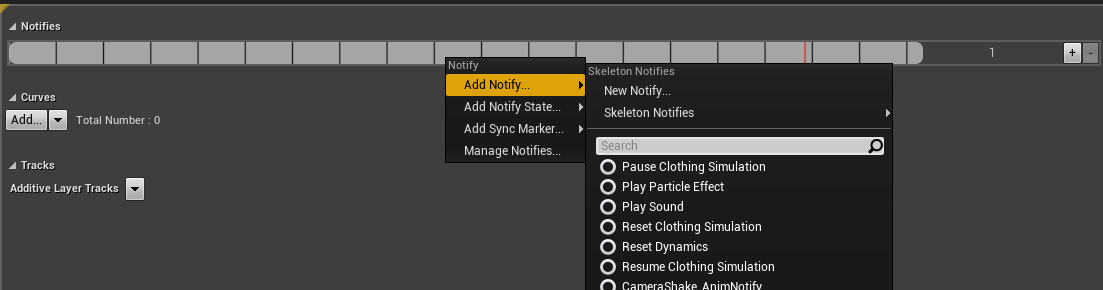 wind harbor
Ah ok =d
white crypt
you add it here
wind harbor
But I think that's what I did
Ah ok, yes, I should not have made my own notifyer as a blueprint =d
white crypt
click new notify and then it should appear in your animbp
wind harbor
Just add new Notify, I don't know why I thought I had to make my own blueprint
Yes it did, super super tnx 🥳
white crypt
blueprint can be used too, it can hold some logic inside and can be reused
but i think you just want a simple skeleton notify
wind harbor
yupp ^^
 pallid inlet
What's the difference between Get Player Pawn and Get Player Character?
worthy frost
one returns a Pawn, other returns a character
Character is based on Pawn, which is based on Actor
pallid inlet
Character is based on Pawn, which is based on Actor
@worthy frost what if I have set enemies and character as pawns? Would it still work?
worthy frost
not for ai, no
trim matrix
Does anyone know why my aim offset won't apply when I am setting my actor rotation? The variable is still be calculated, but for some reason the aim offset will just stay at whatever it was before I started setting the actor rotation.
 marsh meadow
@marsh meadow Probably, specially if your HUD class is creating them. I use a custom event myself that I call after constructing the widget because I prefer to pass in a few variables sometimes. But there's no reason that OnInitialized shouldn't work I wouldn't think.
@maiden wadi Thanks. Another thing I would like advice is how things might be handled when I put the Widgets there myself. Or it is just better just to spawn them and not worry about the hassle?
maiden wadi
@trim matrix Is this for a third person aimoffset to make the character aim up or down based on pitch?
@marsh meadow How do you mean by put them there yourself?
marsh meadow
Placing them in the Widget Design Editor.
I'm not sure how to say. I'm designing a Widget. Inside that Widget, I put another ones I have made.
trim matrix
@maiden wadi Yes it is. Im setting up a turn in place and when I turn the aim offset gets stuck at its last position even though the variable is still being calculated and it will teleport to the correct position after the turn in place is completed. It also does this while running because I need to set the rotation there too.
Works fine while standing still though
maiden wadi
@marsh meadow I do the same. For example, I primarily use two different UI windows. One is for transfering stuff between inventories, the other is to display the character's inventory and other stats. In both of those I use one or multiple versions of the same InventoryWidget which is a third UserWidget that handles all of it's own stuff by just getting an inventory reference passed to it. But for the main windows, they are created in my HUD on button press. For example for the Transfer one. A line trace sends an interface message to the inventory's actor. That actor gets the HUD and tells it to open that window and passes itself in as a reference to use in the Widget later. If the Widget exists it just opens it or closes it if it's already open, if it doesn't exist, it creates it and then opens it. Just a few screenshots for clarity.
Character linetrace
Container making the call to the HUD
The HUD doing it's stuff.
marsh meadow
So, you always spawn them?
Never "put it there ready to be used"?
maiden wadi
It only constructs it the first time. Then it's saved as a pointer in the HUD, and a second pointer is saved in that Set for looping over all available windows, such as the CloseAllUIWindows macro in the last image. That's what the first IsValid node is for.
I do it this way so that if for any reason that you needed to wipe the UI, for glitches or bugs, you can remove all widgets and then just reopen this and it'll just simple create a new one as it did the very first time it was used.
But since it'll be valid the second time it's used, it won't create a new window, it'll just use the one that's already there. It still exists, it's just not in the viewport, so it just tells it to update itself and add it back to the viewport.
marsh meadow
Thanks again. I'll absorb this and experiment for a few hours. Do mind if I contact you again later, if needed?
maiden wadi
Not at all. Just ping me on here, I'll see it at some point.
 light fractal
I'm no material expert, but I can try to help
What is the issue?
dont know if its visible
@severe cliff Do you mean you're unsure if the text in the image is large enough?
or do you mean the material is acting weird with visibility
 severe cliff
@severe cliff Do you mean you're unsure if the text in the image is large enough?
@light fractalyess
light fractal
you don't seem to have anything plugged into the normal input
I'm not sure if that's the issue though
severe cliff
the material was working but then I tried to add a cliff layer that appears when the relief increases or decreases
light fractal
alright
lemme think
there's no error banners under any nodes inside the material itself
in my experience that usually means that there's something causing the problem at runtime
wait, is there an error preventing you from compiling the material?
if so I'm completely wrong lol
 hexed coral
hi what type of blueprint do i need if i want to put it inside another blueprint? Its just that i made this 3d umg blueprint and i want to put multiple versions of it inside the player pawn in different positions.
light fractal
I think you should make an actor component
this lets you treat your new blueprint like any other component, putting it inside other actors
hexed coral
oh i see. I tried that but i dont see a viewport for me to put components in.
it only has a graph
severe cliff
if so I'm completely wrong lol
@light fractal the current material has compilation errors, so it will not be rendered correctly at the SM5 level of the resource
this is what the warning says
light fractal
alright
hmm
I don't think I can help you much more than this
I recommend asking around some more, maybe on forums
severe cliff
oh its ok haha, thanks :D. I'll ask around
 rancid quartz
Good afternoon. If I'm calling a function on a class that already has a reference to the caller, is there any performance difference in the two ways the function could access its data? Function parameters vs directly through the reference.
maiden wadi
@rancid quartz Do you mean is it quicker to pass in variables from the caller in the called function, or use the one running the function's reference to the caller to get variables from the caller?
rancid quartz
Exactly.
maiden wadi
Hmm. That's a fair question. Never considered it. Lets find out.
rancid quartz
Do you think it's likely there's a difference?
light fractal
Hi! Could I get some help running an event on a particular client?
I'm trying to set the visibility of a weapon viewmodel, only that players' view
rancid quartz
Hey Alef, you might have better luck asking in #multiplayer .
light fractal
oh, thanks
maiden wadi
@rancid quartz Okay. Did two basic things.
rancid quartz
Thanks for your time. What did you find out?
maiden wadi
Function is called the exact same way. 20,000 times per run. Pretty much identical results.
rancid quartz
That's what I expected. Okay. I'll probably stick with references since I just don't like having input wires cluttering up my graphs.
Now I'm wondering if promoting variables is faster than references.
That is, is it more efficient when in need of a property from another class to promote it to a variable or to get it through a reference to its parent class every time you need it.
 spark bridge
I ain't expert on the matter, but wouldn't storing the ref better?
rancid quartz
I dunno!
spark bridge
I highly assume the Engine does a validity check for everything you call.
Like if you call via the parent, parent will be validified as well.
I don't think it's a massive new world discovery of optimization, however I would rather holding things as reference instead of "reaching out to where it belongs."
rancid quartz
So you promote as early as possible if you expect to make multiple calls to the property?
spark bridge
Yeah why not? Imagine you want to call out to a kid. Which one would be better? Shouting to the kid and make him hear you, or shouting his mom to make her hear you out first so she also calls out to the kid by shouting him to look at you?
🤔
Imagine the kid being valid but not the mother in a situation.
Calling kid's ref would be valid but in other way you would have to make sure his mother exists too.
Or else you gonna get accessed none error for no reason.
spark bridge
No problem. I am DEFINITELY NOT stating that holding a ref is/isn't good for optimization, because I got no clue about how those stuff work.
However, if I wanted to develop an Game Engine or a code language, I would think holding a ref would be better. 🤔
rancid quartz
Thanks for your help.
maiden wadi
Well, like that test showed, there was no difference between passing in values vs using a REF. So it really comes down to what makes your code flow better and what is easier. Using the pointer means you need to make sure that it's valid when you make the function call. Passing in values is always safe.
rancid quartz
Thanks, Authaer.
 zealous moth
in a hierarchichal instanced static mesh, how do i get an instanced mesh at an index?
maiden wadi
@zealous moth I'm not sure that's how you're supposed to use them. What is your use case for needing that specific index?
@rancid quartz Also, random fun fact from that test and a good stress about how important making sure something is valid. I started that at 5,000 calls and messed up the pointer set so it was invalid. Performance marker came up at about 1,120. Once I fixed it, both of those tests with 20,000 calls was only 49 on the marker.
zealous moth
@zealous moth I'm not sure that's how you're supposed to use them. What is your use case for needing that specific index?
@maiden wadi I want to get that mesh and change its index
it's material**
 elfin hazel
You can only change an instances transform data. You can't change the material of it, the ism component has the material data.
You'd have to remove the instance and add a mesh with desired properties in its place.
 solar bison
I've downloaded a plugin. Created a C++ class that inherits from the one the plugin gives me.
When I create a blueprint out of the C++ class I created, everything craps out when I set stuff up. Any advice? There seems to be some data loss somewhere while converting.
hexed coral
I want to make a blueprint where if a trace gets close to an object it triggers an event but when it reaches the center it triggers another event. How can i do this?
I had 2 sphere collision, one outer and one inner sphere, but when the goes to sphere collision 1 it works fine but the center sphere collision wont get recognised.
 devout wedge
Hey guys, I'm playing around with the replay system, do anyone know if we can save/load replays to/from a file?
 brittle fiber
Hi there is a BPSubUVMaker in Volumetic Plug in .. I Assume I can render texture into sub UV... Noob that spent 30 Hrs exploring volumetrics.. How to use it or how to find subuv textures
 pine trellis
can someone help i made a childactor and picked the BP_characterBase as the source but its saying that it doesnt inhert from the child actor
how can that be if bp-characterbase is the parent
elfin hazel
When you type "childactor", do you mean the Child Actor Component class?
pine trellis
yes
elfin hazel
The child actor component holds a pointer to an actor class. In order to get that you need to call Get Actor of the Child Actor Component, which returns an actor. And then you can cast that actor.
elfin hazel
It's a function that returns the actor.
Child Actor Component -> Get Actor -> optionally cast actor to BP_CharacterBase.
pine trellis
yes I had to get child actor thnaks
 weak cosmos
Hi there, I am having issues with savegames but couldnt find any clues, is there any problem with this setup? Can I get class of the object with this way?
zealous moth
is there a way to change this in the system?
 true plaza
I want to implement a running dog that picks up a ball. Does it matter if it's a Physics Asset vs Skeletal Mesh
trim matrix
interptomovement component is set not to tick but this is my problem
 astral granite
What's up guys, how's it going? I have a problem my flash muzzle does not fit the tip of the gun, here is a video and some pictures:
 fallow epoch
Hey guys I'm a super noob when it comes to blueprints. Does anyone have some time to answer a few quick questions.
 nocturne remnant
I'm not sure I'd categorically volunteer everyone
 wet siren
e v e r y o n e
nocturne remnant
hey, some people just build trees
fallow epoch
I'm trying to rotate a character when a correct input has been done. What node do I use to rotate the character?
 sudden lynx
Do you want them to rotate directly from the input, like when the user pushes a gamepad thumbstick in a direction? Or do you want them to play a rotating animation toward a certain point, or...?
fallow epoch
I'm essentially trying to recreate the N64 bowser toss. I've got my vector 2d variable.
nocturne remnant
Yeah, welcome to, "it depends"
fallow epoch
yup
sudden lynx
Which character are you trying to rotate, Mario or Bowser?
I mean obviously both but one of them is controlled by a player and the other is controlled by the guy holding him
fallow epoch
I'm trying to get the joystick rotation to rotate the player character.
sudden lynx
Okay you have your control inputs mapped in Project Settings > Input. One for X axis of the thumbstick and one for Y axis.
fallow epoch
Yup I've got my vector 2d outputting the correct directions
sudden lynx
Oh you already got that
fallow epoch
Using the x and y axis.
sudden lynx
OK
And it's pointing the right way, so you have the correct math, you just need the character to face that way
nocturne remnant
It's been a long time... does he actually make a full (or more) spin before the throw?
sudden lynx
Does the character already move directly in the 2D direction you point the thumbstick when it is walking around normally?
fallow epoch
multiple spins before he is gets a full throw
I'm using a 3d game space. But I have my right joystick set up to output the direction it is pointed and it can reference four quadrants.
I have to have another button held down to enter throwing mode
sudden lynx
Does your CharacterMovement have the checkbox ticked for Use Control Rotation?
fallow epoch
I set it up so the directional input doesnt react to the joystick.
fallow epoch
When in throwing mode
sudden lynx
@fallow epoch Hmm so you're not using the built-in way. Does it work to just SetActorRotation based on RotationFromX of the 2D vector you made (promote it to a 3D vector with Z in the neutral position). This is really just a guess. Might be able to use trig to set the angle too, like arctan.
 earnest pendant
so, my Check if Headshot function is receiving a 'none' value to the Target. even though it passes a Cast and an Is Valid, how does this even happen?!
sudden lynx
@true plaza That's a connect component to component node so you need to get the parent actor's component too, not just the parent actor.
So pull the wire out from the parent actor and get the component you want to attach to. I think there's also a attach component to actor node you can use instead.
nocturne remnant
@fallow epoch Let me make sure I get what you want to do. Your character is facing some direction, and you want to spin several times stopping at the direction you're pressing
fallow epoch
@nocturne remnant Thanks man you set me in the right direction!
This helped me ask google the right question haha
nocturne remnant
I'll see if that's more or less what I was going to tell you
It's actually not because I didn't realize you were wanting to manually spin the character with the thumbstick.
fallow epoch
Well it all worked out in the end haha.
jovial bobcat
Umm Is there a reason why i cant connect these
I even filtered the array to makesure there is only pawn in there
maiden wadi
Pawn != Actor
nocturne remnant
Also, if you didn't already run across it, FindLookAtRotation is a pretty helpful node
maiden wadi
That's odd though. Usually a higher level class should be able to go to Actor in an add.. maybe. Let me check.
@jovial bobcat I can do pretty much the same thing and it works. What exact kind of variable type is that Array you're getting from?
jovial bobcat
its a pawn array
Umm
the wired thing about this is
I can connect them
but i have to connect the single one first
then the array pin
and everthing works
but when i restart the enigne
it break the link and gives me a error
maiden wadi
I don't understand what it means on that error though... It says Pawn Object Reference ( by ref )... and it's not passing it by ref, it's passing it by value, because it's the little circle thing.
maiden wadi
How did you get that Get node? Dragging off of the Array pin it's connected to?
jovial bobcat
yes
i didnt have the array filter befgore
i got it staright from
for each loop
it has has the same problem
I can fix it by connecting the array node last
but when i restart the enigne
it breaks
maiden wadi
And if you hover over that array pin it says "Array of Pawn Object References" ?
jovial bobcat
oh
i will change thta
which one do i change it to
oh nvm
i m stupid
you meant this
it does say that
yeah this was my old error
nocturne remnant
I honestly can't figure out how you've managed to break this
maiden wadi
What I don't understand is that By ref part... Nothing there is by ref.
jovial bobcat
anythign
i could try
This dosnt break for some rreason
but some how the other one breakes
ohhh
I disconnect the does inplement interface
node and it can connect now
trim matrix
why does this happen interptomovement component tick is disabled
jovial bobcat
nvm now this dosnt connect
is there like something above pawn
like for all objects in the world
for the array
could it be that im using capsule overlap actors
and it dosnt get pawns?
nocturne remnant
as in they're a TriggerCapsule?
jovial bobcat
???
also I keep on saying that i cant put a actor array into a pawn array, but the node only outputs pawn and I dont know how to make it output actor
also
i put in a a array of pawn and it comes out filtered as a array of actors?
nocturne remnant
a) No one has any idea what you're doing or trying to do. b) If you're getting overlapping things, you don't need to filter it afterwards because you should have already filtered that on the node at the start.
jovial bobcat
Yeah
trim matrix
@jovial bobcat you can use casting to get references for actor / pawn relationships.
harsh night
Create a new blueprint and search for pawn in “all classes” at the bottom if you want to see what the hierarchy looks like
marsh meadow
Is there a way to get my HUD X not to be destroyed when I load a Level which in GameMode, it isn't X my default HUD?
 coarse coral
Is there a way to get my HUD X not to be destroyed when I load a Level which in GameMode, it isn't X my default HUD?
@marsh meadow Did you try setting the HUD to the player controller?
Also I have a question on my own, how can I fix a speedy issue with the character? More often that not, the max acceleration changes suddenly and I have him zoom around the level. Even when I set the max acceleration to a specific value on Event Construct.
marsh meadow
@coarse coral Thanks for the tip. I don't know how to do that, I'll take a look.
The maximum I'm doing right now is communicating through functions to pass/receive some data
coarse coral
@coarse coral Thanks for the tip. I don't know how to do that, I'll take a look.
@marsh meadow You can create a character controller class and throw the nodes to create the HUD widget in there on begin play
Lemme-
You create a new blueprint class
of Player controller
then when you open it up
You connect your widget to Begin Play
marsh meadow
Hmm, I already have a player controller, but now, only my Pause Menu is there. You're saying that I can migrate all of my HUD to my PlayerController?
marsh meadow
I'm seeing. Keep there only the things you want to keep "forever" while the game is running.
coarse coral
Pretty much, because they'll start up once the player becomes active, and will remain until something ungodly happens
You can also call it on the player Blueprint itself
 elfin inlet
Hey guys, i'm having some issues with movement. I posted it on #animation , could you just check it out? I think it is a vector issue
marsh meadow
Thanks for the tips, I have a much better idea now. 😄
jovial bobcat
@trim matrix Thank you so much, that fixed it somehow
 tired arrow
Hey so I'm trying to animate my npc to look towards the character and am using the Look at node but despite the interpolation time the npc's head just snaps around.
If anyone could give me help that would be much appreciated! Please @ me 🙂
It could also maybe be the interpolation type?
trim matrix
trying to teleport my character to to line trace hit vector but it will fail if i don't do a little math and i want it always to work but i can't get the math right
trim matrix
from my camera to a wall
tired arrow
Screenshot?
 karmic zealot
@trim matrix show everything. Also explain one more time what you want to do. Then explain what is actually happening.
trim matrix
I'm trying to teleport to my line trace hit location basically
karmic zealot
okay. you are doing that
trim matrix
just trying to make it reliable
nocturne remnant
That's a pretty short version of what I wanted to say. Very often people aren't at all clear about what they're trying to accomplish. It's usually "I want to <something vague> and it doesn't work"
trim matrix
on heres a simplification
trim matrix
what don't you understand
karmic zealot
I am only going to assume that is what you want
trim matrix
i'm just trying to get to the hit location or near it
karmic zealot
Just pretend I might know more than you for one minute
And I am asking you very good questions that I need answered to help you
Just pretend for a few minutes, indulge me here.
trim matrix
the teleport function
karmic zealot
What happens?
trim matrix
does noting
karmic zealot
What is "failure"
trim matrix
does nothing
karmic zealot
Did you do a print string off that Bool Return Value?
trim matrix
i know ive been fooling around for a while
if i don't teleport its just simply false
like it doesn't fail all the time
i can do stuff like get point in radius on nav mesh function
pretty reliable
maybe i should do that and just use my line trace hit impact Z location
karmic zealot
Is this a FP or 3rd Person game?
trim matrix
for me fooling around basically
karmic zealot
Why do you want to jump into a wall?
trim matrix
its like a teleport skill i guess
karmic zealot
To a wall?
karmic zealot
Why not just TP forward vector of player?
Use the line trace to make sure there's no wall in front
to prevent it from TP through walls
Anyway, collision are probably the issue you're running into
trim matrix
hmm never thought about it that way
karmic zealot
But usually it'll move you out itself
get a bool from that pure line trace
if it hits, don't TP forward
nocturne remnant
relying on physics depenetration is a terrible idea, for sure. Not a lot of "best case scenarios" there. You're either going to fall through the world or have the physics system shoot you into orbit
karmic zealot
if nothing's in front, TP destination = GetCharacterMesh->ForwardVector x (float, how many units you want to move forward) ) + GetCharacterMesh->GetWorldLocation
nocturne remnant
Or set your destination to the hit location minus the radius of your character's collision volume so you could teleport to something but not inside or through it
trim matrix
how would i minus the radius of my character?
basically what i was trying to do before was using the hit location vector getting its direction from my camera
then applying an offset
just couldn't figure it out
trim matrix
found a good solution its really simplex
 tawdry bridge
Hey guys I'm a massive newb with blueprints, I made a blueprint that calls a bunch of floats from a parameter collection so that I can edit the collection values from a BP, however when I launch or simulate the game, the floats return to their unmodified values


So when I edit any of these and hit simulate it just returns to default
Assuming I need to do something to kick the construction graph into running at runtime start
I think what I want is a data only BP
nocturne remnant
construction script is executed whenever the object is instantiated or whenever you change something in the editor. If whatever is using those parameters already exists when it executes, it's not going to do anything
wet siren
you can maybe move what you have to another function then call that in constructor and on beginplay?
nocturne remnant
actually, in this case, I think I said that backward
it needs to already exist to update those parameters
tawdry bridge
I'm basically just trying to make a more convenient parameter collection
I'm calling parameter floats, and then I want to be able to edit those in the details window and have them stay there at runtime
nocturne remnant
put it in a begin play in the event graph instead of the construction script
tawdry bridge
kk
So pasting it after the begin play does solve the runtime error
But Deleting everything in the construction script doesn't give me results unless I simulate
So should I leave the same setup in both places?
nocturne remnant
that does mean that it's going to run it twice whenever you play or simulate it
wet siren
i don't think it should be a problem as the code above looks idempotent
if it's a concern for any reason you could also mark it in the constructor as editor-only
tawdry bridge
Ok thanks folks!
nocturne remnant
I don't know how you set something to editor only outside of c++
 still trellis
anyone know how to use an event as a parameter for an interface function? I want to have my interface include a function "BindToDelegate" which takes an event, and the implementation would bind that event to a delegate inside the class, that way I can use event dispatchers without needing concrete references
wet siren
i don't think delegate is a blueprint type (eg i don't think you can use it in functions)
still trellis
any way to create something like "Set Timer by Event" or "Bind Event to Delegate" in c++ and expose it to BP then so I can pass it events?
or functions even
wet siren
oh yes
I believe varest has some of those
VaRest has something like this
they are open source as well: https://github.com/ufna/VaRest

GitHub
REST API plugin for Unreal Engine 4 - we love restfull backend and JSON communications! - ufna/VaRest
still trellis
on a similar note, any way to set a blueprint delegate to be "private callable" so other objects can bind to it but not call it?
still trellis
actually just in general limit a function access specifier to something like a friend class? basically i created an object that has public "BindTo" functions, but i want the "Call" functions to be only callable by that object's owner
 surreal peak
Not sure the private stuff ever worked for BPs
You can mark stuff private, not sure about the delegates though
I never saw anything friend class related in bps
 rich lava
anyone able to help in support voice call
 lucid cargo
I want to make a telescope (not that important), and what I want is to be able to move the camera it uses using the mouse while also clamping the Yaw&Pitch the problem is I only found 1 way of doing it and it doesn't work as well as I was hoping.
This is what I have so far (ignore the ugliness of the nodes, I am transferring it into c++ once done so don't really care how it looks)
The problem is that MouseX&Y will go past the Clamp Point so in order to move the camera again I will have to move my mouse in range again. Also this isn't part of the character, this is an independent camera.
maiden wadi
@lucid cargo I wouldn't think you would need to do anything other than make a pawn for the telescope, let your player possess it when interacting with it so that their character controls are no longer working. Then use the same mouse events you use on the character, and set relative rotation of the piece you want to move and clamp it's angle.
Is this at all for use in multiplayer?
lucid cargo
I will not be using multiplayer, but what you are suggesting does sound more logical and what I should've done. I guess because I used Unity a lot I am still not familiar with all the capabilities of UE4 and work patterns.
Thanks for the quick response and help 😄
 shy path
after importing this huge fbx mesh i created into the scene, i get this error:
[2020.08.09-08.41.50:177][141]LogScript: Warning: Script Msg: Divide by zero detected: 0.000000 / 0
Script call stack:
Function /Game/AdvancedSocialSystem/Demo/Animations/ThirdPerson_AnimBP.ThirdPerson_AnimBP_C:BlueprintUpdateAnimation
Function /Game/AdvancedSocialSystem/Demo/Animations/ThirdPerson_AnimBP.ThirdPerson_AnimBP_C:ExecuteUbergraph_ThirdPerson_AnimBP
and my character cant move, or look around, after 1 second or so. anything i could change in the mesh, to make it work?
maiden wadi
@lucid cargo messily thrown together, but pretty much this in a pawn. Trade out the camera with any part you wanted to move and set your own angle values.
shy path
my other idea was to make the blueprint so it doesn´t divide by zero, would this be the way to do it?
so if the delta = 0, it sends zero as the pitch instead of pitch/0.
lucid cargo
@lucid cargo messily thrown together, but pretty much this in a pawn. Trade out the camera with any part you wanted to move and set your own angle values.
@maiden wadi Thank you
shy path
oh, it was simply a question of the mesh having simple collision instead of advanced
lucid cargo
@maiden wadi Do you know why Mouse Wheel Up/Down don't work inside my newly possessed Pawn? The normal Keyboard keys work, and so does the Input LookUp/Turn
maiden wadi
@lucid cargo Not sure unless you're using those same inputs somewhere else like the player controller and it's being consumed there.
 steep wind
You guys know any way I can use the array search for any item that are under a number in the "Quantity" slot of the struct?
surreal peak
You need to do that manually
steep wind
oh boy
surreal peak
Loop over the Array and compare the Quantity to your variable. If less, add it to a new, local array. At the end, return that array (all of that in a function)
steep wind
so I make a for loop to search thru increasingly high number?
surreal peak
Why increasingly high?
The find function is to find one exact element, so not what you want
steep wind
im trying to make code to add an item to a stack for an inventory system
maiden wadi
I'm having fun with that currently. Finishing up some loose ends in an inventory system.
surreal peak
Well i just explained you how you can do it in bps
steep wind
I got the system working to add individual items and right now im trying to make it add to an existing stack, il try your idea
surreal peak
C++ could allow some lambda functions to filter through arrays, but we are in blueprints here
surreal peak
I can't say if what I wrote solves your actual problem. It's only what you asked for
steep wind
true
hmmm
I'd recommend looking at this video there @swift pewter :https://www.youtube.com/watch?v=BQ7X01SmQJA&t=488s

A new set of videos where I explain and teach you how to make it so you can deal damage to enemies. This first episode covers how to use notify states and a trace to determine if you can deal damage or not.
Support me on Patreon and get access to videos early, join our develo...
maiden wadi
@steep wind Depends on a lot of factors. The functions become a lot more complex based on whether you have a max stack size per index, have a weight system that can only accept so many items, Performance optimizing solutions for multiplayer, etc.
steep wind
@maiden wadi the system im using has the max stack size defined inside the item struct whilst the current stack size is in the "slot" struck
the item also has a bool to say if the item is stackable or not
maiden wadi
Do you have a simple defining variable, like an ItemID in the Item struct?
steep wind
an itemID?
here is my item setup
"Struct_Item" is the actual item and "struct_slot" stores it, how many of it is in the stack and is what goes into the inventory array
maiden wadi
I suppose you could use Name if you wanted. Even using the struct itself could work. I do all of my inventory systems based on an ID that is just an int32 or Integer. All of my item information is looked up in the GameMode stuff like that item's max stack size, it's class. etc. So my actual inventory array is literally just a struct of the ItemID, SlotCount(How many items in this slot), and a quality enum. That way when I need to add something to an inventory, I loop over it, ask if this current loop iteration's ItemID is == to the item to add's itemID, if so do stack size checks and add as much as possible. If no more items to add, return, else continue loop, if loop finish and items till remain, add to end of array.
steep wind
I see
the issue I find myself in is that I don't know how to make my blueprint find if there is any copy of the item in a slot that has less than its maximum stack size, once I can find it I can work my magic but the issue is finding it, should I just make a for loop with break that looks for every possible quantity?
I placed my "add to inventory" blueprint in the actual item parent actor
surreal peak
There is no solution that doesn't involve looping over the array
Even if you use some cpp stuff, it loops the array. It can't magically find the entry you wish to add to
 scenic tide
I am trying to build steam achivement system. I allready successed to create 1 achivement which is "First Jump" (if player clicks "Space" button, player gets the achivement.) But I cant create "Jump 10 times" achivement. Do you know how to create it ?
steep wind
ALMOST GOT IT!
the quantity is not incrementing tho
okay got stacking to work but im getting a wierd glitch
my test item is a stackable item called the iron dagger but for some reason it always seperates the first dagger as if its non stackable
my entire blueprint for adding items to the inventory
if I grab 9 "iron dagger" items which have a max stack size of 120 its gonna give me one array element consisting of an iron dagger that has a quantity of one and another array element that is an iron dagger with a quantity of 8, anyone that might have an idea of where I fucked up?
im using blacksmith pincers as a placeholder icon for the "Iron dagger" item
if I grab 1 dagger, then pick up a sword and then go grab the other 8 they will just delete the sword and take its spot and if I grab the sword first the daggers will make stacks of 1, 4 and 4 instead
 kindred walrus
may I know how to set the pawn rotate to input direction?
trim matrix
Is there any way to bind opening the action list in the blueprint graph from Right click to space bar?
@kindred walrus well there is this on the cmc
kindred walrus
thank but I need it turn to that direction immediately
trim matrix
@kindred walrus crank up the roation rate
unreal engine blueprint for puasing the game which the first part of the code works however the game is paused now meaning it wont allow for the input to be pressed again
ideas on how to fix this
maiden wadi
@trim matrix Allow your input to be executed when paused.
 vast lion
Is it possible to have tons of actors if they don't tick?
 vast lion
They def be using a replication graph then lol
zealous moth
an itemID?
@steep wind Look up GUID, it autogenerates an ID
Is there any way to bind opening the action list in the blueprint graph from Right click to space bar?
@trim matrix what do you mean? like remap the inputs?
trim matrix
@zealous moth like open it with space bar
zealous moth
Would it be bad to do weapon tracing, in this case for a sword and collision box, through Event Tick?
@swift pewter there is nothing wrong with it but both collision box and tracing have their caveats.
What I would recommend is adding to your weapon sockets and to make it trace between them on tick. This is inexpensive in terms of performance. When it hits a target mid animation, add it to an array and apply damage. Clear the array at the end of the montage.
oh, the editor you mean?
good question
trim matrix
yea
maiden wadi
@zealous moth SkySaber was asking about inventory stuff. ItemID in that case was an integer to look up an item's properties in a datatable or array.
zealous moth
@zealous moth SkySaber was asking about inventory stuff. ItemID in that case was an integer to look up an item's properties in a datatable or array.
@maiden wadi ah! ok, I thought it was the item ID for drops. good point.
scenic tide
Guys anybody can help me with the steam achievement system?
 bitter ingot
why does ue4 has to be so fucked that i cant even change a simple thing such as lighting color? Even if there are functions for it....
 thin rapids
why does ue4 has to be so fucked that i cant even change a simple thing such as lighting color? Even if there are functions for it....
@bitter ingot wdym you cant change it? is the light static or stationary/movable?
thin rapids
np
 gritty elm
@trim matrix
 gloomy linden
@scenic tide that stuff is behind a NDA and you just shared it publicly here 😅
scenic tide
There are 1 or 2 tutorials are exists in youtube.
 hoary orchid
How to set the rotation of attached emitter so it's facing towards center of the screen?
 void abyss
any idea how I can use a combination of BP and C++ to create a statemachine for my actor
maiden wadi
@void abyss Not even sure what you're asking? StateMachine for animations, or? And what part do you need to be blueprint and what part C++?
 royal warren
i'm trying to get footsteps working but this anim_notify isn't triggering, below is the animation meant to trigger the anim notifies. my animation blueprint seems to be playing the animation. please @ me if you figure anything out
scenic tide
Trying to create an achievent . If I jump 10 times, The achievement should be completed. Can somebody please help me ?????
void abyss
I'm from Unity and I have been playing around with Unreal. I use statemachines to structure my logic. I'm still getting to grips on how bPs work with c++. Is there a way I can structure my BPs such that they resemble state machines and each node calls a particular state/c++ file
maiden wadi
@void abyss Is this for animations or something else? Just making sure I'm following. Statemachine in UE4 usually means animations.
void abyss
@void abyss Is this for animations or something else? Just making sure I'm following. Statemachine in UE4 usually means animations.
@maiden wadi not for animations but basic npc logic, like idle, attack, dead etc
maiden wadi
Ah, gotcha. Not a lot of experience doing that outside of the actual behavior trees. If you haven't used the Behavior Trees and Blackboards yet, I strongly recommend checking them out.
You can write your own blueprint or C++ functions for the Behavior tree as well, you're not limited to the few that UE4 has there by default.
@scenic tide Are you trying to do Steam achievement stuff or?
void abyss
You can write your own blueprint or C++ functions for the Behavior tree as well, you're not limited to the few that UE4 has there by default.
@maiden wadi nice, I will check on that one...Something like I define my functions in c++ and expose them in blueprints and create something like a state machine
@scenic tide Are you trying to do Steam achievement stuff or?
@maiden wadi I'm porting one of my Unity3d projects to Unreal. I utilised alot of state machines for my A.I
scenic tide
@void abyss yes mate. Tring to do steam achievements but l cant make it.
 tight venture
yeah, it's just too bad you can't read anything in that picture, @trim matrix 😜
 void abyss
You can write your own blueprint or C++ functions for the Behavior tree as well, you're not limited to the few that UE4 has there by default.
@maiden wadi So I got a GameManager that handles the various game states "home menu, game-on, game-paused etc". So I will create it as a Pawn. Place it in the scene. Then create the AIController for it and the Behaviour tree for it?
tight venture
hehe cool @trim matrix, I was just being a smartass
tight venture
Just next time you post a pic of your BP graph for all the world to admire, make sure we can, ya know, read it
tight venture
😆 @trim matrix gonna bust out the NDA agreement before he'll let us see it
worthy frost
i have an even better teleport
tight venture
kaos you OP, no doubt you do
tight venture
oh lol nvm
tight venture
more smartassery
worthy frost
ofc 😄
trim matrix
hehe
worthy frost
i only do two traces for my teleport
trim matrix
same but i use 3 different ones
worthy frost
yeah, quite simple to do really
trim matrix
ye it took me a bit because im a nub
worthy frost
i also have dashes which respects collisions and is predicted
trim matrix
like overwatch tracer?
worthy frost
yeah
trim matrix
yah kool
trim matrix
i played when it first came out for a good couple months
worthy frost
yeah i didn't get in to it when it first came out, was like a year after
trim matrix
hmm what to do next
tight venture
but everyone knows that the coolest way to teleport is actually to have your actor stand still and teleport the whole world around him in the opposite direction! Whoooooaaaaaaaaa duuuude
worthy frost
McCree roll, Rein charge? Orisa magnet orb?
 worthy frost
i use Gameplay Abilities
tight venture
lol what was that @brazen elm
worthy frost
i can make stuff pretty simple
trim matrix
i might do that 1 for fun
worthy frost
 trim matrix
Like GAS?
trim matrix
you need c++ for that right
 brazen elm
teleport the world around you? pscchhh, i like to import my world into unity, teleport that around the player, then reimport into unreal.
worthy frost
for the base, but once you have the core, you can do all abilities in BP
but yeah, you do need C++
tight venture
Yeah, it's like a warp drive
tight venture
kaos were you answering that question posted by Junction or whatever? what'd he do, delete the post
worthy frost
nah was on about the teleport effects
tight venture
I wanted to find out what tf "make it pog" means
trim matrix
puke on girlfriend
tight venture
He used it in a way that sounded like it was a slang substitution for "bitchin'" or something lol
worthy frost
pog is Play of Game tho
trim matrix
pog was rng gg
worthy frost
kk but iz it? rng never makes me go gg
tight venture
y'all are on another level, I give up. Gonna go Write of Code.
trim matrix
pepega idgaf gg
worthy frost
if (!BrainCanBeFound()) { TryToFindBrain(); }
trim matrix
unpossess afk
tight venture
error (line 1): Circular dependency found
tight venture
hehe that reminded me of what someone had scratched into the dividing wall between toilets in the men's bathroom in the basement of the CSE building where I went to college: if (ToiletPaper == null) hand.Wipe(); lol
That always made me chuckle if I happened to be taking a shit in that one special stall
trim matrix
id flush handwipe clean hand in toilet bowl and repeat
tight venture
God I hated that basement
i'd just call 911 and have them take me to the ER
emergency ass wiping
no, but seriously, I think I'd just take my shirt off lol
The people down there had always been up for 36 hours straight, blurry vision anyway, no one would even care
maiden wadi
if (ToiletPaper == nullptr) { Janitor.SetActorTickInterval(10000000000000); }
Whew. I think I'm finally close to done writing functions for these two components. Crafter and Inventory. Inventories can be placed in actors alone and interacted with via the player's inventory component, and an actor can have both an inventory and a crafter and call a single function to display the crafting window. Now all I need to do is create some recipes and more items in the datatables.
trim matrix
cool stuff i adventually would want to do exactly what you're doing
 covert arrow
yo i want to do a inventory system but no widgets just update variable when you pick up something these are the blueprints i have anyone
maiden wadi
If you have no widgets, how do you see what you've picked up?
 indigo bough
Does anyone know a good place to start looking for a way to "trace around" an object? I've got a line trace and if it fails to reach the target, I'd like it to find the shortest consecutive set of traces to reach the target. Finding it hard to explain.
I figured I could maybe get the blocking objects bounds, but how do I know which side of that object to then trace towards the target from? Especially if there could be multiple occluding objects within the first trace.
wet siren
i don't think i understand the question... are you trying to get something like this?
if not, can you draw something similar?
indigo bough
Sure! One moment 🙂
In other words, finding the shortest access route from source to target
and finding the world location of the point where it started the last trace
maiden wadi
@indigo bough What's this used for?
indigo bough
approximated sound diffusion 🙂
maiden wadi
Oof. If it was like a waypoint thing that would have been easy with the nav grids.
indigo bough
Ahh yeah, no unfortunately not 😄
I guess I could just get the bounds of the object it hit, and then trace from a few locations around it and see which ones hit, and then average the position based on the successful ones.
maiden wadi
It's hard to fully explain, but I wonder if you could just trace. hit something before target, then start a function that'll do ever expanding traces at eight angle points around the first in incrementingly wider paths until one of them doesn't hit the object or maybe until they go past the original target. That'd be the potentially closest trace. Then use the actor's location run traces along that original trace until one of them doesn't hit the object.
indigo bough
Hmm yeah, seems like a cause for a lot of cascading line traces though, so a bit worried about that.
maiden wadi
Nah, you rely on just the one that makes it past the blocking object first.
indigo bough
Especially if that object isn't the only blocker, and it then hits a second, third, etc.
Ahh hmm, I guess so
Food for thought, I know this is a relatively untouched area so it might take some thinking 😅
maiden wadi
Run your finding function from the target on that trace, if it somehow fails, return to expanding the traces.
 twilit heath
 maiden wadi
I think I'm too predictable. Already working on it.
maiden wadi
Wow, that is a mess. But that was fun.
After doing inventory stuff.. I realize how much I've missed vector math.
trim matrix
still trying to fully understand the targeting code hehe
maiden wadi
@indigo bough So. I sort of managed something. Might need a bit of extra work, but it was at least fun to throw together if you want it.
hexed coral
Hi I have this issue with a line trace and wanted to get some help. how do i trigger the 2nd event when the 1st sphere collision is blocking the second sphere collision? Forgive the terrible drawing.
trim matrix
i'm trying to code a reverse time blueprint where certain game objects will reverse what they just did based on a true or false. How does Ue4 handle time or should i be looking into reverse what the last physics value was.
bluepirnt where actually reversing of time takes place
 whole raptor
This took me a long time to figure out, posting here if anyone uses search to find a solution for a jump attack or jump to for a character... Delta Time is got from the event tick node. Let me know if you have any questions 🙂
timeline curves
trim matrix
lol
whole raptor
NA spelling
maiden wadi
@trim matrix Wut?
maiden wadi
Oh, I remember that. The left to right targetting like zelda thing?
trim matrix
yah
 winter kettle
Is there a way to "Open Full BLueprint Editor" by default whenever a bp is opened?
 teal burrow
I believe when you create a child class it tries to make it simple
Making it open full by default will reduce your optimization a bit
indigo bough
Anyone know a way in blueprints of getting all vertices of a static meshes' simple collision (not the mesh itself)?
 tough cipher
Anyone Know how to pick a random string from a data table and assign it to a widget ?
worthy frost
you need to get a random row