#blueprint
402296 messages · Page 514 of 403
 quaint palm
 hallow helm
@jovial bobcat I agree with Adriel. Start with BPs.. You need to get a good grasp of what the principals of game dev are before going balls deep with c++ and multiplayer
 jovial bobcat
but at which point do i switch to c++?
 faint pasture
@jovial bobcat When you need to.
jovial bobcat
do i just know?
faint pasture
You'll know. If you don't know right now, then you'll be lost as all hell just diving into UE4 C++.
jovial bobcat
ok
quaint palm
Yeah, some stuff are only (or better) achievable through C++
So I heard :x
faint pasture
@jovial bobcat Start with a slow paced or turn based game for multiplayer. If you try to start with something twitchy, it'll be janky since you won't know how to do prediction.
hallow helm
Making the connections between what you expect to happen when you code anything, bp or otherwise can be vary different than the actual outcome @jovial bobcat
The tutorial that I'm following wants me to "Get the arms component from the playercharacterblueprint cast and then get the anim instance of the arms", in order to hook it up to the montage play node. I'm not quite sure how to get the arms component correctly, since right now it's being split weirdly like that
@primal moss So the arms are what exactly? Skeletal Meshes?
jovial bobcat
The thing is Im already working on a "twitchy game" and i dont want to start another smaller project just to learn multiplayer
 primal moss
They're a child component of the player character, being a mesh that plays animations to make it look like its firing a gun
 lean star
Twitchy?
faint pasture
@jovial bobcat Then you better figure out how to do prediction/lag compensation asap.
primal moss
 jovial bobcat
does those require c++?
hallow helm
They're a child component of the player character, being a mesh that plays animations to make it look like its firing a gun
@primal moss Hmm so what exactly is the issue you are having anyways? That should be the correct way
faint pasture
Not necessarily. Depends on how in-depth you get and your prediction model
primal moss
Hmm, maybe it's Unreal's hotreload being weird. I'll try compiling and playing again
jovial bobcat
ok thanks for the advice
faint pasture
@primal moss Drag arms into the graph, get anim instance of it.
primal moss
I can do that from another class?
hallow helm
hey wait a sec
primal moss
The key thing here is that
The firing mechanism (which is the reason I'm casting it to player)
faint pasture
hallow helm
Cross, is that pic EXACTLY how you have it set up
primal moss
 hallow helm
yeah
primal moss
Oh!
faint pasture
lul
primal moss
Okay, I connect it to the very start, right?
primal moss
wait
faint pasture
None of what you just posted will ever run, execution never gets there
hallow helm
your cast isnt connected either
primal moss
it can't support more exec pins
faint pasture
zoom out, we gotta see this
hallow helm
yeah zoom out, pic
 hallow helm
aww
faint pasture
Keep going till we see a white line coming in
 hallow helm
Just so you know, none of that is getting ran except montage play
primal moss
yeah
faint pasture
Fire to cast to montage
hallow helm
Think of the white line as the execution line
So when you hit fire, you need to tell it in what sequence you are doing things
faint pasture
Right now, you're hitting fire, then playing a montage on a null anim instance so it's just crapping out
primal moss
I'm aware of what it does, I'm just not sure how I'm meant to get it to do everything at the same time I suppose. So I guess in this situation, I make the montage play first, then feed the exec into the sfx stuff too
hallow helm
It never happens at the same time
Computers don't do things at the same time 'sort of'
Always think of things as 'execution chains' if you will
primal moss

 scenic scroll
ok so my code now worked
primal moss
Alright, I changed it to this
faint pasture
@primal moss
hallow helm
See how Cast has a pin on the left
primal moss
This probably would work?
hallow helm
Yes try it
hallow helm
btw, you dont need the get child component
primal moss
Huh.
hallow helm
ok listen
scenic scroll
ok so this code so people on the ground dont see the skybox that appears when somebody goes to space almost worked but problem is that only one owner can exist at a time, so if two people are in space at once only once will see it. any fixes / workarounds?
hallow helm
Left side of a node, is input, right side is output
primal moss
Yeah, I'm aware of the basics
hallow helm
so in that case, you arent using the output of that node at all
faint pasture
@primal moss Why are you predicting the path then playing a sound at the impact location?
primal moss
Oh, right.
faint pasture
Do your projectiles have time of flight or are they hitscan?
hallow helm
i was wondering that too
primal moss
yeah my bad, that was a pointless addition on my side
hallow helm
but i wasnt gunna judge or anything
primal moss
(the child actor)
This is a proof of concept right now since I'm following a tutorial and the bullet doesn't exist
it draws debug spheres where it spawns and where it collides
hallow helm
for the bullet just use a sphere
primal moss
No, don't worry about that
Though I should probably make the sfx play at the gun instead of the end
so I'll just move the sfx at the spawn
hallow helm
if it a fire sound, then yes
also, you have to make the sound spatialised
if you want it to sound... well... spatialised
primal moss
Spatialized?
faint pasture
You prolyl don't need a predict projectile path at all, that's more for visualizing a path that a time of flight projectile will take. Just do Fire -> Make Sound -> Play Animation -> Do bullet stuff
primal moss
(I fixed the sound just by swapping it's exec's order with the actual bullet spawning)
hallow helm
Stereo sound and volume fade in out
hallow helm
For the bullet stuff,, just do a line trace unless you want actors as bullets
faint pasture
@hallow helm Or you can do best of both worlds if you don't want physical spheres flying around but still want ballistics.
hallow helm
How would you implement that
faint pasture

Bullet is a struct with position and velocity. Each frame raycast from position to position + velocity, and update velocity by gravity
hallow helm
interesting!
scenic scroll
can someone explain to me how replicates work and if i could use them to make a spacebox specific to each client? i'm reading about them but i dont really underestand
quaint palm
That looks fun, Adriel :O
faint pasture
@scenic scroll When should the space box appear and to whom?
hallow helm
@scenic scroll thats a whole can of worms man.... You should do a lot of reading on that. Also there is a multiplayer channel
scenic scroll
oh sorry my bad i'll move there
quaint palm
Ok, I solved my issue
But now I'm aiming some other stuff xD. Would appreciate if you guys can point me in the right direction.
I have the UFO moving as a Jet (more or less). Now I want to be able to rotate while maintaining the speed it acquired in that specific direction
You know how Rocket League cars can rotate while mid air, but they will only thrust in that direction when the player hits the button...?
faint pasture
@quaint palm First of all, how are you doing movement? Physics, movement component, what?
quaint palm
No no, I mean these are some nodes I've been messing. I though that if I mentioned this...maybe you would know if I'm using a Physics Based movement or not haha
quaint palm
faint pasture
@quaint palm This is the quick and dirty of how I'd do it. In actuality you'll want a sort of drag mechanic but a strict speed limit is fine. Just set thrust by your inputs, and set the speed limit per thrust amount in the map range.
quaint palm
Hmm
 tight venture
I have a question... I'd ask it in #umg but there doesn't seem to be anybody in there :(
I want some utility functions for use in UMG. I don't see anything specific to UMG, so I am assuming I would just create a regular BP Func Library? The reason why I ask is because Material Function Libraries aren't compatible with regular BP and vice-versa, so I figured maybe UMG Function Library might be a thing...
quaint palm
I'll give it a try. So you think this allow me to rotate the ship while not thrusting like in RL?
I'm asking again cause I'm just bad at explaining stuff
Or this is for the "regular" jet mechanics? Thrust, Pitch, Roll, Yaw, etc..
Going to bed. Thank you @faint pasture and everyone!
Have a good night!
faint pasture
@quaint palm It should only thrust when you have thrust set to non-zero. thrust and rotation will be totally independent, but when you are thrusting, you thrust in the ship facing direction.
quaint palm
Oh, nice. Sounds like what I'm aiming for!
I'll take a deeper look into it tomorrow. I'm sitting here for about 8 hours already.
Thank you, have a good night!
 cloud gulch
I'm importing a CSV file with a transform and I need to convert 0-360 rotations to conform to the "rotator" part of the transform variable. What is the best formula for that?
 maiden wadi
@cloud gulch I'm not 100% certain but if you know for a fact that they're 0-359.9 rotators.. As in 355 is actually -5 you could just say if above 180 subtract 360 from the value.
cloud gulch
Yes, I've used that formula to get the -179 to +179 but my transform when I extract it from the row makes all my rotations 179.00 to 179.99 so I assumed I have to convert to radians or something - either way my transform is doing some strange things with the rotator.
(Rotation=(X=0,Y=0,Z=289,W=1),Translation=(X=4425,Y=635,Z=0),Scale3D=(X=1.04,Y=1.04,Z=1.04))
So the "Z=289" part imports as a transform from the CSV into the transform struct but whenever I use it, it doesn't work despite manually using the exact same rotation with make rotators.
cloud gulch
I guess i don't understand the "w" in Rotation x,y,z,w inside the transform variable
 hexed coral
im trying to make a smooth transition between my cutscene's camera to my pawn's camera. I cant seem to be able to connect the cine camera actor for some reason:
I'm hoping to trigger this event via sequencer
maiden wadi
@cloud gulch Ah. Your issue is that your input isn't in rotations. That's not a Rotation value, it's a Quaternion.
@hexed coral That's because the CinaCamera is an ActorComponent, SetViewTargetWithBlend takes an Actor pointer. SetViewTargetWithBlend is used to move a camera smoothly between two different actors. If you want to use ActorComponents, you're going to need to make your own tick function for it.
 elder elm
@umbral zealot you need this setup for it to work
 icy cliff
My hands show up soon as i press play but when i press the binded key i set to equip the weapon which is 1 the hands go away?
cloud gulch
Thanks @maiden wadi So it's best to avoid transforms for table data? I can't find a way to use angles. It worked when I imported x,y,z as floats and "make rotator" but it was messy.
 harsh night
Anyone else think that interfaces seem almost pointless? For me it's like event dispatchers and casting have unique things about them that justify their use. Interfaces though....... When I think of a use for an interface I realize that casting, inheritance, or event dispatchers handle things just fine. Lol
@trim matrix The big one to me is the absence of required precision in references, you just dispatch the interface message to whatever reference you have and it will deal with it (or not). No need to be listening to a on the other end either, just have the interface implemented. So you can have an "Damage Management" Interface, add this whatever needs to deal or take damage that's it for the communications part of dealing damage. All depends on the use cases you have, sometimes it's good sometimes not so much.
 bleak vector
Does the unbind all events node unbind ALL events on all listeners
or only the current object
hallow helm
@bleak vector This node will unbind all previously delegated events from an event dispatcher.
 umbral zealot
@elder elm I set up a test function to explain my issue better. This SetVelocity is supposed to push the player upwards. It works in standard movement modes but not custom. When I set the movement mode to custom (as shown in the BeginPlay), the character doesn't move.
hallow helm
@bleak vector https://forums.unrealengine.com/development-discussion/blueprint-visual-scripting/72814-event-dispatchers-explained-finally
Unreal Engine Forums
Build powerful visual scripts without code.
bleak vector
yeah but is that all listeners or just the current object
this makes it sound like all of them
hallow helm
Per event dispatcher
 bright frigate
I'm having problems trying to cast to the foliage paint brush instances. I've tried alot of things and my cast from my third person blue print keeps failing.
hallow helm
@bright frigate First off, your trace isn't going anywhere since your start and end are at the exact same location
bright frigate
no its works
hallow helm
How do you know
 thorny karma
need help
hallow helm
Where is the sphere located? Can you put the pic back up
bright frigate
Yeah I want to delete the foliage in front of the dog
I was following this tutoiral but the cast dosnt work to the foliage instanced

This is just a tutorial showing how to interact with foliage at run-time in Unreal Engine 4. Be sure to watch the whole video, I explain a few important things throughout.
Some examples of what you can do:
•Cut down trees (Make them tip over)
•Remove Foliage
hallow helm
If you want it in front, I wouldn't want it all the way around the player. Get the players location and forward vector to push the trace in front of the dog, instead if around it. When you fire this function, do you know if your trace is hitting the foliage? You can test this by printing the hit component before casting
bright frigate
yeah not sure how to print screen the hit componet
hallow helm
Just like you print anything, drag pin off hit component, and drop into Print
It will convert it to string
bright frigate
So its getting hit with my voxel world terrain
maybe my static mesh dosent have collison
hallow helm
Right. So foliage isn't colliding with trace.
Look at the collision of the foliage...
Is it blocking Visibility? Because that's the trace you are checking for in your SphereTrace
maiden wadi
It says No Collision.
elder elm
I am back with the same problem as last time lol
maiden wadi
Also, blocking channels on Foliage is weird. Query is cheaper and no chance of your grass messing with your game. Should always use overlaps for simpler stuff like that instead of blocking hits and traces.
elder elm
to summarise:
I want to keep the rotation of actor A relative to that of actor B
not a clue on how to do it
maiden wadi
@elder elm Like two eyeballs?
maiden wadi
@elder elm Oh. I think people use constraints for that. But if you want to do it yourself, just just need the vehicle to tell it's passengers what their seat location's relative location is in world transform and set the passengers to it.
hallow helm
@bright frigate no man. Glad to help!
thorny karma
can anyone help with aim offset ?
elder elm
@maiden wadi there are no seats in this vehicle XD
hallow helm
What's up Scooby
thorny karma
so ive watched several videos to eliminate what im doing wrong but everyone else simply drags there anims into timeline and it just works. when i drag mine into timeline my character disappears
thorny karma
yea , ive even created a new project with no changes to anything. I create AimOffset. make animation additive drag it into aimoffset timeline and character disappears
all the videos i watch when they drag there anims in it just works
maiden wadi
@elder elm So like, more akin to standing in the back of a pickup?
elder elm
yes
maiden wadi
Doesn't character movement do that automatically?
hallow helm
Change additive to the characters idle aim
harsh night
I know nothing about this but Ryan Laley is usually pretty good at taking things step by step and not skipping anything, his video on this topic is here: https://www.youtube.com/watch?v=FDsqXn_0D8E
We continue making and animating our Third Person Character, and in this episode we take a look at Aim Offset and getting our character to aim at what we are looking at.
Download the Aim poses here: https://www.dropbox.com/s/duwz16e4fbwnqbv/AimPoses.zip?dl=0
Support me on Pa...
hallow helm
Also if you just view that anim by itaelf, dies your character still show up @thorny karma
harsh night
I'm fast forwarding through the video and he does mention something about using additive in mesh space
hallow helm
I'm headed to work, get back with you in a bit Scooby
thorny karma
yea ive watched the video. and many others
harsh night
And the first comment on his YT vid is this, hope that helps as that sounds like a similar problem to yours: "My additive animations were invisible every time I applied it to the aim offset, but it was because on all my aim offset animations I had set the base pose animation to an idle animation that was additive rather than to a non-additive animation. With your tutorial I figured this out, so thanks a tons! This applies to 1D Aim Offsets as well."
thorny karma
there videos are getting different results then when i do the exact same thing
icy cliff
Since there is alot of screenshots that i don't want to add in discord he is my problem on unreal engine forums
https://forums.unrealengine.com/development-discussion/blueprint-visual-scripting/1801569-hands-go-away-on-equipping-the-weapon#post1801569
Unreal Engine Forums
Hi so im having this problem where when i press play the hands are up in a assualt rifle idle position with no gun but when i press the binded key that equips the gun the hands go away?
hallow helm
@thorny karma glad we got it figured out
 autumn surge
hey guys, lets say I have a map with multiple exits which lead to other maps. if I want to get back to the first map what is the best way to change the start postion on the map? is it on begin play teleport the player or do I make a level only with the start postion on a block and load in the rest of the map with level streaming?
 raven hollow
how to play sound when loading new level
when i load other level from ui, like from ( start option on ui ) onclicked => play sound 2D => Open Level = (LevelName)
it's not working
my guess is that it's loading level to quickly before this level has time to play sound
does anyone know how to work around it?
maiden wadi
@autumn surge Pretty sure that saving an int or enum in the savegame and getting it on map load and switching on that to choose the starter location/rotation will both be easier and cause a lot less problems than moving the entire map to suit a single start location.
@raven hollow I might be mistaken, but your sound might not have time to play. You may need a delay before the openlevel. If it's part of the current UWorld, it'll get destroyed the moment you open a new level.
autumn surge
hmm I have a player position integer, which tells me from which map I came from, you mean basically level bluprint--> switch on int player postion --> and then teleport the player to the postion I want him? @maiden wadi
maiden wadi
Are you OpenLeveling to change maps, or streaming?
autumn surge
just the open level node, and then I stream smaller stuff into the map.
maiden wadi
Hmm. Hard debate. Initially I'd say do it in the player character's beginplay. But then someplace like GameMode would be better to keep an Array of locations and rotations for map starts.
Any of them would work honestly. But yeah. I definitely would not move an entire level just to sate a playerstart.
autumn surge
yeah its very complicated. I dont mean to move the entire map, I would make empty level with the start position and then stream all the rest of the map in. but I try to make the teleport thing I guess. thank you very much though.
icy cliff
Since there is alot of screenshots that i don't want to add in discord he is my problem on unreal engine forums
https://forums.unrealengine.com/development-discussion/blueprint-visual-scripting/1801569-hands-go-away-on-equipping-the-weapon#post1801569
Unreal Engine Forums
Hi so im having this problem where when i press play the hands are up in a assualt rifle idle position with no gun but when i press the binded key that equips the gun the hands go away?
maiden wadi
@icy cliff Nothing you posted would hide the Arm mesh. The only thing even dealing with them is the attach function, which shouldn't affect them visually.
icy cliff
Alright thanks
maiden wadi
@icy cliff The only thing I can remotely think of that might affect is if they're being pushed away somehow. You might try disabling the collision on the gun for testing before attaching it to the arms?
icy cliff
Alright al try that thanks for your help
 trim matrix
Why i cant debug my gamemode bp in game?
maiden wadi
@trim matrix How do you mean? What exactly are you trying to do?
trim matrix
gamemode bp in my game has some stuff in eventgraph. there is the debug filter and it doesnt show anything.
maiden wadi
Does it say NoDebugObjectSelected, or the name of your game mode class?
 thorn fiber
What is going on??? https://gyazo.com/b96fbb99f1013164047834c24f5e12f5
How is it relative location isn't updating yet Last Known Player Loc is?
Nothing else modifies last known player loc
trim matrix
@maiden wadi it says nodebugobjectselected
hallow helm
@mighty berry Does ReativeLocation update in the actor itself?
maiden wadi
@trim matrix There's nothing else in the dropdown list?
trim matrix
nothing else
thorn fiber
@hallow helm Yes updating it is expected behavior
maiden wadi
You're playing in PIE, and you're absolutely certain you're using that class?
hallow helm
@trim matrix did you actually select the game mode to be loaded
trim matrix
yes worldsettings gamemodeoverride is the same. I am playing in PIE.
thorn fiber
I changed absolutely nothing at random it decides to semi-work...

so I run it a bit nothing updates
then later I managed to show what I showed earlier what is going on
hallow helm
what exactly aree you trying to do
thorn fiber
Just update the Dest Value for Move To Location with the players positions as the player moves around
so simple
yet can't get the real time player location
I'm moving around in editor
I can see the value changing
trim matrix
As I said i want to see some stuff in my eventgraph firing up when i start my game.
thorn fiber
but BP doesn't pick up on it
trim matrix
i have a begin play there and a simple get actors of all class
maiden wadi
Not really a fan of editor debugging tools. Prints are better. Prints don't lie. They get the value the same as any other node would.
hallow helm
@thorn fiber So you are just trying to get the players location to move towards it?
thorn fiber
Exactly
hallow helm
@thorn fiber Then just feed your getworldlocation node into the Dest
hallow helm
show me what it does with it connected
 rough eagle
Hello, i have a Blueprint beginner question :
here, i'm spawning a Emitter at game start, and i want to Enable or disable it when i clic. But the event seem to only goes to "print : on". why did i do wrong ?
the buitton never disable it
thorn fiber
@hallow helm https://gyazo.com/d4a52a6d694f4c92b95c170d6280cab3
 thin rapids
the buitton never disable it
@rough eagle you're basically checking if its active its going to activate it again and if it isnt its deactivating
hallow helm
^
thin rapids
so you're not changing anything
thorn fiber
@hallow helm Right side zoomed in https://gyazo.com/2ab0d52c9c891ce61a076d79d5908804
thin rapids
np
hallow helm
@thorn fiber So that AI is supposed to walk towards player?
thorn fiber
Yes it walks to 0,0,0
at the start
but then as I move changing locations
GetWorldLoc doesn't update
so neither does the Move to location behavior
hallow helm
ok so the AI does move though at the beginning?
hallow helm
first off
@thorn fiber I would make it so you arent gettin the location of the camera, just the actor itself
rough eagle
is disabling an object destroying it ? i got an error : "Blueprint Runtime Error: "Attempted to access ParticleSystemComponent_0 via property Monster_Charge_vfx_instance, but ParticleSystemComponent_0 is pending kill". if i try to enable something i just disabled
deactivate*
hallow helm
@rough eagle I wouldn't use the enable disable function. Just make your own logic to handle when events are called
So just leave your component active, but call functions from it as needed.
For instance I have an actor component that is a Weapon Handler. It handles firing, reloading, changing weapons, etc
rough eagle
what function could i use to stop a VFX ?
maiden wadi
@rough eagle What kind of system is it?
hallow helm
@thorn fiber The root of your player doesnt move????
thorn fiber
No
hallow helm
OH pfft.. eff if i know
thorn fiber
Root is at origin
hallow helm
well
rough eagle
@maiden wadi it is a cascade Vfx, i want to start or stop it
thorn fiber
It should get its world
hallow helm
i would move the origin to a different location and see if the AI goes there or to world 0,0,0
to test
maiden wadi
@rough eagle First of all, you're telling it to autodestroy itself when it's done.
thorn fiber
This is most unreal lol
I'm restarting editor
It works when I click on my Player Pawn!
If I go in editor and click on player pawn it's like OH YEAH I SHOULD UPDATE THIS
Restart didn't help
but still same behavior
Everything works as expected when I click on my MRPawn @hallow helm
If I don't and just play it doesn't
hallow helm
is MRPawn your player
thorn fiber
yes
hallow helm
and when you say click on the pawn, you mean you are literally clicking on it in the world editor window? without hitting play or anything?
thorn fiber
Hit Play
Doesn't work
eject and go to world outliner and select MRPawn
bam
works
rough eagle
@maiden wadi i'm not sure to understand.
My goal is : When my character is charging an attack, i want to show the vfx on his hand. when the attack is over, i want to hide it.
so, my idea was to instantiate a Emiter on the hand, hide it, and enable / disable hit when i need to show it. (taht's how i do it on unity, but i'm learning Unreal)
so i propbaly never need to destroy it, i sould just stop the emitting, or hide the complete Vfx
hallow helm
@thorn fiber you said eject though, you eject if you are simulating the game
ok wait
thorn fiber
Wha? Also I should add MRPawn has to be selected
all the time
if it isn't highlighted it stops working
what is thi?
maiden wadi
@rough eagle Look at the node where you're spawning the emitter attached. It has a boolean on it. AutoDestroy. Means it'll play it's effect and self destroy. Since you don't want it to kill itself, turn that off. Otherwise your pointer to it will be null if you try to use it after the emitter is done.
thorn fiber
Quick dirty show and tell @hallow helm https://gyazo.com/7df16fc27ed016a1758cb8b88ec8b52e
 hallow helm
so you are hitting play, and while you are normally possessing MRPawn it does not work, then you eject during play, and it starts working after you select the pawn
thorn fiber
Watch and hopefully you see
Notice how she directs her self towards me while MRPawn is selected
then notice how when I select off it she stops directing herself
rough eagle
@maiden wadi perfect, thx ç
thorn fiber
That is because GetWorld (Or Relative) stops updating when the MRPawn isn't selected in editor
hallow helm
@thorn fiber I honestly have no idea.. :/ If you are getting the correct behavior while it is selected, and incorrect when it is not selected, I have no idea what would cause that 😦
thorn fiber
I guess I'll make a build and see how it works in build
Must be a bug, IDK
I'll set some breakpoints in Source Code and see what happens
hallow helm
go for it
rough eagle
If i want to change the Size and color or a particle emitter At runtime, should i switch between 2 vfx ? or i can nicely modify the vfx datas ?
hallow helm
For size you can always use Scale
hexed coral
is there any way to smoothly transition between the sequencer cutscene camera to the pawn's camera?
hallow helm
@thorn fiber Was just reading something, try placing another actor in the level, then see if it works
maiden wadi
@rough eagle I don't know if modifying the emitter changes the scale. Might. But if it doesn't, you need to pass a parameter into your emitter.
thorn fiber
@hallow helm I think it must be a bug with the Hololens, I ended up using Get Head Pose's location and that works perfectly
Now i just need to figure out why Generate Nav Mesh for Mesh Data doesn't seem to do anything
Not even sure how to debug well on this
rough eagle
@maiden wadi what do you mean, pass a parameter ? can i not just get my emiter . scale overtime and seting it ?
icy cliff
So im having this problem where when i am equipping my assault rifle it's equipping the pistol animation so i don't see my hands with them assault rifle but i see the weapon
hallow helm
@icy cliff im looking over it
icy cliff
Alright thanks man
hallow helm
So is the first pic supposed to be the rifle anim?
icy cliff
First one is no weapon the second one is supposed to be the rifle animation
hallow helm
So the first one is what it is supposed to look like, the second one is what it actually looks like?
icy cliff
Yea basically
The second one is doing the pistol animation the first one is the actual rifle animation sorry if it's confusing
hallow helm
Are you sure you are setting current weapon type? print it to console and make sure
icy cliff
Oh sorry still new at this stuff
hallow helm
no worries
 static charm
This error happens if I use a For Loop inside a BP Function. If I instead For Loop outside the BP Function, no more crashing. I swear sometimes I just can't anymore lol.
icy cliff
@hallow helm I have forgot how to do that printing a enum variable to console can you give me a example real quick ? lol
hallow helm
icy cliff
Thankyou
hallow helm
yes
so
You arent actually changing the enum to assaultrifle, you are still telling it you are using a pistol
icy cliff
Right
hallow helm
So in your Current Weapon, you are getting the WeaponType which for that weapon is Pistol
if you want to show the rifle animation, you have to change WeaponType enum from Current Weapon to AssaultRifle
icy cliff
Alright thanks for your help man
hallow helm
Np. just let me know if you need help figring that out
icy cliff
Ok i need help with that hahaha
hallow helm
See this enum
icy cliff
Yes
hallow helm
This is always set to Pistol
ok heres a question... Are the pistol and assault rifle two seperate actors
icy cliff
Yes they should be
hallow helm
they should be? or they are?
icy cliff
hallow helm
ok so you have a base weapon and the pistol and assault rifle are inherited from that?
icy cliff
Yes
hallow helm
ok, inside of those, do you have weaponType enum var?\
hallow helm
then what is the CurrentWeapon reference in your animbp?
show me where the currentweapon reference is set please
?
icy cliff
Not sure if i have one
hallow helm
ok so
icy cliff
Is that correct what your looking for?
hallow helm
no
in your character
you must be setting the variable Current Weapon somewhere
and if not, you need to assign the variable to the weapon you are using
to see where/if it is set, open up your character BP, then find the variable on the left hand side, right click and click find references and look for one that says Set
icy cliff
icy cliff
hallow helm
is 1 and 2 events set to spawn the correct weapons
1 pistol and 2 assault rifle i assume?
make sure they are correct
icy cliff
It seems to me i only have 1 setup hmm
hallow helm
So change 1 to pistol and 2 to assault rifle weapon
but i think you still need to assign the enum
so let me know when you are ready for that
icy cliff
Im ready renamed the 1 and 2
hallow helm
wait
look here
one sec
When you call this, you are always setting CurrentWeapon to WeaponSlot1
icy cliff
Ahhhh yes
hallow helm
so
what you need to do
is instead of passwing WeaponSlot1 or 2, you just pass it the spawned actor
icy cliff
Alright
icy cliff
I have yes on udemy im very very new and wanting to get into game development industry
hallow helm
Got ya
icy cliff
But the instructor does not respond so im left having to figure it out on my own really haha
hallow helm
Sometimes figuring it out yourself is better! 😄
icy cliff
Yea
hallow helm
So did it work though? im anxious to know XD
icy cliff
errr unfortunately no 😦
icy cliff
al check now
 brittle heath
Hey guys, is there a way i can cast to an variable class?I have an array of classes I want to cast to. Is there a way to do it?
hallow helm
@brittle heath Just use an array of actors instead of class
@icy cliff show me the code where it prints at again pls
icy cliff
hallow helm
Robert, print node isnt plugged in
icy cliff
oops
hallow helm
XD
icy cliff
Still saying pistol haha
brittle heath
@hallow helm the thing is i dont want a "cast to food". In my array I have Class A, Class B. I want to cast to these classes to check if the object is one of them.
it should be cast to classA and cast to class B
hallow helm
tell me again, is WeaponType enum in all of your weapons
 sick galleon
Is it unsafe to use a float as a map key ?
hallow helm
@icy cliff
maiden wadi
@brittle heath You don't want to cast to the class. You want to get the object, get it's class, and ask if class == another class.
hallow helm
^
icy cliff
No it's only in weapon base i don't have weapontype enum in the assault rifle or pistol base
hallow helm
@icy cliff So you need to make a variable to hold the enum, just like how it is in the weapon base
icy cliff
Alright
hallow helm
When you made the other weapons, did you right click and duplicate the base actor
icy cliff
I right clicked on weaponbase and made a child blueprint class
brittle heath
@maiden wadi Asking if class == an other class isint my end goal. Im just trying to have a forloop cast to all my classes. instead of having multiple "cast to".
hallow helm
Keep in mind.. Casts are expensive
icy cliff
@hallow helm I right clicked on weaponbase and made a child blueprint class
maiden wadi
@brittle heath You need to rethink your design model if you require a loop to cast through a bunch of classes. That's not the way inheritance is supposed to work. Make parent classes that your objects can inherit from and make functions to call in those parent classes. If for some reason your objects are too far apart on the hierarchy to do this, rely on Interfaces to call different functions in different class bases.
brittle heath
okay thanks
hallow helm
@brittle heath For example, Make one Food base class, with all the basics in it, then a class called pizza, then a class called apple, all inherited from Food base class. then you dont need to cast to every type of class
hallow helm
np
icy cliff
@hallow helm Done that
hallow helm
ok
so
for the pistol, set the type to Pistol
and for assault set it to the assault rifle
icy cliff
Ok done that
hallow helm
now try
icy cliff
Nope
hallow helm
whats it printing
hallow helm
no
 dapper kiln
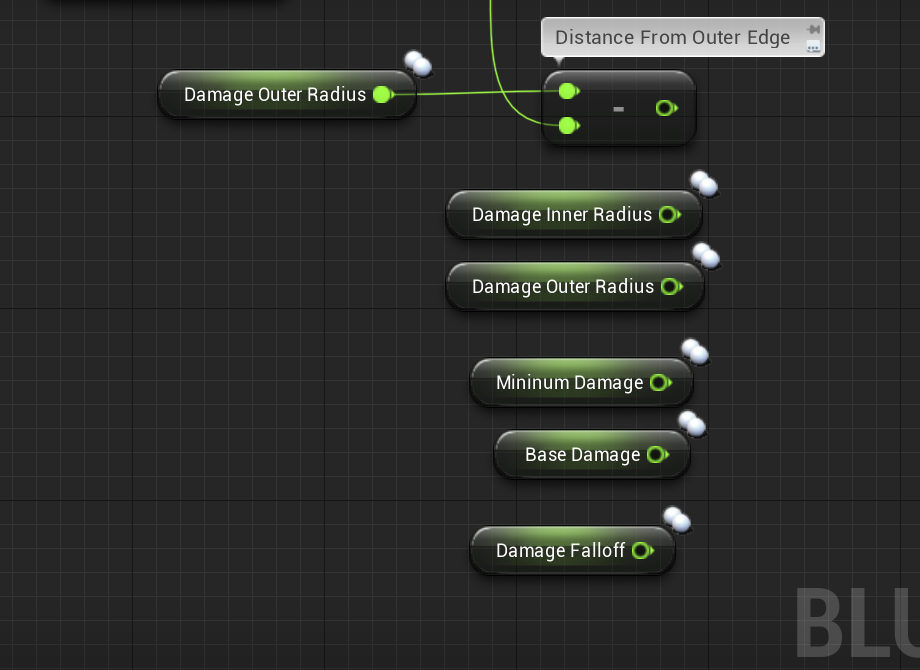
Does anyone know how to calculate a damage with falloff? I have all the values I need. I just don't know the algorithm. Please don't tell me to use the default UE4 node lol. I'm making my own: https://i.gyazo.com/19961490f321fa2545a585e4c18116e4.png
 hallow helm
Have it print the CurrentWeapon variable, to the left of Weapon Type @icy cliff
@dapper kiln Are you saying you want the damage to decrese with distance?
icy cliff
Nothing comes up on that
icy cliff
yea nothing
hallow helm
try printing the character
icy cliff
Nothing
hallow helm
can you show me where it is printing
icy cliff
Is it in the character BP right the character enum you asked me to print?
dapper kiln
@hallow helm yes decrease damage the farther away from the inner radius
 pale ocean
Hello there. I need a function which save the total of games won. It must be stored on my disk, so I use a save & load system. There is only one level. When the level (so the entire game) is completed => save +1 in the backup file. If the player play again the finish the game => +1 in the backup file so total is 2. Etc, etc..
I have created this but I can't increment :
sick galleon
Macro question : Im trying to create a macro library in the assumption that it will make its macros available in every blueprint.
Im confused tough as I cant have two different output nodes, so I dont see how to make a macro that does something like "if input float > 0 return 1, else return 2"
Is that not what macro are for ?
pale ocean
I also added this in the end of the function, now it increment if I first push M (Save) the push L (Load) again and again BUT NOT repush M (Save) because if I do so, the variable is reinitialized to 1. So it's not good neither :
hallow helm
@dapper kiln Sorry i took so long
@dapper kiln There is a node called GetDistanceTo, you can use that and get the distance from the player and adjust the damage based off that
@icy cliff print that for me
icy cliff
Ok
trim matrix
Could anyone help me figure out why my animation isnt playing?
hallow helm
@trim matrix maybe, whats going on
trim matrix
Its an animation Asset, im using for my fnaf free roam game, and it just doesnt play at all
in game or in editor
hallow helm
so when you open it in editor what happens
icy cliff
Jesus haha
hallow helm
XD
trim matrix
The anim asset i use
basically
im not that good at making games
i just started lol so sorry if its obvious
hallow helm
@trim matrix Youre good
trim matrix
It looks like this:
icy cliff
hallow helm
unfortunately im not sure what the problem could be...
trim matrix
lemme send a GIF or something
hallow helm
ok
@icy cliff Ok now print CurrentWeapon that is right next to it
Also, what is the default weapon
 heavy lion
@austere knoll Well, after you cast to GI, you can get and set from it any variable stored inside it
hallow helm
@trim matrix where did you get the animations/character model from
icy cliff
trim matrix
i got them online lol, it came with an anim and had a skeleton so i thought it must work in UE4
icy cliff
Getting a bunch of errors when ending the play
hallow helm
@trim matrix definitely an issue with the animations... not sure though
trim matrix
and also
hallow helm
@icy cliff You got errors when trying to print?
trim matrix
and anim didnt work
like the starter UE4 anim
doesnt work
on a starter UE4 skeleton too
hallow helm
@icy cliff Ok so it is telling you it isn't actually getting CurrentWeapon
because nothing is there
icy cliff
Right 😐
hallow helm
get rid of the prints you are doing
and just do a print in your characters TICK, printing CurrentWeapon
icy cliff
Tick?
icy cliff
ahhh haha
hallow helm
isnt equip weapon a functioin
icy cliff
icy cliff
oops yea
icy cliff
This is mushing my head haha
hallow helm
in that tick, print the CurrentWeapon
icy cliff
Yea done that
hallow helm
then show me
icy cliff
Is that correct?
hallow helm
yes
icy cliff
hallow helm
ok and when you change weapons does it change what is printed
hallow helm
hmm
ok
and in the pistol you have the Enum WeaponType set to pistol?
and in assault rifle its set to assault?
icy cliff
Yes
icy cliff
hallow helm
and show me what it says when you change weapons
icy cliff
hallow helm
@icy cliff can you get teamspeak or something so i can look at it myslef? or upload the project?
uploading the project is fastest for me
icy cliff
I currently don't have a mic lad
hallow helm
dont need it
icy cliff
Al need to download teamspeak then
hallow helm
ok go ahead let me know
oops
i didnt mean teamspeak
i mean teamviewer
i do that all the time XD
@icy cliff
icy cliff
Alright np haha al download it
hallow helm
ok
sick galleon
who uses Team Viewer when theres Roger Wilco ?
hallow helm
im old schoool
sick galleon
then you should use Roger Wilco, released 1999 :D
hallow helm
ok im going to message you
hallow helm
im bored anyone need help
 loud cipher
Can anyone give me tips, i have used unreal engine for 3 years, but i have only used tutorials, so my blueprint is really bad, i cannot code well properly myself and have to rely on tutorials. How can i fix this, does anyone have knowledge on how they learnt blueprints?
 ripe drift
who uses Team Viewer when theres Roger Wilco ?
@sick galleon
Those were the good old days haha
maiden wadi
@loud cipher It's worth remembering that Blueprint is a scripting language despite it being dressed up with nodes. It still follows logical flow. You still need to understand class inheritance. Common programming rules still apply. Following Object Oriented Programming can be very useful. Keep encapsulation in mind as much as possible. I find that tutorials can be a useful tool, but they also guide some people down the "academic" path. Remember exactly what you need to pass the test and then forget it. Follow the tutorial and do what it says then forget it if the blueprint worked. Presumably you're interested in games? If you want to get away from that cycle, I'd recommend thinking about simple mechanics in some of your favorite games and replicate them as much as you can without tutorials. Mess around. Make silly stupid stuff on a whim. Have fifteen projects. Play around with common functions like the line traces and stuff til you have a good understanding of how everything fits together.
 versed badge
If I choose blueprint on a project can I still do coding too?
Like why are they separate?
dapper kiln
Yes you can always add C++ classes to a blueprint project later. You're not locked down with blueprint only. They are separate because some people like using one over the other, and some people like using both together. There is nothing wrong with either, a nice marriage between the two is usually the best result.
@loud cipher What @maiden wadi said is exactly what I believe as well. Forget tutorials and focus on learning the small building block things that you'll need forever. You do this by messing around like Authaer said and working on your own projects. Just come up with a small simple idea such as "I want to make a door open and close when I stand on a switch" then focus on making it happen. Learn by doing is always a good way to learn.
 tight schooner
@versed badge Epic's intended workflow is you do the math/data heavy stuff in #cpp but expose functions as blueprint nodes, so that BP is the "design" layer. Ofc you can use one or the other exclusively too.
loud cipher
Alright thank you
maiden wadi
@versed badge They're technically only separate because there are blueprint bases and C++ bases. Same thing, different base. Everything becomes C++ in the end.
I think they just leave the compile section out of a Blueprint base until you have a C++ class so that it doesn't confuse the non coders. Who knows.
 formal prairie
very new to blueprint. what should i put in the object section ? i want the slider to control the strengh of my WindDirectionalComponent
tight schooner
Not knowing anything else about your game, your widget needs a reference to a particular WindDirectionalSourceComponent
It's basically asking, ok, which one in your game world do you want to affect?
formal prairie
ah okay
so i should add the winddirectional to my widget to be able to modify it, right ?
 onyx swan
I want to store a hotkey in a widget, via Key variable. Is there an easy way to dynamically create a key, like 1-9?
 true plaza
How do I grab the cube reference from a different blueprint.. I need to input the Target on the DetachFromActor
ive been trying with variables but no success yet
the Target needs a Actor Object Reference , so should the variable be ?
 onyx prairie
anybody know how to get a variable (such as a string) out of a blueprint function library? cant declare the variable and extract it and i cant find a good target reference it will accept within a normal blueprint.
tight schooner
@onyx prairie idk entirely what you mean. If you want a library function that takes a variable and does something to it, I think the function input needs "pass by reference" enabled
onyx prairie
most people just ignore my posts, so first off, thanks. sorry, i am not a programmer by trade so i dont know how to frame the question correctly.
anyways, will look around at that.
tight schooner
Me neither welcome to #blueprint 
onyx prairie
looking back in the past pins, people were more interactive then. really feel like we need a system to incentivize experienced people to help out the newbies more.
surely epic could sponsor something like that
but i guess people they dont want to set the trend of having to receive pay in order to help.
so maybe theyll just leave it as is.
trim matrix
hey so im getting this error for no reason i did everything right whats wrong
let me get the error
tight schooner
@formal prairie sorry for the late reply. There are a million ways to pass references and data between blueprints and it's highly dependent on what you're doing. The topic is called "Blueprint communication" and you can look different forms of that. The quick & dirty way to get a reference to a thing are the "get all actors from class" and "get an actor from class" nodes.
trim matrix
tight schooner
@onyx prairie yeah whether questions get answered just depends on who happens to be around and has a plausible offhand answer
onyx prairie
@tight schooner seems so. not a lot of info about blueprint function libraries outside of c++ stuff. the error im getting basically is just saying that i cant declare a variable that isnt local. ive tried to pass the refrence many ways: bpi, casting, some other ways that proved fruitless.
so im just trying to find a way to pass the reference
of the string, so that i am able to textrender what was in said string.
if i print string, the associated username appears no problem.
if i do my textrender within my character and set the input text to whatever, it also appears no problem.
so it's just trying to send the information over.
 elfin hazel
@trim matrix You need to make a HUD class and override the draw function in order for the function to.. function. But you also need to set your project to use your custom HUD class, instead of the default one. Edit - Project settings - maps & modes, there's a HUD class dropdown.
onyx prairie
wait, actually, i think i figured it out?
i just had to declare a local variable, cast to third person, and find a refrence of the same variable within it.
maybe that will be the fix
trim matrix
my game is using my hud
elfin hazel
@trim matrix Okay, so you have your custom HUD class I see now. getting tired, anyway. In the functions list, click the drop-down and override the DrawHUD
elfin hazel
It should appear when you mouseover this images arrow location.
trim matrix
i did it but i want it to draw the texture when e is pressed tho
elfin hazel
Yeah, you'll have to add logic so that happens. A boolean in the hud class that is set to true when you press E. And in the Draw function, query the boolean.
elfin hazel
In your hud class, add a boolean.
In the second image you posted, with the E inputaction, cast the hud class to your hud class.
Set the boolean to true.
In the Draw function, if boolean is true - draw texture.
 hazy tusk
Im looking for some help in using the Web server, the documentation on HTTP is outdated and the example requests don't work.
elfin hazel
Or, you can call a function that sets the boolean to true. That is a little more proper, but either works for now as you're learning.
trim matrix
im getting this error now
elfin hazel
Yes, you still need those Get Player Controller - Get HUD nodes. The HUD result pin goes into the cast object.
trim matrix
so wait exactly im trying to connect those nodes but it says i cant connect them
elfin hazel
It should look like this
trim matrix
i did it but its not appearing there is no errors but when i press the key nothing happens
faint pasture
show what you got now
trim matrix
faint pasture
What is the E? boolean?
elfin hazel
And the draw hud function
elfin hazel
haven't really used the draw texture in hud, but the texture width/height should probably not be 0.
trim matrix
i changed it from 0 but still nothing
faint pasture
I mean where do you use it? You're just setting a boolean, so what. What exactly are you trying to do and where do you do it?
elfin hazel
Well, there should be a DrawLine function. Connect it directly to the event and ignore the branch for now. Set its values to start at 0,0 and end at 500,500 and a thickness of 10. Is the line being drawn?
elfin hazel
And try drawing after the branch. If that works, then it's the properties of the Draw Texture that makes it not show up.
trim matrix
nothing
elfin hazel
oh. So it seems that your boolean is never set to true?
Should have tried this in the first place, but connecting the drawtexture directly makes it show up?
trim matrix
nothing is being drawen
elfin hazel
Well, I don't know why it isn't being drawn if DrawTexture is connected to the Draw HUD event. Change the values and see if you get anything, other than that I have no idea.
Maybe set Screen width and height to 500, leave the rest at 0.
trim matrix
so the location was the problem when i connected it directly
it drawen the texture when it connected it directly
but when i connect it to the branch nothing happens
when i press re
*e
elfin hazel
Oh, okay. Use a print string and connect it between the E input action and the cast.
See if it fires at all.
trim matrix
it works now i just didnt connect it to the event thank u
 tough cipher
does anyone know how to set up mobile inputs like panning with touch,rotating and pinching to zoom in or have a video that shows how ?
 sharp cosmos
Does anyone know how to attach component to component and ONLY attach location (not rotation or scale)?
I can find a way to do it through event tick, but I'm wondering if it's possible through event begin play.
trim matrix
You mean like this? @sharp cosmos
static charm
any reason why a While woud lock up the editor, but if i put a break point inside it and keep resuming, it actually finishes the while loop and then exits succesfully instead of locking up.
 meager spade
AFAIK everything you do in unreal that you do not deliberately do multi threaded will be done on the rendering thread. So loops can potentially cause lag
I think a while loop will run until it's finished and nothing else will run on the rendering thread meanwhile
static charm
yeah that makes sense but it's only suppsoed to do 5 iterations and then finish. if I breakpoint and hit resume 5 times, it finishes instantly lol
meager spade
I have no idea, I personally rarely use while loops
static charm
ive had so many weird bugs with this current project
fix one thing, create two more issues.
dapper kiln
come to think of it, I never use while loops either. 🤔 I used to use them all the time in modding but not in UE4 weird. IDK why it's lagging though
static charm
yeah i think because i have a dependency of the while condition on it self.
meager spade
My project almost exclusively requires me to use loops when I need to iterate over arrays so that's why I only use for
static charm
same but im using a plugin and it causes crashes when using nested for loops
so i had to come up with new logic
meager spade
I would be glad to help but it's 3:40am and I need to get up in 6hours
static charm
no worries
dapper kiln
Could you use a timer instead or no?
static charm
maybe timer is just slow enough so that it doesn't crash anymore
no i need to do 10 to 100 operations instantly
timer should work
dapper kiln
Hmmm. I'm not sure. Maybe use a fast time for the timer. What happens if you plug in the delta world seconds into it?
static charm
yeah ill just set the timer to min float possible
static charm
lol
ah shit i can't use a timer
omg
so it's in a projectile that gets destroyed, and On Event Destroyed it calls this code
but i guess Timer is delayed so it gets destroyed before calling it. eventhough For loops and While, does work.
dapper kiln
I just finished up working on projectiles. I had a similar problem.
So the code that's getting called is inside the projectile as well? Or somewhere else?
static charm
inside the projectile
dapper kiln
Yep, I has this same issue
So I'm sure this isn't the best solution but I just destroyed all the components of my projectile so that it wouldn't so anything or collide with anything, then ran my logic and after a second or 2 I destroyed it. I know that's not right but it works lol
static charm
yeah i just put the destroy at the end now
dapper kiln
I was trying to spawn blood particle fx when the projectile hit flesh and then bind the blood effect so that if it collided with anything, it would spawn a blood decal on the ground or wall. But the projectile was destroying before it could do anything.
Projectiles are a pain in my booty. I still have one more thing I should probably do but IDK if I want to. I have a custom radial damage function that uses a sphere overlap actors node. It works good but I just realized, I can damage things through walls. lol
static charm
yeah i hear ya
dapper kiln
@static charm I was also having the problem of my impact fx not playing when using OnDestroy because I was using "get actor location" which probably couldn't be got anymore because it's already being destroyed. I fixed it all by doing all my calculations and logic before hand and saving them to variables. Then use those variables on destroy
 tacit ridge
anybody know how to make an rtx toggle with blueprint?
I don't want to package 2 versions of the same thing because of one setting.
static charm
what do u want to toggle
you can call almost any engine command via blueprint
although you may want to ask in the graphics channel
dapper kiln
Yea if you have a widget with all your other settings, you could add a check box there and if checked it would enable it. I'm sure it's a command or something like all the other settings like Gallon said.
How do you think Epic does their "damage prevention channel" on radial damage? I'm trying to recreate it. I could use a linetrace but I'm not sure if that would yield the right results
bright frigate
Guys I have a small problem. I am able to destroy folliage using my line trace on character but only when I have collision by query enabled. So the problem is that the collision for the foliage is also on so I can't walk through it like i should for grass.
 small rose
maybe you can make a custom collision channel ?
bright frigate
Yeah I'm wondering if i should convert them all the blueprint actors and then do overlap events
hallow helm
@bright frigate Yeah youre going to have to change collision properties
You need to make a custom collision object and assign that to the foliage
bright frigate
okay thanks guys just looked it up will try
small rose
👍
hallow helm
@bright frigate here, if you need it
small rose
I guess I learned something too lol
bright frigate
Thank you guys again! I gotta do a couple of things but its working!
small rose
oh no nvm. I thought the collision section for me was different, but its the same layout.
hallow helm
got ya lol
 true marsh
I'm looking for different ways to hide quest objects if you don't have the quest. My current way is the typical overlap sphere to hide/show based on if you have the quest but it just seems costly to for multiplayer to be triggering on a multitude of quest items around the world.
Another way would be to "get all actors of class" on Quest Accept/Turn in to disable "hidden in game" on those actors.
I'm curious what might be a "only render target if you have X" method, if anyone has any other thoughts I'd appreciate it!
 true valve
I'm trying to toggle material using blueprint. It's not working. Any idea why>? So I've a lantern with to material slots, 0 is for the glass and 1 for the body part. When I turn it on I enable pointlight and add glow material to the glass.
 true valve
do I need the second node?
My MI has color and intensity only
I found the issue. It's something else. thanks anyway
jovial bobcat
Is there any benefits on putting all the inputs on a separate player controller rather than on the chracter BP
true plaza
when I replicate this on the BP of the cube I'm dropping, it works fine. But when I try and use a variable to do the same on a diff BP, its not referencing the Target.
hallow helm
@true plaza how are you setting Target
dapper kiln
If anyone is bored I'd like to know if it's possible to use a Multi Sphere trace by channel for a grenade explosion and not damage actors through walls.
 flat raft
true plaza
flat raft
true plaza
@hallow helm for which node
this one works fine on the actual cube I'm trying to drop
 random vapor
@dapper kiln for each actor hit by the sphere trace, do an additional trace to check if there's direct line of sight.
 crimson charm
what i am trying to do is start the match with my ui and then start an open steam server. whenever i try and start the round, it will go to the loading screen and then take me right back to the main menu
hallow helm
@true plaza So you are telling the cube to detach from the actor you are calling the function from
@crimson charm are you sure you arent telling it to load that map?
dapper kiln
@random vapor I tried that but it had some unrealistic outcomes. 😦 Such as enemies walking along a second level building and you shoot the explosion up at them and it hits the edge of the floor and it explodes right at their feet but the trace returns false. Or if an enemy is hiding behind a street sign and you shoot the small metal pole, the trace fails but in reality that person would take the damage. That's with a linetrace from the center of the impact towards the actor.
 whole rose
what is createserver? creating session?
you should be creating the session first, and then on the delegate of session created, THEN servertravel
true plaza
@hallow helm I might need to go back and read the descriptions of all the nodes
crimson charm
create server is a reference to a custom event in my game instance. Look up steam advanced sessions plugin
true plaza
it's not xD
true plaza
random vapor
@dapper kiln Yeah grenades can be tough to get right, even in CS:GO for exemple you often have very weird outcomes. But that's the simplest way I know of. For more accuracy, you could do multiple visibility traces (one to the actor's head, one at the center, one at the feet) and also assign a different channel to small objects which should not block the explosion
 crimson charm
part of why i am confused about why it is looping is because in the editor it doesnt
true plaza
@hallow helm for Set Simulate Physics the Target is out of scope
 still trellis
will i get an error using a Cast To node for something that might be null, or will it just trigger the Cast Failed exec pin?
hallow helm
@true plaza Yeah you need a better way of getting the Cube reference... Are you just using Get Actor Of Class to get the reference?
true plaza
yes
whole rose
csgo does multiple traces
determining how much of body is visible
chest, top of head, feet, left "edge" right "edge"
dapper kiln
is that how the default Apply Radial Damage is done? It just fires a bunch of traces in all directions?
whole rose
if it doesn't hit the one trace directly
you never tracec in all directions. you just find all stuff in radius, and then trace to them.
applyradialdamage itself, doesn't actually do any tracing, just overlaps
oh wait, there is a trace my bad.
it just does one.
from center -> each overlapped thing
(which is what quake/goldsrc/source/etc all do as well, csgo just has extra stuff)
.. and hl2 has a "robust" option that does extra traces around the bbox
dapper kiln
Yea I was redoing the radial damage because it doesn't output the hit actors it only outputs a boolean hit value. I didn't want to do specific logic for every actors "Event receive radial damage" so I was redoing it myself. It works great minus the fact that I can either damage through walls or not damage through walls depending on if I do a linetrace check first
whole rose
you could implement your own version entirely. basically what the "built in" one does, is just 1) an overlapmulti by object type 2) iterates all the overlaps, and runs a function called "ComponentIsDamageableFrom" which does a line trace from the center, to the center of the actors bounds
so you could expand it, and do a check to the top, bottom, left, right, etc.
like what csgo does
true plaza
@hallow helm do I need to 😟 cast it?
whole rose
csgo only does the bounds check for players, anything else that takes damage is only the origin -> center check. so you can optimize it that way too.
hallow helm
@true plaza where are you calling the function from
whole rose
so you aren't making too many traces.
dapper kiln
would that hurt performance? My game is multiplayer and is a zombie game so I'll probably be hitting a lot of zombies with one explosion. I know linetraces are not very expensive but that could add up to a lot lol
 outer lance
So.. a weird course of events: I thought I had a brilliant idea: I have bigger trees on my level (RTS game), all baked lighting and shadows, I can place buildings where there are trees, they are then removed but the baked volumetric shadows remained and it didn't look good. The trick I discovered: change the material of the tree to a material with 1000x white emissive just before setting it hidden in game, poof the baked volumetric shadow gone. BUT then I just in a whimsical moment thought, what IS the performance of dynamic light instead of stationary (directional) ? ..and low and behold, I actually got better framerates with all dynamic shadows and lighting?! I mean, it is great, but I was surprised!
whole rose
it shouldn't be too bad. in your case, you can just break when one hit is confirmed
like, if it hits on the center trace, you don't need to do any of the others.
then you test higher up, if it hits, break, doesn't, check right, etc.
dapper kiln
That's true. So with a sphere that would be 7 traces right? Center, Top, bottom, and 4 sides.
hallow helm
@true plaza inside of what actor
whole rose
you just need to check more than just the center, if center is blocked
dapper kiln
Ahh true. That makes sense
whole rose
like y+-10 and z+-10 for example
could even make an array with the offsets... which is what hl2 does for +use haha
dapper kiln
I was thinking the same lol
whole rose
so then you just loop, and if hit, break
true plaza
@hallow helm MotionControllerPawn
whole rose
i wish i knew as much about unreal as I do of everything based on quake.
dapper kiln
I appreciate the help. 🙂 Thanks @whole rose @random vapor
whole rose
yw
hallow helm
@true plaza where are you spawning the cube
true plaza
BP_PickupCube
hallow helm
im sorry man i actually have to go to bed... Im getting tired and cant really think straight... I know what the issue is though... You need to figure out a way to get a reference of the actual cube itself
true plaza
I really appreciate the response @hallow helm
hallow helm
When a cube spawns, you can have it call a function in your MotioncontrollerPawn, that sets the reference to the cube
true plaza
sleep well : 0
hallow helm
I will be back on9 to 10 hours from now then Iwill catch up with you again
 humble scarab
I am trying to hook up my pause button to both pause the game and unpause the game, I've got pause working but I can't seem to get unpause going, if anyone has any ideas please let me know
Player Event Graph:
Pause Game Function
Unpause Function
maiden wadi
@humble scarab The Event needs to be able to play on pause.
 earnest tangle
@humble scarab if your button input handling is in the player pawn, the "input to ui only" most likely ends up eating the inputs that would normally go to it
maiden wadi
Oh, thought you were using the generalized pause things.
earnest tangle
You'd need to try handling the inputs in some other place that still receives inputs during "ui only".. could be player controller or HUD, not 100% sure
humble scarab
HA HAA, thank you, I just had to set the "Pause Game Function" from UI only to UI and Game
trim matrix
Hey there! Ive got a hopefully quick question. Im creating a Pokémon game, and have a structure + data table for each Pokémon's stats, learn set, etc.. How would I go abt making a trainers party? I've created a generic "Pokémon" bp placeholder, with some public, expose on spawn variables. However, I need to store a Pokémon and all its stats into a party. If i use the Pokémon bp, none of those "expose on spawn" vars show up, so that's a no go. The best I could come up with is to just use the name, and spawn the Pokémon from that, but then its stats don't stay the same. How could I go about storing up to 6 Pokémon into the players party?
I understand I did a poor job of explaining that. When someone gets the chance shoot me a dm and I can call or smth. Theres no way I can type this out without sounding like an idiot lmfao
 thin heart
How to create water fountain with Niagara
 neat stream
Hello Guys, I'm working on splines these days... I want to know if it's possible to get the location of points on the outer border of the spline ?
bleak vector
that's index 0 and index length - 1 🤔
 runic ore
If you just want the outer points for spline point n, calculate the point on spline at n and on n + x (so you have the direction) now my vector math is gone but with the direction, you can calculate any point around your spline point. basically any point defined by the plane, where the direction is the normal.
 fallen glade
@fallen glade A piece of a strategy game? I remember Fallen Enchantress (www.elementalcom.com -> first game with DevJournal? ) with this kind of mechanic.
@hazy igloo Yeah, A battle order for my "strategic" RPG 🙂
 hazy igloo
Nice. Give us screenshots/videos!
neat stream
If you just want the outer points for spline point n, calculate the point on spline at n and on n + x (so you have the direction) now my vector math is gone but with the direction, you can calculate any point around your spline point. basically any point defined by the plane, where the direction is the normal.
@runic ore That's what I already do, the basic of the spline, I wanted to get the outer point
runic ore
Well then you either don't do, what I explained, or I don't get your issue^^
 dreamy river
Hi, I've got problem with spawning Niagara Beam particle. I created simple Beam that simulates projectile from a gun. I spawn it just after line trace for my gun, and set it location from muzzle flash socket location in my gun. Then I set vector parameter for End Point and here I use HitPoint from LineTrace. My Beam is working properly only when my character is at the world origin (0,0). When I move away, beam is not connecting to EndPoint but spawn in some different directions. I've tried setting it to localspace but without result. Here is example when I'm slightly away north from world origin https://www.youtube.com/watch?v=0dvzag0Xq1U&feature=youtu.be


 velvet forum
Hey guys how can i fix this
it always print 0
maiden wadi
@velvet forum That's correct. What are you expecting it to print?
velvet forum
i need 1% or 10% from 50
 delicate imp
lmao
I don't know blueprinting that well but its interesting to see all your screenshots xD
maiden wadi
If you need ten percent of fifty, you're looking for 50 * 0.1 or 50 * 0.01 for one percent.
delicate imp
It should equal to 1 why is he getting 0
maiden wadi
Because there's no remainder from fifty divide by one.
hallow helm
Modulo (%) isn't doing what you think it does @delicate imp @velvet forum
velvet forum
@hallow helm so what can i do if i want percent from number?
hallow helm
Look at what Authaer said up a few posts
if you need ten percent of a number, multiply the number by .1
delicate imp
@hallow helm oh ok lol
hallow helm
if you need one percent, multiply it by .01
velvet forum
oh thanks @hallow helm @maiden wadi
hallow helm
@delicate imp @velvet forum Modulo returns the remainder from dividing the two numbers
tough cipher
does anyone know how to set up mobile inputs like panning with touch,rotating and pinching to zoom in or have a video that shows how ?
hallow helm
tough cipher
thanks
 fleet cedar
How can I make cascade particles not sprite/billboards
hallow helm

 halcyon grove
Hey, very noob question but I'm just concentrating on getting basic movement down, how do I "fill" this shuttle reference variable properly? So I can call it and access it's components later and tell it where to go etc...
the reference is to a pawn from the player controller
halcyon grove
yea so shuttle bp is a pawn containing a mesh of a "shuttle"
a camera and a floating pawn movement
I'm trying to call this from the player controller
house the movement there
hallow helm
This an RTS?
halcyon grove
like this
for now yes let's just say it is an rts
but I'm practicing all movement types ultimately
will be
if it were the other way around I could just call "get game mode"
but what is the equivalent for referencing a pawn in the controller?
maiden wadi
If it's the player's currently possessed pawn, you can use GetPlayerPawn, or GetController-GetControlledPawn
hallow helm
if its an RTS, usually you left click to select a target, which you would then have the reference you need
bright frigate
So I have another small question. My remove grass system was working good but it would only remove one grass static mesh/componet at a time. So I decided mybe a multi trace would be better. Its works sometimes but not how I would like. I think its a problem with the hit item index and the remove instance can only remove one at a time?
hallow helm
@bright frigate If you want to remove more than one you will need to get all the hit actors and put them into an array
fleet cedar
can I make my line trace go through objects and not stop at the first collision?
fleet cedar