#blueprint
402296 messages · Page 515 of 403
 bright frigate
So what ever object you are trying to trace you would set its trace channel under its collision to overlap
 maiden wadi
@fleet cedar For that, you need MultiTraces. Single trace always returns the first object hit.
bright frigate
yeah
 fleet cedar
"multi line trace by channel"?
bright frigate
yeah
maiden wadi
Yep. It's the same thing, but it will return an Array of Structs instead of a single Struct
fleet cedar
How can I replicate this with an array
to check if any of the hits are the box
I want it to go through objects and hit the one behind if possible
bright frigate
Filter Array maybe
 hallow helm
MultiLineTrace provides an Array already
See how the Blue output pin is a bunch of squares?
bright frigate
Filter Array
hallow helm
@fleet cedar
bright frigate
srry
hallow helm
oh wait
bright frigate
So how do I use this a ref to destroy or remove instances?
fleet cedar
hoping to draw a line and be able to hit these back boxes past the front ones
And if it hits, it triggers particles
fleet cedar
hallow helm
ok
fleet cedar
Line from the camera forward, and want to hit both the closer and farther boxes
hallow helm
@bright frigate Message me and i will help you
fleet cedar
so need it to not stop at the first collision
hallow helm
@fleet cedar I will help you after im done with Mwparra
fleet cedar
thanks!
 scenic oasis
Hello, Can someone help me with the access error Blueprint Runtime Error: "Accessed None trying to read property RTSCameraPawnRef". Blueprint: RTSCameraPawnController Function: Movement Speed Calculation Graph: MovementSpeedCalculation Node: Return Node
Let me know if anyone is available then ill post more, don't wanna flood the chat lol
maiden wadi
@scenic oasis Your RTSCameraPawnRef variable has not been populated with a valid actor.
scenic oasis
@maiden wadi thanks for the quick reply :D! in the tutorial I am following the instructor said to change the variable type to itself. If I populate a value in RTScameraPawnRef, it warns me it will break connections with others
maiden wadi
@scenic oasis To better explain. Blue variables that are of a class, are called pointers. These point to a memory address where that actor is being stored. Pointers can be told to point to a specific type of class, but not actually be pointing at anything in memory yet. In your case, your pointer is supposed to point to an RTSCameraPawn. It knows that, but you haven't told it which one.
 leaden helm
Cant even think how to google this, for each quest my player has, I create a widget and add it to a vertical box, and to an array to display the quest objective. When the player finishes that quest, I need to remove the extra widget. But I dont want to create and destroy widgets on each update... how to remove extra widgets?
maiden wadi
I know them feelings.
leaden helm
on an update, I iterate thru the quest list and if the widget array is valid, I update it, if not, it creates the widget. But if I have two widgets, but only one quest left, how to destroy the extra
maiden wadi
In short, you get the VBox, get child at index, and call destroy on that reference.
leaden helm
this works:
each widget is stored in array for referencing on an update
the widget isnt bound to a particular quest, just gets its texts updated
scenic oasis
Okay next bump in the road here >.< So I have a pawn named RtsCameraPawn and it has a hierarchy of "Scene>Sphere>SpringArm>Sphere". The event graph is blank and there is nothing noted in the tutorial about entering any values within that. I only have one RTSCameraPawn in my entire project. Am I missing something?
leaden helm
ok changed it down to one forloop. I thought it was always bad to change an array while iterating thru it
maiden wadi
It is. Alternatively, use a Reverse For loop.
leaden helm
No errors either way
I've seen before that BP arrays are more forgiving, there must be some underlying code to is preventing errors
maiden wadi
What'll happen is that if you have an array of four items. If you're checking if they're valid to remove them and the array is set up like this before the loop. Valid, Invalid, Invalid, Valid. What'll happen is that it'll remove two, put three in it's place, and not check it and then go to four. You'd end up with Valid, Invalid, Valid after that loop.
 elfin hazel
Since it's an array of widgets you're working with, iterating over the array you can call remove from parent without problem, because it does not affect the array. But Removing the member alters the array so that the member that should have been after this index, is skipped.
leaden helm
So whats the best way to handle this?
elfin hazel
oh, wait.. you did a reverse loop.
maiden wadi
Your last screenshot should work fine as long as you're setting up the rest of the stuff based on that same array.
elfin hazel
that should be fine.
leaden helm
It does the updating of the quests first, then does the reverse loop right now, just tested with 3 quests, seems to work fine
ok, thanks for the help 🙂
scenic oasis
bah i need a coffee break alredy I can't seem to link the reference to the camerapawn that I created. It's the only one in my project. My fundamentals aren't there yet as I am new but Im stumped as heck on this one
already*
scenic oasis
It's a Pawn with a camera and a boom stick, I have a camera pawn controller, and I dragged a player start in my level\
let me know what you need me to screenshot or screenshare
and Material circle as a reference to where its pointing
maiden wadi
If it's the player's possessed pawn, you can just use GetPlayerPawn, or GetPlayerController->GetControlledPawn.
 trim matrix
Is there a way to a SkeletalMeshObject reference into a SkeletalMeshComponentObject reference?
maiden wadi
A SkeletalMeshComponent is the ActorComponent that holds a SkeletalMesh. So SkeletalMesh to SkeletalMeshComponent? That'd be a bit hard unless you create a Component and set it's SkeletalMesh value to your mesh value that you want to be a component. If you're trying to get the SkeletalMesh from a SkeletalMeshComponent on the other hand, that one is easy.
trim matrix
I just want to tell an actor component to use a certain skeletalmesh in bp
maiden wadi
Should be easy. You have the SkeletalMesh pointer?
trim matrix
I have a data table, with the skeletalMesh I wish to use
I wish to get this SkeletalMesh attached to the handsocket of my character's mesh
spefically "equipped" in game
maiden wadi
Do you already have the actor component, or are you trying to create it at runtime?
scenic oasis
With Get Player Controller my input has to be 0 to be the first player? This doesn't need to be connected to anything specific in my Event Graph to initiate? The output is an object reference it says in the manual. So that means my output would be the RTSCameraPawn? Again sorry for so many questions, I'm trying to get it done without asking for too much help.
trim matrix
I do have an actor component, which has a DefaultMeshSubobject created at run time
I was thinking of using this as a bridge to getting the mesh attached to the hand socket
maiden wadi
Something like this should work. Just need to get your skeletalmesh pointer for the first node.
trim matrix
I crashed it
scenic oasis
@maiden wadi IT WORKED thank you man much appreciated!!
 gritty elm
what is the best way to show widget on multiplayer? in game instance or game mode or player controller?
 chrome fog
Hi, I have an array of USTRUCT() defined in a DataAsset (c++). I would like to search if the array contain a child struct based on a field "FString" only and ignore other fields in that struct. How would I do so please?
in blueprint
maiden wadi
@gritty elm Widgets should disregard the fact that it's multiplayer. Widgets are only on the singular client and should rely on the information that client has. Game Instance is not a good place to store things that'll be deleted on map moves. GameMode wouldn't be able to store widgets because it only ever exists on the Server. No client can access GameMode. I think a lot of people keep their widgets on the PlayerController. I personally prefer the HUD class since it's already sort of related to the UI and it also only ever exists on the Client.
@chrome fog Pretty much the same as you would in C++. Iterate over the struct array and compare what you need to.
gritty elm
what is difference between add to viewport and add to player screen
 fallow path
@gritty elm player screen is probabbly for split screen
Adds the widget to the game's viewport in a section dedicated to the player. This is valuable in a split screen game where you need to only show a widget over a player's portion of the viewport.
trim matrix
Hey there! Ive got a hopefully quick question. Im creating a Pokémon game, and have a structure + data table for each Pokémon's stats, learn set, etc.. How would I go abt making a trainers party? I've created a generic "Pokémon" bp placeholder, with some public, expose on spawn variables. However, I need to store a Pokémon and all its stats into a party. If i use the Pokémon bp, none of those "expose on spawn" vars show up, so that's a no go. The best I could come up with is to just use the name, and spawn the Pokémon from that, but then its stats don't stay the same. How could I go about storing up to 6 Pokémon into the players party?
I understand I did a poor job of explaining that. When someone gets the chance shoot me a dm and I can call or smth. Theres no way I can type this out without sounding like an idiot lmfao
 rare gale
@trim matrix I do something similar with my inventory system. All the items have stats determined by my struct. The way I do this is to have that struct on each item, its data is set when it's created by grabbing the info from Data Table and then from that point, I pass that full struct item around as needed. It gets passed to the inventory item widget, tooltip, etc and keeps the same info. Hope that made some sense to try out, feel free to DM and I'll explain better if I can.

 rare gale
Is the overlapping object already in the sphere?
 gray dune
no, starts from left and then ticks to right by 2 every tick
rare gale
check your collision settings? Maybe one or the other isn't set to generate overlaps or ignores the type of object that the other is?
that crap gets me all the time
wait, move your print screen to the onactorbeginoverlap.... might be a cast issue so it's not going through
gray dune
i changed to blockall and it seems to work. Im wondering however, any way to make it wrk without sweep checked on set actor location?
if i enable sweep, itll stop on the floor unless i make it float somwhatr
wait so its blocking but not triggering the print....
rare gale
sweep means it's looking for collision along the path it's moving in... I think you need that but you can change from block to overlap and that should be fine... I think
I think your print is not working because the cast to static mesh actor is failing... does it work if you have the overlap go straight to the print string instead of through the cast?
gray dune
let me trys
still doesnt trigger it
how does one even check if a movable static mesh overlaps something
i know how players can overlap
but never figured how static meshes can trigger something
for instance here i am moving static mesh in the level bp
rare gale
I don't use the level BP ever so I'm not sure if that could be part of the issue? What do you see when you Show>Collision in the editor? Does your static mesh have collision? Maybe that's an issue? Might depend on how you made that sphere
 dense badger
I'm curious what a good way to manage multi-level data would be. For example: If I have a persistent with several sublevels, and I want to go through each sublevel and get actors with tag or of type. What's the best way to enable that?
 reef mist
Hi guys, is there a way to attach an actor to another using sockets in both actors, not just the parent? I cant find a solution to that.
 ripe drift
Hi all, I have 2 different cinematics which I want to play dependent on level loaded, I can see we have a Get Current Level Name but I'm just trying to figure out how to get this down in BP.
So in theory - If Level Name = Alpha, then load Sequence A / If Level Name = Beta, then load Sequence B
Any pointers on how I would action this ? help appreciated.
ripe drift
++ sorted it hehe = amazing how you can ask a question and read it yourself and get the answer
rare gale
Not sure what you did, but Select nodes are good for that type of thing.
ripe drift
@rare gale Simple branch bool and set on the level itself but, now you mentioned select nodes, maybe a cleaner way for sure, I will check it out... thanks!
 mental robin
Weird question. Is it possible to use a gradient texture with noise as a value of 0-1 in a blueprint to drive data
rare gale
you could probably make a function in your game mode or game instance and run that on start based on the loaded level and have a big list of them rather than just 2... assuming that makes sense for your setup 🙂
 simple lantern
Hey, I asked about this before but still can't quite figure it out. I'm trying to check if a spawned actor overlaps with previously stored actors in an array. Basically, I place an actor, and if I try to place another actor on top of it I should get a negative result. This works to a degree, but only on the most recent actor in the array. However, the collision still takes place on the old actor indices (look at the branch), but is somehow split into a quantum state of both true and negative. I think this is because of how the loop works, it is checking every index, not all of which I am overlapping with. But I'm having a hard time figuring out how to re structure it so that it turns red on every index, not just the most recent one. Check out the video i'm linking. any ideas?

the actors are added to the array by a simple spawn actor
 haughty egret
Does anyone know what would create a "soft" dependency in the reference viewer??
simple lantern
A follow up, this logic seems to have fixed my problem. Using a loop with break aborts the loop while the actor is overlapping so I don't get that branch superstate issue
 robust cliff
what is the difference between lerpRotator and Rinterp?
 dapper kiln
I believe lerpRotator doesn't have to be ticked whereas Rinterp to needs to be.
 ripe rose
is there a way to make a spawned projectile not fire hit events with its owner actor?
e.g. you're spawning a rocket projectile from a location that overlaps with a component that you want to trigger a hit event, but only with other players, not the owner
 thorny marsh
@ripe rose You can try IgnoreActorWhenMoving node.
I think thats what its called.
Set your Projectile to ignore the Owner.
On BeginPlay.
ripe rose
i think it's working, thanks
mental robin
Hello. So I am working on a weather related game about storm development and chasing them. I am working on the atmosphere. Currently I have simulated layers where a weather balloon is sent up and returns the conditions at that layer. For example here the returned results display temperature at each layer of the atmosphere. Does anyone know of a way I could take this data and display on a material or anywhere in the world that a player can see. The reason is I am wanting to implement a weather soundings/skew-t/hodograph eventually
Nevermind I got it 🙂
 cosmic moat
hi guys, really weird landscape spline issue here. I find that the collision just doesnt rotate with the spline. Any suggestions?
you can see that the actual mesh works fine, but the collision has a locked axis
 whole rose
that's just the preview
you acn ignore tat
it never shows it properly
but it totally is correct.
just a visualization bug.
 scenic scroll
why cant i create a reference to my actor in the level blueprint? (sorry if noob question)
nvm it fixed itself
 austere knoll
lol
 crimson charm
i am working on adding the ability for the user to select a gamemode to use on the map they load.
I added a shortname in my defaultgame.ini file and am using enums to hold the shortname. how do i go about this?
 jovial bobcat
is there a way for me to chenge only two variables in this blueprint while keeping everything else the same with out having to to this
cause this is a pain in the ass
rare gale
agree and same question 🙂
 tight schooner
@rare gale @jovial bobcat for structs there's a node called "set member in [name of struct]"
See section, "Setting Members in Structs"
jovial bobcat
umm i have this wired "glitch"
like when i connect the pins variable information dosnt get passed through but when i set it manually it does
nvm
im just stupid
i have two sets
i really spend 30 mins trying to fix this
scenic scroll
so i'm modding a game and there's a brick i want to edit so it floats on water, but i don't have access to the brick itself or its code, so i need to somehow remotely alter it. this is the code i came up with, but it seems that when i run the game the brick ignores it and still floats. any idea whats wrong?
scenic scroll
i now have this but its still not working
 terse steppe
So in c++ I have an Item class and ItemManager class which contains a TMap with each item and its ID. So I want to be able to initialize these items in a blueprint however I can't seem to find some clean way to initialize these items, I could either use a bunch of sets to initialize the member variables or create a blueprint to hold the data for each item but is there any better way to do this?
jovial bobcat
is there a way to make sure when the function dosnt fully complete the rest of the node dosnt run
thorny marsh
Split the function into 2 functions? Call both as necessary?
You may need to be more specific about what your asking.
jovial bobcat
oh i have a few branches inside the function
i want it so that when those branches fail
and the function dosnt fully complete
the rest of the line dosnt execute
thorny marsh
You can add a Return node inside functions.
This will end the function.
And send execution back to the calling code.
 narrow stump
I have a question with Animation Blueprints. Id like a behavior tree task that sets a bool value 'Shoot Gun' to true on my enemies animation blueprints. As it is currently, the task needs to be different for each type of enemy as they all have different anim blueprints, and i need to cast to its particular BP to set the bool. Can i have a task that will just set any bool named 'Shoot Gun' on the AI owners animation blueprint (passed in as a blackboard key), and it will set it if it finds it?
would i use some kind of interface for this, or is it the wrong approach
maiden wadi
It might be easier to consider playing an anim montage whenever the weapon is fired. No need for any interaction with the animblueprint. If that's somehow not plausible for you, it might be easier to reverse your logic. Instead of setting it in the animblueprint, set it in the enemy or their behavior tree and let the animblueprint poll the variable from a base class.
trim matrix
I have a problem. I have one actor that has a movement interp component. I set up its values and all is fine. then I make a copy of it and I want to change values. It wont store the "control points" value. I have about 200 of these copies to do. Can I set up this in bp someway? I tried to make 200 cubes in one bp but the individual components inside bp wont work? Or can i somehow access my 200 actors in view port and somehow change the value there? now it wont allow me.
Is there any way to reorder event dispatchers?
 alpine halo
well I've created a master blueprint for weapon class and made all child weapons like AR, SMG, Shotgun. I've done all the attributes like current ammo, max ammo , clip size, range, etc all in master Blueprint. if some guns need automatic fire. I've just override the fire function to call by timer. My blueprint checks the validity, the player can only pick 3 guns (1 handgun type + 2 AR/Shotgun type). For AR type if I'd first holster empty then it goes to 1st, if not then goes to 2nd. If both are full then it swaps the current equipped gun.
I'd made an enum to determine if it's 1 handed weapon or 2 handed
trim matrix
@jovial bobcat You can add a boolean return value to a function, and then check it with a branch. Like so: https://blueprintue.com/blueprint/8xwn0w7e/
BlueprintUE
jovial bobcat
@trim matrix Yeah thanks
trim matrix
Is there any way to reorder event dispatchers?
Scratch that. Is there a way to reorder anything except variables? (Event dispatchers and functions.)
narrow stump
@maiden wadi thanks, ive done both now, seems to work fine. firing 'Shoot Gun' from the behavior tree itself, but also using an interface to relay a shoot animation to different enemy types with different anim blueprints.
from the enemy's own bp
 pale blade
Why...
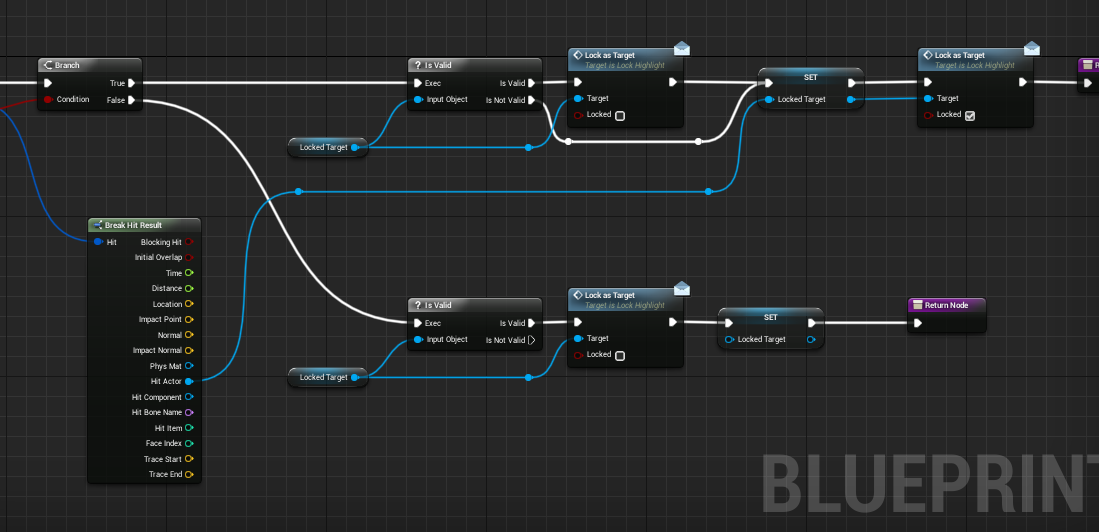
I have a function that returns the Hit Actor from a line trace. Inside the function I print the Actor's name right before returning. Outside the function I print the return Actor's name again immediately from the function output.
Inside and outside actor's name are both blank if I don't line trace anything, expected.
Inside and outside actor's name show the enemy's name if line traced for enemy, expected.
But then inside is blank, and outside is what was the enemy's name before.. how can something obtain a value from a function, if the function doesn't returns anything at all?
trim matrix
Pass by reference?
pale blade
The actor output is a reference, would it have any significance?
alpine halo
i've done same thing in past
i did sphere trace, and those actor who can receve trace will be highlighted
for receive trace i'd made a blueprint interface

 pale blade
Okay.. I had a IsValid(Actor) will return something, but did not return anything if it is not valid.
By adding a default return node when it is not valid, it seems to solve the issue
So my guess is.. if the function does not return anything, the code calling the function will still grab the Actor reference (from the function output), which happens to be what reference was previously there
So the takeaway lesson is... always have a return node for your functions
Similar to real programming, they should enforce it in blueprints
Or at least, that's what I'm thinking, is that true?
alpine halo
isValid() [exec] node is check whether the actor is in editor or not
make sure your line trace is proper by making debugging to 'for duration', and reference on hit actor
 brittle fiber
OG this thing keeps resetting its position and parent relation after build
CyberThreads under construction. Volunteers who prioritize development of Human Species welcomed.
after I do some random change it will be as it was placed by me
alpine halo

I return to this old series of mine as I was made aware of a packaging bug with this. So if you have noticed that this doesn't add items to your inventory when the game is packaged, check out this quick fix to solve the issue.
Support me on Patreon and get access to videos ea...
https://www.youtube.com/watch?v=qi-lXEFknvM
I think this issue and your issue both are apparently same
I return to this old series of mine as I was made aware of a packaging bug with this. So if you have noticed that this doesn't add items to your inventory when the game is packaged, check out this quick fix to solve the issue.
Support me on Patreon and get access to videos ea...
brittle fiber
nihao xiao huar
trim matrix
Anyone know an easy way to apply alpha fade to material on z axis?
simple lantern
@trim matrix you might be able to use a sphere mask fixed on the players location
simple lantern
not sure how volumetric clouds work, but you can definitely fade a shader with a sphere mask
trim matrix
Wasn't sure how the sphere mask would react on a spherical object
The volumetric clouds get projected onto the sky dome
ripe rose
is there a simple way in UE4 to find the component of a vector which isn't shared with another vector?
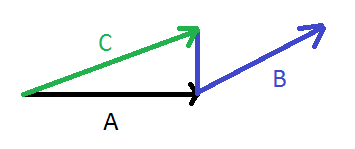
if i have A and B and want to get C, as in discard the component of B which is shared with A and add the rest to A
i figured out how to do this in 2d on paper using trig
but if there are some nodes for this already that'd be nice
it's also very possible this is a simple vector operation that i'm unaware of, as i have very little education in this topic
conceptually it's very simple. it's like deleting the X component of a vector, but instead of the X component, it's the component which is another vector
brittle fiber
whats goin on here, sorry but are there women using IT and Unreal Engine? or is it like fans immages?
like a trick
next level exercises
respect
stay hydrated @ripe rose
ripe rose
actually i think i can make rot from A, rotateVector on B by negative of A's rot, and then break vector on the result of that and discard the X float
 true valve
It seems global time dilation has a limit. How can I speed up the game really fast?
 supple dome
it seems theres a setting for MaxGlobalTimeDilation on WorldSettings, have you tried that?
gritty elm
how to make hand grab system on an object dynamically? for example i want to change wrist angle of hand according to position and rotation of object
 wind kernel
I have a bounce character . a Button than reflects of the walls .(this reflection is done via a 'Get Reflection Vector' ) What I want to do is when Button Collides a wall and changes its course (Direction in the x axis) I want this to have either a value of +6 or -6 .
 hot fjord
Hey, a tiny question about logic progression.
If I create a custom event with a ForEachLoop and put that event as Element B into an Event line-up A-B-C.
Is event C starting at B's completed executable or inside the loop ?
 boreal ether
@wind kernel isn't this what get reflection vector gives you?
If they're all events it will be parallel
if b is a function it would go through the loop first
Actually no, seems like it's sequential either way, unless there's async logic in the event
hot fjord
So it doesnt matter, if I make the Comment an event or a function ? (I planned on just making it an event at first)
 fallen glade
I'm dead
boreal ether
I'd make that a function
hot fjord
I think grabbing some snack and water would be a good choice then
hot fjord
@boreal ether alright thanks !
boreal ether
I feel like there must be a better solution than using that many events
fallen glade
I don't know, UMG animation is super barebones
boreal ether
Haven't used UMG animation much but can't you do a for each on an array and bind to on animation finished?
hot fjord
I guess I have to place a return node like this ?
boreal ether
It will automatically fill it in if you don't but you can put one there for clarity
hot fjord
I see, I was still worried, that it might put it in the loop, if i didnt clarify
boreal ether
UE4 knows not to do that luckily 🙂
But especially if you have multiple return points it can be good to place the node so it's clear where the function is returning
hot fjord
but just for my general understanding, if I put that return at the loop
it would only connect there, right ?
boreal ether
I think you can put it in the loop and that would break your function, not sure what happens then tbh
hot fjord
🤔
rare gale
you need to use an actual savegame blueprint... https://docs.unrealengine.com/en-US/Gameplay/SaveGame/index.html
Overview of how to save and load your game
No changes persist through sessions without this
maiden wadi
@boreal ether @hot fjord If you put a return in the loop body and it triggers, you would break the loop and return that current value that's plugged into the return node. And also you can have multiple return nodes. You're not restricted to just the one.
hot fjord
@maiden wadi When using the term "break", do you refer to the loop to stop from running ?
basically it would only run the first instance on 0
maiden wadi
Correct. It won't run any more iterations after that break.
 fluid roost
hey guys, Im just trying to make a glass material in unreal. I have the roughness map for the stains on the glass but when i set the material to translucent it removes the roughness node
dw solved
maiden wadi
@fluid roost That's also a #graphics issue. The people there will know materials better.
austere knoll
Here's what might be a noobish question: When using a Print Sting to write to logs for debugging, if you expand the node, there's a ton of color-based functionality. I can save the color as a specific color. However, for the life of me, and even after reading the entire documentation on it, I cannot determine how to use the Print String color preset I created.
The dropdown doesn't let me select it, I can simply create a new preset or delete a preset.
Therefore, how does one simply select a color preset on a Print String node within a BP Event Graph?
 acoustic saffron
Does anyone know th performance impact of this? Planning to use for mobile. Low/Medium/High?
https://docs.unrealengine.com/en-US/BlueprintAPI/Collision/FindCollisionUV/index.html
Find Collision UV
scenic scroll
How does "add child actor component" work? if i wanted to add four floater spheres to an object via code (for buoyancy) how would i go about it?
maiden wadi
@scenic scroll First off. Are you trying to add an ActorComponent, or another Actor to this actor? What are your floater sphere.
 vivid plinth
Question guys.. Does anybody know what exactly these scaling options do with a Billboard sprite component? Nothing seems to have an effect on the scale of my sprite. This component doesn't seem particularly useful for anything
Reason I ask is because there are no tooltips and I've played around with the numbers and nothing seems to change.
scenic scroll
@maiden wadi well, i'm not sure, i'm trying to find a way to make it work mostly, the idea is for me to somehow make a component float without editing the component's code. i managed to make it float but it doesnt stand upright due to only floating on its center, so i have to somehow add invisible floater points around it so it floats upright. how? i have no idea :c
any methods, suggestions or ideas are extremely appreciated
 worthy fern
What does "nativization" mean for blueprints?
maiden wadi
@worthy fern In short, it tries to write C++ code to replace your blueprints.
worthy fern
Ah, interesting.
I ask because I have been having a problem packaging with a custom engine where it calls upon a SetStyle call in the construct and I see there is an option to nativize a blueprint.
It worked fine in the engine launcher version (4.24) with a package, but I am wondering if the way SetStyle is done in the custom engine is interfering with it. For one thing, I didn't touch that method
maiden wadi
Yeah. It's just an optimizing feature for Blueprints. Supposedly it can speed up blueprint execution quite a bit, but it's not as good as human written C++. Also has a few caveats from what I've seen of people trying to use it. Never attempted it myself.
worthy fern
Ah. I only need it on a couple of assets, and am not concerned about performance, but good to know. Well I'll give it a try on a couple of assets to see if it can fix my problem I've been having with those specific blueprints.
Those blueprints are different because they rely on custom structs upon startup, so maybe nativization could force it to find those struct files with headers? Fingers crossed
scenic scroll
do i need to have simulate physics enabled to add a force?
maiden wadi
@trim matrix Really depends on how you're setting the values for your Widget.
 fair magnet
Hey guys I'm getting an "accessed none trying to read..." error in my animation blueprint... even tho there is an "is valid" also the logic itself is working but I'm getting this error all the time I hit play
trim matrix
It only happenes initially when y hi hit begin play? Never after? @fair magnet
fair magnet
well the error window pops up when I hit stop
trim matrix
Yea well you can check the error window during play anyways. Basically I’m just thinking that if that group of errors is happening once, when the game first starts. That the code might end up getting ran before your charecter reference is set.
fair magnet
Thanks for the hint c:
 flat raft
@fair magnet just a note... you don't need the bottom isValid. The cast should be enough. Also, the Get Movement Component isn't using the character reference.
fair magnet
but the bottom isvalid actually fixed my problem ?
flat raft
Oh lol.. I didn't read your problem. I just was optimizing your bp 😅
The Update Animation runs every frame. You have try Get Pawn Owner running every frame
scenic oasis
Can someone tell me where in my blueprints I've messed up? Trying to make it so that a button on my HUD spawns a snap to grid static mesh that follows my mouse and sets itself to the location I left click on my landscape. I've checked the entity list when testing out the game and the number of entities does not increase, so I know it is either spawning and b eing destroyed faster than I can see it happen, or it isn't spawning at all? I'm not sure. Either way any help is appreciated.
 sick galleon
@scenic oasis the screenshot resolution is too small to read
scenic oasis
For some reason it only shows a preview resolution, I had to click on it and click the full picture button :/
lemme see if I can re upload so it blows it up to full resolution
sick galleon
maybe with less width
scenic oasis
Does "Open Original" Show you a larger sized image?
Im going to re arrange them so it shows less width
scenic oasis
woops ok sorry one minute 😛
 weak minnow
do RenderTargets need cleanup? It seems I'm getting an error Texture not valid! UE-23902! Parameter (RenderTargetTex) for the render target in my dynamic material instance when a level is reloading
flat raft
@scenic oasis https://blueprintue.com/
BlueprintUE
BlueprintUE.com is a tool for sharing, rendering and rating blueprints for Unreal Engine 4. UE4 is a game engine which use visual scripting called blueprint.
scenic oasis
oh shoot
wow that is MUCH easier
thank you that saves me a heck of a lot of time haha
 iron dawn
Hi there ! I'm new here and also super new to unreal, I've just started UE4 recently watching the Katie tutorial and today I'm trying to do the whole "Making your first game serie" from Ryan Laley.
I have a little question, in the episode "3-2 Door Interaction", at 1'50" we check the other actor who overlap the trigger by making a comparaison with "==", but couldn't we also use a "Cast To" ?
flat raft
Yes, with a small difference.
Get PlayerCharacter will open the door only for the player. The other will open the door for all characters of type MazePlayer
if you have AI controlled characters running in your maze, the door will open for them.
iron dawn
Oh I see, thanks a lot !
flat raft
But, since you are just doing a tutorial, short answer Yes. They are basically the same.
 knotty ruin
i am attempting to make my character ragdoll, how do i stop from falling through the world after he does ragdoll?
scenic oasis
Okay I tried to split them into 3 pastebins, first one is my main Player pawn controller, second is the blueprint for creating the building and its "ghost" silhouette while it's hovering with the mouse position. https://blueprintue.com/blueprint/mbo9wml9/ https://blueprintue.com/blueprint/c3jdejxh/ https://blueprintue.com/blueprint/vw_mq5h0/
If there are any bits of blueprint or function etc that aren't shown because they're collapsed just let me know and ill post it too
also the camera pawn controller i just noticed i double pasted my code so you might see some things duplicated sorry X.X
 quasi frost
Why doesn't this work? TPCref is a reference to the third person character. I only want the sound to spawn when the player overlaps.
 surreal peak
pale blade
surreal peak
pale blade
How do you guys create interfaces with properties (like C#)?
For example, all players, enemies, NPCs, crates, destructible walls, etc have: Name and Health
In C#, I would create an interface and have Name and Health as properties, then it can be implemented
How would I achieve something similar with blueprints?
 late cave
@pale blade blueprint interface?
pale blade
BPI don't allow for properties, right? Only functions
late cave
it allows for the passing of input values... and you can implement an interface as either an event or a function
quasi frost
@surreal peak Hey I fixed it by just directly casting to the tpc. Thanks!
 faint pasture
@pale blade if everything has a name and health just make an actorcomponent
 hearty rose
Hello everyone i want to make it clear im not asking for anything this insane polished or fancy but does anyone know how i can do a simple dashing system in the players current direction i seen someone mention a player velocity node or something, im looking for dodging like this video but again way more simple https://youtu.be/p-FAEfM6fHo?t=60
This game makes me even more excited for Cyberpunk 2077 :DDD
►Patreon: https://www.patreon.com/oyff
►Twitter: https://twitter.com/Oyffie
►Discord: https://discord.gg/zfZB6ny
Daniel Deluxe - Infiltrator: https://youtu.be/8jTmvU0f5Po
ABOUT THIS GAME:
Ghostrunner is a hardcore...
faint pasture
@hearty rose multiplayer or single player?
hearty rose
single
scenic oasis
Okay I tried to split them into 3 pastebins, first one is my main Player pawn controller, second is the blueprint for creating the building and its "ghost" silhouette while it's hovering with the mouse position. https://blueprintue.com/blueprint/mbo9wml9/ https://blueprintue.com/blueprint/c3jdejxh/ https://blueprintue.com/blueprint/vw_mq5h0/
@scenic oasis let me know if anyone is able to look at my BPs and tell me what is preventing my UI button from spawning a static mesh
 quick lark
I'm trying to use FABRIK in the animation graph to have an arm point towards a location. Is this possible? Or should I have a scene object pointing towards the direction and have fabrik to match its position?
 hybrid dawn
Is there any way for me to directly set the velocity of a character in blueprints while it's in walking mode instead of having to use a function like add movement input?
I set up a system for acceleration and calculating velocity from it but when I try to set the velocity to what it gets and it's on the ground it doesn't change it
However when i jump it changes velocity
pale blade
@faint pasture Yeah, ActorComponent is what I want for Name/Health
But is there a way to check if an actor has an ActorComponent, similar to Does Implement Interface for interfaces? This is so I can easily plug in anything with Name/Health into the UI to display (like abstract and stuff)
Something like GetComponentByClass? Would that heavily impact performance if called every 0.5 seconds or so?
 limber oyster
I see splines have a node: get float property at spline input key where it gets a metadata property. How do you actually set the metadata?
dapper kiln
Is there a better way to trigger something on and off instead of using a collision Begin and End overlap? I have a blueprint where I want actors that die inside a certain radius to actor will spawn a particle effect. I was using the overlap to tell the actors that they could or couldn't spawn the effect but my problem is that sometimes the overlap events don't work. For example if an actor spawns inside the radius by default, he never triggers the Begin Overlap event. Ideas?
Should I use a looping or ticking trace or sphere overlap?
jovial bobcat
is there a way to optimise this code
or is it already good enought
its basiclly when a fire a gun it check the gun id and then do the correspond firing action
but if i have lets say 20 guns
then
is a switch based on gunID really efficient
tight schooner
@dapper kiln I think there are nodes to get all actors overlapping sphere, box, etc. defined on demand as node parameters rather than as premade collision components. I don't have UE4 open so idk the name of the nodes offhand but you can dig around.
dapper kiln
@tight schooner Yea I guess I could use that instead of the begin overlap but I don't know anything else to use for the End Overlap. I guess it would always execute. It's just tricky because It's not all done in one blueprint. So I have to tell actors when they are overlapping or not
tight schooner
Oic. Yeah I suppose you could run it on a looping timer but yeah it sucks to continually re-check for overlaps.
dapper kiln
If Begin overlap would just trigger when an actor is spawned inside of it, all would be good.
tight schooner
@jovial bobcat you should look into child actor classes / inheritance. That's the usual solution to the problem of having an open-ended variety of a class of thing, like a gun.
jovial bobcat
Oh i had that before
I ran into other problems
such as attachments for the separate guns
so i put everything into the gun parent
I mean Im only gonna put like 6 guns into the game
so? i guess this is the best i can do?
tight schooner
Can't comment on the issues you had but yeah there are a lot of times I stuff multiple varieties of a thing into one BP lol. But if the number varietes gets open-ended you're supposed to break out the functionality into an inheritance hierarchy.
tight schooner
Hierarchy of a parent class (gun) and child classes (shotgun, rifle, etc.)
All the shared functionality goes into the parent, and the customizations go into the children
And most other BPs communicate with the guns by casting to the parent class
using the parent class as a sort of interface to all the children
That's the normal way to approach it
faint pasture
@pale blade I'm no coding whiz but I would guess the best way to do that would be to use an interface with a call that asks for the info
@pale blade I'm not 100% sure but I think there's a way to have a component implement an interface, so the actor wouldn't even really need to know.
jovial bobcat
ummm the problem i found is that when i tried to pass information between the player the the child blueprints, such as attachment info, it get quite complicated and messy but now im just spawning a gun parent into the players hand and changing the variables to make different guns such as the skletal mesh and the firing rate and gun sound... and when i switch gun i just a different set of information to the gunparent there for changing it, and the child blueprint just acts like a set a vairable for the gun parent to use
flat raft
@scenic oasis what was ur issue, again?
faint pasture
@jovial bobcat child blueprint component is just that, it's a component that spawns the actor and holds a reference to it. You need to get the actor it is handling to do things on the actor itself.
scenic oasis
My plan was to have the player click a hud button, that button would spawn a "ghost actor" , it's supposed to follow the mouse location and when left clicked, it places itself where the player released the mouse button. But for some dang reason it just does not spawn at all. I've spent the last 6 hours trying everything and i'm stumped and brain fried lol
flat raft
Ohh.. I recently did that lol... https://youtu.be/rdqNMNeqpJw

Hold on... lemme check out ur bps.
@scenic oasis the first step is to see if your spawn is working by checking the spawn output with a IsValid.
jovial bobcat
what is the difference between a enum and struct?
scenic oasis
@flat raft gotcha im gonna do that now thank you
jovial bobcat
is a enum just like a simplier version of a struct that can be used in like a Switch?
flat raft
@jovial bobcat consider a enum a selector, and a Struct a variable holder.
jovial bobcat
yeah
flat raft
in cpp, a struct is basically a class.
jovial bobcat
can you add a enum in to a struct?
flat raft
Yes
jovial bobcat
ok thanks for the tip
flat raft
@scenic oasis in ur MainUI_HUD, check if the ghost variable isValid.
scenic oasis
@flat raft roger that loading it up now
 true plaza
when trying to access a Custom Event from another BP via a variable, it's coming back with a "Accessed None" error. Same when I try to access it as a function. How can I continue executing a chain on another BP?
 drifting vortex
Small question: is comparing integers is faster than comparing names? I'm making a little system that needs IDs and I wonder if I should go with integers or names for that
flat raft
@jovial bobcat if youre going to have only 6-ish guns, then a struct, and 6 individual bps
@true plaza you need a reference to it so you can call functions on it.
@drifting vortex It's the same. The only difference I believe is the size in memory. Look up size of int vs char
But, it's really not important anymore for PCs
 split ginkgo
For some reason when I use ProjectileMovement with my actor it falls through the ground
But when I just disable the ProjectileMovement component it falls to the ground and collides with the ground
true plaza
@flat raft so let's say I end a chain with DetachFromActor then I want to continue it on another BP. I need to reference DetachFromActor on the new BP?
true plaza
let's just say Print String is on the 2nd BP
true plaza
I want to pull of the DetachfromActor to execute a PrintString on the 2nd BP
flat raft
You need to get a reference to the 2nd Bp
true plaza
would you mind explaining further
flat raft
is ur 2nd bp the thing that was detached?
true plaza
its an AI character
flat raft
ok, your AI Character is attached to something, then you detach your AI character?
true plaza
actually the 1st BP is a Cube, and the 2nd BP is an AI Character where I want to continue the chain with AI Move To
I assume I will also reference the Cube's location in the AI Character BP
flat raft
oh, I'm not too familiar with AI MoveTo
true plaza
what if all I wanted to do is execute a Print String
flat raft
If you have 2 bps, BP_Cube, and BP_Sphere, I don't think they can communicate directly. The only way for them to talk is if you... 1) GetAllActorsOfClass, and get your BP_Sphere Reference 2) In each BP, set a reference to the other, and pick it from the world.
Basically, each needs to know somehow that the other exists.
Look up Blueprint Communication on YouTube. It's a video by Unreal official. You can also look into Interfaces, but you still need a reference with that.
scenic scroll
How can I access/change/set an object's details and variables from the level blueprint?
flat raft
Click on ur object in your world, and in the Level BP make a reference to that selected object.
scenic scroll
its not in my level, I have accessed it with this code, but i need to edit the settings to make the buoyancy behave as intended
true plaza
@flat raft I'm going to dive back in. Thank you for your responses
flat raft
@scenic scroll is Add Buoyancy a function in your Pawn?
First, check the object name for your get controlled pawn. Make sure you are talking to the correct pawn
So, from your O key, print string. From your get controlled Pawn, get object name, and print that
scenic scroll
@flat raft it is the correct pawn because it works in-game, i can't print because the only way of testing i have is cooking and going in-game, same reason why i can't just do this code inside the object itself and i have to access it through the level blueprint :c
if you think printing will work in-game tho i can try it
flat raft
if you are certain you have the right Pawn, then is add buoyancy a function in it Pawn?
also, is your O working? Do you need to enable input ?
scenic scroll
yeah, the O is working, when i click O buoyancy activates, but the buoyancy mode is single point and i want it to be auto point, the buoyancy mode is a variable (i assume for the pawn since it has buoyancy and you can normally change it in details for normal objects) thats why i need to change it :0
flat raft
Ohh I see
simple lantern
I have a post process material with a radial blur that I want to kick in as my character falls. I'm trying to figure out the best and cheapest way to include this, should I have the material constantly active but keep the parameter for blur strength off until I need it, or is there a way to disable the material entirely until my character reaches a certain velocity?
flat raft
If it's a variable, then you can just pull it from ur Pawn, the same way you have add buoyancy
scenic scroll
what's the code for that? i looked and didnt find anything
flat raft
can you show me ur Pawn bp, where the setting is? It's usually just the name
scenic scroll
i think i got it! :D
flat raft
Coolz!
scenic scroll
thanks a ton
what does "variable is not in scope" mean?
because after this modification to the code O stopped doing anything, but it certainly did before
single point works, auto point doesnt :/
 quaint palm
Hi there! I'm trying to set some Niagara System Variables using TIMELINE NODES so I can smoothly Dissolve In/Out my Boost Thruster...but I'm having problems with it. Can someone elucidate me on how to properly set this?
I've read the documentation (some hehe) and watched some videos.
Here is the setup
And this is how I'm deactivating them.
It was working nicely, but the VFX was showing up/disappearing way too abruptly.
The object is to make it Fade In/Out as I press/release input.
 placid steppe
hey while using nativation, can you modify the generated files?
what would be the process to do that?
tight schooner
@quaint palm you can always use the reverse or reverse from end exec inputs on the timeline nodes
quaint palm
Yeah I thought of that later actually. But the thing is I couldn't make it work. Guess the time/moments were messed up
Is this the way I should set a Timeline?
tight schooner
yeah, that's a pretty normal use for a timeline
quaint palm
Man, I'm having trouble trying to add stuff from the Component Tab into the viewport of the Blueprint...and I'm not being successful D:
Is there something I should check/uncheck?
tight schooner
I usually just drag the items from the component list to the graph
quaint palm
Yeah, I used to do so.
tight schooner
(or right click on a spot on the graph and type the component into the search box)
quaint palm
No text box comes up when I right click anywhere in the viewport D:
tight schooner
oh, the 3D viewport. Uhh... I mean, the component should just be on there if it's a scene-type component (it has a transform, etc.)
make sure visible is checked?
quaint palm
It's a Niagara component.
It's Visible
It's Activated
I even reopened Unreal
Maybe I missclicked somewhere
 rough blade
Is there an easy way to auto generate an image? Perhaps somehow using the preview image unreal shows in the browser?
quaint palm
I was doing it just now x_x
 late shuttle
Long shot but here goes: I have projectiles that work in editor play, but pass through the same object in the compiled build? Whaaaa?
tight schooner
@late shuttle are you using BP nativization?
If you are, then try dynamically generating your collision volumes at Event BeginPlay. This gets around a longstanding BP nativization collision bug.
 hallow nebula
Okay, Seanny.
You seem like you know enough to help me out with this one.
You ready for this?
tight schooner
👀
hallow nebula
So here's the deal.
Simple interpolation for the camera to point where and how I want it to.
Dialogue camera thing.
It's a much cleaner way of doing things than I used to (before I knew the Move Component To node existed).
Unfortunately, it loses a portion of the functionality.
A portion I need.
And I can't figure out why.
These two blocks should be identical in function.
Right?
quaint palm
The italic why really made me read it in a different intonation
hallow nebula
Hence the use of the italics.
tight schooner
I've never actually used MoveComponentTo so I'm just guessing how it works...
hallow nebula
Pretty self explanatory. Moves a scene component to a world space location and rotation.
You can allow it to interpolate non-linearly through Ease bools.
 analog perch
it looks to me like your not taking into account the initial rotation of the camera
 timber pecan
Hey im making a rpg game with wsad keys. I'm facing a problem that when I move my character moves but he doesn't face the direction he is going.
hallow nebula
I thought that was it, too, but the MoveTo caches the rot it was given when called.
I'm at a loss as to what the difference between the two could possibly be.
tight schooner
Did you describe the functionality you needed?
Looking at the timeline-based method, yeah, using a thing's transform to update its transform in an interpolation function can result in some pretty nonlinear behavior...
but otherwise
hallow nebula
Well, that's the thing.
It's--
Wait.
Are you right? You could be right.
Let me dig around. Consider this resolved until further notice.
tight schooner
I'm looking at the camerapawn-camera's rotation being used in a lerp
to update itself
which would cause the A-point of the lerp to shift beneath its feet, so to speak
hallow nebula
Yeah, I noticed that, but it always hits the B point square on the head.
So besides the interpolation, the end result should be the same for both.
Except that they aren't.
Using the efficient block:
tight schooner
the timeline-based method is setting world location/rotation... is the MoveComponentTo operating in relative space?
hallow nebula
Using the timeline:
With no other changes.
To my knowledge, yes. When told to MoveTo the Camera's GetWorldLocation result, it stays static each time.
MoveTo confusingly asks for "Relative Location". I had to mess around to figure out if it meant relative to the world origin or relative to the Root Component.
analog perch
one difference i noticed, is your not using shortest path on move to but you are on the lerp. but idk what its doing
quaint palm
Hey, can I be the next one on the line?
hallow nebula
Man, even then, the results don't change.
It's the end result that's being affected, not the interpolation between them.
And sure, Siegr.
tight schooner
so if you moved the CameraPawn (actor) like 1000 units away, does it still zoom in on the dude or is it 1000 units off?
hallow nebula
Still zooms in fine.
tight schooner
just making sure it's not some world/relative mixup
hallow nebula
Yeah, no, I gotcha.
The functionality for determining where it should zoom in is somewhere else.
And it's messy but works just fine.
To my knowledge.
quaint palm
I managed to get things added on the viewport, @tight schooner . There are other 2 things I stumbled at and couldn't fix
I'm trying to replicate some Jet mechanics but...
https://gyazo.com/a7e717ba28910f99dead038da29e5338
This is happening :l
I can't finish a loop, for some reason something is correcting it, forcing it, I don't know.
tight schooner
@hallow nebula what if you rotated the camerapawn actor? lol. I wonder if the visual difference is location, rotation or both. Maybe a print node or something would help. At least knowing which part of it is producing unexpected results could help narrow down the issue.
Otherwise I'm at a loss
quaint palm
If I'm pointing straight up or straight to the sides it will be able to loop in a straight line. Otherwise it goes into this wobbling.
And the other thing is the Timeline Node issue. It didn't work :(
hallow nebula
MoveTo only works for the components, so I'd be going back to the timeline approach.
Which I may have to do regardless.
I guess I can just restructure the way in which I determine the locations and rotations to move to?
tight schooner
@quaint palm I can't really say what's going on inside your blueprint from the video.
hallow nebula
My only explanation is that two glitches seamlessly counteracted.
And to fix one means I'm forced to find and fix the other.
But I don't know why (or where) the timeline approach is glitched.
quaint palm
tight schooner
@hallow nebula Is the alpha curve in the timeline not ending at exactly 1.0? IIRC if you feed an alpha above 1 into a lerp node, it does creative things. I'm just stabbing in the dark at this point.
quaint palm
hallow nebula
I can't say for sure, but I think--I think-- it really was the result of two glitches cancelling out.
I found some unexpected behavior in the function that feeds the locations.
It's outside the normal parameters of what I would expect to encounter, so I forgot about it.
I'll fix it, anyhow. Good practice to.
But it may also fix this.
tight schooner
@quaint palm sorry there's too much stuff going on for me to consider on a discord via screenshots. You made a complicated system and you gotta narrow down & identify the problem systematically.
quaint palm
Yeah indeed it gets confusing x_x
tight schooner
All we know is via the print the thrust is oscillating between 100 and 5000 every frame.
quaint palm
But thank you for you attention, man
tight schooner
so that seems kind of busted
quaint palm
No, these are 2 different attributes
 civic pivot
(srry I dont mean to interrupt, a bit of a noob question) I'm trying to make a modular blueprint that can accept keyboard input. What the input key would ideally be chosen from the details panel per instance. I saw there is a key variable but Im not sure where I would feed it to. Any ideas?
quaint palm
For some reason it's correcting it's angle back. I'll try rebuilding it and see if it persists
I'm a noob too, Schubird :/
hallow nebula
An idea? Why don't you make a map of all the user-defined inputs?
Try a Get node for the inputs, and if it fails, use the default one.
 drowsy ferry
so i put notifies on some montages, how do i get that info to my anim blueprint?
flat raft
what does "variable is not in scope" mean?
@KV#7423 hmmm.. not sure. I've never seen that in BP. I think it means you are trying to access a local variable in a function, from another function.
hallow nebula
That's because everything without a connection to the Exe wires are basically just variable declarations, or function returns in some cases.
A quick workaround is to make a function whose only purpose is to call that variable again, so that it gets a new reference to the variable.
Ripped straight off of the forums.
Oh, @tight schooner -- found the issue, but I'm not sure what the cause is.
The Camera Pawn itself is rotating. The Actor Rotation.
But nothing I do calls for it to change, except for MoveTo.
Both calls are telling it to move to the same Rot, so it should move to the Rot the first time and stagnate the second.
Why it moves twice is beyond me.
flat raft
MoveTo vs what?
flat raft
Both calls are telling it to move to the same Rot, so it should move to the Rot the first time and stagnate the second.
@hallow nebula
one is MoveTo...what's the other call?
hallow nebula
I call it twice.
flat raft
sorry, I was just looking at your interpolation issue
hallow nebula
Oh, you're fine. I'll explain in better detail.
flat raft
😅
hallow nebula
- The level begins. The camera is set arbitrarily...somewhere.
- A function call determines where to move the camera, and MoveTo is called to move the camera there.
- The same function is called, resulting in the same output, and MoveTo is called again, to the same location as last time.
In theory, the camera should only move on 2.
However, the rotation is changed slightly.
The print shows the Actor Location (in World space).
*Rotation.
Sorry, my bad.
I've checked the inputs to MoveTo and they do NOT change, guaranteed.
flat raft
I see.. so the camera is already in position, but when you call it again, it moves. The desired result is the camera should do nothing the second time called.
hallow nebula
Yes, that is correct.
I want the camera to be at the given location at the end of the .5 interpolation, no matter the origin.
It very nearly works.
But...not quite.
And the reason is a finicky Actor Rotation.
But nothing I do should affect it, save for MoveTo.
flat raft
Can I see ur camera bp?
hallow nebula
The camera itself or the playercontroller?
The camera just houses the Camera component.
The playercontroller is what drives the movement.
Rather complex.
It DOES work, though, I've checked all the outputs and they're as expected.
So there's no point in showing this off save for displaying the neat naming conventions and commenting.
😎
flat raft
Oh.. yea.. wherever the move to is
also, how come you're calling it twice? just curious
hallow nebula
AHA!
Oh, I'll tell you why, but first, the solution!
Ignore everything but the Yaw.
But the reason why is because it's a dialogue-based Third Person camera intended for use in a Virtual Novel game.
First, you write the script in Sheets.
Then you import it, and it's automatically converted from CSV to DataTable using your predefined Struct.
Lastly, per each line, it uses the DataTable row to know what to say, where to look, who's acting, etc.
In cases where the speaker is the same in more than one consecutive line, it'll be panning to where the camera already is (a redundant call for MoveTo).
Unless, of course, you're changing the Zoom or the angle.
flat raft
Oh, cool system
jovial bobcat
Umm
I have a slight problem
i dont know where to ask this is cause there is no github discord'
but I'm on a detached head and i want to combine the current data with the master branch
how do i do it?
 gentle hedge
Hello! Looking for alien swarm style mouse aim. I've made the player look at the cursor but i can't find any example blueprint of how the camera follows the mouse and is constrained to the edge of the player character. Anyone know of a store blueprint or documentation about that? thanks 🙂
hallow nebula
Just adjust the player's look value based off these inputs.
And clamp the inputs.
gentle hedge
Thank you! I'll link it if i get it working as intended!
timber pecan
Hey im making a rpg game with wsad keys. I'm facing a problem that when I move my character moves but he doesn't face the direction he is going.
wind kernel
How do you exclude a value from a range . like say " Whenever this object hits this object I want a value between 1 - 10 , but not 5 " [ 1,2,3,4,6,7,8,9,10] Any one of these values.
to make this more clearly ; i have a range from -10 to +10 . this range is the X coordinate of a vector . and I don't want this X to have a value of 0. is there a method like Clamp to exclude values ?
trim matrix
hey guys, quick question.
Currently I have a door that opens if the player comes with in range of a collision box, can I add my AI characters in as "other actor" or should I make another collision box and link it to the AI?
 vast widget
yes you can do that. Although it may be easier to create a base character class and have your player and AI inherit from that.
then you can just use 1 cast.
hallow nebula
I've implemented a Camera Actor to prevent the player from reaching Gimbal Lock via extreme Pitch values.
Problem is, the Pitch constraint only applies to the given camera.
It's not a Pawn, it's a Camera Manager...meaning I can't pilot it around like I'd like to in-game.
My question is, how can I force my Pawn's camera to obey the rules of the Camera Manager?
trim matrix
When I add in the AI it instantly fails? I'll look at making the AI and player inherit from the same base class when I do an optimise pass later =P, just want to get the raw stuff working first
hallow nebula
I'm sorry, what's the purpose of casting to NPC master here?
You're not calling any variables or functions as them.
tight schooner
@wind kernel I'm not enough of a math whiz to give you a nice formula. In lieu of that, If you want to exclude 0, first you have to determine if the input = 0. Feed the resulting boolean into a Select node. And plug the Select node output into whatever you intend to feed it to. Then you can enter a custom value on the select node for when the condition (input = 0) is true. When it's false, you can simply use the input by plugging it into the False pin.
hallow nebula
^
wind kernel
Thanks, I thought there would be some single node or something
trim matrix
I'm checking to see if the AI character overlaps the doors "collision box" if so the door opens
hallow nebula
Is it possible for a character to overlap the collision and NOT trigger the door to open?
Cuz if not, you can skip the casts entirely.
They're costly at runtime.
trim matrix
it works for my player character and not my AI, i cant figure out whats different 😦
hallow nebula
First suggestion is to trim the casts.
And bring the execution pin straight to the branch.
Let me see what the branch shows.
maiden wadi
@trim matrix Try this.
hallow nebula
Hey, now that's something.
 late gorge
- i have "Data" classes -> specifically: missions
- I want to use my GameInstance (it implements an interface that concerns missions) to check if the player meets requirements for said mission
- requirements rn are not set in stone, can be skills, resources or other completed missions but i want to be able to add custom requirements later on
- i want to be able to define said requirements per-class as in per subclass of the master mission
- in the game instance, where i check requirements, i want to use those definitions
My question is as follows:
is there a way to use a function of a class without instantiating/spawning it?
so the master mission would have a function definition which is then overridden by its subclasses and used by the game instance's interface
maiden wadi
@trim matrix That won't work. You're looking for the actors overlapping your DoorRadius.
Also, don't plug EndOverlap directly into the reverse or when one character leaves, it'll close the door on one still standing there.
trim matrix
I'll play around some more 🙂
trim matrix
how to make those variables not in scope?
those guys with target on the left and then something in right?
just get?
hallow nebula
What's the context?
 sharp sable
So I'm trying to make something where you can press a button and swap between top down and third person, and this is what I tried making. I'm assuming I did it entirely wrong and there's a much better system? If someone could tell me about if that's the case that'd be awesome, and as well as explain to me what went wrong in this case and how I could fix it so that I can learn from my mistakes.
https://youtu.be/NQ82bV-R5eQ
As shown in the video, the first top down and first third person cameras are scuffed differently from every other swap between the two, which is probably due to how it's set up on start, as it was originally in the thirdperson BP so it's probably acting as if it was using third person camera which I can fix. But what I don't get is what happens after, the second top down takes WASD based off the rotation that was left off in third person camera, so W/A and S/D were practically flipped in the clip. And then second time in third person, the mouse gets locked properly but then the camera doesn't move? (And when I'm stating second I mean every flip between the two cameras after the first time)

 smoky bluff
@sharp sable here's something i used, and make sure pawn control rotation is enabled on your camera
 rich lava
is using collapsed node bad in anyway? for performance
 fervent crag
I dont think so. Its just nodes in a different "folder" right?
Also is there a way to display skeletal mesh in data only blueprint?
I want to be able to change it here but I cant figure out how to show it in data only blueprints
and in the parent blueprint, the skeletal mesh is in the same category
 tight venture
does it have to be data-only?
fervent crag
nope, Im just asking if its possible to show it in data only bp
tight venture
um... i am not sure. try adding a variable of type whatever-type-your-skelmesh-is reference and then assign it to its own skelmesh. silly solution if it works, but if it doesn't then that may clue you in to the way BPs use skelmeshes
fervent crag
I think it will work that way
tight venture
strange that it wouldn't let you choose which one to use though... post a pic of your component hierarchy
fervent crag
wdym
fair magnet
Does one know how to get the Key pressed from an axis event ?
I need it to switch between something nad I don't wanna use a tick for it
 earnest tangle
TIL
Already knew about "convert to pure cast"... I wonder how many other conversion options that are kinda hidden until you randomly right click and see it are there...
fleet cedar
Hello, I am sure this is noob stuff but I am trying to animate my particles (cascade) over life but they are particles that live forever
how can I make them move for like 2 seconds and then stop moving for the rest of their lifetime?
I'm confused what the horizontal axis of the curves are... is it a percentage of lifetime? Is it time?
maiden wadi
@earnest tangle There aren't a lot. I'd strongly advise against using Pure casts unless you have an extremely good grasp on casting and you know for certain that the object will be that class type. On the other hand, I also strongly advise using Validated Gets where ever possible in place of the usual GetVariable->IsValidMacro. The validated Gets are quite a bit quicker and work wonders in places like the AnimBlueprint or places on Tick.
earnest tangle
Yeah I'm only using pure casts in stuff where I know what it's gonna be, or I need to use it in a boolean comparison :)
But interesting that the validated get is more performant, didn't think there would be a difference 🤔
 twin robin
@plain anchor So how did it go optimizing your 30 AI? 🙂
maiden wadi
@earnest tangle This was the test I used. Difference in the comment at the top.
fair magnet
Does anyone here know a better way to get all key mappings ? I tried with For each loop but it seems that it's only giving me the last mapping.
earnest tangle
@maiden wadi that's interesting, good to know :)
fair magnet
@gritty elm
 minor galleon
Hey guys, wondering why my macro library is not accessible by the parent player bp... I changed it to character and that worked but now I cant access properties without having to cast to it
maiden wadi
Macro Libraries are meant to be used in child classes. If you need a macro in a specific class, put it in that class.
mental robin
Hmm. How would I interpolate from the center of a collision sphere to its outer rim..I want to have this effect of physics objects swirling around but I want the intensity to be strongest the closer to the center you go. Or is it better for performance just to use a few different collisions spheres each different size
trim matrix
anyone know how to make a car traffic ai?
i already have a follow spline blueprint but that's not dynamic enough
 wise panther
I don't want my actor to spawn again, if its already spawned on one location
faint pasture
@wise panther save it to a variable and use it later
Check if it exists, if not, spawn it, if so, use the existing one.
wise panther
Yes, i have the logic, but i just am not able to figure out what exactly is needed, i mean the function
i am pretty new at this
and dont know much about blueprints in general
trim matrix
this is just some test code but i am trying to get it to run when the player is always colliding with the gameobject
not just at it begging
 long elbow
Anyone know if it’s ok to have a data table that contains an array of structs? so each row containing an array of structs of a string and a class reference for example
I know you can set it up this way but I’ve heard that nesting things this way can be problematic not sure if that’s still true in the engine
maiden wadi
@long elbow I doubt you'll have a problem with it. I don't know about in the past, but people's issues with structs these days is the lack of understanding of how they work and losing data by overwriting them wrong. I'd find them pretty annoying personally in blueprint, much easier in C++, but if you want to go through the effort of breaking/making, there shouldn't be anything stopping you.
long elbow
great thank you! yes there’s a lot annoying in BP when you start dealing with arrays and structs .. definitely going to look into moving to c++ once it’s working
 mighty fable
Could anyone help me or point me towards a video tutorial that will show me how to create a system that counts how many enemies are in a level and then spawns something, and then keeping variables such as ammo and health when transitioning in between levels?
rare gale
No tutorial, but you need to keep persistent variables in the Game Instance to keep from one level to the next.
mighty fable
im pretty new to unreal so idk how to do that
 spark robin
Art
faint pasture
@spark robin There's vomit on his sweater already, mom's spaghetti
 faint pasture
You guys do realize you can use a variable in more than one place in a graph, right?
spark robin
Lmao, but then it wont be as much spaghetti D:
 simple sky
I've an interesting issue; I have a (in server) lobby that uses a BP (with a UI widget) that shows settings for players to select the map the server should use.. When the player starts the game, I destroy the BP (server-side, verified as "gone" or stops ticking) and then the server travels to the new map taking players with it.. However, the widget (on that destroyed BP) has some functions that run from a timer.. those timers are still firing after the server has travelled to the new map (causing issues).. Are timer events not supported to be destroyed when the widget is destroy (by the parent BP containing the widget being destroyed?)
 halcyon grove
so i deconstructed and reconstructed the top down template in it's simplest form and I'm wondering how I could go about making a "turn angle" for this?
spark robin
@trim matrix https://docs.unrealengine.com/en-US/Gameplay/HowTo/UseTimers/Blueprints/index.html
Really useful stuff
A How To Guide for using timers in Blueprints.
halcyon grove
as in if I want to click behind my character instead of it pivoting on the spot could I have it make a curve to get to the new location?
spark robin
@halcyon grove https://www.youtube.com/watch?v=bWXI91FdMtk
In this video, we show you how to make an object move along a set path using Splines. We also show you how to control the speed of the object, it’s starting position and looping options.
 twilit abyss
Hello there,
does anyone have the ultimate formula for a ReverseForEachLoopWithBreak? I tried this one, but it doesn't seem to work. Please help.
 odd plume
How do you make a multi button input in UE4? Like a Konami Code or something
 rapid owl
So for some reason I am unable to inputAction in the graph, I can only do axis. I have it set up right in the input menu in my project settings. Just curious if anyone else had this problem and a way to fix it?
split ginkgo
For some reason when I use ProjectileMovement with my actor it falls through the ground. But when I just disable the ProjectileMovement component it falls to the ground and collides with the ground.
mental robin
How would I get physics objects to swirl around a collision sphere. I can get them to move on way..up down left and right..tried playing with the angular velocity but it makes no difference
quasi frost
I feel like I am missing something obvious here. This is code to reduce items that are stacked on use (Like potions), the issue is it is removing the potion at x0 instead of x1 (If there is 1 left and you click it it goes to x0 and if you click it again then it is destroyed). I don't see in the code why it is doing that. Can someone give it a quick glance and see if anything stands out?
mental robin
if its greater or equal to 1 destroy item if its greater than or equal to 1 remove item...so you're destroying it then removing the last?
quasi frost
Haha wow. I knew it was something dumb. Obviously it should be >=2 not 1, if it is 1 and I subtract 1 I would get 0
thanks lol
mental robin
Haha wow. I knew it was something dumb. Obviously it should be >=2 not 1, if it is 1 and I subtract 1 I would get 0
@quasi frost I'm a total noob for blueprints so I am surprised I even spotted it XD
trim matrix
does anyone know how to destroy a widget
for this code to work i need to remove the widget from memory
etc.
split ginkgo
Like remove it from the screen?
You need to store the widget as a variable and later run "Remove Widget From Parent" or something like that
If you want to remove it from memory I guess you would just set the variable to nothing
From what I'm understanding about what your asking
@trim matrix
split ginkgo
You could also check if the variable is valid
I think the cast would fail if its not valid
But not sure if it would cause an error in Message Log
split ginkgo
Uh
If you want to see if the widget is visible there may be a different way to do that
Yeah
Theres an Is Visible node
 dusk flame
⚠️ Your daily reminder to turn off context sensitive when you can't find a node you are looking for... cries.
I'm new to blueprint and guess who just wasted 2 hours he didn't have cause he didn't check the box 🤦♀️
split ginkgo
You need to have a reference of the widget
Like a variable
And plug in the variable to the Target pin
trim matrix
ok but i cant throw a widget onto this blueprint
split ginkgo
Like one of the first things you need to learn
trim matrix
its the + icon
ik its just i did not think
there was a widget varible
sorry
still new to blueprints so forgot
added it now
 stuck palm
Hello, anyone has an idea of how to have a reference to a PostProcessVolume in a blueprint? I can make a variable, but How do I get it from the level?
Or shouldn't it be in the level? (I want to add it to the gameInstance, so I have the same throughout the hole game)
maiden wadi
@stuck palm Nothing persists opening a new level. Pointers in gameinstance will be null when you open a new level. The object they point to will be destroyed.
rapid owl
What do you use for setting Character movement? Like if I press run button, I would "walk" faster, and if i crouched, I'd "walk" slower.
like what Widget
stuck palm
@stuck palm Nothing persists opening a new level. Pointers in gameinstance will be null when you open a new level. The object they point to will be destroyed.
@maiden wadi I understand that, I wanted to create an object in the level, maybe add a Tag to it, or get it by name.
Or maybe I should just add it to the player?
Then I can always get it
I think I'll just do that, but I don't like to keep adding stuff to the player just because it makes it easier to get from BP
any thoughts on that?
Or maybe I can put it in a BP of it's own? Then instantiate it if it's null
 harsh night
Haven’t played with this but could you spawn post process volume?
That should give you a reference
stuck palm
I don't think I can spawn it, but I can spawn an actor blueprint that contains one, correct?
harsh night
Yeah that’s what I’m talking about, for sure it has spawn from « something » like an actor
harsh night
Sure. Just found out there's a node specifically for this : Add Post Process Component. Looks like you can use the ref in the return value to toggle the Unbound option, etc
 pulsar oxide
@stuck palm What are you trying to achieve ultimately?
stuck palm
I want the screen to turn black and white when the player dies
and the game instance is the class that's currently setting my UI/Hud State
So I want to do something like
enablePostProcessVolume
I am trying to make a combo, but the print strings are not showing up on screen. Do you guys see any flaws in my BP logic, causing this?
harsh night
IS InputActionEasterEgg1 firing?
Maybe try a print right after the event to make sure it's being triggered
 hexed saffron
I have a ParticleEffect attached to a Socket on my mesh, but it should not rotate with the socket, how can I avoid the PS to rotate?
harsh night
Try the Set Absolute node
hexed saffron
Into the Event Tick?
scenic scroll
How can i replace the primitive component of a blueprint... by using a different blueprint?
pulsar oxide
I want the screen to turn black and white when the player dies
@stuck palm Do you immediately unpossess the pawn on death? You could have a post processes component in the character class and apply the effects to it vs the global PPV.
stuck palm
Thanks @pulsar oxide That was one of the options, but I feel like my character class is getting bloated, so instead I decided to create an actor (called it DeathPostProcessVolumeController with simple methods to enable and disable the post process)
Then I instantiate it in a getter in the GameInstance class (if it doesn't have a reference to it)
I'm not sure if it's an elegant solution because I check for null at every access but It works. I was also told that everything get's destroyed on level load, even things I'm referencing in the GameInstance, so I guess this also takes care of that.
I also added an animation and I think it looks cool 😄
is it allowed to post gifs in here?
pulsar oxide
Either way is good. I personally have a post process in my character class. It's used for many things such as out of bounds effects (similar to Battlefield series), weather effects like rain/snow/dust storms (post process materials). I try and stay away from level BP and global PPV as much as possible.
You can DM me gif if you want
timber pecan
hey i need help with character movement can someone help me, my animations wont start and my character doesnt turn
 marsh meadow
Construct your entire HUD system in the player controller is a good ideia?
I had a lot to trouble when I load a new level and the HUD is deleted.
stuck palm
I didn't Neo... as I understand controllers should be just telling the player what to do, nothing else. But I don't have a lot of experience.
marsh meadow
Thanks for your input. My trouble is when I load a level to play, MyHUD class is deleted because they are the default HUD class only for the MainMenu level, I guess.
As the player choose to get back to MainMenu from a Level, the MyHUD is re-created because I load the MainMenu map. As I do that, all sort of problem happens because it thinks it's the first time I open the game.
I tried to mitigate this with functions and booleans, but the problem keeps appearing. So I want to put all my HUD stuff in a place that keeps running forever, no matter what level I'm in.
trim matrix
i am trying to communicate between two blueprints what i wish to do is turn off this variable by making it false
yet tough no errors are shown here
it does not work
rare gale
@trim matrix Try putting a print string on the Cast Failed output on the Cast nodes to see if it's actually casting
trim matrix
i did that
it ends up saying cast failed
i've tried direct communication and this
still nothing
 random stratus
ah @trim matrix it looks like ur variable Test# is already a reference to the object you are trying to cast to
so you can skip the casting, get the variable Test# and just directly set ur boolean that way
 chrome orchid
i am making a multiplayer game and i have a team select, but how would i be able to start the game
trim matrix
oof
random stratus
what do you mean? do you need the variable to be in antoher blueprint?
trim matrix
i want when i press the button is for my variable NotPlayed from audio manger to be set as false in the blueprint Choose
random stratus
right , how are u getting the Test# variable? you need a reference for UE to know which particular instance of Audio Manager to change the boolean.
trim matrix
i read in a doc it needs to be done from the original blueprint so i just set this up
then do i just call it in the choose blueprint?
and it will work
random stratus
it wont because theres no reference to which instance of Audio Manger that it needs to change. You need a reference to it. Either when character overlaps , or you can create an actor variable and pick it from the scene in level editor
tight venture
Are the two rightmost nodes in the picture functionally equivalent to:
bIsActive = !bIsActive;
if (bIsActive) {/*...*/}
?
or no because the execution pin hits the Set node before the flip flop
random stratus
ok just realize Choose is a widget, so what u do is create an Actor variable in Choose, set it to instance editable and Editable on Spawn
random stratus
when u Create Widget on Choose, you will be able to see the Actor variable in the Create widget node as now its Expose on spawn
assuming the widget is created from Audio Management, plug self into the Actor Variable in the Create Widget that you've exposed by selecting CHoose
trim matrix
random stratus
then in Choose blueprint, get a refernce to that Actor variable that u've made
random stratus
yeah that can work too.. u set it directly in the widget blueprint from the actor so theres no need to cast
 mortal cradle
I'm using inputAction "Pressed" to trigger one of the events but the problem is that as long as it's pressed it's being triggered non stop until the key gets released, how would I make it that it only triggers once on keyboard key click and doesn't matter if I hold down the button or not?
random stratus
Hi kelt, you can use the Do Once node. and upon release, plug it into the Reset of Do ONce
Pressed > DO Once > Code , Release > Reset Do Once
mortal cradle
Hi @random stratus it makes sense, thank you
random stratus
np 🙂
mortal cradle
@random stratus Hm, it made the most sense for me to set it up this way but unfortunately it behaves exactly the same way like I described, still works on holding down https://gyazo.com/b685583baf322a1c241ed686cf9d5cc0 . Do you know if there is a different way to achieve what I'm trying to achieve?
 flat raft
@mortal cradle use a Boolean
mortal cradle
@flat raft answering your previous question, what I'm trying to do is that if the ball overlaps the box and the specific key gets pressed then the shockwave speeds up the ball (this works), to simulate the shockwave speed up I used add impulse and if I hold the shockwave button it adds that impulse non stop, not just once
mortal cradle
"You sure that it fires multiple times?" Referring to me saying that it being triggered non stop instead of once
flat raft
Ohh.. yes.. try a Boolean
mortal cradle
you mean that instead of float "shockwave CD" I should use boolean?
flat raft
Instead of DoOne
To stop it from firing multiple times
If doonce isn't working for you, that is
mortal cradle
will try, thanks
random stratus
Just saw this, its weird that do once didnt work - maybe the release is being fired as well. But as Thorbie said, creating boolean is another way to go
faint pasture
@mortal cradle You sure it's an inputAction and not an axis?
random stratus
yeah as far as I remember , InputAction only fire once...
 broken shell
hey i need help with character movement can someone help me, my animations wont start and my character doesnt turn
mortal cradle
@faint pasture Looking in project editor again it's under Action Mappings
random stratus
i would look into the code after Shockwave CD boolean
flat raft
@broken shell there are a lot of character setup stuff on YouTube. Check ur input, check ur anim, check ur blendsapce, make sure ur skeletal mesh has the animbp
random stratus
action mapping only fire once
flat raft
Coolz, I got confused myself 😂
mortal cradle
@random stratus this is how the rest of the code right after branch looks like it's probably super scuffed since im pretty new but it does everything I want only not firing once, https://gyazo.com/6ffcbeb6e85203b83eb25b68b157994e . Haven't tried boolean yet since I'm also fighting with another problem which seems a bit easier

 dense bloom
My main ai is listening to sound from first person char fine but not listening to sound from other ai, any thoughts?
flat raft
@mortal cradle check your set timer.. it's set to looping
mortal cradle
@flat raft if it's not set to looping then it doesn't work and even after cooldown I can't use the ability again, with looping I can
 brittle marsh
Hey all, I'm wondering something... Is there a way to detect whether the player is using a mouse/keyboard or gamepad? Reason being that I'm displaying tutorial control boxes in my game and trying to figure out a way to switch between mouse/keyboard box or gamepad box dynamically. Thanks!
trim matrix
Hey there! got a quickie abt widgets. I need to cast to a certain actor, in which there will be more than one of on screen at a time, and all of them need a widget, (the same widget) When i cast to said actor, i cant seem to figure out what to plug into the object, as there is no "get owner" or "get parent" for widgets. (the widget will be attached as a widget component in the blueprint
how do I do lmfao???
 mild ore
there is get outer tho
 unique finch
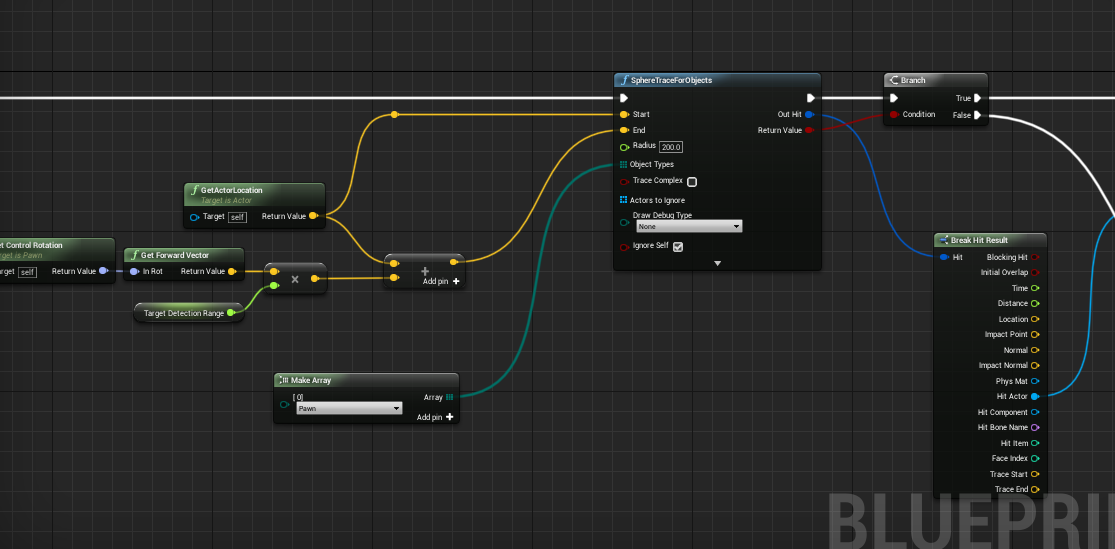
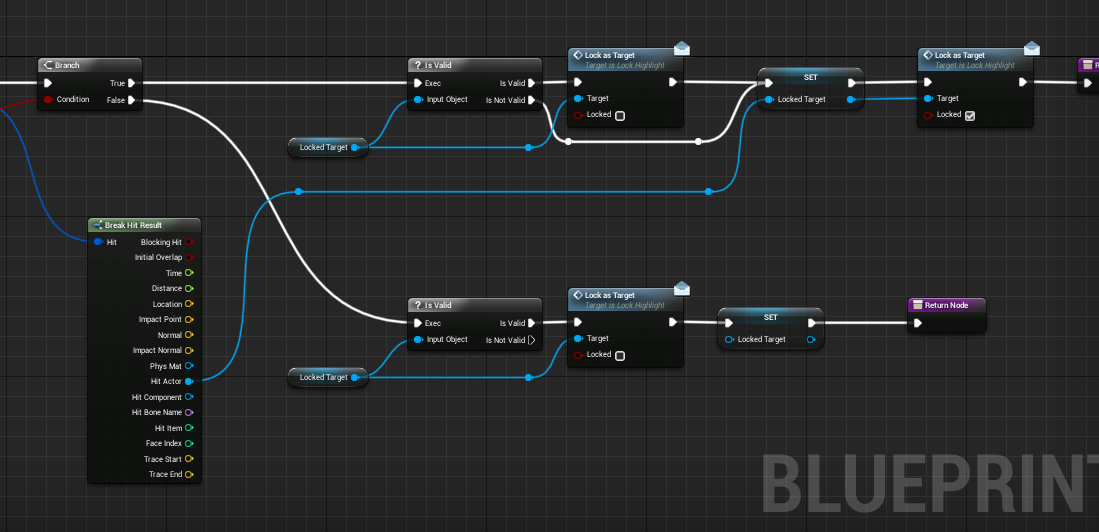

 sudden imp
Could anyone help with this problem. I have a elevator that rises when a character stands on it, then it raises up and stops. Then I want the character to get off on the floor, then when the character gets close the the ledge of the floor the elevator returns. I thought this would be pretty simple but I can't get my head around it. Here is the blueprint so far.
I have a volume at the top of the platform but for some reason I can get the overlap for that volume to trigger. I'm not sure what I'm doing wrong. Any help would be great
For some reason I can get the recall trigger box to work. It's like once the overlap happens on the init box, nothing will trigger after that
maiden wadi
@sudden imp Does the elevator up and down work for the overlap that's on it?
sudden imp
Yep works great
then when the player gets off on that level, I want them to be able to walk around
then when they get close to the ledge have the elevator come back
i think i'm not accessing the timeline right or something i dunno
basically i want the player to be able to get off the elevator, then walk around up there, then have the elevator come back when the get close to the ledge again.
maiden wadi
For starts, you're not using the second overlap box's OnBegin/EndOverlap I'd also strongly encourage the use of a branch checking if the player is currently overlapping the box rather than a direct begin/end overlap.
sudden imp
yea, i deleted that event out because i couldn't get it to work
brittle marsh
guys
@unique finch check out Chameleon post-process on the Marketplace, it has a really cool glitch effect.
sudden imp
and i agree about the branching, i'm just not famaliar enough with BP yet
<-------Beginner here:)
i tried finding tuts on it, but everyone just shows what i already have
I don't know how to setup 1)If the elevator is down, make it come back. If it's up, don't do anything.
maiden wadi
@sudden imp Try putting the upper collision box closer to the elevator like you're going to call the elevator up when you overlap it and then try this.. Just a sec.
sudden imp
ok, thanks!
maiden wadi
That'll basically ask if any character is overlapping any of the boxes, move the elevator up. If not? Move it down.
sudden imp
ok great! I'll get it a shot. I really appreciate the help
@maiden wadi I tried what you said and still no luck, the player touch is triggering but not the other one
It's really weird, I watch the BP editor and i walk over the one box, triggers, walk over any other, nothing
And what's really strange is that, if I take the trigger box that isn't firing, bring it to the ground and step on it first, then it works but all the rest don't
It's like once it gets to the end of those exec, it just stops and nothing will trigger again
maiden wadi
That's odd. That definitely should not be the case with a simple play/reverse timeline. The character left the upper box and then came back to it?
sudden imp
So, there are three trigger boxes. 1) For the platform 2) for the platform end state..the distance it travels 3) the upper trigger that i want to recall the elevator
 ember token
Hey can I get help in streaming pixel streaming video into other unreal client, followed documentation made a stream video into media player getting a black screen.
sudden imp
Once the player leaves that trigger box for the platform, the platform goes back down. But the trigger box on the upper platform won't fire, like i don't see a fire event happening when i step over it.
maiden wadi
But the same box works if you move it to the bottom part and move the bottom one away?