#blueprint
402296 messages · Page 495 of 403
 atomic light
 hollow cape
As pi said, if it's a component of the actor, it's going to move with the actor. It should really be it's own actor that's spawned in
atomic light
okay i reckon that would solve the moving part, what about the length
for single clicks would I need to have it be redrawn until the player stops moving or what? because obviously when holding down its gonna keep redrawing with the current location of the player so the issue wont be visible until you let go
 hazy goblet
is there any way to make different wildcard types for a macro? now when i plug in a map it just takes the type of the key
 jolly jay
Hi, today i satart a blank project and i create a blueprint character i put the mesh of a car, and a camera and all these things but when I play the game i dont get the conttrol of the character. What I can do for get the control?
Or have the camera vision
?
jolly jay
I think i assigned
 pale veldt
I have a bp actor wich include a collision box to take damage when overlap, I have a bool wich says if actor is in collission or not and I want to print that in my normal ThirdPersonCHarachter bp, so I cast it to there. The problem is, it asks for a object, what should that object be?
 urban jetty
How expensive is GetPathLength? compared to for example GetDistanceTo or a LineTrace? any rough ideas or suggestions about usage would be appreciated. a bit of context: I'm making an NPC lead the player and updating distance between player, npc and their destination. NPC moves toward destination if Player is within range of the NPC but want to make it a bit cleverer than that ie if player takes a different route say the other side of a fence to NPC and goes out of sight/range temporarily or takes a shortcut by jumping over something the NPC would not
 past girder
I am working on a fps game and i was wondering on how to make a loot crate system that drops random weapons, ammo and healing?
I am a begginer
 tight cobalt
Can anyone help me regarding updating the same variable for both players on split screen. I have a pickup that is Bp and basically adds +1 value when player picks it up. But it always adds up to player who picked it up. How to make it so it updates for both players? I am using 1st person example for this.
 rough plinth
So i have this question for my quiz, and i want that the last button is invisible and when the player hovers on it, he can click on it and it will show the next question. But how can i make it hoverable and clickable ?
because i tried this, but this doesn't work
 cedar sparrow
What does it mean when an event is bubbled vs not bubbled
 cursive sage
hi guys i have a question how can i make the AI talk to the player when the player not in the field of view of the AI (i'm using a behaviour tree and the perception IA component) can you guys help me
 earnest tangle
you can for example have a flag in your blackboard that tells whether the player is visible or not and trigger behavior from that
cursive sage
ye but i can do that
 zealous moth
@rough plinth you will have to use some cunning; instead of adding the button, you can have it always present but not visible or set the alpha to 0 and when hovered, reset the alpha to 1. At a first glance, the "this is the secret" is the hover target?
@tight cobalt when picked up, have the server be notified and then multicast it; if you are the server, multicast only
zealous moth
well this may be tricky, if it is hidden, it may not be interactable (cannot be hovered); however if the alpha is 0, it will act as normal, just not be seen
you can set the behaviour to enabled after being hovered for instance
(although it is redundant...)
rough plinth
but where can i set the alpha to 0
zealous moth
on the button style
rough plinth
you mean here?
zealous moth
yup
rough plinth
and then here some where on hover, set alpha to 1 @zealous moth
zealous moth
in the branch i made, get the button and get the "style and appearance" and then get the opacity when hovered and then set to 1; I do not have the engine opened so you may have to search a bit
the way you set it up, on hovered it will make the widget go away
not what i think you wanna do
rough plinth
nope, i want to make it visible on hover xD
cursive sage
somebody know how to make a AI talk when the target is no longer on the field of view of the AI because , the Event OnEndViewTarget doesn't seems to work and i'm using a behaviour tree and a Perception Component , somebody can help me please ;-;
earnest tangle
So what was the problem with the approach I was suggesting earlier?
cursive sage
well idk how to do the check
is there a function
or something like that
like when the target is no longer in the field of view
earnest tangle
the AI perception system will update when an actor is no longer visible
the successfully sensed flag will be false in that case
cursive sage
is there a bool in the function
earnest tangle
it's in the stimulus structure that you get from the event
earnest tangle
looks like it should
earnest tangle
try adding some print nodes to see if it's running those or not
cursive sage
ye thats what i'm doing
it's work when the player is in the field of view but when its not it's doing nothing
earnest tangle
so it never goes into the false branch?
cursive sage
ye
earnest tangle
what's in the graph before the part in your screenshot?
cursive sage
earnest tangle
hm 🤔 that should work, it's pretty much exactly like my system's set up
cursive sage
can i see your system setup
so i can see if i did something wrong
wait
it work
i know
the check work but the talk part doesn't work
earnest tangle
ah :)
cursive sage
thats doesn't come from the check part
but still the field of view of my AI is pretty um
bad
wtf
the cast if not working
is*
earnest tangle
I'm not sure but it looks like you might be trying to cast a class into an instance of the class
cursive sage
what should i do to fix this
past girder
Hi, i am a begginer at ue4 and working on a first person shoother game. I have made an 3d model for a crate that i want to give me ammo. I have made so it displays what button to press and put E as a control for picking up. I added a collison sphere to detect when a player is inside that radius i end it all with destroy actor, but how can i continue the code after i so i can give my self ammo after the destroy actor node?
cursive sage
@past girder are you doing this for a multiplayer game or a solo game
past girder
Idk yet
cursive sage
can you send me your code
cursive sage
ok
cursive sage
if you are making a multiplayer then you should check if this is the local player and if it is then cast a function to you weapon manager or character i mean where you ammo value is stored
past girder
Can`t i cast to the third person character?
 proud hull
@past girder If you already detected if the player is near the crate, you should have direct access to change anything associated with the player. You are using the collision to only change the "press E" widget, but it can also be used for everything else you want to do. No need to do collision test and line trace test.
past girder
Ok, thanks i can try
proud hull
Use the collision to set your references and booleans accordingly.
cursive sage
@earnest tangle i got a issue when the player is seens the audio play but i want it to play only when the player is no longer in the field of view
 trim matrix
set boolean ammo to true. Then make a new line of code that says, If ammo is true do this > set boolean to false
@proud hull are you familiar with code I got a quick question 😄
past girder
I can try thanks 😄
proud hull
Yeah, you can just ask
trim matrix
im doing the same as CCV, got a collision box for event begin overlap
but i cant cast it to my character
proud hull
Can you show how you got it setup? I'm assuming you have Other Actor right into the cast?
proud hull
Which should work, if you know that it will be that character
trim matrix
proud hull
Oh, wait, so you have the collision already setup for your character?
I mean it is a child of the character
Oh, nvm, I see
 umbral plinth
Is it considered bad practice of changing a single variable data of a large structure often or should i isolate this variable if my game is changing this value all the time? (Still new to structures)
trim matrix
is the cast to correct?
past girder
So i should delete everything in the event graph for this? @proud hull
trim matrix
i dont know what to put in the object, i just want to refence the collisionbox on the other actor
past girder
But then how do i access the collider?
proud hull
@trim matrix what BP are you calling all that from?
@past girder give me a min to go through all your logic. Looks like you have it all there, just need to redo where the variables are set.
trim matrix
im just trying to get the collisionbox from the other actor, just a cube
proud hull
@past girder where do you set player ref in your ammo BP?
Anyways, assuming that it references the player correctly, you can set your player's variables with it.
Set pickup ammo variable using the overlap event.
trim matrix
yeah i guess you cant really reference a component
proud hull
You can, but are you calling that cast from inside the meatcube bp?
If you are, you don't need to cast to itself, just directly reference the component.
trim matrix
oh idk, i just learned from tutorials you can use cast to to get variables lol
proud hull
Casting can be confusing for sure.
Your meatcubebox should already be a variable you can directly access without casting. If you are working inside the meatcube bp that is.
trim matrix
im working inside my character, i should probabla put it inside the meatcube and go from there lol
proud hull
Oh, if that is the case, what is triggering the creation of that overlap event?
@trim matrix what comes before you cast to meatcube?
trim matrix
a pickup animation, anyway I think it figured it out somewhat lol
still dont understand casting tho haha
proud hull
Casting allows you to go from a parent to a child. In the simplest terms.
Like if a function has a return value of an Actor, but you need the functions of a meatcube, you would cast that actor to meatcube.
trim matrix
but what do i add to the object?
proud hull
I'd need to see what is starting that event
What comes before the cast?
If the overlap event does not need to be dynamic, then there is a better way to do this.
You can just go to meatcube bp and give the meatcubebox an overlap event there instead.
proud hull
There are multiple ways to make items interactable and it all depends on what you want to happen.
For @past girder's case. Text needed to appear above the item, so overlap event was the correct way to go.
If no text needs to show, like maybe you want to open a door, you can line trace, which would only occur when the player presses a button, unlike overlap which needs to constantly check if something... well... overlapped.
trim matrix
i just have a collisionbox set up neat a cube, if im in the collisionbox i have a variable turn on, if its turned on or not i wanna do stuff
but i want my character to do that, so im trying to cast the variable from the cube to my character
but the stupid cast node wants an object reference or something
proud hull
Use "Other Actor" and cast to your character.
proud hull
I'm not sure why you keep casting to meatcube. You can directly set a reference for meatcube within your character in the overlap event inside meatcube_bp.
Make a meatcube_ref variable within your character.
In overlap event, set that variable to meatcube self.
trim matrix
i dont understand lol
proud hull
One moment, gonna get my editor going.
trim matrix
okay
proud hull
This would be your starting point. No need to use bind event if you are not using dynamic events for the overlap.
trim matrix
ja i got that far lol
proud hull
Make a variable to directly reference meatcube. You can make variables of the new BPs you create.
Opps
Set the reference on overlap.
Now you have access to meatcube directly in your character bp.
proud hull
Then in your character bp
Destroy actor if you need it to disappear after doing whatever.
Otherwise, you can make the reference null on end_overlap event.
proud hull
meatcube_ref is set as the meatcube object you overlapped with.
It is an actor BP named meatcube
Now, let's say you needed to interact with more than just meatcubes...
You would make the variable an actor object instead.
Now this is where you would learn casting.
trim matrix
yeab but i dont know how to use it lol
proud hull
You literally just drag the pin off that variable to access anything inside the object it is referencing.
trim matrix
oh
its doing stuff
what a confusing thing
but im getting there
thanks a lot @proud hull ! apreciate it a lot 😄
atomic light
I had this BP in my player to create a spline from the character to its walking destination, however since it was attached to the player it moved along with the player; now I created its own actor but I dont know how to transfer this logic to the new actors construction script
proud hull
@atomic light do you have to move it? Can't you just set the target to the new actor? Getting the reference to the actor created will be the trickiest part.
 fallow path
@atomic light duplicate the player blueprint, then delete everything except the spline stuff, or copy paste of the code + fixups
atomic light
@proud hull but don't I have actual nodes (like "add spline component") that I have to get rid of?
proud hull
That is where you would change the target to the new actor created.
proud hull
You can create the splines on the new actor from your current player bp.
I'd make a single actor and have it on every map that the player moves and turns visibility on/off when they draw the splines
So they are permanently linked
You can then do direct references
fallow path
@atomic light you can also just detach the component from the player.
proud hull
Detaching may be a simpler approach to fit the logic you already created.
proud hull
Path Spline Component
I think
Yeah, probably mesh component. I'm not too familiar with splines. Whatever is physically rendering the lines, just detach it so it doesn't move.
atomic light
PathSplineComponent is the path with its spline points
SplineMeshComponent is a segment between two points
as far as I can tell
so I should have one PathSplineComponent that I have to detach
proud hull
Start by detaching the meshes, if that doesn't work, then try detaching the path.
I think the meshes are the lines drawn, so that might be best.
atomic light
uh i think i messed up
so this is where i assign to what a spline component is to be added right
did I have to cast instead
proud hull
@atomic light go back to what you had, but add a new node after the completion of your 2nd for loop.
past girder
So can i add a Event ActorBegginOverlap, if so how can i connect it with the destroy actor
proud hull
@past girder what exactly do you want to do?
Look at the conversation I had with Soltie above.
past girder
k
proud hull
The last 4 images starting here should help out. https://discordapp.com/channels/187217643009212416/221798862938046464/730448662890676355
There I switched the variable to a generic actor object so it will work with any actor object you want to interact with.
proud hull
Just the little bit of node work I showed is all you need to setup basic interaction using overlap events.
Line trace would be beneficial for other types of interaction.
In this case, you need text to appear, so that needs an overlap event.
past girder
I have ammo crates that i want to interact with so when i click on "E" i want it too add ammo in my magazin
proud hull
If you setup what you saw in the images, you can do that easily from there.
Your player character now has a direct reference to the ammo crate it overlapped.
past girder
So i am going to delete everything i have made for this and start over?
proud hull
In the overlap events, you still want your text visibility logic.
So just add that to what I have shown.
Then in your character BP, you can change the print string to add your ammo, get ammo amount from the "Interactable Item" reference.
I'm assuming your ammo box will have a set amount of ammo within it.
proud hull
Interactable Item that I have shown in that first image.
That will be for all your interactable items that will use the overlap event.
Maybe call it Overlapped Item instead.
past girder
k
proud hull
Overlapped Actor
hehe
It is just an Actor Object, so you will need to cast it to your ammo box.
The example shows me casting to meatcube.
trim matrix
whats the node for getting the actors location?
trim matrix
it is, just wasnt in the context menu 😛
past girder
What you making?
trim matrix
making it so you need to pick something up and place it on something
past girder
Cool
trim matrix
just the thing you need to place it on moves abit so i want to get the location
atomic light
@proud hull :/
proud hull
Ah, I thought it could go under the spline in the character hierarchy. It let's me manually add them like that.
You will have to detach them as they are created then.
Add the detach inside the for loop and connect the spline mesh return value to it.
 latent arch
Anyone know why my footstep line trace is returning the default material all the time ? it works for some materials but not others 🤔
 quick lark
My scene capture component is hallucinating. It thinks the terrain is raising, but it doesn't. Does anyone know why?
atomic light
Just gives me whole lotta errors ._. this is hella weird
quick lark
The above image shows the tank is occluded by the terrain, but here we see it is sitting on top of it
proud hull
@atomic light wrong target, use the return value from "Add Spline Mesh Component"
 vital prism
@quick lark looks like low LOD. is the camera far away or something?
past girder
Why is everything so hard
vital prism
@quick lark think it could be related to texture quality, perhaps due to amount of ram/vram being used too
@past girder we are trying to get rocks that can't count past one to generate convincing simulated realitys... should be harder really 😄
quick lark
@vital prism is this texture quality?
vital prism
@quick lark I mean in the scalibility settings: https://i.imgur.com/Q2R2sjY.png
 quick lark
Oh! Thanks! It persists on cinematic too
vital prism
@quick lark also worth checking memory usage, perhaps with stat memory
vital prism
All I really know is I had a similar issue in a (much) older project when out of VRAM, or perhaps texture quality was low - assume it was due to the heightmap picking a smaller mipmap
@quick lark comparing to my current project: https://i.imgur.com/OP6SSmk.png
I do wonder if the texture memory used being higher than texture pool could be related to the issue...
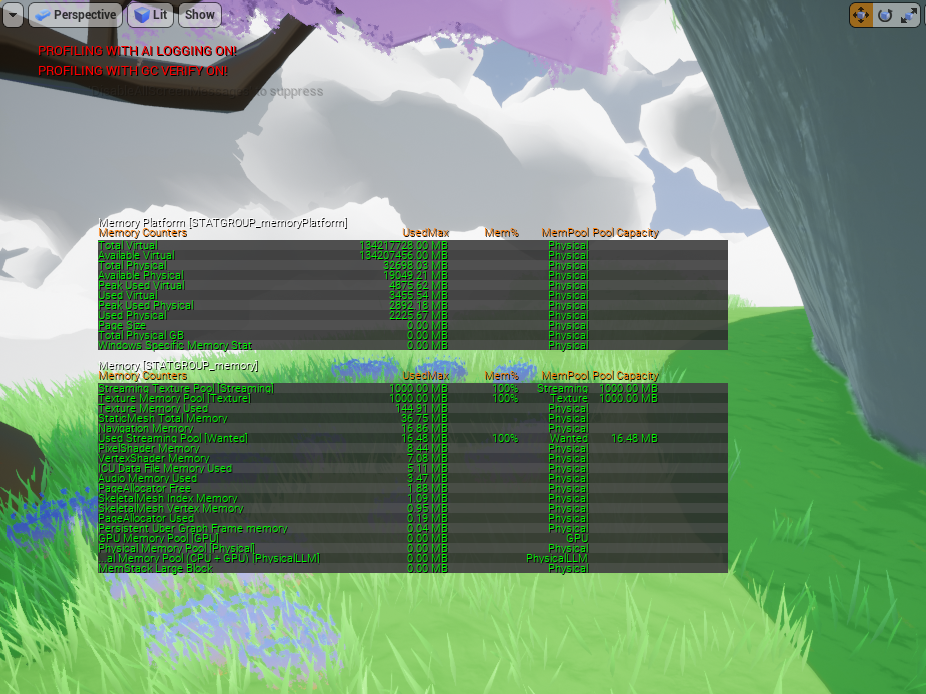

 quick lark
@vital prism setting LODDistance Factor to 1 fixed it. Not sure why
vital prism
@quick lark glad to know you found a fix! Also thanks for posting it here 🙂
quick lark
aww jeese thank you @vital prism for the help and time spent
 astral fiber
I have a UMG Widget with a Button and inside it a textbox.
There is an "inherit" checkbox for the font color inside the textbox. So I guess it can inherit the color of the Button. But I dont know where to set the color for the font in the button attributes
fallow path
@astral fiber can you show a screenshot? I don't see that checkbox
 edgy plover
Hey, UE4 beginner here. I have an Actor Blueprint with an Object stored in a variable. When I try to call a function of that Object from the Actor, the compiler complains that it "could not find the function". (Variable "Ability" is of type Ability, as it should be.) Anyone know what's going on there?
fallow path
@edgy plover try delete the function and readd it.
astral fiber
@fallow path
If I check this button, the text color gets black, but I dont know where it inherits that black color from
edgy plover
@fallow path that fixed it. I think I forgot to compile the Ability Blueprint before trying to use the new function. Recreating and then remembering to compile fixed it. Thanks!
fallow path
@astral fiber same behavior. It works when using a Border as parent
you can use the PreConstruct event to read the color from the button and apply it to the text
trim matrix
is there an easy way to only allow something when looking at something?
like flipping a switch
probably just a raycast right?
proud hull
@trim matrix Line trace
fallow path
@edgy plover Some things sometimes break. For what ever reason. Problems with serialization or what ever. Thus it is very important to use source control. We already reached the point that the project was not opening again for what ever reason. Reverted in source control. Lost some work, but were saved
trim matrix
@proud hull ill google that lol
proud hull
@trim matrix or compare rotations. Current actor rotation vs the look at rotation of the object.
fallow path
@trim matrix (vector from player head to object).Normalized DotProduct (with Camera.GetWorldRotation.GetForwardVector)
trim matrix
im 3 days into blueprints i dont understand anything you guys are saying lol
i found a line trace guide it looks like thats what I want
astral fiber
@fallow path I have a diferent color on the button when I hover over it. I hoped that the Text can inherit the color of the button material.
fallow path
You can either query the color in tick and apply it to the text if your interface is not used in a high performance enviroment or use the button events (hover, unhover, press, release) to always adjust the text color to your needs
astral fiber
@fallow path Yes, but I thought there would be a smarter solution to just inherit the hover color
fallow path
I never worked with the inherit check box, but it seems to be bugged when inside a button.
atomic light
@proud hull sorry to keep bothering: no errors, but the mesh disappeared 
proud hull
@atomic light yeah, I'm not 100% sure how detaching works. Did you try changing the rules? I honestly would go the extra actor route and just draw the stuff there. Just have the player character create this actor when it is created and store a reference to it.
atomic light
yeah I might have to resort to that
proud hull
You would then just need to manipulate that actor (move and set visibility). Or constantly create/destroy it.
atomic light
but even if i manage to do that im not sure how feasible it is to make it get shorter as you move
so im just gonna put it aside and work on other stuff
proud hull
@atomic light it definitely is not impossible. Probably easier than you'd think. You already have them stored as segments, so you just need to remove them as the player passes them.
atomic light
actually
proud hull
Are all the segments the same length? If so, you can cheat and just base the timing off player speed.
atomic light
no i dont think so im pretty sure unreal generates it from the navmesh
proud hull
Oh, that is where you are pulling it from, I see.
atomic light
like if you were to turn a corner it just adds one clamped point
ill probably make it so the path is redrawn until the character stops or I click again
so it would just delete the old one and redraw it from the updated position to make it seem like the sections i left behind are deleted
its a shame i havent found any tutorials for it
it looks really good
fallow path
@atomic light when detaching you need to keep world. otherwise the component will then be relative to the world as it was to the parent component. It does not disappear, it is just repositioned
atomic light
:OOOOO
yeah that makes sense
i fiddled around with that but I had the completely wrong target then
it works now
 quasi relic
I have an array of actor classes, is it possible for me to get a reference (not a copy) to one of the members of the array? I am only capable of getting a copy as of now
trim matrix
Is there a node to convert time to a sine wave like on materials?
 opaque blade
@trim matrix Time ?
Usually you can do gettimesincecreation and plug that float into sin
trim matrix
Example with materials is this, where it takes game time (I assume seconds) and changes that into a sine wave between 0 and 1 which can be used to lerp between two values.
opaque blade
Yes you can basically get the game time in bp and just plug it into the sine bp node
To get the game time just do
GetGameMode and gettimesincecreation on it
trim matrix
if I'm trying to do this via game time this node should work fine right? :)
Also I think I got the sine wave to work thank you very much :)
 peak flicker
@quasi relic right click your get node, and you should see the option to return a reference.
 lethal jungle
Is there a way I can change text in a level in real timez for example if the player goes into a collision box, the text render changes from "not colliding" to "colliding"
quasi relic
@peak flicker thank you
peak flicker
You're welcome
quasi relic
Is it possible to change the values of class defaults?
 gritty elm
@quasi relic no you can't change direct set class defaults, because these values are work with constructors. the solution is to change/set individual variables for that class, like "set spread hip", "set idp 1p" and so on.
quasi relic
Oh ok, thank you. Is it possible to do that to the class before the class is spawned?
peak flicker
You can set them in the class defaults panel on the side
You could also do it in the construction script if you need to
gritty elm
@quasi relic to get reference (not copy) you need to right click on get, and select "change to return reference"
quasi relic
ok got it, thank you both
gritty elm
@edgy plover on right image, you need to press compile button, and then you can press compile on left image, then it should work fine (your blueprints need to compile)
 candid gate
Hey, I'm following a Blueprints tutorial in which the teacher creates a function within an Actor and then Overrides it from another Actor.
This results in an Event Node for him.
When I do the same thing it just creates a parent within a new function, but no event node.
Am I missing something? Do I need to create this function now?
I think the tutorial is a few years old so apologies in advance if this is obvious, real new.
 sturdy moat
Has anyone had any problems renaming blueprint components in 4.25.1? I am working on a project and every time i try to rename components my game crashes
trim matrix
@opaque blade How would you go about adding a delay at the peaks of that Sine wave?
So when it peaks it would wait 5 seconds and then continue.
Actually nevermind I am going to use a timeline :)
I am trying to set my enemies hud but it is give me error
anyone know the solution ?
 fluid folio
Hello, can anyone help? I cant break the structure... It worked when i make a dublicate of another struct and then i was able to break it, but not working when i acces a structure inside a structure.
trim matrix
I solved the problem !!
 frail hamlet
@sturdy moat I have had similar issues manipulating objects with a lot of references. Eventually, I ended up making copies of the assets, going into the directory and manually deleting "corrupt" assets.
sturdy moat
oh ok thanks! @frail hamlet 
frail hamlet
@candid gate You need to right click on the Purple function start node and select generate parent function node.
candid gate
Thankyou!!
trim matrix
Actually ran into another problem. If I use a timeline, is it possible to change how long it takes for the timeline to be completed through blueprints and not using the timeline editor?
frail hamlet
@trim matrix Try Set Timeline Length.
trim matrix
Does that also change when the keyframes in the timeline is set?
quasi relic
I have a 'Gun' class that has an array of 'Starting Attachments' (attachments that the gun will spawn with), how would I alter that array before the gun is spawned into the game?
 sudden shuttle
Pardon my intrusion, but, I have a conundrum. If one is making a game about shrinking and growing. How should one go about making it so that when you change size, your movement speed also changes properly? While also being able to do all the same moves as usual, like sprinting and crouching? Because usually, i'm stuck with a tiny character running at super speed or a giant looking like they are awkwardly running in place. I would appreciate assistance. Also fairly beginner.
trim matrix
@frail hamlet It doesnt change the keyframe position 🤔
@sudden shuttle when the shrinking happens you can do some float maths I guess
set a variable for speed
then float - float or something
sudden shuttle
That sounds good! I'll give it a shot
trim matrix
im bath at maths but if you set up a float variable for speed you can do a lot with that
 vague sierra
I am trying sth. like this.
Seems to be forbidden, to do delay, and then work with my skeletal mesh ?!?
it's looking this way, because i don't get, what's going wrong when using it ...
frail hamlet
@trim matrix No, if you are trying to manipulate timeline keyframes in blueprints you may want to create your own curve for it and set curve members.
trim matrix
Nevermind this worked.
vague sierra
Mine is not playing the animation, if i put a delay in between ...
don't want them to play all, but afterwards
trim matrix
AI widget don't show the percentage of the heal bar, I tried few dif methods but doesnt work
vague sierra
understood the concept and solved it
trim matrix
@trim matrix is the one throwing fire your ai?
yes
It’s because Get Player Charecter returns the current possessed charecter. (The players charecter blueprint).
Since the players charecter blueprint is not the Wizard Blueprint. That cast is failing
You are going to need another way of getting a reference to your wizard AI. Get player charecter won’t work.
Thanks man
I create a variable for the wizard character
and still does same
 ripe drift
Evening all, hoping somebody can shed some light on my probably simple issue.
-
Widget Button - Start Match --- Fires loading screen (to all player controllers) - then loads map = all working.
-
At the end of match, host returns everybody back to lobby = all working
3.Host selects new map - Starts map - Loading screen does not show, I've added print string to the loading screen event and this does not fire, yet the map does load.
Any idea why this wouldnt fire the second time around please ? any help appreciated.
trim matrix
Np. I’m pretty sure there is a function to get the widgets user or something. It might help you
I gotta goto unreal and find it one sec
You are a legend man !!
@trim matrix Not 100% sure it will work but try this actually
It returns the widgets owning player pawn
If the AI is its owner it should return that
is it working?
not working
still blank
alright well then lets do it another way
You can create a variable on your widget that is a Wizard Blueprint variable.
Then set that variable on your wizard blueprint
I tried that before 😄
Not exactly
oh
So its good you have your wizard blueprint variable
The problem is its never getting set by anything
so you cant use it
So your going to need to set that variable on begin play of your wizard blueprint
So goto its begin play
event beginplay ?
yea
try this
forget about that parent beginplay thing
 fierce birch
can anyone help me with checking to see if the character moves and the left shift is pressed at the same time a deduction of stamina will occur
trim matrix
Healthbar Widget is the widget component that represents the healthbar health bar.
Ofc gonna be different name for you
And W_BattleCharHealthbar is gonna be the name of the healthbars widget blueprint
I am not quite sure if thats correct
Wizard Hud is that the name of the healthbar over the wizards head?
I am not saying yours mine looks strange 😄
yes
Wizard hud
oh ok perfect that looks correct
So what that is doing
When the wizard starts up
not working
but
Its shouldent yet hold on xD
Anyways when the wizard starts up it manualy goes and sets that wizard varialbe on the wizard Hud
I can share my screen if you have a sec ?
So now the wizard hud knows who the wizard acualy is
oh well sure
You are great man !!!  @trim matrix
thx xD
atomic light
@fallow path Do you have an idea on how past sections of the spline path could be destroyed? So it doesn't end up like this:
fallow path
Is this only one SplineMeshComp or multiple?
fallow path
If you want to kill entire meshes, you can destroy them after the unit is past the connected splinepoints
If you want to shorten the path continuously with the moving unit, just update the spline meshes
atomic light
yeah the second one is what i was going for
 obsidian pelican
Hey there :) quick question maybe someone has an idea:
I'm making a build system and it's working pretty good. I'm now in the situation that before you can build You have to place an Holo mesh in the world (long story why I took this path)
So placing one Holo mesh and using trace line I can get the actor world location of that Holo mesh. After getting the location and Rotation I give those parameters to my ghost item what I want to build so it's taking place of the holomesh.
But now I have a problem when I place two Holo meshes. Overlapping the second one gives me the location and Rotation of the first Holo mesh and not of the second one.... Anyone an idea?
I'm using a variable of type actor object reference of the holoesh BP, using it to get the variables of the Holo BP . In the break hit results I'm checking if the actor which I hot is of class Holo mesh
quick lark
Hi all, I am quite the smooth brain. Is there a resource online to help me learn how to have the default mannequin hold a gun with IK arms, such that the gun can aim in any direction with the arms moving dynamically? Cheers 🙂
 static charm
Andrei, depends really. but not sure why the player places more than one holomesh at a time. either way you can create a job system. maybe using an array to store the number and type of jobs/holomeshes to build.
hv, define arms moving dynamically. ue4 has built in blendspace for aiming.
generally speaking you use blendspace, and then use ik on only one hand, the left hand, for changing to different gun sizes.
any youtube aiming tutorial will get you started, and then continue with a left hand gun ik tutorial.
 last jetty
Does anyone know of a way to pause all flipbooks at once?
quick lark
Thanks @static charm , looks like "left hand ik" was the magic Google phrase
static charm
paper2d flipbook? any method for calling multiple blueprint events will be the only way
event dispatching, interface, or a foreachloop to run through Get All of Class.
last jetty
I'm still kinda new to this, would you be able to explain how I can use one of those methods?
static charm
i assume, each of these flipbooks are seperate blueprint actors?
like different animated characters/objects in the game?
and u want to pause them?
last jetty
Yeah, I'm working on converting most of them into child bps of an abstract class if that makes things simpler
static charm
ok nice, lets say you have a button or key press thats pauses them. So it would be these nodes in order: Key Press(or action/event) - Get All Actors Of Class(select main blueprint for the paper2d characters u have) - ForEachLoop
last jetty
Sorry that took me a while, was finishing converting them
But yeah, I've done that now
I'm guessing the next part is make the loop body stop the flipbook
static charm
yup
last jetty
I know how to make a flipbook play once and stop, but I'm not sure how to stop the flipbook mid-animation
static charm
the node Stop should stop it immediately. ALSO, just a heads up, if you have lets say 100-500 of these flipbook actors, the Get all Actors and the Foreachloop can create a pause/stutter in the game while it's calling those nodes.
atomic light
@fallow path One last disturbance, how exactly would I go ahead with updating them? Im asking because e.g. I have 2 meshes (like a 90° corner) and I make the turn, so would both (already existing) meshes be split along the remaining path when "updating" them? Im kinda confused on that part
or would you just force it to overwrite with however many "new" points are necessary?
last jetty
@static charm It works perfectly! Thank you! About the stutter thing in large numbers, it's not an issue for me right now, but what would be solution to that in the future?
fallow path
You place Splinemeshes only properly between two adjacent spline points, afaik. Thus you need to continously shorten the first mesh until you pass over the middle spline point. Then destroy the first and continou with the second.
static charm
Michael, you can change the ForEachLoop to a system that does it slow, over a few game frames. unless you need them to all pause on the same frame, in which case. probably event dispatcher, or a custom c++ system.
 oblique ruin
If I have a capture 2D Scene component is there a way to only have it capture itself?
last jetty
I see, thanks very much for the help 🙂
oblique ruin
I have a 2D cube with a block that I'm using to test
in my scene I have it an instance of it, that I'm displaying to a widget
Is it possible to have it just render the cube and nothing else?
static charm
yes but can't remember exact details. give me a moment or someone else can answer
ok from what i can remember, there's three ways of doing it. One way is using nodes, something like owner no see, also some flags you can set in the camera/capture component to make stuff hidden. I believe there's also post processing layer using stencil or z passes or something. Then there's also using literally a green screen behind the object, and masking out the green screen to alpha in the render material.
oblique ruin
Owner no see seems like the most realistic solution considering its intended purpose
I'm trying to recreate the magnifying glass from Super Smash Bros when a character goes off screen.
oblique ruin
So there's this show only actor's list which I think might be what I want but I don't understand how it works
 atomic prairie
Hey! My character's camera is linked to my capsule, when I crouch the camera lowers, can this be disabled? I think I should link the FollowCamera to another object but how?
i use the thirdpersoncharacter
frail hamlet
@atomic prairie Locking the Z-axis of the CameraBoom may solve your problem.
 true valve
When you play background music, are you suppose to play them in a different thread? IDK if that's even possible
static charm
audio is already it's own thread
true valve
There are several functions which one is ideal for BG music
play audio, spawn audio, etc...
static charm
yes those nodes/functions will be run on the game thread, but they control the audio processing thats done on the audio thread
true valve
So whatever I play I should be able to adjust its volume via settings
static charm
sorry i misread your reply
u want play audio
the one that has comment that says for "2d audio, good for UI"
true valve
what's for gameplay actions? let's say jump
which is not UI
I guess I shouldn't be using those nodes for BG music
static charm
for sounds that only the player hears, doesn't really matter.
basically, whichever meets your coding or setup requirements
but for sound like someting that comes external to the player, like an enemy yelling or a tree falling, that you would probably want to be 3d sound.
which would be setup as an audio component on the object itself, or spawn audio.
true valve
I see thanks
I also need the ability to stop and play based on logic. IDK if play sound2d lets you do that
Spawn Sound 2d it is. Just found it. thanks again
 sand shore
Anything not fire and forget should use the spawn sound nodes so you can control it
 stuck hedge
anyone know what's going on here? I have 2 variables on my parent class. These will be set on various child classes to be accessed by the menu later on. However, when I pull off a variable of this class, it only lists the string and not the texture 2D. These aren't references to actors in the scene, so I can't pull directly off an actor to get these values. This is for building a selection screen.
If I add another variable, like an integer, that also shows up on the "get class defaults"
 twilit heath
blueprint version of GetClassDefaults doesn't like to show members that are pointers
stuck hedge
ugh..
I changed it to a soft object reference. That seems to allow it to be listed
and I can select a texture with that.
twilit heath
it will not get automatically loaded now though
stuck hedge
just connect your widget switching logic to "on hover"
twilit heath
unless there is another hard reference to it
stuck hedge
there is an "async load asset" node that I can drag off it, which creates a hard object. That will probably work, let me test it
stuck hedge
the only load option is async when I pull off it.
twilit heath
you have to use the return ref
otherwise it gets unloaded
actually, might not be for BP, the pin should stay valid and keep the object loaded
stuck hedge
Yeah it works if I just pull directly off the soft object ref it'll turn it into an object reference
Thanks
 crimson charm
how do you make a buttons "onhover" event act like "onclicked"? I am trying to switch widgets when a button is hovered over
stuck hedge
@crimson charm Just attach your switch widget logic to the on hovered event same as you would on click
 dapper kiln
I have a blueprint math problem that relates to first person aiming down sights. So I was wondering if you can get the socket location of a child mesh. (weapon sight socket) Then get the location of the first person camera. Then move/lerp the parent component (First person arms mesh) to the location of the camera, but have it where the sight socket is directly centered with the camera? Is this possible?
 tranquil hazel
How do i make it so no matter which why the camera's facing as long as the character is next to a wall and is facing it the character will jump up if you are holding down W,A, or D depending on where the wall is at?
 still trellis
anyone have a good substitute for a map of arrays that needs to be replicated? the idea is that the map keys are enum values, and each of those values corresponds to an array of things that share that enum value. i need it on client and server, but maps aren't replicated, and i can't even have a map of arrays without making it a map of structs that just contain an array
 lucid lynx
What am I doing wrong here? The texture is fixed how I want it, enabling me to resize static meshes with the textures all lined up and tiling. It doesn't seem to work with the emissive color; the glowing parts are like regular textures which stretch and compress when changing the size of a mesh.
lmao nm I just figured it out.
obsidian pelican
@static charm not sure if the job system would be to much for this type of build.... never tried it before ...
Well the aspect why i use holomeshes is that I'm making a mod for a game. And this game already uses a building system which for us modders is not available to be able to change it. so with the holomesh i basically have a connection between my building system and theirs. the holo mesh uses the ingame building system for snapping and afterwards i want to use mine. to do that i'm replacing the Holomesh with the item that contains my building system. this way i know exactly that it is snapped to the basic game foundations.
And as i know the users they will be placing more then one holo mesh at a time maybe for different locations.
Is this not like a common issue ? like when i'm in a building and there are 5-6 lamps in it. I need to know with which one im interacting when turning light on off... .
for those maybe who could help me here is the old post :
Hey there 🙂 quick question maybe someone has an idea:
I'm making a build system and it's working pretty good. I'm now in the situation that before you can build You have to place an Holo mesh in the world (long story why I took this path)
So placing one Holo mesh and using trace line I can get the actor world location of that Holo mesh. After getting the location and Rotation I give those parameters to my ghost item what I want to build so it's taking place of the holomesh.
But now I have a problem when I place two Holo meshes. Overlapping the second one gives me the location and Rotation of the first Holo mesh and not of the second one.... Anyone an idea?
[1:26 AM]
Andrei:
I'm using a variable of type actor object reference of the holoesh BP, using it to get the variables of the Holo BP . In the break hit results I'm checking if the actor which I hot is of class Holo mesh
 coarse pecan
Hi. I have a little problem with a Material. I made a thermometer texture, one with a red content and one with blue content. But the blue one doesn't render. Thirst I thought it was because i only dragged off the red pin, but it didn't work for Blue, Green or RBG also. This is my Material:
(I'm not really experienced in unreal engine, so this was from a tutorial)
 tight schooner
Not sure what you're trying to do cuz your maps appear to be gray...?
coarse pecan
Oh yeah, wait I show you
So the gradients are to fill up the progress. The radial gradient in the picture is for the ring. That works perfekt. I made a material instance out of it and replaced the radial gradient with a linear gradient to fill the progress from bottom to top and instead of the ring I used a thermometer like in the picture below
For the red one it works perfect, but the blue one doesn't appear. On the right side you can see the original texture of it, but it doesn't appear in the black space
 worldly citrus
anyone know if it is possible to get the speed that a thumbstick on a gamepad is moved in blueprints
like say in a golf game where I want the player to draw back at a certain speed then flick forward
earnest tangle
I wonder if the gamepad even reports the stick movement speed 🤔
You would probably have to calculate it over a series of frames by comparing the reported position
worldly citrus
hmm
tight schooner
@worldly citrus idk if there's a readymade node that does it offhand. To measure it, you'd have to record the previous axis value into a float variable, and on the next frame, get the absolute difference of the previous and current values (value 1 - value 2 —> absolute node) then divide that by Get Delta Seconds (the frametime) to get the "speed" of input axis movement in any given frame
It would give you the change per second
worldly citrus
I see, ill see what that gives me and mess around with it a bit
that makes sense though
or do you think it would make more sense to maybe just see how long it took them to reach the minimum then reach the maximum?
or would that be harder
tight schooner
@coarse pecan In the future you should ask material node graph questions in #graphics or #visual-fx but I think you're misunderstanding one unintuitive aspect of material graphs, where data isn't "strongly typed" like they are in proper Blueprint script. Selecting one color channel pin (a "vec1") isn't the same as using the RGB pin ("vec3") or the RGBA pin ("vec4") cuz they a contain different quantities of float values. So you have to keep in mind what type of data each input expects. Like the opacity in a material is usually a vec1. And the diffuse or emissive color is usually a vec3.
I think the issue lies with that, but I'm not an expert enough tell you exactly what's wrong.
@worldly citrus I don't know what would be better offhand. You can prototype both and see what "feels" better. The latter approach would be recording into a variable the timestamp (Get Time Seconds) of when the swing "starts", however you want to determine that, vs when the swing ends, and subtracting them to get the total time of the swing
worldly citrus
alright I will give it a whirl and see what i can come up with
tight schooner
I will say that the latter approach, afaik, is how MIDI keyboards determine velocity. As you start to push the key, it trips one threshold and records the time, and compares it when you bottom out the key to determine the "velocity" of the press
worldly citrus
interesting I didn't know that, now to figure out how to implement it. should basically be something like when input < 0 start timer, then when it reaches -1 stop timer check to see tempo, then when input > -1 start timer and when input reaches 1 stop the timer and check tempo does that sound about right?
tight schooner
Yeah, roughly speaking
 plain flare
hi i want to if camera doesn't see an object, i want to hide it, because my fps very low. how can i do that ?
 orchid pawn
The variable deprecated_var declared in bp_blueprint has an invalid type Map of Static Mesh Object References to Structures. Does anyone know how to fix this? Var doesnt show up anywhere within blueprint and it's not referenced anywhere
Right-click the BP asset on content browser Asset Actions -> Reload. Doesnt fix it
coarse pecan
@tight schooner I found the error. I'd to use the Alpha Pin instead of RGBA. The guy in the tutorial used an older version of UE4, where the title wasn't next to the pin, so I picked the wrong accidently. Thanks for your help! And thanks for the information about the channels, next time I will pick the correct one :D
 jaunty dome
hey
working with shaders here, when i try to package the game to android (OpenGL ES 3.1) it is unable to compile the shader
giving me this error
no matching function for call to 'GetScreenSpaceData(vec2, bool)'
anyone knows what's the equivalent for that in glsl ?
tight schooner
Try #graphics
@plain flare the engine does this automatically — https://docs.unrealengine.com/en-US/Engine/Rendering/VisibilityCulling/index.html
 flat bison
guys is it going to be correct if i add about 20-30 instances here ?
 spiral gull
I have a question.
I have a component that has a variable of type CapsuleCollision. I want to be able to set a capsule collision in the editor from the owner of the component but I can't figure out how. It works if I do it in the construction script or in the Event Graph.
Can it be done just in the editor ?
tight schooner
@flat bison yeah, you can create instances in the construction script. Why not.
flat bison
thanks
tight schooner
@spiral gull it's a reference to a thing that exists in the game world rather than an asset in the content browser. So fundamentally it has to be set with BP script AFAIK.
spiral gull
@tight schooner I have the capsule in my actor (the one that contains the component) and I just want to connect it as "hey, this is the capsule I want you to reference" ...
Or maybe you mean that since it's not ingame it can't work?
tight schooner
You want to do it "in the editor" like... Make it show up in the details panel?
So that you can manually select a reference from a drop-down?
spiral gull
Yeah, I exposed the variable in the component. I can click it but I can't put a capsule that's in the same actor ..
tight schooner
Offhand I don't think that's possible. I could be wrong.
You could expose some variable that drives something in the construction script to do it
But I don't think you can set refs to other in-world actors or components directly in the editor GUI.
spiral gull
I am currently setting it in the construction script and it works just fine. I am putting an illustration to explain exactly:
I know that's a "first world problem" . It works totally fine from the construction script. I just want to know if there is a better way to do it.
I am learning unreal engine (I have only used godot so far) and I want to understand it better.
tight schooner
I'm no expert at this either. So your BP Component has some variable called Hurt Box and you want to pass a reference from the parent actor. If you want it to happen in a more generic way, maybe make all the BPCs you want to receive this reference children of a common parent class, with this "Hurt Box" variable on there. Then on the host actor's end, have a construction script that's like, get all components of [your BPC parent class], and ForEachLoop, set "Hurt Box" on it.
So in that way you can have a variety of components that the host actor can pass the hurt box reference to without special-casing each class
Sorry if this doesn't fit your use case. It's just a more generic way to handle the problem that came to mind
 slender hawk
can't use timelines in BP Components? 😮
tight schooner
I remember there being some weird limitations like that...
slender hawk
ouch :\
tight schooner
Scene component maybe?
 jovial bobcat
Is there anyguides or tutorial on how to make a physics based enemy like TABS where they react to your hits, i heard that you need to use inverkinematics and stuff but arent those used for like making sure the foot stays on the ground?
slender hawk
Luckily it only needs to be linear, so it's not a big deal to do it myself.
spiral gull
Thanks @tight schooner
plain flare
@tight schooner so , is it doing this already ?
i have to do extra something ?
what should widget blueprint's cast object ? i tried a lot of things and always fail pls help
 fossil crystal
Good Morning. I am trying to adjust the player capsule collision. The height & or radius is too big. Unfortunately theyre greyed out. Where can I go to adjust these?
atomic light
inside the blueprint, then capsulecomponent, in the details pane under shape: half height & radius
no?
fossil crystal
i dont seem to have or see a blueprint for that
atomic light
the BP for the player
fossil crystal
pardon me for being terrible at this.. this is all i have i dont even see a model. but when im in 'play' i can see the models feet etc
im assuming the BP would be available when i click onthe 3d model player
atomic light
in the content browser, click the root folder (content) then in the filters click blueprint and youll see all your blueprints
one of them should be the player
fossil crystal
thank you
cedar sparrow
Is it not possible to create children bp from widgets?
fossil crystal
i found it, sorry for being such a noob
atomic light
no worries
you could also check your gamemodes default player (the one it automatically spawns even if in the editor you see nothing)
fossil crystal
i was putzing around in there but that attribute didnt catch my eye. will go back adn take another look to cover my tracks
atomic light
Does anyone have an idea on how to add a while loop to the tick event
the simplemovetolocation uses tick and I want a while loop in there or at least something recursive but it all leads to infinite loops
first pin is for resetting, second pin does stuff and i want it to be repeated until a condition is met
 river wigeon
hey guys, got a small question, how do i set this emitter target location, like a lightningbolt random on the ground while the projectile which spawns the emitter is moving fast in a direction?
 meager finch
Anyone here that have any Blueprint shortcuts on pdf or just documents? 😄
 radiant latch
Greetings! Can anyone confirm 100% if floats variables in BP are 32 or 64 bits?
I read a lot of posts on forums saying they are 32, and they are defined as floats in C++ which are 32 bit (doubles are 64 bit)
But when I try to hold really large values, it can store values way higher than those that 32 bits would allow (around 20 digits)
 astral granite
Hello. I am having a problem saving my characters. How can I solve this?
fossil crystal
i had a cube i was using a placeholder. It had pysics and would land on the floor. I copied the cube and added a static mesh now ti falls through the floor. i checked teh static mesh i added and all collisions appear to be the same? any ideas
peak flicker
@astral granite make sure you dont have 2 of the same projects open by accident
astral granite
@astral granite make sure you dont have 2 of the same projects open by accident
@peak flicker I do not have...
 boreal kettle
Silly question, I'm testing damage on an object dropping from a height. I've made a small blueprint with a collision box and on overlap I spawn the actor I'm testing however, it continues to spawn. How can I ensure that on overlap it only spawns once?
Never mind, solved it with a 'CanSpawn' bool that returns false after the first spawn
 mortal coral
How do I allow a variable that is an Actor to be set on a Blueprint in the scene editor of another Actor?
I have "outlets" that need a reference to the actor they are meant to charge. Obviously I can set that via code, but is there any way to expose that so it can be set in the scene editor?
frail hamlet
cursive sage
hi guys got a issue the target of the custom event don't want to work (Player Controller Object Reference is not compatible with Player Controller Object Reference)
trim matrix
other actor will never be player controller
cursive sage
hmm
cursive sage
what is the call message for a trigger (when you enter it)
but my custom event don't want to work
it says :
Player Controller Object Reference is not compatible with Player Controller Object Reference
trim matrix
Hello, can someone explain to me what "class" in blueprint stands for? It's like a folder for unique and modular elements? For example, if you have character creation, and you can choose the name and the role. "Name" and "Role" would have their own modular blueprints and then we would have "character Creation"unique blueprint that uses these modular elements?
blueprint itself is a class itself
there are patterns for how you can design the structure
but there is no single true way I guess
If blueprint is a class itself does that mean that we have other types of class that aren't made of blueprint that we use to create our game? You mean things like assets, materials, etc?
I mean, 3d objects, textures, sound files
even assets are transformed to a class I think since you can access their properties via cpp
 magic dirge
Has anyone here worked with a RTS before? I am looking at some tutorials and a lot of them are using this "Game Time", but i've seen it be used for mostly Management and tycoon games. Can I skip that for a traditional RTS?
last jetty
Is anyone able to explain how to add an audio component to my main menu widget buttons?
Trying to drag a sound wave in gives an error saying that I "cannot create components from assets in non-actor blueprint"
trim matrix
@trim matrix But my example of using blueprint as "folders" is still one of the right ways to do it? It's possible to create a blueprint just for the name of character then use it on the blueprints of character creation and any other that needs to use it?
tight schooner
@trim matrix blueprint is a visual scripting language for game logic. You can make a child C++ class or a child BP class of most parent classes afaik so BP may be better thought of as... a layer? Idk, I'm not a UE architecture expert. If you're not clear on what classes and inheritance are, watch this: https://youtu.be/tCO0FdibECc
BP can be as modular as you want. You can put all the functions and variables related to the names of characters inside of a BP Component class for example, and then make BP actors out of a bunch of different components put together. I can't comment on whether that's the best approach as I've never made a character creation system myself, but it is a plausible approach.
trim matrix
my bad I fixed it
past girder
Is it any way to make a system where it pops up a text bar and u need to hold "E" then also it comes up a proggress bar as a cirlce so you can see how long you have heldt it?
trim matrix
yeah that seems pretty simple to do
past girder
I want to have a system like that on a loot crate system
trim matrix
just need a float variable tied to a progressbar
@tight schooner Thank you very much
cedar sparrow
Why is it so difficult to make loading screens? Like i've watched 10 epic videos on it and they basically all just say we can't do it. Why is it not possible to just display a widget that stays up until everything is loaded?
 gaunt monolith
dont a lot of the epic examples have a loading screen?
like showdown, infiltrator, could also look at robo recall
trim matrix
i dont know why it woudnt work tho, heck the new god of war has the loading screen as an actuall level to walk around in
but i dont know if it uses unreal
frail hamlet
@cedar sparrow I suggest you look into Persistent Levels and Level Streaming if you haven't already.
cedar sparrow
All of the loading screens in those projects point to a c++ module that doesn't exist in my projects when i create them from learn or market place
frail hamlet
Loading Screen System was free for a time in the Marketplace though now it's back to $35.
 gilded pebble
hey is it possible to make a random float in range exclude part of the range?
For example a range from -100 to 100 but don't pick from -10 to 10
earnest tangle
Generate float in -90 to 90
then if value is between -10 and 10 you offset the result
this should give you effectively the same end result
gaunt monolith
if ur doin 1000 of em on tick i dunno what fastest way to do it, if u do it once who cares? 🙂
earnest tangle
I suspect the performance bottleneck in doing it 1000 per tick would be in generating the number, not doing some fairly trivial mathematical operation on it :D
gilded pebble
I see, Thank you for the help
gaunt monolith
yea but than u might wunna do 1 generation and do some offset
do extra trivial operations to kill 1 generation
fossil crystal
i have a basket that i pickup and place items in.. when i pickup the basket the items come flying out of it.. is there a way to reduce their physics when inside the basket or atleast minimize it?
gaunt monolith
ye
set max something velocity
if it uses a movement component its in there
dont have editor open, you could also use drag
there is no reduce physics tho, its either on or off
fossil crystal
thanks
gaunt monolith
tou can also put a lid on the basket 😛
thats how i would handle stuff flyin out of my basket IRL 😛
last jetty
I'm trying to convert an abstract pawn class into a 2DSideScrollerCharacter, but UE crashes every time. Anyone got any idea why or how to get around it?
gaunt monolith
this is too lil info to give any kind of answer
there is no editor stop crashing checkbox
last jetty
Just wondering if there would be a particularly likely cause or if it's a known issue
last jetty
Just trying to convert it in the class settings. It's the parent of several classes that need to change
gritty elm
@fossil crystal you can adjust massinkg values to make it heavier object
last jetty
I've found a different method for what I'm trying to do so I'ma just ignore this issue
fossil crystal
hmm yae i just did that
and came back to say it worked. is there a max weight the player can carry because hes struggling with 100kg
gaunt monolith
if you use extreme weight values stuff can get weird
gritty elm
@fossil crystal maybe this helps
gaunt monolith
altho its not goin to create its own gravity field 😛
gritty elm
@last jetty you can create empty actor and inside actor you can add your audio component, and from button(ui) you can spawn that actor, when actor spawn, it play that sound
@radiant latch there are 32 bits and 64 bits int available, but for float there are only 32 bit float available
@astral granite looks like you have opened two same projects, close other one and try again
quick lark
When making a line trace, is it possible to ignore one specific actor class?
gritty elm
@atomic light don't use while loop it crash your game, use timer event instead:
https://www.youtube.com/watch?v=qc5WpNq7RFg
https://www.youtube.com/watch?v=zwVn68Cjfy0

What are the Set Timer by Function and Event Name Nodes in Unreal Engine 4
Source Files: https://github.com/MWadstein/wtf-hdi-files

What is the Clear Timer Node in Unreal Engine 4
Source Files: https://github.com/MWadstein/wtf-hdi-files
@plain flare if you want to direct cast, you need to get all widget of class like this, it works fine
quick lark
How do I make a widget only render in one VR eye? I am seeing double vision for objects close to eye
meager finch
thank you dude 🤟 @frail hamlet
quick lark
Anyone know how to avoid double vision in VR when looking at objects/widgets close to the eye?
gritty elm
@quick lark this helps you
also are you using normal widget or widget component?
@quick lark https://www.youtube.com/watch?v=8q_2z-SwcZY

How do you set up a 3D menu for VR? Here's a simple example you can use.
Head to my website to get the full project:
https://www.downtocode.com/tutorials
trim matrix
does anyone have a good tutorial for blueprints? I'm just starting out
 lost wyvern
I have the basic Third Person BP, and when I start the character suddenly flies out to the galaxy and beyond. Anybody knows why
frail hamlet
@trim matrix Try starting here. https://docs.unrealengine.com/en-US/Engine/Blueprints/GettingStarted/index.html
If you are just getting started with Blueprints, this provides a high-level overview of what they are and what they can do.
 royal warren
im working on a barrel thats supposed to do radial damage when it explodes
but the damage doesn't seem to do anything when it explodes
i never get my print string to show up
 lusty escarp
@royal warren Can you get a print string off the False?
royal warren
oh okay ill try that
ill try to see if it happens
the actor does get destroyed already though
lusty escarp
ah okay
lusty escarp
Never messed around with Damage Classes, so there could be something within that
royal warren
i tried it without the custom damage class and it didn't work
but i will check on the custom damage again
 pulsar arrow
Can increasing world time speed cause crashes? Is it safe to use? I want to use it for sleeping feature. Speeding time is easier.
royal warren
i made progress in my barrel issue!if you set the damage causer to self it works, but not with other barrels it seems
 narrow kelp
@pulsar arrow messing with time dilation seems to cause physics to go crazy
zealous moth
@royal warren for the intrinsic damage classes, you need to be as specific as possible; do not assume it knows it is self
i would propose you set the print string to the damage receiver, as if it does NOT damage anything, OR if the damage is 0, it will not trigger true
pulsar arrow
So if I disable physics when I speed up the time can I assume it’s safe? Or it’s better to stay away
zealous moth
@lusty escarp the damage classes are amazingly well made with some good events to receive and perceive. Creating your own damage will always be inferior to it unless you create it in cpp
narrow kelp
I wouldn't mess with it, but really thats just my feeling.. dono for sure
zealous moth
@pulsar arrow time dilation may only affect stuff that uses delta time but even then, i wouldn't be too worried
zealous moth
@past girder this?
past girder
Like the gta character picker wheel thing
zealous moth
oh, this?
past girder
Ye
pulsar arrow
Great! The reason I want to use time dilation feature is because there are so many actors related to time. It would be bad if the food cooked in the furnace was not affected when the player fell asleep. Instead of dealing with all this, I can speed up the time and continue to improve the game.
zealous moth
you create a widget in that shape; on mouse over, increase the scale and set it to "active" - you can always set that value in your player controller; on player controller left click, use "active item". Remove the widget. Fairly simple
@pulsar arrow do you want to do time dilation or just fast forward time?
I would argue that setting up clocks or timers would be more efficient than time dilation; time dilation is best used if you want to have variable relative time dilations (slow an enemy or haste yourself).
past girder
How to i make the shape then?
zealous moth
you can start with powerpoint
pulsar arrow
Just fast forward time when you sleep. Player won’t even notice it visually.
It’s for me to make things easier lol
zealous moth
right? so the best imo is a "fade to black - change time - fade to screen" and have time values associated changed. if an actor has a schedule, make the sleep trigger a global "check time and do what you should be doing"
@past girder btw, what you are asking about is a "radial menu ui"
past girder
Ok, thanks for the help
pulsar arrow
Thanks zanet I’ll probably do something similar
quick lark
Is it possible to use the camera shake blueprint for not the camera but an object that the camera is parented to?
quick lark
I ended up making my own
except its setting rotation instead of adding it. not optimal, but works atm
 rich tiger
I got a noob question guys, maybe someone can help, So i made an array with all the characters that are in my local multiplayer, and I want to get the distance between all of them and add the distance between them in a new array, Im not entirely sure how would be the best way to accomplish this, I dont want to create a separate variable for each character and make a distance between each one of them, and im not sure if only 2, 3 or 4 players are going to be playing at the moment
Doing this doesnt seem right
zealous moth
@rich tiger look up for each loops
you should do a for each and then another for each with a branch that continues if != this same actor
and then build an array
the problem will be with identifying who is who
so i recommend that you do this within the player pawns
 unborn turret
Is there a way to edit achievements through BPs on editor instead of config file?
rich tiger
@zealous moth maybe something like this could work right?
The thing is that this is going to be in my tick, so Im not sure if it's too intense for a tick
and I was wondering if there's any other way to do it
 reef mist
Hi everybody, I'm having a weird...i dont know if its a glitch or what it is, but my level blueprint is like executing twice. I have a print a light rotation, and its printing twice, and a bunch of other stuff is broken as well. It was working just fine until a few moments ago, when it just broke, and restarting doestn seem to fix it. I was playing around with the fog, wasnt even modifying any blueprints. Is there a way to fix this?
slender hawk
It's not possible to convert an ActorComponent to an Actor?
I'll be needing to use timelines, which I can't do in a component as I found out last night. 🤬
I'd rather not have to manually shift everything. 😣
royal warren
i got my exploding barrels working! 😎 I fixed it by setting the object type to WorldDynamic for my barrels
unfortunately this caused a infinite loop, but i fixed that by using a boolean to stop the AnyDamage event from playing again before the barrel finally exploded! Thanks Zanet
jovial bobcat
Is there anyguides or tutorial on how to make a physics based enemy like TABS where they react to your hits, i heard that you need to use inverkinematics and stuff but arent those used for like making sure the foot stays on the ground?
rich tiger
Hey guys, I was trying to look this in forums and such, but im not being able to find it anywhere, lets say I have, MAP 1, and I have different game modes, like Local Multiplayer GameMode, Single Player GameMode, and OnlineMultiplayer Game mode, they use different pawns because I need them to do different stuff, is there a way I can change the game mode of a map ( I know it can't be done in runtime, but im sure that i can do it using a main menu map) but Im not sure how to do it, anyone would be able to help me? )
 modern cove
Say I have an array of structs, and I want to change one variable with that array of structs. Is there any way besides: Get Array Element, Split pin, Set Array Element, split its pin too, and connect every variable on the Get and the Set other than the one I'm changing?
 rich lava
@jovial bobcat just know how to do it gg ez
 late shuttle
Anyone know how to get Depth of Field working on the NORMAL Camera? *(not CineCamera)
 spring cosmos
please suggest, how can I use curves to move an object like this cube with BP ?
 haughty axle
guys have stupid question, how can i check if number can be divided by 2? like 2,4,6,8,10.. but not 1,3,5,7,9?
spring cosmos
@haughty axle u can check the remainder, if remainder is 0 then it is divisible, if not then it is not divisible.
haughty axle
@spring cosmos ogh ok i will try this
 bleak vector
I have two issues I'm hoping someone can help with. First of all, this is every location (in 150 unit divisions) that is reachable on the navmesh at a length of 1800. As you can see it's not even for some reason and I'm hoping someone knows why 🐱
Secondly, there's some issues with what I believe is garbage collection if you do too many find paths too quickly, is there any way to clear it up faster than waiting?
Well, I was able to resolve the first issue by adding 125 extra units to the length 🤔 Enough to ease things out but not enough to hit the next tile. Still slow if you do too much pathfinding too quickly though.
Yep, using the "collect garbage" node solves the issue. I wonder what unintended consequences that has though.
bleak vector
Is there any way to check how much garbage is collected
 bright knot
is there some quick keybind to hook this node into the chain without having to recreate two wires?
rich lava
bright knot
that link does nothing when clicked
bleak vector
😆
rich lava
🧢
 shut hinge
I need some help with setting up an array, it registers the pawns, but the problem is it registers everything. I need it to only register just my party player characters. But I don't know how to get the array to do this. Tried to add my characters into the array list manually, but I keep on getting the error "Editing this value in Class Default Object Is NOT ALLOWED"" I don't have enough knowledge on arrays.
earnest tangle
What are you trying to do with it specifically?
Are you trying to fill it in the editor, or during runtime?
shut hinge
I don't have enough knowledge on these arrays.... All I know is this array fills itself up with every pawn in the game which is not what I want it to do. I only want it to assign itself to just my party member characters... But the array list I can't edit it because of that error, so I can't add the party members to the list I suspect that's because the party members are Character Blueprints type and not pawn Blueprints type so it don't show anything in the array list under defaults tab....
you can add the array slots with the + key, but they're empty and all greyed out because of that error.
earnest tangle
So are you trying to fill it at runtime, eg. using a blueprint graph
Or are you trying to fill it in the editor with the default value?
With regards to the members being characters - character is a subclass of pawn, so an array which contains pawns should accept them.
shut hinge
its being done from the player controller Blueprint.
This is the code.... Register Pawn (Custom) Event Connected to AddUnique Node connected up to Accessible Pawns Array (Pawn type).
Unregister Pawn Custom Event is Connected to REMOVE ARRAY Node conneted to Accessible Pawns Array Variable. and connected to the blue target pin on Unregister custom pawn.
In Update Pawn (Rec Custom Event), Possess Node is connected to a Get, that'connected to Accessible Pawn Array Type and Current Pawn ID number...
Then Keyboard 1-0 Branch Checks the IS VALID Index for the Accessible Pawn Type with ID Pawn Number then possesses whatever goes into the array. Then when I press keys 1-0 the code posesses the pawns. The problem is the array registers every single pawn in the map and not just only the party members. I don't know how to cap the array.
So what this code seems to do is fill up every slot in the array with any pawn that it finds in the map when you start the game.
hold on i'll have to get a screenshot to show the code.
so it find every single pawn in the map and puts it into the keypress slots for possession. So it has to be modified so it only puts in the party member pawns into the slots...... How? I don't know because I can't add them manually into the array list because of that class default error won't allow me to add them in.
I remain stuck on that. And The other thing I'm stuck on is Layley's Levelling Component. It only works for one party member at a time, so if I go into Party Selection menu to select party members, I can only see one party member's stats at a time when switching party members instead of seeing all their stats up on the screen.
this is the problem going on with the party switching with using layley's levelling component system.
Only 1 party members stats show up (the party member I posess) but the other party members stats are dead and they only show up when I possess that party member, but I need all their stats to display on the screen.
The Levelling Component is also running off the tick as well. And that might be causing the problem why the other party members can't activate their levelling components on the screen at the same time. So this system at the moment only works for displaying single party member screens, not group screens.... For Party Group Selection Screen all the party members should be active.
earnest tangle
Looking at the array logic you posted, it should only add pawns with player controllers into the array
Since it runs on the custom event in the player controller and adds into the array there
I guess it depends on what calls the RegisterPawns custom event
If that gets called with every single pawn including non-party member pawns, then that'd do it, but your screenshot doesn't show what calls the event
shut hinge
what do you mean call the event?
The Update Pawn is called after the Set Pawn (green node) but its cut off in the screeenshot.
shut hinge
The game is using myplayer controller under world settings. So i guess all the pawns are using that controller.
I just checked all the party pawns are using the AI Controller. So when I posess them I take over their pawn.
tight schooner
@slender hawk I haven't ever tried this myself but... Go to class settings, and change the parent class to Actor...? Maybe it'll work?
shut hinge
So got a problem with the registration code, it wants to register every single pawn in the map for posessing instead of registering only just my party members. For I only want to switch to only my party members to posess them not posesss every npc in the whole entire map.
I need to tell the array to register only just my party members but I don't know how to do it.
This is currently beyond my knowledge, does anyone here know how to do it?
I tried to add my pawns into the array list under the default tab in the array value thinking that is how to try to do force the array to register just my party members, but I get an error saying, Cannot Edit Default Class not allowed.............So I'm stuck....
tight schooner
I haven't read everything you wrote above but... Actor tags? (E.g. Get All Actors by Tag node, or various other Actor Has Tag things.) Parent class variable or function / BP interface function?
Just ways off the top of my head to differentiate identical things
Like add an actor tag "Party" when NPCs join up or whatever
And then you can check if an actor has tag
shut hinge
take a look at the two screenhots i posted back a bit then you will see the problems I'm having one with the array registration not registering my party members and wanting to register everything and two issue with the levelling component system not displaying the stats for all party members up on the screen when you possess them. As I have a party group system game but the levelling component only works for just single party members, not group party..
 meager spade
@bright knot Late answer but if you don't wanna have to reconnect all the time you can drag from the "first" one and create a node and it will auto connect to whatever that node was previously connected to. I'm so bad at explaining but you would drag from the right side of the set struct node and set the enum value and it will auto connect to the branch
 thorny cedar
i have a spline and a wheeledplatform moving on it. What kind of information do i need to rotate the wheels arcodingly to the spline?
earnest tangle
@shut hinge the event I was referring to is Register Pawns, not Update Pawn
the RegisterPawns event is the one adding them into the array
shut hinge
Tried the get all actors of tag node. but this does not stop the array from changing all the pawns around in the slots...I don't want the array to do that, I just want it to register my party members only instead of mixing them all up in the array each time I start the game..
earnest tangle
so if you get more pawns in the array than you're supposed to, check why the RegisterPawns event is being called more times than it should be
shut hinge
why can't a do once node stop the array from randomizing the slots.
earnest tangle
you need to find out why it's random before you can fix it
shut hinge
all i got told was that the code takes in every pawn that's avaliable and fills them up in the slots. But this causes problems when you have your party pawns hard wired into the widgets for showing their stats....
Because the code won't work unless you have the correct party member to display their stats. So if the array is radomizing the positions, its going to stop the party widgets from working.
earnest tangle
so why not change it so it only adds the party members into the array?
shut hinge
I don't know HOW TO that's why I been stuck for a week on this problem.
earnest tangle
Right, so that's what I was saying earlier
the RegisterPawns event is the one that adds pawns into the array
so you need to look at where that event is called from to find out why
shut hinge
register pawn is not being called, but update pawn is.
oblique ruin
So just to pop in would someone who has a greater understanding of math explain to me if this is right way to set up an Atan2 node?
I'm not sure I understand why the X & Y are inverted
earnest tangle
@shut hinge how did you confirm the registerpawns is not being called?
shut hinge
because Update Pawn just gets the pawn that's registred from the array and then possesses it.
But the problem is, its not checking the pawns to see what pawns are my party members and which ones are to be ignored.
so its just getting any pawn from the array and posessing it.
when I press any of the keys 1-0 on the keyboard. As I have ten party members in my game.
earnest tangle
I'm kind of confused, do you want all the pawns in the array or just the party member pawns?
shut hinge
just the party member pawns because this code is supposed to just allow you to switch to different party members in the game..
earnest tangle
yes, so once again.. you need to look at where RegisterPawns is being called
because that is the function which adds pawns into the array
so if you don't want all the pawns in the array, you need to stop calling RegisterPawns for every possible pawn
shut hinge
Register Pawns was set as a custom event on its own. Then Its called using the Get Node in Update Pawn.
earnest tangle
Can you show me where RegisterPawns is being called from
shut hinge
The Get node calls up the array and fetches what is in the array.
shut hinge
that's how the possession works, but its getting every single npc in the map instead of just the party members..
earnest tangle
I'm not really sure how else to say this.. but you need to find where the RegisterPawns event is called from :)
shut hinge
well I didn't write this registration code, so I'm having a hard time understanding it.
there's no call registration node in the player controller which is where this code is.
tight schooner
If you don't understand how the array is built then we're definitely not going to understand it either lol
earnest tangle
custom events can be called from other blueprints as well
shut hinge
I think al it does it get an item from the array and then possesses that item. I think that's all that was written for it.
earnest tangle
so it might not be in the player controller
try right clicking the event and choose "find references"
shut hinge
Ah there we go just found it.... Register Pawns is being called up in CH_Human Parent on event begin play.
on event begin play, the cast is going into the player controller to call up the register pawns.
this may have caused a problem, because once its been called up from the player controller, its no longer casting to CH-Human anymore and using the player controller.
earnest tangle
You might need to add some way to detect which pawns are party member pawns and which are not
For example you could use an actor tag or something like that
Then you could check for that in the registerpawns event
or in CH_Human
shut hinge
I thought the Get Actors of all Tag would work, but it don't stop the pawns shuffling around in the array.
earnest tangle
Yeah I don't think it's guaranteed to always return things in the same order
you might need to give each pawn some way to identify which party character it is
for example you could again use a tag, or you could give them a name property to match with the party member name or something
shut hinge
I already tag, but the pawns still fill the array in the wrong order when restarting the game.
earnest tangle
maybe you shouldn't use the array ordering to find the right pawn then?
you could loop through the array to find the correct pawn based on the tag or something like that
shut hinge
The only way I can force it to switch to only just my party members is to hard code the reference to the keypress but that means you can't have party members joining or leaving the party if you hard code the references. That's why a registration was done to fill up the array.
I'm not sure how you use for loops with arrays. but that sounds like the solution to the problem.
 tranquil notch
no, you can for each loop your array and only return it if a certain tag is matched. party members leaving should remove them from the array
earnest tangle
It kind of sounds like the registration code is part of the problem
you probably need to stop callling the register event on non-party members to begin with
shut hinge
i didn't know how to turn that off. but it sounds like every keypress needs to have a for each loop to check for the tag.
tight schooner
Manually maintained, manually arranged party members array as a more robust solution in the long run, perhaps
Something where the arrangement matches the order of party members in the UI or w/e
earnest tangle
for it to really function well, the UI should be based on the party member list
the array values should be the ones that are used to generate the UI... this is the only way to keep it correctly in sync
 silent ermine
Hey guys I have a question regarding rotation
I have a character rotation problem that I'm sure is easy but it's messing with my head.. So I want to manually rotate the character in the direction of movement, UE4 has the built in 'orient rotation to movement' in Character Movement Component but this makes the character rotate on the same axis, I want a more natural rotation. So in essence the character only ever walks 'forward' whilst an RINTERP rotation occurs he swerves around rather than turning on the same axis. my assumption is that such a system will work with root motion too (as a walk cycle root motion only walks forward). I mean i pretty much have the idea on how to do it i just can't code it lol forward vectors etc are all confusing to me. I should mention I have a free camera, like in the third person template, so you can look around the character
I found this post which describes the same issue, someone has a suggested answer but it wasn't helpful (to me at least), maybe one of you guys can read it and understand it
https://www.reddit.com/r/unrealengine/comments/8tdtrp/pawn_move_forward_and_rotate/
Would prefer a solution that uses character movement component as this rotation will be replicated
Not sure if this is even possible without diving into c++
magic dirge
Anyone know if a Game Time blueprint is required if you want to give Constructions a certain amount of seconds before they are build?
 flint nymph
@silent ermine I can help you out, I do the same sort of movement for my game and it works with multiplayer
silent ermine
@flint nymph ah that's good to hear! Do you have any videos of your project on youtube to check out?
flint nymph
here's a setup you can do
meager spade
Doesn't it have a clear children node like the scroll box has?
@trim matrix What do you want to do?
flint nymph
@silent ermine I was getting very weird results trying to work with the character capsule directly with multiplayer so I switched over to rotating and referencing the mesh, but even that was acting up with multiplayer so I had to add in a separate component (just an arrow component) do handle rotations and then set those on the mesh lol
@silent ermine ended up being a lot more convoluted than it needed to be to handle rotations, but it worked
 elfin hazel
@trim matrix The problem is probably that you remove from the array, as you loop over it. IE, remove index 0 -> index 0 is removed. Now the other members adjust their position, so index 1 becomes index 0 etc. Then you move to index 1, remove it and index 1 is removed. But you still have the member at 0.
You could probably just Remove index 0 every iteration instead of the current index, though I haven't tried it.
flint nymph
in single player this setup was much much simpler but the inherited character classes were really misbehaving with multiplayer
meager spade
Or use a reverse for each loop, there's a macro for it somewhere on the forums
earnest tangle
or just use the clear children node..
I'm not quite sure why he doesn't want to use it 🤔
meager spade


Me neither but that should work, haven't tested it myself though
Some people enjoy overengineering
past girder
How can i check if a spesific actor is destroyed in another bluprint class?
earnest tangle
the is valid node would check whether the actor is destroyed / about to be destroyed
past girder
Yeah
Thanks
I am making a money system and i am going to get money each time the player kills and AI
meager spade
You could bind to the ondestroyed event if you need to execute a function when a specific actor is destroyed
past girder
But after the actor is destroy i need a refrence to the destroyd actor component
meager spade
If you do that you can access whatever data you need and you know that the actor is getting destroyed afterwards
past girder
Ok , thanks i am going to try that
latent arch
Can someone give me a hand visualising / debugging a scene components location and rotation?
ive got some audio emitter that i want to just check are rotating with aactors correctly
i know they are following ok and keeping relative offsets but id like to get some sort of beam coming out so i can check their rotation
earnest tangle
Don't the emitters usually have some kind of editor widgets that you can see?
flint nymph
you could draw a debug line
component world location for start, location + forward vector *100 for end
oh there’s literally a draw debug arrow lol
elfin hazel
I would attach an Arrow component to the scene object.
Just got to remember to uncheck Hidden In Game, that its position and rotation are 0,0,0.
slender hawk
@slender hawk I haven't ever tried this myself but... Go to class settings, and change the parent class to Actor...? Maybe it'll work?
@tight schooner
Unfortunately it doesn't come up as an option. 😦
 stray lagoon
Hello, I am working on a virtual production project and we have the limitation that everything has to happen within the editor (viewport). So no click on the Play button basically. I see a lot of tutorials on setting up blueprints where the action (changing light intensity based on sin function for instance) only starts once your are in play mode. How can I setup the same blueprints to also work in the editor? I need some sort of viewport time input to drive parameters but can't find anything. Thank you for your help 🙂
tight schooner
@slender hawk well, the only other thing that comes to mind short of hand-migrating it all is make it a component of a new actor BP, and then the actor BP behaves as an interface to the component. Not ideal cuz it adds a layer of complication but it would work.
@stray lagoon editor functions: https://docs.unrealengine.com/en-US/Engine/Editor/ScriptingAndAutomation/Blueprints/CallInEditor/index.html
Describes how to call Blueprint events and functions on Actors while working in the editor.
stray lagoon
Thanks! Will look into it.
tight schooner
Not sure if timelines and other such "latent" nodes work in editor functions... I never attempted that myself... But if they do, you could make a looping timeline for a sinewave or whatever.
elfin hazel
With Editor utility widgets you have access to tick as long as the widget is displayed somewhere. So the widget can call editor placed objects to update them.
latent arch
So i got the lines drawn and ive manages to get X pointing forwards now - but the other two vectors are making me sick lol
originally the emitter was pointing tstraight up
so left and right is working
 unique wyvern
if I destroy the players character does it automatically get unposessed
latent arch
@flint nymph @elfin hazel 😄
those Y and Z vectors just dont make any logical sense to me lol
elfin hazel
It is a bit hard to see, but it does look like the lines are drawn at angles that should be impossible for a scene component to have. Where that goes wrong could just be the end draw position calculations.
If you attach 3 arrow components and orient them according to the emitters forward, right, up directions there should be no question about the emitters rotation.
latent arch
ahh ok im sure thats probably right - do you mind showing me what that looks like? 🙂
elfin hazel
Sure, i'll have to open a project. It will end up looking like the world transform tool.
latent arch
ok thanks a lot mate 🙂
zealous moth
would there be a reason for a child of an actor to be pending kill and destroyed without any "destroy actor" nodes being called anywhere? if I set the same actor in the world, it is not destroyed; the transform is constant and there is no killZ
elfin hazel
@latent arch
latent arch
ahhhh cool thanks man 🙂
lusty escarp
@pulsar arrow check out this video on Radial Menus, Super cool and informative https://www.youtube.com/watch?v=OHEk3MkzNv0

Dishonored 2 is a game packed with action, an intriguing story and cool stealth elements. While all of these help make Dishonored 2 the great game that it is, its UI plays a major role in how everything feels and looks.
In this video we will UI design and take a look at Disho...
 hot fjord
Hello everyone,
In my setup for a multiplayer game, I have a progress bar inside a widget. The Widget runs with a Timer on Event (on a loop) and functions perfectly fine.
The issue is, that once a value inside that widget reaches a certain amount, the "Timer on Event" is supposed to stop the loop through a Timer Handle.
My problem is, that when I set up the handle, it doesn't work
 hard cloud
Can anyone here help me use my custom charecter instead of ALS manniquin pls
 covert crane
hey folks, here's an easy one. I'm trying to make a simple game driven by the UI that manipulates what's in front of the camera. The problem is that if you click outside the UI buttons, the mouse cursor disappears and the camera gets controlled by the mouse. I've tried to make a new player controller, etc but it seems like the player controller always gets engaged. what am I doing wrong here?
nm, found it! I swear, sometimes I just got to ask the question to find the answer. 🙂 Solution (for posterity) was to, when creating my ui widget, also acquire the player controller, set input to UI only and then set mouse visibility to true. Both methods are specific to the player controller. 🙂
peak flicker
@hot fjord can you post your bps
hot fjord


@peak flicker I retested it.
The thing is, when the "clear timer" is NOT connected, the Progress bar gets updated ans resets
But if it is connected, it doesn't update the Progressbar anymore
peak flicker
Ill take a look at it here in a little bit when I'm back at work if nobody else chimes in
hot fjord