#blueprint
402296 messages · Page 485 of 403
 trim matrix
 gray fox
same issue with levitating sim
trim matrix
oh actualy random int is max -1 that shouldent matter oml
ok so the issue is levatating then?
gray fox
yep
trim matrix
There supposed to fall down?
gray fox
also its weirly activating in middle like some part is not scalled properly but same bp in construction script work
yep they should fall down
like in first pic
they do in scale 1
but when i change it its acting weirdly
trim matrix
hm well i wouldent be sure why tbh
gray fox
my uneducated guess would be that dagame object needs to set its location correctly based on changes but i tried set location already
it also bugs in table blueprint on event begin play, only fix is in construction script
but i dunno why, maybe it somehow loads info differently?
trim matrix
This table blueprint whats that?
trim matrix
oh ok that makes alot more sense now
gray fox
so i want to change scale of object, then hit it
create level where with push of the button those objects will randomly rescale
trim matrix
oh ok i see exactly what you mean
Its looking to me like the physics simulation is already completed when were clikcing the button
something along those lines
trim matrix
actualy thats not it either i dont think
trim matrix
Ok so scaleing doesnt seem to work like you would expect i guess
its not scaleing each piece individually
But instead the mesh as a whole
gray fox
yup but i am scaling whole actor
 gentle flare

 waxen trench
"Spline Mesh" vs "Spline"
gray fox
@trim matrix objects are scaling correctly, even sim is in correct scale but for some reason it bumps up and start levitate like it thinks that ground is heigher
trim matrix
Yea i see that to
Its cause destructable meshes dont seem to support just changing the scale after its already been destroyed like that
gray fox
but seting it at random in construction script works, even changing it in editor manualy too
trim matrix
So looking for any support for that or a work around
yea
Thats because the construction script and in editor. Those changes happen before runtime and before it fractures
gray fox
hmmm maybee can i call function again?
chmm i see
but its already fractured as dm object isnt it? i think its fractured by the time i create dm object
its only on state 0
trim matrix
yea its already fractured
Destroyed is a better thing to say
Ima check if its before runtime
Or before its exploded
yea looks to me its before runtime
@gray fox
So this approach of changing the scale of the actor during runtime wont work
There has to be some function though that will work
gray fox
chmmm soo i have to figure out how to call function on event
gray fox
oh wait i can rerun function right now i am watchin tutorial on generating number
gray fox
he is doing it in construction script and then recall in event graph
trim matrix
Yep
gray fox
will try, should work
trim matrix
idk tho D:
gray fox
btw last thing then can i call function from one bp to another?
trim matrix
Yes xD
If you dont know about functions then forget about this and go learn all about them
gray fox
yeah thing is i dont have that much time till school deadline 😄
trim matrix
oh D:
gray fox
i already created working one for rescale now i want to call it in level blueprint
and i am done
trim matrix
Yea so what it looks like though. The issue was that destructible meshes don't support changing the scale while the game is running. That's what's causing the chunks to float around.
I don't know enough about destructible meshes to know if that's possible using some workaround. Or if that functionality is just hidden in a function or parameter somewhere.
trim matrix
gl
 alpine copper
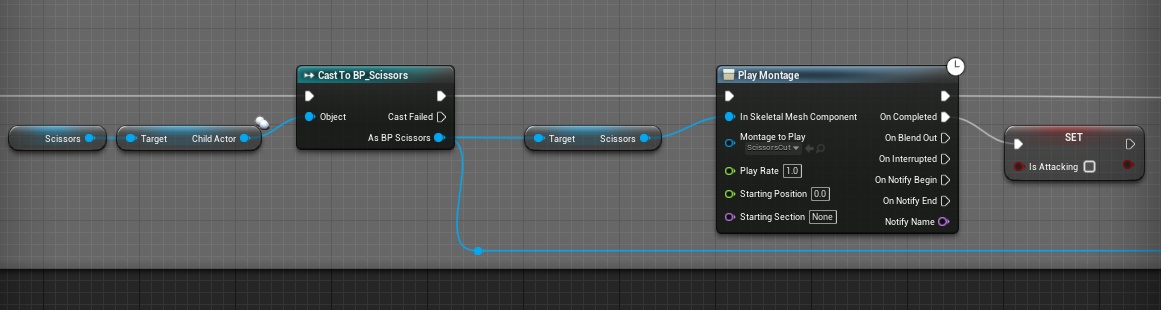
Hey guys I'm trying to get the object reference of a child actor, right now I'm using casting but how would I go about accessing that reference without casting
https://gyazo.com/35057945ff0eacd840a933afae5fe0fe
 tight schooner
For what reason are you avoiding casting? Usually ways to avoid casting involve an interface of some kind whether that's a BPI or casting to a parent class and using its common functions and variables to do stuff on an arbitrary number of child classes
So if you can wrangle all the classes you expect to use as "child actor" components and parent them to a master class, or use a Blueprint Interface (I've never used a BPI for child actor components but maybe it'll work), then you can avoid the situation where you need to cast to an open ended number of classes to do stuff.
@alpine copper forgot to tag you
alpine copper
I just want to avoid casting for circular dependencies, it a bit weird that there's a class assign to the child but you have no access unless casting or interface message ( which I still haven't try so not 100% sure It would work )
tight schooner
I suppose a third method is an event dispatcher. That's where the child actors cast to the host actor and subscribe to "event dispatcher" events set up on the host.
So those are the three bread and butter methods of breaking dependencies
I'm sure there's a Matthew Wadstein YT video on each
(if you're learning BP in general, you should look into all three)
alpine copper
that just feel like increasing complexity for no reason, event dispatchers are expensive I'll stick with the interface message unless it doesn't work
tight schooner
Yeah I tend to stick to BPI or inheritance
I'm just saying there's no wrong way to do it per se and it helps to know them all
if you see yourself doing a lot of BP in the future
alpine copper
not my first rodeo with BPS I know about BP communication, it just child actors that got me confused since they are not the most use
typically people spawn weapons and get the reference from the spawn
but since this is a killer class it already start with the weapon
 late shuttle
Anyone ever have their HUD work in Editor Game Launch but not work in the final Compiled Build?
 nocturne sundial
@gloomy linden ok trace sounds like an awesome idea, will propably prevent from dashing through the objects and allow smooth movement from A to B as you said, cool we will try it 🙂
 dapper cradle
I am using this to destroy a nav modifier (see red arrow)
I was hoping that I would be able to travel in that area once the modifier had been destroyed, anyone know why I cant ?
Does it not update ?
 jolly jay
Some one know how i can do a Side by side cameras? Like this more less
 midnight thicket
@jolly jay Maybe this tutorial can help you (even though it's not exactly what you asked for)
https://forums.unrealengine.com/community/community-content-tools-and-tutorials/8319-tutorial-overview-working-stamina-health-magic-bar-that-updates-to-the-hud-and-more?10762-Tutorial-overview-Working-Stamina-health-magic-bar-that-updates-to-the-hud-and-more=&highlight=minimap
Unreal Engine Forums
This is the place to show, share, and link to your stuff!
jolly jay
Thanks i will see it @midnight thicket
 urban isle
hey guys, does anyone know how I can get an input to fire only once even though they key is held down
 flint nymph
DoOnce
for action inputs they already only fire once per press, so if you’re talking about axis mappings you’ll probably need an additional check for when the absolute value is greater than 0, on true do once and on false reset the do once node
 sonic basin
Guys, who now about attaching replication? can it be disabled? can object locally attaches to different objects?
 mortal wharf
Hello everyone i need some help how do i make my model look the right way when moving this is not the character i am playing as it's an enemy i want him to look/point straight ahead.
 earnest tangle
Can anyone think of a good way to create a sort of "replaceable" component in an actor? Ie. I want to have a default but some subclasses might need to use a custom variant of the component
Normally I would just define a variable with the component class, and then instanciate it in beginplay, but go figure you can't actually instanciate components at runtime in BP's for some reason...
 elfin hazel
You can, but it's with "add [yourcomponent]" so you can't change it dynamically.
If you make a variable of type "movement component", and want most classes to use the "default movement component", make a function that creates the component and sets the variable. Then in the classes that should use another movement component, override that function.
That's the neatest way that I know of at least when it comes to dynamic component making.
earnest tangle
Ah, that's actually a pretty good idea
I'm probably refusing to touch C++ for no reason because you can do it in there apparently, but ugh :D
I'll give your idea a spin, thanks :)
 devout geyser
I wanna cast to the chest but i can't seem to plug anything to the object
any ideas why?
 rancid quartz
When you drag off of object, does it give any options?
elfin hazel
You need a reference to the object that is the chest.
devout geyser
how do I add a reference?
@rancid quartz these are the options related to the work 'chest' when i drag
elfin hazel
hmm well. Question; What happens that makes you want to open the chest? I mean, is it a linetrace that hits the chest? Is it an overlap event?
devout geyser
Overlap
elfin hazel
Then the overlap event should be providing the actor that is the chest.
So you want to cast the actor to chest.
elfin hazel
Here's an example of an overlap event: https://docs.unrealengine.com/Images/Engine/Blueprints/UserGuide/BlueprintCommsUsage/BPComHowTo/3_4.webp
 devout geyser
ye ok
elfin hazel
So the overlap event provides an actor. It doesn't really care what type it is. But in this case it's a character, and we want to check a "is on fire" boolean. That boolean is not part of the actor class, it's of the MyCharacter class. So in order to set the boolean on the MyCharacter, the actor has to be cast.
https://docs.unrealengine.com/en-US/Engine/Blueprints/UserGuide/CastNodes/index.html
https://docs.unrealengine.com/en-US/Engine/Blueprints/BP_HowTo/Casting/index.html
https://forums.unrealengine.com/development-discussion/blueprint-visual-scripting/1806-casting-explained?p=137726#post137726
Examples of different Casting Nodes and usage cases.
Using Blueprint Casting to communicate from one Blueprint to multiple Blueprints.
Unreal Engine Forums
Build powerful visual scripts without code.
 foggy oyster
How do I get the keys in a curve?
devout geyser
I have a chest actor with a collision, in the chest BP there is an event called open how can i reach that event from a player's bp ? that's my question. i will read the articles anyway @elfin hazel ty for your help, and patience
 wheat wave
I made a blueprint to pick up physics objects in first person, its working but i also want to pick up fractored / destroyed meshes. Its not possible even though I checked the physics marker
elfin hazel
You're pretty much doing it, you're casting to the chest and calling the open function. But you need a reference to the instance that is the chest.
wheat wave
I think I need to check components and bones?
devout geyser
@elfin hazel I nailed it ! ty so much man
Have the best day ever borther, ty so much ❤️
 proud hull
@devout geyser Get Actor Of Class: "Find the first Actor in the world of the specified class. This is a slow operation, use with caution e.g. do not use every frame."
If you have multiple chests using that same chest class, then you will run into problems differentiating between each individual chest.
Like @elfin hazel mentioned, it is best to use the "Other Actor" output from the overlapping event and cast to chest as you originally did.
devout geyser
@proud hull Ty bro, I think It would have tackled me it in the future ty for mentioning that 🙂
rancid quartz
Hello. Does anyone have any experience with Load Errors in the editor?
Recently, I changed a value in a struct and now whenever I open the editor, it displays an error for every blueprint that references that struct saying:
[Blueprint] Failed import for [X] property [Struct Property 78A04AA9CD...] Referenced by export function [Function].
The errors don't seem to harm anything but I'd like to get rid of them. Any advice would be appreciated.
devout geyser
Reinstall the engine? seems a solution, what do you think?
i don't think its such a good idea but what ever you think
rancid quartz
Thanks for the advice, Ohsri. I'll give that a shot if no other ideas come up.
proud hull
@rancid quartz did you save and recompile all the BPs that were referencing the struct?
rancid quartz
No, I haven't tried that. One sec.
I guess I figured they're already compiled and saved so there's no need but maybe that'll help.
Oh hey, it worked!
Those were hanging around for a week.
proud hull
Ok, cool. Next I was going to suggest removing your project's "Intermediate" folder.
But all seems good now.
rancid quartz
I don't suppose you know why it worked?
proud hull
Not really sure.
rancid quartz
Well, thanks for your help. I appreciate it.
foggy oyster
How would I go about finding the perpendicular vector of a wall that I have line traced?
like this
but also on other axis
earnest tangle
you should get the hit normal from the trace so you can calculate a vector perpendicular to the normal
 distant sedge
get right vector?
foggy oyster
right vector of a vector?
distant sedge
Get the forward of the hit normal like zomg said and then get the right off that
foggy oyster
how
earnest tangle
yeah there is a get right vector node that takes a rotator
you could try just plugging the normal into that
foggy oyster
like cross product or....
yeah the rotator thing doesnt work
gives me -1 on the wrong axis (z instead of y)
earnest tangle
try using one of the other functions that convert the vector into a rotator
iirc the one you use changes the sort of orientation of the result
 twilit heath
@foggy oyster as long as the vector you used for trace is not parallel with the normal
ProjectVectorToPlane will give you a component of the trace vector in the normal's plane
if that is not good enough for your needs, you'll need to use cross product
for this, i'd eyeball it as crossproduct(normal, upvector)
foggy oyster
thats what i ended up doing, using crossproduct
twilit heath
looking for the edge of the wall?
mortal wharf
So i have an enemy set up with pawn sensing with this code https://gyazo.com/5c2b5acb1a17c08ce2c7684103a2ae22 but when he sees me he just freezes. I followed this video https://www.youtube.com/watch?v=OvNxk3ofbMM.

Next part coming next week!
Discord: https://discord.gg/4q53mdq
patreon: https://www.patreon.com/StepGames
 vapid hatch
hello, is there a way to get the functionality of a "continue" in a for loop?
 solemn zephyr
I have barely any idea what I'm doing, trying to make a key to cycle between cameras, what do I need to plug these branches into to execute? (also how bad is this setup and do I need to bin it and start over)
 cedar sparrow
What is created first, the PlayerState or the PlayerController?
 thin rapids
What is created first, the PlayerState or the PlayerController?
@cedar sparrow i would guess the PlayerController, but why do you want to know wich is created first?
cedar sparrow
@thin rapids because you pull the steam name from the PlayerState and I wanted to do that from the PlayerController but i can't
PlayerState is Null when PlayerController is created it seems
 steep tendon
I had a custom player pawn this morning and it was possessing and playing fine, but when i came back to it now it spawns the default pawn and wont let me possess the new one, any ideas what might be going wrong?
 full fog
Suggestion for UE5: Blueprint UI system that can figure out on its own what the developer wants.
@solemn zephyr phew, I need to create a camera switch system as well. Will look into yours as well. No idea yet, sorry.
@steep tendon What have you done inbetween? Maybe deleted some variable or forgot to rebind the value to a button? No idea yet.
solemn zephyr
@full fog lemme know if you get something working, I'll do the same
full fog
@solemn zephyr 
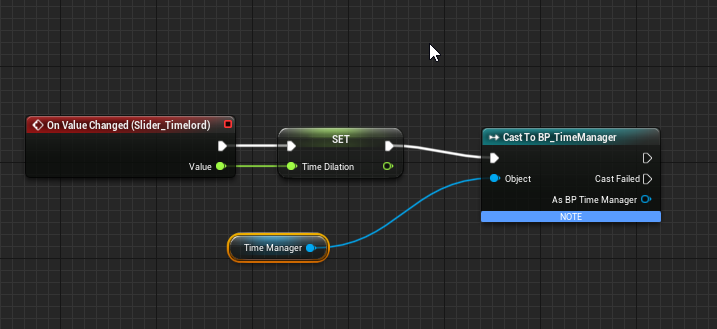
(Question): I have a "Set Timer by Function Name" event, which is working fine. It's inside of a Blueprint actor for global time management. Now, I want to drive the time value with a slider. So I made a slider and a float variable, bound this variable to the slider. This is done in a Widget blueprint.
Inside the other Blueprint, I called that variable and bound it to the time value.
Problem: I can move the slider but it does not seem to communicate with the other BP. I searched all sort of forums but just got some rare and incomplete information like.. bind event?!
I am still a beginner on these things, maybe somebody would have a little tip on that issue.
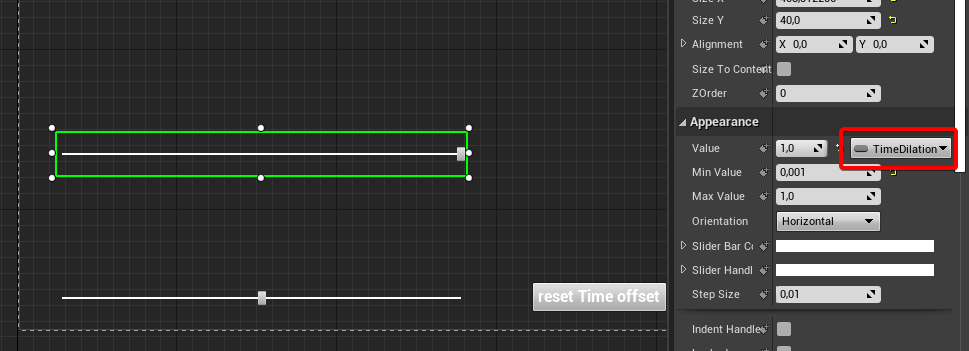
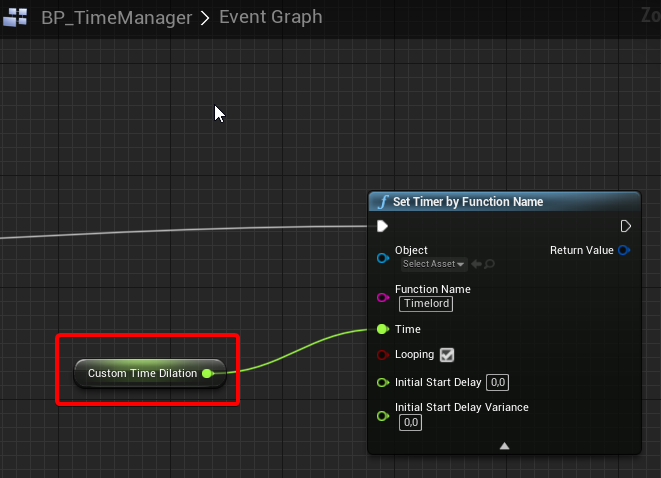
I bet a crate of beer that I did something wrong here
 sonic hare
can any one help me?
full fog
maybe?
sonic hare
sweet
so
im trying to make a main menu
but when i test it out my hunger and staminia bars show up in the bottom corner
full fog
mhm classic.
thin rapids
but when i test it out my hunger and staminia bars show up in the bottom corner
@sonic hare just make a check if you're in the main menu, if it's true you use 'remove from parent' in the stamina/health widget
if it's false you make it show up
full fog

In this series we take a look at how we can develop beautiful, interactive user interfaces within Unreal Engine 4!
We'll cover the process of creating heads up displays, menus & more using UMG...
♥ Subscribe for new episodes weekly! http://bit.ly/1RWCVIN
♥ Don't forget you ...
Maybe this could help.
Since you're new - watch some tutorials about UI creation
That may cover some basics
sonic hare
bruh its that guy who got me in this mess
Today we start working on the main menu for the game, having said that we go over the process of taking graphics from Photoshop and bring them into the engine complete with working buttons for start game, exit and more!
We go over:
- Importing the engine
- Preping the main me...
steep tendon
@full fog I made a reference to the world rotation in the level blueprint but that was it
sonic hare
some one had the same problem and said so in the comments
he responded with this
If that is the case, go to your world settings and make sure you're using a different HUD class and that your create widget blueprints isn't being called as part of your game mode or level
I have no clue what he means
steep tendon
Baiscally you have a HUD type being set to display. you would have one in game and one in menu
i had this issue before
you want to hide specific UI elements when in the menu
sonic hare
yeah
steep tendon
If that is bound to your character it could be that the character is still spawning in
sonic hare
i think it is bound to the charicter
can i stream my screen to general vc
and you can see
steep tendon
Im in a call atm
sonic hare
idm if you are muted or defend
steep tendon
with some people im working with so i cant rn sry
steep tendon
To stop the player from spawning, create a new Gamemode blueprint and call it something like main menu modew
sonic hare
where ;-;
steep tendon
u should see an option to set the default character in there, just set that to none
full fog
Well. Look out for either more simple tutorials or search on that specific topic. What ++ said, normally you have a different gamemode bp for that
steep tendon
thin rapids
Dont really know where this should be asked, but I'm making a flashlight and the when I turn it on it seems to cast very strange shadows
@trim matrix #graphics
trim matrix
thank you
thin rapids
you're welcome
sonic hare
@steep tendon sorry for pining you but what do i do next??
thin rapids
@sonic hare you set that game mode in the world settings pannel
sonic hare
?
 swift quiver
In the level under world settings change the game mode override to it
To the game mode you created
swift quiver
no problem
thin rapids
np
full fog

Solved my issue, stupid me.
I have another "Slider" question:
Would it be possible to have different step sizes or the ability to add a curve function to it?
Like the slider value normaly goes from 0 to 1 in steps like 0.1 > 0.2 > 0.3
I would need it like 0.1 > 0,3 > 0,6 ..
trim matrix
I think it's called "Step Size"
full fog
Thats my issue. The step size is fixed and I wonder if I could bind it to a timeline with a curve for example
using the curve itself as a value
or adding a list where i can say: I want to have 10 steps on the slider and each step can be "x" value.
trim matrix
Oh
full fog
Like slider step 1 could be 5, slider step 2 can be 7, and so on
Because at the moment I have a time value where the number 1 is standard and the smaller this number gets, the faster the current time is moving on. To have this steps a little but smoother on my slider with 6 fixed steps, I would love to smooth the values either by curve or some list
 hallow night
Switch on int
thin rapids
why do I have so many problems with this
@trim matrix what problems?
trim matrix
how can i get the avrage betewn two transforms
it doesn't choose
made the rest of the code into the macro
fixed the randomizer
maybe that will work??
thin rapids
it will, but it will generate a different random integer for each node you call that macro in
 modest gulch
is there any better way to set one field in struct? Current way makes it VERY easy to forget about connecting pin if you add new field to struct...
thin rapids
it would be nice to also have a minimum value in that random int if you want
modest gulch
(not to mention it is just grotesquely bloated compared to equivalent oneliner in c++)
thin rapids
you can remove all the other pins except the one you're setting by right clicking them if that's what you mean @modest gulch
modest gulch
Daniell I want to set only one field, without touching rest
 dry glen
i didn’t know if i should put this here or in physics but is there a link to an article or video I can get that will help me set up a gore mesh?
thin rapids
Daniell I want to set only one field, without touching rest
@modest gulch then do what i said, it wont change the other ones
full fog
@dry glen look out for UE4 split skeleton / dismemberment etc
dry glen
@full fog thanks
full fog

thin rapids
Daniell I want to set only one field, without touching rest
@modest gulch btw, to do that thing i said you should use 'set members in <struct name>'
trim matrix
Hello guys
is there an easy way to get the last direction input pressed ?
I'm making a dodge, and I want to chose the direction with controller input and not with actor current rotation
modest gulch
@thin rapids will will check it, thanks
thin rapids
@thin rapids will check it, thanks
@modest gulch you're welcome
full fog
Some update on my "drive slider by curve" issue
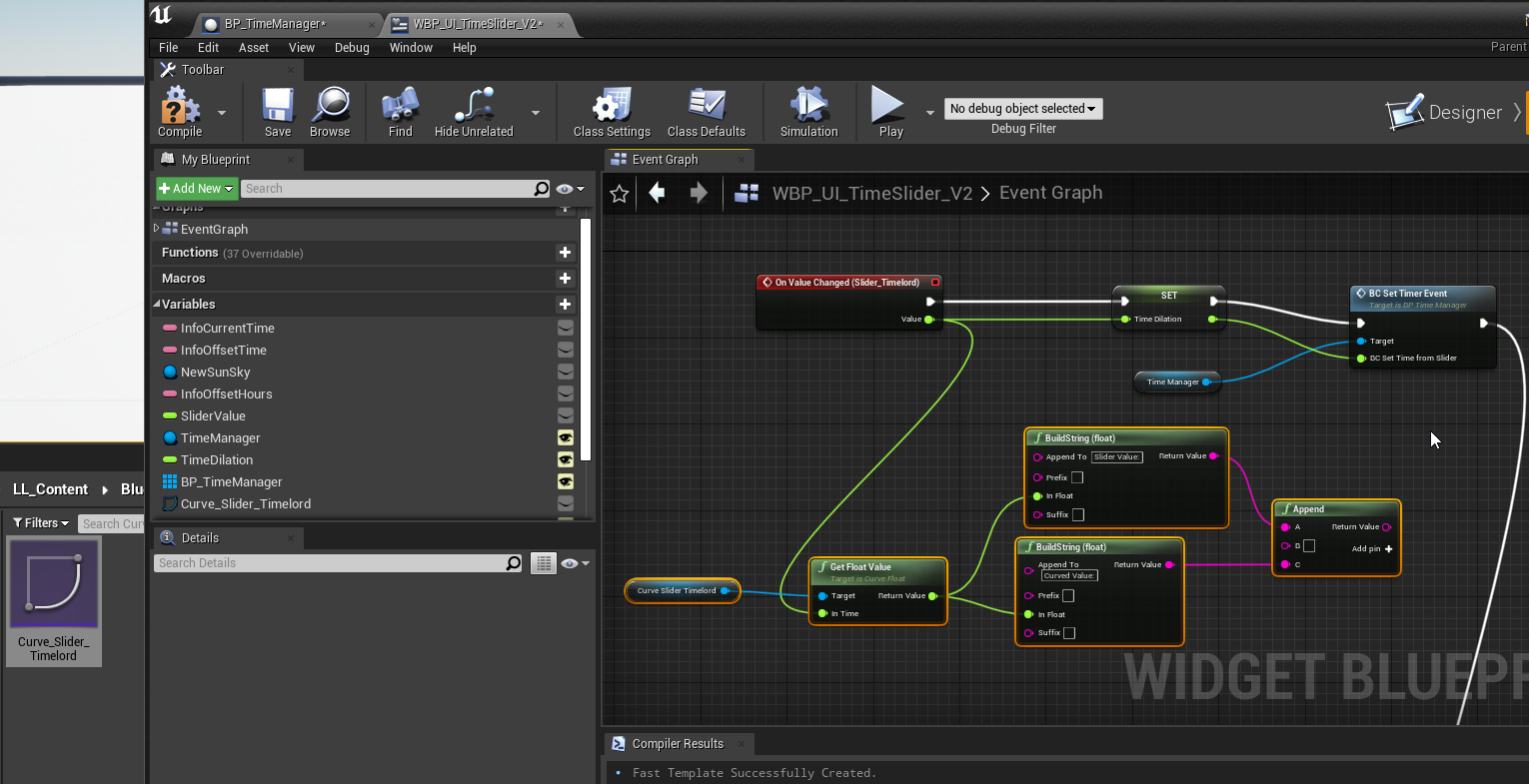
Was able to find some information about curves and that it might be possible to hook these up to a slider value
 brittle fiber
greeting users, i call for your aid, i got a sphere, triangulated, most of triangles removed, solidified and beveled, like on the pic.. i need to make it animated when i interract with it.. it expands and on the inner side i need to store information such as text or immage or video or bullet points of my plan.. any idea how to do it? can i animate scale with matinee?
thin rapids
@brittle fiber matinee has been deprecated since 4.23, you could use sequencer or an animation type asset instead
you can play that whenever the player interacts with that object
you can also add a 3d widget inside of it
for the information you want to display
solemn zephyr
@full fog as far as I'm aware this should work but it still doesn't do anything
 upper dirge
use "print" to check were its going
thin rapids
you're only using the nodes if the value is equal 4 @solemn zephyr
because if it isn't it wont do anything
full fog
oh!
solemn zephyr
oh you're right thanks
full fog
good catch
solemn zephyr
changed it to this but still nothing happens
upper dirge
its the same
you need to change "==" of 4
into >4 or <4 or
or what ever you want and need it to be
solemn zephyr
the =4 is to set the integer back to 1 if it goes over 3
thin rapids
changed it to this but still nothing happens
@solemn zephyr you're setting it to 1 no matter what, the false needs to go to the node after that
and also you don't need to check if its == to 1 if you're setting it to 1 btw
thin rapids
ok, but in that ==1 connect the variable 'camera Pos' not the value after the set, because if you don't set that to the actual variable, the check wont really happen unless that node happens
and after the set to 1 connect it to the branch otherwise it wont do anything after setting the value to 1
cedar sparrow
I need a function in my PlayerController to wait until the PlayerState has loaded. Any ideas?
thin rapids
just change that '== 1' node to the actual variable instead of the Set node @solemn zephyr
solemn zephyr
don't they give the same number?
thin rapids
no, that check will only happen if that set node happens
because its getting the value from there
solemn zephyr
I see
with this when I go into play pressing V once does nothing, the second time goes to CameraFP, then nothing happens after that
thin rapids
also in that increment node, get a SET value after it and set it to the return value of the increment
because the increment node doesnt actually set the variable
just gets the value of that variable + 1
solemn zephyr
the tooltip says it sets it
thin rapids
now try it
solemn zephyr
same result in play
brittle fiber
@thin rapids thanks, you mean i can create animation in blender and then use it? somehow.. lol ill try
thin rapids
try 'set view target with blend' instead of set active @solemn zephyr
solemn zephyr
will do
thin rapids
@thin rapids thanks, you mean i can create animation in blender and then use it? somehow.. lol ill try
@brittle fiber Np, and yes, when you import it you can use the animation that you made in blender
solemn zephyr
set view target with blend isn't appearing as an option to add anymore
I don't know why, it was there before
thin rapids
remove 'context sensitive' and see if it appears
brittle fiber
@thin rapids i assume i can trigger that animation from blueprint. the text)image)video then can be called with bp too.. u r og, alone against crowd of questions.. cyborg
thin rapids
the sauce to our spaghetti code
@solemn zephyr lol what
solemn zephyr
nothing important...
thin rapids
did it work?
solemn zephyr
I don't know how to connect the 'set view target with blend' node to the camera
thin rapids
@thin rapids i assume i can trigger that animation from blueprint. the text)image)video then can be called with bp too.. u r og, alone against crowd of questions.. cyborg
@brittle fiber yes, you trigger the animation from blueprint and make a 3d widget visible in that same bp
I don't know how to connect the 'set view target with blend' node to the camera
@solemn zephyr in the 'target' pin is the player controller, the 'new view target' is the camera you want to set, blend time is for when you want a smooth transition between each camera
solemn zephyr
@thin rapids it won't let me plug 'new view target' into the camera node
thin rapids
what does it say? @solemn zephyr
solemn zephyr
nothing it just goes grey
thin rapids
can you send me a screenshot?
thin rapids
oh wait i got it
ok make the 'set active' nodes again
the problem is that you're not de-activating the other cameras
after you activate them
and you switch the cameras
solemn zephyr
so it tries to show them all at once?
thin rapids
yes
from what i tested on my project
so after each activated camera, de-activate the other ones @solemn zephyr
solemn zephyr
so I need to put set inactive nodes between them?
thin rapids
yes
solemn zephyr
do you know the actual name it's not inactive
thin rapids
setting the 'new active' boolean to false
brittle fiber
@thin rapids i will try it, ty again
thin rapids
do you know the actual name it's not inactive
@solemn zephyr yes i said what i meant with saying yes after you sent that message lol
@thin rapids i will try it, ty again
@brittle fiber np
setting the 'new active' boolean to false
on this message @solemn zephyr
solemn zephyr
should setting it up like this work?
thin rapids
yeah, i don't see why you would change to that though, because the result will be the same (in that specific case)
you just have to set the other cameras 'new active' value to false
solemn zephyr
I need new active to be true if CameraPos==1 ad false if CameraPos=/=1 right?
thin rapids
yes
thin rapids
no, because you're not setting the OTHER cameras to not active
you're litellary making the same thing you were doing before
because if its == 1 it will set the value, if its not == 1 then its not going to do anything and so on for other values
so it will keep counting as if it was activated
solemn zephyr
how do I get a false return
thin rapids
wait, are you asking how do you set it to false?
if so, do like this as i showed you https://cdn.discordapp.com/attachments/221798862938046464/724358845287235685/activecameras.png
 solemn zephyr
doesn't that setup mean only the first camera will ever be active?
thin rapids
but you do that for EACH camera, so for example, if == to 1 you make the active one Camera R, if == 2 you make the active one Camera L and so on
 atomic light
so for each of the three cameras you have that exact row layout but alternating "new active" for the one you want active, and "reset" for the other 2 inactive ones
solemn zephyr
I think I get it now
thin rapids
@solemn zephyr like this
solemn zephyr
now to make it so the first person camera actually works but I think I can figure that part out
will send the full script once I get that working
atomic light
ill leave this one here in case anyone sees at first glance whats wrong, essentially im trying to switch blendspaces when pressing crouch but nothings happening
thin rapids
@atomic light are you calling that function through an interface?
you can cast through the AnimBP to the player and get the variable 'isCrouching' instead of going through the headache of getting the right interface node
atomic light
Char. controller calls interface function and edits its variables, animbp checks for those variables and changes the blendspace accordingly
at least that was my intention
thin rapids
try doing what i said and see if it works
atomic light
wait, cast the AnimBP when inside the char. controller?
thin rapids
make the cast TO THE player character INSIDE the animBP
something like this in the animBP @atomic light
atomic light
Thank you very much it worked
solemn zephyr
actually one more question I've got
is it possible to change an individual rotation axis between local and global
relative and world*
thin rapids
Thank you very much it worked
@atomic light Np
solemn zephyr
actually I think that'd be problematic with animations so I shouldn't do that
so nevermind
full fog
Does anyone know if I could "invert" Slider values? I want to start with 1 and going down to 0. When I am using a curve to drive it, the Slider messes up.
solemn zephyr
the last thing I need to know for this is how do you hide a mesh from a camera
like make the mesh not visible to just that one camera
I've got the camera script fully working now I just need to hide the character mesh from the first person camera
thin rapids
you mean hide only for the player or only for a single camera? @solemn zephyr
solemn zephyr
@thin rapids I only want to hide the mesh for the first person camera
thin rapids
maybe the 'owner no see' checkbox can do what you want @solemn zephyr
solemn zephyr
where can I tick that?
thin rapids
in the mesh details pannel
you select the mesh inside the blueprint and you'll find it in the details pannel
solemn zephyr
I turned that on and it affects all the cameras
thin rapids
ok, turn that off, hmm.... maybe you could use custom depth stencil as a post process effect to hide that mesh
solemn zephyr
I don't see how to do that
 inner ginkgo
@solemn zephyr How are you using the other cameras? Capturing in a render target?
solemn zephyr
@inner ginkgo I've got 3 cameras; first person, right shoulder and left shoulder
I'm trying to hide the character mesh from the first person camera
inner ginkgo
Understood, but how are you getting views from the 3 cameras.
Are you switching between them?
inner ginkgo
Then simply set Actor Hidden when you switch to the camera that you want it be hidden with.
solemn zephyr
like this?
inner ginkgo
Yes
If it's just the player. If you have other actors to hide, then you'd do it for them, too.
solemn zephyr
I got the wrong target it seems
 mild galleon
hello everyone!
i do have a little standard issue, my camerapawn is "none" (not being filled).
and so the camera movement functions are broken as a result
- i followed this tutorial: https://www.youtube.com/watch?v=MpKXKr9alqY
- I got this issue: "Blueprint Runtime Error: "Accessed None". Blueprint: CACameraPawnController Function: Movement Speed Calculation Graph: MovementSpeedCalculation Node: Return Node"
- i watched the slackers video: https://www.youtube.com/watch?v=7uDQnQty0-4
- i tried to repair my CameraPawnReference being not filled, but i could not. It is the value the engine doesnt fill. i attach a screenshot.
i would be happy if you have a hint for me, why that is.

i am just a bloody beginner at this point, so sorry for the dumb question
inner ginkgo
CameraPawn ref needs to be set. Do you have a set code for it? It would probably be in the begin play. Or it might be a public var set to expose on spawn.
mild galleon
strange that the guy in the RTS tutorial could move his camera, it must be some standard thing i oversaw, or he has by default
i did follow the steps and looked around
flint nymph
you have a variable but no actual reference it looks like
where are you setting the variable at
 bitter star
Hi guys, I have a question regarding trigggering particles with a key stroke. Can someone help me?
mild galleon
yes but i cannot edit this there, so i tried to go into the camerapawn direcly and change the mesh, but there is no such window "default" to choose the reference
well its created by the pawn i have?
inner ginkgo
If you have the pawn added to your map, you can set it in the details there. But you can also set it with code. I'm not sure what approach the that tutorial takes.
flint nymph
you can’t edit the default value for object variables, they need references set at begin play or somewhere else
inner ginkgo
Those are definitions, not instances. You can't use those to set things.
mild galleon
ah okay let me try to do things on the map.
bitter star
How can I tell the particles to stop emitting when the key is released?
 wind atlas
@mild galleon select it in your world outliner and if the variable is exposed you can set it via the details panel
inner ginkgo
@bitter star Save the emitter in a variable. On release, destroy the emitter you saved.
mild galleon
thanks i am actually not seing this thing on the map right now... i will search and that should be easy then
wind atlas
you have to drop it into your level first
inner ginkgo
It might not be on the map if you are using a player start.
wind atlas
through the viewport
inner ginkgo
In which case, you need to set it via code.
mild galleon
yes i found it.
bitter star
@inner ginkgo I am very very new to Unreal engine - how would you do this?
dry glen
I made a sprint system in ue4 and I want it to be toggle able instead of hold and release is there any easy way to do this or do i have to start over?
inner ginkgo
@bitter star Right click on the "Return Value" pin and choose Promote to Variable. Give the variable a name. Then drop your new variable back in the graph and do a destroy component on it. Hook the released pin to that.
trim matrix
You can do almost anything in UE4 @dry glen , but you can't expect help while being so vague
wind atlas
@dry glen make a new int variable, every time sprint is pressed run it through an increment node and then a modulo node ( % 2 ), the int variable will switch between 1 and 0 every time you press, you can use that to enable/disable sprint
dry glen
@wind atlas thanks
mild galleon
it sadly didnt change, i will pin screens, but this really should be easy. this is the mesh here, which should be referenced.
and this is it in the world
thin rapids
I made a sprint system in ue4 and I want it to be toggle able instead of hold and release is there any easy way to do this or do i have to start over?
@dry glen you can use a flipflop node
inner ginkgo
@bitter star It'll look something like this.
flint nymph
@mild galleon in your controller you need to get controlled pawn, cast to your camera pawn, and then set that as the variable you made
bitter star
@inner ginkgo I can't seem to find the "set" module. Do you do this in the level BP part or in the Content browser as an actor BP?
flint nymph
right click off the node and promote to variable
inner ginkgo
If you right click the pin and choose promote to variable, it should automatically create the set.
 echo adder
Is there a way to handle object occlusion of outlines of objects in screenspace? I'm essentially drawing bounding boxes on the UI to track objects but I want them to be tight (like an overlay glow / shading) and also only rendered within the HUD. (And also hidden by other objects in the way)
inner ginkgo
If you already have the variable, drag it into the graph and pick set.
flint nymph
it’ll create a new particle variable automatically and set it
inner ginkgo
After you solve this, I would recommend going and checking out an intro to BP video. Because those are some pretty basic questions.
bitter star
@inner ginkgo They are and thank you for taking the time. Could you recomend a good intro to BP video?
inner ginkgo
I like the official series. Let me get a link, quick.
wind atlas
I have a bit of a problem myself, I hope you guys can help, I have two BP actors in my level, each with a variable exposed of type of the other actor, so they essentially have direct references to eachother, i set the parameters in my level.
I'm trying to read a float variable from of these in the other, but its only reading out the initial value every event tick, is this because those values are only set once the variable is defined? How can I get updated variable values?
mild galleon
does this set node need to end somewhere specific or does it already set sufficiently?
inner ginkgo
@bitter star https://www.youtube.com/watch?v=EFXMW_UEDco

This video gives us an overview of the Introduction to Blueprints video series as well as jumps into a high-level overview of the concepts behind Unreal Engine 4’s Blueprint Visual Scripting system.
It is an older version, but most of the content should still be good.
flint nymph
you need to drag the pin from the cast to the set, and put the nodes after event begin play
inner ginkgo
@wind atlas The values within the references should be current each time you read them. How often are you reading them?
inner ginkgo
What values are you getting?
wind atlas
float
inner ginkgo
The actual result, though. Is it 0 or non-zero?
wind atlas
if i print the value from the source BP, it reads out correct and is changing
it is non 0
except on init / default
inner ginkgo
In the source actor, print out it's display name. In the linked actor, print out the reference display name. Just verify that you have the references linked correctly.
wind atlas
not sure if its noteworthy, or correct, but I am passing on the event tick from the source bp to this one, so it executes after the source finishes its calcs
ok, 1 sec
inner ginkgo
You should still at least get the last frame's value and see changes happening.
wind atlas
i use sequence
mild galleon
i can only use one event begin play right?
so i have to choose between the sequence and the cast to
inner ginkgo
Sequence doesn't really change anything. Everyone will get executed in the sequence before passing control to another actor.
mild galleon
oh and it didnt work. maybe i start with another tutorial ...
inner ginkgo
@mild galleon You can drag the right pin off the set ref to the left pin of the sequence. Or you can hook your set to the sequence.
mild galleon
okay thanks, one step forward.
well its late, i will continue next time, thank you very much!
wind atlas
@inner ginkgo here I am printing self display name in one bp and the variable display name in the bp trying to read it's variables
inner ginkgo
Ok, so the link is correct, then.
wind atlas
audio bp is receiving custom events from source bp but audio bp can't seem to get updated float variables from source bp
i thought it might be because im reading it from inside a macro
inner ginkgo
How are you using the variable?
wind atlas
but seems to not work in the event graph either
flint nymph
@mild galleon if it’s not working that means your controller/pawn are not set up properly in your game mode settings or wherever else you’re determining pawns/controllers
inner ginkgo
Can you show the full flow from setting it to using it?
inner ginkgo
Still need the rest of the execution path. I know there's a sync call, but I don't know where that is in relation to the set. And I've only see a partial of where the variable is pulled from in the linked class. I don't know where that falls in the execution path, either. If it is too much to screenshot, you can always use blueprintue.com.
wind atlas
in the audio bp the sync is plugging into the macro
inner ginkgo
That green pin goes way right, what's that doing?
wind atlas
its plugging into a set RTPCValue node (for communicating with WWISE)
inner ginkgo
What values are you getting out of the print there?
Do they match the previous print?
wind atlas
nope, just prints 0
inner ginkgo
Do you ever reset that value somewhere else in your code?
trim matrix
both my server and my client play attacking animation at the same time
maybe not suppose to multicast lel i'll try otherwise
also my server disabled movement works
but my client doesn't
i'm (new to this)
wind atlas
@inner ginkgo no its the output of an interpolator so it shouldn't even be able to jump to anything suddenlly. it seems its only in the audio bp its not being read
i can see the exec lines glowing red etc when in play mode, its getting the exec
inner ginkgo
Make sure both actors are compiled. Other than that, I'm not sure. I still can't trace a line from set to get, so it should be working with everything shown.
wind atlas
ok, thank you, thats good to know, i need to go afk now sorry
inner ginkgo
@trim matrix My knowledge on replication is cursory, but I think you want the server events to be set to server only and the client events to be set to client only.
inner ginkgo
Are you doing a dedicated server model? Or is one of the clients also the server?
trim matrix
i did multicast on the part running the code and run on server for the inbetween events
i'm just want to get this to work locally so both my client and server will be playable
right now with what i said it all the code works just i have a problem
the attack animation plays both on client and server at same time when ethier attack
and when i click does 2 prints
bitter star
@inner ginkgo The videos helped me understanding some things - thank you for the link. I now know I need a class BP but after following your BP it still doesn't work. Do you see something that is wrong in my BP?
inner ginkgo
Which part is not working?
bitter star
If my emitter is set to visible then pressing the F key doesn't stop it and if my emitter is set to not visible (so when I press play there's no particles emitted - which I ultimately want) pressing F doesn't start or stop it.
inner ginkgo
So the particles are showing up and in the right place, but they aren't being destroyed, correct?
Oh, wait.
bitter star
i basically want my "F" key to be like a faucet if this makes sense
inner ginkgo
Remove the particle system from your list on the left.
That's not the one you want. You are creating a new one when you press F.
In the Spawn Emitter Attached node, there's a Location Type. You probably want that set to one of the Snap options.
bitter star
the one in the component tab or in the MyBP tab?
inner ginkgo
In the upper left of your last screenshot. The one attached to the scene root.
proud hull
Or keep that and simply have the F key change its visibility instead of spawning and destroying.
You said changing the visibility manually is working, so then do it when you press the F key.
bitter star
@proud hull The problem would be having the particles disappearing abruptly instead of dissapearing with life over time.
I want to do something like a lighter
inner ginkgo
If you go that route, use Set Active, instead of visibility.
I believe non-visible emitters are still simulating.
bitter star
So after you make a particle system do you add it to the scene of call it within a new actor class BP?
inner ginkgo
If it is in the listing in the upper left, it is a part of your actor. It'll be there when you create the actor.
bitter star
ok let me trying again from scratch to make sure I didnt do something weird
actually is actor the best class for this or should i go with component actors? I would like to be able to use this particle system multiple times in a scene
inner ginkgo
Actors are the only thing that can be in the "scene". Components are attached to actors.
bitter star
so now I made a new actor BP what's the right way to add my particle emitter to the BP? By calling it from the spawn emitter attached node?
inner ginkgo
Adding a particle component to it and then turning it on/off is perfectly fine.
trim matrix
So i found my problem I was getting player controller in the anim blueprint when i needed to try get pawn owner
lel
wind atlas
@inner ginkgo I should have listened to you more carefully, I did eventually find after I looked up references to it and saw it was being set in 2 different places., I'd forgotten to update a set node after copy pasting some nodes. so the BP communications were fine after all
i knew it was gonna be something embarrasing like that hehe
inner ginkgo
Hehe
wind atlas
thanx for your help
inner ginkgo
As a way to handle that in the future, I recommend setting all your variables to private. And then writing getters/setters.
That gives you better debugging options for tracing where things are being used.
wind atlas
you mean like a function that returns the private variable value?
inner ginkgo
Correct. And then only use the getters and setters for messing with your values.
Even internally.
It adds a layer of overhead to your execution, but the trade is better tracing and control in your data use.
wind atlas
i thought public / private is only for user interaction?
if it gets exposed in details panel
inner ginkgo
Private means it won't let other actors pull it from a reference. You still set it to instance editable / expose on spawn, which will let you edit initial values at creation. But the private setting makes it harder for other classes to change it at runtime.
wind atlas
ah ok
i think i get it, but my bp variables are private and the other bp seems to be able to read them fine
inner ginkgo
Private doesn't stop you from doing anything internally, though. The code inside the class can still edit it freely. You can only fix that with process and trying to make sure you use the getters/setters instead of writing directly.
Your screenshot you showed earlier does not show a private check.
wind atlas
ah, on the actor variable?
 steel raven
Hey all, for some reason, my launch character node is only affecting my player in the z direction. X and Y do nothing, and I have XY Override set to true. Does anyone have any guesses as to why this is happening?
inner ginkgo
R_Z_Velocity is not private in your screenshot.
inner ginkgo
That's instance editable.
bitter star
@inner ginkgo I added the particle component and linked the key to the exec but nothing happens 😦
wind atlas
so its better to keep things private?
bitter star
inner ginkgo
@wind atlas Better is subjective. It's a software design philosophy that I subscribe to, though.
wind atlas
good to know, really learned a lot tonight, thank you!
inner ginkgo
@bitter star I can tell you how I think this is fixed, but I'll tell you that it is not the correct way to solve the problem. Click on the Class Defaults button. Scroll down until you find the Input section. Change Auto Receive Input to Player 0.
Also I think you implemented that incorrectly. What you had before with spawn emitter attached was more correct. Or just having the emitter as a component in the upper left.
Adding the component the way you did there is going to require you set up all of the inititial values and isn't worth the hassle.
bitter star
so now it triggers the particles but doesnt stop them on key release. also it creates one instance one the first key press then a second one with different coordinates then the 3rd etc ones are on the coordinates of the 2nd one...
inner ginkgo
You destroyed your scene root, instead of the emitter on release.
New Var 0 should be plugged into the destroy node.
Sorry, it's a little confusing. But we keep changing up the design for you. I think this is what you are going for:
bitter star
no worries, I trying to make sense of all of this and I appreciate your time and patience
so now the particle system is always on and the key press doesn't change anything
inner ginkgo
Click the particle system in the upper left and uncheck Auto Activate.
And did you make the input change to the class defaults?
bitter star
it works!! thank you so much 🙂
do you always need to save for BP to work even if you compile?
*to save the BP
inner ginkgo
Compiling is more important than saving in terms of getting it to 'work'. Although many times it'll pick up changes without compiling.
Saving is just important in general. This engine will crash on a dime.
bitter star
the key only started working after saving...weird
so now i can import this BP in any project and it will act the same and use the same particle system?
inner ginkgo
I'm not sure how reliably it would grab the same particle system, assuming you migrated that first. But it shouldn't be much work to set it back to that one.
 analog arch
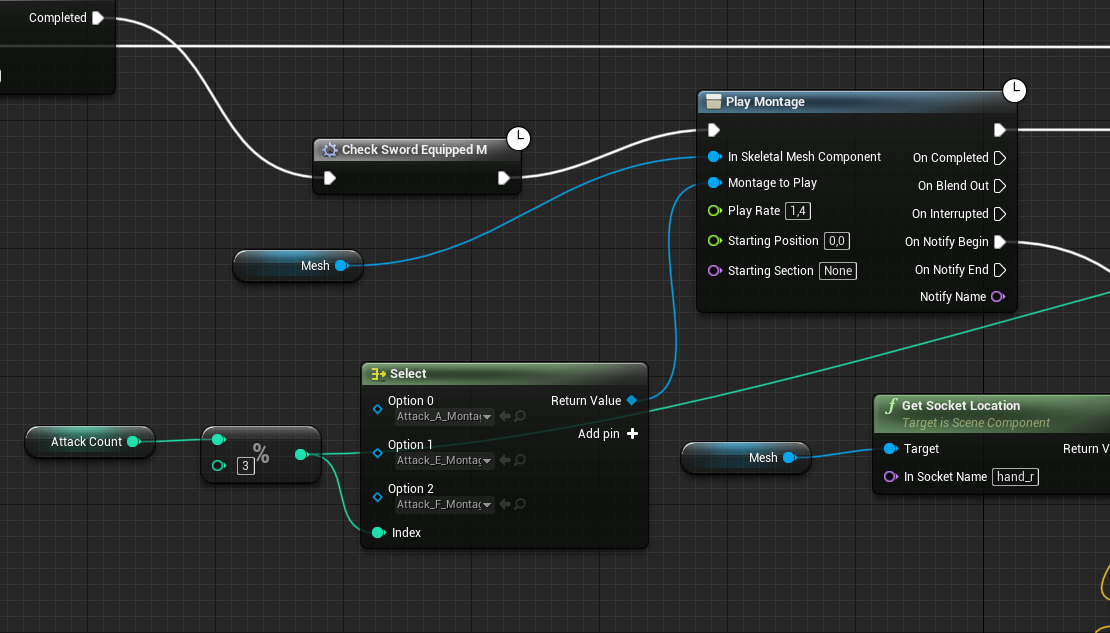
Hey everyone! ive got a question, i have a bp_human and a bp_player (player is the child bp of human) inside bp_human i have an attack animation when attack button is pressed, so the player inherits that and plays it. However i want bp_human to play its own set of animations. How do i split that? i thought overriding in bp_player (same graph) would work but that doesn't 🤔
inner ginkgo
However, the input thing is going to likely cause you issues down the road. You'll want to look into something like events and interfaces instead of having inputs directly defined in your actors.
analog arch
https://i.gyazo.com/0e9b8ff5b6c0b0bbc2e1f03874dae2e3.png this is bp_human
 proud hull
In your bp_human, make an array to contain those animations, then select from the array. When bp_player inherits this array, you can change the animations within it.
analog arch
Awesome, thanks Slashin8r 🙂
bitter star
@inner ginkgo ok, this will do for now but i hear you. Last thing, I ve tried duplicating my BP to have multiple sources but when I do so the key press doesn't do anything anymore. Do you see a reason for this?
inner ginkgo
What do you mean by duplicating?
You create a bunch of instances in your map? Or you duplicated it a new file name?
bitter star
creating a bunch of instances
whether i drag my newly created BP in the map or ctrl+C ctrl+V in the world outliner the new instance doesnt work
actually all instance don't work
inner ginkgo
I just tested it out and it looks like only 1 actor takes the input. I don't know of a way around this using the input method.
bitter star
what would you recommend to change the input method?
inner ginkgo
events and interfaces.
You want the input in your player controller or player pawn. And from that single input source, have a way to tell all of your actors to turn on/off.
bitter star
if i changed the key to another one for instance #2 would it help?
inner ginkgo
You would have to create a whole new BP to do that. And ultimately, I don't think it solves the problem.
This is the solution that I would use: https://www.youtube.com/watch?v=ayCEqL7XFZY
trim matrix
anyone know how to get the camera boom to stop moving when another player walks into/near it
wait nvm i might know my problem (fixed)
proud hull
@bitter star do you want to interact with each of the actors individually or do you want to be able to turn them all on/off at the same time?
bitter star
i'd love to be able to do either
would there be a way to set a key for all instances and others keys to control individualy?
proud hull
For all instances, you can use Get Actors Of Class and set active for them all. You normally don't want to use this node, but since we know that you actually want every actor of that class, this is a case where it would be ok to use.
For individual control, do you want the player to walk up to it and then trigger it? Or do you want to be able to control them from anywhere?
To control from anywhere, you will need maybe some keys to cycle through which instance is "selected" and then another key will change it. To control through proximity, you can use line traces to figure out which instance the player is near.
bitter star
@proud hull There's no player in my map. Think of it as an interactive architectural project that I m trying to control real time and then Record or automate to amke a video out of it
bitter star
yes
proud hull
Then having a key to cycle through them would work for the individual instances.
bitter star
I ll think about camera movement later, for now I m trying to set my map/scene up with all my controls
kinda like a visual musical instrument
proud hull
In that case, you could even attach each instance to a separate key, so pounding on the keyboard would set off the instances, hehe.
bitter star
Exactly but now I m working with a few instances to test the system and eventually i may have way more that i d like to group (or not)
proud hull
You can change F key to Any key and check if the correct key was pressed.
bitter star
i duplicated my BP and added another key. it works
proud hull
Then make the key a variable that you can set per instance.
This way you can keep it all in one BP, and set the key on a per instance basis.
bitter star
F triggers one, G another one but what if i want H to trigger both instances?
proud hull
Make it an array of acceptable keys per instance
Then when any key is pressed, check if the array contains the pressed key
bitter star
This way you can keep it all in one BP, and set the key on a per instance basis.
@proud hull sounds interesting, how would i do this?
bitter star
Isn't this telling that all the keys within the array trigger one instance?
proud hull
Yes, but you can set different keys for all instances.
Now, you really do want the input controls within the player controller, so it would look like this:
So all instances that contain the H key will be activated when the H key is pressed.
It may be 1 instance or 1000 instances.
bitter star
i hear you. so within the same BP add the nodes you just sent?
proud hull
What I just sent you would put in your player controller BP.
Then your F key event in your other BP will need to made into a custom event you can call from the player controller.
bitter star
ok, this is a bit out of my range right now but hopefully it will make more sense as i progress 🙂
bitter star
@proud hull I m not sure how to do the turn on and turn off events :/
proud hull
Right click, type "custom event" then you rename it to TurnOn and TurnOff
That is to replace your F Key event
bitter star
ok but if i remove the F key no action happens anymore
proud hull
Keys variable within the particle blueprint.
Default value can be whatever.
When you add it to the map, you can select the instance and edit the keys there.
So you can make an instance for F key and then copy that to have a bunch of F key instances. Then do the same for any other instances of different keys.
If you want a key to affect them all at once, then that key should be in the default value so you don't need to add it for every instance manually.
bitter star
so this is a different BP?
proud hull
The original BP you were working on that contains the particle component.
The any key event goes into a separate BP, preferably your player controller.
bitter star
ok, so one BP per emitter instance and one BP for the any key event?
proud hull
BP_Particle: TurnOn event, TurnOff event, Keys array
PlayerController: AnyKey event
You can even make a variable for the particle component to change that per instance as well, so then you don't need to make a duplicate for each new effect.
solemn zephyr
@full fog idk if you still need it but here's the script I got for switching cameras
that's the highest resolution sc I can take idk if you can share scripts directly
bitter star
@proud hull ok so I m creating the playercontroller BP and I m having a hard time finding the target/keys node
proud hull
Did you create the Keys array within your particle BP?
Thought it might be easier to just upload it. Also includes setting the template per instance so you can have different effects.
bitter star
ok, then drag the Particle controller in my map?
 late gorge
hi, i created this macro library to make looping over mappings easier, but the return value always seems messed up
proud hull
Either set that as your default player controller or copy the nodes from that to your actual default player controller.
bitter star
@proud hull how do you set it as default player controller. I dont have one yet
proud hull
You can also copy it into your level blueprint.
Since you won't really have a need for the player controller, you can let your level control the input.
bitter star
But if I want to use this BP in another project wouldn't it be easier to not have anything in the level BP?
proud hull
Yes, player controller would be best overall. You will need to make a new game mode.
inner ginkgo
GameMode is a type of BP.
proud hull
^
Right click in content browser, select blueprint class, then game mode base.
Name it whatever, then open your project settings, search for "default gamemode", set it to the new game mode bp you made, then you can set the player controller in the new game mode bp.
bitter star
Done besides setting the player controller in the new game mode. how do i do this?
once again thanks for your patience!
 mental tapir
Hey guys! Simple question about optimisation : do you need to put all of your props of a scene into a unique Blueprint for it to load once, or it will change nothing if you have a lot of blueprint?
proud hull
Open the game mode bp and you will see it in the classes
bitter star
so the player controller is set to particle controller?
proud hull
Yep
bitter star
unfortunately it doesnt work. in the edit mode i can see my emitter (always on) but when i press play and use the G and H keys nothing happens
i also have the previous BP and this one still works with F
bitter star
Yeah that's pretty much it
 thin heart
How to create sandstrom in unreal
proud hull
@thin heart #visual-fx channel might be a better fit for that question.
Someone else is working on a sandstorm effect too in there. Might be helpful to collaborate.
Well, nevermind, I see you already did that, haha.
full fog
@solemn zephyr Wow! Thank you 😮 Yes I would love to take a look. Very cool because I have a typical Third Person camera on my project at the moment but want to add two others as well. One of them will be a beast..literally the camera controls from Second Life - which are perfect for quick screenshots but also very complex
Like you click on a point in space with your mouse and the camera frame view smoothly focus on it. Then you can hold a key and then move the camera view to this object with mouse up down, rotating around the clicked focus point with nouse left right
 quick lark
I'm running into hiccups with the sequencer, and it is my understanding that sequences can be made from a blueprint. When would be a hypothetical scenario that I would use blueprints to record a sequence?
ex: sequence isn't recording child actors of an actor
full fog
I never worked with it. Just throwing in some link @quick lark for collecting infos about BP's and sequencer things: https://docs.unrealengine.com/en-US/Engine/Sequencer/HowTo/AnimateDynamicObjects/index.html
This example illustrates how you can apply Sequences to dynamic objects at runtime that are different than the one the Sequence was authored with.
maybe this helps at some point
quick lark
Thanks for the response @full fog 🙂
 meager vale
how to isolate some indoor from fog? Have a whole scene with fog, but want to isolate some interior. With blueprtints?
 lucid granite
Can I create variables in a constant blueprint?
even though it is marked "Blueprint read only"
I can't create the variable because the blueprint is const.
How do I create variables in blueprint?
full fog
Discord really needs some Slack "Threads" for each question. -,-
lucid granite
wow, first time I realized that, but you are right
anyway, do you know how to create blueprint variables?
if you can't Right-click + promote to variable
 tiny meteor
on the left hand side there is a + button next to variables/functions
click that then set it in properties and drag it into the graph
lucid granite
Thanks, but I found the solution.
I can't set "Variables" in a Const blueprint
I Can set "Local Variables" in a Const blueprint
Just learned something new
 rich lava
hi, i just implemented a new main menu system and when u click play it teleports you to the first level but when i teleport to the next level i have to hold down left click to move the mouse around like before i had the level teleport
thats the code when u click play
 surreal peak
Set the InputMode back to GameOnly.
 blazing ridge
how can i delete a file on disk? is there a node or do i have to get into code? and, is it usable on mobile if there is one?
 brave oasis
Guys, how should I go about making a blueprints game where there's almost infinite honeycomb-tile map, and I want to make it without every tile being an actual object, cause draw calls, and also how should I do selecting these tiles with a mouse?
 chilly linden
i was wondering if anyone knows how to restore from an autosave
I have this package restore json file
and im trying to restore
tight schooner
@brave oasis is that a Minecraft-ish dynamic voxel world? Maybe look up how people tackled that genre in Unreal. If it's static, Unreal has various batching features like hierarchical LODs and automatic mesh instancing. (Unfortunately that's where my knowledge on the subject ends)
brave oasis
thank you
full fog
Heya folks. I have some difficulties on finding some valuable info's about something. I am tracing under mouse cursor to get a world position from the impact point of the trace. That works fine. I just struggle to find two other things now:
a) make the camera "look at" this given impact point with some smooth lerp.
b) after the look at, setting this impact point as new (temporary) pivot point for camera orbit rotation
Any ideas?
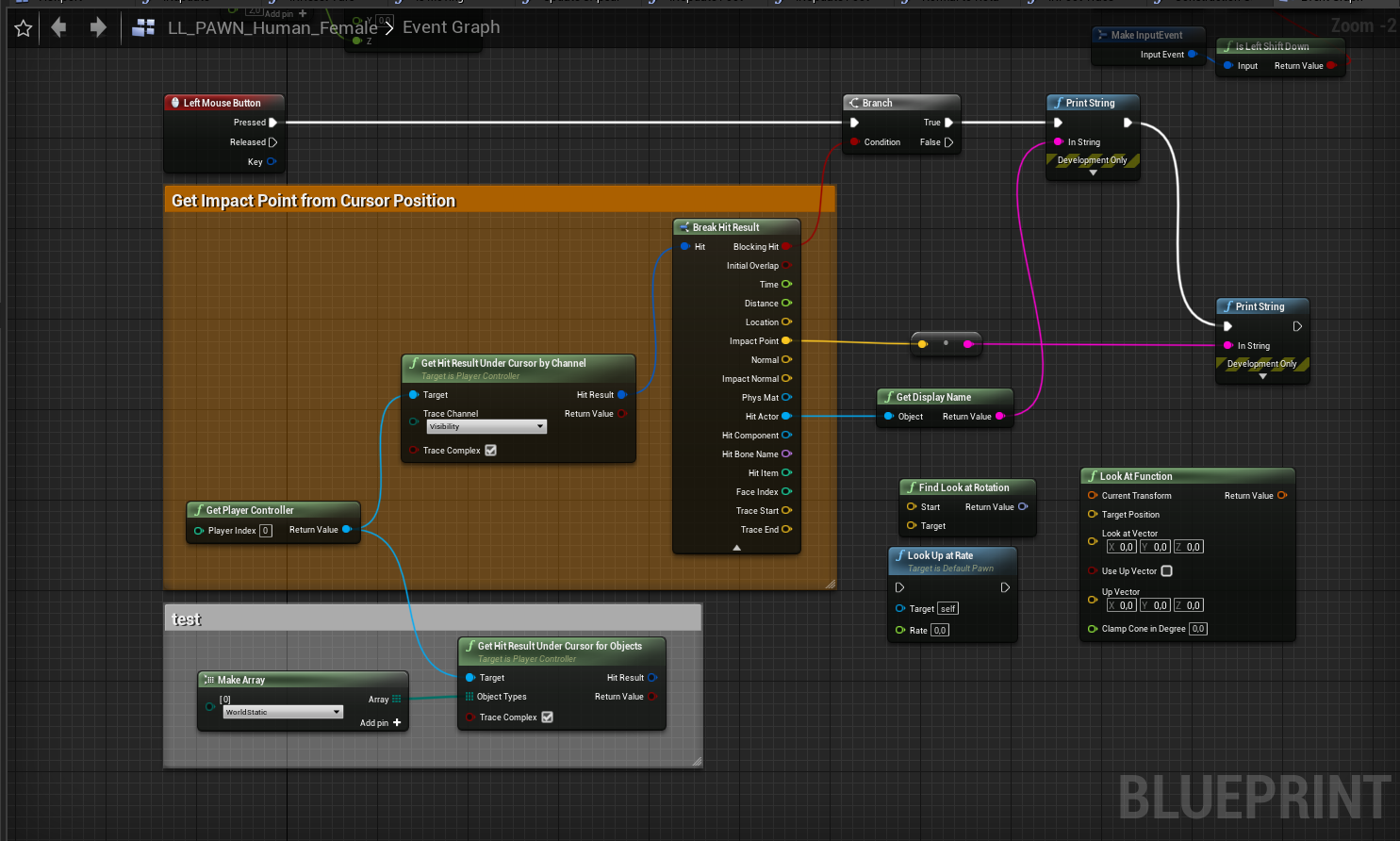
this is what i have so far
 tight cobalt
Guys, anyone knows why media player texture showing up as white in material?
tight cobalt
Solved: Video has to be in content video folder before adding it to the engine
trim matrix
 shut hinge
I've run into an issue with Flycam Blueprint. Flycam all works, but after playing.
-
None Access Error pops up on Flycam Sound ref.
-
Player Character gets duplicated on the screen each time I switch back into the player from the flycam.
 gusty shuttle
Ideally I'd like to keep my branch 0 map instead of branch 1 map. Is there a way to resolve this conflict without nuking branch 1's map file?
Im pulling from branch 1 to branch 0. Just trying to properly learn how to solve merge conflicts in git
surreal peak
Well you can't merge them. Either 0 or 1 will make that
Branching with uassets isn't really a thing. We actually never even use branches and just use exclusive checkouts from Perforce
Also: #source-control
gusty shuttle
Yeah, I was looking back into using Perforce again. seems like a headache using git
surreal peak
You can use git
But you can't use branches and merge them back in if it contains uasset changes
You can merge the code files, but that's it
gusty shuttle
So ideally use perforce instead though, in general? Helix and PV4. I would need a server
surreal peak
But Perforce supports that anyway, as code files aren't exclusively checked out
5$/month on Digital Ocean
Can even use that same 5$ droplet for more stuff
5$ more and you also have a massive storage upgrade
gusty shuttle
Not to shabby. Alright, I might do that. Last time I used it though I clogged up the back end with previous versions. I need to learn how to clear out old versions
gusty shuttle
Yeah, I racked up the gb and before we knew it we hit our limit and had to stop using it. We just couldn't figure out how to clear old stuff haha
Well I'll re-look into using perforce. Being able to lock folders/checkin/check out is handy too
cedar sparrow
I have some massive structs, when i only need one pin from the break result, is there a way to collapse it so it only shows the one im using?
 meager spade
Yeah there's a hide button to the right if you select the break node
Hide unconnected pins or something alike
@cedar sparrow
cedar sparrow
@meager spade i don't see it
meager spade
Click on it and to the far right of the screen there should be an option to hide unconnected pins @cedar sparrow
I don't have the editor open so I can't show atm
cedar sparrow
Oh!
Its in the details panel
got it
sorry my details in on the left so it was throwing me
meager spade
Haha yeah could have probably explained it better ^^
 waxen sorrel

I'm looking for a solution to get the actors at my right side
but it seems like this don't work ?
analog arch
@proud hull Wanted to thank you again, had to figure out a bit what you meant exactly, but after some time i understood it was a Anim Montage Sequence variable where i can add as many animations as i want, and then in the child bp in the class defaults i could easily swap the animations. It works like a charm and thus thank you! 🙂
thin rapids
https://media.discordapp.net/attachments/605189116941959171/724635678368989224/UE4Editor_2020-06-22_16-43-17.png
@waxen sorrel you could maybe use GetRightVector?
waxen sorrel
don't think so
meager spade
I'm super bad at both vector maths and ray tracing but it sounds like you should be able to get your rotation, add 90 to Z rotation and then do a ray trace in that direction? How often do you need to get actors to your right and is it more than one?
 merry orbit
 old raft
Is it possible to use a variable as a function input default value instead of hard coding it?
brittle fiber
Hi all, got another Q @thin rapids: i managed to do anim in blender, ive got 2: one is expand scale, on trigger volume overlay it expands, no problem, all i did is o. component overlay play animation for skeletal mesh and pick animation.. after that on component end overlay, i try to copy parameters from previous action with replaced animation, but nothing happens, I Assume i have to call a command that will find location or scale or position of previously activated animation or its end on component begin overlay action, is there any way to call the second decrease animation?
thin rapids
@brittle fiber isn't it because you're not changing the scale of any object at all?
brittle fiber
@thin rapids you are right, but that was when i tried to fix it, originally, it still same, sry i am using my mobile phone so cannot set propper screen
thin rapids
and what do you have in your begin overlap? how different is it from the end overlap?
brittle fiber
@thin rapids
@thin rapids begin play call anim for a skeletal mesh, there are two because one is frame of a triangle, another one is the middle part..
as i understood, i have to find the position of this skeletal mesh before it animation of end overlap will take place.. or may be destroy previous spekeltal mesh animation instance before playing the decrease scale animation plays...
thin rapids
hmm.... i really do not know what could it be
trim matrix
haya guys not sure where to post this but ive been trying to make a build for the last few hours but I keep getting some wierd errors which I simply dont know how to fix
even if I remove the anim BP in question it goes to the next object that has anything related to skeleton/mesh
hallow night
Try refreshing the nodes. Idk if its going to work but this fixed issues for me so maybe it will work? @trim matrix
Its like in the blueprint in the top tabs you will find refresh nodes somewhere inside those tabs
trim matrix
tried it still the same error
devout geyser
Can someone help in in private about attaching actor to player?, ty
 hexed coral
Im trying to make a blueprint where the lights are removed from one side and respawns on the other. I'm using Colllision Box so when overlapped it moves to a specific location but How do i do that within one itself? The lights and the box collision are in one blueprint.
The lights move
hexed coral
I want to make the lights move in one direction and when it overlaps a box it moves to a specific location.
I've managed to make it move in one Direction.
But when it overlaps the box it wont teleport to a specific location.
devout geyser
try instead of teleporting
spawning a new one
at the location you want it to TP
much more simple than TP in my opinion
hexed coral
yeah but I have it set to 2 colours and it alternates between them
I also want tit to start from a specific point on begin play.
This is the issue im having:
devout geyser
Light set
is not a boolean variable
that's why its not working
make a new variable called "LIGHT ON" make it a boolean
wait i will show you what i mean
devout geyser
its ok it doesn't matter
wait the image is uploading

make like this
and it will work just fine i think
after you drag out the true you can put anything
i hope it will fix your problem
hexed coral
but that wont make it move to the respawn location
devout geyser
it will
after the true node
make it move to there
true -> spawn at what ever
The error you got its because there was no boolean variable man
 real walrus
Hey people. Anyone know of a way to allow a custom function input pin to accept either a single value or an array?
atomic light
https://blueprintue.com/blueprint/bztju51i/ I need some guidance on this, would it be easier to have seperate boxes for all (crouch,walk,jog,sprint) with their respective setters and then one big tree with getters to control the speeds and exclusivities (only one of each can be active etc) OR have all of them control their speeds in their own box with setters
BlueprintUE
elfin hazel
@atomic light I would look into making a state machine. If your character can only be in one state, a good start to making a simple state machine is to use an enum.
Or you can make a little more advanced state machine, https://gameprogrammingpatterns.com/state.html
 maiden wadi
@real walrus It either has to be an Array or not. You can't switch between them in the same function. What you could do though, is just write your function for the Array version and when connecting only one just use a small MakeArray to connect it?
atomic light
i have blendspaces for crouch/crouch aim and walk/walk aim set up like this
so the char. controller just sets the speed and handles exclusivity, the BP anim fetches whats active and chooses the according BS which then gets put into the BSPlayer in the animgraph
real walrus
@maiden wadi thanks 👍 I thought that was the case. Its just a little frustrating as a lot of the built in functions can do it. But just wanted to make sure I wasnt missing something 🙂
maiden wadi
@real walrus Which built in function are you referring to? I might be misunderstanding what you mean.
real walrus
Well theres loads but Set Light Color for example will happily take an array of lights or a single light as its target and apply that to all of the lights in the array but wont complain if its a single light connected to it
Now im under no illusion that its magic and there must be code inside the function that handles the array. Im happy to do that I just want my functions pins to behave the same way @maiden wadi
analog arch
https://i.gyazo.com/3b61188d3308ca0ece116dea918adcfe.gif Does anyone know why the char is jittering so much? When i disable Use Controller Rotation Yaw, its "fixed" however some functions do not work, so i need it to be checked. Has anyone a clue? 🤔
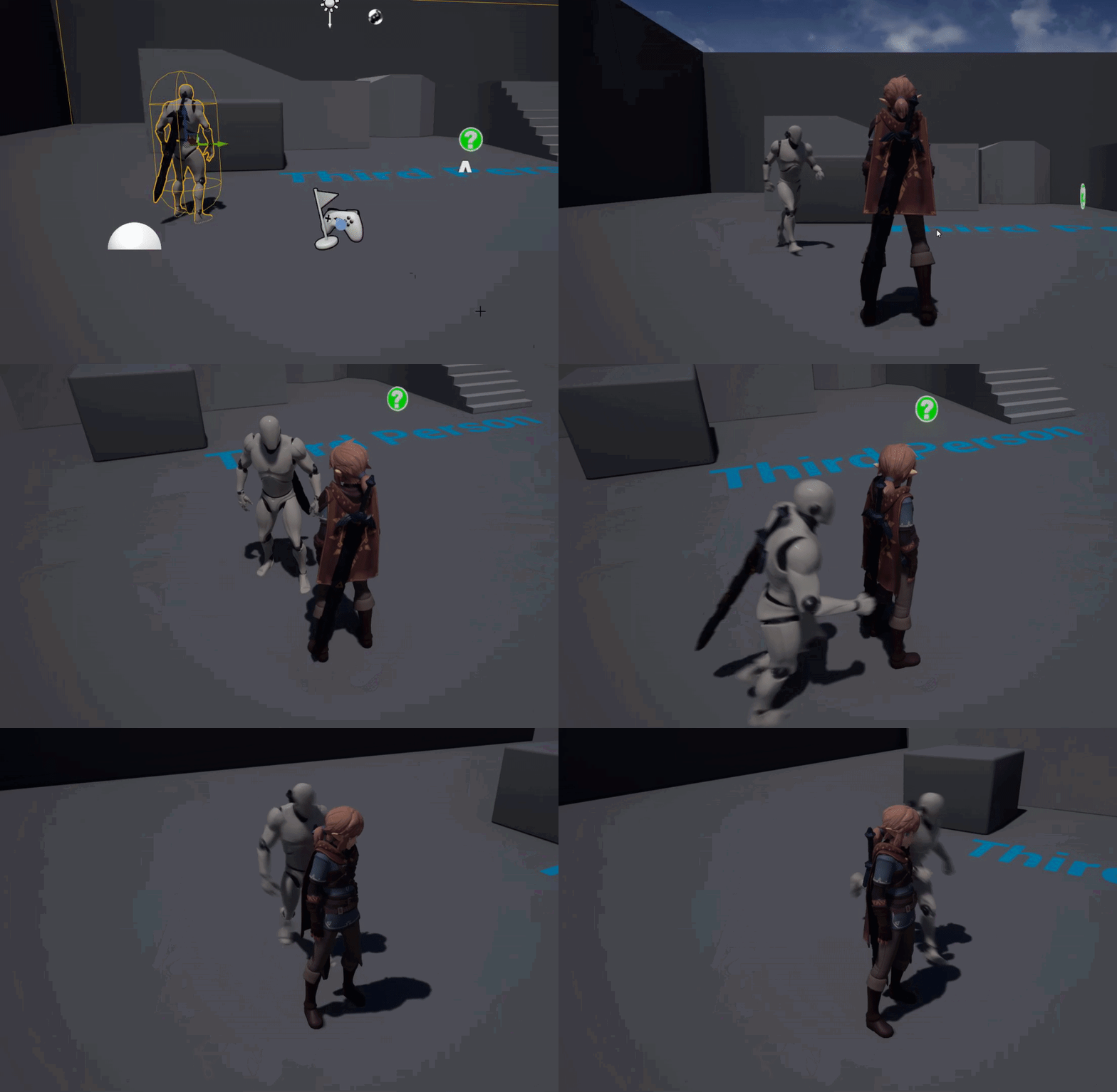
 glad sigil
Anyone that knows a bit about post process materials? I applied a toon outline to my scene but when y try to make some character transparent it bugs out really weird. Been trying to disable it using the Stencil Value but doesn't seem to work.
 dire onyx
Ok guys I'm totally stumped here. I created this variable and whenever I go to use it I get an access none violation. My real confusion is that when I do the exact same thing (except it is the Player BP) in my animBP it works just fine where am I going wrong here?
shut hinge
Stuck on a very simple thing, can't change the text color in a widget from an actor blueprint, what is the logic for changing the color of the text from another blueprint?
dire onyx
To my question above this works without any problems
elfin hazel
@dire onyx Best guess is that when you call the interface function in your character, you don't want to use the Get Owner, but self?
shut hinge
I'm trying to change the color of the text so when I keypress 2 I can highlight the character in the party group the player switches down to. But I don't know how to change the text color on the widget in blueprints..I tried get widgets of class, but this has not worked to change the color.
 mild pine
Hey guys. I'm about to begin working on medieval citizen AI in the likes of Kingdom Come, that follow a daily routine, sleep at night, and have a profession. Should I begin by setting up a day-system, and if so in the Level BP, and call the time of day from that? I'm planning to place actors in the world that the AI will be searching for using EQS, and have them perform animations once they reach the locations etc.
 zealous moth
@shut hinge in your widget, on construct, reference and cast to you character set it up as a var; in the character have an empty var ready.
What you are doing here is have the widget present itself to your character rather than the character looking for it.
@dire onyx the target is not appropriate it would seem.
dire onyx
@zealous moth What do you mean?
elfin hazel
Hm okay, so the thing is, does "weapon base" bp create the "FPS_character"? Because you're inside the character, trying to get its Owner and calling an interface on that. You'd want your weapon base as a target I'm guessing.
shut hinge
Zanet, the Keypress is in the Level Blueprint, its not inside the widget. It is used for switching to all the pawns that are in the party group.
elfin hazel
But if you already have it as a reference, there's no real point in calling an interface on it.
 chrome quiver
@mild pine I'd make a priority list first
dire onyx
@elfin hazel The weaponbase does not create the player. They're two different things.
mild pine
@chrome quiver A priority list? Could you elaborate on that please? 🙂
zealous moth
access none errors mean that it cannot find that variable; meaning it is null. So troubleshoot setting up your var, be it by correcting the target or giving it a default value
dire onyx
The weapon ref is what I called the variable that I created
zealous moth
@shut hinge iirc level bps do not take player inputs
chrome quiver
@mild pine Make a list of the features you want, in order from most to least important, while thinking that through you can get a sense of what you need first before you should be adding the other featues.
shut hinge
This was how Epic showed how to do switching of pawns from the level blueprint. I wanted an easier way, trying it the other way did not give me the results. It left duplicates of the player character after switching back from using the flycam.
zealous moth
^ create an MVP: minimal viable product
how did we go from widgets to swapping pawns???
chrome quiver
How can I set the AltMovement bool to false while not using those inputs?
shut hinge
I also ran into another conundrum. I got Level Component working for my party membrs, problem is, the component updates all their level values for every player at the same time.
dire onyx
Even this fails
zealous moth
@chrome quiver the way you hook it up, the input is always a value; make it so that !=0, set to true; otherwise ==0 set to false
axis input of 0 is an input value
thin rapids
@dire onyx wait, can you simplify your question in one message please?
chrome quiver
Ah, yeah you're right, haha
dire onyx
Sure very sorry
elfin hazel
@dire onyx The problem really is the target you have for the interface. The target needs to implement the interface.
But you're inside the character now. Trying to Get Owner and expecting it to be a weapon_base bp makes little sense at best.
The owner is the thing that spawned it. Well not by default, but it's an option you can set when spawning an actor.
dire onyx
Ok so let me ask you this @elfin hazel Let's say you have a Player BP and then a weapon BP, and you wanted to access your weapon bp inside your player BP how would you do it?
zealous moth
have a blank child in my player BP, populate it and then access the child of self
now the system knows exactly what is what
thin rapids
Ok so let me ask you this @elfin hazel Let's say you have a Player BP and then a weapon BP, and you wanted to access your weapon bp inside your player BP how would you do it?
@dire onyx i know the question is not for me, but i would make a reference for the weapon whenever it's spawned (based on that spawned instance) and cast to the weapon with that as an object, or just use stuff from that variable
elfin hazel
Depends on the aquasition of the weapon. If it is picked up, set it as a variable inside the character when picking it up. If spawned by the character, set a variable inside the character when spawning it.
thin rapids
really depends how you'd implement that
dire onyx
@elfin hazel As of right right now it's spawned by the player in C++ code
thin rapids
As of right right now it's spawned by the player in C++ code
@dire onyx you could make that variable in c++ and expose it to bp maybe?
shut hinge
fly cam works, but gives none access error in flycam sound ref.
dire onyx
@thin rapids Great idea, I'll give that a shot (pun intended)
shut hinge
i do not know where in the code to set the flycam sound reference. The code for the flycam is complex.
dire onyx
@thin rapids Well when I used that variable I created in C++ it crashes with an access violation lol
thin rapids
@thin rapids Well when I used that variable I created in C++ it crashes with an access violation lol
@dire onyx can you send the full error message?
elfin hazel
So you created a variable, but are you actually setting it to point at the weapon?
dire onyx
UPROPERTY(EditAnywhere, BlueprintReadWrite, Category = "Weapon") AWeaponBase* Weapon;
thin rapids
and what are you setting it to @dire onyx ?
elfin hazel
But that doesn't actually create an instance.
dire onyx
Ah ok so that's where I am going wrong. Stupid question how do I set an instance of it?
shut hinge
you spawn it on the player
thin rapids
you can make for example 'Weapon = GetWorld()->SpawnActor<class>(Params)'
dire onyx
void AFPS_Character::SpawnRifle()
{
    if (RifleToSpawn)
    {
        FActorSpawnParameters Params;
        Params.Owner = this;
        Params.SpawnCollisionHandlingOverride = ESpawnActorCollisionHandlingMethod::AlwaysSpawn;

        FVector Location = Gloves->GetSocketLocation("Rifle Socket");

        FRotator Rotation = Gloves->GetSocketRotation("Rifle Socket");

        Weapon = GetWorld()->SpawnActor<AWeaponBase>(RifleToSpawn, Location, Rotation, Params);
    }

    Weapon->AttachToComponent(Gloves, FAttachmentTransformRules::SnapToTargetIncludingScale, "Rifle Socket");
}```does anyone know why widgets tend to corrupt their text? (Showing Double images on the screen..)
thin rapids
unrelated question, but how do you send text like that Shadow001?
dire onyx

Gist
A guide to Markdown on Discord. GitHub Gist: instantly share code, notes, and snippets.
thin rapids
oh nice
ok, so now that you made the instance correctly, does everything work as you wanted @dire onyx ?
cedar sparrow
How do I move the window where Print String outputs to on my editor?
dire onyx
@thin rapids no my game is crashing all of a sudden with an access violation exception. It was working now it's suddenly crashing
thin rapids
send a screenshot of the error message please
shut hinge
same, my flycam crashes with an access error after I exit the game.
shut hinge
where do i set the flycam sound reference?, construction script, event begin play?, where in the code does the reference have to be set to stop the none access error?
 marble slate
Can someone help me in #multiplayer? It’s urgent
 twilit blade
Hi, i'm having a problem with arrays in blueprint, the "set array elem" works but after the loop it seems it didnt
mortal wharf
Would someone be willing to help me with an issue i am having?
elfin hazel
@twilit blade Not exactly sure what is going on there, but the issue is probably that you're trying to modify the Parse array, which is a pure node. If you first cache the Parse array into an array variable, you should be able to modify that.
shut hinge
google dosen't have all the knowledge for this engine.
mortal wharf
i have an ai which walks arounds and then i have pawn sensing on that character which i want to be used if he sees me he runs after me i have this blueprint https://gyazo.com/458cb674e05ba5472285ec16af1caa53 but he doesn't attempt to follow me.


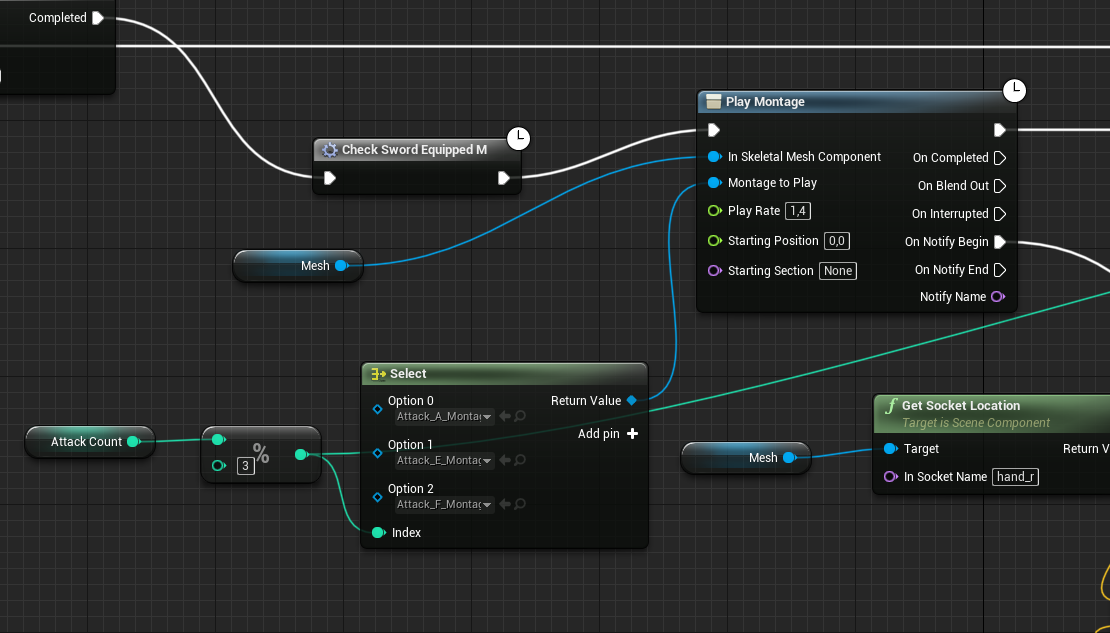


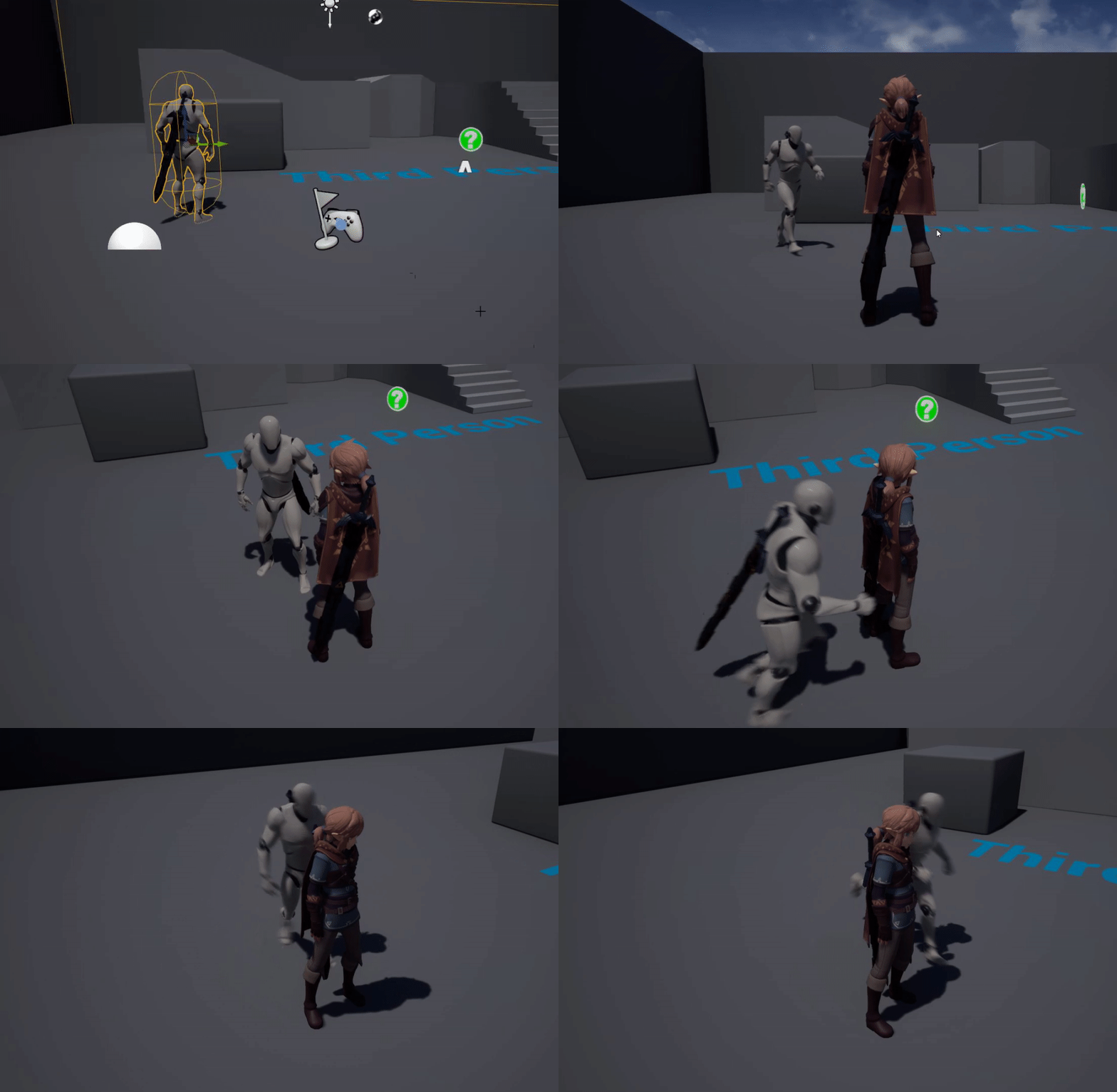 tight schooner
@twilit blade in addition to what Robin says, you ultimately need to make changes to the array variable that's driving the ForEachLoop to actually do stuff. I assume what you're trying to do is make changes to that array.
twilit blade
yes it is
tight schooner
You might want to collapse the stuff after Loop Body into a function so you can use a local variable to more conveniently tinker with the string
marble slate
I’m seriously frustrated, when anyone gets a chance try to help me, I posted the problem on #multiplayer
thin rapids
i have an ai which walks arounds and then i have pawn sensing on that character which i want to be used if he sees me he runs after me i have this blueprint https://gyazo.com/458cb674e05ba5472285ec16af1caa53 but he doesn't attempt to follow me.
@mortal wharf you made an infinite loop that doesnt stop for the AI to follow the player in the begin play
tight schooner
@marble slate I wouldn't know how to fix it but it sounds like a general #ue4-general issue
hexed coral
how do i begin overlap with another actor/blueprint other than the player? I cant seem to get it to work.
shut hinge
== object node with a branch to detect the actor.
you need to put in the npc character ref in the == node.
hexed coral
its not a npc character its a blueprint with a bunch of lights
How do i get the ref?
hexed coral
I have multiple instances of BP_lights in the level how do i make it trigger when an instance of it overlaps a Box? Nothing seem to work when i do this:
elfin hazel
Hmm I don't think you want to compare it to a reference. There's some other methods you can use, first being to Get Class, and compare it to your BP Lights class. Then you can also query Is Child of, if your lights class have children.
Another being to cast to your BP lights, and let the cast act as a query.
hexed coral
@elfin hazel How do you get the class?
elfin hazel
Drag off the actor and type Get Class.