#blueprint
402296 messages · Page 486 of 403
 elfin hazel
If that's the case, then make sure that the event fires in the first place. Place a print string and see if it prints.
Or, where is this logic happening? Is this in the BP Lights class?
 hexed coral
yeah its definitely the Box collision its not recognising anything.
This is BP lights.
elfin hazel
Ah, your lights actor doesn't have any collision primitives.
hexed coral
oh ok.
 gritty elm
@hexed coral you need to cast to actor like this
hexed coral
but doesn the root have a collision?
elfin hazel
Nope. You'll need a primitive for collision to happen. Meshes can be primitives, though they may not have collision set up. Another primitive is the "Shape" ones, like sphere, box.
hexed coral
oh wow it worked! I just added sphere collision to BP_lights. I was fighting with that blueprint all day. Thanks so much!
elfin hazel
Man, gameplay tags are a little bit of a pain to work with. Is there a more practical way to do this?
 inner ginkgo
I'm not sure about the rest of your design there, but you appear to be using tags for something that is probably best suited with another structure, like an enum.
elfin hazel
The nice thing about using a tag container is that it can hold several items, where as the enum is just one state.
inner ginkgo
Sure, but then this particular example doesn't seem to be making use of that feature.
 oblique ruin
Hi I'm currently involved in dev on a fighting game. It's early days for us, and I'm new to Blueprints. Currently I'm stuck trying to set the players for the versus mode. I have a slider on the menu that controls that, but I don't know how to connect it up to the battle game mode. Some of the tutorials I've been looking at have mentioned casting to game instances but I don't know if it's applicable to my current issues. Any help would be welcome, thanks.
elfin hazel
Set players, controlled by slider? No idea what that means. But if you want to access a custom game mode class you need to Get Game Mode and cast to your game mode. Game Instance is another object, but would be accessed the same way.
hexed coral
How do i make blueprint a move in certain direction constantly with an Finterp? I want to move the blueprint in ws not local space
elfin hazel
oh, I read "battle game mode" as a specific class, but I guess you didn't mean to be that specific.
 brittle fiber
managed to make it work but, every second time it bugs must be due to visibility checks, how can I solve this issue? ive got: 2SKmesh/2Anim(increase_scale) and 2SKmesh/2anim(decrease_scale) link in video, please help me to solve this issue. Video anim link: https://www.reddit.com/r/Archetype_Novus_Aetas/comments/he1k2x/managed_to_set_up_anim_but_something_bugs_anim/. @thin rapids

reddit
0 votes and 0 comments so far on Reddit
 full crypt
Hey guys, just a question again.
My packaged game keeps crashing, the last thing in the crash logs are
2020.06.22-12.17.05:255][288]LogUMG: Display: Widget Class PlayerListMenu_C - Loaded Fast Template. [2020.06.22-12.17.05:255][288]LogUMG: Display: Widget Class PlayerChildWidget_C - Loaded Fast Template.
should i assume something is wrong with the widgets?
oblique ruin
I have a set player slider
 trim matrix
Anyone know of any actual SPECIFIC non multiplayer problems with having widgets change properties on non widget objects?
oblique ruin
This is what I have in my Menu widget
oblique ruin
@full crypt I'm using a slider 😐
Unless there's an option to change what type a slider returns.
 thin rapids
managed to make it work but, every second time it bugs must be due to visibility checks, how can I solve this issue? ive got: 2SKmesh/2Anim(increase_scale) and 2SKmesh/2anim(decrease_scale) link in video, please help me to solve this issue. Video anim link: https://www.reddit.com/r/Archetype_Novus_Aetas/comments/he1k2x/managed_to_set_up_anim_but_something_bugs_anim/. @thin rapids
@brittle fiber the 'is visible decrease/increase' booleans are not changing the visibility, you know that right?
reddit
0 votes and 0 comments so far on Reddit
 hexed jungle
I have a blueprint set up to allow player to switch game luts using numpad 0 - 8 but for some reason numbers 2, 4 and 8 Don't work. I have checked and those keys are not reference by anything else in our game. Why are those specific keys not working?
 hexed coral
How do you display the collision during gameplay? I tried the console command 'Show_Collision' but nothing worked. It probably changed in the newer version of UE4.
thin rapids
I have a blueprint set up to allow player to switch game luts using numpad 0 - 8 but for some reason numbers 2, 4 and 8 Don't work. I have checked and those keys are not reference by anything else in our game. Why are those specific keys not working?
@hexed jungle one thing to be pointed out: you're missing key 4
hexed jungle
oops, ok fixed that. just 2 and 8 not working now
thin rapids
@brittle fiber the 'is visible decrease/increase' booleans are not changing the visibility, you know that right?
@brittle fiber you should use 'set visibility' instead of 'toggle visibility' in that case
oops, ok fixed that. just 2 and 8 not working now
@hexed jungle what exactly are they not doing?
hexed jungle
i tested the key with a print string and the key still doesn't respond
i can type it within the blueprint, works fine the key
 zenith iris
Anyone knows how to load the textures before playing the level? I'm trying to run my app on mobile, but the first seconds it is loading the textures while the game is already running
thin rapids
do other keys work @hexed jungle ?
hexed jungle
8 didn't work, and 2 doesn't work. all others do. I checked my mappings and those keys are not used there either
thin rapids
no, i meant if you put other input key nodes in there if it works
hexed jungle
ill try that
i changed it to num3 and it works, tested with a printstring
but 2 still nothing
thin rapids
maybe try restarting your pc? maybe windows is glitching your keyboard out or something, idk this is a weird issue
hexed jungle
ive been trying it for days lol so i dont think a restart will do it. ill have to reach out to tech support on unreals website
thin rapids
hmm.... 🤔
 thin rapids
and now does it work after you changed it?
hexed jungle
no......jumped the gun there didnt fix it
thin rapids
then i really don't know what is it
 full fog
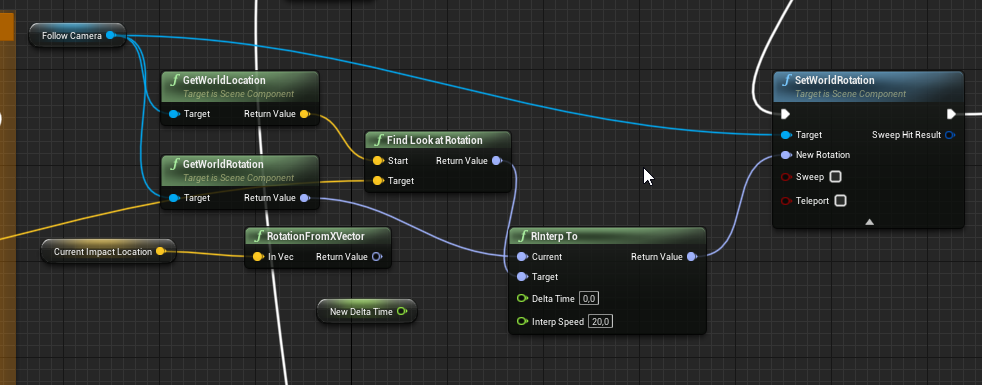
Heya folks. I have some difficulties on finding some valuable info's about something. I am tracing under mouse cursor to get a world position from the impact point of the trace. That works fine. I just struggle to find two other things now:
a) make the camera "look at" this given impact point with some smooth lerp.
b) after the look at, setting this impact point as new (temporary) pivot point for camera orbit rotation
Any ideas?
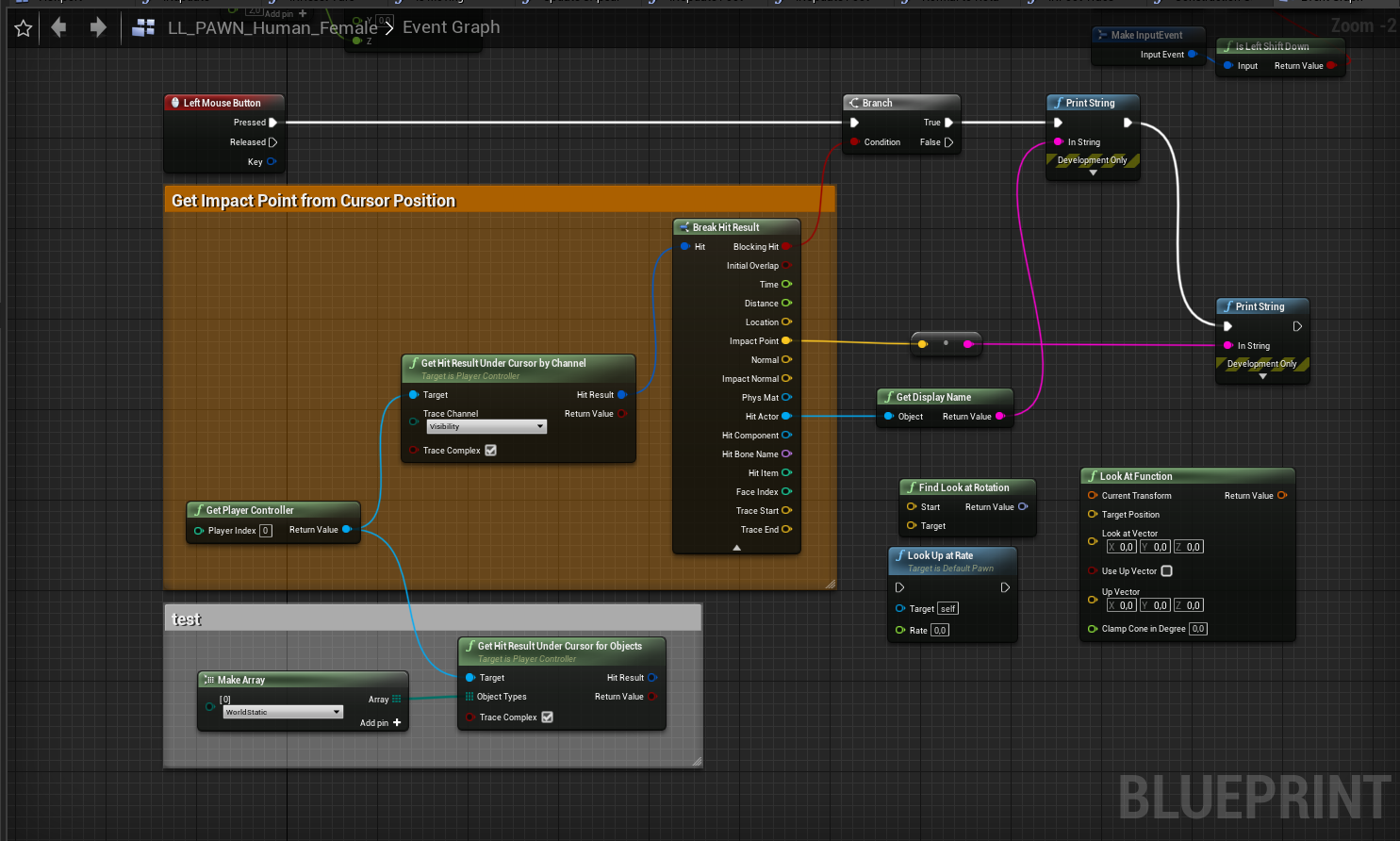
This is what i have at the moment
elfin hazel
@hexed jungle Have you tried making an action mapping for your Num2 key to see if that event fires?
hexed jungle
i found it now, turns out the keys 2 and 8 where being consumed by another level blueprint but when i used reference checker to find it, it did not show up. had to locate it manually
 robust cliff
anyone know of a free screen recording software(not bloated)?
thin rapids
anyone know of a free screen recording software(not bloated)?
@robust cliff OBS maybe?
 dense badger
I would like to be able to call a function but dynamically specify what function gets called when that function completes. Is there a BP way to do this?
 earnest tangle
can you just not call the function and then call whatever you want called next?
dense badger
I want to be able to call this utility function from anywhere but it contains delays so I need a handle to it's completed event
earnest tangle
well if you make it a macro it can have an exec pin that you call from the delay
otherwise you'd probably have to do something with setting up an event that gets triggered when the function completes and binding to it when calling
dense badger
Ah yeah that makes sense
Yeah I wanted to do that second thing but a macro is probably simpler
Couldn't figure out how to set up the binding on call
earnest tangle
basically you'd need to have a custom event dispatcher OnMyEvent, then you can bind to it from the actor, but it might not work if you have f.ex. a blueprint function library or something, since they can't really have event dispatchers
dense badger
Ah ok that makes sense
Macro is much simpler in this case but glad I know how. 🙂
TY!
 modern cove
My Pause Menu can sort of use a gamepad or keyboard; problem is I have to press a Menu Button with the mouse first. How can I make it so that the Menu can be worked with the Keyboard or Gamepad without having to use the Mouse first?
full fog
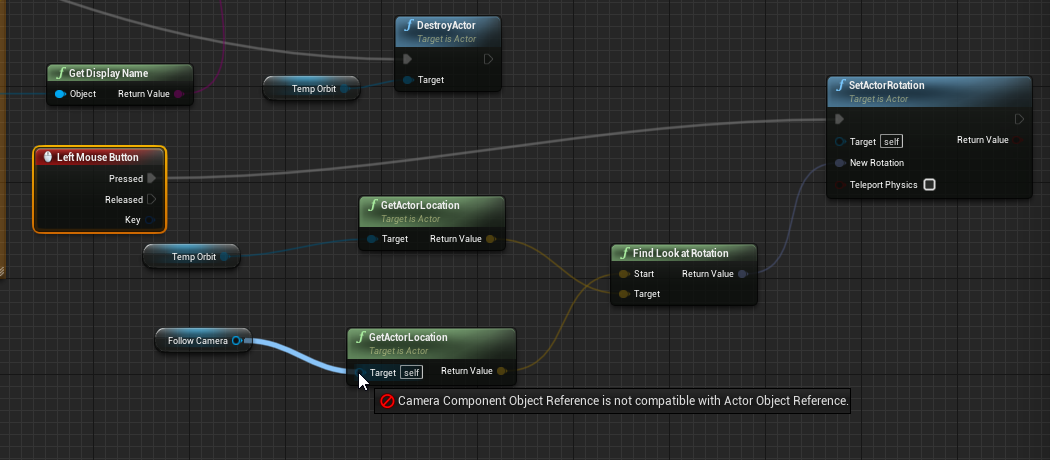
I just want to make my camera view look at a given point in space. We can create the biggest RTX landscapes with Niagara Falls and realtimeskitonmyskin GI but at simple look at is too much.
earnest tangle
well the camera is not an actor :P
programming is typically fairly strict about the types of inputs and outputs so you gotta make sure you have the right things
and call the right functions
full fog
Ah well.. I figured. Let's say I am a big dumb Viking (Artist) that found a Wizards poopy Broomstick (BP) and try to swing it.
The things I know: If, Else, Fukkit, Trial, Error.
 earnest tangle
anyway if you drag from the camera ref, it should have a get world location or something
which should give you what you want :)
full fog
I probably need to detach the camera from its camera boom arm
Literally this is what i try to achieve:
a) make the camera "look at" this given impact point with some smooth lerp.
b) after the look at, setting this impact point as new (temporary) pivot point for camera orbit rotation
Or if anybody used Second Life before: Their camera "detach and move/rotate" system.

I also created a temp actor at the mouse inpact point. So actually the current system should have everything setup for the camera to look at something
I probably need to create a new camera there for it
 mortal coral
Hi there! I've got a blueprint that inherits from Actor (InteractableStation), and another blueprint that inherits from that (SteeringWheel).
I've got a SteeringWheel child component on another blueprint (ship), and it doesn't appear in either the blueprint viewport or the actual game. Is this due to something funky with how Unreal handles inheritance, or does adding a blueprint to a blueprint not work how i think?
 stoic vortex
hey folks, I asked elsewhere but I thought I'd check here as well. so I've got a character that I'm trying to rotate based on floor angle, and I'm successfully getting the floor angle via line trace, but when I plug that angle into a bone transform, I get something saying "rotation was visible but ignored." if I combine the struct pins, it works, but not when they're separated, and I only want the pitch here. anyone know what's going on?
 mortal wharf
Ok i need some help what i want to do is that if a specific mesh collides with the player it changes view / camera.
So basically when the mesh collides with me the camera changes.
 uneven dock
Whenever I right-click in blueprint to open the node creator there's a delay before it opens.
And I don't know how to fix it 😢
@mortal wharf Have you tried using event Hit or ActorBeginOverlap?
mortal wharf
https://gyazo.com/bbf826e058d0664f035020f6602b52dd I got this and it kinda worked but that makes the camera change whatever it hits i want it to be only the player.

@uneven dock
uneven dock
Let's see
mortal wharf
How do i specify it to be only on player hit? @uneven dock
uneven dock
So I'm thinking, not sure if this works
uneven dock
Drag out other actor to an is [equal to] player character
mortal wharf
Yeah but where do i link the blue output to?
mortal wharf
https://gyazo.com/77bf7f47efd2a8e87faa26d7c2efc651 Where does this go?

 tiny meteor
you dont need to do anything with it
just cast succeed/failed
if it succeeded, it means it hit the character, so blend the camera
you should probably get the camera from the first person character bp though as that is the one you want to move
uneven dock
Ow right do what he says
mortal wharf
Thanks!!!
 twin trout
Having a brain drain tonight and need basic vector math help. I have sockets on meshes in my level with varying rotations. I need to set a BP actors rotation to where the sockets’ forward vector becomes the actor’s up vector. Hope I’m communicating accurately.
trim matrix
how can i see these vectors?
 slate wasp
how do I open the level blueprint of a level that's not the currently open level? I remember there was a way to do this but I forgot
twin trout
@slate wasp im away from my computer IIRC in the Windows menu there is a Levels pallet. I’ve used it for level streaming and I believe I was also able to access different level BPs without loading the maps.
slate wasp
I'm only seeing Persistent Level there - iirc that window is only for switching between sub-levels and the persistent level
 honest forge
Hello, really struggling with locking the players movement to the top of a water volume. Does anyone hove any tips on how to do this?
 honest wolf
would someone be able to assist me with an error I keep getting? idk why it's complaining, but everytime after I close my project, I get a runtime error where it can't read the return value of a function?
(The issue seems to be in the "main menu UI" part)
The application doesn't crash, but it's always throwing that error after I close it
error leads me here, but Im not totally sure what's upsetting it
trim matrix
@honest wolf GetPlayerController seems to be returning null
honest wolf
do you maybe have an idea on what I should look at to fix it? @trim matrix
trim matrix
so this is the level blueprint? not sure when the player controller is available actually... try adding a Delay 0.1 node (I know, it's ugly)
or if you can add it inside the player controller itself
honest wolf
this is this is my UI widget blueprint
nvm, i lied
yes, its in my main menu level
i'll try the delay node
 upper dirge
https://gyazo.com/261dd8e61d8a9355ce9a96307f9354f0
should level be visible -> return: yes
is level visible -> return: no
what am i missing?
honest wolf
the delay did not seem to have fixed the issue
trim matrix
@honest wolf just to try, add a delay of 2 seconds
otherwise I would suggest putting the logic in the player controller class instead
upper dirge
ignore my question.
instead of changing the value of the level distance, i changed the name of the layer LOL
honest wolf
adding a delay did remove on of the issue related to the mouse cursor, but not the viewport
i'll try putting it inside the player controller class
 devout geyser
how do i make multiply outputs from 1 key press?
trim matrix
you can from multiple actors I think, but not within the same actor
honest wolf
I tried putting it in the playerController, and it didn't quite seem to fix my issue. I also did add a delay to the viewport, but it didn't seem to help either.
@trim matrix do you maybe have any other suggestions?
 haughty egret
Does anyone know why Uasset files might not show up in unreal even though I can see them in that folder?
I read they could be files from an older version but how would I even know which version they're from ??
brittle fiber
Hi all, could any 1 advise how to make it work? over there i got 4 skeletal meshes (2 are forming 1) and 2 animation for 2 of those SK meshes.. i nearly managed to make it work but it bugs on the second time bp is being overlapped.. what checks can i perform for the bug not to occur?
@danielll with those visibilities on and of i managed to make it work, but when it is being overlapped for the second time, it bugs, meaning it uses activated animatiiin from 2nd anim and second sk mesh, but on the third time, it works again no problem. please lads, any ideas?
reddit
1 vote and 0 comments so far on Reddit
trim matrix
@honest wolf are you getting the same error? did you replace the GetPlayerController node with self?
@haughty egret they could be re-directors, then they are just pointers to another asset
haughty egret
@trim matrix I have show redirectors on, and they still aren't showing up so I don't think that's likely
honest wolf
@trim matrix this is the error, im getting, it's repeating itself 2x with the viewport instead of showing me the get cursor error 1x and the viewport 1x
trim matrix
@brittle fiber I like your graphics 😄
brittle fiber
@trim matrix im glad it pleased your sight😋
trim matrix
@honest wolf can you post a screenshot of the new blueprint
honest wolf
trim matrix
@brittle fiber it's difficult to help you, the screenshot is very low quality and doesn't show where the bools change state
honest wolf
i removed it from the main menu level and added it to the playerController
brittle fiber
@trim matrix alright, ill get better better one and comment bools as soo as i get home
trim matrix
@honest wolf no idea.. do you know why you get the error twice? are you running a dedicated server?
honest wolf
yes
honest wolf
ok, thanks for everything @trim matrix
 undone timber
hey guys, just fast question, is there any blueprint node to call destroy actor that also gives an enum right away for the end play node on the target actor? or gotta do it by hand?
 warped pebble
Hi!
Need an advice
I just started to work with Dynamic Ledge Climb System. I can't change character walk speed(
I change Max Walk Speed in the Character Movement component but he continues to walk as usual with other max walk speed value
the same with other character movement properties, e.g. gravity
Any ideas where's the catch?
trim matrix
do you ever change the bools or are they constant?
instead of ToggleVisibility, maybe use SetVisibility to be more explicit about it and not depend on the previous state?
@brittle fiber
trim matrix
you need a profile dump to tell you more I would suggest... you seem to move a lot of things, maybe the components of those objects can use Use Attach Parent Bounds?
turn off physics overlaps for movement if it's not needed
 tight schooner
damn, 38ms game thread
you need to track down exactly what's causing that for sure
If it's BP node execution, then figure out how to execute fewer nodes per second (and/or delve into the dark, perilous art of BP nativization). If it's the updating of hella actor components then yeah, figure out how to do less of that.
but figuring out what it is first is key
 crimson charm
how would i go about having one button load a level and another button then open it
tight schooner
You have to look into level streaming unfortunately. I've never done it myself so I can't give you advice
but anything other than using the Open Level node while optionally throwing up a load screen requires level streaming as far as I know.
full fog
Hey there and good morning!
So, I am still on that little camera system that would allow to detach a Third Person Camera by using Alt/Ctrl/Shift + LeftMouseButton hold to navigate around.
I've made a video which shows the whole show that I try to replicate.
So far, I am able to pan the camera around and to get an impact point under cursor.
What I was not able to figure out for two days now is:
- to make the camera look at a certain impact point with a lerp (smooth)
- taking this impact point as new rotation for orbit
- snap/move camera back from any position to the original third person view once the character moves
I know I am asking for much here but I have nearly 100 open tabs with topics that would go into that direction but are either other unanswered questions or going in complete other directions.

Testvideo to show the camera system of Second Life
 shut hinge
Ryan's Laley's rpg levelling component works with 10 party members, Is it better to update it in the same widget or do we need 10 separate widgets so we can switch the widgets and turn on each party member status without trying to do it from the same widget in the blueprints.
trim matrix
hey guys. I'm a total noob in UE4.
I want to make a top-down strategy type controls, where you move your mouse towards the edge of the screen to move the camera.
so I created a UI widget with buttons on the sides and I toggle the boolean variables on hover/unhover.
ontick I want to move the camera, and I created a public variable to contain my camera, assuming I can set it from outside the widget blueprint like I did with my character controller blueprint to my scene camera actor on the default panel of details, but I don't seem to find anything like that for widget blueprint variables
where do I set it?
 terse spruce
hi everyone quick question
how can i get the hit vector
as in direction/angle of the hit
 heavy yoke
Hey, my character doesn't seem to want to leave this pose, https://i.imgur.com/ZH89SYN.png what am I doing wrong?
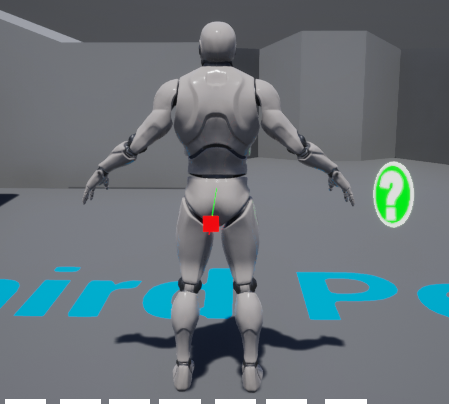
I think I'm do, I'm currently comparing it from another project what has it working to see if I went wrong there.
 atomic light
How can I tell whether I'm triggering animation transitions or not? I have this one but I can't change into the marked blendspace and I don't know whether the transition even takes place so I cant pinpoint where the issue lies
 scenic tide
l have created a coop gameplay game for 4 people but whener one of the characters dies, all the characters dies and only host repawns at the check point. Around 2 weeks trying to solve it but coundt solve it. Can anybody help me please?
heavy yoke
Alright, it's something to do with the animbp i gotta work out how to do the switch thing now
shut hinge
Could be a parent child issue if all of them are dying when one gets hit.
scenic tide
There is no parent- child relation for each characters.
 swift quiver
@atomic light If you change the debug filter in the bp to whatever pops up in the dropdown when you play, then it will tell you what current state the animation is in. Not sure about transitions though
atomic light
I found where the issue lies but it'd still be interesting to know, can you elaborate
swift quiver
So you know how you can debug blueprints when playing in the editor. If you go into the anim blueprint and at the toolbar where it says debug filter you can select a class from the dropdown and it will show you the current state the player is in
Im not by my pc right now so I cant get a screenshot
atomic light
Oh I think I got it
Hm, that dropdown doesn't appear in the AnimGraph though
well, still good to know how it works for others
thanks
swift quiver
Np
trim matrix
how can i get the distance beteween two actors
thin rapids
how can i get the distance beteween two actors
@trim matrix 'distance' node?
trim matrix
thanks
thin rapids
np
atomic light
is it true that interfaces>casting if multiple pawns are going to be using the same animBP
as in all bipeds (player as human/human npcs)
 vapid hatch
is there any way to use chaos in blueprints or is it cpp only?
because i cant find any real tutorial on how to use it
 jaunty dome
heya
umm, is there a visibility actor to be placed inside the map
like for example I want to hide an entire region in the map, and only render it visible based on a trigger
this region contains many different actors, so using set visibility is not really a solution
 fallow path
@jaunty dome u can use actor layers and move all the affected actors in that layer. Can trigger the layer visibility based on a collision
never mind - editor only
but sublevels should work
 hardy sentinel
Hello, is it possible to BIND a custom event that I have in the event graph from inside a function?
For example if I have this spawn and bind inside a function of the blueprint, how can I bind to that event my "custom event" that is in the event graph? Is it possible? thank you
jaunty dome
well, it's kind of a fog
fog/clouds thing
kind of like that fog door in dark souls before entering a boss fight
I just want to have a thick layer of clouds/fog/whatever that hides the area behind it, and when the player runs through he starts seeing stuff
i've tried local volumetric fog, but for some reason the shader computation is expensive
I've also created an actor blueprint that generates "clouds" as static meshes with material opacity
and it's not good enough either..
elfin hazel
@hardy sentinel Drag off the event dispatcher and type "create event"
hardy sentinel
@elfin hazel but, what is this exactly doing?
fallow path
@hardy sentinel the dropdown shows function/events that have the same parameters as the dispatcher. You must create one
hardy sentinel
ah, i can select my custom event there?
elfin hazel
you need to assign it a function, and it works just like connecting it to a custom event, but without a red wire. It doesn't have to be an event, it can be a function too.
fallow path
yes
hardy sentinel
thank you!! very useful, I always thought that the only way was having the binds in the event graph
fallow path
CreateEvent was a mysterium for me for ~2 years
and it is very important
as that allows you to do lots of stuff in functions instead of EventGraphs
hardy sentinel
yes, that's the point
 cedar sparrow
Is there a way to get all saves in my save game folder?
 odd plume
I keep seeing that My Character and the branch are accessing none in the error log? What does that mean
hardy sentinel
means that My Character variable is not initialized probably
check it before the branch with an IsValid
odd plume
ok.
 waxen sorrel
https://docs.unrealengine.com/en-US/BlueprintAPI/Spline/SetDrawDebug/index.html Does someone know a way to show splines inside the game this seems to don't work for me
Set Draw Debug
odd plume
The errors disappeared, but the hud elements are still visable at max health/armor
hardy sentinel
yes, because the variable is not valid,
you have to initialize it correctly
before calling this event
fallow path
@waxen sorrel "show splines" console command
atomic light
how feasible is changing input during playtime, e.g. you have a third person controller with the regular WASD actions but then you switch to a top down camera, where its now point & click and wasd does something else
odd plume
It is initialized tho
hardy sentinel
How are you sure? maybe the cast is failing
or GetPlayerCharacter is returining nullptr
If it's only this code.. you can fetch the GetPlayerCharacter in the function Show/Hide directly
without having the var
because maybe when you are executing Construct, the player character is not created yet..
odd plume
Not sure. I tried connecting the getPC instead, but it was not compatible
hardy sentinel
"because maybe when you are executing Construct, the player character is not created yet.."
so GetPC is returning null
what you can do is call GetPC IN the Show/Hide function
and check there if it's valid or not
odd plume
It didn't print an error out. It seems to be valid
hardy sentinel
paste again the bp
odd plume
brittle fiber
@thin rapids brought it that far, any idea what node to add to remove that bug where the second mesh after anom fishes stas at spawn location
thin rapids
link is dead
hardy sentinel
@odd plume when you call Show/Hide, it appears that you don't have a valid player character.
odd plume
I have a player caharacter, the side scroller character derived from the c++ class
brittle fiber
thin rapids
i have to go unfortunately PSI, cant help you
odd plume
I know what Null means, how do I get one.
And how would it be null, if my health bars work fine otherwise
shut hinge
To update the stats on the widget, should I use 10 separate widgets for each party member, or just the same widget for all 10 party members. If I use the same widget, I run into trouble.
elfin hazel
@brittle fiber The problem is that when you leave the overlap, you toggle the visiblity of the increase, so when you enter it again, it's not visible. You'll need to toggle it on enter too.
Though I'd recommend not using toggle, but more explicitly use Set Visibility.
hardy sentinel
@odd plume Don't know, but, if you are using GetPC in the Show/Hide function, you shouldn't use the My Chracter var. use directly the result of GetPC.
@odd plume
 proud hull
@brittle fiber Copy what you have in begin play to the beginning of your begin overlap as well.
brittle fiber
@thin rapids np good luck,@elfin hazel i used set visibility but found that using this works better the fill plane inside the second triangle was translucent with electricity through it, so it bugged, i ll try to check it when i get home.. I think i got what you said since its a cycle i need to add a second, but if i add it to trigger, then on the event begin play, the blueprint on level will be displayed with the second mesh attached, so i have to make it invisible when level loads.. any idea?
proud hull
You also don't really need that begin play event since you can just set it "hidden in game" by default.
Also, since you are using "propogate to children" you only need to call it on the parent which is "frame"
 sonic hare
can some one help me
proud hull
Check "propogate to children" even when you are setting them visible.
sonic hare
im royaly fucked
odd plume
This is what I have tried. That does not work @hardy sentinel
sonic hare
on my own for once
actually @proud hull every time i build my lighting My trees go fully black
 shut hinge
Set your directional light to moveable and skylight to movable.
sonic hare
i dont have a sky light
hardy sentinel
@odd plume
 tight cobalt
How to prevent sound from being triggered 2 times in the trigger box?
shut hinge
do once node
tight cobalt
No I meant simultaneously
My bad
I have one longer sound that gets triggered 2 times if player walks in-out of the triggerbox and enters again.
proud hull
@odd plume What does your game mode look like? Specifically your default pawn class.
shut hinge
what are you trying to do for the trigger box with the player?
odd plume
My default pawn class? You mean my player character@proud hull
sonic hare
Set your directional light to moveable and skylight to movable.
@shut hinge they are still very dark
proud hull
@tight cobalt You need some boolean variable to let you know if the sound cue is still playing to prevent it from playing again too soon.
shut hinge
go down to lightmaps and change the light map. The trees may not have a lightmap set
proud hull
I am not sure if this check is already built into sound cues or if you will have to make it yourself.
sonic hare
go down to lightmaps and change the light map. The trees may not have a lightmap set
@shut hinge im sorry how do i do that?😅
shut hinge
Usuallty in Unreal Engine you have to build the checks yourself.
proud hull
@odd plume have you made a game mode blueprint for your project?
tight cobalt
@proud hull Hmmthat sounds good. Didnt think about it. I was thinking that there is something more like "is valid" or "is playing" node..
proud hull
There might be
tight cobalt
But Boolean should do too
shut hinge
Just be aware with is valid, that if your value is not valid, the code will be blocked it won't execute, so put a print string on is not valid to see if this is the case.
proud hull
Recreating the logic yourself would be just as efficient as using a "node" that does the same logic.
 tight venture
Is there a way to position a camera based on what it can see?
For example, say I have a dining table with a big turkey in the middle. Is there a way to have the camera "focus" on a specific object, so I can have it zoom out or move away so that the whole table is visible, and then zoom in and focus on the turkey?
Thanks.
odd plume
@odd plume have you made a game mode blueprint for your project?
@proud hull I have the default C++ game mode class
shut hinge
i'm not very good with logic, so i struggle with building things in blueprints.
tight cobalt
Media player has node "is playing "- Check whether playback has started. Target is Media Player. But I am playing the sound through "play sound at location"...not sure does that counts as media player..
Probably not.I think only works for play node
hardy sentinel
@odd plume Have you tried the bp i sent? which print error are you receiving?
proud hull
^
shut hinge
Yes, you can change the FOV of the camera or the spring arm length to zoom the camera in or out.
tight cobalt
@proud hull I think I will just create counter that counts for the duration of the sound then changes the boolean value.
Simplest to do
sonic hare
Tozan35 how do i make light maps?
tight cobalt
Tozan35 how do i make light maps?
@sonic hare I guess you should ask in graphic section..You'll find more help.
shut hinge
go to LIGHTING, and check Overriden light maps. then rebuild and it should return it back to normal.
odd plume
@hardy sentinel No more errors, but when I walk into the pain volume, the health bars do not appear
shut hinge
put a print string on IS NOT VALID to see if the value is not valid.
if its not valid, it won't execute the rest of the code.
sonic hare
SOrry im really new at this where do i find the lighting Tab?
hardy sentinel
@odd plume .. have you debuggued which branch is going (true, false)? 😄 Or maybe putting a breakpoint there to see whats happening..?
proud hull
@odd plume can you do this:
Just connect get player character directly to print string, the middle node is created for you
Your player character is coming back null most likely
So that will print nothing, but if it does print something, let us know
shut hinge
its found under details tab, click on your tree mesh and go down the details tab to lighting
and check overriden lights, and your trees should regain their lighting. The other way is to insert in a skylight and directional light and set them to movable so you lights are no longer baked.
odd plume
Nothing is printing out
shut hinge
It won't not until the referencing problem is resolved so it can Past the IS VALID branch, otherwise it stays stuck on is NOT VALID and goes nowhere on false.
tight cobalt
@sonic hare You could watch this videos,plenty of tips regarding light density and lightmaps.
https://www.youtube.com/watch?v=dmXAptOv0J4
https://www.youtube.com/watch?v=k2bn3HiFAv8
https://www.youtube.com/watch?v=4Ye1DTbmxGE

Follow me @https://twitter.com/tillederdon
If you like this content, please consider supporting me on Patreon: https://www.patreon.com/Daedalus51
or with a donation via: paypal.me/Daedalus51
Hey guys,
Next session for the Lighting Academy featuring the Farron Keep environme...

Follow me @https://twitter.com/tillederdon
If you like this content, please consider supporting me on Patreon: https://www.patreon.com/Daedalus51
or with a donation via: paypal.me/Daedalus51
Hey guys,
Next session for the Lighting Academy featuring the Farron Keep environme...

Follow me @https://twitter.com/tillederdon
If you like this content, please consider supporting me on Patreon: https://www.patreon.com/Daedalus51
or with a donation via: https://www.paypal.me/Daedalus51
Hey guys,
Next session for the Lighting Academy featuring the Farron Ke...
proud hull
@odd plume These are game mode default classes:
sonic hare
its found under details tab, click on your tree mesh and go down the details tab to lighting
@shut hinge
tight cobalt
SHit.how do I remove YT preview?
proud hull
@odd plume you should make a new game mode, so you can set your default pawn class to your custom player character.
tight cobalt
I mean, crating lightmaps should be checked on import..But honeslty I would suggest you to learn how to do it properly. To adjust the density and size.
Its all about managing resources. Just watch the videos I sent you,,it heleped me a lot when i started.
tight venture
I dunno if anyone saw this, so I'll post it again:
Is there a way to position a camera based on what it can see?
For example, say I have a dining table with a big turkey in the middle. Is there a way to have the camera "focus" on a specific object, so I can have it zoom out or move away so that the whole table is visible, and then zoom in and focus on the turkey?
Thanks.
odd plume
C++ class and derrive blueprint from it? or a bp class?
tight cobalt
@tight venture Maybe you can make 2 cammeras that change on key press or smthing
But i think you would ahve to do it for every item seperatelly
proud hull
You can just make it a bp class. Use C++ classes when you know you need to use C++ to utilize it.
shut hinge
Yes, you can change the camera's fov and Zoom by adjusting the spring arm length on the camera.
tight cobalt
Or maybe mark the asset as specific type, then if asset type is this...change this cammera parameters.
proud hull
Also, this is just to set your defaults and can easily be modified later or replaced with a new game mode
shut hinge
But if you're planning on switching kittiy meshes, (switch pawns,) make sure you have a collision sphere around your character so the camera dosen't end up inside the mesh.
tight venture
Yes, but can I have it automatically "focus" on an object, within a blueprint? If I'm hearing y'all correctly, that all sounds like manually adjusting the camera.
Just like the F key in the editor viewport, except in game
shut hinge
it can be done in blueprints automatically, to adjust the camera but i don't know the logic for that in blueprints.
proud hull
We are in the #blueprint channel though, so most people here won't be using C++ and might only have a C++ project since a plugin required it.
tight cobalt
@tight venture No..you set it once in BP..then its called everytime when you look the specific item. Maybe you could do line trace..SO it fraced object is "Food" cagetory, then zoom cammera .
proud hull
I know that, but if someone is asking whether or not to use a C++ class, then chances are they won't be using C++, hehe
shut hinge
Anyone know why chaacters don't resume their normal AI Navigation when switching pawns?
tight venture
hmmm, that's an interesting option @tight cobalt. I guess I can try that. Okay, so that will work, but I'd need a way to do a line trace of the corners of the camera's view. There's gotta be a node for that, right? Like, GetCameraViewBounds or something?
tight cobalt
@tight venture Hmm..Rlly not sure,I am not that experienced with that. I assume there is a way to shoot multiple rays all over the screen size.
sonic hare
its found under details tab, click on your tree mesh and go down the details tab to lighting
@shut hinge i did that and it dident fix it
shut hinge
rebuild the lighting again after selecting the light map override.
shut hinge
What is in your world outliner, do you have a skylight and directional light in there.
tight cobalt
@tight venture The problem might happen if you have multiple items on the screen that need zoom..It would be buggy. I would still do center weighted screen line trace
sonic hare
What is in your world outliner, do you have a skylight and directional light in there.
@shut hinge i have both yes
shut hinge
are they on static ?
shut hinge
you might have to just reimport the trees again and select import lightmaps
proud hull
@odd plume any luck getting your defaults setup and getting get player character to return anything besides null?
tight cobalt
@sonic hare Is your asset using SSscattering? Did you check model from all sides?
shut hinge
goodness, dosen't chucking in a skybox fix it either.
sonic hare
@sonic hare Is your asset using SSscattering? Did you check model from all sides?
@tight cobalt ?
odd plume
@odd plume any luck getting your defaults setup and getting get player character to return anything besides null?
@proud hull I'm taking a break. I found tutorials, but none of them go over a custom health component like have
tight cobalt
@sonic hare Nvm..Btw do you even need lightmaps for movable lights? I think its used only for baked.
shut hinge
a health component, uh oh, i had trouble with my levelling component showing the same stats of all party members at once on the screen instead of showing one stat at a time during switching.
It appears that customized engine built landscapes have a deformation problem, the landscape bends and warps as you get closer to it.
 rigid heart
It appears that customized engine built landscapes have a deformation problem, the landscape bends and warps as you get closer to it.
@shut hinge You can change your landscape's LOD settings in the details panel.
shut hinge
What about the party members? If I use the same widget to read the stats from, I get overlapping problems of all their stats when adding the levelling component to them.
So I figured the only way I can try to do it is to put each of their party stats counters on 10 separate different widgets so I can turn on their stats one by one by turning on their widgets when switching to party members rather than to mess around with setting all their text changes in the same widget in the blueprints.
rigid heart
My editor (4.24) crashes every time I try to edit parent classes of character blueprints. Whenever I try to make a change to a component in a character’s parent class (changing the collision type for example), I get the error below.
This only happens when I make a change to a component that’s inherited from the default character class, such as the mesh or capsule component. Changes to any other components that I added myself don’t cause a crash, nor does compiling the blueprint.
Changing the collision type (or anything else) of the CapsuleComponent via construction script works, but editing it in the details panel causes a crash. Character blueprints without children are working fine.
Sorry for the wall of text, but I need to find a solution for this pretty badly and have no idea what I could do to debug it. If anyone has any suggestions, it would be appreciated.
Error log:
tight cobalt
How to make engine chose random exec path? I have a branch that I would want to play different sound but to chose it at random from 3 or 4 sounds.
Any way of using sound at location somehow?
I want to exec chose one of the 2 paths outlined in red at random
hardy sentinel
Right button, and select Sequence node
tight cobalt
Yea.,.sequence calls all
i was thinking about switch on int.
But I expecthed there is just some node that does random automatically
Yea yea..I used it before.
hardy sentinel
@tight cobalt create a macro node if you need it
tight cobalt
@trim matrix.. You are right Switch on int is great..Tnx.
I cant use random node in sound cue, that would be the best. Cause I have subtitles that need to be displaayed for each random audio.
Gonna do swith on int..Tnx
tight venture
Anyone know how to change the "Auto Activate for Player" setting on a camera within that camera's constructor? I see the SetAutoActivate node, but that's not exactly what I want... I want this:
 sonic crescent
hi guys, is it possible to move the Nav Bound Volume with blueprint? How can i have a Nav Bound that cover the floor in a 'Running Game' type of Floor constructing?
My Nav Bound is parented to my pawn and set it to moveable but it do not move with it...
Can i set the Nav Bound location with blueprint?
I maybe need a Nav invoker?
 meager spade
@trim matrix What do you mean?
No idea but I would never worry about it, readability goes over performance in a lot cases. It will never be a bottle neck
proud hull
@trim matrix I'm pretty sure it will have no impact on performance. When it is compiled, those references are simply just that, references.
meager spade
Having extremely hard to read code vs a bit slower easy to read code somewhere that would never be a bottle neck anyways is a bad idea imo
 formal leaf
anyone know why collapsing nodes always makes local variables get unset? all you have to do is replace them but it's annoying to do every time
 pallid iris
i cant see my phone in the blueprints using live link. i have connected to the same ip adress as my pc has. but it wont pop up anyone got a clue?
 rotund basalt
Could someone dm me if they could to help with something?
earnest tangle
https://www.youtube.com/watch?v=bIiQlzwSaAQ wtf? this actually works? 🤔

#UE4 Tip: You can connect an array to some functions instead of using a for loop
 dim kiln
fading footprints with a 'set fade out' node used to work, has something changed in a recent update?
 hot fjord
Hey everyone, I'm trying to find leads on how to make a system, where for example objects go through a bar and the player has to press at the right time or something like a circle, where a circle closes in from the outside and the player needs to press a button, when the circle is in a given area.
I don't know how a system like that is called, which also makes it hard on searching for any information.
atomic light
a quicktime event?
 keen goblet
@hot fjord Sounds like a core loop for a rhythm game, like DDR. Maybe google "ue4 rhythm game system" or something like that
 flint nymph
looks like distance field shadow artifacts
that question would be better in #graphics btw
dim kiln
oh yea thanks
hot fjord
@keen goblet i did, but couldnt seem to find anything that helped me
liek the results talk mainly about the msic implementation
 somber galleon
Can anyone help me with soccer mechanics please?
trim matrix
https://gyazo.com/1f13310192301e2a4364789130ddfd08
Can someone translate this for me into C++ or something

 bitter star
Hi guys, where can I change the gravity so the player jumps lower and seems heavier?
trim matrix
I'm new to blueprint
and I cba to learn it jus to interpret what I assume is a line of code
@bitter star increase the player's mass
bitter star
@trim matrix Thanks for replying 🙂 where do I change this?
bitter star
im looking in the player's BP and there's a physics tab but no mass value
keen goblet
@bitter star To change gravity, you can do Project Settings -> Physics -> Default Gravity Z
thin rapids
Hi guys, where can I change the gravity so the player jumps lower and seems heavier?
@bitter star i think in the character movement component there's a option for the players gravity
https://gyazo.com/1f13310192301e2a4364789130ddfd08
Can someone translate this for me into C++ or something
@trim matrixFVector::DotProduct(GetVelocity(), GetActorLocation() - SwingPoint) * FVector(GetActorLocation() - SwingPoint).Normalize(0.0001f) * -2;i THINK this is how it would be in ue4 c++ (i'm not experienced in c++ at all so i'm not sure about that)
trim matrix
Thanks bro
bitter star
@keen goblet thank you! would you happen to know how to make sure the player's mesh collides with other surfaces? right now the player collides with the object but no fully (ie the arm goes through the wall but not the body)
thin rapids
Thanks bro
@trim matrix np
brittle fiber
@proud hull @elfin hazel @thin rapids, thanks again for your active help, ill do what you said as soon as I get back to my battlestation
thin rapids
you're welcome
mortal wharf
What is supposed to be in the target input on the Play level sequence node?
tight cobalt
@mortal wharf Level sequence reference
I usually make sequence in content browser right click --(its under animation--> level sequence). Then in levelBP under event begin play I create "Crete level sequence player". then under select sequence you chose the name of the one you made. THen I right click on return value and I promote it to variable and give it a name.
Laster on you can use it in any time just by attaching that variable to any play sequence node in your bp.
 obtuse current
Hi everyone, I am having a strange issue - I am constantly checking if I am overlapping actors (as seen in screenshot), however it doesn't work for units that are placed in the level ahead of time. If I spawn one in dynamically, it also won't work, but if I teleport the dynamically spawned one, then it WILL start to work - any ideas as to why this is so finnicky?
My characters are all setup correctly to generate overlaps - collision response channels are correct
mortal wharf
@tight cobalt But how do i do it in an actor bp?
twin trout
Can anyone help me with a vector math & socket problem? I have sockets on meshes in my level with varying rotations. I need to set a BP actors’ rotation to where the sockets’ forward vector becomes the actor’s up vector.
tight cobalt
@mortal wharf SO you want to play sequence right?
mortal wharf
is that in an actor bp? @tight cobalt
mortal wharf
It needs to be actor bp for me.
tight cobalt
Why would you play sequence in actor?
mortal wharf
Because i need the sequence to play after something that happens in the actor.
tight cobalt
Hmm..not sure about that. Never tried it
You can make boolean in actor when something happens to the character, then call it in level bp to start the sequence.
@mortal wharf I gues the process is the same in Actor bp..you just need to make event tick node.
Or..maybe you can use set timer by function name to call the event
flint nymph
you can plug the actor’s self reference into the instigator pin
and use the get instigator node in the fireball bp
 gloomy linden
@tight cobalt hi, i really loved your Disinformation Overload album!
Pull of the dark is an amazing track 😎
tight cobalt
@gloomy linden haha..Not me lol.But I know the sound :0
gloomy linden
Ah lol 😅
tight cobalt
Strange ppl still listen to gabba..I thought they vanished long time ago from the face of the Earth
gloomy linden
Gabber is dead but the spirit is still here
tight cobalt
heheh..yea..I agree
@gloomy linden Gie this one a go..you will like it..One of the finest hc albooms
thin rapids
does anyone know how to use niagara?
@unique flicker niagara related questions should go to #niagara
bitter star
Another question, how can I choose which actors are affected by a given light?
basically i want a directional light to affect the player but not the scene
i can t find it in the detais panel, has it moved?
found it, my bad
so then you get the lighting channel in the player s BP?
*set
crimson charm
i want to change the main image of "button1" when "button2" is pressed in my main menu. How do I do that?
 silver wharf
Is there a way to get the debug camera (F8) location? and if it's active? Have a shader that needs to know where the current viewport camera is located.
 wet siren
@silver wharf you could use the camera position shader node
returns cam pos in world space
i want to change the main image of "button1" when "button2" is pressed in my main menu. How do I do that?
@crimson charm bind to button1 on click, and edit button2 style or the image texture
twin trout
Take 3; Can anyone help me with a vector math & socket problem? I have sockets on meshes in my level with varying rotations. I need to set a BP actors’ rotation to where the sockets’ forward vector becomes the actor’s up vector.
bitter star
Anyone knows how to change a player's lighting channel?I ve read everywhere that channel 1 is for player and environement, channel 2 for player only but when put my light on channel 2 it doesnt affect my player anymore
silver wharf
@wet siren nice. I also need a camera "right" vector. Would that be available? I can see a few others pop up...
bitter star
Found it 🙂
sonic crescent
I still to not understand casting...
I need My BP_Enemy to get some splines from my BP_Spline actor when he born.
thin rapids
you need an object for that cast
sonic crescent
What do i need to connect to my object?!
thin rapids
are you spawning the BP_Spline actor in your BP_Enemy?
sonic crescent
nope, my bp_spline is in the level. It maybe a better way to store somes spline for sure. (if you have a better idea)
The result i need is my BP_Enemy to get random spline for his path.
I tried to create a array of Spline Component. But i can't be able to understand what to put in it. Everything are wrong.
 pine trellis
does anyone know how to get this node in the blueprints material?
I dont know what that is
sonic crescent
it's a constant value@pine trellis
thin rapids
does anyone know how to get this node in the blueprints material?
@pine trellis constant
pine trellis
ok thanks! im trying to get some post processing working in VR, hopefully this works
sonic crescent
Any idea Danielll?
- what the best way to store somes Splines?
- i do not be able to store any spline in this array...
- and i'm not able to cast from my enemy to my Bp_Spline containers.
I fail everywhere.
thin rapids
is the spline related or referenced in the BP_Enemy class anywhere else?
sonic crescent
nope. The splines can't be in the BP_Enemy.
thin rapids
well, then it has nothing to reference as the spline object
sonic crescent
If i wan't my just borned BP_Enemy to get somes spline from elsewhere, how to do it?
where to store the splines?
thin rapids
hmm... i don't really know how i would do that with splines specifically(nor what exactly what you want to do with the splines), so i really don't know how to help you on that
haughty egret
Does anyone know why Uasset files might not show up in unreal even though I can see them in that folder? (They aren't redirectors)
I read they could be files from an older version but I don't think they are and how would I even know which version they're from ??
trim matrix
my client portal works but as soon as i enter it snaps back to where i tried entering it
sonic crescent
@thin rapids that splines are a path for my enemy arrival. Actually, i'm doing this like that:
with a Get actors of class. But i was trying to find another way because unreal warn that using GetActor of Class is a slow process.
pine trellis
does anyone know how to get these nodes
mortal wharf
Ok i need some more help how would i do this: Change camera if a character is in a specific animation in 10 secs but if the character is not in animation don't do the countdown.
tight venture
Does anyone here have experience using orthographic cameras?
Specifically, what does Ortho Width mean? The larger I make it, the more the camera can see, but what are its units? If it is in world-space distance units, then what does having an Ortho Width of, say, 512.0 mean? Does that mean that the camera will be able to see a 512x512 plane centered at (0,0) when the camera is at position Z on the z axis? How would I solve for Z?
I have a plane that is 4000x4000 on the XY, centered at (0,0). What do I need to set the Ortho Width and the Z position of the camera to to ensure the entire plane is in view?
Thanks.
 round idol
I'm possessing various pawns during gameplay - it's about a spirit, so it's kind of the point of the game. That's all fine. The problem is savegame and re-spawn. How do I pass the "current pawn" as "player pawn" to the game instance so when I load the game, it spawns me properly, as the pawn I was possessing when I saved? Or how can it be done?
@mortal wharf is the animation played via AnimBP/StateMachine or Montage? If it's via AnimBP, get the bool from it (when entering state, or make another one) and use that to condition your camera. If it's in montage it's very simple: trigger event for camera on animnotify set right at the beginning of your anim timeline.
 shadow bronze
so how do i switch the capsule collision for a character to be a box or something more complicated?.. the internet has not been helpful at all.
round idol
@shadow bronze in bp, afaik, you don't
you can make your custom "character" from a pawn
shadow bronze
oh?
round idol
well, add skeletal mesh, movement component etc and make your own character from pawn. I know it's possible but never tried it myself. As I remember, the movement component wans't exposed to bp or something - dunno if i got this right tho, has been awhile and things have changed in these 6-7 versions since then
shadow bronze
so its the same thing, just without the capsuel to start with?
round idol
yes, you can avoid the capsule, but as I was saying, I'm not sure about the movement component and it's relation to the capsule. Try it out, it really depends on what you want/need
If you don't need it or want to make your own movement logic, then you should be fine without using character class at all
the only thing which makes it "special" is pretty much the movement component
 spring magnet
@shadow bronze a pawn is something the player can posses and control, and a character is a type of pawn that also includes the ability to move around like a typical player would, and that movement requires a capsule to work properly
if you want your player to control something like a ball or whatever, then i would suggest making that from a pawn
@round idol you could consider storing the class of the current pawn and using that to spawn a fresh version on game load
round idol
@shadow bronze First thing that came to mind ofc, not working in my particular case. Found some other option but the problem I have now is with a function override on GameMode which initializes before the player pawn class is spawned but (somehow) requires as output an actor not a class -.- "SpawnDefaultPawnFor" is the function...Makes no sense
by all logic, it should ask for a class, otherwise it's half-useless if used during level init 😐
trim matrix
Hey! I'm trying to build a game where you can manipulate chains using magic to attack enemies. I got the other systems down, I just don't know how I'll build the chains, or extend them. I also want a way to attack using them. How would I do this?
shut hinge
seems to be a bug in the widget... Opacity stops working for the widget when changing a variable inside a widget, or when removing a component from the parent BP like the levelling component, when that levelling component is BOUND TO THE WIDGET.. Had this problem before. And when the opacity stops working the widget starts to Overlap itself on the screen making a mess.
shadow bronze
so if my character is a tank what your telling me is that it needs to have that useless capsule hitbox? @spring magnet @round idol
round idol
@shadow bronze no, we were telling you that if you want to use the "character" class for it's movement component/whatever other reason, then yes, it needs to have it. But a "tank" in my game would always be of "pawn" class, not character
round idol
🙂
shadow bronze
do either of you guys have a mic?
round idol
I do but can't speak so sry 😐
shut hinge
I did not think removing the component from the parent would corrupt the widget but it did.
shadow bronze
just was asking so i could mayber friend you if you had one
round idol
If it's really a tank, you should search for ue4 vehicle movement component on youtube, that's different and it's for what you need
round idol
lol 😂
well there it is. Just forget about the capsule, how does it bother you exactly lol
just put your own collision on top of it and be done with it 🙂
full fog
Next update to my Second Life Camera reverse engineering:
- Panning camera works
- Local rotation of camera to look at an impact point in space (from hit location under cursor)
= next issue in line: when I am doing the panning, make vector on x,y for mouse axis x,y works fine. Sadly not if I want to move the camera into the direction that the camera is looking at. I found an "vector forward" but doesnt seem to work. Any idea how to tell the make vector to act locally to the cameras forward direction?
round idol
disable it's own collisions on all channels with the "no collision" preset and it's like it never existed in the first place (almost)
shadow bronze
i am yet to find a unreal tutorial on youtube worth shit, so cant figure that out
but me and a friend have been trying
shut hinge
When switching to diferent pawns, you have to make sure you have a sphere collision around your character you are switching to or your camera will end up inside the player mesh.
round idol
@shadow bronze idk, i've learned ue4 from official epic tuts back in the days and other tuts from various others, live trainings from Epic and demo projects+content examples, also from epic so idk what you're talking about m8 😆
shut hinge
you need the camera and the springarm and also the collision sphere.. Well I use a collision sphere to push the camera out from the player because
I can't be bothered using the player capsule to keep the game camera out of the player's mesh.
Why I use a collision sphere around the characers, is because its easier and it also stops any other AI pawns from also overlapping and going inside of each other as well.
oblique ruin
is there a way when creating an instance of widget to scale it and set it to a specific part of the screen?
ie. when it's created put it in the bottom left or right corner?
shut hinge
Ok I got an issue. Player Start cannot be linked up to Possess Pawn . I need player start to possess the pawn.
but the pins are not compatible.
My commander is the Player Start. I can switch to all my other players in the level, but not to the commander.
The error I get in level blueprint is as Follows:
Player object reference is not compatible with Pawn Object Reference.
 teal nexus
how do I spawn an actor with its Z axis aligned with surface normal ?
shut hinge
anyone here know how I solve this dilemna?
All my meshes in the level can be possessed with possess Pawn except the Commander as hes is a Player_START Object.
How do I get my commander to possess if hes a player Start Object?
bitter star
How can I add a track in sequencer for keyboard/joystick input?
 harsh topaz
Hi everyone
I found this in the input section in unreal and I was trying to use this
is this litterally what it seems?
I searched online but could not find anything for it
 fair magnet
I'm not sure if that's the right channel...
But I'm curious if I can somehow make my foliage I place down with the foliage tool be interactive... (like press e to pick up) or do I really have to put them all by hand as an actor ?
 small token
Hey.. Does anyone know how to not overwrite save game. I'm using struct array. If I quit the game and trying add other struct it just replacing old save game
 slender hawk
Can anyone advise me how to fix this issue?
I have a broken variable that shows up white and if I click on it the editor crashes and closes.
I had two structs one was a duplicate to test something and I had accidentally used both in my BP, so I deleted one (and chose to replace references) - but the variable that previously stored that struct turned white and appears 'blank' (hovering shows no type).
spring magnet
@fair magnet you can place foliage with the in editor tool as either meshes or blueprints, if you want to player to be able to interact with it, you can make a blueprint of it and place those with the tool
small token
Nvr mind I fix it lol
 exotic cradle
I finally found the correct channel to ask my question in lmao. I need to sleep
The good ole why wont my cursor with the cube snap to the sockets on the spawned actor and be able to spawn an actor and attach it directly to the socket on the other actor question
Sorry for asking in a few different channels this is the resting place for this. Its been a long day so I do apologize.
 true valve
exotic cradle
true valve
exotic cradle
To me?
shut hinge
any one using Layley's RPG Levelling Component?. I can't get the component to stop all the other party members EXP bars when switching into different party members. The component is running off the tick.
shut hinge
When I click Loana and leave her exp bar for 20 seconds then switch over to T6 the droid pawn, the EXP of both keep on resetting back to 0 and starting their counters all over again instad of continuing on where it left off in only the active party member.
Whe I switch to a different pawn, the Levelling Component is losing its buffer XP and not carrying it over to the pawn i switched to.
 wild moth
Hello :)
Does changing the struct that a DT is based on wipe all previous DT data? (All BP)
 rapid robin
Hi folks. When I test my level in editor, a random blueprint appears on begin play that isn't supposed to be there. It's not there in the map in edit mode. Are there any tricks I can do to find out what's spawning it?
wild moth
What blueprint is it?
rapid robin
@wild moth it's just a random blueprint, a caged bird in this case
Reference viewer isn't giving any clues
I'm also experiencing the opposite; some blueprints that I place in the map don't appear when I play in editor. I've never had this before...
 bleak vector
is there a method other than changing max speed to make an enemy walk instead of run?
rapid robin
I'm trying to make a map for Hello Neighbor btw
 bleak vector
what in tarnation
shut hinge
Oh goodness that looks like elm street
 serene onyx
Has anyone got AdMob ads to work with their mobile game? Mine doesn't seem to work at all but the google play achievements and leaderboards do work, my game is completely in blueprint and using the show ad banner
 tired chasm
: )
shut hinge
how do we increase XP counter when walking around with the player ?
 surreal peak
You might want to ask the person that created the component
shut hinge
I am about to concerning this problem, I got it working Cedric BUT when you switch pawns the Counters dissapear and only the active pawn shows the counter, they don't stay on screen unfortunately until I switfch back to that pawn again..
mortal wharf
So i am trying to do this: Change camera if a character is in a specific animation in 10 secs but if the character is not in animation don't do the countdown. https://gyazo.com/23d6c5283bb497510a30603cb3216d6f

i tried that it did change camera but 1. it didn't do it after 10 seconds it did it after like 3 secs 2. the character wasn't even in the animation when it happened.
 west jasper
Hi, How can i display a live edit on a blueprint inside the viewport without pressing play? I setup my blueprint to change the color of a door for customization and made the variable public. when i make an edit to the color it doesn't show until i press play
thin rapids
Hi, How can i display a live edit on a blueprint inside the viewport without pressing play? I setup my blueprint to change the color of a door for customization and made the variable public. when i make an edit to the color it doesn't show until i press play
@west jasper you could probably put that in the construction script so it will also change in the editor without needing to press play
west jasper
that worked straight away. Completely forgot about that!
thank you:)
also is there away to set the vector param that changes the color to an actual color pallette type thing if that makes sense?
shut hinge
how do I get player experience to increase by walking around ?
i just want to increase a simple counter by walking. how do I do that?
west jasper
@thin rapids thanks again for that!
thin rapids
np
also is there away to set the vector param that changes the color to an actual color pallette type thing if that makes sense?
@west jasper you could use material instances
west jasper
@west jasper you could use material instances
@thin rapids Yeh i've used those but it didn't quite go as planned as it slowed me down when creating assets then wanting to customize colors to create variation if that makes sense
figured it out using the ToVector(linear color) node
 willow lichen
how do I get player experience to increase by walking around ?
@shut hinge You check if the player walked since the last frame/second and then apply the xp
So check velocity or position change
shut hinge
how? I been trying max walk speed but its not working.
thin rapids
wdym you've been trying max walk speed?
shut hinge
trying to get one of my party members Rex to walk a certain speed to increase up his XP. Rather than increasing his XP over time. I want the player to walk around to increase it. Currently his XP increases when he levels up.
full fog
Hello folks, me again - that Viking bastard.
May I steal a minute from the brave folk here to take a look at a target Blueprint and what I could do to add a proper Lerp to make a camera look smooth to a point in space?
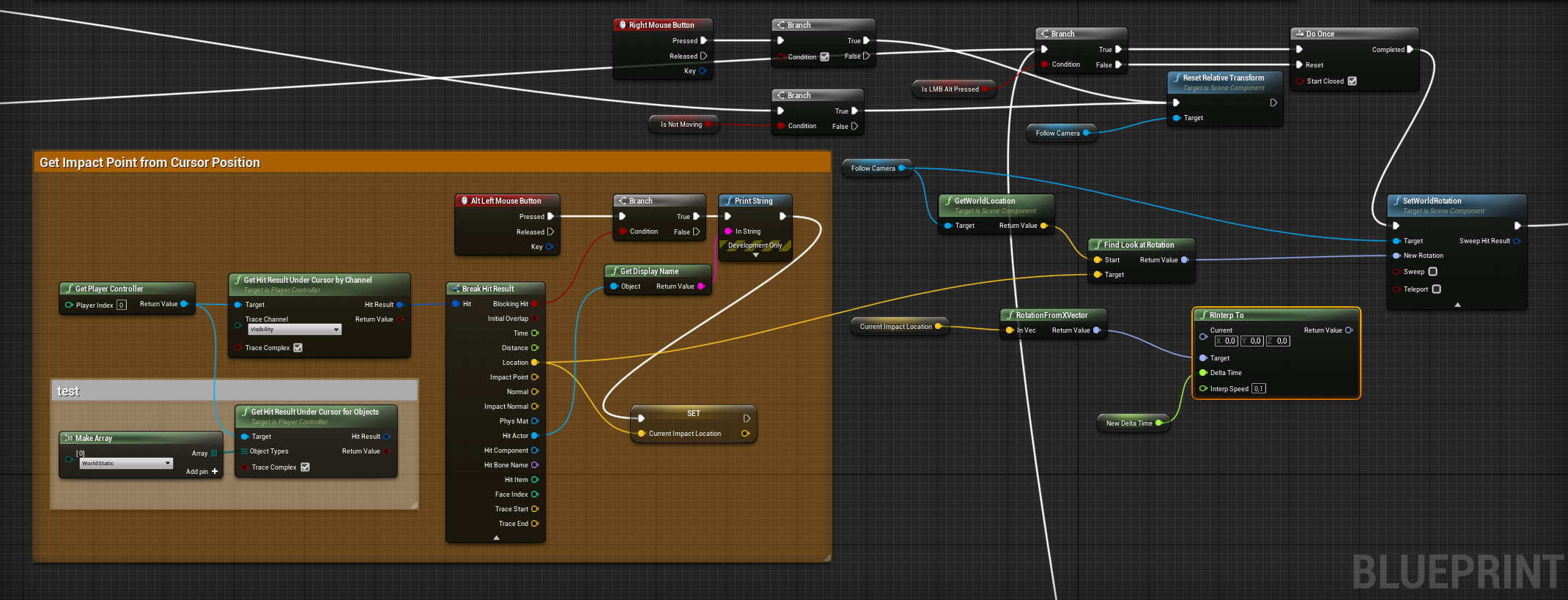
the gif shows how it works at the moment. Sadly my attempts on lerping with RInterp to did not work
I would also need to change the Reset Relative Transform which starts when the character is moving again. This little gem here should end in a system like this:
Testvideo to show the camera system of Second Life
cedar sparrow
How would I sort an array of strings alphabetically?
is there a node or do i need to make a function
 supple dome
@full fog just make the new rotation the target for rinterp, current is camera rotation, and place it on tick for the delta time
thin rapids
Hello folks, me again - that Viking bastard.
May I steal a minute from the brave folk here to take a look at a target Blueprint and what I could do to add a proper Lerp to make a camera look smooth to a point in space?
https://i.imgur.com/6vlUbeI.png
@full fog shouldn't it be FInterp instead of RInterp?
nvm FInterpTo is not for rotation
my mistake
full fog
-uff. I can try. Little note: I am just an artist learning BP's, a cow can better code than me.
like this? I wonder what would be good numbers for delta time and interp speed..
full fog
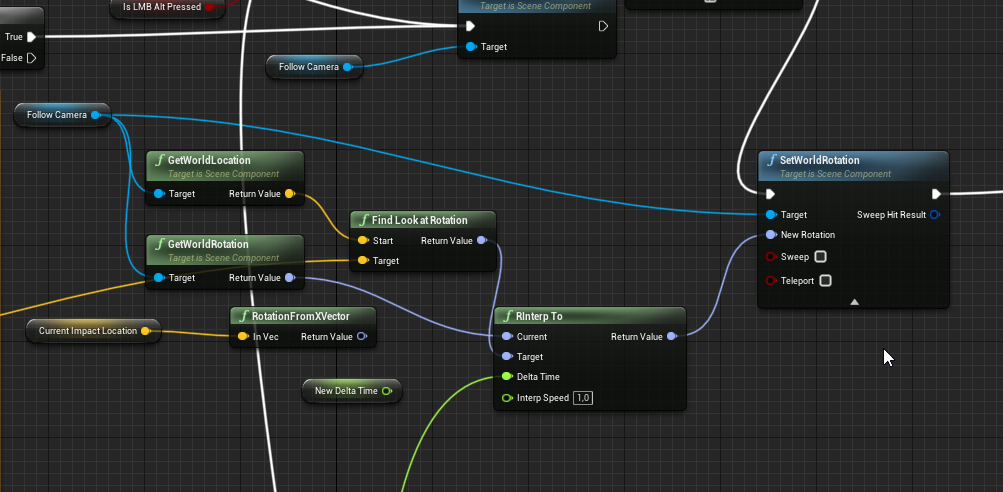
so, i did this -- the current problem now is that the cam moves, but stops. its actually just moving to the direction of the target but not the whole way.
shut hinge
ar you sure its x, i'm not getting any response from the print string when walking forward.
supple dome
yes
shut hinge
I'm switching pawns, but its not registering the print string. hmmm, not sure why.
supple dome
HitLocation comes from mouse click, while interpolating on tick, make sure the clicked location is saved to a variable, then use it to interpolate
full fog
supple dome
yeah the hitlocation is getting lost
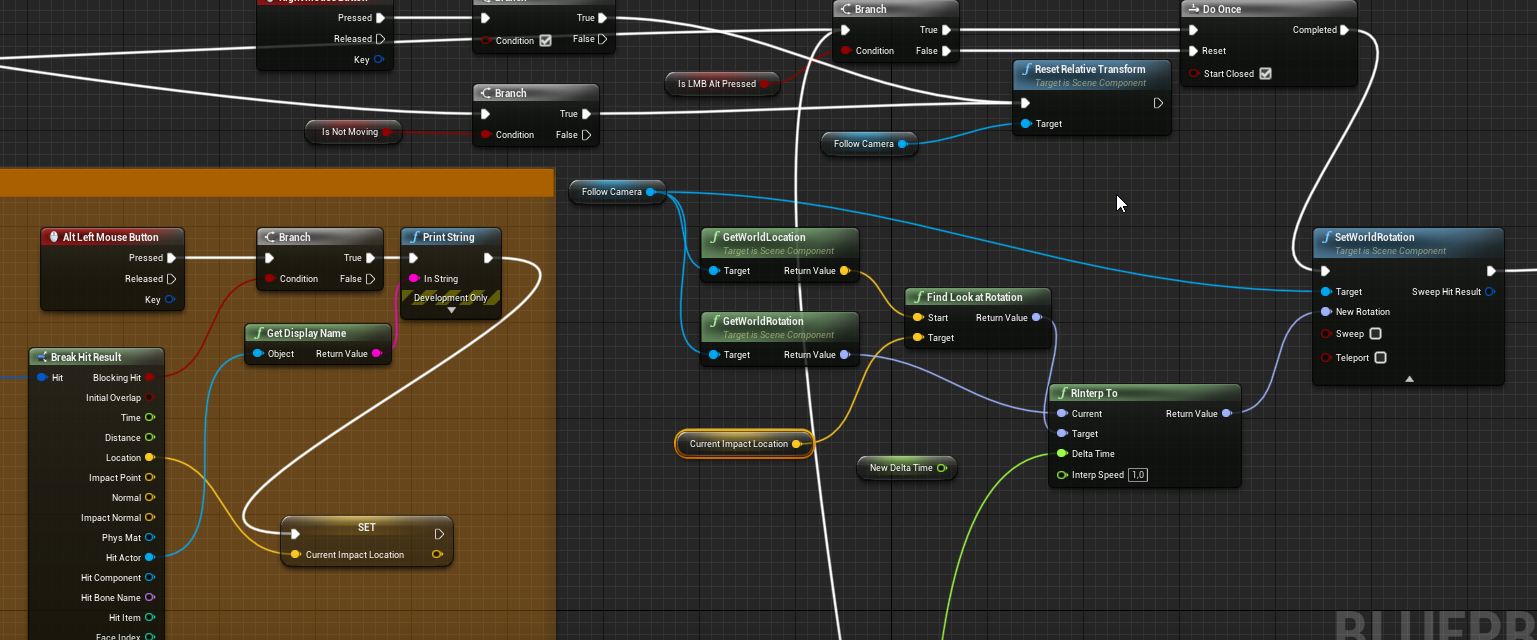 supple dome
shut hinge
supple dome
shut hinge
well hasn't worked, I put this in rex's BP as a custom event, Get actor of class\Target = Character Movement = Updated Primitive = Get Forward Vector <= 20 (Branch) Print String "Walk Forward"
supple dome
its only moving while you have it pressed, shouldnt be like that
full fog
oh
supple dome
organize a bit your code its getting confusing :p
full fog
well, i am organizing all day like on the yellow BP part but this here was trial and error for the last two days
shut hinge
I'm firing it from the widget because i can't fire it from the rex BP because its a child of a parent.
and if I fire it from Rex's BP then all the players fire it.
problen, can only link the scene component forward vector, the other forward vector pin won't link up.
full fog
@supple dome Is it a function like this that i would need to use?
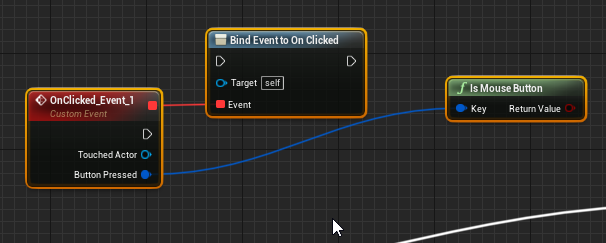
I am totally sorry, i just worked with pressed and released events before
supple dome
no your code was fine, i just think your tick was plugged on that branch+DoOnceNode, meaning it wouldnt interp every tick
im assuming what you have down there is a tick
full fog
yeah I kinda had to do a do once because ..the camera moved already.. but just on pressed, not on its own and did not stopped
maybe the new rinterp will stop that but i was just happy that "anything" worked there
ok now its moving to this point - but yeah, just when pressed
But initally its doing what it should do.. just need to figure out that it should do it on clicked(?) and not need to press it and wait
shut hinge
why is that moving so fast
 thorny cedar
i need help to make a check if my particle trace hits a speciofic object
 verbal canopy
A specific object, or a specific class?
thorny cedar
my box to hit is in a BP, but i only get the whole BP out, when i print out the hitactor
its a gas tank and i wanna check if the user fills in gasoline for a specific period of time
verbal canopy
So you need to check "is this object a gas tank?"?
thorny cedar
its the collider above the tank
mortal wharf
https://gyazo.com/801d023d2b506b84cefd96fbe3994b87 https://gyazo.com/471c49adba6a96c8715828ee4bf25cd0 https://gyazo.com/ac3feda3c82a5c5e1624750a0e14de9b I am trying to: If character is in a specific animation start 10 second countdown if character is not in that specific animation don't do a countdown.


 thorny cedar
yeah that works, so my cast is my check?
ahhhh its normal to use casts also as a check
verbal canopy
yea, it's a very common use
thorny cedar
in my case i have to cast to the BP where my collider is within
another question do you have any idea how i can check how long someone hits the tank?
verbal canopy
set a bool when the hit starts and save the time
thorny cedar
save the time is the difficult part, i guess i just never did it befiore :/
ok i want that the user fills the tank for 5-10 seconds
thorny cedar
predict projectile path by trace channel
trim matrix
Hey guys)I have a question
How best to store an item in inventory? The item changes its properties over time. It would be possible to describe by means of structure, but I cannot describe all subjects by one structure.
It can be done so that after I pick up the object, make it invisible on stage and in the inventory there will be only a link to it. But I think it's a bad idea....
So I want to ask you for advice. If you know how to help me, then use @ and my nickname, please. So I can see your message =)
Thank you in advance for your help ^^
verbal canopy
I'd create a float variable a set it to GetTimeSeconds when you start hitting the tank. Then just check if more than 5 seconds has passed since that time
as long as you keep filling it, obviously
if GetTimeSeconds > YourSavedTime + 5, hurray
thorny cedar
perfect thank you
 sick sapphire
what node do i use in the anim blueprint transition so I can know how long has passed since an animation started/blended in
trim matrix
@trim matrix In a loop, check each element of the array
 remote meteor
for each loop, if one is false, return false, if it finished the loop, return true
mortal wharf
https://gyazo.com/801d023d2b506b84cefd96fbe3994b87 https://gyazo.com/471c49adba6a96c8715828ee4bf25cd0 https://gyazo.com/ac3feda3c82a5c5e1624750a0e14de9b I am trying to: If character is in a specific animation start 10 second countdown if character is not in that specific animation don't do a countdown.
I can explain again If my character is in animation set a countdown for 10 seconds if his animation doesn't change and the countdown fully ticks down change camera but if the character animation changes cancel the countdown.
verbal canopy
That's what they were giving you
for each loop, if one is false, return false, if it finished the loop, return true
trim matrix
@trim matrix Create a function. In it, cycle through all the elements. If at least one element is false, then the function will return false. In this case, if the function returns true, then all elements will be true
remote meteor
function library it and make it a pure function if you want
trim matrix
@trim matrix Conversely, you can create a function to check if all elements are false
mortal wharf
Does anyone know how to fix my problem above?
remote meteor
@mortal wharf you want an event that will only trigger after 10 seconds into an animation state?
mortal wharf
I can explain again If my character is in animation set a countdown for 10 seconds if his animation doesn't change and the countdown fully ticks down change camera but if the character animation changes cancel the countdown.
@remote meteor
trim matrix
@trim matrix You can also create a function that returns the type int. Also you check in a cycle all elements and return 0 - if they differ, 1 - if true, 2 - if false
mortal wharf
I have two animation sit and stand and after 10 - 15 seconds the character changes from sit to stand anim but when the character is in stand anim i want a countdown for 10 seconds if the timer ticks down change camera but if character is not in stand anim don't do countdown.
@remote meteor
trim matrix
@trim matrix The best option is to create a function that returns a bool. Compare each element with the previous one, if they are different then the function will return false. And then on the first element you look, whether all elements are true, or false
slender hawk
Is there a way to get the name of a variable?
trim matrix
@trim matrix Unfortunately, I can't send it to you now because I'm at work. Except in the form of a code and not a drawing, if you will
cedar sparrow
Anyone know how to set a button ON TOP of a text box like this?
remote meteor
@trim matrix
mortal wharf
I have two animation sit and stand and after 10 - 15 seconds the character changes from sit to stand anim but when the character is in stand anim i want a countdown for 10 seconds if the timer ticks down change camera but if character is not in stand anim don't do countdown.
@remote meteor
remote meteor
instead of describing how you want to do it, why don't you describe what are you trying to achieve
i dont quite understand your "method"
mortal wharf
Sit is the neutral pose but after 10 - 15 seconds my character switches to it's attacking pose which is stand and when the character is in stand pose start a 10 second countdown if the timer ticks all the way down change camera but do not do the countdown if the model is in sit pose. @remote meteor
trim matrix
@trim matrix I was wrong. Give me 5 minutes and I'll set an example for you
mortal wharf
Is that the Animbp? @remote meteor
remote meteor
Sit is the neutral pose but after 10 - 15 seconds my character switches to it's attacking pose which is stand and when the character is in stand pose start a 10 second countdown if the timer ticks all the way down change camera but do not do the countdown if the model is in sit pose.
@mortal wharf i mean you pretty much gave yourself the answer
within the animbp event graph yes
trim matrix
@trim matrix@remote meteor You need to compare one element with all the others, ie you will have two cycles and one will be nested in another
In principle, this algorithm will fit any array whose elements need to be checked for equality
and the result
shut hinge
Levelling system is working, running xp is working for all party members, BUT HOW do I spawn my Commander into the world when hes a play start Capsule?
Possess Node won't do Player Start Capsules !!
For the possession is being done from the Level BP's works ok for all my party member meshes but the commander is a player start capsule and I can't spawn him from the level BP !
And if I do put his mesh into the Map, and possess from Level BP then there are two copies of him because of the player Start causing problems.
remote meteor
oh
to check all the boolean to be the same?
yeah then you need to check one by one


 shut hinge
help, how do I get rid of the spawning commander, a second copy is spawning when I start the game when I already got a copy of his instance in the map referenced by the possess node in level BP.
mortal wharf
What's that? @remote meteor
mortal wharf
https://gyazo.com/37cb2e4165493d7a28a5d63ebaacc2b1 So like this? @remote meteor
 remote meteor
try it lol
mortal wharf
it did print the string but it didn't do it after 10 being in the stand anim. it prints it after like 5 seconds in the sit anim where it is not supposed to do anything. @remote meteor
tight cobalt
How to pass var info from one actor bp to another.
Usually when passing info from character bp, I use get player character and plug it in cast to object node...But what to plug in to actor bp actor node? For example if I want to get some variable data from actor bp to show in level bp.
remote meteor
do you have to ping every message
mortal wharf
Sorry i just don't know if you will see the message or not.
tight cobalt
I never understood this, and been avoiding it all the time by making all variables either in level bp or char bp.
 woeful dawn
Hello, does anyone know how to make a death effect like this
shut hinge
ok how do I get my dialog trigger on overlap to detect the rex pawn, it only works for the commander pawn. But when I switch pawns, it stops workig.
tight cobalt
@woeful dawn You should ask in vfx section maybe.
tight cobalt
You need to set material to be UI
shut hinge
how do I set up an array with On Component overlap, I need my party membrs to be detected so they can use the dialog triggetr.
mortal wharf
Still didn't work.
hexed coral
im trying to set the material of an object via blueprint interface not a umg object
shut hinge
and not just the commander, but I need it only to be active when switching to different party members so only one party member at a time can trigger dialog..
tight cobalt
@hexed coral
mortal wharf


 mortal wharf
What do you mean?
hexed coral
@tight cobalt im trying to set the material of an object via blueprint interface not a umg object but i want to set it through umg
remote meteor
tight cobalt
@tight cobalt im trying to set the material of an object via blueprint interface not a umg object but i want to set it through umg
@hexed coral Oh..i see.
What node are you using to set it?
hexed coral
Event click and then an blueprint interface call.
mortal wharf
 tight cobalt
@hexed coral Not sure, but maybe you can try set material instead?
thin rapids
https://gyazo.com/0d63b25a3fbd09f49747023e47ed3a47 Like this?
@mortal wharf yes
tight cobalt
That the one i was using to do thin..although never in UMG
mortal wharf
That didn't work i will say this as i said before i have got a sit and a stand anim i have a timer from 10 - 15 seconds to switch to stand from sit and when my character is in stand start the 10 second countdown if character is not in stand do not do countdown but for me to make him sit again when he is in stand is to simply go up to him and then he will sit again.
He didn't want to sit again he just glitched out.
hexed coral
yeah nothing shows up in UMG but it does appear in the actual blueprint. I'll just daisy chain some nodes until it works. Thanks @tight cobalt
tight cobalt
@hexed coral Np.
remote meteor
tbh
it will be better
if you can draw a flow chart for us
LOL
full 2 row length sentence without any punctuation i cant comprehend
mortal wharf
Everything goes right apart from this one thing: When i go up to him to try and sit him down he tries to sit down but he can't so he just stands up again. This was not a problem before this.
tight cobalt
@mortal wharf maybe hes tired of sitting? 🙂
mortal wharf
😕
tight cobalt
😛
Anim states can be painful. You should relax for the rest of the day, and try again tomorrow. Happened to me more than once. Been trying to figure them for hours with no luck, then another day fix in no time.
remote meteor
for what i understand
he can only sit for 10 sec
then he will stand
after standing up
10 seconds later if hes still standing
then trigger the camera thing
shut hinge
how do I get another character to detect the trigger when I have switched over to that pawn?
remote meteor
wouldnt you want the trigger to detect the character instead?
mortal wharf
He starts off in sit and i have a random float set up between 10 - 15 seconds and in between there he should stand up and i can go up to him and make him sit again but after this it didn't work anymore. And if i for example forget about the character and let the timer tick down change the camera.
shut hinge
the trigger (box collision) works fine for the commander, but soon as I switch over to another player character and posess them, I can't get the on overlap component to detect that player.
shut hinge
So only my Commander pawn can trigger the dialog but not my other party membrs I possess
mortal wharf
???
remote meteor
i can go up to him and make him sit again
you make it sounds like you have more things
this variable
shut hinge
what I'm trying to do is complex as I have 10 party members in my game.
mortal wharf
Yeah what about that?
remote meteor
i can go up to him and make him sit again
you do this by setting theSitvariable totrueisnt it
mortal wharf
How do i do that?
shut hinge
well its hard to set up the game for 10 party members. To get the dialog triggers to work for them. At the moment they only work for the commander.
mortal wharf
https://gyazo.com/46ff00cd16df52a4073190e412b7106b This is in the Player BP
 shut hinge
as long as I don't switch party members, dialog system will work, but if I switch, it will cease to work and when I swtich back to the commander, it stops working, that's because I got an annoing second copy of the commander spaawning in. I did delete the player start instance but it keeps spawning in.

 remote meteor
and where is the Should Sit used within the abp?
shut hinge
how do I get another pawn to detect the dialog trigger, I'm now using print strings to try to get detection, tried actor of class, tried == object, but its not working.
How do I do it when possessing another pawn to get that pawn to then use the same trigger?
remote meteor
im mean it should not be aproblem for an actor being unpossessed and go through the trigger
mortal wharf
I might just use delay's instead.
remote meteor
its more about how the trigger collision is overlapping to your corresponding actor
shut hinge
I put my commander through the trigger, the dialog shows. I them Posesss Rex and take him through the trigger, nothing happens, no print strings showing. So Im not sure if the nodes I have wired in the on overlap are correct or not, its trial and error.
remote meteor
first
make sure the overlap happens first
that it triggered the on begin overlapped event
shut hinge
Because in Dialog Master BP, for the Commander on On Overlap, I have him connected to the Cast and Object to Other Actor...
But for Rex, I don't know how to wire hin up so On Overlap detects him coming in.
shut hinge
Now his Cast is to his own BP, but if I cast to his BP, then how can I cast to Rex's BP when he comes in? I
I think its set up so he can use it. And it was done this way to stop all the other pawns from firing everything off.
remote meteor
oh well
on casting there is a cast failed exec node
you can cast to rex on a second try but i dont really recommend doing this
shut hinge
So I'm casting to the Child BP of the commander. Not the Parent.
maybe I need to solve this other problem first.
Here's the problem. I have an instance of my commander in the map. But another copy of him spawns when starting the game.
I don't know where its coming from.
Now in level BP in order to posess him. his instance has to be in the map level.
BUT, the copy that spawns in is the only copy that works with the dialog trigger. I can't figure this out. The Instance of him that's in the map won't work with the trigger IF I switch to another party member then switch back to him.
A bit stumped..
remote meteor
uh
did you happen to manually spawn a commander?
and have commander set to being the default pawn of the game mode?
for trigger, and fast, you can do this but i suggest find another way to determine if the overlapped actor can use the dialog or not. Either an Interface, or an Actor Component, so you can use it to identify whos able to trigger stuff.
shut hinge
I did get rid of the Player Start Instance.
But somewhere the game is spawning in a player start instance, even though I deleted this one from the map.
I tried setting player spawn to 0 under ai properties to force it to spawn me in the one copy of the commander to get rid of the second copy. But that copy that is in the map that's hooked up to the possess node won't work with the dialog.
shut hinge
Is player character BP an actor component.
remote meteor
its an actor
an actor component is an plug that goes into an actor, and the actor shall have the component's functionality
shut hinge
why do you need the bind event to the trigger box?
shut hinge
my Dialog master BP is an actor Blue print (ts not in the level blueprint.).
remote meteor
its the same 
remote meteor
you do this on your dialog master?
shut hinge
this is what i have going on at the moment. for the commander.
remote meteor
CH_Player is commander?
tight cobalt
I need some help with flying pawn doesn't collide with anything in level. All collisions are set properly, it register overlap events...but collisions dont work..plane flies through objects.
shut hinge
Yes, CH_player is the Child BP of the Commander Pawn.
Speed Freak, just put a Collision sphere around your pawn. Surely that will stop a wall.
remote meteor
@tight cobalt the root component needs to be a collision for character movement to register collisions
also you need to block
not overlap
for stuff that you dont want to pass through
tight cobalt
I thought there is some glitch in detection, so i tried trigger box.
All working fine
Except collisions..
It flies through the mountain
Gonna try suggestions now
remote meteor
does the mountain has collision
and your flying pawn's collision needs to block the object type of the mountain
remote meteor
how do you move it?
shut hinge
there's no colllision sphere
 shut hinge
No player capsule either.
remote meteor
Plane mesh can be the collision
but usually you want a capsule to be the collision
shut hinge
if it has a collision when imported.
remote meteor
unless you are doing precise collision thing
thin rapids
without a movement component
@remote meteor speed_freak has a rotating movement component tho
shut hinge
ok so now i need to get that dialog system to detect other pawns.
tight cobalt
Movement is regulated by forward speed var
Also there is a boost in speed key, whish is not important atm
thin rapids
you dont move by rotating
@remote meteor but unless its a floating pawn movement there aren't many other options for movement components (for pawn classes)
remote meteor
i see you manually code the input movement
shut hinge
well at least the flycam works. Just got to get the dialog to work for my pawns.
remote meteor
why dont you use a movement component?
 astral fiber
I have an actor which has a spline in it to generate a mesh along it.
I created a new actor with the spline actor as child actor. If I now add spline points to the main actor in the editor the spline actor construct still tells me there are only 2 (2 are default) spline points. Any ideas why?
shut hinge
Don't delete splines in construction scripts.
tight cobalt
This is the collision under plane mesh
I tied block dynamic too
Checked my mountain collisions,..under player collision view. they all seem to be fine
Tried box and simple plane,,still no collision
remote meteor
try adding a sphere collision as the root component
tight cobalt
Will do now
remote meteor
and have it set to the same profile
your mesh doesnt have a collision built in, also it depends if you use simple or complex collision as simple
tight cobalt
your mesh doesnt have a collision built in, also it depends if you use simple or complex collision as simple
@remote meteor Hmm actually I didnt import collision. The auto generated had some holles in it so i deleted it and i thinkI actually use complex as simple atm
remote meteor
well
using complex as simple, and the engine actually renders the object twice, one for mesh, one for collision
so if you dont need that super accurate collision
just use a sphere collision as the root component and have the static mesh set to no collision
tight cobalt
Dont need anything acurate..just want to respown plane if it reaches the level boundries thats all
But invisible wall didnt work neither
So I am pretty positive problem is in bp of the plane
shut hinge
Add Component Sphere Collision. Set it around Plane, then Attach to mesh.
remote meteor
but then
mind if i ask whats the reason to code movement input yourself rather than using a movement component with flying mode?
there's even Floating Pawn Movement Component
shut hinge
i got my movement set to walking in the dialog system for testing it.
My dialog dosen't have camera switching yet.
mortal wharf
So everything goes as planned now apart from one major issue. https://gyazo.com/b7db2a018ec4333e2c3c939533a8e6b7 This is my blueprint and as i said everything goes good apart from that if i enable my IsStand Variable it will do this: It doesn't detect if the character is sitting or not for example: if i make my character sit again after standing the delay is still ticking and then changes camera when character is in sitting form. But if i disable it he won't attack me at all please help.
 tight cobalt
@remote meteor It was new thing to me, it was my first time to try flying. Honestly didnt know what i was doing, jsut wanted to make plane flying as my initial idea was to just use it for the camera sequence where player need to jump out of the plane. I needed speed to be instant as the plane starts in the skies.
Attaching sphere didnt work..Made it root too, it just messed up the proportions and spring arm.
Weird..
shut hinge
Well I never heard of a mesh that dosen't accept collision spheres.
tight cobalt
Plane mesh is root..and it should be working.
Also i checked plane mesh has valid collsions
mortal wharf
are you talking to me? @remote meteor
shut hinge
no target for the sensing?
tight cobalt
Any way to fix sweeping thing?
Check here https://www.youtube.com/watch?v=cA-f-2br-8w

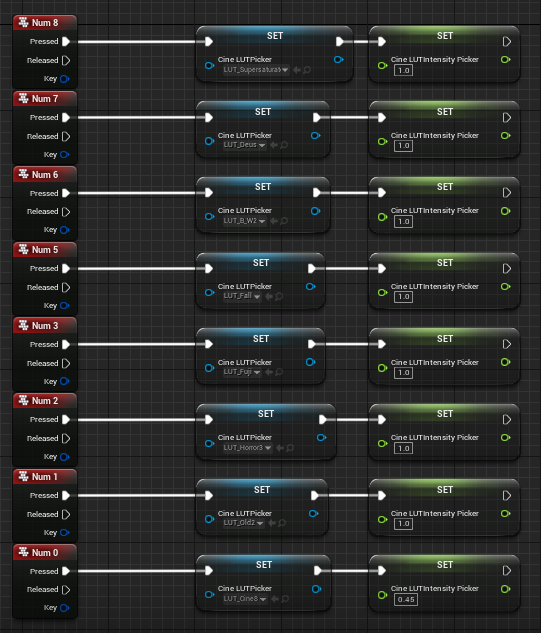



Ignore the smoke and lightening..its attached to plane cause later on I have event where lightening struck the plane, this was the easier way to make lightening follow the plane