#blueprint
402296 messages · Page 482 of 403
 rare ember
 tender glen
Get Mesh
 white crypt
first cast to the blueprint(pawn)
rare ember
???
 dense saffron
@maiden wadi You just helped me figure it out! you're right it made no sense for the normal line to be that large because the normal was my trace end to hit location being trace start so the line was going from the location to whatever point the normal is in world space. What I actually needed was to do (hit location + (Hit normal * a number)) for my trace end and it got me the line I needed
 foggy oyster
Random question, why are you link line things like boxy, or is that just an older version on UE4
 thin rapids
Random question, why are you link line things like boxy, or is that just an older version on UE4
@foggy oyster you mean the wires?
foggy oyster
yeah
thin rapids
it's a plugin
foggy oyster
cool
white crypt
you can get somewhat similar outcome by changing some of the settings

I don't know if the grass was greener on the other side for me, but I discovered how to make the blueprint lines straight. I like the look o...
its not the same though
 brazen ridge
Could anyone point me toward a simple direct keyboard input tutorial or documentation please?
I'm trying to make it so users can type in numbers and have them displayed on screen but its proving harder than expected
 jaunty dome
as in you have a form and users type in the number ?
or as in you have a pad and player taps on numbers ?
http://vicsdevblog.blogspot.com/2016/04/achieve-straight-node-lines-within-your.html
@white crypt I have tears in my eyes
I don't know if the grass was greener on the other side for me, but I discovered how to make the blueprint lines straight. I like the look o...
thank you
white crypt
umm, you are welcome i guess 😄
jaunty dome
so
say i have an array of vectors
is there a builtin function to return the nearest vector to the player
or should i create it myself?
white crypt
i think you will have to check the "distance to" for each loop
oh vectors, then you will have to calculate the distance
for checking distance between actors theres a "distance to"
jaunty dome
yeah
thought there is a built in function
for vector arrays
that plucks the nearest vector
problem is, i'm afraid it will hinder the performance
white crypt
not that im aware of
jaunty dome
if i simply use loops, for every AI point
I mean for every point the AI decides to go to
brazen ridge
as in you have a form and users type in the number ?
@jaunty dome I would prefer if the player could just type numbers directly from the keyboard directly into a UI text box
would I need 10 individual things for each number (1234567890) or is ther a simple "detecth whic key is pressed"
white crypt
theres a function inside widgets "on button down"
and you could check if its a number or not
jaunty dome
also that
white crypt
but yeah there are several ways of accomplishing that
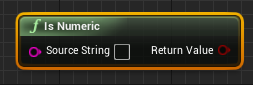
if you convert the input to a string theres this https://prnt.sc/t05ns3
 jaunty dome
the basic idea is just to use UMG, stick the UI onto the pad
then do your logic within the Widget BP
and on success/fail, Emit a message
that's about the whole gist
hummm
alright i don't care about getting the nearest vector in an array
is there a way i can scramble an array ?
say there is LocationsVectors, and AvailableLocations
white crypt
shuffle?
brazen ridge
I'm trying to create an algorithm where the user inputs 2 numbers and it outputs the shared highest common factor
 swift warren
@brazen ridge https://en.wikipedia.org/wiki/Euclidean_algorithm

In mathematics, the Euclidean algorithm, or Euclid's algorithm, is an efficient method for computing the greatest common divisor (GCD) of two integers (numbers), the largest number that divides them both without a remainder. It is named after the ancient Greek mathematician Eu...
brazen ridge
I don't have a clue how I'd convert that to UE
static int32 GreatestCommonDivisor
(
int32 a,
int32 b
)
I found this on the documentation
 gray rapids
Im having a wierd error

Using this recoil script, if i Reverse the timeline, everything works like normal. but if i do Reverse from end, i get error message

 tight venture
@timid rune did you ever get that figured out?
white crypt
@gray rapids your problem is not in the picture that you provided. your issue is that your weapon reference is invalid(NULL). you need to it set it the same way as you did for "reverse"
tight venture
I have a BP class for a piece of poop that flies through the air. I want the poop to be spherical before it lands, and cone-shaped afterward.
I do not want to perform mesh deformation, as this part of my game is not nearly important enough to warrant all that work. All I want to do is have two meshes and swap them out OnHit.
My question is:
Should I create a mesh placeholder (don't know what that would exactly be called), and change the mesh at runtime? Or should I just create two meshes, and swap Visibility settings? Which is more performant?
Swapping the visibility settings seems like it would both be easier and more performant...
white crypt
if you dont have 10k poops flying around there wont be any difference
personally not sure which is more performance friendly, you would have to emulate thousands of them to see the difference
tight venture
Changing a mesh at runtime (i.e. destroying a mesh component and dynamically creating a new cone mesh) seems more expensive
white crypt
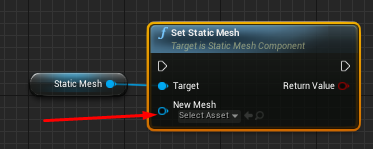
why destroy, just set a new mesh
tight venture
Well, why not destroy, if the old one's not getting used
white crypt
you can set a new one for the same component
tight venture
anyway, I think I'm gonna go with the Visibility swap... just wanted to kind of "think it out" on here
oh, I didn't know it worked that
way
And no, I won't have 10k poops flying around. Maybe 100 at most
white crypt
 tight venture
👍
white crypt
i dont think you will win anything by going either way
tight venture
thx
gray rapids
@white crypt I dont get it. What do you mean set it the same way?
white crypt
show your code before your timeline
your weapon reference is not set for one of the inputs for the timeline
gray rapids
But the thing is, if i just REVERSE i dont get any errors. but if REVERSE FROM END i get error
why does doing it From end make my pawn invalid?
 hoary orchid
is there a way to Disable Mouse Button Input only?
gray rapids
It says that my playerPawn is null when i try to do the "add pitch to controller"
white crypt
oh damn right it says pawn, im a bit sleepy so read it that it was your weapon ref
hhmm, maybe try on begin play to promote that pawn into a variable
and replace your get player pawn with that
somethings fishy
gray rapids
Yeah i mean everything works as it should, i put some "is valid" branches before i do the pitch change, and now i dont get the error
but im just confused as to why my pawn would suddenly become null if i Reverse from end
white crypt
sure is valid will fix that but i agree with you that its really weird
gray rapids
since the regular reverse gives 0 errors
white crypt
is it a multiplayer game?
gray rapids
Ya
white crypt
cant you get the exact reference of the pawn that is using this logic?
because you are trying to get it at a 0 index and that might be conflicting in some way
gray rapids
I suppose, but i mean for now i aint gonna fix something that aint broken, for now xD
white crypt
im almost certain that its a multiplayer issue on how your logic is set up
gray rapids
Yeah i mean
putting it like this instead gives me no errors, even without Is valid
but both functions exactly the same, from what i can see
even with the errors
white crypt
your problem was that you were using get player pawn
i suppose
https://prnt.sc/t06vie this should work too maybe
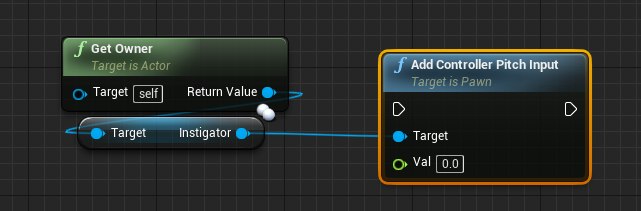
if you set the owner when spawning that actor
gray rapids
I mean the weird thing is that the error didnt seem to affect the gameplay in any way
Now for a follow up question. Is there a way to the reverse recoil slower?

 last jetty
Hey, I have a newbie question. I'm trying to make my character's attack check if the target has a variable called "MonsterHealth" and if so, then deduct a value from it. I can't work out how to check if the target has a variable with that name
tight venture
what are you trying to actually check? if the character has attacked a monster?
last jetty
One tutorial I found accomplished the effect by creating a branch to check every monster in their game, but that seemed like a mess
I'm trying to check if the target has a variable with the matching name
So when the character attacks, it checks what the target is, then checks if it has the matching variable, then deducts a value from it if so
tight venture
what i'm saying is... just tell us (big picture) what you are trying to do. you may be going down the wrong path with the whole checking-for-a-variable-with-this-particular-name approach
e.g. i need a way to deduct health from monsters that my character attacks, but ignore anything that's not a monster
last jetty
Ah sorry, yeah it's exactly what you described
tight venture
hehe, okay. well, do you have a class BP_Monster?
last jetty
Yep
I'm struggling to get my head around the idea of how to change the value of a variable for an object that has yet to be determined
tight venture
so, where you are inserting your attack logic, do you have a cast? cast to BP_Monster?
on the target of the attack?
last jetty
The attack logic is in the playable character's Bp and tries to cast to an undetermined monster
Because each monster has a different BP
tight venture
okay. first off, make an abstract base class for all monsters
and have all your monsters derive from it
last jetty
I was beginning to realise that mistake from when you mentioned the word 'class'
I feel dumb lol
tight venture
don't feel dumb, no worries
it's just the learning process
anyway, make a new class BP_Monster, and put everything that all monsters share identically (variables, meshes, whatever... anything) into this base class. go into the class settings and check the tick box for abstract class
or not even identically, excuse me. meshes, yes, but variables, just the presence of the variable is enough
 trim matrix
You can look up at inheritance
it's essential for programming imo
even if you want to do the game in bp only
tight venture
if all monsters have, say, Health variable, but every type of monster has a different starting Health, or value for that variable, still you want to put a Health variable into the base BP_Monster class, then override its value in the children
trim matrix
@last jetty Bro, all you have to do is cast the variable
then you can drag out the value
So lets say enemy variable is actor
on that variable drag pin, cast to (What ever monster you have)
you will have access to the HP or any variable inside it ONLY if that Actor is successfully casted as what ever you are casting
tight venture
you would just cast to BP_Monster, no matter what specific type of monster it is. when the engine acts on a BP_Monster, even though it may actually be a BP_Gremlin, it still actually is a BP_Monster as well (cuz all BP_Gremlins would also be BP_Monsters)
trim matrix
It might take a while to wrap your head around it, but I promise when you understand the concept, you can do sooo many things
tight venture
so you could put a function BattleCry() in BP_Monster, and then in BP_Gremlin, you would overwrite BattleCry() to let out a Gremlinish whine, but as far as the engine knows, it's just calling BP_Monster.BattleCry(). Get it? It's called Polymorphism, if you want to look it up
last jetty
So I quickly copied one of the existing BPs and turned it into an abstract class, then created a child BP. In the child BP, none of the variables are listed, but I am still able to get/set them.
Is this normal?
tight venture
gtg bbl
last jetty
Okay thank you for your help ❤️
@trim matrix Thank you for your help too, I'ma try learn about inheritance now
trim matrix
Yeah u dont see it
but it's there
as long u are child of that parents
all the children will have the same variable as the parents
but that children can have variable on its own too
For example Animal is the parent
there is variable called number of legs
Cat is children of animal it's value will set lets say to 4 legs
where human which is also a child of animal have 2 legs
but children might have variables that others dont have for example human have variable CarBeingDriven
How should I set up my characters rigging in Blender if I want to make modular character? And if I just make skeleton for the head part, can I import other parts without bones?
I understand the master pose node but I dont understand how should I setup the body parts
last jetty
@trim matrix So is casting to a class different to casting directly to a BP? I'm trying to test it right now, but cannot seem to connect variables to it like I have been with casting to a BP
(Ignore the error message, it's unrelated)
 soft swan
Could I possibly get help with something in UE4? I want to make VolumeTrigger(2) inaccessible until the player character has gone through VolumeTrigger(1)?
https://puu.sh/FWwBn.png This is what I was working with, just not sure how to essentially run a 'check' to verify the player character has gone through VolumeTrigger(1) to then be able to go through VolumeTrigger(2)
 swift warren
@soft swan have a boolean that is set to true when the player goes through trigger 1
and when they go through trigger 2, run it through a branch on that boolean
swift warren
the branch is in the wrong spot
you should make it the first node after you cross trigger 2
oh wait
yeah like that
make sure its not set to true by default
 soft swan
Any idea
swift warren
really dude
just gonna leave that there in the middle of a discussion?
you could at least wait until we are done with this issue
@soft swan what part of it isnt working
like, is the level not loading?
 hot mural
Sorry
soft swan
here I can do a recording real quick. But yeah the balcony isn't loading
swift warren
make sure you have the level name right
one time i was tearing out my hair over levels not loading and realized i had made a typo
hot mural
So can i ask my question now?
hot mural
That looks pretty cool
soft swan
ty
hot mural
Is he still helping you?
soft swan
@hot mural go ahead 🙂
hot mural
Im new to unreal and was following this tutorial where he linked CBRef to target, and i am unable to.
Woops wrong picture
its the second picture
 tawny tinsel
my child widget wont appear help idk why it wont exist
hot mural
The character reference
soft swan
I think you'd do the "GetPlayerCharacter" instead right
 fathom cobalt
Does anyone know how to make the game count how many procedural meshes have been generated?
swift warren
wow people have absolutely no care for others here
hot mural
@soft swan honestly you might be right im not sure tho im pretty new to unreal and was just following this tutorial.
soft swan
(I fixed my problem!!!!!!!!)
 astral fiber
Hi guys,
I want a public float variable for an actor, so the user can choose a value from the editor.
The problem is, that I cannot predefine values. I could use an Enum but is there a way to define floats and let the user choose one from a dropdown in the editor?
 earnest tangle
Is there some particular reason it has to be from a certain set of numbers, and if so, why wouldn't it be easier to just use an enum in the first place?
(It should be fairly trivial to convert an enum into a float)
astral fiber
Yes there is a reason, the actor is only available in these modifications.
I found no way to convert an enum to a float
This is the only way I found turning an enum into a float
earnest tangle
there's a "select" node which should do the trick
iirc it should give you a pin per enum value so you can just hook up the numbers you want for each value of the enum
tight venture
@last jetty Did you get that figured out?
I'm making a game wherein cats poop on the floor, and the apartment "takes damage" when poop gets on the floor.
A have an abstract BP_Floor class with a box collider just peeking over the top of it, for overlaps with the BP_Poop actors
Now, I am subclassing BP_Floor into different types of flooring, to give different amounts of damage depending on which type of floor gets pooped on, using BP_Floor::DAMAGE_MULTIPLIER. (BP_Hardwood::DAMAGE_MULTIPLIER = 1.0, BP_Carpet::DAMAGE_MULTIPLIER = 2.5, etc)
My question is:
How should I handle when the poop lands on the junction between two floor types?
tawny tinsel
help
tight venture
It will trigger both the overlaps, and I don't want both damages counted, just the one with the higher DAMAGE_MULTIPLIER
tawny tinsel
tight venture
How should I approach this?
@tawny tinsel click on the farthest right-most clickable text in your error message
That's a null pointer exception
Whichever node it takes you to, post a screenshot of it and all surrounding nodes
 flint nymph
make sure you're sending the damage message from the poop to the floor, do a BoxOverlapActors from the poop, set a temporary DamageMultiplier variable "TempDmgMulti" at 0 and a TargetFloor actor variable, then a ForEachLoop, cast to the BP_Floor parent class to get the damage multiplier for each overlapped floor piece, branch with condition Damage Multiplier > TempDmgMulti, if true set as new TargetFloor to damage. On complete send the damage message to TargetFloor actor
you could also sort by location which might be more fair to the player
tight venture
BoxOverlapActors... i'll check that node out, never heard of it
As of now, I just have this in BP_Floor
Oh, cool! Thx @flint nymph. I didn't know about that node, that's exactly what I need
flint nymph
yeah you'll instead want to send the damage message from the poop instead of handling it in the floor itself probably
tight venture
Give the GAMEMODE a default value for the text variable, then try again
The error is just saying that that variable is null, and it's trying to read it.
tight venture
k 🙂
 latent arch
Hi all, id like to track all scene components of a specific types world locations - what's the most efficient way to do this? They may be attached to moving actors and they may be stationary.
but i need to know where they all are and ill use a delayloop etc to keep the locations updated - im just struggling to latch onto them im always returning 000 locations
tight venture
@latent arch You could keep a list of them in the GameState, and then when you spawn one, add it to it
Then just loop through the list and call GetActorLocation on them
Depends on what you mean by "track"... what you're using it for
@flint nymph Like this?
latent arch
well i want to basically have an active radar that tracks audio emitters (scene components) in relation to the player so i can use the information to manipulate the sound effects etc. - i did try a loop but it was very laggy, but that may be where I'm missing something :/
ill be using a timer or delay loop to ping the locations regularly as event tick will be too resource consuming
tight venture
Just use PlaySoundAtLocation(GetActorLocation(source)). You don't have to keep track of them manually at all.
latent arch
well the only trouble is that this game uses a Wwise integration so it uses AKcomponent scene components as emitters
tight venture
@flint nymph Only part I am unsure of is whether OnOverlap events are fired off in parallel. i.e. if the DamageGiven boolean flag will work as intended to prevent the "second" overlap from doing anything
@latent arch sorry, I don't understand what you just said. Anybody else think they can help?
latent arch
@tight venture sorry 😦
tight venture
lol I don't know what Wwise and AKcomponents are
 mossy barn
Hey everyone. I've created a level sequence using my camera for my main menu background and it plays for a bit and then switches to my player camera and then switches back to the level sequence. I'm not to sure why, its meant to stay on the level sequence the whole time.
latent arch
well no its not really as its all already in the game / engine as registered components - im just struggling to track them moving raround - i can "set" them as objects and variables etc etc but no farther
basically i need to be able to find and track all USceneComponent
if i can do that then ill try and sort them to just the AKcomponent
tight venture
@latent arch That sounds possibly like AI Perception. Are you familiar with using AI Perception? (It may be irrelevant, I just still am trying to understand what and why you're doing)
@mossy barn You may want to look at your camera's AutoActivate setting
latent arch
basically the game im working on uses a middleware for the audio so it uses AKcomponent as "speakers" instead of the UE4 sound emitter - i want to track them instead of just tracking all actors etc id like to just track sounds
mossy barn
@tight venture Where would I find that?
tight venture
latent arch
if i can know their world locations in semi real time i can manipulate their sound based on velocity etc
tight venture
Also, above it is Auto Player Activation
That, actually, is what I was talking about, really
When a camera auto activates for a player, the game's view automatically switches to that camera
If you're creating your cameras dynamically, I'm sure there is a node for activation
@latent arch that sounds like AI Perception.
Create a sound stimulus for each emitter, then create an AI Controller for your character, and add an AI Perception component to the AI Controller, and set it to listen for sounds
And also, activate your AI Controller on your character by selecting the one you created to be its AI Controller
latent arch
ooh that sounds interesting, so i can attatch an AI to my controller position that does the tracking for me?
mossy barn
@tight venture Yeah I use a player start so I don't get the editor details pannel for its camera. The autoactivate for the level sequence camera, I tried off and on with no change to the result.
tight venture
Then your character will be able to "hear" your sounds realistically, and you won't have to track them manually. You can add logic inside the AI Controller
mossy barn
@tight venture Well I dont even have a player start because its the main menu
tight venture
@latent arch check out this tutorial series on AI
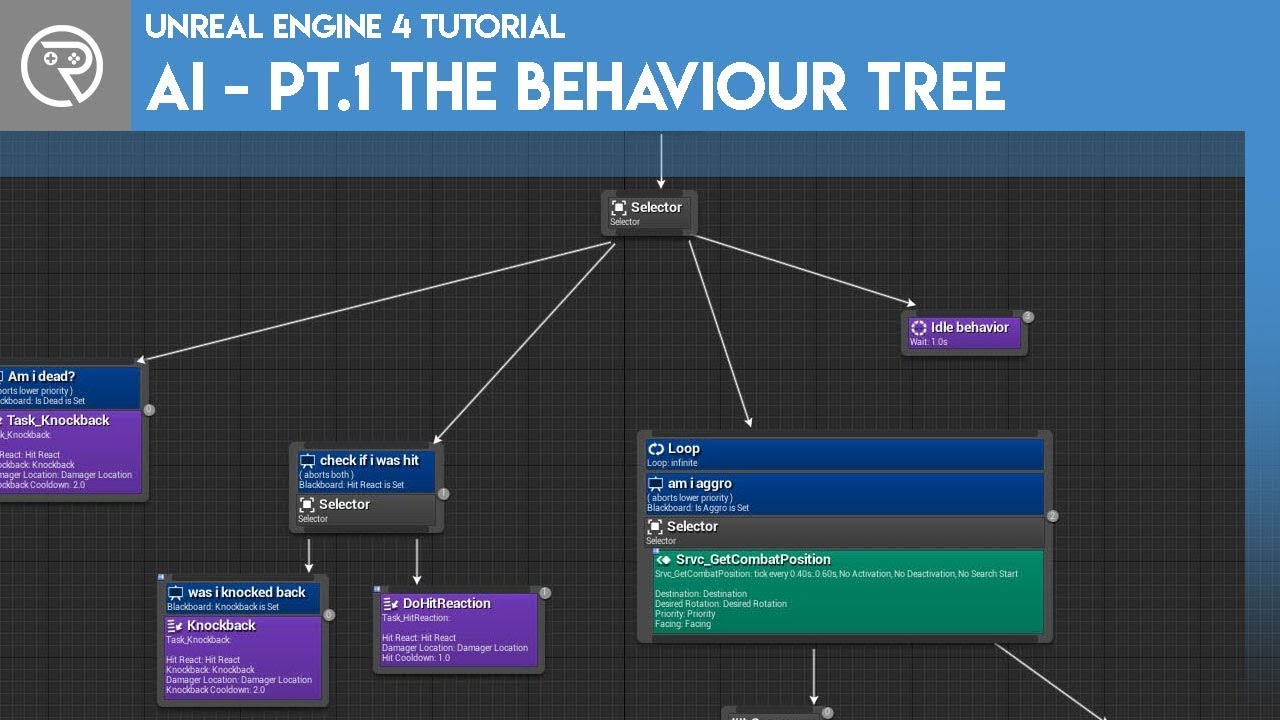
Welcome to the start of a brand new series. This time we are diving into AI for games. This episode introduces the concepts being used in AI design and in particular, the behaviour tree. In this episode we add an NPC that can randomly roam around the level.
Support me on Patr...
I'm using it for sight, but sound should be similar
latent arch
thanks i will
tight venture
@mossy barn Are you creating cameras dynamically or do you have a set number of cameras created beforehand that you're having trouble with it switching back and forth from?
mossy barn
@tight venture So I have one single camera on the map and that I am using in a level sequence for my main menu background. I don't have a player start or anything. But when I play the level sequence goes half way then cuts to my players view and then like 5 seconds later it cuts back to the level sequence (Which is looping) and stays there. So it only cuts to the character once and then cuts back, just dont know why its cutting to it at all.
tight venture
I don't quite understand... you have a player character spawned during your main menu sequence?
mossy barn
No. No character or player start is spawned yet the character spawns anyway
tight venture
You don't want it to, correct?
mossy barn
No. I don't want any player chacater
tight venture
It sounds like you need to create a separate Level for the main menu
Where no player character will be spawned
mossy barn
This is a separate level to the game
tight venture
Sounds like the trouble is that the player character is even getting spawned at all, not anything to do with cameras and what not
latent arch
as a failsafe / backup. how would i report a USceneComponent world location?
tight venture
@mossy barn are you kind of like... playing a montage of gameplay footage in the background of the main menu?
@latent arch just use GetActorLocation? or if you want the component's location, I think there is a GetComponentLocation, too, providing the actor it's attached to
latent arch
hmm, i wish that was working for me i just keep getting 0,0,0 :/
mossy barn
No my background is an actual scene with the camera going forward and backward in a loop
tight venture
@latent arch When you are moving your components around, you may be moving them around relative to the actor it's attached to. So, the actor is always staying at 0,0,0 but your component is moving around relative to that. Either make the component the root for the actor or, if that's not possible/doesn't make sense, try getting the main actor's location and add the component's relative location to it
Easiest fix is to make the component the root, if that's possible
then the component is the same as the actor's location
flint nymph
@latent arch so this isn't providing proper locations?
latent arch
hmm i dont think it is at the moment , but you think if i just get generic actos then add the component to them that might work?
@flint nymph hey Joe, thanks for your help - i will try that, last time i tried similat it sort of worked but lagged the frames like crazy
flint nymph
it probably lagged a lot because you were trying to get all scene components which is kind of crazy
but you can filter the class
to specifically what you want
tight venture
@mossy barn You could record the background as a media file and have it just play it in the background, instead of having it generated dynamically.
flint nymph
(I haven't been really reading in so I don't know your exact intentions)
tight venture
Keep in mind that GetActorsByClass is expensive, or so I've heard
latent arch
@flint nymph yeah thats what i thought initially - i got all actors and then got the ones with the component i wanted but was similar
@flint nymph mind if i send you a PM?
flint nymph
sure
mossy barn
@tight venture I was thinking that as a solution just could have been a lot easier to add stuff to the background
tight venture
@mossy barn If you could upload a short video of your problem, it would probably make it a lot easier to diagnose
You can try using Gyazo if the video is too big to upload
mossy barn
As you can see the camera switches to a player camera only once for like 5 seconds then back to the loop and it doesn't happen again and everything is fine but I still dont want that 5 seconds
Also like you saw a charcter spawns even tho I dont have a player start...
tight venture
I am willing to bet that it's switching to your character's field of view due to auto activation. Like I said, your problem is that a character is getting spawned in the first place. Focus on that
You know where your character is getting spawned? Where in your blueprint? Level Blueprint maybe?
mossy barn
@tight venture So i made a game mode where no character spawns and now instead of it switching to the characters view it switches to another random locations view
 lusty escarp
Hi, I'm back again with another spline question. How would I create a script that would add a new spline point to the track every 'x' amount of units? Let's say the player creates a Conveyor Belt between A and B. I then want the system to create points between these two default points for the items to lerp between.
 carmine thorn
@astral fiber You know.. There is also the "toFloat" conversion node. It does not pop up automatically for some reason though but it does exist. You just have to drag the wire out and type it in.
tight venture
@mossy barn I am sorry, you've reached the end of my knowledge about this kind of stuff. I've never used a Level Sequence before, so I wouldn't know if it has anything to do with that or not. All I know is that it sounds like the playing view is getting switched due to something having auto activation ticked
mossy barn
I tried that too
 tight schooner
@lusty escarp that's a tough one. I've made scripts that generate splines from scratch but I don't know much about adding and redistributing points on an existing spline. In a functional sense, spline points define form but what you're looking to do is mainly cosmetic? Maybe change how meshes are distributed over the spline rather than alter the spline itself?
 simple lantern
Hi i'm having a little confusion about BP classes, I understand the basic hierarchy of Object>Actor>Pawn>Character, but when I create, let's say, an actor BP and name it something like "MyCoolBP", MyCoolBP becomes it's own class? As in when i'm referencing a class in code, that comes up as it's own thing
tight schooner
If the spline is curvy, it might be better to get a measure of the spline's total "distance" to determine how many spline meshes to map over it
 chilly linden
can someone help me with a spline road, its getting screwed up when I try and create curves
lusty escarp
@tight schooner yeah, i'm still trying to recreate the Satisfactory ConveyorBelt System (simplified) I virtually was wanting to test to see if i could lerp the item between points and check to see if the next point was occupied, if it was, then it can't move forward
carmine thorn
@chilly linden Yeah I can help you. Bit hard to explain all of it in text form though
tight venture
@mossy barn maybe try posting your question in #level-design ?
or #cinematics ? <-- never used that channel before, not really sure what it's about
 jaunty acorn
is there a smarter way of accessing items instead of making over 1000 BPs for each piece of armor / weapon?
mossy barn
@tight venture Will give it a try. Also if it helps in finding the solution, I've notcied as soon as I start the game another camera actor spawns (Where I get cut too) and when I end the play its gone. So somewhere this camera is being spawned...
tight venture
Question of advice:
For anyone not around a few hours ago, I am making a game where my level has different types of flooring. Only have hardwood and carpet atm. And the level itself takes damage when poop gets on the floor. So what I've done is made an abstract BP_Floor class with a box collider peeking out over the top of it, and subclassed it for whatever floor type it is, which dictates how much damage is done when poop lands on it (carpet does more damage than hardwood, etc).
My question is, which would be the better approach... the way I just described, or by using the mesh editor and creating something like this out of a single mesh:
and then just using separate colliders for the different areas?
As of now, I have it set up like this, to emulate the same thing. One hardwood section and two carpet sections of floor
tight schooner
@lusty escarp though I'm not facing the same challenges as you with splines, my instinct says not to over-use spline points. Instead of using Get Transform at Spline Point, you can use Get Transform at Distance Along Spline so you can do things at consistent distances (like check for items or move things along at a constant speed) apart from where the spline points are. So in that way the spline points can just define form rather than also function as distance markers.
I suspect using them as distance markers will add some complication down the line...
tight venture
@jaunty acorn I can almost definitely say yes, there is a better way than that. You'll have to clarify what exactly you're trying to do though, in order to get an answer
jaunty acorn
@tight venture i'm just creating Blueprints to make armor pieces / swords / potions / everything equipaable and can store them
i have tons of pieces of armor and weapons
flint nymph
@jaunty acorn are you utilizing parent classes?
jaunty acorn
yes
tight venture
You really thousands of different pieces of armor/equipment? Well... if they behave differently, then yes, you'll need a blueprint class for each one.
*really have...
jaunty acorn
not thousands haha just like
1k
but still a lot yeah i know
it's pretty much the entire synty pack
tight venture
But like Joe said, you may be able to simplify a lot of it if you aren't using parent classes
tight venture
okay, so you may want to separate the functionality and the cosmetics
carmine thorn
@jaunty acorn appropriate time to use a data table and an armor class that gets variables from the data table
tight venture
If a lot of pieces of armor behave the same, but just look different, make a parent class for the behavior, and subclass the cosmetics
jaunty acorn
@tight venture they act the same, look different, and give different stats is all
lusty escarp
@tight schooner Would you mind if i messaged you privately ? don't want to lose the messages you send
jaunty acorn
@carmine thorn i will look into that, im new to UE4 so im gonna look at tutorials about that now
tight venture
@dim kiln you'll have to clarify exactly what the problem is.
carmine thorn
@jaunty acorn You can set a model reference, stats, health level, cost, anything you need really
jaunty acorn
@carmine thorn thanks! i will look into this ^^
carmine thorn
No prob
flint nymph
as is typical wadstein has a video on it lol https://youtu.be/nt1hlJO-DPo

What is a Data Table in Unreal Engine 4
Source Files: https://github.com/MWadstein/UnrealEngineProjects/tree/WTF-Examples
Note: You will need to be logged into your Epic approved GitHub account to access these examples files.
tight venture
Anyone have any insight on my flooring? Which approach (if either of the ones I listed) is best?
jaunty acorn
 dim kiln
@tight venture im not sure what the problem is 😦 My water shader looks brown unless any variable is updated then it springs to life
dim kiln
ok thanks
carmine thorn
@tight venture You could save a lot of grief by looking into physics materials and collisions events generated by your 'poop' actors. As you can apply a different physical material to each floor material the process can be automated
chilly linden
@carmine thorn the spline kinda works its just when i try and make curves it fucks out a bit
carmine thorn
@chilly linden Mind getting to a call? I can help you better if I see what is actually happening
chilly linden
sure
 thick pewter
I'm using timelines to move a platform but, it seems like I can only move it along the X axis, how can I get it to use Y?
simple lantern
Is there a way to print the frame count? GetFrameCount returns an int64 which i can't figure out how to convert into a string
thick pewter
So how would I change this to operate along the Y axis instead of the X?
tight schooner
@lusty escarp sure go ahead
lusty escarp
@thick pewter You can split the Vector3 into separate Floats
Disconnect the Vector3 at SetLocation
Right click on the Newlocation and select Split
You can then split the Select Vector3 aswell to give you the X
thick pewter
@lusty escarp Ty! However, one is a float and the other is a vector
hot mural
Can anyone help me im trying to make it so a image show's up for the my weapons but its not tracking and im not sure what to do.
lusty escarp
@thick pewter
thick pewter
@lusty escarp oh duh rofl thank you!
lusty escarp
@hot mural If you are wanting the 'AK47 [F]' to follow the camera viewport location, then you can set the widget to be in 'Screen Space' you can then get the location of the player character followcamera and set the rotation of the widget to follow it
hot mural
alright got it thank you
 quasi valley
Anyone know how to pass parameters to widgets inside of actors?
flint nymph
depending on what you’re doing you could set an event in the actor with the given parameters as inputs that set the values in the widget
that you can then call from other actors with either a cast or an interface message
but don’t know exactly what you’re trying to do
quasi valley
Wait, Ill check that out
 weak spoke
Hello, does anybody has experience with reading the luminance values of each pixel. I am trying to build a luminance camera sensor.. so far I was able to read the values of one pixel by capturing the scene and transfering the image to a rendertarget. then I was able to read the values with the functionalities in the blueprint editor. but I'm stuck since I'm not sure if this is an accurate measurement for the luminance value of the pixel. furthermore I'm not sure how to read all values from the whole image.
I am aiming to read the luminance values and want to create a pseudocolor display. For any help I would be grateful.
 snow halo
Hey all when you have multiple character blueprints with player controllers. how is the index determined for each? Is it guaranteed the same every time?
i'm having an issue where i wanted to grab a PC index to set view target and now that i added another char to the level the index changed
quasi valley
depending on what you’re doing you could set an event in the actor with the given parameters as inputs that set the values in the widget
@flint nymph I can't seem to reach the widget from the "owning" actor
snow halo
Or is it a race condition?
flint nymph
Where are you creating the widget from
quasi valley
I'm just trying to show a float variable from the actor as a progress bar inside the widgets interface
flint nymph
you've already created a binding in the progress bar correct
quasi valley
Well kinda, it's an empty function. I thought I can access something like WidgetOwner or Parent from there
flint nymph
right click of the output in the empty function
create a variable named health or somesuch
this'll bind the progress of the bar to that variable ofc in the widget
you can then set that variable in your character's blueprint
 clever cedar
Is is possible to change blueprint variables while the game is running? I have my blueprint selected in the filter but everything is grayed out.
flint nymph
expose it by clicking open the eye and then you can edit it at runtime in PIE
by clicking the actor in the editor
it'll list exposed variables in the details panel
clever cedar
Oh I see, the details panel in the main editor, not the details of the blueprint. 👍
simple lantern
Hey, I have the Editor Scripting Plugin installed but the Spawn Actor From Class node isn't appearing, what could be the problem?
tight venture
@simple lantern I dunno about the Editor Scripting Plugin, but I do know that certain nodes cannot be used in certain places (usually either inside or outside of an Event Graph is the deciding factor). Try adding the SpawnActorFromClass node in an event graph and see if it comes up there?
simple lantern
@simple lantern Thanks for the reply, yeah that's what I tried, and without context sensitive. Didn't work unfortunately
Not super important in the end though, turned out I needed a different node anyway but still strange that it's not showing up
tight venture
Hmmm... afraid that's all I know then 😦
 trail kestrel
hi, so i have a actor which is just a sphere scaled down to .1, but when i spawn it with spawn actor, it's the size of a regular sphere even though it's the right size if i pull it out of the content browser
flint nymph
it's setting the transform to 1 on spawn
and since the sphere is the root of your actor
it's following that transform
parent the sphere to a scene component
 gritty elm
@thick pewter first thing you need to open the timeline by double click and then you need to add y-axis track and you need to modify y-axis value keys in timeline, then you can do something like that
@trail kestrel you need to set scale 3d after immediately spawn the actor like this:
@snow halo the best way to get all actors from your character class by changing index from here.
trail kestrel
is there any reason to use a "scene component" over a "set actor scale" or vice versa, or are they pretty much the same thing
flint nymph
adding in a scene component just changes the root of your actor and enables you to freely scale the sphere without worrying about spawn transform
set actor scale 3d corrects the spawn transform
gritty elm
@simple lantern yes you can imagine that MyCoolBP is an actor (it is a just a kind of name) that represent the base actor class, so you are creating copy of actor class by just duplicating or renaming actors. so the class mean main class which is actor, and actor name is MyCoolBP which inherit from actor class, so it mean you are creating different actors from same class (which is actor base class)
simple lantern
@gritty elm Helpful, thanks!
 gusty shuttle
My Branch at the far right keeps giving me a error on trace hit. The actor hit ref is saying nothings being read. How do I get around this error?
gritty elm
@jaunty acorn you can create a base actor and then you can create all child from that class as many you want, in that way you get same functionality from your parent class, you no need to change or add anything again and again, because you've already done all stuff in base class
gusty shuttle
As in, if I trace hit a random wall without the trace channel im looking for, it gives me the actor error
 timid rune
I was editing a material in the editor and when I got out my viewport looked like this. Does anyone know how to fix it?
gritty elm
@gusty shuttle did you print string hit actor to debug? are you sure that your hit actor collision is set to block all? and did you turn on line trace debug line to check if trace is hitting correctly?
@timid rune restart the project
gusty shuttle
It was working just dandy and I did do a print string and if I hit anything without the specific trace channel it would say None. If I hit the actor with the proper trace channel, no error. @gritty elm
timid rune
It didn't help
gusty shuttle
For some reason it does not like trace hitting any object that does not have the trace channel. I don't care that it hits other stuff without the proper trace channel. I just need to fire off events IF it hits the actor with the tag
 inner ginkgo
@gusty shuttle You need to check if the trace hit anything valid. The hit actor will be null when it doesn't and that will cause an error in your second branch there.
trail kestrel
@flint nymph Thanks
gusty shuttle
Aye, I thought about running a IsValid?. I'll give that a crack @inner ginkgo
gritty elm
@timid rune didn't understand issue correctly, you can try to reset the layout
timid rune
I don't see that option
inner ginkgo
If you go to Load Layout, there should be a Default Layout option. I think that replaces the reset option.
timid rune
I clicked it and its still the same
inner ginkgo
From the view it looks like you are missing lighting.
Does your scene still contain a light option?
err light object.
inner ginkgo
What did you change on your material? You may have been using an unlit material that was changed to lit?
timid rune
I only changed one, not all of them.
I just added color to the mterial that I changed
Material*
inner ginkgo
Also, make sure you are looking at the right side of your view. You might be looking at the back.
timid rune
Nope.
inner ginkgo
Does it still look dark if you run your game?
timid rune
Yes
inner ginkgo
Not sure then. I would double check that material and make sure it is set to unlit and that something is in the emissive channel.
quasi valley
@flint nymph That worked, thank you 🙂
flint nymph
great! 👍
timid rune
@inner ginkgo I started up a new 2d game and its exactly the same.
inner ginkgo
If starting a new project doesn't fix it, then you may have modified some engine content.
That would require fixing the engine content or reinstalling that version.
timid rune
I opened a 3d game and its fine.
inner ginkgo
3D games use lit lighting.
If you have a directional light to your project, do things become visible?
 golden kite
uhm, this doesnt seem right
inner ginkgo
Use a break point after the multiply. Some watches continue to get update when out of scope, while others don't. So you can't run trust a set of watches out of scope.
inner ginkgo
And if it's out of scope that's accurate.
golden kite
what does that even mean
inner ginkgo
It means the multiply isn't being executed constantly for your watch value. It only shows the last result. If it hasn't been executed yet, it will show 0 as the default. Member variables like speed will exist in all scopes, so the watch can update accordingly. So doing the math manually might not always add up. You need a break point right after the multiply to see the correct values at the time of the multiply.
golden kite
yg
uh
it IS always executing
I added a print string node
and it does print it
lusty escarp
What are the number it is printing out?
inner ginkgo
Put a break point on the print string. And see what the watches report when execution stops there.
lusty escarp
Best thing to do is to work backwards from here, PrintString The CurrentSpeed Float and see if you get a number from here
lusty escarp
Do You get numbers or 0s?
 west tulip
Hello i am facing a small dumb issue....where i have setup multiple widgets in the level blueprint to spawn on click on different locations, but when i go to new location and click on tht new area to spawn new widget the old one appears, not the new one
golden kite
when Im printing currentspeed and forward vector, Im not getting any 0s
lusty escarp
okay good
golden kite
it shows what it needs to show
but when I put them through multiply and try to print it, it gives me all 0
lusty escarp
@west tulip If you put a screenshot of the Blueprint, Then it's easier to decipher
west tulip
@lusty escarp
there are 21 differnt like these and each has its own trigger function and widget spwan
 quaint falcon
i have a big collision sphere on my character... i want to damage all enamies that are in it when i press a button how to check if is in collision volume?
lusty escarp
@west tulip The gate will only fire when the MouseButton is held down **AND **the Actor has overlapped with the Pasta
inner ginkgo
@quaint falcon Using your big sphere, you'd have to keep track of which actors overlap as your move around. If you don't need the big sphere for something else, I'd recommend using SphereOverlapActors, instead.
west tulip
@lusty escarp the thing is its spawning corectly, but when i go to new location to spawn new widget, it still shows the old one
lusty escarp
@quaint falcon You could use a 'GetAllActorsOfClass' Node which will give an array of actors currently inside of the Sphere. You can then use a ForEachLoop and attack all the actors within
quaint falcon
@inner ginkgo wow thhx a lot im gonna screenshot the thing im using it for sec so you get a better idea of what i should do
lusty escarp
@west tulip I don't fully understand what you are trying to achieve here. You will always add Pasta1 Widget to the screen
inner ginkgo
@west tulip You never close your gate, but that might not be a problem if input is turning off correctly.
inner ginkgo
Yeah, you need to close the gate in that case. All of those Left Mouse buttons are going to fire. And any with open gates are going get everything executed.
west tulip
okay how do i close the gates ?
quaint falcon
i have this fire area effect.. i want all the enemies inside it to be damaged... i also have a air area effect and i want all the enemies to get knockback... so i want to get all the enemies that are in a specific sphere to be affected
SphereOverlapActors sounds great is it the best way to do it @inner ginkgo
inner ginkgo
With what you have, you need a pin going to the gate close pin from your end overlap events.
west tulip
@inner ginkgo I will try that thanks a lot!!!
inner ginkgo
@quaint falcon The SphereOverlapActors node is still good for this. It will give you a list of everything in a given sphere. You will still need to go through the list and do stuff, but it will give you a good starting point.
quaint falcon
@inner ginkgo thx! have a great day
lusty escarp
@quaint falcon I presume you have an input where the player presses and the fire/wind effect triggers?
west tulip
@inner ginkgo OMG dude it worked, thnks a ton!! Cheers!
quaint falcon
@lusty escarp yep
lusty escarp
@quaint falcon You could use a MultiSphereTrace to get all Hit actors within the radius of the sphere and then call an damage function
inner ginkgo
SphereOverlapActors is for when you just want 1 sphere's worth of results. Sphere Trace is like a line trace, but with a sphere moving through the level.
lusty escarp
^
tight venture
Anyone know if it's possible to have a single plane with a piece missing? Like a smaller square cut from it to make an L shape? Or if it's possible to "weld" two planes together to make a single L-shaped plane?
It's important that it be treated like a single plane. I don't want it to be a group of 2 planes.
At least treated as a single component, anyway. It's okay if it's actually 2 components, as long as the engine treats them as one. (Or at least I can apply a single material to it and it covers it as if it's one component)
inner ginkgo
Two components parented to each other will mostly be treated as 1, but the material thing won't work out.
What's the goal with the piece? Does collision matter? Because a single plane with a mask material could make it look like a hole is missing.
 tame stream
the text is coming out as "infantry: "
anyone know why the full formatted text isnt showing
inner ginkgo
You are using format text incorrectly. The way you have it setup looks like Append, which is probably what you wanted to use.
tame stream
ooh thank you
tight venture
@inner ginkgo I have described my problem in more detail in #level-design. Not much activity in that channel, though.
Just check out that channel, you'll see what I'm going for
inner ginkgo
@tight venture I see it. Since the floor isn't moving, you can keep your current design (assuming it is working for you) and look into world aligned textures to get the hardwood flooring the line up.
tight venture
Everything does line up. It's the two carpet sections, where they meet, that is a problem. Gonna have to figure out a way for the textures to line up between them.
I'll end up using a different texture for the carpet, cuz that one sux, but the concept still applies
Or... figure out a way to make an L-shaped plane 🙂
inner ginkgo
Sorry, got the wood and carpet mixed up. The solution is still the same. World Align Textures will get them to line up no matter how you configure them.
tight venture
oh
okay
thank you
I've never heard of that concept
Is that a material node?
ah. yes it is
inner ginkgo
It uses a material node, yes.
There's a few short-ish tutorials on Google if you search it. I'd recommend one of them so you know which pins you need to hook up.
inner ginkgo
I think you only need the first two pins for most cases.
tight venture
Ooooohhhh coool, yeah that's exactly what I need
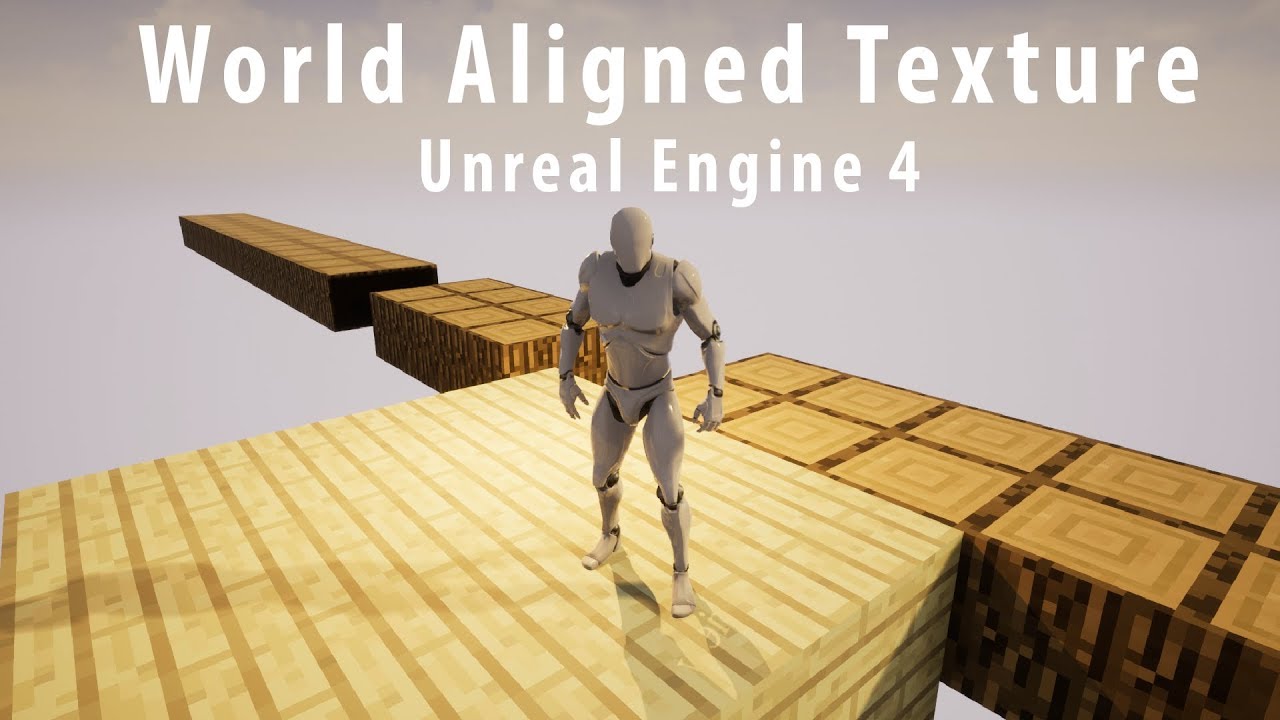
This video will cover the World Aligned Texture Function within the Material Editor in Unreal Engine 4. The World Aligned Texture is very useful to let your world project your textures onto your models.
Video on how you can create a Minecraft Environment:
https://www.youtube....
Didn't know that was even possible
inner ginkgo
It's pretty useful. But only really works for static stuff.
Unless you want a stylized look for your moving things, that is.
inner ginkgo
Yay
tight venture
@inner ginkgo quick question, about materials, if you are knowledgeable about them...
Should you never use the master material for anything? In other words, should you always use an instance pretty much everywhere? I can't see a good reason why you wouldn't want to use an instance, even if you think you'll never change the material or use it in any other way
inner ginkgo
There's no technical reason to avoid using the master. It's mostly a design best practice to use the instances. And since it's hardly any trouble to create and assign an instance, I don't see a reason not to follow it.
tight venture
cool, thx. just wanted a second opinion there
tight venture
Weird. My health bar stops working if I rename the output pin from "ReturnValue". Anyone know why?
I renamed it "Health Percentage" and it seems to never even get called anymore
Name it back to "ReturnValue" and it's all good, works fine.
 teal ruin
4.25 no longer has "spawn actor from class"??
tight venture
I dunno, I'm stuck using 4.24. I can't see why it wouldn't have that node, though
teal ruin
I've turned off context sensitive and it's not showing up still
inner ginkgo
4.25 has spawn actor. Where are you trying to use it?
tight venture
@teal ruin afaik, SpawnActorFromClass is unavailable outside EventGraphs
inner ginkgo
Can't be used in construction. But it can be used in functions and events.
tight venture
errrr.... what he said ----^
inner ginkgo
It also has to be an object type with a world context. So you can't use it in something that is UObject only.
teal ruin
oki, so yeah it's just to spawn out the tiles. Just moving my construction script to event begin play will fix it 🙂
decided to stick with square boards for now with custom X and Y
Though that said... then I have to proc spawn the pieces, too >.> Hmmmmmmm maybe not a grand idea
back to the drawing board!
inner ginkgo
@tight venture For your health issue, make sure you compile the class. And then you might need to go where it is called and use Refresh Nodes.
 wind atlas
hello, I accidentally added 2171 material slots to a mesh
: D
is there any automatic way to delete them?
inner ginkgo
Accidentally?
wind atlas
I thought I was adding material to a static mesh component in my construction script, but I was actually adding it to the static mesh, like the geometry asset in my conent folder
but it could have happened at an earlier date when i was doing something else, i basically just found out now by chance that it happened
i can delete and re-import it, but was curious if theres another way
!! i re-loaded the asset
all good
luckily it didnt save since it happened
inner ginkgo
Nice
wind atlas
whats the proper way to disable a screencapture2D component? if I want to stop it from using resources? If I disable visible and tick hidden in game, would that be enough?
 tribal axle
I have a dot on a hud, and I want the position to follow something in the 3d space, how do I bind that?
inner ginkgo
ProjectWorldToScreen will give you a screen coordinate to work with.
 dapper kiln
So I can ride on my rocket launcher projectile and I want to fix it where I can't. It's cool but players can use it to get outside the level hahaha. I tried editing the "Can Step Up On" to No but it still happens. I want to be able to hit myself so I can't edit collisions can I?
inner ginkgo
@dapper kiln Hmm. Shouldn't riding the projectile trigger a hit event? Shouldn't you just have it explode in response?
dapper kiln
@inner ginkgo For some reason it doesn't trigger the hit event when I land on the projectile while it's moving. It's just like Fortnite. (Now I see how they did it hahahahaha 😉 ) I just can't figure out how to stop it
inner ginkgo
Check the collision on both and make sure Generates Hit Events is checked.
dapper kiln
Yea it's checked but it just doesn't generate hit events unless it stops the velocity of the projectile. When I land on it, the velocity doesn't change on the projectile so I guess it doesn't know I hit it or it hit me lol
inner ginkgo
Seems pretty odd.
Do you have 2+ collidable components on the rocket by any chance?
dapper kiln
I have a collision sphere and a mesh, The collision sphere has collision, the mesh has no collision.
inner ginkgo
Does the sphere cover the whole rocket? Or just the front?
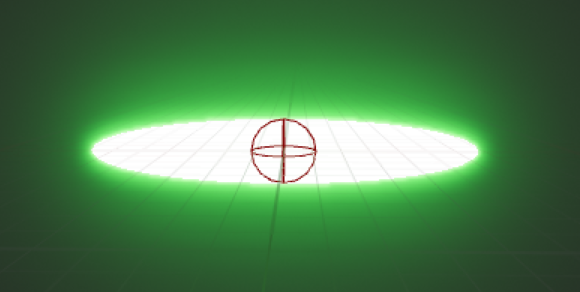 inner ginkgo
Gotcha. Still seems odd that a hit event wouldn't be registered on the player or any of the rock components, though.
dapper kiln
it's set to bounce. I'm not sure if that does anything
So my projectile bounces around before exploding
inner ginkgo
That's just projectile movement behavior. Shouldn't affect collisions.
How do you get on the rocket? I think if it spawns with you already on it, the hits might not register.
dapper kiln
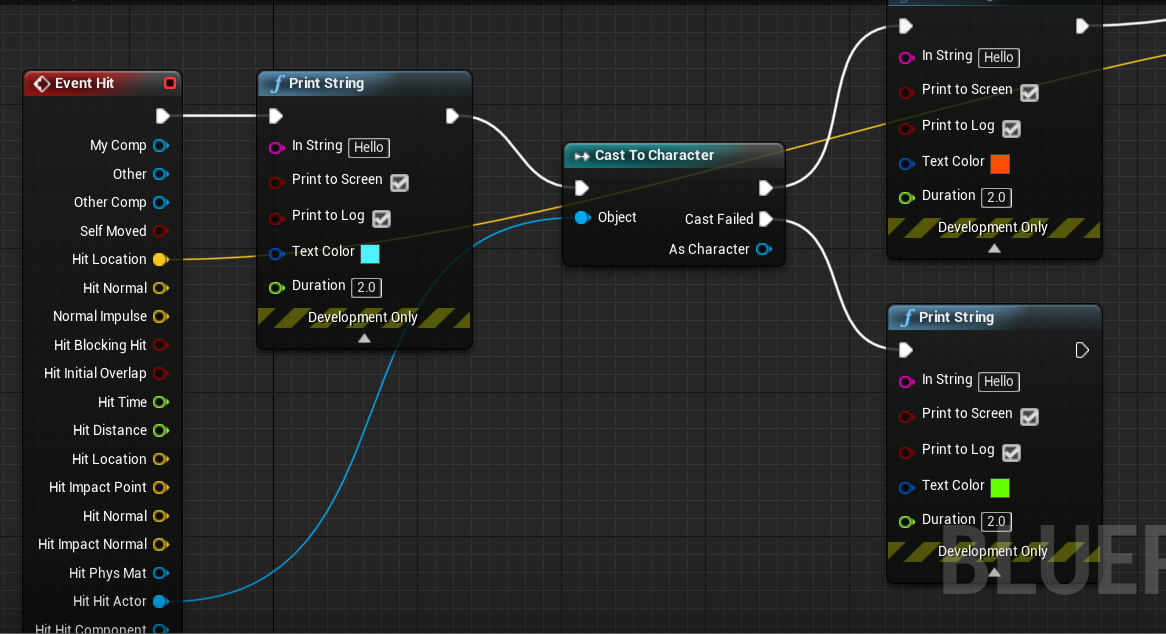
I just shoot the wall and when it bounces back, I jump on it. I also was just checking print strings and I believe that the Event hit IS hitting me but for some reason is failing to cast to Character. I plugged in a CastToCharacter to see if it would hit me and cast to character but it is failing. It only passes if it actually runs into me. If I jump on it it fails.
inner ginkgo
Show me that hit code.
 inner ginkgo
So you get the green hello when you jump on the rocket?
dapper kiln
Yes
inner ginkgo
If you pull the hit actor pin to the first print string, it should auto convert it to pull the display name.
Print that out when you jump on it. My guess is you have some attached actor near your feet.
And that's what is actually making contact.
dapper kiln
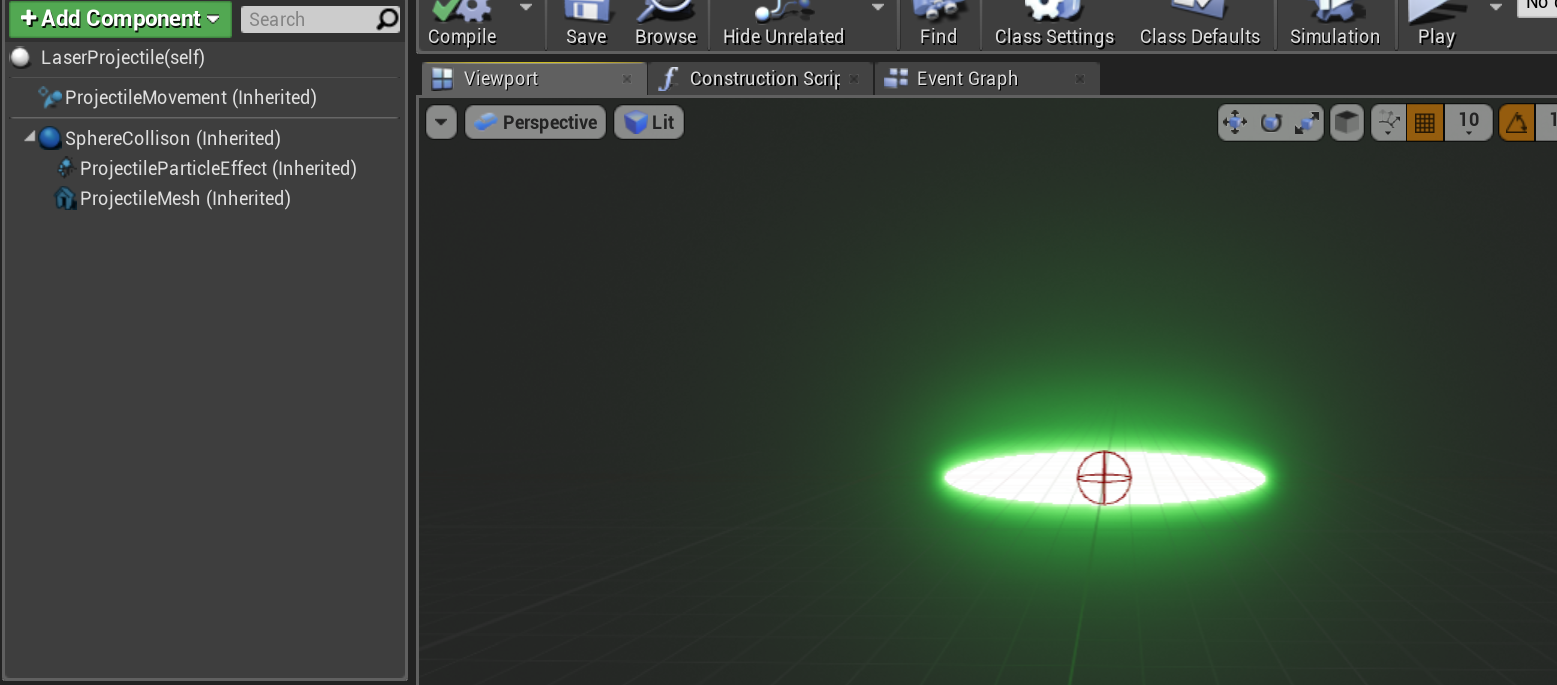
It's hitting its own self! It's printing laser projectile. So it is hitting itself like you said earlier. But how?
 dapper kiln
It's just a mesh thats a child of the sphere collision. I'm not sure either lol. It's not a big deal. I just thought I was missing something easy or simple.
I just spawn the projectile and it does it's thing
inner ginkgo
It should be easy and simple, which is why it s perplexing.
dapper kiln
It is a child of a base projectile, Let me look at the parent, maybe I missed something. But even then, the child should override the parent right?
inner ginkgo
Yeah, the child implementation takes priority. The parent is used if you don't override or if you call the parent function specifically.
I would try check the collision from the player's pawn. It isn't ideal, but if you can detect a rocket hit there, you can do some stuff.
dapper kiln
I guess I can just change the collision to overlap "Pawn" then do my own tiny trace to apply damage. That way it will go through players so they can't ride on it. But also generate a "Hit" with my trace, then I can apply damage and play FX/sound.
I'd just set it to only work on non player characters so It wouldn't explode on players, only enemies
inner ginkgo
Another approach is to have it detect when it leaves the level. And turn off all collision. That way your players can ride it, but not out of the level.
dapper kiln
Hahahaha Yea! I personally thought it was cool but other people thought it could be abused to cheat so I guess I'll fix it. 😦
white crypt
maybe putting some bounds around the level that would block the player could work as well
then even without the rocket you will have a system that wouldnt allow players to leave the area
dapper kiln
Yea those are both good ideas. Basically clipping off the level. Putting invisible ceilings, boundaries, etc. That's a good idea. I could even be mean like some games and put kill volumes so if someone cheats, they die.
@inner ginkgo @white crypt Thank you both. I enjoy chatting over these little pesky issues. It's fun to work on the little stuff sometimes.
 stoic vortex
sorry to interrupt, this is super basic but I'm having a major brain fart and it's killing me that I can't think of it: you know those little dots you can add to blueprint connector lines to control where the lines go? what are they called?
inner ginkgo
Reroute nodes
stoic vortex
reroute nodes!! thank you!
white crypt
theres a shortcut for them as well. shift+left click if i remember correctly @stoic vortex
stoic vortex
thanks!
white crypt
when you click on the line that is
inner ginkgo
I just double click the line.
 harsh topaz
hi
hot mural
Does anyone think they could hop in a call real quick im trying to setup this equip animation but when i try it its no longer equip but its playing the animation
 gilded jay
So this is probably something super basic (im fairly new), and im being dumb, but im having an issue. Long story short. I created an inventory component(actor component). That component has 2 base variables in it. The number of slots (int) and a slot structure component ( structure array). When i try to access these variables in any other blue print I can see them, and they come up, howewever, when i try and access them from my user interface, they give me the "access none trying to read property" from that component, and I'm not sure why.
trim matrix
have u set the inventory component?
Go to your other blueprint and check where you set the component
access none means the value is empty, that's why it return 0
 lapis ermine
Has anyone gotten the editor breaking blueprint error? Assertion failed: false [File:D:/Build/++UE4+Licensee/Sync/Engine/Source/Runtime/Engine/Private/EdGraph/EdGraphPin.cpp] [Line: 1875] Pin named StructOut was serialized while trashed - requesting pin named StructRef owned by node K2Node_SetFieldsInStruct_2
 grim lantern
How do I pad (fill with zeros) a number? Examples 732 > 0732 or 23 > 0023
 surreal peak
In the UI?
@grim lantern
There should be an option on the Int to Text node
Where you can set some min value
grim lantern
It is in the blueprint an int value and I want to convert it to a zero padded number
tawny tinsel
my add child uniform grid panel has no integer input help
surreal peak
@grim lantern That doesn't answer the question
Is that for displaying it in the UI?
grim lantern
No, It's a Widget BluePrint, I'm populating a textfield
white crypt
then 4.23
surreal peak
@grim lantern ... which is UI? :D
white crypt
i suppose
surreal peak
@grim lantern Set that to 4, then you have 0 padding
Turn off the Grouping maybe, cause that's grouping for thousands
 tawny tinsel
ill just upgrade to the newer one
oh.......
well thats too late im already uninstaling the version i got
surreal peak
Classic
white crypt
¯_(ツ)_/¯
tawny tinsel
i wish this node existed in my brains data base before i clicked uninstal ;-;
but i would have to upgrade eventualy
i hope they didnt change too much
grim lantern
@surreal peak Hey! That worked like a charm! Thanks a lot.
surreal peak
Not sure. Could be that you didn't take the same options when installing
Specially C++ Symbols take a lot of space
tawny tinsel
well i think i didnt take them thankfuly
grim lantern
Why is this snippet returning a value that is not 2020, it returns 14943
tawny tinsel
im not very sure it doesnt seem to be spesified wich year is it
you might have to make manual timers for year etc
 lilac matrix
Small problem, I have exposed variables for a blueprint that i use to manage irradiated objects, only issue is that the changes made in the details panel don't show up in editor, only once the game has started, i tried looking around but i probably didn't use the right words to find the solution
earnest tangle
You can use the Construction Script to do changes which are also visible in the editor
grim lantern
If I have a text TEST_LOG_Genesis what's the good way to slice that string so that only GENESIS stays? In Python it would be just TEST_LOG_Genesis[9:] with the slice notation.
Guess just keeping Substrings length really high:
earnest tangle
You probably could just check string length and subtract
for the length I mean, so it wouldn't have to be so high
white crypt
if you only had one underline then you could use "split"
im sure there should be other ways too
or try "chop" @grim lantern
earnest tangle
I'd imagine there should be a way to use regex, or maybe that would require using C++
(and potentially slower than chopping the string at known index but in any case)
white crypt
i think chop is exactly what he needs
grim lantern
Ah yes, that's more explicit than get substring. Thanks
We have a very strong naming convention, so we should be fine chopping
white crypt
i just learnt that chop exists myself, i simply right clicked on an empty place. went to utilities and exapanded string section
and just scrolled through it to look for some options 😄
earnest tangle
yeah trying out random words like "string" or such, or just digging through the cateogires is what I do often to look stuff up
earnest tangle
it would be super convenient if it just gave you a list of everything that accepts a param, the categories are a bit of a pain to dig through sometimes
tawny tinsel
@trim matrix thanks ill try that one if the one im planning to try doesnt work

thsi is the one im gonna try
trim matrix
I dont know what u are trying to do with ur grid, it all depends on what functionality u want
mine is like this
sec taking screen shoot
@tawny tinsel
is that something u are trying to do?
trim matrix
So if u can see from the code im sharing
I do a for loop
u define how many times it should loop.
Eg 10 times for 10 items, 20 times for 20 items for based on invetory size etc
tawny tinsel
i cant really work with loops
trim matrix
Can I see your illustration? maybe i can help you
tawny tinsel
im using a spawner component that createes a widget and its applied to every single character
 tawny tinsel
for me it needs to be infinite
white crypt
current index is just the same as your array index
you just set how many rows and columns you want in the default tab
trim matrix
U can always add more when u need
but yea, good luck
let me know if u are stuck
maybe i can help
tawny tinsel
nah i want it to be infinite forever
alrithy ill mesege here if i get stuck thanks guys
white crypt
i mean his option also works, but in my case i dont need any branches nor reseting variables back to 0
pick the one you want though 😄
tawny tinsel
👍
trim matrix
@white crypt what does ur node do? I might use that for my next inventory
index % length
white crypt
its the same logic as yours
trim matrix
I see
white crypt
just more compact
trim matrix
awesome man
white crypt
im bad with math, its something i caught up during my first years
so always kept using the same logic
trim matrix
oh I don't even finish my high school, thanks for the node gonna experiment with that
earnest tangle
index % length limits the result to length
it's the modulo operator
for example, 1 % 2 is 1, 2 % 2 is 0, 3 % 2 is 1, and so forth
 deep elbow
subtracts y from x and returns the remainder, right <- this is incorrect, it's based on fractions and divide x by y and the remainder is the mod, not subtract
white crypt
at one point i knew how it calculated but forgot during these years


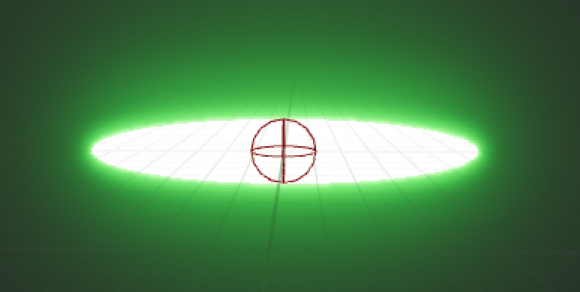
 trim matrix
problem is i have a grid panel and add it as child
so canvas slot will return 0,0 kinda like local space of that child widget
white crypt
oh good job, never used the tick space geometry
trim matrix
same, i just find out online
white crypt
so learnt smth new today myself as well 😄
thanks for letting me know though, might come in handy at some point
trim matrix
I suppose, Im trying to show the desc of the item on top of the hovered widget
it can be a nice touch for any game
white crypt
thats cool, i remember making something similar with the display but found other methods on how to accomplish that. i think i used mouse location
it wasnt perfect but it worked, with your example it might have been better
trim matrix
what works, works 🙂
 blazing ridge
hey you unreal gods, i have a question cause i didnt make it in school math.
i have the following setup (see pic)
on there you have 2 ewxamples of what i want to do.
Example 1 are the points with "1"
i am currently generating a line between the points A and B, now i want to generate a third point C to calculate a bezier curve for those points
i also already have the distance of the line, the half distance of the line, and the middle point.
what im trying to achieve is, take the half distance, and offset the green middlepoint to the relative left or right in 90 degrees.
so basically i want to rotate a vector, but i dont know how ot correctly do this.
the 2nd example with the points "2" is another situation, because the system/algorythm needs to work in püositive, negative and changing coordinates
i would greatly apprecaite any help
so basically i need to calculate this
earnest tangle
I think you'd need to use dot or cross product to find a vector which is perpendicular, if you normalize it, you can use it as a direction and just do mid_point + (perpendicular_dir * desired_length)
I'm not familiar with the necessary dot/cross math off the top of my head but if you google for "find perpendicular vector" or something like this it should give you something to work with
blazing ridge
@earnest tangle thanks for the response, ill give it a shot and let you know what i can come up with
tawny tinsel
HELP
the widget does not scroll
how do i fix
oh nvm i fixed it
it was my canvas set to invisble hit
 cinder dirge
@blazing ridge Did you get it sorted? If not, are your vectors 2D or 3D?
 loud marsh
Hi! Since when is unreal going for rotations in 90 degrees instead of -180 to 180?
blazing ridge
@cinder dirge no sadly not, but my heads starting to smoke 😄
im in a 2d system right now
i found a lot of stuff on the web but most is really hard to understand
loud marsh
I'm trying to rotate a relative rotation, but instead of going -180 to 180 as it used to, now it's going in -90 to 90 and then -90 to 90 again
blazing ridge
i know that i somehow have to solve the dot product to 0, but man i dont know how
 maiden wadi
@blazing ridge What defines the yellow arc?
blazing ridge
the target is to calculate the yellow arc via the point B that im trying to find right now.
the arc is then calculated via bezier curve calc
@maiden wadi
like this
where the red circled dots are the still missing coordinates of point B
latent arch
hey all got any tips for getting the velocity of the players camera? I'm just getting 0,0,0 at the moment. I'm assuming because it doesn't have physics associated with it? is there a way i can get the velocity from its world location instead? or attach something to it that allows the measuring of its velocity? many thanks!
maiden wadi
@latent arch You could calculate it yourself on tick. Velocity is just units moved per second.
latent arch
you think thats the best way in this instance? ill give it a go thanks! will that give me an X,Y,Z value?
 undone wing
I am trying to run my editor utility blueprint which should open a widget but it's not showing anything.
latent arch
@maiden wadi hey buddy do you mind just showing me what that should look like? tried a couple methods now but no dice XD
maiden wadi
Sure, just a sec.
latent arch
thanks a lot pal 🙂
blazing ridge
@cinder dirge @earnest tangle @maiden wadi
let me know if you have new advice for me 🙂
maiden wadi
@latent arch Try a macro like this. It'll just constantly update a vector variable that you can get. And the local vector in the macro saves you some clutter in your main variables list.
latent arch
ah sweet thanks a lot dude ill try that now 🙂
maiden wadi
latent arch
os it still possible to split that up into x y z velocities?
cinder dirge
@blazing ridge I do 🙂 https://gyazo.com/07ff8929f040de97e213e67c342ba64c
latent arch
@maiden wadi thanks a lot buddy
blazing ridge
damn that looks good
tawny tinsel
@cinder dirge whats that looks fancy
blazing ridge
@cinder dirge how did you get it to work/whats the calc?
latent arch
@maiden wadi how can i split into X Y Z velocity? 🙂
tawny tinsel
SOMEBODY HELP ME FIGURE OUT SMTH COMPLEX
so i have a component that makes a list of all the characters in game
one problem is
the characters need to be spawned inside the level to work
cinder dirge
@blazing ridge It uses a geometry hack where you swap the vector components and invert one to rotate 90 degrees. Only practical in 2D, but hopefully this does the trick for you
tawny tinsel
how can i make it so that they dont need to be spawned inside the level to show up?
cinder dirge
@tawny tinsel Something like this?
tawny tinsel
yea it doesnt really work
cinder dirge
How so?
cinder dirge
Do you mean you want to list characters before they spawn into the world?
tawny tinsel
no i mean this list takes data from spawned characters and adds child to a grid box
the data is taken from character actor variables
cinder dirge
Ok sure
If that function was broken, it would be big news
How long is the array it returns to you?
tawny tinsel
6
wich is all the characters in game
but it only takes data from 1
wich makes sense in a way?
because i have 6 character actors in total
i used the advanced minimap tutorial to get the system base
cinder dirge
That sounds like an issue with how you're using the data maybe? Did you loop over the array?
tawny tinsel

In this episode I show you how to create a more advanced minimap for your game. Part 3 shows you how to add other icons to the minimap for ANY actor. That includes, NPCs, resources, and objective markers.In fact anything you want to have an icon will work just fine.
This type...
yes i added for each loop
but theres not early an index input so it fails i think becaue of that
i dont think theres a way to get the data from the actor component without spawning the actor in the level
maiden wadi
Not unless it's a default class variable.
cinder dirge
Oh I see this is before spawning
tawny tinsel
but i need a variable for every actor in the level
i cant use the default variables
what do you mean @maiden wadi
maiden wadi
Then spawn them, then load the widget. You can't get something that doesn't exist. So if they're not in the level, you can't get anything from them.
cinder dirge
Indeed if the actor isn't spawned then it doesn't exist, and you can't possibly get information from something that doesn't exist
Can you spawn them into space? Like out of the level bounds where you can't see them?
tawny tinsel
yup
its only posible to spawn then get the data
well i was thinking ill check wich level they are on if they are on the list level then i will hide the mesh visibility so they dont take up memory
i think thats gonna work right?
and be fairly optimized
when ill have 999999+ in my game one day?
as long as they wont have any event ticks
and im not planning to give them any so far
unleash animation blueprints count as that
then ill be in a bit of trouble right
cinder dirge
What is it you're trying to do with these characters? Might it make sense to store whatever information it is that you need for them elsewhere, outside the character class?
tawny tinsel
im trying to make a system similar to pokemon
but dynamic so i can keep adding characters
the character actors act as a place to store attacks healths names and data such as wich image to load in the widget
maiden wadi
That's a lot of actors. Even large open world games like ARK only has up to 20,000 ai on the map and most of them are dormant besides max a couple thousand at a time.
tawny tinsel
well i exadurated a bit lol so many original characters cant exist at the same time without looking like clones
cinder dirge
And every character will have a unique BP class?
cinder dirge
Often in UE4 such a system is structured using a DataTable to store the character information
tawny tinsel
so far if i want a new character i just copy and paste the first one and modify it a bit
yea i tried data tables
that was my original concept
but i had some trouble with its limitations
i kinda see a way how could i redo it but nah i dont think its gonna work very well
making a pokemon system is hard when there is 0 tutorials on it ya know lol
cinder dirge
It sounds to me like that may be a more practical approach. What were the limitations that stopped you?
tawny tinsel
that i counlt change the data table variables
in run time
so ugh yea thats a big problem when im planing to have level up systems and etc
and upgrades
where the health will constantly be going from 100 to 1000 as you level up
i tried using data tables just to store widget data but that didnt work well either
cinder dirge
Can you calculate the health from the table and the level then?
cinder dirge
Well if initial health is 100 and you gain 10% per level as an example, then you don't need to store the health at any given level really, you can just calculate it
You have a save system I presume? Does that save the character data?
tawny tinsel
i didnt do the save system yet im still working out the basics of menus etc but ill have a simple save system that saves your health variable and sets it
wait how is that gonna work when i have 100000+ characters
ill have to make a save game variable for everyone of htem
oh no
my plan fails flat again
why dont i think about the details
earnest tangle
Have you considered just making it work with.. I dunno, 5 pokemon first?
cinder dirge
You would save 100000 character 'instances'. All the same type of data, just many instances in an array
earnest tangle
Like all the basic features with just 5
cinder dirge
That is a good suggestion
earnest tangle
You should be able to figure out the issues then much more easily
tawny tinsel
well yes so far i have only 6 pokemons but i want to expand the game in the future and constantly update it with new cool charcters etc
earnest tangle
Yeah so I wouldn't worry about 100 000 for time being
tawny tinsel
the array stuff should work yes
earnest tangle
Just get it working with the 6 and then you can build on that
tawny tinsel
alrithy thanks for the chat guys
it helped me think a bit better
i shall get back to work to make this system work like a charm
ill also would want to submit it to unreal marketplace
anybody know how to do that?
cinder dirge
Cool
@blazing ridge https://blueprintue.com/blueprint/l0cxvc3y/ Meant to send this before. Nodes to copy and paste
BlueprintUE
tawny tinsel
btw am i the only one who is using a cast node as a branch lol
earnest tangle
I mean it can make sense in some circumstances
tawny tinsel
well it makes perfect sense in this one
cuz my list node uses a different game mode so its imposible for this cast so succsed
help
tint doesnt work
not even image set works ;-;
i failed somewhere else please ignore this
ok i fixed it
how do i cast the aposite way now?
i went from actor to widget
how do i go from widget to the actor that casted the widgeT?
latent arch
@maiden wadi thankyou so much your camera velocity / location tracking works like a charm! finally a solution to me troubles haha! 🙂 very responsive / low performance hit. Can i ask, will i now be able to copy this to another macro for doing the same for actors that ive filtered?
tawny tinsel
how do i get this variable from each actor and set it as true
maiden wadi
@latent archYou mean to use this in multiple actors?
latent arch
well id like to get this information for actors of a type in my map
so i can then compare it relatively to the player later on
maiden wadi
Actors for the most part should have their own Velocity that you can use.
latent arch
ah ok
maiden wadi
It should pretty much be the same thing. Just calculates it based off of the actor's root component.
latent arch
ok sweet, so if i get my list of actors i want to use, then plug the result into the get world location part it should do the rest?
maiden wadi
Not sure I follow. You are wanting to get an actor's velocity?