#blueprint
402296 messages · Page 483 of 403
 latent arch
so i can get their location and velocity
and then later ill make them relative or whatever i decide to do
 maiden wadi
Most of those should have a movable root component. Which means you don't need the macro in the other actors, just call the functions that actor already has on them.
latent arch
awesome ok thanks 🙂
im essentially making a 3d radar / map of the player and enemy / incoming projectiles
maiden wadi
It's worth noting that the reason that it doesn't work with the camera is because it's a component and not simulating physics. But with an Actor, it will get the velocity correctly if it either has a valid movement component of any kind or if the actor is simulating physics.
latent arch
then the velocities id like to make relative so i can have thir "incoming velocity" towards you
maiden wadi
Velocity WON'T work, if you're manually setting the actor's location to move it.
latent arch
ahh i see i did wonder if that was the issue with the cam - i could always get location but not velocity 🙂
no i just want to track actors not move them
I'm hoping this radar can show you if there's projectiles coming toward you, how fast and from what direction including Z
maiden wadi
Sounds like a fun project. 2d or 3d visually?
latent arch
@maiden wadi Thankyou so much buddy! 🙂 ive got all the information i need now! 🙂 and it runs quick too!
@maiden wadi hoping for it to be 3d visually for the best effect 🙂
was hoping to try doing it through niagra with particles
all i need to do now is try and filter the list a bit more so im not tracking what i dont need 🙂
maiden wadi
Could just add default tags to any actor that should be included in the radar. Iterate over your array. If actor has tag, include in radar. Add it as a default tag for the class. Or allow it to be removed for stealth reasons potentially.
May or may not be cheaper than an interface... And now I have to test something. Interface return vs tag lookup.
latent arch
sounds good ill definitely have fun experimenting with it now ! 🙂 and if you find the best method let me know hehe 😄
maiden wadi
@latent arch Unsurprisingly, Tag lookup is much faster. Looking up 50 actors 500 times each, the test shows that tag lookups are about 32.5% faster than returning a bool through an interface.
latent arch
ah wow ok that makes a lot of sense! 🙂
i might have to get InTouch with the dev in that case, at the moment I'm creating mod overrides. Id imagine adding tags would mean id have to override all the actors i want? does tagging change the BP? I wonder if i can create a new BP that creates a tag reference for them?
maiden wadi
Can you get references to the actors? If so, you should be able to add tags.
 old raft
I have a blueprint with multiple static mesh components in an hierarchy (root has physics enabled) and want to use "Set Constrained Components" between the players "virtual" hand and for example one of the child meshes. My problem is that constraints seems to default to the root component as its anchor point. So regardless of where/which component I hit it is always the root that is "grabbed".
Is there a solution to this or is my approach the problem?
latent arch
@maiden wadi i can try that, what's the best way to do so? 🙂
maiden wadi
@latent arch Depends. Spawn would be the best place, unless you can access the actor class's blueprints, then it'd be better to do those in the separate actor's Beginplay probably. Not sure what access you have with modding stuff.
latent arch
hmm i see, well i can mod the bp's but id rather not if possible as then any other override people make would make them break?
maiden wadi
Possibly. I'm really not sure how to handle that in a moddable way. Not without just making some simple array filters. Checking classes would probably work better instead of tags. What type of game? Is it one actor type that you're getting for the radar, or do they all share one parent type?
 thorny cedar
i have problems understanding physic constraints
i want to have an object, that is bound to another object. for example a ball and a chain
how can achieve that?
latent arch
@maiden wadi its an FPS, individual actors i beleive not many child for sure
 dusky axle
Hello guys, do u know how to correctly change widget component's space? Currently, when widget's space changes, it appear new widget on screen space, but old is rendered as well (in world).
 trim matrix
Hi. How can i lock the Z axis? I made an code where the player can grab enemies and then throw them, but they end up falling. I added a simple attach to component.
 lusty escarp
Hi, I have an optimisation question. Is it possible to spawn instances of a blueprint?https://gyazo.com/20503db1516b4e26a7f2ce91e74f9daf I have around 1000 items moving along the belts here, and there will possibly be more later on.
Each Cube is doing a line trace to check if it can more forward or not. I know that this is expensive, and was wondering if there was a better way
 zealous moth
why? what are you trying to optimize? do these boxes do anything at all other than trace?
 verbal canopy
Maybe add the cubes as members to the belt, and then move them all when your belt is active.
lusty escarp
Because i'm getting 20-30fps
@verbal canopy The only thing with that, is I don't know how to move the items individually https://gyazo.com/be4d2ccf9e67eea53e613229be9b3ff7
 willow lichen
Attach the cubes to the belt
and move them all using the belts
The belt can have a length (if they are blocks or not doesnt matter).
You can then divide that length by the amount of cubes you want to fit in ( you can also calc that by the cube length). With that parts you know the final position where a cube can be without collision.
You can then move every cube in your "list" of cubes on that belt to their position
lusty escarp
But how can i move them separately ? The items will added to the belt at different times. if i move the array of items then they all get moved at the same position
So for testing purposes. I have a belt with a length of 1000. I maximum amount of items allowed on the belt is set to 10
How can i detect if there is a cube within the next 100UU?
verbal canopy
You'd keep track of how many items you have on "standby" I guess
so if you have an item at the end of the belt, your next item on the way only moves to the belts endpoint - one item
then you have two items in standby, and the third item moves to belts end - two items
 cinder dirge
Attaching them to the belt doesn't mean they all have to have the same starting location
Will the belt potentially block up à la Factorio?
lusty escarp
Yeah, like factorio, if they can't go anywhere, then they just sit on the belt not moving.
cinder dirge
Hmm I would guess that Factorio probably does not calculate movement per block. Probably something like per belt section. If the an item is blocked then all contiguous items behind the blocked item are also blocked
 rare ember
Does unreal have any sort of database integration possibilities out of the box? I'm trying to figure out the architecture of a ranking system?
 earnest tangle
Wonder what Satisfactory does, that one runs on UE4 :)
lusty escarp
@earnest tangle yeah, the way they have achieved it is just perfect
earnest tangle
@rare ember there are SQLite and ADO plugins available
maiden wadi
Well, setting new location isn't the difficilty. They do move each item along a line, two lines per belt. The costly part for them at first was collision checking. They optimized it by making it so that each item only ever checks the distance to the item in front of it.
earnest tangle
I've noticed the belt items in Satisfactory also stop moving smoothly at a long distance, so they basically skip forwards
lusty escarp
https://gyazo.com/9285f3354380fe8d795a7c0973f69ea5 Yeah my items currently only check to see if something is blocking it's path

but it seems very costly when having hundred of them
earnest tangle
You could probably just use a collider and stop them when overlap is detected? I dunno
maiden wadi
Distance checks would be a lot cheaper than collision.
earnest tangle
it sounds like a pain in the ass tbh lol
lusty escarp
it really is, been working on it for over 2 weeks now
maiden wadi
Sounds like it'd be easy with a single ISM per belt line. Make the ISM handle it's own mesh movement and let other things add or remove things when they need.
zealous moth
you could make a spline....
lusty escarp
I mean, I don't want the character to be able to interact with the item on the belt, so i was thinking about using an ISM, But I just can't figure out how to move the items along
@zealous moth I am eventually going to want to use a spline
 vast lion
Do you have to unbind delegates on destroy?
dusky axle
Hello guys, do u know how to correctly change widget component's space? Currently, when widget's space changes, it appear new widget on screen space, but old is rendered as well (in world).
@dusky axle can u anserw for my q? :)
 thorn moth
my loadingscreen widget is removed when I change level and when I put new one it show the level for like 1 second, any fix for this?
 devout tide
is there a way to disable only rotation replication of an actor?
 west tulip
This was not appearing earlier but suddenly starting showing up, shud i delete all mu lights and related stuff, post processing and all and re doo it ?
 dapper cradle
Hi,
What is the best way to close/remove a media player and its parts once used ?
I have been using this setup but have been noticing multiple crashes
The crashes started happening when I began using media on the widgets in my levels but only when I had more then 2 in a scene.
So I need a way to totally remove all traces of them when moving through the slides (My widgets are for a tutorial, I use a switcher to change between them).
west tulip
This was not appearing earlier but suddenly starting showing up, shud i delete all mu lights and related stuff, post processing and all and re doo it ?
@west tulip Okay just solved it by deleting the swarm cache folder...!!!
 gusty shuttle
What's the key to free your arrow when your game's playing in window?
cinder dirge
@gusty shuttle Shift+F1 by default I believe
gusty shuttle
Thanks @cinder dirge
Im doing VR dev, and I want to debug but that stinkin window always pops up and I have to move it Ever.Single.Time
 last jetty
Anyone got an idea why the perspective camera in my 2D game is more zoomed in when the character looks left and less zoomed in when looking right?
 hollow cape
@gusty shuttle Get used to that man lol
 quaint portal
I'm creating a clock BP actor and one of the hands decides to create this collision box here. what could be causing this? collision turned off on the model + blueprint. it only happens when it's in the actor. when the hand is on itself it's fine
gusty shuttle
@hollow cape Yeah, I was Alt+Tabing, THEN moving it. I just need the window to not pop up right infront haa. It would be cool if we could change that or it just open wherever the window was last haha
maiden wadi
@last jetty Can't help with that without knowing how your camera is set up and how it's following the character.
trim matrix
how can i change my pawns mesh to a forexample a cube in game and destroying the original mesh and on release of a button back to original mesh? tried set mesh and destroy component but not working... :S?
maiden wadi
@trim matrix You don't want to destroy the component. The Component is what holds the mesh. You should just need to swap between the mesh values.
trim matrix
I tried without destroy component also
then the mesh just appears next to my original mesh
maiden wadi
Static or Skeletal Mesh?
And you want to swap to one mesh on press, and back to the original on release?
trim matrix
static
yes also would want to have physics and everything enabled after the switch to new one
im pretty close but the new mesh is just stuck in air not moving
quaint portal
How can I make an event execute two things?
hollow cape
sequence, or just connect exec pins together in one line @quaint portal
maiden wadi
@trim matrix What do you want to happen when you release the key and set it back to the original mesh? Snap back to the original spot and move with the parent again?
maiden wadi
trim matrix
yep thats how i did it
maiden wadi
Show me?
trim matrix
i just want that it keeps the momentum when i press it to a new mesh
and my pawn is a 2 static mesh combination and if i dont use destroy component i get 2 different new meshes.
and if i dont do set static mesh 2 times i will have a 1 old and 1 new mesh same time.
maiden wadi
Why not just use one mesh component and swap their value?
Also for it to keep it's velocity, you need to apply that velocity after setting it to simulate physics.
maiden wadi
trim matrix
ahh
maiden wadi
This works on a character type. Should work on anything that has a movement component, just get the root component's velocity.
Actually that might not work if you're 'throwing' the object.
trim matrix
yeh get comp vel dont work
maiden wadi
Does your pawn use a movement component?
trim matrix
its a customized physics ball
get physics linear velocity at point?
yes that does it 🙂
thanks
 tight venture
How do I create a new static mesh? I don't see an option for it anywhere. Does it have to be imported as a file from Blender or something?
I just need to change the mesh for Poop from a sphere to a cone, so I need to make a simple cone mesh and save it somewhere
But I can't figure out how to create a "blank" mesh object
Shit, now I've messed up. I figured out I just needed to drag the Cone mesh down into my Object Explorer window, but I made the mistake of choosing "Move To" instead of "Copy To". Now I can't drag the Cone from the top part into the scene (but I can still drag other types of basic meshes into the scene).
Help!! Did I break something?
I think I did, when I try and delete it, it shows me where it's being used, like it's the Engine's basic cone mesh
How do I undo this?
Why would it even let me do that
 inner ginkgo
@tight venture If you moved it out of the engine content, you just need to put it back. EngineContent/BasicShapes/
If you can't see the Engine Content folder, then in the lower right of the explorer is an eyeball. Click that and choose Show Engine Content.
tight venture
Cool, thanks, will try that out
@inner ginkgo well, I put it back, but it still won't let me drag it out of the top-left window:
What does your BasicShapes folder look like?
inner ginkgo
Try restarting the engine?
inner ginkgo
Yup, odd shape to be there, but I have it.
west tulip
Guys i am getting this error
anyone have any idea
Please somone help me i am try to deliver this project and its not packagaing 😭
tight venture
@inner ginkgo Woohoo! I restarted the engine and everything's back to normal. Thanks, dude
inner ginkgo
Yay! Glad that worked, because I really didn't know how the editor got its shape references for figuring out the next step.
@west tulip Make sure you don't have any errors/warnings higher up. I'm not really familiar with web builds, but I've seen missing file issues from builds that failed earlier in the package process.
west tulip
@inner ginkgo actualy i packaged the project yesterday and it was working properly ...but it is giving me this error today only
inner ginkgo
Something changed. Just need to figure out what was done in the past 24 hrs, then.
 simple lantern
Hey all, copying this question over from general - I have a pretty large vector array (5000) that I need to reference about 20 values from in a different BP. What is less overhead: pulling the array directly in and grabbing the values from that, or setting 20 variables with the values I want from the source BP and pulling those variables in?
inner ginkgo
Do you know the 20 variables as you add them to the array? Because then it would be the latter.
inner ginkgo
If you need all 20 at the same time, I'd consider putting them in their own array to fetch, instead of 20 individual variables.
simple lantern
If you need all 20 at the same time, I'd consider putting them in their own array to fetch, instead of 20 individual variables.
@inner ginkgo yeah that'll be the next step for me
maiden wadi
That is a lot of vectors.
simple lantern
That is a lot of vectors.
@maiden wadi ya lol
maiden wadi
What's wrong with the Swap?
 unborn turret
it cant be nativized 😦
i get this
error C2039: 'Array_Swap': is not a member of 'FCustomThunkTemplates'
inner ginkgo
Then just use good old fashioned temp var swapping.
maiden wadi
I suppose you could manually do it by saving one, overwriting it, then overwrite the second with the first saved one?
inner ginkgo
Assign index 1 to temp. Assign index 2 to index 1. Assign temp to index 2. Swapped.
maiden wadi
Rather glad for PC/Console performance. May not need to nativize much. Even then, I'd probably just recreate the blueprint in C++ instead of dealing with the headache of learning what can and can't be nativized.
last jetty
I have a player character with a collision box to detect what object is in front of me and if it is attackable. My current setup works by checking if objects in the box are actors, but it also seems to be detecting exploding traps in the level. This wouldn't really be a problem, but because the traps destroy themselves without first leaving the collision box, when I trigger the traps then end playing in the viewport, I'm thrown a runtime error saying "Attempted to access [trap], but [trap] is pending kill". Anyone know a solution to this?
 gritty elm
@tawny tinselto set all variables in all actors
last jetty
BP pic of the referenced error
inner ginkgo
You need a temp to hold a var for a short time.
west tulip
@inner ginkgo aparently i enabled hdribackdrop and when i disabled it projected got cooked
inner ginkgo
Swap would look something like this.
inner ginkgo
I guess that would work, but then you are increasing your array size. You'd have to remove the last index.
gritty elm
@last jetty you need to check isvalid of actor before doing anything, in that way you won't get any error
 tawny tinsel
@gritty elm no i dont need to set all the variables in the actors i just need to set it for some in that actor class
but im figuring it out
thought maps
inner ginkgo
@west tulip Did reverting that fix the build?
tawny tinsel
but maps seem to only store 1 value at the same time
so i might need to make arrays merge somehow
west tulip
@inner ginkgo na i just removed the hdribackdrop....cause tht is the only new thing i enabled....rest was all blueprint and static obj stuff
and now i am sucessfully uploading the project on the server !!
inner ginkgo
Yay!
last jetty
@gritty elm You're beautiful, thank you
west tulip
@inner ginkgo Dude, why are you so awesome ??
 surreal peak
Doesn't Swap already exist?
inner ginkgo
I kick baby seals in my spare time to make up for it. So it's all balanced.
Swap exists. His issue was that it won't nativize for his project. I think that's what his PR reference would be about.
unborn turret
@surreal peak
cant be nativized
would probably just need to add it to generatedcodehelper file
 frosty goblet
I know that I am probably missing something simple. But how do you collapse and expand the expandable area widget. I cannot seem to be able to find any documentation on it anywhere.
I just saw that there is a UMG/ UI room. I will move over there
sorry
inner ginkgo
@frosty goblet There's an IsExpanded check box. Looks like that's doing something for me.
frosty goblet
I saw that check box. Couldn't figure out how to toggle it.
inner ginkgo
You'll need a ref to the widget, but it looks like just SetIsExpanded.
And you choose true/false from that node.
tight venture
Is there a way to pass parameters to a constructor? Or is it simply emulated by having a member variable and ticking "Expose on Spawn"?
frosty goblet
I am pulling onClicked for the button - piping into set is expanded - with target set to area... but then I am lost as to how to toggle it from there... I will keep looking thanks @inner ginkgo for the point in a direction
inner ginkgo
No parameterized constructors, as far as I can tell. I certainly wish there were.
tight venture
k, that's what it looked like, thx for the confirmation
inner ginkgo
When I want that pattern, I usually create an Initialize function with the params that I want. Turns into a spawn + initialize node, but keeps my member variables looking clean.
tight venture
@inner ginkgo Are you implying that a variable, set as "Expose on Spawn", and used inside the constructor, will carry its default value and not the value input into the spawn's exposed pin?
oh, nvm lol. I didn't read what you wrote carefully enough. You do that to avoid having an unnecessary member variable
inner ginkgo
Correct. The Expose on Spawn pattern works correctly for most things (I have issues with components using defaults). I use the initialize pattern if I want to derive behavior from inputs, but don't want to keep the inputs for later.
tight venture
@trim matrix I have no idea what you're talking about. You'll need to explain further.
OnBeginOverlap works when an actor is spawned already overlapping, right?
trim matrix
There is a BP system on marketplace called Dynamic combat system
the item have event Use
but I can't seems to find where it's being called
tight venture
I've never used that system before. Have you tried the "Find References" feature?
trim matrix
Nope, where can I find that?
tight venture
Right click on the Use event or whatever it is you're trying to find where it's used... and click "Find References"
It doesn't always work for me (seems to have trouble finding things not in the same scope as where you initiated the search from), but it's a start
tight venture
"scope" wasn't the right word. (If something isn't in scope, then it can't be used there anyway). I dunno what I was trying to say
simple lantern
Hi, I have an actor array that repeatedly adds an index after an N interval amount of time. Ideally, during runtime, for each index that gets added I'd like to feed it a unique value from a separate integer array to drive it's movement. So the code would say something like-
how many indices are valid?
for each valid index, run a (movement) function on it
for each index's function, feed it a unique value
I'm hung up at checking to see how many indices are valid. Anyone have any advice on how to accomplish this?
tight venture
I ran into a DRY problem, and I was wondering if y'all could help me think about what the best way to do this would be:
In my game, the level itself has a health meter, and the way it is damaged is when poop gets on the floor. There are two ways that poop gets on the floor:
- Poop falls on the floor. (Class BP_Poop)
- Poop gets stepped in and smears poopy footprints. (Class BP_PoopStep)
I have different types of flooring set up, and each has a damage multiplier that it applies to the base poop damage. Poop on carpet damages more than poop on hardwood, for example.
That is all set up fine, but I noticed that I had some of the damage logic inside the animation blueprint, which felt wrong, so I decided to clean it up by moving that logic into the collision event between the poop and the floor.
Now, when a BP_Poop hits the floor, it does a bounds check and loops through every BP_Floor it is in contact with (for when it lands on the boundary between hardwood and carpet, for example), looking for the highest damage multiplier, and that's what it uses to apply the damage.
I went to do the same thing for BP_PoopStep and realized that 90% of it is exactly the same.
I thought maybe use an interface BPI_CanDamageLevel containing the function DamageLevel(multiplier), and move the collision from BP_Poop
lol I accidentally hit enter
's EventGraph into BP_Floor's EventGraph, and perform the bounds check there against the OtherActor, and then call DamageLevel on the other actor (which would implement the interface's function)
Is that the best way to do this? I keep moving logic back and forth between BP_Floor and BP_Poop/BP_PoopStep and it never feels like it's quite the right place to put it.
Any thoughts?
@simple lantern Just explain what you are trying to do in a more general sense. (i.e. not implementation-specific). How you asked it, I am confused as to why you are driving movement using an integer array, etc.
Instead of:
"How can I check if an array index is valid.... etc etc"
ask:
"How should I move a set of actors around the XY plane, randomly and independently?"
Cuz it sounds to me like you should be using an AI Controller for what you're doing
simple lantern
@tight venture Got it. Basically, an actor BP get's spawned and added to an index. Each actor index in this array should have different movements. The movement is controlled by a single function, which changes based on an input value. As in- if 1, use this movement type, if 2, use this other movement type, etc. I've actually solved my issue by plugging the Array Index output from my For Each Loop into my function and using that to drive what I need.
tight venture
Is that what you're trying to do? Move non-player-controlled actors around procedurally?
simple lantern
Yeah pretty much!
tight venture
Use an AI controller
simple lantern
AI controller would be a little overkill for what I need, it's actually a pretty basic set up i'm just dealing with a lot of actors
It's not so much procedural as it is following a very explicit set of vectors
So this works better i think (for now!)
simple lantern
yeah, the vectors are generated from another actor, and are Vinterped between
tight venture
Well, if it works fine, then by all means, do it that way. But I was doing something similar for my cat's movements, using VInterpToConstant, etc... and then I discovered the AI system and I am so glad I discovered it as soon as I did.
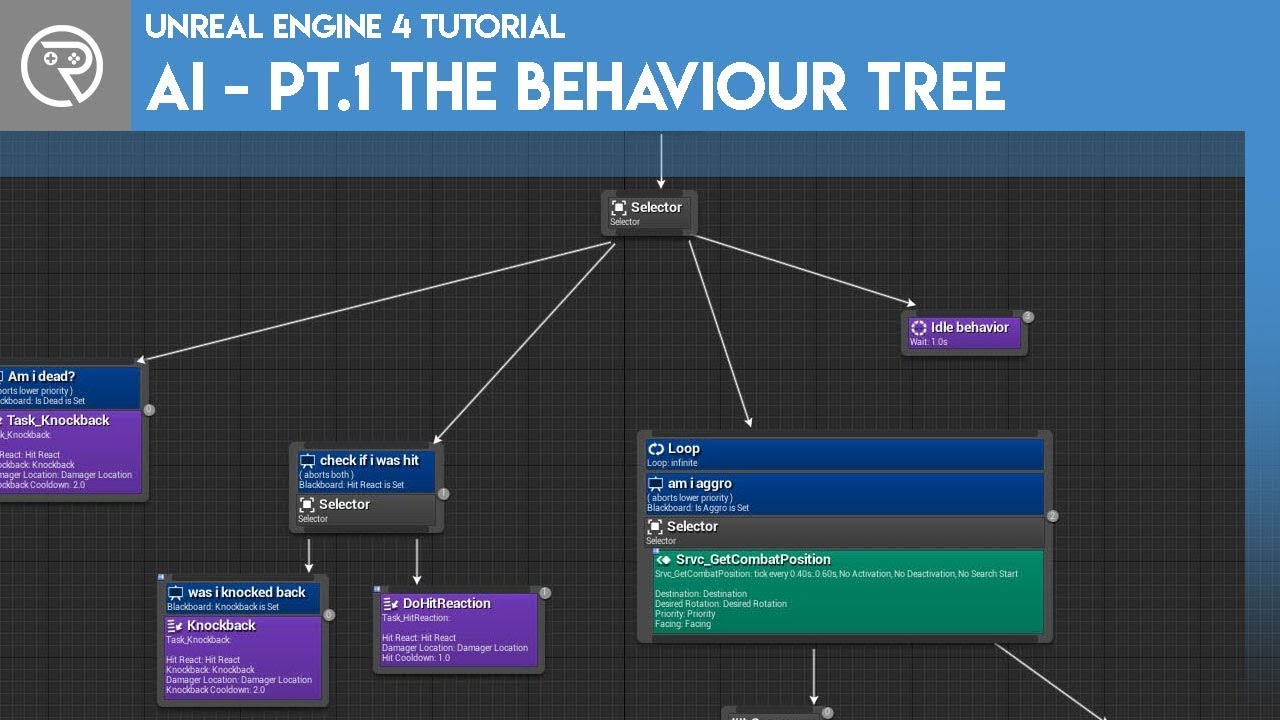
Welcome to the start of a brand new series. This time we are diving into AI for games. This episode introduces the concepts being used in AI design and in particular, the behaviour tree. In this episode we add an NPC that can randomly roam around the level.
Support me on Patr...
Check out that video series, it'll likely simplify your process a ton
simple lantern
hmm i'll take a look! I'm worried about overcomplicating, because the "AI" in my case pretty much only has one behavior, which is essentially to Vinterp
tight venture
It is way more powerful and flexible than performing movements manually
You'll be glad you did
simple lantern
Yeah i'll have to get on that
tight venture
I thought the same thing, oh that will be more complicated... wrong. It is less complicated.
Here is one big selling point:
AI movement has a simple "MoveTo" node. No more calculating move speeds, angles, blah blah
willow lichen
Hey.
How do I get the current time to later substract it again to get a time interval?
simple example.
Button Press A = start, Press B stop, get difference.
Like a stopwatch
tight venture
@willow lichen Try the Now node:
willow lichen
Thanks man
tight venture
inner ginkgo
GetTimeSeconds might be better for your use case. Just gets the # of seconds since launch in a float format.
willow lichen
Yes I like that too. Thank you.
 grim lantern
When using the Execute Console Command BP, is there a way to get the return value of the executed command rather then just fire and forget?
maiden wadi
Not that GetTimeSeconds is affected by slow motion or pause. GetRealTimeSeconds is often better for a lot of things involving timers unless you want the time dilation or pause taken into account.
willow lichen
I would like to use a timeline or so but I cant do that in a component.
What I'm trying to do:
I have a bow, and I draw it.
I want the strength of the shot depend on a draw timer up until 4 seconds.
So I wanted to save start and end time, to calc difference and get time it was drawn until shot
maiden wadi
I'd definitely go with the first one then. GetTimeSeconds. You wouldn't want it to execute after an unpause or something and end up being at full power after only a half second of actual draw time which might happen with GetRealTimeSeconds.
willow lichen
Yes thanks. That is pretty good.
maiden wadi
And if you start using time dilation the first one takes that into account too.
tight venture
@willow lichen are you using an animation blueprint for the drawback? You could set a member variable based where in the animation it is...
willow lichen
That would be a problem I would have got with getting the current system time. But there is now pause it's multiplayer
inner ginkgo
Honestly, this is one of the few places where Tick would be a good solution. Especially if you plan to have any kind of power up feedback for the player.
willow lichen
@willow lichen are you using an animation blueprint for the drawback? You could set a member variable based where in the animation it is...
Nope. I don't like the idea of my logic being dependant on an animation. Thanks for the input I also first thought about that
Honestly, this is one of the few places where Tick would be a good solution. Especially if you plan to have any kind of power up feedback for the player.
Yeah I would have just used a circle indicator as UI for charge thing. And let the UI listen to "drawing started" "drawing ended"
And run the UI animation in the UI
maiden wadi
I don't care much for the idea of relying on animation for gameplay abilities. I'd rather go the other way around and drive animation based on gameplay. Make the animation draw the bow further the longer it's held instead of driving the gameplay based on the animation playrate. Specially when you start getting into multiplayer aspects.
Animation is much like particle affects. Cosmetic.
willow lichen
Yes. I share this opinion
Thanks
I ended up with the seconds thing and it works great
Draw percentage is from 10-100 based on the current value (in seconds) from 1 - anyHighNumber, where it caps at 4 seconds (DrawTimeMaxDraw) for 100% draw
If anyone is intersted, thats just a basic number remap
 feral ice
why does the z value update so badly. I want it to look like an linear increase but instead it looks like the z value is being delayed. How do i fix this?
inner ginkgo
Your starting interp value needs to be the same each iteration or it'll get that slow down effect.
So you need to cache the actor location at the start and then use that cached value instead of getting the current location each timeline frame.
feral ice
ohh i think i know what you mean
inner ginkgo
Sorry, I guess interp to constant would work differently. What I described works for linear interp.
trim matrix
when i use global time dilation is there a way to slow down the sound too?
simple lantern
Yo, what's the proper way to slow down an event tick to something less costly? Can I just plug an event tick into a delay or is there a different/better way?
inner ginkgo
In class settings, you can choose the tick speed on each actor.
maiden wadi
@willow lichen Just curious, what's in that collapsed graph?
feral ice
@inner ginkgo thanks for the help man, it worked : D
inner ginkgo
Nice!
simple lantern
In class settings, you can choose the tick speed on each actor.
@inner ginkgo hmm not seeing that setting?
inner ginkgo
@simple lantern Oops, Class Defaults, not Class Settings.
simple lantern
ah
aside from that, I've seen people adjust tick speed right in the event graph using delays/timers, is there a proper way to do it that way? @inner ginkgo
maiden wadi
You can also set the Tick Interval at runtime too.
simple lantern
using this guy? would it be the same as using delays/timers?
inner ginkgo
Generally, I use looping timers over tick when I want something slower than normal tick. Using delay is hackish. That tick is still firing, it is just stopping at the delay node.
maiden wadi
Note that setting a new tick speed will not take effect until the next tick. So if you're ticking once every ten seconds and you tell it to start ticking 30 times a second 5 seconds through the 10 second tick, it won't start ticking faster for another five seconds.
 meager spade
@simple lantern That's setting the frequency of the tick event in seconds
willow lichen
@willow lichen Just curious, what's in that collapsed graph?
@maiden wadi It remaps an float from a range to another range based on the proportion
For example.
Value = 8
From 0 to 20
Mapped to 100 to 200
8 is the 8th part of 20. (20-0, from-to)
so 8/20
This gets mapped to a value with the same proportion from 100-200
That should in this case be 140 if I'm correct.
8/20 = 0,4.
So 200-100 = 100. 100*0,4 = 40
100+40 = 140.
So the value 8 that gets in as an input is 140 as an output
meager spade
It wont do the same as delay but tick could be used as a timer though I would find an actual timer more readable
willow lichen
I did 3 hours math for university now, it could be that I misscalculated something. But overall the concept is the same
simple lantern
So would this be the way to use a looping timer with tick to get a slower interval?
assuming the timeline is set up properly
inner ginkgo
I would not do that. 😛
meager spade
I have never used Timelines so can't comment on that one
simple lantern
Generally, I use looping timers over tick when I want something slower than normal tick. Using delay is hackish. That tick is still firing, it is just stopping at the delay node.
@inner ginkgo How would you go about it?
inner ginkgo
Create a 'Timer' not a 'Timeline' in begin play.
maiden wadi
@willow lichen I don't know why, but that sounds oddly complicated for checking a bow draw power.
inner ginkgo
You can create timers based on functions or events, whichever suits you. Make sure you promote the timer handle to a variable and set it to looping.
meager spade
@simple lantern Btw the tick speed is in default settins
willow lichen
@willow lichen I don't know why, but that sounds oddly complicated for checking a bow draw power.
@maiden wadi How would you do it?
simple lantern
So like this?
willow lichen
I mean, its not complicated its just a normal math expression. It might sound complicated but the use is like dividing the values and getting the percentage, which would acuatlly be like this. Althought then I have to fiddle around that 0 % draw should be 10% strength and stuff.
But I'm open for easier ways for sure
meager spade
Yes, and promote the return value to a variable which you can use whenever you want to stop the event from firing etc
inner ginkgo
Almost. You will want to set the timer handle to a variable in case you ever want to turn it off.
simple lantern
Ah okay got it, appreciate the help yall
meager spade
If you would not want to have the custom event that close to the Set Timer by Event node you can create a Create Event node and chose which function you would like it to fire instead, depends on what you find more readable
maiden wadi
@willow lichen I'd probably actually put this in a macro on the weapon and probably use Local Macro Floats to keep the timer so it doesn't need to be in the blueprint, but in general, just this.
willow lichen
It's a game with only 1 bow and thats the only weapon so its in my "combat component" thing
Yeah that also looks good thanks.
maiden wadi
Just gives a 0.1 to 1.0 ratio to use for damage/power modifier.
willow lichen
I used my node instead of creating what you created because I often re-use code and I know what my node does so it was faster for me to do it that way than to think about a new way to do it.
I like your solution too, thanks for that
simple lantern
@inner ginkgo @meager spade This method with the timer wouldn't be totally accurate without being scaled by the delta though, no?
meager spade
@simple lantern Ofc you will never achieve EXACT accuracy but it should never matter but you do not need to include any delta
inner ginkgo
It's 'mostly' accurate. It fires in the first frame that exceeds the timer value. I do not know if looping it will carry over any delta for the next firing, though.
simple lantern
hmm i think i understand
meager spade
It could differ a couple ms from the 5000ms interval so it shouldn't be any problems in most cases
Everything depends on the framerate I guess
simple lantern
Is an Event Tick plugged into a Set Actor Tick Interval still firing every frame initially?
Before being set that is
inner ginkgo
Tick only fires if the Tick event is present in the graph and Tick is enabled for the actor.
Well, present and active. The grayed out version that you see when making a new actor doesn't fire.
simple lantern
K, thanks all
 stoic mesa
hey y'all, im having trouble with the blueprinting with my widgets. Im trying to make simple chat box for my game but im having trouble configuring correctly the input mode when the widget comes up (ie. the players camera still rotates with the mouse even though I dont want any axis movement) can someone give me a few pointers?
 wind atlas
hello, is there a way to make an array of all the float variables in my bp, the idea is that i make this public and then i can select which variable is mapped to a specific function
inner ginkgo
@stoic mesa You might want to look at SetInputModeUIOnly. https://www.youtube.com/watch?v=rP0T-pjzyvs
What are the Controller: Set Input Mode Nodes in Unreal Engine 4
Source Files: https://github.com/MWadstein/wtf-hdi-files
stoic mesa
I did
the problem input mode disables all axis and key mappings
I just need axis mapping to be disabled
inner ginkgo
Then you will probably want to create a boolean to track when the UI is up. And then have the mouse handling code not run when the flag is set. Set the flag on loading the UI. Unset it on unloading it.
stoic mesa
ill try that
inner ginkgo
@wind atlas You can turn any variable into an array by changing it in the details section. To the right of Variable Type, there's a little symbol. Click that and pick the array option.
simple lantern
He wants an array that contains all of the float variables I think
I would feed your floats into an array, than get those values from the array and feed them into your functions
wind atlas
yes sorry, what I mean is, I would like to be able to dynamically set which variable is being set. for example, in my bp I have multiple float variables, I'd like to "set" which one is being sent into e.g. an RTPC message to WWISE
the floats are generated in my bp and I'd like some sort of simple way to pick which ones are sent to which addresses
inner ginkgo
I see. You can set array vars by index, if you know the index. But I think a map would probably be best suited for what it sounds like you are doing.
wind atlas
thank you, I need to read up on map node
 merry orbit
how to add actor to scene without spawn?
Or they is a whey when you create object from class to add to scene.
inner ginkgo
You mean Construct Object from Class? You can't add those to your scene. Only Actors can be added and they must be Spawned.
What's the workflow you are trying to achieve?
merry orbit
@inner ginkgo Yes but when you spawn actor you chosen from class i just want to move actor what was createn before and add to scena
inner ginkgo
I'm not sure I follow completely. If you spawned an actor, it's already in the scene. If you mean to move it, then you can use SetActorLocation. If you mean to copy an existing one, you would need to spawn another one and set it be like the original.
merry orbit
@inner ginkgo true ok I save that actor in savegame to slot. Maybe its easy whey to get location and state without spawn from class
inner ginkgo
Ah. Saving/Loading is fun.
merry orbit
@inner ginkgo fun is more sarcastic yes?
inner ginkgo
Yes
There's a popular plugin for saving called Rama's Victory Plugin or something like that. It is pricey at like $60. But probably worth it if you are new to coding.
merry orbit
@inner ginkgo I movet that code to c++ then in c++ i think for more effective whey
inner ginkgo
But for actual saving/loading, you can't just save actors and get good results. The save system won't capture all of the data you need.
merry orbit
@inner ginkgo Just write class and how many i can get data from object to transform in right whey?
inner ginkgo
In general, you want structs for you data, not classes.
merry orbit
Rama's Victory Plugin work quite well?
inner ginkgo
The save game doesn't do a deep look at your classes to capture all of the variables.
I've never used it, personally. I've heard good things, though.
 teal burrow
It's a life-saver
merry orbit
Yes struct or array something like that but i need to first get what i want to spawn
inner ginkgo
Yes, my save system works like that. I capture info like class and transform. Then on load, I spawn by class and set transform.
merry orbit
@inner ginkgo I think i know that advice but point is maybe just maybe i can spawn from object and hey everything will be ok
inner ginkgo
The issue is that it doesn't save objects really well. At best, you can use soft references for objects that in your starting map. For things spawned at runtime, you'll need to respawn them.
merry orbit
@inner ginkgo how to respawn by soft references?
My plant was to create some structur container whith type of class and parameter i want to save then spawn again when i load map
inner ginkgo
You don't exactly. In your starting map, you might have some NPCs. These will always load when you load the map. You can save a soft reference to them and you'll be able to 'find' them by resolving the reference on load. That will let you then manipulate them to adjust anything that changed during the game.
merry orbit
I can save soft reference in save?
inner ginkgo
Yes. It's just a pointer, essentially.
merry orbit
so i get that pointer and i can ivent insten destroy actor?
I think can be pretty cool
That will work after restart game?
inner ginkgo
If something died or left in your starter content, then yeah. That's what you'd do. Save the soft ref before destroying the actor. Then on load, resolve the ref and destroy actor again.
merry orbit
I think its one simple benefit of that
simple lantern
I've been scratching my head over this for a while - I'm trying to set the values of an array so that each sequential index would be something different (in my case, each sequential index would just be it's own index number times 100, so that 1=100, 2=200, 3=300, etc.). I'd like to do with it with a loop somehow, so that all indices get set simultaneously and I wouldn't have to manually set all the array elements separately. In addition, the entire setup needs to continually refresh so that the values stay updated. What would be a good way to accomplish this? Sorry if the explanation is confusing.
merry orbit
when you have fixed created map for disigned created evrything again its hard.
trim matrix
i need help with gamemodes and defaultpawns
merry orbit
@simple lantern array 1 something 2. something
@simple lantern dictonary name : value
inner ginkgo
Yeah, like I said saving/loading is 'fun'. And a difficult topic to discuss in one conversation.
merry orbit
@simple lantern if you have 5 element dictionary you also have 0 1 2 3 4
@inner ginkgo I think is for BP to have to many code for something simple ok
simple lantern
@merry orbit Not sure I follow...
inner ginkgo
@simple lantern Are the results of the list always some regular pattern?
merry orbit
@simple lantern you adk why array are alweys from 0 1 2 3 4 insted of 100 200 300?
trim matrix
i set the defaultpawn correctly but when i set it up in "Maps and Modes" it doesnt work
inner ginkgo
@trim matrix In your map, make sure you have a player start. And no other play pawns are there.
trim matrix
i have 1
inner ginkgo
Go to your world settings tab and make sure your game mode is set there.
simple lantern
@simple lantern Are the results of the list always some regular pattern?
@inner ginkgo Yes, it will always be patterned like that
merry orbit
@simple lantern Sorry i do not understand fully
inner ginkgo
@simple lantern Then I probably wouldn't wouldn't use an array. I would just calculate the patterned result based on a given index when needed. Does the use case require the array for some reason?
trim matrix
its set to my gamemode on the overide
inner ginkgo
Expand the arrow below the game mode setting. Make sure it set your pawn correctly.
trim matrix
ok lemme do that
simple lantern
@inner ginkgo I think the array is needed, it's basically containing a specific set of vectors from a different array
merry orbit
@simple lantern create loop from 0 to 100 in every repeat that loop add element to array?
trim matrix
@inner ginkgo its set to my pawn i dont understand whats wrong
simple lantern
As in array A is has 3000 indices, and every 100th index goes into a different array to be used elswhere
merry orbit
@simple lantern you do not neet to create array menualy you can create value in array by loop
inner ginkgo
@trim matrix How are you launching the game?
trim matrix
this is the character with the camera in the gamemode BP
inner ginkgo
Ah, don't do simulate.
inner ginkgo
Little arrow to the right of it.
inner ginkgo
Yay 🙂
trim matrix
4 HOURS of TORTURE TRYING TO FIGURE THIS OUT
inner ginkgo
It is always the little things.
merry orbit
@simple lantern
simple lantern
@merry orbit Thanks for the help
simple lantern
Thanks for being the resident guru today, @inner ginkgo . fielding everyone's questions
zealous moth
has anyone made a 1D blendspace for animations for forward, idle and backwards walking?
 quaint falcon
yes
me

Here we introduce ourselves to using an animation blendspace inside of Unreal Engine 4 and how they can be used to blend between animations based on axis data..
♥ Subscribe for new episodes weekly! http://bit.ly/1RWCVIN
♥ Don't forget you can help support the channel on Patr...
watch this series
@zealous moth
zealous moth
@quaint falcon ty
@quaint falcon ah yeah, i tried those; i guess i could try a 2D blendspace instead of 1D; I am doing a sidescroller and I set up a negative value for speed however the actor does not pick it up
quaint falcon
search for the playlist of that video everything you need is there
also 1D
good luck😁
 dawn anchor
Hello everybody 🙂
Do you guys happen to know how i can attach a camera from the scene to the pawn (or the player itself)? It is important that the camera is child of another object in the scene but i can't seem to find a way to get this working unless the camera is child of the pawn 🤔
 hexed jungle
i'm currently using line trace for depth of field effects on a camera but I have noticed when the camera is close to a blocking volume, the line trace sees the blocking volume and blurs thinking it's a normal object.
Is it possible to have the line trace ignore blocking volumes?
 flint nymph
if the line trace is checking against the visibility channel you need to make sure the visibility channel is set to ignore on the blocking volume in its collision settings
simple lantern
what's the best way to get all values of an array and convert to a string?
for debugging purposes
 tight schooner
A huge string? Maybe a function that takes the array, for each loop —> convert to string and append to a local string variable, then upon loop complete, output the value of the local string variable
simple lantern
A huge string? Maybe a function that takes the array, for each loop —> convert to string and append to a local string variable, then upon loop complete, output the value of the local string variable
@tight schooner Cool i'll try that
tight schooner
There's a node called Append String or something. Basically use that to append an open-ended number of items and separators (spaces, etc.)
hexed jungle
@flint nymph Thanks for your help, works a treat!
tight schooner
As an aside, some of my debug prints can get elaborate so I tend to keep them in the BP script but under a "debug" checkbox in the relevant collapsed graph, function, event, etc. Never know when you'll need that debug again
simple lantern
@tight schooner I'm a little tripped up on how to get each string separately out of a for each loop?
 willow dagger
How do you create vines using splines.
dawn anchor
Like adding a mesh to a spline?
tight schooner
Plug the Get (your local variable) into Append A, array element goes into B. Tho you probably figured this out already... @simple lantern
dawn anchor
@willow dagger I would recommend taking a look into this https://docs.unrealengine.com/en-US/Resources/ContentExamples/Blueprint_Splines/index.html
Overview of the samples provided in the Blueprint Splines Content Examples.
They have a few examples that should help you start
willow dagger
ok thanks
 modern cove
In my GameInstance, I'd like an array that sets an "Order" to the characters on the player's team. Right now, each character's stats and name gets stored in a Struct called 'Playable Char Stat Set'. What should I add to my Game Instance if I want something that will contain a list of references to the characters in an order that can be changed mid-game?
modern cove
Update: Found an option to make an array or a set of my struct. Wondering now about the difference, and ultimately the best way to save a team "order"
modern cove
I guess my conundrum is if I use several Playable Characters, I'll be able to all upon them by name and apply changes when needed but that leaves me with no way to order them in menus/battles, but if I make an array, I can set an order but I'm not sure how I'd call upon them when making changes for Level ups / equipment upgrades
inner ginkgo
The array should work fine for this. You'll have to search the array for when you want to update them.
 hot mural
Im having a odd issue can anyone hop in a call for like 2 min a help me it would be greatly appreciated.
inner ginkgo
I can't do a call, but if you can describe it briefly, I might be able to direct you.
hot mural
I just want to show it we don't have to talk
It is kind of hard to explain not sure if it is a blueprint problem or not
modern cove
Thanks for the idea; My Character Struct has the character's name as a String; there are funtions that can search the array for the Name and apply changes to the rest of the struct on finding it?
inner ginkgo
I don't think there are general purpose searching features for arrays in BP. Best there is exact match finding. You'll have to do the old fashioned iterate through and find your value.
inner ginkgo
I am on the web client. We can try it, but last time I did audio didn't work.
hot mural
Thats fine i can type
modern cove
Iterate should be fine
hot mural
Can anyone hop in a call for 2 min and help me with this problem im having i would be grateful
 hybrid topaz
Does get mouse position works with gamepad?
inner ginkgo
Not 100% sure, but I don't think so. I would expect to map those inputs independently.
 lucid granite
any reason why I can't get "Get Owning Player Pawn" to work while the other method does work?
"Get Owning Player Pawn" fails the "Is Valid" test every time
inner ginkgo
Are you attaching a widget to it?
inner ginkgo
And then does the widget have an owner? You can create widgets without them.
lucid granite
that is how I initialized them, I don't see a node input for "Owner", was hoping "Get Controller" was it
inner ginkgo
Your nodes look odd. That looks like the Construct Object From Class node.
Create Widget has an owner node.
inner ginkgo
GL!
lucid granite
You solved it, Thanks Man!
inner ginkgo
Awesome.
Out of curiosity, was the widget displaying when using the construct node?
lucid granite
it was displaying, but I wasn't able to use the "Get Owner" which is why I needed to use your method.
inner ginkgo
Yeah, just curious. I'm kind of surprised they allow it. They won't let you use Actor or Component classes with it. But I never tried a widget.
trim matrix
Hi guys, i got a question. Im trying to implement a timer that decrement value until the target value
but at a constant rate regardless of fps
using tick
how can i achieve this?
I find out timeline and delta time sometime doesnt do justice when the frame is different
 white crypt
@trim matrix https://www.youtube.com/watch?v=GyJVYB3IzGA

What is the Delta Time in Unreal Engine 4 .
Source Files: https://github.com/MWadstein/wtf-hdi-files
or you might want to consider using this https://prnt.sc/t17ol7
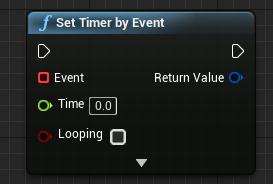
but definitely watch the video, will explain how to use a tick that is not dependent by fps
 quasi valley
Anyone know why GetAIController on my pawns will always return 'none'? It's set to "Auto possess by AI" and default AI Controller.
I even tried to prepend a small delay which didn't help
quasi valley
It's placed yeah
quasi valley
ok wait
trim matrix
try to play in the editor
and then check on your world outline
see if there is AI controller posses the A.I
otherwise u might have to spawn one
 blazing ridge
i am calculating the movementspeed of an ai BP by the duration it can live, so it can always manage to fill the distance in the lifetime it has
now i wanted to give this movement speed variable some kind of smoothness, like a curve value that could belnd into the already calculated static value
so it still finishes its way in time, but with an ease in/out kind of feel. any advice on this?
 bleak vector
I'm trying to figure out how to serialize all of my data 🤔 I have provinces, holdings (like a castle), and buildings (like a wall). I was thinking I could initialize everything from data tables, and then make new data tables to store all of the info when saving, but I don't see any way to create new data tables or rows. So I couldn't, for example, give a province a new holding at run time? 🤔
dapper cradle
Can unused, disconnected nodes effect the performance of a BP if they are not connected ?
I don't mean individual nodes, I mean, if you had something happen on begin play but decide to try a different way,
leaving everything else connected but disconnecting from the begin play.
are they going to effect the performance of that bp in any way ?
If that makes any sense ?
quasi valley
otherwise u might have to spawn one
@trim matrix that worked, thank you. I thought selecting AIController as default and then calling GetAiController would do the same thing.
 fallen tartan
Hey guys, I have some problem with my AI pawns to spawn AI controllers when I'm loading my level with Load Level Instance. If I put the pawn in the persistent level it creates the AI controller and everything is fine, but if is part of the level that I dynamically load it doesn't create any AI controller. I think it has to do with Auto Posses AI option in pawn class and I tried all options and still no controller ... Any ideas why AI pawns don't get controllers in level instances?
nvm, there is a weird issue bc I spawn ai on construction script so level instance does weird stuff and does not load pawn properly i guess... it works with ok event begin play
maiden wadi
@fallen tartan You should never spawn anything in a construction script usually. The script is mostly meant for setting up the actor that it belongs to. It's supposed to be used to either dynamically change the actor based on conditions like random factors, or factors based on where the actor is being spawned. Or to simplify repetitive placing of objects. Such as.. if you needed eight static meshes around your actor and didn't want to hand place them, you could do it mathematically on a for loop. In fact, you'll notice that if you go into the construction script, you can't even place a Spawn Actor/AI From Class node. You can still call functions that have them, but it's not really meant to happen.
@dapper cradle The only affect it might have is lower editor performance. Unhooked nodes don't affect gameplay runtime processing at all. So it shouldn't affect the standalone application. But as for the editor side It would take an incredible amount for most systems to notice a hit on editor performance. As in possibly thousands of nodes for a few FPS in the editor. Which would affect PIE a little since it's part of the editor, but quite a few dozen unhooked nodes shouldn't cause any adverse affects.
dapper cradle
thank you @maiden wadi !
 jolly jay
some know how i can split my pc screen, I want to my my own VR glasses and I dont know how i can split my pc screen. If someone knows how to do it i'll be very greatfu

something like these
trim matrix
hey is anyone here? i need some help with this
jolly jay
okey thanks
 thin rapids
@mint mist you're using the wrong object in that cast, and also you're not connecting the branch to anything, making the rest of the nodes useless
 mint mist
what oobj should be in the cast?
maiden wadi
Casting an object does not change it in any way. Casting an object also does not magically get that object for you to use. Casting is meant to take one type of a reference and change it to another. Note that this does not actually change the object, but the reference type. This is often done to convert Actor type references to the actual class that the object is. Or from Actor to a common parent type that can call functionality. The reference that you plug into the 'Object' part of a cast needs to be able to be casted to that type. The simplest example is for a Character class. Character inherits from Pawn, Pawn inherits from Actor, Actor inherits from Object. This means that if you spawn a character and get it's reference as an Actor type, it can be cast to pawn, or cast to character. However, if you spawn a simple actor type and then use it's reference, it cannot be cast to pawn or character because it is not actually a pawn or character and does not inherit from them.
TLDR, get a reference to your StunGrenade and use that as the object reference on the left side of the cast.
 unique basin
Is it possible to trace against a SkeletalMesh per-poly?
Enabling Per Poly Collisions on a skeletal mesh ends up with the traces entirely ignoring the skeletal mesh
earnest tangle
@unique basin Not sure but have you tried with "Trace Complex" enabled?
unique basin
Yup, I have, with both on and off, and shape traces, and object and channel traces
It all works fine with per-poly disabled, but as soon as it's enabled the traces all just ignore the skeletal mesh
trim matrix
i want to create new buttons in for loop and give them a name. But how can i create new button in loop? like (new Button) in c++
 final lava
trim matrix
final lava
trim matrix
@final lava i want to do that in blueprints
@trim matrix what create node means ?
i want to create buttons in function that in widget
should i make button widget for that?
@trim matrix i could not get it. Create widget is creating widget in viewport right? I have scroll box and i want to add button to scroll box but buttons should be created in widget in for loop. I know to add button to scroll box but i want to create them in function so i can make limitless scroll box
yep you got the point but for create widget i should make a new button widget probably. I have no experience c++ side in unreal engine
earnest tangle
for it to work in BP you need to create a new widget blueprint for your button
remove the default container, and just add a button element as the root of the widget
then you can use the create widget and add child as described by Lorash
trim matrix
@earnest tangle thanks for your answer dude @trim matrix and thanks for your attention ❤️
 woven lance
i'm trying to get the angle between two vectors, and i believe i'm supposed to use the look at function, but i don't think i'm getting the output i'm expecting.
you can see this is basically -1,0 being compared to 1,0, which you'd expect to give basically 180degrees?
actually, maybe it's not the right function at all
i guess this function is assuming i'm giving it points in world space, and then it uses the object found at that world space location
assumed it was a vector math helper
yeah, that's basically what i was thinking
"i probably could do this the gradeschool trig way, but maybe there's a node that does this"
the thing that i wonder about, though,
since it's using dot product,
1,0 dot 0,1 vs 1,0 dot 0,-1
would both give 0
so it wouldn't be able to tell left from right?
tight schooner
Yeah it's just telling you the difference. We're not sure what you need "the angle" for but Lorash's BP script would give you the angle.
LookAt gives you a full blown rotator
woven lance
it's related to input relative to character/camera direction
eg, me holding down on the gamepad while the character's facing right, and i'd want to read that as a 90degree input
i wonder if there's an easier way to achieve what i want?
tight schooner
I've never tackled this problem myself but I suppose you'd have to convert your analog axes into a direction vector, get the camera yaw rotation, and then use Rotate Vector to make it relative to the camera.
woven lance
i guess i mean specifically wrt character direction
because if i'm thinking about input wrt to camera direction, it's just the trivial case
tight schooner
Like a twin stick shooter game?
To make any "world space" vector relative to a thing's rotation, use Rotate Vector node
woven lance
hm
maybe that's it
ngl, having trouble thinking about how to lay this out
but converting to rotations might be the key for me
difference between two angles is pretty easy to think about
 hallow night
U trying to make a twin stick controller?
woven lance
uh, just a 3rd person action game, like monster hunter
basically, if the character's facing to the top right of the screen, and the player is holding to the bottom right on the analog and presses dodge,
the character should do a "sideroll to their right", because that bottom right input should be read as a 90degree to the right input
which i think converting everything to an angle and comparing them is the solution
in the example i gave, it'd be 45degree vs 135 degree, which would have a 90degree diff
hallow night
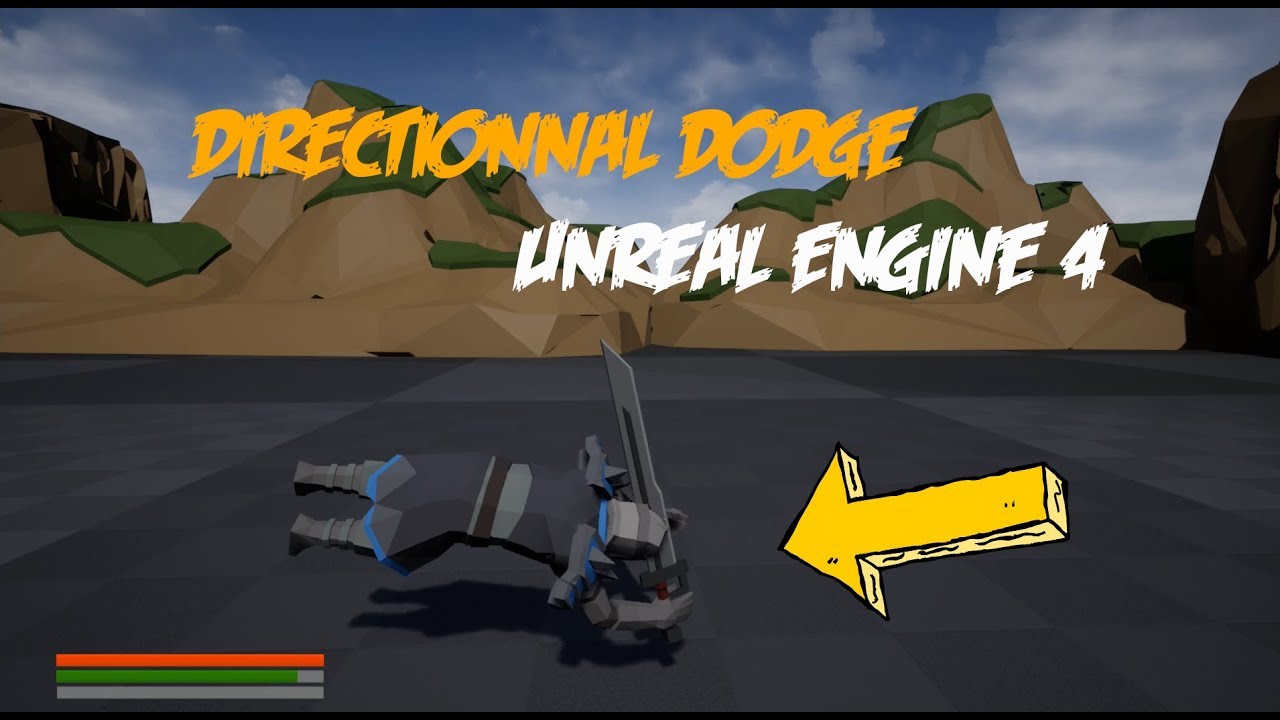
Directionnal Dodge Tutorial with Unreal Engine 4
Twitter : https://twitter.com/seed_wall
#UnrealEngine4 #Dodge #Tutorial
Something like this?
woven lance
yeah, think so
i think i've got it now, tbh; just thinking about it in terms of comparing two angles is really simple
hallow night
Get bounds or something like that
 swift warren
get bounds should work @trim matrix
it returns the size of the bounding box around the mesh i think
if you mean like
the volume of a complex mesh
no clue
 safe lion
can anyone help me with a problem im having with destructible meshes?
swift warren
@safe lion what is it
safe lion
@swift warren i cant get my line traces to apply damage to the destructible mesh
white crypt
you probably need to cast from hit component to destructible mesh component
and use that reference to apply damage
safe lion
ill try that
white crypt
https://prnt.sc/t1k0yj @safe lion

oh forgot that impact point should go into hurt origin
white crypt
doesnt matter
mine is from projectile actor
and why are you using multicast for applying damage
its already replicated
i mean it needs to be applied on the server, if your actor is already replicated it should work right out of the box
safe lion
ok but when i try to attach hit component to damaged actor the pins wont connect
ok i will run on server then\
white crypt
thats why i said that you need to cast it to desctructable mesh component
safe lion
ok
white crypt
theres another node for these meshes
usually you do line traces locally
but thats for another topic
safe lion
im doing line traces from server to try and make it harder to cheat
white crypt
is it a highly competitive game with thousands of players?
even then you do traces locally
i dont think that pubg is running them as server events
safe lion
oh, ive tried that and i got a bunch of bugs.
white crypt
if you start doing everything server side it wont make a lot of sense in the long run
safe lion
anyways the apply damage is still not working even when running on server
white crypt
show an image
dapper cradle
is there a way to give a Struct an Execution wire ?
white crypt
are you applying damage to actor or a component?
safe lion
actor
white crypt
it needs to be a component
safe lion
ok
tight schooner
@dapper cradle my guess would be no, cuz execution pins aren't "data"
dapper cradle
thank you @tight schooner

 safe lion
for some reason my damage node doesnt have a target pin
white crypt
show an image of your damage node
because im 99% sure you are using actors damage node
white crypt
does it look like mine?
find the differences
when you drag out of destructible component it will only show the ones that are usable
white crypt
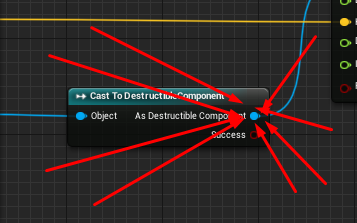
you drag it from here
i mean im saying the same thing 5 times everytime, please read more carefully
let me know if you dont know where to drag from
safe lion
ok ive done all of that but it still doesnt work
 spark robin
but for single variables?
(Please ping on reply ❤️ )
white crypt
@safe lion did you drag it from desctrible component?
safe lion
yes
white crypt
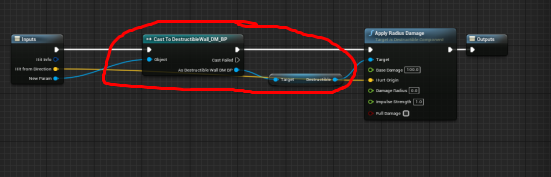
i never mentioned to use any of those

here for the 5th time
when you have looking like this
then you can say if it works or not, if not then problem will be either with your collision or your damage threshold for the destructible mesh
white crypt
ok add a print string after apply radius damage
and see if it prints
if not then your code fails before applying damage
safe lion
surprise surprise, it does
safe lion
ok
white crypt

you can copy mine
just so we know that you are on the same page
later you can edit them how ever you want
white crypt
use apply damage without radius, i told you to use this one because its more consistent
safe lion
ok
white crypt
the regular one might introduce some other inaccuracies
anyways try to read more carefully next time
i dont like repeating myself
safe lion
when i compile w/o radius it gives me an error
white crypt
show an image again
white crypt
right click on impulse dir and split
but you will need to apply impulse anyways
otherwise it will stay in place
after breaking
white crypt
hmm, dont remember. but check again for the settings inside the desctrutible mesh. i've closed my project so i dont remember
you can decrease life time as well if you want
dapper cradle
Sorry for the dumb question, but...
I am trying to call an event from an anim blueprint.
Unchecking the context box allowed my to get the call's
I just wanted to see if I could connect it to test the print string.
As I would like to attach to sockets on those events and couldn't find a way to in the anim BP itself...
BTW in the above picture the _AG (for animation graph) is the animation BP...
white crypt
get the mesh - get anim instance - cast to animb bp
then you will be able to call those events
dapper cradle
I will try that, thank you @white crypt !
is this what you intended I do @white crypt ?
white crypt
yeah
dapper cradle
brill, I will test it
white crypt
should work if your mesh has that anim bp asigned (backaway_ag)
dapper cradle
@white crypt it does work, not as I hoped but it does.
white crypt
why you thought it wouldnt? 😄
dapper cradle
oh I had faith in your direction, and it works.
Its just that when I attach the print string to these directly in the anim BP they firs off with the event node...
I was hoping that calling to these would print string at the times in the animation which I placed the Nitifies...
all because on the notify events, I would like to attach to the sockets of the skeleton.
white crypt
you can bind these notifies to other events if thats what you need
dapper cradle
I should probably set up attaching to sockets ect... in another bp and call to that from the events in the anim BP I guess ?
yes, I am trying to establish a connection to a bp which has all that functionality/components.
should i do what I just did but in reverse ? and call an event within the other BP ?
white crypt
im a bit confused on what exactly you need to do, but thats probably that im burnt out from my work and have been going on a long no sleep streak 😄
i mean its better if i dont try suggesting anything atm because i might lead you in the wrong direction. its better if you formulate your question again and maybe someone else will help you
dapper cradle
Hope your not crunching too hard @white crypt 😄
white crypt
thats normal in game dev 😄
anyways thought i will only help you with your previous issue, but do state your question again and hopefully someone else will help
dapper cradle
@white crypt I will try to refrase (I honestly dont mind if your not sure/too tired)
Basically, on the notify events, I want to attach SM to the sockets of the skeleton. the reason I want to do this in another bp is because
1, it is already set up there and
2, with my limited knowledge i couldnt put it together in the anim BP.
white crypt
i assume your main issue that you dont know how to reference properly?
thats what you holding back to move that logic into animbp?
dapper cradle
yes, Despite watching the BP comminication live stream and several others/ reading documentation XD
white crypt
all i can say that inside animbp if you need to get your character you can use: get player character - cast to that character
dapper cradle
thank you, I will tinker with it some more and see if I can use that information.
white crypt
or if its for more than one pawn/character you can use get owning pawn and do the same cast
dapper cradle
last time I pester you today @white crypt promise!
What should I attach to the object pin ?
unborn turret
is there a better way to do an exit in this node? basically i want to try 5 times and if it doesn't find it then exit to the next node instead of the delay
white crypt
@dapper cradle get player character, if its a singleplayer game
dapper cradle
yeah single player, VR game
dapper cradle
This message came up, its one I have seen a few times today while trying to figure it out.
 mossy robin
@unborn turret try using “gates” then set “Do N” to 6 then if the integer is = 6 then close the gate
white crypt
@dapper cradle i think you are casting to your animbp and not the character
unborn turret
ok will try that thanks @mossy robin
mossy robin
You’re welcome @unborn turret
 spice vortex
Hi, is there any way to get the player's "keyboard type" (qwerty/azerty mainly) in BP ?
mossy robin
@spice vortex I personally don’t think it is necessary and also not possible
@spice vortex what you could do is allow the player to choose his keyboard type
spice vortex
i would like to avoid a "choose your keyboard type" widget if there's a way to catch it without asking
but if someone confirm it's not possible, i'll do it. Not a big deal to code it.
thanks @mossy robin
mossy robin
No problem @spice vortex
dapper cradle
question...
functions can be different in each case,
but if you edit a macro, all the macros change ?
Is this a correct statement ?
 spark bridge
@dapper cradle Yep.
dapper cradle
thank you @spark bridge !
spark bridge
@dapper cradle Also if you change a function, it changes everywhere too.
Both functions and macroes are defined group of nodes in a way.
dapper cradle
@spark bridge I was just thinking of a way I can make something which I can copy/paste many times...
basically I am going to be attaching/ detaching from sockets.... A LOT
the only thing which will be changing will be the socket names.
earnest tangle
Sounds like a perfect case for function or a macro then. You can set up the name as a parameter and simply call it
spark bridge
Exactly as stated above, functions should be used as they are really efficient combared to macroes.
Macros are literally just bunch of node groups that are needed to be constantly validated but their upside is having many inputs/outputs and they can have delays etc.
However macros can be only used in their owner blueprint (macro library is another story) so functions are good for ya.
simple lantern
quick question, what would be a good way to create a 3 on/1 off flow control?
like a Do N node that would do N times then return false and reset itself
OR in other words, a flip flop that flips a couple more times than it flops
spark bridge
I liked the last sentence xP
simple lantern
😄
earnest tangle
A multigate should do it
say if you want it to do something three times and then nothing and then reset, you can set up it so it has four pins and repeat checked
from the three first pins you connect it to whatever you want it to do, and the fourth is just not connected to anything
earnest tangle
You would need to keep track of the variable
Multigate would do the same without needing the var :)
spark bridge
angry programmer noises because you are right
simple lantern
these are helpful, thanks.
earnest tangle
lol
simple lantern
one issue though
dapper cradle
thanki you for the knowledge @earnest tangle and @spark bridge !
simple lantern
with something like a Do N node I can drive the amount with a variable
so instead of a set amount of pins I can control how many ons/offs with a var. Anyway to do that?
dapper cradle
question though @earnest tangle
I have a few different sockets which will be used at different times.
how do I set the perameter for that ? (is it straight forward ?)
earnest tangle
@simple lantern you could probably do that with some combination of custom logic, I don't think there's any builtins that would easily let you do that right off the bat
@dapper cradle assuming all the logic is the same for each socket, you would give your function a string parameter when you create the function, and then when you call the function from your BP, it would show an input pin where you can plug the socket name in
simple lantern
@spark bridge @earnest tangle This is what I came up with, but It feels a little messy. It works though. Anything glaringly wrong with it?
I don't really like the ==
dapper cradle
is there a way to plug two sockets at once to save time ?
It has been done elsewhere in my bp but it had extra parts and I didn't set it up, so I don't know how it was done...
I will attach a SS of the one already here.
spark bridge
Does the Do N's last trigger supposed to Print "B" ?
simple lantern
Yeah
that's the flop
actually no, it shouldn't. It should print A 20 times then print B once. So i need to rework that
I guess I can just add 1 to whatever the var being plugged into the N amount is
white crypt
you can use a for loop
spark bridge
white crypt
it has a completed state
meaning that you can loop as many times as you want and do smth when its completed
spark bridge
What Tsau mentions:
white crypt
yeah like that
dapper cradle
is it possible to creat a struct variable which would hold 2 socket names ?
spark bridge
Structs can hold all type of variables.
However, if it's just two Names, just make an Array and Get(0) / Get(1).
dapper cradle
I am currently reading the documentation to try and gleam something about it.
the above picture points out what I am trying to achieve.
ok I will see if I can make an array work
spark bridge
You are trying to "Make" a struct, you should "Break" instead
You need to make a Struct VARIABLE, store those values in it and then call for the struct then break it.
Or do the same with Array, just get the values after storing it as a variable.
simple lantern
@spark bridge Your set up with the flip-flop and the Do N doesn't work, Do N only restricts the amount of times an exec can pass through it, so I think your example would just do A then B (reset) then A then B (reset), etc
thin rapids
@dapper cradle
spark bridge
Right, I always confuse Whileloop and Do N. So your setup is okay I believe.
dapper cradle
thank you @thin rapids I believe that got me one step closer!
thin rapids
you're welcome
tight venture
Anyone know the answer to this post?
Unreal Engine Forums
For discussions about Materials, Textures, Lighting, Particle Systems, and Post Process Effects.
I need a way to clip off a mesh if it's outside a certain volume, so it doesn't render there.
spark bridge
I think what you need is BoxMask with worldposition values
There are tutorials about that on youtube
Or SphereMask etc
 prime copper
I have a cool bus with this speed modifier
anyone got any ideas on how to reduce that speed when the bus goes through a trigger volume?
like I'm not sure why this doesn't work
tight venture
It depends on what that speed variable controls
prime copper
it's just a multiplier on the system clock that triggers an update to the lcoation
the default is 400
tight venture
multiplier on the system clock?
dapper cradle
Sorry for tainting your eyes with my sorry excuse for a bp
but could anyone tell me if this makes sense as it currently is ?
prime copper
in the blueprint I posted first, there's game time in seconds and delta time and those are added together and multipled by Speed
that's all Speed is
I'd like to reduce speed
while the bus is passing through a trigger volume
tight venture
@dapper cradle It it kind of strange to run through the same ForEach loop twice. You're doing:
foreach(socket in sockets) {
do stuff;
foreach(socket in sockets) {
...
}
}
 manic idol
Does anybody knows, is there a way to call a function from a function library in the DragDropOperation?
Functions from library just not showing up (lack of the world context is my best guess)
thin rapids
@dapper cradle you just need one for each loop for the socket names variable
dapper cradle
ok would I just drag from the first to the second @thin rapids ?
and sorry @tight venture I am just clutching straws as I browse documentation while chipping away at it, i should probably look into loops next XD
thin rapids
you can just remove the second for each loop and use the array element of the first one in the 'attach to component'
tight venture
@prime copper So it looks like you're setting a Distance variable based on the Speed, then using that Distance variable to get a location along a spline, and then moving the bus to that location?
I am assuming that you disconnected the Timeline from the execution for the sake of the screenshot?
tight venture
@dapper cradle Yes, that is more likely to produce the results you want
If it still doesn't, I can't help much further... I've never used emitters before
dapper cradle
thank you!
thin rapids
you're welcome
tight venture
Don't even know what they are 😜
spark bridge
@tight venture

What is the Material: Sphere Mask Node in Unreal Engine 4
Source Files: https://github.com/MWadstein/wtf-hdi-files
Abit outdated but should help regardless
dapper cradle
Does the array index in my above SS need a variable to work ?
or will it just inser both names by default into the slot ?
tight venture
@spark bridge thanks, yeah I had found that video, I'm checking it out. I wouldn't have guessed that the answer would have been anything material-related. Would've thought it would have been more like a box collider or something
spark bridge
@dapper cradle What you have is wrong there, gimme a sec
tight venture
@dapper cradle No, you don't need to use the array index. It's just additional information, in case you are doing something else based on what index it came from
spark bridge
Aren't you trying to get socket names from a skeletal mesh?
dapper cradle
I am just trying to narrow down possible reasons why Its not working.
yeah, and attach static mesh to them on an event.
tight venture
@dapper cradle describe what exactly "isn't working". We don't really know what you're trying to do. (Describe the big picture, not the implementation details)
spark bridge
I am abit confused. Yousay youwant to spawn static mesh but there is "Emitter Attachment" stuff going on
dapper cradle
Ok cool 😄 ill describe it briefly
spark bridge
You really want to turn stuff to actors
trim matrix
is there a way to get this more nice and clean ?\
yeah xD when it turn into actors it has a 5 seconds lifespan so when the tree falls down it disipears xD i have to make an animation montage into it for hatching the tree
dapper cradle
In the anim BP I have a notify event...
I used that event to call an event happening in this bp I am working in now...
essentially, once the animation gets to a point in its play time I want to attach static mesh into sockets (the sockets of the mannequin which is being used for the animation), when they spawn in I would like an emmitter to produce a brief particle effect as they come into existance..
@spark bridge @tight venture
what isnt working is that nothing is actually appearing and attaching to the animation when it plays.
I have had this working in a couple of different configurations but they werent suitible for the job, hence why I am trying a new approach.
trim matrix
got this to it takes an actor break it up and then toggle the point light
spark bridge
Why not trying to attach a BLUEPRINT with static mesh and emitter in it?
trim matrix
bud i will have like 200 actors, can i make this clean ?
hmm never though about that
that will make it less hard for the cpu right ?
spark bridge
I responded to Nutshot xP
dapper cradle
sounds like that would work @spark bridge I havent thought of that
trim matrix
okayy haha 😄
sound like a good answer on mine performance xD
so does anyone can help me ? xD
How can I setup my modular characters rigging? There are tutorials for modular characters in ue4 but i couldnt find how they made the rigs and the parts in 3d software
u dont have to help me only say like do i need enums or something xD i work with raytrace
tight venture
@trim matrix what are you trying to do
Looks like turn on some light(s) when a ray trace hits... something?
errr toggle some lights
trim matrix
no everything is fine xD
spark bridge
@dapper cradle
trim matrix
the question : typing now xD
spark bridge
Object Attach List is your Blueprints (1 for each hand I assume)
This is the basic idea. I dont know how you attach something to a socket on a skeletal mesh though
I am sure there are tutorials for that
trim matrix
is there a way to make it more clean ?
i am going to have actors like :
fireplace
tree
hatchets
farms
etc
i want it to be clean like a good database or something to get everything in is that possible? or do i have to make everything like per actor a whole line into the first person character?
dapper cradle
Thank you for your time @spark bridge I am gonig to SS that and attack it tomorrow, I have been trying to get something working for the past 12/13 hours so I am going to tap out for tonight XD
trim matrix
same code
the black is the same raytrace code the up one is converthing a tree foliage into an actor and destroy in 5 seconds, i got 7 different trees then u got better natural effect
the question, can i make it more simple ?
the one with the 7 lines on it is a sequence
tight venture
That object attach list is suspect
Using the index from the foreach loop into a separate array
Error prone
tight venture
Achillion posted that pic
dunno what it's about
No, i don't think that was your issue, @trim matrix
trim matrix
oke haha xD
yeah communication is all new so im pretty stressed and chillax atm xD
like a pregnant lady xD
tight venture
@trim matrix I don't quite understand what your problem is. You want to clean up your design, I take it, but as far as how or why, I am a bit lost
trim matrix
hmmm im making a little game were u start with only 1 little house and in endgame you will have like 200-300 actors that u can interact with , the question is if i do raytracing to i have to code everything intependence ? or can i make some basic actor as parent so i dont have to do the raytrace coding anymore ?
xD weird to ask xD
nvm i know it now haha 😄
found it 😄 ( lang barier haha :p )
tight venture
Why, you are trying to check if a character can see them? or what
trim matrix
to take that item xD
so when it hits i can destroy it and put it into my bag for use
then i can use it to kill the tree ❤️
tight venture
@trim matrix I think raytracing is a bit overkill for what you described. Why not just use proximity?
trim matrix
i dont even know what that is let me look that up xD
https://www.youtube.com/watch?v=OUnlmKj8Wcw this i check now is it like this ?
In this beginner tutorial series I go through how to create a variety of doors used in games.
This first episode teaches you how to create a door that will open when it detects the player approaching, and then closes behind them.
[Resources]
Door Model: https://www.dropbox.c...
i dont know how to code it all into an actor so i code it all into an character is that clever?
https://www.youtube.com/watch?v=-CybtvNa2Ng this i found to xD love unreal engine xD
In this video, you'll learn how to get a Level Blueprint and a Class Blueprint to communicate in UE4.
(00:05) - Creating a New Blueprint Class
(00:49) - Creating a Component & Changing Material
(01:51) - Custom Event Setup
(04:40) - Level Blueprint Functionality Setup
(06:57)...
tight venture
Not exactly, no. I just mean, if you want to chop down a tree, you could just wrap that tree in a capsule collider, and then when your character overlaps it, enable the chopping action
@trim matrix
Ahh crap. I did it again. Messed with the basic engine assets
I dragged a cube into the game world, then went into edit mode, deleted the top of the cube (to make an open box), and then saved it. I didn't realize but it saved over the Engine's version of the cube.
Anyone know how to restore it?
simple lantern
Is there an easy way to resample an array? Like taking a spread of values from one array and making that into a new array?
tight venture
@simple lantern depends on the parameters... your new array size the same as the old one? Or you just want a subset? Is it to be taken randomly from the old array?
Allowing duplicates?
simple lantern
I guess put simply I would just get every 10th value of an array and add that into a new array
tight venture
About my problem, I just hit Ctrl+Z a bunch of times and resaved it. That fixed it 😜
simple lantern
I've come up with some logic to do it, but I was wondering if there was a simpler way, as in a node with that sort of functionality built in
tight venture
@simple lantern I'd say make a macro for it. Take the old array as input and output a new array.
You're not gonna find a built-in node with that exact functionality already
simple lantern
Yeah that's what I figured. thanks!
 harsh topaz
hi, i want to have an actor in my scene go through a function based off of a certain input, but it is inot my main character
does anyone know what i can do?
tight venture
@harsh topaz What do you mean "go through a function"? And what do you mean "input"? PlayerController input? Or just some variable as input to the function?
harsh topaz
@tight venture
so i set in the input map a certain input and I want when that input is pressed to tell another pawn that is not the main character to run through a series of blueprint blocks
tight venture
So, whichever input it is that you're watching, you'd want to go off that input in the relevant EventGraph. Probably gonna have to use the LevelBlueprint's EventGraph, unless you have access to this "other pawn" inside your main character's EventGraph
harsh topaz
Is there a wat to cast in unreal @tight venture
tight venture
@harsh topaz Just right click on the EventGraph and type in "cast" in the context menu and you'll see the different options
harsh topaz
thank you
tight venture
anyone know how to change the origin point for a static mesh? I'm in the mesh editor and I don't see it. I've Googled for it and people talk about "pivot point", is that the same thing?
 carmine thorn
@tight venture Yes Pivot point is the same thing. It if found under the import settings in the details panel on the right hand side.
tight venture
cool, thanks
i like calling it the origin point... pivot point is not as accurate IMO
 azure mason
ah yes the length is definitely 0 😐
think it was a visual bug, I stepped and it fixed itself I guess
tight venture
@azure mason is that during PIE?
tight venture
May just be something to do with where the execution is. Because arrays don't have a Length variable, they're just checked for length at runtime? Dunno. I wouldn't worry about it being inaccurate at runtime, though.
tight venture
lol, well that is more info. dunno how useful it is though
harsh topaz
@azure mason do you realize checking if something is >=0 and <=0 is the same thing as checking if it is == 0
azure mason
the bottom one is actually a 9 hahah
trim matrix
azure mason
sorry, got cut off 😳
harsh topaz
my bad
tight venture
@trim matrix so, if you're not seeing your "Hello" string, and you're sure that your anim_notify is set up correctly, then that must mean that that animation is never playing, or at least never reaching that part of the animation
tight venture
you sure it's reaching that part of the animation where the notify is?
trim matrix
so hmm
well the sounds and particle effects go off
just not the death notification
tight venture
show your animation notify timeline
trim matrix
tight venture
this thing
at the bottom anyway
May be that you are doing more advanced stuff than I've ever touched, @trim matrix. I don't even recognize the screenshot you posted
trim matrix
im on unreal newest version
tight venture
Oh, is that what happens when you click on this