#blueprint
402296 messages · Page 478 of 403
 maiden wadi
Is this for first person?
 paper magnet
yes
 snow halo
Is it possible to have a branch inside a function which if true would then fire the actual functions exec pin and if false the exec pin would not fire?
or does a BP functions exec output pin always fire when the function is executed?
i'll keep that in mind, but if i go c++ this is a non-issue for me hehe.. much more flexible
paper magnet
what node would i pull from here if id want to create a rotation of the X axis by 45 degrees
snow halo
i'm just wondering about stock blueprints
i had forgotten that the output exec of a function always fires
 old rock
for some reason I’m coming up empty: can I add a component (e.g. a SphereComponent) at runtime? I’ve searched for “add component”, “spawn component”, “make component”… nothing
old rock
@trim matrix that didn’t show up either, but apparently because I was in an actor component’s blueprint. in an actor’s blueprint it works fine. thanks!
paper magnet
okay i know about that one i dont really need to increment
just transition from A to B
but for some reason it just swaps my controls
oh okay
so should the "A" in the lerp be 0?
it doesnt rotate my camera and overall makes my character act weird
hm
so uh
i see
is there a way i can make the camera have the same rotation or just be attached to the actor?
or actually why not rotate THE capsule and the camera at the same time
i guess you turned away cause im stupid
 void cobalt
anyone know how i can make an enemy ragdoll after dying?
 thin rapids
anyone know how i can make an enemy ragdoll after dying?
@void cobalt get its skeletal mesh and set simulating physics to true
thin rapids
is it a skeletal mesh?
thin rapids
does it have a physics asset?
 static charm
collision has to be enabled for that mesh, you can enable it before turning on physics
void cobalt
still doesnt work
i just dont know why this doesnt work
its so painfully simple that it should work, but it doesnt
if hp below 0 = is alive? No
if is alive? NO = set simulate physics true
paper magnet
i guess why question wont get an answer
static charm
use a print string to debug
thin rapids
what event are you putting these nodes in?
void cobalt
static charm
shade, just add a camera to the actor, then it would always follow rotation
paper magnet
i fucking did..
thin rapids
@paper magnet perhaps you could also try other places to find the information you want if you didn't find it here, like the ue4 forums
paper magnet
that would take
200 years
to get a response from
and it wouldnt even fit the question
void cobalt
so no one knows how to make a mesh ragdoll after dying?
 uneven shadow
how do I replace a playable character with blueprints and all to another in another project? I have a multiplayer template and need the humans changed to another ones
void cobalt
i did
static charm
or test the skeleal mesh itself by dragging the asset itself into the level and turning on physics for its default.
void cobalt
and it works
but its not ragdolling
ok i put a skeletal mesh in and it works
but on my enemy ai it doesnt turn into a ragdoll
static charm
it's possible there's some conflicting code, or it's not the correct skeletal selected.
otherwise, no idea
void cobalt
this is the only other code on that enemy bp
static charm
you might have to use a Stop Movement node before turning on the physics.
void cobalt
hmm hold on
i put stop movement in
but it only stops for a second after i hit it rather than when it dies
 cerulean pivot
Trying to make my ship rotate multiple times, how come it's only doing a 180° rotation? :/
thin rapids
its rotation 540 degrees
but the rotation is instant
so you cant notice it
and it looks like its 180 degrees
cerulean pivot
nope, just made it rotate over 5 seconds and it's still rotating 180°
 celest oar
any 1 has any experience attaching a camera to the head bone?
it works fine for me in the editor but in game its like its not attached
thin rapids
it works fine for me in the editor but in game its like its not attached
@celest oar with in game you mean in a packaged build?
celest oar
no just play in editor
when im in the bp viewport it works as expected, as soon as i play in the editor its like the attachment never happened
 simple lantern
Hey all, I dropped a copy of my ThirdPersonCharacter BP into my scene with an Enable Input connected to BeginPlay in it, and expected this mannequin to copy my players movements but instead nothing is happening. Any obvious reason why this is the case?
 trim matrix
Can you send screenshots sonicphi?
celest oar
theres nothing much to see really
its jsut a construction script that has a start node connected to attachtocomponent with the camera as target and the mesh as parent
trim matrix
I'm trying to see what youve done wrong. As if you just put the camera under the mesh in the components screen and select the bone you want to attach it to, it should be working.
celest oar
@simple lantern pawns needs to be possesed to move
@trim matrix i didnt do that, but in theory i am doing the samething but with an attach node
trim matrix
Oh. Ive never done it with the attach node.
simple lantern
@celest oar Is that based on how pawn movement is calculated? because I could easily create other BP's in my scene that move based on my input, like doors.
static charm
Inputs actions and axis events all have consume input enabled by default. which means only one actor will receive any of those inputs. you have to disable the setting inside each node in all the blueprint for the input to work on any actor.
 sonic crescent
Hi guruz, What is the best way to have a spaceship that move with an inertia, like a little lag because it's heavy?
void cobalt
ok so it works when the target is static mesh?
trim matrix
Maybe its an issue of restarting the editor. Sometime restarts solve stupid problems
celest oar
@simple lantern yes its not the same
i can try to restart
doesnt hurt
but i doubt it
restarted, still now working
simple lantern
@static charm let me try that, thanks
thin rapids
restarted, still now working
@celest oar wait does that means its working or the now was a typo for not
trim matrix
I'm not really sure then. Seems like it should be working.
simple lantern
@static charm Didn't work unfortunately
Is there a way to add input to a character to drive it's movement without possession? Like feeding it a boolean instead of keyboard inputs?
I'm trying to get an AI that mirrors the player characters exact movement
did a search, came across this node which i'll try
old rock
not exactly a blueprint question, but does anyone know how I can make the kind of asset that “Play Haptic Effect” is expecting? I don’t see anything relevant in the content browser menu; Force Feedback looked promising but isn’t it
 pine trellis
I need to have a delay after the animation before I attach the sword to the hand, but if I put -1.0 in the play rate it wont play the animation montage.
basically I need some sort of delay, will the animation montoge work for this?
the play rate?
yes I know but I need it replicated
so the delay wont work in the rep notify function
 simple bison
Any1 know why looking around while time dilation is low causes everything to be fuzzy like below and camera not to be smooth? i can send a video if needed
 gloomy linden
motion blur?
simple bison
nvm there was default settings i overlooked on post process since the checkbox was override ;-; thanks
 errant cradle
hi, i'm trying to spawn item from class depending on needs of a placeholder and having weird issues with class validation from db, it always returns false. any ideas how to make it working?
 tame stream
I'm able to spawn a static mesh, but I want to spawn a "text" on each object spawned with writing, is this possible?
errant cradle
@tame stream have you tried those two nodes?
errant cradle
@tame stream
sonic crescent
Hmm, i have a float = 7.25 i want it to be 1 and i have a float = -25 i want it to be -1
what is the math node for that?
tame stream
one quick question
after I break a transform
how can i turn them all back into a transform after i've changed the values?
sonic crescent
my float value can change
it was an exemple
yep sorry
for 0 it must be 0 and for 5 it must be 1
tame stream
thank you lorash
sonic crescent
i'd like 1 and -1. In fact i'd like to find positive and negative values
if my value is -135, i'd like to get the negative state and return a value of -1
hmm look like good
i will try
works well! thx
 agile loom
Hey all!
I create an ActorComponent C++ class. Inside that class there is a public UFUNCTION called PlayFootstep().
That same actor's animation blueprint I have created some anim notifies for when the player "steps". In the event graph, I reference these anim notifies, and that anim notify calls my "PlayFootstep" function from C++.
When I try to compile the blueprint, it fails. I guess I need a reference to the target? What does that mean? How do I fix that?
Disregard..... figured it out... I really can't wrap my head around blueprints
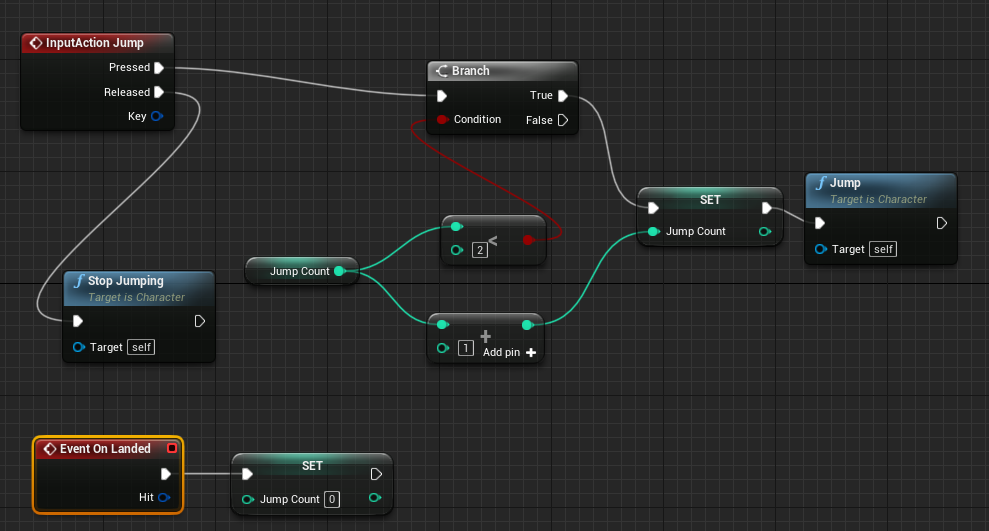
 tight venture
After a few hours of debugging, I finally came upon an important discovery, so I thought I'd share it with y'all:
RandomFloat gets called twice!
The value sent to the > node is not the same as the value that Foo is being set to.
Would've saved me a few hours' time if I'd have known that ahead of time.
That was an arbitrary example, of course. The point being:
The value obtained from a function call is not "saved" at the reroute pin. It is obtained anew from a fresh call to the function.
 tight schooner
yeah, that's how "pure" functions differ from executed functions
tight venture
Do you know exactly the conditions under which this is true? (I just discovered this minutes ago)
Are there any times when the same float would be sent to > and set to Foo?
e.g. a user-defined function as opposed to a built-in one, in a macro, etc
since a macro is just an expansion, there might be times when this wouldn't apply to them, right?
tight schooner
I would imagine that a random float inside of a macro would roll a new number for every node the macro's connected to
but if you put the Random Float node into an executed function (i.e. has exec pins) you can re-use the rolled value
cuz the function only executes when you tell it to
tight venture
Very sneaky... I would've noticed that in a second if it were written in code 🤨
ahh.... good point @tight schooner
That was the answer I was looking for. That's what makes it call RandomFloat twice
tight venture
@tight schooner So I assume that the same is true for this?
The value being checked > 0 is not the same as the value being set to Foo, correct?
Gotta be the same. Even sneakier when it's hiding behind another node like that
tight schooner
I haven't done extensive testing on how executed functions work... my vague impression is that each executed node, such as that Branch and that Set in your screenshot
re-executes each of the "pure" functions feeding it
ok, I did a test and answered the one thing I was wondering about pure functions...
so yeah, each executed function... executes... each pure function connected to it once
tight venture
good to know
 rugged violet
Hey guys I have a question on a simple blueprint function. I have am making collectables and have a icon in the HUD that I need to change opacity based on the collision of collecting the item. I put a boolean into the box collision of the item and tested it with print string and it shows that collecting the item changes the boolean to true. So that part works. Now I need to have my Item Icon in the HUD that is almost invisible on the top left of the screen recognize The boolean is changed and change the icon opacity. How would I set up the opacity change based on the boolean changing?
tight venture
I feel like this is something that they should scream at you in your first introduction to blueprints. Very confusing, visually.
tight schooner
yeah I get the impression that everyone new to programming learns this lesson by connecting a Random Float node to multiple things, lol
tight venture
hehe
Look at #gameplay-ai to see what I actually was going through when I discovered this
@rugged violet You'll need a material parameter to do that.
Go into the icon's material, right click on the opacity pin and choose "Promote to Parameter". Then you can get the material and set its parameter in a blueprint
 real walrus
Has anyone been able to package a project with replicated variables in nativized blueprints?? https://issues.unrealengine.com/issue/UE-93196
since 4.25 i should add
tight venture
@real walrus You're gonna wanna post that in #packaging
real walrus
thanks 🙂
 still trellis
maybe dumb question, does an actor have to implement a Blueprint Interface to call messages to a different actor that does already implement it
tight schooner
nope
any actor can send interface messages AFAIK regardless of whether it's implementing any
 sweet onyx
How can I set an angular velocity on a component relative to its rotation?
tight schooner
Combine Rotators node if you're trying to make a rotator relative
sweet onyx
Specifically, if I want an object to spin around Z, it looks fine when its Z points up, but it's all wrong when its Z is pointed anywhere else but up
I was using Set All Physics Angular Velocity
combine rotators?
Hmm
That's probably it, let me try
tight schooner
If you have some world space rotator, combine it with the actor's rotation (or the component's worldspace rotation) to make it relative to that thing
sweet onyx
Set All Physics Angular Velocity doesn't take a rotator, it takes a vector
tight schooner
Oh ok. Rotate Vector node I guess
sweet onyx
When I drag the node, it's converted via GetRotationXVector, not sure if that's right
tight schooner
I'm not familiar with that node so idk what it expects. Generally speaking, use Rotate Vector to make a worldspace vector relative to some thing's rotation
sweet onyx
I'll give that a shot
Tried a bunch of stuff, but none of it worked
Tried to rotate its rotation by 500 on Z, and set that directly, no spin
Tried RotateVector, no spin
If I pass in the current angular velocity into rotate vector, it's funky again
sweet onyx
@dense mantle torque? hmm
 dense mantle
@sweet onyx what is angular velocity ??
sweet onyx
@dense mantle how fast it spins
dense mantle
@sweet onyx so you need torque to get a motor going to move the car start there
sweet onyx
well... using apply torque is closer to what I want
dense mantle
@sweet onyx is it s tire or what
sweet onyx
the specific use case is a thrown disc
the idea is, you throw it, it spins
with set angular velocity, that angle seems relative to the world, so if you throw horizontally, spinning around Z looks fine, but throw vertically and it looks like throwing a mario coin
dense mantle
cool so torque will spin it and the inpluse you give it will throw it
sweet onyx
adding torque is way better, but instead there's a wavyness to it that's also bad
rather than just a straight spin
dense mantle
@sweet onyx lock the verts
the disk needs to be wrapped so you can lock the disk to z axir rotation and the use the wrapping bp to add it back for effect
dense mantle
bp contains the disk
tight venture
So @tight schooner, in your opinion, is there any danger in doing something like this? The only danger I can think of would be related to thread-safety (if the Influence gets set in a different thread) but I don't know enough about UE's thread handling to be able to speculate on that.
Basically, should I use local variables for anything that comes out of a pure function, to ensure the value is saved, instead of branching off the output pin multiple times?
dense mantle
you are wanting to control how it flys right or just go as it is simmed
 keen garden
I wasn't sure where to post. I'm wanting to get a book on Unreal Engine 4 and was wondering if anyone have an idea on what book to get. I just didn't want the basics. I wanted something that gives me detail and so on. anyone have a clue
sweet onyx
@dense mantle the idea is, you throw, it keeps going in the direction you throw it, at the rotation you threw it at, but spinning
like a thrown frisbee, basically
tight venture
@keen garden I'd be interested to hear if there's an answer to that myself. AFAIK, this discord server is the missing chapters in UE's documentation.
dense mantle
@keen garden start with the live streams that un real put out they have some great training
tight venture
^ I disagree, somewhat.
sweet onyx
I got the first part by disabling gravity when thrown, and the second part with the set angular velocity, but it has that side effect depending on how it's rotated when initially thrown
tight venture
UE's live stream videos are terrible
There are other youtubers that produce much better, more concise videos
keen garden
Guys I have gone over some video tutorials. It's just I got rip off on them when I became a pateron. and well it goes on and on.
dense mantle
they are great at giving a direction of what is there to use ... there are too many changes for a "book" to be relevant that long
tight venture
When it comes to figuring out more details on a specific node, the WTF Tomatoes guy has a short video explaining just about every single god damn one.
sweet onyx
@dense mantle I don't see a way to lock the rotation in a BP node
keen garden
See it's just not only am I working on a game. A mod all so for another game. and I just not able to add what I want it the Mod, so that more then likely I will have the same issue adding it to a game
sweet onyx
I can lock rotation in the details pane, but I only want it locked when thrown
keen garden
ok, thanks
tight venture
I think the UE official documentation for a node should just link to that guy's videos, a lot of the time
I think this

What are the Get Forward Vector Nodes in Unreal Engine 4
Source Files: https://github.com/MWadstein/wtf-hdi-files
is a lot more informative than this
Get Actor Forward Vector
dense mantle
@sweet onyx it out of an object ref of the disk all that is there from the details panel
@tight venture ME TOOOO
 pure blade
how do I set a % chance in an array so that I can change how often things spawn
sweet onyx
@dense mantle I don't follow
tight schooner
@tight venture I don't fully comprehend the question or your screenshot... The way pure functions work, conceptually, is they'll always give you up to date information. So for everything you connect Is Valid (boolean) to, it will re-check if the thing is valid and produce an up to date answer.
tight venture
@tight schooner exactly. So what if the object becomes valid in between execution pins? Only reason I could see that being possible is via multi-threaded stuff, which, if it does happen, is hidden from you
I think we're supposed to presume that everything except events are single-threaded, right
errr... technically, maybe even that is single-threaded too
I guess what I'm saying is... what would be the point of needing to check for up-to-date information if there was no chance of it changing between now and then?
tight schooner
Yeah if you set up a situation where it becomes valid in between, it'll produce a different answer.
Also yeah all game logic (and physics) runs on one thread called the "game thread". There is a BP multithreading plugin I've heard but I have no experience with it
tight venture
That situation we were talking about earlier is so deceptive though... it would basically only occur (with any relevance) in situations like getting random values. GetActorLocation will probably produce the same value between a few execution pins
tight schooner
And yeah, if you wanted to save performance in some data/execution-heavy script, like if you're doing thousands of loops, you could save a predictably static pure function output to a variable or something.
tight venture
For example, anyway
yeah, good point
@pure blade you'll have to clarify further if you want anyone to answer
tight schooner
If pure functions didn't re-run for every node it's connected to, then it would add some ambiguity over how up-to-date the information is. I have no prior programming experience so I can't speak to C++ and whatnot, but would assume BP's approach is that execution wires drive execution. If it doesn't have execution wires, then you don't get to control when a function produces new data.
As an approach there's is a discernable logic to it
If it didn't work that way, then people would have the opposite confusion over when pure functions are updating their outputs
tight venture
@sweet onyx You may want to look at this
https://www.reddit.com/r/unrealengine/comments/4wmigg/lock_rotation_of_physics_object_in_blueprint/
reddit
1 vote and 2 comments so far on Reddit
sweet onyx
@tight venture thx
tight venture
@tight schooner I agree. I was just fooled by my intuition based on how it looked in a blueprint.
I have C++ experience. Quite a bit of it. I find myself kind-of translating, if you will, blueprint schematics into code, in my head. I was just translating it incorrectly.
tight venture
@slender venture Probably. I'm no UE guru, but event tick, unless you've set it to behave otherwise, is called every frame. You want to keep as much out of EventTick as possible.
In all practicality, though, just run it. If it runs slow, that's probably the culprit. If not....... who cares...?
Anyone know how it is possible for a physics object to become launched outside of a sealed room?
I have a kitty playing with balls of yarn, inside what is essentially a cube with no way out. Yet, quite often, my kitty will bat the yarn ball around, apparently so fiercely that it somehow teleports through the walls or the ceiling.
Is there something I'm missing? Maybe something to do with sweep motions?
I have the collision settings basically correct, I think... If the kitty doesn't bat it very hard, it banks off the walls like it's supposed to.
I just realized I should post that in #legacy-physics but the answer probably has more to do with something basic so I'll let it simmer here for a bit
 verbal narwhal
help me I can't save megascan files
old rock
are “input action” things expected to work if you have them in the blueprint for an arbitrary actor, or only pawns / player controllers? mine aren’t working but I’m not sure if it’s because of other weirdness (the inputs are mapped to VR controllers) or because what I’m doing isn’t even right in the first place
old rock
turns out: no, they’re not. moving the Input Action blocks to the pawn got it all working.
 near yarrow
Player halos?
Cost?
We are using all masked unlit emmisives
The draw back tho is not being able to see the edges of objects without post process edge finder
 deep elbow
@verbal narwhal you may have two instances of unreal running
@slender venture everything has a cost, the line trace is not going to be a big deal but rather what you are doing after the trace
simple lantern
Hey all, could someone help me with transferring my player controller inputs to an AI character that would mirror all of my players movements? My first thought was to just copy the ThirdPersonCharacter BP and place it in my scene, and enable input on it, but that didn't work. I tried disabling consume input on all the InputAxis nodes, but that didn't do anything either. Some suggestions after coding suggested just feeding the players actions to the ai character, but I'm not sure how to go about that. Any advice would be helpful
deep elbow
you could use event dispatchers to run the same commands from the player controller - in your AI just bind some events to the controllers input events, or literally just set a ref to the player in your AI when it gets created and have your input events on the player run similar things on the ai
simple lantern
@deep elbow Thanks for the reply. Since event dispatchers are a little above me right now, I'm trying to accomplish it by casting to the mirroring AI and setting a custom event. Here is the player's BP
and here is the receiving AI's BP
Not working though, and since I still only have a beginners idea of how this works i'm not sure whats going wrong
to be specific I'm getting a cast failed
deep elbow
yeah, you are getting the player character and then casting to another actor, which is not the player
does that make sense?
when you get player character it returns the character that is possessed by the player controller
if you want to use casting you need to get the actual actor that is the shadow, you need a direct reference to it
this is why dispatchers would be useful to you because you wouldn't need to know where or what that is, but the shadow would just bind events to the player character, but if you want to use casting you need to, at begin play or when the pawn is possessed, or when the shadow is created (is it spawned dynamically from gameplay?) you create a reference in the player pawn, and plug that into the cast object
@simple lantern
casting is less like fishing where you throw out a line and hope to get something, and more like Scorpion in mortal kombat where you throw a line directly at something you know is there
deep elbow
have you added inputs after creating?
 lilac lance
@simple lantern dont be scared of dispatcher.
Just create it in the character, and in the mirrored one, type bind "name of dispatcher" and disable content sensitivity for it to appear. Bind it on begin play of mirrored.
You can add inputs and outputs to the dispatcher.
I hope i said it right.
I may be slightly wrong on something.
I cant check now.
deep elbow
he needs a reference for the player in his mirrored character tho right, can use get player character and cast to that
personally i would use dispatchers
but exploring both options is healthy for learning
simple lantern
@deep elbow @lilac lance Rly appreciate the input, my sponge brain is going through your responses and looking up some of this stuff so this is a great place for me to start
 vast lion
have you added inputs after creating?
It creates them automatically
If I do it manually then it does not let me connect the nodes...
deep elbow
right, can you try compiling the blueprint that has the dispatcher, and then right clicking your custom node and selecting refreshnode?
lilac lance
@simple lantern usefull thing is that, when you bind in the mirror, if you done everything ok, you will have an event with all the outputs.
I have to go to work
Wish u luck
simple lantern
@lilac lance Thanks a bunch
 errant shadow
I have been following the blueprint multiplayer template vid on youtube and it has some version problems its the 2016 one by one of the unreal devs
still trellis
Think someone on reddit recently redid that series for updated UE4, don’t have the link but check the unreal engine sub
errant shadow
yeah having problems finding the updated version:(
simple lantern
So if i'm binding an event to an event dispatcher, I need to cast to the BP that contains the event dispatcher. If i'm casting to that BP to access the dispatcher, what's the point of even using a dispatcher? why not just create a custom event instead?
I thought the benefit of an event dispatcher is that it is it's own version of communication that any BP can tap into and access without direction communication. but if i'm casting just to access it I just don't see the point
what glaringly obvious thing am I missing here..
simple lantern
Is there a way to delay the action from a constantly firing event? For example, let's say an objects movement vector was being controlled on tick, and I wanted a different object to mirror the same movement vector but just 1 second lagged behind.
 chilly linden
I downloaded a stylized grass pack to use in my project, however, it manipulates vertex normals so i am not sure how to set this up to work properly
chilly linden
how do i use vertex normals in materials?
maiden wadi
@north oriole Any editor altering plugins?
My guess would either be one of them are causing a problem, or for some odd reason your characterBP is corrupted, if it doesn't happen with other blueprint files.
simple lantern
@trim matrix Reroute nodes?
 jaunty dome
how can I get input action key name ?
Say I have Input Action Interact set to "E" key
and I want to display said key on a widget or print string or whatever
how do i go about getting the key name ?
Get Key Display Name
🤦♂️
thin rapids
can I somehow break or bend the BP wires so they look tidier?
@trim matrix wdym with that?
maiden wadi
@tame stream What you've created is a type. It's just a template for a data holder. What you need to do is create an actual Array of these where ever you want to store the data.
jaunty dome
oof turns out i was wrong
i can't use InputAction and use Key to get display name
"The current value (None) of the ' Key ' pin is invalid: 'Key' in action 'Get Key Display Name' must have an input wired into it ("by ref" params expect a valid input to operate on)."
deep elbow
@trim matrix you can double click wires to create reroute nodes, alternatively collapse sections onto a child graph, you can also use custom events to reroute the flow; or the best practice imho, is turn off the blueprint grid, and make stuff readable at a glance but avoid getting hung up on tidy blueprints, it sucks away time and accept nobody will ever ever see it when playing your game. as long as something can be followed by another developer without untangling then it's fine
and then buy this: https://www.unrealengine.com/marketplace/en-US/product/node-graph-assistant

Use this plugin to greatly speed up your node graph creation workflow.
maiden wadi
Or rearrange your nodes for better readability and ignore wires.
 dim robin
so I have a checkpoint system for a local multiplayer game. Each player should only see his current desired checkpoint, but right now they are all "shared" between players. how to achieve selective visibility for each player? and of course selective functionality as well. I don't want player1 to activate next checkpoint for player2.. what should I do?and of course selective functionality as well. I don't want player1 to activate next checkpoint for player2.. any clue?
because this is happening on overlap
and this is happening in the checkpoint tracker
tame stream
with format text, how can i merge numerous texts?
maiden wadi
@dim robin Not sure how you're handling this with just what you've shown, but all you're checking is that an actor that can be cast to a BP_Pawn is passing the checkpoint. There's no checks about whether it's locally controlled or anything multiplayer. So this means that on any person's machine, anytime that a BP_Pawn that is controlled by anyone, even an AI controller passes a checkpoint going the right direction, it'll clear that checkpoint.
dim robin
that's exactly the point! should I tell inside the checkpointbp (the one with overlap event) to check which player is going through?
maiden wadi
@tame stream Not sure about Texts, but Strings have an Append fucntion for that.
dim robin
and btw this is LOCAL multiplayer, not networked.. so I just have to differenciate between player controller 0-1-2-3
dim robin
😭yeah, not really...
I can't come up with any working idea.. I tried different things, but everything is shared between players.
maiden wadi
I'm not familiar enough with local coop to comment, I'm used to thinking of things based on different machines. I don't know how to change the look of something on the same machine for different players.
dim robin
The only thing I was thinking about was to set a different pawn (maybe a child of the main pawn) for each player, and duplicate the checkpointbp for each player, changing the overlapping actor with every single pawn children. that ideally should work but I believe it's the worst way to do that
maiden wadi
@dim robin Well, for hiding actors for different players, my only knowledge of how you might achieve this is by using SceneRenders, one for each player. Change the visibility of the checkpoint in the scenerender. There may be a better way though. I'd check the multiplayer channel. Someone there might have experience in Coop that can help.
 zenith iris
Does anyone know why the random int and the index value are completely different?
dim robin
Thank man, I'm going to check the scenerenders
maiden wadi
@zenith iris Pure functions are called once for every thing hooked up to them.
zenith iris
@maiden wadi not sure if I understand. What do you mean?
zenith iris
Oh, got it
dim robin
maybe you can promote that int to a variable and call it
maiden wadi
But yeah, what Mosf said. Just make the random int a local varaible at the beginning and use that local variable int for your text and mesh
zenith iris
Yeah, that heleped! Thank you guys! 😃
maiden wadi
@tame stream How are you saving that?
simple lantern
Can someone help me understand the solution to this poster's question? https://forums.unrealengine.com/development-discussion/blueprint-visual-scripting/39632-get-the-position-of-an-actor-where-it-was-100ms-ago
Unreal Engine Forums
Build powerful visual scripts without code.
Specifically this part:
"The shortcut method (which should work depending on how specific that 100ms window needs to be) is a VInterpTo Constant node. You use a Vector variable which, every Tick, updates its position attempting to reach the actor's current position at a constant rate. That rate will determine how much it "lags" the actor in question."
Nvm I think I understand more or less
tight schooner
Deletes answer I was writing
simple lantern
haha sorry
tight schooner
It wouldn't be very accurate as the dude says cuz it's just averaging the current position with the past in some running fashion
simple lantern
exactly
it doesn't really solve my problem unfortunately. I'm trying to get an actor to basically follow in another actors footsteps, tracing their path.
basically the input that's given to object A i want to then get passed to object B after a delay
 elfin hazel
there's no way you'd solve that with a delay. If you want an exact trace, every tick you need to cache the leading actor location. And every tick the follower needs to get the cached location of x time ago.
Or well there's also the 'chrono cam' system.
simple lantern
right, so the solution i'm pretty sure lies with storing vector values in an array and retrieving them after a set amount of time
Renzu I see you furiously typing i'm excited to see what you end up with
elfin hazel
Technical deeptime into the unique networking architecture of Planetary Annihilation.
tight schooner
I don't have a great top-of-head answer for that short of making a custom struct that has your inputs and also the timestamp, and saving to an array every tick for ultra accuracy. (Then using the timestamps to interpolate the values and reconstruct the inputs at any arbitrary point in time.)
It'd be a data intensive approach for sure
But if you could do with less accuracy you could add to the array every 100ms instead and interpolate entries to get a particular time
I never tackled this problem myself so there may be a smarter approach to this...
simple lantern
I've looked around a bit and it seems to always circle back around to creating a 'buffer' with arrays
I was hoping for something simpler though since I don't really have the knowledge to put that array set up together :/
 glacial eagle
The only way you can really make it work reliably is keep a short history buffer that you store the location in each frame (and timestamp each entry)
You can get an interpolated position between two samples to get an "exact" 100ms-in-the-past time.
Or just use the sample that's closest
simple lantern
What if there was a workaround by using the world position to generate a spline, and have the second actor follow that?
glacial eagle
That still doesn't help when it comes to being exactly 100ms in the past
No different to interpolating the position directly AFAIK
simple lantern
right
elfin hazel
A spline is just an array of transforms really. it's pretty much the same method. Maybe you would have some more functionality to access from splines but that's about it.
glacial eagle
I realise this is the BP sub-forum, but FYI a transform history buffer works well.
simple lantern
hmm thanks i'll check that out
glacial eagle
This is something i wrote for lag compensation system (one sec)
C++ ofc, but principle applies.
simple lantern
yeah that makes sense to me
tight schooner
The spline method won't be less complicated ... You still have to manage points and interpolate values cuz splines don't recognize points as being a fixed time interval thing out of box. (My current project uses splines that way and I had to make some custom functions to do point-by-point traversal.)
elfin hazel
But I think that what it boils down to is that you got to implement your own system, and to do that you need to be somewhat comfortable with the parts you're working with (arrays, transforms, blueprint communication). And you should work on something that is simpler but shares some of those parts so you get how they work.
simple lantern
for reference, Snakeybus did something similar. i'm curious how they coded that
glacial eagle
It seems like something that lends itself more to CPP-implementation tbh if you're able to do that. Array manipulation in BP (especially each frame) can be painful.
The lag comp method I've done works pretty well though. At the end of each frame (or after object moves), store the history item with the current world time seconds as a timestamp.
simple lantern
It seems like something that lends itself more to CPP-implementation tbh if you're able to do that. Array manipulation in BP (especially each frame) can be painful.
@glacial eagle yeah I was afraid of that lol
glacial eagle
Then you can blend backwards based on current time - rewind time, and have the two closest samples lerp between each other based on ratio of time between them.
simple lantern
this might be the step in my development where I go out of pocket to outsource this lol
oh well, I appreciate the help yall
tight schooner
I think it's time to learn arrays 
glacial eagle
Be happy to help but already too busy 😄
simple lantern
I think it's time to learn arrays
@tight schooner amen to that
glacial eagle
Just realise that pasted code has debug code in it... lel.
trim matrix
i have a bullet penentrating system setup but it only spawns decals at the hit location i want it to spawn one on the otherside of the wall it hits too
like a hole in the wall
Enter point with decal
exit point where i want the decal to spawn too
maiden wadi
@simple lantern Just curious, was your follower supposed to just be a visual ghost or like an AI?
simple lantern
@simple lantern Just curious, was your follower supposed to just be a visual ghost or like an AI?
@maiden wadi yo, just a ghost
I've been diving into arrays. Just crashed UE4. Have a feeling that's going to be happening a lot
maiden wadi
@simple lantern I did something similar not too long ago. Just in reverse. Created a 'recall' effect that lerped the player backwards over their last five seconds worth of movement. Was rather fun to implement.
jaunty dome
is it possible to do a continuous linetrace on action event pressed ?
I tried using a boolean variable, set it to a while loop
game broke
infinite loop 😦
maiden wadi
@jaunty dome Open a gate to a tick that does it, or set a looping timer.
jaunty dome
which node is that again ?
maiden wadi
Which one? They're different things.
jaunty dome
well how to use a ticking gate, and how to set a looping timer
whichever is better on performance side
simple lantern
@simple lantern I did something similar not too long ago. Just in reverse. Created a 'recall' effect that lerped the player backwards over their last five seconds worth of movement. Was rather fun to implement.
@maiden wadi sounds awesome. was it in BP or C++?
maiden wadi
Probably timer. Since it's not every single frame.
simple lantern
@jaunty dome the node is Gate
maiden wadi
@jaunty dome Try this.
On press it'll create a timer and loop it every 0.05 seconds. On release it'll clear and stop looping the timer that's calling the line trace function.
@simple lantern It was in blueprint. I'll see if I can't find the project really quick.
simple lantern
@maiden wadi cool thanks
jaunty dome
@maiden wadi I was exactly doing that 😮
thank you
one issue tho
i'm using a timeline to make a smooth "zoom" effect on camera
using Play and Reverse inputs
how would one go about that in the "LineTraceStuff" event ?
or maybe I should do the camera zoom BEFORE the event ?
even with that I only have one input after it hummmm
maiden wadi
@simple lantern So, bearing in mind that I'd probably do a few things differently these days, like make the Vector/Rotation arrays into a single array of structs. This is also single player. This is what I was doing with that.
Last two are the same function on tick.
simple lantern
@maiden wadi This is mega helpful, thanks
also.. "Saftey" 😄
(i don't judge i know how it goes)
 brave oasis
a mesh started cloning itself. I have an interaction that rotates it, and it clones itself on top of rotation. what can be the cause?
now I understand, it's the child actor, for some reason when I spawn stuff with child actor, there's two of them.
 crude timber
Hey everyone ! Is it possible to keep modifications made to blueprints when I exit my playtest ?
For example, I spawned an object using ingame UI, and I want that object to stay there when I exit the playtest.
Or, I changed some settings in my blueprints ingame, and I want them to stay the same when I exit.
Just need a way to keep everything the same and not reset the scene
maiden wadi
@crude timber Blueprints are just that, blueprints. They're a blueprint of the object you create from them. They don't actually change. What you're changing in your playtest is an instance of the object created from those blueprints. As for those. I think there's a keep simulate option for the editor somewhere if you wanted to use that, or you're going to need to rely on savegames.
elfin hazel
You could look into Editor Utility objects, I bet there's a way to change the value of an object in PIE, and then using Editor Utility apply it to the class or maybe even instance object in the scene.
 gilded pebble
Hey, is it possible to rotate a socket on a skeletal mesh using blueprint?
elfin hazel
@gilded pebble Doesn't seem to be. But you could attack a scene component to the socket. And now the scene component is your new socket that you attach things to. And you can manipulate it. But I would use it lightly, or stress test it, since the more bones and sockets the mesh has, the more transforms the animation needs to update.
gilded pebble
I see, thank you
I'm currently trying to rotate the weapon in my character's hands so it can be used differenty
jaunty dome
hummm
how can one translate Widget screen location to world ?
say i have a crosshair, and i want to linetrace to end at the crosshair's "location"
elfin hazel
Try Deproject screen to world
deep elbow
hi, adding child actor via construction script, then getting child actor and casting to it, can't edit properties on the child - is there a reason?
jaunty dome
@elfin hazel one more missing node, is the screen position itself from the widget
how do i get that
 cinder stratus
Hi can I ask for some help?
I don't understand why my gamepad input doesn't work on the left stick
I've set up this blueprint
So it should work just like the keyboard
elfin hazel
@jaunty dome hmm I always forget how I do that. If the widget is on a canvas panel, then you can get its slot as canvas slot and get its position. But I bet you'll get some weird offset, so you probably have to scale it by dpi. You got to google this yourself tbh.
jaunty dome
nvm Robin i got it
yeah its using canvas slot
funny enough just half an hour ago i was using those variables
however it seems the trace end is on the opposite direction
 dim kiln
I don't understand why my gamepad input doesn't work on the left stick
@cinder stratus gamepad input also goes in the negative direction hence that wont work
I don't understand why my gamepad input doesn't work on the left stick
@cinder stratus check your project settings axis maps
cinder stratus
Why does it not work in the first place? I mean in a default project, the gamepad isn't working
At least not the left stick
deep elbow
no it's fine, what value is set on your X input in axis mapping, is it set to 1?
cinder stratus
deep elbow
ok perfect
cinder stratus
It's a default project
deep elbow
are you using a start project, have you checked the CharacterMovement component to see if 'constrain to plane' is enabled
deep elbow
ok, i'm guessing that somethign might be up with control rotation
can youget the capsule component on your pawn and replace the get control rotation with the capsule
cinder stratus
Uhm... I can try
deep elbow
like, is this first person or third person?
deep elbow
oh just drag out of capsule and get world rotation
does your camera, or spring-arm if you are using it, have 'use pawn control rotation' enabled? shouldn't matter when getting right vector but who knows
cinder stratus
Okay so
This doesn't work
I can't find that property though
What I feel is weird is that this is literally a starter projects
So it doesn't make sense that the gamepad doesn't work in the starter project
Maybe I'll try creating a new project
deep elbow
yeah, it's pretty odd, have you tried putting a print after your gamepad Left Thumbstick X-Axis and plugging in the Axis Value? is it outputting anything
cinder stratus
Oh this is smart! I'll try in five minutes!
deep elbow
also you aren't actually using the input mappings i just noticed, but a hard reference to the key, shouldn't make a huge difference especially if Y is working
crude timber
@crude timber Blueprints are just that, blueprints. They're a blueprint of the object you create from them. They don't actually change. What you're changing in your playtest is an instance of the object created from those blueprints. As for those. I think there's a keep simulate option for the editor somewhere if you wanted to use that, or you're going to need to rely on savegames.
@maiden wadi
You could look into Editor Utility objects, I bet there's a way to change the value of an object in PIE, and then using Editor Utility apply it to the class or maybe even instance object in the scene.
@elfin hazel
Ok thank you ! I'll look into it
elfin hazel
You got to trouble shoot what part isn't working. is the true branch ever firing? Put a print string there.
thin rapids
@somber igloo probably a dumb question, but are you ever calling that GameOver event?
 somber igloo
@thin rapids Sorry Daniell I am just a beginner and i had just made a basic script so can you help me out to make a perfect script
thin rapids
yeah i can help
simple lantern
Hi all, I have an array with location vectors being added to it every 100 ms, and the last index being removed if the array length is over 30. I am trying to get the oldest index but having some trouble. The first thing I would think of is just entering "30" for the get integer, but that returns errors. Any advice?
somber igloo
Then please help
thin rapids
Then please help
@somber igloo ok, so did you check if the event is being called?
somber igloo
how by string
thin rapids
no, you just made a custom event, if the event is not being called it won't ever trigger (so there wont ever be a game over)
somber igloo
@thin rapids So how do i check
cinder stratus
@deep elbow not sure why but creating a new project worked
 olive bone
so say if I have an actor that when the character overlaps it will add a 1 to an int and if I have multiple of the same actor how to I get the highest int (e.g. actor 1 is 4 and actor 2 is 8 )?
elfin hazel
@simple lantern You can get the Last Index of an array. Though, the question is if you want that. Since you want the follower to follow after a certain time, maybe the leader object should inform the follower when the array is full or something?
simple lantern
@elfin hazel the way I have it set up, i'm trying to get the follower to move to the oldest array index location. Object A set's a variable "UpdatedLocation", and object B gets that variable and feeds it into it's world location. I just don't know what index to feed into UpdatedLocation :/
whatever index I set that variable as, it seems like the entry data gets frozen. Like the follower will move to the index just fine, but as the array fills up and all 30 indices are getting updated and moving through the array chain, the follower location doesn't update
elfin hazel
well, if you're Adding to an array, zero index will be the oldest. You can Insert at 0 index, pushing the older ones and then the last index will be oldest.
cinder stratus
How can I achieve this result? The tutorial page is dead so I'm not sure. The only thing I know is that I should use linetracing
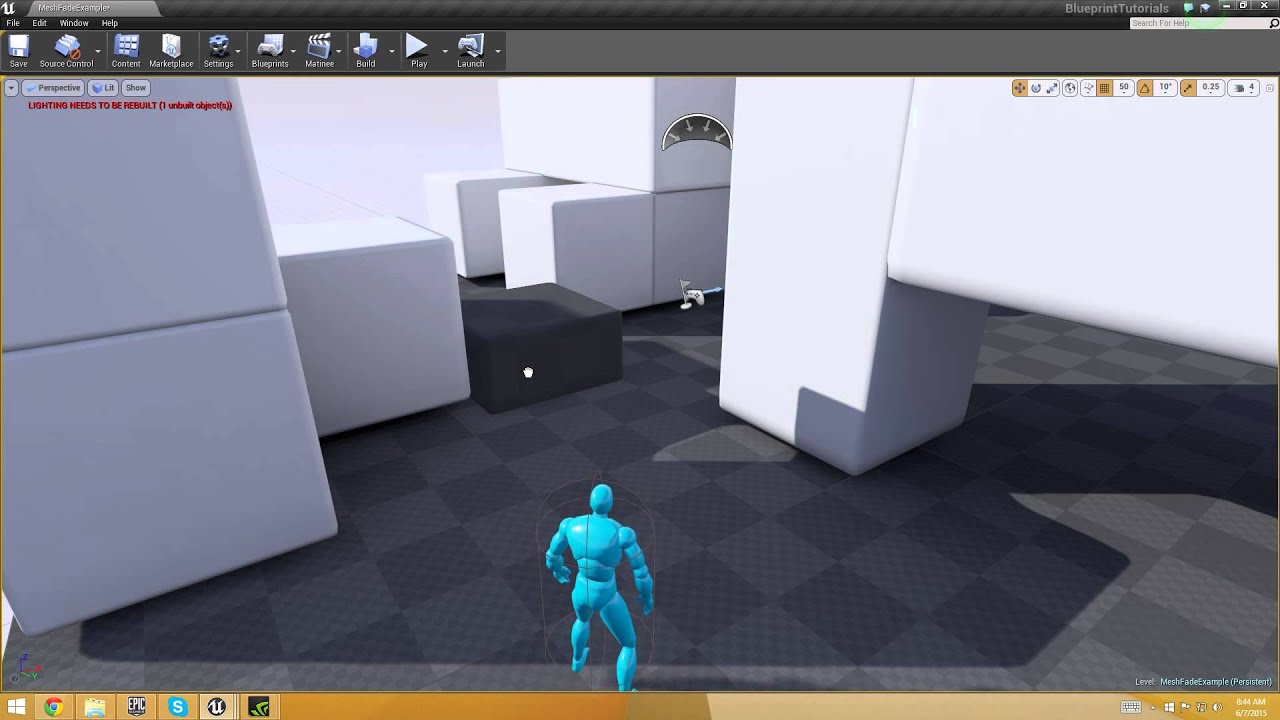
Project: https://drive.google.com/file/d/1PIQl5d6vK7xMhIy5wGV9q0MQvDcYQ4GA/view?usp=sharing
LET’S MAKE a fading scenery system, in which the objects that sit between the player model and the camera are quickly faded away. Many games use this for a 3/4 perspective which makes ...
simple lantern
well, if you're Adding to an array, zero index will be the oldest. You can Insert at 0 index, pushing the older ones and then the last index will be oldest.
@elfin hazel That's what I thought too, but the value for the 0 index stays the same even though the entire array is getting updated
elfin hazel
So which method do you use? Adding the new location to the array? What about removing the oldest, where do you remove?
simple lantern
@elfin hazel This is what my set up looks like so far
just realized i'm removing the most recent index
elfin hazel
yeah
simple lantern
well that solves it lol
cinder stratus
How do I change actor transparency having the actor object reference?
maiden wadi
@cinder stratus You can't actually affect an actor's transparency. Just whether it's visible or not. To change transparency, you need a static mesh in the actor with a material that can change it's transparency.
cinder stratus
Can I change the material of the object via blueprints?
Edit: solved
maiden wadi
Of course. Just get a reference to the mesh you want to change it on and set the new material.
 ionic harbor
this is a weird situation but: I have no knowledge of how to use custom models, and I need to get a situation where my device is taking time to load a lot of data to display a model (spawn actor specifically)
Does anyone know a way I could spawn an actor made of shapes in unreal that would actually be a pain to render? nothing I've done so far (tons of shapes in an actor for example) seems to stress my device when playing
cinder stratus
how do I change the behaviour of the camera when an object is between the pc and the camera?
I want the camera to stay in place instead of the default behaviour
elfin hazel
@cinder stratus select the camera boom and uncheck the do collision check
cinder stratus
Thanks!!
trim matrix
Hey guys, Im trying to create a game in which the screen splits when a timer runs out. My problem is that it automatically requires a second controller, I would like to create an option of split screen where each screen is controllable by one player, or a player can toggle control between the two screens. So far i am able to toggle control between "third person character 1" & "third person character 2" but it does not trigger a split screen, and i don't know how to set it up with a timer. Any help would be appreciated!
thin rapids
@trim matrix you could try using render targets in a UI i guess, idk many ways that you could do that
 earnest tangle
Is there any good way to handle "Apply Damage" if your actor is already handling Point and Radial damage events separately?
Apply Damage only triggers the Any Damage event, but the point and radial damage functions also trigger that... which would cause those to get handled twice because there's no way to tell which kind of damage it was in the Any Damage event...
(this isn't really a huge issue, I'm just using point damage for "generic" damage atm, but figured I might as well ask to see if I missed anything)
maiden wadi
@earnest tangle The DamageType should be able to differentiate that for you.
I think. I might be mistaken, let me look.
Oh, my bad. Was thinking damage types, not the application function.
earnest tangle
It's not the worst idea tbh, I only wanted to use apply damage in some special cases
so I could have a DamageType_Generic for that purpose, and then if that's not used with with any damage, the event just gets ignored :)
maiden wadi
Should be a pretty easy way to handle it.
 stable birch
Hi, I'm wondering if anyone has any experience using AdvancedLocomotionSystem V4?
I just reparented the classes to work with my current character however when I play my own animations now they seem to not be playing?
When I apply root motion the character will take a step forward (indicating that the motion from the RM anim is working) but the actual animation is not playing
Anyone have any idea what coul be causing this?
 rigid thistle
Hey guys, any Idea how to setup a "All Actors of Class in Radius"?
stable birch
^^ Would something like SphereTraceMulti work?
rigid thistle
Hm, I'll try, thanks
stable birch
@lone vine if you know there are only a certain type of Actors you will be scanning for you can use a custom TraceTypeQuery to limit the results to just that class
(game settings -> custom collisions -> add a custom trace query param)
than go to your actors set collision type to custom, and add custom collision trace type*
rigid thistle
Yeah, I guess it'll work, thanks!
stable birch
Awesome!
pure blade
tf is this not working is sleep getting to me or something
 white crypt
you forgot to close the loop for the blue line
maiden wadi
@rigid thistle SphereOverlapActors
rigid thistle
I got it, thanks 🙂
 daring summit
Can anyone recommend a good method for having the main character provide valid, yet random tips to the player depending on the situation? Example: maybe the character hasn't broken a hidden wall in the environment, and the character would say, "hey, maybe I can break that." Or, "what's that over there?". My initial thought was linking a trigger box to the state of that hinted object and it would activate/deactivate as needed via dispatcher bind. Is there a better way to manage this?
 zenith scarab
Yes I would do something similar.
Having an overlap box on the specific actor with an array of tips.
After a specific time in the overlap and nothing happening it could start displaying the tips
thin rapids
you could also make sphere traces or box traces and see if the object that has been hit has a certain tag
and if it has that tag it gives you the hint
 mossy barn
Can anyone help when I try creating a material function in unreal, I was wanting to copy and paste the attributes of a material I have but it seems I can't because its an instance? I thought then I could copy the blueprints from the parent but the parent looks completely different. Can someone help me access the blueprint for this material. I used Quixel to get this material btw.
brave oasis
I'm looking for a way to really ignore self in overlap checks. I'm not sure just comparison with self is working
 wet siren
@brave oasis how is it not working?
does it trigger even if it's self? if so are you sure they are the same actor?
 wintry grove
@daring summit your asking when is a good time to give tips to a struggling player? i think when a certain extended amount of time and game is not paused the player will need help... maybe set a timer function?
wet siren
something like these should work fine @brave oasis
mossy barn
So is there no way in unreal engine to make a landscape material or material function without recreating materials from scratch within the graph editor?
wintry grove
I need a solution... i made an idle mode (when nothing is happening do this) .... for the most part i believe its working. turret is set to grab a random float in range and rotate towards that.... however the rotation process is not smooth. turret stutters, going back and forth while aiming towards that random rotation.... please help
daring summit
@wintry grove set a timeline float to smoothly transition from current rotation to random rotation
wintry grove
lol never have done that
daring summit
No worries :) Just create a new timeline (right-click in graph, create timeline). Create a new function within it. Right-click to add new keys (add 2 for now), to set your float start value and time and end value and time. This basically will increase (or decrease or whatever your float is told to do within the timeline) the float value over time. You can then link your output value from the timeline to the set rotation of your turret
Sorry, I'm not on my PC at the moment or I'd give you an example and screenshot.
dim kiln
Good Evening :)
I am making a building game, whats a good way to structure data/ objects so the player can choose which items they want to build with?
I currently have an array that cycles but the items dont remeber which number in the array they are so saving is impossible... any help appreciated. Even suggestions of what to google will help
maiden wadi
Hard to say without more information. How many building parts are we talking about? What kind of UI are you looking for for picking building pieces? etc.
dim kiln
@maiden wadi thanks for replying :)
Maybe about 100 in total, I just need a way to give each item a unique identifier, currently I have 3 items working as an array
but once they are build unreal calls them all 'Buildblock' with no way to tell which peice they are
so creating a save file with their locations is proving problematic with all the same names and the same actor class
maiden wadi
@dim kiln Well, personally if you're going with that many buildings, I would do this off of a datatable. Make a struct that contains everything you need to initialize this buildings defaults, mesh, material, etc. I like renaming the rows in my Datatables to be a simple 0 based number that I can use as a lookup ID. But to simplify what I mean.. Say you have three building types. A floor, A Wall, and a Roof. What you might do is create a struct that contains the mesh type, materail, maybe a transform or location for a local offset like if you're building on a grid. Then you can create the building with these from your BuildBlock. Make it have a StaticMesh component and set the static mesh to the one from the struct, then the material to the same static mesh component. Set the local offset if you need it. And also in this Buildblock have a name or integer that you can use to identify which building type this was in the datatable. Then when you save, you save the location, that it was a BuildBlock class, and that ID. Then when you load, all you need to do is spawn a new Buildblock at the save location, and recreate it with the datatable ID that you saved it with.
Hoping most of that made sense.
Of course you can add a lot of other stuff to the struct that makes up the datatable too. Maybe build costs, or requirements. All stuff you might use when first creating this building.
dim kiln
thank you so much ❤️ I will read up about data tables. Assigning an ID is the bit I am most unsure abou
maiden wadi
I'd probably go with integers myself. Just make an integer in the buildblock and set it to the same ID from the datatable. Just needs to be something that you can use to look up the assets in the datatable later for loading.
dim kiln
yea should be nice for cycling meshes as well with simple of adding 1 or -1 to the ID
I am correct in thinking the buildblock will basically be empty and then just assign the mesh from the table? @maiden wadi
maiden wadi
Correct. But it still needs an empty StaticMeshComponent.
chilly linden
i cant get rid of these weird shadows
 stable flower
I wrote a tutorial on how to create projectiles from scratch using Blueprints only, hope it can be useful to you guys:
https://www.meizenberg.com/post/projectiles-with-blueprints

Michael Eizenberg
This tutorial will walk you through a process of creating a simple projectile actor. We will also cover how to make it multiplayer-friendly. Unreal has a standard ProjectileMovement component which is pretty useful and I encourage you to also check it out. The purpose of this ...
 vital prism
This is odd... https://gyazo.com/310d5143e7c7cb878be4310798bbd539
how can the exec lline out of the loops finished be lighting up, when the input to the loop is not? Those two wires should always be running at the same time


I'm unsure if this is a visual quirk, or if there is some useful meaning here that I'm failing to grasp...
maiden wadi
Hard to say. I tend to not trust or use a lot of the in editor debugging tools. I've had very little problem using general logic and print strings for pretty much all of my debugging needs.
 round idol
Heh...Can anyone recommend a "trick" or something I could do not to have multiple spawned units do "synchron dance"? They are playing the same animations on the same meshes, they all move at once and it looks like a 90s J-LO clip 😄
maiden wadi
You're spawning them all at the same time?
tight schooner
add a breakpoint to a node and step through your logic node-by-node
that's another way to examine your execution flow
 lyric urchin
@vital prism yeah i would use a print string to see if the finished is actually always running or not. ive come across a lot of bugged exec lines myself. once a BP becomes larger, the traces seem to become more visually unreliable
lyric urchin
im trying to add components to a BP based on how many objects there are in a public array. i want to be able to edit each of these components in the editor. anyone know how i could do this?
ive tried adding a static mesh component in the construction script, but they dont appear in the editor as i add to the array
 zealous cedar
I'm trying to create a heartbeat flashing effect. The closest I can get tinkering is plugging a sine into a cosine half the value. Can anyone recommend a good way to emulate a heartbeat style pulsing?
I thought about combinging two sines somehow, one with a minor delay, but can't think of the node to use to do so
round idol
@maiden wadi sry, missed that. Apparently yes, it's a jRPG so units face each-other in a battle map
maiden wadi
Dunno. Somewhere, probably somewhere in the animation blueprint or something you'll need to start a timer or something with a random float and start the idle animation after that.
round idol
but I just found out I've ignored a huge problem for a long time and i have no idea what to do, so i kinda lost my interest in finishing touches - this is a game breaker 😭 Idk how to remove hand-placed encounters from the world map upon winning a battle...Idk how I've missed this, now I can't find a way to do it...Any ideas would b wonderful. Otherwise I'll have to spawn all encounters procedurally which is inconvenient in many game situations 😦
@maiden wadi it's the only thing I've thought about, but wanted to ask, there is still about 80% of engine nods I never used 😛 Thanks, will go with a random delay of 0-1 sec or something, that should b enough range
zealous cedar
@trim matrix This works really well in combination with what I had, thank-you!
For anyone else 🙂
round idol
@trim matrix Question is how do I ref that actor that "knows".
I've tried reporting encounter to GI before switching to battle map as dummy.
The ref gets passed to the Battle map PC and if the battle is won, Battle PC passes it back to GI marked as "defeated".
GI then adds it to an array of "to be destroyed upon world level load".
Problem is, when the "new" world map gets created, the dummy no longer matches "newly created" (hand-placed) actor ref (ofc...) and the "to be destroyed" array contains an index of the right type but registered to a different level, so !=
Oh wow, I'm an idiot - would it work if I did the same thing with a bool or anything else which gets passed on to GI?!
@trim matrix but they "knew" me in the last "session" as far as they're concerned, they spawned a-fresh...Only some independent data permanently in the GI would do...Right? or am I still being retarded? 😛
and why do u say "we hacking"? Shouldn't this be simple? :/ Didn't even think of it and I have the whole battle pre-alpha-test ready lol...Even did UI for it to be tested for bugs/ballance/fx/anims 😦
and now i feel like a dodo bird 😐
damn it! Spawn procedurally from DT to targets/pointers then? :/ Any ideas? I can't be the only one getting smacked by this...
rugged violet
HELP. I have a collectable and i want it to trigger a opacity change on a HUD icon when collected. This is my collectable, the letter S. set up like this. When i collect it it says true on screen. SO it appears it is setting my boolean variable correctly. How would I connect that to the HUD opacity change. I have tried a few ways and cant seem to get it right.
round idol
@rugged violet An easy way is to play an animation for the letter you want which brings opacity to the value you want.
Player Call Function Event pickup --> (Widget has the event pickup called by the player) --> Event Pickup - Play animation
 narrow kelp
Anyone know how to access an action's default key bindings? Alternately, anyone know how to reset an action's current bindings to the project default?
rugged violet
@round idol Im modding a map for a game i did not make and Im not accessing the player at all so my map doesnt break when they change things as the game has not come out of BETA yet.
round idol
@rugged violet irrelevant man, just make an event on the widget which you call from the BL_S (before destroying BL_S ofc). The event on the widget plays an animation which changes opacity
rugged violet
Oh ok. Ive never made an animation before so its all new to me.
round idol
Then just get the letter and set it's opacity in the widget blueprint
rugged violet
Thats what i wanted to do but i messed up somehow.
round idol
Make Image518 into a variable and upon the event, drag a get from the var, type in color and "color and opacity" node will pop up. break the struct with right-click and set opacity
rugged violet
Ok. How do i make the image to a variable?
narrow kelp
@rugged violet if you want to be very dirty, you can GetAllWidgetsOfClass
but it would be better to have a reference somewhere
round idol
@rugged violet
rugged violet
ok one sec.
Which node do i run off of? Tick?
I tried a branch that read the boolean and got close
round idol
@rugged violet
rugged violet
I right cliched in the graph and typed event pickup and dont see that node
narrow kelp
@rugged violet Like I was saying, you need a reference to your widget
if you don't have one already, you can GetAllWidgetsOfClass
round idol
Ok...nvm
narrow kelp
you might need to do something like this, replacing widget_status with your widget
then you can do what claudiushwartz was saying and set the variable
rugged violet
@round idol thank you for trying. this may lead to a solution in the end. Im new to blueprints as you can tell. @narrow kelp I tried to set a boolean before destroying the collectable and that seems to work. How do i check the boolean and have that set opacity in the HUD?.
narrow kelp
the more correct way of doing it would be to make a function on the HUD
that is called by the pickup when it overlaps or w/e
a function or event
In other words, when your pickup item is picked up, it asks the widget to do whatever it needs to
and the widget sets the opacity of your image
rugged violet
Sounds legit. lol. How do i do that? I tried this.
narrow kelp
Tick is an event that is called basically every frame
round idol
@rugged violet ok...lol, stop with that event tick already. Just do exactly as I say:
vital prism
@lyric urchin Interesting to hear that the lines are bugged. Though weird results - seem to get different exec lines based on a variable set at end of function, still gonna see if I can work out a pattern.
round idol
@rugged violet Go to your pickup widget* -sry
rugged violet
I will just start at the begnning and make it as simple as possible this as new to me
round idol
right click empty space and type in "custom"
create a custom event
name it whatever you want - Pickup for instance
rugged violet
ok done
round idol
- Go to your blueprint, do what @narrow kelp said, "get all widgets of class" ... etc
cast as he said, and get that pin which says "as XYZ_Widget" and type in the name of the event you just created
it will show up in the menu. click on it and connect the execution wire
rugged violet
ok im lost again can you just explain step two like you did step one please?
Im very grateful sorry for the pain
round idol
open the BL_S blueprint (or whatever its name was, i forgot)
rugged violet
ok
round idol
right click, choose get all widgets of class
in the purple drop-down, select Player_HUD_Widget (or what the name was again)
rugged violet
ok
round idol
drag from the result and type in get
drag from the get and type in the name of the event you created on the widget
rugged violet
whats result?
round idol
the get node says 0 and has a blue result pin
round idol
oh, you created the pickup event in the wrong place. create that in the widget, not in the blueprint.
rugged violet
oh ok 1 sec
round idol
in the blueprint you take all the nodes after your event (which you can delete), and move them here:
rugged violet
huh?
round idol
the get all widgets of class node and the get node, you move them there.
round idol
no xD
you just run this, then destroy your pickup
make sure you plugin the exec pins
show me lol xD
feel like a perv right now...show me 😄
rugged violet
lol ok im here.
round idol
exec mate, exec
to the function, from the get all actors of class
only white wires are executables
round idol
that's it
now lets go to the widget
u see the event (red) with that name which you called as function in the blueprint?
which you made
rugged violet
ok yeah
round idol
good!
rugged violet
wait where just to be sure we are on the same page.
one sec ill screen shot
i have this
rugged violet
ok
round idol
ok, drag the image518 from the variables tab and get it
drag from it and type opacity
round idol
i said drag from the image var and type opacity, not the exec pin
rugged violet
round idol
just drag from the image var and choose set opacity
round idol
ok...hold on
rugged violet
Sorry... And Thankyou, lol.
rugged violet
round idol
there.compile. gz
rugged violet
Im not seeing the set opacity . i see the set render opacity.
lol. ill try it out.
 inland current
How do I make this into a loop the idea that I have is that I want to make my health bar move up and down like a ghost but slowly
rugged violet
@round idol WELL DONE!!!! Thank you soooo much it worked!!
S pick up is gone and icon is set
round idol
@rugged violet ofc it works lol. Now, close the engine and go do some tutorials 😛 you won't do any work like that m8. dw & gl! 🙂
inland current
when the enemy attack me I want to ghost animation to keep looping
round idol
@inland current you don't want that man, you want it to go up and down according to your HP. right? so it going up n down won't help
and forget animations, you can't do it like that, you need to script it and offset it in the viewport.
inland current
I mean I want it to float @round idol
well I just the fade in and fade out already
round idol
if you want it connected to your HP bar, you can't do it through animations like that
inland current
so when the enemy attack me the health bar fade in but if I runaway from the enemy the health bar fade away
So these blueprint are a waste now
round idol
so you have the HP system setup already? Then I misunderstood. Just play the animation forward and backwards every time you get hit or something. Trigger events
So these blueprint are a waste now
@inland current well, idk what you wanted to achieve with that anyway so yea...sorry
inland current
@round idol My whole idea is that I want the HP bar to float when the player is near a enemy when the player is not near a enemy then the HP fadeaway
tame stream
i may of figured it out nevermind
better question, i've now succesfully made my array
how can I print all players names seperated by a comma?
I can only figure out how to for each loop every single text, where I want all names in one message
narrow kelp
you can append a single long string or text
make a new string variable, and append each element in your for loop to that string
tame stream
ooh so like save the appended string, and then use the appended string for additional players
makes sense
narrow kelp
you wouldn't necessary want to save the string, because its harder to manipulate
but if you're getting ready to print something it can be useful
jaunty dome
does anyone know why would UE4 bug
i'm trying to click on static mesh on the map
but my clicks go through it
that's in the editor
tame stream
got it, thank you john
 grand zealot
Hey does anyone know if its possible to export an existing blueprint out of 4.24 and reimport it into 4.5 (yes I know...) without having to rebuild it from scratch in the older version?
 astral zenith
I'm looking at this page: https://docs.unrealengine.com/en-US/Engine/Editor/ScriptingAndAutomation/Blueprints/StartupObjects/index.html and I do not have the file DefaultEditorPerProjectUserSettings.ini in my project/Config/... folder. I don't even have folders for the token /<platform>/ mentioned in the doc. Is there something specific that needs to be enabled to build these files and directories?
Describes how to define Blueprint functions that the editor invokes when it starts up.
nevermind... apparently I can just make the file myself in the config directory
 thorn moth
@inland current you need to "set percent" from 0 to 1 the bar, basically you need to get the Max life and Actual life and tranform in a number between 0 and 1. ex.: 0.4 = 40%
tame stream
how do I modify the variables in a player save?
so i want to be able to load up their save, and - money
inland current
@thorn moth Ok, I also need help looping
 frozen dune
A question, to make a menu with a list is ItemList the best/only way ?
I'm trying to do a simple store menu with a few itens, but I'm running in a lot of issues
thorn moth
@tame stream first you create or load the save and save in a variable, than you can change the variable, after you change you need save it
@inland current looping?
@frozen dune give a example of what you want to do
inland current
@thorn moth I just want it to keep looing when the enemy attacking
thorn moth
you need to read the life variable inside the the Text widget function or make a event to update the life every time it change
inland current
@thorn moth My whole idea is that I want the HP bar to float up and when the player is near a enemy when the player is not near a enemy then the HP fadeaway
frozen dune
@frozen dune give a example of what you want to do
@thorn moth A store with 3 buttons (buy, sell, exit). Once buy is pressed, a list of equipments is shown to the player.
The list shows the available equipments, each with an image and status. The data comes from a spreadsheet. I made a base item widget to use along with ItemList and each individual item should create an instance of that widget.
thorn moth
@inland current add a widget component to the enemy and inside add the life widget
than you will need to detect the distance of the enemy
inland current
@thorn moth This is my enemy blueprint
thorn moth
@frozen dune I think the best way is to create 3 widgets, one is the initial menu and when you click the button it close the menu and open the buy or sell
inland current
thorn moth
I am open the editor to exaplaim better
inland current
ok
thorn moth
at the top go to "add component" and add a widget component
select the widget component and select the widget that show the enemy life
@inland current
inland current
ok
frozen dune
my objective is to learn how to properly create menus since I'm trying to develop a turn based system. Eventually I would need a list where I can easily add and remove itens/skills and so on.
thorn moth
items you can add to a datatable and than you read it inside your widget
inland current
@thorn moth I did that, what next
thorn moth
create a struct that has all information your items need, name, price, weight, wharever, than create a datatable. inside the datatable create just 2 items as example to read inside the your widget @frozen dune
@inland current ok, you can control the life widget inside the enemy or inside the widget, the easy way is to save the widget inside your component in a variable inside your enemy
inland current
@thorn moth Oh that life bar that you see in the picture is the player life bar
thorn moth
than when you enemy takes damage you can edit the life bar based on the enemy life, you need the Maximum Enemy Life bar and the Actual Enemy Life to calculate the percentage
add a "on any damage" to the graph
inland current
Ok
thorn moth
event tick you use very little
inland current
well I'm try to do just the animation part I hope I'm not being rude
frozen dune
I'm managing to send the datatable data to the widget. It's showing the item widget itself in a list form that I'm not able to do it yet
I found a small tutorial on ListItem, but it's difficult to understand it properly.
thorn moth
@inland current you will use the "Event AnyDamage" in any game when dealing with life
inland current
@thorn moth Ok well the damage works fine
thorn moth
@inland current you will need to to something like this
inland current
Ok ok
thorn moth
@frozen dune the best way is to create a widget that is just the button to buy the item
inland current
thorn moth
@frozen dune than you get the items you want and create a button for each of those items with what items they represent
inland current
@thorn moth made this myself but this the life bar that I'm trying to animate in the game
thorn moth
@frozen dune I send just the name of the datatable row to the button, than it read the informations that need to create the button information
@inland current the animation is from the widget animation?
frozen dune
@frozen dune the best way is to create a widget that is just the button to buy the item
@thorn moth Is it possible to make them show like this:
Item1
Item2
Item3
And a scroll bar to whenever I have a lot more items ?
thorn moth
yes, you add a vertical box and add the buttons inside the vertical box
I think the vertical box need to be inside a scroll box
inland current
@thorn moth yea I know but I want to make sure that the animation works when the enemy come near the player
frozen dune
that's the suggestion I was looking for =D
Never thought of using a scroll box
Thanks a lot @thorn moth . I'll try this
inland current
also play a loop
thorn moth
you can make the animation play in loop when the widget is created, in the event construct Play Animation in loop
inland current
@thorn moth when I'm near the enemy the life bar fade in but when I runaway from the enemy it fade out that works. But not the float animation
what did you use for the loop animation
thorn moth
Num Loops to play = 0
inland current
inland current
@thorn moth So I don't use the Translation so just use Scale to animate the float animation right ?
thorn moth
use the transform
no, the translation
is right
but you need to select the animation there in the red arrow
and connect to the play animation
inland current
It work now but the animation is going to fast I just need to play slowly that's all
thorn moth
yes, you can fix on the animation or change the playback speed in the play animation
thorn moth
Num Loops to play = 0
inland current
@thorn moth do I do the loop in the event graph ?
thorn moth
😀
thorn moth
it can only play 1 animation each time
inland current
this what I have now
thorn moth
you can make the fade out animation float too
inland current
oh ok I get it now so I had to do it on both side then wow silly me
so in this picture where do i go to slow down the animation if I may ask
thorn moth
make the animation longer in this part
in the Play Animation you can change the "playback speed"
inland current
I don't see play backspeed ?
thorn moth
thorn moth
cool
inland current
thanks
you see in the video it only plays in the beginning and at the end not in the middle
I guess I have to make it longer then
thorn moth
in loop it should play all the time
are you executing the function with the looped animation?
you can start the loop animation when the start animation ends with "event animation finish"
inland current
you can see in the video that it stop for minute then it plays again when it fadeaway
thorn moth
put this on the event construct
thorn moth
inland current
I don't know why I'm getting a waring sign
 plush ridge
anyone have a source for height math?
I have cm, I want to display the height in feet and inches
thorn moth
this is a question you can find easily on the internet
plush ridge
have not been able to find anything online about this formatting
thorn moth
just transform from cm to feet/inches before you show the number
inland current
@thorn moth I did what you said and it doesn't play in the middle
plush ridge
I have that, but it displays it with a decimal point, like 5.9 feet instead of displaying inches separately as an additive to show the difference between whole feet
I'm trying to use the x'x" format in the way we might display human height
thorn moth
well, do you have a screenshot?
@inland current its the fade in animation that should be there?
inland current
I'm lost how can this function been used ?
thorn moth
the function is been executed somewhere?
inland current
 tidal jacinth
I'm trying to restart my level and call the 'Game Start' right after.. But this isn't working.. does anyone know a warkarround?
inland current
it's not working. I'm so sorry if I'm not good at this I'm trying to learn as I good
thorn moth
@tidal jacinth I think it destroy everything, and the Call isn't executed
thorn moth
execute the Game Begin at the start of some of the blueprint like Game Mode
than it execute it when you restart
inland current
inland current
ok ?
thorn moth
are you creating the widget or just setting it invsible?
the num loop to play is at 1
and you can Ctrl+C and Ctrl+V the functions
 tight sleet
I need some guidance : I opened the Roller template and like the concept of it, but I want to make the camera chase / behave like the Third Person template does. Is there a good way to change or set the blueprint so it follows the ball and orients the camera the way the ball is moving?
I.E get the camera to behave more like the third person chase camera instead of being fixed isometrically.
inland current
thorn moth
I dont know exactly how this template works, buy you can remove the fixed camera and add a camera to the ball
the ball need to be a pawn
and you can add it as a default pawn
inland current
You see in the video you can se that it's not working right
thorn moth
did you change the loop to 0?
inland current
inland current
ok
@thorn moth I don't know why it's doing this. It supposed to fade in when the game start then fade out when your not near a enemy
somber igloo
why my this is not working
and this to
it is not regenerating after taking damage
this is damage function
 stuck hedge
Why do floats become imprecise or just add random bits to the end? saving a float variable of 120.36 in the editor ends up turning it into 120.3600006
 keen atlas
Where is the second screen plugged into @somber igloo ?
Also, I highly discourage using == for floats due to the following:
@stuck hedge Floats (floating point numbers) store the most relevant part of a number with an offset of position, making it so it bleeds some precision in exchange of being able to store extremely large/small number.
inland current
My life bar isn't working right
My whole idea is that I want the life bar to float when the player is near a enemy when the player is not near a enemy then the life bar fadeaway
keen atlas
Sounds to me like your fade may be looping
inland current
yea I see that now
stuck hedge
@keen atlas I'm recording seconds for a racing game. I'm setting a default value as the best lap time value, and to test my function for converting a float to a readable MM:SS.SSS format, I entered a default value of 120.36 for the variable in the actor. However, after saving the actor it adds the extra bits to the number.
inland current
how can I fix that
keen atlas
@inland current How are you making that bar fade?
stuck hedge
I'm talking about stuff like this. I enter 120.36 and hit save and it changes it to this
keen atlas
@stuck hedge That's normal with floats, rounding errors are common. What I would say is to truncate the number before showing it on screen
inland current
I just want to fade in when near a then float then fade out when running away from then enemy