UATHelper: Packaging (Windows (64-bit)): LogInit: Display: LogBlueprint: Error: [Compiler PersistentLevel.lvl] Spawn node Create Widget must have a class specified. from Source: /Game/lvl.lvl:PersistentLevel.lvl
UATHelper: Packaging (Windows (64-bit)): LogInit: Display: CookResults: Warning: Unable to find package for cooking /Game/ThirdPersonBP/Blueprints/ThirdPersonGameMode
#blueprint
402296 messages · Page 477 of 403
 maiden wadi
@dim robin Have your pawn RPC to the server version of itself, and then call a function in the game state to do what you need to do.
 tawny tinsel
the error tho we gotta fix that
 white crypt
do a global search for each "Create widget" node
maybe one of them wont have a class
also inside the output log theres a search bar. you can enter error and see if it displays anything else
tawny tinsel
maybe
white crypt
btw, do you have a binaries folder?
tawny tinsel
yes
tawny tinsel
development i think
white crypt
if none of my above suggestions help you find the issue as a last resort you could try rebuilding your project with dev binaries using visual studio
white crypt
show your binaries folder
how it looks inside
i have doubts that you dont have development binaries built
tawny tinsel
white crypt
yeah, you will need to use visual studio for that
 white crypt
then you will need to make a new cpp class so you could get that file
try looking for some tutorials
on how to package a game
tawny tinsel
so its almost imposible :3
guess ill just cry
CUZ I CANT HAVE NOT PERSISTENT LEVELS
white crypt
it literally takes couple of minutes to set it up
tawny tinsel
atleast if it would let me set the persistent to something else
white crypt
if you are not using world comp and streaming levels
then the level you have opened, is your persistent level
tawny tinsel
im in tears
tawny tinsel
and no education
white crypt
its easy if you know how to use google
tawny tinsel
no learning resources
white crypt
plenty
tawny tinsel
i tried all the tutorials just say click this button
instead of we click this button because that and that
white crypt
you want me to do it via teamviewer?
tawny tinsel
team viewer will force ue4 to crash cuz my direct x hardware is shit
white crypt
🤷♂️
tawny tinsel
maybe you have any good tutorial links?
 dim robin
@dim robin Have your pawn RPC to the server version of itself, and then call a function in the game state to do what you need to do.
@maiden wadi thanks, but can you please tell me how can I check inside the gamestate if that replicated action has been run?
white crypt
@tawny tinsel not that i can find any atm, have you set stuff in your project settings like a default map?
tawny tinsel
yea i have it set
maiden wadi
@dim robin I should probably ask. Is this local coop or online?
dim robin
local
tawny tinsel
its the "persistent leve"
white crypt
every level is persistent in your case
maiden wadi
Ah, well that changes everything. No RPC needed. If you do the action, just call a function in the gamestate and tell it that the action is done. Let it handle the timers and such from there.
dim robin
yes I tought rpc was not necessary, but still I miss how to check if the action has been made 😄
maiden wadi
The action calls an event in the gamestate and tells it?
maiden wadi
Then your gamestate needs to continually check a variable or something that the action needs to set.
maiden wadi
I suppose. Seems rather unnecessary to make that many checks on a local machine when you can just call the event once to end it.
tawny tinsel
@white crypt not every only the main menu level is persistent
i might be able to fix this by letting the game map level be persistent
but theres no way to do that cuz ue4 lives in stone age
white crypt
i can create a new empty level
and it will be persitent
if you only have 1 level opened at a given time, then its "persistent"
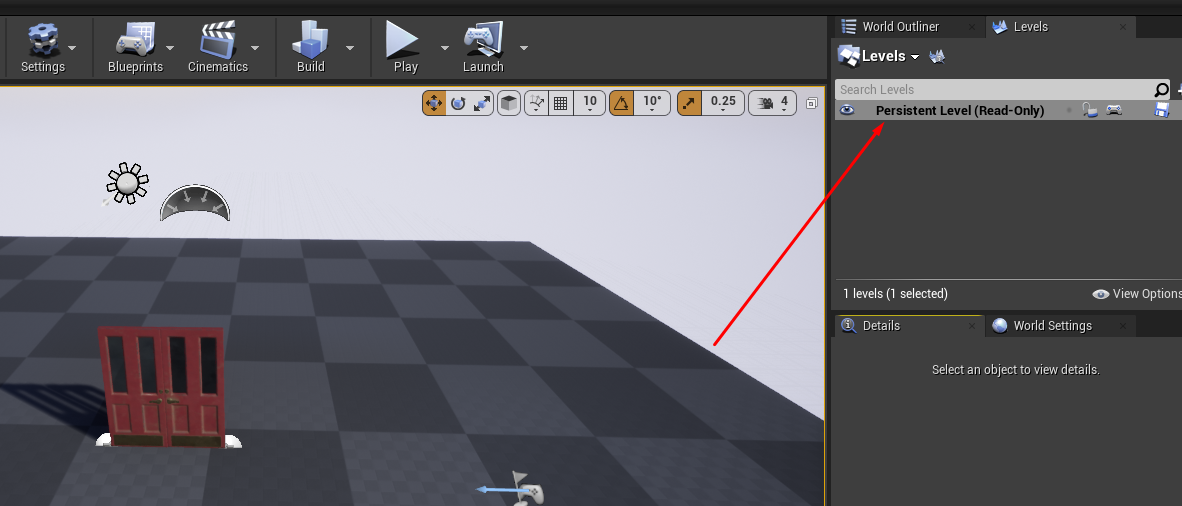
my example
tawny tinsel
hm
white crypt
i didnt give it that name
white crypt
if you are not using world composition and level streaming then yes
white crypt
that error doesnt specify which level
tawny tinsel
it does
tawny tinsel
i went to persistent levels and it shows that my main menu level is the persisstent one
i mean the error doesnt but i checked
white crypt
every level will tell you that
UATHelper: Packaging (Windows (64-bit)): LogInit: Display: LogBlueprint: Error: [Compiler PersistentLevel.lvl] Spawn node Create Widget must have a class specified. from Source: /Game/lvl.lvl:PersistentLevel.lvl
here it doesnt tell you the level name
it can be any level
as I said do a global search for "Create Widget"
theres a high chance that one of these nodes dont have a class set
tawny tinsel
All the widgets have a class set
white crypt
if you are 100% sure then my suggestion would be as before, rebuilding your project from source and including development binaries. since you cant use teamviewer you will have to dig a lot for that info cause on the surface i couldnt find a single tutorial
white crypt
but at one point i knew as much as you and somehow i managed to do that
tawny tinsel
1 wasnt
I am an emberesment
If it still doesnt work im trowing my laptop thought the window
white crypt
well i know not to take the first word that beginners might tell 😄
tawny tinsel
Ive been doing game dev for 7 months am i still a begginer
white crypt
if it doesnt build then its probably because of missing binaries, i always use shipping so dont remember if the default binaries are already pre-built
but it wouldnt hurt if you learnt how to do it now. might be scary at first but its much easier than you think
tawny tinsel
as long as it benefits me as a game dev
dim robin
Then your gamestate needs to continually check a variable or something that the action needs to set.
@maiden wadi got it working with a gate checking every 1second for the "turnend" variable from pawn, if condition is true skip to the next player and resetting the variable to false
thanks a lot
 golden kite
hello, is there any way to feed a mesh using a variable to "Add static mesh component"?
oop. nevermind, found a way
dim robin
@placid sandal
try to set a turn input and check if it works
also why did u uncheck the inherit yaw?
you should leave these checked, as far as I know..
 placid sandal
@dim robin inherit yaw resolved it, thanks!
dim robin
ofc, I will.
maiden wadi
Nothing wrong with the *-1. Specially if you're going to allow user settings to invert look.
 latent arch
Hi everyone, would / could someone be so kind as to show / help me translate this into UE4 so i can use an RTPC with it? 🙂
 jaunty dome
does anyone know in which cases Tracing By Channel would always return false ?
 elfin hazel
Trace by anything returns false if it does not hit anything. So it's just not colliding with objects. Maybe there are objects in the trace path, but then they don't block the trace channel.
And I think it has to be block, not overlap.
And if it's a custom mesh you use, have you set up collision on it?
maiden wadi
Traces always need to be blocked on the same collision channel the trace is on, yes.
jaunty dome
actually the line trace doesn't draw at all
and I can't find what would be blocking it
elfin hazel
take a screenshot of how you determine start and end positions.
 sonic crescent
Hi, i'm disturbing again. I have a "Menu" Level that is saving variable into a GameMode Instance. Here, I'm choosing my spaceship then I push a button that OpenLevel the first level. In the Level opened, i have a EventBegin that cast to the gameMode to read all variable but unfortunately it seems to read the default value and not the values saved by my menu. Any idea?
elfin hazel
The Game Mode instance is different for each level
sonic crescent
doh, that is a bad news.
elfin hazel
So there's a couple of ways to carry data over levels. Game instance might be the easiest but i'm not sure if it's a 'good practice'. Another is using the save system.
tawny tinsel
so i have an enemy and when he gets close to you, obsly the death screen loads but i want to polish this part does anybody know how i could do a double animation and make these 2 interact like an animation of the enemy restraining the character wich way should i aproach the animation and how i would implement that, think yandere simulator when the teachers catch you and restrain
 feral stratus
I noticed something weird just now and would love to know if someone knows more about it. I'm developing a local multiplayer game for gamepads. The only way I have to test it is through my SteamLink in the living room. I just realized that the right stick Y axis for all my controllers is inverted: pushing forward (away from self) gives negative axis values. Through the SteamLink, I am able to reconfigure the controller to flip the Y axis to what I think it should be, which is how the left stick works---that is, pushing forward gives positive axis value.
Has anyone else run into this? Am I missing something about how gamepads are "expected" to work?
For what it's worth, I'm not making a conventional "left stick moves, right stick looks" control, where maybe inverted Y makes sense.
My concern is that if I release the game, I want it to work out of the box for most players, without their having to fiddle with the controller settings. I can of course add a "invert right stick Y" option, but I am trying to understand why this is happening in the first place.
tawny tinsel
@feral stratus go to the input settings and on the stick thats inverted type in -1 instead of 1
it should invert it without anything else
feral stratus
@tawny tinsel What should I expect for other players though? Is it normal for the right stick Y axis to behave this way?
That is, what's a sensible default? I don't know if I'm seeing something local and idiosyncratic, or if it's perfectly normal for the right Y stick to behave this way.
tawny tinsel
well if you push the controler joystick forward it should be forward backward= backward left=left right=right
thats how i use my controlers
the movement in game should be the same as the players thumb on the controler
 willow lichen
Hey
How do I disable input on all except for the owner?
I have things that change ownership and enable input on owner ship change.
Is it enough to enable enable input on the server and it replicates?
And, does "Enable Input" for a specific controller remove every other input? Or am I allowed to have multiple enabled ( i guess second one)
 oblique frigate
quick question, should i clear and invalidate timer after it ends?
like a have a cooldown function
after cool down ends, should i clear and invalidate it or its ok
from what i says, clear and invalidate timer is to use when you want to interrupt timer
 deep elbow
if the timer doesnt loop then its fine to let it just run out
if you have a looping timer and you're tracking the output and want to stop the timer once a certain criteria is met then you'd either pause the timer if you want to reuse it, or clearn and invalidate, that removes the timer but if you call the set timer function again it'll create it and all will be peachy
oblique frigate
ok, thank you. i remember reading somewhere that if i dont invalidate timers they will still be in memory. so thats where my concern comes from
deep elbow
ot sure about that, you'd have to find more concrete documentation, i imagine it'd get garbage collected if it wasn't set to looping
oblique frigate
👍
golden kite
how can I add static mesh component to a component?
 void cobalt
please does anyone know how to make "spawn bullet tracer" follow same path as "linetrace by channel"
i have a top down game
and when i shoot the linetrace, the bullet tracer effect doesnt go in the same direction as the linetrace
red is the linetrace, green is where the bullet goes
spread value is randomized between 1000 and 0
but they just never go in line with eachother
determine hit location (which is where the linetrace gets created)
set a transform for where the bullet will meant to go
sonic crescent
The Game Mode instance is different for each level
@elfin hazel It seems that i have mistaken GameMode and GameInstance. Now all my variables are in GameMode and i need to transfert that one by one into all BP.... well. That's when a newb is making a game before know all rules...
void cobalt
here is event graph for firing weapons bp
elfin hazel
There is also the GameState to consider
 viscid valve
I'm looking at implementing a gmod type weld system into my game, or at least a system of sorts that allows you to connect different parts together and make various vehicles. Starting off with wheeled vehicles. Now I know UE4 has built in vehicle support, but I'm not sure this is necessarily going to be that useful to me if I can't dynamically add wheels and whatnot?
I've already implemented a rough weld system that spawns and attaches wheels to a body which can then be possessed and driven, but I'm struggling with implementing anything like steering. I know this is something that isn't overly elegant to implement in something like Gmod without using thrusters.
sonic crescent
There is also the GameState to consider
@elfin hazel GameState is for Multiplayer no? Do you mean that i must consider storing datas into GameState than into GameInstance?
elfin hazel
i'm not that read up on multiplayer, so I don't know game state exists on clients.
But for singleplayer, it's always there.
a thread about getting data over levels: https://forums.unrealengine.com/development-discussion/blueprint-visual-scripting/52994-keeping-inventory-items-and-other-data-between-levels
Unreal Engine Forums
Build powerful visual scripts without code.
sonic crescent
thx
elfin hazel
@void cobalt So what are you seeing, is the bullet trace always offset to the left or what?
void cobalt
no its random
i basically want to bullet to always be in line with the linetrace
but it isnt
and i dont know what im doing wrong
the transform is right there and it should work but it doesnt
elfin hazel
Okay. Now that's a complex system you have setup and I don't know what is going on in half of it. But, there is a pure node called "random unit vector in cone". Now how this works is that each time it is called, it will give a new random result. So if you want to use the same result several times, you need to only call that function once and save the result as a variable. Then use that variable.
void cobalt
i recently added a interface and stuff for multiplayer but it just makes things more confusing, so here is a simplified version of spawning the bullet tracer
its essentially the same thing but with less steps
i did do that, i think
i set the return value on the make transform as a variable
@elfin hazel
but it still didnt do it
maiden wadi
I find it very odd that you're doing bullet visuals in the game instance.
void cobalt
im still new to unreal
maiden wadi
But yeah. Robin is right. You're calling that random node twice. You need to set your transform first, then use the transform in both places.
elfin hazel
void cobalt
l;ike this?
elfin hazel
yeah
void cobalt
does the set variable node need an input and output?
like exec in and exec out
or can it be left like this
elfin hazel
yes, othervice it will not be executed.
maiden wadi
@void cobalt Anything without the white execution lines going to it will be called for literally everything that is connected to it.
Once for each time. Even if it's returning the same value.
void cobalt
where should i plug it in then? or should i turn the whole spread calculation thing into its own function?
maiden wadi
Right before the line trace probably.
void cobalt
HAHA IT WORKED
elfin hazel
yeah, between the loop and the trace is probably when you want to calculate your random value for that specific loop.
elfin hazel
well, glad it worked because if it hadn't been that, then I don't know if anyone could have helped you heh.
void cobalt
i have another question tho
maiden wadi
On a side note, this is probably something that should be done in the actual gun actor.
void cobalt
yes it is
all this is done in the weapon firing base
also @maiden wadi you mentioned why im doing the bullet visuals in the instance?
because basically im trying to make this a multiplayer game
and for some reason, the bullet visuals and sounds dont appear on the other persons screen
its all client side
so me and a friend were trying to fix it
but it didnt work
maiden wadi
Cause you need to use RPCs
maiden wadi
Remote Procedure Call.
void cobalt
ah
maiden wadi
Event ran on the same object in another machine.
maiden wadi
RPCs and Replicated variables are a need to know before starting anything multiplayer.
Here is a simple example. Input always starts on the client machine. I have a bool that is set on shift. On shift down I RPC to the server version of this pawn telling it to set this bool to true, when released, it RPCs to the server version of this pawn to set it to false. This variable is set to replicate, so whenever this variable is set on the server version of the pawn, it'll tell all other machines to change their version of this variable to match the server.
void cobalt
ah server sprint
thats actually a thing that was breaking for me
the other player was jittering around ALOT when sprinting
maiden wadi
Yep, cause the server version and client version were trying to move at different speeds and the server was overwritting what the client was trying to do.
void cobalt
i see
maiden wadi
To better understand RPCs and how to use them, ignore the C++ in this if you don't use it, but scroll about halfway down. There's a chart about how RPCs work based on whether they're running on a client or Server actor. https://docs.unrealengine.com/en-US/Gameplay/Networking/Actors/RPCs/index.html
Designating function replication across the network
void cobalt
that makes sense
elfin hazel
If you're doing multiplayer, it's time to do some research. Good place to start:
http://cedric-neukirchen.net/Downloads/Compendium/UE4_Network_Compendium_by_Cedric_eXi_Neukirchen.pdf
https://docs.unrealengine.com/en-US/Gameplay/Networking/index.html
https://www.youtube.com/watch?v=09yWANtKmC8 (and other videos from epic)
https://docs.unrealengine.com/en-US/Resources/ContentExamples/Networking/index.html
https://www.youtube.com/watch?v=TbaOyvWfJE0
Setting up networked games for multiplayer.

Creating a networked multiplayer game isn't easy, but Unreal Engine's gameplay framework is designed to set you up for success. On this episode of Inside Unreal, Technical Writer Michael Prinke will cover fundamentals such as the server-client model, various features of replic...
Overview of the samples provided in the Network Features Content Example map.

For the full tutorial playlist:
https://www.youtube.com/playlist?list=PLZlv_N0_O1gYwhBTjNLSFPRiBpwe5sTwc
In this video you'll learn simple networking basics in Unreal Engine 4, including how to test/launch your game for network play.
A link to the wiki for further notes is a...
void cobalt
thats a lotta sauce
 sand shore
I'm sure it's covered somewhere, but you can do actions on the client as you send them to the server. It makes things way way more complicated, and you should be strategic about how you do this... but it makes it smoother for the players.
The technique is called clientside prediction if you wanna learn more. Also, #multiplayer is a general place for this (but isn't meant to be BP or C++ only - you might get example code in either).
maiden wadi
I still need to dabble in that sometime! I'm still finishing up the basics on my inventory system. I already miss general gameplay design. Inventory systems are not my happy place.
 rugged lynx
hey
can someone help me
i just want to stretch a spotlight source so its narrow when i drag it down and doesnt get wide
im doing a moonbeam effect
void cobalt
i guess its time to do ALOT of research
 green eagle
I've been trying to think of ways you can do things that need to "check every tick" without having it run off an 'even tick' constantly.
Anyone know of a way to have an action key trigger and disable an event tick?
elfin hazel
yeah, by Setting Tick Enabled
 stiff hatch
if I use a "get all actors of class" will it return children of the in class?
sand shore
yes
stiff hatch
okay thank you!
green eagle
@elfin hazel dope thanks i don't understand why people don't use that more
elfin hazel
Indeed, I use it whenever I can
 pastel ibex
i never knew about that node either, i'm gonna start using it now
elfin hazel
speaking of ticking, it is good to disable it in the class defaults if you don't need ticking. gotta do it with every class.
dim robin
i set up this to update camera according to the current player and the previous player, but this works only once, and not everytime I execute the custom event. I debugged printing current player and previous player, and on turn change the values are updating correctly..
 tight venture
How do you get the DefaultRootComponent back if you've already dragged another component over it to make it the new root? Is it the same as just a blank SceneComponent?
elfin hazel
I can just drag a new component over the root one to make it the new root.
maiden wadi
@tight venture It's the same as a SceneComponent, yes.
tight venture
thx @maiden wadi
just had to confirm that
related question: when it is advisable to keep the root component and when should you overwrite it? with what should you overwrite it? the mesh? the collider? something else?
 ruby roost
Not sure if anyone can help, but it would be really appeciated as i have around 24h to go for a game jam. But for some reason my Player Controller nor my Pawn are receiving input both when using input bindings and direct input event nodes. They are certainly possessed, input enabled and assigned to player 0. Not sure what else could be causing the issue. No other actors have the nodes so they are not being blocked that way.
 chilly linden
how would i get a mesh to follow a spline?
basically i want to use a spline to add pathways, i have already created the mesh
 spark robin
Can I get the wild card for a blueprint actor in the level somehow (without already having a reference to it from within the blueprint Im working inside)
elfin hazel
@chilly linden If you create a spline and drag off it, and type "spline" you'll see all the functions available - in bp- related to the spline component. You have things like "get location at distance along spline", "get location at spline point", rotations and whatnot. Utilize those to manipulate your mesh by setting its location.
elfin hazel
@spark robin Is your Hlod actor placed in the level already, or spawned?
spark robin
Its spawned during runtime
elfin hazel
The easiest way is probably to "get all actors of class" then. Unless the spawner has a reference to the Grid Base, and can then pass it to Hlod as it is spawned.
spark robin
Im rather curious tho, is the get all actors of class heavy on the cpu or something if you only have like a handful of the actor you are looking for placed in the scene?
All the guys making tutorials always warn you never to use it lel, thats just why Im asking
elfin hazel
yeah, I mean it's a sign of some part of the design being flawed, but it's not too bad. Though I haven't tried to use it if there are say tens of thousands of actors.
I mean, you could set up a game mode class to hold Grid Base, so you can grab its reference from the game mode.
So on Grid base's begin play - get game mode - cast to your game mode - pass itself to game mode.
spark robin
Cool, well I setup a quick test, the first print string "Begin play" gets called, but for some reason not the second one
Am I like doing something wrong?
elfin hazel
you need to select the class it should look for, so the Grid Base class.
Still, the second print should print..
 snow halo
Could anyone pass me a tip on how to get a reference to the camera component in a default new level when you run PIE?
snow halo
The camera actor that spawns in PIE doesn't seem to be the camera you'r actually looking through and the default pawn doesn't seem to have a camera component : /
can you maybe get a reference to the active camera from the player camera manager?
snow halo
default
ohh, i mean that shouldn't matter
just go to new default level
it is nDisplay though
in film and television
spark robin
Huh well, Ive only used the thirdperson template so xD
Do you not have the component in the default template?
snow halo
that's fine doesn't matter
daniel, third person is different because it will obvs use the third person camera in the third person character blueprint
I'm trying to get a reference to a camera that doesn't exist until run-time
that's why i mentioned, default level
spark robin
Aha, well look for the "Begin play" then and see if you can find where it creates the camera
snow halo
where the default pawn spawns
there is no looking
it doesn't exist till runtime like i said : P
there is no default pawn blueprint you can open
spark robin
Yes, then its probably created within the blueprint no?
oh okay
Well it must be created in some class non the less, might be a C++ class? 🤷🏻♂️
Sure there are some tutorials breaking the default template down somewhere
snow halo
Are you really sure though? : )
it's possible there is no camera component for all we know
🤷♀️
The goal is for me to set post processing settings in blueprint on that active camera
elfin hazel
@spark robin Did you get it working? No idea why that setup wouldn't work. Maybe remove the delay?
spark robin
Yeah lol, it was the delay that took longer than I thought
I hope you didnt spend all that time troubleshooting my non existent issue
 elfin hazel
Nah, I'm troubled and amused by my enemy calling "clear threat", but my characters don't listen to it and keeps on beating it.
 rich isle
Hello there. I am kinda new to the blueprint, can somebody tell me how to get light source change color or turn off when player crosses a hitbox?
Please
 brave nexus
In a multiplayer project, how do I grab the other players playerstate?
 south tide
Alright, newbie question. How do I make each of these a button which can do different things, for example I press the left one and it turns them both red, or I press the right one and it turns them both green.
I'm assuming I could use a raycast and see what it hits, then run x code, although I'm unsure how to do this.
Apologies if my terminology isn't always correct I came from Unity 🙂
 thin rapids
@south tide i'd recommend reading about blueprint communications like in this docs page https://docs.unrealengine.com/en-US/Engine/Blueprints/UserGuide/BlueprintCommsUsage/index.html
Overview of when to use different methods of Blueprint Communications.
south tide
Alright cool thanks 😄
Sorry if I'm asking pretty stupid and basic things, I'm only just starting and I'm required to make a working elevator for class
thin rapids
also there's an introduction to blueprints page if you want that too https://docs.unrealengine.com/en-US/Engine/Blueprints/GettingStarted/index.html
If you are just getting started with Blueprints, this provides a high-level overview of what they are and what they can do.
Alright cool thanks 😄
@south tideyou're welcome
Sorry if I'm asking pretty stupid and basic things, I'm only just starting and I'm required to make a working elevator for class
nah, don't worry about it
rich isle
😐
thin rapids
😶
rich isle
Yeah right thanks......
thin rapids
😅
ok
Hello there. I am kinda new to the blueprint, can somebody tell me how to get light source change color or turn off when player crosses a hitbox?
@rich isle there are tons of tutorials teaching how to do that
rich isle
Yeah ok which exactly I should pick?
thin rapids
wich watching tutorials will be easier to understand than reading me typing here
rich isle
Alright
brave nexus
Can anybody help me with getting the playerstate from other players in multiplayer?
thin rapids
Yeah ok which exactly I should pick?
@rich isle idk any channels but this https://www.youtube.com/watch?v=7fUgU1wpBJ4 i guess (i don't remember any tutorials i used to watch)

In this intermediate tutorial I show how to create a light switch turn on multiple lights from anywhere in the level. This will also allow you to have as many different switches as you wish.
This episode is a bit more advanced with new things such as custom functions and deal...
rich isle
Ok thanks 👍
thin rapids
you're welcome
maiden wadi
@brave nexus You don't technically get it from other players. Look in the Gamestate. It should have an array named "PlayerArray", it's badly named, but it's an array of Playerstate references. You can get this client side without RPCs since they're replicated.
 trim matrix
Hi. Can someone explain how "Normalize" works? I've seen it the UE "Wiki", but i still dont get it.
maiden wadi
@trim matrix For which value? Floats, vectors?
trim matrix
Vector
maiden wadi
Okay, so in general there are three types of vectors. Locations, directions and lengths. In this case, we're talking directions.
To start with the long story short, normalize basically takes a vector and shortens it to a length of one. So.. a vector that's at 350,0,0 would be turned into 1,0,0
The length vector of 350,0,0 becomes a directional vector of 1,0,0
In a lot of cases people use this to multiply the directional vector by some amount, this makes a length vector that you can add to a world location to make a new location.
Let me try and make a small example of this.
@trim matrix I made a simple actor that uses the same general math you'd use in a line trace, but this is making a debug arrow. I'm using vectors to draw the arrow, and just rotating the actor itself on Yaw.
Try making that, and print off some of the values and you can see how they change as the actor rotates. It might help to understand the difference.
trim matrix
Ok i'll, thank you
 novel coral
ohhh I get it
I'm working with him, we are trying to move an ai with in a zig zag, we see this normalize being used in a strafe function
maiden wadi
I use it pretty often to get the point exactly between two actors, or get a point just past an actor.
trim matrix
is there any1 who know how to make a bunnyhop system in unreal engine ?
cause im trying to make one but i cant seem to make it work
 round idol
Can anyone pls help me "translate" an arithmetic progression into a bp function? 😭 I find I can't read the wikipedia article of it cos i forgot soooo much math since high school 😦
white crypt
@trim matrix there is an event on landed. so you could make a branch. if space held down then on landed - jump
if you want like a cs go bunny hop then simply bind your jump to a mouse wheel
 unique falcon
white crypt
unique falcon
white crypt
no u
trim matrix
i want the csgo bunnyhop but what do you mean on mouse wheel ?
white crypt
the logic behind that is when you turn your wheel it will act as you pressed space bunch of times
because you couldnt make a perfect frame jump just by using a space bar
trim matrix
aah Xd okey
white crypt
so when you spin your mouse wheel it will jump again as soon as it can
but you have to time it a bit as well
trim matrix
guys is there a way i can do the following
go through an array of vectors and check for what ones fall within a range of one like 0,0,0
then return the array indices of the ones that do
okey thanks tsauken illl try it
white crypt
it would be a bit easier to understand if you knew how to bhop in these type of games
even in valorant you can bhop if you have your jump binded to a mouse wheel
trim matrix
yeah Xd
white crypt
to make it feel more like a cs go bhop you will have to play a bit with air controll/velocity settings
under movement component (basicly adding in air strafing)
trim matrix
oh nvm now i know i can just increment an int and return that at the same time
willow lichen
If you foreach an array you already have the current index
trim matrix
yeah i needed the indices for the specific entries but that's easy just a separate int
reason is i'm building a procedural mesh and it'll require 3 arrays to be synched
south tide
Hi there. I'm trying to push a raycast as an 'interact' function, although the output is slightly above the player's crosshair. Is the crosshair not centre? Is the output wrong?
trim matrix
@south tide To me the crossbar doesn't look centered
south tide
Yeah just noticed, I took it into photoshop and checked
trim matrix
If youre looking straight forward and you can't see the line from the raycast then the raycastbis dead center on your screen
south tide
That's the stock BP not sure why it's not centred.
Alrighty. How will I move the crosshair back into the centre then?
trim matrix
I would look at the widget.
trim matrix
I would try that. Seems like that would be it
south tide
Yep worked. That's really weird how the default crosshair isn't in the centre.
Thanks for your help! 😄
trim matrix
Np
south tide
Hmm I have a custom event in BP 1, can I trigger that from BP 2 like a function?
Can't find a way
trim matrix
You can if you use an interface
I'm still pretty new to this dont know if there is a better way
south tide
Alright I'll look into interfaces thanks
 somber tangle
i am thinking this is the right place to ask, I want to create a vendorsystem for my game. I have only been able to find one tutorial on how to do it which is the one by Ryan Laley. However I am not using his inventory I am using the ARPGI. I dont know if his vendor system will work with this inventory. Preferably I was wondering if you guys could point me to a tutorial on creating vendors other than his. If not then could you guys tell me if it would be easy to set up his vendor system with ARPGI.
ARPGI: https://www.unrealengine.com/marketplace/en-US/product/arpg-inventory-system
Ryan's Vendor Series: https://www.youtube.com/playlist?list=PL4G2bSPE_8unUV_Imvs8DmH8SRfascs-A

The Action RPG Inventory System is a multiplayer supported inventory management system featuring equip-able and usable items. It can be used in single-player and multiplayer projects, regardless of your game theme and UI design.

YouTube
 quiet valley
 old prism
Hey could I get some help Im trying to set a value for a keyframe(for float value) in a timeline but the boxes to enter the time and value arent showing up and trying to manually allign the values is proving difficult
quiet valley
@old prism what you mean with the boxes not showing? inside the timeline editor you are unable to place keyframes?
old prism
im able to place keyframes but when i place them there is usually a text box that shows up allowing me to put in values for time and value but im having trouble figuring out how to find them again
quiet valley
click the keyframe till its orange..
old prism
hmm yeah idk thats what i thought but they still werent showing up
quiet valley
click one of them and send me a pic
quiet valley
hahah
quiet valley
sure it does
old prism
i had the compiler taking up too much of the screen
quiet valley
np!
old prism
lmao
snow halo
Evening all. Can I add a level blueprint variable to the level sequence? I know this is super easy with actors since you just add them and grab the variable (check expose to cinematic). But i can't find how to add a variable from the level blueprint
 weary spire
ugh, i'm having a bad brainfart
i've taken the BeginFall Z location & the EndFall Z location.. calculated the distance fallen..
if the distance fallen is greater than my max allowed fall distance.. i want to apply damage relative to the height fallen
What i'm trying to work out,, is the Fall Damage function
any maths genius ready to raise his eyebrows at me and give me a slapping for this brainfart?
deep elbow
is your entire game above 0 in Z
weary spire
nope
 late gorge
im trying to save my inventory data, it's a simple list of class+amount struct
but for some reason, the save game's inventory is always length 0 at the end of the loop
despite there clearly being items in my inventory
 bleak shadow
trying to have there be a delay before the armor starts regenerating
but it keeps on regenerating, even while taking damage
deep elbow
@late gorge is there a reason you don't just set the inventory struct in the image blueprint from the character inventory struct, why do you need the array
for each loop even
late gorge
inventory is a list of structs
and directly setting it wasnt working either
the player ref is valid, but somehow the inventory is just... empty
deep elbow
@bleak shadow it's because it's storing those delays while you are out of combat, then you are enter combat it is still running those delayed ticks, you should use a timer or something that has a specified start time, or have another bool that says "enable regen"
oh, is the inventory empty from the players side?
late gorge
yeah
bleak shadow
i only have the damage taken event called when damage is taken, not just running on a tick
late gorge
i have no idea why, the ref is valid so... what the heck
(the location is working, i do reload at the saved location)
deep elbow
the ref from the player is valid? have you printed out the length of the struct you get from the player ref? perhaps it's not being set properly
late gorge
i did, it's 0
and from the rest of the code, i see zero reason why this inventory ref wouldnt work
deep elbow
right, so the player ref is valid, but the inv is 0, have you printed out the legnth of the inv struct on the player, when you call this function
@bleak shadow but look at your flow, if you are out of combat, that tick is firing constantly, then delaying for 1 second, but you could set out of combat to false and that delay will still have the stored exec, so you could be in combat but the delay will still fire
late gorge
oh god im a dumbass
im referencing the wrong inventoiry hahahahaha
we have 2 versions in the same class
deep elbow
perfect, always the way that it's some relic of past work innit
deep elbow
well awesome, code review: success 😄
chilly linden
whats the process of rigging and creating my own animations
sorry i should ask this in aniamtion
late gorge
youtube has plenty of material to get you started on animation basics
deep elbow
that's a better question for #animation , but if you're talking about a character then you'll need some external software, or try out the new blueprint rig
late gorge
(the bp rig only works in 4.25, worth mentioning)
deep elbow
^^
bleak shadow
so you're saying i should switch the event tick with a repeating timer?
deep elbow
probably not repeating because then the problem will be the same, i mean it'd be best to START a timer once you have exited combat
bleak shadow
also, i believe that even though the tick is constantly firing while i'm out of combat, it only gets to the delay and armor regen part for the single second after out of combat switches
deep elbow
GitHub
Recreation of the Health & Shield display system on Master Chief's MJOLNIR Mk. V Helmet from Halo: Combat Evolved. - RohitKotiveetil/UnrealEngine--HaloCombatEvolved_HealthBar
yeah it does but it'd still have that stored right
that delay will still fire
 marble finch
is it possible to manipulate a canvas panel from a widget blueprint?
deep elbow
yes
sec

How do I move things around in UMG using Nodes in Unreal Engine 4 Blueprints?
Source Files: https://github.com/MWadstein/wtf-hdi-files
marble finch
thanks i'll have a look
deep elbow
not exactly the same because he is using a timeline in another blueprint, but the principle should be the same
marble finch
thanks. Im pretty fresh to UE4. trying to build an app mostly just using UMG. I've watched a lot about blueprints and understand the basic coding concepts but i feel there is a level of abstraction I'm missing to piece it all together.
old prism
So I made a timeline that makes the FOV of the camera increase when sprinting and decrease when not sprinting but it takes too long to stop is there a way to reverse the timeline at a higher speed than when it increases
chilly linden
how do i stop my character flying so far away when he jumps
i know its to do with his base walk speed but when he jumps its just silly
deep elbow
@old prism look at Set Play Rate node for the timeline, you can set different rates there
deep elbow
or you can have two float tracks, and set different stuff based on the forward/backward direction enum, its on the timelien node just pull out a pin and search 'switch'
oh, in your components list, in the variables tab, find your timeline, get that, drag off and search for Set play Rate
Set Play Rate
Wadstein goes over in good detail here: https://www.youtube.com/watch?v=BD4YUBOM4yg

What are the Timeline - Playback Properties in Unreal Engine 4.
Source Files: https://github.com/MWadstein/wtf-hdi-files
old prism
@deep elbow not sure that'll work since im not in an actual timeline but im refering to a timeline in a character
not sure how to specify the timeline since its not a physical asset
bleak shadow
are functions allowed to call events that have delays in them?
since functions are supposed to happen instantly
also do timers not stop something from happening until the timer is finished?
deep elbow
@maiden wadi thanks for images, I don't have unreal open!
 bitter ingot
deep elbow
bitter ingot
deep elbow
@bleak shadow functions can't have delays, but a timer can call an Event instead of a function so you can work around it if you really need to
bleak shadow
i tried that, but the event happened immediately, even though the timer was set to 6 seconds
deep elbow
odd, is it set to looping or someting
chilly linden
what does the little ball mean
bleak shadow
i have damage taken on start just so i can test btw, with armor set to .5
deep elbow
it's a scene component
@bleak shadow that's not how the timer works, you are binding it to itself, the red pin is the event you want to trigger, so you are setting the timer from an event and then binding the timer to that same event, and then immediately afterwards starting the regen.
the timer is not a delay, and once you have set it the execution out happens immediately

What are the Set Timer by Function and Event Name Nodes in Unreal Engine 4
Source Files: https://github.com/MWadstein/wtf-hdi-files
willow lichen
Hey. Why do I get -1 for the owner controller ID on the server?
I want to pass the ID of the owning controller to all clients. Because I want a specific client to enable its input on that actor and all other where the id doesnt match to disable it
maiden wadi
Every client thinks that it's player controller is player controller 0 anyhow. So the ID is useless on the client.
willow lichen
Ah okey, the ID is not unique over the net
Do you know how I can achieve my goal?
The object changes ownership, and only one player has ownership at a given time.
And I want to disable the input for the last player and enable it for the new one.
willow lichen
That woudl be execute on owner
But then the last owner has its input still enabled
Is the PlayerId in game state unique over the net?
If not, I could create my own networked ID using PostLogin
maiden wadi
What exactly is this object you need to switch owners for?
 twin mirage
server should know whos input should be disabled/enabled? server should then send enable to client1 and disable to client2, or something like that as general idea
chilly linden
any idea why this trace isnt hitting?
willow lichen
server should know whos input should be disabled/enabled? server should then send enable to client1 and disable to client2, or something like that as general idea
@twin mirage Yes I understand that concept. But how do I send an RPC to a specific client, does that even work?
That would be too easy
maiden wadi
Execute on Owning Client called on the actor that has a client as it's owner.
willow lichen
Yes
That enables input for that client
Now I drop my object. Ownership back to server. Now another player picks it up.
Now he has enabled, but the old one is still enabled.
maiden wadi
Okay. Slow down.
willow lichen
Not that it would change anything as it is not allowed to do something. But I don't want like 100 objects on each client to receive input if they don't need it and listen to it
twin mirage
you could loop trough all clients on server, when someone picks it up and disable or what you want to do, for all clients, but for that new client who picked it up, do something else
willow lichen
you could loop trough all clients on server, when someone picks it up and disable or what you want to do, for all clients, but for that new client who picked it up, do something else
^Ye I already try that. (Although I cant loop through every client as I cant send RPCs to individual onces
twin mirage
you can send client rpc to specific client, if I remember right
twin mirage
if its UI, then you have to route it trough playerstate or player controller
maiden wadi
Why is input and ownership not being set when the object is dropped?
twin mirage
or you can multicast and send player controller, then if its null you know its not for THAT client
since only server and clients own player controller exists on client
and I dont know what client rpc is called in BP, all I know it's clientrpc in c++
maiden wadi
Not sure why you don't just make checks in the actor to see if the person trying to use it is the owner. If not, disable input. Also disable input right before calling the RPC to the server to set the owner back to the server before someone else picks it up.
twin mirage
thats how I did my weapons on old project, someone tries to pick it up, server does some checks and set weapons owner as the client who picked it up
then when dropped set owner to null
 dense hornet
Is there a way to use a float, instead of time to control a timeline?
chilly linden
im really struggling to get ledge grab to work
dense hornet
got it 🙂
Btw, would it be possible to control your morph targets in the event graph?
 undone timber
just saying but how come there is still no a "get random array item" macro yet? i mean sure its easy to make it by hand but would be neat if it was just built in
latent arch
Any blueprint wizards around that mind helping me translate a scrip into a BP? would be GREATLY appreciated! 🙂
 quaint cargo
i set up QualityMenu which I got from the Asset Store but there is a debug command to open the menu by pressing E, and I just absolutely cannot find where it is. has anyone else set this up and all can you point me in right direction? https://www.youtube.com/watch?v=YFCli_hC-RE

Try out the demo now! http://goo.gl/gbhZYd
Buy it for $20 at marketplace. https://www.unrealengine.com/content/8a6e0dba34494f4dba0a47fac3e61335
With Quality Game Settings you can add a complete settings menu into your Unreal 4 projects.
It features:
Volume control:
- Individ...
deep elbow
add the key to a blueprint and find references, then try find in all blueprints
unless you can direct search for a key like that, probably can
elfin hazel
Never seen the "RandomVector" component before. What is it for, considering I can't get a vector from it?
 earnest tangle
@elfin hazel it has something to do with the field system which is part of Chaos destruction
elfin hazel
Ah okay. don't know anything about chaos.
chilly linden
https://gyazo.com/b00fbea2cd21da5f72faa088df80f72d my guy is hanging forever
elfin hazel
hang in there!
 dapper cradle
I am following a Tut (unreal doc) to make a VR loading screen (splash screen)
But I can not seem to find the Set or Hide splash screen nodes found in this picture.
Any ideas ?
elfin hazel
If you just type "Splash", you'll get some results, but the "add loading splash screen" looks different from the "set splash screen". Do you know when that doc was written?
chilly linden
every time my character jumps he goes into the wall hang animation
im not sure how to stop this
this is my animations
elfin hazel
you'll have a higher chance to get proper help in the animation category.
I imagine that sort if thing is common and easy to solve, for those into anim states.
dapper cradle
@elfin hazel well the top of the Doc says UE 4.17 so I know its old
 quartz mauve
@chilly linden what are your transition rules for going into Hanging state?
willow lichen
Not sure why you don't just make checks in the actor to see if the person trying to use it is the owner. If not, disable input. Also disable input right before calling the RPC to the server to set the owner back to the server before someone else picks it up.
@maiden wadi Yeah that might even work. Thanks for that
thin rapids
any idea why this trace isnt hitting?
@chilly linden in the collision settings of the cube is the trace channel that you're trying to hit set to block?
jaunty dome
any idea why this line trace fails ?
when breaking hit result, the trace start and trace end are equal
the thing is, this same code works flawlessly on an empty BP
but when i use it on my pawn (has lots of movement and combat features)
it fails
earnest tangle
yeah always good idea to work backwards when something doesn't work, check the inputs on it and where those come from :)
jaunty dome
I could swear that yesterday night right before i sleep
the code didn't work even with the variables set properly
earnest tangle
Gremlins
quiet valley
Yeah, those bastards..
 muted storm
Anyone know of a way to filter a integer based on the position of the number? I'm looking to pull a number say for example 1234 and then out of that i would pull 2 from it so i could use that number to get a index array for one array and then use 3 to get the index for 3 in another array
earnest tangle
Why not just generate two random numbers?
muted storm
because the number i'm pulling from is the score and i'm looking to use the score to drive some other systems
earnest tangle
Okay
You need to treat the number as a string basically
if you convert it to a string, you can then take the character from some position, and convert that back to a number
muted storm
could you explain what you mean by take character from position?
earnest tangle
I mean for example if you convert 1234 into a string, then it'll be the string "1234"
the individual letters in a string are called characters, so if you take character from position 1, you'd get 2 (because it's zero-based like arrays)
deep elbow
can you directly reference the position of a string? surely he'd need to convert the string to a character array?
muted storm
only thing i can see at the moment is get character array from string
earnest tangle
Oh, you might be right. I didn't actually check which nodes you would need to do it :)
Yeah I think rick is correct then, convert it into a character array
then you can use a Get node similar to other arrays
muted storm
something like this?
assuming get here would be 0 for first character and so on
I think i've got it, thanks for that
been scratching my head trying to work out how to sort this
willow lichen
I have this code. How is it possible that the first binding (Far left) triggers on pickup of a base class. But the second one (far right) too.
However, in a child class, the first one gets ignored and the second one gets printed
How is that possible?
I found out lol
My child has bound the an event with the same name to the dropped dispatcher lol
 wet swift
How can I correct the actors following my spline so that they are never floating or inside the ground?
the code:
white crypt
you could make a line trace that goes from the top of the actor to the ground. the impact location is where the ground is
and use that Z axis
@wet swift
other solution would be to make them into characters and use movement component
wet swift
what would the code for soemthing like that look like?
the ray tracing not charector movement
white crypt
let me open up my project
wet swift
ok thx
 sand shore
400 is a bit small, but might be okay for actors following a spline around
white crypt
yeah, can be few thousands just to be safe
also make sure that your actors are not blocking visibility channel
sand shore
You can make an array of actors to ignore (self is already ignored)
white crypt
true, or just making a new channel that would block only landscape
wet swift
@white crypt now all the cows are underground
white crypt
change debug type to persistent
and see how it draws the trace
for my character it draws from its pelvis and straight to the ground
wet swift
white crypt
you could add to the Z axis on "start" trace if for some reason its near the ground initially
yeah then for start, break vector and add to Z axis
wet swift
they start above the ground correctly but then slip udner the ground after a few seconds
one thing to note is that i'm moving a static mesh component along the spline the skeletal mesh is just a child
white crypt
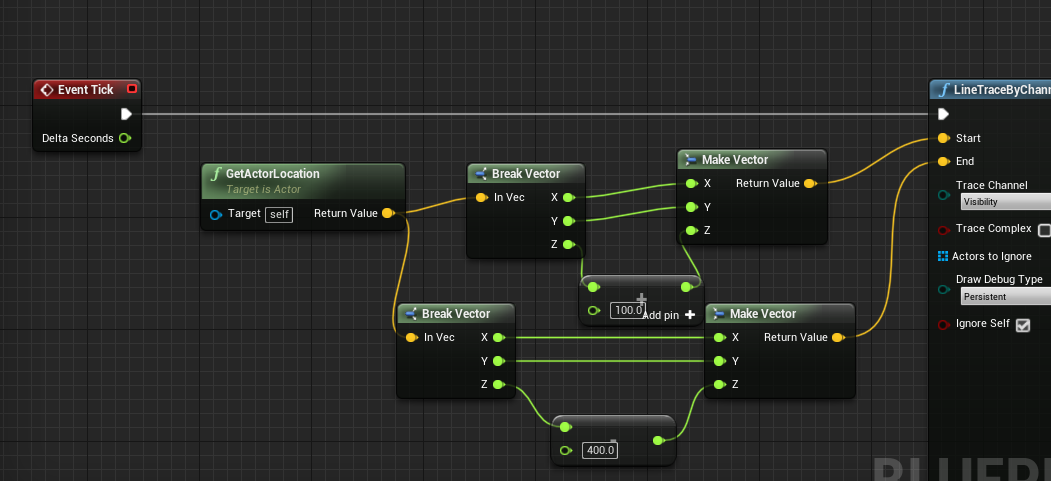
try this
and make sure they spawn above the landscape first
if 100 is not enough, increase it
as well as double check where the pivot is
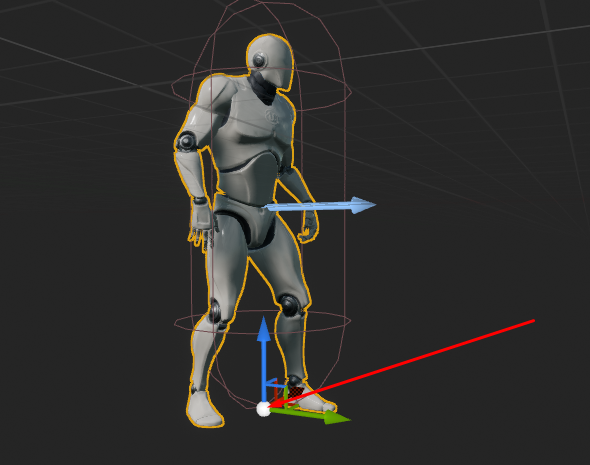
like so, the pivot here is at the feet
wet swift
ah yes now it works
theres just one more problem
its still following the splines strange pitch
how can I adjust the pitch only when im on a hill?
acualy you know what thats fine nevermind
it works thanks!
white crypt
np, with pitch might be a bit more complicated. i know its possible to get the angle from the impact point but i've done it long time ago and dont remember how
you could try looking for how impact particles determine in which angle to spawn at. just some example that might give you some clues
 lyric summit
Hey all, have a bit of a question about how to do this as properly as possible: I'm wanting the player to possess other characters that populate the world, and be able to "hop out" at will, (think the body snatching from Destroy All Humans). I'm still new to how Unreal handles this kind of thing and just want some best practices I guess.
Like should I have the player controller handle this, or the level blueprint? I'm sure I don't want every possessable pawn to have a possession blueprint within them so I'm just kind of trying to mitigate a future headache
white crypt
i would go with using player controller for posses/unposses. also adding an interface to each actor class that can be possesed
or maybe the interface might not be needed. depends on how you want to get references for each actor, just dont use level bp
lyric summit
Okay, I'll look into the interface method, hopefully that part of the docs is up to date lol
white crypt
with interface you can use the same event in different classes, so you just get that actor ref and use interface to "contact" it
if you had the same class for each possessable actor then interface wouldnt be needed, because you could directly call that event
lyric summit
gotcha, I will need the interface because I'm wanting to be able to possess different pawn classes with different functionality, so this does look like my best option
thanks yo, might have more questions later but first reading the docs
maiden wadi
I'm not sure what the interface would be for? Possess is a Controller function and called on a Pawn reference. As long as your controllable actors inherit from Pawn or Character, you don't need anything more than a player controller to possess them.
white crypt
yeah thats why i said it might not be needed, at first i thought that he might need to transfer some additional logic. so instead of making a huge mess and casting to each different class event he could use interface
but if only for possess and nothing else then sure you dont need it
 rough marsh
Does anyone has a tip on how to organize Event pins? That's my attempted, but I'm unsatisfied.
sand shore
You can use a node called "Create Event"
you plug it into the input red pin, then you can choose an event/function name from there.
rough marsh
oh perfect. Thank you @sand shore
lyric summit
so, say for instance my intended functionality is that the player has a default pawn, they walk up to a possessable pawn, press a button, despawn the default pawn, possess the new one, and say either upon the possessed pawn losing all health, or the player opts to cancel out, spawn the default again and repossess it, so really only control would be transferred, you're saying I should only need to build this in the player controller blueprint to make this work, correct? Apologies for being idk hyper-specific lol
sand shore
Don't apologize for properly laying out a mechanics with an existing example. That's actually really great for answering your question.
Yes, you would contain all the logic of handling the switch in the Player Controller if you're making a singleplayer game. If you're doing multiplayer, there's a bit more involved as you'd want to make the swap on the server (and likely have the Game Mode involved).
Input that isn't specific to the current pawn (cancel button) should be in the controller. Input specific to the pawn ("give speech" or "enter biometrics") should be handled in the pawn's event graph.
Input that the controller & pawn should both handle (nothing comes to mind) would be handled in the controller and then passed to the pawn (either via an interface or a base class).
You could implement movement/look controls in the controller or the pawn - both are valid IMO, and if you have an overhead/external camera mode, controlling it in the Player Controller will make it easier to trim down redundant event handling.
As for wanting to tear down the pawn when you're not using it... that's totally fine, but you might have some state you want to preserve (eg, character health). You can do that in a few ways, but the simplest is to involve a health component - for the main pawn, you could have that on the Player State (it'll survive the destruction of the pawn). For the drones, that would actually be on the drones. Bonus: if you give them control back (and don't kill them like DaH does), they'd keep their current HP amount!
lyric summit
ok yeah that makes sense, I think I'm following haha. So what do you think would be the best way to handle this possession logic then? I'm thinking a linecast would be the simplest way to get the possessable pawn, but I remember toying with this a couple days back and having trouble with doing anything after the cast, thanks for all the help everyone btw, really appreciated
sand shore
Another thing to look at is event dispatchers. That's useful for your out-of-health-drone case.

Announce Post: https://forums.unrealengine.com/showthread.php?101051
This Training Stream takes a look at Blueprint Communication. We find that Unreal Developers of all levels can sometimes struggle through the concepts behind moving data between objects. So in this video we'...
Line traces / collision overlaps are the name of the game. I personally prefer sphere sweeps though.
 orchid zinc
edit: restart fixed
lyric summit
I know what a sphere trace is, is that similar to a sweep like you mentioned or is that just kind of jargon for the same thing?
 gritty elm
what mean by create event node in blueprints and how to use them
why it showing none function
?
sand shore
Because you do not have anything that matches that signature
You need to declare an event with an Actor reference and an EndPlayReason enum
in that order
No other params
The text on the node sort of tells you. It's not quite as helpful as it could be
@lyric summit Yeah same deal.
lyric summit
mkay, I'll try and poke around at this and see if I can make progress before badgering for more info haha
 fossil yew
How can i set the rotation of my Character? similar to AddControllerYawInput but Set
gritty elm
the temp event still not called, i also created temp custom event in my bp object
@fossil yew set actor rotation
sand shore
@gritty elm Yeah. Pressing 1 only sets up the callback. Waqas still has to execute
fossil yew
@gritty elm my camera's rotation is still not moving
sand shore
If it executes before you press 1, temp won't get called. If you never broadcast waqas, temp won't get called.
go watch this https://www.youtube.com/watch?v=EM_HYqQdToE
Announce Post: https://forums.unrealengine.com/showthread.php?101051
This Training Stream takes a look at Blueprint Communication. We find that Unreal Developers of all levels can sometimes struggle through the concepts behind moving data between objects. So in this video we'...
gritty elm
so i can call this event direct, but why create event then? @sand shore
this node for you @fossil yew, make sure you are doing this in your pawn or character
fossil yew
@gritty elm that worked thx alot
sand shore
Google inversion of control. Watch the video I just linked. @gritty elm
It's a tool in a toolbox. If you find it more straightforward to not use it, that's okay.
rough marsh
The Update Animation event is working
 full fog
Hello and good evening. Do we have any Blueprint math addicts here that could gimme a hint where to look at a specific function? I have a float value (sun solar time) and try to figure out how to give it an offset with a slider which range would have -12 to +12 as float/integer number. So if the current time would be 8:30 (solartime float = 8.5), the slider on +1 would make it 9:35. I tried it with a simple addition node but guess that's not how it works.
https://i.imgur.com/ZBzAfpO.png bad example -,-
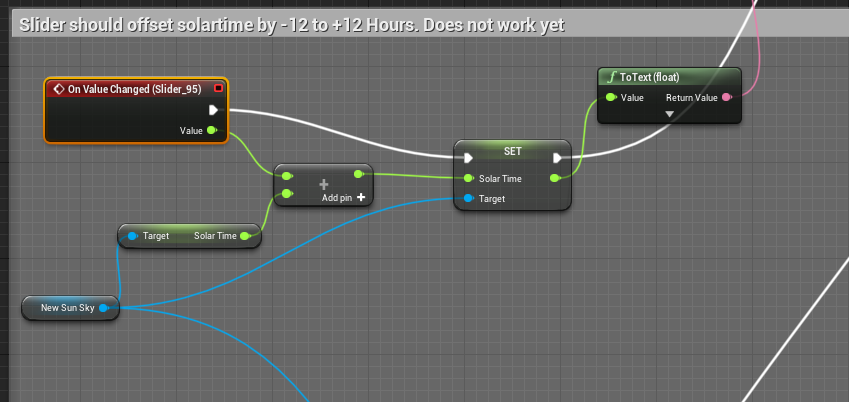 gritty elm
@rough marsh did you select this animation blueprint in your character mesh ?
rough marsh
@gritty elm yeah that's probably it
got it fixed. Just assumed it wasn't working because it doesn't stop at the breakpoint
maiden wadi
@full fog Are you wanting the slider to offset by one hour increments?
full fog
Well, would be ok, yes.
@maiden wadi Just made it work that the current solar time is getting its value from the "now" function. So the Solartime itself is having a realtime 24 hour cycle, getting current time like Animal Crossing or WoW is doing it.
For pure visual stuff like a photo-tool, players should be able to offset the sun (solartime float value) with the slider. So i kinda need to put it inbetween. Whats working a little..but not affecting yet is this:
https://i.imgur.com/p9eD6al.png
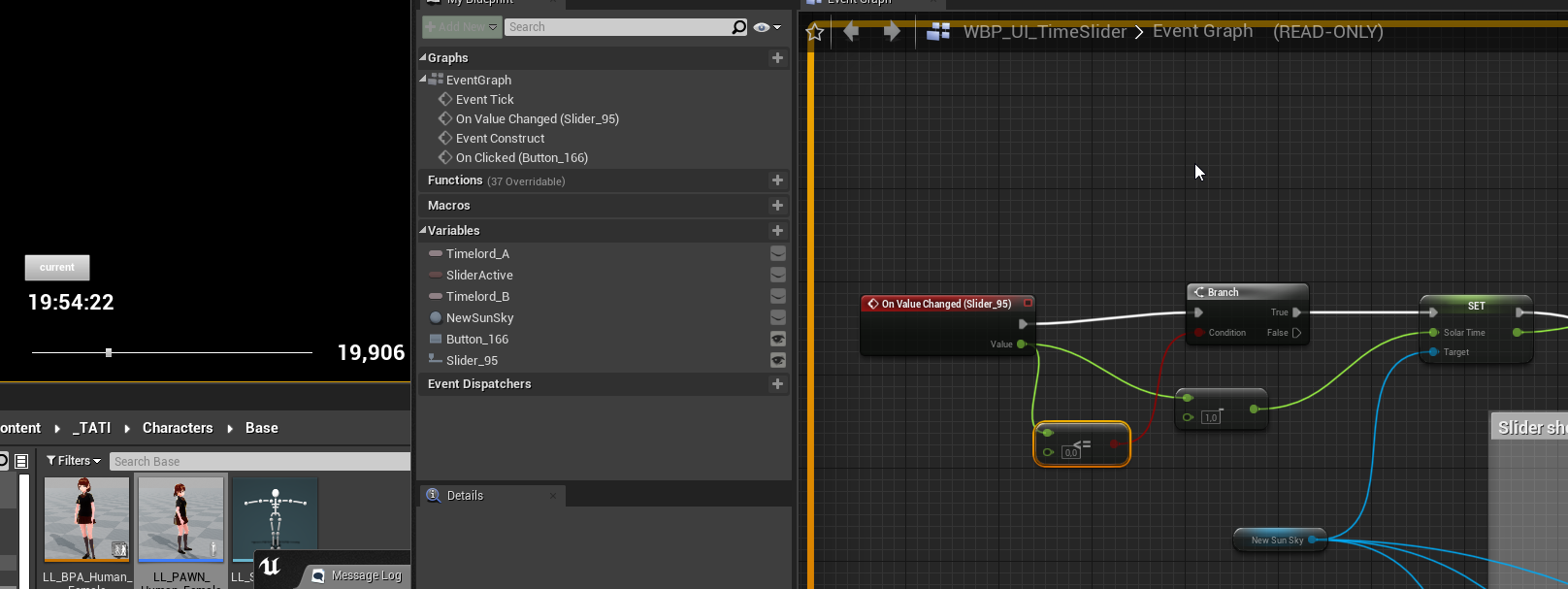
 lone ocean
I think an anim notify state will always call its end function, regardless if the end of the state is reached or not, can someone confirm that?
My anim gets triggered and stops a couple frames later (hold + release button instantly), yet the notify end gets called that would take a second of the anim playing to get called
full fog
@lone ocean I don't really know. Does this part from the doc help, maybe? https://i.imgur.com/TtCjxgb.png

Never worked with it
lone ocean
I saw that before, but the wording "you are guaranteed to END with a notify end event" is kinda murky
as in.. are you guaranteed to get the end event IF you actually end the anim? Or regardless of the anim once it's started? But it looks like it's the latter
I just tested it with a several seconds long anim montage, and cancelled it via code directly after 0.01 seconds and the end gets called immediately
full fog
Anything inbetween that disturbs it? Or forcing it to end/stop?
lone ocean
yeah. Basically I have a grappling hook that goes on as long as you hold down the button (or some external factor cancels it). The end of the "throw rope" animation notify sets a value that will indirectly make the rope visible again if the player cancels beforehand by letting go of the button
that just means that the code architecture is built on wrong assumptions and I have to rethink it
trim matrix
i want to use a render 2d component for a multiplayer fps game for players their scopes how would i make that work
cause atm its replicated to all players so they all see what player 1 ses
*sees
lyric summit
So I'm getting a bit of a strange offset here, not sure where it's coming from. I can tell it's casting from the position of the camera component, and IS going forward in the direction it's facing, but just... offset, and this offset works itself into different positions somehow.
like it migrates as you move around? Am very perplexed
 gloomy linden
@lyric summit camera component
sand shore
You have to add the location to the direction vector result
otherwise, your tracing to some offset to the origin and not some offset from your player
lyric summit

I found it
like the moment you guys messaged I realized it's the equivalent of a typo
thanks though! (was at that for longer than I'd like to admit)
sand shore
Happens to us all, no worries
gloomy linden
Once ive been stuck at calling a function in Java for like a hour, only to realize later I forgey the ()
sand shore
I've accidentally modified the wrong version of a file and was annoyed I couldn't see changes take effect
elfin hazel
I'm flabbergasted.. why, no matter what I do, is this actors location always 0,0,0?
full fog
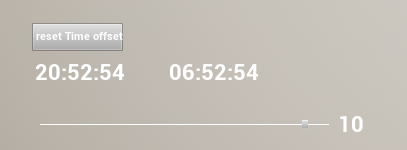
Alright, I would love to share something for the ones that might be interested. Widget Blueprint that offers to pair the solartime from the SunSky Blueprint with current systemtime + slider function for offset:
https://i.imgur.com/A7U7P9Q.png
and here is the fitting set HMS in addition to the existing get HMS function:
https://i.imgur.com/IP7R5Gx.png
Little side note: The original solartime in the BP is capped at 5 am to 10 pm so for a full 24 hour cycle it needs to be set from 0 am to 12 pm (0-24 float).
Hope it will be helpful for interested.
The only thing that does not work properly is the reset slider to 0 button. It works and resets the slider to zero, sadly the solartime itself updates only if the slider gets a mouseclick. Any idea how to update it without the need to touch the slider again?
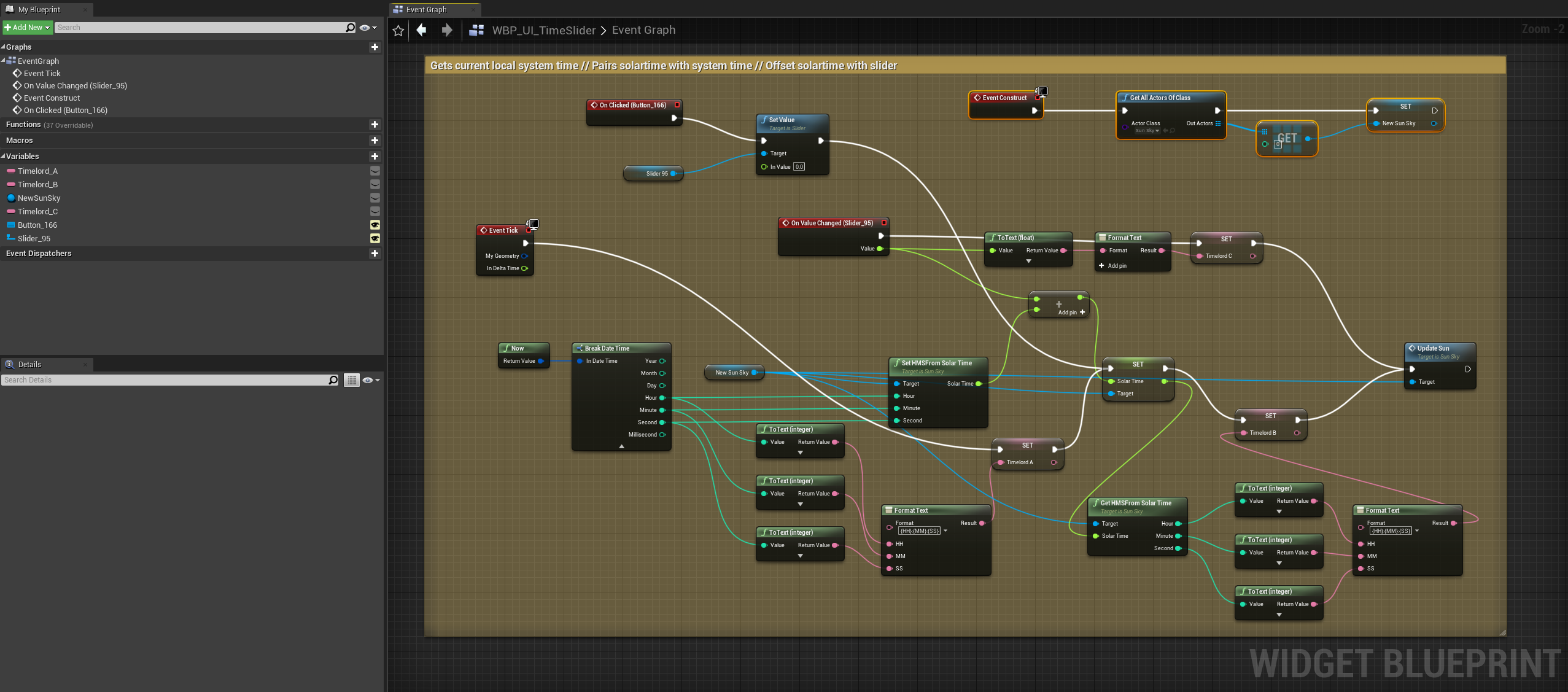
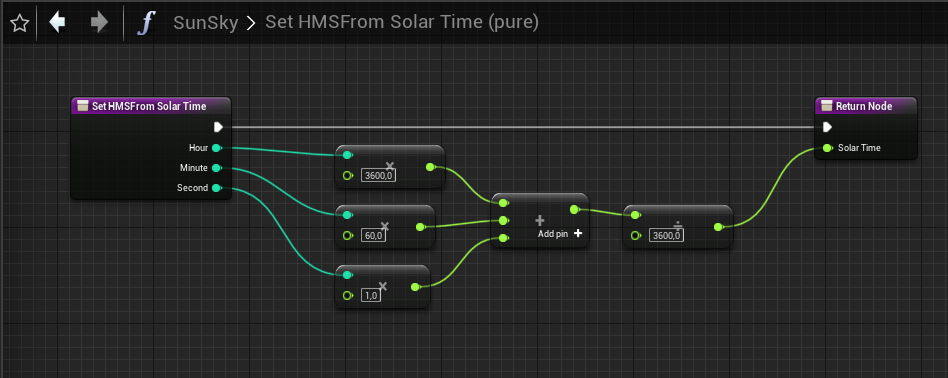
 wind atlas
hello, is there a way to use one timeline, but depending on which controller button you use, its output is negated?
elfin hazel
Easiest would probably be to set a boolean and use a select node.
elfin hazel
yeah, just put the boolean and check/uncheck after the pressed.
 proud condor
Hi! I am trying to build a turn based game similar to XCom and tried to find some help. Googling didn't help much. So I have the basic idea as follows: Have a base class for all chars. On begin play, inside the game mode BP, get all actors of the given base class. Use this for turn queue, with stats inside the char class. The game mode class then calls a 'virtual' DoTurn function on the current turn actor. This will essentially request the player for an action (click to move or select action icon etc.) or the AI. This is where I am stuck. How would I use the AIController and PlayerController classes? I want to use the in built movement stuff and also the Blackboard for behaviour trees. Any help appreciated. Thanks.
 zenith iris
Does anyone know if it's possible to set the Switch on Int have an amount of pins based on a variable value?
wind atlas
@elfin hazel like this?
elfin hazel
No, if you look at my screenshot, imagine that the green lines go into your float track pin.
So the select node replaces your multiplication node.
wind atlas
oo
elfin hazel
oh, you're multiplying float track by 45. So return value of select float * 45 in your case.
wind atlas
elfin hazel
should work
wind atlas
thanks!! I always get really worried when it comes to basic logic like this, about whats the best way to do it, I know it varies depending what you want but im still so new that I'm extra uncertain
 paper magnet
is there a way i can make the character capsule rotate by some amount of degrees?
or more so transition the capsule from its initial rotation to its next one using a timeline?
latent arch
hey guys, does someone mind looking over the blueprint im trying to make and perhaps help me get it working?
 lunar holly
I'm watching this tutorial https://www.youtube.com/watch?v=mHfiAOlZZRQ I'm going to turn my actor into a Blueprint. He does not get this window. What am I going to select?

In this video we approach creating a new Blueprint Class through alternate work flows. We start by adding an Empty Actor to our level which we then populate with Components and then turn it into a new Blueprint Class. We also take our little room and light setup and convert th...
he does it at 6:50
paper magnet
@trim matrix what about the rotation part
i cant really seem to find a single thing that fits that one
maiden wadi
@paper magnet What are you trying to do?
full fog
Google doesn't like me. I am looking for a solution on the reset slider issue. I have a slider, which works fine and is doing its job. I have a button that can reset the slider.. like a shitton of games having it in their options. Why the hell just the slider sets back to its position but not updating the value. Hell.
paper magnet
@maiden wadi make the character lean when pressing Q or E
 celest oar
i got an issue here maybe some one can help
i attached my camera to my players head bone, and kept every transform to world, the objective is for the camera to move with the running animation for imersion, it works perfect in the blueprint viewport, but not in game, any 1 had anything similar?
trim matrix
Haya folks,got a question real quick. Is it possible to change the player controller class using blueprints?
celest oar
i am not sure but i dont think u are suposed to change the player controller
trim matrix
Hmm so like it's not possible to swap it in runtime?
celest oar
what do u want to do?
trim matrix
I have to player controllers which I just want to swap by pressing a button
paper magnet
so how can i snap my capsule character to a specific rotation?
celest oar
but do u want to control diferent characters?
@paper magnet can u not use setactorlocation node?
trim matrix
No don't want to control a different character, same character but I just want to swap it's player controller class
celest oar
well u can posses the same pawn with a diferent controller
but then you would have to change the default pawn class
which is clunky and probably not what u want
trim matrix
Hm any chance you could help me out with it? I have no clue how to set that up
celest oar
you are probably doing things in a way that u are suposed to
paper magnet
this is acting weird
celest oar
@paper magnet oh sorry, theres a similar node for rotation u can search for it
celest oar
try setactortransform or something like that
@trim matrix explain to me what u want to do and i will try and tell you the best way to do it
full fog
(Question): How to tell a button on released to reset parts of the blueprint like the event tick.
celest oar
u cant reset an event
an event is something that happens once when it is called
you can however tell when a button is released
theres an even for that i think
full fog
mhm
trim matrix
I have two player controller classes, using the same pawn class. I simply want to let's say press P and swap out the controller class for the other
full fog
Yeah I am not a BP programmer, just an artist that tries to get through the jungle. Everything works, fine..except that I can't make it happen that a button should reset a slider "and" what the slider did.
celest oar
@trim matrix ye i got that but what is that for, you should be doing input in player controllers anywyas so
@full fog is that slider UI?
maiden wadi
Swapping out Player Controllers is odd. How come you need to switch controllers?
celest oar
correction: you shouldnT do input in player controllers
trim matrix
Ah yeah ive been working on two different systems and now it's a huuge pain in the ass to put everything into one controller. So I was thinking if it would be possible to simply change between them
paper magnet
now i have no idea what to actually put into the lerp
like i get it
initial position
celest oar
in theory yes, but its probably gonna be a mess
maiden wadi
@full fog Just make a third event or a function. Call this function on slider value change, and also on the button press after resetting the slider back to default.
full fog
@celest oar yes sir. I think i try another solution right now..maybe it will work.
paper magnet
i just need to fucking rotate the player smoothly to simulate leaning to left and right
paper magnet
yea cant wait till my question gets flooded in other questions
celest oar
@full fog if the slide is UI u can make an event in the UI that resets whatever u want, and then call that even wherever u have ur UI object when u call the on released event for your key
maiden wadi
celest oar
@paper magnet thats a bit more complicated i think, if u already managed to move the camera thats how i would do it
on press say Q or E call the respective event and call a timeline, get the output out of the timeline and use it for the rotation
paper magnet
welp i guess no using blueprints or c++ for me
im too fucking dumb to understand this
celest oar
its relatively simple shadept
maiden wadi
@trim matrix That was put up for someone else as an example.
celest oar
in blueprints call ur onpressed Q event
then right click and "create timeline" i think, if its not that look up on google how to make on they work like a function
paper magnet
@trim matrix go ahead, tell me to fucking go away
celest oar
after that open the timeline and make a value go say from 1 to 0
then that value is gonna be outputed and u can use that to rotate whatever u want
paper magnet
oh boy here we go again
that doesnt really sound that good
do i make a seperate function or what
celest oar
go to youtube and see how timelines work its not that complicated
paper magnet
i know how timelines work
you know what i can completely perish from this channel if you want right now and try to figure it out on my own and give up a few minutes in
maiden wadi
Personally, I'd probably put the character's camera and arms mesh on a spring arm and make that rotate it's pitch instead of the capsule.
celest oar
ye thats a good idea too
maiden wadi
Er, Roll, not pitch.
paper magnet
i havent even made a FUCKING VIEWMODEL
all i need is at least basic movement right now
celest oar
its like a invisible arm that moves when the camera hits walls n stuff
paper magnet
well i dont know how to make those using blueprints
celest oar
u just make a component
add new component button
shadept bro u gotta do some basic tutorials to understand the engine basic funcionalities
explore a bit
sounds to me that you are a bit too green and relying to much on the discord when you should be looking at tuts
paper magnet
yknow how it just fucking feels when the tutorials are just expecting you to know everything
maybe i shouldnt be a fucking game developer
celest oar
@trim matrix u use them so that you camera doesnt clip through walls for example when u are ragdolling
@paper magnet, have tou completed the batery pickup tutorial?
thats the most basic one
paper magnet
i fucking did
celest oar
every 1 starts somewhere, and unreal is way easier to learn, unreal 3 was a bitch
maiden wadi
Dude, come on. This is supposed to be a professional environment. You really need to relax.
celest oar
i have 2 shipped games and im still learning
the trick is to nevergiveup
i never did learn unrel3 tho, only looked at it
paper magnet
im as professional as a fucking drill attached to a wall in a library
drilling every now and then
celest oar
the editor was a mess and they used unreal script
paper magnet
ruining the peace of others
maiden wadi
I'm aware. That's why I said that.
full fog
@celest oar @maiden wadi My problem is that all of this works. I even did the custom event now. The Slider position resets fine.
Problem: We have 8:00am - The Slider can offset the time by for example 1 hour, which makes it 9:00
Resetting the Slider back from +1 to 0 resets the slider. But whatever i tried in the last three hours, its not resetting back the solartime to normal.
I tried to pair the button with solartime but since its driven by now function "and" also slider, it resets back for a tick but still keeps the UI's non-resetted state and jumps back.
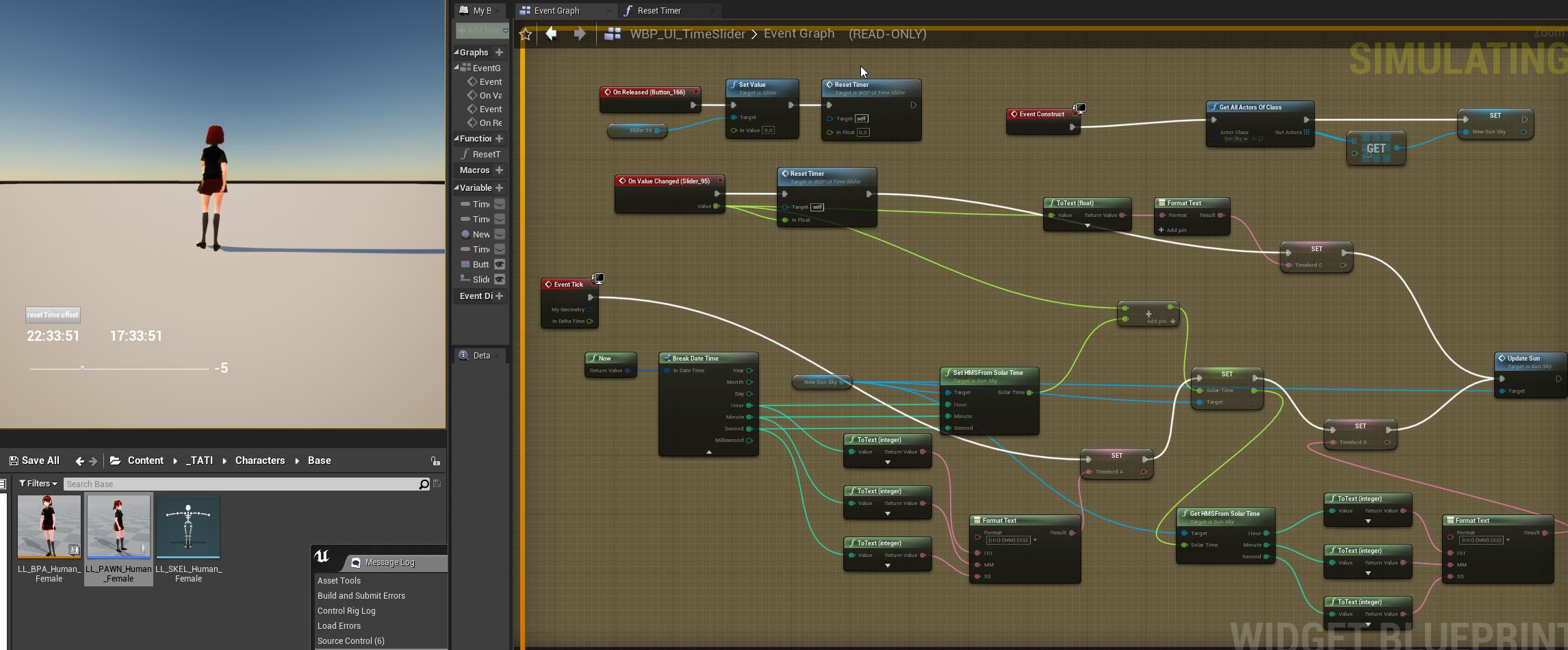
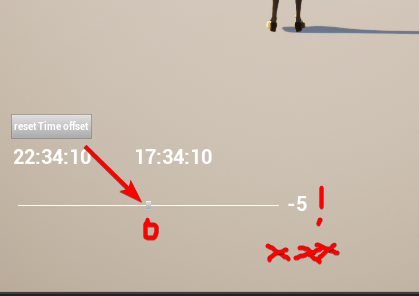
literally this. The text to the right is the offset time and the UI slider gets an update per tick.. its not updating the value -- except I click the mouse on the little slider button.. then it updates
thin rapids
yeah that was a confusing explanation
celest oar
seems to me you need 2 value to syncronize
full fog
Yes
celest oar
you want the sun to rotate acordingly to the value of your slider?
paper magnet
yknow just seeing how others are doing things way better than me perhaps at the same experience level is just making me want to take a bullet into the head
or just get out of reality for a moment and literally forget whatever was going on
full fog
a) I have the current system time. This drives the solartime which drives the sun position. This is a realtime updated event.
b) I have a slider to "offset" this time. So i can jump forward up to 12 hours or going back 12 hours while the time countinues. (like time zones in real world) The Slider has its base value in the middle, 0.
c) I have a reset button that sets the slider back to 0. So when the slider is at -12, its snaps back to 0.
d) This works, but the offset is still there, unless I touch the slider. Then the time goes back to regular.
full fog
And from what I was able to find on the web is that the UI slider is "not" updating values properly
paper magnet
yea i guess i wont have anyone to talk to that actually "understands" this stuff
full fog
I tried, but somehow it constantly interferes with the current offset.
celest oar
u have a reset timer function that i assume is inside ur UI?
full fog
uh
celest oar
cant u just set the variable that shows the offset to 0 when u call that function?
full fog
Tried. It jumped back to the offset directly
celest oar
you probably have a bind then
thin rapids
yea i guess i wont have anyone to talk to that actually "understands" this stuff
@paper magnet what stuff (sorry i didn't read all the messages)
 never give up
celest oar
never give up
celest oar
@full fog that is actualy true, tick executes first and causes issues with UI
had that happen to me
paper magnet
@thin rapids blueprints/coding stuff
celest oar
ok so u can try a workaround that usualy works for me
put a small delay function of 0.2 where u think it should update slower
paper magnet
i guess i will never get far if such simple things make me fucking want to end my suffering
full fog
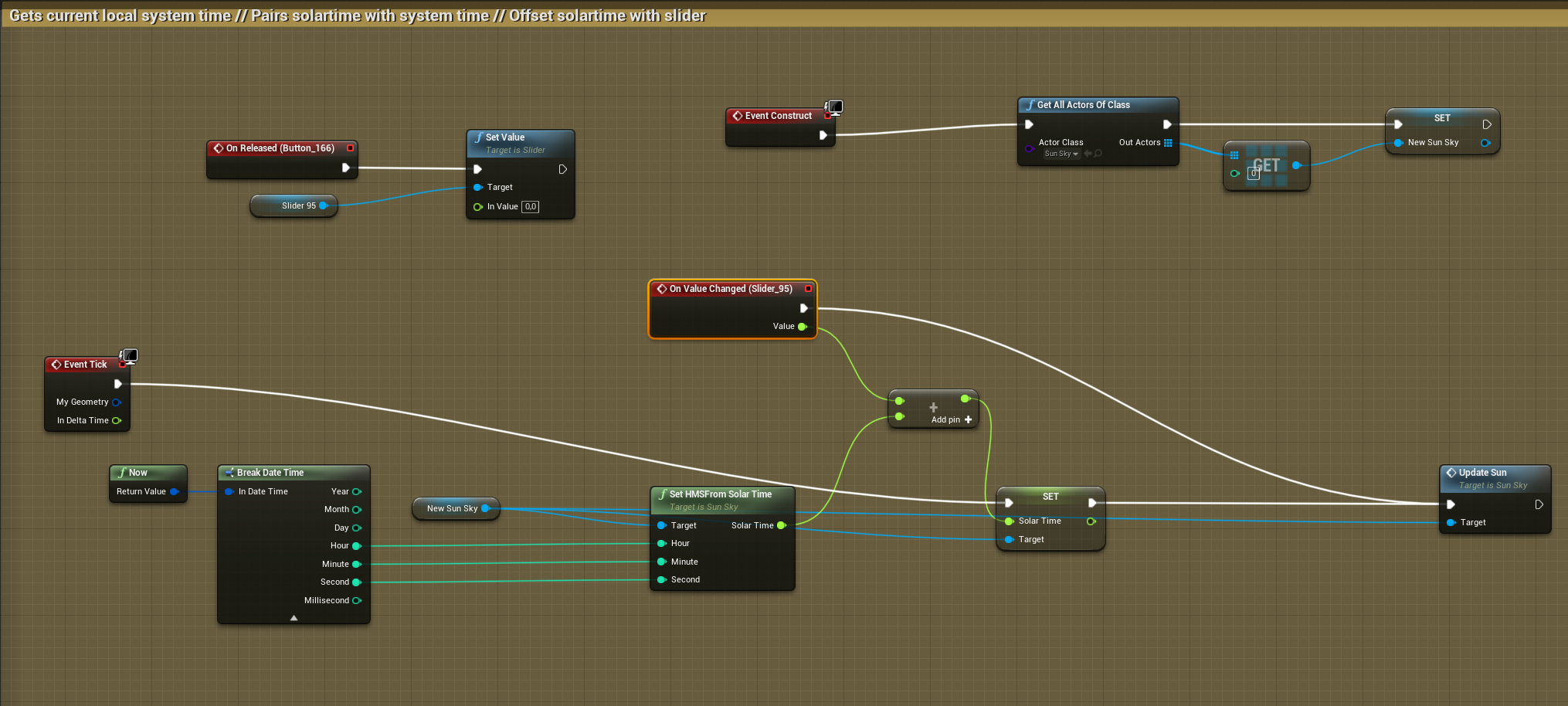


 celest oar
@paper magnet this isnt twitter bro, go look at tutorials and come back with real questions
full fog
This here is the whole stuff without any text
thin rapids
i guess i will never get far if such simple things make me fucking want to end my suffering
@paper magnet don't give up, you're learning, there are times like that but after some time it will get much easier
paper magnet
oh thanks for reminding me that i cannot fucking say anything personal
cause "woo discord aint twitter go rant there bhybubhubhu"
thin rapids
oh thanks for reminding me that i cannot fucking say anything personal
@paper magnet ? i didnt mean that
celest oar
jesus christ man, this is a discord where u get help for unreal stuff, not a place to vent your frustrations
@full fog its very hard to understand stuff from a blueprint alone
full fog
@paper magnet Dude, trust me when I open Houdini.. I am crying for an hour and then I try to follow the tutorials, knowing that I forgot 80% of each step after the next hour.
@celest oar I am sorry.
paper magnet
well i dont have a friend that even knows whats unreal engine
oh not your problems right
celest oar
@full fog pm me and we can screen share if you want
thin rapids
@paper magnet don't give up on being a game dev because of that, if you have a passion for this carreer you try your best to improve at it more and more
wind atlas
hello, is there some reason why my increment node might not be setting the value?
i can see it triggering, but the variable stays at 1 and doesnt increment higher
increment float
If I put a SET node after though, it does set and increment, so I'm really confused
thin rapids
doesn't the increment node just get the incremented value instead of setting it?
paper magnet
honestly
should i even be using an axis keymapping thing for leaning
@trim matrix its not like i dont fucking know what a lerp is
oh
gloomy linden
I want to lean using my racing wheel peddals, so yes
paper magnet
this is as much as i can really just zoom in with everything in frame
i have no idea why but sometimes the movement is slippery when i do this
gloomy linden
Slippery?
paper magnet
and yknow i dont really know what things would i connect to the lerp node if im not sure how to get the delta X axis value im going to make the camera and the capsule turn at
i can set it sure
wind atlas
@thin rapids no if you look at the increment node info it says it increments then sets the value, whats extra strange is that it was working earlier, but something happened at one point and now it dosen't set the value anymore
paper magnet
okay i guess there isnt any answer to my question i cant figure it out at all
gloomy linden
Why dont you do the lean in the animation?
paper magnet
cause its A FUCKING CAPSULE NOT A FUCKING CHARACTER MESH
gloomy linden
So add one
paper magnet
I DONT WANT TO
ITS AN FPS GAME
YOU ARENT SUPPOSED TO FUCKING SEE YOURSELF
goddamn it
paper magnet
that would be a seperate model
thin rapids
@wind atlas nope, you'll always need the set node after the increment one
wind atlas
but.. it says..
paper magnet
they would be attached to a camera
gloomy linden
Arent there like a ton of tutorials that tell you step by step how to make it?
paper magnet
having a sway motion
there are ZERO known to man tutorials for fucking leaning that use axis mappings and make sense to a dumb ass like me
yknow the lerp uses floats
and i need to get those rotators to floats somehow since after all im rotating the object that way
paper magnet
yknow maybe i am fucking too stupid for this
cause it just seems like everyone is wrong
so that means im the stupid one
wind atlas
@paper magnet I also had trouble learning how lerp works, my solution was to use a "buffer" parameter, look here:
gloomy linden
Right click it and click on break
^
thin rapids
but.. it says..
@wind atlas but what it does is set that in the return value, it DOES NOT set the actual variable
wind atlas
oooh
thin rapids
oooh
@wind atlas you can double-click in macros to see their code
wind atlas
thank you @thin rapids
thin rapids
when you break you get a float for each axis @paper magnet
paper magnet
oh
thin rapids
thank you @thin rapids
@wind atlas you're welcome
paper magnet
that BREAK
i thought you meant node break
hah
like so?
actually what if i want to transition from the capsule's current rotation
is that possible?
i want to make the capsule go from one rotation to another
thats why i used transform rotation
paper magnet
im out