#blueprint
402296 messages · Page 476 of 403
 paper magnet
yeah this
i dont know where to put it
since i need it to happen before the animation
 thorn moth
you can make your bool as RepNotify
it will create a function that will execute when the var change
like this inside
paper magnet
anyways i tried a solution
but im still walking for some reason
in terms of speed
thorn moth
if you crouch in the air and fall crouched it wont change the speed
paper magnet
i mean
i already disabled crouching while jumping
so idk
i dont really know how to see my actual speed so i can tell how its messed up
but anyways
for some reason it doesnt slow me down when i crouch
thorn moth
play the game and in the editor you watch the values
paper magnet
theyre all constant
 lyric summit
what's the part of the graph above the last example?
paper magnet
still crouching doesnt make me slower
oh its just something that i thought before and left untouched
its not connected to anything else
lyric summit
if you don't mind show it anyway in case something you're not aware of is happening, like a sanity check
 twin mirage
you using cmc? when you are crouching, it takes maxSpeed from maxCrouchSpeed variable or something similiar
paper magnet
whats cmc
twin mirage
character movement component
lyric summit
part of the issue is that branch isn't set to an event from I can see as well, it has nothing connected to it's execution pin so that code won't run
thorn moth
you need to show where you are putting this part of the code
its impossible to know only with that
lyric summit
yeah in general the more info we get, the more we have to work with, just makes it all easier
paper magnet
lyric summit
thnx
OK your movement speed portion needs to be connected to the crouch event, that top left red node
thorn moth
lyric summit
your BP's always run from that right (output) to your left (input), without that white line connecting them it won't fire.
paper magnet
it ends up replacing the things
and nope it isnt
@thorn moth i cant really get two nodes to one
hi?
thorn moth
continuer after the SET to the timeline like before
just add it in the middle of the bool and the timeline
paper magnet
goddamn it how
lyric summit
he showed you, that right example
thorn moth
what
paper magnet
it doesnt let me assign two different nodes to one
thorn moth
what a hell are you trying to do
lyric summit
he's wanting to also have that false output go into the CrouchTransition node
maybe a uhh... I forget the name, in flow control, sequence node?
thorn moth
yes, Sequence can execute one part than the other
paper magnet
lyric summit
patience man, I'm bringing up the engine to give you an example
but from that false output, drag out, go into flow control and find a Sequence node, or just type sequence after dragging
this makes a node that fires off code from 0, 1, 2 +,
paper magnet
okay i got it
lyric summit
from THAT node, drag from the first output, set your movement speed, from the second go into CrouchTransition
lyric summit
for the future, remember people are helping for free and nobody can read minds, so just have some patience and explain things very clearly or else people won't want to/can't help
glad I got something right though
thorn moth
its better to make more functions that put everything in one big line of stuff
 brisk garden
Hey everyone, is this the right channelt to ask a question in here in terms of something im trying to get finished up?
thorn moth
if it is about blueprints
brisk garden
its all done in BP yes
lyric summit
that's true, I think at the level he's at (mind I'm not much better) if it works, it works, get the fundamentals down, it's a LOT to take in all at once
thorn moth
show screenshots of the problem if possible
brisk garden
Apologies if it's a lot of text. I am also still fairly new with unreal engine and some programming principles so bare with me, i might not understand or follow a lot:
I followed a tutorial to create a timer that can count up. both seconds and minutes.
in the "FirstPersonGameMode blueprint I created everything needed to count up to 59 seconds, and when that hits, it adds a minute. (Event tick > delay method)
Then in my widget, set a binder (is that the correct term?) to display the text on screen.
So far, the timer starts when the game starts, however, I want the timer to start when I hit a triggerbox from a blueprint named: BP_poortjestart. I created a small gate with a triggerbox in it (all in a blueprint), when i hit that triggerbox, the timer widget will be created and shown on screen, but i only need to find out how i can also make the timer start that way instead of when the game start.
I thought I could copy-paste the "On component overlap (triggerbox)" to the FirstPersonGameMode blueprint and use a boolean to set the things up that i need, but it looks like that is not how everything works.
I guess you cannot cross-reference events like that (like in my case: Copy paste from one to the other):
here is a screen of the binder too
thorn moth
ok, you need pick everything inside the game mode a move to the poort
the game mode is not made for this kind of stuff, first thing
brisk garden
Alright. Reason why i did that is, is because a few tutorials that I saw did it like that
thorn moth
you can make the countdown happens inside the widget
it even cleaner
if you are not in a multiplayer game
or inside the game state if you want to get this time any time
brisk garden
its all just for a single-player school project, yup 🙂
thorn moth
the timer is for something?
brisk garden
Im attempting to create a speedrun game. In short: You go from the start gate to the end gate as fast as possible. hitting the start gate starts a timer, hitting the end gate stops the timer and shows how long it took to reach from point A to B
thorn moth
ah, ok
the best thing is to just have seconds inside the float you have
than the widget tranform the seconds in minutes if needed
the easy way is to create a interface to your game state
create a custom game state and create a interface and add to it
in your game state
just add a function inside your interface like this
thorn moth
than inside your game state write "event start countdown", than it will start the timer inside it
created the interface and add to the game state?
tag me when finished
 woeful lantern
I have a lot of tiles in a small project listening to player keyboard input to change what happens when the player clicks on them. Only the last tile spawned actually changes. Can only one tile listen to player keyboard input?
brisk garden
@thorn moth Okay i got it i guess. created the State + interface, and added the interface in the Game State the way you showed in the screenshot.
Do I just need to copy paste my code from the Game Mode over or how should I approach this?
thorn moth
save all the tiles when they spawn somewhere
them when the player need the tiles he can grab it from there
copy the timer
to the game state
the overlap need to be inside the actor with the trigger
brisk garden
You mean everything that comes after the Event Tick in the Game mode right? (sorry im a little slow haha)
thorn moth
yes, all the event tick to the game state
woeful lantern
Yeah someone new to unreal tried to have all the tiles listen when I would have used a controller doing exactly that.
Makes me wonder though: Why can't they all use the same input? Enable Input says it adds it to the player stack - but what if you wanted to control two actors at once anyways?
thorn moth
"Just uncheck consume input in the places you use the key, then you can use it where ever you want and it'll work in all of them at the same time."
thorn moth
just right click the variables and create them
need the event tick there and the boolean
paper magnet
is there a way to make a static mesh follow the camera?
like in a real fps game?
it only follows the player
and does not change its pitch or yaw to the camera pitch/yaw
is there a way to manipulate the static mesh with blueprints?
brisk garden
okay got it
thorn moth
now at the interface again
create a GetCountdownTime something like that returning a int
paper magnet
umm hi?
thorn moth
compile the game state and it will create a function at the left side
@paper magnet did you try seem the default FPS character?
paper magnet
not really
thorn moth
yes
brisk garden
Okay got it, i see "Timer" under "interfaces" in the gamestate now
thorn moth
yes, not connect your seconds there
thorn moth
just count seconds and inside the widget divide by /60 and get the minutes
paper magnet
hello?
paper magnet
i couldnt really find one for my problem
brisk garden
Apologies for all the stupid questions haha, but do i need to connect the node on the end like this:
paper magnet
brisk garden
or do i need to connect stuff inside the "timer" interface
thorn moth
no, you use the get in your widget
inside this Timer connect the seconds variable
in your widget write "get game state" than call Timer
paper magnet
goddamn it
brisk garden
oah my bad
thorn moth
basically you are getting the timer from the game state now
and you can get from anywhere it
 copper dust
"get class defaults" is such a buggy node for some reason (at least in 4.23)
it will compile once, reset the pin settings, and then error
because i'm getting defaults from a parent class
 rain rose
Hi! Complete newbie here, trying to get some elementary things done, and at the end of my rope looking for resources. I'm trying to get a third person character to crouch in 4.25. Can anyone help me with that?
rain rose
Thank you very much! Newbie to Discord, too.
 crude timber
Hey all ! Can I delay a node in the Widget Functions ? I can't find the "Delay" node that you find in the event graph
I'm trying to have my menu play an animation before it is removed
crude timber
mmh, i don't see it
thorn moth
write "event animation" in the event graph
in the widget that you have the animations
brisk garden
@thorn moth okay haha 1 more thing then. I guess I need to go to my BP_PoortjeStart blueprint now and drag from the overlap event? What do i need to call out now? Im currently staring at my screen like "okay what now" 😂
thorn moth
click on the collision of the actor and in the right scroll down and select "on event overlap"
it will create a overlap function
brisk garden
thorn moth
when it happens, do a get game state and call Start Countdown
brisk garden
got that already so far 😛 but for setting up the widget
thorn moth
call the function to start the coundown before create the widget
of call it inside the widget in the begin play
same thing
 void cobalt
guys i have a small issue, this is my input fire weapon on my player character
on the full auto node
set timer by event and stuff
it makes it shoot full auto
but
there is a delay on when the first bullet shoots
and the delay is the time IN on the set timer
is there anyway to fix that?
crude timber
Perfect, it works Helia 🙂 Now got to figure a new issue that popped after that :p Have to press Start twice before it can reoppen again, weird.
Thanks for the help !
thorn moth
@void cobalt I never use this timer by event before
void cobalt
well, is there a different way to make a full auto shooting mechanic?
thorn moth
you can use a boolean when pressed and release
than you know that it is pressed
than after the fire rate, you see if it is pressed and fire again
@crude timber use "Do once" in the front
ops, wrong person
brisk garden
Maybe im misunderstanding something cause of my lack of interpretation, but I just "Get" the game state, but weirdly enough, when i drag out to try to call for that variable that was made in (StartCounter) it doesnt seem to find anything
thorn moth
dont write "call"
just the name of the interface
did you make the function inside the interface?
thorn moth
no, you need to create a new function inside the interface that start the timer
double click the function Timer
and create in the interface a new interface function
than again implement it inside your game state to change the bollean var to start your timer
thorn moth
create a new function in the interface
at the top of "Timer"
click in Add New
name like StartTimer
go to game state at the event graph, write "Event StartTimer"
brisk garden
You wanted the output of that function to still be an integer, correct?
thorn moth
it just change the boolean like you did before
brisk garden
i assume this is how it should look like? dont mind the part on the rigth side on the last pic
thorn moth
yes
you can transform the seconds in minutes
now you need a new function to stop the time
and other trigger to use this function
or add a boolean input in the start timer
than you can use to stop too
brisk garden
I noticed that the time is not counting in my case. I even deleted the booleans/branche and just connected the event tick to the delay and it stays at 0 somehow 🤔
 tough cipher
sorry but does anybody know how to make a flying a sword in unreal
brisk garden
did youchange the level to use the new game state?
I guess i did not 🤦 Mind telling me where can i change that ?
crude timber
I'm always struggling with the Cast To node, almost never manage to know what to use as Object.
Here I'm trying to play an animation from an other widget, using a checkbox from my start menu. Any tip ?
brisk garden
got it! it works now! Thank you so much Helia! and my apologies for the abundance of questions
tough cipher
i need help
crude timber
Nvm, I used the "Get All Widgets of Class" + get a copy of the array, and it does the job
 wary widget
do exported level sequences for the sequencer or takerecorder render out thumbnails?
wondering if i can access any of this through bp
crude timber
Ok last one for tonight then I'm done :p How can I translate that boolean into a "checked/unchecked" state ?
I want the checkbox linked to the fact that another widget is visible or not
I tried linking the Widget creation/deletion to it with the "Set Checked State" node, but the checkbox resets everytime I close/open the menu it's in
thorn moth
@crude timber make bool to bit, and bit to the checked thing
bool will be 0 or 1, its means it can select the first 2 options only
or make a branch and create other return
ctrl+c and ctrl+v on the return node
crude timber
outch that bool to bit fucked up my UI pretty bad, got all back
 trim matrix
Ah i need more time to think
crude timber
Okay it worked kinda, because now the checkbox gives the correct state of the widget it spawned.
But, I have to click twice when I come back to the checkbox menu. When exiting, I have an error message
Right now it's like this
crude timber
This is inside the menu where the checkbox is ("player_menu_0"), it's the function the Checkbox is bind to
I need the checkbox to see if another widget is active or not (frame_guides)
thorn moth
add a Is Valid before checking the widget visibility
if it is invalid you should return like it is not visible
crude timber
it works fine, valid is when it shows up, not valid when it's not
but the check box is correct, it's just that I have to click it twice everytime I close my menu and reopen it
And i have the error, Blueprint Runtime Error: "Accessed None trying to read property CallFunc_Array_Get_Item".
Tried this way as well, same thing
thorn moth
@crude timber set direct in the return node
you can select the option you want
you need to use the Is valid
you pull from the widget is valid and use AND, if it is valid AND visible...
No, it will cause error, add the node Is Valid before the branch
if is valid go to the branch, if not valid go pass the branch and go direct to the bottom return
crude timber
I'm not sure I follow you
doesnt look right
or there is another AND node ? Not sure where I get the second bool for it
 hallow night
I think you can have multiple output nodes?
crude timber
Yeah that's what I did earlier
hallow night
Whats the problem with that?
crude timber
But changed the method as advised to correct a bug
I can have the checkbox to give me the correct state, but when I exit my menu and come back, I have to check the box twice for it to update
If I don't exit my menu, the checkbox acts normally and I have to click just once for it to change
hallow night
Try doing that but don't click the checkbox when u reopen the menu, click anywhere then click the checkbox
crude timber
same thing
and I'm getting an error from the Get from the Array when I exit
even if the checkbox is correct
So I guess something's up with that but I have no idea what
hallow night
Do u have more that 1 checkbox?
 crude timber
Do u have more that 1 checkbox?
@hallow night Just one, only other things in that menu are text and one slider
hallow night
Is it true by default?
crude timber
it is set to Unchecked by default, because by default the widget I want it to interact with is not visible
hallow night
Try restarting ur project stuff like that happens all the time to me idk why @worthy frost
 worthy frost
nope nothing to do with that
happens in cooked, and everything
so its some kinda weird thing happening
crude timber
Got rid of the error doing things another way but I still have to click twice that checkbox if i leave the menu
hallow night
Maybe try setting the input to ui only when you open the menu
thorn moth
@crude timber the best way to fix it is to save a reference of the widget you created somewhere or save if it is visible or not
 sweet flare
So, I'm following this tutorial, and finished it, but going through it to make sure I understand it fully.
https://www.raywenderlich.com/238-unreal-engine-4-tutorial-artificial-intelligence
this part
https://i.imgur.com/2M9PPI7.png
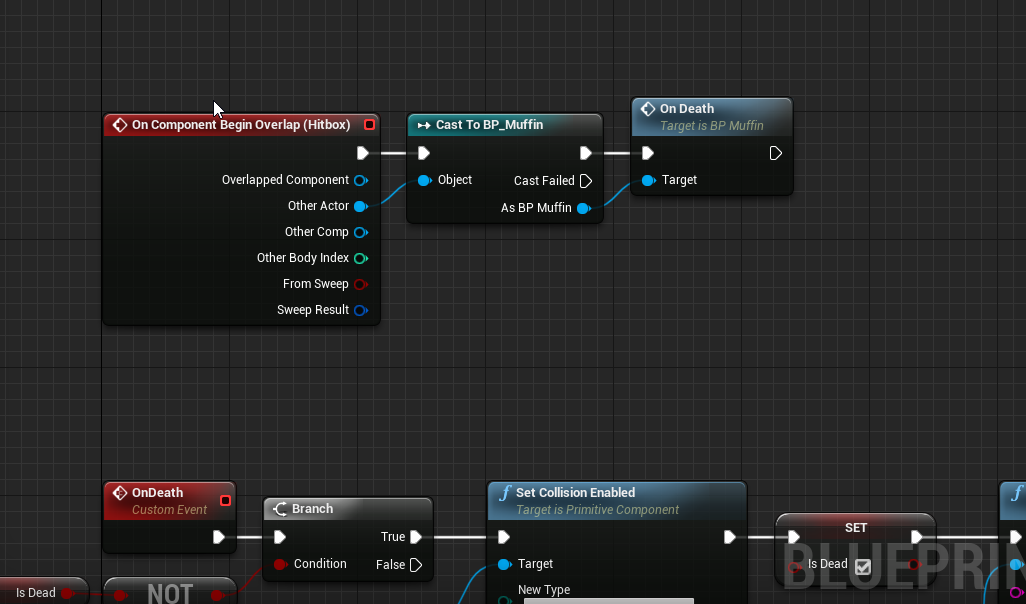
is basically when two muffins overlap, it triggers teh on death right?
but only one of them dies, which is intended, but I'm not sure why the on death isn't triggered for both?
 dense mantle
ok so the first one fires the over lap and the second is destroyed so cant kill other
sweet flare
okay, so why does the attacking one always fire teh overlap first?
dense mantle
ok so where is that code located
sweet flare
event graph of BP_Muffin
actually i think I might understand why?
so lets call the attacking one Muffin1 and the dying one muffin2
Muffin1 is attacking therefore has a queriable hitbox, muffin2 is not attacking and does not.
Both fire the overlap. Muffin1 detects nothing. Muffin2 detects Muffin1 and therefore dies
sweet flare
yeah sorry my unreal is actually lagging out rn gimme a min
dense mantle
no problem
sweet flare
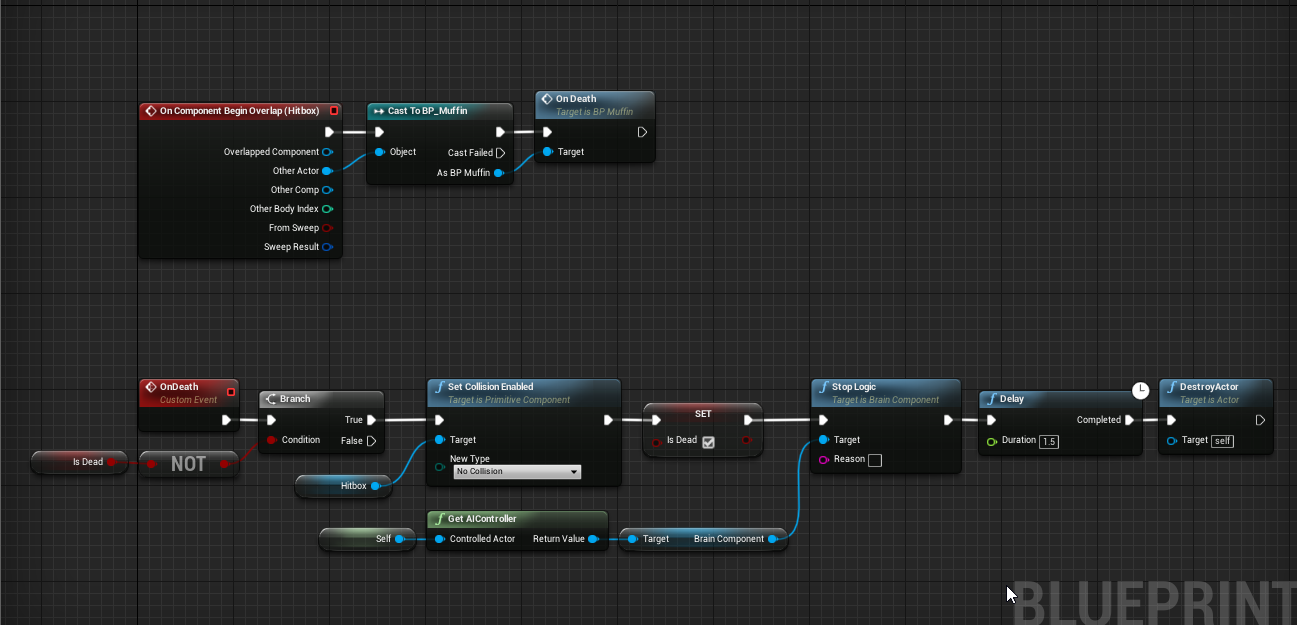 dense mantle
muffin1 is the only one calling the overlap and then get the overlapping " muffin2 " and then kills it as you are passing muffin2 to as the target of the event
@sweet flare
sweet flare
let me see if i get this straight
Muffin1 does attaack
sets their hitbox to query only
finds a hitbox
finds the owner of said hitbox
calls the on Death function on that owner
dense mantle
and muffn2
sweet flare
but how is it able to find the hitbox of Muffin 2 if Muffins2's hitbox is set to No Collision?
dense mantle
muffin2 has the collision on the mesh but you not using it to check
sweet flare
so itll still find hitboxes even if they are set to No Collision
dense mantle
nope but the will still overlap with the muffin mesh its self... so you could go and grab the mesh and it shopuld have the on overlap event as well
sweet flare
oh right
sweet flare
ive yet to make that happen, so i cant quite test it aha
but i have seen a 3rd muffin kill the 1st muffin that was attacking another one
dense mantle
3 attaches 1 and 1 attaches 2 where is the hit box at
sweet flare
hitbox is on its head
https://i.imgur.com/Nsq2dRV.png
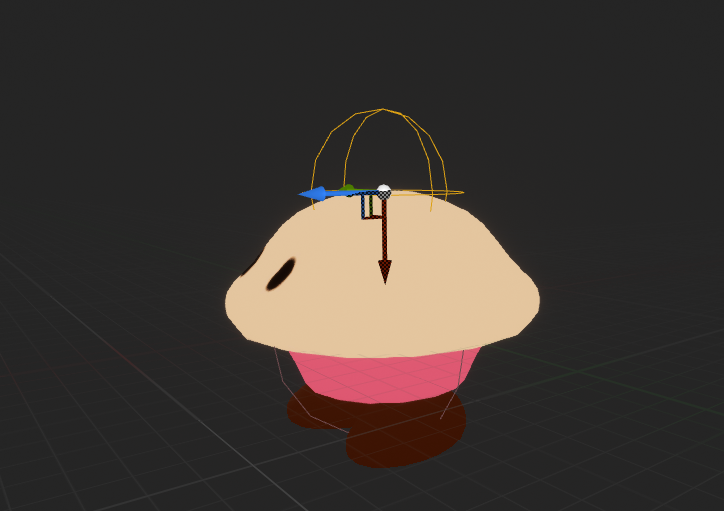
the attack aniamtion is a littel headbutt
this all makes sense to me now tho ty
dense mantle
that is awesome by the way and yes only that sphere is checking for overlap
sweet flare
the next thing i want to do is try to give them health bars more or less, so they can take more than one hit
dense mantle
you know how?
sweet flare
nope lmao
im losing thinking:
for now, just add a variable (int) to each of the muffins for HP value
dense mantle
i can walk you through it if you want to voice chat or could step it out here
sweet flare
the new trigger for OnDeath is when HP =<0
and then I need a new function that reduces hp that gets called in place of where ondeath is currently called
I think that covers the bases?
dense mantle
yup and you will pass the damage function the other actor and change health var
you will need a max health to base health off of for progress bar in the ui
sweet flare
i realize ui is probably the easiest way to show a health bar, but how hard is it to have the health bar just hovering over the unit?
stealing a gif fromt eh tutorial website for a moment
https://koenig-media.raywenderlich.com/uploads/2017/12/unreal-ai-09.gif

itd be difficult to tell which one is which
dense mantle
you want it to look like a progress bat >>>
ok so you know how to make a material instance ???
sweet flare
yes
dense mantle
ok so make the material so you can change color how you want as the bar gets smaller and make it double sided like smoked glass
in the muffin bp ass the bar in form of a plain and then scale on X and adjust plane to always face the player caners
sweet flare
how do i make it always face player camera?
also is adding a hp bar to the bp asset the normal way youd go about it, or a "for testing" way you'd do it?
im totally fine either way, jsut want to know
dense mantle
do you have a mic ??
@sweet flare and the bar as a bp is a great ideal
 mild pecan
Hey friends, I'm attemping to create a very simple train game. I'm stuck on how to get my train carts to follow each other and orientate properly. Any one have any clues on how I could accompllish this?
sweet flare
my thing isnt lighting up, but i jsut tested that my mic is working...weird
i can ehar you fine btw
that is
a lot aha
mild pecan
They certainly can yes! I am up for tyring any solution. My current one of trying to use look at rotations and setting world positions are not working very well
mild pecan
Not following
dense mantle
ok so you getting it to stay on track
 vivid zodiac
The level sequence plays, but my character stays in the PlayerCharacter camera instead of the Cinecamera
I can't find any solution online 😦
dense mantle
@vivid zodiac do you have cinematic cam in scene
 ruby basin
How would I set a variable's value to nil?
vivid zodiac
Figured it out, i spent so long when i just had to press a few buttons
had to bind the camera cut to the cinecamera
trim matrix
does anyone know what object wildcard to use when casting from a widgetblueprint to an enemy class? trying to add health bars
trim matrix
anybody know how to make pawn sensing see other actors and not just the player character?
wary widget
what's the expected way to load an asset from an object path?
i've tried using the AssetRegistry to Load by path but it seems it's not returning something. For context, I create an asset on disk and want to use that asset immediately after. I assume I have to register it with the AssetRegistry some way but 🤷♂️
 warped musk
I posted this to the Level Design chat, but maybe it's more suited for this one:
"Hi all, new to the server.
Wanted to ask if anyone had any resources or best practices for how to organize game logic for something like a management game. Imagine something like, Idunno, Theme/Two Point Hospital.
Actually designing the logic is kind of easy.
We have Rooms, which have an upkeep cost and a revenue that's modified by other factors such as...
... employees. A skilled employee might have a 110% income multiplier attached, while a less skilled employee might cause the room to work at a 90% capacity.
Then of course we want to sum up all the different rooms on the map somewhere into some sort of global income container, where the net income is tallied up and rendered to the screen.
I'm just not sure how best to set this up in Unreal. Should each room (already a blueprint class with logic attached to it) have its own calculations that are then propagated to the Game Mode blueprint?"
dense mantle
@wary widget like if you made material and what to add it as an option to a blueprint as a material var
wary widget
ehhh, for context i'm making a texture in a content folder and need to load that texture. i can't cache it because it needs to be running every time you open my editor widget
so i'm basically storing it at Content/Thumbnails
dense mantle
@wary widget add mesh to level and then apply the texture
wary widget
i mean, like
i can't just 'apply' it, i gotta figure out how to load from disk. it's not cached anywhere, so i have to be able to load it from that file path
but asset registry doesn't want to register it
wary widget
i have a function that takes a Texture. at the beginning of the editor instance, ideally, it would poll for each of the textures in a certain file path, then load each of them in editor, and call the function with that loaded texture as input
 deep elbow
@warped musk yeah you're pretty spot on, game mode or game instance would be where to keep all of that stuff tracked
dense mantle
@wary widget look into data tables
wary widget
hmm i'll take a look at it
warped musk
@warped musk yeah you're pretty spot on, game mode or game instance would be where to keep all of that stuff tracked
@deep elbow Thanks a bunch. Not used Game Instance thus far, will have a look and try to figure out the right application.
 haughty crypt
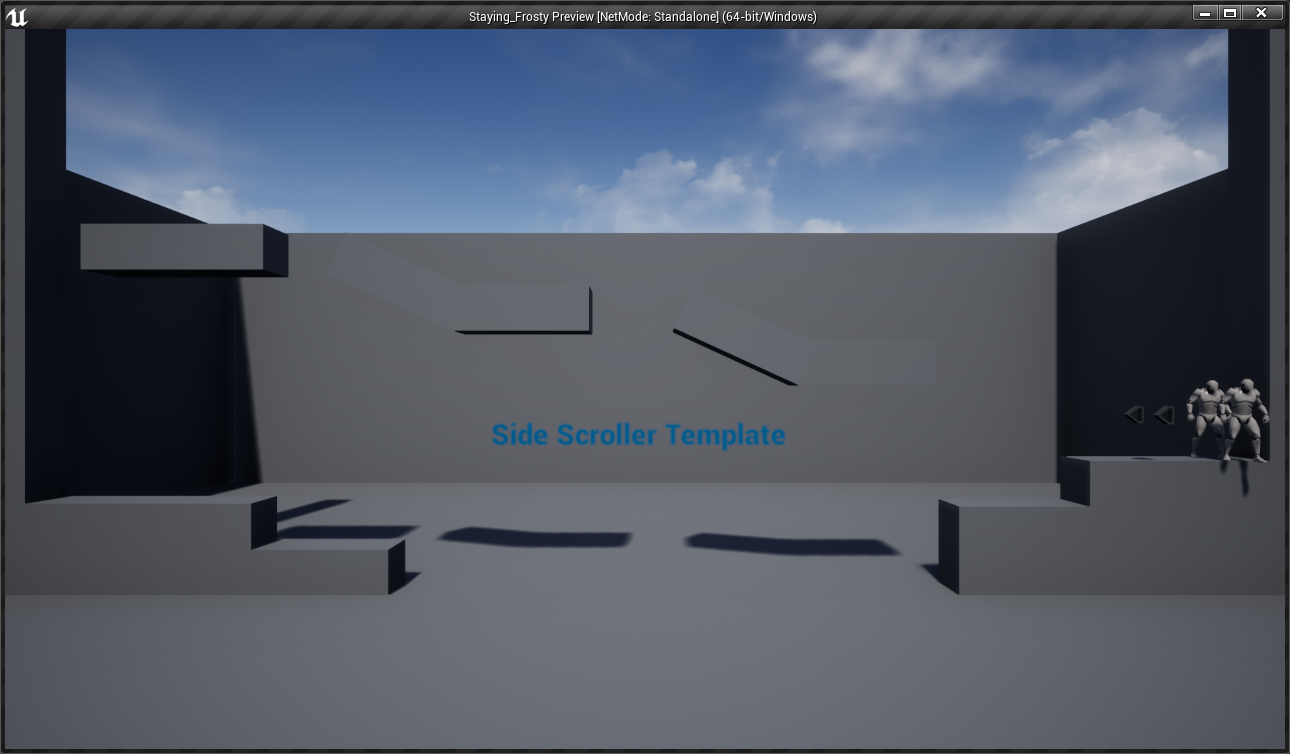
why are characters spawning on top of each other
I've got two player starts
it is a 2 player game
 tawny tinsel
i have a problem
so i play my intro cutscene
i start the widget in the level
and then after its done i set for the ambience music to play
but it doesnth
could it be that the engine cant play 2 2d sounds?
 dim robin
@haughty crypt I guess you have to spawn them getting the spawnpoint actor transform, if you didnt
trim matrix
so pawnsensing only see's the player character?
dim robin
looks like he's jerking off looool 😄
sorry I can't help
tawny tinsel
maybe ur mouse in the build is more forward i have no idea but that seems great
good job
dim robin
is there any way to disable only some inputs? "disable input" will disable them all..
 thorny cedar
i need help to make some checks in an array of objects
i want to check if every object has a specific boolean set to true
when i pick it up
the problem is, that the order in which i piuck up my object isnt fixed
trim matrix
How do I cast to the animation BP of an enemy character? what reference do i use
thorny cedar
Is it possible to add an element to the beginning of an array?
so that index 0 becomes index and so on?
 wise raven
Hey guys I have a slight collision problem going on inside my vehicle BP, the car door and the body are colliding with each other, both the body and the door are procedural meshes and they are set to simulate physics, and both are set as "vehicle" as an object type
I have set these in the begin play as well
it is important that i set both the components to "Vehicle" because I need both the body and door to collide with other child actors of this BP class
When I set "Vehicle" to ignore on the collision then the car doesnt fly around, but it is important that i keep it to Block
but how do i prevent the door from interfering with the car body?
 willow lichen
Whats the "base" class used to pass interfaces classes as a param?
Like this function does
 lean furnace
 slender hawk
Can I reduce 'stamina' over time from inside a while loop that is executed under a custom event (event sprint -> while loop -> minus 10 per second)? and is it efficient to do it that way, or is there a better way?
Or in this situation is the while loop only triggered once?
 thin rapids
the while loop will repeat itself until the condition has changed, but i'd rather use tick than while loop, while loop can cause lots of crashes
slender hawk
due to logic issues, or just sketchy?
thin rapids
while loop can not follow tick sometimes and cause the engine to go into a lockdown state
slender hawk
ahh
paper magnet
i have a question: what is this node?
im following a tutorial and there is no explanation on how to make it or what it is
thin rapids
==
thin rapids
you're welcome
paper magnet
is there any way i can put these two vector variables into the function?
like here
 wooden jasper
@paper magnet either click the input execution node (the purple node) then add them in the details panel, or simply drag them from the linetrace and into the execution node 🙂
thin rapids
just add input variables in the function like Zoin said
paper magnet
thx
 tame pecan
Hey!
I want to grab a physics object, that process is done. But I want to make the object lerp to being straight up as I'm holding it. I'm not sure how to do it, I'm pretty intermediate at handling physics.
What it looks like now, this is on a timer by the way
paper magnet
for some reason this does not let me shoot
 covert crane
Is there an automatic cleanup process that removes created uobjects? I've been creating uobjects to behave as brokers for CPP layer callbacks in my plugin but I've noticed that after a minute or two "begindestroy" gets called for seemingly no reason.
tame pecan
Set it equal to 1
paper magnet
@tame pecan it is
tame pecan
It should be equal to 1.0
not -1.0
And left mouse button should be on action events
thin rapids
@paper magnet why didn't you make that an input action instead of an input axis
thin rapids
anyways finally it works
@paper magnet with the input action or by doing something else
ive set this to 1 and it still wont work
also that == is just a check to see if the float is equal to something, it's not setting it to 1
thin rapids
2 equal signs is a check, to SET the value to 1 you'd have to use a Set <variable name>, anyways, just a thing i'm pointing out
paper magnet
ik
 placid sandal
hi i'm trying to achieve a movement scheme where you can run up on walls and ceilings and stick to them. Any suggestions on best blueprint approach to this? Right now after initial testing i see that using stock walking/running isn't the way, maybe flying mode with manual mesh rotation based on linetraces? Seems tedious especially if i try to animate it properly, maybe there is some cleaner way i’m missing?
thin rapids
Guys help with my collision issue
what collision issue?
placid sandal
doesn't unreal generate a simple collision for them, so their collision meshes intersect and collide?
 maiden wadi
I'm having a very odd problem. I'm using this small macro to try and remove all children widgets that are added to a gridbox. Problem is that it seems to leave behind a child or three. I'm printing the length of the amount of children before and after the macro. The first run is correct. three children start, but on the next print it prints one when it should be zero. Meaning that it did not remove one child. The second time it prints 4 and 2, and then 5 and 3. After that no matter how many times it's ran it'll print 5 and 3.
 elfin hazel
problem is that you're removing from the array as you're iterating over it. Cache the all children into a local variable and loop through that and it'll work. @maiden wadi
 civic salmon
is a there a way to start an finterp on animnotify to update a value on value change?
placid sandal
or clear array on loop completion
civic salmon
In a in house engine, we used to be able to connect the return value of the interp out to the event of set variable to update on change
wondering if theres something similar in unreal
elfin hazel
Oh yeah, I think you can just clear children from the grid box.
haughty crypt
Would anyone here know how to round an object's location while it's going through a physic simulation?
so like a rigid body to a grid
rounding the location values
I tried it and it doesn't seem to work
maiden wadi
Ugh. Right. I forget that the getter is updated every time.
civic salmon
ultimately, i'm trying to get 2 characters to sync together. and fire their animation in each state at the same time.
My "Child" Character has their animations set as Evaluators to be driven by a float value
 grim shell
i'm trying to show a loading screen widget when joining a server. in the game instance i add it to the viewport, which then removes it once the player joins the server, so i have to add it again, and i've tried both in the beginplay of the level and the beginplayer of the player controller, but there's always a flicker of the level before the loading screen shows up
thorny cedar
can someone help with audio? i want sth to happen when my audio component stopped playing, but i
grim shell
whats the earliest event that i can use to add the loading screen to the viewport?
thorny cedar
my aduio component isnt stopping. I dont know how to get the duration of my audiofile
thorn moth
@grim shell I use the begin play of the player controller
grim shell
ok, i'm using that as well (i'm using both right now, level begin play and player controller begin play), but i'm getting a flicker of the level rendered before the widget is added to the viewport
the level loads and renders before the widget is added to the viewport
maybe i need to add a delay to the begin play of the level now that i think of it, my level is pretty simple
that seems like a bad solution, but maybe it'll work for now
no that probably wouldn't make sense, because the level will call begin play after its already loaded
thorn moth
I personally didnt find any better solution
the widget should not be removed when you change level, but it happens
thorny cedar
got the duration from sound 😄
grim shell
i guess if you turn on seamless travel its not supposed to
but i thought i already had that turned on
 rotund basalt
dim robin
rotund basalt
dim robin
i created this macro which duration is 6 seconds, on loop body I enable the current player input, and after 5 seconds I disable the current player inputs, updating the current player to the next player, and looping again with the updated current player value. now the question is: let's suppose the current player finishes his move in 2 seconds, how can I tell the loop to disable input and update currentplayer without waiting for the timer to end?
probably this is the worst way ever to handle player turns, but that's the only one I came up with which is working..
tawny tinsel
so every time i try to play my game when packaged i click play and theres supost to be a widget that plays the cutscene but instead it bugs out and crashes can anybody help?
dense mantle
@dim robin so are you setting up a turn base like D&D style turns... they are 6 seconds lol
dim robin
i'm planning to have it 60 seconds.. no, i'm planning to do a minigolf style game
dense mantle
@dim robin still turn based tho right
dim robin
yes, coz it's local multiplayer
and I dont want all the players to shoot the ball at the same time
dense mantle
@dim robin would having the player end the turn work like in Cavillation or something
@dim robin move action end turn on shoot
@dim robin like do while time remains or edn turn hit
end turn lol
dim robin
yes but looks like I can't achieve a working blueprint when I try to do this
dense mantle
@dim robin all in same bp or different
dense mantle
@dim robin have you seen the vid "Blueprint Communication" ???
dim robin
i tried to put a bool variable to set a "turn end" on pawn, but doesn't work. maybe I'm making some mistake
yes
I'm new to unreal, maybe I'm missing something
dense mantle
@dim robin would need to set turn end on the bp that is time manager s
dim robin
mmmh gonna try now
trim matrix
can you a cut a mesh using texture uv
 fluid roost
Hello, anyone know much about putting textures together for terrain
 lime fiber
Hi Everyone, I'm trying to make a blueprint for a UserWidget that triggers a bit of code when the user presses their left mouse button down, and when it releases. (This will change the mouse cursor depending on if the user clicked that widget item and change it back once they release). I can't seem to find any useful blueprint functions to do this inside the editor... Can anyone guide me in the right direction?
fluid roost
I have the base colours down but I dont know how I will add bump maps, and roughness values etc
 inland veldt
im new to UE. Where do I find the Set Max Walk Speed?
thin rapids
im new to UE. Where do I find the Set Max Walk Speed?
@inland veldt in the movement component
inland veldt
How do I get it specifically? I tried clicking it while holding Alt and Ctrl, but they didnt get me what I needed
thin rapids
get the movement component and from that node you create another one that is set max walk speed
 stable birch
Actor->GetMovementComponent()
inland veldt
It should look like this
thin rapids
Actor->GetMovementComponent()
thats in c++
inland veldt
Im not using C++
stable birch
Its the same thing
**clarification IE if you had a reference (in BP) to an Actor you would do" (though this is the exact way you would do it in cpp)
"get reference to Actor (whereever you get it from) " -> Character Movement (same as GetcharacterMovement) -> Set MaxWalkSpeed
thin rapids
It should look like this
@inland veldt exactly, get the character movement and drag a node from it that is called set max walk speed
inland veldt
it made a small blue node called CharacterMovement. I'm looking for the green Set node.
thin rapids
wich is what i'm saying, drag FROM THE BLUE NODE and get the node called 'set max walk speed'
inland veldt
Thank you,I got it. I'm sorry for my lack of understanding
stable birch
^^ if you start typing it should auto complete to it
inland veldt
I'm still new to Unreal. Thought I'd try a discord server to help me out (obscure google searches didnt help 😅
thin rapids
Thank you,I got it. I'm sorry for my lack of understanding
@inland veldt you're welcome, don't need to apologize, the caps were just to highlight that part of the text
thin rapids
didn't mean for it to come out rude 😄
inland veldt
it's ok xD
trim matrix
best fbx import settings?
inland veldt
Just curious which node is this green one? (The 160 one)
 carmine prawn


 inland veldt
Float > float?
thin rapids
yes
trim matrix
aight,I'mma head out.
How about you watch some youtube videos first rather than asking everything?
maiden wadi
Said the guy asking about FBX settings in the wrong channel.
maiden wadi
Says Meshes right at the top of #graphics. Since FBX files typically are meshes, I'm going to go out on a limb that that might be the channel for it. But maybe you should read the discord rules and guide instead of just asking everything?
trim matrix
Ah, I forgot to check there, I always check the pins.
So does what I did invalidates what the other person did wrong?
thin rapids
Ah, I forgot to check there, I always check the pings.
So does what I did invalidates what the other person did wrong?
@trim matrix he didn't do anything wrong tho
he just asked something that is in topic
trim matrix
Alright
How do I create a actor
How I add a component to the actor
How do I add health to the actor
thin rapids
right click on content browser and go on blueprint class then select actor
trim matrix
How do I calculate damage
thin rapids
but if you're just making sarcastic questions i can simply ignore you
trim matrix
How can my character jump higher
How can I add a second camera to the actor
How can I switch cameras of the actor
How do I add a keybind
It seems like, if I make unnecessary questions which I can learn by watching let's say some hours of ue4 tutorials, I take time from some real problems that other people have, and I just flood a channel with questions which I can figure out my self....Who would have known.
thin rapids
you do realise you don't have to spam the chat with sarcastic garbage right?
maiden wadi
Don't talk to him. It'll get bored and go away soon.
thin rapids
true
trim matrix
who knows how to change the volume of an specific audio in the level using blueprints?
@thin rapids
 jaunty dome
Is it possible to override PlayerController::UpdateRotation in Character blueprint ?
 mild drift
Anyone here who knows their way around the PhysicsAsset of Skeletal Meshes? I'm wondering what the Physics Bodies hierarchy is based on. My physBody for the chest is parented under the ankles. Which I can promise you it isn't in the skeleton 😄
paper magnet
is there a way to make a UMG widget trace objects?
like a selection of some sort
not a shader one though thats why i said with a widget
a widget that's just a square that appears on the highlighted object
paper magnet
i mean, can the widget be hidden and only appear when i highlight an object?
lime fiber
Is it possible to have a class that is both C++ and blueprint?
placid sandal
you can write c++ class that is exposed to blueprints
maiden wadi
Probably easiest to create a C++ class that has a blueprint child class.
lime fiber
@maiden wadi how can I do this? When I make a C++ class my BP class doesn't appear as a parent option.
maiden wadi
You need the class to be blueprintable.
paper magnet
hm okay thanks ill take this into consideration
maiden wadi
This is how you'll create the class, but it's greyed out by default. You need to do...
You need that specifier in your class.
lime fiber
@maiden wadi is this possible with something like a HUD? Just because I don't get that option when I right click a HUD BluePrint
maiden wadi
It should be possible with any class.
lime fiber
this is all I get :/ https://puu.sh/FT4hH/434c774ae6.png

 maiden wadi
That's a Blueprint HUD. You need to start with a C++ one.
Right click in your Content Browser, do you see this?
lime fiber
Yes I do
maiden wadi
Or the larger one, but that New C++ at the top.
Use that, it's similar to the blueprint one. Show All Classes and search for HUD, you should be able to create it.
Once you do, you might have to close the editor and recompile your project in VS
lime fiber
Yes I can do that... But what I want to do is have a HUD_Basic C++ Class that can be controlled via C++ and via it's own BluePrint... I'm guessing there is a way to expose the entire C++ class to Blueprints that I don't know about?
maiden wadi
Like I said, best option for that is a blueprint child class of the C++ class. Then you use the blueprint class, and and C++ stuff you do still applies to the blueprint class.
 arctic urchin
Is someone up to helping in a little problem of mine
lime fiber
One last question @maiden wadi... Is it possible for me to reference that blueprint class in c++ (I can only include the c++ version of the class as far as I can tell).... In this example my APlayerController_MenuC and UView_LoginC are the child classes, the real class is PlayerController_Menu and View_Login (both of which are BluePrints).
APlayerController_MenuC* PC = Cast<APlayerController_MenuC>(GetOwningPlayerController());
if (PC)
{
if (LoginScreenClass)
{
LoginScreen = CreateWidget<UView_LoginC>(PC, LoginScreenClass);
LoginScreen->AddToViewport();
}
}
arctic urchin
So i'd want to have my character have a different flipbook when jumping up and when falling. How can i do that? 🕵️
 oblique folio
Hi everyone, please excuse my bad english.
I'm fairly new to Unreal Engine and programming, and I have a problem that you might be able to help me with.
I am trying to implement a very simple oxygen-system using “Box Collision”.
With the trigger-boxes I want to create rooms and corridors in which the character can regenerate - outside of these trigger boxes the character uses an oxygen-tank.
With the help of "Begin Overlap" and "End Overlap" I set a variable "isOutside?"
It works that my character uses oxygen from his oxygen-tank when he leaves the "Triggerbox" as desired and refills his oxygen-tank when he enters a corresponding "Triggerbox".
However, if I now place two „Box Collider“ directly in a row, it is not recognized that the character is leaving one trigger box and entering another at the same time.
Is there an event or function with which I can check whether I am currently on a "box collider"?
maiden wadi
@lime fiber C++ to blueprint is unfortunately a one way road. You cannot reference ANYTHING blueprint in C++. This includes blueprint made structs and enums. But your blueprint stuff can access all of your C++ stuff.
lime fiber
darn okay, ill have to keep both separate i guess thanks!
maiden wadi
@oblique folio I find that a lot of collision events like that are much easier to use by calling a checking function. Use Begin and End overlap to call the same function that gets overlapping actors of type. If overlapping actors of type > 0 then you're in the oxygen regenning zone. If that makes sense?
 tribal umbra
Okay I got a vector question. I want to make two actors move away from each other if overlapping. I've solved the overlapping part but I can't work out the maths on how to find a vector between the two actors and to then move the actor in the opposite direction of that vector from the other actor until they are no longer overlapping. Anyone know how to do this?
willow lichen
Why can't I call the parent implementation of an interface in a child
Example:
Parent implements Interface function A
Child wants to execute parent function A and do something after it on that call
elfin hazel
should be possible. right click the function in the child and there should be a "add call to parent" option.
 pure yew
Q: Let's say I have a Parent Class BP_Grid and Child Class of it BP_Battlefield.
I stored a Battlefield as a Grid (b/c where I'm storing it I may want to store other types of Grids).
But when I try to cast said object refence as a Battlefield it fails. Am I not able to do this?
willow lichen
@elfin hazel
elfin hazel
Right click the function node
willow lichen
rickt clicking it also doesnt show it
Here is the base
Damn
Right click the function node
That worked
Thanks man.
elfin hazel
yep yep, bit of a hidden thing.
willow lichen
Yes that is really very hidden
elfin hazel
@pure yew yes, you can do that. Seems the reference is either invalid or not the battlefield class (maybe just the grid class?). Print its display name to see what it is.
pure yew
oh right, ill try that
oh it looks like
there is no display name...so i must be storing incorrectly
 ancient heath
can I somehow inherit stuff from other blueprints? I'm a bit thinking in c++ terms right now
ancient heath
I think I did this years ago. Totally forgot this button is there. Thanks
pure yew
also if you have an existing blueprint, can go to class settings and change the parent class
(i imagine every bp you have is actually already a child class of something, like actor/pawn)
ancient heath
yeah, true. Just wasn't sure if I can make my own parent class. Forgetting basics sometimes when not using 'em 😅
pure yew
totally valid
and when you make a bp class, below all the common classes, you can search, which includes every class that you've made as well
so you dont neccesarily have to go through your asset browser to find the class and right click it
 pallid grotto
I finally created an array texture. My problem is, how do I specify the UVW inputs required in the material editor?
lime fiber
does anyone know why when I try to add a "User Created" OpenButton, the height changes to 40 (it should be 32)?
trim matrix
Anyone here that can help me out with changing the actor tag of the blueprint. I don't want to change it from another blueprint I want the blueprint itself to change the tag of.. itself I guess xD
void cobalt
hello something broke in one of my blueprints and i dont know how to fix
i have a linetrace by channel shooting mechanic
for a top down game
and im making the transform at the end into a variable
so in my event graph i have it spawn an actor (the bullet tracer mesh) in the direction where the linetrace is going
im spawning the bullet tracer like this
before this all the spawning code was in the "determine hit object" which is the same function as where the linetrace was bein made
basically the bullet tracer and the linetrace arent in line with each other
green line is where to bullet went, red line is where the linetrace went
it wasnt like this until i moved the spawn actor from the "determine hit"
does anyone know how i can fix this?
 lusty escarp
You can remove the BreakTransform and MakeTransform when spawning the bullet before EventGunFireEffects. The Scale has been set before and and doesn't need to be set again
elfin hazel
@trim matrix You should be able to just remove the tag, either by index or by item as you would from any array.
lusty escarp
Also, the SpawnTransform is using the Weapon's Muzzle Socket location and not the ImpactLocation
void cobalt
i dont want impact location
if i did impact location the tracer would appear where the linetrace hit
lusty escarp
Try using the ImpactPoint, and see if that fixes the Bullet trace
if it does, then you can change the Tracer Start point to the Muzzle Location
 glad rivet
Hello, I am currently trying to create a rotation of a plane along the right stick of a gamepad. I got it to work when the stick points to the right side, but there is a problem when I rotate it to the left side of the stick. Can some one point me in the right direction what I need to do to fix this ? :S
Thats my BP so far
lusty escarp
Do you want it so it rotates on 1 axis only? and not on them all?
glad rivet
Yes only the axis pointing to the camera
lusty escarp
Because according to that print string, when moving the right stick, it rotates all axis
okay
at the Rinterp to, you can split the Rotation
and then split the SetWorldRotation's Rotation
you can then use a single axis to rotate the Pointer
This will prevent the axis moving in all directions
i hope
glad rivet
So I need to split it and only rotate it on the X Axis?
lusty escarp
Depending on your level and the characters direction, yes. but it will take some fiddling with
glad rivet
*Y Axis, sorry ^^
I already tried that, but I'll try a bit more, maybe I've been doing something wrong 🙂 Thank you
 fast garden
This creates an infinite loop and I don't understand why.
elfin hazel
because the while loop will execute while the condition is true, completely locking the system. It never receives the release event because the while loop is executing.
lusty escarp
@fast garden The Loop Never ends because It Loops the Body , Should use a Loop with Break
lusty escarp
and then when you release, plug it into the Break
void cobalt
im trying to make a multiplayer game right?
and there was an issue with being able to see gun effects from the other players pov
lusty escarp
Yes, Replication
void cobalt
so me and a friend thought making a weapon firing interface would work
lusty escarp
I've been tackling replication for some time now
void cobalt
so it would in theory send that info back to the server
and back to the players
so everyone would see the effects
it didnt work
AND
now everything is in such a scramble
i dont know what to do
void cobalt
we made an instance and interface
lusty escarp
Absolutely incredible document with A LOT of information
void cobalt
and to be honest i dont know the difference between the 2
lusty escarp
This document will tell you
void cobalt
it looks very long
lusty escarp
GameDevelopment isn't done in a day
Believe me
I scimmed through this document and didn't really read it properly
after running into so many problems during my game
i decided to read the document again, and MY GOD DOES IT HELP
void cobalt
ok i will take ur word for it
fast garden
I'd like the Ray-traces to be drawn while holding the mouse, so I don't have anything to iterate over (I found only the for/foreach loop with break).
Would it be possible to do this in c++ with async?
lusty escarp
It's possible to use a GATE and open/close when pressing/releasing the mouse
elfin hazel
The while loop and the for loop executes completely during that frame. You say you want to ray trace while holding the button, so you need to use an over-time method, such as tick. you already have the bools set up, so on tick - query of the bool is true - if it is, linetrace.
 brisk trout
Trying to use a free marketplace project, its an inventory system, finished it up, but now if I try to open the inventory, I get this error: Blueprint Runtime Error: "Accessed None trying to read property InventoryManager". Blueprint: ThirdPersonCharacter Function: Execute Ubergraph Third Person Character Graph: EventGraph Node: Toggle Inventory Open, no widgets open, however I lose keyboard and mouse control until I press the inventory button again.
elfin hazel
Well, the inventory manager reference isn't set so you get that error. as for the loss of control, maybe they change the input mode somewhere along the execution.
fast garden
@elfin hazel I wanted to avoid the tick but good info. Thanks.
@lusty escarp Thanks!
brisk trout
@elfin hazel the inventory manager reference is setup:
I followed the plugins documentation on how to set it up
(Am I allowed to link that?)
elfin hazel
I can prove that it is not - your error message :)
I honestly don't know how much you're allowed to share about a marketplace product.
But whatever has this inventory, is it placed in the level?
brisk trout
The player has the inventory
elfin hazel
do you have a player in the scene?
brisk trout
yes
lusty escarp
Does the player spawn the Inventory? or is it just the variable ?
elfin hazel
click it and you should see the Inventory manager property of that instance.
in the details panel, when you select an object in the level.
brisk trout
Not sure if its suppossed to say none
But there is nothing to select from the dropdown menu
elfin hazel
It's not, so is the inventory manager an actor placed in the level, or what?
brisk trout
let me check
I dont believe so, there is nothing I am able to drag into the level, and the documentation says nothing about an that
elfin hazel
looks like the inventory manager is a component, in what class is it attached to? Right click the inventory manager in the content browser and select "reference viewer"
though I bet you get a million results.
elfin hazel
Okay, so open the inventory manager, and on its begin play - get owner - get display name - print string.
elfin hazel
it's a pure function so don't drag with the execution line.
brisk trout
oh
elfin hazel
just right click the graph and "get owner"
elfin hazel
okay, so seems like there is no existing inventory manager. Just print "hello" to make sure, if there is any component, it will print.
elfin hazel
This is just a guess and I have no idea how it's set up, but guess is that it is supposed to be added to the player class.
brisk trout
well
you partialyl fixed
it
now theres a hotbar
still get the error message though
elfin hazel
Now on begin play of the player character, Set the variable "inventory manager" with that component you added.
brisk trout
did nothing, already was set to that
elfin hazel
hmm really? How is that possible if you just added the component?
elfin hazel
hmm change that see if anything changes. you can always change it back.
brisk trout
in what way do I change it? :/
elfin hazel
the component you added , put it in the graph and have it be the input for "inventory manager".
 vernal glacier
I'm thinking about making the tank with 3 players
Is approach with only the driver possessing a pawn and the others only controlling the turret BP proper one?
elfin hazel
What inventory asset was it you got?
brisk trout
Let me dm you the link to marketplace and documention
void cobalt
does anyone know how to make a projectile go along the same path as a linetrace by channel?
making a top down game
elfin hazel
@glad rivet This simple method is surprisingly effective, but it is on world axis, but at least its a starting point.
glad rivet
@Robin thank you, I'll try this 😯
elfin hazel
I'm so tired I even forgot about the set relative rotation. Use that node to have it be relative to the character direction.
 honest forge
Hello, does anyone have some advice on how to detect water volume depth so I can have the player walk in shallow water and dive into deep water? I have water mechanics setup so that my player can swim differently when underwater and on surface. But the player starts to swim as soon as it enters the water volume no matter how deep it is 😩
glad rivet
@elfin hazel Not quite the right Axis, but I guess with your help I'll figure it out, ty very much
trim matrix
How can I make a global function that specialized to one class? I mean, I want to make a fire weapon function but I want to trigger it on character when I press the button. But I only can call the function by casting or by that pistols/rifles reference. When I switch weapons I cant trigger the fire weapon anymore so my "equippedweapon" reference var. cannot be useable anymore
Since Equipped Weapon is a default actor class, i cant call "fire weapon" from it
I can promote my spawn actor variable but can not use its "fire weapon" function in other weapons
thorn moth
you need to save the reference when the weapon equipped
in a var, and when you press the button call the fire weapon from it
all your weapons need to have the same parent class @trim matrix
create a generic weapon that has a fire function, than from this weapon you create childs
trim matrix
I have a base bp and childs of it
I have called the "get all actors of class" in beginplay and set PistolBase ref
And I am using that ref for fire function its connected to fire function
But get all actors of class is returning an array
I can only use 0 index with "get" node
Oh, or I should use the reference from equipped weapon?
 sand shore
I'm struggling to understand what you're asking, because there's no such thing as a global function in BP and you're describing a weird case
trim matrix
Ok my bad i guess 😅
wait a sec
When I equip another pistol that is a child of PistolBase (pistolref) i cant use the same function
sand shore
Okay, so... you have an action that is controlled from the player class - your "global function" - and you want it to only be usable with a specific instance?
trim matrix
I meant using the function in every actor bp class by calling it "global", I dont want to call my reference variable I want to store my variable in a function without calling/casting the actor in the class
I want to make a fire weapon function that works with every pistols/rifles
I just want to plug my refence variable to my function and make it work
sand shore
Oh, okay.
trim matrix
But my refence variable breaks when I change wep but my 2nd wep is a child class of 1st one already
sand shore
You have a few options. The easiest is to make a base "interactable" or "equippable" class. This can be just a base "Weapon" class.
Another option is to use interfaces. That would definitely be one of the first names I suggested and not Weapon.
Your other option is to use components. I don't recommend you use that option.
 summer token
Currently working on a building generator. Bit stuck on how to actually create unlimited levels in the building? Is there some way of creating components at runtime for each of the levels? Or ideally a way of spawning actors from within another actor?
sand shore
But what you want to do is keep a specific variable for the active item you want to use - in this case the equipped weapon. You can keep a list of items that are available to use, if you like, and that list may include the active item.
When you want to swap the item you're directly using, you can just update the separate variable to reference the new active item.
Seems to me you have a Pistol, Rifle, Medkit (or whatever) variable - this is okay. Just have a common class/interface that they all have in common.
sand shore
by the way, it's unrelated... the closest thing to a global is a function library. it doesn't solve your problem though
 subtle dagger
Hey everyone this might be a silly question but is there a way to get the static mesh from a blueprint CLASS rather than an object? E.g. I have a sphere BP that displays a mesh in it based on the class assigned to its class variable. Can I access the mesh solely from the class type?
sand shore
no
It's because getting it from the class technically involves getting it from the default object, and BP doesn't really have strong const support for objects. That's why you can't get subobjects (like components) from the class either.
subtle dagger
Got it. Thank you!
 verbal narwhal
i am facing this problem i can't zoom in at viewport I can't do anything pls hlp me
dense mantle
double click on something in the world outlin
outline
if on windows alt + Tab
@verbal narwhal
verbal narwhal
trying but doesn't work
dense mantle
restart editor ??
verbal narwhal
nope ok it's fixed I focused by pressing F
dense mantle
SWEEET good to heat ... HOw you ?
glad rivet
Hi guys ^^ I still have the problem with rotating this plane along the right stick of the gamepad. By checking how it is done in the twinstick template I found a way on how it could work. I changed the blueprints a bit to fit the axis I need and voila... it only works half xD When I rotate my stick to the left it the plane seems to just mirror the stick on the right side. As you can see in the print it only gets values from 90; -90... Google search threw words at me like gimbal lock, which I heard when working with 3D Art software, but I dont know how to fix this on the programming side :S Can anyone help me out here?
This is my BP btw
 late gorge
how do i get the length of a widget animation?
i wanna have delay be properly determined
since animation might change
 vast lion
Do BP breakpoints still work in standalone?
 tight cobalt
I am trying to get variable from AnimBP to use in FPSCharacterBP in order to do the check. But I dont know what to hook in the object node to make it working.
Nvm ..found it..need to get anim instance mesh.
 indigo zenith
@late gorge from animation - get end time
late gorge
@indigo zenith ty
 short pawn
Hey guys. I have an actor with a static mesh that is overlap for all collision. It is recognizing that it gets overlapped, but when I spawn an emitter at any location of overlap it spawns the emitter in the middle of the mesh not the point I walked on it
How can I fix this?
That's what I tried
short pawn
Nevermind I had to get the location of the actor first...
dim robin
guys what do you think I should use to give the player a certain amount of time to perform his action before changing to the next player? I was thinking about a timer by function/event which runs the "switch to next player" after the specified amount of time. Also I would need to clear the timer if the player acts before the timer to finish, would this work?
 earnest tangle
That seems reasonable
maiden wadi
@glad rivet Heyo, you ever solve that arrow issue you were having?
 chilly linden
anyone have any idea how to do a wall jump mechanic with a slow slide if you dont jump again?
glad rivet
@maiden wadi No sadly not so far
maiden wadi
@glad rivet I went messing around out of boredom. Would this help at all? This is using mouse, but I figured thumbstick control directions should be able to work the same way.
glad rivet
I'll try it out ^^ I'll get back to you with the results soon ^^
maiden wadi
@chilly linden Wall jump in what way? Like jumping at a wall and sliding along it, or?
chilly linden
@maiden wadi https://gyazo.com/a488f60c5a75ded61fe8e5b28e954f4e
like this not really sure the mechanic behind it
maiden wadi
Are you looking for the character to slide down the wall slowly if another jump is not made?
tawny tinsel
LogBlueprint: Error: [Compiler PersistentLevel.lvl] Spawn node Create Widget must have a class specified. from Source: /Game/buildings/Maps/lvl.lvl:PersistentLevel.lvl
help
what is persistent level.lvl
i never created this file
i dont have it
i cant locate it
why is it giving me errors
glad rivet
@maiden wadi The rotation is even more broken if I try your fix :S It is completely dependent of the Actors rotation and only goes from 0 to about 20degrees
earnest tangle
@chilly linden maybe try to first make the jump "stick" on the wall instead of having it fall down? Then once you have it sticking, you can have it slide down along an axis perpendicular to the the wall's normal or something
maiden wadi
@glad rivet That's odd. The only dependency should be the actor's location. The rotation is driven entirely by world rotations and control input.
glad rivet
Mhm for me it alwys rotates like 2 degrees when rotating the character ^^
maiden wadi
@glad rivet Wait, is this only a problem when the actor that it's connected to rotates?
chilly linden
@earnest tangle i will try this
glad rivet
Nope. With your tip it always only rotates in the span of 0 to about 20 degrees but when I rotate the character it rotates a bit more even when not touching the right stick
chilly linden
@earnest tangle im not sure, i am using a line trace to find impact point on the wall but how would i set the character location to the impact point?
earnest tangle
SetWorldLocation, no?
maiden wadi
@glad rivet I dunno then. No matter what I do to the actor, the arrow keeps it's rotation set based on the Y plane.
chilly linden
@earnest tangle im not sure after this
earnest tangle
Right, so the location should be the point where the wall was hit
If you put the character there it'll probably work, it might look a bit wonky visually if it's clipping a bit into the wall, but it should be a start at least
chilly linden
@earnest tangle it works kinda with world location, however, i cant set world location for self, only a scene component
tawny tinsel
ok so my start level is a main menu level its a simple create widget add to viewport
LogInit: Display: LogBlueprint: Error: [Compiler PersistentLevel.lvl] Spawn node Create Widget must have a class specified. from Source: /Game/lvl.lvl:PersistentLevel.lvl
what does ue4 want from me?
i leanred that my main menu lvl is my persistent
 white crypt
open the level blueprint
honest forge
Hello, does anyone have some advice on how to detect water volume depth so I can have the player walk in shallow water and dive into deep water? I have water mechanics setup so that my player can swim differently when underwater and on surface. But the player starts to swim as soon as it enters the water volume no matter how deep it is 😩
white crypt
yeah but have your read the error?
tawny tinsel
10 times today
white crypt
hmm you have the class set. can you try deleting create widget
and making a new one?
earnest tangle
@chilly linden if it's an actor there's also something like SetActorLocation which does the same
white crypt
sometimes unreal can play nasty tricks
tawny tinsel
recreating the widget will be alot of work
tawny tinsel
b-but all my work in that widget
white crypt
not the actual widget
but the code
that adds it to your viewport
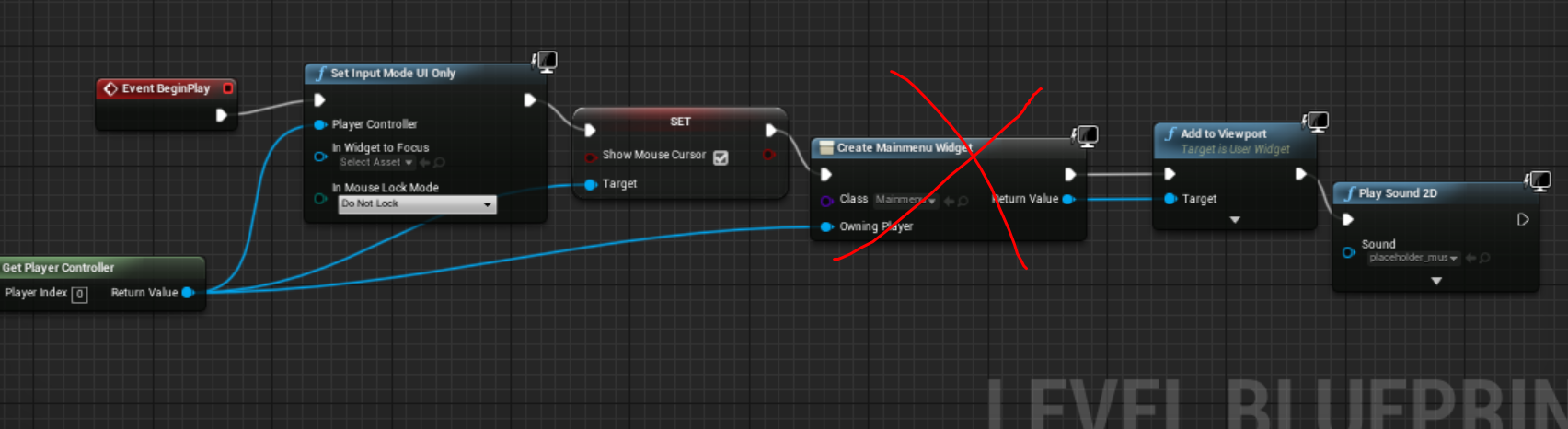
this
and add a new one once again
tawny tinsel
oh
white crypt
also move the set input to the end
white crypt
if that doesnt work add a delay
at the start
you need to take into consideration how everything is being loaded
tawny tinsel
after event begin play yes?
tawny tinsel
ok ill try
brb
UATHelper: Packaging (Windows (64-bit)): LogInit: Display: LogBlueprint: Error: [Compiler PersistentLevel.lvl] Spawn node Create Widget must have a class specified. from Source: /Game/lvl.lvl:PersistentLevel.lvl
again
if only i could just disable it form being persistent
i tried creating a new level with the same blueprint
but that didnt work
tawny tinsel
that usaly helps ill try that
white crypt
yeah in some cases that might help
tawny tinsel
WOAH
i just play tested the game inside the editor
i cant go back to the main menu from pause menu
it closed the play test
wtf
white crypt
what error did you get?
white crypt
... 😄
dim robin
I have this to handle player turns, I'm missing just one thing.. I need to run "turnend" if the input action "shoot" is triggered inside the bp_pawn. any quickhelp? I can't think right now..
(this is in the gamestate)
tawny tinsel
ok packaging now