#blueprint
402296 messages · Page 456 of 403
 loud cipher
they are greyed out
 frozen spear
Whats the type set to on the array
loud cipher
weapon base
loud cipher
yeah all children
loud cipher
yes
 onyx crown
I am new to ue4 and I would like to kill anything that touches an object I created. Does anyone know how to do this? Sorry if this is a noob quesiotn btw I am just new to this.
frozen spear
@onyx crown the answer depends on many things...like do you plan to use health and damage, or effects...thats too vague to help with
Compile, save, close and reopen this bp
onyx crown
@frozen spear I am using health and damage and I want to immediately destroy any actor that touches a cube
frozen spear
Select the cube on the components list.....scroll in details to "event on overlap begin" clikc the green button
Drag off it and type destroy
And drag the "overlapping actor" as the target of destroy
 civic ridge
Can i get some help on a movement issue
onyx crown
I tried that before I think it is just a small issue I can probably solve if I restart or something
civic ridge
does any one see something wrong here. i cant seem to move the character
 versed sun
@civic ridge Check that the blueprint is getting loaded
 gloomy linden
A How To Guide for Setting Up Character Movement in Blueprints.
civic ridge
@versed sun blue print is loaded axis have been mapped, in one of my test tries the input events would fire but the movemment would not go through the add movement
@gloomy linden i had that page up for reference already
frozen spear
Drag the pawns movement component into the graph and get...drag off it and add controller input...see if those nodes act differently
 coarse marten
uhhh could help me on why my UE4 seems to be kinda drunk? Probably something that ive done
but it reads me being on the ground as "im falling" in a character blueprint
but then certain functions know that im grounded and work fine?
with the same is falling node
 unique falcon
Ahoy, hopefully a simple easy one - I have two normalised vectors, how do I get the rotator between them?
I'm pretty certain I've done this a bunch of times but now I'm blocking on what I need
 civic ridge
@frozen spear can only get yaw, roll and pitch off of character movement
frozen spear
Ild have to see how i have it set up on my root motion ais...i cant remember if it was movement or the pawns controller that had a different set of add controller input...sorry
civic ridge
the debug shows the direction i should be going but the add movement inputs are not moving my character is there anything i could be missing
 patent ermine
Is it possible to see how many mip levels a texture has at runtime? Even just printing to screen would work. Trying to see if my dynamically loaded texture, is loading with proper mip levels.
 steep wind
sup guys
first picture is an event from my player character, second picture is an event for my vehicle system, do you guys know of any method I can use to call the mount custom event from inside of my player blueprint?
 maiden wadi
@unique falcon What are you trying to do with two normalized vectors and the rotator?
steep wind
I know I could just make a cast but im trying to make a system that would allow me to interact with more than just the car bp
maiden wadi
@steep wind You're looking for Interfaces.
steep wind
an interface? Ive tried to figure out how they work but from what I managed I cant seem to get interfaces to be the event trigger
maiden wadi
@steep wind All you need to do is create an interface, and create a function that inputs whatever you need to pass along to the other actor. In your case, probably your player character to start work. Your character class does not need to implement the interface. Then you go to your other classes that you want to interacted with, and you call that function you created in the interface. For example...
Simple interface.
Line trace in character that sends message. This class does not implement the interface.
unique falcon
@maiden wadi manual collision calculations, eventually trying to soften a bounce between a floating object and a wall so that if the collision is smooth enough it barely bounces at all and just slides along the wall
 jovial elk
Is there somewhere in the command console in-game that you can view all the information about the character your playing? Specifically the class name and the F String of that character
Think I got the class name but I forgot how did I pull up information on the class in game that would show me it's string name
Doing this cuz I wanted to use the "Summon classname (FString)" and I can't seem to spawn another pawn/object
 simple berry
Hey guys i could use some help! basically, i want bullet projectiles to ignore other projectiles of the same class, so they dont hit eachother and stop working, how do i fix this? is there a way to add projectile collision to the custom collisions tab?
can anybody help me?
 supple dome
yeah you can create a projectile collision (object channel), and make other projectiles ignore it (collision response)
 valid hound
guys I'm having a problem with my project, I cant get my vehicle to move at all, did I miss something? here are the screenshots
frozen spear
are you simulating physics on the cars bp
 native dust
Hello, can you add a nav modifier to a mesh? or only to a collision volume?
 dry pewter
Hello Everyone, how are y'all doing today?
Someone here that is good art MAP type variables?
I have a MAP variable with 0, 1 and 2 as index and their respective info, say
0-Red
1-Green
2-Blue
And i need to take their possition down by 1 when one of the items is removed from the map
I.E 1-Green is removed and now the variable is only:
0-Red
2-Blue
Then i need it to be
0-Red
1-Blue
2-
jovial elk
is there anyone that knows the console command that lets you view what the FName and FString of the character you are controlling?
 round idol
@dry pewter When you remove any index from array/map/set, the array will rearrange itself, and there's little you can do about it. What you could do is set a different value in place of what you've removed to keep indexes as you would want them. I don't totally understand what it is you are trying to achieve with it...
So, if you remove index 2 from an array with 4 items so index 0, 1, 2, 3, the array will now be 0, 1, 2
dry pewter
It's an inventory, i don't have any problem with the items just being removed in the "ammount" map when they reach 0, but they have also a "position in the inventory" that's what i need to re-arange
 worthy frost
he want the key to change
worthy frost
right, or don't use a Map
round idol
"add" in place of the old one
worthy frost
i use an Array for my inventory
round idol
why is everyone against maps? 😂 i use them all the time
dry pewter
Yeah just wanted some advice in the loop that will be needed to handle that
worthy frost
maps are useful is used properly
round idol
sometimes thy work magic 😄
well for inventory id also go with array+structs, the rest is details
dry pewter
But now i'm boarding the problem in a different way but not really, i think im starting to find a way
worthy frost
@dry pewter the issue is, the key will not change, you will have to change all the keys manually
honestly, an array and a custom struct is the way to do inventory
Map works fine for things like Inventory Slots
i don't actually delete the key, i just reset the value
round idol
this is the best inventory series i've seen on-line, you might wanna check it out and check ur logic against that: https://www.youtube.com/watch?v=81wnJaixBnQ&list=PLmKKTERcjTPKEPl0nk48Tpmj-iWmzqo_Q

In this video i will showcase an inventory system i worked on lately in Unreal Engine 4.
If you are interested in seing a tutorial series on how to create a system like this yourself hit the like button, leave a comment or subscribe to my channel :D
worthy frost
or just learn 😄
round idol
😉
worthy frost
and do it yourself
don't watch tutorials like that
only stuff i watch is things like animations and tips and tricks in certain vid 😄
learned a lot of cool stuff
round idol
@worthy frost cmon man, some r really good to see ways of doing things when you are clueless or want to check your logic/open new horizons 😄
worthy frost
yeah but you never truly learn by copying and pasting
round idol
ofc not. Truth is, after a certain point, you end up watching and asking yourself why they do things that way xD
dry pewter
there are really good tuts
Like the "WT* is" series, i don't kind of follow them fully, just learn the concept and go throught trial and error
i don't actually delete the key, i just reset the value
@worthy frost This might be what i actually need!
 sand hill
I'm trying to make a ProceduralRoom blueprint. I've got the basic stuff done, but I'm struggling with actually spawning tiles. This is the important part of my blueprint:
I have an array of Tile, which contains a blueprint, in this case I'm just getting the first one to test it, however, this actually doesn't seem to work. It's spawning something, but it's not the "floor" blueprint in this case.
dry pewter
Are those Blueprint Classes, "Actor" blueprints?
It might work or not if those are actor blueprints or other kind (like AI controller blueprint, for example)
dry pewter
Yes, the floor tiles
sand hill
I just took the first floor tile (I have a testing room set up, already) in the scene, and used that
the variables in my ProceduralRoom instance, looks like this:
dry pewter
Looks like that on your array, the stored info is "blueprint object" you might try storing "blueprint class" in the first place, i don't know how is your map ATM but if there is no "floor" when the array is "filled" then it might be filled with "null"s instead
I don't know if that makes sense to you
sand hill
blueprint class?
hold on, lemme show you my struct
It currently only has the blueprint as the type (haven't added other stuff yet)
then I have a TileSet, which is just an array of these (Tile)
dry pewter
So blue references are "object" references, that need to be found placed on the level, to be referenced and then stored in a variable
Purple references are the "class" and that just looks up for the corresponding blueprint on the content and then references from there
dry pewter
My point, short, is your Strcut NOT filled with "null"?
sand hill
How do I check?
sand hill
Aight, hold on
dry pewter
Be careful since there are a lot of nodes called "is valid"
dry pewter
sand hill
round idol
@sand hill Why do you have actors instead of classes inside your struct?
sand hill
The terminology is a bit confusing
round idol
that means you have them in the world (they already exist) and then you are re-spawning them?!
sand hill
I think I know what I need to do now
round idol
the Class (purple) does not exist in the world, it WILL be spawned
sand hill
Yeah, I get it
round idol
that's what you should be having inside your struct
round idol
then you just spawn the classes you've set inside your struct 🙂
dry pewter
Let me show you something
sand hill
if I wanted to make "instances" of those structs
so I can re-use them
how would I do that?
round idol
a struct is just a variable like any other (inside of it thre's a container) Structs just wrap together many vars at once...
sand hill
My mental model of this is that structs are a type, and what I want is an object of that type
dry pewter
Blue: Object, already exists in current level
Purple: Class, any object in your content browser, basically
You can do that with a mere variable, no need to struct
sand hill
Yeah I got it already
round idol
@sand hill If you want an object, just host structs inside data-only bps. (A data only bp is an empty blueprint with no functionality).
sand hill
That seems.. kinda hacky
round idol
well idk what you want to achieve so 😛
it's not hacky at all. structs are vars, bps are actors
dry pewter
Say. Enit, you need to spawn tiles, right?
dry pewter
Yay!
 trim matrix
Hello everyone! just joined and I know you're busy helping Enitoni, when anyone has a moment, I need some help with a blueprint, I'm fairly new to UE4, I've taken the UE4 blueprints tutorials and I'm still learning but I have something specific I want to know about (I have a screen shot of my BP).
round idol
@sand hill this is my current tile spawning bp
just spawning blueprints for each tile
sand hill
@round idol I want a reusable version of a struct. Let's say I have a tileset for the walls. I have many variations, then I want to re-use that so I don't have to define those tiles again everywhere I need them
round idol
You can use a data table and configure what you want. Then just grab the info from the data table
sand hill
Data table?
round idol

What is a Data Table in Unreal Engine 4
Source Files: https://github.com/MWadstein/UnrealEngineProjects/tree/WTF-Examples
Note: You will need to be logged into your Epic approved GitHub account to access these examples files.
dry pewter
Hello everyone! just joined and I know you're busy helping Enitoni, when anyone has a moment, I need some help with a blueprint, I'm fairly new to UE4, I've taken the UE4 blueprints tutorials and I'm still learning but I have something specific I want to know about (I have a screen shot of my BP).
@trim matrix Sure thing just say it
trim matrix
@dry pewter I'm trying to get my ball to return to me, I've scripted it to be launched in the air, but when the F key is released, it just stays up in the sky. I've included a screen shot
sand hill
@round idol This doesn't mean you have to get the data table in the blueprint? I don't want my ProceduralRoom blueprint to care about anything other than the variables passed so it's reusable
trim matrix
@dry pewter from what I'm understanding, the trigger box is no longer available after I launch it up?
sand hill
If I can pass data tables as a variable to the blueprint, then I have no more complaints
this looks like what I'm looking for
dry pewter
@trim matrix So when F is pressed there is a blue ball that is launched upwards?
trim matrix
@dry pewter yeah that is correct
round idol
You can have arrays of structs inside structs if you want 🙂 you can pass data through a data table (which you make based on a custom struct) so...idk what to tell you 😛
trim matrix
@dry pewter when I am in the trigger area of my trigger sphere
dry pewter
@trim matrix What is supposed to make the ball return? gravity?
trim matrix
@dry pewter is the issue that the trigger sphere is attached and since it goes up with it, I can no longer depress it
trigger sphere is attached to the ball itself and not separated in the world
I would want it to act based on gravity @dry pewter
dry pewter
Then you need to use Physics and the "Launch" node for that
trim matrix
I'll have to find a tutorial on that, maybe I'm getting too ahead of myself
as I'm still learning how to create BPs
dry pewter
It's not much complicated, send me a Direct MEssage if youw ant further help!
sand hill
I made my data table, but how do I make it so I can pass it to the "floor" variable in my ProceduralRoom bp?
I'm really dumb, lol
round idol
@sand hill ur not dumb lol, did you watch the video?
round idol
wt...doesn't it show there how?! 😛
round idol
😂 ok ok...
sand hill
like I said I want to be able to pass any tileset to the ProceduralRoom
I don't want it to be hardcoded to read from a specific one
round idol
let's start over. You have a proceduralroomBP right?
sand hill
Yes
round idol
help me understand here pls 🙂
ok...
you want to spawn x & y number of tiles for your room
sand hill
I wrote a card in trello for this
round idol
now...each tile has information: a static mesh I presume, collision, and other game related-info
sand hill
Yeah
Right now I'm just getting the basics, but in the future I'd have to store stuff like attachment points and things like that
round idol
ok...My suggestion is to make each tile a blueprint. Like I said in the beginning.
sand hill
I made a floor blueprint already
round idol
Do you want to spawn like 1000 tiles?
sand hill
Well I want to procedurally generate the map
On launch, not in construction
I want it to be random each time
round idol
it ...does! 😛
sand hill
Well, okay
versed sun
Anyone good with rotator and vector math ? Im making a solar panel that tracks the sun. works perfect when its placed on ground with no rotation. But, if I mount it on a wall or rotate it , it dosnt track. I need a little help if anyone is available. I can screen share to make it faster.
sand hill
Let's say big, just to be on the safe side
round idol
@versed sun not good with vector math, just a though, did you/are you using look@rotation? try to trick it by using two and track vector differences maybe
sand hill
The purpose of "ProceduralRoom" is so I can have different types of room that connect through another "ProceduralMap" blueprint I haven't made yet
so for that reason, the ProceduralRoom needs to be fully generic and cannot have any hardcoded tilesets
versed sun
yes , Look at Rotation is how i make it work
sand hill
I have a very specific idea for this, so pardon me if It's confusing
I'm also new to UE4 (but not programming)
round idol
ok look: there's no "easy" way to do it. What you are trying to do isn't beginner stuff honestly and you need more knowledge for that imho. Take ur time and check this out, you can even download the project to see how things are done:

Technical Writer Ian Shadden takes us through a project designed as a foundation for square tile, turn-based strategy games in Blueprints. We'll randomly generate a map, "dig" rooms and corridors between, and populate it with teams. It won't be a complete game, though should s...
It's old, but the logic is there. Try to follow it to understand how fairly complicated for a beginner such a thing is, then make ur own mind about it, and come back 🙂
sand hill
It's not beginner stuff, but it's logical, which I already have experience with
honestly, dude
my only issues here is just terminology and understanding how UE4 works
the logic that comes after is no issue for me
round idol
Well, you have my suggestion m8, I just can't figure out how to help otherwise...Sorry 😐
sand hill
It's fine
I usually get by by just forcing my way through
But sometimes it's nice to get help
but the data table is definitely what I need
dry pewter
It's not beginner stuff, true, but you might need to understand other things that are beginner stuff to get familair enough with UE4 and the kind of objects and references you can use
round idol
@versed sun yea, but did u try to do it from both ways and see what values pop up, maybe you can adjust the difference? Idk, just wild guessing here, never tried it myself
round idol
@versed sun From my understanding you'd need/want an offset so that you can adjust location independent of tracker's location
 frail marlin
What is the most efficient way to get a pawn reference in an anim bp? I want to limit casting.
round idol
@frail marlin
sand hill
@round idol I figured it out.
Just made a custom function that I can re-use for this
And it's working perfectly
frail marlin
@round idol so i can init a cast and store the reference, will it get updates on request, for say a motion controller?
round idol
@sand hill so you get the tile classes from table
sand hill
Yup
round idol
@frail marlin yes it should
frail marlin
Right now im purecasting on animupdate
sand hill
but the table can be changed depending on the instance
frail marlin
getting hmd, and controller transfroms
sand hill
frail marlin
can i pull those from the initialized reference on anim update?
round idol
@frail marlin I hate that - it's ok for one two animBPs but ... I hate to think of 1/2 of my frame time killed with useless casting
frail marlin
yeah thats why im trying to nip this early
frail marlin
i dont want to use casting i was going to send it on tick via an interface but that seemed dumb too
i know interfaces have a cost too
worthy frost
sure should be avoided where possible, but half of your frametime casting is a bit of an exageration
using BP in general has cost
frail marlin
i get the thinking, over the course of the project if you dont optimize them you can get yourself in a bind
round idol
@worthy frost It just depends man, I'm making a turn-based now which using montages 90% of time...The animBP doesn't need to know what's happening lol
worthy frost
talking of bind, dont ever use the Bind function in UMG Widgets
our gameplay programmer used UMG binds on our HUD UMG Widgets
was using around 1.8ms game time just on the widgets
i made it all event driven, entire hud costs .12ms
round idol
I take Zak from Epic very seriously and he said in the performance tips never to bind anything so yea. Never saw it in action but wow
worthy frost
thing is actually cheaper to use Tick and set all widgets, than using bind on each widget
round idol
now that's weird 😄
round idol
I still don't understand why there isn't an option for widget tick just like actor's
worthy frost
you use bind on them, then every child widget is now ticking
round idol
yea, right!
worthy frost
but if you just used tick on the parent widget
and update the children, its just one tick function
not 20 to 30
round idol
but inside you still run code to update all those numbers so, it's weird
worthy frost
so we have a health component
which is on all actors (and players/ai) that can take damage
it has a simple tick for regeneration
that is all tick does
round idol
oh, then yea
worthy frost
we had 800 actors in the level using that component
with tick on it was costing 1.8ms
of the game thread time
round idol
never used tick since - like I said, Epic said not to xD
worthy frost
one simple optimization is to turn off tick unless you take damage, then turn it on
no don't NOT use tick
round idol
so, this is the first time I "see" it's efects 😄
worthy frost
use tick wisely, turn it off when you don't need it, turn it on when you do
tick is very important
there is not one single game that doesn't use Tick
your game uses tick
you may not do, but your movement component does, your skeletal mesh does, etc
round idol
In case of animBPs, I always grab my ref at the beginning (like i posted in the SS) and from there, I can run tick to "check states" or do whatever, w/o casting. Ofc, Provided you're not sharing AnimBP among actors, then idk, never did that!
worthy frost
see i have a c++ base for my animbp's
which store and grab all the essentials for all my AI/Characters
then i have a PlayerAnimInstance c++ class which is specific to the player, we actually have 0 logic in the animbp in blueprint
that is how you get optimal performance 😄
only thing we have is the animgraph side
which is all fast pathed again for performance
round idol
I can't get past virtual void in C++ so yea, you lost me there 😂
& since I can't code (nor do I want to learn it as long as I can do everything I personally need in BP) I just figured I'll get as good as I can in bp. I'm indie, only working with a fairly mediocre artist so yea 😄
worthy frost
im an indie aswell
round idol
it's not like I'll do any magic in this lifetime 😛
jovial elk
Wow xD
round idol
I'm a musical artist and have a phd in education so, I'm 110% humanist unfortunately... 😐
jovial elk
And here I am asking really basic command console questions I haven't even gotten to learning about blueprints yet lolol
But the thing is I'm sure it's really easy my mind just isn't connecting, I been looking up online about console commands and what I understand is I can spawn an object with "Summon Classname" right
And then you can possess that object/ bot via Avatar Classname
I been asking it, researching it, trial errors and no luck if one of you guys can help me 😂
I'm like literally new at this unreal engine thing just started looking into it this week
Not even sure if this is the right channel someone from the other channels redirected me here
 thin rapids
@jovial elk wait, you want to spawn an object that you can possess right?
 green eagle
Its been awhile since I have dug into some source code or played with blueprint. But I can't for the life of me remember.
How do you get UE4 to open the C++ of a blueprint/actor/object etc?!?
Thought you just double clicked on the node.. but all i get is a pop up saying "reading C++ symbols" then nothing..
round idol
@green eagle Afaik, you need to have the proper visualstudio version with the appropriate addons/plugins. Other than that, it should work. - I'm no expert though, not by a long shot 😛
jovial elk
I feel like im right at the breakthrough, Sonic is the default character right now, and then i enabled cheats, summoned knuckles and got him to spawn, then i did Avatar Knuckles and now im seeing from his perspective
the only problem now is that i cant move i dont have any controls so idk if im really possessing him
and yes hes a playable character already
unique falcon
any maths wizards about that fancy a challenge?
it's got circle segments in it, maybe
sand hill
Is there a way to randomize this only once?
The second randomizer gets called for each iteration of the top loop, since it calls the second loop
dry pewter
The second randomizer gets called for each iteration of the top loop, since it calls the second loop
@sand hill conenct the second loop to the "completed" of the first loop
sand hill
Can't do that, I need it to run on each iteration
dry pewter
"loop body" should only be the actions that must take place EVERY time the loops run
valid hound
guys I'm having a problem with my project, I cant get my vehicle to move at all, did I miss something? here are the screenshots
@valid hound anyone?
sand hill
I'm using the loop to place the tiles
sand hill
I want the last index of the second loop to not change on each iteration of the top loop
If X is 5, and Y is 3, then the top loop should exectute 5 times, and for each time the second loop should execute 3 times.
dry pewter
Randomize it Before the "for loop"s and save it on a variable, then use the number stored in the variable
sand hill
How?
dry pewter
lemme show you
This will make the last index of the second loop to ALWAYS be the same
sand hill
Thank you
dry pewter
@valid hound anyone?
@valid hound I can't see the Quoted message, wanna show me?
any maths wizards about that fancy a challenge?
@unique falcon ? 🙂
unique falcon
You asked for it
Here's what I'm aiming to happen - I have a block that I'm pushing towards a wall, when the block clips into the wall I want to figure out how much I need to turn that block until it's no longer clipping the wall (and not through iteration)
Here's what I think I need in order to solve the problem, everything in green is stuff I know or can work out easily, but what the fuck is the angle of D?
and of course, I'm doing this in blueprints 8)
I feel like the answer is somewhere in the land of chords across a circle and figuring out the difference in angle between the ends of two parallel chords
round idol
Did anyone work extensively with structs in UE4.25? Does it crash when changing vars inside like 4.24? (fairly large structs that is)
 spare pike
So i'm getting this error for these branches, why is this? can't figure out.
valid hound
@valid hound I can't see the Quoted message, wanna show me?
@dry pewter it was posted a few hours ago, you can see it if you scroll up, but I can post everything again if you want
dry pewter
Here's what I think I need in order to solve the problem, everything in green is stuff I know or can work out easily, but what the fuck is the angle of D?
@unique falcon That's pretty hard to find since none of the cathetus is straight
 frigid anvil
@spare pike Try running a branch from the return value or blocking hit before the other branches
dry pewter
@frigid anvil Might want to draw some aditional lines and find their distances, so you can "Draw a rectangle" around each of the cathetus of the angle, and then you could apply pitagoras to find such angle
spare pike
@frigid anvil thank you that worked perfectly!
dry pewter
So i'm getting this error for these branches, why is this? can't figure out.
@spare pike "actor has tag" is returning a "none" actor, so the node fails
unique falcon
yeah i suspect it's going to be a nightmare
dry pewter
@frigid anvil Might want to draw some aditional lines and find their distances, so you can "Draw a rectangle" around each of the cathetus of the angle, and then you could apply pitagoras to find such angle
@dry pewter @unique falcon
spare pike
@dry pewter Thank you for the explanation, il keep that in mind for future endeavors
dry pewter
@valid hound It's kind of scattered, wanna send those to me as direct message?
round idol
Ok..Let's put this question another way: Is there any way to "suspend" references, change struct, then "re-enable them"? 😂
I'll take that as a no...
unique falcon
I'm gonna go sleep on that collision maths problem and see what I come up with in the morning
I'll post the answer if I can figure it out
sand hill
Am I missing something or is it impossible to make a 2D array?
dry pewter
@unique falcon Maybe you could figure out a way to do it automatically as the box is pushed, not doing all the math beforehand, but turning step by step until collision is gone
round idol
@sand hill nest in a struct, that way it's "2d" otherwise, natively, no
green eagle
@unique falcon I love the way you sold that appeal to mathimatically inclined programmers. "Its got circles in it.. maybe"
unique falcon
@dry pewter the problem is that I'm moving the box really quickly, so I think trying to do it step by step would be noticeable in the long run
sand hill
Gah. Is there a way to faux it with one array?
unique falcon
@green eagle gotta try somehow 😉
sand hill
array[x * y]?
round idol
@sand hill We have different languages sry 😂 I'm no programmer, so right now, I don't understand the question, sry
green eagle
@round idol if I open the parent class hyper link it opens up VS like normal. But I may just be mixing up the functionality with other areas. I had always sworn it was an easy click to open more specific things.
sand hill
@round idol [] means index
round idol
@sand hill So you want an array of arrays?
sand hill
Ideally, but I see now that isn't possible for some dumb reason
I do not want to use a struct
green eagle
@unique falcon I didnt read through the threads. But did you find your Wizard? If not PM me some details.. my roommate/investor is my 2blue1brown level math geek. I can brain storm with him when he gets home in a bit if youd like
sand hill
That is so annoying, damn.
green eagle
an array of arrays with arrays in them
green eagle
You mean in BP or in C++
round idol
an array of arrays with arrays in them
@green eagle and there you have it, 3d array...i don't see why all the programmers get angry at bp 😛
 zealous moth
@green eagle yes
sand hill
I really do not want to use a struct, since that's actually triggering me, could I use two arrays somehow and just treat them like x and y?
zealous moth
hm... maybe try a softer game engine like unity
round idol
I really do not want to use a struct, since that's actually triggering me, could I use two arrays somehow and just treat them like x and y?
@sand hill what? "triggering" you?!😂 wtf man?
green eagle
I can't think of why UE4 wouldn't function with imbedded arrays within come cpp.
zealous moth
i hear people make tons of games with it... like... uhhhhh
sand hill
@round idol I like to keep my stuff structured
I'm not a fan of workarounds and "hacks"
unique falcon
Thanks @green eagle!
green eagle
@trim matrix when you get use to being able to reference and point at anything you want trying to use bp can be annoying. especially with premade classes.
sand hill
Sigh struct it is I guess.
round idol
I'm no programmer so I can't really relate, sry, @green eagle 😄
zealous moth
considering my map has like 4 different cases
sand hill
or can you generate a map on the fly
sand hill
Actually.
I might not even need a 2D array
I could store the X and Y, along with the type
in a 1D array
zealous moth
yup
sand hill
so I'd still need a struct, but at least it's not painful
the only problem is detecting stuff like edges
zealous moth
if you have very few info to store, use maps; if you have tons, use a struct
like, i made an RPG once and every ability was based around a struct with a name, cost, cast time, damage, icon texture, etc
green eagle
@round idol UE4 is a great place to get some better familiarity with it! It also opens a new avenue for you when trouble shooting with BP as you can dig around in source code to find ways that things are refernced or what not.
zealous moth
and then i mixed in a datatable
sand hill
X O O O O
X O O O O
O O O O O
E O O O O
O O O O O
man im so mad I can't remember how to get VS to open up like i use too..
sand hill
something like this is what I aim to generate
X is empty, O is just.. default (a normal tile)
and E is exit
zealous moth
oh, are you generating a map???
sand hill
Yeah
trim matrix
lol
sand hill
well
round idol
@green eagle 🙂
sand hill
I thought it'd be easier if I used an array, cause then I could first layout the floor plan, then add the walls
I guess instead of doing that
hm.
Man, this is annoying
sand hill
In what way
I'm already using vectors
The issue here is detecting the edge of the room
zealous moth
Technical Writer Ian Shadden takes us through a project designed as a foundation for square tile, turn-based strategy games in Blueprints. We'll randomly generate a map, "dig" rooms and corridors between, and populate it with teams. It won't be a complete game, though should s...
vector math can do that
or tracing
there is a myriad of ways to solve it
green eagle
This program takes two matrices of order r*c and stores it in two-dimensional array. Then, the program adds these two matrices and displays it on the screen.
frozen spear
proc gen is fun, but meh, why would you ever want fully proc gen'ed levels...
zealous moth
vectors > 2D arrays, try to work in 3D space with arrays 😛
frozen spear
design rooms and have them proc gen there connections at doorways and call it a day
sand hill
That's too predictable
zealous moth
procedural generation scripting with already premade rooms is a very neat solution for map variety
like in diablo 2
or warframe
this keeps the whole exploration aspect
frozen spear
you know the amount of work youll be doing to do full proc gen? or are just the floors and walls the only thing your genning?
sand hill
It's just the floors, ceilings, and walls, and doorways
frozen spear
ok thats not as bad
sand hill
I'll have seperate logic for stuff like staircases and certain rooms
I have a "ProceduralRoom" blueprint with values I can tweak
I'll probably make a "ProceduralStaircase" later when I get around to that
So the idea is that I can have a bunch of premade ProceduralRoom with tilesets and such
Literally once I figure out how to generate the layout, I'll be set
frozen spear
i abandonned a "city" proc gen project i was working on cause it was just bah, overwhelming amounts of effort for not equally awesome results
sand hill
This video is very helpful so far
sand hill
I'm the kind of person that doesn't give up though
If I'm set on doing something, I will do it
frozen spear
screw that, easier to design blocks with sockets that they can connect to others
then proc gen the random room trash
frozen spear
but do it dude dont let me discourage
frozen spear
just make sure to include logic so room placement makes sense
so you dont have halls leading into broom closets
sand hill
In this case it doesn't actually need to make sense based on the context of why I'm making this
It's supposed to emulate a dream
And often things don't really make sense in dreams
frozen spear
oh well damn, do it 🙂
jovial elk
So I think I figured out that the anchor is what's not allowing the new possessed bot to walk around
zealous moth
i would spend less time questioning the great wisdom of the engine and more on making a game 😛
it's a tool, it does what it does
zealous moth
lucky for you the source code is available and so are all these nodes; you can reprogram them
sand hill
I ended up using a float node instead
zealous moth
@frozen spear sounds like you were making we happy few
 polar dawn
It depends, if you divide 1 by 1, it's an integer of 1
you'd only get a float if you divided a lower number by a higher number
so you'd use a float for that anyway
sand hill
Uh
My "add to array" node is not working
I verified that it does indeed iterate multiple times, yet the created array only has a length of 1
zealous moth
what is your first index?
polar dawn
i think it might be making the same array over and over again?
sand hill
First index is just default (0)
zealous moth
yeah actually
sand hill
and yeah I was thinking it's probably just creating the same array over and over
but I have no idea how to fix it
zealous moth
create a var
polar dawn
not really a blueprint issue, the make array function is a pure function so it only gets called when it needed
sand hill
Okay, now the length is only 2, no matter what
polar dawn
so basically every loop iteration its called
so you need to make array store it in a local variable before the for loop
sand hill
polar dawn
if you set a Watch on the output value from the multiplication node, what's it say?
it's kind of zoomed out too much to read
polar dawn
I'd set it to 1, if the 0 is always going to be prepopulated
sand hill
I actually wanted to make an empty array
so I don't have that item in it from the start
and in that case the loop can start at 0
polar dawn
you have to be playing the game, and you need to set the debug
polar dawn
but it might not work any, I don't really know how the watch value works tbh
is this inside a function or the event graph?
sand hill
It's in a function
polar dawn
because you can just make a variable and set the type to array of whatever that struct is
sand hill
polar dawn
but i don't think thats the issue, if the length is off, it might be the math
sand hill
I printed the index before
uh, last index I mean
and it was something like 23
so it's definitely correct
I'm 99% sure I'm not adding to the array correctly
polar dawn
hmm
polar dawn
👍
 rough blade
We are hoping to create a system that fires off vaious events. These events will need to contain an enum array, float arrays, and various other data. What would be the best way to store various instances of this data so we can take their array info and plug it into a function? We originally tried storing them in blueprints (an array holds each instance) but when calling an instance from said array the cast would always fail. (Each instance is a child of a master class which is being used in the call function.)
polar dawn
an interface?
sand hill
I'm not sure why, but there seems to be an extra item being added here
where it shouldn't be
polar dawn
i think you need to subtract 1 from the output of your multiple node since arrays are 0 based
for the last index of the for loop
sand hill
Ah, or set the starting index to 1?
polar dawn
yeah, but then you're array might be funky
are you still setting the 0 index when you make the arry, if so then that might not be the issue
polar dawn
yeah, so if you want an array with 30 indexes, you need to loop from 0 to 29
sand hill
I'm not good with algorithms
 plush ridge
Is there any way to turn a skeletal mesh into a static mesh, but mid-physics simulation? I want to simulate the mesh to ragdoll and fall to the ground, then convert that pose to a static mesh basically
 glossy canopy
So I’m following a tutorial on character movement. From couple years ago.
He checks Orient Rotation to Movement
But for me it’s not there
 pure heron
So, a seemingly simple problem – player picks up an upgrade, and now all of his projectiles leave pools of fire on bounce, explode on despawn, etc.
How to modify projectile's behavior? Simple. Add event dispatchers for bounce, for despawn, and call them. Then create some actor components that would bind themselves to those dispatchers and do the job.
Component's been added to the projectile, and it works. Thing is, how to do it on runtime?
Easy! When the weapon spawns the projectile, I get a reference to it. Grab that and add BPC_BounceFire and BPC_DespawnExplosion.
Now here's something I can't figure out – how to make them variable? Do I just chain branches if (hasBouceFire) AddBPCBouceFire(), if (hasDespawnExplosion) AddBPCDespawnExplosion()? I would hope not.
But you can't attach components by their class, you can't do it by a reference to them, the only way is those hardcoded nodes.
What am I missing?
polar dawn
@glossy canopy It's moved into it's own sub section try searching for it in the search bar at the top of the details panel
glossy canopy
I realized you could search like an hour after posting this. Smh lol
sand hill
woooo
sand hill
I'm not sure why, but it's spawning walls twice at 0,0
Oh, loop needed to be at start index 1 instead of 0
polar dawn
Blueprint comments need to be opaque to hide the wires better OR what about Wire Portals so that I can jack them in one spot, and then make them appear somewhere else so I don't have to wire them across the graph
 dark ibex
Custom events for exec pins, variables for others (if possible)
sand hill
don't events have some overhead?
dark ibex
Probably a tiny bit
 marble folio
I would say that overhead would be dealt with during compilation... Bp size overhead sure(another function descriptor to be remembered)
It is as if in code you were asking if using functions to break up your code will slow down the program. If that is where you have to optimize you are lucky, because the rest of the code is perfect at that point:).
 wise raven
If I merge actors in my level will it reduce draw calls?
 subtle blaze
That moment when you say screw it and try to "create" a node manually because the built in node doesn't seem to be working and you use your new "node" in your graph and things work as they should... Then you try the node that you were trying to create and it works as well.
wtf, I swear I tried this 3 days ago. (And multiple times each day.)
@wise raven What do you mean "merge actors"? Draw calls are to the GPU so they are dependent upon quantity of meshes, not actors. (Yes, I'm aware that is technically innacurate.)
wise raven
@subtle blaze If i place 15 static meshes seperately , but then take those 15 static meshes , merge them ( it will then get combined into a single static mesh actor) and then place the single static mesh actor containing those 15 static meshes, will there be a difference in performance?
subtle blaze
Merge them in which program? (I just want to make sure I am understanding you correctly.) Also, are they all the same mesh just duplicated? (And material?)
@wise raven
wise raven
@subtle blaze when you select multiple actors or meshes in the UE4 editor and right click, you get an option that says merge actors
And yeah they are the same meshes just duplicated
subtle blaze
Mk, so it looks like yes, but it depends on which setting you use. You should see three icons in that window. If you hover over the first it shows "Harvest geometry from selected actors and merge grouping them by materials." That one (I'm not familiar with how materials affect draw calls) will decrease calls by grouping them by materials. The second "Harvest... into a single mesh" should reduce draw calls yes but it will likely result in a relatively small performance increase. (If at all, one very large mesh can cause massive memory usage.) The third option "Harvest... into an actor with multiple instanced static mesh components" will probably be what you want. What that does is use instanced static meshes (or HISM if you tell it to which you may want, look into it before jumping in though) which are kinda crazy. It can let you get away with one draw call for literally thousands of meshes... if all of them are the same mesh.
As an idea of performance, I can get ~40 fps with 2k static meshes that are all the same mesh and ~105 fps with 100k instances in an instanced static mesh.
So, as long as you only have a couple meshes, go for that last option. Make sure you read what it says though.
@wise raven
Well... I used to be able to then my comp died three weeks ago. Now I'm lucky to get 60 fps in scene that has 100 static meshes that are all the same.
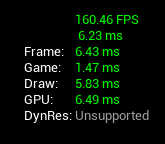
https://i.imgur.com/YvbjpX0.png This is with an instanced mesh
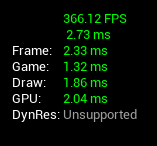
https://i.imgur.com/q9vNiH8.png This is with static meshes. No difference between the scenes other than that.


 wise jewel
construction script and event begin play are similar isnt it?
the only difference is that construction script runs only once
and event begin play I can use it to update some other stuff at runtime
a trigger for somethig else to happen
am I right?
subtle blaze
Sort of. So a construction script runs when the object is constructed, which includes in the editor and (always) before the object ticks. Even before the object renders. Begin play only runs while the game is running and only once but it can sometimes run after the first tick. (Depending on if you allow that in the options.)
@wise jewel Also, it is easy to crash your editor by running stuff in a construction script because it can very easily run multiple times when you compile or when you drag the object in editor. (You can make it only run once at the end of a drag with a setting.) Also, construction scripts run (but only in editor) every time a property is changed.
Which means you could have, for example, in a construction script, it changes the actors scale based upon its location. As you move the actor around it will change but once the game is running, the scale won't change.
Basically, unless you need it, you probably don't need to bother with it.
wise jewel
but i could do the same in the begin play right?
subtle blaze
Not exactly.
Begin play always runs once and only once the game is running.
Which means the scale would not update as you drag the object around in editor.
wise jewel
oh
ok
could you give me an example of how to crash it?
i'm tkinking of setting a timer
subtle blaze
So basically if you need code on the actor to run in editor, construction scripts are how.
subtle blaze
No timers in a construction script. No delays or anything like that.
It runs once and can't wait for anything.
wise jewel
would it crash the engine?
subtle blaze
It won't let you even add a timer.
subtle blaze
Construction scripts have a lot of limitations on them but are really convenient when you know how to use them.
But you probably wouldn't need to use one for an npc or a character for example.
subtle blaze
And they can crash by causing an infinite loop of construction scripts.
wise jewel
project settings and world settings
i understand that world override project right?
i'm thinking about set default pawn
or player controller
subtle blaze
Uhh, use gamemode for that.
Make a custom gamemode object and have the logic in that.
But yes, it should override.
subtle blaze
Oh, I see what you are talking about
wise jewel
i'm still learning how things are connected and the order they run
 tight schooner
@wise jewel one critical difference between BeginPlay and Construction Scripts come in with game packaging. When a project is packaged, all the construction scripts of the actors in the maps you're packaging have their construction scripts run in advance and thus baked into the map. So you could potentially save on BP-related load times in the packaged build by offloading prep work to the Construction Scripts vs BeginPlay.
wise jewel
thanks, that's good to know
subtle blaze
So the settings on project is the default world/map mode.
Which means when you create a new world/map it sets it to that default
then you can just change it for each map if you want
tight schooner
@pure heron your problem is interesting so I googled for a second and found this... https://docs.unrealengine.com/en-US/BlueprintAPI/Game/ConstructObjectfromClass/index.html
I'm not in front of my workstation rn to try it but lmk how that goes. Internet says that's how one spawns a component from class
subtle blaze
IIRC when doing something similar (though it was child actors) I used enums to select nodes for the class. Was a mess but it worked. (And technically may have been pretty performant, but it was a nightmare to expand.)
wise jewel
ok thanks a lot for help
when i do "Create Blueprint class based on .... "
is it creating a copy of that class?
or is inheriting it?
 fallen glade
I don't know where to post this, does anyone know of a plugin to make PS4 controllers work with UE4 ?
 zealous sundial
@wise jewel it's create a inherited class, if you want to copy, use duplicate.
but i agree text is not so clear about this one.
wise jewel
ok thanks
 viscid valve
Trying to figure out why I can't see a custom Actor Component within my Data Asset in the editor. Is there a special property I need to apply to the reference in my Data Asset for me to be able to select the custom component children in the dropdown? At the moment all I can select is "none"
 honest forge
Hello, i am trying to implement swimming into a third person character project. I have setup underwater swimming when the character jumps into a water physics volume but would like to know how to setup surface swimming with a different animation to the under water anim. Any suggestions?
 exotic socket
Hey,
quick question:
In a blueprint function, for an input, I can select "pass-by-reference". But when selecting the type, it's called an object reference anyway - with the option to use a soft object reference instead. I didn't manage to find clear documentation on this. I'm assuming that, when selecting "pass by reference" it will actually pass my object by reference whereas not selecting it will give me a copy. Is this correct?
trim matrix
hello guys I have inventory and lootable bodies but when I get something from the bodies I can't return it-how I can do it?
 ocean radish
@exotic socket nope both will give you actual references no diff in that regard, there a little hard to wrap your head around or is for me, but its so you can make more general functions
 vivid quail
https://kapwi.ng/c/MXmTKDzo
soo when using muticast they dissapear and when on server they stand there
why arny my zombies raising and staying there server side?
trim matrix
hello guys I have inventory and lootable bodies but when I get something from the bodies I can't return it-how I can do it?
wise raven
@subtle blaze unfortunately Im not using instanced static meshes because I dont want to repeat a same model from the construction script, I am building a massive european city
trim matrix
yo
 static shuttle
how can i get an event if an object moves?
glossy canopy
So I made my stamina bar. But how do I get back into the UI to place it better?
I hate looking everywhere for something. Not finding it. Posting here and than finding it 5 seconds after hah
 stark plank
I can't figure out why I have this error?
glossy canopy
stark plank
Yet my blueprint works.
Cause it works but it makes mistakes on top of that
@glossy canopy Use the screenshot tool of Windows10 it will be better
glossy canopy
It takes all 3 monitors lol
stark plank
Type in the windows search bar "Screen capture tool" and you can then capture a particular area
I also have the same problem if I do "print screen" it takes both of my screens.
glossy canopy
Yeah I do print screen and my computer is like RIP good luck 😂
I do appreciate everyone helping out my noob ass lol
 odd citrus
Hey guys how do I make an actor move somewhere once a line tracer has detected something ?
maiden wadi
Windowkey+Shift+S is a good hotkey for the snippet tool.
 quartz field
Hello everyone, I'm working on the resolution settings. Whatever value I set is not reflected when I play (tried in both standalone and packaged build), it's always 1920x1080.
When I check the gameusersettings, I can see that the ResolutionSizeX is the one that I set, but not the LastUserConfirmedResolutionSizeX how do I change this one ?
ResolutionSizeX=1280
ResolutionSizeY=768
LastUserConfirmedResolutionSizeX=1920
LastUserConfirmedResolutionSizeY=1080
tight schooner
@odd citrus you're going to have to narrow that one down cuz I assume you're asking for more than just SetActorLocation
odd citrus
Basically I'm trying to make kind of a spider like enemy for a sidescroller that hangs in the ceiling and that once it sees the player it'll come down to try and hit him and then retreat back to his original position.
tight schooner
when you type an answer but the question disappears; it's like when Lucy pulls the football from Charlie Brown or something
@odd citrus I'm not knowledgeable about character animation and AI, so I can only suggest a hackish (albeit simple) way of doing it. You can use a blueprint Timeline to make a curve drive a node.
The graph would look like Timeline --> Lerp vector (with a Timeline float curve plugged into alpha) --> SetLocation (of your spider)
You'll probably want to adjust the playback speed based on the distance of the spider's drop, assuming it's variable. IDK what you have in mind, but assuming the answer is yes...
Vector 1 & 2 --> VectorLength --> some math goes here --> SetPlayRate (target: your timeline component)
odd citrus
Thanks for the help ! I didn't even consider using timelines to control the position of the actor, I'll give it a try and then report back on how it went. Thanks again !
round idol
Jesuuuus! What was the name of the float node that turns all negative numbers to positive (but not vice-versa, so Negate is not it)...😭
nvm it's ABS
viscid valve
I want to rotate some text in the game to face the camera - I have it working on tick at the moment, but I don't want to be relying on tick to set the rotation
It's basically pickup text which shows when you're in proximity of the object
So it needs to stay attached to the object it belongs to
I found that doing things on tick with replicated items is a recipe for disaster, as you might imagine
Unless I create the text dynamically on the client and attach it to the actor, rotating it in the same way as I am now?
tight schooner
@viscid valve maybe someone will chime in with a better solution, but off the top of my head the rotation can either be a non-replicated client-side ticked actor, or some sort of vertex shader magic (though I suspect rotating a text render component in a shader will be way more complicated than a simple texture billboard...)
viscid valve
Yeah well that was my second suggestion - right now the text is a part of every actor that can be picked up, but if the text was instead spawned by as a client owned object on overlapping the collider that might make sense
 zenith scarab
@viscid valve I would use a world widget component set to be shown on screen
That will show the widget you created using a text always facing the camera
viscid valve
Can that be made to stick to actors?
zenith scarab
Yes
viscid valve
Okay neat that sounds like a good option to try
zenith scarab
It's an actual scene component you can attach to actors
maiden wadi
Just depends on the look you're going for. screen space looks a little less 3d. If you want the world space look, you'd need to spawn the widget component on the client's version of the actor and make sure that that client handles the rotation stuff on it's own.
honest forge
Hello, does anyone know how to tell when the character is at the surface of a water volume?
loud cipher
i spawn a grenade launcher ball, i have set projectile movement and a sphere and just a basic countdown for radial force, but when i shoot it it goes through the floor, there is collision set but this problem goes away when i set simulate physics, but if i simulate physics the ball just ignores the projectile movement and bounces to the floor
 late cave
what's a global data object one can access both in the unreal editor and in the game? (game instance only exists in the game, which I guess is natural)
I want to store things like grid size in one place...
 willow turret
@loud cipher what is the speed you gave the projectile?
willow turret
@late cave config files
late cave
@willow turret that sounds like a user can easily open up and change
willow turret
@loud cipher projectile movement component doesn't uses physics to simulate the projectile movement, it calculates it and substeps it.
Giving speed too high will cause the projectile to go through objects.
Try increasing the sub stepping.
viscid valve
Is it possible to have an actor that you can actually set physics/enable gravity immediately after spawning it?
In experimentation I have done it feels like you either want the actor to stay in one state or the other or it just refuses to play ball
Would just be great to be able to reuse the same actor, else I have to spawn in something else when I attach it to my character and I just want it to comply
My pickups have gravity/physics enabled by default and I am trying to turn them off when transferring the pickup to being attached to the character mesh
willow turret
@late cave True.
tight schooner
there is a Set Simulate Physics node
viscid valve
Yeah I'm using it, and the gravity one
tight schooner
I also have a similar question to @late cave. I'd like to make a level design aid that shows a trail of the player-pawn in the last play-in-editor session (yeah, straight out of Super Mario Maker). Do I need to save this shadow-trail array as a savegame object for it to persist between PIE and editor?
viscid valve
I'm actually still destroying the old actor and spawning a new one atm, but regardless, I just give it a throwaway transform and then immediately disable physics/gravity before immediately attaching to the character
tight schooner
I believe they call it "object pooling". The general use case is for projectiles you're using hundreds of; constantly spawning and despawning them would affect general performance, memory and "garbage collection".
(at some point I'll pool the projectiles in the game I'm working on but I haven't gotten around to it...)
viscid valve
It's this exact same crap I was getting before when I tried this - if I click and observe the object in the viewer, it behaves like I'd expect.
It's definitely the default state of the actor that breaks it
pure heron
So, regarding this answer: https://discordapp.com/channels/187217643009212416/221798862938046464/706071045098176523
Yes, I can construct an object from a class, but how do I then attach it to an actor? There's no node that would attach an actor component that takes a reference to a component
viscid valve
Are you trying to do literally the same thing as I was earlier?
I was trying to do some jazz with actor components, then found you can only really create them using "add"
@pure heron
pure heron
Possibly
viscid valve
What are you trying to do?
I have ditched using them entirely in favour of just using an actor
Inflexible rubbish hahaha
pure heron
It's an issue where you can only use AddFooComponent or AddBarComponent, but not AddComponent(Foo) or AddComponent(Bar)
viscid valve
Yes - in my case, I wanted to store the type of custom actor component in a data asset
You can't do it
pure heron
So you can't pass a list of components from actor A to actor B, and have actor B iterate over them and attach each
viscid valve
If they were all of the same type, maybe
pure heron
There's no node that takes a component to be attached as a parameter, so can't see how
viscid valve
It's pretty gash
pure heron
Yeah
viscid valve
Fact two people in the same day have come to the same issue kind of says to me that you should be able to treat it like a normal actor
I've just eschewed it in favour of a normal actor
tight schooner
@pure heron Not gonna test this, but at least it connects lol
pure heron
It attaches to a component
 dense hornet
I'm trying to make it so my camera can't go out of map bounds (it's top view). I have it so the center of the camera stops at the border, but I want the edge of the camera to stop at the border, however it seems that subtracting half of 'get viewport size' doesn't really work. Anybody knows how to do this?
pure heron
I need to attach a component
pure heron
I guess I could try
tight schooner
@dense hornet I think camera FOV and distance has to be factored in somehow to determine how far the camera can actually see apart from its center position. Viewport size is literally the pixel resolution IIRC, which would cause discrepancies if someone's playing at 720p vs 1440p etc.
spare pike
Question this is currently my setup for dragging around objects. https://blueprintue.com/blueprint/u_l4ntoz/ (yes its a bit messy, sorry) is there a way i can make it so if the object being dragged is snagged or stuck somewhere i can make the character automatically stop dragging it?
BlueprintUE
dense hornet
@tight schooner I would like it to be responsive, so it works in different aspect ratios. Would that be doable?
 spice topaz
I'm trying to make it so my camera can't go out of map bounds (it's top view). I have it so the center of the camera stops at the border, but I want the edge of the camera to stop at the border, however it seems that subtracting half of 'get viewport size' doesn't really work. Anybody knows how to do this?
@dense hornet
Cast the middle left, right, top, and bottom screenspace coordinates to worldspace @ a very low depth, then use that as the bounds
dense hornet
ah yeah I see what I'm doing wrong, it's adding pixel length, not world units. I'll try and convert it somehow
dense hornet
got it working!
 devout tide
can a structure inside a mapping be edited?
dense hornet
got it working!
@dense hornet Hmm it gets glitchy when the screens turns to portrait mode though. I'll have to look into that
 tight venture
Is there a way to have a pointer to an object in BP? Or do I need to use an object reference and a boolean to simulate the != null check?
ocean radish
isvalid?
tight venture
I have a class that contains another single instance of another class (or maybe not) as like a "current target". If it were a pointer, I could just basically ask "do you have a target?" by checking != null on the pointer, but instead it looks like I may just have to have it contain a reference to that class and a boolean that gets set to true when the target reference should be used
is that right?
ocean radish
isvalid will check if its null
tight venture
isvalid? huh, okay
thanks
I wonder how that works under the hood. (Probably with pointers)
trim matrix
is there any way to tell where a sound is comming from
ocean radish
as in for debug or somthing like ai?
trim matrix
no i have sound coming from somewhere and i need to find whitch blueprint is doing it
wise raven
What does it mean to "split" sections in a procedural mesh? Or what are the "sections" in a procedural mesh?
tight schooner
If you know which sound asset is being played, maybe reference viewer?
trim matrix
thanks
tight venture
Is there a better way to get a random member of a Set than to use Random Integer in Range on 0 -> (length of Set - 1)?
I don't see any built-in functionality for that
tight schooner
Dunno offhand, but you can always put it in a function library or macro library
if you have to roll your own
 wind verge
I might be just stupidly missing something, but, I want to make a function where there also should be this "Failed" exit node option, but somehow I don't see how I make those alternative flow exit points, I try to find something in the docs or generally on google but I probably search for the wrong thing. Someone can give me a hint here?
tight schooner
Functions can't have multiple input/output exec pins. At best you could have a boolean output named "success" or something that you branch off of
otherwise have to make it a macro
wind verge
aaahhhh ok
then i check on macro, thanks, that was probably then my mistake to seek it at the wrong point hehe
 zealous bear
Can anyone help me with this? I'm trying to get the distance of my character from the center of a sphere collision component. I subtract the world location (GetActorLocation) of the character from the world location (GetWorldLocation) of the sphere, then print out the vector length of this on tick. This value never goes below 48, though. Shouldn't it be 0 when my character is right at the center of the sphere?
wind verge
Ok, then I have to directly connect with the next, I wanted to add this function to a Blueprint Library, but if i have now to make a macro, where can i put it best? Its a global context function
late cave
@tight schooner sorry, I was away, but if you didn't get a response yet, and if your question was for debug purposes, the visual logger can do that.
tight schooner
oh ok, I'll look into that. Thanks
ocean radish
@wind verge make a macro lib
wind verge
OH lol, that was now stupid to ask
oh mh he wants a parent class mh practical then Object if its global, or?
ocean radish
@zealous bear this should work right?
ocean radish
@wind verge Not sure i know what you mean, if you make a macro lib, you can access from any BP
wind verge
@ocean radish I wanted to make a new Blueprints > Blueprint Macro Library and he wanted a Parent Class
i assume thats just where he attaches it too then, which means if i want it global it has to be object
gloomy linden
Better to make it in a function lib instead of macro
zealous bear
@ocean radish Hmm, same thing. Never goes below 48-47.
ahh
I got it
nvm im just a goof
ocean radish
well that will narrow your code a little :d
zealous bear
the object is 50 units in the air and the character is 100 units tall
ocean radish
@gloomy linden cant make it in function as he needs multiple output execs
gloomy linden
Thats weird
ocean radish
@zealous bear haha yep that will do it
@wind verge
i would try it as that, never actually had to use one though
so make sure to save just incase, just make a test function in the lib, then open another bp and see if it avaliable
gloomy linden
Should just use boolean if the result is true or false but okay
wind verge
@ocean radish ah ok i try that, but i face another problem now
trim matrix
How do i make my sliding door open when i am looking at it with my corrhair and press a button?
I know the rest i jsut dont know hwo to trigger an event while looking at something
wind verge
let me explain quick what i wanna do, i just want to abstract this Game Instance topic into a nice call, the topic where you normally do a Cast towards your Game Instance class, and I thought it might be good training to see if i can make it equally comfortable as the original Cast function
zealous sundial
I'm getting mad boys, any idea why a Text widget doesn't want to be updated when he is insert in a list view ?
Here the thing :
wind verge
but now the macro doesnt want me to get a function from a world context 8-D haha
ocean radish
@wind verge your trying to remake the cast to node?
or you trying to make a function that just gets your gamemode already casted to your version?
trim matrix
Anyone can help me?
ocean radish
@trim matrix you looking for a basic run down of the process, or have you no idea how to actually start?
@zealous sundial Try setting the text after you added it
wind verge
@ocean radish exactly, and i thought it would be sexy to have the "Failed" node also in there
@ocean radish i didnt expected that this makes a problem 😉
ocean radish
@wind verge this?
wind verge
AAHH Exec i thought it wasnt possible
that exec was the thing i hoped for 😄
so in the macro ok, but now my problem is that i cant get that game instance, but let me retry now with your reference probably comes uaotmatically if i do the surrounding rights
Ah ok, I see what confused me with the macro, I have a blueprint library which overloads Get Game instance but that only applies on blueprint functions not macros, so i had to do it there normal, but now it looks exactly like yours, thanks @ocean radish
zealous sundial
@ocean radish yup, not working, trying to get the reference by the create widget, then by the list...
trim matrix
@ocean radish No i have an idea how im going to do the animation of it openning
zealous sundial
i'm reading a tutorial about list view rn, but look like UE4 have a strange way to handle this.
trim matrix
I just want to know how can i make it interactable only when i am looking at the door, not when im near it
ocean radish
@trim matrix ok you need to do a linetrace by objects then i would use an interface so that i can use the same trace to 'interact' with everything. so door would open switch would turn on etc
@zealous sundial that cast node you have in there is redundant, dont need to cast to a class as it already is that class
trim matrix
@ocean radish can you please be more specific? I have experiance with ue4 i just never got aroudn to using linetrace
zealous sundial
yeah @ocean radish but that not the issue p
:p*
So : finally i can change the text in the data, but the text displayed, still not the text modified, even if i request a refresh on the list view
if i print the "text", i got the updated text aswell
ocean radish
yea i know i'm not sure what is, never updated a list entry after tbh so not sure if its a bug or somthing i'm not seeing
@trim matrix heres a tutorial, not the best but it will point you in the right direction and help you quicker than i can explain https://www.youtube.com/watch?v=vm1X4meAQzo

► Hi guys and welcome back, today I'm going to teach you how to do a Linetrace door in Unreal Engine 4 using Blueprints! Usually for door people tend to use box collisions and stuff like that but sometimes you just want to be a little bit more accurate and if that is the case ...
wind verge
oh dear, The Door.........
Tried once to talk with people who to best implement a door some time ago, it is fascinating to see how many gamedevs are not really into that abstraction topic
8-D
ocean radish
@zealous sundial where you setting kill banner?
or is that just your listview?
@zealous sundial actually i have made one at somepoint haha
thats how i set one in mine
@zealous sundial https://blueprintue.com/blueprint/uz99uh5n/ theres a better view of how i set it all
BlueprintUE
zealous sundial
thanks i'm looking this after my meeting @ocean radish !
 cinder relic
Hi there! May I ask a question about animation?
zealous sundial
don't ask to ask, ask.
tight venture
That kind of a question just may belong in #animation 😉
cinder relic
I didn't see #animation chanel😅
zealous sundial
It's in content creation channel, but if you'r ask is related to blueprint animation, i guess you can drop it here.
cinder relic
I guess it is related to the Blueprint Animation https://discordapp.com/channels/187217643009212416/221798806713401345/706211162064289852
tight venture
This may seem like a dumb question, but where is the socket manager? I can't seem to add a socket to anything
I am just trying to make a few planes always connect to each other at certain points on their planes, like a puppet made out of construction paper and those little brass pins like in kindergarten
This https://docs.unrealengine.com/en-US/Engine/Content/Types/StaticMeshes/HowTo/Sockets/index.html is not helping. There is no socket manager under the Window drop down
How To Set Up and Use Sockets
zealous moth
anyone know if there is a way to pause or stop animation completely at run time?
zealous sundial
@cinder relic sorry for the late, yes :
@zealous moth https://docs.unrealengine.com/en-US/BlueprintAPI/UserInterface/Animation/PauseAnimation/index.html or play rate 0
Pause Animation
ocean radish
@tight venture You are trying to set them on the mesh and not the blueprint?
@tight venture Mines on a sprite as i dont have any meshes ingame atm but same applies
 simple crow
How would I save a variable while going into a different level, but while there are multiple instances of that actor in each level (They all have different values).
 golden kite
is it possible to invert a bool
tight venture
@ocean radish I am making a 2D kitty cat in a BP:
I need the body (just a plane with no material atm) to attach to the head always at a certain point
The head is just a plane, too (but with a material)
I'm planning on, instead of doing animations (which I don't know how to do, nor can I draw very well), just moving the body parts according to where the head goes. The head will end up being the root component (always at relative 0, 0, 0)
@golden kite yes:
 barren rain
So I got my cover BP to work, the trace is good and all. So now i wanna use a Blendspace to drive the animation, that works fine too. But my problem is that when i have to calculate the move right or left I just can't get it right. Anyone that got some insight with this.
 faint axle
I don't understand this error when I'm trying to do the main menu. What's wrong?
frigid anvil
Target is PlayerController Try hooking up your player controller to the Target @faint axle
faint axle
do I hook it up with the Player Index or the Return Value
frigid anvil
Return value
faint axle
Oh my god thank you so much Sebb you saved me bro thank you so much man, appreciate the help brotha 💯
 sick sapphire
how do I make it so that the AI move to cannot move within a certain distance of the player, but is always moving towards him?
i think I need to set up something so that the AI is targeting a point on a line between the Controlled Pawn and Player, but because im shit at math and logic idk how to calculate that
this is what I have for now
trim matrix
i wanna make a blueprint where when you grab something it forces the player camera to look oneway
frigid anvil
@sick sapphire You could set Acceptance radius to something higher. The AI will stop when its within that radius of its target, but that wont prevent it from going closer to the target. Is that something you could use or does it have to keep a certain distance no matter what?
sick sapphire
@frigid anvil nah its just to prevent a few guys who are shooting from getting too close the animations start glitching out. ill try, give a moment
@frigid anvil alright it works, thanks!
maiden wadi
@sick sapphire Acceptance radius should work in most cases. The other way to handle this is to check the distance between the AI and the player that they're following often enough. If distance is too close, stop movement on the AI controller.
sick sapphire
@maiden wadi alright, thanks!
maiden wadi
@trim matrix Not sure from your wording, but you might be looking for either a map or a struct.
frigid anvil
What type of variables is it @trim matrix ?
trim matrix
frigid anvil
Then you should use, as Authaer said, a structure. https://docs.unrealengine.com/en-US/Engine/Blueprints/UserGuide/Variables/Structs/index.html
Blueprint struct variables allow you to store different data types that contain related information together.
@trim matrix
Yes, you can do that with a structure
trim matrix
@ocean radish Ok i managed to use that tutorial for my sliding door and it is working, how can i make it though as to there is a change in the ui of the crosshair when i am looking at the door(not pressing left click, just looking at the door) to indicate that i am able to interact with it?
 heavy lion
You could use a line trace? If true do one thing (show interact text) if false do nothing
 hollow tusk
is there a way to enable breakpoints on all warning messages?
 tranquil flint
Does anyone out there know of any bugs that change variables in your build version and not in your editor?
hollow tusk
fuck these error messages are useless
"hey we did a divide by zero but won't even tell you the class where it happens"
zealous moth
if you click on the error it will get you to the class
and yes, you can make break points by using validation or branches
rough blade
Does the remove item from list (for a list inside of a widget) work for any of you?
zealous moth
yup
@rough blade make sure you are removing the item instance from the list instance
hollow tusk
nothing happens
LogScript: Warning: Script Msg: Divide by zero: Divide_VectorFloat that's the only thing that gets printed
zealous moth
well, then use error catching and throwing
hollow tusk
I have no idea how those work in BP land
can't I just turn on "break on warning" setting somewhere
rough blade
@zealous moth when the entries are generated (on entry generated) I throw the reference to an array. This array is used to remove the item. Is this the correct instance?
hollow tusk
@zealous moth what exactly do you mean by error catching and throwing?
afaik blueprints don't have any kind of exceptions?
zealous moth
as in, in you bp, put checks and bounds for values that are being currently modified through math
that way, if a var gets to 0 or something, you have a backup
such as branch != 0
@rough blade i have no clue how your widget looks like. all i can say based on my experience is that when you create instances, you have to work with those instances. So casting is pretty much everywhere
if you aren't casting to that instance, you're not acting on it
hollow tusk
that doesn't help when I have inherited a huge mess of a BP and I have no idea what's going on in it in the first place
:\
 atomic prairie
I've defined a camera plan and I would like the player not to be able to move until the end of the plan (10s), what is this node?
honest forge
Can anyone help with some code to distinguish between underwater swimming and surface swimming?
atomic prairie
@zealous moth What should I target with a disabled input?