#blueprint
402296 messages · Page 452 of 403
 magic cosmos
 white crypt
not saying go full time for that but freelance work is pretty easy (for renpy)
 vale moat
Comapnies are asses when you first start out
magic cosmos
ubisoft was where i wanted to work at
vale moat
Yeah 55k not bad
magic cosmos
but i wanna start my own company
vale moat
Yeah not a bad idea. You on the right track
magic cosmos
Where we make the best mf games.
 sand shore
I'm not sure how much the average programmer makes now. I think it is still pretty good. 🙂
@vale moat it is
white crypt
@magic cosmos renpy is a "game engine" for visual novels. made with python
vale moat
Just don't do 3d animation like I did lmao
sand shore
or go to a career in ai with python.
@magic cosmos I uh.
magic cosmos
.
sand shore
I mean yeah you can go into AI with python but you should know more langs
vale moat
It is cool but man it is too hard to find a job
sand shore
Also yeah HS classes suck.
sand shore
My HS class taught me how to manipulate strings in Java for an entire semester when I was already modding minecraft
So like. GG
magic cosmos
Immutable it took a month just to learn if statements .
 trim matrix
anyone know why is my unreal download stuck at 84
white crypt
i think we are asking for trouble, a mean person might appear...
magic cosmos
i learned in 10 mf minutes
 lament ice
You are just at the wrong high school
magic cosmos
Immutable i dont think imma make a ping pong i got no assets for it.
white crypt
not that i care
sand shore
You are just at the wrong high school
@lament ice Jefferson County, Alabama is the wrong school
magic cosmos
imma start with something super simple
sand shore
the wrong entire area, you're right
@magic cosmos ... but pong... pong IS super simple
you don't NEED assets
magic cosmos
wha
vale moat
You can make ping pong in unreal in like a day for you are new
magic cosmos
Pong is table tennis wdym
trim matrix
I can make u assets
sand shore
UE4 comes with a sphere
vale moat
if*
white crypt
what about the 3d realistic background? pong def needs that
vale moat
Lol I'm glad I did 3d animation since I can create my own assets and stuff. Not bragging...
sand shore
https://youtu.be/fiShX2pTz9A @magic cosmos

This is the audio/video output from a real Syzygy (Atari) 1972 PONG arcade game circuit board. There are many videos on YouTube of things saying they are Pong, but those just aren't. Notice how the paddles don't reach the top of the screen? This is a 'feature' of the origina...
this is pong
if you can't make this with stock UE4... well... my dude.
magic cosmos
Oh thats pong.
trim matrix
???
magic cosmos
i thought it was table tennis
vale moat
You can do pinball that is simple too.
After pong
Someone who knows c++ like you it should come easy
🙂
trim matrix
and then you can make the next gta
sand shore
Okay so remember when I said you should make pong, but that you should "juice" it?

A work in progress using UE4. More or less just to get the hang of UE4.
THis is what I meant
vale moat
AWE YEAH
vale moat
He needs to learn about the geometry tool
trim matrix
that looks pretty sick
sand shore
roll up on this bi
magic cosmos
Yeeeeeeeeee immutable my people.
white crypt
okay its time for my bleach dose as recommended. brb
trim matrix
yea me too
magic cosmos
Rsuaken tell me if it works.
vale moat
I grew up hanging out with folks from the hood since all the white people hated me because of my race lol
sand shore
That's not very cool
magic cosmos
Carmine damn
white crypt
if i dont come back, it works
sand shore
That's how you know he won't get COVID
vale moat
It was a crap upbringing but I was glad a crowd accepted a half asian lol
magic cosmos
Carmine ill put up that fye and let it blow just lemme know if they come back for moe......
might aswell make a rapping career i got bars no cap
sand shore
you chill, Unkown
magic cosmos
xD
sand shore
I dig it
vale moat
Lol
sand shore
go make that pong clone
vale moat
😄
magic cosmos
alr bet
trim matrix
what clone should I make and we will see who does better job since im just stating with unreal too
trim matrix
so pong
magic cosmos
bruh
trim matrix
whats our time limit
sand shore
hol up 'for ya roll off
trim matrix
lol
sand shore
I gotta remember all the really old games I used to have
trim matrix
im warning you I can code hello world
magic cosmos
Got damn its midnight
magic cosmos
just a preview of whats coming no need to be scared tho https://gyazo.com/25642de30abbdc7959626550967d31b2
 trim matrix
Console.WriteLine(Hello World) lol I probably got it wrong
sand shore
lmao clone pitfall @trim matrix https://youtu.be/pslbO6Fddhw?t=198

http:www.longplays.org
Played by Ultima
trim matrix
im completely confused on how this game works
sand shore
So like
Some levels the pit opens and closes
You touch the pit. You get hit. You get bit. You lose.
magic cosmos
Immutable
 sand shore
Static mesh
magic cosmos
mb
trim matrix
so are we doing pong or pitfall
sand shore
you wanna go to that eye icon - lower right
click that boi. Look for "Show Engine Content"
sand shore
Can you search for uh.
magic cosmos
do pong first ;p
sand shore
Cube
magic cosmos
.
sand shore
I was gonna have y'all do different games so you wouldn't copy each other
magic cosmos
oh
sand shore
but if y'all wanna do the same game, that's cool
trim matrix
how would we copy each other
sand shore
¯_(ツ)_/¯
trim matrix
expect that he showed me a screenshot of his project
magic cosmos
.
sand shore
I mean I really have no stake
trim matrix
that im going to copy
kidding
so on april 28 we both send our games to Immutable for testing and review
magic cosmos
Alr bet
sand shore
@magic cosmos Anyway you can select a particular mesh in the content browser, then when you go to create a component it'll show you the component type you should make if you want that mesh
trim matrix
Immutable u down
magic cosmos
alr
Imam start on the movement functions tonight then tmmrw uh il ltry o finish
and spend the rest just making it better
trim matrix
its almost 12 here so im going to start tomorrow
magic cosmos
ye its midnight for meh
sand shore
same
trim matrix
ok Immutable I sent u a friend request so I can dm u later
sand shore
aight
Y'all make pong like it ain't never been made before
I don't wanna see anything I've seen done w/ pong
sand shore
bet
sand shore
what part of bored asf do you not understand
magic cosmos
ight look at this https://gyazo.com/99357801fdee594dc42be24d28915852

i set it to the character
which is the block

cough tht
But when i press play it just creates a instance of the block
and it doesnt go to that block
sand shore
wym it doesn't go to the block
magic cosmos
Like the pawn is just a block that got created instead of the one on the platform
Lemme video it rq
magic cosmos
oh
white crypt
there are few ways to fix that but will let him answer that, if hes afk then i will
magic cosmos
Alr
white crypt
hes just spawning a new one
he can either posses one in game
or place a player start and remove the one in level
thats all there is to it
magic cosmos
sand shore
Oh you're saying he already put one down and then selected that pawn type as default pawn?
magic cosmos
yea
magic cosmos
o alr
white crypt
yeah its just the basics, didnt want to butt in in your convo
sand shore
And I'm good at Unreal, I'm not omniscient
 ancient topaz
Have a great Saturday, everyone! I have a question. Is there any way to attach an object from the scene to a socket or bone?
Well, for example, on scene I have a cube, I want to attach it to the back of my character. it is possible?
sand shore
@ancient topaz Sure is
Attach to your character's skeletal mesh, and specify the bone that is the back
you probably want to snap to target, not including scale
Afterward, I'm sure you want to apply an offset, but I can't be sure what that offset would be
All of these individual steps are BP nodes!
AttachToComponent
ApplyLocalOffset

ancient topaz
@sand shore Thank you! and the object will have a name that he has on scene?
sand shore
@ancient topazWell.. see.
There's a few ways to acquire a reference to an object in your scene

Announce Post: https://forums.unrealengine.com/showthread.php?101051
This Training Stream takes a look at Blueprint Communication. We find that Unreal Developers of all levels can sometimes struggle through the concepts behind moving data between objects. So in this video we'...
Go watch that video
ancient topaz
@sand shore 👍 Thank you so much!
 haughty axle
hey people of internet, need a an advice... need to make a delay around 30-40sec to unequip item after input as example: shoot --> then was no action made (like shooting etc... not the movement) for 30-40sec. put item back (as this time back to inventory). is it worth it doing with delays or there is smarter way to do it?
white crypt
you can use a timer, if an action was made you would just invalidate that timer and the event wont be triggered
could work with delays too but then you would need alteast a boolean
haughty axle
now i did it with delay, maybe will remake with timer on event. just thinking of smarter way do it
haughty axle
yeagh 🙂
white crypt
thought so 🙂
white crypt
great, if you need any help feel free to dm me
 mild pine
What's the best approaches to a farming mechanic? If the player turns the soil, can I actually paint down mud on the landscape using render targets and then let them plant there? I guess I could trace for the specific physical material attributed to the layer and not use the layer anywhere else.
Or should I spawn a decalmesh of sort that removes foliage in its spot? Sounds a bit less complex imo. Are there any better dynamic approaches?
 hybrid topaz
can we upload 3d assets into unreal app in real time?
white crypt
possible but not via blueprints
 covert stirrup
I have a button system in a seperate BP that is event dispatched when activated. Currently when the button is hit it will do a sequence cast to check to see which button was hit on the BP using the button IE, BP_Door.
Is there a better way of getting the correct button without mass casting like this? Maybe something that is more direct to the specific button?
 ripe drift
Good Morning All,
I was hoping somebody could point me in the right direction with a query I have.
I have 3 actors in scene and from a widget I can set the visibility of each one on a Button Click event.
How would I go about the process of; If button 1 clicked then button 2 and 3 wasnt.
I'm trying to achieve the visual of multiple actors in scene but only 1 visible at any one time, I guess I maybe going about this the wrong way but more than happy to take onboard any advice and feedback for a better or working solution.
Thanks
white crypt
@ripe drift are you trying to make something like a selection screen?
covert stirrup
@ripe drift does this make sense?
So using your tag system if tag = "sedan" If yes = Visible, If no = Invisible
 tight schooner
There might be a Set Visibility node that takes a boolean.
covert stirrup
white crypt
if its for a selection screen, you dont need any of this. if so let me know
covert stirrup
it's not the best way but it's currently what he has setup
tight schooner
@covert stirrup I'm not super clear on your door scenario. Do you just have buttons and doors and you want to make sure a certain button activates a certain door?
ripe drift
Thanks for responses guys, I found that the above Set Visibility - Scene Component is the only 1 that works, when i use the normal Set Visibility doesn't seem to
@white crypt Indeed it is, I have a row of buttons in a scroll box where i want to change the skeletal mesh but having so much issue with that from my player controller, I got it to work using the 3rd person character but thats no good for me.
covert stirrup
@tight schooner so I have a BP_Activator, and my equipment references this BP to attach the activators to that object, in some cases they are set and cannot be changed, others will be dynamic and can change control depending on their function
white crypt
yeah then you only need 1 actor which holds the mesh of a car. on click you set which mesh to apply that way your code will be 1/3 of what it is @ripe drift . you should still go this route even if you couldnt make it work the first time. i can help you with that ofc
ripe drift
@white crypt let me load up my test project where i have it working from character base, then i can confirm the process what i had, i did try also to use a single actor but seemed like it just wouldn't change the skeletal for me, i think the 3rdcharacter which worked was a red herring so to speak..
white crypt
i think you used character bp because you didnt know how to cast to the actor

this will work, just make sure theres only 1 actor in the level
tight schooner
@covert stirrup are "activators" things like buttons? And "equipment" things that buttons and such can activate (i.e. a door)?
I'm trying to understand your terminology
ripe drift
@white crypt This is how I have it in the thirdperson which is working,, let me try what you got above for Casting!
white crypt
did you set the mesh refference?
i think you didnt
i cant tell you how to do that because I would need to know more about your logic, but use my example with get all actors and it will work @ripe drift
you probably had accessed none error by doing this (or you used get player character to avoid that which is not ideal in this case)
covert stirrup
@tight schooner yeah so Activator contains the information for press + hold / Toggle and updates the collisions to be in the right place when the model moves ect
so all the button activity is here
BP_Equipment is anything from solar panels to doors (basically something with a function that would need a control)
tight schooner
I get the impression you're binding every "activator" to every "equipment". One top-of-head way to do it cleaner is maybe use actor tagging to associate equipment with activators. When a button is pressed, it Get All Actors With Tag and, through a Blueprint Interface, calls a generic function on every tagged actor. And then actor tags can be dynamically altered if you want to change those associations during gameplay.
So that way each button only needs to talk to the actors it's directly associated with, and in a way that avoids casting (via a BPI)
*use actor tagging, I meant to say
covert stirrup
^ yea so currently if I press on my battery, it will trigger an event in my door which is obviously not what I want as they are not linked
ripe drift
@white crypt 10/10 Sir! Perfection indeed
Working like a charm, the only thing I hadn't set is the "Get" from the array, hence it wasn't working for me.. Thanking you kindly! now I can progress and move on..
white crypt
no problem, ping me if you have any other questions
 teal ruin
Hi all! I've got a bit of help needed. I have a laser turret that shoots out lasers and, when it collides with the player's pawn, kills it. (Currently jsut a print string as I've not implemented death yet). On a single laser, it works fine - but I also have a quad laser that shoots out four lasers as per this pic:
Now what I'm having as an issue is that only the first laser will recognize an overlap and trigger the event; the other three aren't recognising. They are all set up the same, though.
Why aren't the other three lasers recognising hits?
They all have overlap enabled, so that's not the problem. 😕
 tawny tinsel
is this how i do the do once node?
white crypt
@teal ruin first one being overlapped works or just the first one in the list
tight schooner
@tawny tinsel yeah there's not much to it. It allows execution flow to pass through just once, then closes the gate so to speak. "Reset" reopens the gate.
teal ruin
@white crypt laser beam triggers but laser beam 1, 2 and 3 do not. ... so on that script, I only get 'T1' print out.
tawny tinsel
but the ai messes up and follows for a second then stops for 0.1 second and follows again
white crypt
@teal ruin https://prnt.sc/s5p4zn try this and see if it works

if your collision is set correctly that should work
teal ruin
@white crypt thank you. Will give it a go in the morning and see if it works. Still might need the others, though, too, for effects where the lasers hit walls and such.
white crypt
you can check which actor is being hit from the return in put "other actor"
 ripe moth
Sorry for the spagetthi code but i want to add a point at the impact point from my hit result, but i'm kinda stuck
white crypt
but in most cases if you are repeating the same logic over and over again, there are usually better methods to implement the same logic
@ripe moth are you trying to make an item pick up system? (like in half-life for example)
white crypt
you mean by the pivot?
white crypt
i know you can change the pivot before running the game, but not sure its possible at run-time
 white crypt
yeah it probably grabs it by the 0.0.0 coordinates of that object
ripe moth
yeah. That's what i meant by origin.
teal ruin
@white crypt Will that work with only if the beam overlaps? I Want them to be able to touch the actual turret just fine.
ripe moth
I figured adding a component at the spot i hit with my trace and then grab it by that point would do what i want.
And then just delete the component when i drop the object.
white crypt
@teal ruin depends on how the rest of component collision is set up. since its overlap you can set what other stuff you want to block it and that wont trigger the event
teal ruin
Ah, good point. It's late and watching a movie. Didn't even have that tick through my mind but you're certainly right. Thank you 😊
white crypt
but im just speculating atm, if it doesnt work as you want it i could try replicating everything and my end and give you an exact example
ripe moth
But i can't connect them
white crypt
so let me know when you are up tmrw
@ripe moth try this https://prnt.sc/s5p950
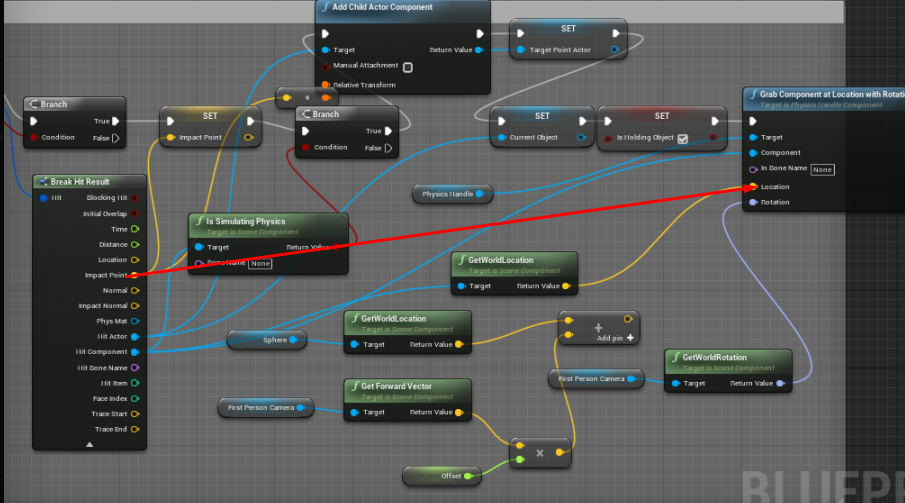
i've done this system long time ago so a bit rusty
white crypt
just to be clear, you want that component to be grabbed by the impact point?
tawny tinsel
help my ai keeps walking at me
but because of the colision box that makes me lose the game
he cant walk to me
ripe moth
I want the actor to be grabbed by the impact point.
tawny tinsel
so the colision box cant colide
ripe moth
If i grab it in the corner, i want it to be handled like that. I don't want it to reset to the center.
white crypt
@ripe moth if it doesnt work right out of the box then you will need to do some math and im bad with math. im sure i could figure this out if I had to do this on my end but from top of my head i dont know the exact answer sorry. maybe someone else could help you just be sure to formulate your problem in one sentence and be as clear as possible
also maybe this would help

How does a Pivot work in UE4 on a Mesh and how can I adjust it inside and outside of the engine.
if this works then you could keep the rest of your logic unchanged
oh no wait, bad example
anyways ignore the last part 😄
or if no one else helps you, wait for this guy @sand shore to wake up and he will definitely help
 lost solstice
is there a way to make the rotating movement component only rotate certain objects in the blueprint
white crypt
@lost solstice https://www.youtube.com/watch?v=gUk-BL-Iyug

What is the Rotating Movement Actor Component in Unreal Engine 4
Source Files: https://github.com/MWadstein/wtf-hdi-files
you will find your answer here
lost solstice
oh thanks
lost solstice
i think i am actually
white crypt
hes a very good teacher and you can catch him here in this server
lost solstice
mad
covert stirrup
@tight schooner I tried this, thinking that it would get the appropriate tag on a per activator basis where 0 = Battery and 1 = Door, but it still binds all of them to everything and the bound print strings ping for every object with an activator.
ripe moth
@white crypt I'm dumb and it was working fine
It was the particle effect that had the wrong end point and fucked me up
white crypt
oh haha 😄
covert stirrup
I think what my code is doing is each activator that is spawned DOES have ref 0 = battery, so therefore all bound.
But I am not sure how to use this information to bind only to battery types, or even better, the specific BP actor it is attached to
ripe moth
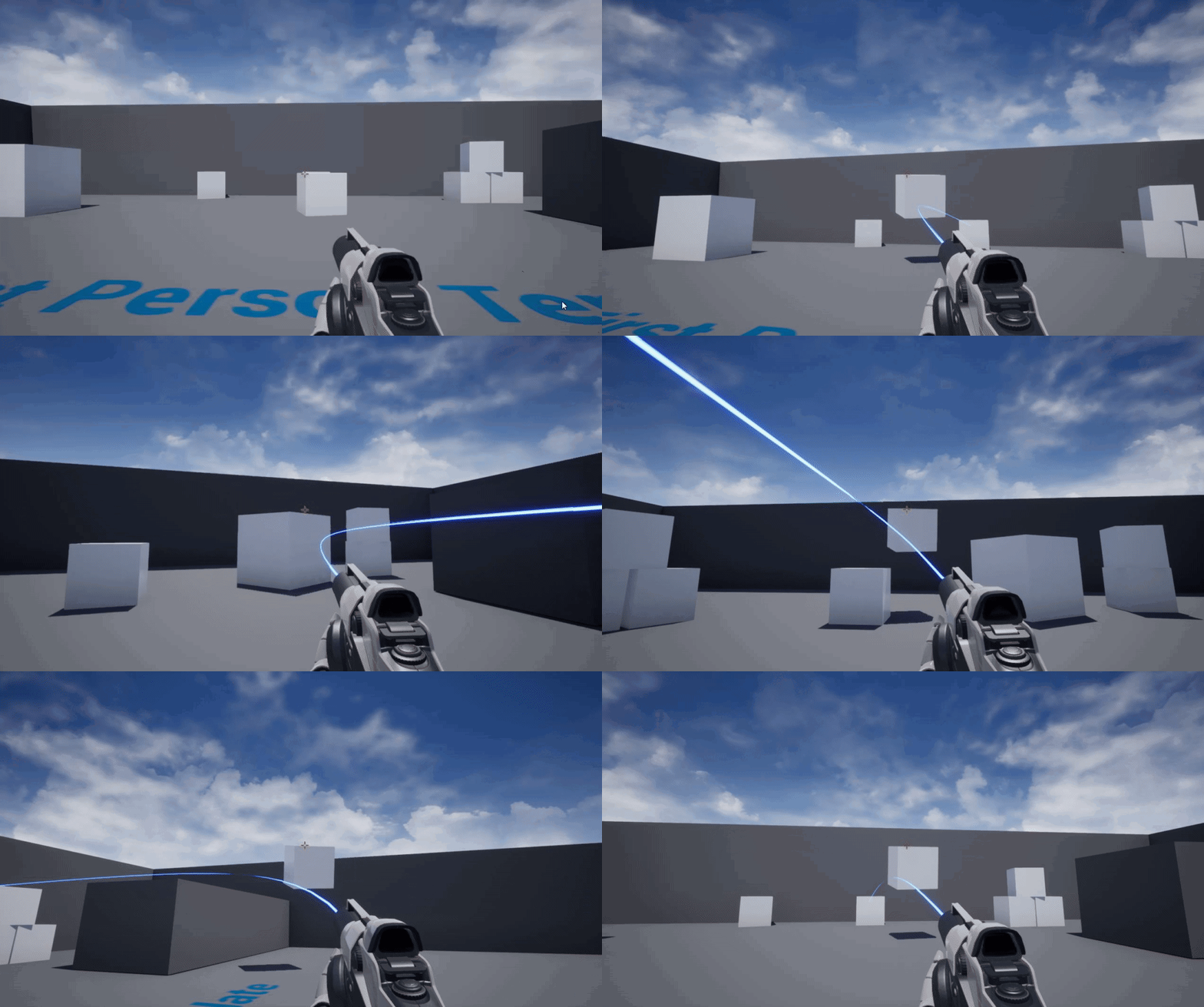
How would i make it so that the impact point is relative to the object i'm grabbing though
 covert stirrup
is there a way of grabbing the spawned actors name to bind to it?
found it finally, so many names for things in outliner it is "label", if I hover over the name it says "ID name" .. it's under Self > Display name
covert stirrup
@tight schooner I believe this works great, broke up the buttons to their own events and made sure the bind events are individual. Also saves me casting each time a button is pressed
tawny tinsel
because of this collision box the ai cant walk into my player character but if i walk a bit my character will walk into it
how do i make the ai nav mesh or whatever ignore this
its only a action overlap box
ripe moth
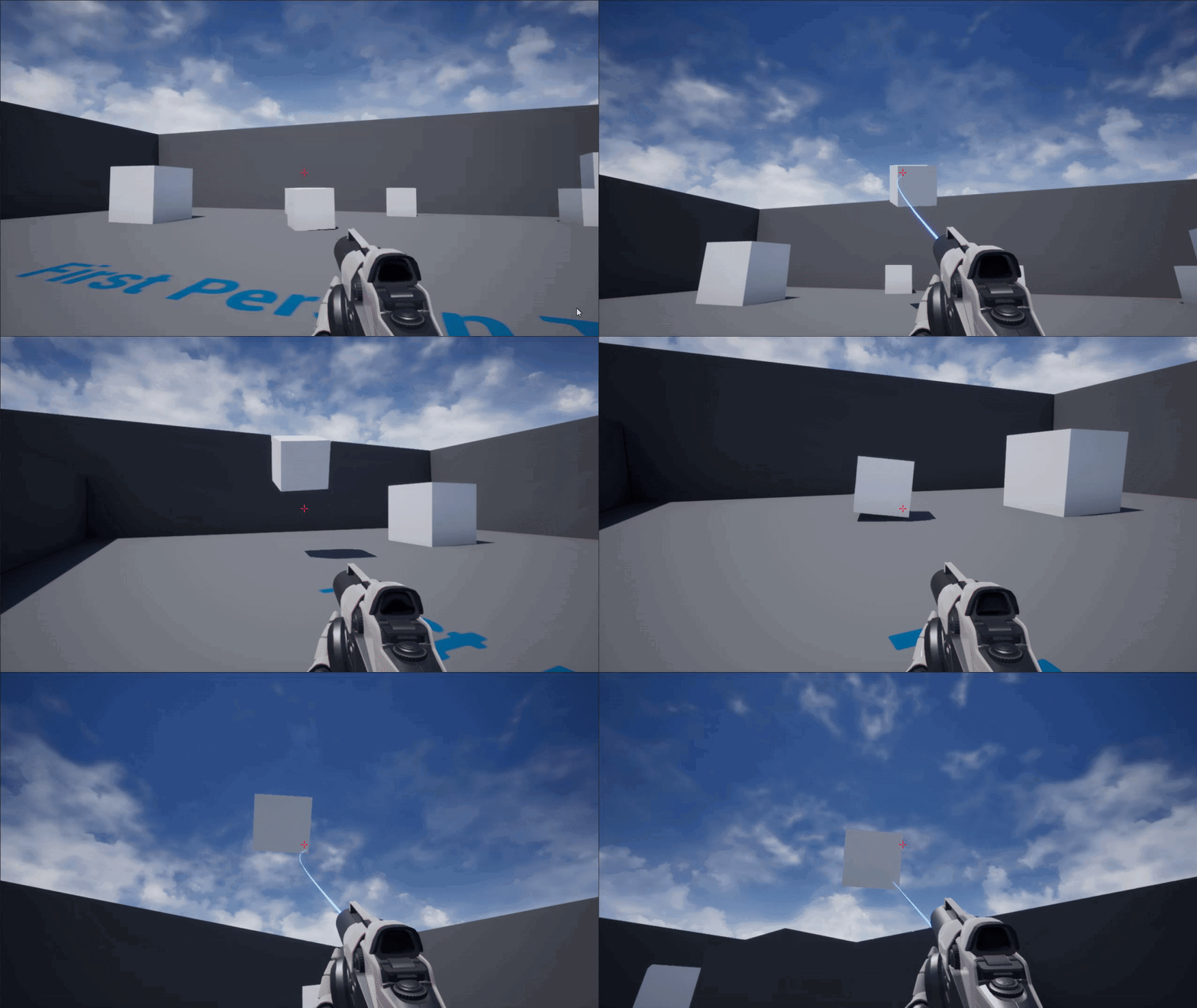
I've figured it out https://i.gyazo.com/e4639eead305e720041ec5afbb32d46b.gif but i've had to turn off interpolation cause i don't know how to make the beam point interpolate like they physics handler.
 white crypt
@tawny tinsel try this https://prnt.sc/s5qcf7
 tawny tinsel
yes i know
but no matter what i do the ai doesnt walk more than the collision box
then how is the pawn suposted to colide if the ai doesnt walk further
white crypt
are you using "ai move to"?
white crypt
whats the acceptance distance?
white crypt
so dont you think thats the problem?
tawny tinsel
how could that be a problem
white crypt
because you are telling the AI its fine to stand 10 meters away
white crypt
yup
 twilit heath
MoveTo also have include overlaps checkbox
white crypt
np, if you dont need other options you can also try using "simple move to actor"
 arctic shard
Hello, how would I go about exporting a map of Name - Score outside of ue4?
I need to export a scoreboard into a text file or excel format but data tables dont allow that
tawny tinsel
hm i see
twilit heath
@arctic shard they do, but you can't export anything without editor module, which can't be packaged
you should be fine making a struct with a Name/Score Map and exporting that as .json tho
arctic shard
is there a bp to do that?
twilit heath
i don't know, probably
sand shore
or if no one else helps you, wait for this guy @sand shore to wake up and he will definitely help
@white crypt
 white crypt
would have suggested virtus, but i respect his time more
trim matrix
hahahahahah omg how many hours has this joke been going on for
white crypt
we dont joke in communist russia
trim matrix
nostrovia
white crypt
privet
shoudlnt it be nostorovia? ;d my russian is pretty bad, can only read and write 😄
trim matrix
kak dela
white crypt
ocen xoposo
 sly bough
I u menya
trim matrix
hahahaha dont worry my russian is even worse
i think the only language i can communicate with decently but dont know is dutch and that's because my country has a special language that is mainly a mix of dutch and german so i can speak my language to a dutch person and they'll understand enough to know what i'm saying and vice versa
white crypt
ahh a dane (probably)
trim matrix
afrikaans lol
white crypt
ahh way of 😄
trim matrix
hahaha yeah way off if you even know what afrikaans is or ever heard of it then e-high five to you good sir
and on an on-topic note, is there a way i can make the player start actor a child?
 white crypt
drag the player start on top of other object
and it will be parented
in the world outliner i mean
trim matrix
i wouldnt be asking this if i could do that fml
nvm i figured out it was because of the object i wanted to be it's parent wasnt static
 warm flax
hello, does somone know how i would attach my camera component ive made in c++ to a skeletal mesh socket ("Head") inherited from ACharacter? currently its saying:
magic cosmos
I dont understand why this isnt moving the pawn
white crypt
@sand shore check friend req
 left carbon
Guys, how to enable hit events for a dynamically spawned component?
left carbon
@maiden wadi I've tried, but hit does not get executed
 maiden wadi
Then you need to check out your collisions on the component. For hits, you need physics collision enabled, and the right channels blocked.
left carbon
I guess, there has to be "Generate Hit Events" flag enabled. But I'm not able to enable it for dynamically spawned components.
maiden wadi
@left carbon Try something like this to be sure your collision is set up. I think those settings should work.
maiden wadi
You can't save actor references. You need to save them as class types and spawn them again when you load the level.
tawny tinsel
so i cant just save their locations as arrays? and then set teleport for each array?
thats so stupid i saw a video do it why cant i

This is quite a specific tutorial but the applications really are endless.
Wanting to save the location of multiple objects within a world? Look no further. Have your player loading back up to their buildings being exactly where they left them!
Let me know your thoughts in the...
here this seems promising
 hazy igloo
"Make Array" or "Add"?
tawny tinsel
but i dont understand
why do i make all those things?
why not just have 1 variable for array in save game?
hazy igloo
@tawny tinsel You get the location, create an Array with the location on position 0 and save it in one savegame - in a for loop? You overwrite your save game element for element.
tawny tinsel
hm
even if my save game variable will be an array
it will overwrite all the first actors?
that doesnt sound good
hazy igloo
The Name of the slot is your save game. You should write it after the loop is completed
hazy igloo
Get the location, add it to your array and save then.
hazy igloo
after getlocation
get the location and add it to your array. After completion of the loop save the game
hazy igloo
The add need the array
tawny tinsel
how do i add the locations?
what node do i plug after the array node
the add array
hazy igloo
your add node need an array as input too
tawny tinsel
ok what do plug in the array part of that node
hazy igloo
a "get Arraymediloc"
hazy igloo
the array has the values after the add
tawny tinsel
so the array medic keeps the values?
tawny tinsel
hm first i need to somehow cast this from player bp to the medic ai
how do i cast to ai
no object input seems to work
ok i figured out a way around it
so how do i load?
hazy igloo
"Load Game from Slot", read the array and give it to your objects.
 naive patrol
Is there a way to check the email type validation with blueprint?
tawny tinsel
how do i read the array
and give it to my objects
the array node doenst connect to set loc node
wait i think conecintg it with loop worked
it didnt load :<
maybe didnt even save
@hazy igloo help me pls
it doesnt save
pressing save does not print the string
but why? is it cuz im not in the player bp?
 wheat cipher
Is there any way to do a line trace, but with a larger radius? It's for checking whether or not a character is standing on something.
 gloomy linden
Linetrace has a length, not radius
 lethal rain
I am curious. Is there a performance hit when using FABRIK for ik arms rather than Two Bone IK? Which one has better performance? Does on work for all current gen consoles? Stuff like that.
tawny tinsel
it does not save my array
@hazy igloo youve lied
it does not save the array the only way to save a value is to set it and without seting it does not work
so how do i set it?
 terse goblet
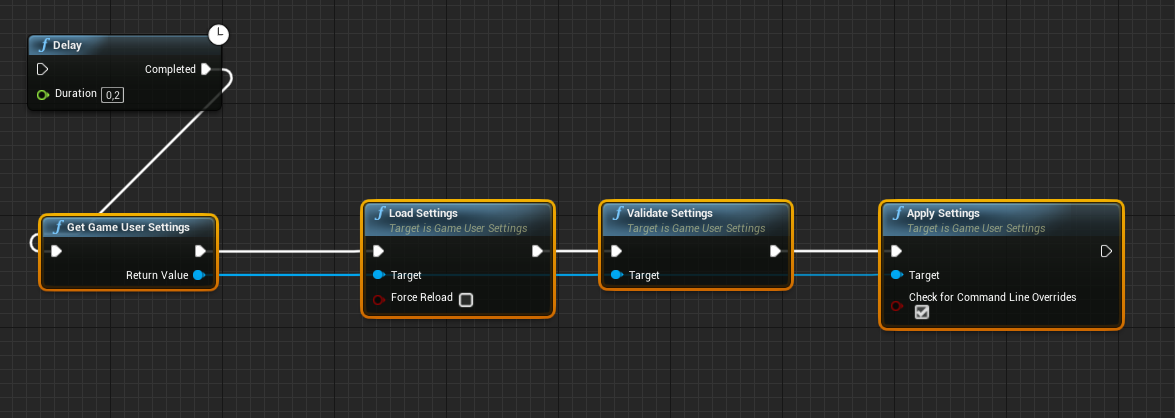
hello! where i should put game user settings load function ?
tawny tinsel
in player bp most optimal and reliable
terse goblet
Right now i have it connected to the Onconstruct event of game settings widget that spawns at begin play of player pawn (for test)
but i does not applies it
but if i adding 2 frame delay it does 😦
tawny tinsel
hm that is very weird
 fleet sandal
@wheat cipher What you’re looking for is multishape trace. Specifically multispheretrace.
 short pawn
Is there anyway to tweet a string on twitter from the game?
Just looking to tweet the score
wheat cipher
@fleet sandal I see. I'll check that out. Thanks!
 muted epoch
Hello people! Can you please help me with this annoying issue?
 ocean radish
@muted epoch your trying to add impulse which is a part of physics to and ojbect that has it disabled
although unless your doing some full on physics based character, you prob want to be moving the capsule collider and not the mesh itself
muted epoch
Yes
ocean radish
think its an issue with your skeletal mesh not the mesh component
@muted epoch
thats in the details panels of the mesh component
 brazen plank
@trim matrix Hey that advice you gave me last night about making the pawn match the player movements worked! I don't quite ... understand it exactly, like how it worked ... but I just wanted to say thank you!
trim matrix
@brazen plank you are welcome
its because its getting its variables from the player
not itself
brazen plank
ah
Would it be pretty involved then to have the animation mirror the player's then, instead of just copying it? Like, when I run, I lead with my right foot, but I'd like the reflection to lead with it's left?
trim matrix
@brazen plank thats whole another concept
dont really know how you would aproach that
brazen plank
I figured : / no worries
Probably set up a whole 2nd uh ... animation set of blueprints and such yeah?
magic cosmos
oh
brazen plank
Mkay. Well I think then for a first go at a game, I'm satisfied with what I got ^^
maiden wadi
@brazen plank You can also multiply the actor's Y scale by -1.
More intuitively. You'd need the actor to be playing the same animation blueprint as the player and mirroring them as it they were side by side. But if you multiply the Y scale by -1, it'll invert it like a mirror would look.
 dusk prairie
anyone can help me with prince of persia forgotten sands text?
i can extract data file from forge
but i cant edit .data file
magic cosmos
how do i destroy a widget without destroying all of it?
trim matrix
what do you mean
magic cosmos
like
if i just wanna destroy one widget
or remove
becuase the only option i see is remove all widgets
ripe moth
I use unparent and it works fine for me
 ripe turtle
How would i make it so print string is only triggered after the animation is complete?
 magic cosmos
ok
ripe moth
Wait what are you even trying to do?
ripe moth
bruh that's not a widget
ripe moth
You should do this in your widget blueprint
ripe moth
This is what i do in my UI to remove it.
magic cosmos
and get the started variable from there
ripe moth
Then i use an animation trigger to remove it.
magic cosmos
alr
ripe moth
So if key down then remove widget from parent return
If you know code then it's easier in bp if tell yourself what the code is beforehand i've found.
magic cosmos
yea ik c++,lua,c#
ripe moth
I only know lua :/
magic cosmos
Why not learn other languages its easy to learn if u already know one language
ripe moth
Motivation.
magic cosmos
xD
ripe moth
Right now i should be doing uni stuff for my exam in less than a month but i'm not cause i cba.
argh
magic cosmos
unity??
u still have exams
all my finals are gone because of lockdown
How come when i reference a blueprint class i cant get the variables in it https://gyazo.com/30861b6daf2c87d11e1a2755775871c7
 ripe moth
You need to reference an object.
magic cosmos
ohh so instead of class i slecet object>
ripe moth
Yeah
 rough wing
Day/night cycle from real time minutes if anyone needs it. Also looking for feedback.
https://youtu.be/yg4ElvNy7es

Hello devs! In this video I showed how to make a day/night cycle and implement a "real-time" system into it. I hope you find this helpful.
Target: 150 SUBS! GETTING CLOSER EACH DAY!!
Instagram: https://www.instagram.com/mono_ue4/
Twitter: https...
 wise jewel
im aplying around
i want that when i go over the light it changes color. it works.
i want that when i press "e" it changes color and intensity. like it does a flash when i press, and change back the color when i release
this doesnt work.
i suspect there is something wrong on how i linked the graph.
i've noticed that i can't have multiple outputs from one event. i'm referring to the "exec"
when i press e, it does nothing.
wise jewel
ok ok so that might be the issue
i am using a sample scene where there is already a characcter in there
im not falimiar yet with that part of pawn character..
tawny tinsel
body help me cast an ai pawn?
im not sure what to plug into object because nothing works
no get actor etc works
and every time i try to save inside the blueprint it chugs my game and i dont want fps drop
so i wanna save it on the pause menu
wise jewel
@trim matrix oh i see, i should set this event in the player, not in the asset, right?
i should have the asset to listen for inputs from the pawn? i dont know how yet
but just to know if it's the right way of thinking
tawny tinsel
somebody help me
maiden wadi
@magic cosmos Moving the topic here. I assumed that's what you were after, were the class defaults. If not, what variables are you after?
trim matrix
@tawny tinsel whats this class
wise jewel
thanks
muted epoch
@ocean radish I have it
 tight venture
Question: Why can I add a timeline in my event graph but not in a member function graph?
magic cosmos
@maiden wadi im after the started variable
so the game mode can check if the player started and if started i spawn the ball
But i got that now rn im just learning how i would make event and delegates in bp so the game mode bp can get notified
tight venture
because member functions aren't threaded?
maiden wadi
Class Defaults won't help you with that. They just return the class defaults. So that bool would never be different.
maiden wadi
Which class is it in?
tawny tinsel
somebody help me pls
magic cosmos
The variable is in the pawn class
maiden wadi
And you need it in the GameMode?
trim matrix
@tawny tinsel if its already a pawn you dont need to get owner
get the controller
get controller
then cast that to aicontroller
tawny tinsel
hm ill try that
magic cosmos
becuase when the player clicks start it notifies the game mode to spawn the ball
maiden wadi
@magic cosmos I could be mistaken, but generally the only way to let a pawn commune with GameMode is via a server RPC. You might use an event on beginplay to have the server version of the pawn tell the game mode that it exists.
magic cosmos
so should i just do it another way?
trim matrix
no not like this
just get controller
if its a pawn
and cast it to aicontroller
dude
trim matrix
if get controller node alone is giving you error
it means you are not in a pawn
ugh
 copper yoke
Hey all, I have an (hopefully easy fix) issue with Move to Location for an AI controller. It moves fine in PIE mode, but Fails in standalone mode. Any thoughts? I can screenshot the BP if needed
tawny tinsel
well glad we figured that its not a pawn
so how can we cast a character node there?
@trim matrix pls <3
trim matrix
cast self to pawn
then plug it in to get controller
I think character is child of pawn
so it should be able to
 foggy trellis
yeah it is
tawny tinsel
so self > get controler > cast node?
tawny tinsel
self > Cast to Pawn > Get controller > cast node?
ocean radish
@tawny tinsel why are you trying to get the controller? if i'm not mistaken your wanting vars off the pawn actor? so you can save it?
twilit heath
as those warning seem to highlight
tawny tinsel
yes i think the self node broke th cast to pawn node
ocean radish
what do you need off the controller?
ocean radish
its just called medic - ai
twilit heath
yet im pretty sure that warning says that it doesn't inherit from controller and the Cast will always fail
tawny tinsel
i want to cast it to a character ai so i can run a save funcion because if i save it in the game it chugs fps really hard
twilit heath
(the right warning, the left one is probably along the lines that Self is already a Pawn)
tawny tinsel
zlo do you know how to cast this character ai ?
twilit heath
for that i would have to know your classes, which i don't
if you have any warnings on the Casts, you are doing something terribly wrong though, and hovering the warning will tell you what
tawny tinsel
twilit heath
so
tawny tinsel
this is the thing im trying to cast
twilit heath
how did you figure you'll cast a controller into a Character?
Character does not derive from a controller
nor does anything inheriting from Character
tawny tinsel
tbh i dont understand the cast stuff it just makes no sense to me its suposted to refrence the thing im casting but anything i do fails
the only node that works is casting the classic template player
ocean radish
I think your misunderstanding what a cast is, it doesn't convert one object to another
tawny tinsel
it takes blueprint from the cast node to the bp that you need wich is what i need
twilit heath
nor does it play loose associations to try to match what you were trying to Cast
twilit heath
how do you get a reference to an instance of that blueprint you want to Cast?
tawny tinsel
type get something?
tawny tinsel
i just need to cast the character bp ;-;
twilit heath
cast what to character bp?
tawny tinsel
i need to cast an ai charcater bp inside a pause menu bp
ocean radish
then the object your trying to cast from has to be a character bp or derive from it
twilit heath
and you still need to figure out what you are trying to Cast
tawny tinsel
so wich node do i plug in the object?
twilit heath
ZloToday at 9:07 PM
again, we don't know your project
so we can't answer that
@tawny tinsel if you dont know how blueprints communicate with each other watch this https://www.youtube.com/watch?v=EM_HYqQdToE
Announce Post: https://forums.unrealengine.com/showthread.php?101051
This Training Stream takes a look at Blueprint Communication. We find that Unreal Developers of all levels can sometimes struggle through the concepts behind moving data between objects. So in this video we'...
atleast 2 times
we will know if you watched it or not
ocean radish
that video is very very good, you should defo watch it, i think i've watched it about 5times 😄
twilit heath
also, trying to save the game from AI character instead of somewhere else synchronously because of the drop in the framerate will not work
white crypt
same, its a must when you start
twilit heath
its still a synchronous save
haughty axle
How are you guys. Need some help, how can i check is my actor in air? do i have to get ref to animBP and check isfalling or there is better way? i just weant to not be able use jump while in air.
twilit heath
doesn't matter where its done from, the performance hit will stay the same
white crypt
@haughty axle is falling
type that and you will get a node
theres also an event "on landed"
haughty axle
yeagh but i need to cast to get ref
twilit heath
@haughty axle if its a Character, and has a CharacterMovementComponent
then calling IsFalling on it will do the trick
white crypt
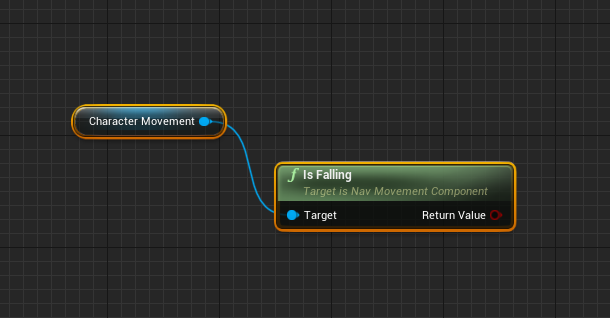 ocean radish
character movement has it built in
white crypt
other than that you can get player char - cast to char - get movement component - is falling
if outside char bp
twilit heath
also you should never query an animation blueprint for the state of your game
haughty axle
thx guys.
white crypt
thats 5$ from you
haughty axle
in these hard time man.... best i can do a Quarter
white crypt
throw in some bleach and its a deal
haughty axle
was managing my blueprint found this in the corner 😄
magic cosmos
Yo are there delegates and events in blueprint?
 vocal urchin
@haughty axle I have found that the more I learn and better I get with blueprints, the more mean my own comments have become 😄
haughty axle
yeagh i used just to push not used node sequences on a side, but now i re check if it have anything intresting add some weird comment and then push away 😄
 crisp valve
How do I launch a cooked map that I put in my content folder after packaging the game?
trim matrix
i have had the same issue. PLEASE HELP!!!
maiden wadi
Can't you just repackage?
crisp valve
Repackage? @maiden wadi
I'm not sure what you mean. I've tried to include the map in a pak file and putting it into the Paks folder, and it did not mount.
Also tried simply putting it into /Game/Content/Mods and that didn't work.
But it recognized that the map was in /Game/Content/Mods
it knew the exact path
but didn't open it for some reason
maiden wadi
Ah. I see what you mean. Not sure haven't done a lot of that myself beyond testing if my coding works in packaged still, but #packaging might know a little better.
 unique hollow
 crisp valve
Gotcha, thank you for pointing me in the right direction!
unique hollow
is there a way to fix SceneCapture2D looking like this
and increase the resolution
maiden wadi
@unique hollow The rendertarget has a size variable in it. You'll probably want to bump that up. For the other part, it looks like a weird field of view setting maybe? Not entirely sure.
unique hollow
oh ty
@maiden wadi why is it when I always need help it's always you that manages to resolve my issue
covert stirrup
he's a good lad! 😄
 vivid plinth
hey guys. Working on a scoreboard for my game. Is there a way to re-arrange an array of structs by order of one of the variables in the struct? I want highest to lowest score.. I can do this by looping through it a bunch, but I feel like that's going to be sluggish. Any alternative ideas?
I can easily get the highest from an array, but I'd have to run this loop for X amount of players and re-create the list. Is there no other way?
maiden wadi
@unique hollow Haha, glad I could help.
unique hollow
How could I make it so that the sound truly plays at the location? I have a fan but it sounds the same across the entire map at the same volume
maiden wadi
@vivid plinth Your only real option with that is creating a function to return an array of the structs that is reordered. It's pretty easy to do since you already are returning the highest. All you need to do is create a a copy array. Return the highest from it and put it in a second array that starts empty. Delete that entry from the first array and run it again until the first array is empty. Then return the second array that's sorted and set your original variable from that return.
@unique hollow What node are you using for the sound?
unique hollow
vivid plinth
Yeah this is what I decided to do
unique hollow
 static terrace
Anyone know what replaced the "Sub Anim Instance" node?
maiden wadi
@unique hollow Not sure on that one. Haven't done a lot with sound. If you find out, tag me with why though cause I'm going to need to do that stuff soon.
static terrace
Have you tried setting the Attenuation to have it drop off the volume as you get farther away from it?
muted epoch
Hello! I have an issue with blueprints, can someone please help me fixing it? This warning keeps appearing in message log
static terrace
 pulsar orchid
It looks like you need to enable "Simulate Physics" to add Impulse.
unique hollow
@static terrace how do I do that
static terrace
See the "Play sound at location" node?
Under there is "Attenuation Settings"
Hit the drop down and see if you have one already made.
pulsar orchid
Do you have it set to react to Query only, @muted epoch?
unique hollow
nope
muted epoch
I don't know.. Wait a sec i'll google it
unique hollow
none
static terrace
@unique hollow does it give you an option to create one?
pulsar orchid
@muted epoch
 bitter schooner
Is there a way to create custom laten nodes from BP?
pulsar orchid
Make sure that is set to enable Physics (Query Only) won't allow interaction with physics. That may be your error.
copper yoke
Follow up to my AIController cant move in standalone mode question - it works fine if I put my level stuff/navmesh in the persistent level and get rid of my sublevel, is there a way to get this working with sublevels/level streaming?
muted epoch
@pulsar orchid still warnings. is there something wrong?
pulsar orchid
The collision enabled is Query Only, it isn't enabling Collision with Physics.
Change this to Query AND Physics.
Set the Collision Preset to Custom
Then change the Collision Enabled.
muted epoch
oh my.. well no warnings now, but character turns to ragdoll and i can't control it
is there a way to just hide it? system works fine
pulsar orchid
A way to hide the error? Not that I'm aware of.
It sounds like you have something causing Physics on the character at all times. I haven't done work with Physics much so I can't really help further than fixing the initial error. But the Physics channel may be able to shed some light on where to look.
 novel fossil
I'm trying to get my playerstate from in my pawn, how can I do that?
I see that there's an action but it's set to None in the constructor.
This is my current BP:
(I know I shouldn't set playername there, but that's some old code before I was moving it to playerstate)
It'll give me the following error:
Blueprint Runtime Error: "Accessed None trying to read property PS". Blueprint: JungleCharacter Function: Construction Script Graph: UserConstructionScript Node: Set Player Name
 round idol
I don't know if I'm wrong, but...Can you successfully cast in construction script?@novel fossil
@novel fossil Otherwise, if you can, and PlayerState is valid, then the code looks clean to me, no reason why it shouldn't work. Unless the PlayerState isn't valid (yet?). i'd move this into the beginplay script and add a 0 delay (1 frame) just to make sure the PlayerState is valid when I'm trying to cast.
novel fossil
hmm, ill try that. I had it there before but didn't add a delay, it's multiplayer if that matters.
round idol
@novel fossil oh, I see, sorry I have NO knowlege whatsoever on multiplayer practices, maybe I'm misleading you then...
novel fossil
I'll give it a try anyway 😄
round idol
gl! 😛
covert stirrup
is it normal to add a variable to a struct for it to break things?
 versed sun
yah, right click on broken thing and Refresh it
covert stirrup
yea cheers, I remember read a couple days ago about structs nad changing info, that it can cause issues
novel fossil
@round idol seems like it didnt fail to get the playerstate that way, Ill have to try more because i was playing another game already and my pc was having a hard time running unreal and that at the same time. 😂
trim matrix
has anyone had some luck with spawning in a player start actor at runtime? my player keeps spawning where the viewport is left instead of from the player start
novel fossil
I've got the same issue, it was next on my list. 😄
I thought FindPlayerStart would do that but It'll always give me the same spawnpoint for some reason.
round idol
@novel fossil Either way, if you are doing this when/right after loading a level, you have no control over the initialization order of GameState, PlayerState, PlayerController etc. If you print a string for each when they spawn, you will see it differs and some random actor may be initialized first, that's why I said you should check and see if what you are casting to is already spawned.
trim matrix
well i could teleport the player start location but i dont feel that is the right way
novel fossil
Ok, Ill try that 👌🏽 ty
round idol
@trim matrix U guys are using player start? 😛 Just copy-paste player start location to spawn location, or just set actor location upon spawn to where you want through a vector var - That's my (the peasant's) way of doing it. I find playerstart unreliable too, maybe we are using it wrong 😄
trim matrix
thats what i;m thinking, i'm using it wrong lol cause i could tp the player but that will make more work than i think needed because the player may not spawn at the same pos depending on the map/level
covert stirrup
I am trying to make a cable component attach to a static mesh, but it only uses world Actor Object refs.
Is there a way I can conver my static mesh into an actor reference, or maybe an alternative way of attaching my cable?
trim matrix
lol i'm starting to think i need to find a really good youtuber to learn from and not Virtus because i said good
round idol
@trim matrix So set an array of vectors in your GameInstance and push it as default depending on the map you are loading.
@covert stirrup Child actor maybe? I'm not sure they are the same data type
covert stirrup
yea can't grab the child actor unfortunately, as you say they just arnt the same
round idol
figures...
trim matrix
@round idol that would work if my game wasnt ~70% randomly generated so my map generator sets my spawn location in the generation process, oh well i'll figure out a sloppy way that works
basically what i'm doing
and good job with the mention
round idol
ah lol...now i saw it xD
😂 retarded...
guess I can't hide my self-importance anymore now xD
trim matrix
typical german
round idol
lol 😂
trim matrix
i can say that because i'm of german heritage so it doesnt count as racism
covert stirrup
@round idol I cheated. I just made a new child actor that is in my BP and it uses that instead of a socket
round idol
@covert stirrup but does it work all the way through?
covert stirrup
All the way through?
trim matrix
yes please
covert stirrup
Typical german 😉
trim matrix
hahahaha lol the hard part is figuring out if that is dirty or dark
covert stirrup
it can't be both?!
teal ruin
@white crypt --- it didn't work 😦
trim matrix
@covert stirrup at the same time?
covert stirrup
@teal ruin what is it your trying?
teal ruin
Hi @covert stirrup --- I've got an actor, laser turret, that fires lasers. For the lasers, it's using child components that resize when they fire.
trim matrix
okay okay i'm done trolling i need to get back to work lol
teal ruin
The visuals work fine, but, when the player passes through them - only the 'front' laser triggers an overlap.
the other three lasers won't trigger, though they are all set up collision wise, the same, and use the same mesh / collision box
trim matrix
@teal ruin have you tried using a raycast instead and casting a ray from each lazer?
teal ruin
I'm trying to avoid raycasting as this is intended for mobile in the long run
also, for the four lasers, they would need a tonne of raycasts because the lasers stay present for 2 seconds each
(and one version rotates the laser turret, too)
unique hollow
I' mtrying to make it so that I can rotate objects
using the mouse
but its crazy fast
covert stirrup
have you tried the raycasting method just for the sake of testing?
maybe start with what works and then go backwards to see how you can make it more efficient
trim matrix
oh steady laser beams not pew pew lasers
teal ruin
not yet @covert stirrup ~ I would have to ray cast every tick, four lasers per turret, and can end up with multiple turrets going at the same time.
just does not sound memory efficient at all
yup @trim matrix - steady lasers
unique hollow
anyone?
teal ruin
the front laser works fine; so if I'm doing a turret with a single beam, no issues
covert stirrup
could you send a SS so I can get an idea of what is going on visually
teal ruin
but it's the turret with four lasers, the other three not triggering overlap events
trim matrix
i got an idea do one raycast at the start then at the impact point of the laser to the floor spawn in a volume to see if the player overlaps that volume and then destroy the volume when it's lifetime is over
teal ruin
and I've tried as per @white crypt 's advice, using Actor overlap - where I was using Component Overlap before... neither is working
trim matrix
@unique hollow yes?
unique hollow
I' mtrying to make it so that I can rotate objects
using the mouse
but its crazy fast
 teal ruin
what do you mean it's crazy fast?
unique hollow
sec
trim matrix
is that 0.7 or 07? @unique hollow
unique hollow
870k
actually no
87 million
and still
no matter what value
how high or how low
trim matrix
add a delay maybe to each iteration of the rotation cycle like a cooldown
unique hollow
oh also, it only seems to properly function if you move your mouse to the right
not to the left
teal ruin
or a divide after the RotationFromXVector, before you put it into the Add World Rotation?
trim matrix
well i just found a weird bug in my map generator
trim matrix
are you looping through that code block you sent?
nvm i see how it works
create a boolen var called like "can rotate"
then default it too true then add a branch in at the start to check if can rotate is true
if it it true then run all your code
then after add world rotation set can rotate to false and add a delay node
after the delay node set can rotate to true again
trim matrix
id set the delay to like 2/3 seconds to start with so really know how far each iteration rotates and then you can start finding a "cooldown" that fits for you
trim matrix
now decrease the delay then
unique hollow
then it goes too fast.
trim matrix
thats why you gotta find the sweetspot, the value that works
unique hollow
oh boy
trim matrix
welcome to one of the parts that slow down game dev a lot
vocal urchin
Speaking of "one of the parts that slows down game dev a lot". I've got an issue that is breaking my brain.
I'm having a weird issue where I am using line traces to calculate a move position for a unit (RTS style), and I have a branching condition depending on where in the world the trace impacts. I know for a fact this system works, but I recently reworked my move system to allow for queueing (shift-click movement), which changed the movement behavior a little. I've spent the last day reworking and tidying up this system, although I'm now having a really weird issue where on the "false" branch, at random, some units will not move to the point calculated. I cannot determine or replicate the event with consistency, and I don't receive any errors. I'm also printing out the calculated coordinates, and they are rational and make sense - no out hits at world 0,0,0, or any other funny business like that. Can anyone have a look at this and see if I'm doing something wrong?
trim matrix
@unique hollow hoe not you just said it worked lol
vocal urchin
teal ruin
oki, seem to have gotten my quad lasers working @white crypt 🙂 It wasn't the collisions themselves causing the issues, it seemed
trim matrix
so set it to true lol
unique hollow
fuck this wont work
its too fast if it's too low, and too snappy if too high
theres no inbetween
trim matrix
keyword "too" lol
unique hollow
It won't work, I am certain
ripe moth
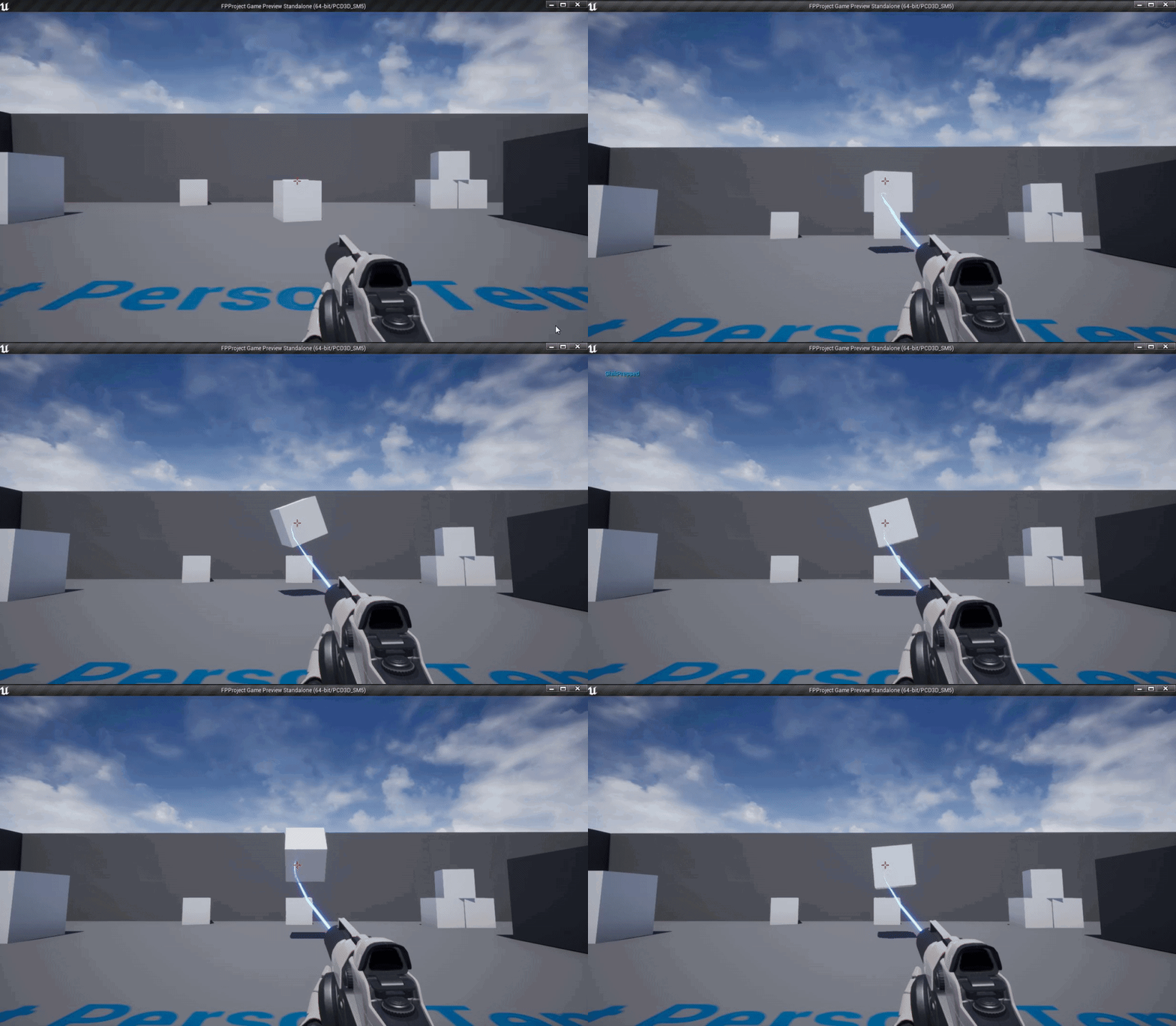
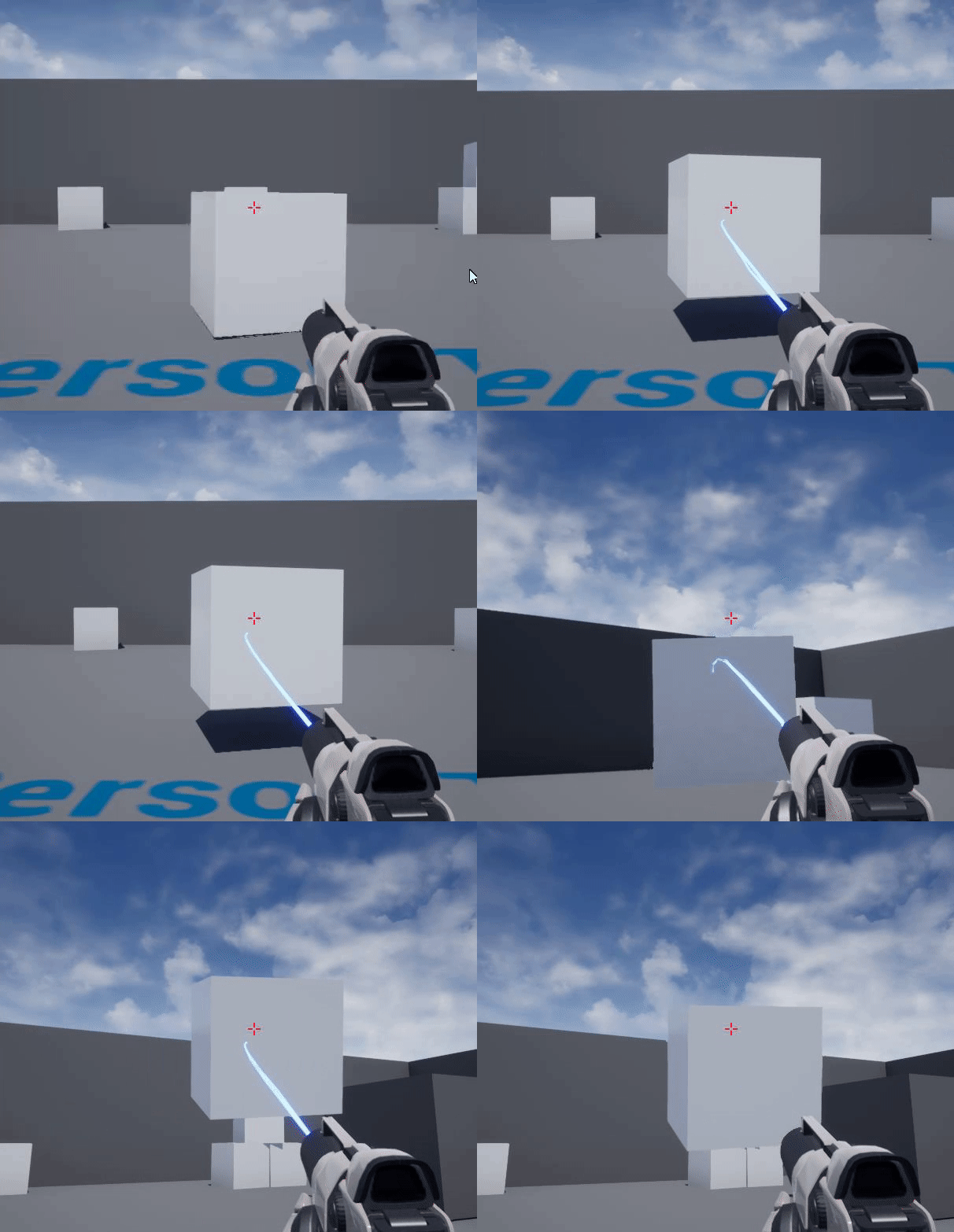
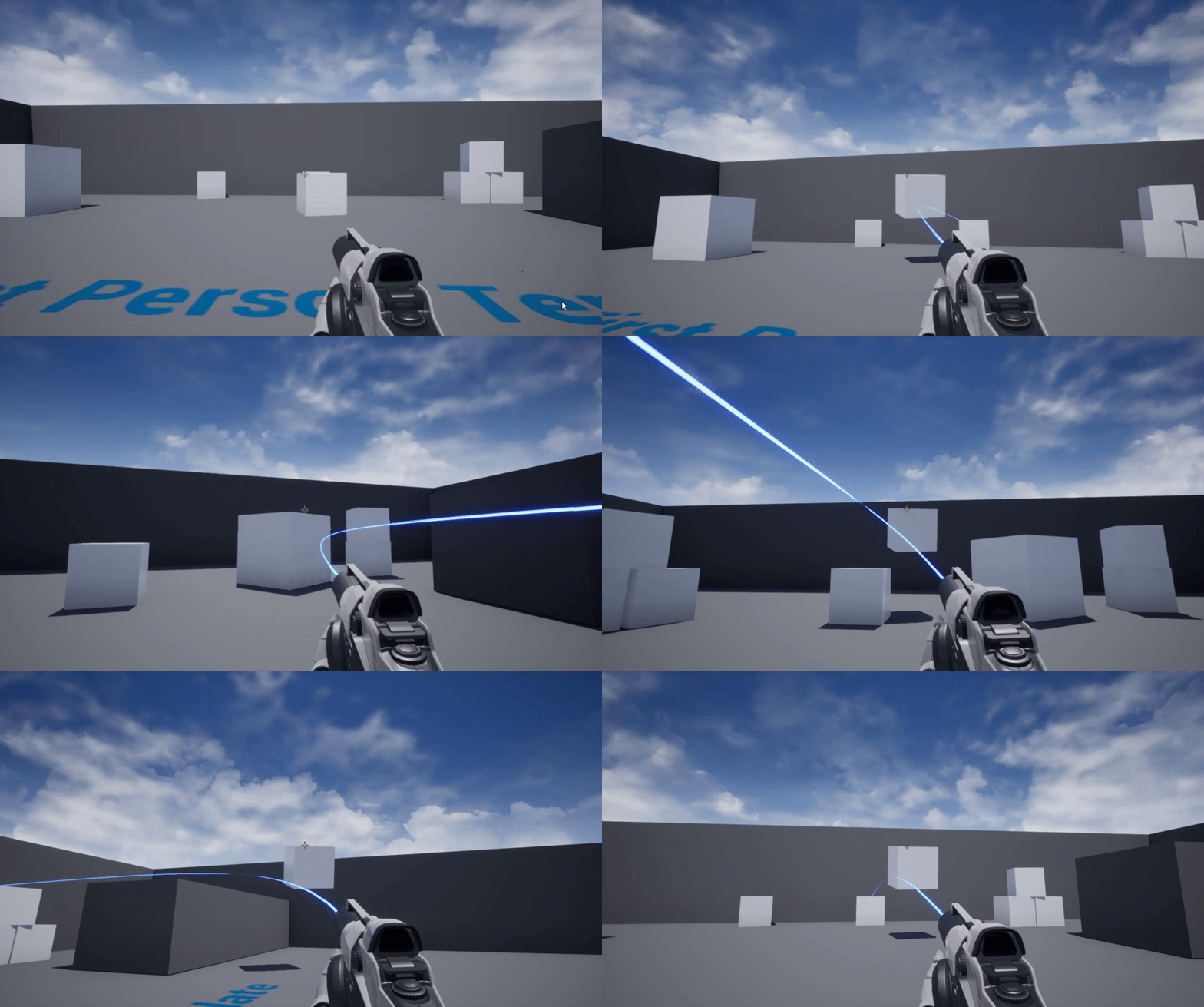
https://i.gyazo.com/eb9d7463dfb5db68037bcb50c2e178c8.gif How do i make it so that the cube doesn't reset? It keeps resetting because the mouse axis defaults to 0.
 trim matrix
lol well thats was my ideas lol i'm not a knowledgeable programmer tbh heck i just literally now found out that blueprints cant check if two struts are equal which blows my mind
ripe moth
Goal is to make it rotate 90 degrees based on me going left or right X(1 or -1) with my mouse or up or down Y(1 or -1)
trim matrix
maybe use a branch before you rotate to see if the value is 1 or -1 and if not then dont rotate
@ripe moth

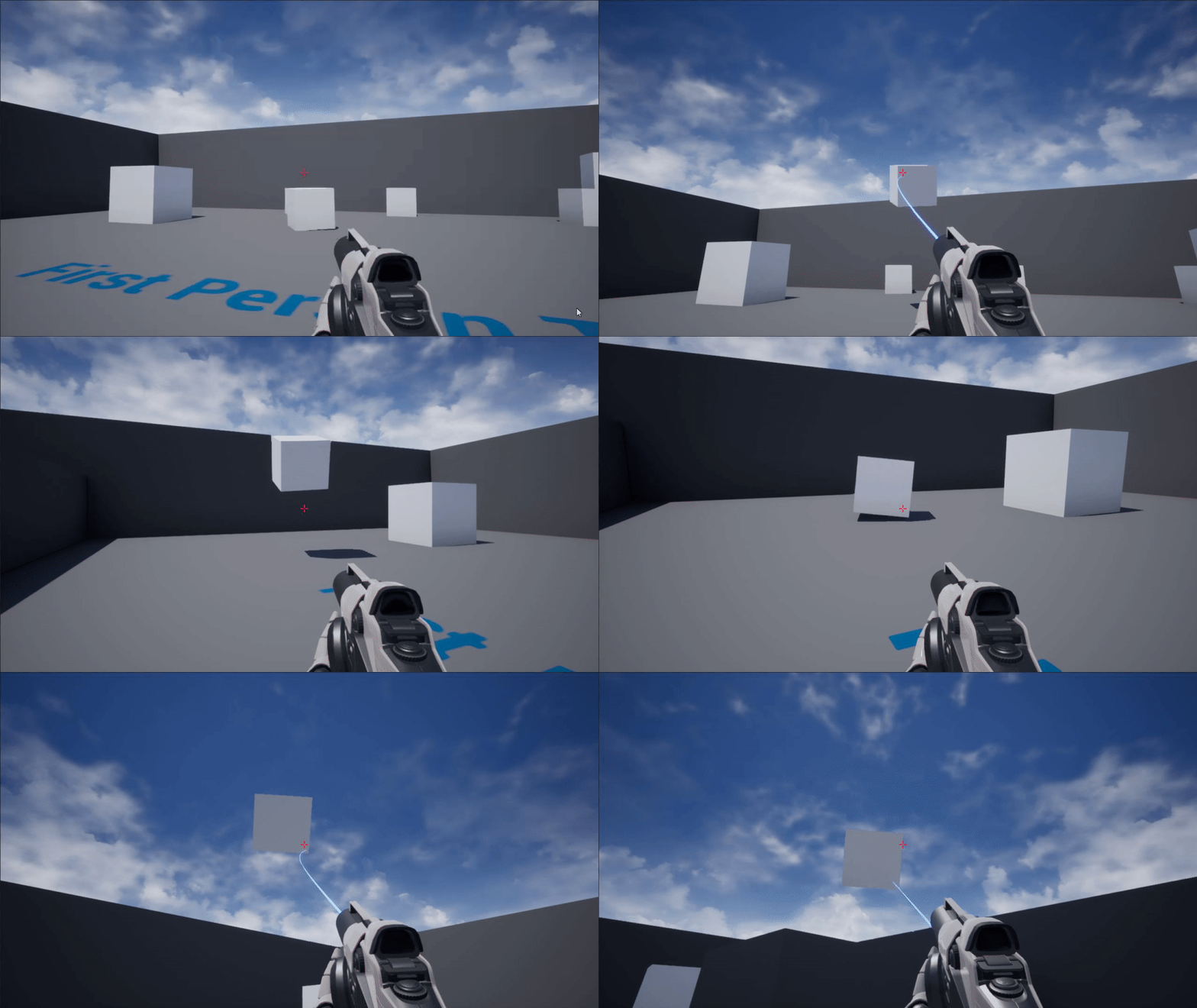


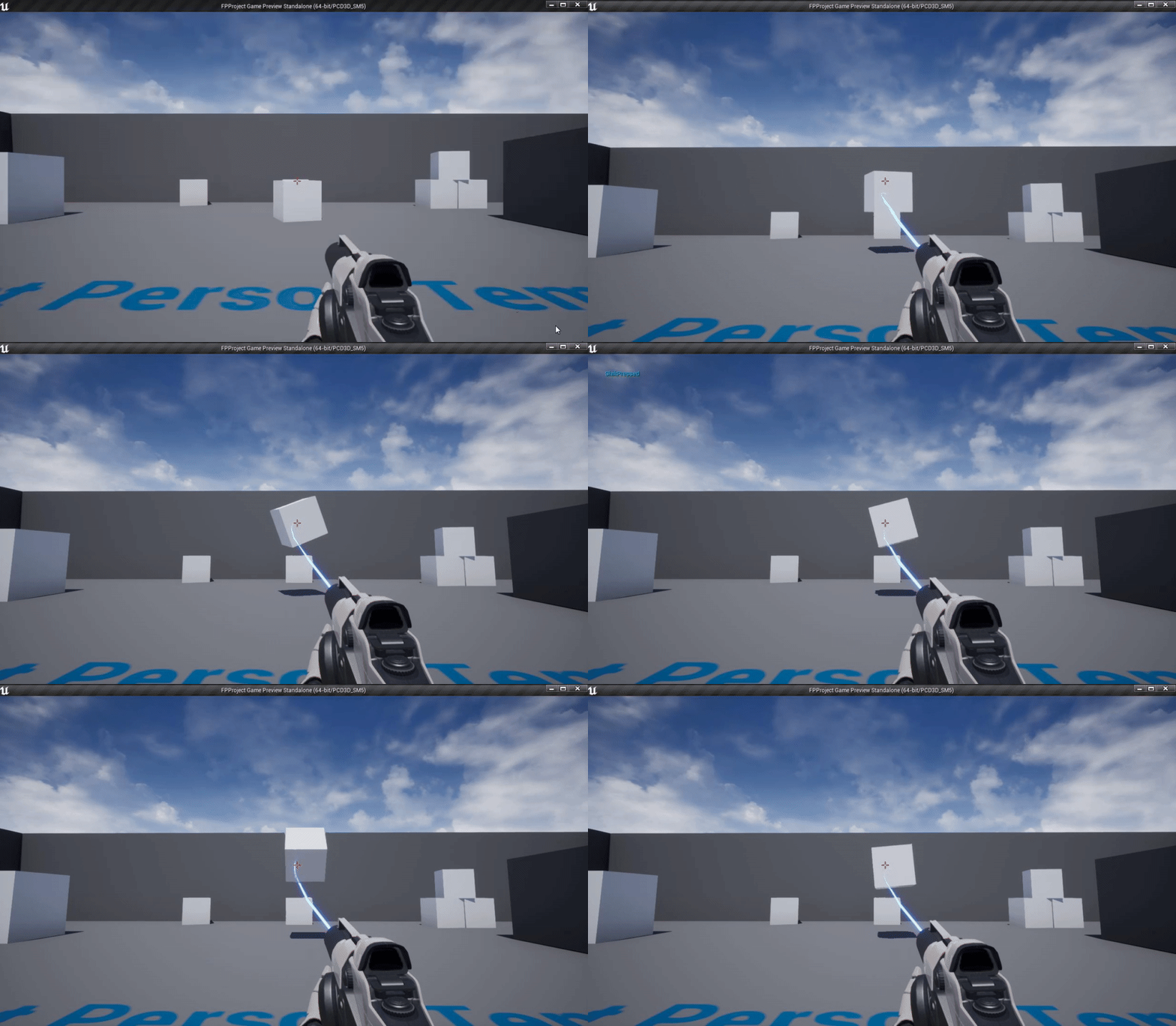 vocal urchin
Ok, let me rephrase my question - turns out it's not an issue with my movement location calc, but instead a problem with the node I'm using to move them. It looks like if I'm using "Simple Move To Location" they all move perfectly without fail, but if I use "AIMoveTo", I do get the error where they will, at random, not move at all.
So there are the two methods.
The bottom obviously just a test, and wouldn't execute any kind of queued behavior.
 olive cloud
I'm not sure where to ask this, but I have a level sequence played through the level blueprint, and it works in PIE but not in standalone window, any ideas?
 high sapphire
I don't know why, but I have two animation blueprints that work just fine (entry being hooked up makes the preview play an animation), and one that doesn't (hooking entry into any of the animations, the preview doesn't play it at all)
tight venture
What is the BP way to create a public static class variable? If I have class Foo and it contains a public static Foo::bar, I should be able to access Foo::bar from anywhere... but a public member variable of class Foo can't be dragged into, for example, the Level BP. It gives me the message "Cannot place variable 'bar' in external scope 'Event Graph'".
It's essentially treating the variable as not static
I looked it up and some people were saying to use the GameMode or GameState, but that's not what I want. I want a public static class variable.
I should just do this in C++...
haughty axle
here I am again, need help. have this build switching on mouse scroll, it doesn't give any errors, but it does it one and a half time (it doesn't attach second component to socket.) but it attaches to Gun_back_01 but after from weapon slot 2 it don't. he does first part then it checks on is second slot full after id dont.