#blueprint
1 messages · Page 295 of 1
 olive yarrow
 trim matrix
ive made this snowball that grows when the player pushes it, but now i wanna add in being able to "stack" them into a snowman if they are big enough, i made a snowman bp to spawn for it but im not sure how to check if the snowball is big enough when it hits another one,


 faint pasture
trim matrix
ive made this snowball that grows when the player pushes it, but now i wanna add...
faint pasture
trim matrix
ive made this snowball that grows when the player pushes it, but now i wanna add...
What repreents how big a snowball is?
What is the number that go up when its rolled
Cur Size right?
trim matrix
yes
faint pasture
And the 2 snowballs hitting are the same class right?
Hit -> check if OtherActor is also a Snowball (cast) -> if my CurSize > OtherSnowballs CurSize and my CurSize is big enough to make a snowman -> disable my collision, disable other snowballs collision, spawn snowman, destroy other snowball, destroy self
assuming thats how you want a snowman to show up, you could just stop self, attach other to top of self, and have 2 stacked snowballs, however you wanna do it
trim matrix
faint pasture
And the 2 snowballs hitting are the same class right?
yes
faint pasture
you wanna check if your cursize is bigger than the other because BOTH snowballs will run this code, so you need only one of them to proceed to making the snowman
just let the bigger one call the shots
 remote flare
OK just posting this here in case anybody later runs into a similar problem as myself. It occurred to me i could just write a simple blueprint callable function that was pure which checks the flags and returns true or false if any are set:
https://i.imgur.com/bmKjgq5.png
https://i.imgur.com/SWqCq91.png
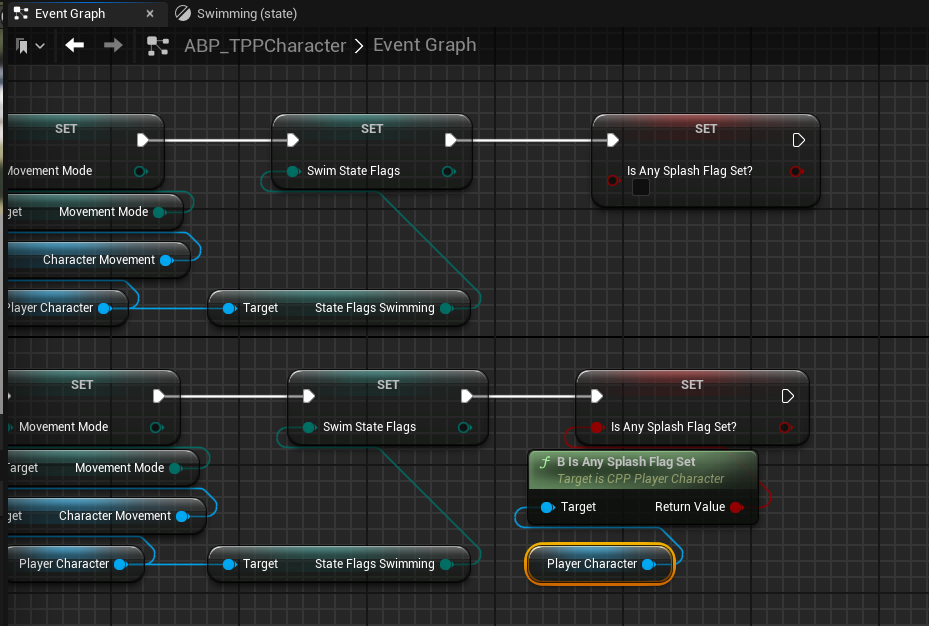
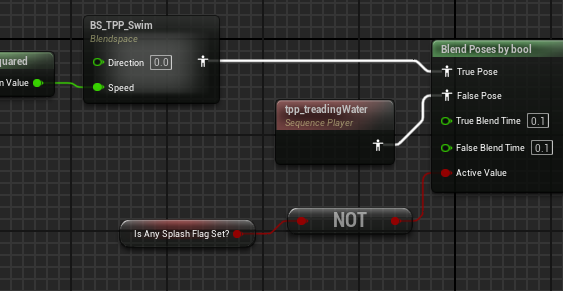 trim matrix
faint pasture
Hit -> check if OtherActor is also a Snowball (cast) -> if my CurSize > OtherSno...
trim matrix
faint pasture
Hit -> check if OtherActor is also a Snowball (cast) -> if my CurSize > OtherSno...
so like this?
 faint pasture
trim matrix
so like this?
faint pasture
trim matrix
so like this?
That's about half of it
but sure
that will spawn a snowman at the world origin if 2 snowballs hit and one is bigger than the other
trim matrix
faint pasture
That's about half of it
ik just wanted to make sure i was going the right way
trim matrix
faint pasture
that will spawn a snowman at the world origin if 2 snowballs hit and one is bigg...
how can i spawn it at the location they collide at?
 verbal girder
@stone field Blueprint that works in editor, but not packaged

(will hit Row Found in editor, will hit Row Not Found in packaged build (debug) )
 stone field
verbal girder
<@127136722419974144> Blueprint that works in editor, but not packaged
stone field
verbal girder
<@127136722419974144> Blueprint that works in editor, but not packaged
I would start by sanity checking:
append or formattext more info to the Not Found PrintString: add the EnumToString to check what is going on
( can also try this with blueprint breakpoints of course )
 meager spade
I would personally never count on enum to string out of pure principle
verbal girder
I was hoping to just have the enum convert to a row number, but, couldn't get that working
meager spade
Just do a map with your enum as key and name as value
stone field
meager spade
I would personally never count on enum to string out of pure principle
I haven't had problems with, but of course use actual enum always when possible
for datatables I usually just have the rowName as the enum string, but granted the Map is much more robust option ( I always have enum as well in the struct )
verbal girder
meager spade
Just do a map with your enum as key and name as value
I'll try that out if I get this working, i'm new to C++ and converting the Enum from an unreal enum to a C++ enum was kind of a headache
bricked the project for a while and I had to root out some files heh
(Packaging build now for the print string, Karma. It acts as expected in editor)
faint pasture
trim matrix
how can i spawn it at the location they collide at?
What have you tried
You're using overlap so there is no "location they collide at", but there is the location the bigger one is when the overlap happened.
verbal girder
@stone field Ignore the double hit, basically the Enum To String is printing out the same, but not finding a row name now.

Except for Empty, which it does find.
Interestingly, I had the data table print out all its names at game on:

 autumn pulsar
What do people here usually use for Source Control on an Unreal Project?
verbal girder
autumn pulsar
What do people here usually use for Source Control on an Unreal Project?
Github, which I hook up to the revision control. I also have an LFS plugin, so I can lock files, but I hear using perforce for that is much better.
verbal girder
verbal girder
Interestingly, I had the data table print out all its names at game on:
Weird that here, its names are different. I'm going to track that down
autumn pulsar
verbal girder
Github, which I hook up to the revision control. I also have an LFS plugin, so I...
Are you using a local repository?
I have a NAS I wanted to use
stone field
verbal girder
Interestingly, I had the data table print out all its names at game on:
Try delete intermediate and binary and rebuild ( if haven't done so already )
stone field
if even that doesn't help, might be good to check the "resolve offline work" in p4v ( assuming p4 )
stone field
verbal girder
It appears in the build that it doesn't print out the tostring
dev builds should print to logs
or then it's not even getting there in the logic sequence
 runic parrot
There's still no way to bind a rich text ?
verbal girder
stone field
dev builds should print to logs
Fixed. This did it, I just got frustrated and made it say its own name this way lol

¯_(ツ)_/¯
I'll have to figure out less hard codey ways of doing that in the future, but, oh well.
 high gale
can anyone tell me how to compare distances between actors? I need to check to see if these two actors are within 600 cm of eachother for something to happen

 maiden wadi
high gale
can anyone tell me how to compare distances between actors? I need to check to s...
maiden wadi
high gale
can anyone tell me how to compare distances between actors? I need to check to s...
V1 minus V2 and then get that new vector's Length.
high gale
so like this?
 autumn pulsar
verbal girder
Github, which I hook up to the revision control. I also have an LFS plugin, so I...
autumn pulsar
verbal girder
Github, which I hook up to the revision control. I also have an LFS plugin, so I...
Solo dev so I don't care too much about checking in and out
How did you set up yours?
verbal girder
autumn pulsar
How did you set up yours?
Like the steps? Configured a github repo, i use both command line and github desktop, because sometimes i have to fix things my two other devs do (they dont use their own branches). Well I'm down to one other active contributer besides me.
Then I hooked up the revision control in the editor, although I will admit I very often use github desktop instead, since I'm the primary code contributor.
Solo id just make sure everytime i get one thing done to do a commit and describe it well, bug fix or new feature or whatever. Especially important for unreal binary files that tell you nothing
Oh there's a #source-control btw
Theyll be much smarter than me
 summer coral
so im attempting to set a characters location based on a location on a different object and i can get the location fine, however i am having 2 strange issues with it:
1: I can't garentee the location of the object will be on the ground and would like to just move the player in the X and Y and let the Z be whatever is 'on the ground' for that spot but if i use the players current Z werid calcuations start to happen
2: im a first person character and when i set the rotation of the actor the rotation doesn't acutally change. I assume this is becuse the player camera is attached to the player controller and 'set actor rotation' doesn't set the controllers rotation, however i can't really find a good way to set the rotation that doens't involve math in figuring out the yaw and pitch to add using the 'add controller yaw input'
anyone have any thoughts?

 autumn pulsar
summer coral
so im attempting to set a characters location based on a location on a different...
autumn pulsar
summer coral
so im attempting to set a characters location based on a location on a different...
could do a shape trace with the player's capsule to find a valid spot
or if the player's size is a known quantity that won't ever change you can just hard-code the offset
summer coral
autumn pulsar
or if the player's size is a known quantity that won't ever change you can just ...
I did attempt a hard code of the offset, however the spot may not be on the ground each time so the offset would vary depending on where the location is, but that is a good idea. I have done line traces and capsule traces, are those the same thing as a shape trace
autumn pulsar
capsule trace is a shape trace
summer coral
so perhaps do a capsule trace on the area and move it up or down till it finds a valid spot?
autumn pulsar
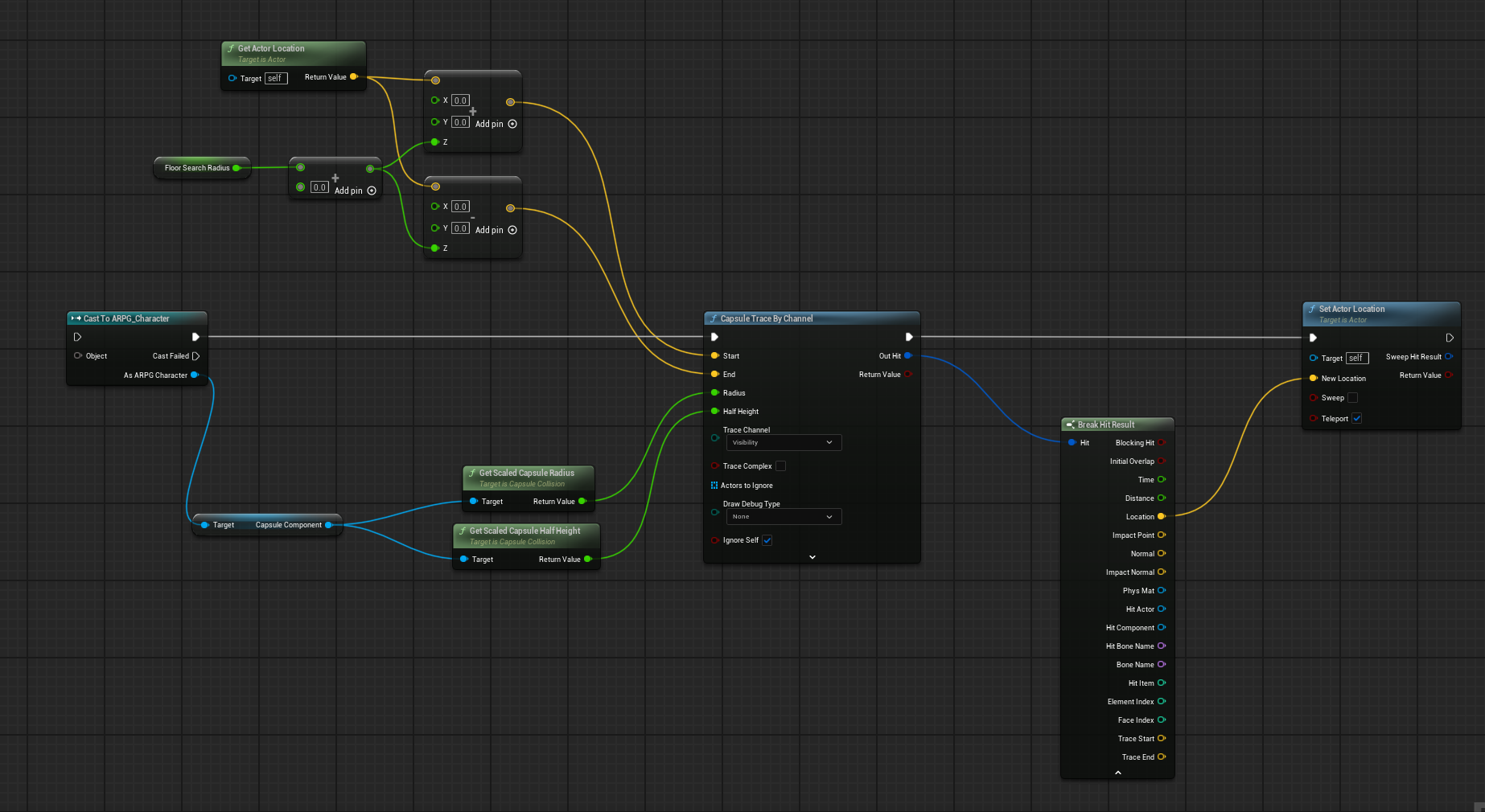
I trace to find a valid hit, and then I get the location from it and set the actor location
You can branch off the "return value" to check if you didn't hit a floor, or hit something you don't want like a kill plane and handle it differently
summer coral
interesting, i haven't ever seen that top bit of code before
autumn pulsar
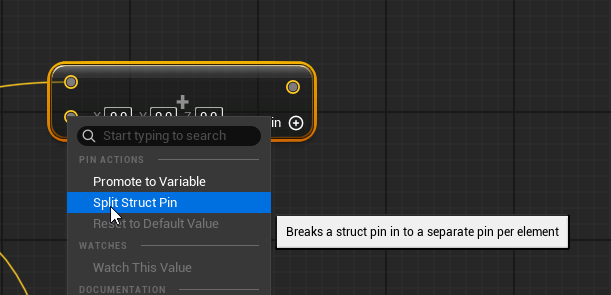
oh, if you right click on an output, say the yellow one, you can do "split struct pin"
summer coral
yah, like a break but for a vector or rotation ect
summer coral
what is this nodes name

 summer coral
im an idiot
autumn pulsar
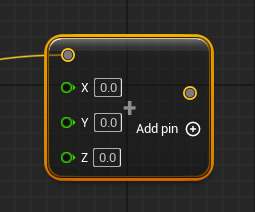 summer coral
i was like 'thats a float add with some sort of offset' man i shouldn't code so late at night
autumn pulsar
well, that's what an add is 
numbers make my brain melt
but eventually you get to a point where you stare at numbers you don't comprehend and find your issue
summer coral
what is your floor serch radius value? is that how far you want to look for an offset for
autumn pulsar
summer coral
what is your floor serch radius value? is that how far you want to look for an o...
basically I take the goal object's location, add the floor search radius to the top and the bottom
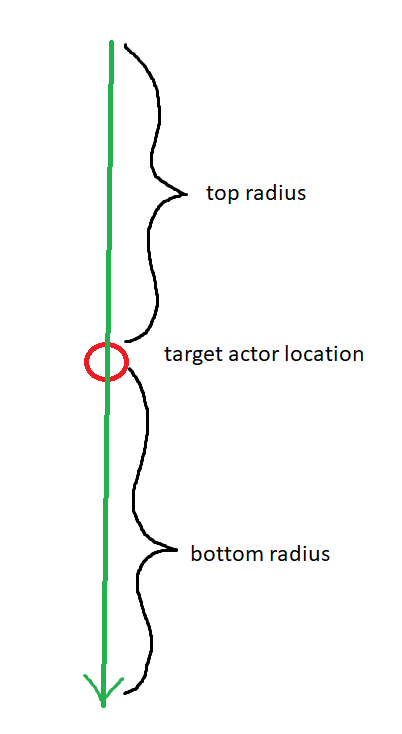
Depending on how it works, you may only want to seek below
in which case you just subtract and skip the add
summer coral
gotcha, that is what i thought but i wanted to make sure, the value itself is just your goal zone
So im still getting a little jump when i try to set the location again, i thought it was due to the z being not accurate but it could be something else
in theory ive been set to the same spot ive moved to but the jump seems like that isn't the case
 flat jetty
Hey everyone! Is Searching through Data Table is fast? Is it making linear search or some kind of binary search by sorting it before? I will have +400 items, and going to doing that often.

 frosty heron
@flat jetty Data table is actually a map
in a map index is irrelevant, if you need indexes use array.
so in saying that, a look up with map is faster than an array.
flat jetty
Aha, thats good to know! Thank you.
frosty heron
Looping over large element in blueprint is brutal.
one of the easiest way to make things run faster is to avoid blueprint loop.
but if it actually matter or not the only correct answer is to profile it.
You need to measure your self, it's not a question for someone to answer.
but personally I will just move any loops for a large iteration in C++.
you pretty much pay for Blueprint overhead for every loop you do.
and ofc in some casses the difference can be 100x faster or more.
flat jetty
These elements are getting its DATA from that method i provided above, its only in the construct for now. But one thing i didnt understand is, if i change something in data, for example its offset, it wont affected immediately. I need to change scene or smth like that. What is the practiced way if we change something in a data asset, and immediately affect for the constructors?
 flat jetty
frosty heron
and ofc in some casses the difference can be 100x faster or more.
flat jetty
frosty heron
and ofc in some casses the difference can be 100x faster or more.
Wow. Thats a lot. Why though? What **blueprint **can be doing that slow with for loop
frosty heron
flat jetty
Wow. Thats a lot. Why though? What **blueprint **can be doing that slow with for...
Read Unreal engine myth buster article by Ari
flat jetty
flat jetty
These elements are getting its DATA from that method i provided above, its only ...
Are there any tools like refresh immediately, so that i can see my changes for the constructors?
frosty heron
what constructor
Construction script is not constructor if that's what you are referring to.
flat jetty
For example, these canned foods are getting its data from the table's element data asset in the consturction script. And if I make change in data, like changing the offset, i cant see it immediately.
frosty heron
constructor runs before you even have a world.
flat jetty
I need to change scene or smth.
frosty heron
it sounds like you want to write the value to a Data Table or Data Asset
So anyway the way to run a function when you change a data is through PostEditPropertyChange
you cannot do this in blueprint, but I got example earlier for someone wanting to do the same thing.
flat jetty
frosty heron
it sounds like you want to write the value to a Data Table or Data Asset
No, i didnt give you enough context sorry. Lets assume we have a variable "Mesh". In Construction script, we set our blueprints mesh with that variable. But when I change that Mesh variable, i dont see immediate effect of changing it. And assume that mesh variable is inside the "data asset", and we reference data asset, instead of mesh variable,i change mesh variable's "assigned mesh" in data asset
I cant see immediate affect on my blueprint
frosty heron
English is not my native language, I don't completly understand what you are saying.
But if what you after is to do something when you change a property, e.g. typing a new characters for a string, or changing a static mesh value, or changing any value of any variable. Then the answer lies in PostEditPropertyChange. This is essentially the function that get called after you modify a variable.
flat jetty
So if i change scene, an return back, i can see them. But its a bit time consuming.
flat jetty
frosty heron
English is not my native language, I don't completly understand what you are say...
Hmm.
frosty heron
Hmmm I can change static mesh and see it updated just fine?
flat jetty
frosty heron
Hmmm I can change static mesh and see it updated just fine?
Yes, but after scene changing and returning back.
-- Construction script sets our mesh with a variable "Instance editable".
-- I change the variable.
-- Can't see immediate mesh change on my blueprint.
-- Scene switch..
-- My mesh changed.
frosty heron
oh ofc, you are just changing the variable
you are not actually changing the actual static mesh in the static mesh component
but yeah, I would point to the same answer if that's what you are after.
Construction script is not even a hack to me
it only runs when you hit compile or when you place the actor in the level.
If you want a function that runs everytime you edit your variable
PostEditProperty it is.
flat jetty
Hmm. Thats good to know actually. I can simply compile, or place some placeholders in scene to see changes.
Instead of changing scene and returning back.. 😄
frosty heron
I don't know if that will applies to actors that already placed in the level.
flat jetty
 frosty heron
tldr, I have 1 line of code in construction scripts.
flat jetty
Thats what i am talking about, its getting data from data table in construction. If i edit "Data." I cant see it immediately. But like you said, its fine to compile and see changes.
frosty heron
it all comes down to when the consruction script is run and when the data is "ready"
as in if you already set the static mesh variable before the construction script is run.
flat jetty
Alright, that makes much more sense.
"Compiling" works just fine.
I can see now they are bigger when i hit compile.

 upper badger
I have a camera set on a spring arm with collision disabled. It's a strategy game, so the camera is set way above everything and is just floating up there. Zooming in and out is controlled by the scroll wheel. When I hit play, the camera zooms out a bit, even though I didn't do anything with the scroll wheel. When I hit stop, the camera zooms out a bit more. And so on and so on. Any ideas on what's going on here?
frosty heron
upper badger
I have a camera set on a spring arm with collision disabled. It's a strategy gam...
no one will have a clue without looking at the code.
it could be you are interpolating to the zoom value and what unfold is at the start of the game, the current value is not of the zoom value so it tries to interpolate to the zoom value.
but then again, it's all just deduction. Try showing your work when asking question, it helps putting question in perspective.
upper badger
Here's my code for the zoom. Zoom min and max are just constant values.
 frosty heron
upper badger
Here's my code for the zoom. Zoom min and max are just constant values.
frosty heron
upper badger
Here's my code for the zoom. Zoom min and max are just constant values.
and the interpolation?
surely you have that on tick
upper badger
yup, I forgot about that one.
 frosty heron
upper badger
yup, I forgot about that one.
frosty heron
upper badger
yup, I forgot about that one.
so if you want to have 0 interpolation at the start, you want to make the value the same at the start.
maybe try BeginPlay -> Zoom Value = TargetArmLength
other than that, I don't have any idea.
upper badger
yea, it still keeps zooming out. thanks anyway :))
flat jetty
Hey everyone, I have a weird problem, My Pickup Item collision preset is set to PhysicsActor, and when i overlap with it, it prints OverlapAllDynamic. What might cause that?

"Get Collision Profile name" prints OverlapAllDynamic.
 frosty heron
flat jetty
"Get Collision Profile name" prints OverlapAllDynamic.
frosty heron
flat jetty
"Get Collision Profile name" prints OverlapAllDynamic.
append the string with the component name.
make sure you actually printing the target component instead of some other component.
flat jetty
frosty heron
append the string with the component name.
Yes. It was the Sphere Component.. I found it. But after i remove it, i can no longer trace with my mesh. My mesh has already collision. But cant seem to interact with it, even if it has phyiscs actor now.

Its not even logging profile name now
frosty heron
did you generate overlap on the physic assets?
open the physic assets, select the bodies, make sure it generate overlap events.
flat jetty
I check like this, tracing for objects.

Get Actors to Ignore has only attached actors
And this is object types to trace

Now i can see it has no Physics body..
😄
 surreal peak
flat jetty
Now i can see it has no Physics body..
surreal peak
flat jetty
Now i can see it has no Physics body..
Do you still have a problem or is it now resolved?
 tropic token
Hey guys, I have an actor in the world, when I double click in in object browser focus is being shifted to it. is there any way to control transform of this focus?
frosty heron
tropic token
Hey guys, I have an actor in the world, when I double click in in object browser...
Just wondering if it's really important.
If I have to tap engine code for that then no ty.
 bleak moon
again hope its not against server rules but gonna plug this again, if commenting on the doc is easier than commenting here then please feel free 🙂
tropic token
frosty heron
Just wondering if it's really important.
it's nice to have for specific things in level design. sometimes it's a bit off
 dark drum
tropic token
Hey guys, I have an actor in the world, when I double click in in object browser...
dark drum
tropic token
Hey guys, I have an actor in the world, when I double click in in object browser...
What do you mean by control the transform of the focus? As in where it moves to when focusing an object?
tropic token
dark drum
What do you mean by control the transform of the focus? As in where it moves to ...
yep
would be great to override it for specific actors
flat jetty
surreal peak
Do you still have a problem or is it now resolved?
It is.
frosty heron
tropic token
it's nice to have for specific things in level design. sometimes it's a bit off
100% not in blueprint for those kind of function. Better luck in other channel.
flat jetty
This is my base class BP_ItemBase, i implement ItemTag, and quantity.
- And I have created a child class BP_PickupItem inherited from it.
- Set the Item tag in there to Item.RawMaterials.Food
- Then inside my interaction script,
I call that data, and print Item Tag.. which prints as NONE.
What might cause to that? I already tried to fill PickUpItem's Get Interactable Data which is my child class.


And its is default category idk why, and its not yellow
 frosty heron
What is this? You setting closest intractable to none then try to call a method inside a null object?
flat jetty
Yes... Actually right. I thought i was setting input object..
Found out wit those.. Never printing..

 crude pike
perhaps this question might be better suited for #editor-scripting but i guess it might apply to this channel? anyways :
I have a LevelInstanceActor in my current scene and am trying to change which level file is assigned to it. I don't need to do the change at runtime or anything, it's just a map assembly script for the editor.
I'm using the "Set World Asset" node to do this, but the input is a "World Asset" variable.
The way that my BP works is that I give it an asset path as a string, not a direct reference. With other variable types I can convert the asset path to a SoftObjectReference and then load the asset, but I'm struggling to then convert it to a World Asset that can be plugged into the "Set World Asset" node... Any ways around this?

 dusky cobalt
crude pike
perhaps this question might be better suited for <#479798946793783307> but i gue...
dusky cobalt
crude pike
perhaps this question might be better suited for <#479798946793783307> but i gue...
Async Load Asset and then cast to World Asset ?
 merry lotus
Hey guys, I need some help with this game I'm working on. For some reason the "on component begin overlap" function is working fine when I manually place the actor in the scene. But if the actor is placed by a "spawn actor from class" node. The box collider just doesn't work
frosty heron
merry lotus
Hey guys, I need some help with this game I'm working on. For some reason the "o...
it is probably the same case like when you place 2 actors in the level next to each other and check their overlap.
perhaps OnBeginOverlap only works when two components collided. Not when they are already colliding from spawn.
So on BeginPlay you probably want to use IsOverlappingActor and use that instead for your BeginPlay overlap.
merry lotus
frosty heron
So on BeginPlay you probably want to use IsOverlappingActor and use that instead...
Ohh alright, thanks. Let me try that
frosty heron
crude pike
perhaps this question might be better suited for <#479798946793783307> but i gue...
try casting
merry lotus
Unfortunately it doesn't work
Like
The overlap doesn't even register for any object
a simple blueprint like this won't even work
frosty heron
and the code?
merry lotus
 frosty heron
This got nothing to do with what I suggested earlier though.
merry lotus
merry lotus
This is the overlap code (for now)
frosty heron
as stated BeginOverlap only works when the 2 component not already collided.
If you want to check on Spawn, BeginPlay -> IsOverlappingActor
 kind estuary
Which node should i use here? Those 2 below say they are COSMETIC 💅

COSMETIC
what is cosmetic
frosty heron
Are you doing multiplayer? @kind estuary
merry lotus
frosty heron
If you want to check on Spawn, BeginPlay -> IsOverlappingActor
Alright let me try
kind estuary
frosty heron
Are you doing multiplayer? <@711946020858101790>
not for now. maybe in 10 years yes
frosty heron
kind estuary
not for now. maybe in 10 years yes
Then even get player controller 0 will work.
as every single widget is owned by the local player
kind estuary
frosty heron
Then even get player controller 0 will work.
okay but what is the most appropriate to do here
yeah
frosty heron
kind estuary
okay but what is the most appropriate to do here
depending on the context? for single player owner of a widget doesn't mean much.
after all you are just displaying widget to the one and only player.
merry lotus
frosty heron
If you want to check on Spawn, BeginPlay -> IsOverlappingActor
Do you mean this?
 kind estuary
frosty heron
depending on the context? for single player owner of a widget doesn't mean much.
kind estuary
frosty heron
depending on the context? for single player owner of a widget doesn't mean much.
what if it was multi ?
frosty heron
merry lotus
Do you mean this?
Yeah but you probably want to check in the BeginPlay of the Actor you are spawning.
merry lotus
frosty heron
Yeah but you probably want to check in the BeginPlay of the Actor you are spawni...
This code is actually connected to begin play
 frosty heron
I don't think you are reading what I said X_X
merry lotus
frosty heron
I don't think you are reading what I said X_X
I am
frosty heron
So I can only re-iterate then
merry lotus
frosty heron
Yeah but you probably want to check in the BeginPlay of the Actor you are spawni...
I'm moving the check to the actor that I'm spawing
 frosty heron
kind estuary
what if it was multi ?
frosty heron
kind estuary
what if it was multi ?
Actually doesn't even matter even in multi.
merry lotus
Okay, so I did this in the actor that is spawning.....so would something like this work?
 merry lotus
frosty heron
this actor here
merry lotus
frosty heron
this actor here
Yes I did that in that specific actor
frosty heron
You have to provide object to test the overlapping againts
at the moment the other is left empty
merry lotus
So I put my main pawn
 merry lotus
Alright
merry lotus
merry lotus
But this works when I place the actor in the level manually.....why not if I spawn it with blueprints?
frosty heron
merry lotus
But this works when I place the actor in the level manually.....why not if I spa...
Not when they are placed in a way that they already overlapping in editor.
already stated the reason, OnBeginComponentOverlap only works when the objects are not already overlapping.
merry lotus
frosty heron
already stated the reason, OnBeginComponentOverlap only works when the objects a...
I see.....
merry lotus
merry lotus
So I put my main pawn
Yeah this doesn't work.......
frosty heron
tldr that event is only reliable if the components are not overlapping when they are spawned
merry lotus
frosty heron
tldr that event is only reliable if the components are not overlapping when they...
Hmm okay......
would it work if I spawned it in a location with no other actors
then instantly moved it to the desired location?
frosty heron
I don't know but I would expect a game Im playing to be able to address such simple situation....
if im spawning where the powerup is and i don't consume it, that won't be a nice experience.
merry lotus
Yeah
thats actually whats happening XD
Anyways
thanks for the help
and I'm sorry I don't understand easy 😅
frosty heron
we all gotta learn somewhere, if the code didn't work, you might have to debug and check if the cast succseed
and if the overlap actually work. (collision channels, etc)
frosty heron
@merry lotus im testing an example now
works as expected.
actually with spawn even OnComponentBegin overlap work
I think the BeginPlay is to address actors that is already placed in the level.
But for spawning, it work just fine.

Im just spawning the powerup where the player is atm.

you can check the orange text and the potion that get spawned where the character is
collision settings for the box component
 dusky cobalt
I'm pretty sure there is something in C++ that can update overlap actors on the spawn, but it's not exposed to blueprints.
One way is to change this to Sphere Trace By Channel/Objects and just use it on tick/timer by event.
Hacky way is to Set Actor Location to anything else like 15000 15000, and then back to where it should be (probably better to do it with the static objects than with the one you control/move). This should retrigger the overlap. @merry lotus
frosty heron
dusky cobalt
I'm pretty sure there is something in C++ that can update overlap actors on the ...
Actually on spawn the OnComponentBeginOverlap work just fine.
I tested it above.
dusky cobalt
but you need to make this logic on begin play to get overlapping actors, yes?
frosty heron
perhaps for overlapping actors on design time
but he wants it on spawn then no issue with OnbeginOverlap
I wouldn't do something like teleporting the player some distance away and back. That should not be an option imo.
dusky cobalt
yeah definitely make sense
 merry sparrow
Hey any one know a tutorial or any guide for making a username password menu for a level so it can save user data also user need to register/ sign up i made a normal one with out api but i need to make sure its getting url from an api and opens it !
frosty heron
depending on how elaborate your log on system you want it to be.
if you just want me to throw a tutorial I can recommend then Stepehn Ulbardi dedicated server.
but it's not a blueprint only tutorial.
you kinda required to do some coding either way if you want to interact with data bases
merry sparrow
ye i know about that i was trying so hard on blue print only
frosty heron
some task are impossible in bp. It is what it is.
merry sparrow
also tried chat gpt and deep not helpful at all
frosty heron
you can only use what's exposed to you
merry sparrow
i will watch this tutorial to see what i am getting out of it thanks for shearing 😃
by the way where do i find this tutorial i cant find it on google
frosty heron
merry sparrow
i will watch this tutorial to see what i am getting out of it thanks for shearin...
Sure, tldr. You get to interact with data bases, setup dedicated server, setup Login system, interact with your data base to store player's data / progress. Etc.
 knotty flare
Hi Mahdi! If you'd like to push for a blueprint solution - I would recommend looking into Epic Online Services & consider the 'EOS Integration Kit' plugin from the nice folks at BeTide! They have an amazing Discord for support & their product works well from what I've seen so far (haven't shipped yet, but integration is going well)
frosty heron
What's Epic online service got anything to do with log in system, curious.
knotty flare
Well, if you want a purely custom database and 100% controlled environment, it's maybe not the simplest way - but it offers per-platform sign in and easy player data storage
Just proposing in case that fits the need and help simplify the process 🙂
frosty heron
no idea about EOS or it's capability so no comment from me. But imho you will end up knowing how to code either way. Not something that you should pursue using BP only.
merry sparrow
i do have a programer friend will work on api and make a new data base it self new api also
i just need to find a way to connect to that and call it thats all
frosty heron
if you don't need any serverless functionality then just make an HTTP request call
merry sparrow
frosty heron
if you don't need any serverless functionality then just make an HTTP request ca...
ye thats what i am about to do thanks for helping i will try to get into http request call and see what happens
🙌
 storm solar
When i have a list view widget. I want to select a widget and "Lock in" the picked widget. That will disable movement of that widget list, but still keep it focused. How do I do that?
i.e: When I use the arrow keys to select potion and press enter, I dont want the arrow keys to effect the item list, but still use them for a diffrent input, like selecting target.

 flat jetty
How can i see "the starred" nodes in here? For example i starred "Add Custom Event". But icouldnt find a way to find favorites.

 proud pilot
Hi everyone !
I have a question, because I can't find solution in web neither yt. I have problem with my project. If is possible to delete assets ? I think about node, because I can add node "Get Assets by path" and "Duplicate Assets" but I can't find "Delete assets". I need delete "Data Asset" which I created of node "Duplicate Asset". I want create at runtime ? If is possible make this in blueprint or only in C++ ?
"Data Asset" are created at runtime, but I need to delete them at runtime as well. Is it possible ?


 surreal peak
flat jetty
How can i see "the starred" nodes in here? For example i starred "Add Custom Eve...
surreal peak
flat jetty
How can i see "the starred" nodes in here? For example i starred "Add Custom Eve...
Hm. Check if the top left menus of the blueprint (window, view, edit and what they are all called) has an option for a Palette.
That might result in a sidebar on the right with the starred nodes
Might also be called differently
surreal peak
autumn pulsar
Does Enhanced Input have a Key Released Option?
You'd add a Pressed and Released Trigger. Change the Value to Boolean and branch with it on Triggered.
It'll be true on Pressed and false on Released
surreal peak
proud pilot
Hi everyone !
I have a question, because I can't find solution in web neither yt...
Could be that if you simply ensure that nothing is referencing the asset, it will be GCd automatically
Are you sure the duplicate asset stuff even works outside the Editor?
This sounds a lot like this is editor only stuff.
It's not that common to duplicate assets runtime. If I ever did that then only to generic UObjects in c++
autumn pulsar
How do I use this node? When I try to add the blueprint interface it's not on the list of available ones https://i.imgur.com/ALarJ5e.png
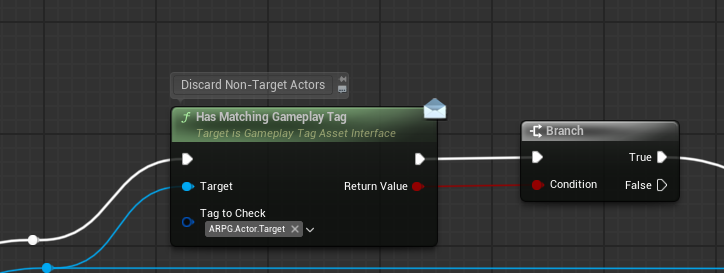
is it a C++ interface only?
surreal peak
Could be that the methods are only virtual and BlueprintCallable but not implementable for Blueprints.
If you can read c++ then open the header of it and check
 autumn pulsar
Might do that
I don't want to drop to C++ unless I absolutely have to
Maybe I'll just make it an actor component instead of an interface
surreal peak
You'd still want an interface to get the component without having to search through all components
autumn pulsar
Could just have other components register with the tag manager component
making interfaces for every component sounds like a lot of work
 narrow sentinel
So i have an issue where getting the elasped time that a timer has ran for on tick seems to not work and I can see it gets to about 0.16 roughly then starts from 0 again
I've checked and I'm not calling the timer over and over
storm solar
storm solar
When i have a list view widget. I want to select a widget and "Lock in" the pick...
Any idea on this issue?
flat jetty
Guys, I am bugged so bad.
I have some items in my stash, and when i click restore, This is the only its coming to push. ANd its coming and coming. I cant get others, i push and it comes again. What should I do?!


I hate github desktop in Unreal Engine.. I cant even see what s going on especially with Git LFS, when LKAJSD12380917321.files appear.
Now my Interaction component disappeared?!
dusky cobalt
surreal peak
You'd still want an interface to get the component without having to search thro...
Are you implementing interface for every component usually. Like do you avoid Get Component by Class, you just call Get X Component interface?
Do you have like 1 interface for every component, or every component has own interface for that?
 gusty shuttle
Question: Is there a more efficient way to load in soft references than this?
 surreal peak
dusky cobalt
Are you implementing interface for every component usually. Like do you avoid Ge...
surreal peak
dusky cobalt
Are you implementing interface for every component usually. Like do you avoid Ge...
I honestly rarely have components attach to random actors.
But if I would have that I would have an Interface for it, yes
surreal peak
gusty shuttle
Question: Is there a more efficient way to load in soft references than this?
In what way?
dusky cobalt
surreal peak
I honestly rarely have components attach to random actors.
Random actors? so do you mean by that, that you have interface for that component anyway so it's not like a problem that you have create it just ''to get component'' ?
surreal peak
dusky cobalt
Random actors? so do you mean by that, that you have interface for that componen...
No. "Random Actor" as in not having a common class to cast to.
gusty shuttle
surreal peak
In what way?
I'm trying to use Data Assets to load in different body parts to my metahuman. I have struct with all the data assets within, and I'd like to change body parts based on which index is selected for the struct. Loading up these soft references would make for a large graph, im asking to see if there's other ways to load in soft references other than casting to each specific part
surreal peak
E.g. if you have an Inventory Component that can be on a Character and a Chest Actor, then I would have an interface to generally retrieve it
surreal peak
gusty shuttle
I'm trying to use Data Assets to load in different body parts to my metahuman. I...
Do you load all of the soft references in a given DataAsset or only parts?
gusty shuttle
surreal peak
Do you load all of the soft references in a given DataAsset or only parts?
Only the parts
surreal peak
I mean, in theory you wouldn't make things soft references if the thing they are in can already be one
+- for editor load time, but then you'd potentially load all the inner ones when the outer one is loaded.
In C++ you can load multiple at once too.
dusky cobalt
surreal peak
E.g. if you have an Inventory Component that can be on a Character and a Chest A...
and it would be Component's interface right? so for each component you would have new interface, kind of.
And by ''common'' class. It's situation where you can Cast and get Component directly, instead of Get Component by Class.
Generally, do you mean that it's good practice to avoid Get Component By Class and either use interface, or first cast to the base class that will have that component avaliable?
surreal peak
dusky cobalt
and it would be Component's interface right? so for each component you would ha...
Yeah. But you make it sound like you'd end up with 20 interfaces. You rarely run into the situation. A lot of components are only used on one base class.
dusky cobalt
surreal peak
Yeah. But you make it sound like you'd end up with 20 interfaces. You rarely run...
I didn't want to sound like that, it was more to understand it correctly. Got it. Yes it makes total sense.
surreal peak
The get comp by class is just not as cheap as just casting and getting it (which an interface also counts as)
It's more like a fallback that exists if you have no other way
Like if you work with some actor and you can't add any interface to it but you still want a component for class box collision in case it has it
dusky cobalt
That is very good point and I'm asking because Im at the time of refining some components and I was using FunctionLibrary to get components with Get Component by Class but I'm just gonna create nice interfaces for them. Much better.
surreal peak
Which happens more often if you do some editor tooling where you have to work with whatever actor pointer you get
surreal peak
dusky cobalt
That is very good point and I'm asking because Im at the time of refining some c...
Yeah FunctionLibs in Blueprints are also a bit of a pitfall if you aren't careful.
If you reference a lot of Blueprint classes in it and you then use that function library in BP A it will cause the other classes to also be loaded
Which can cause quite the nice reference chain and long editor load times
dusky cobalt
I have them in C++ actually, is it also similiar problem? or it's only with blueprints?
surreal peak
No only BP
dusky cobalt
Ok, thanks!
 harsh notch
Hello! Does anyone know how to disable push away ai from player on collision? Tried to disable "Simulate physics" on AI Character and Player capcule component and mesh, tried to change physics interaction in character movement component but it didnt help too.
 flat jetty
What's best version control you have used for Unreal Engine? Do you recommend Perforce? I thought its paid app. I have many troubles while working with friend in Github Desktop, for example while pulling, there are coming existing stuffs, and then removing it automatically IDK why?! I have ben using Github & Desktop in Unity, never encountered stuffs like that. I think it works kinda weird in UE.
Whats the workflow for pull/push in UE for Github? Should i close the project for example etc.
surreal peak
flat jetty
What's best version control you have used for Unreal Engine? Do you recommend Pe...
faint pasture
flat jetty
What's best version control you have used for Unreal Engine? Do you recommend Pe...
I really like Plastic SCM / Unity DevOps, but it seems like I'm the only one lol
Dirt cheap, fast, works great IMO
surreal peak
Yeeeeah, Plastic is one of the last ones I would touch
Self hosted GitLab or Perforce, depending on team size, works wonders.
But let's keep it to #source-control
autumn pulsar
Is it a bad idea to have a lot of actor components on an actor?
or is it better to combine stuff
 stone umbra

why does my rock hit the ground before launching?
super new to unreal n im pretty stuck on this
 static tide
I need to change voice pitch in voip. i need sourceEffectPreset which is able to change voice pitch, anyone know its name?
 stable nymph
I have a question for those of you who make blueprints with tons of options: what do you do to make your blueprint navigatable? With each variable taking up an equal amount of space, it quickly makes 20 variables feel like scrolling through pages (especially with arrays). I am debating using editor widgets to create sub menus where each category has a button that can change the context of the menu. There is also scriptable tools but that seems like it may be overkill for the extra control. Curious what you all do to get around this
 runic terrace
harsh notch
Hello! Does anyone know how to disable push away ai from player on collision? Tr...
runic terrace
harsh notch
Hello! Does anyone know how to disable push away ai from player on collision? Tr...
Check your mesh collisions
Only the capsule should collide with the other character
runic terrace
stable nymph
I have a question for those of you who make blueprints with tons of options: wha...
You can organize variables into categories
dusky cobalt
autumn pulsar
Is it a bad idea to have a lot of actor components on an actor?
When I started hard prototyping I put everything into one class, monolithic way to make things, the blueprint was dirty, it was working though. Then I made 1 thing to component, now 99% of things is components and the base class is almost empty (just some really small individual logic is there). For me it's much better to organize and then.. possibility of reusing existing component instead of thinking how to merge classes when suddenly you realize that 2 different classes could use of the same methods. I would say put everything in components and it's probably not much different having: 1 class with 2000 lines of code, or 20 classes each with 100 lines of code. Literally doesn't matter in this context. It's more how you organize code and you know, oh if I want to edit health I just edit it there, everything will still work, everyone will ''get'' the change.
Composition is more popular these days because of how reusable things are. Just make kind of sure each component does one thing (with micro exceptions maybe), if you describe component that it does this AND that, then it probably should be 2 components.
Also there is nothing wrong with components communicating with each other. It just shouldn't be coupled so much that they will break when you delete one (obviously you will lose function of the one that was deleted, but the other one still should do it's job, even though there is no one that listens to it anymore (kind of)).
dusky cobalt
stable nymph
I have a question for those of you who make blueprints with tons of options: wha...
Well, kind of coincidence you ask about it, but if you split some parts of code in components, it doesn't get that dirty with 50 variables because of 4 different ''systems'' inside 1 class.
high gale
I am making a security camera that whenever it spots the player, it alerts all enemies within a certain range. My original idea was for it to cast a sphere trace to find all the enemies but it seems that sphere traces don't register pawns into their hit results.
So I am kind of lost on how to move forward with this idea
runic terrace
A single sphere trace will just return a single actor, and it might just return a wall it hit
Maybe use a sphere overlap instead?
Or multi sphere trace
high gale
but would that affect pawns? because it says on the hit result it lists "actors" and not pawns
 runic terrace
Yes
high gale
oh
surreal peak
It's a StaticMeshActor :P
 drowsy gorge
Hello
I am going insane.
I have an actor component MeleeFighter. This component is added to the character.
In this component there is an Actor Object Variable called CurrentWeapon. When character picks up a weapon, this is set to that weapon actor, otherwise it is Nil.
There is a function called "ChooseAttackMontage", that picks the attack montage the character should use, based on whether they are holding a weapon or not (So if holding a sword, choose a sword attack montage, otherwise choose a punching montage).
The logic is like this:
If CurrentWeapon IsValid -> SwordMontage,
Else, PunchMontage
The problem:
When the Player Character picks up a weapon, the AI Characters for some reason start to think their current weapon is valid too.
What's even weirder, for debugging, if on tick I print the CurrentWeapon validity, all of the AI Characters correctly print that their weapon is invalid.
But printing just inside that ChooseAttackMontage function, they all think that it's Valid.
There is only one place where I use Set CurrentWeapon, and I added a print string there as well. It is only set once, for the player, so again, seems to be correct.
So WHY IN THE HELL does ChooseAttackMontage function think that CurrentWeapon is valid, if everywhere else it is confirmed Invalid?
All of this logic is inside the MeleeFighter component.
The tick validity check, and Weapon Set, confirm that the weapon is correctly Invalid.
But only inside the ChooseAttackMontage function, it for some reason prints WeaponIsValid
runic terrace
Are you absolutely sure it's the AIs that are printing ''valid'' on the function and you're not seeing only the player's prints?
Do they print ''invalid'' if it's invalid inside the function? Or do they print nothing at all
drowsy gorge
runic terrace
Are you absolutely sure it's the AIs that are printing ''valid'' on the function...
Absolutely sure it is the AIs.
The ChooseAttackMontage function is only called when they are attacking. I can visually see the AI playing the incorrect attack animation when that WeaponisValid prints.
drowsy gorge
runic terrace
Do they print ''invalid'' if it's invalid inside the function? Or do they print ...
I just added print Invalid inside the ChooseAttackMontage function. It never prints. Because for some reason only inside that function, it thinks the Weapon is valid
stable nymph
runic terrace
You can organize variables into categories
I do have variables into categories but it still seems like a pain to keep opening and collapsing different options to get to the spot you want. Each category I made has at least 20 variables and some of them are arrays that open into dozens more lines. Creating more subcategories has diminishing returns
drowsy gorge
runic terrace
Are you absolutely sure it's the AIs that are printing ''valid'' on the function...
Wait no
stable nymph
dusky cobalt
Well, kind of coincidence you ask about it, but if you split some parts of code ...
That is an interesting approach
I'll look into it, thanks
drowsy gorge
I just added a print string GetOwner -> GetDisplayName inside that function, it is printing the PlayerCharacter for some reason.
Let me check why
runic terrace
Your AI might be calling the function on the player instead of their own actor
drowsy gorge
Hardest facepalm in my recent life
I have no idea why would I call this function on the Enemy
Anyway, thanks for helping find it!
runic terrace
lol, you probably put that there as the enemy of the player which is the ai
but it's vice versa
autumn pulsar
Is there a way to set which camera the player controller uses?
runic terrace
autumn pulsar
Is there a way to set which camera the player controller uses?
If cameras are in different actors use Set View Target
If in the same actor it uses whichever camera is active
autumn pulsar
I was trying to spawn a camera on a player object instead of attaching it
and it wasn't immediately inheriting it
runic terrace
Deactivate the previous camera if there is any, then set the new camera active
If it doesn't work maybe also call Set View Target on the actor
runic terrace
Are you detaching the rock right before you launch it?
Does it attach to the player?
stone umbra
yea its attached to the player, like it moves with the player when the player move
runic terrace
Where and how do you detach it?
autumn pulsar
Are cameras expensive to have if they're not being used?
runic terrace
autumn pulsar
Are cameras expensive to have if they're not being used?
No
autumn pulsar
Wondering if it's even worth it to try to spawn it instead of just not using any camera logic when it's not controlled by a player
stone umbra
runic terrace
Where and how do you detach it?

is this what you mean
i can show the whole thing but its pretty big not sure it will fit in one screenshot
runic terrace
Are you not detaching the rock before you launch it?
It's either that creates some weird interactions, or something with your camera transform
Are you viewing playing as client or the server?
autumn pulsar
that logic is so messy
if you double click on a line you can create a redirect node
so much more useful for creating clean flowing logic
runic terrace
Also can press q to align two nodes
stone umbra
yea i really need to start over from scratch im so confused with unreal
stone umbra
runic terrace
Are you not detaching the rock before you launch it?
im not sure tbh
autumn pulsar
game dev is hard
stone umbra
yea thanks anyway @runic terrace
runic terrace
Starting from scratch isn't a bad thing when you're new to game dev
autumn pulsar
but I would detach it in the same function that you launch it
runic terrace
imo it's the best thing to do when learning
autumn pulsar
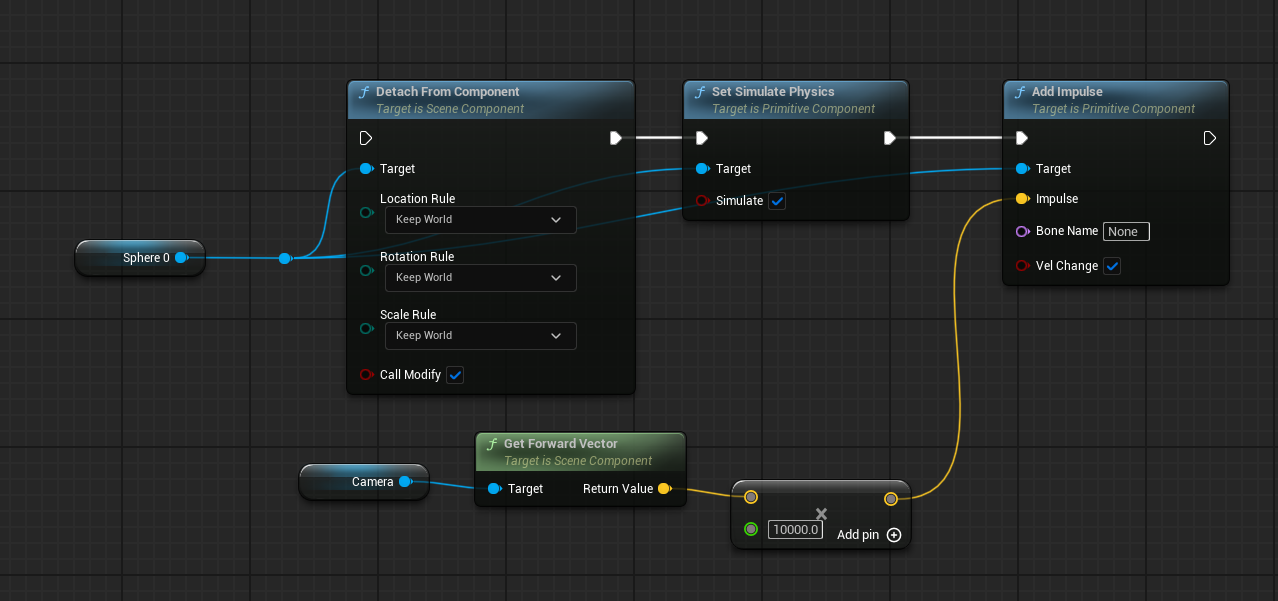 autumn pulsar
stone umbra
what are some really good sources for learning?
autumn pulsar
stone umbra
what are some really good sources for learning?
Youtube tuts are really hit or miss. The annoying thing is when you're learning you don't know how to avoid the bad ones
runic terrace
There are a lot of tutorials on Youtube that promote bad practices, it's not easy to differentiate the good ones when you're new
There are courses on Udemy and stuff but Youtube isn't a bad source as long as you take the info with a grain of salt
autumn pulsar
This is a bit of a Rabbit Trail, but if you're serious about this whole game dev thing, I'd take some time and learn a bit of C++
Blueprint is heavily derived from a lot of concepts based on it
and knowing a bit makes it easier when you need to drop down and do things in C++
runic terrace
C++ might be a bit heavy if they don't have prior programming experience
stone umbra
autumn pulsar
This is a bit of a Rabbit Trail, but if you're serious about this whole game dev...
 blueprints are already cooking me enough haha
autumn pulsar
runic terrace
C++ might be a bit heavy if they don't have prior programming experience
was my first language
runic terrace
Something like Python would be better to get a grasp of coding
The same programming principles apply to C++ anyway
stone umbra
it just doesnt seem like there is a correct way to learn unreal most people i meet say they learn from youtube but like you guys say there's a bunch of bad practices on youtube as well
runic terrace
Or even C# tbh, I started with unity to game dev and it's way more intuitive than Unreal's C++
autumn pulsar
stone umbra
<a:monkewait:1004632855399374928> blueprints are already cooking me enough haha
Some of it is just stewing until it makes sense to you
runic terrace
stone umbra
it just doesnt seem like there is a correct way to learn unreal most people i me...
Yes exactly, there isn't a set in stone correct way
autumn pulsar
stone umbra
it just doesnt seem like there is a correct way to learn unreal most people i me...
There's no "correct" way because everyone is different
stone umbra
any specific udemy course you guys can suggest
autumn pulsar
and approaches change based on what you're doing
 spring magnet
any updates on this? 👀
autumn pulsar
But a vague answer like that isn't very helpful to you now is it
runic terrace
Tbh as long as you invest time on learning it doesn't matter how you do it
You eventually learn
stone umbra
autumn pulsar
and approaches change based on what you're doing
yea that makes sense but i don't know what any of the blueprint stuff really do tbh especially when i'm just following a tut and i feel like i need to really learn unreal before i start doing my own thing idk im a complete beginner
autumn pulsar
stone umbra
yea that makes sense but i don't know what any of the blueprint stuff really do ...
Coding is an adventure, and a long one too. It's hard to find anythiing comprehensive that you don't pay for
stone umbra
yeaa thats the thing im willing to pay atp haha
stone umbra
shill me a udemy course lmao
autumn pulsar
And that's something that paying isn't necessarily going to help you with
runic terrace
Udemy courses tend to be very specialized though, I'd probably take more time on Youtube before doing courses. You learn best when you're experimenting with just throwing rocks at a wall to see what sticks
autumn pulsar
I don't know of any Unreal Specific though
Honestly, if you watch a wide variety of YT videos, you'll eventually get the gist of what sucks and what doesn't
There's a sliding scale of "Easy to set up" vs "Comprehensive solution"
A lot of "Here's how to do it in 5 minutes" tutorials kind of suck because they don't take any expandability in mind
stone umbra
autumn pulsar
A lot of "Here's how to do it in 5 minutes" tutorials kind of suck because they ...
yea exactly i dont really feel like i learn anything from these types of tuts
but thanks guys i appreciate your time and your advice
autumn pulsar
I think just getting used to reading the nodes isn't a bad thing
You could also ask here to explain the logic if you just don't understand
stone umbra
oh yea you'll def see me in here more often
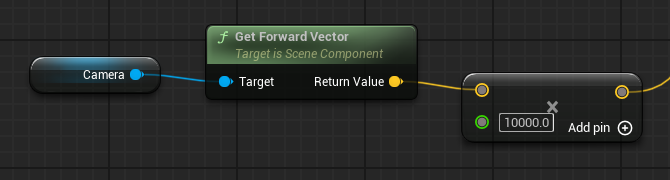 faint pasture
autumn pulsar
Youtube tuts are really hit or miss. The annoying thing is when you're learning ...
faint pasture
autumn pulsar
Youtube tuts are really hit or miss. The annoying thing is when you're learning ...
That's why I advocate what I did. Just learn enough of the basics to get going and go
look up specifics when you get stuck, but don't go following along painting by numbers
autumn pulsar
Painting by numbers is fine, as long as you dissect it
"Oh hey they did something interesting here, why did they do that"
runic terrace
I lost count on how many projects I abandoned and made from scratch over and over when learning
I probably made the same inventory system for like over 100 times trying to do it better each time until something clicked
autumn pulsar
Don't be afraid to make projects with no intention of completion
Like learning how to make AI with a complicated project is probably a bad idea lol
whereas a tiny stealth game with no real gameplay is great practice
runic terrace
Yeah I used to open projects just to make a single mechanic
Because a game is simply a mix of multiple mechanics under the hood
After some time you reach a point you don't need to look up tutorials for a new mechanic you haven't done before
autumn pulsar
Could be like me making my own shitty version of GAS
runic terrace
^ Exactly, to be honest I still prefer my own shitty version of gas lmao
There's something special about building the entire system by yourself
autumn pulsar
for sure
runic terrace
Not the wisest thing but it's fun
autumn pulsar
teaches you a lot to reinvent the wheel
faint pasture
Also it makes it easy to actually understand everything going on
autumn pulsar
Does the controller get added to the actor after the construction script?
runic terrace
Construction script runs first before the controller possesses it
frosty heron
runic terrace
Something like Python would be better to get a grasp of coding
Just jump to c# or cpp if they gonne learn unreal. Cpp being my first language doesn't make learning python enjoyable. Just pick strong typed language.
autumn pulsar
C++ is great because you can make Data races so only the fittest threads get to use your variables
frosty heron
Other than pointer which is gonna be necessary, the basic ain't that bad.
frosty heron
stone umbra
yea that makes sense but i don't know what any of the blueprint stuff really do ...
Learn OOP until you can read code which made you not having to learn blueprint.
Afterwards fly on your own and look at project examples for ideas or reference.
Eventually you want to get out from tutorial he'll
But yes you don't know what you don't know so don't be obsessed with inventing your own wheel for everything. Take inspiritation from other people system or code.
flat jetty
Hey guys, I drop my items from inventory with DragCancelled event, But for now, I spawn the item in front of the player, and apply force in player's forward direction. But instead, I want to be able to Get mouse position, and add impulse there. Here is what I tried.
-- On Cancelled Event, I get mouse position / DPI from player controller, then convert it to world space.
-- Then I substract my player position from that world space and normalize it, then multiply with float for strength.,
-- And apply impulse to that direction.. But it seems like it doesnt work, going same direction as always. Also printed mouse position, and its almost same everytime.
 frosty heron
There should be a pure node that says deproject screen to world
flat jetty
frosty heron
There should be a pure node that says deproject screen to world
What should I "exactly" pass to Screen Position? PlayerController.Get Screen Mouse Position?
 autumn pulsar
Specifically for games, I think the most important general programming concepts are:
-Shallow Vs Deep Copies
-Pointers and References
-Classes and Functions
-Fundamental Data Types
-Arrays and Maps
-Structs
Then Blueprint Specific:
-Actor Components
-Interfaces and when to properly use them
-Tick and what and when to put in
-Binding Function Calls
Gameplay Math Specific:
-Traces and how to use them
-Vectors, Transforms, Rotators and how to get what you need from them
-Lerp and how to use it
-General Physics knowledge isn't required, but helps a lot especially for more action games
flat jetty
flat jetty
What should I "exactly" pass to Screen Position? PlayerController.Get Screen Mou...
Or can I get the mouse position from DragCancelled event?
Smth. like that.
 autumn pulsar
flat jetty
autumn pulsar
flat jetty
I'd run it in the tick and print the outputs and see what it's giving you
frosty heron
flat jetty
Actually convert screen to world should work, what is your code like?
flat jetty
Here is how I add impulse, If i just apply from forward with scaled value, It works as intended. But this is always going the same direction.

Wherever I look.

Drop Position is the value we set above from Deproject
 autumn pulsar
flat jetty
Here is how I add impulse, If i just apply from forward with scaled value, It wo...
autumn pulsar
flat jetty
Here is how I add impulse, If i just apply from forward with scaled value, It wo...
just use the drop position vector
also use world direction
unless I'm misunderstanding what you want
flat jetty
I spawn my item in player, then add force to the mouse position
which is (mousePosWorld - playerPos).normalized
I call AddImpulse inside the Update Physics method
autumn pulsar
You shouldn't need to use the player position because it's camera normalized
frosty heron
flat jetty
Here is how I add impulse, If i just apply from forward with scaled value, It wo...
You have to add the result of the multiplication with the actor location.
I think.
That looks incomplete.
flat jetty
But If I do that, it works as intended, pushing towards the item from playert
 frosty heron
Ofc but they not the same?
autumn pulsar
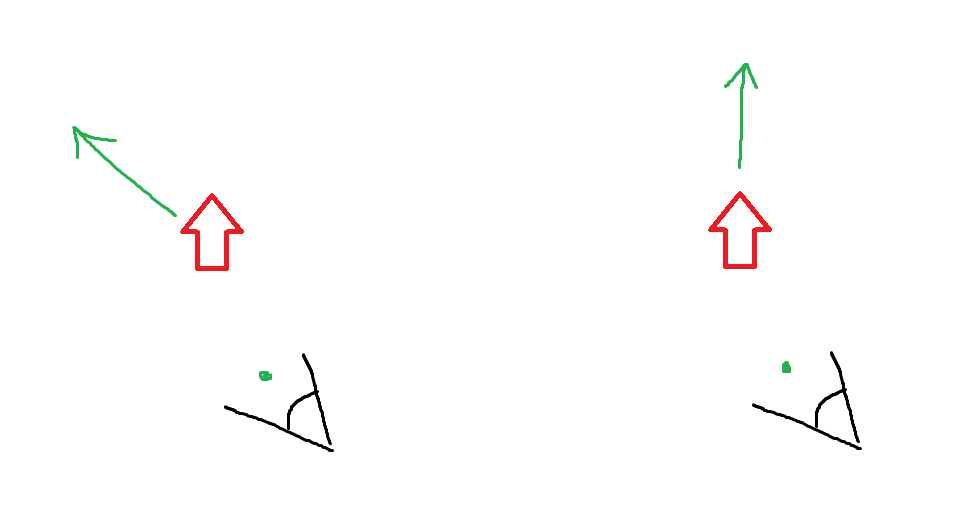
Are you wanting this or this?
assuming you're dropping at the center of the screen
flat jetty
In last picture, I push the item in the forward direction, What I wanted is, push towards the mouse position, which is the mousePosWorld - playerPos, normalized.
flat jetty
autumn pulsar
assuming you're dropping at the center of the screen
Seems like it. My brain stopped. I worked 13 hours today in this project. 😄
What am I missing?
frosty heron
You subtract location so you get direction then you normalise it to one unit. Then you multiply it back by 300. That should give you a direction from the world origin. If you want to start from the player, add the result to the actor location.
This is assuming drag position is already the correct value.
autumn pulsar
flat jetty
Seems like it. My brain stopped. I worked 13 hours today in this project. 😄
Like, if I drop the item on the left side of the screen, do you want it to go to the camera's left side, or the actor's left side?
 autumn pulsar
So you want it to be thrown at the surface where the cursor is overlapping?
flat jetty
Red arrow is the where I dropped, green arrow where it went
 flat jetty
autumn pulsar
So you want it to be thrown at the surface where the cursor is overlapping?
flat jetty
autumn pulsar
So you want it to be thrown at the surface where the cursor is overlapping?
Yeah, that might be. I thought Deprojecting mousePos would give me that value
since my mouse is currently there :/
frosty heron
It does. Your math is off
flat jetty
Also tried this like you said, am i missing smth?
 autumn pulsar
I can think of a lot of solutions, I'm just having a hard time understanding what you're trying to accomplish
What result do you want from a top-down perspective?
are you able to draw?
flat jetty
Lets look at from top, when I drop my item, I want to spawn that item in my player's front, (which i already accomplished), and add force to that green direction,
The green icon is where I drop my item as you see
 flat jetty
frosty heron
It does. Your math is off
flat jetty
frosty heron
It does. Your math is off
Here is I added my actor location with multiplied value
 frosty heron
flat jetty
Here is I added my actor location with multiplied value
frosty heron
flat jetty
Here is I added my actor location with multiplied value
And the behaviour?
flat jetty
So the direction is here simply (mousePositionWorld - playerPos).normalized
frosty heron
I would try to do debug by spawning an actor in your drag points location.
flat jetty
frosty heron
I would try to do debug by spawning an actor in your drag points location.
You are right, let me debug this more
frosty heron
Could be dpi or something blocking that alter the end point. No idea.
autumn pulsar
flat jetty
Here is I added my actor location with multiplied value
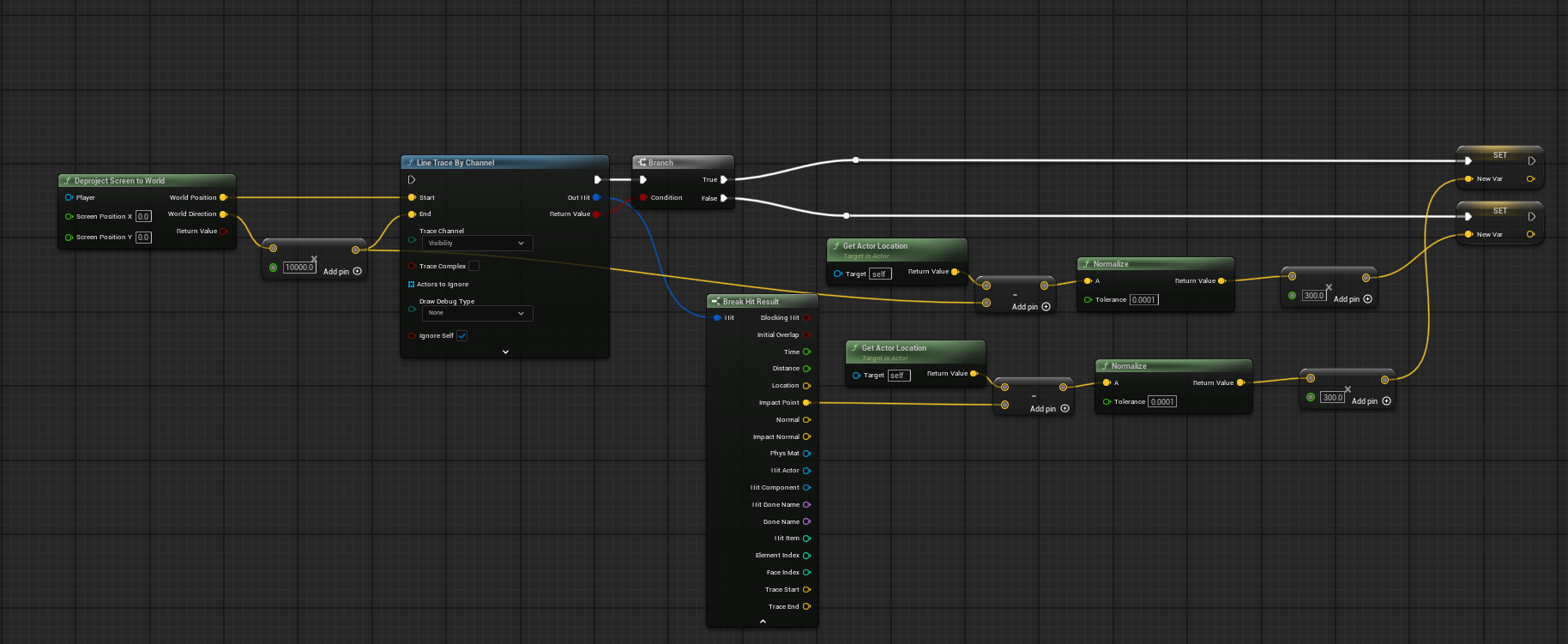
I think this will give you what you want
frosty heron
autumn pulsar
https://i.imgur.com/9BwCZlV.png
The end trace not right i think.
That will start from the world origin you need a reference location.
Which should be the camera loc
flat jetty
I think thats something to do with mouse position result, I will debug it, Since its 3D world
Anyway, for today, I will leave it as player forward. I am really tired. 😄
Thanks for helping me guys. ❤️
autumn pulsar
frosty heron
That will start from the world origin you need a reference location.
Which shoul...
I was assuming world position was from the camera viewport
autumn pulsar
flat jetty
I think thats something to do with mouse position result, I will debug it, Since...
frosty heron
autumn pulsar
I was assuming world position was from the camera viewport
Yeah that should be it but regardless you still need to account for that in the end trace.
autumn pulsar
You can copy paste this into your graph
flat jetty
I think that would be also enough
autumn pulsar
frosty heron
Yeah that should be it but regardless you still need to account for that in the ...
oh I forgot an add
frosty heron
flat jetty
I think that would be also enough
I would check if the circle blocks the trace...
Something to watch out for.
flat jetty
frosty heron
I would check if the circle blocks the trace...
Sure, thanks for reminding me
frosty heron
For sanity check turn off collision on your components imo.
flat jetty
Thank you guys
autumn pulsar
Can also add a new trace channel if needed
flat jetty
frosty heron
For sanity check turn off collision on your components imo.
What do you mean by that? Which components
frosty heron
flat jetty
What do you mean by that? Which components
What ever that may block the trace e..g if you have any component in the actor like a sphere collision etc.
Obviously don't touch the capsule collision
flat jetty
frosty heron
What ever that may block the trace e..g if you have any component in the actor l...
Aha, Understood.
Now tomorrow will be replication phase..
autumn pulsar
UE Clipboard is so great. You can paste this into your level
harsh notch
runic terrace
Check your mesh collisions
Thank you, it was a problem!
flat jetty
autumn pulsar
https://i.imgur.com/9BwCZlV.png
Would we still need to fill mouse position for deproject?
autumn pulsar
yeah
What this does is it takes the mouse position from the camera, then fires a trace into the world using it, seeing if we hit something, get the location of the impact, get the actor location and create a vector from the actor to the location, normalizes it, then uses it as the throwing vector for the actor
you may also just use an offset of the actor for the Z direction
so you get a nice toss every time
flat jetty
So this node takes player location right? Some of tem was missing
 autumn pulsar
yeah
assuming this is in the actor blueprint
otherwise you'll need to get a ref to your player actor
faint pasture
flat jetty
So this node takes player location right? Some of tem was missing
That node will get the location of self, whatever self is
if self is your players pawn then yes
 grim timber
does anyone know how world vector for Add Input Vector are floats here? https://d3kjluh73b9h9o.cloudfront.net/original/4X/a/0/8/a081d710215af943be60ef5dc4d1e22d532c91a0.png

 marble tusk
grim timber
does anyone know how world vector for Add Input Vector are floats here? https://...
marble tusk
grim timber
does anyone know how world vector for Add Input Vector are floats here? https://...
Right click the vector and split pin
And to go back right click and combine or whatever it's called
grim timber
marble tusk
Right click the vector and split pin
AH thats it. I promoted to variable, didnt even see the split. tysm! 
autumn pulsar
Split pin my beloved 
grim timber
Mouse Controlled player
 tired hollow
Do event dispatchers have a certain time limit to send during, or are they forever once called?
 stuck sparrow
Hey all. working on a VR project where I am creating a sort of "ammo pouch" like effect, where a player can grip and spawn an actor that goes into their hand. I got this to work, however on Index controllers even slightly grazing the grip button causes the thing to spawn, which is not what I want. Ive tried a bunch of different solutions that didnt help... I tried setting a deadzone on the axis mapping, creating seperate axis mappings for grip force to compare against.. nothing is working. Either the thing wont spawn, or after I let go of grip it gets stuck to my hand forcing me to re grip, which I dont want either. Has anyone come up with a good solution to this problem?
 grim timber
stuck sparrow
Hey all. working on a VR project where I am creating a sort of "ammo pouch" like...
grim timber
stuck sparrow
Hey all. working on a VR project where I am creating a sort of "ammo pouch" like...
can you explain from a gameplay perspective what is supposed to happen (not including blueprints)?
grim timber
tired hollow
Do event dispatchers have a certain time limit to send during, or are they forev...
so you're concerned about the time it takes a event dispatch to work?
grim timber
grim timber
so you're concerned about the time it takes a event dispatch to work?
https://www.reddit.com/r/unrealengine/comments/1dt5t77/using_tick_or_event_dispatcher/
https://www.youtube.com/watch?v=r20VEPH_e0o
seems like event dispatch is stable so... forever unless you do something that breaks it

Reddit
Explore this post and more from the unrealengine community
*Notice Description Contains Affiliate Link
Event Dispatchers are yet another way to communicate between blueprints, much like interfaces or casting, but with some differences. In this video I cover many topics pertaining to Event Dispatchers, such as what they are, how to use them, and what scenarios they are commonly used in. Event Dispatche...
frosty heron
tired hollow
Do event dispatchers have a certain time limit to send during, or are they forev...
Forever what?
Time limit?
flat jetty
How hard would it be to export LYRA character with abilities, to some new project? 😂
frosty heron
general advice is just to take what you need.
Lyra is over enginereed to be grabbed as a whole from testimonies of those that have touched it.
surreal peak
Lyra Character is probably too heavily integrated into lots of other stuff to easily migrate it
 dusty mountain
Evening, gents. Trying to follow this simple code snippet in these two pictures yet can't seem to get the [Set Gravity Direction] node he shows. Anyone got any idea why I can't access the [Set Gravity Direction] node from my [Character Movement] component as seen in his pix? https://imgur.com/a/walking-on-planetoid-PNPgcpJ
Hecks, it's even greyed out in my Character Movement... I must not have an option enabled somewhere...
 surreal peak
dusty mountain
Evening, gents. Trying to follow this simple code snippet in these two pictures ...
surreal peak
dusty mountain
Evening, gents. Trying to follow this simple code snippet in these two pictures ...
Quality of that screenshot is really low.
Ah, it's just the preview. nvm
Can you show where/how you are trying to access the node? The variable being greyed out doesn't mean much
dusty mountain
Found it: Set Gravity Direction is only available on 5.4 up. Project was on 5.3
 tranquil lagoon
I'm sure I am doing something wrong, but for some reason when trying to get the velocity of my pawn with a FloatingPawnMovement component, the velocity (instead of being a constant 60) is erratic and jumping all over the place. Ticking off "Simulate Physics" fixes this, but also then the pawn floats and thats not what I want.
I have changed nothing besides what is displayed in the picture. What could cause this?

 frosty heron
no
flat jetty
How can I get "parent:beginplay here?

Here it is.

What is the best way of toggling those with button? I can simply use Flip Flop, but since my game is FPS, I set InputMode to UI only, which is disabling my Inventory input. What is the good way of doing that
 frosty heron
FlipFlop 🙅♂️
Boolean 👌
GameplayTag (alternative) 👌
if you just need 2 state then boolean
flat jetty
Alright, but how i would still my input to work? Do i need another input for "GetKEyDown etc. " in UI?
Since I set "Input Mode UI Only", Input wont work to disable .
I am wondering how to toggle back, while we set Input Mode Only with same KEY
Maybe I should add another Input Context, remove my Player context, then re-add again..
frosty heron
if you don't need gameplay input when in U.I then handle the key in the widget.
well there's not one way to do it.
how you do it is up to the designer
flat jetty
I thought that would work.. But nah..

Why didnt work though. 😦
I simply want to Toggle with same key, I thought creating new IMC, and adding it as context would do the job. :/
frosty heron
Just use the same key?
you gonna press the same key to open and close anyway?
OnKeyPress-> If Inventory is not open -> Open Inventory -> Else Close Inventory
flat jetty
frosty heron
OnKeyPress-> If Inventory is not open -> Open Inventory -> Else Close Inventory
Yes, But the problem is; When I display Inventory, I call Set Input Mode UI only, which the behaviour I want, because i want to be able to focus on inventory itself, not allowing movement etc.
And when you set Input Mode UI only, it disables the IMC input, which the IA_Inventory doesnt fire event.
frosty heron
flat jetty
Yes, But the problem is; When I display Inventory, I call Set Input Mode UI only...
Then handle the closing of the inventory on the widget with OnKeyDown
flat jetty
frosty heron
Then handle the closing of the inventory on the widget with OnKeyDown
Yeah, thats an option. But i want to stick into the Enhanced Input action, and be able to use UI IMC for myself, to close active popup. But i think this wont work. I checked enhanced input topics, many had the issue and solved with like this, removing old context, activating new one, and etc.
frosty heron
There's something called Common UI and it's got IMC covered afaik, but I don't use it personally. You can take a look at that.
flat jetty
Yeah anyway, I wont insist on this, and simply use "Get Key Down " inside the widget..
dusky cobalt
flat jetty
I thought that would work.. But nah..
btw is this inside your widget?
 ruby ivy
Is it possible to use the same variable with different values in the main actor and child actors?
dusky cobalt
that is how inheritance works so yes
ruby ivy
dusky cobalt
that is how inheritance works so yes
how can i do that can you explain?
dusky cobalt
ruby ivy
how can i do that can you explain?
just set new value in the child blueprint in defaults/details panel
ruby ivy
dusky cobalt
just set new value in the child blueprint in defaults/details panel
okey thanks
kind estuary
Why are data tables structs encouraged to be C++... I read they get corrupted. Something like that. What does that mean? Why do Blueprints struct get corrupted but not the C++ structs?
frosty heron
kind estuary
Why are data tables structs encouraged to be C++... I read they get corrupted. S...
something with seriliziation and patching. W/e it is, it's broken, that's all you need to know.
Don't dwell and just move on with working tool.
dusky cobalt
kind estuary
Why are data tables structs encouraged to be C++... I read they get corrupted. S...
Structs are often getting bugged in blueprints. In practice, when you change your struct (add variable, remove variable), there is not agood way of handling this if the struct is made in blueprint. Basically it doesn't get properly removed/updated in the places where you use it and then it might get corrupted that you either cannot open blueprint orfor example it will forever think it has that value, or the values you put will get reseted everytime you launch editor. Tons of bugs basically. And there is no good fix for that so that is why it's almost mandatory to make struct in c++ at this point. Just don't make them in bp and declare them in c++
kind estuary
dusky cobalt
Structs are often getting bugged in blueprints. In practice, when you change you...
🫡 yeah though this forces my project to be C++ making it several GB in size
quite annoying
storm solar
When making a widget, I have 3 players that can call it. How do i know what player actually owns the widget?
 frosty heron
storm solar
When making a widget, I have 3 players that can call it. How do i know what play...
frosty heron
storm solar
When making a widget, I have 3 players that can call it. How do i know what play...
Widgets are not replicated and local.
Saying which widget belongs to who kinda pointless in context because it's not like widget is reachable by other players.
storm solar
frosty heron
Widgets are not replicated and local.
So what do owning player and player controller do in this context?
Get the physical controller and the player connected to said controller?
frosty heron
What does physical controller mean.
For context, server have everyone controller.
But client only know their own controller.
Widget is local. Don't think about networking it.
Widget job is to just read.
storm solar
im not using it network wise. Its all client
frosty heron
Have you read the pinned material in #multiplayer channel?
Should give you a run down on mp framework.
 random pulsar
hey
So i have an arena actor blueprint which spawns Necromancer boss when witcher overlaps with it,in the arena i have the custom event SpawnAllTypesOfEnemies.
And i wanna call this event from the Necromancer but i cant cuz cast needs the object input ,but i don't know that to connect there,also tried class but i cant access specific event from the arena


 frosty heron
Kinda need to know what's replicated and what not.
random pulsar
I also tried with interfaces but also didnt succeed
frosty heron
random pulsar
I also tried with interfaces but also didnt succeed
Cast is just a type check.
random pulsar


 frosty heron
You need to provide an object reference of the actor you want to access the method.
So the instance of the necromancer boss.
There could 1 necromancer, or 2 or 100. Which one??
You gotta point at one and say OK this necromancer , do this function.
random pulsar
i have only one on the map and i spawn it dynamically
frosty heron
Your blueprint is a template, it gets instantiated to instance that you spawn at run time.
The easiest to store a reference here is probably do it on spawn.
Have some manager to store that reference. If you don't want to use an actor, game mode can be a candidate
frosty heron
random pulsar
i have only one on the map and i spawn it dynamically
An object reference is just a pointer. It points at an object. So create one variable , name it necromancer in game mode. The type is your bp necromancer.
On spawn -> get game mode -> cast to your game mode -> set the necromancer variable to the return value of the spawn.
Now you have a reference to the necromancer you spawned. Do with it as you wish. Tell it to dance or kill it.
random pulsar
on overlap with arena i spawn and store him


arena has a reference to the boss,but i need the boss to have a reference for arena
to access one event from it
oh ok,so this will work as i imagine ,just a simple change,store the arena in game mode
frosty heron
Depends on your design. For level based manager. I like to just place a manager which is just an actor in the level.
Since there will only be one manager (singleton) i can just use get actor of class.
Using game mode is valid too but you might end up with multiple game mode for different levels.
Which is fine too, at the end of the day do what make the most sense for your system.
narrow sentinel
so am i being stupid but in UE 5.5 there not a + node for adding two rotators together
?
 dim siren
narrow sentinel
so am i being stupid but in UE 5.5 there not a + node for adding two rotators to...
dim siren
narrow sentinel
so am i being stupid but in UE 5.5 there not a + node for adding two rotators to...
Combine rotators node
narrow sentinel
yeah I spotted that node and when I used it wierd stuff was happening so for now I've just break and make ++ inbetween the other rotator stuff
flat jetty
dusky cobalt
btw is this inside your widget?
No it was Player controller
autumn pulsar
is there a way to "favorite" settings? Like I have a child blueprint for a class, but realistically there's only a few settings you actually want to edit
dusky cobalt
autumn pulsar
is there a way to "favorite" settings? Like I have a child blueprint for a class...
only categories but they also kind of get lost in the details panel.. i saw plugin that lets you actually put these categories in order
 willow cedar
When testing Listen Server in Edtor, Widget Components don't load that are attached to the Pawns from the Hosts perspective. How can I fix this? Using Unreal 5.5.3
I'm not setting the name, so it's not a replication issue.
Seems it's a bug that's unfixed in current version :/
 dusk forge
is it possible to get rotation of actor who implemented animnotify
 iron stump
I am decent at level design. I am not so much at Blueprinting. Can anyone tell me why the water splash particle effect won't activate behind my vehicle when it overlaps a waterbody? This is where i ended up when i asked ChatGPT.

 grim sand
iron stump
I am decent at level design. I am not so much at Blueprinting. Can anyone tell m...
grim sand
iron stump
I am decent at level design. I am not so much at Blueprinting. Can anyone tell m...
Instead of setting visibility you have to activate the particle effect
Also, the branch will only every make it visible because the branch isn't controlled by a boolean variable
 charred berry
Chat gbt can only do so much don't rely on it for coding you'll never get anywhere you have to learn the right way search for your tutorials search through the tunnel engine depth tutorials you'll find all your answers there get to a plateau if you get stuck then ask
Not as hard as it sounds if I can do it you can do it 💙
iron stump
charred berry
Chat gbt can only do so much don't rely on it for coding you'll never get anywhe...
what is tunnel engine depth? i googled that and came up with nothing unreal related
 lunar sleet
charred berry
Chat gbt can only do so much don't rely on it for coding you'll never get anywhe...
lunar sleet
charred berry
Chat gbt can only do so much don't rely on it for coding you'll never get anywhe...
I would add that you shouldn’t just blindly search if you’re trying to learn UE. Try to build something and when you get stuck ask here or search the web for that specific issue, else you’ll be in tutorial hell forever
iron stump
That's exactly what I did. I tried building myself. Then asked Chat. And now I am here asking for help with a screenshot if my work
lunar sleet
ChatGPT hallucinates things when it comes to UE. You will end up further down the rabbit hole
It’s gotten a little better but still mostly miss than hit
As for your actual question
bleak moon
chat and other AI like things in my experience (not used them but seen results) are 90% wrong or just further down the rabbit hole, best to stick to forums (admittedly unreal forms arin't great) or asking here first
iron stump
So I can't have the effect set to not visible. And then hit something with the collision I set on my vehicle, to have that collision tell the effect to become visible? @grim sand
iron stump
No. I will look up tutorials for breakpoint.
lunar sleet
iron stump
No. I will look up tutorials for breakpoint.
Just select a node and hit F9. Run the game. If it drops with a red arrow on the node it means the execution has reached that node. If it doesn’t, it means it never fired
What you want to do here is see if 1) the overlap event even fires. If so, then move on to the cast to see if it’s actually finding the right component. When the execution is stopped you can hover over each of the pins to see their current values
bleak moon
can also right click on the node and theres an option to add a breakpoint. its handy to to see what the results of that node is, for example on a branch to see if the result is in fact true or false
lunar sleet
It’ll help you narrow down your issue, just start from where it makes most sense. You can also use the arrows at the top to step through the nodes one by one
bleak moon
unreal is a little annoying where to see the results of some nodes you have to hover over it/ look at it, one step past it for example
lunar sleet
You can also use print string if need be
 bleak moon
99% of a coders job is break points and print strings
iron stump
thank you for the tip. now i kmow my code is all wrong. lol
that does tell me something at least
bleak moon
every coder goes through this almost everyday of coding even 10+ years into the industry so dont worry about it too much 😛
iron stump
bleak moon
every coder goes through this almost everyday of coding even 10+ years into the ...
thank you. i could imagine. i look at the huge blocks of code on some of the material i play with, and I'm thinking to myself that i would tear my brain up trying to figure all of those nodes out
lunar sleet
Collision can be very tricky tbh. You’ll spend hours sometimes trying to figure it out 😅
bleak moon
best thing to do is try and not do everything at once, break the problem down into lots of smaller problems to manage. for example, i want my character to move over there, break it down to, how do i get that point, how do i move it, how do i move it by X etc etc
iron stump
I will keep at it. Breakpoints will help me. Thank you so much for that tip.
bleak moon
small steps is the way to go so no worries
iron stump
So, the only event i could get to fire anything upon startup is Begin Overlap. Thats a start. Now i cant figure out how to make the next node fire. the actor im trying to overlap is a static mesh set on a landscape spline. im not sure if i have the right node. but believe i do


Collision is supposed to be set at Overlap all?

 topaz goblet
I'm working on an RPG type game. I have an Item system that utilizes structs for the various items. What's the best way to store large sets of item type data?
Like...
longsword - min damage, max damage, swing speed
shortsword - min damage, max damage, swing speed
dusky cobalt
topaz goblet
I'm working on an RPG type game. I have an Item system that utilizes structs fo...
Data Tables or Data Assets
topaz goblet
dusky cobalt
Data Tables or Data Assets
Awesome, thank you! I'll take a look at those.
frosty heron
willow cedar
Seems it's a bug that's unfixed in current version :/
It's most likely your code
Widget don't have anything to do with networking to begin with. They are not replicated.
frosty heron
dusk forge
is it possible to get rotation of actor who implemented animnotify
When the anim notify is called you have a reference to the mesh component.
From there you can get the owner and access its rotation, etc.
dusk forge
frosty heron
From there you can get the owner and access its rotation, etc.
i understand this but i could not find from the find component thing
frosty heron
dusk forge
i understand this but i could not find from the find component thing
Show your attempt when asking questions. It helps put things in context.
autumn pulsar
Is there a way to check if an animation slot is occupied?
lunar sleet
iron stump
So, the only event i could get to fire anything upon startup is Begin Overlap. T...
You can either use the arrows at the top or move the breakpoint down. When it breaks, hover over the pins to see what component is being overlapped. Note that collision can likely will trigger multiple times
willow cedar
frosty heron
It's most likely your code
Its not because all it is is a widget with text. I found a report on the forums of other people having the same issue.
Bandaid fix was to put the widget component in a seprate actor, then put that actor in your pawn as a child actor compone t
Also, I didn't have any code. It was just putting a widget component on a pawn and setting it to screenspace.
frosty heron
Seems like 5.5 then, just read an article
One of the reason I don't rush to upgrade. Sometime they break things that already work as is.
frosty heron
willow cedar
Bandaid fix was to put the widget component in a seprate actor, then put that ac...
Child actor component is not really bandaid. I rather not use 5.5 than if I have to use the cursed component.
 winged pier
Anyone know a way to change the categories for certain variable types when creating new vars, so you can make them show up at the top of the list rather than having to search for them?
 dusk forge
frosty heron
Show your attempt when asking questions. It helps put things in context.
dusk forge
frosty heron
Show your attempt when asking questions. It helps put things in context.
This is AnimNotify(AN) BP. Trying to get location/rotation of actor who implements this AN
 frosty heron
dusk forge
This is AnimNotify(AN) BP. Trying to get location/rotation of actor who implemen...
frosty heron
dusk forge
This is AnimNotify(AN) BP. Trying to get location/rotation of actor who implemen...
Are you overriding on begin notify?
If you do you will have an input parameter called mesh comp
Drag from there and type get owner
Then you can cast it as an actor and get the actor location.
iron stump
lunar sleet
You can either use the arrows at the top or move the breakpoint down. When it br...
Okay. Thank you. I did that. It now breaks when i get into the river. But now i cant figure out how to make the Get water splash node to fire. or if that is even the right node for the job.
 flat jetty
My default values are always in middle or bottom in the details panel. In videos, its generally at top. What does it affect? I generally find those variables by searching the panel.. a bit tiring.
 frosty heron
You can assign category.
 fervent jolt
iron stump
Okay. Thank you. I did that. It now breaks when i get into the river. But now i ...
fervent jolt
iron stump
Okay. Thank you. I did that. It now breaks when i get into the river. But now i ...
you might not be using the right node. if the water splash you mean is the component of your actor named water splash, it can be accessed like any other variable in the variables section of the blueprint editor in the bottom left in the components category dropdown or by dragging the watersplash component into the graph from the outliner. both methods will give you a reference which will allow you to access water splashes methods.
or what you got should still work though? I think that node is for when you want to make sure an object is valid before accessing it to prevent a crash.
dusk forge
frosty heron
Drag from there and type get owner
yep this is exactly what i was looking for thank you
spring magnet
Has anyone solved saving/loading actors in a World Partitioned project??
This seems like such an obvious feature for Epic to include but no, it seems making changes to the source code or creating a plugin is a requirement to have this.
flat jetty
I have seen some of the videos that guys have levels to go in here, for example in my game, I have bootstrapper level, and everytime I test, I need to find it in project and open it, are there anyway to add levels to there etc for fast moving to level.
 frosty heron
flat jetty
I have seen some of the videos that guys have levels to go in here, for example ...
frosty heron
flat jetty
I have seen some of the videos that guys have levels to go in here, for example ...
Yup, I got one. Snatch it form lyra, called common maps.
Requires cpp.
Actually someone made a plugin for it iirc
Try looking at fab
flat jetty
I will check it out! I thought it was a built-in feature. 😦
iron stump
fervent jolt
you might not be using the right node. if the water splash you mean is the compo...
@lunar sleet, @bleak moon Did it! Thank you!
 charred berry
lunar sleet
I would add that you shouldn’t just blindly search if you’re trying to learn UE....
charred berry
lunar sleet
I would add that you shouldn’t just blindly search if you’re trying to learn UE....
That's what I do I would just telling him he seemed to be stuck like a beginner so you have to do a little research at first and then as I do and then you do so yes
 snow halo
i have a problem, im usign the node set simulate physics to true of an item, but it never works
so my blueprint is BP_Rock
i spawn these rocks all over the environment
via PCG
but when they're on the ground I dont want to give them physics
when they are on your hand i want to giv them physics because thats where you can throw them
to throw them and add velocity to them you need to have physics on it
fervent jolt
theres like a function you have to call i think, its like, wake actor or something
lunar sleet
Wake all rigid bodies
snow halo
my problem is the set simulate physics node doesnt work
if i go on the details and set physics to true then it will work
but it will also work for all my environment rocks
but anyway
fervent jolt
post pic of your nodes
snow halo
fervent jolt
post pic of your nodes
it's just a simple Set Simulate Physics node
and the boolean is set to true
olive yarrow
anyone aware of a way i can set a integers range inside a child blueprint?
In the master blue print the range is 0-100 but in one of the children i need the range to be 0-34
wait... why don't i just make another integer in the child to overwrite the old one 
 subtle ocean
Is it possible to fade static mesh without changing the materials (because it'd be way too long to modify every materials) ? I can't find any tutorial to do it on internet (they all talk about materials)
olive yarrow
Oof. Shoulda used a MasterMat. You could use some post processing limit effected components
but that's prolly the most inneficient way so i dont even know why i mentioned it
i'm going back to Gundam
subtle ocean
Well... Considering that I'll most likely use assets for environment, modifying every master materials doesn't sounds ideal to me :/ but thanks anyway
 visual crest
I am using enhanced input system and auto filling out my bindings which I have working perfectly except a few of my bindings have corded actions I want to edit my widget to show the corded action but to do so I need a blue print to figure out if the action input is corded. Right now I am just passing the inputkey and the user settings (enhanched input user setings type) into the widget and grabbing its data to populate my widget. Can I some how use the input key or the user settings to see if the action is corded. If not is there any data I can pass into my widget to do so?


TLDR: I want to know if a input action is corded(need another button pressed at the same time) and modify my widget if it is.
frosty heron
subtle ocean
Is it possible to fade static mesh without changing the materials (because it'd ...
No, use materials for anything with opacity.
 wicked cairn
Hey all, anyone know how I can get my actors, when dragged into viewport onto the ground, to take in account the actor's bounds when being placed? Currently It just places it taking from the actor's origin, making some objects clip into the ground. I have a collision component that acts as the object's bounds. Is there something I can enable?
As a further example, when placing character or pawn actors, the capsule's origin is in the middle but when dragged onto the ground from viewport it will always line up and sit ontop of the ground and not clip in it.
1st pic is what it does, 2nd pic is what i want.
The 3rd pic is what I use to add to the location of when I'm spawning the actor during runtime to make sure it doesn't clip. Any help appreciated!


These are the collision settings for the collision component

 marsh sonnet
Hey y'all! I know how to switch on enums and also have done that for, like, movement mode... is there a way to get a switchable reference for all potential children of a parent actor?
frosty heron
marsh sonnet
Hey y'all! I know how to switch on enums and also have done that for, like, move...
Wdym by potential children of a parent actor?
An enum is declared in fixed length.
Pretty much just a named integer.
lunar sleet
marsh sonnet
Hey y'all! I know how to switch on enums and also have done that for, like, move...
All potential children == the parent
 split dagger
wicked cairn
Hey all, anyone know how I can get my actors, when dragged into viewport onto th...
split dagger
wicked cairn
Hey all, anyone know how I can get my actors, when dragged into viewport onto th...
Have you tried selecting your actor, move the actor above the surface, and press "end" on your keyboard?
wicked cairn
split dagger
Have you tried selecting your actor, move the actor above the surface, and press...
Ooouuu i suppose that works, thank you
split dagger
wicked cairn
Ooouuu i suppose that works, thank you
Nice!
 rain egret
What are some settings in blueprints that improve performance, example like unchecking tick, collision/ overlap and can affect navigation
Furthermore, why is a actor with 10 components better than a actor with 10 child actors/ attached to actors
I am working on a modular building System where adding parts is translated into attaching components. This ought to improve the performance compared to the old system where it was a bunch of actors that got attached
 gentle urchin
during compilation you dont compile the components of an actor (unless you're specifically compiling and editing the component)
components tend to give better code with more focus on reusability
Isnt there a setting these days that turns off the tick by default on all new actors ?
traces are dirt cheap, but overlaps run async iirc
an actor in itself is just a container of components
runtime wise, assuming all other things are equal, using attaching components vs actors shouldnt mean much for performance
Using tick is fine for a building system (since you asked about tick)
rest of the optimization mostly lives in your code
dark drum
gentle urchin
Isnt there a setting these days that turns off the tick by default on all new ac...
It checks if the tick node has been implemented and handles it accordingly. If you're not actually using tick, you don't even need to disable it as it'll do it for you.
gentle urchin
I've never really tested if that holds up
was under the impression that that was whats supposed to happen, but idk
it's clearly what the comment states about greyed out nodes
dark drum
gentle urchin
I've never really tested if that holds up
Either no tick node or the gray/ghost one. If you add the tick with nothing attached it'll still tick as it doesn't check if anything is connected to it.
gentle urchin
So i guess noo node or grey node puts it in the "can never tick" category then
dark drum
gentle urchin
So i guess noo node or grey node puts it in the "can never tick" category then
🤔 I guess so, I might have to double check the actor class again lol. That thing is a beast. 😅


 dark drum
gentle urchin
huh is this new ?
dark drum
gentle urchin
huh is this new ?
I wouldn't know, I've only been digging around the c++ in the 5.5 version.
If you search for implements you should be able to find the bit where it checks if tick is implemented in BP.
gentle urchin
damn its a rabbit hole again 😄
dark drum
gentle urchin
damn its a rabbit hole again 😄
You should look at how the construction script works. 😅
dark drum
rain egret
Furthermore, why is a actor with 10 components better than a actor with 10 child...
Simply put the actor class is a beast that does a lot of stuff just to exist in the world. A child actor component, just spawns an actor in the world with extra steps.
Actor components are lighter in comparison as the actor it's placed inside does most of the leg work.
For bulk meshes, you can look at instance static mesh components.
grim timber
can anyone help link these systems together? #1348148528270020648 message
frosty heron
dark drum
Simply put the actor class is a beast that does a lot of stuff just to exist in ...
I think the part where it takes the heavy toll is the transform.
 digital palm
is there a way to know with one trigger box, if the player comes from one side or another?
 frosty heron
digital palm
is there a way to know with one trigger box, if the player comes from one side o...
frosty heron
digital palm
is there a way to know with one trigger box, if the player comes from one side o...
Dot product
digital palm
nvm, I did player loc X < box loc X
gentle urchin
that only works if the actor is placed in that exact direction
dot product works regardless of rotation
and will always return the "correct" side
frosty heron
I don't graduate from school and my math is very rusty but I think you want dot product of your actor forward vector and actorLoc - PlayerLoc
If the value is 1 then they are facing the same way, thus if the player enter the trigger and the value is somewhere around 1 then he is coming from the rear
-1 if from the other side
gentle urchin
= 0 = = one side
< 0 == oother side
frosty heron
🙊
gentle urchin
depends on whats an "acceptable" angle to come from really
you may want some >= 0.3, < -0.3 to avoid 90 degree entry
frosty heron
Normally I just print the value on tick and see what the ideal angle of attack is
gentle urchin
that or set up the visualizer 😄
simplest setup would be something like this

gives you something like this
 grim timber
wanted to remind everyone threads are a thing
not at all for my own benefit, no... no... never not at all
faint pasture
grim timber
# wanted to remind everyone threads are a thing

 rain egret
dark drum
Simply put the actor class is a beast that does a lot of stuff just to exist in ...
rain egret
dark drum
Simply put the actor class is a beast that does a lot of stuff just to exist in ...
Bulk meshes, so different individual meshes, I will simply solve by using a procedural mesh component and create a section for each new mesh, was just wondering if my approach is the performant one
dark drum
rain egret
Bulk meshes, so different individual meshes, I will simply solve by using a proc...
Unless you need to actually generate procedural meshes (defining verts and tris) you'll be better off using ISMC. There's overhead for using procedural meshes, mainly updating them IIRC.
rain egret
Yes but a ismc can only have one mesh that it duplicates, I want to have multiple
For example, you add a cube, then a sphere and then a cylinder. A ismc can only ever do one of these, unless I add one for each possible shape that I'd want to add.
dark drum
rain egret
Yes but a ismc can only have one mesh that it duplicates, I want to have multipl...
You would have multiple ISMC's. You'd most likely need to make a manager for it. The foliage tool does this. It creates a dummy actor and then adds a new ISMC for each mesh you paint.
rain egret
Take this image for example, the wings would be a static mesh

Hm so what You're saying create a logic that automatically adds a ismc for each new sm that id wanna add
That could work, thanks!
 barren tangle
Hello
I compare 2 Linear Color (==)

i see that both are the same, but the result is false...
any idea?

sometime it's false and sometime it's true...
dusky cobalt
can you show more of this function? what are you printing?
barren tangle
i'm printing the input color and the target color


and the output print the boolean
dusky cobalt
barren tangle

Epic Developer Community Forums
each of the small actors can have a Touch event in their event graph, and that can GetGameMode, cast it to your CustomGameMode, and then call the CompareColors function in your game mode. your game mode, on begin play, can either spawn all of these actors and get a reference to them, or it can use GetAllActorsOfClass, and loop through the array ...

Epic Games Developer
Near Equal (LinearColor)
barren tangle
dusky cobalt
https://forums.unrealengine.com/t/how-to-compare-colors/329977/13
thanks i understand my error 🙂
dark drum
barren tangle
any idea?
Floating point errors. The values are probably something like:
R= 0.026241112665
R= 0.026241120069
As Amber is saying, you normally need to use a nearly equal type operator.
 storm stream
Hi, is there a way to check if all events on sequencer are triggered and eventually trigger them? Sometimes my events on frist sequencer aren`t triggered. Sequencer skipping some frames becouse of level loading [and other stuff] at the same time at least that's what I think it the case. Is there a way to fix it? If i skip cut-scenes with code (set playback position) it also trigger all events but only with remaining time.
visual crest
I still need help with this if posible #blueprint message
marsh sonnet
frosty heron
Wdym by potential children of a parent actor?
I’m looking for a way to use the switch on node and make it auto populate the children of a parent blueprint
 past compass
is there a way to customize* the camera from blueprints? for example, getting it to recognize when im inside a building so it changes the camera for the player ?
 graceful sage
past compass
is there a way to customize* the camera from blueprints? for example, getting i...
graceful sage
past compass
is there a way to customize* the camera from blueprints? for example, getting i...
Can use an overlap?
narrow sentinel
out of interest what would the performance impact be for these two scenarios -
I have all the doors within persistent level but tick disabled.
I have the doors within respective levels
bassically what I have is a console on deck 01 which shows status of all doors. I don't want to have to load Deck 2 & 3 levels just to get the data from the doors to then unload the two levels.
the only method I can think is the doors exist in persistent level but at moment not 100% sure
past compass
graceful sage
Can use an overlap?
you mean like adding a trigger / overlap inside of the buildings? i could, but that seems way too manual of a process to keep track of, like not sure how i'd always 100 percent be able to know via an overlap box position if they are inside or outside of a house
 crisp hollow
Hey I have a question about construction scripts. I use it to generate a mesh plane (just 4 vertices) based on a texture size, however the mesh is not saved when I save the level. This wouldn't be a big issue if the mesh would regenerate when I load the level but it doesn't, not even when I play the level. Am I misunderstanding the purpose of construction scripts or a missing a feature to enable the behaviour I want?
dusky cobalt
past compass
you mean like adding a trigger / overlap inside of the buildings? i could, but ...
Building has collision box, when player enters it you cast to camera and ifnorm it it should change.
past compass
dusky cobalt
Building has collision box, when player enters it you cast to camera and ifnorm ...
right, i just think that would be tougher to manage, but it would work. i woul dhav eto have the colision box overlap pretty much the entire buildling so that if you are in the building yopushould be in the collision box. issuse there is not all houses/buuldings are cube like in design, so that would require multiple collisions boxes etc, the method would just stack problems imo. there's gotta be another way to approach it
dusky cobalt
past compass
right, i just think that would be tougher to manage, but it would work. i woul ...
you dont have to put collision in every building individually, just make new actor that is BP_CameraChanger with simple collision box and place it where you need to camera to change. If the shapes are different then just put 2-3 collision boxes so they cover whole place.
 warped folio
Hi I'm working in 5.5 version right now and trying to build something with blueprints. In the tutorial the guy use something called "Get Character Movement" but it's not there anymore ?

 dense badger
This is an odd one: Whenever I restart my project, one of my widget BPs has a pin that breaks. If I hit refresh all nodes or recompile it compiles fine. Any ideas why it's breaking?
 dusky cobalt
warped folio
Hi I'm working in 5.5 version right now and trying to build something with bluep...
dusky cobalt
warped folio
Hi I'm working in 5.5 version right now and trying to build something with bluep...
You need to be inside Character class
dusky cobalt
dense badger
This is an odd one: Whenever I restart my project, one of my widget BPs has a pi...
bug, delete and create node again
dense badger
dusky cobalt
bug, delete and create node again
I have done that already, but I'll try again.
dusky cobalt
like delete whole spawn actor of class and set it up again
past compass
dusky cobalt
you dont have to put collision in every building individually, just make new act...
wouldn't i need to place that actor inside the buildings individually tho ? i would just put the collisioin boxes in the building bp's and then from there i'd do the logic which would actually make it so i wouldn't have to do it on each house, but still would just have hundreds of those boxes in the world then, not sure if that would really be an issue either but it would be a lot of extra boxes just for the camera change trigger
dense badger
dusky cobalt
like delete whole spawn actor of class and set it up again
Yeah rebuilt it from scratch, restarted, still broken.
dusky cobalt
dense badger
Yeah rebuilt it from scratch, restarted, still broken.
what does error say? maybe its exposed on spawn but not instance editable?
dense badger
dusky cobalt
what does error say? maybe its exposed on spawn but not instance editable?

 storm solar
With a multiplayer game, when setting and controlling a widget w/selectable buttons... will Setting the Owning Player input to Get Player Controller only allow one person to interact with said widget?
Furthermore, once a button on that widget is selected, I want to "lock in " that choice. Keep the widget and buttons up but disable other button choices in the widget. Is this done by just disabling the other buttons?
dusky cobalt
dense badger
remove and add variable? maybe its corrupted somehow
dense badger
dusky cobalt
remove and add variable? maybe its corrupted somehow
Trying that now ty!
dusky cobalt
or you have 2 variables one in parent or something like that?
dense badger
dusky cobalt
or you have 2 variables one in parent or something like that?
There's no hierarchy it's just a base drag and drop operation
dense badger
dusky cobalt
or you have 2 variables one in parent or something like that?
It seems to be something with the name? Deleting and replacing with the same name, breaks. Puting a new variable name seems to work. Thank you!
dusky cobalt
restarting editor could probably help, like save, dont compile and restart, then compile
dense badger
dusky cobalt
restarting editor could probably help, like save, dont compile and restart, then...
I'm gonna assume there's a hidden variable name collision in the base class, though it would surprise me since I'm using the naming in the default Unreal tutorial for drag and drop operations... shrug
 iron idol
hey guys, need someone to check if i'm doing this right. I'm trying to cast to an actor and call an event within the actor, but the event is not showing up


i drag off of "as Blood for Blood" but the event within the actor is not coming up. I have made sure everything is complied and saved. I swear I just did something similar to this the other day, not sure what I got wrong this time around.
runic terrace
That is a class reference
iron idol
yea i'm just realizing this haha
i found the other code i mentioned
i take it i need an object reference
runic terrace
yeah you need it to exist
iron idol
i take it the actor needs to be in scene
 fallen glade
is there any way to re-trigger the construction script from another Actor?
dark drum
fallen glade
is there any way to re-trigger the construction script from another Actor?
No but as a work around you can put the logic into a function. Call that function on the construction script but it then becomes logic you can call from somewhere else.
fallen glade
dark drum
No but as a work around you can put the logic into a function. Call that functio...
Thank you I was trying to aboid this as i'd have to do a lot of faff again but I guess I have to
crisp hollow
crisp hollow
Hey I have a question about construction scripts. I use it to generate a mesh pl...
After further investigation, it seems that the BP is loading a texture with the right name, but the size properties of the variable Texture2D is wrong and set to a default value of 32x32. Is there any way to delay the execution of the construction script until the Texture2D variable has been loaded, or to at least schedule an event that executes once the Texture2D has been loaded?
Changing to the BeginPlay event is not really an option for me.
I can't just check if the size is 32x32 and say this is an invalid size because the texture that's set might be any size
 calm cargo
whats a good way to check if the world is tearing down?
basically the BP equivalent of if (GetWorld()->bIsTearingDown) ...
rain egret
whats up with my for each node
 dark drum
calm cargo
basically the BP equivalent of ``if (GetWorld()->bIsTearingDown) ... ``
dark drum
calm cargo
basically the BP equivalent of ``if (GetWorld()->bIsTearingDown) ... ``
bIsTearingDown isn't exposed to BP in anyway from what I can see. The closest you'd get is the OnEndPlay i believe. It should give you the reason as well.
dark drum
rain egret
whats up with my for each node
Other than it not being a foreach node, whats the issue?
calm cargo
dark drum
bIsTearingDown isn't exposed to BP in anyway from what I can see. The closest yo...
Thanks for that 👍 I think I'll add a quick BPFL or something
rain egret
dark drum
Other than it not being a foreach node, whats the issue?
i was trying to be funny : (
dark drum
rain egret
i was trying to be funny : (


 wild crater
I'm trying to remove these old variables and the editor just starts looking for references (of which there are none because I replaced the variables) and building random meshes and it's just stuck... Any solution for this?
(4.27.2)
 sudden nimbus
wild crater
I'm trying to remove these old variables and the editor just starts looking for ...
sudden nimbus
wild crater
I'm trying to remove these old variables and the editor just starts looking for ...
unfortunately not, the editor is trying to be helpful by finding any references remaining. usually just does this for type changes though. Just wait it out while it does the work, the results will be saved for later anyway
wild crater
sudden nimbus
unfortunately not, the editor is trying to be helpful by finding any references ...
But the variable has 0 references lol. And it's building meshes

just seems wrong
 mild pine
Hey guys. I'm working on respawning and when I'm setting my actor's rotation I want it to respawn facing towards the respawn point. I get the rotation like in the image, where Target Mesh being the player's mesh.
The problem is that my character has a camera attached to a springarm which is attached to the character's head socket, and has UsePawnControlRotation enabled (it's a true first person setup). This results in the springarm not rotating with the mesh, because it's still getting the rotation. Before setting the rotation of the actor I therefore disable UsePawnControlRotation on the springarm, but it still does not work properly.
Anyone got some tips on how I can deal with this? 😅 Seemed like such a basic task but suddenly it's become a proper bain haha
 faint pasture
mild pine
Hey guys. I'm working on respawning and when I'm setting my actor's rotation I w...
faint pasture
mild pine
Hey guys. I'm working on respawning and when I'm setting my actor's rotation I w...
why not just set control rotation to be what you want it to be?
You'll have to do it clientside when a respawn is detected
mild pine
faint pasture
why not just set control rotation to be what you want it to be?
Okay so Set Control Rotation has avoided me apparently, that seems to be getting me closer. The character is rotated slightly off though 🤔

It's consistent though
Got it working - got the ForwardVector of the spawnpoint and made a rotation from the X vector.
Thanks a lot! 👏
 spiral widget
Is there a way to force garbage collection and clear the PCG cache within a BP? ❤️
 honest arch
does anyone know how blueprint debugging mode can fail?

it hit a breakpoint and stopped though, even if it failed. im not getting any information though
hmm
 nocturne badge
Hello Theo,
have you tried Arcware Cloud ?
 wraith loom
I've seen people have blueprints where the lines connecting nodes are different (like having straight lines instead of curving ones). How do I change those visuals?
 velvet trout
can anyonw help me with creating this powerup that should add time to the timer widget? I can't find a good example of one online and I've been trying to make it for a while now😭


I want it to add time when begin overlap,but it doesn;t seem to be working
wraith loom
velvet trout
can anyonw help me with creating this powerup that should add time to the timer ...
What are you trying to do on begin overlap in the second image?
velvet trout
wraith loom
What are you trying to do on begin overlap in the second image?
the second image is the powerup so when the player collides with it it should add time to the timer
wraith loom
velvet trout
the second image is the powerup so when the player collides with it it should ad...
Well in the image it's definetely not doing that. Is countdown the timer, is it a public variable, and is it located in the widget? And why aren't you setting countdown in that image (and what is the 0-1 clamp for)?
topaz goblet
Yeah, I was going to ask about why the execute for the set wasn't connected in the second picture.
velvet trout
idk, i was following a youtube video and reddit posts and that's what they did
😭 so lost
topaz goblet
I'd suggest watching some beginner tutorials to understand blueprinting.
The execute connections are important.
Mostly because copy/paste coding stuff works for a bit, but really needs to be tailored to your application and implementation overall.
 thorny marsh
nocturne badge
Hello Theo,
have you tried Arcware Cloud ?
thorny marsh
nocturne badge
Hello Theo,
have you tried Arcware Cloud ?
Please stop shilling your product here. You will be removed if you continue.
 surreal wagon
Any help is appreciated.
 thorny marsh
surreal wagon
Any help is appreciated.
thorny marsh
surreal wagon
Any help is appreciated.
The error tells you exactly the problem.
A property of type Array is not the same as a property of type Set.
Delete the Add node
And make a new Add node from the Inventory property.
rain egret
dark drum
You would have multiple ISMC's. You'd most likely need to make a manager for it....
i came up with something and it works wonderful, thanks again for the idea
right now it removes the ISM indexes per wall
for when the wall gets removed and the parts fly freely
i will not get past having animated parts be Skeletal mesh components but for those i will simply give a hard limit, like you can only have 10 engine or something like that
 thin shell
Hello everyone !
So here it is, I am currently researching to create a game. However the tech and blueprint part is my nemesis.
I would like to create a crafting system, however after watching the tutorial by "ryan Laley" on the inventory system, I am struggling to find the elements to make a crafting system. (2 slots. If the 2 elements placed in the 2 slots are good, then craft the object).
I would appreciate help from a patient person, ready to help me on this feature. If you speak French it is a plus in terms of communication but English is also fine for me !
I have literally no clue how to do it and everything i tried was a disaster haha 😅 (Working on UE5)
 tame geode
honest arch
does anyone know how blueprint debugging mode can fail?
tame geode
honest arch
does anyone know how blueprint debugging mode can fail?
This is similar to what you are getting, it might help. https://www.youtube.com/watch?v=rgGTOZmJv9g
In this video, we'll show you how to fix "Unable to start debugging" on Unreal Engine 5.2. This is a common problem that can be resolved by following the steps outlined in the video.
If you're experiencing issues with Unreal Engine 5.2, be sure to watch this video and follow the instructions outlined in it. By doing so, you'll be able to fix "U...
tame geode
honest arch
not the error unforunately
OK worth a shot. I haven't see that specific error. Do you have the BP Debugger window open before you run your code and get that error? If so, does it show any error message with more details? Anything more in the console log?
honest arch
i do not. ive restarted my editor already and have moved on from those areas of the code. i think i figured out where i was having trouble without that anyway, and the issue isnt replicated elsewhere
 fierce crypt
What would be the simplest way to situationally attach the camera springarm to a specific bone on a skeletal mesh? basically, I want to attach the camera springarm to the character mesh during certain abilities, and have it simply attached to the capsule otherwise.
if this is better done in C++ with maybe a library function, that is also an option
frosty heron
@fierce crypt i don't think it matters to do it in bp or cpp. After all is just one node?
fierce crypt
frosty heron
<@207771453460971530> i don't think it matters to do it in bp or cpp. After all ...
wait actually? which node?