#blueprint
1 messages · Page 252 of 1
 shy matrix
No its neither
But you need to be aware that normally you can't reactivate an ability that has not ended
So if you delay the end of the ability
You are also delaying how quickly you can activate it again
 raw dragon
Yes, I know. But even when the ability has ended, the issue remains.
shy matrix
Eh I'm on my phone and in bed now 😛
 shy matrix
But I'm quite sure your problem is there
shy matrix
Yes. Well everything you do after end ability won't be executed but yea this should work
raw dragon
One second, I'm testing.
It did not fix the issue, actually.
I still have to press it multiple times.
shy matrix
You're judging this based on how many actors you are spawning? Try to add a print string in the ability and see if that is printed consistently
raw dragon
I still have to press in rapid succession like here. But when I do, the ability fires off again on every second press in rapid succession.
raw dragon
I also find it very confusing.
I think the issue is the mouse button press that is required.
 faint pasture
I smell instancing policy
 dawn gazelle
If the print string on the input is not printing, then something else is consuming input.
raw dragon
I just did this on activate ability.

And then it bugged again.
Or well, got inconsistent and required a rapid double press.
shy matrix
dawn gazelle
If the print string on the input is not printing, then something else is consumi...
Yea that was weird indeed but then he confirmed that removing the activate ability the print was consistent
It still shouldnt be tho
Like it should not change a thing
dawn gazelle
Can you show how you are granting the ability and if you have any other bindings for input within the ability?
raw dragon
Yes, one sec.

This is in the player character.

This is a component attached to the player character.
raw dragon
All good.
Basically the ability is stored in a variable.
And this variable is set through the interface via the component.
dawn gazelle
Are you using anything like what GASDocumentation shows for input binding using enums?
raw dragon
I don't think so? How does that work?
shy matrix
raw dragon
And this variable is set through the interface via the component.
It's a bit convoluted. But still i can't see how this could cause the issue
dawn gazelle
What happens if you change the input to a keypress instead of the mouse?
raw dragon
The thing is that I have the same set-up for Q E and R buttons and I don't have the issue there.
shy matrix
In general it sounds like your ability is swallowing input somehow
raw dragon
They work just fine.
raw dragon
dawn gazelle
What happens if you change the input to a keypress instead of the mouse?
I do that with other abilities. And they work without issues.
dawn gazelle
But what about this one specifically.
shy matrix
One thing you could do is start with a bare bone scenario where you have a clean, new ability assigned to that same input with a print string in it and nothing else. And confirm that this works. Then gradually port more functionality until you can isolate the issue
dawn gazelle
What about the same IA, but the IA itself is bound to a key input and not the mouse?
raw dragon
dawn gazelle
What about the same IA, but the IA itself is bound to a key input and not the mo...
I'll try it, one moment.
Changing it to a different button on the keyboard also resolves this issue.
I set it to T for testing.
raw dragon
shy matrix
One thing you could do is start with a bare bone scenario where you have a clean...
I did that by ending the ability as soon as I activated it without any other logic. The issue remained.
I think the problem is an interaction between Input Actions and Mouse Buttons?
dawn gazelle
Oof... This seems like its becoming a mouse hardware problem.... Are you able to test your clicking on some external application? Like https://www.clickspeedtester.com/kohi-click-test/
OR even setting that IA to use RMB instead?
dawn gazelle
How about using "Started" insted of "Triggered" on the IA event?
raw dragon
I've tried that too, has the same issue.
shy matrix
If this is true, the ability is doing something fishy
raw dragon
shy matrix
If this is true, the ability is doing something fishy
I don't think so. The ability is consistent as soon as I changed the binding from a mouse button to a keyboard press.
This is the only thing that has consistently worked so far.
Anyways, thank you guys for all your help so far!
dawn gazelle
Can you show what your details panel looks like in the ability?
raw dragon
 dawn gazelle
This could be interfering
 raw dragon
dawn gazelle
Oof... This seems like its becoming a mouse hardware problem.... Are you able to...
raw dragon
dawn gazelle
Oof... This seems like its becoming a mouse hardware problem.... Are you able to...
Btw just for testing purposes, I used a different mouse and had the same issue occur.
I'll try to figure out a solution tomorrow or saturday and if I find something, or figure out what causes the issue, I can give y'all an update.
Thank you two for all your input, it helped alot!
 inland walrus
Anyone know why the villager doesn't move to the 3D widget?
faint pasture
inland walrus
Anyone know why the villager doesn't move to the 3D widget?
show your code
for how they know to go there
inland walrus
That's my bad, I thought I put it in the video
 inland walrus
faint pasture
show your code
inland walrus
faint pasture
show your code
Sorry
faint pasture
inland walrus
That's my bad, I thought I put it in the video
Draw a debug sphere for a few seconds at that location when the order is given
inland walrus
faint pasture
Draw a debug sphere for a few seconds at that location when the order is given
like this?

 faint pasture
inland walrus
like this?
faint pasture
inland walrus
like this?
Sure, give it a duration tho
just to make sure the spot you're telling it to move to makes sense at the exact time you're telling them to move there
 zealous moth
From a conceptual standpoint, I have 2 dancing animations for the male and female dancers. However the meshes are not to size, meaning one is shorter than the reference animation. When retargeting, they are off.
What would be a better idea? Adding 2 bone ik and trying to fix the positioning or just use sequencer and either correct and redo it all?
I haven't used sequencer extensively but using blueprint to constantly correct animations has become tedious.
 wet nymph
inland walrus
Anyone know why the villager doesn't move to the 3D widget?
wet nymph
inland walrus
Anyone know why the villager doesn't move to the 3D widget?
Your walking speed is not sync with animations
 frail pilot
How would I make it so the camera will move in or move out based on the distance between the two fighters?

Right now it justs follows them currently and stays between them
dawn gazelle
Maybe if you had a spring arm attached to the camera and adjust its length based on the distance between the two fighters
frail pilot
Ah, I never thought of using a spring arm
faint pasture
frail pilot
How would I make it so the camera will move in or move out based on the distance...
Depends on your desired rule but a distance of 1.5x the distance between the fighters is a good start
frail pilot
dawn gazelle
Maybe if you had a spring arm attached to the camera and adjust its length based...
Would I change the actual Y position of the spring arm?
When I try changing the target arm length value itself while playing, it just kinda skips to the left and is off from where the desired default location should be
zealous moth
faint pasture
Depends on your desired rule but a distance of 1.5x the distance between the fig...
use trig

using an equilateral triangle as a base or 2 right sided triangle, adjust the camera angle based on the distance + offset of your fighters
@frail pilot
faint pasture
zealous moth
use trig
no need
if you want a constant position on screen of the characters then just use a constant distance multiplier
zealous moth
well he needs to change the field of view angle no?
frail pilot
I don't think changing the FOV is necessary?
Because in the UFC/Fight Night titles, it seems like the camera just moves closer or farther depending on where the two fighters are
And I'm trying to achieve that effect for my mma project
faint pasture
camera offset being a multiple of distance between fighters will keep the angle between fighters constant
frail pilot
Alright
So would I or would I not use boom arm on camera still?
Because imo, the boom arm is really weird
faint pasture
frail pilot
So would I or would I not use boom arm on camera still?
You could but I only would for the smoothing purposes here
frail pilot
I'm not worried about smoothing tbh
faint pasture
ok then don't
frail pilot
Alright
 tough badge
Is there a way of getting all of the options of an Enum in a blueprint? I'm a bit of a smoothie and can't figure out how
dawn gazelle
tough badge
Is there a way of getting all of the options of an Enum in a blueprint? I'm a bi...
What is it you're trying to do with them all?
tough badge
dawn gazelle
What is it you're trying to do with them all?
I'm trying to fill out a right click context menu with buttons like in Runescape. When the player right clicks I get an interface that checks how many states an actor has and fills out the right click menu with whichever states the actor currently allows (like right click > open chest/close chest/search chest/blow up chest/etc).
I was thinking I could use an enum to list all the states and pass those off as a string or somethign to the button widget but I can't figure it out
dawn gazelle
tough badge
I'm trying to fill out a right click context menu with buttons like in Runescape...
There's a foreach for enums. There should be one for any custom one you made as well.
 tough badge
Yea I tried that, but it returns 0 every time I run it
or at least as empty
Or is For Each loop different
dawn gazelle
For Each Loop is different
tough badge
dawn gazelle
For Each Loop is different
That's exactly what I'm looking for lmao thank you!!
It feels like it's always something easy that I'm over complicating or missing lol
 gentle urchin
dawn gazelle
There's a foreach for enums. There should be one for any custom one you made as...
gentle urchin
dawn gazelle
There's a foreach for enums. There should be one for any custom one you made as...
this new ? 😮
cant recall seeing that
 cyan musk
Hello, I'm trying to make player character look at his target every time he attacks. My Look At Target function is working if I call it in event tick but not when I call it in attack event. Does anybody know what why and how to fix it?
 gentle urchin
RInterp requires tick
 fiery swallow
gentle urchin
this new ? 😮
fiery swallow
gentle urchin
this new ? 😮
this was like before 4.26 , dunnow hen it was released
gentle urchin
If you dont want the tick, you'd need to set the final rotation directly
fiery swallow
but ye it's oooold
gentle urchin
guess that just means im older , rip
fiery swallow
haha you're old 🫵
cyan musk
Thanks 😆
dawn gazelle
gentle urchin
this new ? 😮
Been around for quite some time
gentle urchin
damn. guess i've just never had the need for it then
 lunar sleet
Same but good to know it’s there
 cosmic wadi
So say I wanted to create a ring that's safe on the inside and outside but damages the player if they touch it. How would you go about making a ring shaped collision? Or would you just build it out of smaller primitive shapes?
frail pilot
frail pilot
How would I make it so the camera will move in or move out based on the distance...
Still haven't figured this out and idk why
Ik it's not that hard but I just can't think of how to do it
I've tried ways but it's not happening
Idk maybe I'm just overthinking it due to this being my first day of UE4
faint pasture
cosmic wadi
So say I wanted to create a ring that's safe on the inside and outside but damag...
distance
if overlapping and > innerradius
or 2 overlapping spheres
if overlapping 1 but not the inner
 heady reef
I'm not sure where else to put this question: I'm working with an Xbox Series gamepad and have noticed that while play testing, in the background it appears to interact with the Unreal Editor, closing tabs, which I then have to re-open manually. any way to prevent interaction with the Editor?
gentle urchin
launch in standalone ?
heady reef
that's how I playtest, yes
gentle urchin
cant recall seeing anything like that tbh
heady reef
hmm, the gamepad just appears to be interacting with the Windows API. just now, while playing it switched the active tab from the StandAlone Viewport to VisualStudio
gentle urchin
using some plugin or something?
heady reef
no
gentle urchin
RawInput or whatever it's called ? ok
heady reef
and there appears to be no interaction when there's no game instance active
it most commonly happens when I use the facebuttons (in my case the X, which in a way sounds plausible for closing tabs?)
 chilly sundial
When doing a line trace for objects, I only want it to detect the door component, but not the collision boxes (they are only used to detect if the player is inside or outside).
I'm failing to set up collision response properly. Is this possible?
Or do I have to check the hit result and ignore it if it is a Box or sth like that?
 dawn gazelle
chilly sundial
When doing a line trace for objects, I only want it to detect the door component...
dawn gazelle
chilly sundial
When doing a line trace for objects, I only want it to detect the door component...
You'd need to change the "Object" collision responses on the colliders themselves to not respond to the type of object trace you're hoping to use.
 cosmic wadi
faint pasture
distance
cosmic wadi
faint pasture
distance
Thank you! I honestly hadn't considered that yet
fiery swallow
frail pilot
How would I make it so the camera will move in or move out based on the distance...
Distance. Find the center of both fighters, get the distance between the two fighters, the further the fighters are away from eachother, the further the camera should be "zoom out"
as the fighters got closer, the camera would essentially "zoom in"
there's a node to get the center of an array of locations but I don't remember the name
there's multiple ways to get the center of two vectors though
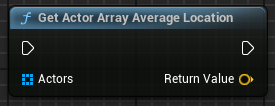
nvm found it

I believe this will also get you the center if it's just two actors
 dark drum
frail pilot
How would I make it so the camera will move in or move out based on the distance...
dark drum
frail pilot
How would I make it so the camera will move in or move out based on the distance...
I would have the camera on a spring arm. That way you would move the spring arm location so it's in the center of the two targets but you can then adjust the spring arm length as well.
 prisma tree
I have this really weird issue where suddenly a variable wouldnt save/load properly. After hours of debugging it seems that variable stopped working. I created a new one just like the old one and it works! I hate stuff like this....how can i know when it will happen again?
This is the savegame actor:

The test bool is the new one that works and the desrtintrotext is old one and doesnt save
The variables are identical in my savegame blueprint:


 manic vessel
What is the best way to have a base actor that can be either a skeletal or static mesh. Currently I have one for each and thought I would try to combine it on to a single base actor, It works But I noticed the root is not the mesh 😦 and any other additions in the child actors wont be attached to it.

 crisp sandal

how can i make sure my player doesn t fall threw the map when respawning
fixed it dunno if this is the correvt way tho
 gentle urchin
manic vessel
What is the best way to have a base actor that can be either a skeletal or stati...
gentle urchin
manic vessel
What is the best way to have a base actor that can be either a skeletal or stati...
Setroot?
Cant you do that dynamically?
manic vessel
Nope cant be done in BP. I talked it out with GPT and decided to abandon this method.
gentle urchin
Bypass it and spawn replacement actors of the same class 😆
crisp sandal

how can i set the die location but at the same time reload the world ? so the dead enemies come back
 little moat
Can someone help me with doing a line trace?
gentle urchin
manic vessel
What is the best way to have a base actor that can be either a skeletal or stati...
you can specifcy component attachment tho
little moat
gentle urchin
you can specifcy component attachment tho
I'm trying to do a line trace with a 3rd person character and from my AI so I can't use the camera
And honestly I'm clueless how to do a line trace in the right place
Like in front of the character
gentle urchin
GetActorLocation + GetActorForwardVector
little moat
gentle urchin
GetActorLocation + GetActorForwardVector
Tried
little moat
 little moat
Oh.
gentle urchin
you want to multiply the entire direction with a length unit
little moat
So I just split it?
 little moat
But wouldn't it now multiply xyz
 little moat
Yes
little moat
What should I go from? I don't have a camera

 little moat
gentle urchin
dont really need to cast to NPC BP but whatever
little moat
gentle urchin
dont really need to cast to NPC BP but whatever
Oh yeah true
 little moat
 little moat
Sorry I'm a bit tired
little moat
little moat
Sorry I'm a bit tired
Fortunately nicotine exists
little moat
gentle urchin
makes no sense
Yup
gentle urchin
before multiplying


 maiden wadi
Multiply 500
little moat
StartTrace, StartTrace + Camera->GetForwardVector() * 500.f

const FVector StartTrace = Camera->GetComponentLocation();```LOL
little moat
This is what I use for my cpp
little moat
Wait what
gentle urchin
yees
gentle urchin
multiply the direction with a distance
little moat
FINALLY
gentle urchin
maiden wadi
Multiply 500
you're eyes are sharper than mine
didnt even consider it being a + xD
 maiden wadi
😄 Been staring at a lot of vector code lately. Been messing with geometry script stuff.
little moat
gentle urchin
didnt even consider it being a + xD
Yeahh neither did I
little moat
gentle urchin
you're eyes are sharper than mine
Thanks a lot tho
Now I just have a question
Is tracing a valid option for npcs detecting obstacles? Or is there some other system?
I wanna detect moving things so line trace works but I thought AI could have some built in mechanic for it
maiden wadi
Obstacles for what?
little moat
maiden wadi
Obstacles for what?
I mean like if my npc is walking and then another character goes in front of it
I want the npc to stop
maiden wadi
Unsure on the stopping part. Most times to have AI avoid each other you'll use the detour crowd control and they'll just steer around each other.
little moat
maiden wadi
Unsure on the stopping part. Most times to have AI avoid each other you'll use t...
Is that a plugin or some built in thing?
shy matrix
little moat
I mean like if my npc is walking and then another character goes in front of it
There is no inbuilt tool for this afaik . But a trace should work
little moat
I mean yeah avoiding would be smarter tbh
But this is a prototype
I'm tired of being a perfectionist
Still I wonder if line trace is a viable option
maiden wadi
I haven't used it much but it's engine default. If memory serves it's mostly making their ai controller a detour controller maybe. There are a bunch of guides on it though, it's pretty common.
 shy matrix
maiden wadi
I haven't used it much but it's engine default. If memory serves it's mostly mak...
shy matrix
maiden wadi
I haven't used it much but it's engine default. If memory serves it's mostly mak...
Detour is for avoidance. And you need a lot of manual tweaking to get it to work right. If you want to stop and repath a trace is good enough in my experience
You can try asking in #gameplay-ai though
little moat
shy matrix
Detour is for avoidance. And you need a lot of manual tweaking to get it to work...
So it should be a viable option too?
shy matrix
If you want your agents to avoid each other while continuing their original path yes
If you want them to stop when they face an obstacle then not
maiden wadi
shy matrix
Detour is for avoidance. And you need a lot of manual tweaking to get it to work...
I know that it is for avoidance. I literally said that.
Unsure on the stopping part. Most times to have AI avoid each other you'll use the detour crowd control and they'll just steer around each other.
little moat
shy matrix
If you want them to stop when they face an obstacle then not
I ment that is tracing a good option for that
shy matrix
maiden wadi
I know that it is for avoidance. I literally said that.
```Unsure on the stoppin...
Sorry man I missed it
maiden wadi
If you want them to just stop moving if something is in front of them traces are fine. But it's a complex issue. What happens when two things walk in front of each other at the same time, facing each other? Which one moves out of the way to avoid a standstill? You also add on code to maintain a state machine of stopping and moving.
With avoidance you simply set it up, and let them go
If you would like avoidance more, it's less work. If you want the stopping, there are a lot of issues to solve.
little moat
Oh yeah true
I could stop the movement then add a delay and re enable it again and choose a different path
Like in GTA V
Npcs usually stop for a while then they change path
Or run you over...
 last jacinth
if i move too far from where the player starts i get this error... anyone can help with this?
 shy matrix
last jacinth
if i move too far from where the player starts i get this error... anyone can he...
shy matrix
last jacinth
if i move too far from where the player starts i get this error... anyone can he...
share ze code
little moat
Can someone help me understand why is this not working?


I want the npc to move to a new location if it hits something and then continue moving to it's original destination
last jacinth
shy matrix
share ze code
so, i'm using Openland for landscape deformation this is where the code seems to break
 shy matrix
last jacinth
so, i'm using Openland for landscape deformation this is where the code seems to...
shy matrix
last jacinth
so, i'm using Openland for landscape deformation this is where the code seems to...
where are you calling this function?
last jacinth
here, its used to move a render target

it runs just fine, but when i get too far from the start location it breaks, if i go back it runs again, its confusing :/
shy matrix
i dont understand your setup. where is this function running? on the player? on another actor? need context
is it called on tick? on a specific event?
last jacinth
shy matrix
i dont understand your setup. where is this function running? on the player? on ...
its called on tick, i didnt make this, i just took it from the Openland plugin, its open source, this is the link for the plugin
https://github.com/GDi4K/unreal-openland
i'm using it to make footprints in the desert and i honestly don't know how it works exactly but it uses a render target and it moves it with the player i think
GitHub
Landscape AutoMaterial for UnrealEngine with some related Tools for RVT, etc. - GDi4K/unreal-openland
and this is the effect i get from it
 chilly sundial
dawn gazelle
You'd need to change the "Object" collision responses on the colliders themselve...
chilly sundial
dawn gazelle
You'd need to change the "Object" collision responses on the colliders themselve...
For some reason, this doesn't work. I set WorldStatic, WorldDynamic and Pawn to Ignore, but it still responds...
Also, this breaks the component begin overlap, which I need.
So I'd like to detect an overlap of my character, but it should not respond to a line trace from the character. Is that even possible?
 shy matrix
last jacinth
its called on tick, i didnt make this, i just took it from the Openland plugin, ...
shy matrix
last jacinth
its called on tick, i didnt make this, i just took it from the Openland plugin, ...
the only thing that comes to mind is something related to world partition and getting to a point where somehow the cameramanager is despawned (even if i dont even know if that is possible). Are you using world parition?
last jacinth
shy matrix
the only thing that comes to mind is something related to world partition and ge...
i think so, since i'm starting with the open world map just changed the landscape isn't by default enabled? but if the camera manager is despawned why i still play normally? it just stops making footprints
but the map isn't large its only 2km
shy matrix
as said, to me is quite weird that camera manager despawns because it should be always relevant. but, you could try increasing the loading range and see if that makes a difference
also check that the camera manager moves with your player while playing
last jacinth
shy matrix
as said, to me is quite weird that camera manager despawns because it should be ...
how can i check if it moves with the player?
shy matrix
if for some reason it is detached from the player and stays in one place, then perhaps it is picked up by WP and destroyed
last jacinth
i was watching the coordinates for the camera manager and they change while i move, so it is moving
shy matrix
last jacinth
how can i check if it moves with the player?
play the game in editor, move around a bit, shift+F1 to get mouse control and check in the outliner that the position of player and camera manager are the same
shy matrix
last jacinth
i was watching the coordinates for the camera manager and they change while i mo...
ah ok good
then i dont know 🙃
last jacinth
shy matrix
ah ok good
do you think Hlods have anything to do with this maybe?
last jacinth
the numbers don't seem to match, did we find the culprit?


 frosty heron
last jacinth
the numbers don't seem to match, did we find the culprit?
frosty heron
last jacinth
the numbers don't seem to match, did we find the culprit?
Why would they match? Also controller doesn't really exist physically. Sure you can specify location on controller, but they kinda meaningless
last jacinth
shy matrix
but it does sound like a WP-related issue
WP = world position?
frosty heron
if you want to check the position of your player then get the player's physical representation. Normally a pawn.
shy matrix
last jacinth
WP = world position?
partition 🙂
frosty heron
WP for world partition maybe
last jacinth
now how can i disable it, and check if this is the cause?
shy matrix
i think it would be easier to just increas the loading range a lot if it is just to debug
hold on

world setting tab (Window->WorldSetting if its not visible already)
last jacinth
okay its working!!
shy matrix
now you can see i didnt activate windows....
last jacinth
i increased the loading range to cover the whole landscape and it works
shy matrix
last jacinth
i increased the loading range to cover the whole landscape and it works
yep good, then the camera manager can be despawned by world partition
somehow you got a big offset between player position and the camera
last jacinth
won't this hit performance hard after i populate the world though?
last jacinth
lol i don't know how to do that
shy matrix
well something is causing it. try to look into your character setup, other possible bps or code in general that is setting camera position
you gotta dig in
last jacinth
aside from all this, what other alternatives should i look for, to make footprints?
@shy matrix also thank you very much for the help
shy matrix
last jacinth
aside from all this, what other alternatives should i look for, to make footprin...
wouldnt know. I remember a plugin from prismatica that mmmaybe could do for you but honestly not my cup of tea
shy matrix
last jacinth
<@477469927264092164> also thank you very much for the help
no worries!
last jacinth
shy matrix
wouldnt know. I remember a plugin from prismatica that mmmaybe could do for you ...
i'll check that out thanks!
last jacinth
shy matrix
yep good, then the camera manager can be despawned by world partition
actually, its not the camera manager that gets despawned, its the blueprint that moves everything together, so i just need to figure out a way to make it follow the player 🙂
shy matrix
last jacinth
actually, its not the camera manager that gets despawned, its the blueprint that...
ha, it sounded weird that the camera manager would be setup to be spatially loaded by default indeed
last jacinth
is there anyway i can check an actor to be persistent no matter what?
last jacinth
shy matrix
IsSpatiallyLoaded on the actor in the Streaming category
that did not fix it unfortunately
shy matrix
you mean the bp is still loaded but the issue persists?
aaanyway, id focus more on that offset between camera and player
it cant be good, unless you mean to have it
last jacinth
shy matrix
aaanyway, id focus more on that offset between camera and player
its the default unreal 3rd person blueprint i doubt its a mistake
 crisp sandal
little moat
Can someone help me understand why ai move to isn't working?
crisp sandal
little moat
Can someone help me understand why ai move to isn't working?
why won t you make a behaviour tree?
little moat
crisp sandal
why won t you make a behaviour tree?
Can behavior tree avoid dynamic obstacles?
And also this is a task on my behavior tree
crisp sandal
little moat
Can behavior tree avoid dynamic obstacles?
yeah
little moat
crisp sandal
yeah
Mind telling me how?
crisp sandal
little moat
Mind telling me how?
it detetcs the objects and move around them in a nav bounds volume
little moat
crisp sandal
it detetcs the objects and move around them in a nav bounds volume
Yeah but how
crisp sandal
little moat
Yeah but how
can hardly show have i have done it since it is quite some code lol
little moat
crisp sandal
can hardly show have i have done it since it is quite some code lol
yeah but you kinda need a task for a behavior tree
I'm doing my code in a task for the bt
frail pilot
fiery swallow
I believe this will also get you the center if it's just two actors
Alright I’ll try it out
 fading snow
Hey guys, been playing around with translucent sort priority in a top-down 2D game and having trouble with tile maps. I have a map with translucent material, and I feel like I should be able to set each map layer's sort priority...but the setting isn't there. So, my player character is always in front of everything on the map. USUALLY that's what I want, except when, for example, the player walks under an arch that's "above" him. Can this not be done? Do I need to take those elements out of the map and make them regular sprites instead in order to control their sort order?
 jolly jolt
How to get the blue dot position in order to adjust the "Narrator:" top padding?
 frail pilot
Alright I’ll try it out
frail pilot
frail pilot
Alright I’ll try it out
Alright this achieved the same effect as my normal code, so I'll just try messing around and seeing what'll happen to get the desired effect
 young blaze
Why does this print "Blueprint" and not the assets actual class like Character for example?
 crisp sandal

do you guys see any problem in trying to save the location wanna spawn the player there when he dies
 faint pasture
crisp sandal
do you guys see any problem in trying to save the location wanna spawn the playe...
faint pasture
crisp sandal
do you guys see any problem in trying to save the location wanna spawn the playe...
Are you sure open level doesn't kill this object?
your code might end right there
faint pasture
crisp sandal
do you guys see any problem in trying to save the location wanna spawn the playe...
You should do that in gamemode, there's a function to select where to spawn the players pawn at
override that
Even if your current code works, it's just moving the playercontroller. Probably not enough
crisp sandal
faint pasture
Even if your current code works, it's just moving the playercontroller. Probabl...
but how should i do that then simply don t understand why it can t get the vetcor when it is saved and how does gamemode then work?
faint pasture
crisp sandal
but how should i do that then simply don t understand why it can t get the vetco...
Loading the level probably gets rid of everything, including WBP_DeadScreen which is trying to do stuff after loading the level
either that, or your code works, which only moves the playercontroller. PlayerController is not Pawn
crisp sandal
faint pasture
Loading the level probably gets rid of everything, including WBP_DeadScreen whic...
yeah it removes the deadscreen that is true but how does gamemode then work cuz been trying this for the whole day😅
faint pasture
crisp sandal
yeah it removes the deadscreen that is true but how does gamemode then work cuz ...
do you have a custom gamemode class?
crisp sandal
faint pasture
do you have a custom gamemode class?
probably not
faint pasture
Do that first and set it to be used in Project Settings. in the gamemode class you can choose what pawn players should have and theres functions for choosing where to start etc
then you won't need the pawn on the map, you can place a start spot
gamemode is what spawns the pawn for a player. By default it spawns them at a PlayerStart actor
crisp sandal
 faint pasture
crisp sandal
faint pasture
crisp sandal
now upen that Gamemode BP up and look at the functions you can override
crisp sandal
 faint pasture

 faint pasture
click the spot where it says override
crisp sandal
 maiden wadi
jolly jolt
How to get the blue dot position in order to adjust the "Narrator:" top padding?
maiden wadi
jolly jolt
How to get the blue dot position in order to adjust the "Narrator:" top padding?
You need C++ to get font sizings which you then need to convert with the widget's scale if any. That way you can get the pixel height of a single row, based on it's largest font sizing by iterating over the charcters and their styles before the wrapping break. It's not fun, and it's really prone to issues.
That said. What I recommend instead is simply using same font and sizing for name and text so that it lines up anyhow. You'll get a lot of UX issues with multiple font sizes. It's much easier for people with vision or reading disabilities to follow along with same font sizes even if they're bolded in some parts, or different colored than it is to follow different sizes. And there are several cases for aesthetics as well.
jolly jolt
I've tried by working with FSlateFontMeasure but I guess I will go for the second option
 maiden wadi
jolly jolt
I've tried by working with FSlateFontMeasure but I guess I will go for the secon...
maiden wadi
jolly jolt
I've tried by working with FSlateFontMeasure but I guess I will go for the secon...
Yeah, you would need to get every decorator that the text in your rich text is using. Then you would need to iterate the rich text block's datatable of styles for those decorators to pull their FSlateFontInfo. Then iterate through those font infos to get the largest measure.
This will mostly work, except for the text wrapping. You need to filter any decorating styles that characters ONLY on the top line are using.
jolly jolt
Yea it will be very expensive in a performance sight
Thank you for helping me figure it out
 remote schooner
https://youtu.be/6xOTYojAjG4?si=5bzD0Wj-2sN82rUS
Anyone have a theory as to why modifying data for my interactable actors would work on cubes and wouldn't on a door?
 maiden wadi
remote schooner
https://youtu.be/6xOTYojAjG4?si=5bzD0Wj-2sN82rUS
Anyone have a theory as to why...
maiden wadi
remote schooner
https://youtu.be/6xOTYojAjG4?si=5bzD0Wj-2sN82rUS
Anyone have a theory as to why...
First thing that comes to mind is construction script, or runtime added components on the door.
 rose vortex
remote schooner
https://youtu.be/6xOTYojAjG4?si=5bzD0Wj-2sN82rUS
Anyone have a theory as to why...
rose vortex
remote schooner
https://youtu.be/6xOTYojAjG4?si=5bzD0Wj-2sN82rUS
Anyone have a theory as to why...
idk but ironically i just made a functional door lastnight
maiden wadi
Doors are such interesting things in gameplay code when you also add multiplayer. They're so.. simple. Yet so much complexity issues arise from them in networking code.
 restive snow
how do i get RenderTexture2D on my landscape?
remote schooner
maiden wadi
First thing that comes to mind is construction script, or runtime added componen...
Construction script is empty, there is no code inside the actor
Techinacally after a bit of testing i came to a conclusion that this is happening on all components that are added via blueprint vieport, like inside blueprint. If i add a component via level viewport, it works just fine
shy matrix
little moat
Can someone help me understand why ai move to isn't working?
I think your best bet is the visual logger
 static turtle
Hi everyone,
I'm new here and running into a strange problem with Unreal Engine's Animation Blueprint. During runtime, my state transitions seem to skip the set durations entirely, but they still transition to the correct state. I’ve been scratching my head trying to figure this out.
I’m not sure if this is a bug or something I might have missed in my setup. I’ve linked a video showing the issue in action. Any insights or suggestions would be greatly appreciated!
little moat
shy matrix
I think your best bet is the visual logger
Wdym visual logger
little moat
static turtle
Hi everyone,
I'm new here and running into a strange problem with Unreal Engine...
Probably because you did animation select
dawn gazelle
young blaze
Why does this print "Blueprint" and not the assets actual class like Character f...
Because you're using a soft object reference which means you're referencing the blueprint asset. You want to use a soft object class reference
shy matrix
little moat
Wdym visual logger
It's a built in tool to debug various systems. It captures a lot of logs and show them in a friendly way. You can enable/disable categories to filter for what you're looking for (eg. Pathing and NavSys). Just google it. It there is an issue with moveto node some warning is most likely logged there
Friendly I mean visually, for most things. But you also can check written logs of all sorts thete
dawn gazelle
chilly sundial
For some reason, this doesn't work. I set WorldStatic, WorldDynamic and Pawn to ...
Ok, you see how it says "Object Type" "World Dynamic"? That's the type of object and influences how the object will respond to "Object Type" traces. If you're tracing for objects of type "World Dynamic" then this object would respond to it.
static turtle
little moat
Probably because you did animation select
well you can see it switches correctly it just doesn't do the duration. there is no way for it to actually switch to and from walking without that state machine. should i not be using an int to set the name and then using the name to switch the state?
static turtle
little moat
Probably because you did animation select
it also seems to work fine with my other animation blueprint for a bike to spawn and its referencing the same exact variable but that one does the animation duration blend when switching which is the weird part
 quiet forge
Are timelines not useable in widgets? (sry, not sure if this is BP or UI related...)
dawn gazelle
quiet forge
Are timelines not useable in widgets? (sry, not sure if this is BP or UI related...
No. Timelines are actor components.
quiet forge
Oh, I see, is that why I couldn't use them in functions?
or is that a different reason? Oh and thank you for the fast response.
quiet forge
I see ^^ thank you so much guys!
 quiet forge
I do not understand. If a variable equals "false", you set it to "false"
Also, do you really need that boolean if you have the Event "On See Pawn" already?
If "he" is not sensing the player, the event is not fired? Did you check that? And who is calling this event btw?
Also you should avoid using Tick for whatever you are trying to do
Try to do things Event based that only should happen once a certain time
lunar sleet
Also don’t use pawn sensing, use ai perception
 vital cave
Anyone ran into problems with meta sounds and sound mix class override? The sounds turn off, dont turn back on though.
lunar sleet
vital cave
Anyone ran into problems with meta sounds and sound mix class override? The soun...
vital cave
lunar sleet
<#221798819753361408>
Ah, thanks for pointing me
 tulip bough
what would be a simple way to establish whether or not a wall is climbable?
Currently my character can climb everything and I'd like to be able to mark objects climbable or not.
I tried box colliders but they mess with the mantling system. Is there a simpler way to mark if an object/wall can be interacted with?
dawn gazelle
You can use tags, or PhysicalMaterials (basically letting you define materials as climbable)
frosty heron
quiet forge
Are timelines not useable in widgets? (sry, not sure if this is BP or UI related...
You can use the widget designer timeline
If you need alternative. It does the same job.
 old cypress
Hey everyone! Did anyone encountered a weird bug (?) in UE5 where connections get randomly removed in a file you didn't even touch? For example today after restarting the computer, on the next UE5 editor launch, all the windows that were open in the previous session were closed. All the code stopped working as intended. After investigation I found that in one of the functions in a static library blueprint had some connections removed (including the execution), so I had to restore them. I look at the git history of the file and no changes were made for like 2 weeks to that file, so it definitely wasn't me.
young blaze
dawn gazelle
Because you're using a **soft object reference** which means you're referencing ...
thanks for the explaination
 pulsar osprey
old cypress
Hey everyone! Did anyone encountered a weird bug (?) in UE5 where connections g...
pulsar osprey
old cypress
Hey everyone! Did anyone encountered a weird bug (?) in UE5 where connections g...
have you been using live coding at all?
old cypress
pulsar osprey
have you been using live coding at all?
nope, don't really have the need for it
 outer sparrow
Excuse me, can I ask for some help?
Im doing a character select BP
3 characters to choose from

The chosen var is 0 by def until I choose
 outer sparrow
3 characters to choose from
outer sparrow
outer sparrow
3 characters to choose from
My Game Mode BP which changes the def pawn (currently none)
outer sparrow
outer sparrow
And my widget buttons bp
The thing is that despite clicking Paladi or Elf (not Wizard) it will always think I chose Wizard
Basically, Chose var never changes from 0
dawn gazelle
outer sparrow
Calling "Open Level" essentially removes every object you may have loaded, including your gamemode.
faint pasture
Game mode isn't surviving the open level
Simplest approach to what you're doing is to put the char selection data in GameInstance. That persists.
outer sparrow
All right thanks!
old cypress
pulsar osprey
have you been using live coding at all?
wait, I just noticed that all editor settings were reset, so live coding got enabled. Is it the reason?
pulsar osprey
old cypress
wait, I just noticed that all editor settings were reset, so live coding got ena...
not unless you're using it
if you dont do any c++ it has no use
i wouldnt disable it regardless
old cypress
pulsar osprey
i wouldnt disable it regardless
why's that?
pulsar osprey
disabling live coding enables hot reload which is infinitely worse
old cypress
I disabled it because I feel like without it after compilation of my code, I know there won't be any weird glitches
pulsar osprey
you close the editor to compile right?
old cypress
I mean, I noticed that if I change anything in my headers I usually have to restart the editor
pulsar osprey
if you don't you either are using live coding or hot reload
hot reload is known to corrupt blueprints
old cypress
pulsar osprey
hot reload is known to corrupt blueprints
wow, I didn't know that
pulsar osprey
live coding can if you have reinstancing enabled and arent careful
if you disable reinstancing, live coding is pretty safe for changing minute things to test them
still have to close editor to properly compile though
old cypress
OK, I'll give live coding a go
pulsar osprey
frail pilot
I'd handle combat controls and playing the animations in the third person BP correct?
Alrighty
Thanks
old cypress
pulsar osprey
thanks for the info. Although I'm surprised that live coding is the preferred methond of compiling
I kinda got an impression that its' purpose was to make compilation time lower
which is not really an issue for me, since the project compiles fast enough with the hot reload
 proven loom
why would a dynamic multicast delegate not be hit in blueprints even though it's being called in C++?
    DECLARE_DYNAMIC_MULTICAST_DELEGATE_OneParam(FCharacterDied, ABastionCharacter*, DeadCharacter);

    UPROPERTY(BlueprintAssignable)
    FCharacterDied OnCharacterDied;

    UFUNCTION(NetMulticast, Reliable)
    void Multicast_JustDied();
void ABastionCharacter::Multicast_JustDied_Implementation()
{
    OnCharacterDied.Broadcast(this);
}

when i put my breakpoint on OnCharacterDied, there's nothing assigned to it. it's like the BindEvent is not happening, but I've confirmed it's being hit in BP
frosty heron
Laura's (Mostly) Unreal Blog
Gain months’ worth of Unreal C++ experience in a single article.
Is the delegate binded in the target machine?
Probably much to do with the networking logic
@proven loom try binding and broadcast without multiplayer?
Then you will know if the delegate simply wasn't binded into target machine
proven loom
frosty heron
Probably much to do with the networking logic
it's standalone
i made it a function and a BlueprintImplementableEvent and now the issue is gone 🙄
not sure why the delegate was not being bound
frail pilot
What would I do to make it wait for the animation length before allowing other animations to play on button press as well as going back to the idle animation instead of freezing at the end of the animations and no longer playing the idle and walk animations?
 maiden wadi
proven loom
not sure why the delegate was not being bound
maiden wadi
proven loom
not sure why the delegate was not being bound
That == check looks sus.
proven loom
maiden wadi
That == check looks sus.
it was getting hit 🤷♂️
maiden wadi
The == or the code after it?
proven loom
after
maiden wadi
You have the same check in the BIE? What's it checking against?
Cause in the above image, It's asking if something == nothing.
So unless you passed the bottom pin a null pointer, it can't run true.
proven loom
😮
i don't know how i missed that! thank you! i'm using a BlueprintImplementableEvent now and dont' feel like going back but i'll keep it in mind for next time!!
maiden wadi
proven loom
i don't know how i missed that! thank you! i'm using a `BlueprintImplementableEv...
Yeah. 😄 BIEs are nice. But do be careful using them. They can very quickly be anti patterns.
proven loom
for sure! makes sense. i really only used it this time to get over this problem and move on
maiden wadi
A good example is, you need a widget, the character, some manager, etc all to do something when the character dies. Using a BIE, the character has to know about all of those things rather than those things being able to simply bind the delegate from the character.
maiden wadi
frail pilot
What would I do to make it wait for the animation length before allowing other a...
You need some sort of state machine or variable, or ability system. GAS for instance could run an ability with inputs that would play the animation and finish the ability when done, you can't rerun it until it finishes and other things could interrupt it using tags and such. You could also make a state machine that enters that area when you start an anim and won't allow you to leave or enter it until it's done. Or last you could maintain a simple boolean of something like "is playing animation" and check it before allowing another, and unset it on anim finished.
frail pilot
Ok, so would I put my animations (the boxing ones) into the same state machine as the movement state machine?
Wait nvm I'm using an animation BP for the movement
Not a state machine
maiden wadi
State machine isn't always animations specifically. It's just a tree of logic that allows you to enter a different state based on conditions.
 iron idol
can you not use plane cut on models? I made a cut but when i exit modeling mode the cut is no longer there. When I go back into plane cut it seems to remember where I cut it. Am I missing something?
frosty heron
frail pilot
What would I do to make it wait for the animation length before allowing other a...
You essentially forfeit your anim blueprint when you use the play animation node.
Look into montages instead for animation like firing or slashing
lunar sleet
iron idol
can you not use plane cut on models? I made a cut but when i exit modeling mode ...
Hit accept changes before you exit it
frosty heron
iron idol
can you not use plane cut on models? I made a cut but when i exit modeling mode ...
You are probably talking about fracture tool and you only view the representation of the model when it's fractured.
iron idol
I did hit accept. And I'm talking about the plane cut feature in modeling mode
lunar sleet
Also make sure if you select keep inputs that you move the old version away
Beyond that I would just restart UE 😀
iron idol
I have 🫤. It should be working. like when i got back into modeling mode the cut is there. i try to cut again, accept again and exit back out and there is no cut.
its as if the engine knows I made a cut but is not applying it
Or at the very least the cut is there, but it only shows that its cut in modeling mode.
 lone garnet
Is there a way to measure distance between 2 seperate mesh component sockets. So for example a gun with a socket on its iron sight, then on a separate red dot mesh with a socket on its red dot. Measuring the distance between the socket on the red dot and the socket on the gun iron sight. This is so I can adjust the gun from looking down irons to looking down the sight with a simple offset
cannot use world space either
frosty heron
lone garnet
cannot use world space either
why not?
Math totally not my thing, but maybe you can just subtract the 2 component location then get it;'s length
try using the result to offset your view
lone garnet
Cant use world space because changing the direction im looking impacts the point of measurement for some reason. Meaning the slight changes make the sight not centred.
Ill see what your suggestion reveals
Im assuming you mean world location?
lone garnet
The issue i have mainly if i dont constantly tick its offset, is that the offset is a tiny bit different if i look up vs down vs straight ahead.
gentle urchin
Ah ok
lone garnet
I fully dont understand why this isnt a common problem for fps games. I have no idea how they dynamically sdjust based on sight
shy matrix
iron idol
I have 🫤. It should be working. like when i got back into modeling mode the cut...
Did you maybe cut an engine shape/mesh?
 eager thicket
Is it possible to do something like a "named reroute" on this? I basically want to clean up my code from this node without explicitly creating a variable

not a reroute but something that's functionally similar to a named variable
lone garnet
@frosty heron Result is the same as what I had previous. I should elaborate as well now I think about it. The issue is that I have the adjustment on tick to account for the slight differences in offset for a more accurate position, but alongside a procedural recoil plugin, the tick adjustment is causing issues for the procedural recoil. So Im mainly wondering how I can have the sight offset not happen on tick
frosty heron
eager thicket
Is it possible to do something like a "named reroute" on this? I basically want ...
never heard of anything like a named reroute but why does it have to be messy like that?
Make more reroute node to clean up
 dry sleet
eager thicket
Is it possible to do something like a "named reroute" on this? I basically want ...
dry sleet
eager thicket
Is it possible to do something like a "named reroute" on this? I basically want ...
If you don't have any latent actions that need to be in the Event Graph -- just make a local variable.
It's what they're for.
Named reroutes in other graphs end up being pretty much the same thing, the overhead is 0.
 last ingot
Hello, I'm trying to make like a circular fade in and out transition using widgets, except I want to use my own mask. The issue I'm currently facing is that I created the material and the opacity mask is working to the shape I wanted, and is controllable with a parameter, but when scaling down the image it scales to the top left rather than center wise.
this is the material

and this is how it appears at full scale

scaling it down goes to the top left rather than center, help?

 trim matrix
I'm not exactly an expert with materials but I believe from past experience the centre point will be the width and height halved. If you're using 0,0 that might explain why it's going to the top left (I believe that's considered the origin)
last ingot
trim matrix
I'm not exactly an expert with materials but I believe from past experience the ...
Yeah, I already done that
 feral parrot
Hi guys! Does anybody know how to render to different stencils at the same time?
 rare gale
 tidal marlin
Hello! How do I find out the volume of each sound in a scene in Unreal Engine?
crisp sandal
is there a way to clean 100+ bps nodes all at once have depricated movement in there from the free enmies pack for ue5
 dense schooner
tidal marlin
Hello! How do I find out the volume of each sound in a scene in Unreal Engine?
dense schooner
tidal marlin
Hello! How do I find out the volume of each sound in a scene in Unreal Engine?
Use this console command au.3dVisualize.Enabled 1
tidal marlin
dense schooner
Use this console command **au.3dVisualize.Enabled 1**
I mean in blueprint at runtime.
 ionic ore
how come i cant do this compared to the other picture?


 lyric kelp
Hello,
I have created a Widget for my Archviz Project
I would like when i click on one button to apply a trigger volume to hide others objects.
I would like to know how to set my trigger volume.
In the second ScreenCapture i duplicated an already existing event. The things is the section view in this case is depending on a box (poi selected). What i would like is to avoid chosing a POI and assign an existant trigger volume in my viewport
Any suggestion/help?
thanks

 ionic ore
how come i cant do this compared to the other picture?
ionic ore
ionic ore
how come i cant do this compared to the other picture?
figured it out
 dense schooner
lyric kelp
Hello,
I have created a Widget for my Archviz Project
I would like when i click...
dense schooner
lyric kelp
Hello,
I have created a Widget for my Archviz Project
I would like when i click...
So you want to hide and unhide objects in the level when selecting a button?
lyric kelp
exactly actually its working
poi needs to be set on POI Filter then following instruction once you clicked on the POI you can activate section view mask
 lyric kelp
i'll try it,
in case my meshes are bigger than the size on a floor (exterior structure) i guess then all the mesh will be ihidden?
that's the actual event when i click on the image for section view.
I thought creating a new poi called POI_section
Once you select this type of poi you only have to choose the trigger volume and then may be just add a not visible material in game but once you click on the widget it calls the trigger volume and mask all the object inside the trigger volume
(trigger volume is linked with a MPC_SEctionMask material set on all my object)
dense schooner
lyric kelp
i'll try it,
in case my meshes are bigger than the size on a floor (exterior str...
Yes, it will hide all actors and mesh components together
dense schooner
lyric kelp
that's the actual event when i click on the image for section view.
I thought cr...
Using a material is another solution, the solution that I suggested is much simpler and hide the objects immediately
So in that solution you select the level 1 button for example, you get all actors with Level1 tag and unhide them after that you get all actors with Level2 tag and hide them, same for Level3 and Level4
lyric kelp
perfect, i'll try it asap, and come back to you, thanks!
 marsh sonnet
Hey y'all! Is there an easy way, not using tick, to run one node (an animation thing, using paperzd), until the character movement is no longer falling, and THEN run the other node? Without a timer, something that I can put in there to temporarily watch it until it changes, then stop watching?
This is for an enemy: I want it to not implement the "HasDied" logic until it finishes the animation that pushes it across the screen
 spark steppe
ionic ore
how come i cant do this compared to the other picture?
spark steppe
ionic ore
how come i cant do this compared to the other picture?
why on earth would you do that in the first place?
hard coded asset paths are prone to cause issues at some point
ionic ore
debug
spark steppe
you can just pick the class from the dropdown?!
ionic ore
mod
spark steppe
or promote the softclass to a variable
spark steppe
is that for your own game or another game?
ionic ore
another
spark steppe
then i would bug them about providing a decent modding API
because they clearly don't
 austere scarab
I have been working on an equip function for my character and for the life of me I can not figure what is wrong. When I press my equip key, the anim montage twitches and then cycles through its animation but is in the corect position once its played through its cycle. my character changnges animations properly as well to idle with weapon, walk with weapon or no weapon etc. Its just the equip and unequip anim montages that are the issue. I put this together based on some tutorials and forum posts, so I am sure that's the reason why its so jank. Any words of wisdom would be appreciated


 proven loom
maiden wadi
That == check looks sus.
proven loom
maiden wadi
That == check looks sus.
following up on this: yeah BlueprintAssignable is now starting to break randomly in other blueprints. i started a new project and wanted to lean heavier into blueprints but i'm going to pivot back to cpp since it's more reliable. i made sure that the comparison was correct in this case and the blueprints were still not getting hit with BlueprintAssignable. so that's that
maiden wadi
proven loom
following up on this: yeah `BlueprintAssignable` is now starting to break random...
I would maybe check up on that. In the years I've done this, I use delegates a ton. I'm heavily against BIEs for a lot of things unless it's specifically only a hook for the child class. But I do a lot of UI work, so it most often is necessary to have a delegate. If your delegates are not running then simply put they are not bound to the object broadcasting them. Either you bound to the wrong object, broadcast on the wrong object, or you unbound the delegate somehow on accident such as an UnbindAllEvents call.
 hushed panther
I have been trying to create an inventory system for my game for some time now. I have created a structure to hold all of my variables. in my inventory system I can double click on the slot to equip the item if equip able. I can alos pick up enemies by clicking a button and creating a line trace. When I equip a wepon I attach it to my character. But I dont want to be able to pickup an item thats already in my inventory and equiped. I need to know if I can set a variable from my struct in the slot widget to do this. I can post more pics if needed
 frosty heron
hushed panther
I have been trying to create an inventory system for my game for some time now. ...
frosty heron
hushed panther
I have been trying to create an inventory system for my game for some time now. ...
using bool like that is pretty nasty imo
a sword or weapon can be reference and you can just check if it's null to deem that something is equiped or not
Also if you don't want to pick up an item that is already in your inventory or equipped, then just a function for that.
IsItemEquipped or IsItemInInventory.
lyric kelp
@dense schooner works wonderful thank you very much, you legend
frosty heron
I would refactor what you have atm. Sword, potion and shield should not be a bool.
hushed panther
Im kinda new so how would I would I check if this instance is in my inventory for the funciton
frosty heron
hushed panther
I have been trying to create an inventory system for my game for some time now. ...
pretty sure everyone would use component as well for inventory. Make it more generic so it works beyond the player character like that. No casting should be needed
anyone should be able to use the inventory so don't tied the code with the player character
well you wouldn't just have 1 item in your game right? So you will need a list (array) of items.
 random schooner
hello I'm completely new to unreal engine or game engines entirely I've been watching a lot of videos and I'm trying to make a "building" mechanic. the goal is to just place basic objects but for some reason every tutorial that i watch i seem to always mess up the line tracing (most recent) and the object mesh wont spawn in general or if i does its off in neverland clipping. any advise would be amazing.
 spiral kraken
Fun fact of the day!
Did you know that if you create a function with a Struct input variable inside of a BP, create a child of that BP, and then try and override that function in the child you will essentially lock that particular struct from being edited (adding, removing, renaming or changing the types of variables), causing the editor to instantly crash out whenever you try and make changes in that struct? I found out the hard way.
Anyone else ever had that issue? Or is my setup just broken?
ALSO, did you know that Unreal do NOT like it when you try and dabble with arrays of text? I also found that out the hard way.
Until next time!
frosty heron
spiral kraken
Fun fact of the day!
Did you know that if you create a function with a Struct i...
Don't use blueprint struct if you do, they are broken and will stay that way
as for arrays of strings, I have no issue with them
not that I used it anywhere right now but in my old project, things work as is
spiral kraken
frosty heron
Don't use blueprint struct if you do, they are broken and will stay that way
Broken in which way? The structs work flawlessly for what I use them for and never had any issues, EXCEPT for that scenario with an override...
I misspoke, it was supposed to be arrays of text hehe. I had to redo like 3 days of work to utilize strings instead of text.. Was troubleshooting for like 2 days straight before I found the issue, UE 5.4 didn't want to add anything to the text arrays, so they always turned out empty
frosty heron
spiral kraken
Broken in which way? The structs work flawlessly for what I use them for and nev...
Blueprint structs broke in many way. It's flawless to unsuspecting victim until they stop working. You can just look up search history in this discord and type blueprint struct.
One of the most common error is unknown struct error, and some error leads all the struct values to be defaulted. Things break easily especially when you add or remove a variable from your bp struct definition.
The best way to use struct is to declare them in C++, they don't come as a minefield. I was a victim of bp struct my self and had to re-do a lot of my work.
Switched to struct declared in cpp and I never have to look back.
proven loom
maiden wadi
I would maybe check up on that. In the years I've done this, I use delegates a t...
yeah i'm unsure why they're breaking. to be clear, i've also used them extensively in my previous project with a client/server infra. this new project is a standalone project.
interestingly, completely by chance not intended, i happened to fix one of the broken cases with this code:
    AsyncTask(ENamedThreads::GameThread, [this]()
    {
        OnCharacterDied.Broadcast(this);
    });
so maybe the issue is that the broadcasts are not executing on the game thread... for some weird f'ing reason
 native canopy
why the gun not attach to the hand when i disable simulate physic? i already use AttachComponentToCOmponent


if i diasble physic from obejct detail the gun attached fine
frail pilot
Ok I've made two iterations of how to make a movement system by changing a string name then increasing the max acceleration but none of them seem to work. It only prints a single string and doesn't go through them. Am I overcomplicating this?

 frosty heron
frail pilot
Ok I've made two iterations of how to make a movement system by changing a strin...
frosty heron
frail pilot
Ok I've made two iterations of how to make a movement system by changing a strin...
don't do this
frail pilot
How come?
frosty heron
using string is a terrible idea
frail pilot
Ideally this would be for a boxing game, so I wanted to have three different movement options
Oh ok
I mean I am starting to see that currently
frosty heron
GameplayTags or Enum
iron idol
is there a node for spawning in a static mesh?
frosty heron
iron idol
is there a node for spawning in a static mesh?
You want to spawn a static mesh component or a static mesh actor that has a static mesh component?
iron idol
idk. just a straight up static mesh. i've realized that i can prolly make an actor BP, add the mesh to the BP and spawn that though
frosty heron
if you don't need anything custom, just use the SpawnActorNode and spawn a static mesh actor
if you want to spawn a static mesh component from an actor , you can use the add static mesh component node
iron idol
Yea, I tried that at first and the mesh wasn't showing up. It's fine though, like i said I just made an actor BP with the mesh.
 limpid thorn
hey guys i have a question
dawn gazelle
Ask away, someone may be able to answer.
limpid thorn
how do you make a charecter chase you for my horror game
 dawn dragon
BRO I JUST DID THAT
i been using unreal for like 2 weeks lol
so you can use AIMoveTo
and you need to put your shit in a NavMesh
limpid thorn
thanks
lone garnet
what am I doing wrong?? 3 days ive been trialing and erroring aim down sights. I have fps arms with an aim animation that lines up the irons to the center of the screen, all I need is to lower the animation based on an attachment. But it needs to be dynamic because the same sight could go on multiple weapons and the system has to apply to those multiple weapons. It should be as simple as measuring the distance between a socket on my sight and a socket on my iron sights and offsetting by that amount. But it causes issues.
If not performed on tick to constantly adjust, small offset changes apply based on look direction so the sight no longer centers itself.
measuring between sockets of different meshes is something I cant do or am doing wrong. if done in world space, the value is too large.
is it something to do with my arms rig? could that impact things?
I feel like it must be something sooo basic Im not acknowledging. Or the world is gatekeeping fps aiming from me 😆
frail pilot
Ok, I'm having problems with this idea. I'm trying to use gameplay tags and watched Matthew Wadstein's tutorial on them but it never covered how to change it like this dynamically

 neon sphinx
Is anyone here very knowledgeable/ experienced in creating complex systems? If so and you’re interested can you drop me a message and I’ll pay you to guide me. (I’ll show you my code and you tell me where I’ve messed up)
frosty heron
neon sphinx
Is anyone here very knowledgeable/ experienced in creating complex systems? If s...
Just drop what you have and see if anyone willing to review it first.
gentle urchin
For free 🤑
neon sphinx
frosty heron
Just drop what you have and see if anyone willing to review it first.
It’s going to be too much to drop on here - I’m looking for someone that can half monitor the progress
frosty heron
neon sphinx
It’s going to be too much to drop on here - I’m looking for someone that can hal...
Then you can try #hire-a-freelancer
I think it cost $60 usd an hour for most of them
gentle urchin
curious what type of system it is in the first place
 violet patio
We are actively looking for a programmer with blueprint skills to join our team, please contact me if interested, Thank You
gentle urchin
frosty heron
self promotion is againts the rule, if we allow this kind of advertisement, the channels would be littered with ads
look at the links above to hire
 dense crest
I'm watching a yt tutorial on inventory system (Native Coder) and it seems that the actor won't get destroyed when i play as client. i kept rewatching the video and cannot find any missteps.
 frosty heron
dense crest
I'm watching a yt tutorial on inventory system (Native Coder) and it seems that...
frosty heron
dense crest
I'm watching a yt tutorial on inventory system (Native Coder) and it seems that...
no one can say without knowing what the interface does
but in any case, that code will destroy the actor where that blueprint reside
I believe that's not intentional
dense crest
frosty heron
I believe that's not intentional
what do you mean by not intentional?
frosty heron
dense crest
what do you mean by not intentional?
Read your own code and tell me if that make sense
If the input is in the player controller, then you are killing your own brain.
If the input is in the character then you are killing your character.
Not the item
dense crest
the code is written in the item with input enabled and did set ownership to the player
frosty heron
dense crest
the code is written in the item with input enabled and did set ownership to the ...
Oof, if that's what the tutorial do, I will be damn
Imo there are a lot of things to unlearn from youtube. Especially when it comes to multiplayer bp tutorials
- Don't handle input in the item
- Don't use legacy input.
This is pinnacle of shit code, no offence. There are soo many ways to do interaction in mp and this one take the worse possible approach imaginable.
dense crest
frosty heron
1. Don't handle input in the item
2. Don't use legacy input.
This is pinnacle o...
yeah, i did have a feeling that it was not the best way to do it
frosty heron
dense crest
yeah, i did have a feeling that it was not the best way to do it
That's legit the worse way possible.
You don't want to give ownership most of the time. Only edge cases because this is vulnerability.
Interaction can be kept simple.
If you don't care about cheating and you trust the client, then let the client trace locally, then server rpc the object it hit.
Then server can run the interact logic. With the passed actor. Such as, giving item to the player and destroying the item actor.
 gusty crypt
Hello, i want to make an double jump behaviour like in ghost n goblins, but i dont archive it exactly. First i let the player jump like normal, then with a flip flop, the second time the character gets launched. Works so far, but either the character only jumps up or to the direction i moved before, basicly i cant switch direction on the second jump. Can anyone help me?
 gentle urchin
I take it you're not aware that CMC has double jump integrated
quiet forge
frosty heron
You can use the widget designer timeline
does it work for material parameters?
 ruby glade
Hello everyone, this is the noobest math person in this forum 🙂 I want to check if a variable is increasing or decreasing over a period of time. I did the coding for getting if the value goes up or down but I'm have no idea how to check it if the value is increasing in a period of 2 seconds. I want to trigger an event if the value goes up for 2 seconds and another event if the value goes down for 2 seconds. Is there a tutorial or if you could spark an idea that will be awesome. Thanks.
maiden wadi
ruby glade
Hello everyone, this is the noobest math person in this forum 🙂 I want to check...
Not entirely clear on what you want. You have a float that is changed constantly, and you want to know if it goes up for two seconds, and stop the time if it starts going down, and then start a time for it going down for two seconds. And if it manages to go in either direction for two full seconds, trigger an event?
ruby glade
maiden wadi
Not entirely clear on what you want. You have a float that is changed constantly...
Hey thank you for responding. I have an gravity/physics moving object. If the object is falling, my variable value is decreasing and If the object goes up, my value is increasing. I want to trigger an event if my value is increasing in a timespan of minimum 2 seconds, if so, the trigger is activated. Same, if the object falls for minimum of 2 seconds, another trigger is activated.
maiden wadi
What is the object in question and where do you need the event to trigger? Also how many objects in general?
Initial thought is to just get it's velocity each tick and track a LastFrameVelocity of your own.
If current frame velocity Z is near zero, set a float to current game time. You'll use this float to track when the object started to go up or down. CurrentGameTime minus this float gives a value of how many seconds passed since this object started moving in a direction that you'll set when it starts going one way or the other.
For directions you'll need to track last frame's velocity. At least it's Z value. You'll Sign this to current frame's velocity Z value and the last frame's Z value. If they're both the same then it has been going in the same direction. If it's not then you set the float you use to track time. If the object's velocity is moving, then you don't do anything. If it is moving then check that time float against current game time to see if it's > 2. If it is then trigger your event.
ruby glade
maiden wadi
What is the object in question and where do you need the event to trigger? Also ...
Thank you for this Authaer!
 harsh peak
Level streaming not working while in spectator mode. Do I need any extra setup ?
 fading raptor
hello everybody ! i'm trying to do a simple system in which the enemies are spawned then they start following the player but even if they spawn (and despite having a navmesh in my level), they never start following the player, does somebody can help me ? here are the screens of my code : (since those screens at tried firing the chase player on begin play of enemy & target actor is now get player character)


 storm solar
you have to debug the ai move to.
Do they move to player if they are spawned by the event, or put in the level scene?
What debug info is in the move to data?
https://youtu.be/ma2BtPOVN-g?list=PLNBX4kIrA68lz8GSxTQKX_0B23tHP6Bl9 this playlist has a lot of info about AI and tracking.

This is the series to watch if you want to create a role playing game in Unreal engine with rich, deep RPG systems and advanced functionality.
In this episode we will be creating logic to switch between states for the AI.
Beginner tutorial series: https://www.youtube.com/playlist?list=PLNBX4kIrA68nyGfIKgyizftebllhKc4ZX
Creating game systems: ...
 ruby cobalt
hey i'm starting to like the draw debug stuff aesthetically.. if i get rid of the Development Only mode of the node they will work in the packaged exec, correct?
ruby cobalt
i guess i can rebuild similar stuff using GUI
i don't know the gui editor well enough and I'm having trouble placing it properly in space
gentle urchin
They're relatively slow once you reach a certain amount
 thin panther
yeah the debug stuff tanks frames.
Put it this way, drawing a persistant line trace each frame for a couple of minutes slowed me down considerably with noticable stutter.
ruby cobalt
are there ways to switch between orthographic and perspective? and like interpolates the views?
I,m using cine camera and it doesn't have ortho
 keen crystal
Hello! I’m facing a rather specific issue:
I want a name above my character’s head in my game, so far so good, but:
If I set the widget component to screen space instead of world space, it doesn’t display on certain clients (whereas in world space, everything works fine).
To be more precise: everything works fine for the clients— they all see the nametags —but the server doesn’t see the clients’ nametags.
 hexed owl
Is there a way to switch between a static or skeletal mesh in the heirarchy?
My issue is I have skeletal frames for things like bi-peds, but then I have static meshes for the tank bodies.

 mental trellis
Add 2 components, 1 static and 1 skeletal.
frosty heron
quiet forge
does it work for material parameters?
From memory, you can get the value of the timeline, so you can use the float for anything including setting float material param
 lavish elm
keen crystal
Hello! I’m facing a rather specific issue:
I want a name above my character’s he...
lavish elm
keen crystal
Hello! I’m facing a rather specific issue:
I want a name above my character’s he...
To be specific, you're using a Listen Server host and the Host is unable to see Client name tags?
 silent stag
A component on a vehicle is not working properly after possessing the vehicle with a character. What could be the reason for this?
keen crystal
lavish elm
To be specific, you're using a Listen Server host and the Host is unable to see ...
exacrly
whereas when i use « world space » everyone can see every single nametags
the problem seems to be with screen space
frosty heron
Nu uh, I use screen space for nametag and no issue with client or listen server
hexed owl
mental trellis
Add 2 components, 1 static and 1 skeletal.
Yeah, I tried that method, but then I have to duplicate each of those children starting at the static/skeltal split. No worries, I just cheated and eliminated the static meshes that I have for movement components. 😄
reparented the BP back to character, and will move forward from there, no need to be fancy at this point in the game 😛
lavish elm
@keen crystal yeah I agree with @frosty heron with what I've heard so far, i can't think of any inherent problem with screen space that would prevent it from showing on ListenServer host.
Do you have any screenshots of logic for your widgets?
frosty heron
Widget is local anyway, how you display it got nothing to do with networking. Only attaining the data is part of networking.
restive snow
I'm trying to get the game to know where the mouse cursor is clicking on the landscape, I am using a Texture where each RGB color is a tile. (In my database)
 frosty heron
keen crystal
well it started not working since i switched to 5.5
frosty heron
keen crystal
well it started not working since i switched to 5.5
debug, actually find out what's missing
it's most likely something that you do imo
keen crystal
frosty heron
it's most likely something that you do imo
well as i said i didn’t change anything, it started not working when i switched to 5.5
frosty heron
@keen crystal find out what's missing in the first place?
check if the server getting the data it need
see if the client's name reach the server and is stored somewhere then check if its being displayed
at this point you are just deducing instead of figuring
90% of the case people complained about engine bug ends turns out to be their own doing, just saying.
keen crystal
i tested with no names or else, just a default widget with a text in it that displays « Text » and still its invisible for the server
ill try to look deeper but i tried everything
frosty heron
I mean the client and server both using the same engine version
and the node they are running is the same
it really has nothing to do with server vs client tbh
it's probably what you do in the server instance. Check if the component is visible for the server
Event tick -> Has Auth -> Get Name Widget -> Get vissibility, get hidden in game, etc
anyway gotta to work, gl
and maybe post what you got in #multiplayer
 graceful gust
2 issues:

- why is the cast failing?
- the line trace doesnt collide with the enemy
it worked before i changed the mesh of the enemy
lunar sleet
graceful gust
2 issues:
Take better res screenshots and also it means whatever you hit is not the right actor so figure out what comes through
 silent sand
Hey guys, apologies if this is either the wrong section or just a really stupid question but im trying to make a first person character that sits inside of a rocket, it needs to be able to rotate on any axis while the player camera is also able to look around while keeping whatever rotation the rocket is in. So far i can either get the camera to lock onto whatever rotation the rocket has however its stuck in place, or i can get the camera to free look but it doesn't follow the rotation of the rocket. I've tried pretty much every combination of settings with spring arms, use pawn rotation on/off, inherit pitch/yaw/roll etc, if anyone has any ideas i'd be much appreciated (lemme know if you need screenshots of the blueprint)
graceful gust

 sweet frigate
graceful gust
gentle urchin
You probably just want to cast
sweet frigate
graceful gust
gentle urchin
You probably just want to cast
like this?
 gentle urchin
Yes
graceful gust
gentle urchin
Missing collision volume ?
where do i check?
graceful gust
where exactly
looks like this in the blueprint

if it matters i changed it from a static mesh to a skeletal
graceful gust
got it working. set collisionpreset to blockall
 mild galleon
Hello!
"Trace Under Mouse" doesnt work with Multiplayer.
I think its because i have many controllers.
I have added: Branch is locally controlled, but that did not fix it.

ah i see i have to post this in multiplayer, sorry.
 fiery vortex
Has anyone had issues with getting SetText in UMG to work in 5.5? Mine refuses to update the text but works in previous versions.
maiden wadi
fiery vortex
Has anyone had issues with getting SetText in UMG to work in 5.5? Mine refuses t...
We haven't moved to 5.5. I tried to update but ended up getting some critical check crashes in AI nav code. But I don't see anything changed in Textblock code that would affect that for the 5.5 release. :/
ruby cobalt
i'm trying to spawn instances and remove them shortly after.. but doing this crash the editor.. i must not be doing it properly..

i need about 10 of them.. maybe I can just toggle visibility and move them around instead of creating/deleting?
 tepid fox
Anybody knows a way to use different geometries for a Widget Component? I want to make some sort of warp

 crude dew
Can someone tell me why my character juust keeps floting up when i press F please ?

Its almost like the Stop Jumping doesnt trigger and make the character fall back to the ground again
dawn gazelle
crude dew
Can someone tell me why my character juust keeps floting up when i press F pleas...
What's your Movement Mode and gravity settings?
crude dew
I figured out it was due to some settings on the Character Movement Compoennt 🙂 thank you for the reply! 🙂
ruby cobalt
i'm spawning planes where my line hits.. but I want to rotate them to be perpendicular to the normal.. not sure how

i tried addig 90 but somehow i can't use that node
 pale obsidian
Can you store BP logic inside of components? For example, when equipping a weapon, add/remove that logic as needed. Feels weird having all this empty weapon logic in each of my characters.
I want modularity
dawn gazelle
pale obsidian
Can you store BP logic inside of components? For example, when equipping a weapo...
That's what actor components are. Logic you can attach to an actor.
 heady radish
Hi everyone. Not sure if this is the right place to post but I have a game where the player character sticks shelved with items at the end of their shift and I was wondering how I would go about doing this? I already have an interaction blueprint system I just need to know how to build the shelf system and item storing.
pale obsidian
Can you add and remove at runtime? Im concerned with memory use as well
 fervent crypt
It's kinda of long video but if any one help me with this bug I greatly appreciate it. (Idk if first upload work so please don't count it as spam)
dawn gazelle
pale obsidian
Can you add and remove at runtime? Im concerned with memory use as well
Yes, but I wouldn't be too concerned with the memory footprint of actor components. Assets like audio, meshes, etc. are 99% of the time going to be larger than any single blueprint class in memory and there's a different means of managing assets being loaded.
 hallow saddle
Is it possible to create a function where you can "collapse" the output variables like shown in the picture? I've seen that it can be done in C++ by changing the metadata but is there a way to do it with BP only? I have a function that I plan to put 10+ outputs and it would quickly clog up my blueprints

 jovial steeple
hallow saddle
Is it possible to create a function where you can "collapse" the output variable...
jovial steeple
hallow saddle
Is it possible to create a function where you can "collapse" the output variable...
Not in blueprints, you would need to do this in CPP with the method you described.
crude dew
fervent crypt
It's kinda of long video but if any one help me with this bug I greatly apprecia...
Only thing i could possibly think of is theres a delay which I assume it,s using a network to populate the leaderboard, Do you do a check to ensure that the network is fully loaded before ? I,m no professional just an idea. (I,ve not done much android stuff personally in UE5, So shooting in the dark here in hope to help) xD
 jolly epoch
im having an issue with collisions and i cant figure out why. whenever the enemy runs into me, it just pushes me around but when i walk into it the collision event works fine.
theres a video of it if it helps
crude dew
jolly epoch
im having an issue with collisions and i cant figure out why. whenever the enemy...
If you are using a Character blueprint I would check the collision on the Mesh component,, Capsule Component and anything else you have. Im not sure how the engineworks in detecting on who hit who first (maybe done by a velocity check but who knows?!?) I,ve had this sometimes too.
I usually end up creating 2 custom collision channels (Player and Enemy and then set them to overlap each other (unless you need to process a hit event))
 faint violet
I know this is probably a common issue with easy fix, but I can't figure out the google search terms.
 crude dew
faint violet
I know this is probably a common issue with easy fix, but I can't figure out the...
crude dew
faint violet
I know this is probably a common issue with easy fix, but I can't figure out the...
Overlapping Actors are Actors the receiving node is expecting Loot Holding Actors
Im not sure if Get Overlapping Actors Class filter is "Find me all X Class" or Filter out X class's
faint violet
guess it uses a generic actor ref instead of updating the output pin; and idk a workaround, so I guess I will have to redo the stuff in inventory handler
 crude dew
https://dev.epicgames.com/documentation/en-us/unreal-engine/BlueprintAPI/Collision/GetOverlappingActors (Odd it does say "Returns actors of a specified class" but you can see on your node it says Actors are not Compatible with Loot Actors")
Epic Games Developer
Get Overlapping Actors

 pallid dagger
faint violet
pallid dagger
faint violet
you can create another array, filling it with Actors each casted to desired type, tho this whole situation looks weird
crude dew
I would probably go this route

Not tested this but it takes all your overlapped actors attempts to cast to your class and if valid it,ll throw it into the new array of "Your Class"
but give you the general idea of how i would approach it.
@pallid dagger I agree not sure why the Class Filter would not return Actors of the Class you specified :S
pallid dagger
faint violet
I guess it's better to filter original result manually by success/fail cast
crude dew
I think my bp code might work but someone more experienced than me could tell you 🙂
faint pasture
crude dew
<@103256593650417664> I agree not sure why the Class Filter would not return Act...
Because it returns an array of actors
It's probably technically doable to template it to change the output type but that's probably more trouble than it's worth
crude dew
faint pasture
Because it returns an array of actors
@faint pasture Why does it say returns actors of specified type on the UE Documentation I would guess it,s a bug or not implemented properly, But its not too hard to convert them anyway to your specified class as you said 🙂
 fiery swallow
crude dew
<@127902729677963264> Why does it say returns actors of specified type on the UE...
fiery swallow
crude dew
<@127902729677963264> Why does it say returns actors of specified type on the UE...
but it does exactly what it says it does
I think it's just an english interpretation thing
because it does only return actors of that class or subclasses
it just returns it as an AActor
iron idol
How would you remove a specific item from an array without removing all duplicates as well
fiery swallow
iron idol
How would you remove a specific item from an array without removing all duplicat...
remove index
iron idol
ah, i think i see. thanks
jolly epoch
crude dew
If you are using a Character blueprint I would check the collision on the Mesh c...
turns out i just had the collision capsule set to block pawns instead of overlap so thats why i was getting pushed. atleast i wont make that mistake agian probably
 chilly crane
I need an opinion, is this a good implementation of DLSS3.7? It's my first shot, and I'm still new to UE. Any thoughts on doing it better are welcome!

No description provided
faint violet
crude dew
Not tested this but it takes all your overlapped actors attempts to cast to your...
@crude dew@pallid dagger Thanks for the help. Turned it into a sadly hardcoded libmacro. It seems to work, as my delete interface can delete them from the world.


 faint violet
edit: forgor to clear it. but it works.


.
Does anyone know how to do an input variable based cast?
 frosty heron
faint violet
.
Does anyone know how to do an input variable based cast?
frosty heron
faint violet
.
Does anyone know how to do an input variable based cast?
wdym by input variable based cast?
frosty heron
faint violet
<@187275454640685056><@103256593650417664> Thanks for the help. Turned it into a...
What is this and why? I feel like there's no need to make the macro at all
not to mention you hard code a string to convert something
faint violet
frosty heron
What is this and why? I feel like there's no need to make the macro at all
I don't need it, but it makes it easier, and I don't have to add another junk variable/function/macro to whichever actor I need to do it in.
frosty heron
make easier for what though? You already got the filter class if you want to filter the overlapping actors
faint violet
frosty heron
make easier for what though? You already got the filter class if you want to fil...
oh ya, these dont work for this #blueprint message
frosty heron
faint violet
oh ya, these dont work for this https://discord.com/channels/187217643009212416/...
I see but resorting to macro with a hardcoded string is not ideal imo
faint violet
I cant think of anything, because interfaces dont support wildcards.
this might be one of those c++ moments
frosty heron
faint violet
this might be one of those c++ moments
in cpp you can use template
maiden wadi
faint violet
I cant think of anything, because interfaces dont support wildcards.
By their definition, interfaces are wildcards. you run them generically on any object and that object handles it's own thing.
If you want to generically call a function on an actor that will have very different logic per actor, and you don't need state, use an interface.
If you want to generically call a function on an actor that will have different or identical logic on separate actor types, and may or may not need to maintain state but don't want to do it on the actor itself, use a component.
native canopy
is this efisien for performance?
 gentle urchin
No
If you want to let the weapon track the ammo count (for whatever reason), you'd want to setup an event dispatcher that the UI can listen to. You obv dont wanna fetch Ammo on tick , as it serves no purpose being there
so whenever a weapon is swapped you want to unbind from the old dispatcher, and bind to the new one
silent stag
When possessing an actor class with a character, the owner remains the character, but relevancy doesn't work correctly. How can I solve this issue?
 true crypt
Hi, some weird things are happening in my animation. The loop section is supposed to loop and it does, but the anim notify AN_Stop heal is being triggered during the loop while being obviously out of it. Does anyone knows why?

 heavy lion
Let's say I'm using an interact interface for multiple different types of actors. Doors, pickups, beds and so on. That is working fine. But then I want to get some information from the actor I'm interacting with. How would I go about doing that without a cast
A bed for example. I will use the player controller. Which interfaces with a function on the bed. The bed will have a comfort level for example. I want to get that information in the player controller without casting or creating a link.
The bed doesn't know about the player

 empty badger
i am using the multi sphere trace for objects node
i believe due to multiple collisions its hitting the same actor multiple times and add it to the out hits array
i would like to change this so that it would only add a uniqe actor to the array
how would i accomplis this

 gentle urchin
heavy lion
A bed for example. I will use the player controller. Which interfaces with a fun...
gentle urchin
heavy lion
A bed for example. I will use the player controller. Which interfaces with a fun...
It shouldnt be the controllers responsibility to house the code for what some X interactable does
It should be the X interactable itself
Or Usable or whatever you wanna call it
trim matrix
empty badger
i am using the multi sphere trace for objects node
i believe due to multiple col...
you could check object names of existing hits 🤷♂️
Or multi trace with overlap
I think that only logs an objects once on hit
gentle urchin
empty badger
i am using the multi sphere trace for objects node
i believe due to multiple col...
AddUnique
empty badger
ahh ty add unique did the trick
 olive yarrow
I don't really understand Enums or Structs - and how i can use them to create my weapon inventory.
Right now i'm inefficiently using bools -_-
Any body got leads on a tutorial (i checked out our tut thread)?
thin panther
enums are just named integers
structs are just a collection of variables
faint pasture
heavy lion
Let's say I'm using an interact interface for multiple different types of actors...
interface call with a return
faint pasture
olive yarrow
I don't really understand Enums or Structs - and how i can use them to create my...
Imagine if bool had more than one state, and you could rename the states
bam, that's an enum
olive yarrow
Cuppa, mornin' good to see you again!
So the struct would hold all my integer variables stored in the enum..
I'm guessing i should add the item struct variable to the weapon blueprints? Heck even after that i'm a little lost
faint pasture
olive yarrow
Cuppa, mornin' good to see you again!
So the struct would hold all my integer v...
no
olive yarrow
faint pasture
Imagine if bool had more than one state, and you could rename the states
the imagery genuinely does help the envisioning
gentle urchin
faint pasture
interface call with a return
This is gonna end with a superblueprint doing everything
thin panther
Your item struct would have everything that you need to define an item.
Perhaps an icon, a class to spawn, a durability value and a stack size for instance
faint pasture
olive yarrow
Cuppa, mornin' good to see you again!
So the struct would hold all my integer v...
An item struct would look a bit like this
 thin panther
enums you can use more easily to define state. Say you had a weather system. Weather has different states, so you might control the current weather with an enum
The enum might have values such as Clear, Rain, Snow, Clouds, Thunderstorm
Then in your weather system you can do different things based on that enum
olive yarrow
oh word, don't need nunna that. So i can focus on just structs?
olive yarrow
I use those now!
 olive yarrow
i've got it broken currently
faint pasture
Struct is just a wrapper on a bundle of variables
thin panther
It just contains a bunch of information related to what a "hit" is
olive yarrow
OH!
thin panther
"breaking" a struct just means taking it from the dark blue pin, and showing all the variables inside of it
so you're already familiar with how they work, you just didn't realise it :P
olive yarrow
hell yeah!
So from my Hit Actor when i connect with an equippable item - currently i'm using tags and bools so it's messy and long. How would i implement my struct and my varying weapons into that (or is there a tutorial somewhere if you've not the time this will likely take me to grasp)
thin panther
so you want to take the hit actor, take it's item information and put it into your inventory system?
just to clarify what you mean here
olive yarrow
Yeah, sorry - contextually it's a bare bones FPS (two weapons at a time) - currently all my weapons are seperate actors/children from the baseplayer.
my brain just froze.
right now i use a hit actor to check if hit actor has tag - actor is then spawned onto my player actor - if no it goes on to check the next tag/bool.
I thiiink i can figure out how to limit it to two weapons but
crap
lost my train of thought again
thin panther
It's ok, take your time
Is it a game where you can pick up items into a classic inventory (like Minecraft)
Or is it 2 weapons. If a slot is free, put weapon in that slot, otherwise drop weapon and replace it with picked up weapon, like CoD
 thin panther
ah! now we're getting somewhere.
Personally, I'd start by making your item struct. For just a weapon I could think of a few important bits of information: The weapon class to spawn in, and possibly things like it's current ammo, it's ammo in reserves, etc.
The stuff that wants to stick around when you change weapons.
Now, lets say your player has an array of weapon info structs. It tracks the current equipped weapon by storing the index of the weapon info when you switch. When you pick up a new one, it tries to find the first empty slot in the array, and puts the weapon info into it. You can define what an "empty weapon" is, by say making a struct with all default values and no weapon class.
If all the slots are full, it instead resorts to replacing the current equipped weapon index with the weapon information.
Whenever you update the inventory though, you need to handle changing the current equipped weapon, if you've changed the slot you were holding. Don't want your inventory to say you're holding a Glock 18, when you've actually got a Barret .50. So, whenever we make a change to the inventory, we make a note of the slot in the array we changed. If that slot is equal to our equipped weapon, destroy the equipped weapon and spawn the new one.
When a weapon shoots, it checks the weapon information struct for the info it needs. I.e, if the current ammo in the mag is 0, reload, subtracting the ammo in mag from the total in reserves. Then when you switch weapon again, destroy the current weapon, spawn the new weapon. Because you're tracking all the persistent information in the weapon struct, when you switch back, it can "remember" the ammo it had in it's reserves and the ammo in it's magazine.
There are other ways to handle this that can certainly be a bit cleaner, but this should be fairly simple. The bonus is, it would be trivial to change the amount of weapons you can hold, you just increase the array.
Make sure too when you switch the weapons, you increment that current weapon index. That's how you track what weapon is being used. Otherwise, you'd just switch weapon to the same weapon.
Then, if you are at the final element in the array, wrap back around to 0. For 2 weapons it would result in Primary -> Secondary -> Primary -> Secondary -> etc...
For 3, it would be Primary -> Secondary -> Tertiary -> Primary -> Secondary....
maiden wadi
restive snow
how to connect these two?
You usually need to sample a texture.
thin panther
As for the pickups, they can simply be a mesh and a weapon struct. Find an MP5 on the floor, it's not actually the MP5 you would shoot, but instead the MP5 mesh that has a struct that says "Weapon Class: MP5, Current Ammo: 12, Ammo In Reserves: 120". The actual MP5 weapon can then track the constant data, like "Max Ammo In Mag", and when you shoot, you take the current ammo in the weapon struct down by 1. When you reload, Ammo In Reserves becomes (Ammo In Reserves - (Max Ammo In Mag - Current Ammo)), current ammo shoots up to Max Ammo In Mag. When you drop the weapon, it simply spawns a new Pickup actor with the mesh of the weapon, and it's current weapon struct, then destroys itself and sets that index to empty.
olive yarrow
thin panther
As for the pickups, they can simply be a mesh and a weapon struct. Find an MP5 o...
I love you.
I'ma read, attempt and update ya. I've got m struct set up and it added as an array variable in the player so far
thin panther
Sounds like a plan. There's a bit of implementation I've left out for you ti figure, but I have confidence youi'll manage. Ping me if you get stuck and, time allowing, I'll help out
heavy lion
So, I have an interaction trace which sets an actor as the "LookAtActor" variable.
Then I have an Input which calls Interact from the blueprint interface.
The bed actor I am looking at works, The door I look at works.
But I want to move the functionality of the bed to the player controller.
How do I let the player controller know its a bed they are using without casting?
Do I add a new interface to that bed actor and check if inherits "bed" interface. Or can I reuse the Interact Interface?
olive yarrow
thin panther
Sounds like a plan. There's a bit of implementation I've left out for you ti fig...
I haven't gotten any further. after applying the start i'm not really sure what to do with it
thin panther
Might be an idea to start with your pickup actors and weapons, so there's something to pickup and shoot
Make some pickup actors, give them some meshes to represent their weapons, and a weapon struct that you can fill out.
olive yarrow
I've gotten weapons and their pickup variants made - with the weapons able to shoot reload yadda yadda
But currently i'm storing all this with bools
though not a weapon struct in them!
thin panther
lets start by revisiting the requirements.
We need:
- A pickup actor. This contains the information that needs to be transferred to the inventory, as well as it's visual mesh in the world.
- The weapon that can shoot. This contains the static information of the weapon that will be the same every time it's respawned. It also contains the stuff you need to shoot the weapon. It should also contain the modifiable data, like the current ammo and the ammo in reserves, which is initialised on spawning via the weapon struct, and copied back when switching.
- The player to hold an array of weapons. The amount of entries in the array should be the number of weapons that we can equip at once.
- The player to track the currently equipped weapon. This should be a reference to the currently spawned actor, so we can do things like call shoot on it, as well as retrieve the ammo information from before we destroy it and switch weapons. It should also be a index, to know which element of the array is our "equipped" weapon.
- The player to be able to switch weapons. This should involve taking the current equipped weapon, copying the current ammo and max ammo back into the weapon struct, destroying the current equipped weapon, then incrementing the current equipped weapon index, or subtracting it if you want to be able to do a "scroll up to switch up, scroll down to switch down" type thing. You should then be checking that this index is not greater or smaller than the array. If it's greater, snap back to 0, otherwise if it's less than, snap back to the last array index. Then we should spawn the new weapon, and initialise it's current ammo and max ammo, from the information in the struct
olive yarrow
moments being a visual learner ruin your day
lunar sleet
Hold on while we make you a YT video lol
thin panther
Another thing worth a look if you plan on using a fair few weapons would be to look into Soft References
olive yarrow
lunar sleet
Hold on while we make you a YT video lol
Do i have time to grab some lunch?\
heavy lion
This "works", I am wondering if there is a better way to implement this. Maybe in one interface? Maybe using tags?
 lunar sleet
olive yarrow
Do i have time to grab some lunch?\
lunar sleet
olive yarrow
Do i have time to grab some lunch?\
I’d say you have all the time in the world
lunar sleet
heavy lion
This "works", I am wondering if there is a better way to implement this. Maybe i...
Yes
If the actor doesn’t implement the interface it’ll just fail silently
So no reason for the check
thin panther
heavy lion
This "works", I am wondering if there is a better way to implement this. Maybe i...
This kinda defeats the point of an interface. An interface is for applying general functionality across a range of objects.
Instead, have a general interact interface. The bed might implement this interface to sleep. A chest of drawers might implement it to open. A door might implement it to open.
If you were going to do it this way, you might as well cast
lunar sleet
Aye, the bed’s Interact function should make it Activate the Bed
Your player doesn’t need to know about it
heavy lion
But then I am casting from the bed again which is what I want to avoid.
thin panther
but you're not fixing anything doing it this way, you're just reinventing casting but worse
heavy lion
How would the player controller know they are interacting with a bed or a door?
lunar sleet
Because the bed and the door have different functionality
thin panther
The object itself handles the difference
To a player controller you don't care what it is, you just wanna interact
lunar sleet
Your goal should be to just call the logic, regardless of what is under the hood
thin panther
The bed cares about being a bed
heavy lion
The player controller has functionality which determins how long they should sleep for. It uses the player stats and the bed stats to determine this value, with some randomness applied.
heavy lion
But then I have to cast to the player controller
thin panther
from the bed, which doesn't matter
the bed should handle it's own sleeping using the information it needs from wherever
then you get to use the same interface to interact with a door, pickup a gun, launch a space shuttle to mars, etc.
trim matrix
The AI red panda is right - doing the same thing currently myself. Although in C++, I use an interface to implement an interact function, which is called when the player presses a key while its line trace detects something. Then each interactable implements the interface and handles its own logic in the function. Ie doors, elevators, picking up items, etc
thin panther
at least someone got the animal right this time 🥲
trim matrix
Couldn’t mistake an animal that cute
heavy lion
thin panther
the bed should handle it's own sleeping using the information it needs from wher...
So using a single interface for interaction is more important than reducing casts?
thin panther
reducing casts isn't that important
heavy lion
I thought the point of interfaces was to reduce casting
thin panther
no
the point of interfaces is to apply behaviours across things that otherwise share no similarity
I.e. invoke behaviour when you don't care about the type of the thing that's doing it
heavy lion
Well.
Time to undo 😆
Wait, what if I can have multiple characters interact. Say an NPC and or player
The behaviour will differ
thin panther
Well you could pass in information based on what's interacting, or handle two different interfaces
gentle urchin
Why is the playercontroller handling what happens when a bed is interacted with tho ?
encapsulate the logic where it belongs
It's ok for the bed to know about the character
character doesnt need to know about the bed , specifically
casting is fine when the interacting class is guaranteed to be loaded (not much of a game without a player character ?)
In such a scenario as the Bed I'd consider letting the bed take temporary control over the interacting Actor (PlayerCharacter) and controlling it's behaviour for a limited period of time. During this time the bed would have some timer or whatever, using its internally known comfort level to increase the Energy level of the PlayerCharacter
 queen valley
Cancel Drag & Drop still crashes editor after 4 years, whyyyyyyyyyyy
gentle urchin
mine doesn't 😮
queen valley
gentle urchin
mine doesn't 😮
wait rly?
my editor just freezes after cancel drag drop
gentle urchin
editor, as in when played in editor (PIE) ?
queen valley
gentle urchin
editor, as in when played in editor (PIE) ?
Yea, but the game doesn't just stop with errors, the whole editor crashes
gentle urchin
gotta test to verify now, so i dont spread lies without verification lol
queen valley
I saw people talking about this around 4 years ago
and it still happens
for me at least
k
gentle urchin
are you doing anything special while canceling ?
queen valley
nope, I detect if drag left the widget and then cancel it
gentle urchin
as in you call Cancel Drag & Drop, right?
 gentle urchin
yeah im not sure i actually call that
queen valley
gentle urchin
yeah im not sure i actually call that
what do you do then?
 queen valley
i need to cancel it cause if I close my inventory (remove widget) the drag and drop image stays on screen with cursor
queen valley
queen valley
does it crash for you if you call this?

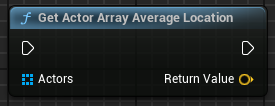
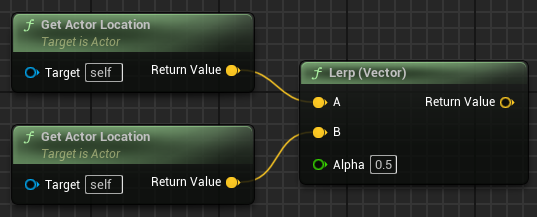 queen valley
I can't believe something as simple as this still isn't fixed
heavy lion
gentle urchin
casting is fine when the interacting class is guaranteed to be loaded (not much ...
This is what I always assume is the case. But everything online is like "DONT EVER CAST!"
gentle urchin
heavy lion
This is what I always assume is the case. But everything online is like "DONT EV...
ignore that

Epic Games Developer
Are Ticks really that problematic? Should you make all your meshes Nanite? Is the ChildActorComponent truly cursed? Should you never use Cast?
You've pr...
gentle urchin
queen valley
I can't believe something as simple as this still isn't fixed
apparently not big enough for it to be worth fixing
so it seems its not an issue many have