#blueprint
1 messages · Page 27 of 1
 limber parcel
 tardy prawn
hi, i have a question: i implemented interface in parant actor class, then create a child, and if i dbclick on this interface in child, it will transform to a functiion. Why ? In parent it always interface when dbclick
limber parcel
because u already have that function in ur parent
 dry marlin
and that i cant move around
 lunar sleet
You can also convert it to an event if that that’s what you mean^
 fathom spruce
I'm noob, so... Is it possible to move a variable to local variables or back? I can make a new one, but I'm curious if it's possible to just move them.
tardy prawn
limber parcel
because u already have that function in ur parent
in parent its in interface category, not in a function category
dry marlin
i checked and its all functional and runs
lunar sleet
fathom spruce
I'm noob, so... Is it possible to move a variable to local variables or back? I ...
I think there’s a checkbox in the details panel, at least in some cases
limber parcel
dry marlin
i checked and its all functional and runs
then u gave it wrong value somewhere in code
 brazen pike
Maybe you fixed it, since this screenshot was a while back. But are you intentionally feeding the camera's current position directly into the lerp? you probs don't want to do that, it wont work that way
 primal schooner
Hoping someone can clear up some confusion I'm having with delegates.
I have this defined in my AttributeComponent.h
DECLARE_DYNAMIC_MULTICAST_DELEGATE_FourParams(FHealthChangedSignal, AActor*, InstigatorActor, UARLAttributeComponent*, OwningComp, float, NewHealth, float, DeltaHealth);
I called it FHealthChangedSignal so that the semantics look nice. i.e the BroadCast looks like:
HealthChangedSignal.Broadcast(InstigatorActor, this, Health, ActualDeltaHealth);
And the handlers look like:
void AARLAICharacter::OnHealthChanged(AActor* InstigatorActor, UARLAttributeComponent* OwningComp, float NewHealth, float DeltaHealth)
But I'm confused about the different ways you connect to that signal from blueprint.
https://imgur.com/67IYH2X
In my UI Widget component I have to get the AttributeComponent, create a custom event, and then bind it to that signal. Which makes sense and is how I expected to do this everywhere.
https://imgur.com/P5r96UJ
In my ranged minion blueprint though, it has an attribute component and I can just click the "event" button and it creates a node that's called the same thing as the signal HealthChangedSignal (AttributeComp). It doesn't have to bind to it. It just works.
Question
- Why is it able to connect to that signal without binding it?
- I don't particularly like that, I'd rather bind it and call it OnHealthChanged because to me, it looks like that blueprint node is firing a signal (since that's what its called). What's standard here?
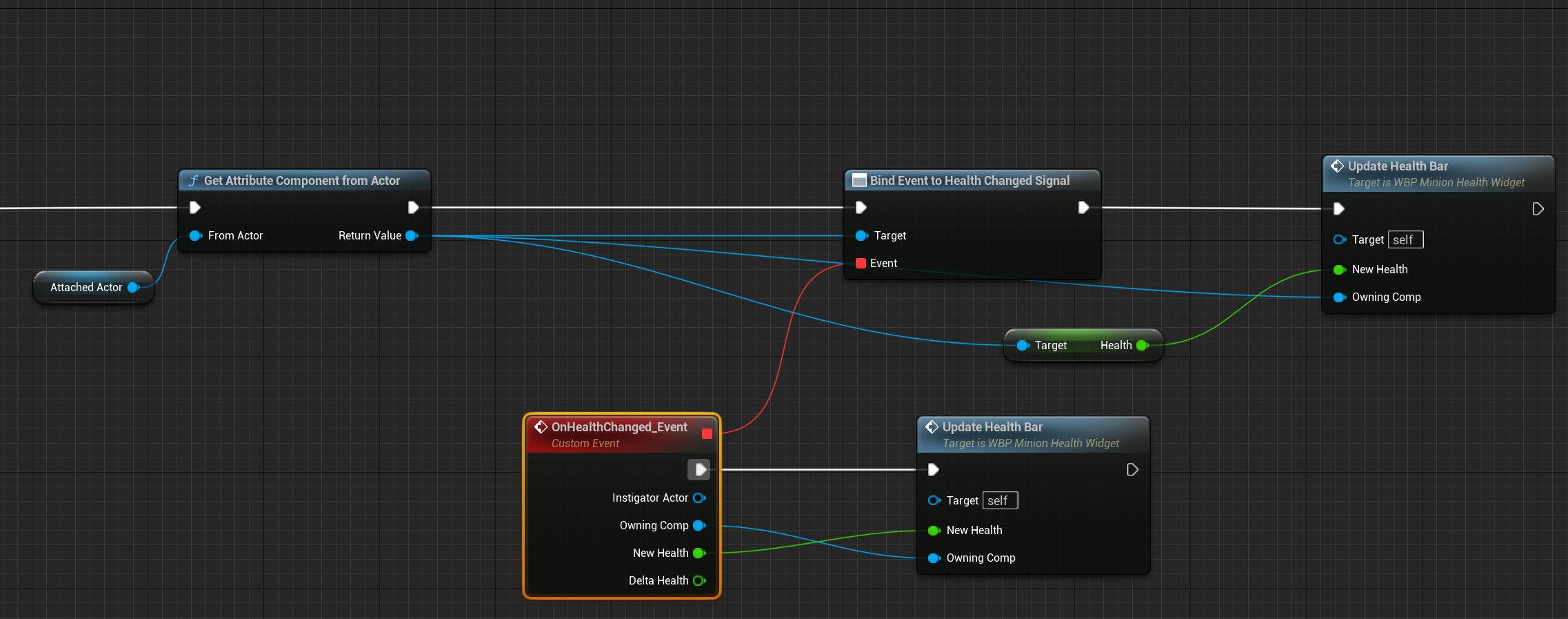
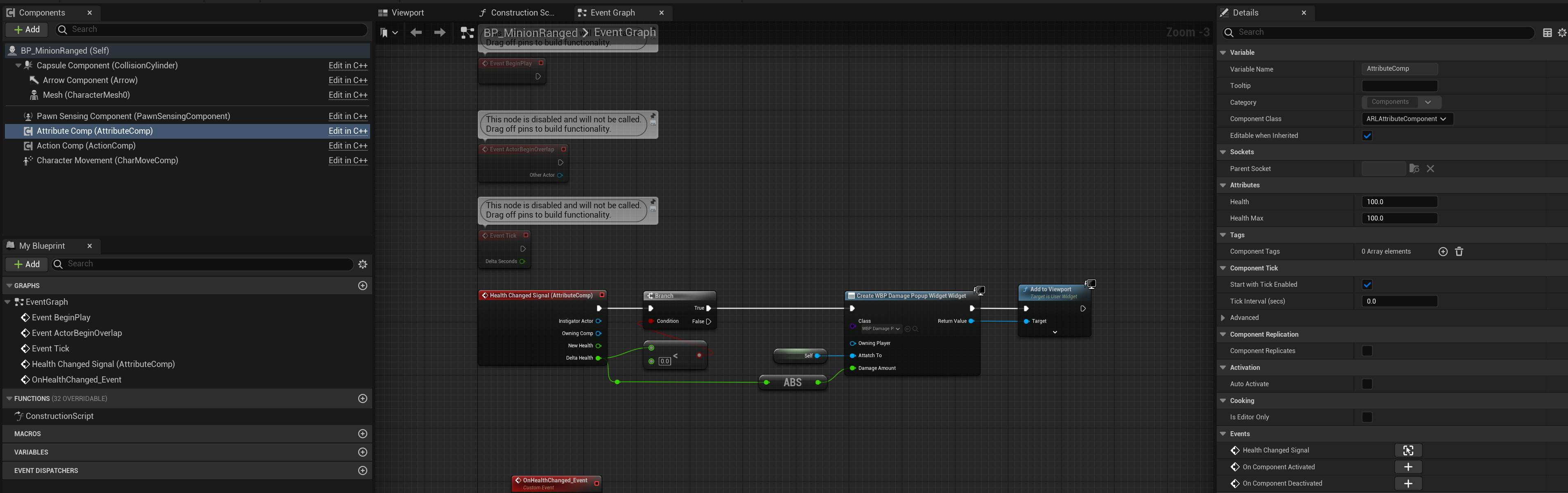 brazen pike
primal schooner
Hoping someone can clear up some confusion I'm having with `delegate`s.
I have ...
brazen pike
primal schooner
Hoping someone can clear up some confusion I'm having with `delegate`s.
I have ...
You can still get the component and bind an event to it if you prefer that. Its just that you can directly implement an event for it without needing to bind if its a component.
primal schooner
brazen pike
You can still get the component and bind an event to it if you prefer that. Its ...
Got it, okay. So its just kind of a convenience short-hand that it does for you?
dry marlin
brazen pike
Maybe you fixed it, since this screenshot was a while back. But are you intentio...
still having all the problems i mentioned so far, and i just now notised this
 brazen pike
primal schooner
Got it, okay. So its just kind of a convenience short-hand that it does for you?
brazen pike
primal schooner
Got it, okay. So its just kind of a convenience short-hand that it does for you?
Yep. As far as I'm aware.
brazen pike
dry marlin
still having all the problems i mentioned so far, and i just now notised this
This would probably work? I might be missing some context though as I missed most of the conversation here

almost certainly a better idea to use two cameras and "set view target with blend" from the camera manager. But this might solve your problem?
 frosty heron
brazen pike
This would probably work? I might be missing some context though as I missed mos...
frosty heron
brazen pike
This would probably work? I might be missing some context though as I missed mos...
Looks legit
I would be surprised if that don't work
Only thing I will change is to get the active camera instead the flip flop
But I get that it's just demonstration
dry marlin
brazen pike
This would probably work? I might be missing some context though as I missed mos...
but how does it know which "mode" im in a or b?
 dreamy gulch
@gentle urchin thought i made improvements with like 5 things but nope still basically crashing
brazen pike
dry marlin
but how does it know which "mode" im in a or b?
A flipflop in the event graph will keep track of it for you. You can do what you have currently (with a boolean) but I can see that if you press the button too fast then the bool branch will execute incorrectly. You can keep track in other ways, like checking if the camera is closer to the TPP or FPP components.
But I would recommend just setting a bool on not from itself right after the button is pressed and the timeline executes based on the output.
frosty heron
Delay untilk the next tick to skip a frame
dry marlin
brazen pike
A flipflop in the event graph will keep track of it for you. You can do what you...
ok nice to know that bout the flipflop, but im only setting the bool at the end of the transition
brazen pike
dry marlin
ok nice to know that bout the flipflop, but im only setting the bool at the end ...
It might be more consistent if you set it at the start. And rather than "reverse from end" just "reverse" could be a good idea

However, you can still do it at the end, just "reverse from end" might not work properly because you could keep pressing the button before it has finished and "reverse from end" will restart it every time and it'll never end
 worthy tendon
brazen pike
However, you can still do it at the end, just "reverse from end" might not work ...
worthy tendon
brazen pike
However, you can still do it at the end, just "reverse from end" might not work ...
another solution is to ignore the L key if timeline is running.
 gentle urchin
dreamy gulch
<@231467939734355969> thought i made improvements with like 5 things but nope st...
gentle urchin
dreamy gulch
<@231467939734355969> thought i made improvements with like 5 things but nope st...
Ugh
Show code i guess
dry marlin
dry marlin
still having all the problems i mentioned so far, and i just now notised this
it wasnt very clear what i meant to say by the picture.
i meant that the character is forever falling for some reason
frosty heron
Check your anim blueprint or if it's playing anim
dry marlin
its playing an animation in the bp viewport
frosty heron
Take your time to read
 lofty rapids
is your player start above the ground, and he's dropping from there ?
frosty heron
Game hasn't even started yet, it doesn't have anything to do with the ground imo
lofty rapids
or it's just the animation ?
dry marlin
also the camera doesnt change if i cange it in the bp viewport no matter
lofty rapids
oh it's in the bp
frosty heron
He just press some button and unsure how to unfuck it imo
lofty rapids
maybe your animation is set
dry marlin
lofty rapids
is your player start above the ground, and he's dropping from there ?
just hovering
frosty heron
Click your mesh comp and see if there's animation playing
lofty rapids
Do you have this set to falling animation ?

 hollow tendon

how to make this fps indepdenent code
with high fps it rotate my screen too fast
with low fps it is slow
i want it to give consisient rotating no matter the fps is
dry marlin
lofty rapids
Do you have this set to falling animation ?
nope
 lunar sleet
hollow tendon
i want it to give consisient rotating no matter the fps is
lunar sleet
hollow tendon
i want it to give consisient rotating no matter the fps is
Look up delta time, there’s a Matt Wadstein video on it too
 hollow tendon
lunar sleet
Look up delta time, there’s a Matt Wadstein video on it too
hollow tendon
lunar sleet
Look up delta time, there’s a Matt Wadstein video on it too
can u link the video
lunar sleet
You said nothing about animations
You literally just showed a screenshot of the old input system and some strings
hollow tendon
lunar sleet
You literally just showed a screenshot of the old input system and some strings
exactly
lunar sleet
… I’m confused as to what the issue is
brazen pike
hollow tendon
multiply your axis value by "Get World Delta Seconds". Although, that will massively decrease your axis value so multiply it again by like 60 or something
hollow tendon
the issue is.
the code i sent above with high fps it rotate too fast with low fps it rotate too slow
i want it to give same rotating speed despite of fps
hollow tendon
brazen pike
multiply your axis value by "Get World Delta Seconds". Although, that will massi...
thanks im reading this
lunar sleet
hollow tendon
thanks im reading this
…
hollow tendon
lunar sleet
…
what?
hollow tendon
clam down bro
hollow tendon
come on bro. chill
hollow tendon
brazen pike
multiply your axis value by "Get World Delta Seconds". Although, that will massi...
ok. finsihed. thanks!!
brazen pike
lunar sleet
Then you asked me to Google a link for you lol
It's all good Neo, everybody starts somewhere
lunar sleet
brazen pike
It's all good Neo, everybody starts somewhere
Yeah, but not bothering to do any leg work or acting like the answer you were given was the wrong one feels, idk, disrespectful
🤷♂️ w/e
dry marlin
frosty heron
He just press some button and unsure how to unfuck it imo
- honestly thinking of restarting the project
frosty heron
dry marlin
* honestly thinking of restarting the project
From that? Just watch some intro videos
I felt like u went in blindly
dry marlin
frosty heron
I felt like u went in blindly
i spent 2 hours following vids at least
frosty heron
Just 2 hrs, it takes longer than that to get around comfortably
Keep going I guess but I don't mean stay in tutorial hell
brazen pike
dry marlin
* honestly thinking of restarting the project
What animation blueprint are you using? Is it one made custom or from the third person project?
hollow tendon
lemon u are good programmer
frosty heron
dry marlin
nope
Go inside and look if you tweak anything
brazen pike
hollow tendon
lemon u are good programmer
I just know the basics
 trim matrix
guys i need help
trim matrix
the animations are supposedly assigned but my ccharacter stays in t pose during play test
 hollow tendon
brazen pike
you'll find the actually good programmers in <#221799439008923648>
hollow tendon
brazen pike
you'll find the actually good programmers in <#221799439008923648>
nice
lemon this trick u taught me
it make ur joystick same rotating no matter what
but at what frame rate does it work?
frosty heron
trim matrix
the animations are supposedly assigned but my ccharacter stays in t pose during ...
Check your anim instance
trim matrix
k wait
frosty heron
hollow tendon
but at what frame rate does it work?
Watch the video suggested to you
Matthew explains it
hollow tendon

What is the Delta Time in Unreal Engine 4 .
Source Files: https://github.com/MWadstein/wtf-hdi-files
or another one
dreamy gulch
gentle urchin
Ugh
its cool, thanks for trying, ill figure it out
frosty heron
That one should be fine
hollow tendon
ok. thank yyou very much cold summer
hollow tendon
wow
trim matrix
frosty heron
Check your anim instance
could u elaborate if u can thx im new i only need this for a school project
frosty heron
trim matrix
could u elaborate if u can thx im new i only need this for a school project
Open your character bp, select the mesh component. Look into the anim instance. Have you set it to your anim instance class?
My guess is no
 undone temple
I am making a simple editor utility widget to set the position of the viewport camera. It works, except that after the camera position is set, the camera's movement is locked and can't be changed by the usual keyboard controls. Focusing on an actor in the scene using F key or double clicking will return camera movement to normal
 dry marlin
brazen pike
What animation blueprint are you using? Is it one made custom or from the third ...
dry marlin
brazen pike
What animation blueprint are you using? Is it one made custom or from the third ...
the only things i changed/added:
- added an BP interface and interaction system
- and a system to switch from TPP to FPP from this video: https://youtu.be/21cLT6-3uDw?si=e1XJmOv31cA4zukW

Hey guys, in today's video I'm going to be showing you how to change camera perspectives so that you can toggle between third and first person within your game.
#UE5 #UnrealEngine5 #UE5Tutorial
00:00 - Intro
00:08 - Overview
00:36 - Tutorial
06:22 - Final Overview
06:35...
undone temple
any idea why the camera movement would be locked after setting position?
 barren dove
undone temple
any idea why the camera movement would be locked after setting position?
barren dove
undone temple
any idea why the camera movement would be locked after setting position?
you set it to a position, did you mean to set the springarm to a position maybe?
dry marlin
dry marlin
the only things i changed/added:
1. added an BP interface and interaction system...
then went off on my own and f things up by trying to make it a smooth transition rather snappy
undone temple
barren dove
you set it to a position, did you mean to set the springarm to a position maybe?
does viewport camera have a springarm? how would I get a reference to that?
frosty heron
undone temple
does viewport camera have a springarm? how would I get a reference to that?
They dont
 frosty heron
Talking about the generic camera actor right?
dry marlin
dry marlin
then went off on my own and f things up by trying to make it a smooth transition...
so i ended up changing to something that can implement a consept from this vid:
https://www.youtube.com/watch?v=6r5FetTCHUk&list=TLPQMzAxMDIwMjOOx-NAsAyFpQ&index=1
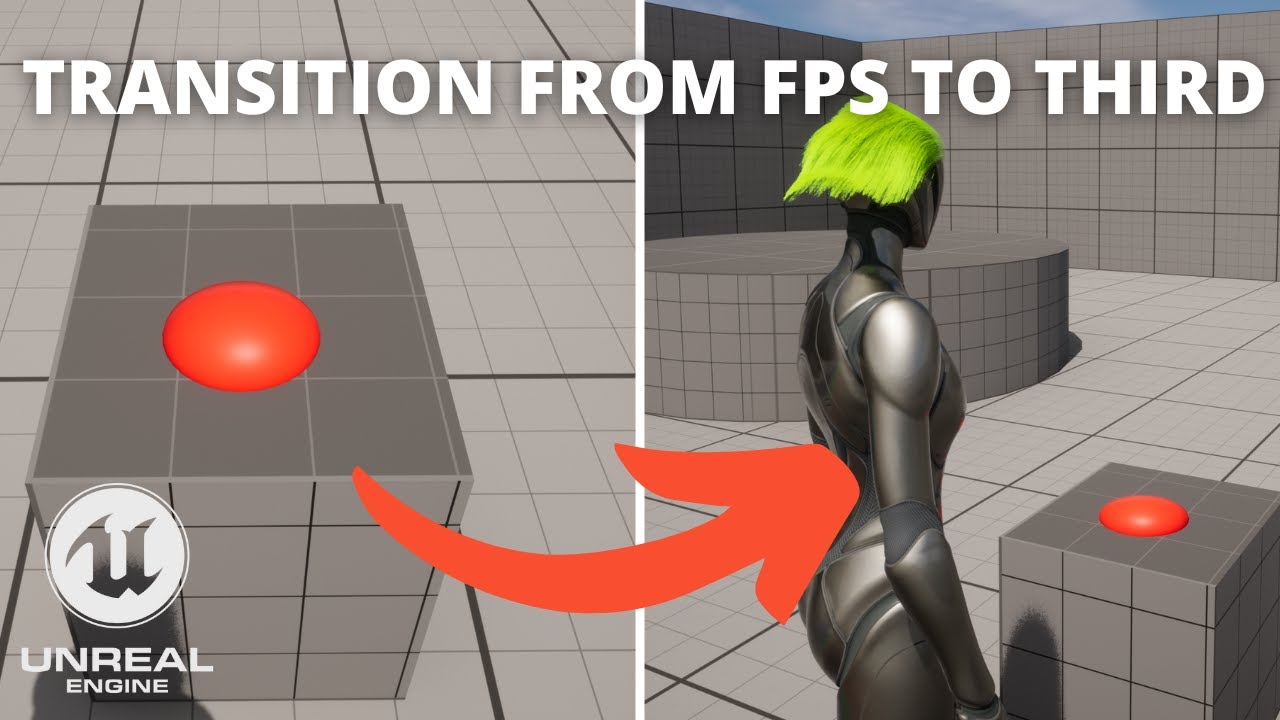
Hello guys, in this quick and simple tutorial we are going to learn how to transition from first person to third person when interacting in Unreal Engine 5.
Switch from FPS to Third tutorial: https://www.youtube.com/watch?v=lMuinhr0SXU&t=17s
Follow me on Twitter: https://twitter.com/GorkaGames
Subscribe to the channel: https://www.youtube.com/c...
trim matrix
frosty heron
Open your character bp, select the mesh component. Look into the anim instance. ...
didn't change shit
 frosty berry
 thin panther
Oh no. That's a lot of child actor components
thin panther
Oh no. That's a lot of child actor components
Ok, so if the turrets are where players attach and they are attached to the ship, how would you do it?
thin panther
Spawn and attach them in the ships begin play
undone temple
frosty heron
Talking about the generic camera actor right?
is this question for me? If so I'm just talking about the default editor viewport camera
lofty rapids
trim matrix
didn't change shit
you set the animation class to your animation bp ?
frosty heron
trim matrix
didn't change shit
Maybe cuz u didn't change shit
lofty rapids
or make sure to compile
trim matrix
frosty heron
Maybe cuz u didn't change shit
i did, following your instructions
trim matrix
lofty rapids
you set the animation class to your animation bp ?
yup
trim matrix
lofty rapids
or make sure to compile
did that too
frosty heron
undone temple
is this question for me? If so I'm just talking about the default editor viewpor...
Well pretty sure it don't have spring arm then
frosty heron
trim matrix
i did, following your instructions
S h o w something
trim matrix
pls dont be angry if i did something falsew
 frosty heron
See where it says anim class on the right hand side?
trim matrix
yeah?
frosty heron
And it have anim instance written on it
trim matrix
yeah
frosty heron
Select it and change it to your abp third person char
trim matrix
what can i do to thank you for this
frosty heron
Nothing, gl next
frosty berry
thin panther
Spawn and attach them in the ships begin play
For my knowledge, how does that differ, resource wize or ???
thin panther
Functionally it doesn't differ much. Your main benefit is because child actor components don't function. They're broken, and not likely to be fixed
 lean pasture
does this seem right? im not entirely sure

i dont know if something needs to be connecting to the branch or not on the top part
thin panther
Well that's not hooked up to anything so it isn't going to run
You need some sort of entry point being called, like an event
frosty berry
thin panther
Functionally it doesn't differ much. Your main benefit is because child actor co...
ok. My turrets "appear" to work, just over the first few moments they go from shooting into the distance to immediately impacting with themselves, but only when aiming in the directin of travel.
I am going to remove them, then add one like you suggested and retest.
lean pasture
thin panther
You need some sort of entry point being called, like an event
sorted that, all works now :-)
hollow tendon
accupa thanks for ur kindness
thin panther
Have you managed to solve your issue?
hollow tendon
Yep 😊
thin panther
Amazing!
thin panther
No problem, though I was the most minor element of that exchange :P
hollow tendon
thin panther
No problem, though I was the most minor element of that exchange :P
haha
thin panther
hollow tendon
accupa i have a weird question about game dev if i may ask?
Sure
hollow tendon
how can 2 games run at 60fps
but one game runs smoother
the other stuttering
the one runs smoother has lower game stat ( cpu and code logic )
but it is still running at capped 60fps
while the stuttery one which also run at capped 60fps
it runs at a higher game stat ( cpu and code logic )
what ur comment/thought?
thin panther
Stutter can be a lot of things, memory issues, poor running of game code, not using proper ways of smoothing things etc.
I wouldn't know without breaking down each project
hollow tendon
Correct but is not fps an indicator of those things stability?
if u have high ram usage almost max ur fps will drop
but how can it stutter with capped 60fps?
thin panther
hollow tendon
Correct but is not fps an indicator of those things stability?
not always. you can get cases where the frame is still completing but the logic has halted
thin panther
for example, timers that run faster than the tick rate will compensate by running multiple times in one frame.
this can lead to stutter, even though it isn't imapcting the fps
hollow tendon
thin panther
for example, timers that run faster than the tick rate will compensate by runnin...
this makes a lot of sense!
you are good at this stuff. game logic etc
does console comamnds work in runtime in a packaged game in shipping mode
trim matrix
hi does anyone know how i can make a custom cursor? and also have it show in the level? i am able to display my main menu but you can only see the mouse cursor for a split second then it dissapears
 frosty heron
@trim matrix you need to set the input mode to gameplay and Ui or Ui.
As for custom cursor. Youtube it, literary everywhere
hollow tendon
trim matrix
hi does anyone know how i can make a custom cursor? and also have it show in the...
i think it is focusing on the widget then the mouse is gone
there is a node to make it gameplay and ui which could fix it
ahh cold summer mentioned it already
trim matrix
frosty heron
<@456226577798135808> you need to set the input mode to gameplay and Ui or Ui.
...
sweet thank you!
thin panther
hollow tendon
does console comamnds work in runtime in a packaged game in shipping mode
i do not believe so, however there seems to be hints of a packaging parameter that enables them
trim matrix
frosty heron
<@456226577798135808> you need to set the input mode to gameplay and Ui or Ui.
...
what do you mean by input mode? sorry its early morning lol
frosty heron
And it's 2 am for me. Gonna sleep
Get your player controller, drag from the blue pin and type set input mode
hollow tendon
 trim matrix
like this?
 trim matrix
frosty heron
And it's 2 am for me. Gonna sleep
Get your player controller, drag from the blu...
trim matrix
frosty heron
And it's 2 am for me. Gonna sleep
Get your player controller, drag from the blu...
ohhh alright thank you!
hollow tendon
thin panther
i do not believe so, however there seems to be hints of a packaging parameter th...
ok!
trim matrix
frosty heron
It needs player controller and the widget you want to focus
its not giving me a option to focus on main menu
 thin panther
drag the return val of Create Main Menu widget in "In widget to focus"
frosty heron
Get in a habit to promote your variable
frosty berry
thin panther
Don't use them
So should I have the actors at the default level in the BP then attach actor to actor, or spawn actor and attach actor to actor and if so, how so you spawn? Regular spawn puts actor in the work, but the attach actor does not attach it.
thin panther
frosty berry
So should I have the actors at the default level in the BP then attach actor to ...
im unsure what you mean, could you please rephrase the question
trim matrix
i had it also inside the uh bp third person
thank you guys for helping!
im still in the beginner stages of my game
lunar sleet
trim matrix
im still in the beginner stages of my game
You’re doing great so far, you’ve kept up with it for a while now.
Persistence is key tbh
trim matrix
lunar sleet
You’re doing great so far, you’ve kept up with it for a while now.
aww thank you!! i mean its either i complete this or fail my entire degree! and i am honestly really enjoying this entire learning process, using youtube and reaching out here has really helped me progress, and cool to see you have remembered me! appreciate the acknowledgement neo 
frosty berry
thin panther
im unsure what you mean, could you please rephrase the question
Certainly! I have removed the Top Turret from my actor bp. I am now trying to spawn one and attach it to the vehicle actor on begin play. This is what I have and it spawns, but attaches to the actor root and not the actor --> staticmesh --> socket location.

 dawn gazelle
frosty berry
Certainly! I have removed the Top Turret from my actor bp. I am now trying ...
dawn gazelle
frosty berry
Certainly! I have removed the Top Turret from my actor bp. I am now trying ...
Need to chnage the location rule. Snap to Target I think?

Failing that and you want to attach the actor to a specific component, then there is an Attach Actor To Component node as well.
frosty berry
dawn gazelle
Failing that and you want to attach the actor to a specific component, then ther...
Just changed to Actor to Component, and it attaches and is playable at the right spot!! But..... I still have my original issue where the projectiles start colliding with the turret after the vehicle gets a bet down the road. (only goes in one direction).
First few moments it shoots straight in the direction of vehicle travel, then starts colliding with turret. And the range diminishes. over time.
lofty rapids
sounds like your driving faster than it's shooting ?
 novel rock

shold i make separate game modes for the menu and the game?
I was thinking about have one game mode for both but i don't think i can.
lunar sleet
novel rock
shold i make separate game modes for the menu and the game?
Yeah, probably
Keeps things cleaner I think
dawn gazelle
Likely yes, considering you don't want normal game logic happening in your main menu. If there is any shared functionality you want between them you could always create a parent game mode class and have them inherit from it.
frosty berry
lofty rapids
sounds like your driving faster than it's shooting ?
Wondered that too... Shooting at 10000/10000, vehicle drives at 0/300
novel rock
Thanks @lunar sleet and @dawn gazelle ❤️
trim matrix
alright so i have set my custom cursor up, but its not showing as the custom one, i just followed https://www.youtube.com/watch?v=6Sk4kIBLGUk and im not sure if its something in my blueprint that may be missing?


Hello guys, in this quick and simple tutorial we are going to learn how to make a leveling experience system in Unreal Engine 5.
Follow me on Twitter: https://twitter.com/GorkaGames
Subscribe to the channel: https://www.youtube.com/channel/UCv_n9oioNF6OpzR2dt6E4xg?sub_confirmation=1
unreal engine 5,ue5,custom cursor,tutorial,quixel,megascans,u...
i also did attempt both none/default and when i set to default it wouldnt show
 trim matrix
lunar sleet
I had something like this:
trim matrix
lunar sleet
I had something like this:
will give this a go
trim matrix
lunar sleet
I had something like this:
ok im not sure where to next
 lunar sleet
trim matrix
ok im not sure where to next
lunar sleet
trim matrix
ok im not sure where to next
Mine is a little weird where I’m changing the cursor context using an interface and an enum, but if you don’t need multiple ones, that should be enough. Does it not work still?
trim matrix
lunar sleet
Mine is a little weird where I’m changing the cursor context using an interface ...
nope doesnt work, im not sure whats going on
yea im only needing one
also another question i have is, do i need to create multiple levels in order to switch between my screens aka Main Menu, user clicks Settings -> takes to settings screen Do i need a level for settings too or can i switch between all my widgets within one level?
lunar sleet
Does the cursor change at all?
lunar sleet
trim matrix
--------------------------------------------------------
also another question i...
If you’re talking different menus in your settings then no, I wouldn’t use diff levels
trim matrix
lunar sleet
Does the cursor change at all?
lemme try and see if i can use the other options that unreal has for the cursor and see if they work
trim matrix
lunar sleet
If you’re talking different menus in your settings then no, I wouldn’t use diff ...
yea im just wanting to switch to the settings screen from the main menu
lunar sleet
There’s always CommonUI that allows you to stack widgets on top of each other, but it might take a min to learn
trim matrix
yea the mouse cursor doesnt change at all
lunar sleet
do you have a function in your widget that changes the brush ?
like I have this, mind you the map is needed because I have like 4 of them
 trim matrix
lunar sleet
do you have a function in your widget that changes the brush ?
trim matrix
lunar sleet
do you have a function in your widget that changes the brush ?
no i dont have that
lunar sleet
I mean you might not need it if you never have to change the cursor to something else
trim matrix
yea i dont need to change it to something else just want it to be the custom cursor i have made
this is the entire blueprint
 lunar sleet
should try to use reroute nodes whenever you can, it's hard to tell where your main menu widget is plugged in
trim matrix
lunar sleet
should try to use reroute nodes whenever you can, it's hard to tell where your m...
sorry im not sure what you mean by a reroute nodes? oh my main menu widget is uh
lunar sleet
trim matrix
sorry im not sure what you mean by a reroute nodes? oh my main menu widget is uh
like on your lines, double click
 lunar sleet
it'll create a reroute node and help you organize
also, did you do this part ?

that's from the tutorial you're using
diff than how I did it but yeah
trim matrix
lunar sleet
also, did you do this part ?
yea i did, but when i set default, the cursor doesnt show at all, but when its set to "none" the normal cursor shows
also once i double click on the line how do i move them?
nvm figured out
 hollow cove
how do you guys deal with load orders, i.e. wanna save a reference to controller from another blueprint
do you just loop until its valid with a delay, seems janky
trim matrix
all tidied up
 lunar sleet
trim matrix
yea i did, but when i set default, the cursor doesnt show at all, but when its s...
lunar sleet
trim matrix
yea i did, but when i set default, the cursor doesnt show at all, but when its s...
I wonder if there's something wrong with the widget
trim matrix
lunar sleet
I wonder if there's something wrong with the widget
hmmm i will have a look, but the video was overall simple so im not sure
trim matrix
lunar sleet
can you show the Design part of it?

 trim matrix
lunar sleet
the canvas prly doesn't matter, but the image
trim matrix
lunar sleet
the canvas prly doesn't matter, but the image
i set to variable but still not working
trim matrix
lunar sleet
and also did you set an anchor?
 lunar sleet
uh I've seen issues when you resize it like that, try to just make it sit in the top left corner
trim matrix
lunar sleet
uh I've seen issues when you resize it like that, try to just make it sit in the...
like this?

im also getting this

oh
lunar sleet
you need to plug in the player controller ref
trim matrix
its not connected
yea haha
yea its connected now
hmm thats weird
i mean its not the end of the world right now if i cant get the pizza cursor to work lol
dawn gazelle
"No pizza cursor in game"
"0/10"
"Literally unplayable"
lunar sleet
People do love their pizza
trim matrix
i will most defiantly come back to the cursor though ofc
just gotta get my game in a good playeable state
lunar sleet
trim matrix
i will most defiantly come back to the cursor though ofc
I would maybe go through the tutorial one more time from the top just in case you missed something. And also test it with a different image, just for sanity check 😀
 pallid nest
hi guys, is there any tutorial you can recommend in how can you make references from one blueprint to another? What I usually see is that casting or getting controller/character ref usually works but I am always unsuccessful when I do myself
lunar sleet
trim matrix
i will most defiantly come back to the cursor though ofc
I’ve noticed the guy didn’t have to use set cursor, so maybe remove that node in case it’s conflicting
lunar sleet
pallid nest
hi guys, is there any tutorial you can recommend in how can you make references ...
Blueprint comms pinned here
 grim sand
Am I misunderstanding the Add Radial Impulse node? The red lines resemble what happens when I use it, with the green circle indicating the source of the impulse. I was expecting the green arrows to represent what happens though.
 lunar sleet
hollow cove
how do you guys deal with load orders, i.e. wanna save a reference to controller...
lunar sleet
hollow cove
how do you guys deal with load orders, i.e. wanna save a reference to controller...
I don’t understand what you mean by load orders
grim sand
 pallid nest
lunar sleet
Blueprint comms pinned here
pallid nest
lunar sleet
Blueprint comms pinned here
sorry where is it exactly? I cant find it
hollow cove
lunar sleet
I don’t understand what you mean by load orders
getting references and whatnot on beginplay
grim sand
pallid nest
sorry where is it exactly? I cant find it

Announce Post: https://forums.unrealengine.com/showthread.php?101051
This Training Stream takes a look at Blueprint Communication. We find that Unreal Developers of all levels can sometimes struggle through the concepts behind moving data between objects. So in this video we'll take a look at the different ways to make Blueprints talk to one an...
pallid nest
thank you
hollow cove
the reference will be none if you're grabbing a reference to player controller from a blueprint if the player controller loads after that blueprint right
lunar sleet
hollow cove
the reference will be none if you're grabbing a reference to player controller f...
Yeah
Begin Plays don’t happen in a certain order
But what’s your use case
hollow cove
is there a less janky way to do it other than looping and delaying
hollow cove
hmm okay so just case by case
lunar sleet
Kinda. What are you trying to do
hollow cove
i was looking at a bunch of various places ive done that without thinking much about it, so it was a general question
lunar sleet
Also the PC is usually already spawned in before stuff like character for example, just might not have possessed yet
lunar sleet
grim sand
Am I misunderstanding the Add Radial Impulse node? The red lines resemble what h...
Not sure tbh, that’s proven tricky to work with before
grim sand
lunar sleet
Not sure tbh, that’s proven tricky to work with before
Yea I can tell it isn't super reliable. I will probably setup something custom instead
trim matrix
lunar sleet
I’ve noticed the guy didn’t have to use set cursor, so maybe remove that node in...
yep sure!
 ashen tide
Morning, I m trying to do a leaning system,
I don t understand why nothing is happening once I release the button, if I manually set the pitch variable to 0 it s goes straight to the center without any smooth movement/interpolation but once I used the fInterp to, nothing is happening. any idea why ?
 trim matrix
lunar sleet
I’ve noticed the guy didn’t have to use set cursor, so maybe remove that node in...
trim matrix
lunar sleet
I’ve noticed the guy didn’t have to use set cursor, so maybe remove that node in...
so like this?
 lunar sleet
He doesn’t even create the cursor widget, it looks like
Just adds it to the software cursors
lunar sleet
I haven’t tried it this way before tbh, but I’ll try to test it myself later if it doesn’t work
trim matrix
lunar sleet
I haven’t tried it this way before tbh, but I’ll try to test it myself later if ...
yea i disconnected it and everything too, still doesnt work hmm.
lunar sleet
trim matrix
yea i disconnected it and everything too, still doesnt work hmm.
Are you by chance playing in Simulate mode?
trim matrix
lunar sleet
Are you by chance playing in Simulate mode?
simulate mode?
lunar sleet
Like at the top when you hit play
trim matrix
lunar sleet
Like at the top when you hit play
oh yea, how do i not do that??
trim matrix
lunar sleet
Switch to Selected Viewport
oh its already on that
lofty rapids
i just tried it and the image showed up
all i did was add the widget to the software cursor
lunar sleet
Yeah it’s working on my end too
lofty rapids
in project settings
lunar sleet
It only failed to work when I was simulating which makes sense
trim matrix
yea but are you guys trying it with a main menu widget?
lofty rapids
i just created a user widget and set software cursor
trim matrix
yea the cursor widget is suppose to show on my main menu widget
 hybrid drift
Q: I have a pawn blueprint with spring arm and camera components. The components are set to my liking in the editor (with the camera trailing the pawn), but the camera appears in the middle of the pawn when I drag the pawn into the level editor.
The camera is attached to the spring arm, and the spring arm is attached to the root component.
What might cause that behavior?
lunar sleet
trim matrix
yea the cursor widget is suppose to show on my main menu widget
If you mean your game has a different level for main menu, then yeah that shouldn’t matter
You’re not trying to change your editor’s cursor (outside the game) to a pizza right? 😅
ashen tide
ashen tide
Morning, I m trying to do a leaning system,
I don t understand why nothing is h...
I think I found out the issue if I create a branch that look if the value isnt at 0 to loop it until it is, it create a smooth movement. but from what I understand, the trigger action make the smooth movement because the player hold it, and once it s released the completed branch start but since it's just a "tap" it doesnt go back to 0, just move one frame, any idea how I can fix this ?
trim matrix
lunar sleet
If you mean your game has a different level for main menu, then yeah that should...
yea
trim matrix
lunar sleet
You’re not trying to change your editor’s cursor (outside the game) to a pizza r...
my editors cursor. i dont believe so
lunar sleet
Yeah it shouldn’t matter then
Try starting fresh, delete the software cursor, delete the widget and do it over
lunar sleet
Make sure the widget is not being referenced by any other asset before deleting
 lunar sleet
No, mine is a texture too
trim matrix
but its also uh

oh ok
ok now its working with the cute creature object lol!
its working now! yay
 dawn gazelle
trim matrix
its working now! yay
dawn gazelle
trim matrix
its working now! yay
"Best game ever. Pizza is awesome."
"11/10"
"GOTY unbelievable gameplay"
lunar sleet
“Has more pizzas than Starfield”
 faint pasture
ashen tide
Morning, I m trying to do a leaning system,
I don t understand why nothing is h...
faint pasture
ashen tide
Morning, I m trying to do a leaning system,
I don t understand why nothing is h...
FInterpTo has to be hit every frame
I'd either have your inputs set target values that get interp'd to on tick, or have them trigger timelines
faint pasture
dawn gazelle
"Best game ever. Pizza is awesome."
"11/10"
"GOTY unbelievable gameplay"
Pizza Tower unironically kicks ass
 tawny patio
Need help, Im trying to cast this object ref into my player BP and when I tried searching for it, I cant find it, is there something wrong that I did.? Im triying to call it in my widget sequenc event. Tq o7

 barren dove
Hey folks, question
I want to chose a point randomly within a certain radius, but excluding a radius in the middle, so like a ring shape, any ideas?
 mystic bridge
i would like to recreate this but i dont even know where to start, does anyone have any tips?
 subtle valve
barren dove
Hey folks, question
I want to chose a point randomly within a certain radius, bu...
subtle valve
barren dove
Hey folks, question
I want to chose a point randomly within a certain radius, bu...
Hey, you could simply randomise an angle and then use that to rotate a vector of radius length, add that vector to your original location to get the random point in a ring
Hopefully simple question, how do I set Step-down distance separately from step up distance (in a character)?
 broken wadi
mystic bridge
i would like to recreate this but i dont even know where to start, does anyone h...
broken wadi
mystic bridge
i would like to recreate this but i dont even know where to start, does anyone h...
Can you be a bit more specific? There's a lot of things going on in that video.
 ember scaffold
Hey all, looking for some help or advice, I have a pickup which is an Actor that should add 15 seconds to the time remaining play a sound, and destroy itself when overlapped. TimeRemaining is store in Game HUD BP, and is shown as a text widget in the HUD. The 'pickup' has a Float variable called TimeAdd (value of 15), but my logic on how to add the time to the HUD is clearly faulty.
I’ve had no problems with pickups that add health or ammo to character, so I figured Casting to the Game Mode HUD would suffice. Time remaining is being formatted by a function to turn the 120 seconds the game starts with into {minutes}:{seconds}. I'm not sure if I need to pass my TimeAdd from the pickup + TimeRemaining (overall) through the format before trying to set the text in the HUD, hope my pictures make sense what I'm trying to do.


 tawny patio
Need help, Im trying to cast this object ref into my player BP and when I tried ...
tawny patio
tawny patio
Need help, Im trying to cast this object ref into my player BP and when I tried ...
Ok I got a workaround this problem but then I want to reatached my spring arm back. is how do i do that?
 rustic hinge
Oh shit, sorry went to sleep. 😅
 mild ibex
is it possible to show 3d vector from an exposed variable of an actor component?
and if not, how can i get something similar or is that not possible at all?
subtle valve
ember scaffold
Hey all, looking for some help or advice, I have a pickup which is an Actor that...
Hey, in your overlap at the bottom you're casting the overlapped actor to the game mode. Did you mean to cast to a character or something else in world?
mystic bridge
broken wadi
Can you be a bit more specific? There's a lot of things going on in that video.
i know how to do everything up until the player looks away from the door, once the character looks away from the door, i dont know how to proceed
mystic bridge
broken wadi
Can you be a bit more specific? There's a lot of things going on in that video.
so when you look away from the door, the door disapears
broken wadi
mystic bridge
so when you look away from the door, the door disapears
You can use the dot product to detect when the player is no longer looking at the door then call some event to hide it or whatever. https://www.youtube.com/watch?v=7zE_YA4z87M
 stark grail
[pls help 🙏]
I have a relatively obscure question, but I am at my wit's end.
I want to PERFORMANTLY (this is key) render 60fps video from Unreal Engine in a controlled manner, to a file on my disk.
Rocket league runs at 60fps on 4k monitors trivially, and so do other games!
I am open to using the Movie Render Queue but it has a few issues:
- It's a bit slow from what I've seen, rendering at most 2-3 FPS
- It relies on the sequencer.
__I really just want to output the perspective of a camera into a video. __
I have tried:
- __ render targets__ but the result is still profoundly slow (export rendertarget to disk node)
- calling the highresscreenshot command (extremely slow too, less than 1 fps)
I am attempting to produce a dataset for a computer vision task but I need to gather literally an hour of video footage from a simulation in the engine. I know for a fact Tesla trains their cars in unreal, and have seen it used for CV applications but I cannot for the life of me identify a way to just latch onto the main rendering output and stream it into a video format. What can I do??
For reference I have a 3080ti, and a nice CPU. This is not a performance issue.
ember scaffold
subtle valve
Hey, in your overlap at the bottom you're casting the overlapped actor to the ga...
I'm very new and trying to learn on my own after following a course, so I'm not 100% sure. What I know is I have 4 elements that need to interact: **The character **should overlap the actor (pickup), update game time remaining which is stored in a GameMode BluePrint, and then that updated time remaining is displayed in the actual HUD as a TextWidget. Assuming I don't need to call or mess with the character, so what I expect is that the 15 second float var on the actor should go into the GameMode blueprint (I assume via a cast?, but I have a tenuous grasp on how casting works). From there the logic in the second screenshot, (which is a function in my GameMode BP) should take the value (15 sec) from the pickup actor, add it to the actual time remaining in the game, get formatted correctly, and then set in the textwidget in the HUD.
Sorry if I just restated my original question. Is a cast not necessary? I wonder if I should just try to create a function that adds 15 seconds IN the GameMode BP itself, instead of trying to take a float var stored in the actor and try to shove it into the gamemode...
The reason I assume it had to be done this way is for a health pickup, the course I followed taught to store the health amount I want to add in the object, and upon overlap, tell the GameMode BP that health was gained by adding the health amount in the pickup to the health amount the Character currently has to get a new health total.
thin panther
stark grail
## [pls help 🙏]
I have a relatively obscure question, but I am at my wit's end...
the thing you're hacing here is you're trying to render video statically. this takes longer than realtime rendering. nothing you can do about that. 2-3fps aint bad actually.
is there any reason you couldn't use something like obs to record it?
rocket league runs at 60fps because it isn't rendering it to a file on disk
thats a key difference that makes things take longer
stark grail
So the disk writing is the inherent limit
I see
What If Im outputting raw data like
thin panther
static rendering like that will always be slow
stark grail
Why does OBS using NVENC record my screen at 4k60 but unreal cant, ya know?
I want to do this somewhat programmatically
thin panther
because unreal isn't recording your screen
stark grail
😭 but its rendering to some buffer
subtle valve
ember scaffold
I'm very new and trying to learn on my own after following a course, so I'm not ...
Hey, you should cast the other actor to a character just to make sure the thing being overlapped is indeed a character, then use a separate node to get the game mode. Then cast that game mode to your version of it, from then on I think you can keep doing it the way you're doing it
stark grail
like the data is there, it exists, and it can be displayed. My disk can certainly write faster than 60fps
And companies are 100% using unreal to do computer vision, possibly in realtime! (pipes?)
what gives ;_;
excuse the desperation ive just been butting my head against the wall all day
thin panther
training of computer vision models certainly isn't realtime
stark grail
no but the dataset is created very quickly
thin panther
the end result runs at realtime sure, but the training and capturing of training data like that is absolutely not realtime
(not to mention companies have access to server farms and such)
stark grail
no way tesla (which is known to use unreal) is waiting 5 hours to render 4 minutes of driving data
sure true, render farms, respect that
and youre right excuse me, the inference is done at realtime
training isnt
but still, inference in the loop requires that the image output is piped to some python app
thin panther
and just to throw this one out there
 broken wadi
Can't you just stream your screen to something like youtube or twitch?
Then download the video later
stark grail
thin panther
and just to throw this one out there
oh wow
thin panther
record or stream a screen capture.
rendering video like that is not realtime
broken wadi
nvidia shadow play
stark grail
broken wadi
Can't you just stream your screen to something like youtube or twitch?
yes considering, wish I had more control, going to need to build an app around this to be precise about screenrecording
it just feels like a very odd workaround for something that just... seems like it should be in the engine
its so odd to hear "unreal just cant write a video out that fast" when it writes to my screen that fast while another app sucks it out of my screen and writes to my disk that fast
also thank you so much for the insights so far
excuse my somewhat defensive tonality Im just insisting because I dont want this to go unanswered in case someone does have an alternative solution
Im really grateful for the pointers
stark grail
stark grail
its so odd to hear "unreal just cant write a video out that fast" when it writes...
And I hope you can see why this... limitation, strikes me as so odd given the logic above
thin panther
if you like plugins, theres a plugin I've found that does it

This is a short video overview of our OWL Media Output Actor which lets you live-stream direct from Unreal to RTMP/SRT and live-record from Unreal to MP4/MOV/AVI; part of the Live-Streaming Toolkit.
You can download the Live-Streaming Toolkit free here: https://offworld.live/download-center
Get support or share ideas with our large creator com...
 tribal gazelle
How would I go about making dead bodies? Can I let the player die, then respawn them in a new actor and then destroy the old actor with a delay? Would that work or is there more to it?
 mental trellis
Sure, why not?
 lunar mulch
Im trying to figure out a way to Blend out a "Enable/Disable" Variable. Is this possible in any way? When Disabling/Enabling "Camera Lag" and actively moving the camera, it causes a short stuter. So i need to find a way to blend out the Camera lag so this doesn't happen. Im using Camera Lag for my Crouch Transition. There's no "Scale" Variable i can use.
stark grail
thin panther
https://www.youtube.com/watch?v=wOENhUKJRuU
you absolute legend
thank you
rustic hinge
How would I use two blend spaces in one Animation Blueprint? The output pose node does not let me connect more than one blendspace.
mystic bridge
what would i connect the object to when im casting to a widget BP?
 thin panther
A reference to your NewWidgetBlueprint
mystic bridge
thin panther
A reference to your NewWidgetBlueprint
wdym
thin panther
Casting is just a reference conversion. The object will always be an instance of the thing you are casting to.
In this case it's a reference of the widget on screen that you wish to access
mystic bridge
thin panther
Casting is just a reference conversion. The object will always be an instance of...
so what would it be
thin panther
I told you. A reference to the widget you want to access
You must create the widget somewhere, and when you do it outputs a reference
mystic bridge
im really lost rn
thin panther
To answer the DM, you would store the reference when you create the widget.
So, where do you create the widget?
mystic bridge
in my thirdpersonBP
thin panther
So, we will do this the quick way for now.
Drag off the return value of that, and promote it to a variable
That's now saved the reference, in somewhere we can access it.
mystic bridge
yeah i got that done now
thin panther
So in your BP, get your character reference, cast it to the third person, and do whatever with your new saved widget reference
You shouldn't actually need a cast for that anymore
thin panther
No problem!
I would advise you take a look at the blueprint communication video in the pins. It demystifies a lot of what casting is.
There is a misconception that casting is getting the object. It isn't. You are merely seeing if an object is of a more specific type.
I.e. is whatever stored in this actor my third person character? If it is, let me access stuff specific to my third person character
frosty heron
Gotta explain better. But one thing I can tell u that delay doesn't do much. After 1 second of game time elapsed it will just keep tracing every frame
Delay on tick almost never give the result someone might expect. The loop also done in a single frame
Use timer if u need to wait x time before y
 timid cosmos
gotcha thanks for the headsup. What im trying to achieve is I have a blueprint that is trying to find floor blocks to stand on
so the trace is going around in a sphere 6 times detecting in 6 angles where there are floors to potentially move too
the issue im having is it's detecting the floor right underneath it
so im trying to figure out a way for trace to start just enough in front to ingore that
frosty heron
If u need to ignore something then you need to actually ignore it
It can be done with adding actor to actors to ignore array or you can use custom collision channel, or tags. Depends on what you are doing
timid cosmos
Right but all the floor blocks are the same BP
so how could I differenciate the floor underneath it apposed to ones it should detect
frosty heron
If u need to grab multiple object from line trace, use multi line trace
frosty heron
timid cosmos
so how could I differenciate the floor underneath it apposed to ones it should d...
You have to distiquish them somehow
With tags
timid cosmos
gotcha will look into that then
frosty heron
Or something else depending on how the game is made
I can't picture what the game visually
U can also ignore the floor that's been checked
By adding it to an array list
That way u don't need tags
timid cosmos
👍
mystic bridge
my message log is getting spammed and idk why, i found it its coming from the branch but idk whats causing it

 dawn gazelle
And it's likely based on wherever you're reading the booleans from.
It's saying your cast is returning a null value and you're trying to read those bools from that cast.
mystic bridge
everything is working fine tho, is that normal?
frosty heron
U don't want any error in your logs
dawn gazelle
Your issue likely stems from the fact that you're crossing execution paths. Your cast isn't happening on event tick and event tick could be firing before your cast fires.
mystic bridge
thats the whole bp
 frosty heron
Don't cross pin
dawn gazelle
So, your tick is trying to access the cast values before your overlap happens.
Once the overlap happens, then it will work just fine, but before then it'll constantly pump out errors.
 astral orchid
How does the GameMode class work?
Like, I know it has a MatchState machine, but how does it work? How do you change the match state, and does it change on its own automatically?
frosty heron
astral orchid
Like, I know it has a MatchState machine, but how does it work? How do you chang...
It does?
tribal gazelle
What could be the reason(s) my SaveGame is not working? I have done the exact same thing multiple times for other SaveGames.
 astral orchid
frosty heron
It does?
astral orchid
frosty heron
It does?
Like, how? What is the process?
frosty heron
astral orchid
Like, I know it has a MatchState machine, but how does it work? How do you chang...
Almost think you talk about state machine. Why do u include machine in your word? You prob just look at enum?
astral orchid
that's what it said on the documentation
they called it a state machine, i'm just going off what I'm told here
tribal gazelle
A GameMode is like a mode for the level. Like TDM or something, the levels can change, also the GameMode can
mystic bridge
dawn gazelle
So, your tick is trying to access the cast values before your overlap happens.
O...
i get what your tryna say but i still dont know how to fix it
astral orchid
tribal gazelle
A GameMode is like a mode for the level. Like TDM or something, the levels can c...
Well, i know that. I'm asking about how the specific, built-in functions of the GameMode class
like the MatchState thing
frosty heron
astral orchid
they called it a state machine, i'm just going off what I'm told here
Right, just read it
astral orchid
I did
astral orchid
still didn't understand
tribal gazelle
Never heard MatchState before
astral orchid
tribal gazelle
MatchState sounds like an extension to GameMode
apparently, it's a built in function for the GameMode class, which is derived from GameModeBase
dawn gazelle
tribal gazelle
What could be the reason(s) my SaveGame is not working? I have done the exact sa...
Possible that the actual sav file is corrupted if you've modified the format of the save game object. What you have there looks fine otherwise.
tribal gazelle
dawn gazelle
Possible that the actual sav file is corrupted if you've modified the format of ...
It's not even creating the savegame file
tribal gazelle
astral orchid
apparently, it's a built in function for the GameMode class, which is derived fr...
Maybe there are built in MatchStates to help you manage matches.
frosty heron
tribal gazelle
It's not even creating the savegame file
Print string the make sure the node runs?
astral orchid
frosty heron
Right, just read it
I've read the documentation, it wasn't that clear. I've search up tutorials, but either there wasn't a video on the GameMode class or it also wasn't clear on how it works
 eternal cradle
tribal gazelle
It's not even creating the savegame file
eternal cradle
tribal gazelle
It's not even creating the savegame file
have you tried adding breakpoints and debugging your code?
frosty heron
astral orchid
I've read the documentation, it wasn't that clear. I've search up tutorials, but...
R u doing multiplayer game or something? If not, it's normally very optional to use game mode
astral orchid
tribal gazelle
Maybe there are built in MatchStates to help you manage matches.
It is, i'm asking how to use it, how it functions. Cuz nothing is clear
astral orchid
frosty heron
R u doing multiplayer game or something? If not, it's normally very optional to ...
Yeah, multiplayer
eternal cradle
astral orchid
I've read the documentation, it wasn't that clear. I've search up tutorials, but...
i will try to sum it up for you. the gamestate is usually used to track the progress/variables in a particular level, and the gamemode knows/sets the rules of that particular level. game state is replicated, game mode is ONLY on server
https://cedric-neukirchen.net/docs/category/multiplayer-network-compendium/ this is the BEST documentation out there for networking
This compendium is meant to give you a good start into multiplayer programming for Unreal Engine.
astral orchid
Not what i was asking for, but thanks
frosty heron
eternal cradle
i will try to sum it up for you. the gamestate is usually used to track the prog...
That wasn't the question tho
 astral orchid
Well, there's still some things not clear to me
Example, when it says it'll change from WaitingtoStart to InProgress, it is automatic?
or is there a function I have to use to change it?
tribal gazelle
astral orchid
It is, i'm asking how to use it, how it functions. Cuz nothing is clear
I think you're going way back into the engine code
frosty heron
Handlematchiswaiting to start gets called everytime a player enter from what I read
Why don't u override the event and print string to find out
Start match is something you should call
astral orchid
There
astral orchid
astral orchid
There
's my second questions
how do you change the match state
other than the Start Match thing
because I saw the source code and the documentation
frosty heron
astral orchid
how do you change the match state
Most of them are automatic? I think the only one you have to call is start match
And possibly an end match if there is one
frosty heron
When you call start match it will transition to inprogress
astral orchid
ok
what about the ReadyToStartMatch thing?
does it return true automatically, and if I don't want it to, do I override it?
frosty heron
Try the wrapper, has match started
Those state are called in sequence. Eg when world is loaded, the state will go to the next state
When player join it will call an event (you can use it).
Eg playercount++. If playercount == maximum player, start match
Then it will transition to inprogress
Why don't you start implementing stuff. Prob best way to find out how it work
astral orchid
alright
eternal cradle
also take a look at the compendium, it explains stuff precisely, helped me a ton when I worked on my multiplayer project!
frosty heron
Compendium is a must read, I agree
That and plus a few other article
Multiplayer is hard
astral orchid
one more question, i looked at the source code again, it says it will return true so long as there is one player or bot, meaning it will basically change to InProgress automatic
am I reading that right?
frosty heron
No pc to check
astral orchid
Like, I didn't mistake anything here.
 frosty heron
Ready to start match doesn't mean it will start the match
Look into startmatch function
Prob gonna ignore the execution if breadytosyartmatch is false
Stop you from starting the game with no player
Actually I'm not sure
Never dig into
You will get better help in #multiplayer
frosty heron
They got some smart ppl that does mp
 frosty heron
U r clicking on the text
astral orchid
novel rock
Next to designer button
frosty heron
Select the button for a start
astral orchid
to go graph
 astral orchid
again
frosty heron
U r clicking on the text

 astral orchid
novel rock
astral orchid
novel rock
Hold on, are you trying to program the button's functions?
or finding the button's inherit aspects
frosty heron
A) select the button, not the text. Go look in the detail panel for on clicked event etc
Or
B) select the button, tick is variable. Go to graph, select the button variable, the event will be in the details panel
astral orchid
If it's the former, then there you go. Get the button event, and begin.
If it's the latter, then Cold was right. You're clicking the 'text', not the 'button'
novel rock
frosty heron
A) select the button, not the text. Go look in the detail panel for on clicked e...
 mystic bridge
dawn gazelle
So, your tick is trying to access the cast values before your overlap happens.
O...
mystic bridge
dawn gazelle
So, your tick is trying to access the cast values before your overlap happens.
O...
i got it fixed finally you were right about the tik tryna access the cast before the overlap happens, thank you!
 barren dove
so question:
if I turn off simulate physics via checkbox in the cylinder, this works and the object follows the player when triggered
if I leave it on, it doesn't move like physics is still enabled , idea?

 edgy ingot
mystic bridge
i got it fixed finally you were right about the tik tryna access the cast before...
edgy ingot
mystic bridge
i got it fixed finally you were right about the tik tryna access the cast before...
Stop cross pinning
 supple dome
 im impressed if that actually works
novel rock

I figured it out
'is visible' needs to be checked or you cant the button regardless if you plant on working on or with it.
edgy ingot
novel rock
I figured it out
Ive already said that, also its is variable not is visible.
rustic hinge
How would I use two blend spaces in one Animation Blueprint? The output pose node does not let me connect more than one blendspace. https://gyazo.com/7b21ce8acd1f0c4987431b46eb29f3ce

Also I'm very new to BP's and Blend Spaces 😅
 upper badger
I'm trying to create a ladder, my ladder's BP has a forward arrow that tells me where the "front" is, like where my character will attach to it. I want to be able to get on the ladder even if I'm behind it or at the side. How can I make my character rotate such that my character is facing the ladder? (I have a hunch that I need to rotate my character such that the dot product of the vectors is -1, but I'm not sure how to do that either)
 tidal marlin
Hi. Is it possible to provide Modifications triggering the corresponding Input every time a key is pressed, provided that another key is clamped? That is, so that I would hold down button 2, hold down button 3 and the program would work for me twice?

 tranquil moon
hi, is there a way to make a blueprint class static (i think thats the right term?) so it never needs to be instantiated and I can call its functions from other BPs using only a class reference?
tidal marlin
upper badger
I'm trying to create a ladder, my ladder's BP has a forward arrow that tells me ...
Timeline(RotateLerp(GetActorRotation,FindLookAtRotation(GetActorLocation, Ladder->GetActorLocation),Time))
tidal marlin
tranquil moon
hi, is there a way to make a blueprint class static (i think thats the right ter...
What exactly do you want from a static class?
I just don't remember that in general it would be possible to create a Static CLASS in both C++ and BP. That's why I'm asking what you mean.
tidal marlin
rustic hinge
How would I use two blend spaces in one Animation Blueprint? The output pose nod...
Use Layers Blend or another blend node.
tranquil moon
tidal marlin
What exactly do you want from a static class?
so im setting up a basic combat system which has an Attack class. the class holds an animation, hit detection function, and damage amount for a single attack. Different attacks are children of this base class. Player BP holds a bunch of these attacks bound to different keys but they dont need to be instantiated, I just need to read their class defaults and run the hit detection function (overriden by each different attack) which wouldnt modify anything on the attack class. hope that makes sense
the game is local multiplayer and multiple players could have access to the same attacks, no reason to have separate isntances when i just need to read data and run hit detection
i have c++ in the project, can use it if necessary im just more comfortable w blueprints when it comes to unreal
tidal marlin
tranquil moon
so im setting up a basic combat system which has an Attack class. the class hold...
Ok. That means - you need static function.
Then you can use CDO classes for this. Or create another sistem, like component that collect all object that you need.
Or another way to use c++.
You cant call do this easy on Blueprint.
rustic hinge
tidal marlin
Use Layers Blend or another blend node.
Ah.
tidal marlin
tranquil moon
oh wait i think i get it

Epic Developer Community Forums
The whole studio, for many months, is trying to figure out what is a purpose of Class Default Object (CDO)? In the documentation I can see: This structure initializes the properties from an archetype or class default object (CDO) after the constructor returns. It is used to guarantee that every UObject that is constructed has the propert...
Or you can use combo with your BP Library that allow static function and GetDefaults from your class.
So its your way
 midnight field
I keep running into an issue where, if I assign an extended class (my custom MovementComponent, written in C++) to a blueprint's component, save that blueprint and then reload UE5, it fails to load the component. All that's left is a reference to the component, and clicking on it results in a blank details panel so I can't re-assign it.
Has anyone run into this issue before? It sounds related to the topic at hand.
tidal marlin
midnight field
I keep running into an issue where, if I assign an extended class (my custom Mov...
How do you assign a BP Class component?
tranquil moon
so I could run the hit detection function on the CDO? is there a way to get the CDO from blueprint or should I just make a C++ CDO getter function that is blueprint callable?
tidal marlin
tranquil moon
so I could run the hit detection function on the CDO? is there a way to get the ...
Create a function in C++ to get a CDO class.
tidal marlin
midnight field
I keep running into an issue where, if I assign an extended class (my custom Mov...
What you mean by assign?
midnight field
I've done this with my base "Extended Movement Component" class, but I'm also making a variant of that with more elaborate math. Setting it as the class default as shown here did work fine, but setting the subsequent class is what caused the problem.
I basically selected the component as such here, and in the details panel it allowed me to change it to my variant class.
 tidal marlin
midnight field
I've done this with my base "Extended Movement Component" class, but I'm also ma...
tidal marlin
midnight field
I've done this with my base "Extended Movement Component" class, but I'm also ma...
So, if I understood correctly, then you have several of your own Charavter Movement Component classes and based on a variable in your Actor you are trying to set a new class as CharMoveComponent?
tidal marlin
barren dove
so question:
if I turn off simulate physics via checkbox in the cylinder, this ...
I don't see a problem. That's how it should work. Although, it may be worth trying to assign your component to root.
midnight field
tidal marlin
So, if I understood correctly, then you have several of your own Charavter Movem...
Two specifically. The "Extended" one which changes the base functionality for universal gravity directions, and then a "Custom" one which has much more elaborate movement math.
In C++ I set the default to the Extended version, and it was showing up properly as ExtendedMovementComponent. This was working great. In the details panel I then switched it to CustomMovementComponent, and once I reloaded UE5 it started displaying as CharMoveComp (as shown above), and the details panel is completely blank.
tidal marlin
midnight field
Two specifically. The "Extended" one which changes the base functionality for u...
I don't think there is a solution to this problem. All variables for classes are generated much later than the triggered constructor. That is, at the time the constructor is triggered, the class on CharacterMovementComponent will be empty.
I think you should abandon the idea of changing the CharacterMovementComponent based on a variable.
midnight field
tidal marlin
I don't think there is a solution to this problem. All variables for classes are...
Hm... sounds like my blueprint is just bricked then. Seems strange that assigning classes in such a way would be part of core BP functionality when it's so unstable.
Or perhaps I just don't understand the engine well enough yet.
tidal marlin
midnight field
Hm... sounds like my blueprint is just bricked then. Seems strange that assigni...
If you can somehow solve this, let me know. I had a similar problem and I didn't find a solution.
subtle valve
I'm having a problem with character movement behaviour on ramps. I have a very fast character, and want them to maintain some vertical velocity when running off the top of a ramp. No matter how fast I make them, their velocity always flattens out. How do I achieve the desired effect? Image for clarity.
 tidal marlin
subtle valve
I'm having a problem with character movement behaviour on ramps. I have a very f...
tidal marlin
subtle valve
I'm having a problem with character movement behaviour on ramps. I have a very f...
Try playing with the falling char movement settings. I can’t really take a look because I’m at work.
limber parcel
subtle valve
I'm having a problem with character movement behaviour on ramps. I have a very f...
unreal has a global friction setting, by default its set to 0.3
it should be somewhere in project settings
gentle urchin
If its using cmc wouldnt it also be using the step up function?
Id probably switch to some pure physics during that period for best effect
subtle valve
Yep it's using step up. Part of the reason why I'm using cmc for this is for good multiplayer prediction and replication, I'm worried to start using pure physics for certain things in case it throws a wrench into all that
subtle valve
limber parcel
it should be somewhere in project settings
Changing this setting did not have any effect
limber parcel
subtle valve
Changing this setting did not have any effect
you also need to change the friction in "falling" section of your cmc i guess
subtle valve
ah, the only friction setting in the falling section is Falling Lateral Friction, which is currently zero
should that be a higher number?
 crude spruce
Does anyone know how to deal with the deform after a deleting phys asset collisions with hide bone?
Character mesh is multi meshed and
I hide dead limbs to access PBO Term to remove the collision. Unhide to undo the bone scale.
I set relevant meshes to hidden in game
I set ragdoll.
As long as the PBO Term is true, a ragdolled mesh will spaghetti the mesh to 0.0.0.

 subtle valve
limber parcel
possibly
subtle valve
limber parcel
possibly
no effect unfortunately
limber parcel
crude spruce
**Does anyone know how to deal with the deform after a deleting phys asset coll...
is this a question or a progress report?
gentle urchin
subtle valve
no effect unfortunately
As long as step up is used, gravity and fall friction has no effect afaik
subtle valve
I think the issue is that the character walks 'down' the tip of the ramp, causing the velocity to flatten. I may need to dive into the code for this and try to do something custom
crude spruce
progress report for you and question for the others, any experience with this and is there a way to unfuck the deform?
limber parcel
subtle valve
I think the issue is that the character walks 'down' the tip of the ramp, causin...
yeah probably, i was hoping its not lol
gentle urchin
subtle valve
I think the issue is that the character walks 'down' the tip of the ramp, causin...
I think its rather doing the last "step up"
But perhaps im wrong , havnt studied this much tbh
subtle valve
I don't believe its using step up at all. I did do an override of that function and it wasn't called for ramps, its called for things like steps
it's the walkable Z that is causing it I think
limber parcel
subtle valve
I think the issue is that the character walks 'down' the tip of the ramp, causin...
yeah if u want to do this in blueprint u probably have to do something fucky
gentle urchin
Ah ok
gentle urchin
subtle valve
I don't believe its using step up at all. I did do an override of that function ...
So step up is tested during unwalkable slope with possible small heighted edge (step) i guess
limber parcel
but wait
subtle valve
Yep, I think my next approach is going to be to track the Z velocity, and if it dips suddenly I'll run Launch Character using current velocity
limber parcel
what if u just change gravity?
subtle valve
change it overall or dynamically as I go off the ramp?
I've tried changing it overall and it doesnt have any effect
gentle urchin
Id think you can use on movement mode changed
limber parcel
dynamically i guess
subtle valve
yeah I could try on movement mode changed and maybe do a launch there
limber parcel
but yeah if it didnt work with overall gravity thats weird
gentle urchin
So retain last velocities, and just launch
limber parcel
but if i can make my CMC into a spaceship, what ure trying should be possible aswell
subtle valve
still gonna be a bunch of math to figure out that vertical launch. Unfortunately cmc does not track vertical velocity if you're on ground, can you believe that
so if you're running up a hill, you'll have flat velocity if you use GetVelocity
gentle urchin
Damn
limber parcel
subtle valve
still gonna be a bunch of math to figure out that vertical launch. Unfortunately...
just use launch function from cmc?
gentle urchin
subtle valve
so if you're running up a hill, you'll have flat velocity if you use GetVelocity
So youd need to track the locations / velocity yourself 😅
subtle valve
yeah the launch function is easy, its just knowing my Z velocity haha
yeah I'll need to track it
thanks very much for the help anyway, i've got enough to go on now
limber parcel
u could just get the delta from ur position vector
crude spruce
crude spruce
**Does anyone know how to deal with the deform after a deleting phys asset coll...
Any takers? (edited for source control)
subtle valve
yep i think thats the way to do it
limber parcel
crude spruce
Any takers? (edited for source control)
no idea, but i would try playing with the phys body option
 crude spruce
limber parcel
crude spruce
limber parcel
I set to term so that the collision is disabled locally.
limber parcel
maybe u need to keep the collision and hide just the mesh or whatever
crude spruce
Yeah, problem is i use phys asset to detect melee collisions
wait a minute this is the work around that breaks all my shit
limber parcel
well then instead of deleting it, make it useless?
crude spruce
yeah but there is no other way to detect collisions on the phys asset unless its normal active.
hide with pbo term and unhide removes the collision shape. Then i just hide the relevant meshes by data.
there is cpp to that navigates this more meticulously.
limber parcel
well yeah but u want to keep ur collision shape or else this fuckery happens i assume
crude spruce
yes!
limber parcel
so u must not delete it
crude spruce
i hate this exclusive or
limber parcel
and instead change its collision settings
crude spruce
i should be able to provide relevance of limbs to the collision event yeah
thats a good idea
 crude spruce
i can also say fudge and look at generting some capsules around the meshes for the collisions.
limber parcel
indeed
crude spruce
phys asset collision is purely a work around
your suggestions is more aligned with my momentum but a refactor will consider these new post-its
limber parcel
well i think having separate colliders dedicated only to hit detection would be the best solution
crude spruce
you know what. going further into the workaround will just make it all worse.
limber parcel
no but u will waste the same ammount of time on an inferior system
crude spruce
feeding relevance back to collision event will pollute the tracing
so yeah it would be legacy all the way down
❤️
thank
limber parcel
yw
crude spruce
i have a hard time navigating documentation for what i can use to create a capsule collider based on the mesh's existing properties.
does anyone have experience in this? creating custom colliders based on phys assets i mean.
 crystal crown
How can i get motion warping component & camera boom through to another actor without casting
crude spruce
I want to access this in BP (it is a skel mesh phys asset). Mainly the size and transform so i can copy it to a capsule collider. I cant find via the documentation how to access it. Does anyone know ?
 lunar sleet
Idk if you can access those in bp
crude spruce
lunar sleet
Idk if you can access those in bp
starting to get my doubts
 harsh peak
Hello all, I am facing issue for widgets related. Well I am developing for mobile in UE 5.3 I am having 2 pawns which I can switch IMC but touch interface and widgets are not showing up. How can I overcome this issue ? Also to be noted IMC working on possess of respective class.
lunar sleet
harsh peak
Hello all, I am facing issue for widgets related. Well I am developing for mobil...
Is this a #multiplayer game?
harsh peak
Nope
lunar sleet
Show the code adding the widgets
 modern radish
Am I missing something? I feel like this should work, but doesn't.. I'm trying to move the Root component, and set the world origin to that new position, so I would expect the position of the asset to be always 0, but it's not

 lunar sleet
harsh peak
lunar sleet
harsh peak
Are you using remove from parent anywhere?
harsh peak
lunar sleet
Are you using remove from parent anywhere?
On unpossess in same class removing widget
lunar sleet
modern radish
Am I missing something? I feel like this should work, but doesn't.. I'm trying t...
For what? Why aren’t you moving the actor
lunar sleet
harsh peak
On unpossess in same class removing widget
Try creating it elsewhere. Once created, you should only need to add or remove not create again
If it’s the exact same widget that is
modern radish
lunar sleet
For what? Why aren’t you moving the actor
Let's say I want some actor to always be at 0, this is useful
harsh peak
Ok. I will give it a try. @lunar sleet Works in PC ? What about touch buttons ?
lunar sleet
harsh peak
Ok. I will give it a try. <@179343890409717771> Works in PC ? What about touch b...
How do you add them normally?
crude spruce
If i create skel mesh components in BP. How can i access the instance of it ?
lunar sleet
modern radish
Let's say I want some actor to always be at 0, this is useful
This makes no sense to me sorry, if you want an actor to sit at 0,0,0 in the world, set actor location
lunar sleet
crude spruce
If i create skel mesh components in BP. How can i access the instance of it ?
How are you creating them?
crude spruce
lunar sleet
How are you creating them?
add component
modern radish
lunar sleet
This makes no sense to me sorry, if you want an actor to sit at 0,0,0 in the wor...
Thanks, but regardless if it makes sense or not, should it not work?
lunar sleet
crude spruce
add component
Use the return value
crude spruce
i add the return values to a map atm
lunar sleet
modern radish
Thanks, but regardless if it makes sense or not, should it not work?
You trying to change a component’s location to move an actor in world space? Probably not?
 sour zephyr
hey fam, i have a blueprint class that derives from UObject and i'm trying to get all actors of class from it, but it seems i can't access this method in this context.... what should my class derive from to access this? It's basically just meant to be a base interface with a bunch of virtual functions
crude spruce
i figured i could access each insteance from the map but i seem to lack som real time data. im not sure yet.
lunar sleet
modern radish
Thanks, but regardless if it makes sense or not, should it not work?
Why are you insisting on doing it this way tho?
lunar sleet
crude spruce
i figured i could access each insteance from the map but i seem to lack som real...
Breakpoints, hover
crude spruce
im not at a breaking point yet im fine
modern radish
lunar sleet
Why are you insisting on doing it this way tho?
I know it's probably wrong, I was just curious to see where I'm wrong and why it doesn't work as I expected
crude spruce
😄
lunar sleet
modern radish
I know it's probably wrong, I was just curious to see where I'm wrong and why it...
I think the engine doesn’t let you do it that way, but I could be wrong 🤷♂️
harsh peak
lunar sleet
How do you add them normally?
BPI through overlap works for player character. But for pawn not passing
lunar sleet
harsh peak
BPI through overlap works for player character. But for pawn not passing
Are we talking about the touch controls that show up on HUD?
harsh peak
lunar sleet
Are we talking about the touch controls that show up on HUD?
Yes. Respective class
lunar sleet
crude spruce
im not at a breaking point yet im fine
lol you know what I mean
lunar sleet
harsh peak
BPI through overlap works for player character. But for pawn not passing
I would double check if both pawns implement the BPI but there might be a better way of doing this
modern radish
lunar sleet
I think the engine doesn’t let you do it that way, but I could be wrong 🤷♂️
But thanks, really appreciate the help!
crude spruce
i need more tests brb
harsh peak
lunar sleet
I would double check if both pawns implement the BPI but there might be a better...
Solved Widgets. Now it's showing up. But buttons on pawn not working. Tried with debugging. Not passing to class
lunar sleet
sour zephyr
hey fam, i have a blueprint class that derives from UObject and i'm trying to ge...
Not all objects are actors, if that makes sense. What are you trying to do with it
harsh peak
Can I know ?
lunar sleet
harsh peak
Solved Widgets. Now it's showing up. But buttons on pawn not working. Tried with...
Check BPI implementation
harsh peak
lunar sleet
Check BPI implementation
Ok 👍 Thanks for your time
crude spruce
it does seem very unintuitive by the tools provided to make envelopes for multiple skel meshes that are aligned across behaviours like animations and moving around.
😄
frosty heron
sour zephyr
hey fam, i have a blueprint class that derives from UObject and i'm trying to ge...
At least actor afaik. Need something that have world context
lunar sleet
crude spruce
it does seem very unintuitive by the tools provided to make envelopes for multip...
I mean I’ve been trying to build a skeletal mesh from a mesh using the skeletal editor, so, I can relate
sour zephyr
lunar sleet
Not all objects are actors, if that makes sense. What are you trying to do with ...
i'm using it as a module in a validation script, realistically i don't think it needs to derive from actor since it's only used to execute logic from a validation perspective.... Definitely needs world context but doesn't need to be something that exists in the world if that makes sense
crude spruce
lunar sleet
I mean I’ve been trying to build a skeletal mesh from a mesh using the skeletal ...
my solution for proc gen character is fine so far. My issue starts when i ragdoll skeleton with deleted phys asset colliders 🙂
lunar sleet
sour zephyr
i'm using it as a module in a validation script, realistically i don't think it ...
If it’s meant to be an interface you can derive it from that. Otherwise maybe you want some sort of blueprint library ?
sour zephyr
it needs to be something i can insantiate via class name :S
lunar sleet
Oh
crude spruce
@lunar sleet
up to this point its working fine. This however forces me to rethink my usage of phys asset for melee trace collisions
 sour zephyr
so like, it's kind of a stub class
lunar sleet
sour zephyr
so like, it's kind of a stub class
Then probably actor, but you might want to ask #cpp, they might know better
 strong blaze
Hey, how do I detect if an ability was activated from a blueprint widget if I only have the class reference ?
 tulip anvil
crude spruce
<@179343890409717771>
up to this point its working fine. This however forces me ...
tulip anvil
crude spruce
<@179343890409717771>
up to this point its working fine. This however forces me ...
 lunar sleet
strong blaze
Hey, how do I detect if an ability was activated from a blueprint widget if I on...
lunar sleet
strong blaze
Hey, how do I detect if an ability was activated from a blueprint widget if I on...
Class ref of what, the widget?
strong blaze
of the ability
lunar sleet
You’re talking GAS?
strong blaze
yes
lunar sleet
Try in #gameplay-ability-system
strong blaze
ok
crude spruce
i forgot where i was
lunar sleet
crude spruce
<@179343890409717771>
up to this point its working fine. This however forces me ...
Everything was working fine
crude spruce
right. virtual collision shapes for partial skel meshes
the bones are realtime
hmmmmmmmmmmmmmm
lunar sleet
That’s some advanced shit lol. May need to ask the #chaos-physics guys
crude spruce
its still data driven behaviour not simulated 😄
lunar sleet
Or #animation ? I don’t even know tbh
Ah
Idk, I have my own headaches with the skeletal system and I’ve no idea where to ask
crude spruce
imagine a static mesh and how you might want a collider at runtime. it just works fine.
now imagine the same for a skel mesh and a leperchaun steals my future
lunar sleet
Oof I don’t even know, for being one word apart, those have entirely different functionality
I think the collision sits in the physics asset but not sure

 harsh peak
Ok 👍 Thanks for your time
harsh peak
harsh peak
Ok 👍 Thanks for your time
Fixed it with dispatcher ! 

 molten tinsel
I m having rough time of understanding Timelines
I have 4 events, for 4 seaons and I want to change idk, let's say directional light angle in some nice lerping alpha.
Do I have to duplicate 4 timelines for this for each event? Or is there some magical way that 1 timeline will blend all the states, no matter what is fired?
 frosty heron
crude spruce
these shapes i mean
frosty heron
crude spruce
these shapes i mean
Best bet is to dive into source code?
Look how they are created in physic asset editor maybe
crude spruce
frosty heron
Best bet is to dive into source code?
too busy fighting with UE UI atm but yes you are probably right
 spark steppe
molten tinsel
I m having rough time of understanding Timelines
I have 4 events, for 4 seaons a...
spark steppe
molten tinsel
I m having rough time of understanding Timelines
I have 4 events, for 4 seaons a...
you could store a target overlay color before you start the timeline (and use that as the value you lerp to), that way you can use the same timeline for all of them
 untold fossil
What would be the easiest way to change the volume of a sound based on a value. For example a speed value. I want the sound to be volume 0 when speed is zero. When speed goes up the volume needs to go up too. This seems very simple, yet I can't seem to find a way to do this. Simply adjusting the volume doesn't work, because when the sound once hits 0 it never players again even if you adjust the volume. So it requires a restart each time it hits zero. How is this usually tackled?
frosty heron
Change your sound setting
Dive into the sound properties, there should be something about how it plays
untold fossil
Yeah play when silent. Except it doesn't work. 😦
untold fossil
Even with play as silent enabled it still never plays again once it reaches zero
Not sure what that setting even does tbh
dawn gazelle
molten tinsel
I m having rough time of understanding Timelines
I have 4 events, for 4 seaons a...
You should technically only have 1 timeline for such a system. You can have an "Event" curve which can trigger stopping points which you'd feed back to the timeline's "Stop" input.
frosty berry
Thinking tank, I have a separate mesh for tank body and turret. Should the turret be a child of the body? If so, can you rotate that child separately?
frosty heron
Well I don't share the same experience. I can set my music to 0 and increase volume while retaining the same position. Maybe ask the #audio guys
untold fossil
hmmm strange
frosty heron
I have it on play when silent
 molten tinsel
dawn gazelle
You should technically only have 1 timeline for such a system. You can have an ...
molten tinsel
dawn gazelle
You should technically only have 1 timeline for such a system. You can have an ...
Yes, I did it this way as @spark steppe suggested
 frosty heron
molten tinsel
Yes, I did it this way as <@280376753363353600> suggested
frosty heron
molten tinsel
Yes, I did it this way as <@280376753363353600> suggested
I feel like u can trim it down to one node with select node
Or maybe not nvm
Actually you can but if u happy with what u have then
crude spruce
Does anyone know how these differ? i was using the bottom one because i dont know. Changing to top one didnt change anything
 frosty heron
You are just setting the pointer at the top to point at some asset
It doesn't necessarily do the magic to reflect the info and how the game render or update
dawn gazelle

^ Requires definition of a separate "Curve" asset for the color and setting up stopping points in a curve within the timeline.
gentle urchin
Loopbacks vs extra events 😅
I dont like either really but im not sure what id rather have 😂
spark steppe
wasn't aware of those timeline features, that seems handy
well, he could just restart the timeline when it finished? if the colors are defined within the timeline
lunar sleet
Wait, how did you add that execution path 😮
 weak knot
Quick question: is there a way to keep values in a base class while changing them in the parent?
I basically have a bunch of asset refs in my base class now but I actually don't need all of them in my subclasses and i'd love not having to go through and set them up by hand again
i know if they are different in the child they should stay the way they are but since they are simply inherited i'm not sure if that's possible
spark steppe
they won't persist
weak knot
alright, too bad^^
crude spruce
frosty heron
Look how they are created in physic asset editor maybe
how can i find the source for this easily?
dawn gazelle
lunar sleet
Wait, how did you add that execution path 😮
You add an "Event" track
lunar sleet
dawn gazelle
You add an "Event" track
Ooh, I had no idea you could do that.😅
frosty heron
crude spruce
how can i find the source for this easily?
Not sure but there is editor/physicasseteditor
Can dive into that maybe
What is it that you are trying to access?
crude spruce
not sure really but the creation of a capsule collider
im starting to understand it
grim sand
I just ran into a funky issue; Some of my AI was all of a sudden no longer moving. Long story short, turns out it was because I set my Max Agents supported by the crowd manager to 100, and I had a 101 agents in my scene, meaning 1 unit wouldn't move anymore.
My question: How does one keep track of these types of setup/config limitations? Is this something where project documentation would suffice? Or is there something in the engine one could do/write to keep track of stuff like this?
crude spruce
grim sand
I just ran into a funky issue; Some of my AI was all of a sudden no longer movin...
experience
grim sand
crude spruce
experience
Fair enough. I have given myself credit for figuring the issue out within 20 minutes as opposed to hours of debugging that I would have done in the past. Was just hoping someone would know of some clever trick I didn't know yet
crude spruce
20 minutes is nothing i spent hours not having checked 2 boxes in the sensor eco system
grim sand
crude spruce
20 minutes is nothing i spent hours not having checked 2 boxes in the sensor eco...
Yea I have had similar experiences in the past. Just glad to see my skills are improving 🥳
crude spruce
but what usually works is that i try to apply every thing after i know what the thing does. unless its too complex to approach like so
grim sand
crude spruce
but what usually works is that i try to apply every thing after i know what the ...
Yea, when all of a sudden my unit was working again, I figured "Great, lets continue" but I didn't understand why it worked again. So I decided to spend a few more minutes trying to go over my most recent steps, working backwards this time, until the issue happened again. That is how I found out it was a crowd manager setup issue
lunar sleet
grim sand
Yea, when all of a sudden my unit was working again, I figured "Great, lets cont...
Maybe just set it to 10k limit and forget about it until it becomes a massive game 😅
 twin shale
Does anyone know if there's a way to see the Post Processing stack? I have a post process blend system that used to work before installing a plugin, but now it seems that another post process is overriding the blend system. It's most likely a Post Process Component but I cannot seem to find it or its priority setting. It would be very handy if I could see all the post processes that were applied at any given time
grim sand
lunar sleet
Maybe just set it to 10k limit and forget about it until it becomes a massive ga...
hahaha, I thought about it, it was tempting. But decided to set it to 250 instead of 100. From here I will just make it a technical design limitation to ensure the game stays true to what it is supposed to be (small scale RTS), and to make sure future me doesn't have a huge problem to solve 😂
lunar sleet
Yeah that’s prly more sensible 😀
 upbeat stump
Hi guys i have a question, did any of you work with the heterogeneous volumes yet? I thought i would try and see if i can manipulate material parameters of them via blueprint.
But no luck it seems like they do not support creating dynamic material instances and changing their parameters atm. - did anybody else have similar issues?
 lunar sleet
Idk what that is
upbeat stump


Epic Developer Community Forums
5.3 Heterogeneous Rendering tricks I’ve been playing with 5.3’s Heterogeneous Volume. Here are some additional information for anyone interested, since there’s no good documentations out there yet. Feel free to correct me/add more tips! It’s supports panoramic rendering in Movie Render Queue extra pass. VR - Not tested Path tracing - Should b...
lunar sleet
Ah I c
crude spruce
@lunar sleet do you know if the experimental mesh things could be considered here?
dynamic mesh and skeleton modifier i thnk are some of them
lunar sleet
crude spruce
<@179343890409717771> do you know if the experimental mesh things could be consi...
Wdym
Oh
Idk, I’ve just started dipping my toes in the SKM pond
crude spruce
ait
i have a very slow adaption rate because of how i learn what stuff do in the context i need it.
lunar sleet
Yeah, I’m much the same
dry marlin
brazen pike
This would probably work? I might be missing some context though as I missed mos...
I managed to make it work but im not sure how well/efficient it is, mind taking a look at it?
crude spruce
i can learn any thing just more difficult to do it while having gunfights on the shoulder of a clown in hot uni cycle puruit
dry marlin
dry marlin
I managed to make it work but im not sure how well/efficient it is, mind taking ...
this is what i ended up with that worked

theres a bit of hardcoding in here but planning to improve that in a bit
 true oriole
dry marlin
this is what i ended up with that worked
true oriole
dry marlin
this is what i ended up with that worked
nice
finally i remembered the node
flip flop
frosty heron
What do I do if I need to run a timeline in singleton?
frosty heron
true oriole
flip flop
Avoid flip flop. Use bool instead
dry marlin
i dont mind changing it but what is the technical difference?
true oriole
frosty heron
Avoid flip flop. Use bool instead
not gonna create another variable when flip flop can get the job done. i have like 40+ variable in my maincharacter blueprint already lol
dry marlin
- just being curios
frosty heron
You can't control flip flop because it always remember the state
Imagine this, u have a flip flop that does crouch and uncrouch.
Then you want to make the player stand when entering cut scene. So u make him stand but then Ur crouch input will bugged out because u can't set the state correctly
dawn gazelle
You don't really know the state of the flipflop.
frosty heron
Since Ur control flow is w.e the flip flop last store
Just a terrible tool to use when not knowing the consequence
Tldr u only use it if you absolutely certain that it will go a to b all the time.
Or you can avoid it like plague and just use bool
Datura can I ask for advice. I need to run timeline in my subsystem , is there anything I can do for that to happend?
dawn gazelle
Timelines are a blueprint thing. I thought subsystems could only be created in C++.
frosty heron
I'm using cpp
 frosty heron
So I create a subsystem that does loading screen. Last piece of work is to fade the audio with ease. Need a timeline for this but I noticed it needs event tick?
Would prefer to keep all the logic for loading in my subsystem but I'm hitting dead end with playing timeline in a gameinstance subsystem
dawn gazelle
Inherit from UTickableWorldSubsystem?
frosty heron
dawn gazelle
Inherit from UTickableWorldSubsystem?
Will look into that, thx
Oh but I'm using gameinstance subsystem
😢
lunar sleet
frosty heron
So I create a subsystem that does loading screen. Last piece of work is to fade ...
The timeline needs event tick? Or are you saying subsystems won’t let you use timelines
frosty heron
Never did timeline in cpp, followed a tutorial and he does something on event tick. Gameinstance don't have event tick, so I am screwed?
Timelinename.ticktimeline(deltatime)
primal schooner
Is there a built-in hotkey I can press so that when I click that color it automatically puts its hex value into my clipboard?

or its field?
lunar sleet
Does it let you shift rclick the row to copy?
Or shift lckick I can’t rmbr which one was paste
primal schooner
(R=1.000000,G=0.323143,B=0.300544,A=1.000000)
Eh kinda, not really. that's what gets added to the clipboard
frosty heron
Shift rmb to copy
Shift lmb to paste
 mild tangle
My actors on component begin overlap is detecting everything but static meshes. Why is this
lunar sleet
primal schooner
`(R=1.000000,G=0.323143,B=0.300544,A=1.000000)`
Eh kinda, not really. that's wh...
What do you need the hex for?
lunar sleet
mild tangle
My actors on component begin overlap is detecting everything but static meshes. ...
Prly wrong collision setting on your meshes
dawn gazelle
UYourGameInstanceSubsystem::HackyTick()
{
    // Do stuff on this hacked tick.
    HackyTick();
}
Because I'm using color comments to color code Server/Client nodes. Red is server, Blue is client. And opening the color picker, clicking on Hex sRGB, pressing ctrl + a, and closing it is becoming annoying haha
 lunar sleet
primal schooner
Because I'm using color comments to color code Server/Client nodes. Red is serve...
lunar sleet
primal schooner
Because I'm using color comments to color code Server/Client nodes. Red is serve...
I mean why can’t you just do what I said tho
Copy and paste directly into the details panel
The same way you copied, you should be able to paste
lunar sleet
frosty heron
Shift rmb to copy
Shift lmb to paste
^
mild tangle
lunar sleet
Prly wrong collision setting on your meshes
i figured it out! i didnt have generate overlap events checked on my static meshes. Is there a way of changing this setting on all of my static meshes in a scene at once or do i have to manually click the box for all of them
dawn gazelle
frosty heron
😢
BenUI's got this.... Not sure if it'll work for you, but it's worth a shot.https://benui.ca/unreal/tickable-object/
 lunar sleet
mild tangle
i figured it out! i didnt have generate overlap events checked on my static mes...
lunar sleet
mild tangle
i figured it out! i didnt have generate overlap events checked on my static mes...
If they’re all children or instances of the same actor, inheritance will do it for you
frosty heron
dawn gazelle
BenUI's got this.... Not sure if it'll work for you, but it's worth a shot.https...
Tyvm, I will look at it now 🙇♂️
mild tangle
lunar sleet
If they’re all children or instances of the same actor, inheritance will do it f...
they are not but I will use this moving forward. Thank you
primal schooner
lunar sleet
The same way you copied, you should be able to paste
ahh I see, that works! ahhh perfect haha thanks 🙂
gentle urchin
dawn gazelle
You don't _really_ know the state of the flipflop.
Just like Shrödingers cat
Its in a limbo untill you check
A limbo between life and death
dawn gazelle
 barren dove
flippity floppity
you can't know my properties
hollow cove
is there another cleaner way to do this?


or maybe i should switch the save variables to a map
 rich pollen
hey folks i would like some pointers on something
I'm trying to make a snake from a head and a series of instanced static meshes that would follow the head
the idea is to make the head the moving part, a spline would be created from its movements where the rest of the body will follow
anyone know how to create and append the spline in the blueprint as the character moves? the head and the instanced static meshes are in the same blueprint
dawn gazelle
hollow cove
is there another cleaner way to do this?
You can set a variable by ref.
rich pollen
the internet keeps showing me how to move a character on a spline, and not the other way around
barren dove
rich pollen
the internet keeps showing me how to move a character on a spline, and not the o...
What I am doing with my drunk missiles is moving the missile and having it wiggle with delta time and cosine on an axis, just a thought
rich pollen
that would help out with the basic wiggle movement ty
rich pollen
rich pollen
hey folks i would like some pointers on something
I'm trying to make a snake fro...
to be clear i did try just making the rest of the body try to reach the next part's location, and the result means that the rest of the body keeps moving a bit after the snake should be stopping, compressing the body, and its not what im looking for
so the idea is to have a spline so that each part has speed that can be halted as the user stops
dawn gazelle
hollow cove
is there another cleaner way to do this?
 hollow cove
dawn gazelle
hollow cove
dawn gazelle
showed that option in my first screenshot but as i add variables to the save file its all hardcoded, i swapped to this
 barren dove
rich pollen
that would help out with the basic wiggle movement ty
barren dove
rich pollen
that would help out with the basic wiggle movement ty
well the way snakes move is sort of the same
I think the way I would do it is get my cosine, and have the first few segments only wiggle a percentage of the total, then the rest does the full wiggle
the head stays stationary, the rest follows behind , you'd have to tune the movement speed and wiggle frequency to match properly but thats it
it would get real dicey when it turned though
rich pollen
ye
snakes move extremely uniquely
which has presented challenges in this project
barren dove
hm, alternative take would be, the segments are linked with physics and then the wiggle engine works on top of that
number the segments and add them to an array then interpolate down the array wiggle offsetting as you go
its a pretty fun challenge , lol, I can't think of any game that has done snakes well
rich pollen
im pretty happy honestly i got put on this challenge by the boss
even if it shows up in my dreams at this point lmao
barren dove
having the head drag the segments with physics would get you the turning influence you want I think
missile wiggler in action with ribbon smoke trails, sort of snakey
lunar sleet
Ooh sexy
barren dove
each missile gets random variables that determine the frequency and amplitude of the individual missile, then I add a small amount of arc as part of the construction script, so its pretty satisfyingly random looking
lunar sleet
Yeah I like it
 true igloo
I'm getting this crash on packaged builds, I noticed people have had this error in forum posts but i'm not sure i "get" how it is solved.
LogPlayLevel: Error: UAT: [2023.10.31-16.32.56:041][283]LogWindows: Error: appError called: Assertion failed: !InTemplate || InTemplate->IsA(InClass) || (InFlags & RF_ClassDefaultObject) [File:D:\build\++UE5\Sync\Engine\Source\Runtime\CoreUObject\Private\UObject\UObjectGlobals.cpp] [Line: 4184]
the error always ends in
not an instance of class Class /Script/Niagara.NiagaraDataInterfaceColorCurve and it is not a CDO.
This is always in relation to widgets that are spawned in the character BP when the enemy is spawned. This does not throw errors or crash in editor.
lunar sleet
Widgets? This mentions Niagara
barren dove
lunar sleet
Yeah I like it
I'm only like 15 hours into learning unreal, I need to rebuild the system that creates the weapons again so it makes more sense for later but making weapon effects is fun XD
lunar sleet
barren dove
I'm only like 15 hours into learning unreal, I need to rebuild the system that c...
Wow that’s pretty good for 15h in. How many hours in game dev ? 😀
gentle urchin
Who's counting 😏
lunar sleet
Hehe
true igloo
lunar sleet
Widgets? This mentions Niagara
It does, but it does in all instance of these errors, it seems like that might be bad memory mismatch?
here is the full line
StaticConstructObject Image /Engine/Transient.GameEngine_2147482623:LD_GameInstance_BP_C_2147482581.timerIcon_Blank_C_2147162122.WidgetTree_2147162121.arrowImage is not an instance of class Class /Script/Niagara.NiagaraDataInterfaceColorCurve and it is not a CDO.
I started with something too complex, had to tone it down and work on something simpler first
lunar sleet
true igloo
It does, but it does in all instance of these errors, it seems like that might ...
This mentions the game instance now. Are you putting images in your GI or something ?
 zealous moth
started in Unity, then an engine update killed my project
went to unreal, make a 10-stage sonic-like game. I wanted to see how fast and how easily i could pump out a single game
lunar sleet
zealous moth
started in Unity, then an engine update killed my project
went to unreal, make a...
And if the engine update didn’t kill it, the TOS update would have 😀
zealous moth
trust me, the engine would've killed it

every update, they deprecate good stuff, add in experimental stuff and "update" links... horrible design
 rich pollen
it feels like the future is questionable with unity
zealous moth
It's just unstable
Imagine you started Bioshock 2, you're in it and all of a sudden a new update comes up. It deprecates "Actors" which breaks your entire project but it updates niagara...
you can't upgrade but you miss out
true igloo
lunar sleet
This mentions the game instance now. Are you putting images in your GI or someth...
Does seem to be, my Game Instance is very simple as of now, just a bunch of gameTag collections. Here is forum thread about the issue. This person seem to be accessing a null mesh
Epic Developer Community Forums
Hello, Does anyone know this issue ? Once packaged, my project sometimes crash with errors Assertion failed: !InTemplate || InTemplate->IsA(InClass) || (InFlags & RF_ClassDefaultObject) [File:D:\build++UE5\Sync\Engine\Source\Runtime\CoreUObject\Private\UObject\UObjectGlobals.cpp] [Line: 4184] It allways ends with is not an instance of clas...
lunar sleet
true igloo
Does seem to be, my Game Instance is very simple as of now, just a bunch of game...
If this stuff only happens in packaged builds I would check with #packaging . Things often break because of things that are not inherently obvious, such as packaging each level or knowing that paths change so open level by name would immediately break (not saying these are your issues)
zealous moth
true igloo
Does seem to be, my Game Instance is very simple as of now, just a bunch of game...
you should sample in reverse
as in, once something is loaded, then it tells the game instance to do whatever
lunar sleet
Nice, I guess you’re a natural
barren dove
I'm just asking a lot of questions about best practices
like this niagara performance issue, fk that I dont get it
I do a lot of vba programming for work though so I guess that helps me build all these data structures, its mostly a struggle to find the right blueprint stuff to do the function I want XD
lunar sleet
Here I am trying to learn how to make a mesh into an SKM with the new editor, getting weird issues like the entire skin using one material or bones pulling off the skin because in must’ve weight painted it wrong
Yeah, well your seem to have a decent grasp on trig so that will help a lot, I can’t say the same for myself 😅
 ashen gazelle
need help with this #ue5-general message
lunar sleet
ashen gazelle
need help with this https://discord.com/channels/187217643009212416/846520322642...
Not really #blueprint related, are you opening someone else’s project or what
 low venture
ashen gazelle
need help with this https://discord.com/channels/187217643009212416/846520322642...
low venture
ashen gazelle
need help with this https://discord.com/channels/187217643009212416/846520322642...
Have a look at the log-files.
 serene condor
Is there any way to add another collision capsule into a Character blueprint and have it work? Because right now. I’ve tried everything to give the “Capsule” collision but ever time I can’t…

I tried adding a collision box for testing
Nothing works still
Only the capsule component can have collision
frosty heron
No?
you can add any primitive, Box, capsule, sphere and they can have their own collision
lunar sleet
No but maybe it can’t be the root of other collisions, maybe that’s your issue?