#blueprint
1 messages · Page 22 of 1
 echo storm
 lunar sleet
Well, no, not if it’s a diff PC each time
 heady crypt
those videos should help you get it done in 25m
echo storm
And no I don't think so
heady crypt
what you need from PCG anyway
 flat summit
the thing is that the videos that you sent make everything for a static map, and mine is a infinite spawning map so there is no way to make the pcg thing fit my idea
heady crypt
yea, make an actor
flat summit
maybe you know how but i dont lol
heady crypt
give it PCG
spawn actor
profit
you already have the actor

are you not spawning this actor infinitely for your Runner ?
flat summit
actor = coins right?
heady crypt
AActor = something that you place in the world
flat summit
heady crypt
are you not spawning this actor infinitely for your Runner ?
yea but if i make it so the actor spaws on the ground thats the same, no?
lunar sleet
heady crypt
AActor = something that you place in the world
Or spawn
flat summit
i mean i dont want to dout you, im just asking
heady crypt
your ground is an actor though

make a spline, make a PCG Graph, tell it what to spawn, and you're done
then on construction, make a random float, that's your seed, and tell your PCG what it is
and you have RNG positions
flat summit
so, here i click add to create a spline
 echo storm
If I do auto-possessing it works, but I wonder why the possess node doesn't seem to do anything
heady crypt
anything with that logo is of Blueprint type actor
 lunar sleet
echo storm
If I do auto-possessing it works, but I wonder why the possess node doesn't seem...
lunar sleet
echo storm
If I do auto-possessing it works, but I wonder why the possess node doesn't seem...
Disable auto-possess and do a get controller with print string on tick (just in case it’s not ready on begin play), see if that shows it’s being controlled already
heady crypt
flat summit
so, here i click add to create a spline
yep, add spline, change it to fit what you want in the viewport, make it a closed loop, watch those videos how to make the PCG Graph, add it to your object, and you're done

then you're almost done on his video tutorial, and you can move onto things like score tracking, map spawning and camera movement
flat summit
whatever he does here should i do it on my viewport from my floortile? https://youtu.be/tJkbezOmAwA?t=131

🔥PCG Basics Tutorial! https://youtu.be/0YiDT08W_q8
👉Check Out The Rainforest Pack! https://bit.ly/Rainforest_Pack_PCG_Spline
Hello guys, in this quick and simple tutorial we are going to learn how to use the new Unreal Engine 5.2 Procedural Component Plugin!
↪️Join my Discord Server, NOW: https://bit.ly/GorkaGamesYouTubeDiscordServer
Check out...
flat summit
so, instead of creating a new blueprint i just use the one that i made for the floor right?
 echo storm
lunar sleet
Disable auto-possess and do a get controller with print string on tick (just in ...
echo storm
lunar sleet
Disable auto-possess and do a get controller with print string on tick (just in ...
Yes, it is printing
 lilac storm
Is it possible to attach one actor component to anothe ? I got 2 ACs one is for all player abilites second one AC from marketplace which has flying ability staff , i don't want to attach 2 AC to my player , i want all ability related stafff in one place , what is the solution?
lunar sleet
echo storm
Yes, it is printing
What is showing ?
flat summit
i cant make the space where the coins should spawn bigger, its just like a stick instead of a circle, even tho i changed the size

 echo storm
lunar sleet
What is showing ?
echo storm
lunar sleet
What is showing ?
Just the "Hello" string on tick, or was that not how you meant it?
I put the print string on tick in the controller BP
lunar sleet
echo storm
Just the "Hello" string on tick, or was that not how you meant it?
No lol, get controller and plug it in
 spark steppe
lilac storm
Is it possible to attach one actor component to anothe ? I got 2 ACs one is for ...
spark steppe
lilac storm
Is it possible to attach one actor component to anothe ? I got 2 ACs one is for ...
no
lunar sleet
echo storm
Ahh
Do it on the event tick of the actor you’re spawning.
heady crypt
flat summit
i cant make the space where the coins should spawn bigger, its just like a stick...
 echo storm
lunar sleet
Do it on the event tick of the actor you’re spawning.
echo storm
lunar sleet
Do it on the event tick of the actor you’re spawning.
It is showing my custom controller
heady crypt
click on the spline, and on the point selection tool, and you can click though the spline points and move them, alt+drag to make a new point, click closed loop to make an "area"
lunar sleet
echo storm
It is showing my custom controller
This is with auto-possess turned off?
echo storm
lunar sleet
This is with auto-possess turned off?
Yes
lunar sleet
So, it’s working?
echo storm
The camera is also positioned properly, just the controls don't work
No it doesn't work
lunar sleet
Long shot but try using enable input
lunar sleet
echo storm
On the character?
🤔 Possess is tricky, I rmbr having a similar issue but it was an AI and I think I ended up just using a spawn AI node
flat summit
heady crypt
click on the spline, and on the point selection tool, and you can click though t...
seems like the max amount of points i can have is 2, bc im clicking this icon and nothing is happening
 lunar sleet
echo storm
It is showing my custom controller
lunar sleet
echo storm
It is showing my custom controller
Disconnect your possess node and test it again with the print
flat summit
and the thing is the same
echo storm
lunar sleet
Disconnect your possess node and test it again with the print
Print what exactly?
lunar sleet
echo storm
Print what exactly?
lol, the same thing as before, get controller and print its output
Point is to check if it’s already possessed
heady crypt
flat summit
seems like the max amount of points i can have is 2, bc im clicking this icon an...
you can have as many points as you like, you just have to make more, you can click on one, in drag mode, hold alt, and drag it to make a new one

 echo storm
lunar sleet
Point is to check if it’s already possessed
echo storm
lunar sleet
Point is to check if it’s already possessed
Nope, doesnt print anything
heady crypt
tweak the densities
 flat summit
i was missing half of your blueprint ☠️
 heady crypt
and then start doing seed stuff
you'll see it all in his video
I'm just showing you how fast it is to make
flat summit
i think i know why i cant make it bigger
https://youtu.be/tJkbezOmAwA?t=212 the guy has that massive area, but i cant open that bc im in a blueprint
🔥PCG Basics Tutorial! https://youtu.be/0YiDT08W_q8
👉Check Out The Rainforest Pack! https://bit.ly/Rainforest_Pack_PCG_Spline
Hello guys, in this quick and simple tutorial we are going to learn how to use the new Unreal Engine 5.2 Procedural Component Plugin!
↪️Join my Discord Server, NOW: https://bit.ly/GorkaGamesYouTubeDiscordServer
Check out...
or can i?
 lunar sleet
echo storm
Nope, doesnt print anything
lunar sleet
echo storm
Nope, doesnt print anything
Where are you adding the mapping contexts and all?
echo storm
lunar sleet
Where are you adding the mapping contexts and all?
In the parent blueprint class of every character
lunar sleet
On begin play?
echo storm
That one doesn't work if I use the possess node as well
echo storm
lunar sleet
On begin play?
Yes
flat summit
heady crypt
you can make the spline as big as you want in your actor
then its just iq diff lol
echo storm
And it works if I use the auto-possess option or set the default pawn in the gamemode settings
Just... the possess node doesn't do anything
lunar sleet
echo storm
Yes
Begin play will occur before you possess it, see if you can do it on the PC’s onPossess
I’m checking out a vid about this tho, sec
echo storm
lunar sleet
Begin play will occur before you possess it, see if you can do it on the PC’s on...
I have the controls in the character tho, not in the controller
lunar sleet
echo storm
I have the controls in the character tho, not in the controller
That’s ok, you just need to add the mapping context
Try this, after possess, get the EIS local subsystem and add mapping the context there @echo storm
 echo storm
lunar sleet
That’s ok, you just need to add the mapping context
echo storm
lunar sleet
That’s ok, you just need to add the mapping context
Wow that works
lunar sleet
echo storm
Wow that works
Yeah, so probably because you were adding it on BeginPlay but at that time it’s not Possessed yet
echo storm
 lunar sleet
Yep, that works, or you can also do it right after your spawn -> Possess
But this is prly cleaner
echo storm
Alright this is really good to know, thanks a lot for your help
heady crypt
flat summit
heady crypt
it has to be on?
heady crypt
it?
flat summit
nevermind
heady crypt

and then you can play around with how seeds work, and then refine your graph to more custom way you want it to look
if you want, otherwie don't worry about it
flat summit
heady crypt
how do i make that red set that you have?

 heady crypt
yep now make an integer for seed, and make it random, and parse it to your PCG
make it default true for boolean
so everytime it spawns it should change seed
flat summit
XD
 heady crypt
your img too racy
too much seggs
the bool really just there so you can drag the actor in the editor and see how your graph changes are going
 heady crypt
click on add, add a PCG, click on it's graph and set it to your PCG Graph
flat summit
add on local variables right?
heady crypt
uh no
flat summit
where then?
heady crypt
 flat summit
ah okay

 true oriole
how do i spawn enemy outside the screen/camera ? i don't want to player to see it when the enemy is being spawned.
flat summit
heady crypt
what are you editing there?
heady crypt
spawn them in, as default invisible, then check if they are visbile to camera if not make em visible, or make sure they spawn out of range
the PCG
 flat summit
oh i was clicking this one
 heady crypt
that's just a ref to the component
 heady crypt
true oriole
how do i spawn enemy outside the screen/camera ? i don't want to player to see i...
heady crypt
true oriole
how do i spawn enemy outside the screen/camera ? i don't want to player to see i...
get the players forward vector, invert it, set a spawn distance, multiply by that direction, and then pick a random point and spawn them
they'll always spawn behind the camera then
as long as camera is locked to the player
heady crypt
flat summit
im just missing this

 heady crypt
expose them by clicking the eye

closed eye = hidden/private
and set the boolean to default true, so it always changes the seed at least once
later you should make a stream and give it to the player state and then get random seed from stream and set it when you spawn it, but that's a later thing
if you want to keep using the PCG spawn
 languid widget
alright fuck, has anyone used FVectorSpringInterp before? I can't figure out how the values correlate, my object just flies all over the place


 flat summit
heady crypt
flat summit
heady crypt
i stil cant find that thing
i have been 11 hours straight doing this omg
heady crypt
 flat summit
everything done here
flat summit
flat summit
everything done here
but are we talking about this bp?


 cyan bone
Maybe this is something obvious.
I need to scale the landscape to be bigger. But when i do, the textures all become too big.
Is there something im missing?
 cyan bone
Maybe this is something obvious.
I need to scale the landscape to be bigger. But...
cyan bone
cyan bone
Maybe this is something obvious.
I need to scale the landscape to be bigger. But...
or this is done in the material, by getting object scale and * multiplying?
heady crypt
change your UV Tiling
you're using a material instance right ?
there are videos online about auto scaling textures, I didn't try them though
 feral parrot
spawning the spheres I need them to block one another when chasing me, how do i do that? in my case I set the collision to block world dynamic and set the type to WolrdDynamic as well but it is not working
 cyan bone
heady crypt
change your UV Tiling
cyan bone
heady crypt
change your UV Tiling
i see. so if i make the landscape larger, i need to always adjust the UV scale too in the material
no im not using an instance
flat summit
heady crypt
you made them local
yea bc when i right clicked i didnt have anything called like yours
cyan bone
its the main material
feral parrot
heady crypt
how are you moving them? MoveTo() ?
simply like that so far
 heady crypt
cyan bone
its the main material
heady crypt
cyan bone
its the main material
in the main, make some UVs scalers, make them parameters, then make your landscape material an instance, and you can edit the details without recompiling the material
I can't think of needing to rescale a material after scaling up the landscape though...

heady crypt
feral parrot
simply like that so far
right, you'll need to do collision volumes and overlaps, and everything, Or just use MoveTo() or MoveToActor()

and it'll path find AND prevent collision with slef and others
you'll need a NavMeshVolume in your scene though

you could give them a capsule component at the ground 0,0,0 and let their mesh be higher and animated so they fly/float, and just tweak your NavAgent bounds like height and radius so they spread out as much/little as you want
 gray cradle
The cube overshoots for a single frame when setting it to the location of the cell.
Overshoot happens in the direction the cube moves to.
Physics for the cube are disabled and I made sure its location isn't set anywhere else.
Any ideas how to fix it?
 heady crypt
Is it just a visual issue with Unreal Temporal?
I'd Lerp it from A->B not Snap it to B myself
Are you dragging? clicking?
gray cradle
Im dragging the mouse, then the tile fires a "cursor hovered" event and sets the cube to its location.
heady crypt
I think it's just a visual thing with Unreal Temporal
like Laura said, turn off motion blur
gray cradle
Yes, it was motion blur. Thank you @heady crypt and @toxic jay
heady crypt
next you should learn about Lerping 😉
any examples of a game you think snapping would be better than fluid motion ?
RTS placement ?
you don't slide them around without a Lerp though
it's just the spawn point or swapping the mesh from Placement->Normal
yea I guess if they going for a low tech cartoon vibe
gray cradle
Actually Ill try a very fast lerp, havent thought of that. Im trying to convert my 2D Godot Protoype to UE - a tower defense game.
heady crypt
idk what it is about Unreal but snap movements are very noticable, Camera, objects
you name it
gray cradle
Yes, disabling motion blur fixed that. But Im gonna try lerping from a design-perspective. Might give a better feeling when placing buildings.
heady crypt
if you want a cool cartoony spawn in feeling, you could create a timeline and make a curve go from 0.8->1.1->1.0 to make it look like it's being enlarged and shrunk
have the update of the timeline set the actor scale
lots of mobile and 2d games have a more exaggerated interaction feel to their stuff
gray cradle
Good idea but I was going for an animated spawning
cyan bone
heady crypt
I can't think of needing to rescale a material after scaling up the landscape th...
it needs. else my grass becomes so big my soldiers look like ants 🐜
 noble quiver
Hi guys, just wondering if there's a way to display CPU and GPU Time in a widget. It'll be for easy debugging with a build.
 cyan bone
thanks @heady crypt
heady crypt

heady crypt
cyan bone
thanks <@182424677610684416>
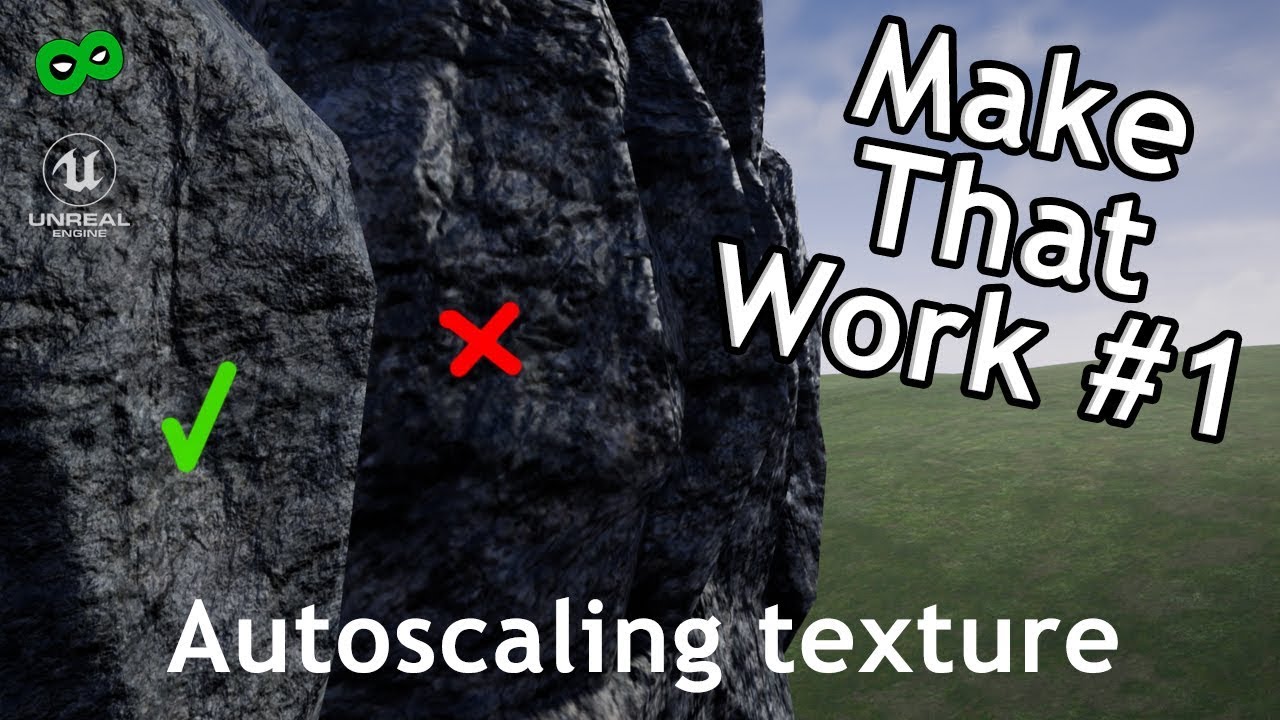
In this short tutorial, I will show you how to make an autoscaling texture for a rock mesh in your scene in Unreal Engine using the material editor. That trick will help you to build more dynamic scenes with the same props and textures.
Difficulty: easy
Leave your comments and suggestions in the comment section. I will use the most interes...
This video was really interesting, if you want to have it dynamic auto scale, instead of manual tweaking
I wouldn't use it for anything other than rocks/landscapes
heady crypt
noble quiver
Hi guys, just wondering if there's a way to display CPU and GPU Time in a widget...
you want a display histogram like POE for computer performance in your UMG Widget?
cyan bone
heady crypt
https://www.youtube.com/watch?v=jSlrJDiuiF0
ah object radius * moddifier
heady crypt
it's an interesting thing to use for sure, but it's limited to things like rocks and ground that use completely tiled materials
noble quiver
heady crypt
you want a display histogram like POE for computer performance in your UMG Widge...
Just the frame time would be fine but a histogram would be cool!
heady crypt
maybe a spline PCG wall graph
cyan bone
heady crypt
you want a display histogram like POE for computer performance in your UMG Widge...
i think this also works
 heady crypt
Laura might know if those variables are accessible, I know that Unreal does track a lot of that for it's own internal details so you can figure what's using how much CPU/GPU/RAM/File Size
noble quiver
Yeah I don't nessessarily need a histogram per say so even just raw numbers would be good. I am familiar with the profiler too but my boss wants it displayed in game so if it's possible, many thanks
Willing to use C++ also if that makes things easier
heady crypt
I've not looked into if those variables are exposed so I'm not sure
 late dragon
How do I create an editor extension to generate child blueprints?
is something like that possible?
 signal perch

 supple dome
late dragon
How do I create an editor extension to generate child blueprints?
is something l...
supple dome
late dragon
How do I create an editor extension to generate child blueprints?
is something l...
explain more
flat summit
how is this called or how can i make it
 true oriole
heady crypt
get the players forward vector, invert it, set a spawn distance, multiply by tha...
true oriole
heady crypt
get the players forward vector, invert it, set a spawn distance, multiply by tha...
🙏🙏🙏🙏 thx it works!
 dawn gazelle
flat summit
how is this called or how can i make it
dawn gazelle
flat summit
how is this called or how can i make it
That's an Array Add. Drag from your array you're wanting to add to and type in "Add" and you should get the node.
 narrow pendant
how would I get the name of my level's UWorld?
lunar sleet
narrow pendant
how would I get the name of my level's UWorld?
There seems to be a UWorld::get world function in cpp that might help.
narrow pendant
lunar sleet
There seems to be a UWorld::get world function in cpp that might help.
yep I'm in a BP project unfortunately
lunar sleet
narrow pendant
yep I'm in a BP project unfortunately
Then why are you asking about UWorld?
narrow pendant

because the world partition commandlet needs the name of the world
that part is not documented though as far as I can tell
lunar sleet
Try #packaging , they’re prly familiar with this
narrow pendant
will do thx
 proven garnet
Hello! Practicing BP's and learning by doing basically. I've made a door interactable so I can open and close it. Opening it works fine but closing it doesn't work. I assumed using the return exec in "Move Component To" would return to start position but maybe it's the flip flop that needs to change? Anyone able to give some pointers?

 willow gate
Hey again smart people. I have an actor with several static mesh components. I set their static meshes from an array of possible meshes and I would like to stack them side by side dynamically. I wondered if there's a way to do this, perhaps using component bounds to find the edge of a box extent and then placing the next mesh next to that box and moving down the chain like that?
 fringe junco
proven garnet
Hello! Practicing BP's and learning by doing basically. I've made a door interac...
fringe junco
proven garnet
Hello! Practicing BP's and learning by doing basically. I've made a door interac...
you need two move component to's one for each angle of the doors position (open and closed)
dawn gazelle
proven garnet
Hello! Practicing BP's and learning by doing basically. I've made a door interac...
If I remember right, Move Component To's return only works if the component is still in motion. You'll need to use some other interpolation system like a timeline.
fringe junco
or a timeline
proven garnet
Ah okay I've checked timeline a bit but can't really grasp it. I'll try with another move component node, thanks!
fringe junco

timelines u just need to double click on them to go into the timeline, and set keys
right click on the graph to set a key

and then u can move the key around to the appropriate place
i have 1 key at 0,0 and another at 2,1
so when its 2 seconds into the timeline, the value = 1
proven garnet
I think I've set it up like you have but now it's not even opening
i must be missing something
 thin panther
show what you've setup
its very easy to miss things when you're staring at it all the time :P
proven garnet
So it's not a curve. Maybe I'm missing something here
 thin panther
it not being a curve doesn't matter. show how you set up the node graph
proven garnet
 thin panther
thought so
 lofty rapids
0 to 0
thin panther
you haven't set your B rotation
 frosty berry
I have an "enemy" that is chasing the player (not using Behaivour Trees). Should the "AI" movement/decision be updated/adjusted every tick, or have its own custom event that has a Delay(.02) then self loops?
 frosty heron
frosty berry
I have an "enemy" that is chasing the player (not using Behaivour Trees). Shou...
frosty heron
frosty berry
I have an "enemy" that is chasing the player (not using Behaivour Trees). Shou...
putting delay on the loop doesn't do anything
Delay happend in one frame
so what happend is after 0.2, you get callbacks every frame from there on
just use Behavior Tree!
dawn gazelle
I think they mean Begin Play > "Do Some Stuff" > Delay 0.2 > Go Back to Do Some Stuff
frosty berry
Yes, EventA --> do stuff --> delay .02 --> call EventA
lunar sleet
Doesn’t really change anything. If you put this on tick, it’ll break
Use the right tool for the right job
dawn gazelle
inserts joke about using level blueprint for AI
 late rapids
Anyone know if there's any difference between these two implementations of interface messages?
They both (appear to) work just fine
https://i.gyazo.com/c1106f4418bc1bad0bea922213f46a46.png

targetting the interface vs targetting the actor / specific object
frosty berry
Datura got it right, Begin play calls the event, then it loops itself on a delay.
Have not dug into Behaviour trees enough. (need to)>
Its vehicle navigation based on a target goal....have no clue at this point how to do that in a BT
lunar sleet
late rapids
targetting the interface vs targetting the actor / specific object
One calls the function in that bp, one calls the interface
 gentle urchin
If its a one off thing, bt might not be the tool for the job
Might be better with a temporary car auto-drive component 😄
lunar sleet
So, the AI makes one decision and then ciao-s ?
frosty berry
gentle urchin
If its a one off thing, bt might not be the tool for the job
Just vehicle chase steering and speed.
dawn gazelle
late rapids
targetting the interface vs targetting the actor / specific object
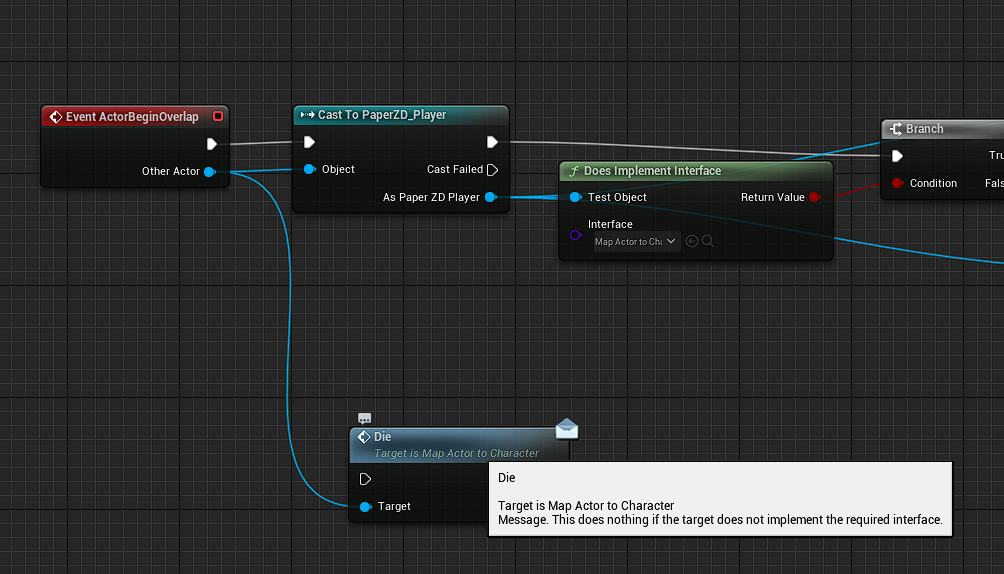
One would require you have a reference to the actor it exists in (The one that says "Target is Player2D Player") the other you can throw whatever reference you have into and it'll attempt to call the interface.
late rapids
lunar sleet
One calls the function in that bp, one calls the interface
is there any actual difference between these two? I would have expected calling the interface to do nothing but it does not
late rapids
dawn gazelle
One would require you have a reference to the actor it exists in (The one that s...
I'm pretty sure that's supposed to be an interface "message" and not whatever this is no?
like if I drag "other actor" without casting it shows something different
 frosty berry
lunar sleet
So, the AI makes one decision and then ciao-s ?
frosty berry
lunar sleet
So, the AI makes one decision and then ciao-s ?
Each "loop" check target location ans adjusts "steering" to stay behind and chase.
lunar sleet
late rapids
https://i.gyazo.com/2eb48367c7c194936dcdb6bcd2f9eee2.png
The envelope is the message kind, yes
dawn gazelle
late rapids
I'm pretty sure that's supposed to be an interface "message" and not whatever th...
Yea you're right. I'm not actually 100% sure why the one with the yellow pin exists.
late rapids
but between these two, are there any difference?
https://i.gyazo.com/dbd8512fee7f9c7cff7f8f6fa6b2ac17.png

 low venture
How would you do this with UMG? I want to make something like a "information dialog", like in Windows. "Files have been successfully saved" or something like that. The length of the text can be anything. Now I want the following:
- the dialog's aspect ratio is e.g. 1:2
- a dialogs maximum width e.g. 500 is set
- if the text does not fit into the dialog with aspect ratio 1:2 and width 500, you should be able to scroll it
I really tried a lot of, but did not get it to work...
lunar sleet
frosty berry
Each "loop" check target location ans adjusts "steering" to stay behind and chas...
Loops and delays won’t jive
lunar sleet
late rapids
but between these two, are there any difference?
https://i.gyazo.com/dbd8512fee7...
The target basically
low venture
The thing with aspect ratio in size boxes seems to be totally broken...
lunar sleet
low venture
How would you do this with UMG? I want to make something like a "information dia...
Did you try the appropriately named #umg channel? 😀
frosty berry
lunar sleet
Loops and delays won’t jive
I call it a "loop" but actually a recursive method/event. Delay is there because I have seen that practice "out there" to do this away from the event tick.
low venture
No, but there will be nobody in this channel the most time @lunar sleet :/
UMG is not popular enough
late rapids
I mean, is there any difference in changing the target, since I'm assuming we're either targetting the actor, or the interface implemented inside the actor, which should both lead to the same outcome? 
lunar sleet
low venture
No, but there will be nobody in this channel the most time <@179343890409717771>...
Happens when everyone that’s supposed to go there doesn’t, so then no one can help each other because channel is dead
lunar sleet
late rapids
I mean, is there any difference in changing the target, since I'm assuming we're...
Did you implement it as an event or as a function?
lunar sleet
Yeah, interfaces are a tad weird, when you implement you basically get a call to the interface itself within that actor and a call to the event or function that was implemented as part of the interface
All that being said, I don’t think it makes much difference which one you use, aside from the message/no message version
late rapids
ye I understand the message/no message version differences
I guess I'll just use the actor reference until something doesn't work and try interface reference after that 
lunar sleet
I think I always just used whichever the context showed first
gentle urchin
frosty berry
I call it a "loop" but actually a recursive method/event. Delay is there becau...
If you need it on tick, use tick
|| ||
 lunar sleet
gentle urchin
If you need it on tick, use tick
lunar sleet
gentle urchin
If you need it on tick, use tick
Delay on tick? Mad man 😀
gentle urchin
lunar sleet
Delay on tick? Mad man 😀
Delay on tick gates it, but its not a good use of tick :p
lunar sleet
 gentle urchin
But yeah no reason for the tick in the first place.
Beginplay -> set timer by event -> BrainTick
Increase during chase
Decrease otherwise
frosty berry
hmmm.
So far its in tick ( no delay, just running) and no performance issues. But its just me playing in editor right now with only 5-6 "chasers".
Basically, what is the best practice assuming I am not giong to use BT?
gentle urchin
Whats it doing on tick if i may ask ?
Like, whats it having to check every single frame?
frosty berry
gentle urchin
Whats it doing on tick if i may ask ?
Gets target Location. Calcs distance, steers towards and adjust speed to then stay X amount of distance behind, and a branch in there to see if it should shoot at the target on occasion.
Thats pretty much it for now.
gentle urchin
MoveTo does that for you
frosty berry
gentle urchin
MoveTo does that for you
Yeah considered that, but I add in some banking, swerving, etc as its adjusts.
gentle urchin
Guess its not the worst use of tick then
frosty berry
🙂
 paper gate
validate check failed everytime ??
even i already add it in viewport
 lunar sleet
paper gate
validate check failed everytime ??
even i already add it in viewport
lunar sleet
paper gate
validate check failed everytime ??
even i already add it in viewport
That’s now how you get a widget ref normally. Did you create widget anywhere ?
 versed sun
Delay untill next Tick after Begin Play
paper gate
versed sun
Delay untill next Tick after Begin Play
yes worked thanks
proven garnet
Hey! Watching a YT tutorial on timelines and I'm not getting this menu to pop up when right clicking a point on the timeline. I can only double right click but that brings up the "rename" and "delete" menu. Any idea what I'm missing here?
 frosty heron
On begin play too. I smell a rat race
low venture
Even the size box can resize to the border's or text's size (only aspect ratio is set), it doesn't. How to fix that?

Border is horizontally/vertically stretching.
Text too.
 plush ridge
If I have the rotation value for the red object, how do I mirror it to get the rotation value for the green object, from my POV? If this pattern continues, the colors would flip and when red points down, green points up.

Basically, I already have the red, I want to create the green
versed sun

 barren dove
plush ridge
If I have the rotation value for the red object, how do I mirror it to get the r...
barren dove
plush ridge
If I have the rotation value for the red object, how do I mirror it to get the r...
interesting
will that work? it seems like it should require an axis
my assumption was to have a line from the center to the left/right, measure the angle and then multiply by -1 / new angle
plush ridge
invert could work but one of the axis should not be inverted (when the line leans towards camera here, both lines should lean towards camera)
 kind estuary
Whats the difference between using instanced static meshes and foliage in terms of performance?
plush ridge
barren dove
will that work? it seems like it should require an axis
I think you're right, though
it's not just a 180 flip
barren dove
plush ridge
I think you're right, though
okay so
180 degree flip minus the amount from the backplane to the "up" direction?
tough without axis's labeled, lol
I still think measuring it to a known axis (the vertical or the flat plane) then redrawing on the other side makes more sense
there's probably some fancy math way of getting what you want but measure and redraw is for lunkheads like me 🙂
plush ridge
some more context: the lines are swords, and it's in 3D ofc
It's in VR, and the idea is that I have a dummy opponent that "mirrors" me. When I point my sword to my top right, he points it to the bottom left (which from his POV is bottom right, hence my image above)
lunar sleet
Perhaps you could use DOT product then, tho I guess that takes location vectors
barren dove
um, instead of doing lines, if its a skeleton mesh couldn't you just mirror a socket location over the mirror plane and you're done? :x
i have done zero animation stuff fyi
plush ridge
it's a static mesh,
I was able to mirror the location/vectors correctly, but the rotations are stumping me
barren dove
oh i'd just try to mirror the locations and draw the lines between them rather than come up with that
plush ridge
oh interesting 🤔 will explore this
barren dove
you know, socket a -> socket B , you have a start and end location, measure and rotate so that the limb does what tis meant to do
plush ridge
actually,
it might get weird when the positions swap across the center point, without rotating
the line drawn will produce a new rotation, when it shouldn't
plush ridge
I know 😅 couple of us went at it thinking it would be basic but it tripped us up
barren dove
okay lets say the plane is the X axis
versed sun
the plane is the x axis
lunar sleet
The plane is the..
plush ridge
the plane is
lunar sleet
X axis
plush ridge
plane
lunar sleet
✈️
barren dove
we can get any location to the x axis, and then draw it on the other side , we just can't get the rotation of those locations, so how do we resolve them without involving the original
we know the actor will be facing the player and probably make a few other assumptions
versed sun
If you want to Mirror a sword, can you get the Relative rotation, and apply the Invert on the dummy ?
 random pulsar
Hey,can someone explain how can i do an avoidance 2d system ,like of the player is near enough to a rubbit ,the rubbit runs from player and stops somewhere?
barren dove
I was thinking he could break the rotator and pull out the Z so up is up on the other side of the mirror, but thats not going to fly because its not world Z its going to be a combination of things
barren dove
random pulsar
Hey,can someone explain how can i do an avoidance 2d system ,like of the play...
can you already move the rabbit around with ai or whatever?
barren dove
mmm, okay
so you could try something like add a sphere to the rabbit
OnOverlap -> get all actors that overlap -> you're looking for the player actor
then get the direction and move the rabbit actor
then whenever the player enters the invisible sphere, the rabbit does what you told it to do
random pulsar
barren dove
then whenever the player enters the invisible sphere, the rabbit does what you t...
Ok ,so i paste this collider in actor blueprint ,from the side where i eant the rabbit to run from,or detect the player and then run?
barren dove
you're on the right path, its up to you, wherever you put that sphere, is going to trigger when it overlaps the player
barren dove
add an onoverlap event -> get all actors of class and add the player class, then print, so you can see it print when it triggers
once you have that working then mess around and figure out what you want it to do 🙂
paper gate
why event tick didnt work in widget when i set visibility of widget to false ??
barren dove
paper gate
why event tick didnt work in widget when i set visibility of widget to false ??
there is a setting somewhere that disables widgets when not visible but I dont remember where it is >.<
 barren dove
let me see
so what you're doing on overlap, you're getting the actors of class, but not doing anything with any of your outputs, you're just getting the actor and not doing anything with ti
random pulsar
adding 5 units to x
barren dove
yep yep slow down, let me explain
what you probably want to do is get the location of the player actor, and the location of the rabbit, and then move away from the player, instead of just always moving towards the x, right?
random pulsar
yes
barren dove
you're probably looking for the "branch" component that lets you set a true/false path for your blueprint
so in this case you can go -> on overlap -> (is the overlapped actor the player?) -> true -> get players pawn location -> get rabbit pawns location -> then things are going to get tricky, you're probably wanting it to move away from the player but stop at the wall, but you're just raw teleporting it right now with set actor location
getting the AI to move stuff for you and obey things like obstructions is something i'm learning right now still unfortunately
random pulsar
jesus christ,its hard
barren dove
if you're just trying to keep things real real simple, you could do something like another branch to "check overlap" on another actor, like a carrot, then if that is true, the rabbit doesn't run away, if it is false ( no carrot) then you move it
barren dove
random pulsar
jesus christ,its hard
you can do it, its just thinking of those white lines as a flow and finding the right blueprint objects.
like its doing what you told it to do, on overlap, its moving the rabbit to the right, now you want it to do something more specific so you need to tell it 🙂
random pulsar
but for what i need the branch?For example its true,its the player that overlapped ,it will do the true and that's it,if not it will be static as if no branch was in this logic
 loud tree
anyone know what causes this? Can't seem to figure it out. The buttons all turn into a little white box when hovered like earth is in this SS
 frosty heron
The image doesn't say much
If your button changed when hovered then open your umg, look at the button brush when hovered
barren dove
random pulsar
but for what i need the branch?For example its true,its the player that overlapp...
the problem is here
when the area is overlapped, you move to the right, the "get actors" isn't doing anything at the moment with its output
so if, for example, the rabbit walks over to some other actor, its going to move to the right, if there are two rabbits, they'll run off, lol

so the branch will let you check if one of the "get actors of class" is a player, and if it is, then continue on, if the actor is not a player, then the rabbit wont run away 🙂
since you're making a decision, usually branch is the way to go 🙂
loud tree
frosty heron
The image doesn't say much
There is nothing other than the placement and color set up or changed. I've placed them similar to other ui I've made. This has been the first I've seen it.
barren dove
so you want to check if the "other actor" on your overlap event is a player , and if it is, continue with your blueprint, if not you can just leave false empty and it'll stop right there
frosty heron
loud tree
There is nothing other than the placement and color set up or changed. I've plac...
Describe your problem again
Your button get hovered and it change to white box?
That it?
gentle urchin
Very strange for the GetAllActorsOfClass to be there imo
Seems like a strange strategy
loud tree
frosty heron
That it?
Yes
frosty heron
gentle urchin
Very strange for the GetAllActorsOfClass to be there imo
It's obviously wrong 🙄 he just didn't know what to do I guess
random pulsar
barren dove
so you want to check if the "other actor" on your overlap event is a player , an...
oh ,now it makes sence ,thanks
frosty heron
loud tree
Yes
Then I reiterate my self for the last time.
Go to the detail panel of your button. Look for hovered selected etc. Change the brush to be the same as the normal brush
@gentle urchin I manage to keep the widget alive during map transition
Using Tsharedptr in gameinstance subsystem
frosty heron
Hmm like the widget?
gentle urchin
ye?
frosty heron
Can have animation
It's just normal umg
I look at lyra do it if I dechiper it right they also use umg
No idea how they load the level tho
gentle urchin
frosty heron
It's just normal umg
right , i just suspect it to be blocked during level loading
so you couldnt easily play an animation there ? would be my guess
frosty heron
gentle urchin
right , i just suspect it to be blocked during level loading
I use async load. Animation play smoothly
loud tree
frosty heron
Then I reiterate my self for the last time.
Go to the detail panel of your butt...
I get that. I'll ask elsewhere since I suppose that was "the last time you will reiterate yourself"
I know the normal and hovered are different. I'm confused because I have set up like 12 other buttons the same exact way, not touching the hovered section, they don't do that. I know i can get a work around. I am trying to better my general understanding.
frosty heron
Still don't know if I will get lag when loading big lvl but looks Gucci atm
gentle urchin
frosty heron
Still don't know if I will get lag when loading big lvl but looks Gucci atm
niice, then it'll work yeah
frosty heron
Time will tell 🥹
frosty heron
loud tree
I get that. I'll ask elsewhere since I suppose that was "the last time you will ...
Who are they?
gentle urchin
I'd suggest making a single wrapped button for your button, to avoid setting up 12 the same way
barren dove
random pulsar
oh ,now it makes sence ,thanks
yep, you'll get there, 🙂
loud tree
gentle urchin
I'd suggest making a single wrapped button for your button, to avoid setting up ...
Different buttons in different UI.
frosty heron
loud tree
Different buttons in different UI.
Make a button with common functions that set the style
U can use that button anywhere in different widgets
<@&213101288538374145> @scenic oasis spam bot
loud tree
frosty heron
U can use that button anywhere in different widgets
Oh, I'll have to take a look into that. Thank you.
 gentle steppe
(I'm not a bot, i just made a reddit post and it got removed so i copy and pasted the posts text, i also just posted onto the ai chat but i think that was the wrong place to say this) I'm trying to make a Zombie AI which is like the World War Z Zombies but a little dumber. I still want them to be fast, climb and sneak up on the players but I dont want ones where you literally cannot survive them. I have looked everywhere for tutorials but I can't find any. I have found some where they aren't as smart and can't climb and are just basic zombies but never anything too smart. I tried using behaviour trees and that was good, but I could never get it just right. Also, I need the animations to stop if the player moves away too quickly because what I had before was a zombie still playing a hit animation like 5 seconds after the player has run away. I'm using blueprints btw
 lean widget
Hey, I am trying to make a tower defense game, but am new to unreal engine. I understand some basics, but have no idea on how to set this project up or where I can learn how to. I am looking to setup a simple wave system of enemies that head down a path to destroy an object. Any help or direction would be much appreciated.
Im not opposed to learning, just not sure where to find any documentation on this setup.
supple dome
break it down
-> How to spawn pawns, how to make pawn follow spline, how to trigger damage when touching something
after you get that working, setup your spawns using ie a table, with enemies classes and delay for example
adjust as needed
lean widget
Okay, that helps. I will look into each one of those. Thank you.
 keen girder
epics cropout sample project is using this formula to scale the mouse cursor based on distance... what is this?! why is vector length subtracted by 9000 and divided by 5000? what is this calculation based on?

 jovial magnet


it doesnt destroy the actor
shouldnt be equipping atm
it does nothing basically
lunar sleet
You’re using interfaces
jovial magnet
no
jovial magnet
uh
lunar sleet
Add custom event
jovial magnet
can i equip weapons from event though
it should be destroying atm but it equips in full version
btw im pretty new
so sorry
lunar sleet
I’m confused. If you want to destroy the actor, just do that
jovial magnet
mm
full code destroys the actor, adds the weapon to your hand or something along those lines
lunar sleet
Instead of an interface call, just drag from the element, cast to BP_Item, destroy actor on success
Ok, well we don’t know what this full code is supposed to be, if it’s an attach actor to actor or what your tutorial says to do
gentle urchin
keen girder
epics cropout sample project is using this formula to scale the mouse cursor bas...
your guess is as good as mine
harcoded values for FOV + distance?
keen girder
thhought they havve a great solution to keep a cursor scaled at distance
 sweet silo
hi there what wold be your favorite way of activating this radio ? and playing sound on it ?
i've set up an interface but the desk is filed with stuff so i'd rather use a line trace

this is for a first person
gentle urchin
keen girder
thhought they havve a great solution to keep a cursor scaled at distance
What does it actually do? constrain movement within some hardocded bounds?
 faint pasture
sweet silo
i've set up an interface but the desk is filed with stuff so i'd rather use a li...
faint pasture
sweet silo
i've set up an interface but the desk is filed with stuff so i'd rather use a li...
both
line trace to detect what to call the interface on
faint pasture
if you're after the fallout style approach, you'd line trace on tick, setting CurrentlySelectedActor
then when you press E, call Interact on CurrentlySelectedActor
 faint pasture
idk why you called it pickup
faint pasture
Start with this:
E -> line trace -> call Interact on hit thing
sweet silo
or is it ? because i want to use E for picking and interacting
keen girder
gentle urchin
What does it actually do? constrain movement within some hardocded bounds?
the pawn is represented by a "mouse cursor icon" and it is just following camera movement. this part just scales the cursor based on distance (which is what i am looking for)
faint pasture
Interacting with a pickupable IS picking it up
the reciever of the interact call can decide what to do
gentle urchin
keen girder
the pawn is represented by a "mouse cursor icon" and it is just following camera...
the part in the snippet only scales movement based on some stuff, not related to cursor scale?
sweet silo
i have this for the door
 sweet silo
faint pasture
the reciever of the interact call can decide what to do
sweet silo
faint pasture
the reciever of the interact call can decide what to do
oh yeah yo are right my bad
keen girder
gentle urchin
the part in the snippet only scales movement based on some stuff, not related to...
d'oh
faint pasture
sweet silo
i have this for the door
Go ahead and rename that to Event Interact, and also add a parameter to it to send over the InteractingCharacter
so the thing getting interacted with knows WHO is doing the interaction
then it's trivial to do pickups etc
gentle urchin
keen girder
d'oh
opening project..
lunar sleet
So like map size?
 lunar sleet
Makes sense
 lunar sleet
 sweet silo
i know it's really dirty and not working what am i missing here "if you're after the fallout style approach, you'd line trace on tick, setting CurrentlySelectedActor
then when you press E, call Interact on CurrentlySelectedActor" i tried doing taht
 gentle urchin
not seeing any scaling at all tbh
sweet silo
@faint pasture
gentle urchin
keen girder
no needd
what cursor scaling are you refering to exactly ?
sweet silo
i can already hear the screams becausee of that get actor of class
gentle urchin
the one i found, or something for the cursor widget itself?
Dont do dirty plz
This doesnt logically make sense
 gentle urchin
Radio should do what radio wants to do, when interacted with
No
infinite loop
HitActor is presumably self
gentle urchin
keen girder
no needd
there's a bug when you drag in cropout
circle keeps being offset from , and chasing towards the mouse location
sweet silo
 sweet silo
gentle urchin
Radio should do what radio wants to do, when interacted with
sweet silo
gentle urchin
Radio should do what radio wants to do, when interacted with
yeah but how can i compare the hit actor ?
Like the line going out from the character shows he is looking at the radio
gentle urchin
fun times
 gentle urchin
sweet silo
yeah but how can i compare the hit actor ?
Like the line going out from the cha...
gentle urchin
sweet silo
yeah but how can i compare the hit actor ?
Like the line going out from the cha...
what are you comparing?
you dont need to compare anything
Locally on the player you might have a hit actor
sweet silo
but how do i tell him that i want it to interact only when he is looking precisely at the radio ?
faint pasture
sweet silo
i know it's really dirty and not working what am i missing here "if you're afte...
no
what happens when there's another player or another ai character
gentle urchin
Radio handles the "i'm currently the hovered/looked at target"
Personally I separate the interaction
and the "hover/lookAt"
into 3 different functions
Interact is for a hovered target
sweet silo
hmmm ok i see
keen girder
gentle urchin
Dont do dirty plz
what do you mean by that? and man, sorry for taking your time. totaly misread the blueprint function
gentle urchin
keen girder
what do you mean by that? and man, sorry for taking your time. totaly misread th...
not ment to you
And no prob
sweet silo
faint pasture
what happens when there's another player or another ai character
yeah right
sweet silo
gentle urchin
into 3 different functions
yeah i should do that do
and also i'm trying to get a sound to play when the radio is interacted with of course
but it's doing the sound on every tick because its linked with the event tick on the thrrdperson charcater
but i guess i should go to sleep haha
 noble ledge
If I have a node with a target pin but 3 targets pointing to it, does that node get ran 3 times? One for each of the plugged in targets?
lunar sleet
noble ledge
If I have a node with a target pin but 3 targets pointing to it, does that node ...
3 targets ? Like what
You mean input pins ?
gentle urchin
if its a pure node, it'll run one time for each -non pure node its connected to
noble ledge
this

 tawdry surge
Each target will run the function once
 red berry
Quick question, what colors do people choose when picking colors for comment nodes? Mine are all in grey, but I see people organising in various colors like red, green, blue, etc. What would you need to organise a function in multiple colors for? Whats the convention? Do you have multiple colours for a convulted event graph, and just 1 color for a simple function? Do you setup colors for different things, like logic and UI?
 hybrid hare
hi, i'm generating with BPa text files saved in a local folder on user PC. I'd like to be able to tell (in BP) the system to replace the or update the txt file is version number (done in BP) is different from the current version in the saved file. Would it be possible or only doable with c++ ?
lunar sleet
red berry
Quick question, what colors do people choose when picking colors for comment nod...
Entirely up to you
There’s no convention for that afaik, unless you work in a team where they’ve established such rules
For example, in one project I have green for movement related stuff, red for attack, orange for selection. But it doesn’t really matter, it’s more of a visual aid for you
versed sun
I like having a color for Temporary code/ Junk test code
 broken wadi
red berry
Quick question, what colors do people choose when picking colors for comment nod...
broken wadi
red berry
Quick question, what colors do people choose when picking colors for comment nod...
I use yellow for player inputs, teal for client rpc, light blue for server rpc, dark blue for multicast and default white for regular events. I also use red for when something is disabled or put on hold for now but I haven’t quite decided if I want to delete it or not.
You can also drag the color to the top of the comment details panel and it saves it as a color swatch for reuse later with other comments.
 pallid nest
hi guys, is it ok to ask question regarding issues you facing with your BPs or is it against the terms?
lofty rapids
 broken wadi
pallid nest
hi guys, is it ok to ask question regarding issues you facing with your BPs or i...
broken wadi
pallid nest
hi guys, is it ok to ask question regarding issues you facing with your BPs or i...
Might be against the terms of what? If the company you work for has a policy that prevents you from sharing code in public then that could be a problem…
pallid nest
broken wadi
Might be against the terms of what? If the company you work for has a policy tha...
oh many thanks. I meant terms of this dc to make sure I am not breaking any of the rules of this dc!
broken wadi
Seems like you haven’t read the server rules. Maybe give them a read?
Not saying you’re doing anything wrong but it’s always a good idea to at the very least read the server rules.
pallid nest
i did, but I couldn't find anything about where to post questions (it just says to be patient)
broken wadi
Okay and have you checked out what it says about this channel’s description? 😉
 grave apex
is there a way to use pointers in blueprint?
lunar sleet
pallid nest
i did, but I couldn't find anything about where to post questions (it just says...
But also, just ask
lunar sleet
grave apex
is there a way to use pointers in blueprint?
Blueprints use pointers already
Anytime you have a ref to something, that’s a pointer
 soft plinth
Hello!
How do I get random point on sphere surface?
With Blueprints...
Thanks!
pallid nest
broken wadi
Okay and have you checked out what it says about this channel’s description? 😉
I obviously read it so there is a reason why I asked it, but thanks.
lunar sleet
pallid nest
I obviously read it so there is a reason why I asked it, but thanks.
Ok, but what is the question lol, we still don’t know
broken wadi
pallid nest
I obviously read it so there is a reason why I asked it, but thanks.
Seems to me like you have a blueprint related question about some issue you’re facing and are asking to ask if #blueprint is the most appropriate channel. I can’t even…
pallid nest
lunar sleet
Ok, but what is the question lol, we still don’t know
lol one min, I need to get the code etc 🤣
lunar sleet
soft plinth
Hello!
**How do I get random point on sphere surface?**
With Blueprints...
Thank...
Can you maybe elaborate on what you’re going for?
grave apex
lunar sleet
Blueprints use pointers already
I mean like this

if I wanted to set CurrentMeshBeingSwapped to point to Hair Mesh's address
so i could effectively change hair mesh at any time via changing CurrentMeshBeingSwapped's value
this is what I mean by that
is that still possible?
lunar sleet
grave apex
is that still possible?
you might be looking for set by ref / pass by ref
grave apex
oh!
pallid nest
I am currently using a template for my game (https://www.unrealengine.com/marketplace/en-US/product/advanced-platformer) and basically the issue I am having is that my player start is not working as for some reason the player spawns at a different location (and I can't figure it out how to solve it).
I checked and it seems somehow the issue is related with the last node of my a load game BP (setactorlocation ; concretely, the last node at → https://blueprintue.com/blueprint/_5n0swz6/ ) because when I disconnect sectoractorlocation it goes back to the playerstart.
I believe the issue might be related with a cinematic. As that specific node I created is linked to my level BP (https://blueprintue.com/blueprint/u68i73xq/) and the whole load game BP was part of the template I linked above (which it was working fine prior to the animation).

Unreal Engine
Advanced platformer is a template of the most necessary functions designed to start the development of the game.

No description provided
No description provided
 trim matrix
How can i create child of a Data Asset blueprint?
broken wadi
pallid nest
I am currently using a template for my game (https://www.unrealengine.com/market...
Okay if i were you I’d setup some breakpoints in the blueprint code so that the game automatically pauses when they’re triggered then you can double check the values of your variables by hovering over them with your mouse to ensure they are what you’d expect them to be. Maybe the checkpoint location isn’t what you think it is for some reason?
heady crypt
make a new BP and click it as your option, you can click all classess and search for it by name
trim matrix
heady crypt
make a new BP and click it as your option, you can click all classess and search...
that doesn't work with data assets
that's for normal blueprints
heady crypt
the objects you make Data Tables out of?
trim matrix
heady crypt
the objects you make Data Tables out of?
my question is "How can i create child of a Data Asset blueprint?" There is no data tables?
dawn gazelle
trim matrix
How can i create child of a Data Asset blueprint?
Requires creating a data asset definition in C++
If you're hoping to create a child class of a data asset created in blueprints I don't think that's a thing.
soft plinth
lunar sleet
Can you maybe elaborate on what you’re going for?
Hi @lunar sleet .
I'm tring to spawn an actor on random locations on the surface of a Sphere.
pallid nest
broken wadi
Okay if i were you I’d setup some breakpoints in the blueprint code so that the ...
ok thanks, I will try that. I think so as it actually spawns in a checkpoint and it is odd because it has already some points (so it is actually loading a game but I can't start a new game as it will do some kind of loophole)
lunar sleet
soft plinth
Hi <@179343890409717771> .
I'm tring to spawn an actor on random locations on th...
I mean is the sphere your landscape or what ?
lunar sleet
soft plinth
Hi <@179343890409717771> .
I'm tring to spawn an actor on random locations on th...
soft plinth
lunar sleet
I mean is the sphere your landscape or what ?
You save me men, thanks a loooot!
They are clouds, and I need them to spawn on a planet surface.
Awesome @lunar sleet .
Cheers!
 normal temple
Hi guys! I have a custom movement system for a character and I was wondering if there was a way to change AddForce to reach the maximum linear velocity I wanted faster. Is there a way to clamp linear velocity somehow?

I would use SetPhysicsLinearVelocity but that causes some issues
A) Jumping while moving gets ignored because the linear velocity set is taking priority
B) Acceleration is too instantaneous
 heady crypt

 heady crypt
 neon gull
if break happen does the loop go intoo completed?
neon gull
if break happen does the loop go intoo completed?
looks like break == break; and does your first hypothesis
neon gull
ty for testing
 novel hornet
does anyone know how to move a vector that stores a location forward in a direction
tawdry surge
Direction * distance + location
novel hornet
O thanks
flat summit
hey guys whenever i crash into a wall my character gets slowed, how can i remove that?
faint pasture
soft plinth
Hello!
**How do I get random point on sphere surface?**
With Blueprints...
Thank...
How would you do it with math?
RandomPointOnSphereSurface = SphereCenter + RandomUnitVector * SphereRadius
 mental trellis
Nvm.
lunar sleet
faint pasture
RandomPointOnSphereSurface = SphereCenter + RandomUnitVector * SphereRadius
I think I pointed him at a post that said all of that 😀
 cloud nimbus
My question isn't Blueprint specific but I am using Visual Logger within Blueprint...
I can't find in the documentation any reference as to what the red cone that is pointing down is. The one reference suggests it's the 'selected point on the timeline' which doesn't sound right.
I seems like it's the actor's world location which is doing the logging, is that correct? Do we have control over how this draws?
trim matrix
is there a way to set the visibility of a 3d widget per player?
heady crypt
#multiplayer need to do RPC and Multicast things
 kind apex
sound mix not doing anything?
I set all gain to 0 to see if it was my hearing lmao.
doesn't effect any audio at all.
 heady crypt
Haven't used it before, the location you're using it, is that in an active object in the world? did you put a print string to see if it's being called ?
kind apex
straight in the level blueprint
heady crypt
oh ok, you clicked blueprints and opened level map and added it there ?
kind apex
yesm 🙂
frosty heron
kind apex
straight in the level blueprint
doesn't matter where you call it altough u shouldnt do anything in the level bp
Set before push
heady crypt

Pop and Push look super useful
assuming you know you would of put an audio mix at some time, pop it off
frosty heron
.
 kind apex
ahh i see, i pretty much want it over every single sound in the game \m/
frosty heron
have u done the hierachy?
you can just push the master or base class
that will affect all the children
 frosty heron
Bruv, I just told you where you call it don't matter
just set it up properly
you need to asasign sound class to each of your sound file
kind apex
so i need to do that with every single sound file?
frosty heron
You need to assign the sound class for each file yes

This is my Voice file, I assign voice sound class to it
And my voice is a child of the master
so anytime I need to change the whole audio in the game, I just change the master
kind apex
alright, so what do i do in this sound class?
frosty heron
- Create a Sound mix and Sound Classes (Refer to the 1st picture, that is the sound mix. Assign the Sound class to the Sound Mix)
- In your Sound Class, ensure to have proper hierachy. (2nd Picture)
- Set to override modifier then Push to change volume (3rd Picture)


- Assign sound classes accordingly to each of your sound file
This is my music folder, they all assigned AtherMusic as the group
 kind apex
Alright perfect, worked that time \m/
thankye
 gray lantern

Is there a tidier way to do this, where I want to toggle a switch just for one frame?
 steady night
Hey im using scene capture component 2d and im ignoring Flag "skeleton mesh" but it still shows :/ ?
what am i missing ?
gentle urchin
gray lantern
Is there a tidier way to do this, where I want to toggle a switch just for one f...
Delay to next frame
Not delay 0.1
That could be several frames
Other than that, no 😅
 gentle urchin
Ye
gentle urchin
Yeah mb 😅
gray lantern
np!
gentle urchin
Its relatively new so i forget what its named
 radiant pebble
Anyone know ACF ? If yes what's your opinion ?
gentle urchin
Havn't actually used it yet 😅
steady night
Squize
frosty heron
I am contemplating if I should do save/load via a gameinstance subsystem or just using the normal game instance
gentle urchin
Subsystem meeeh 😄
 fleet cosmos
Hi, I am trying to attach this simulated rope to my character's hand. It spawns but it doesn't get attached to the socket I've set to. What is the problem here?
Also when I move the character the rope just stays the way it is in the picture( it is not attached at all)

 narrow pendant
fleet cosmos
Hi, I am trying to attach this simulated rope to my character's hand. It spawns ...
narrow pendant
fleet cosmos
Hi, I am trying to attach this simulated rope to my character's hand. It spawns ...
you probably need to reference your character in the Parent input
fleet cosmos

added the parent, still not working
tried this with another blueprint class and spawns and attaches fine
but with BP_Rope it does not work

Here is the BP_Rope blueprint. Rope is an skeletal mesh that is simulating physics.
pallid nest
hi guys, can someone please recommend me a good youtube channel/course to learn more properly BPs? I do understand some basic as I did Python as hobby but I do not have any programming background
tawdry surge
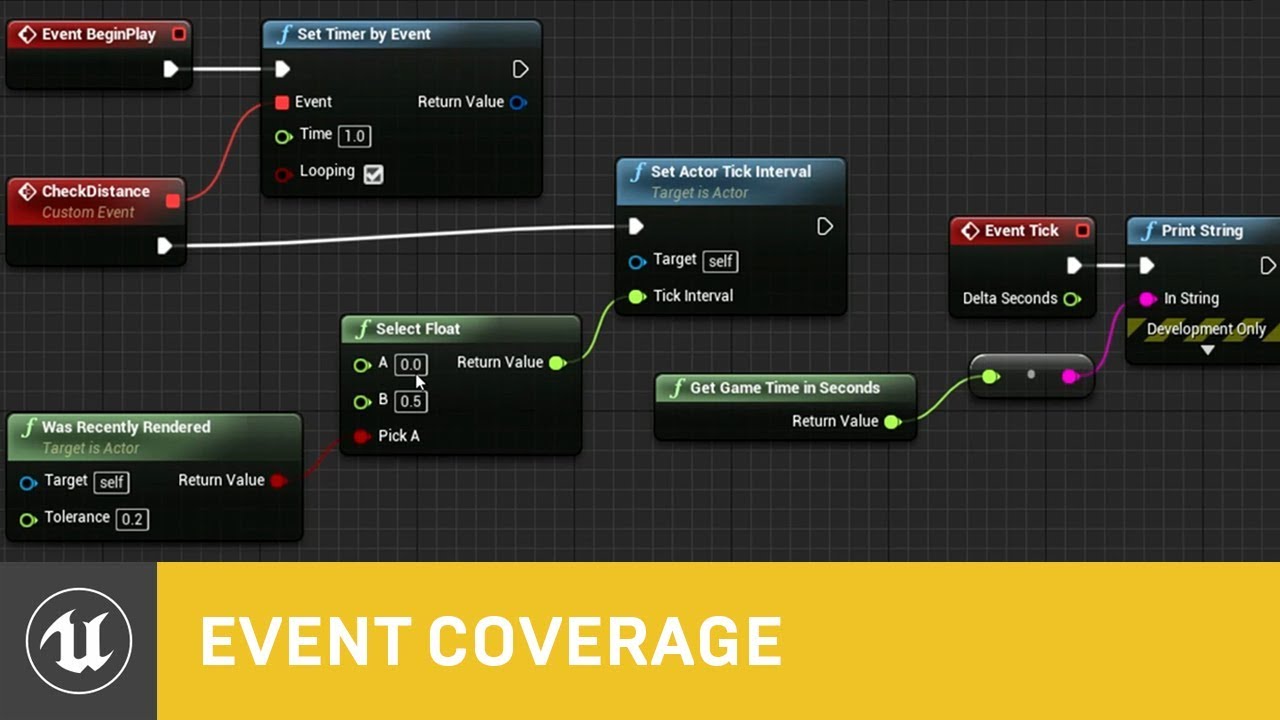
In this presentation from Unreal Fest Europe 2019, Epic's Sjoerd de Jong offers an in-depth look into Blueprints. Best practices, dos and dont's, and recommendations on how to utilize Blueprints to its full potential.
During this advanced class we will go into how to use Blueprints in a future proof and scalable way. We will look into how to c...
Also the BP communications video pinned to this channel
fleet cosmos
fleet cosmos


I tried to attach the rope in the component hierarchy this time with a constraint, the spawning location is correct but now the problem is when I move the character the rope stays in the place it spawned(character hand)
How can I figure out this issue?
pallid nest
tawdry surge
https://m.youtube.com/watch?v=j6mskTgL7kU&t=3s&pp=ygUTYmx1ZXByaW50cyBpbi1kZXB0aA...
many thanks!
trim matrix
I need to smoothly rotate normal vector A towards normal vec B on Tick in a way that would also support an edge case where B is the negative vec of A.
How could I do that?
I am hoping to recieve an elegant solution.
heady crypt
are you trying to SLerp from A to B? Spherical Interpolation ?
or are you trying to normalize A to B ?
 oak fable
hey there
i need help with figuring out why my character leg Collison activates behind the actual location of the leg as you can see in the video everything is setup correctly


 trim matrix
heady crypt
are you trying to SLerp from A to B? Spherical Interpolation ?
trim matrix
heady crypt
are you trying to SLerp from A to B? Spherical Interpolation ?
slerp
heady crypt
This one ?
 versed sun
oak fable
hey there
i need help with figuring out why my character leg Collison activates...
versed sun
oak fable
hey there
i need help with figuring out why my character leg Collison activates...
Turn on some Global Time Dilation when you kick to slow down time so you can see
But it kinda looks like the red area is rotated -1 from your character
heady crypt
doesn't matter if A is - or B is -
 abstract mango
I need quite a bit of help here...
heady crypt
it's just calculating A to B and you say it's at ALPHA stage
trim matrix
but will it SLerp correctly if B is the exact negative of A?
heady crypt
you could drive with a timeline, or drive with a timer, or use tick and just increase SlerpAlpa += Delta
abstract mango
So basically I'm almost completly new to UE, and I'm trying to replicate a Mod I've made for an old Doom Engine Game, but in 3D so basically a whole lot better than that old stuff
oak fable
versed sun
Turn on some Global Time Dilation when you kick to slow down time so you can see...
yeah it kinda looks like it rotates but why is that ?
abstract mango
What I currently need help with is setting up the player controller and the first weapon ^^"
oak fable
in the last animation it works fine
versed sun
is it at your hip ?
trim matrix
trim matrix
but will it SLerp correctly if B is the exact negative of A?
@heady crypt do u know by any chance?
heady crypt
only used SLerp in Unity never tried it in Unreal
oak fable
versed sun
is it at your hip ?
what is at my hip ?
trim matrix
heady crypt
only used SLerp in Unity never tried it in Unreal
it's prob a similar algorithm (if not the same)
oak fable
you mean the start point of the leg collision
versed sun
yah
oak fable
no its at the knee
heady crypt
yea, most mathematical things are universal
oak fable
versed sun
yah

 oak fable
versed sun
you could do something like this
oak fable
versed sun
you could do something like this
i saw it it falls down behind the player
while the animation keeps going forward
steady night
what component is causing Shadows ?
is there a specific component or whats causing shadfows ?
oak fable
versed sun
you could do something like this
thanks you man
it was the anim notify i did start the left leg collision on both right and left anim notifies

red berry
While debugging with a breakpoint and simulating, is there a way to see the values of the variables? Or do we have to just add print message to see them?
lunar sleet
red berry
While debugging with a breakpoint and simulating, is there a way to see the valu...
Hover over them
red berry
lunar sleet
Hover over them
Wow I never knew that, thanks! This whole time I've been making a mess of my blueprints writing lots of debug nodes
 weary flame
This is probably a silly question but what is the equivalent to get hit result for a widget instead of something in the world outliner?
I don't want to use the OnPressed or OnClicked event inside the widget.
 lunar sleet
weary flame
This is probably a silly question but what is the equivalent to get hit result f...
lunar sleet
weary flame
This is probably a silly question but what is the equivalent to get hit result f...
OnHovered
weary flame
lunar sleet
OnHovered
That is still an event in the widget itself no?
 lunar sleet
weary flame
That is still an event in the widget itself no?
lunar sleet
weary flame
That is still an event in the widget itself no?
Yes. Why do you want to avoid this
weary flame
lunar sleet
Yes. Why do you want to avoid this
Interacting between widgets and actors is something core to the project. Lots of state changes based on that. I want to have a clickmanager that centralizes where the click input goes, who does what and what gets turned off.
gentle urchin
Doesnt that just cause indirections for widgets?
lunar sleet
weary flame
Interacting between widgets and actors is something core to the project. Lots of...
I mean #umg is the best place for this, but you should prly look at CommonUI for the advanced functionality like input routing, widget stacking, etc
weary flame
lunar sleet
I mean <#221799467689574410> is the best place for this, but you should prly loo...
Will do.
abstract mango
Can I get some help with this? ^^"

Additionally to that, my blendspace for the anim seems to work
but ingame it doesn't
in playtest
lunar sleet
abstract mango
It means you didn’t set whatever the Character variable is before trying to access it
lunar sleet
abstract mango
Additionally to that, my blendspace for the anim seems to work
Try the #animation crew about that stuff
versed sun
abstract mango
Can I get some help with this? ^^"
If you click the Set Speed it should take you to the trouble spot
you have something called Character plugged into the Set Speed node
abstract mango
Idk what went wrong I redid the blueprint and it worked lol
maybe I had the character in set state instead of get state
 zinc cypress
Hi, I'm new to unreal.
In my game, I have an input system where the player can type in and commit the text. I want the game to be able to check this message for certain type of keywords so it'll do something specific. For example, if the message contains the word "move", it'll move the player. The way I do this is creating a base prompt class (technically empty class with string/function not meant to be in scene) which is inherited based on different functions (prompt-move/prompt-help/etc with different keywords and different actions). I get this error while trying, could someone please help?


 versed sun
If you click the Process Input it should take you to the trouble spot
you have something called PromptCheck plugged into the Process Input node
zinc cypress
Yes I do.
Here's the widget blueprint. I want to call the function in base prompt blueprint
 lunar sleet
Funny how the simplest possible error is the one that comes up the most 😀
lunar sleet
zinc cypress
Yes I do.
Here's the widget blueprint. I want to call the function in base promp...
Yeah, so where is PromptCheck being set?
zinc cypress
I haven't set it. I just created the variable and set its type to baseprompt. Since it's not in scene how can I do that?
lunar sleet
What is it?
 frosty wadi
So my actors In the outline are unloaded. Fine, so I pin them to load them but then it says unloaded data layer. Is there anyway to find the data layer bc if I open the data layer outline there is nothing there but the items still show in the outline but not physically visible in the viewport
zinc cypress
lunar sleet
What is it?
It's supposed to just contain some keywords and a function on what will happen if the message contains that keyword. Here's the blueprint

 cunning vapor
Heya guys, for my UI ih ave a switcher -- the switcher seems to be giving everything inside it a lower opacity, is this a known thing ? is there a check box im missing? thanks in advance
lunar sleet
zinc cypress
It's supposed to just contain some keywords and a function on what will happen i...
Then why not make it an event or function in the same bp and call it a day?
lunar sleet
cunning vapor
Heya guys, for my UI ih ave a switcher -- the switcher seems to be giving everyt...
Try #umg
zinc cypress
Because I kinda want it to be reusable. This is supposed to be a base class different stuffs can inherit from it (with different keywords/functions but the structure should be the same) and I thought doing it in one same bp may be too much but i guess if there's no other way I can try doing that
sweet silo
hi how would you make this pendulum thanks ?

like rotate one side at sec one aand rotate reverse after
lunar sleet
zinc cypress
Because I kinda want it to be reusable. This is supposed to be a base class diff...
There is another way, yes. But this looked like barely any logic
If you want to access a different bp you need an actual reference to it
So maybe put that logic somewhere easily accessible like the player controller for example
then get player controller, cast to it and call that function/event or grab whatever variable from it you need
zinc cypress
Ah okay thank you so much
lunar sleet
sweet silo
hi how would you make this pendulum thanks ?
Prly a timeline with a lerp
 flint wind
Hey everyone, I've been wondering all this time if using multiple get nodes is any more expensive at all than using a single get node for several connections, like right (in the image below) being more expensive than left, because I believe I did read somewhere that it's better the less get nodes you use, but I try to think about how the same "code" would be in C++ and I feel like it would result in the very same amount of lines either way, so I thought maybe it doesn't matter but I guess it depends on how Unreal compiles blueprints. Would anyone know about this? I ask because trying to avoid using extra getters can make the blueprint very messy very quickly. Also, in case it's the same, is it also the same with the outputs of calculations and functions? Thanks in advance.
 sweet silo
hi there where is the best place to set a reference to my character so i don't have to do it everytime i want' to cast it ? thanks
 dark drum
flint wind
Hey everyone, I've been wondering all this time if using multiple get nodes is a...
dark drum
flint wind
Hey everyone, I've been wondering all this time if using multiple get nodes is a...
As far as im aware it doesn't make much of a difference once you cook your game. (I could be wrong though) The only noticeable difference I've found is a slight (and I mean tiny) increase in the size of the blueprint files. Personally, I would say this is worth the trade off for readability.
gentle urchin
Micro optimization in a very unoptimized scripting 'language'
dark drum
sweet silo
hi there where is the best place to set a reference to my character so i don't h...
In the place that needs it.
flint wind
gentle urchin
Micro optimization in a very unoptimized scripting 'language'
I know, right? But I can't avoid thinking about this all the time so, if it doesn't really matter, I can at least stop ""worrying""
sweet silo
dark drum
In the place that needs it.
but isn't there a place like a game instance where i could do it once and for all ?
dawn gazelle
sweet silo
hi there where is the best place to set a reference to my character so i don't h...
Your best bet is to create a blueprint function library and make your own custom pure getter function that tries to get Player Character 0 (assuming non-multiplayer) and then casts it for you. No need to worry about references being valid etc, just call the function whenever you want to get the player character. Casting isn't expensive and if you need to have a reference to the character in the blueprint you're using, there's no difference in terms of memory footprint of that class.
dark drum
sweet silo
but isn't there a place like a game instance where i could do it once and for al...
But then you'd need to get your game instance and cast to it to get your character ref. 😉
If you need a character ref frequently in a BP, cast on begin play and store it for that BP.
sweet silo
ok thanks a lot i'll inquire into all this i didn't know about this
gentle urchin
flint wind
I know, right? But I can't avoid thinking about this all the time so, if it does...
Save yourself the brainpower 😆
sweet silo
dark drum
But then you'd need to get your game instance and cast to it to get your charact...
ahha true
gentle urchin
It doesnt matter at all, leave it with that
flint wind
That's what I'll do, thanks to you both! ^^
dawn gazelle
flint wind
Hey everyone, I've been wondering all this time if using multiple get nodes is a...
- Less nodes does save you in terms of blueprint file size in the editor (which is mostly a non-factor). Once packaged it likely makes 0 difference.
- Less nodes can help with editor performance. Less stuff it has to draw on the screen = more performance, though it does take hundreds if not thousands of nodes on a single graph to start causing it slowdown. Again, this only matters at editor time anyway.
- Organization and readability is much more important. It'd be much harder to follow a single node connection connecting to things all over the blueprint. Within a small space, it can make sense to use one node and connect to multiple things, but the farther and farther away it is from where it's being connected makes it much harder to follow along with.
flint wind
dawn gazelle
1) Less nodes does save you in terms of blueprint file size in the editor (which...
Completely agree about the readability part. Thank you so much for such an elaborate answer!
lunar sleet
flint wind
Completely agree about the readability part. Thank you so much for such an elabo...
Should also read the pinned pitfalls of blueprint to get an idea of what happens when using pure functions
mental trellis
It stands for pure performance !
random pulsar
Hi ,can someone explain how can i make an character ai to avoid the character(move in opposite direction when the player is too close)?
in 2d,so it will be easyer,only left and right
gentle urchin
Getunitdirection (playerlocation, ai location)
Gets the direction the ai should move in


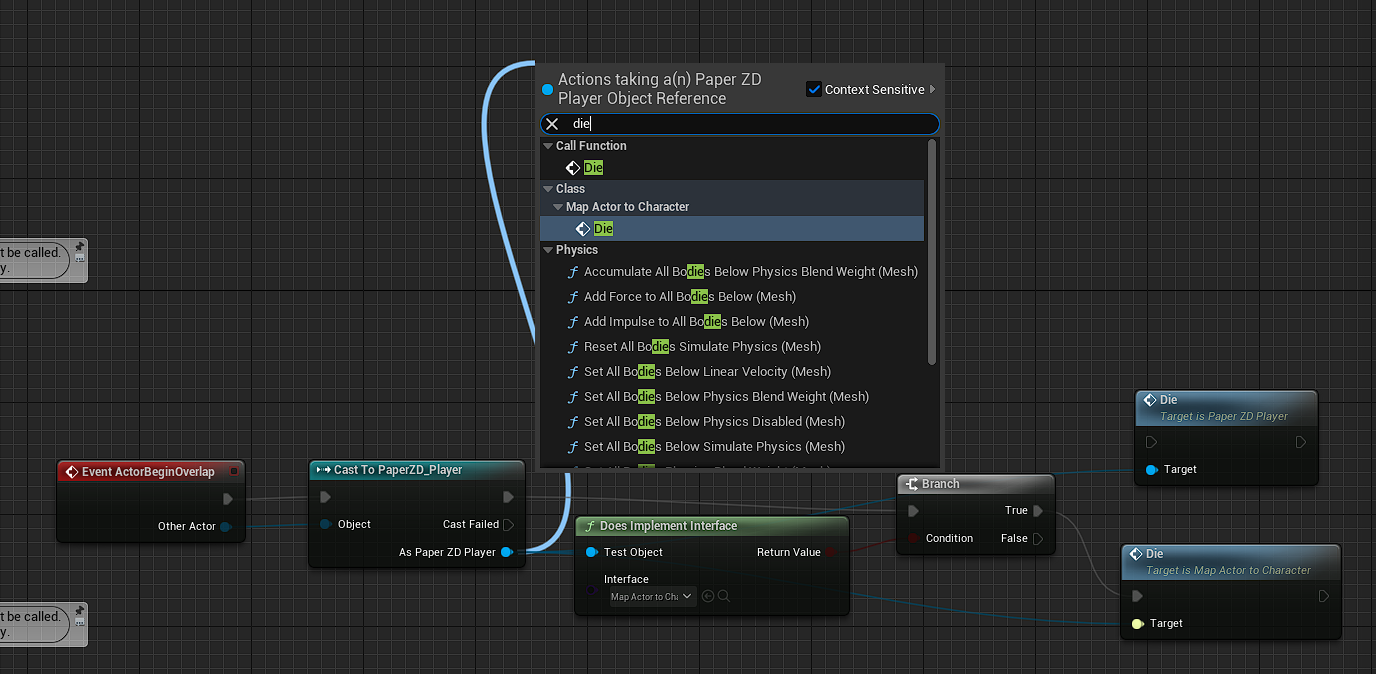
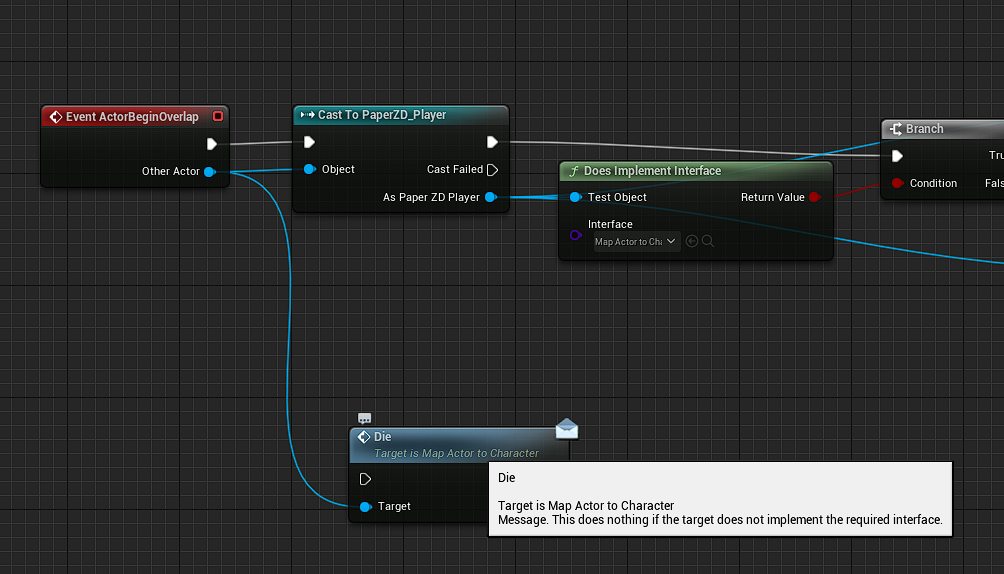
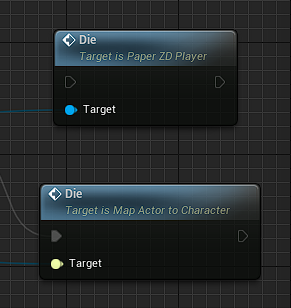 random pulsar
and how can i connect the execution pin?
echo storm
what would be the best way to have this collision box only trigger its overlap event if i am walking from the ground up to the step?

As in like, if I am on top of the step and walk back down I don't want the overlap event of the collision box to trigger
I tried to use the vector to figure out the direction the player is walking towards but it seems very inconsistent
 faint pasture
echo storm
As in like, if I am on top of the step and walk back down I don't want the over...
faint pasture
echo storm
As in like, if I am on top of the step and walk back down I don't want the over...
Why not put the overlap on the top? What's the actual usage here
echo storm
faint pasture
Why not put the overlap on the top? What's the actual usage here
It is a step that the player can trip over
If you don't jump on top of it and just walk against it, you trip over it
That's why I want it to be possible only when walking against it while not already on top of it
faint pasture
echo storm
If you don't jump on top of it and just walk against it, you trip over it
Try use hit and not overlap
Then you can check velocity
random pulsar
gentle urchin
not toward it
ok,now something is working but i have no idea what to do next🙃


 eager rune
Hey, does anyone know if there's a way to use Get Location at Distance Along Spline but with negative values to represent distance from the end of the spline? Or something similar?
random pulsar
not to print but to move somehow in opposite direction the ai character
eager rune
Currently I just get the start of the spline with anything less than 0
faint pasture
eager rune
Hey, does anyone know if there's a way to use Get Location at Distance Along Spl...
Just use math
SplineLength - SomeValue
gentle urchin
😂
echo storm
faint pasture
Then you can check velocity
How do I do that?
faint pasture
echo storm
How do I do that?
However you want. You can probably just get the velocity of the actor, assuming that the character movement component actually writes to that.
echo storm
Yep, this works perfectly, thank you!
 hollow cove
where would you put stuff to do with widgets, if you need multicasts (for chat). i notice the HUD class is depreciated, should i shove it all in player state?
frosty heron
hollow cove
where would you put stuff to do with widgets, if you need multicasts (for chat)....
Very old Epic multiplayer video use player controller
but a reputable member in #multiplayer critisize the video a lot for giving plenty of wrong information so I dunnoe
heady crypt
HUD... deprec???
frosty heron
Anyway you can only send RPC from Actors
hollow cove
player controller wont work for me, each person has one copy themselves and one on the server, so multicasts from the server only effect the owner and server
frosty heron
There is a way around it if you want to use UObject
but at the end of the day you have to piggyback the Actor Channel
well it's best to ask in #multiplayer
only server can call multicast btw
and server have everyone controller
hollow cove
im just curious what people were doing for best practice or commonly for the main place they store widget stuff
frosty heron
I can only tell you what Epic does
they used player controller to send Widget Information
including chats
hollow cove
frosty heron
including chats
i looked back on my notes to make sure im not losing my mind
 hollow cove
theres no way to send a message from your player controller on the server and have it reach another client
frosty heron
There's a way
hollow cove
unless i start casting to player state or something else just to do that
frosty heron
unreal put their logic in player controller, im 100% sure
it's old video and im not saying it's best practice
all controller exist in the server
so server can do w/e
including iterating everyone player controller and telling them to update their widget
hollow cove
hm i guess thats possible
heady crypt
Client->Ask Server to send msg
Server->Auth it?->Send to all : scrap it and ban player
frosty heron
Player on Machine 1-> Server Rpc (Send Chat Msg) -> Server Iterate through all player controller Multicast (Update Text)
heady crypt
bruh, I don't see anything about this HUD deprec, not even on the 5.3.1 documentation
frosty heron
me too
You don't send anything from the HUD / Widget anyway in multiplayer context
send info from actors you own
thin panther
It isn't deprecated
heady crypt
and it's not in the source files...
 heady crypt
lol really ?
hollow cove
frosty heron
Player on Machine 1-> Server Rpc (Send Chat Msg) -> Server Iterate through all p...
so this
 heady crypt
I was sure the video on Lyra ability ground targeting was doing Player Controller stuff, maybe I was as high as Olie
frosty heron
hollow cove
so this
I haven't tap into Multiplayer game yet, but can't u just get all of the player controllers from GameState
lunar sleet
#multiplayer is the place to ask, but there is a player state array iirc
hollow cove
thin panther
It isn't deprecated
 frosty heron
Nowhere it says deprecated 🤔
heady crypt
HUD uses UMG though, so...
hollow cove
frosty heron
I haven't tap into Multiplayer game yet, but can't u just get all of the player ...
you can get an array of player states, idk about controllers 
lunar sleet
HUD is not deprecated
Some random Reddit user saying “I know it’s deprecated” is not a real source
heady crypt
they pretty in your face about deprec stuff
lunar sleet
You can still use it, it’s prly just less popular now that the engine’s evolved a bit
heady crypt
 lunar sleet
What does that prove?
heady crypt
 hollow cove
theyre trying to say they're obvious about stuff like that
lunar sleet
Ah ok
heady crypt
if HUD was deprec, they'd have many things in engine and source files saying it
hollow cove
so i shouldn't trust random redditors, i've been tricked once again
lunar sleet
It’d be a sad day when getHUD doesn’t work anymore lol
thin panther
hollow cove
so i shouldn't trust random redditors, i've been tricked once again
It's a very common misconception, one even I believed at some point
But no it isn't deprecated
Still used heavily
frosty heron
hollow cove
you can get an array of player states, idk about controllers <:thinkhmm:96031414...
Anyway you can prob get actual guidance by #multiplayer guys
 hollow cove
what is the most common place to store the stuff though if you need multicasts
heady crypt

lunar sleet
hollow cove
what is the most common place to store the stuff though if you need multicasts <...
 crude spruce
Any tops on how to turn these types of traces into something that can get all bones it crossed rather than the first?

im currently excluding first hit actor and take the bone from that hit result
if i dont exlude the actor i get hit results for trace x tracepoints
lunar sleet
crude spruce
if i dont exlude the actor i get hit results for trace x tracepoints
maybe multiple traces on diff channels?
crude spruce
hmm
perhaps
the result i want is some kind of cleave result
but i realise its very different from an initial hit calc
lunar sleet
crude spruce
the result i want is some kind of cleave result
Then maybe get overlapping components on a timer during the animation
heady crypt
maybe do it in the inverse? have the HIT/Overlap bones tell the player/sword it hit them ?
lunar sleet
That could work too
crude spruce
or maybe i can use the full trace cluster during the frame first line hits something
heady crypt
and give them a small lock out timer to prevent multi results
crude spruce
heady crypt
maybe do it in the inverse? have the HIT/Overlap bones tell the player/sword it ...
ill think about this in in a minute
lunar sleet
I think someone here was using multi-sphere traces for this
heady crypt
the punching and kicking one ?
lunar sleet
I can’t attest to the validity
lunar sleet
heady crypt
the punching and kicking one ?
Idk, could’ve been a sword thing
crude spruce
im not very keen on using shape traces
heady crypt
I know there was a video from 2-3 hours ago of a martials arts punch and kick flip sick tricks with debug sphere overlaps
crude spruce
i prefer the details as i build around detailed hits
i guess i could do a custom shape per frame as well but whatever
 keen widget
is there a way to Get NAME of the Varible?
(for example to compare it to other varible outside structer if they names match)
lunar sleet
keen widget
is there a way to Get NAME of the Varible?
(for example to compare it to other v...
The same way you would print it
crude spruce
since i do the trace line by line in a loop i could have the fully spectrum of hits after one iteration
keen widget
lunar sleet
The same way you would print it
i dont undertand, please can you show what are u talking about ?
crude spruce
lunar sleet
The same way you would print it
he wants to compare the variable name not the value it contains
keen widget
crude spruce
he wants to compare the variable name not the value it contains
yes! 🥹
crude spruce
it feels like an unwanted solution tbh
crude spruce
yes
dawn gazelle
You totally could in C++ and even expose it to blueprint, but not natively in blueprint.
At least not as far as I know.
lunar sleet
I don’t rly see the use case of this but yeah
keen widget
lunar sleet
Are we talking in editor variable name?
problem is this
i need to compare if varible in the struck are the same in the graph and set them

for example player type in the editeble window: "HP 20"
then my logic will see that varible name match his text and set 20 to HP
dawn gazelle
keen widget
problem is this
i need to compare if varible in the struck are the same in the g...
Yeah blueprint isn't great for something like this. You'd effectively have to have a branch for each variable name that could be contained in the "Match" field.
Or a switch on string.
keen widget
so there is no "get variable name" node ?
lunar sleet
There’s get display name but that’s for vars referencing assets
Hence why I mentioned the print
crude spruce
so for 1 frame i can detect between the 2 blue points. I could however. Reduce the loops per hit and reset the trace at that point but im not comfortable stacking a result outside an iteration.

or wait are the red squares the start of the trace?
keen widget
lunar sleet
Hence why I mentioned the print
maybe this can help me? https://github.com/colory-games/UEPlugin-AccessVariableByName
heady crypt
they should be the hit point
dawn gazelle
keen widget
problem is this
i need to compare if varible in the struck are the same in the g...
Here's the thing, what you would you do aftewards if you could compare them? What would come after that branch?
heady crypt
red line to square = empty space, red square green line everything after hit point
crude spruce
heady crypt
they should be the hit point
are you sure? i think they indicate where it starts or ends
keen widget
dawn gazelle
Here's the thing, what you would you do aftewards if you could compare them? Wh...
then matched TEXT would be set as variable in the struct
heady crypt
so many naked stone boys
lunar sleet
crude spruce
or wait are the red squares the start of the trace?
Red squares denote Impact Point
heady crypt
they usually large capsules
lunar sleet
crude spruce
something is off with the phys asset
Collision capsule prly
dawn gazelle
keen widget
then matched TEXT would be set as variable in the struct
What you have here isnt' even a valid comparison though. Like, how would you know what variable to set the value into?
 crude spruce
lunar sleet
Collision capsule prly
crude spruce
lunar sleet
Collision capsule prly
im testing against phys assets
heady crypt
you can tweak them yourself if you don't mind doing it and adding more computation time on physics results
crude spruce
capsule not in play here
lunar sleet
Oh, then idk
heady crypt
PAs should be a whole heap of capsules
crude spruce
it is 🙂
heady crypt
hand, forearm/arm head, neck
keen widget
dawn gazelle
What you have here isnt' even a valid comparison though. Like, how would you kn...
yeah maybe you right
heady crypt
stomach, spine, chest, pelvis, leg1,leg2,leg3
crude spruce
heady crypt
stomach, spine, chest, pelvis, leg1,leg2,leg3
this is my intention and how i have done it. I just have the wrong override. mannequin. instead of one for the actual body mesh.
lunar sleet
keen widget
yeah maybe you right
I’m also concerned about why you’d have the player type random stuff in and try to detect if they’re talking about a specific variable you have in your struct, but that’s more of a design consideration
heady crypt
yours musn't be this close to the "skin"
 crude spruce
i tihnk i just forgot to account for the changes in the model
however the this was more confusion than problem
heady crypt
lol
crude spruce
my characters are modular and introduced a heap of problems for detailed collision detection
i should probably pause the cleave result so everything is good atm 😄
reversing and reporting from the hit bones/parts is probably a good way to do cleave as well.
heady crypt
depends how performant it would be having them handle the hits done, but it would be the most accurate way to report what is hit and when