#blueprint
1 messages · Page 8 of 1
 gentle urchin
Keeping them all in one comp keeps you sane.
So youd have functions for GetMaxHealth
 steady night
well im way to deep into it now x)
oh so instead of setting the max health to a value i will call for the function each time instead ?
thats complied the max halth ?
gentle urchin
Which simply returns
(Level * HealthLevelScaling) +
(Strength * StrengthHealthScaling)```yeah i guess thats a better way
gentle urchin
Keeps you sane and consistent
 dark drum
move the flashlight comp onto the scene root and it should give you an option to make root.
steady night
yeah easy to adjust also
gentle urchin
Yepp
And less shit to replicate
As max health is simply a product of the other stats
Basehealth and scaling values are static (presumably)
So you only need to replicate current level and the related stat(s) value
steady night
yeah
 north lynx
dark drum
move the flashlight comp onto the scene root and it should give you an option to...
north lynx
dark drum
move the flashlight comp onto the scene root and it should give you an option to...
Oh, right, that works
 north lynx
dark drum
move the flashlight comp onto the scene root and it should give you an option to...
north lynx
dark drum
move the flashlight comp onto the scene root and it should give you an option to...
I have one more question to you if you don't mind
dark drum
north lynx
I have one more question to you if you don't mind
sure
 pulsar pulsar
So I'm having the issue where Trace Actor is being set to Null (ultimately giving me "Accessed None trying to read property" error) when i'm not looking at a object inherited from the required class for Trace Actor to be set. I kinda want it to be this way because Trace Actor should be null when I'm not looking at the specific object but I want to get rid of the error aswell and I'm not sure what I should do
 north lynx
dark drum
sure
north lynx
dark drum
sure
I must to know which item set to invisible for player, and of course I need it to be a var that I can update

I need here to get this var to set the visibility to off, when the item is dropped

I tried to do something like this, but I get an error
 pulsar pulsar
So I'm having the issue where Trace Actor is being set to Null (ultimately givin...
pulsar pulsar
pulsar pulsar
So I'm having the issue where Trace Actor is being set to Null (ultimately givin...
Or rather, I'm not sure what I should do about it when I'm not looking at an Actor of required class.
north lynx
I don't want to set the visibility for all the items without any purpose
 pulsar pulsar
nvm, fixed it lol. I should have payed full attention to the message log 😅
 graceful forum
Is it normal that if I set my widget visibility to Collapsed, my WidgetComponent's tick also stops working?
 supple osprey
I want to extend an Event which is inherited, so far so good, but in the overwridden event I want to add an input pin (in the given example fading curve)... Do you know how or if this is even possible?

 versed sun
You can Right click the Parent: Apply Effect and "Expand Node"

Then make any changes as needed
 ember hazel
How can I make it so that the actors are destroyed with a delay from the one before it.

Right now they all destroy at once
 thin panther
Use a looping timer
Cache that array in a variable, then each iteration of the timer check if the index is valid access the index, delete it, increment the index.
If the index is invalid, clear and invalidate the timer handle
 vague birch
Looking for someone to have a talk/chat and discuss some blueprint design for something I'm working on. Essentially feedback and pointers 🙂
 slender torrent
https://forums.unrealengine.com/t/hide-active-widget-if-left-mouse-is-clicked/134657/6
Can someone help me on this topic? I want to achieve this.

Epic Developer Community Forums
Thanks for all the help but I´m not really good with blueprints, as you might have seen by the way I construct mine. And all the technical details you mention I´ve got no idea how to implement them and where. I did try to create the widget onClick as you mention but doesn´t work, if I replaced the BeginPlay with the onClick it just doesn´t show ...
 tropic bison
When I disable the spring arm's "Use pawn control rotation", my camera wildly spins right or left depending on where the mouse is, I don't think I have anything in my code to act like that, or am I tripping?
Intention is to have camera zoom in and out, but I want to use offset for spring arm, and cant tick "use pawn control rotation" if I want to achieve that.
Edit: Answered
 willow gate
Hey all. I'm working on an inventory and it's functioning fine. I am, however, getting runtime errors saying that "Accessed None trying to read property CallFunc_Array_Get_Item" in my FindEmptySlot function:

Any ideas?
The "Items" variable is an array of data assets btw.
 fleet lichen
Hi, I am trying to practice using blueprints but am out of ideas about what to do. So I want to ask if there is some website or something with challenges to make with blueprints.
willow gate
willow gate
Any ideas?
I think I know why it's happening I just don't know how to fix it. The array it's pulling from is empty to begin with. They are just blank placeholder primary data assets and no specific asset is assigned. The size of the array just determines the player inventory size. So when it's trying to get the array element, it's not finding anything.
gentle urchin
willow gate
The "Items" variable is an array of data assets btw.
Pro tip: instead of saving local variables, you can simply return mid-loop with the index
If branch true -> return current index
Makes the code look clean 😄
Early return is nice
Also. Check that the elemnt is valid before pulling data
 spice shell
Anyone know what Blutility function I could use to trigger a 'Play in Editor' function?
I want to create a custom 'Play from Here' context menu action, but there doesn't seem to be anything to trigger game mode
 tawdry surge
Why?
spice shell
Because my default game logic doesn't support the existing one
It uses a specific player spawning system, so the default Play from Here doesn't work.
tawdry surge
At the risk of sounding repetitive, why?
 trim matrix
Hi guys am i doing something wrong, ? I want the character to be able to use the animation only he is on the ground but when i jump and press on 1 it plays it
 versed sun
willow gate
Hey all. I'm working on an inventory and it's functioning fine. I am, however, g...
versed sun
willow gate
Hey all. I'm working on an inventory and it's functioning fine. I am, however, g...
You can also have more than one Return Node
This would return the first "Empty" Index, and if nothing found it returns -1
 spice shell
tawdry surge
At the risk of sounding repetitive, why?
spice shell
tawdry surge
At the risk of sounding repetitive, why?
I'd really rather just get an answer as to whether it's actually possible or not
tawdry surge
Its just a weird thing to do
spice shell
I understand
If it's possible I'd really appreciate knowing what nodes I might achieve it with
willow gate
gentle urchin
Also. Check that the elemnt is valid before pulling data
Yeah I fixed it. I'm gonna revamp all this code. It was based on some examples I was looking at and the whole time I was thinking: "Why are there so many local variables when you can just use your function inputs directly...?"
spice shell
I don't think the specific architecture of my player spawning is relevant, sorry to be blunt
trim matrix
Found it !
tawdry surge
You wanna reinvent the wheel, be my guest
spice shell
tawdry surge
You wanna reinvent the wheel, be my guest
👍 it's done for a reason, I've not just walked into Unreal for the first time and asked how to spawn the player 😛
So yeah, if anyone knows the node, much appreciated
This seems to be the inverse of what I want, but there's no pairing to Start Play, weirdly

 lunar sleet
This is more #umg ‘s shtick but generally you want to use create widget and add to viewport nodes
gentle urchin
willow gate
Yeah I fixed it. I'm gonna revamp all this code. It was based on some examples I...
But also early return for cleaner looop breaks !
 keen flicker
Hey guys I have been having an issue after following the unreal engine documentation to implementing character switching in my project I made a forum post on it. If anyone can assist it would be greatly appreciated https://forums.unrealengine.com/t/pawn-controllers-get-messed-up-after-switching/1327834

Epic Developer Community Forums
So I followed this YouTube video and an Unreal Engine documentation to create a switch pawns during runtime mechanic for a project I am working on in Unreal Engine 5.1. The Issues I have run into can be seen in this video that I recorded to showcase my problem https://youtu.be/_Oksoab8ECg. Every time I switch to the next pawn my input becomes m...
lunar sleet
keen flicker
Hey guys I have been having an issue after following the unreal engine documenta...
- You’re using level blueprint, don’t.
- Your code in the player character is on begin play, cast to player controller and… nothing.
- Someone gave you some code that helps set a ref to the currently controlled pawn. It’s an improvement on your code but it wouldn’t really do anything in its own
Are you following some tutorial or where did you get this stuff from
keen flicker
lunar sleet
1. You’re using level blueprint, don’t.
2. Your code in the player character is...
Character switching was done following the Unreal engine Documentation and the YouTube video linked in the forum post. The character movement and logic was done following this turtorial https://www.youtube.com/playlist?list=PL32YMM6O66N9ZCGD1mrqw__BcsxjZpkBt
 lunar sleet
Ah ofc, forgot they left the level bp in that possess doc
keen flicker
Yeah I saw somewhere in the post similar to my issue that I linked in my post someone said the Issue lies with the Enhanced Input mapping feature in 5.1. I tried what they suggested that worked for them of reassigning it on possess but that does not seem to fix it sadly.
lunar sleet
keen flicker
Yeah I saw somewhere in the post similar to my issue that I linked in my post so...
It’s certainly a weird issue
For the speed, have you tried setting it dynamically on begin play?
lunar sleet
keen flicker
Yeah I saw somewhere in the post similar to my issue that I linked in my post so...
Also, do you have Unpossess anywhere?
I think you might be telling the controller to try possessing both at the same time
keen flicker
lunar sleet
Also, do you have Unpossess anywhere?
No, well only in the AI logic of checking to see if the pawn is possessed by a controller
lunar sleet
Ok, so try Unpossessing the current controlled pawn (get controlled pawn) before Possessing the new one
See if that helps
 lofty rapids
keen flicker
Hey guys I have been having an issue after following the unreal engine documenta...
lofty rapids
keen flicker
Hey guys I have been having an issue after following the unreal engine documenta...
what are you doing here ? it's a cast and then nothing pretty pointless

 terse trout
does anybody know if it's possible to encrypt .ini files in a packaged game?
thin panther
terse trout
does anybody know if it's possible to encrypt .ini files in a packaged game?
You really don't want to do that
lunar sleet
terse trout
does anybody know if it's possible to encrypt .ini files in a packaged game?
No clue, maybe #packaging
thin panther
The point of ini files is to be unencrypted
If you're storing sensitive info in an ini you're doing it wrong
This is not even something AAA does
If you crash on boot due to a setting and cant even remove it from the ini, you're gonna have a lot of pissed off customers
keen flicker
lunar sleet
It’s certainly a weird issue
I believe I am using the Character Movement Component for my input how do I go about doing that? Screen shot is for reference.
 terse trout
thin panther
If you crash on boot due to a setting and cant even remove it from the ini, you'...
terse trout
thin panther
If you crash on boot due to a setting and cant even remove it from the ini, you'...
makes sense, but what about cheating? in our game, the players are disabling fog and gaining advantage
keen flicker
lunar sleet
I think you might be telling the controller to try possessing both at the same t...
Here's the possess macro in the level blue print where do place the unpossess node?
 thin panther
terse trout
makes sense, but what about cheating? in our game, the players are disabling fog...
thin panther
terse trout
makes sense, but what about cheating? in our game, the players are disabling fog...
The honest solution is to just deal with it. Most esport leagues play on low settings to remove disadvantageous environmental effects like fog and such
lunar sleet
keen flicker
Here's the possess macro in the level blue print where do place the unpossess no...
Between previous character and possess
keen flicker
lofty rapids
what are you doing here ? it's a cast and then nothing pretty pointless
There was suppose to be UI related stuff there but I it disconnected it for the screenshot. At least from the tutorial, probably should not of sent that in hindsight
lunar sleet
Plug previous char into it^
thin panther
I'd go as far to say if removing fog is a massive advantage, then poor design is at play, and you have far too much open space, that you're artificially hiding
At the very most removing fog should be a minor advantage at most
There should be more visibility breakers that aren't fog
terse trout
thin panther
At the very most removing fog should be a minor advantage at most
it is a minor one, but and advantage nonetheless
gentle urchin
Lower fps / higher ping is another
lunar sleet
Level the playing field
thin panther
If it is just a very minor one, just leave it in.
It's literally how AAA deal with it. Like I said, most leagues play on low for those advantages.
Hell some games like pubg low settings remove grass entirely, which is a big advantage people just deal with
lunar sleet
If not, your ass is grass
thin panther
Anyone who really wants to remove fog doesn't need an ini to do it either.
It's client side, so can be removed and be undetectable.
Encrypting an ini inconveniences everyone and doesn't solve the problem
 ionic palm
The wind direction is a variable of the ocean shader the wind direction is controlled by the ocean manager. I assumed that the wind direction is 100% accurate to the waves as tweaking the value directly affects the wave direction
keen flicker
lunar sleet
Between previous character and possess
Similar issue, I also just tried to using the Legacy input/axis mapping in project setting as well and same issue occurs as the video. This issue also occurs with the Base UE 5.1 template 3rd Person template. The weird thing is that if I swap back to a character really fast it fixes all the issues. Any gusess why that is?
 tight pollen
hi, how can I get the current size of the widget after scaling?
versed sun
Maybe?
 lunar sleet
keen flicker
Similar issue, I also just tried to using the Legacy input/axis mapping in proje...
lunar sleet
keen flicker
Similar issue, I also just tried to using the Legacy input/axis mapping in proje...
Not really tbh, but it’s clearly not enhanced input related
keen flicker
lunar sleet
Not really tbh, but it’s clearly not enhanced input related
Yeah, thanks for the assistances thus far though. Is there away to like flush input when switching pawns? It my guess that might be the issue of taking the input context of pawn and putting it on another. Like resetting it where the input on the other character does not carry over. My goal it make a system similar to the Ultimate Alliance and Lego games for a Christian Superhero comic I got the author permission to use the IP and this really is the only hurdle I a have atm.
lunar sleet
keen flicker
Yeah, thanks for the assistances thus far though. Is there away to like flush in...
The add/remove mapping context nodes have an options struct you can break that might help
versed sun
keen flicker
Yeah, thanks for the assistances thus far though. Is there away to like flush in...
Flushing Input on the bottom of these
 terse trout
thin panther
Encrypting an ini inconveniences everyone and doesn't solve the problem
terse trout
thin panther
Encrypting an ini inconveniences everyone and doesn't solve the problem
yes, it is an inconvenience. but the question is, is it possible?
ionic palm
Anybody have any ideas why my camera won't rotate around my spring arm when in my ship?
I have checked everything mentioned online such as making sure enable rotation is on the spring arm and ensuring there are no rotation offsets for it to contend with.
Could it be the BP setup?
I just copy and pasted it from my player as I assumed it would function in a similar way

 versed sun
The Ship in your world dosnt have the red spring arm line, try removing the ship and re-adding it from content browser
 thin panther
terse trout
yes, it is an inconvenience. but the question is, is it possible?
thin panther
terse trout
yes, it is an inconvenience. but the question is, is it possible?
anything is possible down in cpp land. but it is an astronomically bad idea.
there is a reason AAA don't even do this
its unfathomable
versed sun
I think sometimes BP in the world don't update when you change the BP
thin panther
people will just remove fog client side anyway. your ini change doesn't do a thing
the literal only way to prevent it would be to use something like pixel streaming, where you are solely responsible for running the game and merely transmit it to clients, like how stadia and such worked
you're actually screwing people over more by encrypting the ini files
because then you have to download external software to match someone who was playing on essentially low settings
it's like how low fps can be a disadvantage, so would you cap everyone to 5 fps to make it even?
some people have faster input devices so would you delay all inputs by 5 seconds?
of course not
lunar sleet
- by world delta 😈
thin panther
The reality of competitive games is that there will always be advantages and disadvantages. You really should only focus your time on catching the people that use cheats like aimbot, or wall hacks.
trim matrix
https://www.youtube.com/watch?v=hb8z-V4nMto&t Any tip or documentation to create a movement similar? Seems like using physics. Which approach do I need to use? physics or custom values for animations

In this episode we talk about Movement; what's good? What sucks? Most importantly, what's fun and feels great?
Hopefully my top-down approach to movement and animation can give you some fresh ideas (starting with turning, leaning, IK and other systems before implementing the actual animations as a layer underneath)
Enjoy!
- Charlie :)
Discord...
 stark patio
Does anyone know of a good way to setup an optimized status effect system?
Im trying to make a system where the different status effects can have their parameters changed on the fly and different status effects combining leads to different things. (the effects will be applied to lots of enemies and not the player)
All the tutorials i find either dont include basic functionality i need or would just be very performance intensive for my project.
stark patio
 astral orchid
Whats the difference between GameMode and GameModeBase?
astral orchid
Whats the difference between GameMode and GameModeBase?
like the gamemode blueprint vs the existing one?
astral orchid
stark patio
Does anyone know of a good way to setup an optimized status effect system?
Im t...
I'd say go for GAS
astral orchid
stark patio
like the gamemode blueprint vs the existing one?
yee
whats the difference between those 2
versed sun
 astral orchid
Maybe a better question is to ask, what does GameMode have to offer?
versed sun
more multiplayer stuffs
versed sun
is your game multiplayer? does it use spawn points ?
versed sun
ok, use GameMode
GameModeBase is the bare bones , GameMode has a little extra stuff in it
astral orchid
What kind of stuff specifically?
OTHER than the Match State stuff
because that brings up a whole other set of questions
stark patio
astral orchid
I'd say go for GAS
i thought about that but it just seems a bit overkill and complicated
astral orchid
stark patio
i thought about that but it just seems a bit overkill and complicated
It's well worth it, trust me
astral orchid
astral orchid
What kind of stuff specifically?
So yeah, what else is there?
versed sun
Looks just like a few variables
No clue in the c++ side
 lunar sleet
astral orchid
So yeah, what else is there?
lunar sleet
astral orchid
So yeah, what else is there?
You can always look at the code
north lynx
Did anyone here knew the simplest way to create Hot Bar inventory? I don't want it to be displayed, but I need to create 3 slots where the player can choose by clicking 1,2,3 which slot they want to use right now
I can't find any tutorial about that, and can't handle it alone
 manic vessel
After some playtesting, I have discovered that If my actual character is moving when I try to attach another actor to his hand either by setting the transform then a constraint OR just attach to component with snap to, My characters movement is causing the attached actor to not position where it should be . Like If Im moving forwards, the actor is attaching infront of the Hand position. and its the same for any direction Like its overshooting the target location\attach point by the direction I'm moving . Any one got any idea whats happening here? and how to solve it. Im wondering if this is a tick group issue
 faint pasture
astral orchid
Whats the difference between GameMode and GameModeBase?
faint pasture
astral orchid
Whats the difference between GameMode and GameModeBase?
GameModeBase is simpler and has less opinions on the structure of your game. It's more of a blank slate vs GameMode which has the concept of match state and other things etc.
 native ferry
tight pollen
hi, how can I get the current size of the widget after scaling?
native ferry
tight pollen
hi, how can I get the current size of the widget after scaling?
get cached geometry > get absolute or local size
ionic palm
versed sun
The Ship in your world dosnt have the red spring arm line, try removing the shi...
It does have the line I just didn't have my ship selected in the video I tried replacing the BP and same issue though good suggestion
versed sun
bummer
ionic palm
versed sun
bummer
Everything online is just saying it should be a matter of putting update rotation on your spring arm without even touching the event graph but it doesn't seem to be the case for me it is an issue on my end I just have no idea where I have went wrong in this like 2 step process haha
lunar sleet
ionic palm
Everything online is just saying it should be a matter of putting update rotatio...
I’ve seen someone with this issue
They had checked use control rotation and that stopped it from acting as a pivot
Fricken autocorrect I swear lol
versed sun
When the game starts , are you viewing from the Character , then changing to Ship Cam ?
 loud tree
I think I'm horribly misunderstanding something here. Have a multi sphere trace going out to set an aoe effect.
When I use a string to check the length of the array on the output I see all hits registered.
When I check what's being hit from either the break hit or the pawn hit, it only displays one (guessing the first) hit/display name then only applies the effect to that one.
 lunar sleet
Where is this print
versed sun
The Return Node is going to stop the Loop
loud tree
lunar sleet
Where is this print
Rn it's outside the function attached to the 3ppball
But I had tried it attached to the cast, break hit, and splitting the loop instead of break hit.
loud tree
versed sun
The Return Node is going to stop the Loop
Gonna try removing it then,
lunar sleet
If you don’t return anything what will print ?
loud tree
lunar sleet
If you don’t return anything what will print ?
if I don't hit anything nothing runs as it runs off the false hit
lofty rapids
it looks like you apply the effect on the return value ? you probably want to do the line trace outside the function and run the function forEach, or make the return value an array you can use
lunar sleet
I said return not hit
loud tree
lunar sleet
I said return not hit
I guess I'm a little confused by the terminology here. I'm pretty new sorry.
ionic palm
lunar sleet
I’ve seen someone with this issue
I fixed it!
My issue was I had inherit yaw and pitch unticked as it was not ideal when the camera was static bobbing with the ship but I thought I would be able to rotate around the ship without inheriting the motion but apparently not without any BP or code at least.
I have another small issue that you can see here.
Basically when my character is socketed onto the ship when steering they have collisions removed in this process as it caused weird physics. My issue now is that the anim montage that plays the wheel animation plays once and then the character thinks they are falling as there is no collision,
I just had a though while typing maybe if I set his movement type to flying he won't think he is falling but would love any suggestions if that doesn't work
 lofty rapids
loud tree
I think I'm horribly misunderstanding something here. Have a multi sphere trace ...
lofty rapids
loud tree
I think I'm horribly misunderstanding something here. Have a multi sphere trace ...
you probably want to return an array and use that to apply to all instead of just returning one.
lunar sleet
loud tree
I guess I'm a little confused by the terminology here. I'm pretty new sorry.
Put whatever needs to happen in the function itself
loud tree
lofty rapids
you probably want to return an array and use that to apply to all instead of jus...
I think I get it, working through it rn. I'm a little slow atm cause I have my kid with me watching videos while I work
lofty rapids
loud tree
I think I get it, working through it rn. I'm a little slow atm cause I have my k...
just add to the output array local variable in the loop body, and on completed return the output array as an output
then foreach through them and apply the effect instead of just applying to the single
lunar sleet
ionic palm
I fixed it!
My issue was I had inherit yaw and pitch unticked as it was not id...
Or just disable collision between each other, not everything
ionic palm
lunar sleet
Or just disable collision between each other, not everything
They can't collide with eachother I noticed when I left collision on and possessed the pawn (MyShip) it seemed like it was using my characters colliders/mass/physics instead of the boats collision/mass/physics settings. This led to some interesting floaty donuts but not the intended gameplay haha
lofty rapids
ionic palm
I fixed it!
My issue was I had inherit yaw and pitch unticked as it was not id...
what did you use for the water ?
ionic palm
lofty rapids
what did you use for the water ?
It's the cartoon water shader asset its really easy to reference all the gerstener wave stuff out of the box in BP due to its setup such as wind direction mainly for my game
 lofty cloak
how can I "bias" this random float I have so that fewer actors have a higher Emissive value?
 trim matrix
Hey can somebody help me. Im on rx 7600 and keep getting crashes saying something like d3d. In particular when editing blueprint
ionic palm
trim matrix
Hey can somebody help me. Im on rx 7600 and keep getting crashes saying somethin...
Do you have a busy scene?
I had crashes a little lately but I had a 6x6km ocean in my level haha
trim matrix
Nope, the screen just turns black randomly and it crashes
loud tree
lofty rapids
just add to the output array local variable in the loop body, and on completed r...
Thank you for getting me set in the right direction. Removing the return node does allow the trace to see everything. Gonna experiment in a bit with setting it to an array and seeing if I can get that to work out. Otherwise I'll end up going with the other suggestion
lofty rapids
whatever works
lunar sleet
loud tree
Thank you for getting me set in the right direction. Removing the return node do...
It’s important you understand why this is happening and why outputting an array was suggested
 sick fable
lunar sleet
It’s important you understand why this is happening and why outputting an array ...
sick fable
lunar sleet
It’s important you understand why this is happening and why outputting an array ...
I know your an expert do you have the answer to my question in general
lunar sleet
sick fable
I know your an expert do you have the answer to my question in general
I’m no expert lol but I’ll check
lunar sleet
Afaik, DAs are created before runtime so you can’t really have refs to instances in them
Because they don’t exist yet
loud tree
lunar sleet
It’s important you understand why this is happening and why outputting an array ...
I think so...?
Basically I was making the array and trying to pass those values through the return that was set to read/pass a single value instead of being able to see all of the actual hits in the array.
lunar sleet
loud tree
I think so...?
Basically I was making the array and trying to pass those values...
Yeah, and when you use return in a function it exits it immediately. So if you want to check within all values found you need to output the entire array, then do the for each loop outside of the function
Corrected for accuracy 😅
loud tree
lunar sleet
Yeah, and when you use return in a function it exits it immediately. So if you w...
Makes sense. Thank you again! Not just for the help but making sure I was actually understanding.
lunar sleet
loud tree
Makes sense. Thank you again! Not just for the help but making sure I was actual...
Forgot to add, if you want to say cast to something and filter the array that way, then run your return node off the completed pin, so it only exists once it’s iterated over the entire array. You’d have to feed that specific result into the output value. Again, this is for singular output. Else you’d have to make a new array from the results and feed that out, etc. 🙂
 undone sequoia
Anyone here ran in issue when he had Pawn sensing on some actor? (gun) and that gun was attached to another actor and pawn sensing then stopped to work?
my case rn I have "turret" with pawn sensing
it is working when alone on plane not
Idk how to make it work
 hollow cove
how do you use multiple post process materials or how would you go about it? i have multiple instances of the outline and want different ones depending on conditions

i assumed it would be custom depth stencil value 
hmm or should i be altering the little amounts here on the array

stencil value does nothing though
versed sun
there's a bit of setup and materials involved
Lots of YT videos for that tho
Welcome to our Outline Material tutorial. This is a similar material used in our current project Button pop. If you are interested in the game, check out our developer logs!
If you guys have any feedback or ideas for future tutorials, leave a comment down below!
I hope you enjoy.
Check out Button Pop on Steam now! :
https://store.steampowered....
 stuck sentinel
how do i make it so each one is a bit far away from the other because i cant change it in the widget blueprint since its not there before begin play i pick it up

 ashen gazelle
this seems like something basic but im drawing a blank. how to i make a shape like this with a box to act as an out of bounds/damaging box for my ue5 game https://youtu.be/5Xdnx3wPNLo?si=auYRTwO7jFdWH-od&t=480
 frigid cradle
I know it's important to the engine but what exactly is the point of blueprint? I've felt like I've been bashing my head in a wall trying to learn it. I've known how to code for a few years now and despite not being an expert or anything (just average) it's still throwing me for a loop. Is there any reason at all to use BP instead of C++? I'm a solo dev so it's not like I've got designers I've got to send these things to.
I've even done other visual scripting things before in college classes and I tried Unity's (terrible) version of it
thin panther
frigid cradle
I know it's important to the engine but what exactly is the point of blueprint? ...
The point of blueprint as to why it was made is as a tool for game designers to make gameplay elements
The point of blueprint for you personally is to subclass c++ classes. You can't match it's iteration speed, and asset referencing. Quick gameplay code and asset referencing are your strengths in BP. Core logic, manager classes, base classes and unperformant BP code should be done in c++
 desert quarry
What's the name of the sky sphere that makes stars? Is that still in unreal 5?
thin panther
You can expect your primary workflow to be making a core base class in c++ and subclassing it in BP to set up asset references and overriding various functions/implementing events
frigid cradle
thin panther
You can expect your primary workflow to be making a core base class in c++ and s...
So something like implementing a health system in C++ and then an enemy in BP extending it?
thin panther
Something like that yeah
frigid cradle
Thanks
desert quarry
I generally make the logic in C++ and then use BP for instances of things.
Also bp is great for testing things.
 zealous moth
how do you get an AI controller?

when i get controller and cast to ai controller, i get nothing
 carmine apex
I'm making a game about a frog and I want this frog not to be able to jump sideways. Which means I would have to have this frog only jump in the direction that it's facing not the camera or user input. How would I do that?
I also want this frog to be able to rotate sideways so it is easier to navigate the world since I would only be able to jump in one direction.
Any help on this as well?
 civic cliff
Hey I wanna know if my code is correct or not .. I want to play a sound effect when my character collects all the coins , but my code isn’t working 🙁(it’s not playing the sound effect after collecting all the coins ) what should I do ?? (Sorry for my English, it’s not my native language)

 spark steppe
carmine apex
I'm making a game about a frog and I want this frog not to be able to jump sidew...
spark steppe
carmine apex
I'm making a game about a frog and I want this frog not to be able to jump sidew...
you would always use the forward vector as reference for your jump velocity
so when hitting jump you apply a velocity, which could be the (scaled) forward vector + some zOffset
carmine apex
How would I put that into blueprints
 iron prawn
civic cliff
Hey I wanna know if my code is correct or not .. I want to play a sound effect w...
iron prawn
civic cliff
Hey I wanna know if my code is correct or not .. I want to play a sound effect w...
The branch isn’t connected, so it can never be called for one.
civic cliff
iron prawn
The branch isn’t connected, so it can never be called for one.
To what should I connect it with ? Because when I try to connect it with “Cast to Cheeky Gamemode” it plays the sound every time I collect the coins , I don’t want that instead I wanna play it after I have collected all the coins .
iron prawn
civic cliff
To what should I connect it with ? Because when I try to connect it with “Cast t...
After destroy actor I would, and also shouldn’t the logic on the branch be = 0?
steady night
How Would i Check if all actors in array equal to dead do this<8>?
 civic cliff
iron prawn
After destroy actor I would, and also shouldn’t the logic on the branch be = 0?
civic cliff
iron prawn
After destroy actor I would, and also shouldn’t the logic on the branch be = 0?
I’ll try that out Thanks !
ashen gazelle
this seems like something basic but im drawing a blank. how to i make a shape like this with a box to act as an out of bounds/damaging box for my ue5 game https://youtu.be/5Xdnx3wPNLo?si=auYRTwO7jFdWH-od&t=480

Hey guys, in today's video I'm going to be showing you how to set up a system in which we can damage and heal our player within our game. This works with our health bar we created in the previous video.
How To Create A Health Bar In Unreal Engine 5: https://youtu.be/PVgMkUwhtoM
Damage 1 SFX: https://freesound.org/people/Deathscyp/sounds/404109...
 grave relic
Could anyone help me with a character-swapping issue? So I want the player to be able to swap into objects, I have the logic for that down and I'm able to swap. But I want the player's collision to be disabled and use the object they turn intos collision. I tried setting the capsule collider to the same size as the can in the image. But that did not work as the offset is wrong, and if the player turns into a box, this also won't work.
 civic cliff
iron prawn
After destroy actor I would, and also shouldn’t the logic on the branch be = 0?
civic cliff
iron prawn
After destroy actor I would, and also shouldn’t the logic on the branch be = 0?
IT WORKED ,THANKS !!
 jolly cipher
Hello!
I am trying to create a mount system. Im recreating something like World of Warcarft, when you hit a button, Spawns your mount, Attach Actor to Actor.
So far I have gotten this far and got this part to work in my multiplayer game.
Since my game is a multiplayer shooter game, I was wondering how to go about the next step.
This is new for me, so If I posses my mount, my understanding is that you swtich to your mount blueprint and you loose all the logic you put in your main character BP,
So I dont get any damage anymore as the logic was on my main character,
So I have to recreate my movement inputs and logics on my mount too?
I am wondering if this is the right approach,
I want my character to be able to shoot while riding and still keep all the blueprint logic I added,
So I think my question here ... Is there a way to control a mount without possesing it ?
Been stuck on this for a few days and strangely it seems to be very difficult to find a clear tutorial for my setup.
Does anyone know how to go about this?
trim matrix
does anyone know of some good sources for stopping this material from stretching?
 iron prawn
civic cliff
**IT WORKED ,THANKS !!**
iron prawn
civic cliff
**IT WORKED ,THANKS !!**
Nice! Just one small thing though, you are setting the remaining variable after decrementing it, but this isn’t necessary as decrement int automatically sets the variable for you.
civic cliff
iron prawn
Nice! Just one small thing though, you are setting the remaining variable after ...
Ohk
zealous moth
trim matrix
does anyone know of some good sources for stopping this material from stretching...
tile it
trim matrix
zealous moth
tile it
thank you!!
carmine apex
I'm making a game about a frog and I want this frog not to be able to jump sideways. Which means I would have to have this frog only jump in the direction that it's facing not the camera or user input. How would I do that?
I also want this frog to be able to rotate sideways so it is easier to navigate the world since I would only be able to jump in one direction.
Any help on this as well?
 brisk badger
id recommend just learning the basics of unreal instead of jumping straight into asking how to do something specific from the get go
ashen gazelle
this seems like something basic but im drawing a blank. how to i make a shape like this with a box to act as an out of bounds/damaging box for my ue5 game https://youtu.be/5Xdnx3wPNLo?si=auYRTwO7jFdWH-od&t=480
Hey guys, in today's video I'm going to be showing you how to set up a system in which we can damage and heal our player within our game. This works with our health bar we created in the previous video.
How To Create A Health Bar In Unreal Engine 5: https://youtu.be/PVgMkUwhtoM
Damage 1 SFX: https://freesound.org/people/Deathscyp/sounds/404109...
trim matrix
~~hmm, I have setup anim class, but it doesn't seem to be spawning.
The mesh is in TPose and the ABP doesn't have an instance from the world. Any ideas?
When I set the anim class to default manny, it works, but not this one :/~~
NVM: my stupid ass used wrong skeletal
 lunar sleet
carmine apex
I'm making a game about a frog and I want this frog not to be able to jump sidew...
lunar sleet
carmine apex
I'm making a game about a frog and I want this frog not to be able to jump sidew...
Can this frog walk side step or just rotate and jump forward?
lunar sleet
trim matrix
~~hmm, I have setup anim class, but it doesn't seem to be spawning.
The mesh is ...
#animation is prly the best place to ask
trim matrix
lunar sleet
<#221798806713401345> is prly the best place to ask
Thanks, will rememeber next time, must have missed it.
lunar sleet
ashen gazelle
this seems like something basic but im drawing a blank. how to i make a shape li...
I think the old way is to place a volume trigger
ashen gazelle
okay ty
grave relic
Could anyone help me with a character-swapping issue? So I want the player to be able to swap into objects, I have the logic for that down and I'm able to swap. But I want the player's collision to be disabled and use the object they turn intos collision. I tried setting the capsule collider to the same size as the can in the image. But that did not work as the offset is wrong, and if the player turns into a box, this also won't work. 😄
 carmine apex
lunar sleet
Can this frog walk side step or just rotate and jump forward?
carmine apex
lunar sleet
Can this frog walk side step or just rotate and jump forward?
@lunar sleet yes it would be able to side step, but i'd like if it would only jump in one direction and walk slowly so jumping is the main way of moving
Right now I'm stuck on the character only jumping in one direction (characters facing)
Any help on this?
lunar sleet
Prly the simplest way would be to set a Boolean to True while strafing and only let the jump run if that is false
 opal pulsar
does anybody know how to properly rotate an object with the mouse with a physicshandle component?
basically the Z axis is fine since its globally up
but other axes just seem to be relative to the object
what im trying to do is use the Y axis of the mouse to rotate the object on the player camera's Y axis
trim matrix
is there a way to make my tile adjust as i scale it automatically?
say no matter what way or size i scale it? that it stays the same tiled size
versed sun
yes

In this video I go over how to setup a world aligned material in Unreal Engine 5. This is useful in a variety of ways when texturing a scene, whether it be because your UVs are having issues being aligned, you want to scale your assets randomly, or you just want two different meshes to blend seamlessly.
Hope this is helpful and let me know dow...
versed sun
trim matrix
is there a way to make my tile adjust as i scale it automatically?
As long as the mesh isnt moving , this works awsome
trim matrix
versed sun
https://www.youtube.com/watch?v=JW8LfB5Gkm0&ab_channel=PeytonVarney
wonderful i will check this out thank you!
 manic adder
in a bp that is constructing InstancedStaticMeshes, enabling physics is greyed out.
the mesh has a box collision applied. what other causes need i look at ?
 versed sun
I don't think ISM can have physics
Alternative would be replace that instance with a regular static mesh with physics enabled
manic adder
in this case, will i be able to work material variations, such as with PerInstanceRandom ?
versed sun
yes, with Custom something something.... once sec

By combining the nodes PerInstanceCustomData, VertexInterpolator and the SetCustomDataValue function, we are able to have different Scalar Parameters on Instanced Static Mesh Component.
manic adder
but this applies to instances
jolly cipher
jolly cipher
Hello!
I am trying to create a mount system. Im recreating something like Worl...
The way to go about this is to attach my main character to my spawned mount actor and then disabled my main character's input, create a blueprint component and blueprint interface to pass on the inputs of the main character to my mount and so far I got it working
manic adder
versed sun
Did you want ISM with different materials per ?
ah yes, will have a look at keeping the instances then. thanks
but i need to apply physics at the same time
carmine apex
How would I make my character jump forward instead of straight up
 fiery swallow
he's probably referring to the node he will need, which is "launch character"
@carmine apex
hollow cove
im brain farting on how to do this, if i have four booleans and an enum, if bool 1 is true then enum should be 0, if bool 2 is true then enum should be 1 etc. what's a way to do this without tons of branches
fiery swallow
hollow cove
im brain farting on how to do this, if i have four booleans and an enum, if bool...
it would help to be a little more specific, what are the booleans for? and what's the enum for
hollow cove
i have a bunch of conditions to figure out why someone cant place a building e.g. blocked or too steep land
want to put it in an enum so i can just switch or select for a message or whatever
lunar sleet
jolly cipher
The way to go about this is to attach my main character to my spawned mount acto...
Seems hacky. You should prly be possessing the mount and replacing or superseding the mapping context but I can see how possessing both could cause some problems
hollow cove
prioritizing by the order of booleans that are true
if boolean 1 is true then set the enum to that instead of 2 which is also true
i guess a for loop with a break could do it
fiery swallow
hollow cove
prioritizing by the order of booleans that are true
you shouldn't need any booleans to prioritize the issues
an enum would be fine, you would prioritize the error message by prioritize what's the most important from what's the least important
hollow cove
mhm it was about how to convert the bools to an enum in a way without tons of nodes
fiery swallow
If that makes sense, If you feel like wood for example is more important then collision, you'd check if they had enough wood first, and if they didn't then that's the error
oh
 fiery swallow
you could just replace the select bool with a select enum
but this code seems very unstable and/or hard to follow :/
and you'd have more then one select
lunar sleet
Would switch on enum work here?
 vapid patio
ah ok thanks. I swear the more I learn about unreal and all its amazingness, I also learn how limiting blueprints really are. I tried creating a c++ class but everything was broken. It opened wioth a ton of red lines and I had no idea how to move forward. Hardplace and a rock
fiery swallow
lunar sleet
Would switch on enum work here?
he's trying to figure out what the enum would be
hollow cove
hollow cove
i would be setting the enum from the bools here not using an enum
lunar sleet
vapid patio
ah ok thanks. I swear the more I learn about unreal and all its amazingness, I a...
There’s some prep involved
fiery swallow
yeah you can select an enum from the bools
if you'd show some more code I can give you an example
gentle urchin
Does the avtual blocking bool matter ?
Seems like all of them are just to ensure invalid location
And if so... anding them together is all that makes sense
ember hazel
I have multiple items that need to play a sound and effect at the same time but in different places how can i make it so that they dont just play at one of them.
 lunar sleet
vapid patio
ah ok thanks. I swear the more I learn about unreal and all its amazingness, I a...
lunar sleet
vapid patio
ah ok thanks. I swear the more I learn about unreal and all its amazingness, I a...
You’ll want to disable Hot Reload and re-instancing, and add a couple of extensions to your IDE of choice, #cpp is very helpful
hollow cove
fiery swallow
yeah you can select an enum from the bools
i just did this
 fiery swallow
I mean that's... better, but you don't need the break there, you can just dirrectly connect the braanch to the return value
the loop will stop on it's own
hollow cove
oh true, it's a return 
 lunar sleet
I believe the goal was to avoid that many branches
hollow cove
versed sun
i would connect the false of the last branch to the start just incase a cosmic ray causes bit flip
lunar sleet
So infinite loop?
hollow cove
absolutely, only way to be safe
lunar sleet
Confirmed inf. loops verified as valid cosmic radiation protection
fiery swallow
hollow cove
oh true, it's a return <:kek:767801481066840064>

I whipped this up quickly, this is how I would do it
hollow cove
hmm, it is cleaner but it has more nodes, and a lot of the bool checks i have are pure
fiery swallow
I'm not sure why the second part matters
hollow cove
the enum is just to notify the person why they can't build in that location
gentle urchin
Right
fiery swallow
Well, the method you had in your previous image works too, although I think this is a more proper way to do it. You can come back to this in a year and quickly understand what's going on and make the changes you need efficiently
but either way I think you've got it
gentle urchin
I prefer unreadable code
Combine all bools to an int
And decipher the meaning in a year without documentation
fiery swallow
gentle urchin
Combine all bools to an int
I've never heard that one before LMAO what
gentle urchin
Nah id let it be single bool output and probably a text to describe the issue
But far cleaner with branches
Along with very clear prio
fiery swallow
can't forget the string cheese code where one variable on the blueprint board is connected to 50 different things left and right
gentle urchin
Ah ye 😅
fiery swallow

best part is the comments are so helpful
I remember a contract job I did a while back I seen a comment in the blueprint graph for a huge function like this. Inside of the function the comment wrapped the whole thing and it said "does stuff"
gentle urchin
And good naming of var
fiery swallow
lmao
lunar sleet
fiery swallow
I've never heard that one before LMAO what
Bool 1 True = 1, Bool 1 False = 2, etc. 😂
 sand slate
Hey guys, I have a simple question. Is there a way to connect an enum value with an other value or ref (like in this case texture). or is it always done like this?
I try to change the tumbnail picure to the selected map. with a switch. I use this technique alot but maybe there is a more easy way.
 hollow cove
sand slate
Hey guys, I have a simple question. Is there a way to connect an enum value wit...
hollow cove
sand slate
Hey guys, I have a simple question. Is there a way to connect an enum value wit...
can make a map but idk if theres a better way
iron prawn
sand slate
Hey guys, I have a simple question. Is there a way to connect an enum value wit...
Select node?
fiery swallow
lunar sleet
Bool 1 True = 1, Bool 1 False = 2, etc. 😂
I see, making it more optimized by not using the built in bool to int conversion 😂 I'm writing this down
gentle urchin
Select indeed
hollow cove
oh true, select if you're only doing it once
fiery swallow
a map wasn't wrong though, but more work for no gain 😅
hollow cove
maps are annoying af with the default value not being allowed while adding more to it
spark steppe
FInterpTo Constant... interp speed 1, will blend from 0 - 1 in 1 second, right?
sand slate
Perfect, select node looks good. Thanks guys!
hollow cove
spark steppe
FInterpTo Constant... interp speed 1, will blend from 0 - 1 in 1 second, right?
not sure about constant, but the other interp nodes dont work like that, they have some formula you can look up
lunar sleet
You’ll have to plug in delta seconds prly and from what I was playing with on FInterp, that’ll make it spit out weird values
Tbh idk how to use FInterps properly, thought I did but nope
spark steppe
yea just checked with print string, sometimes my brain doesn't come up with the easy solution...
for the constant interp it's pretty much interp speed * delta time
so whatever interp speed is will happen within a second
0 - 10 with interp speed 1 will take 10 seconds
carmine apex
I made this blueprint attempting to make the character jump forward in the direction it's facing but it isn't launching me in the forward direction, instead it's launching me to the left...
 lunar sleet
Finterp works diff I guess. I was trying 0-10 and it never reached 10
spark steppe
carmine apex
I made this blueprint attempting to make the character jump forward in the direc...
this is crouch code!?
carmine apex
Wrong one my bad
spark steppe
lunar sleet
Finterp works diff I guess. I was trying 0-10 and it never reached 10
yes the constant and the normal interp nodes behave different
carmine apex
I made this blueprint attempting to make the character jump forward in the direction it's facing but it isn't launching me in the forward direction, instead it's launching me to the left...
 spark steppe
i think for normal interp it's a fraction of the delta between initial and current value
lunar sleet
spark steppe
i think for normal interp it's a fraction of the delta between initial and curre...
Aah, that makes sense
It kept oscillating back and forth
lunar sleet
carmine apex
I made this blueprint attempting to make the character jump forward in the direc...
Get actor’s fwd vector not mesh
Self should do it here
spark steppe
your mesh is probably rotated by 90deg
there's a get actor forward vector node
his current node is for scene components, so self on it might not work
lunar sleet
Yeah true there is, I forgot there’s more than 1
faint pasture
sand slate
Hey guys, I have a simple question. Is there a way to connect an enum value wit...
You should make some structs with those things in them
ashen gazelle
Getting this error, trying to create a respawn system when you fall out of bounds

 lunar sleet
ashen gazelle
Getting this error, trying to create a respawn system when you fall out of bound...
lunar sleet
ashen gazelle
Getting this error, trying to create a respawn system when you fall out of bound...
What is calling respawn player?
ashen gazelle
my level, it has a trigger box that i want to respawn the player when they hit it
@lunar sleet

not sure still, cant prod this one out
hollow cove
is there a select or switch node for materials using index
doing a custom stencil and if nodes are annoying
 sleek coyote
Hello,
I'm still relatively new to coding in Blueprint, but I've been trying to search and see if there's a way to create a simple box (for collision) that encompasses a linear spline point loop. I can do collision boxes along the loop very easy, but that doesn't solve the problem of having collision along the top of the box (say, the player drops into it, or flies near it).
lunar sleet
ashen gazelle
my level, it has a trigger box that i want to respawn the player when they hit i...
Show code and don’t do stuff in level blueprint
 plain cobalt
This returns 0 when I print it, while i tested my array elements. They do have proper values. Am I just being totally oblivious to as why this doesnt work or am I missing something

When I print the sum I should clarify *
lofty rapids
you print it on completed ?
plain cobalt
yeah thats the node im not showing
lofty rapids
how did you "test" you array element ? try a print string out of the loop body see if there are elements in array and it's running
plain cobalt
Thats what I did, I printed string out of loop body with the value and index number of each array element
Okay soo nevermind somethings goin horribly wrong
..Im an absolute idiot.. i think
Yep lmao it had nothing to do with that piece of code, I used a similarly named obsolete array that I forgot to delete 🥲
jolly cipher
Just curios, has anyone ever had issues turning / moving camera after attaching my main actor to a horse mount?
Seems like my input are generating values n my horse mount for my controller Yaw and Pitch.
Been going trough all my settings but not seeing anythinig obvious.
Seems like once I attach my Actor to my Horse Actor I just loose the ability to move my mouse around.
hollow cove
hmm why isnt fmod working, seem to be getting 0, 2, 2, 0, 2, 2 as i increment the value

tried doing, floor, ceiling and round and same results
lunar sleet
Hard to tell, does a material bp even let you print ?
lofty rapids
probably #materials @hollow cove
 blazing wasp
if i have a camera shake actor that's a child of a camera, and it auto plays, is there any reason why i should expect the camera not to shake when i hit begin play?

(this does not shake the camera at all)
native ferry
hey is there a way to reduce the on paint function frequency in a widget? I have this on paint function that runs every tick and i'm afraid it will reduce performance due to the amount of math there is

or i don't have to worry about that?
native ferry
using cpu profiling i see that it takes 1ms of cpu time, is this a lot for just this?
 sterile quest
How do I change the collision preset from within the event graph? Currently I have it set for a mesh to "No Collision" but I want to be able to change the collision preset via BP.
I tried searching for relevant BP nodes but came up empty-handed.
Basically want I am trying to do is change a morphtargets value and then enable a collision mesh (that's invisible) after the morphtarget value has been changed.

I'd also have to disable the other collision mesh after the morph target is changed.
Some help with this would be appreciated.
 red berry
Is it possible to do nested actor components or not? I know you can add an ActorComponent to an Actor, but what about ActorComponent to another ActorComponent?
The AddComponentByClass's target only allows Actors, but I don't see the option to allow an ActorComponent
jolly cipher
jolly cipher
Just curios, has anyone ever had issues turning / moving camera after attaching ...
I tought maybe this could have been a collision issue but setting them both to no collision in the live editor still prevents me fro moving the camera ...
lunar sleet
native ferry
using cpu profiling i see that it takes 1ms of cpu time, is this a lot for just ...
Maybe try #profiling or #umg
lunar sleet
jolly cipher
I tought maybe this could have been a collision issue but setting them both to n...
Maybe show the code that happens when you take control of the mount
lunar sleet
red berry
Is it possible to do nested actor components or not? I know you can add an Actor...
Depends what you mean by nesting
You can add multiple components and attach component to component if you’re talking attach
red berry
lunar sleet
Depends what you mean by nesting
I want an ActorComponent to have some additional data/objects with it, so if I move the AC to another actor, it will bring them with it.
I do this so that the single ActorComponent is modular and has its code split up. I don't want 2 or more functionality in the same blueprint. Seems like I have to do this in C++ by allowing UObject which can be replicated.
lunar sleet
red berry
I want an ActorComponent to have some additional data/objects with it, so if I m...
Yeah I don’t think you can add components to components normally
red berry
lunar sleet
Yeah I don’t think you can add components to components normally
So the only option is to port my ActorCopmonent over to C++ and the sub ActorComponent over to c++ too but as a UObject? Then I add the sub object to the main UActorComponent via AddReplicatedSubObject()?
red berry
Oh well its a problem I'll deal with in the future
 dawn gazelle
If your component needs other components to work, then that's a sign it's not designed correctly. The component should have everything it needs to act mostly indepedently. It can still make sense if the actor that will be owning the component has to make calls into the component, but otherwise you're losing the benefit of even using a component if that component is reliant upon the actor having other components.
If you have similar code in multiple actor components but have some code that you only want in a certain component, then that's a sign you probably want to subclass your component.
 desert juniper
And then lyra steps in with 20 (hyperbole) nested components
red berry
desert juniper
And then lyra steps in with 20 *(hyperbole)* nested components
Are they blueprint or C++ compponents?
Is there a point in checking pass by reference? I know about programming, so passing by reference typically means a bit more better performance. Does this actually do anything? Im thinking of checking it true, if I'm simply getting variables from the argument.
But I think it can backfire because if you pass by reference an argument and accidentally edit it, you would be editing the original unintentionally. But if you don't pass by reference, you're making a copy of the object which is slower and takes up more memory

 hardy fable
red berry
Is there a point in checking pass by reference? I know about programming, so pas...
hardy fable
red berry
Is there a point in checking pass by reference? I know about programming, so pas...
that is correct, but for a UObject pointer, what it would be referencing is the Pointer, not the object. so you arent saving memory, since pointer and references are the same size
for structs, yeah
you cant copy UObjects like that. the checkbox changes the UObject* into a UObject*&. Except that this is the BPVM so it probably does nothing at all, to be honest
except I guess, you could reassign a new object to the variable that was passed into the function
red berry
hardy fable
except I guess, you could reassign a new object to the variable that was passed ...
I'll just leave it unchecked just to be safe, because if it works and it isn't broken, then there's no need to fix it. And premature optimization is bad
hardy fable
yeah, there is barely any point to using that for objects. for structs and other PoD, use it if you need to modify the original.
also, keep in mind you are working with "virtual memory" here. BPVM will happily make copies of stuff you tell it to pass by reference, so the "savings" you'd get by doing that for large structs is . . . questionable anyway
desert juniper
red berry
Are they blueprint or C++ compponents?
Lyra is basically all CPP
The entire core is written in CPP and only the variable gameplay bits are in blueprints
 fringe junco
how would i use the new enhanced input system? i have my input actions, the input action context, but my little tid bit of blueprint returns 0.0 and doesn't add anything to pawn input as a result

 crude pecan
Thanks, I guess that makes sense. It's still useful outside click drag if it's only a single click action
 minor wolf
What sort of code goes in construction script vs begin play? I'm looking to make an inventory component and want to add in an inventory size. For most defaults this will be a static number entered in the defaults panel per blueprint but I'd like to have an item that has an inventory size of max int32. Since I can't access such variables in the details panel I was thinking it probably goes on construction script or begin play
 subtle wyvern
How can I trigger an animation blueprint using blueprints? I have a lipsync animation, so when the player collides with the metahuman the lipsync animation plays - but when it's done I want it to go back to it's original animation
dawn gazelle
minor wolf
What sort of code goes in construction script vs begin play? I'm looking to make...
Construction Script can happen before runtime, for example, when you place an actor into the scene or move it around in the level editor then its construction script will run. It's also run when the actor is being spawned too, and should be happening before begin play.
For an inventory, it technically wouldn't matter whether it is in begin play or construction script, but begin play would make more sense on account that you don't necessarily want to have the inventory resizing itself every time you may move it around in the scene.
minor wolf
Ideally I'd like it to be part of the cdo.. I think. I could just manually enter in the number manually I guess
 frosty heron
subtle wyvern
How can I trigger an animation blueprint using blueprints? I have a lipsync anim...
frosty heron
subtle wyvern
How can I trigger an animation blueprint using blueprints? I have a lipsync anim...
have montage slot in your anim blueprint and just play the montage
 drowsy anvil
Hello, how do I make this projectile shoot in rapid fire, while I hold the button down?

 tame pecan
drowsy anvil
Hello, how do I make this projectile shoot in rapid fire, while I hold the butto...
tame pecan
drowsy anvil
Hello, how do I make this projectile shoot in rapid fire, while I hold the butto...
Easy solution: Make an event that ticks every X seconds
when you hold down the button
gentle urchin
Timer event i guess
drowsy anvil
I did this for rapid fire, but they keep still firing after I die
 tame pecan
drowsy anvil
I did this for rapid fire, but they keep still firing after I die
tame pecan
drowsy anvil
I did this for rapid fire, but they keep still firing after I die
That's a very complicated solution
Set Timer by Event
drowsy anvil
tame pecan
That's a very complicated solution
oh, is it not optimized?
tame pecan
drowsy anvil
oh, is it not optimized?
Don't really bother too much with optimization, just that it's a mess
set timer with event makes this all into 2 nodes
astral orchid
How does the Match State machine work in GameMode (not GameModeBase)? How do you change the state, or call states to activate functions?
Ping me if you have an answer
 radiant imp
How can I get the player state from the player controller?

I don't know how to get the Player State Index of the current player
 serene crater
How do I check if a property is a nullptr in BP? IsValid() doesn't seem to do it
tame pecan
serene crater
How do I check if a property is a nullptr in BP? IsValid() doesn't seem to do it
what do you mean? sounds like you got a dangling pointer if so
 unreal vector
Hello people, I'm coming in!
I would like to know if there's a way to save sets of nodes, like presets, so I can quickly reuse combinations of nodes without having to recreate them constantly?
I'm mainly asking for metasounds.
 sweet silo
hi there i don't understand when packaging the game modes i set as default by levels are reseted to the basic game mode.. any idea? thanks
serene crater
tame pecan
what do you mean? sounds like you got a dangling pointer if so
I want this check to fail if the property is none
 tame pecan
serene crater
I want this check to fail if the property is none
tame pecan
serene crater
I want this check to fail if the property is none
That would work as intended
the only case it doesn't work, is a dangling pointer
serene crater
What do you mean by dangling pointer?
serene crater
Surely if it's dangling then it's not valid
tame pecan
serene crater
Surely if it's dangling then it's not valid
it's a false positive
That's the only reason a IsValid would point to a "valid" object when it's not valid
serene crater
Any ideas how to go about fixing it?
tame pecan
serene crater
Any ideas how to go about fixing it?
What is parent frame?
is the object pointing to an address?
dark drum
tame pecan
That's the only reason a IsValid would point to a "valid" object when it's not v...
I'm pretty sure the blueprint isvalid node takes this into account.
tame pecan
dark drum
I'm pretty sure the blueprint isvalid node takes this into account.
It's calling IsValid()
dark drum
unreal vector
Hello people, I'm coming in!
I would like to know if there's a way to save sets ...
You have functions and macros. If they need to be used in different BP's you can look at making function/macro libraries. (Please note, these can't be accessed in custom uobjects)
unreal vector
dark drum
You have functions and macros. If they need to be used in different BP's you can...
Thx for your answer ! Is there a way to do that in metasounds ? 🤔
dark drum
tame pecan
It's calling IsValid()
Chances are they've probably just created a var of a specific type but don't actually set it. I've never once had any issues with dangling pointers using BP.
dark drum
unreal vector
Thx for your answer ! Is there a way to do that in metasounds ? 🤔
I don't know, i've not used metasounds. Ask in the #audio channel, they might be able to give you an answer.
unreal vector
okay thanks 🙂
dark drum
drowsy anvil
I did this for rapid fire, but they keep still firing after I die
Do something like this but when the player dies, clear and invalidate the timer.
 fringe junco
hmm any thoughts on how i can do a proper camera rotate? this seems to spin the camera at mega speed
 dark drum
fringe junco
dark drum
fringe junco
You don't have delta time connected which would affect it. Get Delta world seconds. What are you trying to do? Just rotate the camera based on player input?
fringe junco
dark drum
You don't have delta time connected which would affect it. Get Delta world secon...
i see hmm
yeah
dark drum
fringe junco
yeah
There's an example in the first/third person templates for rotating the camera. Are these not what you're wanting?

 feral ice
hello guys! Is it possible to spawn a landscape in level blueprint in ue5? Like during runtime
dark drum
feral ice
hello guys! Is it possible to spawn a landscape in level blueprint in ue5? Like ...
I don't believe it's possible via blueprints.
fringe junco
maybe look at the cropout sample projecy
i think they do something in BP similar to what you are asking
feral ice
dark drum
I don't believe it's possible via blueprints.
ok but its not even possible to spawn in an actors blueprint?
or is there a landscape actor i can spawn in in class
dark drum
feral ice
ok but its not even possible to spawn in an actors blueprint?
I don't think you can add a landscape to a blueprint. (I might be wrong) The issue with landscapes is you can't edit them at runtime using BP so even if you were able to spawn on in, it would just be flat.
feral ice
cause my purpose is to create a number of randomly generated landscapes
feral ice
dark drum
I don't think you can add a landscape to a blueprint. (I might be wrong) The iss...
do you think there could be a work around in blueprints. Or should i look in to the cpp
dark drum
feral ice
do you think there could be a work around in blueprints. Or should i look in to ...
What are you trying to do?
dark drum
feral ice
this
are you wanting the player to be able to walk around them or just in the distance? You could use a custom mesh component and build a tesselated plane. This might not be the most effiecent method though.
feral ice
yeah i want the player to be able to walk on the landscape. Cause i want to add landscape material on the landscapes
 drowsy rapids
Hello, can anyone teach me how to access asset details/properties/info/data (not sure what it's called) from BP? For example, how would I get the imported dimensions of this power of two padded texture in BP? GetSizeX/Y will only give me the final padded texture dimensions (32768).
 tight pollen
how to use it?

 thin barn
where is the decreement operator in widget bp? i cant find it
tight pollen
I have one main widget with several variables that I want to be present in all widgets. Variables are saved and loaded, there are several widgets in which I want to have other variables and also save them, and I don't know whether to put these variables in the main widget (Parent Class) and when loading variables, those that will be applied only to specific widgets, will they simply be empty in those widgets that do not use them, or is there any other way? anyone advise?
 edgy ingot
thin barn
where is the decreement operator in widget bp? i cant find it
edgy ingot
thin barn
where is the decreement operator in widget bp? i cant find it
Decrement operator is -- , just type decrement on your int variable.
Whats that got to do with widget bp or any bp tho?
thin barn
edgy ingot
Decrement operator is -- , just type decrement on your int variable.
Whats that...
actually it was a glitch, i was trying to search for -- node and it was only showing subtract node after sending a msg here i restarted my unreal and it showed when i searchrd
red berry
Is there a way to transfer an ActorComponent from one actor (its owner/parent) to another?
versed sun
 lunar sleet
Why transfer ?
red berry
versed sun
Thats for scene component, the 3d stuff. I need Actor component, for abstract stuff
lunar sleet
Why are you trying to xfer a component around
red berry
lunar sleet
Why transfer ?
I have a backpack that has an ActorComponent inventory. If the player equips it, the ActorComponent should still exist, but be transferred to the player. The "AC_Inventory" handles the backpack's storage, so it should always exist, whether its in the world, or on the player's back. The 3d mesh however doesn't always need to exist
lunar sleet
red berry
I have a backpack that has an ActorComponent inventory. If the player equips it,...
The simplest way would be to hide the mesh.
red berry
lunar sleet
The simplest way would be to hide the mesh.
Bruh unreal engine seems so inefficient. Logically I would keep the data, but delete the 3d mesh when necessary, and recreate it, when necessary. You can't even transfer an ActorComponent from one Actor to another, it seems. You can't even subclass actor components to split them up either.
lunar sleet
red berry
Bruh unreal engine seems so inefficient. Logically I would keep the data, but de...
Sounds like a design issue
There’s absolutely no reason for you to xfer actor components around
If you want to store an inventory system in an actor component do so
It should always be on the character itself. Idk what you’re trying to do by passing it around like it’s a real backpack in a school yard. If you need to pass the items to another char you would do that, not try to remove a component from one actor and add the same instance of it to another actor
Having said that, you can do anything with cpp if you put your mind to it, so if you want to go down that rabbit hole give ‘er
red berry
@lunar sleet I have an inventory grid based system. The player can't equip items unless they have a backpack on. If they take off that backpack, the items stay with the backpack and they can re-equip it again and see the items again.
 loud cipher
Hey all i have a simple linetrace that casts and checks for an actor hit, and if it hits an actor it unhides a widget on that hit actor that shows F to interact. But the problem is, if the player then looks away hit actor becomes invalid and it is impossible to then hide the widget that shows interact
lunar sleet
red berry
<@179343890409717771> I have an inventory grid based system. The player can't eq...
Doesn’t mean you actually need to remove it. Only obfuscate it from the player’s POV
lunar sleet
loud cipher
Hey all i have a simple linetrace that casts and checks for an actor hit, and if...
Where are you running the trace from, tick?
loud cipher
lunar sleet
Where are you running the trace from, tick?
yeah basically, just a timer by event name with a value of like 0.2 for time
red berry
lunar sleet
Doesn’t mean you actually need to remove it. Only obfuscate it from the player’s...
I have the backpack 3d mesh Actor, with a AC_Inventory component that handles its storage. Am I supposed to just merge them or something? Do I just simply attach the Actor to another Actor (player)? Is that efficient to do so?
It may be a player having 1-3 backpacks, but NPCs will have inventory too. So if we have 100 NPCs, thats 400 actors in the scene. Can Unreal even handle that many actors?
lunar sleet
loud cipher
yeah basically, just a timer by event name with a value of like 0.2 for time
This will require testing in case it’s too jittery but on cast failed you could remove from parent
loud cipher
lunar sleet
This will require testing in case it’s too jittery but on cast failed you could ...
how though
Remove what since i cant access anything from the bp
lunar sleet
loud cipher
Remove what since i cant access anything from the bp
Save a ref to it
loud cipher
Okay thanks
red berry
loud cipher
Hey all i have a simple linetrace that casts and checks for an actor hit, and if...
Not sure if I can help, but I managed to make my hover to interact functionality work. I use the player's EventTick to handle the raycast. If it hits, I call the function in the UI to display the interact actions. If it doesn't it, I call the function in the UI to hide. Not sure if thats your problem
loud cipher
red berry
Not sure if I can help, but I managed to make my hover to interact functionality...
Thanks, yeah its similar but im having it as a physical widget inside the interactable bp and not a ui element widget
lunar sleet
Show current code if you can’t figure it out
lunar sleet
red berry
I have the backpack 3d mesh Actor, with a AC_Inventory component that handles it...
Yeah, I would just do attach actor to actor if you’re doing it that way, idk about merging though, at most I would just iterate over each one and list the items in the same window if that’s what you’re looking for. Unreal can handle a lot but it all depends, can’t really optimize before you’ve tested and profiled.
grave relic
Does anyone know if it's possible to change the player into a static mesh, and then make the player controller use the mesh collider instead of the capsule collision? I'm trying to do something in the style of a prop hunt, but I want the collisions to be accurate to the objects. So if the player is a box it has that collision, and if it is a can I want it to have that smaller cylindrical collision. I have to logic down of swapping the player's mesh, but I don't know how to change the collisions.
native ferry
i think how it's done is that they hide the skeletal mesh and attach the static mesh to the root bone
because if you've played fortnite's prophunt for example you can still see the animations playing when you've transformed into a prop
loud cipher
lunar sleet
Show current code if you can’t figure it out
Saving as a variable worked thanks
native ferry
i don't think you can change the default capsule collision but you can still scale it to the mesh size using the get component bounds node @grave relic
grave relic
native ferry
i don't think you can change the default capsule collision but you can still sca...
Hmm okey, so If the player is a box, then im unable to use the boxes collsion? Or should I just make the capsule component really small and the box collsion will be over it, taking priority? And how do I attach the static mesh to the root? 🙂
Currently I have it set up like this:
 native ferry
grave relic
Currently I have it set up like this:
native ferry
grave relic
Currently I have it set up like this:
i was talking about the root bone of the skeletal mesh using the attach component to component node but this works too
as for the box collision taking priority i don't know if it will work, you can try and if it doesn't just scale the capsule collision instead
also you can scale down the capsule only to a certain size, if the static mesh is too small you won't be able to do what you suggested
but it should be enough
the minimum scale is 1 so i don't think that's an issue actually
loud tree
grave relic
Hmm okey, so If the player is a box, then im unable to use the boxes collsion? O...
One option would be to add all of the meshes tied to their collision sphere/box/etc to your player character.
Set them all mesh and collision to "auto activate off" and "hidden in game to yes".
Then when you switch to that prop
Write code to set the current or all other meshes/collisions to inactive and hidden in game while the collision and mesh you want is set to active/unhidden.
Sorry bad phrasing collision is always hidden
Set meshes between hidden/unhidden and active/inactive
And collisions
Only between active/inactive
Always hidden
 lone delta
hi guys! I'm trying to attach my player to a rope (it's made from bones simulating physics to get attached on any point of the rope), but no idea how to do it correctly.. If I attach the actor it makes it look very wrong when swinging (screenshot) from being attached by the root I guess, and I have no idea how to work on the rotation issue..

 keen flicker
Hey guys I have been having an issue after following the unreal engine documenta...
keen flicker
keen flicker
Hey guys I have been having an issue after following the unreal engine documenta...
Just want to bump my issue from yesterday in incase anyone can help me out with it today
grave relic
loud tree
One option would be to add all of the meshes tied to their collision sphere/box/...
This might work, but I plan to have a lot of different meshes and this might be to heavy of a system, but I will try it and if it works, then this might have to be the way to do it.
loud tree
grave relic
This might work, but I plan to have a lot of different meshes and this might be ...
As long as auto activate is off, I think it should be fine.
If this doesn't work for any reason you could try making a BP for each mesh with their own collision, then spawn them in with spawn actor from class as needed.
Once it's spawned you can take possession of it.
steady night
Hey yall
<Fade>Fire Resistance:</> <FadeYellow>{fireress}%</>
im displaying my fire resistance like this
and im getting a float and * by 100 to get %
but when i got a negative value i do the same
grave relic
loud tree
As long as auto activate is off, I think it should be fine.
If this doesn't wor...
This might work, I will try it 🙂 Do you know if its possible to do this with a line trace, so if I linetrace and hit a target, the I can posses it?
 supple osprey
@versed sun Thank you for your help. 🙂 I think I phrased it wrongly yesterday. I want the inherited function to have additional input pins...do you know if this is possible?
versed sun
supple osprey
<@204736241139318794> Thank you for your help. 🙂 I think I phrased it wrongly ...
I would override the function in the Child and copy the Parent: Node
Then Duplicate the function and paste >expand node in new function
Add your new pins and code it as needed


 neat sinew
Is it possible to have a scene component unaffected by parent rotation? I want only the location to be relative to parent
loud tree
grave relic
This might work, I will try it 🙂 Do you know if its possible to do this with a ...
Yeah that is a way as well.
You can find guides on YouTube for how to do that.
If you can't lmk and I'll dig one out
brisk badger
neat sinew
Is it possible to have a scene component unaffected by parent rotation? I want o...
Click on rotation in the transform section of your component and change it to World rotation
 neat sinew
I tried that but it doesn't do what you'd expect. It will still be positioned relative to character rotation, but the component rotation will match the world location
I think ill just do it manually... Ill spawn an actor then add the character velocity to it
brisk badger
neat sinew
I tried that but it doesn't do what you'd expect. It will still be positioned re...
ohh I see what you mean, I had that issue when it came to putting a hat on a rolling ball a while ago, my solution was to put the hat in a BP and raise the mesh up while keeping the origin of the BP to (0, 0, 0)
supple osprey
@versed sun Thank you, I think I will go with that 🙂
sterile quest
Still hoping for some help with this: #blueprint message
brisk badger
neat sinew
I think ill just do it manually... Ill spawn an actor then add the character vel...
as long as you make the root of the component at 0, 0, 0 then it wont have any issues, you could make a scene component there, turn it to absolute rotation, then put another scene component as a child to that one and have it where you want it
lunar sleet
sterile quest
Still hoping for some help with this: https://discord.com/channels/1872176430092...
Set collision response to channel/all channels
It uses a component as target
sterile quest
Thank you.
neat sinew
brisk badger
as long as you make the root of the component at 0, 0, 0 then it wont have any i...
Oh I think i see what you mean. That would work if I could change the root component... In the case of the character you cant really do that since its hard coded in cpp. So everything moves with the capsule. Or maybe I can change the root once again in the child class constructor?
 lunar sleet
neat sinew
Oh I think i see what you mean. That would work if I could change the root compo...
lunar sleet
neat sinew
Oh I think i see what you mean. That would work if I could change the root compo...
Can’t change parent root from a child afaik
But like, why would it be hardcoded in cpp? Seems counterintuitive
Unless you’re saying the default char class forces you to use that
neat sinew
yeah default ACharacter sets root to capsule
lunar sleet
Oh, I getcha
brisk badger
neat sinew
Oh I think i see what you mean. That would work if I could change the root compo...
you don't have to make it the root, set the scene component's position to 0, 0, 0 and set to absolute rotation, then make ANOTHER scene component as a child of that one and the position of it wont be affected by the rotation of your character
brisk badger
yup
willow gate
Good morning smart people! I have an issue where I set a bool on an actor component (inventory component) to true when an item is successfully added and false when it can't find an empty slot. I'm running the add function via a server RPC on the component whenever I interact with an equipable actor. I wanted to use that bool so that I can try to place equipable items inside my player's hotbar and if that fails, try to place it into the player's inventory but when I try to get the bool, from the actor being interacted with, it always returns false. Any ideas why that could be happening?
lunar sleet
willow gate
Good morning smart people! I have an issue where I set a bool on an actor compon...
Well you mentioned RPC so you might have a replication issue. You can show code here but might be best to put it direclty in #multiplayer
willow gate
hmmm.. good point(s). Hard to post code because of the routing but I'll do my best
 lunar mulch
Heya, im trying to make an Animation Notify that stops input when the Notify is triggered inside the Animation. Any idea why this code isn't working?:
 lunar sleet
lunar mulch
Heya, im trying to make an Animation Notify that stops input when the Notify is ...
lunar sleet
lunar mulch
Heya, im trying to make an Animation Notify that stops input when the Notify is ...
Are either of the casts failing?
lunar mulch
lunar sleet
Are either of the casts failing?
Nope, i added a print string to cast failed earlier
Im not sure what im missing, is there anything else i could take into consideration?
lunar sleet
You have 2 casts
One is pure for some reason
Set a breakpoint and check if the code is going as intended
 sonic meadow
Hi everyone, I am very new, working in the VR template and I want to create a trigger box when the virtual player enters a text and/or image is displayed.
To which I need to create an event? To the widget or to the trigger box? How to link those together please
lunar mulch
Hehe yeah your righti t's not casting succesfully from cast to player controller
Hmm..
lunar sleet
I’ve never seen that get controller from actor, usually it’s get controller or get player controller
Are you using enhanced input or the deprecated one?
lunar mulch
Enhanced input yeah
lunar sleet
You don’t need to disable input you can just remove mapping contexts
But get the player controller properly
If it’s single player just use get player controller and cast normally
lunar mulch
Im trying to make it MP viable, any thoughts on what i could do instead of the Get Controller from actor?
lunar sleet
Get controller
Then do a normal cast
If it fails you’re probably not possessing it properly or it’s an AIcon
lunar mulch
Hmm, i tried this : not working either (I thought this was what you meant with a normal cast). I guess im just being a dumbass, can't seem to get it to work
 lunar sleet
lunar mulch
Hmm, i tried this : not working either (I thought this was what you meant with ...
lunar sleet
lunar mulch
Hmm, i tried this : not working either (I thought this was what you meant with ...
I meant not pure on the controller one, the character one was fine
And again I’d just remove the mapping context
If you use disable input, do it in the char itself not the controller
lunar mulch
Alright ill go ahead and try that, thanks for your patience bud
zealous moth
I made an array string sort function in BP however I am stuck on the case where you get
ABC_10
ABC_2
ABC_3```
How would you make 10 go at the end?Guess you could just sort by generaø øength aswell

 frosty berry
For projectile collision detection, is it better to use the static mesh collsion or use a collider in the blueprint?
 zealous moth
@gentle urchin I thought I was already doing it at the start when checking for the len of the string
gentle urchin
zealous moth
<@231467939734355969> I thought I was already doing it at the start when checkin...
Idk, maybe? But 10 would be longer than 1 ^^
zealous moth
yeah trying to wrap my head around it
 potent dome
zealous moth
I made an array string sort function in BP however I am stuck on the case where ...
potent dome
zealous moth
I made an array string sort function in BP however I am stuck on the case where ...
Split on _, cast to int, compare if the left side of the split is equal?
lunar sleet
There’s an FArray:Sort in cpp btw
lunar sleet
frosty berry
For projectile collision detection, is it better to use the static mesh collsion...
Depends on how accurate you need it to be (simple/complex)
zealous moth
lunar sleet
There’s an FArray:Sort in cpp btw
i know, got lazy
lunar sleet
This just seemed like more work hehe
zealous moth
ironically @lunar sleet the cpp sort does the same thing
you will see 1_10 before 1_2
 viscid root
How would I go about getting the offset of the nearestPoint of a boxbound (local) and set it to an Offset Vector?
Struggling on getting the correct math. This is being used for my targeting for my ai.
grave relic
loud tree
Yeah that is a way as well.
You can find guides on YouTube for how to do that.
I...
If you have any that would be very appreciated. Sorry for the slow response 🙂
frosty berry
lunar sleet
Depends on how accurate you need it to be (simple/complex)
I did not use a capsule collision and just depend on the meshs complex collision, but shots hitting the mesh from above dont seem to "collide"
lunar sleet
frosty berry
I did not use a capsule collision and just depend on the meshs complex collision...
Does it work if you add a box collision?
lunar sleet
zealous moth
you will see 1_10 before 1_2
Ah i c what you mean
zealous moth
it's technically correct but that just breaks the way i named my maps
I can always add a 0
010
002
but i'd rather not redo it all
stuck sentinel
Im trying to make my third person character first person by placing the camera inside his head but when i look down or up it either goes into the ground or in the sky can someone help?
 lunar sleet
zealous moth
I can always add a 0
lunar sleet
zealous moth
I can always add a 0
That’s what I was gonna suggest next hehe
loud tree
grave relic
If you have any that would be very appreciated. Sorry for the slow response 🙂
I'll send it in dms cause idr if we can post yt links here
stuck sentinel
stuck sentinel
anyone?
lunar sleet
zealous moth
but i'd rather not redo it all
Your only other options are compare them as ints or use a length check before sorting… from what I see on StackOverflow this is a common issue with array sorting
lunar sleet
stuck sentinel
Im trying to make my third person character first person by placing the camera i...
What do you mean by this
faint pasture
frosty berry
For projectile collision detection, is it better to use the static mesh collsion...
The static mesh collider already IS a collider in the blueprint, use that
You can edit the collision for any mesh if you don't like whatever it defaulted to
faint pasture
stuck sentinel
Im trying to make my third person character first person by placing the camera i...
CameraBoom collision probably
Turn off the collision test
Or just lose the boom l
dark drum
zealous moth
I can always add a 0
You can get the last '_' (underscore), then get the numbers after and automatically add leading 0's if needed.
lofty rapids
or sort based on number instead of string if they are all the same prefix and you can pull out the number
stuck sentinel
faint pasture
CameraBoom collision probably
when i look up it still goes back
dark drum
grave relic
Does anyone know if it's possible to change the player into a static mesh, and t...
You should look at the physics asset that's used for skeletal meshes. You can disable collision on the capsule and enable collision on the skeletal mesh. If a physics asset is setup, it'll use the collision as setup in that. (Make sure to disable physics/gravity on the capsule or it will fall through the floor)
If you want the character to move again, re-enable collision/physics on the capsule and disable on the skeletal mesh.
stark patio
Does anyone kow how i could create an optimized system for storing and accessing player stats (not only the player needs to access the stats)
dark drum
stark patio
Does anyone kow how i could create an optimized system for storing and accessing...
Make a stats component that you add to what needs the stats. You can then get a ref to the relevant character (or event just actor if needed) and use the 'Get Component By Class' to get the stats component.
frosty berry
lunar sleet
Does it work if you add a box collision?
No, still no collision when hitting it on top. More investigation needed. 🙂
lunar sleet
frosty berry
No, still no collision when hitting it on top. More investigation needed. 🙂
Check your collision settings on both objects
stark patio
dark drum
Make a stats component that you add to what needs the stats. You can then get a ...
So make a component that references the player and gets + stores all the players stats (variables). Then give that component to the relevant actors?
Wouldn't doing this make changing the stats on the fly impossible?
dark drum
stark patio
So make a component that references the player and gets + stores all the players...
The stats would be inside the stats component not on your player character. It shouldn't need to know anything about what it's placed on.
lofty rapids
i just got into components, nice to be able to attach things to actors like that
lunar sleet
Modularity
dark drum
lofty rapids
i just got into components, nice to be able to attach things to actors like that
I use them for everything haha. Inventory, Stats, Interaction System, ItemPlacementSystem etc... I've used some off the market place as well for things like footsteps/footprints. There so much easier to work with.
I've even used them as a component that gets added to the game state for storing important level actors (using a unique name) so other actors can easily get them.
frosty berry
lunar sleet
Check your collision settings on both objects
ShipMesh is set to BlockAllDymnamic and projectile is below:
 grave relic
dark drum
You should look at the physics asset that's used for skeletal meshes. You can di...
grave relic
dark drum
You should look at the physics asset that's used for skeletal meshes. You can di...
Does that mean that everything the player can turn into has to be a skeletal mesh then? And if I understood you right it wont be able to move while having accurate collison? 🙂
lunar sleet
frosty berry
ShipMesh is set to BlockAllDymnamic and projectile is below:
How are you detecting the collision?
lofty rapids
frosty berry
ShipMesh is set to BlockAllDymnamic and projectile is below:
show whats checked unchecked in your custom collision
dark drum
grave relic
Does that mean that everything the player can turn into has to be a skeletal mes...
Yes. Alternatively, you could have your things they can turn into as pawn's instead of the full character and just place a static mesh inside. This might be a better option if they're going to be changing into something else.
dark drum
frosty berry
ShipMesh is set to BlockAllDymnamic and projectile is below:
Is your ship the projectile?
stark patio
dark drum
The stats would be inside the stats component not on your player character. It s...
how would i go about updating the stats? wouldnt changing the stats from something like the palyer BP just change its own instance of the component?
lofty rapids
you want global stats or be able to have characters with stats ?
dark drum
stark patio
how would i go about updating the stats? wouldnt changing the stats from somethi...
Yes, the character Bo would get a reference to its own component and update the stats on it. The stats component would however have its own functions for updating the stats and it would just call them.
stark patio
dark drum
Yes, the character Bo would get a reference to its own component and update the ...
So how would i go about updating the component for everyone? (sry this is like the second time i use components)
dark drum
stark patio
So how would i go about updating the component for everyone? (sry this is like t...
If something else needed to update the players stats, you can just get the player character (assuming it's singleplayer) and then use the 'GetComponentByClass' node to get the stats component and call the relevant function.
grave relic
dark drum
Yes. Alternatively, you could have your things they can turn into as pawn's inst...
How would I set this up so it uses the mesh collision? Does it not use a capsule collision by default? 🙂
dark drum
grave relic
How would I set this up so it uses the mesh collision? Does it not use a capsule...
You can set the capsule small so it fits inside your mesh. If collision is enabled on your mesh, you can get hit/overlap events from it regardless of the capsule.
grave relic
dark drum
You can set the capsule small so it fits inside your mesh. If collision is enabl...
Okey, the thing is that I want them to be able to fit into certain spaces. So a small book might be able to use a dog door for example, but a lawnmower cannot. I should have made that clear, sorry 🙂
stark patio
dark drum
If something else needed to update the players stats, you can just get the playe...
The thing is what i need this for is so that status effects are able to change their damage depending on player stats and since a lot of enemies will have status effects on them i dont think this would be a very good solution
dark drum
grave relic
Okey, the thing is that I want them to be able to fit into certain spaces. So a ...
You can scale the capsule to fit inside your static mesh.
dark drum
stark patio
The thing is what i need this for is so that status effects are able to change t...
Why wouldn't it? The enemies can get the players stats and do the checks it needs before modifing the stats on the actual stats component.
stark patio
dark drum
Why wouldn't it? The enemies can get the players stats and do the checks it need...
ahhhh now i understand how you meant, no you are right it 100% would i just misunderstood.
jolly cipher
Is anyone able to make this make sense?
So I created a mounting system, I basically attached my main character to my mount actor ( attach actor to Actor )
To handle the movement inputs I have forward my main character's wasd inputs to my mount and its working
I just cant seem to get the camera movement to work, as if its locked at 0 all the time.
My mouse movement does register to the mount and data is flowing correctly
Thee only way to get it working is to autoposses my mount to player 0.
BUt then I loose all my character's inputs and logic.
Anyone know why as soon as I attach my character to my mount I loose the ability to move my camera?
stark patio
dark drum
Why wouldn't it? The enemies can get the players stats and do the checks it need...
thanks for the help!
dark drum
stark patio
ahhhh now i understand how you meant, no you are right it 100% would i just misu...
If needed, you could always incorporate those checks into the stats component if some enemies need to do the same sort of checks.
grave relic
dark drum
You can scale the capsule to fit inside your static mesh.
Yes, but if there are cases like this, then a box that has the capsule collider can fit into spaces that would fit the capsule and not the box itself. If that make sense? 🙂 (red is the capsule collision). I Initially had a system like this, where I take the measurements and then scale the player capsule based on the object's capsule height and radius. But ran into this problem. Sorry that I'm asking so many questions, but this is really bothering me that I cant figure out something that seems so simple 😛
jolly cipher
jolly cipher
Is anyone able to make this make sense?
So I created a mounting system, I basi...
Attached the video as requested 😄

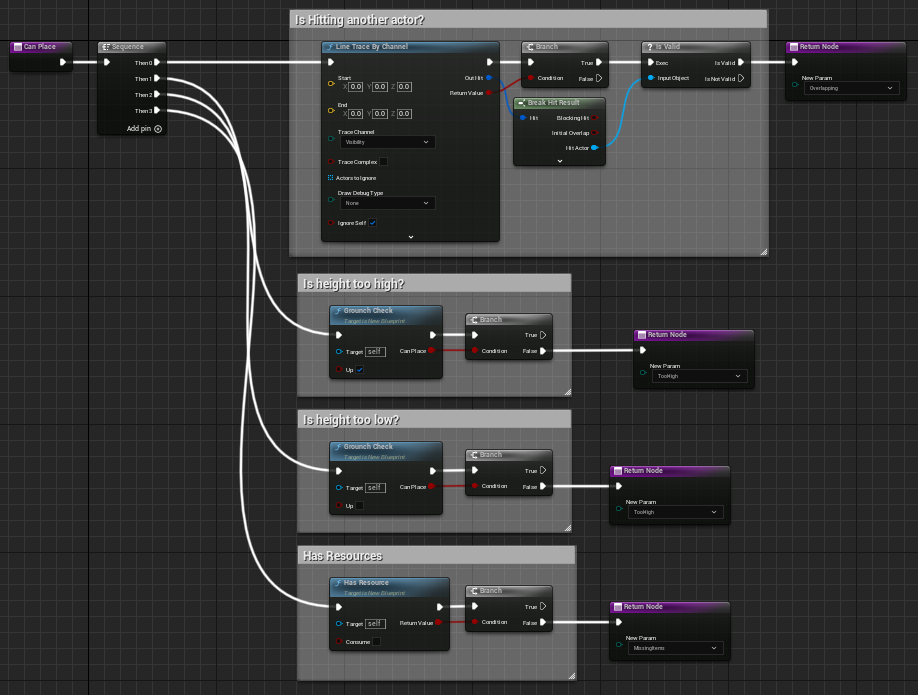
 frosty berry
dark drum
Is your ship the projectile?
frosty berry
dark drum
Is your ship the projectile?
no, a "laser" witha SphereCollision
grave relic
grave relic
Yes, but if there are cases like this, then a box that has the capsule collider ...
Clearer image:
 dark drum
frosty berry
no, a "laser" witha SphereCollision
dark drum
frosty berry
no, a "laser" witha SphereCollision
The object type for your ship shouldn't be projectile then. Also you'll need to make sure it blocks projectiles.
frosty berry
lunar sleet
How are you detecting the collision?
on Event Hit
willow gate
Random noob best practices question: I have always been in the habit of having an art assets folder outside of my game content folder and then importing the assets to the project from the outside folder. I recently watched a seminar where someone just dragged and dropped textures and fbx files right into their project content folder, which automatically prompts for import, obviously. I just wanted to know which one of these methods, if any, is the best practice.
frosty berry
dark drum
The object type for your ship shouldn't be projectile then. Also you'll need to ...
No, the ship is a staic mesh with complex collion as simple and the laser bolt is a separate object/bp. The laser should hit the ship
The ship is set to BlockAllDynamic
 brazen yoke
As you can see the interface stays the same but the camera view goes black when the character is being moved on the platform. Anyone seen this behaviour before?
When I move the character normally with the controls it does not go black, aka its only when its on a moving platform. Its local coop so nothing to do with servers.
Thank you.
 timid tundra
how to invoke parent or base version of the overridden function in blueprint?
versed sun
Right click node, Add Call to Parent
zealous moth
@dark drum it wouldn't matter, the onjly difference is the overall length of the string.
@lunar sleet I found this thread and it has an implementation but my loop stops at the first entry oddly enough
https://forums.unrealengine.com/t/how-to-sort-an-array-alphabetically/350158/7
Epic Developer Community Forums
In the plugin below you can find an Order node and use it just like that. https://forums.unrealengine.com/development-discussion/blueprint-visual-scripting/4014-39-rama-s-extra-blueprint-nodes-for-you-as-a-plugin-no-c-required
hahahahaha nvm, same issue
timid tundra
I want to replicate the following code with blueprint.
AActor* APickerCppGameMode::ChoosePlayerStart_Implementation(AController* Player)
{
    TArray<AActor*> FoundActors;
    UGameplayStatics::GetAllActorsOfClass(GetWorld(), APlayerStart::StaticClass(), FoundActors);

    for (auto Actor : FoundActors)
    {

        if (auto PlayerStart = Cast<APlayerStart>(Actor))
        {
            if (PlayerStart->PlayerStartTag != FName("Used"))
            {
                PlayerStart->PlayerStartTag = FName("Used");
                return PlayerStart;
            }
        }

    }

    return Super::ChoosePlayerStart_Implementation(Player);
}
However, it crashes when the number of PlayerStart actors less than the number of clients. What is wrong?

The C++ version works well.
manic vessel
Anyone see if Im doing anything stupid here! Im teleporting my character . then teleporting the physical parts and the constrained actors to them . If have a weapon in either hand they teleport correctly , But if the hands are holding the same weapon im running a check to find the primary gripping hand and teleport to that one,( ONLY i have an elastic band of the weapon returning to the constraints from where I teleported from. cant see why if they done match its fine but if they do its not.
 thin panther
timid tundra
I want to replicate the following code with blueprint.
```cpp
AActor* APickerCpp...
thin panther
timid tundra
I want to replicate the following code with blueprint.
```cpp
AActor* APickerCpp...
first off you probably want to feed the incoming player into the parent call
timid tundra
thin panther
first off you probably want to feed the incoming player into the parent call
I just did but it still crashes with the following error:
Blueprint Runtime Error: "Accessed None trying to read property CallFunc_K2_GetPawn_ReturnValue". Node: Add Movement Input Graph: Follow Function: Follow Blueprint: BP_TopDownController
try adding a return after that parent call and feeding the output into it
thats the other thing youre missing from the cpp version
timid tundra
Well done. Thanks!
thin panther
np!
timid tundra
It still works even without connecting the Player pin.
 thin panther
yeah it will, but we are trying to mimic the cpp version exactly are we not?
you aren't passing nullptr into that super call
zealous moth
@lunar sleet alrighty, i found a solution. Originally I had a datatable with all level informations including the name and it was ordered alphabetically. My string sorting was mainly used so that when you beat a level, you unlock the next and add the level name as a string in a save game array.
The issue is if you go to world 2 while world 1 is incomplete, you get weird "level_1_1, level_2_1, level_1_2" sequences.
The final solution was to use the data table, create an array and if my "saved game array" contains that entry, add it to a transient array and then set that as the new saved game array
loud tree
lunar sleet
May want to move this to <#221799467689574410>
Can anyone tell me if there is a real difference between using sphere overlap actors vs multi sphere trace?
versed sun
Sphere overlap will be 1 sphere
Multi sphere trace will be more of a Capsule shape
(a sphere at start , sphere at end, and connect them in the middle)
zealous moth
loud tree
Can anyone tell me if there is a real difference between using sphere overlap ac...
the usecase is different. Overlapping can be a 1 trigger event that happens once when something overlaps. Multisphere trace haas to be called. So unless you expect it to occur, you have to call it all the time
 ancient basalt
hello, i would like to ask for help, So the problem is that:
There is an weaponComponent blueprint and in that i have one bullet hit location variable(Vector) and i pased that variable using interface and cast to an human ai controller blueprint for use. But in human ai controller i am getting 0, 0, 0 for x, y and z but it print the location/reads the data in variable in weaponComponent properly.
So if anyone knows the solution for above, Pls help me!
loud tree
zealous moth
the usecase is different. Overlapping can be a 1 trigger event that happens once...
I don't mean overlapping the collision sphere of an actor.
I'm asking about the node called sphere overlap actors that Is called in the same manner a sphere trace is.
 twilit jacinth
Hello guys I want to implement object pickup system. I already implemented Physics constraint, but it glitches out often and objects teleport around when near walls or the floor. I found a thread on implementing this feature with PhysyicsSringArm. But cant find that component online. Is it just a usual springarm? https://forums.unrealengine.com/t/stop-carriable-objects-from-clipping-through-walls/1325759

Epic Developer Community Forums
I’ve implemented 2 different ways of handling objects that can be grabbed. One of them uses a Physics Constraint Component and the other one is using a Physics Spring Arm Physics Spring Arm seems to be able to handle collisions pretty well since, no matter the distance, the object will never clip through a wall. However this doesn’t seem to be...
lunar sleet
loud tree
Can anyone tell me if there is a real difference between using sphere overlap ac...
Open the source code and check
Not sure what the diff in how they’re written is, but they usually have very different applications
loud tree
lunar sleet
Not sure what the diff in how they’re written is, but they usually have very dif...
I don't really understand what the different applications would be because the multi trace for objects does more or less the same exact thing doesn't it?
 warped saddle
Does anyone know how in widgets, make it so that the text in input text box after some length starts a new line instead of going on and on, llike wrapping text
I tried this but i does nothing
 lunar sleet
loud tree
I don't really understand what the different applications would be because the m...
lunar sleet
loud tree
I don't really understand what the different applications would be because the m...
Multi sphere trace makes multiple sphere traces from start to end location. Sphere overlapped makes a sphere around the target (self or w/e)
loud cipher
Hey all Im having a super weird issue where no montages at all are playing on my mesh. I made sure im using the correct slot, default slot and it is included in my animation blueprint. I have made sure that its not an issue with my current weapon being invalid as if i manually plug in a animation and remove the get validated check it still doesnt play.

Really unsure at this moment
 vital dagger
I have written custom c++ function library calls. I want to use them in a BP Func Lib.
Some of them use BlueprintAsyncActionBase
I cant see any of the AsyncActionBase nodes. Are those not accessible from a BP func lib because of the async/different exec structure?
loud cipher
This is the case for all of my montages on my character
lunar sleet
loud cipher
Hey all Im having a super weird issue where no montages at all are playing on my...
What does that prove? Is it valid or not?
Did you put a print on the not valid exec
loud cipher
lunar sleet
Did you put a print on the not valid exec
Yeah
I have removed that entirely
I have even tried calling play montage on beginplay with just a animation plugged in
no luck
lunar sleet
loud cipher
Yeah
Did it print ?
loud cipher
No it didnt
There is no issue with the is valid
I made sure it has a slot and the slot is in the anim bp
lunar sleet
Did you use breakpoints to make sure your nodes are even firing at all
loud cipher
 loud cipher
lunar sleet
Did you use breakpoints to make sure your nodes are even firing at all
loud cipher
lunar sleet
Did you use breakpoints to make sure your nodes are even firing at all
Yeah
lunar sleet
And, what happens, doesn’t reach play montage?
desert juniper
Is the montage variable populated correctly?
loud cipher
lunar sleet
And, what happens, doesn’t reach play montage?
It does, the montage is called
loud cipher
desert juniper
Is the montage variable populated correctly?
What do you mean
frosty heron
Show your anim bp
desert juniper
Did you actually select a montage in that variable
loud cipher
desert juniper
Did you actually select a montage in that variable
Yes
 blissful grail
desert juniper
Did you actually select a montage in that variable
blissful grail
desert juniper
Did you actually select a montage in that variable
You can see it...
loud cipher
desert juniper
Did you actually select a montage in that variable
Yes, i tried it with just manually plugging in a montage also
frosty heron
Make sure MM reload can be played by your mesh
loud cipher
frosty heron
Show your anim bp
Sure one second
desert juniper
blissful grail
You can see it...
You can’t. You see a variable. But not what actual montage it’s set to
loud cipher
frosty heron
Make sure MM reload can be played by your mesh
Yeah they do
blissful grail
desert juniper
You can’t. You see a variable. But not what actual montage it’s set to
This is the most updated version of their code...

The asset is clearly selected
desert juniper
blissful grail
This is the most updated version of their code...
Oh. I see. I was basing it off first image
loud cipher

 desert juniper
Which is why I said variable
loud cipher
Funny, it is now working on beginplay
But if i try call it through an input key
No chance, even using breakpoints and it fires it but doesnt play
Thats so weird
frosty heron
Which slot your montage is using?
loud cipher
frosty heron
Which slot your montage is using?
Default slot
Wait sorry
Im using Upper body now
That worked on beginplay
But didnt work where i was calling it on reload input
frosty heron
Check your reload function, is it playing the same montage?
desert juniper
Is it a multiplayer issue?
loud cipher
yep same animation
loud cipher
desert juniper
Is it a multiplayer issue?
No im just testing in singleplayer right now
desert juniper
loud cipher
No im just testing in singleplayer right now
And it’s set to launch as the server not client?
loud cipher
desert juniper
And it’s set to launch as the server not client?
What do you mean
No im launching in standalone
desert juniper
Interesting.
loud cipher
Weird i put a delay before calling the reload montage and it works
But doesnt work without the delay

 lunar sleet
loud cipher
But doesnt work without the delay
lunar sleet
loud cipher
But doesnt work without the delay
Begin plays don’t all get called at the same time. Where is your montage being set?
frosty heron
Looks like multiplayer issue
loud cipher

 lunar sleet
Yeah that too
frosty heron
Gas use repnotify to play montages, I would probably look into it when I get to mp
loud cipher
All it is is just a montage being run multicast then run on server
blissful grail
If you're running this standalone, multiplayer doesn't matter
frosty heron
Don't know what goes in your macro, I would do a print string to check if the play montage node get executed at all
loud cipher
frosty heron
Don't know what goes in your macro, I would do a print string to check if the pl...
Yes it does
gentle urchin
Montage multicast what
frosty heron
When you said "work" in begin play but not when you press input make it sounds like mp issue but I can't tell for sure
Also not sure what you mean by multicast then run on server. That sound quiet wrong to me
It should be server call multicast rpc
I would personally play the reload montage locally, then call the server to do multicast rpc but exclude the local controller. (If not going with repnotify route)
gentle urchin
^ Sounds reasonable
also, avoid hardcoding values 😄
makes it hard to parentclass them and reuse existing logic
frosty heron
The delays here and there make it hard to debug too imo
loud cipher
Is there a difference between is valid and Validated get
blissful grail
No
gentle urchin
latter is a fraction of a fraction faster
loud cipher
Ok thanks
zealous moth
@gentle urchin 17% to be precise
loud cipher
17% faster?
zealous moth
17
gentle urchin
zealous moth
<@231467939734355969> 17% to be precise
1.7 ?=
blissful grail
Might only be faster because it's one less execution wire
zealous moth
1.17
lunar sleet
Seventeen
loud cipher
1.17% or 17%
gentle urchin
I dont buy it
zealous moth
1.17 times or 17%
lunar sleet
blissful grail
Might only be faster because it's one less execution wire
That is what I’ve heard being peddled as well
gentle urchin
 zealous moth
prove me wrong, fool! it was Auther who first discovered it
lunar sleet
Well if Authaer said it I’ll take it
blissful grail
lunar sleet
That is what I’ve heard being peddled as well
Well, the white execution wires are the really slow part of BP (according to Epic at least)
zealous moth
did Auther leave? 😦
lunar sleet
blissful grail
Well, the white execution wires *are* the really slow part of BP (according to E...
Spaghetti noodles be slow 😀
gentle urchin
zealous moth
did Auther leave? 😦
no? 😛
zealous moth
I can't @ him
lunar sleet
It would seem so
zealous moth
sad... he was so cool
lunar sleet
He might just be taking a break
gentle urchin
I took 6 months last time lol
it was nice to actually get shit done
now im back here
xD
lunar sleet
This isn’t Slackers anymore
gentle urchin
True
zealous moth
 lunar sleet
You have to work to stay close to the Source
gentle urchin
Struggling with implementing ongoing requirements for my quest system
feels troublesome
need a custom struct and everything
zealous moth
just add another bool to the array
gentle urchin
It doesnt fit with my current API
which forces me to extend the implementation parts of the system
which i dont like 😕
versed sun
gentle urchin
need a custom struct and everything
I went with JSON for custom struct
gentle urchin
I want to maintain my system as simple as possible to implement ,
versed sun
but i also needed JSON for other things...
gentle urchin
so if i can stick to the current API , that'd be great !
I think i found a way tho
atleast, part of it
 spiral kite
I can set crouched height but I cant set crouched width. how can I set it?
versed sun
Isn't it Capsule Radius?
gentle urchin
Yep
 quartz haven
Hi folks! How do you create simple if statements in Blueprint considering the following?
I have integers 1 to 6 as inputs and I want to execute to 6 different outputs depending on the incoming number from 1 to 6. If I get 1, I execute on 1st output, if I get 2, I execute on 2nd output
Thank you so much!!
gentle urchin
Usually unchangef
gentle urchin
quartz haven
Hi folks! How do you create simple if statements in Blueprint considering the fo...
Switch on int
Then implement the ones you got
And put a print string in the default
quartz haven
And add 6 nodes, right?
LE: Ah. I can add pins. Super!
gentle urchin
To throw yourself a bone
quartz haven
Nice! Thank you so much!!
gentle urchin
Dont forget the bone part
 raw orbit
is there a way for me to save a reference to a particular struct instead of just making a copy for it? in blueprints
gentle urchin
No
raw orbit
oh you sure? but it can be done in cpp right
raw orbit
hmm yeah
 tall field
Is it possible to have functions in blueprint structs?
gentle urchin
No
versed sun
I think that would be more Data Asset
tall field
versed sun
I think that would be more Data Asset
😮 It's possible to have functions there? Just trying to make a map from an enum to a function I'd run
 alpine kestrel
how would one go about making 2D recoil / gun kickback? I am looking for some kind of function or way to move an object in a direction (xy), over a set period of time, possibly with ease in/out transitions.
gentle urchin
Lerp
versed sun
tall field
😮 It's possible to have functions there? Just trying to make a map from an enum...
ummm.... a Map of (Enum and Function) ? no
gentle urchin
Dothing(enum) -> switch on enum -> do many things ()
tall field
Ah I see, thank you. Yeah I guess I'd have to go with the switch instead, thank you guys
jolly cipher
jolly cipher
Is anyone able to make this make sense?
So I created a mounting system, I basi...
Ive been staring at my collision settings and not seeing anything that would force my character's camera.
Any ideas why I cant move camera freely after attaching my actor?
 radiant citrus
what does this error mean?
 lunar sleet
radiant citrus
what does this error mean?
lunar sleet
radiant citrus
what does this error mean?
What are you doing there, #editor-scripting stuff?
radiant citrus
I am trying to construct an object from another class, where I store certain values
lunar sleet
radiant citrus
I am trying to construct an object from another class, where I store certain val...
What type of class is it
versed sun
I think Neo ment your Disabled Node
radiant citrus
versed sun
I think Neo ment your Disabled Node
the disabled node thing is irrelevant. it doesnt work enabled either
radiant citrus
lunar sleet
What type of class is it
where do I check
lunar sleet
I’m confused
radiant citrus
how do I see what type of class it is
lunar sleet
Are you not asking about the construct node?
radiant citrus
no I am asking about it
lunar sleet
radiant citrus
how do I see what type of class it is
I mean if you made whatever Tree nodes is you would know what it is, actor, actor component, widget, etc
lunar sleet
Ok well what does it do
versed sun
Are you constructing something and placing Self in it ? is that ok ?
radiant citrus
 radiant citrus
oh
jolly cipher
jolly cipher
Ive been staring at my collision settings and not seeing anything that would for...
I think I figured it out finally lol
lunar sleet
jolly cipher
I think I figured it out finally lol
What was it
radiant citrus
lunar sleet
You don’t construct actors
okay but what type of classes do I construct
radiant citrus
but when I spawn the actor it asks about collision and stuff, but I only want to use it for storing data
lunar sleet
Just leave it on default
radiant citrus
okay
jolly cipher
Seems like a logic issue, I forgot I had added a branch where if I was mounted to redirect my look up and right input to my mount.
I miss understood the attach actor to actor function, I was under the impression that I had to redirect my movement input and camera inputs,
Turns out my character still has the camera controls, I just ended up removing my branch to redirect all my camera inputs to the mount. Seems like it was not needed lol
 short ivy
How can i play a skeletal mesh animation on button press and when pressing again reverse it? It's for a skeletal mesh component in a pawn blueprint
loud cipher
Is it bad to run a lerp on a timer every 0.01 seconds on the server?
Aka are lerps and stuff bad to replicate
thin panther
Running a timer every 0.01 seconds is bad
versed sun
short ivy
How can i play a skeletal mesh animation on button press and when pressing again...
One way:
 fiery swallow
thin panther
Running a timer every 0.01 seconds is bad
fiery swallow
thin panther
Running a timer every 0.01 seconds is bad
Respectfully, ou should probably go a little more in detail with that
Because I can't really say I agree
short ivy
versed sun
One way:
yea but which animation node do i have to use?
thin panther
Well more that it's pointless. You're having a tick with extra steps at that point.
Not to mention you'll be having it execute multiple times a frame which you probably don't want
Timers aren't meant to be running this low
fiery swallow
epic has directly stated it's better to use a very short timer over tick for example. i could probably find the video
gentle urchin
fiery swallow
Respectfully, ou should probably go a little more in detail with that
At 16ms youll get 1 call(16ms) -> 2 calls (32ms) -> 1 call (48ms)
versed sun
short ivy
yea but which animation node do i have to use?
My Bad, was thinking timeline for some reason...
blissful grail
fiery swallow
epic has directly stated it's better to use a very short timer over tick for exa...
And they also say the Child Actor Component is fine. As well as Hot Reload. Their word isn't gospel
thin panther
fiery swallow
epic has directly stated it's better to use a very short timer over tick for exa...
It isn't though.
fiery swallow
"Let him get up, let him get up"
versed sun
short ivy
yea but which animation node do i have to use?
Can you get current animation position/frame ?>
short ivy
versed sun
My Bad, was thinking timeline for some reason...
right now i am doing this and the animation for the reverse is just a duplicated one with scale set to -1 to make it play backwards

but the problem is it's not reversing really, it's just spawning back
like in an instant
fiery swallow
blissful grail
And they also say the Child Actor Component is fine. As well as Hot Reload. Thei...
this discord also says hot reload is not good, but I've been using it for months and never once had a problem
short ivy
versed sun
Can you get current animation position/frame ?>
how so?
gentle urchin
fiery swallow
this discord also says hot reload is not good, but I've been using it for months...
Take cover
fiery swallow
anyway, I think 0.01 second is fine, You should profile and find your results that way
blissful grail
fiery swallow
this discord also says hot reload is not good, but I've been using it for months...
"I haven't encountered a corruption yet, but these thousands of others have, they must be wrong"
fiery swallow
what is it, live coding or something?
versed sun
short ivy
how so?
I dont remember animations , its been years
fiery swallow
blissful grail
"I haven't encountered a corruption yet, but these thousands of others have, the...
source control?
blissful grail
Hot Reload is dog trash
Live Coding is better
thin panther
Live coding is not hot reload
short ivy
versed sun
I dont remember animations , its been years
alright thx though, now that i know it's an animation issue i will ask there
blissful grail
fiery swallow
source control?
"I like losing work. It is what makes me feel alive"
fiery swallow
They've both been called trash repeteadley
fiery swallow
blissful grail
"I like losing work. It is what makes me feel alive"
Did you come to just be petty? You got nothing better to do?
gentle urchin
Plus the double execution when the timing's just right
blissful grail
Source control is obviously a solution. A better solution is to not corrupt your assets
thin panther
fiery swallow
They've both been called trash repeteadley
Not really. Live coding's usefulness is debated because it does normally result in eventual temporary corruption that needs an editor restart
fiery swallow
What I'm saying is you should profile, something like 0.01 seconds ona timer isn't really an issue and will probably never be a bottleneck. But I see some of the points you are making
like always, it depends what you do with it
loud cipher
Hmm okay that makes sense
thin panther
Just because it isn't a bottleneck doesn't mean it isn't bad lol
blissful grail
It's not about being a bottleneck though. No one said anything about that part.
thin panther
You can get all actors of class everywhere reasonably fine in a lot of situations but it's still not great
gentle urchin
You sorta dont know what fps the game will be running at
Low timers can make bad performing laptops perform even worse
loud cipher
Also guys, lets say for example i have a crouch system, and i want to update the crouch animation. Is it better to check if the player is crouching every update of the animation blueprint, and then promote it to a variable to then use in my animation states, or is it better to directly from the player bp, cast to the anim bp and set the variable to true from inside my player bp
gentle urchin
Due to multiple executions within the single frame
fiery swallow
He asked if something was bad, 99% of the time, people are coding in a way that is not good. I think there's a serious problem with being so nit picky here
gentle urchin
Compared to tick.. which atleast limits to 1
thin panther
Not to mention the whole, not discarding calls but instead executing multiple times a frame to catch up
gentle urchin
thin panther
Not to mention the whole, not discarding calls but instead executing multiple ti...
My point exactly ^^
thin panther
fiery swallow
He asked if something was bad, 99% of the time, people are coding in a way that ...
This ain't a nitpick lol. It's bad. End of story.
blissful grail
fiery swallow
He asked if something was bad, 99% of the time, people are coding in a way that ...
You help prevent people from continuing to code badly by not perpetuating bad practices.
fiery swallow
Whatever you say
thin panther
I mean if you want to make your own bad code writing habits with unintended behaviours you can go ahead but don't fight the people that advise against it
fiery swallow
As someone who has been a tutor/mentor for 6 years. I will trust my gut, and focus on helping people release things. Rather then over complicate nothing.
It's really not this serious though
loud cipher
even if the timer is going to be cleared after a second?
gentle urchin
Tick is probably the biggest badboy still said to be bad in general
loud cipher
What if you dont want it to be called every single frame and just for a few seconds only
thin panther
fiery swallow
As someone who has been a tutor/mentor for 6 years. I will trust my gut, and foc...
The timer is overcomplicating it lol. How hard is it to drag off event tick
gentle urchin
Atleast as far as online tuts go