#animation
1 messages · Page 181 of 1
 ashen junco
 little wyvern
Could you specify a little what you mean exactly? Like, currently my mesh is kinematic, and the parts that incorporate physics are set in the animation blueprint. My instinct right now is to introduce corrective angular force to the mesh in accordance with the rotation, but it sounds like a massive bandaid. Do you have a better idea? I'm a little dim so please be patient lol
ashen junco
 radiant matrix
you got any tutorials for me, i am ready to learn!
radiant matrix
you got any tutorials for me, i am ready to learn!
Aside from the one in the pinned message, there is also Unreal Engine JP presentation on Control Rig, which I haven't documented it yet.
 nimble sonnet
little wyvern
Could you specify a little what you mean exactly? Like, currently my mesh is kin...
nimble sonnet
little wyvern
Could you specify a little what you mean exactly? Like, currently my mesh is kin...
i dont know the particulars of your setup, all i can say is that if your actor is using physics, and you want to do realtime changes to rotation/position, its often better to use physics to make those changes
radiant matrix
ah
i am looking for tutorials that are more up to date
its fine tho
thanks again
ashen junco
radiant matrix
i am looking for tutorials that are more up to date
I don't think there's much difference from 4.26+ apart from some stability fix, at least from messing around with 5.0 Preview 1
A striking difference I see is the Full Body IK node and perhaps functioning in CR graph, but that's all I can recall.
little wyvern
nimble sonnet
i dont know the particulars of your setup, all i can say is that if your actor i...
Yes, I guess what's confusing me is how I can use physics to rotate a kinematic component. I could make it a physics component and i suppose I could snap it in place to the capsule post-physics and then rotate it using angular force but that just sounds overly complex and therefore prone to cause a massive amount of problems.
This also seems like a very common problem to have, so I was hoping there was a proper way to do it
radiant matrix
@ashen juncoya
i want to use cr for a few cool things
so it would be smart to properly learn it
since it can be used
in sequencer too
 warped sapphire
so how do i make 2 actors play a synced montage? for example, one actor getting bandaged and the other doing the bandaging
 foggy nymph
I've had this problem for a few days, (pictures linked here: https://forums.unrealengine.com/t/no-ik-solver-seems-to-work-any-ideas-for-this-setup/573642) I cant figure out how to get the IK to move in different directions (like a two pole setup (idk if that is a thing , if it is I cant find it)) I've made a janky Direct-Kin function, but I cant use it in game. Any Ideas?
 crystal imp

Project Files : https://drive.google.com/file/d/1y6YFDqnUMZoS5JY_MEvzHtl8-dkniONw/view?usp=sharing
Show some love an Support guy's I've worked hard and long on this. I spent an entire Month from Sun Up To Sun Down....No Lie.
Join Our Discord: https://discord.gg/38ceaJ67Eu
 austere needle
is it better for character models to be one model or can they have separate pieces on them?
crystal imp
austere needle
is it better for character models to be one model or can they have separate piec...
It depends on you and your needs. MetaHuman is made up of different pieces and people normally don't bake their clothes to the character mesh either.
austere needle
good to know, thank you!
 outer silo
Heya all - hope everyone is doing well. I have some questions regarding animations (mostly since I am not overly versed in them), is it worth it (resource, visually, game-feel responsiveness) to include animations of the start and stop for things like walks/runs, or better to use things like blend spaces to transition motionless to walk to runs.
Which leads me to a further follow up question, what is a clean/good way to incorporate movement into your game in a manner that feels good but is clean?
I've seen people use all sorts of different movement methods (from 1D and larger blend spaces) but does it make sense to incorporate as many movement animations into a blendspace as possible, or should I be taking a less is more approach, or something in between that - something like having a walk and run animation in each cardinal direction and 45 degree angle of a blendspace, and calling it a day.
ashen junco
outer silo
Heya all - hope everyone is doing well. I have some questions regarding animatio...
-
You could go technical with it and mix some procedural animation magic for the transition animations.
-
Depends on how you want to manage them. Personally I prefer less is more approach, utilising more technical aspect of animations. You can't predict every single possibility player take for the movement even past QA and testing.
outer silo
To be honest, I am feeling along the same way myself - would it be alright if I pick your brain some on thoughts regarding that?
I have my combat animations and such where I want them for now, but my general locomotion is something I haven't really gotten addressed yet.
 fossil crane
Hi all - is anyone aware of a FPS asset that utilises Control Rig out of the box by any chance? Thanks!
 novel blaze
Fleshed out more of my first person animations in lyra. Control rig is missing some constraint tools that would make it a dream to animate with but still I think it’s super powerful for placeholder animations until I can find a real animator 😰

What IS GOOD DEV GODS!
In this video I show off the animation sets I've been spending the last week putting together. From creating a control rig to keyframing the animations inside the editor. Its been fun and it feels good to add more content to the project instead of code. I've officially converted the project to a FPS. Getting back to makin...
 hollow relic
Did someone make feet IK working? Apparently my IKs don't get the translation when retargeted, so my animations have their feet stuck to the ground.
I did check "retarget IK" though and even changed translation to globally scaled and absolute, but nothing worked.
At the moment I set the transforms of the IKs to the transforms of the feet, but then the IK part doesn't work properly anymore.
 wanton ridge
im trying to import animation from Mixamo but im keep getting this error
can anyone help?

 orchid pond
wanton ridge
can anyone help?
orchid pond
wanton ridge
can anyone help?
Which animation are you trying to import? -- I'm new to this as well, but have managed to get some animations imported -- just now working entirely as I expected.
 thorny oasis
How can I make my character not moving, but making the running animation

 worldly swan
thorny oasis
How can I make my character not moving, but making the running animation
worldly swan
thorny oasis
How can I make my character not moving, but making the running animation
You should tick Force Root Lock on your animation
 orchid pond
Noob question -- I have an animation imported from mixamo -- which has Root motion, so I have enabled that and character -> animation -> loop and reset, but the final animation ends up offset upwards.
Here are the before and after -- see how high the mesh is in the second image.


any ideas on how I might be able to correct this -- these animations in question do not have the 'in place' export option from Maximo
 misty dagger
Is there a documentation for what those settings do? Especially In Range and Out Range?

 dry flint
hi everyone!! I'm kinda new in ue4-5 animation world, i want to import from maya both animation and camera but when I import in unreal there is only my animation, someone know how to check if my camera was imported in unreal (I already check import camera in export selection in maya). Thanks in advance
✨ ✨
 burnt cedar
Hello. I just started making my first game. Where can I find asset with basic character with animation? Walk, run, jump, crouch and sidewalk?
 vapid linden
burnt cedar
Hello. I just started making my first game. Where can I find asset with basic ch...
vapid linden
burnt cedar
Hello. I just started making my first game. Where can I find asset with basic ch...
You can make you own or on the epic games ue marketplace
burnt cedar
vapid linden
You can make you own or on the epic games ue marketplace
I found only specific animations. Not completed character.
 karmic rapids
I've created the mesh for the horse tack, reins, stirrups and saddle. What is the usual way to rig it? Most of it has to move with the horse but the stirrups and reins move with the characters feet and hands.

I'm thinking rig all to the horse's skeleton but use IK for the reins and stirrups to move / attach it to the characters hands and feet. That sound right?
 lucid ice
how you can rig your character in blender for unreal engine 5 without any addon
link to my patreon page and download sources and graphics:
https://www.patreon.com/navidansari
instagram:
https://www.instagram.com/navidrct/
timecodes:
0:00 intro
0:59 export mannequin from unreal engine 5 as a fbx
2:52 right way of importing mannequin ...
for those like myself trying to rig in blender to use in UE5 this video series is really good
 sand estuary
I’m looking for someone that might help with a little UE4 animation……
Background: I am building a kids Space capsule for my granddaughters, it features a cockpit you sit in with lots of educational space related screens/games plus many buttons, flashing lights and sound effects (DFPlayer based). This spaceship has three cut-out windows that look onto a 60” LCD TV.
The problem I have is finding suitable visuals to display on the LCD TV. I’m currently just looping some video clips. What I ideally would like is an animation that can be controlled via a joystick (currently have a Logitech Extreme Pro) as you travel around in space between planets and stars. PC based would be good but can deal with any platform.
I have started to learn UE4 and have made some mesh’s for a couple of planets. But for a one-off project the learning curve is a big task. I do not need anything that is “solar system correct” or in any way overcomplicated. No shooting or destroying anything…. And running in an open loop with enough content to make the visual interesting.
I’ve included a photo of the rough template and visual concept I’m playing with….
This little clip ”Space simulator for kids” by Elif Ozyildiz (https://www.youtube.com/watch?v=q5_Z5ZiNRYc) is the sort of thing I’m hunting for (but with traveling around the planets only and no voice – just space music).
It occurred to me that someone might have something very close to my needs. Or something that could easily be modified to suit??
Happy to pay a nominal amount and happy for a more experienced UE4 user to own the animation! I’m just interested in something to use for this one-off job. Doesn’t seem to be anything out there that suits, apart for the more full on gaming market which are not suitable.
I have looked at the Viper Project (Jacky) but the above Space simulator for kids is more suited to this concept.
Any ideas???

A quick tour in Space for kids.
Created by Elif Özyıldız Topal
Voiced by Amanda Özyurek
This is the inside space capsule below showing the view I want into space...
 misty dagger
does anyone know if you can export the animatiopns from ue to like blender?
export to fbx :
?
 dull sun
I have this child ABP, and I can replace blendspace references, which is cool.
But I wonder if I can replace variables such as "Angle" or "Speed" in a child ABP as well?
Say if I wanted to reference other variables for whatever reason.


 winged portal
Not sure this is the best play, but does anyone know if there's a easy way to auto rig something with Mixamo, move to UE4/5 and use the standard skeleton from ue?
winged portal
Or maybe just auto rig anything to be complatible with ue5 default
 ripe yew
Is there anyway to dynamically feed animations to RandomSequencePlayer in animBP?
ashen junco
winged portal
Not sure this is the best play, but does anyone know if there's a easy way to au...
Miamo's (auto) rig isn't compatible with UE skeleton, so it's not going to be easy.
 lone wadi
how can i interrupt state transitions?

 onyx cypress
Hey anybody know how to fix import issues with Skeletal meshes that have bones that are detached from the main Skeleton? Like weapon attach points etc. Got an error about them when importing and now can't import animations because of it.
I'm assuming that's the issue anyways

They aren't weight painted and aren't within the standard hierarchy
So UE4 throws an error, then I can't import animations using that skeleton, assuming because of this

Yeah. That's definitely the issue. Just completely reset the mesh, re-exported and re-imported. I haven't changed the bones between base mesh and animation I'm trying to import.
Any help appreciated
 runic canyon
Hi guys!i'm trying to make hands IK for my character, more precisely i raytrace from its shoulders bones forward and i make its hand lay where the trace hits(the wall) trough IK. It works well but i have one problem, the character has a breathing animation and thus its shoulders (and the raycast and thus the hand on the wall too) fluctuate. I want to avoid the hands to "breath" on the wall. A quick workaround i found is to put two origins points outside the mesh(so they are not affected by animations) and ray trace from them instead of shoulders. But it's far from perfect since when the character changes animation they are not in Sync with the shoulders when they go forward or backward and its not ok. Is there a better way to achieve this?
 sly parrot
 faint oar
Does anyone know what this Warning means? Curves seem to be read just fine.

 dusky void
I'm trying to do some bone physics on a character and it keeps spazzing and glitching out. All the videos I watch have similar things and they all work. Id love to learn a bit more on how this works so i can get this and future physics related problems sorted. If anyone would be so kind to walk me through it it would help greatly!
I'm in the Feedback & Support Voicechat
 raven raft
Hi there is a way to change the tick rate of the anim update blueprint?
vapid linden
hello. If it is alright could someone help me export my animation and model from blender to unreal. I have looked at a ton of videos but i am having issues where unreal crashes every time i import my animation. and my mesh loads in wack
 iron thicket
Hello guys. Why this aim offset don't work, when I am play montage from slot? After all, I have cached the LocoRifle pose with AimOffset

 silent bay
Hey guys not sure if this is the right channel for this but hopefully someone can help.
Basically I had a lego model in Blender (from) mecabricks that I wanted to rig using mixamo (since I'm lazy and don't actually want to animate). However in order to do that I had to join the lego pieces into one otherwise it wouldn't work on mixamo.
So I managed to rig it fine in Mixamo however when I'm in UE5 obviously since I joined everything together in Blender, the skeletal mesh is just one object (idk if that's the right word).
I was wondering if it'd be possible to separate the different pieces inside of UE5?
here's what the skeleton tree looks like. As you can see it's just 1 bone
 silent bay
I figured it out
 karmic compass
any solution to this? i retargetted anim bp and all animations are fine but anim bp lol

 karmic adder
Hi, I feel really silly for asking this, but how do I change the "playback range stop time" for an animation in UE5? Right-clicking on the respective value or on the timeline or manually moving the red marker doesn't seem to work and I can't find the value in the asset details...
 static falcon
Can I force an animation blueprint to always run? Currently it's stopping when I inspect an item in my game
ashen junco
static falcon
Can I force an animation blueprint to always run? Currently it's stopping when I...
What did you do when inspecting an item?
static falcon
Disable input on the player and use this

That's why I'm surprised it's not updating
ashen junco
static falcon
Disable input on the player and use this
Anything else?
 last venture
anyone know how to offset the starting position of a physics constraint? (red stick)
 static falcon
ashen junco
Anything else?
static falcon
ashen junco
Anything else?
I found the issue. It was updating, I just had not set the variable properly while inspecting, doh!
ripe yew
Can you feed animations dynamically to RandomSequencePlayer during animation initialization in AnimBP?
karmic compass
karmic compass
any solution to this? i retargetted anim bp and all animations are fine but anim...
?
karmic adder
karmic adder
Hi, I feel really silly for asking this, but how do I change the "playback range...
Ended up extending the animation sequence in Blender... Still would be good to know if this complicated procedure (changing animation playback range) is somehow possible in UE5 lol...
 fresh sandal
I'm trying to retarget a mixamo character to unreal. I have the root bone and everything else but i need to change the pose in blender. Any idea how i can set the pose to be the default skeleton pose? The pose i created is not the one it's using when retargeting.
fresh sandal
Basically i'm trying to have this pose on the IKRig. I'm not sure why it's not working.


 dense trellis
I use montages called from BP but it's not ideal at all. The random sequence player node needs an update 😦
dense trellis
last venture
anyone know how to offset the starting position of a physics constraint? (red st...
Hold Alt and then rotate
 mortal wave
anybody knows what the animation curves window is about and how can I edit the curves?

how does unreal decide which values end up here?
ashen junco
mortal wave
how does unreal decide which values end up here?
Morph target ||(shape keys, if you use Blender)|| are added as skeleton curves automatically. You can also manually add curves to control things like material parameters with the same name.
mortal wave
ashen junco
Morph target ||(shape keys, if you use Blender)|| are added as skeleton curves a...
So in a way you define the animation curves by defining shape keys in Blender?
ashen junco
Not necessarily that. Anim curves can be more than morph targets and material parameters.
 languid harbor
For some reason when playing animations on the mannequin the bones seem to be incorrectly rotated, This is the default third person idle and as you can see the arm on the left side is going inside of the mesh, However in the skeleton view its aligned fine

 ashen junco
languid harbor
For some reason when playing animations on the mannequin the bones seem to be in...
ashen junco
languid harbor
For some reason when playing animations on the mannequin the bones seem to be in...
Don't think too much about it.
Unless you're making Dreamworld, you're eventually going to replace it anyway.
languid harbor
ashen junco
Don't think too much about it.
Good point just not sure if its something wrong with the project or just the mannequin because I cant find anyone else with the problem
mortal wave
ashen junco
Not necessarily that. Anim curves can be more than morph targets and material pa...
Can you change a curve value using blueprint?
I can see a Get Curve Value function, there is also a set morph target function which seems like it would do a similar thing sometimes?
mortal wave
I got it you can manually add those to existing animations and move the curves to match with whatever you would like
fresh sandal
How can i get the A-Pose of my character in the IK rig?
 misty dagger
help, my cat looks wrong on render 🥲
 ashen junco
Kowalski, enhance.
 rough shale
The new UE5 Mannequins have a normal and simple version, but it seems all the animations only use the simple skeleton? What is the normal one for then?
last venture
dense trellis
Hold Alt and then rotate
no frickin way. thank you!!!!
rough shale
How can I fix this? I just exported the fbx from unreal into blender and it's messed up
 ashen junco
rough shale
How can I fix this? I just exported the fbx from unreal into blender and it's me...
ashen junco
rough shale
How can I fix this? I just exported the fbx from unreal into blender and it's me...
It's not messed up
That's just Blender being Blender.
rough shale
Aren't the bones supposed to be connected?
ashen junco
Yesn't
It just have to copy loc/rot from the parent bone, doesn't have to have the bone tail connected to the bone head.
If anything bone head and bone tail is pretty much Blender's concept
(not sure if Maya do the same)
 peak nacelle
hey guys, im stuck for days with a problem and hope you can help! 🙏 🙏 🙏
i have characters in a vr level that play animation montages according to their voice lines, but thoses montages only start playing, when the player is looking at those characters. the sound files on the other hand play normally disregarding where the player is looking at, which is fine.
if the player is not looking at the character and the character starts to speak, the montage gets obviously out of sync with the voice file when the montage just starts to play when the player is looking at the character.
do you have any ideas on what might fix this? i thought of disabling occlusion culling but that didnt help.
EDIT: SOLVED in case anyone else stumbles upon this problem:
https://i.gyazo.com/thumb/1200/f9cc33e890c012187ba87c9e11759bf7-png.jpg
visibility based anim tick option in the skeletal mesh has to be set on always ticking
 vapid linden
used the manny retarget. My model is massive, backwards and doesnt move with animations. help... pls ;-; lol
 edgy hearth
When building assets for unreal in blender, is it best practice to set unit scale to 1 and units to CM? or unit scale to 0.01 and units to M?
ashen junco
edgy hearth
When building assets for unreal in blender, is it best practice to set unit scal...
Metric unit scale to 0.01.
Whether the unit is meter or centimeter doesn't matter, it's just for cosmetics in Blender.
edgy hearth
ashen junco
Metric unit scale to 0.01.
Whether the unit is meter or centimeter doesn't matt...
Thanks so much for the response - would meters vs centimeters affect the way a constrain is evaluated in blender?
ashen junco
edgy hearth
Thanks so much for the response - would meters vs centimeters affect the way a c...
Not at all.
Again, it's purely cosmetic.
It's just to change how the length is represented on the Blender UI
 harsh cedar
Hey guys, I'm working in BPs. I have a garage door which opens with an animation asset. Basically, I want the garage door to pause the animation if a button is pressed, and then reverse from current frame if pressed again. And vice-versa (like a real garage door). I've done this sort of thing with a timeline before, but not sure how to approach it with an imported animation.
 subtle lava
Anyone else find IKRig Full body IK is not working with rotating goals?
edgy hearth
Im trying to create an animation using the Matrix city sample environment, but my skeletal mesh keeps disappearing from the render (and outliner) during render in the MRQ. It happens at the same frame every time. ive fully disabled collisions and any sort of interaction with the environment, so i dont know why it keeps disappearing - any suggestions/has anyone experienced this?
 broken oracle
Is there any way for differents characters to have the same skeleton even if they have different bones? Like paragon characters, that have different weapons each one, could they share skeleton?
So I don't have to create the same anim bp logic for each one and use interfaces
ashen junco
harsh cedar
Hey guys, I'm working in BPs. I have a garage door which opens with an animation...
Using Timeline, try using Set Position node from the skeletal mesh
harsh cedar
ashen junco
Using Timeline, try using Set Position node from the skeletal mesh
Thanks for the reply! Can't get a lot of info for the Set Position node - haven't gotten it working yet. I tried this:

Looking at it now, that doesn't make a lot of sense. When do I 'set' the position, and how do I feed that to the animation?
 lapis sierra
I'm retargeting animations for the first time. I'm trying to retarget mannequin animations to a mixamo character. Right now I'm having trouble with some animations facing the opposite direction. I think it might be an issue with retargeting FK because when I check that it flips direction. Any tips for debugging this issue?
 ornate turtle
hopefully this isn't too much of a hassle: i've imported a blender model as a skeletal mesh, alongside multiple animations with the action editor. it was successful, but now i'm wanting to add a new animation to the action editor and that one is NOT exporting. how can i fix this? i'm using ue4.27
lapis sierra
lapis sierra
I'm retargeting animations for the first time. I'm trying to retarget mannequin ...
I think there might be a bug because setting source and target rig to the same thing breaks the animations as well
 raw bay
Is it best to retarget my anim_bp for my Third Person Character after working with Mixamo animations? Or start with a clean slate? I started out testing with some Mixamo animations and followed tutorials online to get the retargeting to work, but when trying to use other Anims that used the UE4 mannequin with that skeleton, they come out kinda off. I don't think they were like that at first, but something along the way in my play went sideways and I can't trace it back so.... here I am. Should I reassign my anim_bp to the standard UE4 mannequin setup? Or just start over?
Or maybe I could assign a new anime BP to the skeleton mesh?
 vivid roost
Any idea why an animation retarget shows no skeletons available?
Found it, had to uncheck "only compatible skeletons"
 spare pulsar
Im preparing a model for unreal in 3ds max, I have a CAT rig, but now I want to remove it and just keep the mesh. How can I do that ?
 keen yacht
hi guys, how to i start making a animation in blender for the ue mannequin
 round briar
What setting should I look into for making the run transition back into idle the moment you stop moving, because right now it seems to wait until it has completed playing the run animation before going back to idle

I dont know what setting I would tick to allow that to happen

 coral panther
Anybody tried MoCap with non-MetaHumans? I made a film with Xsens and MetaHumans, and looking for a new workflow to avoid some of the issues with MetaHumans. Any advice or recommendations very welcome!
 modest cargo
coral panther
Anybody tried MoCap with non-MetaHumans? I made a film with Xsens and MetaHumans...
modest cargo
coral panther
Anybody tried MoCap with non-MetaHumans? I made a film with Xsens and MetaHumans...
i have rokoko and have used it for live streaming and recorded mocap
coral panther
modest cargo
i have rokoko and have used it for live streaming and recorded mocap
Cool, what was the puppet made from? A MetaHuman or something else?
modest cargo
coral panther
Cool, what was the puppet made from? A MetaHuman or something else?
ive done metahumans, cc3, and my own custom
working on 2 cc3 and 1 custom skeletons for my current project
coral panther
Was CC3 any easier to use than MetaHumans?
modest cargo
coral panther
Was CC3 any easier to use than MetaHumans?
rokoko makes bone mapping relatively easy with their latest method,
they are equal
it wasn't always that way.. last year was a pain
coral panther
Ah good to know, thanks. When I tried with Xsens/MetaHumans, the live stream was generating some weird stretching on my MH, so in the end I just recorded it in Xsens and sent over an FBX animation to UE. I would be satisfied with that but find MetaHumans buggy and crash my system a bit more often than I'd like!
modest cargo
coral panther
Ah good to know, thanks. When I tried with Xsens/MetaHumans, the live stream was...
i doubt that is the xsens tbh
livestreaming in general is relatively buggy from what i have come to understand. and xsens is some of the cleanest livestream data.
sounds like there is something in your UE that is causing the crash, especially if it was sent over with an fbx asset
 gentle badger
guys which animation blueprint setup is better ? UE4 or UE5
coral panther
modest cargo
sounds like there is something in your UE that is causing the crash, especially ...
It's not the Xsens. I know quite a few people who have been using MHs and it crashes the system regularly...
modest cargo
coral panther
It's not the Xsens. I know quite a few people who have been using MHs and it cra...
i havent seen much of that myself. like. at all
i have not had metahumans crash any project of mine either
 hollow arch
is there a way to enable/disable root motion for a montage at runtime? example: a dash attack which connects with a player. i'd like to stop the root motion at that point
 steady orchid
hollow arch
is there a way to enable/disable root motion for a montage at runtime? example: ...
steady orchid
hollow arch
is there a way to enable/disable root motion for a montage at runtime? example: ...
im not sure but if you are dealing with complex attacks i suggest you take a look at the motion warping plugin
hollow arch
i'd say i mostly have pretty simple asks rn but i can check it out
hollow arch
looks like i can use this node to switch root motion modes back and forth:

but i'd rather be able to take a particular animation and stop only its root motion from being applied, rather than set an overall rule. we'll see how this works tho
 thin thunder
Hi guys, is there a way to make a distortion animation and be able to apply it to any object? What I want is to make a cartoon-style animation of a vacuum sucking objects, and I want every object to follow the same animation, which would be some form of warping, not scaling down
What I've done in the past is an alembic animation for a specific object, but I would like this to be modular
steady orchid
hollow arch
but i'd rather be able to take a particular animation and stop only its root mot...
the character movement component extract the root motion from the montage that is being played, i think it only check when the animation start
you could set the root motion scale on the movement component to 0 but thats ugly af
steady orchid
thin thunder
Hi guys, is there a way to make a distortion animation and be able to apply it t...
niagara maybe? im not sure
hollow arch
yeah i'm really not sure. i don't feel like it's a crazy ask but so far no luck
steady orchid
hollow arch
yeah i'm really not sure. i don't feel like it's a crazy ask but so far no luck
but whats the case here? why you want to stop the root motion? if the character hit something that cannot be pushed it should automatically stop even if root motion is enabled
hollow arch
i'll get a video
this is where i'd want to turn the root motion off (but finish the montage)
hollow arch
i will have to check it out. is there a video or doc out there that you'd recommend?
steady orchid
hollow arch
i will have to check it out. is there a video or doc out there that you'd recomm...

An in depth look at Motion Warping for animations in Unreal Engine.
i did this for attacks very recently, if you have issue dm me
hollow arch
will do! tyvm man
 woven spoke
Hey there!
So I'm currently doing some keyframe animation with unreals control rig inside level sequences.
It's really awesome and you get some results really fast.
However one thing I can't figure out:
Is there a way to apply "frame 0 settings" immediately to the actors in the level?
Currently all my characters are t-posing until the sequence starts
broken oracle
Is there any way for differents characters to have the same skeleton even if they have different bones? Like paragon characters, that have different weapons each one, could they share skeleton? So I don't have to create the same anim bp logic for each one and use interfaces
 fleet willow
IIRC epic games recommends to have a huge base skeleton with all possible extra bones as it doesn't cost anything when a skeletal mesh doesn't use those extra bones
mortal wave
does anybody know what this node does exactly?

 short wasp
Hi, I've set up my anim graph, so that each hand can have independent animations, however, now I want to animation that affects the **whole **skeleton. What would be the best way to go about doing this?
 fleet willow
short wasp
Hi, I've set up my anim graph, so that each hand can have independent animations...
fleet willow
short wasp
Hi, I've set up my anim graph, so that each hand can have independent animations...
Not saying it's the best way, but that's how i do it.
Have a bool variable which tells whenever you wanna use the whole body or not and that boolean can be used by the Blend By Bool node
short wasp
@fleet willow Seems like that's the way to go, it worked, thank you so much! Good to know something like that exists!
 odd sapphire
Hey, I'm trying to use Anim Budget Allocator (SkeletalMeshComponentBudgeted), but it seems to crash every time we try to seamless travel into another map.
Most likely the world no longer exists, but SkeletalMeshComponentBudgeted keeps a raw pointer to the IAnimationBudgetAllocator and it probably no longer exists.
Is this something that people have fought with before?
USkeletalMeshComponentBudgeted::TickComponent() [D:\UnrealEngine\Engine\Plugins\Runtime\AnimationBudgetAllocator\Source\AnimationBudgetAllocator\Private\SkeletalMeshComponentBudgeted.cpp:92]```Did anyone experience a delay of about 3 seconds between animation when using Blend Space? Its like the initial animation has to fully be animated before it blends to another one

 median spire
Hey so I'm working in a control rig blueprint and I can't find the equivalent of "make vector" or "make rotator", any ideas?
 granite merlin
hi, is it good practice for animation curves to be used to rotate the character? like for a turn while idle
 onyx dirge
Hi! Did anyone had trouble setting up Motion Warping? I've done everything the tutorial says but nothing happens 😐
I mean, the montage plays but no warping occurs
 inner sigil
I downloaded a rig and imported it into UE5. The third person starter animations applied to it flawlessly. Is this because the rigged bones have the same names as the mannequin rig?
vapid linden
has anyone here used uefy 2.5 to set up a master rig to use for retargeting? using the rakiz tutorials before?
misty dagger
Did anyone had any issue with the rate scale? It occasionally does not work and my animation gets played in slow motion...I use the animation in a 1D Blendspace
 regal pivot
Hey guys, Does anyone know a plugin for Rig in Maya , that achieves similar results to Mr Manequin in Blender ?
 edgy hearth
has anyone else recently brought a Kitbash asset pack into a UE5 project? All the actor blueprints, static meshes, and materials are there, except nothing is linked - blank slots for static meshes inside the blueprints, blank material slots, and blank texture slots within the materials - it's going to take forever to manually relink everything. is this how it should be? Also even if it's not, is there a way to automatically relink everything? all the names are still matching and correct 🤔
outer silo
Heya everyone - still cranking away through building my animation stuff similar to that of Lyra's and a noticed something regarding the Controls in the Control Rig. The control type listed for them is "Transform", but inside my own rig - I only see the option for "Euler Transform". Are they the same thing or is there something I am missing somewhere?
ashen junco
gentle badger
guys which animation blueprint setup is better ? UE4 or UE5
Depends on YOUR setup.
ashen junco
vapid linden
has anyone here used uefy 2.5 to set up a master rig to use for retargeting? usi...
No, I used Auto Rig Pro.
ashen junco
median spire
Hey so I'm working in a control rig blueprint and I can't find the equivalent of...
I think Location and Scale input pins can be expanded. As for Rotations, it's Quaternion, so you have to convert it from something else
ripe yew
Anyway to add animations to RandomSequencePlayer via variables?
vapid linden
ashen junco
No, I used Auto Rig Pro.
In your experience is auto rig pro friendly with retargeting models for different animations? I'm thinking about buying it
ashen junco
vapid linden
In your experience is auto rig pro friendly with retargeting models for differen...
I won't say any further before someone going to scrutinise me for the third time, but I mainly use ARP for (re)rigging models from the ground up. It's pretty easy to do, least reducing the work on rigging.
I don't think it's for retargetting animations, but it can rig humanoid characters to be UE4 skeleton compatible, thus easing your retargetting a bit.
vapid linden
ashen junco
I won't say any further before someone going to scrutinise me for the third time...
Okay cool. Well thanks for your input. I was just having issues with animations and was just looking around for rigging help. Thanks! I'll look into this more
 fathom bloom
This is the animation blueprint from the third person template. The top block works in my project, but the bottom block (tick) always says that the Character reference isn't valid.

My Character runs around (AI) but only plays the idle animation, with the foot IK. Why??
 toxic thorn
does anyone know what's causing the swaying for this character? This is using ALS anim bp and i'm trying to integrate it with universal character system (https://youtu.be/pFirGx9ahSo)

Get the Universal Character Customization System at the UE4 marketplace: https://www.unrealengine.com/marketplace/en-US/product/5c5074c1db0546a981fea963d50e91b7
Support: support@farsouthcreations.com
Get the Epic Games Action RPG template for free: https://www.unrealengine.com/marketplace/en-US/product/advanced-locomotion-system-v1
⏱️ Timesta...
 stark trail
Is there a way to make a material that have a hole in it? or a widget with a hole in it?
My purpose is to make a UI tutorial, like "here you can see X" "here you can see Y"
which will be the best way to achieve this?
 ancient light
Hello! I was trying to add a custom mocap to this character in UE5 but whenever I change the mocap from the default character in UE5 to this model the software crashes without any message. Any thoughts on why this might be?
https://www.cgtrader.com/3d-models/character/sci-fi-character/cs01-space-suit-lite-version
 modern compass
How come there is no female UE4 sk_mannequin when I add third person content for project?
somethings fucky when I try to fiddle with IK rig I get crashes
runic canyon
Hi guys i need to quicly make some hand poses for my metahuman. Since i already setup retargeting with mannequins, is using mr mannequin and move its fingers on blender a good workflow?
ashen junco
modern compass
How come there is no female UE4 sk_mannequin when I add third person content for...
It's never there?
Female mannequin was a late addition in UE4, around 4.26 from the CR template, by then it's already too late to add it to all the engine templates for 4.27.
modern compass
does the male skeleton work with retargeting a female dummy skeleton like from actorcore
mortal wave
Hello I am having an issue importing a mesh into UE5. All the bones seem to be rotated in exactly the same way

what could be causing this?
this is the original mesh
 ashen junco
Ah, Blender being Blender.
mortal wave
yep
mortal wave
ashen junco
Ah, Blender being Blender.
any way to fix this?
 upper dawn
hey, any ideas on this bug?
https://forums.unrealengine.com/t/attached-skeletal-mesh-tail-stretching-in-ue5/576081

Unreal Engine Forums
Hi, so i created a tail skeletal mesh around a year ago in UE4.26 pretty much using this tutorial as the basis Ponytail physics Tutorial in Unreal Engine 4 - YouTube except obviously a tail instead of a ponytail. This worked fine in ue4.26 and ue4.27 since upgrading to ue5 the tail now gets stuck at random times quite often when spawning and the...
 warm portal

 jade storm
So on Input released I want it to stop playing an animation from a animation blueprint. Would anyone know the proper way to do this?
Should I add to the interface, call the animation from the interface to stop the animation in the characters blueprint? This is just finishing the animation, the playing idle after walk. I want it to completely stop the animation
 zealous crane
So I am currently using copy pose from mesh for my third person player mesh. However, the mesh is like a frame behind the pose of the original one... Any thoughts on what I can do here?
(Note: this is in a multiplayer setting)
jade storm
delete one frame
 pastel onyx
how do I assign another skeleton for a skeletal mesh?
crystal imp
I am currently working on setting up a plug-and-play project for MetaHuman Chars but I'm not too familiar with them, I'm having issue's only with the face. If anyone could help me with this so I can redo the ALS animations for Meta-Human I'm sure everyone would appreciate it and especially me so I can get on with this lol

I Re-assigned the skeleton for the Mannequin for testing but the head doesn't work
I Re-parented the original BP to the ThirdPerson for testing so All I changed was I swapped the Body out for the mesh and placed everything under that and added calls to the Parent for Construction and BeginPlay
misty dagger
Is there a way to know which animation is currently played in a Blend Space 1D?
 clear forge


I am working on rigging a mechanical robot arm that follows the player hand in VR (similar to adding regular arms to character).
The physics asset joint constraints are set up, but it looks like the use of FABRIK will ignore any angular constraints. What would be the best way to allow this arm to maintain its joint constraints while also reaching the effector transform?
Not sure if I need to learn control rig blueprints or control IK.

This is what the AnimGraph looks like
jade storm
Deos anyone know how to apply additive animations in ue5???

this should work.
and it does not.
misty dagger
Is there a way to adjust start and end of an animation without trimming it of?
I basically want to avoid copying the original every time I want to readd an already removed frame
clear forge
misty dagger
Is there a way to adjust start and end of an animation without trimming it of?
Pretty sure you just add a keyframe to it and adjust
rough shale
Is it possible to enable physics simulation on part of a skeletal mesh, while having the rest still follow an animation?
 hidden pivot
Honestly, the physics animation editor is super broken and doesn't make any sense. I'm very close to writing my own engine because at this point I am pretty sure it would be faster to build a physics system from scratch than trying to understand the extremely odd and poorly documented physics from this engine /rant
I dunno, what do people do when they are blocked by physics issue / bugged? It seems completely impossible to figure out. It's just physics randomly flying everywhere. No way to debug, no way to understand what the values you need to tweak do...
rough shale
That's unfortunate, I wish you the best of luck though
hidden pivot
Looks like I fixed it by changing the way I export the rig. FBX really is an awful format. Apparently the way Houdini converts units in FBX is by putting x100 onto every transform and for some reason unreal breaks with that.
misty dagger
Has anyone been able to edit existing animation with a control rig (UE5), whenever i add a animation to my control rig in sequencer its as the control rig stays in A pose, but i can se some "wiggling" in the rig because of the animation asset....
hidden pivot
misty dagger
Has anyone been able to edit existing animation with a control rig (UE5), whenev...
You talking about Post Process Animation Blueprint?
If so, then the trick is to have the blueprint start with the Input Pose blueprint node.
misty dagger
no, i need to edit a existing animation with the help of a control rig
have i missed some setting in the rig?
 proper grotto
Are UE4 marketplace assets completely unusable on the new UE5 skeleton setup?
misty dagger
nah, you just have to create a retargeter and a rig and match the bones
so much better than before
and then just right click on the animation asset and choose retarget with retargeter
 bronze osprey
well you have an animation playing but the CR overrides it
the wiggle is about as far as the animation can go w/o goin against the CR
you need to record the anim to a CR anim and u can change those frames
it will be a recorded anim just like mocap... bit of a pain to work with
you could take the anim of the feet and completely delete all frames and the foot sliding wil stop so thats a fairly easy fix
the source anim is a bit odd , so mayB the foot sliding is supposed to happen ... i dunno
 merry loom
misty dagger
merry loom
misty dagger
Do you have backwards solve event in your rig?
misty dagger
I did motion capture it (kinect II)
Backwsrds solve event? No , only forward solve...
Ah i understand...of course
merry loom
misty dagger
Ah i understand...of course
Yep, you need it so that you can use bake to cr to transfer mocap anim to cr anim. Only after that can you edit your mocap with cr
misty dagger
is that the reason why i cant see my rig when i try to bake the anim to crig?
 modern sapphire
Hey.
Anyone able to help me as to why/ how I am able to import a skeletal mesh onto a skeleton, with animations, yet the model doesn't animate.
But, if I import the skeletal mesh, with a new animation, and a new skeleton, it animates fine.
(The 1st skeleton already has a few skeletal meshes using it perfectly fine.)
 sick field
Hi, I'm new to using physics actors, and I'm having an issue where my character seems to leave his mesh behind. Everything starts together, but then the character's body (he's just a sphere at the moment) just stays in a heap and the rest of the movement, like the collision capsule, of the game continues, though the character is now invisible. I tried making sure the capsule wasn't colliding with the physics body, but it didn't help. Suggestions as to why this is happening and/or how to fix it?
 slim radish
Hi
How can I multicast the look I get from LiveLink?
Facial expressions animations are not reflected in multiplayer.
 runic canyon
misty dagger
so much better than before
runic canyon
misty dagger
so much better than before
Why is it so much better then before?
Before you kinda have to do the same thing but without creating new assets
merry loom
misty dagger
is that the reason why i cant see my rig when i try to bake the anim to crig?
Nope, if you cant see ur rig in the dropdown i remember there is an option somewhere near the drop down that says show only compatible skeleton or something like that need to be turned off
misty dagger
merry loom
Yep, you need it so that you can use bake to cr to transfer mocap anim to cr ani...
solved it, thanx!!
modern compass
how should i implement having multiple ceiling lights that have intensity and the light material emission keyframed in a sequence... I keyframed one and duplicated them and they all seem to work for awhile, until I add or remove other actors to the sequence the lights stop working
should I make them into their own sub sequence
there seems to be issue with the material that it creates material_animated_n for each frame and my other ceiling light keep getting wolrdgrid_material_animated for some reason
 worldly barn
Hi, did some know why default anim MM_Land in ue5 look like multiply to zero? at asset animation sequencer look fine

ok it be additive, xd
 ashen junco
 crisp void
Likely In Place and Root Motion respectively
 kindred veldt
I'm trying to import my animation from Blender to UE4 but I jus get this error and the animation sequence view is empty

I exported both the character and the animation from Blender at the same time
and then imported both
The character works correct
fleet willow
Is there something like a "Best practice guide" for animation layers ?
Like i get the idea behind this, yet i'm unsure if we should really create a layer for e.g. IdleWalkRun and similar.
And if we should, could we name them Layer_IdleWalkRun and so on to avoid naming conflicts ?
 scenic marsh
edit: feeding the sequence player a montage stored in a struct will just make the engine crash. found a submitted bug for it, they "fixed" it by just not letting you pick a montage (if you dont know what youre doing like me) and i happened to find a way around it :D
jade storm
Does anyone know how to play additive animations with the animation bp in ue5? The additive is not applying after i play the animation, via input on keyboard. I am just doing a simple move root forwards on 0 and keyframing. then setting the additive animation to mesh space then using selected animation frame and using the non additive form of the same animation. then plugging the apply additive in my animation blueprint. For some odd reason this does not work. Can anyone tell me what i am doing wrong in this situation?
 buoyant garden
Hey guys sorry to bother. Our junior tech artist wants to learn all about animation bp in ue5. However I can't seem to find a course on it for her to take. Any one knows of a good course on animation, state machines, blending etc?
 wide pulsar
I don't know if this the place where I should be asking this but in the Lyra project, the Turn in Place animations have 2 curves, one of them has a animation modifier to make but the other one, "RemainingTurn" doesn't. I want to know how it's made, does anyone know anything about it?
ashen junco
buoyant garden
Hey guys sorry to bother. Our junior tech artist wants to learn all about animat...
Unfortunately official materials are lacking in terms of animations, but here's some links that I can recommend.
Epic community learning portal:
https://dev.epicgames.com/community/learning?type=community_tutorial&industry=games&category=character-and-animation
Official channel videos on animation:
https://youtu.be/ffuq5k-j0AY
https://youtu.be/NRwMmHNs0KU
https://youtu.be/Oe7fYS9qxmk
https://youtu.be/YjQRBHvltOk
https://youtu.be/y2WzNvJZk0E
PrismaticaDev tuts on technical anim in UE:
https://youtube.com/playlist?list=PLUi8nuTUEtTvTb8Wk6cBfvw8IEFAPZYqd
Most of the tuts are using UE4, but should be applicable to UE5 with minute changes

Epic Games has released 20 character assets from Paragon and now we want to show you how to get started with those assets! Shinbi's animation Blueprints are included to give you an example of how to setup the characters. In this livestream, Jay Hosfelt walks through the steps to help you prepare the other characters for use in your games.
Part ...

Until recently, creating character motion was the domain of expensive third party DCC apps. With the release of 4.26, Unreal Engine introduces further refinements to Control Rig: our suite of in editor rigging and animation tools. Whether you are authoring traditional style animation assets via keyframes or driving characters procedurally at run...

YouTube
hidden pivot
How to use control rig from a blueprint? I tried adding it as a component to my Actor but the Set Control Transform or Update on the Control Rig doesn't have any effect in the game.
wide pulsar
wide pulsar
I don't know if this the place where I should be asking this but in the Lyra pro...
Damn, I am dum, the same modifier makes both.
ashen junco
hidden pivot
How to use control rig from a blueprint? I tried adding it as a component to my ...
Use the Control Rig inside the animBP.
I still don't know what the heck the component is supposed to do.
hidden pivot
ashen junco
Use the Control Rig inside the animBP.
I still don't know what the heck the com...
You mean inside the Post Process Anim PB or is there another?
ashen junco
hidden pivot
You mean inside the Post Process Anim PB or is there another?
Inside animBP. You can have a Control Rig node, specify the class, and have it as part of your anim graph.
It's not fast path, but I think CR itself is its own BP VM.
buoyant garden
ashen junco
Unfortunately official materials are lacking in terms of animations, but here's ...
thanks makoto!
also 4 years unity free here xd
never going back
orchid pond
EnableRootMotion issue! -- If I import an animation with root motion, enable it and set the character->animation->loop and reset it seems to be offset by about 10 degrees. I'm left with the choice of not using root motion and having the mesh leave the tracking cylinder and animation snap back, or a character that slowly rotates. Is this a known issue with imported animations from mixamo?

The lower image is without enablerootmotion.
ashen junco
> imported animations from mixamo
Yeah, don't expect root motions to work at all with Mixamo, due to how the rig was set up.
orchid pond
thanks, some do, some don't.
...
in fact the only ones that work have the In place export option ticked.
unfortunately that one didn't.
I'll stop banging my head against the wall with that one and look to recreate the animation.
orchid pond
ashen junco
\> imported animations from mixamo
Yeah, don't expect root motions to work at a...
thanks for the answer 😉
hidden pivot
Houdini is a great tool for cleaning up / fixing things like animations, rigs, meshes, textures, etc.
orchid pond
hidden pivot
Houdini is a great tool for cleaning up / fixing things like animations, rigs, m...
thanks, just starting out in my journey of unreal and animation, so will google that one now.
orchid pond
hidden pivot
Houdini is a great tool for cleaning up / fixing things like animations, rigs, m...
Houdini -- the free version does not allow exporting .fbx files after it's been edited. Blender does -- just trying this: https://www.youtube.com/watch?v=le7exScwwrQ

Let's say you're working on a game solo and you know how time consuming character animation is. Well, most likely you'll end up using some animations from Mixamo on the road. However, there is another problem, not all of the animations from Mixamo in place, so you have to make them in place before using them in a game engine let's Unreal Engine ...

 flint carbon
Hello, does anyone know how to find the recorded time code on a take? I’m reviewing facial and body mocap recordings , I would like to find where their embedded timecode is, like one could in a typical NLE
orchid pond
orchid pond
In reply to my earlier question, I found that I can edit the animation to a sequence and then from a sequence create a linked animation back to an animation sequence. I messed up the edit, but know where I'm going now.

 winged rover
Hey, I'm trying to create a retargeter for the new skeleton from the old one. But I have a little issue, any idea for this?

 rancid sparrow
Hey folks! How would I go about adding custom animations during gameplay ,for instance instigated by a trigger box, with a brief input disabling? I'm making a concept prototype where I would like to be able to display suggested character actions without coding them. I've got my character control rig ready , and have used it extensively in sequencer for cinematics. Can I access and animate a mesh through a charcater BP in sequencer during gameplay? Thoughts?
 fossil tinsel
How is it possible that Female & Male Mannquin can use the same skeleton, despite being different (since the male mannequin has wider shoulders)
ashen junco
orchid pond
Don't export leaf bones.
ashen junco
fossil tinsel
How is it possible that Female & Male Mannquin can use the same skeleton, despit...
Skeleton is basically just the hierarchy of the bones. Skelmeshes can have their own proportions and also add bones to the hierarchy or not using some.
fossil tinsel
ashen junco
Skeleton is basically just the hierarchy of the bones. Skelmeshes can have their...
So I guess animations look different with Male and Female ?
ashen junco
You can have both M and F anims bound to one skeleton.
fossil tinsel
I know, that's why I wondering, how this works
 dull violet
fossil tinsel
How is it possible that Female & Male Mannquin can use the same skeleton, despit...
dull violet
fossil tinsel
How is it possible that Female & Male Mannquin can use the same skeleton, despit...
Skeletons are the same, but with different proportions. There are female mannequin, she has smaller shoulders, but bones are same, animations will work for both variants. (Male walk on female looks ugly though)
Does anyone have experience with Daz control rig and IK blueprint? Cant find any information about it, how to use in UE 🙄
 fleet willow
Is it possible to mirror montages with UE5's new mirror system ?
flint carbon
Anyone know where timecode is for a recorded take? Trying to line stuff up and that metadata seems not viewable anywhere
 naive narwhal
hi, im getting this weird issue with a Draw Bow string animation and it becoming smaller, its an external attached actor, however if its an skeletal mesh component belonging to my character it doesnt happen 😦 https://imgur.com/a/vMLcmqE

any clues about what could be the issue? if i use the release string anim in the montage it comes back to it's original scale/size
 pearl oasis
Has anyone used the free jet assets available on the market place? I'm having trouble getting all three wheels to stay retracted in the animation they seem to overwrite each other and sequence recorder is getting phased out
hidden pivot
orchid pond
Houdini -- the free version does not allow exporting .fbx files after it's been ...
Yes indeed, you can only do that with the Indie version. Blender is nice for lots of things, but for this kind of stuff it's a bit more complicated / time consuming to use as you have way less control in non-procedural software.
 crystal cloud
s tutorial shows baking animations from another skeleton onto one with a control rig
https://www.youtube.com/watch?v=2k2gNc_7CT0&t=427s

In this presentation, Cubic Motion’s Senior Technical Animator Riham Toulan takes you through animating a MetaHuman with Control Rig in Unreal Engine’s Sequencer. The techniques demonstrated can also be applied to animating any asset rigged with Control Rig.
Find out more and request Early Access at: https://www.unrealengine.com/metahuman-creat...
i can't see other skeleton animations when i try it
i'm not sure what setting i missed i was wondering if anyone had tried this
 scenic plume
is theres any way to scale the timeline node? like im trying to make a procedural object moves along curve, but i dont wanna modify the curve time all the time, 0-1 is too fast but for other tings 0-5 might be too long

is theres a way i can modify it without modifying the timeline everytime'?
ashen junco
scenic plume
is theres any way to scale the timeline node? like im trying to make a procedura...
Please do not crosspost unless redirected

 ashen junco
misty dagger
this is right method for achieving likeness?
ashen junco
misty dagger
this is right method for achieving likeness?
wdym?
ashen junco
Well, it's not that suited for this channel...
misty dagger
nah, it's animation
ashen junco
More of #graphics domain, I say.
And not necessarily Unreal related, unless you're talking about the materials, that kind of stuff.
hidden pivot
ask this in the ZBrush discord
misty dagger
hidden pivot
ask this in the ZBrush discord
yeah. thinking about the right place

In this video I talk about the final crucial tip to getting a likeness for drawing portraits: value and rendering form.
I want to share with YOU my personal favorite tools that I love drawing with to help you get started.
Links for each tool online included! Find the free list here: https://bit.ly/2Jm12Dy
FIND MY HEAD DRAWING COURSE HERE: htt...
i found this one, kinda has the idea
fleet willow
Is it normal that a Layered blend per bone can't use Fast Path or am i doing something wrong ?
 shrewd heron
Hey, can anyone help me with a basic problem? I have retargeted a mesh and i am trying to get one mesh to use the animations of other but it doesnt seem to work. Dragging the animation in animaiton asset makes it red and it can not be used
ashen junco
shrewd heron
Hey, can anyone help me with a basic problem? I have retargeted a mesh and i am ...
UE4?
shrewd heron
UE5
ashen junco
Then hands off for me.
dull sun
Is anyone using Blend Masks (as opposed to Branch Filters) in UE5?
I'm having this weird thing where it acts as if the Blend Mask doesn't exist in my ABP. But if I recompile the ABP, it then works.
Each time I restart UE, it reverts back to acting like the mask doesn't exist.
If I use a branch filter, it's fine at any time.
 ebon granite
Can anyone tell me how important, what purpose can serve scripts (In Maya) for rigging and animating for video games?
I'm trying to decide between two different courses to take on the subject and thye both tackle rigging but one of them has some videos about writting scripts. But other than making the basic rig and the controle bones, I don't see what else you would need to create some animations.
crystal imp
Anyone figured out how to use this? I have yet to figure it out, is there some pre-requisites they are leaving out in the documentation? Because When I try to follow that short guide selecting another space doesn't do jack as far as I can tell.

I'm assuming there must be something specific in the way you set stuff up inside of the Control Rig or it won't work.
karmic compass
any idea why my target model is in air?

 vale steeple
mesh seems like its struggling to keep up during rotation in a true first person setup. guessing its something really simple but i havent been able to stop it doing that. bypassed everything i was doing in the anim graph and it was still happening.
 slate tartan
Anyone have some tips for animating? Im no good at this :')
ashen junco
slate tartan
Anyone have some tips for animating? Im no good at this :')
Practice, lots of practice, really
slate tartan
ashen junco
Practice, lots of practice, really
Yeahhh, I had a feeling it was gonna be that :')
ashen junco
Well, if you don't like the practice/grind aspect... You can't be good at animating overnight.
slate tartan
ashen junco
Well, if you don't like the practice/grind aspect... You can't be good at animat...
Nah, it isnt that, im just a perfectionist and hate when anything I do im not immediately satisfied with :')
misty dagger
how to make it transition it more smoothly, using animation montages
vivid roost
Anyone know if there's a way to detect when an animnotifystate ends?
By binding, rather than overriding its End event
misty dagger
Nobody ever has an answer for this. Make a normally scaled skeletal mesh in blender. Export it to unreal. No wacky settings, straight vanilla export/ import settings.
Give your skeletal mesh a socket. Put a mesh in that socket.
wow, the mesh is 100x too big.
My solution is to change the scene settings in blender so that everything is .01 instead of 1.0. That means I need to scale my blender mesh 100x bigger to get a human to be back to around 1.8m tall. This is very obnoxious since blender culls things that are too big and anything larger than a car with these settings gets cropped out of your viewport.
What is the solution
this does not work.

other post in that thread is just the thing I've been doing for years
well, you can change the clipping in the view tab so I guess my biggest problem with it is resolved
ashen junco
misty dagger
Nobody ever has an answer for this. Make a normally scaled skeletal mesh in blen...
In Blender, also compensate the near and far clip distance.
Well yes, there is a setting for that in Blender, just not that obvious in hindsight.
 rocky remnant
proper grotto
Are UE4 marketplace assets completely unusable on the new UE5 skeleton setup?
rocky remnant
proper grotto
Are UE4 marketplace assets completely unusable on the new UE5 skeleton setup?
No You can use UE4 Skeleton also. in UE5
 smoky shell
Does IK Retargeter "Edit Pose" have a mirroring option that I'm missing?
 bleak ruin
is there no way to connect a curve variable to an evaluate curve in the control rig?

 vagrant geyser
hello guys is ALS using Root motion in walking and running ?
ashen junco
vagrant geyser
hello guys is ALS using Root motion in walking and running ?
Not at all.
vagrant geyser
ashen junco
Not at all.
thanks
steady orchid
vivid roost
Anyone know if there's a way to detect when an animnotifystate ends?
hey, look at how the motion warping component work. it scans for notifies inside the montages, thatd what you are looking for
 worthy surge
Are there any animation tutorials that tell you how to create your own animations rather than use the unreal's animation starter pack?
ashen junco
worthy surge
Are there any animation tutorials that tell you how to create your own animation...
Depends on what DCC tool you're using.
If you're in UE4.26 or newer, there's also Control Rig system (tutorial is in the 📌 ✉️ )
 wicked forge
A bit of a silly question, but is there a Mannequin equivalent that uses the MetaHumans skeleton?
Just a simple model to debug and check stuff with
steady orchid
wicked forge
A bit of a silly question, but is there a Mannequin equivalent that uses the Met...
i think the default ue5 mannequin use the metahuman skeleton i dont remember his name for some reasons
the female is probably quinn?
wicked forge
Ah I'll check that out, we're currently still using UE4
wicked forge
steady orchid
i think the default ue5 mannequin use the metahuman skeleton i dont remember his...
It's Manny and Quinn btw
 boreal cradle
Hello, I have a question about animation optimization - If I turn on "only tick when rendered", will animation notifications still trigger or not? What about animation budget allocator or Update rate optimization settings (skipping or interpolating animation frames), will they skip or trigger animation notifications?
steady orchid
boreal cradle
Hello, I have a question about animation optimization - If I turn on "only tick ...
i would assume notifies use animation time rather then the actual frames but i guess is something you will have to test
dusky void
Im having issues with my character rag dolling out of control. Has anyone had a similar problem before? and what was the fix?
steady orchid
dusky void
Im having issues with my character rag dolling out of control. Has anyone had a ...
whats the issue exactly
dusky void
It all good I fixed it. The preview meshes where causing the ragdoll physics to go wack
 tall inlet
Hi, how I change the lenght of an animation?

It have only 0.03 seconds
I want more time
tall inlet
humm, its because I just created this animation in unreal
tall inlet
I m trying just to make wheels rotating
I thought could be simple xD
At least for some simple animations like that, but I can use blender for sure
Thanks bro
 mental bone
Is there a way to play a certain animation only up to a specific bone? E.g. when I have an animation in the state machine, but said animation I only want to play from Spine downwards, and leave neck/head etc. untouched
tall inlet
I think this is about slots
mental bone
I think slots works only with anim montages
Can't use anim montages inside an animation graph
ashen junco
mental bone
Is there a way to play a certain animation only up to a specific bone? E.g. when...
Layered blend per bone
mental bone
Thanks @ashen junco . That helps
 ocean needle
Is a FABRIK transform more expensive that using anim montages for putting hands in the right place?
 round shale
Need a bit of advice here;
I have two animations that use the same bones, and I want to blend them - but I’m thinking that’s not actually possible.
I want to basically combine them, but everything I’ve tried so far (Layer Blend / normal blend) doesn’t work. I did try additive, and maybe that’s the solution here, but my animation explodes in scale (probably an import issue).
But typically would additive be the way to approach this? I have an aimoffset that I’m trying to blend with a upper body movement and it’s like I have to choose between one or the other.
 placid beacon
Hey guys, quick question: After retargeting an animation to another skeleton, the new animation seems to be rotated 90 degrees. What am I doing wrong?
 sweet lantern
is there any possible way to move a skeleton from a T-pose to an A-pose in UE5? The "edit retarget base pose" does literally nothing
sick field
I was wondering if there is any sort of blendspace or flipbook for 3D static meshes in unreal. I have a few simple static meshes (basically deformations as "poses") that I'd like to blend between. I'm not seeing much when I search, so just checking if it even exists. Thanks!
(or I guess a way to deform a mesh in unreal and capture the resulting animation also in unreal would work, too)
sweet lantern
sick field
(or I guess a way to deform a mesh in unreal and capture the resulting animation...
you can do blendshapes in blender and then input weights as needed in UE
 outer maple
Is the provided IK rig for UE5 mannequinn appropriate for both the male and female characters? (for ik retargeting)
or do I need to make a seperate IK rig for the female mannequinn
 honest gulch
any of you use iclone 7?
 onyx portal
is it possible to get free boss fight movement, i dont see it in the marketplace
like dodging and stuff
ashen junco
onyx portal
is it possible to get free boss fight movement, i dont see it in the marketplace
Not free (anymore) but rather cheap
https://www.unrealengine.com/marketplace/en-US/product/bossy-enemy-animation-pack

Unreal Engine
Ultra realistic combat animation pack for a slow boss enemy.
onyx portal
ashen junco
Not free (anymore) but rather cheap
https://www.unrealengine.com/marketplace/en-...
do you know of ranged combat with dodging?
ashen junco
Well, do your own search ¯_(ツ)_/¯
ashen junco
I make my own shit, so yeah.
ashen junco
Blender and Unreal's Control Rig
ashen junco
onyx portal
blender is scary
Well, that's what I use, because I can't afford Maya. You may be more comfortable with Maya, and ultimately which one is the most confortable for you.
onyx portal
ashen junco
Well, that's what I use, because I can't afford Maya. You may be more comfortabl...

Unreal Engine
This sample project demonstrates an example Control Rig for Unreal Engine 4's default mannequin.
fleet willow
Is it normal that a Layered blend per bone can't use Fast Path or is it me doing something wrong ?
Also just noticed such masks exist.
But i didn't created those, how could i create my own ?
 ashen junco
fleet willow
Is it normal that a `Layered blend per bone` can't use `Fast Path` or is it me d...
ashen junco
fleet willow
Is it normal that a `Layered blend per bone` can't use `Fast Path` or is it me d...
Works just fine.
 fleet willow
ashen junco
Works just fine.
fleet willow
ashen junco
Works just fine.
Weird, doesn't seem to work for me
 ashen junco
Ah, then could be the Sequence Player.
fleet willow
But like what else could i do cuz using sequence player was for me always a normal thing to do in the AnimBP
 lost iris
Hello everyone, i was wondering can anyone guide me through the process of making Abyss watchers fighting animations from Dark Souls 3 ?
 gentle sentinel
any ideas why a retargeted metahuman onto als cant lift their feet from the ground while running around? it seems to be that the footlocking value is never set to 0 and thus IK always kicks in but i cant see where the footlocking value is missing being set
 lime bay
hi all, I am playing with additive sections and Manny's control rig in the sequencer of UE5. With "additive" one can sort of offset their animation, much the same way you'd do with animation layers in blender or maya. However, in maya, there's a button that creates a zero key, which realigns a particular key to the base animation layer. Is there a similar option in unreal, that you know of? Thanks for any pointers.
 onyx pine
Hoping this is obvious and I’m just being dumb but I have a model made and rigged in blender that I have been working on. Has a bunch of animations and montages etc.
Now I’ve decided that I want to re-skin the model as the wrists are twisted. Do I have to re-import and retarget all of my animations etc again (pain in the arse) or is there a simpler workflow I’m missing?
modern compass
How to add animation for the Metahuman BP in sequencer? it doesn't seem to work with animation track
austere needle
Whats simpler for cloth, using cloth physics or a rig/bones. for example a skirt
hidden pivot
How to have my control rig be in world space?
 regal thicket


How would i be able to animate this model in the sequencer?
Its from the free marketplace section
 long swan
regal thicket
long swan
regal thicket

Example of how you can use Sequencer's Event Track to fire off Events in Blueprint.
regal thicket
long swan
https://docs.unrealengine.com/5.0/en-US/fire-blueprint-events-during-cinematics-...
That looks complicated, but ty👍
long swan
regal thicket
That looks complicated, but ty👍
Its not at all. Open or make a new sequence, add the helicotper as a track by dragging it to sequencer or selecting it from "actor to sequencer" from the +Track button. Once heli track is added, click plus on heli in sequencer and select "event/trigger or repeater", click the little tiny plus between the 2 arrows <+> on the event track to add a key, right click the key you just created and goto properties and "quick bind" the event you want to use.

You can set the variables for the events once you bind the event
regal thicket
You are the best ty alot🙏
 elder tinsel

anyone know why this is happening to the control rig
I would appreciate any insight
nimble sonnet
when @ashen junco is around I bet they'd have an idea
my job is just to ping them when control rig comes up apparently

 latent stream
is ue5 animation creating harder than unity's?
just wondering if it is any similar or completely different
 runic peak
Do most people/developers in industry use Mixamo? It does seem incredibly convenient
ashen junco
runic peak
Do most people/developers in industry use Mixamo? It does seem incredibly conven...
Highly, highly doubt it.
ashen junco
elder tinsel
You set it up yourself?
ashen junco
latent stream
is ue5 animation creating harder than unity's?
Does Unity even have in editor animating tool?
latent stream
ashen junco
Does Unity even have in editor animating tool?
you eidt it directly through the program, like you set a mark, move the object's rotating or whatever, then set another mark
ashen junco
latent stream
you eidt it directly through the program, like you set a mark, move the object's...
So basically what Unreal Engine did with Sequencer, and in extent, Control Rig?
latent stream
I am not sure, I am rather new to unreal engine and just getting into the code aspect of it
latent stream
i thought that was an actual question of comparing and i was saying i am not sure
i accidently put unity instead of unreal engine, mb
runic peak
Well. Mixamo seems efficient for rigging, I mean.
ashen junco
Yeah, that was what I'm confused about
runic peak
It obviously doesn't have all animatinos one would need
latent stream
thats actually my fault tbh
ashen junco
runic peak
Well. Mixamo seems efficient for rigging, I mean.
Not really.
ashen junco
latent stream
I am not sure, I am rather new to unreal engine and just getting into the code ...
But yeah, making animations in editor is possible with Sequencer and Control Rig
latent stream
alright, thx
ashen junco
runic peak
What do you recommend then?
Blender or Maya.
runic peak
You would be better suited with a tool specifically for that though, and importing it in my opinion.
Well. Blender's default auto rigging isn't always on target sufficiently to my experience.
ashen junco
Mixamo rig is awful for use in Unreal Engine
runic peak
In some cases I guess. It's working well so far for me.
ashen junco
For Unity, though? Maybe?
Mixamo has FBX specifically for Unity. They used to have FBX specific for Unreal, but they cut the plug looong ago.
runic peak
ashen junco
For Unity, though? Maybe?
Mixamo has FBX specifically for Unity. They used to ha...
Blender? I've got it working, well enough
ashen junco
Personally I used Blender and Auto Rig Pro.
Worked much, much better than Mixamo, especially for UE4
runic peak
How much is AUto Rig Pro?
ashen junco
runic peak
How much is AUto Rig Pro?
40 bucks I think
runic peak
Well. That's not terrible for a one time fee, unless it's annual?
ashen junco
One time fee.
runic peak
Alright. It's hard working on this game jam entry, motivation wise. I've been feeling pretty down since graduating, since I haven't found work yet but I will keep picking at it, even if it winds up a greybox entry.
Appreciate your advice though
dull violet
AutoRig not worth it, get “voxel heat difuse”, will skin any character as good as in Maya. Plus free pugin for UE skeleton. AutoRig is ok for casual use but it is bugged as hell, sometimes easier to rig into Mixamo than spending time with AR trying to make it work properly.
smoky shell
Can't believe I have to ask this but how do I import my retarget pose to use with IK Retargeter
Have a mathematically accurate retarget pose so there's no way I'm doing it by hand and guessing (esp. when there isn't even mirroring)

It looks like you can't even do it and there's literally no way to pose him without transforming every single joint by hand, one by one
 vestal oxide
If someone know pls help
ashen junco
dull violet
AutoRig not worth it, get “voxel heat difuse”, will skin any character as good a...
Mixamo is even more hell to work with
You cannot change my mind.
ashen junco
<rant>
I mean, for frick's sake, Adobe short||liv||ed Fuse and makes Mixamo more like a paperweight these days.
Not to mention they pulled the plug on UE4 compliant rig a long time ago, just because FBX for UE4 isn't "popular download types" . Their words, not mine. ||(Which to be fair UE4 use for indie/small teams is still minuscule in 2016 - UE4 was free for just less than a year at that point)||
http://web.archive.org/web/20170116183757/http://blog.mixamo.com/2016-update/
Because Mixamo has no dedicated root bone, instead rooted from the Hips/pelvis bone directly, it WILL mess with root motion animations that are not in place, especially those that has no in place option. Good luck having a working root motion from those. It's unorthodox rig could also cause you headaches when trying to do some retargetting from animations that are made with UE4 Manny skeleton in mind.
Also around that time Adobe killed Fuse, which was tied to the Mixamo ecosystem.
That is the reason why I hardly recommend Mixamo these days, though mainly on the rig itself. I won't stop you if you insist, but proceed at your own risk. It sucks, I know, but this is Adobe we're talking about.
</rant>
Learn about how to enjoy free Mixamo assets and services for 3D character animation. Plus announcements about integrations with Adobe products and other updates.
dull violet
Yes Maxamo has the own "features" but for fast rig characters it works most of the time, when you grab a free unrigged model and want to quickly see it in Unreal.
I often use Mixamo as source of animation - upload model, apply animation, download, and retaget to UE skeleton using bone mapping preset for Mixamo.
 dry steppe
regal thicket
long swan
Its not at all. Open or make a new sequence, add the helicotper as a track by dr...
dry steppe
regal thicket
long swan
Its not at all. Open or make a new sequence, add the helicotper as a track by dr...
ok i am stuck now
i did all the steps and now i am here

ok so they are rotating but only when i press play
i wanted to animate only in the sequencer without pressing play
 coral plover
Does anyone know how they get the AI Idle anim to display correctly, in the CitySample project, I've been trying for 12h now, the only thing I can think of is the CopyPoseRotations.cpp, but is there not a CopyPoseRotations buildin to engine ?
elder tinsel
ashen junco
You set it up yourself?
I exported it from bridge
ashen junco
MetaHuman?
Maybe that animation in your timeline interfering with the control rig?
 winged spade
Hello, is this the right board to discuss animations? In the way on how you control and run your actors.
Context: I am running these static meshes with vertex animations. These are five components attached to each other. Weapons and legs are vertex animations.
 dull sun
Does anyone know if runtime retargeting has any considerable performance hit vs exporting retargeted anims (in UE5)?
Specifically, the Retarget Pose From Mesh node in Animation Blueprints
modern compass
does anyone else have constant crashes with metahumans (and sequencer)?
long swan
regal thicket
i wanted to animate only in the sequencer without pressing play
Not sure on that.
smoky shell
I made a tutorial for runtime retargeting in UE5. I believe it is a superior workflow to traditional retargeting 🙂
https://youtu.be/xbFOF8TY_D4

Runtime Retargeting is a superior workflow that does not litter your project with multiple animation blueprints and many repeated animation assets.
iron thicket
Guys, what is the difference between AnimBP's usual approach to mannequin and animation retarget to another skeletal mesh? When I wanted to replace Manny's skeleton with Metahuman, I came across Runtime Retarget Pose. I would like to know if this approach has any advantages over the usual choice of AnimBP for the corresponding skeletal mesh?
ashen junco
winged spade
Context: I am running these static meshes with vertex animations. These are five...
So, any issues on it?
iron thicket
smoky shell
I made a tutorial for runtime retargeting in UE5. I believe it is a superior wor...
Are there any differences between the usual AnimBP creation for SkeletalMesh and Runtime Retargeting? In performance or something else? And what is it used for at all?
ocean needle
where are the settings for physical animation profiles?
 left grail
My game will be sprite animations. However sometimes they will change armour, helmet, shield and weapon.
So i need to kind of "reload" the "flipbooks", if thats the right word for it.
So i have a soldier sprite animation that is walking around with 1 type of armour. But then he buys a new one. How do i make the sprite animation change and adapt with the new armour?
 livid hornet
any chance somebody could help me out here? This montage I made and am trying to play through a gameplay ability keeps being interrupted (does this even when activated manually outside of the GA). At first I thought it might be the slot it occupies, but that seems to be set up correctly there. Paragon greystone anim if that helps


 ashen junco
left grail
My game will be sprite animations. However sometimes they will change armour, he...
ashen junco
left grail
My game will be sprite animations. However sometimes they will change armour, he...
Why not have them layered?
ashen junco
left grail
My game will be sprite animations. However sometimes they will change armour, he...
Also unless you want janky flipbook control setup, you might want to look into Paper2D.
left grail
ashen junco
Why not have them layered?
Im trying to look for information on "layered sprite animation unreal engine" cannot find anything about it. Am i looking this right?
ashen junco
left grail
Im trying to look for information on "layered sprite animation unreal engine" ca...
I mean, it's just bunch of sprite stacked together...
left grail
ashen junco
I mean, it's just bunch of sprite stacked together...
oh, i see. But that wont work. That will be like 100's of variations. So for each combination it will be one different animation right?
ashen junco
left grail
oh, i see. But that wont work. That will be like 100's of variations. So for eac...
If you want to make it that complicated, yeah, I guess?
I was thinking of having sprite sheet for base body, no outfit. Then stack sprite sheet for the outfit on top of the base body sprite sheet.
left grail
ashen junco
If you want to make it that complicated, yeah, I guess?
I was thinking of havin...
Ahh. that will work. And thats not expensive? That is not going to turn one animation of the whole soldier, into 6 animations: helmet, armour, legs, and arms, weapon, shield?
i remember a tutorial if i understood it well. Of someone who just generated the animation at runtime. maybe i confused something and thats not exactly what was happening.
but i cant find it
sick field
Advice?
I'm trying to make a slime character, but I'm having trouble figuring out how to animate him. It's hard to give what is essentially a jellybean a meaningful skeleton, and my animations turned out poorly (pointy, twisty...)
I tried vertex animations. It looked good, but can it work for a character? I don't think they can be used with an actual blendspace in unreal, right? The texture animation seems to loop, too. I tried it to make a single attack, but it feels like there's no way to guarantee that my animation is starting at the beginning and no way to make it loop only once.
I've also tried simulating physics (doesn't seem to work with a character controller).
I'm not an animator, just an amateur trying to make a thing.
Any suggestions?
 indigo minnow
 steel raptor
When I attempt to import a new animation into an existing skeleton I always get this strange deformation. Can anyone help?
 ashen junco
sick field
Advice?
I'm trying to make a slime character, but I'm having trouble figuring o...
ashen junco
sick field
Advice?
I'm trying to make a slime character, but I'm having trouble figuring o...
If faking the slimey bit with skeletal animations is not an option, raymarched blob is your option left (and of course involves some HLSL coding)
smoky shell
ashen junco
If faking the slimey bit with skeletal animations is not an option, raymarched b...
Have you seen Asher's slime
Oh, you're in his server, so probably 😄
sick field
It feels like slimes are having a moment lol
smoky shell
sick field
It feels like slimes are having a moment lol
warui suraimu janai yo
 lunar valve
how to call a function when animation is at certain animation node/sequence at animgraph?
ashen junco
lunar valve
how to call a function when animation is at certain animation node/sequence at a...
Anim notify?
lunar valve
ashen junco
Anim notify?
want my notify here. Not animation specific
 ashen junco
lunar valve
want my notify here. Not animation specific
ashen junco
lunar valve
want my notify here. Not animation specific
Uh... Input pose just passing whatever pose the skelmesh is making. This is animBP post process.
lunar valve
ashen junco
Uh... Input pose just passing whatever pose the skelmesh is making. This is anim...
hmm... No way to call a function in between? I have to update the value here at this moment
there is a way but that breaks thread-safe
 brave peak
Hello ! Is it possible to make the GrappleIdle section loop until I notify ? Or should I do it in another way ?

 craggy knoll
Does somebody have a use case for using multiple animation slot tracks for an Animation Montage?
An Animation can only have multiple slots from the same slot group, but only one slot of each group can be played at once, so why having two slots of the same group in a montage when only one gets played?
ashen junco
brave peak
Hello ! Is it possible to make the `GrappleIdle` section loop until I notify ? O...
Maybe this could help

Unreal Engine Forums
In the Montage itself, make sure you have a Section for the animation you want to loop. In the Section area, click the track for that section, then click the button for that same Section. This will tell that Section that it is supposed to loop. You can do this with one or more animations. So here we have a string of animations defining a sw...
Whoops, forgot to paste the link
brave peak
ashen junco
Maybe this could help
Oh thanks, it's the same for UE5 ?
Oh, it's easier, just have to select itself as next section
 left grail
Do i have to always make an Animation Blueprint for every skeletal mesh i have even if they are very similar characters and should use the same animations?
I got a skeletal mesh rigged in mixamo (spearman). Then i made a very similar character (swordsman), and rigged it in mixamo too.
I ended up doing all the Animation Blueprint all over again, with the blendspace too, because i could not copy paste, or reuse the old one. Is this normal? How can i make this process faster and using the same skeleton and animations, since they are basically the same unit but on different clothes? Or this is not possible and i must do everything all over again every time i have a new character with new clothes?
craggy knoll
left grail
Do i have to always make an Animation Blueprint for every skeletal mesh i have e...
Have a look at "Skeleton Compatibility" https://docs.unrealengine.com/5.0/en-US/unreal-engine-5-0-release-notes/.
Also when you import skeletal meshes and choose a Skeleton, you don't create a new skeleton. If multiple skeletal meshes uses the same skeleton they can use the same Animation Blueprint.
left grail
craggy knoll
Have a look at "Skeleton Compatibility" https://docs.unrealengine.com/5.0/en-US/...
thank you. But it gave me an error. They are very similar skeletal meshes but not the same it seems. I dont know if there is something i should be doing to make this right.
craggy knoll
About Skeleton Compatibility. Go into your Skeleton then under Asset Details you can add other Skeletons to the Compatible Skeletons list.
left grail
craggy knoll
About Skeleton Compatibility. Go into your Skeleton then under Asset Details you...
So how do i make sure they are compatible?
left grail
craggy knoll
About Skeleton Compatibility. Go into your Skeleton then under Asset Details you...
im using mixamo. how do i upload them and make them have the same skeleton? I thought i could just change the outfit and have the same skeleton for 40 characters
craggy knoll
When importing the skeletal meshes, a import settings window will pop up. Set the Skeleton with a skeleton of your choice in the import settings. If you leave it blank, a new Skeleton will be created
You can also right click on your Skeletal Mesh -> Skeleton -> Assign Skeleton
left grail
craggy knoll
When importing the skeletal meshes, a import settings window will pop up. Set th...
Its all messed up :(. Even though they were made in the same way in mixamo.
 craggy knoll
Do your skeletal meshes have the same skeleton assigned?
left grail
craggy knoll
Do your skeletal meshes have the same skeleton assigned?
yes. it gives errors. Even though they are very similar and both came from mixamo
 left grail
craggy knoll
Do your skeletal meshes have the same skeleton assigned?
left grail
craggy knoll
Do your skeletal meshes have the same skeleton assigned?
Or could this difference in the arms screw everything up? They were both rigged in Mixamo. So they should work right? 😦
 craggy knoll
The pose is not the issue, but they should have the same pose. The issue is their unmatching bone hierarchy / bone names.
Do you looked up for tutorials? They are probable a few for Mixamo.
left grail
craggy knoll
The pose is not the issue, but they should have the same pose. The issue is thei...
But if they both were imported to mixamo and saved from there i dont see how could this get messed up. Maybe there's something accidental i have done. i worked for too long without breaks.
left grail
craggy knoll
The pose is not the issue, but they should have the same pose. The issue is thei...
thank you david r. will try again tomorrow
craggy knoll
np, good luck.
left grail
craggy knoll
np, good luck.
sorry, just one more thing. If the arms should be in the same place does that mean when we set up the rig in mixamo those color circles for the bones must also be in the same place? how am i supposed to get that position accurately?
 ashen junco
left grail
Or could this difference in the arms screw everything up? They were both rigged ...
ashen junco
left grail
Or could this difference in the arms screw everything up? They were both rigged ...
One is in A-pose, other is asserting dominance in T-pose
 marble sierra
Hey guys, are there any sites like Mixamo (3D animations) but only for FPV animations, like hands swinging a sword, hammer, etc.? I cannot seem to find any animations like that online.
I have zero experience with things like Motion Builder so I will have to download the FPV anims 😄
ashen junco
marble sierra
Hey guys, are there any sites like Mixamo (3D animations) but only for FPV anima...
The Unreal Marketplace have few FP anims (IIRC one pack for sword and shield is permanently free, but I might be wrong).
To be fair, FP anims are much more apparent than TP anims, hence why there are less free ones for the former.
regal thicket
hey guys, so i tried to solve my problem but couldnt. I cant figure out how to animate the vigilante apache in the sequencer! can somebody help? its free and downloadable on the marketplace
 craggy knoll
left grail
sorry, just one more thing. If the arms should be in the same place does that me...
craggy knoll
left grail
sorry, just one more thing. If the arms should be in the same place does that me...
can't help you there
regal thicket
somebody showed me a video of him adding a component for the rotor and that worked
marble sierra
ashen junco
To be fair, FP anims are much more apparent than TP anims, hence why there are l...
yeah, makes sense, thanks!
regal thicket
marble sierra
will buy some
regal thicket
but the heli i have doesnt have that many components

can somebody pls help? i really dont know what to do
i figured i should make a component for the rotor rotation but idk
coral panther
Has anybody come across a lip-synch from audio file solution that can mix in with an existing facial recording? Like keeping the eyes/eyebrows/cheeks/etc of an original recording, but substituting in a new mouth -- like you were doing language versioning? All of the audio-to-lips solutions I've come across seem to have stock facial reactions or dead eyes... Thanks!
 midnight night
In our project, we compose the character from various skeletal meshes which share the same skeleton. Is there any way to add physics constraints to each of these skeletal meshes separately without adding bones to the shared skeleton?
winged spade
ashen junco
So, any issues on it?
No issue, but I would like to know which type of control someone would like to have for VAT on static meshes. State Machine, AI Controller? Need a light weight method.
ashen junco
midnight night
In our project, we compose the character from various skeletal meshes which shar...
You can have multiple physics assets on per skelmesh basis.
ashen junco
coral panther
Has anybody come across a lip-synch from audio file solution that can mix in wit...
You can just let Unreal do the blending for you.
midnight night
ashen junco
You can have multiple physics assets on per skelmesh basis.
How would I define which part of the skeletal mesh is supposed to be physics simulated?
 next mountain
Change the physics type from the anim editor?
sick field
ashen junco
If faking the slimey bit with skeletal animations is not an option, raymarched b...
I did end up trying that, forgot to mention it. It's definitely a nice effect for making him look gooey. I was just trying to go beyond that into purposeful animations now, like attacks. Didn't know if there was any advice for rigging a half ball or if there was more that I could do with vertex animations than have them loop indefinitely.
Could be part of the problem is that I only kinda know 3dsMax for animating 😅
fleet willow
Is anyone aware of how expensive UE5's mirror system is ?
Before this feature i've used a plugin to create new animation assets which were mirrored.
This surely didn't came with much runtime cost, but now with the new system i'm afraid that it's rather slow compared to the old way
 strange yarrow
Do you know any fix for exporting Maya blendshapes to UE4? I have an animation and all the blendshapes curves are messed up inside UE. When I try to modify their values they seem to work fine, but when I save the animation they go back to their original position
 viscid crater
How do I set up an animblueprint to be able to take an animation asset from blueprint and play it?
bronze osprey
@fleet willow scale the anim x-1?
fleet willow
bronze osprey
<@446584068746772480> scale the anim x-1?
Can't remember the problems with it, but i do remember there were some.
But in either case, that seems the most dirty way to do it xD
bronze osprey
scale it in external and set scale default?
fleet willow
Idk, but i also don't search for an alternative way as in worst case i'd just start to use the plugin again.
My question was Is anyone aware of how expensive UE5's mirror system is ? xD
 lean tiger
Hey people,
I'm following this tutorial https://www.unrealengine.com/en-US/tech-blog/adapting-lyra-animation-to-your-ue5-game and I don't understand why when I add this link anim class layers to my BP, my character becomes super huge and deformed. Did anyone else had this problem and managed to solve it ?


Unreal Engine
Learn how to adapt the animations in the UE5 Lyra sample project into your game.
hidden pivot
how do you move a control without moving its children in the viewport?
 median isle
Heya, does anyone know if you can override the random sequence player node in an ABP Child?
only the normal sequence nodes show up in the child BP
median isle
yeah kinda figured it's not possible to do that
left grail
What is more performant?
1- A modular character.
Made by parts. Torso, legs, head. Replaced by armour/shirt, helmet, pants. Each part can be replaced so it can generate many variations. 2 helmets + 2 armour = 4 different characters. So with fewer items you can have more characters
2- Full characters with 1 body texture.
In this case will need the full body even if there is just 1 difference. So if i need a new armour then its a new full body and a texture. So at the end you have more skeletal meshes imported into the game, but each character only uses 1 skeletal mesh at runtime. So its only one part being animated with 1 texture?
ashen junco
left grail
What is more performant?
1- A modular character.
Made by parts. Torso, legs, h...
The former is easier to setup and with right setup can save on memory, but may cause some performance dip from anim instances, particularly if set master pose is not viable.
The latter is far harder to setup and could hurt memory usage (and potentially storage space), but lack of modularity means lesser anim instance to run.
Ultimately you should try profile the performance yourself in context of your project.
winged spade
left grail
What is more performant?
1- A modular character.
Made by parts. Torso, legs, h...
A modular character that uses Vertex Animation Texture, driven with bones, is the most performant option you can have there. You share everything that is animated, could run all parts individual. For having all features running on any platform this is the way to gain the most performance in terms of memory, CPU and GPU usage. Multiple parts that are the same could even be instance meshes to even gain more on the GPU usage.
left grail
winged spade
A modular character that uses Vertex Animation Texture, driven with bones, is th...
@ashen junco
Thank you. I just followed this tutorial meticulously. It is so far the best tutorial i found on modular characters. I have now a modular character, which is amazing. I can add armour pieces out of the blue and remove them and they all share the same animation and skeletor. Instanced skeletal meshes is something i have been dreading for a while. But i will have to dive in it
https://www.youtube.com/watch?v=4sofSWFYGuU
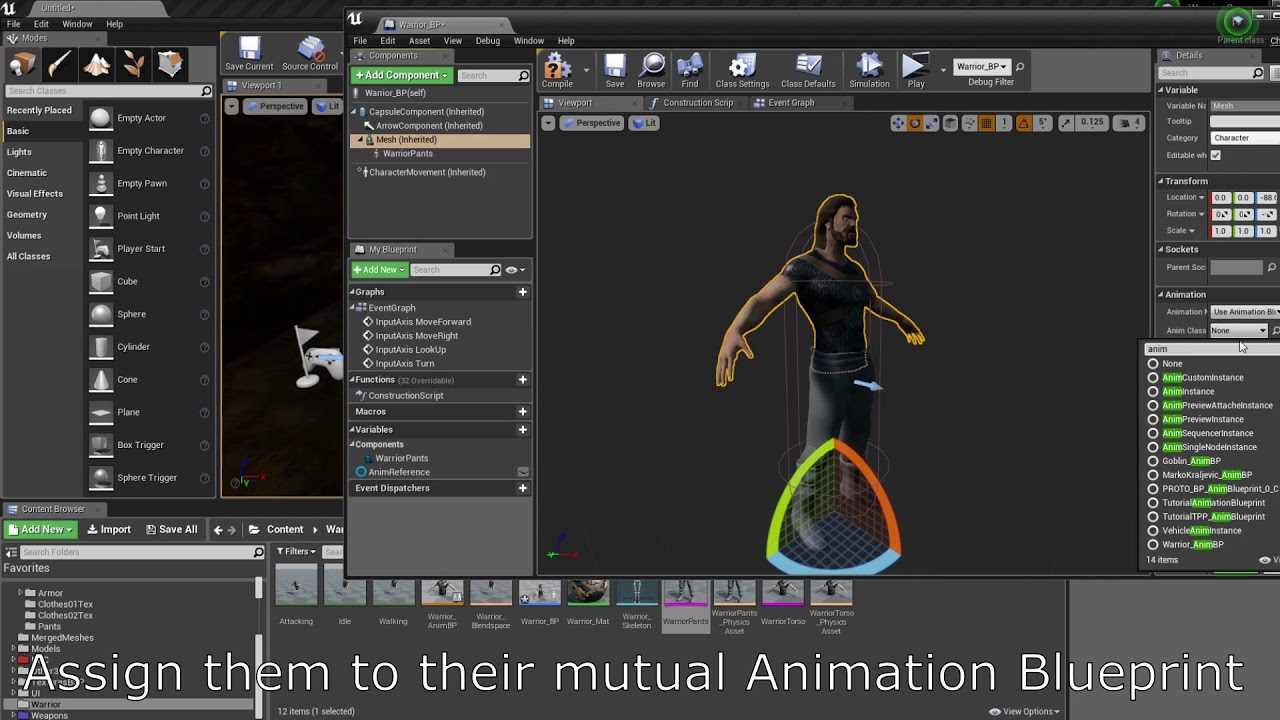
Made a blueprint with skeletal meshes that can swap clothes, armor and even body parts themselves.
Music:
https://torrmal.bandcamp.com/album/dark-underground-ep
https://torrmal.bandcamp.com/album/accursed-army
https://www.youtube.com/watch?v=k2tNWq0f6FE
 hallow elm
Hey I have a question
I have a reload animation for first person character
and I want to reuse them for true first person character
but it is for false first person, so I can't see arm when true first person
How can I solve this?
 ashen junco
hallow elm
Hey I have a question
I have a reload animation for first person character
and I...
ashen junco
hallow elm
Hey I have a question
I have a reload animation for first person character
and I...
Try retargetting the animations.
hallow elm
ashen junco
Try retargetting the animations.
but it's already same skeleton of the third person mesh
it's just blend of arm animations and body animations
craggy knoll
craggy knoll
Does somebody have a use case for using multiple animation slot tracks for an An...
No one? x)
 cedar pewter
guys, is it better to make fps animations in UE or in other soft like Blender?
ashen junco
See #instructions on how to post to job board channels.
ashen junco
cedar pewter
guys, is it better to make fps animations in UE or in other soft like Blender?
Personally I chose the latter, Control Rig + Sequencer is still rather limited for making animations (but it's usable)
ashen junco
hallow elm
but it's already same skeleton of the third person mesh
So the animation plays? It seem like you're having the hand out of view
ashen junco
craggy knoll
No one? x)
No one, kthxbye
I wasn't even aware that is a thing tbh
dull sun
How do I snap on the animation sequence timeline?
 cedar pewter
ashen junco
Personally I chose the latter, Control Rig + Sequencer is still rather limited f...
cedar pewter
ashen junco
Personally I chose the latter, Control Rig + Sequencer is still rather limited f...
ok thx! btw do you know any good tutorials or courses for making fps animations?
ashen junco
cedar pewter
ok thx! btw do you know any good tutorials or courses for making fps animations?
Can't recommend any tbh, I just went with practicing and practicing myself, and looking on animation videos
cedar pewter
gues I'll need to take that route too
hallow elm
ashen junco
So the animation plays? It seem like you're having the hand out of view
yes, animation actually plays
I just want to make it inside of the first person camera
it just frame out
cedar pewter
if I want to make reload animations for UE mannequin in Blender, I should export him to Blender right? I see everyone makes animations just for hands, without the whole body 
misty dagger
Hi, im editing an animation in control rig and when I try to bake the fk control rig track to an animation sequence, it just bakes the original animation?

 devout spade
misty dagger
Hi, im editing an animation in control rig and when I try to bake the fk control...
devout spade
misty dagger
Hi, im editing an animation in control rig and when I try to bake the fk control...
huh?
misty dagger
when i bake it to an animation sequence it just for some reason bakes the unedited animation sequence
when im trying to edit the animation with fk and bake that instead
devout spade
misty dagger
when i bake it to an animation sequence it just for some reason bakes the unedit...
did you save it ?
right next to the globe
it says it's unsaved
misty dagger
ill try it
devout spade
right click the shoot skeleton and select bake animation sequence or create linked animation sequence try both
btw on a sidenote you should make a control rig for the als guy it's pretty easy mostly copy and paste from the ue4 example project
misty dagger
yeah its still not working
im just trying to make the animation more exagerated cos you can barely see the animation when you shoot atm
@devout spade how would you go about making the magazine of a gun attach to the players left hand when reloading?
devout spade
If the fk doesn't work then yea you probably need an ik control rig setup idk why but on humanoid characters translation does not work on most of the bones..... even with the control rig....
It works fine for guns tho i have no idea why unreal bug?????????
misty dagger
yeah ill have alook later
devout spade
for a reload animation what I do is just play the gun animation and the human animation at the same time
nothing is attached except the gun to the hand
misty dagger
ah ok
devout spade
idk if there is a proper way on unreal but i see people do the same even on maya
if there is a better way anyone lmk
misty dagger
i need to get bledner a shit so i can make animations
and*
can you export the als m4 model to blender?
does it let you do that
devout spade
yea
misty dagger
sorry im pretty new to unreal hahha
devout spade
problem is getting your rig set up properly on blender
epic uses their maya tools
you could use mr manniquen on blender
or auto rig pro
but when it comes to custom characters you need the ik bones in your blender rig
devout spade
lol
all videos on youtube for creating custom character animations are doodoo
I was learning this like 2 months ago and I was like wow all these videos are dirt lol..
epic skeleton you have tools like mr manniquen but that's about it
misty dagger
yeah i watch so many videos of fps tutorials and the final outcome for most of them is so awful haha
als is so hard tho to implement stuff and theres barely any vids on als
devout spade
misty dagger
als is so hard tho to implement stuff and theres barely any vids on als
yea once you get used to the curves and disabling and enabling ik it's actually pretty smooth to use and make up your own stuff
i'm using the c++ version
misty dagger
yeah im probs gonna restart and use the replciaated version
just cos i wanna add mutliplayer later on
devout spade
misty dagger
yeah im probs gonna restart and use the replciaated version
Its performance is way better too
pretty wild
 abstract bramble
Has anyone here have problems using the Animation Warping plugin?

 pale vine
https://www.youtube.com/watch?v=6Cain-u9_g4
If vertex animation is a thing. Is it possible to generate a material that simulates a mesh without having a mesh just a texture? For example creating a cube from a texture?
00:00 - Intro
00:08 - Welcome
01:13 - Importing Files
01:45 - Creating Material
02:34 - Colours Setup
09:05 - Basic Parameters
10:04 - Normal Maps
16:24 - Plane Setup
16:59 - Material Instances
21:05 - Shiny Bois
28:26 - Refraction Setup
31:46 - Refraction Normals
35:17 - Goodbye!
Files: These files have been lost :( I'm so sorry! But making a ...
ashen junco
pale vine
https://www.youtube.com/watch?v=6Cain-u9_g4
If vertex animation is a thing. Is i...
Pardon me, I misread the question, though that'd be #graphics domain
pale vine
ashen junco
Pardon me, I misread the question, though that'd be <#221799195806400512> domain
oops sorry. Its like if you have a plane. And a texture. Using the texture you could transform that plane into a cube, right?
 vocal ermine
hi i am trying to place 12 cine camera actors that I animated and imported from blender at the top of a building but they're keyed to a global location which sits at the axis origin. Any idea how to select and move all frames for all camera's at the same time? Currently I can grab individual frames and move them, but that destroys the camera animation
 ashen junco
vocal ermine
hi i am trying to place 12 cine camera actors that I animated and imported from ...
ashen junco
vocal ermine
hi i am trying to place 12 cine camera actors that I animated and imported from ...
Describes how to create Level Sequences with Actors that have dynamic world transforms that can be changed at run time.
vocal ermine
that helps so much thank you.
winged spade
pale vine
oops sorry. Its like if you have a plane. And a texture. Using the texture you c...
If you have a source of vertices, yes. It is exactly what vertex animation is for.
pale vine
winged spade
If you have a source of vertices, yes. It is exactly what vertex animation is fo...
Thank you. Yup, this feels incredibly hard to learn. What should i search for to find tutorials or more information on how to do this?
dull violet
Posting question how to edit level in #level-design. No its for #graphics. Ok. No its obviously for #animation. Ok.
Ending just asking everything in #general. Typical UE Discord 😆
ashen junco
dull violet
Posting question how to edit level in <#221799337414361089>. No its for <#221799...
And #lounge for ranting about everything else.
This server isn't the place to rant about the server. Not on my watch.
dull violet
ashen junco
And <#221796616653373441> for ranting about everything else.
Try not to be toxic and people will stop ranting. I never had any help here so you can ban me I will not regret
fleet willow
Anyone else facing a lot of crashes in 5.0.2 when e.g. creating an Layered blend per bone -> adding a new pin -> removing that pin ?
 night cedar
so I've been having some issues getting animations to play, initially though it was issue with the way I had the abilities set up but pretty certain it's something purely on the animation side atm
this is where I intially was trying to fix the issue
but in short the montage I want to play doesn't play will post the code meant to handle it in just a second
so this is the blueprint for the ability that plays the montage itself


the montage iself

and the animation graph

 shy sandal
Have you tried other animations?
night cedar
yes
so I tried setting it to work with a key press now
and it works
but still not using all the logic I wanna attach to it
so now I am wondering if this is an issue with the ability itself
night cedar
yeah
as in if I just have it play montage on key press
but I need it to play from the Gameplay Ability
steel raptor
Can someone please help me figure out why my animations deform strangely when importing them from blender?

 shy sandal
night cedar
but I need it to play from the Gameplay Ability
shy sandal
night cedar
but I need it to play from the Gameplay Ability
Okay then switch back to GAS channel and I'll help
 dusk pewter
Potentially stupid UE5 question... I'm trying to fix a broken pose mapping asset, and I need to adjust the animation curve value for one of the poses. Except... I have no idea how to change the curve values in the list on the right. Is there a whole tool for this I'm not seeing?

(I've tried double-clicking the number, right clicking, etc.)
misty dagger
I tried asking for help with Blender folks but I think either they misunderstood or it's specifically a UE4 issue I'm not finding. I apologize if this isn't the right section for help either.
I'm working on some stuff at the moment and had an FBX file exported and sent to me. Everything seems fine however in the export process Blender created a new armature (I think thats the term) above the root bone when it shouldn't have and now the root motion animations won't work when I ask UE4 to keep the animation in place.
I've tried looking up how to fix it but the one reddit post I found with the exact same issue had no replies under it. I'm unsure how to specify what the issue is since everything else I've found has been useless to my problem.
I can't send the FBX but heres some screenshots of what I mean by my root bone being replaced.
I'm unsure if I'm just completely doing this wrong or not but I would love some help. I'm still very new to all this, thanks in advance.
(Top image is the Blender file with the rig above the root bone, the other 2 screenshots is the same issue. I have no idea what to do to fix it.)

 slow goblet
When I export my animation from blender, its blank in ue4, can I screenshare so someone can help me pls
 royal trellis
Has anyone retargeted one Paragon character animations to a different Paragon character? Any blogs/guides/vids available for this?
long swan
misty dagger
I tried asking for help with Blender folks but I think either they misunderstood...
When you import a mesh to blender, it adds that extra root usually named whatever your mesh is named. Just drag the root bone off the added bone in blender then delete that new bone and export. That should fix it
 sharp coyote
so ive managed to mirror some 'attack' animations in ue5 but now i dont know what to do with the trail FX, anyone know off the bat how to make the trail FX adapt? i suppose i need to make a custom anim notify state?
because its basically using my right hand weapon trails while mirroring the attack with the left hand, just one step away from perfection 
misty dagger
long swan
When you import a mesh to blender, it adds that extra root usually named whateve...
I think I'm having a major skill issue because I can't seem to drag the root bone out of the added bone in the list. I think I'm misunderstanding your advice 
fleet willow
sharp coyote
so ive managed to mirror some 'attack' animations in ue5 but now i dont know wha...
Yeah, those notify's are now aware whenever it came from a mirrored animation or not.
With that knowledge you can do your stuff depending on it

 ember vessel
hello 😄 ,
I rigged a character inside blender, but when trying to animate him, there is a weird thing going on.
As you can see, there is a gap in my mesh.
 sharp coyote
fleet willow
Yeah, those notify's are now aware whenever it came from a mirrored animation or...
sharp coyote
fleet willow
Yeah, those notify's are now aware whenever it came from a mirrored animation or...
oh ic, thankss
long swan
misty dagger
I think I'm having a major skill issue because I can't seem to drag the root bon...
My bad, I forgot, you have to hold shift
https://i.gyazo.com/a96f769b732762a26c505fba7f32f65d.gif
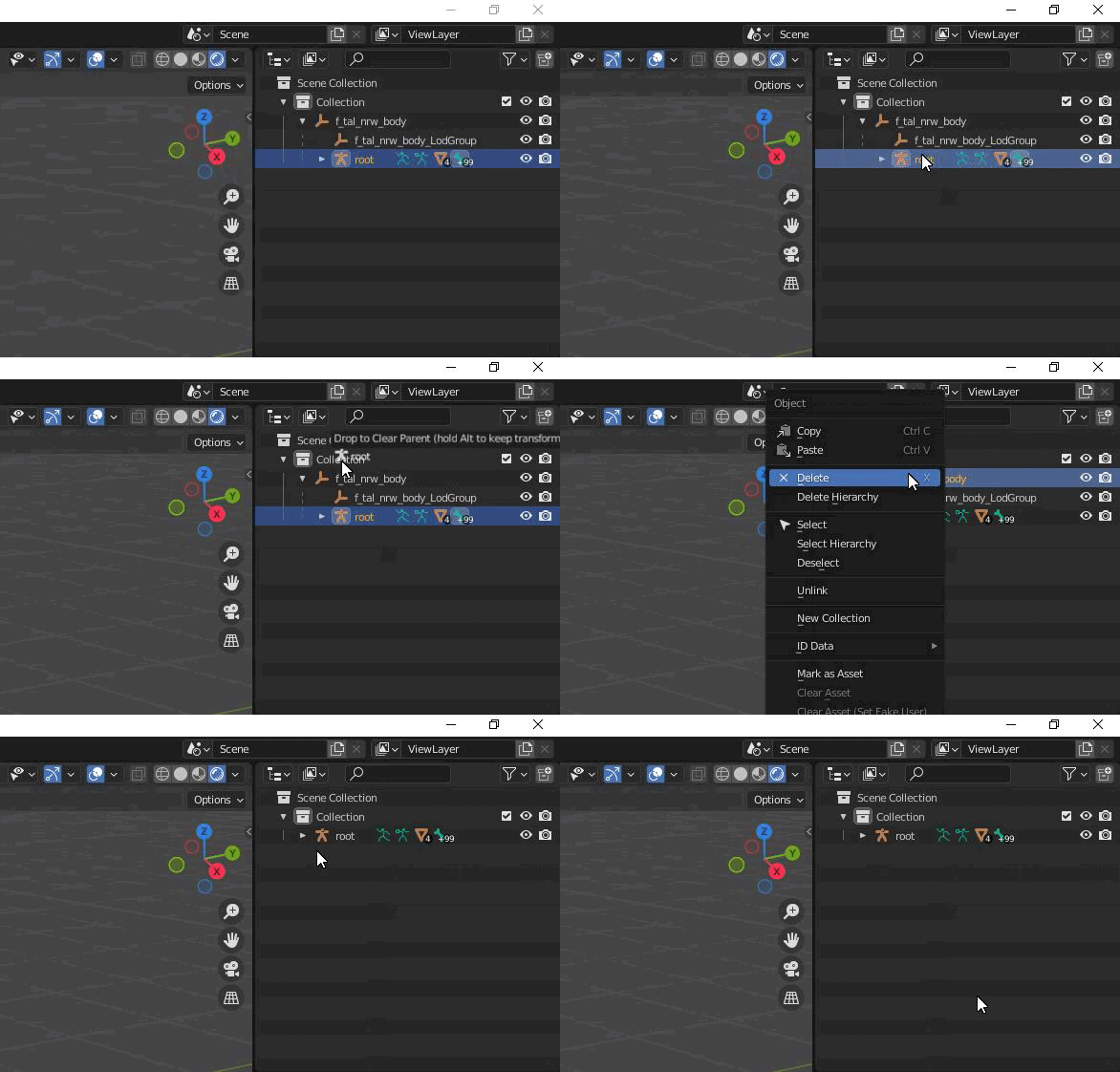 misty dagger
This hasn't fixed my issue sadly. The issue is this particular fella
 long swan
Hmm, I would assume you could do the same with the root underneath "rig" but I don't know for sure
I have very limited experience with blender I just remembered that it adds the extra label on import when you posted your question
 worthy canyon
I know it's generally bad to use tick, yet I've seen a lot of assets updating anim bp values on tick. Is it better to use timers for these instead?
silent bay
Not sure if this is the right channel for this but how would I get montage 2 to play based on whether or not montage 1 has played?
(for an attack combo type thing)
ashen junco
worthy canyon
I know it's generally bad to use tick, yet I've seen a lot of assets updating an...
It's not that bad to use tick.
What's bad is to abuse tick.
Changing values on tick is generally pretty tame in practice, but still, profile it if you're in doubt
ashen junco
silent bay
Not sure if this is the right channel for this but how would I get montage 2 to ...
That'd be up to your actor BP to count the combo count.
ashen junco
misty dagger
I tried asking for help with Blender folks but I think either they misunderstood...
Rename the armature object to specifically Armature before exporting as FBX.
misty dagger
I cant understand what this node does

 midnight perch
Ok everyone. I have a bunch of models rigged using Auto-Rig Pro. I want to retarget in unreal, but I don't want to go through the pain of creating a whole new IK asset for each model. Each skeletak mesh has the same bones list, and same bone hierachy, just a different mesh. Is there anyway to copy this IK rig asset to another mesh that's the same thing? Or someway to save the bone chains? Thanks, all
long swan
midnight perch
Ok everyone. I have a bunch of models rigged using Auto-Rig Pro. I want to retar...
There is an ik retarget bp system in UE5 which I do believe is designed exactly for that
midnight perch
long swan
There is an ik retarget bp system in UE5 which I do believe is designed exactly ...
Oh there is? do you have a link or something where I could read on up that?
long swan

Hey guys, in today's video I'm going to be showing you how to use the new animation retargeting system in Unreal Engine 5. This is using the IK rigs and retargeting. The example in this video is using a Mixamo character and animation, however this will work for any character, skeleton, and animation you want to use.
Mixamo To UE5: https://youtu...
I haven't watched that but that guy usually has decent info so it should be good
midnight perch
ok hmm this isn't quite what I was looking for. So I got this IK process pretty down, I just was wondering if there's a way to copy the IK rig to other similar meshes without having to redefine each bone chain again.
 velvet lion
midnight perch
ok hmm this isn't quite what I was looking for. So I got this IK process pretty ...
velvet lion
midnight perch
ok hmm this isn't quite what I was looking for. So I got this IK process pretty ...
https://youtu.be/9cKuEXFDwl0
Try this method, around the 3-5 min mark. Basically you duplicate the ik rig and use the asset actions, bulk edit via property matrix to choose a different skeletal mesh

A FAST Method for Retargeting Animations to MetaHumans
without creating IKRigs by cheating.
Recently the "Retargeting Manager" was removed from
Unreal Engine 5. In this video, I explore retargeting Mixamo animations
using the new IK Retargeter and IKRigs.
** Thanks to Leopard Dev for showing me how to alter assets.**
It got me thinking and ...
midnight perch
velvet lion
https://youtu.be/9cKuEXFDwl0
Try this method, around the 3-5 min mark. Basically...
Ok great this looks like what I was looking for!
midnight perch
velvet lion
https://youtu.be/9cKuEXFDwl0
Try this method, around the 3-5 min mark. Basically...
thanks so much!!
misty dagger
so quick question about animation blueprints:
what im trying to do is copy the transform of a bone from a separate skeletal mesh and copy it to another one using the Transform Modify Bone.
this does actually work, but it is slightly lagging behind, because it is relying on blueprints to get the transform data of the other bones.
is there a way to get the transform data from a bone from a different skeletal mesh without using blueprints to save performance?
round shale
Anyone know why my additive mesh would cause massive scale issues on my character?
This sort of thing

I'm assuming it's my actual skeleton setup, but not sure what?
ashen junco
misty dagger
so quick question about animation blueprints:
what im trying to do is copy the...
Copy Pose From Mesh?
misty dagger
ashen junco
Copy Pose From Mesh?
yea
i have a separate skeletal mesh that has some bones that drive the IK on the full body model
ashen junco
round shale
Anyone know why my additive mesh would cause massive scale issues on my characte...
Make sure the animations are actually additive.
round shale
Yeah checked that - mesh additive.
ashen junco
misty dagger
yea
i have a separate skeletal mesh that has some bones that drive the IK on the...
Is that the node that you're looking for? Copy Pose From Mesh is fast path.
misty dagger
ashen junco
Is that the node that you're looking for? Copy Pose From Mesh is fast path.
would i be able to grab the location and rotation data from a specific bone with it? thats mainly what im after
also i was able to improve performance quite a bit by getting rid of struct breaks, that helped quite a bit
round shale
So I'm applying an additive between an aim offset and some other movement. The aimoffset i'm setting as the 'additive' (each animation in the aimoffset is additive). However, the source INTO the aim offset is not additive. It's a cached locomotion movement
Could that be causing the scale issues?
 sharp linden
I'm struggling to run a specific animation from sequencer AND using animation blueprint in the same time for metahuman. Is there a way to run both simultaneously in sequencer?
round shale
@ashen junco Turns out the input locomotion was also 'adding' to the additive, which isn't a good idea cause it's not additive!
Thanks for your help. Sorted it out.
bleak ruin
does anyone have a good procedural aim offset solution for true first person? any tutorials I could find seem to lack in some areas like versatility. Looking for something procedural if possible
iron thicket
Guys, how do I do animation for such a type of skeleton as metahuman (which is presented as separate skeletal mesh)? Only Runtime Retargeting or are there other ways
left grail
ashen junco
<#221799195806400512>
ok removed it. its in there. could you please help me in there?
 autumn sandal
Good Morning Everyone. I'm super new to UE5. I've spent the last few day setting up a scene to snap a static picture. The scene is this C130 flying in the air: https://www.unrealengine.com/marketplace/en-US/product/c130-j-transport-west. This C130 comes with some "show room" animations. I would like to do two things: (1) have the landing gear up and (2) have the propellers spinning. If the propellers are spinning when I snap my picture it will give the effect of aircraft flying. I've look through their documentation and have looked through youtube. This is my first time posting in discord for help. I feel like this is very easy since all the animations come with the asset, however, I just don't know the basics enough to complete the task. Any help would be greatly appreciated!
 restive vortex
autumn sandal
Good Morning Everyone. I'm super new to UE5. I've spent the last few day setting...
restive vortex
autumn sandal
Good Morning Everyone. I'm super new to UE5. I've spent the last few day setting...
If it has an propeller animation you can in its blueprint set the animation instance from animation blueprint to an animation asset (propeller spinning, and just pick that (might need to make an actor if there isnt). For gear up might be easiest to use "Hide Bone By Name". There's some more details but I think that's enough to google the rest 🙂
 autumn sandal
restive vortex
If it has an propeller animation you can in its blueprint set the animation inst...
autumn sandal
restive vortex
If it has an propeller animation you can in its blueprint set the animation inst...
Thank you for the information!
restive vortex
Btw, something completely else. ALS uses animations with timestamps for additive poses etc, is there a reason why not use pose assets here? seems much simpler... wasn't the feature available
autumn sandal
Okay! thank you!
long swan
autumn sandal
Good Morning Everyone. I'm super new to UE5. I've spent the last few day setting...
I'm assuming your using the "Vigilante" C-130 asset?
Open the anim BP and set the variables for the propellers and landing gear. It will play the animations when you play in editor. Make sure you set the ones on the left, not the right
autumn sandal
@long swan Yes, thank you. @somber ivy helped me with how to set the default variables of the animation. That made a big difference in the scene. I'm just a noob and excited to learn more!
 graceful tundra
So in the UE5 IK retargeter, I need to set the retarget pose. It appears I have to manually pose the character? Is there no way to import a retarget pose from a pose asset?

I added the retarget pose to the skeleton itself, but that seemed to have no effect, and could be from the deprecated retarget system.
 mortal scarab
Hi guys, I just set up an IK reatrgeter from a mixamo character to the ue 5 mannequin. I set up every bone but somehow the fingers are glitching out. Does anyone know why?
 restive vortex
mortal scarab
Hi guys, I just set up an IK reatrgeter from a mixamo character to the ue 5 mann...
restive vortex
mortal scarab
Hi guys, I just set up an IK reatrgeter from a mixamo character to the ue 5 mann...
you made a mistake in the setup
double check that all bones are setup to match correctly
scenic plume
bruh import button greyed out

 lapis prairie
Hi, should i use lyra approach to animations for ue5? Or "old" way with event graph is fine?
regal pivot
I'm looking at the Unreal content example, but I'm not understanding the slot.
I have two montage animations that play when an event is triggered, in the animation graph I have two slots, but I don't understand how those slots are linked to the montages.

 harsh cedar
Is there a way to start an animation from a specific frame when working within BPs?
 tribal whale
I had a question about root motion but I posted in #ue5-general so I figure I would refer to it here
ashen junco
scenic plume
bruh import button greyed out
You haven't set any skeleton for it.
ashen junco
regal pivot
I'm looking at the Unreal content example, but I'm not understanding the slot.
I...
Basically those slots will be where your anim montage will be played. So for example, you have montage intended to play just on the upper body part (e.g. reload anim), you put the slot to a layered blend
 amber mural
Hello, Basic animation question: I want to mirror an animation along the X or Y on the root but if I export with -1 scale the mesh is inverted whats the proper way to Scale keys for mirror in Maya or Unreal?
regal pivot
ashen junco
Basically those slots will be where your anim montage will be played. So for exa...
thanks
I have another question, I have a event jump , this event it use in different part of anim graph, but also there a AnimNotify_ResetJump event, this event not use in anything place, but if remove it , the animation jump play in loop infinity , I don't understand why it happen that.

 plucky nexus
i am trying to setup my socket but the preview is broken and wont show anything
what should i do to fix the socket
 ashen junco
plucky nexus
i am trying to setup my socket but the preview is broken and wont show anything
...
ashen junco
plucky nexus
i am trying to setup my socket but the preview is broken and wont show anything
...
Your skelmesh is way too large.
plucky nexus
ashen junco
Your skelmesh is way too large.
ah how would i shrink it?
ashen junco
plucky nexus
ah how would i shrink it?
Change the uniform scale in the (re)import settings
plucky nexus
do you know what a good scale would be for this?
ashen junco
plucky nexus
do you know what a good scale would be for this?
Up to your mesh, really.
plucky nexus
so i should just plug in a random value until its good
ashen junco
Normally it should be kept to 1, but I know Blender tend to have some scaling issues when exporting FBX then importing it to Unreal.
 tender dew
hey, So i downloaded a ue4 animation. Is there a way to apply that ue4 mannequin animation to ue5 manny?
 magic bolt
tender dew
hey, So i downloaded a ue4 animation. Is there a way to apply that ue4 mannequin...
magic bolt
tender dew
hey, So i downloaded a ue4 animation. Is there a way to apply that ue4 mannequin...
Yeah you need to do IK rig retargeting. There's a retargeter in the ue4 mannequin folder: Content/Characters/Mannequin_UE4/Rigs/RTG_UE4Manny_UE5Manny. You can also google ue4 manny to ue5 manny ik retargeting
 grizzled mauve
how do i make a two handed animation stay with the weapon
 halcyon sail
Does anyone have any recommendations for places to get high/AAA quality mocap animations?
 drifting mauve
Hello everyone, is it possible to export an animated metahuman from UE5 to Blender? basically just from the T pose into another pose to create some clothing and simulate it to later reimport it in to UE5 again.
scenic plume
bruh the new retargeting system stupid

it scales bones instead of just rotating bruh
why lmao

 fresh blaze
Hey are there any alternative for Adobe Mixamo with animation bank, etc. ?
Thanks!
ashen junco
fresh blaze
Hey are there any alternative for Adobe Mixamo with animation bank, etc. ?
Than...
Unreal Marketplace.
 uncut sandal
Hey good people, was hoping to get a bit of help with a scene im working on.
Its a reward scene for a top down view card game(similar to heartstone) and I want to drop a few coins on the table in front of the player (range 1-50) and then also a few diamonds at the end of each match.
Im going for a realistic feeling, so like you were just playing a guy at a bar and he throws it at the table after you win.
What would make the most sense to use, ive thought about:
-possibly simulating them in blender and exporting them as a animation. (not really my strong suite)
-using a particle effect to spawn them with gravity and collision enabled(done some quick tests and the animation feels kind of cheap and not realistic)

 stray rampart
hi all, i want to make a static mesh for my players PDA rise up on the screen when they press a button, what's the best way to do that animation?
was thinking of doing it in blueprints but thought trying to make it animation would be better
slow goblet
can sm1 explain this
why the hair gets all weird at the end whe nI attach it to a socket
dull sun
slow goblet
https://www.youtube.com/watch?v=s3M6U2tasCs
Is the hair using the same skeleton as the body? If so, set up the hair to follow the body as a Master Pose.
 slow goblet
The hair has its own skeleton
But I could try making it have the same skeleton as the body
dull sun
That's probably ideal, if you can.


 honest geyser
Does anyone know of a guide for making a character skeleton to match the new Mannequin skeleton? I'm using blender, have a basic understanding of rigging, but want to make an identical skeleton so that my importing and syncing of animations works well.
 plain drift
honest geyser
Does anyone know of a guide for making a character skeleton to match the new Man...
plain drift
honest geyser
Does anyone know of a guide for making a character skeleton to match the new Man...
I think there is a ue4 plugin for blender, which contains the mannequins skeleton

Gumroad
Video Introhttps://www.youtube.com/watch?v=iZBx1I7vmQ0Would you like to export rigged and animated characters from Blender to Unreal(UE4 and UE5), Unity, Godot, and most other Game Engines? Here is what this addon can do for you with a few clicks: Blender Game Rig Tools - a quick overviewGame Rig Tools can:save you a ton of timehelp you avoid pi...
honest geyser
@plain drift I have that actually, and Auto Rig Pro, but not sure if they are updated to use the new Manny rig yet
coral plover
Say I want to use the same eventgraph initialize animation in multiple animinstances and dont want to copy past, I tried makeing child ABP's but then the parent ABP initialize animation dont run and I cant find a way to call partent eventgraph functions, does anyone know how to do this ?
 karmic basin
Hey fam whats up!
I'm pretty new to Unreal and have been playing around with the free assets, AncientWorld, since the UE5early access it was loading fine, but when i updated to UE5.0.2 this happened, the assets doesnt load properly

im on RAZER Pro 17 | RTX 3080 | 64GB Ram Laptop
ashen junco
stray rampart
hi all, i want to make a static mesh for my players PDA rise up on the screen wh...
So it's like Doom 3?
ashen junco
 lean jasper
just got done animating this :p
lean jasper
just got done animating this :p
#work-in-progress
ashen junco
plain drift
Anyone knows how to fix my clothing clipping through the physics asset?
Are those convex hull collisions?
Cloth physics only work with box, sphere/capsule, and tapered capsule (one end have different radius).
ashen junco
karmic basin
Hey fam whats up!
I'm pretty new to Unreal and have been playing around with the...
Please do not crosspost without redirected

 severe pelican
Hey guys, what's the difference between IK rigs and control rigs, and which one should I use for a VR body?
long swan
misty dagger
🪟 +Shift+S
 fleet ruin
hey, got a weird issue, when my character plays an attack montage while on a moving platform, the character stays still the jumps back to the platform once the montage is over
any ideas about what is going on?
 silver ingot
Hey guys, i'm trying to make some short movie and have a problem while connecting two skeletal meshes (SM) inside one actor.
How i can send Position of bone from B to A (Socket window doesn't works for SM, only for Static Mesh) and how i can send Rotation from A to B?
UPD: solved by simple retargeting
 stray rampart
ashen junco
So it's like Doom 3?
stray rampart
ashen junco
So it's like Doom 3?
i guess
 rustic sandal
hi i am trying to make a character animation where my goal is to have a character texture and put a alpha image sequence of faces which i can animate by movin a scale or smthn like in blender
if any1 knows how do i create this layered texture and animate it would highly appreciate
craggy knoll
rustic sandal
if any1 knows how do i create this layered texture and animate it would highly a...
On how to animate material parameters with control rig: https://dev.epicgames.com/community/learning/tutorials/k8y8/editing-materials-with-control-rig
rustic sandal
craggy knoll
On how to animate material parameters with control rig: https://dev.epicgames.co...
ooooh thanks
craggy knoll
rustic sandal
if any1 knows how do i create this layered texture and animate it would highly a...
Flipbook in material https://youtu.be/ZWAF_f2aP9s
rustic sandal
altho there is another thing which i cant do i need to like put the face on top of texture and let rest remain alpha


when i try do that the alpha like makes everything black
i cant figure that out
also btw ur a legend for the help idk how i spent 5 hrs not findin thing n u got in second
rustic sandal
craggy knoll
On how to animate material parameters with control rig: https://dev.epicgames.co...
wait um i needed sum help i saw how he did it but i want to play like each every image accordin to my choice by animating usin keyframes
is that possible?
craggy knoll
Everything is possible. You need to create parameters within your Material that you can tweak outside via Blueprint or Control Rig Graph. https://docs.unrealengine.com/4.27/en-US/RenderingAndGraphics/Materials/HowTo/Making_Parameters/#:~:text=Material Parameters are a special,but with one key difference.
You should look into more tutorials. It's to much to explain for a simple answer.
rustic sandal
got it, idk why unreals blueprints so much complicated compare to blender
craggy knoll
About Translation Retargeting. If I setup everything to be "Animation" the Animation should be 100% equal to the Source Animation right?
What does Character -> Animation -> Non-Retargeted Animation actually show (Screenshot)? I thought it would show me the Source Animation and if I setuped Translation Retargeting to something else then "Animation" then I would see the difference.
But it doesn't really. There is also Character -> Animation -> SourceAnimation which is probably the raw animation which is aligned perfectly with the actual processed animation.
So what is the difference between "Non-Retargeted Animation" and "SourceAnimation"?
 craggy knoll
About Translation Retargeting. If I setup everything to be "Animation" the Anima...
craggy knoll
craggy knoll
About Translation Retargeting. If I setup everything to be "Animation" the Anima...
Also I noticed something strange. When I export the animation from Unreal and back in again, the Non-Retargeted Animation matches with the actual processed animation.
 craggy knoll
About Translation Retargeting. If I setup everything to be "Animation" the Anima...
craggy knoll
craggy knoll
About Translation Retargeting. If I setup everything to be "Animation" the Anima...
Originally the animation came from Maya (the screenshot in the message I'm replying to).
bleak ruin
does anyone have a good procedural aim offset solution for true first person? any tutorials I could find seem to lack in some areas like versatility. Looking for something procedural if possible
craggy knoll
bleak ruin
does anyone have a good procedural aim offset solution for true first person? an...
 finite palm
Is there a way I can do ik on a bone without impacting the position of my weapon that's attached to that bone ?
craggy knoll
finite palm
Is there a way I can do ik on a bone without impacting the position of my weapon...
Duplicate the bone and let that one not be modified by IK which is then the driver for your weapon.
ashen junco
bleak ruin
does anyone have a good procedural aim offset solution for true first person? an...
Control Rig and some IK work could do.
 past frost
Hey guys, I need to edit some third person animations to work better for a first person game. Looking for some good tutorials on editing animations, if anyone has some recommendations!
modern compass
hey everyone, anyone else used Ipad Pro for metahuma facial animation with the Live Link Face? My results are really wonky, like when I blink the metahuman blinks and opens her mouth and smiling makes weird gmod style derpface etc...
finite palm
anyone know how to move the entire arm when moving just a hand for instance in blender ?
I'm pretty sure the rig has the right constraints because ik works fine in unreal but not in blender
steady orchid
this stuff dont get exported into the fbx
you need to create the ik chain in blender
finite palm
ah ok
modern compass
Also are there premade facial animations available for metahumans
 warm garnet
Yo! How do you guys go about matching the positions of two separately animated skeletal meshes with each other? For example, I have some FPS arms and a weapon. Currently I set the object origin of both of these in blender to be where the camera is, which makes me skeleton structure look like this:


This works great for aligning them perfectly, but I would prefer not to have the skeleton like this, as it means I need a separate skeleton for the weapon's world model, and it can be a pain to work with in some situations.
Outside of manually lining up a socket on the hand skeleton and eye-matching the position of the gun, is there an alternative approach to getting it perfectly lined up like it is in blender?
ashen junco
warm garnet
Yo! How do you guys go about matching the positions of two separately animated s...
Attach the gun mesh to the hand bone, and disable "root motion" in the gun skelmesh.
warm garnet
ashen junco
Attach the gun mesh to the hand bone, and disable "root motion" in the gun skelm...
I'll have to manually line it up to get it perfect though right?
Since the root bone of the gun and the arms hand bone will be inside each other
ashen junco
warm garnet
I'll have to manually line it up to get it perfect though right?
Or you can have a weightless bone for the weapon to attach on.
warm garnet
ashen junco
Or you can have a weightless bone for the weapon to attach on.
Oh that's interesting, so I create a bone somewhere in the palm of the hand that is parented to the root hand bone and use that to position the gun?
ashen junco
warm garnet
Oh that's interesting, so I create a bone somewhere in the palm of the hand that...
Yup.
At least that's how I do it for third person view as well
Also useful if you have animations like spinning the gun, holding it with the other hand, etc.
silent bay
Are animations a fixed frame rate in UE?
Like if I make an animation at 30fps in Blender can I make it 60 in UE?
Also does anyone know how to export just 1 action from Blender?
lean jasper
what would i use to make a inspect weapon or fire weapon transition in the animbp? i dont want a boolean because there is no easy way to reset it after firing it

 craggy knoll
silent bay
Are animations a fixed frame rate in UE?
craggy knoll
silent bay
Are animations a fixed frame rate in UE?
If you use Interpolation = Step it's fixed. If not, it will get interpolated between the keys (Uncapped framerate)
silent bay
craggy knoll
If you use Interpolation = Step it's fixed. If not, it will get interpolated bet...
Is that in Blender or UE?
craggy knoll
UE
silent bay
Ah
ashen junco
By default inter-frame interpolation is linear, so <= 30 FPS anim shouldn't be choppy by default.
In some cases, it has to be set to step, which means the animation will be choppy, and may be desired.
silent bay
ashen junco
By default inter-frame interpolation is linear, so <= 30 FPS anim shouldn't be c...
Yeah I'm using linear interpolation in Blender
ashen junco
In Unreal. Exported anims (I think) don't carry any inter frame data.
sharp linden
So I have additional SkeletalMesh for my Metahuman. In blueprint there're sections for Body and Pants and I added another one. Is there a way in Sequencer for this component to inherit any actions applied to main metahuman? That way when I want to use animation or control rig I can just apply it to main body and it will be reflected on this additional component.
mortal scarab
What is wrong with that animation guys? Would be so nice if someone could tell me
silent bay
How would I animate an object being thrown from one hand to the other? Not the hand animation but the actual object
I want my character to throw his weapon to his other hand and back as part of his idle animation
warm garnet
silent bay
How would I animate an object being thrown from one hand to the other? Not the h...
are you asking for animation specifics? you should just be able to do this if your gun and arms rig are separate
silent bay
warm garnet
are you asking for animation specifics? you should just be able to do this if yo...
I've already animated the throw/catch in Blender. Problem is, the object I want to animate is in UE not Blender.
Should it be in Blender instead?
warm garnet
I mean I'm sure you can animate it fully in unreal, I don't have any experience with that though
If you have animated the throw/catch what object are you using in blender vs what's in your unreal project? Is it not the same thing?
silent bay
warm garnet
If you have animated the throw/catch what object are you using in blender vs wha...
It is but the object in UE is a blueprint
warm garnet
silent bay
It is but the object in UE is a blueprint
I'm pretty new to unreal so take this with a grain of salt, but if I were approaching this, I would create a socket on the hand bone of your arms and attach your object to that, then play the animation for the object (you should have a skeletalmeshcomponent in the blueprint)
You would have to make sure the animation started where the socket was
You would play this at the same time as the arms animation
ashen junco
silent bay
How would I animate an object being thrown from one hand to the other? Not the h...
silent bay
ashen junco
https://discord.com/channels/187217643009212416/221798806713401345/9888070492845...
I have this as part of the rig already. Could I use this?

(also has this in the left hand)
ashen junco
silent bay
I have this as part of the rig already. Could I use this?
Depends if you really used it or not
silent bay
I didn't
It's mainly for Blender that bone.
But I suppose it could be used as a parent socket
I'm just not sure whether or not I should be animating the object in Blender or UE. Or how to tbh
ashen junco
Personally I would have another bone parented from the root for the weapon to move around
 ashen junco
I don't know, your rig hierarchy looks super odd
silent bay
yeah I didn't make it lmao
It's Epic Fig Rig. It's mainly designed for Blender not UE
silent bay
Basically this is (part of) the animation that I exported from Blender. At the start of the clip he's "holding" the lightsaber in his black hand, then throws it to his other hand and back again. The lightsaber, is already part in the project as both a static mesh and a Blueprint. The 3rd person character blueprint is using the lightsaber blueprint as a child actor which is using the static meshes but they aren't animated in Blender or UE.
 queen matrix
Hey, anyone here experienced with rigging and maya?
Have a rig set up for a weapon that's got a ktransform as parent?. Generally I get the weapons exported via Blender and the Weapon bone is always the parent/root. However when I import the skeletal mesh to maya, bind skin to another mesh and try to export, it makes the armature a new parent in Unreal.
Any idea how I could export with Weapon bone as the parent? Thanks


this is what it should look like, when my animator exports via Blender
 silent bay
Not sure if I'm right but I think I've heard a few people say not to name your armature, armature
Although that might be just for Blender
Also don't listen to me I don't know what I'm talking about 😂
tribal whale
Should aim offsets be precisely aligned with where a weapon is aiming?
Because I think that would making the animation pretty hard
ashen junco
tribal whale
Should aim offsets be precisely aligned with where a weapon is aiming?
With third person view, it's more forgiving, though make sure it's not too off.
ashen junco
tribal whale
Should aim offsets be precisely aligned with where a weapon is aiming?
Also you could make it procedural with a Control Rig setup
 patent knoll
Hi guys, does anyone know how to properly retarget IK bones with the UE5 IK retargeter? This is my current configuration in the retargeter but I can't get the hand and feet IKs to be passed onto the retargeted animation. I found this video but doesn't work for me unfortunately https://youtu.be/_I1ldRuAr74 I can't even get the root motion retargeted properly, target animation will only play on place (I've tried set the root instead of pelvis as the retargeting root)
Any help would be much appreciated!


A quick Fix for IK Bones not retargeting in UE5.
IKRetargeting docs:-
https://docs.unrealengine.com/5.0/en-US/ik-rig-animation-retargeting-in-unreal-engine/
#Unrealengine #UnrealEngine5 #IKRetargeting
➥➥➥ SUBSCRIBE FOR MORE VIDEOS ➥➥➥
Please support my channel and help me bring more content.
Like and subscribe and hit the bell icon for notifi...
craggy knoll
patent knoll
Hi guys, does anyone know how to properly retarget IK bones with the UE5 IK reta...
for retargeting root motion have a look at this https://www.youtube.com/watch?v=joFpm3ZDcd8&t=183s
UE5 TUTORIAL - Root Motion Retargeting.
In this video, I quickly explore root motion with the new IKRetargeter.
An update for my previous tutorials.
#UnrealEngine #UnrealEngine5 #IKRetargeter
➥➥➥ SUBSCRIBE FOR MORE VIDEOS ➥➥➥
Please support my channel and help me bring more content.
Like and subscribe and hit the bell icon for notifications....
This way has a bug though where the additional motion that comes from different proportions in target and source will be saved inside the pelvis and not the root bone.
I would try to not retarget the root motion and fix the root motion afterwards.
patent knoll
yes can confirm you need to untick the force root lock and enable root motion from the source clip. Then I added a Body Mover + LimbIk to be able to shift down vertically the position in case of different heights. But the root motion will make the shorter character slide so it will need additional tweaking for sure.
However, still haven't found a solution to get the ik bones retargeted properly 😦
 novel plover
Hello hello. Newbie animation question. Is there a freely-available animation pack out there that has common humanoid animations, like sitting/typing etc? I can't see that kind of stuff in the Animation Starter Pack
coral panther
ashen junco
You can just let Unreal do the blending for you.
Hi, Makoto; thanks for the response but do you have any detail on that? Do you mean like using additive animation? That wouldn't remove the original, I think, it would just start getting weird. Where are you suggesting to begin?
ashen junco
coral panther
Hi, Makoto; thanks for the response but do you have any detail on that? Do you m...
Do you have the facial animation baked into the anim sequence?
ashen junco
novel plover
Hello hello. Newbie animation question. Is there a freely-available animation pa...
Unfortunately not many.
Also can't recommend Mixamo either, especially for production use and/or building anim logic upon. Shame that Adobe pulled the plug on UE4 rig long ago.
 crimson sparrow
Im working currently in a ControlRig BP and all Controls on the Preview Mesh just disappeared. I looked in every Corner of the Editor but i cant find where to bring the Controls back. Any ideas? A shortcut maybe?
fleet willow
Is there a good example on when to use a transition which has Bidirectional activated ?
craggy knoll
crimson sparrow
Im working currently in a ControlRig BP and all Controls on the Preview Mesh jus...
maybe pressing G (GameView)?
crimson sparrow
craggy knoll
maybe pressing G (GameView)?
No its not working, might be a bug. After i restarted the controls came back.
novel plover
ashen junco
Also can't recommend Mixamo either, especially for production use and/or buildin...
Thanks for the reply!
rustic sandal
any1 knows how to control the flipbook nodes timing like when which frame comes where and when?
rustic sandal
ashen junco
Also can't recommend Mixamo either, especially for production use and/or buildin...
mixamo works decently for roblox or minecraft type anim not on real characters
coral panther
ashen junco
Do you have the facial animation baked into the anim sequence?
I haven't done anything yet as I'm trying to understand a process first, but yes I can get a baked facial animation sequence.
rustic sandal
mixamo works pretty well i will be honest i tried makin cartoonish style anim with it and it wasnt as bad on blender
ashen junco
coral panther
I haven't done anything yet as I'm trying to understand a process first, but yes...
Better not. My idea is to layer them like this:
Body Pose -> Lip Sync -> Facial Expression
ashen junco
rustic sandal
mixamo works decently for roblox or minecraft type anim not on real characters
And my main gripe with it wasn't even about the anim quality, but rather its weird rig. It doesn't have a dedicated root bone, so root motion is a bitch to get working with Mixamo anims.
rustic sandal
https://streamable.com/oap7ih here is my problem recorded

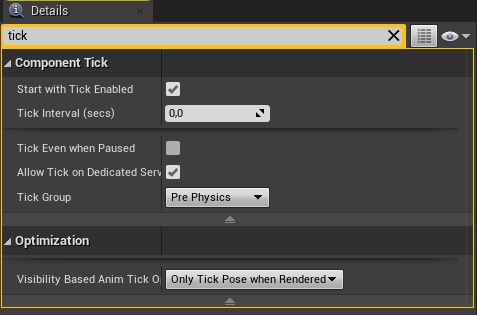
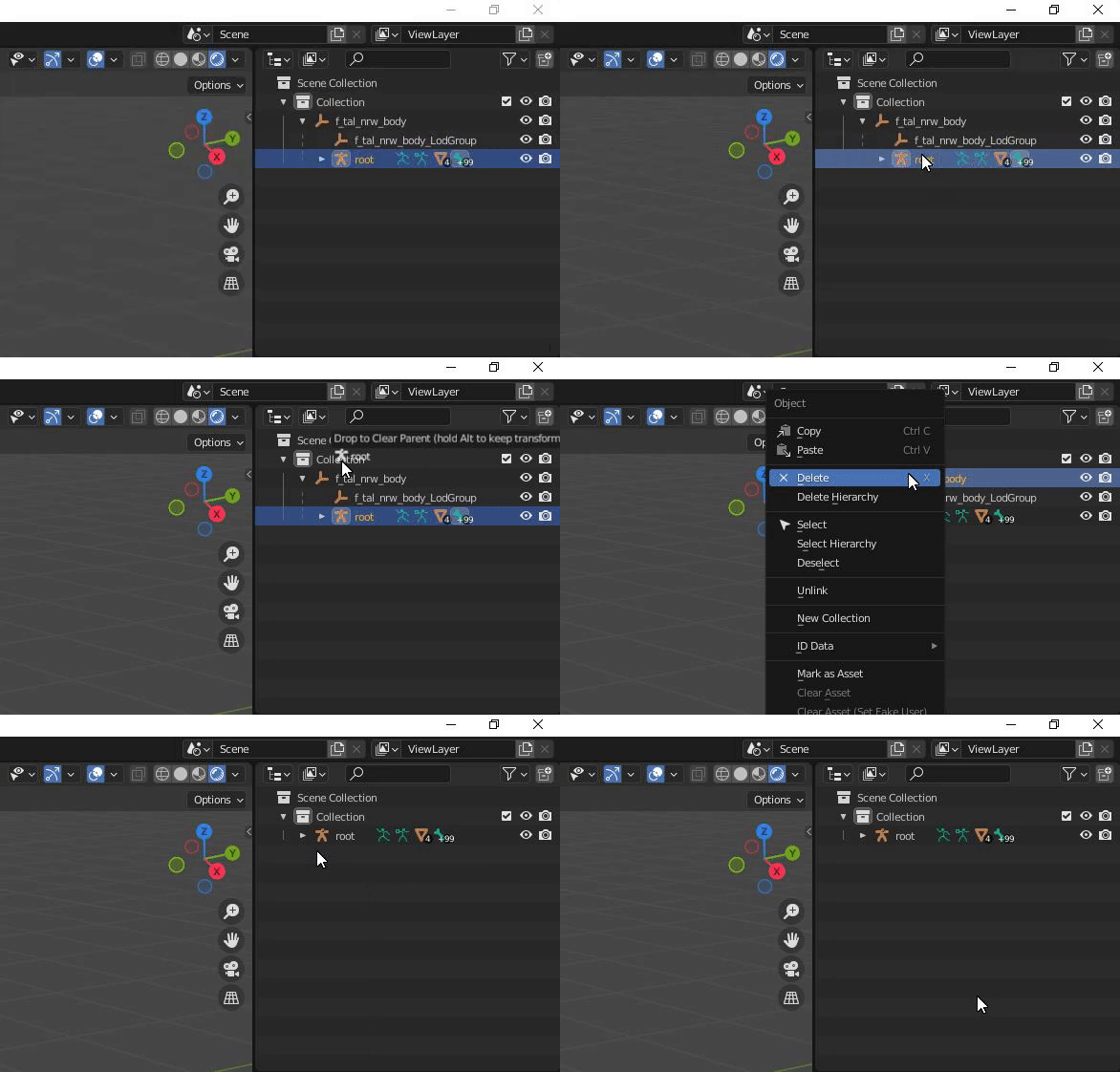 rustic sandal
ashen junco
And my main gripe with it wasn't even about the anim quality, but rather its wei...
rustic sandal
ashen junco
And my main gripe with it wasn't even about the anim quality, but rather its wei...
it does have a root?
i get the root bone in mid of its stomach in blender
n in blender u can convert it to a proper rig with controls now
with newe adobe add on
ashen junco
rustic sandal
it does have a root?
It doesn't. The root bone is the pelvis directly. UE4 skeletons have a dedicated root bone before pelvis bone.