#animation
1 messages · Page 32 of 1
 sage sierra
 stone hull
Hey guys! Would anyone here happen to know some things about setting up control rig in UE5 for procedural animation, and would be willing to help guide me to some resources? In particular I have a character that has some tentacle-like arms coming out of it and would like to animate only the base character and have those “procedurally” flow around. I’ve seen tons of examples of this being done in UE but can’t seem to find a good breakdown tutorial on it so if anyone has done something like this before and can help push me in the right direction I’d super appreciate it!
Edit: it’s for a cinematic, not gameplay
sage sierra
definitely works.. but theres must be a better way than doing it for every animation


 fiery ice
I have a physics asset where the scale of the physics asset is massive and i cant scale down the physics asset enough, anyone know how to fix.
 fast leaf
Thanks, I’ll look into it
 scarlet moth
Hey guys, I'm doing my first baby steps with control rig and of course nothing is working 😄
I'm trying basic IK, but once I hook it up everything just randomly rotates. Where do I even start debugging?
Is it a problem of my rig from Blender?

I read somewhere that you should export from Blender with primary bone axis X and secondary -Y, but if I do that the skeleton is totally messed up.
 primal perch
Hello, does someone know why my animation in game is differently interpolated than in the montage editor (and the program where I made the animation)?
 sand cliff
Hmm, for me I think(?) I only need a location for the eye target controls, so I'm actually not passing in a rotation at all... At the moment the eyes track sideways movement of the target perfectly as far as I can tell, it's just like the vertical location after translating to world space is way off cos the eyes' pitch are always looking at the sky unless the target is below the character's feet
 hollow tulip
hey, did any of you had this weird issue where the character falls to the ground in the animation editor even if the sequence is paused 😄 is like it has simulate physics on somehow
and is just the root bone
nvm, i found the problem
primal perch
I have this werid "hick up" shortly after the animation beginning, and I dont know where that is coming from
 ornate yew
Just wanted to followup in regards to my post here #animation message

Looks like worldspace is absolute which @viscid willow and I found out callobrating last night
They are however going to add a feature for worldspace additive due to the UDN report so thats awesome 🙌
in the meantime you'll need to convert to component space additive or store an offset for worldspace

☝️ context so you don't have to scroll
 viscid willow
ornate yew
viscid willow
ornate yew
Nice 😎
 last plume
Using the UE5 Mannequin... Should adjusting the index_01_r.ctrl also cause the other finger to be adjusted?

To me... this would be a sign of weight painting issues??
viscid willow
last plume
To me... this would be a sign of weight painting issues??
This wouldnt be a weight painting issue.
Is this a rig that comes from a content example or sample project? It looks more like the index control has some falloff down the fingers to attempt to create natural poses when moving a single finger.
last plume
Yes, the finger retargeting was a mess, but I created a new project and it looks like things are much better. I guess I'll have to try to redownload the old asset.
Any idea how to get the foot of Manny to be flatter in the retargeting? The foot ik doesn't seem to have adjustments. Maybe a chain is required for that to happen...

 exotic cipher
Hello everyone,
Can anyone please help me solve a small issue with Lyra animation.
The Lyra character spine or root is a bit diagonal from what I want, I am trying to get it to aim straight forward but can’t figure out how I can fix it.
If anyone here could help me.
Thanks
 primal perch
Does someone know or can help me with unreal interpolating incorrect when my animation has a quick turn around? It turns in the right direction in my animation program and in the anim montage but not in game.
 covert furnace
Hey stupid question
I have this skeleton mesh cloth simulation thing where you can paint on
How do I add the purple unsimulated color?
 covert furnace
Ah need to set paint value to 0
scarlet moth
So I got basic fabrik IK working on my testing robot, but the range of movement is quite limited.
When I pull the foot down further the thigh stops rotating, and the calf somehow rotates back.
Any tips on what to change? I'm very new to control rig.
 scarlet moth
Messed around with full body IK for a while until I found root behavior, set it to 'pin to input', that looks better. Whatever this setting means tho 😮

 quaint glade
hi! im having some issues with using additive animations to blend my landing animation with my base locomotion. In the video as you can see when they land, the arms go through the torso and Im not sure why. The animation for the landing is the identical to the one that plays when they stop moving and do a little bounce and the arms stay on the correct sides. However the stop moving animation isn't addative while the land one is which is causing the arm issue. Any ideas on the cause or how i could go about fixing it?
Heres the blender animation for it as well if it helps
 worldly anvil
Hello, I'm having an issue with animation montages. I have created two slots for the animations, and I want to play one long animation in slot one, and one short animation in slot two. Both the animations have to control the whole body of the character. If I play montage for slot 1, and another montage in slot 2, I would imagine that the slot 1 would resume playing if the animation in slot 2 is finished when connecting the slots like that (screenshot). However, that is not the case when I try to test it. Am I wrong in my assumption?
 last plume
I created a frame/pose with the level sequencer, then deleted all the keyframes. But the model pose didn't change back to the A-pose?

The character on the left still has the altered pose... All markers have been deleted?
 cedar orchid

Any way to fix the animation snapping back to the original position for a second before playing the next one? Cannot use animation blueprints
Someone mentioned toggling EnableRootMotion on the animation sequences but that didn't do anything
worldly anvil
worldly anvil
Hello, I'm having an issue with animation montages. I have created two slots for...
Solution is to use different groups
 cedar orchid
Someone mentioned toggling EnableRootMotion on the animation sequences but that ...
cedar orchid
cedar orchid
Someone mentioned toggling EnableRootMotion on the animation sequences but that ...
Set "Blend Time" under "Blend Out" in the animation montages to 0, fixed it snapping to the original position, but there was a gross flash. Changed "Enable Auto Blend Out" to false on all of them, and now it works
last plume
UE5 Level Sequence: Why is this point happening?

 misty dagger
Hello, do you know what could be the issue here? I used a free zombie from sketchfab, rigged it in mixamo auto rigger thing, then downloaded the rigged character with some mixamo animations and imported it to unreal, everything works but I get the skipping effect shown in the video when the zombie is running ingame.
ill mess around some more
i downloaded the animations again with In Place checked on mixamo and that did it.
 inner drum
so if I play an animation using Play Animation node it overrides my animBP. Is there a way to stop playing that animation and let the animBP take control again?
 delicate phoenix
Hi everyone!
I'm looking to control seperate limbs of a machine using keyboard inputs. My question is; Is rigging only useful for animations, or is it usefull for my usecase aswell? All tutorials i find for rigging is animation related, while i want to for example move a robot arom up and down using arrow keys. Am I in the right place?
A similar concept would be to match the wheel angle on a car to the joystick input. Is rigging a natural part of this? (Sorry for beeing a complete beginner)
 small spoke
is there some mechanism that notifies an animationblueprint when i change a variable that they can do state changes off of? Or are they just polling it every frame?
 dapper maple
Does anyone know the best place to get custom animations made? I'm looking for some cartoon stuff like 2 attacks with a hammer and a bouncy over exaggerated idle.
misty dagger
guys i know for making fps animation i should use blender but is there any way to use unreal engine to make good weapons fps animations?
worldly anvil
small spoke
is there some mechanism that notifies an animationblueprint when i change a vari...
You can use event dispatchers to notify that something has taken place
small spoke
worldly anvil
You can use event dispatchers to notify that something has taken place
no i'm not asking how, i'm asking if
like this transition rule that checks speed

does it have some kind of watch on the speed var, or is it checking it every frame at all times?
worldly anvil
It checks it every frame, correct
small spoke
so is there any way i can change the frequency of those checks?
worldly anvil
small spoke
so is there any way i can change the frequency of those checks?
I personally don't know about anything like that. The ABP has to update every tick, that's kind of how it plays the animations. If you want a lower ABP frequency, you can achieve that by decreasing your overall FPS, but, mostlikely, it's not something you want to do
small spoke
for actors and components, a tick is a variable thing, its not a constant rate
i don't mind them updating every tick, i just want the ticks to be less often
scarlet moth
is there any way to fix that my imported animations from Blender have a target frame rate of 60000 fps?

 humble socket
Can someone help me understand why this isn't more of a standard practice? I have a skeleton of the hands in the weapon skeletal mesh and I'm copying that pose into my animation (still in testing, pardon the mess). I'm struggling a little with the fact that two bone IK won't get the correct orientation of the hand bones and I also need to figure out how to make it all thread-safe, but otherwise the result is nice and the hands will just follow whatever position the gun needs. Seems like it will work well for FPS. Reloads can still follow an arm channel to fire anim montages. Not sure if I'm running into a dead end or if there's just a better way to do this.


 heavy kayak
anyone??
small spoke
i'm doing this to select an animation in a state
and it works, but its rapidly spamming and oscillating between the two
what i want is for it to pick one, play it to the end, and hold on the last frame. No looping or playing others, not unless it leaves and re-enters this state.
how do i accomplish this?

 sterile crest
small spoke
i'm doing this to select an animation in a state
and it works, but its rapidly s...
sterile crest
small spoke
i'm doing this to select an animation in a state
and it works, but its rapidly s...
 small spoke
ooh, let me test that
small spoke
sterile crest
ok great, this solves the problem of random selection!
But it is playing one, then the other, then the first again, endlessly
how can i achieve my desired result
there's min and max loop counts, but i cant see a no loop command
sterile crest
ahh... I see. One sec.
ornate yew
@viscid willow Just wanted to update you on this


Still appears that there is indeed something wrong with the IKRig node
even assuming world rotation is absolute
the values do not translate to the solver neutral rot value
I've updated the ticket on UDN

Here is the entire dual screen so you can see the node pin input method "translation"
sterile crest
small spoke
there's min and max loop counts, but i cant see a no loop command
This will select a random int when the state first becomes active (not every frame).


 ornate yew
Something is just wrong with the rotational inputs all input types "worldspace", "additive", "component"

haha
what the actual F
so feeding 0,0,0 is correct for the hand bone rotation but not ok for the head rotation?
sterile crest
small spoke
is there some mechanism that notifies an animationblueprint when i change a vari...
If you're concerned about performance, you can set a bool flag by doing this comparison outside of the transition condition (in the event graph, for instance) at whatever frequency you want. Then you're only checking a bool every frame, which is as close to free as you can get. If you're REALLY concerned about performance you can move the comparison out of the Event Graph and into the Blueprint Thread Safe Update Animation function.
small spoke
sterile crest
This will select a random int when the state first becomes active (not every fra...
this i don't quite understand, did you do all of this directly on the animgraph? I'm using a statemachine with several states in it, can i still do this? TRying to understand what you've done here
sterile crest
small spoke
this i don't quite understand, did you do all of this directly on the animgraph?...
This is all in the AnimGraph. As of UE5 you can associate functions with AnimNodes - In this case, the function will get run on the initial update of the state node.
small spoke
the random integer from stream is new to me, what is a stream and how/where do i make it?
sterile crest
You need to use it because the normal random int uses the clock as part of the seed so it's not threadsafe. You can create it as a variable (I did it by using "promote to variable" from the random integer from stream's input pin) and then set some integer as the seed.
small spoke
ahh, i think i'm sort of understanding this
sterile crest
Basically the first time the state updates (after it becomed active) the function runs once, setting the variable used by the blend by int node. When you exit the state and then re-enter it later, the function gets run again, picking a new integer
small spoke
can the random integer be zero?
sterile crest
In the example I gave, the random int will either be 0 or 1
small spoke
alright ive got it set up perfectly i think
It DOES work, it picks a random pose, plays it to the end and freezes on the last frame, exactly as i hoped
but it's only ever playing the first animation (index 0, hitreact left)
i go in and out of the state and the other one never plays


even setting the max to 2 or more doesnt seem to allow the second animation to ever trigger
sterile crest
Sorry - brain fart.
 small spoke
alright, this is still not right (I added a few more animations for debugging purposes)
it seems that it is running the random check only once ever (per game start)

 sterile crest
and the max should be 2
small spoke
instead of each time the state is entered
sterile crest
You can move the function to "On Become Relevant"
sterile crest
Sorry - should really test the answers before I post them, especially after I've had a couple of beers
small spoke
oh dont be hard on yourself, you've done wonders tonight, you are amazing !
sterile crest
my pleasure
make sure you set the max integer in the random int to the number of animations (it returns max - 1)
so max of 4 gives you 0,1,2,3
sterile crest
An alternative, slightly lighter weight version would look like this:


This eliminates the unnecessary extra blend from the blend by int node
small spoke
why is eliminating blending desireable?
sterile crest
You're already blending during the state transition, so you've got some extra computation / logic happening every frame in the blend-by node that you're not benefiting from, whereas in the lighter version, the selection happens one time in the "on becoming relevant" function, after which you're only evaluating the one "play sequence" node each frame.
sterile crest
Practically speaking, the difference may be negligible, but with everything else eating up cpu cycles, I'm all for any opportunity to optimize without compromising functionality.
small spoke
i'll keep this in mind! For now i have a different topic
I've got a skeleton with its own animations, i would like to rework both parts to work with other anims. The thing is, all the bones have nonstandard names
is there any way to rename bones in the skeleton and all animations at the same time?
i wonder if i can just use notepad to find and replace across the whole content directory. are animations stored in some kind of text format?
sterile crest
Probably the easiest thing to do would be to retarget the anims.
sterile crest
small spoke
i wonder if i can just use notepad to find and replace across the whole content ...
I believe the skeletons and anims are all stored as binary files, so find / replace text might not be that easy.
small spoke
sterile crest
Probably the easiest thing to do would be to retarget the anims.
how? It wont let me select skeletons or meshes
 sterile crest
You need to set up IK Rigs for each skeleton (your character and the character the other anims are coming from) and an IK Retargeter betwen them. https://docs.unrealengine.com/5.3/en-US/ik-rig-animation-retargeting-in-unreal-engine/

Share and transfer animation between characters of any size using IK Rigs and IK Retargeting.
small spoke
well thats really confusing, can't i just rename their bones enmasse?
sterile crest
Unfortunately, no.
small spoke
hmm, i'm not sure i even need this actually
what im trying to do is reuse the animation blueprint i made, for a different creature with its own skeletons and animations, while retaining the same logic
it wont let me select that skeleton when making a child of the ABP though
sterile crest
Template Animation Blueprints are what you want

You put your anim graph and logic in the template and then
 small spoke
ooh oki
what about animation pools, like the staggering one you helped with?
other creatures might have more or fewer than two options, can such pools (and the random function) be made of variable size?
sterile crest
small spoke
other creatures might have more or fewer than two options, can such pools (and t...
Yep - If you store the animations as an array, you can set the contents of the array for each creature
small spoke
alrighty i have a new direction then, wonderful!
sterile crest
In Template Animation Blueprint
 small spoke
i will do this tomorrow i think, it is getting late , 11 past midnight 😴
sterile crest
two child blueprints with different skeletons and different numbers of anims sharing graph structure and logic.


Yeah - probably best tackled after some sleep. Good luck with it!
 smoky shell
Is there an engine bug with sync groups that stops transitions using from triggering or is there something wrong with how I've setup my animations?
Looking at my animation, it is definitely setup properly
And some other animations work fine without issue, I can't find any reason why some work and some don't
 smoky shell
It seems like it is reporting the incorrect time in state
So it never reaches the length of the animation
Unless I've done something - which I don't see how - This is a pretty serious bug
This animation is moments from finishing, its play length is 5.54f
And despite nearly completing the animation, it hasn't been in the state for 5.54
Which means the time remaining will never reach 0.f or the transition time of 0.15f thus it never triggers the transition

This means there is either a bug in the source code or some form of corruption in the animation asset, or both
The animation has 665 keys at 120FPS = 5.54
Which is accurately reported in the timeline
And accurately returned by GetPlayLength()
So I'm pretty confident the animation is sane
And then the issue is that GetAccumulatedTime() which ultimately returns ExplicitTime has an engine bug, the ExplicitTime mustnt be recorded properly
You'd expect it to trigger regardless when it finally does exceed the time, but it fails to do so because it starts to fail an earlier check (which it should, at this point) and never checks again
Ah so this bug is specific to AdvanceTimeByDistanceMatching
The given time never reaches the criteria for blending out
Guess I have to handle that manually for this case with some custom logic
However, I'm looking at the source code for this node, and it seems to be setting it accurately, so I'm not sure why it ends up with the incorrect ExplicitTime when checking for blending
The only way I can see that this could feasibly happen is if something else is setting the time when it shouldn't be and overwriting it
smoky shell
Making progress. AdvanceTimeByDistanceMatching works as intended
But by the time it reaches the time where it is ready to transition, it has already lost the references to PreviousMarkerName and NextMarkerName
Going in a circle here. Something is clearing those before the animation has completed.
This is getting really dumb and borderline undebuggable
Before the animation reaches blend out time - it wipes out the sync marker references
Causing it to never be tested again
So its an engine bug for sure, but I can't find why it's happening
smoky shell
Manually adding a sync marker to the very end of the animation "fixes" this, but the behaviour isn't adequate
This means that you must have a sync marker within the transition duration time
If its set to 0.15s transition duration, then the final 0.15s of the animation needs to have a sync marker
smoky shell
Easy solution for anyone else experiencing this: Trim the animation to the nearest sync marker (at least within the transition duration)
If anyone is feeling exceptionally brave then modifying this part in the engine const float AnimTimeRemaining = AnimAsset->GetPlayLength() - RelevantPlayer->GetAccumulatedTime(); under else if (TransitionRule.bAutomaticRemainingTimeRule) in FAnimNode_StateMachine::FindValidTransition to check for the last available sync marker, effectivelly trimming it programatically, is probably the ideal solution. I'll pass it onto Epic and see if they want to approach this or not.
 acoustic pike
Can someone help me? I'm fairly new to UE5 and I'm trying to play this Idle Animation Montage but it's not working. What am I doing wrong?
I know the event works because the string prints, but the animation doesn't play.

 small spoke
good morning everyone!
Which C++ classes correspond to:
Animation blueprint templates
Animation Sequences (poses?)
 quick pumice
hello! i have a pretty standard anim bp setup, where combat montages are played via play montage node and are only using upper body
i want to add another layer of hit-react montages which are also played only in upper body, but it's important that they don't interrupt the combat montage
how would i make something like that?
they would have to be played on top of the combat montage, but that they don't interrupt the combat montage
my anim bp for reference
 viscid willow
quick pumice
i want to add another layer of hit-react montages which are also played only in ...
viscid willow
quick pumice
i want to add another layer of hit-react montages which are also played only in ...
Sounds like you want to have an additive animation play for your hit reacts.
You can do this quite easily with additive animation in a montage and playing that montage through a slot.
quick pumice
Are there any tutorials?
small spoke
is there any way to disable anim notifies without actually removing them? I just wanna turn them off
 reef badger
dont know, but you could rename them with a - at the end or smth else
last plume
How can I fix this small thumb kink/knock (not sure the word)?
At about the 1 second mark.
 rapid panther
last plume
How can I fix this small thumb kink/knock (not sure the word)?
rapid panther
last plume
How can I fix this small thumb kink/knock (not sure the word)?
you can try to add a key by urself in that finger
and fix
 ripe yew
Can you play montage on AnimationShared actors?
last plume
rapid panther
you can try to add a key by urself in that finger
Can you give my an idea as to what causes the problem?
 stark gate
Hey guys, this (pictured) is causing my project to not package and I have no idea why there's even an error. It's saying it references and unknown pose asset but I have no idea how to check for this tbh. I've been trying to sort it amongst hundreds of other bugs for weeks now and I think this is the last major one I can't work out. Could someone point me in the right direction please
 rapid panther
last plume
Can you give my an idea as to what causes the problem?
rapid panther
last plume
Can you give my an idea as to what causes the problem?
I don’t know, I assume it’s the animation that wasn’t keyed correctly, the snapping is there so no interpolation
maybe adding more keys you can interpolate it
stark gate
Sorted it. I don't know anything about poses and ABP's tbh so I was lost
 small spoke
how can i dynamically adjust the threshold values on a blendspace?
Like, i'd like to increase them all on the running blend as my character's movespeed increases through upgrades, so that they aren't stuck sprinting all the time
ideally i'd like the thresholds to be 0/50/100% of a variable that is designated as top speed, rather than being preset here to 250 ish and 500

 autumn sleet
small spoke
how can i dynamically adjust the threshold values on a blendspace?
Like, i'd lik...
autumn sleet
small spoke
how can i dynamically adjust the threshold values on a blendspace?
Like, i'd lik...
Use "Map Range Clamped" node in animation blueprint to output values for blendspace from yours range
 coarse crater
Is it still worth buying the Mocap outfit? Is it better to wait for AI until it is more available
small spoke
coarse crater
Is it still worth buying the Mocap outfit? Is it better to wait for AI until it ...
you may find this interesting
https://cascadeur.com/

Cascadeur is a standalone software for 3D keyframe animation of humanoids or other characters. Never before making animation from scratch or editing one has been so easy and fun. Thanks to its AI-assisted tools, you can make key poses really fast, instantly see the physical results and adjust secondary motion. All while retaining full control at...
sand cliff
Bumping this cos I'm still stuck unfortunately :/
 ashen aurora
Hi all; pulling my hair out over this one. I'm able to get my "shoulder" to "look at" my crosshair using the Transform (Modify) Bone node in my ABP. However, when I try the EXACT SAME LOGIC on my lowerarm_r using the default skeleton, the game tracks the yaw just fine but the pitch tracks with an added offset that I cannot overcome. The green line is my shoulder properly looking at my crosshair, my pink link is my lowerarm_r improperly looking ABOVE crosshair despite using the same logic.
When I programatically define a correction angle and apply it to my look at angle for lowerarm_r, the resulting debugvector spazzes out and tries its best to go downward but ultimately does not lock down.
Pictured: the yellow crosshair (sphere), the yellow debug line (where the lowerarm_r should be aiming) and then the pink line, where the lowerarm_r actually is aiming.

Actually fine here's a video
And I have made sure that all of my modes and spaces are set up correctly in the Transform (Modify) Bone node
 sage sierra
anyone please?
 keen python
Can someone tell me what i'm doing wrong? I'm trying to combine 2 animations with an additive node but whenever I do, it deforms my mesh. When i change the additive settings in the animations and try and play them, they just dissapear. How do I fix this?

 viscid willow
sage sierra
can i maybe reference the hands of all poses somehow to this pose?
viscid willow
sage sierra
can i maybe reference the hands of all poses somehow to this pose?
You can have another layered blend node in your anim graph after your locomotion state machine which has a single animation plugged into it, and on each frame of that animation has a different pose for a relevant weapon. You can then use the sequence itself as a sequence evaluator (i think its called, you can find this my right clicking the sequence node) and set an explicit time for the animation. So you will have a static pose which can blend over all your locomotion.
For examples of this you can look at the Advanced Locomotion System.
sage sierra
viscid willow
You can have another layered blend node in your anim graph after your locomotion...
that would be helpful for integrating multiple gun holding animations
but my current issue is how do i apply the modified grip to all animations without editing them one by one?
viscid willow
keen python
Can someone tell me what i'm doing wrong? I'm trying to combine 2 animations wit...
Your Idle animation doesn't appear to have the additive settings applied correctly.
What are your additive settings?
sage sierra
i tried layer blend per bone on only the relevant bones (clavicle_l propagated & hand_r propagated) but it results in funky animations
keen python
viscid willow
Your Idle animation doesn't appear to have the additive settings applied correct...
i tried almost every setting and it didn't work. what settings should I use or are there good resources that explain it?
viscid willow
sage sierra
i tried layer blend per bone on only the relevant bones (clavicle_l propagated &...
Your hand is in the right position with IK is that right?
If that's the case you only need the layered blend to influence the fingers and get them in the right pose.
sage sierra
viscid willow
Your hand is in the right position with IK is that right?
If that's the case yo...
the animations i made edit also the clavicle down
because i wanted to change the angle and way the hand approaches the grip
is that a wrong practice?
keen python
viscid willow
Your Idle animation doesn't appear to have the additive settings applied correct...
 sage sierra
when i layer blend per bone it looks good

but only when walking
when running he goes apeshit
viscid willow
keen python
i tried almost every setting and it didn't work. what settings should I use or a...
Additive animation type is the info you want: https://docs.unrealengine.com/5.3/en-US/animation-sequence-editor-in-unreal-engine/#assetdetails/skeletontree

An in depth look at the Animation Sequence Editor in Unreal Engine.
viscid willow
sage sierra
when running he goes apeshit
😅 which bones are you affecting with the layered blend?
sage sierra
the edits i made were for these bones on the left hand side
 viscid willow
Looks like its his spine
sage sierra
viscid willow
😅 which bones are you affecting with the layered blend?
spine_05
viscid willow
Omg did you pose this all with additive tracks?
sage sierra
viscid willow
Omg did you pose this all with additive tracks?
uhm 😅
i just took the animation i had and started rotating bones 👀
viscid willow
sage sierra
spine_05
Yeah if you blend over the spine then the whole upper body is going to give you undesirable results.
If your hand is nicely positioned with ik, you only really need the finger pose , so you can blend from the hand down
viscid willow
sage sierra
i just took the animation i had and started rotating bones 👀
Mad props
keen python
viscid willow
Additive animation type is the info you want: https://docs.unrealengine.com/5.3/...
Thankyou for showing me this. I'm a fucking moron

 viscid willow
keen python
Thankyou for showing me this. I'm a fucking moron
viscid willow
keen python
Thankyou for showing me this. I'm a fucking moron
Noo 😭 additives are a weird one
sage sierra
viscid willow
Mad props
🥵
viscid willow
sage sierra
so i should reposition the arm using IK?
Hold up. When you say IK, do you mean you have runtime ik snapping the hand to the gun?
sage sierra
yes
this is what i do

i get the transform from a socket on the gun
i plug in the state machine output to this and fix the left hand to the gun
viscid willow
Sweet. So yeah what you could do is let the ik correct just the arm for you, and get the hand in the right position. And then use a layered blend just to correct the fingers.
keen python
viscid willow
Noo 😭 additives are a weird one
is there any way to play that additive blend like a montage? So have it as it's own discrete piece of animation that i can play or can it only be done in the anim blueprint?
sage sierra
viscid willow
Sweet. So yeah what you could do is let the ik correct just the arm for you, and...
sweet, and then ill put a layered blend on the entire hand? or the individual finger bases?
viscid willow
keen python
is there any way to play that additive blend like a montage? So have it as it's ...
You can have additive montages yes. Your animation needs the additive settings applied and placed into a montage.
sage sierra
the blend would go after the hand ik right?
viscid willow
sage sierra
sweet, and then ill put a layered blend on the entire hand? or the individual fi...
You should be able to do it from the hand, and it will influence all the fingers. You could put the finger pose first in the graph, that way if the hand is changed by the pose, the IK will come after and fix it up.
keen python
got it, thankyou so much
sage sierra
correct me if im wrong, but the hand will almost neccaserily be changed by the pose?
viscid willow
I think you're right. I believe you can change the blend depth values to adjust which bones are influenced. Otherwise I'm pretty sure you can have multiple bone chains influenced in the layered blend node.
sage sierra
you're awesome dude
thanks for the help
im gonna fix the effector and target to hold the gun properly and then ill fix the hand-down joints
viscid willow
ashen aurora
Hi all; pulling my hair out over this one. I'm able to get my "shoulder" to "loo...
I do think this would be a lot easier in control rig 😅
What might be the case is the order in which you're solving the bones? Are you solving the lower arm first by chance?
viscid willow
sage sierra
thanks for the help
Np
 silk geyser
Hello🤚 what could be wrong in the anim montage if i shoot the montage keeps going for ever? I tried different montages like swing hand and that works just right but all the montages that are related the little recoil when firing keeps running until i unequip weapon. Looping is turned of all of them.
ashen aurora
viscid willow
I do think this would be a lot easier in control rig 😅
What might be the case ...
I’m brand new to this side of unreal, I’ll check it out after work …
 rugged apex
Hello, I have a question regarding combat/skill animations. Right now, I was doing my animations as root motion. The thing is my character still uses the procedural locomotion mechanics and I wouldn't want to change that. Unfortunately, it leads to the character stopping whenever the change from root motion to locomotion takes place. From what I've heard it's not advised to combine those two techniques and overall root motion animation is not the best option for combat. The suggestion I've seen was to change the location based on animation curve. The thing is, I've looked around trying to get my head around this, but the only thing I've got are scraps. I found that you can extract the movement from root motion anim, but nothing solid for how It could be applied. Should I just update the character location while the animation is playing? I'd be glad if someone could provide some resources to learn more about this topic. Thanks
 bitter shard
Does anyone know if the control rig component can use the output of the animation blueprint (as if it was a node) or does it always completely overwrite the source animation?
ashen aurora
viscid willow
I do think this would be a lot easier in control rig 😅
What might be the case ...
I’m using the base manny and I haven’t made any modifications as of yet; how would you recommend I modify it to remove the restrictions caused by other bones / controls?
 earnest pond
Is it possible to use Anim Notifies with the Animation Sharing Plugin? I try to listen to some in the Anim Sharing State Instance but it won't get called.
 serene plover
How do you stop a montage and go back to original pose?

Right now it just plays non-stop
sage sierra
@viscid willow i dont think its a smart idea to include hand joints in the layered blending. atleast not on the right hand. it caused the running animation to have the gun pointing so much down that the left hand didnt reach it and it caused the left arm to freak out
ashen aurora
I am still having trouble with my lowerarm_r look at rotation having an offset which the control rig seems to be fighting against. I'm trying to get the control rig to stop fighting with me. When I have the pitch of my look-at rotation be the reverse of what it should be (looking up 20 degrees results in aiming down 20 degrees) I am able to get the lines to overlap using the mouse. However when I attempt to synchronize the pitch there is an offset. When I try to programatically subtract from that offset the aiming jitters.
Videos:
-
Aiming line can cross the green line using inverted look at rotation
-
Aiming has an offset when not using inverted look at rotation
-
When finding the angle between the offset and the look at location, and then subtracting that angle from the pitch, the engine fights with me and refuses to subtract the remaining angle:
I have tried using both the AnimBP Bone Transform and the Control Rig Transform methods BUT NOT BOTH AT THE SAME TIME (duh)
sage sierra
@viscid willow i have a question regarding the earlier Gun holding topic.. if i set up the Arm through the IK Rig, how would i then adjust the fingers according to that? it wont show in the animation im trying to adjust
like that

 cloud lodge
viscid willow
sage sierra
<@142605242620444672> i have a question regarding the earlier Gun holding topic....
cloud lodge
viscid willow
sage sierra
<@142605242620444672> i have a question regarding the earlier Gun holding topic....
Is it that your gun socket and your animated pose don't line up, so the fingers are misaligned?
sage sierra
viscid willow
Is it that your gun socket and your animated pose don't line up, so the fingers ...
Yes, and that makes altering the animation hard
I did it and keyframed everyime to test and got something ok but there must be a way to do it better
Thats the result
 viscid willow
sage sierra
I did it and keyframed everyime to test and got something ok but there must be a...
viscid willow
sage sierra
I did it and keyframed everyime to test and got something ok but there must be a...
I wonder if you could do any of this in sequencer with control rig, that way you can have all your assets available and make modifications to where the socket is, and make use of an animation control rig to position the hands and fingers. Then you can bake that animation to a sequence.
viscid willow
ashen aurora
I’m using the base manny and I haven’t made any modifications as of yet; how wou...
I'm not sure you need to modify the character. When I was mentioning the order, the order of operations matters when you're manipulating bones. For example if you aim the arm at something first in the order, then aim the shoulder next, the arm will be misaligned because it is a child of the shoulder.
sage sierra
viscid willow
I wonder if you could do any of this in sequencer with control rig, that way you...
ive never used a sequencer or a control rig so im not sure about any of that. but the issue isnt the sockets - if i move the socket around at runtime, it affects the character. also editing the animation, but only after i keyframe, but since i have the IK which alters the animation, it makes it hard to sculpt the hand around a gun that is not there, you get me?
ashen aurora
viscid willow
I'm not sure you need to modify the character. When I was mentioning the order, ...
I’m only aiming the arm and nothing else. Starting from default manny in third person C++ template
viscid willow
sage sierra
ive never used a sequencer or a control rig so im not sure about any of that. bu...
yeah that's kinda why I would suggest using control rig because you should be able to more accurately position everything and get a full pose which lines up to where the socket should be, and have the fingers then posed to match, save that as an animation sequence and then use that, along with IK to ensure you're getting an accurate grip.
That way you're starting from something that you know lines up.
viscid willow
ashen aurora
I’m only aiming the arm and nothing else. Starting from default manny in third p...
Is it not the case that you're aiming multiple bones?
sage sierra
viscid willow
yeah that's kinda why I would suggest using control rig because you should be ab...
im assuming thats the state of the art way of doing things?
i never looked into it yet but sounds like i should
ashen aurora
viscid willow
Is it not the case that you're aiming multiple bones?
I tested the shoulder (upper arm r) to make sure that I wasn’t insane and my logic works.. then I changed the bone to the lower arm r and boom, offset…
BUT thats a good point im at work ill check soon
viscid willow
sage sierra
im assuming thats the state of the art way of doing things?
i dunno about state of the art 😅 but it's more that you would be doing this in an animation program and exporting that pose to use in unreal. Control rig is Unreals answer to animation software. I would say that the additive keys approach makes things a lot more challenging to manipulate.
sage sierra
viscid willow
i dunno about state of the art 😅 but it's more that you would be doing this in ...
i havent even looked into that as well. how would i fix an animation in an animation software if it is affected by inside unreal stuff? like the ik rig in the abp?
viscid willow
sage sierra
i havent even looked into that as well. how would i fix an animation in an anima...
The way I tend to think about the animation software is that I make necessary clips and poses, and then unreal is what ties all those assets together. Everything you make outside of unreal is typically referred to as offline/baked data because once it's exported you cant change it without going back and exporting again, or manipulating the animation in the ABP in some way.
For example, locomotion. I would make all my locomotion clips starting with a walk, then a run, then add different directions, everything i would need to account for that i want the character to be able to do. That all gets put into a blend space or multiple blend spaces and states to allow the character to move around. Then if i need a gun pose, I would pose that in the software and export that, that would then be layered over top of the locomotion, with IK on the left hand so it follows the right hand at the correct offset to stop it swimming. You can also export IK bones which help describe that offset/relationship between the hands.
If you want to see a really good example of doing a lot with very few animation clips I would highly recommend the ALS project as an example, or the Lyra example. They're both fairly dense, but it's worth poking around to see what the ABP can achieve.
ashen aurora
viscid willow
Is it not the case that you're aiming multiple bones?
Confirmed my setup only aims lower arm r. I’m going crazy haha
sage sierra
viscid willow
The way I tend to think about the animation software is that I make necessary cl...
I see, then the only difference that i can think of is either using those ik bones, and the fact i use premade animations
u just make animations that already fit the gun in your hand
im guessing good animations make a big difference heh
bitter shard
Does anyone know if it's possible to get a cached pose from the AnimBP (using "New Saved Cached Pose") in a regular BP or from cpp? I need to access a pose and do some logic on it before it gets modified later in the animation graph.
heavy kayak

hey everyone, how can i get a transion time between these :/ ?
not it goes instant to the jump start
i want it to have a small transition ti,me
ashen aurora
I opened a completely fresh blank project and it works flawlessly... ugh... do you have any idea why this might be the case? Anything on my existing skeleton / manny that could be causing this weird offset? Maybe a way for me to completely wipe and reset my manny without nuking my project?
Finished too many other subsystems to want to start over (again)

 night ruin
Could anyone tell me what this error is please; not sure what out of date with source animation means.Thank you
 small spoke
how do you animate a character whose upper body is doing stuff (like swinging a weapon) while the lower body is running or walking
the first thing that comes to mind for me, is having the swinging animations only use the upper body and blending them with the running animation. But i feel like that'd look pretty stiff and wooden, especially when standing still
any thoughts?
stark gate
I have a cinematic that triggers once I overlap a box. What's meant to happen is when I overlap the box, it moves a character in the level to the location of that box and she is supposed to stay there as the animation plays out. Instead she immediately snaps back to her original location from before the teleport happened and she plays out her animations there. So she teleports to the box, when the sequencer starts, she snaps back again. There's no transform going on in the sequencer either
I can't figure it out
 turbid roost
first screenshot is unreal, second screenshot is blender. same animation. anyone know why unreal deforms it so wildly and if there's a way to fix it? It uses the same lowerarm_twist bones that a UE5 skeleton would have. I have them set up with a copy rotation constraint to the wrist in Blender... I've tried checking everything, it should work.

 night ruin
Figured it out...there's an update button. Just wondering why they would be out of date on the first place
turbid roost
turbid roost
first screenshot is unreal, second screenshot is blender. same animation. anyone...
for anyone curious about the answer, "Preserve Volumes" (aka dual quaternion) is not supported in unreal
 storm musk
hey there
so i have a wired bug or maybe it's something i don't understand
so I'm setting a bool in my player bp and one of the items that bool is used in the animation bp so i can check if i can do blend by pose or not
the thing is when i use the blend poses by bool the anim montage wont play but without it it works fine
and i have to use the blend poses by bool because some tool or animations i don't want the character to do the layered blend with it
i hope what i said makes any sense 😅


 spring anvil
When i use runtime-retargeting, all cloth simulations on the retarget target mesh stops working. Is it possible to get simulation working again?

 scarlet moth
Hey guys, is there something like Rinterp/Finterp when transforming bones in an animation blueprint?
sage sierra
i have an ik rig to attach my left hand to where i defined the grip on my gun, but for some reason theres some kind of breathing effect, where the hand moves on the gun (they clip with each other) despite the IK Rigging
sage sierra
whats the difference between an aim offset and modifying spine rotation using IK?
 dusty blaze
Hi, im having an issue bringing in a character I created in blender into unreal engine. For some reason whenever I import the character into unreal engine the rig gets super messed up. This in turn also breaks animations that I imported from mixamo. Please let me know what I can do to fix this. Thanks!

 earnest pond
Is it possible to use Anim Notifies with the Animation Sharing Plugin? I try to ...
earnest pond
earnest pond
Is it possible to use Anim Notifies with the Animation Sharing Plugin? I try to ...
still wondering if perhaps someone knows if animation sharing plugins do support anim notifies. The documentation hints to the fact that it should work, but the Anim Sharing State Instance Anim Notify event does never trigger.
 quick pond
alright so have been doing some testing between skeletal meshes and sharing of a base skeleton and I am running into some issues where a mesh was too different and the animation is stretching the neck and the shoulders look off. I just need some buzz words or things to look for in order to solve this issue? Would it be something related to the control rig or perhaps something else?
 wheat badge
Anyone know of Rootmotion source can be mixed with animation rootmotion?
 grim jewel
UE 5.3 – Animating UE default skeleton in Blender causes distortions? (.fbx)
Hi!
ISSUE:
I exported the skeletal mesh “SKM_Manny” from the third person template to Blender.
Then created a simple waving animation (only animated the hand for testing).
Imported the animation to Unreal and here it’s broken (Blender version on the left, Unreal to the right).
INFORMATION:
Import option
Selected the skeleton “SK_Mannequin”, which is used by “SKM_Manny”.
Level of detail (just in case that matters for some reason)
Only exported LOD0 to Blender.
Blender export settings
(see image)
Individual export
I tried exporting the character without selecting "SK_Mannequin" and it works in that situation. It creates a new custom skeleton, however, meaning it can't be used on the real SK_Mannequin/
QUESTION:
How come the skeletons seem to be incompatible when the SKM_Manny I exported relies on the same SK_Mannequin that I'm trying to use when importing the newly created animation?
(sorry if I am missing something obvious :/ )
Thankyou in advance!

 smoky shell
night ruin
Figured it out...there's an update button. Just wondering why they would be out ...
smoky shell
night ruin
Figured it out...there's an update button. Just wondering why they would be out ...
Here is a solution if you need to fix hundreds of pose assets, because that button means doing it one by one
https://forums.unrealengine.com/t/warning-poseasset-xxx-is-out-of-date-with-its-source-animation/594063/5
night ruin
smoky shell
Here is a solution if you need to fix hundreds of pose assets, because that butt...
Ah cheers! Thank you 🙂
 quick lily
I'm new to UE and racking my brain to figure this out: On the thirdperson template I'm trying to use blueprints to do the following: For example when i press the 'Q' key for example, the bone of Quinn skeletal mesh named 'lowerarm_l' gradually rotates up 45 degrees over 1 second, when I release Q, It gradually rotates down 45 degrees, back to the original position. I've tried with the event graph of the bp_TPCharacter but I can't find any way to set the bone rotation. Otherwise in the animblueprint I can't get the Q key pressed event. Hope anybody can point me in the right direction 🙂
 gentle shore
I'm trying to alter animations using control rigs. I'm wondering why every time i switch between fk/ik controls it changes the animation? (I used bake animation to control rig)
scarlet moth
Hey guys, I'm using a simple Anim BP for a turret to rotate towards the player (Look At rotation).
This works fine, but the initial call always snaps the rotation instantly and I can't find a way to do this smoothly (like Rinterp etc.).
How do you do this with an Anim BP?
gentle shore
gentle shore
I'm trying to alter animations using control rigs. I'm wondering why every time ...
just needed to change all keyframes to ik instead of only one frame
 gleaming pier
Question - is it still possible to allow some kind of movement when using an animation with root motion at all?
It might just be that the root motion didn't transfer over properly. I don't have much in the way of checking though.
Or at least increase the root motion scale in engine
 fierce idol
Also new to animating. If I have a preexisting unreal project with a character using the UE4 mannequin and I’ve been using marketplace FPS anims, how can I set myself up in Blender with the same mannequin and same camera angle that I have in unreal?
 tough lava
Which 3D software has the best / most intuitive pipeline into unreal? Blender? Maya? Etc
 tired yoke
Someone have a guideline or image reference for walk animation for quadrupede spider like robot ? EDIT :That was usefull https://www.youtube.com/watch?v=GtHzpX0FCFY

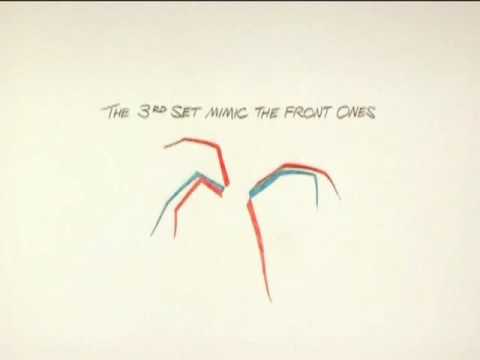
An excerpt from a video tutorial about how to animate a walking spider.
tired yoke
tough lava
Which 3D software has the best / most intuitive pipeline into unreal? Blender? M...
I use Blender to make skeletal mesh and animation. I never tried something else so ... '^^ You can use mixamo animation and skeletal from blender to unreal with retargeter.
tired yoke
fierce idol
Also new to animating. If I have a preexisting unreal project with a character u...
You can export skeletal mesh from unreal to blender, you can export animation too but that wasn't easy to use in my memories
sage sierra
guys, if i made an animation blueprint for manny, and i wanna aplicate it on another skeleton, how do i do it?
lets say i have a character that uses ue4 mannequin
now i tried retargeting the ABP but that results in a weird ABP that doesnt look the same (the finger placement for instance
 worn marlin
Is there a similar node as "copy bone" but can use sockets?
Or is that for virtual bone
 rigid robin
tough lava
Which 3D software has the best / most intuitive pipeline into unreal? Blender? M...
rigid robin
tough lava
Which 3D software has the best / most intuitive pipeline into unreal? Blender? M...
Maya because its industry standard but blender is fine, its not like its not supported it just might have some funny quirks like orientation or size of mesh/bones when exporting you need to work around. But they both "work" its just one may require a little more finesse at the beginning
 soft sierra
When making a character with facial animation using morph targets, should I separate face from the rest of the character? I'm asking in context of optimization.
For example if I have a character with morph targets on face only, are those morph targets computed only for face vertices or for all vertices in skeletal mesh?
 versed mountain
Hello, greetings, I have problems making Retargeting animation with the UE5 character and Metahuman, the animation is deformed
 fiery ice
how do i make the thigh not scale like that when moving the ik
 sweet storm
hi! someone could help me pls 😦 look at the hand , made with mixamo
 ornate yew
who here is decent with anim blending that has a bit of time to help me overcome an issue?

I'm working on a custom IK solution that can be really good for VR that supports UE5.1+ with limits, constraints

I have everything working really well as far as the effectors for the hmd, hands wrist etc

The part I'm having issues with is when I setup my blendspace for the leg animation I have to do a layered bone blend and exclude data north of the spine_01 (only taking in leg anims with an override)
I can't quite understand how to get the leg IK behavior blended back in after this
at least not in a way that looks good
 inner flicker
Hello friends,
How can I improve myself in animation using blueprint? I have considerable experience in blueprint, but I cannot say the same for animations.
Procedural Animations, Hand&Leg IK, Physics Based Push&Pull System etc.
 graceful nimbus
Is it possible to create a blend space (like the one shown) from a data asset in blueprint?

 pseudo solstice
I can't import animation from blender, i open sequence and got 2 empty
 pseudo solstice
now I need to solve why drivesr in blender are not applied 😢

 olive remnant
Hey what's up everyone, I am flailing hard with something that should be easy. Please put me out of my misery.
I am looping through an array of skeletal meshes which have one control rig component mapped to them. I should be able to get a Control Rig Component Object Reference to feed to this Set Control Transform function but I cannot for the life of me figure how to get the reference. I do have an array of the control rigs as well and I suppose I could loop through them and patch up the names with a String Contains opr something obtuse like that but... wtf. How do I get the reference to the control rig component from the parent skeletal mesh>??


alternatively I tried to loop through the array of control rigs and encountered the opposite problem, somehow being unable to get the skeletal mesh component object reference of that control rig's mapped skeletal mesh

 unique grove
Hello guys i made an help request on UE forum, please help me out i'm struggling since today morning on this issue.
https://forums.unrealengine.com/t/animation-breaks-after-importing-into-unreal-from-cinema4d/1673027

Epic Developer Community Forums
I passed the last 8 hours trying to fix this issue. I animated a combat scene into Cinema4D (rigged with ActorCore), everything looks perfect into Cinema. Unfortunately, I mistakenly decided to animate before uvmapping and texturing, well… I had in mind to export the animation using .fbx file format and adapt it to my UV mapped and textured m...
 noble kettle
Anyone here able to help me?
I am working on an animation blueprint. I have a state machine for my basic movement as a blendspace (idle, walk, run based on speed and direction)
Then I have another state machine I am using for movement from basic movement to jump/land.
I am trying to incorporate some additional 'idle' animations based on what weapon the player is holding and I am using blend poses by enum on the weapon type. When I equip the weapon the idle animation switches, however it doesn't appear to blend completely as when I move, the legs don't move with my movement (they remain still and I slide around). I have some footstep sounds playing on my 'walk' animation, and they are playing. I am not sure what I am doing wrong.
I have attached a photo of my setup. Do I need to do something special with the animations themselves so that the 'pickaxe idle' disregards the bottom half of the animation?
 noble kettle
I've also attached a video of what's happening.
 obtuse siren
Somebody know how to make procedural recoil animation with IK?
 strong python
Hey general question : I'm trying to use this "Run Cycle" sheet as reference to create a running animation for my character and I'm kinda confused that there aren't more poses mainly after the frame 12, as how would the 12th frame transition to frame 1 knowing that they're the mirror of each other ?

 pliant bough
Hi, so I have imported a mesh to use as armor for my character and despite the two meshes using the same skeleton and the animations working in blender, the animations aren't playing when I use the new mesh.
gentle shore
@pliant bough won't fully solve your issues, but try going into skeleton tree, adding a chest socket (if not there already), and then add preview mesh to that socket. will give you the preview you're looking for i believe
gentle shore
noble kettle
Anyone here able to help me?
I am working on an animation blueprint. I have a ...
you are looking for layered blend per bone
noble kettle
On which section ? I originally had one of those right after my blend by enum with the same result. I'll have at least 5 more weapons the player can equip so I don't think I'd want to blend by bone five+ times would I?
pliant bough
gentle shore
<@314464055048011778> won't fully solve your issues, but try going into skeleton...
the issue is that the animations aren't playing at all. I have it connected to the character just fine.
gentle shore
noble kettle
On which section ? I originally had one of those right after my blend by enum wi...
so you blend from spine bone down for running, and then above for the different weapons
noble kettle
So does the layered blend per bone happen after the enum ?
I'll post a screenshot in just a few minutes on what I tried
This is what I had it as. Blending 'main states' and the 'enum'

with 'pelvis' set as the bone
gentle shore
i'm new to animation, and its hard to know how you have your states set up. but this works for me. and if your main states include other stuff it could mess it up. also the control rig can mess it up. you use your locomotion as the bottom half. maybe someone that knows more can chime in
 noble kettle
So locomotion is strictly for my idle/walk blend space. The main states state has transitions from idle/walk to jump/fall/land
 sharp linden
Does anyone have developed any strategy around extending a base skeleton? More so from the perspective that you hypothetically have a base human skeleton, and then you will have two characters, one will require a setup for dress through bones, the other will have a long tail. And you want to use a single skeleton in this case.
noble kettle
I didn't think to try using the locomotion cached pose instead of main states
I'll try that in the morning and see how it goes
Thanks EvoL for a place to look
gentle shore
np man
sage sierra
how do i take an animation blueprint ive made on the ue5 manny and make it work with the ue4 mannequin? i tried using the default retargeter but it doesnt work
noble kettle
well switching it to 'locomotion' instead of 'main states' helped, but now my jumps etc don't blend and the top half is extremely stiff.
Maybe I am doing something wrong with the animations themselves. I'm new to animation so trying to figure it out as I go.
earnest pond
Not sure if you have received an answer already but it looks like the issue that was mentioned in this tutorial I saw recently. From 8:30 to 11:30 he is fixing an animation issue that is caused by the Leg IK of the UE5 skeleton. https://youtu.be/-t3PbGRazKg?si=GUSm91irsLG_vvwV&t=510
Perhaps this is the cause of your animation problem too.
 quasi dragon
Hi
I'm trying to decide on architectural path when it comes to animation and hope you guys can help me.
I have lots of different characters that will have the same movement, abilities and animation states. (eg. charge, attack, dash, run, sidestep etc) but they look quite different and our artists has started working on different skeletons for the different meshes = different anim sequences for each state.
Thats fine when playing single Montages on different occasions but my question is:
Is it in any way possible to have an Animation Blueprint being used on different skeletons?
The AB will control just stuff that is common for all characters (velocity, upperbody blending etc) but it seems like AB are very hard tied to specific skeleton and that cannot change.
I don't want to go into duplicating stuff and make changes on each BP whenever the generic animation behaviour needs to be set.
OR should I force the animators to use the same skeleton even though the characters look and anims quite different? They still would need to use different animsequences for each state (big guy swings differently than small lean guy).
How would you suggest the birdview architecture would be?
quasi dragon
Looking into it more I did find the answer in Animation Blueprint Templates. Those are specifically made for this purpose. 🙂
sage sierra
anyone knows how do i take an animation blueprint ive made on the ue5 manny and make it work with the ue4 mannequin? i tried using the default retargeter but it doesnt work
sage sierra
guys please i really need help, i have this character and blueprint i have made to a rather high standard on the manny 5 skeleton and skeletal mesh (see first picture) and im trying to now equip a metahuman on it.
thats not the issue, i manage to equip the metahuman pretty nicely, but for some reason all of the poses are (annoyingly) slightly off (see second picture), and i dont know what to do, its using a copy of the same animation blueprint - what could i do better? what is the correct workflow? i need some direction 🙏


the way i equipped the metahuman is by copying its assets (the body parts and lod sync) and then using this construction script. and the body is equipped on the base character mesh

 sick maple
Hello, more of a blender animation export to UE related question,
But any idea how i could export this movement along a curve (using modifier) to unreal ?
edit : answer found using the Alembic format (had no idea what it was), this video helped me https://www.youtube.com/watch?v=WHHrOC4PgLs&ab_channel=DavideVoza
gentle shore
sage sierra
guys please i really need help, i have this character and blueprint i have made ...
did you retarget from ue5 manne to the metahuman using the RTG_Mannequin retargetter?
 compact siren
hi guys i have proplem where my enemy attack montage stopps when the player attacks him and he just playing hit reactions and not attacking him back so the reactions montage stopps the attack montage of the enemy
sage sierra
gentle shore
did you retarget from ue5 manne to the metahuman using the RTG_Mannequin retarge...
No👀 it retargets to metahuman?
I tried doing the same with a ue4 skele and the 5 to 4 retargeter and it also didnt do a great job
gentle shore
try the RTG_mannequin, it should come with the metahumans
 dark crow
the default manny has a stance where the left foot is always forward. if you start walking and stop when the right foot is forward, the feet just slide to the default positions. and if you tap W over and over you get a shuffle of the feet. Is there a name for this or a fix? this is kind of hard to google
 astral swift
hey guys! I'm using ALS and want to integrate some combat montages on it. If i'm standing still they work perfectly but in some situations with a sligth movement something (I guess it's the stop transitions / end transitions or stop movement events) break my monatges. Is there any way to make montages wotk during walk/run process without being interrupted?
 open egret
My peoples i require aid! I'm importing a new model to then rig up for an ik retarget andb blah blah - however, when i'm in blender the models feet IK are correctly at the ankles. However, on import they are suddenly closer to the center and no longer even in the feet, Can i fix this in engine? i've never had this issue with an import
sweet storm
Hi guys ! I came to this while animating a character in iclone, but i'm having problems making him walk, turn and sit down.. i alr tried moving the reach of multiple of them but i think i didn't do well.. Does anyone have a clue ? :/
stone hull
Hey everyone. I wanted to ask if anyone's run into an issue with the IK retargeter where the target skeletal mesh pretty much fully explodes when retargeting an animation. I can confirm that the retargeter is set up correctly and the bones are matching perfectly. The issue seems to come at the FK solver step, as when I disable that the mesh doesn't explode. However, without the FK step the bones do not carry the rotation animation data.
If anyone's run into this I'd appreciate your help!
 obtuse plume
does anyone know why unreal does not support keyframed animations without a skeleton? it is obviously a design choice but i really struggle to understand why, it would be so convenient
and i mean besides sequencer which is tailored to cinematics and not intended to be used to play self-contained, gameplay-focused animations
 worn osprey
does anyone know how to fix this kind of behaviour? Its as if the bounds are colliding with each other but they're not, changing the size of the colliders seems to have no effect
graceful nimbus
Why does blendspace play properly (without sliding) and blendspace player causes my character to slide?
 inner skiff
Hey guys, super quick question for some with experience with unreal engines animation/skeletal setup.
Why is the left and right side of the manni flipped vertically? Here is a message showing exactly what I mean #ue5-general message
inner skiff
worn osprey
does anyone know how to fix this kind of behaviour? Its as if the bounds are col...
You cant trick me, thats drake
 lusty ore
I'm thinking of creating a kind of Rubik's cube actor that can rotate similarly. Since I am sort of a newbie with Unreal and absolutely unfamiliar with animation I have been thinking of getting all parts of the cube overlapping corresponding slice, attaching and rotating components with tag. But that would be around 30 static meshes And 9 collision components . Is there a better way to solve this problem with a skeletal mesh?
 serene plover
I have an animation pack and if I double click the montage I get
 rigid robin
lusty ore
I'm thinking of creating a kind of Rubik's cube actor that can rotate similarly....
rigid robin
lusty ore
I'm thinking of creating a kind of Rubik's cube actor that can rotate similarly....
You’re in luck actually, I just watched this video the other day, you want around the 6 minute mark https://youtu.be/miZFpMVYnB4?si=P_Yarl5hXtxopO3t
lusty ore
rigid robin
You’re in luck actually, I just watched this video the other day, you want aroun...
Huh. Thats cool! Thanks a lot !
 lavish dune
So this is somewhat outside of unreal animation, but i figured I'd ask - but typically when dealing with rigging guns, do you keep the mag a seperate skeletal mesh? It seems like it would make sense for some guns like a pistol where the mag might just slide out and fall to the floor, but at the same time, i'm having a hard time wrapping my head around how I would socket it to the left hand when releoading then socket it to the gun when the reload finishes. Mainly I'm wondering how I would keep the socket location for the hand consistent between guns
 lost verge
Has anyone ever tried using control rig for a hand to weapon ik? From all the tutorials I've seen on YouTube everyone is using IK inside the animBP. I understand you can drag the rig into the level and set a weapon to constraints that way but I was hoping for a more dynamic prodcedual approach where you could use controls inside the control rig event graph
 median isle
Hello, has anyone here ever used the time stretch curve in montages? I can't figure it out
 vernal bay
heloo^^ quick question, if i add extra bones to a skeleton without deleting existing bones will unreal make a fuzz?🤔 i want to try it out but if it screws everything ill b very sad...
 timid shadow


 sweet lantern
Hi! Is it possible to get anim notify to the actor from anim sharing setup?
sweet lantern
https://forums.unrealengine.com/t/animation-sharing-how-does-it-work/496676/2
Found this but I need notifies from on-demand anims for the attack logic - is there no way to get that?

Epic Developer Community Forums
Hello everyone, I managed to fix my issues and since I don’t see that many people taking about animation sharing here; and having similar issues to me. The reason for collisions being disabled is that Animation Sharing uses the Master Pose Component for sharing animations between the different meshes. The Master Pose Component doesn’t allow fo...
sweet lantern
In AnimationSharingManager.cpp it seems there's this huge function UAnimSharingInstance::SetupState where the AnimSharingStateInstance isn't applied to onDemand states, and the logic is as follows
`else if (AnimSequence != nullptr)
{
Component->PlayAnimation(AnimSequence, true);
/** If this is an on-demand state we pause the animation as we'll want to start it from the beginning anytime we start an on-demand instance */
if (StateData.bIsOnDemand)
{
    Component->Stop();
}
else
{
    if (InstanceIndex > 0)
    {
        const float Steps = (AnimSequence->GetPlayLength() * 0.9f) / (NumInstances);
        const float StartTimeOffset = Steps * InstanceIndex;
        Component->SetPosition(StartTimeOffset, false);
    }
}

/** Set the current animation length length */
StateData.AnimationLengths.Add(AnimSequence->GetPlayLength());
}`
At least this is the closest I was able to find regarding what's the problem with onDemand
In documentation AnimSharingStateInstance is referred to as the way to use notifies with anim sharing but it's not possible in this case
 cobalt moon
hi guys
i have question about blender
i recorded a video for reference to put that video behind my character in blender to animate my character
but my video after few seconds freezes and i dont know what to do
can someone help me about it?
 snow blade
Hi everyone! I'm trying to do a retarget from mixamo character to mannequin. And I use Animation Sequence as retarget pose. But when I do it knees and hip area are broke. And I cant fix it with manual editing, tried to rotate all bones but didnt manage how to fix it. Any advise? (of course I can do retarget pose manually, but if epic did it for me already...)

 frozen sable
@rustic plume hello?
 rustic plume
Yup
So you got the anim graph setup with cached references to anim poses. You have the final caches going through their slots. The montage has the slot set as well
frozen sable
i could stream my screen to you or just record a video?
rustic plume
Ive done this hundreds of times and there is a hiccup. Im trying to run my head as well because ive had each of these some annoyances
sweet lantern
Ok then is the animation sharing plugin just plain bad and not used, or just poorly documented?
 fringe oriole

okay can someone help me with this cap?
I'm using the advanced skeleton plugin from maya
and anytime i try to import this guy he always comes out a mess like this
I feel like I've tried everything in the book but nothing seems to fix it.
does ANYONE have any kind of solution at all!?
vernal bay
fringe oriole
that loos almost like a wight paint issue 🤔
 daring marten
Why are Linked Anim Layers in Lyra's Main BP empty ?
How do they work being empty ?
 hybrid acorn
Hi all -- I'm trying to create multiple playable classes, for example a Swordsman and an Archer. They use the same skeleton.
I'd like to reuse animation logic as much as possible, including locomotion. However each character may have some states not used by other characters, such as shield blocking or drawing a bowstring.
Does it make sense to have a child animation blueprint with all logic regardless of character, and have each class use a child anim BP and just set the animations they need? Do anim BP templates help here? Or maybe Linked Anim Graphs?
I feel I'm on the wrong path, so any guidance is appreciated!
daring marten
hybrid acorn
Hi all -- I'm trying to create multiple playable classes, for example a Swordsma...
Linked Anim Layers will help
hybrid acorn
daring marten
Linked Anim Layers will help
Thanks, I'll research that more
 slate field
how do I make my hero have a big but in animation?
I put a big but on skeleton but not transfer to animation
 dull bridge
Dumb wording question but what is the opposite of Root Motion (in place) best refered to as? I always say Root Motion and Locomotion but I didn't think that was always right. Is it just in place?
dull bridge
I imported an animation and have it running on my character but the shoulder placement causes the chest to be squished (as seen below). Is there any easy fix to this?

 frozen breach
dull bridge
I imported an animation and have it running on my character but the shoulder pla...
frozen breach
dull bridge
I imported an animation and have it running on my character but the shoulder pla...
Yes. You can weight paint the chest to have 100% influence of the chest bone.
sage sierra
gentle shore
try the RTG_mannequin, it should come with the metahumans
didnt work
sage sierra
sage sierra
guys please i really need help, i have this character and blueprint i have made ...
anybody?
frozen sable
hello everyone, what would be the optimal way of creating first person hand animation?
 dire mauve
Hey all, I seem to always have trouble with root motion animations, I don't know why. I have cat animation that is running up a wall. When I play the montage (to climb up a wall) it just launches the character high up to the sky, any way to limit the height or stop it from flying so high up?
dire mauve
dire mauve
Hey all, I seem to always have trouble with root motion animations, I don't know...
Fixed it, it had to do with the root motion scale
 static holly
I can't find an answer anywhere: How do I sync up a dynamic light with an animation, so that gun's muzzle flash actually lights up the environment? Any google search I try to make just gives me particle tutorials
sage sierra
Is it wrong to create an animation blueprint for one skeleton and then retarget it to another?
For some reason i made an abp, and tried to retarget it twice, once from ue5 manny to ue4, and once from ue5 manny to metahuman and both times it just completely fucks up the animation
dire mauve
static holly
I can't find an answer anywhere: How do I sync up a dynamic light with an animat...
Not at the computer right now nor a pro with animation. But couldn't you make an AnimNotify trigger a light on/off? Similar to how you can make a Niagara/particle system get triggered. I've done it for particles and I would assume a light would be the same. This would have to be run through a montage (I believe that allows you to add the notify track)
fiery ice
im trying to make a system where the players top half animations changes depending on the weapon he is holding, im using an idle animation paired with a aim offset for the top half and a state machine for the movement and bottom half. but my pelvis bone moves depending on the direction he moves in and it makes the top half offset to the bottom half. is there any way to fix this other than redoing every animation for every bone?
 spiral forge
I have a skeletal mesh component that's a piece of clothing. Its animation class is the same as the character it's attaching to. How do I get their animations to sync? For example, when the character's arms move, the clothing arms should move, too. They are mirroring in the idle state, just not when the character moves.
 keen vortex
Hello,
I'm trying to make the animation start every time from 0 position when they are active but if I play it once it will resume from the last place,
how can I fix it?

 fickle umbra
Could anyone point me in a good direction to start doing FirstPerson animations? Im planing on simple first-person animations, swinging swords, knives etc so no fire arms. And I would love to be able to have it as a control rig and do the animations myself, if anyone knows a good way to set up a rig for first person arms 🙂
 wooden shuttle
can some one help me, why isnt my mesh moving with the control rig bones?


 dense umbra
So I have made a cinematic using Mixamo for character animations and I would like to use some hand animation between using the Mixamo animations. I have used a blueprint actor as the base for the skeletal mesh and then using the animation sequences through the actor in a animation sequence. I wonder if it is possible to change the actor mid sequence to use another skeleton and get in some handmade animations in-between the generated Mixamo animations?
As mixamo generates its own skeleton it is not easy to hand animate from as it does not have proper control functions
 cobalt ridge
Why does UE5 ignore the Z axis key frames in the animation? I'm exporting the animation from Maya
Nevermind, looking at this channel, everyone has questions but nobody answers 😄
(For context, I found a Mixamo animation but it doesn;'t have In Place option, so I removed the Y axis key frames on my own in Maya and it looks perfect in Maya but when importing to UE5, it's like it doesn't have the Z keyframes)
 warm nest
Is there an alternative to Rotate Root Bone node, but for In Place animations for the AnimGraph?
sage sierra
Is it wrong to create an animation blueprint for one skeleton and then retarget it to another?
For some reason i made an abp, and tried to retarget it twice, once from ue5 manny to ue4, and once from ue5 manny to metahuman and both times it just completely fucks up the animation
 lavish edge
Hi ! Sorry for bumping this old message, but did you get Motion Matching to work for UE 5.3 in the end ?
 boreal widget
Hi, I've made an animation for holding a hand gun, but most of the time the animation is lagging / jittering (I don't know if that the problem but I've exported them from blender). Does anyone know to solve / fix this.
Thanks.
 true aurora
Hello guys ! I am using metahumans and I would like to know how do I position my camera so it looks like CS:GO. The gun needs to point in line with the eyesight. I cant manage to get the same thing. Do you have a tutorial for this or somethin ?

 sage sierra
boreal widget
Hi, I've made an animation for holding a hand gun, but most of the time the anim...
sage sierra
boreal widget
Hi, I've made an animation for holding a hand gun, but most of the time the anim...
maybe its the effector of the lhik
or target
 limpid zenith
Hi, is there a guide for begginer how to create precedural animations, like for foot and interactions?
 pale elk
Hello,
Its been a day I am trying to fix this issue on the video. As you can see ( maybe ) the camera movement is different when I presset the animation and when I use the blueprint. The camera is attached to a bone with a socket so it can use my animation made in blender. In blender I don't have any issue, and as I said when previewing on UE it looks like the camera movement is completly fine. But with the Anim BP the camera gets back to normal position only when the whole animation is ending ( at least it seems like it )
The animation BP contains a simple Locomotion state machine. And the GunSlot contains the arms animation ( with the camera bone )


 amber wave
guys I have question How I can animate my propeller on plane so it will be almost not visible?, would like to get it less visible like when you see plane propeller is almost invisible
static holly
Animation worked perfectly fine in Blender... tried importing it to UE. This popped up and now none of the animations work properly...
 static holly
Animation worked perfectly fine in Blender... tried importing it to UE. This pop...
static holly
static holly
Animation worked perfectly fine in Blender... tried importing it to UE. This pop...
Alright, apparently Unreal doesn't like when bone size is set to 0. 0,001 is fine though
worn marlin
Imagine if we have a sort of Cascadeur when animating in control rig to fill in the frames and add physics hehe
 floral sky
Does excluding bones from solvers work in 5.3?
Excluding bones for me seems to do nothing
amber wave
Guys How to make plane propeller animation work fine?
primal perch
can someone pls help me with what this weird teapot texture is? it appeared somehow when I fiddeled with particel effects in the montage and now doesnt go away even if I delete all particle effects

 strong mica
So if you hypothetically had 10 different melee weapons and they're all held a bit differently -- would you create 10 different variations of the idle/walk in place/walk/run animations, and create conditional blendspaces/states for them all?
Or would you do something different, and if so what? Super simple answers in the right direction are welcome
 coral rivet
i have two animations, one for my weapon walking, and another for my weapon firing. how do i add the firing animation's location and rotation to the walk animation so the gun appears like its walking but it is firing as well. i want to do this for my idle animation too
i want to do this since im having issues playing the firing animation then back to the walk/idle animation and i want to see if i can add the transform of the firing animation and to my other animations (walk & idle)
 muted wadi
I got a FPS control rig setup working and I'm noticing that it feels like it lags behind by about a frame. How do I fix that?
 torn chasm
Hey guys! We are working on a project where we want to playback mocap/keyframe face/body animations and blend between live link face with a boolean . We have the basic blueprint working but main issues are:
when the live link boolean is active the frame rate of the live link tanks to like .5fps
When live link is active the body animations disappear too.
Any leads are super appreciated!
 next python
muted wadi
I got a FPS control rig setup working and I'm noticing that it feels like it lag...
next python
muted wadi
I got a FPS control rig setup working and I'm noticing that it feels like it lag...
with stuff like this either you change the order it updates or maybe extrapolate a bit ahead to reduce account for the offset
it could just be your control rig is smoothed a bit and the perceived delay is it lerping etc
I'm not really sure how to mess with it in this case, I generally move ticking phases to account for stuff like this but you might not be easily able to do so
sage sierra
what is control rig used for?
 hollow saddle
are orientation warping and stride warping supposed to replace 2D blendspaces? I'm not a tech animator but some time ago when I used to create my own ABPs I remember I've just made a 2D blendspace and provided speed and direction input, but looking at modern tutorials and what Lyra does it seems like those 2 nodes are the new way or doing strafing locomotion 🤔
 idle tusk
I have a book I've animated. All animations use bones + shape keys drivers. Am I able to export an idle animation by adding shape keys to an empty, to then export to UE5? Idk if having animations with bones and empties a good idea?
@ me
serene plover
Anyone that is skilled with animations able to help me with some basic stuff? IE: teamviewer or similar
Need to see the issue I have fixed once and then I'll be able to do it alone
 delicate hawk
So I have accidentaly messed up the SK_Mannequin and now It has no bones and literally has broken my entire game. how can I fix this?
 delicate hawk
Update on this
I imported another MK_Mannequin
from another project
But the animations arent working

And unreal engine crashes
whenever I replace the skeleton on anyof them
idle tusk
I have this animation, but it wont export correctly to UE5, can someone help?
 split trellis
idle tusk
I have this animation, but it wont export correctly to UE5, can someone help?
split trellis
idle tusk
I have this animation, but it wont export correctly to UE5, can someone help?
There may need to be a root added and kept at 0’0 for it to properly import into Ue5
idle tusk
split trellis
There may need to be a root added and kept at 0’0 for it to properly import into...
So root the animation and make it at coordinates 0,0
I will try :)
wheat badge
Have anyone tried to use rigidbody node on top of a control rig that animates the skeleton procedurally?
From my tests i cant seem to get rigidbody node to react to the control rig, but i can get the right result using Anim Dynamics. Problem is that anim dynamics takes longer to setup for complex chains, so i wanna streamline it to rigidbody, but i cant get it to work, is there maybe a setting somewhere?
 wheat badge
Have anyone tried to use rigidbody node on top of a control rig that animates th...
wheat badge
wheat badge
Have anyone tried to use rigidbody node on top of a control rig that animates th...
And control rig spring interpolate doesnt support collision 😦
Ive seen several folks having the same issue but without answer
idle tusk
split trellis
There may need to be a root added and kept at 0’0 for it to properly import into...
Like this ?

 split trellis
Yep! That’s what usually works for me if the animations aren’t moving. Hopefully that works for you.
idle tusk
split trellis
Yep! That’s what usually works for me if the animations aren’t moving. Hopefully...
well it defintly moves lol
just not how it supposed to
idle tusk
I'm happy to send the file if it helps
fierce idol
I'm trying to animate my player character in unreal's sequencer, but I want to start from some animations I already have. I'm trying to add the animation to the sequencer and have it play on my first person arms but when I add the animation, nothing happens. How do I get sequencer to work here?:


the first image shows it without the animation added and the second shows it with the animation added and the scroll set to midway through the animation where the fists should be up
but the arms are still in a-pose
wheat badge
Any gurus know if theres a feature similar to pose driver but instead of setting up cones for driving it will automatically drive based on how similar current pose is against some other pose?
small spoke
https://drive.google.com/file/d/1VHIVvTF3pXyc6qn3Kq8xcuD3wnJ1Ujni/view?usp=sharing
how can i solve hip wobbling when retargeting animations?
this particular anim runs forward, and moves side to side i guess. The target skeleton jerks violently at the hips instead
the root of the source is the hip, the target has seperate root and hip bones, which are both in one chain, ive tried setting either as root and it doesnnt seem to affect things
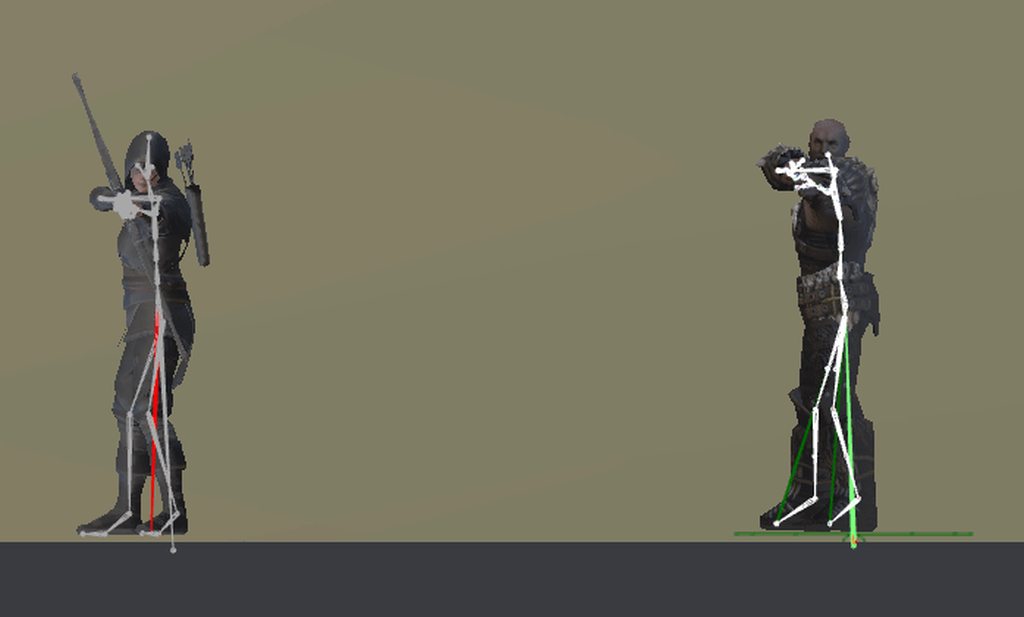
its also noticeable in a less mobile animation, the source isn't moving here
do i need ik goals and solvers to prevent this? im sure that could fix the feet moving, but doesnt it seem like the hip in the target (right) moves far more than in the left?:
aha i found the root settings panel and poked around a bit, things are working better now
 grave kernel
how do i add bones that are missing from retargetted character?
strong python
Will have an issue in terms of speed (not being the same) if I create my (character) animations being at 25 fps while my game runs at more than 60 fps ?
 vapid bloom
Does anyone know how to turn this off? It's showing details about skeletal mesh animation frame skipping interpolation. I think I ran a debug command months ago but cannot remember what it was. It's useful info but bad for recording game content in the editor
 grave kernel
how do i hide the head without affecting the rest of the animations in the animbp? (i have this highlighted section that makes it remove the head but idk where to put it)
 small spoke
i have animations i imported from mixamo, their skeleton has no root bone, and they involve movement
enabling root motion doesn't go so well, the hips become locked in space and the legs move kind of oddly as a result
is there anything i can do to make them look natural? do i add my own root bone?
strong mica
small spoke
i have animations i imported from mixamo, their skeleton has no root bone, and t...
If you're using the UE skeleton, you can just use this tool to quickly convert any mixamo animations to work with UE quick and easy https://terribilisstudio.fr/?section=MC#close
terribilisstudio.fr
Animations generated by Adobe's Mixamo.com are not fully compatible with Unreal Engine 4 and 5, most notably when it comes to IK or root motion extraction. Mixamo Converter software is a mini-app that processes FBX files downloaded from Mixamo and adapts them to Unreal's conventions.
small spoke
strong mica
If you're using the UE skeleton, you can just use this tool to quickly convert a...
yay!!
https://www.youtube.com/watch?v=f32fzAuJyZU
i found a video about it too
i strongly suspect this video is gonna tell me to use that converter 😅

Using Mixamo Root Motion Animations in Unreal Engine 5
Use a Blender Addon to add a root bone to your Mixamo animations!
Blender Addon
https://github.com/enziop/mixamo_converter
Download Blender
https://www.blender.org/
Patreon:
https://www.patreon.com/DruidMechanics
Discord invite:
https://discord.gg/qVqSSmp3ZD
UE5 Multiplayer Course:
U...
strong mica
small spoke
yay!!
https://www.youtube.com/watch?v=jH02x-VdQDs This is the video I found that got me set up quick and easy with it. He goes so fast you'll be pausing like 8 times trying to get a good look at the right screen but worth it lol

Please consider donating to Terribilis who makes an amazing product:
https://terribilisstudio.fr/?section=MC
Despite wasting 9 seconds, in the remaining 48 I will show you how to get Mixamo animations working for your UE5 mannequin, for free
small spoke
ty, i will peruse this
hybrid acorn
Does anybody know if it's possible to put a custom name on Anim Notify's? I use many of the same class and would love to label them on the timeline.
 hybrid acorn
Does anybody know if it's possible to put a custom name on Anim Notify's? I use ...
hybrid acorn
hybrid acorn
Does anybody know if it's possible to put a custom name on Anim Notify's? I use ...
Actually, I figured it out! The AnimNotify has a method GetNotifyName() that I can override. I was looking in the editor for something, but this made it possible.

 hexed grotto
Hey, everyone my animations despite being both 30fps on UE5.3.2 and Maya 2024 always import with sampled key correct and sampled frame 1 frame short. Is there anyway to fix this issue?

My animation is meant to be 89 frames but it only import as 88 frames.
 vivid roost
Hello. I am currently modulating the speed of a particular animation by including it multiple times in a montage and changing the playback rate for different sections. It works, but it's also a lot of adjusting. Is there a better way to accomplish this?
 viscid willow
grave kernel
how do i hide the head without affecting the rest of the animations in the animb...
viscid willow
grave kernel
how do i hide the head without affecting the rest of the animations in the animb...
If you dont want it to affect all the animations, what do you want it to do?
grave kernel
viscid willow
If you dont want it to affect all the animations, what do you want it to do?
I actually figured it out thank u
wheat badge
Anyone know how to properly use pose driver? I dont see much talk about it. Any in depth videos is welcome. Also i noticed it has changed alot since 4.15 "inside unreal" talks
 dull sun
What does the Return Value do in an anim notify? Is it just to prevent it from becoming an event?
 idle tusk
I have this animation, but it wont export correctly to UE5, can someone help?
idle tusk
idle tusk
I have this animation, but it wont export correctly to UE5, can someone help?
Any help on this?
small spoke
strong mica
If you're using the UE skeleton, you can just use this tool to quickly convert a...
that converting tool worked great, thank you. im gonna donate a dollar in appreciation
 agile fiber
Would anyone here know of some tutorial videos or documentation that kind of covers what is required or the proper way to animate things for unreal? Seems there is plenty available for humanoid characters but little for anything else.
I am trying to animate this robot but unsure if I need to add an armature and bones for each of the components that move.
Sorry probably a bit of a ramble.
 soft sierra
Can animation graph skip pose evaluation if it is known (at some point) that none of it's nodes will result in pose change. For example, let's say I have an automatic rifle with animation graph that consist of const time animation blended with montage slot. Is there any optimization that will skip update if neither animation time changer nor slot if playing any monstage? Or should I implement optimizations (e.g. turning component's tick off) in gameplay logic ?
pale elk
pale elk
Hello,
Its been a day I am trying to fix this issue on the video. As you can se...
Hello, it's been several days I am stuck on my project because I can't fix this.
TLDR : I made a Blender firing FPS animation, everything is fine except the camera movement ( camera is attached to a bone ).
The last thing I tried is to put a new state in my state machine's character animation blueprint to handle the weapon firing. So When I hit LMB, I turn isFiring to true, and the state machine goes into firing state and play the firing animation. I still have the same issue however its different now. See the delay node ? The camera goes back to normal position only after the delay is finished. I have put a new video so you can see.
On the video we clearly see that the camera goes up for 3 seconds, and then goes back to normal position. While in the montage, the camera is only moving slightly for like 3 frames, and thats what I want.
I am kind of desesperate right now
I know putting a delay like this is bad but its just for testing purpose
viscid willow
agile fiber
Would anyone here know of some tutorial videos or documentation that kind of cov...
Short answer is yes you will need to add an armature and likely bones for each of the components which move. You could do stuff with blend shapes, but bones are much simpler, more flexible in what you can do with them and are ideal for mechanical animation.
The same is true for humanoids and soft skinned characters, you will need to add bones for all of the components you want to animate. The difference being with soft skinning you typically have a continuous mesh which deforms and flexes to give the illusion or flesh or cloth (even more so with the ML Deformer). With this mechanical robot you can skin whole parts to a single bone, so your skinning setup can be a fair bit simpler.
viscid willow
pale elk
Hello, it's been several days I am stuck on my project because I can't fix this....
Weird. Is the pose for the camera the same between your firing and idle animation?
pale elk
viscid willow
Weird. Is the pose for the camera the same between your firing and idle animatio...
it should be the same yes, but is there any way I can see the exact camera coordinates in the animations ?
viscid willow
pale elk
it should be the same yes, but is there any way I can see the exact camera coord...
In your animation sequence you can select the bone you use for the camera and see the transforms.
Just for clarity, if you do that, could you also share a screenshot of your skeleton hierarchy you're using and highlight which bone you're using to attach the camera?
pale elk
viscid willow
In your animation sequence you can select the bone you use for the camera and se...
thank you

and on the last frame

so yeah the position isn't exaclty the same on the start and end of the animation
also on frame 13 for example it goes at this pos, I don't know why

and for the idle animation
 viscid willow
looks pretty close but something that's probably more of an issue is you have scale issues on your skeleton. That bone is much bigger than it should be. If you select the root, what is the scale?
pale elk
viscid willow
looks pretty close but something that's probably more of an issue is you have sc...
root bone :
 pale elk
viscid willow
looks pretty close but something that's probably more of an issue is you have sc...
pale elk
viscid willow
looks pretty close but something that's probably more of an issue is you have sc...
how do you see that the bone is too big ?
here is how it looks in blender
 pale elk
omg so yes it was that camera at the 92 degrees angle that was causing the trouble
I d'ont know why it was set like that but I modified the animation inside UE5 to put the camera at -90 instead of -92 a first frame and when the camera stop moving and now its working as intented. Thanks a lot !
 rain solstice
I have a blockout of a steam locomotive. I am going to use it for testing however I am having trouble getting the animation of the wheels going around based on their relationship to the drive rod (the biggle steel beam that spans the main wheels on a steam locomotive). Is there anyone who could give me some advise on this? Full Disclosure I am not a rigger or animator, but I am trying to wear multiple hats, as you sometimes do lol.
The blockout in question
 wheat badge
rain solstice
I have a blockout of a steam locomotive. I am going to use it for testing howeve...
wheat badge
rain solstice
I have a blockout of a steam locomotive. I am going to use it for testing howeve...
Procedural animation / constraint
agile fiber
viscid willow
Short answer is yes you will need to add an armature and likely bones for each o...
Thanks, I really appreciate the reply.
 fervent kayak
hey question - so I have been importing models I made in Blender and everything has been pretty okay, but for some reason this one model won't import any of its animations? I export it with all the same settings as all of my other models and import them into Unreal with the same settings as well, but I just get a string of messages (listed here). For further clarification, all my models have different skeletons and animations, there isn't anything out of the ordinary for this model
 dark crow
How can I use a morph target to influence a skeletal mesh? For example adjusting eyebrows when raising a eye.
rain solstice
wheat badge
Procedural animation / constraint
So I was just told that constraints don't translate over to UE5. Can you please elaborate more on your message?
gentle shore
@rain solstice I know this isn't answering your question or really helpful at all but I wouldn't focus on the spinning of the wheels on a blockout. there is a video, that i cannot find, of uncharted's train scene prototype. and i dont think that their wheels were spinning.
but if you're deadset a good place to start would be the citysamples vehicle pack. they have blueprints with spinning wheels
was able to find this, and the wheels dont move in their blockout https://youtu.be/KnBKkKVBnqU?t=530
wheat badge
rain solstice
So I was just told that constraints don't translate over to UE5. Can you please ...
U need to do everything in Unreal, including constraints. U need to use Unreal's procedural rigging system "Control Rig".
 nocturne kraken
I am a beginner in Unreal Engine and I am attempting to develop a basic movement system for a cat character, incorporating directional starts and turn animations. I am utilizing 2D blendspaces for its movement. However, I am encountering an issue where I want my cat to only turn in one specific direction, specifically anticlockwise. Despite my efforts, I have been unable to achieve this. I will provide my blueprint for better understanding. Although my blueprint functions properly for other tasks, I have introduced a new variable and aim to use it to ensure that my turns occur exclusively in one direction. Any assistance in resolving this matter would be greatly appreciated.
 viscid willow
Something you could look into is Sync Markers and Sync Groups. They try to line up the animation based on where the sync markers are placed in the animation.
So if you put markers where the left foot plants and the right foot plants then the abo will be able to determine between animation clips where the blend should occur.
viscid willow
nocturne kraken
I am a beginner in Unreal Engine and I am attempting to develop a basic movement...
Just so I understand, the issue is the character blueprint rotation is not turning in the desired direction, not the animation?
nocturne kraken
viscid willow
Just so I understand, the issue is the character blueprint rotation is not turni...
yes, I've set up turn animations where the cat's front right leg steps first, followed by the walk animation. My goal is to have the cat turn in only one direction. Does that make sense, or am I misunderstanding something? While testing, I notice that the animations are playing correctly, but the capsule sometimes turns in the opposite direction, which is not what I intend. So, that's my primary concern. Any help or suggestions would be greatly appreciated. Thank you.
 topaz mesa
lavish edge
Hi ! Sorry for bumping this old message, but did you get Motion Matching to work...
topaz mesa
lavish edge
Hi ! Sorry for bumping this old message, but did you get Motion Matching to work...
Did you get any answer? I am also looking for 5.3 info since no matter the approach, i am not able to make it work in 5.3🤔
 limber flax
I run IK on hands in unreal to move them to a certain location, but I notice that this movement doesn't seem to respect physics colliders, which sometimes results in hands phasing through things. is there a way to make the IK respect such a collision with physics bodies naturally, or is this something I'm going to have to run a whole bunch of custom line traces for to fix my final target location?
wheat badge
nocturne kraken
I am a beginner in Unreal Engine and I am attempting to develop a basic movement...
quadruped animation is a hard topic, a while back i had to deal with this as well. In the end i came up with a way to do quadruped locomotion with a minimum requirement of only 1 forward walking animation. The rest can be controlled procedurally. In fact i think i can even make it require 0 animations as minimum. And can accept more animations for more art direction and control: Here i simulated some deers walking along a spline, they can turn in almost any degree, and their feet will never slide:
https://streamable.com/k66wbx

Watch "SCS_NewForest (64-bit Development PCD3D_SM6) 2023-08-19 18-21-04" on Streamable.
 pale elk
hello,
How would you handle triggering multiple montage at the same time ? I have a GUN_reload animation and FP_Arms_Reload animations. I need to play them at the same time. I currently have this but ofc its not optimal as the set Is Reloading gets triggered just after play montage node and I would want it bo be reached only when montage is completed. But if I use Play Montage node, I can't play the GUN reload animation at the same time
 ashen junco
pale elk
hello,
How would you handle triggering multiple montage at the same time ? I hav...
ashen junco
pale elk
hello,
How would you handle triggering multiple montage at the same time ? I hav...
Usually reload is triggered at certain point in the animation, so consider using anim notify in the gun reload montage
pale elk
sorry i forgot the screenshot
 pale elk
ashen junco
Usually reload is triggered at certain point in the animation, so consider using...
pale elk
ashen junco
Usually reload is triggered at certain point in the animation, so consider using...
oh yeah I forgot about notifiers. So do you think my current BP is viable ? If I add a notifiers to set Is Reloading as you suggested
wheat badge
pale elk
oh yeah I forgot about notifiers. So do you think my current BP is viable ? If I...
Usually u would add both animations into the same montage
Then u set the slot to which they will play
Ur logic right now will fail as play animation will override everything
It will even override ur anim blueprint
U should learn the basics of how unreal animation system works
pale elk
ok thank you i'll look into that
pale elk
wheat badge
Usually u would add both animations into the same montage
The animations are on different Skeletal meshes, so can I really add them on the same montage ?
wheat badge
pale elk
The animations are on different Skeletal meshes, so can I really add them on the...
Oh ure using different skeletal meshes? For what purpose and why?
If so then ur logic may just work, but i recommend instead of playing animation directly u should play montage onto a slot
pale elk
wheat badge
Oh ure using different skeletal meshes? For what purpose and why?
The gun and the arms are 2 separate objects in Blender
wheat badge
Play animation will override everything and prevent u from doing much
pale elk
and for the purpose tbh I thought it was just the way people do this kind of animation lol
pale elk
wheat badge
Play animation will override everything and prevent u from doing much
okk will change that, thank you
wheat badge
Im not sure if playing them separately will cause them to sync perfectly
Best is to animate the arms with the guns together
Since different gun require different anim sets
Then u can use copy pose from mesh with with ur arms
So it will be the same arms but following animations of the guns
pale elk
wheat badge
Im not sure if playing them separately will cause them to sync perfectly
yeah its not working, I just tried
wheat badge
And u can have linkedlayers to switch between gun and unarmed ect
Take my words as a grain of salt cus there may be even better ways to do this
But the way above will work
Im just not 100% satisfied
pale elk
alright thank you!
wheat badge
The reason we use copy pose from mesh is to keep the skeletons modular, otherwise ur main skeleton will be bloated with hidden bones for all possible weapons
U can have arms and gun skeletons separate
pale elk
wheat badge
U can have arms and gun skeletons separate
yeah thats what I currently have
I dont know what is copy pose thought
wheat badge
Copy pose from mesh
Is an anim node
It will copy the pose of the parent mesh as long as the bones match
pale elk
I dont really understand how It can apply to my case tbh
wheat badge
Say u have a skeleton of arms with skeleton of ur gun animating
And another skeleton of just ur arms
Then ur arms skeletal mesh can copy the animation of ur reload animation for the arms+gun skeleton
wheat badge
Yes u need the full reload sequence with guns in blender
U can also do it directly in unreal with sequencer tho
But u will need blender for the unified skeleton i guess...
Another way is to use sequencer as a way to sync everything...
pale elk
Ok I understand
pale elk
tbh I don"t see any backside of using play animation for the gun's animation for now, it work as intended
wheat badge
In the long run i dont think its good
U can also use a curve to drive the gun reload animation and then copy pose can drive those curves
There are so many ways to sync them
pale elk
I changed it to this, so I set isReloading once montage is finished. Play Animation just play the gun's anim in the same time and it's synced
 wheat badge
Ok, i would do it other way tho
pale elk
ahah ok
wheat badge
But sure whatever works if thats what u need
pale elk
I just started UE5 a week ago so not really confortable
nocturne kraken
wheat badge
quadruped animation is a hard topic, a while back i had to deal with this as wel...
But somehow I need to manage that, exploring many things but not getting anything sufficient to achieve it. If anyone has any idea then plz share.
 stuck ravine
Hello, all. I have a fighter plane with yaw, roll, pitch and throttle. I have minimum and maximum poses for each. Best way to blend? Planning to directly use the input axis normalized values (i.e., there's a player control for each of these from 0-1).
inner drum
Hey is there a way to set the positions of bones on a skeletal mesh through blueprint in unreal? I’m trying to break into procedural animation never done it before but I figure changing a skeletal mesh bone positions through code would be a good place to start. Any advice is appreciated thanks!
wheat badge
nocturne kraken
But somehow I need to manage that, exploring many things but not getting anythin...
Not sure what ure doing but if 4 legged locomotion is what u want then its not easy
There are no perfect way
There are youtube tutorials for basic ones using blending
But those arent good
Its ok for certain type of game but its not AAA
A good inspiration is to watch GDC how Horizon Zero Dawn did it
wheat badge
But even for them they needed to build the AI to accomodate for the locomotion
Because 4 legged cant move like 2 legged
 zenith folio
can someone help me out its not working and i cant figure it out
i have this set up if that is why its not working


(when i press left mouse it just stops the idel animation and doesnt play the attack animation)
stuck ravine
stuck ravine
Hello, all. I have a fighter plane with yaw, roll, pitch and throttle. I have ...
Anyone able to help point me in the right direction?
wooden shuttle
how can i hold an anim montage's last frame and how can i interrupt it? stop anim montage isnt interrupting... ( i thought i would just make a long anim montage for it to hold the last frame, and when the player stoped pressing the key i could stop but there must be a better way, and as i also said stop anim montage is not working)
grave kernel
anyone know how to flip an animation? adding it to the blendspace rotates the player 180 because the pole climbing animation i bought is flipped the wrong way
i tried going into the animation and putting a keyframe on the root rotating it back to normal but then in the blendspace it shows the player still circling around into that position
fickle umbra
Hello, looking for some help to cancel an animation/play another one mid-way. So I have animations where I swing weapons, and I want it so when it collides with a static object it should bounce back. I have a system to detect when it collides with the environment, but now I have to tell the animation blueprint to cancel the current animation/play it in reverse. And I have no clue how to communicate this between player BP and AnimBP. 🙂
nocturne kraken
wheat badge
Not sure what ure doing but if 4 legged locomotion is what u want then its not e...
ya, I will watch those. But approaching unreal engine youtubers for some help and solution regarding this. But no response, from none of them 😆
wheat badge
nocturne kraken
ya, I will watch those. But approaching unreal engine youtubers for some help an...
I did the same and u wont get much help, this is a hard topic very few people know how to do who's active on social networks at the same time
GDC and some talks are some of ur best resources
nocturne kraken
wheat badge
I did the same and u wont get much help, this is a hard topic very few people kn...
Yes, great. Will follow those too.
wheat badge
U can also try watch how people do things in other softwares like blender and unity for inspiration to port over
But for Unreal directly u will find almost 0
nocturne kraken
wheat badge
I did the same and u wont get much help, this is a hard topic very few people kn...
This community has many experienced unreal techies. So I thought of getting genuine solutions. But hars luck for me.😄
wheat badge
nocturne kraken
This community has many experienced unreal techies. So I thought of getting genu...
Actually i feel like there are more beginners these days who came here to find answers
nocturne kraken
wheat badge
Actually i feel like there are more beginners these days who came here to find a...
Yes
wheat badge
Most of my more advanced questions are ignored
frozen breach
Ooff. I'm a newbie trying to get some help and I read this XD
Seems like you could use an advance techniques channel
wheat badge
frozen breach
Seems like you could use an advance techniques channel
I hope to find, but its hard for every topic. I found some more advanced discords but then its not for every topic
But this discord has very good c++ channel tho
Cus my c++ sux lol
frozen breach
Yeah, I feel yea I'm advanced at the art part so I get the same feeling in the art discords.
Hope you dont mind me asking some dumb questions 🙂
I'm trying to bring a robot I created in Maya to unreal. It doesnt need deformation I tried skipping weight paint and just parent it to the joints.
In unreal it imports fine but the geometry gets counted as joints in the hierarchy, which in my layman opinion will be a problem in the future. How how would you guys set this up?
wheat badge
frozen breach
Hope you dont mind me asking some dumb questions 🙂
I'm trying to bring a robot ...
I think u have to use skinning, or if the export option allow u to skip mesh as nodes
frozen breach
wheat badge
Cus my c++ sux lol
I'm a very noob python guy so i can relate
wheat badge
For me i just use skin modifier in 3dsmax
For rigid bodies like robot its quite easy
wheat badge
Or if ure lazy y can write script to auto generate from ur hierarchy
frozen breach
I was just thinking that
wheat badge
If u need to export alot of robots that is...
Or if ur robot has stupid complex hierarchy
Lol
frozen breach
Oh no I'm just starting with unreal, it does 😄
wheat badge
I mean script in maya
frozen breach
Yeah I got it!
wheat badge
U can also script in unreal to auto generate skeletons too but that has a learning curve, if u already know python then just script in maya
Unreal also support python for this ofc...
frozen breach
I'll try to learn the unreal side of scripting too I really like tech art
Thank you very much for your time!
frozen breach
I see what you mean
frozen breach
whats the "artist brute forcing stuff to work with poorly written scripts" type of art?
wheat badge
Not sure what u mean
frozen breach
just a joke that didnt land
frozen breach
not your fault XD it was something like:
If Tech Art is Niagra and shaders.
Tech Animation is rigging and skeleton edit
What do we call people that write bad scripts to force stuff to work?
 queen anchor
Hi,how can I import uasset animation from another project?
like this
i cant convert it to fbx
wheat badge
frozen breach
not your fault XD it was something like:
If Tech Art is Niagra and shaders.
Tech...
They are called creative coders, popular in interactive design, architecture, museum installations etc
Creative coding is quite popular these days
frozen breach
ah i see
queen anchor
queen anchor
like this
is it possible to convert it to fbx?
umodel does not help with it
 sick girder
 I'm having some issues with some weapon animations right now. I'm trying to have floating sword weapons that hover during their idle position. In blender I simply attatched a single bone to the test sword and animated it but when it's in UE5 the animation doesn't play and its just the default sword laying there motionless
Do I have to set up a more complex rig for that or is there something I'm simply missing?
 frank pelican
Any idea how to fix this? The IK of the hand seems to be connected to the clavicle instead of the Spine05 like the UE5 mannequin

 serene oriole
Any animation vetrens have some advice for a novice about to spend 2 weeks animating a few gameplay abilities? I'll be working with Manny and some free particle effects from the asset store and trying to do everything in ue5.3. Anything at all is greatly appreciated 🙏
rigid robin
Is it possible to stack 2 different animations together inside of a single montage?
I don't mean play one after another but stack, IE I am planning some weapon animation stuff and wanted the camera animation to be its own thing separate from the weapon shooting animation so I can separately control their timings and strength
oh nvm, it's simple I just needed to different slots
rigid robin
 uncut phoenix
if yes what is the solution to it?
uncut phoenix
if yes what is the solution to it?
Do you have an animation bp assigned? Do you have a blending between animations based on speed setup? do you have the graph connected. Cmon dude be more specific and show you have tried to fix the issue yourself
uncut phoenix
rigid robin
Do you have an animation bp assigned? Do you have a blending between animations ...
yes anim bp is assigned (player's anim bp is only assigned which should work but it isn't)
rigid robin
do they have the same skeleton?
uncut phoenix
yep
rigid robin
Does the animbp do a cast to the player in order to get its speed variables that isnt working because they are 2 different BPs?
Look at the BP and break point it
uncut phoenix
rigid robin
Does the animbp do a cast to the player in order to get its speed variables that...
yesss anim bp has casts to the player bp
so the only option left for me is to create a unique anim bp for the enemy and assign it to the enemy???
rigid robin
that or just use the common denominator ACharacter
coral rivet
lets say that i have 2 animations for my gun, one for walking and one for firing. how do I add the transform of a bone in the fire animation to the same bone in the walk animation (and vice versa) so the gun looks like its walking but also looks like its firing?
uncut phoenix
rigid robin
that or just use the common denominator ACharacter
What do you mean by common denominator??
rigid robin
uncut phoenix
What do you mean by common denominator??
a trait, characteristic, belief, or the like common to or shared by all members of a group
AKA the thing that the AI and your player have in common, which is the class ACharacter
Otherwise yes, you will need to create another animation BP if yours is specific to your characters variables
vernal bay
so 2 different BP can use the same AnimBP just cast to the second one when it fails to cast to player simple and dirty xD
uncut phoenix
rigid robin
Otherwise yes, you will need to create another animation BP if yours is specific...
Okk thank you so much !!
rigid robin
vernal bay
so 2 different BP can use the same AnimBP just cast to the second one when it fa...
Thats just bad practice.
rigid robin
?
nocturne kraken
I've created an animation where the character prepares to jump and then moves upward, just like we typically animate. However, when I added it to Unreal Engine and press the spacebar, the character moves upward while playing the animation mid-air, then comes back down. I'm having trouble postponing the movement of the capsule that the character is attached to. Can you please provide suggestions on how to address this issue? Additionally, if there's a solution using animation notifies, I'd appreciate your suggestions on that as well.
rigid robin
nocturne kraken
I've created an animation where the character prepares to jump and then moves up...
Hacky way - Have space trigger the animation and have notifies on the anim call the jump function
Less Hacky way and the way unreal does it - https://youtu.be/1UOY-FMm-xo?si=TSxqOSXjmZ6Dpd8b&t=4480 They basically just fake and still have the capsule immediately take off but they have the character lag behind
 loud path
Hi! I have this issue with IK retargeter. When weapon bone is under hand, it doesn't want to keep pose of source bone. Does anyone know how to fix it? When i was making skeleton in blender, they both had same position, rotation and twist as hand_r bone.

 jolly nest
Hello, I'm having an issue on project launch via Rider after enabling analysis within a BlendSpace I had already made.
Specifically this screenshot is where the launch halts which I can resume and bypass but it mentions incompatible sampling rate somewhere in there which makes me think the analysis tool changed something when I first enabled it.
I have since remade the BS with the anims reimported in case they had been modified but I still get this halt on project startup. Any ideas on how I can fix this?
For reference, this is the BlendSpace analysis tool I tried>
https://docs.unrealengine.com/5.0/en-US/automatic-blend-space-creation-in-unreal-engine/
The anims are from the Rifle Animset Pro pack and I noticed some of the sample rates in that by default do look a bit high but it was never an issue before, I have used these in various projects and never had this issue.


Accurately calculate and place your Blend Space samples using Blend Space Analysis.
jolly nest
jolly nest
Hello, I'm having an issue on project launch via Rider after enabling analysis w...
You can see here the sample rate on this one is 58 but some are over 100, theres no consistency which might not be an issue. Just trying to understand what the issue is.


 tawny thistle
Is there a way to set the Max/Min values for the proceduraly generated controls? If I create the controls manually I can set them inside the panel but I was hoping I could set them somehow for procedural controls
 wooden shuttle
why are my lights unloaded and hidden
 jolly nest
wooden shuttle
why are my lights unloaded and hidden
jolly nest
wooden shuttle
why are my lights unloaded and hidden
Have you hidden them in the world outliner?
wooden shuttle
jolly nest
Have you hidden them in the world outliner?
idk i never used that intentionally
jolly nest
Are you using World PArtition?
wooden shuttle
jolly nest
Are you using World PArtition?
idk.... :c i never tried to but, was messing with the lights
jolly nest
Looks like this on the right side by default
 jolly nest
wooden shuttle
idk.... :c i never tried to but, was messing with the lights
jolly nest
wooden shuttle
idk.... :c i never tried to but, was messing with the lights
You can hide actors in the level with this, thats why I'm asking
 jolly nest
right, now select all actors by dragging a box around them and right click > unhide... I think
wooden shuttle
i cant select them
jolly nest
Have you tried just editing their visibility by right clicking them?
 jolly nest
yeh it says Unloaded... which makes me think you unloaded it from the World PArtition accidentally
 cedar rain
Can you "automatically" use UE5 skeleton mesh with UE4 Skeleton AnimBP?
It works - does it automatically use an IK retargeter at runtime?
jolly nest
I think you have to retarget anims that were on a UE4 sk if you want to use them on a UE5 skeleton with the IK retargeter
jolly nest
wooden shuttle
SO here just drag a box around the light, they wont highlight thats fine, then right click and select Load Region from selection
like this
 cedar rain
jolly nest
I think you have to retarget anims that were on a UE4 sk if you want to use them...
cedar rain
jolly nest
I think you have to retarget anims that were on a UE4 sk if you want to use them...
So interestingly it is automatically using a ABP_Quinn_PostProcess at runtime

This is included with the default Third Person stuff...
wooden shuttle
jolly nest
SO here just drag a box around the light, they wont highlight thats fine, then r...
omg i m actully not getting it
i cant load any region
cedar rain
crazy stuff - it is set on the skeletal mesh asset
 jolly nest
wooden shuttle
i cant load any region
jolly nest
wooden shuttle
i cant load any region
Maybe not required then
try rebuilding the lighting?
and you might have better luck in #lighting
 pulsar flame
Hello 🙂
Is there any way to create keyframes for DirectionalLIght transform rotation? it should be possible i think because we can create keyframes for the scale
 coral rivet
i have 2 animations, Animation A and Animation B. how do i combine two animations together?
i want Animation A to be the "root" animation and i want the transforms of some bones in Animation B to be added to the same bones in Animation A but how do i do this?
cuz i have a gun and i want the gun to seem like its firing but also look like its walking since the walking is the "root" animation and the "firing" is Animation B
pulsar flame
coral rivet
i have 2 animations, Animation A and Animation B. how do i combine two animation...
i am not very expert with UE5 yet but i think maybe you are looking for "Locomotion"
astral swift
Is anyone really expert about animations here? I have a few questions about VBs
 native umbra
coral rivet
i have 2 animations, Animation A and Animation B. how do i combine two animation...
native umbra
coral rivet
i have 2 animations, Animation A and Animation B. how do i combine two animation...
look into slot groups and anim layers. after learning more about those things, you will be able to ask a more specific question if you have one
small spoke
how can i enable root motion on many animations at once?
i wish i could do it on import, i cant see a checkbox there
i have over 100 animations i dont wanna open them all and tick one by one
rigid robin
small spoke
how can i enable root motion on many animations at once?
i wish i could do it on...
Property matrix
 heavy trout
heyy guys, how can i fix this? foot ik works fine but hands are working like this ((

 scenic sigil
My animation is working in the preview but when I try to use it in my game I keep getting this effect. I tried it with root motion on and off in the animation. I'm not sure what the issue is. The skeletons are the same. The previews in the retargeter and animation montage looked good as well.
gentle shore
heavy trout
heyy guys, how can i fix this? foot ik works fine but hands are working like thi...
thats because you're using FK for arms, and IK for feet. under CR global ctrl, you can use the FK/IK switch for arms/legs
heavy trout
gentle shore
thats because you're using FK for arms, and IK for feet. under CR global ctrl, y...
omg,all works, thanks man
gentle shore
np!
heavy trout
gentle shore
np!
but is not saving (((

idk why
when close blueprint all is returning back to default
gentle shore
blueprint? not sure what you're doing. I was referring to editing animations in sequencer
heavy trout
gentle shore
blueprint? not sure what you're doing. I was referring to editing animations in ...
control rig blueprint
gentle shore
what are you trying to do exactly? I've never edited the CR BP
heavy trout
oh, you are about this?
 gentle shore
yes, when i ran into that problem i was editing animations with control rig in sequencer
heavy trout
gentle shore
what are you trying to do exactly? I've never edited the CR BP
in CR BP when select global_ctrl
 gentle shore
explain what you are trying to do
heavy trout
gentle shore
explain what you are trying to do
to enable IK for hands like how is on legs
gentle shore
there is a reason they have it like that. If you are just trying to modify animations, i would just change it in sequencer on case by case basis.
I believe it is because you are usually rotating the arms so you use FK, and you aren't rotating the legs as much


but i'm no expert
nocturne kraken
I have a Jump Start animation with a little bit of anticipation in it. So when I connect it within jump start state-machine, and trigger it , the character goes up and in mid air play jump start animation. This looks unnatural. For that I am trying to use anim notify inside that animation. But cant get it properly connected within character blueprint, so that I could call that function with animation blueprint to trigger. So can anyone help me with the logic that I need to create inside character blueprint?
Sharing a blueprint screenshot would really help me to understand it. Thank you.
gentle shore
this won't help you probably cause info might be outdated , but i made a note yesterday from this stream (made 8 years ago): drop marker on the ground when you jump - because animation runs after physics - so when you know player is jumping its already too late - ie the "jump lag" when implementing jumps
https://youtu.be/1UOY-FMm-xo?t=4425
nocturne kraken
gentle shore
this won't help you probably cause info might be outdated , but i made a note ye...
Yes, but how to do that? I am just not getting it.
heavy trout
gentle shore
there is a reason they have it like that. If you are just trying to modify anima...
ok thanks
gentle shore
that is more complicated technique. i would look at how they do it in third person anim bp
scenic sigil
scenic sigil
My animation is working in the preview but when I try to use it in my game I kee...
bump cause Im still puzzled
nocturne kraken
I am trying all these in quad character, hence more complicated.
gentle shore
ahh i'm not sure animation avenue. @scenic sigil not sure about yours \but it looks like your feet ik is still connected that's why the feet are trying to drag to ground
scenic sigil
ahh okay thanks That gives me something to work off of
gentle shore
gotta show the animbp so people know what you're trying to do exactly
scenic sigil
do you mean me or anim ave?
gentle shore
both. hard for people to answer without knowing/seeing what you're trying to do
scenic sigil
Ill post it when I get a moment. Thanks for the clarification. Im new to animarion in unreal.
 gentle lake
I understand this has something to do with the animation not being in place but moving, how do i fix this ?
 gentle lake
i tried enable root motion
didn't do anything, and in the preview it looks f'd
i got it to semi work and found some docs, thanks
 strong atlas
Hello, I'm trying to get cloth physics to be applied to a sash on the character's waist -
But, every tutorial I follow shows them clicking on something called "Section Selection" and I can't find that option in my software.
I've been trying to solve this for a while now, but so far have had no luck, and I'm open to any ideas,
Or maybe if there's a different way to do cloth physics, I'd be open to try a different approach if you guys think there's a better way -


 dreamy axle
I created these in blender. The magazine mesh I export seperately as a Static mesh (SM) and the rest of the weapon I export the mesh and armature.
When I place the weapon skeletal mesh and the SM of the mag in my map you can see the sizing is appropriate. However when I open the skeletal mesh add a socket for the magazine and attach the magazine SM as a preview - the relative scaling is way off.
Also, when I import my weapon's skeletal mesh I get a warning that the bones are too small to make a physics asset. I've tried playing with the scaling settings on export and import but nothing has helped. Scaling doesn't seem to be the issue as they line up well in game world. It's just the preview that's all out of wack.


To make it even more confusing for me but hopefully some helpful information for you... When I attach the weapon and the magazine as a preview to one of my characters everything is appropriately scaled. The weapon is size well relative to the character and now, somehow the mag is perfect.
 vapid bloom
Does anyone know how to turn this off? It's showing details about skeletal mesh ...
vapid bloom
vapid bloom
Does anyone know how to turn this off? It's showing details about skeletal mesh ...
I found the solution to this problem. It was a debug tick box on the Skeletal Mesh. I thought it was an editor command I had forgot about.

 hollow lynx
silly question
how can I make rig dynamics respect root motion of the skeletal mesh?
simplest test case is that i've made a blueprint that moves itself, and it contains an SK with an ABP + control rig. the SK is the tentacle mesh from the examples, and the ABP just calls the control rig. The control rig contains a chain dynamics node
What I want to happen is that the tentacle wiggles when the entire actor moves, but by default the chain dynamics seems to only care about rig-local motion, and I haven't been able to find out how to get it to respond to anything outside of the rig
nocturne kraken
I aim to integrate turn animations for my character. Despite adding them to a 2D Blendspace, they are not functioning effectively. The 2D Blendspace features Speed (ranging from a minimum of -0 to a maximum of 2) and Direction (with a minimum of -5 and a maximum of 5). Within this setup, I've included animations for WalkTurnLeft, Walk, WalkTurnRight, TrotTurnLeft, Trot, TrotTurnRight, RunTurnLeft, Run, and RunTurnRight.
These animations are positioned as follows: Walk is at 0, WalkTurnLeft/Right at -2 and 2 respectively, along with an additional walk animation at the edges at -5 and 5. The same positioning logic applies to Trot and Run animations. Despite employing this Blendspace, I'm unable to achieve the desired turning effect.
My objective is for the character to respond to input commands (whether it's right, left, forward, or backward) by smoothly turning from its current position to the specified direction using the turn animations. Presently, the capsule component rotates inconsistently, sometimes clockwise and other times counter-clockwise. I seek to ensure it consistently turns in one direction only. I will attach a snapshot of my character blueprint for reference. Your assistance in resolving this matter is greatly appreciated.
 nocturne kraken
I aim to integrate turn animations for my character. Despite adding them to a 2D...
nocturne kraken
nocturne kraken
I aim to integrate turn animations for my character. Despite adding them to a 2D...
@gentle shore This time I have a snap of the BP. It will be helpful to understand.
 wary rover
Hello everyone! I just would like to ask if there's any talented blender animators around so I could ask some questions?
hollow saddle
can I use root motion animations in ABP state machine instead of using animation montages? I mean is it a valid approach at all? I just need the ABPs graph functionality for one gameplay mechanic with a lot of root motion animations so I'd like to utilize the ABP for that
serene plover
How do you add rotation to your blend space?
So it doesnt look weird when your char is rotating
do i need to add rotation to 360?
er
direction
 tacit meadow
Hi all, I've been following a tutorial to try and setup a new lyra experience and am having trouble getting character animations to work. The tutorial method is using LyraPawnComponentCharacterParts component to add a visible Manny. It's then calling SetAnimInstanceClass on the base pawn mesh (which is set to SKM_Manny_Invis)... does this make sense? Are the character component parts supposed to reflect the animations automatically? In any case, I currently end up with just a t-posing Manny.
spiral forge
I have several sword animations where I want the hand to be closed around the hilt. Do I have to manually modify the hand bones in each animation, or is there an easier way to do it?
gentle lake
Root Motion rotated my animation 90 degrees, how do i fix that without changing the whole skeleton ? i just want for that one animation
 final holly
I'm trying to replace the default 3rd person template character with my own, but I got stuck after finishing the targeter for the skeletons.
The issue is that the animations from the stock mannquin aren't loading onto my character.
 native umbra
final holly
I'm trying to replace the default 3rd person template character with my own, but...
native umbra
final holly
I'm trying to replace the default 3rd person template character with my own, but...
does ABP_Manny_C have your custom character's skeletal mesh?
Also, I'm trying to figure out why my notify isn't playing.
It plays when set at the start, but does not play when set at any other place even if the animation continues through.
 final holly
native umbra
does ABP_Manny_C have your custom character's skeletal mesh?
final holly
native umbra
does ABP_Manny_C have your custom character's skeletal mesh?
I haven't done anything apart from making 2 IK rigs and an IK retargeter and setting them up
ill look into how to do it
native umbra
final holly
I haven't done anything apart from making 2 IK rigs and an IK retargeter and set...
yeah your ABP is for a different skeleton
 sleek forum
Can anyone help me figure out why im not getting skeletal mesh when importing my asset?

Im exporting this into ue5

and I get these when I import
but no skeletal mesh asset that I can select when I go to create an IK rig asset
 trim sparrow
Is there a clean way to access or bundle my modular character mesh so I can use socket locations from a weapon in an animnotify (ribbon trail). I have no issue with passing the data to the particle system, my problem is my animation is on my character mesh but I need the sockets from the weapon mesh...
misty dagger
Hey guys, is there any way i can attach my camera with my head, but only use X Y and skip Z ?
If there is a way to do this, it would save me a lot of trauma from making custom bone for the camera in my animating software.
I suck at 3D softwares too.
Wait, hold on, maybe i can attach it with pelvis then move it to head Z level
serene plover
How do you use blend space to change rotation animation of player?
 blazing oriole
Is there a way to use multiple preview meshes at once for IK rigs / retargeting? I'm using modular characters but they have an incompatible skeleton for the Manny animations that I'm trying to retarget. The base skeletal mesh they provided is mapped fine, but need to debug some issues with the modular pieces that aren't behaving as expected


 balmy ember
Is there a way to copy IK Rig instead of creating one from scratch? I remember there was a video doing it before.
 ancient marsh
how do I do this?

in GuardianLocomotion, I'm currently using a 1D Blendspace
but I'll later use a 2D blendspace for strafing
right now I need the LeanLocomotion to override it since the LeanLocomotion has a 2D blendspace
actually I think I may have done it wrong
here's the lean blendspace setup

 muted thunder
Hi. I'm using Lyra and I enabled forward facing anim by **enabling **OrientRotationToMovement and **disabling **UseControllerRotationYaw. But I'm getting this kind of leg glitching. Any easy way to fix it?
gentle lake
can i rotate a single animation, i used root motion and now the animation is going the wrong direction, so i just want to rotate that one.
 surreal frost
Hi , When my character is in animation how to set up the collision to work ? Currently object pass through my character
 stuck zenith
why doesn't it work in the level?
 somber light
Is runtime IK Retargeting worse in performance than the usual approach?
gentle shore
stuck zenith
why doesn't it work in the level?
i think you have a few different problems. one is simulate physics isn't enabled on the object. checkbox on the right under physics. but i've never done something like this before. looks cool man!
smoky shell
muted thunder
Hi. I'm using Lyra and I enabled forward facing anim by **enabling **`OrientRota...
This could be a myriad of factors, it could be related to inertialization - and any of the issues that can arise from inertialization - or to sync groups not being used (or being setup incorrectly)
smoky shell
somber light
Is runtime IK Retargeting worse in performance than the usual approach?
Yes it is
But the cost is often worth it
I don't have specific numbers
gentle shore
muted thunder
Hi. I'm using Lyra and I enabled forward facing anim by **enabling **`OrientRota...
what customization did you do? those don't look like the lyra animations (or did you slow playrate?) so you will have to tune lyra's system or the animations to match. this may have information you need, BUT people online said the tutorial didn't work anymore. still relevant though https://www.unrealengine.com/en-US/tech-blog/adapting-lyra-animation-to-your-ue5-game
somber light
smoky shell
Yes it is
But the cost is often worth it
I don't have specific numbers
is it a big difference? I am going to have hundreds of characters so otherwise that would be many gigabytes
smoky shell
somber light
is it a big difference? I am going to have hundreds of characters so otherwise t...
Unreal doesn't support hundreds of characters no matter what choices you make
Do you mean hundreds of pawns?
somber light
smoky shell
Unreal doesn't support hundreds of characters no matter what choices you make
Do...
not at the same time
I meant overall inside the game
playable characters
yes, pawns
my bad haha
smoky shell
You will need to test for yourself
It depends on target hardware, what your performance budget is for animation, etc.
There is no universal answer
smoky shell
1080ti is good for targeting, lot of users still on that
somber light
I doubt it won't be too much of a difference but I will test
smoky shell
How many do you want on screen at the same time
somber light
Yea, I have recently seen that 3060 is the new leader for steam users
somber light
smoky shell
How many do you want on screen at the same time
max 20 players probably
but most of the time 4
or less
when it's 20 it would just be in lobby and not everyone would be moving or just walk slightly
smoky shell
In that case I would just use runtime retargeting, but package it and deploy it on your min spec machine with the 1000 series gpu to test, and make sure you get your target FPS
That count shouldn't prohibit you from using runtime retargeting so long as you regularly test and adjust
The limiting factor is probably CPU not GPU because thats where the cost is for runtime retargeting
somber light
smoky shell
In that case I would just use runtime retargeting, but package it and deploy it ...
I don't have the min spec machine. I usually compare my 3060 fps benchmarks compared to my target spec pc and then I subtract that from my games fps
so If I see usually its 60 fps less than mine then I try to have 60 fps in my game more than I am targeting for the 1080
somber light
smoky shell
In that case I would just use runtime retargeting, but package it and deploy it ...
that's great to hear
smoky shell
I would never develop without a min spec machine, you need to know you hit your metrics and be able to make adjustments, guess work is a recipe for disaster
The amount of work it took to get my game running smoothly on steam deck, switch, etc. was significant, if I didn't have the devices I would have angry reviewers
Those are more extreme cases tho
somber light
smoky shell
I would never develop without a min spec machine, you need to know you hit your ...
Oh I am not targeting on other devices. Just windows pc
but yea, I see what you mean
I will try to get it in the future
thanks fam!
smoky shell
somber light
Oh I am not targeting on other devices. Just windows pc
The different devices don't really matter much for this scenario, but yeah its definitely more work lol
Good luck 
somber light
smoky shell
The different devices don't really matter much for this scenario, but yeah its d...
Btw it seems like you are an experienced developer
maybe you could help me with a pak problem I am having
wanna switch over to #packaging ?
smoky shell
I don't 🙂 I need to go back to work now lol, I sometimes help when its something I'm familiar with and I need a break from my own tasks
somber light
smoky shell
I don't 🙂 I need to go back to work now lol, I sometimes help when its somethin...
oh no worries, all good. Enjoy your day!
 hallow elm
Hi guys, I have a question
How can I follow my Virtual bone to socket location?
I want to use Virtual bone as a weapon attach bone, so I have to modify virtual bone with the socket transform
But, it cause some lag so that it doesn't follow correctly...


 spiral forge
Is there a way to make the transition between animation states happen smoothly in an animation blueprint? For example, if I have two different animation states, depending on if a user has a weapon equipped or not
Currently, the transition between the states is close to instantaneous, and far too jerky
hallow elm
spiral forge
Is there a way to make the transition between animation states happen smoothly i...
Blend poses nodes helps you

 latent sluice
Hi! Anyone use Moveit plugin?
I did everything from from their tutorial. And in general, everything works, but only mesh legs are always bent at the knees. I think the problem is retargeting. Perhaps this is due to the fact that the soldier’s legs are shorter than the UE4 dummy? What is usually done in this case?

 bright roost
Hey, I'm doing suuuper basic animations for 2d. Like making eyes blink, doing a little squatch and stretch and cutting things up and giving them a sort of "wiggle" between frames. What's the best free, newb friendly software I could start to use/learn.
uncut phoenix
i made an anim bp for the enemy itself but it seems only the capsule is only moving
can anyone guide me to resolve this issue?


 pearl adder
can someone help me Why does the use of Houdini's Vertex Animation Texture imported into UE5.3 cause flickering and incorrect positioning?
muted thunder
gentle shore
what customization did you do? those don't look like the lyra animations (or did...
Hi, they are all lyra animations, I slowed down the movement speed and enabled the walking animations, but same happens when jogging. Only modifications are the turn speed of the character component, the movement speed and the OrientRotationToMovement and UseControllerRotationYaw properties. I have checked that guide, it doesn't help much anymore
 topaz narwhal
I am trying to create a crawling procedural system.
🤔 🤔 🤔
🚀 🚀 🚀 **It is possible to create a one bone IK ??**🚀 🚀 🚀
🤔 🤔 🤔
I know how to make an IK for a procedural walking connecting Thigh to Foot through Calf
but how about only one bone, Thigh to Knee bone and Knee as effector?

the idea is that, as the other system I have where foot doesnt pass through the floor when pelvis go down,
to make that knees dont pass through floor when pelvis go down
serene oriole
Hey everyone, I just baked my first animation sequence and see the target fps is stuck at 60000. Only solution I found online is to export the animation and reimport it but surely there is a better workflow for animating in unreal?

 peak nacelle
Hey, is it possible to use live link in a multiplayer setup so that clients can also see the live link poses?
pale elk
hello, I have a question regarding FPS animations. How would you animate an automatic rifle ? I am using Blender.
Making an animation that fires one bullet, and then loop on this until click is released ? Or Making an animation for the whole magazine ? 3 bullets ? ... I don"t really know how to proceed. I already did a pistol with all animations, but for the automatic rifle I am really not sure
topaz narwhal
pale elk
hello, I have a question regarding FPS animations. How would you animate an auto...
if the behaviour can be stopped in the middle of a "magazine" then I would do one animation per bullet. But the logic would have to be that animation cant be cutted in the middle of "shooting one bullet", or if that is the case that character is damage or has to have some other reaction and has to stop to shoot because now has to trigger animation "damaged", then you need also to manage how to leave that curent animation. But this depends how much you care of how the animation looks, if there is no realism you are fine
pale elk
topaz narwhal
if the behaviour can be stopped in the middle of a "magazine" then I would do on...
ok I see, one bullet for the fire animation seems fine. And in case of starting an animation in the middle of firing a bullet I believe I can use " On Interrupted " on the animation montage. Realism is not important for my case
topaz narwhal
pale elk
ok I see, one bullet for the fire animation seems fine. And in case of starting ...
On Interrupted and On completed, I would say both
On completed some other check
to go on or not
pale elk
ok I see, thank you for your feedback
uncut phoenix
uncut phoenix
i made an anim bp for the enemy itself but it seems only the capsule is only mov...
anyone knows what has to be done?
 raw stirrup
Yo! I have a working setup I'm not sure if I even think about it correctly and would love if somebody could verify my line of thinking. I need to transition between different animation montages and they can be mixed and matched so I made additional transition animations to help with proper blending. What I'm doing right now is determining whether or not I need to fire a transition montage, then as soon as it starts to blend out (I set a long blend out time for it, like 1 second) I start my other animation montage that now should blend properly because two of them mix. They play on different slots of course. And sometimes it works perfectly but other times it snaps. Especially when I try to use "JumpToSection". Is that even how I should handle this sort of situation? Or is there a more proper way of doing it like additive animations or something?
 steel tree
.
 mint seal
Hi, it there any way to make a transition uninterruptable? My boolean which is checked by transition changes its state while being inside the transition so that transition interrupts and goes back to the previous state which leads to a broken state of my state machine
mint seal
mint seal
Hi, it there any way to make a transition uninterruptable? My boolean which is c...
See it just stucks in one state if I change transition condition (ondummy) fast enough (interrupt every frame if automatic rule is enabled)

It stucks occasionally even if transition length is 1 frame

The same ingame
wheat badge
Anyone proficient with CONTROL RIG knows how to preview using an Animation Blueprint ? Instead of animation asset
 mint seal
See it just stucks in one state if I change transition condition (`ondummy`) fas...
mint seal
mint seal
See it just stucks in one state if I change transition condition (`ondummy`) fas...
Bump
Localized the problem a bit: AnimInstance breaks if you change a property transition is dependent to, transition interrupts and just stucks in the previous state
Help please, Ive already have read all the related docs, forums, and most of the source, still dont get

 pallid quarry
Anyone please help me to fix it...as soon as I drag my control rig into the scene to animate, it is not visible and I don't know why...I have tried to Reinstall the editor but no change. Tried Every other solution on web but no Luck.🥲
gentle shore
muted thunder
Hi, they are all lyra animations, I slowed down the movement speed and enabled t...
not sure but i believe it has something to do with how fast you are changing directions with wasd, and its conflicting with some other system that expect turn in place type movement. maybe check the turn in place part
dreamy axle
Please read the comment in the graph. Seems like terrible workflow to run the same CR forwards solver (a bunch of IK) twice. I'm new but I'm wiling to bet there's a better way. On the other hand VR might require some creative and annoying work arounds. Please let me know what you think.
 tropic basin
I'm retargeting some animations and the target skeleton is offset 180 units on Z and rotation is offset 90 degrees on Z. I tried setting an offset on the ik retargeter but it didn't do anything outside the preview
 magic sequoia
Hey, I did a montage animation but for some reason it keeps going up.

It looks like this. I dont know whats wrong.
 languid cipher
I posted this in #blueprint but its mostly based on an animation problem.
I have a Jump input, upon jumping it slowly sets a float variable for Jump blending. I use that in the AnimGraph to blend between movement and a jumping Blendspace. The problem is I want the jumping blendspace to fire once everytime I jump, and be reset between jumps.
How do I blend the jump blendspace with the current animation like I am doing, but be able to fire off the Jump Blendspace from the beginning each time I jump and start blending the animations?

 languid cipher
I have gotten it to reset every time I jump, and blend properly. The problem now is how do I get the time remaining of a blendspace in blueprints? I need to know when the jump animation ends and reverse the JumpTime Timeline.
languid cipher
languid cipher
I have gotten it to reset every time I jump, and blend properly. The problem now...
I got this working properly, I sent out dispatchers from a new State.
gentle shore
pallid quarry
Anyone please help me to fix it...as soon as I drag my control rig into the scen...
you can bake to control rig directly from the animation sequence. what i do is add a manne mesh (not the control rig), create level sequence, add manny to the sequence, and then add control rig from there
pallid quarry
gentle shore
you can bake to control rig directly from the animation sequence. what i do is a...
Okay I'll try that 👍✌️ thanks
 restive latch
How do i prevent transition from 2 to 3 before transition from 1 to 2 has finished?
 serene plover
Anyone have a fr/fl/bl/br roll and fr/fl/bl/br dodge animations? 😛
sand cliff
Anyone know why adding random rotations to my metahuman's head before using the lookat node on the eyes is causing the rotation to be off? I think the issue is that it literally isn't taking the new rotation of the ancestor(?) bone (the head) into account automatically, but I'm unsure how to fix...
 mint seal
Bump
Localized the problem a bit: **AnimInstance breaks if you change a property...
mint seal
mint seal
Bump
Localized the problem a bit: **AnimInstance breaks if you change a property...
Still looking for help
Localized problem a bit more. Whats happening now

What I want

So that transition won't interrupt if another transition back becomes relevant
Now I'm thinking about some kind of IsInsideAnyTransition node inside the transition
But its not here
 low merlin
Is there anyone here with a decent amount of control rig knowledge that I can contact in dms? Struggling with something in relation to it
Well it’s not exactly a problem, I just don’t know what the method of doing it is to begin with as I’ve never worked with control rig but I’m using a cinematic camera in UEFN and attaching it to a prop, I want the prop to follow another prop and with control rig have it rotate and follow and also tilt up and down depending on if the z axis is increasing or decreasing
Asking generally in ue5 because it’s a control rig related thing not specifically uefn
Also I don’t mind paying if it’s reasonable
No
I have it attached to a prop and that prop is following the player, I can attach it to another prop with control rig so that it copies its rotation and everything, I saw a video on it on YouTube, but my issue lies in the fact that I don’t know how to make it rotate up and down according to the Z axis
It’d fix the player going out of frame and also smoothen it out
I don’t know I asked around and everyone referred me to control rig
I don’t know what that is
I don’t think this would work the same way it would in a normal ue5 game
Yeah I am it just can’t keep up
I can try a shorter delay but it’ll start being choppy
I also just want a better vertical rotation feel
Can’t do that
It is verse dependent
I don’t know how to do it without verse
That’s why I came here
I want to not make it verse dependent and have it be much smoother
https://youtu.be/PFs5FcMxMRU?si=hlswjr0jhg9A1O-6 this video showed prop attachment(which is what I need) and having it follow another prop with control rig and is super smooth, I plan on following this to make it a smoother camera but the rotation is my issue

Today, this video will go over the basics of setting up a control rig for any skeletal mesh of you choice, as well as how to attach this control rig to an actor to control the position of your mesh!
Shameless plugs:
Twitter: https://twitter.com/PiEqualsThreeVP
Chapters:
00:00 - Intro
00:21 - Creating a Control Rig
02:05 - Importing Bone Hierar...
Yeah sorry I don’t know much about this
This is my first real gamedev venture so I’m new to all of this
Most of all ue
Oh ok thanks
I saw this video which sent me down this rabbit hole https://youtu.be/xPwRvIvDCeY?si=u_kN-WLuZrNgJVzU they controlled the camera with control rig and it looks super smooth

Took some time to figure out how the Control Rig Component works in UEFN. Here is a setup and example how I created a smooth interpolated camera movement in the Rex Run Island.
Here is the island code if you haven't played Rex Run yet: 2310-3232-7182
#fortnite #unrealengine #fortnitecreative #uefn
They even have it tilt
But there was so much going on in that and I didn’t understand
Cuz I don’t know anything about it
 eternal copper
Is there an easy way to animate?
 hollow delta
