#animation
1 messages · Page 15 of 1
 rancid sparrow
 spare pulsar
Hey guys, I need your help
So I'm trying to setup a mocap for a metahuman and Im following a tutorial
and there they have torso,legs,feet as separate skeletal meshes
that they connect in the event graph
but my metahumans body is one full skeletal mesh together with the clothes ?
What can I do?
 void saddle
 heavy kayak
https://gyazo.com/7ca6bea54bdc099cd40cca3ffb068d25
Hey guys iu need help

i added a annimation but when i play it it changes the mannequin ?
is it the wrong skeleton or ? ive tried both available skeletons
 fading falcon
How could I use a panner node on a mesh paint.
 chilly dust
Do you know if anim dynamics uses time step smoothing
 pastel lily
heavy kayak
is it the wrong skeleton or ? ive tried both available skeletons
pastel lily
heavy kayak
is it the wrong skeleton or ? ive tried both available skeletons
I believe there's a setting in the Retargeter which will fix the distortion of the skeleton. I know you're not using a Metahuman but the principles from this video should apply. https://youtu.be/sS6j88-76VI

This video shows a quick and easy approach to copying an animation from the Unreal Engine Mannequin to Metehuman body animations.
Note, that this quick and easy approach works specifically for UE Mannequin animations and is likely to NOT work for animations from other sources such as Mixamo or even Paragon characters.
There is a complete Unre...
 runic peak
How do I use solvers at runtime? Like for making a foot step on the ground below right?
 rare viper
Im trying to retarget some animations from the UE4 marketplace and im not sure why but something is making it so it wont turn. Has anyone had this issue before? all my ik chains seem to be the same but im not sure what i did wrong.
rare viper
Rip i was about to contact the creator but apparently they stole all the animations they sold and deleted their work and contact info
 blazing wave
Just wondering. Do procedural animations work with sequencer?
 hybrid rivet
hi can anyone help me with a simple problem with my 2d character , ineed to adjust the fps or something and the movement speed so my walking animation looks right , play rate doesnt chage anything as far as i can see and neither does frames per secodn when i double click the animation once im in game play
 uneven axle
Not sure if I should try Cpp channel instead but its worth a shot. Does anyone know if there is a way to Edit Preview Variables that are ThreadSafe (set in NativeThreadSafeUpdateAnimation()). My CurrentSpeed variable is updated in the "normal" native animation update function and works fine. But the Relative Movement Direction is updated in the thread safe update function and I cannot override its value to preview
Which you can see here
 upbeat axle
[UE 4.27] Hi all. Since cloth simulation doesn't work on mobile, is it possible to simulate on desktop and bake the results into animations that could just be played back on mobile?
 robust trout
Hey does anyone know how i can use an animation composite or something similar in a blendspace?
Because in the blendspace... the animation composite is THERE but i cannot drag it onto the blendspace

when i do, there is an orange dot but when i release it, it's not there
Or does anyone know a different way of repeating an Idle animation before playing a long idle one?
uneven axle
@robust trout do you see this as well?
 robust trout
Ah... yeah i do
I didn't notice that till now
Okay so i can't use an Animation Comp in the blendspace then
I can't use an Animation Montage either...
tf
how do long idles work then?
I've looked and looked online and i haven't found a solution unfortunately
uneven axle
So you want to create an idle that has a short loop that plays a few times and then transition to a longer idle loop?
robust trout
Yes exactly
Rn my AnimBP looks like this.
It's a frigging mess and it creates way too many problems

There HAS to be a different way of doing this
With proper blending
uneven axle
Yikes. Yeah theres a few ways to go about it. One thing that you can do is create a State Machine inside a state. So say you can have an Idle State and inside that State you have a StateMachine with however many idle anims you want and what logic that controls transitioning between them. You can also read up on State Aliases. They are basically like shortcuts in the graph that dont require a line/connection to them. IE, you could have an Idle_Alias state node that connects to all your idles states. And in the Idle_Alias node you can select whichever states can transition to it.
Theres also a random sequence player that could put in a few idle animation sequences and then set the likelyhood of each one playing
robust trout
A state machine inside a state, put the idle animations in there? Okay i did that


But that creates other issues
The blending to the blendspace works just fine but not the blending back to the idle for example
 uneven axle
In theory it should work just like this transition you had

If its not transitioning then you just have to figure out what is preventing the transition from happening by checking/debugging the transition conditions
robust trout
Ohhh okay
pastel lily
Is there a decent, free idle animation for the female UE5 mannequin?
robust trout
You can look on mixamo and try to retarget them
 pale prairie
Hey everyone, I created animation for my college project and I need some feedback for my evaluation. Any feedback at all will help me a lot, the animation is 5mins long, I would really apricate it. Please DM me with feedback or reply here. Thanks!
https://www.youtube.com/watch?v=Ih2p2Wg8IZk

Hey there. This is a my second Unreal 5 animation, part 1 of 2, that makes up an episode of a larger concept I have created. This animation in particular is for a college project and will be part of a much bigger series of animations I will eventually turn into a short film consisting of 10 episodes/parts. Please feel free to leave critical feed...
 molten scroll
pastel lily
Is there a decent, free idle animation for the female UE5 mannequin?
molten scroll
pastel lily
Is there a decent, free idle animation for the female UE5 mannequin?
In the marketplace, search for "MCO" to get a nice lil pack of free mocap, I think called Mocap Basics
pastel lily
molten scroll
In the marketplace, search for "MCO" to get a nice lil pack of free mocap, I thi...
Ah yes, thanks.
I do have that but I think they're mostly, or all, for the male skeleton...
Maybe they'll look okay retargeted to the female skeleton.
molten scroll
ah good point, it came out before she existed 🙂
 dreamy oriole
before I get too far into this animation process...I should probably ask...if I have a skeletal mesh with an animation of a movement from A to B and in UE I am in control of how far along I am into that transition from A to B...will I be able to set the animation by frame number or percentage of length of animation or something? I need to tie the length of this animation to the location of an object.
heavy kayak
@pastel lilyAH thanks that kinda fixed it but now the other animations wont run tho

how do i play this annimation as "addative" or something to blend it better now it just plays it and then dosent go back
pastel lily
In UE 5.1 is it possible to add an additive control rig to Sequencer?
 sterile meadow
Does anyone know why my animation keeps rotating. (I have an attack animation and every time it attacks it rotate in a circle even when root motion force lock) Does anyone know how i can fix this?
 agile bloom
This might be a stupid question, but I couldn't really find anything on google and I'm not sure if this is the right place for this question. I would like to deal more with the topic of own 3D characters. However, I am a pure programmer and have little experience with modeling and so on. That's why I would like to use a character, e.g. Epic's Paragon character or something similar as a base because I don't want to invent everything from scratch. In principle, I would rather mix different parts of different characters that I like, to add texture and so on, so that you can no longer recognize the actual original models. Could I sell something like this afterwards in the epic store as my own 3D model? Of course I wouldn't say so, but I thought I'd ask
 dim wraith
That probably violates something in here: https://www.unrealengine.com/en-US/marketplace-guidelines

Unreal Engine
The aim of the Unreal Engine Marketplace Guidelines is to make obtaining and distributing great Unreal Engine content easy and beneficial for everyone.
 hot drift
Using assetsville pack but it seems the characters are TPosing despite following the tutorial video they provided?
 molten scroll
dreamy oriole
before I get too far into this animation process...I should probably ask...if I ...
molten scroll
dreamy oriole
before I get too far into this animation process...I should probably ask...if I ...
If I understand your question properly, the answer is yes - you can trim your animation from either side to use just a portion of that A to B animation. Put the playhead in sequencer where you want the trim to be, then Rt-click on the animation clip in the sequencer and choose edit->trim left or right… that’ll trim the animation sequence
 vast zinc
Hey can anyone tell me how to make a root motion animation with control rig? I want to make a simple dodge roll animation using my control rig then bake it and apply to my character. How do I animate for root motion?
 dusky dust
On completed or On blend out doesnt shoot out ever
in Play Montage
also why does character snaps to Tpose for few frames in transition between montages?
 bitter river
Hello 😄
can anybody tell me why my animation doesnt play properly?
I have a short attack animation for my player but whenever i play it, it only plays the first frames of it.
It seems like my animation is too fast, because when i scale down the PlayRate to 0.1 it plays the full animation
also if i play as Animation it works fine but in the Animation Montage it doesnt
 tranquil scarab
Hey guys it's any way to animate a component mesh into a blueprint? I've tryed the animation sequence component, but it's experimental and a bit buggy.
 placid flame
Hi, i just grabbed some animations but the animation isnt static, the walk animation for example is going forward istead of staying on place, so when i use it on the character it is doing a weird interaction. It is possible to use the animation without the motion in it ?
pastel lily
placid flame
Hi, i just grabbed some animations but the animation isnt static, the walk anima...
Try turning off Root Motion in the animation editor.
placid flame
pastel lily
Try turning off Root Motion in the animation editor.
Seems not working
when i put the animation in the level hes not moving anymore, but while moving with the character, it still move forward then go back at the end of the anim
 polar grotto
hi how can i add several meshes to this torso ? i'm trying to add an armor to the left arm but it says cannot change socket on inherited component.. it's a metahuman btw thanks a lot
 hot drift
So I have an issue where using the Assetsville pack, so i tried retargetting, inside the retargetter everything looks fine, but i export and nothing changes?
 boreal ingot
Hello wonderful people! Heads up - I am a complete beginner. I was hoping to find tips in this server for following problem: In my scene, I have a cockpit with static simple joysticks. I would love to use a sitting animation to make the character appear natural, but fixate the hands to the to joysticks (the joysticks are not seperate objects but part of the whole ship). Any idea how to achieve this? Keyframing every single frame of the animation seems like a daunting task
 boreal ingot
Hello wonderful people! Heads up - I am a complete beginner. I was hoping to fin...
boreal ingot
boreal ingot
Hello wonderful people! Heads up - I am a complete beginner. I was hoping to fin...
My initial idea would be something in the realms of locking the hands in my animation sequence in a certain position while the rest of the animation moves driven from the hand position. But not all bones of course, e.g. the lower body would also need to stay in the original positions of the animation
 small portal
any clue why this happens? every bones joint sphere is bigger (i'd say factor 100) mesh is properly sized though and i don't see any scaling mismatches in the blender file either

here's the same bone in blender, but its the case for all bones. Bone Radius is set to 5m but changing that doesn't have any impact on how unreal reads it.
 small portal
Turns out i had to go into edit mode on the armature, scale bones by 100, go to object mode, scale by 0.01. for some reason bone scale was off by a hundred. fun times
 willow epoch
I've got an attack animating montage I made, and nothing I can do will actually play the animation. It triggers, I can even get the length of the montage in the output from the node and it's correct. It just never plays. I've tried shortening the blend in and blend out times to small numbers and even 0. It just does not play. Is there a way to better log or debug what happens when it hits this event?
willow epoch
small portal
Turns out i had to go into edit mode on the armature, scale bones by 100, go to ...
This is from the name of the armature in blender. I beleive it really dislikes if you name it either armature or root. I forget which one it does not like, but that's the problem.
pastel lily
placid flame
when i put the animation in the level hes not moving anymore, but while moving w...
Yes, the only way to loop Root Motion animations to continue the motion is to assign bone matching to the animation clips following the first one.
placid flame
pastel lily
Yes, the only way to loop Root Motion animations to continue the motion is to as...
This solved my issue
 small portal
willow epoch
This is from the name of the armature in blender. I beleive it really dislikes ...
small portal
willow epoch
This is from the name of the armature in blender. I beleive it really dislikes ...
If it's named anything other than Root, it will add the name as actual root bone, in addition to the root bone that you have in the hierarchy, but that was not the problem for me
willow epoch
small portal
If it's named anything other than Root, it will add the name as actual root bone...
weird, every time I'm off by a scale of 100, it's always the name of the armature for me.
pastel lily
placid flame
This solved my issue
Oh, I see, I thought that turned Root Motion animations into in-place animations.
placid flame
Hey, so i've done this Blenspace but is there a way to have animation for the backward left/right animation? there is no animation playing for them so when goign backward the anim is weird

 eternal ivy
placid flame
Hey, so i've done this Blenspace but is there a way to have animation for the ba...
eternal ivy
placid flame
Hey, so i've done this Blenspace but is there a way to have animation for the ba...
I just set this up on my character, but I'm missing half the anims so I didnt follow 100%, but this tutorial might help? https://youtu.be/OSWX3vEgRcE?t=189
timestamped it at the part where he shows his blendspace setup
to my own question: I've got my character set up like in the tutorial I just linked, 8 way directional with a fixed camera behind the player. But I am trying to switch it to a more free-camera, but with an aim mode. In free camera mode it seems like I need a seperate blendspace to handle turning? cause the character is oriented to movement. But in aim mode I need the 8way for strafing and such... and now I've forgotten my actual question...
er yeah. Just using the 8way blendspace looks ok, but comparing it to AC:Odyssey, the turning doesnt seem as smooth. Would it be a seperate blendspace with more of a leaning anim? They also seem to have something to handle turning 180...
and when I'm walking forward and I hit right as well to go diagonally, character sorta snaps the 15deg, not sure how to smooth that out
 late charm
Is there a way to query animations for metadata? For instance, inside an animbp, if I wanted to scrub through a section of a timeline based on a percentage value, but I wanted that section to be defined like an anim notify state, is that a thing that can be accomplished?
Hmm, I see something under curves that says add metadata...
 grave sand
Hey, has anyone seen this issue where your animations (NOT the skeletal mesh) are inverted/mirrored?

 sterile otter
Hello, I'm using UE5 IK retargeter to retarget an animation into UE4 mannequin. Everything seems fine in the retargeter, but after exporting the animation I get this result (Only the hands are messed up!)

Am I missing something?
 bronze lion
what is the best plugin for animations in marketplace ? for melee type combat and movements that also can merge different animations like forward right forward left stop before running etc , And also gives high quality results ( Replicated or ready for multiplayer )
 warm kayak
Any easy fix for arms and animations.
a character based on epic skeleton but with smaller shoulder, this a Marketplace animation
 placid flame
eternal ivy
I just set this up on my character, but I'm missing half the anims so I didnt fo...
placid flame
eternal ivy
I just set this up on my character, but I'm missing half the anims so I didnt fo...
It work thank you, but do you know how to fix the character vibrating while going backward (it struggle for 1s then do the correct animation)
eternal ivy
placid flame
It work thank you, but do you know how to fix the character vibrating while goin...
I think I have the same sortof thing on mine. I'm thinking, tho not sure, that its transitioning to a mid-step animation, like the idle, for half a frame or so, before going to the backwards anim. Try debugging by putting direction/speed values up on your hud, and see if it vibrates while the number is going from forward to backward
placid flame
Idk if its possible , but can we have a negative speed value ?
So instead having 0 - 500 speed we go -500 - 500 and add backward anim to it?
eternal ivy
depends on how you're getting the speed. If you're doing it the way I think its setup by default, char movement->velocity->vectorlengthXY into ground speed, shouldnt get a negative
just tested on mine, doesnt go below 0
placid flame
Mmh, i dont know how to fix it then
eternal ivy
seems to be really picky about the anims, and exactly how you have it setup. I'm fighting with an aim offset right now
in my aim offset asset, the aim offset looks perfectly fine. but in game when I aim up, it goes way off
ah, its wrong aiming down too
eternal ivy
placid flame
Mmh, i dont know how to fix it then
I did just notice a setting "Smoothing Time" on the axis settings, could set that to a small value see what happens
placid flame
eternal ivy
I did just notice a setting "Smoothing Time" on the axis settings, could set tha...
Already set this up to 0.5
eternal ivy
ah
placid flame
Actually doing left/right is also not smooth
eternal ivy
woah. yeah thats funky
eternal ivy
no Ive got some other wierd issues
placid flame
Anims are quite tricky to be smooth
eternal ivy
this is such a pain I think I might just make my character a cube.
placid flame
you're damn right X)
 crimson sedge
The part of animating my character is being the most complicated part in my unreal game.
I want when he presses a button (grappling) he does the grappling animation that I already have (animation sequence). What should I do? I have an animation blueprint that has idle, walk, run, aim animation working but there is not much understanding.
I tried to create an animation montage and play it when grappling but it doesn't do anything on my character and it stays idle.
eternal ivy
I had a value of .5 on the smoothing for my locomotion as well, and even in the preview there was a wobble to the preview value. Put it to 0 and the wobble in the anims went away
ah, it was the "Spring damper" smoothing type
placid flame
Oh yeah, the backward anims is clean now, but its not smooth at all now lmao
he is a fast boy
placid flame
eternal ivy
ah, it was the "Spring damper" smoothing type
I've tested all types
Its the same
If the value isnt 0 it will struggle
eternal ivy
oof I just remembered, in matts tutorial I linked, he put in a test node on his character to change global time dilation, to see better what the character is doing. slo mo
mine is doing a wierd flicker when I change from -135 to 135. so backwards at an angle
looks like inconsistent/crappy anim starter pack anims.
spare pulsar

can someone help me with fixing this warning please ?
I'm not very familiar
I'm retargeting animations from third person character to my character
pastel lily
spare pulsar
I'm retargeting animations from third person character to my character
You need to make sure that the root motion target is the same on both skeletons. It should usually be "pelvis" on humanoid meshes, IIRC.
spare pulsar
pastel lily
You need to make sure that the root motion target is the same on both skeletons....
from what I understand and saw, the both had the same root bone
pastel lily
Hm.
spare pulsar
can I post a picture so you can take a look please?
pastel lily
I can try! I'm pretty new myself. 😂
spare pulsar
ok give me 5 mins

so this is the third person character

and here is my character
and after I retarget the animation blueprint I get that warning
maybe the problem comes from that m_tal_ovw_body_preview bone ... but not sure what to do about it
btw, I did retarget from paragon character to my character and it worked pretty fine. But when retargeting from the third person blueprint, Im getting that error :/
pastel lily
So if you right click on Pelvis on both skeletons and choose "Set Retarget Root", does that help? Under the Retarget Chain list you should see the same bone on both rigs listed as Retarget Root.
@spare pulsar


 pastel lily
Hm, okay.
spare pulsar
the animations separately work fine
but if I try to play and run with the character
only half of the body work
the legs don't work properly
pastel lily
Most likely there's a broken chain map somewhere. It's tedious, but you might want to build a new IK rig with all the Retarget Chains set up perfectly and then bring both meshes into IK Rig Retargeter rather than doing it at the blueprint level.
Oh, sorry, that is what you're doing.
But yes, I've had to rebuild the whole chain sometimes to get the retargeting to take.
spare pulsar
yes, but I also need to retarget the anim blueprint, so my character can actually work and be played with
not sure why it works with paragon character, but not with third person character
but I also can't understand
why the animations separately work fine
but when in gameplay the legs don't work
 misty dagger
has anyone experienced working with a lot of animations in unreal that they could share? i've been trying to import an fbx mesh with 900+ animations, and even though it seems like it's loading for the first few minutes, it never completes and ends up freezing
i didnt want to have to break it down into smaller numbers to save time, but if do how many should i be importing at a time?
 mortal ingot
misty dagger
i didnt want to have to break it down into smaller numbers to save time, but if ...
mortal ingot
misty dagger
i didnt want to have to break it down into smaller numbers to save time, but if ...
It really depends on your computer. And well I guess RAM. Basically it'll run out, so you kinda just have to do it in bunches, but I don't think there's a 'set amount', just whatever your computer can handle.
runic peak
Anyone got advice for re-exporting a skeleton with animations back into the engine? I exported the model out already, but when I take the animations only in it comes out looking like this eldritch abomination;
 small portal
Heyo, i'm having trouble with the basic IK setup. I created a new model based on an existing rig (albeit customized/renamed bones for convenience) and with the old one Basic IK was working fine. With the new one i have a weird twist or offset in the effector location, both at hands and feet. These are the only ones i've tried anyways. Same issue though. I went through pretty much every primary/secondary axis combination, checked bone rotations and everything just seems fine, which sucks because its not 🙈
I've seen a bunch of posts about similar problems, both on reddit, in the forums, and here, but there's either no known solution or people just don't bother posting if they find an answer 😔
 small portal
It seems like it gets more pronounced the higher the length mismatch of the bones is. but even with the exact bone length it's not working. it doesn't get much better than what is on the screenshot. it looks like orientation doesn't really have much to do with it as far as i can tell, and i'm running out of ideas what else to check
 pallid lance
trying to control the tick rate of my animations while using the animation sharing manager, but it seems to override everywhere I can think to change. If anyone else is familiar with the animation sharing manager please hit me up.
small portal
This is getting weirder and weirder. I reassigned the NewMesh to the OldArmature, reimported, same issue. I assigned the OldMesh to the NewRig, it looks very similar to the OldMesh in the Basic IK but still slightly off. On Closer inspection it still looks slightly off compared to forward posing the ankle. I'm totally flabberghasted
LeftToRight: OldMesh/NewRig, Textured:OldMesh/OldRig, OldMesh/Original Pose
 small portal
Aw yeah, i found it. Turns out the axes (primary/secondary) need to be really precise in order to work right. I added a new control parented to the foot ik control that sets the secondary axis on local scale so i can finetune how the ankle needs to sit. I wasn't aware that this is how it works 🙈
placid flame
@eternal ivy Have you found a solution to have the correct backward anim but with smoothing anims ? 😢
eternal ivy
I seem to have a slight jitter when doing a sudden change, but theres enough of a delay in my keyboard input that it isnt too bad. I've got a bunch of aim offset and upper body anims layered in the animbp now, think it might be covering up any issues. Not sure what else I did
my player is mostly using the orient to movement mode now, so it only uses directional when in aim mode
 late sun
Hi all
Does anyone know why my vertical velocity is reset when I enter into a "State Machine" ?
placid flame
eternal ivy
I seem to have a slight jitter when doing a sudden change, but theres enough of ...
How do you add a delay between each keys?
eternal ivy
placid flame
How do you add a delay between each keys?
I mean, in the time it actually takes to press the keys on my keyboard IRL
late sun
I'm using "Stop Anim Montage" node and when this node executes it resets my vertical velocity
placid flame
eternal ivy
I mean, in the time it actually takes to press the keys on my keyboard IRL
Oh lmao 😂
eternal ivy
I'm honestly surprised at how well it looks
late sun
Nvm I found why ! It was because I was changing the "Movement Mode" from "Falling" to "Walking" during animatoin... thank you anyway ! ^^
 pseudo pewter
Hey there
I have a problem
I want to give different attacks specialised hitboxes
Like, multiple cube colliders or sphere colliders arranged in different ways for different attacks
How can I do this?
 tender flicker
hey, does anyone know if there is a way to run an anim sequence through an anim blueprint (modify some bones inside it) and then save it?
I know you can do it with sequencer but I have about 50 animations I want to modify and it's a pain to do it manually through sequencer
 prisma quiver
would anyone know of a good video to watch on how to do like machine control rig like I have a space ship I need to rig like the landing door so the bones follow other bones moving most of the control rig I see are for humans very few other kinds.
small portal
small portal
Aw yeah, i found it. Turns out the axes (primary/secondary) need to be really pr...
spoke too soon. no matter how much i tweak the vectors i dont get a nice alignment. the only way that seems to actually fix it is to have the bones aligned vertically so i can just put in (0,0,-1) and (0,1,0). this seem like a workaround and not tackling the real problem, but i dont understand it after many hours of going back and forth with minute changes in the rig 🤕
now this means i have to go back and repose my mesh so i can reskin it. this seems like a pretty bad approach
 marsh knot
Hey, I have a jump animation, but if I jump, and then immediately jump again, the jump animation like freezes? Anyone know why that might be happening? I think maybe it thinks the character is still falling so it bugs out...?
But if I jump once, then wait like half a second, it plays just fine?
 sharp linden
I'm trying to play an animation for different instances of the same character and I would like to add speed variation. I did it in AnimBP and it works in Blueprint viewer (where I have multiple instances of character), but when I play it in Editor the speed is always the same. What is missing?


When I drop individual instances of skeletal meshes to Editor and apply AnimBP to them it seems to work
pastel lily
is there a "wind" particle emitter? Like to blow hair?
 ripe yew
Can you use animation sharing plugin with AI?
 quiet vault
im trying to change the tick group of my character/weapon so that the gun is completely still whether i ADS or have it at the hip. right now ADS is still because i have my character mesh set to post update work, but looking up and down introduces lag to the gun. looking left and right doesnt have this problem. if i change the tick group to anything else, ADS is unusable, the gun lag is noticeably better but still there. how do i eliminate it completely while still keeping my ADS solid? i'm doing a true first person shooter meaning you can see the 3rd person mesh from first and third person. if i was just doing normal first person this wouldnt be an issue
quiet vault
this is what im talking about
ive been stuck for days. any help would be appreciated
 limber rock
Yo folks! I'm currently working on TPP game and I got few animations for basic movement. I got Idle, Start_To_Walk, Walk and Stop_To_Idle. How should I handle transition between Walk loop and Start/Stop animations to avoid weird feet sliding? I'm trying to use sync markers but it doesn't seems to work. I was trying to implement Distance matching but I can't figure out how to do this properly (screenshot of the function below). Do you have any suggestions how to solve this correctly?

 ripe portal
tutorial for animated soccer kick?
 quick pumice
Does anyone know why would an animation montage(defaultgroup.upperbody) play when the character is not moving, but it doesn't play while the character is moving
quick pumice
looks like i get a little twitch abd then it stops immediately
but only when the character is moving
 leaden bridge
Hello all! I'm wondering if there is a bundle with the Lyra base/source animations available for Maya? (I haven't dived that deep into google yet, so might have missed something that is available. But thought this a good place to start looking.
 frank parrot
anyone knows a how can i make control rigs for this in blender? i cant understand iks 😭

 wide idol
I'm having some problems when imported a new model with the mannequin skeleton. First picture is to show the proportions.

This is how it looks in an idle animation. The feet are not placed in the correct. If I change the retarget options for the feet, I can put them in the correct place, but it moves along the calf instead of staying in the floor.

Any idea why this is happening?
 sage lance
Hello,
Does anyone know where the DisableRHandIK and DisableLHandIK curves are used in Lyra besides in the Reload anim? I can see the values update but can't find any anim or anything else doing that.
marsh knot
Is there any way to get a actor being cast to a socket to sort of rotate with the animation to avoid clipping?
runic peak
I've now moved on to try to retarget the animation from the Blender imported skeleton to the default UE5, but when I do that, the head won't move on the retargeted animation
As in, the head isn't rotating, and it isn't translating at all. But it should be
 crimson stream
Hard to find info on this- my source IK Rig has this red line overlapping with the root, while my target IK does not- when I go to retarget my target mesh is by default offset to a very dramatic degree and it's causing issues. What's going on here?


 stuck escarp
Is there any way to eliminate the wagon wheel effect? A large spinning gear looks perfectly stationary at certain framerates.
 winged rover
I'm looking for a tuto to retarget the old unreal mannequin to lyra skeleton
runic peak

Share and transfer animation between characters of any size using IK Rigs and IK Retargeting.
ripe yew
How do I use ANimSharingStateInstance?
robust trout
Hey Everyone.
I want to enable root motion.
But i have a problem that my "Root" bone isn't called "root"
Any idea how i could fix that?
can i tell unreal to use that specific bone as root?
robust trout
https://media.discordapp.net/attachments/1085924494364921966/1087576152408850462/image.png?width=2880&height=967
https://cdn.discordapp.com/attachments/1085924494364921966/1087576442847641620/image.png


The bone that controlls her location is "BND_C_World1" and not root" and idk how to fix it and make rootmotion work
 sour sundial
There is no controll rig menu. I want to create controll rig

 dusk prairie
Just a general question for anyone using 3ds max for animation: what animation system do you use inside 3ds - bones, biped or cat?
sour sundial
Controll rig Sequencer, no movement but longer. What did i do wrong?
 vapid glade

 livid canyon
Anyone ever had an issue where when you move starting forward you blendspace works well. but if you start moving backwards first it goes all messed up?

 dim tapir
livid canyon
Anyone ever had an issue where when you move starting forward you blendspace wor...
dim tapir
livid canyon
Anyone ever had an issue where when you move starting forward you blendspace wor...
Could be that you ar eusing the interpelation/blend on the horizontal axis?
livid canyon
dim tapir
Could be that you ar eusing the interpelation/blend on the horizontal axis?
im an idiot. i didnt realize there was a seperate section in the animation bp for backwards xD i hadnt set that to my own blendspace
 dull nova
https://www.youtube.com/watch?v=Ee7Wba4SfOw anyone have a clue on how they made the rig for this? all i know is impossible objects built a proprietary rig for cars but is there any option like it for indie film makers?

A film I created for demo purposes for Alfa Romeo. Fully built, animated, filmed, and rendered inside of Unreal Engine 5. All shots were pushed through a final Path Tracer render, then colored in Davinci Resolve.
Produced by: Stept Studios, In collaboration with: Impossible Objects
VP Director: Miles Cable
Creative Directors: Aj Favicchio & N...
 gleaming pier
Heya everyone, I just imported an animation and made a montage of it, but whenever the transition between the montage and main animation BP happens my character clips into the ground for a split second. Anyone know whats up with that?
 granite pawn
My animations started importing super tiny, I haven't touched the scale at all. No idea what to do

I tried applying scale, renaming the armature, but nothing changed
runic peak
Is there someway I could designate a frame in a 3rd party modeling program as being one for notifies? So like, I could have animations change what hands a prop is attached to in a 3rd party animating software/
 deep token
Short question. Do I use montages or the state machine for reload animations for an FPS
marsh knot
Anyone know how to get the layered blend per bone blueprint to turn off for certain animations?…
 plain quarry
Hi guys my question will maybe sounds stupid, but if I rigged two character with Mixamo they have the same skeleton right. How I can have one animation I can use on all my models rigged with mixamo ?
I saw some retargeting tuto on youtube but it was always to transfer animation from mixamo to ue5 mannequin for example
molten scroll
plain quarry
Hi guys my question will maybe sounds stupid, but if I rigged two character with...
I think this will work for you - if they do use the same skeleton from Mixamo's auto-rigger, you import the first one in T-pose (no amination checked), and don't put anything in the skeleton field (this is often confusing for folks as it SOUNDS like it means "don't give this character a skeleton", but it actually means "DO bring in the imported character's own skeleton"). Then for the next ones, fill in the skeleton field with the first chars skeleton name. Then these 2 chars share the same skeleton. To confirm a char's skeleton, right-click on it and choose skeleton->find skeleton, and if all is good they'll point to the single skeleton. Then you can import the animations for the original character, and the other characters sharing that same skeleton will have the same animation to choose from. Just tested with existing mixamo chars, worked ok (seemingly). Now if you have already imported all the T-pose chars, you can redirect the skeletal mesh to another char's skeleton still - rt-click the skeletal mesh and choose skeleton->assign skeleton... however I am pretty sure the skeletons will need to be exact otherwise you'll see some errors and may not work... lemme know if that works, curious as I haven't used the auto-rigger before...
molten scroll
molten scroll
I think this will work for you - if they do use the same skeleton from Mixamo's ...
This is how the UE5 mannequins all have the same animation available, they all share the same skeleton...

 stoic flume
I have a weapon bone in my character skeleton, and I animated the weapon bone but when I import the animation the weapon bone doesnt have any transformation
The weapon bone is greyed out in the skeleton, it looks like Unreal is just ignoring the animation track for this bone?
If I open the fbx back up in Maya the weapon bone transformations are there like they should be
Yooo nvm. I found the solution. Changing the bone translation retarget to "animation" fixed it
Nevermind lol. Did not actually fix it...
plain quarry
@molten scroll Super it works fine ty, just a little problem for the arms don't know why, it feels the ankles are broken but the rest is alright, the best way would have been to do a retargetting even if they are both of them auto rig with mixamo ?
 silver sonnet
Is a small skeletal mesh (just the head) more performant than the whole body ? Thanks. !
molten scroll
plain quarry
<@757746654844813342> Super it works fine ty, just a little problem for the arms...
Perhaps the skeletons that come from auto-rig are slightly different… probably the case if models are also slightly different… if so, retarget may be best option as you mentioned…
 random hatch
Hello all! A Question about Root Motion. Here i got a Animation where the AI shoudl get pushed away( Backwards) So it works without Rootmotion tikcked but after this he snaps quick back to the Front... if i set Rootmotion he doenst move back at all.

 gentle zinc
hey, I want to simply copy a pose from one skeletal mesh to another in C++
                FPoseSnapshot PoseSnapshot;
                CharacterMeshComponent->SnapshotPose(PoseSnapshot);
Im trying to use PoseSnapshot to do this but can't quite figure it out. Any help?
 vapid quartz
would anyone know how to see which additive animations are being applied to a bind pose?
gleaming pier
Is it possible to change the play speed of specific parts of a montage?
for example, the sections tool?
vapid quartz
gleaming pier
Is it possible to change the play speed of specific parts of a montage?
no, you have to adjust the play rate of each individual anim sequence
vapid quartz
well the point of an anim montage is to be a collection of anim sequences
played in succession
gleaming pier
Yeah I'll make this work.
 flint portal
Hiya!
In UE5, when retargeting animations from an old rig to a new one:
Is there a way to automatically replace the old rig's animations in all of the Blueprints, Montages, etc that use it, with the new retargeted ones?
So far I only know about duplicating them, which is not needed.
Apparently in UE4, there was an option for this?
Someone else asked this on forum, and a solution was given, but it doesn't work on my end: https://forums.unrealengine.com/t/retarget-to-another-skeleton-function-is-missing-in-ue5/535654/3
mortal ingot
flint portal
Hiya!
In UE5, when retargeting animations from an old rig to a new one:
Is ther...
You can retarget an anim blueprint, which would retarget all the sequences used in it and place them inside the BP, but not for montages.
 dire valley
Hi there, I want to set up full body IK for VR, but I'm struggling to see the difference between doing it using control rig and using an IK Rig.
Are there any (dis-) advantages of using either that I should be aware of? Which one has more overhead?
https://docs.unrealengine.com/5.1/en-US/unreal-engine-ik-rig/
flint portal
mortal ingot
You can retarget an anim blueprint, which would retarget all the sequences used ...
True, at least that solves part of it.
Would really love a solution for Montage's though, my project has them being used by multiple BPs.
vapid quartz
I'm currently trying to retarget an anim montage which only plays on specific slots, however when using those slots my retargeted skeleton plays the animation but I can't see anything unless I use the default slot, but the animation blueprint I am currently using has logic for those slots, is there an extra step to ensure that these slots work on a retargeted skeleton?
 cedar zodiac
Hi, I need some advice. I am looking to start making and importing models into unreal and thinking it would be best to standardize a skeleton frame for all of the humanoid models to work with. Does anyone have advice on this or any guides?
I am going to likely have two things. A first person and third person version.
I plan on doing something more low poly oriented too, not sure that will effect the skeleton too much, but I know I could possibly use the default mannequin, but I could use some experienced opinions.
 frigid sentinel
Having trouble enabling ragdoll physics on a custom model in blender
When I simulate the mesh it works totally fine in the viewport. Everything has physics
I think the animation blueprint may be conflicting with the physics simulation or something because it just gets stuck in a running or jumping animation
 compact sundial
Hello, I've been having trouble with my blendspace animation, for some reason one of the animations is played in slow motion when it's in the blendspace, but the animation itself is playing at the desired rate. I have no idea what's causing it, and so here I am. Can anyone direct me to someone who can help T -T
 dusk patrol
can someone explain me how to add root motion anim from a blender action ?
from what i understand, i need to have the root bone to be the first one in the hierarchy but as you can see, he is the second one
PS : i have several armatures in my blender file for differents characters.

 dusk patrol
I renamed the Rig " Armature " as tutorials told it but now the Skeleton of the anim is very tiny :
Also, the mesh and skeleton are not
 hot drift
Trying to fix my feet not touching hte ground by changing the import translation z axis which I could do for my crouching anim, but for my running anims its asking for a file when i click reimport animations but i dont have any of those files so I'm confused as to how to fix it?
 dim gyro
Can I animate an object just popping around the corner?
playing a sound effect
Like s cardboard cutout
 vestal summit
Can anyone tell me what is animTickTime? And how to control it?
I am in VR, and the hands grab onto something, and do not change until this part of the game is over, so I do not need the fingers animating all this time. Is there a way to turn off that anim flow that I see going into the animBP?
 crimson turtle
dusk patrol
I renamed the Rig " Armature " as tutorials told it but now the Skeleton of the ...
crimson turtle
dusk patrol
I renamed the Rig " Armature " as tutorials told it but now the Skeleton of the ...
Which tutorial? I'm looking a way to create a simple animation on UE5 with that

i would like to make rotation of wheel L and R... but i don't find where to do that. Is there a place for create animation inside UE? Or it's a process which need to be done outside UE?
dusk patrol
You can do animation inside unreal however, I prefer to animate from outside.
If the wheels need to spin, you could also animate this by using nodes rotation
crimson turtle
do you have a tutorial, to explain that?
vestal summit
crimson turtle
i would like to make rotation of wheel L and R... but i don't find where to do t...
Do not spin the wheels using animation unless they need to accelerate or keep speed with the movement.
The easiest way to animate a rotation is with a material. not just having the material rotate, but having the material rotate the geometry.
crimson turtle
so the material rotate and give the illusion the wheel are rotate
go idea, i will try that
vestal summit
no.
the material actually rotes the geom
but you can do the other way as well.
I have a snake that uncoiles with just a moving texture, but I have a windmill that rotates using a material that move the geom
World Position Offset
dusk patrol
@crimson turtle
https://youtu.be/c41Di_Umhkc
I whatched this
But the workflow seems horrible when you want to add root motion... Worse when you have more than 1 character with his own rig in your Blend Scene
Where in Unity you can easily choose which bone is the root.
Same for the import fbx of characters. I have to delete the mesh, Skelton and animations on order to get the new version of my work ( funny when you have to set up once again everything )
But may be there is a workaround or it's a bug since I'm using 5.0.1 ?
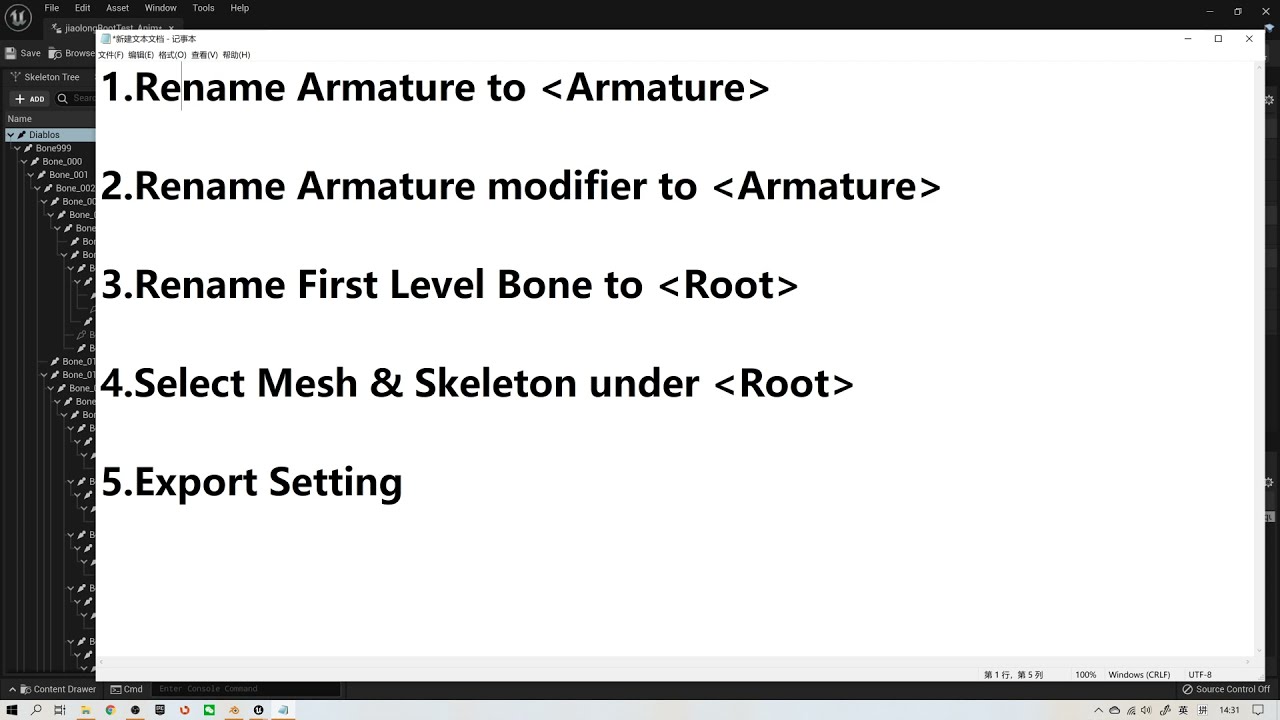
Another Important Setting:
a) Setting scales to centimeters in the Blender with unit 0.01
b) Applying transform (CTRL + A) in object mode for both Object and Armature.
Rename & Select are the Key Points.
How to Export Rootmotion from Blender to UE/root bone/ keep animations in place.
vestal summit
 crimson turtle
vestal summit
the material actually rotes the geom
crimson turtle
vestal summit
the material actually rotes the geom
The material applied to my wheel is able to move the wheel itself (geometry) with the World Position Offset?
vestal summit

A short micro lesson on how to get a Mesh to rotate in unreal engine by just using the material.
Link to the code: https://blueprintue.com/blueprint/00b4qe_r/

What is the Material: Rotate About Axis Node in Unreal Engine 4
Source Files: https://github.com/MWadstein/wtf-hdi-files
Just remember the object will still be in its original spot. the moved visual is not going to give you overlaps. This is why I use it for a wheel.
There was a turtoial that was using a plugin to animate crowds. this is how I found it.
crimson turtle
thanks i will try that
vestal summit
QUESTION: Is there a way to turn off the flow from in the AnimGraph inside the AnimBP?
That constant flow is killing my fps, when most of the time, the hand is in a gripped position.
crimson turtle
vestal summit
https://www.youtube.com/watch?v=HfkfHWnlFbI
I have now a rotation, but it's like there is an invisible pivot point

is it possible to change that pivot point? for the wheel turn on is center?
or it comes with the model of the "car"
the center is there
 vestal summit
crimson turtle
vestal summit
crimson turtle
it rotates around the local rotation.
So you would need to have hte wheels saved at with their origin at the rotation point, bring them in, and move them to the 4 locations.
crimson turtle
so it's something to do on the model part, i guess (it's a model i have bought) i guess i need to ask to change the pivot point for each wheel if i understand correctly
vestal summit
crimson turtle
so it's something to do on the model part, i guess (it's a model i have bought) ...
take your model into Blender, and move the origin of the wheels.
 echo ibex
My game has a generic equipment system and my animation tree for all equipment is the same. I want to use this tree in different equipment. The first thing that came to my mind was to keep the animation sequences in the equipment class and keep the tree fixed for each equipment and add animations suitable for that equipment only. How can I do that
Basically I want to change animations inside a state machine from outside
vestal summit
echo ibex
Basically I want to change animations inside a state machine from outside
If the animation is the same, just use the same component or bluprint, and swap out the mesh.
 lunar spire
I need some help understanding the lyra animation stuff. They dont have any blend spaces in there and change the direction animation based on an enum, ive managed to get an enum with the direction working and changing the animation sequence based on the enum but im not sure how to blend it. Any ideas?
 toxic patio
Can someone show me how to replicate this animation? I'm learning and would really appreciate anyone's help. https://sketchfab.com/3d-models/chatter-teeth-9b8de0c57d6446b1a29913094cfc9e3c

Animated wind up chatter teeth - Chatter Teeth - Download Free 3D model by Damco (@jondameron5)
 sonic edge
quick questions, how do i make it so the animations isnt clipping with the floor?
 sonic edge
quick questions, how do i make it so the animations isnt clipping with the floor...
sonic edge
sonic edge
quick questions, how do i make it so the animations isnt clipping with the floor...
is there a way to lift up the whole model and keep it there?
nevermind fixed it
 frozen leaf
Can anybody refer me to some good material for troubleshooting exporting animations to unreal?
dull nova
(Paid) who can code control rig blueprints
sonic edge
dull nova
(Paid) who can code control rig blueprints
i think you should ask in #hire-a-freelancer or #freelance-jobs
 small dirge
Hello guys !
I am looking for a way to merge 2 animations together. BUT I want to create a new animation from it. Let me explain :
I have Animation A Upper body
I want to blend it with animation B lower body
I know we can blend by bones, but its done live. I was wondering if a program/plugin exists to have as an input Animation A and B then you choose bones/parameters and it create a new animation from it called animation C.
It hope its clear ^^
 storm phoenix
Anybody know if the new "Compatible Skeletons" feature works with Animation Montages? I'm trying to use some UE4 Mannequin anims and montages on the UE5 mannequin. I can play the anim just fine but the montage using that anim doesn't work -- only root motion is applied.
molten scroll
frozen leaf
Can anybody refer me to some good material for troubleshooting exporting animati...
What animation software are you using?
frozen leaf
molten scroll
What animation software are you using?
Blender
 vapid ibex
I'm seeing that when set to simulate physics, my skeletal mesh still plays animations, but subtly - for example my character's toes keep moving, and the shoulders do as well, while the rest of the body isn't animating? 😅
how do I get it to ugh, not be like that, I expected it to just stop animating completely when simulating physics
ripe yew
Any idea why UE 5.0 default control rig stop working after I added jog animation retargeted from UE 4 animations.
 gloomy lintel
hello, I would like to animate a control rig and keyframe it on a sequencer from an existing animation, similar to the backwards mode on the controlrig.
but wanted to do it programmatically and not just from an animation sequence.
any clues on how I could approach it? thanks
 tardy flicker
Hi 🙂 👋
I wanted to know if anyone could recommend a good, detailed tutorial on how to approach procedural first person animations like it's done in this plugin:
https://www.unrealengine.com/marketplace/en-US/product/procedural-recoil-animation-system
I found some tutorials on YT either seem to make it unnecessarily complicated (with custom plugins that one has to integrate) or just speeding up the process of creation way too much without explaining how the math really works.
Thanks in advance 🙂

Unreal Engine
Best recoil solution for a shooter game: take your FPS to the next level
 strong river
Hello im trying to make a hanging ragdoll skeletal mesh but the ragdoll physics are too light. Is there a way to make the ragdoll stiffer?
Solved - its in the linear dampening section of the mesh's skeleton physics window. I overlooked it since i tried that exact thing in a blueprint but it seems to work once set in the main physics window
 full gull
Is there a way to set up blending between animation montage sections inside of UE?
I have a montage with two sections and the transition between the section is a little jumpy, hoping to auto-smooth it out rather than going and editing the original animations if possible
runic peak
What are the IK_Hand_Gun bones for?
misty dagger
runic peak
What are the IK_Hand_Gun bones for?
A number of uses, but primarily I have seen it used for keeping the hands of your player character mesh attached to a weapon correctly.
You can use ik to achieve this effect or bake it in an external program.
 viscid willow
 acoustic flare
is it possible to mirror just one animation?
acoustic flare
is it possible to mirror just one animation?
There's a mirror node available in the ABP
 viscid willow
full gull
Is there a way to set up blending between animation montage sections inside of U...
viscid willow
full gull
Is there a way to set up blending between animation montage sections inside of U...
I don't believe blending is available between sequences within a montage, you'd likely be better off playing two montages one after another, or taking your two sequences into sequencer, blending them using the tools there and creating a new animation sequence which achieves the blend you want.
misty dagger
Blending options should also be available via the animation blueprint. But that is typically a complex system for entities that can do many things
 raw bay
So a very nuanced question - if I wanted to animate a piece of paper to fall from a pegboard (as a triggered lv sequence) how would I be able to export that animation to UE4?
misty dagger
raw bay
So a very nuanced question - if I wanted to animate a piece of paper to fall fro...
You have to bake the motion down into either an alembic sequence or you can give the mesh a few bones and just bake those into a skeletal animation
acoustic flare
viscid willow
There's a mirror node available in the ABP
but that mirrors everything that goes throug. i just want to mirror one animation
viscid willow
I suppose if you mirror the animation and bake it out through sequencer or the create asset functionality, doing so you could save another asset that is the mirrored version. Or control the mirror bool for the specific animation you need.
acoustic flare
hmm could work. frustrating that there is no such button like in unity
viscid willow
Does the unity implementation only work with humanoid?
 rocky coral
I hope this is the right channel to ask. Is anyone here using ALS and adding their own animations in? I'm trying to set up a driving animation, and I'm setting it up the same way I set all my other animations, bot for some reason, parts of the rig are not animating


 small karma
Hi, I've created an animation within blender that contains root motion, however when i ported it into UE5.1, when I play the animation montage at the end it snaps back to the previous position, the thing is I have root motion enabled on the animation asset and I take root motion from everything on the Anim BP so am clueless for why it's still happening


 violet stone
Is it looping?
 sacred anchor
Nope
You wanna see what happens if I loop it?
Nothing
Oh it is looping
Loop is on but loop animation is off
So apparently loop option does nothing
raw bay
misty dagger
You have to bake the motion down into either an alembic sequence or you can give...
Thank you 🙂 I will try those methods. Didn’t think I could use bones or something so small but will give it a try 🙂
 winged portal
Hi everybody! i'm trying to edit this sequence I got from paragon animations.
I want it to "hold" a little bit more before swinging and maybe drag the arm further back.
Is there any way to do this inside unreal? I will have to do this for a lot of animations, any suggestion for tools or pipeline is appreciated.
https://gyazo.com/bd7390ccf2026d799a3e15bd4ca849e9

 cold talon
Hi, someone is using axyz anima 5 in UE5? 😛
 slender hound
Hey, so I imported a m1911 with animations custom made and all, when imported and the animation plays whenever firing the gun, for some reason the gun becomes really small and often goes off screen...

the scale of the amimation was applied through blender
yeah no it gets to like ant size whenever the animation plays
I need help
slender hound
I also dont have arms or a body so I cant use sockets
nvm fixed it
scaling was just off
pastel lily
small karma
If you want the Root Motion animation to continue, you need to add another segment of the animation to Sequencer and then using the right-click menu on the animation segment tell it to match the bone position to whichever bone makes sense for the given animation you're using.
 candid sky
Ehi folks! Do you know how to move lights for animations? I'm making a video where lights move all the time and I can't understand why UE5 doesn't have the "position" keyframe for lights. To resolve this issue, I'm moving the model and the camera, but you can understand how limited is this method. Any solution? Thank you!
vast zinc
Should I add root motion or not when doing character running animations that loop? I enabled root motion but my character is still running ahead of the capsule
 harsh plover
Is it normal to use montages for shooting animations?
viscid willow
acoustic flare
it mirrors the animation itself
Right but it requires the character avatar to be configured to Humanoid. For example if you had an animation that is Generic then the mirror functionality can't be applied
viscid willow
sacred anchor
So apparently loop option does nothing
Loop should absolutely be doing what it's intended to do. Are you playing these assets through a state machine?
runic peak
Is it normal for skeletal meshes to face the Y Axis on import, for all times, but static meshes face X+? I know X is forward for UE5
pastel lily
candid sky
Ehi folks! Do you know how to move lights for animations? I'm making a video whe...
Can you not add a Transform track to the light's track in the Sequencer?
So in my scene I have two Metahumans walking while holding hands. Do any of you experienced animators have any good strategies for efficiently animating handholding in motion? I'm just keyframing it frame-by-frame right now but unsurprisingly it's super tedious and wonky.
 hollow aurora
does someone know how to fix this? it causes an issue where when i shoot my gun teleports to different position, btw i work in blender if that matters

 cinder ledge
How would you go about procedurraly attaching the arms of a charachter to the weapon so that it holds it in the right way and the arms follow the weapons movement. I think it would be possible with control rig but my tests didnt really work well (the fingers were clipping everywhere)
viscid willow
hollow aurora
does someone know how to fix this? it causes an issue where when i shoot my gun ...
That looks like you have offset your root bone. The red bone usually indicates root motion. You can usually zero this out by enabling force root lock in the sequence. But I would also suggest making sure you're animating/exporting from the scene origin im Blender.
candid sky
pastel lily
Can you not add a Transform track to the light's track in the Sequencer?
No I can’t, you can?
viscid willow
cinder ledge
How would you go about procedurraly attaching the arms of a charachter to the we...
Control rig is certainly a way to go to have the arms of your character attached to a weapon with IK. Or at least have one arm follow the other along with the gun. But you'll also need to create a pose for the grip, so the correct hand offset and finger pose. At a guess that's the reason for the clipping you're seeing.
sacred anchor
I added a preview mesh for my socket and now none of my animations are working?!?!

Is that normal?
acoustic flare
viscid willow
Right but it requires the character avatar to be configured to Humanoid. For exa...
Ah yes. Right. Sorry, i misunderstood
harsh plover
Hey is it common practice to use montages for weapon recoil? Or do you use an animation state?
small karma
pastel lily
If you want the Root Motion animation to continue, you need to add another segme...
Is that within the animation itself or anim montage, and how exactly? I am sort of new to this.
pastel lily
small karma
Is that within the animation itself or anim montage, and how exactly? I am sort ...
I'm quite new myself so I'm sure other people have better strategies, but: in Sequencer you'll need to lay down repeated instances of the animation such that they adjoin each other. Then, using the right-click menu on those animation clips you can define which bone in the skeletal mesh to use to match the animation.
Just be aware that your skeletal mesh's origin widget is going to stay at the start mark and not move with the mesh.
sacred anchor
How can I have a bone for a weapon and in an animation have that weapon in the hand?
small karma
pastel lily
I'm quite new myself so I'm sure other people have better strategies, but: in Se...
Been doing some digging, the problem is that I am trying to use it in an animation montage, rather than in sequencer.
Regardless of the settings it's still scuffed I even reimported it from blender
pastel lily
candid sky
No I can’t, you can?
I can! It may depend on the type of light, but here you can see I added a Transform track to a Rectangular Light which gives me the full Transform controls.

 little wyvern
Any clue if its ever planned to add animation tools to Unreal? Exporting existing assets to Blender and reimporting is fine and all but editing anims on the fly would be sick
small karma
little wyvern
Any clue if its ever planned to add animation tools to Unreal? Exporting existin...
Pretty sure you can in UE5.
Or to a certain degree
ripe yew
Can you do damage to animation shared AI?
hollow aurora
viscid willow
That looks like you have offset your root bone. The red bone usually indicates r...
ive tried but it didnt work, also i managed to make the red line dissapear but the green one is still wrong
pastel lily
little wyvern
Any clue if its ever planned to add animation tools to Unreal? Exporting existin...
You can both create and edit animations in UE5.
 undone turtle
Hello ! I'm currently trying to switch from Unity to UE5 and am getting stuck on a very simple animation use case. I can't find a way to record properties modifications as keys on a timeline and being able to replay it with a preview in the viewport, and finally to be able to play this as an animation from a BP during gameplay. Is there any way to achieve something similar ?
The closest i found is playing a "Timeline" in my BP but i can only edit "pure" values blindly, not animating an object in space while recording its position for example (like in any animation software).
little wyvern
pastel lily
You can both create and edit animations in UE5.
oh I had no idea. Would you mind telling me what they named this tool?
I just transitioned from UE4 a month or so ago
pastel lily
little wyvern
oh I had no idea. Would you mind telling me what they named this tool?
It's called the Animation Editor.
 errant hamlet
is there a better way to switch between more than 2 animation states in the anim graph than using an enumerator setup? can't use bool because it's more than 2, I have like 9 different possible "idle" states for example, I'd like to use a simple "switch on string" and just plug in all the diff animations against what a variable returns, but that doesn't seem to work
wanted to check before I go and rework my character graph with all these enum checks...
feel like there's a simpler way to accomplish this
bitter river
what is the best way to select different animations?
in my game i want the character to be able to equip more than 20 different items and each of these has its own idle/walk/jump animation
I tried to use the "Switch on Enum" function but that seems like a lot of work, is there a better way?
 bitter river
errant hamlet
feel like there's a simpler way to accomplish this
bitter river
errant hamlet
feel like there's a simpler way to accomplish this
same here haha
errant hamlet
@bitter river been looking into this more, it looks like that might be the best way to do it
at least it seems to be the only clean way to have some sort of "switch" setup in the anim graph for cycling different animations
so... if you have 9 different idle states, and setup as enum, I guess you just "set" each idle state in a variable tied to the action that triggers each one, and then the enum can be checked against the variable anywhere I guess
assuming that's how it all works
bitter river
errant hamlet
at least it seems to be the only clean way to have some sort of "switch" setup i...
the problem i found is in the state maching inside the transitions if u want a transitoin using the "Time Remaining" u have to use this node for every single animation which u plugged in the switch on enum
 errant hamlet
I'm a noob trying to figure this out 😦
bitter river
errant hamlet
I'm a noob trying to figure this out 😦
me too dont worry 🙁
errant hamlet
yeah you're deeper in than I am, I don't know about all that yet
bitter river
i do feel like there has to be a better way tho
errant hamlet
I was just using simple variable/switch on string setup for everything in the main char blueprint but not having more control of animations from char blueprint led me to the enum stuff, having to change things more from anim bp
viscid willow
hollow aurora
ive tried but it didnt work, also i managed to make the red line dissapear but t...
which green bone are you referring to?
hollow aurora
viscid willow
which green bone are you referring to?
oh im sorry forgot to send what i got
little wyvern
pastel lily
It's called the Animation Editor.
Thanks!
 sand oar
I need some help. I am trying to work with physical animations but everything is extremely floppy and I don't know why. With the settings I have it should be stiff as a board! What am I missing?


 pallid thicket
Hi, i try re-target with ik re-targeter in UE5.0.3 ik bones and i have a problem that even the bones are not retargeted according to the scale of the character. Is there any way to achieve this? We have an adjustable translation mode set for each bone to Globally Scaled (we also tried other settings, but nothing helped). Thx for help.
 mortal ingot
bitter river
the problem i found is in the state maching inside the transitions if u want a t...
mortal ingot
bitter river
the problem i found is in the state maching inside the transitions if u want a t...
Ummm, you can get time remaining for whatever is playing in that state, whatever you call it.
bitter river
mortal ingot
Ummm, you can get time remaining for whatever is playing in that state, whatever...
wait what how??
mortal ingot
right click, type state, look up whatever the state name is. I can't know
bitter river
mortal ingot
right click, type state, look up whatever the state name is. I can't know
do you also know how to make footstep sounds?
usually i would use a notify in the animation sequence but that would mean i have to do that for every single animation sequence again and again which would be too much work
ripe yew
Hi -were you able to find a fix?
 odd sapphire
ripe yew
Hi -were you able to find a fix?
odd sapphire
ripe yew
Hi -were you able to find a fix?
No idea TBH, hit me up tomorrow and I can take a look if we modified the engine or what.
ripe yew
odd sapphire
No idea TBH, hit me up tomorrow and I can take a look if we modified the engine ...
ok thanks
wide idol
From the jogging node, if you stop moving, it'll go to the idle animation 🟢. If you start jogging again, it'll pass through walking > start running > jogging.
If by any chances, from the jogging node, you start walking, it should go to the walking animation 🔴.
Problem here is that the green node 🟢 has the [automatic rule based on sequence player in state] checked and the red node 🔴 isn't checked.

When you walk from the jogging node, this is what happens.

I'm not sure animation blendspaces are the solution. Anyone has experienced something similar?
viscid willow
hollow aurora
oh im sorry forgot to send what i got
My only guess is that the your gun was rigged/skinned in a different bind pose that's not at the origin.
 minor marsh
How can I make this transistion smoother? Im disabling its movement when I enable flaslight, but disabling movement instantly puts it in idle
winged rover
minor marsh
How can I make this transistion smoother? Im disabling its movement when I enabl...
you could use another anilmation and use a anim montage between walkind and freeze state
 true aurora
Hello I am trying to create aim offset animation from a complete animation and I cannot remove frames do you guys know why ?
 minor marsh
winged rover
you could use another anilmation and use a anim montage between walkind and free...
minor marsh
winged rover
you could use another anilmation and use a anim montage between walkind and free...
I didnt understand, should I add play anim montage to here?

 astral bear
i am following a tutorial and it uses a node called "setup event" but i couldnt find it anywhere. all i could find is construction event. was there an update or am i missing something?
 forest parcel
For those familiar with rigging characters for animation, would someone be able to guide me on whether or not it's possible/advised to rig a character with a dress that doesn't have an underlying body?
Essentially I have a character that I want to rig who is wearing a full dress that stretches down to her ankles. Underneath is her feet, and legs up to her thighs, but nothing else (as it would never show as a result of the dress length). Would it be possible to rig the character with a setup like this and have cloth sims, or would I need an underbody in order for the physics of a sim to work?
 fiery snow
Is there a way to display onion skinning while animating in the sequencer?
I am trying to find a way to get any instance placed in a level to have a time offset so they don't move at the same time without using the BP Crowd as I need the instances to be in precise locations in the level. I am wondering if this is something I can set up in the material using the time node.
 solar belfry
why does nothing appear at all in the animation editor when I open the built in animation sequences? no matter what i select it's just this view with nothing, no curves, no keyframes. I'm new to unreal and not sure where i'm supposed to edit animations - i just want to make a few FP_Idle variants for different gun shapes by manually adjusting keyframes
 small portal
I have a skeletal mesh and a control rig and everything with it works fine and dandy and i can control everything in the sequencer. when i add the skeletal mesh to a blueprint it also still works, but as soon as i set the main skeletal mesh as pose leader, the control rig will still appear, but it wont have any influence on the skeletal mesh. what am i missing here?
small portal
cool, restarting the engine nailed it. love these kinda bugs that waste hours
here's an issue that wont fix itself: is there a way to have control rig manipulators of inactive characters hidden? if i have chars interacting with eachother, managing which manipulator belongs to which character is getting increasingly confusing
inactive as in not-selected
 scenic sigil
I think I have a pretty basic question. After retargeting animations from mixamo my character can play the animation montages that I've retargeted but for everything else its just A posing. Before that I could run, jump etc.. Would anyone have any hints as to what is going on?
I've tried making a new IK rig based off of Quinns Skeletal Mesh but the animations like jumping/running still result in her moving just her head
 past marsh
I'm facing a seemingly simple dilemma but I can't seem to get help with crowd animation.... S.O.S
 storm veldt
Anyone had any experience re-targeting a meta human with the advanced skeleton to another advanced skeleton meta human?
Ive been asked to do this at work with our final rig but when trying the humanik method it doesnt quite work properly
using the mocap matcher with advanced skeleton works up untill trying to zero all the joints, then tells me none of them were zeroed out
 tranquil lark
bitter river
what is the best way to select different animations?
in my game i want the chara...
tranquil lark
bitter river
what is the best way to select different animations?
in my game i want the chara...
Look into linked anim layers. Pretty much you give an entry point to your main anim graph and then switch to using that layer. It relies on anim interfaces. @errant hamlet as well. The way you currently have it is alright for an extremely small set of things.
undone turtle
Is there a way to author animations to use inside a blueprint, with a sequencer-like tool ?
tranquil lark
Control rig
Or are you talkin' more non-skeletal? If so, actor sequencer plugin may fit the bill
 wet umbra
Does anyone know if there is a way to persist a string value from blueprint so that when I close a UE app, and re-open the UE app, that string can be loaded back up? Can this be done from BP or do I have to create a C++ class to do it?
undone turtle
tranquil lark
Or are you talkin' more non-skeletal? If so, actor sequencer plugin may fit the ...
yeah i was more thinking like moving a particle system around in my blueprint or a static mesh, thanks @tranquil lark for the tips about the actor sequencer !
i see it's experimental, do you know if it's safe to use experimental plugins ?
i'm surprised something like that is experimental, am i doing something i'm not really supposed to do this way maybe ?
tranquil lark
That's up to you. I use it. Haven't had an issue yet.
undone turtle
ok 🙂 thank you
 steel sonnet
Hey everybody. I built a custom control rig for this tentacled character but it is getting weird double transforms on the head. anyone think they know why? I have a link to the project if anyone wants to check it out
true aurora
What is the yellow line below ?

Each time I replace the idle animation with a new one the legs of the character bends themselves weirdly and get stuck to the ground

 plain drift

 radiant kestrel
Does anyone in here happen to know what is driving Lyra's Manny and Quinn animations? I created a new character based on B_Hero_Default. I set the SkeletalMeshComponent to the same invisible Manny, and same AnimBP that the Lyra shooter hero is using. Applied the same B_PickRandomCharacter that picks the character part. I'm seeing the mesh in a TPose though. Having trouble tracking down where the animations are done.
 safe sun
radiant kestrel
Does anyone in here happen to know what is driving Lyra's Manny and Quinn animat...
safe sun
radiant kestrel
Does anyone in here happen to know what is driving Lyra's Manny and Quinn animat...
Did you identify and setup the animbp they are supposed to use?
Is there a procedural way of adding root motion to an animation that doesn't have one?
Use case: I have a climbing animation (character goes up and front, stopping "unto a platform"). I tried keyframing/faking the root motion by subtracting the differences between locations at the start and end of the anim but it obviously doesn't work for... many reasons. So is there a way to setup the control rig in such way that the root actually "follows" the pelvis instead?
radiant kestrel
safe sun
Did you identify and setup the animbp they are supposed to use?
I'm fairly sure I made a bad assumption. I assumed the default had the idle states. And I think that might have been part of the melee ability.
safe sun
Let me check really quick and get back to u 🙂
It looks to me like the ABP_Mannequin_Base is the base animation blueprint used:
@radiant kestrel


I don't see why it wouldn't work if you set the MannequinBase as the animbp for... any mannequin skeleton in the project.
The last SS is a child of B_HeroDefault (and yes, this one doesn't have any animinstance setup)
 full sequoia
I have a Quadra-ped robot with an entire different skeleton than the standard UE5 skeleton. But I want to use this robot’s animations as a child that’s interchangeable with the other human skeletons within the anim BP I’m using for all the children. Can anyone help or refer me to a video that can?
radiant kestrel
safe sun
It looks to me like the ABP_Mannequin_Base is the base animation blueprint used:...
That AnimBP does not have any reference to the idle animations though. The idle animations aren't referenced anywhere except for the ABP_UnarmedAnimLayers. Which is added in Lyra via the Melee ability.
safe sun
@radiant kestrelYes, my bad, I was just looking through that myself - I'm not sure why they went to such extensive lengths with this setup...
radiant kestrel
It makes sense. Just annoying for start up. 😂 Was expecting idle unarmed to be defaults. But if no one is using them, makes sense not to have them.
safe sun
Yea, didn't dig into Lyra at all - I think I should... There's tons of learning material here 😬 @radiant kestrel
radiant kestrel
Yeah. I finally made it out of UI stuff and to gameplay classes. Was trying to mimic a new character setup, and got stuck on the TPose. 😄
safe sun
Good for you. I'll never get out of UI stuff 😖
Client always wants stupid stuff he later decides was poorly designed and non-extensible, changes upon changes - fk that!
backend tries to accomodate and I re-implement 19750192580 times the same shit in different ways 😆
 vague oriole
I'm seeing an issue where the collision information associated with a mesh is being shown at 0,0,0 when I set it to a SkinnedMeshComponent on an Actor. Do I need to make sure of any settings so this doesn't happen?

 eternal blaze
Hey all im trying to create a IK weapon block system, where if the capsule collision is hit the weapon moves back based on the distance difference.
Its working well however when the IK is applied the right hand only moves back instead of the whole arm
This is because im using a transform modify hand_r, i know this is the issue but what am i meant to use to get the whole right arm to move instead?


Sorry if its a noob question, i just dont know the correct IK node that allows you to transform the whole right arm to adjust

 tiny mirage
can anyone tell me why my anim notifies only fire once and then never fire again?


I watched these notify events and they just never fire again
late sun
Hi all !
Does anyone know if I can use "AnimSlot" without "Montage" ?
Or if I can use "Anim Montage" in the "AnimGraph" ?
late sun
It's ok thanks !
tiny mirage
tiny mirage
can anyone tell me why my anim notifies only fire once and then never fire again...
figured it out, my blend nodes needed to reset children on activation
minor marsh
Is there any alternative for mixamo for animating quadruped animals?
tiny mirage
can use the editor
control rig is pretty nice
can also use dragon ik for helpful stuff

Unreal Engine
An All-in-One plugin tool for easily creating IK for animals and humans
minor marsh
tiny mirage
https://www.unrealengine.com/marketplace/en-US/product/dragon-ik-animal-inverse-...
this is a bit pricy, I think I need to do it myself then, thanks
late sun
Finally I can't make it..
No one knows how can I blend walk and attack animation without montage ?
with "Blend Mask" ?
 somber light
how can i make my hand iks to go smoothly to the target on hit and not like go there in light speed
mortal ingot
bitter river
do you also know how to make footstep sounds?
usually i would use a notify in th...
Check how Lyra did their footstep system, they use an anim modifier that can mass add footstep notifies, but they also use some engine modules to add a context library for different materials.
 wicked coyote
In the Curves Editor, I am attempting to extend the tangent on a keyframe to flatten the animation curve. However, I am only limited to dragging the tangent up/down and NOT horizontally. How do I achieve this? Ex:


As you can see in the example, I am limited to a fixed tangent length.
mortal ingot
...... add another key?
 slim topaz
yee, add another key, or could select the flat curve, on top right, but might have 2 key frames selected
 vestal fiber
Good noon (in Finland) ladies and gentlemen! Im trying to animate some 3d-model of some girl in mixamo for Finland Collage Game Jam (non commercial). My girl and animations works nice in Mixamo, but when import it to Unreal 5, uality goes real bad compared to mixamo (i added it to mixamo as zip (containing .obj, .mtl and textures). Maybe im missing some import options in Unreal 5.. If you can help you get HUGE(tm) credits to end texts.. heres couple pictures:
my unreal importing settings are wrong?


You are one of my Biggest Idols if you can solve me help this. Last time i did this it was, 5 mins job, so thats why im kinda lost 😄
ripe yew
odd sapphire
No idea TBH, hit me up tomorrow and I can take a look if we modified the engine ...
Hi - Did you get chance to take a look?
odd sapphire
ripe yew
Hi - Did you get chance to take a look?
Hey, no sorry about that, I forgot and not working today, can you try tomorrow? Around this time I should be at work 😅
ripe yew
odd sapphire
Hey, no sorry about that, I forgot and not working today, can you try tomorrow? ...
Ok
 dusky turret
I have a little question… My characters usually don’t have balls for eyes so I can’t really animate them by rotating them. I do it through uv animation in blender.Moving the uv map, scaling it etc. can I export this somehow so that I can use it in unreal ?
dusk patrol
Hello ! I'm having a very strange problem in my Animation Blueprint. 😵💫
It looks like my variable is automatically resets by its default value each tick
The problem is that it shouldn't happen because I only set the new value on the beginning after a short delay ( for debug purpose )
You can see on the following screenshots, the fight between True and False :
The bool " Condition " is set to true by default. Same problem for my enum


 hot crown
I clicked one button and now all my vroid animations turned to this any idea what I can do to change it back?
 dusk patrol
may be because of that ? @hot crown ( on the anim section )
You could also reimport your anims with the right skeleton ?
 hot crown
This is how it looked
 vestal fiber
please help in atleast this part.. what is best .fpx format in mixamo for unreal?
never had problems with it before

bigger the better? 🙂
dusk patrol
dusk patrol
Hello ! I'm having a very strange problem in my Animation Blueprint. 😵💫
It l...
- The problem doesn't occur in another Animation Blueprint 😦 only in this one
Looks like the problem disapear IF i check if the pawn Is Valid
But why ???? ( work the same way with the Manny's AnimBP
It's so weird

 hot crown
dusk patrol
may be because of that ? <@267308542963220484> ( on the anim section )
You coul...
hot crown
dusk patrol
may be because of that ? <@267308542963220484> ( on the anim section )
You coul...
Hi what screen is that?
I am in ue4
dusk patrol
Just the window when you double click on an anim sequence
 unreal kestrel
Hi guys. I got a question. I want to create fullbody IK in UE5 but i need and facial animation and fingers and etc. I want to be this rig procedural. Means place footsteps correctly on the ground and etc. Can i create rig in maya and use it as a ik rig in unreal for this purpose or i need to create 2 rigs. one in maya and one in unreal and add control rig to animation in Unreal
 bitter shard
unreal kestrel
Hi guys. I got a question. I want to create fullbody IK in UE5 but i need and fa...
bitter shard
unreal kestrel
Hi guys. I got a question. I want to create fullbody IK in UE5 but i need and fa...
You can't transfer the rig
unreal kestrel
So i need make 2 rigs. One for unreal and one in maya? So i would be able to make animations in maya and use them in unreal with control rig?
hot crown
I clicked Retarget to another Skeleton initially to get myself into the mess
So what I did was duplicate both the als skel and my vroid skel
I then retargeted each to it's dup
I then deleted the dupes and forced the references back to the original skeletons
 ripe yew
Anybody knows how to keep mesh collision in animation sharing plugin? The collision is gone from the mesh.
 coarse osprey
hey everyone:
I have been trying to use property accessors, similar to Lyra, inside of a thread safe function called Update Location Data which is called via BlueprintThreadSafeUpdateAnimation. Whenever I try to use either TryGetPawnOwner.GetActorLocation or GetOwningActor.GetActorLocation, my editor crashes with the following:
Fatal error: [File:D:\build++UE5\Sync\Engine\Source\Runtime\CoreUObject\Private\Templates\Casts.cpp] [Line: 10] Cast of nullptr to AnimBlueprintExtension_PropertyAccess failed
I am pretty lost, so any help would be appreciated. Thanks in advance!


 red pike
Hey guys. I have a small issue. I'm trying to create a very simple prototype and I'm using UEs cube as my character. Is there a way to create some basic animation for it in UE? All the system i see right now seems to require the mesh to have bones. Is there a way around it?
somber light
alright so i have an animation and i want the virtual bones of the feet to follow the target bones so that the foot ik works with this animation.
This is what i have tried: I also mapped the footik chains when retargeting from ue5 mannequin to my character and enabled translation etc for them. This works for retargeting animations that already have the virtual bones following the feet. Now this one apparently doesn't have anything like this (althought it's from the starter pack) but I still need the virtual bones of the feet to follow the actual feet
shouldn't a virtual bone follow the target bone by default? Isn't that what virtual bones actually ARE FOR?
Edit: Now the virtual bones are just in their default position from the t-pose and not moving at all. I would appreciate any idea 🙂
harsh plover
Anyone have a clue how I can fix this? The arms are rotated 180 degrees wrong way, but the spine is following the AimOffset correctly.

If I increase the blend depth, the arms go in the correct position, but the aimoffset no longer has any effect
Like 🤣

 abstract solstice
Good evening gents
I have a question. So, normally I can dash to the direction based on WASD input, but during montage playing, my character could only dash to the direction that the character is facing. For example, if the character is playing a montage of slashing his sword towards his front, even though I press S and dash, my character can’t dash backwards, rather, he dashes forward still. BTW, I’m using montage for dashing as well. Could anybody explain the problem to me? Much appreciated ;D
somber light
how can i change the height of an animation? Here you can see the characters in this jump animation jump really high and i just want to like limit it. But i have other jumping animations too so i don't want to adjust the jump height from the bp

 short wasp
somber light
how can i change the height of an animation? Here you can see the characters in ...
short wasp
somber light
how can i change the height of an animation? Here you can see the characters in ...
Limiting it in BP sounds fine though. It's not like you blanket limit everything, but rather you can adjust the jump height depending on the animation.
So each one will have its own limit
somber light
But how do I know in character bp which animation is being played in anim bp
short wasp
Seems like you could do everything in anim BP, not sure why character BP is needed here.
But you can always have an animation variable in character BP, cast to it and set it accordingly.
wicked coyote
I have a blueprint loaded into my scene and I want to make a parameter keyframeable but the option isn't available to me. How do I enable this function? Ex:
 blazing wave
What is the current equivalent of this in Control Rig for UE5.1?
I don't see this option.

is it "New Null"?
 glass apex
coarse osprey
hey everyone:
I have been trying to use property accessors, similar to Lyra, in...
glass apex
coarse osprey
hey everyone:
I have been trying to use property accessors, similar to Lyra, in...
These functions are not thread-safe afaik. You can get actor location in the event graph and feed variable which you then can use in the thread-safe function. Same with the anim graph.
heavy kayak
https://gyazo.com/203382db2e43c23f3568776744d08ea4
hey guys question how do i get the actor to play the "death animation instantly" not wait for the idle or whatever annimation finnish playing but play the death anim instantly ?
 blazing wave
heavy kayak
https://gyazo.com/203382db2e43c23f3568776744d08ea4
hey guys question how do i g...
blazing wave
heavy kayak
https://gyazo.com/203382db2e43c23f3568776744d08ea4
hey guys question how do i g...
it should play instantly as long as your bool for "isdead" or whatever you named it activates.
abstract solstice
Hi guys, a quick update, yesterday I was asking about how to dash following WASD input even though I'm using anim montage, which has root motion. I think the solution has to do with motion wraping, which can change montage's transform info.
 sly tide
Hey! So I'm having some trouble importing Mixamo animations with root motion enabled. I have a melee combo attack animation that uses root motion and when it plays, the character goes in the air and then rotates to the left after the animation is finished. I tried to use Blender addons for Mixamo but the animations were still glitchy.
In the end I decided to just use a Paragon character and the animations that come with it.
I have a question tho, why is animation retargetting useful? And specifically, why do people want to use skeletal meshes that have the skeleton identical to the one of the mannequin?
frozen leaf
Hello would anybody know why I am not seeing the Animations in an Animation Blueprint?
 molten scroll
vestal fiber
never had problems with it before
molten scroll
vestal fiber
never had problems with it before
I use the top option, and export static T pose character first. then go back and grab your animations WITHOUT SKIN. Download as fbx, no zip needed. "should" be all that's needed...
abstract solstice
Helliu guys, newest update on previous animation montage thingy, I managed to solve my dodge direction problem using motion warping plugin
by getting my WASD input vector, and give the input to motion warping location, and disable location change, only rotation change enabled, and I can dodge whatever direction I want even during my combo
 unkempt cosmos
I downloaded some animations from mixamo (Along with a character) and edited them in 3ds max (so that when make the walking animation they stay still), but when i import them to max, the character becomes smaller
Any idea on what that happens?
For reference, that didn't happen when I imported the animations without editing
abstract solstice
how do you know the character is smaller?
since there is not reference object, like a car or house
unkempt cosmos
In the blendspace and when you spawn the character in the map
Also, it's pretty obvious that it is smaller
Since it literally shrinks when you transition it with a animation that isn't edited
abstract solstice
is the character from mixamo smaller than usual UE manny?
storm veldt
Hiya Im retargeting based off this documentation. https://docs.metahuman.unrealengine.com/en-US/retargeting-animations-between-metahumans-in-unreal-engine-5/ retarget has gone awesome, other than the fact shes squatting due to height difference. Is there a way to offset the weist in the x (up) axis? i thought it would me the same as offsetting the arms but due to no ik target i cant change the value. any help greatly appreciated


Retarget animations from one MetaHuman to another.
 sour flicker
have you tried to see if there are any video tutorials on the same thing?
storm veldt
currently doing that now, but they seem to point to a different re targeting method
misty dagger
got it
storm veldt
anyone know how to change the target from the pelvis to the root?
 ripe gazelle
i need to try and learn some control rig stuff but i havent seen an introduction yet that i am comfortable with
i keep coming back to asking one specific thing
can i use control rig on my already animated setup just to make my attack swing animations to be dynamically altered
in real time
 blazing dune
What is the UE 5 replacement for the Finalize Bone Animation node?
 jaunty hill
is there anyone tht has a free animation asset or recommend one?
blazing dune
ALS V4, strip out the animations
jaunty hill
thanks
minor marsh
Why my ai stuck after pose after it uses anim montage
ripe gazelle
Do i want a rig or a 2 bone ik if i want to limit an existing animations movement?
ripe gazelle
can i make some kind of overlay that shows the animation on the 0.0 alpha

i mean at the same time its 1.0
 polar terrace
Hello, does anyone know why when I execute a montage with root motion (since the animation has a movement that is a small step forward) it flies out?
 clear dune
I have two questions about UE4 retargeting from Paragon characters.
1: Supposedly the Orion rig prevents deformations when retargeting from Paragon characters to Mannequin. However, I have had no such luck. Is this true, or not?
2: I can't be the only one who's retargeting from Paragon characters to Mannequin. Is there a place online where people have the retargeted animations already ready to go for the Mannequin?
viscid willow
sly tide
I have a question tho, why is animation retargetting useful? And specifically, ...
Retargeting is really useful because you can have the same animation play on a differently proportioned skeleton. This doesn't necessarily require the skeleton to be the exact same in terms of bones, but it helps to have the exact same skeleton hierarchy such as the mannequin. Because then the animation can be mapped accurately, and without the need for something like an IK rig.
The thing to bear in mind with retargeting is that while you can play the same animation on a different skeleton, your animation may not look the same, because of different bone lengths things like foot and hand contacts may not be where you expect, and that's where things like the IK rig or some runtime rigging can correct things like that. I would recommend this full video, but there's an excellent example at 43:13 of retargeting for accurate hand contacts: https://youtu.be/vZW8mxlQJEk

Senior Gameplay Programmer Laurent Delayen explores animation retargeting and what it can do for improving your animation workflow.
sly tide
viscid willow
Retargeting is really useful because you can have the same animation play on a d...
Thank you! I appreciate it!
 sharp karma
guys, what's the proper workflow to animate with control rig, do I have to create a new sequence for each new animation?
harsh plover
Hey sorry to ask this again, but its driving me crazy. Ive been stuck on this for many days.
My AimOffset makes the arms rotate 180 degrees in the wrong direction. The spine works as it should.
Any clues to what it can be?
 polar terrace
viscid willow
Retargeting is really useful because you can have the same animation play on a d...
polar terrace
viscid willow
Retargeting is really useful because you can have the same animation play on a d...
Sir, since yesterday I have been trying to retarget unreal 5 to a custom character that I have, but root motion works very badly for me and I need to activate it since they are combat animations with movement, which is what what am I doing wrong?
Thanks in advance
sharp karma
I have a control rig set to my skeleton mesh and I want to edit a mixamo animation with it, but the option "bake to control rig" doesn't find the rig I've set, what's wrong?

 sharp karma
found it, it need backwards solve
 solemn kestrel
I need some help, I am trying to use this plugin for IK VR player movement, and the legs and feet are meant to automatically update, They use the mannequins 3rd person animations for leg movements, the problem I'm having is that the leg movements are only doing "walking forward" animations no matter what direction i go instead of the what is intended. What can i do to fix this? I'm not the best with animation blueprints.
 sand oar
Need some help #blueprint message
 rigid perch
Hey anim crew I want to be able to play a randomized non looping animation in an ABO. So basically the functionality with the randomized get and the montage in that picture I sent but in ABP. Any ideas?

 short wasp
harsh plover
Hey sorry to ask this again, but its driving me crazy. Ive been stuck on this fo...
short wasp
harsh plover
Hey sorry to ask this again, but its driving me crazy. Ive been stuck on this fo...
Maybe some of your bones are rotated by 180 degrees? I'm not sure what problems it caused for me, but I think there were some, it was a while ago. Anyway check blender, that might be a solution, though it requires fixing all animations made up to this point.
ripe yew
Is there any example of using the default control rig from the UE5 template on quad legged animal?
viscid willow
polar terrace
Sir, since yesterday I have been trying to retarget unreal 5 to a custom charact...
do you have some screenshots or footage of the animation before and after retargeting?
polar terrace
viscid willow
do you have some screenshots or footage of the animation before and after retarg...
I was able to solve it hehehe, it was difficult but I did it, I learned many things from retargeting hopefully I can help someone around here
viscid willow
fantastic, I'm curious, what was causing the issues?
 sudden sedge
What would be the best way to "ragdoll" a character?
I have this setup

but it basically freezes the animation then the pawn falls through the floor not respecting world collision
 midnight dock
Okay so when retargeted in 5.1 i have an issue i didnt have in 5.0. Going from ue4 skeleton to ue5/meta human results in weird translation issues in the fingers exactly the same on either ue5/metahuman skels. Trying to figure out how i solve this everything else works as intended. I've tried setting compatible skeletons from ue5 to the ue4 one with all my animations. immediate crashing when Previewing anims with the skeleton in the compatible array. I've attached Screen shots of this issue. Wondering if anyone knows whats happened with the changes between 5.0 to 5.1 and how do we fix this. I've also gone into the skeletons and set everything but the root/pelivs to skeleton in retargeting options


Or is this happeneing because the Pose is different from ue4 to ue5/meta
didn't matter in 5.0 though
 solemn kestrel
I need some help, I am trying to use this plugin for IK VR player movement, and the legs and feet are meant to automatically update, They use the mannequins 3rd person animations for leg movements, the problem I'm having is that the leg movements are only doing "walking forward" animations no matter what direction i go instead of the what is intended. What can i do to fix this? I'm not the best with animation blueprints.
 viscid willow
solemn kestrel
I need some help, I am trying to use this plugin for IK VR player movement, and ...
viscid willow
solemn kestrel
I need some help, I am trying to use this plugin for IK VR player movement, and ...
Are the Movement Direction values being updated? That float is what should drive the blend space to play different directional animations
 mortal granite
so im not sure how screwed I am, but right now im at a loss. I was making clothing for my character which has hundreds of referenced animations, I imported my clothing asset and got this message:
`FAILED TO MERGE BONES:
This could happen if significant hierarchical change has been made - ie inserting bone between nodes
Would you like to regenerate Skeleton from this mesh?
WARNING: THIS WILL REQUIRE RECOMPRESS ALL ANIMATION DATA AND POTENTIALLY INVALIDATE
There are 5 options: Yes, No, Yes All, No All, Cancel`
while not really thinking much of it I clicked yes, and now all of the animations currently referenced by the main skeleton are A-Pose. does anyone know what I could do to fix this?
midnight dock
mortal granite
so im not sure how screwed I am, but right now im at a loss. I was making clothi...
Probably have to replace skel then retarget again.
Although something is wrong in 5.1 if you see my above pictures.
mortal granite
ah im in 4.27 right now
midnight dock
So if your targeting to a 5 skel the hands are busted now for some reason and they never were before
Lol hopefully over the weekend I have an answer to this but I'm probably going into a blank project with just one anim asset pack and going to try and retarget from there see if the issue happens again. Super annoying and burns up a ton of time
Seems like 5 has been super volatile with certain things making progress slow down significantly
blazing wave
I'm seeing this note on my Control Rig node in my Anim BP. Anyone know how to fix this?
 solemn kestrel
viscid willow
Are the Movement Direction values being updated? That float is what should drive...
solemn kestrel
viscid willow
Are the Movement Direction values being updated? That float is what should drive...
I’m not sure if the movement directional values are being updated? Where can I find this? In the player blueprint under construction? Or can I find it in the event or anim graph?
I’ll turn my pc on soon and show you what I can.
viscid willow
solemn kestrel
I’m not sure if the movement directional values are being updated? Where can I f...
Variables like that should be updated in the event graph. And in the case of the direction that's something that you'll want to read from player input.
 past ermine
having issues with blending two animations: I pulled animations from mixamo (along with a character model) and im trying to seperate upperbody animations (run, idle, shoot1H, shoot2H) from lower body Animations (idle,run)
(blueprint in the first image)
For this I am using a layered blend per bone with a blend mask
(Second image is my lower body blend mask, 3rd is upper body)
In the video at the end is the result, He is supposed to be running and Shooting and each specific state machine works fine on its own but they arent blending at all
And the final image is the settings for the blend node. A Similar thing happens if I select lower body where he will run but not shoot. I basically want the spine to be a hard cut off where None of the the upper body animations play at all on the legs. and NONE of the leg animations play on the upper body.
not reall sure what im doing wrong or how to correct it.


 vernal gull
hi all, newish here and getting ready to embark on a big project. i'm contemplating doing 'filler actors' for humans and going through the whole scenes and c oming back in over with metahumans and get more granular with poses, etc. or is it worth it to do that and just set it up as intended nfrom the start?
i guess i'm asking is it more trouble than its worth doing filler actors just to get thorugh a shot
 rain relic
hi idk where to exactly ask this but since its more of an animation thing I tough here is the best, so basically I made a simple climbing animation and set it up in the animation blueprint to play but how do I make it so the ladder properly lines up with the animation (basically how to stick the character close to the obj to play it correctly )
mortal granite
would anyone know why when i retarget my animations they turn out like this?
 mortal granite
ah ok fixed it by setting the translation retargeting to skeleton instead of animation 😄
crimson stream
Yo- how do you incorporate multiple idle animations into a anim bp? Do you create a blendspace for all the idle anims then a blendspace for movement along the 8 axis and combine these somehow in the anim bp?
 wise lava
hey how to cut specific duration in animation sequence and make another animation sequence from it?
 naive mountain
Guys, I have my own character I'm trying to retarget, but the way I usually rig my characters, they have 2 bones for the upper arm, 2 for the lower. Same deal on the legs. Now if I retarget I'm only going to want it to bend at the elbow and knee, but it's just bending all the bones, is there anyway to prevent this in the retargeter or if I have to do something in the IK rig
 halcyon gate
Can any1 answer why my whole pc freezes everytime i try to bake an animation? Someone help
 tropic ridge
is it possible to rotate a bone in specific bone space?
 misty dagger
harsh plover
Hey sorry to ask this again, but its driving me crazy. Ive been stuck on this fo...
misty dagger
harsh plover
Hey sorry to ask this again, but its driving me crazy. Ive been stuck on this fo...
lol
Aimoffsets are tricky
 violet latch
Leaving this post for everybody that has the same error: if you add keyframe in your animation, but it is not applied in the editor do this:
set the “retargeting options” to animation instead of skeleton.
thanks to Allonan in https://forums.unrealengine.com/t/used-persona-to-key-new-additive-layer-track-and-the-newly-keyed-track-does-not-show-up-in-blendspace/332981/21


Epic Developer Community Forums
This problem was plaguing me as well. After hitting “apply” in Persona it worked correctly for me. If “apply” is grayed out just re-key part of the animation and it will light up. Hope this helps.
midnight dock
violet latch
Leaving this post for everybody that has the same error: if you add keyframe in ...
Yeah that's a pita by default it should be animation but when retargeting sometimes people gotta change that all to skeleton lol so changing it back after retargeting is probably the best course of action
molten scroll
wise lava
hey how to cut specific duration in animation sequence and make another animatio...
One way is: make a duplicate first in the asset browser so you don't mess up the original on accident. Then double-click the animation sequence to open it in the editor. rt-click on the timeline where you want to make the trim, and choose "remove frames..." either left or right, repeat as needed, then save.
 wide pilot
Hello, I'm still not there but i know that i will need to use a chain as a weapon with animations. Its not going to be that hard right ? 😅
 obsidian pawn
is there a way in control rig to tell a bone not to rotate past a certain angle?
little wyvern
Having an issue - assets I've been given to work with don't have their IK foot targets animated with the skeleton.
I was wondering if it is possible to evaluate bone positions just prior to applying IK - so that the IK targeting is not affected by its application
 errant forge
Hi!
Does anybody know a good simple not too long tutorial on how to use IK to animate a tentacle having different bones. I need to give it a target and then to make it interpolate the bone rotations to reach that point in space
vernal gull
hmm why is installing with editor symbols so massively large? it bloats the install 150%
 ashen elk
Hey everyone, how are you doing?
I'm very new to UE and I'm having some issues with my blend space. The animation interpolates wrongly on a specific angle.
This specific point is causing issues. The mirrored point on the left works perfectly

If anyone could point me in the right direction on solving this, I'd be very happy!
viscid willow
ashen elk
This specific point is causing issues. The mirrored point on the left works perf...
Hard to say exactly what your experiencing from this angle, do you happen to have some footage to show the result?
viscid willow
little wyvern
Having an issue - assets I've been given to work with don't have their IK foot t...
Are you talking about implementing IK without Animated IK foot targets?
If so, you can achieve this with Virtual Bones or Control Objects in Control Rig.
little wyvern
viscid willow
Are you talking about implementing IK without Animated IK foot targets?
If so, ...
Oh hell yeah. I'll look it up, do you know if there's a go-to tutorial that explains their use?
viscid willow
crimson stream
Yo- how do you incorporate multiple idle animations into a anim bp? Do you creat...
In the Idle state, you could use any of the Blend Nodes available to choose between different Idle animation assets. E.g. Blend By Int you can set an integer value for the different idle poses, or perhaps a Blend Multi and you can even blend multiple poses together for more variety: https://docs.unrealengine.com/5.1/en-US/animation-blueprint-blend-nodes-in-unreal-engine/
Alternatively you can make the Animation Sequence asset a variable in the Sequence Player and replace the asset through Blueprint.
To achieve this your idle would need to be independent of your locomotion blend space in its own state. IMO it's better to have the Idle in a separate state because as you approach zero in the blend space you're blending more and more with the idle pose which often results in foot slide and undesireable poses, unless you've implemented something like Dark Souls where the movement is stepped from idle to walk to run with no intermediate speeds, but again, if it's done that way there's no reason not to have your idle be in its own state.

Animation nodes that blend multiple animations together based on a set of criteria.
crimson stream
viscid willow
In the Idle state, you could use any of the Blend Nodes available to choose betw...
Very helpful actually thank you
viscid willow
little wyvern
Oh hell yeah. I'll look it up, do you know if there's a go-to tutorial that expl...
I'm a big fan of @misty dagger tutorial on Foot IK which is all done in Control Rig and works from the animated skeleton: https://youtu.be/GTOs4XwzcME
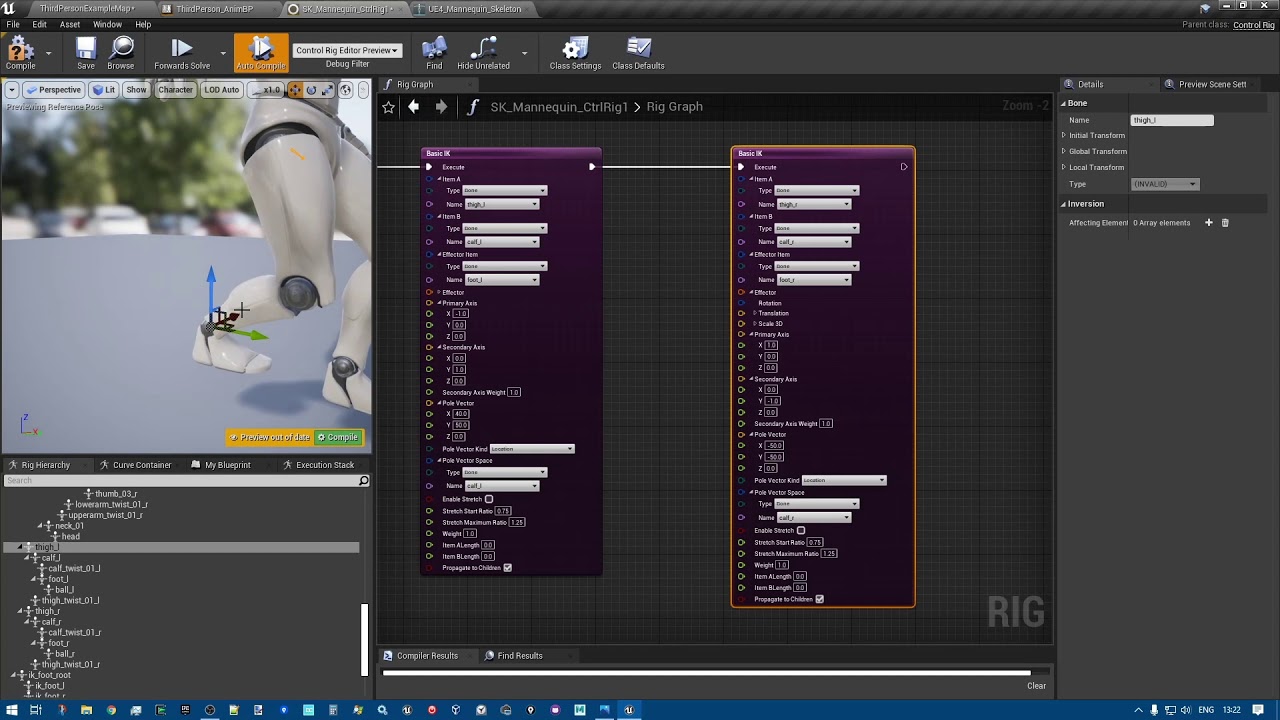
Making Legs IK with Control Rig using Two bones IK and Full Body IK!
Part 1 (basics): https://youtu.be/jfYZymr1svs
Part 3 (4 legs ik) https://youtu.be/mrXs8xLAr3k
little wyvern
viscid willow
I'm a big fan of <@456226577798135808> tutorial on Foot IK which is all done in ...
Thank you!
viscid willow
little wyvern
Thank you!
If you wanna know more about Virtual Bones there's a great example timestamped here: https://youtu.be/Zwc9uuOYfFg?t=830
I would recommend the full video but this example shows how virtual bones are used to create new relationships in the skeleton.
Epic Games' Animation Programmer Jurre de Baare recaps all of the animation features built for Unreal Engine over the past year, including those created for Fortnite that have made their way back into the tools. In this presentation from Unreal Fest Europe 2019, you'll learn how new features and upgrades have been battle-tested to improve animat...
 lunar yacht
Anyone understand weight painting and rigging in Blender? Can't seem to get lips and eyelids right
Ignore the uncanny valley. It's my first sculpt

The geometry isn't quite right understandably
Here's an example of one of the weight paints

Some really bad deformation going on here
 ashen elk
viscid willow
Hard to say exactly what your experiencing from this angle, do you happen to hav...
ashen elk
viscid willow
Hard to say exactly what your experiencing from this angle, do you happen to hav...
Here it is! It's using the blend space I sent above
viscid willow
ashen elk
Here it is! It's using the blend space I sent above
Could it be that you have the wrong sample at this point in the blend space?
sand oar
I have root motion animation that I want to remove the root motion from and make the pelvis recive all that animation. How would I go about that?
viscid willow
sand oar
I have root motion animation that I want to remove the root motion from and make...
In the animation asset there's a check box called force root lock which "Locks the Root" to the 0, 0, 0.
Do you have a root bone or is the pelvis the first bone in the hierarchy?
viscid willow
That seems very strange. You enabled this option? https://docs.unrealengine.com/5.1/en-US/root-motion-in-unreal-engine/


An overview Root Motion Animations in Unreal Engine.
sand oar
I know about that. Like I said it just makes him flail his arms. But I also just realized if I uncheck the root motion it does exactly what I want and make the pelvis take all the motion from the root and keep it at 000
Thanks
viscid willow
I don't understand it but if it's working then 👍 ◕_◕ 👍
obsidian pawn
Hey guys, I am trying to rotate the the skeleton of my character to match where the crosshairs are, since my animations rotation is a little bit off. I do my weapon trace straight out from the barrel of the gun, instead of tracing to the crosshairs. Unfortuantely I can't seem to get my animBP/Control rig to work to achieve this. Any thoughts? My BP is below
 past marsh
Hey guys, im an unreal noob. I want to find out how do I apply animations from SK_mannequin to SK_manny.
I can see all the imported animations of mannequin, but it's it suppose to automatically transfer to all UE skeleton?
harsh plover
past marsh
Hey guys, im an unreal noob. I want to find out how do I apply animations from S...
You have to retarget the skeleton 😉 Look it up on youtube! Tons of good tutorials 😄
harsh plover
obsidian pawn
Hey guys, I am trying to rotate the the skeleton of my character to match where ...
You should use aim offsets for this 😄
obsidian pawn
harsh plover
You should use aim offsets for this 😄
I think I have a bug in my aim offset then, cause it is not working the way I need it to😂
past marsh
harsh plover
You have to retarget the skeleton 😉 Look it up on youtube! Tons of good tutoria...
thanks... I though if I had a UE skeleton I wouldn't have to retarget😫
 lusty ore
Is there a tutorial maybe on how to make it so when I press Jump I perform jump from the leg that was on the ground? ALS kind of have it. And I want to make it on usual UE4 mannequin base
 steel pilot
Hey, is there a way to make deformation data for the Unreal Engine ML Deformer in Blender and export it to Unreal Engine?
steel pilot
lunar yacht
Some really bad deformation going on here
Maybe smooth and increase the weights per bone?
 wanton surge
why does animman from als look like this in blender?
 vernal gull
is there an easy way to export some of the prefab metahuman animation cycles?
basically all the samples you get when making your character, or do you have to literally bring it into project and keyframe with the control board
viscid willow
wanton surge
why does animman from als look like this in blender?
Blender bones are visualised that way because of the way Blender handles Bone Orientation. In Maya for example, the bone orientation can be independent of the connection between bones. In Blender you must orient the visual bone to establish an orientation and the hierarchical connection is shown through Relationship Lines. The result is ... an ugly mess.
You can change the bone axis on import and get a cleaner result that better resembles a Blender rig. You'll find the settings on the Import window under armature:
 wanton surge
viscid willow
Blender bones are visualised that way because of the way Blender handles Bone Or...
wanton surge
viscid willow
Blender bones are visualised that way because of the way Blender handles Bone Or...
So its not necessarily bad that it looks like this?
I am quite new to blender
viscid willow
Not at all, it's a visualisation quirk of Blender compared to other software. That said, it's an annoying quirk which makes it difficult to work with/understand.
vernal gull
viscid willow
Not at all, it's a visualisation quirk of Blender compared to other software. Th...
it's not a bug it's a "feature" 😄
viscid willow
I'm looking forward to the new developments on Blender animation and rigging, this already looks like a huge improvement if this is anything to go on: https://fxtwitter.com/sastuvel/status/1632413407528865798?s=20
And after a nice Sunday afternoon coding, we have a prototype for a new armature drawing type in #Blender
By drawing only the heads of the bones, as spheres, it should be considerably simpler to import armatures from other softwares too.
#b3d #animation #rigging #devfund
↘️ Quoting jer.bot.net 🐘 (@jerbotnet)
Different way to view a Blender...
 mellow flame
Question re: animations. In my game I'll have numerous weapon categories, each with unique animations (both applying to upper and lower body of the hero). I'm thinking about just making one massive state machine that plays the right animations for the weapon type currently equipped. Also been thinking about maybe just making unique anim bps for each one of these types and changing the hero's anim bp when they change weapons. Not sure what the best approach would be.
viscid willow
mellow flame
Question re: animations. In my game I'll have numerous weapon categories, each w...
A massive state machine is not always ideal because of scalability and maintenance. And swapping ABP's can be problematic at runtime but multiple ABP's is kinda the right idea. I would suggest looking at Linked Anim Blueprints in the ABP, this might be more what you're looking for: https://docs.unrealengine.com/5.0/en-US/animation-blueprint-linking-in-unreal-engine/

Modularize your Animation Blueprint logic by using Animation Blueprint Linking and Templates.
There are very good examples of this in action in the Lyra demo
mellow flame
viscid willow
A massive state machine is not always ideal because of scalability and maintenan...
Thanks!
lunar yacht
steel pilot
Maybe smooth and increase the weights per bone?
I tried that, it might be weighted wrong or applied wrong. I can't find a good character mesh, and I dont wanna pay $200 for character creator 4 lol. There aren't very many free character meshes out there
 slender stirrup
I made a mesh and an animation for the mesh within blender and when trying to export/import the fbx to UE5 the UE5 editor just freezes after selecting the import properties & hitting import.
There is no skeleton or armature defined in blender but the animation plays fine (it's just a simple rotating transform of some of the objects in the mesh over 120 frames). What could be going wrong?
midnight dock
slender stirrup
I made a mesh and an animation for the mesh within blender and when trying to ex...
not sure but you can do this in sequencer in engine easier
heavy kayak
https://gyazo.com/5a34392ae12bfbf891eb69426028695c
hello how would i make the "is faling" condition im using "isFaling from movementcomponent" for the jump/jumpwhilerunning

can i set so the annimation has to finnish before is faling transition somehow ?
 obtuse widget
Not sure if I should put this here or in blueprints.
I want to achieve this method: https://www.youtube.com/watch?v=LNidsMesxSE
But I'm already stuck on tilting the character in the direction of momentum, anyone know how to do this in an anim bp?

In this 2014 GDC session, indie developer David Rosen explains how to use simple procedural techniques to achieve interactive and fluid animations using very few key frames, with examples from indie games like Overgrowth, Receiver and Black Shades.
GDC talks cover a range of developmental topics including game design, programming, audio, visual...
really I'm just trying to apply a slight tilt to the player root bone
slender stirrup
Why is only 1 bone from my skeleton listed in the physics asset?
I found the option, it was a cogwheel that had Hide Bones selected:
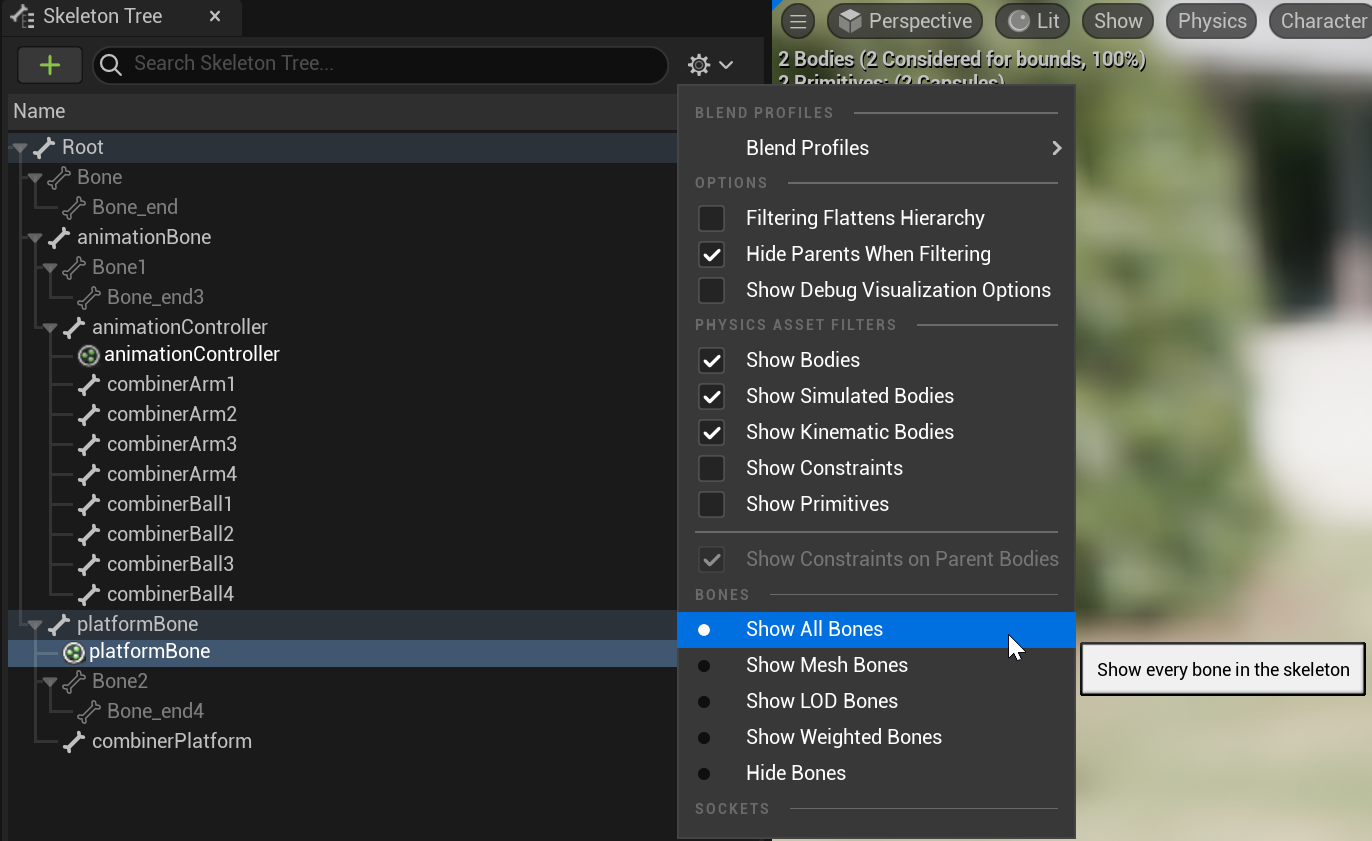 viscid willow
obtuse widget
Not sure if I should put this here or in blueprints.
I want to achieve this met...
viscid willow
obtuse widget
Not sure if I should put this here or in blueprints.
I want to achieve this met...
There's a section in here on leaning: https://www.tesla-dev.com/post/paragon-basecharacter
I made a reddit post about leans when I was trying to work it out a few years ago: https://www.reddit.com/r/unrealengine/comments/7w3vcj/help_character_animation_procedural_turn_leans/
I would suggest applying the lean to the Character Hips, rather than the root. Leaning from the hips gives a better sense of weight as the head moves in the direction of the lean and the feet move out to compensate. Leaning from the root will look off balance, explanation here: https://youtu.be/_1j5Tf6ulII?t=580

Tesla Dev
Requirements: Unreal Engine 4.19+, Paragon Characters from UE4 Marketplace. In this tutorial, we are going to setup a base character that we can use as a parent to any of the other paragon characters on the UE4 marketplace. YouTube Video Tutorial Create the base character blueprint We will start off by creating a character blueprint class in a f...

reddit
5 votes and 5 comments so far on Reddit

In this GDC 2016 session, Riot Games' Alex Lehmann is joined by 5th Cell's Amy Drobeck-Jones, ILM's Jean-Denis Haas, Sucker Punch's Billy Harper, Epic Games' Jay Hosfelt, and Phoenix Labs' Simon Unger as they explain the best tips and tricks for improvig your craft as an animator.
GDC talks cover a range of developmental topics including game d...
 glass hazel
Hi, does anyone know if it is a good idea to use anim notify state to do hit detection? For context, I am creating damaging spells that will need to detect hitting enemies over multiple frames in an animation (or for a duration if I am holding a beam attack). For one frame detection I used an anim notify and wasn't sure if this was good practice or not. If you know of any good resources on this topic, I would greatly appreciate them! thank you
 dry gust
hello I used to retarget in ue4 quite simply with a rig, how to do it using rig I have created that worked? ue5 doesnt give me options
crimson stream
This little box is not appearing in my anim graph wondering if theres a quick way to turn it back on
 viscid willow
crimson stream
This little box is not appearing in my anim graph wondering if theres a quick wa...
viscid willow
crimson stream
This little box is not appearing in my anim graph wondering if theres a quick wa...

that state machine
crimson stream
viscid willow
https://tenor.com/view/txt-hueningkai-gif-20000381
State machines not working then?
viscid willow
It's hard to say from the screenshot. There are a lot of transitions which makes it difficult to debug. Are you saying the Idle state isn't playing?
crimson stream
viscid willow
It's hard to say from the screenshot. There are a lot of transitions which makes...
Yeah- and there's no red dotted line showing flow- really weird.

Is that debug?
the red lines that flow ?

These wont show- not sure what happened
crimson stream
viscid willow
It's hard to say from the screenshot. There are a lot of transitions which makes...
It's the debug
Everytime I recompile the debug sets to nothing
echo ibex
There are equipment used in the game with the same animation tree with different animations. Can I parametrically set animations in an animation tree?
clear dune
I have two questions about UE4 retargeting from Paragon characters.
1: Supposedly the Orion rig prevents deformations when retargeting from Paragon characters to Mannequin. However, I have had no such luck. Is this true, or not?
2: I can't be the only one who's retargeting from Paragon characters to Mannequin. Is there a place online where people have the retargeted animations already ready to go for the Mannequin?
Also, I feel like I might be asking the wrong questions. Do people normally experience deformations of Paragon animations when retargeting? It takes me hours to fix up the fingers and such and in the end some things still don’t retarget right, like thigh position. Is there something I’m missing?
scenic sigil
Is there a way to create an animation sequence in the editor without editing existing animation sequences to create a new animation?
oh I see I have to be in animation mode
scenic sigil
Are there any recommendations on resources how to be more efficient when trying to animate with control rig in the unreal editor?
 still seal
I would need help with animation. i write in metahuman, but probably is more related to animation part #metahumans
eternal ivy
Setting up a control rig on a custom mesh, a bat, its a giant bat, (creature, not baseball) but its still really tiny. All the controls so far are set to a scale of .02 and such. Anyone have any tips or suggestions for working with setting up a rig for a tiny mesh?
vapid quartz
is there a way I can call Montage_Stop and instead of transitioning straight back to my neutral idle state I instead transition into a run cycle if I detect the movement input magnitude is 1?
in my anim instance?
Better question: Is there a way I can create a new entry node in my anim instance movement graph with a different transition rule to distinguish where the anim montage can transition to an anim sequence?
 lilac plank
vapid quartz
is there a way I can call Montage_Stop and instead of transitioning straight bac...
lilac plank
vapid quartz
is there a way I can call Montage_Stop and instead of transitioning straight bac...
I don't know of any way to transition out of a montage into different states depending on conditions. However I think this setup will work well with little hassle for you:

As long as a montage is playing it overrides your locomotion. When your montage is finished it blends back to your locomotion, which would be idle if standing still or a run cycle if you're moving
Any way to override transition duration in child anim bps?

"video starts clearly not manequins" what do you mean?
Anyways, if you want an easy way to create your own playable character, you could:
- Export mannequin as fbx
- Import fbx to Blender / Maya
- Remove mannequin mesh
- Create your own mesh
- Bind your mesh to mannequin skeleton
- Export your character as fbx
- Import your fbx to ue, choose mannequin skeleton so it shares skeleton with mannequin, that way you can use mannequin animations on your character
 olive storm
is this the right channel to ask this? Playing these animations with the Play Animation node using Animation Sequences, and for some reason it defaults to no animation sometimes. Any idea how to fix this?
obsidian pawn
Hey dudes, I am having an issue with my aim offset where the aimoffset yaw is greater is not lining up with my crosshair, where the pitch follows it more accurately. Any thoughts on how to troubleshoot this or fix?
clear dune
I have two questions about UE4 retargeting from Paragon characters.
1: Supposedly the Orion rig prevents deformations when retargeting from Paragon characters to Mannequin. However, I have had no such luck. Is this true, or not?
2: I can't be the only one who's retargeting from Paragon characters to Mannequin. Is there a place online where people have the retargeted animations already ready to go for the Mannequin?
Also, I feel like I might be asking the wrong questions. Do people normally experience deformations of Paragon animations when retargeting? It takes me hours to fix up the fingers and such and in the end some things still don’t retarget right, like thigh position. Is there something I’m missing?
 craggy knoll
Anyway of showing which curves exactly are transmitted?

 drifting karma
Hello talented people, I have a question and I don’t know from were to start. I’m looking in linking a character movement to an object. I want to make a cinematic and would like to move this object inside the sequencer and the character to follow its direction. The thing is I need somehow to make the character always have its feet to the ground and be able to follow in every direction and speed changes. I can implement the character movement like we do with first or third person movement. But how to I make the character always follow the terrain and how can I control everything by moving only the handle object. Does anyone know how can I go about it, or what documentation should I follow ? Thanks in advance!
 swift vine
Hi, do you know if there is a way to change animation transition blend time in runtime? Either any BP, or anim graph or anywhere?
 smoky shell
I made a plugin that can convert your sockets to bones for exporting to 3D Software. Especially helpful for matching weapon attachment transforms. Its free. Here you go: https://github.com/Vaei/VaeiBoneTools
polar grotto
Hi any idea why my character is also becoming a ragdoll when i make an enemy ragdoll ?
like they share the same skeleton but i wrote simulate physics only in the enemy BP
 stark glacier
maybe a daft question. but when a mesh is split into head and body. when its animated how do u stop the meshes splitting from each other due to not being 1 solid mesh? anyone feel free to point me in the correct direction to solve this 😄
 stark glacier
nevermind seems weights where just playing up. sorted now it seems 😄
 slender trellis
hey guys i was working on this unreal engine cinematic. the head and body doesnt seem to blend when the face is animated
https://youtu.be/MtAEN9aVp_M i followed this tutorial and nothing worked

In this tutorial, I show you how to combine Metahuman Face and Body animations in sequencer, in Unreal Engine 5, without losing head rotation from the facial mocap itself. I present a controllable solution that can "switch" between the fix and original body driven head animation.
Original fix that, I added switching to, came from @EllieJayLiqui...
slender trellis
stark glacier
maybe a daft question. but when a mesh is split into head and body. when its ani...
yes even im facing this
molten scroll
Do you mean something like this? Build an Animation Blueprint from Scratch, and add Custom Animations using a Blend Space #ue5
https://youtu.be/NIYcU4ljkmU

Using the Third Person Game Template, you'll learn how to swap in any character and animations for the default mannequin in this meant-to-follow-along tutorial. We cover building an Animation Blueprint, including a State Machine and a Blend Space 1D, and other settings to fine-tune your character's motion. It's fun!
 misty wigeon
Hello, i have been banging my head for past couple of days just to make an animation for the default manny skeleton, as i want to add new animations to lyra, however all the tutorials only to convert rigify(example) to ue5 requires creating new control rigs, animation blueprints and such
i just want to create an animation that works directly with what exists so i can make a montage, i cant find a starting point on how all the market place assets were made as plug and play animations, any one can guide me on a starting point ?
i have used GRT with UE module and Uefy but not what i want
 woeful cairn
If I turn off enable AnimMontage auto blend out, OnMontageEnded is not called?
dusk patrol
Hello, I'm doing an anim montage for an aerial attack but the moment when the ai is falling doesnt correspond to the anim
what i believe is that the ai use gravity when its falling but use the anim montage Z axis when it goes in air
i ve also set the movement mode of the character to Flying so my AI can "fly"
You can see as well the problem
misty wigeon
misty wigeon
Hello, i have been banging my head for past couple of days just to make an anima...
if any one is intersted i found a solution, just tried works as expected
http://mosthostla.com/gamedev/bonebreaker/
A plug-in for Blender that allows you to quickly and almost effortlessly edit and adjust your default UE4 animations.
 tender swift
Does anyone know how to set up a movement behavior based on cycle mode?
 dusk patrol
still seal
dusk patrol
still seal
it should a skeleton mesh like the " Mesh " w the same animBP
still seal
where?
 young urchin
Greetings. I need a hint/help/explanation on how compatible skeletons suppose to work. What I did is imported same skeleton twice, and then added one as compatible. The animations from Skeleton one emerged in the list of the 2nd one. But if i select it, it will reset and the log will say LogAnimation: Warning: Invalid animation.
still seal
dusk patrol
it should a skeleton mesh like the " Mesh " w the same animBP
this is the child
 dusk patrol
there is no anim class assigned
still seal
because the animation class is given from the child actor component here.
and in the video you see the idle is working

and I changed my anim blueprint to get reference to parent character movement component

but it keeps to be in idle, like no velocity tracked
how can i debug the animation blueprint values?
dusk patrol
well i dont know
but there is a lot of tuts on yt that show how to setup a metahuman char / char W multiples parts , maybe you can get the solution with these
crimson sedge
I need help from someone experienced who may have been through the same. I have an aiming animation but it is in idle, that is, it moves as it breathes, what does that cause? when I have the gun in my hand and I'm aiming the gun is also moving which hinders the player when it comes to hitting the shot accurately. What do you guys suggest I do? obs: 1- I'm trying to stop the animation at a point but I'm not succeeding. 2 - I created another character (fps) only with the camera and I possess it whenever I pick up the gun, but I didn't want to go there...
dusk patrol
and im doing a basic print, dont know if you can see var otherwise. and the "eye" doesn't seems to help eather
still seal
mmmmh, my anim blueprint is innocent. it correctly gets the speed and set accordingly the walk state


absurd.. how something related to the mesh works in idle but not in running?
still seal
boh
now its working
don't know what i changed to make it works
oh
I found

the "try get pawn owner" node was bad
replaced with "get parent actor"
young urchin
young urchin
Greetings. I need a hint/help/explanation on how `compatible skeletons` suppose ...
Seems there's a bug in the engine that breaks Compatible Skeletons if the assets located in Developers folder. (Fixed in 5.2)
 dusky void
What looks better forward joints or backward joints


 crisp bison
If it's supposed to look creepy I think the backwards joints work better for that
 edgy meteor
Are there any IK tools within animation blueprints that allow setting up a pole target, i've been using these nodes, but don't see any pole targets

 vocal gyro
How exactly is the ScaleChainLength node used? I can't seem to find any info on it.
 subtle thicket
so quick question
sometimes my animations import with extra empty frames
its not the biggest issue cause the rest of the animation is fine and I can just delete the extra ones in-engine but still, is this an import/engine issue or an export issue?
clear dune
I have two questions about UE4 retargeting from Paragon characters.
1: Supposedly the Orion rig prevents deformations when retargeting from Paragon characters to Mannequin. However, I have had no such luck. Is this true, or not?
2: I can't be the only one who's retargeting from Paragon characters to Mannequin. Is there a place online where people have the retargeted animations already ready to go for the Mannequin?
Also, I feel like I might be asking the wrong questions. Do people normally experience deformations of Paragon animations when retargeting? It takes me hours to fix up the fingers and such and in the end some things still don’t retarget right, like thigh position. Is there something I’m missing?
slender trellis
slender trellis
hey guys i was working on this unreal engine cinematic. the head and body doesnt...
Anyone can help me out ?
solemn kestrel
Can I get a hand, I have an animation blendspace for a VR IK system, Everything is IK except for the Legs. The legs can bend at the knees and will teleport when i have moved enough distance IRL. But i want the legs to have a walking animation. It's from a plugin and i talked to the guy who made the plugin and he never finished or got the leg animations working properly. I need some help. I'm a noob when it comes to Animation Stuff in Unreal, but am capable of follow instructions.
This is the anim graph, Sometimes the character will walk forward but it won't alter it's direction.

I would truly appreciate some assistance with this, can someone help me please?
this is the blend space to give you an idea of what I am trying to achieve.
 sharp linden
What will be a good way to rotate the bone based on the fraction of other bone rotation? Let's say I have a knee armor plate I want to rotate slightly based on how lower leg rotated
Pretty much like Percentage of Rotation in AnimBP, but on Control Rig setting
 plain raven
Hey Guys , I am trying to retarget animation using IK retargater from Custom Character to Manny , I made custom IK rigs for both them and made chains according . Everything works fine, just no the fingers , I double checked the chains , everthing works looks okay, but I dont know what is the problem, can anyone help me ?


 violet venture
Hi guys! When you have time to answer my noobie question: What’s exactly the difference between the good old Control Rig and more recent IK Rig? From what I’ve learnt so far – IK Rig is kinda easier to set-up, can be used for retargeting. But all the rest of its functionalities seem to be also available to setup in Control Rig, like Full Body IK system, with possibilities to procedurally adjust it via Animation Blueprints. So in what cases would anyone use IK Rig over Control Rig?
 inland oyster
Hello, So I have been looking through youtube and can't find what I am looking for so I dont know if I am blind or something lol
Wanted to know if I can make a blendspace only effect the upper body, I have been people just do this with montages but could not find anything about doing it to a blendpace. If I am blind and there is a video or something on this it would be nice lol.
abstract solstice
youtube I remember ,there is a video about upperbody and stuff
also, you can use the node: blend per bone
violet venture
@inland oyster Hi! Use the "layered blend per bone" node in Animation Blueprints for that. It allows you to blend different poses/states per a bone set that you chose. You can also use blendspace poses for inputs.
abstract solstice
hello kind people ;D
I also have a problem. how to trigger an anim notify in two different ABP?
I set up some anim notify in one of the attack montages, and my Main Character ABP can trigger perfectly, but enemy ABP cannot trigger them. A kind sir in reddit told me to set player controller property, but didn't say how to. I guess that is a clue
Image
Image


 crude sorrel
may be a stupid question
what can i do with the smoothing times
i am trying to get diffrends smoothing times
from idle to running smoding times 3
from running to idle smoding times 1
also can some tell my what the differed the options mean abstract solstice
smoothing time means how long does the transition happen
for example, if you set 10, it will take 10 seconds for idle, to go walk
very slow
smoothing type is math thingy, you only need to know, it's curve, how should the transition go
linear is just average speed
and cubic is more umm, curvy and smoother
etc
crude sorrel
what can i do for the diffrends smoothing times ?
from idle to running smoding times 3
from running to idle smoding times 1
abstract solstice
what do you mean?
you mean set them seperately?
well, maybe I'm wrong, but I don't think you can do that in blendspace, you can use the node : blend by bool
when two animations switch, they have seperated smooting times
violet venture
abstract solstice
I also have a problem. how to trigger an anim notify in two different ABP?
I set...
What do you mean you want to trigger AnimNotifies? They are supposed to trigger events not to get triggered by them. Notifies get triggered by animation montages during the animations.
abstract solstice
@violet venture forgive my bad grammar lol, haha I mean umm , I've already set up anim notify in montage (in Main Character Blueprint), and ABP for main character can receive perfectly, but enemy ABP cannot receive the notifies
violet venture
I see
I suppose what you want to do is to allow your Enemy ABP access to AnimNotifies Events of your Main Character ABP
abstract solstice
I guess, the thing that I'm confusing is that why enemy ABPcannot receive the notify? is it because I play montage in Main Character blueprint?
violet venture
yes
you need to get a reference to your Main Character inside your Enemy ABP first
then to create an event dispatcher in your Main Character BP
that will trigger a custom event in your Enemy ABP
abstract solstice
kkkk, soooo basically, I can understand it as triggering an event in Enemy ABP, instead of relying on anim notifies
yes?
abstract solstice
hmmm, it is inspiring ;D thx a lot, (even though still not sure how to exactly do that haha, not using dispatcher a lot , frankly)
but I will do my best first
if I can't trigger the event dispatcher, can I continue to bother you?

crude sorrel
i ame total new 😅 can folow any of that
when it starts running then hair pops out in one frame
 violet venture
1: inside your Main Character BP, create a custom event (HelloEvent) and an event dispatcher (HelloEventDispatcher). As soon as HelloEvent gets triggered, call HelloEventDispatcher.

2: inside Main Character ABP, callyour custom event (HelloEvent), it will trigger this event in ur Main Character BP

3: inside your Enemy ABP, bind a custom event (HelloEventDisp_Event) to the dispatcher event.

that's about it. Again, this is how I would do it. Maybe there's a more effecient way 😉 Good luck!
abstract solstice
ahhh, I see
genius
appreciated sir ;D
@crude sorrelI found a new way to blend
do you know state machine?
 vague gate
Could someone help me with importing an animated object from maya into ue4
Once i import it, it breaks completely and is not what I made in maya
abstract solstice
did you export as obj or fbx ?
vague gate
fbx
vague gate
The animation isnt playing out at all like what I animated in maya, the model is on its side, the model is really small, parts of it break and move seperatly
abstract solstice
sounds like bone problem
vague gate
there is no bones in the animation in maya its just objects so maybe thats why
abstract solstice
yeah, definately one of the reasons
vague gate
first time using ue4 so i dont know what Im doing, and I have very basic understanding of maya
abstract solstice
As I understand, you need to assign bones or biped
@crude sorrel

this is a state machine and different transition can use different blend duration
I'm not sure, but you can try it
for example, idle to run
2 sec, and run to idle 1 sec etc,
 abstract solstice
Umm, I'm noob for maya, but I remember you have to make sure bones are correct before exporting
and it is Massive workload
you'd better make sure that goes right first
all the bones have to be correct with UE manny's
violet venture
vague gate
your fbx doesn't have bones attached to the mesh
vague gate
there is no bones tho
its just objects i animated
in maya atleast
nobody can help?
violet venture
in case it's simple objects without bones, UE will automatically create simple skeletons for each of the meshes
animations should be working alright, I just checked it
can you make a screenshot of your import settings in UE?
vague gate
a screenshot of the settings when I import the specific object or is there a import settings menu?
sorry first time using ue4


 fair ginkgo
is there some good documentation on animations for programmers?
violet venture
vague gate
well, I don't know what exactly is the problem especially without seeing your model. If you want - you can send your maya project to me so that I could take a look and try import it to my UE
violet venture
yes, DM me
 pseudo ermine
I'm pretty new to rigging and was wondering if it was possible to convert a UE character armature into Blender to make it animation friendly with armature controllers
I've tried using auto rig in Blender but a lot of the weights eventually just have to be repainted anyway
And was wondering if there was a more efficient way to convert it before I try recreating the weight paints
stark glacier
whys is there a difference in these two? both use same animation and skeleton. but my one is floating above the ground.. lol
 abstract solstice
did you check your character blueprint mesh transform?
and, did you use IK retargeter?
 tender elk
hello, i figured people in here might know, how can i animate the face?
abstract solstice
control rig? I think
or rig control
using UE4
or simply use traditional way (3dmax maya)
violet venture
@tender elk look for tutorials on blend shape animations (depending on the animation package you use)
tender elk
violet venture
<@291664962634645505> look for tutorials on blend shape animations (depending on...
thanks!
 real thorn
Hey guys!! I am trying to learn some animation stuffs in UE and wanted to use the sequencer for trimming some of the animations I have on the project.. but the problem is there is no option on the panel... I am actually following some tutorials for this... "Edit in Sequencer" option is the one I am looking for
 eternal ivy
Trying to import an animation for a rig from Blender 3.3.1, The rig imports fine, but with the animation it gives me a warning: Warning: Imported bone transform is different from original., and the animation shows up, but at a super tiny scale
ok so in the animation's asset details, I changed Import Uniform Scale to 100, and reimported. Now it looks right. Wierd that the base skeleton/mesh would import fine, but the animations dont
 small pasture
hey there, I replaced ALS rig for my custom mesh and I missing some bones that their names ends at End like Middle_3_End (something like that) and I just say I don't delete any bones I just renamed my mesh to AnimMan in blender, that's all

 vernal basin
Why is my animation montage showing as if it were 30FPS instead of 60FPS? The JumpSquat sequence lasts three frames of animation, but it displays here as 1.5 frames

Which means I can't set exact frame start times
 indigo halo
hello hive mind! I have a dumb question, and animation is not my stronger discipline.
When I see characters animated in the market place they have this description.
Root Motion and In-Place
Why is this? Which one is better to use? Root Motion or In-Place? are there any drawbacks to one vs the other? and what is the difference between them? I appreciate any 101 explanation on this. Thank you in advance.
molten scroll
real thorn
Hey guys!! I am trying to learn some animation stuffs in UE and wanted to use th...
Put the playhead where you want the trim, then rt-click on the clip in sequencer and choose Edit->trim section (left or right)
violet venture
@indigo halo Root Motion animations basically take control of the character and move it around the place according to the animation (they change location of the root scene of the character BP) . In-place animations on the other hand can not translate your character (root scene stays in one place)
the latter are widely used for locomotion animations, when you control the character transition and don't want the animation to change the character location in any way (e.g. running animations)
the former are good for "action animations" (e.g. vaulting over obsticles), when after you activated the animation, the root motion would take control of the character position automatically for the duration of the animation.
 tawny steppe
I have a stupid question. For a non-interactive sequence (cinematic), should you use an animation blueprint to make a character play out animations, do it in sequencer, or in the character blueprint itself?
molten scroll
tawny steppe
I have a stupid question. For a non-interactive sequence (cinematic), should you...
For cinematics, I’d say add your anim sequences to your character sequencer.
tawny steppe
Thank you. 🙂
heavy kayak
hm can a montage not be looped ?

how would i blend a specific state ?
in my locomotion ?
blazing dune
Hey guys, I was wondering what the difference is between adding smoothing in each axis vs in the "Sample Smoothing" section in a blend space.
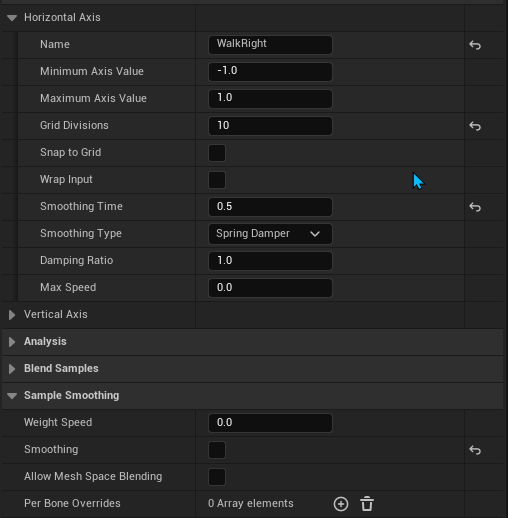


 crimson stream
TF is going on with this, anyone have similar experience?😂
 molten sapphire
Could anyone give me a brief explanation of how to start animating inside UE5?
I'm planning to learn some basic animation but I'm unsure of where to begin
 ripe stone
is there a way to offset a mesh from its rig like this in UE?
vague gate
what does "could not find the bind pose" when importing a maya animation mean?
molten scroll
 supple vigil
Your videos are far and away the best intro to ue5 I’ve found
supple vigil
Your videos are far and away the best intro to ue5 I’ve found
Awww thanks! Glad you find them useful!!
violet venture
Anyone else play around with the new IK Rig and wonder what was the purpose of adding this feature except the ability of following IK Retargeting? Seems like it's build upon the same IK solver systems that can be used inside good old Control Rig. Anyone of you guys use it?
 idle falcon
hello people of Unreal! I made this Model in Blender and wanted to try setting up something in unreal to make the loco run on tracks like a model railway. I'm new to Unreal, barely managed to make a drivable car yet so I need some help to start this! My first problem is the rigging and setup of the drivetrain, is there a way to do that in Unreal? or do I have to bake the animations in Blender and export them? All I need is the wheels turning and those connecting rods to move accordingly

 limpid folio
I want the character to use gun_ads if he has a weapon, and unarmed_ads if he is unarmed. How do I do that?
 violet venture
limpid folio
I want the character to use gun_ads if he has a weapon, and unarmed_ads if he is...
violet venture
limpid folio
I want the character to use gun_ads if he has a weapon, and unarmed_ads if he is...
use different states inside the state machine depending on the condition if the character is armed?
limpid folio
violet venture
use different states inside the state machine depending on the condition if the ...
"blend by bool" solved my problem
limpid folio
Why does the motion mode not work even though it is in flight? My character falls to the ground after jumping.


 warm blaze
hey guys, so I'm trying to make the grab mechanic from "Gang Beasts" into my characters with Physical animations
I am using the physics constraint comonent
but the other character just fly's around and jutters a lot
do you guys have any ideas
on how to tune the Physics constraint component to get a grab result like in gang beasts?
 molten harbor
hey guys! I have a dragon BP and a Spline Actor BP .. I want to make the dragon change animation during the spline path.. How can i do it? Anyone know?
inland oyster
Can someone help me with blending 2 states? I keep seeing videos only do this with montages
 wide cedar
can animations made with say, the default UE mannequin be retargeted to a MetaHuman?
i see a bunch of "metahuman animation" tutorials that all show how to add custom anims from the marketplace, which seems to indicate manual animation is not possible directly with MetaHumans
they all show "retargeting" the anims to the MetaHuman
if i was to make animations with a UE mannequin, and then "retarget" them to the MetaHuman, would that work?
bitter river
what is the best way to setup an animation blueprint with more than 25 different walk animations?
My character can equip different items and each item has its own walk/run/jump animation.
also for the footstep sound i use a notify but putting the notify in every single animation sequence is a lot of work and feels wrong
 silver badger
It seems that you can't add tags in animations assets, is that correct?
viscid willow
inland oyster
Can someone help me with blending 2 states? I keep seeing videos only do this wi...
Rather than having two states you will want to use something like a Layered Blend per Bone Node to filter out the lower body locomotion from the upper body pistol pose and aim space. This would be done outside the state machine in the AnimGraph.
https://docs.unrealengine.com/5.1/en-US/animation-blueprint-blend-nodes-in-unreal-engine/
Animation nodes that blend multiple animations together based on a set of criteria.
molten scroll
wide cedar
i see a bunch of "metahuman animation" tutorials that all show how to add custom...
Yes to both questions actually - you could manually animate a metahuman in the sequencer, and you can retarget mannequin animation sequences to the MH. You can also retarget the mannequin to the MH, and then tweak the animation once it is on the MH too.
wide cedar
molten scroll
Yes to both questions actually - you could manually animate a metahuman in the s...
how would you manually animate a metahuman in the sequencer??????
it's got like hundreds of bones
it'd take ages to do that, no?
viscid willow
bitter river
what is the best way to setup an animation blueprint with more than 25 different...
You can automate the placement of footstep notifies with Animation Modifiers:
https://youtu.be/C2E-UCk6u0A
https://youtu.be/UEcbYBmd-oc
Another question you could ask is, why set up all of your Held Item states with their own locomotion and notifies when you could have one locomotion with one set of notifies and layer your Held Item poses with Blending in the Anim Graph?

Patreon: https://www.patreon.com/GhislainGir
Twitter: https://twitter.com/GhislainGir
UE Doc: https://docs.unrealengine.com/4.26/en-US/AnimatingObjects/SkeletalMeshAnimation/AnimModifiers/
0:00 Intro
0:16 Anim Modifiers?
0:34 Usage example
2:08 Create an Anim Modifier
3:44 Space Transformation
5:50 First Modifier Breakdown
7:56 Second Modifier...

https://www.patreon.com/UE4tuts
For making Your Game/Projects or In Game Ready Functionalities!!!
Contact: ue4tuts4you@gmail.com
In this tutorial we'll setup Automated foot sync marker placement for proper animation blending.
Don't forget to subscribe my YouTube channel for more Regular Stuff!
Like my Facebook page for more content and Informati...
viscid willow
wide cedar
how would you manually animate a metahuman in the sequencer??????
Control rig is the tool of choice for animating in sequencer. That isn't to say control rig will make the animation process "fast" but it provides a rig interface rather than manually animating each bone of the character. Animation is still a time consuming process.
wide cedar
viscid willow
Control rig is the tool of choice for animating in sequencer. That isn't to say ...
i'm aware of control rig, but doesn't control rig edit bones?
sorry i have not messed with body animation yet, just gun ones
how does control rig with bodies work? is it a basic interface?
in the sense that it's just the basic body parts?
like "fingers" "hands" "arms" "legs" "torso" "head" "neck" that type of thing?
viscid willow
It does but the rig provides a better interface for an animator, and you have access to things like IK for limbs.
The bones are "constrained" to the rig and so they will follow the rig transforms. But yes, it allows you to think of the body in parts which is more human friendly than navigating a list of bones.
wide cedar
judging from this it seems i'm correct?

so maybe it shouldn't be hard to do something like first person animations for this
assuming i can bind a camera to the head of the model, then it should be easy to do
definetely still time consuming
but easy, so to speak
wide cedar
wide cedar
so maybe it shouldn't be hard to do something like first person animations for t...
i hope ankles and shoulders being animatable doesn't mean i need to move those too to animate arms and legs
molten scroll
wide cedar
how would you manually animate a metahuman in the sequencer??????
Oh it’s not ideal (yet) for sure to animate in sequencer… but you “could”.
wide cedar
molten scroll
Oh it’s not ideal (yet) for sure to animate in sequencer… but you “could”.
so then what do you recommend?