
#gameplay-ai
1 messages · Page 17 of 1
 fading moat
 misty wharf
Ah, yep those are it
fading moat
well it's not even triggering the 2nd one
misty wharf
It should give you some indication on which node it fails on
fading moat
oh i think i see the problem?
it's going back to root once it fails

(seeing this while i'm dead)
misty wharf
Right, that's because you switched the parent to a sequence
fading moat
misty wharf
Right, that's because you switched the parent to a sequence
yeah but it's never going on the 2nd sequence
it just repeats the attack sequence over and over
misty wharf
Yeah a sequence will abort if one of its child nodes fails
Try just removing the finish with result and see how it works then
fading moat
what's this mean?
 fading moat
which decorator?
misty wharf
The one highlighted in red :)
misty wharf
If the value should be true when you're dead, then I would start debugging the code that sets that particular blackboard value
It sounds like there's a bug in there where it doesn't get correctly set when you die
fading moat
code that checks if i'm dead:
 misty wharf
Maybe try putting a print node in there that outputs the is player dead value so you can see what it is
fading moat
misty wharf
Maybe try putting a print node in there that outputs the is player dead value so...
like this?
 misty wharf
Yeah
fading moat
it's not printing
misty wharf
Did you put a print into the false branch too?
fading moat
no
misty wharf
Okay maybe try putting a print in there to see if the cast to is actually failing
fading moat
misty wharf
Okay maybe try putting a print in there to see if the cast to is actually failin...
didn't print
misty wharf
Yep so you're casting something that isn't a player in that case
Is this in your behavior tree service's tick?
fading moat
misty wharf
Is this in your behavior tree service's tick?
the "check if player dead" node is a service
fading moat
misty wharf
Yep so you're casting something that isn't a player in that case
impossible
 misty wharf
Is this screenshot from the check if player dead service?
misty wharf
Well then it's very much possible :)
fading moat
misty wharf
Well then it's very much possible :)
how?
misty wharf
You're casting Owner Actor
fading moat
this is teh event i'm using, could that be a problem?
 misty wharf
the Owner Actor of the BT service is usually the AI controller
or the controlled AI pawn
fading moat
so how do i do this?
misty wharf
The really easy way to do it is to use Get Player Pawn and then cast that, that should be ok if your enemy never targets anything else than the player
fading moat
misty wharf
The really easy way to do it is to use Get Player Pawn and then cast that, that ...
like this?
 misty wharf
Try it and see
misty wharf
lol
fading moat
not only did it print "dead" when i was dead
THE ZOMBIE STOPPED
can't believe the issue was this dumb
misty wharf
yeah sometimes you get lucky and it's something simple
it's best to always verify your assumptions about stuff behaving in certain ways, either by using the debugger or printing usually works for it
fading moat
ok good to know
 minor kindle
Anyone else have a solution for irregular pathfinding? My current method is to randomly spawn randomly transformed nav modifiers that are obstacles in a dynamic nav volume before generating the path

still need to tune it, probs use more and smaller ones. i might also generate the path twice to place them just along the given path to add variation
something like that
 misty wharf
Seems it might be much cheaper to just adjust the path points that get generated, but not sure how well that would work if it ends up bumping into geometry as a result
minor kindle
misty wharf
Seems it might be much cheaper to just adjust the path points that get generated...
yeah it could collide with geometry, plus most of these path points at least in this case is 2 points
literally A to B
ive experimented with for example editing the path to be a spline, but u have the issue of it ignoring geometry
misty wharf
Not really an expert on this tbh, but another idea that comes to mind is splitting the path up and generating it in parts
So for instance, you split it into four separate smaller paths, and you generate it so that the end point is a radius instead of a specific point
this way you can pick a random point within the end point's radius to achieve the randomness, but if you take navigable points, it should avoid geometry
minor kindle
yeah thats a possibility but does not add randomness to the path. it would smooth the path
ill try a variety of things, ill see if that works out too
i first need to make a path, then split that into smaller paths of X distance which im working on
🤮

:)

now ive got the basis of it
does this basically


so now from here i should be able to try various things
minor kindle
what do u mean by add project
 celest python
Project point to navmesh
minor kindle
i dont get how that will accomplish adding random displacements along the path
celest python
actually my head went to a completely different C++ method
I was actually thinking of getting a random point in circle and projecting it to navmesh
 misty wharf
Are you making like a drunk person AI lol
minor kindle
yes aka a zombie
misty wharf
:D
celest python
if you are using C++ you can also manipulate the movement direction from path following component
minor kindle
i have literally scrubbed or watched dozens of yt tutorials and read equally as many posts on zombie ai and all of them just walk in a straight line, then add a TON of animations to make it walk weird
but the actual path is always straight
minor kindle
celest python
if you are using C++ you can also manipulate the movement direction from path fo...
just changing the way it follows the path may result in bugs where it walks into walls
celest python
you can avoid that situation by tracing
minor kindle
seems just as complicated as what im doing
ideally i would like to edit A* to have random weights
celest python
I'd store the path points and try to provide direction towards them with slight randomness (change direction each X seconds then lerp to direction)
and trace so if we are hitting any wall
minor kindle
thats what im doing kind of
celest python
change the direction immediately
minor kindle
the pic shows the path points being built
a path that is a straight line only has 2 points so the slice path function i made splits it into the sphere points
then at each of the spheres ill try something like what zomg said where it has a acceptable radius = random point radius
minor kindle
alright so it walks around the path. had to make a special ForEachLoop to allow the delayed MoveTo
now to randomize the points

@misty wharf effectively your method
this is basically what u described
works pretty good there r some edge conditions that can occur but i set it so acceptible radius = 50, random radius = 50, and slice distance = 100
ill have to look into the whole start stop nature, its not bad but kind of weird at some points
misty wharf
Yeah looks like it generally works. Is it doing the navigation to the next point when it reaches the destination of the initial path? That might be why it does that
minor kindle
each white sphere it paths to and each green sphere is where it actually pathed do
It has some bugs I gotta fix namely there r duplicate point but it’s a start. I would like to pic not just random radius points but ones influenced by the forward vector
misty wharf
You could perhaps use what Eren suggested
Similar method to what I said, but instead of picking in radius, you could perhaps pick in a half-circle (or something) in the direction of the forward vector, and then project it to navigation to avoid it going inside geometry
minor kindle
how do u project it to the navigation with blueprints
misty wharf
I think there's a node called project to nav or something
minor kindle
ill look into that. for sure a semicircle in the direction of motion
idk what the project to nav actually does
misty wharf
It should find the closest point on the navmesh to the point you're projecting
minor kindle
ya thats what i would expect, we will see. im still debugging XD
then the only other edge condition would be making sure the point chosen is in the same room
like if u have a thin wall and a wide radius it could cause issues
 uneven cloud
The better solution is to make better level design so there are obstacles in the way. Right now you have an empty plane as a test level and trying to make that look "interesting" while actually making it look unnatural.
If you really must go down this path, I recommend using the EQS instead. Generate some points around the NPC to go towards the target, but not directly. That gives you far more control than what random will.
minor kindle
EQS is a lot less control, ive tried that route
u probably did not read my original message, i WANT it to look random. it is for zombies
the path should look like they r drunk
obstacles will not help that
uneven cloud
EQS is more control.
 ocean wren
EQS with a gentle bias towards the player but with lots of random also should work
misty wharf
Tbh I don't know how EQS would be any different than picking one at random in the desired direction
Eg. you generate a set of points with EQS, filter out the ones that are behind, and you're left... with a set of points in front, which you pick one at random... result being more or less the same at that point
ocean wren
Well, yeah, its just a more visually debuggable version
misty wharf
Yeah
ocean wren
But you can add more filters and stuff in with EQS
ocean wren
query context
uneven cloud
It's more performant as well. You can filter out points that can't reach the target. You can filter out points that aren't directly towards the target. You can change the scores to give any movement feel that you want.
minor kindle
Could t find any docs explains how to use query context to pass a variable
uneven cloud

Describes how Contexts are used within Tests and Generators in the EQS system.
minor kindle
I don’t have player context there how do u make one
uneven cloud
It's there in the docs.
minor kindle
Ok I’ll read into it
misty wharf
tbh passing params to EQS is a mess lol
if you can do it with a context, great... but anything beyond contexts is like... big oof time lol
minor kindle
Yeah my stumble method is much more easily adaptable
misty wharf
I think for your usecase contexts would work fine tbh
You don't need to pass in anything more exotic than an actor or a location
uneven cloud
Query Params are not bad if you are using the BT.
misty wharf
which are the two things contexts handle out of the box nicely
misty wharf
uneven cloud
Query Params are not bad if you are using the BT.
As long as whatever you're passing as a parameter can be marshalled into a float :D
minor kindle
Yeah I’m just imagining other cases of things to pass it
Can I pass a vector to it?
misty wharf
Yeah you can just use a location for vectors
uneven cloud
misty wharf
As long as whatever you're passing as a parameter can be marshalled into a float...
What would you want to pass in that's not a context or a simple type? I believe query params can be ints, floats or bools.
misty wharf
Or rather, locations are vectors, so that'll work
minor kindle
Yeah cause like with senses I want them to go to a sound and not straight
misty wharf
uneven cloud
What would you want to pass in that's not a context or a simple type? I believe...
I forget what it was specificly and I can't find it right now, but I think it was that I wanted to pass an actor or something else as a parameter to a test or something like this, which was basically impossible without a fairly clunky custom parameter system I managed to cobble together
The parameters can be ints, bools and floats by default, and I was trying to extend it to allow the type I wanted - but turns out... it just converts the parameters all to floats and it basically makes it impossible to extend it any further
Ah, it was actually a gameplay tag
In my fps project I have a kind of complicated test for checking LOS and it uses the context character's logic to test it, and that needs a tag to determine which type of attack is being used
I found a not-totally-awful way of doing it via extending UEnvQueryInstanceBlueprintWrapper which can be specified when you run queries
which basically just does this
void ULOSEnvQueryInstanceBlueprintWrapper::SetAttackTag(FGameplayTag AttackTag)
{
    for(UEnvQueryTest* Test : QueryInstance->Options[0].Tests)
    {
        if(auto* LOSTest = Cast<UEnvQueryTest_WeaponLOS>(Test))
        {
            LOSTest->AttackTag = AttackTag;
        }
    }
}
which is not great but I found no cleaner way of doing it either :P
You can also do it like this in C++, but the above method works from BP's too
TSharedPtr<FEnvQueryInstance> QueryInst = Manager->PrepareQueryInstance(Donger, EEnvQueryRunMode::SingleResult);
UEnvQueryTest_WeaponLOS* LOSTest = Cast<UEnvQueryTest_WeaponLOS>(QueryInst->Options[0].Tests[0]);
LOSTest->AttackTag = FGameplayTag::EmptyTag;
So gameplay tags do resolve down to a float, so this should be possible.
minor kindle
If u can pass a vector it’s good enough for me
I can just make it bias towards a location that is the player or whatever
misty wharf
Yeah your usecase is perfectly usable with contexts... and so are the majority of most usecases unless you're doing something overly elaborate like I was lol
minor kindle
@uneven cloud do u know how i would setup the node to grab a vector from the BT? the guide shows how to grab the player but no context is needed for that
maybe the query object would contain the blackboard? or maybe cast it to the AI controller?
uneven cloud
minor kindle
<@228699554034221065> do u know how i would setup the node to grab a vector from...
Your question is not clear. You need to create a context. You can get data from the blackboard, but not the BT.
minor kindle
thats what I meant, is there a proper way to get a location stored on the blackboard of the querier
uneven cloud
Get the AI controller and then get the blackboard from that.
minor kindle
got it
when using an eqs tester how could i pass a value for the context for it to test? or can i not
wait a second, if i use this it wont have pathfinding
maybe then i do a combination of both? run a move to on the controller to generate the first point in the path, use EQS to go there, repeat
uneven cloud
It's better to use a real situation to test and look at the visual logger than to use the EQS testing pawn.
minor kindle

well this literally will have really strange behavior
and thats just a super simple case. i guess if i made EQS a grid? im currently using a cone so its easy to pick points in front but in the direction of the target
 foggy sequoia
Hey Im trying to do an AI sight timer . EG: TIMER BY EVENT , say timer is 5 seconds at full distance But counts faster, the closer the AI is.... Ideas?
minor kindle
uneven cloud
It's better to use a real situation to test and look at the visual logger than t...
I built a similar real situation test with location being passed to the EQS. If there r no walls it works fine, if there is a set of walls like a cup against the border with a doorway on one side, the EQS tends to get stuck trying to run into the wall, unless it’s already past the halfway point. One potential fix I thought of is to use find path synch to get a waypoint towards the destination the EQS instead goes to, but that has an issue because the EQS uses finite points so it has a tendency to sometimes go past a waypoint and circle back which looks weird

thats the basic EQS setup i used
in this scenario the EQS gets stuck picking roughly this point

EQS for waypoint method does this

if instead of pathing to the exact location it goes to a nearby point in the A*
the EQS method works good for short distances with little obstacles tho
uneven cloud
There are other tests you can use. I recommend you try out the path tests.
minor kindle
ill try that one, tho debugging EQS systems is way more annoying than my other method because they do not appear in the engine sometimes and u have to restart the whole program
and i cant use the EQS testing pawn since its passing a location input thats dynamic
uneven cloud
Visual logger
minor kindle
yeah i got a way to see it better, i found out by default the path test is on constant mode which basically means the scores will all be the same.
minor kindle

 spring inlet
guess i'm having to ask about SmartObjects here...
on Player interaction i want to claim an SO Component Slot on the specific actor the player is interacting with, is there any way to do so?
made a cpp implementation, would be nice tho to have it as engine feature
ocean wren
I'm sure they accept PR's
 ruby shard
is it ok to us several NavMeshBound volume in the level ?
I have a big map which I only want the road sides to be walkable
 distant snow
Is there a way (via blueprints) to get the endpoint of a partial path?
WAIT
huzzah!
 distant snow
And a little more helpfully, getting the partial path points from the already active navigation:

 young lintel
Does it make sense to make tasks like "Find Nearest Bed" "Find Nearest Campfire" "Find Nearest Open Tube of Toothpaste" or is there a better more flexible solution that doesn't involve making dozens of different tasks?
distant snow
young lintel
Does it make sense to make tasks like "Find Nearest Bed" "Find Nearest Campfire...
I'm using a custom task called Locate Actor.
It has an Class input for the specific kind of actor, and a BB Key Entry that can be assigned from the found actor
 young lintel
Ahh nice
distant snow
The class reference gives it a really long BT node
young lintel
Is that property just set to instance editable and it works like that?
distant snow
young lintel
Is that property just set to instance editable and it works like that?
yeah
 young lintel
Great, that saves me a ton of time... and redundant tasks, thanks
distant snow
oh... MaxDistance should have been set to instance editable 😄

 lyric flint
This is may be too broad, but are people finding the built-in perception component to be fully fleshed enough for things like custom visual frustums and easily adding new senses? Or should I be looking at creating my owner sensors and a component that polls them on tick?
misty wharf
I've looked at the custom bits a little and it seems the support is generally there. There's a bunch of things the perception system does like timeslicing and such as well
lyric flint
More so for expanding on things like aggression zones and ideas that don’t fit neatly into visual. Also for attaching more metadata to stimuli
 boreal stump
Sorry if this is asked a ton, but i am have a bunch of enemies moving around with MoveToLocation. They move great but i want them to avoid each other, so i turned on dynamic navmesh generation. And now they twitch all over. Whats the trick to stop this twitching?
lyric flint
Have you tried using RVO for collision avoidance instead? It’s a pretty simple system to enable on your character
boreal stump
Well i dont use character class. I have a pawn with floatingPawnMovementController
Should be a way to fix this jitter... like they keep trying to find a new path every tick
boreal stump
Even just 1 enemy alone with no obstacles. like he is trying to walk around himself. idk.
lyric flint
I'm not sure I fully understand the use case for dynamically generating the nav mesh, but this might be related? https://forums.unrealengine.com/t/when-set-navmesh-to-dynamic-pawn-does-crazy-movments/107139

Epic Developer Community Forums
I set Runtime Generation to Dynamic in order to detect changed positions of my pawns yes it detects but when I move they do immediate jerky movments! What can I do ?
boreal stump
thanks for the reply but they just say use RVO and i dont want this class to use character class as parent
uneven cloud
boreal stump
Sorry if this is asked a ton, but i am have a bunch of enemies moving around wit...
Do not use dynamic regen for obstacle avoidance. It's incredibly expensive and every time the nav mesh regens, it cancels all paths in the area. Use RVO, crowd avoidance or build your own.
ocean wren
This is a fundamental misunderstanding. The dynamic regeneration is for the navmesh so it can be updated with moving obstacles, not so that the moving objects can do avoidance. The first case is more for things like moving platforms and the like. You want to use some form of dynamic avoidance without impacting the navmesh really.
 misty zodiac
I hope someone can point at least in the general direction of where to begin this.
I need to make an npc to npc conversation system. Basically idle chit chat kind of stuff. Take in most superhero games, if you stand around long enough they will start talking smack about their bosses, or events in the game or just life. That's the basics.
I think it could work like this, there is a capsule collider just for detecting other Ai nearby, if Ai are nearby start random conversation. The other Ai would respond accordingly. The conversation call and responses are held on a data table. Giving each conversation group a tag then giving each line an ID defined by the structure
The issues, how to determine who initiates the conversation, make sure both are not trying to initiate. How to determine when one Ai responds. How to determine when that voiceline has ended. These are the immediate hurdles I can think of.
I would like to have this dynamic as I can, basically let the npcs decide the path of the conversation. So less of a dialogue tree more of a procedural dialogue system
misty wharf
Seems it's mostly a question of how the npcs are grouped together
They could determine this grouping, potentially spawn a manager object, and the manager object then handles the "choreography" of it so to speak
Or if it's more of a "p2p" style system where there would not necessarily be a manager for whatever reason, they'd need to listen to delegates on each other to determine when another npc begins a conversation so they can then become participants in it
misty zodiac
So I should say, I have a voice component that's attached to all characters. It's a modular system and each have their own data table. It controls when the character says anything ie takes damage- say ouch, sees player- say get her. It's a tad more detailed than that by tying into other systems. But that's what I would be using to actually tell the character to speak.
This is a single player game, think spiderman, Batman style ai chatter
misty wharf
You could do that yeah. I think it might be good to think of the conversation system aspect of it to be on sort of top of the voice/speech system in general
so the conversation system sits on top coordinating the idle chatter using the voice bits that would be on the characters for general speech purposes
misty zodiac
So am I going in the right direction though? Have a data table with voice lines, tags and voice IDs?
misty wharf
Can't really say about that one, it sounds like a reasonable approach but I've not built those kinds of things. I think it's mostly a question of what makes it easy to edit as a designer, and easy to work with in your game logic
 odd dove
Hi, Unreal Enthusiasts
I need some help with a project I'm struggling with.
I am trying to create a Chatbot with a Metahuman and ChatGPT-3.
I have watched some videos, but I haven't found a complete explanation on how to do it.
I am new to Unreal Engine and even newer to its Blueprint system, as I am more experienced in modeling and lighting.
I hope some of you can assist me with this task.
misty wharf
This is a fairly vague question for a potentially complicated topic so it would be helpful if you can be more specific about what the problem you're facing is
odd dove
Yeah sorry
I have a Metahuman and I want to program him as a NPC to chat with my mic by the ChatGPT-3. I imagine this like that :
Question > Speech to text > ChatGPT-3 > Answer > Text to Speech > Facial lipsync (if possible) > Metahuman Answering
What I'm searching for is a pipeline to do so
I'm searching for a documentation, a turorial, Github's or Unreal's Plugin.
As I am not a programmer, it would be difficult and time-consuming for everyone if I were to receive step-by-step help.
misty wharf
There's some plugins on the marketplace and I think bundled which would allow speech to text, access to http APIs which I assume is how ChatGPT can be used
The question/answer and audio lipsync are probably more general UE and character animation topics which you might be able to get better answers on #animation or the other channels
odd dove
Thanks you for your answer, I will search on the Marketplace !
misty wharf
Good luck, there's probably a fair bit of stuff you need to learn but sounds like an interesting project :)
 plush cargo
ive been on hiatus for a month or two. just checking in to see if there has been any knowledge drops on state tree yet?
 harsh storm
Yeah - throughout this channel a few of us have talked about it and how to use it and what not
ocean wren
Have a look at Meta's Voice SDK, its on the UE marketplace.. it works once you fix up a couple of minor things
and for some reason they aren't charging to use their cloud service
misty wharf
They probably just spy on you a lot instead lol
 dawn schooner
AI Controllers only exist on the server right? They are NULL on client
misty wharf
Correct
boreal stump
uneven cloud
Do not use dynamic regen for obstacle avoidance. It's incredibly expensive and ...
How about objects falling and moving due to physics then? I would need dynamic regen for those. Does RVO avoid that stuff?
plush cargo
harsh storm
Yeah - throughout this channel a few of us have talked about it and how to use i...
the latest pins doesnt have anything, is it mostly in peoples heads still ?
plush cargo
ait
just checking
i hit a wall with AI in december
i can manage state tree just enough to make placeholders and focus on other areas
boreal stump
ocean wren
This is a fundamental misunderstanding. The dynamic regeneration is for the navm...
interesting. For some reason i didnt think of this. I should have a system on the character that can detect object (line trace or some sensing component) then make them change direction accordingly. Makes more sense and gives me more control 🙂
celest python
ST is used on fortnite now
so we will see finally AI team is getting on action xD
||i shamelessly ignore the existence of mass||
dawn schooner
boreal stump
interesting. For some reason i didnt think of this. I should have a system on th...
yeah that sounds like avoidance or steering behaviour
Basically detect (linetraces or whatever) if anything is in front and apply a perpendicular force to avoid it
boreal stump
Nice. I am currently using the AIMoveTo node. But i am thinking i need to remove that and add my own logic so i can implement this avoid stuff. First time doing ai, and my extent is just using the MoveTo node hah. thanks for input
plush cargo
celest python
ST is used on fortnite now
good news
 lone frigate
How can I edit my navmesh to allow an AI to walk off this ledge? The character component allows it, but the navmesh doesnt connect
 uneven cloud
lone frigate
How can I edit my navmesh to allow an AI to walk off this ledge? The character c...
uneven cloud
lone frigate
How can I edit my navmesh to allow an AI to walk off this ledge? The character c...
Nav links.
 left barn
Hey! I'm trying to do an Async find path routine for my AI, however i'm having issues with the "Path Found" Delegate, the error is "Unable to find 'class', 'delegate', 'enum', or 'struct' with name 'FNavPathSharedPtr'" i'm unsure on how to solve this, everything else seems fine thus far with it
{

}```And how i'm assigning the delegate
FNavPathQueryDelegate del;
del.BindUObject(simActor, &AAIActor::PathFound);
UNavigationSystemV1* NavSys = UNavigationSystemV1::GetCurrent(GetWorld());
NavSys->FindPathAsync(navAgentProperties, navParams, del);``` soft sinew
If I have a behavior tree task the does a "Move to Location or Actor" that is under a sequence behavior tree node with a decorate that aborts self when a black board value is set to a given values -- will that decorator always abort the "move to..."? I set the "move to..." to not lock AI logic. What I'm seeing is that sometimes the "move to..." is not aborted.
While the "move to..." task is active it seems like the decorator is not getting checked.
soft sinew
I seem to have worked around it by reversing the order ob my nodes in the selector -- now the higher priority node runs unless all the correct conditions are met for the "move to..."
uneven cloud
left barn
Hey! I'm trying to do an Async find path routine for my AI, however i'm having i...
That's usually an include issue.
uneven cloud
soft sinew
If I have a behavior tree task the does a "Move to Location or Actor" that is un...
I would double check the visual logger to make sure what you are seeing is what is actually happening.
left barn
I figured, I did as much research as I could and couldn't seem to find any includes for it
#include "AI/Navigation/NavigationTypes.h"
this is what I get form unreal docs
didn't solve unfortunately though
unsure
uneven cloud
You might also need to add the navigation system module as a dependency.
dawn schooner
left barn
Hey! I'm trying to do an Async find path routine for my AI, however i'm having i...
I have this includes in my pathfinding code, I'm using the same async setup:
#include "NavigationSystem.h"
#include "AI/NavigationSystemBase.h"
I also have:
"NavigationSystem",
"Navmesh",
in the Build.cs
left barn
Damn, you help in Mass and you help here, thanks so much !
I haven't tested it yet, but i'm sure that's the missing piece
 terse panther
i was looking for a solution, and this node solved that, but it is saying that its "potentially expensive"
so just wanted to know from you guys, is it ok to use this node or is there any better way to calculate the path length?(I am using this node rarely, but i am using it one a for each loop of around 10 AI)
 dawn schooner
terse panther
i was looking for a solution, and this node solved that, but it is saying that i...
dawn schooner
terse panther
i was looking for a solution, and this node solved that, but it is saying that i...
how often do you use it?
I'd use it until you profile it's a real problem
misty wharf
Yep^, potentially expensive just means exactly what it says. It doesn't mean "don't use", it means it could be slow so you're aware of it if you encounter issues with it at some point
I think the reason that node can be slow is that it actually does pathfinding between start and end to determine the path to begin with
terse panther
dawn schooner
how often do you use it?
the usage is kinda rare, but the thing is i am not show on how many AI I'll be using this one, it may be 2 it may be 20, but max is 20
misty wharf
If you don't have a path calculated up front, there's no real good way to avoid doing pathfinding
terse panther
misty wharf
I think the reason that node can be slow is that it actually does pathfinding be...
thats the reason why i am using it, because before i was doing a distance check between the start and end point, and it was not giving me the results which i want
terse panther
misty wharf
Yep^, potentially expensive just means exactly what it says. It doesn't mean "do...
so i think i will have to test the performance myself, if it worked then its good to go, otherwise i have to find another solution
misty wharf
Yep that's how it goes with these usually
dawn schooner
terse panther
the usage is kinda rare, but the thing is i am not show on how many AI I'll be u...
mmm I think you'll be fine, 20 is not a lot and probably even in that case, other stuff will be way more expensive than calculating path lengths
so use it and profile when performance is not up to your goals
misty wharf
Calculating the length is cheap anyway, it's just doing some basic math on vectors.. it's the pathfinding itself which can be costly, but that depends on a variety of factors
dawn schooner
misty wharf
Calculating the length is cheap anyway, it's just doing some basic math on vecto...
yeah I think so
the most expensive operation is going to be the square root but it's not so bad unless you have thousands so
terse panther
dawn schooner
the most expensive operation is going to be the square root but it's not so bad ...
I am keeping in mind not to use the sqrt 😅 as much as possible
terse panther
dawn schooner
so use it and profile when performance is not up to your goals
Yeah, will do the profiling if i encounter any performance drop
 turbid escarp
Why does the NavMesh I have in game is different from the one i have in editor?
turbid escarp
Ok i have found why it did that. it was because i was using world partition but did not have it enabled for The NavMesh in the project settings. But now i do not have the navmesh when i launch the game
 proven elm
Is there a way to kill an AI Controller with a single command?
i got the entire AI logic inside an AI controller
and when AI dies, i want them just stop executing instantly
am gonna try to unpossess
celest python
proven elm
Is there a way to kill an AI Controller with a single command?
you probably need to stop brain component
not kill ai controller
 ivory grove
Hi, do you have any idea why agent A is able to find path to agent B while agent B is not able to find path to agent A
Both agents are the same, i'm using NavigationTestingActor on my navmesh
I'll set one testing actor on one side of the map, second one on the other side of the map ( Or other way around, doesn't matter)
and testing actors can find path from point a to point b but can't do that the other way around
( It depends on location, not the specific testing actors )
Do you have any idea what could cause such behaviour?
I guess I just found it 🙂

Thx
harsh storm
celest python
not kill ai controller
Interestingly - I do have to actually kill my AIController (granted the pawn is dead as well so it doesn't matter) or else other pawns actually path around it.
harsh storm
Well - I want the pawn's corpse to persist
celest python
Does this happen with/because RVO/Detour?
harsh storm
I didn't dig in. Just when my zombie dies, I stop the logic and then destroy the AC
Doesn't need the AC anymore anyway.
I just thought it was weird that the controller was affecting the navigation of others.
celest python
Yeah interesting
misty wharf
It depends on how you have it all set up
The AI controller can be the crowd agent so it may cause something like that to happen
Similarly I don't think ai controllers will automatically stop behavior on unpossess, so you may need to manually do it... so destroying it when the pawn is destroyed seems like a reasonable thing to do
basically just set up it to destroy itself when the possessed pawn triggers its destroyed delegate
harsh storm
Yeah - it might be the controller being the crowd one pretty much. Now that you mention it 😅.
And controllers do stop behavior on unpossess last I recall. That's how I was doing it in my other game because Stop Logic wasn't working.
misty wharf
Could be, not sure about that one. Might as well destroy if it's not doing anything anymore either way I think :D
 haughty coral
Did anybody use HTN plugin from marketplace? I wonder if it as good as it looks.
https://www.unrealengine.com/marketplace/en-US/product/hierarchical-task-network-planning

Unreal Engine
Create AI that can plan ahead using this flexible, fully-featured alternative to Behavior Trees
 tribal widget
Does anyone know any good resources (videos/blogs) that go through how Recast & Detour work? I know it is OpenSource so in theory I should be able to just figure it out but in practice I would really love a bridge to make the code more accessible for me.
 cedar dust
does it make sense to implement an input reading as a sense for ai?
in my case also would need sight on the actor to perceive it, i guess no..
maybe override the default sense for sight? im not sure how to deal with this
misty wharf
Input reading how exactly?
AI generally does not directly read inputs so I'm not quite sure what it is you're trying to solve here
cedar dust
well something like i see a character rolling, i want to do something
but make no sense to use a sense 😵💫
celest python
Provide state info
cedar dust
i think is better to just use events and deal with them in the bt/controller i guess
cedar dust
celest python
Provide state info
what do you mean sorry
celest python
Do not use perception system, and provide character's current state to AI
either with tags or enums
and drive the behavior from BT based on character's state
 halcyon vale
I'm having a issue with my AI not moving, I am using a rather large level. World Composition enabled, but Idk wtf todo. I tried following the steps to get movement working, but it just wont. I fixed it a few months ago, but now its back again. 😦 And unfortunately I did not document how I fixed it... cause I am dumb -_- does anyone have any pointers? Anything at all. Would be lovely.
there is navmesh, in the level.
 noble shadow
Hi, using the perception interface. There are methods available for both controller and pawn, ie: RequestPawnPredictionEvent/RequestControllerPredictionEvent. I am slightly puzzled what would the benefit be of storing the perception component on the pawn or the controller?
misty wharf
Where were you planning on storing it if not on one of those? 🤔
noble shadow
so I had this issue where the prediction sense wasn't triggering, but that's just because I didn't override the GetPerceptionComponent on my AIController. But the component currently resides on my vehicle pawn, which is a little awkward
noble shadow
thinking of it, makes more sense to be on the AIController as the player vehicle's pawn doesn't need to predicct
misty wharf
I think the benefit of having it on the controller would be that it can hold perception state across multiple different pawns if needed for some reason, but I don't really think that's a very common thing to do
Yeah, that too, if the pawns are shared between players and AI
noble shadow
alright, I guess that checks somewhat out. Another somewhat related question, as soon as my vehicle leaves the navmesh the AI loses sight of me? I should probably search some first before asking but hey
misty wharf
If you're using the sight sense it shouldn't be affected by navmesh, so something else must be going on
noble shadow
I see, thanks zomg! Might be jumping logic in the behavior tree I gues:)
 fickle geyser
Hello im trying of finding a away to create a condition that when the ai sees the player equipped the staff it changes to the follow him task

im just having trouble with the condition
cedar dust
fickle geyser
im just having trouble with the condition
dont do it in the bt
i mean the condition
fickle geyser
i did it in the ai controller, referencing one of the BB's keys
fickle geyser
i had a trouble with git so i cant show it right now il have to re-do it, but basicly i have the roaming task, Chase and hide from player. And when placed all in the BT the roam and chase work as they should but the chase after pulling out the staff aint working, not even getting any calls
i tried getting a bool reference here from the equipped action, but still didnt work

this is for the can see player but i changed the key name to CanSeeStaff and changed some nodes
cedar dust
cant tell whats going on without looking at the whole thing sorry
noble shadow
do you have other senses then sight, result might get overwritten?
ocean wren
tribal widget
Does anyone know any good resources (videos/blogs) that go through how Recast & ...
Mikko used to have a blog called DigestingDuck where he talked about the development of Recast and Detour.. I think someone reproduced it too. Otherwise, you can look for docs on the official github version of it.. someone took over the project if I recall.
To be honest, the source code kind of makes sense if you know what voxels are
 sacred shale
This has really been frustrating me, why can I only see the last used EQS query whenever I'm debugging EQS and not the current one? I press the apostrophe key, then 5, then it shows the EQS Query, BUT not the one I'm currently using, I'm switching between 2 different EQS queries, one for my enemy patrolling, and the other for my enemy chasing, as soon as it stops patrolling, it shows patrolling, as soon as it stops chasing, it shows chasing, why??
ocean wren
cos you haven't fixed it and submitted a pull request yet?
Hurrah, strike day tomorrow.. means I can play with some AI 🙂
Got the global game jam over the weekend.. got a great little idea to do some stuff with Mass I think
 bleak plaza
how can you make an AI constantly face the player once they get in melee range? my AI runs to the player but once in melee range it frequently will let the player get behind them
uneven cloud
sacred shale
This has really been frustrating me, why can I only see the last used EQS query ...
The gameplay debugger is terrible for looking at EQS data. I recommend using the visual logger instead.
uneven cloud
bleak plaza
how can you make an AI constantly face the player once they get in melee range? ...
The AI controller can set a focus. If using the BT, I recommend trying the Set Default Focus node. It's a decorator or service.
bleak plaza
thanks i'll check it out
bleak plaza
uneven cloud
The AI controller can set a focus. If using the BT, I recommend trying the Set ...
i added the service and the BB variable but it's not offering me the variable in the pulldown list for the service
 uneven cloud
bleak plaza
i added the service and the BB variable but it's not offering me the variable in...
uneven cloud
bleak plaza
i added the service and the BB variable but it's not offering me the variable in...
Try and save, close and reopen.
bleak plaza
i found it, i needed to set the object subtype to actor
 indigo field
Posting here too 🙂
celest python
@uneven cloud Apologies for pinging - is there any chance you can share some insights about how things work with Kythera, if this can be done without breaking NDA? I remember you told you worked on it earlier.
I have a possible client that wants me to work on it (alone) and I have no idea what it looks like. I guess they dont work with everyone, they have a very strict interview process that makes me wonder if I should be happy that I'm going to see a cool framework in the end or should be intimated by how things work 😅
uneven cloud
celest python
<@228699554034221065> Apologies for pinging - is there any chance you can share ...
No worries. I've never worked with it. They pitched us on the system a year or so ago. From what I could tell it was just a replacement for Epic's systems and what we already have with Havok AI (navigation), so there wasn't an additional benefit.
celest python
Ah, alright. Thank you
harsh storm
Dang - people just reaching out to Eren for contracts. Step aside. Big 💰 comin' through
uneven cloud
The systems I was already building were what we needed and I wasn't a big fan of how much they hated UE. That's a big red flag for me.
celest python
From what I can see they have some web-api based system which horrifies me
I dont want to log into somewhere to build behavior trees 😅
uneven cloud
Gross.
harsh storm
lol - I just had a thought of Eren having to call APIs to add a task to the BT 🤣
celest python
(╯°□°)╯︵ ┻━┻
fickle geyser
hey guys im back xd, so the problem i was having was that i could find a way for the ai to do the follow the player task after he would equipped the staff, dunno if anyone can help

this is the BT

i was thinking of doing it here on the ai controller but all the things i tried didnt work. The top code is for when the ai sees the player
 cursive star
Hey I've got an issue where the nav mesh is not updating for my NPC blueprint with navigation invokers. its working for my enemy AI but for my human NPC the nav mesh does not update when they walk. I've tried comparing them and they both appear almost the exact same. Does anyone have an idea what could be causing this?
 clear pasture
Would anyone understand why AI Perception would work in a flat level with no landscape but not work in a level with a landscape that is mostly flat? (and by not work I mean not detecting stimuli sources)
misty wharf
Try using the gameplay debugger to visualize perception. It might give you some ideas, as it will show you where the perception is tracing and if it's hitting anything correctly
 vapid night
Is State Tree a Mass thing or is it a standalone thing like the Behavior Tree?
misty wharf
Standalone
 robust kelp
Hi Guys, is tehre a maximum distance how far a ai can walk to a ccertain point at the map?
 cinder spear
Hey there! Is there any parameter or trait I can be missing in order to stop Mass AI from colliding with objects inside paths?
 silent hamlet
vapid night
Is State Tree a Mass thing or is it a standalone thing like the Behavior Tree?
silent hamlet
vapid night
Is State Tree a Mass thing or is it a standalone thing like the Behavior Tree?
but, even a simple task like moving AI to a location using navsystem is fairly complex if you want to update your STTask status on path events like, say: path failed. I am still trying to wrap my head around how to do something like that
indigo field
Looking for Info/support.
Running UE 4.26 from VStudio (Debug Game Editor, Win 64 - Also tested Dev Editor Win 64 without -debug arg).
I have a level which is only a floor.
I drag and drop a Navigation Modifier Volume on it.
I hit Build Paths.
NMV does not cutout the navmesh at all. It's considered a convex shape since it's brush based.
If I check the box "Mask Fill Collision Underneath for Navmesh", it's instead considered as a Box and works!
I tried also using the Nav Modifier Component on Simple Cube, Empty Actor etc... Same result, as soon as the shape is convex... it does not modify the navmesh anymore....
BUT
Someone not launching the editor from VStudio... instead just launching the binary... has it working in all cases? Which settings is messing with me? As I believe he must have something I do not? Config/BaseEngine.ini and Config/Engine.Ini reconcile did not find anything...
Anyone encountered that before?
vapid night
silent hamlet
but, even a simple task like moving AI to a location using navsystem is fairly c...
So... ST bad?
This is all I've found on it, that it's just bad
silent hamlet
It's not just bad. I think it's overall a great system with lot of potential. It just depends on what you want to use it for. If it is to replace a "standard" patrol-investigate-chase behaviour tree I wouldn't recommend it
celest python
you just need to write your own tasks from zero, ST is great
but too empty at the moment
silent hamlet
celest python
but too empty at the moment
This
vapid night
I see
celest python
if you have a long-term project that relies on A.I. too much, and if you want to use ST investing some time to write tasks and evaluators is a good choice but otherwise I'd say interop BT with ST
vapid night
Does Mass work exclusively with ST?
celest python
Mass AI runs on ST
celest python
You wouldnt want to use AIController per agent in mass
vapid night
Oh...... now I get it
Haven't looked much into Mass, had no idea that it doesn't require an AI controller
but ya it makes a lot of sense
Tell you what, I'm new to this and I need a very basic AIs that just roam around and interact with foliage
Imagine a city builder with up to say 600 AIs, 100 of them are working (picking foliage) and 500 just roaming in the street maybe even interacting with each other.
From my research I've found out that there is not much info on that...
But the way to go is probably Mass.
vapid night
celest python
Mass AI runs on ST
Still don't get this, is ST just an instructions for Mass like BT is instructions for a Black Board?
vapid night
vapid night
Tell you what, I'm new to this and I need a very basic AIs that just roam around...
Is Mass the way to go with something like this?
Or are there any other options?
From my understanding BT will be way too heavy for that
misty wharf
I don't know if BT's would necessarily be too heavy, my first concern would be with character movement component
celest python
things BT dictate might be heavy
in memory
if you dont use BP tasks in ST, whole tree is smaller than a lua package
and design of it makes it go well with ECS-ish systems so its naturally good for mass
silent hamlet
I just hope at some point epic is going to give some love to help integrate it with other systems too
Even though I must say, studying the mass task examples I think it shouldnt be too hard to adapt them
 stiff mural
i replaced all my BT's with ST's no issues, what are you running into?
silent hamlet
Basically, give me a STTask_AIMoveTo by default and I'm happy 😁
stiff mural
lol bro just make a Task... its like 4 lines of code.. 😄
silent hamlet
I know i know but it always end up being a bit more than that with testing, edge cases and all
But yea, I'm being lazy on this
stiff mural
spend the week, struggle through
silent hamlet
If I didn't have the backlog I have it would be a fun side thing
 uneven raven
Hey! Does anyone know how to use EQS to check points near the edges of the NavMesh? I'm trying to use this for avoiding my bots to get too close to those edges
 sullen notch
yo i got an AI system thats supposed to move to the enemy when it sees it, the debuging says that everything is working right but he wont move to me
he just keeps roaming in the path i gave it until it saw the player
here is the ai controller

here is the behaviour tree

i have been stuck on this for hours and i think im going crazy coz i have no idea why
harsh storm
celest python
you just need to write your own tasks from zero, ST is great
You just like the removal of the AIController dependency 😛
misty wharf
Feels like there should be some kind of "ai task adapter" for these systems tbh
So that for example you could write your ai task once, and then use it with BT's or ST's without having to specialize it
although I guess if you write a wrapper like an AI task for it, it's not going to require a lot of code to wrap it in a BT or ST thing
 analog root
How do you prevent "conga line" with multiple AI actors chasing player? Have you guys encountered this or have any solutions for a zombie mob that would chase the player but seem more realistic (i.e. not always finding shortest path or have a "conga line" effect?
I want to create an AI system for zombies simillar to call of duty black ops zombie mod
uneven raven
analog root
How do you prevent "conga line" with multiple AI actors chasing player? Have you...
I'm trying to prevent that as well. As far as I know, you can use RVO or Detour for making your bots avoid each other.
RVO doesn't take into account the NavMesh bounds, so it could make your bots get out of the NavMesh.
Detour is heavier on performance, but takes NavMesh into account.
Another way of handling it is using EQS (I haven't reached a satisfactory solution yet, but I think it should be feasible).
celest python
harsh storm
You just like the removal of the AIController dependency 😛
I like the idea of being able to jump from a node to other node too, though 
analog root
uneven raven
I'm trying to prevent that as well. As far as I know, you can use RVO or Detour ...
what is RVO?
uneven raven
analog root
what is RVO?
Here you have more information about it:

This guide shows how to use avoidance with the Navigation System.
analog root
uneven raven
Here you have more information about it:
https://docs.unrealengine.com/4.27/en-...
did you test it and get the good result?
uneven raven
Not in my case, because I'm dealing with vehicles instead of characters, and the movement is very different the classic third person character. So I'm trying to use EQS for this
cinder spear
cinder spear
Hey there! Is there any parameter or trait I can be missing in order to stop Mas...
Does anyone know this? NPC's don't seem to be able to find a way around objects with the new MassAI system 😅
There's barely any documentation about it either
 strong cargo
cursive star
Hey I've got an issue where the nav mesh is not updating for my NPC blueprint wi...
strong cargo
cursive star
Hey I've got an issue where the nav mesh is not updating for my NPC blueprint wi...
Are you still struggling with this? I've had to go through a lot of trials and tribulations with nav invokers recently. There are a lot of possible points of failure, but the main thing I'd recommend is starting by seeing if the invoker gets registered with the navigation system at all. Is this a C++ project?
Also keep in mind that depending on your recast settings and number of things that affect navigation, the invokers can have a big impact on performance, so attaching them to lots of moving objects like NPCs is not recommended.
I've dug into the engine source code and figured out some ways to optimize, but it's kinda complicated. I found some of the navigation settings in documentation don't exactly work as advertised...
I have a question: does anyone have experience making AI that needs to move forward in order to turn while still attempting to adhere to pathfinding, rotation rate, and RVO? kinda like how a vehicle works. bUseAccelerationForPaths seemed to be on the right track, but not quite... what's the best way to do this? I tried out various settings in the character movement component but there were always nuances in the side effects that made it unworkable.
I'm guessing there's some combination of checkboxes and functions I need to override but figuring out what exactly that needs to be has been a nightmare.
uneven cloud
robust kelp
Hi Guys, is tehre a maximum distance how far a ai can walk to a ccertain point a...
There's a max number of nodes that can be searched for with pathfinding, so sort of.
uneven cloud
sullen notch
i have been stuck on this for hours and i think im going crazy coz i have no ide...
What does the visual logger tell you?
strong cargo
cursive star
Hey I've got an issue where the nav mesh is not updating for my NPC blueprint wi...
Also a few things that are quick to check in editor: 1) is the component enabled? 2) is it within a navmesh bounds volume? 3) is there some other volume that's excluding the space you want it to generate in?
cursive star
strong cargo
Also a few things that are quick to check in editor: 1) is the component enabled...
Yes I checked all these things and everything seems correct. It was a blueprint project also. I checked every video and doc on nav invokers and I'm pretty sure I got it all down correctly. But yeah, I got frustrated with it last night so I've just gone back to using static nav mesh for now.
 stray widget
hey guys!! just a quick question!! is it possible to loop through a few task nodes till a condition is met in a BT...
for instance I want to loop through those tasks, can I do that?

 misty wharf
There is a loop and conditional loop decorator, have you tried those?
(It is also possible to create custom looping decorators but in C++ only)
stray widget
I checked out that loop decorator but my loop is not count based but health based
I only have a basic knowledge of the AI system in UE... so I am yet to explore this area
misty wharf
You could probably use the conditional loop then
You can use something to update a BB value when health is too low, and that can trigger the loop to exit
stray widget
as you mentioned earlier... that I could use c++ to do the loop
should I be making a task class?
ocean wren
Statetree stable enough to do a global game jam game with it you think?
Going to play with Mass too
Got my idea already.. Magical Shaman Combat Farmer
Going be doing a bunch of mass based farming and a bunch of enemies to kill with magic
PCG and particles for the win 🙂
celest python
ocean wren
Statetree stable enough to do a global game jam game with it you think?
Yesn't
dont add BP enums to parameters
it crashes
harsh storm
ocean wren
Statetree stable enough to do a global game jam game with it you think?
The part that caused me to go back to BT was when I could no longer bind output data from one task to another.
Just happened randomly too
 grim timber
Hi everyone. Can someone help me with some AI issues? I have an enemy AI that should go on patrol when the Ai state enum is set to patrolling and when it is set to idle the enemy should stay still. It works if there is only one enemy in the level, but when there are multiple enemies in a level it starts to go wrong. When one is set to patrolling and the other is set to idle. The idle one will still turn around and the patrolling one will start and stop as they move from point A to point B.
For this mechanic we're using behaviour trees.
 silent hamlet
grim timber
Hi everyone. Can someone help me with some AI issues? I have an enemy AI that sh...
silent hamlet
grim timber
Hi everyone. Can someone help me with some AI issues? I have an enemy AI that sh...
The problem is most likely in the controller. Or where you are setting the states. Anyway I'd recommend letting the BT making decision based on other variables, rather than defining a state externally
grim timber
silent hamlet
The problem is most likely in the controller. Or where you are setting the state...
I'm setting the states in the AI controller by sense. So when they hear the player, they should turn to it. That might explain why the idle is turning, but not why the patrolling is stuttering.
I tried adding this in front of the stimulus checks so if the sensed actor doesn't have the Player tag then nothing should happen. But no difference.
 silent hamlet
Hm it's hard to help without diving deeper for me. What I understand is that 2 agents with the same controller and same bt behave differently, especially when it comes to moving (not sure what start and stop means though). Perhaps there's issues with the navmesh or with the way the actors are setup
My advice would be to debug their BT, see if the difference shows there (in the flow of the BT itself or in the BB variables) and then try to get to the source of that difference. On top of course as mentioned of checking where these agents are positioned in your level, if they are on the navmesh (assuming you using static navmesh), if there is any obstacle, irregularity on their path
grim timber
silent hamlet
Hm it's hard to help without diving deeper for me. What I understand is that 2 a...
I'd be able to show it in a VC if that's possible, but what start and stop means is that when the two enemies are both set to patrolling, they smoothly walk from point to point with no issue, but when one of them is set to idle, then the moving one will stop walking at random intervals and seemingly take a long and convoluted way to get from point A to point B.
He'll walk for a second, then stop, then go, then stop.
silent hamlet
This really need some debugging
grim timber
silent hamlet
This really need some debugging
I'm looking through the ai debug screen on play, it switches back and fourth between idle and patrolling.
The BT should only effect the enemy instance calling it. It shouldn't affect any other sister objects.
silent hamlet
ok so something is fighting to set its state
grim timber
silent hamlet
ok so something is fighting to set its state
Only thing I can think of is that the BT is running one instance for both enemies but it wouldn't be that.
misty wharf
BTs are ran in isolation on each AI controller
Blackboards are not shared unless you specifically check the checkbox that makes a certain blackboard key shared
If you are using perception to detect the player, and it starts breaking when you have two AIs instead of one, my guess would be that your perception logic doesn't differentiate between players and other AIs
silent hamlet
misty wharf
If you are using perception to detect the player, and it starts breaking when yo...
yep good one
 brittle lynx
haughty coral
Did anybody use HTN plugin from marketplace? I wonder if it as good as it looks....
brittle lynx
haughty coral
Did anybody use HTN plugin from marketplace? I wonder if it as good as it looks....
I may be biased, but we’ve been using the HTN plugin quite successfully for a AAA shooter for the last ~1.5 years.
haughty coral
brittle lynx
I may be biased, but we’ve been using the HTN plugin quite successfully for a AA...
sounds good, thanks for finding the time for feedback. I don't like examples that much because it seems to handle too low level stuff like Move To. I would like to experiment with it whether it can build a plan with a more high level tasks and then leave the execution to a set of action behavior trees and state trees.
was not sure also about the prioritization of plans and whether it can be driven somehow dynamically. So that one enemy prefers a different plan than other enemy or in case when squad manager dictates who should prefer which plan. But this is really just a raw idea, don't know that much about HTN yet.
brittle lynx
haughty coral
sounds good, thanks for finding the time for feedback. I don't like examples tha...
One limitation is that you can’t have multiple BrainComponents on an AIController, so you can’t have HTN and Behavior Trees on the same AIController (or Behavior Trees and State Trees). Not much of limitation though since you can do granular decision making on the fly (like you would with Behavior Trees) using subplans.
haughty coral
brittle lynx
One limitation is that you can’t have multiple BrainComponents on an AIControlle...
yes, I have a WIP change which allows running multiple behavior trees despite AI Controller allowing only single Brain Component. So the HTN would be the brain and these behavior tress would be smaller standalone things for given actions. Just that it might be tricky to find out how a task affects world states unless it actually finishes but I might be off there with this thinking as I don't have that clear picture of the plugin yet.
But the direction I look into is using HTN as a top level planner which works only with abstract actions.
With State Tree it not really a problem because you can run your own embedded state tree as a struct anywhere, even within HTN Task. It does not need to be a brain component.
misty wharf
The AI Controller <-> braincomponent thing is a bit meh. I wonder, it doesn't seem like it'd be that hard to just replace the AI controller with your own that doesn't have the limitation
...too bad I vaguely recall that even the BT component itself makes various assumptions about being tied to an AI controller
haughty coral
misty wharf
...too bad I vaguely recall that even the BT component itself makes various assu...
Yes, I find the brain component part of AI Controller most limiting. I checked a lot of options how to allow multiple BT components and most naive one seems to be working fine. Just having multiple brain components and relying on other systems using GetBrainComponent() to get the main one only. There may be a few places where I will need to replace FindComponentByClass<UBrainComponent> with GetBrainComponent(). Unsafe but what else to do if I don't want to create new BT from scratch.
misty wharf
Yeah
celest python
AIController never stops disappointing
I think I'll be able to work on Kythera soon, I already learned a few cool design patterns from their docs. Hopefully I'll also get to see how they did overcome the AIController issue 😅
ivory grove
Hi guys, do you have any idea if is there a place where I could change a setting of NavigationSystem GetMaxSearchNodes()
I managed to find specific place in code and replace it, but I wonder if there is a setting for defaultMaxSearchNodes or something like that
 cedar dust
does anybody know where i can register icons for bt nodes?
cedar dust
ivory grove
Hi guys, do you have any idea if is there a place where I could change a setting...
i have no idea but the line you commented seems to take it from the query filter class(struct?). why dont you check in there
ivory grove
cedar dust
i have no idea but the line you commented seems to take it from the query filter...
I actually did check that
but
when I try to modify that value in code

there is no SetMaxSearchNodes
even tho
there is a public function in FNavigationQueryFilter struct

I don't know why it doesn't work
It looks like the function is private while it's in public: section
any idea why it could behaqve this way?

I found it..
It returns const
 cedar dust
have you tried overriding InitializeFilter in UNavigationQueryFilter and set the max seach nodes there?
ivory grove
Gotta check on that, thanx!
ocean wren
cedar dust
does anybody know where i can register icons for bt nodes?
Its likely a slate thing.. if you look for EdNode you should fine it.. SEdNode probably..
cedar dust
GetNodeIconName is used as property name for the brush
im not sure how to set it tho..
the usual FSlateStyleSet->Set() does not seems to work
grim timber
misty wharf
Blackboards are not shared *unless* you specifically check the checkbox that mak...
That was actually the issue. Thank you very much for this.
misty wharf
Huh, go figure :)
I've never heard anyone using that feature even accidentally but I guess it's good I mentioned it lol
 mortal umbra

 echo lark
haughty coral
Did anybody use HTN plugin from marketplace? I wonder if it as good as it looks....
echo lark
haughty coral
Did anybody use HTN plugin from marketplace? I wonder if it as good as it looks....
Yes
oh well im like 3 days, late.. oh well
I have used it. I don't like the UI
it does not represent how HTN behave and if you don't understand planners, it's going to be not that easy to get into that plugin, ie. it's not entirely clear which parts of it are treated as compounds and which as free floating tasks, there are some non standard nodes like if, which can be useful for that matter
on the plus side, it is still very well made plugin. It models most of it's API after the Behavior Tree implementation in engine
can be good or bad thing
I didn't liked that part, but I guess some people will love it
celest python
does it rely on AIController too
echo lark
yeah
celest python
echo lark
that being said, it's good HTN implementation, if you need HTN I can recommend it.
anyway
Did anyone used State Tree to implement interaction ?
haughty coral
echo lark
it does not represent how HTN behave and if you don't understand planners, it's ...
Nice, that is a really cool and valueable feedback! thanks a lot
haughty coral
echo lark
Did anyone used State Tree to implement interaction ?
From what I heard Epic did but it is probably still sitting in the Restricted folder :D
echo lark
well yeah, there GameplayInteraction plugin, I kind of get how it works
but I'm really missing a point on how to use it implement more complex player interaction
like more complex than pressing button and letting it run amok
haughty coral
yeah, I have a custom thing for interaction based on GAS, so I can't help much there. I was thinking of ST too but I did not see that many states/phases in interaction, so not sure. To me it seems ST is good in what it is.. state managing... but not that good when doing just some generic logic like sequences, ifs, etc... Or to better put it, I did not see it as a modular replacement to a BP graph.
echo lark
heh yeah, I have also implemented my own solution, which is build around AsyncTasks, completely ignoring abilities, and having it's own way of simple input replication (when needed).
Was just thinking if I should reinvent the wheel over again
haughty coral
I was thinking the same way but nothing convinced me yet that it is a good idea :D I decided to revisit it as soon as Epic's system is more mature.
echo lark
I saw the interaction system from Lyra, and thought that granting abilities for everything that is around you is kind of hm.. overkill
haughty coral
indeed
echo lark
yeah I guess it's probably better for just running the interaction action once you interaction with object
like open door and and use state tree to perform animation, getting closer etc.
haughty coral
I did not have time to check Epic's interaction in detail yet but from a quick look it seemed to be Contextual Animation centric. They even added replication for contextual animation playback.
echo lark
heh the funny part is, that is indeed server authoritative by default, hope there will be option to run it in more client authoritative way
celest python
i believe those things are developed for Fortnite currently
Fortnite utilizes ST and interactions
with 5.1
echo lark
we are eagerly waiting for Creative 2.0, to see how it does it
 lunar isle
I'm trying to make an ai for the cpu racers in a racing game, but all the spline-based solutions (which seems to be all of them) won't work as splines can't do loops (and my tracks have loops and other roller-coastery stuff).
Is it possible to do this via some kind of decision tree setup? As in... I dunno, it sees the walls of the track and knows to stay between them, etc etc. Or is that asking for months of pain in attempting
celest python
i'd say try to find GDCs about this if you can first
lunar isle
celest python
i'd say try to find GDCs about this if you can first
I'm not sure about that acronym... it seems to say its for a game design conference and I don't think that's what you meant
celest python
yeah
not everyone is working on racing games so learning from the ones did first would be better, many of us are biased with UE's default AI framewok here and I believe since games like forza, dirt etc made their solutions to shipping they went through some serious brainstorming process - so you might get more creative ideas
if there arent any, I believe that can be done,but at least assuming from my 2hrs of forza gameplay car ai still works on/with a spline
to do path following
BT would handle the edge cases imo
like if car went out of line, hit somewhere
or player is too close etc
meanwhile a custom movement component would drive the movement
with inputs from BT
lunar isle
yeh I may just try and stick with splines/navmesh, the issue is that I was intending to do roller-coaster style tracks and splines (and navmesh) both break past 89degrees of tilt aha
celest python
I'd write a custom MoveTo task that communicates with that custom movement comp
celest python
lunar isle
yeh I may just try and stick with splines/navmesh, the issue is that I was inten...
I believe spline mostly weights the target direction in racing games
rather than making AIs strictly follow it
lunar isle
This is what happens for me atm
discounting where they also overshoot on the corners, but that's a relatively minor issue
celest python
hmm
how do you update the movement of AIs
bClosedLoop is enabled?
i spent some time with spline internals because i hate myself because I wanted to write a death-stranding style curved movement a few months ago but its still mystery to me which spline algo UE is using
its too editor oriented rather than being a programmer friendly spline
so its likely its flipping directions somewhere
lunar isle
yeh the spline flips over once it tilts past 90degrees
celest python
celest python
how do you update the movement of AIs
i need to see this to say something
 lunar isle
celest python
i need to see this to say something
lunar isle
celest python
i need to see this to say something
Is there a clever way to show blueprints on here? As screenshots make the text tiny
celest python
screenshot proves its a problem with splines
so not needed anymore
but for future reference you can use blueprintue.com
lunar isle
yeh that screenshot is from like 5 years ago or something lol, splines apparently have always been like this

Epic Developer Community Forums
I am having some trouble making vertical loops for spline meshes. The basic problem is that spline meshes in Unreal Engine will twist 180 degrees if they are bent in a vertical loop. This is a problem that [has been solved before here][1], but I am having trouble implementing the solution I am unsure whether to attribute this to me not understan...
it seems someone found a solution but I don't know if it still works and I don't know if it will actually solve my problem even if it does exist haha
silent hamlet
@celest python hey, I have noticed that you are not really a fan of AIController. Not sure how, I got this feeling 😛 But, coming from a place of pure curiosity, why? What are the main areas where it is lacking? Is it particularly bad for certain specific use cases? Or all around you believe it could be better?
ivory grove
Hey, do you have any idea if I can change MAX_NAV_SEARCH_NODES somewhere in config file? I can't find it

 celest python
silent hamlet
<@748517221608980631> hey, I have noticed that you are not really a fan of AICon...
celest python
silent hamlet
<@748517221608980631> hey, I have noticed that you are not really a fan of AICon...
Origin of AI Controller comes from the shooter bots of UE3 (reason AIControllers exist was relevant with bots need to act like a player in an UT match back then) - basically BT is owned by braincomponent, but braincomponent and BT nodes has references and reliance to AIController all over the place unnecesarily
I believe an AI tool must be generic and every utilization I need must be in single place. AIController implements path following component which makes AI actually follow move to instructions, both AIController and PFC introduces the concept of inheritance, meanwhile BTs are meant to be modular and more composition based.
There are no reason path following, perception etc couldnt be inside of the BT instead, but even to set rotation of AI you send signal to AIController via a BTService.
There is also another problem we talked about yesterday, since BTs provide AIController as AI owner you end up doing hacks inside of the nodes if you want to use multiple brain component. Many other games that arent made with UE actually benefits from this concept - like Alien Isolation - because they can run multiple trees in single place
I'm on mobile and just woke up, I'll share more once I get on my PC 😅
silent hamlet
I see so it's mostly about the overall design... it evolved to be the main class needed to do a lot of things that could/should otherwise be modular
celest python
Yeah, for example PFC has no use other than taking MoveTo requests, which is strictly scoped to AI usage. If I want a unique path following behavior for a specific AI, I end up dealing with inheritance inside of the AIController to provide a custom PFC and enable/disable behaviors of PFC with services. Meanwhile it could be the MoveTo node itself, and I could use different MoveTo nodes in single BT with different places
silent hamlet
funny, I saw this GDC talk about a guy working on the AI in Sea Of Thieves who went on to replicate the exact same inheritance hierarchy to achieve a slightly different movement behavior on the sharks
i always found it very complex given the end goal
wonder what epic thinks of this...maybe it works just fine for Fortnite so for now it just stays
celest python
silent hamlet
wonder what epic thinks of this...maybe it works just fine for Fortnite so for n...
Fortnite is using ST on some places 😄
silent hamlet
god bless Mieszko, i am amazed how present he is in the community. even admitting stuff like that
but so, there is hope
haughty coral
celest python
Yeah, for example PFC has no use other than taking MoveTo requests, which is str...
If it helps anything, new pathfollowing seems to be modular and based on gameplay tasks:
- bunch of other transition gameplay tasks used together with this one
celest python
this is great, but why its encapsulated into gameplayinteractions module?
haughty coral
no idea
celest python
 ? 😄
? 😄
silent hamlet
haughty coral
If it helps anything, new pathfollowing seems to be modular and based on gamepla...
oh woa, wait what, where does this task come from? there is actually no dependency on aicontroller there. I actually see it is including the PFC but..not using it?
thanks for the mention...the things you can find digging in the engine
haughty coral
It is based on new WIP NavCorridors which are a cool new navigation thing which should provide more human like paths
celest python
Mieszko was said navcorridor was going to be a PFC so I'm surprised
but implementation is inside of the namespace so it can be wrapped in anything i guess
 rugged holly
Unsure if this is the place to ask, but I've got a problem with my enemies getting stuck slightly outside my navmesh. I think I need to change the agent radius lower, but I cant test it fully as it seems to keep being reset. Does anyone know how I could fix this?
Thanks
ivory grove
rugged holly
Unsure if this is the place to ask, but I've got a problem with my enemies getti...
Yes
In ProjectSettings
you have to add NavAgent
and set radius and height there
because there's a bug that if it's not specified there, those values will be reset

just add SupportedAgent in agents
rugged holly
ivory grove
Yes
Okay thanks so much, when I set it in there will that automatically be applied to my AI? Or is there a setting on them as well that I need to change?
ivory grove
I'm not sure about that tbh, it just overrides navmesh settings
rugged holly
ivory grove
I'm not sure about that tbh, it just overrides navmesh settings
Okay no worries, thanks for the help
ivory grove
you welcome
 lone stump
rugged holly
Okay thanks so much, when I set it in there will that automatically be applied t...
lone stump
rugged holly
Okay thanks so much, when I set it in there will that automatically be applied t...
it will find the smallest agent that your character can fit in. by default it'll use capsule size. you can change it in character movement, search for nav and there you can say how big your character is manually. you'll have to rebuild navigation when you change agent size in project settings, check if you have duplicate recast actors after
rugged holly
lone stump
it will find the smallest agent that your character can fit in. by default it'll...
Thanks that helps a lot. So if all my enemies are the same size, I should just set the supported agent to be that size and everything will default to using that?
And sorry to ask another question, the duplicate recastnavmesh, should I just keep the one for the supported agent that I've made?
lone stump
rugged holly
Thanks that helps a lot. So if all my enemies are the same size, I should just s...
I think so. If you press ' while looking at ai, it'll open debugger and top left it should say which navmesh it's using, that's how I check if everything is ok.
lone stump
rugged holly
And sorry to ask another question, the duplicate recastnavmesh, should I just ke...
I just delete them both and rebuild navigation if that happens 😄
rugged holly
lone stump
I just delete them both and rebuild navigation if that happens 😄
Okay thanks again, think that'll solve the issue I was having
 keen iris
what would be the best way to use AI navigation but with my own movement code? i have a car with custom suspension and it moves/turns via add torque/force. How can i use the AI pathfinding but move with my own system
misty wharf
the AI pathfinding/movement system basically just feeds inputs into the movement component on the pawn
if you make your pawn use a custom movement component which implements your driving logic, then you should be able to have it use the pathfinding in a similar fashion
keen iris
okay ill look into this, thanks
 hushed bloom
Is there any reason this wont fire when it detects the player?
void ABaseAIController::OnTargetPerceptionUpdated(AActor* Actor, FAIStimulus Stimulus) {
    GEngine->AddOnScreenDebugMessage(-1, 5.f, FColor::Red, TEXT("OnTargetPerceptionUpdated"));
    Blackboard->SetValueAsObject("ActorTarget", Actor);
}


The perception component is setup
and when debugging it does detect the player
but it just never calls the OnTargetPerceptionUpdated function
It does detect
 strong cargo
keen iris
what would be the best way to use AI navigation but with my own movement code? i...
strong cargo
keen iris
what would be the best way to use AI navigation but with my own movement code? i...
I am working on something similar. You don't necessarily need a custom movement component. One way is to directly query the navigation system for a path and apply move inputs to the movement component directly. I've seen some plugins do this for loose path following.
Edit: another way is to subclass the AIController in C++ to instantiate a custom path following component at construction and override the methods that handle move inputs there. A little more complicated to figure out if you're not used to working with the underlying engine code though.
 quiet pawn
Coming up blank in all my searches. Any ways to get smart object handle from ai controller, ai actor, or gameplay behavior? Want to setup behavior that adds an instanced tag to smart object so slot 1 is only available when slot 0 is filled. Would be trivial with blackboard but since I am building ai logic with statetree there is no IO. seems counter productive to add handle Var to actor if statetree and smart objects are meant to be self contained.
lyric flint
Can you dynamically switch between behavior trees?
quiet pawn
lyric flint
Can you dynamically switch between behavior trees?
You can use sub trees or run a new tree on aicontroller.
lyric flint
Oh I didn’t realize sub trees were a thing. That’s probably the cleanest implementation then
lyric flint
hushed bloom
It does detect
What about if you leave detection? Does it update with False or is the event never triggered whether or not you are in range or out of range?
Just trying to avoid a giant behavior tree for my player character
hushed bloom
lyric flint
What about if you leave detection? Does it update with False or is the event nev...
It was a stupid mistake by me. I didn’t define ufunction in the header xD
uneven cloud
quiet pawn
Coming up blank in all my searches. Any ways to get smart object handle from ai ...
The gameplay behavior takes in a smart object owner when it's triggered. However the Use Smart Object AI task doesn't send it. I would fix the AI task and go from that direction.
strong cargo
lyric flint
Can you dynamically switch between behavior trees?
There's a RunBehaviorTree node for AIController.
lyric flint
strong cargo
There's a RunBehaviorTree node for AIController.
Yeah I just couldn't find a node to stop running a tree, so I wasn't sure if calling runbehaviortree again would make multiple trees run
strong cargo
lyric flint
Yeah I just couldn't find a node to stop running a tree, so I wasn't sure if cal...
It automatically stops the previous one. You can see in void UBehaviorTreeComponent::StartTree(UBehaviorTree& Asset, EBTExecutionMode::Type ExecuteMode /*= EBTExecutionMode::Looped*/)
There can only be one BT/Blackboard running at a time for an AIController.
Hope that helps!
strong cargo
lyric flint
Yeah I just couldn't find a node to stop running a tree, so I wasn't sure if cal...
Looked at it a little more and it also looks like if bool AAIController::RunBehaviorTree returns false it means it couldn't use the new tree asset and doesn't stop the previous tree as a result, so I don't think it can be used to stop a tree without starting a new one.
quiet pawn
uneven cloud
The gameplay behavior takes in a smart object owner when it's triggered. Howeve...
That returns the actor that owns the smartobject component. I need a handle so I can add instance tags or get individual slots
uneven cloud
quiet pawn
That returns the actor that owns the smartobject component. I need a handle so I...
You said that you wanted to add a tag to the smart object. You don't need the handle to do that.
haughty coral
@celest python I think we discussed this once. https://github.com/EpicGames/UnrealEngine/commit/4e9c130c921f0203bbe36878f30372b3803f02d6
quiet pawn
uneven cloud
You said that you wanted to add a tag to the smart object. You don't need the h...
Yeah I gues not. Was stuck in using built logic with the smart object interface and add instance tag call
 crystal sequoia
am making an NPC AI for my multiplayer game, in PIE set to run as client with a few players it does exactly what I expect, but when cooked / packaged and run the ai just sits there, should there be a difference? I think the difference is something with the perception system as my npcs that don't use perception work just fine.
distant snow
Is it possible to have an instance editable class reference, but not make such a long node?
 crystal sequoia
am making an NPC AI for my multiplayer game, in PIE set to run as client with a ...
crystal sequoia
crystal sequoia
am making an NPC AI for my multiplayer game, in PIE set to run as client with a ...
I figured out it is because the navmesh doesn't get cooked/packaged some how, very weird
crystal sequoia
looks like its that
 misty wharf
distant snow
Is it possible to have an instance editable class reference, but not make such a...
misty wharf
distant snow
Is it possible to have an instance editable class reference, but not make such a...
There is a way in C++ to customize the text that shows up as the description of a BT node, not sure if that exists in BPs but check for any overridable functions there
celest python
haughty coral
<@748517221608980631> I think we discussed this once. https://github.com/EpicGam...
I cant believe the issue was exactly as we thought 😅
fading moat
anyone available to actively help right now?
for some reason, the engine's telling me nothing's reading "getaicontroller"'s return value

what am i doing wrong here??'
misty wharf
What kind of actor is this graph inside of?
fading moat
misty wharf
What kind of actor is this graph inside of?
nah i fixed it now
i got another ai issue though
how am i supposed to get the AI to instantly gain sight of the player when it takes damage?
i tried a simple AI MoveTo and it SEEMED to work but it's creating some issues where the AI just keeps moving and doesn't stop to attack
so using the behavior tree how would i do this?
uneven cloud
There's a damage sense
 clever skiff
is it easy to assign behavior tree to different npc if you don't know which npc will be assign until gameplay? example: i am a owner and i want to assign a worker to be the cleaning crew, so he should ignore anything like cooking. is that doable with blueprint or do i need to do that in C++
misty wharf
Yes you can just have it start a given behavior tree
clever skiff
how would i go about that as i dont see much info on the subject beside one C++ video
misty wharf
there's a node called start behavior or something like that which lets you choose a BT to start
clever skiff
ah ok i'll take a look to see if i can find that in documentation. thank for pointing me in right direction
misty wharf
yep it should be pretty straightforward :)
crystal sequoia
dumb question but is there no way to collapse a bunch of nodes in the behavior tree into a named re-usable node? perhaps I made my tasks to granular, but my tree has quite a few clusters of nodes that are functionality I'd like to reuse elsewhere
uneven cloud
clever skiff
is it easy to assign behavior tree to different npc if you don't know which npc ...
You can also use the node run dynamic subtree and switch out the subtree dynamically at runtime.
uneven cloud
crystal sequoia
dumb question but is there no way to collapse a bunch of nodes in the behavior t...
You can use subtrees.
 main talon
So I have a system where if the ai is injured they will decide if they should go get a health pick up or continue fighting.
I have the percentage of damage they've taken and the distance to the nearest pick up. I'm just not sure the best way to determine if the damage has reached the threshold for the distance to be viable..
I'm thinking a curve. Any other opinions?
ocean wren
I don't suppose anyone knows how to force a soft reference to load the thing it refers to do they?
my resolve is returning none it seems..
ocean wren
I'll take a look.. not used soft references before really
misty wharf
Yeah not sure what's the best practices for them really, LoadSynchronous should do it, but it might not always be the best idea (eg. it could cause a loading hitch)
celest python
ocean wren
I don't suppose anyone knows how to force a soft reference to load the thing it ...
Either load async with AssetManager singleton, or use FStreamableManager (this wont auto manage GC unless you tell it to afaik, be careful with function params on relevant function) or just .LoadSynchoronous
ocean wren
Decided to move away from soft references for this game jam.. too much of a faff 🙂
misty wharf
Doesn't seem like they're that useful except in much bigger games where you might actually gain some benefit from loading on demand
I mainly use them when I need to save actors references into savegames since that's where they do work quite nicely
main talon
Depends on the game. Mainly useful when there are lots of in game items, large character pools, or lots of customization (skins ,accessories, etc..)
clever skiff
uneven cloud
You can also use the node run dynamic subtree and switch out the subtree dynamic...
oh i did not know about that ill look in to it. as im doing a management style game and want it to where i can hand out task
uneven cloud
misty wharf
Yeah not sure what's the best practices for them really, LoadSynchronous should ...
If you use load synchronous, then there really is no point of using a soft pointer. Better to manage the loading better to avoid hitching.
 tropic lily


can someone please help me?
I've been doing everything right for this one Move to Node, but for some reason it doesn't work
Whenever I make it go literally anywhere else, however, it goes there easily. It doesn't want to go to this one spot however.
Whats even more baffling is that the spot I want it to go to is a spot that can be anywhere on the map, for some damn reason it just wont go there in this specific context.
does anyone know whats up with it?
distant snow
misty wharf
There is a way in C++ to customize the text that shows up as the description of ...
Thanks! "Show Property Details" unchecked made the node shorter (at the cost of not showing property details, of course)
celest python
someone really needs to make a PR that introduces wrapping feature for node descriptions
I've been trying to do it since a few monhts now but both bloated with tasks and cant allocate space to compile source
 shadow furnace
@crystal hatch
buddy has a statetree bug PR
https://github.com/EpicGames/UnrealEngine/pull/10083
ocean wren
Hahaha.. making game jam games is weird.. totally overdid the mana design... totally underresourced the art production 🙂
Turns out that having three different types of mana is a real faff 🙂
halcyon vale
when you run the commands for rebuilding the navmesh is there some sort of indicator or somethiung?
-run=WorldPartitionBuilderCommandlet -AllowCommandletRendering -builder=WorldPartitionNavigationDataBuilder -SCCProvider=None

been watching it like this for over 12hrs+
it uses 75% of my cpu though, and like 10g of ram XD
misty wharf
How gigantic is your world lol
Navmesh rebuild is usually pretty much instant for me but I don't have super complex levels I guess
 zealous parrot
does anyone know of any tips or resources on how to optimize large numbers of AI running BTs (think like ~50+)? I am new to AI and was looking at Lyra as an example.. I noticed when I increase the bot count, the FPS takes an absolutely massive hit very quickly... and that is true even if I pause animations on the bots and make an infinite looping "wait 60 seconds" behavior so the bots just stand idle without having to navigate or anything. The stats AI log doesn't seem to indicate a major performance impact so I'm wondering what's even causing the hit/struggling to find it
misty wharf
You need to profile it to find out. Based on profiling my own game for that my suspicion would be character movement component which can be stupidly expensive to run, but you really should profile yours to find out what's up
zealous parrot
thanks for the tip, what do you typically use to profile? Unreal Insights?
misty wharf
Yep insights should show that
zealous parrot
I think it might be the skeletal meshes that are nuking everything
lyric flint
I saw someone mention that PawnActions are being deprecated. The level of abstraction they provide (a queue of actions that can be layered) still seems beneficial, though. Are you all working with a custom layer to queue up AI actions, or mostly using Gameplay Abilities to fill that need?
(it's possible I mean GameplayTasks, not abilities)
halcyon vale
misty wharf
How gigantic is your world lol
its not huge but its big
ocean wren
lyric flint
I saw someone mention that PawnActions are being deprecated. The level of abstra...
Yeah, PawnActions are pretty simple. I don't mind that simplicity although I wrote my own system. But I don't think it'll really be deprecated, so I wouldn't be scared of using it. But yes, GAS seems like the thing to use, never used it myself.
haughty coral

 celest python
AIModule is next
lyric flint
ocean wren
Yeah, PawnActions are pretty simple. I don't mind that simplicity although I wro...
Thanks! It does seem like GAS encompasses a bit of what PawnActions were doing. It still feels like there's room for custom stuff in terms of priority and layering actions together, but maybe that's because I don't know GAS well enough yet.
 dim gull
lyric flint
Thanks! It does seem like GAS encompasses a bit of what PawnActions were doing. ...
dim gull
lyric flint
Thanks! It does seem like GAS encompasses a bit of what PawnActions were doing. ...
Speaking of this, are there any tutorials/learning resources for appropriately tackling the problem of AI in 5.1 when making use of the GAS system?
I've read about BehaviorTrees, Blackboard, State Trees, and now MassAI and I'm a little lost on how they all connect
celest python
BehaviorTrees are tool that "prioritizes" behaviors, they are tightly coupled with blackboards
Blackboards are just a TMap (map container in blueprints) that can contain arbitary types of data, which provides FName based lookup for them
State Trees are a mix of BTs and state machines, with property binding system. They allow selector logic + random node to node jumps that BT can not provide. Also not coupled with anything like BTs, can run on its own
MassAI should be just extension of ST for Mass framework
GAS is a completely different framework that aims to make attribute replicating easier and encapsulating possible actions into GameplayAbility classes, also providing a concept called Ability Tasks which can replicate & sync the server and client state with other network engineering tricks
It dictates a specific workflow by nature so sometimes AI systems should work with it
@dim gull
dim gull
celest python
GAS is a completely different framework that aims to make attribute replicating ...
I see. My game uses GAS and I've gotten quite familiar with it, but haven't touched AI at all.
this is a very helpful overview. would you have any suggestions for what content I could dive into for further learning?
celest python
Check pinned messages
read game ai pro 360 book (mentioned in pinned messages too) if you're into theoric/technical parts of Game AI
dim gull
Thank you!
 zealous mango
Smart objects are here too?
 cosmic gulch
misty wharf
Doesn't seem like they're that useful except in much bigger games where you migh...
cosmic gulch
misty wharf
Doesn't seem like they're that useful except in much bigger games where you migh...
They are good to prevent you from loading 100GB of assets in the editor when you just want to buff your player's health
misty wharf
Exactly, larger games :)
 charred lava
celest python
read game ai pro 360 book (mentioned in pinned messages too) if you're into theo...
charred lava
celest python
read game ai pro 360 book (mentioned in pinned messages too) if you're into theo...
360?
Should one read through all the Game AI Pro books? (1+2+3)
 crystal hatch
shadow furnace
<@333981651245727755>
buddy has a statetree bug PR
https://github.com/EpicGames...
crystal hatch
shadow furnace
<@333981651245727755>
buddy has a statetree bug PR
https://github.com/EpicGames...
Thanks. I'll bring it to Mikko's attention.
celest python
charred lava
Should one read through all the Game AI Pro books? (1+2+3)
Afaik 360 covers all
 chilly nebula
Hi all, just started to dig into StateTree and having some fun. Not as powerful as Utility AI, but enough for many use cases I have.
Where are you all saving variables to? For example last known location before starting to chase player (for returning to leashed point).
I see a few possibilities:
- Add a variable on the context actor (a bit dirty)
- Add a component on the context actor to store it and other AI state (slightly better)
- Construct your state tree in a way that a task on a parent state would store it as output (ie Aggro base state or something like that would save the current location before moving to a Chase sub state)
Would be handy to be able to change variables defined by a previous task or evaluator, but I can see how that can be a slippery slope.
Feels like the 3rd option above would be the most "correct one"
celest python
There is also an option like creating a new schema and storing variables there
ocean wren
Is there any decent documentation on GAS btw? I've never looked at it
Kind of curious if its one of the sytems that got a decent attempt at docs
going to finally get some time with chatgpt based dialogue this week I think
celest python
ocean wren
Is there any decent documentation on GAS btw? I've never looked at it
10% of the info is false/outdated, but overall its the best docs ever existed for GAS
ocean wren
Thanks, I'll settle for 10% 🙂
ocean wren
I don't suppose anyone has any preferences for handling live real-time data in UE do they?
ooh, yeah, this gasdocs is quite the effort 🙂
looks like we're going for follow-on funding of some sort for the storyfutures project.. so will be looking at real time data visualisation and ingest
chilly nebula
there is also #gameplay-ability-system
ocean wren
ah good point..
chilly nebula
I really wish there was more documentation or samples on StateTree 🙂 but the code is good and easy to read with good comments
"StateTree Execution Context is a helper that is used to update and access StateTree instance data."
😄
"The context is meant to be temporary, you should not store a context across multiple frames."
😦
celest python
yeah its scoped
chilly nebula
isnt the schema just supposed to be a filter for what type of evaluators, tasks and conditions you can use in this ST?
 autumn sluice
Hey, I need to give AI a cheap walking path so they tend to follow the roads that we have in our towns. The only real way I've found to make part of the navmesh cheap was to place down these navmesh modifiers... but this seems like a silly way to do these as we'd have to place tens of thousands of them by the end. If I can't find another solution then I'll probably spawn these automatically with a spline, but I just wanted to do a sanity check and see if this is actually what Epic intended people to do with these? Seems like a ridiculous solution.
 crystal hatch
autumn sluice
Hey, I need to give AI a cheap walking path so they tend to follow the roads tha...
crystal hatch
autumn sluice
Hey, I need to give AI a cheap walking path so they tend to follow the roads tha...
I'll probably spawn these automatically with a spline
That's one of the ways Epic intended this to be set up.
 bleak gazelle
Is there a way to use SpawnAIFromClass with ExposeOnSpawn variables?
celest python
No
its a static function while other one is a custom K2Node (the default spawnactor)
bleak gazelle
Got it. Is there any behavior in that function I'd need to replicate beyond spawning an actor and running a BT? Or is it just a helper function
celest python
It sets up the BT and BB afaik - so its just a simple wrapper
bleak gazelle
Cool. Thanks for the help!
autumn sluice
crystal hatch
> I'll probably spawn these automatically with a spline
That's one of the ways ...
Gotcha, thanks! That's what I'll do then
vapid night
does anyone know what is this?
 strong cargo
When it comes to replication, is using GAS better for AI or is a simple multicast better? I can see the case for having a shared ability architecture for players and bot characters, and I've heard GAS handles root motion better, but I don't know if that applies to things that are strictly server -> client communication like AI. Are there performance/stability trade-offs I should be aware of?
misty wharf
I never use simple parallel and I decided to try it only to find out the result of this is an eternal ringing of the bell because the background task infact repeats lol

 knotty charm
anyone had issues with SelfActor not getting set at runtime? https://forums.unrealengine.com/t/selfactor-not-getting-set/755661
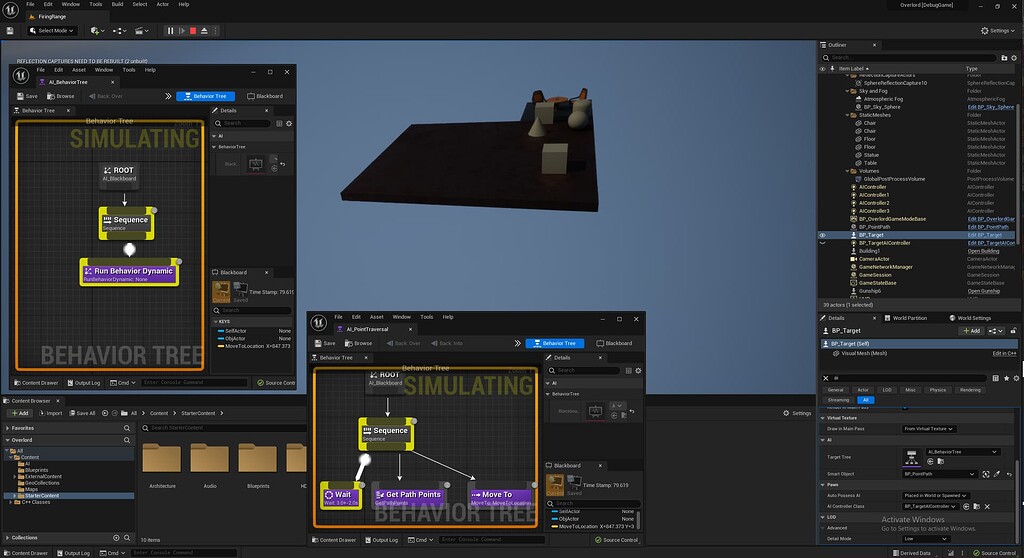
Epic Developer Community Forums
I was following a tutorial series to learn the basics of behavior trees ( Ue4 C++ AI Behavior Essentials Part 2 - Smart Objects - YouTube ) and am up to the end of the second episode, having translated their work to fit in my project, with the only major difference being that I am using a custom Pawn subclass called Target instead of a Character...
im pretty sure the solution is somehow tied to this post https://forums.unrealengine.com/t/behavior-tree-moveto-not-working/155335/10?u=dante5050 but im getting lost on the radius, nav agent, and movement component setting instructions
Epic Developer Community Forums
Your Self Actor Node now appears to not be filled. This should be filled automatically when you play by the BB. Just to confirm have you set up the pawn with an AIController e.g -open pawn go to class defaults scroll to AiController select your AI controller from drop-down set AI possess pawn that are spawned/placed in world or is the contro...
uneven cloud
strong cargo
When it comes to replication, is using GAS better for AI or is a simple multicas...
GAS is better. Especially if you want good replication of montages.
lunar isle
Not sure if this is the best place to ask but here goes!
I am using a navmesh setup (with waypoints) for the AI cars in a racing game, but the game has some quite drifty physics. When I'm controlling a car, I will start turning a short distance before the corner, in order to drift around it faster.
IS there an 'easy' (feasible for a newbie like me) way to get this to work for the AI too?
misty wharf
iirc the game ai pro books had something about vehicle AI, those should be freely available online, might be worth a look if nobody here can help
strong cargo
uneven cloud
GAS is better. Especially if you want good replication of montages.
Is the montage-related benefit really there for something simulated on the server? My understanding is GAS gives you root motion with prediction, but if it's not doing a client->server->everyone replication then that benefit is kinda lost, isn't it? Or is there more going on with that?
uneven cloud
strong cargo
Is the montage-related benefit really there for something simulated on the serve...
It replicates the montage and keeps the server and clients in sync while it plays. The benefits aren't lost on server owned actors.
strong cargo
uneven cloud
It replicates the montage and keeps the server and clients in sync while it play...
Ahh, ok. Are there network performance implications with that if there are a lot of AI doing this at the same time?
uneven cloud
strong cargo
Ahh, ok. Are there network performance implications with that if there are a lot...
It's better performance wise than doing multicast RPCs.
strong cargo
Interesting. I would've thought it'd be worse to be frequently synchronizing things as opposed to just kicking off an animation.
ocean wren
lunar isle
Not sure if this is the best place to ask but here goes!
I am using a navmesh ...
Why don't you record yourself doing it and simply use that as the value along the curve? or sample every N values and store those as the t value for the curve, plenty of racing games use demonstration as a way to tune the AI
Or write a drivatar system that uses RL for a real version 🙂
 mental fractal
Hey all, I'm starting to dip my toes into EQS and I'm trying to figure out if it's possible to filter based on a target AI's sight perception. As in, there is visibility between the item location and target actor location, but filter out items that are within the target AI's sight perception. My target context is already set up and seems to be working, just not sure how to figure out what it can "See" to the EQS query. Sorry if this is basic, I'm very new to EQS and so far googling hasn't given me much on this topic. Any help is appreciated!
I did see the dot product test, but so far un-ticking absolute value (to presumably just return areas in front of the ai instead of front and behind) hasn’t really changed my results much, so maybe I’m misunderstanding how that works
lunar isle
ocean wren
Why don't you record yourself doing it and simply use that as the value along th...
What curve?
lunar isle
ocean wren
sorry, assumed you'd used a spline to represent the track
parts of the track use a spline, but not the whole thing, and I'll probably end up not using a spline at all for laying the track as they are pretty crap
And the AI are probably going to end up using the navmesh for pathing, unless I hit a wall with that
ruby shard
any1 familiar with StateTree?
celest python
Yes
uneven cloud
mental fractal
Hey all, I'm starting to dip my toes into EQS and I'm trying to figure out if it...
There is a trace test.
ruby shard
@celest python
how do I repeat such a statetree (mine, cut tree) whenever it is failed or ...
 celest python
I am not sure but I think only way is just jumping back to the the state, ST doesnt have decorators
You might try jumping back to self if ST allows you to
On stage completed event
ruby shard
@celest python there is no self , u mean Root maybe ?
celest python
self being the state you want to repeat from
I'm not sure if Root is the mine for "find target" or the actualy Root state in the context so you need to try it out
but one way or another it should be the only way, jumping back to desired state to repeat
ruby shard
im a little confused, I tried many thing but it didn't work
when mine.fire is finished min.OnStateCompleted should be called yea ?
mental fractal
uneven cloud
There is a trace test.
Thanks for the reply, I’m using the trace test but my understanding is that the test checks for visibility between two locations, where I am looking for the visibility of the AI perception component. Currently I’m tracing for visibility to the target ai and trying to use the dot product test to filter out items in front of the ai, but that doesn’t appear to be working. Is that the best way of doing things, or is there a way to actually filter out EQS items that are in my AI’s visibility cone?
ruby shard
@celest python is there any visual debugger btw ? other than using VisLog ?
uneven cloud
mental fractal
Thanks for the reply, I’m using the trace test but my understanding is that the ...
There is nothing built in. You could write a test that could check that, but it's only available in C++
mental fractal
uneven cloud
There is nothing built in. You could write a test that could check that, but it...
Thanks! I’ll have to take a look at that, I might be able to write a custom query
 fresh remnant
Is there a way to slow down behavior tree so that we can see a unit go through the different nodes in the AI debug overlay on a packaged build(no behavior graph open)
celest python
Other than time dilation nothing comes to my mind
keen iris
having a hard time with setting blackboard values:
I started implementing behavior trees (something ive never done) and everything seems to work except for assigning two references to two blueprints I made. 'AI Navigation Target' And 'enemyCarBase'
All my bools seem to go through just fine but these two blackboard values show up as 'none' for their values.
The attached image is being run every tick (for now) but its just not updating, the values Are set correctly on my AI controller though
 silent hamlet
keen iris
having a hard time with setting blackboard values:
I started implementing behavi...
silent hamlet
keen iris
having a hard time with setting blackboard values:
I started implementing behavi...
can you share your blackboard?
bleak gazelle
What's a good event to call RunBehaviorTree on. I don't like relying on delays to make things function and I'm wondering if there's one, prefarably on the AIController, that works more reliably
Oh wait, OnPossess is BP exposed, never mind.
 obsidian igloo
So I have a question, Ive created a custom EQS generator to evaluate the nearest threat and then filter out enemy and friendly factions using gameplay tags.
My issue is the EQS is updated every .5 seconds or so when they are in combat and it utilizes get all actors of class to evaluate the nearest actor so it gets a little pricy with more than 6 or so combatants. it works great as a target switch but I really want to optimize this further, anyone have any ideas regarding this?
 harsh storm
get all actors of class to evaluate the nearest actor so it gets a little pricy with more than 6 or so combatants
In a packaged game, this means less than what you may think. In editor it is much worse than a packaged game because it has to filter out the editor stuff first.
In a packaged game, it just grabs the stuff from the bucket all actors are hashed to
obsidian igloo
oh thats good to know actually, I know packaged builds are generally faster but ive always been told to stray away from get all actors of class lol
harsh storm
Yeah - Luthage (very frequent dev of #gameplay-ai) corrected me on that a bit ago as well. They've worked on some pretty cool games as well, so they have an idea on what they're talking about 😅
But when they brought it up, it caused me to actually investigate what happens. And really, it's just in editor it is super slow
Otherwise - it just looks in that bucket.
A lot of indirection though, so it can be hard to trace.
So, package it and then profile.
obsidian igloo
thanks! 😄 I'll definitely keep this in mind, I still dont use get all actors of class a ton anyhow but just trying to keep performance as good as possible since this is a PCVR title
obsidian igloo
I definitely need to learn C++ for sure, its just incredibly daunting 😆 ive been using entirely blueprint for a little over 4 years now lol
harsh storm
@inland bronze Encourage this dev to learn C++ after this many years of BP. Recount your learnings.
I can't recall if plugging directly the out actors into the ForEach loop triggers the bad behavior or not though.
But pretty much, it will run it on each iteration of the foreach loop.
obsidian igloo
is it possible to just rewrite the for each loop macro as a c++ macro? I dont imagine that would change much tho i guess haha
harsh storm
Don't even need to do that.
obsidian igloo
oh you mean the get all actors of class being called everytime a loop is run?
harsh storm
In all honesty - which how much experience you have in BP, picking up C++ shouldn't be too bad.
harsh storm
obsidian igloo
oh you mean the get all actors of class being called everytime a loop is run?
Yeah
You can even start small. Just slowly dip your toes in it.
With how Epic has set things up, if you're staying in the gameplay framework - it's nowhere near as bad as raw C++
But not all 😈
Either way - that's my advice. It'll also come in handy for AI in general because BP tasks are forced to be instanced, which can come with perf problems.
obsidian igloo
thats fair! I will definitely be giving it a shot, I absolutely want that performance increase lol
I havent, I toyed with it years ago but it never stuck lol. ive made a few attempts since then but the entry level knowledge is hard to come by with all the hodgepodge tutorials lol
thank you, this is incredibly helpful! will absolutely be taking a look at these 😄
harsh storm
Also - if you're in 5.1, there is a new tool that will help create the .h file for your BP. Conveniently named BP header tool
obsidian igloo
harsh storm
Also - if you're in 5.1, there is a new tool that will help create the .h file f...
im still in ue4 unfortunately, chaos physics is too borked. 90% of my VR game relies on physics 😅
huge help tho, I will absolutely be working on that course! ive gotten quite far in blueprint and understand it very well so hopefully it wont be a massive jump
harsh storm
Yes yes. Now go back to your hole in #cpp
@obsidian igloo btw - I liked the hit reaction stuff; physical animations?
obsidian igloo
harsh storm
<@180854269837049856> btw - I liked the hit reaction stuff; physical animations?
thanks! its a system ive been working on for a while. technically there is no physical animation in that video, BUT I do utilize them only if the player is within range to save performance, in that vid there is no player. I'm using a reaction system based off of the hit angle and impact force per bone, so a total of 6 possible hit reactions per bone albeit some of them are useless like a top forearm hit. 😄
harsh storm
When I was trying to do physical animations for my hit reactions...it was stretching my zombies 😭
obsidian igloo
harsh storm
When I was trying to do physical animations for my hit reactions...it was stretc...
they are absolutely a pain for sure 😆 im getting used to all the caveats and whatnot after playing with them for 2 years lol
i might have a better example but actually in VR one sec
celest python
huh, a wild tank appeared in #gameplay-ai
obsidian igloo
harsh storm
<@180854269837049856> btw - I liked the hit reaction stuff; physical animations?
this is a mix of phys anims and hit reactions!
harsh storm
Yeah, I'd like for my hit reactions and death stuff to be more physical reaction based, but have had issues actually setting it up 😅. So right now, we're just doing the classic keyframed animation
harsh storm
obsidian igloo
Nice. This looks a lot like the zombie VR game I want to make, but can't due to my headset breaking, lol
celest python
obsidian igloo
damn this looks satisftying
harsh storm
The big thing for me - environment interaction. I want to be able to grab a zombie, put their head in a fridge and slam it 😅
obsidian igloo
Thanks! all i want is a satisfying VR game that doesnt feel arcady lol ive been working on lots of VR gun stuff and bladed weapon stuff too
obsidian igloo
harsh storm
The big thing for me - environment interaction. I want to be able to grab a zomb...
technically you can grab them and drag them around 👀 physics alone is a weapon in the game
obsidian igloo
harsh storm
I can't recall if plugging directly the out actors into the ForEach loop trigger...
btw I think I might find a way around that, you can simply store the get all actors of class array as a temp variable and then read only from the variable
harsh storm
Yeah - that's the general advice.
I couldn't find the blog post talking about it. Like I said though, I don't remember if it applies to Out arrays.
obsidian igloo
thats fair, ill do a profiling test at some point and check back in here about it cuz im curious now too
harsh storm
https://raharuu.github.io/unreal/blueprint-pure-functions-complicated/
Here is the article
I think anyway 🤔
The one that I read way back when actually showed the math behind the stuff
obsidian igloo
harsh storm
<https://raharuu.github.io/unreal/blueprint-pure-functions-complicated/>
Here i...
I can sort of confirm that it does make a difference from just eyeing it. im saving about 5frames if I store the variable first. but like you said probably negligable in a packaged build
harsh storm
obsidian igloo
I can sort of confirm that it does make a difference from just eyeing it. im sav...
In VR - take any win you can get. Performance is even more of a concern in VR than traditional games.
obsidian igloo
harsh storm
In VR - take *any* win you can get. Performance is even more of a concern in VR ...
yea AI is my biggest hit rn, everything else runs smooth as butter lol
harsh storm
C++ tasks
#gameplay-ai message
#gameplay-ai message
Two recent examples Luthage brought up
@obsidian igloo 👆 Luthage talks about optimizing BT stuff for State of Decay.
Just by going from BP to C++ and not instancing tasks unnecessarily it helped a ton.
Also, if using the CMC, changing the movement mode to navmesh can help reduce the cost of the CMC.
uneven cloud
I could probably talk for days about ways to optimize AI.
 celest python
uneven cloud
I could probably talk for days about ways to optimize AI.
celest python
uneven cloud
I could probably talk for days about ways to optimize AI.
I'm ready to listen 
 lethal helm
AI is great because any amount of headroom you create with optimization can be eaten to make your AI better
 surreal helm
harsh storm
Yeah, I'd like for my hit reactions and death stuff to be more physical reaction...
surreal helm
harsh storm
Yeah, I'd like for my hit reactions and death stuff to be more physical reaction...
Any chance you had issues setting it up in 5.1? I also just can't get it to work at all. Followed a few different tutorials and even used a different implementation via a plugin and it just does not behave as expected. Can't work it out :/
uneven cloud
I said that and then ran off to a meeting.
-
Profile early. Profile often. Things aren't as expensive as you might think or maybe they are more so.
-
Character movement component is expensive. It's built for a multiplayer arena based shooter so it's incredibly precise and that costs a lot of perf. Lots of tweaks you can do, but you need to profile based on the needs of your game.
-
The anim budgeter is incredibly powerful. It's really easy to set up and will help with animation perf issues.
-
The significance manager is great. You can register objects with it to determine the significance of the object in relation to the player(s) to turn things off and on as needed. It's multi threaded so calculating the significance of a lot of objects is ridiculously fast.
-
Don't wait until perf is garbage to implement AI LOD. Start early so you have a lot of time to tune it. There's a great article on it in one of the Game AI Pro books that I highly recommend.
-
The EQS is time sliced, so use that willingly. However, the max time per frame is high at 2ms, but you can change that via an .ini.
-
Batch pathfinding EQS test is significantly better perf than the normal version.
-
Do you really need that large pathing grid generator? Or will a donut with fewer points give you the same player experience?
-
The EQS has it's own profiling built in to the editor. Use that as a guide, but profiling should always be done with a packaged test build.
 storm sail
woke up spitting facts
uneven cloud
-
Human reaction speed is .2 seconds. Updating your AI every frame (16ms if 60fps) is unnecessary and usually not a fun player experience.
-
Start simple and fail fast. A random number is a lot cheaper than a complex algorithm. Focusing on the simplest way to achieve the player experience you are looking for, means there is less code that needs to be optimized.
-
BP is really hard to profile. You can't do it by default, but there are ways to do it if you can make some library functions.
-
BP is great for prototyping and small projects. You aren't going to make the next Skyrim using it.
-
The BT is highly optimized, but you lose a lot of it by making nodes in BP.
uneven cloud
harsh storm
https://tenor.com/bkOJC.gif
Let me know if you want more.
celest python
uneven cloud
Let me know if you want more.
I have a question
When you apply everything you mention to a project, what do you optimize most commonly that is not project specific?
For example I find myself using async path movement to FVectors since its only happening for AActor goals if the project I'm working on has more than 30 AIs
 rustic nova
Does anyone know of any example projects with a simple state tree setup (without mass)?
celest python
rustic nova
Does anyone know of any example projects with a simple state tree setup (without...
There isnt any afaik
uneven cloud
celest python
When you apply everything you mention to a project, what do you optimize most co...
There's always your typical engineering optimization, such as using distance squared instead of distance. The movement component is another thing that always causes a problem, but what needs or can be adjusted is always different per project.
I have found that unless you only have 5 AIs spawned, AI LOD is the biggest win perf wise so I don't need to do as many smaller tweaks.
uneven cloud
celest python
For example I find myself using async path movement to FVectors since its only h...
I've never found the need to do that. I prefer using the cheaper Has Path hierarchical test, because pathfinding is most expensive when it can't find a path. Doing that, finding a path is never a hotpot.
celest python
I actually remember you mentioned that, I was put it to my list to profile the difference between async and has path test but I forgot about it
but I guess to "move" pathfollowingcomponent still needs to do regular pathfinding right?
because it does string pulling etc
uneven cloud
It does. It just doesn't try to go somewhere it can't get to.
The average case of FindPath barely registers during profiling, if a path can be found. That's of course going to be game dependent, but I've yet to see it.
celest python
ah I see
so you are eliminating the case where more expensive pathfinding fails by doing that before the moveto
obsidian igloo
Learned alot from this already, thanks for this! its a diamond in the rough lol
lunar isle
What is up with the navigation mesh settings? I have the settings set in the project settings -> navigation mesh menu, but when I make a new mesh it doesn't use those settings... it uses some of them but some of them change to other defaults.
SO I go to the "RecastNavMesh" actor to change the settings in the editor details panel, and those change while in the editor... but when I run the 'simulation' the actor... seems to be using other settings (I can see it going much closer to the walls than it should with the radius I have set)
 spare panther
I was really hoping to figure this out on my own, but could someone tell me why I don't have any editable settings for the AI Perception? I'm using 4.27 and this is all I have access to

I've been running through the UE Documentation to learn about making AI and this is what they have
 uneven cloud
lunar isle
What is up with the navigation mesh settings? I have the settings set in the pro...
uneven cloud
lunar isle
What is up with the navigation mesh settings? I have the settings set in the pro...
If you are trying to change things like actor radius, it won't let you. You need to set your agent settings in the project settings.
uneven cloud
spare panther
I was really hoping to figure this out on my own, but could someone tell me why ...
Click on the arrow ish icon next to 0.
spare panther
ohmygod
 harsh storm
uneven cloud
Let me know if you want more.
harsh storm
uneven cloud
Let me know if you want more.
Awwwz - I actually knew most of these 😅. I actually learned about the AI LOD stuff from vblanco. Never thought about it until they mentioned it.
lunar isle
uneven cloud
If you are trying to change things like actor radius, it won't let you. You nee...
I have 'agent radius' set to 750 in project settings, as well as in the recast (even if that doesn't do anything), but when I hit 'play' the setting in the details panel changes to 35
Whatever I do, I can't seem to get it to work properly once it hits the sloping part, even though the navmesh seems to have been generated there


 uneven cloud
lunar isle
I have 'agent radius' set to 750 in project settings, as well as in the recast (...
uneven cloud
lunar isle
I have 'agent radius' set to 750 in project settings, as well as in the recast (...
You need to set it in the supported agents settings.
lunar isle
where's that?
uneven cloud
harsh storm
Awwwz - I actually knew most of these 😅. I actually learned about the AI LOD st...
Yeah that's the problem with general advice. Not a lot there, because it's all so game specific. Especially when it comes to optimization.
It also can get very contradictory. Such as "optimize only when there's a problem, but also do you really need to use GOAP because that's super expensive."
rustic nova
How do you get a reference to the state tree itself? I want to bind values to schema variables using FStateTreeExecutionContext::SetExternalData based on the logic in FGameplayInteractionContext::SetContextRequirements. But I don't see a way to access the FStateTreeReference from the StateTreeComponent (besides making a child class and defining an accessor function).
celest python
There isnt a way by default, duroxx made it once but later on after reading mass state tasks I realized there is no need for statetreeref
though I dont really remember what was the way to do it without statetreeref
check FMassLookAtTask::EnterState
back at the day ST was different about accessing params so I might be wrong too
if you need duroxx's way it must be this one: #gameplay-ai message
rustic nova
celest python
There isnt a way by default, duroxx made it once but later on after reading mass...
If I'm understanding correctly, this EnterState function is making use of a TStateTreeExternalDataHandle<FMassLookAtFragment> to grab the correct Parameter from the FStateTreeExecutionContext? Like the BoolParam in my example pic or would it be the Actor CONTEXT?
But how do you actually set the values of these parameters from an external source? Or should everything be self-contained in the statetree and pull itself from its owner.
For example: I want to press RMB in the Character class and select a target actor and send this target actor to my StateTree. Is this where I would use a schema evaluator?
EDIT: I was able to get it working by making a schema evaluator with an OUT TargetActor in the InstanceData. Then all my states could access this TargetActor. This is does seem to work nice if you want to pull info from your owner actor. Still curious if there is a correct way to push info into the state tree.
Hmm interesting, the state tree component only works for StateTreeComponentSchema. And the GameplayInteractionStateTreeSchema's tree lives inside UAITask_UseGameplayInteraction.
 keen iris
silent hamlet
can you share your blackboard?
keen iris
silent hamlet
can you share your blackboard?
sorry just saw this, turns out i was feeding it the wrong owner pawn connection -.-
 near fox
Is anyone facing this issue with unreal engine mass ai and dose anyone know how to solve it ?
im using ue 5.1

 flat dome
Did the new update mess up the AI Behavior tree at all? The enemy Im coding seems to see the player, then go the total opposite direction. Its very odd
And its not necessarily a complex tree. It supposed to wait till it sees the player, gets the location, then follows them
flat dome
Just kidding. Dumb problem. I set the radius too high
silent hamlet
@uneven cloud you dropped so much wisdom that will be lost in the channel. Ill make screenshots of that for future reference 😄
just a declaration of intents...and thanks!
ocean wren
spare panther
I was really hoping to figure this out on my own, but could someone tell me why ...
Dumb question, but did you click the arrow on the top left where the sight config is?
lyric flint
Does AI require AIPerception? For example, in a simple game like asteroids where there is no where for the player to evade or hide, couldnt you bypass sensing and do something similar to this?

I say similar because my example screenshot doesnt work
ruby shard
how do I add something like observer to my state tree ? I want to add it to 'mine'
imagine I have a state tree like the following and I want to run something while 'mine' tree is running