#🔌│tech
1 messages · Page 294 of 1
 digital cliff
 wheat plume
Yeh.
Imma get it and two USB c to c cables
 reef patrol
https://www.youtube.com/watch?v=SCIOOlT3KJI
A bit of 3D print nerdery for y'all.

Get your first donation of up to $100 matched at https://www.givewell.org
Watch this video without ads on Nebula: https://nebula.tv/videos/strangeparts-inside-prusas-3d-printer-factory
To learn more about Prusa Research, or buy a printer of your own, go to https://prusa3d.com
See inside Prusa Research's factory to see how they make their 3d pri...
 slender rain
Actually what is the deal with doubleclicking mice?
I think about building my own mouse, since gaming mice seem to be garbage
I can't remember having double clicking issues ever before gaming mice became a thing
 ashen spindle

This is an extremely detailed report on all the technical variables that are relevant to the plague of prematurely 'failing' OMRON switches on modern PC mice that more and more users have experienced lately, like the popular Logitech gaming mice (and other manufacturers too): this is NOT an attack on brands and manufacturers, but I have to talk ...
 thick elk
Never thought much about it, my first guess would be debounce related, with a switch going out of spec over time, gonna watch the video.
thick elk
Interesting video in general, didn't think of the lower voltage and current angle but that makes sense as well.
wheat plume
Cant buy from Anker either cause they also dont ship here .-.
ashen spindle
get the other one that ships and just a adapter for the outlet
 craggy elk
what should i get for my first premium mousepad i have been using a cheap amazon pad but i want to try something of higher quality i mainly play fortnite, apex, overwatch, the finals, cs2, and valorant
thick elk
That's one route you could go, but really performance wise there is nothing wrong with the cheap cloth mousepads from amazon or any other place.
wheat plume
reef patrol
No local ish electronic chains?
yes but its an extra 40 euro to buy it from there
.-.
digital cliff
I guess you can do your own research with the amount of mouse and mousepad nerds out there these days but I guess it's artisan or a glass pad for most people
and don't forget the 200€ mouse!
craggy elk
thick elk
That's one route you could go, but really performance wise there is nothing wron...
yeah but i want to try something nicer so what would you recommend
digital cliff
I guess my recommendation was not good 😒
thick elk
I personally just use a large aliexpress one, got to try out some artisans, had an aluminium pad for a while. Just a large cloth deskpad is what I personally find the most comfortable to use. Of course opinions differ but that's where I personally sit.
digital cliff
for me too, I couldn't care less about performance, I just want pretty colors
thick elk
I like to rest my arms on my desk, at least 3mm cloth deskpads are comfortable that way.
digital cliff
currently waiting on my endgame deskmat haha, shame it had to be a pre-order 😔 PRE-ORDER for a fucking cloth pad that gets made in china to your spec in like 3 days
3 month wait gaming 🛌
only annoying part about deskpads is how ugly they get with dead skin and crap
and washing them, they lose integrity slowly
thick elk
Oof, Still happy about my custom print one.
Wahsing them is kind of problematic yea, if it degrades too much off to aliexpress with a new design.
Oops older version of the design
 digital cliff
yeah I might try a custom print one at some point, I just worry the quality will be shit
with the mass-produced ones like the ones that compliment some keycap sets and all that, at least they've vetted the quality beforehand so I know I'm not getting absolute garbage
thick elk
you need to be careful of contrast and level of detail will not be perfect. So far my experience has mostly been positive
Working preview on this one:
 digital cliff
did you design the print yourself?
thick elk
yea, took photo's converted them to lines yea
 marsh glade
digital cliff
marsh glade
digital cliff
really good idea though
thick elk
Best feature for me is my natural mouse position for my mouse is right on the cuttingpad / mousepad on the mousepad.
craggy elk
digital cliff
I guess my recommendation was not good 😒
oh my bad i didnt see it
craggy elk
digital cliff
I guess you can do your own research with the amount of mouse and mousepad nerds...
which artisan or glass pad would you recommend for the games i listed
digital cliff
craggy elk
which artisan or glass pad would you recommend for the games i listed
I have no idea, you have to figure out what kind of pad you like
fast, slow, whatever
thick elk
generally prints are 300dpi actual level of detail you get is not perfect, so keep that in mind. The screenshot looks different from the actual pad in terms of detail, also contrast is not always that great.
craggy elk
digital cliff
fast, slow, whatever
i think i want to try something that is balanced for my first artisan pad
digital cliff
and then go ask someone who actually knows their stuff xD I just know these pads are the stuff enthusiasts like
I have no clue about them myself
 pale sigil
Do yall think its safe if i power my rasberry pi with a 18w charger
reef patrol
It's USB innit? Handshakes and all.
digital cliff
yaas if it's USB you should be fine regardless
 halcyon moss
Is it enough? I have no clue tbh
pale sigil
5.25V 7.6 watts
thick elk
Recommended spec is 5v 2a, most chargers should provide that at least.
pale sigil
its more im worried about 18w
thick elk
2*5 = 10
reef patrol
halcyon moss
Is it enough? I have no clue tbh
The PI will usually show an icon if it doesn't receive enough power.
pale sigil
My pi keeps shitting itself
digital cliff
pale sigil
its more im worried about 18w
power is drawn, not delivered
pale sigil
i suspect its because underpowered and running multile docker instances
halcyon moss
What else is connected
thick elk
try running prime95 or something to test.
digital cliff
you can hook up a 100000w charger but if the device draws 5w it draws 5w
pale sigil
Printer and webcam
halcyon moss
Try with out Webcam
thick elk
It could very well be that your 18w charger does not provide 18w at 5v and sags in voltage
halcyon moss
What does shitting itself mean
digital cliff
ahh you're rather worried about underpowering it rather than over-, gotcha
pale sigil
i wanted to move to it
pale sigil
halcyon moss
What does shitting itself mean
stops working, cant connect etc
ok ye it was the webcam
halcyon moss
Non responsive? Connect a display etc
pale sigil
guess ill move it to an actual plug now
pale sigil
halcyon moss
Non responsive? Connect a display etc
my pi is headless
thick elk
Pi 4 has those nasty small ports, if you don't have the cable / adapter at hand
halcyon moss
Oh..
thick elk
micro hdmi
halcyon moss
I got a pi4b for my birthday.. Still need to power it up
halcyon moss
thick elk
micro hdmi
Oh I got that! Used that for my shield tablet
thick elk
I only have a pi2 and pi3, don't use them often. At least they can be powered from a tv even. Also got micro-hdmi for my tablet pc. Old one only had that as display out, new one can also do it over usb-c
pale sigil
i would love more than 1 pi but they are to pricy
halcyon moss
Still?
pale sigil
ye
ashen spindle
just get one of the pi clones
pale sigil
when i got mine it was like 30 quid... now they start at 60
i dont know anything about pi close
tbh
ashen spindle
I mean for the most part its all the same unless you want something specifically only for the pi
but something generic like docker is basically the same
thick elk
Pi clones often suffer from not being fully mainlined in the past at least and overal being less supported.
But yea if just running linux software inside or outside docker it's fine mostly either way.
digital cliff
@hasty rain pulling you here so as to not clog up #🌟│wooting80he too much with offtopic :-D neverheard of vencord, I did try... ripcord (?) at some point but it was simply not an improvement
 hasty rain
digital cliff
<@215419689982099456> pulling you here so as to not clog up <#118626504522780271...
hasty rain
digital cliff
<@215419689982099456> pulling you here so as to not clog up <#118626504522780271...
ah shit i didnt even realise which channel i was already in myself so yeah my bad too 😄 but yeah i usually use vencord, never had an issue with it and used it for ages now- all i can say really
hasty rain
digital cliff
<@215419689982099456> pulling you here so as to not clog up <#118626504522780271...
shit like being able to stream video at 1440p 60fps without having nitro and etc, being able to have themes without nitro and whatever else, many many plugins 😛
digital cliff
aight I installed it just now actually to test
for me it's normally just a pain to get screensharing going anyway and the 3rd party clients don't usually help in that sense haha
hasty rain
what os do you usually use though? but yeah i usually just use default discord with vencord, cant comment for the others for screensharing
also if you're using linux, are you using xorg or wayland?
digital cliff
on linux always, wayland in particular -- which is the reason for the screensharing being problematic
hasty rain
ah yeah i thought that might have been the case 😄
i still use xorg just for that reason, its not "complete" enough for my liking but im sure there is a uhhh, fuck i forgot the name.. something pipes or whatever to semi fix that right?
digital cliff
the only thing that works is discord-screenaudio and even then, only when xdg-desktop-portal, pipewire, hyprland and discord versions all magically agree
on some days they might not and I need to downgrade something, upgrade something to make the thing work again 😒
hasty rain
ah yeah that sounds annoying 😂
digital cliff
don't really understand why in the year 2023 we can't have working screensharing on wayland
hasty rain
the perks of using something new i guess 🤣
digital cliff
yeahh, at least wayland is super nice when it works -- I just extremely dislike the fact that they left everything for the compositor to implement, so experience on one compositor is often very different from another
where you adjust settings related to displays and all that, every compositor has their own unique way
hasty rain
yeah, thats why i havent made the switch yet- especially when i tried it there wasn't even a way for obs and bindings to work globally properly
digital cliff
talking about the second big issue I have, no global hotkeys
hasty rain
since then i just went back to x and ill just wait for shit like that to progress more
digital cliff
problem is it'll never come
wayland is built to not allow that
so all applications have to include their own socket or something to do this
hasty rain
digital cliff
wayland is built to not allow that
yeah but theres apparently things in the works for it from what i can remember seeing (or a vid i watched on yt i cant remember) to give permissions to specific apps to do it
something along them lines
wheat plume
digital cliff
talking about the second big issue I have, no global hotkeys
So you can't have keyboard shortcuts to change volume or toggle play and pause???
digital cliff
you can via a hotkey daemon
wheat plume
O
hasty rain
the way xorg works is, bindings can be read via any process (not exactly secure)
digital cliff
but problem is you can't control discord mute or PTT or something via a console command
wheat plume
Ah
digital cliff
so the hotkey daemon can't really pass the command along
hasty rain
but wayland fixes that vulnerability
wheat plume
So it's only app specific shortcuts that don't work
hasty rain
but it also means they need to figure a way out to allow global bindings for apps 😄
digital cliff
wheat plume
So it's only app specific shortcuts that don't work
yeah depending on what you want to do, pretty much
hasty rain
wheat plume
So it's only app specific shortcuts that don't work
say in obs, you can bind things like F1 to switch a scene or such.. which doesn't work in wayland because of global bindings
means you need to be focused on obs for it to work
which defeats the point of it
wheat plume
hasty rain
say in obs, you can bind things like F1 to switch a scene or such.. which doesn'...
Ahhhh
digital cliff
like I control MPD just fine via hotkeys, used to do it with sxhkd on xorg and now I do it via Hyprland, but that's because mpd has a way to control it via CLI; all my controls are basically just commands
but long as the application you want to control doesn't include any way to control it via commands or some socket, no can do
wheat plume
Right ;$!
hasty rain
digital cliff
like I control MPD just fine via hotkeys, used to do it with sxhkd on xorg and n...
i did see a video on how someone got it working tho, a pretty well known linux youtuber (cant remember his name rn)- ill see if i can find it for you but im pretty sure he had to rebind his f keys meaning he cant now use them as F1, F2 etc in anything else
digital cliff
ahh interesting, yeah there's probably some hacks out there
there's a PTT-enabled discord package out there somewhere that at least lets you use push-to-talk but afaik it's a really hacky, hardcoded way of doing it
hasty rain
could probably make a script to check if obs process is running then reconfigure it and restart wayland maybe and vice versa (hopefully)
but if you could do it the way i said above, having multiple configs for diff apps running at the same time- i suppose you'd just have to make sure the keybindings dont overlap
hasty rain
digital cliff
there's a PTT-enabled discord package out there somewhere that at least lets you...
https://www.youtube.com/@BrodieRobertson
it was this guy, cant remember which video it was though

YouTube
For all general enquiries feel free to contact me through any social media service listed below,
If you'd like to longer form something longer form like fan mail or you have a video suggestion, feel free to send me an email.
If you'd like to chat, then come join my Discord: https://brodierobertson.xyz/discord
All of the scripts and configs that...
digital cliff
https://www.youtube.com/watch?v=rfXP9gltk3A yeah actually watching his video on global hotkeys supposedly coming to wayland.... a year ago

I've been a big advocate for global hotkeys in wayland to address things like OBS hotkeys or push to talk in communication apps like discord and finally the solution has been merged, now it's only a matter of waiting.
==========Support The Channel==========
► $100 Linode Credit: https://brodierobertson.xyz/linode
► Patreon: https://brodierobert...
not sure what the hang up is, probably just compositor implementation, meaning I just gotta wait until Hyprland implements it (?)
hasty rain
digital cliff
not sure what the hang up is, probably just compositor implementation, meaning I...
id imagine so yeah
oh this is one i come across when i tried wayland too

I've been harping on about multi window apps on Wayland for quite a while and whilst I would like the problem to be done we're now on the 3rd protocol which I like to call gaslighting the Wayland devs into fixing the problem.
==========Support The Channel==========
► Patreon: https://brodierobertson.xyz/patreon
► Paypal: https://brodierobertson...
looks like its still an issue (not exactly watched the video tho)
 smoky frigate
digital cliff
https://www.youtube.com/watch?v=rfXP9gltk3A yeah actually watching his video on ...
smoky frigate
digital cliff
https://www.youtube.com/watch?v=rfXP9gltk3A yeah actually watching his video on ...
it didn't work a short while ago 4 me
digital cliff
yeah it's a whole mess honestly, I wish we could go back in time before wayland was invented and just do it right this time
just make a better xorg because the way xorg works to me is logical, not this whole "wayland is just a protocol" and all compositors have to work shit out themselves
hasty rain
digital cliff
just make a better xorg because the way xorg works to me is logical, not this wh...
yeah its not exactly ideal the place wayland is in and id still say its got a few years to go yet
digital cliff
I'm not sure it'll ever become the thing everyone wants to see
just the way it's designed is broken as every compositor has to make their own implementations of things
just a waste of everyone's work honestly
10 devs working on their little compositors all doing the same thing when they could instead work together on a monolithic thing that in the end serves everyone
hasty rain
well most distros are starting to push wayland as default so hopefully a lot more work will be done towards diff compositors and shit via them
like say is valve go balls to the wall and go ham on it like they have with proton 😄
wayland is where were all heading but i still dont think we're nowhere near ready to use it as a daily driver yet without issues
digital cliff
I like your optimism :>
hasty rain
yeah, although i think theyre changing soon to full wayland
wheat plume
Hmmm
hasty rain
sure ive read that somewhere
wheat plume
Idk if they should tbh
People use discord on desktop mode and they won't know why screenshare won't have audio in Wayland
And why apps can't respond to shortcuts
The deck is being used by people who've never used / heard of Linux before!
hasty rain
well valve use their own compositor called gaming scope if i remember right so who knows, they might just improve it to the point they're using it for the desktop too
hasty rain
yeah ive tried it ma arch setup but it had issues with high refresh rate
240 fps just refuses to work
wheat plume
And a few versions out of date compared to SteamOS
Hmmm?
Oh strange
165 works flawlessly for me
wheat plume
hasty rain
240 fps just refuses to work
Maybe your cable can't handle 240?
hasty rain
yeah anything higher and it'd just crash and yup
type-c to display port
used this setup for years now 😛
hasty rain
well its a type c usb 3.2 if i remember correctly
pretty sure its got like a 10gb bandwidth
id have to google
digital cliff
I've tried gamescope before on an application-basis to try to fix something and didn't really enjoy the hardcoded keybindings or the fact it fetched my keyboard layout from god knows where (another linux/wayland annoyance)
trying to figure out how to pass my compositor-set keyboard layout to applications running under Wine is always fun times
digital cliff
then ending up just setting the same keyboard layout everywhere until it works
which is also like, why do we have like 5 different files where you can set it bruh
😂
wheat plume
Maybe symlink shit?
hasty rain
sounds to me like you just need to go back to xorg my man 🤣 get back on bspwm or i3wm 🤣
digital cliff
haha I have a working bspwm session for when I need it, set identically to my Hyprland :D
hasty rain
yeah they are, although i mostly use i3wm just cause its what ive used for like 10+ years so 😄
digital cliff
so all the same bindings work and I'm up to speed immediately, just like the smoothness of wayland so I use this when I don't run into issues :>
digital cliff
yeah I think I'm compositorless on xorg too
wheat plume
hasty rain
no animations or owt, QUICK TINGS
Nah
Having no animation makes me motion sick
digital cliff
I don't mind it, it's just a little stone-age for me so not the preference
hasty rain
I used to use picom, aka compton but it had a few issues every so often and would piss me off so 😄
wheat plume
Which is why windows 11's removal of the animation when switching virtual desktops pissed me off
.-.
hasty rain
wheat plume
Which is why windows 11's removal of the animation when switching virtual deskto...
they still have animations? 👀
wheat plume
When using the keyboard shortcuts to switch desktops on 11
They no longer have an animation
hasty rain
im on the latest win 11 build and they do 😛
wheat plume
No sliding between them
wheat plume
hasty rain
im on the latest win 11 build and they do 😛
O....they added it back??????
hasty rain
does for me, actually seems a lot better than they ever have before
its actually smooth now and not janky
wheat plume
Is the win + tab animation still jank?
wheat plume
Oh ok
hasty rain
definitely better than what it was
wheat plume
Idk how they managed to mismatch the animation bounce between the decorations and window lol
The decorations scale further than the window they are attached to
Nah
hasty rain
wheat plume
Idk how they managed to mismatch the animation bounce between the decorations an...
well i mean, it is microshaft
wheat plume
hasty rain
well i mean, it is microshaft
True....more focused on stealing data than making a good desktop UX experience
hasty rain
wheat plume
True....more focused on stealing data than making a good desktop UX experience
Dont get me started on microshaft, I only use windows for gaming and wish I didn't have to
digital cliff
I unironically feel like gaming is the one thing that works really well on linux, no tricks needed usually
wheat plume
hasty rain
Dont get me started on microshaft, I only use windows for gaming and wish I didn...
You play multiplayer games with anticheat?
digital cliff
just pick up and play
hasty rain
Although dont get me wrong, valve went beast mode on proton and I can play most games on linux rn but still some companies being little dicks with the EAC and not enabling it for linux
digital cliff
ah, that'll do it
hasty rain
wheat plume
Apex and gang beasts use eac and work on Linux
😊
Sadly my main game is rust so
wheat plume
hasty rain
Sadly my main game is rust so
Ah
hasty rain
Garry newman is a cock 😄
wheat plume
Doesn't even run good on Windows
hasty rain
Actually the last game I did try on my steam deck a few months ago which recently got added was uhhh... Dead by daylight
actually worked pretty well
before that you had EAC errors
digital cliff
wait you can't play Rust on linux anymore? I swear it used to be possible years ago
like it was actually a linux game even
hasty rain
digital cliff
wait you can't play Rust on linux anymore? I swear it used to be possible years ...
yeah they used to have native linux builds then stopped cause they said it wasn't worth their effort
digital cliff
well then they should've at least enabled EAC for it wtf
wheat plume
hasty rain
yeah they used to have native linux builds then stopped cause they said it wasn'...
Same for rocket league....
Luckily that runs fine on proton !!
hasty rain
digital cliff
well then they should've at least enabled EAC for it wtf
yeah exactly.. rust actually runs perfect on proton on non-eac servers so
wheat plume
Ballistic Overkill is on Linux too but that game is dead ;_; can't find a full server at all these days
hasty rain
wheat plume
Same for rocket league....
Luckily that runs fine on proton !!
ah yeah too, ive played battlebit on linux too which works spot on
wheat plume
Ah!
hasty rain
I have my "gaming nvme drive" shared between my arch and windows
its obviously NTFS but i auto mount it on boot on arch too
wheat plume
Last Year works on Linux too despite saying it's not supported
hasty rain
that way i can play whatever game on whatever os, not wasting anymore space
wheat plume
hasty rain
its obviously NTFS but i auto mount it on boot on arch too
Even on other file formats you would still need to auto mount it ;_;
My exfat SSD needs auto mounting
Linux only really auto mounts USB drives and CDs
hasty rain
wheat plume
Even on other file formats you would still need to auto mount it ;_;
well cause its ntfs, i think what i use is ntfs3g or whatever its called and then it works like any other hdd within steam 😛
but yeah i just have it auto mount within fstab
ashen spindle
digital cliff
I unironically feel like gaming is the one thing that works really well on linux...
Aside from anticheat, hdr, high framerates
smoky frigate
wheat plume
My exfat SSD needs auto mounting
use gnome-disks, you can automount each drive there
wheat plume
smoky frigate
use gnome-disks, you can automount each drive there
Oooo????
hasty rain
ashen spindle
Aside from anticheat, hdr, high framerates
actually hdr and high frames works fine
wheat plume
smoky frigate
use gnome-disks, you can automount each drive there
Does it automatically make a mount point or what?
smoky frigate
framerates are epic on linux
hasty rain
anticheat also does but the devs have to make it work for their games
digital cliff
ashen spindle
Aside from anticheat, hdr, high framerates
high framerates? HDR I'll give you but I'll never have a HDR display anyway so not a huge deal for me personally
ashen spindle
Hdr is something valve recently worked on but that was still broken last I checked some weeks ago
smoky frigate
wheat plume
Does it automatically make a mount point or what?
either that, or you can specify your own. gnome-disks is epic
wheat plume
ashen spindle
Hdr is something valve recently worked on but that was still broken last I check...
System76 are also working on it for COSMIC
hasty rain
digital cliff
high framerates? HDR I'll give you but I'll never have a HDR display anyway so n...
yeah cause ive been using a 240hz monitor for years now 😄 (samsung odyssey g7 1440p)
ashen spindle
What about above 240hz? Idk what the cutoff for issues was
smoky frigate
ashen spindle
What about above 240hz? Idk what the cutoff for issues was
360hz here, worx perfect (nvidia)
ashen spindle
That’s nice then finally
digital cliff
I had no idea it used to be a problem even
 nimble canopy
hdr will be mostly broken for a long time
but at least for gaming it will almost be there
hasty rain
yeah ive never had a problem with refresh either and ive always used high refresh displays
smoky frigate
ashen spindle
That’s nice then finally
multimonitor too. I had issues getting the same monitor to run 360hz on an AMD card. but I am now almost sure I will never use AMD again
digital cliff
oh well, not like I'll ever have an any faster-refreshing display than my current
hasty rain
smoky frigate
multimonitor too. I had issues getting the same monitor to run 360hz on an AMD c...
usually amd is actually better, the new open source nvidia drivers have actually got really good recently tho ngl
smoky frigate
I have not had a lot of luck with AMD, even on linux. nvidia driver is limited, but within its limitations it runs very well. with AMD it's the other way around
keep in mind I do not use Wayland and will stay on X11 as long as possible
hasty rain
wheat plume
Oooo
you can also just look how to mount a hdd within fstab (its pretty easy once you look) and its the matter of adding 1 line 🙂
nimble canopy
i have had a lot of problems with nvidia and a lot of those making genral desktop prety bad
amd is much better but has had its problems
(randome driver resets and vrr somtimes locking memory frequency to 96MHz)
hasty rain
smoky frigate
keep in mind I do not use Wayland and will stay on X11 as long as possible
yeah imma stay using xorg till wayland gets good enough but most people use proprietary drivers for nvidia till recently cause the open source ones was shit
wheat plume
hasty rain
you can also just look how to mount a hdd within fstab (its pretty easy once you...
Yep yep that's what I've been doing xf
smoky frigate
nimble canopy
i have had a lot of problems with nvidia and a lot of those making genral deskto...
it needs some extra configuration to get right, but now I have a buttery smooth multimonitor gaming setup
nimble canopy
yea multi monitor was not a good experiance with nvidia
the second monitor going black if i shut down minecraft
hasty rain
smoky frigate
it needs some extra configuration to get right, but now I have a buttery smooth ...
its mad though eh, when i used to use a radeon for a short while i never had an issue but then when i went to a 3070 (everything has mostly been fine) aside from some weird issue with when my pc goes to sleep
never happened with amd
sometimes i gotta unplug the power from the monitor and plug it back in cause it makes the monitor get stuck in some semi working/not working mode lol
its fucking weird
smoky frigate
hasty rain
yeah imma stay using xorg till wayland gets good enough but most people use prop...
I hate wayland, it breaks half the things I use, and the people pushing for it are annoying
hasty rain
smoky frigate
I hate wayland, it breaks half the things I use, and the people pushing for it a...
yeah not worth it for me right now but im hoping it becomes something good enough anytime soon
nimble canopy
wayland is good enough for me right now
smoky frigate
hasty rain
its mad though eh, when i used to use a radeon for a short while i never had an ...
weird. I have a 3080 on an intel MSI board, I haven't experienced that issue
nimble canopy
smoky frigate
I hate wayland, it breaks half the things I use, and the people pushing for it a...
somtimes you have to break things to make it better
hasty rain
smoky frigate
weird. I have a 3080 on an intel MSI board, I haven't experienced that issue
might be related to using type-c to display port but it was fine on the amd (and works fine any other time)
only when sleep happens and when i wake the device back up, the screen is black but on and i gotta replug it for shit to work proper again lol
smoky frigate
nimble canopy
somtimes you have to break things to make it better
oh that sounds like it could be the case. possibly fixable with a BIOS update I would wager
smoky frigate
nimble canopy
somtimes you have to break things to make it better
hm, I dunno. as a user, I don't appreciate it. it had its first release 15 years ago, and it's still missing features I'd call essential. it's hostile to me, so I resent it
digital cliff
in comparison xorg works but is laggy af so it's just a saddening experience using it in my opinion
hasty rain
digital cliff
in comparison xorg works but is laggy af so it's just a saddening experience usi...
in what ways is it laggy? not exactly sure what ya mean
digital cliff
just moving windows around, animations, the feel of it
it's sluggish and feels like it runs at 30fps to me
smoky frigate
it forces vsync by default, which is noticeable on some setups
hasty rain
oh umm, never had an issue in that sense tbf
digital cliff
it's something that either bothers you or it doesn't
smoky frigate
and yeah, it forces vsync 
digital cliff
for me the difference is like going from 60fps market monitor to a 144hz gaming one for the first time
hasty rain
like when im on i3wm and 240hz (i turn vsync off on the monitor anyways) so maybe thats why ive never noticed and everythings been fine
nimble canopy
i like the forced vsync for all my experience with tearing youtube videos
hasty rain
oh i did have screen tearing but i entered some shit within the xorg configs and its been fine since (cant remember its been years)
nimble canopy
but iirc wayland does have its ways now to disable te vsync
smoky frigate
hasty rain
oh i did have screen tearing but i entered some shit within the xorg configs and...
probably TearFree
hasty rain
smoky frigate
probably TearFree
yeah maybe
like i can legit make any window floating and drag the fucker around like a mad man and its buttery smooth 😄
thats why i was curious
smoky frigate
nimble canopy
but iirc wayland does have its ways now to disable te vsync
not on gnome yet, except for full screen games, and even then I am not sure how it does it. there are some packages on arch linux that implement double buffering, making it noticeably more responsive. with gnome's development speed, it'll take another 5 years to get it right lel
digital cliff
https://www.youtube.com/watch?v=moYwK0YMFjQ it's this video that also describes my experience

I've been wanting to try daily driving Linux for quite a while now, so I finally did, and it went "as expected".
CHAPTERS:
00:00 Been having issues with Windows
1:00 I should reinstall Windows
1:33 Went shopping
2:14 Editing software adventure
2:54 Avoiding Adobe
3:25 Issues with modern software
3:55 Appreciating FOSS
4:45 Choosing a Linux dis...
nimble canopy
smoky frigate
not on gnome yet, except for full screen games, and even then I am not sure how ...
gnome is a joke still has no vrr on wayland
digital cliff
https://youtu.be/moYwK0YMFjQ?t=608 on this timestamp basically
I've been wanting to try daily driving Linux for quite a while now, so I finally did, and it went "as expected".
CHAPTERS:
00:00 Been having issues with Windows
1:00 I should reinstall Windows
1:33 Went shopping
2:14 Editing software adventure
2:54 Avoiding Adobe
3:25 Issues with modern software
3:55 Appreciating FOSS
4:45 Choosing a Linux dis...
hasty rain
digital cliff
https://youtu.be/moYwK0YMFjQ?t=608 on this timestamp basically
ah shit yeah thats bad, fuck that
never had that issue in my life ngl
digital cliff
that's sort of how xorg just feels to me a lot of the time - luckily I use tiling WMs anyway and almost never float windows so not a big deal but somehow I just find myself coming back to Hyprland more despite wayland issues haha
smoky frigate
hasty rain
like i can legit make any window floating and drag the fucker around like a mad ...
TearFree is one of the cooler driver features on AMD. there is no equivalent on nvidia, but I got the same experience by adding a few environment variables, utility settings and xorg.conf stuff which was arse to find out how, lol. but at least everything works like I want it now 💪
hasty rain
yeah nah fuck that, thats one thing id HAVE to fix if i had this issue lol
thick elk
Never given tiling wm's a good try, never felt the urge to do so.
hasty rain
smoky frigate
TearFree is one of the cooler driver features on AMD. there is no equivalent on ...
Honestly its been so long I cant remember and im on win 11 right now and cba rebooting to check 😂 but yeah I am on nvidia, I just cant remember what I did
digital cliff
on nvidia you go to nvidia-settings, click on "force full composition pipeline", save to xorg.conf and you're done
no tearing
thick elk
currently on the plasma 6 beta, on wayland of course. HDR works reasonably well (except for the fact that my monitors really have no business using their hdr modes)
hasty rain
thick elk
Never given tiling wm's a good try, never felt the urge to do so.
mostly benefital if you code or something, for anyone else id probably just tell them to use something like kde
thick elk
I do code at times but my solution to window management is just multi-monitor 4 displays at home 5 at work
granted window management for me is mostly meta+arrows + page up to maximize
smoky frigate
digital cliff
on nvidia you go to nvidia-settings, click on "force full composition pipeline",...
I got __GL_SYNC_DISPLAY_DEVICE=DP-0 in /etc/environment, disabled flipping in OpenGL settings and enabled force composition pipeline (not full) on second monitor, that did the trick. now I can tear my games on main monitor if I want to for minimum lag, and second screen looks smooth
thick elk
So maybe I would be beter off tiling
hasty rain
thick elk
I do code at times but my solution to window management is just multi-monitor 4 ...
yeah I used to use 4 monitors, im back down to 2 now because ive realised its not exactly needed if you use tiling window managers unless you do shit like stocks 😄
digital cliff
smoky frigate
I got ``__GL_SYNC_DISPLAY_DEVICE=DP-0`` in ``/etc/environment``, disabled flippi...
fancy stuff
hasty rain
having 10 workspaces on each screen, enough to have 2 😄
thick elk
The only thing I would say is I pretty much only move my windows around using my keyboard so probably halfway there already
digital cliff
for me floating WM just doesn't make sense, why wouldn't you want to take up all the space
like what advantage is there to layering windows on top of each other when you can just dynamically take up all the available space :>
thick elk
Only thing I really use floating is a pop-up window for a camera feed at work, above my discord window.
most of the time I only use one size, and that's full size
digital cliff
yeah occasionally you might want to have something but all tiling WMs support basic floating modes so, maybe give em a try some time
might like it
smoky frigate
that's a music tracker. what the fuck lol. super impressive
thick elk
Another thing is I am quite used to plasma, maybe some tiling extension would be a direction I go in.
end of the day most windows are just below other ones and I just alt+tab between windows on that monitor
 fallow coral
i use 4 monitors regulary
hasty rain
you're probs already have your own workflow so yeah maybe, whatever is best for you really but id still always advise at least trying it out for a day or so
smoky frigate
yeah I don't use workspaces either. I guess growing up using windows has something to do with it
hasty rain
yeah this is one issue i had when i only used windows, i thought the more monitors the better cause of the lack of workspaces
now i could be completely fine with 1 monitor
digital cliff
for me it's the opposite, I rarely have 2 windows permanently on at the same time. I just have one window per workspace and switch between workspaces instead, then spawn and close additional windows if I ever need to have more than one visible at the same time
actually ditched my second monitor too because had no need for it haha
hasty rain
yeah exactly ^
thick elk
For me the important thing is to segment per monitor in a lot of cases. Panel only shows windows on the current monitor alt tab only switches between ones on the current monitor and I use the keyboard to lay them out (mostly full-screen) sometimes split which can easily be done by keyboard shortcuts
digital cliff
only thing on it was discord and I found I didn't need to have it visible at all times anyway so, bye bye monitor
fallow coral
i use 4 becuse i stream and it alows me to view everything well
hasty rain
you can configure the wm exactly however you like though, you could have alt + d to open or focus discord
or have windows auto open on certain monitors and workspaces
however you want it, its probably possible to do
digital cliff
hasty rain
you can configure the wm exactly however you like though, you could have alt + d...
you're scaring me, super+d opens and focuses discord for me 
hasty rain
digital cliff
only thing on it was discord and I found I didn't need to have it visible at all...
yeah this is all i used my 2nd monitor for and still do 🤣 or ill move a browser over there whilst im coding on ma main screen so i can see the changes live but not exactly needed
thick elk
That is not something I would want, I alternate, right now I am focused on discord, so I pull it to my center screen. If I am just folowing it a bit it goes on the top half of my far right one.
hasty rain
yeah thats very windows workflow like
just move shit to the side you aint using right now
thick elk
I wouldn't say not using just not the focal point
smoky frigate
gnome has this very addictive super button behavior that makes window juggling a joy
thick elk
if I am coding it could be code on the center, documentation on center left some other stuff on center right
hasty rain
honestly ive never been able to use gnome, last time i tried it
a lot of things annoyed me
gnome2 wasnt bad back in the day but
thick elk
on plasma it works fine for me meta+arrows to move them around, then maximize with meta + page-up
hasty rain
thick elk
on plasma it works fine for me meta+arrows to move them around, then maximize wi...
yeah windows works the same haha
smoky frigate
I only warmed up to gnome around 2019, but I don't want to use anything else since. took its sweetass time to get good
hasty rain
i prefer kde over gnome but i could use either if i had to
smoky frigate
which it still did 6 years faster than wayland so far, but we will see 😛
thick elk
It may be windows like yet windows always puts up stupid road blocks
hasty rain
thick elk
It may be windows like yet windows always puts up stupid road blocks
nah all im saying is, whatever works for you!
you just have a similar windows like workflow and thats completely fine
but if you ever wanted to change it then theres MANY ways you could do 😛
thick elk
I may want to try tiling wm's but it won't be trying it for a day, it would probably require a lot more commitment to get a good workflow
hasty rain
I forced myself to try ONLY using the keyboard, forced myself to learn vim and etc, now i could never go back
but yeah it took a long time
thick elk
I am also quite the incrementalist
I tried vim a bit and do use it from time to time (also use vim bindings in firefox) but not really fluent in them.
hasty rain
yeah at first its hard to get the hang of but when you finally start getting the gist of it, man you start seeing the benefits
thick elk
I do see the benefits but at the moment I also feel drawbacks and I don't want to spend the time setting nvim workflows up.
digital cliff
post your rice :sunglasses:
hasty rain
yeah nah that makes sense
thick elk
One thing I do want though is a good gui file manager which doesn't require you to use a mouse
Don't know any good options for that
Still using dolphin but it really does demand a mouse basically
digital cliff
file managers in general I go back and forth between, using pcmanfm right now but it's definitely a mouse thing
I tried some of the HC terminal filemanagers but just found that doing that via keyboard is just cumbersome
it's somehow inherently a visual thing for me so would rather use a mouse to interact with pretty icons haha
thick elk
Vim bindings would make a lot of sense to me in a file manager
just like vim browser plugins
f highlight files / folders then type the letter to open, things like that
wheat plume
hasty rain
i prefer kde over gnome but i could use either if i had to
I like plasma panels and notifications better than gnome
But overall UX I give to gnome
The Overview is unmatched
digital cliff
yeah I think you can do that, someone might remember what the hc terminal filemanager is called every turbonerd uses
I'm 100% sure it has a vim thing if you want to go that route
wheat plume
NNN?
digital cliff
nnn is too anemic, there's another
wheat plume
Midnight commander?
digital cliff
maybe that?
thick elk
But I also want it graphical file previews, and such.
Basically boils down to a dolphin vim bindings plugin.
wheat plume
Xd
wheat plume
thick elk
But I also want it graphical file previews, and such.
Basically boils down to a...
I can never get used to vim bindings....
smoky frigate
KDE is a mixed bag for me but Kate is killer software
thick elk
or just give me a beter way to navigate the general ui with a keyboard
digital cliff
thick elk
But I also want it graphical file previews, and such.
Basically boils down to a...
yeah for me too, just need the graphical side for a filemanager
it's ranger
ranger is the vim-like filemanager in terminal
digital cliff
wheat plume
I can never get used to vim bindings....
I got used to them even with hjkl being spread out on three rows due to my keyboard layout 😂 I'm sure you can do it
nimble canopy
i need to learn vim
wheat plume
digital cliff
I got used to them even with hjkl being spread out on three rows due to my keybo...
O
digital cliff
and even then, the key on the lowest row is the one that makes stuff move up xD
thick elk
Of course the key to vim is everything can be changed
so it would just be the right half of the letters on the home row
digital cliff
I just figured I'd rather not rebind everything for every software so just learned the weirdly-placed (for me) defaults
thick elk
Normally sure, vim bindings do rely quite a bit on key placement
digital cliff
hjkl in that order for me is where you guys have "hynu" xD
smoky frigate
learning vim is probably like learning Dwarf Fortress, just an exercise in muscle memory
digital cliff
thick elk
Normally sure, vim bindings do rely quite a bit on key placement
I don't know if it does, some stuff might be particularly intuitive in the places they are (like the aforementioned hjkl) but otherwise it's just muscle memory and in the end doesn't really matter where your binds are
thick elk
Maybe.
wheat plume
digital cliff
hjkl in that order for me is where you guys have "hynu" xD
Hynu sounds like a sound some discord egirl would make.....
digital cliff
what makes you think I'm not a discord egirl
reef patrol

thick elk
I haven't seen you in a while, so could indeed be the case you turned into one.
 tulip pebble

wheat plume
digital cliff
what makes you think I'm not a discord egirl <:MonkaW:823687950646378526>
Hehe

 dusk slate
Best mice?
 empty wren
Sim card going away if anything is more user control
2 major carriers here attacked back against including it
 misty saffron
arguing about a sim slot is something i actually can’t understand
would you really rather fumble around with a physical sim card?
 severe gate
can i run 240fps on a 60hz monitor
misty saffron
frames per second is a weird velocity metric but sure
severe gate
or should i get a 240hz monitor
misty saffron
pretty sure running on a monitor is guaranteed to break it, so how much money do you want to waste?
severe gate
i plan to get a spectere 240hz monitor for $140
misty saffron
be my guest
 severe phoenix
Ah Spectre, so he's got 140$ to waste
 cursive prawn
don't think the brand is the issue here..
 nova kestrel
misty saffron
pretty sure running on a monitor is guaranteed to break it, so how much money do...
nova kestrel
misty saffron
pretty sure running on a monitor is guaranteed to break it, so how much money do...
Facts
 amber moat
guys a good mouse to go with the 60he?
 stuck surge
g502
smoky frigate
razer deathadder v3. there is nothing bad I can say about it
 opaque bridge
what usb ports should i plug in my wooting 60he and logitech gpro into?
amber moat
smoky frigate
razer deathadder v3. there is nothing bad I can say about it
which one u feel its better g pro x 2 or razer one?
 old marlin
Personally i hate the g pro wireless shape
Deathadder v3 works very well for me
But if your hands are on the smaller side you prob would not like it
(buy roccat pure air)
tulip pebble
amber moat
guys a good mouse to go with the 60he?
Ninjutso sora 4K
old marlin
Omron opticals tho
tulip pebble
Sound and feeling those clicks are close to perfection
severe phoenix
Hey can anyone help me out here

Does anyone see if you look closely
Kinda like almost a faded white grid pattern going across?
Evenly spaced?
ashen spindle
the pixelation I can see but not any grid
reef patrol
Nibba I ain't clicking that and zooming in. Jumpscare begging to happen 😄
severe phoenix
Fuck
ashen spindle
well if it was a jumpscare it didnt work either 
severe phoenix
Nope, just my monitor being fucky
Just got a damn replacement too, this is crap


Seeing this, but weirdly - only if not full screen.
Already tired a few browsers
Phonoe makes it look worse than it is
ashen spindle
yeah that looks like anything in the chain of gpu, driver, cable, screen could cause it
just in browsers?
severe phoenix
It's weird hard to pinpint this, but like static images I can see "crawling"
reef patrol
That looks like compression to me.
Are you sure you're using a cable that can handle the bandwidth of your GPU to monitor? I've seen this before with DisplayPort where it has to compress the signal down a bit for the cable to work.
 latent mural
severe gate
i plan to get a spectere 240hz monitor for $140
latent mural
severe gate
i plan to get a spectere 240hz monitor for $140
140?
Where tf are you finding this 😭
severe phoenix
Yes I am using the same cable that's been fine for a long time. PErhaps a new cable is something I could try, but it's fucking weird it's happening when Windowed on YT but not when fullscreen
Hmm, I wonder
reef patrol
nVidia?
severe phoenix
I'm going to download the video
Yeah
RTX Super video thing is not on, don't worry
reef patrol
The dynamic range and colour format is a good place to check.
 ashen spindle
have you tried a non chromium browser?
severe phoenix
I tried Edge and Chrome besides Firefox

I don't see it on my SD or LCD monitor
LCD monitor not attached to main PC though
ashen spindle
hmm I know nvidia has had artifacting issues on chromium for months and nothing got changed yet but if firefox also has it idk
severe phoenix
I'm gonna download the video
ashen spindle
try in the chrome flags menu to set the angle api from default to opengl
severe phoenix
Flags menu?
ashen spindle
chrome://flags in the address bar
ashen spindle
for me it only was flickering of a page for a second on tweetdeck nothing more thankfully
but it's a known nvidia issue for months by now and nothing happens
severe phoenix
MONTHS? God
How unobservant am I
So wait this should happen on all NVIDIA stuff, doesn't need ot be OLED?
ashen spindle
well you see its not consistent or even the same for most users
this is what it caused for someone on reddit
 reef patrol
I see those artifacts daily here with Chrome.
ashen spindle
try changing the flag then to opengl
reef patrol
No change
ashen spindle
rip
severe phoenix
Daily?!
reef patrol
severe phoenix
Daily?!
As in constantly.
ashen spindle
any of the DX settings also dont fix it?
reef patrol
Since I always have chrome open on one half of my screen
ashen spindle
also try hardware acceleration off
reef patrol
Hell no 😄
ashen spindle
just to see if it changes it, not for permanent
reef patrol
I'll live with it.
ashen spindle
yeah it is not consistent at all
In your browser setting
Search for performance
Find memory saver
Below memory saver,
You can add a whitelist
Add every website that you prefer or having weird checkerboard artifact.
Example:youtube.com or twitter.com(X)
try that @reef patrol
severe phoenix
Huh, the pattern is diferent now in this video, instead of the weird vertical lines it's little small barely visible circles
Gonna change it back from openGL and see if the old pattern returns
As long as it's not my monitor I guess nothing I can do but wait
Yep, switched back to default, pattern re-appears.
ashen spindle
can also try dx9 or so, or the memroy setting
some speculate its a windows update causing it but people also have had it before the supposed time so idk
severe phoenix
Can I change sometihng like this in Firefox to be sure?
ashen spindle
I dont think in firefox it can happen even on dx11
ashen spindle
ah hm
there should be something like it I dont remember how to get there
was it about:config or was that a chrome thing too
severe phoenix
About config yeah
Maybe the same Angle thing
Damn, I see angle but only dx11 iis an option
Gonna try turning HW accell off
Yep, turned it off
Pattern is gone
Damn, I needed to be asleep an hour ago but as I soon saw this I was like fuuuck
I was really happy with this RMA for my Alienware, it's fairly new, made in late September, no dead pixels and had less than an hour on time from what I can tell, basically perfect, I'd be upset if some random issue popped up like this on it. I mean it's still in warranty for another like year and a half, but I'd hate to do the ol' back and fourth
ashen spindle
yeah it seems you just hit the nvidia issue and the screen is fine
severe phoenix
Was about to watch a video, pass out, saw that pattern and was freaking out lol
latent mural
ashen spindle
this is what it caused for someone on reddit
i get these daily on any chromium based browser too lol
 sterile plover
 cinder tinsel
Can someone find me navy, black and white mouse pad with the size 90x40 cm
 woven laurel
do you want airmiles with it?
cinder tinsel
woven laurel
do you want airmiles with it?
what is that
mostly i just want the navy colour cuz recently i got a new set of keycaps for my keyboard and instead of colour black they are navy, and i want to change my mouse pad to something similar
stuck surge
cinder tinsel
Can someone find me navy, black and white mouse pad with the size 90x40 cm
how much do you pay
halcyon moss
seeing it like this is just silly haha
 cinder tinsel
stuck surge
how much do you pay
cinder tinsel
stuck surge
how much do you pay
how much for what
 soft mortar
has anyone tried ceramic keykaps on the full size wooting?
woven laurel
soft mortar
has anyone tried ceramic keykaps on the full size wooting?
yes
its too heavy for l45 and a bit too heavy for l60
havent tried this but asked tirade this same question
soft mortar
i mean with other switches you can mod the spring to be stiffer ... like taking a balpoint penn spring is ideal in many other ... but could you also do this with theses switches ithout damaging them =
reef patrol
soft mortar
i mean with other switches you can mod the spring to be stiffer ... like taking ...
Dimensions are different from normal Cherry switches. But we are working on a box of springs with various weights that release soon™️
 slate holly
How do I bind left joystick down on controller a bind on the wooting
 mild dome
soft mortar
has anyone tried ceramic keykaps on the full size wooting?
mild dome
soft mortar
has anyone tried ceramic keykaps on the full size wooting?
I have, and it works great for every key except the space bar as it's the heaviest
If you want to use ceramic keys the spacebar is just barely light enough to do a full return. (Maybe it's better with cerakeys v2?), but a ai would recommend just using a different spacebar
 iron wave
I'm thinking about making a stupid cluster.
5 small form factor Dells (or similar), each with a SFP+ card with 10Gb and a 10Gb switch connected with direct attach copper and an ethernet SFP+ module.
 wary skiff
New to the chat is it possible to change the stabs on the board and if so why are the best to replace with for thocky build
ashen spindle
#🔧│keyboard_modding probably can help
wary skiff
Thanks
slate holly
ashen spindle
<#984799440072220692> probably can help
How do I bind left joystick down on controller a bind on the wooting
reef patrol
slate holly
How do I bind left joystick down on controller a bind on the wooting
By ... Binding it?
pale sigil
would yall say a 7900x is good value for money?
soft mortar
reef patrol
Dimensions are different from normal Cherry switches. But we are working on a bo...
i havent actually bought a keyboard yet ... i need a full size thats why i wanna get the 2he ... but now you gonna release the 80 he soon .. is there also a relevant full size release planed that i should maybe wait for best ? can you even say anything about this .. otherwhise id just get the 2 he ...
soft mortar
mild dome
I have, and it works great for every key except the space bar as it's the heavie...
yeah thought so ... thats why i thought bout modding it ... but apparenly this is not a thing yet ... thank you though ^^ ( also can you recomend cera keys ? or are they just a fun gimmik )
mild dome
soft mortar
yeah thought so ... thats why i thought bout modding it ... but apparenly this i...
I am using them right now on my 60HE, and it works well. Allows a lot of light to transfer through, and as I said before only the space bar is problematic. Cerakeys V1 had a few issues due to the ceramic stems (which tended to warp in the oven), V2 have replaced the ceramic stems with plastic ones that are very solid whilst retaining the ceramic noise and feel.
Only issue is that the ceramic surface is quite slick, and are not shaped to capture the fingers. so some do not appreciate it for gaming,
Yeah replacing the spring has two problems
- the size isn't standard mx, the Lekker switches use a much wider spring
2, The spring cannot be magnetic as the Lekker uses magnetism
We found a spring we thought might've worked, but when I tested it, it was magnetic. So until Lord of Ducks announces a new spring
soft mortar
mild dome
I am using them right now on my 60HE, and it works well. Allows a lot of light t...
you said uncomfortable ? like is it really bad? is there any way i can test it before somehwere? i actually didnt think about it ... also the light passtrough is actually really nice i think
mild dome
soft mortar
you said uncomfortable ? like is it really bad? is there any way i can test it ...
I didn't mean uncomfortable, I said slick. There isn't much traction. If your fingers tend to slip around on smooth surfaces, it might be an issue if you have very sweaty finger tips
soft mortar
mild dome
I didn't mean uncomfortable, I said slick. There isn't much traction. If your fi...
okay no fuck that ... thank you ... i have really really sweaty hands
need to clean my keyboard and mouse monthly ... like deepclean .. its fucking horrible
mild dome
Cerakeys in theory will be making a textured ceramic set, but have not stated a timeline
 raw zephyr
pale sigil
would yall say a 7900x is good value for money?
raw zephyr
pale sigil
would yall say a 7900x is good value for money?
not sure about value, but i have the 7900xtx and couldn't be happier with the switch to team red
halcyon moss
pale sigil
would yall say a 7900x is good value for money?
Don't you have a 2080?
ashen spindle
Yeah no real point going from 3080 to the 900xt
 fair gull
dont most games not even benefit much from that jump
ashen spindle
It is a minor upgrade
fair gull
id guesstimate depending on the game somehwere between 10-30% fps increase
basically the same situation im in
id love to upgrade but the gain isnt all too much
ashen spindle
Yeah
Well, if you spend much more for a 4090 the gains are there, the value less so
fair gull
ye no i wont spend whats basically 66% of my current price estimate for a full upgrade of cpu, mobo, gpu and ram in just the gpu
raw zephyr
4090 is like a fine wine, it just gets more and more expensive, at least here
makes no sense seriously
woven laurel
wine gets better with age the 4090 doesnt
ashen spindle
Because no supply, gotta move everything to sell to China before that gets blocked
thick elk
Talking about that: https://www.youtube.com/watch?v=p0fW5SLFphU
Some good points on 12vhpwr still be bad.

Check out Hetzners Range of Services and Products:
https://htznr.li/der8auer/Hetzner/en
How Many Cables does a GPU Really need?
Support me on Patreon:
https://www.patreon.com/der8auer
-----------------------------------------...
raw zephyr
oh yeah and this connector
this was the main reason why i went with amd this gen
this just screams fire hazard lol
 ashen spindle
Got mine undervolted and power limited so it draws much less so I’ll not worried about that at least and cable has lots of room before it bends away from the slot
thick elk
Personally would not go that far, if you are careful you'll be fine.
ashen spindle
But yes I really hope they just ditch that going forward
thick elk
Down-rating would also help
go that far as in avoid nvidia for it.
undervolting in general makes sense
ashen spindle
Use EPS if you need more power and insist on less connections but ditch this shitshow
But not much hope for that
thick elk
Pretty much, I also wouldn't mind a new connector altogether that fixes the flaws of this one and comes with a good safety margin.
If anything just add to pins to the 8pin and double it's current.
ashen spindle
Eps says hi
stuck surge
atx 3.1 is supposed to fix it
ashen spindle
video shows how it doesnt
stuck surge
which video
ashen spindle
scroll up to what started the talk?
stuck surge
this connector in general is stupid
because 4090 doesnt need 450w
its efficiency curve of overclocking is really bad
since it can be near 100% at like 350w irrc
ashen spindle
you dont even need to run rendering to get it to draw even mroe
often it uses a lot less yes but it can easily draw more
stuck surge
i mean power limiting the card doesnt decrease performance that much
its a very efficient card
ashen spindle
that doesnt change that it can draw more quite easily

 rich remnant
What was the announcement at the end of the year btw?
pale sigil
"the internet is shit"
She's on mobile data -_-
Don't call my wifi shit when you're not even using it!
reef patrol

ashen spindle
when you only need to see the thumbnail to know its about apples ram scam 
 reef patrol
Heh
thick elk
Yup, overcharging for more ram is sort of fine, but at least make the baseline sensible for a device in the price range
same with storage
ashen spindle
just dont solder the ram and charge extra for pre installed
so people could upgrade if they want but you can still scam the lazy ones
that's apples fault for using MoP when off package would work just as well
I think some dells do
but its a jedec standard since last year
dont think anything happened yet since it was first used and the turned into jedec
so the same dell workstations but not anyone else yet
thick elk
That doesn't sound healthy, good night.
 vernal void
i7-14700Kf or 7800X3d
ashen spindle
those are cpus yes
vernal void
ashen spindle
those are cpus yes
what
mild dome
ashen spindle
dont think anything happened yet since it was first used and the turned into jed...
Jedec released the standard for all to use 3 week ago, so sadly we won't see much use anytime soon
https://www.kitguru.net/tech-news/joao-silva/jedec-standardises-new-ddr5-camm2-memory-modules/
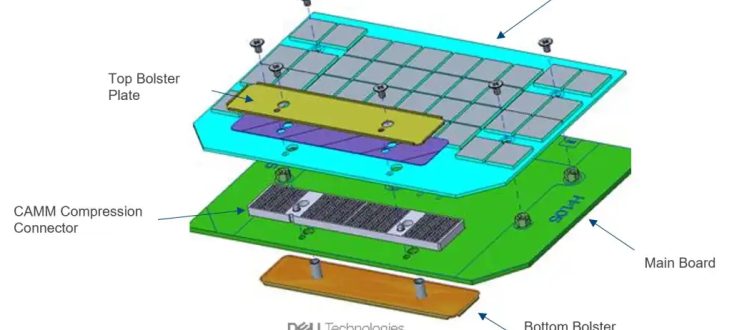
It's official - CAMM, the brand-new form factor for laptop RAM, has been adopted as a JEDEC standard
ashen spindle
ashen spindle

Ars Technica
"Triangulation" infected dozens of iPhones belonging to employees of Moscow-based Kaspersky.
exploiting a vulnerability in an undocumented hardware feature
gee thanks apple
This instruction existed since the early 90’s
severe phoenix
Cpu ☠️ #pc #pcgaming #pcgamer #pcsetup #pcbuild #setup #setupgamer #setupgaming #meme #intel #fy #fypシ #fyp #foryou #foryoupage
 odd sleet
If someone could join the general chit chat vc to help with my pc not posting would be a big help
I just got new aio cooler and i have two red lights on my mobo
But even before installing a new one i got a new cpu ram and motherboard and its all compatible but i didnt have the brackets for my other aio cooler so im using a single fan corsair cooler now to see but idk
 vagrant pagoda
OK this is the wierdest issue ive ever had. My og launch 360 had a rattle. Assumed it was broken plastic. I now have the bare mobo, and the mobo rattles.
severe phoenix
 crimson wigeon
aw, no download link?
old marlin
severe phoenix
https://ph3at.github.io/posts/Ray-Coop-Camera/
that looks nauseating
also they SUCK at marble madness
fair gull
vagrant pagoda
OK this is the wierdest issue ive ever had. My og launch 360 had a rattle. Assum...
sounds like its orientation sensor
vagrant pagoda
fair gull
sounds like its orientation sensor
Yeah i guess they have foam that goes bad and they get noisy
fair gull
i wouldnt know of anything else that would remain functional while rattling
 cursive summit

The Verge
95.57 percent of surveyed Steam users are already on Windows 10 and 11, with nearly 2 percent of the remainder on Linux and 1.5 percent on Mac — so we may be talking about fewer than 1 percent of users on these older Windows builds. Older versions of MacOS will also lose support on February 15th, just a month and a half from now. Correction: It...
End of an era... I guess
reef patrol

cursive summit
The last good operating systems are going back to dust
And the ones that are mediocre will soon follow
All we are left with is just borderline terrible stuff which leaves me in a bit of a dilemma
raw zephyr
just use linux if you hate new windows this much
raw zephyr
skill issue
cursive summit
Neither are usable for me
raw zephyr
you should use BSD on your desktop
 final flame
just customize linux until it's usable for you
that's the whole point of it
 blazing jungle
Press (Fn+Win) will not lock win keypress ? is that normal ? for 60he
reef patrol
That's not the shortcut to lock winkey though.
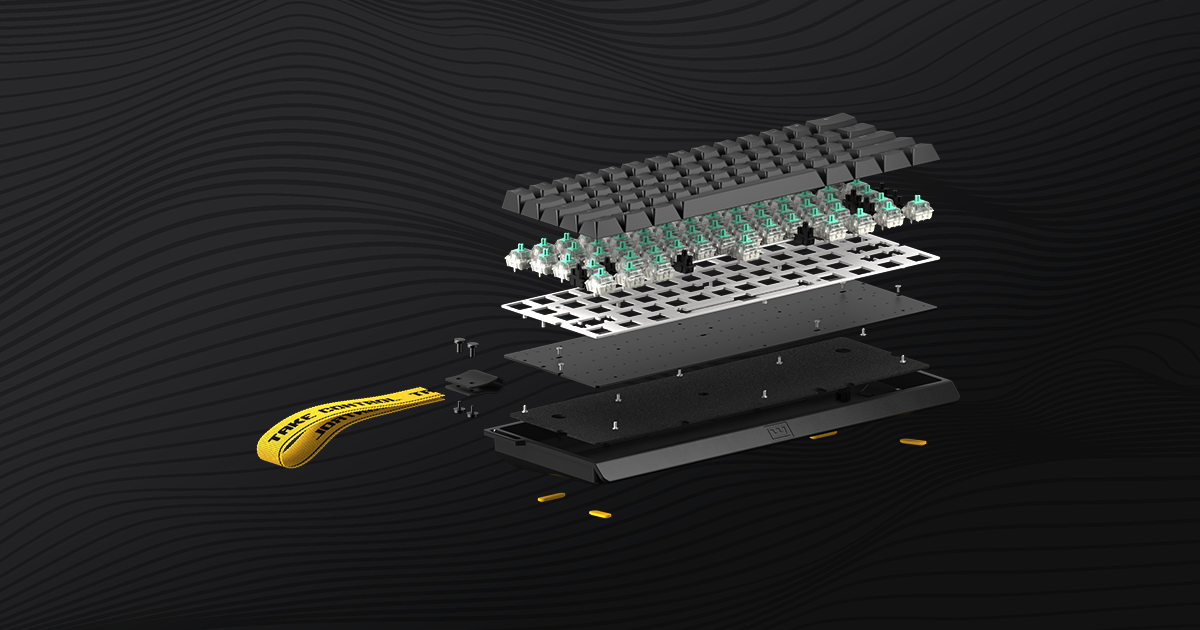
Get to know your new 60% keyboard. This guide will run you through the basics, and get you up to speed.
blazing jungle
reef patrol
That's not the shortcut to lock winkey though.
ahh thanks - got it now.... FN+Cap+win to lock it
ashen spindle

Get the LIMITED 2023 Disappointment Shirt in Cotton: https://store.gamersnexus.net/products/disappointment-pc-2023-cotton
Or in Heather Charcoal! https://store.gamersnexus.net/products/disappointment-pc-2023-heather - Buying these directly supports our 2024 testing while also getting you a LIMITED, commemorative shirt that specifically helps fun...
 mint skiff
Do y'all think if I should wait to upgrade my gpu until the next gpu generation (aka Radeon 8000 or RTX 5000 series), atm I have a 3080 10gb but at 4k it's not always able to keep up
reef patrol
Yes.
mint skiff
Thought so, nvidia is overpriced and anything besides a 7900xtx wouldn't be that much of an upgrade anyways
Figured you guys know your stuff about hardware, so wanted your opinions lol
ashen spindle
it depends on what you want
if you want value waiting is always good, if you have money and want to upgrade to enjoy games more, only wait till next week so the super refresh comes and the prices are a bit better
rtx50 isn't going to be this year
mint skiff
ashen spindle
rtx50 isn't going to be this year
Wasn't it aiming for 2025?
ashen spindle
yes... and that's not this year
mint skiff
Fair enough, I was gonna go to a 7900xtx but I read on a LOT of places that those cards are not all equal and there's a pretty high chance of getting a flawed one, also I use nvidia encoding a lot so that would also not work anymore
ashen spindle
huh what place says those are flawed
 zenith silo
Someone I knew had a 7900xtx that always had constant issues
Every other person I've talked to it worked amazing
ashen spindle
yeah and I have issues on my 4090, annecdotal ones never matter
zenith silo
Yeah I've only talked to a single person who had issues with a 7900xtx
Everyone else said it was basically flawless 🤷
mint skiff
zenith silo
Yeah I've only talked to a single person who had issues with a 7900xtx
I've heard 3 very big problems
Idle power consumption with multiple monitors is over 100W
Hotspot on the card will often go to about 110+ celsius
And the AMD main course: drivers
 ashen spindle
driver are fine and have been fine for years
temperature isn't an issue and the only part where it got too hot was when they got some issues with broken coolers on the stock cards, those got replaced
mint skiff
ashen spindle
temperature isn't an issue and the only part where it got too hot was when they ...
yeah something with the vapor chamber
ashen spindle
idle power is fixed for most cases too, idk for which combinations it might still be high
yeah vapor chamer was made with an issue, but that was fixed and also not an issue for many people if they never moved the card a certain way
or if you just have a good AiB version from sapphire or so that never was an issue either
mint skiff
ashen spindle
or if you just have a good AiB version from sapphire or so that never was an iss...
Was looking at a sapphire nitro+, but those were literally about 20% more expensive
mint skiff
ashen spindle
idle power is fixed for most cases too, idk for which combinations it might stil...
That is true, I most likely wont tho since I'm going back to college and am gonna need everything I can get
ashen spindle
 trim mica
Ohhh mb didn’t see that channel
reef patrol
What kind of latency should I be aiming for, @ashen spindle ? I am so behind the times and still stuck in DDR4 land 😄
ashen spindle
ddr5? just anything 6000 is fine
reef patrol
Aight.
So this would be fine? Following your recommendation to grab a single 32GB for now and add another later?
https://www.alternate.dk/ADATA/Hukommelse/html/product/1886330
https://www.adata.com/storage/downloadfile/datasheet_xpg_lancer_rgb_ddr5_memory_v5.pdf
CL 30-40-40
ashen spindle
if you get bored you can then try some timings from hub or buildzoid and just see if it works to improve it but as usual that only makes any difference if you're 1080p with a good gpu
yeah
do the usualy check if its on QVL to be safe
reef patrol
Good point.
ASRock B650 PG LIGHTNING is the mobo I picked so far. Mostly based on price and being familiar with Assrock 😄
mint skiff
Building a new pc?
reef patrol
Sort of.
Replacing my 5600X based parts. Got random reboots 3-4 times a day, and I've narrowed it down to Mobo or CPU at this point.
ashen spindle
what was your resolution and gpu again
reef patrol
1440PUW and a 3080
https://de.pcpartpicker.com/list/KbqNBL
This is what I've got so far.
Part List - AMD Ryzen 7 7800X3D
ashen spindle
yeah unless you turn into csgo player or similar suddenly there isnt much difference in ram setups
reef patrol
(And yes I will be swapping the EK block for something else when I get the time to go looking)
ashen spindle
like even with ddr5 you can still find plenty of cases that say use low tuned dual channel but like, that's then tested on 1080p with a 4090
reef patrol
I'll grab another DIMM asap anyway, just to make sure it doesn't suddenly vanish. I don't want to mix timings 😄
ashen spindle
smh no fun allowed
reef patrol
ashen spindle
I remember thinking ram cant be mixed at all or bad stuff happens
then I find someone saying nah it might just not work but often means you can just allign timings
then I just put a 3rd stick into my ddr3 system and it was fine with 12gb total
reef patrol
I've been running mismatched, locked to one of the set's XMP since the 5600X released. But considering my current predicament, I'd like to hedge my bets for the time being and stay safe.
Gotta save up for that 5080 after all. 

 ashen spindle
checked qvl?
reef patrol
Not an exact match but it had QVL on higher rated latency variants of the same kit.
Grabbed a Heatkiller 4 pro.
Tubing and coolant not in stock, so I'll have to wait another week for that.
 balmy vector
Can i eat it?
ashen spindle
well I wish you luck that you wont get cursed components
reef patrol

 stone thicket
reef patrol
https://tenor.com/view/where-is-my-package-package-donde-esta-gif-26297469
stone thicket
reef patrol
https://tenor.com/view/where-is-my-package-package-donde-esta-gif-26297469
I think you feel us right now
reef patrol
I am channeling that raw, WHERE PACKAGE energy right now.
stone thicket
Yep, that's what I'm talking about 😄
Usually I'm so impatient, that I often pay way more to get things "here and now"
reef patrol
I'd be a lot more patient if it wasn't all purchased to prevent my PC from randomly rebooting several times a day. Just an altogether not fun situation. 😄
cursive summit
mint skiff
Do y'all think if I should wait to upgrade my gpu until the next gpu generation ...
Get the upcoming 4080 Super
Seems like the only thing that's going to be worth its money since it slots into 4080 price bracket while being superior
Or second hand 4080s at that point
Waiting meself to check on the pricing of 4070Ti Super before I buy something
vernal void
These good?
Asus B650M-Plus TUF Gaming Wi-Fi motherboard
AMD RyzenTM 7 7800X3D Processor
Corsair iCUE H100i RGB Elite 240mm Water Cooling
Corsair MP600 Core XT 2TB PCIe 4.0 SSD
Kingston Fury Beast 16GB DDR5-6000 RAM
Asus Geforce® RTX 4070 OC 12GB ProArt
Corsair iCUE 465X RGB VG Edition
Corsair CX750F RGB 750W 80+ (Modular) BL
Kingston NV2 4TB M.2 NVMe PCIe 4.0 SSD
reef patrol
Any specific reason for mATX?
cursive summit
Nothing wrong with mATX
 umbral heron
€25~50 cheaper it seems
cursive summit
I wouldn't build on an ASUS board ever again but if you like it, it's fine
umbral heron
AsRock 💪
reef patrol
Indeed. But the case allows for ATX, so I'd recommend spending the bit more for the ATX version to get a bit more room between PCI-E components.
cursive summit
H100i is WAY too expensive though
reef patrol
 cursive summit
Unless you 1) Already own one 2) Can find it under 100$, Arctic Freezer 360 is way superior to a Corsair H100i
ashen spindle
unless you want it for looks a watercooler is a waste on the 7800
aircooler less than half the price does the job
cursive summit
That too, 40-50$ air cooler will do
reef patrol
Mhmm. Slap a big ole air cooler on it and use the price difference on some RGB halo rings, if you MUST have moar RGB.
cursive summit
That ASUS GPU though is a waste of money, there should be cheaper options than the ProArt line
umbral heron
Also 4070 is not very... up there with price/perf ratio
 crisp granite
reef patrol
https://de.pcpartpicker.com/list/KbqNBL
This is what I've got so far.
crisp granite
reef patrol
https://de.pcpartpicker.com/list/KbqNBL
This is what I've got so far.
solid
cursive summit
umbral heron
Also 4070 is not very... up there with price/perf ratio
Like whole Nvidia's GPU lineup with RTX 4000 series?
crisp granite
I would say the 4060 is doing better than the rest
especially for the prices they retail at here
cursive summit
There is not a single card in RTX 40 stack that I could genuinely say "is worth buying"
odd sleet
Anyone know why my motherboard could be giving red lights I’ve tried so many things. Switched ram around remounted gpu it’s only went into bios twice out of like 20 trys.
cursive summit
Other than 4090 but that's a workstation Titan card so idgaf, not a gamer/non-professional consumer card
cursive summit
odd sleet
Anyone know why my motherboard could be giving red lights I’ve tried so many thi...
How many lights though
umbral heron
And which ones
cursive summit
Well considering they are troubleshooting, 95% mobo error code lights
crisp granite
odd sleet
Anyone know why my motherboard could be giving red lights I’ve tried so many thi...
ok, here's my suggestion
consult the manual
depending on what lights are on, that'll help you pinpoint the actual issue
instead of just doing random shit and hoping for a good outcome
stuck surge
reef patrol
I made a mistake of getting microatx and i couldnt plug my front ports
cursive summit
Situations like these is literally where I every single keep remembering this GN rant https://www.youtube.com/watch?v=bEjH775UeNg

Grab a GN 'Debug' Coaster Pack on the Store! Use code 'BUTWHY' for 10% off! https://store.gamersnexus.net/products/gn-drink-debug-coaster-pack-4-custom-3d-coasters-100x100mm-4x4 | these 4 drink coasters are each uniquely designed to fit the PC hardware theme and support us directly while getting you something in return.
GN Large Modmats are al...
umbral heron
Which mobo error code LEDs I meant 
cursive summit
That GN rant is genuinely epic
crisp granite
cursive summit
Situations like these is literally where I every single keep remembering this GN...
ngl that rant was perfectly fair
I'm happy that ITX mobos have no real space for that kind of crap
but they still charge like it
stuck surge
cursive summit
Like whole Nvidia's GPU lineup with RTX 4000 series?
4080 is the best price to perf for work
stuck surge
thats cuz a lot of stuff uses those cuda cores
cursive summit
I don't remember at all hearing anything about RDNA4 launch date
ashen spindle
computex
stuck surge
why would people talk about rdna4 now
cursive summit
If Nvidia is 2025, waiting another full year for new stuff is pain
Last gen launch was late 22/early 23
We need new gen
stuck surge
New gpus shouldnt come out untill at lest october
crisp granite
stuck surge
why would people talk about rdna4 now
assuming past schedules hold true
we're less than a year to a new gen's launch
crisp granite
crisp granite
assuming past schedules hold true
we're less than a year to a new gen's launch
by this point, specs are being finalised, space to fab is being booked, etc
ashen spindle
computex is when rdna4 should be launched that's towards the end of H1
cursive summit
ashen spindle
computex is when rdna4 should be launched that's towards the end of H1
That would be fun
umbral heron
RDNA4  Wonder if switching to 8800/8900 would be worth the hassle
ashen spindle
idk when fianancia analyst day and such are, if its before we get infos there
cursive summit
I wonder if they are actually just launching mid range cards only
stuck surge
I might look into buying next gen but i also totally expect the gpus to not improve much
cursive summit
I love my RX 5700
crisp granite
cursive summit
I wonder if they are actually just launching mid range cards only
that would...be questionable at best
cursive summit
Would be nice if they launched a 500$ max card that performs like a.. 4080 lol
ashen spindle
we know the halos skus are in the dumpster, we dont know how much they are pushing the remaining ones
cursive summit
crisp granite
that would...be questionable at best
That is the info we have for now
crisp granite
yep...
 ashen spindle
wait for 2026
crisp granite
ashen spindle
we know the halos skus are in the dumpster, we dont know how much they are pushi...
that would mean either their GPUs are so potent that they can afford to ditch top skus (not plausible)
or the plan is just to bring price to performance back to a reasonable place where it matters (also rather confusing, considering costs are rising to manufacture overall)
stuck surge
cursive summit
Would be nice if they launched a 500$ max card that performs like a.. 4080 lol
No way thats happening
cursive summit
At best it'd be a 4070
crisp granite
pretty sure the 4070 already retails for rather close to that
such a release would be a massive disappointment
cursive summit
crisp granite
pretty sure the 4070 already retails for rather close to that
I damn wish lol
ashen spindle
crisp granite
that would mean either their GPUs are so potent that they can afford to ditch to...
no halo sku got canned because 3d stacking is expensive and hard as fuck to do and not fail (like intels PVC) and it would have taken them at least another half year and also delay future gens to make that work
crisp granite
more like "demand isn't there"
cursive summit
Oh wait lol there's a single seller that prolly mispriced their 4070s and are selling at like 30% discount lol
No wonder I was bugging
All others are 600$+
ashen spindle
sounds like you get an amazon delivery with a brick if you order from that one seller
reef patrol
ashen spindle
sounds like you get an amazon delivery with a brick if you order from that one s...
Arguably more useful too.
stuck surge
7900xtx costs more normal now but too late
ashen spindle
did they forget tax on it?
cursive summit
How is a 4070 for 455 euros? 
cursive summit
ashen spindle
did they forget tax on it?
Not a thing here in litauen lel

They basically -200 euros on all 4070s
I kinda need a card, could be worth buying one
ashen spindle
does smell kinda fishy
reef patrol
All the same - hedge your bets and use a payment option where you can chargeback easily if they scam you.
crisp granite
ashen spindle
does smell kinda fishy
like most of the baltics
cursive summit
crisp granite
like most of the baltics
I mean yes, it's smelt season
umbral heron
Huh
 crisp granite
cursive summit
I mean yes, it's smelt season
crisp granite
cursive summit
I mean yes, it's smelt season
:o
umbral heron
They were 3200~3500zł not that long ago
crisp granite
nothing beats smelts, potatos and onions in the morning
especially if they're smoked
cursive summit
umbral heron
They were 3200~3500zł not that long ago
They damn were
Now there's a bunch for sub-500 euros which is odd
They are prolly offloading in prep for SUPER launch no?
crisp granite
probably tbh
initial orders would have been placed by now
cursive summit
And this is a place that does dropshipping I'm pretty sure
They don't buy stuff themselves into warehouses, just a buy n forward type of stuff from local big warehouses
So some big logistical warehouse must be clearing stock or something
umbral heron
Even in IT shops they're for 2700zł, interesting, looks a lot like offloading for Super launch
cursive summit
Just the 4070s?
crisp granite
4060s are cheaper than before as well
cursive summit
Cause in this shop all other prices are normal
crisp granite
not by as much
cursive summit
Just the 4070 is oddly cheap
Has to be a flash sale just to get rid of stock
I don't recall at all how good is the 4070 nowadays lel, how does it do vs 7800XT?
Wait lol what
No they arent selling just 4070 for cheaper
Also 4060
But that's not getting a SUPER variant

Why's it 240 lol, that's insane
umbral heron
4060s are down too, from 1700~1800 to 1350~1400zł 👀
cursive summit
umbral heron
4060s are down too, from 1700~1800 to 1350~1400zł 👀
But why
Nvidia dropping prices? 
umbral heron
cursive summit
4060 for 240 euros is actually a really good deal
4070 for 450 is also pretty great
They even selling 7800XT for less than usual huh

A bit.. sus
umbral heron
Some shops still keep their old price, but a lot of offers has gone down
cursive summit
4070Ti, 4080 and 7900XTX are priced normally though
Why specific models on insane discounts
Oh wait even 4070Ti is priced lower

This just has to be a pricing error
Yeah this particular shop somehow is just priced far lower than anything else, a bit weird
umbral heron
Here 4070Ti still keeps its old price
Still, 1200zł difference between 4070 and 4070Ti is insane 👀
cursive summit
umbral heron
Here 4070Ti still keeps its old price
Still, 1200zł difference between 4070 and ...
Indeed the pricing difference between non-Ti and Ti is way too massive
3070 (Ti) was 499$ -> 599$ for comparison
With RTX 40 it's like 300$ dfference lel
Although I should prolly get AMD again cause it seems 7800XT kicks 4070s buttocks a bit https://youtu.be/8qBQ0eZEnbY

Sponsor: Get 10% off Squarespace purchases (https://geni.us/BqEpf)
In this review, we benchmark the new AMD RX 7800 XT GPU and test it against the RX 6800 XT, NVIDIA RTX 4070, RTX 4070 Ti, RX 7900 XT, RX 6700 XT, and more. The GPU market still has last-gen options available, complicating the decision-making process for the RX 7800 XT. In some w...
umbral heron
Huh, solid 50% improvement over my 6700, nice
And it's a bit under 4070 in price too
cursive summit
It's also 417 euros rn lol
I might place an unpaid order with checkout on delivery, in case they cancel
While I kinda want to buy Nvidia, AMD is just undercutting them with stronger products hard
Really difficult to justify spending far more for NV
Huh, massive differences in clocks

Boost is nearly the same but some cards are just clocked way down
Not too sure if that matters at all?
umbral heron
ig it only matters in idle/low-power apps
In gaming it'll boost nevertheless
cursive summit
Ah it's just techpowerup listing bad specs
It's the same thing in practice
Although seems that Jiggybyte might have increased the TDP on theirs cause their model actually gets higher clocks
That should be doable manually though methinks

I wonder if paying more for the Sapphire is worth it nowadays, they used to be THE AMD brand
umbral heron
Afaik Windows allows for power limit boost by 15%, on Linux I can do max 30% - 186~>242W
Not sure if it's possible to OC graphics cards like you'd do with CPUs though
rich remnant
When is the 480hz oled dropping
cursive summit
Never
umbral heron
Why would you want to drop it, it'll be hella expensive 
ashen spindle
yeah if you use powerplaytables you can do a lot still
but not really worth it as much
rich remnant
rich remnant
When is the 480hz oled dropping
27" 1440p 480hz OLED
ashen spindle
wait for ces
umbral heron
Bummer GPUs are still so limited
I'd love for AMD and Nvidia finally allow for SRIOV in consumer GPUs
woven laurel
my 1660 TI is running like a train
this might also be the fact that most games I play are cpu bound
umbral heron
And I don't really need more than my 6700 for 1080p60 gaming
It's just my brother's GPU looks a bit like it wants to die in foreseeable future, so I can give him mine and get myself something new
woven laurel
 rich remnant
ashen spindle
wait for ces
rich remnant
ashen spindle
wait for ces
Wheng is cex
ashen spindle
a great question to put into google
ashen spindle
 ionic knot
Ok but do yk which tape?
ashen spindle
no
ionic knot
Ok
reef patrol
https://www.youtube.com/watch?v=ZMfk-zP4xr0
Ding dong the AI shit channels are dead (or dying)

Earlier this year, I highlighted what I saw as a growing crisis: a glut of “science” spam and scam channels on YouTube that use the veneer of science – and copyrighted footage – for views and ad revenue. It got a tremendous response. What's next? Actually suing content thieves.
Viral DRM: https://viraldrm.com/ and the BBC video: https://www.you...
smoky frigate
I fully expected him to be in his channel awesome-tier fake set for this one lol
thick elk
Oh god this mouse looks pretty terrible:
https://cdn.shopify.com/s/files/1/0295/5988/1807/files/aa9d52364b405f9f5588526dd1c1bc20.png?v=1704080194
Let's use holes everywhere, also lets make the mouse 88g it just looks really uncomfortable.

 fickle ore
Nice PVC, toxic mouse too!
stuck surge
thick elk
Oh god this mouse looks pretty terrible:
https://cdn.shopify.com/s/files/1/0295/...
if it has no thumb hold and 4 side buttons its a pass
 smoky frigate
what for?
ionic knot
Keyboard mod
smoky frigate
masking tape turns to dust after not very long
pale sigil

Tape modding is in our opinion is the easiest and most rewarding mod you can do. Overall the tape mod makes your keyboard more poppy, but sometimes the results are neglectable. That's why we will be testing the masking tape mod in this video.
➤ Follow our socials!
🧑🤝🧑 Discord https://wooting.io/discord
🐤 Twitter https://www.twitter.com/wootin...
smoky frigate
if you want to put sticky stuff into your keeb, take golden masking tape like in the thumbnail
it looks orange-y, is thinner and lives far longer
t. professional tape user
umbral heron
Blue Scotch is also pretty good
ionic knot
So should I not buy that one
smoky frigate
nope
 gaunt obsidian
i dont hear much of a difference, is it just me?
umbral heron
I'd say there's more difference in person
pale sigil
gaunt obsidian
i dont hear much of a difference, is it just me?
Hard to record the difference


 umbral heron
Isn't it a duct tape?
ionic knot
Bro idk what tape
smoky frigate
if you want to use the type of tape you first posted, get 3M 501E, it's the best of its kind
ionic knot
Is the tape on Amazon