 wiktor9533#4732 has been warned
#〉bugs-reports
2 messages · Page 117 of 1
 dire yarrowBOT
wiktor9533#4732 has been warned
dire yarrowBOT
dire yarrowBOT
wiktor9533#4732 has been warned
dire yarrowBOT
 mtte1#5459 has been warned
Reason: Bad word usage
dire yarrowBOT
 OnlySev#1787 has been warned
Reason: Bad word usage
 fossil hill
Restricted channels bypass?

 vale crescent
When saving a hub's settings for temporary channels I get a HTTP 400 error. Can anyone Help?
 frozen dew
I do not know if this would be a bug but I got mee6 premium a month ago and I got it for the lifetime payment, and now I don't have it.
dire yarrowBOT
 Changed#6399 has been warned
Reason: Bad word usage
 8LivesLeft#5656 has been warned
Reason: Bad word usage
 dusky karma
!p husi
 radiant carbon
dusky karma
!p husi
radiant carbon
dusky karma
!p husi
It’s !play in #〉commands
 boreal totemBOT
@light oar has been auto-banned. (strict bad words filter)
dire yarrowBOT
 You have to be happy to#0787 has been warned
Reason: Bad word usage
dire yarrowBOT
 최상동#6755 has been warned
Reason: Bad word usage
vale crescent
When saving a hub's settings for temporary channels I get a HTTP 400 error. Can anyone Help?
dire yarrowBOT
 Noahahaha#5405 has been warned
Reason: Bad word usage
 knotty fulcrum
I do not know if this would be a bug but I got mee6 premium a month ago and I got it for the lifetime payment, and now I don't have it.
dire yarrowBOT
 klorofit#7312 has been warned
Reason: Bad word usage
dire yarrowBOT
 Imran#8221 has been warned
Reason: Bad word usage
 limber knoll
.isprem @knotty fulcrum
boreal totemBOT
User 839744542688280606 does not manage any premium guilds.
Took 1.19s
dire yarrowBOT
To transfer your premium to another server, use https://mee6.xyz/premium-transfer.
limber knoll
try that
knotty fulcrum
limber knoll
.isprem <@839744542688280606>
Sorry

 dire yarrowBOT
 DimasKamaz#1804 has been warned
Reason: Bad word usage
 buoyant moon
i found a bug
when i want to get premium it askes for my creditcard details
i think its a bug
radiant carbon
 graceful cape
For some reason my daily timer was removed.
 prisma bone
I'm getting the following codes trying to give/remove coins:
😴 Something went wrong in MEE6 land! Contact our support team for instructions if this keeps happening.
code: 7fd1a0d1c76f4eec9e07ec2d14eb66d0
code: 0fc6a47788b449dd97f4f3d80237995d
code: dcd81c9df9a846a280f73925473db3a4
 marble quest
prisma bone
I'm getting the following codes trying to give/remove coins:
😴 Something went ...
marble quest
prisma bone
I'm getting the following codes trying to give/remove coins:
😴 Something went ...
Is the user still in the server?
prisma bone
marble quest
Is the user still in the server?
Yep
marble quest
Did you use an id or a mention?
prisma bone
I've been using mentions only for about a week now
Dunno if I was supposed to be using id's
dire yarrowBOT
 ARARAT70707#8810 has been warned
Reason: Bad word usage
boreal totemBOT
@solemn jungle has been auto-banned. (strict bad words filter)
 left sun
My music tab for my discord is not working
buoyant moon
I cant use @dire yarrow
 weary summit
the bad word filter of mee6 does not work when you use replies

 ivory blaze
weary summit
the bad word filter of mee6 does not work when you use replies
https://i.imgur....
ivory blaze
weary summit
the bad word filter of mee6 does not work when you use replies
https://i.imgur....
We are aware of the bug and the devs are working on it
 hollow iris
Members of my server can't get XP if they're replying directly to a person, they're forced to mention them with @ or his messages dont count XP. If we use 'reply function' this dont give xp.
 quaint agate
hollow iris
Members of my server can't get XP if they're replying directly to a person, they...
quaint agate
hollow iris
Members of my server can't get XP if they're replying directly to a person, they...
Reply broke all interactions with the bot, it’s known and a fix is being worked on
dire yarrowBOT
 Samy#4583 has been warned
Reason: Bad word usage
 distant flower
guys the !mute not work, why?
dire yarrowBOT
Having problems muting someone/they aren't muted? Check the following
Prerequisites:
- Moderator plugin is enabled
!mutecommand isn't disabled- Bot has role with Manage Roles and Manage Channels permissions
- Muted role is under MEE6 role
- You're trying to mute someone using
!mute @mention reason, otherwise it will not work
If user got Muted role but still can talk means there's issue with your channel permissions
Go to Channel Settings -> Permissions
- If that's public channel that can be accessed by anyone:
- Set

Send Messagesfor all roles except Muted - Set

Send Messagesfor Muted role
- If that's secret channel that requires *special* role to access it:
- Set
Send Messages
Read Messagesfor special role - Set
Send Messages Read Messagesfor Muted role - Set
Send Messages Read Messagesfor@everyonerole
 heady spruce
<@&193123929701875712> I was told by @trim badge to report Welcome Cards not being posted when new members arrive. This has been working flawlessly for my server since I started your (wonderful) bot service.
7 new members since 08/07/21 have not posted. I tested it with my own test account and it worked. However after that test, another member, Darkjaguar, joined and the card did not show. In my next message I will post the settings in Mee6 control panel as Mees directed me to.


2nd Problem that may be related. I have Mee6 set to apply the role "Mortal" to new members. This is not happening either. I have a pretty large and complicated Levels system going on, so please be careful if you work on it! THANK YOU for your help with these

 wooden mountain
@heady sprucepls verify the bot has all the permissions required to do the actions you are asking it to do
heady spruce
wooden mountain
<@!335139673309446144>pls verify the bot has all the permissions required to do ...
Hi @wooden mountain 🙂
Yes, it has all the permissions but will check. I did not change anything (that I'm aware of)
But who knows!
 faint dome
you might want to provide your server ID also 👀
heady spruce
i remember being asked that before but i don't know how to find it @faint dome merci
faint dome
it's the big number in your dashboard link for example
dire yarrowBOT
Getting your server ID
Go to your server and use !dashboard then copy this link and give to staff.
Or if that didn't work: open Server Settings in your Discord Server. Select Widget and press Copy ID next to Server ID.
You can also use Developer Mode as an alternative method.
heady spruce
It's 510911459212001289
It's in roles that are above all other roles.

If you need any other information, please let me know.
wooden mountain
i joined the server to help there
 austere timber
Hey,
I'd like to report a couple of bugs someone may be able to help me with.
-
Music
The bot stops playing music after a couple of songs, for no apparent reason. It's supposed to loop the whole queue 24/7. It doesn't do it. -
Timers
They sometimes don't come up or they come up after someone types something on the chat, which is very annoying.
faint dome
for timers that's on purpose, we have to avoid spam so mee6 won't send a timer message if the chat hasn't been active since the last one
1st one is kinda known, music is sometimes unstable for no apparent reason
 bright grove
Hi,
I posted this earlier in the premium-squad channel, but it probably wasn't the right place for it.
My server's members discovered a workaround of MEE6's auto-mod of bad words.
If you reply to a message with the bad word, then MEE6 will not catch it.
However, if you use the bad-word through a non-reply, then MEE6 will catch it.
dire yarrowBOT
 NICO THE GAMER GR#6386 has been warned
Reason: Bad word usage
 real aspen
go to https://mee6.xyz/dashboard and invite the from here

Manage your Discord server with leveling, moderation, Twitch, Youtube and Reddit notifications.
 dark hornet


The user's avatar on the welcome card server appears as a regular Discord avatar. Is it a temporary bug? If you see it, please solve the bug. I tried everything I could, but the bug still lingers
 vast sandal
I have strange music bot behavior.
He turns on the track after the command /play, but writes what he thinking, but after several tracks, an interaction error appears and stops play


 quaint agate
dark hornet
quaint agate
dark hornet
yewa sometimes that will happeb just use the command again
quaint agate
 dawn token
pretty sure mee6 leaderboards also dont work right now
dawn token
pretty sure mee6 leaderboards also dont work right now
wotrks for me
dawn token
problem is that this pops up when tryna go to the mee6 website

for leaderboards
!levels
dire yarrowBOT
 素颜, that command is disabled in this channel.
dawn token
whoops
dark hornet

 royal isle
!rank
dire yarrowBOT
brodex, that command is disabled in this channel.
dire yarrowBOT
 ameer#6969 has been warned
Reason: Bad word usage
dire yarrowBOT
 iTz_xUrxx#2764 has been warned
Reason: Bad word usage

 marble quest
flip the order around so the highest number of infractions is on top
 viral shore
I will test it imediatly thank you
dire yarrowBOT
 naczo#0087 has been warned
Reason: Bad word usage
quaint agate
<@&732153669344165989> scam
 radiant carbon
Nah I’m good
 granite estuary
When I try to add {user.id} to "additional fields" in a welcome embed it does not generate the embed when a user joins.
 granite heath
whenever i try to use reaction roles it doesnt work and an error pops up and says it doesnt have mange roles or administrator and when i checked both of those where on so i dont understand why it doesnt work?
dire yarrowBOT
Role hierarchy is important for me to give out roles. Oh and also Manage Roles perm:
https://cdn.mee6.xyz/s/fix_hierarchy.gif

 twin tendon
@granite heath ^
marble quest
granite estuary
When I try to add {user.id} to "additional fields" in a welcome embed it does no...
can you send a screenshot of the dashboard setup for that


 spare relic
@granite heath refresh
granite heath
spare relic
<@753561038741307413> refresh
omg you are a life saver thank you
 stark wedge
hey guys MEE6 keeps leaving my server
radiant carbon
stark wedge
hey guys MEE6 keeps leaving my server
Someone has to be l Kicking the server
stark wedge
radiant carbon
Someone has to be l Kicking the server
sorry im new to MEE6 wdym I Kicking?
limber knoll
server settings > audit log filter to kick member @stark wedge
 prisma viper
Anytime I get added to a server and try to make changes n stuff the server doesnt show up. Is there a certain amount of time I have to wait before I can or is this just a me thing? It's been like this for a couple months now, if its a common thing am I doing something wrong/is there something I can do to fix it.
All of my servers show up including servers I dont own fully (co/own), just none that I'm invited to after my most recent server on mee6 (february)
-That one being one i dont own, im not counting the servers I made myself. If you count mine then the most recent would be last month
If i need to explain something better lmk i tried my best ✌️
limber knoll
@prisma viper would be missing permissions
you require administrator permissions in your role toggled on to manage mee6 and access that servers MEE6 dashboard
prisma viper
yeah it happens when i got admin permissions too
after february, any server that i didnt make wont show up in the list even if i got admin permissions
that i know of at least, anytime i need it
granite estuary
marble quest
can you send a screenshot of the dashboard setup for that
Here it is
 marble quest
granite estuary
Here it is
marble quest
granite estuary
Here it is
You can't have an empty field value if you use the field
I'd recommend putting it in the footer instead and then deleting that field
 shut relic
still have intermittent xp on our server. slow xp gain or some users xp getting stuck for up to 2 hours. i’ve asked twice but no help provided. this is a bug.
buoyant moon
shut relic
still have intermittent xp on our server. slow xp gain or some users xp getting ...
yes I've experienced it as well 
dire yarrowBOT
If I appear to be denying your hard earned experience, or !rank and !levels aren't working properly...
- Make sure Levels is Enabled.
- Check that you do not have a banned role in the levels configuration, and that you aren't in a banned channel either.
- Make sure that I can see the channel you are talking in with "Read Messages" and send messages with "Send Messages".
quaint agate
also replys dont give xp atm
shut relic
OHHHH
buoyant moon
quaint agate
also replys dont give xp atm
oh damn
buoyant moon
finally
quaint agate
nothing works in replys atm lol
shut relic

buoyant moon
😂
marble quest
quaint agate
also replys dont give xp atm
That was Fixed
marble quest
quaint agate
when
!greet
dire yarrowBOT
 @marble quest greeted nobody
marble quest
Just yesterday though
dire yarrowBOT
Aniruddh, you can't use that.
dire yarrowBOT
 3cHcker#9725 has been warned
Reason: Bad word usage
dire yarrowBOT
 Leafy#3547 has been warned
Reason: Bad word usage
 fierce sluice
Reaction Roles are a bit wacky when it comes to adding multiple roles for 1 reaction.
The roles get added to the people reacting, but after a day 2 of having it setup, for some reason the roles get removed and only 1 role will remain for the reaction instead of all 3 that are in it
dire yarrowBOT
 gaybestfriend#2719 has been warned
Reason: Bad word usage
boreal totemBOT
@vale lynx has been auto-banned. (strict bad words filter)
 little path
Hi. I have given the bot admin perms in my server to announce birthdays and have added all birthdays, i set up everything in the dashboard. The bot gives the rol to the user but it does not send a message in general chat as instructed.
 rough fable
Wished when removing birthday role too, also delay is a bit long, wished at 12:16am and 12:51am
 boreal totemBOT
@cold silo has been auto-banned. (strict bad words filter)
dire yarrowBOT
 I’𝕸 𝓢𝕮𝓐𝕸#6370 has been warned
Reason: Bad word usage
 kazi_chand12#4120 has been warned
Reason: Bad word usage
boreal totemBOT
@uneven dawn has been auto-banned. (strict bad words filter)
dire yarrowBOT
kazi_chand12#4120 has been warned
Reason: Bad word usage
dire yarrowBOT
 hr.pedersen#6666 has been warned
Reason: Bad word usage
dire yarrowBOT
Leafy#3547 has been warned
Reason: Bad word usage
Leafy#3547 has been warned
Reason: Bad word usage
Leafy#3547 has been warned
Reason: Bad word usage
Leafy#3547 has been banned
Reason: Too many infractions
dire yarrowBOT
 JockersLV#1928 has been warned
Reason: Bad word usage
dire yarrowBOT
m1k3_t_v, that command is disabled in this channel.
dire yarrowBOT
 CrazyMeowl#9999 has been warned
Reason: Bad word usage
buoyant moon

 mighty heart
radiant carbon
mighty heart
radiant carbon
@mighty heart do you have a bug report
dire yarrowBOT
 ༺⦓ÚLTRÂ⦔༻#0001 has been warned
Reason: Bad word usage
 celest sluice
A
dire yarrowBOT
 kodi#6651 has been warned
Reason: Bad word usage
 The4EyeNinja#8018 has been warned
Reason: Bad word usage
 Deki#0001 has been warned
Reason: Bad word usage
spare relic
<@&732153669344165989> scam link
 fleet thunder
nice fake link now leave
buoyant moon
Maybe keep a little space between Author Name and Title Text?

 pure obsidian
Dashboard is merely trying to simulate how the embed would look like inside discord if it were to be posted to give you an idea, we don't have control on how embeds work. (not sure if that's the problem here)
quaint agate
i belive they are saying but space verticaly between the 2 feilds so they are seprated and not tutching
 dusk oyster
i added mee6 bot to my server and set up the welcome message i made people join but the is not showing any mee6 welcome messages
 grave fable
isn't it 12 million servers? xD
 quaint agate
servers/users both work in the context
even though they are in 14million servers and probably well over 12million users
quaint agate
yea
dire yarrowBOT
Reporting an Issue
If you were raided or something against Discord (ToS - Term Of Services) is going on in your server, use the following link to send your report to discord:
 storm vine
/em em
buoyant moon
k
dire yarrowBOT
 Chum đang rất buồn#0900 has been warned
Reason: Bad word usage
 YT >> KURUPTED#6243 has been warned
Reason: Bad word usage
 RcisLive#2600 has been warned
Reason: Bad word usage
dire yarrowBOT
 matio#0001 has been warned
Reason: Bad word usage
buoyant moon
Uh
dire yarrowBOT
 S0me0nelnnit#3326 has been warned
Reason: Bad word usage
 delicate geyser
bug free bot @dire yarrow love u
dire yarrowBOT
 Moras colinas#9558 has been warned
Reason: Bad word usage
 safe fog
Hola
radiant carbon
safe fog
Hola
Hi do you have a bug report
safe fog
Español
 round nest
tu habla ingles
safe fog
Yo noo
round nest
oh
round nest
radiant carbon
Hi do you have a bug report
he doesn’t speak english
safe fog
I want information I already have the discord account that I would miss the most, they tell me that I have to download binance as well, it's true
@radiant carbon I want information I already have the discord account that I would miss the most, they tell me that I have to download binance as well, it's true
wooden mountain
what?
radiant carbon
wooden mountain
what?
Yea I’m lost to
wooden mountain
if someone is telling you to download a crypto trading app... i would stop listening
unless you actually want to start trading crypto
radiant carbon
Yea
dire yarrowBOT
 ramon09#8066 has been warned
Reason: Bad word usage
wooden mountain
@delicate valveonce more is ban
radiant carbon
wooden mountain
<@!874326216725901342>once more is ban
wooden mountain
yep, the hammer has swong
radiant carbon
Lol
 crystal sequoia
What is yt premiun
grave fable
crystal sequoia
What is yt premiun
premium version of youtube? 
buoyant moon
@native laurel
buoyant moon
Hey, I'm trying to add the bot to my server but I get the this " Oops, looks like you don't have any servers. 😦
Are you sure you're connected to the right Discord account?"
dire yarrowBOT
It appears that you may be on the wrong account, or something went wrong since the time you logged into my website.
- Please navigate to https://discordapp.com/login and select the gear :gear: in the bottom left, then press Logout.
- After that, please navigate to https://mee6.xyz/logout to disconnect from my website.
- Once finished, select "Add to Discord" again, and follow the instructions to access my dashboard again.
https://cdn.discordapp.com/attachments/221498799162523648/868523838730809404/logout.png

 stray sluice
 @coral pollen
 ripe swallow

 frail dragon
ripe swallow
frail dragon
ripe swallow
mee6 lacks use external emojis permission
frail dragon
!rank doesnt include any emojis

 ripe swallow
And the / commands don't show the emoji, while a normal command does.
frail dragon
Oh
ripe swallow
So like I said, probably a webhook issue
dire yarrowBOT
 ToastedMilk#4431 has been warned
Reason: Bad word usage
Santaa, that command is disabled in this channel.
dire yarrowBOT
 ZerXcuted.#2001 has been warned
Reason: Bad word usage
marble quest
ripe swallow
@ everyone is missing permission to use external emojis (that's what we hooks require and slash commands are basically webhooks)
ripe swallow
Oh really? I thought the @ everyone permission had nothing to do with it, I will give it a test myself
 strange coral
dire yarrowBOT
strange coral
dire yarrowBOT
 Darkfort_pn#1355 has been warned
Reason: Bad word usage
 delicate moon
Before there was a emoji off Mee6 but now it’s says Xmark
 marble quest
delicate moon
Before there was a emoji off Mee6 but now it’s says Xmark
marble quest
delicate moon
Before there was a emoji off Mee6 but now it’s says Xmark
mee6 is missing permission to Use External Emojis in that channel
delicate moon
marble quest
mee6 is missing permission to `Use External Emojis` in that channel
Oh thx I fixed
radiant carbon
John it you can you take my case In #〉volunteer-support
marble quest
the manage role/administrator one?
radiant carbon
Yes
delicate moon
There is a problem when I want use / commands of Mee6 there is no picture of Mee6 and when I click Discord glitches
No Mee6 picture and Discord glitch
faint dome
delicate moon
No Mee6 picture and Discord glitch
That’s a discord bug, please try on another device and/or contact them at https://dis.gd/request
delicate moon
faint dome
That’s a discord bug, please try on another device and/or contact them at https:...
But the glitch is only happening on 1 server
faint dome
Yeah ik, I saw it too in a friend server
But that’s exactly why it’s not a bug coming from us
delicate moon
Ok
 mystic oracle
I go to custom bot option on MEE6.xyz to finish creating and adding my bot. I already have the token but when I enter it there it buffers for more than a day and never loads or goes through. The token it doesn’t give an error message as it might work. It just takes more then a day to load and work and never goes through.


 stray sluice
Don't channel hop also you have been answered in #〉volunteer-support
 flat pulsar
I tried adding a !rules custom command, but for some reason it won't list it after filling everything out
This may have had to do with the fact that I already had the command in the list, and then unknowingly made another command with the same name where it then prompted me with "your command already exists"
When I went to edit the existing command, none of my edits were saved. When I deleted the command and tried to add it again, the command won't show up in my list no matter what I try
After making another command, I tried to make the !rules again and it worked after that
spare relic
answered on #〉volunteer-support 2 times incl yesterday
 hoary ice
 buoyant moon

dire yarrowBOT
 Dinosaurio Blanco#5104 has been warned
Reason: Bad word usage
 lethal swift
/counter
 teal flax
The music bot with automatically pause after a couple songs. then i have to use !np and the !play to get it to play again
 final jacinth
I found the biggest mute bypass lmao
If you get mute, just join /un archived a thread and you can speak + spam (because the anti-spam doesn't work in threads). easy :)
wooden mountain
Threads should use the same permissions ad the channel they belong to
So if you can talking a thread but not in the channel it belongs too, that's a discord bug
 spare mantle
.-. Emojis Bugs
 spare mantle
.-. Emojis Bugs
spare mantle
spare mantle
.-. Emojis Bugs
Tiene rol de administrador y aun falla
spare mantle
quaint agate
thats just someone pertending to be a bot
No .-.
quaint agate
nvm i see what your refrancing now, the box confused me
spare mantle
quaint agate
~~nvm i see what your refrancing now, the box confused me~~
enter the server and confirm
marble quest
spare mantle
.-. Emojis Bugs
@ everyone is missing permission to use external emojis
spare mantle
marble quest
@ everyone is missing permission to use external emojis
Ok👌
 pallid orbit
MEE6 reporting "Server's emojis updated!" every couple hours when emojis are not being changed.
 pallid orbit
Roger that. Bummer. Any way to address it on my end?
quaint agate
disable emojie update log or disable twitch emotes (prob want to do the first thing)
pallid orbit
Okay, disabling MEE6 logs for emoji updates was the first step I took to at least quiet my logs. Just to be clear: there is no real fix here and if there would be it wouldn't be something MEE6 would do?
pallid orbit
Alright. Well thanks for the quick feedback.
quaint agate
Np
dire yarrowBOT
 Regeq#1620 has been warned
Reason: Bad word usage
Haze#9857 has been warned
Reason: Bad word usage
 visual temple
<@&732153669344165989> scam link
wooden mountain
where?
visual temple
not here anymore
buoyant moon
Hello? I have a question, idk, maybe a Bug, i have very good wifi but I goed to the dashboard and its loaded over 5 hours then I close the Website bc of not loading
Thats normal?
faint dome
check the pinned message about dashboard not loading pls
wooden mountain
what page isn't loading?
buoyant moon

U can see... i turnen out my adblocker
Turned
Theres a I I thats means the adblocker is of
 buoyant moon
Oh ok
dire yarrowBOT
 TechAnswered#5060 has been warned
Reason: Bad word usage
 Iitoobb#1881 has been warned
Reason: Bad word usage
dire yarrowBOT
 Rock#0311 has been warned
Reason: Bad word usage
 pallid lava
I got put in prison for 9999999 for supposedly being "racist" when I said my partner said queer but the hard way and went straight to the gulag no warning or anything. I was muted before they sent me and you kinda need to talk to be active in the server, I was trying to spell out unmute me with a jackie on the ground but they were laughing at me and saying I was being "racist". All I need to be unmuted for was so they could understand where I am coming from, but they were just laughing and telling me to stop. This was very frustrating as a new member of the server I was looking for a very fun and engaging role play experience but it got taken away by people with too much power. I really wanted to enjoy what this server had to offer but it was disturbed by mods with power they can not control. I have experienced way better mods that were only 14-17 and I am just guessing from the way they sounded they were a lot older than that just please understand my frustration.
<@&732153669344165989>
 old hatch
why do i get showed no severs, even when i have joined?
 radiant carbon
old hatch
why do i get showed no severs, even when i have joined?
radiant carbon
old hatch
why do i get showed no severs, even when i have joined?
1 don’t ping a staff for that
And 2
Owner or administrator
old hatch
radiant carbon
1 don’t ping a staff for that
sorry
old hatch
radiant carbon
1 don’t ping a staff for that
can you help me
old hatch
ok
 peak ermine
guessing you guys know about the white screen of MEE6's site, but it fixed itself when i logged in on my phone and changed some settings, so theres that
 devout belfry
!play can i put my balls in yo jaws
dire yarrowBOT
ヅTEA_MAN ヅ, that command is disabled in this channel.
buoyant moon

 pliant osprey
When using mod commands bot sends twice the messajes and the infractions

 silk nymph
pliant osprey
When using mod commands bot sends twice the messajes and the infractions
silk nymph
pliant osprey
When using mod commands bot sends twice the messajes and the infractions
im basically having the same issue
 exotic valve
same, and this isn't only happening with mee6. might be a discord issue but I third this ^^^
dire yarrowBOT
 kirbz#9999 has been warned
Reason: Bad word usage
dire yarrowBOT
 Xear#7603 has been warned
Reason: Bad word usage
dire yarrowBOT
 ! 메모#0001 has been warned
Reason: Bad word usage
 pseudo marsh
The Bot creates logs for other bots that are used for vc scaling, even though I checked the field that bot actions should not be logged
 dire yarrowBOT
 DinoGG#6199 has been warned
Reason: Bad word usage
quaint agate
pseudo marsh
The Bot creates logs for other bots that are used for vc scaling, even though I ...
Yea so that option dosent do what it sayes it does, iirc it only stops loggging from like mee6 or something let me find a message real quick
 polar rune
pliant osprey
When using mod commands bot sends twice the messajes and the infractions
polar rune
pliant osprey
When using mod commands bot sends twice the messajes and the infractions
this doesnt happen to only mod commands,
its pretty much everything mee6
every command
module
is affected by it
dire yarrowBOT
 현식#0214 has been warned
Reason: Bad word usage
pseudo marsh
quaint agate
Yea so that option dosent do what it sayes it does, iirc it only stops loggging ...
oh ok thx
quaint agate

 spiral quest
I am so done with Mee6 creating new muted roles. I think I deleted over 200 of them. I use mee6 for verification and to give members roles. Any idea how to stop this cause I can't mentally take it anymore.
quaint agate
it should mkae one only if it is not able to fine one it has previasly made when using !mute
dire yarrowBOT
VladisDeCreed#5011 has been warned
Reason: Bad word usage
 hearty igloo
<@&732153669344165989> Scan nitro
In all channels
 shrewd scaffold
<@&732153669344165989> scammer
Rip double ping
Sorry travelling back home so there was a delay xd
dire yarrowBOT
 Ttown#4135 has been warned
Reason: Bad word usage
buoyant moon
<@&193123929701875712> the games in our server are broken ; always get the alert with a code to contact support "89c77ec60efa4c1783ff943a1e9edef0" it's been 2 days now. i tried disabling and enabling economy but doesn't do much
buoyant moon
hello i found bug /warn member:@buoyant moon Test and show reason: Unspecified

 lyric ingot
<@&193123929701875712> My discord goes to update mode, when I try to open it, it says update file and tries to update again, but it does not open.
 dire yarrowBOT
 𝕆𝕨𝕆ℂ𝕣𝕒𝕗𝕥33#0033 has been warned
Reason: Bad word usage
boreal totemBOT
@steel knoll has been auto-banned. (strict bad words filter)
dire yarrowBOT
 zKqrlotah 🥲#0704 has been warned
Reason: Bad word usage
 elfin holly
radiant carbon
elfin holly
radiant carbon
Helping in #〉volunteer-support
boreal totemBOT
@bright shell has been auto-banned. (strict bad words filter)
dire yarrowBOT
 𝒢𝓁𝟦𝓉𝒸𝒽#7105 has been warned
Reason: Bad word usage
boreal totemBOT
@copper valve has been auto-banned. (strict bad words filter)
 slender crag
I have bad word usage on but my friend can just add another letter ex.fucck and it wont do anything to it. does anyone know of a solution to this?
stray sluice
does it not save when trying to add or?
slender crag
well I would need to ban each variation ex.fucck fuccck fucccck
but that is gonna take forever, I was wondering if that is the only way to do it
 lyric pier
boreal totem
<@742918650675200022> has been auto-banned. (strict bad words filter)
lyric pier
boreal totem
<@742918650675200022> has been auto-banned. (strict bad words filter)
wait are u a bot lmao or just a tag bot acc
stray sluice
yea it cant detect if you add more letters in it for an example : bad word on the dashboard : Strawberries, but if you don't put Straawberries it won't detect it
so your going to have to put all those variants of the word so it detects it
slender crag
mk, thanks for the help.
 thin lynx
Can we please get a fix for the music mode disconnecting or stops playing songs in 24 hour loop mode 
it randomly does it after a few hours
 mighty charm
under moderators > audit logging > ignored channels, simply adding an ignored channel makes all auditing completely stop until the ignored channel is removed. note that mee6 does not have admin privilege.
buoyant moon
i have a problem where it dont let me inv the bot to the server i want too how do i fix it?
radiant carbon
buoyant moon
i have a problem where it dont let me inv the bot to the server i want too how d...
What does it say on the dashboard my friend
buoyant moon
no like the server i want to inv it to does not pop up
limber knoll
@buoyant moon you have administrator permissions in that server?
buoyant moon
yeah but my problem is already fixed but ty for trying to help
limber knoll
ah cool
 timid steppe
hey can u pls help
shrewd scaffold
timid steppe
hey can u pls help
what can i help you out with?
shrewd scaffold
ok
 jovial shore
 limber knoll
helped
buoyant moon
- /ban command - bot is offline while using discord pc app.
- /ban command - bot selects often the wrong person or gives the error that it could not find the user (after refreshing the page and copypasting again it sometimes work)
spare relic
fake report
frail dragon
fake report
spare relic

dire yarrowBOT
 Immune#4653 has been warned
Reason: Bad word usage
buoyant moon
<@&193123929701875712> need mee6 premium transfer as the owner is happy without mee6 Game over gaming Sever ID No. 838455065115099146 to the new server Nates dungeon. ID no. 876478738500575282
 warped narwhal
i cant add mee6
quaint agate
warped narwhal
i cant add mee6
why
quaint agate
buoyant moon
<@&193123929701875712> need mee6 premium transfer as the owner is happy without ...
have you used this yet?
dire yarrowBOT
To transfer your premium to another server, use https://mee6.xyz/premium-transfer.
buoyant moon
Sorry if I don't understand the question? I. Slow.
quaint agate
did you transfer with the link yet
buoyant moon
Yes but because I used it once already to transfer it was the the wrong server so I told them to use it to see if they would use it and they said they won't. And I can take it back but. I can't do it more than once a month
spare relic
buoyant moon
Yes but because I used it once already to transfer it was the the wrong server s...
you'll get pinged when it's done and next time please keep this channels for bug reports only
quaint agate
spare relic
you'll get pinged when it's done and next time please keep this channels for bug...
1 per case
frail dragon
2 per case
quaint agate
no 1 per case
spare relic

shrewd scaffold
There's a reason its slashed lol
visual temple
also support can be given everywhere
quaint agate
visual temple
~~also support can be given everywhere~~
this to
shrewd scaffold
visual temple
~~also support can be given everywhere~~
Not sure how its related to the convo but yes
spare relic
ok go to #〉suggestions next time and get muted
quaint agate
people can ask for support anywhere
buoyant moon
If i cant transfer again in this month i have no got an issue waiting.
Just wondering.
quaint agate
buoyant moon
If i cant transfer again in this month i have no got an issue waiting.
staff will ping you later
expect about a 24hr deley
frail dragon
Susmogus
dire yarrowBOT
Asking Questions
Users are not restricted to ask in #〉volunteer-support or #463809001273032715
It’s preferred they ask in support channels but we don’t mind for this happening outside there
So don’t feel like minimoding and backseat moderating telling them what to do!
https://cdn.mee6.xyz/s/asking.png
https://cdn.mee6.xyz/s/asking2.png

 shrewd scaffold
I see
frail dragon
It was a french channel
quaint agate
also we can move to #〉chat if you would like now since this is no longer helping anyone
buoyant moon
Hi
dire yarrowBOT
 Toums#0629 has been warned
Reason: Bad word usage
twin tendon
Warns or say commands do not send message in threads
marble quest
twin tendon
Warns or say commands do not send message in threads
do other commands work there? if not, make sure that mee6 has permission to view the parent channel and send messages in it
twin tendon
Mee6 has admins, the commands are executed... But no message in the channel
marble quest
works fine for me, does the action and sends the warning
twin tendon
The action is logged... But the message is not sent
In the thread
Same with say or other commands where it's supposed to send message
Ok ... I'm not sure anymore... It's working in a new thread I created
 brazen maple
When you have premium you can change your counter names but then if your premium expires the name doesn't reset to default.
dire yarrowBOT
 maybe sir#4941 has been warned
Reason: Bad word usage
stray sluice
<@&732153669344165989>
 misty briar
I have a lifetime subscription for my mee6 bot, however when I try using the premium functions it asks me to upgrade, could you please help me resolve this issue? <@&193123929701875712>
stray sluice
are you sure you didn't purchase premium for the wrong server
misty briar
I may have done that, would there be a possibility to get to premium subscription transferred to the right server?
dire yarrowBOT
To transfer your premium to another server, use https://mee6.xyz/premium-transfer.
stray sluice
misty briar
thank you so much for the help
 dusky flower
When someone who is muted leaves and rejoins it does not re-assign the muted role.
Despite not having the muted role:
If you attempt to re-mute them it says they are muted.
If you attempt to un-mute them via the website it says they're muted.
wooden mountain
it should give the role
if the bot says the member is muted, it's because it sees the role on that member
i will report this as a bug to the devs
dusky flower
I suppose it's possible it did re-assign the role but discord was just being slow. Either way the member in question managed to get quite a few messages in after rejoining.
 dapper magnet
Is there a detailed guide on setting up a muted role properly. I have a poorly setup server from a long time ago and I seem to have conflicting roles and permissions where I can't get it right.
dire yarrowBOT
Having problems muting someone/they aren't muted? Check the following
Prerequisites:
- Moderator plugin is enabled
!mutecommand isn't disabled- Bot has role with Manage Roles and Manage Channels permissions
- Muted role is under MEE6 role
- You're trying to mute someone using
!mute @mention reason, otherwise it will not work
If user got Muted role but still can talk means there's issue with your channel permissions
Go to Channel Settings -> Permissions
- If that's public channel that can be accessed by anyone:
- Set
Send Messagesfor all roles except Muted - Set
Send Messagesfor Muted role
- If that's secret channel that requires *special* role to access it:
- Set
Send Messages Read Messagesfor special role - Set
Send Messages Read Messagesfor Muted role - Set
Send Messages Read Messagesfor@everyonerole
marble quest
If you have the secret option/ @ everyone can't see the channels but a role (or multiple) can, I have an even more detailed guide as well
dapper magnet
my first try at it and when I give all roles the / they can't type. I use captcha bot and I believe it requires having it set to X for the everyone role
marble quest
Can @ everyone see the channels but can't speak when they join (before verifying)?
Or can they not see it until they verify
dapper magnet
default for everyone is can't see or send until verified
marble quest
You don't need to deny send if they can't see
https://cdn.discordapp.com/attachments/551450066033049643/877775785530916904/image0.png try following this
 dapper magnet
awesome thank you I will work through this. I appreciate your help!
marble quest
I would dm you the text part so it's easier to read but no nitro, so it would just be a bunch of words instead of emojis
dapper magnet
I understand I have opened the image in another window
marble quest
Let me know if that's easy to understand, it's the first time I've sent that here
dapper magnet
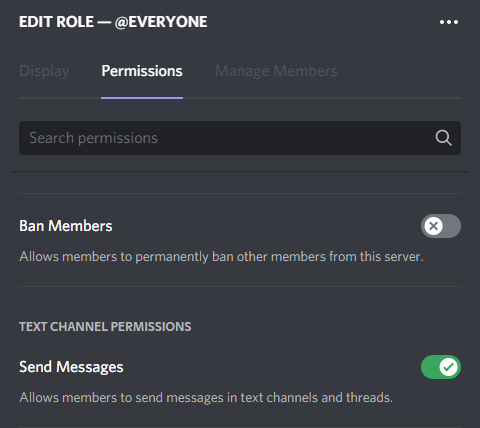
and to be clear this is the default server role setting
for everyone
with see turned off
marble quest
The green ticks and red xs are on channel level
dapper magnet
Ok for the general under server settings should this be turned on for default role ie everyone
marble quest
Yeah that works fine
dapper magnet
ok
marble quest
As long as normal members have something in the server level to let them speak
But since your new members can't see the channels, it shouldn't affect them anyways
dire yarrowBOT
 ✧尺Ꮆ✧ 𝘼𝙂 𝙂𝙖𝙢𝙞𝙣𝙜#3937 has been warned
Reason: Bad word usage
dapper magnet
Thanks again @marble quest I got it sorted!
 granite zenith
When I tried to add videos to the music controller (premium function) the videos didn’t get recognized.
They are unlisted and not public so it might be the problem, but it’s written nowhere that the music controller works only with public videos/songs so...
Edit:
I was told on the #〉volunteer-support channel that it’s likely a bug.
Also this is my personal account the problem is occurring on MEE6 account linked to my work server through my work account. I can contact through my pro account if necessary to give more details)
dire yarrowBOT
 Folonom#5427 has been warned
Reason: Bad word usage
dire yarrowBOT
 저닉멍멍이#8996 has been warned
Reason: Bad word usage
저닉멍멍이#8996 has been warned
Reason: Bad word usage
저닉멍멍이#8996 has been warned
Reason: Bad word usage
저닉멍멍이#8996 has been banned
Reason: Too many infractions
 slate pendant
How do I check my rank
dire yarrowBOT
 Zerosu Metallium#7754 has been warned
Reason: Bad word usage
Zerosu Metallium#7754 has been warned
Reason: Bad word usage
Zerosu Metallium#7754 has been banned
Reason: Too many infractions
dire yarrowBOT
 olenminegraft#7756 has been warned
Reason: Posted an invite
shrewd scaffold
slate pendant
How do I check my rank
You can use !rank in #〉commands
 cosmic sierra
The bot stopped working again
 main osprey
R.I.P
 solemn root
its ping is tooo high
 toxic pumice
Bot don't delete channels after creation, timer set to 10, not even possible to delete them manually with an admin

 sleek elk
Hi! I'm having trouble to see twitter subscriptions working. It's correctly and setup on 3 different twitter accounts but nothing happens on the selected channel. Any clue?
wooden mountain
toxic pumice
Bot don't delete channels after creation, timer set to 10, not even possible to ...
hi, pls restart your discord client
 snow acorn
i am having the issue now that the bot posts 2x birthday related stuff
wooden mountain
screenshot?
 ancient glade
hi
snow acorn
wooden mountain
screenshot?
 wooden mountain
dashboard link?
snow acorn
Manage your Discord server with leveling, moderation, Twitch, Youtube and Reddit notifications.
ancient glade
his
hi
Mee6 Buga entered while listening to music Mee6 thinks the post remained and did not respond to commands
 somber spindle
This isn’t really much of a bug, and it’s probably impossible to fix but if you block mee6 it won’t trigger any sort of auto mod, this means spam won’t be deleted, etc,
This has been causing moderation issues in a certain sever I’m in.
We can’t find any sort of work around to this, so I figured I’d just call it out.
 sharp fern
Mee6 won't do ! Clear command for my server this is the error code SLEEP6
code: 96c9c2580bb845e3956f1f7ed31277ad
 graceful jacinth
Music quiz doesn't respond to correct answers. And then ends. Giving no one credit

 balmy fern
graceful jacinth
Music quiz doesn't respond to correct answers. And then ends. Giving no one cred...
balmy fern
graceful jacinth
Music quiz doesn't respond to correct answers. And then ends. Giving no one cred...
happens to me to
So in my server i am trying to set up the quiz feature but it doesn't respond to attempts to guess the song only the commands "!start-quiz" and "!stop-quiz
 agile halo
<@&193123929701875712> There is so many things wrong with the bot in my server. It lags and takes forever to do anything, and it doesn't always reply when it is supposed to. Also when i pick a video/song to play in the voice channel out of the search thing, it always adds something entirely random to the queue.
dire yarrowBOT
@hearty igloo greeted nobody
 karmic vine
<@&193123929701875712> even when i've given mee6 access to my account it still isnt detecting the servers that im in
dire yarrowBOT
Dashboard Access
You need Administrator permission or Bot master role to access the Mee6 dashboard.
How to add Bot master role can be found below:
https://cdn.discordapp.com/attachments/776560882796724244/864337041160273960/AdditionalBotMasterRoles.png
Premium required

 sudden chasm

 dire yarrowBOT
ThailandLover8#1995 has been warned
dire yarrowBOT
ThailandLover8#1995 has been warned
Reason: Bad word usage
 olive sonnet
!greet
dire yarrowBOT
Rush, you can't use that.
radiant carbon
olive sonnet
!greet
Hi let’s use commands in #〉commands
 tardy turtle
Hello,
Dunno if the problem has already been reported but when I try to make a boost in the economy section the dates/hours doesn't work. When I try to select a date, the result is always "jj/mm/aaaa --:--". Even if I try to use the arrows to increment the values.

 rapid canyon
I have created an item to sell using the economy plugin.
Editing the custom use message with custom emojis does not render the the emojis in chat just the codes.
Also mentioning someone in the BOT RESPONDS WITH message does not actually mention them, it just puts their name in there.
stray sluice
to fix the emoji and pinging you in it try using it like this @rapid canyon 
dire yarrowBOT
Using ID
To use channel tags, emojis, role tags and user mentions in custom commands, level up messages and the welcome plugin use the following formats:
https://cdn.mee6.xyz/s/id.png
https://cdn.discordapp.com/attachments/496805066292854784/872060983370195024/Finding_RoleID.gif

 buoyant moon
Can I have help, the bot is not warning people for swearing or spamming in chat like it should be, what should I do?
stray sluice
is it set to warn users
and are you sure you added bad words in the bad words list?
and spam protection isn't an automod feature
rapid canyon
stray sluice
to fix the emoji and pinging you in it try using it like this <@!150054663054426...
Thanks will give it a go.
buoyant moon
stray sluice
and are you sure you added bad words in the bad words list?
I will look into it, thank you!
rapid canyon
Worked perfectly thank you. Maybe Pin that?
dire yarrowBOT
 knopiX#7320 has been warned
Reason: Bad word usage
 teal latch
When I do /clear and specify an amount of messages, it clears one less than I specified. It work perfectly if I do !clear though.
limber knoll
sure you counted the command it removes?
tardy turtle
tardy turtle
Hello,
Dunno if the problem has already been reported but when I try to make a b...
Up pls 😟
 quick pawn
Wow
 limpid fable
pfp image fail 

 lime talon
Admins can run economy commands in not allowed channels, and the bot responds to it. Is it a bug or a feature?
 solid steeple
they're not supposed to, are you sure you have set it up correctly?
@lime talon please ensure that you've added the channels that you don't want them to run economy games in here.
consider that general economy commands like !economy-info are not affected by this so you will need to configure each command separately in their settings page.
 lime talon
I will check it
 clever pendant
lime talon
Admins can run economy commands in not allowed channels, and the bot responds to...
clever pendant
lime talon
Admins can run economy commands in not allowed channels, and the bot responds to...
economy commands can be used inside the banned channels, only commands for games (!guess, !dice etc) can not be used in the banned channels
lime talon
Thanks
 magic wolf
Hey hum, I bought MEE6 premium and got it on a server, I wanted to put it on another server and it was not premium, so I cancelled the server where the premium was, so I checked and i'm still paying for it on the server where it was that I destroyed, how do I get the premium off the cancelled one ?
dire yarrowBOT
To transfer your premium to another server, use https://mee6.xyz/premium-transfer.
quaint agate
@magic wolf 
dire yarrowBOT
 Nerø#0536 has been warned
Reason: Capital letters
quaint agate
if it dosent work lmk
magic wolf
Nah it works now
radiant carbon
I’m good thanks tho
 lunar ridge
i cant talk in chat
radiant carbon
lunar ridge
i cant talk in chat
Not a bug
radiant carbon
No your not
lunar ridge
then what???????
dire yarrowBOT
 Man Moment#5211 has been warned
Reason: Bad word usage
radiant carbon
Pls don’t spam
 mild ferry
ok
 limpid grotto
Economy lists / (forward slash) as the prefix in its command instructions, but in-fact requires the ! (exclamation mark) prefix.
dire yarrowBOT
 Bubbles.#2304 has been warned
Reason: Bad word usage
Bubbles.#2304 has been warned
Reason: Bad word usage
Bubbles.#2304 has been warned
Reason: Bad word usage
Bubbles.#2304 has been banned
Reason: Too many infractions
 young anchor
For some reason mee6 is offline in our server and idk why but I never seen mee6 offline in any servers. Idk of this is a bug or a glitch-

 stark crown
I'm having issues in my server too
young anchor
thank you for telling me, we started panicking
stark crown
It appears offline
 stiff field
Try again in a few minutes:)
 sudden arrow
I just noticed MEE6's Server Stats all went to 0 in my server
Not appearing offline though
Avoiding using commands for now
 hexed dragon
<@&732153669344165989>

 eager summit
hello sir
radiant carbon
eager summit
hello sir
Hey do you have a bug report
eager summit
yes sir
radiant carbon
What is it
eager summit
i have bug report sir, but im a biggener sir, i don't have to be used
i hope you understand me sir
dire yarrowBOT
 ZeX#5378 has been warned
Reason: Bad word usage
 viscid wagon
hello
dire yarrowBOT
 Jb#4094 has been warned
Reason: Bad word usage
dire yarrowBOT
 saka#2050 has been warned
Reason: Bad word usage
 sterile bough
Timer does not work. I get one message sent not one every two hours like I programmed. I want to send an embed to a channel every 2 hours. I have premium
dire yarrowBOT
:timer: Timers :timer:
• You can currently only add 10 timers per channel
• MEE6 has an anti-flood system. So messages need to be sent between a timer and another in order to keep timers being sent
Note: In case you can't see any text channels when selecting the place to announce, it probably means you're logged in the wrong account.
sterile bough
But I want only the mee6 bot to send a message every 2 hours in this channel and no other messages, one embed saying the server will reset sent every 2 hours with just mee6 chilling sending that message alone in that channel… is that not possible?
shrewd scaffold
sterile bough
But I want only the mee6 bot to send a message every 2 hours in this channel and...
Not possible to do that with timer unless there is a normal human mssg btwn two timers
dire yarrowBOT
 Jzqnx#3950 has been warned
Reason: Bad word usage
 vague hinge
?mute @sterile bough reason seacond
 signal hinge
so i have the problem, that mee6 doesn't attach all roles sometimes. is there a max roles or a way to fix?
wooden mountain
first make sure MEE6 can give all the roles
dire yarrowBOT
Role hierarchy is important for me to give out roles. Oh and also Manage Roles perm:
https://cdn.mee6.xyz/s/fix_hierarchy.gif
wooden mountain
then, there is a limit of amount of roles the bot can give/remove each minute, if you have a lot set up and the bot has to wait to long to give some roles, it forgets it had to do that
dire yarrowBOT
 姆姆補給官#6484 has been warned
Reason: Bad word usage
dire yarrowBOT
 Tama#6027 has been warned
Reason: Bad word usage
radiant carbon
Hi
What comamd
So custom comamd
Can you show me how you have it set up on the mee6 dashboard
No the dashboard
dire yarrowBOT
You can access my dashboard at https://mee6.xyz/dashboard, and login with your Discord Account.
or you can use !dashboard in your server for a direct link
dire yarrowBOT
!clear [messages to remove] [@name]
!clear xto clear the last x messages (!clear 10)!clear @nameto clear all the messages of@name(!clear @MEE6)!clear @name xto clear the last x messages of@name(!clear 10 @MEE6)
- I need Manage Messages and View Message History permissions
- Moderator plugin and !clear command should to be enabled
- Only users with Allowed roles can use the command, don't forget to add their roles in command's settings!
stray sluice
@buoyant moon
 winged elk
i think you need to update the emoji when someone try’s to put slowmode it now says :xmark6 without the emoji
 stray sluice
It’s most likely because that mee6 doesn’t have permission to use external emojis
winged elk
it has administrator
wooden mountain
integrations responds wiht the permission of the everyone role
not with the permissions of MEE6
 tight ginkgo
wooden mountain
not with the permissions of MEE6
tight ginkgo
wooden mountain
not with the permissions of MEE6
Excuse me admin
I want to buy a premium lifetime plan but there are problems entering a credit card and I got blocked
Can I send directly to your paypal account to buy it?
wooden mountain
hi, i saw that you send me a DM but i haven't read that yet (i will read that when i'm done with all the other things in here)
tight ginkgo
Thank you sir
I hope I don't miss that promo
It takes a very long time to fix credit card problems during this pandemic
radiant carbon
No
 ornate prawn
k thanks
radiant carbon
And do you have a bug report
radiant carbon
No I’m good thanks tho
marble quest
saving a reaction message with #️⃣ as a reaction still shows a 500 error and fails to send.
 dire yarrowBOT
 Blackto aka maki#3520 has been warned
Reason: Bad word usage
boreal totemBOT
👌 User 822091920581853215 has been banned for scam.
 late granite
 hearty igloo
MEE6 probably doesn't have external emoji perms
You can fix that in the channel permissions
dire yarrowBOT
 Lord Beerusᶜʰⁱˡˡ#3852 has been warned
Reason: Bad word usage
 Clean.#4833 has been warned
Reason: Bad word usage
 kurt ΞXΞ#3904 has been warned
Reason: Bad word usage
radiant carbon
hearty igloo
MEE6 probably doesn't have external emoji perms
No
That’s the everyone role
hearty igloo

quaint agate
hearty igloo
<:MEEThonk:468869604685512704>
Yea so slash command use the everyone roles perms bit weird but that’s how it works
hearty igloo
quaint agate
Yea so slash command use the everyone roles perms bit weird but that’s how it wo...
OO yeah didn't notice it was slash 🤦
quaint agate
ah yess my favriote the green off button

 outer tendon
hi, I bought premium mee6 forever, and my team and I wanted to edit the moderation capabilities of the bot on our server, the problem is that the discord has been updated and now the roles do not affect the priority, higher - lower, now it does not matter if a person violates the rules of the server, the bot gives him his role "muted", but the user bypasses this role and can still "shit" in the chat. I suggest adding the bot the ability to revoke all roles for the time of "muted", and return all roles back when the time of the role" muted " expires
dire yarrowBOT
Having problems muting someone/they aren't muted? Check the following
Prerequisites:
- Moderator plugin is enabled
!mutecommand isn't disabled- Bot has role with Manage Roles and Manage Channels permissions
- Muted role is under MEE6 role
- You're trying to mute someone using
!mute @mention reason, otherwise it will not work
If user got Muted role but still can talk means there's issue with your channel permissions
Go to Channel Settings -> Permissions
- If that's public channel that can be accessed by anyone:
- Set
Send Messagesfor all roles except Muted - Set
Send Messagesfor Muted role
- If that's secret channel that requires *special* role to access it:
- Set
Send Messages Read Messagesfor special role - Set
Send Messages Read Messagesfor Muted role - Set
Send Messages Read Messagesfor@everyonerole
wooden mountain
whatever role that gives access to a channel that everone can't see
outer tendon
I checked all the items, role settings, accessibility and channel settings for the bot, 5 different special roles, the roles are muted and everyone, but nothing has changed(
The bot issues a warning to the user and deletes the bad message, then after three warnings, the bot gives the violator the mutated role, but this role does not work.
A person with the mutated role can still write to the chat and receive further warnings until he gets banned from the bot and leaves the server.
That is, the role is issued, warnings, deletion and ban work.
But the role of mutated and temporary mutation doesn't work, that's the problem.
wooden mountain
can you DM me an invite and give manage roles and manage channels perms pls? i want to check
dire yarrowBOT
 AbleToHxck#0001 has been warned
Reason: Bad word usage
outer tendon
My guess is that the mutated role has stopped working normally, as it did before, due to a discord update.
The muted role has lost priority on all roles and therefore the rights from other roles are allowed to write to the chat, bypassing the role is muted
Can I invite you to my server and enable the stream of roles?
I also want to warn you that I have a Russian-language server.
wooden mountain
outer tendon
Can I invite you to my server and enable the stream of roles?
I also want to war...
dire yarrowBOT
 Maximusprime#0973 has been warned
Reason: Bad word usage
dire yarrowBOT
 Llukelis#7518 has been warned
Reason: Bad word usage
boreal totemBOT
@glass adder has been auto-banned. (strict bad words filter)
quaint agate
<@&732153669344165989> scam
wooden mountain
@ mini-mods deleted message
 junior snow
My ID: 815696881195810846
Message ID: 879090524387176478
Message Link: https://discord.com/channels/@me/852592519535001641/879090524387176478
When this happen: 22/8/2021 | 16:51 (GMT-3)

 gilded yacht
That's a server welcome message @junior snow
From a server you joined
Or it's from a custom command that you used
hearty igloo
Buttons doesn't light up when enabled...
 wooden mountain
they are supposed to light up
dire yarrowBOT
 mrcoffeebeans#9116 has been warned
Reason: Bad word usage
boreal totemBOT
@marble oak has been auto-banned. (strict bad words filter)
 sturdy herald
MEE6 doesn't give the perms to speak in temp channels and does not sinc the channel perms with the category
wooden mountain
stuff is restarting, try again in a hour
sturdy herald
ah ok
 maiden bronze
!rank
dire yarrowBOT
foxtrotDelta9402, that command is disabled in this channel.
radiant carbon
maiden bronze
!rank
 upper granite
Give me roles
radiant carbon
upper granite
Give me roles
No
dire yarrowBOT
Acquirable Roles
<@&494618336638795777>
→ become a premium subscriber to automatically receive this role
<@&751042568757837895>
→ automatically given when you start streaming, requires <@&494618336638795777> role
<@&545318227312640002>
→ become a partner
<@&585536144641622028>
→ there are no notable perks for boosting this server... and no, you do not get free premium for doing so
Role Rewards
are automatically given as you progress in my leveling
Level 10: <@&186443728737533952>
→ grants permission to add emoji reactions
Level 20: <@&186443843372187648>
→ grants permissions to change nickname and use stickers
Level 30: <@&437064889639370752>
→ does not offer any additional permissions. just a different color
You can use the !rank command on #〉commands to check your current progress.
Premium role grants permissions of all role rewards combined!
radiant carbon
That’s how you get roles
 paper halo
what
dire yarrowBOT
 Sasaki#3587 has been warned
Reason: Bad word usage
dire yarrowBOT
 EvilZama#4348 has been warned
Reason: Bad word usage
buoyant moon
The timer function is acting funky.
I have a timer set for an bump reminder embed to go off every 4 hours, but in most cases it wont populate until directly after someone has used that channel with the disboard bot command.
Is there a built in activity timer that prevents it from using said channel timer if that channel isn't in use often enough?
dire yarrowBOT
:timer: Timers :timer:
• You can currently only add 10 timers per channel
• MEE6 has an anti-flood system. So messages need to be sent between a timer and another in order to keep timers being sent
Note: In case you can't see any text channels when selecting the place to announce, it probably means you're logged in the wrong account.
buoyant moon
thanks good to know!
 narrow blaze
 twin tendon
Admin or owner?
twin tendon
You need actual administrator (last) permission in your role
narrow blaze
Okay thanks
buoyant moon
i want to buy mee6 premium but it wont let me
 barren raft
necesito ayuda
wooden mountain
buoyant moon
i want to buy mee6 premium but it wont let me
what do you mean with "it won't let me"
marble quest
wooden mountain
what do you mean with "it won't let me"
(from another channel) it says you need a card. they were trying to get monthly with paypal balance but doesn't have a card to link to paypal.
wooden mountain
card required
marble quest
Since i'm not sure if it's known or not by staff:
If you make any changes to mee6's highest role (specifically moving it's hierarchy) while the dashboard is open (even if it has manage roles and admin perms) it will change to say it doesn't. Tested with and without an integrated role. refreshing the dashboard makes it go away, but an inconvenience still.
Super easy to reproduce:
Invite mee6 to a server if it isn't already, make sure it has admin perms. then find it's highest role and move it up one by one and save. the dashboard will then show the error until you refresh.
 pseudo salmon
hello can i ask something?
Mistake! I can't give a role according to it. Please fix this or by granting MANAGE ROLES ADMINISTRATOR permissions.
I'm getting this error and the mee6 is at the top in the roles section.
stray sluice
have you given mee6 those permissions?
pseudo salmon
yes
stray sluice
if so refresh
dire yarrowBOT
Role hierarchy is important for me to give out roles. Oh and also Manage Roles perm:
https://cdn.mee6.xyz/s/fix_hierarchy.gif
stray sluice
make a new role with those permissions and give it to mee6
pseudo salmon
i will try thanks
 lilac bloom
in my friends server mee6 just outright banned me i didn't do anything is that a problem that happens?
wooden mountain
do you have the leaderboard link for that server?
 coral haven
I have admin perms for MEE6 enabled, however the website for the bot says it cannot auto-assign roles because it "doesn't have role manager perms".
 random jackal
coral haven
I have admin perms for MEE6 enabled, however the website for the bot says it can...
random jackal
coral haven
I have admin perms for MEE6 enabled, however the website for the bot says it can...
Make sure the bots role is above the role you are trying to give.
coral haven
@random jackal It is above that role, no dice still.
wooden mountain
is the role MEE6 has with admin perms the role that came with MEE6 when you invited him?
coral haven
Yes
wooden mountain
then that's not admin
pls give admin or manage roles on an other role
as that integrated role is weird
coral haven
On another role as in move MEE6 to a seperate role than the one I already have it as?
wooden mountain
give an extra role to MEE6 with the required permissions
coral haven
Alright I fixxed the issue, many thanks.
marble quest
marble quest
Since i'm not sure if it's known or not by staff:
If you make any changes to mee...
sil, i think that's similar to this, but the same thing happens with or without the integrated role (and refreshing the dashboard makes the error go away)
wooden mountain
nope this is integrated role
he had admin but no manage roles
and admin on integrated doesn't work
marble quest
i just tested the same thing with the bot only having admin on it's integrated role, and same thing. i go to the welcome plugin, move mee6's role, and the error comes up when i save
but refreshing the dash removes it, and it can give me a role as well
happens every time i've tried it
 wooden mountain
can you update my bug report on the bugs list
marble quest
what?
wooden mountain
you know, the list with bugs that you don't have access to, can you update my bug report of that in there
quaint agate

dire yarrowBOT
 Lucasbinet_#7170 has been warned
Reason: Bad word usage
dire yarrowBOT
 ꧁༺MẶT TRỜI༻꧂#1701 has been warned
Reason: Capital letters
 wintry birch
yo quiero DINERO
dire yarrowBOT
 islambasha#0001 has been warned
Reason: Bad word usage
dumbmanith, that command is disabled in this channel.
radiant carbon
dire yarrow
<:XMARK6:403540169992568833> **dumbmanith**, that command is disabled in this ch...
Like I said #〉commands
 flat pivot
!rank
dire yarrowBOT
Om, that command is disabled in this channel.
flat pivot
!rank
dire yarrowBOT
Om, that command is disabled in this channel.
 quiet estuary
i found a way to bypass mee6 bad word automod how ? take for example the f word i can say it but mee6 will delete it but if i say it and after it a || and then go to a newline and put the II again it will ignore it
sturdy herald
Custom emotes aren’t being shown in embeds
faint dome
quiet estuary
i found a way to bypass mee6 bad word automod how ? take for example the f word ...
Known one since years sadly :/
faint dome
sturdy herald
Custom emotes aren’t being shown in embeds
Try with their ID
quiet estuary
faint dome
Known one since years sadly :/
then why it is not fixed yet ?
sturdy herald
faint dome
Try with their ID
Still does not work
sturdy herald
The bot can display custom emotes in embeds bot only in the “Context text” field it can’t display emotes in “extra” fields so please add that “feature” or fix the problem.
quiet estuary
quiet estuary
then why it is not fixed yet ?
then fix it
 gray oracle
I have a bug that I’m not sure that happened to everyone. So even though it was a couple a months ago, I just want to clarify. So for our server ranking leaderboard, me and 2 of my friends’ xp got completely reseted. Did that happen to anyone else?
 alpine pulsar
dire yarrowBOT
alpine pulsar
dire yarrowBOT
 jayj#0001 has been warned
Reason: Bad word usage
 frail dragon
gray oracle
I have a bug that I’m not sure that happened to everyone. So even though it was ...
frail dragon
gray oracle
I have a bug that I’m not sure that happened to everyone. So even though it was ...
most likely an admin from that server resetted it
dire yarrowBOT
 Childe#5158 has been warned
Reason: Bad word usage
 hollow ore
 thorny solstice
!molestar
dire yarrowBOT
 亗TSK^ARDA亗#5316 has been warned
Reason: Bad word usage
 silk cobalt
SLEEP6 Something went wrong in MEE6 land! Contact our support team for instructions if this keeps happening.
code: f40db1892f7846e9941aed66643df8f6
radiant carbon
silk cobalt
SLEEP6 Something went wrong in MEE6 land! Contact our support team for instructi...
Comamd
silk cobalt
what
radiant carbon
What command
wooden mountain
radiant carbon
Comamd
clear command, rate limit, i got to go, you tell him to try again later
dire yarrowBOT
 _.a._atanasov._#6251 has been warned
Reason: Bad word usage

 marble quest
buoyant moon
i was trying to make a verification system but this shows this error
marble quest
buoyant moon
i was trying to make a verification system but this shows this error
refresh the page and try again
buoyant moon
👍
 lone charm
pp
 flat arch
This gif causes a duplicate text warning on my server:
https://tenor.com/view/hello-good-morning-शुभप्रभात-सुप्रभात-गुडमोर्निंग-सूर्योदय-gif-14761615
buoyant moon
flat arch
This gif causes a duplicate text warning on my server:
<https://tenor.com/view/h...
You can go to the moderation panel and place no link i'm auto-mod
flat arch
buoyant moon
You can go to the moderation panel and place no link i'm auto-mod
External links are allowed?
It's giving a duplicate text warning.
And it's just that specific gif
frail dragon
flat arch
This gif causes a duplicate text warning on my server:
<https://tenor.com/view/h...
There a bunch of ‘%’ ‘A4’ and other repeated stuff
Especially the % causes it
It doesnt really count as a bug, theres bunch of obvious repeated characters which triggers mee6’s duplicated text moderation
flat arch
Oh so it works on a single message basis too.
Wish I could, you know, differentiate. 
 sand vapor
Hey ! I have a bug. I can't kick or ban MEE6. It has no role but we can still use it. How to do ?
buoyant moon
sand vapor
Hey ! I have a bug. I can't kick or ban MEE6. It has no role but we can still us...
Not the role MEE6?
sand vapor
Yes, it has not role
dire yarrowBOT
 (Kyle)™#4254 has been warned
Reason: Bad word usage
 jaunty zephyr
!rank
dire yarrowBOT
BrovoTinGaming, that command is disabled in this channel.
dire yarrowBOT
 The Eggdog Behind The Slaughter#5556 has been warned
Reason: Bad word usage
dire yarrowBOT
 Madhavv#2537 has been warned
Reason: Bad word usage
radiant carbon
jaunty zephyr
!rank
#〉commands my friend
 distant swallow
Hey guys could it be that the reaction roles aren't updating, I tried entering a new reaction role and then saved but when I reopen it didn't save it.
I got 10 reaction roles available it says
dire yarrowBOT
 englishonwerpro#9353 has been warned
Reason: Bad word usage
englishonwerpro#9353 has been banned
Reason: Too many infractions
twin tendon
distant swallow
Hey guys could it be that the reaction roles aren't updating, I tried entering a...
Answered in #〉volunteer-support
dire yarrowBOT
 wdavee#9066 has been warned
Reason: Bad word usage
 aniwaifus#2445 has been warned
Reason: Bad word usage
 MR KIRYA#3003 has been warned
Reason: Bad word usage
 jagged path
I dont understand. im signing in with my email and password its taking me to my old discord account everytime on the mee6 webseite, please help.
marble quest
jagged path
I dont understand. im signing in with my email and password its taking me to my ...
 gilded walrus
I tried to switch languages from English to French on mee6.xyz. I still see some English text on the French website
ivory blaze
Probably not fully translated yet
 upper trench
If you upload a banner for XP reward the text in the blue button bugs:

 woven rain
!rank
dire yarrowBOT
RESPIRATOr, that command is disabled in this channel.
radiant carbon
woven rain
!rank
dire yarrowBOT
 SANIM#2047 has been warned
Reason: Bad word usage
dire yarrowBOT
spasenie#0548 has been warned
Reason: Bad word usage
dire yarrowBOT
 destroyerKA01#5390 has been warned
Reason: Bad word usage
 worldly pumice
!rank
dire yarrowBOT
JREllis, that command is disabled in this channel.
stray sluice
Try #〉commands
 karmic crypt
!rank
dire yarrowBOT
ETR RONIN, that command is disabled in this channel.
karmic crypt
!daily
dire yarrowBOT
ETR RONIN, that command is disabled in this channel.
karmic crypt
Ok
dire yarrowBOT
 MD7_YT#1933 has been warned
Reason: Bad word usage
shrewd scaffold
karmic crypt
Ok
You can use those in #〉commands
worldly pumice
Bug I don't think the Rank cards are working. I paid for lifetime, And I cannot change rank card it asked me to pay for mee6 Pro..??

 tired meteor
premium and pro is different things, with premium you can change the server rank card in the dashboard, you would need pro to change your personal rank card
worldly pumice
Wow just wow k
dire yarrowBOT
 lil_lantu亗#0986 has been warned
Reason: Bad word usage
 pallid marten
There seems to be a problem with the mee6 bot playing music: after every 3-5ish songs, it stops playing, even though there is always at least one (often multiple) people in the audio channel listening to the music. The bot displays the "next song playing" in the Discord channel, but doesn't actually play the song. However, if I look in the web dashboard, I can see that the song is "playing," and if I skip tracks the audio comes back.
Our server ID is https://mee6.xyz/dashboard/861881817338347541 . Please advise, and let me know if you have any questions. Thanks!
Manage your Discord server with leveling, moderation, Twitch, Youtube and Reddit notifications.
dire yarrowBOT
 Texy daddy#5267 has been warned
Reason: Bad word usage
 mellow zealot
the three codes for copy/paste
c6d86972a65d4313a785b9c500439e14
e1b5ca3c70794b52857a9b7c3d699061
3b77a9e6ee684c379b2cdd03d104d338
 quaint agate
mellow zealot
the three codes for copy/paste
c6d86972a65d4313a785b9c500439e14
e1b5ca3c7079...
quaint agate
mellow zealot
the three codes for copy/paste
c6d86972a65d4313a785b9c500439e14
e1b5ca3c7079...
Mutiple people are having the issue please Wait for a fix
 radiant breach
2da65767e556429e84b550c4b0efb0ad
for doing /daily and /work
happened multiple times
 onyx widget
radiant breach
2da65767e556429e84b550c4b0efb0ad
for doing /daily and /work
happened multiple t...
onyx widget
radiant breach
2da65767e556429e84b550c4b0efb0ad
for doing /daily and /work
happened multiple t...
known bug, devs currently deploying a fix
 silent ingot
Its prefix won't work
dire yarrowBOT
 don't even try#2669 has been warned
Reason: Bad word usage
faint dome
 sleek flicker
5aa9015fe6e8435ba60772c8d9e79448
sleek flicker
5aa9015fe6e8435ba60772c8d9e79448
Thanks, I reported it to our devs 
If you have any related info that may help us track the bug, feel free to provide them ^^
sleek flicker
faint dome
Thanks, I reported it to our devs <:ok_mcc:618169449450700810>
If you have any ...
economy section doesn't work
faint dome
Apparently it broke while you tried to use !work. And from what I can tell, it’s due to a broken coins boost. That’s all I know
sleek flicker
Thanks for information 😊
dire yarrowBOT
Generalツ, you can't use that.
 woven panther
lol
 midnight lake
 quick lava
buoyant moon
quick lava
buoyant moon
welcome embed message seems to not be working rn. the rest of the welcome module works to my knowledge, and the roles are set properly to allow the bot to work. it worked fine until a couple days ago, at least thats when i started noticing it
dire yarrowBOT
 REDBEE#0134 has been warned
Reason: Bad word usage
dire yarrowBOT
 ZRxx26#9781 has been warned
Reason: Bad word usage
 kindred moat
mee6 is not taking roles even though I adminstrated it.
 gentle crescent
k
dire yarrowBOT
 iklwb#8784 has been warned
Reason: Bad word usage
 wintry reef
e
dire yarrowBOT
iklwb#8784 has been warned
Reason: Bad word usage
boreal totemBOT
@wintry reef has been auto-banned for mass mentions.
 clever barn
External links in the "only delete messages" option of the auto mod section doesn't work all the time, ive had many instances of scam links coming through (yes even with the right settings).
dire yarrowBOT
 D4U͜͡٭ Souhaib#6624 has been warned
Reason: Bad word usage
 bronze cypress
I’ve noticed that MEE6 sometimes sends 2 birthday messages. Usually one at the right time and then another 2-5 minutes after.
dire yarrowBOT
 Fndiniy#1806 has been warned
Reason: Bad word usage
 dusk cradle
The /levels command does not work but the prefix command !levels does.
 novel moth
dusk cradle
The /levels command does not work but the prefix command !levels does.
novel moth
dusk cradle
The /levels command does not work but the prefix command !levels does.
well just use !levels then
if it works then...
dusk cradle
It is a bug so I am reporting it so its known.
 obsidian mortar
salut g un probleme avec le bot sur le dashboard g configurer les message de bienvenue en embed mais le bot n envoie pas de message quand qlq join 🇫🇷
hi i have a probleme with mee6 i configure to the dashboard the welcome message with embed but the bot dont send a message when a user join the server 🇬🇧
 lusty folio
!rank
dire yarrowBOT
Maxouille01, that command is disabled in this channel.
obsidian mortar
marble quest
obsidian mortar
salut g un probleme avec le bot sur le dashboard g configurer les message de bie...
make sure mee6 has permission to embed links. if it does, can you send a screenshot(s) of the full welcome message embed you set in the dashboard?
marble quest
dusk cradle
The /levels command does not work but the prefix command !levels does.
does /levels show up as a slash command in your server? if it does, when you use it, does what does it actually show/what happens? If not, are slash commands enabled on the settings tab of your dashboard?
dire yarrowBOT
 𝓣𝓻𝓲𝔁𝓧#0007 has been warned
Reason: Bad word usage
obsidian mortar
marble quest
make sure mee6 has permission to embed links. if it does, can you send a screen...
O Check the permissions wait 2 minutes I screen the embed
Sry I on my phone


It’s the full embed
marble quest
you can't have a blank field value if you are using the field
 obsidian mortar
Ohh ok
marble quest
(and that's not the only one in the message, make sure you take care of that for all the fields like that)
obsidian mortar
in the fields I have to write what for example
marble quest
you either need to add something for the field value, or move the content from the title of the field to somewhere else in the embed.
 wooden mountain
delete this empty one
 dire yarrowBOT
 fukraboy#4299 has been warned
Reason: Bad word usage
dire yarrowBOT
 SerbestAdam#8405 has been warned
Reason: Bad word usage
 KienTran#9999 has been warned
Reason: Bad word usage
dire yarrowBOT
 𝓐𝓿𝓪𝓪#7226 has been warned
Reason: Bad word usage
dire yarrowBOT
 xCredible16#3013 has been warned
Reason: Bad word usage
limber knoll
@obsidian mortar try this https://emptycharacter.com/ in both fields
Empty Characters, Whitespaces & Blank Unicode Characters
dire yarrowBOT
 Owasagi Rinfu#2808 has been warned
Reason: Bad word usage
dire yarrowBOT
 ఌᴸ ᴱ ⱽ ᴵシ#6957 has been warned
Reason: Posted an invite
dire yarrowBOT
 ❥♫𝑺𝒖𝒑𝒆𝒓#9630 has been warned
Reason: Bad word usage
 brave bone
pls fix

 digital fractal
The reddit post feature of the bot is missing the majority of posts from a subreddit that gets a few posts a day.
dire yarrowBOT
 🎭|køstᴴᵃᵗᵉᵧₒᵤ♡#5363 has been warned
Reason: Bad word usage
wooden mountain
you need the "administrator" permission in a server or be the owner of those servers
dire yarrowBOT
It appears that you may be on the wrong account, or something went wrong since the time you logged into my website.
- Please navigate to https://discordapp.com/login and select the gear :gear: in the bottom left, then press Logout.
- After that, please navigate to https://mee6.xyz/logout to disconnect from my website.
- Once finished, select "Add to Discord" again, and follow the instructions to access my dashboard again.
https://cdn.discordapp.com/attachments/221498799162523648/868523838730809404/logout.png
wooden mountain
partial outage
MEE6 is offline in a couple servers, will be back soon.
dire yarrowBOT
 reflex#7826 has been warned
Reason: Bad word usage
 Dypect#5444 has been warned
Reason: Bad word usage
 gaunt rune


 marble quest
mee6 needs to have a role that higher than the highest role of the user it should be banning:
dire yarrowBOT
Role hierarchy is important for me to give out roles. Oh and also Manage Roles perm:
https://cdn.mee6.xyz/s/fix_hierarchy.gif
dire yarrowBOT
Gabe Itches, that command is disabled in this channel.
 clear dome
Oops
 jolly valve
wooden mountain
**partial outage**
MEE6 is offline in a couple servers, will be back soon.
jolly valve
wooden mountain
**partial outage**
MEE6 is offline in a couple servers, will be back soon.
Is there a way to check if MEE6 is offline for my server? I am able to use the / commands (like /rank), but for some reason, the custom commands I created this morning stopped working a couple of hours ago, and I'm not sure how to check for additional information (outage, etc)
wooden mountain
<@&193123929701875712> ^^ i have to go now
marble quest
(resolved in #〉volunteer-support, mee6 missing embed links perms)
dire yarrowBOT
 Y a s s.#9999 has been warned
Reason: Bad word usage
 olive flare
digital fractal
The reddit post feature of the bot is missing the majority of posts from a subre...
olive flare
digital fractal
The reddit post feature of the bot is missing the majority of posts from a subre...
The reddit new posts feature is indeed bugged, it's missing a bunch of posts.
 dry hinge
Music bot is still breaking, Leaves the channel all together randomly
We have a server with 4k+ Members
limber knoll
is that using a staging channel?
 open bronze
why does mee6 do not update my statics channels anymore i have to do it manually all the time for few weeks now
limber knoll
known issue
open bronze
is it fixable?
limber knoll
not your end
dire yarrowBOT
 Shouya#0659 has been warned
Reason: Bad word usage
dire yarrowBOT
 smile.#4051 has been warned
Reason: Bad word usage
 hushed rapids
when im trying to update temporary channels i have an error: Oops, an error occured!
Channel not updated
and also when im joining temporary channel it kicks me
marble quest
make sure mee6 (or your custom bot if you are using one) has permission to manage channels, view channels, connect and move members, especially on the hub channel
hushed rapids
marble quest
make sure mee6 (or your custom bot if you are using one) has permission to manag...
its still not working
marble quest
if you give the bot admin perms, does it work then?
hushed rapids
no
marble quest
are you using the custom bot or regular mee6?
hushed rapids
custom
wooden mountain
(admin not on the integrated role, that's the role that got made when the bot joined, as admin on that role doesn't actually work)
hushed rapids
so what should i do
wooden mountain
what's the name of that server?
hushed rapids
team challenge
wooden mountain
ooooo
2FA required for moderator actions
however, the account that made the custom bot doesn't have 2FA enabled
hushed rapids
oh
wooden mountain
for bots, it takes the 2FA status of the account that made the bot
either enable 2FA on the account that made the bot, or disable the requirement for 2FA for moderator actions
preferably the first option
hushed rapids
alr ty for help
wooden mountain
in the last 24 hours, your server was the only server receiving the 2FA required error, so not something we see often
buoyant moon
The bot went offline for me
 spiral lion
me too
 tiny plume
me too
 white tapir
me too
buoyant moon
The strange thing is it hasn’t gone offline on any other server
 dense cedar
why my MEE6 is offline ?
stray sluice
Mee6 might be having some troubles so be patient until its fixed
dense cedar
ok
buoyant moon
That’s fine I just wanted to report it Just in case
hushed rapids
wooden mountain
in the last 24 hours, your server was the only server receiving the 2FA required...

wooden mountain
temperary outage, network issue, will be back in a couple minutes
@twin anchor @spiral lion @tiny plume @white tapir @dense cedar
spiral lion
wooden mountain
temperary outage, network issue, will be back in a couple minutes
<@!7836672829...
ok
wooden mountain
not everywhere yet
dense cedar
@wooden mountain now is online, thx
 glad veldt
still offline here 😦
glad veldt
👍
radiant carbon
<@&732153669344165989>
buoyant moon
my bot dont find my server help me please
wooden mountain
server name?
 scarlet pawn
We just had our mee6 @ some 3 time in our leaderboard and it was for the same level. Could there be something wrong with it.
 crude scroll
Same