#〉bugs-reports
2 messages · Page 112 of 1
 ivory blaze
ivory blaze
ivory blaze
you are welcome
 cloud owl
Hello, I am having a white page when I try to go on the mee6 website, is it normal ?
 faint dome
cloud owl
Hello, I am having a white page when I try to go on the mee6 website, is it norm...
faint dome
cloud owl
Hello, I am having a white page when I try to go on the mee6 website, is it norm...
See pinned message about that
 spice jolt
The role is missing and i cant kick mee6
 tidal stone
its offline

 cunning wedge
the bot its offline
ivory blaze
We’re doing a rolling restart, will be back soon
cunning wedge
ok
 dusk compass
my mee6 is just saying like Flopp_Cat_15 used /work and not saying the usual things that it says
 quaint agate
this is known right?

 sonic pelican
?

 marble quest
"intentional" to make it look like he is looking towards the bottom right

 visual thunder
uh the site wont load so i can not acces dashboard

 bitter zenith
try incognito
 sonic pelican
visual thunder
uh the site wont load so i can not acces dashboard
sonic pelican
visual thunder
uh the site wont load so i can not acces dashboard
like this maybe
and you maybe fix other bugs on other sites by clearing cache and history
 lavish fiber
what
 dire yarrowBOT
 ꧁⋆☬༒Ashley༒☬⋆꧂, that command is disabled in this channel.
 high pawn
I can't use cooldown in ECONOMY for minutes and hours
 buoyant moon
Подскажите как бота на Русский перевести?
buoyant moon
buoyant moon
Подскажите как бота на Русский перевести?
English please
Tell me how to translate the bot into Russian?
Simply put, change his language
Thank you, I was already told how to translate
 zinc coral
Mee6 wont give me the link to download my Mp3 recording from a voice channel
 wooden mountain
can you give me teh MEE6 dashboard link for that server pls?
dire yarrowBOT
Lets spice this up a bit! https://discord.gg/mee6
If you want to invite the bot instead... https://mee6.xyz/dashboard
 hearty igloo
2nd link
 sick merlin
thanks
 outer stump
!addlevel_9999999
 honest ledge

on mobile (chrome) and the switch to new interface button does nothing. when i click a server, it already loads the new interface. looks like the button doesn't need to be there?
quaint agate
The new interface is only for a servers dashbord not the sever selector screen
So they just haven’t removed it from that page then it looks
 radiant carbon
Not a bug
 tribal lantern
Instead of tagging the channel I set up, it sends this function.

It would be better if corrected.
It's not a big mistake, but it looks ugly.
hearty igloo
MEE6 custom bot?
tribal lantern
Yep
tribal lantern
Moderator/Restricted channels
@hearty igloo
I chose a specific channel but it sends that function.
I had 1 channel set as picture and video only.
wooden mountain
what language is that?
hearty igloo
Ahh alright I will forward it to a staff member if one doesn't reply to you later
wooden mountain
hearty igloo
Ahh alright I will forward it to a staff member if one doesn't reply to you late...
lol
hearty igloo
Nevermind Sil is here
tribal lantern
wooden mountain
what language is that?
turkish
hearty igloo
wooden mountain
lol
You always pop up on the most unexpected times you know that 😆
wooden mountain
i do, it's intented
wooden mountain
tribal lantern
turkish
error in the translations, fixed in next update. thanks for reporting 😄
tribal lantern
wooden mountain
error in the translations, fixed in next update. thanks for reporting 😄
no problem, not a big mistake but it stands out 😄
tribal lantern
wooden mountain
error in the translations, fixed in next update. thanks for reporting 😄
I wondered who is doing the translator?
Sorry 2 ping
wooden mountain
volonteers
translation used to be good untill dev changed how it got translated
most languages that had it translated have this error
tribal lantern
Oh, seems a little too much 😄
@wooden mountain mee6 has become really useful.
Almost most of it on the server is doing my job 😄
 covert lotus
I've been having an issue with the 24/7 mode of the music player. It just stops at some point (I assume after 1-2 gos through the playlist). Any ideas on how can I fix that? (I don't want to write !play every hour or so)
 limber knoll
@covert lotus use a staging channel, it won't stop it playing up but it'll last longer
buoyant moon
How to get free money
radiant carbon
buoyant moon
How to get free money
This is a bug how
marble quest
the !help temporary_channels command shows the wrong description for !voice-unban (though the right one is shown on the dashboard)

 fiery fiber
My lifetime subscription is gone? Server id: 427849416112734208
 long dawn
What do you mean by gone?
bitter zenith
fiery fiber
My lifetime subscription is gone? Server id: 427849416112734208
hold on, I'll investigate real fast
fiery fiber
bitter zenith
hold on, I'll investigate real fast
Thanks, my custo bot was down 14h I think...
bitter zenith
fiery fiber
My lifetime subscription is gone? Server id: 427849416112734208
looks like that subscription was a 1 month sub. paid in USD
and was cancelled
today
fiery fiber
It's wrong, our admin buy The lifetime in 2019
bitter zenith
and will continue until May 30
fiery fiber

fiery fiber
Yes
fiery fiber
I'll ask to her check dashboard, I cant see The bills here. Thanks @bitter zenith
bitter zenith
sure no problem
 haughty zinc
.
 unkempt sphinx
hey
buoyant moon
no mini mod or ban
buoyant moon
Remboursement mee6
covert lotus
limber knoll
<@395365182102306817> use a staging channel, it won't stop it playing up but it'...
Thank you
 abstract crater
I've got 14 reaction roles set up exactly the same, but 2 of them won't work. I've tried everything. Is this the right place to ask about that? (new here)
 unkempt leaf
The bot keeps unmuting members of our server, these members that were muted was raiders/bots
There was 16 of them, I ban some and muted some, now the bot is doing this, making me have to remute

 wooden mountain
an unmute done with moderator MEE6, means it was a tempmute that just expired
unkempt leaf
This was a perm mute
wooden mountain
can you DM me an invite and give me access to that logs channel pls
unkempt leaf
This happens most of the times
I do not own the server it is A game server by a official game mod
wooden mountain
what is the name of that server?
 wooden mountain
MEE6 is set up to tempmute for 12 hours if a user has 3 infractions in the last 3 hours
and what you see there is those tempmutes that are expiring
 unkempt leaf
Okay thank you 😋
 cobalt kernel
I think that should be improved...
 cobalt kernel
I think the message embed should be wider so that words are not cut off ...
buoyant moon
k
 little glen
Keep having issues with the youtube plugin.
I have a Overwatch role and a** Overwatch League** role. When linking to the youtube announcement, the bot sometimes pings overwatch even if I put the ID for Overwatch League.
quaint agate
if you put in <@&ID> then it shoul only ping that role
 wispy river
still in x1 on my discord i try to delete and add new but dont work
 wooden mountain
but what did you bet and how far did you get in the gamble
wispy river

 wooden mountain
will tell the dev
wispy river
ok thx
its only with the weekly boost that dont work
monthly work
the second dont work the first work
 quaint agate
when you click on a plugin from the side bar when it is disable it will auto enable it and not ask you to enable it
 sage wagon
know if the option to send a message to discord when there is a new subscriber on Twitch already works @dire yarrow
 little glen
quaint agate
if you put in <@&ID> then it shoul only ping that role
little glen
quaint agate
if you put in <@&ID> then it shoul only ping that role
i did do that, and still doesn't work, from time to time it will remove

and I used the right ID
So now I just renamed it to OverwatchLeague without the space
hence why im reporting 
I had this issue as well in role selections
sage wagon
Since yesterday it has been trying to get someone from support to answer my problem with Mee6, since there is a functionality that does not work. Activate that every time a user subscribes to my Twitch channel, a message can reach my Server, but that is not working, I ask you to please answer me, since I pay for the bot.
ivory blaze
replied in #〉volunteer-support

 autumn ember
why tf it advertises

 snow dagger
 safe cave
We have 7 bots
safe cave
We have 7 bots
who cares
safe cave
It was to the screenshot I posted..
safe cave
snow dagger
who cares
Rude much
 stiff field
Sorry about that... because mee6’s role isn’t above the other roles, or missing a permission to manage roles. Make sure mee6 needs to do that
dire yarrowBOT
Role hierarchy is important for me to give out roles. Oh and also Manage Roles perm:
https://cdn.mee6.xyz/s/fix_hierarchy.gif

 zinc terrace
!rank
dire yarrowBOT
ヅŠñÍヅDARKTIMES, that command is disabled in this channel.
 flat plaza
zinc terrace
!rank
flat plaza
zinc terrace
!rank
 cinder torrent
What up☕
buoyant moon
I told it to delete 1000 messages but it doesn't stop deleted 10000 messages and continues
quaint agate
Channel hop
sonic pelican
I found a bug with clash commands - /rank
 marble quest
whats the bug exactly? that its an embed? that's a limitation of slash commands with discord
sonic pelican
marble quest
whats the bug exactly? that its an embed? that's a limitation of slash commands...
Okay, thank you I was thinking it is bug in MEE6
 keen basin
I tempban 30s one user, and after 30s it doesnt come back
 storm acorn
the !clear is not working now
quaint agate
storm acorn
the `!clear` is not working now
Helped
 tidal kernel
help me
quaint agate
With
tidal kernel
please help me get to OG
marble quest
keen basin
I tempban 30s one user, and after 30s it doesnt come back
Answered in #〉volunteer-support
tidal kernel
sorry
 dense rose
i put too many caps (because i forgot) and mee6 dident delete it and dm me so is something wrong lol
incase you dident guess, it normally does this lol unless someone changed it which i doubt
 polar vessel
!work
dire yarrowBOT
Daniii_ | 🇭🇺, that command is disabled in this channel.
polar vessel
sorry 
ivory blaze
 strange loom
 winged tulip
I don't know why but I posted an embed in a server with an image but later the image was removed, is there any reason for that or anyone have similar bugs?
winged tulip
No, like other embeds are fine but this one embed didn't wanna work. Is there a NSFW filter?
wooden mountain
in discord, yes
but it's slow
so often images disapear after a while as it catches up
 brazen surge
I found a bug with clash commands - /rank
marble quest
what about it is a bug / not working?
radiant carbon
Not a bug
 twin tendon
dense rose
i put too many caps (because i forgot) and mee6 dident delete it and dm me so is...
twin tendon
dense rose
i put too many caps (because i forgot) and mee6 dident delete it and dm me so is...
mee6 doesnt moderate Owners/admins/bot master/ and people added as moderators
 serene fossil
aloha, i'm having an issue with the fairly new feature "statistics"... i setup 6 roles counters and it says they're meant to update every 20 minutes if there's a change... i made some role changes on a couple members to test it out, and ultimately left it for 12 hours and it never automatically updated a single one... i did get it to update, but the only way i was able to do so was to go into the dashboard, select the individual role counter, not change anything and hit save
AKA: roles counters won't update
 pale barn
Mee6 isn't responding and not playing songs.
 past swift
how can i fast forward and play next the song
serene fossil
past swift
how can i fast forward and play next the song
while that is not a bug to report, the answer is !skip unless u changed the prefix, then use that instead of !
past swift
ok thanks
 haughty estuary
is it normal for mee6 to stop posting updates of a youtube channel?


 quaint agate
What’s bout it
 atomic fjord
Why there is no icon and no answer
quaint agate
Try again
atomic fjord
oh
wooden mountain
Enable it in your user settings under appearance
atomic fjord
Ctrl + R saves
wooden mountain
Or that
 solemn tundra
for some reason 2 🤷♂️’s counts as mass emoji spam when it’s set on 3 and above, any other emoji works fine but this1 is bugged.
is this a common bug or?
marble quest
That emoji is actually Two combined together, shrugging + male joined with a spacer
solemn tundra
oh i see.. i’ll forward this on
dense rose
twin tendon
mee6 doesnt moderate Owners/admins/bot master/ and people added as moderators
ok....
 jagged vessel
Timer ain’t working
quaint agate
Does your timer near the requirements in #〉premium-chat that mee6 sent
jagged vessel
quaint agate
Does your timer near the requirements in <#494825635924148224> that mee6 sent
Yes! It’s the first timer I set up
quaint agate
and the chat is active?
jagged vessel
quaint agate
and the chat is active?
Yes it is... first I did a 5 minutes three times test
quaint agate
Meaning at-least 1 message is sent in between each time it’s supposed to send
jagged vessel
And it was doing fine. I changed it to 30 min. And it worked. I move it to an hour and I lost it
jagged vessel
quaint agate
Meaning at-least 1 message is sent in between each time it’s supposed to send
Exactly
I was trying to figure out the precise moment to turn it on so I could set another, more important message
cunning wedge
I have this error code: 1b3fbb84ddb64234b7dd1e358677b240
In clear command
marble quest
cunning wedge
I have this error code: 1b3fbb84ddb64234b7dd1e358677b240
In clear command
make sure the bot has permission to manage messages and read message history
cunning wedge
marble quest
make sure the bot has permission to manage messages and read message history
the bot has administrator permissions
marble quest
if you use the command again, do you still get an error?
buoyant moon
MEE6 Bot dont play Music anymore
and no one music command work, i can only ease help command 😦
 dim sierra
Greetings to all
quaint agate
Hello got a bug to report?
dim sierra
Ok
 sharp canyon
hi all is on your serevers also the caslock writing more than 70% not working ?
TEST words wit only 3 ore 4 letters in caps are not deleted maybe a bug tested it just letting you know
 sharp canyon
tnx
 noble venture
Mee6 Developers! I have a problem
I created my own command. BUT IT DID'T WORK😭
why?
 gilded yacht
dire yarrowBOT
gilded yacht
dire yarrowBOT
 Zombie Mago#9127 has been warned
Reason: Bad word usage
noble venture
WAIT for the next fotos!


@gilded yacht ! Here you can see! There is some thing wrong WITH THE MEE6 BOT!☹️
 quaint spruce
Hey mee6
Suddenly I have purchased mee6 premium for a server by applying coupon code and that plan is without custom bot plan for 1 month and the server are using custom bot features please solve your this bug if you don't will solve this bug it will be your loss the server link which is using custom bot features without selecting the plan of custom bot i will send in ur email or dm
dire yarrowBOT
It appears that you may be on the wrong account, or something went wrong since the time you logged into my website.
-Please navigate to https://discordapp.com/login and select the gear :gear: in the bottom left, then press Logout.
-After that, please navigate to https://mee6.xyz/logout to disconnect from my website.
-Once finished, select "Add to Discord" again, and follow the instructions to access my dashboard again.
https://cdn.mee6.xyz/s/logout.png

 vapid grove
I canceled my subscription and it just charged my account
 lucid falcon
!rank
dire yarrowBOT
Natakorn, that command is disabled in this channel.
limber knoll
vapid grove
I canceled my subscription and it just charged my account
see your dms
buoyant moon
I dont know if it is a bug, or it's just me configurating something wrong:
In the economy tab, I blacklisted ALL of my channels, so no one can use commands in ANY channel. But they still seem to work? Am I doing something wrong?
limber knoll
dm me the dashboard link or server id please
 rustic root
-leave
quaint agate
noble venture
<@!375745233670897664> ! Here you can see! There is some thing wrong WITH THE ME...
You need to use the ! prefix for custom commands at the moment as slash commands are not supported for that (I am assuming your not premium based on the fact you still have premium labels)
marble quest
With temporary channels, when using the "Synchronize the permissions of the temporary channels when they are created with the permissions of the Hub category." option, any overwrites on the category for the @ everyone role is ignored completly, making the new channels visible to everyone. Any other overwrites on roles or users copy over, but not that one.
EDIT: unless the "Also use these roles to allow access to the temporary channels. They will be impacted by the !voice-* commands too." option is enabled.
Having no Allowed Roles don't block people from joining the hub (saving the hub in the dashboard actually makes it so @ everyone can view the channel), nor does it stop them from creating their own channel
If the bot is missing permission to "connect" to the hub, it will say the hub was not found on the dashboard if you make a change. (compared to missing permission to manage permissions/channel, where it will just say channel not updated)
The "!voice-* commands can only be run in the associated temporary text channel." option does not work, commands can still be used outside
If you have the bot join with !join, and then remove it using !voice-kick, it removes its self from the associated text channel (not the voice channel), so leaving the channel causes the text channel to stay behind
Also, maybe less of a bug, might be more of a suggestion, in the help menu that is shown if that option is enabled in new channels, it shows commands that the creating user can't use, such as !voice-clean
 dire yarrowBOT
 ACE | Ente#8986 has been warned
Reason: Duplicated text
 gilded walrus
I feel like that the MEE6 bot miscalculated the number of channels I have on the server.
70 total channels:
13 categories
43 text, 14 voice
43 + 14 = 57, not 70. How is this possible? Did MEE6 ignore the NSFW channels?
quaint agate
That includes categories for some reason
 open mango
Having no Allowed Roles don't block people from joining the hub (saving the hub in the dashboard actually makes it so @ everyone can view the channel), nor does it stop them from creating their own channel
If the bot is missing permission to "connect" to the hub, it will say the hub was not found on the dashboard if you make a change. (compared to missing permission to manage permissions/channel, where it will just say channel not updated)
The "!voice-* commands can only be run in the associated temporary text channel." option does not work, commands can still be used outside
If you have the bot join with !join, and then remove it using !voice-kick, it removes its self from the associated text channel (not the voice channel), so leaving the channel causes the text channel to stay behind
marble quest
that's just copying exactly what I said above 
 halcyon orbit
@jovial crystal littleeee brotheeerrrr 😄 😄
 jovial crystal
halcyon orbit
<@813600126568103946> littleeee brotheeerrrr 😄 😄
jovial crystal
halcyon orbit
<@813600126568103946> littleeee brotheeerrrr 😄 😄
???
halcyon orbit
@jovial crystal I am your little brother 😄 😄 😉
marble quest
marble quest
Also, maybe less of a bug, might be more of a suggestion, in the help menu that ...
along with this, disabled commands show as well
 final yew
@jovial crystal 😉
bitter zenith
do I need to ban people
dire yarrowBOT
 Killoy Simple#0390 has been warned
Reason: pinging random members
 IPhone#3916 has been warned
Reason: pinging random members
 sly stump
I can't access mee6 dashboard
bitter zenith
do you have Administrator perms?
sly stump
Yes
bitter zenith
"Failed to load data for server" error?
sly stump
I have a picture of what it's doing if you want to see bud
bitter zenith
please
sly stump
 bitter zenith

Manage your Discord server with leveling, moderation, Twitch, Youtube and Reddit notifications.
does this link work?
sly stump
Yes
bitter zenith
how about
dire yarrowBOT
You can access my dashboard at https://mee6.xyz/dashboard, and login with your Discord Account.
or you can use !dashboard in your server for a direct link
bitter zenith
this one
 north eagle
Statistics are not updating properly. Current workaround is to disable and enable the counters in order to update it. Does anyone know about that yet?
 naive rune
I turned on the ''Send a welcome card when a user enters the server'', but when a user enter in the server always say: Username just slipped into the server.
marble quest
naive rune
I turned on the ''Send a welcome card when a user enters the server'', but when ...
That's the default discord join message. You can disable it in server settings -> overview -> disable "send a random welcome message when someone joins the server"
 quick robin
The channel use for the twitter notification plugin get deleted from mee6 and we need to put it back periodically
 burnt hazel
quick robin
The channel use for the twitter notification plugin get deleted from mee6 and we...
burnt hazel
quick robin
The channel use for the twitter notification plugin get deleted from mee6 and we...
make sure MEE6 can send messages  to that channel in the channel settings.
dire yarrowBOT
 ItzAshu#6790 has been warned
Reason: Bad word usage
dire yarrowBOT
 吹雪羽漣#7874 has been warned
Reason: Mass emoji
吹雪羽漣#7874 has been warned
Reason: Mass emoji
吹雪羽漣#7874 has been warned
Reason: Please stop spamming emojis
 soft field
Temporary Voice Channel - ID Bug. If someone create #1 then you create new one it will become #2. But when you leave / join another voice (it remove that #3) then create new one it will be #3 to n+1 but not 2. Only about to rest by delete #1.
 kind fiber
mee6 is offline in 2 servers at me:(
quaint agate
kind fiber
mee6 is offline in 2 servers at me:(
Give to a few mins
 rain temple
I am unable too add MEE6 to my discord server, it says it doesn't exist.
radiant carbon
Do you have a bug report @green carbon
dire yarrowBOT
 consolas 45#9974 has been warned
Reason: Duplicated text
 green carbon
no this
rain temple
?
dire yarrowBOT
It appears that you may be on the wrong account, or something went wrong since the time you logged into my website.
-Please navigate to https://discordapp.com/login and select the gear :gear: in the bottom left, then press Logout.
-After that, please navigate to https://mee6.xyz/logout to disconnect from my website.
-Once finished, select "Add to Discord" again, and follow the instructions to access my dashboard again.
https://cdn.mee6.xyz/s/logout.png
radiant carbon
@rain temple try that
rain temple
k
green carbon
some weird happen Something strange happened while I was playing because apparently a bug made me play 2 games instead of one
I spend in commands
I would not like to pass on text what happened, but it copies me that I put repeated words
radiant carbon
So
rain temple
nvm I got it
radiant carbon
Oh great
rain temple
sry for bothering
rain temple
oke
polar vessel
<@&732153669344165989> ^
green carbon
sorry i use a traductor
 latent matrix
Can anyone explain why boosts specifically say they're based on your server's timezone, but then aren't? It's still early Friday afternoon in US Central, yet it shows my Saturday-Sunday boost is active. To add to this confusion, the boost is definitely not active and won't actually start giving double game rewards until tomorrow morning. To take it even further, even though the dashboard seems wrong but the start time behaves right, the end time is wrong because it stops the doubles at the same time the dashboard stops showing the active boost, and that's early Sunday morning in US Central which is wrong. 
This happens on anything I setup, not just multiple days, so it's an odd combination of things causing the boost to only truly be active for maybe half the time it's supposed to be.

 grave coral
When automatic moderation is on, for example, after 3 warnings, I say remove the member from the server, but instead of throwing it after 3 warnings, it waits at least 5-6, maybe more, please solve this situation. Finally, there is a little delay in the log. If you see this as a problem, I would like to report.
 floral karma
I have the issue that the role I defined as "moderator roles" in the moderator dashboard have not the permission to execute moderator commands like !clear
latent matrix

That's not a bug, it's intentional. Moderator roles just exempt them from moderation, it doesn't enable them to use the commands. You need to add your moderator roles in the list of allowed roles for the commands you want them to be able to use.
floral karma
ah, my fault. ^^"
latent matrix
No worries. 🙂
floral karma
thank you ^^
latent matrix
You've very welcome. 
 fiery pagoda
!levels
dire yarrowBOT
Hache-_, that command is disabled in this channel.
stiff field
#〉commands is available for that command and other commands
 long mortar
OE
 stuck jolt
Hey Admins and Mods,
- :hammer: :bug: We've fixed a number of bugs with Membership Screening on Android v73 and above. Members should no longer get stuck!
- scroll You can now set a Server Description in Community Settings > Overview on web/desktop. It'll show up in your server pop out on web/desktop and mobile.
By Community Update
Thanks you!
radiant carbon
stuck jolt
Hey Admins and Mods,
- :hammer: :bug: We've fixed a number of bugs with Membe...
Not a bug
stuck jolt
We are fixing Right Now, because this server it Too powerful to remove this bug
So the Developer is fixing right now
 jaunty viper
bro this is mee6 bug reports, not discord bug reports
long dawn
Agree
buoyant moon
hi
long dawn
I suggest deleting those messages @stuck jolt
long dawn
buoyant moon
hi
Hi got a mee6 bug reports?
long dawn
Oh that is ok! You may check out #┊👋・getting-started!
 brittle brook
on the Log on the Desktop app version it the user name when it tag, but on the mobile version it only show @thin field
brittle brook
but it only fail Log for Mee6 on mobile all other channels I can see user tag name
limber knoll
try it on browser on mobile
 wide grail
my bot isnt working helpo its saying i dont have a server when i do
 blissful orbit
wide grail
my bot isnt working helpo its saying i dont have a server when i do
blissful orbit
wide grail
my bot isnt working helpo its saying i dont have a server when i do
Do you own the server?
dire yarrowBOT
It appears that you may be on the wrong account, or something went wrong since the time you logged into my website.
-Please navigate to https://discordapp.com/login and select the gear :gear: in the bottom left, then press Logout.
-After that, please navigate to https://mee6.xyz/logout to disconnect from my website.
-Once finished, select "Add to Discord" again, and follow the instructions to access my dashboard again.
https://cdn.mee6.xyz/s/logout.png
blissful orbit
Does it still day you don’t have any servers?
wide grail
ye
blissful orbit
Are you sure you are on the right acc
wide grail
yes i logged in on this acc
blissful orbit
Can you screenshot the page please
dire yarrowBOT
If you keep failing to logout from MEE6 website, these steps can help you:
Chrome:
1. Open https://mee6.xyz
2. Click on lock icon in address bar
3. Click on \🍪 Cookies
4. Pick mee6.xyz from the list and click Remove
5. Click Done
6. Repeat same steps for https://discordapp.com but pick discordapp.com in cookies list instead
Firefox:
1. Click the menu button ≡ and choose \⚙ Preferences
2. Click on \🔒 Privacy & Security and go to Cookies and Site Data section
3. Click on Manage Data...
4. Search for mee6.xyz and discordapp.com sites. Remove them if found
Chrome Mobile:
1. Open https://mee6.xyz
2. Tap on \🔒 icon in address bar
3. Tap on Site settings button
4. Tap on \🗑 icon under Usage and tap Clear all
5. Repeat same steps for https://discordapp.com
Firefox Mobile:
Sadly, but Firefox Mobile doesn't allow to clear cookies for certain website, only clearing them for all websites. If you're ok with that:
1. Tap menu mutton ⋮
2. Tap Settings
3. Tap Clear Data
4. In appeared menu check Cookies & active logins
5. Tap CLEAR DATA
 glad jacinth
When updating the Welcome embed private message on the dashboard, after hitting save to changes and refreshing the page, the changes are very frequently not saved.
bitter zenith
refresh the dashboard before trying to make changes
sometimes things get changed by other people, or changes are made to the discord
glad jacinth
What I was doing was making a change, hitting save at the bottom of the page (where it says I have unsaved changes), then refreshing the page about 5 seconds later to see that the changes didn’t go through.
Oh and I’m the only one that has access to the dashboard and the only one with admin access to the Discord so I can rule the other part out.
bitter zenith
so do it the other way around
refresh first, then make changes and save
and if it's still not saving, there are other things to consider.
 vale salmon
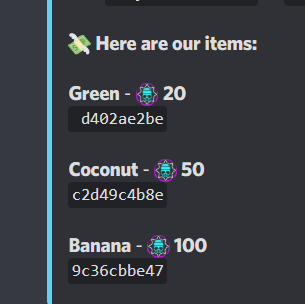
it is ok, that description of items not working?
https://bit.ly/345EKAf
 ivory blaze
vale salmon
it is ok, that description of items not working?
https://bit.ly/345EKAf
ivory blaze
vale salmon
it is ok, that description of items not working?
https://bit.ly/345EKAf
more info is shown when doing !shop green for example
 gusty bramble
Hi, I am an Admin for a server, we had the premium version for Mee6, we no longer required it but we cant go back into it and delete our Twitch notifications as it is a premium function. Any suggestions ?
bitter zenith
gusty bramble
Hi, I am an Admin for a server, we had the premium version for Mee6, we no longe...
you'll probably have to get a monthly sub and clear out anything that's premium that you want disabled that way. then request a refund within 7 days
buoyant moon
.
glad jacinth
bitter zenith
and if it's still not saving, there are other things to consider.
This is counter intuitive to what the dashboard tells you to do, and is clearly a bugged system. That's why I'm reporting it here. Sometimes it works, sometimes it doesn't. That, to me, means it's bugged and means posting about it in #〉bugs-reports is validated.
I don't see a popup that says Changes detected! Please save or cancel. and think "Ahh yes, I better ignore those options and refresh the page first".
It's a little frustrating to report a bug, that is clearly not the intended function, and be told how to fix the issue without acknowledgement of the bug at all.

 fallen mist
lol
 spare relic
Your name is weird
dire yarrowBOT
 ||⨭⩉⨮||#3480 has been warned
Reason: Bad word usage
spare relic
That's why (it happened to my old name with weird 🅕Ⓞ🅝Ⓣ🅢)
buoyant moon
Ok.
buoyant moon
spare relic
That's why (it happened to my old name with weird 🅕Ⓞ🅝Ⓣ🅢)
haha true
buoyant moon
spare relic
Your name is weird
Random ID
 jagged birch
Reaction role text is not synced with text in dashboard
marble quest
jagged birch
Reaction role text is not synced with text in dashboard
did you try making a change, but it didn't update on the server? and if you refresh the dashboard, is it still wrong?
jagged birch
yes, I now redid the change
yesterday I edited the text in the dashboard. It got updated on discord. Today I wanted to do another change on the text. But the change from yesterday was not on the dashboard. Although it was already correct in the server.
marble quest
odd then
gilded walrus
I cannot use the !buy command with the id. I get this error
@gilded walrus, this item does not exist
Here is the link to the conversation: #〉commands message
ivory blaze
because that id is bugged, it includes a whitespace in the id
this bug has been patched, but the item was made prior to the fix
 blissful elbow
Banned channels in economy doesnt work.
ivory blaze

 lavish wren
Hello everybody. Since yesterday it is not possible to create a temporary channel. We haven't changed anything in the settings. You will be disconnected again when entering the channel. Unfortunately, I can't explain where that comes from.
 oblique tundra
If someone left a server, MEE6 still can get their rank level by !rank [user id]. I don't know if that's a glitch or not, I think it's better to remove this feature.
lavish wren
lavish wren
Hello everybody. Since yesterday it is not possible to create a temporary channe...
I experimented a little. It is apparently up to the Owner Permissions (MEE6 -> Temporary Channels -> Edit Hub Settings -> Owner Permissions). If you set Manage Permissions to on, you will be kicked out of the channel.
Now that I've switched it off, everything works fine again.
 tired flare
oblique tundra
If someone left a server, MEE6 still can get their rank level by `!rank [user id...
tired flare
oblique tundra
If someone left a server, MEE6 still can get their rank level by `!rank [user id...
I think it's intentional and it's good, some members leave to prevent getting banned and this way you can well, prevent that
oblique tundra
Alright :D
tired flare
oblique tundra
Alright :D
Also im no mod thats just my own opinion lol my bad
dire yarrowBOT
 YoXEnL#2773 has been warned
Reason: Bad word usage
 heavy arch
my mee6 bot is not auto announcing my tweets or lives steams how do i fix it !??
oblique tundra
tired flare
Also im no mod thats just my own opinion lol my bad
I mean being helpful is fine, but they discourage mini modding
:v
tired flare
Yes I know, I re-read the rules but yeaah I was just trynna state my opinion, as said wasn't my intentions
 paper grove
BRUH
 radiant carbon
paper grove
BRUH
radiant carbon
paper grove
BRUH
What command
 old ember
My counters from the statistics module haven't updated at all. They have stayed the same since adding them.
 whole kettle
Help don't no what's going on it's like it's possessed
dire yarrowBOT
I would like to help you, but if you don't tell us what your problem is then I can't really help. Please tell us what your problem is and not that you have one.
tired flare
whole kettle
Help don't no what's going on it's like it's possessed
Is it help you need, might want to use #〉volunteer-support or #463809001273032715 , this channel used a little more for bugs
 prime mica
Bug: @dire yarrow is not 
quaint agate
thats not a bug
prime mica
quaint agate
thats not a bug
Get
spare relic
Tf
 noble marsh
moderation not working
 candid valve
Make sure that you enabled the mod commands and the mod plugin @noble marsh
noble marsh
i switched it on and i have only mods as ignore moderation but some random enterd the server and started swearinv and mee6 did nothing
candid valve
noble marsh
i switched it on and i have only mods as ignore moderation but some random enter...
did you read the small letters?
 candid valve
You have to allow them clicking the commands bellow

Add the mod role in allowed roles
noble marsh
im talking about auto moderation
candid valve
Oh did you meant swearing something like this Fu..
noble marsh
yes
candid valve
Well mee6 cant detect those things but if someone says just fu.. the bot will detect that ,do you understand?
noble marsh
so if someone swears MEE6 just doesent care but if someone half swears them mee6 will warn them?
candid valve
You can upvote this @noble marsh
#┃upvote-suggestions message
noble marsh
ok
buoyant moon
hey guys i tried to change some settings on mee6 for my server, and it keeps saying 'couldn't find data for this discord, does anyone know how to fix this. its getting a bit annoying
marble quest
buoyant moon
hey guys i tried to change some settings on mee6 for my server, and it keeps say...
Are you an admin or owner of that server
buoyant moon
owner
marble quest
What are you doing specifically when you got that?
buoyant moon
i wanted to edit an option on what it was supposed to say when someone joins a server
marble quest
Try following below:
dire yarrowBOT
It appears that you may be on the wrong account, or something went wrong since the time you logged into my website.
-Please navigate to https://discordapp.com/login and select the gear :gear: in the bottom left, then press Logout.
-After that, please navigate to https://mee6.xyz/logout to disconnect from my website.
-Once finished, select "Add to Discord" again, and follow the instructions to access my dashboard again.
https://cdn.mee6.xyz/s/logout.png
 spring lintel
hey there, just received this error code on one of our servers and curious what it means:
16d77c62a4c34e10b7fa796a1709ad38
radiant carbon
What command
spring lintel
.!play with the name of the song afterwards, we haven't had much issue with it until now
spring lintel
maybe something on discord's end specifically?
 prime wadi
Whenever I go to the server page because I am trying to change something with reaction roles the page won't load no matter what web browser I use.
spare relic
prime wadi
Whenever I go to the server page because I am trying to change something with re...
adblock
 lament elk
My music bot is not responding
 deft ore
9cd725a2fb184d77a0d7cad4ab515d18
I cant type !richest and !coins commands
quaint agate
Try again
 viscid wyvern
Mee6 took my money when playing roulette and had an error. Then proceeded to not return the 100 it took. Pls help~

code: bcc66f4ee4ea418a87c908d5a2cf5c29
spare relic
viscid wyvern
Mee6 took my money when playing roulette and had an error. Then proceeded to not...
I think if you lose it, you lose it
 pallid tinsel
spare relic
I think if you lose it, you lose it
pallid tinsel
spare relic
I think if you lose it, you lose it
ya me to
pallid tinsel
pallid tinsel
ya me to
but i dont no bc i am new
viscid wyvern
Dang that’s poo
 autumn narwhal
lol
buoyant moon
mee6 isnt customizing my rank card in other servers whys that
blissful orbit
Go to the dashboard > click the pfp in the top right > click customise my rank card > visibility tab > make sure it’s enabled on the servers
buoyant moon
blissful orbit
Go to the dashboard > click the pfp in the top right > click customise my rank c...
ight lets try
wait what
how do i do it
can u show me in vc
ahare screen
blissful orbit
No
blissful orbit
You need to go to the customise my rank card tab
buoyant moon
oh
blissful orbit
Then click visibility > then enable all the toggles
blissful orbit
Yes
dire yarrowBOT
Lance., that command is disabled in this channel.
buoyant moon
oh
 raw pike
Hello, I'm not sure if this is a bug or if its intended. But when you lock a temporary channel, users in that channel are unable to type in the associated temporary text channel.
 toxic ether
not sure if this is supposed to go here or in #〉volunteer-support but when i do the birthday list, it is mostly listing their ID number instead of their nickname and it did this yesterday as well

 lethal ravine
There seems to be a bug with the roulette command. I originally had 23,489 coins and used the roulette command and lost 1,872 coins, but I still got 23,249 coins. Pretty sure this is a bug...
paper grove
mee6 leveling site seems to be down
 dire yarrowBOT
Rayyan, you can't use that.
marble quest
paper grove
mee6 leveling site seems to be down
that page works for me. try what browser and device are you using?
paper grove
brave browser
marble quest
try pressing cmd + r, though not sure if it will work on that browser
otherwise, try pressing shift while you press the refresh button on the top
long mortar
l{
spare relic
marble quest
otherwise, try pressing shift while you press the refresh button on the top
F5 also works
Sorry for the ping (unintentional)
 pastel shoal
Your recaptcha wont let me push a picture
marble quest
for adding the bot or signing into the dashboard? what browser and device are you using?
marble quest
what browser and device are you using?
pastel shoal
Lg stylo 6 and chrome
marble quest
is that a phone?
marble quest
try using incognito mode (click the three dots on either the top or the bottom of the screen -> new incognito tab)
 ivory stream
Hi, we observed that in stats, when we select humans only, it also counts bots.
marble quest
So theres some bugs in the new update on the dashboard. i mentioned a bunch in premium squad, but I don't know if they were seen. most of them I listed here #〉premium-chat message
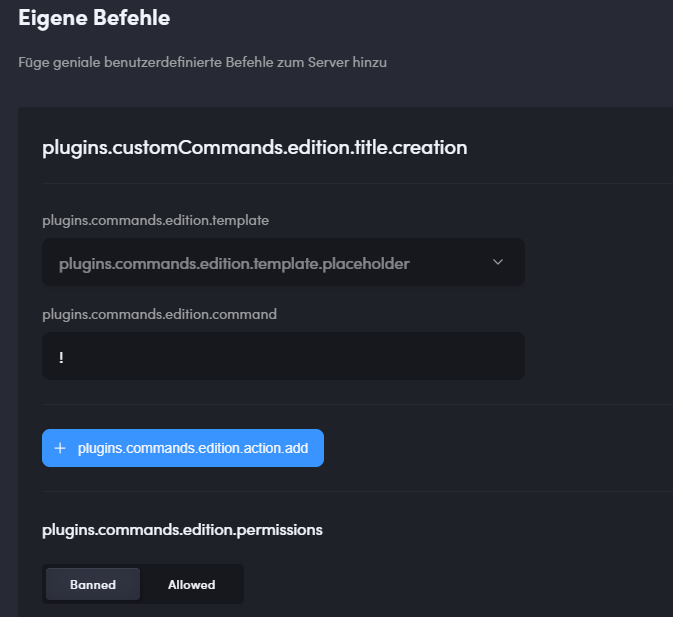
something else, the dashboard lets you add more than 5 actions to a custom command, but if you try to save it, it just disregards the changes, though the network tab shows an error saying that it should be under 5
and new bitrate maxes are wrong for the actual server max
did a little more testing, the emojis going to a white screen only happens with non embedded messages
also, all other languages show stuff like this

 sharp turtle
 cosmic spade
Same issue here
added a command like 3 hours ago and there it was perfectly fine
tried to just do it now and it shows all buggy
having this issue with the German language, if i switch to english its showing as it should.
https://i.gyazo.com/6be7b321b29ce87c11e7a3b4c0aa8a1b.png
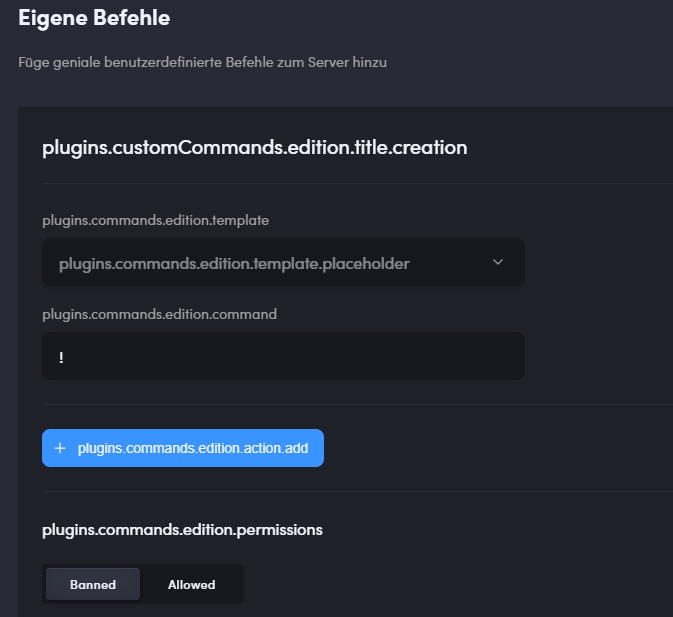
Also the German language is just partly translated
some stuff still shows in english
if you currently got no one translating that for you in German
im happy to help out!
marble quest
you can DM Sil (their profile can be found in #〉rules ) asking to help translate in german
glad jacinth
I'm not sure if it's currently being worked on, but the Message template here definitely needs to be larger (horizontally & vertically) than this. It being this small makes it very difficult to format messages (this screenshot in particular is in the Server Management > Welcome section of the dashboard). I'm reporting this in #〉bugs-reports as it doesn't seem like this would / should be intended.

 humble pike
I have a problem when I want to put the bot on my server I can't because I can't see the button at the bottom here is an image below
 marble quest
scroll down or zoom out
humble pike
i can't
 jovial shore
hello when i said my music doesnt work and you said do !leave and try again i did but still nothing
it says the music is playing but there is no sound on the bot
marble quest
humble pike
i can't
press ctrl + -
humble pike
thanks
long dawn
jovial shore
hello when i said my music doesnt work and you said do !leave and try again i di...
Try changing the server region
jovial shore
i have but still no sound on the bot
long dawn
Hmm...
jovial shore
it says its playing and that but there is no sound at all
long dawn
Try checking the volume control in the Settings
jovial shore
its 100%
jovial shore
it might of done so the thing i have done is made my own custom music bot so it doesnt matter now but thanks for helping pal
long dawn
No problem
 stone bane
So if you click the custom side bar colour option for embeded bot responced, it makes the page reload. Both on mobile and computer.
marble quest
with embed fields, "This field is inline" / "this field is not inline and takes all the embed width", stays on the screen if you change it

 safe venture
The item description ist not shown into the shop. We can see just a code.
marble quest
you need to use !shop [item] to see the description @safe venture
 safe venture
@marble quest thanks! I see. If we display only the shop then under the item it displays the item code. It is maybe a bit weird. But in all case it is great that mee6 has yet an economy function
 vagrant cairn
I'm unable to access dashboard
 faint dome
Did you even read my message?
vagrant cairn
Yes your link in #〉volunteer-support lead me to this channel so I post it here
faint dome
It was redirecting to a specific message here
3rd pinned
vagrant cairn
faint dome
It was redirecting to a specific message here
3rd pinned
ok
 frozen spear
Как настроить бота ?
 quasi juniper
?!?
 opaque shuttle
I have set 2 timers for auto message in 1 min but only 1 is working
buoyant moon
nice
 feral vigil
Olá gente eu sou Flora do Brasil
marble quest
The updated welcome plugin no longer does a hierarchy check (Me is above mee6's highest role)

 normal wolf
when you click the button to go to the old version and you cant go back
 marble quest
click your profile on the top right -> use new interface
normal wolf
oh thank you
 dense finch
mee6 doesnt know that images arent text
quaint agate
capital PNG or other types will make it fail to detect and will cause it to be deletd
yep this is not fine i cant click upload image and it wont give me the option to upgrade to a pro subscription

 chrome timber
this shows in custom commands
 spare relic
chrome timber
this shows in custom commands
spare relic
chrome timber
this shows in custom commands
?
You're about to delete it ofc there's a confirmation
honest ledge
spare relic
You're about to delete it ofc there's a confirmation
they're talking about the fact that it says {cmd} instead of the name
 icy yarrow
Hey U can't invit @dire yarrow
icy yarrow
icy yarrow
Hey U can't invit <@159985870458322944>
Invite
I am in the server I am log in
spare relic
icy yarrow
Hey U can't invit <@159985870458322944>
you need admin
 weak crane
I have a problem on a server, I have appointed a new moderator and assigned the correct roles. But it cannot execute moderation commands via MEE6, I have rolled the user several times and removed it from the server and added it again but nothing helps

 quaint agate
you need to add allowed rpoles to the command
 marble quest
<@&193123929701875712> searching for emojis doesn't work on the new dashboard. works on the old one.

also, when closing out of that (clicking anywhere else on the screen) shows this. not sure if it's releated or anything

 languid raven

 jolly birch
@round sequoia
radiant carbon
jolly birch
<@!213308514385395712>
Do you have a bug
 long dawn
Can you not cold ping?
 fierce bay
Hey There Hello I Have Bug My Friend Tell Me About That PLz Fix It
 quaint agate
today?
fierce bay
yeah
quaint agate
where they spamming when they leveld up?


 ruby lintel
Still not working

 quaint agate
provide a description
ruby lintel
Still not working

 quaint agate
provide something in the embed
ruby lintel
Its still save


 ruby lintel
Ah but I mean I can't post anything
I have 0 Embeds sent
I actually needed to post
Instead of save
Im sure that I have deleted every Embed from MEE6 in every channel which I put an embed on
If I would have a Embed already,then the Menu would look like this

But the Menu is looking like this which means I haven't send any Embeds
 quaint agate
if you hit save it will post
ruby lintel
Really?
Ok I will try out
Ah yes it works lol
Thx @quaint agate again,u are rlly helpful 😄
quaint agate
Np
ruby lintel
U are such a kind guy with a lot of bot knowledge Im happy that I learnt u
quaint agate
thank you 🙃
 solid flint
Music-quiz not performing as it should? It drops out somewhere during the quiz
 viral field
not asign role pre whitelist in the user... only send the msj.... not work assign the role to the user.

 lethal rose
it's not semi-responding to music requests but it won't play anything even if it gets the command
buoyant moon
lethal rose
it's not semi-responding to music requests but it won't play anything even if it...
Same problem
 terse lantern
lethal rose
it's not semi-responding to music requests but it won't play anything even if it...
terse lantern
lethal rose
it's not semi-responding to music requests but it won't play anything even if it...
+, I have the same problem
 hardy sentinel
+1 same
dire yarrowBOT
Role hierarchy is important for me to give out roles. Oh and also Manage Roles perm:
https://cdn.mee6.xyz/s/fix_hierarchy.gif
spare relic
@viral field
viral field
yes
 rocky gulch
hello I have problems adding the MEE6 bot for some reason it says that I cannot enter with my account that is not confirmed
marble quest
can you send a screenshot of that?
 marble quest
you're logged into the wrong account:
dire yarrowBOT
It appears that you may be on the wrong account, or something went wrong since the time you logged into my website.
-Please navigate to https://discordapp.com/login and select the gear :gear: in the bottom left, then press Logout.
-After that, please navigate to https://mee6.xyz/logout to disconnect from my website.
-Once finished, select "Add to Discord" again, and follow the instructions to access my dashboard again.
https://cdn.mee6.xyz/s/logout.png
rocky gulch
Thank you
dire yarrowBOT
うぉーくす, that command is disabled in this channel.
 distant solar
How to add bot in a group to play music ??
dire yarrowBOT
New to MEE6?
• Please follow the directions in #┊👋・getting-started for our setup and configuration guide.
• The dashboard is at https://mee6.xyz/dashboard
dire yarrowBOT
 MOO6
MOO6
Here are the main commands:
!join -> Add the bot to VC
!search Song Name -> Show in a list
Type the correspondent number from the list
!play -> Starts the song
!stop -> Pause and kicks MEE6 from the VC
!queue -> Check the playlist
!vote-skip -> Self explanatory
!np -> Shows the song currently playing
Note: VC means Voice Channel and search fetches YouTube only
Full guide about this plugin is here https://help.mee6.xyz/en/article/music-plugin-1f7v6p8
 drowsy barn
Hi I have a problem. I kicked mee6 from my server because i wanted to try a new one, and now i want to invite him back. The problem is that since i kicked him I have still seen him online in the server, although when i try to set him it says that he is not a server member anymore and he also doesn't respond to any command. I even tried to kick him with another bot but it says that he is no longer part of the server, but when I go to the mee6 site to reinvite him it says that he is already in my server. Please help!
quaint agate
Alright
dire yarrowBOT
Slash commands can be enabled on the dashboard, by clicking on "Settings" on top, then scroll down to the bottom and enable them there.
We advice you to first use underneath link if you didn't invite the bot recently.
https://discord.com/oauth2/authorize?scope=bot+applications.commands&response_type=code&redirect_uri=https%3A%2F%2Fmee6.xyz%2Fguild-oauth&permissions=1916267615&client_id=159985415099514880
(custom command do not support slash commands)
quaint agate
Use that link to invite him
Didn’t mound the extra text
Mind *
Then it should work again
drowsy barn
ok i'll try
ok he has entered but he is not responding to any command... what should I do?
drowsy barn
yes
quaint agate
And what command are you attempting to use
drowsy barn
also when i open the dashboard to manage him it says: Failed to retrieve server data for the guild #754779799163109386
the command i need the most is that he gives a role when someone enters the server
quaint agate
Kick him again and he shuld leave the server fully then invite him through the dash
drowsy barn
ok thank you so much i'll let you know
Yes it worked thank you so much i've been struggling with it since yesterday
quaint agate
All good again?
drowsy barn
yes it seems so
jolly birch
!work
dire yarrowBOT
Smoky, that command is disabled in this channel.
hearty igloo
@jolly birch
#〉commands
buoyant moon
why bot dont give xp for msge

 modern lagoon
ran into a bug with economy function, !dice did not continue and locked the game being played so no other game can be played.
 bitter zenith
well that's curious
dire yarrowBOT
 quaint agate
@buoyant moon
buoyant moon
@quaint agate but idnt flood pog (
modern lagoon
2nd economy bug i ran into, not sure if !roulette is messing with the other games or other economy commands but looks like the last roulette did not complete (ive noticed that usually this might mean its a win when it doesnt display?) and !coins did not display after that


 quaint agate
Knwon issue
 compact hemlock
Same issue, it's fun to see the counter being x2
faint dome
@buoyant moon @lusty yarrow @compact hemlock server ID pls
dire yarrowBOT
Getting your server ID
Go to your server and use !dashboard then copy this link and give to staff.
Or if that didn't work: open Server Settings in your Discord Server. Select Widget and press Copy ID next to Server ID.
You can also use Developer Mode as an alternative method.
compact hemlock
348468156597010432
faint dome
@lilac parrot ^
 boreal totemBOT
 AlexC1994#7489 at #support-1
I've setup mee6's counter, but for some reason it is doubling the number of members we have. I tried disabling it, kicking the bot and bringing it back. But it is still occurring.
Server ID: 845925137651073044
<@&193123929701875712>
Attachments
double.png (5.22 KB)
[Jump to message](#〉volunteer-support message)
 Edited At • May 28th, 2021 4:58:42 PM
MEE6 Support
·
buoyant moon
faint dome
<@456226577798135808> <@491278257740709889> <@295592314456244224> server ID pls
Edited At • May 28th, 2021 4:58:42 PM
MEE6 Support
·
buoyant moon
faint dome
<@456226577798135808> <@491278257740709889> <@295592314456244224> server ID pls
Should I post it here?
faint dome
Yes pls
buoyant moon
832618859332239370
 lusty yarrow
641960683487100929
dire yarrowBOT
VascobrawlproYT, that command is disabled in this channel.
hearty igloo
@thorny solstice
#〉commands
 thorny solstice
sorry i don´t speak inglish i speak spanish 🙂
 dense bone
Count wrong number member.
My server' s member just have 610
 buoyant moon
faint dome
Yes pls
buoyant moon
faint dome
Yes pls
any updates 👀 ?
faint dome
Should be fixed in 10ish minutes
 keen field
Hey the member counter for the welcome image is broken its wrong is there any way to fix it?
faint dome
See above
buoyant moon
faint dome
Should be fixed in 10ish minutes
Okie 👍 '
 rigid shale
late youtube posts. (up to 1 and a half hours before mee6 sends the ping)
faint dome
We did some restarts, it might be the cause
 hearty temple
rigid shale
late youtube posts. (up to 1 and a half hours before mee6 sends the ping)
hearty temple
rigid shale
late youtube posts. (up to 1 and a half hours before mee6 sends the ping)
same thing happening but with twitch and the bot NOT Posting at all
 raw copper
!rank
dire yarrowBOT
Atom, that command is disabled in this channel.
hearty igloo
@raw copper
#〉commands


 long dawn
Stats is known issues it’s being worked on as we speak
lusty yarrow
faint dome
We did some restarts, it might be the cause
still the same for me
buoyant moon
yeah same
 stiff hamlet
Hello, we also have a problem with the basic counter and the role counter, the numbers seem to have doubled, if you have an idea to solve the problem, we tried to redo it but the problem continues :/
 quaint agate
stiff hamlet
Hello, we also have a problem with the basic counter and the role counter, the n...
quaint agate
stiff hamlet
Hello, we also have a problem with the basic counter and the role counter, the n...
Knwon issue
stiff hamlet
sorry me and my bad english didn't see the message above, as the problem was being solved ^^
 carmine sail
 faint dome
see above
 sterile igloo
need help with my custom bot pls
 faint dome
see above
 neat quarry
oh alright
 wise bridge
The bot bugged on my server , can be fixed?

from member 3023 jumped to 5938 ( I don't even have that much )
faint dome
see above
wise bridge
ah ok , np 😄
buoyant moon
Ok
 obsidian mason
the number of participants has doubled
 regal seal
all the statistic numbers have doubled indeed
 sour nimbus
Hello, I staff in a server and the welcome and leave messages are showing an incorrect member count. If needed, here's the server ID: 336621587165872140
marble quest
it's a known issue and being worked on. see #〉announcements
long mortar
!RANK
dire yarrowBOT
๓คгςєɭเՇ๏ ςן7 ๏ŦŦเςเคɭ, that command is disabled in this channel.
long mortar
!rank
dire yarrowBOT
๓คгςєɭเՇ๏ ςן7 ๏ŦŦเςเคɭ, that command is disabled in this channel.
long mortar
m
marble quest
If you switch to the new interface from the old one on the custom bot tab specifically, it shows a white screen with this error

 spare quest
{server.member_count} in welcome message is outputting twice the amount of actual members on the server.
marble quest
check again later #〉announcements
spare quest
Thank you
 pseudo loom
Hi
candid valve
i got this in the new and old dashboard because i just used the footer text

 heavy cradle
Hey, mee6 has the wrong Usercounts since 1 hour or something like that
it says I have 826 members even I have 410 members
ivory blaze
we're aware and working on a fix
buoyant moon
i cant lower cooldown for a command, only lets u go higer, not lower, as u can see theres no "minute option" its hour and i can only change it to day, basically broke cuz i changed "minute" to hour and u cant go back
 quaint agate
buoyant moon
quaint agate
buoyant moon
this is a bug doe
marble quest
marble quest
<@&193123929701875712> searching for emojis doesn't work on the new dashboard. ...
i'm going to send this here again (<#〉bugs-reports message>). the issue is still there and i can't tell if it's been seen yet
marble quest
marble quest
The updated welcome plugin no longer does a hierarchy check (Me is above mee6's ...
and this one too (<#〉bugs-reports message>)
threres some other issues too like the {cmd} and temp channel bit rate, but idk if those are known either 
 topaz crystal
I don't know if this had been reported yet but is really annoying when making a new embed it transfers some of the information to it!
 dreamy oasis
Not sure if this is a new bug, but I cannot select a channel anymore when trying to add music.

 light pilot
Hy ca va
 simple egret
the temporary channels r rlly buggy right now............
like if i give perms to the owner of the channel
mee6 will just disconnect me
btw idk if its a bug or i just doing something wrong
topaz crystal
Custom Commands are glitchy
Every time i go to make one i deletes it self after i press save it only saved after doing it 10 times!
marble quest
are you trying to save more than 5 actions in a single command? @topaz crystal
topaz crystal
marble quest
are you trying to save more than 5 actions in a single command? <@!6165789295867...
No just 2!
marble quest
before you save it again, can send a screenshot(s) of what you're trying to save on the command?
topaz crystal
marble quest
before you save it again, can send a screenshot(s) of what you're trying to save...
I've been trying to save
Bot sends in channel
Embed
Bot sends in channel
Embed
Thats all i've given up and now im using a different bot for custom commands
marble quest
so you're not looking to get that resolved? I was going to ask you to open the console (by pressing ctrl + shift + j), go to the network tab, save the command again, and find the thing that turns red and look at the preview for it to see what error is showing up
topaz crystal
marble quest
so you're not looking to get that resolved? I was going to ask you to open the ...
Alright ill try get it resolved ill send you a screenshot
marble quest
They didn’t send screenshots, but got a 400 error. They could create it on the old interface but when they looked at it on the new one it deleted the actions.
 tawdry jetty
This is not really a bug, but a cross of a suggestion and a bug. When I add an emoji to a voice counter, when it updates it takes the emoji away. I'm using the ServerStats bot as a makeup for this, but it doesn't show online members. Could you make it not remove the emoji when updating the counter?
quaint agate
tawdry jetty
This is not really a bug, but a cross of a suggestion and a bug. When I add an e...
in the plugin add the emoji
else it will keep being removed because its looking for whats in the plugin
tawdry jetty
👍 will try and see if it works
 supple mango
So, I have mee6 announce when someone is streaming and when no one was streaming it posted that at least 4 people who were offline at the time were streaming.
 glacial forge
Hi rancher
 jovial grail
Hello, there is a bug from MEE6 that when I am going to add it, my server does not appear and I have all permissions
dire yarrowBOT
It appears that you may be on the wrong account, or something went wrong since the time you logged into my website.
-Please navigate to https://discordapp.com/login and select the gear :gear: in the bottom left, then press Logout.
-After that, please navigate to https://mee6.xyz/logout to disconnect from my website.
-Once finished, select "Add to Discord" again, and follow the instructions to access my dashboard again.
https://cdn.mee6.xyz/s/logout.png
quaint agate
@jovial grail 
 sudden chasm
 marble quest
is the role not being given? make sure mee6 has a higher role than the one listed, and permission to manage roles @sudden chasm
dire yarrowBOT
Role hierarchy is important for me to give out roles. Oh and also Manage Roles perm:
https://cdn.mee6.xyz/s/fix_hierarchy.gif
 keen grove
!play day in the life
dire yarrowBOT
NG77_nidal, that command is disabled in this channel.
buoyant moon
Je ne vois pas mes menbre de mon serveur
flat plaza
keen grove
!play day in the life
#〉commands for commands in the voice channel
 faint dome
C’est un problème de configuration de ton serveur, rien à voir avec nous
Regarde la documentation discord pour ça
 regal wren
it won't give me role when i !buy role
buoyant moon
Did you add the role to the item?
regal wren
yes
buoyant moon
Hmm, does mee6 have perms to manage roles?

 buoyant moon
Is mee6 role above the role you want to give?



 buoyant moon
what role do you want to give out? Is it the one above mee6?
regal wren
no
regal wren
regal wren
.
buoyant moon
Hmm
buoyant moon
whyyyyyyyyy?????????
 dire yarrowBOT
If I appear to be denying your hard earned experience, or !rank and !levels aren't working properly...
- Make sure Levels is Enabled.
- Check that you do not have a banned role in the levels configuration, and that you aren't in a banned channel either.
- Make sure that I can see the channel you are talking in with "Read Messages" and send messages with "Send Messages".
quaint agate
@buoyant moon
buoyant moon
quaint agate
<@456226577798135808> <a:THIS2:808044383751372871>
thx
 tribal current
Hello! Im probably not updated with the "!clear" but why isn't the "!clear"? I keep on writing it but its not working. What do I do? Thanks!
 quaint agate
is modersator plugin enabled?
tribal current
wait let me check
tribal current
quaint agate
is modersator plugin enabled?
No, its not
quaint agate
enable it
tribal current
oh okay
buoyant moon
Hello , I have join a server but in the mee6 , i can't see my rank .
dire yarrowBOT
 Rainbow#0375 has been warned
Reason: Bad word usage
 uncut lily
buoyant moon
Hello , I have join a server but in the mee6 , i can't see my rank .
uncut lily
buoyant moon
Hello , I have join a server but in the mee6 , i can't see my rank .
You type !rank?
uncut lily
Use !rank
uncut lily

buoyant moon
thanks
uncut lily
No problem
buoyant moon
Is this a channel where if say like i cant join a server, that can be a bug you guys can fix here?
 ebon furnace
Just bugs with the Mee6, not with the real discord
dire yarrowBOT
 İTACHİ UCHİHA#3214 has been warned
Reason: Posted an invite
İTACHİ UCHİHA#3214 has been banned
Reason: Too many infractions
 quartz patrol
24 hour music channel doesnt work properly, bot often just stops playing.
The last track remains selected but the playtime goes over the Actual length of the song.
 deep acorn
When playing a YouTube playlist through the bot, it stops after about 10 or so songs.
gilded walrus
I used the command !urban the and I got this
Something went wrong in MEE6 land! Contact our support team for instructions if this keeps happening.
code: bbea104f6355418b955a9d7c05f1ad61
radiant carbon
gilded walrus
I used the command !urban the and I got this
> Something went wrong in MEE6 land...
That might means he does not have perms to unban
Oh sorry I thought it said unban
dire yarrowBOT
 !"JL_ALVAROS#9883 has been warned
Reason: Duplicated text
buoyant moon
For some reason, the Mee6 dashboard isn't working. When I go to the website, it's just a white screen.
limber knoll
@buoyant moon adblocker or vpn?
limber knoll
buoyant moon
None, it is just blank
tried incognito on chrome?
limber knoll
dm me the server id please
dire yarrowBOT
 𝓟𝓗𝓞𝓝𝓚𝓨𝓣𝓞𝓦𝓝#3719 has been warned
Reason: Bad word usage
buoyant moon
It's not a bug,More of a typo.
The birthday command for mee6 is !remember-birthday but it should be !renember-birthday.
The m needs to be replaced with n in the code.
long dawn
buoyant moon
It's not a bug,More of a typo.
The birthday command for mee6 is `!remember-birth...
It’s right it’s remember.
buoyant moon
...
I just googled it
My whole life was a lie
(╯°□°)╯︵ ┻━┻
I always pronounced it as renember instead of remember
-_-
 fleet ermine
Imagine saying renember 
spare relic
Damn
buoyant moon
The bot's recording speed is too slow or not working properly.
spare relic
buoyant moon
The bot's recording speed is too slow or not working properly.
It's the 3rd time you've asked and a staff member was already trying to help you and asked you the server ID but...
buoyant moon
spare relic
It's the 3rd time you've asked and a staff member was already trying to help you...
Oh. but i couldn't send a dm
 vestal rose
guys, im using custom bot, but whenever i use help, its said MEE6 plugins commands, isnt it suppose to says the new bot name ?
 spare relic
That's not a bug
You just have to disable the help plugin if you want people to believe you coded the bot
deft ore
Why i cant open the MEE6's site? 400 bad request.
spare relic
deft ore
Why i cant open the MEE6's site? 400 bad request.
try refreshing
buoyant moon
So the dashbord on some devises just goes white
topaz crystal
Alright this is weird every time on an embed when i tried adding an emojie the screen just blanks and becomes unresponsive even making the control panel and tab unresponsive

 nocturne sable
I just spent a good ten minutes typing out the private embed DM to send to new members, went and changed embed color, hit save..... and the message defaulted.
All of my work went poof
Weird... I clicked something, deleted something, and it showed back up. Never mind?
topaz crystal
nocturne sable
Weird... I clicked something, deleted something, and it showed back up. Never mi...
by any chance when you gone to save it did the whole thing just not save?
or was it just the text?
Before it re-apeared*
nocturne sable
topaz crystal
by any chance when you gone to save it did the whole thing just not save?
or w...
It did save the entire thing so it's all there. It does keep happening every time I hit save though
topaz crystal
nocturne sable
It did save the entire thing so it's all there. It does keep happening every tim...
Yeah i had a similar situation with custom commands and embeds when trying to save but the whole contents or even the new tab didnt save and gave me an error 400 in the console
nocturne sable
I didn't get an error, it just defaulted back to the original message MEE6 has in there when it's clean
topaz crystal
nocturne sable
I didn't get an error, it just defaulted back to the original message MEE6 has i...
hmm thats odd
dire yarrowBOT
 ! pro#0001 has been warned
Reason: Bad word usage
! pro#0001 has been banned
Reason: Too many infractions
 candid orbit
hello. command !np in music does not send private messages (checked Do not respond to command - On)
command !play does not delete from chat if the "Delete activation message with command" option is enabled - On
 daring vigil
When I schedule a YouTube livestream, MEE6 treats it like a video and pings my video notification role, is there a way to stop this?
 harsh blaze
жа
 unique garden
I am unable to get onto the mee6 dashboard or invite it to my server. Can i fix this or is it a bigger problem?
 rare vault
unique garden
I am unable to get onto the mee6 dashboard or invite it to my server. Can i fix ...
rare vault
unique garden
I am unable to get onto the mee6 dashboard or invite it to my server. Can i fix ...
@unique garden
Do you want me to send you a invite to mee6's server?
Manage your Discord server with leveling, moderation, Twitch, Youtube and Reddit notifications.
Here is the server
@unique garden
rare vault
I wasnt spamming
faint dome
Bruh
rare vault
That better?
faint dome
As long as you don’t do it again, yes
rare vault
K
 thin parcel
Streaming function for premium bot keeps stopping, i have to go into the website remove the link and re-add for it to start again

2nd bot (not related to mee6) doesnt have that problem
 steady bay
Partner servers and level 3 servers have 384kps audio quality, MEE6 temporary channels feature has 256kps max in settings, please increase it to 384kps. thanks.
 late fulcrum
!rank
dire yarrowBOT
RandomBoy, that command is disabled in this channel.
late fulcrum
lol
 jaunty fox
-
when I use an instantly consumable shop item, I get a double message for using it.
-
when I edit the golden role item to add my own role and messages, the default still says I used the golden role.
 plush python
<@&193123929701875712> because on one server it appears to me who was the user who banned me, on the other 2 servers it does not appear who was the moderator who banned me
 marble quest
plush python
<@&193123929701875712> because on one server it appears to me who was the user w...
marble quest
plush python
<@&193123929701875712> because on one server it appears to me who was the user w...
it was changed a few weeks or a few months ago for that be removed.
plush python
Yes, but only in this server called Ciudadela does it appear to me who was the moderator that banned me, on the other hand, in all the other servers that banned me, it does not appear and that is something strange
marble quest
hmm
is the language in the first ban itailian?
ahhh
it's spanish
the ban message in spanish still sends the person that banned you
 plush python
marble quest
is the language in the first ban itailian?
plush python
marble quest
is the language in the first ban itailian?
Spanish
plush python
You mean, if there is a welcome message, will it say who it was that banned me?
I was banned from another Spanish server and whoever banned me did not come out
marble quest
no. showing who banned you was removed, but that wasn't removed on all languages. If the dashboard is set to spanish, it still shows it for some reason
plush python
okay I understand
buoyant moon
using an automated action with very long values, makes it go past the limit of the box

the box will also extend, which will cause all other boxes to also extend
and makes a lot of the values disappear to the right
which is outside of the viewable browser window
the max width of the economy plugin is also still broken
wooden mountain
new or old layout?
buoyant moon
new
wooden mountain
kk, will forward
wooden mountain
buoyant moon
new
i can not reproduce, what device/browser is that on?
this is what i get
 buoyant moon
chromium