#〉bugs-reports
2 messages · Page 98 of 1
 stiff lark
 tired meteor
hm
 dire yarrowBOT
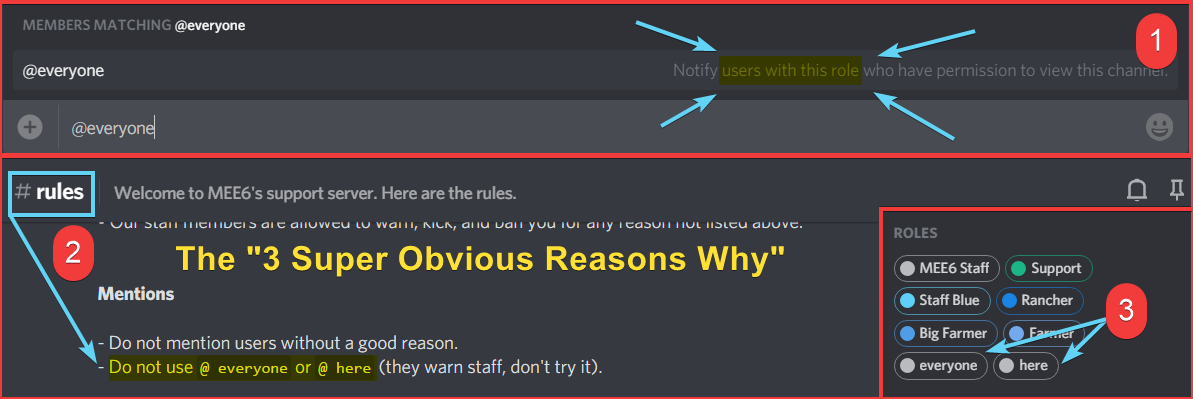
what about you don't ping all those members?
https://i.imgur.com/tbelvp2.png
https://cdn.discordapp.com/attachments/302245580673908740/569445165878476811/unknown.png

 hearty igloo
@buoyant moon 
tired meteor
stiff lark
i did that
is the emoji in that server?
stiff lark
tired meteor
is the emoji in that server?
yes
tired meteor
np
hearty igloo
Thanks Gafseet now I also know in advance to tell people to try that
 swift solstice
I did
tired meteor
then please try again
 wooden mountain
it's also recomended to enable the plugin and command
swift solstice
ok
 grave edge
my roles were broken twice. the first time the text was removed and only reactions were shown it was working fine before
the second, the role just didnt register or assign. two separate occasions
i had to fix it again just now
 grim sphinx
<@&193123929701875712> Twitter settings are replaced several times a day. A channel that has not been deleted gets saved as #deleted-channel multiple times per day. (I delete and re-configure the twitter settings multiples times in a day-- the channel still exists-- when I return several hours later MEE6 claims the channel is #deleted-channel).
 buoyant moon
There's seems to have been some change with Kitsu's manga api (or Mee6 code broke)
Easy reproduce: #〉commands message
Nvm, seems like it's working again
 pliant arrow
Excuse me, I am facing a bit problem with the bot.
I add a role for giving whenever a person joins
And then
When I press save
The role automatically dismisses
 marble quest
responded in #〉volunteer-support
 slender olive
um my bot isnt working
marble quest
what isn't working about it?
buoyant moon
how can i make mee6 igonre links in a particular server
 gilded yacht
Channel hopped
 untold fulcrum
im having problems with the reaction roles, everytime I take one role away from the reactions and roles slot, and I save it, it keeps showing up again after I refresh the dashboard.
i tried this on incognito and did the same, remove one role because there's 2 roles for the reaction role slot. And save, and it doesn't seem to work and after reloading the page and I go back it still there.
This happens for adding roles too, I save then reload then it's not here.
dire yarrowBOT
 Chris(;#3248 has been warned
Reason: Bad word usage
 bitter owl
@pale axle He will not answer it
If you've qualification in ICT and experience and want to find flaws in our system them DM him with your resume, please, your PenTest approach and if possible with a short executive summary
That's how it's done in real life :)
buoyant moon
in the music section specifically, the mee6 isnt playing any music for me. can someone help with how im supposed to correct that?
buoyant moon
Hi, my friends' levels have been reset. Is there a spontaneous solution?
dire yarrowBOT
Reset Leaderboard
• You cannot “accidentally” reset a users xp/level, as it must be confirmed from a menu window.
• Whoever did this was fully aware that this action is permanent, and cannot be undone.
• Only Owner, users with Bot Master or Admin Perms can reset the xp/levels
 bitter owl
☝️
All we can do is get the logs in case you're the owner or the bot master/admin of that guild
buoyant moon
Thank you
 ripe ferry
:SLEEP6: Что-то произошло на славных землях MEE6! Свяжитесь с нашей командой поддержки (на английском), если проблема останется.
Код: 63d1b70499124c56848ab034b57b4550
 knotty pivot
code: 80a4c0c880a446d9b3758d7f7f35e251
 gaunt oyster
code: fadd3663cec34d1c919542b7a82ad10a
And code
code: 934451cac530453bbaa78c3c8ab56242
marble quest
can you try those commands again,

 raven echo
code: 371800bc39ec463288972d04f693222a
 austere crystal
code: 9e7e11335d064e398f432a2c1737c79a
buoyant moon
code: 47179702400148eb9f8e7c1aaf49268b
gaunt oyster
code: cfc2d9f6a1234d0e976d001c9b292fbe
 frosty night
dode: dd60f128f205421d99df30ed306a5642
wooden mountain
context would be nice
 simple tundra
pen
dire yarrowBOT
 Not_zSpeedSkilledඞ#5091 has been warned
Reason: Bad word usage
 marble matrix
i didnt even say anithing
 silent jacinth
You must have
dire yarrowBOT
Not_zSpeedSkilledඞ#5091 has been warned
Reason: Bad word usage
marble matrix
STOP
dire yarrowBOT
Not_zSpeedSkilledඞ#5091 has been warned
Reason: Capital letters
silent jacinth
Don't say that otherwise you will get warned for capital letters
And you already did that
Cursing at the bot never helps
 grim condor
So I go on moderation and go down to bad words and I have everything set up but when I try to put a list of bad words and press “ok” I go back into the settings and it isn’t there.
silent jacinth
Did you click save? @grim condor
grim condor
I got it thanks
silent jacinth
Ok
buoyant moon
Ive Found a bug with the Twitch Plugin in where the Streaming Feature will constantly Add and remove the Streaming role if someone is streaming from a Connected Youtube Account.
dire yarrowBOT
I would like to help you, but if you don't tell us what your problem is then I can't really help. Please tell us what your problem is and not that you have one.
 stray sluice
what part isnt working?
is the plugin on?
ok what part of leader board doesnt work
it is !levels
 cursive topaz
its not playing the right music
stray sluice
It is because of the queue
bitter owl
 ERROR 500
- We're aware of this current issue and devs will bring a solution as soon as possible
- Please be patient
Regards, MEE6 Team 
 ERROR 500 UPDATE
- Discord is having some slowness to compute our +9 million servers
- MEE6 Staff have already notified discord about this issue and this should be solved soon
- Again, remain calm while we come with a solution
- Meanwhile you will not be able to invite MEE6 to your server (The ones who has already get it will stay like that)
Regards, MEE6 Team
 wild jungle
error 500
 uncut lily
see above 
uncut lily
np!
 little timber
its solved now
 timber parcel
 grim venture
mee6 is having a hard time ok? he is just stressed give him some time
marble quest
@timber parcel errors will typically only send when a command is used, or if automod triggers and the bot is missing permissions
marble quest
So what command was used, or, do you have caps enabled, or bad words with any of those words before the error
Oh, okay
marble quest
Ah, well make sure mee6 has permission to manage messages and read message history
marble quest
If you clear a large number, mee6 actually does it in batches of 100, so it might show the error multiple times if yoy did a large number
marble quest
So that was likely the reason then
 brisk comet
!join
dire yarrowBOT
 sumi, that command is disabled in this channel.
buoyant moon
when I deauthorize mee6, then the twitter integration gets disabled
 frail valley
!play cabeça
dire yarrowBOT
kiritoplay13, that command is disabled in this channel.
buoyant moon
Bonjour, j'ai un problème j'ai mee6 premium acheté il y a un mois . Mais la je veut le changer de serveur et je ne suis plus en premium . . .
Je suis même plus administrateur du bot
wooden mountain
try agian
 tulip mica
k
 idle jolt
I have been trying to create a react role, I add the role to the reactions and click save and the role doesnt remain?
stray sluice
Did you add the emoji they need to react to get this role ?
idle jolt
Yeah
stray sluice
When you click save what happened
Like does a message pop up saying somethings missing or something about role hierarchy
idle jolt
Nope
stray sluice
So basically you click save and nothing comes up correct
idle jolt
I click save. It closes it as if its saved.
stray sluice
And the message doesn’t get posted where ever channel you chose in the settings for it
idle jolt
I click it again and when it opens I have the reaction emotes there but the roles they link to have been removed
The reactions are there in discord but clicking them does not add to a role as theres no role there
stray sluice
Does mee6 have permission to give roles and add messages and reactions to that channel
stray sluice
Is mee6 above this role
stray sluice
@idle jolt Ok delete this setting go to the dashboard do ctrl shift r and try again
dire yarrowBOT
 Pone Cara de tonto en la tele#1199 has been warned
Reason: Bad word usage
silent jacinth
Why?
 ocean oar
Internal Server Error when connecting Twitter account.
Continues after reset and refresh
 high cove
Same for me with the Twitter addon
I can see that yesterday Mee6 posted this on Twitter https://twitter.com/mee6bot/status/1332367826120794116

It is currently impossible to invite MEE6 to any server due to a @discord outage. If you see "500: Internal Server Error" on the invite popup, do not freak out and sit tight while our buddies at @discord fix it 🙏
 Twitter
·
ocean oar
Twitter
·
ocean oar
Not our error nor situation.
high cove
Though some say it has been fixed, might not have been the same error.
ocean oar
Waiting until a admin responds would be best.
high cove
Alright
stray sluice
#〉volunteer-support message look at this message please
 wanton sonnet
the letter E isn't a bad word
gilded yacht
You added "i" as a bad word
wanton sonnet
and yeah, "I" which is why "I love you" triggered
 blissful loom
Oh
dire yarrowBOT
 Demar#9990 has been warned
Reason: Bad word usage
 low stone
which decade are you planning to fix mee6's music plugin?
tired meteor
answered in #〉premium-chat
buoyant moon
guys i have a bug report. There is a spider in my room.
actually arent they considered arachnids? Nevermind.
 shut mesa
So from what I know is that Mee6 doesn't trigger the caps lock warning when a person edits the message.
Atleast when I tried (with no perms)
buoyant moon
All automod checks should be re-run when you edit a message 🤔
marble quest
unless the message is too old where it isn't in the bot's cache anymore
buoyant moon
marble quest
unless the message is too old where it isn't in the bot's cache anymore
When you edit a message the content is the event, so it shouldn't matter
it only doesn't know what it was before
but that doesn't matter
marble quest
i see
buoyant moon
<@&193123929701875712> , the links in the header on the website doesnt work
tired meteor
what do you mean "links in the header" on the website?
uncut lily
Who Ghost ping me?
buoyant moon
tired meteor
what do you mean "links in the header" on the website?
like the leaderboard, settings, customize links at the top
tired meteor
try using a incognito tab or clear caches
buoyant moon
i already cleared caches so ill do incognito
tired meteor
also does any other plugins work?
uncut lily
Gafseet, can You see who ping me In logs?
buoyant moon
ill try the other plugins rn but the leaderboard works
they all work on incognito idk why
tired meteor
then im pretty sure its a caches issue, incognito mode is like a private browser
tired meteor
no problem, also next time don't ping individuals, like you did now for me and SwayZ, just ping support
dire yarrowBOT
 Morty C-145#0088 has been warned
Reason: Bad word usage
buoyant moon
so um i keep on joining server randomly when i didnt accept an invitaition and last time i talked in one of these servers that i join with out a invitation i got banned for talking (im not sure if this is a bug)
marble quest
if you are joining a server when you didn't click the invite for, it's possible you autohrized something like a bot do that. check in user settings -> authorized apps and see if any permissions include "join servers" or something along those lines
buoyant moon
yeah i just did and theres nothing there to click or anything
marble quest
you don't see anything in that list at all?
marble quest
if nothing there is doing, i would reccomend changing your password to make sure no one else has access to your account. if you are sure it isn't you joining those servers
buoyant moon
thanks
 desert vapor
mee6 isnt counting members properly
it says i have 12 bots but i only have 8
and i have 2 humans not -1
sorry correction only 6 bots
 agile lava
so im trying to do !clear <this number> but it doesnt respond even tho mee6 has perms in every channel
dire yarrowBOT
!clear [@name] [messages to remove]
!clear xto clear the last x messages (!clear 10)!clear @nameto clear all the messages of@name(!clear @MEE6)!clear @name xto clear the last x messages of@name(!clear @MEE6 10)
- I need Manage Messages and View Message History permissions
- Moderator plugin and !clear command should to be enabled
- Only users with Allowed roles can use the command, don't forget to add their roles in command's settings!
buoyant moon
agile lava
so im trying to do ``!clear <this number>`` but it doesnt respond even tho mee6 ...
the same goes for me...
agile lava
ik
 boreal shoal
why the !anime command not working
stray sluice
How long has it not been working ?
 woven saffron
i cant authorized on https://mee6.xyz/ :/

Manage your Discord server with leveling, moderation, Twitch, Youtube and Reddit notifications.
stray sluice
I will try to see with staff if there is a problem with the dashboard
 blissful orbit
@stray sluice #〉volunteer-support message
stray sluice
Oh ok though so
woven saffron
I tried to log in for an hour, but as soon as I wrote here, I was able to log in right away
xd
 raven bolt
there is a bug with the !clear command, the bot responds to delete the message but that never gets deleted but it usually gets deleted
 bitter zenith
how old is the message?
raven bolt
lemme look
its been around since 11:14 am est
but now its 11:17 est
still not deleted
bitter zenith
you on mobile? @raven bolt
bitter zenith
refresh your client
 unique fossil
Hello, here is for MEE6 bug ?
I have a huge bug on it..
Someone can "exploit" the mee6 website or something for giving the Admin role or Owner role just with mee6 I don't know how he do but I really enjoy if you can fix the bug
buoyant moon
I'm trying to add MEE6 to my server but it says i don't have one.
bitter zenith
@buoyant moon doesn't look like you're logged into the correct account on the dash
dire yarrowBOT
It appears that you may be on the wrong account, or something went wrong since the time you logged into my website.
-Please navigate to https://discordapp.com/login and select the gear :gear: in the bottom left, then press Logout.
-After that, please navigate to https://mee6.xyz/logout to disconnect from my website.
-Once finished, select "Add to Discord" again, and follow the instructions to access my dashboard again.
https://cdn.mee6.xyz/s/logout.png
 raven bolt
wooden mountain
raven bolt
wooden mountain
wrong channel?
i don't think a lot of people here are on the chirrstmas event hypixel server
wooden mountain
we don't want to see
buoyant moon

 faint dome
@buoyant moon how is that a bug report?
buoyant moon
@faint dome Bruh
buoyant moon
Hello my discord server levels restarted i would really like to know what happened-
gilded yacht
Someone reset them @buoyant moon 🤷♂️
Someone with admin perms who knew what they were doing
buoyant moon
I didn't see anyone restart it
gilded yacht
You don't see it
buoyant moon
Oh ok
gilded yacht
All they have to do is press a button on the website
And confirm that it's not an undoable action
 tardy pulsar
when attempting to set up role reactions to a channel after making sure that mee6 has full access to the channel, it is not letting me post the message w/ the reactions it says i saved it, but then doesnt actually save or add it to the channel in question. The biggest issue right now is also that the role reactions do not let us use our custom emotes either. Any idea how to fix?
 limber knoll
@tardy pulsar which browser?
tardy pulsar
Tried both chrome and edge, had worked on edge then tried to swap it to a different discord channel after deleting the first post and hasn’t worked since
buoyant moon
guys i have a bug report... t
dire yarrowBOT
 divedconh_287#0305 has been warned
Reason: Capital letters
buoyant moon
im sorry why my message deleted?
 wraith patrol
funny joke/pun
buoyant moon
I just tweeted and mee6 would not place it on the discord server, it only works after it post a video
 quaint agate
one set of message might be older
 burnt hazel
XP was either reset or the announcement message has the {random:1:2} variable
@coarse dock
 coarse dock
No, since the announcements of the others are correct.
burnt hazel
server invite pls @coarse dock
coarse dock
burnt hazel
server invite pls <@606522810948648970>
DM?
burnt hazel
yeah
coarse dock
Ok.
 red wolf
The Mee6 bot on my server is flagging "bad words" that arent actually defined as bad words via the moderation rules - any ideas why?
marble quest
@red wolf can you send a screenshot of the message that was warned, and of the bad words list in your server
red wolf
Of course, I'll get it over ASAP
marble quest
<@&732153669344165989> spamming “sus” (in other channels too)
 ruby estuary
@ruby estuary is god
 cold magnet
Manage Roles for MEE6 is not working for certain roles, but is working for others...
marble quest
@cold magnet what isn't working about it?
cold magnet
Whoops, it looks like I can't give one of the roles listed here. Please fix that by putting my role above all the roles listed here.
it gives that error message
dire yarrowBOT
Role hierarchy is important for me to give out roles. Oh and also Manage Roles perm:
https://cdn.mee6.xyz/s/fix_hierarchy.gif
 marble quest
did you follow this?
cold magnet
let me try that
It only let's me add to evertthing role
i'm trying to auto assign streamers and also auto assign members on emojis
marble quest
are you using the custom bot feature?
cold magnet
what is the custom bot feature?
sorry i'm new to this... i do have the premium lifetime i just purchased today
marble quest
where you can use a custom avatar and username for mee6
marble quest
but if you don't know about it, you probably didn't set it up yet. try refreshing the page
cold magnet
looks like that works
can it auto assign the streamer role to streamers so it notifies when they go live or do i need to manually add each new streamer
marble quest
you have to add each new streamer
dire yarrowBOT
 bennybooya#9122 has been warned
Reason: Bad word usage
bennybooya#9122 has been warned
Reason: Bad word usage
 torpid crater
bro im not stardeld not
dire yarrowBOT
bennybooya#9122 has been warned
Reason: Bad word usage
gilded yacht
Channel hopped
stray sluice
And helped in #463809001273032715
torpid crater
hello
dire yarrowBOT
Reporting an Issue
If you were raided or something against Discord (ToS - Term Of Services) is going on in your server, use the following link to send your report to discord:
 brazen marsh
i need help
tired meteor
user got help in #〉volunteer-support
 lofty spire
Just noticed a bug: When going into the screen to personalize the custom bot the activity type has been reset to "none". I customized this a few weeks back and the activity type actually still shows up in the actual Discord server
Just tested if setting different activity types still works --> it does
buoyant moon
!rank
dire yarrowBOT
Pokemonik, that command is disabled in this channel.
stray sluice
Try #〉commands instead @buoyant moon
 versed crater
There’s weird look while the username is very long on mobile device
The level thing is on role rewards
marble matrix
!rank
dire yarrowBOT
Among Us RedYT, that command is disabled in this channel.
buoyant moon
dire yarrowBOT
bennybooya#9122 has been warned
Reason: Bad word usage
buoyant moon
there are a few mistakes:
-
If I give XP I get my level role even though I turned it off for me
-
I am level 54 when I give someone XP a message like "You are now level 24"
 earnest dirge
!rank
dire yarrowBOT
REPAN, that command is disabled in this channel.
 radiant carbon
Mee6 says it's down some times but it's not
faint dome
buoyant moon
there are a few mistakes:
- If I give XP I get my level role even though I turn...
- I don't get how you would have disabled them for you only. If you get xp, you get roles rewards, that's how it works

- known bug, should be fixed soon
buoyant moon
you don't check it
I've made a role for myself so I don't get any XP points
and if I distribute xp then I get my level roles even though I don't get any XP points
should get*
faint dome
ohh, if you give some xp to someone else, you still get the roles rewards yourself?
buoyant moon
I then get my level role in the sense that I can show you that quickly on my server if you want.
faint dome
just a screenshot should be enough
buoyant moon
ok
faint dome
and in the meantime I'll check if I can reproduce that bug
buoyant moon
1.)
Look my Inventory the Emoji is the "NO-XP" Role ok?
2.)
I gave another user 1000 xp points
3.)
I got my current level role.
Yep.
faint dome
ok thx
buoyant moon
i post a screen ok?
1.)
again clear
btw i really appreciate your work
if i go to x1.5 or higher or lower
faint dome
and if you check your !rank, do you have the required xp or not?
because when you edit your levels settings, MEE6 usually refresh the roles rewards for everyone
 faint dome
yeah so I guess that's why
buoyant moon
why?
faint dome
when you edit your levels settings, MEE6 usually refresh the roles rewards for everyone
including people with np-xp roles
buoyant moon
the roles are divided up correctly, but it annoys you that you always have to take it away.
I get this role but no XP points
Yes, that was actually it.
faint dome
well that's not a bug then, but you can suggest in #〉suggestions to add a no-rewards roles configuration for example
buoyant moon
faint dome
well that's not a bug then, but you can suggest in <#429487857468702720> to add ...
how would that work then?
faint dome
well in my idea, you would have the same settings as the "no-xp roles" but named no-rewards, and everyone with at least one of these roles would not get nor loose any role reward
but that's just an idea
@wooden mountain do you think that would be valid for #┃upvote-suggestions ?
wooden mountain
Ask devs
buoyant moon
faint dome
well in my idea, you would have the same settings as the "no-xp roles" but named...
yes
@wooden mountain
but by saving people get the NO-XP roles still have the level roles but @faint dome wrote the right thing that you don't get a role if you don't get XP.
faint dome
pls define not working, as it works fine in my tests
 dense spire
Why isn't mee6's message announcing twitter posts on my server?
<@&193123929701875712>
dire yarrowBOT
 Lsegnorii#8345 has been warned
Reason: Capital letters
dense spire
Omg somebody help me
marble quest
@dense spire are the tweets on that account regular tweets, or retweets/replies?
marble quest
If you don’t tweet anything what is mee6 going to post?
marble quest
What type of posts are on that account?
dense spire
regular tweets
marble quest
Has mee6 ever posted them?
dense spire
no
marble quest
And when did you set that up on the dashboard?
marble quest
In the channel you selected, can you use a command like !help and see if mee6 responds?
marble quest
On the dashboard, can you try remove the account, and then readding it again
 frail ingot
Hello
dense spire
But I will try again
blissful orbit
Do you need help @frail ingot
frail ingot
no thanks
marble quest
@dense spire when did you try that last?
dense spire
Ok I did it
dense spire
marble quest
<@656151715904749578> when did you try that last?
23 seconds ago
marble quest
Before that
dense spire
And now
dense spire
marble quest
Before that
15 minutes
and before that 09 november
26 october
But was not on that account it now
Was the acount fortnite status
But was not working
marble quest
If you don’t mind sharing, what’s the name of the account just to make sure it’s the right type of posts?
dense spire
marble quest
If you don’t mind sharing, what’s the name of the account just to make sure it’s...
Lsegnori
@LucasSegnori
Its on my profile
Of discord
marble quest
You said it was a while ago that it stopped posting? That was a bug, but to fix it, you had to remove and readd it from the dashboard
So put back fortnite and then wait for a post from them
dense spire
It's not on private anymore and mee6 anouciated, but fortnite status wasnt anoucing
dense spire
marble quest
You said it was a while ago that it stopped posting? That was a bug, but to fix ...
but fortnite status dont stoped posting
marble quest
I’m not understanding what you are saying by that
dense spire
Wait, I will call somebody who can traslate
for me
@bitter owl Pelo amor de Deus me ajuda, eu nn consigo falar com esse cara, n sei traduzir tanto assim
O mee6 parou de anunciar os tweets do Fortnite Status, daí eu fui testar na minha conta e deu certo, mas do fortnite status nn anunciou, ta um tempo assim, porque?
@bitter owl
 hasty dagger
fix the music bot 24/7, im premium user and the bot dont work 24/7
marble quest
[traduzido] quando foi a última vez que mee6 postou um tweet do fortnite. @dense spire
marble quest
@dense spire quando você configurou essa conta no painel do mee6? Uma ou duas semanas atrás, houve um bug que fez com que o mee6 não visse o canal e não postasse nenhum tweet. Além disso, qual conta está atualmente configurada no painel? seu próprio ou fortnite?
dense spire
Fortnite Status Brasil
marble quest
qual é o link para essa conta?
 craggy agate
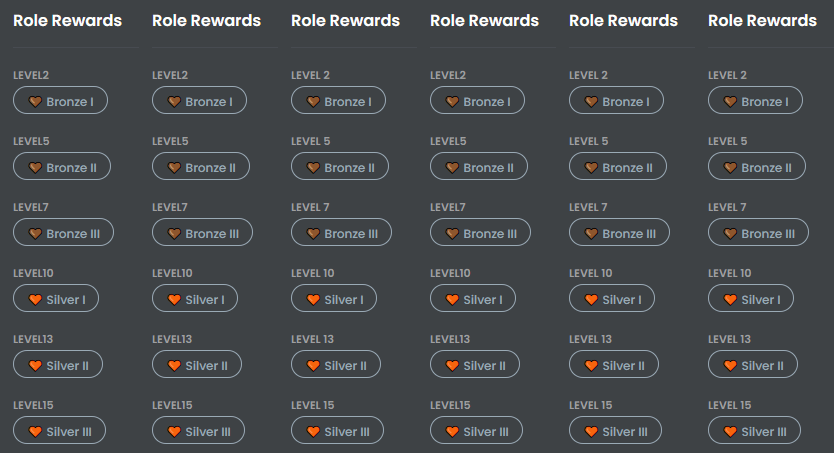
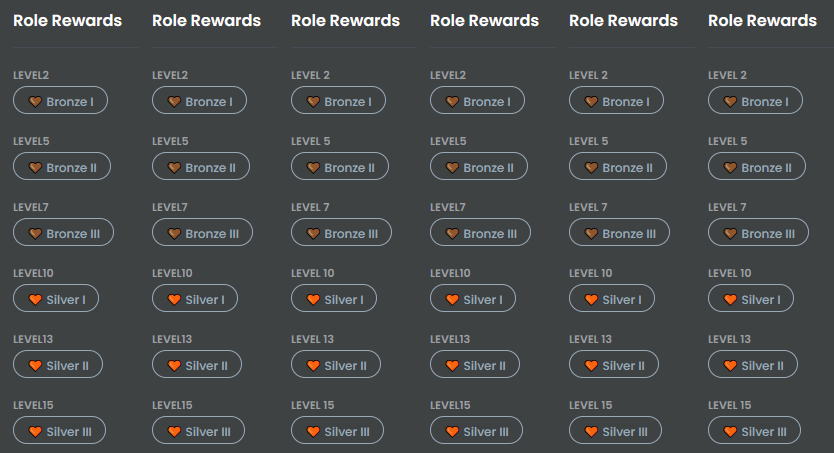
Likely an unintended visual bug:
MEE6 leaderboard role reward panels lack spaces between LEVEL and their NUM.
v .gif of their inspect elemented difference
 dense spire
https://mobile.twitter.com/FNStatusBR @marble quest

Atualizações sobre os serviços do #Fortnite em Português do Brasil! Siga @Brasil_Fortnite para receber notícias diárias sobre o jogo.
Tweets
500
Followers
39802
Twitter
marble quest
@dense spire quando você mudou de volta para a conta fortnite?
dense spire
a 5 minutos atras
marble quest
o último tweet foi há mais de uma hora. aguarde o próximo tweet e me diga se ele postar.
buoyant moon
adding reactions for role colours mee6 always says there is 2 but only one https://gyazo.com/ded0125b54a6a1c5f51e09bf8a5a2b3a

for every one i add
then when you add it and go back it says one


have a nice day goodbye
bitter zenith
buoyant moon
adding reactions for role colours mee6 always says there is 2 but only one https...
this is a caching error caused by making discord changes and not refreshing the dashboard after
buoyant moon
ah i see
bitter zenith
this means changing role hierarchy, permissions sometimes, updating channels, creating and deleting channels and roles
emojis
buoyant moon
makes sense thanks for the quick reply
bitter zenith
sure no problem
 celest moat
Is MEE6 500 Internal Server Error fix or it's still like it was On 27 November ??
 fierce vault
this is so annoying, see that channel thats says welcome I CANT CLICK IT!
what should i do
quaint agate
scale your screen
quaint agate
zoom in or out
 stark raven
fierce vault
what should i do
stark raven
fierce vault
what should i do
you should be able to type in the channel box to search for "welcome"
wooden mountain
discord doing weird
buoyant moon
well why does my bot doesnt have thoe problems. and yes he is only on ONE server. thats of course the difference
are the devs working on the music plugin so we maybe have it working liek advertising soon ?
wooden mountain
because your bot isn't considered a big bot
big bots are handled diffrnetly
i saw a commit on music a couple hours ago
so they are busy with it
wooden mountain
what github?
buoyant moon
well there has to be some kind of version control for the source code. i would love to see those commits. not the source code, but when something is commited
wooden mountain
here is a summary for today
WIP
WIP
music fix (WIP)
||redacted because new feature|| (WIP)
not really interesting
and i cna't even show it all, as we don't share in progress stuff
buoyant moon
well depends on the view, very interesting for me as i am urgently waiting for "the fix" for our problem we have difficulties all the time with it
buoyant moon
well i believe the people where it works fine. But hey... the bot relies on the kindness of discord.. and that is the biggest problem for the bots...
wooden mountain
@buoyant moon you are not an ADMIN in any server only servers you are an admin of will show
dire yarrowBOT
Dashboard Access
You need Administrator permission or Bot master role to access the Mee6 dashboard.
How to add Bot master role can be found below:
https://cdn.mee6.xyz/s/bot_master.png
Premium required
 wooden mountain
what server are you trying to manage?
NAME
these are the permissions you have
and that "administrator" is the only one you need to access MEE6 dashboard
 lucid laurel
mee6 is spamming
blissful orbit
Didn’t someone help you in #〉volunteer-support
 long dawn
blissful orbit
Didn’t someone help you in <#176559797888352256>
long dawn
blissful orbit
Didn’t someone help you in <#176559797888352256>
Sil did.
 inner goblet
My discord members are automatically losing their roles, is it a bug? The level system was reset at the beginning of the month and they lost the roles they got before the reset today
inner goblet
inner goblet
My discord members are automatically losing their roles, is it a bug? The level ...
The server owner is premium
buoyant moon
Answered somewhere else
 hidden edge
same issue as user: FURIA pitas . MEE6 is removing level roles from people
 prime rain
My server also had MEE6 removing level roles from many people, all at once
 zinc atlas
I am having issues with temp mute. When I mute someone It wont keep them muted
dire yarrowBOT
Having problems muting someone/they aren't muted? Check the following
Prerequisites:
- Moderator plugin is enabled
!mutecommand isn't disabled- Bot has role with Manage Roles and Manage Channels permissions
- Muted role is under MEE6 role
- You're trying to mute someone using
!mute @mention reason, otherwise it will not work
If user got Muted role but still can talk means there's issue with your channel permissions
Go to Channel Settings -> Permissions
- If that's public channel that can be accessed by anyone:
- Set

Send Messagesfor all roles except Muted - Set

Send Messagesfor Muted role
- If that's secret channel that requires *special* role to access it:
- Set
Send Messages
Read Messagesfor special role - Set
Send Messages Read Messagesfor Muted role - Set
Send Messages Read Messagesfor@everyonerole
blissful orbit
That might help
 hoary echo
There is a slight typo on the YouTube section.
If you put a Terminated YouTube channel in the YouTube section, instead of saying "Unknown YouTube Channel" It says "Unkown YouTube Channel"
silent jacinth
mee6 is spamming
@lucid laurel
 velvet jungle
there's an overflow property issue https://cdn.realsgii2.dev/s/JZ5aEh.png

^ the line height is too large, set it to 21px or below or set the height to 27px or below
that seems to fix it
 fringe sonnet
This is just a fraction of the hundreds of messages that weren’t deleted from what I can tell? Seems like false notifications? Any support member able to shed some light?
<@&193123929701875712> can anyone shed light on my above post?
limber knoll
@fringe sonnet if they were images they would show like that
fringe sonnet
But it was about ,75-100 over the course of 30’seconds
And it would show like this, if it was an image deleted by a user
Unless a bot was deleting images, but my audit history doesn’t show that, and no bot other than mee6 has the ability to manage messages
 sick jolt
The timer feature only works in an active channel
 hollow quest
prime rain
My server also had MEE6 removing level roles from many people, all at once
hollow quest
prime rain
My server also had MEE6 removing level roles from many people, all at once
Is stacked roles on?
 jaunty radish
Mee6 is randomly removing roles, duplicate I know but still posting so you can see how many people this affects
 somber yoke
this happened to me just now
 hollow crow
somber yoke
this happened to me just now
hollow crow
somber yoke
this happened to me just now
try just kicking mee6 and inviting to your server again,
it worked for me
faint dome
actually that was just a small discord outage, should be back now
https://discordstatus.com/incidents/9p6scj99c6fj

 woeful bloom
can anyone help me
Something went wrong in MEE6 land! Contact our support team for instructions if this keeps happening.
 fringe bone
Discord broken at the moment
woeful bloom
ok
sick jolt
@woeful bloom pls try again. should be working
 quaint sparrow
quaint agate
quaint sparrow
quaint agate
Answered
quaint sparrow
Thank you
 pale folio
does Mee6 monthly subscription allow me to use premium on 2 servers?
oops wrong channel
quaint agate
not that applies to all the subs
pale folio
wait so I should subcribe seperately for 2 servers?
quaint agate
if you want it on 2 server you have to buy it twice
pale folio
gotcha thanks
lucid laurel
silent jacinth
> mee6 is spamming
<@757698029561053287>
Yes
stray sluice
How is it spamming exactly
lucid laurel
ok
 sly crater
whats up with this??? This is not photoshopped, is this some staffmembers prank or something???
sly crater
whats a webhook? I'm not good at discord terms
sly crater
this is my DM's not a sever
marble quest
not a webhook, has the verified bot symbol
blissful orbit
Oh johns right
sly crater
can you guys do anything?
marble quest
considering that two of the dms are exactly the same, it's likely a level up message from a server you are in. but it couldc also be you uisng a command, or a welcome message
but those are the only three ways mee6 will dm you with a custom message
sly crater
it isn't me, ill show you the tag iif you want
marble quest
what do you mean it isn't you?
marble quest
i'm saying that from a server you are in, the owner or an admin setup the levels plugin's level up message to send in dm with that content, or it's a welcome message or cusatom command
sly crater
but wouldnt it say what level you now are?
marble quest
doesn't need to, only if they put {level} in the message, which isn't required
sly crater
oh ok
marble quest
i would recommend upvoting this suggestion, so in the future you can see exactly where the dm was from #┃upvote-suggestions message
sly crater
thank you for your help i'll go now
 sturdy maple
When adding a Reaction Role with the #️⃣ emoji (as the third option in my setup, just in case it matters), MEE6 starts to make the post in channel but pauses when creating the placeholder reaction for #️⃣, and will just delete the entire post from the server AND from the MEE6 dashboard with no explanation and no error message. Changing to a different emoji fixed the problem. Sounds like a bug, so thought I should mention it. Replicated by another user in #463809001273032715 aswell.
prime rain
@hollow quest we do have stacked roles on for the level up feature, it was deleting the wrong role of the two. It's supposed to delete a newcomer role (which is just cosmetic) but instead deleted a main role that is needed for a lot of channel access. Has worked just fine for a long time now, no changes on our end that would have caused this.
silent jacinth
whats up with this??? This is not photoshopped, is this some staffmembers prank or something???
@CherryTheGr8#9787 that is just creepy
He left...
 lapis drift
Having an issue with the welcome cards. The {server.member_count} is displaying 5 more members than I actually have, making my 100th member who joined actually appear as my 105th member. Not sure what's wrong, it was working on Wednesday, and the first glitch was when our 97th member joined and it displayed as #102. Any help is much appreciated 🥺 I also don't think it links to the amount of people who have ever joined, because I've had more than 5 people leave in the past. https://cdn.discordapp.com/attachments/761668391748239400/784505670564446238/card.png

Thanks for the help 😄
 lapis drift
As I said, I've had more than 5 people leave the in past.
buoyant moon
Hi I just found a bug in how MEE6 counts the characters in reaction embeds.
Setting it to 2k chars causes the reaction role to vanish in the dashboard and it doesn't ever edit the post even though it shows 2048 as the char limit.
untold fulcrum
can I not add a role to my slot? Everytime I add another role and save it
it doesn't actually work, and also when I refresh the page it doesn't work and the role goes away
I'm trying to make users receive 2 roles when they react but I can't add the 2nd one
after adding and saving, then I go back and the 2nd role isn't there, it's no saving
bitter owl
untold fulcrum
after adding and saving, then I go back and the 2nd role isn't there, it's no sa...
I do imagine that your MEE6 is on the top of the roles hierarchy, am I right?
dire yarrowBOT
Role hierarchy is important for me to give out roles. Oh and also Manage Roles perm:
https://cdn.mee6.xyz/s/fix_hierarchy.gif
untold fulcrum
@bitter owl yeah, I use a custom one too because mee6 premium
but both bots are up there
bitter owl
untold fulcrum
<@!158951303697924096> yeah, I use a custom one too because mee6 premium
but bo...
No worries, could please press F12 and click on Console after trying to add that role again?
Use this link please
dire yarrowBOT
You can access my dashboard at https://mee6.xyz/dashboard, and login with your Discord Account.
or you can use !dashboard in your server for a direct link
bitter owl
☝️
bitter owl
untold fulcrum
<@!158951303697924096>
It seems you've reached the limit
Can we please check that by clicking on the side tab called network?
Two spaces to the right of console
Then click on XHR
untold fulcrum
yea
bitter owl
Right below "disable cache"
untold fulcrum
so XHR and disable cache
bitter owl
No
bitter owl
I'm just giving you directions
untold fulcrum
i miss read
bitter owl
The XHR is below the disable lol
bitter owl
Hm. That's weird
untold fulcrum
oh there we go
bitter owl
Could you try to reproduce the error again?
untold fulcrum
bitter owl
No need to close the the dev tab
untold fulcrum
bitter owl
Could you try to reproduce the error again?
how do I do that 
bitter owl
untold fulcrum
how do I do that <a:eyeess:776889427233734686>
Go to https://mee6.xyz/dashboard -> Reaction roles -> do the thing that is causing the issue
untold fulcrum
ah ok and go to XHR again?
bitter owl
Yeah ;)
untold fulcrum
alrighty it's recording
bitter owl
Yay
You see a URL like /702715829506015424/reactions_roles/
Click on that and you will be able to open the "preview"
It will show us the exact error
untold fulcrum
I think ima do it again because it seems to be taking a bit
bitter owl
Oh
untold fulcrum
@bitter owl oh where do i see the URL
bitter owl
untold fulcrum
<@!158951303697924096> oh where do i see the URL
On the "name" tab should have a red request
Like this
bitter owl
Weird...
5xx: Server errors
504: Method not allowed - make sure you are using the correct method for this route - make sure you have https:// at the begin of your url
Usually 500 is full webhook
But reaction role isn't a webhook
I'll escalate that to sil, so he can find a solution for you, nate
untold fulcrum
alrighty thank you
bitter owl
Truly sorry for the trouble :)
jaunty radish
Ok this is getting annoying now, mee6 is still removing roles, about 100 peeps today
bitter owl
What configuration have you got? Is it for role rewards? 
jaunty radish
logic's geek squad thank you
bitter owl
@jaunty radish I've refreshed your bot's connection. The problem should now pass
buoyant moon
buoyant moon
Hi I just found a bug in how MEE6 counts the characters in reaction embeds.
Set...
Did anyone see this? I know someone jumped I right after I posted with a seperate issue.
Just not sure if it’s been reported yet.
bitter owl
buoyant moon
Did anyone see this? I know someone jumped I right after I posted with a seperat...
If you copy your text and put on a word doc you will see there's more than 2k characters
Because MEE6 and discord doesn't count emojis/channels mentions as characters
bitter owl
Exactly
bitter owl
Was totally plan text?
buoyant moon
Yup.
bitter owl
Sure if you can
buoyant moon
That worked, slowmode. That's not the full message.
buoyant moon
Oh.. it shows 2048 in the embed.
bitter owl
If you can't paste it here it's because you've overwritten the limit
buoyant moon
Nah I couldn't it's missing the last .
buoyant moon
So yeah I was at 2001.
buoyant moon
Thanks. Just was really confused by the message.
bitter owl
Sorry about that
buoyant moon
No worries. 🙂
jaunty radish
Thank you
 radiant wigeon
Hi, the bot keeps playing a kid's song after the song playing is done and it is getting annoying.
 eager cape
wenas
dire yarrowBOT
 בלתי נראה#1872 has been warned
Reason: Posted an invite
בלתי נראה#1872 has been warned
Reason: Posted an invite
בלתי נראה#1872 has been banned
Reason: Too many infractions
dire yarrowBOT
 n8n123#8167 has been warned
Reason: Posted an invite
 ruby horizon
Seems like there has been some recent bugs with the !anime command...
<@&193123929701875712>
gilded yacht
Channel hopped
 rotund forge
Hello
 gilded walrus
How come some messages with words with all caps are allowed in MEE6?
Like HELLO?
marble quest
if the message is less than 10 characters it won't trigger
gilded walrus
@marble quest That explains. Thank you.
 frank pendant
Yo
There’s this really weird bug that I’ve experienced before but now it’s gone. When I went into the mee6 website it showed a tiny dot. Just a dot. Not the dash board.
Maybe the bug is gone
For good
But maybe some people still experience it
Idk
marble quest
sil, can you look at a few cases from earlier?
wooden mountain
make it quick
marble quest
#〉volunteer-support message
#〉volunteer-support message desyncs that might not be an issue still, not too sure
refund #〉volunteer-support message
got billed after cancelling #463809001273032715 message
wooden mountain
marble quest
https://discord.com/channels/159962941502783488/176559797888352256/7848427648471...
connection issue, everything from that time can be ignroed
the other 2 where already handled by support
marble quest
alright, thanks
 deft sequoia
Hello. I activated the Mee6 Timer feature and added 2 timers. Someone has to send a message every day to the channel I set every 4 hours and the other every 12 hours, but sends once and does not send another.
dire yarrowBOT
 Timers
• You can currently only add 10 timers per channel
• MEE6 has an anti-flood system. So messages need to be sent between a timer and another in order to keep timers being sent
Note: In case you can't see any text channels when selecting the place to announce, it probably means you're logged in the wrong account.
sturdy maple
Reaction Roles set-up in Dashboard. If you have already typed your message in the Embed text area, and insert emojis earlier in your post - it will delete the final character in the text box, even if you're nowhere near the 2048 limit.
burnt hazel
Are you using Discord emojis in the post or emojis like this -> \❤️
Also if you're using variables such as {server} or mentioning a role it's actually more than 8 characters, as it turns into a mention i.e. <@&159963445448409088> to ping the role
@sturdy maple
sturdy maple
I'm just using the ones in the box when you click the smiley face - things like the letters, flags
No variables, just emojis and plain text next to it to describe the role being applied. I'm on about 150-200/2048 characters from the limit each time when it happens.
burnt hazel
can i have the server ID pls @sturdy maple
sturdy maple
783015281249222687
It's not an issue, I can just re-type the character when it has been chopped off. Just figured some people might not notice.
 nova belfry
Hello,
I used Mee6 to record a study on a server that I am admin in, but when I stopped the recording, it did not send the file in chat like it normally does. That also happened a few days ago so I thought it was just that time, but apparently not. I tested it again afterwards (I started and stopped in the same channel that I did the first time), and it worked perfectly. None of the permissions were changed between the two times that I recorded. 1) Is this a problem on my end or the bot’s? There wasn’t any lag, client side nor server side. 2) Is there a way that I can get that recording even though it didn’t send in chat?
quaint agate
(i wouldn't rely on mee6 to record anything important at this stage)
 cerulean bloom
!warn @cerulean bloom
dire yarrowBOT
^^Hd Safayet Jabin Nibir ^^, you can't use that.
 Хороший строитель#8373 has been warned
Reason: Posted an invite
 lost void
im having an issue with my bot as mee6 is stop working on my server....when i tried to open the dashboard i was stuck at the loading screen.....i tried everything that i can to get it fix but still the same result the bots did not respond anything...please help
the server id: 708506200303468666
 rancid pulsar
I bought premium lifetime for another server but im not in that server anymore can i switch it
dire yarrowBOT
to transfer your premium to another server, use https://mee6.xyz/premium-transfer.
sick jolt
@rancid pulsar get the servers id
buoyant moon
I cant delete messages with ! Clear
uncut lily
(Answered in #〉volunteer-support )
 somber crater
I'm reporting a bug there is a bug in my room
blissful orbit
gilded walrus
How is it possible some users don't get a warning for bad word usage?
wooden mountain
🙊
stray sluice
It’s possible for them to use special letters
gilded walrus
wooden mountain
🙊
Yes Sil
stray sluice
That look the same as out letters but are different
wooden mountain
no
 hollow frost
special letters can still be filtered, just more time to look them up
 humble marsh
So i've been using the bot fine until it stopped working earlier today. Cant get into the dashboard now. Just get a constant loading screen. Cleared cookies/cache etc. Anyone else?
sturdy maple
I think there are issues at the moment. Reaction roles and custom commands aren't working for me, and at least one other person has questioned this so it's not something I've done by mistake.
Shame that it has happened while I'm in the middle of trying to tweak reaction roles heh
humble marsh
Same! 😆
wooden mountain
long dawn
Is that a Custom Bot?
gilded yacht
Hydration gang lol
quaint agate
join today 😄
long dawn
Oh i never heard about it. When did they add it?
gilded yacht
Doesn't look like its working
buoyant moon
Mee6 didnt have the "correct usage" message before, so I guess they dont check if the command is enabled?
 violet elm
When two admin is changing the settings on mee6 website, it will lag and all the control didn't saved by its own
 quiet wren
 onyx chasm
<@&193123929701875712> please help i got banned for no reason on a server without saying anything bad either
wooden mountain
Contact a moderator for that server
onyx chasm
how
im banned idk how to contact
<@&193123929701875712> how do i contact a moderator?
buoyant moon
How are we supposed to help you with that?
We dont know which server you're talking about, nor do we have any way to contact them or in anyway interfere in their decision making
You were banned by them, with or without reason and we can't change that.
Using an alternate account to bypass the ban is against Discord Guidelines and not allowed
You could try to send a friend request to whoever banned you, but that's all
onyx chasm
<@&193123929701875712> can i tell u the name atleast? cuz its poki's squad
buoyant moon
You havent read my messages at all, have you?
onyx chasm
<@&193123929701875712> lol my bad so i can't do anything bout it other than sending the person who banned me a request?
buoyant moon
Yes (and stop pinging Support)
onyx chasm
i don't wanna bug u bout it but idk if i got banned or not cuz it didn't send me a message that i got banned i just got kicked randomly and now its not letting me back in
maybe a bug?
<@&193123929701875712>
onyx chasm
ok my bad sorry
violet elm
violet elm
When two admin is changing the settings on mee6 website, it will lag and all the...
<@&193123929701875712>
wooden mountain
Don't be saving in the same plugin
violet elm
Well
violet elm
wooden mountain
Don't be saving in the same plugin
I wish mee6 could fix it
wooden mountain
Same
But that's really complex to do
Usually introducing more issues then it solves
 full arrow
buoyant moon
Mee6 didnt have the "correct usage" message before, so I guess they dont check i...
full arrow
buoyant moon
Mee6 didnt have the "correct usage" message before, so I guess they dont check i...
Often times we do not allow crowded messages in our chat, but even regular users (unauthorized) can type "!mute". how can i prevent this
The English is not my first language, sorry if I wrote wrong
 torn agate
Moderation commands such as !warn, !mute, etc are working even though they are disabled on the dashboard. Started to happen only today, nobody touched the config
by reading up it seems it happens to others too
quaint agate
probably just a bug with the new system im sure it will be fixed in the next update
wooden mountain
Bad order
We are first checking if the syntax is valid and only after that checking if the command is enabled
Need to swap that
 clear lion
Hi
quaint agate
something simple as that
dont yall have like testers before something gets released?
cus something as simple as the sytax sending when the coammnd is disable should be picked up
full arrow
wooden mountain
Need to swap that
thanks
 woeful lotus
just a small harmless bug but thought I would post here
quaint agate
hmmm
 pure obsidian
woeful lotus
just a small harmless bug but thought I would post here
pure obsidian
woeful lotus
just a small harmless bug but thought I would post here
is the card viewable when you download and open it?
if yes, then discord client somehow messed up the preview.
quaint agate
alime can you investigate a user is having a issue where only 1 dashboard is not loading but all of the other ones are (mee6 is online in said server)
woeful lotus
pure obsidian
is the card viewable when you download and open it?
yes
 void ocean
Hey; I have the mute command off! But for some reason mee6 still responds to the command.
I use another bot for muting.
quaint agate
yes
that is a known bug and will be fixed
i asume you mean the invalid args?
lol
void ocean
quaint agate
that is a known bug and will be fixed
yea cheers, just wanted to report it since its the first time ive experienced it
quaint agate
yea all good Np
void ocean

 tame tulip
maybe down ?
quaint agate
yes
pure obsidian
Yes we know, MEE6 is slow (or almost irresponsive). this issue is being looked into, chats will be locked in the meanwhile. you are NOT muted!!
Please do not direct message staff.
marble quest
with the audit logs spamming this, i notice it happens right after a channel is moved, if that helps with anything
specifically if it's moved up one
wooden mountain
LOL
quaint agate
same thing happend to me a while back
did it to every cahnnel
someone said it was due to a discord update thing that happend
wooden mountain
yep
wooden mountain
custom bot is also offline
and #〉announcements
only custom bot is restarting
not MEE6
 last forum
t
 hollow tartan

 exotic leaf
When trying to ping someone inside an embed it doesn't work
wooden mountain
euh.... obviously
not a bug
not related to MEE6
go complain to discord
embeds should not ping
never
the text above an embed can ping
but not what is inside the embed
 tame flicker
I have one member within my discord that can not receive points in the leaderboard. I can not seem to figure out the issue
wooden mountain
go to your dashboard => levels plugin => scroll down to "banned roles" and "ignored channels"
make sure that person is talking a channel not listed there
and has NONE of the listed roles
tame flicker
He was set to a role that was within the NO-XP section. I appreciate your help @wooden mountain
faint dome
you probably missed a few words in "valid reproductible bug reports"
now please stop trolling
 dense shell
These three are serious ok?
dense shell
It really takes it 1 minute to show yt notifs
faint dome
and then? that's really quick, considering the youtube app itself sometimes takes days
dense shell
And sometimes just breaks down
dense shell
faint dome
and then? that's really quick, considering the youtube app itself sometimes take...
I’ve never been failed by push notifs
faint dome
well that's nice for you
but I think you are not the only one using youtube app, so don't generalize that kind of behavior
dense shell
Exactly, still, it should be next to instant
 latent matrix
No it shouldn't. lol Your expectations are entirely unrealistic. 1 minute is insanely fast and widely accepted as great speed.
dense shell
Mm yes
latent matrix
You also specifically said in the other channel that this isn't even your server, you're complaining on behalf of another server that you're just in - yes?
dense shell
It’s in every one of mine servers, i am not using the youtube notifs there, that’s another server
wooden mountain
lol, complains on behavior of the bot in a server you don't manage?
we don't listen to that
latent matrix
nods
dense shell
In my servers it’s all about the 2. And 3.
dense shell
dense shell
In my servers it’s all about the 2. And 3.
..
wooden mountain
randomly turns off
that means the bot is missing a permission
make sure the bot has all the permissions required to actually do what you are asking it to do
wooden mountain
and what code?
dense shell
No idea
buoyant moon
This just happened. Seems it didn’t render fully the first time.
Sorry for jumping into the middle of chat. Happy to wait for you all to finish your convo.
latent matrix
Well that's not helpful. It provides a code for a reason.
dense shell
If i get the message i post it gere
latent matrix
And you're fine Alexis, the other person isn't actually looking for help. Just complaining about non-issues. 😄
dense shell
Not complainig, rather advising
wooden mountain
@buoyant moon sorry, we have to choice between reliable and fast on that. and we went for in the middle, but sometimes it causes that
buoyant moon
No worries. Glad you’re aware of it.
wooden mountain
@dense shell it's being investigated, but we need a way to reliable reproduce the issue
wooden mountain
no
buoyant moon
Good afternoon 😂
 high hedge
!join
dire yarrowBOT
lnodgra, that command is disabled in this channel.
buoyant moon
Wut?
long dawn
Hwllo got any bug reports?
buoyant moon
Bot commands => #〉commands Unless your using helper commands
lost void
Helo
 stiff field
Hey there, have any bug to report? izwaspayne
 robust marsh
I was saying !rank a while ago and would not work for a couple hours
limber knoll
tried again?
 solemn linden
@dense shell ahoj jsi CZ?
dense shell
Nie prečo
lost void
stiff field
Hey there, have any bug to report? izwaspayne
Yeah, i talked about my issue before with a bug where the bots are stopped working and I can't get in the dashboard
lost void
lost void
im having an issue with my bot as mee6 is stop working on my server....when i tr...
.
 hoary escarp
There is now the new "Embeds" plugin, unfortunately you cannot use the serve emojis, only plain text is displayed such as ": party:"
dire yarrowBOT
Using ID
To use channel tags, emojis, role tags and user mentions in custom commands, level up messages and the welcome plugin use the following formats:
https://cdn.mee6.xyz/s/id.png
https://media.discordapp.net/attachments/494825635924148224/754751915216338964/Finding_RoleID.gif

 hoary escarp
i choose the emoji in the dashboard, but it where not show in the embeds
This is the bug
faint dome
reported, thx
hoary escarp
ty, i didn´t work with the posted method above
buoyant moon
what goin on
dense spire
Mee6 don't anouciated the twwet
dire yarrowBOT
 Dyno#7232 has been warned
Reason: Posted an invite
blissful orbit
I did tell you
quaint agate
depends
 willow idol
Command is disabled but bot still shows the correct usage of command but don't ban a user. I think it shouldn't work so. I think it should be Command enabled - Usage enabled or Command disabled - Usage disabled
quaint agate
should be fixed soon
 topaz gust
!play agoraphobic corpse
dire yarrowBOT
R̶i̶c̶e̶, that command is disabled in this channel.
 upper trench
Custom embed dashboard manage issue
Test embed:
https://cdn.discordapp.com/attachments/494825635924148224/785924189215129610/unknown.png
Embed when re-edit it:
https://cdn.discordapp.com/attachments/494825635924148224/785924312426872912/unknown.png


 boreal wren
Oh, hello ronald weasley
 bright glen
Hello, I've activated Mee6 to give people roles when they join my discord but intermittently it stops working and stops giving people the role that it should.
dire yarrowBOT
Role hierarchy is important for me to give out roles. Oh and also Manage Roles perm:
https://cdn.mee6.xyz/s/fix_hierarchy.gif
bright glen
 jagged tangle
See my lvl but I am not ranked why??
jagged tangle
Ohk
 crude comet
6bde5ca9375b483da4182829a983bf77
buoyant moon
I don’t know if it’s me or the bot but there’s this one server and I’m not even in it until the bot dms me a link to a server and it joins for me but this has happened many times in the last 6 hours... it’s not only to me either
This happening to anyone else??
blissful orbit
Can you ss the invite please
buoyant moon
Shall I dm you or post here
blissful orbit
Here should be fine
buoyant moon
blissful orbit
And you don’t join but
buoyant moon
It joins for me
blissful orbit
Hold on this happened before let me find what the fix was
buoyant moon
Yes please
blissful orbit
Ok I think I found it
So to fix it you should
Enable 2fa
And change your password
buoyant moon
Alright will do right now, thank you
topaz gust
jagged tangle
See my lvl but I am not ranked why??
its the example idot
blissful orbit
@topaz gust it’s a old case and has already been resolved
topaz gust
ok
boreal wren
peace and love is the most important
 jade lichen
 fast breach
Whenever I type !play and then a song after it @dire yarrow ends up playing a different song
bitter zenith
fast breach
Whenever I type !play and then a song after it <@!159985870458322944> ends up pl...
MEE6 only plays the first result it finds that way. try using !search and the same song to see if you can get the right one
fast breach
bitter zenith
MEE6 only plays the first result it finds that way. try using !search and the sa...
Ok thx
Ok i tried it and it works but I want it to play in a voice channel not give me a link
 elfin brook