#〉bugs-reports
2 messages · Page 82 of 1
 quaint agate
 sudden raft
and i will send my sidebar too
Here is mine! See the difference between his and mine
 wooden mountain
it looks like you are using discord in your browser
wooden mountain
to use that feature, install the discord app on your pc and use it from the app
quaint agate
looks like you are missing more than one settings option
quaint agate
looks good
sudden raft
yeah but it says this feature is only available on PC
quaint agate
wait
wooden mountain
if you are gaming on a pc or a supported platform where you are logged in on discord, it will show
sudden raft
I thought you said I was on one
quaint agate
what kind of pc
sudden raft
Doesn't laptop count
quaint agate
yes what kind are you on
sudden raft
like a uhh... chromebook
quaint agate
i think that might be why
sudden raft
oh
sudden raft
they should make it available on chromebook too then
cuz everyone just dont got a PC
some got other stuff
quaint agate
other laptops work i think
sudden raft
what about samsung laptop
quaint agate
never really used a chrome book
sudden raft
like a samsung chromebook
quaint agate
chrome books are made by google
quaint agate
no
sudden raft
so then....
what do i do
does samsung work tho
like samsung chromebook
or Lenovo
or any other brand
0f chromebook
sudden raft
but i dont got that platform
quaint agate
i think it ahs to do with it being a chrome book
sudden raft
ok then
 buoyant moon
Is the music down? My friend messaged me saying it was down in his server on MEE6
wooden mountain
using !laeve and trying again should work
we are working on making it more stable
 upbeat rapids
 !laeve is my favorite command
 bitter zenith
same tbh
 final minnow
I cannot get the twitch announcement to work in my server, is this an issue?
final minnow
or maybe im just not doing something right <_<
bitter zenith
twitch still does that truncating records thing?
and also, when did you add the streamer?
final minnow
yesterday
bitter zenith
aha
Twitch has reached the maximum number of subscriptions with MEE6 and we have to wait for them to approve the request to allow more
final minnow
probably won't know if/when it would work either, like no automatic notification for that
bitter zenith
right, you'll just have to keep an eye out or ask again in the future
bitter zenith
might be a few other twitch bots
you can check any bot listing for one
top.gg is by far my favorite list
final minnow
ok, i'll check. Thanks for ur help!
bitter zenith
sure anytime
 pastel latch
my website doesn't working
 ebon prawn
@pastel latch browser?
ebon prawn
👌
 vocal jackal
it wont let me verify
quaint agate
than how did you post in here
bitter zenith
then you verified
vocal jackal
ok
 marble quest
it might be because you didn't really have access to that channel after you verified, but your browser still showed it, as discord does when you suddenly lose access to a channel, but remain in it
 dire yarrowBOT
 Timers
• You can currently only add 10 timers per channel
• MEE6 has an anti-flood system. So messages need to be sent between a timer and another in order to keep timers being sent
Note: In case you can't see any text channels when selecting the place to announce, it probably means you're logged in the wrong account.
 slender needle
Too many webhooks in that channel @crude coral
 crude coral
Okay, thanks!
slender needle
np
 empty sapphire
my old recordings aren't loading and the last one I just saved isn't avaliable for download
buoyant moon
The mute system won’t actually mute
 knotty rose
Does MEE6 give the Muted role to the user, but they can still speak?@buoyant moon
buoyant moon
Yes
dire yarrowBOT
Having problems muting someone/they aren't muted? Check the following
Prerequisites:
- Moderator plugin is enabled
!mutecommand isn't disabled- Bot has role with Manage Roles and Manage Channels permissions
- Muted role is under MEE6 role
- You're trying to mute someone using
!mute @mention reason, otherwise it will not work
If user got Muted role but still can talk means there's issue with your channel permissions
Go to Channel Settings -> Permissions
- If that's public channel that can be accessed by anyone:
- Set

Send Messagesfor all roles except Muted - Set

Send Messagesfor Muted role
- If that's secret channel that requires *special* role to access it:
- Set
Send Messages
Read Messagesfor special role - Set
Send Messages Read Messagesfor Muted role - Set
Send Messages Read Messagesfor@everyonerole
buoyant moon
It won’t work still
knotty rose
Can you screenshot the permissions for @everyone through channel settings > @everyone?
knotty rose
Go to channel settings (not server settings), then Permissions, then @everyone.
Screenshot that part. It should have Read Messages and Send Messages
knotty rose
The screenshots above are permissions for the entire server. Channel settings can be found by press-holding on a channel name and then going to channel settings > Permissions > @everyone
dire yarrowBOT
 iiBoundlessJames#7278 has been warned
Reason: Bad word usage
knotty rose
Oh, then do you use another role for verified people?
bitter zenith
I've fixed so many broken mutes this week
knotty rose
DM me an invite to the server please
 sinful pagoda
Hi ! I can't add MEE6 to my server. Can you help me please ?
 gilded yacht
What is the problem that prevents you from adding Mee6
 dreamy mauve
BOT DOWN
sinful pagoda
Oh ok
bitter zenith
MEE6 IS CURRENTLY OFFLINE
Please be patient while we wait for Staff and Devs to correct the Issue.
Also please REAMAIN CALM and try not to spam
bitter zenith
bitter zenith
__**MEE6 IS CURRENTLY OFFLINE**__
Please be patient while we wait for Staff and...
sinful pagoda
When will the bot walk again ?
bitter zenith
not sure
sinful pagoda
never ?
bitter zenith

sinful pagoda
Ok thanks
 frank elbow
 obtuse junco
Read the pinned message
 dire yarrowBOT
Using ID
To use channel tags, emojis, role tags and user mentions in custom commands, level up messages and the welcome plugin use the following formats:
 sinful pagoda
The bot don't walk again
buoyant moon
it still doesn't work
ebon prawn
@buoyant moon @sinful pagoda what command
buoyant moon
No it's good, the problem was solved
ebon prawn
👍
 naive minnow
quick question. is anyone having trouble with music?
naive minnow
awesome. thank you!
 plush laurel
youtube link bag
marble quest
hmm?
 placid scaffold
What?
quaint agate
@plush laurel what is the bug you are reporting?
marble quest
something i noticed, when using custom emojis for the current server, using the id, it will output a little weirdly
wooden mountain
seems legit
the website already tries to do the conversion
you only need to use the ID trick for the emji's that fail
marble quest
yeah, it just gets a little confusing when using custom emojis in the current server
 hidden hill
Why I can't use !clear on my server
marble quest
is the moderator plugin enabled?
hidden hill
How to enable
marble quest
go to the dashboard
dire yarrowBOT
You can access my dashboard at https://mee6.xyz/dashboard, and login with your Discord Account.
or you can use !dashboard in your server for a direct link
hidden hill
Thanks
marble quest
np
wooden mountain
check your DM's witht eh bot
 open hollow
And?
wooden mountain
didn't it send the respond in DM?
wooden mountain
in what server are you using that command?
wooden mountain
have you considered ENABLING ANY PLUGIN, ESPECIALY THE HELP PLUGIN
https://mee6.xyz/dashboard/713758896510205953 everything is disabled
click on them to enable
and !help doesn't work if there are litterly no commands to show
open hollow
Everything is enable not disabled
 random flame
how come i havent been able to have mee6 say when im live on my discord???
open hollow
Wait
wooden mountain
@random flame we are aware of the issue and waiting for a reply of the twitch team (we hit the limit of streamers we are allowed to follow and asked for a raise)
wooden mountain
yes, because those are still inside the amount we can subscribe too
open hollow
Bruh can i enable it?
random flame
ohhhh ok
open hollow
And how?
wooden mountain
just click (or tap) on those plugins and press "yes" when asked if you want to enable it
open hollow
I'm so stupid tq
 rancid locust
Hi
my !unmute is bugged -- i can see a member is muted, but it says "you cannot unmute someone who is not muted' ?
rancid locust
Nope, i muted this person last night
marble quest
i wonder if the outage earilier this morning caused some issues with that
wooden mountain
just remove the role from that user then
rancid locust
Okay, ill do that for now, maybe the outage earlier caused this as it usually always works fine. thank you
 near trellis
Clicking "set up server" then hitting cancel on the OAuth popup will redirect to https://mee6.xyz/dashboard/undefined
wooden mountain
yep, known issue, won't be fixed, why are you canceling anyways
near trellis
...what if I hit the wrong server
wooden mountain
then change the selected server in the auth screen
near trellis
yeah, I know that I can, but it's pretty dumb to have a callback like that :P
wooden mountain
that page is from "discord.com" so we can't effect it
 white lion
Hello, I have some troubles with MEE6, some streamers anoounce fine, but others are not. How can I fix it?
all in twitch, all in my channel
 pure obsidian
that's because we reached the maximum number of streamers we can subscribe to and waiting for twitch to bump the limit for us
white lion
thank you for answer! Can I ask - how long will it take?
pure obsidian
it's up to twitch, we don't really know
pandemic is probably cause of this being lengthy
 tacit sentinel
The reaction roles its unavailable
 rapid heart
Hi
May I know why after I pressed the invite button the page just becoming white
The page is not reloading
But after I reload the page. It says error
Can anyone helps me? Or issit the bot is currently down?
 sick jolt
@rapid heart start again at https://mee6.xyz/dashboard

Manage your Discord server with leveling, moderation, Twitch, Youtube and Reddit notifications.
 honest shoal
cant pay with paysavecard
rapid heart
@sick jolt thanks bro, it works
sick jolt
sure anytime
 foggy skiff
wooden mountain
foggy skiff
wooden mountain
!leave and try again
 slow crest
Mee6 wont go to sleep no matter how mutch i try
quaint agate
hmmmmm
pure obsidian
seeing you sending the same message on almost all channels I don't really think mee6 is the one in need of sleep
please don't do it again
 winged monolith
at our server mee6 music bot starts playin (for 1-3 minutes) and then sometimes he abort and can't play for excample the next song. only thing we can do is to let him leave and rejoin. even then this happens again. So the same issue like the user BOXjr
marble quest
can you try changing the server region
winged monolith
mhm thx i will try that. merci
Seems that that fixed it (switched to Europe, was on Frankfurt ). Thx to jo John Green 
 steel totem
hey I just added the bot to announce my twitch channel on my server but it doesn't announce it... any suggestions on why this might be happening??
bitter zenith
new subscriptions are not currently being accepted
we have to wait for Twitch to allow us more
it has been requested
buoyant moon
I did rank and this happened
slender needle
I had that happen once, try it again, maybe in a few minutes
 graceful valve
i had that too, it doesn't seem like the levels page isn't completely responsive and mobile-friendly.
 long dawn
Hmm i see
long dawn
Aright thanks Maj
graceful valve
is there a bug tracker
bitter zenith
probably not a public one
graceful valve
kk
bitter zenith
had a trello in the old days
 sharp ridge
Music quiz isn't responding once again, is this ever going to get fixed?
bitter zenith
was it ever fully working? 
sharp ridge
It played one song then quit, then I tried a second time and it didn't respond. I did!stop-quiz after the first time
bitter zenith
hm. so not. pretty sure Music Quiz is still having issues
sharp ridge
Yeah I know that.. lol
bitter zenith
cool, thank you for the report
 fierce ocean
any ETA known for Mee6 not being able to broadcast Twitch live updates?
 stark briar
is there any way to get role info?
 jade orchid
Yep !role-info <@ role>
@stark briar
Make sure to have moderator plugin enabled for that command to work
jade orchid
No worries
 errant birch
I can't access dashboard
dire yarrowBOT
 buoyant moon
Just another music quiz report
ebon prawn
Known devs are trying to fix
 hexed panther
ebon prawn
buoyant moon
hexed panther
ebon prawn
buoyant moon
SLEEP6 Quelque chose s'est mal passé du côté de MEE6 ! Contacte notre équipe de support pour plus d'infos si cela se reproduit.
code: 25a865d5052742818549d7dcf99a6476
What are you doing please?
wooden mountain
could not find the person you wher e trying to warn
is that person still in the server?
rancid locust
Afternoon.
wooden mountain
sure
just make a member role that is given when they react
and hide channels from members that don't have that role
rancid locust
ok, and make a private channel with only that role able to see it? or as you said, just hide it from @ everyone but that role?
wooden mountain
yep
rancid locust
thank you mate
 vagrant mango
i did !play https://www.youtube.com/watch?v=56S6NZOYMR4 and it did not play when it says it started
wooden mountain
!leave and try again
vagrant mango
nvm
buoyant moon
I can't save the welcome message in my server.
 zinc star
The music quiz is buggy mid quiz it stops working nothing plays but it still checks answers
 glossy crest
and hide channels from members that don't have that role
@wooden mountain did you cast mee6 above all the other roles?
wooden mountain
wut?
buoyant moon
I can't save the welcome message in my server.
glossy crest
oh sorry sets the member role to set channels
wooden mountain
@buoyant moon what do you mean?
 short moss
I can't save the welcome message in my server.
@buoyant moon is the website crashing for you?
buoyant moon
How do I add the bot to my sever?
dire yarrowBOT
Lets spice this up a bit! https://discord.gg/mee6
If you want to invite the bot instead... https://mee6.xyz/dashboard
glossy crest
@buoyant moon check dm
gilded yacht
 second link
buoyant moon
@short moss yes
gilded yacht
dm ads?
wooden mountain
@glossy crest no, pls don't randomly send DM's for that to people
short moss
@buoyant moon try logging out and back into the dashboard, if that doesn't work, try a different browser or use incognito mode
buoyant moon
@buoyant moon try logging out and back into the dashboard, if that doesn't work, try a different browser or use incognito mode
@short moss also tried it
short moss
different browser and incognito mode as well?
buoyant moon
Yes
wooden mountain
what is the issue?
wooden mountain
what is the issue?
short moss
he can't save his welcome message
buoyant moon
@short moss @wooden mountain can you check my server once
short moss
the MEE6 dashboard refuses to save his welcome message for some reason
wooden mountain
and are you trying to upload a image?
buoyant moon
No
wooden mountain
name of server?
dire yarrowBOT
 ✓TOXICツANUBHAB#5323 has been warned
Reason: Capital letters
wooden mountain
thanks
buoyant moon
Sorry my server name is in capital letters
wooden mountain
i got it
buoyant moon
Ok
buoyant moon
Yes
wooden mountain
that is because MEE6 does not have the permission to send messages in the selected channel
fix the bot his permissions and set the channel again on the website
buoyant moon
I permit the bot as administrator
wooden mountain
send me a invite to your server pls
buoyant moon
In dm or here
wooden mountain
DM
buoyant moon
@wooden mountain can you tell me what was the problem with my server
long dawn
Please that’s not a bug
 gusty junco

pure obsidian
@slow crest please stop 🙂
 boreal thorn
is there an eta on the music being fixed? It defeats the purpose of 24/7 mode if I have to stop/start the music all the time...
bitter zenith
no ETAs will ever be provided
wooden mountain
except old eta's
bitter zenith
fair
bitter zenith
I did notice that actually
boreal thorn
I felt as if I asked a 'left or right?' question and the answer was 'no'..
 rugged girder
hi guys, i have a little problem with the bot, i put 7 twitch streamers on the bot but on discord it sends me the notification of 2 why?
slender needle
newly added streamers wont work
rugged girder
why?
slender needle
MEE6 hit the max number of streamers it can follow, and they have asked twitch for more. Still waiting for twitch’s response, iirc
bitter zenith
plenty I'm sure
you could check Top.gg or ListBoat, or Disboard
or something like that
 prime iron
i just made a new server and added mee6 to it. why is !clear working? or am i dumb and i need to enable it
slender needle
You need to enable the moderator  plugin in the dash
prime iron
ok tysm
dire yarrowBOT
You can access my dashboard at https://mee6.xyz/dashboard, and login with your Discord Account.
or you can use !dashboard in your server for a direct link
slender needle
np
 wooden edge
ive found that it will often stop playing a song, and trying to play any more songs results in a nothing found message
wooden edge
yeah kicking it fixes the issue for a few songs but its also deletes the que
buoyant moon
Please that’s not a bug
@long dawn can you tell me what was the problem
long dawn
What? Im trying to sleep...
bitter zenith
you don't have to respond either
long dawn
Oh sorry @buoyant moon that was directed to someone else.
 trail shell
i cannot edit youtube plugin. its loading forever.
slender needle
try again in an hour
 sharp kayak
ok
slender needle
!android
dire yarrowBOT
slender needle
500 issue
We are aware of a 500 issue when logging in or trying to add MEE6 to your server after you click "Authorize".
This is a Discord app issue on Mobile, to resolve the issue for the time being untill Discord fixes the app, Please follow the steps below:
- Try logging in / Adding MEE6 with an Incognito tab.
If that fails to work, follow the steps below:
- Uninstall the Discord app
- Log in / Add MEE6 to the server
- Re-install the app
@buoyant moon ^
no problem
 grim umbra
Like me …
ebon prawn
whats ur issue
 hallow root
Okay so after new members came, mee6 DM them by welcoming them but in the welcome msg it has a server link
dire yarrowBOT
 😋そごいね🍱#4273 has been warned
Reason: Bad word usage
hallow root
Oi
ebon prawn
f
hallow root
Its contains
 ivory blaze
yeah got it
ebon prawn
and skad is here to save th day
hallow root
Optidium
ivory blaze
it's not your server?
ivory blaze
do you have a server id?
ivory blaze
I believe you
bitter zenith
can you make a script to check for the Server the Invite originated from? in case Mee6 might be on that server? Skad. you think that would be possible?
hallow root
This is one of my members pic
@bitter zenith I was banned
In optidium
For no reason
bitter zenith
not you
bitter zenith
wonderful
hallow root
Ol
dire yarrowBOT
😋そごいね🍱#4273 has been warned
Reason: Posted an invite
hallow root
Oof
hallow root
So what did u do @bitter zenith?
bitter zenith
they'll work on it from their end
bitter zenith
without question
hallow root
Ok
 subtle moon
server bug: the !emoji command has the emojis broken, see yourself.
#〉commands message
 teal bridge
I was trying to use the Music functionality to play some ambience music for a D&D game I run, and MEE6 would stop playing after about 3 or 4 minutes. The website would show that it's still playing but nothing would come through. The only way I could get it to start playing again was by disconnecting him and getting him to rejoin.
 subtle shore
Dashboard under https://mee6.xyz/dashboard doesn't show any Servers when being accessed via Opera GX core: 68.0.3618.142. and yes, I am logged in
Manage your Discord server with leveling, moderation, Twitch, Youtube and Reddit notifications.
marble quest
@subtle shore first of all, are you an admin in any servers?
marble quest
try this on opera
dire yarrowBOT
It appears that you may be on the wrong account, or something went wrong since the time you logged into my website.
-Please navigate to https://discordapp.com/login and select the gear :gear: in the bottom left, then press Logout.
-After that, please navigate to https://mee6.xyz/logout to disconnect from my website.
-Once finished, select "Add to Discord" again, and follow the instructions to access my dashboard again.
https://cdn.mee6.xyz/s/logout.png
 subtle shore
ahhh, now it works. Sorry. It seems that there was a lingering login in the browser cache, from I-don't-know-when, which used the same username, just a different tag
teal bridge
I'm sorry; was looking through and just now realized that this was apparently a fairly known bug talked about a bit up the chat.
 high acorn
Mee6 please come in my discord server
marble quest
are you having trouble inviting it?
dire yarrowBOT
 JK_3#0997 has been warned
Reason: using custom commands outside #〉commands
 vivid moon
I can't open mee6 dashboard in my browser, anyone can explain?
sick jolt
what browser?
 frosty sigil
I have the same issue in Google Chrome
The website is down, when I try to log in the screen goes white and nothing loads.
 dawn plover
i think they fixed it
 buoyant wadi
Mee6 cant give when New people enter the Server New roles pls fix this
marble quest
@buoyant wadi is mee6’s role above the role you are trying to give out. And does he have the manage roles permission?
 meager herald
<@&193123929701875712> I login with my discord in the browser and it says that I don't have a server so I can't choose where to add the mee6 bot, the thing is I do have one, and I do have myseld as a mod, admin and all that so I really don't get why it doesn't appear
dire yarrowBOT
It appears that you may be on the wrong account, or something went wrong since the time you logged into my website.
-Please navigate to https://discordapp.com/login and select the gear :gear: in the bottom left, then press Logout.
-After that, please navigate to https://mee6.xyz/logout to disconnect from my website.
-Once finished, select "Add to Discord" again, and follow the instructions to access my dashboard again.
https://cdn.mee6.xyz/s/logout.png
quaint agate
try again
buoyant moon
Dont refresh the page, open mee6.xyz again
vivid moon
Okay
buoyant moon
i cant open the moderation, levels, ect on the website pls help
meager herald
I've just waited the whole afternoon and it worked after refreshing and refreshing and refreshing it again
buoyant moon
oof so i have to just keep refreshing?
marble quest
@buoyant moon is it just a gray screen?
buoyant moon
yea
marble quest
what browser?
buoyant moon
i tried chrome and enternet explorer
marble quest
on chrome, can you try using incognito mode
buoyant moon
how do i use that lol
marble quest
what type of device ar eyou on?
marble quest
cool, it worked
buoyant moon
thanks lol i have no clue why it just started doing the website thing
marble quest
ify ou want it to work regularly, try clearing your cache
 silver sentinel
hello
dire yarrowBOT
 𝕌ℕ𝔸#1938 has been warned
Reason: Bad word usage
marble quest
hi, do you have an issue with something?
silver sentinel
how is hello a bad word
dire yarrowBOT
𝕌ℕ𝔸#1938 has been warned
Reason: Bad word usage
marble quest
because that isn't what you said
silver sentinel
everyone is a bad word
marble quest
don't try to ping everyone
 buoyant moon
john the website is grey again pls help lol
marble quest
can you try clearing your cache?
marble quest
When you use a browser, like Chrome, it saves some information from websites in its cache and cookies. Clearing them fixes certain problems, like loading or formatting issues on sites.
In Chrome
follow this
buoyant moon
i clear it and its still grey except i had to relog in
marble quest
can you press Ctrl + Shift + J to oepn the console and take a screenshot of any errors?
buoyant moon
yea alot of errors
marble quest
can you screenshot them and send them here
buoyant moon
51f541aab346adb132aa.js:27 Invariant Violation: Minified React error #143; visit https://reactjs.org/docs/error-decoder.html?invariant=143 for the full message or use the non-minified dev environment for full errors and additional helpful warnings

A JavaScript library for building user interfaces
marble quest
hmm, i'm not sure what that error is, you'll have to wait for a staff member to help you out
buoyant moon
yea internet explorer lol or bing oof
marble quest
bing isn't a browser, internet explore isn't supported
fierce ocean
Still no updates on when MEE6 will be able to post live notifications for new twitch accounts?
marble quest
i believe their still waiting for twitch to reply
short moss
Why would Twitch take that long?
This has been an issue ever since I joined this server
long dawn
Due of corvovirus they take longer to reply
bitter zenith
That and whatever other administrative things they have to deal with. Twitch is huge. Mee6 is not their first priority
marble quest
hi, do you need something?
sharp kayak
brook
buoyant moon
I can't get MEE6 (╥﹏╥)(╥﹏╥)
 mortal oxide
Hello @buoyant moon  ! Are you using a VPN or an adblocker?
buoyant moon
No
mortal oxide
Are you trying to access to a specific dashboard, or the "select server" part?
mortal oxide
What's the error you got please?
buoyant moon
It doesn't say it just won't load on the Internet
Onto the dashboard
Everything else works
mortal oxide
Can you try to clear cache and cookies please?
buoyant moon
Lol
mortal oxide
When you use a browser, like Chrome, it saves some information from websites in its cache and cookies. Clearing them fixes certain problems, like loading or formatting issues on sites.
In Chrome
 potent vigil
mortal oxide
potent vigil
mortal oxide
@buoyant moon Android?
 mossy flare
!android
dire yarrowBOT
mossy flare
This should help
buoyant moon
Ar what
mossy flare
?
 frosty steppe
i need help
the song wont play on my dc
*dc = discord
pls help
helpp meh
0bdf77e3bb244eba8e6a4aeaa8b73110
plsss
 white notch
Try again in about 10 minutes, it will hopefully resolve itself
buoyant moon
i need help
quaint agate
what is the bug?
buoyant moon
when i try to in on the mee6 wedsite, it wont work
buoyant moon
alright
quaint agate
!android
dire yarrowBOT
 clear cave
so how to fix?
ebon prawn
be patient
its on discord end

ping is going down
just needd to wait for it to full to 0
ebon prawn
im alr
white notch
You can keep an eye on it yourself actually
 shadow hare
oh
white notch
Welcome to Discord's home for real-time and historical data on system performance.
shadow hare
send me the link
buoyant moon
I can't log in on your website
shadow hare
thx and sorry to disturb you
buoyant moon
white notch
!android
dire yarrowBOT
 clear blaze
ebon prawn
clear blaze
ebon prawn
@clear blaze we know api error on discord end devs are trying to fix please be patient
dire yarrowBOT
 svc games#9758 has been warned
Reason: Bad word usage
 proud axle
You are might be aware of this but me and my friends use the bot for music and it sometimes stops playing and we have command stop and command join and its getting pretty annoying
f4a08da79bb74baaad49225439456661
this code came
quaint agate
wooden mountain
no voice server was available at that time, pls try !leave and start again
quaint agate
 pallid garden
Its happening every time
 bleak radish
when i play a song through the mee6 it stops in the middle of the song. does anyone know why?
long dawn
we are having some trouble with our voice connections
@bleak radish ^
Few messages above you
bleak radish
oh, thank you
 pulsar latch
Right now trying to do a music quiz with mee6, but it won't check our answers
pulsar latch
It does
It just started happening now
nothing has changed we were doing music quizzes this morning
I'm restarting the quiz now to see if it works, but it does have permissions to react
dire yarrowBOT
 Matlleboss95#2891 has been warned
Reason: Posted an invite
pulsar latch
 dense fox
Yeah it is broken
pulsar latch
i just tested it in another discord, definitely broke
its marking some but barely any and very slowly
dense fox
It is broken
 eager abyss
mossy flare
eager abyss
mossy flare
!android
dire yarrowBOT
mossy flare
@eager abyss ^
eager abyss
Thanks
mossy flare

 proper prism
Hi all
I'm trying to play music trivia on my server and it was giving us trouble last week but now its just not working at all
Apologies if this is in the wrong channel
buoyant moon
Its broke rn @proper prism
proper prism
cry
buoyant moon
Should be back soon as the dev team has been notified
My high score is 27 points I love it to bits I'm sad too
proper prism
I've been running weekly events, oh dear
we had the PS rep get 56 pts
first go
In the meantime, is there a comparable bot?
buoyant moon
Nope I checked @proper prism
proper prism
I figured sigh
 rough trail
Reaction roles don't work when the message is embedded 
Hi! I'd like to report a bug with reaction roles. The problem is that reaction roles don't work if you make the message embedded.
It can be fixed by making it a regular message and then editing it to be embedded, but it doesn't look good in my opinion to have it say "(edited)."
Also, I just wanted to say that MEE6 is my favorite bot. It's so feature-rich. Thanks for taking the time to read my bug report! 
marble quest
it is probably because mee6 doesn't have perms to attach files
@rough trail
oh, wait, it doesn't work the first time, but it works second time
rough trail
No worries! 😄 The embedding shows fine; it's the roles that don't work.
Any idea what's going on here?
marble quest
well it isn't having that issue when i do it
rough trail
On the dashboard, it also gets rid of the roles. I put the roles there, but after saving it appears as if I didn't add roles
marble quest
oh, i think that was one of two issues, try using incognito mode
rough trail
Does it have to do with the site then?
marble quest
it could, or it could be a client problem, or someone said it could be a desync, which you could kick and reinvite the bot, or staff could look at
but, you should try incognito mode as a start
marble quest
incognito mode?
rough trail
Yeah, I tried it.
marble quest
oh, i fogrgot to ask something, do you have any adblockers?
rough trail

marble quest
okay, then try clearing your cache and then it should work without using incognito mode
rough trail
It did work
marble quest
clearing your cache?
rough trail
It already worked in Incognito mode before I cleared the cache
marble quest
cool
rough trail
I didn't have to clear it for it to work 😀
marble quest
awesome
rough trail
Thanks for the help! <3
buoyant moon
dude i cant save anything on mee6 Welcome Category
marble quest
Do you have any adblockers enabled
slender needle
...MEE6 not responding to commands, not automodding
On this server, and 700488595357827142
as well as 214808502063857666
 rose frost
seems to be having a issue atm
slender needle
may be on all servers, maybe not
 hoary stream
The MEE6 Support server is currently locked down.
The bot may appear offline or unresponsive in your server and we are currently trying to resolve this issue. The server will be back up once the bot is working again.
Sorry for the inconvenience 
vocal jackal
i think mee6 is online tho
slender needle
It is online
that was the message saying “hey, it’s offline” before #〉status-updates said it
slender needle
While trying to access the leaderboard of a server where the bot was down (it loaded forever), when I clicked on my avatar at the top right, the dropdown menu was hidden behind the loading screen.
Just a slight visual bug on the website
 rose whale
The bot commands aren’t working in some servers
 tropic snow
Any solution?
white notch
!android
dire yarrowBOT
tropic snow
Could you translate it in Spanish please? or is it somewhere in Spanish?
white notch
I don't see a need to if you're speaking English
bitter zenith
@tropic snow the website is already available in Spanish
so you can change that when you fix it
 bleak willow
Hi, idk if you’re working on it but my role-reaction plug-in is down, people react to my rules but nothing happens, i have to give them the roles manually
 pulsar latch
Will the music quiz be fixed soon? It's playing music but not reacting / checking our answers
 radiant sluice
Hola alguien me puede ayudar porfavor
 gleaming leaf
creo que solo se habla ingles, que paso?
pulsar latch
(translation of ignacios message: hello is someone able to help me please)
dire yarrowBOT
I would like to help you, but if you don't tell us what your problem is then I can't really help. Please tell us what your problem is and not that you have one.
ebon prawn
@gleaming leaf  what language i will get a translator
ebon prawn
oye, ¿tienes algún problema o error que informar?
 ivory matrix
SLEEP6 Quelque chose s'est mal passé du côté de MEE6 ! Contacte notre équipe de support pour plus d'infos si cela se reproduit.
code: 5baf1a9ffba84f109b433dee0a531d8c
Please help me
marble quest
What command were you using?
ivory matrix
I use command "!rank"
marble quest
Wait a few minutes and try again please
 wise wasp
Mee6 is only showing ids?
marble quest
It means your client didn’t cache those users
 drifting narwhal
I cannot see my rank if i type !rank on my own server
Please Help?
marble quest
@drifting narwhal does mee6 just not respond at all?
drifting narwhal
Yes
marble quest
Can you go to the dashboard and make sure that the levels plugin is enabled
And that at the bottom, !rank is enabled
And then click on that command, scroll down and make sure do not reply to command, is DISABLED
drifting narwhal
Oh ok Thanks for The Advice already Fixed
marble quest
Np
bitter zenith
@gleaming leaf todavia tienes problemas?
white notch
Issues with MEE6
We are aware of an issue with the bot in that it is not responding to commands and the website not loading. We have alerted the devs for them to take a look
To avoid a flood of messages on the same issue, we have locked all channels to prevent users from talking. No one here can send messages, so please don't think you are the only one who is muted
Please do not DM staff for any issues, unless it's a private matter or violates the ToS. We will still ban you if you annoy us enough 
UPDATE
The devs have found the root cause, which is on the backend of the bot, and are now fixing it 
 vocal burrow
Xd
dire yarrowBOT
 d3vil_may_cry9#6206 has been warned
Reason: no advertising
 flat iris
jà
 iron bone
 stuck crown
Why are some embedded thumbnails 16:9 and others have black bars added to make them 3:4? All YouTube thumbs are 16:9.
white notch
this is the way Discord embeds the links
stuck crown
So this is something to report to Discord?
stuck crown
Probably should've figured that. I'll go to them.
 hollow depot
mee6 seems to record different quoted messages as being a duplicated message.
wooden mountain
noice
buoyant moon
The #episodes-release channel on my server is actually called #video-release, in the category Only Keyacom talks here. Doesn't the MEE6 dashboard track changes done to the server?
wooden mountain
you might have to refresh the website if the channel rename was done while the dashboard was open
buoyant moon
Works for me! - Basketball, after Donut tells that he and A Better Name Than That will communicate through TV
 brave bone
hi, I found bug in the name.
wooden mountain
@sweet wren
 void acorn
Hello, my Reaction Role unfortunately does not work any more.
marble quest
what isn't working about it? did it just stop giving out roles?
void acorn
Yes, when new players come to my discord server and use the function, the role is no longer assigned
marble quest
do other parts of mee6 work in that server?
such as !help, and please try this in the channel the reaction message is in
just to make sure it can still read there
void acorn
Yes Twitch works but also the welcome messages with the banner unfortunately do not arrive.
marble quest
what about !help?
marble quest
okay, can you try accessing the dashboard of the server and make sure those plugins are still enabled?
void acorn
Yes, I have already done that. It's also still activated. I've already deactivated it and reactivated it.
marble quest
does mee6's role have admin permissions?
if not, can you try giving it to him to see if that helps
void acorn
Okay, I looked it up. MEE6 has all rights. (!rank) works.
marble quest
okay, so basically, only twitch and rank works, nothing else?
void acorn
yes
marble quest
please wait for staff to help you
void acorn
I just did a test reaction roll and it worked. Could it be that the older settings are caused by the backend problem of today?
 sharp path
Make sure the mee6 role is at the top of the roles you want him to give
marble quest
what about the other sutff liike welcome mesages, !help, and any other commands
void acorn
No, they don't work, but I've tested the commands that do work.
Make sure the mee6 role is at the top of the roles you want him to give
@sharp path yes that the first Role
can i invite you on our server to test it?
sharp path
You can send it to me in the dms if you want
sharp path
You mean this server staff?
marble quest
yes
sharp path
So why cant he send it to me privately?
marble quest
because onlt staff can help out in othe rservers
sharp path
Ok
void acorn
where can i find a staff member?
sharp path
Wait until they see you
void acorn
ok, thanks for your help
Now the reaction is working again but the welcome messages unfortunately not yet.
bleak willow
hi, i can't seem to change the background of my xp card, i upload an image, save and then it stays the same as before
bleak willow
google chrome and yes i'll try to disable them
slender needle
Alright
bleak willow
well it's still the same... and i am talking about the server's xp card, not my personal one
in the plugin "levels"
slender needle
can you try from an incognito tab?
ivory blaze
Where does it stay the same as before? On the dashboard or in your server when you test it?
bleak willow
both unfortunately
can you try from an incognito tab?
@slender needle i did but it didnt work
slender needle
Can you right click on the page, press “inspect element”, and screenshot any red errors that come up?
bleak willow
i just tried something : if i choose a custom image on the list, it works, it changes. but if i want to upload my own image, then it doesnt work
slender needle
alright
bleak willow
a custom background*
slender needle
I think something went wrong somewhere
you can figure out what it is through the errors on the console
bleak willow
here are some of the errors
wooden mountain
you can't see that from that screenshot
pls click on "console" on top of that SS
slender needle
You’re sure that you are pressing “save”?
wooden mountain
that does not show you trying to upload a image, so you probably didn't select a image
sharp path
The heartbeat thing is decoration? Its kinda funny for some reason
bleak willow
yes i am pressing save and if i change something else like the color it works. and i upload an image so i dont understand... it doesnt matter much thanks anyway!
buoyant moon
The heartbeat thing is decoration? Its kinda funny for some reason
@sharp path No, it's not, if you want a more detailed explanation head to #〉chat and ping me
slender needle
MEE6 offline in this server
white notch
Issues with MEE6
We are aware of an issue with the bot in that it is not responding to commands and also offline. The devs are currently looking at it and we apologise for a second bit of downtime in less than 12 hours 
To avoid a flood of messages on the same issue, we have locked all channels to prevent users from talking. No one here can send messages, so please don't think you are the only one who is muted
Please do not DM staff for any issues, unless it's a private matter or violates the ToS. We will still ban you if you annoy us enough
Also #〉status-updates
buoyant moon
I have asked for support and they had no idea why it was happening. The !clear command isn't working.
 zenith hazel
hi
dense fox
Reporting a bug?
dense fox
Fr?
bitter zenith
message deleted for censor bypass
marble quest
well i saw it and i know the reason why it did that
it's because there was already a song in the queue before the bot joined and started playing
so try using !clear-queue and then readd your song
buoyant moon
@bitter zenith my bad
bitter zenith
all good
marble quest
try using incognito mode
buoyant moon
tor browser
bitter zenith
that also works
buoyant moon
or clear your cookies
marble quest
and @buoyant moon see what i said about the queue
marble quest
np
 weak magnet
Why regional indicator emojis (like 🇦) showing up on the Reaction Roles dashboard? They show up correctly as reactions on the server messages. It makes editing the correct reaction roles messages a lot harder.
 burnt hazel
@weak magnet they appear fine for me
https://i.imgur.com/uaEn4Wn.png
Try using Chrome if you arent already, and disable any VPN or adblocker, or any other extension that could possibly be messing with it... then crtl+r the page (this will refresh the page, so copy any text to a clipboard) and try again
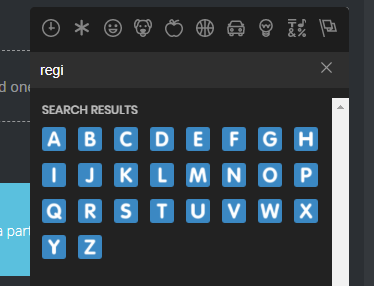


 weak magnet
Thank you @burnt hazel! I had to disable uBlock Origin for Chrome - not sure why it blocks just the letter emotes? The rest of them are fine. @_@
 charred badger
@dire yarrow I can't log in to dashboard i have tried my best i have tried different browser but it didn't work
 tired meteor
any adblockers/vpn that are on?
slender needle
(Answered in #〉volunteer-support )
 icy steeple
The MusikBot is sometime play Musik, but he play no sound. On the Dashbord can i see, he plays a song, but a few Minutes later is the Sound off.
icy steeple
Ok
 tropic moss
I am experiencing when I log in my servers dont show my servers It just shows this
ivory blaze
being helped in #463809001273032715
buoyant moon
Repeating weclome massage for same users.
marble quest
Are you sure the the user didn’t spam leave and join the server?
sick jolt
They said not one user but different users reason I said to post here
marble quest
Cause that screenshot only shows the role being given, so I would enable logging for when users leave the server, and double check that
Because the audit log wouldn’t show giving a role to a user if they still have it
sick jolt
yea reason I asked for audit log SS. First ss was sent in support 1. you can check that too
marble quest
Discord’s audit log wouldn’t show different users if it was the same user, 5 different users with the same user name and different discriminators joined within a short time period
But when the message gets send from mee6, it doesn’t show the discrim, so it looks like it is the same user, when it isn’t
And if it is a bug, it is a discord bug, not mee6 based on what I see
 shy flame
Can't get into the mee6 contol panel
 frigid ivy
''!clean 10'' not found
dire yarrowBOT
!clear [@name] [messages to remove]
!clear xto clear the last x messages (!clear 10)!clear @nameto clear all the messages of@name(!clear @MEE6)!clear @name xto clear the last x messages of@name(!clear @MEE6 10)
- I need Manage Messages and View Message History permissions
- Moderator plugin and !clear command should to be enabled
- Only users with Allowed roles can use the command, don't forget to add their roles in command's settings!
quaint agate
@frigid ivy
frigid ivy
thanks
quaint agate
mmhmm
 untold depot
sorry
how can ı fix this
Automated action failed
Zoom#4460 should have been banned for 4 days, but MEE6 does not have the required permission.
marble quest
move mee6's role above the highest role of the user that should be banned
dire yarrowBOT
Full List of my Permissions that I use...
• Read Messages, Read Message History, Send Messages is always needed.
• Manage Messages is needed for !clear, !slowmode and AutoMod Functions.
• Manage Roles is needed for Role Rewards in the Levels Module, !mute, !tempmute commands, Auto-role in Welcome Module, as well as Give/Remove Roles in Custom Commands.
• Manage Channels is needed for the !mute, !tempmute and slowmode commands
• Kick Members is needed for the !kick @user command
• Ban Members is needed for the !ban, !tempban commands
• Attach Files is needed for !rank command to show Rank card (otherwise will be shown embed version)
• Embedded Links is needed for the Streamer notification embeds and !rank Command to show Rank cards (otherwise will be shown text version)
• Add Reactions is needed for music-quiz plugin
• Use External Emojis is needed for correct displaying of MEE6 emojis in MEE6 messages
• Connect and Speak is needed for Music , Music Quiz and Record Modules (plugins)
marble quest
and make sure that mee6 has the ban users permission
quaint agate

 untold depot
Thx so much
quaint agate
Np
buoyant moon
596ffe674194402dad993d14823edd04
quaint agate
@buoyant moon dont spam/channel hop
buoyant moon
mb
quaint agate
also just he code dont help them
 cedar meteor
9eaf64007b33432abda9bee408044271
 slate shoal
it says i have no servers but i have like 38295034859043869043
slate shoal
ok
 white saddle
60ce7ab43db74f3986daa3e1a3902344
quaint agate
we might have a autage
wait a min and try again
 magic yacht
i made a server and MEE6 wont let me do anything to invite it
white notch
🔐 Because of lots of messages here we have had no option but to lock the server while devs have a look at the current issues (rank card not working, dashboard issues). You are not muted, only staff can talk here. Please be patient while it’s being investigated 🔐
buoyant moon
hey guys i think i have a huge problem with mee6 within discord. it doesnt wanne connect anymore to my account when it tries to connect sync ) it keep giving me a blanc page and some large link. I have already desync mee6 and now i cant even sync it back. This is already a few days. Please help
 thin tartan
Bonsoir, j'ai un soucis, je en peux pas inviter Mee6 sur mon serveur... une solution ? merci.
marble quest
Recevez-vous des messages lorsque vous essayez d'inviter mee6? (J'utilise Google Traduction)
@austere agate can you try using incognito mode
@thin tartan see what i said two messages up
 amber heath
Announcements so you can type it and the channel and the bot will say that
amber heath
What would that do?
slender needle
You can also enable “delete command usage” so that people only see the bot response
 orchid scarab
code: 7d211aee424147ed8f140543abfebb18
i got this when i tried to play some music
slender needle
Either music is having some (hopefully temporary) issues, or MEE6 is missing one of these:
dire yarrowBOT
Full List of my Permissions that I use...
• Read Messages, Read Message History, Send Messages is always needed.
• Manage Messages is needed for !clear, !slowmode and AutoMod Functions.
• Manage Roles is needed for Role Rewards in the Levels Module, !mute, !tempmute commands, Auto-role in Welcome Module, as well as Give/Remove Roles in Custom Commands.
• Manage Channels is needed for the !mute, !tempmute and slowmode commands
• Kick Members is needed for the !kick @user command
• Ban Members is needed for the !ban, !tempban commands
• Attach Files is needed for !rank command to show Rank card (otherwise will be shown embed version)
• Embedded Links is needed for the Streamer notification embeds and !rank Command to show Rank cards (otherwise will be shown text version)
• Add Reactions is needed for music-quiz plugin
• Use External Emojis is needed for correct displaying of MEE6 emojis in MEE6 messages
• Connect and Speak is needed for Music , Music Quiz and Record Modules (plugins)
orchid scarab
it has the full permissions
dense fox
Server name please?
orchid scarab
just a weird chat
orchid scarab
it is working now @dense fox
dense fox
Good
orchid scarab
thanks
dense fox
No problem
buoyant moon
Mee6 isn’t putting the automated warning message in channels. Is this happening to everyone? Or did someone mess up a setting on my end?
bitter zenith
probably doesn't have permission to embed then
or maybe even to send messages
!warn @bitter zenith no reason
dire yarrowBOT
 You can't warn a moderator.
bitter zenith
same channel?
buoyant moon
Yep
bitter zenith
so it's deleting and warning and not posting
buoyant moon
Log channel
bitter zenith
ok so that's a manual one
bitter zenith
or is that Mee6 named fred
buoyant moon
We named him fred 😂
bitter zenith
ok, cool
can you SS your chat channel for me with an image of the manual warn, and that it's posting?
just to verify
buoyant moon
bitter zenith
ideally with the name of the channel in the shot
but that's probably fine
hm
try kicking him and adding him back and see if that does anything
buoyant moon
Seems to have worked all of a sudden
Imma take a look and see did one of the admins troll
buoyant moon
No none of those logs
bitter zenith
that's too bad, cuz you could have searched for deleted warns that way
buoyant moon
Yea ignoring bots
bitter zenith
hard to say
could have been a glitch
you could have been trolled
or maybe they just thought it was cleaner
buoyant moon
I did openly say twice if someone was deleting those to come forward 👀