#〉bugs-reports
2 messages · Page 80 of 1
 bitter zenith
That's part of the issue. Sometimes you have to force a leave and join and sometimes you have to change server region as sometimes it's really bugged and staff has to check
 static pond
WTF did I just pay for?
I wanted to do one simple thing which should have been free, and now its seems worse that I paid for it
bitter zenith
Level roles more than 3 custom commands that are super flexible message logging. Bot master roles. Multiple twitch and YouTube channels
Playlist commands
Music dashboard
Other things
static pond
But NOT the ONE thing I paid PREMIUM FOR!
 versed drum
its bugged - bugs happen. They will fix.
bitter zenith
Which is very unfortunate and if you're dissatisfied you can request a refund
static pond
MUSIC DASHBOARD! nope
bitter zenith
<@&193123929701875712> will be happy to assist you in whatever ways they can
static pond
So disappointed as a whole. TeamSpeak did one thing and it was reliable. This thing is all about nickel and dimeing you To death. Boosts, and a whole bunch of jargin,,you are all being taken...About to cancel it all!
bitter zenith
if that's what you wanna do
static pond
And that's the attitude as well...OK BOOMER!
bitter zenith
ok kid, enjoy being salty
static pond
LOL...thanks for proving my point!
bitter zenith
you're welcome I guess?
static pond
Paid more worse issues, cancel if you want is the solution,, BUT NO FIX'
bitter zenith
ok, then fix it yourself
static pond
I apolgize you were corect
Cancel is the solution
Thanks for the HELP....I think...millenial help I guess it what I just received
bitter zenith
I mean, not really sure it matters what generation you're from
you act appropriately regardless
I have been
 limber knoll
@bitter zenith sorted
bitter zenith
thank you
 tribal stag
On the dashboard for the twitter plugin, it never loads, is there a fix for this? It worked for YouTube and twitch, but not twitter...
bitter zenith
Twitter has been having a lot of problems recently
I dunno if I can help with this
tribal stag
It would be great, if they can fix this ASAP
bitter zenith
indeed it would
 delicate tendon
can some1 help me plz, im doing .!clear 1000 and it doesnt work
 long dawn
Do not channel hop please
 west jasper
There is a problem with the YouTube plugin, it worked earlier but now it’s not even loading.. any tips?
west jasper
Really? Wow
 buoyant moon
MEE6 website tends to not work when using the Google Chrome browser. You can access the dashboard, but when you attempt to click and button like moderation or something, it loads with dots, but just stays grey. I’ve tried reloading the screen, but still does not work.
long dawn
Try incognito mode @buoyant moon
buoyant moon
Ok
buoyant moon
The mee6 premium purchasing buttons don’t work at all on safari
 dire yarrowBOT
Internet Explorer? Edge? Safari? Ew... :nauseated_face: It's time to use REAL BROWSER!!!
• Firefox: https://www.mozilla.org/firefox
• Chrome: https://www.google.com/chrome/
• Opera: https://www.opera.com/
Note: If you use Windows XP or Vista, consider upgrading your system to a decent version because these stopped getting updates. Chrome on these are unsupported too so the MEE6 website will not work on it. As an alternative you can try to use Firefox.
long dawn
My dashboard works fine on Safari, but I recommend using Google Chrome
 ebon scarab
youtube plugin for channel not working
 slender needle
Try again in two hours
Apparently, putting two invite links in a row keeps it as a valid link that Discord doesn’t embed and that bypasses the invite links filter (taken from #〉chat )
 sharp ridge
Halfway through music quiz it stops and I get this
long dawn
It should reset in a few minutes
sharp ridge
Ok thank you
 long dawn
He’s probably on phone
sharp ridge
Yes, I'm on mobile
buoyant moon
Internet Explorer? Edge? Safari? Ew... 🤢 It's time to use REAL BROWSER!!!
•
Firefox:https://www.mozilla.org/firefox
•Chrome:https://www.google.com/chrome/
•Opera:https://www.opera.com/Note: If you use Windows XP or Vista, consider upgrading your system to a decent version because these stopped getting updates. Chrome on these are unsupported too so the MEE6 website will not work on it. As an alternative you can try to use Firefox.
@dire yarrow I tried chrome it didn’t work either
 bitter owl
@buoyant moon You can use safari on iPhone. But try using the website in landscape to get access to full functions
When you landscape your phone the website turns into desktop mode
buoyant moon
Nothing
long dawn
Google hes having payment problems.
buoyant moon
I stated the full problem in #463809001273032715
bitter owl
Got it, let me go a check
 slate topaz
my custom commands / twitch and twitter plugin don´t work. somebody got the same problem?
limber knoll
@slate topaz twitter we know about, as for custom commands what sort of commands?
twitch can be delayed in posting, just ensure the bot can send messages in the channel (!rank tends to work if the levels plug-in is enabled), you can edit the channel back in if needed as well
slate topaz
I did set up custom commands plugin with example "!gm" for good morning - bot does not react - two days ago it worked
twitch worked too some days ago and then it stopped for some reason - I did not change anything 🤷♂️
buoyant moon
it is saying oops something went wrong and telling me visit this support site. it also gives me a code, can somebody please tell me what to do ?
limber knoll
@buoyant moon what was the command used?
@slate topaz dm invite to the server please
limber knoll
how long ago?
limber knoll
@buoyant moon try !leave then !play
limber knoll
np
 left wyvern
f0876875e863492a986540d739d6df7a
 oblique glacier
hi there, i got some issues of Mee6 in the server, it said"Something went wrong in MEE6 land! Contact our support team for instructions if this keeps happening.
code: 42101c8582634624a4e53d4727779fd5"
 subtle moon
@oblique glacier what command?
oblique glacier
!play (link)
dire yarrowBOT
 LhyMatthew, this command is disabled in this channel
left wyvern
@dire yarrow fdjgngjfgebgkljnroingeklrfnfnjdfhwejfnifue omg this is so dumb why r u so broken code: f0876875e863492a986540d739d6df7a
subtle moon
music has some issues rn, devs are avare
oblique glacier
@subtle moon oic, thx !
subtle moon
np
oblique glacier
@faint dome i will try, thx for the suggestions!
 calm summit
Days and number of infractions seen to be bugged
calm summit
Nope same thing
 burnt hazel
is that safari? @calm summit
burnt hazel
Thanks, i've passed the bug on. ❤️
 tired meteor
so found a small bug, nothing big, but one of my subscriptions says that i payed 99.90 for one of my subscriptions, even tho my billing history and my payment history say something else
 wooden mountain
@tired meteor you haved used a coupon code for that invoice
a coupon that you probably found in a YouTube video
tired meteor
that was for the 2nd one, the first was from jeff
wooden mountain
i see....
there was a update somewhere in between those 2 payments
and the amount that is saved to show in the billing history changed from "invoice amount pre coupon" to "paid amount"
the payment processor did not migrate the old data over to the new system
tired meteor
ok
 frail quail
wooden mountain
frail quail
wooden mountain
try again
buoyant moon
don't work
wooden mountain
then try again
it's litterly a hit or miss right now
hi, try again in a couple minutes
 astral citrus
 low lynx
@wooden mountain sorry for the ping, but you can delete the image? If it use an vpn is good but now, we can see the IP of Simon* 🤔
Thanks!
 dry void
I have a problem I can no longer access the role reaction web manager
 sick jolt
_ans in #〉volunteer-support _
 velvet jungle
Invalid variable for last 10 infractions.
 faint dome
known one, fix is coming asap
dire yarrowBOT
in order for Mee6 to find your YouTube channel, you need:
- 3 or more videos
- your the most viewed video needs to have sufficient views
- it takes some time (up to couple days) for YouTube to index your channel
only once YouTube has indexed your channel, we will be able to find it.
 still breach
The 24/7 music feature and playlist is kinda buggy, aware it's new. Some issues, the bot randomly stops playing music and when you try and make it play it'll stay stuck on 0:00 (right at the start of the song and not play anything) so you'd have to make the bot leave and rejoin then restart the music manually. Loving the feature though
versed drum
Its a known issue - they are working on it. See pinned messages in #〉volunteer-support
buoyant moon
When some people on my server go !rank it says something went wrong in mee6 land
bitter zenith
can you list the Name or ID of the server and ping the Support role for me?
buoyant moon
703468346225590354 <@&193123929701875712> sorry for responding late
limber knoll
@buoyant moon try again later
 fringe rose
I am having a problem where I cannot hear music that MEE6 is playing it is showing green that its playing something but no one in the voice channel can hear it. anyone else having this issue?
I am an admin of the server and MEE6 has all the admin permissions.
limber knoll
@fringe rose make sure you haven't muted mee6, if need be use !leave then !play
fringe rose
he is not muted just added him yesterday.
 severe burrow
 red wyvern
how is mee6 offline ?
long dawn
We need your server ID and the staff will look into it
buoyant moon
I had the same problem. MEE6 went offline and I'm unable to access his dashboard. It won't load.
 marble quest
yeah, seems like a staff member is looking into it, so just wait for now
buoyant moon
K
 ivory blaze
yes we're investigating
red wyvern
709861303757307925
buoyant moon
It doesnt seem like a discord wide issue so Im gonna go get my server ID
 analog herald
how is mee6 offline ?
buoyant moon
690298557768663383
marble quest
staff are looking into it, please be patient
buoyant moon
.
analog herald
159985870458322944
buoyant moon
I feel like thats a channel ID... but idrk
analog herald
Is it the staff?
buoyant moon
... How could staff cause a bug
marble quest
no, staff are looking into the issue
buoyant moon
We need to stop making these guys repeat themselves ;-;
analog herald
Aaaa already
buoyant moon
?
Screenshot of said offline MEE6
Mine is offline as well
Yep its discord wide ;-;
gg
its the bot.
marble quest
staff are looking into it, please be patient
buoyant moon
But how come its online in this server
Im starting to think @marble quest is a bot.
marble quest
i am not
buoyant moon
lol
He's repe-
hes chilling
vibing
true
ok well
gl with the bot homies
Ive gotta !clear me being homophobic
jk
dire yarrowBOT
 Mitch#8296 has been warned
Reason: Bad word usage
dire yarrowBOT
Mitch#8296 has been warned
Reason: Capital letters
sick jolt
it is here
buoyant moon
The bot
@dense fox
Fix the bot
Well thats your second warning dude
I'd be careful
Lol why
Its a support server where the staff say
the same thing over and over
Ok
but the thing is
Im sure after a certain amount of warnings
So my man can spam me?
but he cant be online in my server
What would happen after a certain amount of warnings
Its a bug in the bot.
anyway
You could get banned/kicked
dire yarrowBOT
Mitch#8296 has been warned
Reason: Bad word usage
marble quest
they left the server
buoyant moon
i knew you couldn't put a-
marble quest
and you forgot a time
 dense fox
Good
buoyant moon
.
dense fox
I was screwing up anyway.
marble quest
yeah
buoyant moon
Well uh
dense fox
multitasking
buoyant moon
im just gonna wait
dense fox
Tysm
buoyant moon
i imagine that sucks.
analog herald
Is it ready?
analog herald
I'm sorry for my English, but I don't open up very well English
marble quest
@buoyant moon you would muted or banned depending on how many warnings you have
analog herald
Ready I can take it now.
 wild shoal
my server is not showing up in the dashboard
dire yarrowBOT
It appears that you may be on the wrong account, or something went wrong since the time you logged into my website.
-Please navigate to https://discordapp.com/login and select the gear :gear: in the bottom left, then press Logout.
-After that, please navigate to https://mee6.xyz/logout to disconnect from my website.
-Once finished, select "Add to Discord" again, and follow the instructions to access my dashboard again.
https://cdn.mee6.xyz/s/logout.png
 marble quest
try that and then try it again @wild shoal 
wild shoal
okay thanks!
dire yarrowBOT
 TheClosetShadowGuest#0345 has been warned
Reason: Bad word usage
TheClosetShadowGuest#0345 has been warned
Reason: Bad word usage
TheClosetShadowGuest#0345 has been warned
Reason: Bad word usage
TheClosetShadowGuest#0345 has been banned
Reason: Too many infractions
dense fox
omg
analog herald

 broken girder
Is it just me, or @dire yarrow isn't notifying my server whenever I post something on twitter or youtube, ping me if you know how to fix this please
marble quest
i think twitter is still having an issue, but for youtube, make sure that mee6 has permission to send messages in that channel @broken girder
broken girder
Yes it has it
wait let me send a screenshot
Here it is, but for some reason it is not notifying the server
marble quest
try using !help in the announcement channel
marble quest
doesn't matter, just use !help and you should get something
broken girder
I got this
marble quest
and that is in your announcemnts channel, right?
broken girder
ye
marble quest
are the videos that are posted listed videos?
broken girder
public/posted
marble quest
hmm, try removing the channel and then readding it
broken girder
the announcement?
to delete and create it again?
I can't delete the channel cuz I have a lot of stuff there, but I disabled and enabled the twitter, I posted a tweet and it still didn't notify the server
@marble quest
☝️
 quaint agate
i think twitter is having some issues
marble quest
No, I mean remove your channel from the YouTube plugin, save it, then readd it
And Twitter is another issue
quaint agate
when sending to mee6
marble quest
Like I said above
broken girder
No, I mean remove your channel from the YouTube plugin, save it, then readd it
@marble quest that's what I did, imma post another video tomorrow and Imma let u know if it will notify the server
And Twitter is another issue
@marble quest and ye, it doesn't work
 ebon prawn
Twitter is trying to get fixed ASAP
 neat kestrel
i cant hear the music of the bot
ivory blaze
should work now
neat kestrel
its working now thanks
again the same
se says :SLEEP6: Something went wrong in MEE6 land! Contact our support team for instructions if this keeps happening.
code: dfe504d692124a31b65a56a96fac5698
ivory blaze
be patient and try again later
neat kestrel
ok
buoyant moon
!rank
dire yarrowBOT
ukaszGociski, this command is disabled in this channel
ivory blaze
 remote mango
Is there something wrong with the music player?
SLEEP6 Something went wrong in MEE6 land! Contact our support team for instructions if this keeps happening.
code: 27cb9e94327543069444951324f45386
neat kestrel
AGAIN
wooden mountain
wat nu weer?
 neat kestrel
code: e56ace2f7fcc4c288e9124efc60b02e4
wooden mountain
ooo, that error
we are looking into it
would have helped if you would have mentioned the command
neat kestrel
wooden mountain
yes, we are working on fixing it
 inland grove
code: 3ce2cad2fbaf4fe5a19dbf26fda78038
wooden mountain
we are aware of the issue and working on a fix
inland grove
thnk
 mortal oxide
 MEE6 is not responding. The issue has been reported to the Developpers Team. Thanks for your patience!
Note: please, do not DM Staff.
marble quest
can you double check that the user is still in the server
marble quest
yeah, you can't warn a user that isn't the server
 rigid canopy
Okey thx
 ivory matrix
Mee6 offline
slender needle
it was offline earlier, check #〉status-updates
slender needle
I think that it should be back online? but there might still be some places were it offline
@rustic canopy what part of it isn't working? is it loading forever? or is it just a gray screen?
 rustic canopy
the website tells me that I have no server while I am on the right account please help me
dire yarrowBOT
MEE6 says I have no servers, but that's not true...
Well, that can be caused by:
‣ You don't own any servers
‣ You don't have Administrator permissions or a bot master role on any server you're on
‣ You're logged on with a wrong account (the most common problem)
Third one can be fixed by following these steps:
1. Logout from Discord in your browser (not installed client or mobile app)
1.1 Open https://discordapp.com/app in your browser
1.2 Click on \⚙ icon (User Settings)
1.3 Scroll down, click Log Out and confirm action
2. Logout from MEE6 website
2.1 Open https://mee6.xyz in the same browser
2.2 Click on avatar icon in upper right corner
2.3 Click Logout
3. Login using correct account
3.1 Open https://mee6.xyz and click Login button in upper right corner
3.2 In new window login to Discord. After that you will be redirected back to MEE6 website
3.3 That's all! Now you're using correct account and MEE6 website lists servers where you can modify his settings
P.S. If you're on mobile and some elements are not visible, enable Desktop site mode or switch screen to Landscape (vertical) mode.
rustic canopy
Thanks
slender needle
np
dire yarrowBOT
 DjSenne#9050 has been warned
Reason: Posted an invite
 stuck solstice
WOW
 restive jackal
lit
 thorn grove
buoyant moon
thorn grove
buoyant moon
!rank
dire yarrowBOT
ukaszGociski, this command is disabled in this channel
mortal oxide
Please, use #〉commands next time
dire yarrowBOT
 -vZaGoR#1171 has been warned
Reason: Bad word usage
-vZaGoR#1171 has been warned
Reason: Bad word usage
 rancid arch
mee6 timer sometimes didn't work
mortal oxide
The channel need to be active. If the last message was from a timer, MEE6 won't send any timed message
 teal bronze
what is with the link ;-;
teal bronze
ok
mortal oxide
Allow this:
wooden mountain
@mortal oxide wrong, first results was a ad, that link is the ad
wooden mountain
Ads can randomly pop up as first results, not always
mortal oxide
Ok
 tawny hemlock
Sometimes MEE6 stops playing, says the queue is empty, and that there isn't anything playing when I feed it music. The music plugin dashboard says that the music is still playing and in the queue, but the bot thinks otherwise, and there is no sound coming from the bot itself.
The only way to fix it is to have MEE6 exit and rejoin the VC, but that gets tiresome when I have to do it every other song.
faint dome
yup, known bug
to make it short, sometimes discord disconnect us to avoid overused voice servers, and it breaks some MEE6 code currently
devs are aware and working on it
tawny hemlock
gotcha, ty
dire yarrowBOT
 𝔏𝔢𝔬𝔫𝔦𝔡𝔞𝔰#6969 has been warned
Reason: Bad word usage
buoyant moon
Hi I have this message when I try to do the !clear command
:SLEEP6: Something went wrong in MEE6 land! Contact our support team for instructions if this keeps happening.
code: 451b6059c1cc484cb7b8d04f7f111260
slender needle
does MEE6 have the "manage messages" permission in that channel?
as well as the "read message history" permission?
buoyant moon
How can I check if the the bot have the permission ? ^^
slender needle
go to server settings--> roles --> MEE6
buoyant moon
Hi,
Little writing problem:
faint dome
thanks!
buoyant moon
Please!
go to server settings--> roles --> MEE6
@slender needle ok thank you it works
slender needle
np
broken girder
The twitter plugin is not working again... It worked once yesterday but today it stopped working
nvm it just did it
a little late but it's alright
wooden mountain
@broken girder how much late?
broken girder
@broken girder how much late?
@wooden mountain Like 2 min
broken girder
kk
wooden mountain
usually it's under 10 seconds
broken girder
ye
wooden mountain
but sometimes its a couple min
broken girder
alright
ivory blaze
MEE6 is taking a quick nap, we will be back soon
Server is locked - you're not muted
Don't DM staff
 brave bone
 vague tulip
Bug: mee6 is not playing music as when I say !play marshmello alone or any other song
wooden mountain
got fixed a couple minutes ago @vague tulip
wooden mountain
😄
 tribal parcel
Such a vulnerability occurs when 2 share invitation links.
wooden mountain
interesting, thanks for the report
tribal parcel
:")
 keen sluice
Bonjour, j'ai juste une petite question: j'ai activé les logs des actions du mee6 mais j'aimerais qu'il marque dans le salon seulement les joueurs bannis, (pas les changements de pseudo, etc). Je crois que c'est possible mais où il faut que j'aille ? @mortal oxide
Merci😉
mortal oxide
Bonjour @keen sluice  ! Il faut que tu ailles sur notre site internet https://mee6.xyz puis tu sélectionnes ton serveur. Ensuite tu vas dans le plugin "Modération", avec ce logo
slender needle
Such a vulnerability occurs when 2 share invitation links.
same happens with texthttps://discord.gg/mee6 I believe
wooden mountain
@slender needle that message doesn't get deleted because the invite leads to this server
but text in front won't break it
text after it will, but at that point the invite itself breaks
keen sluice
@mortal oxide je pense que tu ne m'a pas compris je vais mieux m'exprimer
Comment faire pour que ce que j'ai entouré apparaisse et ce que j'ai barre n'apparaisse pas ?
faint dome
Il suffit de sélectionner les bons événements, donc ici déselectionner ceux relatifs aux utilisateurs
keen sluice
Ah ok c'est juste que toutes les pages sont en anglais et j'ai un beug je ne peux pas les traduire.
Merci😉
faint dome
Ah étonnant, pourtant tout le tableau de bord est traduit en français .-.
J’en ai moi même traduit la majorité
mortal oxide
Oupsss je fus occupé !
@keen sluice tu peux changer la langue du site web en cliquant sur ta photo de profil
keen sluice
Voilà la il faut que j'aille ou ?
faint dome
C’est la partie événements des membres je crois
« Utilisateur modifié » pour les avatars etc, et « surnom changé » pour le screenshot que t’as envoyé plus haut
mortal oxide
Tu fais glisser ton doigt de bas en haut
 keen sluice
...
faint dome
t'as trouvé ?
keen sluice
Oui merci
faint dome
nice 
faint dome
quand le bot sera traduit en français, il y aura le même nom sur le message que dans le tableau de bord, ce sera plus simple x)
keen sluice
... 😅😂
 deep sentinel
Bonjour , bessoin d'aide@faint dome
Mon compte n'arrive pas à se co au panel de mee6
faint dome
plus de détails ?
deep sentinel
Genre sa reste une page blanche des que je me suis co
faint dome
hmmmm
quel url ?
deep sentinel
le site de Mee6
faint dome
c'est pas ce que j'ai demandé ._.
deep sentinel
mortal oxide
Yup
@deep sentinel Bonsoir , c'est moi qui vais prendre le relais de Z_runner.
Qu'essaies-tu de faire ? Petit cliquer sur le bouton "share/partager" pour que je sache où tu tentes d'aller s'il te plaît ?
deep sentinel
Juste informer vos utilisateurs ne pas aller sur Google sa marche pas mais sur Chrome si@mortal oxide
mortal oxide
Ca fonctionne pour ma part
Je possède un Samsung Galaxy A70 sous Android 10 Q
Après, Google n'est pas un navigateur web à proprement parler. Nous recommandons l'utilisation de Google Chrome, Mozilla ou Opéra
dire yarrowBOT
Internet Explorer? Edge? Safari? Ew... :nauseated_face: It's time to use REAL BROWSER!!!
• Firefox: https://www.mozilla.org/firefox
• Chrome: https://www.google.com/chrome/
• Opera: https://www.opera.com/
Note: If you use Windows XP or Vista, consider upgrading your system to a decent version because these stopped getting updates. Chrome on these are unsupported too so the MEE6 website will not work on it. As an alternative you can try to use Firefox.
 pearl kettle
I don’t like people asking what age I am
quaint agate
@pearl kettle Not the channel
pearl kettle
Oh
vague tulip
@wooden mountain the music still not works
dire yarrowBOT
matthew, that command is disabled in this channel.
 craggy pumice
Hello when I want a new member setting (role givven it can't setting it plz say why)
ebon prawn
Have you enabled this in welcome page @craggy pumice
craggy pumice
I have enabled
dire yarrowBOT
You can give members a role on join through the welcome plugin 
https://help.mee6.xyz/en/article/give-a-role-to-new-members-autorole-1irdljy
https://cdn.mee6.xyz/s/autorole.png
MEE6 Helpdesk
With MEE6 you can automatically give a role to new members that join your server with the autorole feature.

Role hierarchy is important for me to give out roles. Oh and also Manage Roles perm:
https://cdn.mee6.xyz/s/fix_hierarchy.gif
 ebon prawn
@craggy pumice those may help you if not ping me
faint dome
 MEE6 is down/doesn't answer!!!
YES we know, and we are working on it! Bot and dashboard should be back ASAP
Please keep calm, take a cookie, and wait for our devs to find the bug 
Also DO NOT DM STAFF for any reason, thx
server will be open once everything is back
 worn cloak
test
 tidal carbon
Music is a down again and I know all of you guys probably know this I’m just saying this so one person won’t ask you
 chilly flint
!rank
dire yarrowBOT
Krispz, that command is disabled in this channel.
chilly flint
oh wrong channel
 true swift
Hello g small problem with mee6! Mee6 does not my youtube notifications and also it does not automatically role in welcome
 tired pilot
!yt
dire yarrowBOT
I'm not announcing YouTube video's or live streams in your server? Sorry 😦 but if they don't inform me then I can't announce it in your server.

@doubble you know how notifications don't get send out to subscribers and videos sometimes take days before they show in the subscription feed of your subscribers? That also effects us. If @youtube doesn't notify us then we can't forward it to your Discord server...
 Twitter
 queen epoch
true swift
queen epoch
true swift
hello g a problem with mee6! Mee6 no longer my automatic role when people come
 jaunty stratus
Hello, not sure if this is a bug or not but is there something wrong with the music?
It works but the voice is very bad quality, it is not my net connection
jaunty stratus
Yeah i just saw the audio quality is very good here, unlike in my server, any idea why it would be bad in my server?
wooden mountain
try changing the server region
in discord => server settings => overview => server region
some discord voice servers are currently overloaded
jaunty stratus
Ohh okay, may i ask which one you use?
wooden mountain
we are currently on europe
but i know the europe region gets overloaded every day, in a couple hours
so then we will change again
jaunty stratus
Okay, i will try that. Thanks for the help, much appreciated 
true swift
okay
vague tulip
@wooden mountain mee6 does not play music
vague tulip
Ok but it does not work
I say !play (music) it says playing but he is not playing it
wooden mountain
@vague tulip thanks for the report, but i wasn't available at the time, have you considered pinging someone who is online, you know, someone like <@&193123929701875712> or maybe even <@&193123929701875712> or if you are lucky, <@&193123929701875712> might be online and able to help
but not me, i'm in a meeting
vague tulip
ok,thanks!
 robust notch
Hello, I recently played a music quiz, it played all songs, but even though we guessed some songs right, the bot never counted as right answers
For example, once I guessed Stronger - Kelly Clarkson and the bot replied It was: **Stronger - Kelly Clarkson**
at the end, we all had 0 points regardless of we guessing right a few songs
 flat apex
quiz starts and finish after 1min without any sound 🙄
limber knoll
@jahirfiquitiva#1644 screenshot please
buoyant moon
Can someone help me? i tried to add Mee6 bot to my discord server. And they warped me there
marble quest
what browser are you using?
buoyant moon
i dont know but its not chorme 😂
marble quest
try using chrome
slender needle
also, is that android?
buoyant moon
Yes
slender needle
!android
dire yarrowBOT
 marble quest
that is a 400 error though btw
buoyant moon
Thanks so much 👌 i will try
marble quest
so try using google chrome to see if that helps
buoyant moon
it worked thanks so much for help guys 😇
marble quest
np
 late orbit
Hi I have a problem I cannot get into the YouTube section it has 3 white dots flashing across constantly. Here is also a screen shot of it
slender needle
@late orbit try again in about 2 hours, as the youtube rate limit has to refresh
late orbit
It was like this yesterday also
slender needle
it will work after 3 AM EST
late orbit
Thank you so much for your help
 gilded yacht
Can probably be fixed by using Incognito mode @buoyant moon
slender needle
Not for the youtube plugin
 static gazelle
nnnnn
limber knoll
Looking into Mee6 being slow/not responding, please be patient until we're back
mortal oxide
As usual guys, please do not DM staff for any reason.
Thank you for your patience  , we will be back soon!
mortal oxide
About "I didn't see my servers on the dashboard"
Yeah, I would say that it is totatally normal. To know what server you can manage, MEE6 need to be fully online (which is not the case right now). So you can see 0 server on our website, refresh the page and now magic you can see 2 servers. It is pretty random.
MEE6 is online on friend's server but on mine, why 
To make it simple, just imagine MEE6 is a really big, Big, BIG, BIG man. MEE6 is too big. So we have to split MEE6 (rip...). Result: we have a huge number of little MEE6: MEE6_1, MEE6_2, etc. So when MEE6 takes a nap like it does right now  , we have to wake up each little MEE6 one by one.... Sigh and it is really hard for us. They have a deep sleep to be honnest. All you and us can do... is wait
  .
.
I planned to buy Premium but, huh guys your bot is always offline....
Yeah, we know that and we apologize to all our users, premium or not 🙏🏻. Since the beginning of the contaiment, Discord and us are suffering from some connection issues.... But MEE6's Dev are working on it hard to be sure this won't happen anymore!
Thank you all for you patience!
 elder patio
I have tried to delete message but it didnt work
even I invited the bot again,how could I fix that?
marble quest
you need to enable the Moderator plugin @elder patio on the dashboard
 sacred bloom
@marble quest
how does the auto punishment work?
elder patio
I need to go to premium to enable message deleted? @marble quest
dire yarrowBOT
Modular
I am currently a modular bot. Nothing will be enabled by default and must be enabled in each plugin manually.
So to enable the plugins, go to https://mee6.xyz/dashboard and select your server.
 marble quest
basically after a user gets a certain number of infractions, mee6 will do some action @sacred bloom
dire yarrowBOT
Automated Actions
• Insert the punishment you want to be performed first at the top and the rest will be from lesser to harsher respectively, refer to pic to use as a guide.
• Do not forget that MEE6 need the following permissions:
- BAN
- Kick
- Manage Roles

 MahmutTKLKSK#7441 has been warned
Reason: Bad word usage
 short moss
spam?
 pure willow
warn time
 timber remnant
!rank
marble quest
@elder patio you just need to enable the moderator plugin for mee6 to be able clear messages
dire yarrowBOT
MahmutTKLKSK, that command is disabled in this channel.
pure willow
warn time
marble quest
you can use that command in #〉commands
 cinder peak
hi
timber remnant
Yes
sacred bloom
@marble quest
thanks for the help
marble quest
np
elder patio
the message deleted func here is not checked
marble quest
oh, one thing though
elder patio
and it said I have to go to premium to do so
marble quest
@sacred bloom flip the order of thta screenshot so the highest number of infractions is on top, and the lowest is on bottom
@elder patio correct, logging deleted messages is a premium feature
elder patio
😦
slender needle
however, you can delete messages using the !clear command, which is not premium
dire yarrowBOT
!clear [@name] [messages to remove]
!clear xto clear the last x messages (!clear 10)!clear @nameto clear all the messages of@name(!clear @MEE6)!clear @name xto clear the last x messages of@name(!clear @MEE6 10)
- I need Manage Messages and View Message History permissions
- Moderator plugin and !clear command should to be enabled
- Only users with Allowed roles can use the command, don't forget to add their roles in command's settings!
buoyant moon
i have made it
elder patio
however, you can delete messages using the
!clearcommand, which is not premium
@slender needle so what does message deleted actually do? return the deleted mess?
slender needle
logging messages allows you to see when and who deleted a message
elder patio
oh
buoyant moon
MEE6 under his skin is Red
elder patio
LoL
slender needle
and when they were edited
buoyant moon
so under the skin of MEE6 is his evil side
elder patio
I want that :<
elder patio
hmm
 steel silo
anyone know why my bot is offline
elder patio
ok
sacred bloom
for 1 minute which means ???
slender needle
1 minute = 60 seconds
so they will have the muted role for 60 seconds
and will not be able to talk during that time
broken girder
everything under 5 min is ook
@wooden mountain I posted something again, and it didn't notify the server, it passed almost 10min..
sacred bloom
EXTERNAL LINKS how to make bot not punish gif in discord ?
slender needle
add tenor as an allowed website
broken girder
for 1 minute which means ???
@sacred bloom the person u want to mute is gonna get muted for only 1 min, then he will get unmutede
sacred bloom
add tenor as an allowed website
@slender needle
how to do it ?
slender needle
try adding https://tenor.com to the list of allowed sites after pressing "settings +"
then press enter
sacred bloom
@slender needle Thank you so much
slender needle
np
 formal stump
i think something is wrong with the bot because its not auto giving roles or giving welcome
sacred bloom
@slender needle
Why is there no Russian chat help?
slender needle
we allow people to ask in any language anywhere
formal stump
i think something is wrong with the bot because its not auto giving roles or giving welcome
slender needle
sometimes, that means that people can't get a response as quickly
sacred bloom
we allow people to ask in any language anywhere
@slender needle отлично
formal stump
o
slender needle
@formal stump if you back, is the plugin/welcome message option still enabled?
vague tulip
<@&193123929701875712> mee6 music is not working when i say !play or even !search
sacred bloom
tempmute раньше показывал пример наказания в 1с 1м 1ч когда пропиваешь команду теперь не показывает из за чего это ?
vague tulip
tempmute used to show an example of punishment in 1s 1m 1h when you drink a team now doesn’t show what it is for?
That is what you said
slender needle
what's your timezone?
formal stump
new york
slender needle
it should have been up then
 solid owl
I wanna report someone, can someone help?
Oh this is bug-report.. I thought it was bug-or-report
dire yarrowBOT
Reporting an Issue
If you were raided or something against Discord (ToS - Term Of Services) is going on in your server, use the following link to send your report to discord:
sacred bloom
REPEATED TEXT
When someone you mention in one text is punished, and when you write dressed several times, he does not punish how he will correct it?
@slender needle
sacred bloom
:c
buoyant moon
Hola quiero reportar que no me deja registrarme en la pagina de Mee6 para ponerlo en mi grupo ayuda
se queda en blanco
<@&193123929701875712>
sacred bloom
!duptext
@slender needle strange doesn't work.
no effect
marble quest
@buoyant moon ¿Puedes intentar usar el modo de incógnito en Google Chrome? (Estoy usando el traductor de google)
buoyant moon
Oh ok i will try
dire yarrowBOT
Repeated/Duplicated Text
• You can't be owner/bot master/admin to test it
• You must ask normal users to test this feature
• Repeated text is different than spam (same text in a lot of messages)
This is a repeated text:
text text text text text text text text text text text text text text text text text text text text text text text text text text text text text text text text text text text text text text text text text text
What was the command Alex
sacred bloom
@slender needle Well, this is when one message and when at intervals 2 times sending one and the same as flood?
buoyant moon
@marble quest really thank you very much its worked for me thank you
marble quest

slender needle
@long dawn !duptext
long dawn
Alright thanks!
slender needle
np
dire yarrowBOT
 OpuruHaJi#4623 has been warned
Reason: Mass emoji
limber knoll
@umbral spindle try clearing the cache
 radiant plover
<@&193123929701875712> Is there currently a bug in the music player?
Issues:
- Cuts off after a few songs, did today on song 1
- NO volume / wont play
- Commands not working in the text channel to control the player.
LOVE this feature - just wondering if you had experienced any connection issues.
Thanks!
limber knoll
@radiant plover we just restarted it
radiant plover
working now - thank you!
limber knoll
cool
 umbral spindle
@umbral spindle try clearing the cache
@limber knoll sorry but i dont understand you. Do you mean my pc cache?
limber knoll
yes
dire yarrowBOT
 SC-CynicalKP#6086 has been warned
Reason: Bad word usage
 lucid garden
ignores bots even if i have this unchecked
quaint agate
yep its an issue right now i think they know
lucid garden
oh
 void tiger
e5a6127078ce43cca21e2018babc9e48
 stable lintel
dire yarrowBOT
stable lintel
dire yarrowBOT
You can access my dashboard at https://mee6.xyz/dashboard, and login with your Discord Account.
or you can use !dashboard in your server for a direct link
limber knoll
@stable lintel you edit it in there, what part is giving the error?
mortal oxide
Works fine here @twilit crest, please try !leave and !join
Hello @buoyant moon ! Please, consider using a real browser like Mozilla, Google Chrome or Opera. But not "Google app"
 twilit crest
im not sure when you use !play song_name sometimes bot say Now Playing ... but song didnt start play
mortal oxide
it works fine, true fact
twilit crest
and sometimes music stop in half
mortal oxide
Yeah, I can't explain you why
 upbeat sundial
I'm having issues with the mee6 music quiz, it wont recognise any answers and wont pass
 honest owl
i cant even get onto the MEE6 site?? i have premium. why??
tired pilot
What perms do you have on the server
upbeat sundial
for me, i have admin perms
tired pilot
I am sorry I don’t understand the music quiz
buoyant moon
b
 rich spade
I have given MEE6 every single permission and when someone says a bad word, it says that MEE6 does not have the required permissions even though it has every permission
marble quest
Including manage messages and read message history?
tired pilot
@frozen inlet what ?
 frozen inlet
Waht taht
tired pilot
Ok can you use Crome for me
dire yarrowBOT
 Osman_tv#5620 has been warned
Reason: Bad word usage
frozen inlet
Sorry
tired pilot
Use google chrome any try again
marble quest
!android
dire yarrowBOT
marble quest
Try this as well
frozen inlet
Ok
marble quest
Including manage messages and read message history?
@marble quest @rich spade
frozen inlet
marble quest
Did you try the steps in the image mee6 shows
frozen inlet
Waht is that
marble quest
frozen inlet
I know but it doesn't go with me, please, I like this bot so hard
Plss
Help me
@marble quest
marble quest
So did you try using incognito mode on chrome?
frozen inlet
I have it omg it never works
marble quest
Did you follow the last three steps then?
frozen inlet
Thx
For you help i love dies bot the bot ist the best bot der world
@marble quest kenn you plss boost my server plss i have not money
marble quest
No
marble quest
No
dense fox
Enough now
frozen inlet
no one wants to boost me my parents don't want to please have once wallah once

rich spade
yes @marble quest
marble quest
Does it have administrator @rich spade ? If not, can you give it that to test it
rich spade
Yes, it has administrator
dense fox
@frozen inlet Enough now, no one wants to boost and they dont have to. Please move on.
rich spade
Also, the music quiz won't recognise anything we said
we said the correct answers before
frozen inlet
keiner will mir boost an euch alle ich schwöre ich mein das wircklich ernst meine erltern hassen mich bitte nur ein mal gönnt doch bitte hab keine freunde nur 2
marble quest
Hmm, not so sure. Can you try kicking and re adding the bot
rich spade
oki doki
dire yarrowBOT
Lets spice this up a bit! https://discord.gg/mee6
If you want to invite the bot instead... https://mee6.xyz/dashboard
 naive dust
@Osman_tv#5620 why u asking here to boost ur server lol, thats not the right server for doing that kind of stuff
 coral spade
some times the music stops, and i need to use !leave and !join in order to works again, it's just me? or it's a common issue?
coral spade
ok, thx!!!
quaint agate
Np
 prime iron
!rank isnt working
buoyant moon
it breaks all the time
prime iron
oof
buoyant moon
rip mee6
 versed briar
Tried t go to the dashboard.. Got a 503 Service Unavailable. Is that me or..?
versed briar
RIP
 weary sage
!rank isnt working
 prisma hornet
yeah
buoyant moon
I've been observing a 20% to 50% "500 - Internal Error" failure, when using the Twitter Search. (worked fine before the restart)
See the graph at https://i.imgur.com/PQjwAKz.png for historical uptime of the last 50minutes. ("Mee6 up" roughly indicates the time when the server went out of lockdown. Time is in UTC)
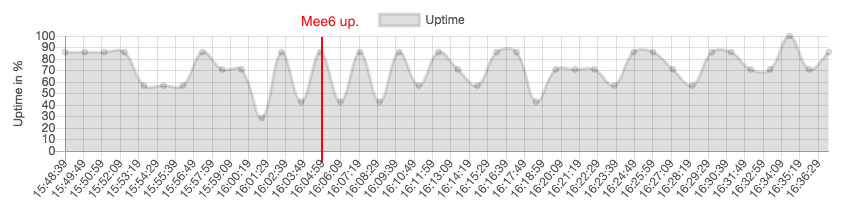
Just go to twitter search, type something and there wont be results 20%-50% of the time.
buoyant moon
Removed the "6", but is still showing the loaded results from "Mee6"
buoyant moon
Now shows results for only "me", because the request for "mee" randomly returned a 500
wooden mountain
lol
buoyant moon
Using burp proxy also confirms the random 500's
wooden mountain
i see that we are receiving 500 from twitch
and we don't catch 500 errors
so that will generated a 500 error
 west tartan
It doesn’t let me add MEE6 to my discord server
wooden mountain
@patent ether that was a really unneeded comment
@west tartan hi, name of that server?
west tartan
Roblox that the name it’s a small channel
 patent ether
well sorry but that is how it works
wooden mountain
and does it show on https://mee6.xyz/dashboard ? @west tartan
patent ether
so thanks sparkle for telling me the truth
west tartan
It showed @wooden mountain
wooden mountain
ok, can you DM me a invite and give admin perms? i will invite the bot for you
patent ether
u have to set up the bot first
 short moss
I might have found a bug:
If MEE6 tempmutes a user, then (perm) mutes a user while the temp mute is still active, it will cause MEE6 to cancel the perm mute when the time for the temp mute is over
and a human moderator cant manually "upgrade" a tempmute to a mute, while MEE6 can, but that probably is a suggestion and not a bug
wooden mountain
known and intended
short moss
the first or the 2nd one?
wooden mountain
isn't it the same?
short moss
thinking about it, it probably is, since MEE6 cant change the temp mute to mute either
but its not great that the perm mute doesnt work
 candid moon
Bonsoir <@&193123929701875712> toute commandes de musiques ne foctionnent pas sur mes serveurs
slender needle
<@&193123929701875712> bot is not responding to commands, when I went to the website to log in, it gave me this:
 signal hinge
So i saw that mee6 isn't tracking everyone who leaves my server.. just like every second or third person.. i think thats not how its supposed to be
buoyant moon
Mee6 Bot & Dashboard are down
sick jolt
bot is down
slender needle
nevermind about the website error, I logged out of discord and did it from the main page and it fixed it
 steel raft
Trying to enable/disable moderator commands can be really buggy and enable/disable the wrong ones
marble quest
@steel raft i'm not getting that issue, can you try using another browser that is supported like firefox or chrome and trying it on that to see if you get the same bug
dire yarrowBOT
Internet Explorer? Edge? Safari? Ew... :nauseated_face: It's time to use REAL BROWSER!!!
• Firefox: https://www.mozilla.org/firefox
• Chrome: https://www.google.com/chrome/
• Opera: https://www.opera.com/
Note: If you use Windows XP or Vista, consider upgrading your system to a decent version because these stopped getting updates. Chrome on these are unsupported too so the MEE6 website will not work on it. As an alternative you can try to use Firefox.
steel raft
@steel raft i'm not getting that issue, can you try using another browser that is supported like firefox or chrome and trying it on that to see if you get the same bug
@marble quest
Worked on Chrome, thanks :)
marble quest
np
buoyant moon
Music Quiz dont work on my Server and i tried everything.
 mossy flare
Music Quiz dont work on my Server and i tried everything.
@buoyant moon Try doing!stop-quiz,!leaveand!start-quiz
 supple wadi
Youtube plugin under maintance? It takes me forever load it.
slender needle
@supple wadi not under maintenance, but the youtube rate limit was reached for the day
try again after 3 AM EST
so about 2 hours
gilded yacht
please tra agen
supple wadi
ok thanks @slender needle
slender needle
np
 wise girder
Guys might wanna look at your music quiz plugin. Seems to be having issues with guessing the answers and such. It's not just me, other people have noted the same thing. Keep up the great work with Mee6. 
slender needle
...this is very specific, but when I tried to ban a person with the user id of 14131211109876543210 (14 13 12... no reason, really, they don't seem to exist) it gave "Dummy#0000 has been banned" and then directly after that, it gave an error code. However, when I tried to ban a person with a user id of 012345678911121314, it replied with "User not found" and did not give an error code or success message
I'll grab the error codes in a second
ban 992ab8cf23354ca29d3f87e0d9f24105
unban f409bba37b464e2d91cd951fc3e4f899
ban a484c8e0d1f34f9e98d9a4501d20ed3e
actually, it might have been because the user id was too long
ah. I see.
I missed the 10 in 012345678911121314, which is why it said "User not found"
however, it does still seem to be an issue when the user id is over what Dyno tells me (when I used ?ban {userid}) the number 9223372036854775807, as it gives a success message and an error code
buoyant moon
<@&193123929701875712> @dire yarrow is mee6 bot are work or not
limber knoll
!ping
dire yarrowBOT
:ping_pong: Yo Discord, how fast can you hear me?
Looks to all be between -10 and 20ms over 5 tests!
limber knoll
works fine
 lapis drift
 turbid garnet
!ping
slender needle
btw, that's a MEE6 staff-only command
as in it will only work for people like Lockey
 sturdy nacelle
I found a bug where you have to pay to use the levels plugin
wooden mountain
to use certain parts of the levels plugin
like adding roles on level up
but most of the levels plugin is still free
sturdy nacelle
I hate that they put premium on the roles on level up :(
wooden mountain
it's been.... a year and a half since they changed that
sturdy nacelle
I still hate it :(
 trail glacier
mee6 is levelling me up on my own server
sick jolt
it's suppose to
dire yarrowBOT
If I appear to be denying your hard earned experience, or !rank and !levels aren't working properly...
- Make sure Levels is Enabled.
- Check that you do not have a banned role in the levels configuration, and that you aren't in a banned channel either.
- Make sure that I can see the channel you are talking in with "Read Messages" and send messages with "Send Messages".
trail glacier
I have given all the necessary permission and it still doesn't work :/
wooden mountain
server name?
trail glacier
Wakanda
wooden mountain
do you have this role?
 gray shoal
Vita not under maintenance, but the youtube rate limit was reached for the day
@slender needle youtube limit? Does this affect the youtube notifications as well?
 onyx widget
Hey there! We are aware that mee6 isn't responding in your servers as well some dashboard issues. Please be patient while we wait for our devs to respond. 
Note: There is no need to dm any staffs. Thanks
 merry jackal
Mee6 isn’t working on music and I promised all my friends 50 hours of music, can mee6 not handle that much or is it glitched, please dm me to let me know.
 wise wasp
^ It gets through one song and then just randomly stops during the next song.
burnt hazel
@merry jackal @wise wasp Is it still happening now?
wise wasp
i can check
merry jackal
It’s sort of working now
Sometimes it randomly stops in the song and I have to either just skip the song or replay it from the beginning
wise wasp
it seems to be working so far, im going to keep adding songs and see if it breaks again
wise wasp
Problem seems to not be happening anymore, I've been listening for 30 minutes with no issues
dire yarrowBOT
 kingbropresident#4578 has been warned
Reason: Bad word usage
 trail sandal
yeet
 mossy pewter
ok so a member on my server was unmuted, but in the mod logs, it said this in the embed:
faint dome
Thx
mossy pewter
alright
 lament summit
doesn't look right to me
marble quest
someone reported that above, it waas reported to devs
lament summit
okay 
quaint agate
sounds better if it where to say "on" instead of "at"
quaint agate
reddit is also bugged D:
 marsh mulch
my bot doesn't tell my discord when i go live, am i forgetting something about the set up?\
gilded yacht
it's probably YouTube/twitch's fault
It can take a while for them to tell Mee6 about your stream
 pine lake
Mee6 randomly stops playing music, but stays in the voice channel. Often in the middle of the song
 left haven
I can't setup Mee6 so I can edit what it does in the dashboard
dire yarrowBOT
 ᎶᏗᎷᎥᏁᎶ 2 ᎶᎧ#1349 has been warned
Reason: Capital letters
limber knoll
@buoyant moon state your issue rather then saying something ambiguous as "I need help"
buoyant moon
I can’t save my change in the dashboard
limber knoll
@buoyant moon which plugin?
buoyant moon
Welcome message
limber knoll
how many characters is in the message?
buoyant moon
More than 120
limber knoll
max size is 2000
buoyant moon
Sometimes I can, sometimes I can’t
limber knoll
any {user} or {server} is around 18-28 characters
limber knoll
role mentions are the same
limber knoll
np
 mild roost
Hello, recently on my discord server, MEE6 is sending my youtube videos way later than when i recorded/went live, making it difficult for me to post the link and entertain at the same time as my feed would have to be me being AFK. Can anybody tell me why this is happening? I appreciate the future help!!
silence
hello?
gilded yacht
@mild roost It can take a while for YouTube to let Mee6 know about an upload
That's probably why
mild roost
Thanks for the help. If there is a way for youtube to fix their notifications to mee6 then they should do it
buoyant moon
I am going to have a panic attack
ivory blaze

Healthline
If you've experienced a panic attack, you know that they can be overwhelming and come on quickly. Learn how to stop a panic attack.
buoyant moon
3169b6c0878640499b8ba8300184e0e8
whattt
marble quest
What command were you using @buoyant moon
 calm cradle
 dusty warren
do more people have it that the profile pictures and other discord images don't display in chrome and firefox?
marble quest
Might just be a thing with your internet connection not being able to load all of those images
marble quest
Do you have any content blockers or ad blockers on chrome and Firefox
dusty warren
it's the duckduckgo extension, but I had way longer but then no problems
so properly an update to duckduckgo extension broke the image loading
buoyant moon
Btw; mee6 login system is outdated for new Android Login System.
That means that you can not login on newest Android Discord Update.
buoyant moon
Is it a bug?
marble quest
Something with the translation thing, but it has been reported already
buoyant moon
Okay
 icy crystal
Hello! One person joined in my server and Mee6 give him full permissions (owner rank)!
my discord is on bulgarian
ivory blaze
check your welcome roles
icy crystal
i checked it
buoyant moon
@ivory blaze Btw; mee6 login system is outdated for new Android Login System.
That means that you can not login on newest Android Discord Update.
Just a tip 🙂
icy crystal
I set up ti for another role
ivory blaze
@buoyant moon we're investigating as the new android discord update broke more than that
buoyant moon
can I tell you how to fix it?
ivory blaze
@icy crystal server id?
icy crystal
697478201789775984
buoyant moon
Use User GET with v6 mannualy (not only /api/... but /api/v6
ivory blaze
that welcome role has admin perms
icy crystal
what
ivory blaze
probably why
ivory blaze
np
buoyant moon
The reaction roles no longer work, is that normal?
 modern zealot
There's a bug on the leaderboard
marble quest
what browser are you using?
 sullen ice
Just one of the servers. It's working for my 2nd server. Via the browser I can access the standard MEE6 for my 2nd server. But for my primary server where I pay for MEE6 Premium I can't access that dashboard and it's not responding in my server.
marble quest
try kicking and readding the bot
settings will be saved, just any perms you set on the mee6 role will have to be redone
marble quest
np
buoyant moon
selamü
marble quest
can you send that where i don't have to download a file to see it?
uploading the file to a site like imgur should work for smaller videos


 marble quest
is that on a custom command?
 west condor
Yeah, there's a huge bar but it cuts off after a small number of characters
marble quest
okay, staff will have to look into that
west condor
It's not just that box either, just noticed an extension did this
west condor
Another thing I've just found.
We want to have all spoiler tags removed so have set the bot up with a 1 spoiler tag limit.
However it seems images can still be posted as spoilers, are images treated differently?
buoyant moon
yes.
 cloud cloud
marble quest
cloud cloud
marble quest
it's a known bug
cloud cloud
Sorry
marble quest
it's fine
modern zealot
#〉bugs-reports message
Oh sorry I'm busy
It is the Discord navigator on the mobile version, I guess it's chrome
marble quest
try going directly to the link instead of using the one discord defaults to