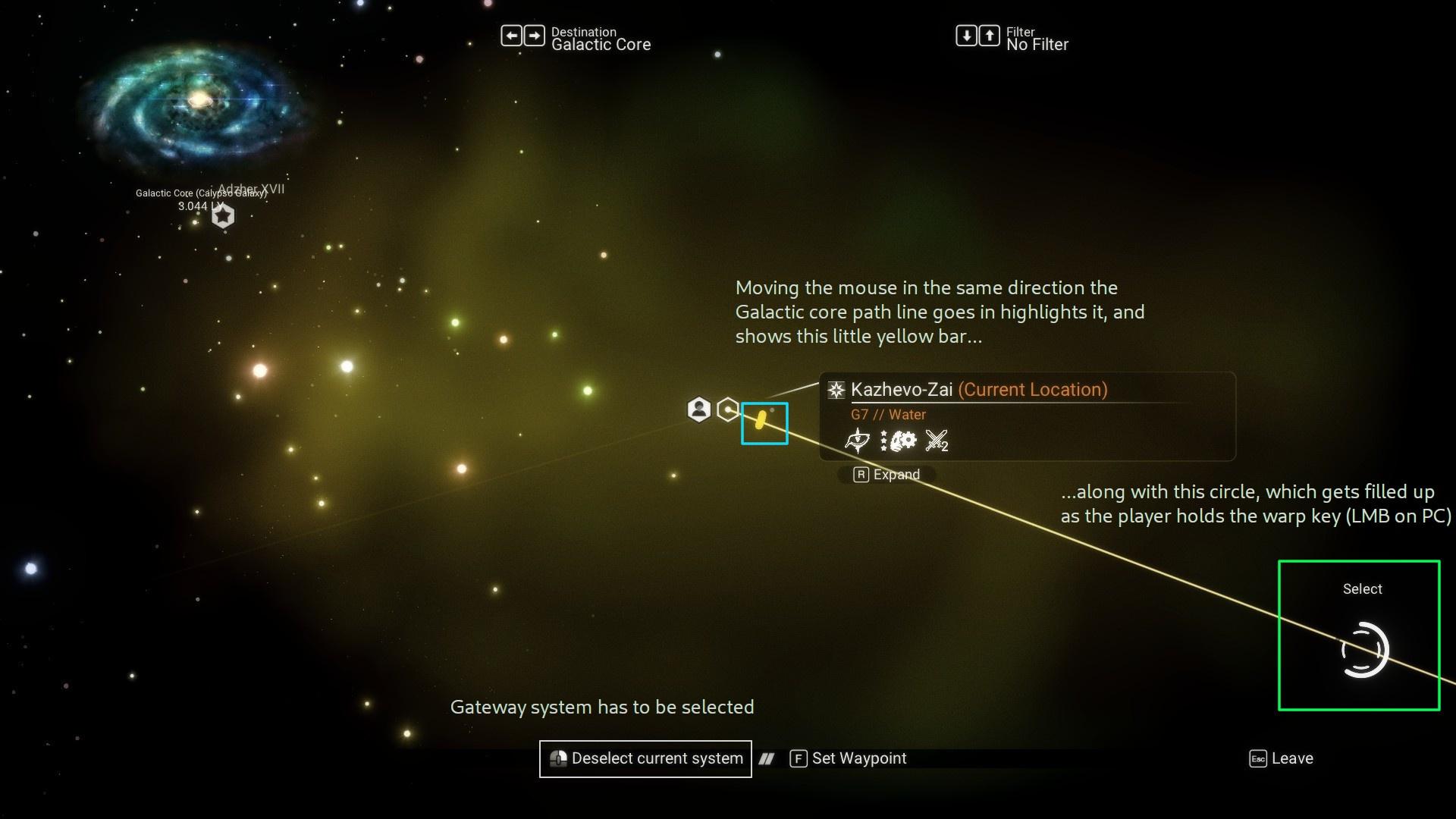
- How to reach the Galactic Core via Portals in any galaxy »
- How to warp to the Galactic Core in your ship »
- See infographic guide below or watch quick demo

- See list of galaxies. More Wiki info »
1 messages · Page 7 of 1
 river micaBOT
-#  to view info below, enable embeds
-# to view info below, enable embeds
Note: Additional bot commands mentioned in this post should be run in the #bot-spam channel.
Open your inventory, and hover over the Void Egg: does its item card text description now mention "EUCLID" multiple times?
If it does, you will need the Portal glyphs unlocked (at least the first 12), to be able to progress this next stage of the quest. (related bot command: !faq-portalglyphs)
Once you have them unlocked, find a portal in the Euclid Galaxy. (related bot command: !faq-portal)
Disable multiplayer, then dial the address embedded in this post. (related bot command: !faq-portaluse)


 sterile quartz
!faq-help
river micaBOT
-# to view info below, enable embeds
❓ Need assistance? Please provide the following information (when applicable) to #nms-questions:
• Have you asked for help before about the same issue?
• What platform are you running? PS4/PS5, Xbox One/Series S/X, Steam Deck, Nintendo Switch, PC (Steam, Game Pass, Mac or GoG?)? VR?
• Running any game mods or trainers? Did you remove or modify any game files? (PC Only).
• What troubleshooting steps have you performed so far to try and fix the issue?
 Include information with a broader scope of your issue, along with attempted solutions. If someone helping you asks for more information, please provide details. They're not questioning your knowledge or intelligence, it's just part of troubleshooting. If there are solutions you've ruled out, list which and explain why you've ruled them out. 📖 Read about the XY problem here »
 halcyon stream
!faq-savefiles
river micaBOT
-# to view info below, enable embeds
Steam 
%appdata%\HelloGames\NMS\st_<Steam64ID>\...
Game Pass 
%LocalAppData%\Packages\HelloGames.NoMansSky_bs190hzg1sesy\SystemAppData\wgs\...
GoG 
%appdata%\HelloGames\NMS\DefaultUser\...
Linux & Steam Deck
$HOME/.local/share/Steam/steamapps/compatdata/275850/pfx/drive_c/users/steamuser/Application Data/HelloGames/NMS/st_<Steam64ID>/...
Mac 
/Users/<yourname>/Library/Application Support/HelloGames/NMS/st_<your steam ID>/
When sharing saves in a report to Hello Games, it is best to create a package/archive of the full folder shown for your platform above (.zip/.rar).
 hollow idol
!faq-portal
river micaBOT
-# to view info below, enable embeds
 Locating a Portal
📚 Notes:
!faq-portalglyphs and !faq-purplesystems in #bot-spam to learn more. )
) rare depot
!Faq-Multiplayer
river micaBOT
-# to view info below, enable embeds
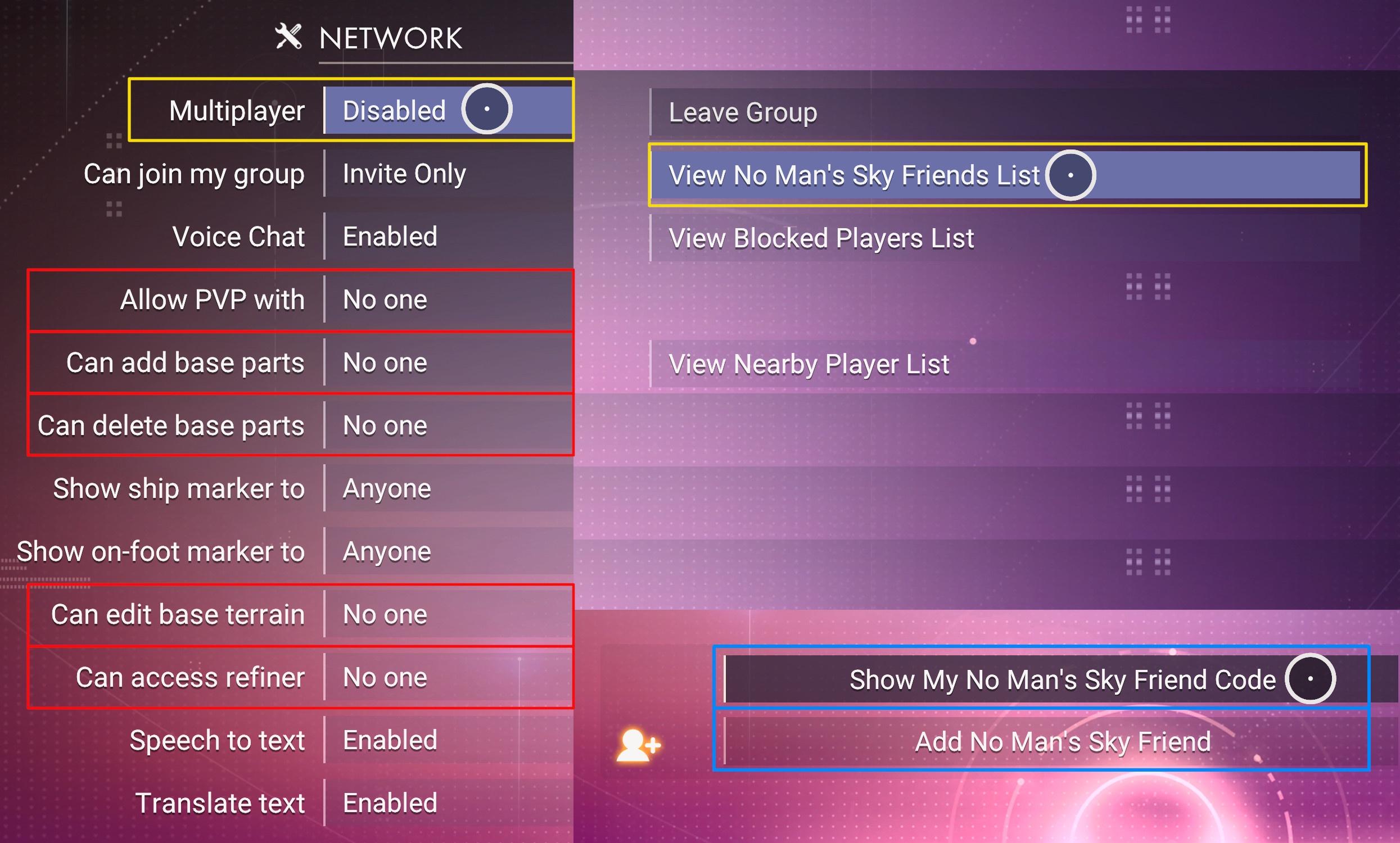
• Find your Friend Code via Network Options » View Friends List » Show My Friend Code / Add Friend -- see image for example.
💡 Share it with others here by typing !MyFriendCode
• See other multiplayer & cross-play tips »
• Cross-play issues? Check #nms-questions & pinned info »
• Recommended Network Settings »
When progressing quests, it's strongly recommended to disable Multiplayer to avoid bugs. See Recommended Network Settings »
Additional and useful information:
Basic steps: Hosting/Joining [a session »](#nms-questions message)
Having issues with multiplayer? See common Issues, suggested Troubleshooting steps and Workarounds »
 cloud compass
!faq-interceptor
river micaBOT
-# to view info below, enable embeds
 Interceptors may only be found and claimed in Dissonant systems. The system cannot be Uncharted, and the planet cannot be a Dead biome or Weird biome.
Locating:
Other Methods:
Any Nexus Missions or Frigate Combat Expeditions have a chance to reward the Carrier AI Fragment used to find an Interceptor.
Random Space Encounter - when pulsing and then receiving the notification of an encounter, drop out of pulse and use your ship communicator to answer the call. You should be directed to a suitable planet with Interceptors.
Claiming:
Claiming an Interceptor »
Sentinel Pillars will shut down the Corrupted Sentinels and leave the Dissonance Resonators, if needed.
cloud compass
!faq-purplesystems
river micaBOT
-# to view info below, enable embeds
How to get started...
📖 Warning: Purple systems are end-game content so you must finish certain quests before you can access them.
!faq-artemispath in #bot-spam shows the steps.!faq-interceptor in #bot-spam shows how to find them.!faq-echoes in #bot-spam for more info.🛑 Warning: Do not leave the Atlas Station system you'll go to in the quest without visiting its space station or claiming a base computer on one of its planets.
!faq-starcolor in #bot-spam for more info. These are the known steps as of update 5.5 Worlds Pt II (<t:1738163940:D>) and are subject to change.
-# See patch notes »
cloud compass
!faq-units
river micaBOT
-# to view info below, enable embeds
 How to Make Units
 mild jasper
!Faq-ShipSpawns
river micaBOT
-# to view info below, enable embeds
Default System Starship pool
This will always be a total of 21 starships, initially distributed partly depending on the system dominant race (Gek = Hauler, Korvax = Explorer, Vy'keen = Fighter), as follows:
Starship Spawn Probabilities / Solar Override
From the default system pool, one or more ships are then replaced by Solar ship(s), using the override probabilities for 'Normal' as well as 'Outlaw' systems, shown in the image below:
Image - Ship Spawn Probabilities (simple) »
Image - Ship Spawn Probabilities (advanced) »
Note: There may be additional different 'Pirate' ships in a system when a Raid is initiated.
Starship Tier Info
NPC Starships will spawn, seeded with a variety of Technology, Supercharged (Boost) and Cargo slots, as well as a range of base stats depending on their Spawn Size, and Class, according to the below charts:
Image - Starship Max Slots Info »
Image - Starship In Depth Tier Info »
Note: The Base Launch Cost values are higher in Survival and Permadeath gamemodes.
Additional Starship Facts
You can currently own:
 viral canopy
!expedition
river micaBOT
-# to view info below, enable embeds
-#  Breach (#20) active till <t:1768316400>
-# Ends <t:1768316400:R> - time elapsed: 
 50%
50%
-# Previous
-#  Corvette (#19) ended <t:1767106800:d>
-#  Relics (#18) ended <t:1765897200:d>
-#  Titan (#17) ended <t:1764687600:d>
-#  Beachhead (#2) ended <t:1763478000:d>
▸ Expedition help & tips » #nms-expeditions Pins 
▸ General gameplay questions » #nms-help.
▸ Run !Faq-Expedition & !ExpTime in #bot-spam.
▸ LFG or trade here »
▸ Expedition #roles are self-assignable »
📣 Grab the NMS Announcements role in #roles for #nms-announcements notifications & follow #nms-news-ticker for latest updates & upcoming expeditions.
cloud compass
!faq-freighters
river micaBOT
-# to view info below, enable embeds
cloud compass
!faq-interceptor
river micaBOT
-# to view info below, enable embeds
Interceptors may only be found and claimed in Dissonant systems. The system cannot be Uncharted, and the planet cannot be a Dead biome or Weird biome.
Locating:
Other Methods:
Any Nexus Missions or Frigate Combat Expeditions have a chance to reward the Carrier AI Fragment used to find an Interceptor.
Random Space Encounter - when pulsing and then receiving the notification of an encounter, drop out of pulse and use your ship communicator to answer the call. You should be directed to a suitable planet with Interceptors.
Claiming:
Claiming an Interceptor »
Sentinel Pillars will shut down the Corrupted Sentinels and leave the Dissonance Resonators, if needed.
 wet ibex
!faq-multitoollayout
river micaBOT
-# to view info below, enable embeds
Multitool Tech LayoutThis is just an example of adjacency and supercharged slots. Note that supercharging bonuses always beats adjacency bonuses. Therefore, to maximize tech stats, split apart tech to utilize supercharged slots, as they will yield superior results over maintaining perfect adjacency.
For more in-depth assistance, check #nms-questions & #nms-multitools.

 ornate sparrow
!exptime
river micaBOT
-# to view info below, enable embeds
-# Breach (#20) active till <t:1768316400>
-# Ends <t:1768316400:R> - time elapsed: 53%
-# Previous
-# Corvette (#19) ended <t:1767106800:d>
-# Relics (#18) ended <t:1765897200:d>
-# Titan (#17) ended <t:1764687600:d>
-# Beachhead (#2) ended <t:1763478000:d>
See Pins in #nms-expedition & run !Expedition in #nms-commands
 hexed current
!faq-livingship
river micaBOT
-# to view info below, enable embeds
Living Ships-# Getting your first living ship of a save
-# Getting additional living ships
-# Info and recommendations about Living Ships
-# Upgrading Inventory and Tech Inventory
-# Known bugs. If you find any others that aren't mentioned here, #contact-us.
 viral perch
!faq-echoes
river micaBOT
-# to view info below, enable embeds
Make sure the steps below are completed.
⚠️ Use #nms-commands for FAQ commands below & check #nms-questions for the latest details about the update.
Run !Faq-ArtemisPath in #nms-commands. Run !Faq-Interceptor in #nms-commands.❗ This information has been verified as of <t:1694212090:D> (after Update 4.44) & is subject to change.
With update 4.44, completion of the mission, A Trace of Metal is no longer required. A Settlement used to be needed -- except on Switch, where you'd have to trigger it by warping 25 times.
viral perch
!faq-interceptor
river micaBOT
-# to view info below, enable embeds
Interceptors may only be found and claimed in Dissonant systems. The system cannot be Uncharted, and the planet cannot be a Dead biome or Weird biome.
Locating:
Other Methods:
Any Nexus Missions or Frigate Combat Expeditions have a chance to reward the Carrier AI Fragment used to find an Interceptor.
Random Space Encounter - when pulsing and then receiving the notification of an encounter, drop out of pulse and use your ship communicator to answer the call. You should be directed to a suitable planet with Interceptors.
Claiming:
Claiming an Interceptor »
Sentinel Pillars will shut down the Corrupted Sentinels and leave the Dissonance Resonators, if needed.
 ornate veldt
!faq-expeditions
river micaBOT
@ornate veldt Did you mean !Faq-Expedition?
-# to view info below, enable embeds
 Expedition Info
Expeditions are an alternate time-limited, season-like game mode with a set of challenges rewarding exclusive items that can be claimed in any and all of your saves, in any game mode account-wide.
To get past expedition rewards, you must wait for possible future expedition re-runs (see past expeditions) or possible future  Twitch Drops campaigns featuring old expedition rewards (see past campaigns). You may also obtain certain rewards via other unconventional means, including ship trading or using a "service bot" in the Creative Hub Discord. Additionally, PC players (
  ) can get past rewards via save editing or #nms-modding.
-# Please run bot commands in #bot-spam
in #nms-expedition wicked trench
!exptime
river micaBOT
-# to view info below, enable embeds
-# Breach (#20) active till <t:1768316400>
-# Ends <t:1768316400:R> - time elapsed: 55%
-# Previous
-# Corvette (#19) ended <t:1767106800:d>
-# Relics (#18) ended <t:1765897200:d>
-# Titan (#17) ended <t:1764687600:d>
-# Beachhead (#2) ended <t:1763478000:d>
See Pins in #nms-expedition & run !Expedition in #nms-commands
wet ibex
!nmsversions
river micaBOT
-# to view info below, enable embeds
-# Known Versions (title screen bottom-left corner)
-# Exp: 157371 (4201)
-#  6.18 156355 (4201)
-# 6.18 156355 (4201)
-# 6.18 156355 (4201)
-#  6.18 156268 (4201)
-#  6.18 156355 (4201)
-#  6.18 156355 (4201)
-#  6.17 155494 (4188)
-#  6.18 156748 (4201)
Steam Branches
-#  Public: 21006256 (<t:1764593094:d>)
-# Latest Experimental notes
-# For  #nms-announcements notifications get the respective
  pingable role & follow 📰 #nms-news-ticker for updates as they roll out to each platform.
 Read all patch notes in the NMS Release Log » Experimental patch notes: Latest » | All » PC update issues?
  Get Microsoft store help »
wet ibex
Get Microsoft store help »
wet ibex
 scarlet halo
Comment j'utilise le bot svm
scarlet halo
Comment j'utilise le bot svm
 wind heron
!faq-freighters
river micaBOT
-# to view info below, enable embeds
rare depot
!faq
river micaBOT
@rare depot
-#  Prefix Gunter commands with exclamation mark (i.e.,
 !command)
CurrencyFaq-Nanites - Tips & guides for making nanites.
Faq-Pirate - How to pirate & recover standing
Faq-Units - Tips & guides for making units.
ExpeditionsFaq-Expedition - Important expedition tips, bug workarounds (pre-patches), and lists of other relevant commands.
 Info and Tips
Faq-AnomalyFirstVisit - The proper order of steps for your first visit to the Space Anomaly.
Faq-Arg - Explains ARG.
Faq-BeginnerInventory - Tips for early game inventory management.
Faq-BeginnerTips - Important tips for brand new players.
Faq-CrossSave - Cross save information and link.
Faq-Derelicts - Explains the difference between the two derelict encounters.
Faq-ExoticFarm - How to farm exotic ships through freighter battles.
Faq-Interceptor - Methods for finding and claiming Interceptors.
Faq-Inventory - How to upgrade your Inventories.
Faq-Likholu - Warning about the Likholu system.
Faq-LivingFrigate - Information on Organic Frigates.
Faq-LivingShip - All living ship information, including the Starbirth questline.
Faq-Maps - Maps for the Anomaly, space stations, freighters and harmonic camps.
Faq-Multiplayer - Shows recommended network settings & in-game friend code info.
Faq-PortalGlyphs - Various ways to unlock the portal glyphs.
Faq-PortalUse - How to use portals.
Faq-Quicksilver - How to get and spend quicksilver.
Faq-Settlements - Planetary Settlements Guide
Faq-Squadron - How to recruit for your squadron.
Faq-Time - Why you shouldn't change your system time.
 Mechanics
Faq-Biomes - Guides to all names and resources for all biomes.
Faq-CoreWarp - Guide on warping to the center of a galaxy.
Faq-CorvetteBuilding - Various advanced building methods for Corvettes.
Faq-Corvettes - How to start building a Corvette.
Faq-Freighters - Freighter Infographic & helpful guides.
Faq-Frigates - In depth information in all aspects of frigates.
Faq-Galaxies - Commonly asked questions about galaxies.
Faq-GlitchBuilding - Glitch building guide on YouTube.
Faq-Leylines - Info on finding 3 star resource Laylines.
Faq-Mechafauna - How to locate Mechafauna.
Faq-OutlawSystem - How to find outlaw systems.
Faq-Portal - Guide to locating portals.
Faq-ShipSpawns - Ship spawning and tier information.
Faq-StarColor - How to use the spectral classification.
Faq-StorageAugments - Ship storage augments drop rates from scrapping.
Faq-SystemScanners - How to see Economy and Conflict levels in the Galaxy Map.
 Quests
Faq-ArtemisPath - List of Artemis Path missions.
Faq-AtlasPath - In depth information for the Atlas Path.
Faq-BasePersonnel - Instructions on how to hire base NPCs.
Faq-Echoes - Latest known steps to start the new Echoes content.
Faq-PurpleSystems - How to access the purple systems.
Faq-Starbirth - Please use !Faq-LivingShip instead.
 Support
Faq-EventView - Guide the users on how to access event viewer on PC.
Faq-ExplorersArchive - Tips on how to use our #explorers-archive channel.
Faq-Help - Basic information most commonly requested by #nms-questions regulars while assisting users.
Faq-Modding - Links and tips to get started modding NMS.
Faq-SaveFiles - Lists save file paths for different platforms with info for HG bug reports.
Faq-SettingsFiles - Lists settings file paths for different platforms.
Faq-Spoiler - How to use spoiler tags.
Faq-SystemReq - Minimum PC requirements for No Man's Sky.
Faq-Troubleshooting - Multiple resources for troubleshooting well known issues, mostly on Windows.
 surreal temple
!expedition
river micaBOT
-# to view info below, enable embeds
-# Breach (#20) active till <t:1768316400>
-# Ends <t:1768316400:R> - time elapsed:  56%
56%
-# Previous
-# Corvette (#19) ended <t:1767106800:d>
-# Relics (#18) ended <t:1765897200:d>
-# Titan (#17) ended <t:1764687600:d>
-# Beachhead (#2) ended <t:1763478000:d>
▸ Expedition help & tips » #nms-expeditions Pins
▸ General gameplay questions » #nms-help.
▸ Run !Faq-Expedition & !ExpTime in #bot-spam.
▸ LFG or trade here »
▸ Expedition #roles are self-assignable »
📣 Grab the NMS Announcements role in #roles for #nms-announcements notifications & follow #nms-news-ticker for latest updates & upcoming expeditions.
 narrow crag
!faq
river micaBOT
@narrow crag
-# Prefix Gunter commands with exclamation mark (i.e., !command)
CurrencyFaq-Nanites - Tips & guides for making nanites.
Faq-Pirate - How to pirate & recover standing
Faq-Units - Tips & guides for making units.
ExpeditionsFaq-Expedition - Important expedition tips, bug workarounds (pre-patches), and lists of other relevant commands.
Info and TipsFaq-AnomalyFirstVisit - The proper order of steps for your first visit to the Space Anomaly.
Faq-Arg - Explains ARG.
Faq-BeginnerInventory - Tips for early game inventory management.
Faq-BeginnerTips - Important tips for brand new players.
Faq-CrossSave - Cross save information and link.
Faq-Derelicts - Explains the difference between the two derelict encounters.
Faq-ExoticFarm - How to farm exotic ships through freighter battles.
Faq-Interceptor - Methods for finding and claiming Interceptors.
Faq-Inventory - How to upgrade your Inventories.
Faq-Likholu - Warning about the Likholu system.
Faq-LivingFrigate - Information on Organic Frigates.
Faq-LivingShip - All living ship information, including the Starbirth questline.
Faq-Maps - Maps for the Anomaly, space stations, freighters and harmonic camps.
Faq-Multiplayer - Shows recommended network settings & in-game friend code info.
Faq-PortalGlyphs - Various ways to unlock the portal glyphs.
Faq-PortalUse - How to use portals.
Faq-Quicksilver - How to get and spend quicksilver.
Faq-Settlements - Planetary Settlements Guide
Faq-Squadron - How to recruit for your squadron.
Faq-Time - Why you shouldn't change your system time.
MechanicsFaq-Biomes - Guides to all names and resources for all biomes.
Faq-CoreWarp - Guide on warping to the center of a galaxy.
Faq-CorvetteBuilding - Various advanced building methods for Corvettes.
Faq-Corvettes - How to start building a Corvette.
Faq-Freighters - Freighter Infographic & helpful guides.
Faq-Frigates - In depth information in all aspects of frigates.
Faq-Galaxies - Commonly asked questions about galaxies.
Faq-GlitchBuilding - Glitch building guide on YouTube.
Faq-Leylines - Info on finding 3 star resource Laylines.
Faq-Mechafauna - How to locate Mechafauna.
Faq-OutlawSystem - How to find outlaw systems.
Faq-Portal - Guide to locating portals.
Faq-ShipSpawns - Ship spawning and tier information.
Faq-StarColor - How to use the spectral classification.
Faq-StorageAugments - Ship storage augments drop rates from scrapping.
Faq-SystemScanners - How to see Economy and Conflict levels in the Galaxy Map.
QuestsFaq-ArtemisPath - List of Artemis Path missions.
Faq-AtlasPath - In depth information for the Atlas Path.
Faq-BasePersonnel - Instructions on how to hire base NPCs.
Faq-Echoes - Latest known steps to start the new Echoes content.
Faq-PurpleSystems - How to access the purple systems.
Faq-Starbirth - Please use !Faq-LivingShip instead.
SupportFaq-EventView - Guide the users on how to access event viewer on PC.
Faq-ExplorersArchive - Tips on how to use our #explorers-archive channel.
Faq-Help - Basic information most commonly requested by #nms-questions regulars while assisting users.
Faq-Modding - Links and tips to get started modding NMS.
Faq-SaveFiles - Lists save file paths for different platforms with info for HG bug reports.
Faq-SettingsFiles - Lists settings file paths for different platforms.
Faq-Spoiler - How to use spoiler tags.
Faq-SystemReq - Minimum PC requirements for No Man's Sky.
Faq-Troubleshooting - Multiple resources for troubleshooting well known issues, mostly on Windows.
surreal temple
!faq-inventory
river micaBOT
-# to view info below, enable embeds
How to Upgrade Inventories
To upgrade inventory size, each inventory type can be upgraded at their respective terminal for which locations are listed below.
It is possible to switch between Technology and Cargo inventories and select a slot within the currently available grid, before applying the upgrade. (Image »)
Multi-Tools don't have Cargo inventory.
Click on the links below for in depth descriptions.
Can only be purchased once, at each terminal in a system The maximum amount of slots is limited by class and ship type (Image ») The maximum amount of slots is limited by class (Image »)
cloud compass
!faq-ppurplesystems
river micaBOT
@cloud compass Did you mean !Faq-PurpleSystems?
-# to view info below, enable embeds
How to get started...
📖 Warning: Purple systems are end-game content so you must finish certain quests before you can access them.
!faq-artemispath in #bot-spam shows the steps.!faq-interceptor in #bot-spam shows how to find them.!faq-echoes in #bot-spam for more info.🛑 Warning: Do not leave the Atlas Station system you'll go to in the quest without visiting its space station or claiming a base computer on one of its planets.
!faq-starcolor in #bot-spam for more info. These are the known steps as of update 5.5 Worlds Pt II (<t:1738163940:D>) and are subject to change.
-# See patch notes »
narrow crag
!faq-corvettes
river micaBOT
-# to view info below, enable embeds
Corvettes-# Recommendations, How to start building a Corvette Ship
-# Drop sources, Bartering
-# How are Corvettes upgraded, Do they always spawn in C-class, Supercharged Slot layout, Inventory Upgrade limits, etc.
-# If you find any others that aren't mentioned here, #contact-us
 lucid spire
!faq-artemispath
river micaBOT
-# to view info below, enable embeds
The main storyline The Artemis Path is composed of these missions:
Do not reuse portals found via the storyline to prevent bugs.
❓ For in-depth questions about these missions, ask in #nms-spoilers, or in #nms-questions with spoiler tags -- run !SpoilerTag in #bot-spam for help.
📖 Did you know? The Atlas Path and The Purge mission can be completed in tandem.
 gilded halo
!faq
river micaBOT
@gilded halo
-# Prefix Gunter commands with exclamation mark (i.e., !command)
CurrencyFaq-Nanites - Tips & guides for making nanites.
Faq-Pirate - How to pirate & recover standing
Faq-Units - Tips & guides for making units.
ExpeditionsFaq-Expedition - Important expedition tips, bug workarounds (pre-patches), and lists of other relevant commands.
Info and TipsFaq-AnomalyFirstVisit - The proper order of steps for your first visit to the Space Anomaly.
Faq-Arg - Explains ARG.
Faq-BeginnerInventory - Tips for early game inventory management.
Faq-BeginnerTips - Important tips for brand new players.
Faq-CrossSave - Cross save information and link.
Faq-Derelicts - Explains the difference between the two derelict encounters.
Faq-ExoticFarm - How to farm exotic ships through freighter battles.
Faq-Interceptor - Methods for finding and claiming Interceptors.
Faq-Inventory - How to upgrade your Inventories.
Faq-Likholu - Warning about the Likholu system.
Faq-LivingFrigate - Information on Organic Frigates.
Faq-LivingShip - All living ship information, including the Starbirth questline.
Faq-Maps - Maps for the Anomaly, space stations, freighters and harmonic camps.
Faq-Multiplayer - Shows recommended network settings & in-game friend code info.
Faq-PortalGlyphs - Various ways to unlock the portal glyphs.
Faq-PortalUse - How to use portals.
Faq-Quicksilver - How to get and spend quicksilver.
Faq-Settlements - Planetary Settlements Guide
Faq-Squadron - How to recruit for your squadron.
Faq-Time - Why you shouldn't change your system time.
MechanicsFaq-Biomes - Guides to all names and resources for all biomes.
Faq-CoreWarp - Guide on warping to the center of a galaxy.
Faq-CorvetteBuilding - Various advanced building methods for Corvettes.
Faq-Corvettes - How to start building a Corvette.
Faq-Freighters - Freighter Infographic & helpful guides.
Faq-Frigates - In depth information in all aspects of frigates.
Faq-Galaxies - Commonly asked questions about galaxies.
Faq-GlitchBuilding - Glitch building guide on YouTube.
Faq-Leylines - Info on finding 3 star resource Laylines.
Faq-Mechafauna - How to locate Mechafauna.
Faq-OutlawSystem - How to find outlaw systems.
Faq-Portal - Guide to locating portals.
Faq-ShipSpawns - Ship spawning and tier information.
Faq-StarColor - How to use the spectral classification.
Faq-StorageAugments - Ship storage augments drop rates from scrapping.
Faq-SystemScanners - How to see Economy and Conflict levels in the Galaxy Map.
QuestsFaq-ArtemisPath - List of Artemis Path missions.
Faq-AtlasPath - In depth information for the Atlas Path.
Faq-BasePersonnel - Instructions on how to hire base NPCs.
Faq-Echoes - Latest known steps to start the new Echoes content.
Faq-PurpleSystems - How to access the purple systems.
Faq-Starbirth - Please use !Faq-LivingShip instead.
SupportFaq-EventView - Guide the users on how to access event viewer on PC.
Faq-ExplorersArchive - Tips on how to use our #explorers-archive channel.
Faq-Help - Basic information most commonly requested by #nms-questions regulars while assisting users.
Faq-Modding - Links and tips to get started modding NMS.
Faq-SaveFiles - Lists save file paths for different platforms with info for HG bug reports.
Faq-SettingsFiles - Lists settings file paths for different platforms.
Faq-Spoiler - How to use spoiler tags.
Faq-SystemReq - Minimum PC requirements for No Man's Sky.
Faq-Troubleshooting - Multiple resources for troubleshooting well known issues, mostly on Windows.
cloud compass
!faq-echoes
river micaBOT
-# to view info below, enable embeds
Make sure the steps below are completed.
⚠️ Use #nms-commands for FAQ commands below & check #nms-questions for the latest details about the update.
Run !Faq-ArtemisPath in #nms-commands. Run !Faq-Interceptor in #nms-commands.❗ This information has been verified as of <t:1694212090:D> (after Update 4.44) & is subject to change.
With update 4.44, completion of the mission, A Trace of Metal is no longer required. A Settlement used to be needed -- except on Switch, where you'd have to trigger it by warping 25 times.
 daring aspen
!faq-nanites
river micaBOT
-# to view info below, enable embeds
 balmy valley
!Faq-livingship
river micaBOT
-# to view info below, enable embeds
Living Ships-# Getting your first living ship of a save
-# Getting additional living ships
-# Info and recommendations about Living Ships
-# Upgrading Inventory and Tech Inventory
-# Known bugs. If you find any others that aren't mentioned here, #contact-us.
cloud compass
!starcablink
river micaBOT
 safe bobcat
Faq-Galaxies
wet ibex
!faq-portalglyphs
river micaBOT
-# to view info below, enable embeds
Glyphs are always unlocked in the same order. Completing the main storyline is the easiest and most hassle-free way to do so, but the player may also obtain glyphs from Traveler graves.
A) Through the main storyline mission named The Purge: perform 16 warps in any direction, to any system (despite what the quest objective says). Wait for the game to register the last warp, then warp out again. Type !faq-artemispath in #bot-spam for a list of missions.
B) Find Travelers in inhabited star systems, and for 100 nanites, ask them where they came from.
This will add a HUD marker to a grave location on one of the planets in the system: follow it and interact with the grave to obtain the next glyph. Please note that if multiple travelers are found in the same location/system, it won't be possible to get markers for all their graves in one go, you need to get one grave at a time.
C) Through the Eliminate Hazardous Flora Nexus mission. It is strongly recommended to do this with multiplayer disabled. As part of the mission, the player is led to a grave. Once located, do not interact with it but instead build and claim a base computer near by, then return to the Space Anomaly by reloading restore point or using on-foot quick menu shortcut (if available). Nexus missions refresh every 10 minutes, so if the mission is still available (or another of the same type has been added with the last refresh), the process can be repeated again. Once done with finding graves, they can easily be reached through any teleporter.
Run !Faq-Portal and !Faq-PortalUse in #bot-spam to learn more about portals and using them.
 rich turtle
all my weapons and ships and stuff are modded to high hell and back. and fire very fast and photon cannon shoots as if it is an infraknife that is maxed out... and can fire for 1 min and 23 seconds, if only anything in the whole entire game required you to shoot that much
nothing in the game requires more then a few second burst at most with the weakest shit
but to fire a whole damn min, damn son, what are we shootin
just more dakka or what?
"because its cool"
valid
 empty kernel
!faq-portal
river micaBOT
-# to view info below, enable embeds
Locating a Portal📚 Notes:
!faq-portalglyphs and !faq-purplesystems in #bot-spam to learn more.) quasi roost
!faq-biomes
river micaBOT
-# to view info below, enable embeds
-# 🌴 Lush »
-# 🥶 Frozen »
-# 🥵 Scorched »
-# 🤢 Toxic »
-# ☢️ Irradiated »
-# 🏜️ Barren »
-# ☠️ Dead »
-# 🐊 Swamp »
-# 🌋 Lava »
-# 🔴 Red »
-# 🟢 Green »
-# 🔵 Blue »
-# 😵💫 Weird »
 wet ibex
!faq-echoes
river micaBOT
-# to view info below, enable embeds
Make sure the steps below are completed.
⚠️ Use #nms-commands for FAQ commands below & check #nms-questions for the latest details about the update.
Run !Faq-ArtemisPath in #nms-commands. Run !Faq-Interceptor in #nms-commands.❗ This information has been verified as of <t:1694212090:D> (after Update 4.44) & is subject to change.
With update 4.44, completion of the mission, A Trace of Metal is no longer required. A Settlement used to be needed -- except on Switch, where you'd have to trigger it by warping 25 times.
 foggy mauve
!exptime
river micaBOT
-# to view info below, enable embeds
-# Breach (#20) active till <t:1768316400>
-# Ends <t:1768316400:R> - time elapsed: 62%
-# Previous
-# Corvette (#19) ended <t:1767106800:d>
-# Relics (#18) ended <t:1765897200:d>
-# Titan (#17) ended <t:1764687600:d>
-# Beachhead (#2) ended <t:1763478000:d>
See Pins in #nms-expedition & run !Expedition in #nms-commands
cloud compass
!faq-purplesystems
river micaBOT
-# to view info below, enable embeds
How to get started...
📖 Warning: Purple systems are end-game content so you must finish certain quests before you can access them.
!faq-artemispath in #bot-spam shows the steps.!faq-interceptor in #bot-spam shows how to find them.!faq-echoes in #bot-spam for more info.🛑 Warning: Do not leave the Atlas Station system you'll go to in the quest without visiting its space station or claiming a base computer on one of its planets.
!faq-starcolor in #bot-spam for more info. These are the known steps as of update 5.5 Worlds Pt II (<t:1738163940:D>) and are subject to change.
-# See patch notes »
cloud compass
!faq-portalglyphs
river micaBOT
-# to view info below, enable embeds
Glyphs are always unlocked in the same order. Completing the main storyline is the easiest and most hassle-free way to do so, but the player may also obtain glyphs from Traveler graves.
A) Through the main storyline mission named The Purge: perform 16 warps in any direction, to any system (despite what the quest objective says). Wait for the game to register the last warp, then warp out again. Type !faq-artemispath in #bot-spam for a list of missions.
B) Find Travelers in inhabited star systems, and for 100 nanites, ask them where they came from.
This will add a HUD marker to a grave location on one of the planets in the system: follow it and interact with the grave to obtain the next glyph. Please note that if multiple travelers are found in the same location/system, it won't be possible to get markers for all their graves in one go, you need to get one grave at a time.
C) Through the Eliminate Hazardous Flora Nexus mission. It is strongly recommended to do this with multiplayer disabled. As part of the mission, the player is led to a grave. Once located, do not interact with it but instead build and claim a base computer near by, then return to the Space Anomaly by reloading restore point or using on-foot quick menu shortcut (if available). Nexus missions refresh every 10 minutes, so if the mission is still available (or another of the same type has been added with the last refresh), the process can be repeated again. Once done with finding graves, they can easily be reached through any teleporter.
Run !Faq-Portal and !Faq-PortalUse in #bot-spam to learn more about portals and using them.
cloud compass
!faq-purplesystems
river micaBOT
-# to view info below, enable embeds
How to get started...
📖 Warning: Purple systems are end-game content so you must finish certain quests before you can access them.
!faq-artemispath in #bot-spam shows the steps.!faq-interceptor in #bot-spam shows how to find them.!faq-echoes in #bot-spam for more info.🛑 Warning: Do not leave the Atlas Station system you'll go to in the quest without visiting its space station or claiming a base computer on one of its planets.
!faq-starcolor in #bot-spam for more info. These are the known steps as of update 5.5 Worlds Pt II (<t:1738163940:D>) and are subject to change.
-# See patch notes »
river micaBOT
-# to view info below, enable embeds
Then, in the future, when on any planet in the universe, the actual summoning part is done using one of these methods:
a) Build the portable Exocraft Summoning Station on the current planet, use on foot quick menu to summon desired exocraft(s), delete Exocraft Summoning Station.
b) Build the Orbital Exocraft Materializer freighter room, summon freighter to current system, use on foot quick menu to summon desired exocraft(s).
c) Install Exocraft Summoning Unit exosuit tech, use on foot quick menu to summon desired exocraft(s). Requires access to purple star systems.

 zenith sphinx
!faq-interceptor
river micaBOT
-# to view info below, enable embeds
Interceptors may only be found and claimed in Dissonant systems. The system cannot be Uncharted, and the planet cannot be a Dead biome or Weird biome.
Locating:
Other Methods:
Any Nexus Missions or Frigate Combat Expeditions have a chance to reward the Carrier AI Fragment used to find an Interceptor.
Random Space Encounter - when pulsing and then receiving the notification of an encounter, drop out of pulse and use your ship communicator to answer the call. You should be directed to a suitable planet with Interceptors.
Claiming:
Claiming an Interceptor »
Sentinel Pillars will shut down the Corrupted Sentinels and leave the Dissonance Resonators, if needed.
cloud compass
!faq-freighter
river micaBOT
@cloud compass Did you mean !Faq-Freighters?
-# to view info below, enable embeds
 knotty estuary
!faq-biomes
river micaBOT
-# to view info below, enable embeds
-# 🌴 Lush »
-# 🥶 Frozen »
-# 🥵 Scorched »
-# 🤢 Toxic »
-# ☢️ Irradiated »
-# 🏜️ Barren »
-# ☠️ Dead »
-# 🐊 Swamp »
-# 🌋 Lava »
-# 🔴 Red »
-# 🟢 Green »
-# 🔵 Blue »
-# 😵💫 Weird »
cloud compass
!faq-purplesystems
river micaBOT
-# to view info below, enable embeds
How to get started...
📖 Warning: Purple systems are end-game content so you must finish certain quests before you can access them.
!faq-artemispath in #bot-spam shows the steps.!faq-interceptor in #bot-spam shows how to find them.!faq-echoes in #bot-spam for more info.🛑 Warning: Do not leave the Atlas Station system you'll go to in the quest without visiting its space station or claiming a base computer on one of its planets.
!faq-starcolor in #bot-spam for more info. These are the known steps as of update 5.5 Worlds Pt II (<t:1738163940:D>) and are subject to change.
-# See patch notes »
 vague gazelle
! expedition
river micaBOT
-# to view info below, enable embeds
-# Breach (#20) active till <t:1768316400>
-# Ends <t:1768316400:R> - time elapsed: 64%
-# Previous
-# Corvette (#19) ended <t:1767106800:d>
-# Relics (#18) ended <t:1765897200:d>
-# Titan (#17) ended <t:1764687600:d>
-# Beachhead (#2) ended <t:1763478000:d>
▸ Expedition help & tips » #nms-expeditions Pins
▸ General gameplay questions » #nms-help.
▸ Run !Faq-Expedition & !ExpTime in #bot-spam.
▸ LFG or trade here »
▸ Expedition #roles are self-assignable »
📣 Grab the NMS Announcements role in #roles for #nms-announcements notifications & follow #nms-news-ticker for latest updates & upcoming expeditions.
river micaBOT
-# to view info below, enable embeds
A: Despite what its objective says, no. The Purge simply requires the player to warp 16 times in any direction, to any system.
Each warp teaches 1 portal glyph, if the player hasn't learned any yet. Please wait for the mission to acknowledge progress before warping out again.
-# ❗ Warning: After the 16th warp, mission will mark a Portal. To prevent damage to installed technologies during this next part, before going through the portal player should:
-# - Store installed exosuit tech and upgrade modules;
-# - Do the same for current ship and multi-tool, or change to a ship/multi-tool player doesn't care about.
 cloud compass
!faq-biomes
river micaBOT
-# to view info below, enable embeds
-# 🌴 Lush »
-# 🥶 Frozen »
-# 🥵 Scorched »
-# 🤢 Toxic »
-# ☢️ Irradiated »
-# 🏜️ Barren »
-# ☠️ Dead »
-# 🐊 Swamp »
-# 🌋 Lava »
-# 🔴 Red »
-# 🟢 Green »
-# 🔵 Blue »
-# 😵💫 Weird »
 fathom moon
!faq-portal
river micaBOT
-# to view info below, enable embeds
Locating a Portal📚 Notes:
!faq-portalglyphs and !faq-purplesystems in #bot-spam to learn more.)
gilded halo
!faq
river micaBOT
Faq-Update - When will my platform get the latest update?
 Tech Layouts
Faq-ExocraftLayout - Examples of Exocraft layouts.
Faq-FreighterLayout - Example of Freighter layouts.
Faq-MultitoolLayout - Multitool tech layout example.
Faq-ShipLayout - Starship tech layout example.
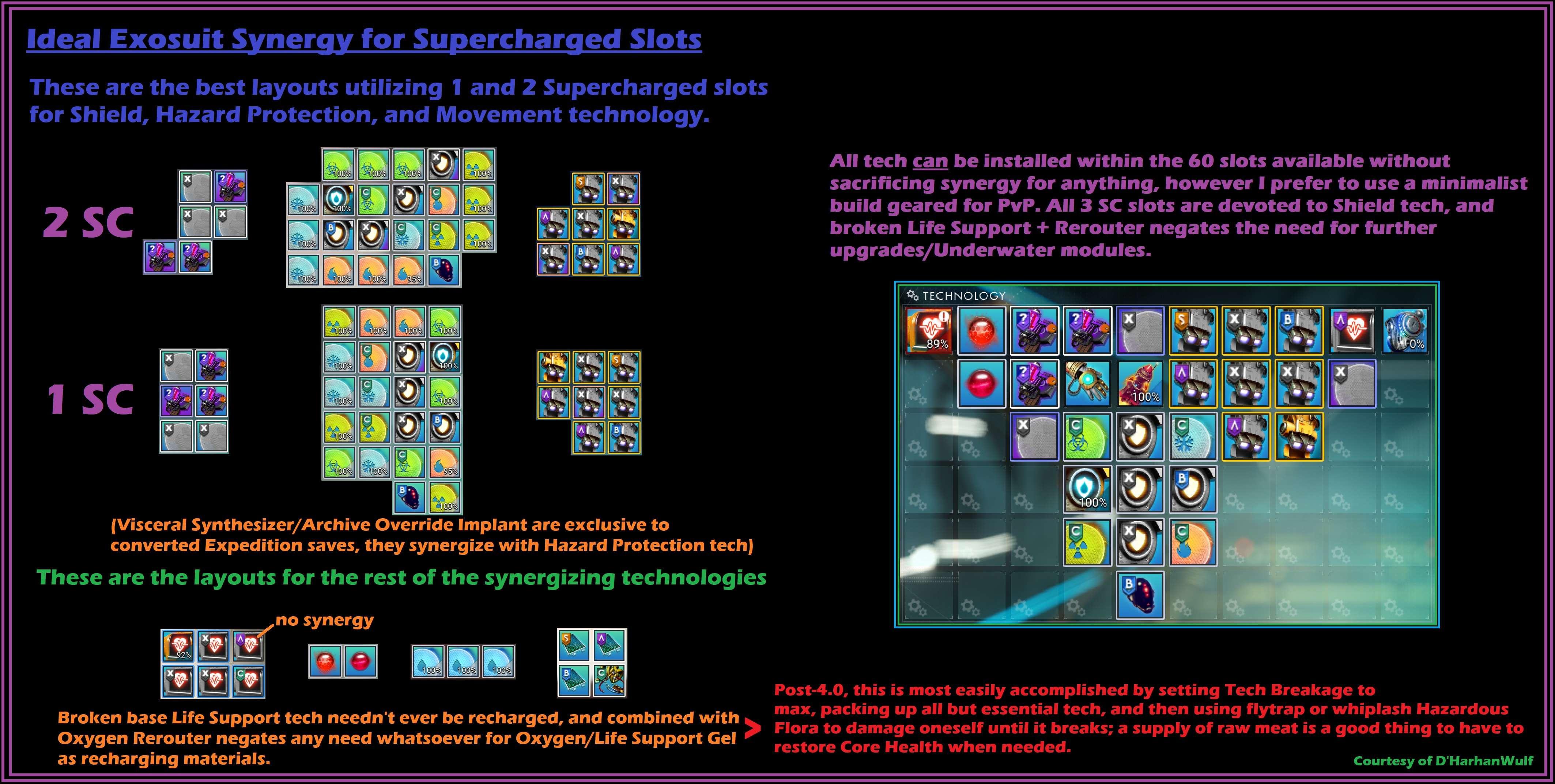
Faq-SuitLayout - Ideal layouts for Exosuit Technology
 Withdrawn / Retired
Faq-ExosuitLayout - Run !Faq-SuitLayout instead.
rare depot
!faq
river micaBOT
Faq-Update - When will my platform get the latest update?
Tech LayoutsFaq-ExocraftLayout - Examples of Exocraft layouts.
Faq-FreighterLayout - Example of Freighter layouts.
Faq-MultitoolLayout - Multitool tech layout example.
Faq-ShipLayout - Starship tech layout example.
Faq-SuitLayout - Ideal layouts for Exosuit Technology
Withdrawn / RetiredFaq-ExosuitLayout - Run !Faq-SuitLayout instead.
rare depot
!Faq-MultitoolLayou
river micaBOT
@rare depot Did you mean !Faq-MultitoolLayout?
-# to view info below, enable embeds
Multitool Tech LayoutThis is just an example of adjacency and supercharged slots. Note that supercharging bonuses always beats adjacency bonuses. Therefore, to maximize tech stats, split apart tech to utilize supercharged slots, as they will yield superior results over maintaining perfect adjacency.
For more in-depth assistance, check #nms-questions & #nms-multitools.
cloud compass
!faq-biomes
river micaBOT
-# to view info below, enable embeds
-# 🌴 Lush »
-# 🥶 Frozen »
-# 🥵 Scorched »
-# 🤢 Toxic »
-# ☢️ Irradiated »
-# 🏜️ Barren »
-# ☠️ Dead »
-# 🐊 Swamp »
-# 🌋 Lava »
-# 🔴 Red »
-# 🟢 Green »
-# 🔵 Blue »
-# 😵💫 Weird »
cloud compass
!faq-purplesystems
river micaBOT
-# to view info below, enable embeds
How to get started...
📖 Warning: Purple systems are end-game content so you must finish certain quests before you can access them.
!faq-artemispath in #bot-spam shows the steps.!faq-interceptor in #bot-spam shows how to find them.!faq-echoes in #bot-spam for more info.🛑 Warning: Do not leave the Atlas Station system you'll go to in the quest without visiting its space station or claiming a base computer on one of its planets.
!faq-starcolor in #bot-spam for more info. These are the known steps as of update 5.5 Worlds Pt II (<t:1738163940:D>) and are subject to change.
-# See patch notes »
 pine pivot
Faq-AnomalyFirstVisit
 thin phoenix
pine pivot
Faq-AnomalyFirstVisit
thin phoenix
pine pivot
Faq-AnomalyFirstVisit
All commands need the ! prefix
quasi roost
!faq-biomes
river micaBOT
-# to view info below, enable embeds
-# 🌴 Lush »
-# 🥶 Frozen »
-# 🥵 Scorched »
-# 🤢 Toxic »
-# ☢️ Irradiated »
-# 🏜️ Barren »
-# ☠️ Dead »
-# 🐊 Swamp »
-# 🌋 Lava »
-# 🔴 Red »
-# 🟢 Green »
-# 🔵 Blue »
-# 😵💫 Weird »
 woeful cloak
!faq-purplesystems
river micaBOT
-# to view info below, enable embeds
How to get started...
📖 Warning: Purple systems are end-game content so you must finish certain quests before you can access them.
!faq-artemispath in #bot-spam shows the steps.!faq-interceptor in #bot-spam shows how to find them.!faq-echoes in #bot-spam for more info.🛑 Warning: Do not leave the Atlas Station system you'll go to in the quest without visiting its space station or claiming a base computer on one of its planets.
!faq-starcolor in #bot-spam for more info. These are the known steps as of update 5.5 Worlds Pt II (<t:1738163940:D>) and are subject to change.
-# See patch notes »
daring aspen
!faq-portals
river micaBOT
@daring aspen Did you mean !Faq-Portal?
-# to view info below, enable embeds
Locating a Portal📚 Notes:
!faq-portalglyphs and !faq-purplesystems in #bot-spam to learn more.)
pine pivot
!Faq-AnomalyFirstVisit
river micaBOT
-# to view info below, enable embeds
The First Visit to The Space Anomaly
During your first visit to the Anomaly, there are a few things you have to do, and those steps have to be done in order.
Do not do anything else until you do these in order.
Make sure you keep the The Space Anomaly mission selected while you do the following:
Note: Even though the mission will tell you to, you do not have to buy anything at either vendor screen.
!faq-maps in #bot-spam will show you where each of these spots are if you get lost.
📚 After this visit, you can summon the Space Anomaly when in space, using your ship quick menu.
ornate veldt
!faq-units
river micaBOT
-# to view info below, enable embeds
How to Make Units  lucid swallow
!faq-beginnertips
river micaBOT
-# to view info below, enable embeds
Beginner Tips
Settings
If this is your first time playing No Man's Sky:
• There are multiple game modes available, with different difficulty presets. Creative, Relaxed, Normal and Survival game mode saves can all play with each other, while Permadeath and Expedition game modes are separate.
• Go to Options > Network, and disable ability of other players to damage you, edit your bases, or edit your base terrain (discourages griefers). See multiplayer visual guide ».
• Excluding content designed with multiplayer in mind, progress isn't shared between players. It is in fact recommended to play the main (tutorial) missions with multiplayer disabled to prevent issues, at least until you unlock access to the Space Anomaly.
• If you are on PC and want to use the Plasma or Geo Cannon weapons, you might want to re-map secondary fire bind to be anything but RMB, since RMB is also hard-coded to "exit menu."
 General Tips
• Save often: update your Restore Point by exiting the starship, claiming a Base Computer, interacting with a Save Point/Save Beacon, or the waypoint machines you find at some Points of Interest (POIs).
• Sentinels are like police in NMS: they don't like it when you destroy, mine or harvest rocks or plants from a planet. When they're watching, stop or move away from them to resume harvesting resources. Avoid entering your ship with an active Sentinel Alert Level: sentinel ships are more difficult to evade than planet sentinels. For tips on how to evade sentinels, take a look at this post.
• The Space Anomaly NPCs and terminals are the single biggest source to learn technology or base part blueprints.
• To easily return to a system or planet you like, place and claim a base computer and name it something you will remember.
• Storage upgrades can be applied to exosuit, ships, multi-tools and freighter. To apply a storage upgrade to a different inventory, switch inventory by pressing Q or E (dpad left or right), then apply the storage upgrade. Storage upgrades can be purchased with units, but also obtained from other sources like scrapping ships or mission board rewards.
• Discovering and registering the complete list of fauna on a planet (at once) will reward nanites - 250 per fauna.
For more inventory management tips, See this post ».
 Missions
It's strongly recommended to play the entire main storyline, Artemis Path, and the Atlas Path. Playing all the "important" quests (Artemis path, The Atlas Path, The Space Anomaly, the Base Computer Quest, and Expanding the Base quests) will:
• Introduce you to many of the game's mechanics.
• Teach you unique tech and abilities you can't get anywhere else.
• Give you a lot of free tech you'd have to buy at the Space Anomaly otherwise.
The active mission will switch between available missions in the Logs. It can be well timed or random. You need to reselect the desired mission in the Log menu to continue.
surreal temple
!expedition
river micaBOT
-# to view info below, enable embeds
-# Breach (#20) active till <t:1768316400>
-# Ends <t:1768316400:R> - time elapsed: 70%
-# Previous
-# Corvette (#19) ended <t:1767106800:d>
-# Relics (#18) ended <t:1765897200:d>
-# Titan (#17) ended <t:1764687600:d>
-# Beachhead (#2) ended <t:1763478000:d>
▸ Expedition help & tips » #nms-expeditions Pins
▸ General gameplay questions » #nms-help.
▸ Run !Faq-Expedition & !ExpTime in #bot-spam.
▸ LFG or trade here »
▸ Expedition #roles are self-assignable »
📣 Grab the NMS Announcements role in #roles for #nms-announcements notifications & follow #nms-news-ticker for latest updates & upcoming expeditions.
lucid spire
!faq-artemispath
river micaBOT
-# to view info below, enable embeds
The main storyline The Artemis Path is composed of these missions:
Do not reuse portals found via the storyline to prevent bugs.
❓ For in-depth questions about these missions, ask in #nms-spoilers, or in #nms-questions with spoiler tags -- run !SpoilerTag in #bot-spam for help.
📖 Did you know? The Atlas Path and The Purge mission can be completed in tandem.
ornate veldt
!faq-bulkheads
 fiery cedar
!faq-interceptor
river micaBOT
-# to view info below, enable embeds
Interceptors may only be found and claimed in Dissonant systems. The system cannot be Uncharted, and the planet cannot be a Dead biome or Weird biome.
Locating:
Other Methods:
Any Nexus Missions or Frigate Combat Expeditions have a chance to reward the Carrier AI Fragment used to find an Interceptor.
Random Space Encounter - when pulsing and then receiving the notification of an encounter, drop out of pulse and use your ship communicator to answer the call. You should be directed to a suitable planet with Interceptors.
Claiming:
Claiming an Interceptor »
Sentinel Pillars will shut down the Corrupted Sentinels and leave the Dissonance Resonators, if needed.
wet ibex
!faq-echoes
river micaBOT
-# to view info below, enable embeds
Make sure the steps below are completed.
⚠️ Use #nms-commands for FAQ commands below & check #nms-questions for the latest details about the update.
Run !Faq-ArtemisPath in #nms-commands. Run !Faq-Interceptor in #nms-commands.❗ This information has been verified as of <t:1694212090:D> (after Update 4.44) & is subject to change.
With update 4.44, completion of the mission, A Trace of Metal is no longer required. A Settlement used to be needed -- except on Switch, where you'd have to trigger it by warping 25 times.
wet ibex
!faq-interceptor
river micaBOT
-# to view info below, enable embeds
Interceptors may only be found and claimed in Dissonant systems. The system cannot be Uncharted, and the planet cannot be a Dead biome or Weird biome.
Locating:
Other Methods:
Any Nexus Missions or Frigate Combat Expeditions have a chance to reward the Carrier AI Fragment used to find an Interceptor.
Random Space Encounter - when pulsing and then receiving the notification of an encounter, drop out of pulse and use your ship communicator to answer the call. You should be directed to a suitable planet with Interceptors.
Claiming:
Claiming an Interceptor »
Sentinel Pillars will shut down the Corrupted Sentinels and leave the Dissonance Resonators, if needed.
 tropic bear
!faq-inventory
river micaBOT
-# to view info below, enable embeds
How to Upgrade Inventories
To upgrade inventory size, each inventory type can be upgraded at their respective terminal for which locations are listed below.
It is possible to switch between Technology and Cargo inventories and select a slot within the currently available grid, before applying the upgrade. (Image »)
Multi-Tools don't have Cargo inventory.
Click on the links below for in depth descriptions.
Can only be purchased once, at each terminal in a system The maximum amount of slots is limited by class and ship type (Image ») The maximum amount of slots is limited by class (Image »)
pine pivot
!Faq-StorageAugments
river micaBOT
-# to view info below, enable embeds
Scrapping a ship at the Starship Outfitting Station in a Space Station (7) has a chance to drop Storage Augmentation modules.
See: Image Drop Chances »
Living Ships can not be scrapped.
Tips
-# to view info below, enable embeds
Current latitude and longitude coordinates can be seen in several places:
Tips to navigate to coordinates:
Note: Often players will upload a base near the shared location; check local space station teleporter.
 pine pivot
!Faq
river micaBOT
@pine pivot
-# Prefix Gunter commands with exclamation mark (i.e., !command)
CurrencyFaq-Nanites - Tips & guides for making nanites.
Faq-Pirate - How to pirate & recover standing
Faq-Units - Tips & guides for making units.
ExpeditionsFaq-Expedition - Important expedition tips, bug workarounds (pre-patches), and lists of other relevant commands.
Info and TipsFaq-AnomalyFirstVisit - The proper order of steps for your first visit to the Space Anomaly.
Faq-Arg - Explains ARG.
Faq-BeginnerInventory - Tips for early game inventory management.
Faq-BeginnerTips - Important tips for brand new players.
Faq-CrossSave - Cross save information and link.
Faq-Derelicts - Explains the difference between the two derelict encounters.
Faq-ExoticFarm - How to farm exotic ships through freighter battles.
Faq-Interceptor - Methods for finding and claiming Interceptors.
Faq-Inventory - How to upgrade your Inventories.
Faq-Likholu - Warning about the Likholu system.
Faq-LivingFrigate - Information on Organic Frigates.
Faq-LivingShip - All living ship information, including the Starbirth questline.
Faq-Maps - Maps for the Anomaly, space stations, freighters and harmonic camps.
Faq-Multiplayer - Shows recommended network settings & in-game friend code info.
Faq-PortalGlyphs - Various ways to unlock the portal glyphs.
Faq-PortalUse - How to use portals.
Faq-Quicksilver - How to get and spend quicksilver.
Faq-Settlements - Planetary Settlements Guide
Faq-Squadron - How to recruit for your squadron.
Faq-Time - Why you shouldn't change your system time.
MechanicsFaq-Biomes - Guides to all names and resources for all biomes.
Faq-CoreWarp - Guide on warping to the center of a galaxy.
Faq-CorvetteBuilding - Various advanced building methods for Corvettes.
Faq-Corvettes - How to start building a Corvette.
Faq-Freighters - Freighter Infographic & helpful guides.
Faq-Frigates - In depth information in all aspects of frigates.
Faq-Galaxies - Commonly asked questions about galaxies.
Faq-GlitchBuilding - Glitch building guide on YouTube.
Faq-Leylines - Info on finding 3 star resource Laylines.
Faq-Mechafauna - How to locate Mechafauna.
Faq-OutlawSystem - How to find outlaw systems.
Faq-Portal - Guide to locating portals.
Faq-ShipSpawns - Ship spawning and tier information.
Faq-StarColor - How to use the spectral classification.
Faq-StorageAugments - Ship storage augments drop rates from scrapping.
Faq-SystemScanners - How to see Economy and Conflict levels in the Galaxy Map.
QuestsFaq-ArtemisPath - List of Artemis Path missions.
Faq-AtlasPath - In depth information for the Atlas Path.
Faq-BasePersonnel - Instructions on how to hire base NPCs.
Faq-Echoes - Latest known steps to start the new Echoes content.
Faq-PurpleSystems - How to access the purple systems.
Faq-Starbirth - Please use !Faq-LivingShip instead.
SupportFaq-EventView - Guide the users on how to access event viewer on PC.
Faq-ExplorersArchive - Tips on how to use our #explorers-archive channel.
Faq-Help - Basic information most commonly requested by #nms-questions regulars while assisting users.
Faq-Modding - Links and tips to get started modding NMS.
Faq-SaveFiles - Lists save file paths for different platforms with info for HG bug reports.
Faq-SettingsFiles - Lists settings file paths for different platforms.
Faq-Spoiler - How to use spoiler tags.
Faq-SystemReq - Minimum PC requirements for No Man's Sky.
Faq-Troubleshooting - Multiple resources for troubleshooting well known issues, mostly on Windows.
pine pivot
!Faq-Update
river micaBOT
Each platform has its own certification / verification procedure that's out of the developer's control. As a player-run community, we have no insight on said process and cannot determine when any given update will go live. This can lead to "version mismatch" error when trying to join a multiplayer session of a player on a different platform.
For news from Hello Games about the latest update, run !WhatsNew, follow #nms-announcements & grab #roles to get pinged. Check #nms-news-ticker or run !NmsVersions for latest platform updates.
pine pivot
!Faq-Expedition
river micaBOT
-# to view info below, enable embeds
Expedition InfoExpeditions are an alternate time-limited, season-like game mode with a set of challenges rewarding exclusive items that can be claimed in any and all of your saves, in any game mode account-wide.
To get past expedition rewards, you must wait for possible future expedition re-runs (see past expeditions) or possible future Twitch Drops campaigns featuring old expedition rewards (see past campaigns). You may also obtain certain rewards via other unconventional means, including ship trading or using a "service bot" in the Creative Hub Discord. Additionally, PC players ( ) can get past rewards via save editing or #nms-modding.
-# Please run bot commands in #bot-spam
in #nms-expedition rustic dew
!faq-artemispath
river micaBOT
-# to view info below, enable embeds
The main storyline The Artemis Path is composed of these missions:
Do not reuse portals found via the storyline to prevent bugs.
❓ For in-depth questions about these missions, ask in #nms-spoilers, or in #nms-questions with spoiler tags -- run !SpoilerTag in #bot-spam for help.
📖 Did you know? The Atlas Path and The Purge mission can be completed in tandem.
-# to view info below, enable embeds
A: Despite what its objective says, no. The Purge simply requires the player to warp 16 times in any direction, to any system.
Each warp teaches 1 portal glyph, if the player hasn't learned any yet. Please wait for the mission to acknowledge progress before warping out again.
-# ❗ Warning: After the 16th warp, mission will mark a Portal. To prevent damage to installed technologies during this next part, before going through the portal player should:
-# - Store installed exosuit tech and upgrade modules;
-# - Do the same for current ship and multi-tool, or change to a ship/multi-tool player doesn't care about.
viral canopy
!expedition
river micaBOT
-# to view info below, enable embeds
-# Breach (#20) active till <t:1768316400>
-# Ends <t:1768316400:R> - time elapsed: 72%
-# Previous
-# Corvette (#19) ended <t:1767106800:d>
-# Relics (#18) ended <t:1765897200:d>
-# Titan (#17) ended <t:1764687600:d>
-# Beachhead (#2) ended <t:1763478000:d>
▸ Expedition help & tips » #nms-expeditions Pins
▸ General gameplay questions » #nms-help.
▸ Run !Faq-Expedition & !ExpTime in #bot-spam.
▸ LFG or trade here »
▸ Expedition #roles are self-assignable »
📣 Grab the NMS Announcements role in #roles for #nms-announcements notifications & follow #nms-news-ticker for latest updates & upcoming expeditions.
rustic dew
!faq-expeditions
river micaBOT
@rustic dew Did you mean !Faq-Expedition?
-# to view info below, enable embeds
Expedition InfoExpeditions are an alternate time-limited, season-like game mode with a set of challenges rewarding exclusive items that can be claimed in any and all of your saves, in any game mode account-wide.
To get past expedition rewards, you must wait for possible future expedition re-runs (see past expeditions) or possible future Twitch Drops campaigns featuring old expedition rewards (see past campaigns). You may also obtain certain rewards via other unconventional means, including ship trading or using a "service bot" in the Creative Hub Discord. Additionally, PC players ( ) can get past rewards via save editing or #nms-modding.
-# Please run bot commands in #bot-spam
in #nms-expedition tranquil gull
!faq-pirate
river micaBOT
-# to view info below, enable embeds
tranquil gull
!faq-time
river micaBOT
-# to view info below, enable embeds
No! Messing with your system clock has the potential to break every single thing that relies on a real timer. Settlements, frigate missions, farms, mines, freighter battles and time gates such as the Starbirth Quest. Just don't do it.
tranquil gull
!fav-Artemispath
river micaBOT
@tranquil gull Did you mean !Faq-ArtemisPath?
-# to view info below, enable embeds
The main storyline The Artemis Path is composed of these missions:
Do not reuse portals found via the storyline to prevent bugs.
❓ For in-depth questions about these missions, ask in #nms-spoilers, or in #nms-questions with spoiler tags -- run !SpoilerTag in #bot-spam for help.
📖 Did you know? The Atlas Path and The Purge mission can be completed in tandem.
tranquil gull
!faq-nanites
river micaBOT
-# to view info below, enable embeds
cloud compass
!faq-freighters
river micaBOT
-# to view info below, enable embeds
river micaBOT
-# to view info below, enable embeds
Requirement: playing solo; if you were playing with friends recently, save+reload from main menu after disabling multiplayer.
When the player current position is 4000 Light Years away from current mission location or more, a button appears in the Log tab that allows to restart the last mission stage. Most commonly used ways to trigger it:
After getting far away enough, be sure to give the game a few seconds to recalculate distances, then check Log tab.

-# to view info below, enable embeds
Damage Potential...Summary: To more fairly compare two different MT/Ships, strip them both down to bare techs, ensuring nothing is supercharged.
mild jasper
!faq-shipspawns
river micaBOT
-# to view info below, enable embeds
Default System Starship pool
This will always be a total of 21 starships, initially distributed partly depending on the system dominant race (Gek = Hauler, Korvax = Explorer, Vy'keen = Fighter), as follows:
Starship Spawn Probabilities / Solar Override
From the default system pool, one or more ships are then replaced by Solar ship(s), using the override probabilities for 'Normal' as well as 'Outlaw' systems, shown in the image below:
Image - Ship Spawn Probabilities (simple) »
Image - Ship Spawn Probabilities (advanced) »
Note: There may be additional different 'Pirate' ships in a system when a Raid is initiated.
Starship Tier Info
NPC Starships will spawn, seeded with a variety of Technology, Supercharged (Boost) and Cargo slots, as well as a range of base stats depending on their Spawn Size, and Class, according to the below charts:
Image - Starship Max Slots Info »
Image - Starship In Depth Tier Info »
Note: The Base Launch Cost values are higher in Survival and Permadeath gamemodes.
Additional Starship Facts
You can currently own:
 cedar kayak
!expedition
river micaBOT
-# to view info below, enable embeds
-# Breach (#20) active till <t:1768316400>
-# Ends <t:1768316400:R> - time elapsed: 75%
-# Previous
-# Corvette (#19) ended <t:1767106800:d>
-# Relics (#18) ended <t:1765897200:d>
-# Titan (#17) ended <t:1764687600:d>
-# Beachhead (#2) ended <t:1763478000:d>
▸ Expedition help & tips » #nms-expeditions Pins
▸ General gameplay questions » #nms-help.
▸ Run !Faq-Expedition & !ExpTime in #bot-spam.
▸ LFG or trade here »
▸ Expedition #roles are self-assignable »
📣 Grab the NMS Announcements role in #roles for #nms-announcements notifications & follow #nms-news-ticker for latest updates & upcoming expeditions.
 restive sphinx
!faq-interceptor
river micaBOT
-# to view info below, enable embeds
Interceptors may only be found and claimed in Dissonant systems. The system cannot be Uncharted, and the planet cannot be a Dead biome or Weird biome.
Locating:
Other Methods:
Any Nexus Missions or Frigate Combat Expeditions have a chance to reward the Carrier AI Fragment used to find an Interceptor.
Random Space Encounter - when pulsing and then receiving the notification of an encounter, drop out of pulse and use your ship communicator to answer the call. You should be directed to a suitable planet with Interceptors.
Claiming:
Claiming an Interceptor »
Sentinel Pillars will shut down the Corrupted Sentinels and leave the Dissonance Resonators, if needed.
 daring dust
!faq
river micaBOT
Faq-Update - When will my platform get the latest update?
Tech LayoutsFaq-ExocraftLayout - Examples of Exocraft layouts.
Faq-FreighterLayout - Example of Freighter layouts.
Faq-MultitoolLayout - Multitool tech layout example.
Faq-ShipLayout - Starship tech layout example.
Faq-SuitLayout - Ideal layouts for Exosuit Technology
Withdrawn / RetiredFaq-ExosuitLayout - Run !Faq-SuitLayout instead.
river micaBOT
-# to view info below, enable embeds
How to Upgrade Inventories
To upgrade inventory size, each inventory type can be upgraded at their respective terminal for which locations are listed below.
It is possible to switch between Technology and Cargo inventories and select a slot within the currently available grid, before applying the upgrade. (Image »)
Multi-Tools don't have Cargo inventory.
Click on the links below for in depth descriptions.
Can only be purchased once, at each terminal in a system The maximum amount of slots is limited by class and ship type (Image ») The maximum amount of slots is limited by class (Image ») terse rain
!Faq-MultitoolLayout
river micaBOT
-# to view info below, enable embeds
Multitool Tech LayoutThis is just an example of adjacency and supercharged slots. Note that supercharging bonuses always beats adjacency bonuses. Therefore, to maximize tech stats, split apart tech to utilize supercharged slots, as they will yield superior results over maintaining perfect adjacency.
For more in-depth assistance, check #nms-questions & #nms-multitools.
terse rain
e.g. ^ @daring dust
 dense crystal
!faq
river micaBOT
Faq-Update - When will my platform get the latest update?
Tech LayoutsFaq-ExocraftLayout - Examples of Exocraft layouts.
Faq-FreighterLayout - Example of Freighter layouts.
Faq-MultitoolLayout - Multitool tech layout example.
Faq-ShipLayout - Starship tech layout example.
Faq-SuitLayout - Ideal layouts for Exosuit Technology
Withdrawn / RetiredFaq-ExosuitLayout - Run !Faq-SuitLayout instead.
dense crystal
!Faq-PurpleSystems
river micaBOT
-# to view info below, enable embeds
How to get started...
📖 Warning: Purple systems are end-game content so you must finish certain quests before you can access them.
!faq-artemispath in #bot-spam shows the steps.!faq-interceptor in #bot-spam shows how to find them.!faq-echoes in #bot-spam for more info.🛑 Warning: Do not leave the Atlas Station system you'll go to in the quest without visiting its space station or claiming a base computer on one of its planets.
!faq-starcolor in #bot-spam for more info. These are the known steps as of update 5.5 Worlds Pt II (<t:1738163940:D>) and are subject to change.
-# See patch notes »
dense crystal
!faq-interceptor
river micaBOT
-# to view info below, enable embeds
Interceptors may only be found and claimed in Dissonant systems. The system cannot be Uncharted, and the planet cannot be a Dead biome or Weird biome.
Locating:
Other Methods:
Any Nexus Missions or Frigate Combat Expeditions have a chance to reward the Carrier AI Fragment used to find an Interceptor.
Random Space Encounter - when pulsing and then receiving the notification of an encounter, drop out of pulse and use your ship communicator to answer the call. You should be directed to a suitable planet with Interceptors.
Claiming:
Claiming an Interceptor »
Sentinel Pillars will shut down the Corrupted Sentinels and leave the Dissonance Resonators, if needed.
 arctic jolt
!help
river micaBOT
 General
SelfMute - Mute yourself
NMSComponent - Display stats of NMS items
Coords - Display/convert NMS coords/glyphs
Faq - List of FAQ commands.
HelloGames - Hello Games links for NMS bug reports to their Zendesk and other inquiries.
NmsVersions - Latest game version and build numbers per platform. Also shows latest updates in Steam branches and helpful links.
ODS - View NMS Online Discovery Service status
Power - Calculate NMS power requirements
Product - Look up NMS products/recipes
Tier - Show NMS Community Research progress
WeeklyMission - Displays weekly Nexus mission start & end times.
WhatsNew - Latest No Man's Sky update.
Info & HelpCommands - Commonly used Gunter commands.
Links - List of commands for helpful links.
Louvre - Louvre & social media details.
ModApp - Message for moderator prospects.
OfficialDiscord - Are we the official NMS Discord?
Pins - How to check pins.
Report - Link to report suspicious user behavior to Discord.
Role - Lists all commands available for server role guidance.
ServerTicket - How to open a server ticket with moderators.
Welcome - Server guide for new Discord members.
MyFriendCode - Shows your friend code, after it's set with !MyAccount in #bot-spam (e.g., !MyAccount ABCD-EFGH-12345).
Expedition - Info about the latest Expedition event.
HubNews - News or updates about our NMSCord Hub.
Twitch - Info about NMS Twitch Drops.
Additional commands:
ArchivistRole, ArtistRole, BaseHelp, CheckPins, CommunityRequest, Complaints, Contest, CoreBug, CreatorRole, EmissaryRole, ExpeditionRole, Experimental, ExpGlyphs, ExpTime, FamiliarRole, GalleryHearts, GermanSkyLink, GlyphRules, HelpRules, HelpTopic, Hg, HubSystem, HubVideo, HubWelcome, ImageHelp, NmsChannels, NMSCord, NmsMerchLink, NmsRules, OffTopicRules, Pact, Questions, Rainbow, RoleHelp, RoleLevels, Roles, Search, SearchGoogle, SearchNmsce, SearchNmsge, SearchWiki, SkyEvent, SpoilerChannels, Spoilers, SpoilerTag, Starborn, Twitter, VoiceRules, WeekendMission
arctic jolt
!faq
river micaBOT
Faq-Update - When will my platform get the latest update?
Tech LayoutsFaq-ExocraftLayout - Examples of Exocraft layouts.
Faq-FreighterLayout - Example of Freighter layouts.
Faq-MultitoolLayout - Multitool tech layout example.
Faq-ShipLayout - Starship tech layout example.
Faq-SuitLayout - Ideal layouts for Exosuit Technology
Withdrawn / RetiredFaq-ExosuitLayout - Run !Faq-SuitLayout instead.
 safe veldt
!faq-starbirth
river micaBOT
Please use !Faq-LivingShip instead.
safe veldt
!Faq-livingship
river micaBOT
-# to view info below, enable embeds
Living Ships-# Getting your first living ship of a save
-# Getting additional living ships
-# Info and recommendations about Living Ships
-# Upgrading Inventory and Tech Inventory
-# Known bugs. If you find any others that aren't mentioned here, #contact-us.
surreal temple
!expedition
river micaBOT
-# to view info below, enable embeds
-# Breach (#20) active till <t:1768316400>
-# Ends <t:1768316400:R> - time elapsed: 78%
-# Previous
-# Corvette (#19) ended <t:1767106800:d>
-# Relics (#18) ended <t:1765897200:d>
-# Titan (#17) ended <t:1764687600:d>
-# Beachhead (#2) ended <t:1763478000:d>
▸ Expedition help & tips » #nms-expeditions Pins
▸ General gameplay questions » #nms-help.
▸ Run !Faq-Expedition & !ExpTime in #bot-spam.
▸ LFG or trade here »
▸ Expedition #roles are self-assignable »
📣 Grab the NMS Announcements role in #roles for #nms-announcements notifications & follow #nms-news-ticker for latest updates & upcoming expeditions.
arctic jolt
!faq-freighter
river micaBOT
@arctic jolt Did you mean !Faq-Freighters?
-# to view info below, enable embeds
arctic jolt
river mica
-# <:pointdown:1263858409287974912>*to view info below,* [*enable embeds*](<http...
@stoic cypress click known bugs and workarounds
river micaBOT
-# to view info below, enable embeds
Requirement: playing solo; if you were playing with friends recently, save+reload from main menu after disabling multiplayer.
When the player current position is 4000 Light Years away from current mission location or more, a button appears in the Log tab that allows to restart the last mission stage. Most commonly used ways to trigger it:
After getting far away enough, be sure to give the game a few seconds to recalculate distances, then check Log tab.
 latent igloo
!faq-interceotors
river micaBOT
@latent igloo Did you mean !Faq-Interceptor?
-# to view info below, enable embeds
Interceptors may only be found and claimed in Dissonant systems. The system cannot be Uncharted, and the planet cannot be a Dead biome or Weird biome.
Locating:
Other Methods:
Any Nexus Missions or Frigate Combat Expeditions have a chance to reward the Carrier AI Fragment used to find an Interceptor.
Random Space Encounter - when pulsing and then receiving the notification of an encounter, drop out of pulse and use your ship communicator to answer the call. You should be directed to a suitable planet with Interceptors.
Claiming:
Claiming an Interceptor »
Sentinel Pillars will shut down the Corrupted Sentinels and leave the Dissonance Resonators, if needed.
lucid spire
!faq-biomes
river micaBOT
-# to view info below, enable embeds
-# 🌴 Lush »
-# 🥶 Frozen »
-# 🥵 Scorched »
-# 🤢 Toxic »
-# ☢️ Irradiated »
-# 🏜️ Barren »
-# ☠️ Dead »
-# 🐊 Swamp »
-# 🌋 Lava »
-# 🔴 Red »
-# 🟢 Green »
-# 🔵 Blue »
-# 😵💫 Weird »
viral canopy
!expedition
river micaBOT
-# to view info below, enable embeds
-# Breach (#20) active till <t:1768316400>
-# Ends <t:1768316400:R> - time elapsed: 79%
-# Previous
-# Corvette (#19) ended <t:1767106800:d>
-# Relics (#18) ended <t:1765897200:d>
-# Titan (#17) ended <t:1764687600:d>
-# Beachhead (#2) ended <t:1763478000:d>
▸ Expedition help & tips » #nms-expeditions Pins
▸ General gameplay questions » #nms-help.
▸ Run !Faq-Expedition & !ExpTime in #bot-spam.
▸ LFG or trade here »
▸ Expedition #roles are self-assignable »
📣 Grab the NMS Announcements role in #roles for #nms-announcements notifications & follow #nms-news-ticker for latest updates & upcoming expeditions.
 delicate blade
!faq-beginnertips
river micaBOT
-# to view info below, enable embeds
Beginner Tips
Settings
If this is your first time playing No Man's Sky:
• There are multiple game modes available, with different difficulty presets. Creative, Relaxed, Normal and Survival game mode saves can all play with each other, while Permadeath and Expedition game modes are separate.
• Go to Options > Network, and disable ability of other players to damage you, edit your bases, or edit your base terrain (discourages griefers). See multiplayer visual guide ».
• Excluding content designed with multiplayer in mind, progress isn't shared between players. It is in fact recommended to play the main (tutorial) missions with multiplayer disabled to prevent issues, at least until you unlock access to the Space Anomaly.
• If you are on PC and want to use the Plasma or Geo Cannon weapons, you might want to re-map secondary fire bind to be anything but RMB, since RMB is also hard-coded to "exit menu."
General Tips
• Save often: update your Restore Point by exiting the starship, claiming a Base Computer, interacting with a Save Point/Save Beacon, or the waypoint machines you find at some Points of Interest (POIs).
• Sentinels are like police in NMS: they don't like it when you destroy, mine or harvest rocks or plants from a planet. When they're watching, stop or move away from them to resume harvesting resources. Avoid entering your ship with an active Sentinel Alert Level: sentinel ships are more difficult to evade than planet sentinels. For tips on how to evade sentinels, take a look at this post.
• The Space Anomaly NPCs and terminals are the single biggest source to learn technology or base part blueprints.
• To easily return to a system or planet you like, place and claim a base computer and name it something you will remember.
• Storage upgrades can be applied to exosuit, ships, multi-tools and freighter. To apply a storage upgrade to a different inventory, switch inventory by pressing Q or E (dpad left or right), then apply the storage upgrade. Storage upgrades can be purchased with units, but also obtained from other sources like scrapping ships or mission board rewards.
• Discovering and registering the complete list of fauna on a planet (at once) will reward nanites - 250 per fauna.
For more inventory management tips, See this post ».
Missions
It's strongly recommended to play the entire main storyline, Artemis Path, and the Atlas Path. Playing all the "important" quests (Artemis path, The Atlas Path, The Space Anomaly, the Base Computer Quest, and Expanding the Base quests) will:
• Introduce you to many of the game's mechanics.
• Teach you unique tech and abilities you can't get anywhere else.
• Give you a lot of free tech you'd have to buy at the Space Anomaly otherwise.
The active mission will switch between available missions in the Logs. It can be well timed or random. You need to reselect the desired mission in the Log menu to continue.
delicate blade
!faq-beginnerinventory
river micaBOT
-# to view info below, enable embeds
What should I keep?
It's recommended to keep only items that benefit your survival or are needed for traveling and missions, such as :
Oxygen/Life Support Gel - Used for life support recharging.
Sodium/Sodium Nitrate - Used for recharging base Hazardous Protection.
Copper/Chromatic Metal - Used for many things, Chromatic Metal will be a needed resource throughout the game. Copper is listed here because it refines to Chromatic Metal and you always start in a yellow system with Copper.
Carbon/Condensed Carbon - Used for recharging Mining Beam.
Dihydrogen - Used for Launch Fuel and Life Support Gel, as well as refining recipes.
Silicate Powder - Used for recharging the Terrain Manipulator and you will often have it in your inventory.
Ferrite Dust - Used for many things and will be needed for early game missions.
Ion Batteries - Used for recharging Hazardous Protection Modules.
Sell or discard extra stacks (the smaller stacks) of these easily obtained materials, the game will teach you how to find them, and you can also utilize the catalogue for pinning materials that the game will then guide you to.
Tritium and Launch Fuel - Used for recharging Pulse Drive and Launch Thrusters. Keep these as recharge materials until you start finding:
Uranium and Pyrite - Used for recharging Launch Thrusters and Pulse Drive. Once you start finding these elements (or can buy them), you should gather them. They are far more efficient for charging.
Salvaged Data - Used for unlocking base parts. Following the [main story line](#nms-questions message) and other quests will unlock many things for free, you will use salvaged data for the building parts you don't unlock this way.
You can stop collecting Launch Fuel once you have ample Uranium, but Tritium will be needed later for making Freighter Fuel which is used for frigate expeditions.
Once storage space is less of an issue, hanging on to these items is recommended to do. Keep in mind these are more mid game items, so feel free to sell them if inventory slots are at a premium still.
Salvaged Frigate Modules - Used for unlocking freighter tech that upgrade various stats and base parts specific to freighters.
[Starship Storage Augmentations](#nms-questions message) - Used for expanding your starship's inventory capacity.
Cargo Bulkheads - Used for expanding your freighter's inventory capacity.
Multitool Expansion Slots - Used for expanding your multitool's inventory capacity.
 minor plume
!faq-purplesystems
river micaBOT
-# to view info below, enable embeds
How to get started...
📖 Warning: Purple systems are end-game content so you must finish certain quests before you can access them.
!faq-artemispath in #bot-spam shows the steps.!faq-interceptor in #bot-spam shows how to find them.!faq-echoes in #bot-spam for more info.🛑 Warning: Do not leave the Atlas Station system you'll go to in the quest without visiting its space station or claiming a base computer on one of its planets.
!faq-starcolor in #bot-spam for more info. These are the known steps as of update 5.5 Worlds Pt II (<t:1738163940:D>) and are subject to change.
-# See patch notes »
lucid spire
!faq-biomes
river micaBOT
-# to view info below, enable embeds
-# 🌴 Lush »
-# 🥶 Frozen »
-# 🥵 Scorched »
-# 🤢 Toxic »
-# ☢️ Irradiated »
-# 🏜️ Barren »
-# ☠️ Dead »
-# 🐊 Swamp »
-# 🌋 Lava »
-# 🔴 Red »
-# 🟢 Green »
-# 🔵 Blue »
-# 😵💫 Weird »
terse rain
!faq-freighters
river micaBOT
-# to view info below, enable embeds
 sour terrace
!faq-units
river micaBOT
-# to view info below, enable embeds
How to Make Units  inner plover
!faq-freighters
river micaBOT
-# to view info below, enable embeds
 sour egret
!faq-expedition
river micaBOT
-# to view info below, enable embeds
Expedition InfoExpeditions are an alternate time-limited, season-like game mode with a set of challenges rewarding exclusive items that can be claimed in any and all of your saves, in any game mode account-wide.
To get past expedition rewards, you must wait for possible future expedition re-runs (see past expeditions) or possible future Twitch Drops campaigns featuring old expedition rewards (see past campaigns). You may also obtain certain rewards via other unconventional means, including ship trading or using a "service bot" in the Creative Hub Discord. Additionally, PC players ( ) can get past rewards via save editing or #nms-modding.
-# Please run bot commands in #bot-spam
in #nms-expedition
sour egret
!pins
river micaBOT
-# to view info below, enable embeds
To toggle the Pins popout:
 cloud compass
!faq-freighters
river micaBOT
-# to view info below, enable embeds
 ancient thorn
!Faq-ArtemisPath
river micaBOT
-# to view info below, enable embeds
The main storyline The Artemis Path is composed of these missions:
Do not reuse portals found via the storyline to prevent bugs.
❓ For in-depth questions about these missions, ask in #nms-spoilers, or in #nms-questions with spoiler tags -- run !SpoilerTag in #bot-spam for help.
📖 Did you know? The Atlas Path and The Purge mission can be completed in tandem.
cloud compass
!faq-purplesystems
river micaBOT
-# to view info below, enable embeds
How to get started...
📖 Warning: Purple systems are end-game content so you must finish certain quests before you can access them.
!faq-artemispath in #bot-spam shows the steps.!faq-interceptor in #bot-spam shows how to find them.!faq-echoes in #bot-spam for more info.🛑 Warning: Do not leave the Atlas Station system you'll go to in the quest without visiting its space station or claiming a base computer on one of its planets.
!faq-starcolor in #bot-spam for more info. These are the known steps as of update 5.5 Worlds Pt II (<t:1738163940:D>) and are subject to change.
-# See patch notes »
cloud compass
!faq-livingfrigate
river micaBOT
-# to view info below, enable embeds
You can not recruit a living frigate if your fleet already has 30 frigates.
You can only recruit a living frigate once per system.
With Dream Aerial (Required for your first)
To obtain your first organic frigate, send out fleet expeditions until you receive a blueprint for the Dream Aerial. Craft the Dream Aerial (1 Solar Mirror and 3 Living Glass) and pulse drive in space with your ship. You will get an encounter with an organic frigate that asks many questions to determine the stats of the frigate. After you finish the questions, claim the living frigate.
Using the Dream Aerial randomizes class, which is otherwise fixed per system. The Dream Aerial is only used this first time, don't hold on to it: delete it or give it to another player that needs one.
With Anomaly Detectors
After acquiring your first organic frigate, you may now use Anomaly Detectors to acquire more. These are rare drops from blowing up asteroids.
Activate pulse drive (as stated above, use an Anomaly detector before doing so). Keep your pulse drive fueled as this may take some time depending on the system. While pulsing you may see alerts for rare objects or traders, ignore them. The Anomaly detector will be consumed if you exit pulse. Continue pulsing until you receive a Whalesong signal to discover a living frigate with these price ranges:
C-Class: 7,500,000 - 12,500,000 units.
B-Class: 15,000,000 - 25,000,000 units.
A-Class: 26,250,000 - 43,750,000 units.
S-Class: 37,500,000 - 62,500,000 units.
Known Issues:
A list of usable food groups and a demonstration of their effects on a specific Living Frigate »
cloud compass
!faq-beginnertips
river micaBOT
-# to view info below, enable embeds
Beginner Tips
Settings
If this is your first time playing No Man's Sky:
• There are multiple game modes available, with different difficulty presets. Creative, Relaxed, Normal and Survival game mode saves can all play with each other, while Permadeath and Expedition game modes are separate.
• Go to Options > Network, and disable ability of other players to damage you, edit your bases, or edit your base terrain (discourages griefers). See multiplayer visual guide ».
• Excluding content designed with multiplayer in mind, progress isn't shared between players. It is in fact recommended to play the main (tutorial) missions with multiplayer disabled to prevent issues, at least until you unlock access to the Space Anomaly.
• If you are on PC and want to use the Plasma or Geo Cannon weapons, you might want to re-map secondary fire bind to be anything but RMB, since RMB is also hard-coded to "exit menu."
General Tips
• Save often: update your Restore Point by exiting the starship, claiming a Base Computer, interacting with a Save Point/Save Beacon, or the waypoint machines you find at some Points of Interest (POIs).
• Sentinels are like police in NMS: they don't like it when you destroy, mine or harvest rocks or plants from a planet. When they're watching, stop or move away from them to resume harvesting resources. Avoid entering your ship with an active Sentinel Alert Level: sentinel ships are more difficult to evade than planet sentinels. For tips on how to evade sentinels, take a look at this post.
• The Space Anomaly NPCs and terminals are the single biggest source to learn technology or base part blueprints.
• To easily return to a system or planet you like, place and claim a base computer and name it something you will remember.
• Storage upgrades can be applied to exosuit, ships, multi-tools and freighter. To apply a storage upgrade to a different inventory, switch inventory by pressing Q or E (dpad left or right), then apply the storage upgrade. Storage upgrades can be purchased with units, but also obtained from other sources like scrapping ships or mission board rewards.
• Discovering and registering the complete list of fauna on a planet (at once) will reward nanites - 250 per fauna.
For more inventory management tips, See this post ».
Missions
It's strongly recommended to play the entire main storyline, Artemis Path, and the Atlas Path. Playing all the "important" quests (Artemis path, The Atlas Path, The Space Anomaly, the Base Computer Quest, and Expanding the Base quests) will:
• Introduce you to many of the game's mechanics.
• Teach you unique tech and abilities you can't get anywhere else.
• Give you a lot of free tech you'd have to buy at the Space Anomaly otherwise.
The active mission will switch between available missions in the Logs. It can be well timed or random. You need to reselect the desired mission in the Log menu to continue.
cloud compass
!faq-corvettes
river micaBOT
-# to view info below, enable embeds
Corvettes-# Recommendations, How to start building a Corvette Ship
-# Drop sources, Bartering
-# How are Corvettes upgraded, Do they always spawn in C-class, Supercharged Slot layout, Inventory Upgrade limits, etc.
-# If you find any others that aren't mentioned here, #contact-us
lucid spire
!faq-biomes
river micaBOT
-# to view info below, enable embeds
-# 🌴 Lush »
-# 🥶 Frozen »
-# 🥵 Scorched »
-# 🤢 Toxic »
-# ☢️ Irradiated »
-# 🏜️ Barren »
-# ☠️ Dead »
-# 🐊 Swamp »
-# 🌋 Lava »
-# 🔴 Red »
-# 🟢 Green »
-# 🔵 Blue »
-# 😵💫 Weird »
 quick gate
!weeklymission
river micaBOT
-# to view info below, enable embeds
 Weekly Nexus Mission
Available every weekend (same time for all players) & rewards 1800 quicksilver 
*Times above are your local timezone (Starts: Fri 18:00 UTC / Ends: Mon 9:00 UTC)
quick gate
!help
river micaBOT
GeneralSelfMute - Mute yourself
NMSComponent - Display stats of NMS items
Coords - Display/convert NMS coords/glyphs
Faq - List of FAQ commands.
HelloGames - Hello Games links for NMS bug reports to their Zendesk and other inquiries.
NmsVersions - Latest game version and build numbers per platform. Also shows latest updates in Steam branches and helpful links.
ODS - View NMS Online Discovery Service status
Power - Calculate NMS power requirements
Product - Look up NMS products/recipes
Tier - Show NMS Community Research progress
WeeklyMission - Displays weekly Nexus mission start & end times.
WhatsNew - Latest No Man's Sky update.
Info & HelpCommands - Commonly used Gunter commands.
Links - List of commands for helpful links.
Louvre - Louvre & social media details.
ModApp - Message for moderator prospects.
OfficialDiscord - Are we the official NMS Discord?
Pins - How to check pins.
Report - Link to report suspicious user behavior to Discord.
Role - Lists all commands available for server role guidance.
ServerTicket - How to open a server ticket with moderators.
Welcome - Server guide for new Discord members.
MyFriendCode - Shows your friend code, after it's set with !MyAccount in #bot-spam (e.g., !MyAccount ABCD-EFGH-12345).
Expedition - Info about the latest Expedition event.
HubNews - News or updates about our NMSCord Hub.
Twitch - Info about NMS Twitch Drops.
Additional commands:
ArchivistRole, ArtistRole, BaseHelp, CheckPins, CommunityRequest, Complaints, Contest, CoreBug, CreatorRole, EmissaryRole, ExpeditionRole, Experimental, ExpGlyphs, ExpTime, FamiliarRole, GalleryHearts, GermanSkyLink, GlyphRules, HelpRules, HelpTopic, Hg, HubSystem, HubVideo, HubWelcome, ImageHelp, NmsChannels, NMSCord, NmsMerchLink, NmsRules, OffTopicRules, Pact, Questions, Rainbow, RoleHelp, RoleLevels, Roles, Search, SearchGoogle, SearchNmsce, SearchNmsge, SearchWiki, SkyEvent, SpoilerChannels, Spoilers, SpoilerTag, Starborn, Twitter, VoiceRules, WeekendMission
quick gate
!faq
river micaBOT
@quick gate
-# Prefix Gunter commands with exclamation mark (i.e., !command)
CurrencyFaq-Nanites - Tips & guides for making nanites.
Faq-Pirate - How to pirate & recover standing
Faq-Units - Tips & guides for making units.
ExpeditionsFaq-Expedition - Important expedition tips, bug workarounds (pre-patches), and lists of other relevant commands.
Info and TipsFaq-AnomalyFirstVisit - The proper order of steps for your first visit to the Space Anomaly.
Faq-Arg - Explains ARG.
Faq-BeginnerInventory - Tips for early game inventory management.
Faq-BeginnerTips - Important tips for brand new players.
Faq-CrossSave - Cross save information and link.
Faq-Derelicts - Explains the difference between the two derelict encounters.
Faq-ExoticFarm - How to farm exotic ships through freighter battles.
Faq-Interceptor - Methods for finding and claiming Interceptors.
Faq-Inventory - How to upgrade your Inventories.
Faq-Likholu - Warning about the Likholu system.
Faq-LivingFrigate - Information on Organic Frigates.
Faq-LivingShip - All living ship information, including the Starbirth questline.
Faq-Maps - Maps for the Anomaly, space stations, freighters and harmonic camps.
Faq-Multiplayer - Shows recommended network settings & in-game friend code info.
Faq-PortalGlyphs - Various ways to unlock the portal glyphs.
Faq-PortalUse - How to use portals.
Faq-Quicksilver - How to get and spend quicksilver.
Faq-Settlements - Planetary Settlements Guide
Faq-Squadron - How to recruit for your squadron.
Faq-Time - Why you shouldn't change your system time.
MechanicsFaq-Biomes - Guides to all names and resources for all biomes.
Faq-CoreWarp - Guide on warping to the center of a galaxy.
Faq-CorvetteBuilding - Various advanced building methods for Corvettes.
Faq-Corvettes - How to start building a Corvette.
Faq-Freighters - Freighter Infographic & helpful guides.
Faq-Frigates - In depth information in all aspects of frigates.
Faq-Galaxies - Commonly asked questions about galaxies.
Faq-GlitchBuilding - Glitch building guide on YouTube.
Faq-Leylines - Info on finding 3 star resource Laylines.
Faq-Mechafauna - How to locate Mechafauna.
Faq-OutlawSystem - How to find outlaw systems.
Faq-Portal - Guide to locating portals.
Faq-ShipSpawns - Ship spawning and tier information.
Faq-StarColor - How to use the spectral classification.
Faq-StorageAugments - Ship storage augments drop rates from scrapping.
Faq-SystemScanners - How to see Economy and Conflict levels in the Galaxy Map.
QuestsFaq-ArtemisPath - List of Artemis Path missions.
Faq-AtlasPath - In depth information for the Atlas Path.
Faq-BasePersonnel - Instructions on how to hire base NPCs.
Faq-Echoes - Latest known steps to start the new Echoes content.
Faq-PurpleSystems - How to access the purple systems.
Faq-Starbirth - Please use !Faq-LivingShip instead.
SupportFaq-EventView - Guide the users on how to access event viewer on PC.
Faq-ExplorersArchive - Tips on how to use our #explorers-archive channel.
Faq-Help - Basic information most commonly requested by #nms-questions regulars while assisting users.
Faq-Modding - Links and tips to get started modding NMS.
Faq-SaveFiles - Lists save file paths for different platforms with info for HG bug reports.
Faq-SettingsFiles - Lists settings file paths for different platforms.
Faq-Spoiler - How to use spoiler tags.
Faq-SystemReq - Minimum PC requirements for No Man's Sky.
Faq-Troubleshooting - Multiple resources for troubleshooting well known issues, mostly on Windows.
quick gate
!faq-artemispath
river micaBOT
-# to view info below, enable embeds
The main storyline The Artemis Path is composed of these missions:
Do not reuse portals found via the storyline to prevent bugs.
❓ For in-depth questions about these missions, ask in #nms-spoilers, or in #nms-questions with spoiler tags -- run !SpoilerTag in #bot-spam for help.
📖 Did you know? The Atlas Path and The Purge mission can be completed in tandem.
quick gate
!faq-atlaspath
river micaBOT
-# to view info below, enable embeds
The Atlas Path objective is to visit Atlas Stations and learn the 10 Atlas Seed blueprints. Once a blueprint has been learned, the mission will task you with progressing on to the next Atlas Station.
To unlock all the blueprints, you must have reached Magellan rank by completing 50 Journey Milestones. Check your milestone progress and rank in your Catalog & Guide.
The Atlas Path can be progressed in tandem with the main story mission titled The Purge. Type !faq-artemispath in #bot-spam for more details.
Craft the last seed, Heart of the Sun, after unlocking it. For a list of resources you'll need, see image »
Depending on the choice made at the 11th (final) Atlas Station, you will either learn the Star Seed or the Mark of the Denier exosuit technology blueprint. An endless mission titled Atlas Eternal will then be available, rewarding 1 Atlas word, and approximately 600 nanites with each additional interaction.
Known issues:
lucid spire
!faq-livingship
river micaBOT
-# to view info below, enable embeds
Living Ships-# Getting your first living ship of a save
-# Getting additional living ships
-# Info and recommendations about Living Ships
-# Upgrading Inventory and Tech Inventory
-# Known bugs. If you find any others that aren't mentioned here, #contact-us.
 sweet sand
!faq-likholu
river micaBOT
-# to view info below, enable embeds
Likholu is a hidden star system within the radius of ~3000 light-years around the core of Euclid. Although it is not available through normal means, players have been able to visit these systems through bugs/glitches, mods, save editing, or other tools (see #nms-modding). Being that it's the very first hidden star system, referred to as a "phantom star," in the starting galaxy (Euclid), it logically became a target once these hidden systems were first discovered in 2016. This likely also resulted in becoming a known system for the many issues it has accumulated over the years.
⚠️ Be aware, we advise you, DO NOT attempt to visit this system. It's caused so many problems reported by the community, that it is strongly discouraged to pay a visit by any means. Some of the reported issues include becoming trapped, having freighter bases wiped when summoned there, and complex save-file corruption. If you insist on visiting it, do so at your own risk. ❗ If you're on PC, PS4 or have access to Game Pass Ultimate, you can and should back up your save file(s) before that -- run !Faq-SaveFiles in #bot-spam or get more details in #nms-questions. You have been warned. There are reasons why Hello Games prevents players from finding themselves in this system by accident.
 wind pond
!faq-portalglyphs
river micaBOT
-# to view info below, enable embeds
Glyphs are always unlocked in the same order. Completing the main storyline is the easiest and most hassle-free way to do so, but the player may also obtain glyphs from Traveler graves.
A) Through the main storyline mission named The Purge: perform 16 warps in any direction, to any system (despite what the quest objective says). Wait for the game to register the last warp, then warp out again. Type !faq-artemispath in #bot-spam for a list of missions.
B) Find Travelers in inhabited star systems, and for 100 nanites, ask them where they came from.
This will add a HUD marker to a grave location on one of the planets in the system: follow it and interact with the grave to obtain the next glyph. Please note that if multiple travelers are found in the same location/system, it won't be possible to get markers for all their graves in one go, you need to get one grave at a time.
C) Through the Eliminate Hazardous Flora Nexus mission. It is strongly recommended to do this with multiplayer disabled. As part of the mission, the player is led to a grave. Once located, do not interact with it but instead build and claim a base computer near by, then return to the Space Anomaly by reloading restore point or using on-foot quick menu shortcut (if available). Nexus missions refresh every 10 minutes, so if the mission is still available (or another of the same type has been added with the last refresh), the process can be repeated again. Once done with finding graves, they can easily be reached through any teleporter.
Run !Faq-Portal and !Faq-PortalUse in #bot-spam to learn more about portals and using them.
wind pond
!faq-freighters
river micaBOT
-# to view info below, enable embeds
wind pond
!faq-frigates
river micaBOT
-# to view info below, enable embeds
Frigates and Fleet Expeditions-# Intro to expeditions, Finding and interacting with frigates, Managing fleet
-# Frigate types, Hiring criteria, Frigate Fuel usage, Base stats formula
-# Rankups aren't class upgrades though
-# Suggestions to fleet composition, avoid damage events
-# Consumables and fleet upgrade modules
-# If you find any others that aren't mentioned here, #contact-us.
 celest swallow
!faq-purplesystems
river micaBOT
-# to view info below, enable embeds
How to get started...
📖 Warning: Purple systems are end-game content so you must finish certain quests before you can access them.
!faq-artemispath in #bot-spam shows the steps.!faq-interceptor in #bot-spam shows how to find them.!faq-echoes in #bot-spam for more info.🛑 Warning: Do not leave the Atlas Station system you'll go to in the quest without visiting its space station or claiming a base computer on one of its planets.
!faq-starcolor in #bot-spam for more info. These are the known steps as of update 5.5 Worlds Pt II (<t:1738163940:D>) and are subject to change.
-# See patch notes »
 daring elk
!faq-frigates
river micaBOT
-# to view info below, enable embeds
Frigates and Fleet Expeditions-# Intro to expeditions, Finding and interacting with frigates, Managing fleet
-# Frigate types, Hiring criteria, Frigate Fuel usage, Base stats formula
-# Rankups aren't class upgrades though
-# Suggestions to fleet composition, avoid damage events
-# Consumables and fleet upgrade modules
-# If you find any others that aren't mentioned here, #contact-us.
 magic brook
!faq-echoes
river micaBOT
-# to view info below, enable embeds
Make sure the steps below are completed.
⚠️ Use #nms-commands for FAQ commands below & check #nms-questions for the latest details about the update.
Run !Faq-ArtemisPath in #nms-commands. Run !Faq-Interceptor in #nms-commands.❗ This information has been verified as of <t:1694212090:D> (after Update 4.44) & is subject to change.
With update 4.44, completion of the mission, A Trace of Metal is no longer required. A Settlement used to be needed -- except on Switch, where you'd have to trigger it by warping 25 times.
hollow idol
!help
river micaBOT
GeneralSelfMute - Mute yourself
NMSComponent - Display stats of NMS items
Coords - Display/convert NMS coords/glyphs
Faq - List of FAQ commands.
HelloGames - Hello Games links for NMS bug reports to their Zendesk and other inquiries.
NmsVersions - Latest game version and build numbers per platform. Also shows latest updates in Steam branches and helpful links.
ODS - View NMS Online Discovery Service status
Power - Calculate NMS power requirements
Product - Look up NMS products/recipes
Tier - Show NMS Community Research progress
WeeklyMission - Displays weekly Nexus mission start & end times.
WhatsNew - Latest No Man's Sky update.
Info & HelpCommands - Commonly used Gunter commands.
Links - List of commands for helpful links.
Louvre - Louvre & social media details.
ModApp - Message for moderator prospects.
OfficialDiscord - Are we the official NMS Discord?
Pins - How to check pins.
Report - Link to report suspicious user behavior to Discord.
Role - Lists all commands available for server role guidance.
ServerTicket - How to open a server ticket with moderators.
Welcome - Server guide for new Discord members.
MyFriendCode - Shows your friend code, after it's set with !MyAccount in #bot-spam (e.g., !MyAccount ABCD-EFGH-12345).
Expedition - Info about the latest Expedition event.
HubNews - News or updates about our NMSCord Hub.
Twitch - Info about NMS Twitch Drops.
Additional commands:
ArchivistRole, ArtistRole, BaseHelp, CheckPins, CommunityRequest, Complaints, Contest, CoreBug, CreatorRole, EmissaryRole, ExpeditionRole, Experimental, ExpGlyphs, ExpTime, FamiliarRole, GalleryHearts, GermanSkyLink, GlyphRules, HelpRules, HelpTopic, Hg, HubSystem, HubVideo, HubWelcome, ImageHelp, NmsChannels, NMSCord, NmsMerchLink, NmsRules, OffTopicRules, Pact, Questions, Rainbow, RoleHelp, RoleLevels, Roles, Search, SearchGoogle, SearchNmsce, SearchNmsge, SearchWiki, SkyEvent, SpoilerChannels, Spoilers, SpoilerTag, Starborn, Twitter, VoiceRules, WeekendMission
cloud compass
!faq-biomes
river micaBOT
-# to view info below, enable embeds
-# 🌴 Lush »
-# 🥶 Frozen »
-# 🥵 Scorched »
-# 🤢 Toxic »
-# ☢️ Irradiated »
-# 🏜️ Barren »
-# ☠️ Dead »
-# 🐊 Swamp »
-# 🌋 Lava »
-# 🔴 Red »
-# 🟢 Green »
-# 🔵 Blue »
-# 😵💫 Weird »
 quasi oxide
!faq-echoes
river micaBOT
-# to view info below, enable embeds
Make sure the steps below are completed.
⚠️ Use #nms-commands for FAQ commands below & check #nms-questions for the latest details about the update.
Run !Faq-ArtemisPath in #nms-commands. Run !Faq-Interceptor in #nms-commands.❗ This information has been verified as of <t:1694212090:D> (after Update 4.44) & is subject to change.
With update 4.44, completion of the mission, A Trace of Metal is no longer required. A Settlement used to be needed -- except on Switch, where you'd have to trigger it by warping 25 times.
quasi oxide
!faq-purplesystems
river micaBOT
-# to view info below, enable embeds
How to get started...
📖 Warning: Purple systems are end-game content so you must finish certain quests before you can access them.
!faq-artemispath in #bot-spam shows the steps.!faq-interceptor in #bot-spam shows how to find them.!faq-echoes in #bot-spam for more info.🛑 Warning: Do not leave the Atlas Station system you'll go to in the quest without visiting its space station or claiming a base computer on one of its planets.
!faq-starcolor in #bot-spam for more info. These are the known steps as of update 5.5 Worlds Pt II (<t:1738163940:D>) and are subject to change.
-# See patch notes »
cloud compass
!faq-biomes
river micaBOT
-# to view info below, enable embeds
-# 🌴 Lush »
-# 🥶 Frozen »
-# 🥵 Scorched »
-# 🤢 Toxic »
-# ☢️ Irradiated »
-# 🏜️ Barren »
-# ☠️ Dead »
-# 🐊 Swamp »
-# 🌋 Lava »
-# 🔴 Red »
-# 🟢 Green »
-# 🔵 Blue »
-# 😵💫 Weird »
quasi oxide
!faq-intercepter
river micaBOT
@quasi oxide Did you mean !Faq-Interceptor?
-# to view info below, enable embeds
Interceptors may only be found and claimed in Dissonant systems. The system cannot be Uncharted, and the planet cannot be a Dead biome or Weird biome.
Locating:
Other Methods:
Any Nexus Missions or Frigate Combat Expeditions have a chance to reward the Carrier AI Fragment used to find an Interceptor.
Random Space Encounter - when pulsing and then receiving the notification of an encounter, drop out of pulse and use your ship communicator to answer the call. You should be directed to a suitable planet with Interceptors.
Claiming:
Claiming an Interceptor »
Sentinel Pillars will shut down the Corrupted Sentinels and leave the Dissonance Resonators, if needed.
hollow idol
!faq-portals
river micaBOT
@hollow idol Did you mean !Faq-Portal?
-# to view info below, enable embeds
Locating a Portal📚 Notes:
!faq-portalglyphs and !faq-purplesystems in #bot-spam to learn more.)
hollow idol
!faq
river micaBOT
@hollow idol
-# Prefix Gunter commands with exclamation mark (i.e., !command)
CurrencyFaq-Nanites - Tips & guides for making nanites.
Faq-Pirate - How to pirate & recover standing
Faq-Units - Tips & guides for making units.
ExpeditionsFaq-Expedition - Important expedition tips, bug workarounds (pre-patches), and lists of other relevant commands.
Info and TipsFaq-AnomalyFirstVisit - The proper order of steps for your first visit to the Space Anomaly.
Faq-Arg - Explains ARG.
Faq-BeginnerInventory - Tips for early game inventory management.
Faq-BeginnerTips - Important tips for brand new players.
Faq-CrossSave - Cross save information and link.
Faq-Derelicts - Explains the difference between the two derelict encounters.
Faq-ExoticFarm - How to farm exotic ships through freighter battles.
Faq-Interceptor - Methods for finding and claiming Interceptors.
Faq-Inventory - How to upgrade your Inventories.
Faq-Likholu - Warning about the Likholu system.
Faq-LivingFrigate - Information on Organic Frigates.
Faq-LivingShip - All living ship information, including the Starbirth questline.
Faq-Maps - Maps for the Anomaly, space stations, freighters and harmonic camps.
Faq-Multiplayer - Shows recommended network settings & in-game friend code info.
Faq-PortalGlyphs - Various ways to unlock the portal glyphs.
Faq-PortalUse - How to use portals.
Faq-Quicksilver - How to get and spend quicksilver.
Faq-Settlements - Planetary Settlements Guide
Faq-Squadron - How to recruit for your squadron.
Faq-Time - Why you shouldn't change your system time.
MechanicsFaq-Biomes - Guides to all names and resources for all biomes.
Faq-CoreWarp - Guide on warping to the center of a galaxy.
Faq-CorvetteBuilding - Various advanced building methods for Corvettes.
Faq-Corvettes - How to start building a Corvette.
Faq-Freighters - Freighter Infographic & helpful guides.
Faq-Frigates - In depth information in all aspects of frigates.
Faq-Galaxies - Commonly asked questions about galaxies.
Faq-GlitchBuilding - Glitch building guide on YouTube.
Faq-Leylines - Info on finding 3 star resource Laylines.
Faq-Mechafauna - How to locate Mechafauna.
Faq-OutlawSystem - How to find outlaw systems.
Faq-Portal - Guide to locating portals.
Faq-ShipSpawns - Ship spawning and tier information.
Faq-StarColor - How to use the spectral classification.
Faq-StorageAugments - Ship storage augments drop rates from scrapping.
Faq-SystemScanners - How to see Economy and Conflict levels in the Galaxy Map.
QuestsFaq-ArtemisPath - List of Artemis Path missions.
Faq-AtlasPath - In depth information for the Atlas Path.
Faq-BasePersonnel - Instructions on how to hire base NPCs.
Faq-Echoes - Latest known steps to start the new Echoes content.
Faq-PurpleSystems - How to access the purple systems.
Faq-Starbirth - Please use !Faq-LivingShip instead.
SupportFaq-EventView - Guide the users on how to access event viewer on PC.
Faq-ExplorersArchive - Tips on how to use our #explorers-archive channel.
Faq-Help - Basic information most commonly requested by #nms-questions regulars while assisting users.
Faq-Modding - Links and tips to get started modding NMS.
Faq-SaveFiles - Lists save file paths for different platforms with info for HG bug reports.
Faq-SettingsFiles - Lists settings file paths for different platforms.
Faq-Spoiler - How to use spoiler tags.
Faq-SystemReq - Minimum PC requirements for No Man's Sky.
Faq-Troubleshooting - Multiple resources for troubleshooting well known issues, mostly on Windows.
hollow idol
!faq-corewarp
river micaBOT
-# to view info below, enable embeds
 dull rose
!faq-nanites
river micaBOT
-# to view info below, enable embeds
 vague arch
!Faq-Interceptor
river micaBOT
-# to view info below, enable embeds
Interceptors may only be found and claimed in Dissonant systems. The system cannot be Uncharted, and the planet cannot be a Dead biome or Weird biome.
Locating:
Other Methods:
Any Nexus Missions or Frigate Combat Expeditions have a chance to reward the Carrier AI Fragment used to find an Interceptor.
Random Space Encounter - when pulsing and then receiving the notification of an encounter, drop out of pulse and use your ship communicator to answer the call. You should be directed to a suitable planet with Interceptors.
Claiming:
Claiming an Interceptor »
Sentinel Pillars will shut down the Corrupted Sentinels and leave the Dissonance Resonators, if needed.
 rose bronze
!expeditions
river micaBOT
@rose bronze Did you mean !Expedition?
-# to view info below, enable embeds
-# Breach (#20) active till <t:1768316400>
-# Ends <t:1768316400:R> - time elapsed: 87%
-# Previous
-# Corvette (#19) ended <t:1767106800:d>
-# Relics (#18) ended <t:1765897200:d>
-# Titan (#17) ended <t:1764687600:d>
-# Beachhead (#2) ended <t:1763478000:d>
▸ Expedition help & tips » #nms-expeditions Pins
▸ General gameplay questions » #nms-help.
▸ Run !Faq-Expedition & !ExpTime in #bot-spam.
▸ LFG or trade here »
▸ Expedition #roles are self-assignable »
📣 Grab the NMS Announcements role in #roles for #nms-announcements notifications & follow #nms-news-ticker for latest updates & upcoming expeditions.
river micaBOT
-# to view info below, enable embeds
Salvage Frigate Modules (sources)Euclid: 




)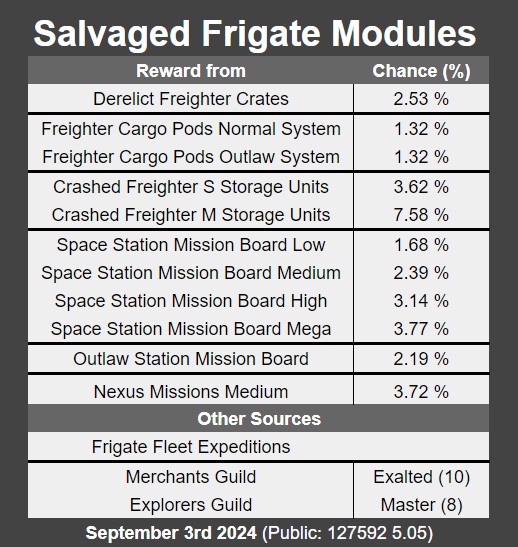
 shrewd ibex
!faq-frigates
river micaBOT
-# to view info below, enable embeds
Frigates and Fleet Expeditions-# Intro to expeditions, Finding and interacting with frigates, Managing fleet
-# Frigate types, Hiring criteria, Frigate Fuel usage, Base stats formula
-# Rankups aren't class upgrades though
-# Suggestions to fleet composition, avoid damage events
-# Consumables and fleet upgrade modules
-# If you find any others that aren't mentioned here, #contact-us.
 north quest
!faq-echoes
river micaBOT
-# to view info below, enable embeds
Make sure the steps below are completed.
⚠️ Use #nms-commands for FAQ commands below & check #nms-questions for the latest details about the update.
Run !Faq-ArtemisPath in #nms-commands. Run !Faq-Interceptor in #nms-commands.❗ This information has been verified as of <t:1694212090:D> (after Update 4.44) & is subject to change.
With update 4.44, completion of the mission, A Trace of Metal is no longer required. A Settlement used to be needed -- except on Switch, where you'd have to trigger it by warping 25 times.
 white viper
!faqs-echoes
river micaBOT
@white viper Did you mean !Faq-Echoes?
-# to view info below, enable embeds
Make sure the steps below are completed.
⚠️ Use #nms-commands for FAQ commands below & check #nms-questions for the latest details about the update.
Run !Faq-ArtemisPath in #nms-commands. Run !Faq-Interceptor in #nms-commands.❗ This information has been verified as of <t:1694212090:D> (after Update 4.44) & is subject to change.
With update 4.44, completion of the mission, A Trace of Metal is no longer required. A Settlement used to be needed -- except on Switch, where you'd have to trigger it by warping 25 times.
white viper
!Faq-ArtemisPath
river micaBOT
-# to view info below, enable embeds
The main storyline The Artemis Path is composed of these missions:
Do not reuse portals found via the storyline to prevent bugs.
❓ For in-depth questions about these missions, ask in #nms-spoilers, or in #nms-questions with spoiler tags -- run !SpoilerTag in #bot-spam for help.
📖 Did you know? The Atlas Path and The Purge mission can be completed in tandem.
cloud compass
!faq-freighters
river micaBOT
-# to view info below, enable embeds
surreal temple
!expedition
river micaBOT
-# to view info below, enable embeds
-# Breach (#20) active till <t:1768316400>
-# Ends <t:1768316400:R> - time elapsed: 88%
-# Previous
-# Corvette (#19) ended <t:1767106800:d>
-# Relics (#18) ended <t:1765897200:d>
-# Titan (#17) ended <t:1764687600:d>
-# Beachhead (#2) ended <t:1763478000:d>
▸ Expedition help & tips » #nms-expeditions Pins
▸ General gameplay questions » #nms-help.
▸ Run !Faq-Expedition & !ExpTime in #bot-spam.
▸ LFG or trade here »
▸ Expedition #roles are self-assignable »
📣 Grab the NMS Announcements role in #roles for #nms-announcements notifications & follow #nms-news-ticker for latest updates & upcoming expeditions.
surreal temple
!faq flea
river micaBOT
@surreal temple
-# Prefix Gunter commands with exclamation mark (i.e., !command)
CurrencyFaq-Nanites - Tips & guides for making nanites.
Faq-Pirate - How to pirate & recover standing
Faq-Units - Tips & guides for making units.
ExpeditionsFaq-Expedition - Important expedition tips, bug workarounds (pre-patches), and lists of other relevant commands.
Info and TipsFaq-AnomalyFirstVisit - The proper order of steps for your first visit to the Space Anomaly.
Faq-Arg - Explains ARG.
Faq-BeginnerInventory - Tips for early game inventory management.
Faq-BeginnerTips - Important tips for brand new players.
Faq-CrossSave - Cross save information and link.
Faq-Derelicts - Explains the difference between the two derelict encounters.
Faq-ExoticFarm - How to farm exotic ships through freighter battles.
Faq-Interceptor - Methods for finding and claiming Interceptors.
Faq-Inventory - How to upgrade your Inventories.
Faq-Likholu - Warning about the Likholu system.
Faq-LivingFrigate - Information on Organic Frigates.
Faq-LivingShip - All living ship information, including the Starbirth questline.
Faq-Maps - Maps for the Anomaly, space stations, freighters and harmonic camps.
Faq-Multiplayer - Shows recommended network settings & in-game friend code info.
Faq-PortalGlyphs - Various ways to unlock the portal glyphs.
Faq-PortalUse - How to use portals.
Faq-Quicksilver - How to get and spend quicksilver.
Faq-Settlements - Planetary Settlements Guide
Faq-Squadron - How to recruit for your squadron.
Faq-Time - Why you shouldn't change your system time.
MechanicsFaq-Biomes - Guides to all names and resources for all biomes.
Faq-CoreWarp - Guide on warping to the center of a galaxy.
Faq-CorvetteBuilding - Various advanced building methods for Corvettes.
Faq-Corvettes - How to start building a Corvette.
Faq-Freighters - Freighter Infographic & helpful guides.
Faq-Frigates - In depth information in all aspects of frigates.
Faq-Galaxies - Commonly asked questions about galaxies.
Faq-GlitchBuilding - Glitch building guide on YouTube.
Faq-Leylines - Info on finding 3 star resource Laylines.
Faq-Mechafauna - How to locate Mechafauna.
Faq-OutlawSystem - How to find outlaw systems.
Faq-Portal - Guide to locating portals.
Faq-ShipSpawns - Ship spawning and tier information.
Faq-StarColor - How to use the spectral classification.
Faq-StorageAugments - Ship storage augments drop rates from scrapping.
Faq-SystemScanners - How to see Economy and Conflict levels in the Galaxy Map.
QuestsFaq-ArtemisPath - List of Artemis Path missions.
Faq-AtlasPath - In depth information for the Atlas Path.
Faq-BasePersonnel - Instructions on how to hire base NPCs.
Faq-Echoes - Latest known steps to start the new Echoes content.
Faq-PurpleSystems - How to access the purple systems.
Faq-Starbirth - Please use !Faq-LivingShip instead.
SupportFaq-EventView - Guide the users on how to access event viewer on PC.
Faq-ExplorersArchive - Tips on how to use our #explorers-archive channel.
Faq-Help - Basic information most commonly requested by #nms-questions regulars while assisting users.
Faq-Modding - Links and tips to get started modding NMS.
Faq-SaveFiles - Lists save file paths for different platforms with info for HG bug reports.
Faq-SettingsFiles - Lists settings file paths for different platforms.
Faq-Spoiler - How to use spoiler tags.
Faq-SystemReq - Minimum PC requirements for No Man's Sky.
Faq-Troubleshooting - Multiple resources for troubleshooting well known issues, mostly on Windows.
surreal temple
!Faq-interceptor
river micaBOT
-# to view info below, enable embeds
Interceptors may only be found and claimed in Dissonant systems. The system cannot be Uncharted, and the planet cannot be a Dead biome or Weird biome.
Locating:
Other Methods:
Any Nexus Missions or Frigate Combat Expeditions have a chance to reward the Carrier AI Fragment used to find an Interceptor.
Random Space Encounter - when pulsing and then receiving the notification of an encounter, drop out of pulse and use your ship communicator to answer the call. You should be directed to a suitable planet with Interceptors.
Claiming:
Claiming an Interceptor »
Sentinel Pillars will shut down the Corrupted Sentinels and leave the Dissonance Resonators, if needed.
river micaBOT
-# to view info below, enable embeds
You can not recruit a living frigate if your fleet already has 30 frigates.
You can only recruit a living frigate once per system.
With Dream Aerial (Required for your first)
To obtain your first organic frigate, send out fleet expeditions until you receive a blueprint for the Dream Aerial. Craft the Dream Aerial (1 Solar Mirror and 3 Living Glass) and pulse drive in space with your ship. You will get an encounter with an organic frigate that asks many questions to determine the stats of the frigate. After you finish the questions, claim the living frigate.
Using the Dream Aerial randomizes class, which is otherwise fixed per system. The Dream Aerial is only used this first time, don't hold on to it: delete it or give it to another player that needs one.
With Anomaly Detectors
After acquiring your first organic frigate, you may now use Anomaly Detectors to acquire more. These are rare drops from blowing up asteroids.
Activate pulse drive (as stated above, use an Anomaly detector before doing so). Keep your pulse drive fueled as this may take some time depending on the system. While pulsing you may see alerts for rare objects or traders, ignore them. The Anomaly detector will be consumed if you exit pulse. Continue pulsing until you receive a Whalesong signal to discover a living frigate with these price ranges:
C-Class: 7,500,000 - 12,500,000 units.
B-Class: 15,000,000 - 25,000,000 units.
A-Class: 26,250,000 - 43,750,000 units.
S-Class: 37,500,000 - 62,500,000 units.
Known Issues:
A list of usable food groups and a demonstration of their effects on a specific Living Frigate »
ancient thorn
!Faq-Freighters
river micaBOT
-# to view info below, enable embeds
quasi oxide
!faq-echoed
river micaBOT
@quasi oxide Did you mean !Faq-Echoes?
-# to view info below, enable embeds
Make sure the steps below are completed.
⚠️ Use #nms-commands for FAQ commands below & check #nms-questions for the latest details about the update.
Run !Faq-ArtemisPath in #nms-commands. Run !Faq-Interceptor in #nms-commands.❗ This information has been verified as of <t:1694212090:D> (after Update 4.44) & is subject to change.
With update 4.44, completion of the mission, A Trace of Metal is no longer required. A Settlement used to be needed -- except on Switch, where you'd have to trigger it by warping 25 times.
quasi oxide
!faq-interceptor
river micaBOT
-# to view info below, enable embeds
Interceptors may only be found and claimed in Dissonant systems. The system cannot be Uncharted, and the planet cannot be a Dead biome or Weird biome.
Locating:
Other Methods:
Any Nexus Missions or Frigate Combat Expeditions have a chance to reward the Carrier AI Fragment used to find an Interceptor.
Random Space Encounter - when pulsing and then receiving the notification of an encounter, drop out of pulse and use your ship communicator to answer the call. You should be directed to a suitable planet with Interceptors.
Claiming:
Claiming an Interceptor »
Sentinel Pillars will shut down the Corrupted Sentinels and leave the Dissonance Resonators, if needed.
daring aspen
!faq-savefile
river micaBOT
@daring aspen Did you mean !Faq-SaveFiles?
-# to view info below, enable embeds
Steam
%appdata%\HelloGames\NMS\st_<Steam64ID>\...
Game Pass
%LocalAppData%\Packages\HelloGames.NoMansSky_bs190hzg1sesy\SystemAppData\wgs\...
GoG
%appdata%\HelloGames\NMS\DefaultUser\...
Linux & Steam Deck
$HOME/.local/share/Steam/steamapps/compatdata/275850/pfx/drive_c/users/steamuser/Application Data/HelloGames/NMS/st_<Steam64ID>/...
Mac
/Users/<yourname>/Library/Application Support/HelloGames/NMS/st_<your steam ID>/
When sharing saves in a report to Hello Games, it is best to create a package/archive of the full folder shown for your platform above (.zip/.rar).
 lusty drum
!Faq-PurpleSystems
river micaBOT
-# to view info below, enable embeds
How to get started...
📖 Warning: Purple systems are end-game content so you must finish certain quests before you can access them.
!faq-artemispath in #bot-spam shows the steps.!faq-interceptor in #bot-spam shows how to find them.!faq-echoes in #bot-spam for more info.🛑 Warning: Do not leave the Atlas Station system you'll go to in the quest without visiting its space station or claiming a base computer on one of its planets.
!faq-starcolor in #bot-spam for more info. These are the known steps as of update 5.5 Worlds Pt II (<t:1738163940:D>) and are subject to change.
-# See patch notes »
cloud compass
!nmsversions
river micaBOT
-# to view info below, enable embeds
-# Known Versions (title screen bottom-left corner)
-# Exp: 157371 (4201)
-# 6.18 156355 (4201)
-# 6.18 156355 (4201)
-# 6.18 156355 (4201)
-# 6.18 156268 (4201)
-# 6.18 156355 (4201)
-# 6.18 156355 (4201)
-# 6.18 156758 (4188)
-# 6.18 156748 (4201)
Steam Branches
-# Public: 21006256 (<t:1764593094:d>)
-# Latest Experimental notes
-# For #nms-announcements notifications get the respective pingable role & follow 📰 #nms-news-ticker for updates as they roll out to each platform.
Read all patch notes in the NMS Release Log » Experimental patch notes: Latest » | All » PC update issues? Get Microsoft store help » whole plume
!Faq-Settlements
river micaBOT
-# to view info below, enable embeds
Settlements-# Info and recommendations about Settlements.
-# Getting your first settlement of a save
-# Individual Settlement buildings can be upgraded after constructed too.
-# Known bugs. If you find any others that aren't mentioned here, #Contact-Us
whole plume
!Faq-Corvettes
river micaBOT
-# to view info below, enable embeds
Corvettes-# Recommendations, How to start building a Corvette Ship
-# Drop sources, Bartering
-# How are Corvettes upgraded, Do they always spawn in C-class, Supercharged Slot layout, Inventory Upgrade limits, etc.
-# If you find any others that aren't mentioned here, #contact-us
whole plume
!faq
river micaBOT
Faq-Update - When will my platform get the latest update?
Tech LayoutsFaq-ExocraftLayout - Examples of Exocraft layouts.
Faq-FreighterLayout - Example of Freighter layouts.
Faq-MultitoolLayout - Multitool tech layout example.
Faq-ShipLayout - Starship tech layout example.
Faq-SuitLayout - Ideal layouts for Exosuit Technology
Withdrawn / RetiredFaq-ExosuitLayout - Run !Faq-SuitLayout instead.
whole plume
!Faq-MultitoolLayout
river micaBOT
-# to view info below, enable embeds
Multitool Tech LayoutThis is just an example of adjacency and supercharged slots. Note that supercharging bonuses always beats adjacency bonuses. Therefore, to maximize tech stats, split apart tech to utilize supercharged slots, as they will yield superior results over maintaining perfect adjacency.
For more in-depth assistance, check #nms-questions & #nms-multitools.
whole plume
!Faq-ShipLayout
river micaBOT
-# to view info below, enable embeds
Starship Tech LayoutThis is just an example of adjacency and supercharged slots. ⚠️ For hyperdrive and pulse engine, this example does not apply to sentinel interceptors.
For more in-depth assistance, check #nms-questions & #nms-legacy-ships.
 whole plume
!Faq=SuitLayout
 hearty compass
!faq-livingship
river micaBOT
-# to view info below, enable embeds
Living Ships-# Getting your first living ship of a save
-# Getting additional living ships
-# Info and recommendations about Living Ships
-# Upgrading Inventory and Tech Inventory
-# Known bugs. If you find any others that aren't mentioned here, #contact-us.
river micaBOT
-# to view info below, enable embeds
Note: Additional bot commands mentioned in this post should be run in the #bot-spam channel.
Open your inventory, and hover over the Void Egg: does its item card text description now mention "EUCLID" multiple times?
If it does, you will need the Portal glyphs unlocked (at least the first 12), to be able to progress this next stage of the quest. (related bot command: !faq-portalglyphs)
Once you have them unlocked, find a portal in the Euclid Galaxy. (related bot command: !faq-portal)
Disable multiplayer, then dial the address embedded in this post. (related bot command: !faq-portaluse)
ornate sparrow
!exptime
river micaBOT
-# to view info below, enable embeds
-# Breach (#20) active till <t:1768316400>
-# Ends <t:1768316400:R> - time elapsed: 92%
-# Previous
-# Corvette (#19) ended <t:1767106800:d>
-# Relics (#18) ended <t:1765897200:d>
-# Titan (#17) ended <t:1764687600:d>
-# Beachhead (#2) ended <t:1763478000:d>
See Pins in #nms-expedition & run !Expedition in #nms-commands
ornate veldt
!faq-livingship
river micaBOT
-# to view info below, enable embeds
Living Ships-# Getting your first living ship of a save
-# Getting additional living ships
-# Info and recommendations about Living Ships
-# Upgrading Inventory and Tech Inventory
-# Known bugs. If you find any others that aren't mentioned here, #contact-us.
 boreal coral
!faq-portal
river micaBOT
-# to view info below, enable embeds
Locating a Portal📚 Notes:
!faq-portalglyphs and !faq-purplesystems in #bot-spam to learn more.)
boreal coral
!faq-portalglyphs
river micaBOT
-# to view info below, enable embeds
Glyphs are always unlocked in the same order. Completing the main storyline is the easiest and most hassle-free way to do so, but the player may also obtain glyphs from Traveler graves.
A) Through the main storyline mission named The Purge: perform 16 warps in any direction, to any system (despite what the quest objective says). Wait for the game to register the last warp, then warp out again. Type !faq-artemispath in #bot-spam for a list of missions.
B) Find Travelers in inhabited star systems, and for 100 nanites, ask them where they came from.
This will add a HUD marker to a grave location on one of the planets in the system: follow it and interact with the grave to obtain the next glyph. Please note that if multiple travelers are found in the same location/system, it won't be possible to get markers for all their graves in one go, you need to get one grave at a time.
C) Through the Eliminate Hazardous Flora Nexus mission. It is strongly recommended to do this with multiplayer disabled. As part of the mission, the player is led to a grave. Once located, do not interact with it but instead build and claim a base computer near by, then return to the Space Anomaly by reloading restore point or using on-foot quick menu shortcut (if available). Nexus missions refresh every 10 minutes, so if the mission is still available (or another of the same type has been added with the last refresh), the process can be repeated again. Once done with finding graves, they can easily be reached through any teleporter.
Run !Faq-Portal and !Faq-PortalUse in #bot-spam to learn more about portals and using them.
celest swallow
!faq-savefiles
river micaBOT
-# to view info below, enable embeds
Steam
%appdata%\HelloGames\NMS\st_<Steam64ID>\...
Game Pass
%LocalAppData%\Packages\HelloGames.NoMansSky_bs190hzg1sesy\SystemAppData\wgs\...
GoG
%appdata%\HelloGames\NMS\DefaultUser\...
Linux & Steam Deck
$HOME/.local/share/Steam/steamapps/compatdata/275850/pfx/drive_c/users/steamuser/Application Data/HelloGames/NMS/st_<Steam64ID>/...
Mac
/Users/<yourname>/Library/Application Support/HelloGames/NMS/st_<your steam ID>/
When sharing saves in a report to Hello Games, it is best to create a package/archive of the full folder shown for your platform above (.zip/.rar).
sour terrace
!faq-portalglyphs
river micaBOT
-# to view info below, enable embeds
Glyphs are always unlocked in the same order. Completing the main storyline is the easiest and most hassle-free way to do so, but the player may also obtain glyphs from Traveler graves.
A) Through the main storyline mission named The Purge: perform 16 warps in any direction, to any system (despite what the quest objective says). Wait for the game to register the last warp, then warp out again. Type !faq-artemispath in #bot-spam for a list of missions.
B) Find Travelers in inhabited star systems, and for 100 nanites, ask them where they came from.
This will add a HUD marker to a grave location on one of the planets in the system: follow it and interact with the grave to obtain the next glyph. Please note that if multiple travelers are found in the same location/system, it won't be possible to get markers for all their graves in one go, you need to get one grave at a time.
C) Through the Eliminate Hazardous Flora Nexus mission. It is strongly recommended to do this with multiplayer disabled. As part of the mission, the player is led to a grave. Once located, do not interact with it but instead build and claim a base computer near by, then return to the Space Anomaly by reloading restore point or using on-foot quick menu shortcut (if available). Nexus missions refresh every 10 minutes, so if the mission is still available (or another of the same type has been added with the last refresh), the process can be repeated again. Once done with finding graves, they can easily be reached through any teleporter.
Run !Faq-Portal and !Faq-PortalUse in #bot-spam to learn more about portals and using them.
whole plume
!faq
river micaBOT
Faq-Update - When will my platform get the latest update?
Tech LayoutsFaq-ExocraftLayout - Examples of Exocraft layouts.
Faq-FreighterLayout - Example of Freighter layouts.
Faq-MultitoolLayout - Multitool tech layout example.
Faq-ShipLayout - Starship tech layout example.
Faq-SuitLayout - Ideal layouts for Exosuit Technology
Withdrawn / RetiredFaq-ExosuitLayout - Run !Faq-SuitLayout instead.
whole plume
!faq-multitoollayout
river micaBOT
-# to view info below, enable embeds
Multitool Tech LayoutThis is just an example of adjacency and supercharged slots. Note that supercharging bonuses always beats adjacency bonuses. Therefore, to maximize tech stats, split apart tech to utilize supercharged slots, as they will yield superior results over maintaining perfect adjacency.
For more in-depth assistance, check #nms-questions & #nms-multitools.
magic brook
!faq-equos
river micaBOT
@magic brook Did you mean !Faq-Echoes?
-# to view info below, enable embeds
Make sure the steps below are completed.
⚠️ Use #nms-commands for FAQ commands below & check #nms-questions for the latest details about the update.
Run !Faq-ArtemisPath in #nms-commands. Run !Faq-Interceptor in #nms-commands.❗ This information has been verified as of <t:1694212090:D> (after Update 4.44) & is subject to change.
With update 4.44, completion of the mission, A Trace of Metal is no longer required. A Settlement used to be needed -- except on Switch, where you'd have to trigger it by warping 25 times.
magic brook
!Faq-Interceptor
river micaBOT
-# to view info below, enable embeds
Interceptors may only be found and claimed in Dissonant systems. The system cannot be Uncharted, and the planet cannot be a Dead biome or Weird biome.
Locating:
Other Methods:
Any Nexus Missions or Frigate Combat Expeditions have a chance to reward the Carrier AI Fragment used to find an Interceptor.
Random Space Encounter - when pulsing and then receiving the notification of an encounter, drop out of pulse and use your ship communicator to answer the call. You should be directed to a suitable planet with Interceptors.
Claiming:
Claiming an Interceptor »
Sentinel Pillars will shut down the Corrupted Sentinels and leave the Dissonance Resonators, if needed.
magic brook
Yeaaa no idea wdym
whole plume
!faq-shiplaytout
river micaBOT
@whole plume Did you mean !Faq-ShipLayout?
-# to view info below, enable embeds
Starship Tech LayoutThis is just an example of adjacency and supercharged slots. ⚠️ For hyperdrive and pulse engine, this example does not apply to sentinel interceptors.
For more in-depth assistance, check #nms-questions & #nms-legacy-ships.
halcyon stream
!faq-livingship
river micaBOT
-# to view info below, enable embeds
Living Ships-# Getting your first living ship of a save
-# Getting additional living ships
-# Info and recommendations about Living Ships
-# Upgrading Inventory and Tech Inventory
-# Known bugs. If you find any others that aren't mentioned here, #contact-us.
whole plume
!faq-suitlayout
river micaBOT
-# to view info below, enable embeds
cloud compass
!faq-corvettes
river micaBOT
-# to view info below, enable embeds
Corvettes-# Recommendations, How to start building a Corvette Ship
-# Drop sources, Bartering
-# How are Corvettes upgraded, Do they always spawn in C-class, Supercharged Slot layout, Inventory Upgrade limits, etc.
-# If you find any others that aren't mentioned here, #contact-us
wicked trench
! Exptime
river micaBOT
-# to view info below, enable embeds
-# Breach (#20) active till <t:1768316400>
-# Ends <t:1768316400:R> - time elapsed: 97%
-# Previous
-# Corvette (#19) ended <t:1767106800:d>
-# Relics (#18) ended <t:1765897200:d>
-# Titan (#17) ended <t:1764687600:d>
-# Beachhead (#2) ended <t:1763478000:d>
See Pins in #nms-expedition & run !Expedition in #nms-commands
 languid blade
!faq-suitlayout
river micaBOT
-# to view info below, enable embeds
ornate sparrow
!exptime
river micaBOT
-# to view info below, enable embeds
-# Breach (#20) active till <t:1768316400>
-# Ends <t:1768316400:R> - time elapsed: 99%
-# Previous
-# Corvette (#19) ended <t:1767106800:d>
-# Relics (#18) ended <t:1765897200:d>
-# Titan (#17) ended <t:1764687600:d>
-# Beachhead (#2) ended <t:1763478000:d>
See Pins in #nms-expedition & run !Expedition in #nms-commands
river micaBOT
-# to view info below, enable embeds
Requirement: playing solo; if you were playing with friends recently, save+reload from main menu after disabling multiplayer.
When the player current position is 4000 Light Years away from current mission location or more, a button appears in the Log tab that allows to restart the last mission stage. Most commonly used ways to trigger it:
After getting far away enough, be sure to give the game a few seconds to recalculate distances, then check Log tab.
tranquil gull
!faq pirate
river micaBOT
@tranquil gull
-# Prefix Gunter commands with exclamation mark (i.e., !command)
CurrencyFaq-Nanites - Tips & guides for making nanites.
Faq-Pirate - How to pirate & recover standing
Faq-Units - Tips & guides for making units.
ExpeditionsFaq-Expedition - Important expedition tips, bug workarounds (pre-patches), and lists of other relevant commands.
Info and TipsFaq-AnomalyFirstVisit - The proper order of steps for your first visit to the Space Anomaly.
Faq-Arg - Explains ARG.
Faq-BeginnerInventory - Tips for early game inventory management.
Faq-BeginnerTips - Important tips for brand new players.
Faq-CrossSave - Cross save information and link.
Faq-Derelicts - Explains the difference between the two derelict encounters.
Faq-ExoticFarm - How to farm exotic ships through freighter battles.
Faq-Interceptor - Methods for finding and claiming Interceptors.
Faq-Inventory - How to upgrade your Inventories.
Faq-Likholu - Warning about the Likholu system.
Faq-LivingFrigate - Information on Organic Frigates.
Faq-LivingShip - All living ship information, including the Starbirth questline.
Faq-Maps - Maps for the Anomaly, space stations, freighters and harmonic camps.
Faq-Multiplayer - Shows recommended network settings & in-game friend code info.
Faq-PortalGlyphs - Various ways to unlock the portal glyphs.
Faq-PortalUse - How to use portals.
Faq-Quicksilver - How to get and spend quicksilver.
Faq-Settlements - Planetary Settlements Guide
Faq-Squadron - How to recruit for your squadron.
Faq-Time - Why you shouldn't change your system time.
MechanicsFaq-Biomes - Guides to all names and resources for all biomes.
Faq-CoreWarp - Guide on warping to the center of a galaxy.
Faq-CorvetteBuilding - Various advanced building methods for Corvettes.
Faq-Corvettes - How to start building a Corvette.
Faq-Freighters - Freighter Infographic & helpful guides.
Faq-Frigates - In depth information in all aspects of frigates.
Faq-Galaxies - Commonly asked questions about galaxies.
Faq-GlitchBuilding - Glitch building guide on YouTube.
Faq-Leylines - Info on finding 3 star resource Laylines.
Faq-Mechafauna - How to locate Mechafauna.
Faq-OutlawSystem - How to find outlaw systems.
Faq-Portal - Guide to locating portals.
Faq-ShipSpawns - Ship spawning and tier information.
Faq-StarColor - How to use the spectral classification.
Faq-StorageAugments - Ship storage augments drop rates from scrapping.
Faq-SystemScanners - How to see Economy and Conflict levels in the Galaxy Map.
QuestsFaq-ArtemisPath - List of Artemis Path missions.
Faq-AtlasPath - In depth information for the Atlas Path.
Faq-BasePersonnel - Instructions on how to hire base NPCs.
Faq-Echoes - Latest known steps to start the new Echoes content.
Faq-PurpleSystems - How to access the purple systems.
Faq-Starbirth - Please use !Faq-LivingShip instead.
SupportFaq-EventView - Guide the users on how to access event viewer on PC.
Faq-ExplorersArchive - Tips on how to use our #explorers-archive channel.
Faq-Help - Basic information most commonly requested by #nms-questions regulars while assisting users.
Faq-Modding - Links and tips to get started modding NMS.
Faq-SaveFiles - Lists save file paths for different platforms with info for HG bug reports.
Faq-SettingsFiles - Lists settings file paths for different platforms.
Faq-Spoiler - How to use spoiler tags.
Faq-SystemReq - Minimum PC requirements for No Man's Sky.
Faq-Troubleshooting - Multiple resources for troubleshooting well known issues, mostly on Windows.
tranquil gull
!faq systemscanners
river micaBOT
@tranquil gull
-# Prefix Gunter commands with exclamation mark (i.e., !command)
CurrencyFaq-Nanites - Tips & guides for making nanites.
Faq-Pirate - How to pirate & recover standing
Faq-Units - Tips & guides for making units.
ExpeditionsFaq-Expedition - Important expedition tips, bug workarounds (pre-patches), and lists of other relevant commands.
Info and TipsFaq-AnomalyFirstVisit - The proper order of steps for your first visit to the Space Anomaly.
Faq-Arg - Explains ARG.
Faq-BeginnerInventory - Tips for early game inventory management.
Faq-BeginnerTips - Important tips for brand new players.
Faq-CrossSave - Cross save information and link.
Faq-Derelicts - Explains the difference between the two derelict encounters.
Faq-ExoticFarm - How to farm exotic ships through freighter battles.
Faq-Interceptor - Methods for finding and claiming Interceptors.
Faq-Inventory - How to upgrade your Inventories.
Faq-Likholu - Warning about the Likholu system.
Faq-LivingFrigate - Information on Organic Frigates.
Faq-LivingShip - All living ship information, including the Starbirth questline.
Faq-Maps - Maps for the Anomaly, space stations, freighters and harmonic camps.
Faq-Multiplayer - Shows recommended network settings & in-game friend code info.
Faq-PortalGlyphs - Various ways to unlock the portal glyphs.
Faq-PortalUse - How to use portals.
Faq-Quicksilver - How to get and spend quicksilver.
Faq-Settlements - Planetary Settlements Guide
Faq-Squadron - How to recruit for your squadron.
Faq-Time - Why you shouldn't change your system time.
MechanicsFaq-Biomes - Guides to all names and resources for all biomes.
Faq-CoreWarp - Guide on warping to the center of a galaxy.
Faq-CorvetteBuilding - Various advanced building methods for Corvettes.
Faq-Corvettes - How to start building a Corvette.
Faq-Freighters - Freighter Infographic & helpful guides.
Faq-Frigates - In depth information in all aspects of frigates.
Faq-Galaxies - Commonly asked questions about galaxies.
Faq-GlitchBuilding - Glitch building guide on YouTube.
Faq-Leylines - Info on finding 3 star resource Laylines.
Faq-Mechafauna - How to locate Mechafauna.
Faq-OutlawSystem - How to find outlaw systems.
Faq-Portal - Guide to locating portals.
Faq-ShipSpawns - Ship spawning and tier information.
Faq-StarColor - How to use the spectral classification.
Faq-StorageAugments - Ship storage augments drop rates from scrapping.
Faq-SystemScanners - How to see Economy and Conflict levels in the Galaxy Map.
QuestsFaq-ArtemisPath - List of Artemis Path missions.
Faq-AtlasPath - In depth information for the Atlas Path.
Faq-BasePersonnel - Instructions on how to hire base NPCs.
Faq-Echoes - Latest known steps to start the new Echoes content.
Faq-PurpleSystems - How to access the purple systems.
Faq-Starbirth - Please use !Faq-LivingShip instead.
SupportFaq-EventView - Guide the users on how to access event viewer on PC.
Faq-ExplorersArchive - Tips on how to use our #explorers-archive channel.
Faq-Help - Basic information most commonly requested by #nms-questions regulars while assisting users.
Faq-Modding - Links and tips to get started modding NMS.
Faq-SaveFiles - Lists save file paths for different platforms with info for HG bug reports.
Faq-SettingsFiles - Lists settings file paths for different platforms.
Faq-Spoiler - How to use spoiler tags.
Faq-SystemReq - Minimum PC requirements for No Man's Sky.
Faq-Troubleshooting - Multiple resources for troubleshooting well known issues, mostly on Windows.
tranquil gull
!faq-outlawsystem
river micaBOT
-# to view info below, enable embeds
Requires Economy Scanner OR Conflict Scanner installed on your active ship. If using a Living ship, the Wormhole Brain. When using the Freighter Galaxy Map, the Interstellar Scanner tech is required.
In the galaxy map, look for systems with a small pirate skull left of the Economy type icon and identified as Black Market, or with Conflict level set to Pirate Controlled.
Learn more about [restrictions on teleporting to/from outlaw stations.](#nms-questions message)
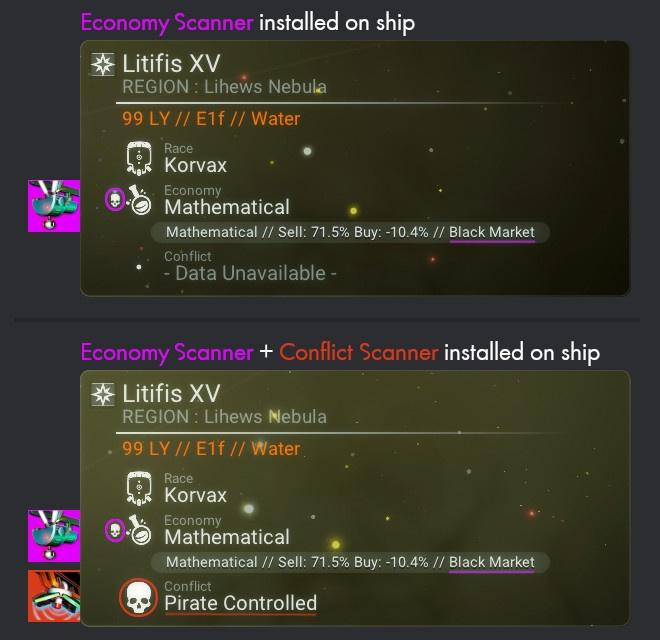 sterile quartz
!faq-portaluse
river micaBOT
-# to view info below, enable embeds
After finding a Portal, how do I use it?
On one of its sides, there's a terminal - it will pop out of the ground once you approach it. Interacting with it for the first time should prompt you to charge the portal up, and that's done by individually charging up all glyphs in the glyph wheel to 100%.

 » Organic: 20 Carbon, 7 Condensed Carbon, or 10 Oxygen per glyph.

 » Catalytic: 10 Sodium or 4 Sodium Nitrate per glyph.

 » Earth: 20 Cobalt, 20 Deuterium, 20 Di-hydrogen, 5 Ionised Cobalt, or 50 Salt per glyph.

 » Stellar: 20 Copper, 10 Cadmium, 7 Emeril, 5 Indium or 4 Quartzite per glyph.
I charged up the portal, but nothing is happening?
Double check all glyphs charge bars. Are one or more not 100% charged? - see example.
I fully charged up the portal; now, which option do I choose?
Activate Portal will display the address input screen - Each portal address is made up of 12 glyphs. A Portal can only lead to locations in the same galaxy.
Request Planet Address will provide the current planet's glyph address, though this option is barely used today, due to the glyph address also showing up in photo mode.
After selecting Activate Portal, I don't have any glyphs available to input.
You need to learn the 16 glyphs to fully use the portal network -- although, after having learned 1 - 2 glyphs you could go places, just very limited choices.
📖 Did you know? The portal you charged up should still be good for a few more trips, even to different destinations. Bookmarking it with a base computer is probably a wise choice.
Run [!Faq-PortalGlyphs](#nms-questions message) and [!Faq-Portal](#nms-questions message) in #bot-spam to learn more about glyphs and finding portals.
languid blade
!exptime
river micaBOT
-# to view info below, enable embeds
-# Breach (#20) active till <t:1768316400>
-# Ends <t:1768316400:R> - time elapsed: 100%
-# Previous
-# Corvette (#19) ended <t:1767106800:d>
-# Relics (#18) ended <t:1765897200:d>
-# Titan (#17) ended <t:1764687600:d>
-# Beachhead (#2) ended <t:1763478000:d>
See Pins in #nms-expedition & run !Expedition in #nms-commands
whole plume
!faq-suitlayout
river micaBOT
-# to view info below, enable embeds
whole plume
!faq-multitoollayout
river micaBOT
-# to view info below, enable embeds
Multitool Tech LayoutThis is just an example of adjacency and supercharged slots. Note that supercharging bonuses always beats adjacency bonuses. Therefore, to maximize tech stats, split apart tech to utilize supercharged slots, as they will yield superior results over maintaining perfect adjacency.
For more in-depth assistance, check #nms-questions & #nms-multitools.
 light plume
!faq-biomes
river micaBOT
-# to view info below, enable embeds
-# 🌴 Lush »
-# 🥶 Frozen »
-# 🥵 Scorched »
-# 🤢 Toxic »
-# ☢️ Irradiated »
-# 🏜️ Barren »
-# ☠️ Dead »
-# 🐊 Swamp »
-# 🌋 Lava »
-# 🔴 Red »
-# 🟢 Green »
-# 🔵 Blue »
-# 😵💫 Weird »
whole plume
!far-exocraftlayout
river micaBOT
@whole plume Did you mean !Faq-ExocraftLayout?
-# to view info below, enable embeds
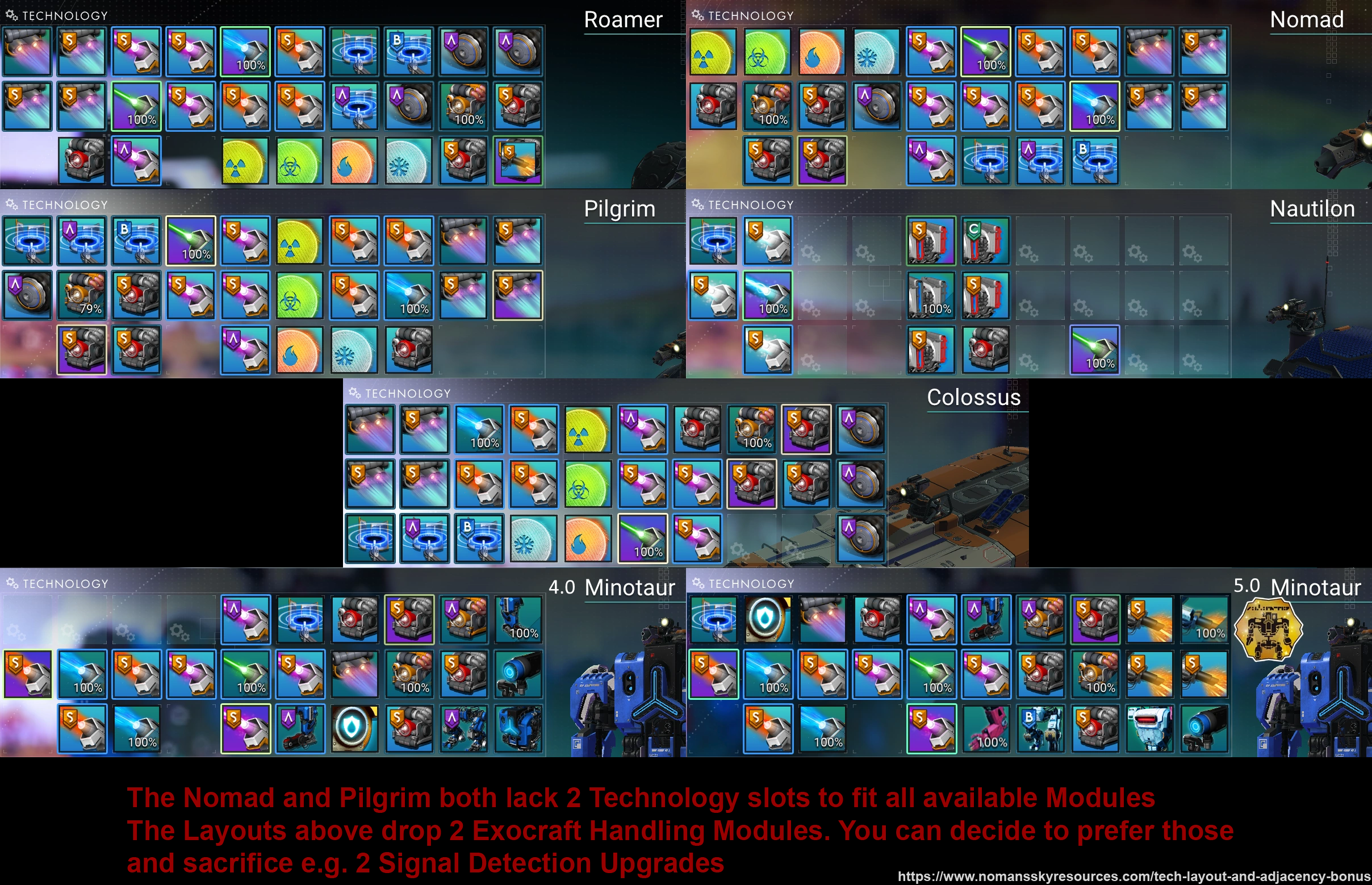 river micaBOT
-# to view info below, enable embeds
 quasi oxide
!Faq-interceptor
river micaBOT
-# to view info below, enable embeds
Interceptors may only be found and claimed in Dissonant systems. The system cannot be Uncharted, and the planet cannot be a Dead biome or Weird biome.
Locating:
Other Methods:
Any Nexus Missions or Frigate Combat Expeditions have a chance to reward the Carrier AI Fragment used to find an Interceptor.
Random Space Encounter - when pulsing and then receiving the notification of an encounter, drop out of pulse and use your ship communicator to answer the call. You should be directed to a suitable planet with Interceptors.
Claiming:
Claiming an Interceptor »
Sentinel Pillars will shut down the Corrupted Sentinels and leave the Dissonance Resonators, if needed.
 cosmic grove
!faq
river micaBOT
@cosmic grove
-# Prefix Gunter commands with exclamation mark (i.e., !command)
CurrencyFaq-Nanites - Tips & guides for making nanites.
Faq-Pirate - How to pirate & recover standing
Faq-Units - Tips & guides for making units.
ExpeditionsFaq-Expedition - Important expedition tips, bug workarounds (pre-patches), and lists of other relevant commands.
Info and TipsFaq-AnomalyFirstVisit - The proper order of steps for your first visit to the Space Anomaly.
Faq-Arg - Explains ARG.
Faq-BeginnerInventory - Tips for early game inventory management.
Faq-BeginnerTips - Important tips for brand new players.
Faq-CrossSave - Cross save information and link.
Faq-Derelicts - Explains the difference between the two derelict encounters.
Faq-ExoticFarm - How to farm exotic ships through freighter battles.
Faq-Interceptor - Methods for finding and claiming Interceptors.
Faq-Inventory - How to upgrade your Inventories.
Faq-Likholu - Warning about the Likholu system.
Faq-LivingFrigate - Information on Organic Frigates.
Faq-LivingShip - All living ship information, including the Starbirth questline.
Faq-Maps - Maps for the Anomaly, space stations, freighters and harmonic camps.
Faq-Multiplayer - Shows recommended network settings & in-game friend code info.
Faq-PortalGlyphs - Various ways to unlock the portal glyphs.
Faq-PortalUse - How to use portals.
Faq-Quicksilver - How to get and spend quicksilver.
Faq-Settlements - Planetary Settlements Guide
Faq-Squadron - How to recruit for your squadron.
Faq-Time - Why you shouldn't change your system time.
MechanicsFaq-Biomes - Guides to all names and resources for all biomes.
Faq-CoreWarp - Guide on warping to the center of a galaxy.
Faq-CorvetteBuilding - Various advanced building methods for Corvettes.
Faq-Corvettes - How to start building a Corvette.
Faq-Freighters - Freighter Infographic & helpful guides.
Faq-Frigates - In depth information in all aspects of frigates.
Faq-Galaxies - Commonly asked questions about galaxies.
Faq-GlitchBuilding - Glitch building guide on YouTube.
Faq-Leylines - Info on finding 3 star resource Laylines.
Faq-Mechafauna - How to locate Mechafauna.
Faq-OutlawSystem - How to find outlaw systems.
Faq-Portal - Guide to locating portals.
Faq-ShipSpawns - Ship spawning and tier information.
Faq-StarColor - How to use the spectral classification.
Faq-StorageAugments - Ship storage augments drop rates from scrapping.
Faq-SystemScanners - How to see Economy and Conflict levels in the Galaxy Map.
QuestsFaq-ArtemisPath - List of Artemis Path missions.
Faq-AtlasPath - In depth information for the Atlas Path.
Faq-BasePersonnel - Instructions on how to hire base NPCs.
Faq-Echoes - Latest known steps to start the new Echoes content.
Faq-PurpleSystems - How to access the purple systems.
Faq-Starbirth - Please use !Faq-LivingShip instead.
SupportFaq-EventView - Guide the users on how to access event viewer on PC.
Faq-ExplorersArchive - Tips on how to use our #explorers-archive channel.
Faq-Help - Basic information most commonly requested by #nms-questions regulars while assisting users.
Faq-Modding - Links and tips to get started modding NMS.
Faq-SaveFiles - Lists save file paths for different platforms with info for HG bug reports.
Faq-SettingsFiles - Lists settings file paths for different platforms.
Faq-Spoiler - How to use spoiler tags.
Faq-SystemReq - Minimum PC requirements for No Man's Sky.
Faq-Troubleshooting - Multiple resources for troubleshooting well known issues, mostly on Windows.
quasi oxide
!faq-echoes
river micaBOT
-# to view info below, enable embeds
Make sure the steps below are completed.
⚠️ Use #nms-commands for FAQ commands below & check #nms-questions for the latest details about the update.
Run !Faq-ArtemisPath in #nms-commands. Run !Faq-Interceptor in #nms-commands.❗ This information has been verified as of <t:1694212090:D> (after Update 4.44) & is subject to change.
With update 4.44, completion of the mission, A Trace of Metal is no longer required. A Settlement used to be needed -- except on Switch, where you'd have to trigger it by warping 25 times.
-# to view info below, enable embeds
A: Despite what its objective says, no. The Purge simply requires the player to warp 16 times in any direction, to any system.
Each warp teaches 1 portal glyph, if the player hasn't learned any yet. Please wait for the mission to acknowledge progress before warping out again.
-# ❗ Warning: After the 16th warp, mission will mark a Portal. To prevent damage to installed technologies during this next part, before going through the portal player should:
-# - Store installed exosuit tech and upgrade modules;
-# - Do the same for current ship and multi-tool, or change to a ship/multi-tool player doesn't care about.
 valid kestrel
!faq-units
river micaBOT
-# to view info below, enable embeds
How to Make Units
river micaBOT
-# to view info below, enable embeds
Mostly up to the player, but in short, the differences between A-class vs S-class Capital Freighters (including Pirate Dreadnought):
Type !faq-shipspawns in #bot-spam for more info on drop chances per system economy tier.
cloud compass
!faq-biomes
river micaBOT
-# to view info below, enable embeds
-# 🌴 Lush »
-# 🥶 Frozen »
-# 🥵 Scorched »
-# 🤢 Toxic »
-# ☢️ Irradiated »
-# 🏜️ Barren »
-# ☠️ Dead »
-# 🐊 Swamp »
-# 🌋 Lava »
-# 🔴 Red »
-# 🟢 Green »
-# 🔵 Blue »
-# 😵💫 Weird »
 quick current
!expedition
river micaBOT
-# to view info below, enable embeds
-# Previous
-# Breach (#20) ended <t:1768316400:d>
-# Corvette (#19) ended <t:1767106800:d>
-# Relics (#18) ended <t:1765897200:d>
-# Titan (#17) ended <t:1764687600:d>
-# Beachhead (#2) ended <t:1763478000:d>
▸ Expedition help & tips » #nms-expeditions Pins
▸ General gameplay questions » #nms-help.
▸ Run !Faq-Expedition & !ExpTime in #bot-spam.
▸ LFG or trade here »
▸ Expedition #roles are self-assignable »
📣 Grab the NMS Announcements role in #roles for #nms-announcements notifications & follow #nms-news-ticker for latest updates & upcoming expeditions.
quick current
!faq-starbirth
river micaBOT
Please use !Faq-LivingShip instead.
quick current
!faq-purplesystem
river micaBOT
@quick current Did you mean !Faq-PurpleSystems?
-# to view info below, enable embeds
How to get started...
📖 Warning: Purple systems are end-game content so you must finish certain quests before you can access them.
!faq-artemispath in #bot-spam shows the steps.!faq-interceptor in #bot-spam shows how to find them.!faq-echoes in #bot-spam for more info.🛑 Warning: Do not leave the Atlas Station system you'll go to in the quest without visiting its space station or claiming a base computer on one of its planets.
!faq-starcolor in #bot-spam for more info. These are the known steps as of update 5.5 Worlds Pt II (<t:1738163940:D>) and are subject to change.
-# See patch notes »
whole plume
!faq-exocraftlayout
river micaBOT
-# to view info below, enable embeds
lucid spire
!faq-biomes
river micaBOT
-# to view info below, enable embeds
-# 🌴 Lush »
-# 🥶 Frozen »
-# 🥵 Scorched »
-# 🤢 Toxic »
-# ☢️ Irradiated »
-# 🏜️ Barren »
-# ☠️ Dead »
-# 🐊 Swamp »
-# 🌋 Lava »
-# 🔴 Red »
-# 🟢 Green »
-# 🔵 Blue »
-# 😵💫 Weird »
 left wadi
!faq-corvette
river micaBOT
@left wadi Did you mean !Faq-Corvettes?
-# to view info below, enable embeds
Corvettes-# Recommendations, How to start building a Corvette Ship
-# Drop sources, Bartering
-# How are Corvettes upgraded, Do they always spawn in C-class, Supercharged Slot layout, Inventory Upgrade limits, etc.
-# If you find any others that aren't mentioned here, #contact-us
 white venture
!faq-multitoollayout
river micaBOT
-# to view info below, enable embeds
Multitool Tech LayoutThis is just an example of adjacency and supercharged slots. Note that supercharging bonuses always beats adjacency bonuses. Therefore, to maximize tech stats, split apart tech to utilize supercharged slots, as they will yield superior results over maintaining perfect adjacency.
For more in-depth assistance, check #nms-questions & #nms-multitools.
white venture
!faq-freighters
river micaBOT
-# to view info below, enable embeds
cloud compass
!faq-biomes
river micaBOT
-# to view info below, enable embeds
-# 🌴 Lush »
-# 🥶 Frozen »
-# 🥵 Scorched »
-# 🤢 Toxic »
-# ☢️ Irradiated »
-# 🏜️ Barren »
-# ☠️ Dead »
-# 🐊 Swamp »
-# 🌋 Lava »
-# 🔴 Red »
-# 🟢 Green »
-# 🔵 Blue »
-# 😵💫 Weird »
cloud compass
!faq-echoes
river micaBOT
-# to view info below, enable embeds
Make sure the steps below are completed.
⚠️ Use #nms-commands for FAQ commands below & check #nms-questions for the latest details about the update.
Run !Faq-ArtemisPath in #nms-commands. Run !Faq-Interceptor in #nms-commands.❗ This information has been verified as of <t:1694212090:D> (after Update 4.44) & is subject to change.
With update 4.44, completion of the mission, A Trace of Metal is no longer required. A Settlement used to be needed -- except on Switch, where you'd have to trigger it by warping 25 times.
cloud compass
!faq-purplesystems
river micaBOT
-# to view info below, enable embeds
How to get started...
📖 Warning: Purple systems are end-game content so you must finish certain quests before you can access them.
!faq-artemispath in #bot-spam shows the steps.!faq-interceptor in #bot-spam shows how to find them.!faq-echoes in #bot-spam for more info.🛑 Warning: Do not leave the Atlas Station system you'll go to in the quest without visiting its space station or claiming a base computer on one of its planets.
!faq-starcolor in #bot-spam for more info. These are the known steps as of update 5.5 Worlds Pt II (<t:1738163940:D>) and are subject to change.
-# See patch notes »
 tacit dune
!faq-artemispath
river micaBOT
-# to view info below, enable embeds
The main storyline The Artemis Path is composed of these missions:
Do not reuse portals found via the storyline to prevent bugs.
❓ For in-depth questions about these missions, ask in #nms-spoilers, or in #nms-questions with spoiler tags -- run !SpoilerTag in #bot-spam for help.
📖 Did you know? The Atlas Path and The Purge mission can be completed in tandem.
whole plume
!faq-exocraftlayout
river micaBOT
-# to view info below, enable embeds
cloud compass
!faq-echoes
river micaBOT
-# to view info below, enable embeds
Make sure the steps below are completed.
⚠️ Use #nms-commands for FAQ commands below & check #nms-questions for the latest details about the update.
Run !Faq-ArtemisPath in #nms-commands. Run !Faq-Interceptor in #nms-commands.❗ This information has been verified as of <t:1694212090:D> (after Update 4.44) & is subject to change.
With update 4.44, completion of the mission, A Trace of Metal is no longer required. A Settlement used to be needed -- except on Switch, where you'd have to trigger it by warping 25 times.
 wicked pulsar
! faq-interceptor
river micaBOT
-# to view info below, enable embeds
Interceptors may only be found and claimed in Dissonant systems. The system cannot be Uncharted, and the planet cannot be a Dead biome or Weird biome.
Locating:
Other Methods:
Any Nexus Missions or Frigate Combat Expeditions have a chance to reward the Carrier AI Fragment used to find an Interceptor.
Random Space Encounter - when pulsing and then receiving the notification of an encounter, drop out of pulse and use your ship communicator to answer the call. You should be directed to a suitable planet with Interceptors.
Claiming:
Claiming an Interceptor »
Sentinel Pillars will shut down the Corrupted Sentinels and leave the Dissonance Resonators, if needed.
 median turtle
!faq-likholu
river micaBOT
-# to view info below, enable embeds
Likholu is a hidden star system within the radius of ~3000 light-years around the core of Euclid. Although it is not available through normal means, players have been able to visit these systems through bugs/glitches, mods, save editing, or other tools (see #nms-modding). Being that it's the very first hidden star system, referred to as a "phantom star," in the starting galaxy (Euclid), it logically became a target once these hidden systems were first discovered in 2016. This likely also resulted in becoming a known system for the many issues it has accumulated over the years.
⚠️ Be aware, we advise you, DO NOT attempt to visit this system. It's caused so many problems reported by the community, that it is strongly discouraged to pay a visit by any means. Some of the reported issues include becoming trapped, having freighter bases wiped when summoned there, and complex save-file corruption. If you insist on visiting it, do so at your own risk. ❗ If you're on PC, PS4 or have access to Game Pass Ultimate, you can and should back up your save file(s) before that -- run !Faq-SaveFiles in #bot-spam or get more details in #nms-questions. You have been warned. There are reasons why Hello Games prevents players from finding themselves in this system by accident.
restive sphinx
!faq
river micaBOT
Faq-Update - When will my platform get the latest update?
Tech LayoutsFaq-ExocraftLayout - Examples of Exocraft layouts.
Faq-FreighterLayout - Example of Freighter layouts.
Faq-MultitoolLayout - Multitool tech layout example.
Faq-ShipLayout - Starship tech layout example.
Faq-SuitLayout - Ideal layouts for Exosuit Technology
Withdrawn / RetiredFaq-ExosuitLayout - Run !Faq-SuitLayout instead.
river micaBOT
-# to view info below, enable embeds
How to get started...
📖 Warning: Purple systems are end-game content so you must finish certain quests before you can access them.
!faq-artemispath in #bot-spam shows the steps.!faq-interceptor in #bot-spam shows how to find them.!faq-echoes in #bot-spam for more info.🛑 Warning: Do not leave the Atlas Station system you'll go to in the quest without visiting its space station or claiming a base computer on one of its planets.
!faq-starcolor in #bot-spam for more info. These are the known steps as of update 5.5 Worlds Pt II (<t:1738163940:D>) and are subject to change.
-# See patch notes »
restive sphinx
!faq-suitlayout
river micaBOT
-# to view info below, enable embeds
restive sphinx
!faq-multitoollayout
river micaBOT
-# to view info below, enable embeds
Multitool Tech LayoutThis is just an example of adjacency and supercharged slots. Note that supercharging bonuses always beats adjacency bonuses. Therefore, to maximize tech stats, split apart tech to utilize supercharged slots, as they will yield superior results over maintaining perfect adjacency.
For more in-depth assistance, check #nms-questions & #nms-multitools.
restive sphinx
!faq-shiplayout
river micaBOT
-# to view info below, enable embeds
Starship Tech LayoutThis is just an example of adjacency and supercharged slots. ⚠️ For hyperdrive and pulse engine, this example does not apply to sentinel interceptors.
For more in-depth assistance, check #nms-questions & #nms-legacy-ships.
restive sphinx
!faq-freighter layout
river micaBOT
@restive sphinx Did you mean !Faq-Freighters layout?
layout
-# to view info below, enable embeds
restive sphinx
!faqfreighterlayout
river micaBOT
@restive sphinx Did you mean !Faq-FreighterLayout?
-# to view info below, enable embeds
This is an example of perfect adjacency and supercharged slot arrangement for freighters. Different freighters can have different supercharged slot layouts which can result in varied stats.
Note that bonuses from supercharging always beat adjacency bonuses: You can opt to break the adjacency, when/if your supercharged slots are not adjacent to each other at all.
For more in-depth assistance, check #nms-questions & #nms-legacy-ships
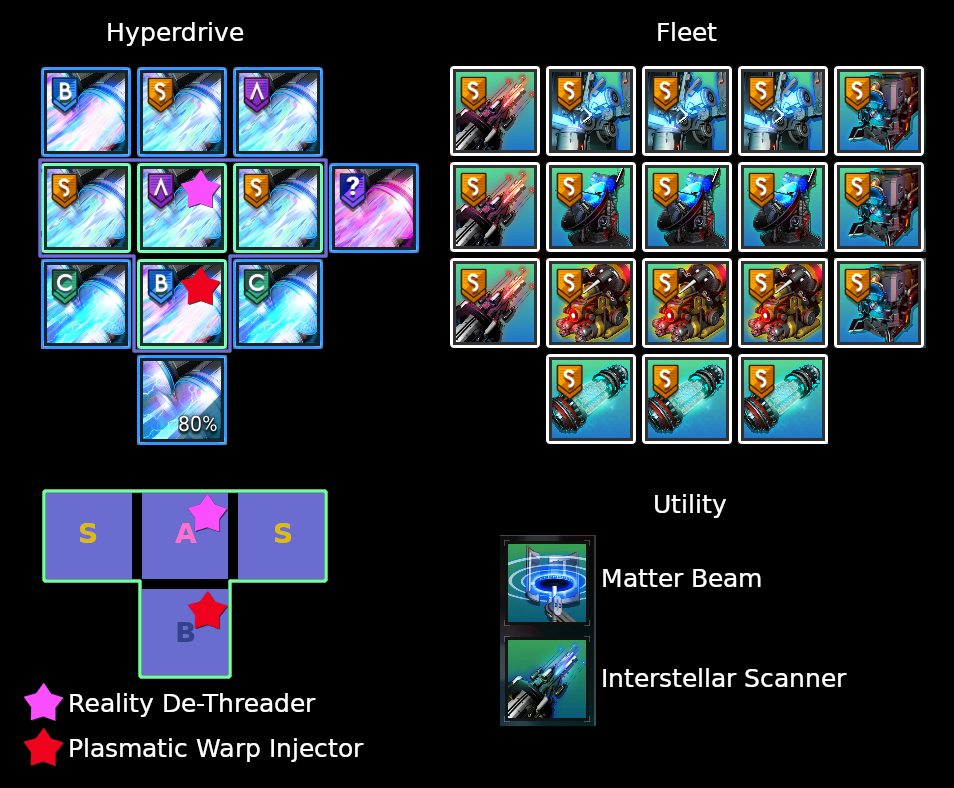 restive sphinx
Oh godness
 faint gazelle

 drifting summit
!faq-echoes
river micaBOT
-# to view info below, enable embeds
Make sure the steps below are completed.
⚠️ Use #nms-commands for FAQ commands below & check #nms-questions for the latest details about the update.
Run !Faq-ArtemisPath in #nms-commands. Run !Faq-Interceptor in #nms-commands.❗ This information has been verified as of <t:1694212090:D> (after Update 4.44) & is subject to change.
With update 4.44, completion of the mission, A Trace of Metal is no longer required. A Settlement used to be needed -- except on Switch, where you'd have to trigger it by warping 25 times.
cloud compass
!faq-units
river micaBOT
-# to view info below, enable embeds
How to Make Units
whole plume
!faq-freighter-layout
river micaBOT
@whole plume Did you mean !Faq-FreighterLayout?
-# to view info below, enable embeds
This is an example of perfect adjacency and supercharged slot arrangement for freighters. Different freighters can have different supercharged slot layouts which can result in varied stats.
Note that bonuses from supercharging always beat adjacency bonuses: You can opt to break the adjacency, when/if your supercharged slots are not adjacent to each other at all.
For more in-depth assistance, check #nms-questions & #nms-legacy-ships
terse rain
!faq-inventory
river micaBOT
-# to view info below, enable embeds
How to Upgrade Inventories
To upgrade inventory size, each inventory type can be upgraded at their respective terminal for which locations are listed below.
It is possible to switch between Technology and Cargo inventories and select a slot within the currently available grid, before applying the upgrade. (Image »)
Multi-Tools don't have Cargo inventory.
Click on the links below for in depth descriptions.
Can only be purchased once, at each terminal in a system The maximum amount of slots is limited by class and ship type (Image ») The maximum amount of slots is limited by class (Image ») wispy tinsel
!faq-units
river micaBOT
-# to view info below, enable embeds
How to Make Units
quasi oxide
!faq-purplesystems
river micaBOT
-# to view info below, enable embeds
How to get started...
📖 Warning: Purple systems are end-game content so you must finish certain quests before you can access them.
!faq-artemispath in #bot-spam shows the steps.!faq-interceptor in #bot-spam shows how to find them.!faq-echoes in #bot-spam for more info.🛑 Warning: Do not leave the Atlas Station system you'll go to in the quest without visiting its space station or claiming a base computer on one of its planets.
!faq-starcolor in #bot-spam for more info. These are the known steps as of update 5.5 Worlds Pt II (<t:1738163940:D>) and are subject to change.
-# See patch notes »
daring aspen
!faq-Savefiles
river micaBOT
-# to view info below, enable embeds
Steam
%appdata%\HelloGames\NMS\st_<Steam64ID>\...
Game Pass
%LocalAppData%\Packages\HelloGames.NoMansSky_bs190hzg1sesy\SystemAppData\wgs\...
GoG
%appdata%\HelloGames\NMS\DefaultUser\...
Linux & Steam Deck
$HOME/.local/share/Steam/steamapps/compatdata/275850/pfx/drive_c/users/steamuser/Application Data/HelloGames/NMS/st_<Steam64ID>/...
Mac
/Users/<yourname>/Library/Application Support/HelloGames/NMS/st_<your steam ID>/
When sharing saves in a report to Hello Games, it is best to create a package/archive of the full folder shown for your platform above (.zip/.rar).
white venture
!faq
river micaBOT
@white venture
-# Prefix Gunter commands with exclamation mark (i.e., !command)
CurrencyFaq-Nanites - Tips & guides for making nanites.
Faq-Pirate - How to pirate & recover standing
Faq-Units - Tips & guides for making units.
ExpeditionsFaq-Expedition - Important expedition tips, bug workarounds (pre-patches), and lists of other relevant commands.
Info and TipsFaq-AnomalyFirstVisit - The proper order of steps for your first visit to the Space Anomaly.
Faq-Arg - Explains ARG.
Faq-BeginnerInventory - Tips for early game inventory management.
Faq-BeginnerTips - Important tips for brand new players.
Faq-CrossSave - Cross save information and link.
Faq-Derelicts - Explains the difference between the two derelict encounters.
Faq-ExoticFarm - How to farm exotic ships through freighter battles.
Faq-Interceptor - Methods for finding and claiming Interceptors.
Faq-Inventory - How to upgrade your Inventories.
Faq-Likholu - Warning about the Likholu system.
Faq-LivingFrigate - Information on Organic Frigates.
Faq-LivingShip - All living ship information, including the Starbirth questline.
Faq-Maps - Maps for the Anomaly, space stations, freighters and harmonic camps.
Faq-Multiplayer - Shows recommended network settings & in-game friend code info.
Faq-PortalGlyphs - Various ways to unlock the portal glyphs.
Faq-PortalUse - How to use portals.
Faq-Quicksilver - How to get and spend quicksilver.
Faq-Settlements - Planetary Settlements Guide
Faq-Squadron - How to recruit for your squadron.
Faq-Time - Why you shouldn't change your system time.
MechanicsFaq-Biomes - Guides to all names and resources for all biomes.
Faq-CoreWarp - Guide on warping to the center of a galaxy.
Faq-CorvetteBuilding - Various advanced building methods for Corvettes.
Faq-Corvettes - How to start building a Corvette.
Faq-Freighters - Freighter Infographic & helpful guides.
Faq-Frigates - In depth information in all aspects of frigates.
Faq-Galaxies - Commonly asked questions about galaxies.
Faq-GlitchBuilding - Glitch building guide on YouTube.
Faq-Leylines - Info on finding 3 star resource Laylines.
Faq-Mechafauna - How to locate Mechafauna.
Faq-OutlawSystem - How to find outlaw systems.
Faq-Portal - Guide to locating portals.
Faq-ShipSpawns - Ship spawning and tier information.
Faq-StarColor - How to use the spectral classification.
Faq-StorageAugments - Ship storage augments drop rates from scrapping.
Faq-SystemScanners - How to see Economy and Conflict levels in the Galaxy Map.
QuestsFaq-ArtemisPath - List of Artemis Path missions.
Faq-AtlasPath - In depth information for the Atlas Path.
Faq-BasePersonnel - Instructions on how to hire base NPCs.
Faq-Echoes - Latest known steps to start the new Echoes content.
Faq-PurpleSystems - How to access the purple systems.
Faq-Starbirth - Please use !Faq-LivingShip instead.
SupportFaq-EventView - Guide the users on how to access event viewer on PC.
Faq-ExplorersArchive - Tips on how to use our #explorers-archive channel.
Faq-Help - Basic information most commonly requested by #nms-questions regulars while assisting users.
Faq-Modding - Links and tips to get started modding NMS.
Faq-SaveFiles - Lists save file paths for different platforms with info for HG bug reports.
Faq-SettingsFiles - Lists settings file paths for different platforms.
Faq-Spoiler - How to use spoiler tags.
Faq-SystemReq - Minimum PC requirements for No Man's Sky.
Faq-Troubleshooting - Multiple resources for troubleshooting well known issues, mostly on Windows.
river micaBOT
-# to view info below, enable embeds
daring aspen
!faq-units
river micaBOT
-# to view info below, enable embeds
How to Make Units
surreal temple
!expedition
river micaBOT
-# to view info below, enable embeds
-# Previous
-# Breach (#20) ended <t:1768316400:d>
-# Corvette (#19) ended <t:1767106800:d>
-# Relics (#18) ended <t:1765897200:d>
-# Titan (#17) ended <t:1764687600:d>
-# Beachhead (#2) ended <t:1763478000:d>
▸ Expedition help & tips » #nms-expeditions Pins
▸ General gameplay questions » #nms-help.
▸ Run !Faq-Expedition & !ExpTime in #bot-spam.
▸ LFG or trade here »
▸ Expedition #roles are self-assignable »
📣 Grab the NMS Announcements role in #roles for #nms-announcements notifications & follow #nms-news-ticker for latest updates & upcoming expeditions.
cloud compass
!faq-purplesystems
river micaBOT
-# to view info below, enable embeds
How to get started...
📖 Warning: Purple systems are end-game content so you must finish certain quests before you can access them.
!faq-artemispath in #bot-spam shows the steps.!faq-interceptor in #bot-spam shows how to find them.!faq-echoes in #bot-spam for more info.🛑 Warning: Do not leave the Atlas Station system you'll go to in the quest without visiting its space station or claiming a base computer on one of its planets.
!faq-starcolor in #bot-spam for more info. These are the known steps as of update 5.5 Worlds Pt II (<t:1738163940:D>) and are subject to change.
-# See patch notes »
river micaBOT
-# to view info below, enable embeds
Damage Potential...Summary: To more fairly compare two different MT/Ships, strip them both down to bare techs, ensuring nothing is supercharged.
restive sphinx
!faq-multitoollayout
river micaBOT
-# to view info below, enable embeds
Multitool Tech LayoutThis is just an example of adjacency and supercharged slots. Note that supercharging bonuses always beats adjacency bonuses. Therefore, to maximize tech stats, split apart tech to utilize supercharged slots, as they will yield superior results over maintaining perfect adjacency.
For more in-depth assistance, check #nms-questions & #nms-multitools.
restive sphinx
!faq
river micaBOT
@restive sphinx
-# Prefix Gunter commands with exclamation mark (i.e., !command)
CurrencyFaq-Nanites - Tips & guides for making nanites.
Faq-Pirate - How to pirate & recover standing
Faq-Units - Tips & guides for making units.
ExpeditionsFaq-Expedition - Important expedition tips, bug workarounds (pre-patches), and lists of other relevant commands.
Info and TipsFaq-AnomalyFirstVisit - The proper order of steps for your first visit to the Space Anomaly.
Faq-Arg - Explains ARG.
Faq-BeginnerInventory - Tips for early game inventory management.
Faq-BeginnerTips - Important tips for brand new players.
Faq-CrossSave - Cross save information and link.
Faq-Derelicts - Explains the difference between the two derelict encounters.
Faq-ExoticFarm - How to farm exotic ships through freighter battles.
Faq-Interceptor - Methods for finding and claiming Interceptors.
Faq-Inventory - How to upgrade your Inventories.
Faq-Likholu - Warning about the Likholu system.
Faq-LivingFrigate - Information on Organic Frigates.
Faq-LivingShip - All living ship information, including the Starbirth questline.
Faq-Maps - Maps for the Anomaly, space stations, freighters and harmonic camps.
Faq-Multiplayer - Shows recommended network settings & in-game friend code info.
Faq-PortalGlyphs - Various ways to unlock the portal glyphs.
Faq-PortalUse - How to use portals.
Faq-Quicksilver - How to get and spend quicksilver.
Faq-Settlements - Planetary Settlements Guide
Faq-Squadron - How to recruit for your squadron.
Faq-Time - Why you shouldn't change your system time.
MechanicsFaq-Biomes - Guides to all names and resources for all biomes.
Faq-CoreWarp - Guide on warping to the center of a galaxy.
Faq-CorvetteBuilding - Various advanced building methods for Corvettes.
Faq-Corvettes - How to start building a Corvette.
Faq-Freighters - Freighter Infographic & helpful guides.
Faq-Frigates - In depth information in all aspects of frigates.
Faq-Galaxies - Commonly asked questions about galaxies.
Faq-GlitchBuilding - Glitch building guide on YouTube.
Faq-Leylines - Info on finding 3 star resource Laylines.
Faq-Mechafauna - How to locate Mechafauna.
Faq-OutlawSystem - How to find outlaw systems.
Faq-Portal - Guide to locating portals.
Faq-ShipSpawns - Ship spawning and tier information.
Faq-StarColor - How to use the spectral classification.
Faq-StorageAugments - Ship storage augments drop rates from scrapping.
Faq-SystemScanners - How to see Economy and Conflict levels in the Galaxy Map.
QuestsFaq-ArtemisPath - List of Artemis Path missions.
Faq-AtlasPath - In depth information for the Atlas Path.
Faq-BasePersonnel - Instructions on how to hire base NPCs.
Faq-Echoes - Latest known steps to start the new Echoes content.
Faq-PurpleSystems - How to access the purple systems.
Faq-Starbirth - Please use !Faq-LivingShip instead.
SupportFaq-EventView - Guide the users on how to access event viewer on PC.
Faq-ExplorersArchive - Tips on how to use our #explorers-archive channel.
Faq-Help - Basic information most commonly requested by #nms-questions regulars while assisting users.
Faq-Modding - Links and tips to get started modding NMS.
Faq-SaveFiles - Lists save file paths for different platforms with info for HG bug reports.
Faq-SettingsFiles - Lists settings file paths for different platforms.
Faq-Spoiler - How to use spoiler tags.
Faq-SystemReq - Minimum PC requirements for No Man's Sky.
Faq-Troubleshooting - Multiple resources for troubleshooting well known issues, mostly on Windows.
 tropic oar
amazing thanks!
restive sphinx
Tech layouts category
river micaBOT
-# to view info below, enable embeds
tropic oar
!Faq-FreighterLayout
river micaBOT
-# to view info below, enable embeds
This is an example of perfect adjacency and supercharged slot arrangement for freighters. Different freighters can have different supercharged slot layouts which can result in varied stats.
Note that bonuses from supercharging always beat adjacency bonuses: You can opt to break the adjacency, when/if your supercharged slots are not adjacent to each other at all.
For more in-depth assistance, check #nms-questions & #nms-legacy-ships
tropic oar
!Faq-ShipLayout
river micaBOT
-# to view info below, enable embeds
Starship Tech LayoutThis is just an example of adjacency and supercharged slots. ⚠️ For hyperdrive and pulse engine, this example does not apply to sentinel interceptors.
For more in-depth assistance, check #nms-questions & #nms-legacy-ships.
tropic oar
!Faq-SuitLayout
river micaBOT
-# to view info below, enable embeds
restive sphinx
!faq-inventory
river micaBOT
-# to view info below, enable embeds
How to Upgrade Inventories
To upgrade inventory size, each inventory type can be upgraded at their respective terminal for which locations are listed below.
It is possible to switch between Technology and Cargo inventories and select a slot within the currently available grid, before applying the upgrade. (Image »)
Multi-Tools don't have Cargo inventory.
Click on the links below for in depth descriptions.
Can only be purchased once, at each terminal in a system The maximum amount of slots is limited by class and ship type (Image ») The maximum amount of slots is limited by class (Image »)
restive sphinx
gif of brian mouth dropping on table
ornate veldt
!faq-units
river micaBOT
-# to view info below, enable embeds
How to Make Units
river micaBOT
@tranquil gull
-# Prefix Gunter commands with exclamation mark (i.e., !command)
CurrencyFaq-Nanites - Tips & guides for making nanites.
Faq-Pirate - How to pirate & recover standing
Faq-Units - Tips & guides for making units.
ExpeditionsFaq-Expedition - Important expedition tips, bug workarounds (pre-patches), and lists of other relevant commands.
Info and TipsFaq-AnomalyFirstVisit - The proper order of steps for your first visit to the Space Anomaly.
Faq-Arg - Explains ARG.
Faq-BeginnerInventory - Tips for early game inventory management.
Faq-BeginnerTips - Important tips for brand new players.
Faq-CrossSave - Cross save information and link.
Faq-Derelicts - Explains the difference between the two derelict encounters.
Faq-ExoticFarm - How to farm exotic ships through freighter battles.
Faq-Interceptor - Methods for finding and claiming Interceptors.
Faq-Inventory - How to upgrade your Inventories.
Faq-Likholu - Warning about the Likholu system.
Faq-LivingFrigate - Information on Organic Frigates.
Faq-LivingShip - All living ship information, including the Starbirth questline.
Faq-Maps - Maps for the Anomaly, space stations, freighters and harmonic camps.
Faq-Multiplayer - Shows recommended network settings & in-game friend code info.
Faq-PortalGlyphs - Various ways to unlock the portal glyphs.
Faq-PortalUse - How to use portals.
Faq-Quicksilver - How to get and spend quicksilver.
Faq-Settlements - Planetary Settlements Guide
Faq-Squadron - How to recruit for your squadron.
Faq-Time - Why you shouldn't change your system time.
MechanicsFaq-Biomes - Guides to all names and resources for all biomes.
Faq-CoreWarp - Guide on warping to the center of a galaxy.
Faq-CorvetteBuilding - Various advanced building methods for Corvettes.
Faq-Corvettes - How to start building a Corvette.
Faq-Freighters - Freighter Infographic & helpful guides.
Faq-Frigates - In depth information in all aspects of frigates.
Faq-Galaxies - Commonly asked questions about galaxies.
Faq-GlitchBuilding - Glitch building guide on YouTube.
Faq-Leylines - Info on finding 3 star resource Laylines.
Faq-Mechafauna - How to locate Mechafauna.
Faq-OutlawSystem - How to find outlaw systems.
Faq-Portal - Guide to locating portals.
Faq-ShipSpawns - Ship spawning and tier information.
Faq-StarColor - How to use the spectral classification.
Faq-StorageAugments - Ship storage augments drop rates from scrapping.
Faq-SystemScanners - How to see Economy and Conflict levels in the Galaxy Map.
QuestsFaq-ArtemisPath - List of Artemis Path missions.
Faq-AtlasPath - In depth information for the Atlas Path.
Faq-BasePersonnel - Instructions on how to hire base NPCs.
Faq-Echoes - Latest known steps to start the new Echoes content.
Faq-PurpleSystems - How to access the purple systems.
Faq-Starbirth - Please use !Faq-LivingShip instead.
SupportFaq-EventView - Guide the users on how to access event viewer on PC.
Faq-ExplorersArchive - Tips on how to use our #explorers-archive channel.
Faq-Help - Basic information most commonly requested by #nms-questions regulars while assisting users.
Faq-Modding - Links and tips to get started modding NMS.
Faq-SaveFiles - Lists save file paths for different platforms with info for HG bug reports.
Faq-SettingsFiles - Lists settings file paths for different platforms.
Faq-Spoiler - How to use spoiler tags.
Faq-SystemReq - Minimum PC requirements for No Man's Sky.
Faq-Troubleshooting - Multiple resources for troubleshooting well known issues, mostly on Windows.
tranquil gull
!faq-starcolors
river micaBOT
@tranquil gull Did you mean !Faq-StarColor?
-# to view info below, enable embeds
In the Galaxy Map, below the star system name, you can find the spectral class letter:
• F & G = Yellow (copper/activated copper)
• K & M = Red (cadmium/activated cadmium)
• E = Green (emeril/activated emeril)
• B & O = Blue (indium/activated indium)
• X & Y = Purple (quartzite/activated quartzite)
Colour blind filters are available in Options > General Options > Galaxy Map Colour Filter.
Regular starships and freighters require hyperdrive tech upgrades to be able to reach RGBP systems. An Atlantid Drive (Starship) or Resonance Matrix (Freighter) will cover all systems; there is no need for the previous drives to be installed other than a boost to range (most notable for the Freighter). Living ships only share the Atlantid Drive requirement to reach purple systems.
❗ To reach purple systems, completion of the 'In Stellar Multitudes' mission is required. Obtaining the required drives in any other way, will not work (unless current save is an Expedition17 converted save) .
Note: There's no information in game files that proves the host star temperature and oddities have any influence at all on system planet biome probability chances.
📖 Did you know? A star system may have only its stellar metal, its activated version or both.
tranquil gull
!faq-likholu
river micaBOT
-# to view info below, enable embeds
Likholu is a hidden star system within the radius of ~3000 light-years around the core of Euclid. Although it is not available through normal means, players have been able to visit these systems through bugs/glitches, mods, save editing, or other tools (see #nms-modding). Being that it's the very first hidden star system, referred to as a "phantom star," in the starting galaxy (Euclid), it logically became a target once these hidden systems were first discovered in 2016. This likely also resulted in becoming a known system for the many issues it has accumulated over the years.
⚠️ Be aware, we advise you, DO NOT attempt to visit this system. It's caused so many problems reported by the community, that it is strongly discouraged to pay a visit by any means. Some of the reported issues include becoming trapped, having freighter bases wiped when summoned there, and complex save-file corruption. If you insist on visiting it, do so at your own risk. ❗ If you're on PC, PS4 or have access to Game Pass Ultimate, you can and should back up your save file(s) before that -- run !Faq-SaveFiles in #bot-spam or get more details in #nms-questions. You have been warned. There are reasons why Hello Games prevents players from finding themselves in this system by accident.
-# to view info below, enable embeds
A: Despite what its objective says, no. The Purge simply requires the player to warp 16 times in any direction, to any system.
Each warp teaches 1 portal glyph, if the player hasn't learned any yet. Please wait for the mission to acknowledge progress before warping out again.
-# ❗ Warning: After the 16th warp, mission will mark a Portal. To prevent damage to installed technologies during this next part, before going through the portal player should:
-# - Store installed exosuit tech and upgrade modules;
-# - Do the same for current ship and multi-tool, or change to a ship/multi-tool player doesn't care about.
tranquil gull
!faq-freighters
river micaBOT
-# to view info below, enable embeds
tranquil gull
!faq-mechafauna
river micaBOT
-# to view info below, enable embeds
Mechafauna are an alien animal species in No Man's Sky. They can appear as mechanical, sentient quadrupeds (should not be confused with sentinel quads, or arachnids), or as walking buildings. They come with an assortment of ornamental parts. Quadrupeds » Walking buildings »
There are some very specific things to look for when trying to find the mechafauna:
📖 Did you know?
surreal temple
!faq
river micaBOT
@surreal temple
-# Prefix Gunter commands with exclamation mark (i.e., !command)
CurrencyFaq-Nanites - Tips & guides for making nanites.
Faq-Pirate - How to pirate & recover standing
Faq-Units - Tips & guides for making units.
ExpeditionsFaq-Expedition - Important expedition tips, bug workarounds (pre-patches), and lists of other relevant commands.
Info and TipsFaq-AnomalyFirstVisit - The proper order of steps for your first visit to the Space Anomaly.
Faq-Arg - Explains ARG.
Faq-BeginnerInventory - Tips for early game inventory management.
Faq-BeginnerTips - Important tips for brand new players.
Faq-CrossSave - Cross save information and link.
Faq-Derelicts - Explains the difference between the two derelict encounters.
Faq-ExoticFarm - How to farm exotic ships through freighter battles.
Faq-Interceptor - Methods for finding and claiming Interceptors.
Faq-Inventory - How to upgrade your Inventories.
Faq-Likholu - Warning about the Likholu system.
Faq-LivingFrigate - Information on Organic Frigates.
Faq-LivingShip - All living ship information, including the Starbirth questline.
Faq-Maps - Maps for the Anomaly, space stations, freighters and harmonic camps.
Faq-Multiplayer - Shows recommended network settings & in-game friend code info.
Faq-PortalGlyphs - Various ways to unlock the portal glyphs.
Faq-PortalUse - How to use portals.
Faq-Quicksilver - How to get and spend quicksilver.
Faq-Settlements - Planetary Settlements Guide
Faq-Squadron - How to recruit for your squadron.
Faq-Time - Why you shouldn't change your system time.
MechanicsFaq-Biomes - Guides to all names and resources for all biomes.
Faq-CoreWarp - Guide on warping to the center of a galaxy.
Faq-CorvetteBuilding - Various advanced building methods for Corvettes.
Faq-Corvettes - How to start building a Corvette.
Faq-Freighters - Freighter Infographic & helpful guides.
Faq-Frigates - In depth information in all aspects of frigates.
Faq-Galaxies - Commonly asked questions about galaxies.
Faq-GlitchBuilding - Glitch building guide on YouTube.
Faq-Leylines - Info on finding 3 star resource Laylines.
Faq-Mechafauna - How to locate Mechafauna.
Faq-OutlawSystem - How to find outlaw systems.
Faq-Portal - Guide to locating portals.
Faq-ShipSpawns - Ship spawning and tier information.
Faq-StarColor - How to use the spectral classification.
Faq-StorageAugments - Ship storage augments drop rates from scrapping.
Faq-SystemScanners - How to see Economy and Conflict levels in the Galaxy Map.
QuestsFaq-ArtemisPath - List of Artemis Path missions.
Faq-AtlasPath - In depth information for the Atlas Path.
Faq-BasePersonnel - Instructions on how to hire base NPCs.
Faq-Echoes - Latest known steps to start the new Echoes content.
Faq-PurpleSystems - How to access the purple systems.
Faq-Starbirth - Please use !Faq-LivingShip instead.
SupportFaq-EventView - Guide the users on how to access event viewer on PC.
Faq-ExplorersArchive - Tips on how to use our #explorers-archive channel.
Faq-Help - Basic information most commonly requested by #nms-questions regulars while assisting users.
Faq-Modding - Links and tips to get started modding NMS.
Faq-SaveFiles - Lists save file paths for different platforms with info for HG bug reports.
Faq-SettingsFiles - Lists settings file paths for different platforms.
Faq-Spoiler - How to use spoiler tags.
Faq-SystemReq - Minimum PC requirements for No Man's Sky.
Faq-Troubleshooting - Multiple resources for troubleshooting well known issues, mostly on Windows.
surreal temple
!Faq-Corvette
river micaBOT
@surreal temple Did you mean !Faq-Corvettes?
-# to view info below, enable embeds
Corvettes-# Recommendations, How to start building a Corvette Ship
-# Drop sources, Bartering
-# How are Corvettes upgraded, Do they always spawn in C-class, Supercharged Slot layout, Inventory Upgrade limits, etc.
-# If you find any others that aren't mentioned here, #contact-us
 barren hamlet
!faq-biome
river micaBOT
@barren hamlet Did you mean !Faq-Biomes?
-# to view info below, enable embeds
-# 🌴 Lush »
-# 🥶 Frozen »
-# 🥵 Scorched »
-# 🤢 Toxic »
-# ☢️ Irradiated »
-# 🏜️ Barren »
-# ☠️ Dead »
-# 🐊 Swamp »
-# 🌋 Lava »
-# 🔴 Red »
-# 🟢 Green »
-# 🔵 Blue »
-# 😵💫 Weird »
cloud compass
!faq-livingfrigates
river micaBOT
@cloud compass Did you mean !Faq-LivingFrigate?
-# to view info below, enable embeds
You can not recruit a living frigate if your fleet already has 30 frigates.
You can only recruit a living frigate once per system.
With Dream Aerial (Required for your first)
To obtain your first organic frigate, send out fleet expeditions until you receive a blueprint for the Dream Aerial. Craft the Dream Aerial (1 Solar Mirror and 3 Living Glass) and pulse drive in space with your ship. You will get an encounter with an organic frigate that asks many questions to determine the stats of the frigate. After you finish the questions, claim the living frigate.
Using the Dream Aerial randomizes class, which is otherwise fixed per system. The Dream Aerial is only used this first time, don't hold on to it: delete it or give it to another player that needs one.
With Anomaly Detectors
After acquiring your first organic frigate, you may now use Anomaly Detectors to acquire more. These are rare drops from blowing up asteroids.
Activate pulse drive (as stated above, use an Anomaly detector before doing so). Keep your pulse drive fueled as this may take some time depending on the system. While pulsing you may see alerts for rare objects or traders, ignore them. The Anomaly detector will be consumed if you exit pulse. Continue pulsing until you receive a Whalesong signal to discover a living frigate with these price ranges:
C-Class: 7,500,000 - 12,500,000 units.
B-Class: 15,000,000 - 25,000,000 units.
A-Class: 26,250,000 - 43,750,000 units.
S-Class: 37,500,000 - 62,500,000 units.
Known Issues:
A list of usable food groups and a demonstration of their effects on a specific Living Frigate »
 silent wedge
!faq-nanites
river micaBOT
-# to view info below, enable embeds
cloud compass
!faq-biomes
river micaBOT
-# to view info below, enable embeds
-# 🌴 Lush »
-# 🥶 Frozen »
-# 🥵 Scorched »
-# 🤢 Toxic »
-# ☢️ Irradiated »
-# 🏜️ Barren »
-# ☠️ Dead »
-# 🐊 Swamp »
-# 🌋 Lava »
-# 🔴 Red »
-# 🟢 Green »
-# 🔵 Blue »
-# 😵💫 Weird »
cloud compass
!faq-freighters
river micaBOT
-# to view info below, enable embeds
restive sphinx
!faq
river micaBOT
@restive sphinx
-# Prefix Gunter commands with exclamation mark (i.e., !command)
CurrencyFaq-Nanites - Tips & guides for making nanites.
Faq-Pirate - How to pirate & recover standing
Faq-Units - Tips & guides for making units.
ExpeditionsFaq-Expedition - Important expedition tips, bug workarounds (pre-patches), and lists of other relevant commands.
Info and TipsFaq-AnomalyFirstVisit - The proper order of steps for your first visit to the Space Anomaly.
Faq-Arg - Explains ARG.
Faq-BeginnerInventory - Tips for early game inventory management.
Faq-BeginnerTips - Important tips for brand new players.
Faq-CrossSave - Cross save information and link.
Faq-Derelicts - Explains the difference between the two derelict encounters.
Faq-ExoticFarm - How to farm exotic ships through freighter battles.
Faq-Interceptor - Methods for finding and claiming Interceptors.
Faq-Inventory - How to upgrade your Inventories.
Faq-Likholu - Warning about the Likholu system.
Faq-LivingFrigate - Information on Organic Frigates.
Faq-LivingShip - All living ship information, including the Starbirth questline.
Faq-Maps - Maps for the Anomaly, space stations, freighters and harmonic camps.
Faq-Multiplayer - Shows recommended network settings & in-game friend code info.
Faq-PortalGlyphs - Various ways to unlock the portal glyphs.
Faq-PortalUse - How to use portals.
Faq-Quicksilver - How to get and spend quicksilver.
Faq-Settlements - Planetary Settlements Guide
Faq-Squadron - How to recruit for your squadron.
Faq-Time - Why you shouldn't change your system time.
MechanicsFaq-Biomes - Guides to all names and resources for all biomes.
Faq-CoreWarp - Guide on warping to the center of a galaxy.
Faq-CorvetteBuilding - Various advanced building methods for Corvettes.
Faq-Corvettes - How to start building a Corvette.
Faq-Freighters - Freighter Infographic & helpful guides.
Faq-Frigates - In depth information in all aspects of frigates.
Faq-Galaxies - Commonly asked questions about galaxies.
Faq-GlitchBuilding - Glitch building guide on YouTube.
Faq-Leylines - Info on finding 3 star resource Laylines.
Faq-Mechafauna - How to locate Mechafauna.
Faq-OutlawSystem - How to find outlaw systems.
Faq-Portal - Guide to locating portals.
Faq-ShipSpawns - Ship spawning and tier information.
Faq-StarColor - How to use the spectral classification.
Faq-StorageAugments - Ship storage augments drop rates from scrapping.
Faq-SystemScanners - How to see Economy and Conflict levels in the Galaxy Map.
QuestsFaq-ArtemisPath - List of Artemis Path missions.
Faq-AtlasPath - In depth information for the Atlas Path.
Faq-BasePersonnel - Instructions on how to hire base NPCs.
Faq-Echoes - Latest known steps to start the new Echoes content.
Faq-PurpleSystems - How to access the purple systems.
Faq-Starbirth - Please use !Faq-LivingShip instead.
SupportFaq-EventView - Guide the users on how to access event viewer on PC.
Faq-ExplorersArchive - Tips on how to use our #explorers-archive channel.
Faq-Help - Basic information most commonly requested by #nms-questions regulars while assisting users.
Faq-Modding - Links and tips to get started modding NMS.
Faq-SaveFiles - Lists save file paths for different platforms with info for HG bug reports.
Faq-SettingsFiles - Lists settings file paths for different platforms.
Faq-Spoiler - How to use spoiler tags.
Faq-SystemReq - Minimum PC requirements for No Man's Sky.
Faq-Troubleshooting - Multiple resources for troubleshooting well known issues, mostly on Windows.
restive sphinx
!faq-biomes
river micaBOT
-# to view info below, enable embeds
-# 🌴 Lush »
-# 🥶 Frozen »
-# 🥵 Scorched »
-# 🤢 Toxic »
-# ☢️ Irradiated »
-# 🏜️ Barren »
-# ☠️ Dead »
-# 🐊 Swamp »
-# 🌋 Lava »
-# 🔴 Red »
-# 🟢 Green »
-# 🔵 Blue »
-# 😵💫 Weird »
restive sphinx
!faq-nanites
river micaBOT
-# to view info below, enable embeds
 ionic moss
!faq-anomalyfirstvisit
river micaBOT
-# to view info below, enable embeds
The First Visit to The Space Anomaly
During your first visit to the Anomaly, there are a few things you have to do, and those steps have to be done in order.
Do not do anything else until you do these in order.
Make sure you keep the The Space Anomaly mission selected while you do the following:
Note: Even though the mission will tell you to, you do not have to buy anything at either vendor screen.
!faq-maps in #bot-spam will show you where each of these spots are if you get lost.
📚 After this visit, you can summon the Space Anomaly when in space, using your ship quick menu.
safe bobcat
!Faq-LivingShip
river micaBOT
-# to view info below, enable embeds
Living Ships-# Getting your first living ship of a save
-# Getting additional living ships
-# Info and recommendations about Living Ships
-# Upgrading Inventory and Tech Inventory
-# Known bugs. If you find any others that aren't mentioned here, #contact-us.
 tender needle
!faq-units
river micaBOT
-# to view info below, enable embeds
How to Make Units
cloud compass
!faq-interceptor
river micaBOT
-# to view info below, enable embeds
Interceptors may only be found and claimed in Dissonant systems. The system cannot be Uncharted, and the planet cannot be a Dead biome or Weird biome.
Locating:
Other Methods:
Any Nexus Missions or Frigate Combat Expeditions have a chance to reward the Carrier AI Fragment used to find an Interceptor.
Random Space Encounter - when pulsing and then receiving the notification of an encounter, drop out of pulse and use your ship communicator to answer the call. You should be directed to a suitable planet with Interceptors.
Claiming:
Claiming an Interceptor »
Sentinel Pillars will shut down the Corrupted Sentinels and leave the Dissonance Resonators, if needed.
cloud compass
!faq-units
river micaBOT
-# to view info below, enable embeds
How to Make Units
cloud compass
!faq-livingship
river micaBOT
-# to view info below, enable embeds
Living Ships-# Getting your first living ship of a save
-# Getting additional living ships
-# Info and recommendations about Living Ships
-# Upgrading Inventory and Tech Inventory
-# Known bugs. If you find any others that aren't mentioned here, #contact-us.
cloud compass
!faq-freighters
river micaBOT
-# to view info below, enable embeds
cloud compass
!faq-echoes
river micaBOT
-# to view info below, enable embeds
Make sure the steps below are completed.
⚠️ Use #nms-commands for FAQ commands below & check #nms-questions for the latest details about the update.
Run !Faq-ArtemisPath in #nms-commands. Run !Faq-Interceptor in #nms-commands.❗ This information has been verified as of <t:1694212090:D> (after Update 4.44) & is subject to change.
With update 4.44, completion of the mission, A Trace of Metal is no longer required. A Settlement used to be needed -- except on Switch, where you'd have to trigger it by warping 25 times.
cloud compass
!faq-purplesystems
river micaBOT
-# to view info below, enable embeds
How to get started...
📖 Warning: Purple systems are end-game content so you must finish certain quests before you can access them.
!faq-artemispath in #bot-spam shows the steps.!faq-interceptor in #bot-spam shows how to find them.!faq-echoes in #bot-spam for more info.🛑 Warning: Do not leave the Atlas Station system you'll go to in the quest without visiting its space station or claiming a base computer on one of its planets.
!faq-starcolor in #bot-spam for more info. These are the known steps as of update 5.5 Worlds Pt II (<t:1738163940:D>) and are subject to change.
-# See patch notes »
cloud compass
!faq-artemispath
river micaBOT
-# to view info below, enable embeds
The main storyline The Artemis Path is composed of these missions:
Do not reuse portals found via the storyline to prevent bugs.
❓ For in-depth questions about these missions, ask in #nms-spoilers, or in #nms-questions with spoiler tags -- run !SpoilerTag in #bot-spam for help.
📖 Did you know? The Atlas Path and The Purge mission can be completed in tandem.
lucid spire
!faq-biomes
river micaBOT
-# to view info below, enable embeds
-# 🌴 Lush »
-# 🥶 Frozen »
-# 🥵 Scorched »
-# 🤢 Toxic »
-# ☢️ Irradiated »
-# 🏜️ Barren »
-# ☠️ Dead »
-# 🐊 Swamp »
-# 🌋 Lava »
-# 🔴 Red »
-# 🟢 Green »
-# 🔵 Blue »
-# 😵💫 Weird »
cloud compass
!faq-portal
river micaBOT
-# to view info below, enable embeds
Locating a Portal📚 Notes:
!faq-portalglyphs and !faq-purplesystems in #bot-spam to learn more.)
daring dust
!faq Layout
river micaBOT
Faq-Update - When will my platform get the latest update?
Tech LayoutsFaq-ExocraftLayout - Examples of Exocraft layouts.
Faq-FreighterLayout - Example of Freighter layouts.
Faq-MultitoolLayout - Multitool tech layout example.
Faq-ShipLayout - Starship tech layout example.
Faq-SuitLayout - Ideal layouts for Exosuit Technology
Withdrawn / RetiredFaq-ExosuitLayout - Run !Faq-SuitLayout instead.
daring dust
!faq-ExoCraft Layout
river micaBOT
@daring dust Did you mean !Faq-ExocraftLayout?
-# to view info below, enable embeds
daring dust
!faq-SuitLayout
river micaBOT
-# to view info below, enable embeds
 left kite
!Faq-LivingFrigate
river micaBOT
-# to view info below, enable embeds
You can not recruit a living frigate if your fleet already has 30 frigates.
You can only recruit a living frigate once per system.
With Dream Aerial (Required for your first)
To obtain your first organic frigate, send out fleet expeditions until you receive a blueprint for the Dream Aerial. Craft the Dream Aerial (1 Solar Mirror and 3 Living Glass) and pulse drive in space with your ship. You will get an encounter with an organic frigate that asks many questions to determine the stats of the frigate. After you finish the questions, claim the living frigate.
Using the Dream Aerial randomizes class, which is otherwise fixed per system. The Dream Aerial is only used this first time, don't hold on to it: delete it or give it to another player that needs one.
With Anomaly Detectors
After acquiring your first organic frigate, you may now use Anomaly Detectors to acquire more. These are rare drops from blowing up asteroids.
Activate pulse drive (as stated above, use an Anomaly detector before doing so). Keep your pulse drive fueled as this may take some time depending on the system. While pulsing you may see alerts for rare objects or traders, ignore them. The Anomaly detector will be consumed if you exit pulse. Continue pulsing until you receive a Whalesong signal to discover a living frigate with these price ranges:
C-Class: 7,500,000 - 12,500,000 units.
B-Class: 15,000,000 - 25,000,000 units.
A-Class: 26,250,000 - 43,750,000 units.
S-Class: 37,500,000 - 62,500,000 units.
Known Issues:
A list of usable food groups and a demonstration of their effects on a specific Living Frigate »
daring dust
!faq-multitool Layout
river micaBOT
@daring dust Did you mean !Faq-MultitoolLayout?
-# to view info below, enable embeds
Multitool Tech LayoutThis is just an example of adjacency and supercharged slots. Note that supercharging bonuses always beats adjacency bonuses. Therefore, to maximize tech stats, split apart tech to utilize supercharged slots, as they will yield superior results over maintaining perfect adjacency.
For more in-depth assistance, check #nms-questions & #nms-multitools.
left kite
!FAq-Settlements
river micaBOT
-# to view info below, enable embeds
Settlements-# Info and recommendations about Settlements.
-# Getting your first settlement of a save
-# Individual Settlement buildings can be upgraded after constructed too.
-# Known bugs. If you find any others that aren't mentioned here, #Contact-Us
daring aspen
!faq-portals
river micaBOT
@daring aspen Did you mean !Faq-Portal?
-# to view info below, enable embeds
Locating a Portal📚 Notes:
!faq-portalglyphs and !faq-purplesystems in #bot-spam to learn more.)
daring aspen
!faq
river micaBOT
@daring aspen
-# Prefix Gunter commands with exclamation mark (i.e., !command)
CurrencyFaq-Nanites - Tips & guides for making nanites.
Faq-Pirate - How to pirate & recover standing
Faq-Units - Tips & guides for making units.
ExpeditionsFaq-Expedition - Important expedition tips, bug workarounds (pre-patches), and lists of other relevant commands.
Info and TipsFaq-AnomalyFirstVisit - The proper order of steps for your first visit to the Space Anomaly.
Faq-Arg - Explains ARG.
Faq-BeginnerInventory - Tips for early game inventory management.
Faq-BeginnerTips - Important tips for brand new players.
Faq-CrossSave - Cross save information and link.
Faq-Derelicts - Explains the difference between the two derelict encounters.
Faq-ExoticFarm - How to farm exotic ships through freighter battles.
Faq-Interceptor - Methods for finding and claiming Interceptors.
Faq-Inventory - How to upgrade your Inventories.
Faq-Likholu - Warning about the Likholu system.
Faq-LivingFrigate - Information on Organic Frigates.
Faq-LivingShip - All living ship information, including the Starbirth questline.
Faq-Maps - Maps for the Anomaly, space stations, freighters and harmonic camps.
Faq-Multiplayer - Shows recommended network settings & in-game friend code info.
Faq-PortalGlyphs - Various ways to unlock the portal glyphs.
Faq-PortalUse - How to use portals.
Faq-Quicksilver - How to get and spend quicksilver.
Faq-Settlements - Planetary Settlements Guide
Faq-Squadron - How to recruit for your squadron.
Faq-Time - Why you shouldn't change your system time.
MechanicsFaq-Biomes - Guides to all names and resources for all biomes.
Faq-CoreWarp - Guide on warping to the center of a galaxy.
Faq-CorvetteBuilding - Various advanced building methods for Corvettes.
Faq-Corvettes - How to start building a Corvette.
Faq-Freighters - Freighter Infographic & helpful guides.
Faq-Frigates - In depth information in all aspects of frigates.
Faq-Galaxies - Commonly asked questions about galaxies.
Faq-GlitchBuilding - Glitch building guide on YouTube.
Faq-Leylines - Info on finding 3 star resource Laylines.
Faq-Mechafauna - How to locate Mechafauna.
Faq-OutlawSystem - How to find outlaw systems.
Faq-Portal - Guide to locating portals.
Faq-ShipSpawns - Ship spawning and tier information.
Faq-StarColor - How to use the spectral classification.
Faq-StorageAugments - Ship storage augments drop rates from scrapping.
Faq-SystemScanners - How to see Economy and Conflict levels in the Galaxy Map.
QuestsFaq-ArtemisPath - List of Artemis Path missions.
Faq-AtlasPath - In depth information for the Atlas Path.
Faq-BasePersonnel - Instructions on how to hire base NPCs.
Faq-Echoes - Latest known steps to start the new Echoes content.
Faq-PurpleSystems - How to access the purple systems.
Faq-Starbirth - Please use !Faq-LivingShip instead.
SupportFaq-EventView - Guide the users on how to access event viewer on PC.
Faq-ExplorersArchive - Tips on how to use our #explorers-archive channel.
Faq-Help - Basic information most commonly requested by #nms-questions regulars while assisting users.
Faq-Modding - Links and tips to get started modding NMS.
Faq-SaveFiles - Lists save file paths for different platforms with info for HG bug reports.
Faq-SettingsFiles - Lists settings file paths for different platforms.
Faq-Spoiler - How to use spoiler tags.
Faq-SystemReq - Minimum PC requirements for No Man's Sky.
Faq-Troubleshooting - Multiple resources for troubleshooting well known issues, mostly on Windows.
daring aspen
!faq-galaxies
river micaBOT
-# to view info below, enable embeds
How many galaxies are there in No Man's Sky?
There are 256 galaxies in No Man's Sky.
Euclid is labeled as Galaxy #0 in game files, but often referred to as Galaxy #1 by the community.
Odyalutai is #255 in game files, referred to as #256 by the community.
Players may only access galaxy 255 (Odyalutai) if they join the game of someone, or visit a base in galaxy 255, or save edit to get there.
Players who join the game of someone in galaxy 256 (or any other number outside the range 0-255) will instead see Odyalutai; with stars and planets in identical positions but core colour, procgen names and tech seeds shuffled.
What happens if you warp through the core of galaxy 255?
You return to Euclid, the starting galaxy for all game modes except some expeditions.
I've heard about a galaxy 257 called Yilsrussimil; does it exist?
It's possible to use a save editor to reposition yourself into galaxy 257. However, the galaxy name will be shown as Euclid, Odyalutai, or Yilsrussimil, depending upon where you see it shown in the game. Further, players in Odyalutai using the same coordinates show up in your system, demonstrating it's more of a glitch in the game than a true place; after saving and reloading, you will be shown in Odyalutai, and unable to see the Yilsrussimil name henceforth without using the save editor again. So, galaxy 257 does not exist; if it's anything, it's a display artifact when using the save editor.
What about negative numbered galaxies?
No Man's Sky can generate galaxy names for any number you put into the save file (outside the range 0-255), but you will be in Odyalutai (galaxy 255).
How many regions are in each galaxy, and how many systems per region?
There are approximately 4.27 billion regions per galaxy (4095x4095x255), with regions possibly having as few as 122 star systems and as many as 600+.
What types of galaxies are there, and how do they differ?
Lush, Empty, Normal and Harsh; the galaxy type affects the distribution of planet biomes in yellow systems, and probability of extreme survival planets.
daring aspen
!faq-corewarp
river micaBOT
-# to view info below, enable embeds
restive sphinx
!faq-starbirth
river micaBOT
Please use !Faq-LivingShip instead.
restive sphinx
!faq-livingship
river micaBOT
-# to view info below, enable embeds
Living Ships-# Getting your first living ship of a save
-# Getting additional living ships
-# Info and recommendations about Living Ships
-# Upgrading Inventory and Tech Inventory
-# Known bugs. If you find any others that aren't mentioned here, #contact-us.
cloud compass
!faq-units
river micaBOT
-# to view info below, enable embeds
How to Make Units
tranquil gull
!faq
river micaBOT
@tranquil gull
-# Prefix Gunter commands with exclamation mark (i.e., !command)
CurrencyFaq-Nanites - Tips & guides for making nanites.
Faq-Pirate - How to pirate & recover standing
Faq-Units - Tips & guides for making units.
ExpeditionsFaq-Expedition - Important expedition tips, bug workarounds (pre-patches), and lists of other relevant commands.
Info and TipsFaq-AnomalyFirstVisit - The proper order of steps for your first visit to the Space Anomaly.
Faq-Arg - Explains ARG.
Faq-BeginnerInventory - Tips for early game inventory management.
Faq-BeginnerTips - Important tips for brand new players.
Faq-CrossSave - Cross save information and link.
Faq-Derelicts - Explains the difference between the two derelict encounters.
Faq-ExoticFarm - How to farm exotic ships through freighter battles.
Faq-Interceptor - Methods for finding and claiming Interceptors.
Faq-Inventory - How to upgrade your Inventories.
Faq-Likholu - Warning about the Likholu system.
Faq-LivingFrigate - Information on Organic Frigates.
Faq-LivingShip - All living ship information, including the Starbirth questline.
Faq-Maps - Maps for the Anomaly, space stations, freighters and harmonic camps.
Faq-Multiplayer - Shows recommended network settings & in-game friend code info.
Faq-PortalGlyphs - Various ways to unlock the portal glyphs.
Faq-PortalUse - How to use portals.
Faq-Quicksilver - How to get and spend quicksilver.
Faq-Settlements - Planetary Settlements Guide
Faq-Squadron - How to recruit for your squadron.
Faq-Time - Why you shouldn't change your system time.
MechanicsFaq-Biomes - Guides to all names and resources for all biomes.
Faq-CoreWarp - Guide on warping to the center of a galaxy.
Faq-CorvetteBuilding - Various advanced building methods for Corvettes.
Faq-Corvettes - How to start building a Corvette.
Faq-Freighters - Freighter Infographic & helpful guides.
Faq-Frigates - In depth information in all aspects of frigates.
Faq-Galaxies - Commonly asked questions about galaxies.
Faq-GlitchBuilding - Glitch building guide on YouTube.
Faq-Leylines - Info on finding 3 star resource Laylines.
Faq-Mechafauna - How to locate Mechafauna.
Faq-OutlawSystem - How to find outlaw systems.
Faq-Portal - Guide to locating portals.
Faq-ShipSpawns - Ship spawning and tier information.
Faq-StarColor - How to use the spectral classification.
Faq-StorageAugments - Ship storage augments drop rates from scrapping.
Faq-SystemScanners - How to see Economy and Conflict levels in the Galaxy Map.
QuestsFaq-ArtemisPath - List of Artemis Path missions.
Faq-AtlasPath - In depth information for the Atlas Path.
Faq-BasePersonnel - Instructions on how to hire base NPCs.
Faq-Echoes - Latest known steps to start the new Echoes content.
Faq-PurpleSystems - How to access the purple systems.
Faq-Starbirth - Please use !Faq-LivingShip instead.
SupportFaq-EventView - Guide the users on how to access event viewer on PC.
Faq-ExplorersArchive - Tips on how to use our #explorers-archive channel.
Faq-Help - Basic information most commonly requested by #nms-questions regulars while assisting users.
Faq-Modding - Links and tips to get started modding NMS.
Faq-SaveFiles - Lists save file paths for different platforms with info for HG bug reports.
Faq-SettingsFiles - Lists settings file paths for different platforms.
Faq-Spoiler - How to use spoiler tags.
Faq-SystemReq - Minimum PC requirements for No Man's Sky.
Faq-Troubleshooting - Multiple resources for troubleshooting well known issues, mostly on Windows.
tranquil gull
!faq-inventory
river micaBOT
-# to view info below, enable embeds
How to Upgrade Inventories
To upgrade inventory size, each inventory type can be upgraded at their respective terminal for which locations are listed below.
It is possible to switch between Technology and Cargo inventories and select a slot within the currently available grid, before applying the upgrade. (Image »)
Multi-Tools don't have Cargo inventory.
Click on the links below for in depth descriptions.
Can only be purchased once, at each terminal in a system The maximum amount of slots is limited by class and ship type (Image ») The maximum amount of slots is limited by class (Image »)
tranquil gull
!faq-arg
river micaBOT
❓ What is ARG? It stands for alternate reality game. It's a "game" or series of puzzles that players work on, in and outside the game, to solve as a community. Check Pins in #nms-arg-2023 for news on the latest NMS ARG (2023) Part II (*Part I started with Interceptor - v4.2)
cloud compass
!faq-biomes
river micaBOT
-# to view info below, enable embeds
-# 🌴 Lush »
-# 🥶 Frozen »
-# 🥵 Scorched »
-# 🤢 Toxic »
-# ☢️ Irradiated »
-# 🏜️ Barren »
-# ☠️ Dead »
-# 🐊 Swamp »
-# 🌋 Lava »
-# 🔴 Red »
-# 🟢 Green »
-# 🔵 Blue »
-# 😵💫 Weird »
ornate veldt
!faq
river micaBOT
@ornate veldt
-# Prefix Gunter commands with exclamation mark (i.e., !command)
CurrencyFaq-Nanites - Tips & guides for making nanites.
Faq-Pirate - How to pirate & recover standing
Faq-Units - Tips & guides for making units.
ExpeditionsFaq-Expedition - Important expedition tips, bug workarounds (pre-patches), and lists of other relevant commands.
Info and TipsFaq-AnomalyFirstVisit - The proper order of steps for your first visit to the Space Anomaly.
Faq-Arg - Explains ARG.
Faq-BeginnerInventory - Tips for early game inventory management.
Faq-BeginnerTips - Important tips for brand new players.
Faq-CrossSave - Cross save information and link.
Faq-Derelicts - Explains the difference between the two derelict encounters.
Faq-ExoticFarm - How to farm exotic ships through freighter battles.
Faq-Interceptor - Methods for finding and claiming Interceptors.
Faq-Inventory - How to upgrade your Inventories.
Faq-Likholu - Warning about the Likholu system.
Faq-LivingFrigate - Information on Organic Frigates.
Faq-LivingShip - All living ship information, including the Starbirth questline.
Faq-Maps - Maps for the Anomaly, space stations, freighters and harmonic camps.
Faq-Multiplayer - Shows recommended network settings & in-game friend code info.
Faq-PortalGlyphs - Various ways to unlock the portal glyphs.
Faq-PortalUse - How to use portals.
Faq-Quicksilver - How to get and spend quicksilver.
Faq-Settlements - Planetary Settlements Guide
Faq-Squadron - How to recruit for your squadron.
Faq-Time - Why you shouldn't change your system time.
MechanicsFaq-Biomes - Guides to all names and resources for all biomes.
Faq-CoreWarp - Guide on warping to the center of a galaxy.
Faq-CorvetteBuilding - Various advanced building methods for Corvettes.
Faq-Corvettes - How to start building a Corvette.
Faq-Freighters - Freighter Infographic & helpful guides.
Faq-Frigates - In depth information in all aspects of frigates.
Faq-Galaxies - Commonly asked questions about galaxies.
Faq-GlitchBuilding - Glitch building guide on YouTube.
Faq-Leylines - Info on finding 3 star resource Laylines.
Faq-Mechafauna - How to locate Mechafauna.
Faq-OutlawSystem - How to find outlaw systems.
Faq-Portal - Guide to locating portals.
Faq-ShipSpawns - Ship spawning and tier information.
Faq-StarColor - How to use the spectral classification.
Faq-StorageAugments - Ship storage augments drop rates from scrapping.
Faq-SystemScanners - How to see Economy and Conflict levels in the Galaxy Map.
QuestsFaq-ArtemisPath - List of Artemis Path missions.
Faq-AtlasPath - In depth information for the Atlas Path.
Faq-BasePersonnel - Instructions on how to hire base NPCs.
Faq-Echoes - Latest known steps to start the new Echoes content.
Faq-PurpleSystems - How to access the purple systems.
Faq-Starbirth - Please use !Faq-LivingShip instead.
SupportFaq-EventView - Guide the users on how to access event viewer on PC.
Faq-ExplorersArchive - Tips on how to use our #explorers-archive channel.
Faq-Help - Basic information most commonly requested by #nms-questions regulars while assisting users.
Faq-Modding - Links and tips to get started modding NMS.
Faq-SaveFiles - Lists save file paths for different platforms with info for HG bug reports.
Faq-SettingsFiles - Lists settings file paths for different platforms.
Faq-Spoiler - How to use spoiler tags.
Faq-SystemReq - Minimum PC requirements for No Man's Sky.
Faq-Troubleshooting - Multiple resources for troubleshooting well known issues, mostly on Windows.
ornate veldt
!faq-expedition
river micaBOT
-# to view info below, enable embeds
Expedition InfoExpeditions are an alternate time-limited, season-like game mode with a set of challenges rewarding exclusive items that can be claimed in any and all of your saves, in any game mode account-wide.
To get past expedition rewards, you must wait for possible future expedition re-runs (see past expeditions) or possible future Twitch Drops campaigns featuring old expedition rewards (see past campaigns). You may also obtain certain rewards via other unconventional means, including ship trading or using a "service bot" in the Creative Hub Discord. Additionally, PC players ( ) can get past rewards via save editing or #nms-modding.
-# Please run bot commands in #bot-spam
in #nms-expedition
river micaBOT
@dreamy hound Did you mean !Faq-Units?
-# to view info below, enable embeds
How to Make Units
cloud compass
!faq-biomes
river micaBOT
-# to view info below, enable embeds
-# 🌴 Lush »
-# 🥶 Frozen »
-# 🥵 Scorched »
-# 🤢 Toxic »
-# ☢️ Irradiated »
-# 🏜️ Barren »
-# ☠️ Dead »
-# 🐊 Swamp »
-# 🌋 Lava »
-# 🔴 Red »
-# 🟢 Green »
-# 🔵 Blue »
-# 😵💫 Weird »
 hollow garden
! Faq-LivingShip
river micaBOT
-# to view info below, enable embeds
Living Ships-# Getting your first living ship of a save
-# Getting additional living ships
-# Info and recommendations about Living Ships
-# Upgrading Inventory and Tech Inventory
-# Known bugs. If you find any others that aren't mentioned here, #contact-us.
cloud compass
!faq-units
river micaBOT
-# to view info below, enable embeds
How to Make Units
cloud compass
!faq-livingfrigate
river micaBOT
-# to view info below, enable embeds
You can not recruit a living frigate if your fleet already has 30 frigates.
You can only recruit a living frigate once per system.
With Dream Aerial (Required for your first)
To obtain your first organic frigate, send out fleet expeditions until you receive a blueprint for the Dream Aerial. Craft the Dream Aerial (1 Solar Mirror and 3 Living Glass) and pulse drive in space with your ship. You will get an encounter with an organic frigate that asks many questions to determine the stats of the frigate. After you finish the questions, claim the living frigate.
Using the Dream Aerial randomizes class, which is otherwise fixed per system. The Dream Aerial is only used this first time, don't hold on to it: delete it or give it to another player that needs one.
With Anomaly Detectors
After acquiring your first organic frigate, you may now use Anomaly Detectors to acquire more. These are rare drops from blowing up asteroids.
Activate pulse drive (as stated above, use an Anomaly detector before doing so). Keep your pulse drive fueled as this may take some time depending on the system. While pulsing you may see alerts for rare objects or traders, ignore them. The Anomaly detector will be consumed if you exit pulse. Continue pulsing until you receive a Whalesong signal to discover a living frigate with these price ranges:
C-Class: 7,500,000 - 12,500,000 units.
B-Class: 15,000,000 - 25,000,000 units.
A-Class: 26,250,000 - 43,750,000 units.
S-Class: 37,500,000 - 62,500,000 units.
Known Issues:
A list of usable food groups and a demonstration of their effects on a specific Living Frigate »
cloud compass
!faq-livingship
river micaBOT
-# to view info below, enable embeds
Living Ships-# Getting your first living ship of a save
-# Getting additional living ships
-# Info and recommendations about Living Ships
-# Upgrading Inventory and Tech Inventory
-# Known bugs. If you find any others that aren't mentioned here, #contact-us.
cloud compass
!faq-echoes
river micaBOT
-# to view info below, enable embeds
Make sure the steps below are completed.
⚠️ Use #nms-commands for FAQ commands below & check #nms-questions for the latest details about the update.
Run !Faq-ArtemisPath in #nms-commands. Run !Faq-Interceptor in #nms-commands.❗ This information has been verified as of <t:1694212090:D> (after Update 4.44) & is subject to change.
With update 4.44, completion of the mission, A Trace of Metal is no longer required. A Settlement used to be needed -- except on Switch, where you'd have to trigger it by warping 25 times.
cloud compass
!faq-echoes
river micaBOT
-# to view info below, enable embeds
Make sure the steps below are completed.
⚠️ Use #nms-commands for FAQ commands below & check #nms-questions for the latest details about the update.
Run !Faq-ArtemisPath in #nms-commands. Run !Faq-Interceptor in #nms-commands.❗ This information has been verified as of <t:1694212090:D> (after Update 4.44) & is subject to change.
With update 4.44, completion of the mission, A Trace of Metal is no longer required. A Settlement used to be needed -- except on Switch, where you'd have to trigger it by warping 25 times.
cloud compass
!faq-artemispath
river micaBOT
-# to view info below, enable embeds
The main storyline The Artemis Path is composed of these missions:
Do not reuse portals found via the storyline to prevent bugs.
❓ For in-depth questions about these missions, ask in #nms-spoilers, or in #nms-questions with spoiler tags -- run !SpoilerTag in #bot-spam for help.
📖 Did you know? The Atlas Path and The Purge mission can be completed in tandem.
cloud compass
!faq-biomes
river micaBOT
-# to view info below, enable embeds
-# 🌴 Lush »
-# 🥶 Frozen »
-# 🥵 Scorched »
-# 🤢 Toxic »
-# ☢️ Irradiated »
-# 🏜️ Barren »
-# ☠️ Dead »
-# 🐊 Swamp »
-# 🌋 Lava »
-# 🔴 Red »
-# 🟢 Green »
-# 🔵 Blue »
-# 😵💫 Weird »
cloud compass
!faq-livingship
river micaBOT
-# to view info below, enable embeds
Living Ships-# Getting your first living ship of a save
-# Getting additional living ships
-# Info and recommendations about Living Ships
-# Upgrading Inventory and Tech Inventory
-# Known bugs. If you find any others that aren't mentioned here, #contact-us.
cloud compass
!faq-portalglyphs
river micaBOT
-# to view info below, enable embeds
Glyphs are always unlocked in the same order. Completing the main storyline is the easiest and most hassle-free way to do so, but the player may also obtain glyphs from Traveler graves.
A) Through the main storyline mission named The Purge: perform 16 warps in any direction, to any system (despite what the quest objective says). Wait for the game to register the last warp, then warp out again. Type !faq-artemispath in #bot-spam for a list of missions.
B) Find Travelers in inhabited star systems, and for 100 nanites, ask them where they came from.
This will add a HUD marker to a grave location on one of the planets in the system: follow it and interact with the grave to obtain the next glyph. Please note that if multiple travelers are found in the same location/system, it won't be possible to get markers for all their graves in one go, you need to get one grave at a time.
C) Through the Eliminate Hazardous Flora Nexus mission. It is strongly recommended to do this with multiplayer disabled. As part of the mission, the player is led to a grave. Once located, do not interact with it but instead build and claim a base computer near by, then return to the Space Anomaly by reloading restore point or using on-foot quick menu shortcut (if available). Nexus missions refresh every 10 minutes, so if the mission is still available (or another of the same type has been added with the last refresh), the process can be repeated again. Once done with finding graves, they can easily be reached through any teleporter.
Run !Faq-Portal and !Faq-PortalUse in #bot-spam to learn more about portals and using them.
cloud compass
!faq-portal
river micaBOT
-# to view info below, enable embeds
Locating a Portal📚 Notes:
!faq-portalglyphs and !faq-purplesystems in #bot-spam to learn more.)
cloud compass
!faq-echoes
river micaBOT
-# to view info below, enable embeds
Make sure the steps below are completed.
⚠️ Use #nms-commands for FAQ commands below & check #nms-questions for the latest details about the update.
Run !Faq-ArtemisPath in #nms-commands. Run !Faq-Interceptor in #nms-commands.❗ This information has been verified as of <t:1694212090:D> (after Update 4.44) & is subject to change.
With update 4.44, completion of the mission, A Trace of Metal is no longer required. A Settlement used to be needed -- except on Switch, where you'd have to trigger it by warping 25 times.
cloud compass
!faq-units
river micaBOT
-# to view info below, enable embeds
How to Make Units
cloud compass
!faq-artemispath
river micaBOT
-# to view info below, enable embeds
The main storyline The Artemis Path is composed of these missions:
Do not reuse portals found via the storyline to prevent bugs.
❓ For in-depth questions about these missions, ask in #nms-spoilers, or in #nms-questions with spoiler tags -- run !SpoilerTag in #bot-spam for help.
📖 Did you know? The Atlas Path and The Purge mission can be completed in tandem.
cloud compass
!faq-freighterinventory
river micaBOT
@cloud compass Did you mean !Faq-BeginnerInventory?
-# to view info below, enable embeds
What should I keep?
It's recommended to keep only items that benefit your survival or are needed for traveling and missions, such as :
Oxygen/Life Support Gel - Used for life support recharging.
Sodium/Sodium Nitrate - Used for recharging base Hazardous Protection.
Copper/Chromatic Metal - Used for many things, Chromatic Metal will be a needed resource throughout the game. Copper is listed here because it refines to Chromatic Metal and you always start in a yellow system with Copper.
Carbon/Condensed Carbon - Used for recharging Mining Beam.
Dihydrogen - Used for Launch Fuel and Life Support Gel, as well as refining recipes.
Silicate Powder - Used for recharging the Terrain Manipulator and you will often have it in your inventory.
Ferrite Dust - Used for many things and will be needed for early game missions.
Ion Batteries - Used for recharging Hazardous Protection Modules.
Sell or discard extra stacks (the smaller stacks) of these easily obtained materials, the game will teach you how to find them, and you can also utilize the catalogue for pinning materials that the game will then guide you to.
Tritium and Launch Fuel - Used for recharging Pulse Drive and Launch Thrusters. Keep these as recharge materials until you start finding:
Uranium and Pyrite - Used for recharging Launch Thrusters and Pulse Drive. Once you start finding these elements (or can buy them), you should gather them. They are far more efficient for charging.
Salvaged Data - Used for unlocking base parts. Following the [main story line](#nms-questions message) and other quests will unlock many things for free, you will use salvaged data for the building parts you don't unlock this way.
You can stop collecting Launch Fuel once you have ample Uranium, but Tritium will be needed later for making Freighter Fuel which is used for frigate expeditions.
Once storage space is less of an issue, hanging on to these items is recommended to do. Keep in mind these are more mid game items, so feel free to sell them if inventory slots are at a premium still.
Salvaged Frigate Modules - Used for unlocking freighter tech that upgrade various stats and base parts specific to freighters.
[Starship Storage Augmentations](#nms-questions message) - Used for expanding your starship's inventory capacity.
Cargo Bulkheads - Used for expanding your freighter's inventory capacity.
Multitool Expansion Slots - Used for expanding your multitool's inventory capacity.
cloud compass
!faq-inventory
river micaBOT
-# to view info below, enable embeds
How to Upgrade Inventories
To upgrade inventory size, each inventory type can be upgraded at their respective terminal for which locations are listed below.
It is possible to switch between Technology and Cargo inventories and select a slot within the currently available grid, before applying the upgrade. (Image »)
Multi-Tools don't have Cargo inventory.
Click on the links below for in depth descriptions.
Can only be purchased once, at each terminal in a system The maximum amount of slots is limited by class and ship type (Image ») The maximum amount of slots is limited by class (Image »)
cloud compass
!faq-freighter
river micaBOT
@cloud compass Did you mean !Faq-Freighters?
-# to view info below, enable embeds
 mystic bobcat
!faq
river micaBOT
@mystic bobcat
-# Prefix Gunter commands with exclamation mark (i.e., !command)
CurrencyFaq-Nanites - Tips & guides for making nanites.
Faq-Pirate - How to pirate & recover standing
Faq-Units - Tips & guides for making units.
ExpeditionsFaq-Expedition - Important expedition tips, bug workarounds (pre-patches), and lists of other relevant commands.
Info and TipsFaq-AnomalyFirstVisit - The proper order of steps for your first visit to the Space Anomaly.
Faq-Arg - Explains ARG.
Faq-BeginnerInventory - Tips for early game inventory management.
Faq-BeginnerTips - Important tips for brand new players.
Faq-CrossSave - Cross save information and link.
Faq-Derelicts - Explains the difference between the two derelict encounters.
Faq-ExoticFarm - How to farm exotic ships through freighter battles.
Faq-Interceptor - Methods for finding and claiming Interceptors.
Faq-Inventory - How to upgrade your Inventories.
Faq-Likholu - Warning about the Likholu system.
Faq-LivingFrigate - Information on Organic Frigates.
Faq-LivingShip - All living ship information, including the Starbirth questline.
Faq-Maps - Maps for the Anomaly, space stations, freighters and harmonic camps.
Faq-Multiplayer - Shows recommended network settings & in-game friend code info.
Faq-PortalGlyphs - Various ways to unlock the portal glyphs.
Faq-PortalUse - How to use portals.
Faq-Quicksilver - How to get and spend quicksilver.
Faq-Settlements - Planetary Settlements Guide
Faq-Squadron - How to recruit for your squadron.
Faq-Time - Why you shouldn't change your system time.
MechanicsFaq-Biomes - Guides to all names and resources for all biomes.
Faq-CoreWarp - Guide on warping to the center of a galaxy.
Faq-CorvetteBuilding - Various advanced building methods for Corvettes.
Faq-Corvettes - How to start building a Corvette.
Faq-Freighters - Freighter Infographic & helpful guides.
Faq-Frigates - In depth information in all aspects of frigates.
Faq-Galaxies - Commonly asked questions about galaxies.
Faq-GlitchBuilding - Glitch building guide on YouTube.
Faq-Leylines - Info on finding 3 star resource Laylines.
Faq-Mechafauna - How to locate Mechafauna.
Faq-OutlawSystem - How to find outlaw systems.
Faq-Portal - Guide to locating portals.
Faq-ShipSpawns - Ship spawning and tier information.
Faq-StarColor - How to use the spectral classification.
Faq-StorageAugments - Ship storage augments drop rates from scrapping.
Faq-SystemScanners - How to see Economy and Conflict levels in the Galaxy Map.
QuestsFaq-ArtemisPath - List of Artemis Path missions.
Faq-AtlasPath - In depth information for the Atlas Path.
Faq-BasePersonnel - Instructions on how to hire base NPCs.
Faq-Echoes - Latest known steps to start the new Echoes content.
Faq-PurpleSystems - How to access the purple systems.
Faq-Starbirth - Please use !Faq-LivingShip instead.
SupportFaq-EventView - Guide the users on how to access event viewer on PC.
Faq-ExplorersArchive - Tips on how to use our #explorers-archive channel.
Faq-Help - Basic information most commonly requested by #nms-questions regulars while assisting users.
Faq-Modding - Links and tips to get started modding NMS.
Faq-SaveFiles - Lists save file paths for different platforms with info for HG bug reports.
Faq-SettingsFiles - Lists settings file paths for different platforms.
Faq-Spoiler - How to use spoiler tags.
Faq-SystemReq - Minimum PC requirements for No Man's Sky.
Faq-Troubleshooting - Multiple resources for troubleshooting well known issues, mostly on Windows.
mystic bobcat
!faq-PurpleSystems
river micaBOT
-# to view info below, enable embeds
How to get started...
📖 Warning: Purple systems are end-game content so you must finish certain quests before you can access them.
!faq-artemispath in #bot-spam shows the steps.!faq-interceptor in #bot-spam shows how to find them.!faq-echoes in #bot-spam for more info.🛑 Warning: Do not leave the Atlas Station system you'll go to in the quest without visiting its space station or claiming a base computer on one of its planets.
!faq-starcolor in #bot-spam for more info. These are the known steps as of update 5.5 Worlds Pt II (<t:1738163940:D>) and are subject to change.
-# See patch notes »
 dreamy hound
!Faq_interceptor
river micaBOT
@dreamy hound Did you mean !Faq-Interceptor?
-# to view info below, enable embeds
Interceptors may only be found and claimed in Dissonant systems. The system cannot be Uncharted, and the planet cannot be a Dead biome or Weird biome.
Locating:
Other Methods:
Any Nexus Missions or Frigate Combat Expeditions have a chance to reward the Carrier AI Fragment used to find an Interceptor.
Random Space Encounter - when pulsing and then receiving the notification of an encounter, drop out of pulse and use your ship communicator to answer the call. You should be directed to a suitable planet with Interceptors.
Claiming:
Claiming an Interceptor »
Sentinel Pillars will shut down the Corrupted Sentinels and leave the Dissonance Resonators, if needed.
 mortal marsh
!faq-mechafauna
river micaBOT
-# to view info below, enable embeds
Mechafauna are an alien animal species in No Man's Sky. They can appear as mechanical, sentient quadrupeds (should not be confused with sentinel quads, or arachnids), or as walking buildings. They come with an assortment of ornamental parts. Quadrupeds » Walking buildings »
There are some very specific things to look for when trying to find the mechafauna:
📖 Did you know?
mortal marsh
!faq-settlements
river micaBOT
-# to view info below, enable embeds
Settlements-# Info and recommendations about Settlements.
-# Getting your first settlement of a save
-# Individual Settlement buildings can be upgraded after constructed too.
-# Known bugs. If you find any others that aren't mentioned here, #Contact-Us
whole plume
!faq
river micaBOT
@whole plume
-# Prefix Gunter commands with exclamation mark (i.e., !command)
CurrencyFaq-Nanites - Tips & guides for making nanites.
Faq-Pirate - How to pirate & recover standing
Faq-Units - Tips & guides for making units.
ExpeditionsFaq-Expedition - Important expedition tips, bug workarounds (pre-patches), and lists of other relevant commands.
Info and TipsFaq-AnomalyFirstVisit - The proper order of steps for your first visit to the Space Anomaly.
Faq-Arg - Explains ARG.
Faq-BeginnerInventory - Tips for early game inventory management.
Faq-BeginnerTips - Important tips for brand new players.
Faq-CrossSave - Cross save information and link.
Faq-Derelicts - Explains the difference between the two derelict encounters.
Faq-ExoticFarm - How to farm exotic ships through freighter battles.
Faq-Interceptor - Methods for finding and claiming Interceptors.
Faq-Inventory - How to upgrade your Inventories.
Faq-Likholu - Warning about the Likholu system.
Faq-LivingFrigate - Information on Organic Frigates.
Faq-LivingShip - All living ship information, including the Starbirth questline.
Faq-Maps - Maps for the Anomaly, space stations, freighters and harmonic camps.
Faq-Multiplayer - Shows recommended network settings & in-game friend code info.
Faq-PortalGlyphs - Various ways to unlock the portal glyphs.
Faq-PortalUse - How to use portals.
Faq-Quicksilver - How to get and spend quicksilver.
Faq-Settlements - Planetary Settlements Guide
Faq-Squadron - How to recruit for your squadron.
Faq-Time - Why you shouldn't change your system time.
MechanicsFaq-Biomes - Guides to all names and resources for all biomes.
Faq-CoreWarp - Guide on warping to the center of a galaxy.
Faq-CorvetteBuilding - Various advanced building methods for Corvettes.
Faq-Corvettes - How to start building a Corvette.
Faq-Freighters - Freighter Infographic & helpful guides.
Faq-Frigates - In depth information in all aspects of frigates.
Faq-Galaxies - Commonly asked questions about galaxies.
Faq-GlitchBuilding - Glitch building guide on YouTube.
Faq-Leylines - Info on finding 3 star resource Laylines.
Faq-Mechafauna - How to locate Mechafauna.
Faq-OutlawSystem - How to find outlaw systems.
Faq-Portal - Guide to locating portals.
Faq-ShipSpawns - Ship spawning and tier information.
Faq-StarColor - How to use the spectral classification.
Faq-StorageAugments - Ship storage augments drop rates from scrapping.
Faq-SystemScanners - How to see Economy and Conflict levels in the Galaxy Map.
QuestsFaq-ArtemisPath - List of Artemis Path missions.
Faq-AtlasPath - In depth information for the Atlas Path.
Faq-BasePersonnel - Instructions on how to hire base NPCs.
Faq-Echoes - Latest known steps to start the new Echoes content.
Faq-PurpleSystems - How to access the purple systems.
Faq-Starbirth - Please use !Faq-LivingShip instead.
SupportFaq-EventView - Guide the users on how to access event viewer on PC.
Faq-ExplorersArchive - Tips on how to use our #explorers-archive channel.
Faq-Help - Basic information most commonly requested by #nms-questions regulars while assisting users.
Faq-Modding - Links and tips to get started modding NMS.
Faq-SaveFiles - Lists save file paths for different platforms with info for HG bug reports.
Faq-SettingsFiles - Lists settings file paths for different platforms.
Faq-Spoiler - How to use spoiler tags.
Faq-SystemReq - Minimum PC requirements for No Man's Sky.
Faq-Troubleshooting - Multiple resources for troubleshooting well known issues, mostly on Windows.
whole plume
!faq-corvettes
river micaBOT
-# to view info below, enable embeds
Corvettes-# Recommendations, How to start building a Corvette Ship
-# Drop sources, Bartering
-# How are Corvettes upgraded, Do they always spawn in C-class, Supercharged Slot layout, Inventory Upgrade limits, etc.
-# If you find any others that aren't mentioned here, #contact-us
whole plume
!faq-shiplayout
river micaBOT
-# to view info below, enable embeds
Starship Tech LayoutThis is just an example of adjacency and supercharged slots. ⚠️ For hyperdrive and pulse engine, this example does not apply to sentinel interceptors.
For more in-depth assistance, check #nms-questions & #nms-legacy-ships.
whole plume
!faq-exocraftlayout
river micaBOT
-# to view info below, enable embeds
lucid spire
!faq-biomes
river micaBOT
-# to view info below, enable embeds
-# 🌴 Lush »
-# 🥶 Frozen »
-# 🥵 Scorched »
-# 🤢 Toxic »
-# ☢️ Irradiated »
-# 🏜️ Barren »
-# ☠️ Dead »
-# 🐊 Swamp »
-# 🌋 Lava »
-# 🔴 Red »
-# 🟢 Green »
-# 🔵 Blue »
-# 😵💫 Weird »
thin phoenix
!product Phase Beam
river micaBOT
thin phoenix
!product Tritium
river micaBOT
cloud compass
!faq-purplesystems
river micaBOT
-# to view info below, enable embeds
How to get started...
📖 Warning: Purple systems are end-game content so you must finish certain quests before you can access them.
!faq-artemispath in #bot-spam shows the steps.!faq-interceptor in #bot-spam shows how to find them.!faq-echoes in #bot-spam for more info.🛑 Warning: Do not leave the Atlas Station system you'll go to in the quest without visiting its space station or claiming a base computer on one of its planets.
!faq-starcolor in #bot-spam for more info. These are the known steps as of update 5.5 Worlds Pt II (<t:1738163940:D>) and are subject to change.
-# See patch notes »
median turtle
!exptime
river micaBOT
-# to view info below, enable embeds
-# Previous
-# Breach (#20) ended <t:1768316400:d>
-# Corvette (#19) ended <t:1767106800:d>
-# Relics (#18) ended <t:1765897200:d>
-# Titan (#17) ended <t:1764687600:d>
-# Beachhead (#2) ended <t:1763478000:d>
See Pins in #nms-expedition & run !Expedition in #nms-commands
tropic oar
!faq-interceptor
river micaBOT
-# to view info below, enable embeds
Interceptors may only be found and claimed in Dissonant systems. The system cannot be Uncharted, and the planet cannot be a Dead biome or Weird biome.
Locating:
Other Methods:
Any Nexus Missions or Frigate Combat Expeditions have a chance to reward the Carrier AI Fragment used to find an Interceptor.
Random Space Encounter - when pulsing and then receiving the notification of an encounter, drop out of pulse and use your ship communicator to answer the call. You should be directed to a suitable planet with Interceptors.
Claiming:
Claiming an Interceptor »
Sentinel Pillars will shut down the Corrupted Sentinels and leave the Dissonance Resonators, if needed.
cloud compass
!faq-artemispath
river micaBOT
-# to view info below, enable embeds
The main storyline The Artemis Path is composed of these missions:
Do not reuse portals found via the storyline to prevent bugs.
❓ For in-depth questions about these missions, ask in #nms-spoilers, or in #nms-questions with spoiler tags -- run !SpoilerTag in #bot-spam for help.
📖 Did you know? The Atlas Path and The Purge mission can be completed in tandem.
cloud compass
!faq-purplesystems
river micaBOT
-# to view info below, enable embeds
How to get started...
📖 Warning: Purple systems are end-game content so you must finish certain quests before you can access them.
!faq-artemispath in #bot-spam shows the steps.!faq-interceptor in #bot-spam shows how to find them.!faq-echoes in #bot-spam for more info.🛑 Warning: Do not leave the Atlas Station system you'll go to in the quest without visiting its space station or claiming a base computer on one of its planets.
!faq-starcolor in #bot-spam for more info. These are the known steps as of update 5.5 Worlds Pt II (<t:1738163940:D>) and are subject to change.
-# See patch notes »
 dusky thicket
!faq-nanites
river micaBOT
-# to view info below, enable embeds
 fossil current
!faq-anomalyfirstvisit
river micaBOT
-# to view info below, enable embeds
The First Visit to The Space Anomaly
During your first visit to the Anomaly, there are a few things you have to do, and those steps have to be done in order.
Do not do anything else until you do these in order.
Make sure you keep the The Space Anomaly mission selected while you do the following:
Note: Even though the mission will tell you to, you do not have to buy anything at either vendor screen.
!faq-maps in #bot-spam will show you where each of these spots are if you get lost.
📚 After this visit, you can summon the Space Anomaly when in space, using your ship quick menu.
cloud compass
!faq-echoes
river micaBOT
-# to view info below, enable embeds
Make sure the steps below are completed.
⚠️ Use #nms-commands for FAQ commands below & check #nms-questions for the latest details about the update.
Run !Faq-ArtemisPath in #nms-commands. Run !Faq-Interceptor in #nms-commands.❗ This information has been verified as of <t:1694212090:D> (after Update 4.44) & is subject to change.
With update 4.44, completion of the mission, A Trace of Metal is no longer required. A Settlement used to be needed -- except on Switch, where you'd have to trigger it by warping 25 times.
cloud compass
!faq-purplesystems
river micaBOT
-# to view info below, enable embeds
How to get started...
📖 Warning: Purple systems are end-game content so you must finish certain quests before you can access them.
!faq-artemispath in #bot-spam shows the steps.!faq-interceptor in #bot-spam shows how to find them.!faq-echoes in #bot-spam for more info.🛑 Warning: Do not leave the Atlas Station system you'll go to in the quest without visiting its space station or claiming a base computer on one of its planets.
!faq-starcolor in #bot-spam for more info. These are the known steps as of update 5.5 Worlds Pt II (<t:1738163940:D>) and are subject to change.
-# See patch notes »
cloud compass
!faq-purplesystems
river micaBOT
-# to view info below, enable embeds
How to get started...
📖 Warning: Purple systems are end-game content so you must finish certain quests before you can access them.
!faq-artemispath in #bot-spam shows the steps.!faq-interceptor in #bot-spam shows how to find them.!faq-echoes in #bot-spam for more info.🛑 Warning: Do not leave the Atlas Station system you'll go to in the quest without visiting its space station or claiming a base computer on one of its planets.
!faq-starcolor in #bot-spam for more info. These are the known steps as of update 5.5 Worlds Pt II (<t:1738163940:D>) and are subject to change.
-# See patch notes »
cloud compass
!faq-portal
river micaBOT
-# to view info below, enable embeds
Locating a Portal📚 Notes:
!faq-portalglyphs and !faq-purplesystems in #bot-spam to learn more.) graceful arrow
!faq-biomes
river micaBOT
-# to view info below, enable embeds
-# 🌴 Lush »
-# 🥶 Frozen »
-# 🥵 Scorched »
-# 🤢 Toxic »
-# ☢️ Irradiated »
-# 🏜️ Barren »
-# ☠️ Dead »
-# 🐊 Swamp »
-# 🌋 Lava »
-# 🔴 Red »
-# 🟢 Green »
-# 🔵 Blue »
-# 😵💫 Weird »
cloud compass
!faq-corvettes
river micaBOT
-# to view info below, enable embeds
Corvettes-# Recommendations, How to start building a Corvette Ship
-# Drop sources, Bartering
-# How are Corvettes upgraded, Do they always spawn in C-class, Supercharged Slot layout, Inventory Upgrade limits, etc.
-# If you find any others that aren't mentioned here, #contact-us
cloud compass
!faq-units
river micaBOT
-# to view info below, enable embeds
How to Make Units
cloud compass
!faq-echoes
river micaBOT
-# to view info below, enable embeds
Make sure the steps below are completed.
⚠️ Use #nms-commands for FAQ commands below & check #nms-questions for the latest details about the update.
Run !Faq-ArtemisPath in #nms-commands. Run !Faq-Interceptor in #nms-commands.❗ This information has been verified as of <t:1694212090:D> (after Update 4.44) & is subject to change.
With update 4.44, completion of the mission, A Trace of Metal is no longer required. A Settlement used to be needed -- except on Switch, where you'd have to trigger it by warping 25 times.
cloud compass
!faq-purplesystems
river micaBOT
-# to view info below, enable embeds
How to get started...
📖 Warning: Purple systems are end-game content so you must finish certain quests before you can access them.
!faq-artemispath in #bot-spam shows the steps.!faq-interceptor in #bot-spam shows how to find them.!faq-echoes in #bot-spam for more info.🛑 Warning: Do not leave the Atlas Station system you'll go to in the quest without visiting its space station or claiming a base computer on one of its planets.
!faq-starcolor in #bot-spam for more info. These are the known steps as of update 5.5 Worlds Pt II (<t:1738163940:D>) and are subject to change.
-# See patch notes »
river micaBOT
-# to view info below, enable embeds
Damage Potential...Summary: To more fairly compare two different MT/Ships, strip them both down to bare techs, ensuring nothing is supercharged.
cloud compass
!faq-corvettes
river micaBOT
-# to view info below, enable embeds
Corvettes-# Recommendations, How to start building a Corvette Ship
-# Drop sources, Bartering
-# How are Corvettes upgraded, Do they always spawn in C-class, Supercharged Slot layout, Inventory Upgrade limits, etc.
-# If you find any others that aren't mentioned here, #contact-us
 eager pivot
! fact-biomes
river micaBOT
@eager pivot Did you mean !Faq-Biomes?
-# to view info below, enable embeds
-# 🌴 Lush »
-# 🥶 Frozen »
-# 🥵 Scorched »
-# 🤢 Toxic »
-# ☢️ Irradiated »
-# 🏜️ Barren »
-# ☠️ Dead »
-# 🐊 Swamp »
-# 🌋 Lava »
-# 🔴 Red »
-# 🟢 Green »
-# 🔵 Blue »
-# 😵💫 Weird »
river micaBOT
-# to view info below, enable embeds
Notes:

 olive raft
!faq-leylines
river micaBOT
-# to view info below, enable embeds
3 Star Resources: LeyLinesLeylines are lines of longitude (vertical lines that go from north to south)
that will have [3 star Resources](#nms-questions message) spawns randomly distributed on them.
When looking for spawns try to search by travelling West or East. North or South runs a risk of searching between leylines where no deposits spawn.
If you find a deposit all you have to do is to go straight North or South and you will most likely find more spots.
You can also use NMS Leyline Calculator made by our members, @thin sentinel and @waxen ingot that can help with locating leylines on any planet:

-# to view info below, enable embeds
A: Despite what its objective says, no. The Purge simply requires the player to warp 16 times in any direction, to any system.
Each warp teaches 1 portal glyph, if the player hasn't learned any yet. Please wait for the mission to acknowledge progress before warping out again.
-# ❗ Warning: After the 16th warp, mission will mark a Portal. To prevent damage to installed technologies during this next part, before going through the portal player should:
-# - Store installed exosuit tech and upgrade modules;
-# - Do the same for current ship and multi-tool, or change to a ship/multi-tool player doesn't care about.
olive raft
!faq-nanites
river micaBOT
-# to view info below, enable embeds
river micaBOT
-# to view info below, enable embeds
Then, in the future, when on any planet in the universe, the actual summoning part is done using one of these methods:
a) Build the portable Exocraft Summoning Station on the current planet, use on foot quick menu to summon desired exocraft(s), delete Exocraft Summoning Station.
b) Build the Orbital Exocraft Materializer freighter room, summon freighter to current system, use on foot quick menu to summon desired exocraft(s).
c) Install Exocraft Summoning Unit exosuit tech, use on foot quick menu to summon desired exocraft(s). Requires access to purple star systems.
cloud compass
!faq-units
river micaBOT
-# to view info below, enable embeds
How to Make Units
cloud compass
!faq-biomes
river micaBOT
-# to view info below, enable embeds
-# 🌴 Lush »
-# 🥶 Frozen »
-# 🥵 Scorched »
-# 🤢 Toxic »
-# ☢️ Irradiated »
-# 🏜️ Barren »
-# ☠️ Dead »
-# 🐊 Swamp »
-# 🌋 Lava »
-# 🔴 Red »
-# 🟢 Green »
-# 🔵 Blue »
-# 😵💫 Weird »
cloud compass
!faq-portalglyphs
river micaBOT
-# to view info below, enable embeds
Glyphs are always unlocked in the same order. Completing the main storyline is the easiest and most hassle-free way to do so, but the player may also obtain glyphs from Traveler graves.
A) Through the main storyline mission named The Purge: perform 16 warps in any direction, to any system (despite what the quest objective says). Wait for the game to register the last warp, then warp out again. Type !faq-artemispath in #bot-spam for a list of missions.
B) Find Travelers in inhabited star systems, and for 100 nanites, ask them where they came from.
This will add a HUD marker to a grave location on one of the planets in the system: follow it and interact with the grave to obtain the next glyph. Please note that if multiple travelers are found in the same location/system, it won't be possible to get markers for all their graves in one go, you need to get one grave at a time.
C) Through the Eliminate Hazardous Flora Nexus mission. It is strongly recommended to do this with multiplayer disabled. As part of the mission, the player is led to a grave. Once located, do not interact with it but instead build and claim a base computer near by, then return to the Space Anomaly by reloading restore point or using on-foot quick menu shortcut (if available). Nexus missions refresh every 10 minutes, so if the mission is still available (or another of the same type has been added with the last refresh), the process can be repeated again. Once done with finding graves, they can easily be reached through any teleporter.
Run !Faq-Portal and !Faq-PortalUse in #bot-spam to learn more about portals and using them.
cloud compass
!faq-corvettes
river micaBOT
-# to view info below, enable embeds
Corvettes-# Recommendations, How to start building a Corvette Ship
-# Drop sources, Bartering
-# How are Corvettes upgraded, Do they always spawn in C-class, Supercharged Slot layout, Inventory Upgrade limits, etc.
-# If you find any others that aren't mentioned here, #contact-us
olive raft
!ods
river micaBOT
@olive raft
✅ Active
 quaint sparrow
!faq commands
river micaBOT
@quaint sparrow
-# Prefix Gunter commands with exclamation mark (i.e., !command)
CurrencyFaq-Nanites - Tips & guides for making nanites.
Faq-Pirate - How to pirate & recover standing
Faq-Units - Tips & guides for making units.
ExpeditionsFaq-Expedition - Important expedition tips, bug workarounds (pre-patches), and lists of other relevant commands.
Info and TipsFaq-AnomalyFirstVisit - The proper order of steps for your first visit to the Space Anomaly.
Faq-Arg - Explains ARG.
Faq-BeginnerInventory - Tips for early game inventory management.
Faq-BeginnerTips - Important tips for brand new players.
Faq-CrossSave - Cross save information and link.
Faq-Derelicts - Explains the difference between the two derelict encounters.
Faq-ExoticFarm - How to farm exotic ships through freighter battles.
Faq-Interceptor - Methods for finding and claiming Interceptors.
Faq-Inventory - How to upgrade your Inventories.
Faq-Likholu - Warning about the Likholu system.
Faq-LivingFrigate - Information on Organic Frigates.
Faq-LivingShip - All living ship information, including the Starbirth questline.
Faq-Maps - Maps for the Anomaly, space stations, freighters and harmonic camps.
Faq-Multiplayer - Shows recommended network settings & in-game friend code info.
Faq-PortalGlyphs - Various ways to unlock the portal glyphs.
Faq-PortalUse - How to use portals.
Faq-Quicksilver - How to get and spend quicksilver.
Faq-Settlements - Planetary Settlements Guide
Faq-Squadron - How to recruit for your squadron.
Faq-Time - Why you shouldn't change your system time.
MechanicsFaq-Biomes - Guides to all names and resources for all biomes.
Faq-CoreWarp - Guide on warping to the center of a galaxy.
Faq-CorvetteBuilding - Various advanced building methods for Corvettes.
Faq-Corvettes - How to start building a Corvette.
Faq-Freighters - Freighter Infographic & helpful guides.
Faq-Frigates - In depth information in all aspects of frigates.
Faq-Galaxies - Commonly asked questions about galaxies.
Faq-GlitchBuilding - Glitch building guide on YouTube.
Faq-Leylines - Info on finding 3 star resource Laylines.
Faq-Mechafauna - How to locate Mechafauna.
Faq-OutlawSystem - How to find outlaw systems.
Faq-Portal - Guide to locating portals.
Faq-ShipSpawns - Ship spawning and tier information.
Faq-StarColor - How to use the spectral classification.
Faq-StorageAugments - Ship storage augments drop rates from scrapping.
Faq-SystemScanners - How to see Economy and Conflict levels in the Galaxy Map.
QuestsFaq-ArtemisPath - List of Artemis Path missions.
Faq-AtlasPath - In depth information for the Atlas Path.
Faq-BasePersonnel - Instructions on how to hire base NPCs.
Faq-Echoes - Latest known steps to start the new Echoes content.
Faq-PurpleSystems - How to access the purple systems.
Faq-Starbirth - Please use !Faq-LivingShip instead.
SupportFaq-EventView - Guide the users on how to access event viewer on PC.
Faq-ExplorersArchive - Tips on how to use our #explorers-archive channel.
Faq-Help - Basic information most commonly requested by #nms-questions regulars while assisting users.
Faq-Modding - Links and tips to get started modding NMS.
Faq-SaveFiles - Lists save file paths for different platforms with info for HG bug reports.
Faq-SettingsFiles - Lists settings file paths for different platforms.
Faq-Spoiler - How to use spoiler tags.
Faq-SystemReq - Minimum PC requirements for No Man's Sky.
Faq-Troubleshooting - Multiple resources for troubleshooting well known issues, mostly on Windows.
quaint sparrow
!faq-mechafauna
river micaBOT
-# to view info below, enable embeds
Mechafauna are an alien animal species in No Man's Sky. They can appear as mechanical, sentient quadrupeds (should not be confused with sentinel quads, or arachnids), or as walking buildings. They come with an assortment of ornamental parts. Quadrupeds » Walking buildings »
There are some very specific things to look for when trying to find the mechafauna:
📖 Did you know?
lucid spire
!faq-atlaspath
river micaBOT
-# to view info below, enable embeds
The Atlas Path objective is to visit Atlas Stations and learn the 10 Atlas Seed blueprints. Once a blueprint has been learned, the mission will task you with progressing on to the next Atlas Station.
To unlock all the blueprints, you must have reached Magellan rank by completing 50 Journey Milestones. Check your milestone progress and rank in your Catalog & Guide.
The Atlas Path can be progressed in tandem with the main story mission titled The Purge. Type !faq-artemispath in #bot-spam for more details.
Craft the last seed, Heart of the Sun, after unlocking it. For a list of resources you'll need, see image »
Depending on the choice made at the 11th (final) Atlas Station, you will either learn the Star Seed or the Mark of the Denier exosuit technology blueprint. An endless mission titled Atlas Eternal will then be available, rewarding 1 Atlas word, and approximately 600 nanites with each additional interaction.
Known issues:
left wadi
!faq-corewarp
river micaBOT
-# to view info below, enable embeds
 celest storm
!faq-LivingShip
river micaBOT
-# to view info below, enable embeds
Living Ships-# Getting your first living ship of a save
-# Getting additional living ships
-# Info and recommendations about Living Ships
-# Upgrading Inventory and Tech Inventory
-# Known bugs. If you find any others that aren't mentioned here, #contact-us.
celest storm
!faq
river micaBOT
@celest storm
-# Prefix Gunter commands with exclamation mark (i.e., !command)
CurrencyFaq-Nanites - Tips & guides for making nanites.
Faq-Pirate - How to pirate & recover standing
Faq-Units - Tips & guides for making units.
ExpeditionsFaq-Expedition - Important expedition tips, bug workarounds (pre-patches), and lists of other relevant commands.
Info and TipsFaq-AnomalyFirstVisit - The proper order of steps for your first visit to the Space Anomaly.
Faq-Arg - Explains ARG.
Faq-BeginnerInventory - Tips for early game inventory management.
Faq-BeginnerTips - Important tips for brand new players.
Faq-CrossSave - Cross save information and link.
Faq-Derelicts - Explains the difference between the two derelict encounters.
Faq-ExoticFarm - How to farm exotic ships through freighter battles.
Faq-Interceptor - Methods for finding and claiming Interceptors.
Faq-Inventory - How to upgrade your Inventories.
Faq-Likholu - Warning about the Likholu system.
Faq-LivingFrigate - Information on Organic Frigates.
Faq-LivingShip - All living ship information, including the Starbirth questline.
Faq-Maps - Maps for the Anomaly, space stations, freighters and harmonic camps.
Faq-Multiplayer - Shows recommended network settings & in-game friend code info.
Faq-PortalGlyphs - Various ways to unlock the portal glyphs.
Faq-PortalUse - How to use portals.
Faq-Quicksilver - How to get and spend quicksilver.
Faq-Settlements - Planetary Settlements Guide
Faq-Squadron - How to recruit for your squadron.
Faq-Time - Why you shouldn't change your system time.
MechanicsFaq-Biomes - Guides to all names and resources for all biomes.
Faq-CoreWarp - Guide on warping to the center of a galaxy.
Faq-CorvetteBuilding - Various advanced building methods for Corvettes.
Faq-Corvettes - How to start building a Corvette.
Faq-Freighters - Freighter Infographic & helpful guides.
Faq-Frigates - In depth information in all aspects of frigates.
Faq-Galaxies - Commonly asked questions about galaxies.
Faq-GlitchBuilding - Glitch building guide on YouTube.
Faq-Leylines - Info on finding 3 star resource Laylines.
Faq-Mechafauna - How to locate Mechafauna.
Faq-OutlawSystem - How to find outlaw systems.
Faq-Portal - Guide to locating portals.
Faq-ShipSpawns - Ship spawning and tier information.
Faq-StarColor - How to use the spectral classification.
Faq-StorageAugments - Ship storage augments drop rates from scrapping.
Faq-SystemScanners - How to see Economy and Conflict levels in the Galaxy Map.
QuestsFaq-ArtemisPath - List of Artemis Path missions.
Faq-AtlasPath - In depth information for the Atlas Path.
Faq-BasePersonnel - Instructions on how to hire base NPCs.
Faq-Echoes - Latest known steps to start the new Echoes content.
Faq-PurpleSystems - How to access the purple systems.
Faq-Starbirth - Please use !Faq-LivingShip instead.
SupportFaq-EventView - Guide the users on how to access event viewer on PC.
Faq-ExplorersArchive - Tips on how to use our #explorers-archive channel.
Faq-Help - Basic information most commonly requested by #nms-questions regulars while assisting users.
Faq-Modding - Links and tips to get started modding NMS.
Faq-SaveFiles - Lists save file paths for different platforms with info for HG bug reports.
Faq-SettingsFiles - Lists settings file paths for different platforms.
Faq-Spoiler - How to use spoiler tags.
Faq-SystemReq - Minimum PC requirements for No Man's Sky.
Faq-Troubleshooting - Multiple resources for troubleshooting well known issues, mostly on Windows.
celest storm
!faq-galaxies
river micaBOT
-# to view info below, enable embeds
How many galaxies are there in No Man's Sky?
There are 256 galaxies in No Man's Sky.
Euclid is labeled as Galaxy #0 in game files, but often referred to as Galaxy #1 by the community.
Odyalutai is #255 in game files, referred to as #256 by the community.
Players may only access galaxy 255 (Odyalutai) if they join the game of someone, or visit a base in galaxy 255, or save edit to get there.
Players who join the game of someone in galaxy 256 (or any other number outside the range 0-255) will instead see Odyalutai; with stars and planets in identical positions but core colour, procgen names and tech seeds shuffled.
What happens if you warp through the core of galaxy 255?
You return to Euclid, the starting galaxy for all game modes except some expeditions.
I've heard about a galaxy 257 called Yilsrussimil; does it exist?
It's possible to use a save editor to reposition yourself into galaxy 257. However, the galaxy name will be shown as Euclid, Odyalutai, or Yilsrussimil, depending upon where you see it shown in the game. Further, players in Odyalutai using the same coordinates show up in your system, demonstrating it's more of a glitch in the game than a true place; after saving and reloading, you will be shown in Odyalutai, and unable to see the Yilsrussimil name henceforth without using the save editor again. So, galaxy 257 does not exist; if it's anything, it's a display artifact when using the save editor.
What about negative numbered galaxies?
No Man's Sky can generate galaxy names for any number you put into the save file (outside the range 0-255), but you will be in Odyalutai (galaxy 255).
How many regions are in each galaxy, and how many systems per region?
There are approximately 4.27 billion regions per galaxy (4095x4095x255), with regions possibly having as few as 122 star systems and as many as 600+.
What types of galaxies are there, and how do they differ?
Lush, Empty, Normal and Harsh; the galaxy type affects the distribution of planet biomes in yellow systems, and probability of extreme survival planets.
celest storm
!faq-settlements
river micaBOT
-# to view info below, enable embeds
Settlements-# Info and recommendations about Settlements.
-# Getting your first settlement of a save
-# Individual Settlement buildings can be upgraded after constructed too.
-# Known bugs. If you find any others that aren't mentioned here, #Contact-Us
celest storm
!faq-Likholu
river micaBOT
-# to view info below, enable embeds
Likholu is a hidden star system within the radius of ~3000 light-years around the core of Euclid. Although it is not available through normal means, players have been able to visit these systems through bugs/glitches, mods, save editing, or other tools (see #nms-modding). Being that it's the very first hidden star system, referred to as a "phantom star," in the starting galaxy (Euclid), it logically became a target once these hidden systems were first discovered in 2016. This likely also resulted in becoming a known system for the many issues it has accumulated over the years.
⚠️ Be aware, we advise you, DO NOT attempt to visit this system. It's caused so many problems reported by the community, that it is strongly discouraged to pay a visit by any means. Some of the reported issues include becoming trapped, having freighter bases wiped when summoned there, and complex save-file corruption. If you insist on visiting it, do so at your own risk. ❗ If you're on PC, PS4 or have access to Game Pass Ultimate, you can and should back up your save file(s) before that -- run !Faq-SaveFiles in #bot-spam or get more details in #nms-questions. You have been warned. There are reasons why Hello Games prevents players from finding themselves in this system by accident.
river micaBOT
-# to view info below, enable embeds
Notes:
!faq-freighters in #bot-spam;
rare depot
!faq
river micaBOT
Faq-Update - When will my platform get the latest update?
Tech LayoutsFaq-ExocraftLayout - Examples of Exocraft layouts.
Faq-FreighterLayout - Example of Freighter layouts.
Faq-MultitoolLayout - Multitool tech layout example.
Faq-ShipLayout - Starship tech layout example.
Faq-SuitLayout - Ideal layouts for Exosuit Technology
Withdrawn / RetiredFaq-ExosuitLayout - Run !Faq-SuitLayout instead.
rare depot
!faq-shiplayout
river micaBOT
-# to view info below, enable embeds
Starship Tech LayoutThis is just an example of adjacency and supercharged slots. ⚠️ For hyperdrive and pulse engine, this example does not apply to sentinel interceptors.
For more in-depth assistance, check #nms-questions & #nms-legacy-ships.
cloud compass
!faq-freighters
river micaBOT
-# to view info below, enable embeds
tranquil gull
!faq-inventory
river micaBOT
-# to view info below, enable embeds
How to Upgrade Inventories
To upgrade inventory size, each inventory type can be upgraded at their respective terminal for which locations are listed below.
It is possible to switch between Technology and Cargo inventories and select a slot within the currently available grid, before applying the upgrade. (Image »)
Multi-Tools don't have Cargo inventory.
Click on the links below for in depth descriptions.
Can only be purchased once, at each terminal in a system The maximum amount of slots is limited by class and ship type (Image ») The maximum amount of slots is limited by class (Image »)-# to view info below, enable embeds
Then, in the future, when on any planet in the universe, the actual summoning part is done using one of these methods:
a) Build the portable Exocraft Summoning Station on the current planet, use on foot quick menu to summon desired exocraft(s), delete Exocraft Summoning Station.
b) Build the Orbital Exocraft Materializer freighter room, summon freighter to current system, use on foot quick menu to summon desired exocraft(s).
c) Install Exocraft Summoning Unit exosuit tech, use on foot quick menu to summon desired exocraft(s). Requires access to purple star systems.
river micaBOT
-# to view info below, enable embeds
Requirement: playing solo; if you were playing with friends recently, save+reload from main menu after disabling multiplayer.
When the player current position is 4000 Light Years away from current mission location or more, a button appears in the Log tab that allows to restart the last mission stage. Most commonly used ways to trigger it:
After getting far away enough, be sure to give the game a few seconds to recalculate distances, then check Log tab.
-# to view info below, enable embeds
A: Despite what its objective says, no. The Purge simply requires the player to warp 16 times in any direction, to any system.
Each warp teaches 1 portal glyph, if the player hasn't learned any yet. Please wait for the mission to acknowledge progress before warping out again.
-# ❗ Warning: After the 16th warp, mission will mark a Portal. To prevent damage to installed technologies during this next part, before going through the portal player should:
-# - Store installed exosuit tech and upgrade modules;
-# - Do the same for current ship and multi-tool, or change to a ship/multi-tool player doesn't care about.
cloud compass
!faq-storageaugments
river micaBOT
-# to view info below, enable embeds
Scrapping a ship at the Starship Outfitting Station in a Space Station (7) has a chance to drop Storage Augmentation modules.
See: Image Drop Chances »
Living Ships can not be scrapped.
Tips
river micaBOT
-# to view info below, enable embeds
This decision will damage everything that's still installed in Exosuit, active Ship and Multi-tool tech inventories (exception: exosuit core techs e.g. Life Support).
Each of the 4 orbs represent 1 of 4 galaxy types in the game, and while this decision can't be repeated in the current save, it's easy enough to reach galaxies of other types later.
Orb and associated type:
If the player is still in Euclid at this point, then:
Space Anomaly teleporter is often an easy way to reach other galaxy types later; it's not uncommon for there to be a Featured Base in Eissentam.
graceful arrow
!faq biomes
river micaBOT
@graceful arrow
-# Prefix Gunter commands with exclamation mark (i.e., !command)
CurrencyFaq-Nanites - Tips & guides for making nanites.
Faq-Pirate - How to pirate & recover standing
Faq-Units - Tips & guides for making units.
ExpeditionsFaq-Expedition - Important expedition tips, bug workarounds (pre-patches), and lists of other relevant commands.
Info and TipsFaq-AnomalyFirstVisit - The proper order of steps for your first visit to the Space Anomaly.
Faq-Arg - Explains ARG.
Faq-BeginnerInventory - Tips for early game inventory management.
Faq-BeginnerTips - Important tips for brand new players.
Faq-CrossSave - Cross save information and link.
Faq-Derelicts - Explains the difference between the two derelict encounters.
Faq-ExoticFarm - How to farm exotic ships through freighter battles.
Faq-Interceptor - Methods for finding and claiming Interceptors.
Faq-Inventory - How to upgrade your Inventories.
Faq-Likholu - Warning about the Likholu system.
Faq-LivingFrigate - Information on Organic Frigates.
Faq-LivingShip - All living ship information, including the Starbirth questline.
Faq-Maps - Maps for the Anomaly, space stations, freighters and harmonic camps.
Faq-Multiplayer - Shows recommended network settings & in-game friend code info.
Faq-PortalGlyphs - Various ways to unlock the portal glyphs.
Faq-PortalUse - How to use portals.
Faq-Quicksilver - How to get and spend quicksilver.
Faq-Settlements - Planetary Settlements Guide
Faq-Squadron - How to recruit for your squadron.
Faq-Time - Why you shouldn't change your system time.
MechanicsFaq-Biomes - Guides to all names and resources for all biomes.
Faq-CoreWarp - Guide on warping to the center of a galaxy.
Faq-CorvetteBuilding - Various advanced building methods for Corvettes.
Faq-Corvettes - How to start building a Corvette.
Faq-Freighters - Freighter Infographic & helpful guides.
Faq-Frigates - In depth information in all aspects of frigates.
Faq-Galaxies - Commonly asked questions about galaxies.
Faq-GlitchBuilding - Glitch building guide on YouTube.
Faq-Leylines - Info on finding 3 star resource Laylines.
Faq-Mechafauna - How to locate Mechafauna.
Faq-OutlawSystem - How to find outlaw systems.
Faq-Portal - Guide to locating portals.
Faq-ShipSpawns - Ship spawning and tier information.
Faq-StarColor - How to use the spectral classification.
Faq-StorageAugments - Ship storage augments drop rates from scrapping.
Faq-SystemScanners - How to see Economy and Conflict levels in the Galaxy Map.
QuestsFaq-ArtemisPath - List of Artemis Path missions.
Faq-AtlasPath - In depth information for the Atlas Path.
Faq-BasePersonnel - Instructions on how to hire base NPCs.
Faq-Echoes - Latest known steps to start the new Echoes content.
Faq-PurpleSystems - How to access the purple systems.
Faq-Starbirth - Please use !Faq-LivingShip instead.
SupportFaq-EventView - Guide the users on how to access event viewer on PC.
Faq-ExplorersArchive - Tips on how to use our #explorers-archive channel.
Faq-Help - Basic information most commonly requested by #nms-questions regulars while assisting users.
Faq-Modding - Links and tips to get started modding NMS.
Faq-SaveFiles - Lists save file paths for different platforms with info for HG bug reports.
Faq-SettingsFiles - Lists settings file paths for different platforms.
Faq-Spoiler - How to use spoiler tags.
Faq-SystemReq - Minimum PC requirements for No Man's Sky.
Faq-Troubleshooting - Multiple resources for troubleshooting well known issues, mostly on Windows.
river micaBOT
-# to view info below, enable embeds
-# 🌴 Lush »
-# 🥶 Frozen »
-# 🥵 Scorched »
-# 🤢 Toxic »
-# ☢️ Irradiated »
-# 🏜️ Barren »
-# ☠️ Dead »
-# 🐊 Swamp »
-# 🌋 Lava »
-# 🔴 Red »
-# 🟢 Green »
-# 🔵 Blue »
-# 😵💫 Weird »
 blissful cradle
!faq corewarp
river micaBOT
@blissful cradle
-# Prefix Gunter commands with exclamation mark (i.e., !command)
CurrencyFaq-Nanites - Tips & guides for making nanites.
Faq-Pirate - How to pirate & recover standing
Faq-Units - Tips & guides for making units.
ExpeditionsFaq-Expedition - Important expedition tips, bug workarounds (pre-patches), and lists of other relevant commands.
Info and TipsFaq-AnomalyFirstVisit - The proper order of steps for your first visit to the Space Anomaly.
Faq-Arg - Explains ARG.
Faq-BeginnerInventory - Tips for early game inventory management.
Faq-BeginnerTips - Important tips for brand new players.
Faq-CrossSave - Cross save information and link.
Faq-Derelicts - Explains the difference between the two derelict encounters.
Faq-ExoticFarm - How to farm exotic ships through freighter battles.
Faq-Interceptor - Methods for finding and claiming Interceptors.
Faq-Inventory - How to upgrade your Inventories.
Faq-Likholu - Warning about the Likholu system.
Faq-LivingFrigate - Information on Organic Frigates.
Faq-LivingShip - All living ship information, including the Starbirth questline.
Faq-Maps - Maps for the Anomaly, space stations, freighters and harmonic camps.
Faq-Multiplayer - Shows recommended network settings & in-game friend code info.
Faq-PortalGlyphs - Various ways to unlock the portal glyphs.
Faq-PortalUse - How to use portals.
Faq-Quicksilver - How to get and spend quicksilver.
Faq-Settlements - Planetary Settlements Guide
Faq-Squadron - How to recruit for your squadron.
Faq-Time - Why you shouldn't change your system time.
MechanicsFaq-Biomes - Guides to all names and resources for all biomes.
Faq-CoreWarp - Guide on warping to the center of a galaxy.
Faq-CorvetteBuilding - Various advanced building methods for Corvettes.
Faq-Corvettes - How to start building a Corvette.
Faq-Freighters - Freighter Infographic & helpful guides.
Faq-Frigates - In depth information in all aspects of frigates.
Faq-Galaxies - Commonly asked questions about galaxies.
Faq-GlitchBuilding - Glitch building guide on YouTube.
Faq-Leylines - Info on finding 3 star resource Laylines.
Faq-Mechafauna - How to locate Mechafauna.
Faq-OutlawSystem - How to find outlaw systems.
Faq-Portal - Guide to locating portals.
Faq-ShipSpawns - Ship spawning and tier information.
Faq-StarColor - How to use the spectral classification.
Faq-StorageAugments - Ship storage augments drop rates from scrapping.
Faq-SystemScanners - How to see Economy and Conflict levels in the Galaxy Map.
QuestsFaq-ArtemisPath - List of Artemis Path missions.
Faq-AtlasPath - In depth information for the Atlas Path.
Faq-BasePersonnel - Instructions on how to hire base NPCs.
Faq-Echoes - Latest known steps to start the new Echoes content.
Faq-PurpleSystems - How to access the purple systems.
Faq-Starbirth - Please use !Faq-LivingShip instead.
SupportFaq-EventView - Guide the users on how to access event viewer on PC.
Faq-ExplorersArchive - Tips on how to use our #explorers-archive channel.
Faq-Help - Basic information most commonly requested by #nms-questions regulars while assisting users.
Faq-Modding - Links and tips to get started modding NMS.
Faq-SaveFiles - Lists save file paths for different platforms with info for HG bug reports.
Faq-SettingsFiles - Lists settings file paths for different platforms.
Faq-Spoiler - How to use spoiler tags.
Faq-SystemReq - Minimum PC requirements for No Man's Sky.
Faq-Troubleshooting - Multiple resources for troubleshooting well known issues, mostly on Windows.
blissful cradle
!faq-corewarp
river micaBOT
-# to view info below, enable embeds
 grizzled kettle
!command Faq-PurpleSystems
river micaBOT
@grizzled kettle Did you mean !Commands Faq-PurpleSystems?
Faq-PurpleSystems
-# to view info below, enable embeds
Helpful Gunter Commands
use in #bot-spam - bot prefix is !
!Welcome - NMS Discord guide.
!RoleHelp - Server levels & roles.
!Report - Suspicious Discord activity.
!Hg - Report NMS bugs/suggestions.
!Faq - Frequently asked in #nms-questions.
!WhatsNew - Latest NMS update.
!DiscordLinks - Approved Discord servers & other links.
Other Commands
!Coords - Display glyphs.
!Power - Power calculator.
!Ods - Status of online discovery services.
!Tier - Community Research Tier.
!Twitch - Twitch Drops details.
!WeeklyMission - Mission times.
Louvre Features
(see #the-louvre)
!Louvre - Louvre details.
!MyAccount - Set social media links for Louvre posts.
Run !Help for a complete list of Gunter commands, or for help on any command listed above (e.g. !Help Coords). For Laylaps commands, see Pins in #bot-spam or type !LayLaps
 Mod Help: Tag <@&590975379678953522> or run !ModHelp (i.e.,
 !ModHelp Scam link from @username). Post is auto-deleted from chat.
grizzled kettle
!Commands Faq-PurpleSystems
river micaBOT
Faq-PurpleSystems
-# to view info below, enable embeds
Helpful Gunter Commands
use in #bot-spam - bot prefix is !
!Welcome - NMS Discord guide.
!RoleHelp - Server levels & roles.
!Report - Suspicious Discord activity.
!Hg - Report NMS bugs/suggestions.
!Faq - Frequently asked in #nms-questions.
!WhatsNew - Latest NMS update.
!DiscordLinks - Approved Discord servers & other links.
Other Commands
!Coords - Display glyphs.
!Power - Power calculator.
!Ods - Status of online discovery services.
!Tier - Community Research Tier.
!Twitch - Twitch Drops details.
!WeeklyMission - Mission times.
Louvre Features
(see #the-louvre)
!Louvre - Louvre details.
!MyAccount - Set social media links for Louvre posts.
Run !Help for a complete list of Gunter commands, or for help on any command listed above (e.g. !Help Coords). For Laylaps commands, see Pins in #bot-spam or type !LayLaps
Mod Help: Tag <@&590975379678953522> or run !ModHelp (i.e., !ModHelp Scam link from @username). Post is auto-deleted from chat.
blissful cradle
grizzled kettle
nvm wuh
do !faq-purplesystems
river micaBOT
-# to view info below, enable embeds
How to get started...
📖 Warning: Purple systems are end-game content so you must finish certain quests before you can access them.
!faq-artemispath in #bot-spam shows the steps.!faq-interceptor in #bot-spam shows how to find them.!faq-echoes in #bot-spam for more info.🛑 Warning: Do not leave the Atlas Station system you'll go to in the quest without visiting its space station or claiming a base computer on one of its planets.
!faq-starcolor in #bot-spam for more info. These are the known steps as of update 5.5 Worlds Pt II (<t:1738163940:D>) and are subject to change.
-# See patch notes »
river micaBOT
-# to view info below, enable embeds
Damage Potential...Summary: To more fairly compare two different MT/Ships, strip them both down to bare techs, ensuring nothing is supercharged.
 fading fern
!myaccount
river micaBOT
@fading fern Please run this in #nms-commands or #bot-spam.
river micaBOT
-# to view info below, enable embeds
If you save+reload restore point at a planet base, you should then be allowed to quick menu/summon any of your ships, regardless of state.
This is a failsafe added by the devs to ensure players never lose ships in their collection.
 trim snow
!myaccount
river micaBOT
@trim snow Please run this in #nms-commands or #bot-spam.
 waxen ingot
trim snow
!myaccount
waxen ingot
trim snow
!myaccount
Try using it in the other channel it mentions, in #bot-spam
waxen ingot
river mica
<@1194031904341622826> Please run this in <#1425239235174072330> or <#3721648532...
That response means the command was blocked, this channel is meant only for NMS related commands
river micaBOT
-# to view info below, enable embeds
Salvage Frigate Modules (sources)Euclid:
)
-# to view info below, enable embeds
Notes:
!faq-freighters in #bot-spam;
river micaBOT
-# to view info below, enable embeds
Note: Save+Reload within the base boundary, if expansion is not working.
Image with text »
Did you know? After expanding, and completing the build, you can delete the parts used for the base boundary expansion.
cloud compass
!faq-purplesystems
river micaBOT
-# to view info below, enable embeds
How to get started...
📖 Warning: Purple systems are end-game content so you must finish certain quests before you can access them.
!faq-artemispath in #bot-spam shows the steps.!faq-interceptor in #bot-spam shows how to find them.!faq-echoes in #bot-spam for more info.🛑 Warning: Do not leave the Atlas Station system you'll go to in the quest without visiting its space station or claiming a base computer on one of its planets.
!faq-starcolor in #bot-spam for more info. These are the known steps as of update 5.5 Worlds Pt II (<t:1738163940:D>) and are subject to change.
-# See patch notes »
cloud compass
!faq-livingship
river micaBOT
-# to view info below, enable embeds
Living Ships-# Getting your first living ship of a save
-# Getting additional living ships
-# Info and recommendations about Living Ships
-# Upgrading Inventory and Tech Inventory
-# Known bugs. If you find any others that aren't mentioned here, #contact-us.
wet ibex
!faq-beginnertips
river micaBOT
-# to view info below, enable embeds
Beginner Tips
Settings
If this is your first time playing No Man's Sky:
• There are multiple game modes available, with different difficulty presets. Creative, Relaxed, Normal and Survival game mode saves can all play with each other, while Permadeath and Expedition game modes are separate.
• Go to Options > Network, and disable ability of other players to damage you, edit your bases, or edit your base terrain (discourages griefers). See multiplayer visual guide ».
• Excluding content designed with multiplayer in mind, progress isn't shared between players. It is in fact recommended to play the main (tutorial) missions with multiplayer disabled to prevent issues, at least until you unlock access to the Space Anomaly.
• If you are on PC and want to use the Plasma or Geo Cannon weapons, you might want to re-map secondary fire bind to be anything but RMB, since RMB is also hard-coded to "exit menu."
General Tips
• Save often: update your Restore Point by exiting the starship, claiming a Base Computer, interacting with a Save Point/Save Beacon, or the waypoint machines you find at some Points of Interest (POIs).
• Sentinels are like police in NMS: they don't like it when you destroy, mine or harvest rocks or plants from a planet. When they're watching, stop or move away from them to resume harvesting resources. Avoid entering your ship with an active Sentinel Alert Level: sentinel ships are more difficult to evade than planet sentinels. For tips on how to evade sentinels, take a look at this post.
• The Space Anomaly NPCs and terminals are the single biggest source to learn technology or base part blueprints.
• To easily return to a system or planet you like, place and claim a base computer and name it something you will remember.
• Storage upgrades can be applied to exosuit, ships, multi-tools and freighter. To apply a storage upgrade to a different inventory, switch inventory by pressing Q or E (dpad left or right), then apply the storage upgrade. Storage upgrades can be purchased with units, but also obtained from other sources like scrapping ships or mission board rewards.
• Discovering and registering the complete list of fauna on a planet (at once) will reward nanites - 250 per fauna.
For more inventory management tips, See this post ».
Missions
It's strongly recommended to play the entire main storyline, Artemis Path, and the Atlas Path. Playing all the "important" quests (Artemis path, The Atlas Path, The Space Anomaly, the Base Computer Quest, and Expanding the Base quests) will:
• Introduce you to many of the game's mechanics.
• Teach you unique tech and abilities you can't get anywhere else.
• Give you a lot of free tech you'd have to buy at the Space Anomaly otherwise.
The active mission will switch between available missions in the Logs. It can be well timed or random. You need to reselect the desired mission in the Log menu to continue.
river micaBOT
-# to view info below, enable embeds
A: Despite what its objective says, no. The Purge simply requires the player to warp 16 times in any direction, to any system.
Each warp teaches 1 portal glyph, if the player hasn't learned any yet. Please wait for the mission to acknowledge progress before warping out again.
-# ❗ Warning: After the 16th warp, mission will mark a Portal. To prevent damage to installed technologies during this next part, before going through the portal player should:
-# - Store installed exosuit tech and upgrade modules;
-# - Do the same for current ship and multi-tool, or change to a ship/multi-tool player doesn't care about.
 blissful trail
!faq-purplesystems
river micaBOT
-# to view info below, enable embeds
How to get started...
📖 Warning: Purple systems are end-game content so you must finish certain quests before you can access them.
!faq-artemispath in #bot-spam shows the steps.!faq-interceptor in #bot-spam shows how to find them.!faq-echoes in #bot-spam for more info.🛑 Warning: Do not leave the Atlas Station system you'll go to in the quest without visiting its space station or claiming a base computer on one of its planets.
!faq-starcolor in #bot-spam for more info. These are the known steps as of update 5.5 Worlds Pt II (<t:1738163940:D>) and are subject to change.
-# See patch notes »
blissful trail
!Faq
river micaBOT
@blissful trail
-# Prefix Gunter commands with exclamation mark (i.e., !command)
CurrencyFaq-Nanites - Tips & guides for making nanites.
Faq-Pirate - How to pirate & recover standing
Faq-Units - Tips & guides for making units.
ExpeditionsFaq-Expedition - Important expedition tips, bug workarounds (pre-patches), and lists of other relevant commands.
Info and TipsFaq-AnomalyFirstVisit - The proper order of steps for your first visit to the Space Anomaly.
Faq-Arg - Explains ARG.
Faq-BeginnerInventory - Tips for early game inventory management.
Faq-BeginnerTips - Important tips for brand new players.
Faq-CrossSave - Cross save information and link.
Faq-Derelicts - Explains the difference between the two derelict encounters.
Faq-ExoticFarm - How to farm exotic ships through freighter battles.
Faq-Interceptor - Methods for finding and claiming Interceptors.
Faq-Inventory - How to upgrade your Inventories.
Faq-Likholu - Warning about the Likholu system.
Faq-LivingFrigate - Information on Organic Frigates.
Faq-LivingShip - All living ship information, including the Starbirth questline.
Faq-Maps - Maps for the Anomaly, space stations, freighters and harmonic camps.
Faq-Multiplayer - Shows recommended network settings & in-game friend code info.
Faq-PortalGlyphs - Various ways to unlock the portal glyphs.
Faq-PortalUse - How to use portals.
Faq-Quicksilver - How to get and spend quicksilver.
Faq-Settlements - Planetary Settlements Guide
Faq-Squadron - How to recruit for your squadron.
Faq-Time - Why you shouldn't change your system time.
MechanicsFaq-Biomes - Guides to all names and resources for all biomes.
Faq-CoreWarp - Guide on warping to the center of a galaxy.
Faq-CorvetteBuilding - Various advanced building methods for Corvettes.
Faq-Corvettes - How to start building a Corvette.
Faq-Freighters - Freighter Infographic & helpful guides.
Faq-Frigates - In depth information in all aspects of frigates.
Faq-Galaxies - Commonly asked questions about galaxies.
Faq-GlitchBuilding - Glitch building guide on YouTube.
Faq-Leylines - Info on finding 3 star resource Laylines.
Faq-Mechafauna - How to locate Mechafauna.
Faq-OutlawSystem - How to find outlaw systems.
Faq-Portal - Guide to locating portals.
Faq-ShipSpawns - Ship spawning and tier information.
Faq-StarColor - How to use the spectral classification.
Faq-StorageAugments - Ship storage augments drop rates from scrapping.
Faq-SystemScanners - How to see Economy and Conflict levels in the Galaxy Map.
QuestsFaq-ArtemisPath - List of Artemis Path missions.
Faq-AtlasPath - In depth information for the Atlas Path.
Faq-BasePersonnel - Instructions on how to hire base NPCs.
Faq-Echoes - Latest known steps to start the new Echoes content.
Faq-PurpleSystems - How to access the purple systems.
Faq-Starbirth - Please use !Faq-LivingShip instead.
SupportFaq-EventView - Guide the users on how to access event viewer on PC.
Faq-ExplorersArchive - Tips on how to use our #explorers-archive channel.
Faq-Help - Basic information most commonly requested by #nms-questions regulars while assisting users.
Faq-Modding - Links and tips to get started modding NMS.
Faq-SaveFiles - Lists save file paths for different platforms with info for HG bug reports.
Faq-SettingsFiles - Lists settings file paths for different platforms.
Faq-Spoiler - How to use spoiler tags.
Faq-SystemReq - Minimum PC requirements for No Man's Sky.
Faq-Troubleshooting - Multiple resources for troubleshooting well known issues, mostly on Windows.
blissful trail
!Faq-PurpleSystems
river micaBOT
-# to view info below, enable embeds
How to get started...
📖 Warning: Purple systems are end-game content so you must finish certain quests before you can access them.
!faq-artemispath in #bot-spam shows the steps.!faq-interceptor in #bot-spam shows how to find them.!faq-echoes in #bot-spam for more info.🛑 Warning: Do not leave the Atlas Station system you'll go to in the quest without visiting its space station or claiming a base computer on one of its planets.
!faq-starcolor in #bot-spam for more info. These are the known steps as of update 5.5 Worlds Pt II (<t:1738163940:D>) and are subject to change.
-# See patch notes »
daring aspen
!faq-freighters
river micaBOT
-# to view info below, enable embeds
cloud compass
!faq-purplesystems
river micaBOT
-# to view info below, enable embeds
How to get started...
📖 Warning: Purple systems are end-game content so you must finish certain quests before you can access them.
!faq-artemispath in #bot-spam shows the steps.!faq-interceptor in #bot-spam shows how to find them.!faq-echoes in #bot-spam for more info.🛑 Warning: Do not leave the Atlas Station system you'll go to in the quest without visiting its space station or claiming a base computer on one of its planets.
!faq-starcolor in #bot-spam for more info. These are the known steps as of update 5.5 Worlds Pt II (<t:1738163940:D>) and are subject to change.
-# See patch notes »
cloud compass
!faq-freighters
river micaBOT
-# to view info below, enable embeds
cloud compass
!faq-artemispath
river micaBOT
-# to view info below, enable embeds
The main storyline The Artemis Path is composed of these missions:
Do not reuse portals found via the storyline to prevent bugs.
❓ For in-depth questions about these missions, ask in #nms-spoilers, or in #nms-questions with spoiler tags -- run !SpoilerTag in #bot-spam for help.
📖 Did you know? The Atlas Path and The Purge mission can be completed in tandem.
cloud compass
!faq-purplesystems
river micaBOT
-# to view info below, enable embeds
How to get started...
📖 Warning: Purple systems are end-game content so you must finish certain quests before you can access them.
!faq-artemispath in #bot-spam shows the steps.!faq-interceptor in #bot-spam shows how to find them.!faq-echoes in #bot-spam for more info.🛑 Warning: Do not leave the Atlas Station system you'll go to in the quest without visiting its space station or claiming a base computer on one of its planets.
!faq-starcolor in #bot-spam for more info. These are the known steps as of update 5.5 Worlds Pt II (<t:1738163940:D>) and are subject to change.
-# See patch notes »
cloud compass
!faq-units
river micaBOT
-# to view info below, enable embeds
How to Make Units  fair forge
!faq-units
river micaBOT
-# to view info below, enable embeds
How to Make Units
dreamy hound
!faq-corrwarp
cloud compass
!faq-artemispath
river micaBOT
-# to view info below, enable embeds
The main storyline The Artemis Path is composed of these missions:
Do not reuse portals found via the storyline to prevent bugs.
❓ For in-depth questions about these missions, ask in #nms-spoilers, or in #nms-questions with spoiler tags -- run !SpoilerTag in #bot-spam for help.
📖 Did you know? The Atlas Path and The Purge mission can be completed in tandem.
left wadi
!Faq-PortalGlyphs
river micaBOT
-# to view info below, enable embeds
Glyphs are always unlocked in the same order. Completing the main storyline is the easiest and most hassle-free way to do so, but the player may also obtain glyphs from Traveler graves.
A) Through the main storyline mission named The Purge: perform 16 warps in any direction, to any system (despite what the quest objective says). Wait for the game to register the last warp, then warp out again. Type !faq-artemispath in #bot-spam for a list of missions.
B) Find Travelers in inhabited star systems, and for 100 nanites, ask them where they came from.
This will add a HUD marker to a grave location on one of the planets in the system: follow it and interact with the grave to obtain the next glyph. Please note that if multiple travelers are found in the same location/system, it won't be possible to get markers for all their graves in one go, you need to get one grave at a time.
C) Through the Eliminate Hazardous Flora Nexus mission. It is strongly recommended to do this with multiplayer disabled. As part of the mission, the player is led to a grave. Once located, do not interact with it but instead build and claim a base computer near by, then return to the Space Anomaly by reloading restore point or using on-foot quick menu shortcut (if available). Nexus missions refresh every 10 minutes, so if the mission is still available (or another of the same type has been added with the last refresh), the process can be repeated again. Once done with finding graves, they can easily be reached through any teleporter.
Run !Faq-Portal and !Faq-PortalUse in #bot-spam to learn more about portals and using them.
cloud compass
!faq-units
river micaBOT
-# to view info below, enable embeds
How to Make Units
cloud compass
!faq-portal
river micaBOT
-# to view info below, enable embeds
Locating a Portal📚 Notes:
!faq-portalglyphs and !faq-purplesystems in #bot-spam to learn more.)
cloud compass
!faq-portalglyphs
river micaBOT
-# to view info below, enable embeds
Glyphs are always unlocked in the same order. Completing the main storyline is the easiest and most hassle-free way to do so, but the player may also obtain glyphs from Traveler graves.
A) Through the main storyline mission named The Purge: perform 16 warps in any direction, to any system (despite what the quest objective says). Wait for the game to register the last warp, then warp out again. Type !faq-artemispath in #bot-spam for a list of missions.
B) Find Travelers in inhabited star systems, and for 100 nanites, ask them where they came from.
This will add a HUD marker to a grave location on one of the planets in the system: follow it and interact with the grave to obtain the next glyph. Please note that if multiple travelers are found in the same location/system, it won't be possible to get markers for all their graves in one go, you need to get one grave at a time.
C) Through the Eliminate Hazardous Flora Nexus mission. It is strongly recommended to do this with multiplayer disabled. As part of the mission, the player is led to a grave. Once located, do not interact with it but instead build and claim a base computer near by, then return to the Space Anomaly by reloading restore point or using on-foot quick menu shortcut (if available). Nexus missions refresh every 10 minutes, so if the mission is still available (or another of the same type has been added with the last refresh), the process can be repeated again. Once done with finding graves, they can easily be reached through any teleporter.
Run !Faq-Portal and !Faq-PortalUse in #bot-spam to learn more about portals and using them.
cloud compass
!faq-freighters
river micaBOT
-# to view info below, enable embeds
cloud compass
!corewarp
river micaBOT
@cloud compass Did you mean !Faq-CoreWarp?
-# to view info below, enable embeds
river micaBOT
-# to view info below, enable embeds
Note: This only works in non-outlaw systems.
(How to destroy it: fly inside the shields, shoot both shield generators on both sides, then just shoot it pretty much anywhere till it blows up.)
 terse rain
!faq-livingship
river micaBOT
-# to view info below, enable embeds
Living Ships-# Getting your first living ship of a save
-# Getting additional living ships
-# Info and recommendations about Living Ships
-# Upgrading Inventory and Tech Inventory
-# Known bugs. If you find any others that aren't mentioned here, #contact-us.
 naive lintel
! Faq-livingship
river micaBOT
-# to view info below, enable embeds
Living Ships-# Getting your first living ship of a save
-# Getting additional living ships
-# Info and recommendations about Living Ships
-# Upgrading Inventory and Tech Inventory
-# Known bugs. If you find any others that aren't mentioned here, #contact-us.
terse rain
!faq-corvettes
river micaBOT
-# to view info below, enable embeds
Corvettes-# Recommendations, How to start building a Corvette Ship
-# Drop sources, Bartering
-# How are Corvettes upgraded, Do they always spawn in C-class, Supercharged Slot layout, Inventory Upgrade limits, etc.
-# If you find any others that aren't mentioned here, #contact-us
 round elm
!faq-livingfrigate
river micaBOT
-# to view info below, enable embeds
You can not recruit a living frigate if your fleet already has 30 frigates.
You can only recruit a living frigate once per system.
With Dream Aerial (Required for your first)
To obtain your first organic frigate, send out fleet expeditions until you receive a blueprint for the Dream Aerial. Craft the Dream Aerial (1 Solar Mirror and 3 Living Glass) and pulse drive in space with your ship. You will get an encounter with an organic frigate that asks many questions to determine the stats of the frigate. After you finish the questions, claim the living frigate.
Using the Dream Aerial randomizes class, which is otherwise fixed per system. The Dream Aerial is only used this first time, don't hold on to it: delete it or give it to another player that needs one.
With Anomaly Detectors
After acquiring your first organic frigate, you may now use Anomaly Detectors to acquire more. These are rare drops from blowing up asteroids.
Activate pulse drive (as stated above, use an Anomaly detector before doing so). Keep your pulse drive fueled as this may take some time depending on the system. While pulsing you may see alerts for rare objects or traders, ignore them. The Anomaly detector will be consumed if you exit pulse. Continue pulsing until you receive a Whalesong signal to discover a living frigate with these price ranges:
C-Class: 7,500,000 - 12,500,000 units.
B-Class: 15,000,000 - 25,000,000 units.
A-Class: 26,250,000 - 43,750,000 units.
S-Class: 37,500,000 - 62,500,000 units.
Known Issues:
A list of usable food groups and a demonstration of their effects on a specific Living Frigate »
safe bobcat
!faq-Settlements
river micaBOT
-# to view info below, enable embeds
Settlements-# Info and recommendations about Settlements.
-# Getting your first settlement of a save
-# Individual Settlement buildings can be upgraded after constructed too.
-# Known bugs. If you find any others that aren't mentioned here, #Contact-Us
river micaBOT
GeneralSelfMute - Mute yourself
NMSComponent - Display stats of NMS items
Coords - Display/convert NMS coords/glyphs
Faq - List of FAQ commands.
HelloGames - Hello Games links for NMS bug reports to their Zendesk and other inquiries.
NmsVersions - Latest game version and build numbers per platform. Also shows latest updates in Steam branches and helpful links.
ODS - View NMS Online Discovery Service status
Power - Calculate NMS power requirements
Product - Look up NMS products/recipes
Tier - Show NMS Community Research progress
WeeklyMission - Displays weekly Nexus mission start & end times.
WhatsNew - Latest No Man's Sky update.
Info & HelpCommands - Commonly used Gunter commands.
Links - List of commands for helpful links.
Louvre - Louvre & social media details.
ModApp - Message for moderator prospects.
OfficialDiscord - Are we the official NMS Discord?
Pins - How to check pins.
Report - Link to report suspicious user behavior to Discord.
Role - Lists all commands available for server role guidance.
ServerTicket - How to open a server ticket with moderators.
Welcome - Server guide for new Discord members.
MyFriendCode - Shows your friend code, after it's set with !MyAccount in #bot-spam (e.g., !MyAccount ABCD-EFGH-12345).
Expedition - Info about the latest Expedition event.
HubNews - News or updates about our NMSCord Hub.
Twitch - Info about NMS Twitch Drops.
Additional commands:
ArchivistRole, ArtistRole, BaseHelp, CheckPins, CommunityRequest, Complaints, Contest, CoreBug, CreatorRole, EmissaryRole, ExpeditionRole, Experimental, ExpGlyphs, ExpTime, FamiliarRole, GalleryHearts, GermanSkyLink, GlyphRules, HelpRules, HelpTopic, Hg, HubSystem, HubVideo, HubWelcome, ImageHelp, NmsChannels, NMSCord, NmsMerchLink, NmsRules, OffTopicRules, Pact, Questions, Rainbow, RoleHelp, RoleLevels, Roles, Search, SearchGoogle, SearchNmsce, SearchNmsge, SearchWiki, SkyEvent, SpoilerChannels, Spoilers, SpoilerTag, Starborn, Twitter, VoiceRules, WeekendMission
 latent birch
!commands
river micaBOT
-# to view info below, enable embeds
Helpful Gunter Commands
use in #bot-spam - bot prefix is !
!Welcome - NMS Discord guide.
!RoleHelp - Server levels & roles.
!Report - Suspicious Discord activity.
!Hg - Report NMS bugs/suggestions.
!Faq - Frequently asked in #nms-questions.
!WhatsNew - Latest NMS update.
!DiscordLinks - Approved Discord servers & other links.
Other Commands
!Coords - Display glyphs.
!Power - Power calculator.
!Ods - Status of online discovery services.
!Tier - Community Research Tier.
!Twitch - Twitch Drops details.
!WeeklyMission - Mission times.
Louvre Features
(see #the-louvre)
!Louvre - Louvre details.
!MyAccount - Set social media links for Louvre posts.
Run !Help for a complete list of Gunter commands, or for help on any command listed above (e.g. !Help Coords). For Laylaps commands, see Pins in #bot-spam or type !LayLaps
Mod Help: Tag <@&590975379678953522> or run !ModHelp (i.e., !ModHelp Scam link from @username). Post is auto-deleted from chat.
latent birch
!faq
river micaBOT
@latent birch
-# Prefix Gunter commands with exclamation mark (i.e., !command)
CurrencyFaq-Nanites - Tips & guides for making nanites.
Faq-Pirate - How to pirate & recover standing
Faq-Units - Tips & guides for making units.
ExpeditionsFaq-Expedition - Important expedition tips, bug workarounds (pre-patches), and lists of other relevant commands.
Info and TipsFaq-AnomalyFirstVisit - The proper order of steps for your first visit to the Space Anomaly.
Faq-Arg - Explains ARG.
Faq-BeginnerInventory - Tips for early game inventory management.
Faq-BeginnerTips - Important tips for brand new players.
Faq-CrossSave - Cross save information and link.
Faq-Derelicts - Explains the difference between the two derelict encounters.
Faq-ExoticFarm - How to farm exotic ships through freighter battles.
Faq-Interceptor - Methods for finding and claiming Interceptors.
Faq-Inventory - How to upgrade your Inventories.
Faq-Likholu - Warning about the Likholu system.
Faq-LivingFrigate - Information on Organic Frigates.
Faq-LivingShip - All living ship information, including the Starbirth questline.
Faq-Maps - Maps for the Anomaly, space stations, freighters and harmonic camps.
Faq-Multiplayer - Shows recommended network settings & in-game friend code info.
Faq-PortalGlyphs - Various ways to unlock the portal glyphs.
Faq-PortalUse - How to use portals.
Faq-Quicksilver - How to get and spend quicksilver.
Faq-Settlements - Planetary Settlements Guide
Faq-Squadron - How to recruit for your squadron.
Faq-Time - Why you shouldn't change your system time.
MechanicsFaq-Biomes - Guides to all names and resources for all biomes.
Faq-CoreWarp - Guide on warping to the center of a galaxy.
Faq-CorvetteBuilding - Various advanced building methods for Corvettes.
Faq-Corvettes - How to start building a Corvette.
Faq-Freighters - Freighter Infographic & helpful guides.
Faq-Frigates - In depth information in all aspects of frigates.
Faq-Galaxies - Commonly asked questions about galaxies.
Faq-GlitchBuilding - Glitch building guide on YouTube.
Faq-Leylines - Info on finding 3 star resource Laylines.
Faq-Mechafauna - How to locate Mechafauna.
Faq-OutlawSystem - How to find outlaw systems.
Faq-Portal - Guide to locating portals.
Faq-ShipSpawns - Ship spawning and tier information.
Faq-StarColor - How to use the spectral classification.
Faq-StorageAugments - Ship storage augments drop rates from scrapping.
Faq-SystemScanners - How to see Economy and Conflict levels in the Galaxy Map.
QuestsFaq-ArtemisPath - List of Artemis Path missions.
Faq-AtlasPath - In depth information for the Atlas Path.
Faq-BasePersonnel - Instructions on how to hire base NPCs.
Faq-Echoes - Latest known steps to start the new Echoes content.
Faq-PurpleSystems - How to access the purple systems.
Faq-Starbirth - Please use !Faq-LivingShip instead.
SupportFaq-EventView - Guide the users on how to access event viewer on PC.
Faq-ExplorersArchive - Tips on how to use our #explorers-archive channel.
Faq-Help - Basic information most commonly requested by #nms-questions regulars while assisting users.
Faq-Modding - Links and tips to get started modding NMS.
Faq-SaveFiles - Lists save file paths for different platforms with info for HG bug reports.
Faq-SettingsFiles - Lists settings file paths for different platforms.
Faq-Spoiler - How to use spoiler tags.
Faq-SystemReq - Minimum PC requirements for No Man's Sky.
Faq-Troubleshooting - Multiple resources for troubleshooting well known issues, mostly on Windows.
latent birch
!faq-exocraftlayout
river micaBOT
-# to view info below, enable embeds
latent birch
!faq-freighters
river micaBOT
-# to view info below, enable embeds
 dire verge
!Twitch
river micaBOT
Twitch Drops (see all details »)
Event started <t:1756386000:f> (<t:1756386000:R>) & ended <t:1756818000:f> (<t:1756818000:R>).
 cloud compass
!faq-inventory
river micaBOT
-# to view info below, enable embeds
How to Upgrade Inventories
To upgrade inventory size, each inventory type can be upgraded at their respective terminal for which locations are listed below.
It is possible to switch between Technology and Cargo inventories and select a slot within the currently available grid, before applying the upgrade. (Image »)
Multi-Tools don't have Cargo inventory.
Click on the links below for in depth descriptions.
Can only be purchased once, at each terminal in a system The maximum amount of slots is limited by class and ship type (Image ») The maximum amount of slots is limited by class (Image »)
cloud compass
!ghublink
 lavish burrow
!help
river micaBOT
GeneralSelfMute - Mute yourself
NMSComponent - Display stats of NMS items
Coords - Display/convert NMS coords/glyphs
Faq - List of FAQ commands.
HelloGames - Hello Games links for NMS bug reports to their Zendesk and other inquiries.
NmsVersions - Latest game version and build numbers per platform. Also shows latest updates in Steam branches and helpful links.
ODS - View NMS Online Discovery Service status
Power - Calculate NMS power requirements
Product - Look up NMS products/recipes
Tier - Show NMS Community Research progress
WeeklyMission - Displays weekly Nexus mission start & end times.
WhatsNew - Latest No Man's Sky update.
Info & HelpCommands - Commonly used Gunter commands.
Links - List of commands for helpful links.
Louvre - Louvre & social media details.
ModApp - Message for moderator prospects.
OfficialDiscord - Are we the official NMS Discord?
Pins - How to check pins.
Report - Link to report suspicious user behavior to Discord.
Role - Lists all commands available for server role guidance.
ServerTicket - How to open a server ticket with moderators.
Welcome - Server guide for new Discord members.
MyFriendCode - Shows your friend code, after it's set with !MyAccount in #bot-spam (e.g., !MyAccount ABCD-EFGH-12345).
Expedition - Info about the latest Expedition event.
HubNews - News or updates about our NMSCord Hub.
Twitch - Info about NMS Twitch Drops.
Additional commands:
ArchivistRole, ArtistRole, BaseHelp, CheckPins, CommunityRequest, Complaints, Contest, CoreBug, CreatorRole, EmissaryRole, ExpeditionRole, Experimental, ExpGlyphs, ExpTime, FamiliarRole, GalleryHearts, GermanSkyLink, GlyphRules, HelpRules, HelpTopic, Hg, HubSystem, HubVideo, HubWelcome, ImageHelp, NmsChannels, NMSCord, NmsMerchLink, NmsRules, OffTopicRules, Pact, Questions, Rainbow, RoleHelp, RoleLevels, Roles, Search, SearchGoogle, SearchNmsce, SearchNmsge, SearchWiki, SkyEvent, SpoilerChannels, Spoilers, SpoilerTag, Starborn, Twitter, VoiceRules, WeekendMission
cloud compass
!galhublink
lavish burrow
!Expedition
river micaBOT
-# to view info below, enable embeds
-# Previous
-# Breach (#20) ended <t:1768316400:d>
-# Corvette (#19) ended <t:1767106800:d>
-# Relics (#18) ended <t:1765897200:d>
-# Titan (#17) ended <t:1764687600:d>
-# Beachhead (#2) ended <t:1763478000:d>
▸ Expedition help & tips » #nms-expeditions Pins
▸ General gameplay questions » #nms-help.
▸ Run !Faq-Expedition & !ExpTime in #bot-spam.
▸ LFG or trade here »
▸ Expedition #roles are self-assignable »
📣 Grab the NMS Announcements role in #roles for #nms-announcements notifications & follow #nms-news-ticker for latest updates & upcoming expeditions.
cloud compass
!faq-biomes
river micaBOT
-# to view info below, enable embeds
-# 🌴 Lush »
-# 🥶 Frozen »
-# 🥵 Scorched »
-# 🤢 Toxic »
-# ☢️ Irradiated »
-# 🏜️ Barren »
-# ☠️ Dead »
-# 🐊 Swamp »
-# 🌋 Lava »
-# 🔴 Red »
-# 🟢 Green »
-# 🔵 Blue »
-# 😵💫 Weird »
cloud compass
!faq-artemispath
river micaBOT
-# to view info below, enable embeds
The main storyline The Artemis Path is composed of these missions:
Do not reuse portals found via the storyline to prevent bugs.
❓ For in-depth questions about these missions, ask in #nms-spoilers, or in #nms-questions with spoiler tags -- run !SpoilerTag in #bot-spam for help.
📖 Did you know? The Atlas Path and The Purge mission can be completed in tandem.
cloud compass
!faq-interceptor
river micaBOT
-# to view info below, enable embeds
Interceptors may only be found and claimed in Dissonant systems. The system cannot be Uncharted, and the planet cannot be a Dead biome or Weird biome.
Locating:
Other Methods:
Any Nexus Missions or Frigate Combat Expeditions have a chance to reward the Carrier AI Fragment used to find an Interceptor.
Random Space Encounter - when pulsing and then receiving the notification of an encounter, drop out of pulse and use your ship communicator to answer the call. You should be directed to a suitable planet with Interceptors.
Claiming:
Claiming an Interceptor »
Sentinel Pillars will shut down the Corrupted Sentinels and leave the Dissonance Resonators, if needed.
cloud compass
!faq-purplesystems
river micaBOT
-# to view info below, enable embeds
How to get started...
📖 Warning: Purple systems are end-game content so you must finish certain quests before you can access them.
!faq-artemispath in #bot-spam shows the steps.!faq-interceptor in #bot-spam shows how to find them.!faq-echoes in #bot-spam for more info.🛑 Warning: Do not leave the Atlas Station system you'll go to in the quest without visiting its space station or claiming a base computer on one of its planets.
!faq-starcolor in #bot-spam for more info. These are the known steps as of update 5.5 Worlds Pt II (<t:1738163940:D>) and are subject to change.
-# See patch notes »
cloud compass
!faq-artemispath
river micaBOT
-# to view info below, enable embeds
The main storyline The Artemis Path is composed of these missions:
Do not reuse portals found via the storyline to prevent bugs.
❓ For in-depth questions about these missions, ask in #nms-spoilers, or in #nms-questions with spoiler tags -- run !SpoilerTag in #bot-spam for help.
📖 Did you know? The Atlas Path and The Purge mission can be completed in tandem.
cloud compass
!faq-portal
river micaBOT
-# to view info below, enable embeds
Locating a Portal📚 Notes:
!faq-portalglyphs and !faq-purplesystems in #bot-spam to learn more.)
cloud compass
!faq-portalglyphs
river micaBOT
-# to view info below, enable embeds
Glyphs are always unlocked in the same order. Completing the main storyline is the easiest and most hassle-free way to do so, but the player may also obtain glyphs from Traveler graves.
A) Through the main storyline mission named The Purge: perform 16 warps in any direction, to any system (despite what the quest objective says). Wait for the game to register the last warp, then warp out again. Type !faq-artemispath in #bot-spam for a list of missions.
B) Find Travelers in inhabited star systems, and for 100 nanites, ask them where they came from.
This will add a HUD marker to a grave location on one of the planets in the system: follow it and interact with the grave to obtain the next glyph. Please note that if multiple travelers are found in the same location/system, it won't be possible to get markers for all their graves in one go, you need to get one grave at a time.
C) Through the Eliminate Hazardous Flora Nexus mission. It is strongly recommended to do this with multiplayer disabled. As part of the mission, the player is led to a grave. Once located, do not interact with it but instead build and claim a base computer near by, then return to the Space Anomaly by reloading restore point or using on-foot quick menu shortcut (if available). Nexus missions refresh every 10 minutes, so if the mission is still available (or another of the same type has been added with the last refresh), the process can be repeated again. Once done with finding graves, they can easily be reached through any teleporter.
Run !Faq-Portal and !Faq-PortalUse in #bot-spam to learn more about portals and using them.
cloud compass
!faq-portal
river micaBOT
-# to view info below, enable embeds
Locating a Portal📚 Notes:
!faq-portalglyphs and !faq-purplesystems in #bot-spam to learn more.)
cloud compass
!faq-corewarp
river micaBOT
-# to view info below, enable embeds
dreamy hound
!level
river micaBOT
Use !xp to check current xp level. Try !RoleHelp & !RoleLevels for server roles. Read Pins 📌 in #bot-spam for more Gunter and Laylaps commands.
dreamy hound
!xp
river micaBOT
@dreamy hound Please run this in #bot-spam.
 spring wharf
!help
river micaBOT
GeneralSelfMute - Mute yourself
NMSComponent - Display stats of NMS items
Coords - Display/convert NMS coords/glyphs
Faq - List of FAQ commands.
HelloGames - Hello Games links for NMS bug reports to their Zendesk and other inquiries.
NmsVersions - Latest game version and build numbers per platform. Also shows latest updates in Steam branches and helpful links.
ODS - View NMS Online Discovery Service status
Power - Calculate NMS power requirements
Product - Look up NMS products/recipes
Tier - Show NMS Community Research progress
WeeklyMission - Displays weekly Nexus mission start & end times.
WhatsNew - Latest No Man's Sky update.
Info & HelpCommands - Commonly used Gunter commands.
Links - List of commands for helpful links.
Louvre - Louvre & social media details.
ModApp - Message for moderator prospects.
OfficialDiscord - Are we the official NMS Discord?
Pins - How to check pins.
Report - Link to report suspicious user behavior to Discord.
Role - Lists all commands available for server role guidance.
ServerTicket - How to open a server ticket with moderators.
Welcome - Server guide for new Discord members.
MyFriendCode - Shows your friend code, after it's set with !MyAccount in #bot-spam (e.g., !MyAccount ABCD-EFGH-12345).
Expedition - Info about the latest Expedition event.
HubNews - News or updates about our NMSCord Hub.
Twitch - Info about NMS Twitch Drops.
Additional commands:
ArchivistRole, ArtistRole, BaseHelp, CheckPins, CommunityRequest, Complaints, Contest, CoreBug, CreatorRole, EmissaryRole, ExpeditionRole, Experimental, ExpGlyphs, ExpTime, FamiliarRole, GalleryHearts, GermanSkyLink, GlyphRules, HelpRules, HelpTopic, Hg, HubSystem, HubVideo, HubWelcome, ImageHelp, NmsChannels, NMSCord, NmsMerchLink, NmsRules, OffTopicRules, Pact, Questions, Rainbow, RoleHelp, RoleLevels, Roles, Search, SearchGoogle, SearchNmsce, SearchNmsge, SearchWiki, SkyEvent, SpoilerChannels, Spoilers, SpoilerTag, Starborn, Twitter, VoiceRules, WeekendMission
spring wharf
!commands
river micaBOT
-# to view info below, enable embeds
Helpful Gunter Commands
use in #bot-spam - bot prefix is !
!Welcome - NMS Discord guide.
!RoleHelp - Server levels & roles.
!Report - Suspicious Discord activity.
!Hg - Report NMS bugs/suggestions.
!Faq - Frequently asked in #nms-questions.
!WhatsNew - Latest NMS update.
!DiscordLinks - Approved Discord servers & other links.
Other Commands
!Coords - Display glyphs.
!Power - Power calculator.
!Ods - Status of online discovery services.
!Tier - Community Research Tier.
!Twitch - Twitch Drops details.
!WeeklyMission - Mission times.
Louvre Features
(see #the-louvre)
!Louvre - Louvre details.
!MyAccount - Set social media links for Louvre posts.
Run !Help for a complete list of Gunter commands, or for help on any command listed above (e.g. !Help Coords). For Laylaps commands, see Pins in #bot-spam or type !LayLaps
Mod Help: Tag <@&590975379678953522> or run !ModHelp (i.e., !ModHelp Scam link from @username). Post is auto-deleted from chat.
 eager anvil
!faq
river micaBOT
@eager anvil
-# Prefix Gunter commands with exclamation mark (i.e., !command)
CurrencyFaq-Nanites - Tips & guides for making nanites.
Faq-Pirate - How to pirate & recover standing
Faq-Units - Tips & guides for making units.
ExpeditionsFaq-Expedition - Important expedition tips, bug workarounds (pre-patches), and lists of other relevant commands.
Info and TipsFaq-AnomalyFirstVisit - The proper order of steps for your first visit to the Space Anomaly.
Faq-Arg - Explains ARG.
Faq-BeginnerInventory - Tips for early game inventory management.
Faq-BeginnerTips - Important tips for brand new players.
Faq-CrossSave - Cross save information and link.
Faq-Derelicts - Explains the difference between the two derelict encounters.
Faq-ExoticFarm - How to farm exotic ships through freighter battles.
Faq-Interceptor - Methods for finding and claiming Interceptors.
Faq-Inventory - How to upgrade your Inventories.
Faq-Likholu - Warning about the Likholu system.
Faq-LivingFrigate - Information on Organic Frigates.
Faq-LivingShip - All living ship information, including the Starbirth questline.
Faq-Maps - Maps for the Anomaly, space stations, freighters and harmonic camps.
Faq-Multiplayer - Shows recommended network settings & in-game friend code info.
Faq-PortalGlyphs - Various ways to unlock the portal glyphs.
Faq-PortalUse - How to use portals.
Faq-Quicksilver - How to get and spend quicksilver.
Faq-Settlements - Planetary Settlements Guide
Faq-Squadron - How to recruit for your squadron.
Faq-Time - Why you shouldn't change your system time.
MechanicsFaq-Biomes - Guides to all names and resources for all biomes.
Faq-CoreWarp - Guide on warping to the center of a galaxy.
Faq-CorvetteBuilding - Various advanced building methods for Corvettes.
Faq-Corvettes - How to start building a Corvette.
Faq-Freighters - Freighter Infographic & helpful guides.
Faq-Frigates - In depth information in all aspects of frigates.
Faq-Galaxies - Commonly asked questions about galaxies.
Faq-GlitchBuilding - Glitch building guide on YouTube.
Faq-Leylines - Info on finding 3 star resource Laylines.
Faq-Mechafauna - How to locate Mechafauna.
Faq-OutlawSystem - How to find outlaw systems.
Faq-Portal - Guide to locating portals.
Faq-ShipSpawns - Ship spawning and tier information.
Faq-StarColor - How to use the spectral classification.
Faq-StorageAugments - Ship storage augments drop rates from scrapping.
Faq-SystemScanners - How to see Economy and Conflict levels in the Galaxy Map.
QuestsFaq-ArtemisPath - List of Artemis Path missions.
Faq-AtlasPath - In depth information for the Atlas Path.
Faq-BasePersonnel - Instructions on how to hire base NPCs.
Faq-Echoes - Latest known steps to start the new Echoes content.
Faq-PurpleSystems - How to access the purple systems.
Faq-Starbirth - Please use !Faq-LivingShip instead.
SupportFaq-EventView - Guide the users on how to access event viewer on PC.
Faq-ExplorersArchive - Tips on how to use our #explorers-archive channel.
Faq-Help - Basic information most commonly requested by #nms-questions regulars while assisting users.
Faq-Modding - Links and tips to get started modding NMS.
Faq-SaveFiles - Lists save file paths for different platforms with info for HG bug reports.
Faq-SettingsFiles - Lists settings file paths for different platforms.
Faq-Spoiler - How to use spoiler tags.
Faq-SystemReq - Minimum PC requirements for No Man's Sky.
Faq-Troubleshooting - Multiple resources for troubleshooting well known issues, mostly on Windows.
eager anvil
!Faq-ExoticFarm
river micaBOT
-# to view info below, enable embeds
-#  An exotic spawn via these methods is NOT guaranteed on most platforms. It's only been confirmed to work on Steam. Feel free to test it and report back in this thread or via #contact-us.
-# Freighter Battle Requirement: You must have played 3 hours (cumulative), and have done 5 ship warps since the last battle.
Before the battle requirement is met, always exit your ship to update the restore point save slot before ship warping out to another system. Once the requirement is met, continue as follows:
Rescue the NPC freighter and dock with it. You should see the ships heading towards it as well, and the exotic will land shortly thereafter. You can reload restore point and re-warp back into the same system and redo the battle to respawn / re-roll the exotic's stats.
-# ⚠️ Use this method only if you're certain you'll have enough units to get the ship, as the exiting ship in the space station will overwrite the restore point save slot, removing the ability to reload to the previous system and redo the battle if you need to for some reason. Exotics go for about 40M units.
eager anvil
!Faq-Derelicts
river micaBOT
-# to view info below, enable embeds
**Why can't I land on this derelict?  **
**
There are two different derelict freighter events in the game.
Not Boardable, if the derelict...
• is broken into large pieces, like the lower freighter model in this image
• has no landing pads by the bridge
• has shootable cargo pods nearby (it may not)
If there are nearby cargo pods, you may shoot them for materials, which it will trigger pirates.
Boardable, if the derelict...
• is not broken into major pieces
• has four landing pads located by the bridge
• looks like the top freighter model in this image (colors vary)
You may find it just by pulsing on rare occasions. But if you activate an Emergency Signal Scanner (ESS) in your inventory, you'll ensure one spawns. Once it's detected (see example), exit pulse, land and loot. Be ready with life support recharges, cold protection recharges, and ammo for your weapon of choice.
 cloud compass
!faq-livingfrigate
river micaBOT
-# to view info below, enable embeds
You can not recruit a living frigate if your fleet already has 30 frigates.
You can only recruit a living frigate once per system.
With Dream Aerial (Required for your first)
To obtain your first organic frigate, send out fleet expeditions until you receive a blueprint for the Dream Aerial. Craft the Dream Aerial (1 Solar Mirror and 3 Living Glass) and pulse drive in space with your ship. You will get an encounter with an organic frigate that asks many questions to determine the stats of the frigate. After you finish the questions, claim the living frigate.
Using the Dream Aerial randomizes class, which is otherwise fixed per system. The Dream Aerial is only used this first time, don't hold on to it: delete it or give it to another player that needs one.
With Anomaly Detectors
After acquiring your first organic frigate, you may now use Anomaly Detectors to acquire more. These are rare drops from blowing up asteroids.
Activate pulse drive (as stated above, use an Anomaly detector before doing so). Keep your pulse drive fueled as this may take some time depending on the system. While pulsing you may see alerts for rare objects or traders, ignore them. The Anomaly detector will be consumed if you exit pulse. Continue pulsing until you receive a Whalesong signal to discover a living frigate with these price ranges:
C-Class: 7,500,000 - 12,500,000 units.
B-Class: 15,000,000 - 25,000,000 units.
A-Class: 26,250,000 - 43,750,000 units.
S-Class: 37,500,000 - 62,500,000 units.
Known Issues:
A list of usable food groups and a demonstration of their effects on a specific Living Frigate »
cosmic grove
!faq
river micaBOT
Faq-Update - When will my platform get the latest update?
Tech LayoutsFaq-ExocraftLayout - Examples of Exocraft layouts.
Faq-FreighterLayout - Example of Freighter layouts.
Faq-MultitoolLayout - Multitool tech layout example.
Faq-ShipLayout - Starship tech layout example.
Faq-SuitLayout - Ideal layouts for Exosuit Technology
Withdrawn / RetiredFaq-ExosuitLayout - Run !Faq-SuitLayout instead.
cosmic grove
!faq-suitlayout
river micaBOT
-# to view info below, enable embeds
tranquil gull
!faq
river micaBOT
@tranquil gull
-# Prefix Gunter commands with exclamation mark (i.e., !command)
CurrencyFaq-Nanites - Tips & guides for making nanites.
Faq-Pirate - How to pirate & recover standing
Faq-Units - Tips & guides for making units.
ExpeditionsFaq-Expedition - Important expedition tips, bug workarounds (pre-patches), and lists of other relevant commands.
Info and TipsFaq-AnomalyFirstVisit - The proper order of steps for your first visit to the Space Anomaly.
Faq-Arg - Explains ARG.
Faq-BeginnerInventory - Tips for early game inventory management.
Faq-BeginnerTips - Important tips for brand new players.
Faq-CrossSave - Cross save information and link.
Faq-Derelicts - Explains the difference between the two derelict encounters.
Faq-ExoticFarm - How to farm exotic ships through freighter battles.
Faq-Interceptor - Methods for finding and claiming Interceptors.
Faq-Inventory - How to upgrade your Inventories.
Faq-Likholu - Warning about the Likholu system.
Faq-LivingFrigate - Information on Organic Frigates.
Faq-LivingShip - All living ship information, including the Starbirth questline.
Faq-Maps - Maps for the Anomaly, space stations, freighters and harmonic camps.
Faq-Multiplayer - Shows recommended network settings & in-game friend code info.
Faq-PortalGlyphs - Various ways to unlock the portal glyphs.
Faq-PortalUse - How to use portals.
Faq-Quicksilver - How to get and spend quicksilver.
Faq-Settlements - Planetary Settlements Guide
Faq-Squadron - How to recruit for your squadron.
Faq-Time - Why you shouldn't change your system time.
MechanicsFaq-Biomes - Guides to all names and resources for all biomes.
Faq-CoreWarp - Guide on warping to the center of a galaxy.
Faq-CorvetteBuilding - Various advanced building methods for Corvettes.
Faq-Corvettes - How to start building a Corvette.
Faq-Freighters - Freighter Infographic & helpful guides.
Faq-Frigates - In depth information in all aspects of frigates.
Faq-Galaxies - Commonly asked questions about galaxies.
Faq-GlitchBuilding - Glitch building guide on YouTube.
Faq-Leylines - Info on finding 3 star resource Laylines.
Faq-Mechafauna - How to locate Mechafauna.
Faq-OutlawSystem - How to find outlaw systems.
Faq-Portal - Guide to locating portals.
Faq-ShipSpawns - Ship spawning and tier information.
Faq-StarColor - How to use the spectral classification.
Faq-StorageAugments - Ship storage augments drop rates from scrapping.
Faq-SystemScanners - How to see Economy and Conflict levels in the Galaxy Map.
QuestsFaq-ArtemisPath - List of Artemis Path missions.
Faq-AtlasPath - In depth information for the Atlas Path.
Faq-BasePersonnel - Instructions on how to hire base NPCs.
Faq-Echoes - Latest known steps to start the new Echoes content.
Faq-PurpleSystems - How to access the purple systems.
Faq-Starbirth - Please use !Faq-LivingShip instead.
SupportFaq-EventView - Guide the users on how to access event viewer on PC.
Faq-ExplorersArchive - Tips on how to use our #explorers-archive channel.
Faq-Help - Basic information most commonly requested by #nms-questions regulars while assisting users.
Faq-Modding - Links and tips to get started modding NMS.
Faq-SaveFiles - Lists save file paths for different platforms with info for HG bug reports.
Faq-SettingsFiles - Lists settings file paths for different platforms.
Faq-Spoiler - How to use spoiler tags.
Faq-SystemReq - Minimum PC requirements for No Man's Sky.
Faq-Troubleshooting - Multiple resources for troubleshooting well known issues, mostly on Windows.
tranquil gull
!faq-leylines
river micaBOT
-# to view info below, enable embeds
3 Star Resources: LeyLinesLeylines are lines of longitude (vertical lines that go from north to south)
that will have [3 star Resources](#nms-questions message) spawns randomly distributed on them.
When looking for spawns try to search by travelling West or East. North or South runs a risk of searching between leylines where no deposits spawn.
If you find a deposit all you have to do is to go straight North or South and you will most likely find more spots.
You can also use NMS Leyline Calculator made by our members, @thin sentinel and @waxen ingot that can help with locating leylines on any planet:
tranquil gull
!faq-starcolor
river micaBOT
-# to view info below, enable embeds
In the Galaxy Map, below the star system name, you can find the spectral class letter:
• F & G = Yellow (copper/activated copper)
• K & M = Red (cadmium/activated cadmium)
• E = Green (emeril/activated emeril)
• B & O = Blue (indium/activated indium)
• X & Y = Purple (quartzite/activated quartzite)
Colour blind filters are available in Options > General Options > Galaxy Map Colour Filter.
Regular starships and freighters require hyperdrive tech upgrades to be able to reach RGBP systems. An Atlantid Drive (Starship) or Resonance Matrix (Freighter) will cover all systems; there is no need for the previous drives to be installed other than a boost to range (most notable for the Freighter). Living ships only share the Atlantid Drive requirement to reach purple systems.
❗ To reach purple systems, completion of the 'In Stellar Multitudes' mission is required. Obtaining the required drives in any other way, will not work (unless current save is an Expedition17 converted save) .
Note: There's no information in game files that proves the host star temperature and oddities have any influence at all on system planet biome probability chances.
📖 Did you know? A star system may have only its stellar metal, its activated version or both.
left kite
!Faq-Settlements
river micaBOT
-# to view info below, enable embeds
Settlements-# Info and recommendations about Settlements.
-# Getting your first settlement of a save
-# Individual Settlement buildings can be upgraded after constructed too.
-# Known bugs. If you find any others that aren't mentioned here, #Contact-Us
 civic kindle
!nmsversions
river micaBOT
-# to view info below, enable embeds
-# Known Versions (title screen bottom-left corner)
-# Exp: 159106 (4201)
-# 6.18 156355 (4201)
-# 6.18 156355 (4201)
-# 6.18 156355 (4201)
-# 6.18 156268 (4201)
-# 6.18 156355 (4201)
-# 6.18 156355 (4201)
-# 6.18 156758 (4188)
-# 6.18 156748 (4201)
Steam Branches
-# Public: 21006256 (<t:1764593094:d>)
-# Latest Experimental notes
-# For #nms-announcements notifications get the respective pingable role & follow 📰 #nms-news-ticker for updates as they roll out to each platform.
Read all patch notes in the NMS Release Log » Experimental patch notes: Latest » | All » PC update issues? Get Microsoft store help » grave storm
!Expedition
river micaBOT
-# to view info below, enable embeds
-# Previous
-# Breach (#20) ended <t:1768316400:d>
-# Corvette (#19) ended <t:1767106800:d>
-# Relics (#18) ended <t:1765897200:d>
-# Titan (#17) ended <t:1764687600:d>
-# Beachhead (#2) ended <t:1763478000:d>
▸ Expedition help & tips » #nms-expeditions Pins
▸ General gameplay questions » #nms-help.
▸ Run !Faq-Expedition & !ExpTime in #bot-spam.
▸ LFG or trade here »
▸ Expedition #roles are self-assignable »
📣 Grab the NMS Announcements role in #roles for #nms-announcements notifications & follow #nms-news-ticker for latest updates & upcoming expeditions.
tranquil gull
!faq-inventory
river micaBOT
-# to view info below, enable embeds
How to Upgrade Inventories
To upgrade inventory size, each inventory type can be upgraded at their respective terminal for which locations are listed below.
It is possible to switch between Technology and Cargo inventories and select a slot within the currently available grid, before applying the upgrade. (Image »)
Multi-Tools don't have Cargo inventory.
Click on the links below for in depth descriptions.
Can only be purchased once, at each terminal in a system The maximum amount of slots is limited by class and ship type (Image ») The maximum amount of slots is limited by class (Image ») livid rune
!Faq-likholu
river micaBOT
-# to view info below, enable embeds
Likholu is a hidden star system within the radius of ~3000 light-years around the core of Euclid. Although it is not available through normal means, players have been able to visit these systems through bugs/glitches, mods, save editing, or other tools (see #nms-modding). Being that it's the very first hidden star system, referred to as a "phantom star," in the starting galaxy (Euclid), it logically became a target once these hidden systems were first discovered in 2016. This likely also resulted in becoming a known system for the many issues it has accumulated over the years.
⚠️ Be aware, we advise you, DO NOT attempt to visit this system. It's caused so many problems reported by the community, that it is strongly discouraged to pay a visit by any means. Some of the reported issues include becoming trapped, having freighter bases wiped when summoned there, and complex save-file corruption. If you insist on visiting it, do so at your own risk. ❗ If you're on PC, PS4 or have access to Game Pass Ultimate, you can and should back up your save file(s) before that -- run !Faq-SaveFiles in #bot-spam or get more details in #nms-questions. You have been warned. There are reasons why Hello Games prevents players from finding themselves in this system by accident.
livid rune
!faq-frigates
river micaBOT
-# to view info below, enable embeds
Frigates and Fleet Expeditions-# Intro to expeditions, Finding and interacting with frigates, Managing fleet
-# Frigate types, Hiring criteria, Frigate Fuel usage, Base stats formula
-# Rankups aren't class upgrades though
-# Suggestions to fleet composition, avoid damage events
-# Consumables and fleet upgrade modules
-# If you find any others that aren't mentioned here, #contact-us.
river micaBOT
@tranquil gull
-# Prefix Gunter commands with exclamation mark (i.e., !command)
CurrencyFaq-Nanites - Tips & guides for making nanites.
Faq-Pirate - How to pirate & recover standing
Faq-Units - Tips & guides for making units.
ExpeditionsFaq-Expedition - Important expedition tips, bug workarounds (pre-patches), and lists of other relevant commands.
Info and TipsFaq-AnomalyFirstVisit - The proper order of steps for your first visit to the Space Anomaly.
Faq-Arg - Explains ARG.
Faq-BeginnerInventory - Tips for early game inventory management.
Faq-BeginnerTips - Important tips for brand new players.
Faq-CrossSave - Cross save information and link.
Faq-Derelicts - Explains the difference between the two derelict encounters.
Faq-ExoticFarm - How to farm exotic ships through freighter battles.
Faq-Interceptor - Methods for finding and claiming Interceptors.
Faq-Inventory - How to upgrade your Inventories.
Faq-Likholu - Warning about the Likholu system.
Faq-LivingFrigate - Information on Organic Frigates.
Faq-LivingShip - All living ship information, including the Starbirth questline.
Faq-Maps - Maps for the Anomaly, space stations, freighters and harmonic camps.
Faq-Multiplayer - Shows recommended network settings & in-game friend code info.
Faq-PortalGlyphs - Various ways to unlock the portal glyphs.
Faq-PortalUse - How to use portals.
Faq-Quicksilver - How to get and spend quicksilver.
Faq-Settlements - Planetary Settlements Guide
Faq-Squadron - How to recruit for your squadron.
Faq-Time - Why you shouldn't change your system time.
MechanicsFaq-Biomes - Guides to all names and resources for all biomes.
Faq-CoreWarp - Guide on warping to the center of a galaxy.
Faq-CorvetteBuilding - Various advanced building methods for Corvettes.
Faq-Corvettes - How to start building a Corvette.
Faq-Freighters - Freighter Infographic & helpful guides.
Faq-Frigates - In depth information in all aspects of frigates.
Faq-Galaxies - Commonly asked questions about galaxies.
Faq-GlitchBuilding - Glitch building guide on YouTube.
Faq-Leylines - Info on finding 3 star resource Laylines.
Faq-Mechafauna - How to locate Mechafauna.
Faq-OutlawSystem - How to find outlaw systems.
Faq-Portal - Guide to locating portals.
Faq-ShipSpawns - Ship spawning and tier information.
Faq-StarColor - How to use the spectral classification.
Faq-StorageAugments - Ship storage augments drop rates from scrapping.
Faq-SystemScanners - How to see Economy and Conflict levels in the Galaxy Map.
QuestsFaq-ArtemisPath - List of Artemis Path missions.
Faq-AtlasPath - In depth information for the Atlas Path.
Faq-BasePersonnel - Instructions on how to hire base NPCs.
Faq-Echoes - Latest known steps to start the new Echoes content.
Faq-PurpleSystems - How to access the purple systems.
Faq-Starbirth - Please use !Faq-LivingShip instead.
SupportFaq-EventView - Guide the users on how to access event viewer on PC.
Faq-ExplorersArchive - Tips on how to use our #explorers-archive channel.
Faq-Help - Basic information most commonly requested by #nms-questions regulars while assisting users.
Faq-Modding - Links and tips to get started modding NMS.
Faq-SaveFiles - Lists save file paths for different platforms with info for HG bug reports.
Faq-SettingsFiles - Lists settings file paths for different platforms.
Faq-Spoiler - How to use spoiler tags.
Faq-SystemReq - Minimum PC requirements for No Man's Sky.
Faq-Troubleshooting - Multiple resources for troubleshooting well known issues, mostly on Windows.
blissful cradle
!faq-likholu
river micaBOT
-# to view info below, enable embeds
Likholu is a hidden star system within the radius of ~3000 light-years around the core of Euclid. Although it is not available through normal means, players have been able to visit these systems through bugs/glitches, mods, save editing, or other tools (see #nms-modding). Being that it's the very first hidden star system, referred to as a "phantom star," in the starting galaxy (Euclid), it logically became a target once these hidden systems were first discovered in 2016. This likely also resulted in becoming a known system for the many issues it has accumulated over the years.
⚠️ Be aware, we advise you, DO NOT attempt to visit this system. It's caused so many problems reported by the community, that it is strongly discouraged to pay a visit by any means. Some of the reported issues include becoming trapped, having freighter bases wiped when summoned there, and complex save-file corruption. If you insist on visiting it, do so at your own risk. ❗ If you're on PC, PS4 or have access to Game Pass Ultimate, you can and should back up your save file(s) before that -- run !Faq-SaveFiles in #bot-spam or get more details in #nms-questions. You have been warned. There are reasons why Hello Games prevents players from finding themselves in this system by accident.
cloud compass
!faq-livingship
river micaBOT
-# to view info below, enable embeds
Living Ships-# Getting your first living ship of a save
-# Getting additional living ships
-# Info and recommendations about Living Ships
-# Upgrading Inventory and Tech Inventory
-# Known bugs. If you find any others that aren't mentioned here, #contact-us.
cloud compass
!faq-purplesystems
river micaBOT
-# to view info below, enable embeds
How to get started...
📖 Warning: Purple systems are end-game content so you must finish certain quests before you can access them.
!faq-artemispath in #bot-spam shows the steps.!faq-interceptor in #bot-spam shows how to find them.!faq-echoes in #bot-spam for more info.🛑 Warning: Do not leave the Atlas Station system you'll go to in the quest without visiting its space station or claiming a base computer on one of its planets.
!faq-starcolor in #bot-spam for more info. These are the known steps as of update 5.5 Worlds Pt II (<t:1738163940:D>) and are subject to change.
-# See patch notes »
cloud compass
!faq-portal
river micaBOT
-# to view info below, enable embeds
Locating a Portal📚 Notes:
!faq-portalglyphs and !faq-purplesystems in #bot-spam to learn more.) gentle nebula
!faq-shipspawns
river micaBOT
-# to view info below, enable embeds
Default System Starship pool
This will always be a total of 21 starships, initially distributed partly depending on the system dominant race (Gek = Hauler, Korvax = Explorer, Vy'keen = Fighter), as follows:
Starship Spawn Probabilities / Solar Override
From the default system pool, one or more ships are then replaced by Solar ship(s), using the override probabilities for 'Normal' as well as 'Outlaw' systems, shown in the image below:
Image - Ship Spawn Probabilities (simple) »
Image - Ship Spawn Probabilities (advanced) »
Note: There may be additional different 'Pirate' ships in a system when a Raid is initiated.
Starship Tier Info
NPC Starships will spawn, seeded with a variety of Technology, Supercharged (Boost) and Cargo slots, as well as a range of base stats depending on their Spawn Size, and Class, according to the below charts:
Image - Starship Max Slots Info »
Image - Starship In Depth Tier Info »
Note: The Base Launch Cost values are higher in Survival and Permadeath gamemodes.
Additional Starship Facts
You can currently own:
river micaBOT
-# to view info below, enable embeds
Salvage Frigate Modules (sources)Euclid:
)
 rancid gorge
!faq-nanites
river micaBOT
-# to view info below, enable embeds
river micaBOT
-# to view info below, enable embeds
https://youtu.be/FurKLVb534A
If you are interested in Glitch Building, take a look at this tutorial that introduces a variety of glitch techniques. Chapters for specific techniques can be found in the video's description, also linked below.
00:00 - Intro
00:48 - Blending without Glitching
02:17 - Tether Glitch
03:21 - Definition + Glitchbuilding Categories
04:30 - The Adjacency Glitch
07:00 - The Scale Glitch
08:35 - The Wire Glitch
10:37 - The Reverse Wire Glitch
14:18 - Cache Glitching
14:40 - The Ultimate Scaling Glitch
15:47 - The Universal Adjacency Glitch
16:47 - Completing the Glitches
19:30 - More applications for the UAG
20:35 - The Cachepin Glitch
23:02 - Final words
Control the Wire:
https://youtu.be/BbDxEYdgZpU
The Cachepin Glitch:
https://youtu.be/He_zQSpqAbA
Scale Glitch Guide:
https://youtu.be/PpM6l32Gr8c
Freighter Wire Glitch:
https://youtu.be/4Ha9_lAdPxU
round elm
!faq-livingfrigate
river micaBOT
-# to view info below, enable embeds
You can not recruit a living frigate if your fleet already has 30 frigates.
You can only recruit a living frigate once per system.
With Dream Aerial (Required for your first)
To obtain your first organic frigate, send out fleet expeditions until you receive a blueprint for the Dream Aerial. Craft the Dream Aerial (1 Solar Mirror and 3 Living Glass) and pulse drive in space with your ship. You will get an encounter with an organic frigate that asks many questions to determine the stats of the frigate. After you finish the questions, claim the living frigate.
Using the Dream Aerial randomizes class, which is otherwise fixed per system. The Dream Aerial is only used this first time, don't hold on to it: delete it or give it to another player that needs one.
With Anomaly Detectors
After acquiring your first organic frigate, you may now use Anomaly Detectors to acquire more. These are rare drops from blowing up asteroids.
Activate pulse drive (as stated above, use an Anomaly detector before doing so). Keep your pulse drive fueled as this may take some time depending on the system. While pulsing you may see alerts for rare objects or traders, ignore them. The Anomaly detector will be consumed if you exit pulse. Continue pulsing until you receive a Whalesong signal to discover a living frigate with these price ranges:
C-Class: 7,500,000 - 12,500,000 units.
B-Class: 15,000,000 - 25,000,000 units.
A-Class: 26,250,000 - 43,750,000 units.
S-Class: 37,500,000 - 62,500,000 units.
Known Issues:
A list of usable food groups and a demonstration of their effects on a specific Living Frigate »
 shadow crow
!faq-biomes
river micaBOT
-# to view info below, enable embeds
-# 🌴 Lush »
-# 🥶 Frozen »
-# 🥵 Scorched »
-# 🤢 Toxic »
-# ☢️ Irradiated »
-# 🏜️ Barren »
-# ☠️ Dead »
-# 🐊 Swamp »
-# 🌋 Lava »
-# 🔴 Red »
-# 🟢 Green »
-# 🔵 Blue »
-# 😵💫 Weird »
cloud compass
!faq-freighters
river micaBOT
-# to view info below, enable embeds
blissful cradle
!faq-freighterlayout
river micaBOT
-# to view info below, enable embeds
This is an example of perfect adjacency and supercharged slot arrangement for freighters. Different freighters can have different supercharged slot layouts which can result in varied stats.
Note that bonuses from supercharging always beat adjacency bonuses: You can opt to break the adjacency, when/if your supercharged slots are not adjacent to each other at all.
For more in-depth assistance, check #nms-questions & #nms-legacy-ships
tranquil gull
!faq-arg
river micaBOT
❓ What is ARG? It stands for alternate reality game. It's a "game" or series of puzzles that players work on, in and outside the game, to solve as a community. Check Pins in #nms-arg-2023 for news on the latest NMS ARG (2023) Part II (*Part I started with Interceptor - v4.2)
tranquil gull
!faq-inventory
river micaBOT
-# to view info below, enable embeds
How to Upgrade Inventories
To upgrade inventory size, each inventory type can be upgraded at their respective terminal for which locations are listed below.
It is possible to switch between Technology and Cargo inventories and select a slot within the currently available grid, before applying the upgrade. (Image »)
Multi-Tools don't have Cargo inventory.
Click on the links below for in depth descriptions.
Can only be purchased once, at each terminal in a system The maximum amount of slots is limited by class and ship type (Image ») The maximum amount of slots is limited by class (Image »)
river micaBOT
-# to view info below, enable embeds
Reason: Diminishing Returns.
To get around it, player must split extractor (and supply depot) into separated groups, where each group's extraction rate doesn't go above 1,000/h. See in game example.

-# to view info below, enable embeds
Note: Save+Reload within the base boundary, if expansion is not working.
Image with text »
Did you know? After expanding, and completing the build, you can delete the parts used for the base boundary expansion.
 mossy phoenix
!faq-help
river micaBOT
-# to view info below, enable embeds
❓ Need assistance? Please provide the following information (when applicable) to #nms-questions:
• Have you asked for help before about the same issue?
• What platform are you running? PS4/PS5, Xbox One/Series S/X, Steam Deck, Nintendo Switch, PC (Steam, Game Pass, Mac or GoG?)? VR?
• Running any game mods or trainers? Did you remove or modify any game files? (PC Only).
• What troubleshooting steps have you performed so far to try and fix the issue?
Include information with a broader scope of your issue, along with attempted solutions. If someone helping you asks for more information, please provide details. They're not questioning your knowledge or intelligence, it's just part of troubleshooting. If there are solutions you've ruled out, list which and explain why you've ruled them out. 📖 Read about the XY problem here »
mossy phoenix
!faq
river micaBOT
Faq-Update - When will my platform get the latest update?
Tech LayoutsFaq-ExocraftLayout - Examples of Exocraft layouts.
Faq-FreighterLayout - Example of Freighter layouts.
Faq-MultitoolLayout - Multitool tech layout example.
Faq-ShipLayout - Starship tech layout example.
Faq-SuitLayout - Ideal layouts for Exosuit Technology
Withdrawn / RetiredFaq-ExosuitLayout - Run !Faq-SuitLayout instead.
mossy phoenix
!faq-likholu
river micaBOT
-# to view info below, enable embeds
Likholu is a hidden star system within the radius of ~3000 light-years around the core of Euclid. Although it is not available through normal means, players have been able to visit these systems through bugs/glitches, mods, save editing, or other tools (see #nms-modding). Being that it's the very first hidden star system, referred to as a "phantom star," in the starting galaxy (Euclid), it logically became a target once these hidden systems were first discovered in 2016. This likely also resulted in becoming a known system for the many issues it has accumulated over the years.
⚠️ Be aware, we advise you, DO NOT attempt to visit this system. It's caused so many problems reported by the community, that it is strongly discouraged to pay a visit by any means. Some of the reported issues include becoming trapped, having freighter bases wiped when summoned there, and complex save-file corruption. If you insist on visiting it, do so at your own risk. ❗ If you're on PC, PS4 or have access to Game Pass Ultimate, you can and should back up your save file(s) before that -- run !Faq-SaveFiles in #bot-spam or get more details in #nms-questions. You have been warned. There are reasons why Hello Games prevents players from finding themselves in this system by accident.
mossy phoenix
!faq-shiplayout
river micaBOT
-# to view info below, enable embeds
Starship Tech LayoutThis is just an example of adjacency and supercharged slots. ⚠️ For hyperdrive and pulse engine, this example does not apply to sentinel interceptors.
For more in-depth assistance, check #nms-questions & #nms-legacy-ships.
mossy phoenix
!faq-freighterlayout
river micaBOT
-# to view info below, enable embeds
This is an example of perfect adjacency and supercharged slot arrangement for freighters. Different freighters can have different supercharged slot layouts which can result in varied stats.
Note that bonuses from supercharging always beat adjacency bonuses: You can opt to break the adjacency, when/if your supercharged slots are not adjacent to each other at all.
For more in-depth assistance, check #nms-questions & #nms-legacy-ships
mossy phoenix
!faq-corvettebuilding

 search icon or channel name (at the top), then Pins (example below).