To my understanding the portable version is just that - portable version of the software where you can place it in any folder without the need to install the software it self, which does not include installations of specific windows registries.
OBS.Live on the other hand requires 1 Windows registry to be added as a requirement and a default location of OBS Studio to be chosen if not chosen by default in the installer where specific files need to be added (exe file, DDL file, and some other things)
#helpdesk-selive
1 messages · Page 224 of 1
 shy mountain
 willow light
oh ok. That's a pain then.
 opaque acorn
how do i import stream overlays from website
@full thunder
i just pinged abot didint i
 dapper iglooBOT
@opaque acorn ⤵️
To add your overlays to OBS, add a new browser source in your scene. Paste your overlay URL in the browser source properties, set the dimensions to 1920x1080 (unless you changed them on the website) and check Shutdown source when not visible. https://youtu.be/KDvLynUqXI4
 amber sluice
Running into a issue where my file size is too large when backing up my settings, is there a way to expand it?
shy mountain
More like, check your files and see what is above 20mb
amber sluice
Theres a 20mb limit per file?
shy mountain
yes
amber sluice
That confuses me because it let me upload a portion of my scene collection before that had some 25.5mb files within it
shy mountain
20 or 30mb was the limit one of the two
but if the import is failing, most likely you have another file that is above the limit
amber sluice
I fixed it somehow.. totally confused but hey the upload worked
 rugged quail
the botton lealdade don't appear for me
shy mountain
which button?
rugged quail
i can't give point for my subscribes who are watching my gameplay
this option is not ability
shy mountain
What platform are you streaming on?
rugged quail
youtub
shy mountain
Youtube doesn't have Loyalty points, due to restrictions from Youtube .
shy mountain
Its never been a thing
amber sluice
Ah I figured it out @shy mountain, I am right up against the 100mb cap for the entire backup
dapper iglooBOT
@rugged quail ⤵️
To set up the bot for your YouTube stream, please follow these steps:
- Make sure your stream is public. The bot cannot join a private/unlisted stream.
- Your stream must be live for the bot to join the chat.
- Go to https://studio.youtube.com/, click on Settings > Community and add https://youtube.com/c/streamelements or https://www.youtube.com/channel/UCjerlCIbLPQwSnYlClkjDXg as a Moderator.
- When live, be sure to look at Live chat instead of Top chat, as Top chat will hide the bot messages.
shy mountain
That looks like Youtube, right?
 balmy jetty
yes

 timber hull
Hey GUys
@shy mountain, mate, there is something weird happening as well. The alerts are being muted
When i go to SE widget window
and i do an emulate
it says Emulation sent, but alerts are muted
i click the mute and unmute button on the bottom right it works again byut when i close th window
it comes back
shy mountain
Wrong mute button

StreamElements
The Ultimate All in One Platform for Streamers
go here and click the bell
 timber hull
@shy mountain mate
Im still having problems bro
with SE
It wasnt happening before

I logged out
and logged in
on dashboard
in OBS
i changed ISP
i did all the stuff
There is something wrong man!
 shy mountain
Did you try chrome?
timber hull
yes
Same problem
I tried even different pc
i tried as well in my office at work
Same
shy mountain
Then lets get some screenshots of the dev console.
On chrome, open the dev console with F12, refresh the activity feed page and navigate to the console sub tab
shy mountain
anything in red at the bottom of the list -> screenshot
timber hull
 shy mountain
Thats the elements tab
not the console tab
That is the elements tab
there we go
now switch to the network tab and screenshot me the list
click on the red one -> its going to open a sub window on the right -> click its review tab
screenshot
- the left side
so that its visible what you've clicked
and also screenshot the headers just in case
no no, the headers tab next to the review tab
hmm, no thats not what i was looking for
scroll up the list and see if anything else is in red

 shy mountain
lets see the headers of these 2 red ones

ok
lets see if these screenshots is enough for the devs to figure out what might be happening
just note that its saturday and my shift is going to be over in 10 minutes
and i have some stuff to take care of
so if a dev who is not suppose to work today comes back with an answer, i will see it later
shy mountain
when i get an answer back
 dreamy totem
How to paste link in obs?
 dapper iglooBOT
@dreamy totem ⤵️
To add your overlays to OBS, add a new browser source in your scene. Paste your overlay URL in the browser source properties, set the dimensions to 1920x1080 (unless you changed them on the website) and check Shutdown source when not visible. https://youtu.be/KDvLynUqXI4
dreamy totem
thx
 icy spire
Hey peeps, anyone could help me out why I can't see the twitch stats dock and the other where I can edit the stream title etc? Had a failed to auth error first, then I disconnected stream twitch and connected again, now I don't get the error but the two docks are gone and cannot add it back. The twitch login where I need to add my stream key in the settings also doesn't work, I just get a blank white screen where I should login.
 sand meadow
Ok y’all i’m having some issues with streaming on twitch with OBS, it usually runs around 1-1.5GB in memory to stream and runs flawlessly but now and then it will freeze and disconnect if i switch from my main scene to my BRB scene or even from my starting scene to my regular scene. And another issue is randomly it will start lagging my computer real bad and runs like 9.5GB and pushes my memory usage up to 95% and my GPU usage up to like 90%. I have a brand new laptop with 16GB memory and an 11th gen I7 quad core processor so i would think my system should be plenty

 dapper iglooBOT
@rugged quail, posting multiple links will result in not being able to post again.
 kind jungle
I can't figure out how to export an overlay that I made in stream elements to OBS live.
dapper iglooBOT
To add your overlays to OBS, add a new browser source in your scene. Paste your overlay URL in the browser source properties, set the dimensions to 1920x1080 (unless you changed them on the website) and check Shutdown source when not visible. https://youtu.be/KDvLynUqXI4
kind jungle
thank you
rugged quail
does streamelements provide any premade overlays?
 nova scaffold
rugged quail
does streamelements provide any premade overlays?
nova scaffold
rugged quail
does streamelements provide any premade overlays?
Yes. We have a theme gallery on our site, please check it out.
 sharp turret
rugged quail
sharp turret
rugged quail
thanks!
are we able to change the name for the chatbot when it responds?
or is it only limited to streamelements
 bitter coral
I i habe a Problem, i tot today a 1000 Bit cheer, But it isnt shown in my list!?! Thats Not ok, my cheerer n viewer wann to See it too
 buoyant iron
how do i put scene links into the scene thing?
dapper iglooBOT
@buoyant iron ⤵️
To add your overlays to OBS, add a new browser source in your scene. Paste your overlay URL in the browser source properties, set the dimensions to 1920x1080 (unless you changed them on the website) and check Shutdown source when not visible. https://youtu.be/KDvLynUqXI4
 boreal geyser
Gah. I can't seem to figure out why this has been constantly happening these past few weeks. I connect to Asia: Singapore.
 dapper iglooBOT
@boreal geyser ⤵️
Dropped Frames means that you have a bad connection between your device and the streaming platform and most likely something related to your ISP not handling the connection properly.
Speed tests usually cannot help solve this problem and its best to use this guide: https://obsproject.com/wiki/Dropped-Frames-and-General-Connection-Issues
If you stream to twitch, use the !twitchtest command and do a connection test to your regional servers.
boreal geyser
Thanks. Twitch Test is ❤️
 halcyon onyx
how do i put a color key filter on my video on streamelements overlay?
 tough light
hey does anyone know how to fix a problem with obs sources perma locked it wont let me move them around or resize them even though they arent locked in sources
 dreamy sundial
Hi team
Need your help on deleting a second account ive created by mistake, but the website function isnt working, although i put everything and click in delete, nothing happens
rugged quail
Can anyone please help me with stream elements overlay not fitting my screen in obs studio??
dapper iglooBOT
@rugged quail ⤵️
The default resolution for StreamElements overlays (theme and custom) is 1920x1080. Please add them in OBS at their full resolution and use CTRL+F to fit to screen if necessary. You can then downscale your stream in OBS settings > Video if you'd like https://i.imgur.com/6bWXxjR.png
 leaden maple
My Obs live docks arent working. Like the stream chat or the activity feed. any tips?
sharp turret
leaden maple
My Obs live docks arent working. Like the stream chat or the activity feed. any ...
Can you screenshot your entire obs window?
dapper iglooBOT
@tough light ⤵️
Obs.live is a plugin for OBS Studio for the best OBS support, please join their Official Discord @ https://discord.gg/obsproject
leaden maple


 dapper iglooBOT
@leaden maple ⤵️
StreamElements menu, on top of OBS > Logout > Login
leaden maple
Ahhh thank you 🙂
sharp turret
You're welcome!
 frigid grail
having an issue where my alerts activate but no audio plays on stream. ill get the visual alerts but nothing else. any help would be appreciated
dapper iglooBOT
@frigid grail ⤵️
If you are not hearing your alerts and/or Media Request, you are most likely using the Control Audio via OBS option in your browser source properties.
To make sure you hear the alerts and the stream also hears them, follow along the screenshot bellow.
https://cdn.discordapp.com/attachments/199460642975907840/685371800456134686/unknown.png
 thick ruin
Hi all! How can I make a playlist for my streams and make sure I attribute correctly (music is copyright free but owners want attribution?) I tried google but it was harder to find answers than I was expecting!
frigid grail
dapper igloo
<@268537710954676225> ⤵️
audio is now being picked up and heard on recording but still nothing live through any audio device
leaden maple
thick ruin
Hi all! How can I make a playlist for my streams and make sure I attribute corre...
hey i can send you mine if you want
thick ruin
leaden maple
hey i can send you mine if you want
Send me what, your playlist? I'm just trying to learn how to set up my own 😅
 plain sonnet
thick ruin
Hi all! How can I make a playlist for my streams and make sure I attribute corre...
plain sonnet
thick ruin
Hi all! How can I make a playlist for my streams and make sure I attribute corre...
best is to find a service that is trust worthy and is 100% non dmca
pretzel offers this, it is built for streamers and protects them every step
thick ruin
Oh I've figured out a few music options : NCS, streambeats, thefatrat, etc, I'm just trying to learn what the right way to actually attribute them is, as well as the best way to gather it all in a playlist for OBS live. I've used the ' music request' widget, but I'm just trying to figure out how to use that feature better, or if there's a better solution since I'm not taking music requests. They seem to only have "add via youtube link" or delete each video. No way to attribute, rearrange, etc that I can find.
plain sonnet
what do you mean "attribute them"
if they are non copyright/dmca then theres nothing to do
thick ruin
By attribute I mean like for 'TheFatRat': "Unity is copyright FREE on YouTube. Please credit the artists and link to this song." How do you credit artists in a stream? Easy to do in a youtube video, not sure about streaming
Is there any plugin I could display on screen for currently playing or something?
plain sonnet
if you have the songs downloaded and playing from your pc, theres an app/plugin that can put the name in obs
apart from that you would need a player (like pretzel) that will auto put it in chat (and on screen)
i wouldnt suggest spotify as using it on streams is against their TOS
thick ruin
What app or plugin can I use for downloaded songs with obs? I might go that route.
Pretzel only lets you use their songs right? auto chat is nice, but I think I'd prefer the flexibility of adding from youtube
thick ruin
Ah I have some research to do, but hopefully this will work, thank you!
 knotty thistle
can someone help? last night i had a great stream. i ended my stream. now, im getting ready to stream tonight and im getting "an error occured, server token error. " ive tried everything on youtube. i even uninstalled and reinstalled. i dont know what to do at this point
icy spire
why won't the connect account feature work in the setting -> stream part? I just get a full blank page in the middle

am not sure if it would fix and bring back the two twich docks with the stats and title edit
they seem to be permanently gone from my obs
rugged quail
 I have a issue with my bot. I can't change it back to the bot account i had and i wanted to change it to myself. I have been having this issue for a year now. What can I do to change the bot to myself? When I go to the steps it doesn't do anything at all.
 digital granite
So when I go to open obs live I get the blue screen of death and this happened after I tried opening a third video capture device. After the blue screen the pic for the shortcut is gone and it won’t let me open it again. Please @ me.
rugged quail
@anyone?
dapper iglooBOT
@rugged quail ⤵️
- Right-click on your OBS desktop shortcut and open the Properties
- In the Target field, add the following to the very end:
--remote-debugging-port=40404(don't forget to add a space before the current path) - Open OBS (or restart if it was open)
- Open your web browser and type in:
localhost:40404 - Click on StreamElements - Activity feed
- Navigate to the Console tab
- Type the following into the console and hit enter:
store.customBot.removeCustomBotIntegration() - Try setting the custom bot name
- Remove the additional flag in step 2 from your shortcut properties.
 lethal otter
anybody know why game FEELS choppy during stream
even though im getting 140+ frames
digital granite
lethal otter
anybody know why game FEELS choppy during stream
Are your frames consistent?
Cause if they’re not then that could be why
 stuck aurora
ayuda
el bot no responde los comandos en el chat
 opaque girder
Hi! I searched and saw that another user asked but wasn't given an answer:
On the Mac version of OBS.Live and the latest version of the StreamDeck software, there appears to be no StreamElements or OBS.Live integration at all?
- There is no mention of OBS.Live or StreamElements in the sidebar of the StreamDeck app.
- Neither term shows up in the Stream Deck Store.
- Nor are they listed under Accounts or any other place.
(it should be noted that SLOBS, Twitch Studio, Twitch and OBS integrations are all alive and well...)
Has StreamDeck integration been removed from OBS.Live on Mac?
 frail coral
Hi guys! Exists any configuration that when I stop stream accidentally and I start again immediately that they don't cut the stream and continue?
 gentle musk
My sub counter doesn't work well. there stands that I have 35 subs but I have a few more. Can you fix this please..
 marsh thistle
Hi, Just getting my head around overlays (StreamElements). I have put some social icons in a custom widget. Each is linked to their, respective accounts. They are correctly coded in html to open a link in a new window, using the target_blank. However, the links do not work with a left click of a mouse (the standard, use). They do, however, work with a right click (not the preferred way). Does anyone have any suggestions, please?
 vast wren
marsh thistle
Hi, Just getting my head around overlays (StreamElements). I have put some socia...
vast wren
marsh thistle
Hi, Just getting my head around overlays (StreamElements). I have put some socia...
when it comes to code changes I recommend checking the #dev-chat
 toxic fern
@opaque girder it is not available for Mac unfortunately to my understanding.
 swift sage
Hi! So I just recently started using streamelements for my Twitch Alerts, I have the widget and all the variations set and added to a browser source in OBS but for some reason when I center it through streamelements dashboard it gets cutoff and will only show up on the left edge of my capture window. When I move it to the center it either is cut off or just not there at all but I can still hear the audio. Is there anyway to fix this?
dapper iglooBOT
@swift sage ⤵️
To add your overlays to OBS, add a new browser source in your scene. Paste your overlay URL in the browser source properties, set the dimensions to 1920x1080 (unless you changed them on the website) and check Shutdown source when not visible. https://youtu.be/KDvLynUqXI4
swift sage
dapper igloo
<@546198912244121641> ⤵️
Thank you! That worked perfectly, I appreciate the help!!
 tribal remnant
So I know this isn't officially available for linux
But I'm wondering if there is a way I could compile it or something
toxic fern

OBS.Live | Open Broadcaster Software Streaming Knowledge Base
OBS (open broadcaster software) knowledge base for live streaming. Find articles and videos about streaming with OBS.
Source is linked at bottom
 flint scaffold
Hi! Opened OBS today and started getting audio feedback. I checked my audio sources, and it will only let me hide, not delete audio sources. I turned all Monitoring off, and still I'm getting the feedback..any suggestions?
marsh thistle
vast wren
when it comes to code changes I recommend checking the <#259680142459142144>
Many thanks. Can't really see any value in this - it doesn't work properly - claiming any html can be used is clearly not true. Bit of a waste of time. Wasted too much on trying something simple already.
 static eagle
Hello all, I wanted to see if anyone else is running into this issue and was able to resolve it. So when I'm streaming and this only happens once per stream, my computer locks up to where I have to manually shut my computer off by the power button. This only happens when I'm streaming obsstudio/live.
 plain coyote
hi, new here, could someone explain why all of sudden when i try stream i lose connection instantly ? and when i hit stop streaming it gets stuck ?
 ember parcel
I am not sure if this is a common issue but I can't seem to find a fix. When my stream starts for YT, the chat inside of OBS.live ask me to log in to be able to respond. When I try to log in, it crashes OBS, every time. Any ideas?
 craggy shuttle
im not sure what im doing wrong but the moment i add obs live to my obs, my streamdeck cant talk to it
 whole cove
The video in obs lags like crazy and ive lowered everything i can (stream quality, bitrate etc...) is there anything else i can do? im running obs on an old 2015 macbook so its not the best but it should be able to handle streaming
rugged quail
so it's been like this for 40 min now is it just frozen?

 cerulean edge
how do i get to virtual cam
cuz its not an option for some reason

plz im on a podcast rn and need
vast wren
cerulean edge
how do i get to virtual cam

 shrewd grail
ive been in a constant update loop for awhile, and whenever i click update, it starts the update, fails, and never finishs. I always just have to say "remind me later" when the obs.live update popup comes up when I open OBS. If I attempt to install, the update always fails, and I keep getting the same problem where I have an update to do.
rugged quail
Have you tried uninstalling and then reinstalling obs.live?
shrewd grail
rugged quail
Have you tried uninstalling and then reinstalling obs.live?
yes, the problem still happens
vast wren
shrewd grail
yes, the problem still happens
try opening the OBS as admin and see if that works, if not, try uninstalling obs.live and then the OBS and reinstall it
 timid quarry
My Obs streamelement does not have start replay button on controls. How to fix this thank you
i cant check the automatically start replay buffer when streaming in general options

 soft knot
timid quarry
My Obs streamelement does not have start replay button on controls. How to fix t...
soft knot
timid quarry
My Obs streamelement does not have start replay button on controls. How to fix t...
Settings -> Output -> Enable Replay Buffer
timid quarry
Ohh Thank you...
 tepid ridge
Idunno why but the entire media request thing seems to be completely broken for me. All works fine until a video is paused. After that, media will not play, and it will not even show up. And even if I get lucky enough and it does, it only works again for less than five seconds before turning itself off.
 round talon
hello, so i closed the twitch feed panel on obs live how do i bring it back? thank you
sharp turret
round talon
hello, so i closed the twitch feed panel on obs live how do i bring it back? tha...
You mean the SE activity feed?
StreamElements menu > OBS.Live Docks > Activity feed
 hoary bane
Just checking to see if OBS Live has been updated to support the latest version of OBS Studio?
sharp turret
hoary bane
Just checking to see if OBS Live has been updated to support the latest version ...
If you're on windows yes obs.live support the latest version of obs studio
timber hull
@shy mountain hey bud, any news regarding the problem mentioned before?
marsh thistle
Trying, one more time to try to stream OBS Live to Twitch. Have a 150mb fast broadband connection. Can't achieve anything that's watchable. It is slow with huge lags. I can stream to Facebook or Youtube with no real issues - Twitch is a no go - pity.
dapper iglooBOT
@marsh thistle ⤵️
Obs.live is a plugin for OBS Studio for the best OBS support, please join their Official Discord @ https://discord.gg/obsproject
 magic cliff
Has anyone else had the message "Unexpected end of JSON input" pop up when you try to connect your twitch for the activity feed?
 fickle gate
SO! im trying to stream a game on StreamElements but its showing a black screen how do i fix this, please help
 golden torrent
Hey ! Same problem as @fickle gate, since i'm using SE on OBS my screen capture is black. It was working perfectly fine before
 kindred fox
Make sure obs is running as administrator
fickle gate
kindred fox
Make sure obs is running as administrator
Tried it, didn't work
golden torrent
kindred fox
Make sure obs is running as administrator
same here
 trail thicket
Hi! I'm brand-new to streaming, brand-new to OBS. I'm putting my overlay scenes together and I can't figure out how to add the chat widget.
 long bobcat
Please feel free to refer to the following set of articles for great information on the getting started process - https://strms.net/getting-started @trail thicket
trail thicket
Potentially stupid question. What's an alertbox?
long bobcat
it's a widget that has all the event types (follower \ sub \ cheer \ tip \ raid \ host and maybe more) and allows you to set up alerts per event
that article, if you follow the content shared throughout the entire series (it's only 4 guides) you should be good to start with everything
trail thicket
Ah. I'll get to that later. Right now I'm having trouble figuring out how to add the Twitch chat source to a scene.
long bobcat
adding widgets is also explained there :]
chat widgets for the different platforms are available in the widget creation menu within the overlay editor
trail thicket
I see a layer called "Your stream's chat 16" -- does that mean it's already there and I don't see anything because there's no chat activity?
long bobcat
indeed
you can type in your own chat on twitch to see the widget displaying it
you can also find cool custom chat widgets in #widget-share
trail thicket
AH! LOL, okay! I thought I had to add it as a source myself like the game window or the webcam.
long bobcat
well you can. essentially every overlay can contain what you want it to contain, and in OBS it's created with a browser source (create browser source with the respective overlay's URL)
you can have a dedicated browser source for chat if you want to be able to move it around in OBS
I, for example, have a browser source specifically for my alertboxes (they're separate), my in game chat (shows up as one line below stream) etc etc
trail thicket
I see it showing up now. 😛
long bobcat
just need to stack them up in OBS according to visibility you're interested in
alright nice!
trail thicket
I love it when something is 10x more simple than I thought it would be.
long bobcat

trail thicket
So how do I add the browser source for the Twitch chat in an overlay that doesn't already have it?
nova scaffold
trail thicket
So how do I add the browser source for the Twitch chat in an overlay that doesn'...
Edit the overlay and add the "Your twitch chat" widget to it
trail thicket
Right, but where do I find it?
nova scaffold
Once you edit the overlay under "my overlays" - press the "+" symbol and select the needed widget. Afterwards edit it to your liking and save the overlay
sharp turret
 trail thicket
Sorry, not sure how you got to that page. Is that on the website or in OBS?
sharp turret
No problem! 
trail thicket
 signal shuttle
how do i uninstall i want my org obs back???
sharp turret
signal shuttle
how do i uninstall i want my org obs back???
OBS.Live?
signal shuttle
yeah
sharp turret
Control Panel -> Programs -> find Streamelements OBS.Live -> uninstall
signal shuttle
Thanks
sharp turret
No problem
kindred fox
@golden torrent @fickle gate you might need to delete the capture and re-add it
 waxen mirage
Hello, how i can add to overlay viewer count ?
 urban compass
Having some difficulty with my alerts. I bought a overlay pack from Own3d and it works totally fine in SLOBS. Use to work in OBS. Could see new followers and such. Now I can't and I have no idea what happened. Anyone have any issues like this before?
Seems to have "broken" this week or maybe last but for the life of me, I cannot figure out what happened.
 quick atlas
urban compass
Having some difficulty with my alerts. I bought a overlay pack from Own3d and it...
quick atlas
urban compass
Having some difficulty with my alerts. I bought a overlay pack from Own3d and it...
Generally, you'd need to speak with the party that the overlays are from (Own3d) for the best support. Are you trying to use them with the StreamElements service?
 wicked tiger
Hello Goodnight
I have a problem! I test all OBS Live commands with it closed and they work, but when I open the program to stream the commands they stop working!
Thanks
urban compass
I did speak with them. They said to re-import it which I did but it looks the same.
And yes, I use streamelements through OBS.
sharp turret
@wicked tiger Hey! Do you use a custom bot name via OBS.Live?
wicked tiger
sharp turret
<@248923980856033291> Hey! Do you use a custom bot name via OBS.Live?
yeah my name
sharp turret
try this:
dapper iglooBOT
@wicked tiger ⤵️
If your commands recently stopped working and you're using OBS.Live and a custom bot name do the following:
- In OBS.Live, click on the hamburger menu (three stripes) at the top left of your activity feed
- Click on Stream Settings > Custom bot name
- In the Custom bot name field select Set custom bot name, not your already existing username (with capital letters). Note: If you already connected an account that way, the third entry will show as the account name (see image https://i.imgur.com/re4theQ.png).
- Scroll a bit down and click on the purple Connect Custom Bot Account button
- Log in as usual and Authorize the custom bot name
- Back in the Activity feed, click on the Send Test Message button and check if your custom bot name starts working again
wicked tiger
sharp turret
try this:
ok
rugged quail
How can I get an overlay from the site, to fit a res of 800 x 600?
dapper iglooBOT
@rugged quail ⤵️
The default resolution for StreamElements overlays (theme and custom) is 1920x1080. Please add them in OBS at their full resolution and use CTRL+F to fit to screen if necessary. You can then downscale your stream in OBS settings > Video if you'd like https://i.imgur.com/6bWXxjR.png
 tawdry osprey
I am trying to chat through OBS Live and it wants me to sign into my Google account, but when I try to it says: Browser is not secure. What is going on?
sharp turret
tawdry osprey
I am trying to chat through OBS Live and it wants me to sign into my Google acco...
the built-in browser used in obs is not a supported browser according to google, nothing we can do
You can read chat. You just can't type.
You'd have to use popout chat from browser.
golden torrent
kindred fox
<@!760812287958712352> <@!544171363938598920> you might need to delete the captu...
Hey no it didnt work... but when i delete SE it works again..
kindred fox
golden torrent
Hey no it didnt work... but when i delete SE it works again..
What do you mean “delete SE”?
 lethal tree
Hi is anyone around that can help me with overlays please?
 stable fulcrum
lethal tree
stable fulcrum
lethal tree
When i'm grabbing an overlay, and it gives me a URL to copy and paste into a browser source in obs.live, i do that but it only shows the top right corner of the overlay, not the whole thing?
dapper iglooBOT
@lethal tree ⤵️
The default resolution for StreamElements overlays (theme and custom) is 1920x1080. Please add them in OBS at their full resolution and use CTRL+F to fit to screen if necessary. You can then downscale your stream in OBS settings > Video if you'd like https://i.imgur.com/6bWXxjR.png
 wary goblet

I've noticed in the recording tab i can not change the Video Encoder or Audio encoder
Any assistance ?
dapper iglooBOT
@wary goblet ⤵️
Obs.live is a plugin for OBS Studio for the best OBS support, please join their Official Discord @ https://discord.gg/obsproject
 zinc grove
hi how to close streamelement account
zinc grove
@soft knot its asked for username,email id & jwt token . How to find them
dapper iglooBOT
@zinc grove ⤵️
You can find your JWT token on your account channels page (Show Secrets to reveal the token): https://streamelements.com/dashboard/account/channels
READ ME: This is a private security token. Do NOT share this token here or other public places, only with a StreamElements staff member in private.
@zinc grove ⤵️
Please provide your account ID found at the top of this page: https://streamelements.com/dashboard/account/channels This ID is public info and safe to share here.
zinc grove
Hello I have 267 followers on facebook but streamelement shows 0 Why ?
 cyan ledge
Hello I'm having problems with my stream because this with a bitrate that fluctuates a lot however in online games or even videos this does not occur I would like to have a support from you!
I can't speak in English so use google translate, if you have any errors sorry but I need help this started happening 5 days ago, I've already changed the bitrate rate, FPS and nothing so far!
zinc grove
Hello I have 267 followers on facebook but streamelement shows 0 Why ?
dapper iglooBOT
@zinc grove ⤵️
Please provide your account ID found at the top of this page: https://streamelements.com/dashboard/account/channels This ID is public info and safe to share here.
 blazing dagger
Hey so I am having trouble with getting my overlays to show up on my stream. When I open a browser capture on OBS and put in the url it shows up in the top left corner and it's zoomed into the corner. Does anyone know how to fix this? (Below is a picture from right after I put the url in and load it)
 dapper iglooBOT
@blazing dagger ⤵️
The default resolution for StreamElements overlays (theme and custom) is 1920x1080. Please add them in OBS at their full resolution and use CTRL+F to fit to screen if necessary. You can then downscale your stream in OBS settings > Video if you'd like https://i.imgur.com/6bWXxjR.png
golden torrent
kindred fox
What do you mean “delete SE”?
My screen capture only work when I delete StreamElements form OBS. When its on it oddly stops working.
 true geyser
Hi there, having some slight issues with the Credit Scroll, it doesn't show up followers, subs, donos etc from the currently ended stream?
 winged geyser
Hello everyone!
I'm trying to get my custom bot to work on streamelements. I had it working a few months ago, it was all connected but I had to take a 2 month haitus from streaming and when I came back it had disconnected itself.
I go here to connect it: https://i.imgur.com/Vb9uAHf.png
But whenever I successfully log into my bot's account it just closes the page without updating anything :(
dapper iglooBOT
@winged geyser ⤵️
If your commands recently stopped working and you're using OBS.Live and a custom bot name do the following:
- In OBS.Live, click on the hamburger menu (three stripes) at the top left of your activity feed
- Click on Stream Settings > Custom bot name
- In the Custom bot name field select Set custom bot name, not your already existing username (with capital letters). Note: If you already connected an account that way, the third entry will show as the account name (see image https://i.imgur.com/re4theQ.png).
- Scroll a bit down and click on the purple Connect Custom Bot Account button
- Log in as usual and Authorize the custom bot name
- Back in the Activity feed, click on the Send Test Message button and check if your custom bot name starts working again
soft knot
@winged geyser please go over these steps fully once again. If it still doesn't work, do this:
dapper iglooBOT
@winged geyser ⤵️
- Right-click on your OBS desktop shortcut and open the Properties
- In the Target field, add the following to the very end:
--remote-debugging-port=40404(don't forget to add a space before the current path) - Open OBS (or restart if it was open)
- Open your web browser and type in:
localhost:40404 - Click on StreamElements - Activity feed
- Navigate to the Console tab
- Type the following into the console and hit enter:
store.customBot.removeCustomBotIntegration() - Try setting the custom bot name
- Remove the additional flag in step 2 from your shortcut properties.
winged geyser
the second set of steps worked! thank you so much 
marsh thistle
Still struggling. Useless on my Mac. So trying on my Windows laptop. OBS LIVE installed - yes. Streamelements chatbot and tipping show as setup. However - no mention of OBS Live when I start OBS. No evidence of chatbot or tipping. There is a streamelements menu - using this tells me the chatbot and tipping is setup - so where are they?
 rocky pebble
Hi
I have some question about putting in overlays
I pasted the url but it does not show in my obs
dapper iglooBOT
@rocky pebble ⤵️
The default resolution for StreamElements overlays (theme and custom) is 1920x1080. Please add them in OBS at their full resolution and use CTRL+F to fit to screen if necessary. You can then downscale your stream in OBS settings > Video if you'd like https://i.imgur.com/6bWXxjR.png
rocky pebble
no I already set it at 1920x1080 but it still shows nothing
dapper iglooBOT
OBS > Settings > Advanced > Scroll down > Enable or disable Browser Source Hardware Acceleration, depending on its current state > Restart OBS
https://i.imgur.com/ggMe9ZE.png
sharp turret
rocky pebble
I already checked this one
did you enable or disable it?
rocky pebble
enable
sharp turret
Disable it and restart OBS


 fleet fiber
I dont understand how to setup the chat bot, i cant get it to work. ive already made it a mod in my twitch chat but none of the commands are working
dapper iglooBOT
@fleet fiber ⤵️
If your commands recently stopped working and you're using OBS.Live and a custom bot name do the following:
- In OBS.Live, click on the hamburger menu (three stripes) at the top left of your activity feed
- Click on Stream Settings > Custom bot name
- In the Custom bot name field select Set custom bot name, not your already existing username (with capital letters). Note: If you already connected an account that way, the third entry will show as the account name (see image https://i.imgur.com/re4theQ.png).
- Scroll a bit down and click on the purple Connect Custom Bot Account button
- Log in as usual and Authorize the custom bot name
- Back in the Activity feed, click on the Send Test Message button and check if your custom bot name starts working again
fleet fiber
Still not working
sharp turret
fleet fiber
Still not working
Can you disable follower only mode for a sec?
fleet fiber
Its not enabled
 fleet fiber
well i guess it was it wasnt supposed to be
sharp turret
try this:
dapper iglooBOT
@fleet fiber ⤵️
Go to the Dashboard > Right side > Part channel > Join channel (https://streamelements.com/dashboard) https://i.imgur.com/uYVb8OK.png
 you're using the custom bot name
 dapper iglooBOT
@fleet fiber ⤵️
- Right-click on your OBS desktop shortcut and open the Properties
- In the Target field, add the following to the very end:
--remote-debugging-port=40404(don't forget to add a space before the current path) - Open OBS (or restart if it was open)
- Open your web browser and type in:
localhost:40404 - Click on StreamElements - Activity feed
- Navigate to the Console tab
- Type the following into the console and hit enter:
store.customBot.removeCustomBotIntegration() - Try setting the custom bot name
- Remove the additional flag in step 2 from your shortcut properties.
sharp turret
@fleet fiber I see, it works now 😄
sharp turret
No problem 😄
 gleaming quiver
wasn't there the ability to switch to normal obs in the menus of obs live? Or am I mistaken, I could have sworn that was a thing
long bobcat
was removed a while back
toxic fern
@gleaming quiver Best option if you want is download the zip version of obs and run as is. It'll automatically grab whatever you have configured for the OBS.Live version.
 cold mauve
I just updated OBS.live and all the stream elements things like Activity Feed are gone
fleet fiber
im having issues with sound commands. ive followed 2 different tutorials and ive got it emulating on the SE overlay editor but when i type the command !fart (i know hahaha) it doesnt make a sound. it does show redeem fart in chat but no sound
sharp turret
cold mauve
I just updated OBS.live and all the stream elements things like Activity Feed ar...
StreamElements menu > OBS.Live Docks > Acitvity feed
cold mauve
It's all gone
 sharp turret
cold mauve
It's all gone
sharp turret
cold mauve
It's all gone
Logout and login
cold mauve
sharp turret
Logout and login
You're a genius
 rain zephyr
Hey all, I’m having some issues with party/audio on my obs. I play on PS5 and I have the chatlink cable for my headset.
 night briar
rain zephyr
Hey all, I’m having some issues with party/audio on my obs. I play on PS5 and I ...
night briar
rain zephyr
Hey all, I’m having some issues with party/audio on my obs. I play on PS5 and I ...
Is this for OBS.live or OBS?
rain zephyr
Just OBS, is the .live easier to use?
plain sonnet
obs.live is only a plugin, you still use obs program
rain zephyr
Do I need the plugin?
night briar
No, but it adds StreamElements functionality
rain zephyr
You may need an idiots guide for me 😂
night briar
if you need support for regular OBS I would recommend joining their server
dapper iglooBOT
Obs.live is a plugin for OBS Studio for the best OBS support, please join their Official Discord @ https://discord.gg/obsproject
sharp turret
^^
rain zephyr
Thanks 🙂
 ivory portal
i cant connect to twitch how to fix this to see my activty feed

 halcyon otter
Hello, hope someone can help me 🙂 When I open my Streamelemets Feed in OBS /OBS.live it doesn't have the 3 bar sandwhich/burger options in the top left corner anymore. I need it to change my bot name for example. Does anyone know how to get there or how to get it back? Thank you so much https://gyazo.com/3136e61a55489b3a30f366418a11c1b7 It used to be in the top left corner
dapper iglooBOT
@ivory portal ⤵️
StreamElements menu, on top of OBS > Logout > Login
ivory portal
dapper igloo
<@554781476940414989> ⤵️
i didnt work i did that few times and even reinstall it also 2 times
this going for a week now
even the streamelements Ground Control the same case
sharp turret
halcyon otter
Hello, hope someone can help me 🙂 When I open my Streamelemets Feed in OBS /OBS...
Is that a custom browser dock?
halcyon otter
sharp turret
Is that a custom browser dock?
yes it is. but it used to be there, now suddenly it's gone.
sharp turret
That's why
sharp turret
halcyon otter
yes it is. but it used to be there, now suddenly it's gone.
If you have installed the OBS.Live plugin then use the activity feed from StreamElements menu -> OBS.Live Docks -> Activity feed
ivory portal
even in the streamelemts site it says twitch tv refused to connect.

anyhelp about this issue ?
toxic fern
Press F12 and switch to the console tab up top. Refresh the page and look for blocks of red text.
ivory portal
toxic fern
Press F12 and switch to the console tab up top. Refresh the page and look for bl...
yes i saw 3
toxic fern
Screenshot please
ivory portal
 nova scaffold
ivory portal
nova scaffold
ivory portal
Ok, we will check with our developers about that issue
halcyon otter
sharp turret
If you have installed the OBS.Live plugin then use the activity feed from Stream...
Works! Thank you so much! ❤️
sharp turret
You're welcome!
ivory portal
nova scaffold
Ok, we will check with our developers about that issue
thanks you.
i did look with opera gx and it says
(its blocked)
twitch tv refused to connect.
ERR_BLOCKED_BY_RESPONSE
nova scaffold
ivory portal
thanks you.
i did look with opera gx and it says
(its blocked)
twitch tv refus...
Thanks, adding that
nova scaffold
ivory portal
thanks you.
i did look with opera gx and it says
(its blocked)
twitch tv refus...
Do you have any antivirus or firewall running? If yes, can you turn it off and test the connection?
 weary raft
Whats is this prob
 ivory portal
nova scaffold
Do you have any antivirus or firewall running? If yes, can you turn it off and t...
ivory portal
nova scaffold
Do you have any antivirus or firewall running? If yes, can you turn it off and t...
ya the windows defender. okay will try that now
nova scaffold
ivory portal
ya the windows defender. okay will try that now
Checking with developers. We might need more data here, please stay around.
ivory portal
nova scaffold
Checking with developers. We might need more data here, please stay around.
np and thank you guys for the fast respond and all the help
nova scaffold
ivory portal
np and thank you guys for the fast respond and all the help
Can you give us your account ID from that page:
https://streamelements.com/dashboard/account/channels
trail thicket
Hi. Is there a way to re-size two sources in a scene in sync with each other? Like, I've got a border and my webcam lined up with each other. I can select them together and move them together, but how do I scale them together?
nova scaffold
trail thicket
Hi. Is there a way to re-size two sources in a scene in sync with each other? Li...
Make a group with multiple sources in OBS, that way you will be able to edit them together
ivory portal
nova scaffold
Can you give us your account ID from that page:
https://streamelements.com/dashb...
5e8caa4e284565b88e102f5f
trail thicket
nova scaffold
Make a group with multiple sources in OBS, that way you will be able to edit the...
That worked, thank you!
nova scaffold
ivory portal
5e8caa4e284565b88e102f5f
Thanks.
nova scaffold
ivory portal
5e8caa4e284565b88e102f5f
Can you give us your country? Might be a regional issue, might be something else. We need to investigate everything.
ivory portal
nova scaffold
Can you give us your country? Might be a regional issue, might be something else...
lebanon
ivory portal
nova scaffold
Can you give us your country? Might be a regional issue, might be something else...
i did use vpn and it did work
nova scaffold
ivory portal
i did use vpn and it did work
Ok. I'm checking a few things internally, please give us some time.
ivory portal


its working on both site and obs live after i did use the vpn
this issue its like from the past week or so
 lapis sluice
are the alerts in your OBS if you put the SE overlay in OBS ?
lapis sluice
lapis sluice
are the alerts in your OBS if you put the SE overlay in OBS ?
i mean the widgets
night briar
Anyone know how to run OBS.live on Linux? I see it on Lutris but it won't download for me for some reason
toxic fern
@night briar Only windows and Mac.
night briar
damn, any plans on supporting Linux? It would definitely be an edge over StreamLabs
toxic fern
Popout the activity feed from the website and copy that link into custom browser dock.
night briar
Yeah luckily OBS has Linux support for browser docks, I was just hoping to read my chat and all that through OBS as well
toxic fern
which platform?
night briar
Twitch
toxic fern
should have service integration iirc.
Just login via OBS settings instead of stream key
night briar
I'll have to look into that, thank you for your help!
toxic fern
Yup knew it
 night briar
Nice! I think it will be fine then, I'm excited to start streaming again
 unreal apex
L.F.H. My Facebook Gaming Chat & Activities docks in OBS.Live always expire session & wont display chat or activities anymore. I tried refreshing from everywhere & nothing. Anyone have this issue? I just want to use my docks since I dont have an extra monitor.
nova scaffold
ivory portal
i did use vpn and it did work
Found the issue. It is related to your location. We apologize for the inconvenience but our tipping service is currently unavailable in some countries. We are looking into expanding its usage, but do not have an eta at this time.
Current workaround would be a VPN.
dapper iglooBOT
To reset goals:
- from the Overlay Editor > Session data on top right (monitor symbol) > Goals tab > reset progress of desired goal
- from the Dashboard > Activity feed on the left > Widget data on the right > Goals tab -> reset progress of desired goal
Note: Goal widgets (progress) only counts up and doesn't go down automatically, if you lose followers/subs.
sharp turret
^^
 reef cosmos
Kösz Dani 
 vale thunder
Good evening!
Ever since I started streaming, I've been streaming 1080 no problem. My past 4 streams have disconnected and reconnected several times during stream. Last stream, I changed to 720 and no more drops. I have not had a change in internet, computer, gpu, or content I have been streaming. I checked to ensure the correct GPU is being used. Is it an OBS issue or another issue I have not been able to troubleshoot yet?
 calm cipher
Have you changed your bitrate?
vale thunder
No, no settings have been changed
 proper osprey
is this where i can ask an overlay question?
kindred fox
proper osprey
is this where i can ask an overlay question?
Sure
dapper iglooBOT
@vale thunder ⤵️
Use the Twitch Bandwidth Test to find the best Twitch server to stream to. Set Duration to Medium. You can uncheck any regions you're not near.
After the test completes, click the Share Result button to upload a screenshot, which can then be copied and pasted here.
Get Twitch Test from https://r1ch.net/projects/twitchtest.
kindred fox
That will tell you if you are having an issue connecting to twitch
vale thunder
Awesome, thank you!
 humble jolt
Currently my obs is monitoring a mono mic sound even when all mic sources are removed from the overlay. how can I get rid of this
Disregard, disabling the mic in windows and re adding it was the answer.
 gleaming peak
hi
gleaming peak
How can I post more than a minute notice?
 iron plinth
Hello does anyone know how to add StreamElements to your Elgato Streamdeck? I searched a few previous post but couldn't find a solution. I can add OBS.live to my profile but cannot seem to find a way to add StreamElements to let my streamdeck communicate with what's going on in OBS. Any help would be amazing
To clarify I can't find a way to add OBS.live to my drop downs...only OBS
kindred fox
iron plinth
Hello does anyone know how to add StreamElements to your Elgato Streamdeck? I se...
Streamelements OBS.Live is a plug-in for OBS Studio, and the StreamElements plug-in inside the streamdeck app is correct.
iron plinth
Yeah that's what google told me but unfortunately, there is no Streamelements plugin in the Stream Deck store that I can see
Unless it's called something different
 sly zephyr
Sorry the video is a little lengthy but I don’t know how to word what is going on with this. Internet searches and videos work fine but going into games I receive this lag. Stats show that I don’t have any frames missed due to render lag. I’ve went through countless tutorials and troubleshooting but nothing has worked.
iron plinth
I am on Mac if that makes any difference
kindred fox
iron plinth
I am on Mac if that makes any difference
It might not be available for Mac
iron plinth
Damn yeah kind of feeling it isn't
kindred fox
The obs one will control obs.live scenes/sources, you just can’t control any obs.live functions like media request
iron plinth
Yeah don't believe it works, thanks for the reply though! Wonder if streamlabs would be a good workaround since I do see that in the Stream Deck store
Is streamlabs similar to obs.live?
 fresh palm
obs.live is obs studio with streamelements but streamlabs is oder aplikation for inside widget or goal or theme but sometime pay premium a lot money
kindred fox
iron plinth
Is streamlabs similar to obs.live?
I believe they charge for 90% of their features.
iron plinth
Gotcha. Thanks for both these responses really appreciate it
kindred fox
The obs controls should work on a Mac enough to stream
iron plinth
Seems that some of the main appeals to Streamlabs are the widgets like the ability to monitor chat. With say Twitch for instance would you even need this chat feature since doesn't chat come in through twitch?
Yeah maybe I'm over thinking everything lol
kindred fox
You don’t need it. Obs is plenty.
iron plinth
duly noted
kindred fox
They offer a “chat overlay” for single-monitor streamers so you can see chat while gaming. If you use display capture, you’re chat widget shows
And on a Mac, display capture is almost a must
If you have a decent enough Mac you could always dual-boot into windows and run obs there 😉
iron plinth
good to know. My setup is pretty unconventional. Gaming pc with an imac as my streaming computer
So would have that second monitor
kindred fox
Oh heck
iron plinth
hmmm dual boot
kindred fox
Send your gaming pc feed to your Mac over NDI (assuming you can connect both to your router or a switch) and then let the Mac stream it
iron plinth
might need to check that out
kindred fox
NDI is amazing for dual-pc setups
iron plinth
I've been running it with the elgato hd 60s+
would you recommend doing your route over the capture card?
kindred fox
Use the capture card.
iron plinth
gotcha. thanks
kindred fox
It is probably gonna be your best route with your Mac. But the elgato controls can switch scenes for you in obs studio
 thorn brook
hi ,
i need help
i have both youtube and twitch separate accounts
and i need to merge them so i could move my
overlays from one to another
sly zephyr
sly zephyr
Sorry the video is a little lengthy but I don’t know how to word what is going o...
thorn brook
i cant merge cause they are allready claimed
iron plinth
i mean yeah I bought it already lmao so might as well get my money's worth
dapper iglooBOT
@thorn brook ⤵️
Account Merging - Please note:
- Merging accounts only allow faster ways to switch between accounts
- Merging accounts does not allow data sharing between accounts - different streaming platforms, different type of events
- Merging accounts allows duplicating/sharing overlays between the accounts
If you understand the limitations of merging and want to proceed, please find the JWT tokens (!jwt) from both accounts you want to merge and fill out the form here: https://streamelements.com/contact with each token correctly labelled
kindred fox
sly zephyr
https://obsproject.com/logs/eBQne6nFwEoWRwhy
There’s nothing happening according to the log file. You also need to run obs as an administrator. https://obsproject.com/tools/analyzer?log_url=https%3A%2F%2Fobsproject.com%2Flogs%2FeBQne6nFwEoWRwhy
sly zephyr
kindred fox
There’s nothing happening according to the log file. You also need to run obs as...
https://obsproject.com/logs/0Gtr4hi1rxVZ0cVR ......... set as admin and enabled game mode. Still having same issue. Any solutions?
 lilac mural
Hey guys, I'm new to OBS and accidentally closed the CHAT widget on the right side of the screen. Now I can't get it back. I've searched everywhere for a solution but nothing is working. I don't want a chat overlay, I just want the chat alert widget back. Cheers
kindred fox
sly zephyr
https://obsproject.com/logs/0Gtr4hi1rxVZ0cVR ......... set as admin and enabled ...
What are your obs encoder settings?
kindred fox
lilac mural
Hey guys, I'm new to OBS and accidentally closed the CHAT widget on the right si...
StreamElements Menu > OBS.Live Docks > Chat
lilac mural
kindred fox
StreamElements Menu > OBS.Live Docks > Chat
I'll check that now, cheers
digital granite
How do I go into my OBS settings folder and rename or drag a scene, or video capture device somewhere else? Cause when I go to open obs live I get the blue screen of death and this happened after I tried opening a third video capture device. After the blue screen the pic for the obs live shortcut is gone and it won’t let me open it again without blue screening. Please @ me.
lilac mural
kindred fox
StreamElements Menu > OBS.Live Docks > Chat
LEGEND! Thank you 🙂
 raw storm
On OBS, i am able to see the streamelements menu but cannot see any options other than check for updates, help, and log out. Do you know what might be the problem?
sharp turret
raw storm
On OBS, i am able to see the streamelements menu but cannot see any options othe...
Click on logout and then login
raw storm
I'll try that thanks I worked. thank you
 heavy vortex
Morning all, probably something with a really simple solution but late last night me couldn't figure it out :p I've downloaded a new overlay and copied it in to streamlabs as I did with the previous one and whatever I do it won't quite fit the screen right :(
dapper iglooBOT
@heavy vortex ⤵️
We're not able to troubleshoot issues with using our overlays in StreamLabs OBS (SLOBS) as we don't have the tools to support their software. We recommend using OBS Studio or OBS Studio with our plugin OBS.Live.
balmy jetty
SE bot after sending timers messages 2 times or so stops sending even req for chat lines and time have been met, Anything I'm missing to set it up properly?
shy mountain
Check pinned message in #helpdesk-twitch for the timers
rugged quail
Where I can setting the alert for twitch prime sub?
 inner depot
Hiya, I frequently find that using the custom bot name set to my username within obs.live stops working, I need to change the name back to StreamElements it works leave it for a bit (hours or days), and then back again and it's okay. I've tried parting channel and joining channel and it makes no difference... Is this a known issue? Is there any further troubleshooting I can do?
soft knot
rugged quail
Where I can setting the alert for twitch prime sub?
It's the same alert as any other sub.
soft knot
inner depot
Hiya, I frequently find that using the custom bot name set to my username within...
Using your own username as the custom bot name can sometimes lead to unexpected behavior and some users report that they have to switch back and forth to have it work. It doesn't work if you set it up again right away?
inner depot
soft knot
Using your own username as the custom bot name can sometimes lead to unexpected ...
correct it doesn't work immediately if I switch back, it takes a few hours or days to work again
soft knot
Ok, next time please do these steps:
dapper iglooBOT
@inner depot ⤵️
- Right-click on your OBS desktop shortcut and open the Properties
- In the Target field, add the following to the very end:
--remote-debugging-port=40404(don't forget to add a space before the current path) - Open OBS (or restart if it was open)
- Open your web browser and type in:
localhost:40404 - Click on StreamElements - Activity feed
- Navigate to the Console tab
- Type the following into the console and hit enter:
store.customBot.removeCustomBotIntegration() - Try setting the custom bot name
- Remove the additional flag in step 2 from your shortcut properties.
rugged quail
soft knot
Using your own username as the custom bot name can sometimes lead to unexpected ...
Can oi create extra alert for prime subs
inner depot
will do, thanks
sharp turret
Yes, you can. Variations settings > add new variation @rugged quail

Check the screenshot
rugged quail
Thnaks
sharp turret

rugged quail
´what i do wrong?
sharp turret
rugged quail
´what i do wrong?
You chose start with blank?
 rugged quail
Yes
 rugged quail
ecosia
sharp turret
Can you try chrome?
dapper iglooBOT
Our Dashboard and Overlay Editor are Chromium Optimized. We strongly recommend using Chrome. Opera GX and the new Microsoft Edge Chromium might work closest to Chrome as its also Chromium built. Firefox also works, but some things might look a bit different or not work. We do not recommend using Internet Explorer with our Dashboard as it does not support functions.
If the website doesn’t work on chrome, be sure none of your plugins is blocking our website or clear your cookies. You can try if the website works in an incognito tab.
sharp turret
^^
dapper iglooBOT
Our Dashboard and Overlay Editor are Chromium Optimized. We strongly recommend using Chrome. Opera GX and the new Microsoft Edge Chromium might work closest to Chrome as its also Chromium built. Firefox also works, but some things might look a bit different or not work. We do not recommend using Internet Explorer with our Dashboard as it does not support functions.
If the website doesn’t work on chrome, be sure none of your plugins is blocking our website or clear your cookies. You can try if the website works in an incognito tab.
rugged quail
ups sry i use chrome
sharp turret
@rugged quail also please delete your screenshots. Never show your overlay URL.
sharp turret
@rugged quail so you use chrome and you don't see the subscription tier? 🤔
rugged quail
yes, installed a other browser it was work thanks for helping
 plucky acorn
My obs disconnects from the internet atleast once a stream
what can I do to fix; how to send logs ?
 crimson loom
@plucky acorn Hey! Could you please elaborate on the exact experienced behavior?
Do you see a large percentage of frame drops or something specific that happens that you can describe?
rugged quail
why everytime i want to stream on twitch this is what shows up? i don't want youtube stream only twitch and i can't
 dapper iglooBOT
@rugged quail ⤵️
StreamElements menu, on top of OBS > Logout > Login
sharp turret

rugged quail
thank you
sharp turret
No problem
 weary heron
I'm trying to edit a Stream elements overlay in the Overlay Editor but it won't let me. I try to edit the social media parts to mine but it stays the same and never changes.
quick atlas
weary heron
I'm trying to edit a Stream elements overlay in the Overlay Editor but it won't...
What parts are you editing? The labels generally have a label name, but then if you go to settings you can change the text that appears
weary heron
quick atlas
What parts are you editing? The labels generally have a label name, but then if ...
the ones that are labeled for the social media, example it says (Edit twitter name here) i type it there and it still does not change
dapper iglooBOT
@weary heron ⤵️
Please provide your account ID found at the top of this page: https://streamelements.com/dashboard/account/channels This ID is public info and safe to share here.
 jagged haven
Hello! I am looking for someone help troubleshooting Streamelements' Media Share plugin. Is there anyone who can help me right now?
Just to preface this, whenever I try to run Media Share I get audio but no video on the stream.
 coarse brook
so i installed streamElements to see what it's like and now all my scenes are just a blank black screen. how to i fix this so i can actually see what is there.
jagged haven
I'm not tech support but are you logged into StreamElements on the OBS plugin?
And your OBS account?
 uneven nebula
Everytime I try to upload a sound byte (MP3 format) for my Alerts it says Upload Failed
coarse brook
jagged haven
I'm not tech support but are you logged into StreamElements on the OBS plugin?
no, and i don't want to. i decided to stick with streamlabs. but i would like to be able to use obs normally.
jagged haven
Did you uninstall StreamElements?
jagged haven
uneven nebula
Everytime I try to upload a sound byte (MP3 format) for my Alerts it says Upload...
I think I've had this happen to me. Check to make sure that when you're uploading them it's to the correct tab
coarse brook
jagged haven
Did you uninstall StreamElements?
how i can find that. i can't find the option anywhere. i've tried deleting all the files but they just reappear
 bleak coral
does anyone know how to change their name or am I just stuck like this?

I don't like that name oof
tepid ridge
Whyyyy does this keep happening?

 urban remnant
Can anyone help me my commands ain't working
 spiral radish
i remove the music to the raid in my overlay and it still plays it. trying to switch it. any idea why it does that?
 keen hearth
Um, how do I add overlays?
sand meadow
can anyone help me setup my advance streaming settings for twitch? i tried switching to advanced settings so i could choose to not upload my music to my VOD and its super laggy now, shows im maxing my GPU, i have an i-7 1165G7 quad core and an intel Iris Xe Graphics card and cant seem to find a good guide online for this setup
dapper iglooBOT
@sand meadow ⤵️
Please ask your question in one helpdesk channel only. A support volunteer or StreamElements staff member will assist you as soon as they are available. Asking in multiple places will only result in confusion, not faster answers. Thank you for your patience.
@keen hearth ⤵️
To add your overlays to OBS, add a new browser source in your scene. Paste your overlay URL in the browser source properties, set the dimensions to 1920x1080 (unless you changed them on the website) and check Shutdown source when not visible. https://youtu.be/KDvLynUqXI4
 keen wasp
Im adding a display capture for my OBS and nothing is showing
 lament sundial
if I update OBS is it still going to work with streamelements?
I guess helpdesk is volunteer so I'll just try it and see what happens
sharp turret
keen wasp
Im adding a display capture for my OBS and nothing is showing
Are you on a laptop?
soft knot
lament sundial
if I update OBS is it still going to work with streamelements?
There's staff here too. 🙂
We're not aware of an issue with updating OBS to the most recent version.
lament sundial
it worked fine
 buoyant horizon
So OBS stopped detecting my capture card as a video capture device
what should I do about this?
dapper iglooBOT
@buoyant horizon ⤵️
Obs.live is a plugin for OBS Studio for the best OBS support, please join their Official Discord @ https://discord.gg/obsproject
 misty brook
I seem to be having an issue with the game capture in obs live when i try to live stream that is causing everything except for my overlay to be black, how do I fix it so my game is getting captured?
vast wren
misty brook
I seem to be having an issue with the game capture in obs live when i try to liv...
try opening OBS as admin
dapper iglooBOT
misty brook
@vast wren if that box is already checked and im running it as the admin, what else could it be?
sharp turret
uncheck the box and restart OBS
the overlay layer should be above the game capture layer in OBS.
 misty brook
if i dont have that in there do i have to add it in?
sharp turret
what? the overlay or game capture?
misty brook
it was the game capture, i regret to say i did not know of that being an issue, I was able to get it to work, thank you for your help
sharp turret
No problem
 obtuse junco
Hey. My OBS will not recognize any sound from my headset.
Streamlabs will, but OBS doesn't. Screenshots for context inc-

With audio playign-
 kindred fox
Because your default audio output is speakers
Add your headphones directly to your scene
As an audio output source
 obtuse junco
It's not my speakers though, this is the same setting that's on for streamlabs with no issue.
 kindred fox
Is your headset listed in the drop-down menu?
 kindred fox
Disable the default audio device and add it again to your scene
Also make sure slobs is closed when you’re in obs
obtuse junco
sec
kindred fox
You will probably need to close both slobs and obs and then relaunch obs
obtuse junco
Doing so now, and updating.
 dull stone
Hello. I have had a problem with the OBSLive plugin when moving windows. The chat button has disappeared and I can't put it back on. I have even uninstalled the plugin and reinstalled it and it still does not appear.
I have noticed that when opening the plugin, the window appears for a couple of seconds, but it disappears again when the plugin is fully opened.
The system I am on is MacOSX.
Thanks a lot.
kindred fox
dull stone
Hello. I have had a problem with the OBSLive plugin when moving windows. The cha...
Streamelements menu > obs.live docks > chat
kindred fox
Is obs running as an administrator?
dull stone
Wow, I hadn't seen a StreamElements menu added to the top bar ... Thank you very much. All done.
obtuse junco
Orsuna, is there a setting you'd like me to screenshot to send your way that could be the culprit here?
obtuse junco
Update: It can capture my desktop audio through speakers.
it's just headset it cant read.
rugged quail
Hello i am trying to add a browser source that has a animated gif in it and list of things but it wont show up on my scenes
soft knot
rugged quail
Hello i am trying to add a browser source that has a animated gif in it and list...
As a browser source? Is that an SE overlay?
rugged quail
yes
rugged quail
soft knot
As a browser source? Is that an SE overlay?
yes
soft knot
rugged quail
yes
I'll take a look. Which overlay is it?
rugged quail
soft knot
I'll take a look. Which overlay is it?
Giveaway Goals
dapper iglooBOT
@rugged quail ⤵️
The default resolution for StreamElements overlays (theme and custom) is 1920x1080. Please add them in OBS at their full resolution and use CTRL+F to fit to screen if necessary. You can then downscale your stream in OBS settings > Video if you'd like https://i.imgur.com/6bWXxjR.png
soft knot
There you go
rugged quail
thank you so much
timber hull
Guys! Please! This is really urgent! Now all my overlays are not showing up!!
@dapper igloo
I have a stream in few mins!
Please urgent help
dapper iglooBOT
@timber hull ⤵️
Right click on the BrowserSource > Properties > Scroll down a bit > Refresh cache of current page
 shy mountain
Remove the overlay and add it again then
 robust umbra
Hello, my obs won't load plugins.
 blissful grove
Hello, I was trying to add media files to the store redeem widget. But it only seems to support gif? Is there a way I can add .webm?
 sullen vale
No, you can only add gif, just convert that .webm to gif @blissful grove
blissful grove
@sullen vale Thank you, for responding. Unfortunately gif doesn't support alot of the transparencies and shading the webm file has 😣 ..
sullen vale
I know, that's an unfortunate
Is there a way to disable video from media requests so it doesnt use that much CPU?
sharp turret
sullen vale
Is there a way to disable video from media requests so it doesnt use that much C...
Yes you can disable the video, click on the eye icon
 sullen vale
That never works for me
Still plays the video

Its hard to show with an image, but yeah^^
sharp turret
sullen vale
You want to disable this video in ground control app or you want to disable the video on the overlay?

I use the media request via the OBS.Live plugin
@sullen vale
blissful grove
sullen vale
I know, that's an unfortunate
Thank you, Is there any other widget we can use to show (as an overlay) when a user redeems an item from the store?
sullen vale
sharp turret
<@!330683490104246272>
Thank you, I was too lazy to click the "show on stream" button lol
sharp turret
No problem 😄
 frigid urchin
Is there a way to have the Sub Goal Session data reset after each stream? I see the option but it does not seem to reset.
 nova scaffold
frigid urchin
Is there a way to have the Sub Goal Session data reset after each stream? I see ...
nova scaffold
frigid urchin
Is there a way to have the Sub Goal Session data reset after each stream? I see ...
Goals are not session based, they always count up
You can use session based widgets and make them look like a goal (add /number) as a workaround
frigid urchin
whats it called?
nova scaffold
frigid urchin
whats it called?
Subscriber labels - subscriber count
frigid urchin
thank you
sly zephyr
Anyone have this issue with a double layer screen? Only happens in game and not out of game.

 unkempt stream
anyone else having issues with latest OSB Live just crashing everything?
buoyant horizon
Hey guys. So my Elgato is no longer being detected by SE, it worked fine the other day. How can I fix this?
rugged quail
can someone help me out with finding my stream settings
dapper iglooBOT
@buoyant horizon ⤵️
Obs.live is a plugin for OBS Studio for the best OBS support, please join their Official Discord @ https://discord.gg/obsproject
buoyant horizon
rugged quail
can someone help me out with finding my stream settings
Which settings?
rugged quail
just all of them, im struggling to hit 60fps on streams
its really bothering me with the stuttering
buoyant horizon
rugged quail
can someone help me out with finding my stream settings
Once you open the app you can see Settings just above exit in the top right corner
buoyant horizon
so you want to improve your output settings
rugged quail
yea
buoyant horizon
ok
rugged quail
my fps consistently drops below 60fps in settings
and i dont think it should cuz my internets upload and specs arent bad
buoyant horizon
what are your current settings at? I am at 6000kbps
rugged quail
if youd w ant we could hop in a call and i can screenshare n show
magic cliff
Hey yall! Quick question for my R6 streamers, does your streamelements crash when you play R6? ive tried 3 times and each time it crashes streamelements. If you know how to fix dm or @ me pls! Update: It just did it with RL as well, so i don't know what is happening...
 stoic scarab
I've just created a default overlay in streamelements but it keeps saying uhoh overlay doesn't exist, do I have to wait longer or is something else going on
 ocean rivet
stoic scarab
I've just created a default overlay in streamelements but it keeps saying uhoh o...
ocean rivet
stoic scarab
I've just created a default overlay in streamelements but it keeps saying uhoh o...
did you create your account recently?
stoic scarab
Jup just created it ~1 hour ago
stoic scarab
Do you know how long you have to wait on average @ocean rivet. Assuming I just have to wait with such a fresh account
ocean rivet
stoic scarab
Do you know how long you have to wait on average <@!131420870244564992>. Assumin...
sometimes newly created accounts are bugged during that process so your account will have to be deleted so you can create it again
stoic scarab
ocean rivet
sometimes newly created accounts are bugged during that process so your account ...
Can you start that process for me?
ocean rivet
stoic scarab
Can you start that process for me?
sure! I'll request our dev team to delete it but it can take a few days
 wild storm
I have a question about setting up overlays if anyone can help
dapper iglooBOT
@stoic scarab ⤵️
Please provide your account ID found at the top of this page: https://streamelements.com/dashboard/account/channels This ID is public info and safe to share here.
ocean rivet
wild storm
I have a question about setting up overlays if anyone can help
sure, what do you need to know?
wild storm
How do I paste the elements onto OBS
dapper iglooBOT
@wild storm ⤵️
To add your overlays to OBS, add a new browser source in your scene. Paste your overlay URL in the browser source properties, set the dimensions to 1920x1080 (unless you changed them on the website) and check Shutdown source when not visible. https://youtu.be/KDvLynUqXI4
wild storm
ocean rivet
sure, what do you need to know?
Thank you
stoic scarab
Ah i found the close account option in the settings let's see if that helps a bit
Yess closing my account and recreating it worked thanks @ocean rivet
 surreal aurora
Hey so I have really high stream settings, 7kbps to 6k, and my streams still come out super blurry.


 ocean skiff
hey, whenever i change the custom chatbot to my name, the bot doesn't work. does anyone know how to fix this? I've done this through streamelements obs activity bar thing
ocean rivet
surreal aurora
Hey so I have really high stream settings, 7kbps to 6k, and my streams still com...
that will depend on the game you're playing, if it has too much movement and you're streaming at high fps it won't look good
ocean rivet
ocean skiff
hey, whenever i change the custom chatbot to my name, the bot doesn't work. doe...
try removing the custom bot account from obs.live, then re-add it and try again. If that doesn't work try this:
dapper iglooBOT
- Right-click on your OBS desktop shortcut and open the Properties
- In the Target field, add the following to the very end:
--remote-debugging-port=40404(don't forget to add a space before the current path) - Open OBS (or restart if it was open)
- Open your web browser and type in:
localhost:40404 - Click on StreamElements - Activity feed
- Navigate to the Console tab
- Type the following into the console and hit enter:
store.customBot.removeCustomBotIntegration() - Try setting the custom bot name
- Remove the additional flag in step 2 from your shortcut properties.
surreal aurora
ocean rivet
that will depend on the game you're playing, if it has too much movement and you...
Minecraft lol
ocean skiff
@ocean rivet thank you!!
 vocal granite
Guys help me. I installed obs.live and everytime i launch it my audio everywhere is silent. When i close obs.live its back to normal and i can hear everything. When obs is launched i can't hear anything.
 carmine parcel
Hey guys, for my OBS replay buffer, I have it hotkeyed and playing in the background for whenever I get any clips etc, but when I get a clip and press my hotkey, I never know if it actually got saved or not there is no noise or notification, is there any way to add one?
 cursive wolf
hello i need help my stream elements bot isnt working so i do not have any commands
 hidden arch
Hey guys, how to i clear the activity feed before my next stream? want to remove old events
 tropic palm
Hey i need to delete a streamelements account and i need help
 wet mirage
question.....ive been having usb disconnects everytime i update obs live to the latest firmware 😦 and the devices come back in 5 seconds but its super annoying especially during game play
 floral relic
hello, I am unable to get my game audio to show up on OBS live. I am streaming using my xbox and a capture card.
dapper iglooBOT
@floral relic ⤵️
Obs.live is a plugin for OBS Studio for the best OBS support, please join their Official Discord @ https://discord.gg/obsproject
@wet mirage ⤵️
Obs.live is a plugin for OBS Studio for the best OBS support, please join their Official Discord @ https://discord.gg/obsproject
 north rover
I have no idea what i did, but I lost the chat on my obs app, and I can't for the life of me figure out how to get it back.. Whenever i go to google they think I'm talking about on my actual stream, but I mean on the actual app. how it was on the right side of the preview screen. How do I get it back?
shy mountain
Streamelements on top -> OBS.Live Docks -> Chat
north rover
thank you!
rugged quail
hello
lament sundial
hello I need some help with OBS disconnecting and reconnecting, I already pinged Twitch while streaming to see if I had packet loss and there was none.... so I'm 100% certain it's OBS disconnecting and reconnecting that's killing my streams
I already did a fresh(wiped all previous files from the PC) install and used the OBS wizard and used those settings... still disconnects and reconnects A LOT
if you know how to fix this feel free to message me directly or even call me on discord and we'll share screen to get it fixed ... I'm really tired of this issue
dapper iglooBOT
@lament sundial ⤵️
Please provide a log from your last stream. To do this, in OBS go to Help > Log Files > Upload Current Log File and paste the link to the log file here.
lament sundial
if I've deleted all files to do the fresh install there'll only be the test run from today
https://obsproject.com/logs/VKm5VzLr3G6wyx1x..... log files
shy mountain
OBS (Open Broadcaster Software) is free and open source software for video recording and live streaming. Stream to Twitch, YouTube and many other providers or record your own videos with high quality H264 / AAC encoding.
lament sundial


see where it says "just a test"? that was the test today.... the other one before that "Sand and Wine" ... that's further proof of the issue I'm having
shy mountain
And the log file clearly says there hasn't been a stream

there is no "Stream Starting" event in the log file

 dapper iglooBOT
@lament sundial ⤵️
Obs.live is a plugin for OBS Studio for the best OBS support, please join their Official Discord @ https://discord.gg/obsproject
dapper iglooBOT
@lament sundial ⤵️
Obs.live is a plugin for OBS Studio for the best OBS support, please join their Official Discord @ https://discord.gg/obsproject
 mortal kernel
ive got an issue when adding an overlay, it doesnt show up and idk why
i'm using streamlabs
dapper iglooBOT
@mortal kernel ⤵️
We're not able to troubleshoot issues with using our overlays in StreamLabs OBS (SLOBS) as we don't have the tools to support their software. We recommend using OBS Studio or OBS Studio with our plugin OBS.Live.
dapper iglooBOT
OBS > Settings > Advanced > Scroll down > Enable or disable Browser Source Hardware Acceleration, depending on its current state > Restart OBS
https://i.imgur.com/ggMe9ZE.png
shy mountain
when you test an alert, do you hear it from OBS?
mortal kernel
How doo i test alerts on obs haha
dapper iglooBOT
You can test alerts via the Emulate bell on the lower left side of the Overlay Editor. Simply go to your Dashboard > My Overlays > pencil/edit button on the overlay. Make sure the Preview LIVE on stream option is on to see the alert in OBS/XSplit** https://streamable.com/vtulg9
mortal kernel
My alerts are on streamlabs
tested
and it works
So idk why the overlay doesnt work :/
vocal granite
Guys help me. I installed obs.live and everytime i launch it my audio everywhere is silent. When i close obs.live its back to normal and i can hear everything. When obs is launched i can't hear anything.
dapper iglooBOT
@vocal granite ⤵️
Obs.live is a plugin for OBS Studio for the best OBS support, please join their Official Discord @ https://discord.gg/obsproject
shy mountain
@mortal kernel if you are testing alerts from SL, then it won't trigger on our own overlays.
mortal kernel
shy mountain
<@!711906521298239562> if you are testing alerts from SL, then it won't trigger ...
Oh so i have to redo my alerts in streamelements?
shy mountain
Well technically, we are not connected to SL at all
so if you've been having issues with SL Alerts in their software
then, you might have to ask their support
our overlays though, usually work in SLOBS, but we are not able to troubleshoot any issues if there are any
mortal kernel
i changed to obs already
idk whats wrong
is there anyway i can trigger overlays without changing my alerts?
shy mountain
Not sure what you mean by that. Usually alerts trigger when you receive the specific event, like follower, sub, etc
 eternal hazel
@shy mountain I have been searching for a video on how to set up gifted sub alerts, is there a video you can direct me to?
dapper iglooBOT
@eternal hazel ⤵️
Check out this playlist https://youtube.com/playlist?list=PLCDDKlFdScbEwdx5AntcQIS1InkFJwHtv with tutorial videos from setting up the basics to in-depth details on how to use our product.
New to OBS? Here is a 4 step quick start guide https://obsproject.com/wiki/OBS-Studio-Quickstart
Want to learn even more? Here is an in-depth overview https://obsproject.com/wiki/OBS-Studio-Overview
eternal hazel
Some of these are 3+ years old, do they still cover how to make an alert for gifted subs (example 20 gifted subs plays one alert not 20 alerts?)
toxic fern
Community gift sub variation.
mortal kernel
shy mountain
Not sure what you mean by that. Usually alerts trigger when you receive the spec...
My issue rn is widgets not showing up
eternal hazel
toxic fern
Community gift sub variation.
Thanks, I'll look into it
mortal kernel
I think we took a detour to alerts as i thought you meant alerts have to trigger for widget to work
lmao
 river socket
Hi, sorry but I don't understand why the bot stops working when I select my name. Can anyone help me out? I believe I have gone through all the proceedings.
dapper iglooBOT
@river socket ⤵️
- Right-click on your OBS desktop shortcut and open the Properties
- In the Target field, add the following to the very end:
--remote-debugging-port=40404(don't forget to add a space before the current path) - Open OBS (or restart if it was open)
- Open your web browser and type in:
localhost:40404 - Click on StreamElements - Activity feed
- Navigate to the Console tab
- Type the following into the console and hit enter:
store.customBot.removeCustomBotIntegration() - Try setting the custom bot name
- Remove the additional flag in step 2 from your shortcut properties.
nova scaffold
Please try that fix^
river socket
OK thank you. I'll try!
 real gate
Hello, I am having some issues with getting my screen/display capture to work in obs streamlabs.
nova scaffold
real gate
Hello, I am having some issues with getting my screen/display capture to work i...
Streamlabs? We are StreamElements, we are not able to assist you when you use Streamlabs tools.
real gate
Sorry I do mean stream elements
nova scaffold
What errors do you see, what happens with the capture?
nova scaffold
Only with game capture? Or monitor capture too?
nova scaffold
Do you use a laptop in that case?
nova scaffold
One second
dapper iglooBOT
@real gate ⤵️
Due to the way laptops are designed, your system must be configured to run OBS on a specific GPU, depending on the type of capture you are trying to do.
Click here for instructions on how to configure your system:
https://obsproject.com/wiki/Laptop-GPU-Selection-Windows-10
nova scaffold
Try that please^
Often laptops with a discrete and integrated GPU can cause such issues
real gate
Can I share my screen with you it is not working
nova scaffold
No screen share please. Have you followed the guide?
real gate
My version of windows is 21H1
rugged quail
Ñ
real gate
Yes I did follow the instructions
 brisk robin
ñ
rugged quail
jakjskasjaja
river socket
@nova scaffold Sorry, it still doesn't work!
real gate
^^^
rugged quail
Ñ PTM
nova scaffold
river socket
<@!149255081194160129> Sorry, it still doesn't work!
If you follow the guide exactly, it will reset the bot back to StreamElements. Does that work?
nova scaffold
real gate
^^^
What app do you try to capture?
real gate
I am just trying to capture the whole monitor
river socket
nova scaffold
If you follow the guide exactly, it will reset the bot back to StreamElements. D...
I try another time!
nova scaffold
real gate
I am just trying to capture the whole monitor
If the monitor capture does not work in OBS, then you have the issue from before - that the guide fixes.
Laptops with multiple graphics cards need to be set up exactly as the guide suggests or you will end up with the capture issue.
river socket
nova scaffold
If you follow the guide exactly, it will reset the bot back to StreamElements. D...
no, it still doesn't work
real gate
nova scaffold
Laptops with multiple graphics cards need to be set up exactly as the guide sugg...
Yes, I have followed the guide. It is still not working. I will find another solution elsewhere
nova scaffold
river socket
no, it still doesn't work
I see that the custom bot name is still enabled, please follow the guide and turn it off and test it.
river socket
nova scaffold
I see that the custom bot name is still enabled, please follow the guide and tur...
ok, now is disabled
sorry!
what i have to do now?
nova scaffold
Test that the bot is functioning as expected.
river socket
nova scaffold
Test that the bot is functioning as expected.
the bot now works, but it doesn't have my name
nova scaffold
river socket
the bot now works, but it doesn't have my name
The fix that i posted above resets the custom bot settings - so if you try to set that up after following the guide how to fix it, it should work.
halcyon otter
Hello. Somehow I can't put myself as custom bot anymore/it's not working anymore. Used to work just fine 2 days ago. Anyone knows how to fix this? The test message ''xyz showing up for duty'' is not working anymore. If i pick Streamelements as the bot everything works just fine. Thanks for helping me! 🙂
sharp turret
halcyon otter
Hello. Somehow I can't put myself as custom bot anymore/it's not working anymore...
Did you choose the 3rd option?
dapper iglooBOT
If your commands recently stopped working and you're using OBS.Live and a custom bot name do the following:
- In OBS.Live, click on the hamburger menu (three stripes) at the top left of your activity feed
- Click on Stream Settings > Custom bot name
- In the Custom bot name field select Set custom bot name, not your already existing username (with capital letters). Note: If you already connected an account that way, the third entry will show as the account name (see image https://i.imgur.com/re4theQ.png).
- Scroll a bit down and click on the purple Connect Custom Bot Account button
- Log in as usual and Authorize the custom bot name
- Back in the Activity feed, click on the Send Test Message button and check if your custom bot name starts working again
@mortal kernel ⤵️
OBS > Settings > Advanced > Scroll down > Enable or disable Browser Source Hardware Acceleration, depending on its current state > Restart OBS
https://i.imgur.com/ggMe9ZE.png
 hushed bough
Is there any way to permanently remove the "You have a new sponsored stream invitation!" message at the top of the activity feed when opening OBS?
Or in that same sense, can I 'turn down' a sponsorship somehow?
halcyon otter
dapper igloo
I cant even pick SET CUSTOM BOT NAME, it only shows me streamelements, my own name (not working), and another account that I have used in the past. How do I delete one of those?
dapper iglooBOT
@halcyon otter ⤵️
- Right-click on your OBS desktop shortcut and open the Properties
- In the Target field, add the following to the very end:
--remote-debugging-port=40404(don't forget to add a space before the current path) - Open OBS (or restart if it was open)
- Open your web browser and type in:
localhost:40404 - Click on StreamElements - Activity feed
- Navigate to the Console tab
- Type the following into the console and hit enter:
store.customBot.removeCustomBotIntegration() - Try setting the custom bot name
- Remove the additional flag in step 2 from your shortcut properties.
halcyon otter
dapper igloo
<@326703233009451009> ⤵️
could you post here how the target has to look exactly?
sharp turret
halcyon otter
could you post here how the target has to look exactly?
There has to be a space between .exe" and --remote...
halcyon otter
sharp turret
There has to be a space between `.exe"` and `--remote...`
you're a legend! everything works perfectly again 🙂 is there a way to support your work here? donation etc...
sharp turret
no
 rain moat
soo i accidently reset my docks and the window that we enter the stream information into like stream title and description going live msg etc... isnt anywhere i seem to look in terms of adding it back...
sharp turret
rain moat
soo i accidently reset my docks and the window that we enter the stream informat...
View menu > Docks > Stream Information
rain moat
sharp turret
View menu > Docks > Stream Information
doesnt seem to say that for me
sharp turret
OBS Settings > Stream > disconnect / reconnect account
rain moat
sharp turret
OBS Settings > Stream > disconnect / reconnect account
found it en route. seems for some reason i got logged out
ty 🙂

sharp turret
No problem!
real gate
Hello @sharp turret I have been trying to get my screen capture to work on OBS on my laptop and it was suggested to me that I change in my graphics settings for the app but I noticed that in my NVIDA Geforce app that it still using the high performance display options. Are you able to assist me with how to get it to over ride the GeForce application
mortal kernel
How can i fix my clock widget/overlay not appearing?
I followed all the steps on point
Followed a recommendation a staff said earlier changed from slobs to obs still nothing works
dapper iglooBOT
@real gate ⤵️
Obs.live is a plugin for OBS Studio for the best OBS support, please join their Official Discord @ https://discord.gg/obsproject
river socket
a few hours ago helped me reset the bot name, but it still doesn't work when I select mine. What can I do?
sharp turret
river socket
a few hours ago helped me reset the bot name, but it still doesn't work when I s...
Did you choose the 3rd option?
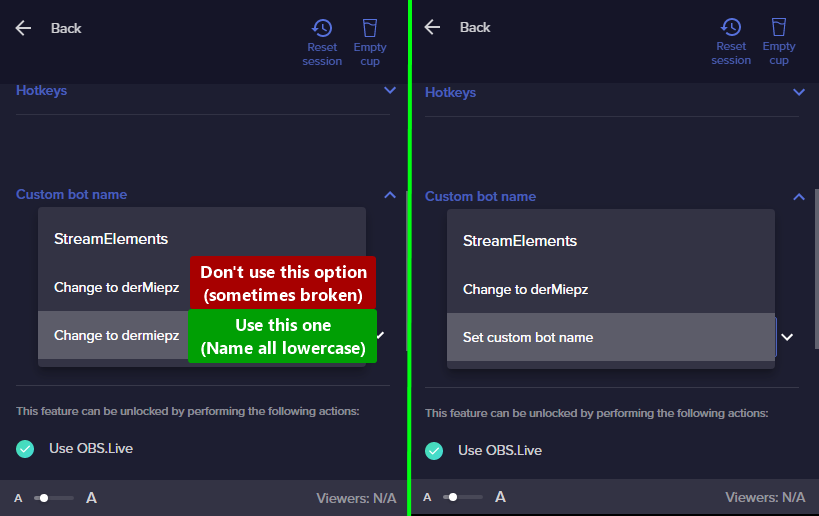 river socket
sharp turret
https://i.imgur.com/re4theQ.png
river socket
sharp turret
https://i.imgur.com/re4theQ.png
Oh, I’ll try!
 short halo
Hi new here and to discord, any sources or channels to help me me with Astro a50 base station and ps5 to capture card?
river socket
sharp turret
https://i.imgur.com/re4theQ.png
It works, thanks you!
sharp turret
You're welcome!
real gate
dapper igloo
<@782397663684853780> ⤵️
Thank you
tropic palm
guys if i connect my SE with both my yt and twitch account and i set the alertbox will the follow alert work for both youtube and twitch?
plain sonnet
no, they are completely different platforms
tropic palm
how can i set alerts in the same scene for both?
plain sonnet
add both alert boxes (from both platforms) in obs
tropic palm
nice thanks man!
 forest parcel
When i set spam filter/banned words and it says timeout length, can i set it to be permanent at all?
 weary moat
I'm having a problem with Fortnite when I start streaming. My voice chat in game dissapears when I start the stream. If I play without streaming it's fine and I can chat but when I stream it dissapears. Any help?
frigid grail
if anyone is free, if i could get some help with alerts that would be appreciated
 topaz bear
can you ask questions here? or just more for like tech to do with obs live just had a question is all
topaz bear
weary moat
I'm having a problem with Fortnite when I start streaming. My voice chat in game...
Your having issues with voice chat you said? are you using a capture card?
weary moat
topaz bear
Your having issues with voice chat you said? are you using a capture card?
Nope, single PC stream
topaz bear
weary moat
Nope, single PC stream
You said in game chat keeps disappearing? voice chat? Did you have your desktop audio up for it? Could be in the game settings to where you can turn it up a bit
weary moat
topaz bear
You said in game chat keeps disappearing? voice chat? Did you have your desktop ...
Nope, so I dno if you play fortnite but theres a game chat and a party chat. If someone joins my lobby while I'm streaming, the voice chat icon disappears, but it's there when I don't stream... So i feel like OBS is doing something dodgy.
topaz bear
weary moat
Nope, so I dno if you play fortnite but theres a game chat and a party chat. If ...
Hm that is kind of odd, I've never had that happen before. It could just be something in the game going on or some kind of setting you may have to switch or something. Do you play on a windows pc?
I'm just trying help best I can as I use obs to @weary moat
weary moat
topaz bear
Hm that is kind of odd, I've never had that happen before. It could just be some...
Yeah, windows PC... I appreciate your help. I've messed with the settings and made my headset default device and communication device, reinstalled drivers, tried using other headphones, reinstalled the game. Nothing is working. I dno what's wrong but it's frustrating me now. It's been 2 weeks like this!
 compact tendon
Is anyone else having issues with their stream stopping when you are changing scenes? I keep getting "An encoder error has occurred while streaming" notice but none of the encoder settings I'm messing with are changing the outcome. can anyone help?
topaz bear
weary moat
Yeah, windows PC... I appreciate your help. I've messed with the settings and ma...
Did you check out your audio sound settings maybe? Like made real tek at one point I was having the issues to when I was playing Runescape 😆 then realized it wasn't on the right sound setting it was on my tv audio as I use that as my 2nd monitor then switched it, was working just fine. Sometimes some settings just little tricky but once you have it down not as bad
But just from using obs my self I just try to help when I can ^_^ even if can't always get around to help everyone @weary moat I hope that helped little though, best I could
topaz bear
compact tendon
Is anyone else having issues with their stream stopping when you are changing sc...
Oof that sounds rough O_o never had that happen in obs before
weary moat
topaz bear
Did you check out your audio sound settings maybe? Like made real tek at one poi...
Thanks for trying I appreciate it
topaz bear
weary moat
Thanks for trying I appreciate it
No problem ^_^ I love tech but sometimes it's a pain to 😆
 brisk hamlet
Hello fam~ 
Got a quick question regarding when going live. So in streamlabs, it prompts you with the ability to change your title, genre, and tags, is there a way to do the same in StreamElements?
topaz bear
Will there be any chance of support for DLive in the future with streamelements?
kindred fox
brisk hamlet
Hello fam~ <:_boogwave_1:552192816214704128>
Got a quick question regarding wh...
View > Docks > Stream Information
brisk hamlet
 kindred fox
OBS Settings > Stream > delete Stream Key > Authenticate to Twitch button
kindred fox
weary moat
I'm having a problem with Fortnite when I start streaming. My voice chat in game...
Sound Control Panel > Recording Tab > Right click your mic and select Properties > Click Advanced Tab > Make sure the box for "Allow Applications to take exclusive control of this device" is unchecked.
 kindred fox
compact tendon
Is anyone else having issues with their stream stopping when you are changing sc...
kindred fox
compact tendon
Is anyone else having issues with their stream stopping when you are changing sc...
Nobody has reported this particular issue. Are you using a Stream Deck to switch scenes or manually selecting them within OBS?
kindred fox
forest parcel
When i set spam filter/banned words and it says timeout length, can i set it to ...
There is not a way to set a "permanent" timeout for banned words.
compact tendon
kindred fox
Nobody has reported this particular issue. Are you using a Stream Deck to switch...
manually selecting and/or keyboard hotkeys.
brisk hamlet
@kindred fox Thank you! 😄
weary moat
kindred fox
Sound Control Panel > Recording Tab > Right click your mic and select Properties...
I'll try this for stream tomorrow and see if it works, thanks
 crisp marsh
It seems that that during streams the transitions are blurring the game play, any ideas? It does sometimes show the entire screen.
 topaz bear
weary moat
I'll try this for stream tomorrow and see if it works, thanks
topaz bear
weary moat
I'll try this for stream tomorrow and see if it works, thanks
Yeah that may actually help ^_^
 indigo falcon
Hi! I can’t connect my custom bot. I’ve been thru the Activity Settings- Set Custom Bot name- sign in with bot account- and then nothing. Nothing connects. Can you help me? It’s connected in the past.
dapper iglooBOT
@indigo falcon ⤵️
- Right-click on your OBS desktop shortcut and open the Properties
- In the Target field, add the following to the very end:
--remote-debugging-port=40404(don't forget to add a space before the current path) - Open OBS (or restart if it was open)
- Open your web browser and type in:
localhost:40404 - Click on StreamElements - Activity feed
- Navigate to the Console tab
- Type the following into the console and hit enter:
store.customBot.removeCustomBotIntegration() - Try setting the custom bot name
- Remove the additional flag in step 2 from your shortcut properties.
kindred fox
compact tendon
manually selecting and/or keyboard hotkeys.
Unsure. Can you replicate the issue and then upload the OBS log for me?
compact tendon
kindred fox
Unsure. Can you replicate the issue and then upload the OBS log for me?
I can't record in obs because the same issue occurs and is cut short. My xbox bar records it without notifications and is too large to share here. I sent the logs to OBS through the help option but here is a screen shot of the message I keep getting.
 gentle musk
Totday I have submitted my bank statement (I think on 3pm), now it is 1am by me and this red message is showing, is this a message that is an old message and my bank details are being verified at the moment or are my bank details verified already and the conclusion is that they are invalid?
 kindred fox
compact tendon
I can't record in obs because the same issue occurs and is cut short. My xbox ba...
kindred fox
compact tendon
I can't record in obs because the same issue occurs and is cut short. My xbox ba...
can you screenshot your encoder settings?
 quiet swift
I need help i don't know why my chat and stream info won't load ive restarted the application and my pc a couple times
 compact tendon
kindred fox
can you screenshot your encoder settings?
compact tendon
kindred fox
can you screenshot your encoder settings?
These were the original settings.

 sweet pine
Since yesterday my custom bot name is not working. I think it is since I enabled 2FA on my bot account. I have a bot account named "FloofermerBot" and it was set up correctly until yesterrday it now defaults back to the streamelements bot name. Now when I click the "connect custom bot account" button it opens up the login page where I input the bot username and password and then it asks me to authorize. I click authorize but nothing seems to have changed. I repeat these steps and it does the same each time. Any suggestions?
edit: I have tried turning off 2FA and still no effect. No idea why this isn't working suddenly.
 kindred fox
compact tendon
These were the original settings.
kindred fox
compact tendon
These were the original settings.
change simple to advanced, use nvenc h264 new or whatever it is, change your preset to quality
compact tendon
kindred fox
change simple to advanced, use nvenc h264 new or whatever it is, change your pre...
Tried that before, same outcome. I've changed all these settings one by one now and nothing seems to be making the stream stay on when I switch scenes.
 kindred fox
compact tendon
Tried that before, same outcome. I've changed all these settings one by one now ...
kindred fox
compact tendon
Tried that before, same outcome. I've changed all these settings one by one now ...
Turn off look ahead and psycho visual tuning
also reset your bitrate to 3500
and rescale the output to 1280 x 720p
compact tendon
kindred fox
Turn off look ahead and psycho visual tuning
Just did all of the above, same outcome.
 kindred fox
compact tendon
Just did all of the above, same outcome.
kindred fox
compact tendon
Just did all of the above, same outcome.
Reinstall obs
And also make sure your graphics drivers are updated as well
compact tendon
kindred fox
Reinstall obs
I'll give it a try, thanks.
indigo falcon
@sweet pine I Had the same exact issue. Instructions to fix are back up at 3:10pm today. Just scroll back and follow the instructions from S.E. Community Bot 👍🏼
 night nova
Hello :D
I have a simple question, Is it possible to add a website page in my Streamelement Overlays ?
I need it for some tools linked with my caméra. If it's not possible directly, maybe with a custom widget, from an iframe or something else ?
Thanks, cheers
(Please @ me or use reply fonction, I reached the maximum discord servers limit, so I don't see "regular" messages ❤️)
shy mountain
There is no default way and I believe we have it blocked so that no website can be loaded into the overlay even via custom widget.
I might be wrong but you can ask in #dev-chat if that is possible via custom widget
rugged quail
It is posible to schedule my live stream contents
shy mountain
Schedule a stream on youtube? You can and then you need to use the stream key provided from the scheduled stream.
night nova
shy mountain
There is no default way and I believe we have it blocked so that no website can ...
Thanks ❤️
 dull granite
how do i make the activity feed for yt, my activity feed shows my twitch rn (in the widget)
dapper iglooBOT
@dull granite ⤵️
StreamElements menu, on top of OBS > Logout > Login
dull granite
ahh thx
 formal walrus
🖖 I love the OBS.Live because of the chat plugin (streaming on console + laptop, great to have everything on one screen) but since I started using it, the streamer mode in Discord stopped working (on Mac). Can I somehow make it work again?
The automatic streamer mode

 dry folio
Hi,
My stream chat wont load in obs, it says: "error loading data".
It always worked perfectly but since yesterday it wont load.
How do I fix this?
shy mountain
formal walrus
🖖 I love the OBS.Live because of the chat plugin (streaming on console + laptop...
that sounds like a discord issuer as its not detecting OBS being started
unless you start discord after OBS is started
dapper iglooBOT
@dry folio ⤵️
StreamElements menu, on top of OBS > Logout > Login
formal walrus
shy mountain
that sounds like a discord issuer as its not detecting OBS being started
It works when I use the vanilla OBS
shy mountain
OBS.Live doesn't change anything on OBS except adding a few docks
especially anything that would affect Discord detecting a live stream
formal walrus
Hm, it actually installed a completely new app
dry folio
dapper igloo
<@443111087295168512> ⤵️
thnx, its fixed now!
 knotty lotus
if so may I ask how do i edit permissions for the !quote add command
shy mountain
@knotty lotus If you are on Twitch -> #helpdesk-twitch Youtube -> #helpdesk-youtube
IF its custom bot issue -> here
knotty lotus
because I don't see the command at all in my command lists
shy mountain
The add to the !quote command by default is moderator and up only
cannot be changed right now
knotty lotus
I see. is there any way to create a custom command that is able to function similarly?
formal walrus
shy mountain
OBS.Live doesn't change anything on OBS except adding a few docks
Maybe this is the problem? Both apps are also different version, the vanilla being a bit newer. I installed it when I downloaded the DMG from SE website
 shy mountain
well for Macs, currenly OBS.Live is not updated to OBS v27
but that still should not be an issue
so the obs.live version you have is running obs 26.1.1 i believe
formal walrus
started OBS now, streamer mode enabled
shy mountain
knotty lotus
I see. is there any way to create a custom command that is able to function simi...

this is the only custom solution i cna provide
formal walrus
Nope, it works now.


 formal walrus
renamed vanilla to something else and .Live to OBS and it detects it now
 shy mountain
thats def. not on us
thats on Discord side for not detecting the application properly
formal walrus
Yeah, it's probably just a dumb detection, not you - but maybe you should know about it, since the official download installs as OBS.Live and that prevents the auto streamer mode to work
shy mountain
The OBS.Live installer also places "Streamelements OBS.Live" shortcut on the desktop on a windows
and that works like a charm

formal walrus
Never mind 😉
shy mountain
It boils down to the difference between windows and mac versions of everything tbh
knotty lotus
Thanks kei. is there a update in the future that will let me customize the quote add command?
shy mountain
we do have planned improvements to the quote system, but no ETA on when
knotty lotus
Alright sweet! thank you so much for answering my queries! Wishing you a awesome weekend!
 sudden shadow
I made an overlay on stream elements and copied the link and added it as a browser source but it doesn't show. any ideas???
dapper iglooBOT
@sudden shadow ⤵️
OBS > Settings > Advanced > Scroll down > Enable or disable Browser Source Hardware Acceleration, depending on its current state > Restart OBS
https://i.imgur.com/ggMe9ZE.png
sharp turret
disable that
dapper iglooBOT
@sudden shadow ⤵️
The default resolution for StreamElements overlays (theme and custom) is 1920x1080. Please add them in OBS at their full resolution and use CTRL+F to fit to screen if necessary. You can then downscale your stream in OBS settings > Video if you'd like https://i.imgur.com/6bWXxjR.png
sudden shadow
ok it worked thanks alot.
sharp turret
No problem 
 spark pike
Hello new to the server I'm having some troubles with sound alerts it let's the viewers use points but there is no sound what am I doing wrong?! The obs was open also
sweet pine
indigo falcon
<@191584832894009345> I Had the same exact issue. Instructions to fix are back u...
Thanks! That was driving me crazy. Got it to work now.
rugged quail
i need help if some body here
i connect stream element to YT but i want to stream on other platform
i cant do this
dapper iglooBOT
@rugged quail ⤵️
StreamElements menu, on top of OBS > Logout > Login
shy mountain
Do you want to stream on YT or on Twitch?
rugged quail
im streaming on nonolive
shy mountain
OBS.Live does not have nonolive support
and there are currently no plans to introduce this platform
 spice spear
So im trying to stream to twitch right now, but when I hit start streaming it brings up a window about streaming to youtube and I have no clue why because I've only done youtube once like a year and a half ago and have been streaming only twitch. I havent even opened obs between my last twitch stream and now
dapper iglooBOT
@spice spear ⤵️
StreamElements menu, on top of OBS > Logout > Login
kindred fox
This should fix that ^^^
spice spear
yup thanks
 vague falcon
Hello, I stream on the Trovo. I added scenes. How can I activate streamelements chatbot. Can I use two bots in chat at the same time (botrix and streamelements) ...? Thanks in advance
nova scaffold
vague falcon
Hello, I stream on the Trovo. I added scenes. How can I activate streamelements ...
Go to the dashboard and add the bot. Then give it moderator rights.
Yes, you can use multiple bots, but clean up the commands to avoid multiple responses 🙂
 mystic fern
I have an extension on my Twitch page for Sound Alerts, but it says that the browser source is offline and I've set up the browser source in OBS with the right link and the source in OBS is visable.
Can anyone help me to fix this please?
I'm really struggling.
Thank you.
toxic fern
You'd have to speak with the extension dev.
 ornate juniper
hi i was trying to make a game capture for minecraft but when i try and scale it it disappears and im really not sure what im doing wrong
 wet jetty
Is there ANY way i can rename the bot without using the obs.live application?
toxic fern
No.
wet jetty
toxic fern
No.
Could one use the application, rename the bot then return using obs studio ?
toxic fern
No
 winged ridge
when trying to use play, pause, skip media requests in my streamdeck it states " This StreamElements OBS.Live action is offline. Please wait for it to become available" how can i fix this?
dapper iglooBOT
@winged ridge ⤵️
StreamElements menu, on top of OBS > Logout > Login
winged ridge
ty
sharp turret
No problem
 ocean wigeon
definitely need help with obs
dapper iglooBOT
@ocean wigeon ⤵️
Welcome to the helpdesk! Please let us know how we can assist you today and a support volunteer or staff member will assist you as soon as they are available. Thank you for your patience.
ocean wigeon
setting up my stream
 humble shale
Hello I'm trying to open up obs and I keep getting pop ups saying "The code execution cannot proceed because MSVCP140.dll and VCRUNTIME140.dll was not found." I've already tried uninstalling and reinstalling but it gives me the same pop up. How can I fix this?