#helpdesk-selive
1 messages · Page 220 of 1
 lusty snow
 rugged quail
bruh
il check
bro im setting it to youtube rtmps buy it keeps auto chnging to custom
bro beacuse of this prob i cant stream for 2 days yesterday also it was same roblem
 nova scaffold
rugged quail
bro im setting it to youtube rtmps buy it keeps auto chnging to custom
nova scaffold
rugged quail
bro im setting it to youtube rtmps buy it keeps auto chnging to custom
Grab the proper URL and stream key for the youtube ingest server, it will work with custom
 worldly current
Thank you so much! I appreciate your help 🙂
 lilac ocean
No worries about it, it's what we are here for 
rugged quail
@nova scaffold bro my stream key is also automatically chnging wth is happening with m y ibs
obs*
should i reset my stream key ?>
and bro why si it not appliying the settings the stream key
im apply it then also its not happening
 kindred fox
rugged quail
<@!149255081194160129> bro my stream key is also automatically chnging wth is h...
kindred fox
rugged quail
<@!149255081194160129> bro my stream key is also automatically chnging wth is h...
Are you streaming to twitch?
lilac ocean
YT
rugged quail
kindred fox
Are you streaming to twitch?
no bro im yt streamer
kindred fox
rugged quail
no bro im yt streamer
Are you running obs as Administrator?
rugged quail
k
then

on yt its not apeering when my stream is on
before my stream where good but from 2 days idk wht is happenign
@lilac ocean @kindred fox @nova scaffold
is your stream registered as a public stream?
how
:?
bro 2 days before my stream wass good perfect but then id ditn chnge anything something hhappened
That should be in the stream settings, check that it's set to public
ok
ill check
rugged quail
rugged quail
That should be in the stream settings, check that it's set to public
is it in obs settings
?
should be in your youtube settings
yt studio ?>>
its public bro
 rich seal
can i get help bc when i go live on obs to youtube it does not show on youtube and i refresh several times and it dosent work
rugged quail
rich seal
can i get help bc when i go live on obs to youtube it does not show on youtube a...
same hapeningwith me
rich seal
rugged quail
when will this prob solvee
idk but i hope soon
 strong monolith
Hi can anyone help me why my Astro a40 headset is making a little echo when I stream? I use a elgato and stream console and have a external mic
rich seal
rugged quail
i also want to stream im missing it from 2 daysss
ive missed for like a month now
rugged quail
rich seal
ive missed for like a month now
holu
holy*
anyone who plays bedwars or fortnite here ?
rich seal
both
rugged quail
same
rich seal
ok
rugged quail
im a pro in fn and bedwras too
rich seal
i kinda good at fortnit and bed wars i pro
rich seal
ok
rugged quail
bro im indian you >
??
rich seal
new york
rugged quail
oo
 vestal frost
hi folks, i was wondering if you could help, please? I have tried to load my link today and it says "failed to initilise video - invalid parameters".....can anyone help with this. please
 torn tendon
what do i do this pops up every time i open obs and i dont want to restart obs what should i do?

 sharp turret
torn tendon
what do i do this pops up every time i open obs and i dont want to restart obs w...
sharp turret
torn tendon
what do i do this pops up every time i open obs and i dont want to restart obs w...
Disconnect and reconnect account in OBS Settings > Stream
torn tendon
thanks
sharp turret
You're welcome!
 dapper fox
i have a capture card for video and audio from my playstation to obs on my laptop, it shows the video on obs but not audio
what can i do to fix this?
 severe ferry
anyone know how i can fix my frame rate in my recordings ? ive watched alot of youtube videos but none seem effective
 dapper iglooBOT
@dapper fox ⤵️
Obs.live is a plugin for OBS Studio for the best OBS support, please join their Official Discord @ https://discord.gg/obsproject
@severe ferry ⤵️
Obs.live is a plugin for OBS Studio for the best OBS support, please join their Official Discord @ https://discord.gg/obsproject
 indigo raven
Problem with streaming, I ran a 5 hour stream last night with no issues, just went on to run one today, and I kept getting an error that it couldnt authenticate with facebook, that my stream key wasnt correct. I just went through and reset my keys, my server, ect. and now it lets me "start streaming" but doesnt go to my facebook profile, and also doesnt pop up the window for video title/description anymore.
 ornate berry
my problem was never resolved
rugged quail
indigo raven
Problem with streaming, I ran a 5 hour stream last night with no issues, just we...
please logout and log back into obs.live
 gray bluff
hey there! currently having an issue with alerts
when someone resubscribed or donates or anything, the name doesnt show up as case sensitive, and nothing is capitalized. how do i fix this?
 tranquil panther
I have noticed that my intro video that was specialy made for me has no sound has their been a change with this new update
 charred blaze
Hi. i hope i am right here: I wanted to install Streamelements OBSLive on my Computer, and i can download the file, start the Installation and then i have to restart the Computer. After the restart nothing happens, there is nothing Installed then, as far as I see?
 worn prairie
hi guys! my media share requests are not workign on my stream. when someone !request, it will not add to the queue or cloudbot will not add it to the queue
 frozen light
I've lost the ability to hear my sound commands, although my audience can hear them. I've checked my Voicemeeter settings, my OBS settings, and my computer settings (I can hear everything else, just not those commands). Does anyone have suggestions?
 solar vortex
Hey all! Over time my little popup windows are disappearing, like my current stream stats, the chat. Is there a place to to reopen the windows?
 quick atlas
solar vortex
Hey all! Over time my little popup windows are disappearing, like my current str...
quick atlas
solar vortex
Hey all! Over time my little popup windows are disappearing, like my current str...
You should be able to go to the Streamelements Menu > OBS.Live Docks > "choose a dock" (if you aren't using OBS.Live, then: View > Docks > "choose a dock").
quick atlas
frozen light
I've lost the ability to hear my sound commands, although my audience can hear t...
First place I would check is the OBS settings again, as it seems like the audio is playing, but isn't being output to you
 paper ivy
This is my display screen whenever I load up OBS studio 27.0.1 with obs live, this never happened when I was using streamlabs. What I do to resolve this, is to reboot OBS. However, it would be best if I could solve this problem and not have to reboot at all since it would not be great to have to restart stream if this happened while I was live.
 quick atlas
paper ivy
This is my display screen whenever I load up OBS studio 27.0.1 with obs live, th...
quick atlas
paper ivy
This is my display screen whenever I load up OBS studio 27.0.1 with obs live, th...
Have you tried creating a new game capture source?
paper ivy
quick atlas
Have you tried creating a new game capture source?
I just tried it, did not work.
quick atlas
Does this happen with anything else you try to capture?
paper ivy
I discovered the it affected all my game captures. I have another game capture, capturing my Vtuber software Vseeface. Display captures work fine. So i turned off the one showing Genshin, and genshin still continued to show via the game capture for Vseeface (when it was not opened) as soon as I opened vseeface it is fixed. I think this problem only happens when the window it wants to capture is not open?
quick atlas
Have you tried reaching out in the OBS discord for this? OBS.Live is just a plugin for the base software, and it sounds like this might be a setting/issue with the base software
paper ivy
Ah, it didnt occur to me to join the OBS discord for help on this. Thank you. I'll try there.
tranquil panther
Can anyone tell me if OBS has stopped us from using media source cause i have tried all videos and I am not getting audio coming through stream when i use them
 vapid drift
Hello! I have made an overlay and cleared the data on accident. The cheer, subs, and follow data has returned, but the tips data has not ;_; I currently still have streamlabs hooked up to my "tips", but it was never an issue in the past. It still showed up on my overlay. I am unsure how to fix it now that it's not popping up!!
dapper iglooBOT
@tranquil panther ⤵️
Obs.live is a plugin for OBS Studio for the best OBS support, please join their Official Discord @ https://discord.gg/obsproject
quick atlas
vapid drift
Hello! I have made an overlay and cleared the data on accident. The cheer, subs,...
If streamlabs was the service receiving the tips, you were likely using a streamlabs overlay to display alerts. Have you tried re-adding that?
quick atlas
 astral burrow
i need a good capture card for a nitendo switch
astral burrow
i need a good capture card for a nitendo switch
I would check out the tech-talk for suggestions!
 topaz elbow
hi everyone I have recently been having issues with my obs. I have had it crash on me multiple times, my frames are dropping tremendously, and now my camera keeps freezing randomly (in obs) can someone help me? I also have the files with the crash logs if it helps. thank you!! (Also i have never had any of these issues until the last monthish)
 ocean rivet
topaz elbow
hi everyone I have recently been having issues with my obs. I have had it crash ...
ocean rivet
topaz elbow
hi everyone I have recently been having issues with my obs. I have had it crash ...
logs will definitely help so it would be best if you could provide those as well
topaz elbow
ocean rivet
logs will definitely help so it would be best if you could provide those as well
i have them 🙂 who should I reach out to for help on the matter?
ocean rivet
topaz elbow
i have them 🙂 who should I reach out to for help on the matter?
you can post them here and I'll look into it
 forest parcel
Hey guys, i noticed from seeing other people's alerts etc. Is there a way to get it so that a person's name fits well when appearing? If i have someone follow or sub for instance, and their name is really long, it clips out of the graphic i have for it
topaz elbow
ocean rivet
you can post them here and I'll look into it
ok thank you!
@ocean rivet Here are my logs- let me know if i need to provide my crashes as well
ocean rivet
topaz elbow
<@!131420870244564992> Here are my logs- let me know if i need to provide my cr...
can you choose only one of those so I can forward it to the dev team?
topaz elbow
ocean rivet
can you choose only one of those so I can forward it to the dev team?
sure! sorry!- lets go with the most recent one ( the last one)
ocean rivet
topaz elbow
sure! sorry!- lets go with the most recent one ( the last one)
and latest crash log as well
topaz elbow
topaz elbow
ocean rivet
and latest crash log as well
of course thank you!
ocean rivet
topaz elbow
of course thank you!
seems like your obs is running on the laptop integrated graphics, follow this guide to make it use the dedicated gpu: https://obsproject.com/wiki/Laptop-Troubleshooting
topaz elbow
ocean rivet
seems like your obs is running on the laptop integrated graphics, follow this gu...
awesome thank you soo much
ocean rivet
topaz elbow
awesome thank you soo much
np! feel free to reach out again if that doesn't solve it
topaz elbow
ocean rivet
np! feel free to reach out again if that doesn't solve it
i will thanks!!
rugged quail
hi can someone pls say me that streamelements bug has solved or not cause can i get help bc when i go live on obs to youtube it does not show on youtube and i refresh several times and it dosent work
ocean rivet
rugged quail
hi can someone pls say me that streamelements bug has solved or not cause can i ...
do you get a blank screen?
 queen thorn
I got new alerts but I cannot scale the video within StreamElements and am not sure if I can add them directly to OBS. Please help. Would mean a lot
quick atlas
queen thorn
I got new alerts but I cannot scale the video within StreamElements and am not s...
If they are basic video files, then you should be able to add them directly to OBS as media sources
queen thorn
but the issue I'm facing is being able to have them go off as an alert
and idk how to do that
quick atlas
queen thorn
but the issue I'm facing is being able to have them go off as an alert
You can add the video as an alert in the overlay editor as well, as long as it's a supported file format. Just as you would an animated gif or image
queen thorn
If I add it as a video source, is there a way to make it play only for a specific event
quick atlas
By specific event, do you mean follower, sub, things like that?
queen thorn
ya but I think I found a way around it. I'm gonna have 2 alert boxes. one for the video and one for the text
quick atlas
You should be able to have a video along with text, but the sizing of the video may change the way the alert looks
queen thorn
I'm still fiddling with it but I'll be back if I run into anything else
rugged quail
ocean rivet
do you get a blank screen?
no its doesnt appear on yt but it shows im live in ibs
obs*
 pseudo crown
so im trying to add a VST plug in but I cant find the file
dapper iglooBOT
@pseudo crown ⤵️
Obs.live is a plugin for OBS Studio for the best OBS support, please join their Official Discord @ https://discord.gg/obsproject
@rugged quail ⤵️
StreamElements menu, on top of OBS > Logout > Login
 wary crow
I stream on mac os and when I stream my audio isn't picked up by obs and when I try to change the desktop audio in setting it just says disabled and won't give any other options.
 toxic fern
That's unfortunately due to the way Macs are "designed". Apple doesn't make it easy to do it. Join the obs discord and run the !macaudio command. You wanna use blackhole.
dapper iglooBOT
Obs.live is a plugin for OBS Studio for the best OBS support, please join their Official Discord @ https://discord.gg/obsproject
dapper iglooBOT
@rugged quail ⤵️
StreamElements menu, on top of OBS > Logout > Login
wary crow
So I followed all the instructions to downloading the blackhole but now when I press the multi-output I can't hear my computer audio at all
toxic fern
That's something for the obs discord.
wary crow
oh okay thank you
indigo raven
My Chat Dock isnt detecting my livestream anymore?
 shy mountain
What exactly are you seeing?
indigo raven
this is my chat dock, then while streaming it will search for it and then error out saying it is unable to find my stream.
 shy mountain
Are you streaming on Youtube?
indigo raven
dapper iglooBOT
@indigo raven ⤵️
StreamElements menu, on top of OBS > Logout > Login
 jaunty elk
Hey, has the new version of Stream Elements gotten a Patch since the last one that a lot of people had to revert to an older version?
toxic fern
You should be able to use it with v27.
If there's issues indicating a problem we'd need a log to look at.
jaunty elk
Ok cool, I know last time I downloaded it, something happened, my 1080ti started struggling with my stream and even right now I am having more issues since I had to revert, could I sent my log from tonight and see if you see anything wrong with it?
https://obsproject.com/logs/zjiAcZBQAjtAjq7a Here it is, I am not sure how to read it
shy mountain
https://obsproject.com/tools/analyzer?log_url=https%3A%2F%2Fobsproject.com%2Flogs%2FzjiAcZBQAjtAjq7a
OBS (Open Broadcaster Software) is free and open source software for video recording and live streaming. Stream to Twitch, YouTube and many other providers or record your own videos with high quality H264 / AAC encoding.
 sturdy horizon
hi
I am facing an issue, theme alert box not working in live stream. In testing it works but not in live stream.
dapper iglooBOT
@sturdy horizon ⤵️
Please provide your account ID found at the top of this page: https://streamelements.com/dashboard/account/channels This ID is public info and safe to share here.
forest parcel
Hey guys, i noticed from seeing other people's alerts etc. Is there a way to get it so that a person's name fits well when appearing? If i have someone follow or sub for instance, and their name is really long, it clips out of the graphic i have for it
 main knot
Hello 🙂 I have been streaming for about 6 months now and recently I'm facing some issue where my stream skips frames.. When I lower the bitrate it gets fixed but after a few minutes it does that thing again.. My bitrate used to be 2500 now it's at 1500 :<.. Is it a problem from my pc/wifi?
rugged quail
bruh
dapper iglooBOT
@main knot ⤵️
Obs.live is a plugin for OBS Studio for the best OBS support, please join their Official Discord @ https://discord.gg/obsproject
 keen anvil
Hey, guys! I've recently noticed that after reinstalling OBS.Live only OBS Studio icon is appearing on my screen. Been streaming using that icon, because all SE tools were in, but just a moment ago OBS required an update and right now all widgets disappeared, no chat and activity feed. StreamElement button after Help at the top also have disappeared. How to get it back? It seems that I can't even find obs.live .exe file in initial obs folder. And I just can't reinstall it over and over again after every update (it already happened before)
 tawny cloud
how do i sign out of my twitch in the streamelements browser so i can sign into another it just keeps reconnecting to me automatically ?
dapper iglooBOT
StreamElements menu, on top of OBS > Logout > Login
 solar jacinth
I had some sound issues with sources on OBS so i decided to reinstall and remake my scenes, but now my OBS has disconnected from my Twitch so i cant use any of the Streaming Docks i used to have access to. It keeps coming up with an error message after clicking the Connect Account (Recommended) option saying that the web address used to link my OBS to my twitch account via stream key is unavailable. Is there a reason why I cant reconnect my stream key? I can send a screenshot of the error message that displays when i try to reconnect my stream key to get the stream Docks back.
 latent scaffold
Hey, I have some issues with the OBS.Live chat in OBS. I can't sign in to chat. It says the browser might not be supported when I try to sign in. Is there an easy fix for this?
toxic fern
@latent scaffold pinned messages in #helpdesk-youtube
latent scaffold
Awesome, thanks!
 thorn nest
I am having an issue as to where, when running Obs.live, i am unable to change my video settings such as my audio tracks, rescale output and my encoder, is there any fix for this or has anyone else had this problem? with obs studio i could always change it but with Obs.live i am unable to do so
 plain sonnet
do you have anything running like virtual cam or ndi?
thorn nest
ive looked around for fixes and a couple said to make sure i dont have anything running or outputting but, i have all of the recording, streaming and virtual cam all stopped and inactive
ive just triend reinstalling but that didnt work either
plain sonnet
the only way (apart from a major bug) that would cause these settings to be greyed out is from an active output
best to check all plugins you have and double check they are all stopped
thorn nest
ill try once more, thanks for the help
rugged quail
how do i uninstall obs.live
thorn nest
File>open file settings>updater>Updater.exe run it and it updates to vanilla
 paper canopy
I'm trying to stream but it keeps connecting and disconnecting. Help?
thorn nest
For everyone who ends up having a similar issue to mine, the fix is to set the settings you want, then install obs live after you have your settings corrected.
 lean flint
I changed my password on twitch and even after relogging into stream elements i keep getting an error message on obs saying "could not access the specified channel or stream key" im not sure what to do to fix it
nova scaffold
lean flint
I changed my password on twitch and even after relogging into stream elements i ...
OBS - Stream Settings - disconnect and reconnect Twitch if you use the automatic service. Or check the stream key if you have the oldschool settings.
lean flint
Thank you !! @nova scaffold
 fiery crescent
Hey so i'm trying to download the OBS and it won't let me
any ideas?
like i go through the whole installer, restart my computer and cant find it
dont wanna have to go back to streamlabs lmao
oh nvm it's just like embedded itself inside standard obs
before i had a seperate exe
 hot juniper
I am currently using Wave link and a Wave 3 micophone for streaming. However while in OBS I have found that my alert audio is not being picked up while live on twitch.
Please see below for my current audio settings on stream elements.
How should I go about fixing this audio issue? Thank you.
 dapper iglooBOT
@hot juniper ⤵️
Please ask your question in one helpdesk channel only. A support volunteer or StreamElements staff member will assist you as soon as they are available. Asking in multiple places will only result in confusion, not faster answers. Thank you for your patience.
 dark elbow
hello, my chatbot seems to have stopped working can someone help please?
quick atlas
Is it a custom named bot?
dark elbow
yeah it is
dapper iglooBOT
@dark elbow ⤵️
If your commands recently stopped working and you're using OBS.Live and a custom bot name do the following:
- In OBS.Live, click on the hamburger menu (three stripes) at the top left of your activity feed
- Click on Stream Settings > Custom bot name
- In the Custom bot name field select Set custom bot name, not your already existing username (with capital letters). Note: If you already connected an account that way, the third entry will show as the account name (see image https://i.imgur.com/re4theQ.png).
- Scroll a bit down and click on the purple Connect Custom Bot Account button
- Log in as usual and Authorize the custom bot name
- Back in the Activity feed, click on the Send Test Message button and check if your custom bot name starts working again
 burnt yoke
Hello, I'm having issues with the streamelements obs live media options working with my stream deck. they used to but do not at this time.
 rugged quail
How do I leave this discord server? Haha
dapper iglooBOT
@burnt yoke ⤵️
- Open
%appdata%\Elgato\StreamDeck\Plugins - Delete the
com.streamelements.obslive.sdplugin folder
 gentle musk
Hi there, I got an question. Sometimes I don't got an email for stream summary and somethimes I do get a summary. Can I fix this because I had a stream a few minutes ago and I want to get these information!
burnt yoke
dapper igloo
<@743828485130289162> ⤵️
After I delete that folder this is what happens and there is no option in the streamdeck app now to add the media player options back. Am I missing something here?

 quick atlas
Try to delete your cache folder here: %appdata%\obs-studio\plugin_config\obs-browser\Cache
burnt yoke
How can I fix this?

 static junco
quick atlas
Try to delete your cache folder here: %appdata%\obs-studio\plugin_config\obs-bro...
static junco
quick atlas
Try to delete your cache folder here: %appdata%\obs-studio\plugin_config\obs-bro...
this had no luck with me i still have a white screen
 barren mulch
tengo un error e strea elements erro de sintaxe na pocicion 6 lista de entrada incuerente ,faltam o final das entradas
rugged quail
hi
i cant stream since 3 days for some reason can i know why
i did everything you guys said me
then also it didnt work
kindred fox
burnt yoke
How can I fix this?
Typically obs.live has to be open when that happens. If it’s broken, you could try uninstalling the obs.live streamdeck extension and reinstalling it
 rancid minnow
Can someone help me with a question please: The problem is that the host alerts do not appear in my obs feed.
dapper iglooBOT
Due to changes to Twitch API, we have filtered out hosts and will only show these ones on your activity feed:
- All hosts coming from an online channel with at least 1+ viewer
- Auto host events with at least 1 viewer - only from a channel that just went offline
Note: If you see X channel has hosted you with no viewers on the back, that is considered an offline host or a host with 0 viewers, we do not show these.
rancid minnow
The problem is that the people who host me are watching live and others but it does not appear in the feed or the alert programmed from the page.
rancid minnow
In short, it will only be shown if a person hosts me with more than 1 viewer. As an example, would Luck just host me 5 views?
toxic fern
If they just went offline then it would show.
But if they've not been live and just do the host then no.
rancid minnow
toxic fern
But if they've not been live and just do the host then no.
ok, thx ^^
 smoky knot
help, bot not working after i change name pls ty
dapper iglooBOT
@smoky knot ⤵️
If your commands recently stopped working and you're using OBS.Live and a custom bot name do the following:
- In OBS.Live, click on the hamburger menu (three stripes) at the top left of your activity feed
- Click on Stream Settings > Custom bot name
- In the Custom bot name field select Set custom bot name, not your already existing username (with capital letters). Note: If you already connected an account that way, the third entry will show as the account name (see image https://i.imgur.com/re4theQ.png).
- Scroll a bit down and click on the purple Connect Custom Bot Account button
- Log in as usual and Authorize the custom bot name
- Back in the Activity feed, click on the Send Test Message button and check if your custom bot name starts working again
smoky knot
didn't work
dapper iglooBOT
@smoky knot ⤵️
- Right-click on your OBS desktop shortcut and open the Properties
- In the Target field, add the following to the very end:
--remote-debugging-port=40404(don't forget to add a space before the current path) - Open OBS (or restart if it was open)
- Open your web browser and type in:
localhost:40404 - Click on StreamElements - Activity feed
- Navigate to the Console tab
- Type the following into the console and hit enter:
store.customBot.removeCustomBotIntegration() - Try setting the custom bot name
- Remove the additional flag in step 2 from your shortcut properties.
smoky knot
can i make the broadcaster my new name or is it not posible?
shy mountain
you can use your own name from the drop down automatically if you want to
dark elbow
On the bot my !lurk command is not working. Every other command is. Can someone help?
dapper iglooBOT
@dark elbow ⤵️
Go to the Dashboard > Right side > Part channel > Join channel (https://streamelements.com/dashboard) https://i.imgur.com/uYVb8OK.png
shy mountain
Replace ${1} with ${user} or ${sender}
shy mountain
👍
gentle musk
Hi there, I got an question. Sometimes I don't got an email for stream summary and somethimes I do get a summary. Can I fix this because I had a stream a few minutes ago and I want to get these information!
dapper iglooBOT
@gentle musk ⤵️
Please provide your account ID found at the top of this page: https://streamelements.com/dashboard/account/channels This ID is public info and safe to share here.
rugged quail
Hi im having issues with streamlabs obs
my minimize and exit buttons on the top right corner of the page arent there and the only way for me to get in and out of it is by alt tabbing, is there some way to fix this?
dapper iglooBOT
@rugged quail ⤵️
We're not able to troubleshoot issues with using our overlays in StreamLabs OBS (SLOBS) as we don't have the tools to support their software. We recommend using OBS Studio or OBS Studio with our plugin OBS.Live.
 serene cipher
Hi, my alerts are sometimes playing 2x at the same time, i tried reinstalling obs, setting up the widget again and its still playing twice. is it cuz of the widgets or bad settings in my obs?
dapper iglooBOT
@serene cipher ⤵️
Make sure to :ballot_box_with_check: “Shutdown source when not visible” for all browser sources (all OBS scenes). If using studio mode, uncheck “Swap Preview/Output Scenes After Transitioning.” Also, keep in mind that sound can play from any overlay loaded in the browser (editor or launched). https://i.imgur.com/6bWXxjR.png https://i.imgur.com/yY0wcFl.png
gentle musk
dapper igloo
<@269837747328516096> ⤵️
5f22c7f955e5c07334f76d52
 robust apex
hey, my CPU usage is at 100% when running the latest streamelements OBS update. any advice? thank you!
shy mountain
gentle musk
5f22c7f955e5c07334f76d52
From what I see, you don't have frequent streams, so the system is not keeping enough data to have it compare to something.
dapper iglooBOT
@robust apex ⤵️
Please provide a log from your last stream. To do this, in OBS go to Help > Log Files > Upload Current Log File and paste the link to the log file here.
robust apex
shy mountain
https://obsproject.com/tools/analyzer?log_url=https%3A%2F%2Fobsproject.com%2Flogs%2FpE7z0ffxPe8R0Ju-
OBS (Open Broadcaster Software) is free and open source software for video recording and live streaming. Stream to Twitch, YouTube and many other providers or record your own videos with high quality H264 / AAC encoding.
robust apex
thanks @shy mountain
@shy mountain CPU usage is still high, I've found the issue to be the Activity Feed window. Is there any way to reduce the CPU which this specific window uses?
shy mountain
How did you manage to figure that out?
robust apex
I looked into my task manager, pressed 'Open details' on OBSstudio.exe, and then found the issue to be 'obs-browser-page.exe'. I then closed the browser page with the highest process, and then the CPU usage went back down to 3-5% from 10-20%.
shy mountain
did you chekc the hardware accel from the analyzer?
robust apex
By the way, the browser page in question.. when I closed it, it closed the activity feed window.
shy mountain
also i might suggest to reinstall OBS.Live
yea i get it, the dock is essentially a browser page
robust apex
I disabled the hardware accel, and I also reinstalled OBS.live previously
appreciate the suggestions though 🙂
shy mountain
unfortunately, my shift has ended and I can't stick around to troubleshoot this further. @nova scaffold should be able to help with some troubleshooting steps on this.
robust apex
no worries, stay safe
nova scaffold
Yep let's see. In general the CPU usage from browser sources can be a bit high. Activity feed is usually not that hungry - need to see what is going on
robust apex
Would you like me to upload a log file here?
nova scaffold
You can, but the OBS log files do not log CPU usage by browser sources
so that does not help much
nova scaffold
In general there are not many settings that affect the browser built into the OBS (this is the process that you nuked before). Only hardware acceleration. Some people find it works better without it, some need to enable it.
Otherwise we recommend a clean reinstall of the OBS Studio first and then OBS.Live on top.
With browser sources there is not much to troubleshoot
robust apex
I tried that before
I got an idea- is there any way to reinstall a previous version of OBS.live
I remember that before a couple weeks ago, there was no issues
nova scaffold
Yes this is possible, but not recommended, the updates are needed.
What you can try is to have the older OBS Studio version 26.1.1 with the most recent OBS.Live version
Officially there are no concerns about OBS 27.0.1 now with OBS.Live but you never know what random issues might come up in rare cases.
robust apex
I will try that, but just for peace of mind, could I please download the older OBS.live versions?
nova scaffold
Give me a minute to find those
robust apex
no worries.
nova scaffold
Here would be the version we consider "Stable" - it is 1-2 releases behind the latest one
robust apex
thank you @nova scaffold I'll first try just reinstalling an older OBS version with the latest OBS.live, then I'll try an older OBS version with an older version of OBS.live, and then I'll try a newer version of OBS with an older version of OBS.live, and I'll get back to you 🙂
nova scaffold
robust apex
thank you <@!149255081194160129> I'll first try just reinstalling an older OBS v...
Sounds good
rugged quail
hi
dapper iglooBOT
@rugged quail ⤵️
Welcome to the helpdesk! Please let us know how we can assist you today and a support volunteer or staff member will assist you as soon as they are available. Thank you for your patience.
rugged quail
hi can i pls now that why cant i stream since days
like i stream on obs it shows im live as i see in yt i shows im not live
can someone help me ?
nova scaffold
rugged quail
like i stream on obs it shows im live as i see in yt i shows im not live
Please check your stream settings in OBS and make sure you have the correct ingest server and correct stream key in there.
rugged quail
@nova scaffold bro i did everything like bro i chnged it was perfect then it automatically chnged
nova scaffold
rugged quail
<@!149255081194160129> bro i did everything like bro i chnged it was perfect th...
Please select the correct ingest server for YouTube in the OBS stream settings and replace the key and try again
Set the stream to public.
rugged quail
how to see wwethere is it public
nova scaffold
That's a youtube setting, youtube livestreaming dashboard
Check if you get a videofeed there once you start the stream
nova scaffold
Have you already checked that you have the correct stream key in OBS?
nova scaffold
If it is the correct key, please check OBS Logs and see what the connection is doing
rugged quail
obs logs ?>
rugged quail
rugged quail
should i reinstall it !
??\
nova scaffold
Yes, OBS logs, you can see what the connection status was during your stream attempt to youtube.
rugged quail
how to see it >
?
my bitrat everything is perfect btu idk why is this happenign i want to stream so hard
nova scaffold
Just check the status of the connection, it will tell you if it is successful or not, when you are connecting to the RTMP server that YouTube is using.
If Youtube does not show your videofeed, it indicates that the live feed did not get to YouTube
nova scaffold
You can post the log here and i check it
We can't really troubleshoot issues with livestreaming directly, this is a platform thing, we can only check that the signal got to where it should go - the ingest server.
nova scaffold
Go to your OBS, Help - Log files, grab the log that has the stream attempt where it did not show the live feed on YouTube and post it here
nova scaffold
Just put the file in here and i take a look at it..
nova scaffold
rugged quail
k
17:49:14.945: [rtmp stream: 'adv_stream'] Connection to rtmp://a.rtmp.youtube.com/live2 successful
That log shows that the connection to Youtube was successful
If the stream key is correct, you need to check with Youtube support why you are not getting the live video feed.
nova scaffold
You need to ask the Youtube Support in that case.
rugged quail
ok
nova scaffold
Use the help resources on YouTube please.
nova scaffold
Not StreamElements, Youtube
rugged quail
ok
 nimble mauve
is there a version of stream elemts for linux?
toxic fern
No.
 buoyant patio
Heellloooo :D, i require some assitence if anyone has the time.
dapper iglooBOT
@buoyant patio ⤵️
Welcome to the helpdesk! Please let us know how we can assist you today and a support volunteer or staff member will assist you as soon as they are available. Thank you for your patience.
buoyant patio
sooo, i was trying to add sub goal on stream elements overlay (very new to elements still) and I am able to add it but the starting amount is showing the subs i have recieved since i started using Streamelements, while i would like to use everything from June as a monthly goal. I know the number just could find a place to manually change it. also for future like next month how would i set it as a monthly goal starting next month aswell. aaaaand thanks 😄 ❤️
nova scaffold
buoyant patio
sooo, i was trying to add sub goal on stream elements overlay (very new to eleme...
https://streamelements.com/dashboard/session
Go to that page - Goals - change the amount manually to what you would like to see as the starting amount.
buoyant patio
ahhh, yeha i never saw this. i was adding goal just thru my custom overlay alone! thank you so much!!
 waxen vessel
Hello i hope this is the right channel. Some of my friends sended me his old overlay. I have no idea how to put it into Streamelements.
dapper iglooBOT
@waxen vessel ⤵️
To add your overlays to OBS, add a new browser source in your scene. Paste your overlay URL in the browser source properties, set the dimensions to 1920x1080 (unless you changed them on the website) and check Shutdown source when not visible. https://youtu.be/KDvLynUqXI4
 cinder swallow
Hey, I was wondering how can I remove the obs live plugin without uninstalling obs studios?
kindred fox
cinder swallow
Hey, I was wondering how can I remove the obs live plugin without uninstalling o...
Uninstall obs live and it will give you the option to remove obs.live and preserve user settings
 peak spindle
Hi, I have an issue with the chat widget when I go live. The chat on YouTube is showing, but I get that error on obs.live. Any suggestions?
 sharp turret
peak spindle
Hi, I have an issue with the chat widget when I go live. The chat on YouTube is ...
sharp turret
peak spindle
Hi, I have an issue with the chat widget when I go live. The chat on YouTube is ...
Your stream is private, the chat dock only works when the stream is public
peak spindle
Ahhh, thank you 👍
sharp turret
No problem 
 forest locust
guys did anyone make custom widget for leaderboard loyality ?
 odd kraken
^ answered in #helpdesk-twitch
 half urchin
Hi! How can I go live with Restream.io or StreamYard? StreamElements simply ask for my YouTube stream key and go live only there
nova scaffold
half urchin
Hi! How can I go live with Restream.io or StreamYard? StreamElements simply ask ...
Change the stream settings in OBS to the correct platform, you have YouTube there right now.
half urchin
nova scaffold
Change the stream settings in OBS to the correct platform, you have YouTube ther...
The regular OBS settings? I set the settings to the ones I need, so the StreamElements add-in simply subscribe these settings to "Stream only in YouTube"
nova scaffold
half urchin
The regular OBS settings? I set the settings to the ones I need, so the StreamEl...
OBS Stream settings is what you look for.
forest locust
odd kraken
^ answered in <#199460642975907840>
thankk you so much! it update in realtime ?
odd kraken
Best to contact the creator of the widget. Not sure about that.
forest locust
oh okay got it
half urchin
This ones?

 valid smelt
can anyone help I have my streaming service as twitch but every time I go to stream it streams as youtube
 elder holly
anyone else having problems with the streamdeck implementation? pause alerts and so on are marked as currently not avalibe
odd kraken
@valid smelt Log out of OBS.Live using StreamElements at the top in OBS.Live and log out of OBS Studio using Settings > Stream and log back in to both.
elder holly

 vital basin
ola,boa noite! estou tentando editar minhas overlays, porem quando clico em editar a overlay e abre uma tela no navegador, a mesma nao carrega
 hidden gust
how to add the chat?
 vital basin
coloquei em outro navegador e aparece a seguinte mensagem: Uh-oh...
Invalid authorization token
dapper iglooBOT
@vital basin ⤵️
StreamElements menu, on top of OBS > Logout > Login
vital basin
dapper igloo
<@381550490481197066> ⤵️
ja fiz isso e nao resolveu 😦
odd kraken
@hidden gust StreamElements > OBS.Live docks > Chat
@vital basin Try to use #🇵🇹︱português as this is an english support channel.
hidden gust
thx
vital basin
ok
vital basin
dapper igloo
<@381550490481197066> ⤵️
I've done it and it didn't solve
odd kraken
Try to log out of OBS.Live and the StreamElements dashobard, delete the browser source in OBS, log back in to both and try to readd the browser source with the overlay please.
vital basin
odd kraken
Try to log out of OBS.Live and the StreamElements dashobard, delete the browser ...
OK. one moment
did not work
odd kraken
If you open that overlay in the editor, can you access it?
vital basin
the screen keeps loading, but nothing else happens
odd kraken
What browser are you using?
vital basin
google chrome
odd kraken
So when you open the overlay in editor in google chrome, to move layers and edit the overlay, you get the error message that "something went wrong"?
vital basin
exactly. but only in microsoft edge that appears the msg
Uh-oh...
Invalid authorization token
dapper iglooBOT
@vital basin ⤵️
Please logout of StreamElements at https://streamelements.com/logout and then login again to your account (Twitch/YouTube/Facebook).
odd kraken
Try to relog like the bot suggested and try to open the overlay in google chrome to edit it.
vital basin
the obs browser is not loading either
odd kraken
If it is not loading via the editor in browser, it will most likely not load in OBS, too.
vital basin
I logged in with youtube and the page still doesn't load
odd kraken
Can you give me a screensht of your full screen right now please, after you logged in?
vital basin
very strange
vital basin
odd kraken
Can you give me a screensht of your full screen right now please, after you logg...
yes
dapper iglooBOT
@vital basin ⤵️
Follow these steps to grant managers/moderators access to your dashboard:
- Click on your channel name at the top of the dashboard
- Create a new invite at one of three access levels (Bot Supervisor, Editor, Full Control)
- Send this invite to a mod/manager to give them access to your dashboard. The link is one-time-use and expires after 72 hours if not accepted
Video tutorial: https://youtu.be/zl_h-ttZDF0
odd kraken
Can you dm me an editor invite link to your account please so I can try to access the overlay myself?
 odd kraken
Take a look what the bot posted above.
toxic fern
Do not post those here.
You're basically giving anyone looking here access to your account minus the private stuff.
vital basin
excuse. I thought it was a service channel
toxic fern
True but unless you want someone to randomly delete everything that you've setup with commands or overlays don't link it in public channels or DMs unless directed.
odd kraken
As I cannot access your channel, I will forward your request to staff.
dapper iglooBOT
@vital basin ⤵️
Please provide your account ID found at the top of this page: https://streamelements.com/dashboard/account/channels This ID is public info and safe to share here.
odd kraken
Could you give me your account ID please.
odd kraken
Asking staff internally.
vital basin
ok]
 thick mantle
For whatever reason my Media request dock doesn't load. This has been happening for 2 weeks. I've already downgraded from OBS 27 to OBS 26 (through reinstallation), and reinstalled OBS Live, and the problem still persist.

Also, the Docks button is no longer shown under StreamElements, which I think could be related.
 vital basin
odd kraken
Asking staff internally.
vital basin
odd kraken
Asking staff internally.
I'm back in 15 minutes
dapper iglooBOT
@thick mantle ⤵️
StreamElements menu, on top of OBS > Logout > Login
thick mantle
Thank you!
odd kraken
@vital basin Try it in an incognito chrome mode please.
 loud cape
Hi. I'm really confused on how to apply a theme. I installed the obs.live plugin for obs, and when I go to the theme. I can't figure out how to add it to my obs scenes.
dapper iglooBOT
@loud cape ⤵️
To add your overlays to OBS, add a new browser source in your scene. Paste your overlay URL in the browser source properties, set the dimensions to 1920x1080 (unless you changed them on the website) and check Shutdown source when not visible. https://youtu.be/KDvLynUqXI4
vital basin
odd kraken
<@!381550490481197066> Try it in an incognito chrome mode please.
unsuccessfully
odd kraken
Try disabling all extensions in chrome and clear your cache. Most likely something locally is blocking your connection, as staff can access your overlays just fine.
vital basin
is there any plugin missing on my pc
odd kraken
This is a website you are trying to access, where the overlay editor is operating. No plugin needed.
vital basin
clearing cache
 terse carbon
I am using a webcam, capture card and microphone and I get feed back when I go live how can I stop that feed back?
odd kraken
Try to delete and recreate the overlays from the themes gallery @vital basin
 odd kraken
Ok. Try to delete and recreate the overlays from the themes gallery
odd kraken
Then I am out of ideas. Sorry.
vital basin
thank you anyway. must be the computer
 elder hinge
Hello, Im having trouble livestreaming to youtube. When I click start streaming a window opens that is blank and nothing happens. My account is connected and authenticated. I have done this many times before with no issues.
elder hinge
Okay well I guess I will go back to SLOBS which I hate but at least its youtube integration is actually reliable.
odd kraken
A white window is normally a sign for something locally blocking the connection to StreamElements.
 obtuse creek
So can no one help me lol?
i got a new follower but the latest follower hasnt changed, why?
quick atlas
obtuse creek
So can no one help me lol?
Did you get the event in your activity feed?
obtuse creek
quick atlas
Did you get the event in your activity feed?
It changes on stream labs obs, but when I stream through that, I lag A LOT. So I moved to obs live
dapper iglooBOT
@obtuse creek ⤵️
Please provide your account ID found at the top of this page: https://streamelements.com/dashboard/account/channels This ID is public info and safe to share here.
obtuse creek
What’s this?
quick atlas
An ID linked to your SE account
obtuse creek
What would you like me to do?
quick atlas
Follow what the bot instructed, then post that here if you could
obtuse creek
Where are the instructions, I don’t see them
Oh..
60d784574a0eb17addb50ff4
My account id
That’s it
 feral field
when will streamelements update to version 27 of obs?
 lament palm
does anyone know how to fix this? none of my overlays are showing up and idk how to get rid of the stream elements home page from my overlay. It's animated and I can interact with it. I've logged in and everything as if it was my web browser and idk how to get rid of it. PLEASE HELP
 kindred fox
lament palm
does anyone know how to fix this? none of my overlays are showing up and idk how...
kindred fox
lament palm
does anyone know how to fix this? none of my overlays are showing up and idk how...
You have to copy the url of the overlay and paste it into obs. Go into the web editor and there is a link that you can copy the URL
lament palm
I already tried that, like 4 times lol
it randomly just changed to that and idk how it happened. I've never had an issue with SE until now and I've used SE since Oct. 2020
kindred fox
lament palm
I already tried that, like 4 times lol
Delete the overlay source. Go to your dashboard, go to My Overlays section, click the ellipsis “…” and click copy URL and paste it into obs
lament palm
roger that, I haven't tried deleting it yet so I'll try that now.
for whatever reason, all my overlays in all my scenes bugged out and they're all different. Something must've happened because I'm having to replace all my overlay URLs. Thank you @kindred fox , I was going nuts.
obtuse creek
quick atlas
Follow what the bot instructed, then post that here if you could
Yeah, it asked for my account id, just posted it
 wary valley
i am inputting a video on my OBS my chat can hear it but i cant
if i watch myself in stream i can hear it but in OBS itself i cannot hear it
got it figured out but thank you
 neon scaffold
ummm...is it supposed to be rolling back OBS version if i update the OBS.live plugin?
because, im on 27.0.1 and when i update SE plugin, its rolling back to 26.1.1
kindred fox
neon scaffold
because, im on 27.0.1 and when i update SE plugin, its rolling back to 26.1.1
The installer installs the latest stable build of obs that is compatible with the OBS.Live plug-in I believe
neon scaffold
is there any planned update for the plugin? or maybe makes it independent of OBS version itself
because im missing a bit of OBS.Live functionality
and last rollback breaks a lot of my source transition..
rugged quail
we're always in the process of creating new updates and features, yes
neon scaffold
any planned date to support stable 27.0.1?
 loud bolt
From looking back in chat, I see that there's a plugin for having chat overlay on the screen for a one monitor setup. However, is there a way to do the same thing, but including alerts such as donos, subs, etc?
loud bolt
Chat alerts might make the most sense, then. It gives another way to acknowledge it, too, I suppose. Is there a guide on setting up SE bot to do that for each alert, or is it pretty straight forward as is?
toxic fern
Bot modules and chat alerts option.
loud bolt
Thank you 🙂
 mystic sky
Hello. I have a question. I am using widgets found in streamelement but it looks like the widget is not fully showing up on my obs. It looks like it was cut off and I can't find a way to fix it
dapper iglooBOT
The default resolution for StreamElements overlays (theme and custom) is 1920x1080. Please add them in OBS at their full resolution and use CTRL+F to fit to screen if necessary. You can then downscale your stream in OBS settings > Video if you'd like https://i.imgur.com/6bWXxjR.png
rugged quail
hi @nova scaffold
bro
shall i send my log agin
he's off shift at the moment
and please do not send it here
can you pls say me casue my stream isnt worikign
what is the issue
it shows im live in obs but not in yt
what to do now
Do you have a streaming key?
yes
i do
everything is perfect
stream key*
I see he told you to try and contact YT regarding this
how shall i contact yt
I have a streaming key too
toxic fern
You were linked that as well.
rugged quail
@toxic fern what?
toxic fern
Not you. Them.
rugged quail
Oh sry
rugged quail
toxic fern
Not you. Them.
wht
i vene log outed and login then also it isnt working bruh
You need to reach out to Youtube for help with this
ok
 glad tapir
i need help importing from streamelements into obs or streamlab. is there a video or something like that?
 versed willow
so i need help with overlays i dont see where to import them
dapper iglooBOT
@versed willow ⤵️
To add your overlays to OBS, add a new browser source in your scene. Paste your overlay URL in the browser source properties, set the dimensions to 1920x1080 (unless you changed them on the website) and check Shutdown source when not visible. https://youtu.be/KDvLynUqXI4
 vast wren
versed willow
so i need help with overlays i dont see where to import them
vast wren
versed willow
so i need help with overlays i dont see where to import them
you mean import your overlays from SL ?
 sly gyro
my chat for twitch wont work it says "Error Loading Data " every time i boot up Obs and in past few months ive changed my name i need help ?!?!??
rugged quail
sly gyro
my chat for twitch wont work it says "Error Loading Data " every time i boot up ...
try logging out and then back into the platform
sly gyro
rugged quail
try logging out and then back into the platform
what do u mean
rugged quail
out of obs. live,
sly gyro
rugged quail
out of obs. live,
it worked thank u
rugged quail

 sage river
i am not able to login to my youtube account on the chat overlay
its saying not secure
toxic fern
"Intentional". Due tto changes Google made you can't login. Only read.
rugged quail
woohoo, i can now use chat bot tts on obs-live 😄 thx for support guys
whose a creatly tts bot on obs chat
dapper iglooBOT
@small plume ⤵️
The default resolution for StreamElements overlays (theme and custom) is 1920x1080. Please add them in OBS at their full resolution and use CTRL+F to fit to screen if necessary. You can then downscale your stream in OBS settings > Video if you'd like https://i.imgur.com/6bWXxjR.png
 queen pike
for some reason it wont allow me to uninstall streamelements
 small plume
i fix it thx for the help @sharp turret @tame void
sharp turret
small plume
i fix it thx for the help <@!334412925739728918> <@!282327953864523776>
No problem! Let us know if you need help with something else 
 green citrus
Hey There. i got the issue that i can't connect my Bot Account anymore to OBS Live
dapper iglooBOT
@green citrus ⤵️
- Right-click on your OBS desktop shortcut and open the Properties
- In the Target field, add the following to the very end:
--remote-debugging-port=40404(don't forget to add a space before the current path) - Open OBS (or restart if it was open)
- Open your web browser and type in:
localhost:40404 - Click on StreamElements - Activity feed
- Navigate to the Console tab
- Type the following into the console and hit enter:
store.customBot.removeCustomBotIntegration() - Try setting the custom bot name
- Remove the additional flag in step 2 from your shortcut properties.
green citrus
dapper igloo
<@149928643777396736> ⤵️
Thanks, worked perfectly!
sharp turret
You're welcome!
 ebon vine
Hi - I previously had my account updated so I could use a custom bot with ground control. I switched back to OBS live, could mine be changed back so I can be used through the activity feed? Same username on Twitch.
 pure igloo
Hello, I was wondering how to get out of the transition menu where it shows the preview and the program. I just want to show the preview not both how would I do that?
plain sonnet
press the studio mode button in the controls dock
pure igloo
thank you I was pulling my hair out lol
ocean rivet
ebon vine
Hi - I previously had my account updated so I could use a custom bot with ground...
you should be able to do that already, click the menu icon on your activity feed and go to stream settings
ebon vine
ocean rivet
you should be able to do that already, click the menu icon on your activity feed...
I tried that, but since it was updated in ground control it hasn't been sticking. Let me give it another go.
Yeah I connect the custom bot account but the name doesn't appear in the drop down. It also doesn't work if I change it to send as my broadcaster account through the activity feed. Only with ground control open.
ocean rivet
ebon vine
Yeah I connect the custom bot account but the name doesn't appear in the drop do...
try this:
dapper iglooBOT
- Right-click on your OBS desktop shortcut and open the Properties
- In the Target field, add the following to the very end:
--remote-debugging-port=40404(don't forget to add a space before the current path) - Open OBS (or restart if it was open)
- Open your web browser and type in:
localhost:40404 - Click on StreamElements - Activity feed
- Navigate to the Console tab
- Type the following into the console and hit enter:
store.customBot.removeCustomBotIntegration() - Try setting the custom bot name
- Remove the additional flag in step 2 from your shortcut properties.
ebon vine
Getting this in the console: "Skipping connection for custom bot name because no access token was provided"
I did get the pop up for auth and authorized my bot, but it isn't being passed through.
Did it again and worked this time. Thank you!
 midnight tinsel
OBS doesn't seem to be registering my keystrokes for scene switches after installing the stream elements plugin, is this a common problem?
ocean rivet
midnight tinsel
OBS doesn't seem to be registering my keystrokes for scene switches after instal...
haven't seen that reported before, did you try to setup your hotkeys again?
midnight tinsel
I did, and it seems to have started working again as mysteriously as it started lol
 oak granite
Hi, Good evening. Every time i download the OBS Live the instalator sad to restart the PC but dont change nothing after restart it. If i try to install again the same thing did
 ocean rivet
oak granite
Hi, Good evening. Every time i download the OBS Live the instalator sad to resta...
ocean rivet
oak granite
Hi, Good evening. Every time i download the OBS Live the instalator sad to resta...
have you tried running it as administrator?
oak granite
ocean rivet
have you tried running it as administrator?
Yes, i try it :/
F
Im usin only the OBS, its working by now
 honest dagger
why can't i get my chatbot to activate
dapper iglooBOT
@honest dagger ⤵️
Go to the Dashboard > Right side > Part channel > Join channel (https://streamelements.com/dashboard) https://i.imgur.com/uYVb8OK.png
honest dagger
i dont have that bot settings on my dashboard
ocean rivet
honest dagger
i dont have that bot settings on my dashboard
can you show me a screenshot of your dashboard?
honest dagger
i think i figured it out. i don't have a bot downloaded. do i have to install one or does streamelements have one built in
ocean rivet
honest dagger
i think i figured it out. i don't have a bot downloaded. do i have to install on...
you can make the bot join your channel from the website, no need to install anything
honest dagger
from streamelements website?
ocean rivet
honest dagger
from streamelements website?
yeah, from the dashboard
honest dagger
 ocean rivet
honest dagger
ocean rivet
honest dagger
the bot is not available for facebook
honest dagger
ok thanks
rugged quail
hey i changed my twitch name but StreamElements still pulls the old name automatically for the broadcaster in user management. it seems to work fine still, but i don't want it to be a problem later. tried parting and re-joining channel, no luck. should i just forget about it?
ocean rivet
rugged quail
hey i changed my twitch name but StreamElements still pulls the old name automat...
it's a known bug, you can ignore for now
rugged quail
ocean rivet
it's a known bug, you can ignore for now
ayeaye, thank you
 next vigil
I have a quick question!
I'm trying to get my media links to go into stream elements. When I preview, there isn't any change in the text boxes. Will it only show up in OBS?
 mossy python
Ground control keeps giving me "window.heap.load is not a function"
 covert sundial
OI
rugged quail
mossy python
Ground control keeps giving me "window.heap.load is not a function"
try reinstalling
rugged quail
next vigil
I'm trying to get my media links to go into stream elements. When I preview, the...
what media links would those be
 warped lotus
hello i just in stald the stream elements . live i like itr so far the only thing i dont no how get get back is the Stream Info back on
sharp turret
warped lotus
hello i just in stald the stream elements . live i like itr so far the only thin...
View > Docks > Stream Information
warped lotus
it woulds be were the yellow cerkel is. sorry my spelling lol

@sharp turret thank u!
sharp turret
no problem
 warped lotus
@sharp turret this is so all some! i was wondring can u set the meda quest for mods and the person streaming only?
@sharp turret i found it lol
@sharp turret ore any 1 else how do i set up were if some one does ! sr to play a next song how does that work?
is any one there?
this is what happens when i try it
 kindred fox
warped lotus
is any one there?
kindred fox
warped lotus
is any one there?

StreamElements Media request enables playing songs and videos in your stream. It's an upgrade of StreamElements Song request and Media share features.
Join our discord for live support: discord.gg/SE
Ground Control: https://strms.net/groundcontrolyt
Channel Management guide: https://youtu.be/zl_h-ttZDF0
Tipping system: https://youtu.be/e...
warped lotus
@kindred fox i seen this video and i dont think it says anything about ! sr or am i wrong everthing else is working but the ! sr
kindred fox
The command !sr is part of turning on Media Request
warped lotus
@kindred fox can i activate from here?

@kindred fox i am sorry i am not trying to bug ya i am just wondering
@sharp turret would u happen to no?
can some one help me?
warped lotus
@rugged quail hello

 kindred fox
warped lotus
ok so what i am trying to do is !sr when i do it wont go thru
kindred fox
warped lotus
ok so what i am trying to do is !sr when i do it wont go thru
You need to add the bot to your channel and make it a moderator. The bot responding is from streamlabs, not streamelements
warped lotus
o so i need streamelements i see thank u 🙂 and i had 1 more quition for u i did a werad al song just to try it out and now its a loop how do i get it off
kindred fox
warped lotus
o so i need streamelements i see thank u 🙂 and i had 1 more quition for u i did...
No idea. I don’t use media request because of DMCA

 astral plinth

 soft knot
astral plinth
soft knot
astral plinth
Go into OBS settings, make sure that the stream key is the right one.
astral plinth
soft knot
Go into OBS settings, make sure that the stream key is the right one.
done
 granite girder
Sub alerts are not working properly in OBS. the follow alert works just fine but my sub alerts do not register the image properly
soft knot
granite girder
Sub alerts are not working properly in OBS. the follow alert works just fine but...
What can you see when you emulate instead of the image you uploaded?
granite girder
@soft knot nothing emulates
dapper iglooBOT
You can test alerts via the Emulate bell on the lower left side of the Overlay Editor. Simply go to your Dashboard > My Overlays > pencil/edit button on the overlay. Make sure the Preview LIVE on stream option is on to see the alert in OBS/XSplit** https://streamable.com/vtulg9
toxic fern
When you do that nothing?
dapper iglooBOT
@granite girder ⤵️
Please provide your account ID found at the top of this page: https://streamelements.com/dashboard/account/channels This ID is public info and safe to share here.
granite girder
I don't know if it has to be connected to the follow alert or a different layer
59442c79a933dd511651849f
soft knot
Something definitely shows when I emulate, it's just not the image you uploaded
granite girder
so how do we fix that? I just reupload it?
soft knot
No, it's fine. It's just that you didn't update the variations as well. You need to set the image in all the variations.
granite girder
oh derp
soft knot
It's OK, common issue. 😆
granite girder
appreciate it my guy
 winged jackal
hi friends what do you call when some one follow then the add change like 0-5 (before) then automatically 1-5 after
thats is text
 mild hatch
how do i log in with my youtube acount without using via browser and just use google crome?
mild hatch
in google crome?
im alr log in youtube but i went on obs studio and i press youtube then it says something about via browser ;-; and thats for androids
winged jackal
use incognito i think
mild hatch
ok ima try that wait afk
 languid crow
I am trying to update obs live and keep geting this error
Output folder: C:\Windows\SysWOW64
System::Call kernel32::MoveFileEx failed for C:\Windows\SysWOW64\msvcp140.dll
System::Call kernel32::MoveFileEx failed for C:\Windows\SysWOW64\msvcp140.dll
 lapis vector
Howsit going everyone I am having an issue with getting my sound redeem to work, I set up everything required however I see you need to add the redeem widget on streamelements but I can't find that in my overlay editor or anywhere on the streamelements site. The video i watched was made a few years ago is this still required to do and the issue is something else? thanks ^^
sharp turret
lapis vector
Howsit going everyone I am having an issue with getting my sound redeem to work,...
alerts > store redemptions
 winged jackal
hey friends how to do like this change the backround of goal panel
 lapis vector
sharp turret
alerts > store redemptions
lapis vector
sharp turret
alerts > store redemptions
ye I added that also but still no sound 😦
sharp turret
lapis vector
ye I added that also but still no sound 😦
Do you hear the sound in the overlay editor?
lapis vector
let me check i didnt try that actually but I tried via obs.live with the command (command was set to work offline) and it wasn't working like that
 open needle
Why don't some games get captured on streamelements? Why have my streams been getting slightly delayed? I haven't changed any settings
dapper iglooBOT
@open needle ⤵️
Obs.live is a plugin for OBS Studio for the best OBS support, please join their Official Discord @ https://discord.gg/obsproject
lapis vector
I can't hear it still 😦
dapper iglooBOT
@lapis vector ⤵️
If you are not hearing your alerts and/or Media Request, you are most likely using the Control Audio via OBS option in your browser source properties.
To make sure you hear the alerts and the stream also hears them, follow along the screenshot bellow.
https://cdn.discordapp.com/attachments/199460642975907840/685371800456134686/unknown.png
rugged quail
Hey, my obs widget isn't working. Anyone know why? I've refreshed and everything but it still won't work :(
 dapper iglooBOT
@rugged quail ⤵️
StreamElements menu, on top of OBS > Logout > Login
sharp turret
lapis vector
ah working thanks ^^
You're welcome!
languid crow
is there a really dump persons tutorial on how to add overlays to obs?
dapper iglooBOT
@languid crow ⤵️
To add your overlays to OBS, add a new browser source in your scene. Paste your overlay URL in the browser source properties, set the dimensions to 1920x1080 (unless you changed them on the website) and check Shutdown source when not visible. https://youtu.be/KDvLynUqXI4
winged jackal
how to do this when someone sub it change to 2/5, 3/5 help friends
 topaz elbow
hi! so my camera keeps freezing when I use OBS I tried to reset it up as well does anyone know how I can fix this issue? I haven't had this issue before and not sure why i am having it now
 forest chasm
my camera is not getting detected but gets detected by everything else accept stream elements WHY?
 tired halo
HI so my activity feed and chat is stuck on twitch but i want to change it to facebook live
dapper iglooBOT
StreamElements menu, on top of OBS > Logout > Login
 wanton dew
I pushed X on the chat and i dont know how to get it back
kindred fox
wanton dew
I pushed X on the chat and i dont know how to get it back
StreamElements Menu > OBS.Live Docks > Chat
wanton dew
thanks!
oh wait I mean in obslive
oh yup thx!
@kindred foxi pushed pop out chat and nothing happened
 compact ice
When streaming certain games the stream fps goes down to like 10-20 instead of 60 if the obslive window is not "active". Anyone have any clues to how I could fix this?
Also only seems to happen when there's lots of stuff going on in the screen or a lot of small detail.
 round sable
when starting recording or replay buffer, it will not turn off, stuck saying stopping recording and nothing is saved, is this a bug or a setting problem?
ocean rivet
round sable
when starting recording or replay buffer, it will not turn off, stuck saying sto...
do you have enough space in the drive you're using for recordings?
round sable
yes
im on a fresh windows install, thought it updated but apparently i should to have updates available, this could be the issue will check back after
 boreal ingot
hey im having issues using OBS live, i streamed for about 17 mins on Twitch but im frames on the stream were dropping, i made sure everything was up to date, i looked at the settings and everything seems fine to me, and i know my PC can handle streaming pretty easily, i want to know whats going on
round sable
Windows update did not solve the issue
ocean rivet
round sable
Windows update did not solve the issue
did you try running obs as admin?
round sable
always
dapper iglooBOT
@boreal ingot ⤵️
Dropped Frames means that you have a bad connection between your device and the streaming platform and most likely something related to your ISP not handling the connection properly.
Speed tests usually cannot help solve this problem and its best to use this guide: https://obsproject.com/wiki/Dropped-Frames-and-General-Connection-Issues
If you stream to twitch, use the !twitchtest command and do a connection test to your regional servers.
round sable
have been through a handful of settings as well
boreal ingot
hey i done most of that stuff on that list before streaming
ocean rivet
round sable
have been through a handful of settings as well
can you share your last logs file so we can check if there's anything unusual?
round sable
where do i find that?
ocean rivet
round sable
where do i find that?
help menu > log files
ocean rivet
round sable
oh i think that helped me
can you also show me a screenshot of your output > recording settings?
round sable
yes
boreal ingot
again still lagging/frame lost
did a speed test im getting 940 down 667 up, im hard wire
ocean rivet
boreal ingot
did a speed test im getting 940 down 667 up, im hard wire
try this speedtest instead:
dapper iglooBOT
Use the Twitch Bandwidth Test to find the best Twitch server to stream to. Set Duration to Medium. You can uncheck any regions you're not near.
After the test completes, click the Share Result button to upload a screenshot, which can then be copied and pasted here.
Get Twitch Test from https://r1ch.net/projects/twitchtest.
boreal ingot
@ocean rivet
 ocean rivet
boreal ingot
<@!131420870244564992>
ocean rivet
boreal ingot
<@!131420870244564992>
can you also share your last logs file? it should be one where you dropped frames
you have gpu rendering lag, try limiting your fps or enable vsync, also run your obs as admin
boreal ingot
i have vsync on the game and i have Gsync on
the fps is at 60 in OBS live but the game i have it capped at 144
ocean rivet
boreal ingot
the fps is at 60 in OBS live but the game i have it capped at 144
then try running as admin
boreal ingot
alright i will also do a quick restart
round sable
so it will record with x264 and h264 just not h265
it used to just fine before i got new cpu and reinstalled windows
 simple barn
 final ferry
obs live crashed mid stream and now i cant see my obs live chat and followers
anyone know how to bring up that interface again ?
 last knoll
i already have obs installed and i just recently installed live. how can i make sure live got into obs?
quick atlas
final ferry
anyone know how to bring up that interface again ?
You should be able to go to the Streamelements Menu > OBS.Live Docks > "choose a dock" (if you aren't using OBS.Live, then: View > Docks > "choose a dock"). Choose chat, or whichever others you're missing
quick atlas
last knoll
i already have obs installed and i just recently installed live. how can i make ...
You can see the version at the bottom of the OBS window
rugged quail
How to do link my socials to my overlays? do i have to do it manually, or is there a way to do it automatically?
kindred fox
rugged quail
How to do link my socials to my overlays? do i have to do it manually, or is the...
You need to edit the labels in the overlay to display your social media handles
rugged quail
i am having issues my OBS live Docs wont connect to twitch. I unlinked and relinked twitch to obs but they still return 400
the ones built into OBS work after the refresh
final ferry
when i do stream elements and click login and actually login obs.live doesnt connect with my twitch
like it brings up another tab
and when i log in it just logs into streamelements in another browser. but doesnt connect with obs ?
idk
ocean rivet
rugged quail
i am having issues my OBS live Docs wont connect to twitch. I unlinked and relin...
try reconnecting your twitch account but from the OBS settings > stream
ocean rivet
final ferry
and when i log in it just logs into streamelements in another browser. but doesn...
also connect your account in both the streamelements menu and from obs settings > stream
 minor badge
Good morning I have a problem with my Webcam. It didnt appear on my obs. Even though its working. Please help. Thank you in advance
ocean rivet
minor badge
Good morning I have a problem with my Webcam. It didnt appear on my obs. Even th...
go to the webcam source properties in obs, click deactivate and then activate again
minor badge
Ive done doing that. But nothing happens

How can i remove Google Chrome for using the camera?
ocean rivet
minor badge
How can i remove Google Chrome for using the camera?
you can remove the permissions from chrome, click the lock icon next to the URL
 ocean rivet
minor badge
Ive already blocked it
ocean rivet
minor badge
Ive already blocked it
are you running obs as admin?

 violet surge
I posted this in twitch help, but probably better here. I'm trying out media requests, and it doesn't appear to be working at all. I can see the commands in my obs, but no sound plays. The overlay has the media request tab on as well. The only thing that might an issue is the media request page on the streamelements website just has the circle rotating (so thinking/loading) and doesn't change ie. show video being requested.
topaz elbow
@ocean rivet hi again haha i'm having an issue with my camera freezing still randomly. didn't have the problem before and I haven't changed anything is there any reason it could be doing this?
ocean rivet
minor badge
try reinstalling your webcam drivers, not sure why it shows up as "general webcam"
ocean rivet
topaz elbow
<@!131420870244564992> hi again haha i'm having an issue with my camera freezing...
not sure what could be causing this, only your webcam freezes?
topaz elbow
ocean rivet
not sure what could be causing this, only your webcam freezes?
yes ;/ it freezes every like couple seconds then unfreezes
ocean rivet
topaz elbow
yes ;/ it freezes every like couple seconds then unfreezes
have you tried connecting it to a different usb port?
topaz elbow
ocean rivet
have you tried connecting it to a different usb port?
yes i did I can try it again but it still does the same thing
ocean rivet
topaz elbow
yes i did I can try it again but it still does the same thing
can you share your logs file then? you can get them from the help menu
topaz elbow
ocean rivet
can you share your logs file then? you can get them from the help menu
sure thing give me a min
winged jackal
how to add color in backround

 hollow glacier
Is there a way to have the overlay update faster? I get the Sub Count to raise pretty normally (almost instantly) but I've been decaying all night and it doesnt go down o.O
ocean rivet
winged jackal
how to add color in backround
you can add an image and put it behind the text layer
winged jackal
i want video loop
 plucky mist
having trouble with stream server. I've always stream on mobcrush but recently obs.live keeps changing to facebook server when i start my stream. any way to prevent this?
minor badge
ocean rivet
try reinstalling your webcam drivers, not sure why it shows up as "general webca...
Ive update my drivers but nothing happen again
Please help me 😦
ocean rivet
minor badge
Ive update my drivers but nothing happen again
what kind of webcam you have?
rugged quail
How can add overlay in obs
dapper iglooBOT
@rugged quail ⤵️
To add your overlays to OBS, add a new browser source in your scene. Paste your overlay URL in the browser source properties, set the dimensions to 1920x1080 (unless you changed them on the website) and check Shutdown source when not visible. https://youtu.be/KDvLynUqXI4
 rugged quail
team anyone call help me fix the above screen issue
 bitter mortar
Hey guys. So for the past 2 streams mt Chat bot just hasn't been working. Commands, timers etc... Nothing shows.
dapper iglooBOT
@bitter mortar ⤵️
Go to the Dashboard > Right side > Part channel > Join channel (https://streamelements.com/dashboard) https://i.imgur.com/uYVb8OK.png
bitter mortar
dapper igloo
<@707208980887371816> ⤵️
Thanks a lot, I'll try that.
Has there been any talk regarding Multi streaming?
 pallid fog
 dapper iglooBOT
@pallid fog ⤵️
The default resolution for StreamElements overlays (theme and custom) is 1920x1080. Please add them in OBS at their full resolution and use CTRL+F to fit to screen if necessary. You can then downscale your stream in OBS settings > Video if you'd like https://i.imgur.com/6bWXxjR.png
rugged quail
dapper igloo
<@623891035764031488> ⤵️
Thanks
 limpid tundra
How to stop stream elements asking for login every time I open OBS please help
dapper iglooBOT
@half urchin, posting multiple links will result in not being able to post again.
@half urchin, posting suspicious links will result in not being able to post again.
 heady storm
hey just wondering if i could get some help ive asked twice about the activity feed not showing donations which means i cant read what people say or anything is there any chance someone can check it out ? ❤️
shy mountain
Check the filter settings @heady storm
 winged jackal
my game cant capture i try record already but only audio no video.
 kindred fox
winged jackal
my game cant capture i try record already but only audio no video.
kindred fox
winged jackal
my game cant capture i try record already but only audio no video.
What game?
winged jackal
little nightmares 2
mild hatch
can someone help me set up my obs stuio and obs live?
when i sing in the chat it sats cant sing in and my stream is lagging and freezing idk how to fix that dm me if u can help e with my settings
rugged quail
hey pls help, in obs.live streamelements version i acccedentely closed chat and latest followers and stuff like that how di i get it back??
my overlays look good on obs but it is lagging a lot on yt pls help
 long bobcat
rugged quail
hey pls help, in obs.live streamelements version i acccedentely closed chat and ...
long bobcat
rugged quail
hey pls help, in obs.live streamelements version i acccedentely closed chat and ...
you can open your docks again via StreamElements > OBS.Live docks > Chat
regarding 'latest follower' I'm not sure what you mean as it's not a dock within OBS 
unless you have a separate overlay just for that widget
rugged quail
rugged quail
my overlays look good on obs but it is lagging a lot on yt pls help
someone pls help
kindred fox
rugged quail
someone pls help
I would set your OBS Settings based on the information here for the output resolution you're trying to get. When it specifies a bitrate range, put something that lands in the middle of the range. https://support.google.com/youtube/answer/2853702?hl=en&ref_topic=9257892
It's important to make sure your live stream is high quality. Make sure you choose a quality that will result in a reliable stream based on your internet connection. We recommend running a speed test
kindred fox
rugged quail
can u pls vc and help
I am actually at work at my full-time job. I cannot vc and help. The information that you need is listed at the link above. Please attempt to verify that your OBS Settings are correct.
rugged quail
ok ty
rugged quail
kindred fox
I am actually at work at my full-time job. I cannot vc and help. The information...
it doesnt work i tried i dont know the problem\
nvm it worked now
 deft locust
I need help. So I stream from my xbox with a capture card and when I go on OBS it is just a black screen and not my xbox. It still shows all the stuff I have in my scenes. I need help trying to figure out how to fix the black screen.
 outer flame
Hi, I have a problem with obs.live and it is that if I try to log in with twitch it does not load and I left it for 2 hours and nothing
 waxen mirage
Hello, how i can set his in OBS ?
 sharp turret
waxen mirage
Hello, how i can set his in OBS ?
sharp turret
waxen mirage
Hello, how i can set his in OBS ?
View > Docks > Stream Information
 waxen mirage
sharp turret
View > Docks > Stream Information
waxen mirage
sharp turret
View > Docks > Stream Information
I dont have it there

And i have newest update
sharp turret
waxen mirage
I dont have it there
Make sure your account is connected in OBS Settings > Stream
waxen mirage
Yes, have
sharp turret
disconnect and reconnect account in OBS Settings > Stream
waxen mirage
Yep, thx very much
sharp turret
You're welcome!
 sage garden
Hi, I have a very bizzare issue 😅 and im not even 100% sure if it is related to this or not, but as of a few weeks ago, whenever I have obs open my usb's in my computer disconnect and reconnect constantly. I have only recently realized it could be a problem with obs as I stopped using it for a week as I took a break, and i haven't had any disconnecting issues at all. After a week of not using obs and launching it, immediately my ubs's disconnected. My headphones keep cutting out too, every few seconds only when obs is open. Ive also noticed my webcam glitching at the bottom, only in obs, which I assume is also a disconnecting issue. I have tried reinstalling obs completely fresh and updating and resetting everything but nothing has helped. Wondering if anyone has had a similar issue, or if im just doomed to having pc issues 😅
long bobcat
does it happen even when OBS.Live is uninstalled @sage garden ?
sage garden
Ive just tried it with streamlabs and its done it too, so i guess its just generally obs itself
long bobcat
if it happens with a clean basic installation of OBS Studio I'd recommend consulting them, perhaps they'll be able too identify the issue with logs or something!
dapper iglooBOT
@sage garden ⤵️
Obs.live is a plugin for OBS Studio for the best OBS support, please join their Official Discord @ https://discord.gg/obsproject
long bobcat
you can also try and google 'obs log analyzer' and check your latest log, maybe it will show something you can fix yourself
like maybe a windows setting or something like that
 daring venture
My media request doesnt seem to be working, it just keeps saying no active media request widgets active, and when i go on streamelements obs the media requests widget is just a solid shade of colour
outer flame
long bobcat
does it happen even when OBS.Live is uninstalled <@!317355964732801024> ? <:Thin...
hi ,you can help me?
dapper iglooBOT
@outer flame ⤵️
Welcome to the helpdesk! Please let us know how we can assist you today and a support volunteer or staff member will assist you as soon as they are available. Thank you for your patience.
 agile gate
Hi all, anyone have experienced before packet loss inside Warzone, problems using 2-pcs stream setup with NDI trough network ?
 thorny cloud
hi, how do I use custom bot? I have enabled the user as custom bot but commands do not work after...
dapper iglooBOT
@thorny cloud ⤵️
If your commands recently stopped working and you're using OBS.Live and a custom bot name do the following:
- In OBS.Live, click on the hamburger menu (three stripes) at the top left of your activity feed
- Click on Stream Settings > Custom bot name
- In the Custom bot name field select Set custom bot name, not your already existing username (with capital letters). Note: If you already connected an account that way, the third entry will show as the account name (see image https://i.imgur.com/re4theQ.png).
- Scroll a bit down and click on the purple Connect Custom Bot Account button
- Log in as usual and Authorize the custom bot name
- Back in the Activity feed, click on the Send Test Message button and check if your custom bot name starts working again
thorny cloud
dapper igloo
<@709864590342881340> ⤵️
no luck 😦
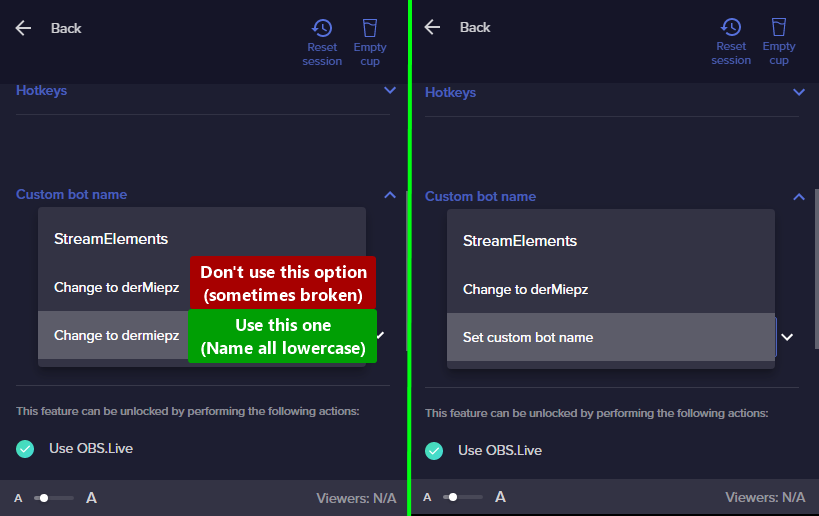


 thorny cloud
it now doesnt have the 'set custom bot name' it just says the name of the bot i created earlier
 sharp turret
thorny cloud
it now doesnt have the 'set custom bot name' it just says the name of the bot i ...
sharp turret
thorny cloud
it now doesnt have the 'set custom bot name' it just says the name of the bot i ...
If you click remove custom bot account and reconnect it, does it work?
 thorny cloud
i tried that it doesnt work still; :/
dapper iglooBOT
@thorny cloud ⤵️
- Right-click on your OBS desktop shortcut and open the Properties
- In the Target field, add the following to the very end:
--remote-debugging-port=40404(don't forget to add a space before the current path) - Open OBS (or restart if it was open)
- Open your web browser and type in:
localhost:40404 - Click on StreamElements - Activity feed
- Navigate to the Console tab
- Type the following into the console and hit enter:
store.customBot.removeCustomBotIntegration() - Try setting the custom bot name
- Remove the additional flag in step 2 from your shortcut properties.
thorny cloud
still not working after doing these steps
sharp turret

thorny cloud
even what i press send test message it does nothing
sharp turret
Can you disable follower only mode for a sec?
sharp turret
thorny cloud
you genius! thank you 😄
Make sure you mod the custom bot
thorny cloud
yes i will do, thank you!
sharp turret
You're welcome! 
 night dagger
Hello! I was prompted to update OBS.live and StreamElements after launching, but during the update, something went wrong and I had to cancel the process. However, now my chat box and activity feed are just blank screens. I tried restarting my PC, and reconnecting my Twitch account, but now I can't even connect it because the windows that pops up to authorize is also blank. What should I do?  (When I click "Check for Update", it says the latest version has been installed)
outer flame
Hi, I have a problem with obs.live and it is that if I try to log in with twitch it does not load and I left it for 2 hours and nothing
 amber echo
is there anyway to record past gameplay? like say i want to record the last 5 minutes i just played
 jovial light
Anyone available to help and answer questions about the loyalty system
First question is there a way to reset everyone’s points
jovial light
amber echo
is there anyway to record past gameplay? like say i want to record the last 5 mi...
GeForce experience
ocean rivet
jovial light
First question is there a way to reset everyone’s points
there's a button at the top of your leaderboards page that says reset 😄
jovial light
ocean rivet
there's a button at the top of your leaderboards page that says reset 😄
I did that but people say they still have there channel points
Then when i was going to give someone 1,000 added to them they dont actually get it
ocean rivet
jovial light
Then when i was going to give someone 1,000 added to them they dont actually get...
try resetting from the all time tab
jovial light
Did that to
ocean rivet
and did the points show as 0 when you refreshed the page?
jovial light
Yeah but then when i asked someone in chat if they still had their points they said yes and on the website it was not correct someone had 13k points but only showed 1.8k on the leaderboard
but he sent me a screenshot of him having 13k even after i reset the board
I just reset it again just now ill have to see if it worked when i go live later
jovial light
ocean rivet
and did the points show as 0 when you refreshed the page?
Alsos it dont show 0 when you do it. It shows this
 ocean rivet
jovial light
Alsos it dont show 0 when you do it. It shows this
ocean rivet
jovial light
Alsos it dont show 0 when you do it. It shows this
thats fine, there's no data yet
jovial light
Yeah but someone did say they still had there points so not sure if it worked
ocean rivet
send us a screenshot of the chat command showing their amount of points if someone reports that again
jovial light
ocean rivet
thats fine, there's no data yet
Also when adding someone channel points is it instant going into there account?
ocean rivet
jovial light
Also when adding someone channel points is it instant going into there account?
correct
 stable fulcrum
Did you find an answer to this?
warped lotus
can some one help me? I have a question: My viewers are requesting songs that are waiting for approval,but my Mods aren't able to see the requested songs that need approval.
minor badge
ocean rivet
what kind of webcam you have?
Supremo. In Facebook messenger ive use it. but in OBS I did not. Im so exhausted seeking for solution. Please help me
 lost kiln
Hi, I'm having an issue with the plugin. I'm currently streaming right now and whatever notification comes in it says 15 minutes ago and goes down instead of going up from when the notification appeared. I've been having issues with everything streamelements for a while now, from my alerts being super broken to now this (and they are still super broken).
Here is the issue right now.
 ocean rivet
lost kiln
Hi, I'm having an issue with the plugin. I'm currently streaming right now and w...
ocean rivet
lost kiln
Hi, I'm having an issue with the plugin. I'm currently streaming right now and w...
my follow notification was announced in the chat and was shown in the activity feed right away
 ocean rivet
lost kiln
Hi, I'm having an issue with the plugin. I'm currently streaming right now and w...
ocean rivet
lost kiln
Hi, I'm having an issue with the plugin. I'm currently streaming right now and w...
is that taken from obs.live or the website?
lost kiln
ocean rivet
my follow notification was announced in the chat and was shown in the activity f...
Obs.live, and that was the first one that has showed up since the start of this stream.
ocean rivet
lost kiln
Obs.live, and that was the first one that has showed up since the start of this ...
try refreshing the dock by clicking the refresh icon at the top left of the dock
lost kiln
ocean rivet
try refreshing the dock by clicking the refresh icon at the top left of the dock
I did twice now. I'm going to see if it does again, but I've been having issues with my alerts even before I got the obs.live extension.
rugged quail
I'm having trouble connecting my PS remote play to my OBS, I've done the browser source... am I suppose to create a new scene? and I've also done everything I've been shown through youtube how to set everything up, but PS remote play is still disconnecting for some reason
dapper iglooBOT
@rugged quail ⤵️
Obs.live is a plugin for OBS Studio for the best OBS support, please join their Official Discord @ https://discord.gg/obsproject
 robust thunder
I'm having some issues with audio distortion. I've narrowed it down to OBS being that I've uninstalled most other software touching my audio
vast wren
robust thunder
I'm having some issues with audio distortion. I've narrowed it down to OBS being...
what are you experiencing exactly?
robust thunder
Echoing with modulation seems to be the best way to describe it
winged jackal
my obs mic is not increasing in obs
 dapper iglooBOT
@winged jackal ⤵️
Obs.live is a plugin for OBS Studio for the best OBS support, please join their Official Discord @ https://discord.gg/obsproject
 pallid haven
@robust thunder I am having the same issue
robust thunder
pallid haven
<@!140736040288780289> I am having the same issue
I reset my audio drivers and it appeared to work
 vestal mortar
So My microphone is just now starting to be like roboticy on stream and only on stream, in discord it sounds fine and anywhere else and so does my desktop audio only on stream. Any Fixes?
 small radish
Hey am I able to get some help
rugged quail
Sure
small radish
So I’ve had 2 massive problems recently
One , once I hit affiliate my OBS wouldn’t connect to my twitch properly and 2 my voice and game started to echo and have like a robotic sound to it
rugged quail
the fastest way to fix that would be to logout and then log back in from both obs.live and our website
small radish
Ok would that fix both
rugged quail
give it a shot
small radish
I’m getting invalid refresh token (HTTP 400)
sharp turret
Disconnect and reconnect account in OBS Settings > Stream
small radish
Thank you
sharp turret
You're welcome!
small radish
the only other problem is my mic is really distorted and sounds like an echo and robotic
rugged quail
if you disconnect and reconnect the mic are you still getting that issue?
small radish
yeah
rugged quail
I'd recommend you reach out to OBS then, it might be on their end
OBS.Live does not mess with your audio
 shrewd vector
Hey guys, I'm having an issue right now, somehow I'm not able to re-order layers in the overlay editor... Anyone facing the same problem? Any solution?
rugged quail
shrewd vector
Hey guys, I'm having an issue right now, somehow I'm not able to re-order layers...
reloading the page would usually help with that
shrewd vector
Thanks, may I ask how would I do that? I'm using StreamElements straight inside OBS, can't locate a refresh button..
Ok, connected through Chrome, and managed to re-order. The desktop app seem broken.
Probably related, notice the lack of alignment in the left menu items...
 vast wren
are you using chrome?
 grizzled umbra
My audio sounds clunky, echoish and static
Like there is a robot filter on my voice
 rich turret
Hi! I need help please
I tried the bouncing logo by lx from widget-share channel but it wont bounce and it just stops at the bottom of the screen. How do I fix this? Ref: #widget-share message
vast wren
rich turret
I tried the bouncing logo by lx from widget-share channel but it wont bounce and...
are you using the same settings?
rich turret
vast wren
are you using the same settings?
yeap
dapper iglooBOT
@rich turret ⤵️
Please provide your account ID found at the top of this page: https://streamelements.com/dashboard/account/channels This ID is public info and safe to share here.
rich turret
dapper igloo
<@689477435175206933> ⤵️
60d3372aa4f9335e8e742e7b
latent scaffold
Hey all. I'm having issues with getting my chat window to sign in using OBS.Live in OBS Studio. I can see the chat fine when I'm streaming, but I can't sign in to chat myself. Says something about the browser not being supported. I tried the pinned help in #helpdesk-youtube but couldn't find a solution. Anyone able to help?
latent scaffold
Ah okay, good to know. Then I don't need to fiddle with it for now. 🙂 Thanks! 🙂
heady storm
so I checked the filters for seeing if my tips were enabled. but that only shows them in my activity feed on SE not on my nomal obs ? 🙂
shy mountain
If you are referring to the twitch OBS integration - that activity feed is native to Twitch and twitch doesn't have any connection to the tipping link with us 🙂
heady storm
ahh ok thats cool thanku is there a way to atleast have the messaeg people might put in a dono to show in the chat or something or do i just pop out the activity feed from the webpage and use that ? 🙂
shy mountain
You can use OBS.Live - it has our activity feed built into as a dock for OBS Studio
but, besides poping out the activity feed, no other way.
heady storm
yeah thats the ob i downloaded it just isnt working for the tips
i think anyways 😄
yeah its called streamelements OBS.LIVE
shy mountain
heady storm
uhhuu no mine doesnt have that activity feed ?:(
shy mountain
Streamelements on top -> OBS.Live docks -> activity feed
heady storm
when i hover over the obs.live docks it doesnt show anything or when i click
really sorry im bad with this stuff 😄

nvm im actually just stupid i really appreciate the help ❤️ ❤️
shy mountain
probably had to logout and login again? 
 placid iron
Guys I'm having a weird issue, when my audio is crackling, when I go do TS, Discord and Record myself is all perfect, but on my stream is crackling, any idea what can be?
soft knot
placid iron
Guys I'm having a weird issue, when my audio is crackling, when I go do TS, Disc...
Earlier today, there was a Twitch issue where audio was choppy. Some users reported audio problems in the live stream, but the audio in VODs and clips was ok. Is that similar to what you're experiencing?
placid iron
soft knot
Earlier today, there was a Twitch issue where audio was choppy. Some users repor...
Just gonna check it clips are ok, one sec
@soft knot Yep, is exactly this thing
On clip is perfect too
soft knot
Yup. It's probably on Twitch's side.
toxic fern
Outside of disabling the option in OBS no.
placid iron
soft knot
Yup. It's probably on Twitch's side.
In case that you guys need: In OBS > Settings > Output > Streaming uncheck Twitch VOD Track
Worked for me :D
soft knot
Thank you. 🙂
jovial light
Hello follow up question about channel points not resetting in chat can someone help
People still say they have their points
after even resetting the board
@soft knot you able to look at this?
I reset Current and All time
 sharp turret
Wrong channel you want the #helpdesk-twitch channel
jovial light
Ahh got it sk1ll helped me here yesterday so thought it was the 1
sharp turret
No problem, this channel is for help with StreamElements OBS.Live plugin
jovial light
got it
 latent parcel
I have a problem my audio on the pc is normal, but in live it is robotic, does anyone have any solution for that?
soft knot
latent parcel
I have a problem my audio on the pc is normal, but in live it is robotic, does a...
Does it sound good in VODs/clips?
latent parcel
RObotic too
soft knot
I'm not sure it's relevant for you, but try to disable "Twitch VOD Track" in Settings -> Output
latent parcel
But the problem is that not live she is robotic
But the problem is that she is robotic live.
indigo raven
Still having issues with my stream elements dock chat (dock, not overlay chat), says it is unable to find my live stream, so it doesnt display chat messages. Ive tried re-installing SE, Ive tried logging in and out numerous times, ive tried reconnecting with new stream keys and nothing will work. It worked for the longest time until a week or so ago.
*streaming to facebook by the way.
 placid citrus
I need help please 😇
My computer is having errors and restart every time I am trying to close Streamelements OBS.live (OBS) . Has anyone experienced this before ?
 ashen junco
Hello i use obs live to stream and mine isnt a problem, but my friend is having trouble that hes chat and activity feed is going black and he cant see anything on hes chat or activity feed, any troubleshooting for this? he is stream from 2 different setups, i dont know if hes logged in one place he cant be logged on the other?
placid citrus
hi, I need help please 😇
My computer is having errors and restart every time I am trying to close Streamelements OBS.live (OBS) . Has anyone experienced this before ?
Here is a picture of my error on screen.
 quick atlas
placid citrus
hi, I need help please 😇
My computer is having errors and restart every time I...
quick atlas
placid citrus
hi, I need help please 😇
My computer is having errors and restart every time I...
Being a windows error, you might have some luck looking into that specific one and seeing if it's tied to any software/hardware
quick atlas
ashen junco
Hello i use obs live to stream and mine isnt a problem, but my friend is having ...
He could try logging out of OBS.Live completely and loggin back in, but it'd be hard to guess without seeing the issue.They have any screenshots?
 hybrid flume
is there a way to remove the large header and the filter section on the activity feed(also on the chat as well)? it eats a lot of UI's real estate especially on smaller screen sizes (i'm using a 15" on this).
also, the facebook profile icon on the 'write comment section' is a bit distorted
 dapper oracle
Heyo guys, i have question about SE Overlays, sometimes I stream Warzone and it my CPU is running at 100% and i feels some stuttering. My question is, does browsers take more CPU or for less CPU usage try to set overlay inside OBS? Thank you
quick atlas
dapper oracle
Heyo guys, i have question about SE Overlays, sometimes I stream Warzone and it ...
It depends on what the browser source is trying to load, and how many you have. A heavy overlay will require more cpu
dapper oracle
For example i have webcam frame, some goal, alerts and small icon with subs count
quick atlas
Other than the alerts, are any of those other things animated?
dapper oracle
All is animated except sub icon
indigo raven
Still having issues with my stream elements dock chat (dock, not overlay chat), says it is unable to find my live stream, so it doesnt display chat messages. Ive tried re-installing SE, Ive tried logging in and out numerous times, ive tried reconnecting with new stream keys and nothing will work. It worked for the longest time until a week or so ago.
*streaming to facebook by the way.
 oak rune
hello! I'm having issues with the chatbot not using the account name that I assigned to it
when I go to Activity Feed -> Stream Settings -> Custom Bot Name -> Connect Custom Bot Account
I input the account information, but after I log into the account it doesn't get saved, as the connect custom bot account button is still enabled and "send test message" isn't
I'm using the latest version of OBS.Live
dapper iglooBOT
@oak rune ⤵️
If your commands recently stopped working and you're using OBS.Live and a custom bot name do the following:
- In OBS.Live, click on the hamburger menu (three stripes) at the top left of your activity feed
- Click on Stream Settings > Custom bot name
- In the Custom bot name field select Set custom bot name, not your already existing username (with capital letters). Note: If you already connected an account that way, the third entry will show as the account name (see image https://i.imgur.com/re4theQ.png).
- Scroll a bit down and click on the purple Connect Custom Bot Account button
- Log in as usual and Authorize the custom bot name
- Back in the Activity feed, click on the Send Test Message button and check if your custom bot name starts working again
oak rune
that is not my issue alas
ocean rivet
oak rune
that is not my issue alas
try this:
dapper iglooBOT
- Right-click on your OBS desktop shortcut and open the Properties
- In the Target field, add the following to the very end:
--remote-debugging-port=40404(don't forget to add a space before the current path) - Open OBS (or restart if it was open)
- Open your web browser and type in:
localhost:40404 - Click on StreamElements - Activity feed
- Navigate to the Console tab
- Type the following into the console and hit enter:
store.customBot.removeCustomBotIntegration() - Try setting the custom bot name
- Remove the additional flag in step 2 from your shortcut properties.
oak rune
I can't find the console tab